Windows Instructions
User Manual:
Open the PDF directly: View PDF  .
.
Page Count: 19
!"#$%&&'"()$*+),-%./#0%"),+"+.%$1.)1")23)
Justin'Mansell'
'
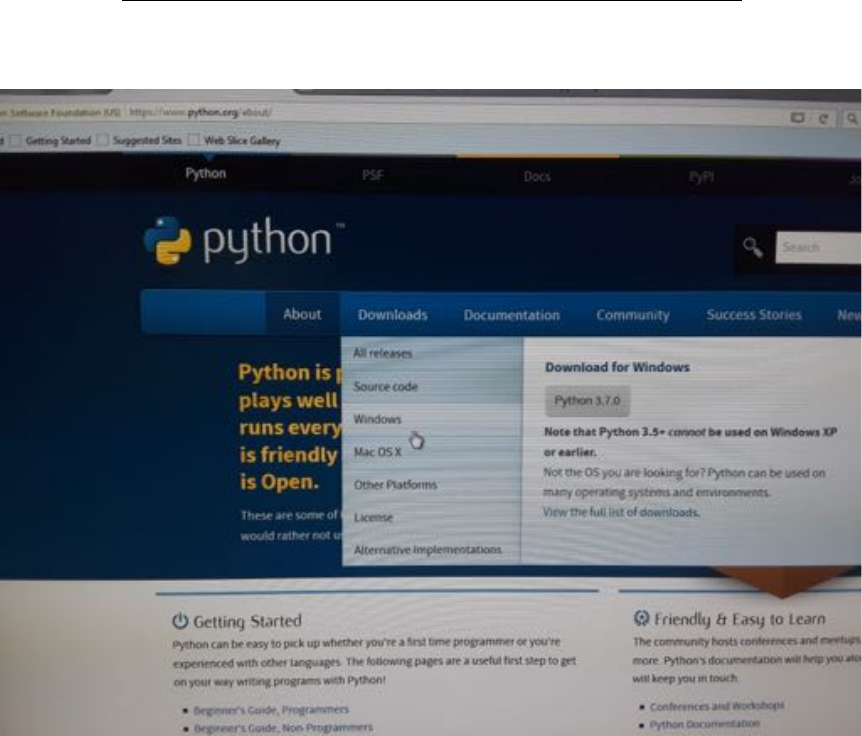
45)Go'to'the'python'website'and'click'on'downloads'for'windows'
'
'
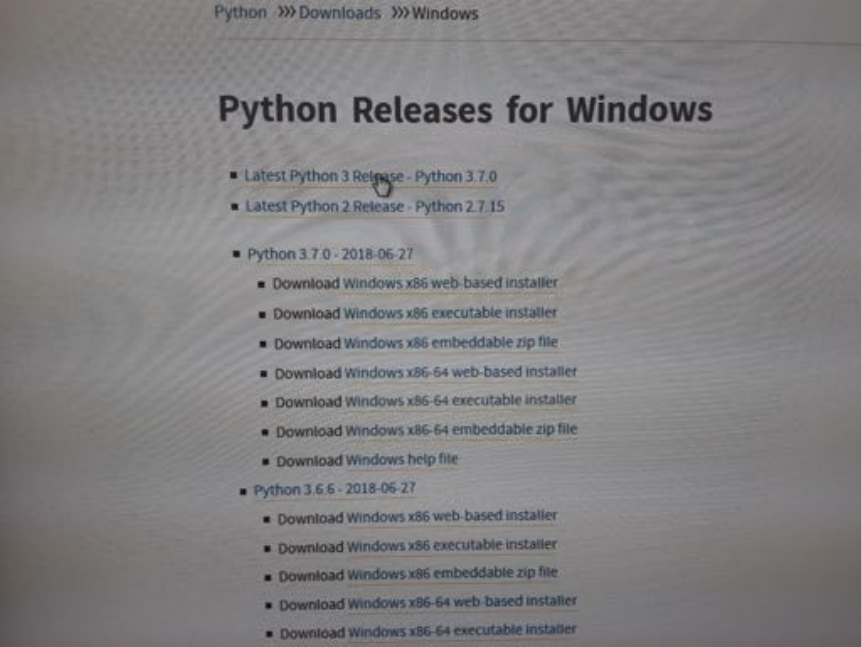
65)Click'on'the'latest'python'release'(3.7)
'
'
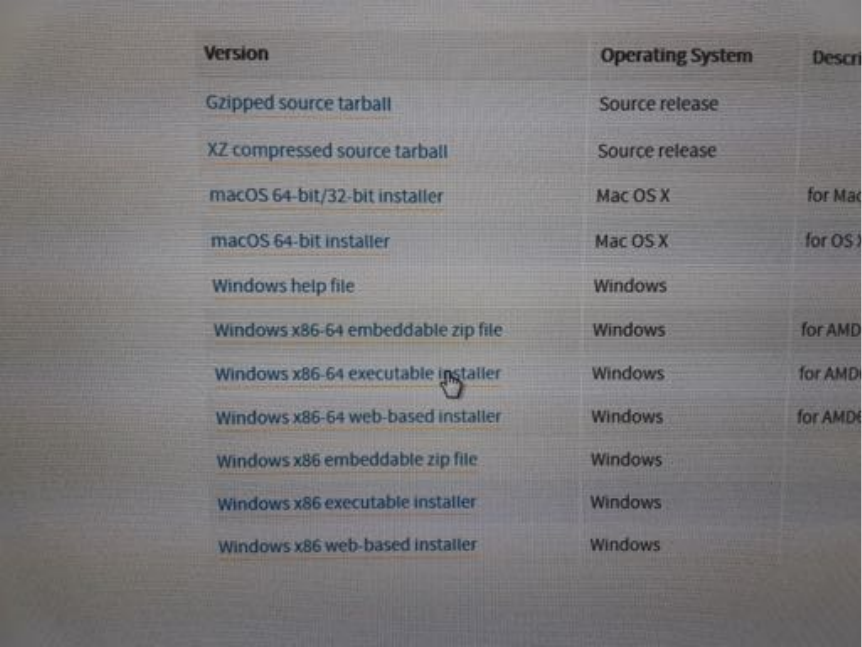
75)Download'the'Windows'x86'64'executable'installer
'
'
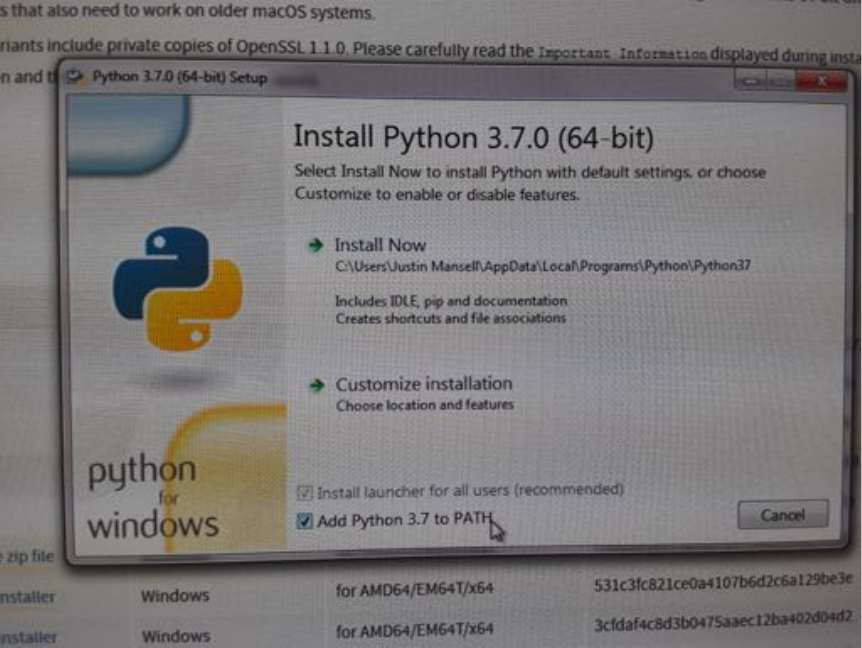
85)Run'the'executable'installer.'But'before'you'install,'be'sure'to'check'“Add'Python'
3.7'to'PATH”.'
'
'
)
)
)
)
)
)
)
)
)
)
)
)
)
)
)
)
)
)
)
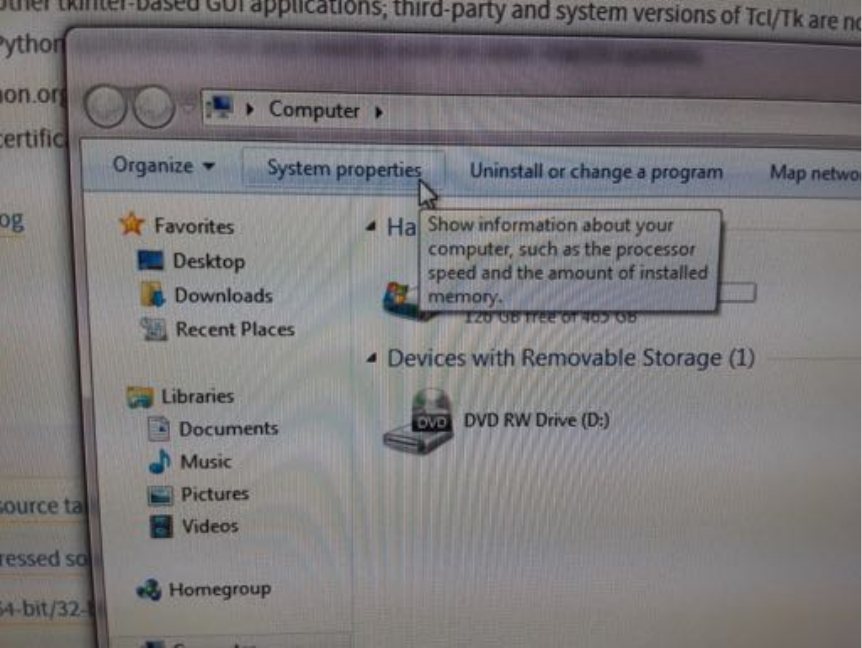
95)We'need'to'make'sure'that'the'command'terminal'can'access'the'directory'where'
the'python'download'is'installed.'Once'the'download'completes,'open'up'“My'
computer”'and'click'on'“System'properties”
'
'
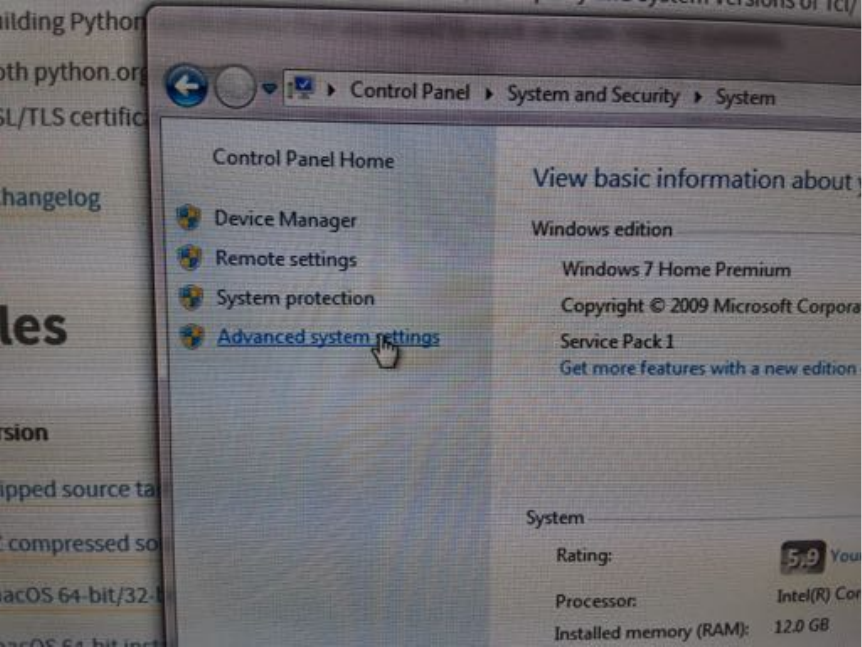
:5)Next,'click'on'“Advanced'system'settings”
'
'
'
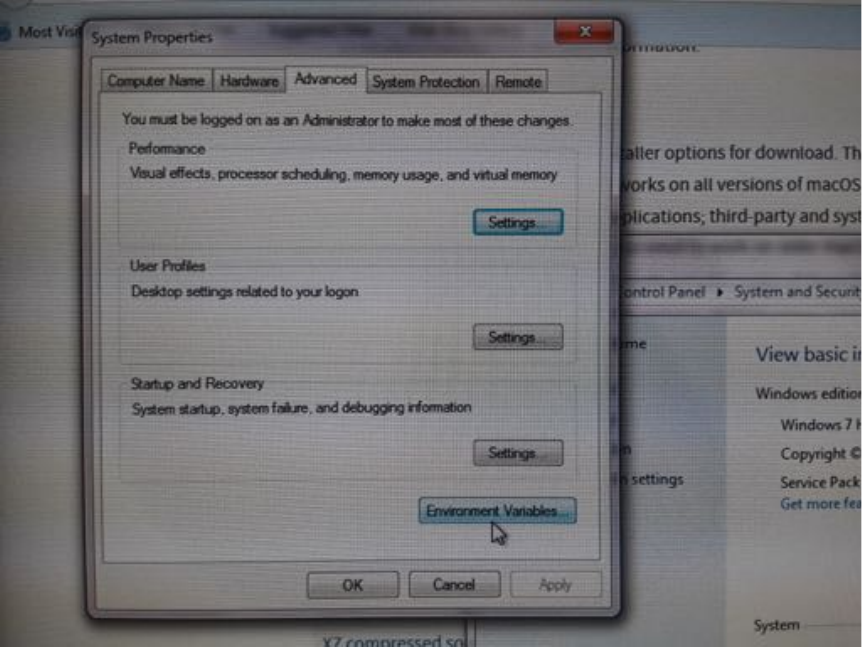
;5)Then'“Environment'Variables”
'
'
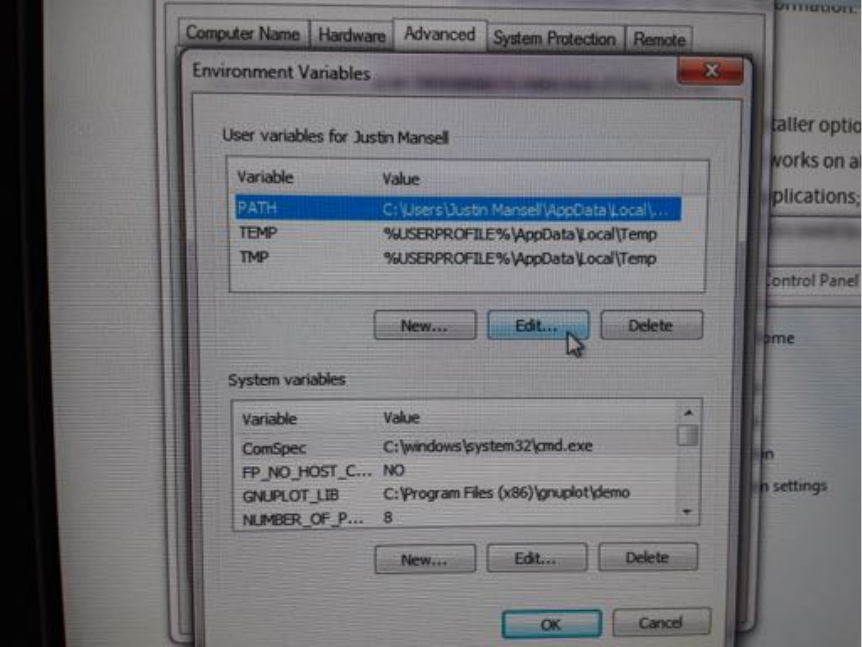
<5)Select'the'“PATH”'variable'and'click'“Edit”
'
'
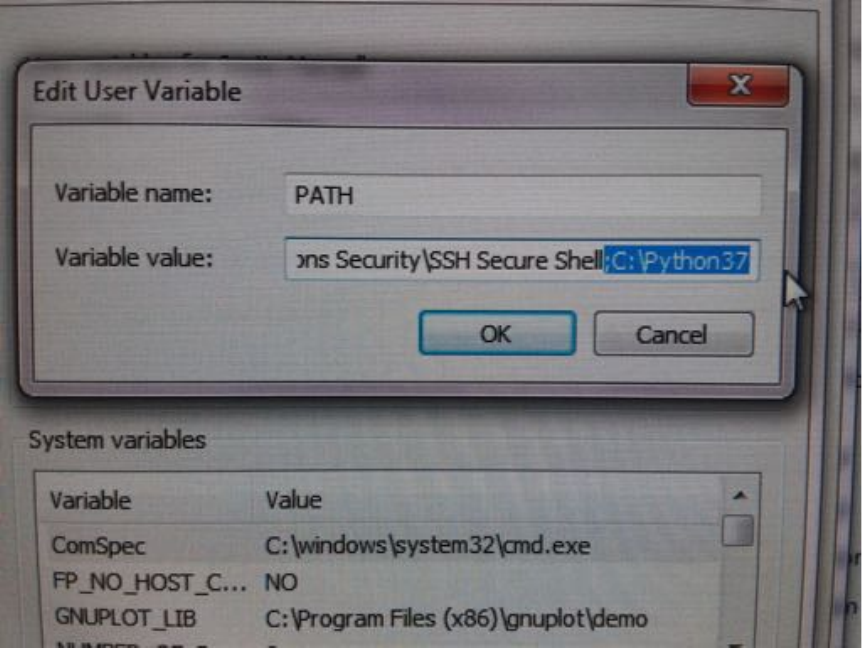
=5)Scroll'to'the'end'of'the'variable'value.'After'“SSH'Secure'Shell”'we'need'to'add'the'
following:'“;C:\Python37”
'
'
)
)
)
)
)
)
)
)
)
)
)
)
)
)
)
)
)
)
)
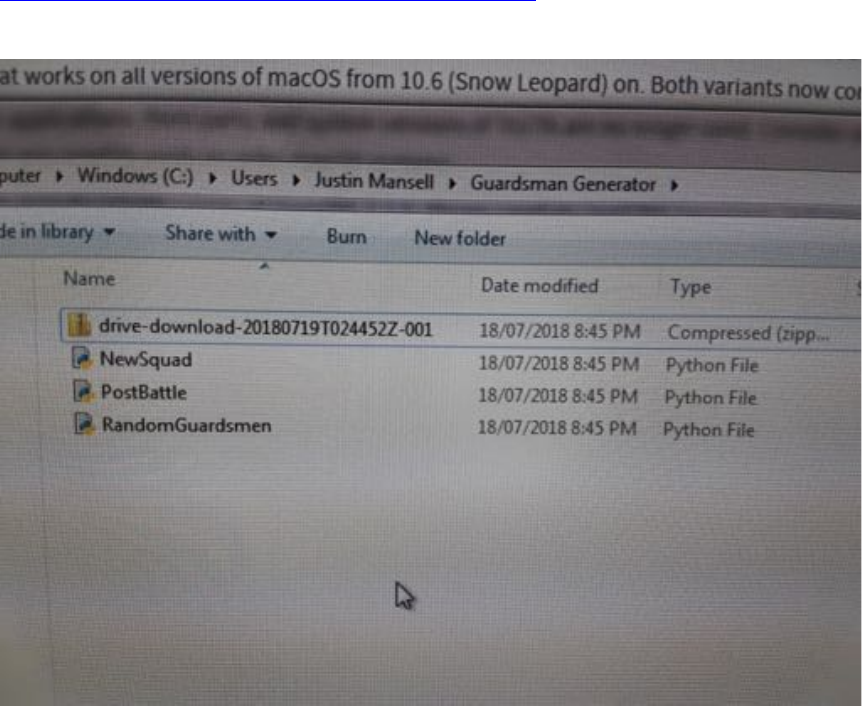
4>5'Click'“OK”'on'everything.'Now'set'up'a'folder'for'your'Guardsmen'files'at'a'
location'of'your'choosing.'I'made'mine'under'“Users>Justin'Mansell”.'Download'the'
guardsmen'generator'python'files'(3'files)'from'here:'
https://github.com/jrmansel/guardsmen-generator'
'
Then'unzip'these'files'into'the'folder'you'set'up.'
)
'
'
)
)
)
)
)
)
)
)
)
)
)
)
)
)
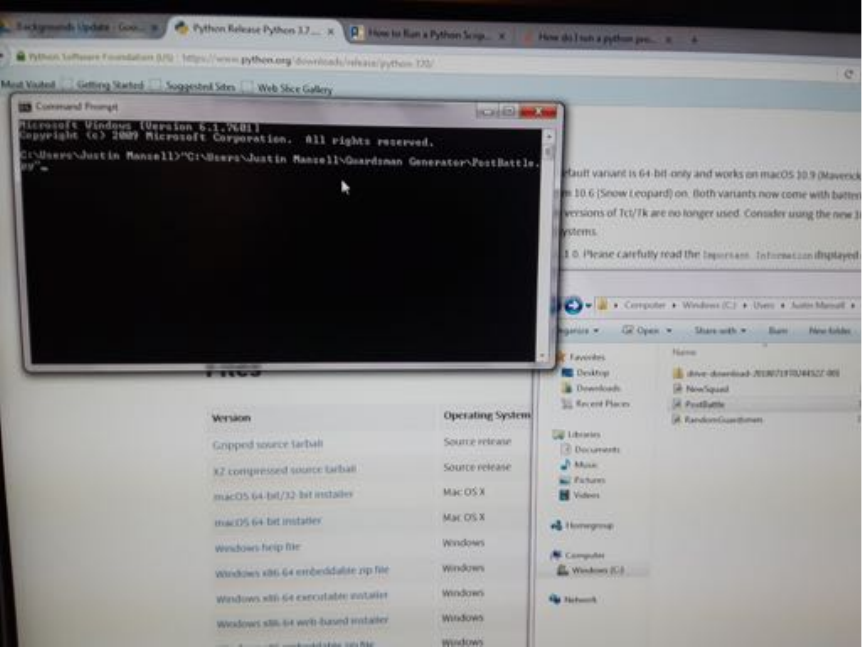
445)Now'we'can'get'down'to'business.'Open'the'Command'Prompt'terminal'
(accessible'from'the'windows'button).'You'should'see'a'black'terminal'screen'
appear'with'a'line'something'like'“C:\Users\YourName>”.'Before'we'run'any'
programs'we'need'to'navigate'the'terminal'to'where'those'files'are.'Click'and'drag'
one'of'the'files'(it'doesn’t'matter'which'one)'from'your'Guardsmen'folder'and'drop'
it'into'the'terminal.'You'should'see'the'path'to'that'file'appear.'Delete'the'name'of'
the'program'from'this'path'along'with'any'repeated'information'at'the'beginning'of'
the'path'(the'C:\Users\Justin'Mansell\'in'the'image'below)
'
'
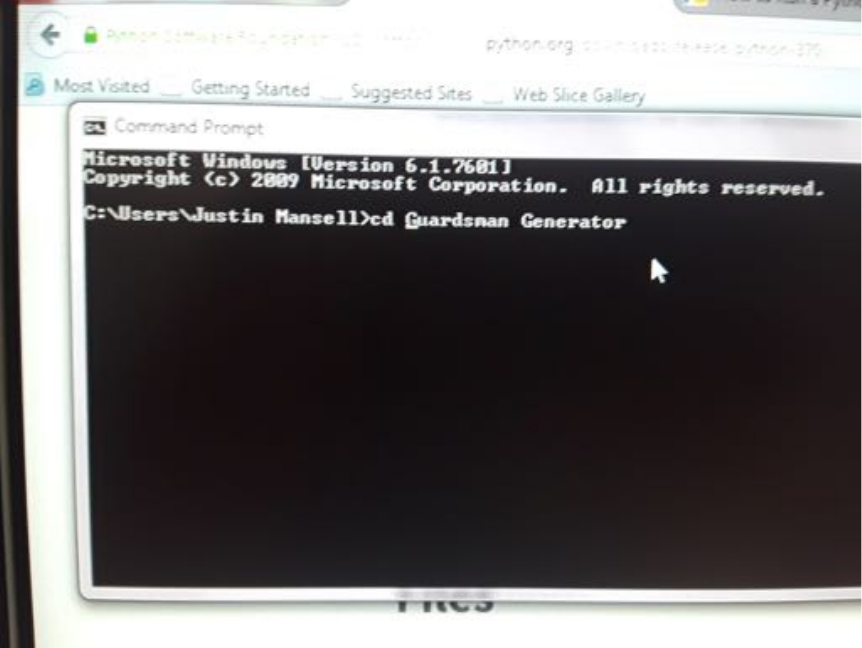
465)Add'“cd”'to'the'start'of'the'path.'This'stands'for'“call'directory”'and'will'take'us'
to'the'location'of'the'files.'Hit'enter.'
'
'
)
)
)
)
)
)
)
)
)
)
)
)
)
)
)
)
)
)
)
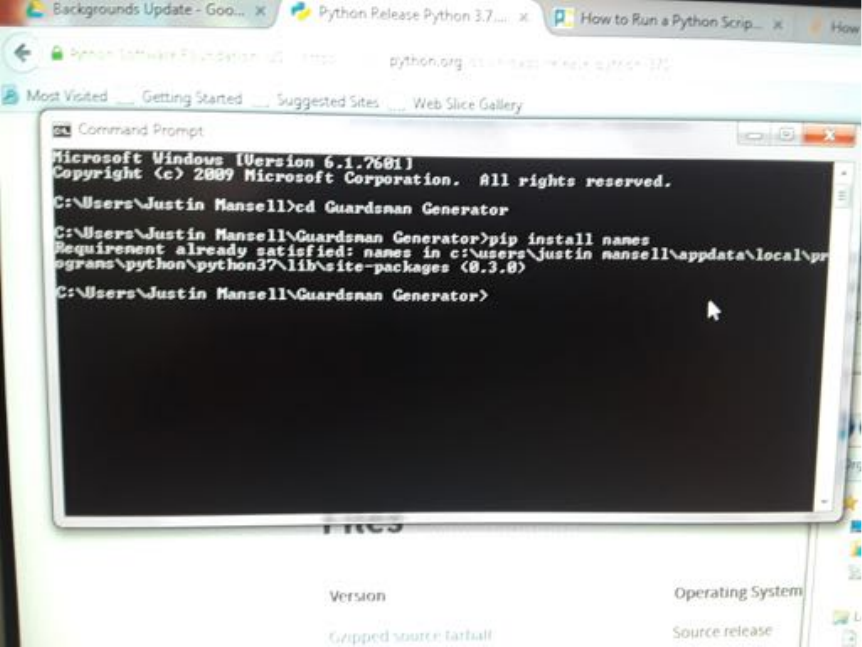
475)Before'we'can'run'the'Guardsmen'programs'we'need'to'install'one'last'thing.'
Type'“pip'install'names”'and'hit'enter.'The'terminal'will'do'some'hacker'nerd'stuff'
and'then'finish.'The'purpose'of'this'is'to'download'the'python'module'called'
“names”'that'allows'the'programs'to'randomly'generate'names'for'your'guardsmen.'
In'the'image'below'I'already'have'“names”'installed,'so'the'terminal'tells'me'such.'
You'will'only'need'to'do'this'the'first'time,'not'every'time'you'want'to'generate'or'
process'your'squads.
'
'
)
)
)
)
)
)
)
)
)
)
)
)
)
)
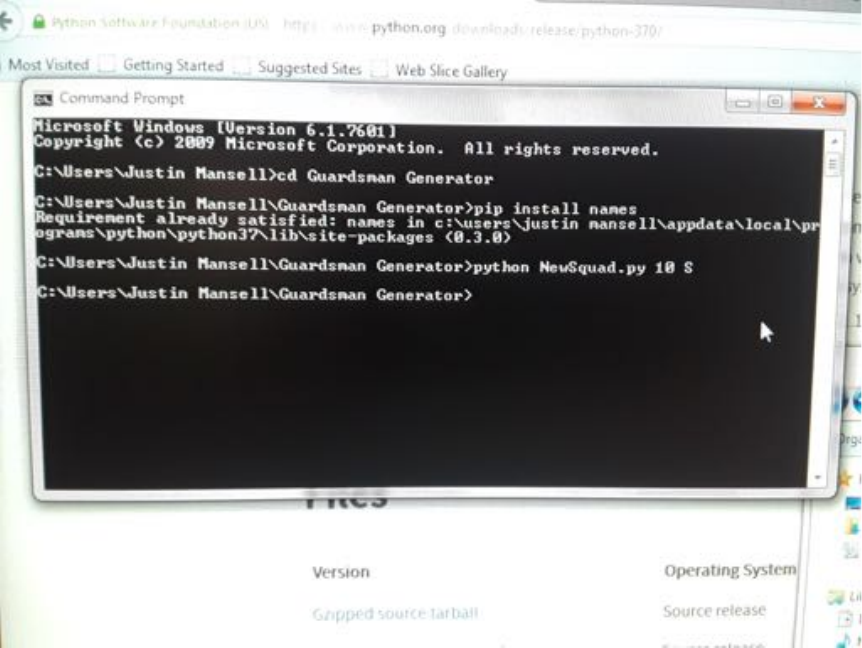
485)You’re'all'set!'Now'let’s'try'making'a'squad.'To'generate'a'new'squad,'type'
“python'NewSquad.py'10'S”.'The'“python”'tells'the'computer'that'we'want'to'
execute'a'python'program.'“NewSquad.py”'is'the'program'we'want'to'execute.'Next'
is'the'number'of'soldiers'we'want'in'the'squad.'Then'finally'is'an'optional'letter'that'
indicates'the'type'of'squad.'If'you'just'want'normal'guardsmen'you'can'omit'this'
letter.'Otherwise,'“S”'creates'a'squad'of'scions,'“C”'creates'a'squad'of'conscripts,'and'
“V”'creates'a'squad'of'veterans.'If'you'type'any'other'letter'(except'“G”)'the'program'
will'generate'the'squad'without'a'sergeant,'which'can'be'useful'for'generating'tank'
crews,'heavy'weapon'squads,'special'weapons'teams,'and'the'like.'
'
'
'
'
'
'
'
'
'
'
'
'
'
'
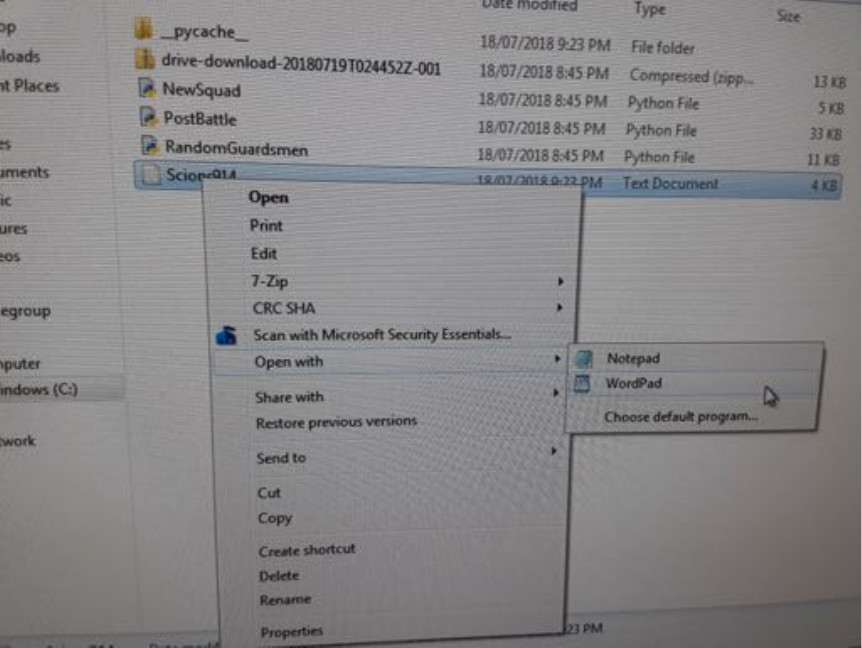
495)After'you'hit'enter'you'should'see'a'text)file'appear'in'the'folder'alongside'the'
Guardsmen'programs.'To'view'the'squad,'open'the'text'file'with'WordPad.'Notepad'
cannot'read'the'end'of'line'character'written'by'the'Guardsmen'program'and'so'the'
entire'file'appears'as'one'huge'string'of'text.
)
'
)
)
)
)
)
)
)
)
)
)
)
)
)
)
)
)
)
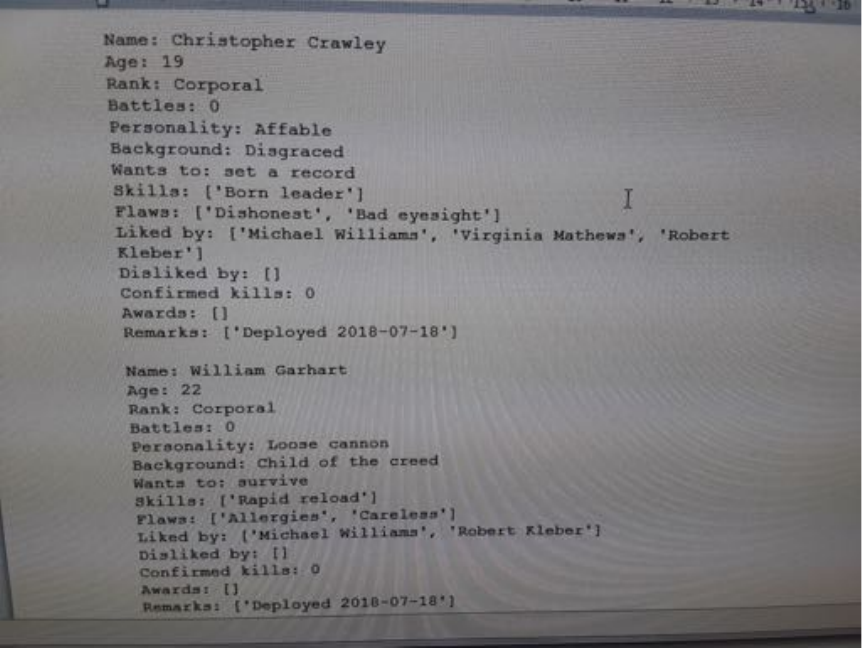
4:5)Looks'good!'If'you'want,'you'can'edit'any'of'the'soldiers'as'you'see'fit,'but'be'
sure'to'follow'the'format'exactly,'or'else'the'Guardsmen'programs'will'not'be'able'to'
read'the'file.'
'
'
)
)
)
)
)
)
)
)
)
)
)
)
)
)
)
)
)
)
)
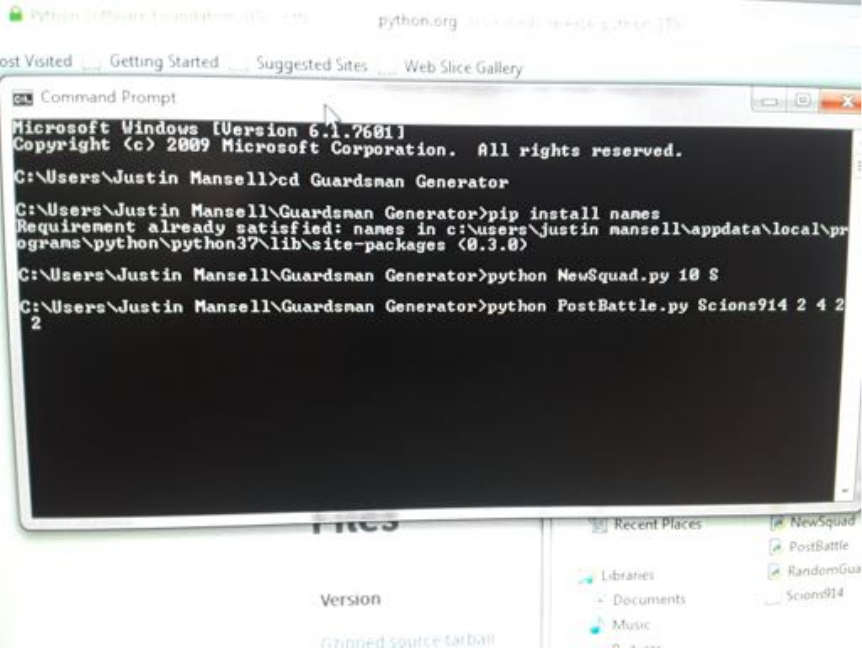
4;5)Time'for'battle!'To'process'combat'and'post'combat'results'for'the'squad,'type'
“python'PostBattle.py'squadfile”'followed'by'4'numbers.'Substitute'<squadfile>'for'
the'name'of'the'squad'you'wish'to'process.'In'this'case,'we'are'processing'our'
Scions914'squad.'The'four'numbers'represent'the'following:'(i)'the'number'of'
soldiers'who'were'definitely'killed'(e.g.'by'summary'execution'or'being'inside'a'
vehicle'that'exploded)'(ii)'the'number'of'regular'casualties'(who'may'be'dead'or'
wounded)'(iii)'the'number'of'soldiers'that'fled'(i.e.'morale'losses)'(iv)'the'number'
of'victory'points'earned'by'the'squad'(feel'free'to'add'more'if'you'thought'the'squad'
performed'particularly'well).''
'
'
'
'
' '
'
'
'
'
'
'
'
'
'
'
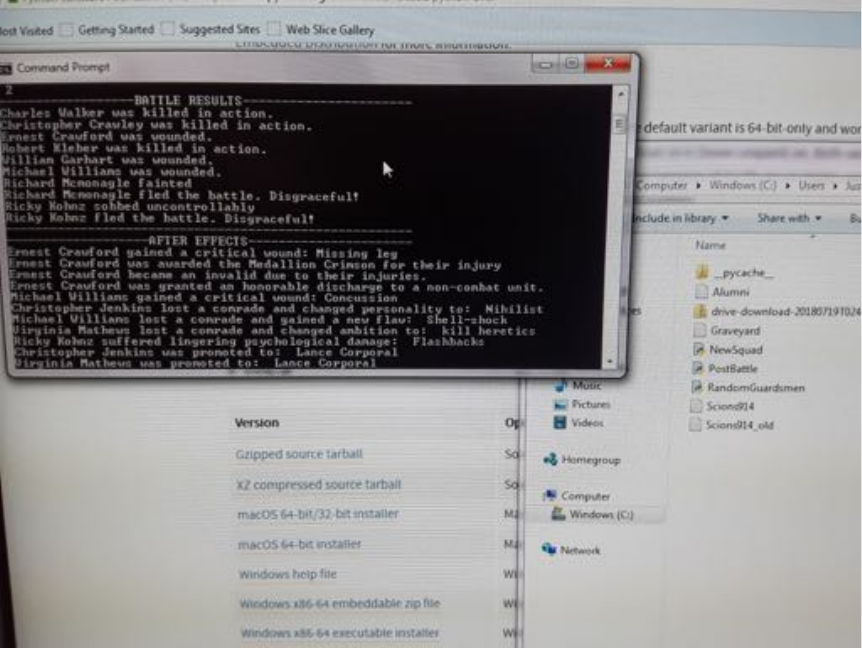
4<5)Hit'enter.'The'program'will'generate'a'summary'of'all'the'effects'in'the'
command'terminal.'You'will'also'notice'in'your'Guardsmen'folder'that'an'“Alumni”'
and'“Graveyard”'file'have'appeared.'These'hold'the'guardsmen'that'have'retired'or'
been'slain,'respectively.'You'will'also'notice'that'a'copy'of'your'squad'suffixed'with'
“_old”'has'appeared.'This'stores'the'squad'as'it'was'before'the'last'battle.'If'you'
made'a'mistake'entering'the'casualties'(or'simply'don’t'like'the'results!)'you'can'
always'revert'to'this'(just'delete'the'current'squad'file'and'then'delete'the'“_old”'
suffix'from'the'old'copy).'The'version'without'the'“_old”'suffix'stores'the'most'up-
to-date'version'of'the'squad.
'
'
)
)
)
)
)
)
)
)
)
)
)
)
)
4=5)And'that’s'all'there'is'to'it!'It’s'important'to'write'down'how'many'casualties'
each'of'your'squads'take'in'the'Warhammer'match'so'that'you'can'enter'the'
numbers'accurately'later'on.'Also,'the'program'cannot'allocate'“confirmed'kills”'
because'it'doesn’t'know'anything'about'the'battle'aside'from'what'losses'and'VP'
you'report'to'it.'When'your'guardsmen'score'a'particularly'memorable'kill'(e.g.'the'
sergeant'getting'a'kill'with'his'bolt'pistol'or'the'special'weapons'guy'destroying'a'
vehicle),'you'can'go'into'their'squad'file'and'increase'their'number'of'confirmed'
kills'(it'must'be'an'integer'number).''
'
'
As'a'final'note,'it'can'be'a'lot'of'fun'to'customize'your'squads'(e.g.'adding'characters'
your'friends'created).'You'can'even'cut'and'paste'soldiers'between'files'to'transfer'
them'between'squads'(e.g.'veterans'transferring'to'a'command'squad).'All'this'
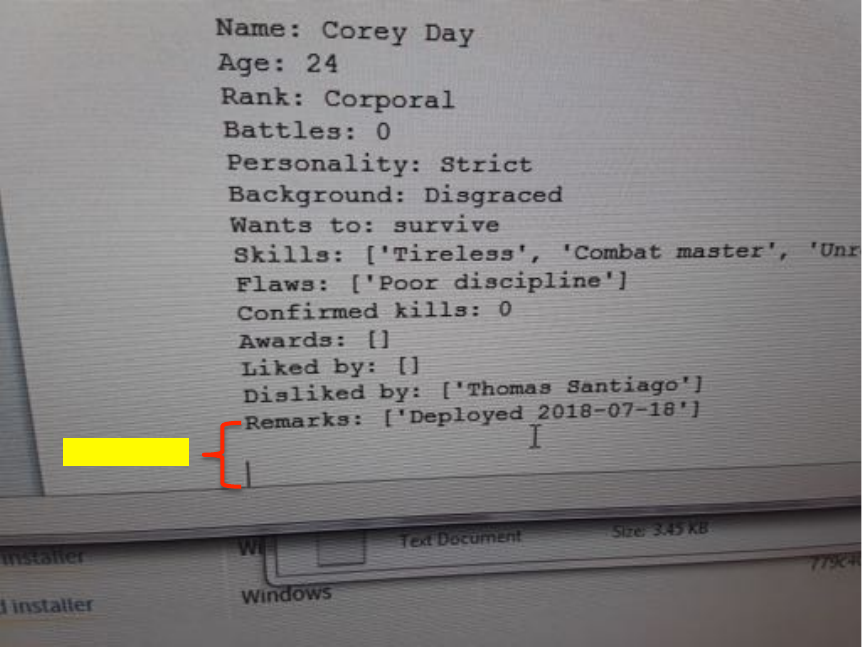
editing'is'fine'as'long'as'you'make'sure'there'are'two*blank*lines'at'the'end'of'the'
file.'If'there'are'more'the'program'will'read'into'the'third'blank'line'thinking'it'is'a'
guardsman'and'return'something'along'the'lines'of'“Key'error'[‘Names’]'not'found”.'
If'there'are'less'it'will'not'finish'reading'the'last'guardsmen'and'they'will'disappear'
from'the'squad.''
Two'spaces!'
