XUI Programming Guide
User Manual:
Open the PDF directly: View PDF  .
.
Page Count: 47
- Introduction
- Macro and Struct
- XUI API
- XuiOpen
- XuiIsRunning
- XuiClose
- XuiSuspend
- XuiResume
- XuiRootCanvas
- XuiStatusbarCanvas
- XuiCreateFont
- XuiDestroyFont
- XuiCanvasDrawText
- XuiCanvasDrawImg
- XuiCanvasDrawRect
- XuiClearArea
- XuiTextWidth
- XuiCreateCanvas
- XuiDestroyWindow
- XuiShowWindow
- XuiCanvasSetBackground
- XuiCreateButton
- XuiButtonSetStat
- XuiButtonSetKey
- XuiCreateSignatureBoard
- XuiSigBoardSetStat
- XuiSigBoardImg
- XuiCreateGif
- XuiHasKey
- XuiGetKey
- XuiClearKey
- XuiCaptureScreen
- XuiCaptureCanvas
- XuiImgLoadFormFile
- XuiImgSaveToFile
- XuiImgToRgba
- XuiImgTransform
- XuiImgFree
- XuiSetStatusbarIcon
- XuiGetHzString
- XuiGetString
- Note
- FAQ

PAX Computer Technology(Shenzhen)Co., Ltd.
XUI Programming Guide
V 2.0.0
{ This page intentionally left blank }
I
Copyright © 2000-2015 PAX Computer Technology (Shenzhen) Co., Ltd.
All rights reserved. No part of the contents of this document may be reproduced or
transmitted in any form without the written permission of PAX Computer Technology
(Shenzhen) Co., Ltd.
The information contained in this document is subject to change without notice. Although
PAX Computer Technology (Shenzhen) Co., Ltd. has attempted to ensure the accuracy of the
contents of this document, this document may include errors or omissions. The examples and
sample programs are for illustration only and may not be suited for your purpose. You should
verify the applicability of any example or sample program before placing the software into
productive use.

II
Revision History
Date
Version
Note
Author
2013-05-16
V1.0.0
The first issue
Xie Lihong
2013-10-18
V2.0.0
Update
Huang Lei
III
Contents
1 Introduction .....................................................................................................................1
1.1 Purpose ..................................................................................................................1
1.2 Function ................................................................................................................1
1.3 Feature ..................................................................................................................2
1.4 Thinking in XUI ....................................................................................................2
2 Macro and Struct .............................................................................................................5
2.1 Definition of Key values ........................................................................................5
2.2 Macro Definition ...................................................................................................6
2.3 Other Macro Definition .........................................................................................8
2.4 Structure ................................................................................................................8
3 XUI API ........................................................................................................................ 13
3.1 XuiOpen .............................................................................................................. 13
3.2 XuiIsRunning ...................................................................................................... 14
3.3 XuiClose ............................................................................................................. 14
3.4 XuiSuspend ......................................................................................................... 14
3.5 XuiResume .......................................................................................................... 15
3.6 XuiRootCanvas ................................................................................................... 15
3.7 XuiStatusbarCanvas ............................................................................................. 16
3.8 XuiCreateFont ..................................................................................................... 16
3.9 XuiDestroyFont ................................................................................................... 17
3.10 XuiCanvasDrawText ........................................................................................ 17
3.11 XuiCanvasDrawImg ......................................................................................... 18
3.12 XuiCanvasDrawRect ........................................................................................ 19
3.13 XuiClearArea ................................................................................................... 19
3.14 XuiTextWidth .................................................................................................. 20
3.15 XuiCreateCanvas ............................................................................................. 21
3.16 XuiDestroyWindow ......................................................................................... 21
3.17 XuiShowWindow ............................................................................................. 22
IV
3.18 XuiCanvasSetBackground ................................................................................ 22
3.19 XuiCreateButton .............................................................................................. 23
3.20 XuiButtonSetStat ............................................................................................. 23
3.21 XuiButtonSetKey ............................................................................................. 24
3.22 XuiCreateSignatureBoard ................................................................................. 24
3.23 XuiSigBoardSetStat ......................................................................................... 25
3.24 XuiSigBoardImg .............................................................................................. 26
3.25 XuiCreateGif .................................................................................................... 26
3.26 XuiHasKey ...................................................................................................... 27
3.27 XuiGetKey ....................................................................................................... 27
3.28 XuiClearKey .................................................................................................... 27
3.29 XuiCaptureScreen ............................................................................................ 28
3.30 XuiCaptureCanvas ........................................................................................... 28
3.31 XuiImgLoadFormFile ...................................................................................... 29
3.32 XuiImgSaveToFile ........................................................................................... 29
3.33 XuiImgToRgba ................................................................................................ 29
3.34 XuiImgTransform ............................................................................................ 30
3.35 XuiImgFree ...................................................................................................... 30
3.36 XuiSetStatusbarIcon ......................................................................................... 31
3.37 XuiGetHzString ............................................................................................... 31
3.38 XuiGetString .................................................................................................... 32
4 Note ............................................................................................................................... 35
4.1 Multi-process Supports ........................................................................................ 35
4.2 XuiDestroyWindow ............................................................................................. 35
5 FAQ .............................................................................................................................. 37
V
Table List
Table 1 Definition of Key values ....................................................................................5
Table 2 Macro Definition ................................................................................................6
Table 3 XuiTransform Rotate..........................................................................................6
Table 4 XuiButtonStatType ............................................................................................7
Table 5 XuiBgStyle ........................................................................................................7
Table 6 XuiFontSet .........................................................................................................7
Table 7 XuiTextStyle ......................................................................................................7
Table 8 XuiSigPenFlat ....................................................................................................8
Table 9 XuiWindowType ................................................................................................8
Table 10 Structure XuiWindow.......................................................................................9
Table 11 Structure XuiImg ..............................................................................................9
Table 12 Structure XuiButtonStat ...................................................................................9
Table 13 Structure XuiSigBoardStat ............................................................................. 10
Table 14 Structure XuiImeAttr ...................................................................................... 10
Table 15 Structure XuiGetStrAttr.................................................................................. 11
{ This page intentionally left blank }

Introduction
PAX Computer Technology (Shenzhen) Co., Ltd. 1
1 Introduction
1.1 Purpose
In contrast to the GUI, XUI is relatively easier to understand and use, it is suitable for
developing the Wizard-style interface. Such as POS machine, handhold terminal, ATM, and
so on customer-oriented terminals in public place.
XUI cannot implement a variety of special effects as the complicated GUI, but in
Wizard-style interface, it needs the simple and efficient GUI.
To put it simply, XUI programming is to draw and write by some keys.
1.2 Function
The functions of XUI list as following:
- Supports black-and-white screen.
- Supports monochrome font and gray font.
- Supports touch screen.
- Supports graphical display.
- Supports multi-font display.
- Supports bidirectional text display.
- Supports translucent. (Alpha Channel)
- Supports screenshot.
- Supports output the screenshot to printer, that means implement the unity of the display
interface and print interface.
XUI Programming Guide
2 PAX Computer Technology (Shenzhen) Co., Ltd.
- Supports multi-platform, including Linux framebuffer, X11, SDL, windows, android, ios,
but not limited to. And without operation system.
- Supports rotational screen.
1.3 Feature
- Imperative programming interface.
- An unification of screen buttons and physical keys.
1.4 Thinking in XUI
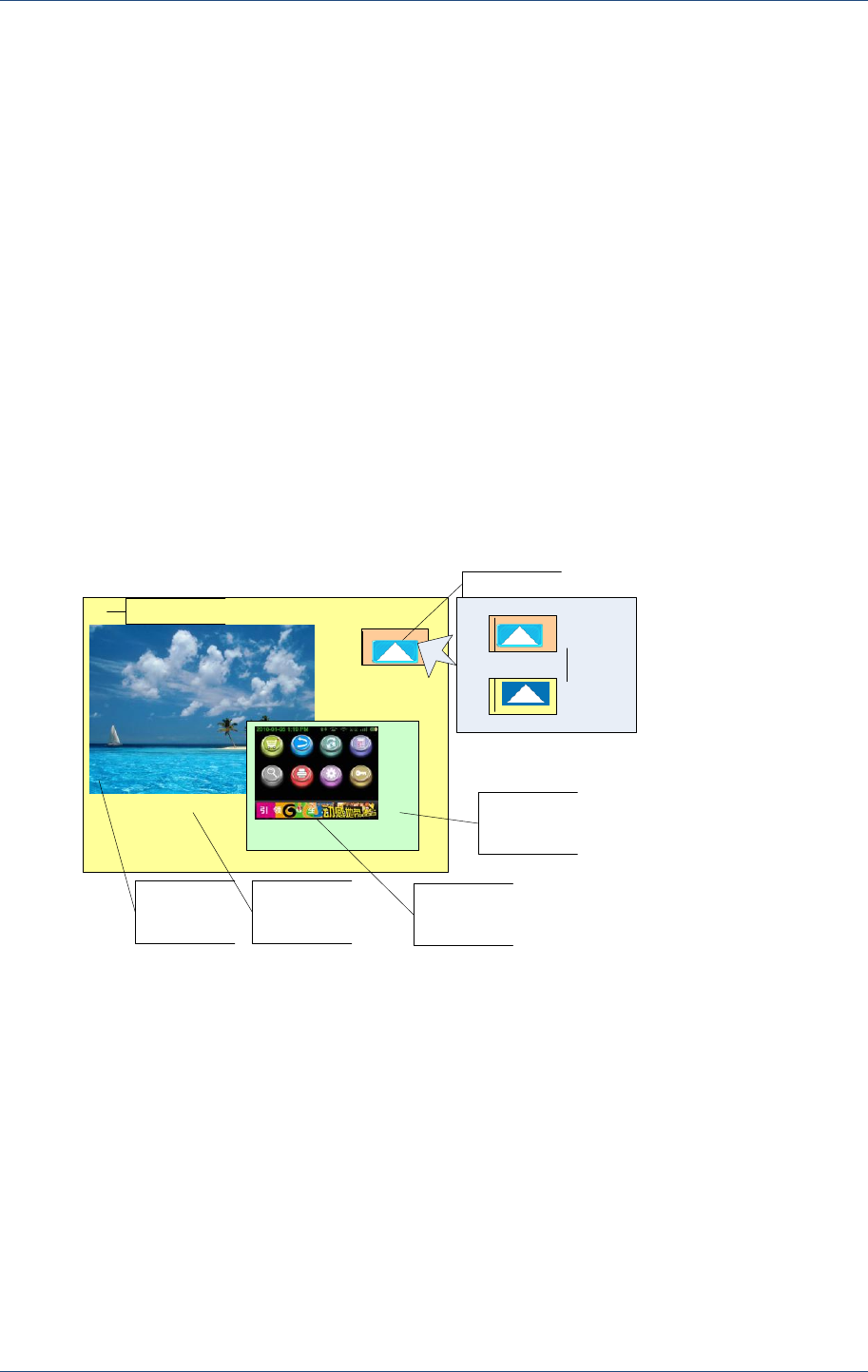
How to make the XUI API? For users, they always want to use the simpler programming to
make the cooler interface, but the result is contradictory. So we try to give a more balanced
solution.
Firstly, see the design of the interface,
RootWindow
RootWindow
Background
Picture
RootWindow
Background
Color
SubWindow
Background
Color
SubWindow
Background
Picture
Button
Text Normal
Presse
d
Draw SomeText
Two state
Design ideas shown as follow:
It only has three concepts of canvas, button and key value.
Canvas
- It can have sub-canvas.
- Text and picture can be painted on the canvas, and the buttons are also on the canvas.
- It contains background picture and background color, the background will not be cleared
when CLS.
- It must have a RootCanvas.
Button

Introduction
PAX Computer Technology (Shenzhen) Co., Ltd. 3
- Buttons contains two states, normal and pressed.
- Each state including the following parameters: border, background color, icon, text font,
text color and text content.
- Parameter value of the button is set as “key”, when clicking it, users can get the key value
by function GetKey (). The button value and physical key value are in the same queue.
Key value
- The button value and key value are in the same queue.
- All windows have only one queue.
- Not applicable to multithreading.
- So when programming you just need to paint on the canvas, if needs dialog box, display a
sub-canvas, and close it after use.
- For printer, only needs to create a hidden canvas for writing, and then sending a canvas
capture to the printer.
{ This page intentionally left blank }

Macro and Struct
PAX Computer Technology (Shenzhen) Co., Ltd. 5
2 Macro and Struct
2.1 Definition of Key values
Table 1 Definition of Key values
Macro
Value
Description
#define XUI_KEY1
2
/* 1 */
#define XUI_KEY2
3
/* 2 */
#define XUI_KEY3
4
/* 3 */
#define XUI_KEY4
5
/* 4 */
#define XUI_KEY5
6
/* 5 */
#define XUI_KEY6
7
/* 6 */
#define XUI_KEY7
8
/* 7 */
#define XUI_KEY8
9
/* 8 */
#define XUI_KEY9
10
/* 9 */
#define XUI_KEY0
11
/* 0 */

XUI Programming Guide
6 PAX Computer Technology (Shenzhen) Co., Ltd.
#define XUI_KEYCANCEL
223
/* Cancel */
#define XUI_KEYCLEAR
14
/* Clear */
#define XUI_KEYENTER
28
/* Enter */
#define XUI_KEYALPHA
69
/* Alpha */
#define XUI_KEYF1
59
#define XUI_KEYFUNC
102
#define XUI_KEYUP
103
#define XUI_KEYDOWN
108
#define XUI_KEYMENU
139
2.2 Macro Definition
Table 2 Macro Definition
Macro
Description
b
Blue channel
g
Green channel
r
Red channel
a
ALPHA channel
Table 3 XuiTransform Rotate
Macro
Description
XUI_ROTATE_0
Without rotating
XUI_ROTATE_90
rotating clockwise by 90degrees
XUI_ROTATE_180
rotating clockwise by 180degrees
XUI_ROTATE_270
rotating clockwise by 270degrees

Macro and Struct
PAX Computer Technology (Shenzhen) Co., Ltd. 7
XUI_FLIP_VERT
flip vertical
XUI_FLIP_HORIZ
flip horizontal
Table 4 XuiButtonStatType
Macro
Description
XUI_BTN_NORMAL
Normal state
XUI_BTN_PRESSED
Pressed State
Table 5 XuiBgStyle
Macro
Description
XUI_BG_NORMAL
Normal, display the picture from the origin x, y.
XUI_BG_TILE
Tile
XUI_BG_CENTER
Center
XUI_BG_FOUR_CORNER
Stretch to four corner
Table 6 XuiFontSet
Macro
Description
XUI_FONT_MONO
Monochrome font(black and white)
XUI_FONT_GREY
Grey font
Table 7 XuiTextStyle
Macro
Description
XUI_TEXT_NORMAL
Normal

XUI Programming Guide
8 PAX Computer Technology (Shenzhen) Co., Ltd.
XUI_BOLD
Bold
XUI_ITALIC
Italic
XUI_TEXT_BOLD_ITALIC
Bold and italic
Table 8 XuiSigPenFlat
Macro
Description
XUI_SIG_FLAT
Signing Board with smooth processing
XUI_SIG_NORMAL
The normal Signing Board without smooth processing
Table 9 XuiWindowType
Macro
Description
XUI_WIN_CANVAS
Canvas window
XUI_WIN_BUTTON
Button window
XUI_WIN_GIF
Gif window
XUI_WIN_SIGBOARD
Signing Board window
2.3 Other Macro Definition
#define XUI_RIGHT_X(_x, _width, _extend)
Get text in the right-most position within _width
(
text-align right
)
#define XUI_CENTER_X(_x, _width, _extend)
Get text in the middle position within _width
(
text-align horizontal center
)
#define XUI_CENTER_Y(_y, _height, _extend)
Get text in the middle position within _height (text-align vertical center)
2.4 Structure
Structure XuiWindow

Macro and Struct
PAX Computer Technology (Shenzhen) Co., Ltd. 9
Table 10 Structure XuiWindow
Structure
Description
width
the window width
height
the window height
widget
the window widget
type
Window type
key
Key values related to the window
Structure XuiImg
Table 11 Structure XuiImg
Structure
Description
width
Img width
height
Img height
priy
Img data pointer
Structure XuiButtonStat
Table 12 Structure XuiButtonStat
Structure
Description
btn_round
rounded corner
(
0 means has no rounded corner, 1 means has
rounded corner, and the default value is 0
)
btn_bg
background color
Text
text
text_fg
text color
text_font
text font
text_x
text position:x
text_y
text position:y
text_height
text height(font size)

XUI Programming Guide
10 PAX Computer Technology (Shenzhen) Co., Ltd.
Img
Image
img_x
Image position:x
img_y
Image position:y
img_style
Image type
Structure XuiSigBoardStat
Table 13 Structure XuiSigBoardStat
Structure
Description
btn_round
rounded corner
(
0 means has no rounded corner, 1 means has
rounded corner, and the default value is 0
)
btn_bg
Background color
(
Does not support transparent
)
text
text
text_fg
text color
text_font
text font
text_x
Text position: x
text_y
Text position: y
text_height
Text height(font size)
img
Image
img_x
Image position: x
img_y
Image position: y
img_style
image type
pen_fg
pen color
pen_width
Pen width
(
ranges from 1 to 10
)
pen_flat
Pen with flat processing
Structure XuiImeAttr
Table 14 Structure XuiImeAttr

Macro and Struct
PAX Computer Technology (Shenzhen) Co., Ltd. 11
Structure
Description
parent
Parent canvas
(
valid canvas pointer
)
x
IME position x
(
greater than 0
)
y
IME position y
(
greater than 0
)
width
IME width
(
greater than 0
)
height
IME height
(
greater than 4*
(
text_size+10
))
text_font
IME text font
(
valid font pointer
)
text_size
IME text size
(
greater than 12
)
text_fg
IME text color
focus_fg
IME select the switched color
img
IME background image
Structure XuiGetStrAttr
Table 15 Structure XuiGetStrAttr
Structure
Description
parent
Parent canvas
(
valid canvas pointer
)
x
Inputting position x
(
greater than 0
)
y
Inputting position y
(
greater than 0
)
font
Inputting text font
(
valid font pointer
)
size
Inputting text size
(
greater than 12
)
fg
Inputting text color
{ This page intentionally left blank }

XUI API
PAXComputerTechnology(Shenzhen)Co.,Ltd.13
3 XUI API
3.1 XuiOpen
Prototype int XuiOpen(int argc,
char **argv);
Function Open XUI and initialize it.
Parameters argc【Input】 Number of arguments
argv【Input】 Arguments list
Return 0 Success
< 0 Fail
Instruction
The format supported for argv list as below:
FB=xxxxx.
Device node of framebuffer, the default is "/dev/graphics/fb0".
INPUT=xxxx
Input can have multiple device nodes, the default is
"/dev/input/event0".
ROTATE=xxx
Screen rotation (0,90,180, the default value is 0, using the default
value when value is invalid)
TSDEV=xxxx
Device node of touch screen, the default is "/dev/input/event2".
STATUSBAR=xxx
Height of the status bar(0-64,the default value is 0, using the default

XUI Programming Guide
14 PAX Computer Technology (Shenzhen) Co., Ltd.
value when value is invalid)
For example:
char *xui_argv[] = {"ROTATE=90","STATUSBAR=18"};
XuiOpen(sizeof(xui_argv)/sizeof(xui_argv[0]), xui_argv);
Note
1. When called XuiOpen for multiple times, only the first time takes effect,
the later calls will not work unless calling XuiClose.
2. When argc=0, argv=NULL, it will enable the default settings.
3. Xui does not support multi-process, when call XuiOpen in that case, they
will grab screen during operation on canvas.
4. Arguments in argv are independent of each other.
5. For argv, after set the ROTATE arguments, the left upper corner of the
screen was defined as coordinate origin of the subsequent operations for
API.
6. Other functions can take effect only after call Xuiopen successfully.
3.2 XuiIsRunning
Prototype
int XuiIsRunning(void);
Function
Check if the XUI is running.
Parameters
None
Return
1
running
0
Not running.
Instruction
3.3 XuiClose
Prototype
void XuiClose(void);
Function
Close the XUI.
Parameters
None
Return
None
Instruction
Call this function when the application exits.
3.4 XuiSuspend
Prototype
int XuiSuspend (void);
Function
Suspend the XUI.

XUI API
PAX Computer Technology (Shenzhen) Co., Ltd. 15
Parameters
None
Return
0
Success
-1
Fail
Instruction
When the application needs to call the other process and it also
occupied resource of fb and event, and then should call this function
to release resource. Otherwise, there will be two processes to operate
fb and receive event at the same time.
Note
1. After the suspension, it needs to call XuiResume () to resume operation.
3.5 XuiResume
Prototype
int XuiResume (void);
Function
Resume running the XUI.
Parameters
None
Return
0
Success
-1
Fail
Instruction
Resume the running status from the suspended state.
After called XuiSuspend, it is no longer to receive keystrokes or
touch events, so it cannot response to the XuiResume (), but can only
active resume in program.
3.6 XuiRootCanvas
Prototype
XuiWindow *XuiRootCanvas(void);
Function
Get the RootCanvas.
Parameters
None
Return
NULL
Error getting
else
Pointer of the RootCanvas
Instruction
Call this function when requires to operate on the RootCanvas.
For example:
XuiWindow* root;
root= XuiRootCanvas();
XuiCanvasSetBackground(root,XUI_BG_NORMAL,img_bg,color_b
g);

XUI Programming Guide
16 PAX Computer Technology (Shenzhen) Co., Ltd.
3.7 XuiStatusbarCanvas
Prototype
XuiWindow * XuiStatusbarCanvas (void);
Function
Get the Canvas of StatusBar.
Parameters
None
Return
NULL
Error getting
else
Pointer of the status bar canvas
Instruction
Same as XuiRootCanvas ().
3.8 XuiCreateFont
Prototype
XuiFont *XuiCreateFont(char *fontfile,
int index,
XuiFontSet fontset);
Function
Create the font.
Parameters
fontfile 【Input】
Path of the font file.
index 【Input】
Index of the font file.
Fontset 【Input】
Font style, it supports monochrome and grey
modes.
Details see XuiFontSet.
Return
NULL
Error getting
else
Font pointer
Instruction
Call this function to create font when requires to display text.
For Example:
XuiFont *font_simsun_0;
font_simsun_0 = XuiCreateFont("/usr/font/paxfont.ttf", 0, 0);
Note
1. Support the custom font and ttc/ttf vector font.
2. According to the fontfile, firstly, matches custom font by default, if not,
determine whether it is the ttf or ttc, if both are not, returns NULL.
3. The arguments index takes effect only when using the ttc font; it is used to
distinguish the font number. The index is invalid to custom font and ttf
font since there is only one font.
4. Users can call XuiDestroyFont () to destroy the created fonts which are no
longer need to use.
5. The custom font is created by fontextract, it can create highly
customizable bitmap fonts.

XUI API
PAX Computer Technology (Shenzhen) Co., Ltd. 17
3.9 XuiDestroyFont
Prototype
void XuiDestroyFont(XuiFont *font);
Function
Destroy fonts.
Parameters
font【Input】
Font pointer
Return
None
Instruction
Destroy the fonts which created by XuiCreateFont ().
3.10 XuiCanvasDrawText
Prototype
int XuiCanvasDrawText(XuiWindow *window,
unsigned int x,
unsigned int y,
unsigned int height,
XuiFont *font,
XuiTextStyle textstyle,
XuiColor fg,
char *text);
Function
Display character string on the window canvas.
Parameters
window 【Input】
Canvas
x 【Input】
The position x which relative to window
canvas
y 【Input】
The position y which relative to window
canvas
height 【Input】
Text height
font 【Input】
Font, created by XuiCreateFont
textstyle 【Input】
Text style(bold, italic), details see the
XuiTextStyle
fg 【Input】
Font color
text 【Input】
Text (utf-8 encoding)
Return
0
Success

XUI Programming Guide
18 PAX Computer Technology (Shenzhen) Co., Ltd.
< 0
Fail
Instruction
1. Does not support auto linefeed or \n, \r linefeed. When the
displayed length is beyond the canvas, the excess part will not
display.
2. Text only supports utf-8 encoding; other formats should be
converted to utf-8 code to display properly.
3. Window must be a valid canvas pointer, or it will lead to a crash.
The functions mentioned below are the same as it.
3.11 XuiCanvasDrawImg
Prototype
int XuiCanvasDrawImg(XuiWindow *window,
unsigned int x,
unsigned int y,
unsigned int width,
unsigned int height,
XuiBgStyle bgstyle,
XuiImg *img);
Function
Display images on the window canvas.
Parameters
window 【Input】
Canvas
x 【Input】
The position x which relative to window
canvas
y 【Input】
The position y which relative to window
canvas
width 【Input】
Image width
height 【Input】
Image height
bgstyle 【Input】
Background style, details see the XuiBgStyle.
img 【Input】
Image pointer
Return
0
Success
< 0
Fail
Instruction
img must be the valid image pointer created by

XUI API
PAX Computer Technology (Shenzhen) Co., Ltd. 19
XuiImgLoadFormFile, otherwise the image may not show correctly.
3.12 XuiCanvasDrawRect
Prototype
int XuiCanvasDrawRect(XuiWindow *window,
unsigned int x,
unsigned int y,
unsigned int width,
unsigned int height,
XuiColor fg,
int round,
int fill);
Function
Display rectangle on the window canvas.
Parameters
window 【Input】
Canvas
x 【Input】
The position x which relative to window
canvas
y 【Input】
The position y which relative to window
canvas
width 【Input】
Rectangle width
height 【Input】
Rectangle height
Fg 【Input】
Foreground color
round 【Input】
1- rounded 0- rectangular
fill 【Input】
1- filled 0- hollowed
Return
0
Success
< 0
Fail
Instruction
3.13 XuiClearArea
Prototype
int XuiClearArea(XuiWindow *window,
unsigned int x,

XUI Programming Guide
20 PAX Computer Technology (Shenzhen) Co., Ltd.
unsigned int y,
unsigned int width,
unsigned int height);
Function
Clear the canvas area and display the background color.
Parameters
window 【Input】
Canvas
x 【Input】
The position x which relative to window
canvas
y 【Input】
The position y which relative to window
canvas
width 【Input】
Cleared width
height 【Input】
Cleared height
Return
0
Success
< 0
Fail
Instruction
When multiple canvases overlapped, only clear the area which
specified by window.
3.14 XuiTextWidth
Prototype
int XuiTextWidth(XuiFont *font,
int size,
char *text);
Function
Get the text width.
Parameters
font 【Input】
The specified font which created by
XuiCreateFont
size 【Input】
Font size
text 【Input】
Text string
Return
Returns the string width.
Instruction
Use it when set text for center or right alignment.
Note
1. Font must be valid and created by XuiCreateFont; otherwise, it will
cause programs to crash.

XUI API
PAX Computer Technology (Shenzhen) Co., Ltd. 21
2. Text must be a valid string pointer.
3. It only supports utf-8 encoding; other formats need to be converted to
utf-8 code firstly.
3.15 XuiCreateCanvas
Prototype
XuiWindow *XuiCreateCanvas(XuiWindow *parent,
unsigned int x,
unsigned int y,
unsigned int width,
unsigned int height);
Function
Create canvas.
Parameters
parent 【Input】
Parent canvas
x 【Input】
The position x which relative to window
canvas
y 【Input】
The position y which relative to window
canvas
width 【Input】
Canvas width
height 【Input】
Canvas height
Return
NULL
Fail
else
Canvas pointer
Instruction
1. Parent must be a valid canvas pointer; the interfaces mentioned
below should be the same as it.
2. The new canvas will be displayed on the screen by calling
XuiShowWindow (), and the parent canvas will be covered.
3.16 XuiDestroyWindow
Prototype
void XuiDestroyWindow(XuiWindow *window);
Function
Destroy the window.
Parameters
window 【Input】
window

XUI Programming Guide
22 PAX Computer Technology (Shenzhen) Co., Ltd.
Instruction
Destroy windows which created by XuiCreateCanvas(),
XuiCreateButton(), XuiCreateSinatureBoard() and XuiCreateGif().
Note
Users should follow the principle: First create last destroyed, last create first
destroyed.
3.17 XuiShowWindow
Prototype
void XuiShowWindow(XuiWindow *window,
int show,
int flag);
Function
Show or hide the window.
Parameters
window 【Input】
window
show 【Input】
1- show
0- hide
flag 【Input】
Extended parameter, it is unused, fill in 0.
Return
None
Instruction
3.18 XuiCanvasSetBackground
Prototype
void XuiCanvasSetBackground(XuiWindow *window,
XuiBgStyle bgstyle,
XuiImg *img,
XuiColor bg);
Function
Set the canvas background.
Parameters
window 【Input】
Canvas
bgstyle 【Input】
Background style. Details see the XuiBgStyle.
img 【Input】
Image, NULL indicates has no image.
bg
Background color.
Return
None

XUI API
PAX Computer Technology (Shenzhen) Co., Ltd. 23
Instruction
It will clear the screen.
Note
1. This interface only takes effects to the specified canvas.
2. It does not support transparent in the background.
3.19 XuiCreateButton
Prototype
XuiWindow *XuiCreateButton(XuiWindow *parent,
unsigned int x,
unsigned int y,
unsigned int width,
unsigned int height);
Function
Create button in canvas.
Parameters
parent 【Input】
Parent canvas
x 【Input】
The position x which relative to window
canvas
y 【Input】
The position y which relative to window
canvas
width 【Input】
width
height 【Input】
height
Return
NULL
Fail
else
Button pointer
Instruction
3.20 XuiButtonSetStat
Prototype
int XuiButtonSetStat(XuiWindow *window,
XuiButtonStatType type,
XuiButtonStat *stat);
Function
Set the button state.
Parameters
window 【Input】
Button

XUI Programming Guide
24 PAX Computer Technology (Shenzhen) Co., Ltd.
type 【Input】
state
stat 【Input】
state variable
Return
0
Success
< 0
Fail
Instruction
It will take effect immediately after setting by XuiButtonSetStat().
Note
Stat must be a valid state pointer, otherwise, it will lead to crashes. Interfaces
mentioned below should be the same as it.
When text_font and text are NULL, the function can return correctly, but
doesn‟t show the text.
3.21 XuiButtonSetKey
Prototype
int XuiButtonSetKey(XuiWindow *window,
int key);
Function
Set the key value of the button.
Parameters
window 【Input】
Button
key 【Input】
Key value (key>0)
Return
0
Success
< 0
Fail
Instruction
1. After release the button, you can get key values by XuiGetKey().
2. The value associate with the button must be greater than 0.
3.22 XuiCreateSignatureBoard
Prototype
XuiWindow * XuiCreateSignatureBoard (XuiWindow *parent,
unsigned int x,
unsigned int y,
unsigned int width,
unsigned int height);
Function
Create the signature board.

XUI API
PAX Computer Technology (Shenzhen) Co., Ltd. 25
Parameters
parent 【Input】
Parent canvas
x 【Input】
The position x which relative to window
canvas
y 【Input】
The position y which relative to window
canvas
width 【Input】
width
height 【Input】
height
Return
NULL
Fail
else
Pointer of the signature board
Instruction
When create signature board, there cannot be multiple canvases
overlapped.
3.23 XuiSigBoardSetStat
Prototype
int XuiSigBoardSetStat (XuiWindow *window,
XuiSigBoardStat *stat);
Function
Set the state of signature board.
Parameters
window 【Input】
Signature board
stat 【Input】
State variable, details refer to the structure
XuiSigBoardStat.
Return
0
Success
< 0
Fail
Instruction
1. It will take effect immediately after setting by
XuiSigBoardSetStat().
2. For stat arguments, when the pen_flat is XUI_SIG_FLAT, it does
not support change the pen color and pen width.
3. When text_font and text are NULL, the function can return
correctly, but doesn‟t show the text.

XUI Programming Guide
26 PAX Computer Technology (Shenzhen) Co., Ltd.
4. The background of signature board does not support translucent.
3.24 XuiSigBoardImg
Prototype
XuiImg * XuiSigBoardImg(XuiWindow *window);
Function
Get the signature image.
Parameters
window 【Input】
Signature board
Return
NULL
Fail
else
Image pointer
Instruction
After using, call the XuiImgFree to destroy the image.
3.25 XuiCreateGif
Prototype
XuiWindow * XuiCreateGif (XuiWindow *parent,
unsigned int x,
unsigned int y,
unsigned int width,
unsigned int height ,
const char* path);
Function
Create the gif animations.
Parameters
parent 【Input】
Parent canvas
x 【Input】
The position x which relative to window
canvas
y 【Input】
The position y which relative to window
canvas
width 【Input】
width
height 【Input】
height
path 【Input】
path of Gif image
Return
NULL
Fail

XUI API
PAX Computer Technology (Shenzhen) Co., Ltd. 27
else
Pointer of gif window
Instruction
3.26 XuiHasKey
Prototype
int XuiHasKey(void);
Function
Check it whether has key.
Parameters
None
Return
1
yes
0
no
Instruction
3.27 XuiGetKey
Prototype
int XuiGetKey(void);
Function
Get the key.
Parameters
None
Return
Keys
Instruction
This function will wait till has a key to return.
3.28 XuiClearKey
Prototype
void XuiClearKey(void);
Function
Get the key buffer.
Parameters
None
Return
None
Instruction
Clear the keys buffer queue, this buffer is a dynamic linked list and
has no fixed length.

XUI Programming Guide
28 PAX Computer Technology (Shenzhen) Co., Ltd.
3.29 XuiCaptureScreen
Prototype
XuiImg *XuiCaptureScreen(void);
Function
Capture the screen.
Parameters
None
Return
NULL
Fail
else
Pointer of image
Instruction
After using, call XuiImgFree() to destroy the screenshot.
3.30 XuiCaptureCanvas
Prototype
XuiImg *XuiCaptureCanvas(XuiWindow *window,
unsigned int x,
unsigned int y,
unsigned int width,
unsigned int height);
Function
Capture the canvas.
Parameters
window 【Input】
canvas
x 【Input】
The starting position x which relative to
window canvas
y 【Input】
The starting position y which relative to
window canvas
width 【Input】
width
height 【Input】
height
Return
NULL
Fail
else
Pointer of image
Instruction
After using, call XuiImgFree() to destroy the image.
It will not capture the Button on the canvas.
It is also applicable to the hidden canvas.
This function can generate images for printer.

XUI API
PAX Computer Technology (Shenzhen) Co., Ltd. 29
If the width and height are greater than the width and height of
canvas, the generated image is defined as the value, whichever is the
minimum.
3.31 XuiImgLoadFormFile
Prototype
XuiImg *XuiImgLoadFormFile(const char *file);
Function
Load the image from a file.
Parameters
file 【Input】
The file path.
Return
NULL
Fail
else
Pointer of image
Instruction
Currently only supports bmp and png.
3.32 XuiImgSaveToFile
Prototype
int XuiImgSaveToFile(XuiImg *img,
const char *file);
Function
Save the image to a file.
Parameters
img 【Input】
Image pointer
file 【Input】
The file path of the image to be saved
Return
0
Success
< 0
Fail
Instruction
Currently it only supports png.
3.33 XuiImgToRgba
Prototype
int XuiImgToRgba(XuiImg *img,
const char *rgba);
Function
Save the image to the rgba buffer.
Parameters
img 【Input】
Image pointer

XUI Programming Guide
30 PAX Computer Technology (Shenzhen) Co., Ltd.
rgba 【Input】
rgba buffer.
Return
0
Success
< 0
Fail
Instruction
1. It does not check the buffer size, please distribute the buffer size
of 4* width * height.
2. Img must be a valid XuiImg pointer; the follows should be the
same.
3.34 XuiImgTransform
Prototype
int XuiImgTransform(XuiImg *img,
XuiTransform transform);
Function
Transform images.
Parameters
img 【Input】
Image pointer
transform 【Input】
Transform mode. See the macro
XuiTransform.
Return
0
Success
< 0
Fail
Instruction
3.35 XuiImgFree
Prototype
void XuiImgFree(XuiImg *img);
Function
Destroy the image.
Parameters
img 【Input】
Image pointer
Return
None
Instruction

XUI API
PAX Computer Technology (Shenzhen) Co., Ltd. 31
3.36 XuiSetStatusbarIcon
Prototype
int XuiSetStatusbarIcon(int index,
const char* path);
Function
Set the status bar icon.
Parameters
index 【Input】
The specified icon labels, from left to right is
0-7.
path 【Input】
Image path.
NULL means do not display the icon.
Return
0
Success
-1
Fail
Instruction
1. It takes effect after set STATUSBAR by the parameter argv of
XuiOpen.(that means has set the height of the status bar)
2. When the path is NULL or wrong, the original icon will be
hidden.
3.37 XuiGetHzString
Prototype
int XuiGetHzString(XuiImeAttr attr,
char *outstr,
int maxlen,
unsigned int timeout);
Function
It is a Chinese input function with the associational function, and also
can input English and numeric characters.
Parameters
attr 【Input】
Attribute of the input method, see the structure
XuiImeAttr.
outstr 【Input】
Store the input string (ending with „‗\0‟)
maxlen 【Input】
The maximum length of the input string (the
maximum permissible value is 1024 bytes)
timeout 【Input】
Timeout value(0 means no timeout,
【unit:second】).

XUI Programming Guide
32 PAX Computer Technology (Shenzhen) Co., Ltd.
Return
0x00
Success
0xFE
Illegal parameter value.
0xFD
Timeout
Instruction
1. Press key 【Alpha 】to switch input methods (it can
switch among“PinYin-Chinese”,“uppercase”,“lowercase”,“area c
ode”)
2. In the method of area code input, users can input Chinese
character according to the code.
3. Input Chinese. Press the corresponding numeric key in turn in the
mode of PinYin-Chinese. For example, inputting the Chinese
character“中”, users should input “1466” successively, then press
【Enter】and key 【1】 to select the“中”.
4. Input alphabet. Press letter in the mode of “Abc” inputting, and it
will display on the screen, turn pages by pressing【Enter】, then
select the target character. For example, if you press key【1】
twice in succession, character “Q” will be inputted.
5. Input number. Press number in the mode of “123” inputting, then
it will display on the screen.
6. Press key【Clear】to clear the inputted characters.
7. After inputting, press【Cancel】to exit the input method, and the
inputted character can be obtained from the arguments OutStr.
Note
Parameter description of input method in attr:
1. All of the pointers must be valid, such as font pointer, parent pointer and
so on.
2. X and y cannot be negative.
3. Text_size must range from 12 to 40. (12 < Text_size < 40)
4. Height must be greater than 4*(text_size+10).
5. It does not support transparent in the background
3.38 XuiGetString
Prototype
int XuiGetString(XuiGetStrAttr attr,
char *outstr,

XUI API
PAX Computer Technology (Shenzhen) Co., Ltd. 33
unsigned char mode,
int minlen,
int maxlen);
Function
Input the character string and it can display on the screen with the
specified mode, and also can input letter, amount and password.
Parameters
attr 【Input】
Attribution, details see the structure
XuiImeAttr.
outstr 【Input】
Store the input string (ending with „‗\0‟)
mode 【Input】
D7 1(0) reserved
D6 1(0) reserved
D5 1(0) whether input numbers
D4 1(0) whether input letters
D3 1(0) whether the ciphertext displays as
„*‟
D2 1(0) left(right)-aligned input
D1 1(0) whether has a decimal point
D0 1(0) reserved
Minlen 【Input】
The minimum length of the input string.
maxlen 【Input】
The maximum length of the input string (the
maximum permissible value is 128 bytes)
Return
0x00
Normally complete the input
0xFE
Illegal parameter value (including the mode
value is illegal; MaxLen =0; and the initial
digital string is illegal.)
0xFD
Inputting timeout (120 seconds, and this value
is invariant.)
Instruction
{ This page intentionally left blank }

Note
PAX Computer Technology (Shenzhen) Co., Ltd. 35
4 Note
4.1 Multi-process Supports
Currently, the XUI does not support multi-process, because they will grab screen when
running at the same time.
If requires to run multiple processes at the same time, users can implement it by the
remote call. Using a main process to manage the screen, and create canvas for each process,
switch screens of the multiple processes.
4.2 XuiDestroyWindow
Note that other resources used by the window should be destroyed after calling
XuiDestroyWindow (). So destroy window firstly and then resource (such as image, font)
followed.
Please abide to this principle: First create last destroyed, last create first destroyed.
For example:
The right way to destroy:
//create
font_simsun_0 = XuiCreateFont ("./res/fallback.ttf", 0, 0);
img_bg = XuiImgLoadFormFile ("./res/bg.png");
btn = XuiCreateButton(XuiRootCanvas(), 10, 50, 220, 30);

XUI Programming Guide
36 PAX Computer Technology (Shenzhen) Co., Ltd.
//destroy
XuiDestroyWindow(btn);
XuiImgFree(img_bg);
XuiDestroyFont(font_simsun_0);
The wrong way to destroy:
//create
font_simsun_0 = XuiCreateFont ("./res/fallback.ttf", 0, 0);
img_bg = XuiImgLoadFormFile ("./res/bg.png");
btn = XuiCreateButton(XuiRootCanvas(), 10, 50, 220, 30);
//destroy
XuiImgFree(img_bg);
XuiDestroyFont(font_simsun_0);
XuiDestroyWindow(btn);

FAQ
PAX Computer Technology (Shenzhen) Co., Ltd. 37
5 FAQ
1. The root canvas exists after open the XUI, so can we directly call the function to get the
root canvas? Does the root canvas can be destroyed?
Answer: Users can call XuiRootCanvas () to get the root canvas, but cannot be destroyed. In
additional, if the XUIOpen () has set the status bar, the status bar canvas exists after calling
the XUIOpen (), users can directly operate the status bar by XuiStatusbarCanvas (), and the
canvas cannot be destroyed.
2. Does it support canvas nesting? For example, Root canvas-> sub-canvas 1 -> sub-canvas
2-> sub-canvas 3-> ... -> sub-canvas N? Is there a limit to N?
Answer: Yes, it supports nesting, and even has no any limitation, but users need to manage
XuiWondow pointer of each canvas. Follow the principle to destroy windows: First create last
destroyed, last create first destroyed.
3. Does the canvas support using the ShowWindow to display?
Answer: Yes.
4. Does it need to call DestoryWindow () to release the signature boar?
Answer: Yes, the types which return XuiWindow* need to be destroyed, but except
XuiRootCanvas () and XuiStatusbarCanvas (), since they will be destroyed automatically.

XUI Programming Guide
38 PAX Computer Technology (Shenzhen) Co., Ltd.
5. When displaying images, how to adjust the image size? Stretch or fill?
Answer: Do not stretch. If the image size is larger than the display area, it only displays the
part which is in the area. If the image size is smaller than the display area, the blank space fills
the background color.
6. When call ClearArea (), does it clear contents in the upmost layer or all contents of the
multiple layers? Or just using the background color to cover this area?
Answer: It depends on the arguments XuiWindow *window, you can set the canvas pointer
of the layer which you want to clear, and it will display the canvas background.

X
X
UI
P
P
rog
r
r
am
m
m
ing
G
G
uid
e
e
