XXBX User Guide
User Manual:
Open the PDF directly: View PDF  .
.
Page Count: 11

eXtended eXternal Benchmarking
eXtension – XXBX
XXBX Getting Started v1.0
Matthew R. Carter Raghurama R. Velegala John Pham
Jens-Peter Kaps
jkaps@gmu.edu
November 21, 2018
George Mason University
Fairfax, Virginia
cryptography.gmu.edu www.gmu.edu
Cryptographic Engineering Research Group
Department of Electrical and Computer Engineering George Mason University
3100 Engineering Building, 4400 University Drive, Fairfax, VA 22030-4444, USA
Voice: (703) 993-1561, Fax: (703) 993-1601

Contents
1 Introduction 3
1.1 Benchmarking........................................ 3
1.2 Metrics ........................................... 3
1.2.1 Throughput..................................... 3
1.2.2 ROM ........................................ 3
1.2.3 RAM ........................................ 3
1.2.4 Power ........................................ 3
2 Previous Work 4
2.1 SUPERCOP ........................................ 4
2.2 XBX............................................. 4
3 XXBX System 5
3.1 Overview .......................................... 5
3.2 XXBXSoftware–XBS .................................. 5
3.3 XXBXHarness–XBH................................... 5
3.4 XXBXPowerShim–XBP ................................ 6
3.5 XXBX Device Under Test – XBD . . . . . . . . . . . . . . . . . . . . . . . . . . . . . 6
4 First Steps 7
4.1 Requirements........................................ 7
4.2 Installation ......................................... 7
4.2.1 XBH......................................... 7
4.3 ExampleRun........................................ 8
4.4 Results............................................ 10
A Maybe Something 11
2

1 Introduction
1.1 Benchmarking
1.2 Metrics
For embedded software cryptography implementations, the areas of interest are ROM usage, Ran-
dom Access Memory (RAM) usage, throughput, and power. This: differs from non-embedded
environments, where typically only throughput is considered when evaluating performance, as disk
storage (analogous to ROM), RAM, and power are plentiful.
1.2.1 Throughput
Throughput for cryptographic software is given in cycles per byte, in an effort to be independent
of different clock speeds within the same family of CPU, as well as variable clock speeds due to
power saving [?]. This only helps with variations in clock speeds, or comparing between otherwise
identical architectures with varying features such as a Single Instruction Multiple Data (SIMD)
unit like NEON or SSE. Results from different instructions per clock and/or instruction formats
still cannot be compared with each other.
1.2.2 ROM
ROM usage is typically determined by the program code as well as any constants, and preinitialized
variable data. Microcontrollers have anywhere between a few kibibytes to a mebibyte of ROM.
This is typically consists of the .text (code and constants) and .data (initialization data for static
buffers in RAM) sections in a compiled binary.
1.2.3 RAM
RAM is organized into statically allocated RAM set aside at the beginning of program execution,
stack memory that grows as function call chains get deeper, and dynamic allocations via malloc
and similar functions. The statically allocated RAM is divided into .bss and .data sections. .data
is for preinitialied modifiable buffers in RAM that also take up space in ROM for the initialization
data as previously mentioned, while .bss is for uninitialized buffers that only occupy RAM.
1.2.4 Power
As software ultimately runs on hardware containing a processor, the same constraints on power
that affect hardware affects software. The power and energy used is influenced by which processing
units the software uses, the microprocessor the software runs on, the clock speed and the total
running time.
3

2 Previous Work
There are many existing tools for benchmarking cryptographic software. The System for Unified
Performance Evaluation Related to Cryptographic Operations and Primitives (SUPERCOP) is a
cryptographic benchmarking tool that benchmarks a large variety of cryptographic primitives on
general purpose computers[?]. However, it is not capable of being run on embedded platforms, and
lacks important metrics for embedded such as ROM and RAM usage.
Two software benchmarking tools for embedded are XBX[?] and FELICS [?][?]. XBX is an
tool for evaluating hash functions packaged for SUPERCOP, and primarily runs implementations
on actual hardware.
FELICS is a newer tool, focused on lightweight primitives, and current lightweight block ciphers,
and adds cycle-accurate simulation for a variety of platforms as well as running implementations
on actual hardware.
In this paper, we further extend XBX to cover AEAD primitives in addition to XBX, and allow
easy extensibility to support the rest of the operations SUPERCOP supports. In addition, we
intend to add the ability to measure power and energy consumption.
2.1 SUPERCOP
SUPERCOP “[...] is a toolkit developed by the VAMPIRE lab for measuring the performance of
cryptographic software [?].” The project collects and benchmarks many implementations across
many primitives on multiple platforms. It consists of a series of shell scripts and test harnesses
that compile implementations and their dependencies across different compilers and flags. It then
verifies outputs and correctness, and measures performance characteristics. Power measurements,
code size, and memory usage data measurements are not supported.
2.2 XBX
The eXternal Benchmarking eXtension (XBX)[?] is an extension to SUPERCOP that covers plat-
forms that are not capable of hosting a compiler and require cross-compilation, such as microcon-
trollers or small embedded Linux systems. It reuses the primitive implementations collected by
the SUPERCOP project (which it refers to as an “algopack”), as well as others, and attempts to
retain the same output data format. XBX is able to test multiple implementations across multiple
primitives with multiple compilers and compiler flags without intervention, which is important with
the large number of combinations to be tested. Due to the importance of small code and memory
size for embedded platforms, these are also measured and recorded.
4
3 XXBX System
3.1 Overview
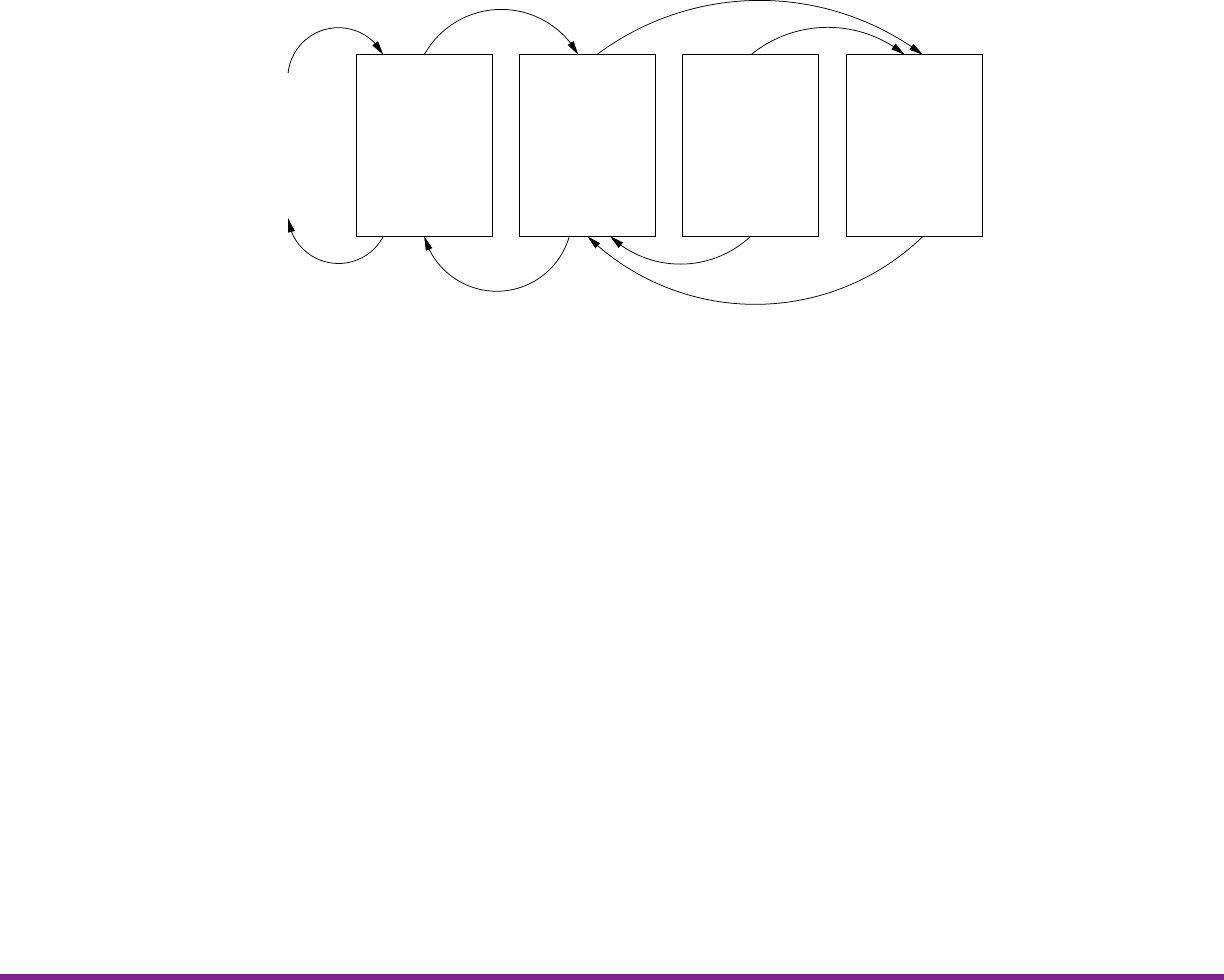
The XXBX system is comprised of four main components:
XBS
Compilation
Cross−
Platform
Configuration
Execution
Data Collection
XBH
Protocol
Conversion
Timing and
Power
Measurement
XBP
Power
Regulation
Current
Sensing
XBD
Execution
Measurement
Verification
Stack Usage
Power
Upload via I2C
Voltage
Timing Signals
Results
Timing Data
Results
Upload via TCP
Analysis
Algopacks
Figure 3.1: Block Diagram of the XXBX System
The communication between the XBS and XBH uses TCP/IP over Ethernet, while I2C is used
between XBH and XBD. A buffer is used to queue the commands received from the XBS before
sending them to XBD.
3.2 XXBX Software – XBS
The XBS is software running on a PC that consists of scripts that handle compilation of algopacks
and firmware upload to the XBH, as well as data aggregation and logging. Static allocation of RAM
and ROM usage is also calculated from the compiler output. Multiple compilers and compiler flags
are used to compile an implementation.
3.3 XXBX Harness – XBH
The XBH is a board that translates high level commands from the XBS sent via TCP/UDP to
series of commands over a protocol understood by the XBD (I2C , RS232, or Ethernet). Future
references to the XBS communicating to the XBD refers to this. It also measures execution time
via the timer capture pins, which precisely record the time that an edge event occurs. Because not
all XBD platforms support cycle counters, the execution time is measured externally.
5

3. XXBX SYSTEM CERG
3.4 XXBX Power Shim – XBP
The power is measured using a shunt resistor circuit. The current is amplified here so that ADC
on the XBH can measure it.
3.5 XXBX Device Under Test – XBD
The XBD is the platform hardware that the primitive implementations are tested on. It performs
the execution task and notifies the XBH of start and completion via a general-purpose input/output
(GPIO) pin connected a timer capture pin on the XBH. It also returns the maximum stack RAM
used to the XBH over the XBD↔XBH communication channel. The supported platforms are ARM,
AVR, MSP430, and MIPS.
The XBD code consists of two components. One is a small bootloader that is flashed once to
XBD that performs basic calibration and self programming of the primitive implementations over
the communications channel.
The second component is a test harness that is linked with the primitive implementation that
is downloaded over the communication channel. This code is responsible for signaling start and
stop, supplying the implementation with input data, verifying the correctness of the algorithm
implementation and returning the output to the XBH.
Both of these are linked to code which provides device specific drivers for communication and
execution signaling, as well as stack measurement.
6
4 First Steps
4.1 Requirements
4.2 Installation
4.2.1 XBH
The XBS connects to the XBH via Ethernet. The TCP/IP parameters can be set in the file
xbx/xbh/xbh_config.h. All IP addresses are to be specified in hexadecimal. An example is shown
below.
XBH TCP/IP Configuration
#define XBH_HOSTNAME " xbh "
#define TCP_XBH_PORT 22595
#define XBH_IP4_STATIC 1 // no dhcp , use static address
#define XBH_IP4_A D DR 0 xC0A80A10 // 192.16 8 .10.16
// C0 -192 , A8 -168 , 0A -10 , 10 -16
#define XBH_I P 4_NETM A SK 0 xFFFFFF00 // 2 5 5.255.255 .0
The XBS will try to connect to the XBH by name ”xbh”. Hence, the name ”xbh” has to be
mapped to the correct IP address. You can edit your \etc\hosts file and add the following line.
192.168.10.16 xbh
After you have made settings appropriate to your network, you have to compile the XBH code.
This requires that a GCC ARM compiler is installed on your system. One option is to install
Code Composer Studio (CCS) from Texas Instruments which can be found at http://www.ti.
com/tool/CCSTUDIO. After installation start CCS as root to install all updates and make sure
that ARM GCC is selected in the App Center of CCS. Then add the location of the ARM GCC to
your PATH environment variable of your shell. The text VERSION in the example below has to be
replaced with the version installed on your system. The ARM GCC executable is typically called
arm-none-eabi-gcc.
export PATH=/opt/ti/ccsv8/tools/compiler/gcc-arm-none-eabi-VERSION/bin/:$PATH
Now enter the xbx/xbh directory and build the XBH executable by typing
make
In oder to program the XBH, first install openocd from your Linux distribution. Then configure
udev for the XBH by creating a new file called 99-tiva-launchpad.rules in /etc/udev/rules.d/.
7
4. FIRST STEPS CERG
Contents of /etc/udev/rules.d/99-tiva-launchpad.rules
SUBS YSTEM == " tty " ,ATTRS {idVendor}==" 1 cbe " ,ATTRS {idProduct }==" 00 fd " ,
GROUP ="dialout",MODE=" 0666 "
This text should be in one line.
In order to activate this rule you can either restart your computer or issue the following com-
mands on the command line.
systemctl restart udev
udevadm trigger
udevadm settle
udevadm control -R
Now the system is ready to program the XBH. Connect the XBH with a USB cable plugged
into the USB port labled DEBUG on the XBH. Start the debugger arm-tiva_c-eabi-gdb and
issue the following commands in the debugger shell.
source .gdbinit
load
c
Start a terminal program (for example minicom and point it to your XBH. The XBH typically
uses /dev/ttyACM0. You can verify this with the output of the dmesg command. Connect the XBH
to the Ethernet and press the Reset button on the XBH. It should print its main settings into the
terminal. Now your XBH is ready.
4.3 Example Run
Prior to running any scripts, the XBD is initialized by compiling the platform-specific bootloader
and flashing it normally (i.e. using a programming cable). This bootloader has the responsibility
of downloading code from the XBH. This allows board-specific programming tools to be avoided,
besides the initial setup, and thus all subsequent operations can be performed by the XBS over a
network, potentially as part of a farm.
Scripts from the XBS compile all implementations of primitives, linking with the hardware
abstraction layer (HAL) and the test harness, with the possible {compiler, flags}defined in the
platform support files. The number of generated application binaries should be {compilers,flags} ×
primitiveimplementations. The UNIX size command is run on the generated application binaries
to get the sizes of .bss,.data, and .text. Implementations listed in a platform-specific blacklist
and a global blacklist are omitted from compilation. Binaries are compiled into Executable and
Linkable Format (ELF) which is then converted into Intel Hex (IHEX) for transfer to the XBH.
XBX checks to see if a binary will fit, otherwise it will not be loaded later.
The XBS then orders the XBH to calibrate cycle calculations on the XBD. The XBD’s boot-
loader executes a busy loop for a fixed number of cycles determined by the HAL. The XBH measures
the physical time executed. The cycles run is then calculated by dividing the measured time by
the clock rate.
8

CERG 4. FIRST STEPS
The XBS then sends the application binary to the XBD. This is sent one flash block at a time,
as existing data on the flash must be erased, and this can only be done one block at a time. After
each block is completely received, the XBD writes the block from the RAM buffer to flash memory.
When all blocks are received, the XBD will switch to the application by calling the address
of the application’s entry point, which is set to a fixed address by linker scripts or compiler flags.
This is the code that copies .data from ROM to RAM, zeroes out .bss, and initializes the stack
pointer, then calls main. This is typically defined by the C runtime, and is often known as “crt0”.
However the ARM Stellaris platform has this defined as part of the HAL, as it is based off example
code provided by the chip vendor which also does this. As the initialization is run, the previous
call stack and static memory allocations of the bootloader is obliterated and replaced with that of
the application. A similar procedure is applied to switch back to the bootloader after application
execution.
Once in application mode, the XBD is ordered to verify correct execution of the primitive
implementation. This is done by hashing repeatedly (XBX only supports hashing), mixing in
the results of the previous hash, and comparing the results to that generated by the reference
implementation on a PC.
The XBD is then ordered to perform the actual benchmarks. Data randomly generated by the
XBS of varying lengths (0, 1, 2, 4, 8, 16, 32, 64, 128, 256, 512, 576, 1024, 1536, and 2048 bytes) is
sent to the XBD, and hashed. The XBD signals to the XBH the start and stop times by setting
a signal line low upon start and raising it high again upon stop. Any delays in detecting timing
should be symmetrical across start and stop and should not affect the result [?]. This is repeated
multiple times (defaulting to 5).
Stack usage is measured by painting memory with a canary value from the top of the statically
allocated memory sections to the current location of the stack before executing the implementation.
After execution, the number of addresses still containing the canary value and not overwritten by
the call stack growing when the implementation returns is subtracted from the number of addresses
painted to determine the amount of stack memory used.
Upon execution completion, the XBS will request the measured stack value from the XBD and
the timing results from the XBH. These values are logged and the process repeats starting with
loading the next application binary, until all of them are tested.
Results are output
First, the configuration in config.ini is edited. This specifies whitelists and blacklists of
implementations, the target operation, the target platform, paths, parameters, dependencies, etc.
We assume that resuming a failed run will not involve changing the target operation and platform.
Logging levels can be configured in logging.ini, and uses Python’s built-in logging framework.
Then compile.py is then run. This creates the file data.db, used to store results, configuration,
and other detailed information. config.ini, a platform-specific config file, and various blacklist
files are all parsed.
If a whitelist exists in config.ini, only the implementations in this list will be built (and later
run), otherwise all implementations available in the specified operation and primitives are built,
excluding those specified in the blacklist. There is a blacklist in config.ini, specific to the run, as
well as a global blacklist for implementations that are broken, and platform specific blacklists for
implementations that are broken on specific platforms. Hashes of all implementation and platform
code are taken to ensure exact replication of results, if required.
Once the configuration is assembled, the compile script generates the makefiles and header files
9

4. FIRST STEPS CERG
for each implementation and builds the code for the XBD for each implementation × {compiler,
flag}. This proceeds quickly, as the script spawns as many subprocesses as there are cores to execute
builds. We decided to run multiple makefiles simultaneously as opposed to running GNU make with
the -j flag, which does parallelization at the makefile level, as even with -j, the makefiles would
stall trying to build something that would not build, e.g. attempting to compile x86 assembly to
ARM. Running separate makefiles in parallel builds more quickly, by allowing stalls to not block
other tasks. The size command is run as in original XBX on the compiled binaries, and the values
saved in the database. We decided to limit the maximum static memory allocations to 3/4ths the
total available RAM, leaving the remainder for stack growth, for both the Tiva-C and the MSP430
XBDs in the platform configuration.
As the builds use GNU make, rebuilds do not require recompiling everything from scratch, only
the code that changed or that was interrupted. Original XBX did not use makefiles. It copied all
source files to a build directory, and compiled the source files together all at once, which meant all
files are always rebuilt even if nothing changed.
Unlike XBX, and like SUPERCOP, primitive implementations can depend on other implemen-
tations. However, the relations have to be explicitly defined, as there are multiple metrics for what
a good implementation is, unlike SUPERCOP.
Once a build succeeds, the execute.py script is run. The configuration used from the last
build is loaded from data.db, if config.ini has not changed between the last build and calling
execute.py. Behavior is undefined if config.ini or blacklists or code are modified between calls
of compile.py and execute.py. Calibration is run as in original XBX.
For each successfully compiled implementation, the binary is loaded into the XBD and tests
are run, as mentioned in section ??. These tests can be run multiple times if configured for
such, however they take a considerable amount of time. Afterwards, the XBS generates data
to send to the XBD for performance testing, as specified in the config file. A python object
defining the parameters, how to generate them, and how to handle what is returned by the XBD is
required to support an operation, and as previously mentioned, we have hash functions and AEAD
implemented.
In the case of hashing, we simply generate random data of the specified lengths and send them
to the XBD, discarding the result, while timing and measuring execution, as we don’t have a known
answer for hashing random data, while for AEAD, we encrypt the data, get the ciphertext from
the XBD, and send it back for decryption, as well as decryption of a tampered ciphertext. We log
time (and later power) measurements for all these results. We do an additional verification to see
if the decryption matches the unencrypted plaintext, as this is essentially free without additional
computations as the XBS has this information available. All of this information is logged for later
analysis.
4.4 Results
XXBX results can be analyzed by opening the generated SQLite database (data.db ) in a SQLite
browser application, such as DB Browser for SQLite [8]. For analysis, the SQLAlchemy objects can
be manipulated directly in an IPython [11] notebook. IPython is an interactive python environment,
with an interface similar to Maple or SageMath with notebooks. Information was saved into a SQLite
[12] database.
10

A Maybe Something
11
