ZIADA USER MANUAL
User Manual:
Open the PDF directly: View PDF  .
.
Page Count: 16
Ziada.cloud
24/7 HELPLINE: 0738427880 / 0776075534
ZIADA USER MANUAL.
Karibu Ziada.
COPYRIGHT CYBERHAVEN ENTERPRISES.

Ziada.cloud
24/7 HELPLINE: 0738427880 / 0776075534
Welcome to the Ziada Cloud Family. Ziada takes care of each other, giving you
freedom. Freedom to live life, freedom to enjoy life with those you care for most.
INTRODUCTION
Ziada is a cloud based business management system copyright to Cyberhaven
Enterprises. Ziada is unlike any other business information management systems
currently available in the market. With 70% of business management systems
dying primarily due to a lack of user adoption, Ziada is designed to increase the
level of adoption, friendliness and interaction and engagement with the Company
amongst all key stakeholders, including business owners, management teams,
referral partners and even existing and new customers.
Figure 1: Stay connected with Ziada
Ziada provides traditional management features like inventory management and
point of sale. Unlike the other management systems in the market, Ziada’s features
actually ensure that it is used. It provides sales analytics features, products
management and Category Placement, Integrated tablet Point of sale, dynamic
inventory manager, employee management and an integrated web system that
encourages customers and referral partners to engage with the online Ziada
platform. Ziada provides more for less.
Ziada Cloud enables you to monitor your business from any part of the universe.
Just log on and stay virtually in your business.
JOIN THE ZIADA CLOUD FAMILY
SIGN UP FOR AN ACCOUNT:
www.ziada.cloud

Ziada.cloud
24/7 HELPLINE: 0738427880 / 0776075534
REQUIREMENTS
Stable internet connection.
Ziada is a web based application. Internet is required to access
your business account.
Any smart device with a web browser.
Ziada is accessible from any smart device with a browser. Your
smart phone, tablet, laptop, PC, Smart TV.
An active Ziada Account Subscription.
Ziada is a monthly subscription based service. Every new
subscription gets 14 DAYS FREE TRIAL. Sign up here:
www.ziada.cloud
AND YOU ARE GOOD TO GO!!!!!!!!!!!!
Next page: How To Use Ziada Application
Ziada.cloud
24/7 HELPLINE: 0738427880 / 0776075534
ZIADA FUNCTIONALITY (‘HOW TO’ MANUAL)
ACCOUNT SIGN UP & CREATION
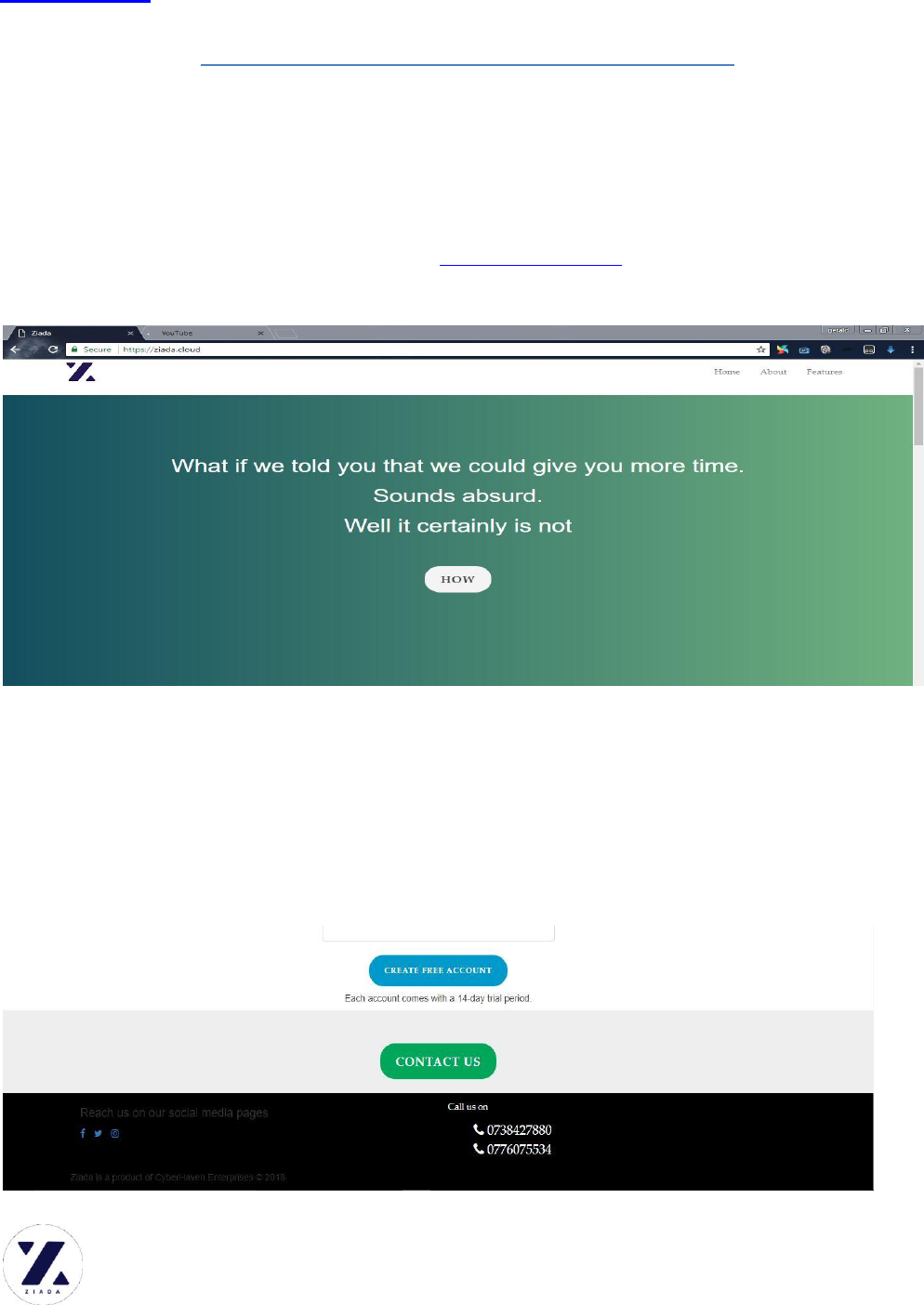
Get to the Ziada website using a web browser (Mozilla Firefox, Google Chrome,
Microsoft Edge, Safari etc) type this link: www.ziada.cloud . This will take you to
Ziada index page (the information page).
Navigate through to the bottom section of the page. In the process you will learn
more about Ziada, Its features and benefits to you. On the bottom are a CREATE
FREE ACCOUNT button and a CONTACT US button (Provides a direct
communication link to Ziada support team email), Ziada social media links and the
Call us contacts: 0738427880 / 0776075534
STEP 1: Click the CREATE FREE ACCOUNT button
Ziada.cloud
24/7 HELPLINE: 0738427880 / 0776075534
NOTE: FOR DEMONSTRATION ZIADA HAS CREATED A DEMO
ACCOUNT example.ziada.cloud . THIS ACCOUNT SHALL BE REFERENCED
THROUGH THE ENTIRE MANUAL. !!!!!!!!!
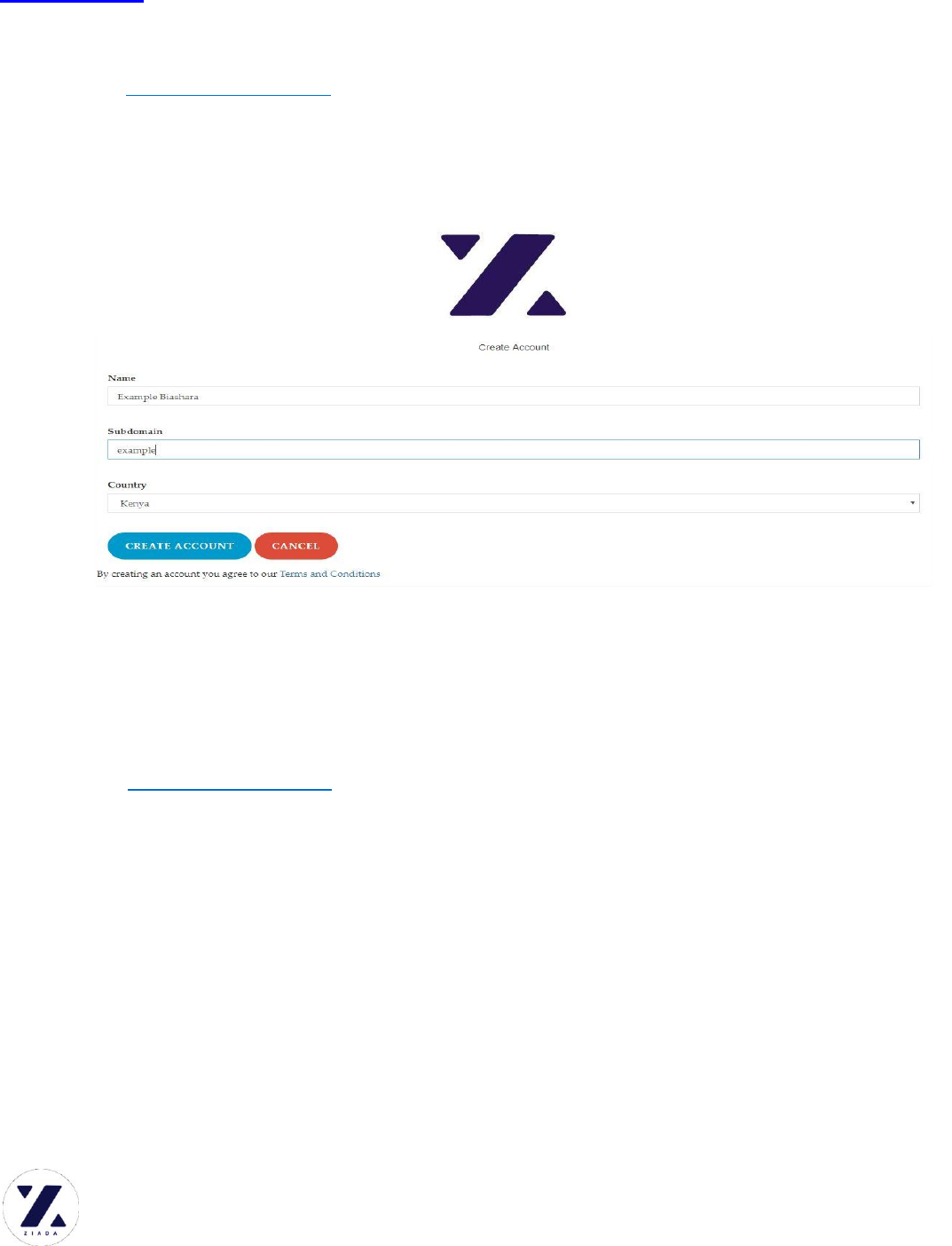
Clicking the CREATE FREE ACCOUNT button will prompt you to create your
business account.
Enter your business name
Choose an appropriate Sub-Domain. This will make the ADDRESS you shall use
to access your account. Say, the business name is Example Biashara and the sub
domain is example, Then the user will access their account from the link
example.ziada.cloud
Choose your country of operation
Click CREATE ACCOUNT.
Ziada.cloud
24/7 HELPLINE: 0738427880 / 0776075534
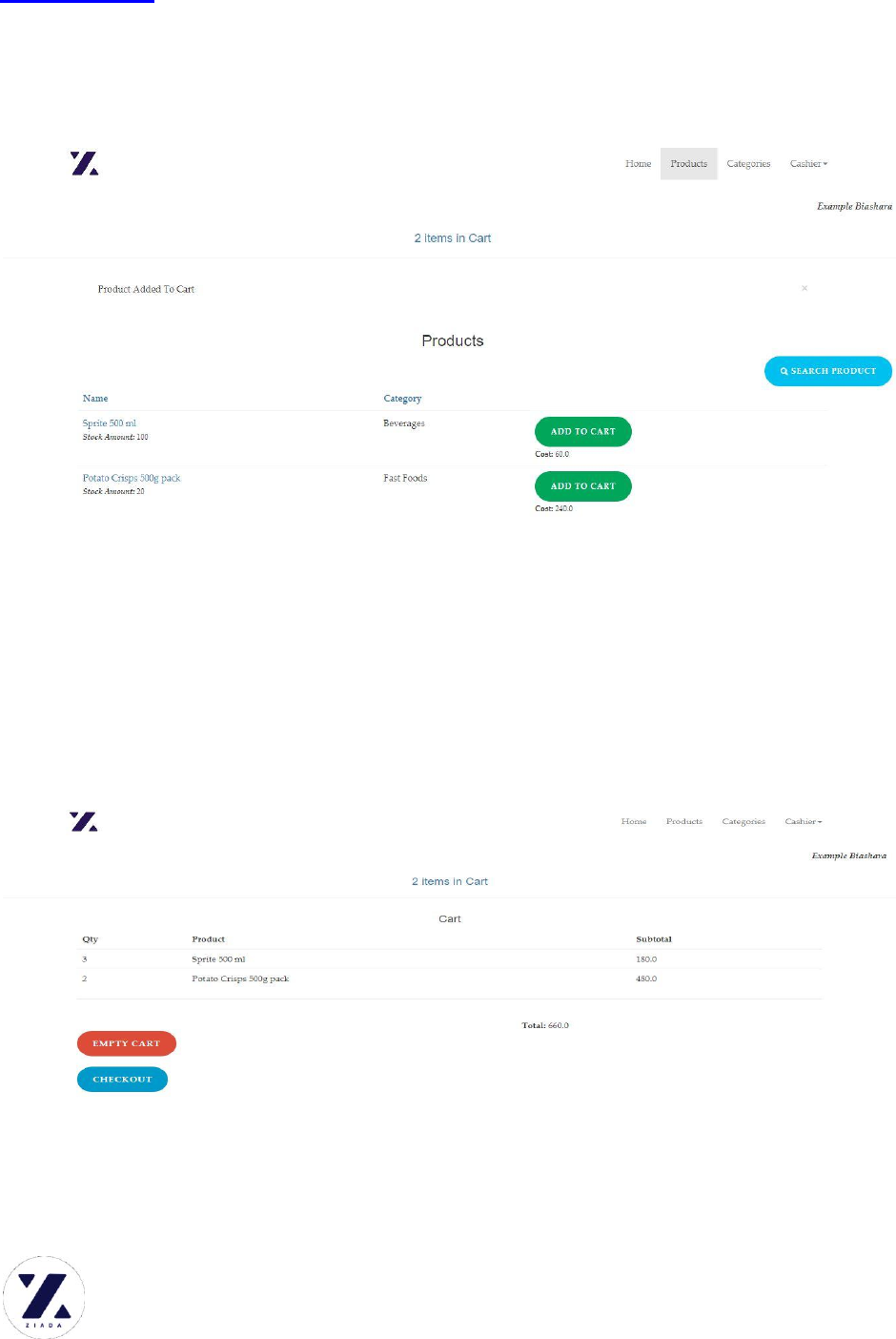
STEP 2: CREATE THE FIRST USER ACCOUNT.
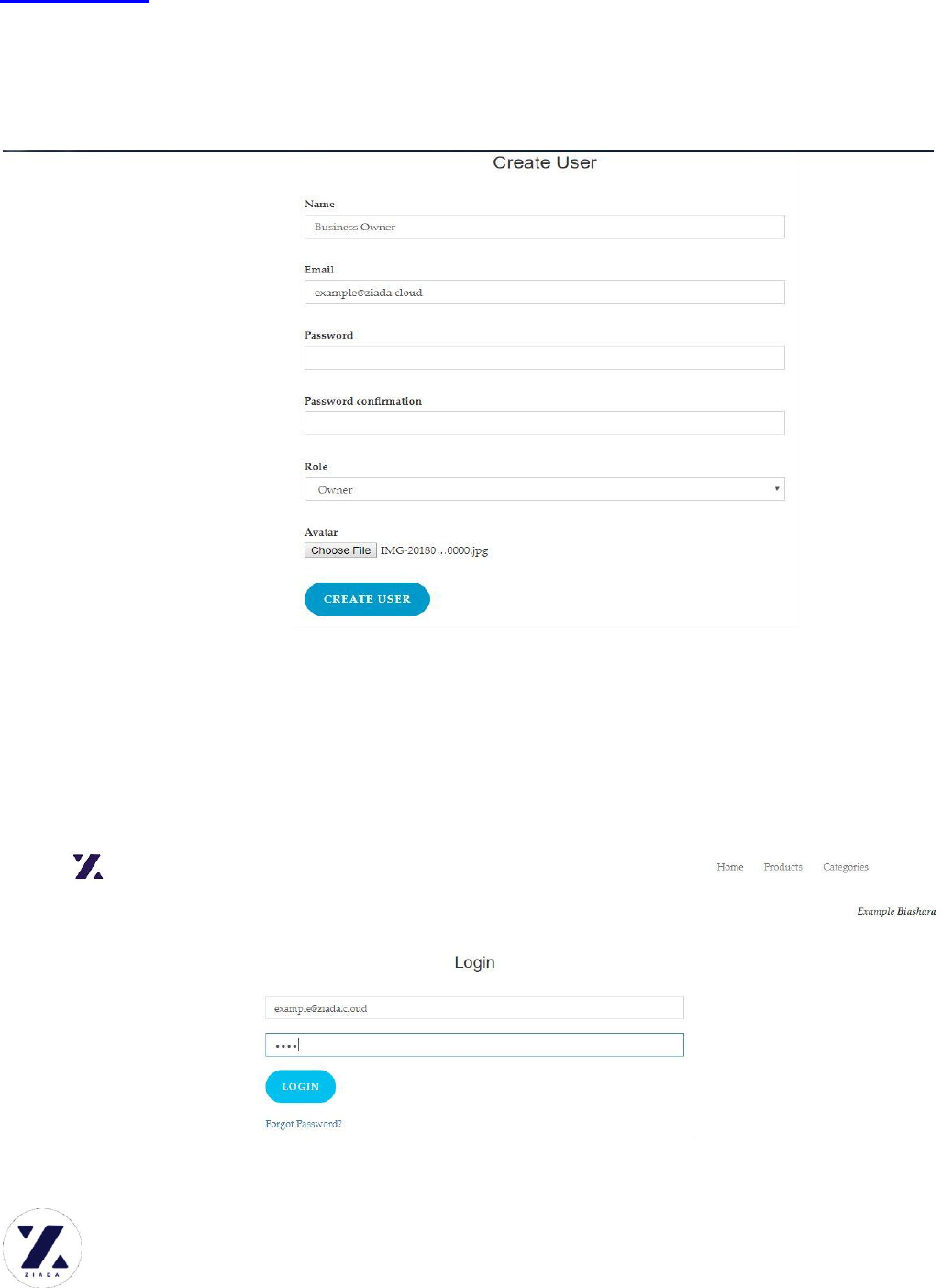
After creating the account, you shall be prompted to create a user, preferably the
business owner’s account. He/She is the chief administrator.
Fill the User name
Enter a valid email address
Type a strong password and confirm the password
Select the user role { Owner or User or Admin}
Select an Avatar (profile picture) and click CREATE USER
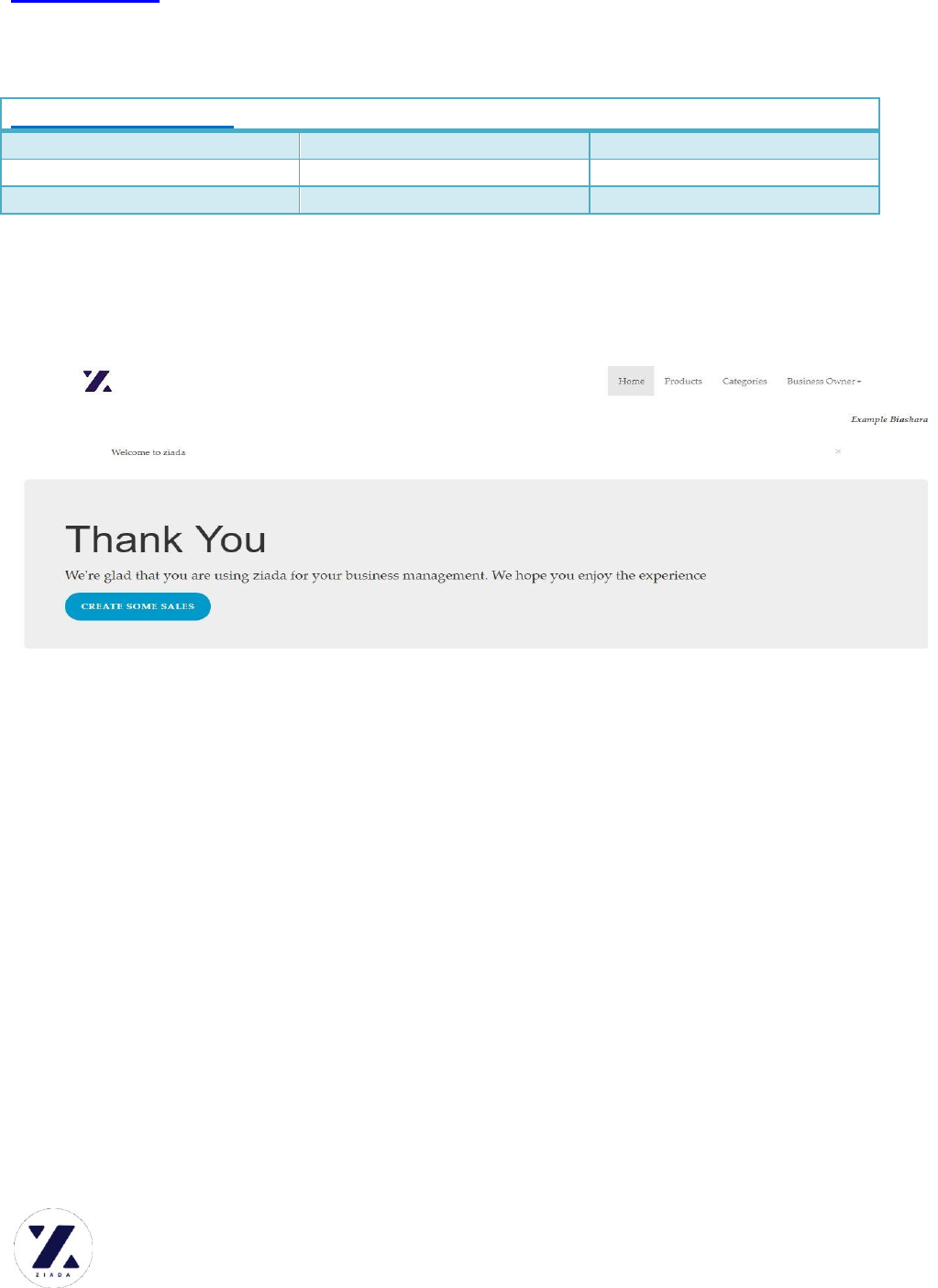
STEP 3: LOG IN
Enter the user email address
Ziada.cloud
24/7 HELPLINE: 0738427880 / 0776075534
Enter password and login {Forgot password is only clicked when you
cannot remember your password.}
example.ziada.cloud DEMO LOGIN CREDENTIALS
USER
PASSWORD
ROLE
example@ziada.cloud
1234
OWNER
cashier@example.ziada.cloud
1234
USER
With the right credentials issued, the login is authorized.
Welcome to the Account welcome page.
MANAGEMENT
STEP 4: ADMINISTRATION
On the top right corner is a dropdown menu alongside the username. Click the drop
down and click the Admin option (Only authorized users with admin privileges).
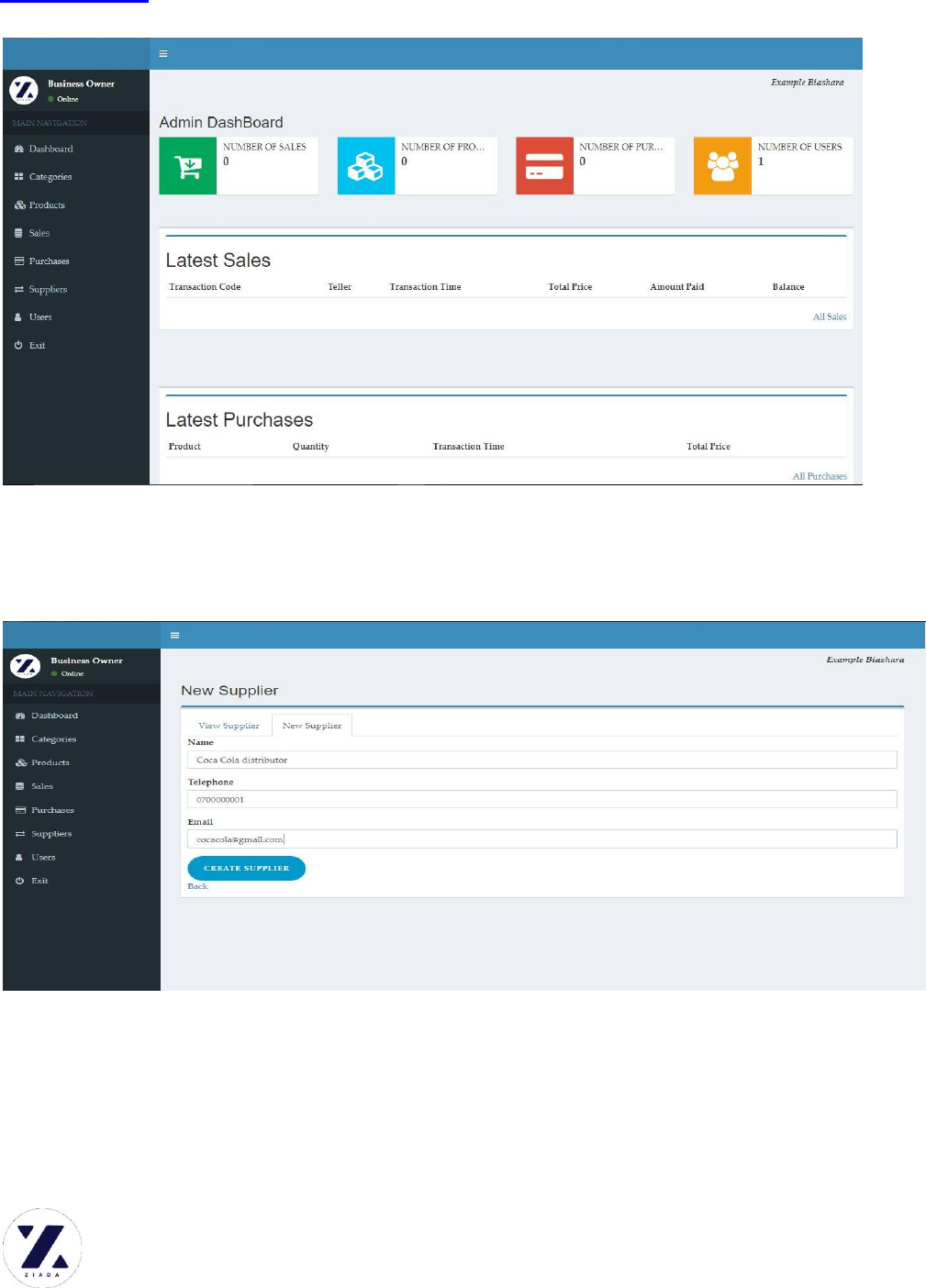
Clicking the Admin button will redirect you to the Administration end of the
account.
Admin Dashboard is displayed. It gives you a full overview of the business at a go.
Ziada.cloud
24/7 HELPLINE: 0738427880 / 0776075534
STEP 4.1 MANAGING SUPPLIERS
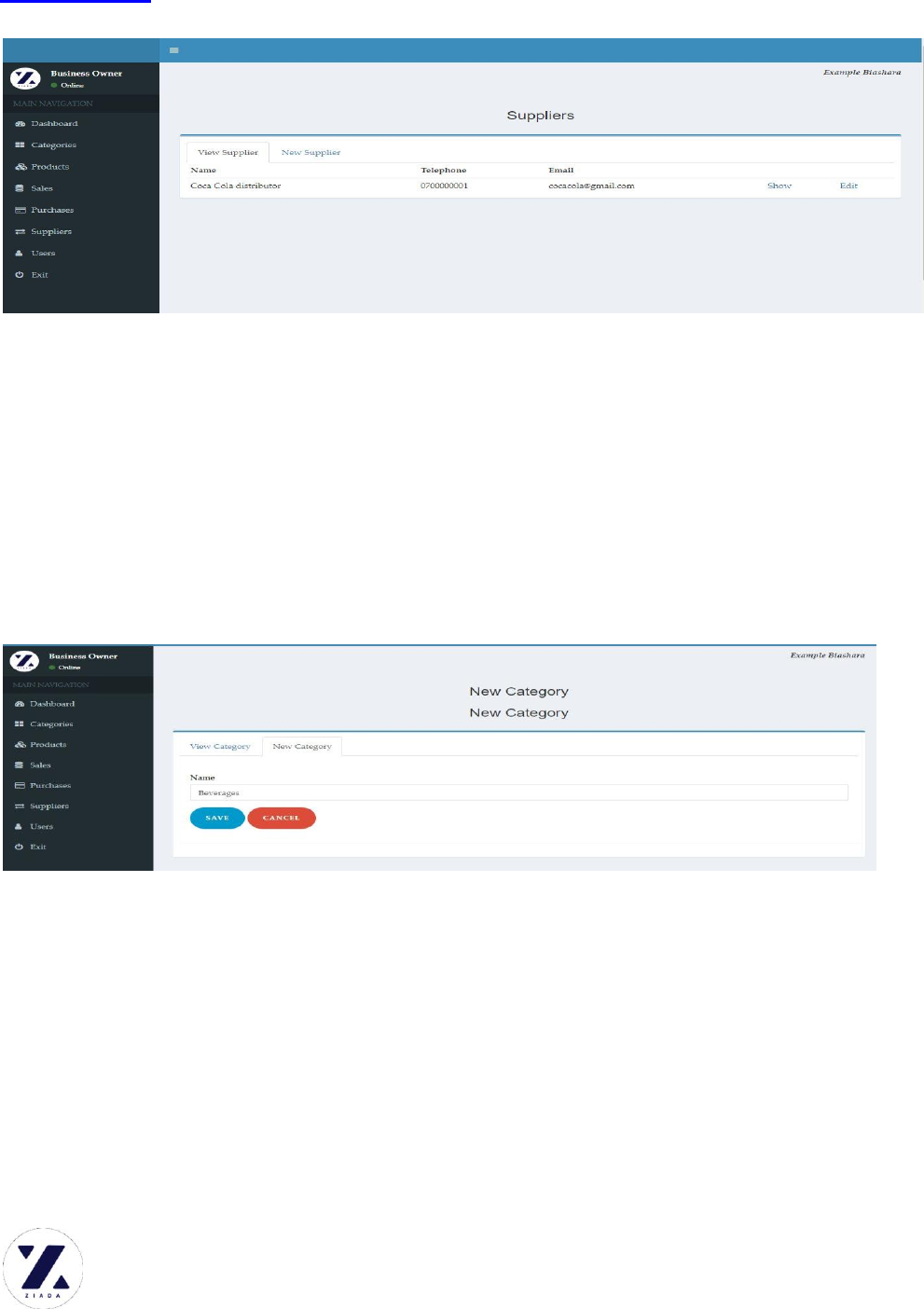
On the main navigation, click suppliers tab. It will display supplier’s page. Click
New supplier to add a new supplier.
Enter Supplier Name
Enter Supplier Telephone number
Enter Supplier Email address and click CREATE SUPPLIER
View Suppliers
Ziada.cloud
24/7 HELPLINE: 0738427880 / 0776075534
STEP 4.2: MANAGE PRODUCT CATEGORIES
For easy business management, it is important to categorize your products into
manageable categories.
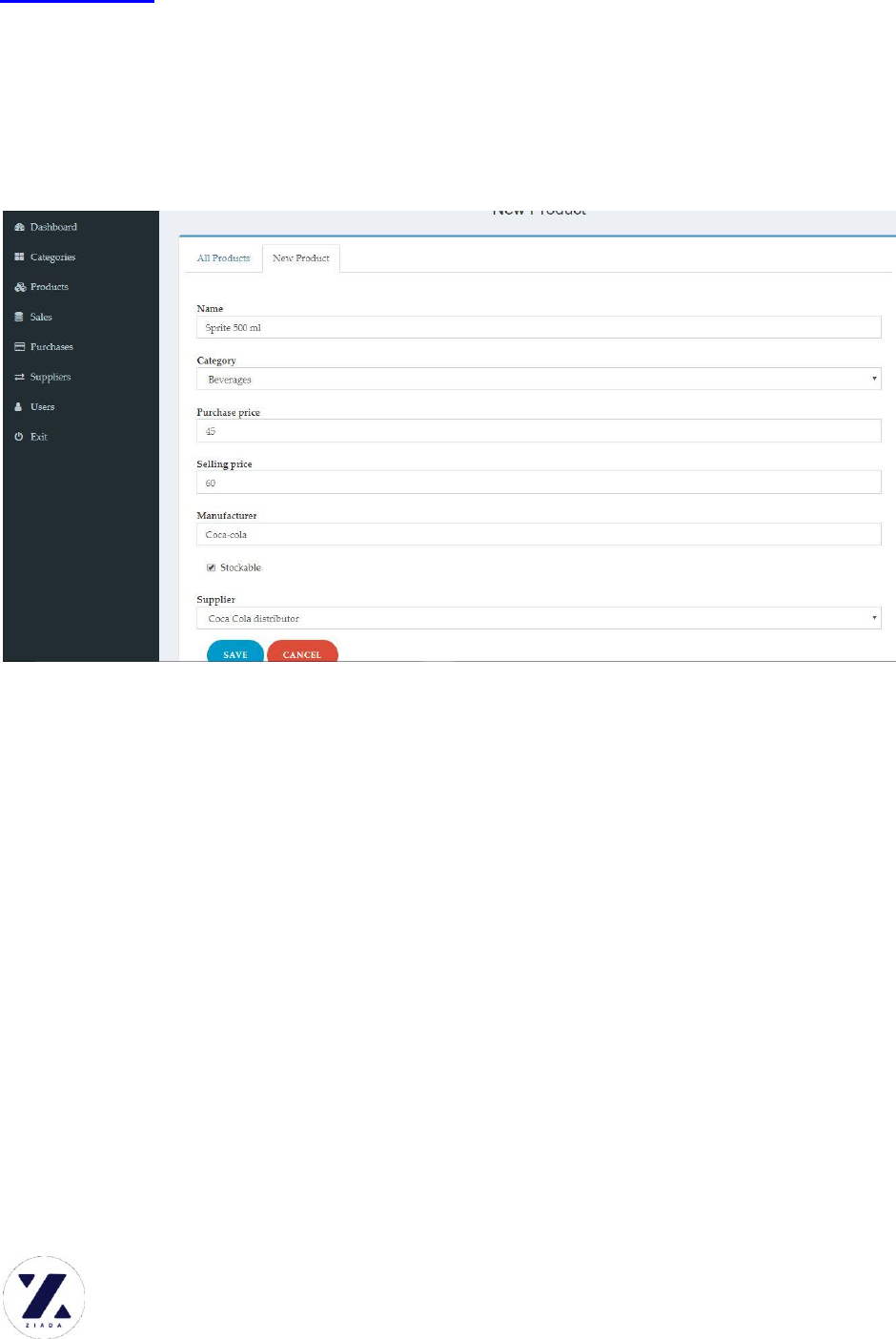
On the main navigation, Click Categories and Select New Category to add a
category.
Enter Category Name and click SAVE
Ziada.cloud
24/7 HELPLINE: 0738427880 / 0776075534
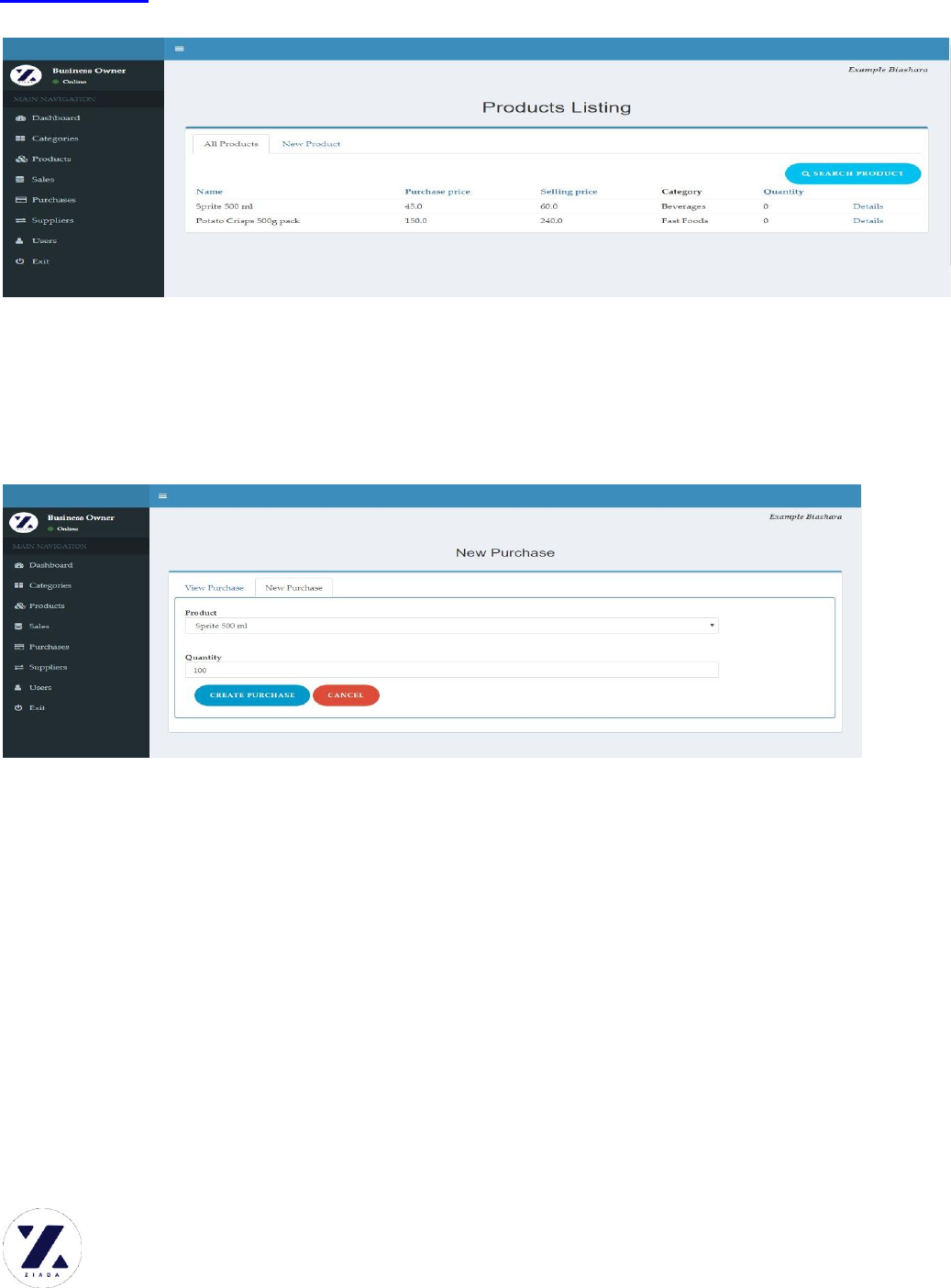
STEP 4.3: PRODUCT MANAGEMENT
After setting up the product categories, the next step is to manage the products you
stock in your business.
On the main navigation, click Products. Next select the NEW PRODUCT tab.
Enter product name (e.g. Sprite 500 ML)
Select the category the product belongs to, from the dropdown menu
Enter the purchase price(‘wholesale price’ the price form the supplier)
Enter the selling price
Enter the Manufacturer of the product
Check if the product is stockable (Stockable products are those
products whose stock quantity reduces with every sale. E.g. Bottles of
soda, sacks of potatoes are stockable. A plate of chips on the other
hand is not stockable)
Select the Product supplier from the dropdown menu
Click SAVE to add the product
You can then View and Search for products in your store.
Ziada.cloud
24/7 HELPLINE: 0738427880 / 0776075534
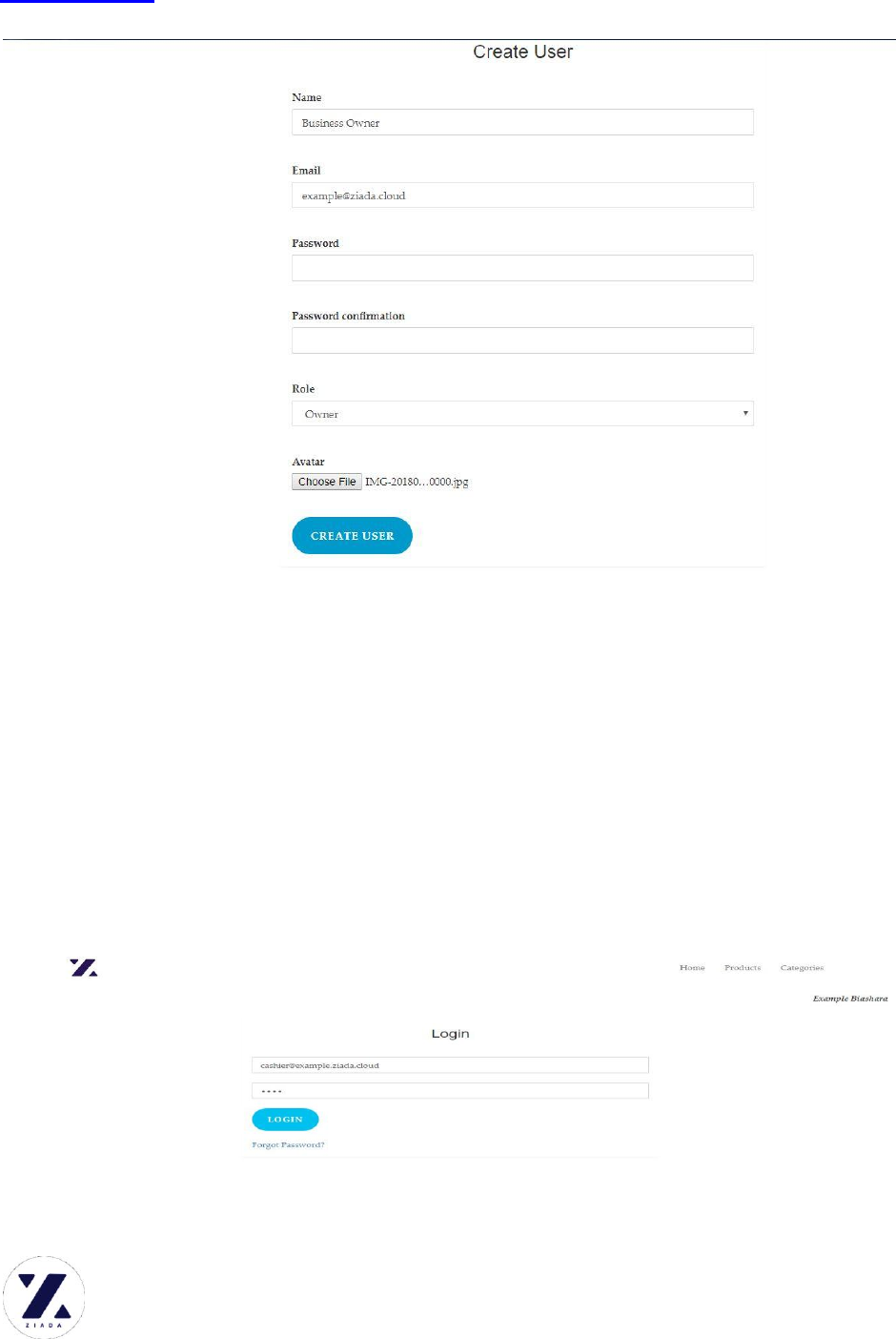
STEP 4.4: MAKING PURCHASE
After having the products set up, it’s about that time to contact the suppliers to
stock your business up.
On the main navigation, Click Purchases to stock up and make NEW PURCHASE
Choose Product
Enter the Purchased Quantity and click CREATE PURCHASE
STE4.5: ADDING USERS.
If you want to go fast, go alone but if you want to go far go as a team. Every
business is made up of several partners. Let’s set up your stewards.
On the Main navigation, Click USERS and select NEW USER.
Fill in the USER’S records as was done above and click CREATE USER.
Ziada.cloud
24/7 HELPLINE: 0738427880 / 0776075534
CONGRATULATIONS!!!!!!!!!!! YOU ARE NOW READY TO TRANSACT.
MAKING MONEY
We have already made the necessary management. It’s about time start transacting.
CREATING SALES
Every user has to login with genuine credentials. The business owner creates the
users in the business and issues their credentials.
Ziada.cloud
24/7 HELPLINE: 0738427880 / 0776075534
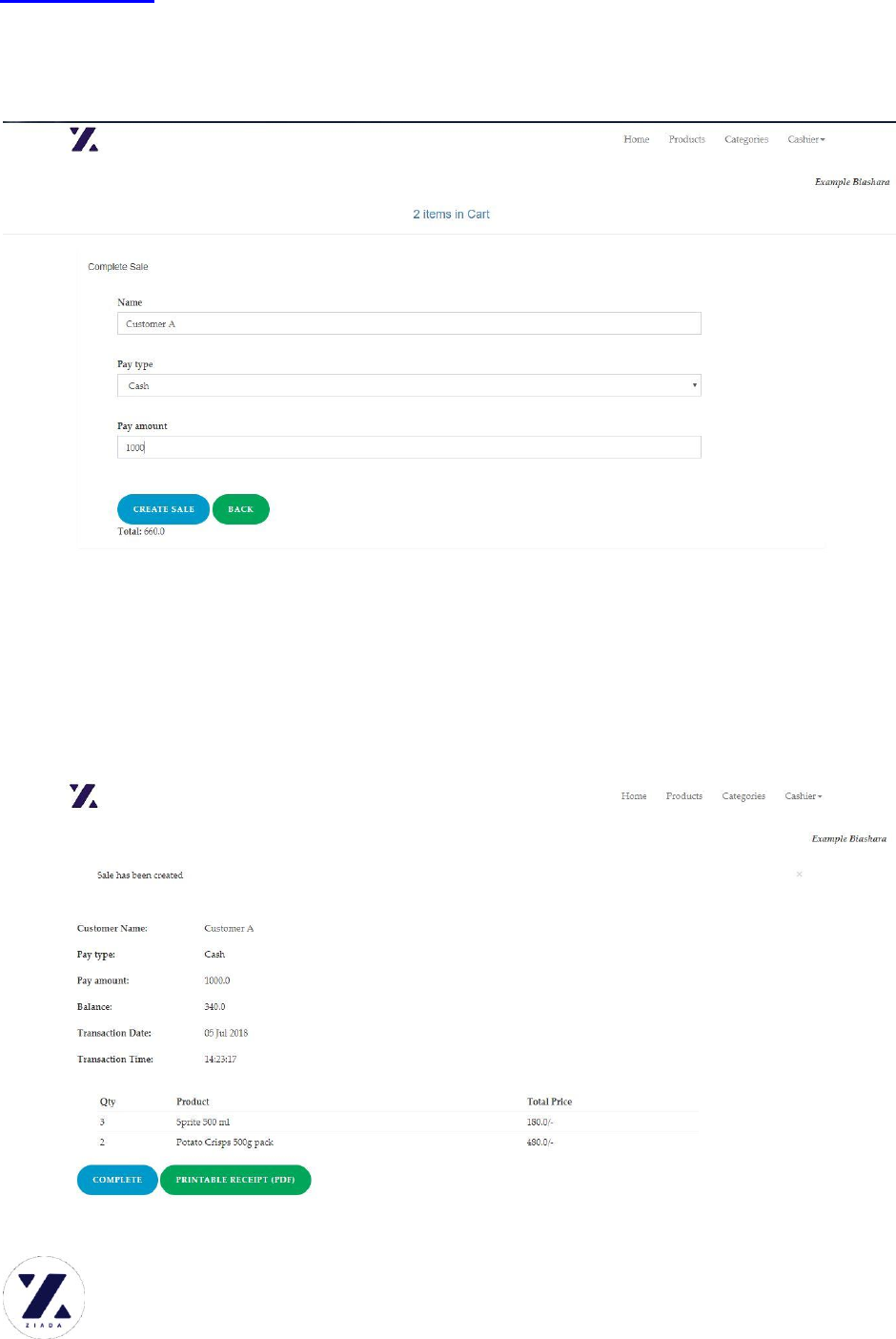
Ziada comes with a very interactive and user friendly Point of Sale.
After logging in, this page is displayed.
Here you can SEARCH for a product to get its details and MAKE SALES.
To add a product to cart, CLICK the GREEN button ADD TO CART. Every time
the button is clicked, the product is added to cart ONCE.
After Adding the Products for sale, Click the Items in Cart button above to view
the cart.
You can then choose to EMPTY CART or proceed to the CHECKOUT.
Ziada.cloud
24/7 HELPLINE: 0738427880 / 0776075534
COMPLETING THE SALE
Click CHECKOUT.
Enter The Customer Name
Select the pay type(Cash or Mobile Money)
Enter the pay amount(Money taken from the customer)
NOTE…..On the bottom is the Total amount spend indicator
Click CREATE SALE button to complete the sale.

Ziada.cloud
24/7 HELPLINE: 0738427880 / 0776075534
You can then choose to print the receipt (AUTOGENERATED PDF RECEIPT) or
click COMPLETE to go back for a next TRANSACTION.
*****************************************************************
THANK YOU FOR CHOOSING ZIADA…. AFRICA’S BUSINESS SOLUTION
KARIBU KWA FAMILIA YA ZIADA.
www.ziada.cloud
#ziadacloud
©CYBERHAVEN ENTERPRISES.
Reach us on our social platforms:
FOLLOW….LIKE…SHARE…
www.facebook.com/ziadacloud
www.twitter.com/ziadacloud
www.instagram.com/ziadacloud
Or call the 24/7 HELPLINE Nos. : 0738427880 / 0776075534

Ziada.cloud
24/7 HELPLINE: 0738427880 / 0776075534
