Baposter Guide
baposter_guide_copy
User Manual:
Open the PDF directly: View PDF  .
.
Page Count: 5
The baposter latex poster style
Brian Amberg and Reinhold Kainhofer
September 16, 2011
Abstract
This is still only a very rough documentation, but it should be better than no documenta-
tion. If anything is unclear, please post a request (preferably with a patch) at the bugtracker.
1 Introduction
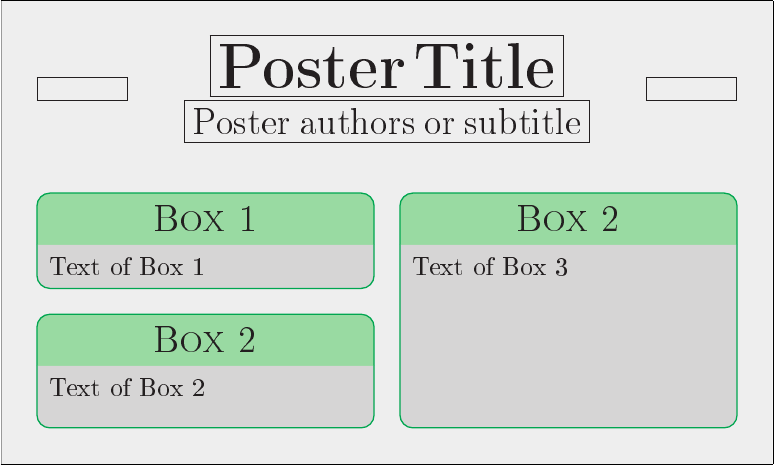
baposter is a LaTeX template to efficently design pretty posters for scientific conferences. Posters
are composited of blocks with headings, which can be positioned easily on the page, using absolute
or relative positioning. A number of predefined styles can be composed to generate new color
schemes and ornaments.
2 Usage
Refer to the included example posters for the overall structure. I will document the different keys
here. The main environment for the poster is the poster environment. It has the following structure
\begin{poster}{
key=value options
}
{
Eye Catcher, empty if option eyecatcher=no
}
{
Poster Title
}
{
Poster Authors
}
{
University Logo
}
Definition of the boxes
\end{poster}
1
It should be immediately inside the
\begin{document}
\end{document}
environment, or there will be blank pages.
Additionally, you can pass some options for page size selection directly to the class file.
\documentclass[class options]{baposter}
2.1 Class Options
The class options are
landscape/portrait Page Layout
a0paper, a1paper, a2paper, a3paper, a4paper, archE Predefined paper sizes
paperwidth=length,paperheight=length Width/Height of the paper. Do not use together
with a0paper or other predefined paper sizes.
margin=length Page margin
fontscale=real number Scaling of the poster. The poster is typeset with standard font sizes on
a ‘fontscale times papersize’ paper, and then scaled up by 1/fontscale to the chosen paper
size. This ensures good looking font sizes. So if you need to fit more onto a poster, increase
the fontscale option to get smaller fonts. But be sure not to choose too small fonts, or your
paper will be awful. I find posters with small print a nuisance, and tend to spend more time
with well presented and concise content.
showframe Show a frame around the page, mainly useful for debugging.
2
2.2 Poster Environment Options
The available options are:
grid={yes,no}Display a grid, which can be useful during the layout phase.
columns=4 Number of columns (default 4 in landscape and 3 in portrait format) (maximum
number is 6)
colspacing=length Distance between the columns of the poster
headerheight=length Height of the main poster header as a length (not of the headers of the
text boxes). Default value is 0.1\textheight.
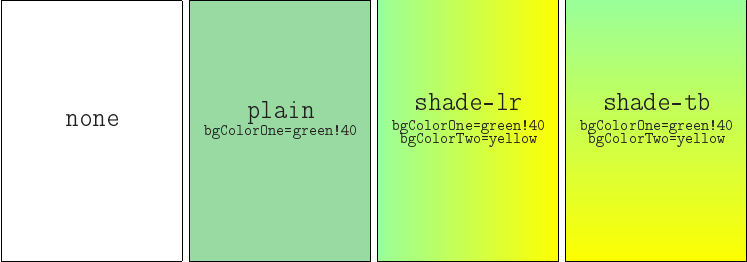
background=poster background type Type of poster background. Possible values are
1. plain: Plain background in one color (bgColorOne)
2. shade-lr: Horizontal background gradient (from bgColorOne to bgColorTwo)
3. shade-tb: Vertical background gradient (from bgColorOne to bgColorTwo)
4. user: Use the command \background{...} to define your own background.
5. none: No background at all.
bgColorOne=pgf color name First background color. For a plain, this color will be used. For
a shaded background, this is the first color for the gradient.
bgColorTwo=pgf color name Second background color. This color will only be used for shaded
backgrounds as the end color of the gradient.
eyecatcher={yes,no}Should an eye catcher be shown on the left of the title page. The eyecatcher
itself is defined in the second argument of the poster environment.
3
2.3 Posterbox Environment Options
borderColor=pgf color name Color used for the borders of the poster boxes
headerColorOne=pgf color name First color of box header. Two colors can be used to define
gradients.
headerColorTwo=pgf color name Second color of box header. Two colors can be used to define
gradients.
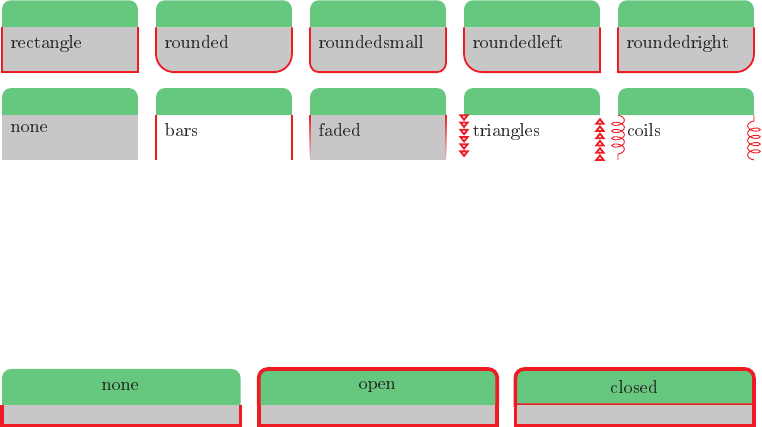
textborder=border type Which kind of border should the lower part of the text boxes have.
Possible values are:
1. none
2. bars
3. coils
4. triangles
5. rectangle
6. rounded
7. faded
headerborder=header border type At which sides of the text box headers should we draw a
border. Possible values are:
1. none
2. closed
3. open
headershape=header border shape The type of ornament of the text box headers. Possible
values are
1. rectangle
2. small-rounded
3. roundedright
4

4. roundedleft
5. rounded
headershade=type of header shading Which shading should be applied to the text box head-
ers. Possible values are
1. plain
2. shade-lr
3. shade-tb
4. shade-tb-inverse
boxshade which kind of shading is applied to the text boxes. Possible values are
1. shade-lr
2. shade-tb
3. plain
4. none
headerfont=font definition Commands inserted before a text box header is typeset.
headerFontColor=pgf color name Color that the header is typeset in.
linewidth=length Width of the lines used when drawing the poster.
3 Author and Licence
The original author is Brian Amberg, and the class and documentation has been greatly improved
by Reinhold Kainhofer. The class is distributed under the GPL. The current version and documen-
tation can be found at:
http://www.brian-amberg.de/uni/poster/
5
