Chapter 9 Ch9
User Manual: Chapter 9 C-more Micro-Graphic Panel User Manual and Quick Start Guide
Open the PDF directly: View PDF  .
.
Page Count: 4

9
9
9
Replacement paRts
Chapter
Chapter
Chapter
In this Chapter...
Replacement Parts Overview .................................................................................... 9-2
Replacement Parts ..................................................................................................... 9-2
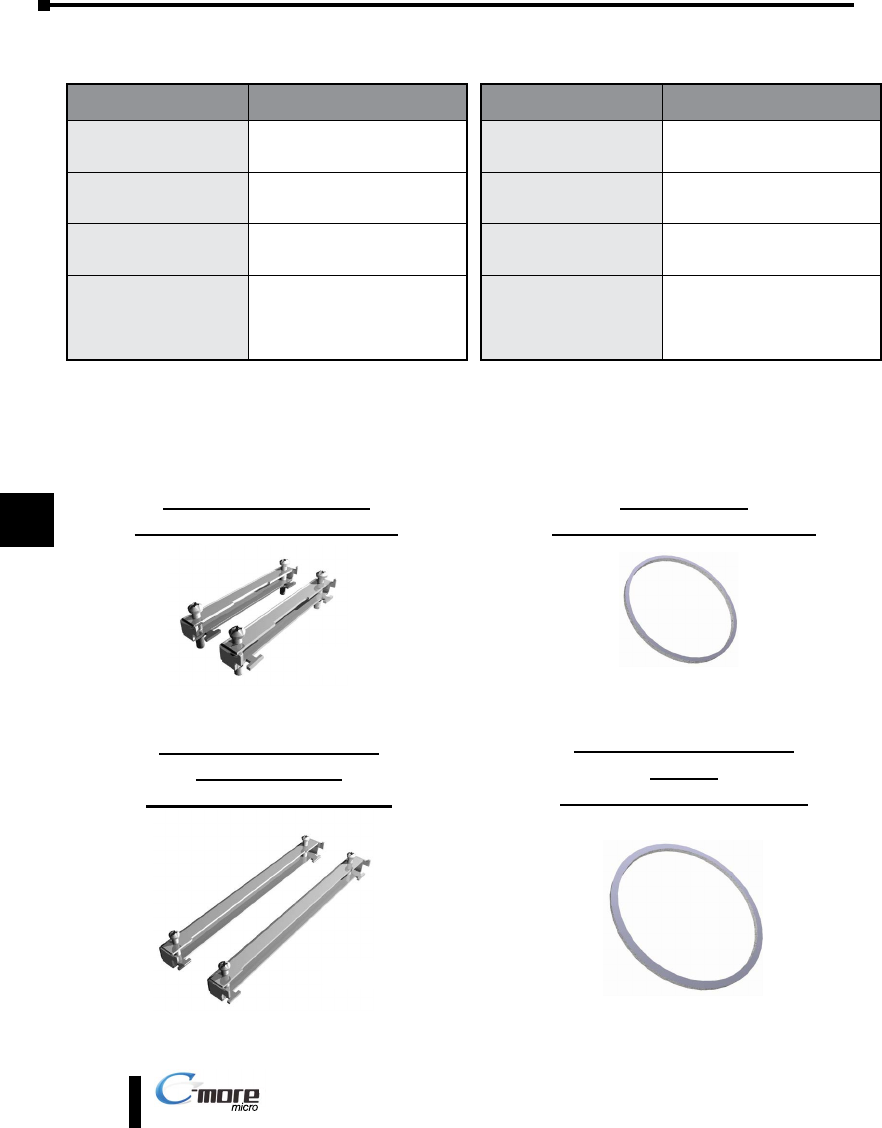
Panel Mounting Clips – EA-MG-S3ML-BRK ............................................................... 9-2
Panel Gasket – EA-MG-S3ML-GSK ............................................................................ 9-2
8-Button Keypad Bezel Mounting Clips – EA-MG-BZ1-BRK ....................................... 9-2
8-Button Keypad Bezel Gasket – EA-MG-BZ1-GSK .................................................... 9-2
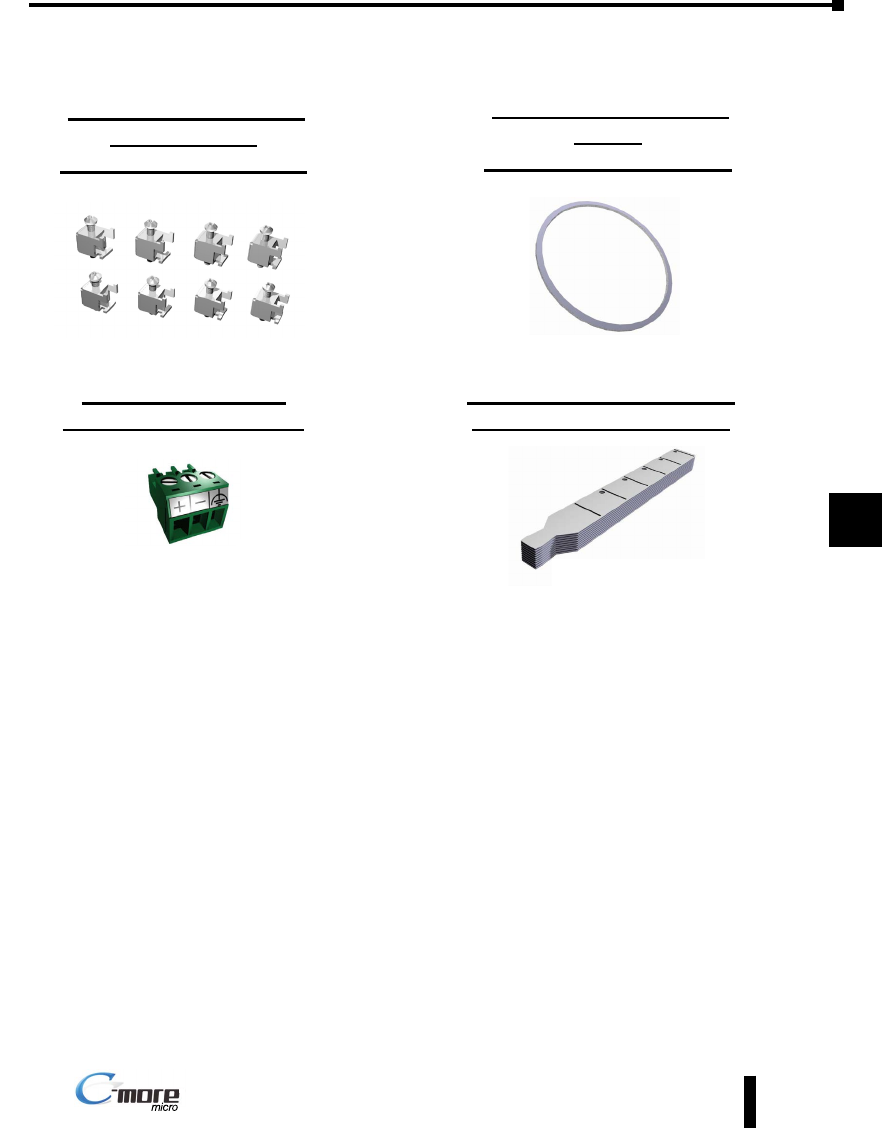
20-Button Keypad Bezel Mounting Clips – EA-MG-BZ2-BRK ..................................... 9-3
20-Button Keypad Bezel Gasket – EA-MG-BZ2-GSK .................................................. 9-3
DC Power Connector – EA-MG-DC-CON ................................................................. 9-3
Function Keys Label Inserts – EA-MG-S3ML-FKL ....................................................... 9-3
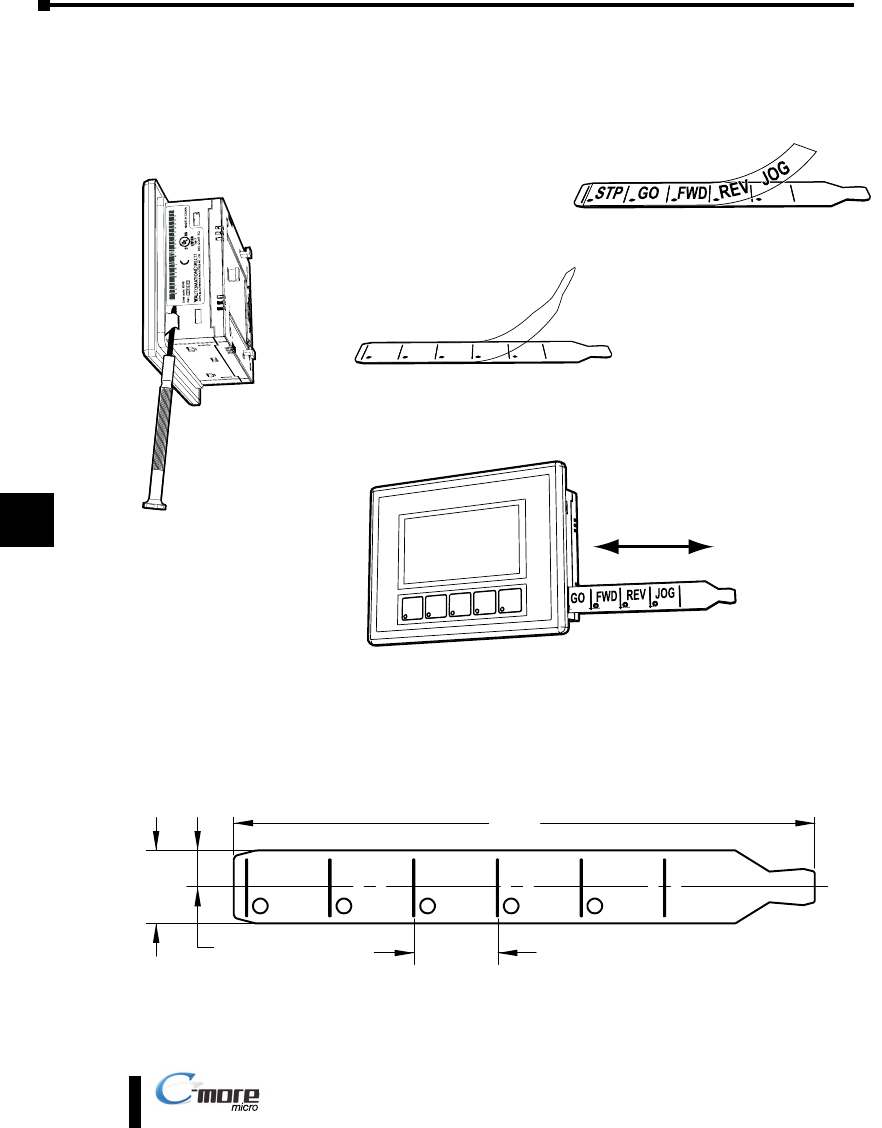
Customizing the Function Keys Insert Label ............................................................ 9-4
9-2
Chapter 9: Replacement Parts
1
2
3
4
5
6
7
8
9
10
11
12
13
14
A
B
C
D
EA1-MG-USER-M Hardware User Manual, 2nd Ed. Rev. D, 08/17
®
Replacement Parts Overview
Replacement Parts
Chapter 9: Replacement Parts
1
2
3
4
5
6
7
8
9
10
11
12
13
14
a
B
c
D
Part Number Description
EA-MG-S3ML-BRK Replacement mounting clip for
C-more 3” Micro-Graphic panels
(pk of 2)
EA-MG-BZ1-BRK Replacement mounting clip for
C-more 3” Micro-Graphic keypad
bezel EA-MG-BZ1 (pk of 2)
EA-MG-BZ2-BRK Replacement mounting clip for
C-more 3” Micro-Graphic keypad
bezel EA-MG-BZ2 (pk of 8)
EA-MG-DC-CON
Replacement adapter DC power
connector for optional EA-MG-P1
and EA-MG-SP1 power adapters
used with C-more 3”Micro-Graphic
panels (pk of 5)
Panel Mounting Clips
Part No. EA-MG-S3ML-BRK
8-Button Keypad Bezel
Mounting Clips
Part No. EA-MG-BZ1-BRK
Panel Gasket
Part No. EA-MG-S3ML-GSK
8-Button Keypad Bezel
Gasket
Part No. EA-MG-BZ1-GSK
(pk of 2)
(pk of 2)
Part Number Description
EA-MG-S3ML-GSK Replacement mounting gasket for
C-more 3” Micro-Graphic panels
EA-MG-BZ1-GSK Replacement mounting gasket for
C-more 3” Micro-Graphic keypad
bezel EA-MG-BZ1
EA-MG-BZ2-GSK Replacement mounting gasket for
C-more 3” Micro-Graphic keypad
bezel EA-MG-BZ2
EA-MG-S3ML-FKL Replacement function key label
insert for C-more 3” Micro-Graphic
panels (pk of 10; 5 blank, 5 F1-F5)
9-3
Chapter 9: Replacement Parts
1
2
3
4
5
6
7
8
9
10
11
12
13
14
A
B
C
D
EA1-MG-USER-M Hardware User Manual, 2nd Ed. Rev. D, 08/17
®
Chapter 9: Replacement Parts
1
2
3
4
5
6
7
8
9
10
11
12
13
14
a
B
c
D
Replacement Parts (con’d)
20-Button Keypad Bezel
Mounting Clips
Part No. EA-MG-BZ2-BRK
DC Power Connector
Part No. EA-MG-DC-CON
20-Button Keypad Bezel
Gasket
Part No. EA-MG-BZ2-GSK
Function Keys Label Inserts
Part No. EA-MG-S3ML-FKL
(pk of 8)
(pk of 5)
(pk of 10; 5 blank, 5 F1-F5)
9-4
Chapter 9: Replacement Parts
1
2
3
4
5
6
7
8
9
10
11
12
13
14
A
B
C
D
EA1-MG-USER-M Hardware User Manual, 2nd Ed. Rev. D, 08/17
®
Customizing the Function Keys Insert Label
Chapter 9: Replacement Parts
1
2
3
4
5
6
7
8
9
10
11
12
13
14
a
B
c
D
4.035
[102.5]
0.508
[12.9]
Units: inches [mm]
0.254
[6.5]
0.581
[14.8]
Typical
Step 1 - Remove existing
function key label insert
using a small tool such as
jeweler’s screw driver.
Step 2 - Remove the
protective film from the
blank key label insert.
Step 3 - If desired, print and
apply self adhesive labels to
the blank insert.
Step 4 - Install the new insert
into the slot in the side of the
panel and lock tab into place.
Label Printer Example: Brother P-touch model TZ-131, using TZ black print on
clear tape, p/n TZ-131, font size 24 narrow, 10 spaces between each word.
NOTE: Insert shown full size.
