Manual Ecockpit
ecockpit%20manual
ecockpit%20manual
User Manual:
Open the PDF directly: View PDF  .
.
Page Count: 36
- Table of Contents
- 1 Notes about this Documentation
- 2 Important Notes
- 3 Overview
- 4 Description of the Library Concept
- 5 Migration of Other Libraries
- 6 Appendix
- List of Figures
- List of Tables
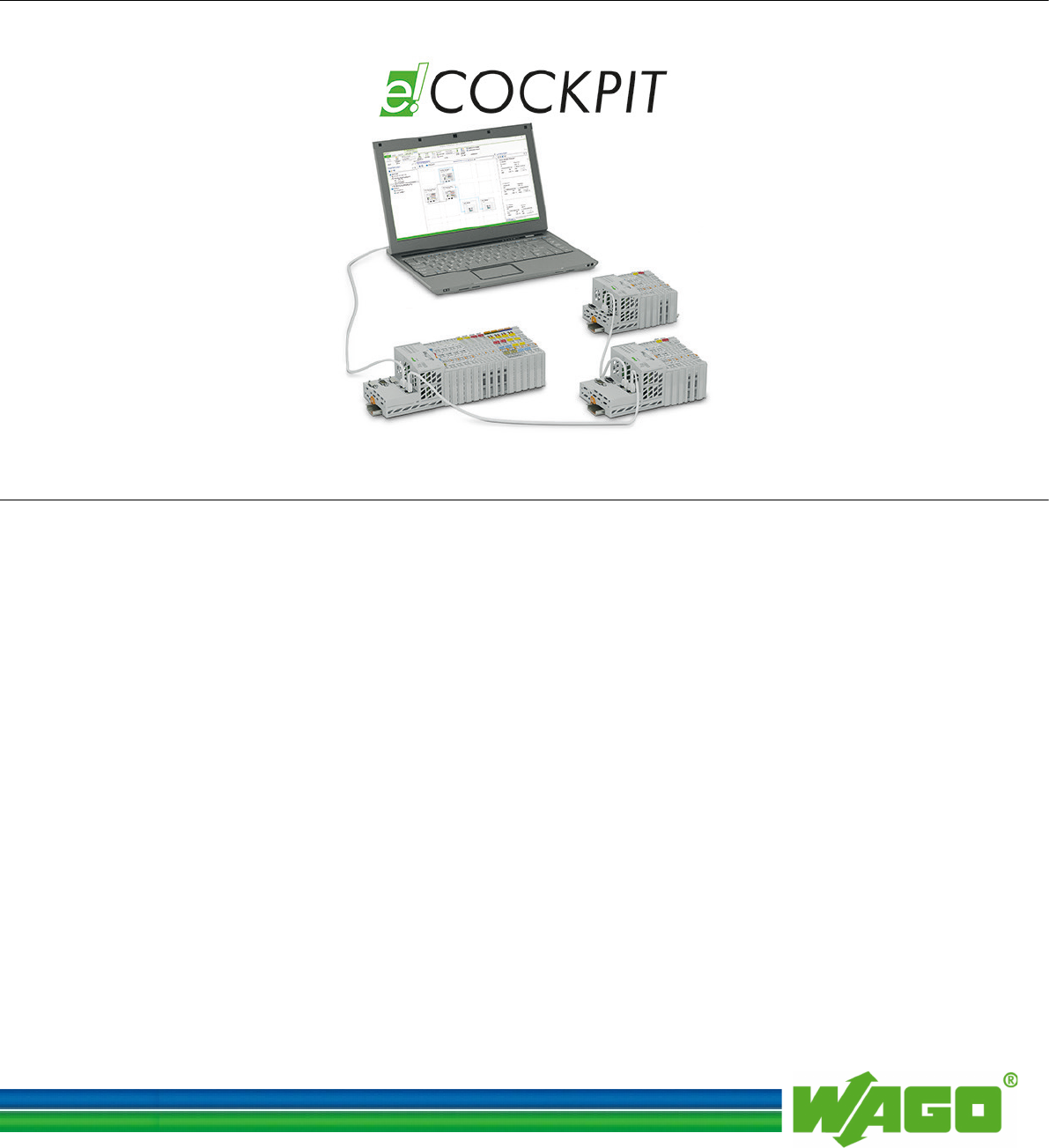
WAGO Software
Manual
e!COCKPIT
Libraries - Overview and M
igration Notes
Version 1.0.0

2 WAGO Software
e!COCKPIT Libraries - Overview and Migration Notes
Manual
Version 1.0.0
© 2015 by WAGO Kontakttechnik GmbH & Co. KG
All rights reserved.
WAGO Kontakttechnik GmbH & Co. KG
Hansastraße 27
D-32423 Minden
Phone: +49 (0) 571/8 87 – 0
Fax: +49 (0) 571/8 87 – 1 69
E-Mail: info@wago.com
Web: http://www.wago.com
Technical Support
Phone: +49 (0) 571/8 87 – 5 55
Fax: +49 (0) 571/8 87 – 85 55
E-Mail: support@wago.com
Every conceivable measure has been taken to ensure the accuracy and
completeness of this documentation. However, as errors can never be fully
excluded, we always appreciate any information or suggestions for improving the
documentation.
E-Mail: documentation@wago.com
We wish to point out that the software and hardware terms as well as the
trademarks of companies used and/or mentioned in the present manual are
generally protected by trademark or patent.

WAGO Software Table of Contents 3
e!COCKPIT Libraries - Overview and Migration Notes
Manual
Version 1.0.0
Table of Contents
1 Notes about this Documentation ................................................................. 5
1.1 Scope of Validity ....................................................................................... 5
1.2 Copyright ................................................................................................... 5
1.3 Symbols ..................................................................................................... 6
1.4 Number Notation ....................................................................................... 8
1.5 Font Conventions ...................................................................................... 8
2 Important Notes ........................................................................................... 9
2.1 Legal Bases ............................................................................................... 9
2.1.1 Subject to Changes ............................................................................... 9
2.2 Personnel Qualification ............................................................................. 9
2.3 Intended Use of e!COCKPIT Libraries .................................................... 9
3 Overview ..................................................................................................... 10
4 Description of the Library Concept ......................................................... 11
4.1 Library Types: Layer Model ................................................................... 11
4.1.1 Solution Layer .................................................................................... 12
4.1.2 Application Layer ............................................................................... 12
4.1.3 System Layer ...................................................................................... 12
4.1.3.1 WAGO System Layer .................................................................... 13
4.1.3.2 CODESYS System Layer .............................................................. 13
4.1.4 Representation in e!COCKPIT ........................................................... 13
4.2 Function Blocks: Interface Variants ........................................................ 14
4.2.1 Basic Function Blocks ........................................................................ 15
4.2.2 Compact Function Blocks .................................................................. 15
4.2.3 Modular Function Blocks ................................................................... 15
4.3 Function Blocks: Behavior Models ......................................................... 16
4.3.1 “WagoExecute” Behavior Model ....................................................... 16
4.3.2 “WagoEnable” Behavior Model ......................................................... 18
4.3.3 “WagoTrigger” Behavior Model ........................................................ 19
4.4 Return Values and Error Handling .......................................................... 21
4.4.1 Error Signalling via Specific Return Values ...................................... 21
4.4.2 Numerical ResultCodes ...................................................................... 21
4.4.3 Error Objects with Plain Text Message .............................................. 22
4.5 Naming Rules for Variables .................................................................... 22
5 Migration of Other Libraries .................................................................... 25
5.1 From WAGO-I/O-PRO to e!COCKPIT .................................................. 25
5.1.1 Preparing PLC Projects for Import ..................................................... 25
5.1.1.1 Known Restrictions when Using LD ............................................. 26
5.1.1.2 Function Blocks ............................................................................. 26
5.1.1.3 Function Blocks with EN/ENQ ..................................................... 27
5.1.2 Known Restrictions When Using SFC ............................................... 27
5.1.2.1 Step Variables ................................................................................ 27
5.1.2.2 Identifiers ....................................................................................... 27
5.1.2.3 Known Restrictions When Using CFC .......................................... 28
5.1.3 Display Problems................................................................................ 28
5.1.4 Macros ................................................................................................ 28

4 Table of Contents WAGO Software
e!COCKPIT Libraries - Overview and Migration Notes
Manual
Version 1.0.0
5.2 Preparing Visualization Projects for Import ........................................... 28
5.2.1 Variable Declaration ........................................................................... 28
5.2.2 Placeholders ........................................................................................ 28
5.2.2.1 Visualizations from Libraries ........................................................ 29
5.2.3 Migration of the PLC Configuration .................................................. 30
5.2.4 Importing Network Variables ............................................................. 30
5.3 CODESYS 3 to e!COCKPIT .................................................................. 30
5.3.1 Transferring Existing Projects ............................................................ 30
5.3.2 Device Support ................................................................................... 31
6 Appendix ..................................................................................................... 32
List of Figures ...................................................................................................... 33
List of Tables ........................................................................................................ 34
WAGO Software Notes about this Documentation 5
e!COCKPIT Libraries - Overview and Migration Notes
Manual
Version 1.0.0
1 Notes about this Documentation
Always retain this documentation!
This documentation is part of the product. Therefore, retain the documentation
during the entire service life of the product. Pass on the documentation to any
subsequent user. In addition, ensure that any supplement to this documentation is
included, if necessary.
1.1 Scope of Validity
This documentation applies to the libraries provided by WAGO for the e!Cockpit
software.
1.2 Copyright
This Manual, including all figures and illustrations, is copyright-protected. Any
further use of this Manual by third parties that violate pertinent copyright
provisions is prohibited. Reproduction, translation, electronic and phototechnical
filing/archiving (e.g., photocopying) as well as any amendments require the
written consent of WAGO Kontakttechnik GmbH & Co. KG, Minden, Germany.
Non-observance will involve the right to assert damage claims.
6 Notes about this Documentation WAGO Software
e!COCKPIT Libraries - Overview and Migration Notes
Manual
Version 1.0.0
1.3 Symbols
Personal Injury!
Indicates a high-risk, imminently hazardous situation which, if not avoided, will
result in death or serious injury.
Personal Injury Caused by Electric Current!
Indicates a high-risk, imminently hazardous situation which, if not avoided, will
result in death or serious injury.
Personal Injury!
Indicates a moderate-risk, potentially hazardous situation which, if not avoided,
could result in death or serious injury.
Personal Injury!
Indicates a low-risk, potentially hazardous situation which, if not avoided, may
result in minor or moderate injury.
Damage to Property!
Indicates a potentially hazardous situation which, if not avoided, may result in
damage to property.
Damage to Property Caused by Electrostatic Discharge (ESD)!
Indicates a potentially hazardous situation which, if not avoided, may result in
damage to property.
Important Note!
Indicates a potential malfunction which, if not avoided, however, will not result in
damage to property.
WAGO Software Notes about this Documentation 7
e!COCKPIT Libraries - Overview and Migration Notes
Manual
Version 1.0.0
Additional Information:
Refers to additional information which is not an integral part of this
documentation (e.g., the Internet).
8 Notes about this Documentation WAGO Software
e!COCKPIT Libraries - Overview and Migration Notes
Manual
Version 1.0.0
1.4 Number Notation
Table 1: Number Notation
Number Code
Example
Note
Decimal
100
Normal notation
Hexadecimal
0x64
C notation
Binary
'100'
'0110.0100'
In quotation marks, nibble separated with
dots (.)
1.5 Font Conventions
Table 2: Font Conventions
Font Type
Indicates
italic
Names of paths and data files are marked in italic-type.
e.g.: C:\Program Files\WAGO Software
Menu
Menu items are marked in bold letters.
e.g.: Save
>
A greater-than sign between two names means the selection of a
menu item from a menu.
e.g.: File > New
Input
Designation of input or optional fields are marked in bold letters,
e.g.: Start of measurement range
“Value”
Input or selective values are marked in inverted commas.
e.g.: Enter the value “4 mA” under Start of measurement range.
[Button]
Pushbuttons in dialog boxes are marked with bold letters in square
brackets.
e.g.: [Input]
[Key]
Keys are marked with bold letters in square brackets.
e.g.: [F5]

WAGO Software Important Notes 9
e!COCKPIT Libraries - Overview and Migration Notes
Manual
Version 1.0.0
2 Important Notes
This section includes an overall summary of the most important safety
requirements and notes that are mentioned in each individual section. To protect
your health and prevent damage to devices as well, it is imperative to read and
carefully follow the safety guidelines.
2.1 Legal Bases
2.1.1 Subject to Changes
WAGO Kontakttechnik GmbH & Co. KG reserves the right to provide for any
alterations or modifications that serve to increase the efficiency of technical
progress. WAGO Kontakttechnik GmbH & Co. KG owns all rights arising from
the granting of patents or from the legal protection of utility patents. Third-party
products are always mentioned without any reference to patent rights. Thus, the
existence of such rights cannot be excluded.
2.2 Personnel Qualification
All tasks that are carried out with libraries made for the e!COCKPIT software
must only be performed by qualified electrical specialists instructed in PLC
programming according to IEC 61131-3.
All tasks that have an effect on the properties or the behavior of automation
hardware or software products must only be performed by qualified employees
with a thorough knowledge of handling the products concerned.
2.3 Intended Use of e!COCKPIT Libraries
Libraries created for the e!COCKPIT software are used to simplify the
development of application projects in the IEC 61131-3 programming languages.

10 Overview WAGO Software
e!COCKPIT Libraries - Overview and Migration Notes
Manual
Version 1.0.0
3 Overview
For automation tasks, WAGO offers programmable logic controllers in a wide
variety of performance classes. In combination with a wide range of I/O modules,
the controllers can process all standard types of field signals. Controllers can be
implemented centrally or in decentralized configurations. The controllers offer
interfaces for the most commonly used fieldbuses for use in decentralized
configurations. Fieldbus independent I/O modules are then linked via fieldbus
couplers.
WAGO controllers offer a runtime environment for user programs called
e!RUNTIME. Software projects for implementation in e!RUNTIME environments
can be created in e!COCKPIT. The programming environment in e!COCKPIT is
based on the established CODESYS 3 industrial standard. Users with a previous
knowledge of CODESYS 3 will thus find this environment largely familiar. The
following programming languages of the IEC 61131-3 standard are available:
• Structured Text (ST)
• Ladder Diagram (LD)
• Function Block Diagram (FBD)
• Instruction List (IL)
• Sequential Function Chart (SFC)
• Continuous Function Chart (CFC)
The individual programming languages can also be combined as required during
the development of the software. A portfolio of prepared libraries can be accessed
for many frequently used functions in order to make software development more
efficient.
This document provides an overview of the libraries that WAGO offers for
e!COCKPIT. Instructions are provided for migrating software projects that were
created in the WAGO-I/O-PRO, CODESYS 2 or CODESYS 3 programming
environments. For users who previously used libraries in WAGO-I/O-PRO, the
appendix provides an overview of corresponding functions in libraries for
WAGO-I/O-PRO and e!COCKPIT.
WAGO Software Description of the Library Concept 11
e!COCKPIT Libraries - Overview and Migration Notes
Manual
Version 1.0.0
4 Description of the Library Concept
4.1 Library Types: Layer Model
Figure 1: Layer Model of the Libraries
Libraries provided by WAGO for e!COCKPIT are classified into layers according
to their degree of abstraction and thus also library compatibility. This produces a
3-layered model as rough orientation.
Table 3: Layer Model of Libraries
Layer
Description
Solution layer
Device neutral, low complexity, structuring principle:
application-based
Application layer
Device neutral, medium complexity, structuring principle:
function
System layer
Partly device specific, high complexity, structuring
principle: function
The assigned layer can be identified easily by the name of the library. The name is
provided with a specific prefix according to the layer.
Table 4: Name Prefix According to Layer
Prefix
Layer
WagoSolution
Solution layer
WagoApp
Application layer
WagoSys
System layer
WagoTypes
(all layers)
Preference should be given to the use of libraries from higher layers. The higher
the layer, the simpler its use and the fewer the device specific components
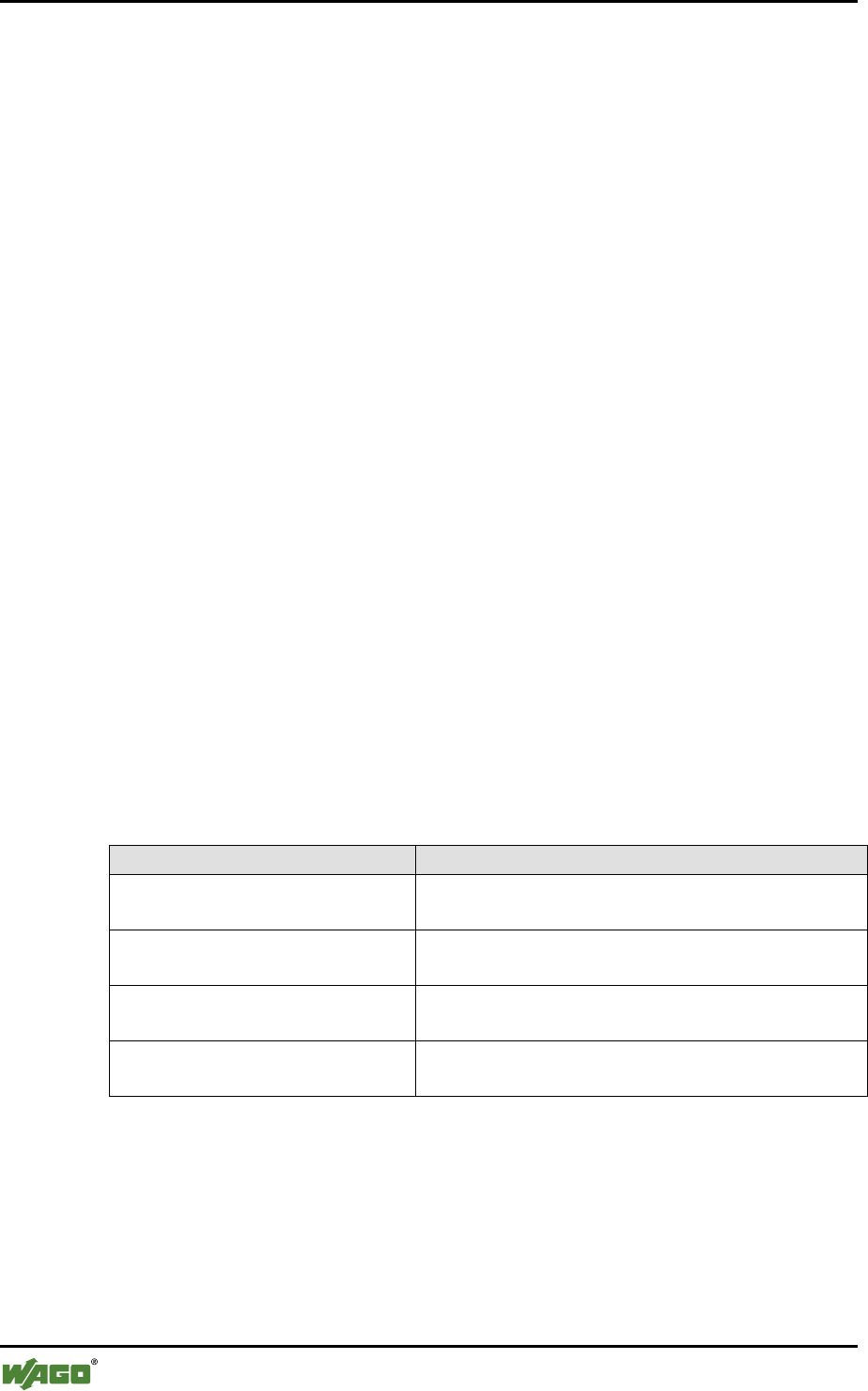
12 Description of the Library Concept WAGO Software
e!COCKPIT Libraries - Overview and Migration Notes
Manual
Version 1.0.0
involved. Libraries of lower layers should only be used if libraries of higher layers
do not contain the required functionality.
4.1.1 Solution Layer
Libraries of the solution layer are designed so that they are as device independent
as possible and minimize the implementation effort required for typical
applications. They therefore structure the functionality of the devices in a specific
way for the application. If a library of this layer is available for the required
application, this should be used. Libraries of other layers should only be used if no
library of the solution layer offers the required functionality.
These “WagoSolution” libraries offer solutions for:
• Building automation
• Manufacturing automation
• Process automation
4.1.2 Application Layer
Libraries of these layers are developed so that they abstract the actual hardware
and firmware of the devices and group the functions by categories. They are
designed to be as easy to use and as robust as possible. The call interface therefore
does not contain any blocking or non-deterministic functions.
The functionality for which a library was developed can be easily identified by its
name. An appropriate abbreviation is added here to the prefix:
Table 5: Library Groups by Functionality
Library Group
Functionality
WagoAppBase
System functions (access to file system, time,
memory, …)
WagoAppStandardAlgorithms
General functions (controllers, parsers, string
operations, mathematics,…)
WagoAppConnectivity
Communication and connection mechanisms
(bus accesses, security, …)
WagoAppDevice
Device-specific libraries, access and I/Os,
substitute values, …
4.1.3 System Layer
The system layer provides experienced users with complete system access. It is
further divided into two more layers, the WAGO system layer and the CODESYS
system layer.
WAGO Software Description of the Library Concept 13
e!COCKPIT Libraries - Overview and Migration Notes
Manual
Version 1.0.0
4.1.3.1 WAGO System Layer
Libraries of the WAGO system layer enable direct and yet non-device specific
access to all functions of the devices. Due to the greater complexity involved, the
use of system layer libraries is only recommended for experienced users. The
libraries of the system layer also offer blocking calls which offer less protection
from user errors compared to libraries of higher layers.
4.1.3.2 CODESYS System Layer
To ensure compatibility, the libraries of this layer may be necessary when
importing programs created in CODESYS. They contain both the CODESYS
system libraries as well as the libraries of the CODESYS automation alliance. The
functionality partly overlaps those of the WAGO layers.
Give preference to the libraries of the WAGO system layer or higher!
When creating new programs, the use of libraries of the WAGO system layer and
higher should be given preference. These are device independent, easy to use and
standardized according to the rules stated in this document.
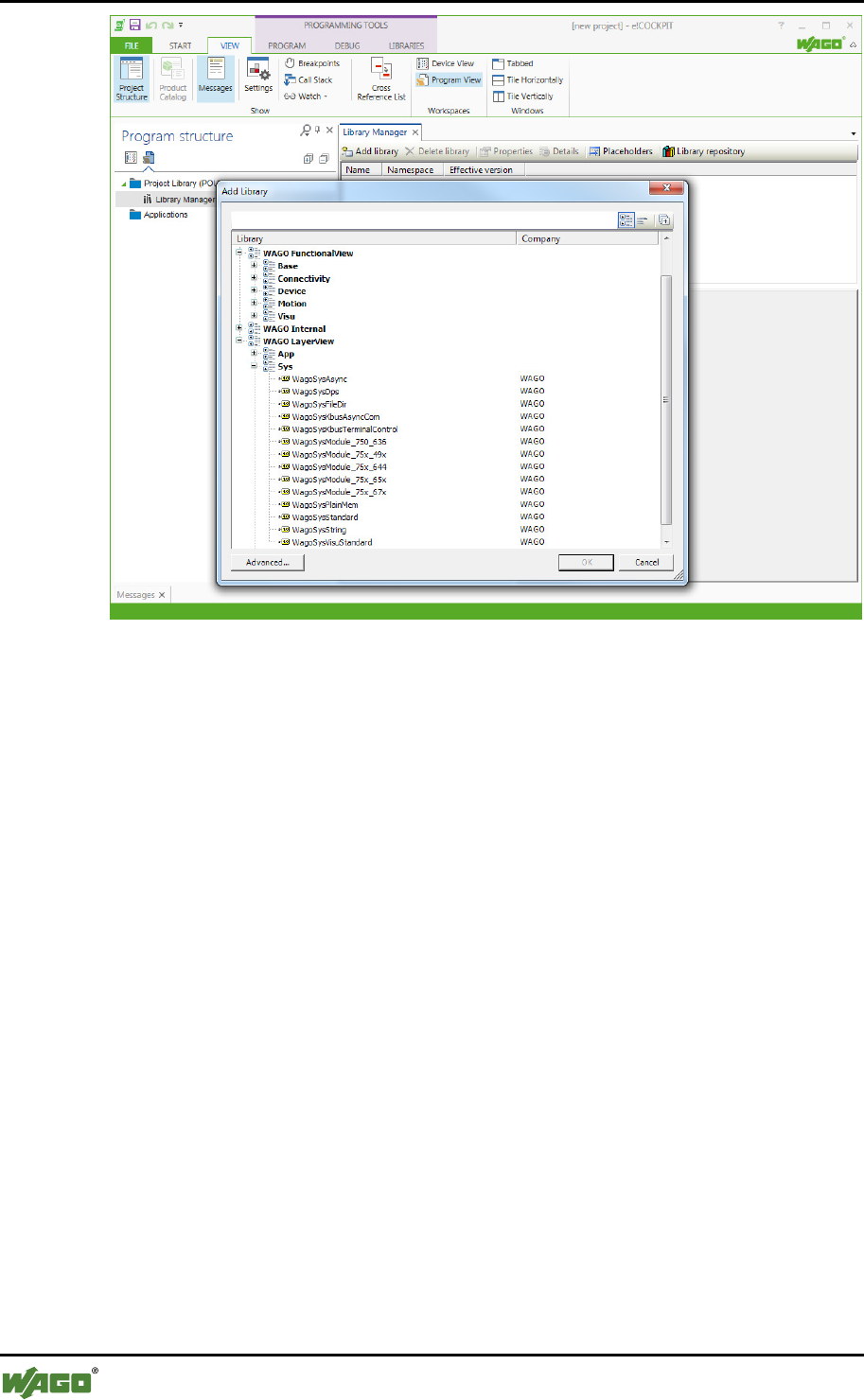
4.1.4 Representation in e!COCKPIT
Libraries are managed in the e!COCKPIT software. Different views are provided
to simplify the search for libraries. Each view offers a specific selection of the
libraries shown.
• “WAGO BusinessView”
Filters and orders by sector and application
• “WAGO FunctionalView”
Filters and orders by function
• “WAGO LayerView”
Filters and orders according to technical layers and shows all libraries in
alphabetical order. This view is used as a quick entry dialog for developers
who “know what they are looking for.”
All libraries are assigned to CODESYS categories. The categories are used to
represent the assignment to the layers and functionality in the e!COCKPIT library
manager.
14 Description of the Library Concept WAGO Software
e!COCKPIT Libraries - Overview and Migration Notes
Manual
Version 1.0.0
Figure 2: Library Manager in e!COCKPIT
4.2 Function Blocks: Interface Variants
e!COCKPIT provides many possibilities for structured and efficient programming
with a minimum of redundancy thanks to features such as the use of methods and
inheritance. However, these features are relatively complex, which is likewise
reflected in the call interface. As a result, these program elements cannot be used
in the graphical programming languages or only with restrictions and are also
relatively difficult to understand.
The WAGO approach of alternative function blocks aims to take both aspects into
account and thus enables both efficient implementation and simple use.
In the more complex libraries of the WAGO system layer, the functionality is
efficiently implemented by means of method-based function blocks. However,
function blocks with alternative interfaces are also offered. These provide part of
the functionality with simpler interfaces. The internal implementation here uses
method-based function blocks.
The following basic variants of function block interfaces are used:
• Basic function blocks
• Compact function blocks
• Modular function blocks
WAGO Software Description of the Library Concept 15
e!COCKPIT Libraries - Overview and Migration Notes
Manual
Version 1.0.0
Not every library uses all interface variants!
The interface variants are offered in this form primarily in libraries of the system
layer. Some libraries of the application or solution layer avoid the use of some
interface variants such as by using only compact function blocks.
4.2.1 Basic Function Blocks
These contain the actual implementation and fully utilize the possibilities of
object-oriented programming. The internal implementation uses for example
method and inheritance features to a high degree. However, this makes basic
function blocks complex so that they cannot be used effectively in graphical
programming languages.
4.2.2 Compact Function Blocks
These function blocks only have interfaces that could be implemented in a similar
form in CODESYS 2. Compact function blocks can encapsulate internally
complex processes such as the automatic opening and setting up of a
communication connection. However, they are also designed so that the call
interface is relatively simple, thus enabling at least restricted use in graphical
programming languages.
The name of each compact function block starts with the name of the associated
basic function block. In order to differentiate from this, the suffix “_cpt” is added
to the name.
If the associated basic function block is very complex, several function blocks
may be necessary. If this is the case, an additional suffix is added between the
actual name and the general suffix.
Example:
• Implementation as a basic block: FbSerialInterface
• Implemenation as compact block: FbSerialInterface_cpt
• Implementation as modular function blocks: FbSerialInterface_Send_cpt,
FbSerialInterface_Lines_cpt
4.2.3 Modular Function Blocks
These function blocks each implement only one individual method of the
associated basic function block. They thus provide a particularly simple interface
and are very good for use in graphical programming languages. The name of a
modular function block is formed from the following elements: the name of the
16 Description of the Library Concept WAGO Software
e!COCKPIT Libraries - Overview and Migration Notes
Manual
Version 1.0.0
basic function block, followed by a short name of the method, as well as the suffix
“_mod.”
Example:
• Basic function block: FbSerialInterface
• Modular function block for write operations: FbSerialInterface_Write_mod
• Modular function block for read operations: FbSerialInterface_Read_mod
4.3 Function Blocks: Behavior Models
The use of standard behavior models for function blocks makes it possible to
determine the expected signal behavior by the name of the interface variables, i.e.,
the inputs and outputs.
General de-facto standards for behavior modules are specified, for example, by
PLCopen. Other specific behavior models are also defined for WAGO libraries.
These behavior models are described in the following sections.
If a function block uses a standard behavior model, this is stated in the
documentation of the respective function block.
4.3.1 “WagoExecute” Behavior Model
This behavior model corresponds to that of PLCopen although it does not use
some PLCOpen options. The naming of the interface variables is specific for
WAGO.
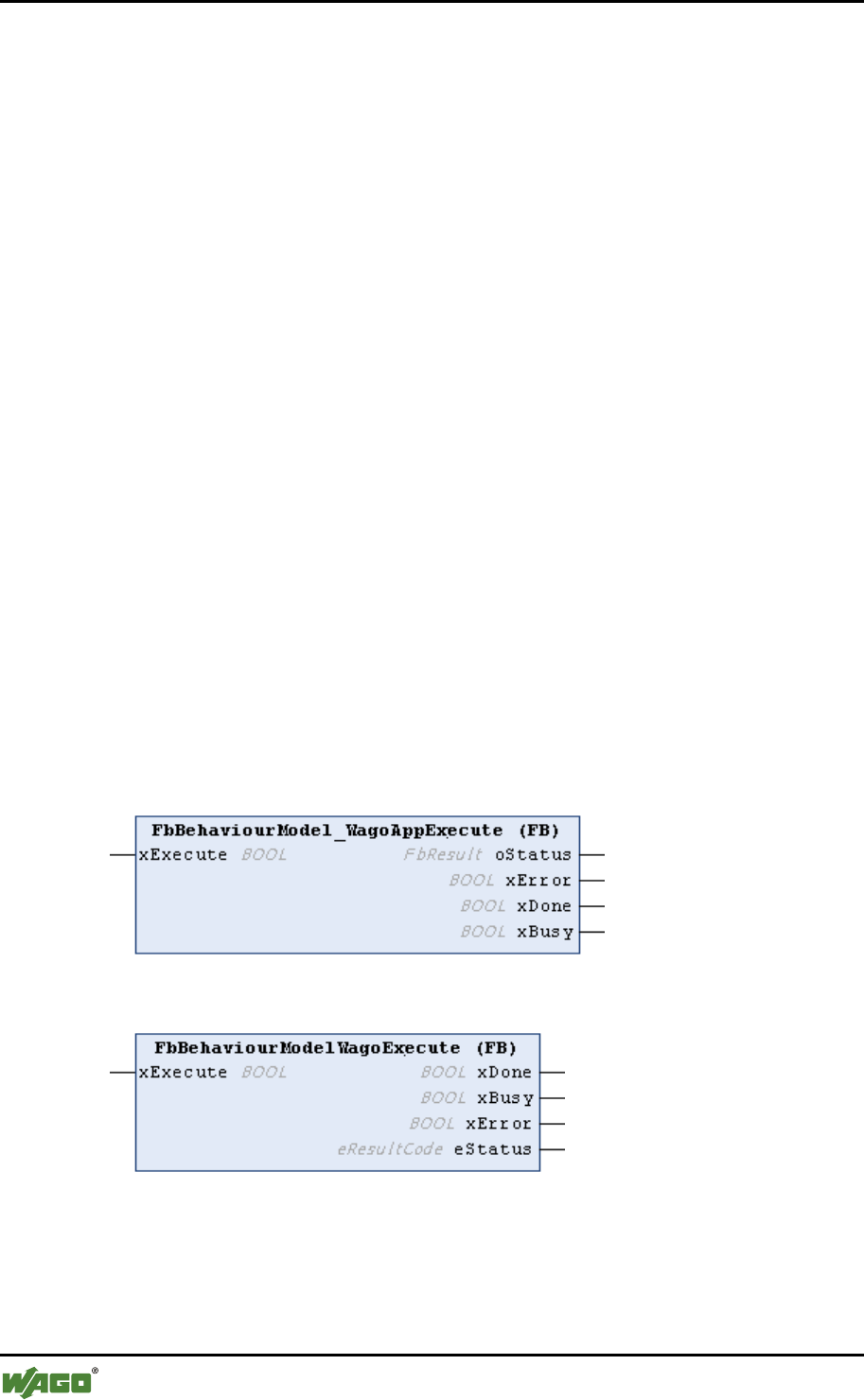
Figure 3: FbBehaviourModel “WagoExecute” for Function Blocks for Graphical Languages
Figure 4: FbBehaviourModel “WagoExecute” for Function Blocks for Textual Languages
WAGO Software Description of the Library Concept 17
e!COCKPIT Libraries - Overview and Migration Notes
Manual
Version 1.0.0
Table 6: Interface Variables of the “WagoExecute” Behavior Model
Variable
Access
Type
Explanation
xExecute
INPUT
BOOL
Edge-triggered command start
xDone
OUTPUT
BOOL
Indicates the end of command execution
xBusy
OUTPUT
BOOL
Indicates whether the command is still
running
xError
OUTPUT
BOOL
Indicates whether an error has occurred
eStatus /
oStatus
OUTPUT
eResultCode
FbError
Precise determination of the error, 0=OK
(others)
INPUT
(FB-specific)
Data/parameters to be processed
(others)
OUTPUT
(FB-specific)
Process results, if available
xExecute
INPUT
BOOL
Edge-triggered command start
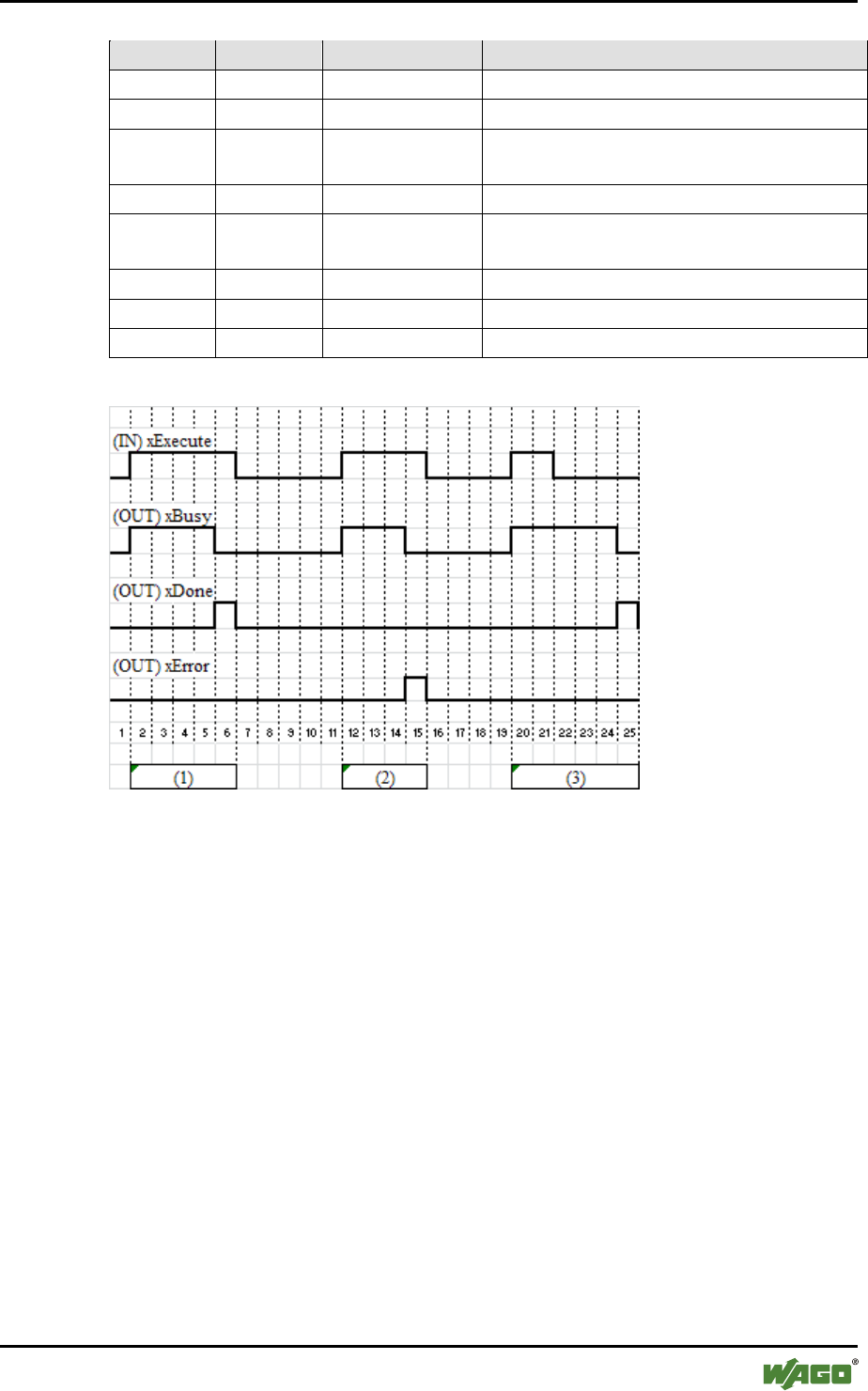
Figure 5: “WagoExecute” State Diagram
Behavior:
• The specific input variables for the function block (FB) are applied with the
rising edge of xExecute.
• Changes to the input variables are not applied until the next rising edge of
xExecute.
• The output variables xBusy, xDone and xError are exclusive. Only one of
the outputs can take on the value TRUE. If xExecute is TRUE, one of the
outputs must be set to TRUE.
• If the command was successfully executed, the output variable xDone is set
to TRUE. In this case, (FB-specific) output variables have valid values, see
case (1) in the above figure.
• If an error occurs when the command is executed, the xError output is
TRUE, see case (2) in the above figure.
• If the xExecute input is set to FALSE before xBusy indicates the end of the
processing, either the xDone output or the xError output is set to TRUE for
one cycle, see case (3) in the above figure. In all other cases, the falling
edge of xExecute also resets xDone and xError.
18 Description of the Library Concept WAGO Software
e!COCKPIT Libraries - Overview and Migration Notes
Manual
Version 1.0.0
4.3.2 “WagoEnable” Behavior Model
This behavior model corresponds to that of PLCopen. The naming of the interface
variables is specific for WAGO.
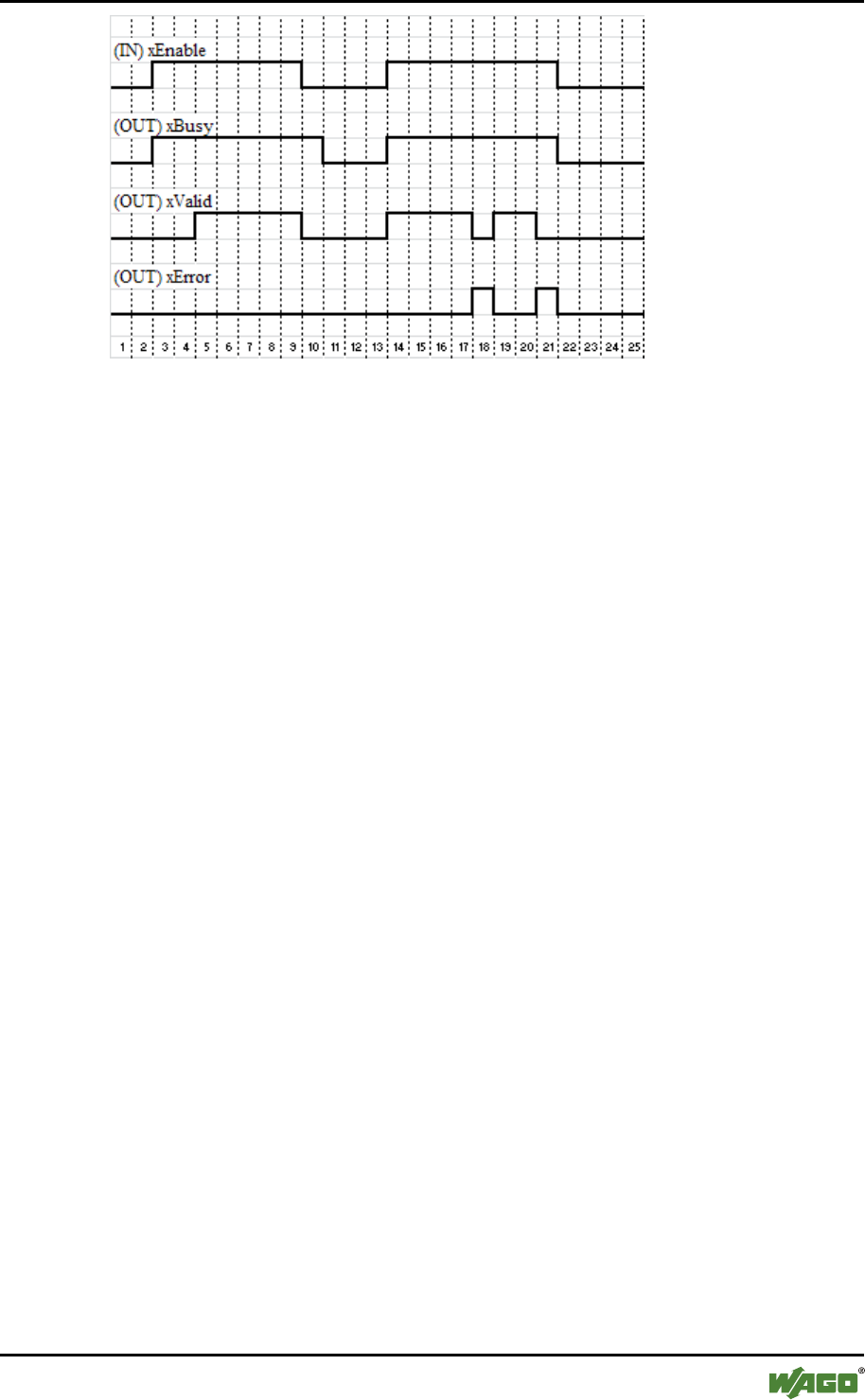
Figure 6: FbBehaviourModel “WagoEnable” for Libraries of the Application Layer
Figure 7: FbBehaviourModel “WagoEnable” for Libraries of Other Layers
Table 7: Interface Variables of the “WagoEnable” Behavior Model
Variable
Access
Type
Explanation
xEnable
INPUT
BOOL
Enables the function of the function block
xValid
OUTPUT
BOOL
Indicates whether the output data is valid
xBusy
OUTPUT
BOOL
Indicates whether the process is still
running
xError
OUTPUT
BOOL
Indicates whether an error has occurred
eStatus /
oStatus
OUTPUT
eResultCode
FbError
Precise determination of the error, 0=OK
(others)
INPUT
(FB-specific)
Data/parameters to be processed
(others)
OUTPUT
(FB-specific)
Process results, if available
WAGO Software Description of the Library Concept 19
e!COCKPIT Libraries - Overview and Migration Notes
Manual
Version 1.0.0
Figure 8: “WagoEnable” State Diagram
Behavior:
• If the xEnable input is set to TRUE, this enables the implemented process
via the function block. If the input is set to FALSE, the process is guided to
a controlled stop.
• The values at the FB-specific inputs can be changed at any time. As long as
the xEnable input is TRUE, the function block evaluates the inputs with
every call.
• The xBusy output indicates that the process is still running, for example, a
drive has not yet reached standstill. This can also continue if the xEnable
input has already been set to FALSE for multiple cycles (see cycle 10 in the
above figure).
• The output variables xValid and xError are exclusive. Only one of these
outputs can be set.
• The function block uses xValid to indicate that the output data is valid and
can be processed further. If xValid is FALSE, the output data is invalid.
• Two different behaviors are possible for the xError output. The above figure
shows the case of an error disappearing without external intervention and
the process continuing (cycle 18). It is also possible that the error does not
disappear on its own. In this case, the xEnable input must be temporarily set
to FALSE until the error disappears.
4.3.3 “WagoTrigger” Behavior Model
This behavior model is used to trigger individual actions. To trigger an action as
well as to indicate its completion, one xTrigger input and output variable is used
for each action. If a function block uses several of these trigger inputs, the
corresponding input variables are identified by a specific suffix according to
function, e.g., “xTriggerWrite” and “xTriggerRead.”
20 Description of the Library Concept WAGO Software
e!COCKPIT Libraries - Overview and Migration Notes
Manual
Version 1.0.0
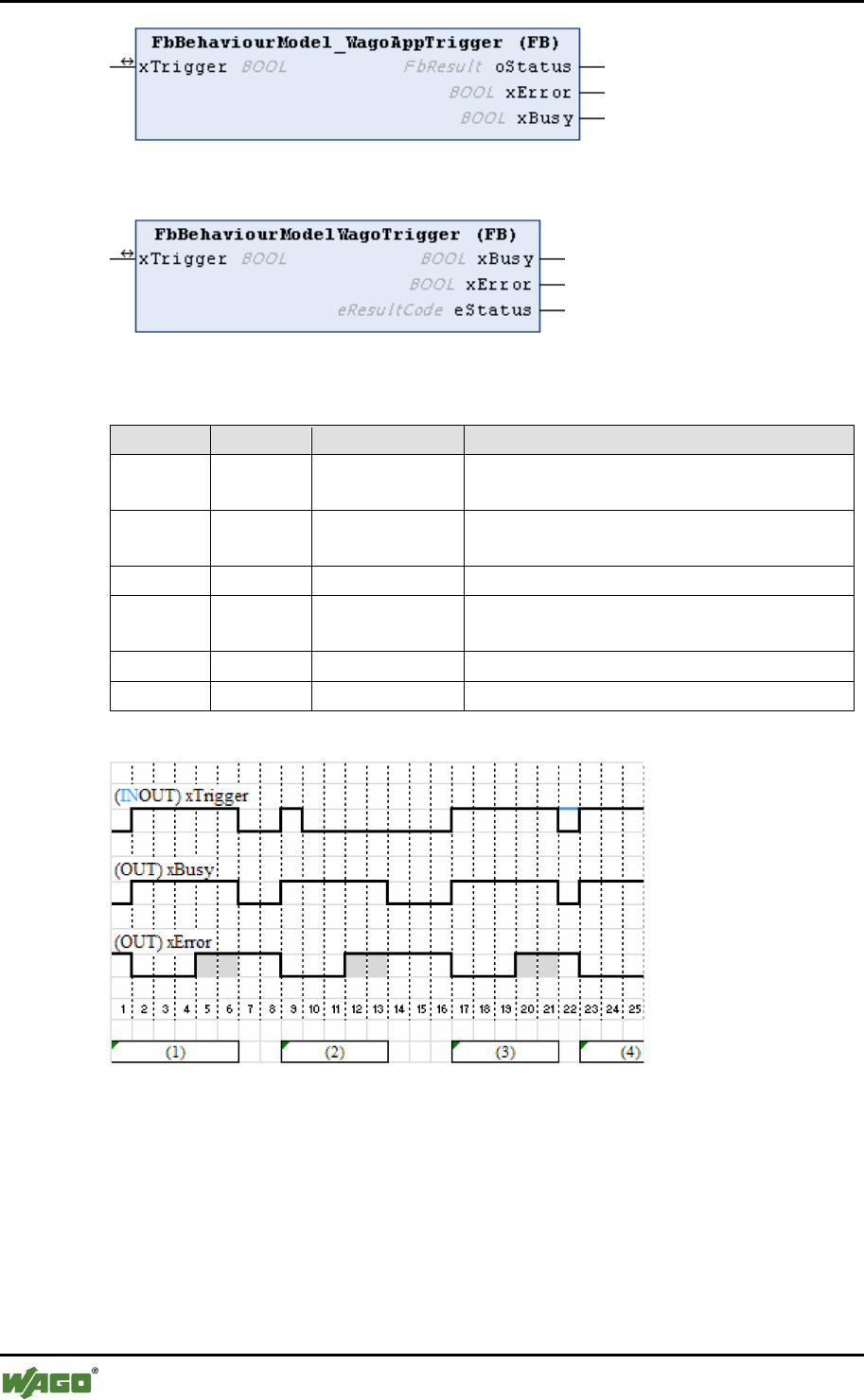
Figure 9: FbBehaviourModel “WagoTrigger” for Libraries of the Application Layer
Figure 10: FbBehaviourModel “WagoTrigger” for Libraries of Other Layers
Table 8: Interface Variables of the “WagoExecute” Behavior Model
Variable
Access
Type
Explanation
xTrigger
INOUT
BOOL
Edge-triggered start and indication of the
end of an action
xBusy
OUTPUT
BOOL
Indicates whether actions are being
processed
xError
OUTPUT
BOOL
Indicates whether an error has occurred
eStatus /
oStatus
OUTPUT
eResultCode
FbError
Precise determination of the error, 0=OK
(others)
INPUT
(FB-specific)
Data/parameters to be processed
(others)
OUTPUT
(FB-specific)
Process results, if available
Figure 11: “WagoTrigger” State Diagram
Behavior:
• If xTrigger is externally set to TRUE, the relevant action is started. The
function block sets xBusy to TRUE and xError to FALSE. Once started, the
action is then also further processed if xTrigger is externally set to FALSE.
• Any other input variables are only evaluated by the function block at the call
if there is a rising edge at the xTrigger.
WAGO Software Description of the Library Concept 21
e!COCKPIT Libraries - Overview and Migration Notes
Manual
Version 1.0.0
• If the action is ended, the function block sets the eResult status output to OK
(=0) or a specific error code depending on the process result, and sets
xTrigger and xBusy to FALSE.
• After this, the FB keeps its output variables stable until the next trigger.
• The xTrigger variable is only set externally and only reset by the FB. It is
not set to TRUE by the FB on its own. External reset of the variable to
FALSE (2) is ignored.
• If xTrigger is set permanently to TRUE externally, the function block
automatically starts the next action after one action has ended.
• Output variables are set before the FB resets xTrigger to FALSE. In the
FALSE state, the FB does not change the output variables.
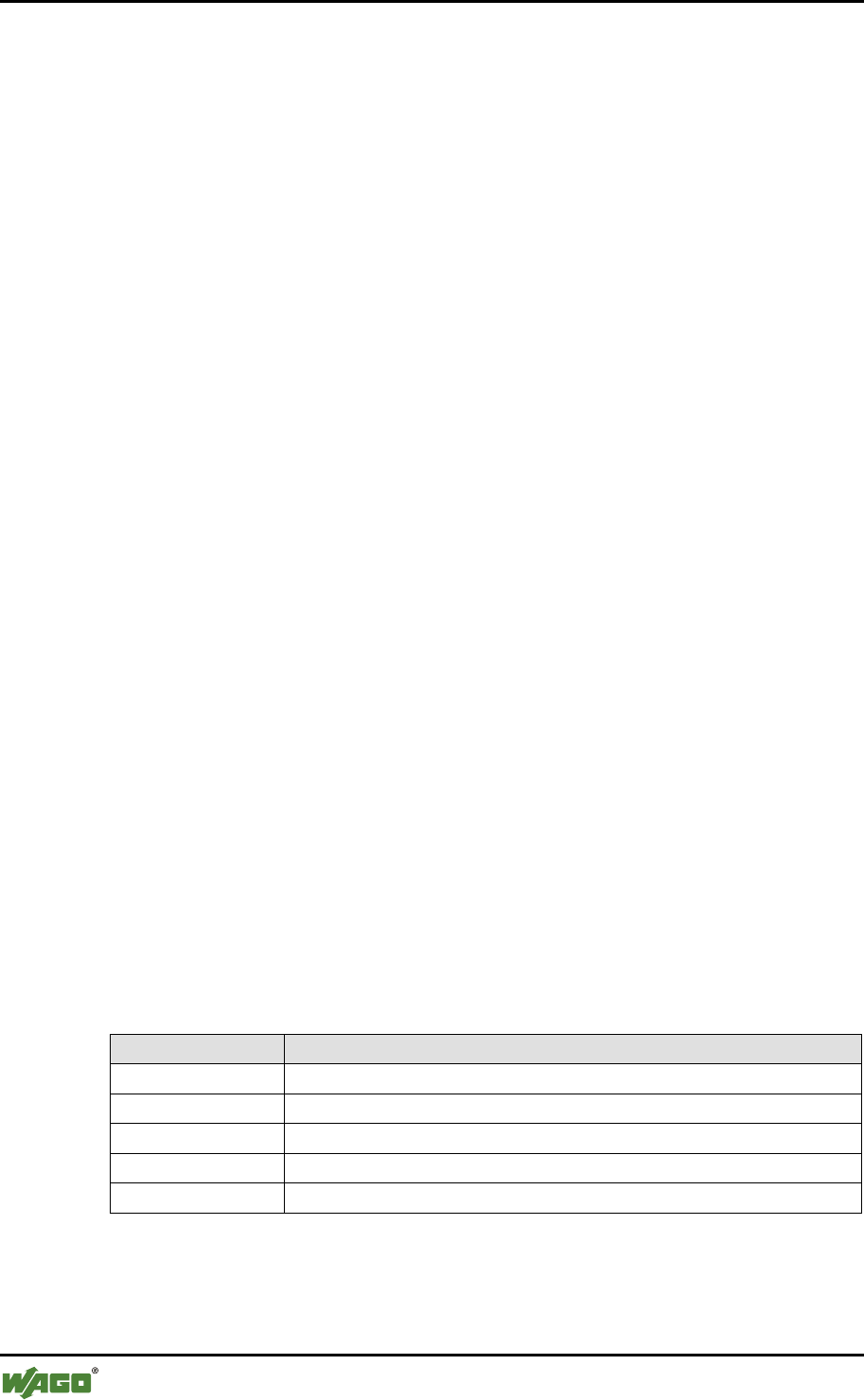
Table 9: Standard Status Outputs (eStatus)
Value
Explanation
OK (=0)
The action was successfully completed.
EDEFAULT
The FB was never called and is therefore not yet ready.
EINPROGRESS
The action is currently in progress.
(others)
FB-specific error codes
4.4 Return Values and Error Handling
The libraries indicate feedback signals and handle errors using the following basic
mechanisms:
• Specific return values
• Numerical ResultCodes (“eResultCode,” WagoSysTypedefs.library)
• Error objects with plain text message (“FbError,”
WagoAppErrorBase.library)
While libraries with small low-level functions primarily use the slim mechanism
of specific return values or simple “eResults,” libraries with more complex
function blocks also use the more complex error objects with plain text messages.
4.4.1 Error Signalling via Specific Return Values
If functions do not require any detailed status messages, an error situation can be
indicated via specific return values such as blank strings or zero pointers for
example.
4.4.2 Numerical ResultCodes
For the majority of simpler functions, it is reasonable to represent the error status
with a simple numerical value. The meaning of this is indicated by the use of the
22 Description of the Library Concept WAGO Software
e!COCKPIT Libraries - Overview and Migration Notes
Manual
Version 1.0.0
“eResultCode” enumeration (from WagoSysTypedefs.library or
WagoSysStandard.library).
The enumeration value 0 always stands for “OK,” the values up to 199 represent
standard situations based closely on the POSIX.1 worldwide established standard.
The enumeration values 200 … 999 are available for errors that are individually
definable for the particular function, which may vary from library to library. The
meaning of the specific error is explained in the documentation of the particular
library.
“ResultCodes” are always returned as return values.
4.4.3 Error Objects with Plain Text Message
The use of simple error numbers is often not informative enough for complex
function blocks. An error object of type “FbError” is used by these FBs instead
and forwarded to the parent instances.
This error object provides the following methods:
• GetErrorID()
Returns the error number
• GetDescription()
Returns an error text
• GetInstancePath()
Returns the instance path of the factory which entered this error
• GetProducerName()
Returns the class of the function block in which this error has occurred
• GetSeverity()
Returns the classification (error/warning/note) of the error
4.5 Naming Rules for Variables
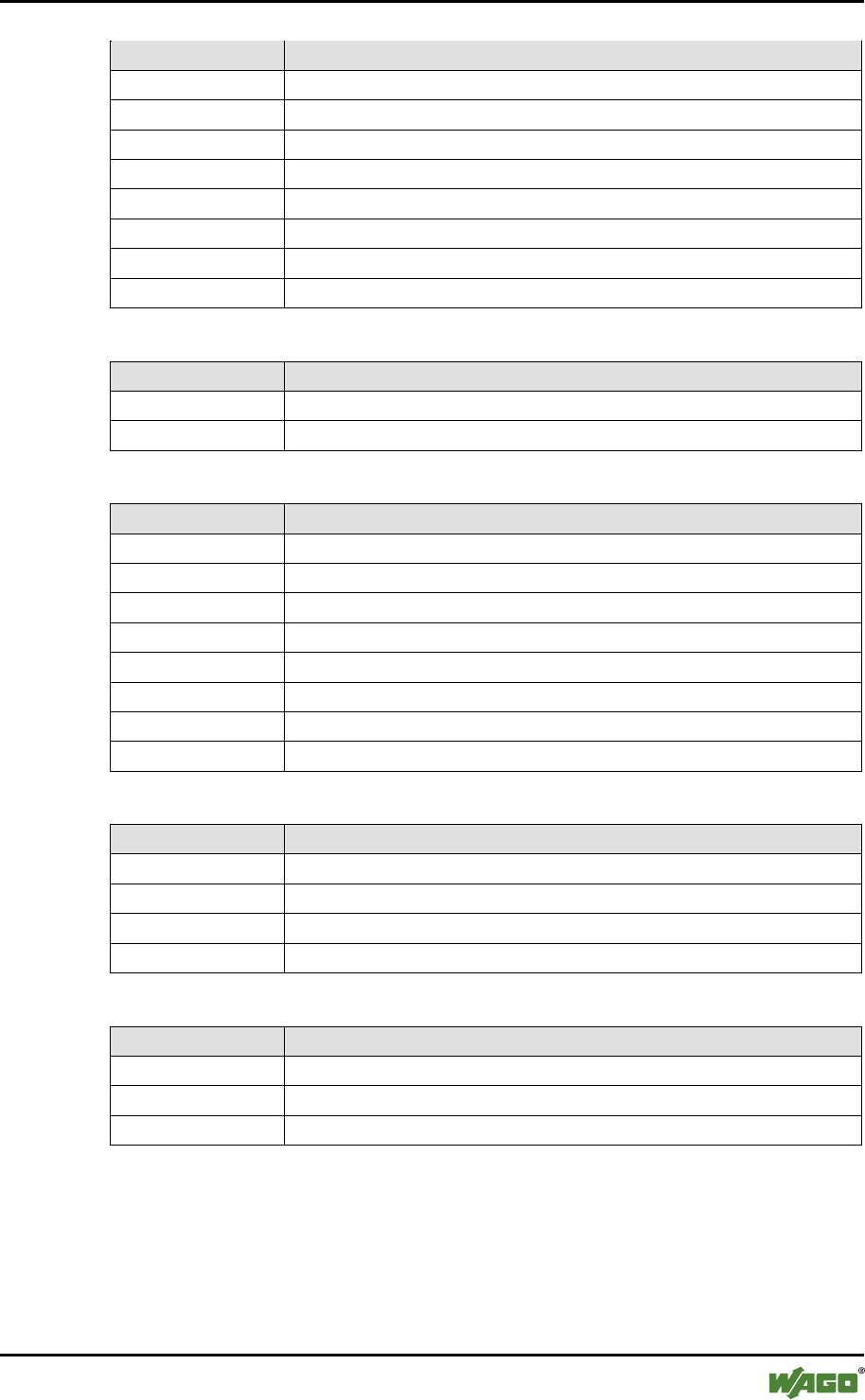
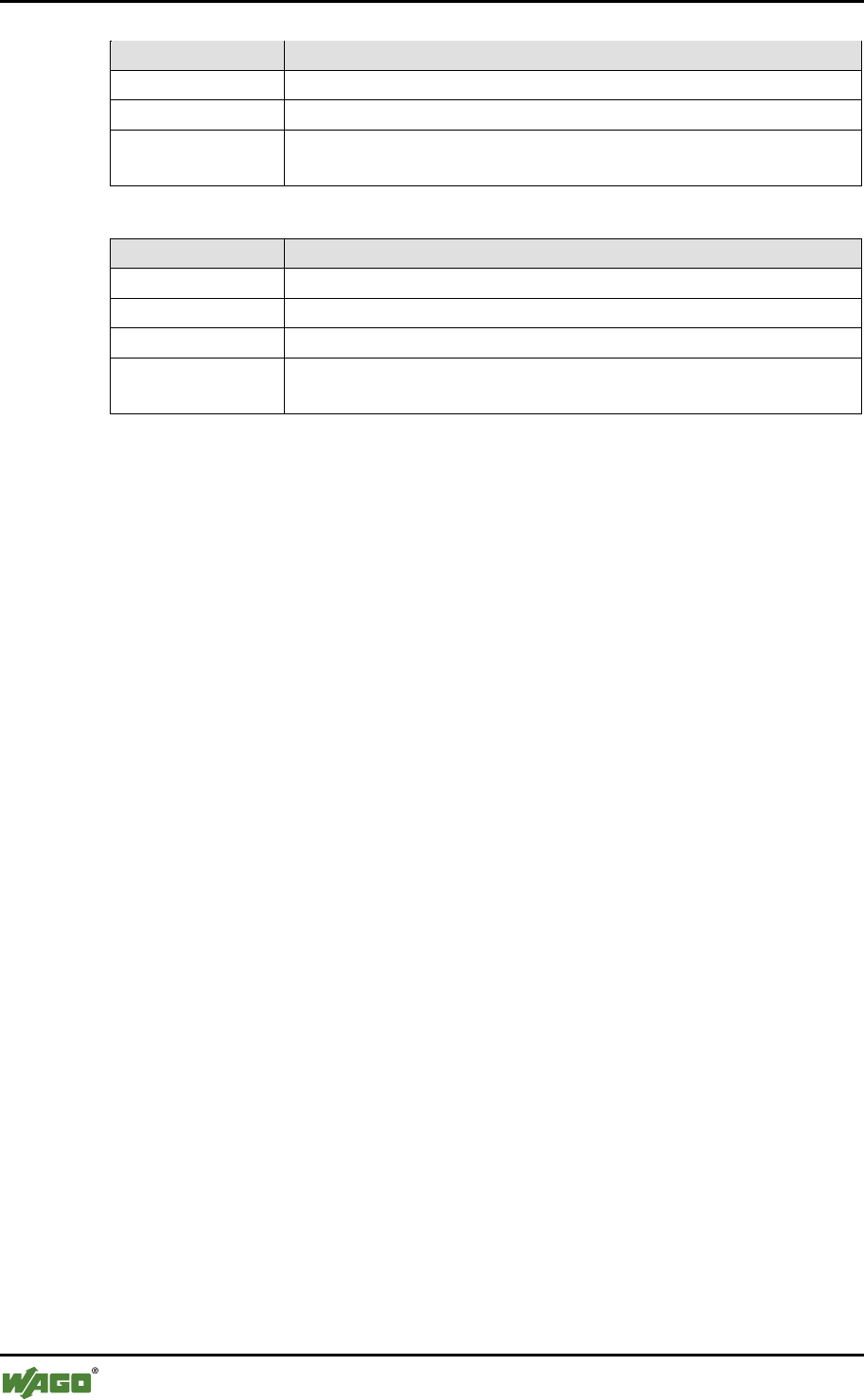
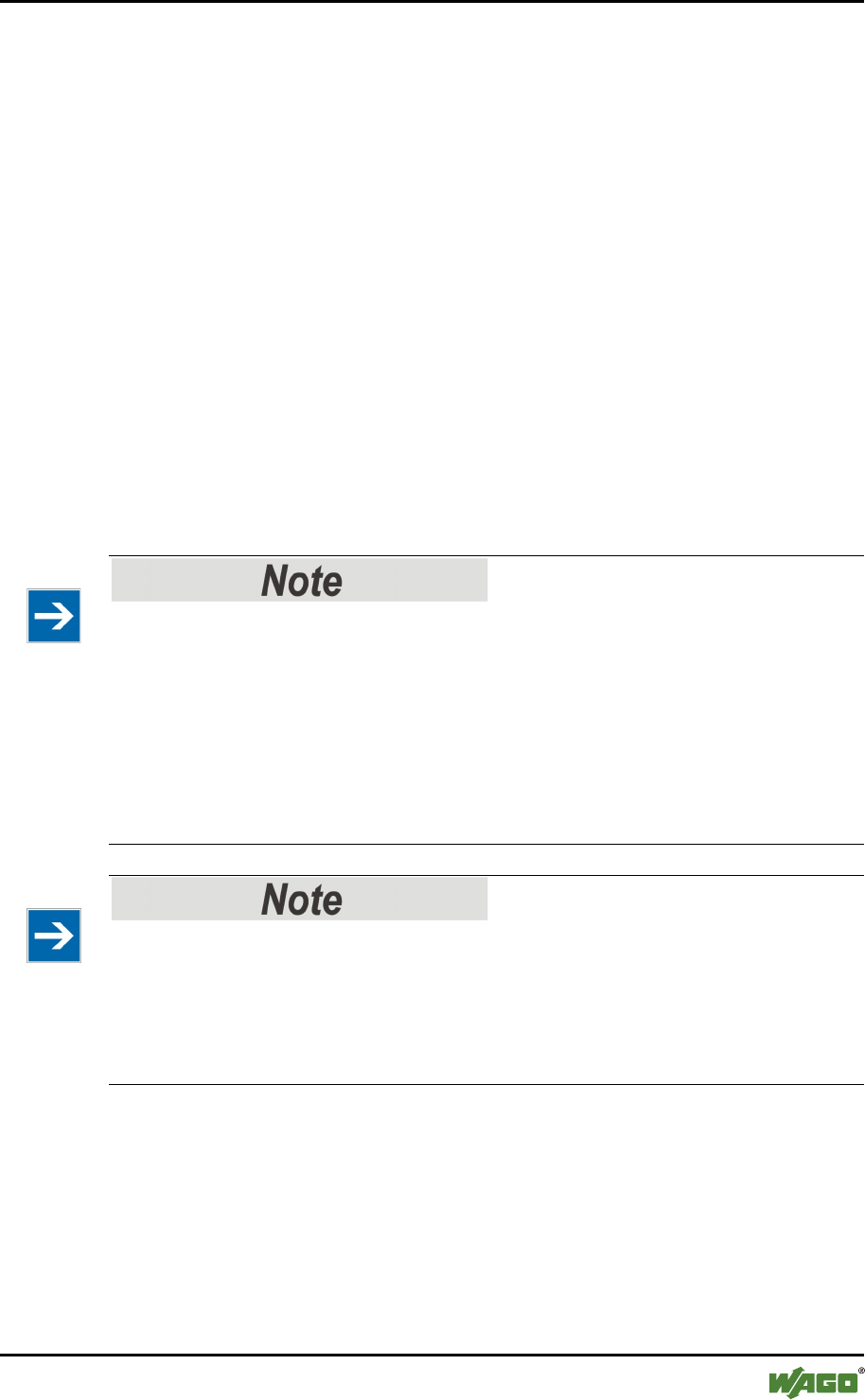
WAGO always uses the Hungarian notation for variable libraries.
Table 10: Bit Field Data Types
Data Type
Prefix
BOOL
x
BYTE
b
WORD
w
DWORD
dw
LWORD
lw
WAGO Software Description of the Library Concept 23
e!COCKPIT Libraries - Overview and Migration Notes
Manual
Version 1.0.0
Table 11: Integer Data Types
Data Type
Prefix
SINT
si
USINT
usi
INT
i
UINT
ui
DINT
di
UDINT
udi
LINT
li
ULINT
uli
Table 12: Floating Comma Data Types
Data Type
Prefix
REAL
r
LREAL
lr
Table 13: Other Simple Data Types
Data Type
Prefix
POINTER
p
STRING
s
WSTRING
ws
TIME
d
LTIME
lt
TIME_OF_DAY
tod
DATETIME
dt
DATE
dat
Table 14: Composite Data Types
Data Type
Prefix
ARRAY
a
STRUCT
type:
ENUM
e
UNION
un
Table 15: Function Blocks
Data Type
Prefix
Function Block
Fb
Function
Fu
Program
Prg
24 Description of the Library Concept WAGO Software
e!COCKPIT Libraries - Overview and Migration Notes
Manual
Version 1.0.0
Table 16: Global Variables
Data Type
Prefix
Global variable
g_
Global constant
gc_
Global parameter
list
gp_
Table 17: Object-Oriented Expansion
Data Type
Prefix
INTERFACE
I_
Instance
o
REFERENCE
R_
Member
variables
m_
The naming rules mainly apply to simple interface variables. In nested structures
the notation may be different to this for greater clarity.
WAGO Software Migration of Other Libraries 25
e!COCKPIT Libraries - Overview and Migration Notes
Manual
Version 1.0.0
5 Migration of Other Libraries
5.1 From WAGO-I/O-PRO to e!COCKPIT
Programs created in WAGO-I/O-PRO can be reused in e!COCKPIT if they follow
particular conventions and all the referenced libraries are provided. More or less
manual reworking is required, depending on the structure of the project. The
following general procedure must be observed:
• Open the WAGO-I/O-PRO project in e!COCKPIT
• Select the new target system
• Convert libraries
• If necessary, port the visualization component of the libraries
• Create a new control system configuration
If the projects to be imported only use CODESYS libraries, at least the syntax can
be transferred to e!COCKPIT . However, there can be no guarantee that the
converted program will function error-free. A complete test must be carried out in
order to ensure this.
Do not use libraries of the CODESYS 3 system layer that are based on
CODESYS 2 for new projects!
Libraries are provided in the CODESYS 3 system layer with names from those of
a CODESYS 2 library as well as the suffix “23.” These libraries largely
correspond to the function of the CODESYS 2 libraries with similar names. They
can help to carry out a simple draft for the migration of a CODESYS 2 project.
However, they are not recommended for new projects as they only make one part
of the functionality of the new concept available. For new projects, new libraries
of the application library or WAGO system layer should be used.
No exact equivalent of the application libraries created for WAGO-I/O-PRO!
Libraries of the application layer created for e!COCKPIT were given a new
functional structure. Even if the name is similar or identical to the libraries created
for WAGO-I/O-PRO, they cannot be exchanged directly. Depending on use and
library, the project must be adapted to the changes in functionality and interfaces.
A list of known major differences is provided in the appendix.
5.1.1 Preparing PLC Projects for Import
To port a PLC project created in WAGO-I/O-PRO to e!COCKPIT, it must be
possible to compile it error-free in WAGO-I/O-PRO beforehand.
The project can then be opened in e!COCKPIT and a conversion can be started.
The WAGO-I/O-PRO and e!COCKPIT programming environments differ in
26 Migration of Other Libraries WAGO Software
e!COCKPIT Libraries - Overview and Migration Notes
Manual
Version 1.0.0
many aspects, so that e!COCKPIT will show errors and warnings during the
compilation attempt.
The most common cause is the stricter handling of implicit conversions in
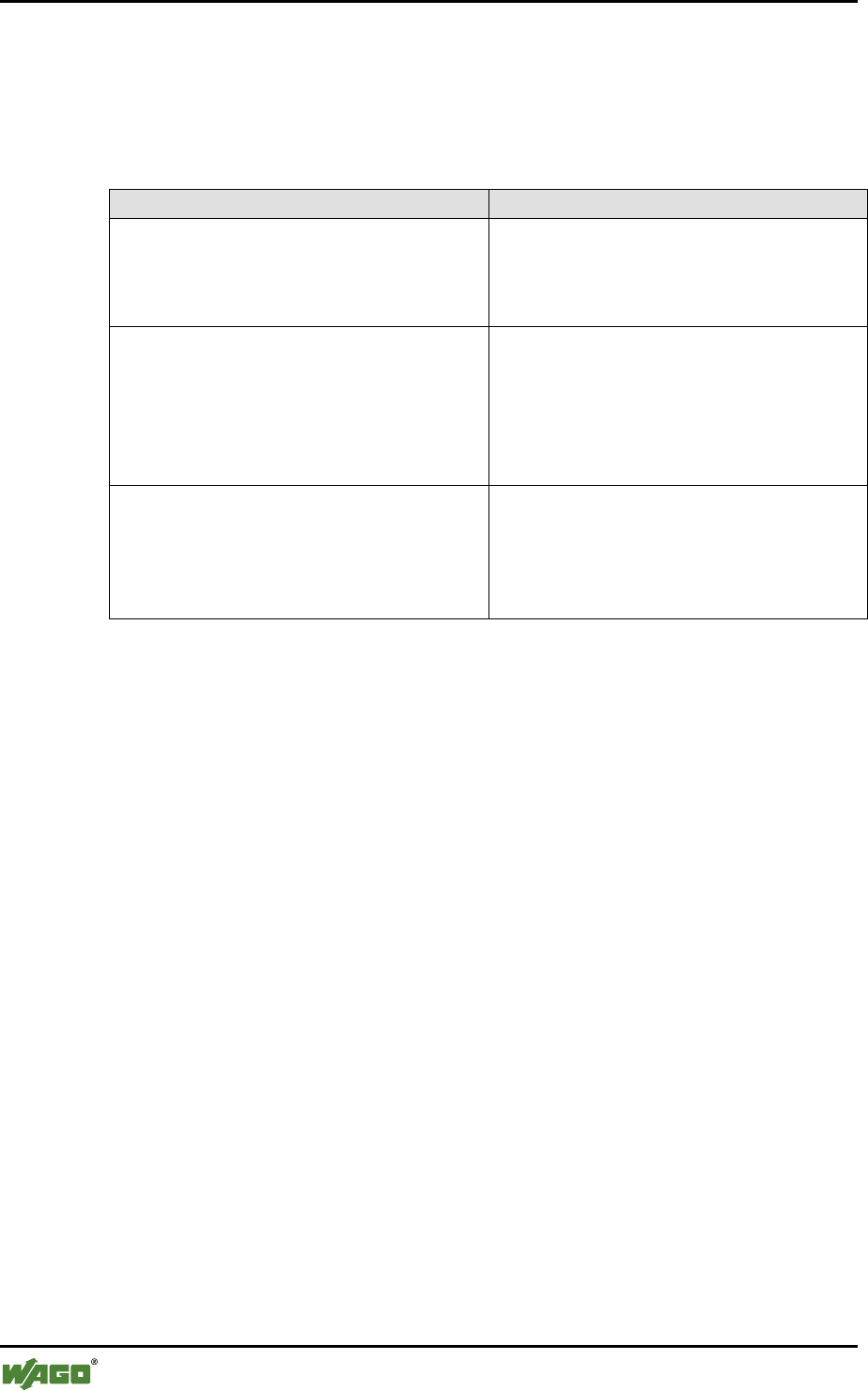
e!COCKPIT. The following table shows possible features and remedies.
Table 18: Error/Warning Messages for Implicit Conversions
Message / Cause
Remedy
When used in calculations
Information such as the sign may be
lost. An appropriate warning message is
therefore displayed.
Each corresponding warning message
must be checked individually.
The initialization of variables with
constants is normally not permissible in
e!COCKPIT. For example, a BYTE
type variable must not be initialized
with a WORD type constant. An error
message is therefore displayed.
Correct project
This is not permissible in e!COCKPIT
in the SWITCH/CASE construct. The
types of each CASE must match those
of the SWITCH variables. An error
message is therefore displayed.
Correct project
Special attention must also be paid to any libraries used by the WAGO-I/O-PRO
project. Like the core project, it must likewise be possible to compile these error-
free according to the same conditions.
5.1.1.1 Known Restrictions when Using LD
5.1.1.2 Function Blocks
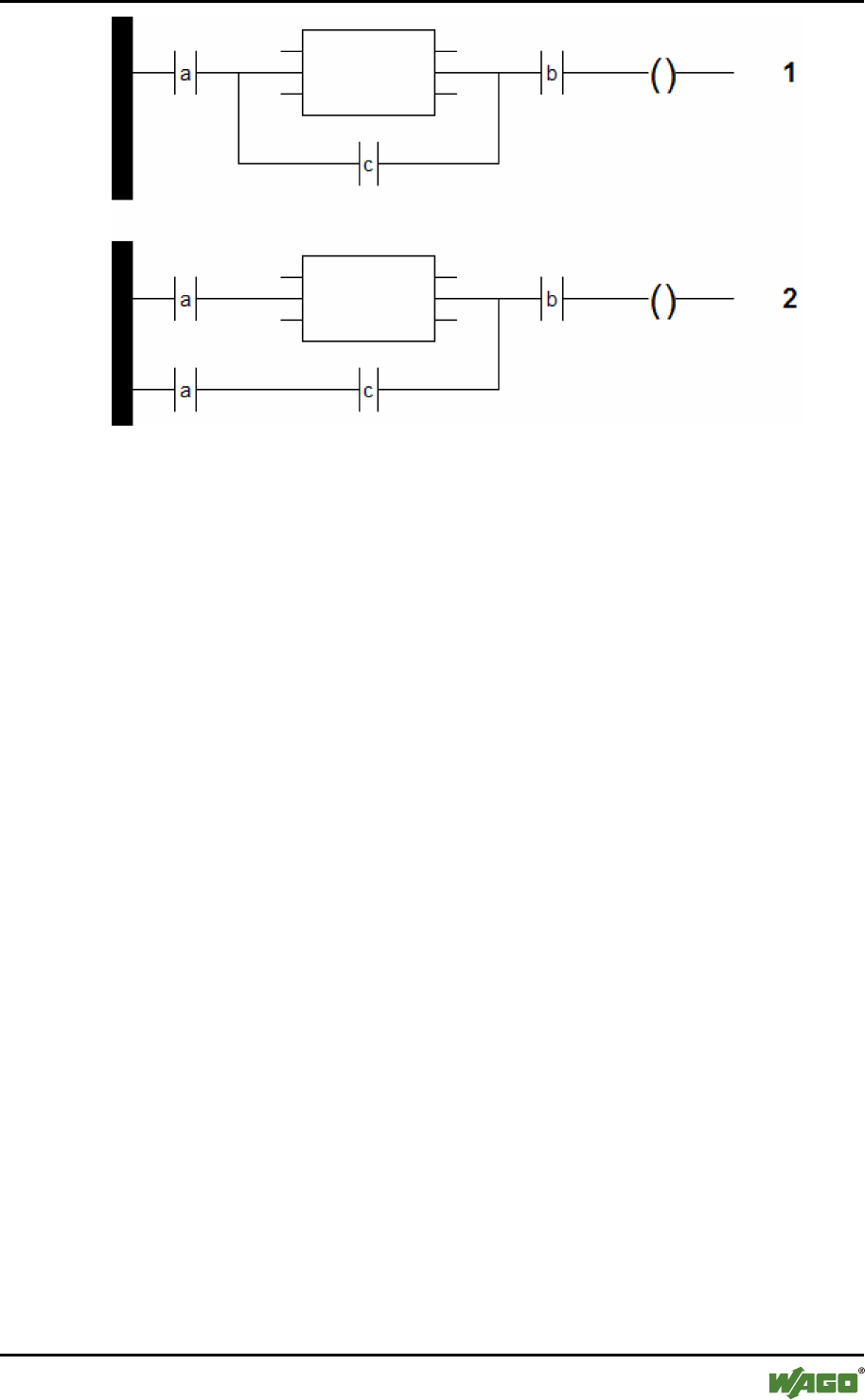
Function blocks must only be used in parallel branches if the branch is already
made on the current rail. The following figure shows this with the example of two
networks with identical functions:
• Network 1 cannot be imported.
• Network 2 can be imported. In order for the lower path to start at the
beginning of the current rail, the make contact “a” was likewise added here.
WAGO Software Migration of Other Libraries 27
e!COCKPIT Libraries - Overview and Migration Notes
Manual
Version 1.0.0
Figure 12: Ladder Diagram – Branch Variants
5.1.1.3 Function Blocks with EN/ENQ
Function blocks provided with EN/ENQ must not have any additional function
blocks at the inputs. A variable is permissible instead.
5.1.2 Known Restrictions When Using SFC
5.1.2.1 Step Variables
Steps do not use any Boolean variables to manage the internal states in
e!COCKPIT but also structures of type SFCStepType.
Step variables must therefore be declared explicitly and locally in SFC. They must
only be declared as VAR, but not as VAR_INPUT, VAR_OUTPUT or
VAR_INOUT.
5.1.2.2 Identifiers
In e!COCKPIT implicit variables are created for actions. These contain an
underline as a prefix in order to distinguish them. Identifiers must not contain any
double underline. The naming of the following objects must therefore never start
with an underline:
• IEC actions in the tree
• Boolean variables that are called in an IEC association list
• Name of programmed transitions

28 Migration of Other Libraries WAGO Software
e!COCKPIT Libraries - Overview and Migration Notes
Manual
Version 1.0.0
5.1.2.3 Known Restrictions When Using CFC
5.1.3 Display Problems
The visualization of the CFC programming language is implemented differently
in WAGO-I/O-PRO than in e!COCKPIT. Display problems therefore arise after
importing program sections to WAGO-I/O-PRO in CFC:
• Graphic fields may overlap in large function blocks.
• Only the first line of multiple line comments is displayed.
5.1.4 Macros
Macros cannot be imported in e!COCKPIT.
5.2 Preparing Visualization Projects for Import
Compared to WAGO-I/O-PRO, the rules relating to the variables used in
visualizations and the use of placeholders are stricter in e!COCKPIT.
5.2.1 Variable Declaration
All variables present in the visualization must be declared. A warning is displayed
in WAGO-I/O-PRO,and an error in e!COCKPIT.
Remove all unused variables or supplement the required declarations.
5.2.2 Placeholders
In e!COCKPIT, visualizations have interfaces similar to function blocks, i.e. lists
of input and output variables. Unlike in WAGO-I/O-PRO, visualization and
program elements are not linked via placeholders. The connection of visualization
and program variables is therefore based on a different principle than in WAGO-
I/O-PRO. Before projects can be imported with visualizations, these must be
adapted if necessary. An import is only possible for simple placeholders. In this
case, simple means that the placeholder must consist at most of one part of a
variable path but must always fill this out fully. Examples:
• $Placeholder$.<Name of a structure>.<Name of a structure element>
• <Name of an array>[$Placeholder$]
The use of multiple placeholders within a path or the combination of a part of the
path from a placeholder and one or multiple fixed parts is not permissible.
Examples:
WAGO Software Migration of Other Libraries 29
e!COCKPIT Libraries - Overview and Migration Notes
Manual
Version 1.0.0
• $Placeholder_A$.$Placeholder_B$
(multiple placeholder)
• <Name beginning of a variable>$Placeholder_Nameend$
(placeholder is only part of the path to a variable)
To achieve additional flexibility, auxiliary variables can be used. Case distinctions
can be carried out as normal calculations in the code and the results stored in the
form of auxiliary variables. Expressions can then be formed with the auxiliary
variables instead of with complex placeholders.
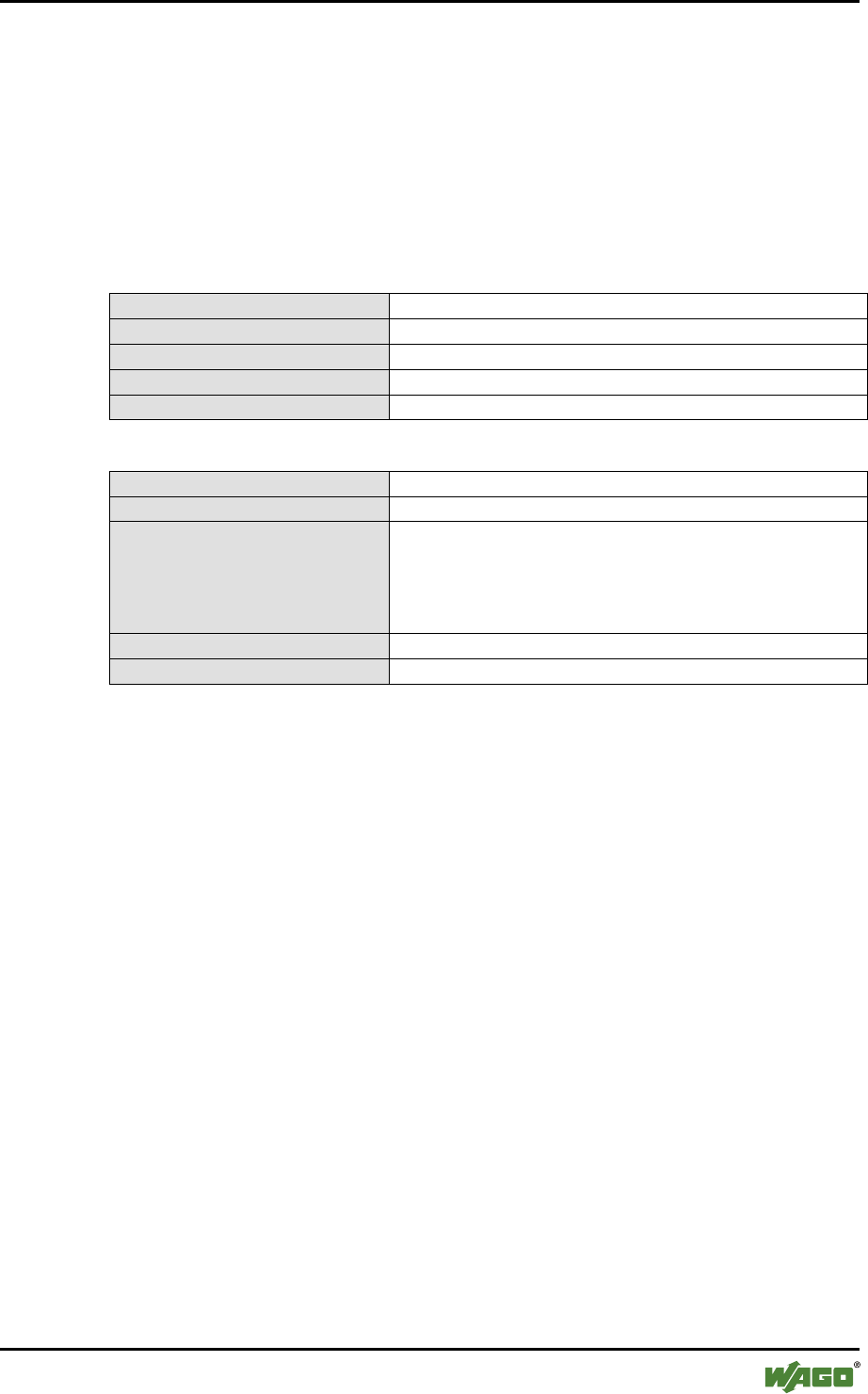
Table 19: Auxiliary Variables instead of a Combination of Placeholders and Fixed Part
WAGO-I/O-PRO: Expression
$axle$-Axle
WAGO-I/O-PRO: Text variable
e!COCKPIT: Auxiliary variables
sAxlename: STRING
e!COCKPIT: Expression
%s-Axle
e!COCKPIT: Text variable
sAxlename
Table 20: Auxiliary Variables instead of Combination of Multiple Placeholders
WAGO-I/O-PRO: Expression
$Axle$$Movement$
WAGO-I/O-PRO: Text variable
e!COCKPIT: Auxiliary variables
sAxlename: STRING;
sMovementname: STRING;
sIdentifier: STRING;
(…)
sIdentifier := CONCAT( sAxlename, sMovementname);
e!COCKPIT: Expression
%s
e!COCKPIT: Text variable
sIdentifier
The stricter requirements of the variable declaration must still also be observed.
Placeholders that can be replaced by different data types cannot be imported.
Before an import is possible, the output project must be changed so that each
placeholder only stands for one data type. This can be achieved by each non-
unique placeholder being defined in this way with several unique ones.
Groups are not supported and are lost on import.
5.2.2.1 Visualizations from Libraries
Visualizations themselves must be designed again in e!COCKPIT. However, if
the project created in WAGO-I/O-PRO uses visualization templates from
application libraries created by WAGO, this redesign can be completed with little
effort. As there is a corresponding application library in e!COCKPIT for each one
in WAGO-I/O-PRO, the actual visualization templates are also available in this
form. An overview of application libraries for WAGO-I/O-PRO and e!COCKPIT
is provided in the appendix.

30 Migration of Other Libraries WAGO Software
e!COCKPIT Libraries - Overview and Migration Notes
Manual
Version 1.0.0
5.2.3 Migration of the PLC Configuration
The e!COCKPIT PLC configuration has a different basis to that of WAGO-I/O-
PRO.
In WAGO-I/O-PRO the internal addressing of the I/O system plays a major role.
To connect variables in the PLC program with physical inputs or outputs explicit
addresses are assigned:
• xDI_2 AT %IX1.1: BOOL;
• wAI_1 AT %IW0: WORD;
This form of assignment requires prior knowledge of the process data structure.
This includes, for example, knowledge of the effect of the physical order and type
of I/O modules on the position of their data in the process image. With this form
of assignment, changes in the physical design of the fieldbus node also have an
effect on the PLC program. For example, if an I/O module is added in a fieldbus
node, the address areas of all subsequent I/O modules may move.
In e!COCKPIT the internal addressing of the I/O system is only of minor
importance. Process data areas representing the physical inputs and outputs of an
I/O module are identified instead by a “talking” name. Whilst this requires the
PLC configuration to be correct, it eliminates the need to correct address areas in
the PLC program if the physical design changes.
This different procedure unfortunately means that PLC configurations cannot be
migrated.
5.2.4 Importing Network Variables
Some network variables created in WAGO-I/O-PRO can be imported. During the
import corresponding global variable lists (GVL objects) are created in
e!COCKPIT, which contain the variable declarations. Network connection
properties, however, cannot be imported. However, these can be completed
quickly using the relevant configurators in e!COCKPIT.
5.3 CODESYS 3 to e!COCKPIT
5.3.1 Transferring Existing Projects
Programs created in CODESYS 3 can be reused in e!COCKPIT. For this, the
programs must be exported in the CODESYS 3 development environment and
then imported in e!COCKPIT. The reuse of other configured content, such as a
hardware configuration, is not possible. This must therefore be created again in
e!COCKPIT.

WAGO Software Migration of Other Libraries 31
e!COCKPIT Libraries - Overview and Migration Notes
Manual
Version 1.0.0
5.3.2 Device Support
No other device descriptions are created for the CODESYS 3 development
environment. However, WAGO provides device descriptions for e!COCKPIT for
all devices with the CODESYS 3 runtime environment or e!RUNTIME. As
e!RUNTIME is very closely based on CODESYS 3, the migration of the actual
programming is always straightforward.

32 Appendix WAGO Software
e!COCKPIT Libraries - Overview and Migration Notes
Manual
Version 1.0.0
6 Appendix
This section provides an overview of which application libraries created for
e!COCKPIT and WAGO-I/O-PRO are compatible.
Table 21: Allocation of Application Libraries
WAGO-I/O-PRO
e!COCKPIT
SysLibDir
WagoAppFileDir
SysLibFile
WagoAppFileDir
SysLibStr
WagoAppString
SysLibSem
WagoSysAtomic
SysLibMem
WagoSysPlainMem
SysLibShm
WagoAppMem
SysLibSocket
WagoAppSocket
WagoLibSockets
WagoAppSocket
WagoLibEthernet_01
WagoAppSocket
SysLibEvent
WagoAppEvent
SysLibRTC
WagoAppTime
SysLibTime
WagoAppTime
SysLibCom
WagoAppCom
Serial_Interface_01
WagoAppCom
Sercom
WagoAppCom
ComHandshake
WagoAppCom
WagoLibReset
WagoAppControl
SysLibPlcCtrl
WagoAppControl
WagoLibModbus_IP_01
WagoAppModbus
Modb_l05
WagoAppModbus
WagoLibEthernetTerminalSlave
WagoAppModbus
TerminalSlave_04
WagoAppModbus
ModbusEthernet_04
WagoAppModbus
Visual
WagoAppAppLED
Stepper_02
WagoAppStepper
Stepper_03
WagoAppStepper
WAGO_Bluetooth_03
WagoAppBluetooth
MC1_DC_Control
WagoAppDCControl
WagoPowerMeasurement_02
WagoAppPowerMeasurement
WagoPowerMeasurement_03
WagoAppPowerMeasurement
WagoPowerMeasurement_494
WagoAppPowerMeasurement
WagoPowerMeasurement_495
WagoAppPowerMeasurement
SysLibMem
WagoSysPlainMem
WagoLibMC4_Solenoid
WagoAppSolenoid
WagoLib787_01
WagoAppFuse
WagoLib787_01
WagoAppPowerSupply
Modem_01
WagoAppSerial_Modem
Scanner_01
WagoAppSerial_Scanner
SMS 01
WagoAppSerial_SMS
GSM_SMS_01
WagoAppSerial_SMS
Wago_Grafik_01
(only provided by visualization elements)
WagoLib_Utility_01
WagoSysString
WagoLibMBX_01
WagoSysModuleBase
WagoLibMBX_System_01
WagoSysModuleBase
Provision of additional application libraries in preparation!
The provision of additional application libraries for e!COCKPIT is planned.

WAGO Software List of Figures 33
e!COCKPIT Libraries - Overview and Migration Notes
Manual
Version 1.0.0
List of Figures
Figure 1: Layer Model of the Libraries ................................................................. 11
Figure 2: Library Manager in e!COCKPIT ........................................................... 14
Figure 3: FbBehaviourModel “WagoExecute” for Function Blocks
for Graphical Languages ........................................................................ 16
Figure 4: FbBehaviourModel “WagoExecute” for Function Blocks
for Textual Languages ........................................................................... 16
Figure 5: “WagoExecute” State Diagram ............................................................. 17
Figure 6: FbBehaviourModel “WagoEnable” for Libraries
of the Application Layer ........................................................................ 18
Figure 7: FbBehaviourModel “WagoEnable” for Libraries of Other Layers ....... 18
Figure 8: “WagoEnable” State Diagram ............................................................... 19
Figure 9: FbBehaviourModel “WagoTrigger” for Libraries
of the Application Layer ........................................................................ 20
Figure 10: FbBehaviourModel “WagoTrigger” for Libraries of Other Layers ..... 20
Figure 11: “WagoTrigger” State Diagram ............................................................ 20
Figure 12: Ladder Diagram – Branch Variants ..................................................... 27

34 List of Tables WAGO Software
e!COCKPIT Libraries - Overview and Migration Notes
Manual
Version 1.0.0
List of Tables
Table 1: Number Notation ....................................................................................... 8
Table 2: Font Conventions ...................................................................................... 8
Table 3: Layer Model of Libraries ........................................................................ 11
Table 4: Name Prefix According to Layer ............................................................ 11
Table 5: Library Groups by Functionality ............................................................. 12
Table 6: Interface Variables of the “WagoExecute” Behavior Model .................. 17
Table 7: Interface Variables of the “WagoEnable” Behavior Model .................... 18
Table 8: Interface Variables of the “WagoExecute” Behavior Model .................. 20
Table 9: Standard Status Outputs (eStatus) ........................................................... 21
Table 10: Bit Field Data Types ............................................................................. 22
Table 11: Integer Data Types ................................................................................ 23
Table 12: Floating Comma Data Types ................................................................ 23
Table 13: Other Simple Data Types ...................................................................... 23
Table 14: Composite Data Types .......................................................................... 23
Table 15: Function Blocks .................................................................................... 23
Table 16: Global Variables .................................................................................... 24
Table 17: Object-Oriented Expansion ................................................................... 24
Table 18: Error/Warning Messages for Implicit Conversions .............................. 26
Table 19: Auxiliary Variables instead of a Combination of
Placeholders and Fixed Part .................................................................. 29
Table 20: Auxiliary Variables instead of Combination of Multiple Placeholders 29
Table 21: Allocation of Application Libraries ...................................................... 32

WAGO Software 35
e!COCKPIT Libraries - Overview and Migration Notes
Manual
Version 1.0.0

WAGO Kontakttechnik GmbH & Co. KG
Postfach 2880 •
D-32385 Minden
Hansastraße 27 •
D-32423 Minden
Phone:
05 71/8 87 – 0
Fax:
05 71/8 87 – 1 69
E-Mail:
info@wago.com
Internet:
http://www.wago.com
