An Engineering Manager's Guide To Design Patterns Managers
User Manual:
Open the PDF directly: View PDF  .
.
Page Count: 28
- Cover
- Title page
- Okay, but what are Design Patterns, really?
- Friendly Patterns Guru
- How about an example Design Pattern?
- Adding the fly behavior
- What would you do if you were Joe?
- A design principle for change
- The new and improved Duck Simulator
- Shared vocabularies are powerful
- Patterns Cheat Sheet
- Your journey has just begun...
Manager’s Guide to
Design
Patterns
Eric Freeman & Elisabeth Robson
A Brain-Friendly Report
An Engineering
Learn how to load
patterns straight
into your brain
See why Joe’s
cash flow improved
when he cut down
his inheritance
Discover the
secrets of the
Patterns Guru
Watch out for
design pattern
overuse
ISBN: 978-1-491-93127-1
Manager’s Guide to
Design
Patterns
A Brain-Friendly Report
An Engineering
Learn how to load
patterns straight
into your brain
See why Joe’s
cash flow improved
when he cut down
his inheritance
Discover the
secrets of the
Patterns Guru
Watch out for
design pattern
overuse
ISBN: 978-1-491-93127-1
Eric Freeman & Elisabeth Robson
Beijing • Boston • Sebastopol • Tokyo
Eric Freeman
Elisabeth Robson
Manager’s Guide to
Design Patterns
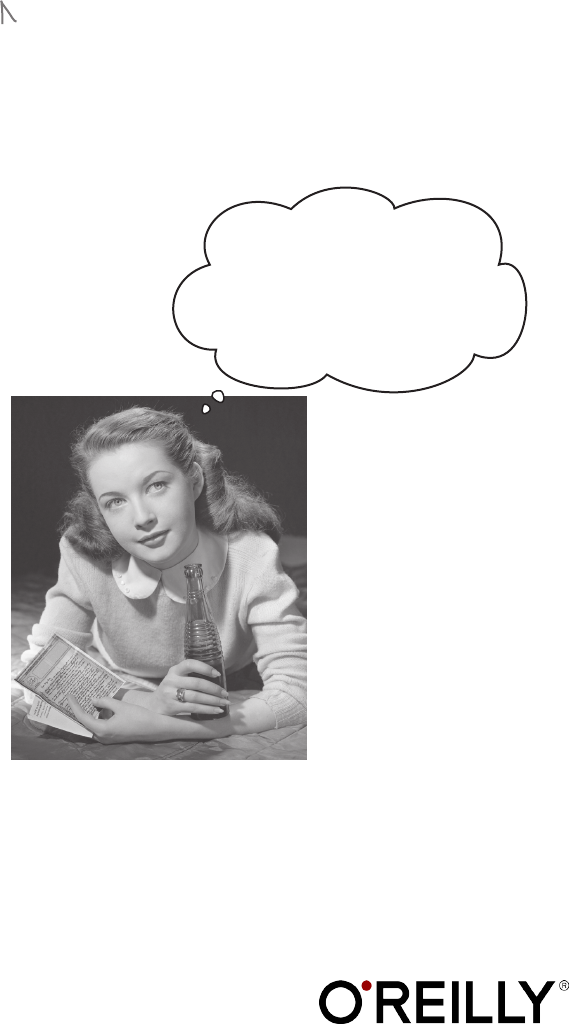
Wouldn’t it be
dreamy if you could get the
gist of Design Patterns without
reading a book as long as the IRS
tax code? It’s probably just a
fantasy...
An Engineering
2 | Managers Guide to Design Patterns
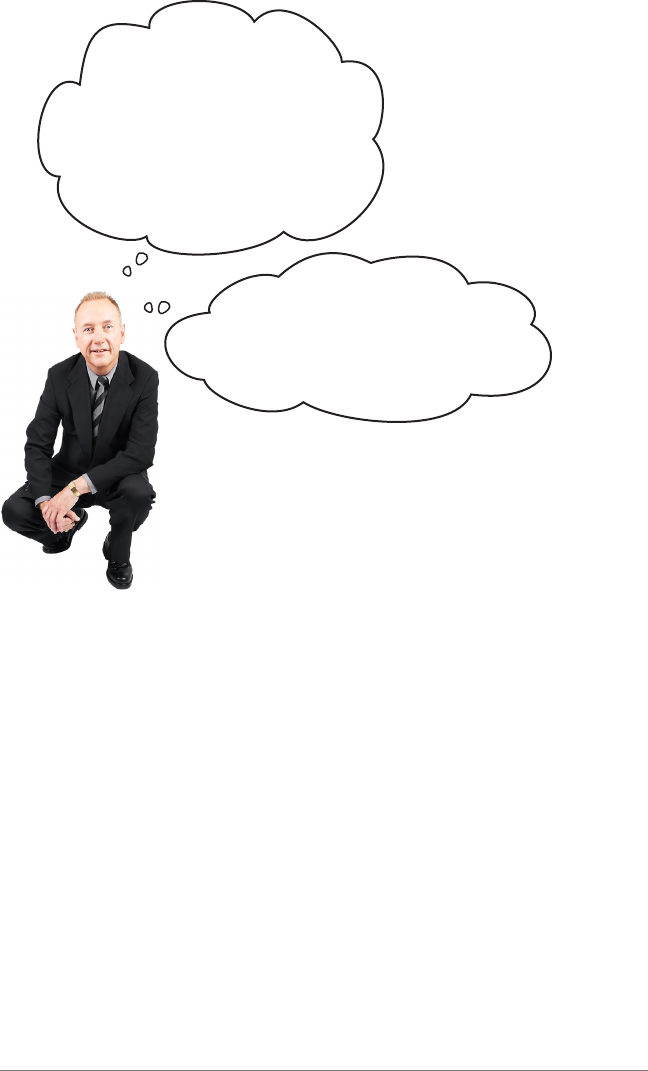
It finally happened. I feel
out of touch... one of my
developers told me this morning
he was “using the strategy design
pattern to isolate the code for
each of our customers in our
MVC-based client application.”
We’ve all used off-the-shelf libraries and frameworks. We
take them, write some code using their APIs, compile
them into our programs, and benefit from a lot of code
someone else has written. Think about the Java APIs and
all the functionality they give you: network, GUI, IO,
etc. Libraries and frameworks go a long way towards a
development model where we can just pick and choose
components and plug them right in. But they don’t help
us structure our own applications in ways that
are easier to understand, more maintainable and
flexible. That’s where Design Patterns fit in.
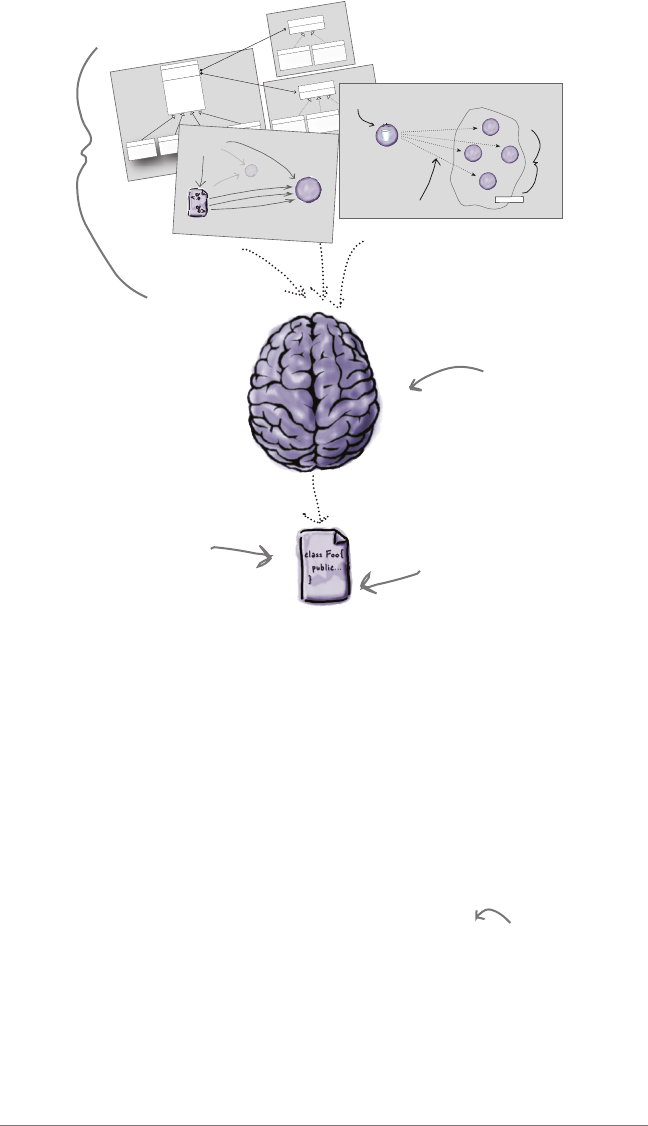
You see, design patterns don’t go directly into your code,
they first go into your BRAIN. Once you’ve loaded your
brain with a good working knowledge of patterns, you
can then start to apply them to your new designs, and
rework your old code when you fear it’s degrading into an
inflexible mess of spaghetti code.
Design Patterns aren’t libraries or
frameworks.
I get how libraries
and frameworks can speed up my
team’s development through reuse,
but where do design patterns fit in?
Managers Guide to Design Patterns | 3
Design Patterns are all about reusing experience. Chances are,
someone out there has had a problem similar to the one you’re
having, solved the problem, and captured the solution in a design
pattern. A design pattern you can use.
But a design pattern isn’t an algorithm, and it’s definitely not code.
Instead, a design pattern is an approach to thinking about software
design that incorporates the experience of developers who’ve had
similar problems, as well as fundamental design principles that guide
how we structure software designs.
A design pattern is usually expressed by a definition and a class
diagram. In patterns catalogs you’ll also find example scenarios when
a pattern might be applicable, the consequences of using a pattern,
and even some sample code. But, as you’ll see, patterns are pretty
abstract, it’s up to you to determine if the pattern is right for your
situation and your specific problem, and once you’ve figured that
out, how best to implement it.
Okay, but what are Design Patterns, really?
Your BRAIN
Your code, now new and
improved with design
patterns!
A Bunch of Patterns
swim()
display()
performQuack()
performFly()
setFlyBehavior()
setQuackBehavior()
// OTHER duck-like methods...
Duck
FlyBehavior yBehavior;
QuackBehavior quackBehavior;
<<interface>>
FlyBehavior
y()
y() {
// implements duck ying
}
FlyWithWings
y() {
// do nothing - can’t y!
}
FlyNoWay
<<interface>>
QuackBehavior
quack()
quack) {
// implements duck quacking
}
Quack
quack() {
// rubber duckie squeak
}
Squeak
quack() {
// do nothing - can’t quack!
}
MuteQuack
display() {
// looks like a decoy duck }
Decoy Duck
display() {
// looks like a mallard }
Mallard Duck
display() {
// looks like a redhead }
Redhead Duck
display() {
// looks like a rubberduck }
Rubber Duck
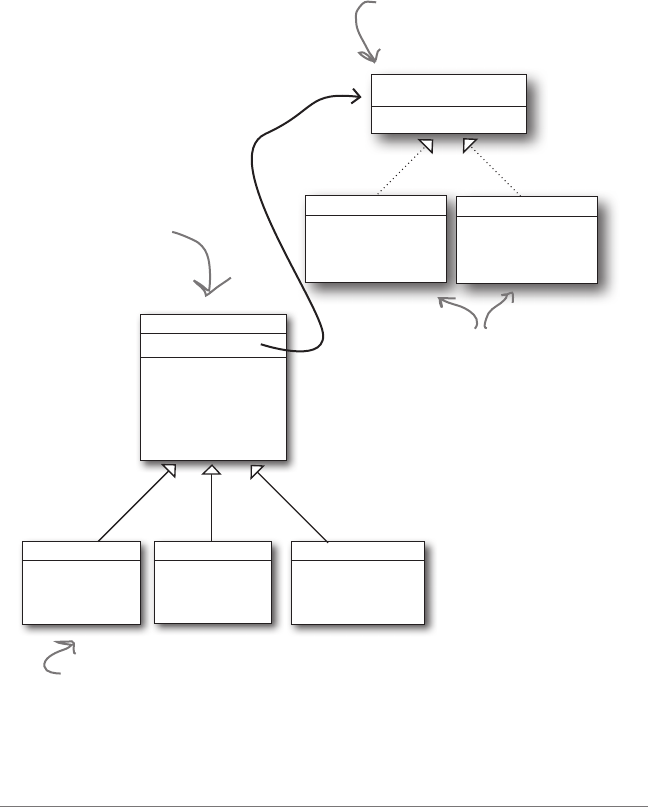
Encapsulated fly behavior
Encapsulated quack behavior
Client
View
Controller
Model
Request
MVC
S
u
b
j
e
c
t
O
b
j
e
c
t
8
int
D
o
g
O
b
j
e
c
t
M
o
u
s
e
O
b
j
e
c
t
C
a
t
O
b
j
e
c
t
D
u
c
k
O
b
j
e
c
t
Observers
8
8
8
8
Automatic update/notification
Object that
holds state
Dependent Objects
Code that is more
flexible, easier to
maintain, easier
to adapt to new
requirements.
We’ll see an
example pattern
in just a bit...
4 | Managers Guide to Design Patterns
Q: If design patterns are so great,
why can’t someone build a library of
them so I don’t have to?
A: Design patterns are higher level
than libraries. Design patterns tell us
how to structure classes and objects
to solve certain problems and it is our
job to adapt those designs to fit our
particular application.
Q: Aren’t libraries and frameworks
also design patterns?
A: Frameworks and libraries are not
design patterns; they provide specific
implementations that we link into our
code. Sometimes, however, libraries and
frameworks make use of design patterns
in their implementations. That’s great,
because once you understand design
patterns, you’ll more quickly understand
APIs that are structured around design
patterns.
Q: So, there are no libraries of
design patterns?
A: No, but there are patterns catalogs
with lists of patterns that you can apply
to your applications. You’ll also find
you can quickly get on top of the most
common design patterns so that you can
easily build them into your own designs,
understand how they are used in
libraries & frameworks, and turbo-charge
communication with your team.
It sounds to me like patterns are
nothing more than just using good object-
oriented concepts—you know, abstraction,
polymorphism, inheritance...
That’s a common misconception...
...but good object-oriented design is more subtle than
that. Just because you’re using object-oriented concepts
doesn’t mean you’re building flexible, reusable, and
maintainable systems. Sometimes these concepts can
even get in your way. Surprised? Many are.
By following well-thought-out and time-tested patterns,
and by understanding the design principles that
underlie those patterns, you’ll be able to create flexible
designs that are maintainable and can cope with
change.

Managers Guide to Design Patterns | 5
Developer: I already know about abstraction, inheritance, and
polymorphism; do I really need to think about Design Patterns? Isn’t it pretty
straightforward? Isn’t this why I took all those object-oriented programming
courses? I think Design Patterns are useful for people who don’t know good
OO design.
Guru: Ah, this is one of the true misunderstandings of object-oriented
development: that by knowing the OO basics we are automatically going to be
good at building flexible, reusable, and maintainable systems.
Developer: No?
Guru: No. As it turns out, constructing OO systems that have these
properties is not always obvious and has been discovered only through hard
work.
Developer: So, in other words, there are time-tested, non-obvious ways of
constructing object-oriented systems have been collected...
Guru: ...yes, into a set of patterns called Design Patterns.
Developer: So, by knowing patterns, I can skip the hard work and jump
straight to designs that always work?
Guru: Yes, to an extent, but remember, design is an art. There will always be
tradeoffs. But, if you follow well thought-out and time-tested design patterns,
you’ll be way ahead.
Developer: What do I do if I can’t find a pattern?
Guru: There are some object-oriented principles that underlie the patterns,
and knowing these will help you to cope when you can’t find a pattern that
matches your problem.
Developer: Principles? You mean beyond abstraction, encapsulation, and...
Guru: Right, there are principles beyond these that will help you design
systems with flexibility, maintainability, and other good qualities.
Friendly Patterns Guru
6 | Managers Guide to Design Patterns
How about an example Design Pattern?
Enough talk about what a pattern is and isn’t; let’s see
how one is used in practice on a super-serious business
application. Say you’re part of the team that built a
company’s award-winning Duck Simulation App.
Here’s the current high-level design:
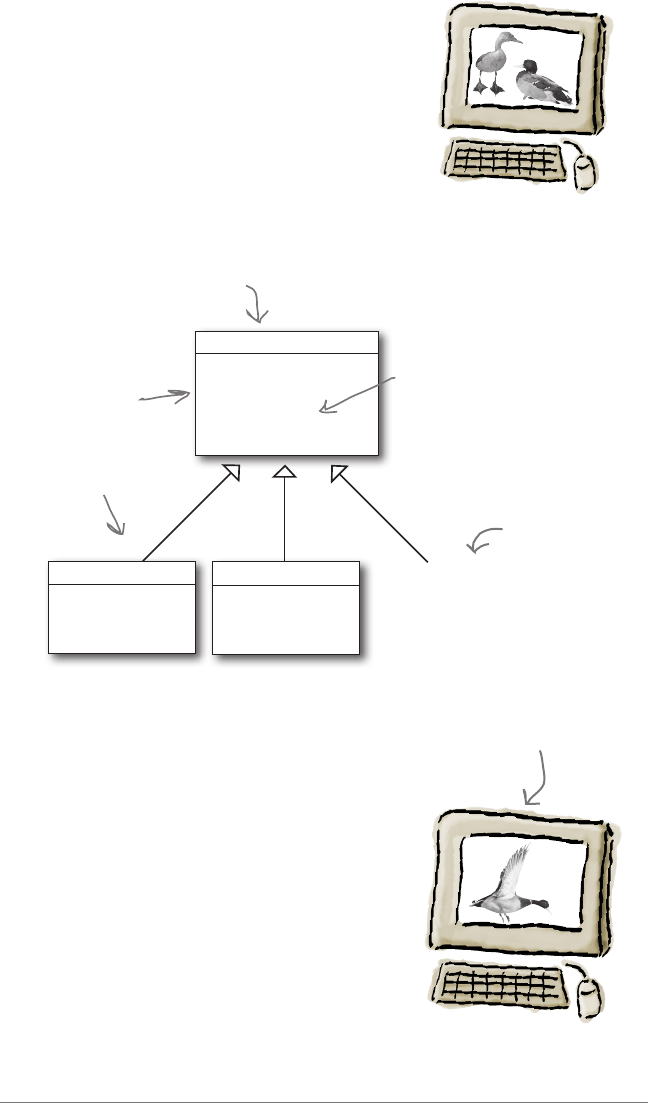
quack()
swim()
display()
// OTHER duck-like methods...
display() {
// looks like a mallard }
MallardDuck
display() {
// looks like a redhead }
RedheadDuck
Lots of other
types of ducks
can inherit
from the
Duck class.
Each duck
subtype is
responsible for
implementing its
own display()
behavior for how
it looks on the
screen.
In our simulator, all ducks
quack and swim. The
superclass takes care of
the implementation code.
The display()
method is
abstract,
because all
duck subtypes
look different.
Duck
While you and your team have done stellar work, the
company has been under increasing pressure from
competitors. After a week long off-site brainstorming
session over golf, the company executives think it’s
time for a big innovation. They need something really
impressive to show at the upcoming shareholders
meeting in Maui next week.
The executives decided that flying ducks is just what
the simulator needs to blow away the other duck sim
competitors. And of course your manager told them
it’ll be no problem for your teammate Joe to just whip
something up in a week. “After all,” he said, “Joe’s an
object-oriented programmer... how hard can it be?”
What we want.
If this isn’t making sense, take a little
time to brush up on object-oriented
concepts like inheritance, subclassing,
abstraction and simple class diagrams.
Don’t
forget
this fact!
Managers Guide to Design Patterns | 7
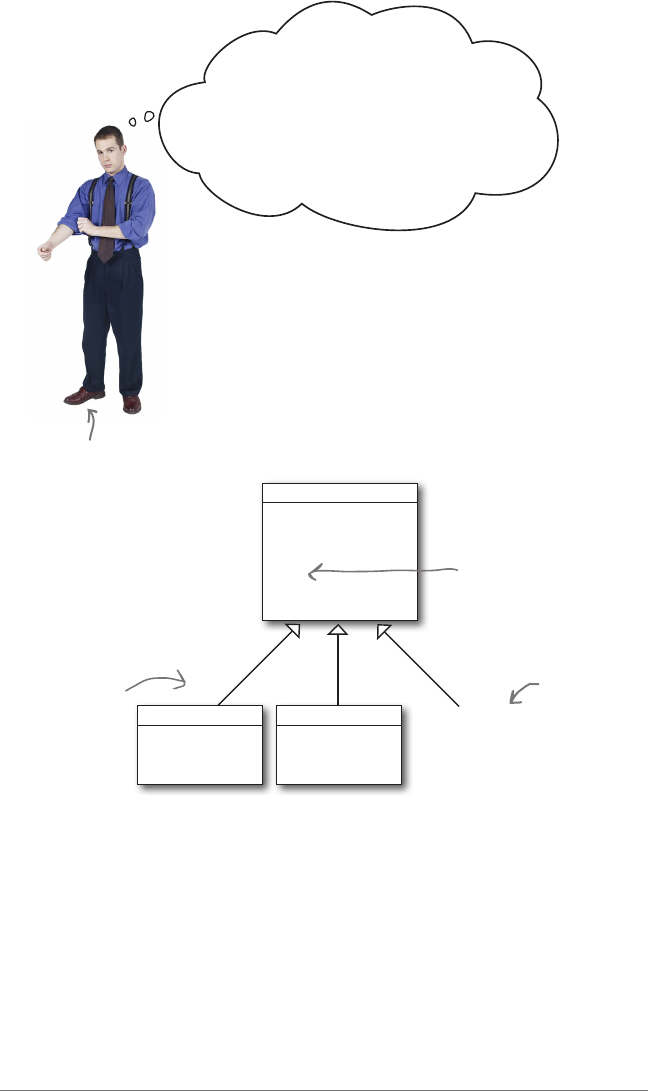
quack()
swim()
display()
y()
// OTHER duck-like methods...
display() {
// looks like a mallard }
MallardDuck
display() {
// looks like a redhead }
RedheadDuck
Adding the fly behavior
Joe uses what everyone is taught when they learn
object-oriented programming: if you want to add
behavior to the ducks, you need only add a concrete
method to the superclass, and magically all ducks will
inherit that behavior and get flying superpowers.
More specifically, here’s what Joe did:
All subclasses
inherit fly().
Joe added
a concerete
method
complete with
the code to
make any duck
fly.
Other Duck
types...
Duck
So, did Joe get a nice fat pay raise by
showing his object-oriented prowess?
Joe
This is basic object-oriented
design. We have a superclass Duck, and if
we want to add flying behavior, we just add
a fly() method to the Duck class and then all
the ducks will inherit it. I can get this done in
no time, and then sit back and wait for my pay
raise after the big shareholder demo.
Did we
mention you
shouldn’t
forget this
fact!
8 | Managers Guide to Design Patterns
Did we mention there were other kinds of ducks?
In fact, at the shareholder’s meeting they wanted
to show off the entire range of possible ducks,
including RubberDucks and DecoyDucks.
But Joe failed to notice that not all subclasses of
Duck should fly. When Joe added new behavior to
the Duck superclass, he was also adding behavior
that was not appropriate for some Duck subclasses.
He now has flying inanimate objects in the
SimUDuck program.
This is an example of a localized update to the code
caused a non-local side effect (flying rubber ducks)!
What happened?
quack()
swim()
display()
y()
// OTHER duck-like methods...
display() {
// looks like a mal-
lard }
MallardDuck
display() {
// looks like a red-
head }
RedheadDuck
display() {
// looks like a rubber-
duck }
RubberDuck
By putting fly() in
the superclass, he
gave flying ability to
ALL ducks, including
those that shouldn’t
be flying!
Joe, I’m at the shareholder’s
meeting. They just gave a demo and
there were rubber duckies flying around
the screen. Was this your idea of a
joke? You might want to spend some
time on Monster.com...
Duck
Joe’s Boss
The RubberDuck
inherits the fly
method from
its superclass,
allowing it to fly.

Managers Guide to Design Patterns | 9
OK, so there’s a slight
flaw in my design. I don’t
see why they can’t just call
this a “feature.” It’s
kind of cute...
I could always just
override
the fly() method in
rubber duck; that way the
rubber duck will have its own
implementation of fly.
But then what happens with
wooden decoy ducks? They
aren’t supposed to fly
either
...
this is going to be a lot of
overriding...

10 | Managers Guide to Design Patterns
I could take the fly() out of the Duck
superclass, and make a
Flyable() interface
with a fly() method. That way, only the ducks
that are
supposed
to fly will implement that
interface and have a fly() method... .
That is, like, the dumbest idea
you’ve come up with. Can you say,
“duplicate code”? If you thought having
to
override a few methods
was bad, how
are you gonna feel when you need to make
a little change to the flying behavior...
in all
48 of the flying Duck subclasses?!

Managers Guide to Design Patterns | 11
What would
you
do if you were Joe?
He’s thought through a couple solutions: one that
overrides the duck’s inherited behavior, and the
other which makes each duck implement its
own specific flying behavior. Both solutions are
problematic and destroy maintainability and
reuse in different ways.
So what can Joe do? How about a few
opinions?
The problem seems to
be that different ducks
have different behavior.
I think the
real problem is that the
requirements are always changing;
first management wants ducks, then
ducks that fly, then other ducks that
don’t fly...
Oh, boy...
Right, the design
has no way to gracefully
deal with the fact that ducks are going
to have different kinds of behavior. And,
as new ducks and new duck behaviors are
added, our current design just becomes a
maintenance nightmare. This is where
I’d like to get help from an experienced
developer on how to approach this...
Or, you could
achieve the same
thing by using a
design pattern...
12 | Managers Guide to Design Patterns
You’ve seen the problem: you need a flexible way to assign duck flying
behavior to a duck, depending on the type of the duck—some ducks fly,
others don’t, and in the future maybe some game-based space ducks
will fly with rocket power.
So, can you think of a design that allows this flexbility without
introducing duplicate code or maintenance nightmares?
...and it’s not appropriate for all subclasses to have those
behaviors. The Flyable interface sounded promising at
first—only ducks that really do fly will be Flyable—
except interfaces have no implementation code, so no
code reuse. And that means that whenever you need to
modify a behavior, you’re forced to track down and change
the code in all the different subclasses where that behavior is
defined, probably introducing new bugs along the way!
So, we need another design, but before we get to that, one
thing you should know about design patterns is they are
often rooted in design principles. Think of design principles
(not to be confused with design patterns), as guiding
principles that you apply to all object-oriented design.
Knowing these principles not only helps you understand design patterns,
it also improves every aspect of your object-oriented work. So, let’s look
at one such principle to motivate the design pattern we’ll use to solve
Joe’s problems.
We know using inheritance hasn’t worked out
very well, because the duck behavior keeps
changing in the subclasses...
Managers Guide to Design Patterns | 13
A design principle for change
Here’s another way to think about this principle: take the parts that
vary and encapsulate them, so that later you can alter or extend
the parts that vary without affecting those that don’t. As simple
as this concept is, it forms the basis for almost every design pattern. Many
patterns provide a way to let some part of a system vary independently of all other
parts.
This principle gives us a clue to how we might start thinking about fixing
the Duck Simulator, but how do we actually apply it? How do we translate
this abstract design principle into actual object-oriented design? This is
where you want to rely on that time-tested pattern that has been worked out
on the backs of other developers; in other words, we need a design pattern.
But which one? Experience and knowledge of design patterns can help you
determine that, and you can get some of that experience through patterns
catalogs—that is, catalogs of patterns that include where and when a
pattern is appropriate, the general problem it solves, how it’s designed, code
examples, and a lot more.
Design Principle
Identify the aspects of your
application that vary and separate
them from what stays the same.
One of many design
principles, but
we’ve got to start
somewhere, and this
one is fundamental.
Let’s say you’ve got some aspect of your code that is changing, say, every
time you have a new requirement. If that happens, one thing you can do is
take that code and separate it from all the stuff that doesn’t change. This
approach to isolating code that frequently changes is indispensable in well-
designed object-oriented systems—so much so, it’s a core design principle:
Q: I thought we were learning
design PATTERNS? Why are you
teaching me design principles? I’ve
had a class in object-oriented design
already.
A: Design principles are the
foundation of most patterns, so learning
design princples is key to understanding
how design patterns work. And, believe
it or not, object-oriented classes don’t
always do a good job of really teaching
these principles. The principle above
is just one of many design principles,
and it’s key in many design patterns. If
you want to learn more about design
principles, check out the resources at
the end of this report.
14 | Managers Guide to Design Patterns
Frank: Fill us in, Jim. I’ve just been learning patterns
by reading a few articles here and there.
Jim: Sure, each patterns catalog takes a set of patterns
and describes each pattern in detail along with its
relationship to the other patterns.
Joe: Are you saying there is more than one patterns
catalog?
Jim: Of course; there are catalogs for fundamental
design patterns and there are also catalogs on domain-
specific patterns, like enterprise architecture patterns.
Frank: Which catalog are you looking at?
Jim: This is the classic GoF catalog; it contains 23
fundamental design patterns.
Frank: GoF?
Jim: Right, that stands for the Gang of Four. The Gang
of Four are the guys that put together the first patterns
catalog.
Joe: What’s in the catalog?
Jim: There is a set of related patterns. For each pattern
there is a description that follows a template and spells
out a lot of details of the pattern. For instance, each
pattern has a name.
Joe
Jim
Frank
So this is a design
patterns catalog?

Managers Guide to Design Patterns | 15
Frank: Wow, that’s earth-shattering—a name! Imagine that.
Jim: Hold on, Frank; actually, the name is really important. When we have a name for a
pattern, it gives us a way to talk about the pattern.
Frank: Okay, okay. I was just kidding. Go on, what else is there?
Jim: Well, like I was saying, every pattern follows a template. For each pattern we have
a name and a few sections that tell us more about the pattern. For instance, there is an
Intent section that describes what the pattern is, kind of like a definition. Then there are
Motivation and Applicability sections that describe when and where the pattern might be
used.
Joe: What about the design itself ?
Jim: There are several sections that describe the class design along with all the classes
that make it up and what their roles are. There is also a section that describes how to
implement the pattern and often sample code to show you how.
Frank: It sounds like they’ve thought of everything.
Jim: There’s more. There are also examples of where the pattern has been used in real
systems, as well as what I think is one of the most useful sections: how the pattern relates
to other patterns.
Frank: Oh, you mean they tell you things like how patterns differ?
Jim: Exactly!
Joe: So Jim, how are you actually using the catalog? When you have a problem, do you
go fishing in the catalog for a solution?
Jim: I try to get familiar with all the patterns and their relationships first. Then, when I
need a pattern, I have some idea of what it is. I go back and look at the Motivation and
Applicability sections to make sure I’ve got it right. There is also another really important
section: Consequences. I review that to make sure there won’t be some unintended effect
on my design.
Frank: That makes sense. So once you know the pattern is right, how do you approach
working it into your design and implementing it?
Jim: That’s where the class diagram comes in. I first read over the Structure section
to review the diagram to make sure I understand each class’s role. From there, I
work it into my design, making any alterations I need to make it fit. Then I review
the Implementation and Sample Code sections to make sure I know about any good
implementation techniques or gotchas I might encounter.
Joe: I can see how a catalog is really going to accelerate my use of patterns!
Jim: Let me show you a particular pattern you might be interested in given your, um,
recent problem with the ducks—it’s called the Strategy Pattern.
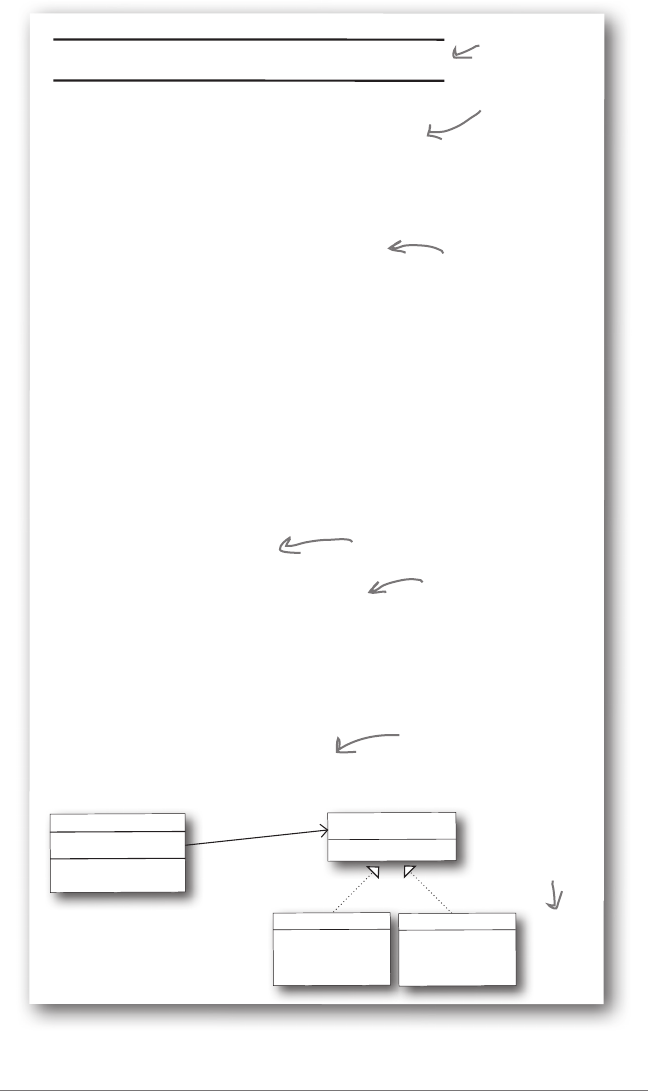
16 | Managers Guide to Design Patterns
STRATEGY Object Behavioral
Intent
Define a family of algorithms, encapsulate each one, and
make them interchangeable. Strategy lets the algorithm
vary independently from clients that use it.
Motivation
In some situations, there will be more than one
algorithm to implement behavior. Hard-wiring all
such algorithms into the classes that require them isn’t
desirable for several reasons:
• Clients that need an algorithm get more complex if
they include the code implementing that algorithm.
That makes clients more difficult to maintain,
especially if they support multiple algorithms.
• Different algorithms will be appropriate at different
times.
• It’s difficult to add new algorithms and vary existing
ones when the code implementing the algorithm is
an integral part of the client.
Applicability
Use the Strategy pattern when:
• Many related classes differ only in their behavior.
Strategies provide a way to configure a class with
one of many behaviors.
• You need different variants of an algorithm.
Strategies can be used when these varients are
implemented as a class hierarchy of algorithms.
Structure
inheritedMethod()
Client
Strategy strategyBehavior
<<interface>>
Strategy
strategyBehaviorMethod()
strategyBehaviorMethod() {
// implements method
}
ConcreteStrategyA
strategyBehaviorMethod() {
// implements method
}
ConcreteStrategyB
The structure provides a
diagram illustrating the
relationships among the classes
that participate in the pattern.
This is the
pattern’s name
and category.
The intent
describes what
the pattern
does in a short
statement.
The motivation gives
you a scenario that
describes the problem
and how the solution
solves the problem.
The applicability describes
situations in which the
pattern can be applied.
Boy does that sound like
what we need!
There is a
lot more in a
typical pattern
catalog we’re
not showing!
With this pattern we’re moving the
behavior out to another set of
classes, and each Client uses one of
those classes for its behavior.
Managers Guide to Design Patterns | 17
Jim, I think you’re right... looking at
the Strategy Pattern description in the
catalog, I think this pattern might be
able to help me with the Duck Simulator.
Frank: Can you step us through how, Joe?
Joe: Well, see here in the Motivation section, it
says that the Strategy Pattern is appropriate if
you’ve got more than one algorithm implementing
behaviors for the client. In our case the client is
the Duck...
Jim: ...and the algorithms are the flying
behaviors?
Joe: Exactly.
Frank: And look here, it says that Strategy
applicable when you have many similar classes
that differ only in their behavior. Our ducks are
like that, right?
Joe: Right. The pattern represents each behavior
as another class, which implements that behavior.
Frank: So in other words, if a duck wants to fly
in the air, it uses a FlyInTheAir class instead of a
CantFly class.
Jim: That’s a nice design because you can have
any number of fly behaviors, and each duck can
use the most appropriate one. Heck I bet you
could even change the behavior at runtime.
Joe: Guys, you realize what this means? By
reworking my code slightly, I may just get that
raise after all!
18 | Managers Guide to Design Patterns
The new and improved Duck Simulator
<<interface>>
FlyBehavior
y()
y() {
// implements duck ying
}
FlyWithWings
y() {
// do nothing - can’t y!
}
FlyNoWay
Let’s take a quick look at the Duck Simulator now that Joe’s redesigned
it using the Strategy Pattern. Don’t worry too much about the details;
just notice that the structure of the Duck Simulator now implements the
Strategy Pattern. And by that we mean that all the code to implement
flying behaviors now resides in another set of classes, which are used
by the ducks as needed. Overall, Joe now has a design that is a lot more
flexible, extensible and easier to maintain. He also won’t have to go
through the embarassment of flying rubber ducks again.
display() {
// looks like a mal-
lard }
MallardDuck
display() {
// looks like a rubber-
duck }
RubberDuck
quack()
swim()
display()
y()
// OTHER duck-like methods...
Duck
FlyBehavior yBehavior
We’ve moved all the flying
behavior code into a
separate set of classes.
And we’ve
assigned each
duck a specific
flying behavior.
When we want a duck to fly, we use whichever flying behavior
has been assigned to that duck. If we want to change that
flying behavior, we can, even at runtime.
These classes
implement the
different flying
behaviors.
display() {
// looks like a red-
head }
RedheadDuck
Managers Guide to Design Patterns | 19
So, let me just see if I fully
understand what we just did. We
identified the aspects of the duck
that were likely to change―namely, the
flying behavior―and we pulled it right
out of the class so that we could change
it independently of the ducks?
In this short report we’ve skipped a lot of steps
showing how we get from the problem to the
pattern and solution, but you’re getting the idea.
This is just an simple example showing how a
non-obvious design problem can be approached
by making use of a design pattern and applying
it in your code.
That’s right.
❏ All duck behaviors are implemented in one place (no code
duplication).
❏ Each duck can easily be assigned any of the available
behaviors (mallards can use the FlyWithWings behavior and
rubber ducks can use the FlyNoWay behavior).
❏ It’s easy to add new behaviors. Simply create a new class that
implements Flyable (like a FlyWithRockets behavior).
❏ Joe’s paycheck.
Answer: All of the above.
What improved when Joe implemented the strategy pattern
(check all that apply)?

20 | Managers Guide to Design Patterns
Overheard at the local diner...
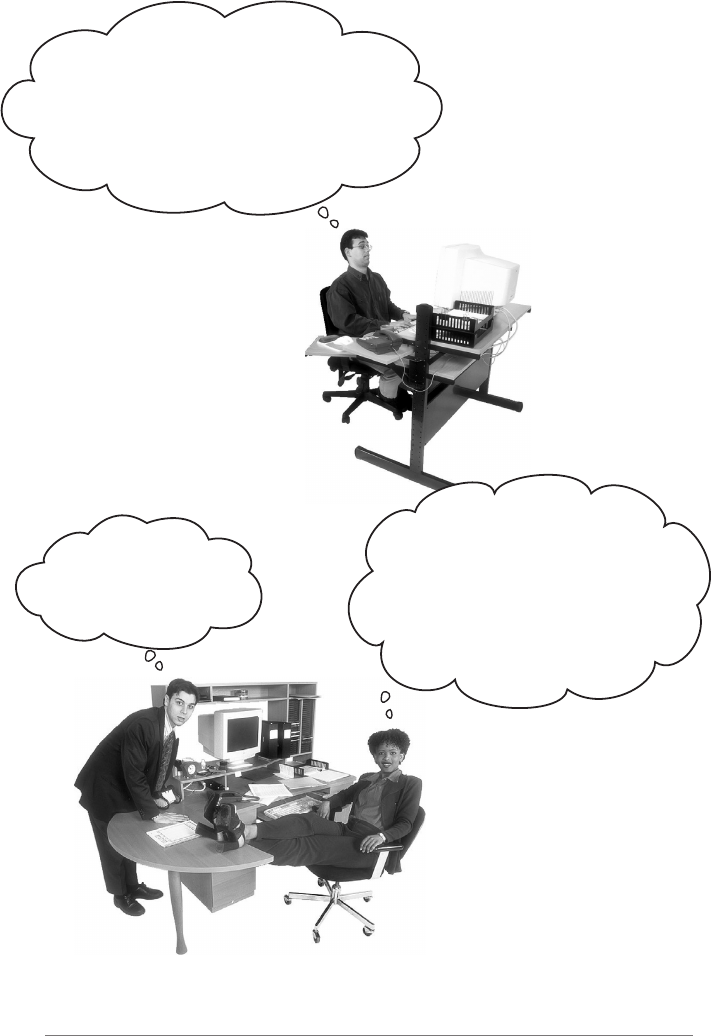
What’s the difference between these two orders? Not a thing! They’re both
the same order, except Alice is using twice the number of words and trying the
patience of a grumpy short-order cook.
What’s Flo got that Alice doesn’t? A shared vocabulary with the short-order
cook. Not only does that make it easier to communicate with the cook, but it
gives the cook less to remember because he’s got all the diner patterns in his
head.
Design Patterns give you a shared vocabulary with the developers on your
team. Once you’ve got the vocabulary you can more easily communicate about
software design and inspire those who don’t know patterns to start learning
them. It also elevates your thinking about architectures by letting you think at
the pattern level, not the nitty-gritty object level.
Flo
Alice
I need a cream
cheese with jelly
on white bread, a chocolate soda
with vanilla ice cream, a grilled
cheese sandwich with bacon, a tuna
fish salad on toast, a banana split
with ice cream & sliced bananas, and a
coffee with a cream and two sugars,
... oh, and put a hamburger on
the grill!
Give me a C.J.
White, a black &
white, a Jack Benny,
a radio, a house boat,
a coffee regular, and
burn one!
Managers Guide to Design Patterns | 21
Overheard in the next cubicle...
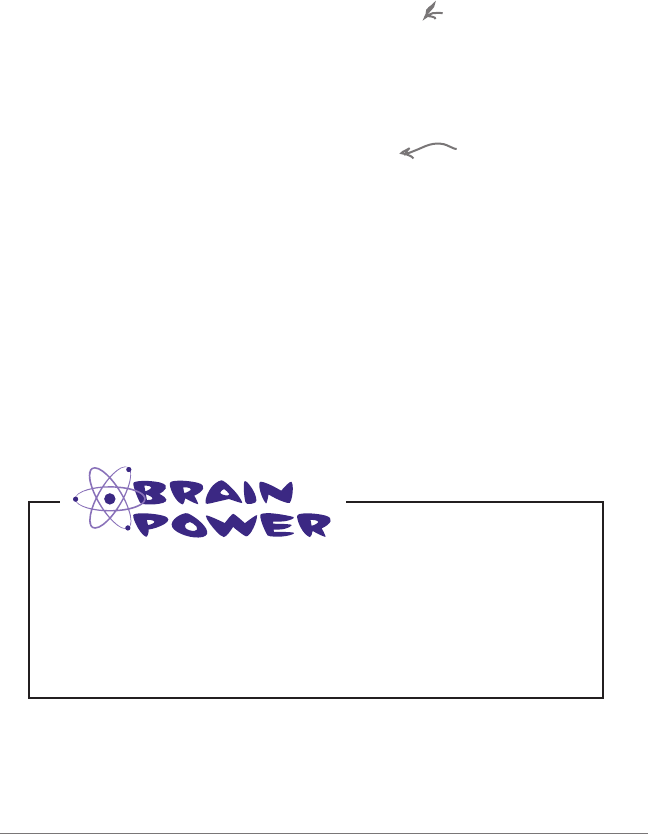
So I created this broadcast class. It keeps
track of all the objects listening to it, and
anytime a new piece of data comes along it sends
a message to each listener. What’s cool is that the
listeners can join the broadcast at any time or
they can even remove themselves. It is really
dynamic and loosely coupled!
Exactly. If you communicate
in patterns, then other developers
and your manager will know immediately
and
precisely
the design you’re describing.
Just don’t get Pattern Fever... you’ll
know you have it when you start using
patterns for Hello World...
Rick, why didn’t you
just say you are using
the Observer Pattern?
22 | Managers Guide to Design Patterns
Patterns allow you to say more with less.
When you use a pattern in a description, other
developers quickly know precisely the design
you have in mind.
Talking at the pattern level allows you to
stay “in the design” longer. Talking about
software systems using patterns allows you to
keep the discussion at the design level, without
having to dive down to the nitty-gritty details of
implementing objects and classes.
Shared vocabularies can turbo-charge
your development team. A team well
versed in design patterns can move more quickly
with less room for misunderstanding.
Shared vocabularies encourage more
junior developers to get up to speed.
Junior developers look up to experienced
developers. When senior developers make use of
design patterns, junior developers also become
motivated to learn them. Build a community of
pattern users at your organization.
How many design
meetings have
you been in that
quickly degrade
into implementation
details?
As your team
begins to share
design ideas and
experience in terms
of patterns, you will
build a community of
patterns users.
Can you think of other shared vocabularies that are used beyond OO
design and diner talk? (Hint: how about auto mechanics, carpenters,
gourmet chefs, air traffic control.) What qualities are communicated
along with the lingo?
Can you think of aspects of object-oriented design that get
communicated along with pattern names, e.g. “Strategy Pattern”?
Shared vocabularies are powerful
When you communicate with your team using patterns, you are
communicating not just a pattern name but a whole set of qualities,
characteristics, and constraints that the pattern represents.

Managers Guide to Design Patterns | 23
I’m sold. We’re going to be able
to write code that is more flexible,
extensible, maintainable, and the
team’s communication is going to
improve. So, how can we quickly get up
to speed on all the patterns?
There are hundreds of patterns at this point (the field
has been developing since 1994), so it doesn’t make sense
for you to try to understand every pattern that exists. In
addition, you’ll find there are fundamental patterns that
apply to most software design, and there are domain-
specific patterns that apply to specific fields, like, say,
enterprise software development. So depending on the type
of work you and your team do, you’re going to want to
focus on a subset of patterns to wrap your head around.
Start with a few of the original GoF patterns; you’ll find
these patterns show up regularly in all kinds of software
development, and also make frequent appearances in
libraries and frameworks. Studying these patterns will also
help you learn to “think in patterns” so you can better
recognize situations where a pattern could potentially help
solve a problem.
From there, it may be appropriate to learn more about
the patterns that are specific to your domain (for instance
enterprise patterns, JavaScript patterns, etc.).
Well, learning all the patterns is
probably not the right approach.
24 | Managers Guide to Design Patterns
Patterns Cheat Sheet
You’ve seen one of the fundamental design patterns, the
Strategy Pattern; how about a few more examples just to wet
your appetite? We’re going to give you just a little exposure
here to some common patterns; it’s up to you to take it
further and actually learn them. For now, at least, you’ll be
able to hold your own in the next developer’s happy hour.
Decorator: Need to dynamically add functionality to objects?
With Decorator, you can do this without affecting the behavior
of other objects from the same class. Great for keeping classes
simple and adding on new combinations of behavior at runtime.
Observer: Need your objects to be notified when
events happen? With the Observer pattern you can get
notified in a way that keeps everything in your design
flexible and loosley coupled.
Dependency Injection: Does your software
depend on services from libraries to get things
done, but you don’t want to be too dependent
on any one implementation of a service?
Dependency Injection keeps your code loosely
coupled from modules so you can change
your mind later and use a different service
without having to rewrite a bunch of code.
Adapter: Need to isolate your code from two or more APIs?
Adapters are commonly used.
Model-View-Controller
(MVC): This is the go-to
pattern for building systems
with user interfaces (views).
The MVC pattern allows you
to keep your UI, business
logic, and model code all
nice and separate.
Module: This pattern helps keep all your library code
separate from your own code with a handy public interface to
all the functionality you need.
Singleton: The Singleton
pattern is used when you need
to have one, and only one, of
an object. Use it to represent
critical resources that can only
exist once in your app.
Iterator: Need to be able to
iterate through a collection of
things without knowing the
specifics of the things? Use the
Iterator pattern.
Command: Want to delegate work to other objects, without
specifying exactly who should do it, and without telling them
how to do their job? Use the Command pattern.
Managers Guide to Design Patterns | 25
WARNING: Overuse of design patterns can lead to code that
is downright over-engineered. Always go with the simplest
solution that does the job and introduce patterns where and
when the need emerges.
Once you begin learning about Design Patterns, you start seeing patterns
everywhere. This is good: it gets you lots of experience with and practice
thinking about how patterns can influence and improve your designs. But
also realize that not every situation needs a pattern. Patterns can help make
more flexible designs, but they can also introduce complexity, which we
want to reduce unless necessary. Just remember: complexity and patterns
should be used only where they are needed for practical extensibility.
Here’s a short and handy guide to keep in mind as you think about
patterns:
Keep It Simple (KISS): Your goal should always be
simplicity, so don’t feel like you always need to use a
pattern to solve a problem.
Design patterns aren’t a magic bullet: They are
time-tested techniques for solving problems, but you
can’t just plug a pattern into a problem and take an early
lunch. Think through how using a pattern will affect the
rest of your design.
When to use a pattern? That’s the $10,000 question.
Introduce a pattern when you’re sure it addresses a
problem in your design, and only if a simpler solution
won’t work.
Refactoring time is patterns time: A great time to
introduce patterns is when you need to refactor a design.
You’re improving the organization and structure of your
code anyway, so see if a pattern can help.
If you don’t need it now, don’t do it now: Design
Patterns are powerful, but resist the temptation to
introduce them unless you have a practical need to
support change in your design today.
26 | Managers Guide to Design Patterns
Your journey has just begun...
You’ve barely scratched the surface of Design Patterns in this report, but
now you have an idea of what they are and how they can benefit you and
your team, you’re ready to dig deeper. Where to begin? We’ve got resources
to get you started and set you on your way to Design Patterns mastery.
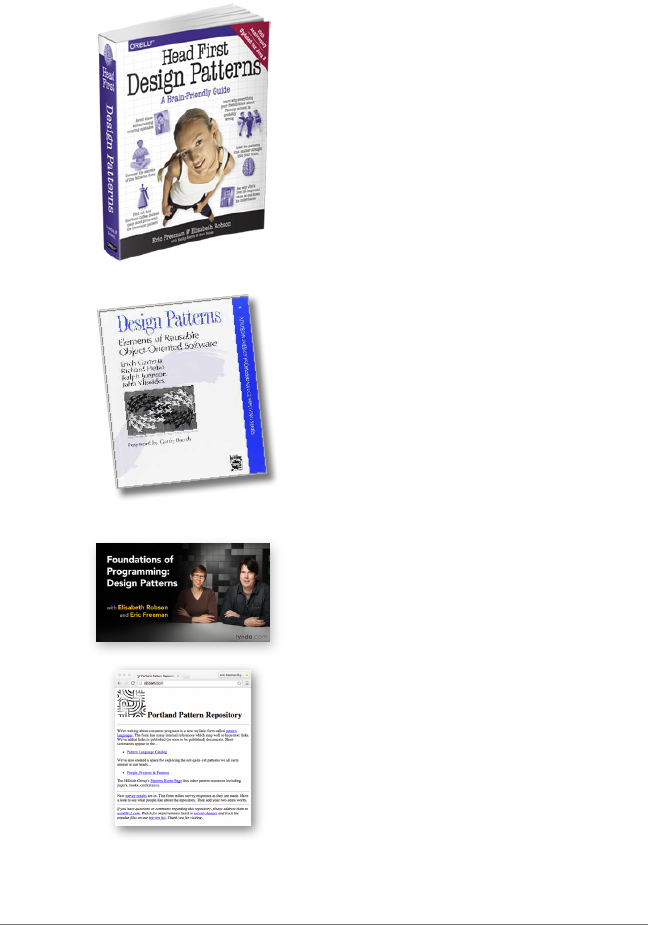
Design Patterns: Elements of Reusable
Software, known as the “Gang of
Four” book, in reference to the
four authors, kicked off the entire
field of Design Patterns when it
was released in 1995. This is the
definitive book on the core design
patterns, and so, it belongs on any
professional’s bookshelf.
Where to reference...
This little report is based on, and
borrows heavily from Head First Design
Patterns. Over the past decade this book
has become the go-to guide for learning
about design patterns because it takes
you through every aspect of what they
are, the core design principles they are
based on and through fourteen of the
fundamental patterns, all in one place
and in a brain-friendly way.
Where to start...
The Portland Pattern Repository is
is a great resource as you enter the
Design Patterns world. It is a wiki,
so anyone can participate. You’ll
find it at http://c2.com/ppr/.
Online
If video learning is your cup of tea,
check out Foundations of Programming:
Design Patterns to get you up to speed
on patterns including a half dozen
of the core GoF patterns.
Video
