Fabasicm_new FA BASIC M Fabasicm
User Manual: FA-BASIC-M Online ation - AutomationDirect
Open the PDF directly: View PDF  .
.
Page Count: 181 [warning: Documents this large are best viewed by clicking the View PDF Link!]

AutomationDirect.com
F A C T S E x t e n d e d B A S I C
R e f e r e n c e M a n u a l
Manual Order Number: FA-BASIC-M

Automationdirect.com is a Trademark of Automationdirect.com
CoProcessor is a Trademark of FACTS Engineering, Inc.
Copyright 2004, FACTS Engineering Inc., 8049 Photonics Dr., New Port Richey, Florida,
34655. World rights reserved.
COPYRIGHT
TRADEMARKS
Last Issued Date: August 1999
Current Issued Date: March 2006

Thank you for purchasing automation equipment from FACTS Engineering. We want your
new FACTS Engineering automation equipment to operate safely. Anyone who installs or
uses this equipment should read this publication (and any other relevant publications)
before installing or operating the equipment.
To minimize the risk of potential safety problems, you should follow all applicable local and
national codes that regulate the installation and operation of your equipment. These codes
vary from area to area and usually change with time. It is your responsibility to determine
which codes should be followed, and to verify that the equipment, installation, and
operation is in compliance with the latest revision of these codes.
At a minimum, you should follow all applicable sections of the National Fire Code, National
Electrical Code, and the codes of the National Electrical Manufacturers Association
(NEMA). There may be local regulatory or government offices that can help determine
which codes and standards are necessary for safe installation and operation.
Equipment damage or serious injury to personnel can result from the failure to follow all
applicable codes and standards. We do not guarantee the products described in this
publication are suitable for your particular application, nor do we assume any responsibility
for your product design, installation, or operation.
If you have any questions concerning the installation or operation of this equipment, or if
you need additional information, please call us at 1-800-783-3225.
This document is based on information available at the time of its publication. While efforts
have been made to be accurate, the information contained herein does not purport to cover
all details or variations in hardware and software, nor to provide for every possible
contingency in connection with installation, operation, and maintenance. Features may be
described herein which are not present in all hardware and software systems. FACTS
Engineering assumes no obligation of notice to holders of this document with respect to
changes subsequently made. FACTS Engineering retains the
right to make changes to hardware and software at any time, without notice. FACTS
Engineering makes no representation or warranty, expressed, implied, or statutory with
respect to, and assumes no responsibility for the accuracy, completeness, sufficiency, or
usefulness of the information contained herein. No warranties of merchantability of fitness
for purpose shall apply.
WARNING

MANUAL HISTORY
Refer to this history in all correspondence and/or discussion of this manual.
Title: FACTS Extended BASIC Reference Manual
Part Number FA-BASIC-M
Issue / Date Effective
Pages Description of Changes
August 1999 Last Released Version
March 2006 1.1
2.1
2.2
3.3
3.11
4.9
4.20
4.21
4.24
4.26
4.31
4.44
4.45
4.46
4.49
4.65
4.70
4.72
4.73
4.83
4.86
4.90
4.98
4.99
4.110
6.2
C.2
D.1
Added 205 and 05/06 CoProcessors
Added reference to F0-CP-M
Added reference to 05/06 CoPro under ‘RESET’
Change note on mode 3 to bold
Typo fix under ‘Usage’
Added “Not Recommended for New Applications”
Changed wording under 2nd paragraph under ‘Usage’
Added “Not Recommended for New Applications”
Corrected spacing
Removed reference to “(pin 5)” under ‘Example’
Added “Automation Direct’s DirectNet” in example description
Changed description of port number under ‘Usage’ to be more generic
Added new sentence under ‘Usage’
Added statements under ‘See also’
Removed extra CR/LF
Changed line 20 to “ON I-1…”
Added commas in line 10 and 30
Added “to a” in first sentence under ‘Usage’
Added P3. under shorthand
Added page number for SETPORT in third paragraph under ‘Usage’
Added statement under ‘See also’
Added note that AAR is only available on port 1
Corrected page number reference for DSR/DTR in next to last paragraph
Corrected spacing
Added calculation for number of strings from a given STRING statement
Added some more STRING statement examples
Under ‘Usage’ changed third word from ‘command’ to ‘statement’
Under ‘Usage’ added paragraph about a hex string expression
Corrected EQUAL TO operator
Corrected ASCII table – ‘O’ was missing
Changed text to indicate the ‘Typical Execution Times’ are for a specific
module
TABLE OF CONTENTS
CHAPTER 1 : INTRODUCTION ...............................................................................................1.1
PURPOSE OF THIS DOCUMENT ..............................................................................1.1
FACTS BASIC MODULE TYPES................................................................................1.1
CHAPTER 2 : GETTING STARTED WITH FACTS EXTENDED BASIC ...........................2.1
MINIMUM READING REQUIREMENT.........................................................................2.1
FIRST TIME USERS......................................................................................................2.1
OPERATING MODES...................................................................................................2.1
RESET............................................................................................................................2.2
GENERAL MEMORY USAGE .....................................................................................2.2
Data Memory......................................................................................................2.3
Program Memory...............................................................................................2.3
DEFINITION OF TERMS ...............................................................................................2.4
Commands .........................................................................................................2.4
Statements..........................................................................................................2.5
Program Lines....................................................................................................2.5
Floating Point Numbers.....................................................................................2.6
Integer Numbers.................................................................................................2.6
Operators............................................................................................................2.7
Variables.............................................................................................................2.7
Expressions ........................................................................................................2.9
CHAPTER 3 : SYSTEM COMMANDS....................................................................................3.1
AUTOLN..........................................................................................................................3.2
AUTOSTART..................................................................................................................3.3
AUTOSTART Reset Mode Table .....................................................................3.3
Retaining Variables in the Absence of Power................................................3.5
COMMAND@.................................................................................................................3.6
CONT...............................................................................................................................3.7
DELPRM.........................................................................................................................3.8
EDIT.................................................................................................................................3.9
ERASE..........................................................................................................................3.10
LIST................................................................................................................................3.11
NEW ..............................................................................................................................3.12
PROGRAM or PRM.....................................................................................................3.13
RENUMBER.................................................................................................................3.14
RESET..........................................................................................................................3.15
RUN ...............................................................................................................................3.16
SAVE.............................................................................................................................3.17
CHAPTER 4 : STATEMENTS..................................................................................................4.1
ABS - Mathematical Operator ......................................................................................4.2
ASC - String Operator...................................................................................................4.3
ATN - Mathematical Operator.......................................................................................4.4
BIT and BITS - Input/Output ...........................................................................................4.5
BREAK - Flow Control...................................................................................................4.6
BYTE - Advanced Operator ..........................................................................................4.7
CALL - Advanced Operator..........................................................................................4.8
CBY - Advanced Operator – Not Recommended for New Applications..................4.9
CHR$ - String Operator...............................................................................................4.10
CLEAR - Flow Control.................................................................................................4.11
CLEAR I - Interrupts .....................................................................................................4.12
CLEAR S - Flow Control.............................................................................................4.13
COMERR - Advanced Operator.................................................................................4.14
COPY - Memory Management....................................................................................4.15
COS - Mathematical Operator....................................................................................4.17
CR - Input/Output ..........................................................................................................4.18
DATA - Input/Output .....................................................................................................4.19
DATE$ - String Operator.............................................................................................4.20
DBY - Advanced Operator – Not Recommended for New Applications................4.21
DELAY - Miscellaneous...............................................................................................4.22
DIM - Memory Management........................................................................................4.23
DO-UNTIL - Flow Control.............................................................................................4.24
DO-WHILE - Flow Control...........................................................................................4.25
DSR - Miscellaneous ...................................................................................................4.26
DTR - Miscellaneous....................................................................................................4.27
END - Flow Control......................................................................................................4.28
ERRCHK - Miscellaneous...........................................................................................4.29
EXP - Mathematical Operator ....................................................................................4.33
FOR-TO-STEP-NEXT - Flow Control........................................................................4.34
GO_PROGRAM or GOPRM - Flow Control..............................................................4.35
GOSUB - Flow Control................................................................................................4.37
GOTO - Flow Control...................................................................................................4.39
HEX$ - String Operator...............................................................................................4.40
IDLE - Interrupts............................................................................................................4.41
IF-THEN-ELSE - Flow Control....................................................................................4.42
INKEY$ - String Operator............................................................................................4.43
INLEN - Input/Output.....................................................................................................4.44
INPLEN - Input/Output..................................................................................................4.45
INPUT - Input/Output.....................................................................................................4.46
Input Error Handling..........................................................................................4.47
Non-Standard ASCII Character Input.............................................................4.48
Special Case of Control Character Input.......................................................4.49
INSTR - String Operator ..............................................................................................4.50
INT - Mathematical Operator.......................................................................................4.51
LCASE$ - String Operator..........................................................................................4.52
LEFT$ - String Operator..............................................................................................4.53
LEN - String Operator..................................................................................................4.54
LET - Miscellaneous ....................................................................................................4.55
LOAD@ or LD@ - Advanced Operator.....................................................................4.56
LOCKOUT - Flow Control............................................................................................4.58
LOF - Memory Management.......................................................................................4.59
LOG - Mathematical Operator ....................................................................................4.60
MID$ - String Operator ................................................................................................4.61
MTOP - Advanced Operator.......................................................................................4.62
OCTHEX$ - String Operator.......................................................................................4.63
ON-GOSUB - Flow Control.........................................................................................4.64
ON-GOTO - Flow Control............................................................................................4.65
ONERR - Flow Control.................................................................................................4.66
ONPORT - Interrupt......................................................................................................4.67
ONTIME - Interrupt........................................................................................................4.68
Interrupt Priority - ONPORT and ONTIME......................................................4.69
PH0. and PH1. - Input/Output......................................................................................4.70
PICK - Input/Output.......................................................................................................4.71
POP - Advanced Operator..........................................................................................4.72
PRINT - Input/Output.....................................................................................................4.73
PUSH - Advanced Operator .......................................................................................4.74
READ - Input/Output.....................................................................................................4.75
REM - Miscellaneous...................................................................................................4.76
RESTORE - Input/Output.............................................................................................4.77
RETI - Interrupt..............................................................................................................4.78
RETURN - Flow Control...............................................................................................4.79
REVERSE$ - String Operator....................................................................................4.80
RIGHT$ - String Operator............................................................................................4.81
RND - Mathematical Operator....................................................................................4.82
SETINPUT - Input/Output.............................................................................................4.83
SETPORT - Input/Output..............................................................................................4.85
Software Handshaking ....................................................................................4.87
Hardware Bi-directional CTS/RTS Handshaking .........................................4.87
Uni-directional CTS Hardware Flow Control.................................................4.87
No Handshaking...............................................................................................4.87
SGN - Mathematical Operator....................................................................................4.91
SIN - Mathematical Operator ......................................................................................4.92
SPC - Input/Output........................................................................................................4.93
SQR - Mathematical Operator....................................................................................4.94
STOP - Flow Control....................................................................................................4.95
STORE@ or ST@ - Advanced Operator ..................................................................4.96
STR$ - String Operator................................................................................................4.97
STRING - Memory Management ................................................................................4.98
SYSTEM - Miscellaneous............................................................................................4.99
TAB - Input/Output ..................................................................................................... 4.100
TAN - Mathematical Operator.................................................................................. 4.101
TIME - Interrupt........................................................................................................... 4.102
TIME$ - String Operator ........................................................................................... 4.103
TRACE - Debug ........................................................................................................ 4.104
UCASE$ - String Operator ...................................................................................... 4.106
USING - Input/Output................................................................................................. 4.107
Formatting Numbers..................................................................................... 4.108
Formatting Exponential Numbers................................................................ 4.108
Formatting Strings......................................................................................... 4.109
VAL - String Operator............................................................................................... 4.110
WORD - Advanced Operator................................................................................... 4.111
@(line, column) - Input/Output .................................................................................. 4.112
CHAPTER 5 : MATHEMATICAL OPERATORS....................................................................5.1
Table of Dyadic Mathematical Operators....................................................................5.1
CHAPTER 6 : LOGICAL AND RELATIONAL OPERATORS...............................................6.1
LOGICAL OPERATORS...............................................................................................6.1
Table of Logical Operators ...............................................................................6.1
Logical Operators Truth Tables........................................................................6.1
RELATIONAL OPERATORS........................................................................................6.2
Table of Relational Operators...........................................................................6.2
CHAPTER 7 : ERROR MESSAGES.......................................................................................7.1
ARGUMENT STACK OVERFLOW.............................................................................7.1
ARITHMETIC OVERFLOW...........................................................................................7.1
ARITHMETIC UNDERFLOW........................................................................................7.1
ARRAY SIZE - SUBSCRIPT OUT OF RANGE...........................................................7.2
BAD ARGUMENT..........................................................................................................7.2
BAD SYNTAX.................................................................................................................7.2
CAN'T CONTINUE .........................................................................................................7.2
CONTROL STACK OVERFLOW ................................................................................7.2
CORRUPTED PROGRAM ENCOUNTERED............................................................7.3
DIVIDE BY ZERO...........................................................................................................7.3
EXPRESSION TOO COMPLEX..................................................................................7.3
INVALID LINE NUMBER...............................................................................................7.3
MEMORY ALLOCATION...............................................................................................7.3
NO DATA ........................................................................................................................7.3
NOT ENOUGH FREE SPACE.....................................................................................7.4
PROGRAM ACCESS ...................................................................................................7.4
STRING TOO LONG......................................................................................................7.4
UNABLE TO VERIFY.....................................................................................................7.4
CHAPTER 8 : ADVANCED......................................................................................................8.1
FLOATING POINT STORAGE FORMAT....................................................................8.1
NON-DIMENSIONED VARIABLE STORAGE FORMAT..........................................8.2
DIMENSIONED VARIABLE STORAGE FORMAT....................................................8.3
STRING VARIABLE STORAGE FORMAT.................................................................8.4
COMMUNICATIONS WITH AUTOMATIC CRC-16....................................................8.5
CRC Operation...................................................................................................8.5
Transmitting with CRC.......................................................................................8.5
Receiving with CRC...........................................................................................8.5
Initial Remainder.................................................................................................8.5
Examining the CRC-16 Characters .................................................................8.6
CRC Demo Program.........................................................................................8.6
APPENDIX A : STACKING THE DECK ................................................................................ A.1
PLACING THE BASIC MODULE INTO SERVICE ................................................... A.1
APPENDIX B : RESERVED WORDS................................................................................... B.3
Reserved Words ........................................................................................................... B.3
APPENDIX C : ASCII TABLES...............................................................................................C.1
CONTROL CHARACTER TABLE..............................................................................C.1
ASCII CONVERSION TABLE......................................................................................C.2
APPENDIX D : BASIC PROGRAM EXECUTION SPEED .................................................D.1
TIPS FOR SPEEDING UP YOUR PROGRAMS .......................................................D.2
APPENDIX E : SUMMARY OF STATEMENTS AND OPERATORS................................. E.1
Commands .................................................................................................................... E.1
Flow Control................................................................................................................... E.1
Input/Output .................................................................................................................... E.2
Interrupts......................................................................................................................... E.2
Mathematical Operators............................................................................................... E.2
Memory Management................................................................................................... E.3
Miscellaneous................................................................................................................ E.3
String Operators............................................................................................................ E.3
Advanced....................................................................................................................... E.3
INTRODUCTION 1.1
CHAPTER 1 : INTRODUCTION
PURPOSE OF THIS DOCUMENT
This document describes the FACTS Extended BASIC interpreter that is used in FACTS Engineering BASIC
module products. This document is intended to be used in conjunction with the user's manual specific to
the module that has been purchased. This manual describes the commands, statements, and general
information about the interpreter. Information that is specific to a particular module such as module
specifications, port pinouts, and module specific instructions are documented in that module's user's
manual.
This manual contains numerous programming and application examples, however, it is assumed that the
user has some BASIC or other higher level language programming experience. This is not a "How to Write
BASIC/Ladder Logic Program" manual.
FACTS BASIC MODULE TYPES
There are five categories of FACTS Engineering BASIC modules, they are:
- 305 BASIC Modules
- 305 CPU BASIC Modules
- 405 CoProcessor Modules
- 205 CoProcessor Modules
- 05/06 CoProcessor Modules
305 BASIC Modules are placed in an I/O slot of a DL305 base. These modules communicate with the
DL305 PLC CPU via the TRANSFER instruction in the BASIC module and ladder logic in the CPU.
Hardware and software features unique to these modules are described in the 305 BASIC Modules manual,
F3-AB-M.
305 CPU BASIC Modules are placed in the CPU slot of a DL305 base. These modules have special
instructions to read and write the I/O modules in the DL305 base such as STATUSIO, ACTIVATE, and
DEACTIVATE. Hardware and software features unique to these modules are described in the 305
Programmable CPU manual, F3-RTU-M.
405 BASIC CoProcessor Modules are placed in an I/O slot of a DL405 CPU base. These modules
communicate with the CPU via the S405_, BMOVE, and DPORT instructions. No PLC ladder logic is
required. Hardware and software features unique to these modules are described in the 405 BASIC
CoProcessors manual, F4-CP-M.
205 BASIC CoProcessor Modules are placed in an I/O slot of a DL205 CPU base. These modules
communicate with the CPU via the S205_, BMOVE, and SHARED instructions. No PLC ladder logic is
required. Hardware and software features unique to these modules are described in the 205 BASIC
CoProcessors manual, F2-CP-M.
05/06 BASIC CoProcessor Modules are placed in an I/O slot of a DL05 or DL06 CPU. These modules
communicate with the CPU via the S06_, BMOVE, and DPORT instructions. No PLC ladder logic is
required. Hardware and software features unique to these modules are described in the 05/06 BASIC
CoProcessors manual, F0-CP-M.
INTRODUCTION 1.2
GETTING STARTED WITH FACTS EXTENDED BASIC 2.1
CHAPTER 2 : GETTING STARTED WITH FACTS EXTENDED BASIC
MINIMUM READING REQUIREMENT
First time users already familiar with BASIC programming should at least review the commands
AUTOSTART, NEW, LIST, SAVE and DELPRM. Also review the statements SETPORT, SETINPUT, and
the user's manual specific to the module that will be used.
FIRST TIME USERS
It is recommended that first time users begin by entering and executing the examples in the "QUICK
START" section in Appendix A of the module specific user's manual (F4-CP-M, F3-AB-M, F3-RTU-M, F2-
CP-M, F0-CP-M). This section takes the user through the various steps of BASIC program development.
FACTS Extended BASIC is based on the MCS BASIC-52 interpreter with many feature enhancements and
control oriented instructions added. FACTS Extended BASIC reads, interprets, and executes a list of
instructions that are stored in module memory. This list of instructions is the user's program. The program
is written and loaded into memory by the user. The functionality of the program is determined by the
instructions contained in the program.
OPERATING MODES
The FACTS Extended BASIC interpreter operates in two modes, the direct or COMMAND mode and the
interpreter or RUN mode.
Commands can only be entered when the module is in the COMMAND mode. The BASIC Interpreter takes
immediate action after a command has been entered.
Entering, editing, listing and moving programs is done in the COMMAND mode. The module can be
programmed to enter either mode after a reset or on power up with the AUTOSTART command.
GETTING STARTED WITH FACTS EXTENDED BASIC 2.2
RESET
A module reset occurs under the following conditions for the following module types:
305 BASIC modules
- Power cycle occurs
- User types the RESET command at the command prompt
- 305 CPU goes to run mode
Note: The 305 64K User Memory BASIC Module cannot be accessed until the 305 CPU is in RUN mode.
The 305 128K User Memory modules can be selected by jumper placement to reset when the 305
CPU goes to program mode.
305 CPU BASIC modules, 405 CoProcessor modules, 205 CoProcessor modules, and 05/06 CoProcessor
Modules
- Power cycle occurs
- User types the RESET command at the command prompt
In rare instances, a reset may also be generated by the on-board watch dog timer.
When a reset occurs the interpreter checks the current AUTOSTART mode. The AUTOSTART mode
determines what the interpreter will do. See AUTOSTART for a detailed description. Based on the current
AUTOSTART parameters the interpreter will wait for a space bar character on the command port, run a
specified program, or print the power up message out of the command port and give a command prompt.
GENERAL MEMORY USAGE
All FACTS BASIC modules (305 BASIC, 305 CPU BASIC, 405 CoProcessor, 205 CoProcessor, 05/06
CoProcessor) have the same general memory layout. The memory layout consists of data memory and
program memory. Typically, programs are debugged in data memory and then backed-up to and run out of
program memory. Programs can also be backed-up to disk using the included ABM Commander for
Windows programming and documentation software on a Windows Operating System PC.
Data memory and program memory are both battery backed. Two encapsulated lithium batteries (contained
in the RAM socket) are used to back the RAM memory(s). These batteries are non-replaceable and can be
expected to maintain the data and programs in RAM for over 10 years.
GETTING STARTED WITH FACTS EXTENDED BASIC 2.3
Data Memory
Data Memory is the segment of memory which is used for program editing and development. All programs
store variables in this memory. This memory is also referred to as bank 0 or PROGRAM 0.
The control environment oriented interpretative FACTS Extended BASIC language is contained in 32K or
64K (see the module specific user's manual) non-addressable bytes of ROM. A portion of data memory is
reserved for use by the BASIC interpreter. The amount of memory reserved depends on the specific module
type.
PROGRAM 0 is the program stored in data memory. It may be executed automatically by the AUTOSTART
command or by another program (eg. 1000 GO_PROGRAM 0).
PROGRAM 0 may be copy protected by use of the LOCKOUT statement.
Program Memory
All modules provide the user with a portion of memory referred to as program memory. This segment of
memory is used to SAVE or file programs. Programs SAVEd in a program memory file can be moved back
to data memory (see the EDIT command) for further editing, debugging, trial execution and then re-SAVEd
in the program memory file.
Multiple programs can be SAVEd in program memory to create a file of application and utility programs.
Programs can be executed directly out of program memory by the AUTOSTART command or by other
programs with the GO_PROGRAM statement. Programs can also be "CHAINED" together using
AUTOSTART mode 2.
GETTING STARTED WITH FACTS EXTENDED BASIC 2.4
DEFINITION OF TERMS
Commands
1. The ">" prompt character is sent by BASIC to inform the user that it is in the COMMAND mode and
ready to receive characters.
2. Commands can only be entered when the module is in the COMMAND mode.
3. BASIC takes immediate action after a command has been entered.
4. Commands which begin with a number from 0 to 65535 are interpreted as program lines and are
terminated with a carriage return.
5. Many of the instructions and all of the operators can be entered without line numbers and executed
immediately. This a powerful debugging tool.
>PRINT1 21*196.3
4122.3
>FOR I=0 to 12 : P. 2**I, " ", : NEXT I
1 2 4 8 16 32 64 128 256 512 1024 2048 4096
>B=10
>CONT
>PH0. 97
61H
>$(0)="?"
>P. ASC($(0),1)
>63
6. Commands which can not be included in program lines will be presented in CHAPTER 3: SYSTEM
COMMANDS. Some typical system commands are RUN, LIST, SAVE and NEW.
GETTING STARTED WITH FACTS EXTENDED BASIC 2.5
Statements
A statement consists of an instruction (eg. PRINT, INPUT, LET, GOTO) and may include numbers,
variables, operators and line numbers. Application programs are constructed with statements.
Program Lines
1. Each program line contains a statement. Multiple statements may be entered on a single line if
separated by a colon (:).
2. Execution of program lines is deferred until the module is instructed to run a program. See
AUTOSTART, RUN, GOTO, GO_PROGRAM.
3. A program line may contain no more than 79 characters.
4. Program lines need not be entered in numerical order, because BASIC will use the line numbers to
order the program lines sequentially.
5. A program line number can only be used once in a program and only one line number is permitted
on each program line.
NOTE: If the same line number is entered multiple times then the last one entered will overwrite the
previous one.
6. Spaces (blanks) entered in program lines between instructions, operators, variables, expressions
and numbers are ignored by BASIC, however, BASIC automatically inserts spaces during a LIST in
order to improve the appearance and readability of the program.
7. Program lines begin with a number in the range of 0 to 65535 and are terminated with a carriage
return.
GETTING STARTED WITH FACTS EXTENDED BASIC 2.6
Floating Point Numbers
1. Floating point numbers range from ±E-127 to ±.99999999E+127.
2. Floating point numbers may be input and output using two different notations.
A. Fractional Floating Point (93.65)
B. Exponential Floating Point (39.6537E+6)
3. BASIC rounds floating point numbers to eight significant digits.
4. Each floating point number requires six bytes of memory for storage.
Integer Numbers
1. Integer numbers range from 0 to 65535 (0FFFFH).
2. Integer numbers may be input and output using two different notations.
A. Decimal Integer (127)
B. Hexadecimal Integer (0A53H)
3. Integers which are represented in hexadecimal format must begin with a valid digit so that they can
be distinguished from variables (A0H is entered 0A0H).
4. When BASIC logical operators, such as .OR. require an integer, BASIC will truncate the fractional
part of the number leaving the integer portion for the operation.
5. Integers require six bytes of memory for storage.
GETTING STARTED WITH FACTS EXTENDED BASIC 2.7
Operators
1. Operators perform a pre-defined function. Operators such as RND and LOF return a number and do
not require an argument. Operators such as SIN and ABS require an argument on which the
operation is performed. Some operators which require two arguments in order to perform the
operation are .AND., + (add), - (subtract), and = (equal).
2. Operators are distinguished by their type. The two general types of operators are:
A. Mathematical
B. Logical and Relational
Variables
1. A variable must start with a letter and may contain up to 79 characters or numbers including the
underline character. Valid variables are:
S0L_1 RELAY10 INP103 REG410
NOTE: Only the number of characters in the variable name and the first and last characters are
significant in uniquely identifying the variable.
TMRACCUMM1 = TMRPRESET1 since both variables are the same length, both start with "T" and
both end with "1".
Instead of using variable names like REG0, REG1, REG10, and REG20 use a dimensioned array
like REG().
2. Array variables include a one dimensional expression or subscript ranging from 0 to 254 enclosed in
parentheses. Valid array variable are:
K(9) ARRAYVAR(PRESSURE) OUT(INT(A**K))
FACTS Extended BASIC does not include double subscript arrays such as A(X,Y). BASIC can
represent a two dimensional array as an "unraveled" one dimensional array. To convert the two
dimensional array A(ROW,COLUMN) into a one dimensional array start with the dimension
statement DIM A(ROW*COLUMN). Then instead of using the double subscript notation B =
A(I,J), use the equivalent single subscript expression B = A(COLUMN*I+J-COLUMN). The BASIC
program STATS.ABM (in the \LIBRARY subdirectory) contains an example statistics program which
uses the concept of a double subscript array.
GETTING STARTED WITH FACTS EXTENDED BASIC 2.8
3. String variables are a special form of array variables and are represented by the dollar sign character
and an expression enclosed in parentheses. The dimension of the string variables ranges from 0 to
254. Use the STRING statement to allocate memory for string variables. Valid string variables are:
1000 $(0)="First string variable"
1010 I=2
1020 $(I)="Third string variable"
1030 K24=1
1040 $(K24)="Second string variable"
4. Where execution speed is a prime concern, not all variables are created equal.
A. It takes BASIC somewhat longer to process dimensional variables than it does to process
variables that involve only characters. See APPENDIX D, BASIC PROGRAM EXECUTION
SPEED.
B. It takes BASIC longer to process variables with many characters than it does to process
variables that involve only a single character. See APPENDIX D, BASIC PROGRAM
EXECUTION SPEED.
5. Although not typical of many BASIC's, variable names may not contain any of the key words which
constitute the BASIC instruction set. The variables BEND and LETOFF could not be used since
they contain the key words END and LET. APPENDIX B, RESERVED WORDS lists all the
reserved words which may not be used as part of a variable name. As a general rule, variable
names without vowels will be ok since most key words contain at least one vowel. Exceptions to
this are the key words CHR$, CR, DTR, RND, SGN, and SQR.
GETTING STARTED WITH FACTS EXTENDED BASIC 2.9
Expressions
1. Mathematical Expressions
A mathematical expression is a formula which evaluates to a number. An expression may involve
operators, numbers and variables. An expression may simply be a number or a variable or it may
be complex such as (B-SQR(B**2-4*A*C))/(2*A).
2. Relational Expressions
A relational expression is a logical expression which tests the relationship between two operands.
Relational expressions involve the use of = (equal), <> (not equal), > (greater than), < (less than),
>= (greater than or equal too), and <= (less than or equal too). A relational expression may be as
simple as IF B>20 THEN ..., or as complex as COS(B**2)>SQR(SIN(C).AND.NOT(B>C).
3. Precedence of Operators in Expressions
The rules for evaluating an expression are simple, When an expression is scanned from left to right
an operation is not performed until an operator of lower or equal precedence is encountered. The
precedence of operators from the highest to the lowest in BASIC are:
A. operators enclosed in parentheses ()
B. exponentiation (**)
C. negation (-)
D. multiplication (*) and division (/)
E. addition (+) and subtraction (-)
F. relational expressions (=,<>,>,<,>=,<=)
G. logical and (.AND.)
H. logical or (.OR.)
I. logical exclusive or (.XOR.)
GETTING STARTED WITH FACTS EXTENDED BASIC 2.10
SYSTEM COMMANDS 3.1
CHAPTER 3 : SYSTEM COMMANDS
All system commands must be entered while the ASCII/BASIC module is in the COMMAND mode. Any
attempt to include a system command in a program will generate a BAD SYNTAX error message. The
system commands described in this chapter are:
AUTOLN
AUTOSTART
COMMAND@
CONT
DELPRM
EDIT
ERASE
LIST
NEW
PROGRAM
RENUMBER
RESET
RUN
SAVE
SYSTEM COMMANDS 3.2
AUTOLN
Function Automatic program line number entry
Syntax AUTOLN starting line number, increment
Usage Use AUTOLN to automatically enter line numbers during program entry. Automatic line
numbering begins with starting line number. Successive program lines will be increased by
the specified increment.
increment is optional. The default value of increment is 10.
Enter Control-C to stop automatic line numbering.
Enter Control-D to skip the currently displayed line number.
Example >LIST
1000 REM Begin welder control
1010 PRINT1 $(0)
1020 IF DEBUG THEN PRINT2 $(0)
1030 ...
>AUTOLN 1002,2
1002 REM Quickly add additional documentation
1004 REM $(0) = address + command
1006 REM Welder ack will be in $(1) upon RETURN
1008 REM No welder response, $(1)=""
1010 <Enter Ctrl-D to skip this line number>
1012 REM DEBUG=NOT(0) to monitor Port 1 activity
1014 <Enter Ctrl-C to exit automatic line numbering>
READY
>LIST
1000 REM Begin welder control
1002 REM Quickly add additional documentation
1004 REM $(0) = address + command
1006 REM Welder ack will be in $(1) upon RETURN
1008 REM No welder response, $(1)=""
1010 PRINT1 $(0)
1012 REM DEBUG=NOT(0) to monitor Port 1 activity
1020 IF DEBUG THEN PRINT2 $(0)
1030 ...

SYSTEM COMMANDS 3.3
AUTOSTART
Function Selects the modules operating mode after a reset
Syntax AUTOSTART mode, program, baud, MTOP
Usage AUTOSTART when entered with no arguments will generate a message reminding the user
of the AUTOSTART syntax.
mode is a number, 0, 1, 2 or 3 which selects a particular reset procedure as shown in the
following table.
AUTOSTART Reset Mode Table
Mode
Name
Description and Procedure
0
Edit
Puts the module in command mode after a module reset and is used
throughout program development.
Use the stored baud rate and enter COMMAND mode. Variable tables
are not CLEARed
1
RUN
(Clear)
Run a specified program after module reset.
CLEAR the variable tables and execute the program specified by
program.
2
RUN
(Do Not Clear)
Run a specified program after module reset. This mode also retains
variables in the absence of power and after the execution of a
GO_PROGRAM statement.
Do not CLEAR the variable tables and execute the program specified by
program.
3
Edit
(Space-Bar)
After a reset the module expects the user to send a space bar character
to the command port. The module will set the command port baud rate
to the baud rate of the device that sent the space bar character.
Note that port 2 does not support AUTOSTART mode 3 if port 2 is
the command port (mode 0 will be used if 3 is selected).
Interpret first character received as a space character to determine baud.
Enter COMMAND mode without CLEARing variables.
baud is an expression specifying the communications rate. AUTOSTART does not verify that the baud rate
specified is "valid". Typical baud rates are 300, 600, 1200, 2400, 4800, 9600, and 19200. The baud rate
stored by AUTOSTART will be the default rate used for both ports. The baud rate for either port can be
changed in the program using the SETPORT statement.
MTOP is an expression specifying the last battery-backed memory location which Extended BASIC can use
for variable storage. The default value for MTOP is defined in the module specific user's manuals. Memory
addresses above MTOP are available to the user. MTOP is included for downward compatibility with Intel
MCS-51 programs. New applications will normally not change this value.
SYSTEM COMMANDS 3.4
Example 1 Change the baud rate.
>AUTOSTART 0,0,9600
Mode = 0, Edit
Program = 0
Baud = 9600
Example 2 Run program 0 after a reset without clearing the variable tables.
>AUTOSTART 2,0
Mode = 2, RUN (no CLEAR)
Program = 0
Baud = 9600
Example 3 Run program 1 after a reset and initialize all variables to zero. Set the baud rate for both
ports initially to 1200. Allocate 200 bytes of memory for use by the user.
>AUTOSTART 1, 1, 1200, 65535-200
Mode = 1, RUN (CLEAR)
Program = 1
Baud = 1200

SYSTEM COMMANDS 3.5
Retaining Variables in the Absence of Power
Mode 2 retains all variables (including string and dimensional variables) during loss of power, however, the
BASIC statements CLEAR, MTOP, STRING and the BASIC commands RUN and NEW will erase the
variable tables. Therefore these statements should not be included in a program when using mode 2.
NOTE: When debugging a program that uses AUTOSTART mode 2, use 'GOTO line number'; 'GOPRM
program number, line number'; or the RESET command to start the program.
Module startup can be simplified by adding BASIC commands without line numbers at the beginning of the
text file to download. As the file is downloaded the module will execute the commands. See the example
below.
Example NEW : REM Clear Program 0
DELPRM1 : REM Delete Program 1
AUTOSTART 2,1 : REM Set the AUTOSTART Mode
STRING 8001,79 : REM Allocate String Storage
DIM REG(128) : REM Dimension an Array
10 REM Program Start
...
Strings Since mode 2 does not clear the variable tables, strings should be allocated explicitly with
the command mode statement STRING. To allocate memory for strings simply enter a
STRING command as shown in the examples below or include the STRING command
without a line number at the beginning of the text file containing the program to
download. If the variable tables are subsequently cleared then a STRING command must
be entered again.
The variable tables will be cleared by: Executing a RUN or NEW command, or executing
the CLEAR, MTOP, or STRING statements.
Example >STRING 2551, 254 Allocate memory for 10 strings, each with a maximum length of
254 characters.
>STRING 8001, 79 Allocate memory for 100 strings, 79 characters maximum each
string.
Arrays Since mode 2 does not clear the variable tables, arrays should be DIMensioned explicitly
with the command mode statement. Using a DIM statement in a program with mode 2
selected will generate an error. If the variable tables are subsequently cleared then a DIM
command must be entered again.
The variable tables will be cleared by: Executing a RUN or NEW command, or executing
the CLEAR, MTOP, or STRING statements.
Example >DIM REG(254), INP(64), OUT(32)
SYSTEM COMMANDS 3.6
COMMAND@
Function Selects the programming port
Syntax COMMAND@ port
Usage port is either 1 or 2 and specifies the programming/command port. BASIC sends all
messages to and accepts only COMMANDs from the specified port.
The default programming/command port is typically Port 1, see the module specific user's
manual to verify. AUTOSTART specifies the initial baud rate for Port 1. SETPORT may be
used to change the Port 1 baud rate, however, after a reset the AUTOSTART value is used.
The default baud rate for Port 2 is 9600. After a reset, the baud rate specified by the last
SETPORT statement will be used. Port 2 does not support AUTOSTART mode 3 (mode 0
will be used if 3 is selected).
Use COMMAND@ to debug communications with an external device connected to the
opposite port. COMMAND@ can be used to get complete utilization of both ports while
minimizing the need for cable swapping or the use of switch boxes.
Example Assume the program for a diagnostic/shift report printer connected to Port 2 has been
completed. Now it is desired to operate a stepper motor controller using Port 1. To begin
programming the stepper:
>SETPORT 2, 9600 Sets the baud rate for Port 2
>COMMAND@2 Programming port is now Port 2
Move the programming device cable from Port 1 to Port 2
To go back to programming at Port 1, enter COMMAND@1
Advanced The programming port can be selected in the program for making remote programming
changes through the optional built in Port 2 phone modem.
SYSTEM(7)=0 : REM Select Port 1 for programming
SYSTEM(7)=NOT(0) : REM Select Port 2 for programming
See the TELESERV.ABM application example in the ABM Commander Plus
ABM\ABM-TM directory.
SYSTEM COMMANDS 3.7
CONT
Function Resume program execution.
Syntax CONT
See Also TRACE, STOP
Usage Continue is typically used during program debugging. If program execution is halted by
typing a <Ctrl-C> or by the STOP statement then CONT will cause program execution to
resume where it was stopped. Before resuming program execution, values of variables can
be displayed or changed. If the program is changed it cannot be continued.
Example >10 DO
>20 I=I+1: PRINT1 I
>30 WHILE I>0
>RUN
1
2
3
4
5
6 (<Ctrl-C> typed)
STOP - IN LINE 30
READY
>I=-1
>CONT
0
READY
>
SYSTEM COMMANDS 3.8
DELPRM
Function Delete a stored program
Syntax DELPRM program number
Usage program number is the number of the stored program to be deleted. Program numbers are
assigned by the SAVE command. The numbers correspond to the order in which the
programs were SAVEd. After the delete program operation has been successfully verified,
the number of stored programs and the number of program storage bytes remaining is
displayed. The number of stored programs does not include program 0. DELPRM can be
used to remove any of the stored programs.
Typing DELPRM 0 has the same effect as typing NEW.
Example READY
>DELPRM 4
7 stored programs, 28381 bytes free
>
SYSTEM COMMANDS 3.9
EDIT
Function Move a SAVEd program to PROGRAM 0 for editing.
Syntax EDIT
Usage The EDIT command is used to copy the currently selected program in the program file to
PROGRAM 0 for editing. EDIT executes a NEW command before copying the program.
Select a program from the program file with the PROGRAM command.
The original program will still be stored in the program file.
To delete the original program use DELPRM.
Example >PRM1
PRM1
READY
>LIST
10 REM EDIT Command Example
20 FOR X=1 TO 5
30 PRINT1 "HELLO"
40 NEXT X
PRM1
READY
>EDIT
PRM0
READY
>LIST
10 REM EDIT Command Example
20 FOR X=1 TO 5
30 PRINT1 "HELLO"
40 NEXT X
PRM0
READY
>20 FOR X=1 TO 10
>LIST
10 REM EDIT Command Example
20 FOR X=1 TO 10
30 PRINT1 "HELLO"
40 NEXT X
SYSTEM COMMANDS 3.10
ERASE
Function Delete a range of line numbers in the program
Syntax ERASE starting line number, ending line number
Usage The ERASE command is used to remove the program lines from starting line number to
ending line number.
We recommend backing-up the program to disk or saving a copy in the program file prior to
making major program changes with ERASE since there is no "UNERASE" command.
Example >LIST
10 REM ERASE example
20 IF DEBUG THEN GOSUB 200
30 INLEN2=0
40 INLEN1=0
50 REM Start of main program
>ERASE 10, 40
>LIST
50 REM Start of main program
SYSTEM COMMANDS 3.11
LIST
Function Display the currently selected program.
Syntax LIST start line num, finish line num
Usage The LIST command is used to display the currently selected program. LIST inserts spaces
in the program after line numbers and before and after instructions to improve the
appearance and readability of the program. LIST can be used in these ways:
LIST Displays the entire program.
LIST line num Displays the program from line num to the end.
LIST line num, line num Displays only a single program line num.
LIST start line, finish line Displays line numbers beginning with start line and ending with
finish line.
Example >LIST
10 REM LIST EXAMPLE
20 A=B : C=2
30 END
READY
>LIST 20
20 A=B : C=2
30 END
READY
>LIST 10,20
10 REM LIST EXAMPLE
20 A=B : C=2
READY
>LIST 20,
20 A=B : C=2
A listing can be terminated by entering <Ctrl-C>. LIST can also be stopped by entering
XOFF <Ctrl-S> and then restarted by entering XON <Ctrl-Q>. Note that the only serial port
input that BASIC will accept after XOFF is XON or <Ctrl-C>. See SETPORT for more
information on XON and XOFF flow control.
SYSTEM COMMANDS 3.12
NEW
Function Erase PROGRAM 0 and CLEAR variables.
Syntax NEW
Usage The NEW command is used to erase PROGRAM 0 in data memory. NEW also deletes all
variables. There is no "UNDO NEW" command so use NEW with caution.
Executing NEW has the same effect as DELPRM 0.
SYSTEM COMMANDS 3.13
PROGRAM or PRM
Function Select a SAVEd program
Syntax PROGRAM number
Usage The PROGRAM command is used to select a program for LISTing or RUNning. number
specifies which program the user wishes to access (see SAVE). If an attempt is made to
select a program number which is greater than the number of stored programs in the
program file or less than 0 then the message ERROR: PROGRAM ACCESS will be
generated. This error message will also be generated if an attempt is made to make
changes to a program still in program memory.
SYSTEM COMMANDS 3.14
RENUMBER
Function Renumber a range of program lines
Syntax RENUMBER starting, ending, increment, new starting
Usage RENUMBER will allow you to add program lines to a section of the program where
previously there was no room.
All program lines from starting program line to ending program line, and all references to
these lines anywhere in the program will be renumbered.
increment is optional and specifies the difference between consecutive line numbers.
increment defaults to a value of 10.
If a new starting line number is specified then the entire program is renumbered by the
increment amount. The new starting line number is the first line number of the renumbered
program. In this case, the starting and ending parameters are ignored but must be included
in the RENUMBER command.
Example >LIST
10 STRING 8001, 79 : REM STRING does a CLEAR
20 DEBUG = 0
30 LOCKOUT = 0
40 BREAK = 1
50 IF NOT DEBUG THEN GOTO 101
100 INLEN1 = 0
101 DIM REG(20)
102 FOR I = 1 TO 20
103 REG(I) = 1
104 NEXT I
200 . . .
>RENUMBER 100,104,5
>LIST
10 STRING 8001, 79 : REM STRING does a CLEAR
20 DEBUG = 0
30 LOCKOUT = 0
40 BREAK = 1
50 IF NOT DEBUG THEN GOTO 105
100 INLEN1 = 0
105 DIM REG(20)
110 FOR I = 1 TO 20
115 REG(I) = 1
120 NEXT I
200 . . .
SYSTEM COMMANDS 3.15
RESET
Function Execute a software reset
Syntax RESET
Usage RESET executes the same software initialization routines executed after a hardware reset
has occurred. RESET can be executed in the COMMAND mode to verify AUTOSTART
operation.
SYSTEM COMMANDS 3.16
RUN
Function CLEAR the variable tables and execute the selected program
Syntax RUN
Usage Entering RUN causes BASIC to set all variables to zero, clear interrupts, reset stacks and
begin execution of the currently selected program at the first line number. Program
execution may be halted by sending the module a <Ctrl-C> character. To disable the
<Ctrl-C> feature see the BREAK statement. RUN always begins execution with the lowest
number program line.
NOTE: If you are using AUTOSTART mode 2, then do not use the RUN command to start
the program. To begin execution without clearing variables or at some point in the
program other than the beginning, use GOTO.
Example >10 For J=1 to 3 :PRINT1 J:NEXT J
>20 PRINT1 "GO"
>RUN
1
2
3
GO
READY
>
SYSTEM COMMANDS 3.17
SAVE
Function Store selected program in the program file
Syntax SAVE
Usage The SAVE command is used to store the currently selected program, either in data
memory (PROGRAM 0) or in the program file, into the next free space in the program file.
Programs are stored sequentially in the program file. Each time the SAVE command is
executed, the number of programs filed will be increased by one. The number of programs
stored is only limited by the size of the programs and the amount of program file memory
available. When the SAVE command is entered, BASIC will return the program's file
number. This number is used by PROGRAM and GO_PROGRAM to retrieve or execute a
program in the file.
Example >PRM 0
>LIST
10 PRINT1 "TEST PROGRAM"
>SAVE
Saving program 7
7 Stored programs, 51154 program storage bytes free
>GOPRM 7
TEST PROGRAM
>NEW Erase program 0
>PRM 0
>LIST Yep, it's gone
>PRM 7 Select PROGRAM 7 again
>EDIT Move it back to PROGRAM 0
>PRM 0
READY
>LIST
10 PRINT1 "TEST PROGRAM"
PROGRAM 0 was stored in the program memory file as PROGRAM 7. Then the stored
program was retrieved for further editing. See DELPRM to delete a program stored in the
program file.
SYSTEM COMMANDS 3.18
STATEMENTS 4.1
CHAPTER 4 : STATEMENTS
This chapter contains an alphabetical listing of the FACTS extended BASIC statements and operators that
are featured in all BASIC module types. The module specific user's manual describes any differences from
these statements as well as any fetures specific to a particular module.
The statements are desribed in the following format:
STATEMENT Statement Type
Function Function Description
Syntax Syntax Description
See Also Related statements
Usage Additional Information
Examples
STATEMENTS 4.2
ABS - Mathematical Operator
Function Returns the absolute value of expression.
Syntax ABS(expression)
Usage Returns the absolute value of expression.
Example PRINT ABS(5) PRINT ABS(-5)
5 5
STATEMENTS 4.3
ASC - String Operator
Function Changes or returns the ASCII code of a character in a string
Syntax code = ASC(string variable, position)
ASC(string variable, position) = code
See Also CHR$
Usage The ASC operator returns the ASCII code (0-255) for the character at any specific position
in string variable.
The ASC statement assigns the ASCII code (0-255) to the character at any specific
position in string variable.
The valid range for position is 1 to 255.
Normally the string handling functions MID$, INSTR, LEFT$, and RIGHT$ would be used to
manipulate strings. A special case exists when the ASCII control characters <Ctrl-@>
(NULL, ASCII = 0) and <Ctrl-M> (CR, ASCII = 13) must be manipulated within strings.
These characters are used as delimiters by all of the string handling statements except
ASC. Therefore, only the ASC function can by used to process strings with the NULL and
CR characters within the string.
BASIC adds a carriage return character (ASCII, 13) to identify the end of a string.
Example >$(0)="123"
>ASC($(0),2)=65 : REM ASCII code for "A"
>P. $(0)
1A3
>P. ASC($(0),3), SPC(2), CHR$(ASC($(0),3))
51 3
STATEMENTS 4.4
ATN - Mathematical Operator
Function Returns the arctangent of expression
Syntax ATN(expression)
Usage Returns the arctangent of expression. The result is in radians. Calculations are carried out
to 7 significant digits. The ATN operator returns a result between -PI/2 (-3.1415926/2) and
PI/2.
Example PRINT ATN(3.1415926) PRINT ATN(1)
1.2626272 .78539804
STATEMENTS 4.5
BIT and BITS - Input/Output
Function Decode and Encode a 16 bit variable
Syntax var = BIT(subscript)
BIT(subscript) = expr
var = BITS
BITS = expr
See Also PICK
Usage BIT will normally be used to decode PLC CPU input status points or to encode PLC
outputs. subscript references a particular bit position (0) to (15) or S for all 16 bits.
Example PRM 0
READY
>LIST
10 REM
20 WRD=65534 : REM WRD is a variable that contains a
30 BITS=WRD : REM 16 bit value of an I/O Register
30 FOR BT=0 TO 15
40 PRINT1 " BIT(",BT,") -> ",
50 IF BIT(BT) THEN PRINT1 " ON " ELSE PRINT1 "OFF"
60 NEXT BT
PRM 0
READY
>RUN
BIT(0) -> OFF
BIT(1) -> ON
BIT(2) -> ON
BIT(3) -> ON
BIT(4) -> ON
BIT(5) -> ON
BIT(6) -> ON
BIT(7) -> ON
BIT(8) -> ON
BIT(9) -> ON
BIT(10) -> ON
BIT(11) -> ON
BIT(12) -> ON
BIT(13) -> ON
BIT(14) -> ON
BIT(15) -> ON
STATEMENTS 4.6
BREAK - Flow Control
Function Enable and disable <Ctrl-C> program stop
Syntax BREAK = true or false
See Also LOCKOUT, CONT
Usage true or false is an expression which when equal to 0 disables program termination by a
<Ctrl-C>. If true or false is not 0 then BASIC checks during INPUT and after executing
each program line to see if a Ctrl-C has been entered. A program interrupted with <Ctrl-C>
can be resumed at the point of interruption with CONT.
NOTE: true = zero , false = non-zero
Normally, BREAK is enabled during program development only. BREAK should be
disabled for most industrial applications.
If BREAK is disabled by BASIC then program execution will continue until reaching an END
or STOP statement or until an error is generated.
AUTOSTART mode 1 or 2 executes a program after a reset. If the program has BREAK
disable, and never executes an END statement, then the program cannot be accessed
normally. To access the program, you must change the AUTOSTART mode. See the
module specific user's manual for the location of the CLR ALL / AUTOSTART jumper which
bypasses the stored AUTOSTART parameters.
Example >REM Enable program interruption
>10 BREAK = 1
>REM Disable program interruption
>10 BREAK = 0
>REM If <Ctrl-C> is enabled then disable it
>10 IF BREAK THEN BREAK = 0
>REM If <Ctrl-C> is disabled then enable it
>10 IF NOT(BREAK) THEN BREAK = 1
STATEMENTS 4.7
BYTE - Advanced Operator
Function Read or write a byte value in variable storage memory
Syntax variable = BYTE (address)
BYTE (address) = data byte
See Also LOAD@, STORE@, WORD
Usage BYTE is used to retrieve or assign a data byte, from 0 to 255, to an address in the
battery-backed variable storage memory. The range of valid addresses is module specific.
The range of memory reserved for use by the BASIC interpreter should not be written to
by the user. An alternative to using AUTOSTART mode 2 to retain data in the absence of
power is to store a value in data memory. To do this the user must allocate some free
memory (memory not used by BASIC) for the data to store. The MTOP operator, described
later in this chapter, is used to provide the user with free memory for the storage of data.
Example Store a string above MTOP
>MTOP=16383
Allocate 16K of data memory. This is equivalent to 16,384 eight bit PLC CPU retentive data
registers.
>AUTOSTART mode, program, baud, 16383
Store the new value for MTOP
>30 STRING 100,10 : REM Allocate memory for strings
>40 INPUT "WHAT IS YOUR NAME? ",$(1) : REM Input string
>50 I=0 : DO : I=I+1
>60 BYTE(16385+I)=ASC($(1),I) : REM Store ASCII codes
>70 UNTIL ASC($(1),I)=13 : REM End of input
>80 BYTE(16384)=I-1
>90 REM Store length of string to point to next free
>91 REM memory location
STATEMENTS 4.8
CALL - Advanced Operator
Function CALL invokes an assembly or machine language subprogram
Syntax CALL address
Usage The CALL statement is used to call an assembly language program. address is the
starting memory location of the assembly language routine. Assembly language routines
must be located in program memory.
Those users that have an understanding of the architecture and assembly language of the
Intel MCS-51 Micro-controller family and wish to add a custom function should consult the
factory for additional information and application assistance.
Generally, all system resources and interrupts are used by BASIC. Called routines should
PUSH/POP all internal memory locations used. Most products support loading assembly
or 'C' language programs in battery-backed RAM. This enables adding custom functions
without burning an EPROM.
STATEMENTS 4.9
CBY - Advanced Operator – Not Recommended for New Applications
Function Read contents of memory address in program storage memory
Syntax variable = CBY (address)
Usage The CBY operator can be used to assign the contents of individual memory locations in
program memory to a variable. Since program memory cannot be written directly, the CBY
operator cannot be assigned a value.
STATEMENTS 4.10
CHR$ - String Operator
Function Converts an ASCII code into a single character string
Syntax string variable = CHR$(code)
See Also ASC
Usage CHR$ returns a single character string corresponding to an ASCII code. CHR$ is useful for
creating strings containing non-printable characters and characters which cannot be
entered from the keyboard.
code must be in the range 0 to 255.
Example ANSI escape sequence using CHR$
>$(0)=CHR$(27)+"[2J" Clear the screen
Special The string delimiter characters carriage return (ASCII code = 13) and null (ASCII code = 0)
can be PRINTed with CHR$. CHR$ returns a zero length string for these codes.
Use the ASC operator to embed null and carriage return characters within a string. Use
PRINT USING(\count\) to print strings with embedded carriage return and null characters.
Example >PRINT "Display a line repeatedly",CHR$(13)," PRINT"
PRINT a line repeatedly
>$(0)=CHR$(13)
>PRINT LEN($(0))
0
STATEMENTS 4.11
CLEAR - Flow Control
Function CLEAR erases the variable tables
Syntax CLEAR
See Also CLEAR I, CLEAR S
Usage The CLEAR statement is used to set all variables including strings and dimensioned arrays
to zero, to disable interrupts, to reset control stacks and to cancel the ONERR statement.
CLEAR does not effect the software timer, the battery-backed calendar clock, or reset the
memory allocated by the STRING statement.
STATEMENTS 4.12
CLEAR I - Interrupts
Function Disable program interrupts
Syntax CLEAR I
See Also CLEAR, CLEAR S
Usage The CLEAR I statement resets the BASIC interrupt flag and disables program interrupts
enabled by the ONTIME and ONPORT statements. This statement can be used to prevent
interrupts during certain sections of a BASIC program. ONTIME and ONPORT must be
executed again before the respective interrupts will be enabled.
STATEMENTS 4.13
CLEAR S - Flow Control
Function Reset control and argument stacks
Syntax CLEAR S
See Also CLEAR, CLEAR I
Usage The CLEAR S statement is used to reset BASIC's control and argument stacks. This
statement can be used to exit prematurely from a subroutine (GOSUB-RETURN) or from a
FOR-NEXT, DO-UNTIL or DO-WHILE control loop. After executing a CLEAR S statement
the user will normally use a GOTO statement to jump back to the main body of the
program.
CLEAR S cancels all GOSUB routines and control loops.
Example >10 PRINT1 "Multiplication Test"
>30 INPUT "How many seconds do you want? ",S
>40 ONTIME S,200
>50 FOR I=2 TO 9
>60 N=INT((RND)*10)
>70 PRINT1 N,"*",I,"= ? ",
>80 TIME=0
>90 INPUT ,$(0)
>95 R = VAL($(0))
>100 IF R<>N*I THEN PRINT1 "WRONG" : GOTO 60
>110 PRINT1 "THAT'S RIGHT!"
>130 NEXT I
>140 PRINT1 : PRINT1 "THAT'S ALL OF THEM"
>150 END
>200 CLEAR S
>210 PRINT1 "YOU TOOK TOO LONG"
>220 GOTO 20
STATEMENTS 4.14
COMERR - Advanced Operator
Function CRC-16 error flag
Syntax true or false = COMERR port number
Usage If CRC-16 error checking is enabled, COMERR will be true when a CRC-16 error has been
detected following an INPUT1, INPUT2, or INPUT3 statement. COMERR is false when the
calculated CRC-16 matches the two CRC-16 characters received. If a parity error is
encountered the character is ignored (causing a CRC-16 error). COMERR is turned off (set
to false) at the start of an INPUT statement.
NOTE: true = zero , false = non-zero
Example See CHAPTER 8, ADVANCED
STATEMENTS 4.15
COPY - Memory Management
Function Copy a block of ABM memory
Syntax COPY starting_address, ending_address, destination_address
COPY starting_address, K(number bytes), destination_address
Usage COPY a block of ABM memory beginning at source starting_address up through and
including source ending_address to the ABM memory beginning at destination_address.
Optionally, the number of bytes of memory to COPY may be specified as an expression in
parenthesis following "K".
The maximum block size which can be copied is 65535 bytes.
NOTE: See the module specific user's manual for the memory map of the module that you
are using.
Example This example creates tables of string variables which are stored at the top of data storage
bank 1. COPY is used to store and retrieve the string variable tables. This is useful when
more that 254 string variables are required or when the amount of memory allocated for
strings needs to be reduced.
STATEMENTS 4.16
1000 REM
1010 REM SWAPPING STRING VARIABLES
1020 REM USED TO EXTEND THE NUMBER OF STRING VARIABLES
1030 REM TO SAVE MEMORY, STRINGS MAY BE DEFINED LITERALLY
1040 REM DURING THE PROGRAM DOWNLOAD PROCESS AND SAVED IN
1045 REM NON-VOLATILE MEMORY USING COPY.
1050 REM
1060 REM Allocate memory for 10, 254 character strings
1070 STRING 2551,254
1080 REM Number of bytes in a bank of memory
1090 BANK=65535
1100 REM Total number of bytes of string storage space
1110 SIZE=MTOP-WORD(104H)
1120 REM Start of string storage space
1130 TBL(0)=WORD(104H)
1140 REM Starting location of string table 1, at end of bank 1
1150 TBL(1)=BANK*2+1-SIZE
1160 REM Starting location of string table 2, at end of bank 1
1170 TBL(2)=BANK*2+1-SIZE*2
1180 REM BUILD TEST STRING ARRAY, TABLE 1
1190 FOR I=0 TO 9
1200 FOR J=1 TO 254
1210 ASC($(I),J)=I+48
1220 NEXT J
1230 PRINT2 $(I)
1240 NEXT I
1250 REM SAVE STRING TABLE 1
1260 COPY TBL(0),K(SIZE),TBL(1)
1265 REM BUILD TEST STRING ARRAY, TABLE 2
1270 FOR I=0 TO 9
1280 FOR J=1 TO 254
1290 ASC($(I),J)=I+65
1300 NEXT J
1310 PRINT2 $(I)
1320 NEXT I
1330 REM SAVE STRING TABLE 2
1340 COPY TBL(0),K(SIZE),TBL(2)
1350 REM GET STRING TABLE 1
1360 COPY TBL(1),K(SIZE),TBL(0)
1365 REM PRINT STRING TABLE 1
1370 FOR I=0 TO 9
1380 PRINT2 $(I)
1390 NEXT I
1400 REM GET STRING TABLE 2
1410 COPY TBL(2),K(SIZE),TBL(0)
1415 REM PRINT STRING TABLE 2
1420 FOR I=0 TO 9
1430 PRINT2 $(I)
1440 NEXT I
STATEMENTS 4.17
COS - Mathematical Operator
Function Returns the cosine of expression
Syntax COS(expression)
Usage Returns the cosine of expression. expression is in radians. Calculations are carried out to
7 significant digits. expression must be between + or -200000.
Example PRINT COS(3.14/4) PRINT COS (0)
.7071067 1
STATEMENTS 4.18
CR - Input/Output
Function Used in PRINT statement to output a carriage return
Syntax PRINT CR
See Also PRINT, SPC, TAB, USING, @
Usage The CR function is short hand notation for CHR$(13). CR will cause a carriage return
character (ASCII=13) to be sent to the serial port when encountered in the PRINT
statement. No line feed character will be sent.
The CR function will appear to not work properly with printers and terminals which
automatically add a line feed when the carriage return character is received. The CR
function can be used to repeatedly update the same line on a CRT.
Example >10 FOR J=1 TO 100
>20 PRINT1 USING(###), J, CR,
>30 NEXT J
Equivalent program using CHR$
>10 FOR J=1 TO 100
>20 PRINT1 USING(###), J, CHR$(13),
>30 NEXT J
STATEMENTS 4.19
DATA - Input/Output
Function DATA specifies expressions for READ statements
Syntax DATA expr, expr, ...
See Also READ, RESTORE
Usage expr is a numeric expression or constant. DATA declares the expressions which can be
assigned to variables following the READ statement. Multiple expressions specified in a
DATA statement are separated by commas. DATA statements may be placed anywhere in
the program since they are not executed. DATA statements are linked together in the
order that they appear in the program.
Example 10 REM Load array REG with constants
20 FOR D=1 to 5
30 READ REG(D)
40 NEXT D
50 DATA 35, -1, 10E3, 0FFEH, REG(2)*2+D
STATEMENTS 4.20
DATE$ - String Operator
Function DATE$ sets and retrieves the battery-backed calendar clock date
Syntax DATE$ = string expression
string variable = DATE$
See Also TIME$
Usage When correctly formatted, string expression sets the battery-backed calendar clock month,
day of month, year, and day of the week. string expression must be in one of the following
forms:
mm-dd-yy-w (eg. DATE$ = "9-25-88-7")
mm/dd/yy/w
string variable will contain the battery-backed calendar clock date returned by DATE$.
DATE$ returns a variable length string in the form:
dayofweek-mm-dd-yy.
The battery-backed calendar clock is accurate to +/- 1 minute per month at 24 degrees C.
Example >DATE$ = "10/10/88/1"
>PRINT1 DATE$
Monday 10-10-88
>DATE$ = "2-29"
>PRINT1 DATE$
Monday 02-29-88
>DATE$ = "1-1-90/4"
>P. DATE$
Thursday 01-01-90
>PRINT1 "The year is 19"+MID$(DATE$,LEN(DATE$)-1)
The year is 1990
>MON_POS = INSTR(DATE$," ")+1
>DAY_POS = INSTR(DATE$,"-")+1
>P. "We are in month ";VAL(MID$(DATE$,MON_POS,2))
We are in month 1
STATEMENTS 4.21
DBY - Advanced Operator – Not Recommended for New Applications
Function Write to special memory locations (8052 CPU internal memory)
Syntax variable = DBY (address)
DBY (address) = data byte
See Also SYSTEM
Usage DBY is used to retrieve or assign a data byte to one of the 256 bytes of special memory
within the BASIC module. address must be between 0 and 255 (0FFH) inclusive.
NOTE: The memory locations addressed by the DBY operator are reserved for use by the
BASIC interpreter and may change with firmware revisions. Where possible, the
equivalent SYSTEM statement should be used.
Summary of DBY usage
MEMORY USAGE BY BASIC
LOCATION
DBY(21) Null character count set by NULL command
DBY(23) Format of PRINT statement set by USING
DBY(24) Destination program memory address minus one for PGM statement - low byte.
Also DELAY time base.
DBY(25) Source information address for PGM statement - low byte. Also CRC-16 low byte
DBY(26) Destination program memory address minus one for PGM statement - high byte.
Also CRC-16 high byte
DBY(27) Source information address for PGM statement - high byte. Also RTS Off-Delay
character count for Hardware handshaking.
DBY(30) Number of bytes to write in the PGM statement - Low Byte
DBY(31) Number of bytes to write in the PGM statement - High Byte
DBY(35) Turn ON or OFF CRC-16 Error Checking
DBY(41) DBY(41)=NOT(0) = COMMAND@2
DBY(41)=0 = COMMAND@1
DBY(71) Fractional portion of TIME
STATEMENTS 4.22
DELAY - Miscellaneous
Function Insert a pause
Syntax DELAY msec
See Also ONTIME, TIME
Usage msec is an expression indicating the number of milliseconds Extended BASIC should
pause before executing the next statement.
Using DELAY rather than software do-nothing loops results in programs that run
appropriately on future hardware which will have clock speeds greater than currently
possible.
Example 10 PRINT2 "Are you awake?"
20 DELAY 10 : REM Pause 10 msec for a response
30 IF INLEN2=0 THEN GOTO 60
40 PRINT1 "The device on port 2 is alive"
50 END
60 PRINT1 "The device on port 2 is asleep"
70 END
STATEMENTS 4.23
DIM - Memory Management
Function Allocates memory for numeric arrays
Syntax DIM var(expr), var(expr), ...
Usage DIM declares non-string array variables and allocates space in data memory for their
storage. expr specifies the number of elements or subscripts in the array and must be
less than 255. BASIC arrays must be one dimensional. To implement a two dimensional
array see DOUBLE SUBSCRIPT ARRAYS in the the GETTING STARTED chapter.
The DIM statement can appear anywhere in the program except before a STRING
statement. Attempting to re-dimension an array or to access an array element that is
outside the scope of the dimensioned variable will generate the message, ERROR:
ARRAY SIZE - SUBSCRIPT OUT OF RANGE - IN LINE XX.
Since AUTOSTART mode 2 retains data in DIMensioned arrays, the DIM statement must
be executed in COMMAND mode. Do not re-dimension arrays in the program when using
AUTOSTART mode 2.
If an arrayed variable is used that has not been dimensioned by the DIM statement then
BASIC will automatically dimension the array to 10 elements. It is good practice to
explicitly dimension all arrays.
Example 10 DIM A(20),B(20)
20 C(2)=9 :REM ARRAY ASSIGNED DEFAULT SIZE OF 10
30 DIM D(C(2)*2)
40 REM EXPRESSION C(2)*2 MUST ALWAYS BE <= 254
STATEMENTS 4.24
DO-UNTIL - Flow Control
Function Loop until test at bottom of loop is TRUE
Syntax DO UNTIL relational expr
See Also DO WHILE
Usage The DO-UNTIL statements allow the user to repeatedly execute the program lines between
the DO and UNTIL statements. relational expr when equal to zero represents FALSE and
the loop continues, otherwise the loop ends.
The maximum number of nested DO-UNTIL loops which BASIC can handle is 52.
Attempting to execute the DO-UNTIL statements in the COMMAND mode will generate a
BAD SYNTAX error message.
Example DO-UNTIL Loop NESTED DO-UNTIL Loops
>10 DO >10 DO:I=I+1:DO:C=C+1
>20 I=I+1 >20 PRINT1 C,I*C
>30 PRINT1 I, >30 UNTIL C=3:C=0:PRINT1
>40 UNTIL I=5 >40 UNTIL I=3
>50 PRINT1 >RUN
>RUN 1 1 2 2 3 3
1 2 3 4 5 1 2 2 4 3 6
1 3 2 6 3 9
STATEMENTS 4.25
DO-WHILE - Flow Control
Function Loop while test at bottom of loop is TRUE
Syntax DO WHILE relational expr
See Also DO UNTIL
Usage The DO-WHILE statements allow the user to repeatedly execute the program lines between
the DO and WHILE statements. relational expr when equal to zero represents FALSE and
the loop ends, otherwise the loop continues.
The maximum number of nested DO-WHILE loops which BASIC can handle is 52.
Attempting to execute the DO-WHILE statements in the COMMAND mode will generate a
BAD SYNTAX error message.
Example DO-WHILE loop Nested DO-WHILE and DO-UNTIL loop
>10 DO >10 DO : I=I+1 : DO : C=C+1
>20 I=I+1 >20 PRINT1 C,SPC(1),I*C,
>30 PRINT1 I," ", >30 UNTIL C=3 : C=0 : PRINT1
>40 WHILE I<5 >40 WHILE I<3
>50 PRINT1 >RUN
>RUN 1 1 2 2 3 3
1 2 3 4 5 1 2 2 4 3 6
1 3 2 6 3 9
STATEMENTS 4.26
DSR - Miscellaneous
Function Get status of hardware handshaking input line
Syntax var = DSRn
See Also DTR, SETPORT
Usage n specifies the serial port either 1 or 2. var returns the current state of the CTS line either
TRUE (all ones) or FALSE (zero).
When hardware handshaking is enabled by the SETPORT statement, modem RTS/CTS
protocol automatically controls the PRINT statement. With hardware handshaking
disabled, custom handshaking can be implemented with DSR.
Example The CTS input line at port 1 is connected to a hardware handshaking output line of an
external device. For instance, this could be the RTS or DTR output of a DTE device.
Prevent over-flowing the external devices input buffer.
. . .
1000 IF NOT DSR2 THEN RETURN
1010 REM Device at port 2 is ready for more data
1020 PRINT2 . . .
STATEMENTS 4.27
DTR - Miscellaneous
Function Control output of hardware handshaking line
Syntax DTRn = expr
var = DTRn
See Also DSR, SETPORT
Usage n specifies the serial port either 1 or 2. expr when equal to zero turns the RTS line for the
specified port OFF, otherwise it is turned ON. var returns the current state of the RTS line
either TRUE (all ones) or FALSE (zero).
DTR2 is used with the on board modem to force it immediately into the command state
(even if it was on-line). User program control of this pin permits changing ports without
hanging up the phone or losing communication. DTR2 must be true to enable the modem
(DTR2=1).
When hardware handshaking is enabled by the SETPORT statement, modem RTS/CTS
protocol automatically controls the PRINT statement. With hardware handshaking
disabled, custom handshaking can be implemented with DTR.
Example 1 Modem at port 2
>REM Turn OFF DTR for PORT 2 to force modem off line
>DTR2 = 0
>REM Turn ON DTR for PORT 2 to enable modem
>DTR2 = 1
Example 2 The RTS output line at port 1 is connected to a hardware handshaking input line of an
external device. For instance, this could be the CTS or DSR input of a DTE device.
>REM Stop the external device from transmitting
>DTR1 = 0
>REM Enable the device to transmit
>DTR1 = 1
Example 3 Prevent over flow of the type-a-head buffer
>IF INLEN1>127 THEN DTR1=0 ELSE DTR1=1
STATEMENTS 4.28
END - Flow Control
Function Halt program execution
Syntax END
See Also STOP
Usage The END statement is used to halt execution of a BASIC program. The continue
command, CONT, will not function if the END statement is used to terminate program
execution. BASIC will automatically terminate the program after executing the last
program line.
Example REM Run the program in data memory on power-up
AUTOSTART 1, 0, 9600
Mode = 1, RUN (CLEAR)
Program = 0
Baud = 9600
READY
>
>05 REM Prevent access to program and data by
>06 REM unauthorized personnel
>10 LOCKOUT = 1
>15 $(0)="For my eyes only" : REM Password
>17 REM Set INPUT time-outs to 2 seconds
>20 SETINPUT 1,1,0,LEN($(0)),2000,2000
>30 INPUT, $(1)
>40 CHAR = 0
>50 DO
>60 CHAR = CHAR + 1
>70 IF LEN($(0))=CHAR - 1 THEN LOCKOUT=0 : END
>80 WHILE MID$($(0),CHAR,1)=UCASE$(MID$($(1),CHAR,1))
>90 REM Stop program if INPUT matches password else
>100 REM continue
main program begins here
.
.
.
STATEMENTS 4.29
ERRCHK - Miscellaneous
Function Error check a string or a block of ABM memory
Syntax ERRCHK ($(expr),n), K (number of characters), type
ERRCHK starting_address, ending_address, type
ERRCHK starting_address, K (number of bytes), type
See Also SYSTEM
Usage ERRCHK speeds building and receiving messages for most ASCII communication
protocols.
Error checking begins with the nth character of the specified string variable, $(expr). If the
optional expression n is not specified then ERRCHK begins with the first character in the
string. The number of characters in the string to ERRCHK must be specified.
Error check ABM memory by specifying the starting_address and either an ending_address
or the number of bytes to error check.
The maximum block size which can be error checked is 65535 bytes.
Type specifies the error checking method either 1, 2 or 3.
1 LRC, Longitudinal Redundancy Check (XOR of specified bytes)
2 CRC, Cyclic Redundancy Check (Polynomial = X^16+X^15+X^2+1)
3 Check Sum (Sum specified bytes / Divide by 256
/ Integer remainder is the Checksum)
The error check characters are stored in SYSTEM(5).
MSB = PICK(SYSTEM(5),H)
LSB = PICK(SYSTEM(5),L)
STATEMENTS 4.30
Example Check sum is a simple error checking method which is used by many devices. ERRCHK
type Check Sum is compatible with the OPTOMUX protocol.
100 REM This example turns ON and OFF all 16 channels of a 16
110 REM pt. output module in slot 1 (First I/O module=slot
112 REM 0). This program is compatible with the
120 REM 305-OPTO or 305-CPU.
130 SETPORT 1,9600,N,8,1
140 SETPORT 2,9600,N,8,1,N,M
150 STRING 2551,254
160 SETINPUT 1,1,0,0,100,10
170 REM Build and send power up reset command to Bridge CPU.
180 $(1)="01A" : GOSUB 2000
210 REM Build and send the command to turn ON 16 outputs
220 $(0)="01K" : GOSUB 2000
230 REM Build and send the string to turn OFF 16 outputs.
240 $(0)="01L" : GOSUB 2000
250 END
2000 REM Send OPTOMUX command $(1) and get response $(2)
2020 REM
2030 REM Calculate checksum for command string
2040 ERRCHK ($(1),1),K(LEN($(1))),3
2050 REM Add the checksum to the command string
2060 $(1)=$(1)+HEX$(DBY(25),1)
2070 PRINT1 "COMMAND -> ",$(0)
2080 PRINT2 ">";$(0);
2090 INPUT2 $(2); : PRINT1 "RECEIVED -> ",$(2)
2110 IF $(2)<>"A" THEN ERR=NOT(0) ELSE ERR=0
2120 RETURN
STATEMENTS 4.31
Example Longitudinal Redundancy Check is used in a large number of protocols because it is both
more reliable than a simple check sum and easy to implement. ERRCHK type LRC is
compatible with Automation Direct’s DirectNet, TI's HOSTLINK, GE's CCM2 and TI's
DYNAMIC RTU protocols.
110 REM The following example is used to calculate the LRC for
120 REM a HOSTLINK message that will write to registers
130 REM 400-461. The program requires a cable from Port 2
140 REM of the ASCII BASIC module to the 335 CPU.
150 REM
160 SETPORT 1,9600,N,8,1 : SETPORT 2,9600,N,8,1
175 STRING 2551,254 : DIM WT(100)
190 SETINPUT 1,1,0,0,100,10
200 Y=1 : REM Write a 1 to every register
220 FOR I=1 TO 50 : WT(I)=Y : NEXT I
230 REM Send an Enquire message to the 335 CPU
240 PRINT2 CHR$(78),CHR$(21H),CHR$(5);
250 INPUT2 ,$(1) : REM Get Enquire Ack.
290 $(0)=CHR$(1)+"01810041003200"+CHR$(17H) : REM Build header
310 ERRCHK ($(0),2),K(14),1 : REM Calculate header LRC
330 ASC($(0),17)=DBY(25) : REM Add LRC to the header string
350 PRINT2 USING(\17\),$(0); : REM Send the header out port 2
360 INPUT2 ,$(1)
380 IF ASC($(1),1)<>6 THEN GOTO 190
390 REM Build the Write data string
400 $(0)=CHR$(2)
420 FOR POS=2 TO 51 : ASC($(0),POS)=WT(POS-1) : NEXT POS
460 ASC($(0),POS)=3
480 ERRCHK ($(0),2),K(50),1 : REM Calculate LRC for write data
490 ASC($(0),POS+1)=DBY(25)
500 PRINT2 USING(\53\),$(0); : INPUT2 ,$(1)
550 IF ASC($(1),1)=6 THEN Y=Y+1 : REM Bump reg. if resp is ack
560 GOTO 220
STATEMENTS 4.32
Advanced Cyclic Redundancy Check is the most reliable of the three error checking methods.
Normally the built in CRC-16 capabilities are used for communications. This is described in
the ADVANCED Chapter of the FACTS Extended BASIC Reference Manual. ERRCHK
type CRC is useful for verifying program and data memory integrity. ERRCHK is also used
to perform a CRC-16 calculation on a portion of a string after it has been INPUT.
Example The following example searches a string for a start of message character. ERRCHK is
then used to calculate the CRC-16 characters of the remainder of the string
300 REM Build sample string with Start of Text char (STX)
310 REM
320 $(0)="0123456789"+CHR$(2)+"0123456789"
330 REM
340 REM Find where the STX character is located
350 REM
360 POS=INSTR($(0),CHR$(2))+1
370 REM
380 REM Calculate CRC-16 error code of string $(0) starting
390 REM with the number after the STX character
400 REM
410 ERRCHK ($(0),POS),K(10),2
420 PRINT1 "STRING WITH CRC -> ",MID$($(0),POS,10);
430 PRINT1 CHR$(DBY(25)),CHR$(DBY(26))
STATEMENTS 4.33
EXP - Mathematical Operator
Function Raises the number "e" (2.7182818) to the power of the expression.
Syntax EXP(expression)
Usage Raises the number "e" (2.7182818) to the power of the expression.
Example PRINT EXP(1) PRINT EXP(LOG(2))
2.7182818 2
STATEMENTS 4.34
FOR-TO-STEP-NEXT - Flow Control
Function Loop with automatic up or down incrementing index
Syntax FOR index = starting index TO end index STEP index increment
NEXT index
Usage Unlike many BASIC's, the FOR-TO-STEP-NEXT statements may be executed in both the
RUN and COMMAND mode.
These statements permit the user to execute the program lines between the FOR and
NEXT statements for a specified number of times. When the FOR statement is executed,
the starting index value is assigned to the index variable. When the NEXT statement is
executed the index increment value is added to index. index is then compared to the
ending index value. If index increment is positive and index is less than or equal to ending
index, then control will be transferred back to the statement following the FOR statement.
index will also continue to increment if index increment is negative and index is greater than
or equal to ending index.
The STEP statement is optional and if omitted, the index increment value will default to 1.
The index variable in the NEXT statement is optional and if omitted, it is assumed to be the
index variable used in the last FOR statement.
A maximum of 9 nested FOR NEXT lops may be executed.
Example >10 FOR I=-3 TO 3
>20 PRINT1 I," ", : NEXT : PRINT1
>RUN
-3 -2 -1 0 1 2 3
READY
>
>10 FOR I=3 TO-3 STEP -2
>20 PRINT1 I," ", : NEXT I : PRINT1
>RUN
3 1 -1 -3
READY
>
Display a region of memory from the COMMAND mode
>FOR I=32768 TO 32768+5 : PHO. CBY(I) : NEXT
30H FFH FFH EEH 7FH FFH
Display the decimal number represented by the 9th through 12th bit positions of a binary
number.
>FOR I=9 TO 12 : P.2**I," ", : NEXT
512 1024 2048 4096
STATEMENTS 4.35
GO_PROGRAM or GOPRM - Flow Control
Function Begin execution of a specified program
Syntax GO_PROGRAM program number, line number
See Also GOSUB, GOTO
Usage program number identifies the stored program to begin executing and should be in the
range 0-255. GOPRM 0 specifies the program in data memory and GOPRM 1 specifies the
first program in the program memory file. If GOPRM program number specifies a number
greater than the number of programs stored in program memory, then the statement is
ignored. If the AUTOSTART reset mode is 2 or if the optional line number is specified then
all variables and strings are retained after a GOPRM statement.
GOPRM could be used to break a large programming task up into separate smaller
programs. Advantages to this programming approach are:
1) Smaller programs will execute quicker (less lines to scan).
2) Smaller programs will up load and down load faster (fast edits).
3) Smaller programs are easier to document and maintain.
4) Program variables can be local or shared (global).
5) Some of the smaller programs could be used in several applications.
Example 02 REM Main program in data memory, PROGRAM = 0
04 REM REG program will input presets and set registers
10 REG = 3
20 ALRM = 5 : REM ALRM program will display alarms
22 REM PRO program will display process parameters and
24 REM current presets
30 PRO = 2
. . .
1000 IF SETUP THEN GO_PROGRAM REG
. . .
2000 IF ALARM THEN GO_PROGRAM ALRM
. . .
3000 IF DISPLAY THEN GO_PROGRAM PRO
STATEMENTS 4.36
Example GO_PROGRAM accesses "subroutines" in other programs
PRM 0
READY
>list
1000 REM Demonstrate GO_PROGRAM "subroutines"
1010 REM
1020 REM User help screens are stored in a SAVEd program.
1030 REM This reduces the size of the main program.
1040 REM Maintenance of both programs is simplified.
1050 REM
1060 REM Initialize the program names to the program location
1070 REM
1080 HELP_PROG=3
1090 MAIN_PROG=0
1100 REM
1110 REM Initialize the help "subroutine" line numbers
1120 REM
1130 SETUP_HELP=2000
1140 DEBUG_HELP=4000
1150 CAL_HELP=6000
1160 REM
1170 REM Main Program Starts Here
1180 REM
1190 RESUME=SYSTEM(8) : GO_PROGRAM HELP_PROG,SETUP_HELP
1200 PRINT2 "Setup Help Completed"
1210 RESUME=SYSTEM(8) : GO_PROGRAM HELP_PROG,DEBUG_HELP
1220 PRINT2 "Debug Help Completed"
1230 RESUME=SYSTEM(8) : GO_PROGRAM HELP_PROG,CAL_HELP
1240 PRINT2 "Calibration Help Completed"
1250 END
PRM 3
READY
>list
2000 PRINT2 "Begin Setup Help"
3999 GO_PROGRAM MAIN_PROG,RESUME
4000 PRINT2 "Begin Debug Help"
5999 GO_PROGRAM MAIN_PROG,RESUME
6000 PRINT2 "Begin Calibration Help"
7999 GO_PROGRAM MAIN_PROG,RESUME
PRM 0
READY
>run
Begin Setup Help
Setup Help Completed
Begin Debug Help
Debug Help Completed
Begin Calibration Help
Calibration Help Completed
STATEMENTS 4.37
GOSUB - Flow Control
Function Execute a subroutine
Syntax GOSUB line number
See Also GO_PROGRAM, GOTO, RETURN
Usage GOSUB causes BASIC to transfer control directly to the program line specified by line
number. When the RETURN statement is encountered in the subroutine, BASIC
returns program control to the statement immediately following GOSUB.
Example 1 SUBROUTINE
>10 FOR I=1 TO 5
>20 GOSUB 50
>30 NEXT I
>40 END
>50 PRINT1 I,SPC(1),
>60 RETURN
>RUN
1 2 3 4 5
READY
>
Example 2 NESTED SUBROUTINE
>10 FOR I=1 TO 5 : GOSUB 50
>20 NEXT I : END
>30 A=I*I
>40 RETURN
>50 GOSUB 30 : PRINT1 I,SPC(1),A,SPC(1)
>60 RETURN
>RUN
1 1 2 4 3 9 4 16 5 25
READY
>
STATEMENTS 4.38
Example 3 Premature exit from a subroutine without CLEAR S
>10 GOSUB 20
>20 I=I+1 : IF I=100 THEN END
>30 GOTO 10
>RUN
ERROR: CONTROL STACK OVERFLOW IN LINE 20
READY
>P.I
52
Example 4 Premature exit from a subroutine using CLEAR S
>10 GOSUB 20
>20 I=I+1 : IF I=100 THEN END
>30 CLEAR S : GOTO 10
>RUN
READY
>P.I
100
STATEMENTS 4.39
GOTO - Flow Control
Function Transfers execution to the specified program line number
Syntax GOTO line number
See Also GO_PROGRAM, GOSUB
Usage The GOTO statement will cause BASIC to transfer control directly to the program line
specified by line number. If the line number does not exist, the message, ERROR:
INVALID LINE NUMBER will be generated.
If the GOTO statement is executed in the COMMAND mode, BASIC does not perform the
equivalent to the CLEAR statement. Instead control is transferred to the specified program
line with the values of all variables and the status of interrupts unchanged.
If GOTO is executed in the COMMAND mode after a line has been edited, all variables are
set to zero and all interrupts are disabled.
Example 10 DEBUG=NOT(0)
20 IF NOT(DEBUG) THEN GOTO 100
30 PRINT1 "Debug enabled, type CONT to resume"
40 STOP
100 . . .
STATEMENTS 4.40
HEX$ - String Operator
Function Converts an integer number into its ASCII hex string equivalent
Syntax string variable = HEX$(expression, 1)
See Also OCTHEX$, PH0., PH1., STR$
Usage expression can range from 0 to 65,535. The 1 is optional and if included causes HEX$ to
suppress leading zeros.
Example >PRINT1 HEX$(10)
A
>PRINT1 HEX$(65535)
FFFF
>P. HEX$(800)
0320
>P. HEX$(10)
000A
HEX$ with leading zeros suppressed.
>P. HEX$(800,1)
320
>P. HEX$(10,1)
A
Related To convert an ASCII hex string into an integer number, add a "0" at the beginning of
the string and a "H" to the end of the string and use VAL.
Decimal equivalent of a hexadecimal string:
P. VAL("0"+"FFFF"+"H")
65535
STATEMENTS 4.41
IDLE - Interrupts
Function Suspend program execution until interrupt
Syntax IDLE
See Also ONPORT, ONTIME, RETI
Usage The IDLE statements forces BASIC to halt program execution until either an ONTIME or
ONPORT specified interrupt is generated. Once the interrupt occurs the interrupt routine is
executed and program execution continues with the statement immediately following IDLE.
Note that if BASIC enters an interrupt routine from IDLE and the user executes a CLEAR I
statement in the interrupt routine, the user must re-enable the interrupt before exiting from
the routine. If this is not done then BASIC will IDLE until reset.
If necessary, IDLE can be used to decrease interrupt response time.
STATEMENTS 4.42
IF-THEN-ELSE - Flow Control
Function Conditional execution of statements
Syntax IF relational expression THEN statement(s) ELSE statement(s)
Usage If relational expression does not equal zero (TRUE), the statement(s) following THEN are
executed. If relational expression is zero (FALSE) then the statement(s) following ELSE
are executed. If ELSE is omitted, execution continues with the next program line. Multiple
statement(s) separated by a colon (:) may be executed after the THEN (IF TRUE) or after
ELSE (IF FALSE).
Example >10 INPUT1 A
>20 IF A<=2 PRINT1 "FIN" : GOTO 30 ELSE GOTO 22
>22 PRINT1 A/2, SPC(2), : A=A/2: GOTO 20
>30 END
>RUN
?8
4 2 FIN
The GOTO keyword is optional when used immediately after THEN or ELSE.
>10 IF B*B>C THEN GOTO 50 ELSE GOTO 100
- OR -
>10 IF B*B >C THEN 50 ELSE 100
The THEN keyword can be replaced by any valid BASIC statement. The following
examples yield the same result.
>10 IF I=2 THEN 50 ELSE PRINT1 I
>10 IF I=2 GOTO 50 ELSE PRINT1 I
>10 IF I=2 THEN GOTO 50 ELSE PRINT1 I
STATEMENTS 4.43
INKEY$ - String Operator
Function Inputs a single character without echoing from the port input buffer
Syntax string variable = INKEY$ port
See Also INPUT
Usage INKEY$ removes the first character in the input buffer specified by port and assigns it to
string variable.
INKEY$ returns a carriage return (ASCII 13) if the input buffer is empty (INLENport = 0). To
distinguish between an empty buffer and an actual carriage return character, simply assure
that there are characters waiting in the input buffer before executing INKEY$. INLENport
can be used to check for characters waiting in the buffer.
Example 1000 REM INKEY$ example
1010 REM Port 1 TXD looped back to RXD
1015 REM
1020 SETPORT 1,9600,N,8,1,S,M
1022 REM
1025 REM Add a comma at end of PRINT statement to
1026 REM suppress CR LF
1027 REM CR LF not suppressed in this example
1028 REM
1030 PRINT1 CHR$(0),CHR$(13),"a",CHR$(13),CHR$(0),"b"
1040 PRINT2 INLEN1," characters in input buffer"
1050 FOR I=1 TO INLEN1
1060 $(I)=INKEY$1
1070 IF ASC($(I),1)=0 THEN PRINT2 "Null=",I:GOTO 1090
1080 IF ASC($(I),1)=13 THEN PRINT2 "CR=",I:GOTO 1090
1082 IF ASC($(I),1)=10 THEN PRINT2 "LF=",I:GOTO 1090
1085 PRINT2 $(I)," = ",I
1090 NEXT
PRM 0
READY
>RUN
8 characters in input buffer
Null=1
CR=2
a=3
CR=4
Null=5
b=6
CR=7
LF=8
PRM 0
READY
>
STATEMENTS 4.44
INLEN - Input/Output
Function INLEN function returns number of characters waiting in an input buffer INLEN statement
clears the specified type-a-head input buffer
Syntax character count = INLEN port number
INLEN port number = 0
See Also INPLEN, INPUT
Usage port number identifies the serial communication port (1,2,or 3 depending on which module
is used). character count is a variable which contains the number of characters in the
specified communication port type-a-head input buffer. If the 255 character type-a-head
buffer is filled, all additional characters except for Control-C and XON/XOFF
(Control-Q/Control-S) are ignored and character count will continue to return 255.
Setting INLEN port number to zero clears the input buffer.
Example 10 REM Wait for 10 characters in the input
11 REM buffer
20 IF INLEN < 10 THEN GOTO 20
30 INPUT2, $(0)
40 IF INSTR($(0),"RA1")=1 THEN GOTO 100
50 REM Transmission not for this remote address
60 INLEN2 = 0 : REM Flush input buffer
70 GOTO 20
100 REM Process rest of input buffer
. . .
STATEMENTS 4.45
INPLEN - Input/Output
Function Returns the number of characters INPUT
Syntax character count = INPLEN
See Also INLEN, INPUT, SETINPUT
Usage INPLEN returns the number of characters received by the last INPUT statement executed.
INPLEN is only slightly faster then LEN (~1 msec). INPLEN is useful when INPUTing
strings of 8-bit ASCII characters or binary data which may include an ASCII 13 (LEN will
stop counting characters when it encounters a carriage return character, ASCII 13).
If the only character INPUT is the terminating character as defined by the SETINPUT
statement then INPLEN=0.
Example 10 STRING 2551,254 : REM 10, 254 char. strings
20 INPUT $(0)
30 IF INPLEN > 2 THEN PRINT1 INPLEN
>RUN
?STRING LENGTH = ?
17
10 INPUT A
20 PRINT1 INPLEN : REM Print length of last INPUT
>RUN
?135.6
5
STATEMENTS 4.46
INPUT - Input/Output
Function Loads variables with data from Port (1, 2 or 3 depending on which module is used)
Syntax INPUTn prompt string, variable, variable, ...
See also INKEY$, SETINPUT, SETPORT, INPLEN, INLEN
Usage n specifies the port number containing the data or characters for the variable list. If more
than one numeric variable is prompted for in a single INPUT statement, then each number
must be separated by a comma (,). By default, a carriage return character signals the end
of a list of numeric and string data entry.
prompt string is an optional string constant. If prompt string is omitted, a question mark (?)
will be sent to prompt for data. If a comma is placed before the first variable following
INPUT then the question mark prompt will not be sent.
INPUT operation is controlled by the SETINPUT statement. INPUT and SETINPUT can
perform more functions than the statements INPUT$, INPUT #, and LINE INPUT found in
other BASICs. Unique to FACTS Extended BASIC is the ability to input without echoing,
the capability to redefine the INPUT termination character (eg. = instead of cr) and to
control the time which INPUT will wait for data (see SETINPUT).
A string variable list functions the same as multiple INPUT statements, however, INPLEN
will only return the number of characters INPUT in the last string variable.
If a numeric variable list is used then each number entered must be separated by a comma
(,). A carriage return must be entered to signal the end of the numeric variable list. This
method of data entry is not recommended for most applications.
Example >10 INPUT NUM, D1 : REM Enter a return after each #
>20 INPUT, D : REM Comma suppressed ? prompt
>30 SETINPUT 1 : REM Enable no-echo
>40 INPUT, $(0)
>30 PRINT NUM, SPC(1), D1, SPC(1), D, SPC(2), $(0)
>RUN
?10, 30
5
10 30 5
READY
>
STATEMENTS 4.47
Input Error Handling
If data is not INPUT for every numeric variable of an input list then the variables in the list are not changed.
If an alphanumeric character is entered for a numeric variable then the message TRY AGAIN is generated.
When more numeric data is entered than there are variables in the INPUT list, the message EXTRA
IGNORED is generated and all the data up to the next INPUT terminating character (usually a carriage
return) is ignored.
Because of the above limitations it is nearly always best to input numeric data into a string and then convert
the string into a number.
Example REM Could get stuck in endless loop if data not input correctly
10 INPUT1 "ENTER TIME (HR,MIN,SEC)",HR,MIN,SEC
20 PRINT1 "CURRENT TIME IS",HR,":",MIN,":",SEC
RUN
ENTER TIME (HR,MIN,SEC)
10 30 47
INPUT must be a number, TRY AGAIN
ENTER TIME (HR,MIN,SEC)
10,30,47
CURRENT TIME IS 10:30:47
REM Better method is to always input data into a string
10 TRYS=0
15 INPUT1 "Enter time (Hour:Minutes:Seconds)",$(0)
20 TRYS = TRYS + 1
25 HR = VAL($(0))
30 IF HR>=0.AND.HR<=23 THEN GOTO 50
35 PRINT "Hour must be <= 23"
40 IF TRYS = 3 THEN GOTO 100 : REM Skip if operator is a clod
45 GOTO 15
50 MIN_POS = INSTR($(0),":")+1
55 $(1) = MID$($(0),MIN_POS)
60 MIN = VAL($(1))
70 SEC_POS = INSTR($(1),":")+1
80 SEC = VAL(MID$($(0),SEC_POS))
90 PRINT1 "Current time is",HR,":",MIN,":",SEC
95 TIME$=STR$(HR)+":"+STR$(MIN)":"+STR$(SEC)
100 . . .
STATEMENTS 4.48
Special When more numeric data is present than there are variables in the INPUT list then the
message EXTRA IGNORED is generated and all the data up to the next INPUT terminating
character (usually a carriage return) is ignored.
Example 10 INPUT A, B
>RUN
?234, 42, 10
EXTRA IGNORED
Non-Standard ASCII Character Input
Control characters (ASCII 0 - 31) are by default echoed but not loaded into variables. To INPUT control
characters use SETINPUT to set no-edit ON.
To INPUT special 8-bit codes which are not a part of the standard ASCII character set (ASCII 128 to 255)
use SETPORT to select 8 data bits.
Example REM Turn echo ON and control character input ON
10 NO_ED = 1
20 NO_ECHO = 0
30 SETINPUT NO_ECHO, NO_ED
40 GOSUB 100
45 REM Disable ctrl char. input, enable input edit
50 SETINPUT NO_ECHO, 0
60 PRINT1 : GOSUB 100
70 END
100 INPUT "Enter <Ctrl-G>, Back_space, 1234",$(0)
110 PRINT1 "Length of string input = ",INPLEN
120 PRINT1 "First character of string is ",
121 PRINT1 LEFT$($(0),1)
130 RETURN
RUN
Enter <Ctrl-G>, Back_space, 1234
1234
Length of string input = 6
First character of string is (terminal beeps due to BELL character)
Enter <Ctrl-G>, Back_space, 1234
1234
Length of string input = 4
First character of string is 1
STATEMENTS 4.49
Special Case of Control Character Input
A special case of control character input exists when the ASCII control characters <Ctrl-@> (NULL, ASCII =
0) and <Ctrl-M> (CR,ASCII = 13) represent data. These characters are used as delimiters by all of the
string handling statements except ASC. Therefore, only the ASC function can by used to process strings
containing the NULL and CR characters as data.
Example 10 NO_ED = 1
11 REM Enable no-edit (input control characters)
20 SETINPUT 0, NO_ED, 0, 5, 10000, 2000
30 PRINT1 "Enter ",CHR$(34),"12 <Ctrl-M> <Ctrl-@>",
31 PRINT1 "3",CHR$(34)
40 PRINT1 "You have 5 seconds to enter the first"
41 PRINT1 "character"
50 INPUT1 ,$(0)
60 PRINT1 "Length of input = ",INPLEN
70 PRINT1 "LEN statement says length of string = ",
71 PRINT1 LEN($(0))
75 PRINT1 "ASCII values for all characters INPUT: ",
80 FOR POS = 1 TO INPLEN
90 PRINT ASC($(0),POS),SPC(2),
100 NEXT POS
>RUN
Enter "12 <Ctrl-M> <Ctrl-@> 3"
You have 5 seconds to enter the first character
3
Length of input = 5
Length of string = 2
ASCII values for all characters INPUT: 49 50 13 0 51
STATEMENTS 4.50
INSTR - String Operator
Function INSTR searches a string for a pattern string
Syntax position = INSTR(search string expression, pattern string expression)
Usage INSTR returns the position of pattern string in search string. If pattern string isn't found in
search string then position will be 0. If either string has a length of 0 then INSTR returns a
0. Both strings may be string expressions.
Example 10 STRING 2551,254
20 INPUT "Enter string to search ",$(0)
30 $(1) = "PassWord"
40 POS = INSTR($(0),$(1))
50 IF POS = 0 THEN PRINT1 "ACCESS DENIED" : END
60 PRINT1 "Password is correct"
>RUN
Enter string to search PASSWORD
ACCESS DENIED
READY
>RUN
Enter string to search PassWord
Password is correct
10 STRING 2551,254
20 $(0)="MONTUEWEDTHURFRISATSUN"
30 INPUT "Please enter the day of the week? ",$(1)
40 IF INSTR($(0),$(1))=0 THEN GOTO 30
50 PRINT1 "This day is position ",INSTR($(0),$(1))
>RUN
Please enter the day of the week?
WED
This day is position 7
READY
>P. INSTR($(0),"TUE")
4
STATEMENTS 4.51
INT - Mathematical Operator
Function Returns the integer portion of expression.
Syntax INT(expression)
Usage Returns the integer portion of expression.
Example PRINT INT(3.7) PRINT INT(100.876)
3 100
STATEMENTS 4.52
LCASE$ - String Operator
Function LCASE$ returns a string consisting of lowercase characters only
Syntax string variable = LCASE$(string expression)
See Also UCASE$
Usage LCASE$ returns a string equal to string expression except that all uppercase alphabetic
characters in string expression are converted to lowercase.
Example >10 PRINT1 "Print-out year to date summary report?"
>11 INPUT1 ,"(y/n) ",$(0)
>20 IF LCASE$($(0))="y" THEN GOTO 100
>30 PRINT1 LCASE$("PRINT-OUT CANCELED!")
>40 END
>100 REM Print-out year to date summary report
.
.
.
>RUN
Print-out year to date summary report? (y/n) N
print-out canceled!
READY
>
STATEMENTS 4.53
LEFT$ - String Operator
Function LEFT$ returns an n character string beginning with the first character
Syntax string variable = LEFT$(string expression, n)
See Also MID$, REVERSE$, RIGHT$
Usage n is an expression and specifies the number of characters of string expression to be
assigned to string variable. n must be in the range 0 to 254. LEFT$ returns a string
consisting of the first through the nth character of string expression. If n is greater than or
equal to the length of string expression then all of string expression is assigned to string
variable.. If n is 0 then LEFT$ returns the null string.
Example >PRINT1 LEFT$("CAN'T DO",3);" DO"
CAN DO
READY
>
STATEMENTS 4.54
LEN - String Operator
Function LEN returns the number of characters in a string
Syntax LEN (string expression)
Usage LEN returns the number of characters in string expression, 0 to 254.
Example 10 STRING 2551,254 : REM Allocate 10, max. length
20 INPUT "Please enter a string ",$(0)
30 PRINT1 "The length of the string is ",LEN($(0)
>RUN
Please enter a string OK, A STRING
The length of the string is 12
READY
>$(0)="ABCDEFGHIJK"
>P. LEN( LEFT$( $(0), INSTR( $(0),"E")))
5
READY
>
STATEMENTS 4.55
LET - Miscellaneous
Function LET assigns the value of an expression to a variable
Syntax LET variable = expression
Usage expression is a numeric or string expression whose value is assigned to variable. The key
word LET is optional.
Example 10 STRING 2551,254
15 A = 123.4 * 10
20 $(0) = "ONE"
30 $(1) = "TWO"
40 $(2) = $(0) + $(1) + "THREE"
50 $(3) = CHR$(38) + "FOUR"
60 PRINT1 CHR$(34)+$(2)+$(3)+CHR$(34)+" = ",A
>RUN
"ONETWOTHREE&FOUR" = 1234
The following statement is also valid.
60 PRINT1 CHR$(34),$(2),$(3),CHR$(34)," = ",A
10 STRING 2551,254
20 FOR COUNT = 1 TO 50
30 $(0) = $(0) + "*"
40 NEXT COUNT
50 PRINT1 $(0)
60 PRINT1 : PRINT1 SPC(21),"HEADER"
70 PRINT1 : PRINT1 $(0)
>RUN
*************************************************
HEADER
*************************************************
STATEMENTS 4.56
LOAD@ or LD@ - Advanced Operator
Function Retrieves a six byte floating point number from memory
Syntax LOAD@ address
See Also BYTE, STORE@, WORD
Usage LOAD@ allows the user to retrieve floating point numbers stored in data memory with the
STORE@ statement. address is the highest memory location where the number is stored.
Execution of the LD@ statement places the number on the argument stack from which
BASIC can assign it to a variable with the POP statement.
Since a floating point number requires six bytes of storage, the statement ST@ 32767
would save the last number PUSHed onto the stack in locations 32767, 32766, 32765,
32764, 32763, and 32762.
Because BASIC stores strings and non-dimensional variables in memory from MTOP down,
the user must set up a portion of free memory to be used by the ST@ and LD@
statements.
STATEMENTS 4.57
Example Allocate a protected region of memory for variable storage
>MTOP=28000 : REM Set and store the new MTOP value
>AUTOSTART mode, program, baud, 28000
PUSH 1234.56 Place number to be stored on stack
>ST@ 28000+7 Store the number in data memory above
MTOP
>LD@ 28007 Retrieve (load) the stored number
>POP NUM Assign the retrieved number to a variable
>PRINT NUM
1234.56
>05 REM Store floating point numbers in data memory
>10 DIM D(3) : D(1) = 907.701
>20 D(2) = 3256
>30 D(3) = 39.25E+9
>40 INDEX = 1
>50 FOR MEM = 28007 TO 28007+2*6 STEP 6
>51 REM MEM points to the value
>60 PUSH D(INDEX)
>70 ST@ MEM : REM Store the value
>80 INDEX = INDEX + 1
>90 NEXT MEM
>RUN The three values are now stored in memory
>105 REM Re-load the numbers stored above
>110 FOR MEM = 28007 TO 28007+2*6 STEP 6
>115 REM MEM points to the numbers
>120 LD@ MEM
>130 POP NUM
>140 PRINT1 NUM
>150 NEXT MEM
>RUN
907.701
3256
3.925 E+10
STATEMENTS 4.58
LOCKOUT - Flow Control
Function Force program execution
Syntax LOCKOUT = true or false
See Also BREAK
Usage true or false is an expression which when equal to 0 disables LOCKOUT. If true or false is
non-zero then BASIC will not return to the command mode. If a <Ctrl-C> is entered, an
END or STOP statement is executed, or an error is generated then BASIC will restart the
module based on the currently stored AUTOSTART parameters.
LOCKOUT is used to provide program and variable data security by preventing access to
unauthorized personnel. If LOCKOUT is enabled, then command mode can only be
returned to by removing the module and moving the CLR ALL / AUTO jumper on the board
to the position that disables the AUTOSTART function and clears all data memory after a
reset (See the module specific user's manual). LOCKOUT could also be enabled and
disabled in the program with a password as shown in the example for the END statement.
LOCKOUT is also used to safely recover from BASIC program anomalies and unexpected
input conditions or external events.
Example 05 REM Recover from an un-trapped error condition
10 LOCKOUT = NOT(0) : REM Force program execution
20 INPUT1 "Code to send to the PLC CPU"CODE
30 DUMMY = TRANSFER (CODE)
40 LOCKOUT = 0 : REM Disable LOCKOUT
>RUN
Code to send to the PLC CPU
?300
ERROR: BAD ARGUMENT - IN LINE 30
30 DUMMY=TRANSFER(CODE)
-----------------------X
READY
Code to send to the PLC CPU
?255
STATEMENTS 4.59
LOF - Memory Management
Function Returns the size of the currently selected program
Syntax LOF
Usage LOF tells the user how many bytes of memory the currently selected program occupies.
LOF can be used in both the RUN and COMMAND modes.
LOF can be used to compare the size of the program being edited with the available free
space in the program storage file.
LOF can be used to determine the number of bytes of RAM memory that is available for
string and numerical variable storage. LOF does not account for the number of bytes of
memory currently used for strings and numerical storage.
Example >PRM 0
>P. 32767 - LOF - 1279
28345
READY
>
32767 = Top of data memory (MTOP)
1279 = Data memory used by the interpreter
STATEMENTS 4.60
LOG - Mathematical Operator
Function Returns the natural logarithm of expression
Syntax LOG(expression)
Usage Returns the natural logarithm of expression. expression must be greater than 0. This
calculation is carried out to 7 significant digits.
Example PRINT LOG(12) PRINT LOG(EXP(1))
2.484906 1
STATEMENTS 4.61
MID$ - String Operator
Function MID$ returns an m character string beginning with the nth character
Syntax string variable = MID$(string expression, n, m)
See Also LEFT$, REVERSE$, RIGHT$
Usage MID$ returns a string beginning with the nth character of string expression. m is an
expression and specifies the number of characters of string expression to be assigned to
string variable.. Both n and m must be in the range 0 to 254. If m is omitted or there are
fewer than m characters to the right of the nth character of string expression, then all of the
remaining characters of string expression are assigned to string variable. If n is 0 or greater
than the length of string expression, then MID$ returns the null string.
Example >10 STRING 2551,254 : REM Allocate 10 max length
>20 $(0)="1JAN2FEB3MAR4APR5MAY6JUN7JUL8AUG9SEP10OCT11"
>21 $(0)=$(0)+"NOV12DEC13"
>30 MONTH = 10
>40 START = INSTR($(0),STR$(MONTH))+1
>50 STP = INSTR($(0),STR$(MONTH+1))
>60 PRINT1 "The month is ",
>61 PRINT1 MID$($(0),START,STP-START)
>RUN
The month is OCT
READY
>
STATEMENTS 4.62
MTOP - Advanced Operator
Function Limit memory available to the BASIC interpreter
Syntax variable = MTOP
MTOP = address
Usage After reset, BASIC normally assigns a value to MTOP by reading the value stored at the
beginning of program memory by AUTOSTART.
See the module specific user's manual for the MTOP default.
BASIC will not use any variable memory beyond the address assigned to MTOP.
If address is greater than the last valid memory address, then a MEMORY ALLOCATION
error will be generated.
If MTOP is used in a program it should be the first statement in the program because
BASIC stores strings and non-dimensional variables from MTOP down.
Example >PRINT MTOP
32767 (default value)
>MTOP=16383 (assign new value)
>PRINT MTOP
16383
REM Store new MTOP value for next power-up
>AUTOSTART mode, program, baud, 16383
STATEMENTS 4.63
OCTHEX$ - String Operator
Function Converts an octal (base 8) number into its ASCII hex string equivalent
Syntax string variable = OCTHEX$(expression, 1)
See Also HEX$, PH0., PH1.
Usage expression can range from 0 to 177777. The 1 is optional and if included causes OCTHEX$
to suppress leading zeros.
Example PRINT1 OCTHEX$(10)
0008
PRINT1 OCTHEX$(177777)
FFFF
P. OCTHEX$(7777+1) : REM LAST USER V-MEMORY LOCATION
1000
OCTHEX$ with leading zeros suppressed.
P. OCTHEX$(700,1)
1C0
P. OCTHEX$(10,1)
8
Related To convert an ASCII hex string into a decimal number, add a "0" at the beginning of the
string and a "H" to the end of the string and use VAL.
P. VAL("0"+OCTHEX$(7777+1)+"H")
4096
Advanced Use this command to convert a known V-Memory octal address into it's hexadecimal
equivalent. This statement is useful for look-up tables and other types of "calculated" PLC
memory accesses.
Assume an operator provides the starting V-Memory address of a look-up table. This value
is 1400. The equivalent hexadecimal address is
STRADDR = VAL("0"+OCTHEX$(1400+1)+"H")
The value of the 10th element in the specified look-up table is
TBL(9) = S405_(STRADDR+9)
The 10th element in the table is at V-Memory octal address, V1411.
STATEMENTS 4.64
ON-GOSUB - Flow Control
Function Call subroutine beginning at one of several possible line numbers
Syntax ON expression GOSUB line number, line number
See Also ON GOTO
Usage expression selects the beginning line number for a subroutine call. If expression evaluates
to zero then execution continues at the program line specified by the first line number in
the list. After a RETURN statement is executed in the subroutine, execution resumes
with the statement following the ON-GOSUB.
If the value of expression is greater than or equal to the number of line numbers in the list,
then the BAD SYNTAX error message will be generated.
Example 10 IF (MODEL<0).OR.(MODEL>3) THEN GOSUB 100
20 ON MODEL GOSUB 1000, 2000, 3000, 4000
. . .
100 REM Subroutine to enter model number
150 RETURN
. . .
1000 REM Build array tables for manufacturing MODEL=0
1999 RETURN
. . .
2000 REM Build array tables for testing MODEL=1
2999 RETURN
. . .
3000 REM Build array tables for monitoring MODEL=2
3999 RETURN
. . .
4000 REM Build array tables for building MODEL=3
4999 RETURN
. . .
STATEMENTS 4.65
ON-GOTO - Flow Control
Function Jump to one of several possible line numbers
Syntax ON expression GOTO line number, line number
See Also ON GOSUB
Usage expression selects the program line number where execution will continue. If expression
evaluates to zero then execution continues at the program line specified by the first line
number in the list.
If the value of expression is greater than or equal to the number of line numbers in the list,
then the BAD SYNTAX error message will be generated.
Example 05 REM Display messages on single line display
10 FOR I = 1 TO 4
15 PRINT2 $(0) : REM Clear display and scroll
20 ON I-1 GOTO 100, 110, 120, 130
30 NEXT I
40 END
100 PRINT2 "*** Caution ***"
105 DELAY 2 : GOTO 30
110 PRINT2 "Machine Automatic Cycle Starting Now"
115 DELAY 4 : GOTO 30
120 PRINT2 "Processing beginning on Model ",$(1)
125 DELAY 3 + LEN($(1))/10 : GOTO 30
130 PRINT2 "Depress RESET push button to cancel"
140 DELAY 3.5 : GOTO 30

STATEMENTS 4.66
ONERR - Flow Control
Function Specify program line to go to if an arithmetic error occurs
Syntax ONERR line number
See Also SYSTEM
Usage If an arithmetic error occurs after the ONERR statement is executed, BASIC will pass
control to the program line number specified in the last ONERR statement. The ONERR
statement only traps arithmetic errors. The user may examine data memory location
(BYTE) 257 (101H) in an error handling routine to determine which error condition occurred.
ONERR Code Table
Error Condition Error Code
DIVIDE BY ZERO
ARITH. OVERFLOW
ARITH. UNDERFLOW
BAD ARGUMENT
10
20
30
40
Example >10 ONERR 100:I=4
>20 PRINT1 100/I,
>30 I=I-2
>40 GOTO 20
>100 IF BYTE(257)=10 THEN PRINT1 "DIVIDE BY ZERO ERROR"
>110 IF BYTE(257)=20 THEN PRINT1 "ARITHMETIC OVERFLOW"
>120 IF BYTE(257)=30 THEN PRINT1 "ARITHMETIC UNDERFLOW"
>130 IF BYTE(257)=40 THEN PRINT1 "BAD ARGUMENT ERROR"
>140 END
>RUN
25
50
DIVIDE BY ZERO ERROR
STATEMENTS 4.67
ONPORT - Interrupt
Function Specifies the beginning line number for serial port event handling
Syntax ONPORTn, line number
See Also IDLE, RETI
Usage ONPORT enables interruption of normal BASIC program flow following reception of a
character at the serial port specified by n. line number is the beginning program line for the
ONPORT interrupt handling subroutine. The ONPORT statement will enable only a single
BASIC program interrupt to occur.
Future events on the specified serial port are not trapped (interrupt enabled) until another
ONPORT statement is executed. Therefore, another ONPORT statement would normally
be included in the interrupt subroutine if serial port event trapping is to continue.
A line number of 0 to will disable the specified ONPORT interrupt.
An ONPORT enabled interrupt causes program execution to continue at line number
following completion of the current statement.
NOTE: ONPORT does not wait for the completion of the DELAY or IDLE statements before
passing control to the ONPORT interrupt routine.
After a RETI statement is executed in the interrupt handling subroutine, execution resumes
with the statement following the last statement executed before the interrupt occurred.
Example 10 REM Main program loop
20 REM Here we get PLC CPU Logic status.
30 REM If Logic status indicates a cycle fault then
40 REM we get the I/O status to determine the cause
50 REM and display it (at Port 1). Otherwise display
60 REM process parameters.
70 ONPORT2, 1000 : REM Trap input from Bar Code
. . .
500 GOTO 10 : REM End of main program loop
. . .
1000 REM Process Bar Code data string
. . .
1400 ONPORT2, 1000 : REM Monitoring the bar code reader
1410 RETI
The ONPORT statement may be used for both speed and convenience. Application less
sensitive to response time could also regularly check to see if there are any characters
waiting in the input buffer using the INLEN statement (IF INLEN2>0 THEN GOSUB ...).
STATEMENTS 4.68
ONTIME - Interrupt
Function Time based interrupt of normal program flow
Syntax ONTIME set time, line number
See Also IDLE, RETI, SYSTEM, TIME
Usage ONTIME enables interruption of normal BASIC program flow when the value of TIME is
greater than or equal to the value of set time. set time may be any value from .005 to
65535.995 seconds. line number is the beginning program line for the ONTIME interrupt
handling subroutine. RETI signals the end of the subroutine.
The ONTIME statement will enable only a single BASIC program interrupt to occur. Future
TIME based interrupts will not occur until another ONTIME statement is executed.
Therefore, another ONTIME statement would normally be included in the interrupt
subroutine.
A line number of 0 to will disable the ONTIME interrupt.
An ONTIME enabled interrupt causes program execution to continue at the specified line
number following completion of the current statement. After a RETI statement is executed
in the interrupt handling subroutine, execution resumes with the statement following the last
statement executed before the interrupt occurred.
Example >10 TIME=0
>20 ONTIME 2, 100
>30 INPUT "A NUMBER"X
>40 PRINT1 X," ",TIME
>50 END
>100 PRINT1 "INTERRUPT"
>110 RETI
>RUN
A NUMBER
?10 (WAIT AT LEAST 2 SECONDS)
INTERRUPT
10 3.945
>10 TIME=0 : DBY(71)=0 : REM Zero timer
>20 CLOCK 1 : REM Start the timer
>15 ONTIME 1, 100 : REM Enable interrupt to line 100
>20 DO
>30 REM nothing in this example
>40 UNTIL DOOMSDAY
>50 END
>100 PRINT1 "PROGRAM INTERRUPTED PERIODICALLY"
>110 REM Next interrupt to occur 3 seconds later
>115 IF TIME>65000 THEN TIME=TIME-65000
>120 ONTIME TIME+3, 100
>130 RETI
STATEMENTS 4.69
Interrupt Priority - ONPORT and ONTIME
FACTS Extended BASIC establishes a higher priority for the ONTIME interrupt than it does for the ONPORT
interrupts. In other words, an ONTIME interrupt can interrupt an ONPORT interrupt. This priority was
established so that critical time based tasks such as maintaining a PID control can be accomplished.
To prevent an ONTIME interrupt from occurring during an ONPORT interrupt subroutine, temporarily stop the
software timer.
Example Holding off ONTIME interrupts
10 TIME = 0 : DBY(71)=0 : REM Zero the timer
100 ONPORT1, 1000 : REM Handle operator input
110 ONTIME 2, 2000 : REM Display TIME$/DATE$
200 REM Main program loop
. . .
500 GOTO 200 : REM End Main program loop
1000 ONTIME 0 : REM Disable the ONTIME Interrupt
1010 REM Process operator input
. . .
1400 IF INLEN1>0 THEN GOTO 1010 : REM Loop if more
1410 ONPORT1, 1000 : REM Enable next ONPORT int.
1510 ONTIME 2, 2000 : REM Reenable the ONTIME int.
1520 RETI : REM End of operator input subroutine
2000 PRINT @(1,50),DATE$,SPC(2),TIME$
2010 TIME=0 : DBY(71)=0 : REM Zero the timer
2020 ONTIME 2, 2000 : REM Enable next ONTIME
2030 RETI : REM End of ONTIME interrupt subroutine
STATEMENTS 4.70
PH0. and PH1. - Input/Output
Function Prints 2 and 4 digit hexadecimal numbers
Syntax PH0. expr, expr, ...
See Also HEX$, OCTHEX$
Usage PH0. and PH1. statements operate the same as the PRINT statement except that values
are output in hexadecimal format. The PH1. statement always prints out four hexadecimal
digits whereas the PH0. statement suppresses the two leading zeros if the number to be
printed is less than 256 (0100H). The character "H" is printed after the number to identify
the number as a hexadecimal.
Values printed by the PH0. and PH1. statements are truncated to an integer. If the number
to be printed is not within the range of a valid integer (0-65535 inclusive), then BASIC will
default to the PRINT statement format of output.
Example >5 FOR I=1 TO 2
>10 INPUT "HEXADECIMAL NUMBER",H
>20 PRINT1 H
>30 INPUT "DECIMAL NUMBER",D
>40 PH0. D : PH1. D
>45 PRINT
>50 NEXT I
>RUN
HEXADECIMAL NUMBER
?0A5H
165
DECIMAL NUMBER
?250
FAH
00FAH
HEXADECIMAL NUMBER
?32H
50
DECIMAL NUMBER
?257
101H
0101H
STATEMENTS 4.71
PICK - Input/Output
Function Operates on 16 bit integers on a byte, nibble or bit basis
Syntax PICK (variable, portion) = expression
variable = PICK (expression, portion)
See Also BITS
Usage The PICK instruction assigns the value of expression to the specified portion of a numeric
variable. Only the specified portion of the variable is affected by PICK. All other bits
remain unchanged. If the value of expression will not fit into the specified portion of the
variable then a BAD ARGUMENT error will occur.
The PICK operator returns the specified portion of expression and assigns it to a numeric
variable. PICK returns true (0FFFFH) and false (0) bit values for use in relational
expressions.
portion may specify a bit position, a nibble (group of 4 bits), a byte (group of 8 bits), or a
word (all 16 bits).
Use "B(n)" to specify one of 16 bit positions,where n = 0-15.
Use "N(n)" to specify one of four nibbles, where n = 0-3.
Use "H" to PICK the High byte or use "L" to PICK the low byte.
Use "B" to specify a word hexadecimal to BCD conversion.
Example Pick apart a 16 bit value
10 REG = 1120H
20 PH1. "REG = ",REG," in hexadecimal"
30 PRINT1 "1st nibble = ",PICK(REG,N(0)), SPC(5),
40 PRINT1 "3rd nibble = ",PICK(REG,N(2))
50 PRINT1 "Value in binary = "; : FOR BT=0 TO 15
60 IF PICK(REG,B(BT)) THEN GOTO 62 ELSE GOTO 64
62 P=NOT(P) : PRINT1 "1"; : GOTO 70
64 PRINT1 "0";
70 NEXT BT
80 IF P THEN $(0)="ODD" ELSE $(0)="EVEN"
90 PRINT1 "Word contains a ",$(0)," number of 1 bits"
95 PH1. REG," or ",REG," treated as BCD = ",
96 PRINT1 PICK(REG,B)," decimal"
100 HB = PICK(REG,H) : REM Swap the bytes
110 PICK(REG,H)=PICK(REG,L) : PICK(REG,L)=HB
120 PRINT "REG with bytes swapped = ",REG
>RUN
REG = 1120H in hexadecimal
1st nibble = 0 3rd nibble = 1
Value in binary = 0000010010001000
Word contains an ODD number of 1 bits
1120H or 4384 treated as BCD = 1120 decimal
REG with bytes swapped = 2011
STATEMENTS 4.72
POP - Advanced Operator
Function Retrieves a value off the stack
Syntax POP variable, variable, ...
See Also PUSH
Usage The POP statement retrieves a value off the top of the argument stack and assigns it to a
variable. The last variable in the POP statement variable list will be assigned the last value
off of the argument stack.
Example See the PUSH Example
STATEMENTS 4.73
PRINT - Input/Output
Function Transmits data out of the specified serial port
Syntax PRINTn expr, expr, ...
Shorthand P.,P1., P2., P3.
See Also TAB Absolute cursor positioning on current line
SPC Relative cursor positioning on current line
CR, Return cursor to position 1 on current line (no LF)
@(y,x) Absolute cursor positioning on ANSI screen
USING To align decimal points of PRINTed numbers and to PRINT a specified number of
characters of a string variable.
Usage PRINT transmits data out the serial port specified by n. expr may be either a string or
numeric expression or constant. Multiple values can be output in a single PRINT statement
if separated by commas.
A carriage return and line feed character are normally sent at the end of each PRINT. This
function can be suppressed by adding a comma at the end of the PRINT statement.
Program PRINT statements can be started and stopped from external devices with XOFF
<Ctrl-S> and XON <Ctrl-Q> or with the Hardware Handshaking input CTS. See SETPORT
page 4.85 for more information on serial port flow control.
Example >10 FOR I=1 TO 3 : PRINT1 I, : NEXT I : PRINT1 -5
>RUN
123-5
READY
>PRINT1 2**16-1," BYTES OF MEMORY! (", 65.535E3,") "
65535 BYTES OF MEMORY! (65535)
READY
>
Special Use the CHR$ operator to PRINT special 8-bit codes which are not a part of the standard
ASCII character set shown in Appendix D. For example, PRINT CHR$(219) will PRINT a
solid box ¦ on an IBM PC.
Use PRINT USING(\n\), $(var) to PRINT the first n characters of string var when the ASCII
string delimiter characters null (ASCII=0) and carriage return (ASCII=13) are contained
within the string as data values (or use CHR$ to PRINT them explicitly).
STATEMENTS 4.74
PUSH - Advanced Operator
Function Places a value on the stack
Syntax PUSH expression
See Also POP
Usage PUSH places the value of expression onto the argument stack. The value of the last
expression in the PUSH statement list of expressions will be the last value placed on the
stack.
PUSH and POP are convenient for passing values to and from general purpose subroutines.
Example Example uses PUSH and POP to pass data to a general purpose subroutine which
performs the repetitive task of separating four BCD digits.
>10 PUSH 700 + 53
>20 GOSUB 100
>30 TRANSFER(128) : TRANSFER(LSB)
>31 REM Send 4 BCD digits to PLC
>40 TRANSFER(129) : TRANSFER(MSB)
>50 INPUT "VALUE FOR REGISTER PAIR 400/401? ",$(0)
>60 PUSH VAL($(0))
>70 GOSUB 100
>80 PRINT1 "Register 400 = ",LSB
>85 PRINT1 "Register 401 = ",MSB
>90 END
>100 POP D : MSB = INT(D/100)
>101 REM Most significant two digits
>110 LSB = D-INT(D/100)
>111 REM Least significant two digits
>120 RETURN
>RUN
VALUE FOR REGISTER PAIR 400/401? 9642
Register 400 = 42
Register 401 = 96
STATEMENTS 4.75
READ - Input/Output
Function Assigns DATA statement constant values to variables
Syntax READ variable, variable, ...
See Also DATA, RESTORE
Usage READ assigns the value of a numeric expression specified in a DATA statement to
variable. Multiple variables in the READ list are separated by commas. The first variable
in the first READ statement in the program is assigned the value of the first expression in
the first DATA statement in the program. Each additional variable encountered in a READ
statement is assigned the value of the next expression in a DATA statement. DATA
statements appear to READ statements as one long list of expressions. If the last
expression in the last DATA statement has been read and another READ statement is
executed, BASIC will halt program execution with error, NO DATA - IN LINE xx.
Example >STRING 8001, 79 : REM Allocate space for 100 * 79 strings
>10 REM Load error codes
>20 FOR CODE = 1 TO 4
>30 READ ERR(CODE)
>40 NEXT CODE
>50 DATA 2, 4, 7, 22
>60 $(2) = "Out of paper"
>70 $(4) = "Parts feeder low"
>80 $(7) = "Supply pressure too low"
>90 $(22)= "Cannot proceed without final payment on"
>91 $(22)=$(22)+"this machine"
STATEMENTS 4.76
REM - Miscellaneous
Function Identifies non-executable comments
Syntax REM comment
Usage The REM statement is used to add comments to a program. Everything on a line following
the REM instruction is ignored by BASIC.
The fact that the REM statement is executable in the COMMAND mode maybe useful in
certain applications. If a computer is used to load programs into the ASCII/BASIC module,
REM statements without line numbers could be included in the computers version of the
program, yet would not appear in the BASIC module's program. This would permit the
master program to be self documenting without consuming memory space in the target
system.
ABM Commander Plus carries this concept a step further by optionally down loading
programs with all remarks in the program removed. Program lines which begin with a
remark are reduced to just the line number and REM so that these line numbers can still be
used in GOTO and GOSUB statements.
Example >10 REM Output the code
>20 PRINT1 CD
>30 IF INLEN2 = 0 THEN GOTO 30 : REM Wait for input
STATEMENTS 4.77
RESTORE - Input/Output
Function Allows DATA statement constant values to be READ again
Syntax RESTORE
See Also DATA, READ
Usage RESTORE positions the pointer used by READ back to the beginning of DATA. Following
RESTORE, the next READ variable will be assigned the value of the first expression in the
first DATA statement in the program.
Example 10 REM Use DATA-READ-RESTORE
11 REM to define a pseudo function
20 REM Function's arg is passed to function in WRD
30 WRD = 4598
40 RESTORE : READ MSB, LSB
50 PRINT "Register pair 413/412 is ",MSB,"/",LSB
60 WRD = 248
70 RESTORE : READ HIGH, LOW
80 PRINT "Two most significant BCD digits are ",HIGH
90 PRINT "Two least significant BCD digits are ",LOW
120 DATA INT(WRD/100), WRD - INT(WRD/100)*100
>RUN
Register pair 413/412 is 45/98
Two most significant BCD digits are 2
Two least significant BCD digits are 48
STATEMENTS 4.78
RETI - Interrupt
Function Mark the end of an interrupt handling subroutine
Syntax RETI
See Also IDLE, ONPORT, ONTIME
Usage RETI is used to exit from interrupt routines specified by the ONTIME or ONPORT
statements. The RETI performs a function similar to the RETURN statement plus identifies
the end of the interrupt routine so that interrupts can again be acknowledged. If the user
fails to execute the RETI statement in the interrupt subroutine, all future interrupts will be
ignored (see also CLEAR I).
STATEMENTS 4.79
RETURN - Flow Control
Function Mark the end of a subroutine
Syntax RETURN
See Also GOSUB
Usage RETURN is used to mark the end of a subroutine and cause program flow to resume with
the statement following the most recently executed GOSUB statement. The
GOSUB-RETURN sequence can be nested. In other words, subroutines can call other
subroutines subject to the size limitation of the control stack.
Example >10 FOR I=1 TO 5
>20 GOSUB 50
>30 NEXT I
>40 END
>50 PRINT1 I,SPC(1),
>60 RETURN
>RUN
1 2 3 4 5
>10 FOR I=1 TO 5 : GOSUB 50
>20 NEXT I : END
>30 A=I*I
>40 RETURN
>50 GOSUB 30 : PRINT1 I,SPC(1),A,SPC(1),
>60 RETURN
>RUN
1 1 2 4 3 9 4 16 5 25
STATEMENTS 4.80
REVERSE$ - String Operator
Function REVERSE$ returns a n character string beginning with the last character
Syntax string variable = REVERSE$(string expression, n)
See Also LEFT$, MID$, RIGHT$
Usage n is an expression and specifies the number of characters of string expression to be
assigned to string variable. n must be in the range 0 to 254. REVERSE$ returns a string
consisting of the last through the nth character of its string expression. If n is greater than
or equal to the length of string expression then all of string expression is returned. If n is 0
then REVERSE$ returns the null string.
REVERSE$ allows you to reverse the order of all or part of a string in a single statement.
Example >PRINT1 REVERSE$("SDRAWKCAB",20)
BACKWARDS
>PRINT1 REVERSE$("N20G45",2)
54
STATEMENTS 4.81
RIGHT$ - String Operator
Function RIGHT$ returns a string starting with the nth character from the last character
Syntax string variable = RIGHT$(string expression, n)
See Also LEFT$, MID$, REVERSE$
Usage n is an expression and specifies the number of characters of string expression to be
assigned to string variable. n must be in the range 0 to 254. RIGHT$ returns a string
consisting of the nth through last character of its string expression. If n is greater than or
equal to the length of string expression then all of string expression is returned. If n is 0
then RIGHT$ returns the null string.
RIGHT$ allows you to pick off the end of a string.
Example >PRINT1 RIGHT$("FACTS EXTENDED BASIC",5)
BASIC
Using MID$ and LEN to achieve same result as RIGHT$
>$(0)="END SEGMENT"
>PRINT1 MID$($(0),LEN($(0))-6)
SEGMENT
STATEMENTS 4.82
RND - Mathematical Operator
Function Returns a pseudo-random number in the range between 0 and 1 inclusive
Syntax RND
Usage Returns a pseudo-random number in the range between 0 and 1 inclusive. The RND
operator uses a 16-bit binary seed and generates 65536 pseudo-random numbers before
repeating the sequence. The numbers generated are specifically between 0/65535 and
65535/65535 inclusive. Unlike most BASICs, the RND operator in this BASIC does not
require an argument or a dummy argument. In fact, if an argument is placed after the RND
operator, a BAD SYNTAX error will occur.
Example PRINT RND
.30278477
STATEMENTS 4.83
SETINPUT - Input/Output
Function Configure the INPUT statement
Syntax SETINPUT no echo, no edit, terminator, length, wait for first, wait for last
See Also INPUT, SETPORT, INLEN, INPLEN
Usage SETINPUT establishes operational parameters for subsequent INPUT statements. When
entered with no arguments, a message reminding the user of the SETINPUT syntax will be
generated.
no echo is the only SETINPUT parameter which is not optional and must be either a 0 or a
1. If no echo is 1 then characters received by the INPUT statement will not be echoed.
When no echo is 0, INPUT will echo all characters received. The default is 0, echo.
no edit is a single character, either a 0 or a 1. If no edit is 1 then Back Space (ASCII 8),
Control-D (ASCII 4), and Delete (ASCII 127) editing will be disabled and all control
characters (ASCII 0 to 31) will be INPUT (XON/XOFF characters are ignored when software
handshaking is on). If no edit is 0 INPUT editing is enabled and all other control characters
will be ignored. This permits deletion of the previous character input. The default is 0,
enable BS/DEL.
terminator is any ASCII character, 0 to 255. INPUT stops when the terminator character is
received. If terminator is 0 then end of input character checking is disabled. The default
terminator is a carriage return (ASCII 13).
length is an expression which specifies the maximum number of characters (per string)
which INPUT will receive. INPUT stops if the number of character received is equal to
length. The range of length is 0 to 255. If length is 0 or 255 then 255 characters will be
INPUT and a BEL character (ASCII 7) will be echoed if more than 255 characters are
transmitted. length defaults to 0.
wait for first is an integer expression, 0 to 65535, which specifies the maximum time in
milliseconds that the INPUT statement will wait for receipt of the first character. If a
character is not received within the specified time then BASIC will resume execution with
the statement following the INPUT statement. If wait for first is 0 then the INPUT statement
will wait indefinitely for a character. This is the default.
wait for last is an integer expression, 0 to 65535, which specifies the maximum time in
milliseconds that the INPUT statement will wait for receipt of each character subsequent to
receiving the first. If another character is not received within the specified time then BASIC
will resume execution with the statement following the INPUT statement. If wait for last is 0
then the INPUT statement will not time-out. This is the default.
STATEMENTS 4.84
Example 1 10 REM Don't echo characters INPUT
20 SETINPUT 1
Example 2 10 REM Always INPUT 3 characters
20 SETINPUT 0, 0, 0, 3
Example 3 10 TERM = 61 : REM Set the INPUT terminating
11 REM character to "="
20 WAIT1 = 3000 : REM Time-out if no INPUT in 3 secs
30 WAIT2 = 100 : REM Time-out if no more INPUT in
31 REM .1 seconds
40 SETINPUT 1 ,0 , TERM, 79, WAIT1, WAIT2
Example 4 05 REM INPUT one char without echoing within 60 secs
10 SETINPUT 1, 0, 0, 1 , 60000
20 INPUT2 "Press any key to continue...",$(0)
STATEMENTS 4.85
SETPORT - Input/Output
Function Configure a communications port.
Syntax SETPORT port, baud, parity, data bits, stop bits, handshake, multidrop
See Also INPUT, SETINPUT
Usage SETPORT specifies the baud rate, framing, and flow control for a serial port. When
SETPORT is entered with no arguments a message reminding the user of the SETPORT
syntax and options will be generated.
Since each serial port has an independent 255 character type-a-head input buffer, data can
be received from external serial devices at the same time the BASIC module is performing
another task such as a PID loop calculation or inputting PLC CPU register values. In some
communication intensive applications the number of characters in each input buffer should
be examined by the main program periodically so that data can be INPUT before a buffer is
filled (see INLEN statement).
port indicates which serial port is being configured. port is the only SETPORT argument
which is not optional and must be 1, 2, or 3 depending on which module you have. Each of
the ports can be configured differently and retain their configuration until another SETPORT
statement is executed. If SETPORT is not used then the serial ports default to no parity, 7
data bits, 1 stop bit, and software handshaking. The default baud rate is established by
AUTOSTART.
baud is an expression specifying the communications rate. SETPORT does not verify that
the baud rate specified is "valid". Typical baud rates are 300, 600, 1200, 2400, 4800, 9600,
19200, 38400, 57600, 115,200. See your module specific user's manual to determine what
baud rates your module supports.
STATEMENTS 4.86
parity is a single character or A(remote address, mask) specifying the status of the parity
bit as shown below.
O Odd parity
E Even parity
N No parity bit (If 7 data bits then parity bit is ignored on received characters and 0 on
transmitted characters)
A Enables the Automatic Address Recognition (AAR) function. remote address is an
expression ranging from 0 to 255 which specifies the remote or slave station
address of the module. Note: This option is only available on port 1.
mask is optional. If mask is not specified then the module will only receive data following
receipt of the remote address byte or the Broadcast Address byte 255. Zeros in the mask
byte define "don't care" bit positions in the remote address byte to enable the module to
receive data for a group of addresses.
Enabling the AAR function forces an 11-bit data frame with an 8-bit word and 1 stop bit.
The 9th parity bit is used to distinguish between address and data bytes. The hardware on
the ASCII/BASIC Module checks the 9th parity bit. If it is a 1 then the address byte
received is compared to remote address (optionally modified with mask). Note that this
address comparison occurs in hardware not software. If there is a match then the address
byte and subsequent data bytes are loaded into the type-a-head input buffer.
data bits specifies the number of data bits and must be 7 or 8. Receive parity is ignored at
Port 2 and Port 3 for 8 bit words.
stop bits specifies the number of stop bits and must be 1 or 2. Note that 7 data bits and 2
stop bits is the same as 7 data bits mark parity and 1 stop bit. Likewise, 8 data bits and 2
stop bits is the same as 8 data bits mark parity and 1 stop bit.
handshake is a single character specifying the communication flow control as shown
below. S or T Software handshaking (XON/XOFF on a per char. basis)
H Hardware bi-directional CTS/RTS handshaking
U Uni-directional CTS hardware flow control
N No handshaking
If none of the above handshaking options are appropriate for your application then consider
BASIC flow control using the DTR and DSR operators. The RS-232 output RTS is
controlled with the BASIC DTR operator. The status of the RS-232 input CTS is returned by
the BASIC DSR operator (see DSR and DTR beginning on page 4.26).
Specify a "M" for multidrop to enable the RS-422/485 transmitters only when PRINTing.
Specify a "P" for point-to-point to leave the RS-422/485 transmitters ON even when not
PRINTing. See the User's Manual for wiring examples.
STATEMENTS 4.87
Software Handshaking
The Software flow control character <Ctrl-S> (XOFF, ASCII 19) is used by an external device to tell the
module to stop PRINTing. When the receive buffer on the external device is sufficiently unloaded, it
transmits a <Ctrl-Q> (XON, ASCII 17) signal back to the module, telling it to continue transmitting. Software
handshaking operates on a per character basis (not on a line by line basis like Intel's MCS-51 BASIC). That
is, FACTS Extended BASIC checks to see if XOFF was received before PRINTing the next character.
Software handshaking is often used with terminals (ABM Commander uses it), printers and external
modems when the serial transmissions are all 7-bit ASCII.
Hardware Bi-directional CTS/RTS Handshaking
Hardware bi-directional CTS/RTS handshaking operates on a character by character basis and is typically
used with external modems or when there is 8-bit data in the serial transmissions. In this case, software
flow control cannot be used because the software flow control characters XON (ASCII 17) and XOFF (ASCII
19) may appear as data in the communication stream.
The RTS signal is an output from the BASIC module which becomes active at the beginning of a PRINT
statement. It is requesting clearance from the external device for a transmission (says ABM is ready to
PRINT). The CTS signal is an input to the BASIC module which when on indicates that the module may
begin transmitting to the external device (says ok to PRINT).
At the end of the PRINT statement the RTS signal is deactivated after approximately two character times for
baud rates less than 9600. If the baud rate is 9600 or higher then the RTS signal is deactivated immediately
after the last character in the PRINT statement is transmitted.
If the BASIC module does not see the CTS signal within 1 second of asserting the RTS signal then the RTS
signal is dropped and the handshaking mode is changed to none (N).
Uni-directional CTS Hardware Flow Control
Uni-directional CTS hardware flow control operates on a character by character basis and is typically used
with external modems.
The CTS signal is an input to the BASIC module which the modem turns off to instruct the module to stop
sending data. The modem turns on the CTS signal to instruct the BASIC module to resume sending data.
Uni-directional CTS hardware flow control is exactly like Bi-directional RTS/CTS hardware flow control
except that the RTS signal from the module is always asserted.
No Handshaking
When interfacing to devices which do not support any type of handshaking, the user must be careful that
characters are not lost in a transmission. Printers, for example, can easily be interfaced to the BASIC
module by selecting a baud rate sufficiently slow to allow the printer time to keep up.
STATEMENTS 4.88
Example 05 REM Configure Port 1 for comm. with a terminal
10 SETPORT 1, 9600, N, 7, 1, S
14 REM Configure Port 2 for comm. with a binary
16 REM transmitter
20 SETPORT 2, 1200, O, 8, 1, N
Example Configure Port 1 for 9600 baud, no parity, 8 bit word, 1 stop bit, software XON/XOFF
handshaking, and multi-drop RS-422/485 mode.
SETPORT 1, 9600, N, 8, 1, S, M
Example The following example demonstrates using the built-in hardware Automatic Address
Recognition feature.
Slave Station
1000 STRING 2551,254 : REM 10, 254 char. strings
1010 RA=2 : REM Enable AAR and define our remote address
1030 SETPORT 1,9600,A(RA),8,1,N,M
1040 REM Interrupt main program to INPUT data for our RA
1050 INLEN1=0 : ONPORT 1,1070
1060 GOTO 1240 : REM Execute main program
1070 REM Turn OFF echo, INPUT all ASCII, no term. character
1080 REM Maximum data block size = 254 bytes
1090 REM Wait forever for first character
1100 REM INPUT data until space between chars > 1 char. time
1110 SETINPUT 1,1,0,0,0,(11/9.600)
1120 REM Input the data block from the Master Station
1130 INPUT1 ,$(0)
1140 GOSUB 1230 : REM Process the data from the Master
1150 REM If broadcast address then do not respond
1160 IF ASC($(0),1)=255 THEN GOTO 1190
1170 REM Send response to Master Station here
1180 PRINT1 CHR$(1),CHR$(6),CHR$(RA), : REM An ACK
1190 REM Interrupt main program to INPUT data for our RA
1200 ONPORT 1,1070
1220 RETI : REM Return to main program
1230 RETURN : REM Nothing to process in this example
1240 REM Begin Main Program Loop
1250 DO
1260 REM Nothing
1270 UNTIL 1=0
STATEMENTS 4.89
Master Station
1000 RA=1 : REM Enable AAR and establish our remote address
1020 SETPORT 1,9600,A(RA),8,1,N,M : SETPORT 2,9600,N,8,1
1030 REM With AAR enabled, the first byte of a PRINT
1040 REM statement will have the 9th bit set. This is slave
1050 REM station address. The data block may be printable
1052 REM ASCII or hexadecimal ASCII
1060 PRINT1 CHR$(2),"Message for station 2 only",
1070 STA=2 : GOSUB 1120 : REM Get ACK from slave 2
1080 PRINT1 CHR$(3),"Message for station 3 only",
1090 STA=3 : GOSUB 1120 : REM Get ACK from slave 3
1100 PRINT1 CHR$(255),"Message for all stations",
1110 GOTO 1030 : REM Loop
1120 REM Wait for response from slaves
1130 SETINPUT 1,1,0,254,200,(11/9.600)
1140 INPUT1 ,$(0)
1150 IF INPLEN=0 THEN PRINT2 "No Answer station ",STA : RETURN
1160 IF ASC($(0),2)=6 THEN GOTO 1162 ELSE GOTO 1170
1162 PRINT2 "ACK FROM SLAVE ",ASC($(0),3)
1170 RETURN
Advanced Using mask to define groups of slave station addresses
Automatic Address Recognition (AAR) reduces the CPU time required to service serial
communications. Since the CPU is only interrupted when it receives its own address, the
software overhead to compare addresses is eliminated.
Once AAR is enabled by the SETPORT statement, the 9th bit of the first byte of each
PRINT statement is set. This byte is the address of the target slave. The 9th bit is cleared
for the remaining characters in the PRINT statement.
When a target slave receives a matching address byte, that byte and all subsequent bytes
are loaded into the type-a-head input buffer. Upon completion of an INPUT statement, the
slave automatically returns to the hardware AAR mode. Execution of an INLEN1=0
statement will also clear the input buffer and block further data reception until another
matching address byte is received.
The master can communicate with all slaves by using the Broadcast Address (255). The
master can selectively communicate with groups of slaves using a Group Address. A
slaves individual address is specified by remote address. The optional mask byte defines
don't care bit positions in the remote address thus providing the flexibility to address one or
more slaves at a time. If the number of zeros in the mask byte is equal to N, then the
maximum number of slaves in the group is 2**N.
STATEMENTS 4.90
Example Slave Station 1:
remote address 1111 0001 (0F1H)
mask 1111 1010 (0FAH)
Group Address 1111 0x0x (0F0H, 0F1H, 0F4H, 0F5H)
Slave Station 2:
remote address 1111 0011 (0F3H)
mask 1111 1001 (0F9H)
Group Address 1111 0xx1 (0F1H, 0F3H, 0F5H, 0F7H)
Slave Station 3:
remote address 1111 0000 (0F0H)
mask 1111 1100 (0FCH)
Group Address 1111 00xx (0F0H, 0F1H, 0F2H, 0F3H)
The unique address for slave 1 is 0F4H. The unique address for slave 2 is 0F7H. The
unique address for slave station 3 is 0F2H. The Group Address for all 3 slaves is 0F1H.
The Group Address for stations 1 and 2 is 0F5H. The Group Address for stations 2 and 3
is 0F3H and the Group Address for stations 1 and 3 is 0F0H.
STATEMENTS 4.91
SGN - Mathematical Operator
Function Return the sign of expression
Syntax SGN(expression)
Usage Will return a value of +1 if expression is greater than zero, zero if expression is equal to
zero, and -1 if expression is less than zero.
Example PRINT SGN(52) PRINT SGN(0) PRINT SGN(-8)
1 0 -1
STATEMENTS 4.92
SIN - Mathematical Operator
Function Returns the sine of expression
Syntax SIN(expression)
Usage Returns the sine of expression. expression is in radians. Calculations are carried out to 7
significant digits. expression must be between +20000 and -200000.
Example PRINT SIN(0) PRINT SIN(60*3.14/180)
0 .8657599
STATEMENTS 4.93
SPC - Input/Output
Function Used in PRINT statement to output a number of spaces
Syntax PRINT SPC (number)
See Also PRINT, CR, TAB, USING, @(Line, Column)
Usage number is an expression which specifies the number of space characters to print (0-255).
SPC is used to place additional spaces between values output by the PRINT statement.
Example 10 $(0)="TEMPERATURE"
15 $(1)="PRESSURE"
20 PRINT1 $(0),SPC(4),$(1)
30 T_POS=LEN($(0))/2-3
40 P_POS=LEN($(0))+4+LEN($(1))/2-3
50 PRINT1 USING(###.###),SPC(T_POS),A,SPC(P_POS),B
TEMPERATURE PRESSURE
0. 0.
STATEMENTS 4.94
SQR - Mathematical Operator
Function Return the square root of expression
Syntax SQR(expression)
Usage Returns the square root of expression. expression may not be less than zero. The result
returned will be accurate to within + or - a value of 5 on the least significant digit.
Example PRINT SQR(9) PRINT SQR(45) PRINT SQR(100)
3 6.7082035 10
STATEMENTS 4.95
STOP - Flow Control
Function Suspend program execution
Syntax STOP
See Also END, CONT
Usage STOP is used to halt program execution. After program execution has been stopped,
variables can be displayed and modified. Program execution may be resumed where it has
stopped with the CONT command. The STOP statement allows for easy program
"debugging".
Example >10 FOR I=0 TO 9 : D(I)=I : NEXT
>15 STOP
>20 FOR I=0 TO 9 : PRINT1 D(I), SPC(1), : NEXT
>RUN
STOP-IN LINE 20
READY
>FOR I=5 TO 9 : P. D(I), : NEXT
56789
>D(9)=0
>CONT
0 1 2 3 4 5 6 7 8 0
READY
>
STATEMENTS 4.96
STORE@ or ST@ - Advanced Operator
Function Stores a six byte floating point number at specified memory address
Syntax STORE@ address
See Also BYTE, WORD, LOAD@
Usage STORE@ allows the user to store floating point numbers anywhere in data memory.
address is the highest memory location where the number is to be stored. The number to
be stored must first be put on the argument stack with the PUSH statement.
Example See CHAPTER 9, ADVANCED
STATEMENTS 4.97
STR$ - String Operator
Function STR$ returns the string equivalent of a mathematical expression
Syntax string variable = STR$(mathematical expression)
See Also VAL
Usage STR$ converts mathematical expression into an equivalent decimal string which is assigned
to string variable.
Example P. STR$(+123.4)
123.4
P. STR$(-.002)
-.002
P. STR$(3.1415926*10**-6)
.0000031415926
P. STR$(80H)
128
P. STR$(-12 E10)
-120000000000
STATEMENTS 4.98
STRING - Memory Management
Function Allocate memory for string storage
Syntax STRING total, length
Usage STRING allocates memory for alphanumeric string variables much the same way as the
DIM statement allocates memory for numerical array variables. STRING specifies the total
number of bytes of data memory which will be allocated for string storage and the
maximum length of each string. length must be in the range 2 to 254. Each string requires
a byte of memory for each character in the string and one additional byte overall.
The following formula can be used to determine the total memory needed to store a given
number of strings with a particular maximum string length:
total = ((length + 1) * number )+ 1
This formula can be used to calculate the number of strings configured by a given STRING
statement:
number = (total-1)/(length+1)
Considering the amount of data memory available to the user for variable storage, one way
to allocate memory for string storage is to "just make sure it's enough".
If STRING is used in the program it must be after MTOP but before the DIM statement.
This is because STRING first CLEARs memory up to MTOP prior to allocating the string
storage space. The only way to de-allocate memory for string storage is with a STRING
0,0 statement (NEW, CLEAR and RUN erase the string variables but don't free up the
memory allocated by STRING).
Example Allocate memory for 100 strings with up to 79 characters in each string.
>P. (79+1)*100+1
8001
>10 STRING 8001,79
STRING 2551,254 : REM 10 strings * 254 characters
STRING 25501,254 : REM 100 strings * 254 characters
STRING 7651,254 : REM 30 strings * 254 characters
STRING 5101,254 : REM 20 strings * 254 characters
Special If program variables and data are to be retained during loss of power (AUTOSTART mode=2,
RUN with no CLEAR), then the STRING statement should be entered once as a command
prior to running the program.
REM Explicitly allocate memory for 99, 44 character strings
>P. (44+1)*99+1
4456
READY
>STRING 4456, 44
STATEMENTS 4.99
SYSTEM - Miscellaneous
Function Read and set system information
Syntax SYSTEM (code) = expr.
var = SYSTEM(code)
Usage The SYSTEM statement is used to access various system data which can be accessed
using a BASIC Statement or Command. The system codes below are supported in all
modules. Refer to the module specific user's manual for additional system codes unique to
that module.
CODE DESCRIPTION
0 Address of start of user PRM 0
1 Re-Print last error message in command mode. Return line number of last error in run mode.
2 If true then add CRC-16 error check characters to PRINT statements and check CRC-16 on strings
INPUT. COMERRn is true if the INPUT error check fails.
3 If true, output CRC-16 LSB first. If false, output CRC-16 MSB first.
4 TIMEr millisecond value (was DBY(71)).
5 ERRCHK value.
6 Address of first free memory location in bank 1. This is the location of the first byte after the end of
the saved programs.
7 Selects Port 1 for the programming port if expr. evaluates to 0. If expr. is 1 then Port 2 becomes
the programming port. This is the run time equivalent to COMMAND@.
8 Returns the next line number in the BASIC program. If SYSTEM(8) is on the last line of the
program it returns 0. (See the GO-PROGRAM statement).
STATEMENTS 4.100
TAB - Input/Output
Function Used in PRINT statement to specify print position
Syntax PRINT TAB (expression)
See Also PRINT, CR, SPC, USING, @(Line, Column)
Usage TAB specifies which position to begin printing the next item in the PRINT statement list.
The value of expression should be less than 256. If the cursor (current print position) is
beyond the specified TAB position, TAB is ignored and printing begins at the cursor.
Example >10 PRINT TAB(4),"TEMPERATURE",TAB(19),"PRESSURE"
>RUN TEMPERATURE PRESSURE
READY
>10 STRING 8001,79
>20 FOR I=1 TO 3
>30 INPUT $(I)
>40 NEXT
>50 FOR I=1 TO 3
>60 PRINT1 TAB(I*3),I*3,$(I),
>70 NEXT
>RUN
?A
?CDE
?GHIJK
3A 6CDE9GHIJK third TAB ignored
^ ^ "^" denotes TAB position (not printed)
Special The current cursor position for purposes of TAB is determined by counting the number of
characters PRINTed since the last carriage return. When sending escape sequences to an
operator interface terminal, problems can be avoided by using SPC instead of TAB to
position output.
TAB can be used with the built in ANSI screen cursor positioning function @(line, column).
The current cursor position is not port specific. To prevent TAB problems, PRINT a carriage
return to reset the current cursor position to zero before beginning to PRINT TABed output
at a different port.
STATEMENTS 4.101
TAN - Mathematical Operator
Function Returns the tangent of expression
Syntax TAN(expression)
Usage Returns the tangent of expression. expression is in radians. Calculations are carried out to
7 significant digits. expression must be between + or -200000.
Example PRINT TAN(3.14/4) PRINT TAN(0)
1 0
STATEMENTS 4.102
TIME - Interrupt
Function TIME sets and retrieves the software timer value.
Syntax TIME = expression
variable = TIME
See Also ONTIME, SYSTEM
Usage TIME is used to retrieve or assign a value to the software timer (this is different than the
Real Time Battery-Backed Calendar/Clock TIME$). After a reset, the software timer is
enabled and the TIME operator will increment once every 5 milliseconds. TIME is
expressed in seconds. When TIME reaches a count of 65535.995 seconds, TIME returns
back to a count of zero.
When TIME is assigned a value only the integer portion of TIME is changed. If desired, the
fraction portion of TIME can be changed as shown below. The fractional portion of TIME is
separated from the integer value so that periodic ONTIME interrupts can be made without
any loss in accuracy.
Example >TIME=0
>PRINT1 TIME
.725
>SYSTEM(4)=0
>PRINT1 TIME
0
>SYSTEM(4)=500
>PRINT1 TIME
.5
STATEMENTS 4.103
TIME$ - String Operator
Function TIME$ sets and retrieves the battery-backed calendar clock time
Syntax TIME$ = string expression
string variable = TIME$
See Also DATE$
Usage When correctly formatted, string expression sets the optional battery-backed calendar
clock hours (in military form, 0-23), minutes, and seconds. string expression must be in
the following form:
hh:mm:ss (eg. TIME$ = "1:4:32")
string variable contains the battery-backed calendar clock time returned by TIME$. TIME$
returns a fixed length string in the form hh:mm:ss.ss.
The battery-backed calendar clock is accurate to +/- 1 minute per month at 24 degrees C.
Example >TIME$ = "14:02:00" (Set clock to 2:02 P.M.)
>TIME$ = "13" (Set clock back one hour)
>P. TIME$
13:02:33.21
>TIME$ = "0:7" (Set clock to 7 minutes after midnight)
>10 REM Routine to set the clock up or back one hour
>20 PRINT1 "Set clock forward or backward one hour"
>21 INPUT1 ," (F/B) ",$(0)
>30 $(0)=UCASE$($(0)) : REM Assure upper case
>40 IF $(0)="F" THEN FWD = 1 : GOTO 100
>50 IF $(0)="B" THEN FWD = 0 : GOTO 100
>60 END
>100 HOUR = VAL(TIME$)
>110 IF FWD THEN HOUR=HOUR+1 ELSE HOUR=HOUR-1
>120 IF HOUR<0 THEN HOUR=23
>130 IF HOUR>23 THEN HOUR=0
>140 TIME$ = STR$(HOUR)+MID$(TIME$,3)
STATEMENTS 4.104
TRACE - Debug
Function Display program execution flow and variable assignments
Syntax TRACE mode, line number
Usage The TRACE operating mode expression must be equal to 0, 1, or 2.
mode 0 turns the TRACE function OFF.
mode 1 displays line numbers and variable assignments during program execution. To
cancel mode 1, enter Ctrl-C, TRACE 0, CONT or place a TRACE 0 statement in the
program.
mode 2 displays the next line number, any variable assignments and then the single step
trace prompt, "]". To trace the next line and stop, press the Space-Bar. To display the
single step trace control keys press "H". The single step trace control keys are:
SPACE-BAR = Single Step (same as TRACE 2, CONT)
0 = STOP (same as TRACE 0)
1 = Non-Stop (same as TRACE 1, CONT)
2 = CONT (same as TRACE 0, CONT)
Before entering a line number at the trace prompt, turn trace OFF by pressing "0". ABM
Commander Plus Versions 4.11 and higher automatically turn off the single step trace
mode whenever you edit a listing.
Any BASIC statement or COMMAND may be entered at the single step trace prompt.
Typical usage is to PRINT or assign new values to variables.
Optionally you may specify the program line number to begin tracing. If line number is
omitted then tracing begins at the current line.
Specifying a line number to begin single step tracing eliminates the need to edit the
program to insert STOP statements.
Use the TRACE 2, line number statement at the single step trace prompt to resume full
speed execution until line number is reached.
STATEMENTS 4.105
Example: Enter a TRACE command or place TRACE statements in the program to turn the
debugging feature ON and OFF as required.
10 FOR I=1 TO 10
12 IF (I>4).AND.(I<7) THEN TRACE 1 ELSE TRACE 0
15 J=I*2
20 NEXT I
25 TRACE 1
30 GOTO 100
40 PRINT1 "THIS LINE NEVER IS EXECUTED"
100 GOSUB 1000
120 END
1000 A=9999 : PRINT1 "PRINT STATEMENT ",A/3
1010 RETURN
>RUN
LN10 = 1
LN12
Trace OFF
Trace ON
LN15 = 10
LN20 = 6
LN12
LN15 = 12
LN20 = 7
LN12
Trace OFF
Trace ON
LN30
LN100
LN1000 = 9999
LN1000 PRINT STATEMENT 3333
LN1010
LN120
READY
>TRACE 2,15
>RUN
Step ON, Press H for help
LN15 = 10
] (press Space-Bar)
LN20 = 2
]P. I
1
STATEMENTS 4.106
UCASE$ - String Operator
Function UCASE$ returns a string consisting of uppercase characters only
Syntax string variable = UCASE$ (string expression)
See Also LCASE$
Usage UCASE$ returns a string equal to string expression except that all lowercase alphabetic
characters in string expression are converted to uppercase.
Example >10 INPUT1 "Print year to date summary? (y/n) ",$(0)
>20 IF UCASE$($(0))="Y" THEN GOTO 100
>30 PRINT1 UCASE$("print-out canceled!")
>40 END
>100 REM Print-out year to date summary report
.
.
.
>RUN
Print-out year to date summary report? (y/n) n
PRINT-OUT CANCELED!
READY
>
STATEMENTS 4.107
USING - Input/Output
Function Formats PRINTed values and strings
Syntax PRINT USING (format), expr, expr, ...
See Also PRINT, CR, SPC, TAB, @(Line, Column)
Shorthand U.
Usage format specifies how the list of expressions will be PRINTed.
Three different formats may be specified. Fixed decimal point format PRINTing may be
specified for either exponential or decimal notation and is used to PRINT a column of
numbers with all the decimal points aligned. String format PRINTing is used to print a fixed
length string (including the string delimiter characters null and carriage return).
Once a print format is specified, it will be used in all subsequent PRINT statements or until
a PRINT USING(0) statement is encountered. PRINT USING(0) causes numbers in the
range ± .2 to ± 99999999 to be displayed in decimal notation. Numbers out of this range
will be displayed in exponential notation.
Multiple USING statements may appear in a single PRINT statement.
Use a comma after the USING statement to prevent the BAD SYNTAX error message.
STATEMENTS 4.108
Formatting Numbers
Syntax PRINT USING (#.#), numeric expression
Usage PRINT USING (#.#) will cause the value of all subsequent numeric expressions to be
printed with a fixed number of digits before and after the decimal point. The number of
pound sign characters, "#", before and after the decimal point determine the number of
significant digits that will be printed.
The decimal point may be omitted if it is desired to output only an integer.
The maximum number of "#" characters is eight total. If the value to be output does not fit
into the currently specified format then BASIC will output a question mark character (?)
followed by the value in USING(0) format.
Example >10 PRINT1 USING (##.###),
>20 FOR I=0 TO 30 STEP 5
>30 PRINT1 SQR(I**3)
>40 NEXT I
>RUN
0.
11.180
31.622
58.094
89.442
?125
?164.31677
Formatting Exponential Numbers
Syntax PRINT USING (Fx), numeric expression
Usage This PRINT formatting function will cause subsequent numeric expressions to be output to
be in a fixed floating point exponential notation format. The value of x determines how
many significant digits will be printed. The minimum value for x is 3 while the maximum
value is 8.
Example >10 PRINT1 USING (F3),
>15 FOR J=1 TO 2
>20 FOR K=1 TO 5
>30 PRINT1 J*K, SPC(2),
>40 NEXT K
>45 PRINT1
>50 NEXT J
1.00 EO 2.00 EO 3.00 EO 4.00 EO 5.00 EO
2.00 EO 4.00 EO 6.00 EO 8.00 EO 1.00 E1
>P. 7, SPC(2), U.(F4), 4, SPC(2), U.(F3), 5, SPC(2), USING(F8), 0
7.00 EO 4.000 EO 5.00 EO 0.0000000 EO
STATEMENTS 4.109
Formatting Strings
Syntax PRINT USING (\expr\), string expression
Usage The value of expr is the number of characters in string expression which will be PRINTed.
PRINTing always starts at the beginning of the string. This function can be used to PRINT
strings containing null characters (ASCII 0) and carriage returns (ASCII 13).
Example 10 REM Allocate space for 10 strings
20 REM 254 characters each string maximum
30 REM STRING (254+1)*10+1,254
40 STRING 2551,254
50 $(0)="0123456789"
60 PRINT1 $(0)
65 PRINT1 "PRINT a portion of a string"
70 PRINT1 USING(\5\),$(0)
75 $(0)="ABC"+CHR$(10)
77 PRINT1 "BASIC marks string end with a ",
78 PRINT1 ASC($(0), LEN($(0))+1)
80 PRINT1 $(0)
83 PRINT1 "PRINT past the end of string marker"
85 L=LEN($(0))*4
90 PRINT1 USING(\L\),$(0)
100 ASC($(0),1)=0
105 PRINT1 "Normal PRINT won't print a null character"
110 PRINT1 $(0)
120 PRINT1 "Formatted String PRINTing will!",
121 PRINT1 USING (\3\),$(0)
>RUN
0123456789
PRINT a portion of a string
01234
BASIC marks string end with a 13
ABC
PRINT past the end of string marker
ABC
56789
Normal PRINT statement won't print a null character
Formatted String PRINTing will! BC
STATEMENTS 4.110
VAL - String Operator
Function VAL returns the numeric equivalent of a string expression
Syntax string variable = VAL (string expression)
See Also STR$
Usage VAL converts string expression into an equivalent number. If string expression contains
nonnumeric characters, then VAL returns the number up to the point of the nonnumeric
character. If string expression begins with a nonnumeric character then VAL returns 0.
If the string expression represents a hexadecimal number then prepend “0” and append “H”
as shown here:
X=VAL(“0”+$(0)+”H”)
Example 1 10 INPUT1 "Please enter SETPOINT 1 ",$(0)
20 IF (VAL($(0))>=0).AND.(VAL($(0))<4096) GOTO 50
30 PRINT1 "Setpoint must be in the range 0 to 4095"
40 GOTO 10
50 SP1=VAL($(0))
Example 2 10 $(0)="M1@X23.4Y6.8Z1.2="
20 XPOS=INSTR($(0),"X")+1
30 YPOS=INSTR($(0),"Y")+1
40 ZPOS=INSTR($(0),"Z")+1
50 X=VAL(MID$($(0),XPOS))
60 Y=VAL(MID$($(0),YPOS))
70 Z=VAL(MID$($(0),ZPOS))
80 PRINT1 X*Y+Z," = ",23.4*6.8+1.2
READY
>RUN
160.23 = 160.23
READY
>
STATEMENTS 4.111
WORD - Advanced Operator
Function WORD reads from or writes to a specific memory location two bytes
Syntax var = WORD (address)
WORD (address) = expr
See Also BYTE, LOAD@, STORE@
Usage address is an expression from 0 to 65535, representing a two byte memory location.
WORD retrieves or assigns an integer value (0 to 65535). WORD can be used to store
integer values in a region of memory protected from BASIC (from MTOP to 32767). WORD
can also be used to retrieve integer values any where in memory.
Example Store values in non-volatile memory after SAVEd programs in bank 1.
1000 FRE_ADDR = SYSTEM(6) : REM 1st free location
1010 FOR IDX = 1 TO 100
1020 WORD(FRE_ADDR+I) = REG(I)
1030 NEXT IDX
Retrieves values stored in non-volatile memory after SAVEd programs in bank 1.
1000 FRE_ADDR = SYSTEM(6) : REM 1st free location
1010 FOR IDX = 1 TO 100
1020 REG(I) = WORD(FRE_ADDR+I)
1030 NEXT IDX
STATEMENTS 4.112
@(line, column) - Input/Output
Function Cursor positioning using ANSI escape sequence
Syntax @(line, column)
See Also PRINT, CR, SPC, TAB, USING
Usage This operator is used in PRINT statements to generate the required escape sequence to
position the cursor on an ANSI or DEC VT100 compatible terminal. line specifies the
vertical position and column specifies the horizontal position on the screen. The cursor
positioning operator is often used to easily place text on an operator interface terminal.
Example1 The following two PRINT statements are equivalent.
LINE = 5 : COL = 50
PRINT1 @(LINE,COL),"UPPER RIGHT"
PRINT1 CHR$(27),"[",LINE,";",COL,"H","UPPER RIGHT"
Example 2 The following cursor control PRINT statements gives the user more control over the ABM
Commander screen (Version 6.0 and greater).
PRINT1 @(1,1); : REM Position Cursor at coordinates 1,1
PRINT1 CHR$(27),"[2J"; : REM Clear Screen
PRINT1 CHR$(27),"[2L"; : REM Turn Cursor OFF
PRINT1 CHR$(27),"[2K"; : REM Turn Cursor ON

MATHEMATICAL OPERATORS 5.1
CHAPTER 5 : MATHEMATICAL OPERATORS
The mathematical operators described in this chapter are:
+
-
*
/
**
Table of Dyadic Mathematical Operators
OPERATOR DESCRIPTION GENERALIZED FORM EXAMPLE
+ Addition expr + expr PRINT 2+3
5
- Subtraction expr - expr PRINT 2-3
-1
* Multiplication expr * expr PRINT 2*3
6
/ Division expr / expr PRINT 2/3
.66666667
** Exponentiation expr ** expr PRINT 2**3
8
MATHEMATICAL OPERATORS 5.2

LOGICAL AND RELATIONAL OPERATORS 6.1
CHAPTER 6 : LOGICAL AND RELATIONAL OPERATORS
The operators described in this chapter are:
LOGICAL RELATIONAL
.AND. .OR. = > >=
.XOR. NOT() <> < <=
LOGICAL OPERATORS
The logical operators perform their functions on valid integers on a bit by bit basis (16 bits). Non-integer
arguments in the range 0 to 65535 (0FFFFH) inclusive are truncated. Numbers outside of this range will
generate the message, ERROR: BAD ARGUMENT.
Table of Logical Operators
OPERATOR DESCRIPTION GENERALIZED FORM EXAMPLE
.AND. AND expr .AND. expr PRINT 2.AND.3
2
.OR. OR expr .OR. expr PRINT 2.OR.3
3
.XOR. EXCLUSIVE OR expr .XOR. expr PRINT 2.XOR.3
1
NOT() NOT NOT(expr) PRINT NOT(2)
65533
Logical Operators Truth Tables
A .AND. B
A.OR. B
A .XOR. B
NOT(A)
A B RESULT
0 0 0
0 1 0
1 0 0
1 1 1
A B RESULT
0 0 0
0 1 1
1 0 1
1 1 1
A B RESULT
0 0 0
0 1 1
1 0 1
1 1 0
A RESULT
0 1
1 0

LOGICAL AND RELATIONAL OPERATORS 6.2
RELATIONAL OPERATORS
The relational operators are used to test whether the specified relationship between two expressions is
TRUE or FALSE. If the relationship is TRUE then all ones are returned, 65535 (0FFFFH). If the relationship
is FALSE then a 0 is returned.
Table of Relational Operators
OPERATOR
DESCRIPTION
GENERALIZED FORM
EXAMPLE
=
EQUAL TO
expr = expr
PRINT 2=3
0
<>
NOT EQUAL TO
expr <> expr
PRINT 2<>3
65535
>
GREATER THAN
expr > expr
PRINT 2>3
0
<
LESS THAN
expr < expr
PRINT 2<3
65535
>=
GREATER THAN OR
EQUAL TO
expr >= expr
PRINT 2>=3
0
<=
LESS THAN OR
EQUAL TO
expr <= expr
PRINT 2<=3
65535
Since relational operators return a valid integer, specifically either a 0 or 65535, then the logical operators
can use the results of relational operations to form complex relational expressions.
Examples >10 IF X<=Y.AND.(X>Z.OR.X=O) THEN...
>10 IF NOT(A.OR.B).AND.C THEN...
In the first example above, the parentheses were used to cause the result of the logical OR
operation to be used as one of the arguments in the logical AND operation. Often times,
complex expressions can be written with few parentheses if the user understands the
precedence of operators. See CHAPTER 2 to review the precedence of operators in
expressions. When in doubt about operator precedence, it is recommended that
parentheses be used.
ERROR MESSAGES 7.1
CHAPTER 7 : ERROR MESSAGES
The error messages described in this chapter are:
ARGUMENT STACK OVERFLOW ARITHMETIC OVERFLOW
ARITHMETIC UNDERFLOW ARRAY SIZE - SUBSCRIPT OUT OF RANGE
BAD ARGUMENT BAD SYNTAX
CAN'T CONTINUE CONTROL STACK OVERFLOW
CORRUPTED PROGRAM ENCOUNTERED DIVIDE BY ZERO
EXPRESSION TOO COMPLEX INVALID LINE NUMBER
MEMORY ALLOCATION NO DATA
NOT ENOUGH FREE SPACE PROGRAM ACCESS
STRING TOO LONG UNABLE TO VERIFY
When errors occur in the COMMAND mode, an error message will be generated and printed out the
command port. When an error occurs during program execution, the program is terminated, an error
message is generated and printed out the command port. Then the program line number which caused the
error printed out the command port with an 'X' approximately where in the line the error occurred.
Example ERROR: BAD SYNTAX - IN LINE 110
110 PRINT 14+12*
-----------------x
ARGUMENT STACK OVERFLOW
An ARGUMENT STACK OVERFLOW error normally occurs when an attempt is made to POP data off the
stack when no data is present. The error will also occur if the user overflows the argument stack by
PUSHing too many expressions onto the stack.
ARITHMETIC OVERFLOW
If the result of an arithmetic operation exceeds the upper limit of a BASIC floating point number, an
ARITHMETIC OVERFLOW ERROR will occur. The largest floating point number in BASIC is + or
-99999999E+127. For instance, 1E+70*1E+70 would cause an ARITHMETIC OVERFLOW error.
ARITHMETIC UNDERFLOW
If the result of an arithmetic operation exceeds the lower limit of a BASIC floating point number, an
ARITHMETIC UNDERFLOW error will occur. The smallest floating point number in BASIC is + or -1E-127.
For instance, 1E-80/1E+80 would cause an ARITHMETIC UNDERFLOW error.
ERROR MESSAGES 7.2
ARRAY SIZE - SUBSCRIPT OUT OF RANGE
If an array is dimensioned by a DIM statement and then you attempt to access a variable that is outside of
the dimensioned bounds, an ARRAY SIZE error will be generated. This error will also occur if you attempt
to re-dimension an array.
Example >DIM A(10)
>PRINT A(11)
ERROR: ARRAY SIZE - SUBSCRIPT OUT OF RANGE
READY
>
BAD ARGUMENT
When the argument of an operator is not within the limits of the operator a BAD ARGUMENT error will be
generated. For instance, A=TRANSFER(257) would generate a BAD ARGUMENT error because the
argument for the TRANSFER is limited to the range 0 to 255. PRINT ASC($(2),1) will generate an error if
string storage space has not been allocated by STRING.
BAD SYNTAX
A BAD SYNTAX error means that either an invalid BASIC command, statement, or operator was entered
and BASIC cannot interpret the entry. The user should check and make sure that everything was typed in
correctly. A BAD SYNTAX error may also be generated if a reserved key word is used as part of a variable
(see Appendix C).
CAN'T CONTINUE
Program execution can be halted by either entering a <Ctrl-C> through the command port or by executing a
stop statement. Normally, program execution can be resumed by typing in the CONT command. However,
if the user edits the program after halting execution and then enters the CONT command, a CAN'T
CONTINUE Error will be generated. A <Ctrl-C> must be typed during program execution or a STOP
statement must be executed before the CONT command will work.
CONTROL STACK OVERFLOW
CONTROL STACK OVERFLOW errors will normally occur if a RETURN is executed before a GOSUB, a
WHILE or UNTIL, before a DO, or a NEXT before a FOR.
A CONTROL STACK OVERFLOW error will also occur if the control stack pointer is forced "out of bounds".
158 bytes of memory are allocated for the control stack. FOR-NEXT loops require 17 bytes of control stack
DO-UNTIL, DO-WHILE, and GOSUB require 3 bytes of control stack. This means that 9 nested FOR-NEXT
loops is the maximum BASIC can handle because 9 times 17 equals 153. If the user attempts to use more
control stack than is available, a CONTROL STACK OVERFLOW error will be generated.
ERROR MESSAGES 7.3
CORRUPTED PROGRAM ENCOUNTERED
When a corrupted program is encountered in the stored program memory space then the end of file marker
is moved to the first valid program line before the corruption. This truncates the rest of the program and
deletes all programs following it. Program memory could conceivably be changed due to electrical noise
such as static electricity.
DIVIDE BY ZERO
If a division by ZERO is attempted (e.g. 12/0), a DIVIDE BY ZERO error will occur.
EXPRESSION TOO COMPLEX
An EXPRESSION TOO COMPLEX error occurs when BASIC does not have enough stack space to evaluate
an expression (too many parenthesis) . We have never seen this error in the real world, however, if you
manage to generate this message then the expression must be simplified by obtaining intermediate results.
INVALID LINE NUMBER
This error normally occurs when the program attempts to branch to a line number which does not exist. The
error could be caused by any of the statements which reference line numbers such as GOTO, GOSUB,
ONPORT and others. The error may also occur when the program in the edit buffer (PROGRAM=0) is
corrupted.
To check program zero, enter the following.
>PRM 0 select program zero
>P. LOF PRINT length of program
If LOF returns the byte count of the length of the program then program zero is not corrupted.
If LOF generates the INVALID LINE NUMBER message then something has changed the contents of
program zero. To correct the error, issue a NEW command and reload a back-up of the program.
MEMORY ALLOCATION
MEMORY ALLOCATION errors are generated when the user attempts to access strings that are 'outside'
the defined string limits or when there is insufficient memory for variable storage. Additionally, if the top of
memory value, MTOP, is assigned a value that does not contain any data memory, a memory allocation
error will occur.
NO DATA
If a READ statement is executed and no DATA statement exists or all data has been read and a RESTORE
instruction was not executed the message ERROR: NO DATA-IN LINE XXX will be generated.
ERROR MESSAGES 7.4
NOT ENOUGH FREE SPACE
The NOT ENOUGH FREE SPACE message is generated after a SAVE COMMAND when the length of the
currently selected program (usually program 0 in the edit buffer) exceeds the number of bytes remaining in
the stored program memory space.
The number of stored programs and the number of bytes remaining is displayed following reset when
AUTOSTART is in edit mode (mode 0 or 3).
The free program storage space available can also be determined by entering a DELPRM command for a
program which does not exist.
To determine length of the program being saved use LOF.
Example >DELPRM 5
4 stored programs, 6381 bytes free
>P. LOF
7673
PROGRAM ACCESS
Attempting to select a stored program which does not exist will generate the PROGRAM ACCESS error
message. The number of the last stored program is displayed following a reset when AUTOSTART is in edit
mode (mode 0 or 3).
STRING TOO LONG
The STRING TOO LONG message is generated when an attempt is made to create a string longer than the
maximum string length defined by the STRING statement. Use STRING to allocate memory for longer
strings or break the string up into segments.
UNABLE TO VERIFY
If an error occurs while a program is being SAVEd, an UNABLE TO VERIFY error will be generated.
ADVANCED 8.1
CHAPTER 8 : ADVANCED
FLOATING POINT STORAGE FORMAT
The STORE@ and LOAD@ statements can be used in a BASIC program to save and retrieve floating point
numbers in absolute memory locations. Each floating point number requires six bytes of memory for
storage. All non-dimensioned variables are stored as floating point numbers in a normalized packed BCD
format as shown in the following example.
Example >PUSH 1.2345678
>STORE@ 30000
Location Value Description
30000 81H Exponent
-7FH = 10**-1
80H = 10**0
81H = 10**1
82H = 10**2
Number zero = zero exponent
29999 00H Sign bit - 00H = Positive, 01H = Negative
29998 78H Least Significant Two BCD digits
29997 56H Next Least Significant Two BCD digits
29996 34H Next Most Significant Two BCD digits
29995 12H Most Significant Two BCD digits
ADVANCED 8.2
NON-DIMENSIONED VARIABLE STORAGE FORMAT
Variables require 8 bytes of memory for storage. Two bytes are used to describe the variable name while
the remaining 6 bytes are used to store the floating point number as described previously. The following
example shows how the variable CHAR would be stored.
Example >STRING 0,0
>CHAR = .12345
>P. WORD(104H)
32767
Location Value Description
32766 52H ASCII value for the last character used to define a variable. In this
example, the ASCII value for the character "R".
32765 119 ASCII value for the first character used to define a variable plus 26 times
the number of characters in the variable name greater than 2 (67 + 26 *
(4-2) = 119).
32764 80H Floating point exponent
32763 0 Sign bit
32762 0 Least Significant Two BCD digits
32761 50H Next Least Significant Two BCD digits
32760 34H Next Most Significant Two BCD digits
32759 12H Most Significant Two BCD digits
ADVANCED 8.3
DIMENSIONED VARIABLE STORAGE FORMAT
Dimensioned variables require 8 bytes of memory for storage. The following example shows how the
variable ARRAY(2) would be stored.
Example >STRING 0,0
>ARRAY(2) = -12.8
>P. WORD(104H)
32767
Location Value Description
32766 217 ASCII value for the last character used to define array variable name plus
128. In this example, the ASCII value for the character "Y" (89 + 128 =
217).
32765 143 ASCII value for the first character used to define a variable plus 26 times
the number of characters in the variable name greater than 2 (65 + 26 *
(5-2) = 143).
32764 11 Maximum number of elements in the dimensioned variable. By default this
is 11 (ARRAY(0) through ARRAY(10)).
32763 6 Least significant byte of the base address for ARRAY
32762 4 Most significant byte of the base address for ARRAY
ADVANCED 8.4
STRING VARIABLE STORAGE FORMAT
The STRING statement defines the maximum string length and the memory allocated for string storage.
STRING 2551,254 allocates memory for 10, 254 character strings (10 * (254+1) + 1 = 2551). String
variables are stored from WORD(104H) up to MTOP as shown in the following example.
Example >STRING 21,9 Allocate memory for two, nine character strings
>$(0)="ONE"
>$(1)="TWO"
>PRINT CHR$(BYTE(WORD(104H)))
O
>PRINT CHR$(BYTE(1+WORD(104H)+9*1))
T
ADVANCED 8.5
COMMUNICATIONS WITH AUTOMATIC CRC-16
Cyclic redundancy check (CRC) is a reliable means of checking for communication errors. A CRC algorithm
is much more effective than parity and sum checking algorithms. FACTS Extended BASIC uses a 16 bit
CRC and is thus referred to as CRC-16. This CRC implementation may be configured to communicate with
other devices which implement a 16 bit CRC such as Modbus RTU protocol.
CRC Operation
The transmitting device generates two CRC-16 characters for each transmission and adds those characters
to the end of the transmission. The receiving device then calculates the CRC-16 on the incoming data and
verifies that the result is the same as the actual CRC-16 characters received. The CRC-16 function requires
that both the transmitting and receiving devices use the same CRC algorithm, use the same initial
remainder, and transmit the CRC characters in the same order. The CRC function is enabled and disabled
as shown below.
10 SYSTEM(2)=NOT(0) : REM Enable the CRC function
10 SYSTEM(2)=0 : REM Disable the CRC function
Transmitting with CRC
When the CRC function is enabled, BASIC calculates two CRC-16 characters for each PRINT statement.
Every character transmitted by any one PRINT statement is included in the calculation. By default, BASIC
then adds the two CRC-16 characters, most significant byte (MSB) first and least significant byte (LSB) last
to the end of the transmission. The order in which the CRC-16 characters are added at the end of the
transmission can be selected by the user's program as shown below.
10 SYSTEM(3)=0 : REM Tx MSB first, LSB last
10 SYSTEM(3)=NOT(0) : REM Tx LSB first, MSB last
Receiving with CRC
When the CRC function is enabled, BASIC calculates two CRC-16 characters for each INPUT statement.
Every character received by any one INPUT statement is included in the calculation. By default, BASIC
then looks at the last two characters INPUT for the two CRC-16 characters, MSB first and LSB last. BASIC
looks for the CRC-16 characters is the same order in which BASIC would transmit the characters. If the
characters don't match, a communication error has occurred. BASIC sets the communication error flag,
COMERR, to all 1s following a CRC error. If the correct CRC-16 characters are received, BASIC sets
COMERR to 0.
Initial Remainder
The initial remainder (starting CRC characters) is all 1s after a reset. The initial remainder may be changed
by the user's program as shown below.
10 WORD(132H) = 0 : REM Change initial remainder to all 0s
10 WORD(132H) = 0FFFFH : REM Change initial remainder to all 1s
NOTE: WORD(0132H) is the Initial Remainder location for all BASIC modules expect the F0-CP128
which uses WORD(012CH).
ADVANCED 8.6
Examining the CRC-16 Characters
For debugging purposes, the last two CRC-16 characters generated either for a transmission or a reception
can be examined by BASIC as shown below.
10 PRINT1 "The ASCII value of the last CRC-16 MSB = ",
15 PRINT1 PICK(SYSTEM(5),H)
20 PRINT1 "The ASCII value of the last CRC-16 LSB = ",
25 PRINT1 PICK(SYSTEM(5),L)
CRC Demo Program
The following program demonstrates the use of the built in CRC function. The program allows you to
simulate data reception using the keyboard. In practice, data received in a string by the INPUT statement
would be examined using the ASC operator. The ASC operator can be used to "pick-off" characters in a
string.
100 REM CRC-16 Error Checking Demo for FACTS Extended BASIC
110 CLEAR : STRING 8001,79
120 PRINT1 "Default initial CRC-16 remainder = ",WORD(132H)
130 SETINPUT 0,1,0,6,65535,5000
140 PRINT1 "CRC-16 with MSB first"
150 PRINT1 "Please enter the following : "
160 SYSTEM(2)=1 : SYSTEM(3)=0 : REM Enable CRC-16 MSB First
170 GOSUB 240
180 PRINT1 "CRC-16 with LSB first"
190 PRINT1 "Please enter the following : "
200 SYSTEM(2)=1 : SYSTEM(3)=1 : REM Turn ON CRC-16 LSB first
210 SETINPUT 0,1,0,6,65535,5000
220 GOSUB 240
230 END
240 PRINT1 "KJHS",
250 INPUT1 ,$(1)
260 SYSTEM(2)=0 : REM Disable CRC-16 error checking
270 IF COMERR THEN GOSUB 290 ELSE GOSUB 300
280 RETURN
290 PRINT1 " CRC-16 ERROR "
300 PRINT1 : PRINT1
310 PRINT1 "CRC-16 MSB -> ",PICK(SYSTEM(5),H),
315 PRINT1 " Character -> ",CHR$(PICK(SYSTEM(5),H))
320 PRINT1 "CRC-16 LSB -> ",PICK(SYSTEM(5),L),
325 PRINT1 " Character -> ",CHR$(PICK(SYSTEM(5),L))
330 PRINT1 : PRINT1
340 RETURN
STACKING THE DECK A.1
APPENDIX A: STACKING THE DECK
PLACING THE BASIC MODULE INTO SERVICE
After the programming and fine tuning cycle has been completed (some call this debug), the module is
ready to be put into long term service.
The following steps are recommended to provide the maximum reliability as required in most industrial
applications. These steps will help prevent undesirable operation due to an error not trapped in the program,
uncontrollable outside forces such as electrostatic discharge or due to an extremely out of tolerance
operating environment.
1. Make a back-up copy of the program(s).
2. Disable <Ctrl-C> break by adding a "BREAK=0" statement to the program(s).
3. Force program execution by adding a "LOCKOUT=NOT(0)" statement to the program.
4. Enter the appropriate AUTOSTART command.
To stop program execution for further editing, see the BREAK statement.
Also, LOCKOUT can be disabled and BREAK can be enabled under software control. See the END
statement description for an example.
STACKING THE DECK A.2

RESERVED WORDS B.3
APPENDIX B: RESERVED WORDS
The following is an alphabetical list of all of the words reserved for use by the FACTS Extended BASIC
interpreter. Although not all of the key words listed are used in the ASCII/BASIC module instruction set,
variables may not CONTAIN any of the words shown.
Reserved Words
ATN
AUTOSTART
BIT
BYTE
BREAK
CALL
CBY
CLEAR
CLOCK
COMERR
CONT
COS
CR
DATA
DBY
DELAY
DELPRM
DIM
DO
DSR
DTR
EDIT
ELSE
END
ERASE
EXP
FOR
GOPRM
GO_PROGRAM
GOSUB
GOTO
IDLE
IF
INLEN
INPLEN
INPUT
INSTR
INT
LEN
LET
LOCKOUT
LOF
LOG
MTOP
NEW
NEXT
NOT
ON
ONERR
ONEX1
ONPORT
ONTIME
PGM
PI
PRINT
PRM
PROGRAM
POP
PUSH
RAM
READ
REM
RENUMBER
RESET
RESTORE
RETI
RETURN
RND
ROM
RROM
SAVE
SETINPUT
SETPORT
SGN
SIN
SPC
SQR
STEP
STOP
STRING
TAB
TAN
THEN
TIME
TO
UNTIL
VAL
WHILE
WORD
XBY
XFER
Reserved Symbols
@ $ , .
( ) + - * / **
> < = >= <= <>
.AND.
.OR.
.XOR.
RESERVED WORDS B.4

RESERVED WORDS C.1
APPENDIX C: ASCII TABLES
CONTROL CHARACTER TABLE
Control
Code
ASCII
Character
Decimal
Value
Abbreviation
Definition
<Ctrl @>
<Ctrl A>
<Ctrl B>
<Ctrl C>
<Ctrl D>
<Ctrl E>
<Ctrl F>
<Ctrl G>
<Ctrl H>
<Ctrl I>
<Ctrl J>
<Ctrl K>
<Ctrl L>
<Ctrl M>
<Ctrl N>
<Ctrl O>
<Ctrl P>
<Ctrl Q>
<Ctrl R>
<Ctrl S>
<Ctrl T>
<Ctrl U>
<Ctrl V>
<Ctrl W>
<Ctrl X>
<Ctrl Y>
<Ctrl Z>
<Ctrl [>
<Ctrl \>
<Ctrl ]>
<Ctrl ^>
<Ctrl _>
SP
DEL
NULL
SOH
STX
ETX
EOT
ENQ
ACK
BEL
BS
HT
LF
VT
FF
CR
SO
SI
DLE
DC1
DC2
DC3
DC4
NAK
SYN
ETB
CAN
EM
SUB
ESC
FS
GS
RS
US
SP
DEL
0
1
2
3
4
5
6
7
8
9
10
11
12
13
14
15
16
17
18
19
20
21
22
23
24
25
26
27
28
29
30
31
32
127
null
start of heading
start of text
end of text
end of transmission
enquiry
acknowledge
bell
backspace
horizontal tabulation
line feed
vertical tabulation
form feed
carriage return
shift out
shift in
data link escape
device control 1
device control 2
device control 3
device control 4
negative acknowledge
synchronous idle
end of transmission block
cancel
end of medium
substitute
escape
file separator
group separator
record separator
unit separator
space
delete
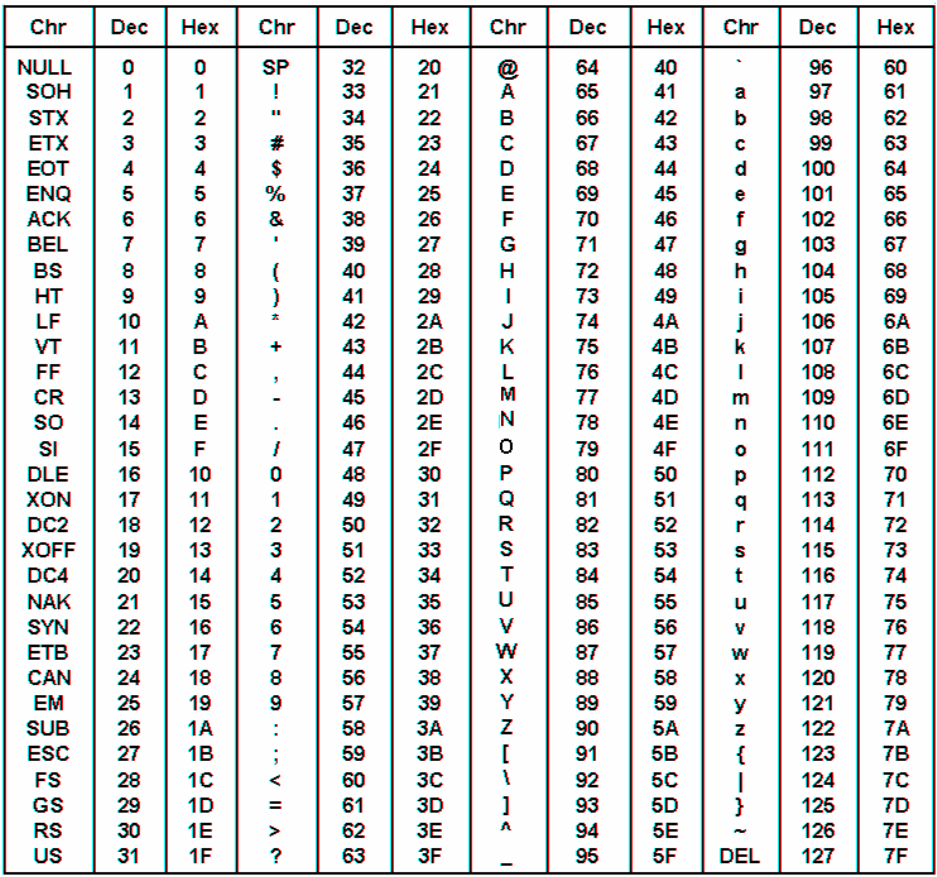
RESERVED WORDS C.2
ASCII CONVERSION TABLE
RESERVED WORDS D.1
APPENDIX D: BASIC PROGRAM EXECUTION SPEED
This appendix is intended to provide the user with the feel for the execution speed of FACTS Extended
BASIC. Due to the vast number of programming possibilities it would be impractical to provide a list of
BASIC statements and execution times, however, typical speeds for executing common tasks will be
shown. Finally, some programming tips will be presented for those applications were maximum execution
speed is important.
FACTS Extended BASIC is a highly efficient interpretive full featured BASIC. The efficiency of the
implementation is exemplified by the fact that the interrupt driven timer feature only consumes about .4% of
the total CPU time.
Timing the execution speed of a section of a BASIC program is easily done using the modules timer.
5000 TIME=0 : REM Reset current time in seconds
5020 SYSTEM(4)=0 : REM Reset current time in milliseconds
5030 REM Start timing loop
5040 FOR I=1 TO 1000
5050 GOSUB 100 : REM Time the subroutine at line 100
5060 NEXT I : REM End timing loop
5070 T=TIME : REM Save time required for 1000 executions
5080 PRINT "Time required to execute the subroutine is ",T-1.655,
5090 PRINT " milliseconds"
Example
>50 GOTO 5000
>100 A = 127 * 2
>110 RETURN
>RUN
Time required to execute the subroutine is 1.655 milliseconds. This will vary depending on which module
you are using.
Below are some typical execution times for a F4-CP128-1. The time required to execute the FOR-NEXT
timing loop, in lines 5000 to 5090 shown above was subtracted from the values below. In all cases a
RETURN was executed at line 110.
Typical Execution Times
Operation Time
100 A = 16/2 3.17
100 PRINT "Test String", : REM at 1200 baud 90.1
100 PRINT "Test String", : REM at 2400 baud 44.4
100 PRINT "Test String", : REM at 4800 baud 21.5
100 PRINT "Test String", : REM at 9600 baud 10.7
100 PRINT "Test String", : REM at 19,200 baud 5.65
100 PRINT "Test String", : REM at 38,400 baud 3.25
100 A = 2**7 18.48
100 BITS=A : REM Decode an 8 bit I/O register .57
RESERVED WORDS D.2
TIPS FOR SPEEDING UP YOUR PROGRAMS
During program execution, when FACTS Extended BASIC encounters a new line reference such as
"GOSUB 6000", it scans the entire program starting at the lowest line number. Therefore, frequently
referenced lines should be placed as early in the program as possible. For example, a GOSUB to a
RETURN statement at the end of a long program could require 8 msec to execute. A GOSUB to a RETURN
statement early in the same program (1 RETURN) might require only 1.5 msec to execute.
Variables which are encountered first during the execution of a BASIC program are allocated at the start of
the variable table. Defining "Z" as the 10th variable in a program caused the statement "IF Z=2 THEN END"
to execute in 1.30 msec. Defining "Z" first in the program caused the same statement to execute in 1.11
msec (+ 15%).
An eight character name may require 20% more time to interpret than a single character variable. Likewise,
a dimensioned variable may require 35% more time to process. Time for a single character variable is
typically less than 1 msec.
Often a faster method of solving the problem will provide the most significant speed increase. For example,
exponential calculations could be used to decode the status of PLC CPU I/O points. However, the BIT
statement will typically perform the same task 10 times faster.
SUMMARY OF STATEMENTS AND OPERATORS E.1
APPENDIX E: SUMMARY OF STATEMENTS AND OPERATORS
Commands
AUTOSTART Selects the modules operating mode after a reset
CONT Resume program execution
DELPRM Delete a stored program
EDIT Move a SAVEd program to PROGRAM 0 for editing
LIST Display the currently selected program
NEW Erase PROGRAM 0 and CLEAR variables
NULL Add null characters after each carriage return
PROGRAM Select a SAVEd program
RESET Execute a software reset
RUN CLEAR the variable tables and execute the selected program
SAVE Store selected program in the program file
Flow Control
BREAK Enable and disable Ctrl-C program stop
CLEAR S Reset control and argument stacks
DO-UNTIL Loop until test at bottom of loop is TRUE
DO-WHILE Loop while test at bottom of loop is TRUE
END Halt program execution
FOR Loop with automatic up or down incrementing index
GO-PRM Begin execution of a specified program
GOSUB Execute a subroutine
GOTO Transfers execution to the specified program line number
IF Conditional execution of statements
LOCKOUT Force program execution
ON-GOSUB Call subroutine beginning at one of several possible line numbers
ON-GOTO Jump to one of several possible line numbers
ONERR Specify program line to go to if an arithmetic error occurs
RETURN Mark the end of a subroutine
STOP Suspend program execution
SUMMARY OF STATEMENTS AND OPERATORS E.2
Input/Output
BIT(S) Decode PLC inputs and encode PLC outputs
CR Used in PRINT statement to output a carriage return
DATA Specifies expressions for READ statements
INLEN Returns number of characters waiting in an input buffer or Clears the specified type-a-head
input buffer
INPLEN Returns the number of characters INPUT
INPUT Loads variables with data from Port 1,2, or 3.
PH0./PH1. Prints 2 and 4 digit hexadecimal numbers
PICK Operate on 16-Bit integers on a byte, nibble, or bit basis
PRINT Transmits data out of the specified serial port
POP Retrieves a value off the stack
PUSH Places a value on the stack
READ Assigns DATA statement constant values to variables
RESTORE Allows DATA statement constant values to be READ again
SETINPUT Configure the INPUT statement (INPUT$, LINE INPUT,INPUT# & more)
SETPORT Configure a communications port.
SPC Used in PRINT statement to output a number of spaces
TAB Used in PRINT statement to specify print position
USING Formats PRINTed values and strings
@(y,x) Cursor positioning using ANSI escape sequence
Interrupts
CLEAR I Disable program interrupts
IDLE Suspend program execution until interrupt
ONPORT Specifies the beginning line number for serial port event handling
ONTIME Time based interrupt of normal program flow
RETI Mark the end of an interrupt handling subroutine
TIME Sets and retrieves the software timer value controlled by CLOCK
Mathematical Operators
ABS Returns the absolute value of an expression
INT Returns the integer portion of an expression
SGN Returns +1 if an expression is greater than zero, zero if an expression is equal to zero, and
-1 if an expression is less than zero.
SQR Returns the square root of an expression
LOG Returns the natural logarithm of an expression
EXP Raises the number "e" (2.7182818) to the power of an expression
SIN Returns the sine of an expression
COS Returns the cosine of an expression
TAN Returns the tangent of an expression
ATN Returns the arctangent of an expression
RND Returns a pseudo-random number in between 0 and 1 inclusive
SUMMARY OF STATEMENTS AND OPERATORS E.3
Memory Management
CLEAR Erase variable memory
COPY Copy a block of ABM memory
DIM Allocates memory for numeric arrays
LOF Returns the size of the currently selected program
STRING Allocate memory for string storage
Miscellaneous
DELAY Insert a pause
DTR Control output of hardware handshaking line
ERRCHK Generate Checksum, LRC, or CRC-16 error check characters on a string or block of
memory
LET Assign a value to a variable
REM Identifies non-executable comments
SYSTEM Read and set various system parameters
TRACE Trace program execution
String Operators
ASC Changes or returns the ASCII code of a character in a string
CHR$ Converts an ASCII code into a single character string
DATE$ Sets and retrieves the battery-backed calendar clock date
INSTR Searches a string for a pattern string
LCASE$ Returns a string consisting of lowercase characters only
LEFT$ Returns an n character string beginning with the first character
LEN Returns the number of characters in a string character
MID$ Returns an m character string beginning with the nth character
RIGHT$ Returns an n character string beginning with the last character
STR$ Returns the string equivalent of a mathematical expression
TIME$ Sets and retrieves the battery-backed calendar clock time
UCASE$ Returns a string consisting of uppercase characters only
VAL Returns the numeric equivalent of a string expression
OCTHEX$ Convert an octal number into its ASCII hex string equivalent
Advanced
BYTE Read or write a byte value in variable storage memory
CALL Invokes an assembly or machine language subprogram
CBY Read contents of memory address in program storage memory
COMERR CRC-16 error flag
DBY Write to special memory locations (8052 CPU internal memory)
LOAD@ Retrieves a six byte floating point number from memory
MTOP Limit memory available to the BASIC interpreter
STORE@ Stores a six byte floating point number at specified memory address
WORD Reads from or writes to a specific memory location two bytes
