System Programmer Guide G PROMS V2.3
User Manual:
Open the PDF directly: View PDF  .
.
Page Count: 265 [warning: Documents this large are best viewed by clicking the View PDF Link!]
- Introduction
- Developing New Foreign Objects
- Interfacing Physical Property Packages to gPROMS
- Developing New Foreign Processes
- The gPROMS Output Channel Interface
- The gPROMS Equation Set Object
- The gPROMS Dynamic Optimisation Object
- The dynamic optimisation problem in gPROMS
- The gPROMS Dynamic Optimisation Object
- Functional specification of the gDOO
- Auxiliary interfaces
- The IgDOO interface
- Methods relating to the ESO
- Methods relating to the initial conditions
- Methods relating to the time horizon and its partitioning
- Methods relating to the control variables
- Methods relating to the time-invariant parameters
- Methods relating to the fixed variables
- Methods relating to the objective function
- Methods relating to the interior point constraints
- Methods relating to the end-point constraints
- Methods relating to the gDOO status
- Methods relating to the optimisation type
- Methods relating to the availability of lagrange multipliers
- CORBA Interface Definitions
- The gPROMS Numerical Solvers Interfaces
- The gPROMS Dynamic Optimisation Solver Interfaces
- Creating Shared Object Libraries Under UNIX
- Creating Dynamic Link Libraries under Windows

gPROMS System Programmer Guide
Process Systems Enterprise Ltd.
6th Floor East
26-28 Hammersmith Grove
London W6 7HA
United Kingdom
Tel : +44 20 8563 0888
Fax : +44 20 8563 0999
Release 2.3.4 — October 2004
c
1997–2008 Process Systems Enterprise Limited.
ModelEnterprise and gPROMS are trademarks of Process Systems Enter-
prise Limited. All other registered and pending trademarks mentioned in
this material are considered the sole property of their respective owners. All
rights reserved.
No part of this material may be copied, distributed, published, retransmit-
ted or modified in any way without the prior written consent of Process
Systems Enterprise Limited. This document is the property of Process Sys-
tems Enterprise Ltd., and must not be reproduced in any manner without
prior written permission.
Disclaimer
gPROMS provides an environment for modelling the behaviour of complex sys-
tems. While gPROMS provides valuable insights into the behaviour of the system
being modelled, this is not a substitute for understanding the real system and
any dangers that it may present. Except as otherwise provided, all warranties,
representations, terms and conditions express and implied (including implied war-
ranties of satisfactory quality and fitness for a particular purpose) are expressly
excluded to the fullest extent permitted by law. gPROMS provides a framework
for applications which may be used for supervising a process control system and
initiating operations automatically. gPROMS is not intended for environments
which require fail-safe characteristics from the supervisor system. Process Sys-
tems Enterprise Limited (”PSE”) specifically disclaims any express or implied
warranty of fitness for environments requiring a fail-safe supervisor. Nothing in
this disclaimer shall limit PSE’s liability for death or personal injury caused by
its negligence.

The license management portion of this product is based on:
SentinelLM c
1996–1997 Rainbow Technologies, Inc.
All rights reserved.
FLEXlm c
2001 GLOBEtrotter Software, Inc. A Macrovision Company.
All rights reserved.
SentinelLM is a trademark of Rainbow Technologies, Inc.
FLEXlm is a trademark of GLOBEtrotter Software, Inc.
Code from LAPACK and BLAS is used in gPROMS.
We would like to thank the authors
E. Anderson, Z. Bai, C. Bischof, S. Blackford, J. Demmel,
J. Dongarra, J. Du Croz, A. Greenbaum, S. Hammarling,
A. McKenney, and D. Sorensen
for making the code publicly available.
The gPROMS Model Builder interface uses the following packages:
ANTLR (http://www.antlr.org).
Xerces and Xalan (http://xml.apache.org/) from the Apache XML Project.
Components from NetBeans (http://www.netbeans.org).
To support the multiple shooting implementation for
dynamic optimisation, gPROMS makes use of HQP, a solver
for non-linearly constrained, large-scale optimization problems.
HQP is free software. The programs and libraries in HQP are
distributed under the GNU Lesser General Public License (LGPL)
as published by the Free Software Foundation. The source code
for HQP is available at http://www.sourceforge.net/projects/hqp.
We would like to thank HQP’s author, Ruediger Franke of ABB, for
his help in developing the interface from gPROMS to HQP.

To support the Distributed Computing facility,
gPROMS makes use of omniORB2, an Object Request Broker (ORB)
which implements specification 2.3 of the Common Object Request
Broker Architecture (CORBA).
omniORB2 is copyright AT&T Laboratories, Cambridge.
It is free software. The programs in omniORB2 are distributed
under the GNU General Public Licence as published by
the Free Software Foundation. The libraries in omniORB2 are
distributed under the GNU Library General Public Licence.

gPROMS System Programmer Guide
Contents
1 Introduction 12
1.1 Overview ................................... 12
1.2 Prerequisites . . . . . . . . . . . . . . . . . . . . . . . . . . . . . . . . . 13
2 Developing New Foreign Objects 14
2.1 Introduction . . . . . . . . . . . . . . . . . . . . . . . . . . . . . . . . . . 15
2.2 The gPROMS Foreign Object Interface . . . . . . . . . . . . . . . . . . 15
2.2.1 The Foreign Object initialisation procedure . . . . . . . . . . . . 16
2.2.2 The Foreign Object verification procedures . . . . . . . . . . . . 17
2.2.3 The Foreign Object calculation procedures . . . . . . . . . . . . 20
2.2.4 The Foreign Object termination procedure . . . . . . . . . . . . 22
2.3 Implementation of Foreign Objects . . . . . . . . . . . . . . . . . . . . . 29
2.3.1 Writing Foreign Objects . . . . . . . . . . . . . . . . . . . . . . . 29
2.3.2 Writing Foreign Objects in FORTRAN and C . . . . . . . . . . . 30
2.3.3 Writing Foreign Objects in C++ . . . . . . . . . . . . . . . . . . 31
2.3.4 Compiling Foreign Objects . . . . . . . . . . . . . . . . . . . . . 33
2.3.5 Installing Foreign Objects . . . . . . . . . . . . . . . . . . . . . . 33
2.3.6 Documenting Foreign Object classes . . . . . . . . . . . . . . . . 34
2.4 Implementing Foreign Objects using COM . . . . . . . . . . . . . . . . . 34
2.4.1 The Foreign Object COM interfaces . . . . . . . . . . . . . . . . 34
2.4.2 Registering a Foreign Object COM server . . . . . . . . . . . . . 35
2.4.3 Using COM-based Foreign Objects within gPROMS ....... 36
4

gPROMS System Programmer Guide
3 Interfacing Physical Property Packages to gPROMS 42
3.1 Constructing Foreign Objects for physical property packages ....... 43
3.2 Direct Foreign Object services . . . . . . . . . . . . . . . . . . . . . . . . 46
3.2.1 The gFOI Foreign Object initialisation service . . . . . . . . . . . 47
3.2.2 The gFOCM Foreign Object verification service . . . . . . . . . . . 48
3.2.3 The gFOCMI Foreign Object verification service . . . . . . . . . . 49
3.2.4 The gFOT Foreign Object termination service . . . . . . . . . . . 50
3.3 The physical property calculation procedures . . . . . . . . . . . . . . . 50
3.4 Preparing the Physical Property Interface Foreign Object . . . . . . . . 51
3.5 An example . . . . . . . . . . . . . . . . . . . . . . . . . . . . . . . . . . 52
4 Developing New Foreign Processes 58
4.1 Introduction . . . . . . . . . . . . . . . . . . . . . . . . . . . . . . . . . . 59
4.2 The FPI communication protocol . . . . . . . . . . . . . . . . . . . . . . 60
4.2.1 The gFPI procedure . . . . . . . . . . . . . . . . . . . . . . . . . 62
4.2.2 The gFPPAUSE procedure . . . . . . . . . . . . . . . . . . . . . . 63
4.2.3 The gFPGET procedure . . . . . . . . . . . . . . . . . . . . . . . . 64
4.2.4 The gFPSEND procedure . . . . . . . . . . . . . . . . . . . . . . . 66
4.2.5 The gFPSENDM procedure . . . . . . . . . . . . . . . . . . . . . . 68
4.2.6 The gFPLINEARISE procedure . . . . . . . . . . . . . . . . . . . . 70
4.2.7 The gFPT procedure . . . . . . . . . . . . . . . . . . . . . . . . . 73
4.3 FPI implementation for real-time applications . . . . . . . . . . . . . . . 74
4.4 Implementation of Foreign Processes . . . . . . . . . . . . . . . . . . . . 76
4.4.1 Writing Foreign Processes in FORTRAN and C . . . . . . . . . . 76
4.4.2 Writing Foreign Processes in C++ . . . . . . . . . . . . . . . . . 76
4.4.3 Compiling Foreign Processes . . . . . . . . . . . . . . . . . . . . 78
4.4.4 Installing Foreign Processes . . . . . . . . . . . . . . . . . . . . . 79
5 The gPROMS Output Channel Interface 80
5.1 Introduction . . . . . . . . . . . . . . . . . . . . . . . . . . . . . . . . . . 81
Contents 5

gPROMS System Programmer Guide
5.2 Using Output Channels in gPROMS . . . . . . . . . . . . . . . . . . . . 81
5.3 The gPROMS Output Channel Interface . . . . . . . . . . . . . . . . . . 84
5.3.1 The initialisation procedure . . . . . . . . . . . . . . . . . . . . . 85
5.3.2 The register distribution domain procedure . . . . . . . . . . . . 86
5.3.3 The register variable procedure . . . . . . . . . . . . . . . . . . . 89
5.3.4 The finish initialisation procedure . . . . . . . . . . . . . . . . . 90
5.3.5 The time reporting procedure . . . . . . . . . . . . . . . . . . . . 91
5.3.6 The variable values reporting procedure . . . . . . . . . . . . . . 92
5.3.7 The reset results procedure . . . . . . . . . . . . . . . . . . . . . 93
5.3.8 The termination procedure . . . . . . . . . . . . . . . . . . . . . 94
5.4 Implementation of Output Channels . . . . . . . . . . . . . . . . . . . . 95
5.4.1 Writing Output Channels in FORTRAN and C . . . . . . . . . . 95
5.4.2 Compiling Output Channels . . . . . . . . . . . . . . . . . . . . . 95
5.4.3 Installing Output Channels . . . . . . . . . . . . . . . . . . . . . 96
6 The gPROMS Equation Set Object 97
6.1 Introduction . . . . . . . . . . . . . . . . . . . . . . . . . . . . . . . . . . 98
6.2 Description of discontinuous equations in ESOs . . . . . . . . . . . . . . 99
6.2.1 Origins of discontinuous equations in physical descriptions . . . . 99
6.2.2 Mathematical descriptions of physical discontinuities . . . . . . . 100
6.2.3 State-Transition Networks . . . . . . . . . . . . . . . . . . . . . . 100
6.2.4 The representation of logical conditions in STNs . . . . . . . . . 104
6.3 Interface definition . . . . . . . . . . . . . . . . . . . . . . . . . . . . . . 106
6.4 IGPAlgESO . . . . . . . . . . . . . . . . . . . . . . . . . . . . . . . . . . 106
6.4.1 Methods relating to the ESO structure . . . . . . . . . . . . . . . 108
6.4.2 Methods relating to the ESO variables . . . . . . . . . . . . . . . 111
6.4.3 Methods for storage of sensitivities . . . . . . . . . . . . . . . . . 119
6.4.4 Methods relating to the ESO equations . . . . . . . . . . . . . . 123
6.4.5 Methods relating to the ESO STNs . . . . . . . . . . . . . . . . . 126
6.4.6 Methods relating to rectangular ESOs . . . . . . . . . . . . . . . 127
Contents 6

gPROMS System Programmer Guide
6.4.7 General ESO methods . . . . . . . . . . . . . . . . . . . . . . . . 130
6.5 IGPDiffAlgESO . . . . . . . . . . . . . . . . . . . . . . . . . . . . . . . . 130
6.5.1 Methods relating to the ESO structure . . . . . . . . . . . . . . . 131
6.5.2 Methods relating to the ESO variables . . . . . . . . . . . . . . . 133
6.5.3 Methods relating to the ESO derivatives . . . . . . . . . . . . . . 134
6.6 ICapeNumericSTN . . . . . . . . . . . . . . . . . . . . . . . . . . . . . . 139
7 The gPROMS Dynamic Optimisation Object 144
7.1 The dynamic optimisation problem in gPROMS . . . . . . . . . . . . . . 146
7.2 The gPROMS Dynamic Optimisation Object . . . . . . . . . . . . . . . 148
7.3 Functional specification of the gDOO . . . . . . . . . . . . . . . . . . . . 149
7.3.1 The Equation Set Object . . . . . . . . . . . . . . . . . . . . . . 149
7.3.2 The initial conditions . . . . . . . . . . . . . . . . . . . . . . . . 150
7.3.3 The time horizon and its partitioning . . . . . . . . . . . . . . . 150
7.3.4 Partitioning of the ESO variables . . . . . . . . . . . . . . . . . . 151
7.3.5 The objective function . . . . . . . . . . . . . . . . . . . . . . . . 152
7.3.6 Interior point constraints . . . . . . . . . . . . . . . . . . . . . . 152
7.3.7 End-point constraints . . . . . . . . . . . . . . . . . . . . . . . . 152
7.3.8 The gDOO status . . . . . . . . . . . . . . . . . . . . . . . . . . 153
7.4 Auxiliary interfaces . . . . . . . . . . . . . . . . . . . . . . . . . . . . . . 154
7.4.1 The IBoundedQuantity interface . . . . . . . . . . . . . . . . . . 154
7.4.2 The IBoundedQuantityArray interface . . . . . . . . . . . . . . 159
7.4.3 The IIndexedBoundedQuantity interface . . . . . . . . . . . . . 161
7.5 The IgDOO interface . . . . . . . . . . . . . . . . . . . . . . . . . . . . . 163
7.5.1 Methods relating to the ESO . . . . . . . . . . . . . . . . . . . . 163
7.5.2 Methods relating to the initial conditions . . . . . . . . . . . . . 165
7.5.3 Methods relating to the time horizon and its partitioning . . . . 166
7.5.4 Methods relating to the control variables . . . . . . . . . . . . . 168
7.5.5 Methods relating to the time-invariant parameters . . . . . . . . 173
7.5.6 Methods relating to the fixed variables . . . . . . . . . . . . . . . 175
Contents 7

gPROMS System Programmer Guide
7.5.7 Methods relating to the objective function . . . . . . . . . . . . . 175
7.5.8 Methods relating to the interior point constraints . . . . . . . . . 177
7.5.9 Methods relating to the end-point constraints . . . . . . . . . . . 179
7.5.10 Methods relating to the gDOO status . . . . . . . . . . . . . . . 181
7.5.11 Methods relating to the optimisation type . . . . . . . . . . . . . 182
7.5.12 Methods relating to the availability of lagrange multipliers . . . . 183
7.6 CORBA Interface Definitions . . . . . . . . . . . . . . . . . . . . . . . . 184
7.6.1 gDOO.idl . . . . . . . . . . . . . . . . . . . . . . . . . . . . . . . 184
7.6.2 BoundedQuantity.idl . . . . . . . . . . . . . . . . . . . . . . . . . 187
7.6.3 ControlVariable.idl . . . . . . . . . . . . . . . . . . . . . . . . . . 190
7.6.4 InteriorPointConstraint.idl . . . . . . . . . . . . . . . . . . . . . 191
7.6.5 EndpointConstraint.idl . . . . . . . . . . . . . . . . . . . . . . . . 193
7.6.6 general.idl . . . . . . . . . . . . . . . . . . . . . . . . . . . . . . . 194
8 The gPROMS Numerical Solvers Interfaces 196
8.1 Introduction . . . . . . . . . . . . . . . . . . . . . . . . . . . . . . . . . . 198
8.1.1 Systems . . . . . . . . . . . . . . . . . . . . . . . . . . . . . . . . 198
8.1.2 System Factories . . . . . . . . . . . . . . . . . . . . . . . . . . . 198
8.2 Interface overview . . . . . . . . . . . . . . . . . . . . . . . . . . . . . . 199
8.2.1 Configurability of numerical solvers . . . . . . . . . . . . . . . . . 200
8.3 Types and values of algorithmic parameters and statistics . . . . . . . . 201
8.4 ICapeNumericSolverComponent . . . . . . . . . . . . . . . . . . . . . . . 201
8.5 ICapeNumericAttribute . . . . . . . . . . . . . . . . . . . . . . . . . . . 204
8.5.1 ICapeNumericStringAttribute . . . . . . . . . . . . . . . . . . . . 206
8.5.2 ICapeNumericIntegerAttribute . . . . . . . . . . . . . . . . . . . 206
8.5.3 ICapeNumericRealAttribute . . . . . . . . . . . . . . . . . . . . . 207
8.5.4 ICapeNumericBooleanAttribute . . . . . . . . . . . . . . . . . . . 207
8.5.5 ICapeNumericEnumeratedAttribute . . . . . . . . . . . . . . . . 208
8.5.6 ICapeNumericInterfaceAttribute . . . . . . . . . . . . . . . . . . 208
8.6 The solver parameter interfaces . . . . . . . . . . . . . . . . . . . . . . . 209
Contents 8

gPROMS System Programmer Guide
8.6.1 ICapeNumericStringParameter . . . . . . . . . . . . . . . . . . . 209
8.6.2 ICapeNumericIntegerParameter . . . . . . . . . . . . . . . . . . . 210
8.6.3 ICapeNumericRealParameter . . . . . . . . . . . . . . . . . . . . 211
8.6.4 ICapeNumericBooleanParameter . . . . . . . . . . . . . . . . . . 213
8.6.5 ICapeNumericEnumeratedParameter . . . . . . . . . . . . . . . . 213
8.6.6 ICapeNumericInterfaceParameter . . . . . . . . . . . . . . . . . . 214
8.7 Linear-Algebra components . . . . . . . . . . . . . . . . . . . . . . . . . 214
8.7.1 ICapeNumericLAComponent . . . . . . . . . . . . . . . . . . . . 215
8.7.2 ICapeNumericLASystemFactory . . . . . . . . . . . . . . . . . . 215
8.7.3 ICapeNumericLASystem . . . . . . . . . . . . . . . . . . . . . . . 216
8.8 Non-linear algebra components . . . . . . . . . . . . . . . . . . . . . . . 219
8.8.1 ICapeNumericNLAComponent . . . . . . . . . . . . . . . . . . . 219
8.8.2 ICapeNumericNLASystemFactory . . . . . . . . . . . . . . . . . 222
8.8.3 ICapeNumericNLASystem . . . . . . . . . . . . . . . . . . . . . . 223
8.9 Differential algebraic equation components . . . . . . . . . . . . . . . . . 224
8.9.1 ICapeNumericDAEComponent . . . . . . . . . . . . . . . . . . . 224
8.9.2 ICapeNumericDAESystemFactory . . . . . . . . . . . . . . . . . 227
8.9.3 ICapeNumericDAESystem . . . . . . . . . . . . . . . . . . . . . . 228
8.10 CORBA interface definitions . . . . . . . . . . . . . . . . . . . . . . . . 232
8.10.1 ICapeUtilityComponent.idl . . . . . . . . . . . . . . . . . . . . . 233
8.10.2 ICapeNumericSolverComponent.idl . . . . . . . . . . . . . . . . . 234
8.10.3 ICapeNumericAttribute.idl . . . . . . . . . . . . . . . . . . . . . 235
8.10.4 ICapeNumericParameter.idl . . . . . . . . . . . . . . . . . . . . . 237
8.10.5 ICapeNumericStatistic.idl . . . . . . . . . . . . . . . . . . . . . . 239
8.10.6 ICapeNumericLAComponent.idl . . . . . . . . . . . . . . . . . . 241
8.10.7 ICapeNumericLASystem.idl . . . . . . . . . . . . . . . . . . . . . 242
8.10.8 ICapeNumericNLAComponent.idl . . . . . . . . . . . . . . . . . 243
8.10.9 ICapeNumericNLASystem.idl . . . . . . . . . . . . . . . . . . . . 244
8.10.10 ICapeNumericDAEComponent.idl . . . . . . . . . . . . . . . . . 245
Contents 9

gPROMS System Programmer Guide
8.10.11 ICapeNumericDAESystem.idl . . . . . . . . . . . . . . . . . . . . 246
9 The gPROMS Dynamic Optimisation Solver Interfaces 247
9.1 General principles . . . . . . . . . . . . . . . . . . . . . . . . . . . . . . 248
9.1.1 Solver managers and systems . . . . . . . . . . . . . . . . . . . . 248
9.1.2 Numeric-solver parameters . . . . . . . . . . . . . . . . . . . . . 248
9.2 The IgDONumericSolverComponent Interface . . . . . . . . . . . . . . . 248
9.3 The IgDOSolverManager interface . . . . . . . . . . . . . . . . . . . . . 249
9.4 The IgDOSystem interface . . . . . . . . . . . . . . . . . . . . . . . . . . 249
9.5 CORBA interface definitions . . . . . . . . . . . . . . . . . . . . . . . . 250
9.5.1 gNumericSolver.idl . . . . . . . . . . . . . . . . . . . . . . . . . . 250
A Creating Shared Object Libraries Under UNIX 252
A.1 Shared object libraries for DIGITAL UNIX v4.0 and later . . . . . . . . 254
A.1.1 Foreign Object code written in FORTRAN 77 . . . . . . . . . . . 254
A.1.2 Foreign Object code written in C . . . . . . . . . . . . . . . . . . 254
A.1.3 Foreign Object code written in C++ . . . . . . . . . . . . . . . . 254
A.2 Shared object libraries for IBM AIX v4.2 and later . . . . . . . . . . . . 255
A.2.1 Foreign Object code written in FORTRAN 77 . . . . . . . . . . . 255
A.2.2 Foreign Object code written in C . . . . . . . . . . . . . . . . . . 255
A.2.3 Foreign Object code written in C++ . . . . . . . . . . . . . . . . 255
A.3 Shared object libraries for Linux . . . . . . . . . . . . . . . . . . . . . . 256
A.3.1 Foreign Object code written in FORTRAN 77 . . . . . . . . . . . 256
A.3.2 Foreign Object code written in C . . . . . . . . . . . . . . . . . . 256
A.3.3 Foreign Object code written in C++ . . . . . . . . . . . . . . . . 256
A.4 Shared object libraries for SGI IRIX64 v6.2 and later . . . . . . . . . . . 257
A.4.1 Foreign Object code written in FORTRAN 77 . . . . . . . . . . . 257
A.4.2 Foreign Object code written in C . . . . . . . . . . . . . . . . . . 257
A.4.3 Foreign Object code written in C++ . . . . . . . . . . . . . . . . 257
A.5 Shared Object libraries for SUN Solaris v2.5 and later . . . . . . . . . . 258
Contents 10

gPROMS System Programmer Guide
A.5.1 Foreign Object code written in FORTRAN 77 . . . . . . . . . . . 258
A.5.2 Foreign Object code written in C . . . . . . . . . . . . . . . . . . 258
A.5.3 Foreign Object code written in C++ . . . . . . . . . . . . . . . . 258
B Creating Dynamic Link Libraries under Windows 259
B.1 Dynamic link libraries with DIGITAL FORTRAN 5.0 . . . . . . . . . . 260
B.2 Dynamic link libraries with Microsoft Visual C++ 5.0 . . . . . . . . . . 263
Contents 11

gPROMS System Programmer Guide
Chapter 1
Introduction
1.1 Overview
This manual describes several advanced features of the gPROMS package. These in-
clude:
•The gPROMS Foreign Object Interface (see chapter 2).
Foreign Objects are external software components that provide certain compu-
tational services to gPROMS MODELs. These include physical property packages,
external unit operation modules, or even complete computational fluid dynam-
ics (CFD) software packages. This chapter explains how to make use of foreign
objects that are already interfaced to gPROMS; and also how to develop and
interface your own foreign objects.
•The gPROMS Physical Property Interface (see chapter 3).
Physical property packages form a special type of foreign objects (see above) that
are encountered very frequently in practice. The gPROMS Physical Property
Interface (PPI) defines a standard set of physical property facilities that should be
supported by all physical property packages interfaced to gPROMS. Some widely
used physical property packages are already interfaced to gPROMS; details on
how to use them are also provided in this chapter. Finally, the PPI provides
a particularly convenient way of interfacing new physical property packages to
gPROMS.
•The gPROMS Foreign Process Interface (see chapter 4).
The Foreign Process Interface (FPI) allows gPROMS simulations to interact with
external software such as distributed control systems and operator training pack-
ages in order to exchange data and other information. The interaction takes the
form of a special set of elementary actions within the gPROMS TASK language.
FPI is particularly useful for embedding gPROMS simulations within larger soft-
ware systems.
12

gPROMS System Programmer Guide
•The gPROMS Output Channel Interface (see chapter 5).
The Output Channel Interface (OCI) allows gPROMS to communicate its simu-
lation results to external software components. This open interface means that
users can develop their own software which will have access to the large quantity
of results information generated by gPROMS.
1.2 Prerequisites
A good understanding of gPROMS at an advanced level is essential for making the most
of the facilities described in this manual. The “gPROMS Advanced User Guide”and/or
the gPROMS Advanced Training Course provide the necessary background.
With the exception of chapter 3, the chapters in this manual can be read independently
of each other. Some understanding of the concepts presented in chapter 2is a necessary
prerequisite for chapter 3.
1.2. Prerequisites 13

gPROMS System Programmer Guide
Chapter 2
Developing New Foreign Objects
Contents
2.1 Introduction ............................ 15
2.2 The gPROMS Foreign Object Interface ............ 15
2.2.1 The Foreign Object initialisation procedure . . . . . . . . . . . 16
2.2.2 The Foreign Object verification procedures . . . . . . . . . . . 17
2.2.3 The Foreign Object calculation procedures . . . . . . . . . . . 20
2.2.4 The Foreign Object termination procedure . . . . . . . . . . . 22
2.3 Implementation of Foreign Objects ............... 29
2.3.1 Writing Foreign Objects . . . . . . . . . . . . . . . . . . . . . . 29
2.3.2 Writing Foreign Objects in FORTRAN and C . . . . . . . . . . 30
2.3.3 Writing Foreign Objects in C++ . . . . . . . . . . . . . . . . . 31
2.3.4 Compiling Foreign Objects . . . . . . . . . . . . . . . . . . . . 33
2.3.5 Installing Foreign Objects . . . . . . . . . . . . . . . . . . . . . 33
2.3.6 Documenting Foreign Object classes . . . . . . . . . . . . . . . 34
2.4 Implementing Foreign Objects using COM .......... 34
2.4.1 The Foreign Object COM interfaces . . . . . . . . . . . . . . . 34
2.4.2 Registering a Foreign Object COM server . . . . . . . . . . . . 35
2.4.3 Using COM-based Foreign Objects within gPROMS . . . . . . 36
14

gPROMS System Programmer Guide
2.1 Introduction
In this chapter, we describe how external software can be linked to gPROMS via the
Foreign Object Interface. The information presented here will typically be of interest
to gPROMS system programmers concerned with using the Foreign Object mechanism
to interface external software to gPROMS. The reader should already be familiar with
the use of Foreign Objects as described in chapter 4of the “gPROMS Advanced User
Guide”.
2.2 The gPROMS Foreign Object Interface
This section describes the Foreign Object Interface (FOI), i.e. the protocol used for
communication between gPROMS and any external software component that provides
services via one or more callable routines.
A Foreign Object provides one or more methods, each of which takes inputs from
gPROMS and returns an output. The inputs and output can be scalar or vector quan-
tities. In addition to the value of the output, a Foreign Object method may also be able
to provide values for the partial derivatives of its output with respect to one or more of
its inputs.
Each Foreign Object class is implemented as a distinct piece of software. To achieve the
required functionality, gPROMS makes use of six services provided by this software:
•a Foreign Object instance initialisation procedure:
gFOI
•two Foreign Object verification procedures:
gFOCM,gFOCMI
•two Foreign Object calculation procedures:
gFOM,gFOMD
•a Foreign Object termination procedure:
gFOT
Below, we examine the precise nature of each of these procedures.
2.1. Introduction 15

gPROMS System Programmer Guide
2.2.1 The Foreign Object initialisation procedure
At the start of executing a PROCESS entity, gPROMS will construct a list of all distinct
Foreign Object classes and their instances that are used by it. It then attempts to create
each instance by calling the gFOI procedure of the corresponding class.
The gFOI procedure has the following form:
•gFOI (ForeignObjectID, ForeignObjectHandle, Status)
where the arguments are as described in table 2.1.
The ForeignObjectID is a string identifying the instance of the Foreign Object class
that is to be created. The class name is prepended to the instance name separated from
it by a double colon “::”. For example, in the case of the example shown in figures 2.1
and 2.2, gPROMS would set ForeignObjectID to:
"ThermoPack::MygPROMSDir/Aromatics.tpk"
in the call to gFOI.
Name of Argument Type Description Specified Specified
on Entry on Exit
ForeignObjectID Character*256 Full name of Foreign Object
(terminated with a null).
YES NO
ForeignObjectHandle Integer Handle for identifying For-
eign Object in subsequent
calls (see text).
NO YES
Status Integer Status of this initialisation.
Status = 1 implies success-
ful initialisation. All other
values signify failure.
NO YES
Table 2.1: Arguments of the procedure gFOI.
gPROMS is not concerned with the way in which the external software will actually
interpret the ForeignObjectID passed to it. However, the success or failure of the
attempted instance creation must be reported to it via the Status argument. If the
instantiation fails (Status different from 1), execution of the PROCESS cannot proceed
further and is terminated immediately.
During a typical run, gPROMS may need to issue a large number of requests to the
services provided by a given Foreign Object software. In order to minimise the overhead
associated with these requests, the gFOI routine may also return to gPROMS a “handle”,
2.2. The gPROMS Foreign Object Interface 16

gPROMS System Programmer Guide
1 MODEL Flash
2 PARAMETER
3 PPP AS FOREIGN_OBJECT "ThermoPack"
4 NoComp AS INTEGER
5 VARIABLE
6 F, L, V AS MolarRate
7 Hf AS MolarEnergy
8 Q AS EnergyRate
9 T AS Temperature
10 P AS Pressure
11 x, y, z AS ARRAY(NoComp) OF MoleFraction
12 SET
13 NoComp := PPP.NumberOfComponents ;
14 EQUATION
15 F*z = L*x + V*y ;
16 F*Hf = L*PPP.LiquidEnthalpy(T,P,x) + V*PPP.VapourEnthalpy(T,P,y) + Q ;
17 x*PPP.LiquidFugacityCoeff(T,P,x) = y*PPP.VapourFugacityCoeff(T,P,y) ;
18 SIGMA(x) = SIGMA(y) = 1 ;
19 IF PPP.StableLiquid(T,P,x) THEN
20 ...
21 ELSE
22 ...
23 END
24 END # Model Flash
Figure 2.1: An example of a gPROMS MODEL using a Foreign Object.
ForeignObjectHandle. This is usually an address allowing the corresponding Foreign
Object instance to be located quickly. gPROMS will not attempt any interpretation
or make any direct use of this handle. However, it will pass it to all subsequent calls
requesting services relating to this particular Foreign Object instance (see sections 2.2.2–
2.2.4).
2.2.2 The Foreign Object verification procedures
In general, gPROMS does not know a priori what methods a Foreign Object can provide
nor does it know what inputs each method needs or what output it calculates. However,
it can deduce this information from the gPROMS input file. Once the various Foreign
Object instances are created successfully (see section 2.2.1), gPROMS will try to verify
2.2. The gPROMS Foreign Object Interface 17

gPROMS System Programmer Guide
1 PROCESS PlantSimulation
2 UNIT
3 Plant AS TwoTankSystem
4 SET
5 Plant.LPPP := "MygPROMSDir/LPThermo.tpk" ;
6 ...
Figure 2.2: SETting of a Foreign Object value within a PROCESS entity.
the correctness of this information by issuing requests to the Foreign Object verification
procedures (cf. section 10.2.3 of the “gPROMS Introductory User Guide”).
2.2.2.1 Verification of method existence and structure
The first verification procedure, gFOCM, is used by gPROMS to ascertain the existence
of a given method, to determine the number of inputs that the method expects, and to
obtain detailed information on the method’s output. It has the form:
•gFOCM (ForeignObjectID, ForeignObjectHandle, MethodName,
NoInputs, OutputLength, OutputType,
OutputDimensionsNum, OutputDimensionsDenom, OutputOffset,
OutputMultiplier, Status)
The arguments of gFOCM are described in detail in table 2.2. The first two, ForeignObjectID
and ForeignObjectHandle, are used by gPROMS to identify the Foreign Object in-
stance to which the request relates (cf. section 2.2.1). The third argument, MethodName1,
identifies the method. gFOCM should then return the number of inputs that this method
expects as well as detailed information on the method’s (unique) output. By setting
Status to a value of 1, gFOCM signals that, indeed, such a method is supported by the
Foreign Object.
The specification of the physical dimensions of the method output is done in terms of
the integers piand qithat define a quantity’s dimensions as:
10
Y
i=1
[F undamentalDimension]pi/qi
i
1The MethodName is always provided by gPROMS in capitals in all calls to Foreign Object services.
2.2. The gPROMS Foreign Object Interface 18

gPROMS System Programmer Guide
where the 10 fundamental dimensions, i= 1, .., 10, are listed in table 2.3. In the argu-
ment list of gFOCM,picorresponds to OutputDimensionsNum and qito OutputDimensionsDenom.
Although, in most cases, the index pi/qiwill take integer values (i.e. qiwill be 1 for all
i), using both piand qiallows rational indices also to be specified whenever necessary.
For example, if the method output is a velocity, the dimensions returned should be:
OutputDimensionsNum = [ 1, 0, -1, 0, 0, 0, 0, 0, 0, 0 ]
and:
OutputDimensionsDenom = [ 1, 1, 1, 1, 1, 1, 1, 1, 1, 1 ]
The Foreign Object also has to specify the units of measurement of the output by setting
the arguments OutputOffset and OutputMultiplier. These are such that:
Value of
Output in
SI Units
= OutputOffset + OutputMultiplier ×
Value of
Output Computed by
Foreign Object
For instance, for a velocity measured in km/hr, the OutputOffset should be 0 while
the OutputMultiplier should have a value of 1000/3600. On the other hand, for a
temperature measured in degrees Fahrenheit, the corresponding values should be 255.37
(= 273.15 - 5/9*32) and 5/9 respectively.
2.2.2.2 Verification of method inputs
Once the existence of a Foreign Object method is ascertained and the number of its
inputs is determined, the next step for gPROMS is to obtain detailed information on
these inputs. This is achieved via a call to the routine gFOCMI, the form of which is as
follows:
•gFOCMI (ForeignObjectID, ForeignObjectHandle, MethodName, NoInputs,
InputNames, InputLengths, InputTypes, InputDerivsAvailable,
InputDimensionsNum, InputDimensionsDenom, InputOffsets,
InputMultipliers, Status)
where the arguments are as described in table 2.4.
The first four arguments of gFOCMI are identical to those for gFOCM. Also, the ar-
guments InputLengths,InputTypes,InputDimensionsNum,InputDimensionsDenom,
InputOffsets and InputMultipliers are similar to the corresponding arguments of
gFOCM. Of course, in this case, they are all arrays of length NoInputs as the necessary
information must be supplied for all inputs of the method.
2.2. The gPROMS Foreign Object Interface 19

gPROMS System Programmer Guide
The argument InputNames allows the Foreign Object to associate a name with each one
of its inputs. These names can be used by gPROMS for generating diagnostic messages
and also for identifying individual inputs in subsequent requests for information issued to
the Foreign Object. Finally, the argument InputDerivsAvailable allows the Foreign
Object to inform gPROMS whether the method will be able to provide the partial
derivatives of its output with respect to a particular input.
2.2.3 The Foreign Object calculation procedures
If the Foreign Object initialisation and verification are completed successfully, gPROMS
proceeds with the execution of the PROCESS under consideration. This requires the
evaluation of the outputs of the various Foreign Object methods used in the problem for
given values of their inputs. It also usually involves the evaluation of partial derivatives
of the outputs with respect to the inputs.
In order to obtain the above numerical information, gPROMS will call the following
procedures during the run:
•gFOM (ForeignObjectID, ForeignObjectHandle, MethodName,
OutputLength, NoInputs, InputLengths,
TotalInpLength, MethodInputs, MethodOutput, Status)
•gFOMD (ForeignObjectID, ForeignObjectHandle, MethodName,
OutputLength, NoInputs, InputLengths,
TotalInpLength, MethodInputs, DInputName,
DInputLength, DerivOutputs, Status)
Their arguments are described in table 2.5 and table 2.6 respectively; most of these
arguments have already been encountered. Before calling either of the two proce-
dures, gPROMS copies the current values of the method arguments into a single array
MethodInputs in the order in which they were declared. The total length of this array
is computed by gPROMS and passed to the procedures in argument TotalInpLength.
This is done only for convenience: TotalInpLength is simply the sum of the NoInputs
entries in array InputLengths.
In case of gFOM, the method output is returned to gPROMS in argument MethodOutput
of length OutputLength. The values for outputs of type INTEGER should be converted by
gFOM to the equivalent real quantities; similarly, for LOGICAL results, the values returned
should be 1.0 for TRUE and 0.0 for FALSE.
In case of gFOMD, the arguments DInputName and DInputLength are used by gPROMS
to pass the name and the length of the input with respect to which the partial derivatives
of the output are requested. The values of these derivatives are returned by gFOMD in
array DerivOutputs.Note that gFOMD must only return the partial derivatives with
2.2. The gPROMS Foreign Object Interface 20

gPROMS System Programmer Guide
respect to the one input specified in the DInputName argument. This will be discussed
in more detail later.
gPROMS will never call gFOMD for an input that is not of type REAL, or one for which
partial derivatives are not available as notified to gPROMS by a call to gFOCMI.
2.2.3.1 Specifying partial derivative outputs
As stated before, gFOMD must only return the partial derivatives of the method with
respect to the one input specified by gPROMS in the DInputName. This is because
gPROMS calls for the partial derivatives with respect to each input separately: returning
all of the partial derivatives with respect to all of the inputs at the same time in the
DerivOutputs argument will cause errors.
So the values that you must specify in the DerivOutputs argument depend on the
dimensionality of the method and of the requested input.
•Scalar method (f) and scalar input (x)
This is the simplest case, in which the output is also a scalar equal to the derivative
of the method with respect to the input: ∂f /∂x.
•Scalar method (f) and vector input (x∈IRN)
In this case, the output will be a vector of length equal to the length of the input.
Each element iof the output vector must be the value of the partial derivative of
the method with respect to the ith element of the input vector. So DerivOutputs
must be equal to [∂f/∂x1∂f/∂x2. . . ∂f/∂xN]T.
•Vector method (f∈IRM) and scalar input (x)
In this case, the output must be a vector of length M. Each element iof the
output vector must be the partial derivative of the ith element of the method
with respect to the input. The DerivOutputs argument must therefore contain
[∂f1/∂x ∂f2/∂x . . . ∂fM/∂x]T.
•Vector method (f∈IRM) and vector input (x∈IRN)
This is the final possibility. In this case, the output is also a vector and its
length must be M×N. The first Nelements must be the partial derivatives
of the first element of the method (f1) with respect to the Nelements of the
input x, as in the second case above. The next Nelements are then the partial
derivatives of the second element of the method (f2) with respect to the Nele-
ments of the input. So the overall form of the DerivOutputs argument must be
[∂f1/∂x ∂f2/∂x . . . ∂fM/∂x]T. Fully expanded, this is:
[∂f1/∂x1∂f1/∂x2. . . ∂f1/∂xN∂f2/∂x1. . . ∂f2/∂xN. . . ∂fM/∂xN−1∂fM/∂xN]T.
The example files tank c.c,tank cpp.cxx and tank f.f provided with gPROMS con-
tain an example of a gFOMD implementation (in C, C++ and FORTRAN, respectively).
2.2. The gPROMS Foreign Object Interface 21

gPROMS System Programmer Guide
These files can be found in the scr/examples/foi subdirectory of the gPROMS instal-
lation directory.
2.2.4 The Foreign Object termination procedure
The Foreign Object termination procedure is of the form:
•gFOT (ForeignObjectID, ForeignObjectHandle, Status).
The arguments are as listed in table 2.1, but with the argument ForeignObjectHandle
specified on entry and unchanged on exit.
At the end of the PROCESS execution, gPROMS will call this procedure in turn for each
Foreign Object instance that has been successfully created via an earlier successful call
to gFOI. This is intended to provide the external package with an opportunity to do
any necessary housekeeping (e.g. closing of databank files etc.).
2.2. The gPROMS Foreign Object Interface 22

gPROMS System Programmer Guide
Name of Argument Type Description Specified Specified
on Entry on Exit
ForeignObjectID Character*256 Full name of Foreign Object (ter-
minated with a null).
YES NO
ForeignObjectHandle Integer Handle for identifying Foreign
Object.
YES NO
MethodName Character*256 Name of method (terminated
with a null).
YES NO
NoInputs Integer Number of inputs for this
method.
NO YES
OutputLength Integer Length of method output. NO YES
OutputType Integer The type of the method output.
This will be: 1 for REAL, 2 for
INTEGER, and 3 for LOGICAL.
NO YES
OutputDimensionsNum Integer The numerator of the fundamen-
tal dimensions of the output of
the method. An array of length
10.
NO YES
OutputDimensionsDenom Integer The denominator of the funda-
mental dimensions of the output
of the method. An array of
length 10.
NO YES
OutputOffset Double Precision Offset constant for conversion of
units of measurement of method
output to SI units. A scalar
quantity.
NO YES
OutputMultiplier Double Precision Multiplier constant for conver-
sion of units of measurement of
method output to SI units. A
scalar quantity.
NO YES
Status Integer Status of this service request.
Status = 1 implies successful
completion of this service. All
other values signify failure.
NO YES
Table 2.2: Arguments of the procedure gFOCM.
2.2. The gPROMS Foreign Object Interface 23

gPROMS System Programmer Guide
Fundamental Description SI Units
Dimension
1 Length metre
2 Mass kilogram
3 Time second
4 Electric Current Ampere
5 Temperature Kelvin
6 Amount of Substance mole
7 Luminous Intensity candela
8 Plane Angle radian
9 Solid Angle steradian
10 Money US dollar
Table 2.3: Physical dimensions for the inputs and output of a method.
2.2. The gPROMS Foreign Object Interface 24

gPROMS System Programmer Guide
Name of Argument Type Description Specified Specified
on Entry on Exit
ForeignObjectID Character*256 Full name of Foreign Object (ter-
minated with a null).
YES NO
ForeignObjectHandle Integer Handle for identifying Foreign
Object.
YES NO
MethodName Character*256 Name of method (terminated
with a null).
YES NO
NoInputs Integer Number of inputs for this
method.
YES YES
InputNames Character*256 The names of the method inputs.
An array of length NoInputs.
NO YES
InputLengths Integer The length of the method inputs.
For example, a scalar input will
have a length of 1. An array of
length NoInputs.
NO YES
InputTypes Integer The types of the method inputs.
This will be 1 for REAL, 2 for
INTEGER, and 3 for LOGICAL.
An array of length NoInputs.
NO YES
InputDerivsAvailable Integer Flags that indicate whether the
method can compute partial
derivatives of its output with re-
spect to its inputs. A value of
0 indicates that the correspond-
ing partial derivative is not avail-
able. Any other value signifies
that the derivative can be com-
puted on request. An array of
length NoInputs.
NO YES
Table continued on next page ...
2.2. The gPROMS Foreign Object Interface 25

gPROMS System Programmer Guide
... continued from previous page
InputDimensionsNum Integer The numerators of the fundamen-
tal dimensions of the method in-
puts. A one-dimensional array of
total length NoInputs*10, where
the values are ordered by input.
NO YES
InputDimensionsDenom Integer The denominators of the funda-
mental dimensions of the method
inputs. A one-dimensional ar-
ray of total length NoInputs*10,
where the values are ordered by
input.
NO YES
InputOffsets Double Precision Offset constants for conversion of
units of measurement of inputs
to SI units. An array of length
NoInputs.
NO YES
InputMultipliers Double Precision Multiplier constants for conver-
sion of units of measurement of
inputs to SI units. An array of
length NoInputs.
NO YES
Status Integer Status of this service request.
Status = 1 implies successful
completion of this service. All
other values signify failure.
NO YES
Table 2.4: Arguments of the procedure gFOCMI.
2.2. The gPROMS Foreign Object Interface 26

gPROMS System Programmer Guide
Name of Argument Type Description Specified Specified
on Entry on Exit
ForeignObjectID Character*256 Full name of Foreign Object (ter-
minated with a null).
YES NO
ForeignObjectHandle Integer Handle for identifying Foreign
Object.
YES NO
MethodName Character*256 Name of the method (terminated
with a null).
YES NO
OutputLength Integer Length of method output. YES NO
NoInputs Integer Number of method inputs. YES NO
InputLengths Integer Lengths of method inputs. An
array of length NoInputs.
YES NO
TotalInpLength Integer Total length of array
MethodInputs.
YES NO
MethodInputs Double Precision Numerical values of all the inputs
for this method.
YES NO
MethodOutput Double Precision The numerical value(s) of
the method output to be re-
turned. An array of length
OutputLength.
NO YES
Status Integer Status of requested computation.
A value of 1 indicates a success-
ful computation. A value of 0 in-
dicates that the Foreign Object
does not support the requested
calculation. All other values sig-
nify failure.
NO YES
Table 2.5: Arguments of the procedure gFOM.
2.2. The gPROMS Foreign Object Interface 27

gPROMS System Programmer Guide
Name of Argument Type Description Specified Specified
on Entry on Exit
ForeignObjectID Character*256 Full name of Foreign Object (ter-
minated with a null).
YES NO
ForeignObjectHandle Integer Handle for identifying Foreign
Object.
YES NO
MethodName Character*256 Name of the method (terminated
with a null).
YES NO
OutputLength Integer Length of method output. YES NO
NoInputs Integer Number of method inputs. YES NO
InputLengths Integer Lengths of method inputs. An
array of length NoInputs.
YES NO
TotalInpLength Integer Total length of array
MethodInputs.
YES NO
MethodInputs Double Precision Numerical values of all the inputs
for this method.
YES NO
DInputName Character*256 Name of the input with respect to
which the partial derivatives are
to be calculated.
YES NO
DInputLength Integer Length of the input with respect
to which the partial derivatives
are to be calculated.
YES NO
DerivOutputs Double Precision Numerical values of the re-
quested partial derivatives.
These will be packed in a one-
dimensional array of total length
OutputLength*DInputLength.
The values must be ordered by
output.
NO YES
Status Integer Status of requested computation.
A value of 1 indicates a success-
ful computation. A value of 0 in-
dicates that the Foreign Object
does not support the requested
calculation. All other values sig-
nify failure.
NO YES
Table 2.6: Arguments of the procedure gFOMD.
2.2. The gPROMS Foreign Object Interface 28

gPROMS System Programmer Guide
2.3 Implementation of Foreign Objects
This section deals with some of the details of the implementation of Foreign Object
software and the precise ways in which this can be compiled and linked to gPROMS.
2.3.1 Writing Foreign Objects
In principle, Foreign Object software can be written in any procedural language such
as FORTRAN, C and C++. Although the first two are perfectly adequate, at least
for simple applications, special care must be taken if the problem under consideration
makes use of multiple instances of the same Foreign Object class. In such cases, it is
important that each instance has a separate area of private storage. This is not a trivial
task if the private storage is allocated statically (as is the case with FORTRAN) because
essentially there is just a single area of storage that is declared by the code describing
the Foreign Object class.
There are several ways of overcoming the above difficulty with different degrees of ele-
gance, efficiency and ease of implementation:
1. Create multiple copies of the same class.
This is rather inefficient since it involves keeping multiple copies of the same code
under different names. Realistically, it is an option only with very small Foreign
Object codes.
2. Allocate large static workspace in Foreign Object class code and manage its allo-
cation and use among all instances of the class.
Perhaps the easiest way of achieving this is by using the ForeignObjectHandle
(cf. section 2.2.1) as a means of indexing the instances of the class that are active
at any given time. In particular, the gFOI procedure can maintain a count of the
number of instances that have been created thus far; initially this is zero. Each
invocation of gFOI increases this count by 1 and returns its current value as the
ForeignObjectHandle.
Consider, now, a Foreign Object class, each instance of which requires a real
workspace of length 1000. Suppose, furthermore, that it is expected that any
gPROMS problem might involve up to 10 such instances. In a FORTRAN imple-
mentation, we can then declare a workspace array in a COMMON block of the
form:
COMMON /WWW/ W(10,1000)
and insert this in all 6 service procedures (cf. section 2.2). Then each of the
latter can use the value of the ForeignObjectHandle passed to it by gPROMS to
reference the correct part of the workspace.
2.3. Implementation of Foreign Objects 29

gPROMS System Programmer Guide
3. Allocate workspace for each Foreign Object instance dynamically.
This option differs from 2 above in that there is no need to allocate a static array
that is large enough to hold the data for all instances that might be created during
a run. Instead, each call to gFOI allocates the required workspace dynamically.
The ForeignObjectHandle returned by gFOI could be a pointer to the workspace
allocated for the corresponding instance.
Obviously, this option is available only with languages that allow such dynamic
storage operation (e.g. C).
Of course, the use of truly object-oriented languages such as C++ does provide a real
advantage in making it easier to handle multiple instances of a Foreign Object class
being used in the same problem. By defining a C++ class whose methods are those
of the Foreign Object and whose private data include everything which is specific to a
given instance, the gFOI routine can consist simply of creating an instance of this C++
class. The private data of this instance can be established e.g. in the constructor of this
class or in special initialization methods.
WARNING!
In writing code for Foreign Objects, always use the default declaration for
INTEGER type arguments to the six service procedures.
Do not make use of any explicit declarations of integer variable lengths (e.g.
INTEGER*4). Doing so may render your code incompatible with gPROMS
on some platforms (e.g. those using 64-bit integers).
2.3.2 Writing Foreign Objects in FORTRAN and C
As mentioned in section 2.2, any Foreign Object implementation has to provide six
service procedures. For convenience, skeleton files are provided for both FORTRAN
and C. The skeletons contain only the calling frame for the service procedures. The
names of these files are foi.c and foi.f2. The C version also relies on the header files
gFOInterface.h and gTypes.h which:
•provide prototype definitions for the six Foreign Object interface routines,
•define a macro which ensures that the function prototypes are exported when
compiling for MS Windows and
•define own versions of the basic types for ease of portability.
2All the provided example code can be found in the src/examples/foi subdirectory of the gPROMS
installation directory.
2.3. Implementation of Foreign Objects 30

gPROMS System Programmer Guide
Please note: It is strongly recommended that you do not change the prototypes and type
definitions because they ensure that the function calls follow the conventions gPROMS
uses internally.
In addition to the above files, an example implementation of a simple Foreign Object
(tank c.c and tank f.f) is provided together with a gPROMS input file (tank fo.gPROMS3)
that makes use of this Foreign Object. This example shows how to evaluate the argu-
ments from the service procedures and how to trigger the methods of the Foreign Objects
you wish to implement; here the calculation of the liquid level and the flow out of a
tank are implemented.
2.3.3 Writing Foreign Objects in C++
As mentioned above, C++ offers a straightforward way to implement a Foreign Object
and to manage multiple instances of the same class. How to do this is demonstrated in
detail by the provided example code4.
The basic idea is to divide the responsibilities into:
•the interface to gPROMS,
•managing the Foreign Objects, comprising the task of creating, destroying and
accessing them, and finally
•the Foreign Objects.
The provided classes and interfaces provided are designed so that the user can use them
as a library without having to bother with the low-level interface to gPROMS and the
management of the Foreign Objects.
In the above list, the second group of responsibilities is dealt with by a single object,
a so-called Factory. On request, this Factory will create and destroy Foreign Objects.
Internally it keeps track of all the Foreign Objects. Actually, the Factory is designed to
be the only interface through which Foreign Objects can be created and accessed; the
key for retrieving them is the ForeignObjectHandle which was assigned to the Foreign
Object upon creation.
Since the Factory manages all the Foreign Objects, there should exist only one instance
of the Factory class. This is ensured by a Singleton function, get FOFactory(). This
function (and only this function) provides access to the Factory, which is ensured by
keeping constructors and destructors of the Factory class private.
3tank fo.gPROMS is located in the examples/gPROMS subdirectory of the gPROMS installation direc-
tory.
4In order to understand these examples, at least a basic understanding of C++ and object oriented
terminology is necessary.
2.3. Implementation of Foreign Objects 31
gPROMS System Programmer Guide
The interface functions are necessary because gPROMS expects the service procedures
to be provided as functions. From the interface functions, then, member functions of
the class implementation are called. For example, if you have implemented a class
MyForeignObject, a gPROMS call to gFOM() will actually be translated in a call to
MyForeignObject::Evalmethod(). However, before this call actually takes place, the
interface function first asks the Factory to retrieve the Foreign Object identified by the
handle passed to gFOM() by gPROMS.
The interface functions can be found in the file gFOInterface.cxx and need not be
changed if it is not intended to change the underlying structure of the C++ interface.
Two additional classes are provided: gFOClass and gFOFactory. Both of them are
purely abstract classes, which means you cannot instantiate them directly. Instead, their
purpose is to provide the basic functionality (or interface) which has to be implemented
in the Foreign Object. When defining and implementing a Foreign Object, you should
derive your own classes from these two classes and define the virtual functions of the
abstract base classes. In this context, gFOClass is the base class for the Foreign Object,
whereas gFOFactory is the base class for a user-provided factory which is responsible for
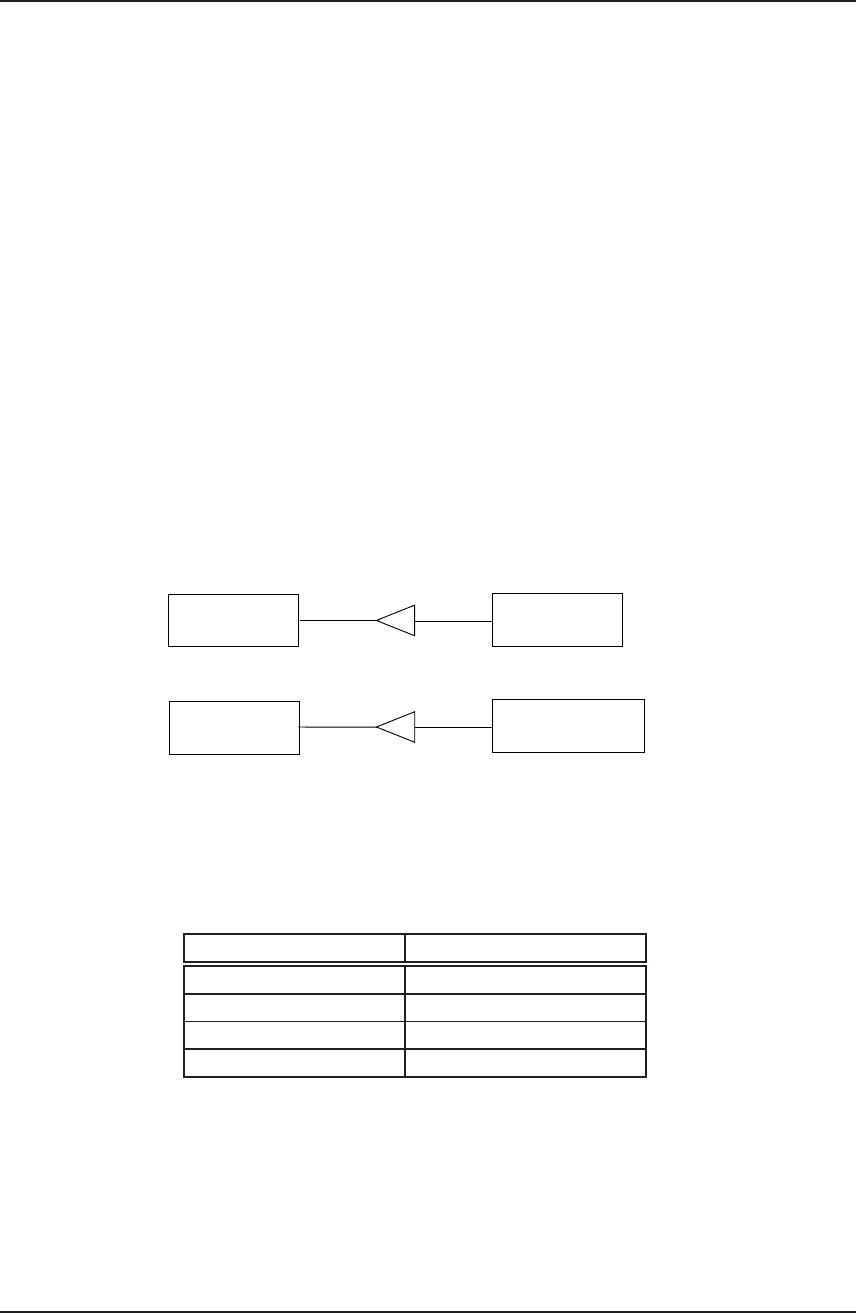
generating and accessing a single or multiple Foreign Objects. This simple inheritance
structure is shown in figure 2.3 for the tank example.
gFOFactory gFOTankFactory
gFOTank
gFOClass
Figure 2.3: Inheritance for the tank example
When deriving from gFOClass, the only member functions which have to be provided
by the user are the equivalents for the service procedures shown in table 2.7.
Service procedure C++ equivalent
gFOCM() Checkmethod()
gFOCMI() Checkmethodinputs()
gFOM() Evalmethod()
gFOMD() Evalmethodderiv()
Table 2.7: Service procedure and their C++ equivalent
Note that the argument lists of the member functions in table 2.7 are identical to their
corresponding functions in gFOInterface.h except that they are missing the first two
arguments of the latter: the ForeignObjectID and ForeignObjectHandle are unneces-
sary since these functions operate on the specific object with which they are associated.
2.3. Implementation of Foreign Objects 32

gPROMS System Programmer Guide
Example implementations for these member functions can be found in tank cpp.h and
tank cpp.cxx.gFOI() and gFOT() do not have to be defined because they call member
functions which are already implemented in gFOFactory and which are responsible for
creating and destroying Foreign Objects.
When deriving a Factory from the gFOFactory provided, the only member function
which has to be provided by the user is CreateObject() plus a global function which
will provide access to the factory, get FOfactory(),cf. the files tank factory.h and
tank factory.cxx.
If the proposed structure is adopted, none of the interface files has to be changed, only
classes with the member functions, as in the tank example, have to be provided by the
user.
2.3.4 Compiling Foreign Objects
gPROMS employs a dynamic loading mechanism that allows it to load Foreign Object
code and make use of its services without the need for a separate linking step. Standard-
ised dynamic loading facilities are nowadays available under both the UNIX and MS
Windows operating systems. These provide direct control over the process of loading
the Foriegn Object code into memory during program execution.
In view of the above, each Foreign Object class is physically implemented as a UNIX
shared object library (e.g. ThermoPack.so) or a Windows dynamic link library (e.g.
ThermoPack.dll). Appendix Adetails how these libraries can be created for the cur-
rently supported UNIX platforms, while appendix Bprovides the equivalent explanation
for Windows.
2.3.5 Installing Foreign Objects
Once the code describing the Foreign Object class is written and compiled as explained
in section 2.3.1 and section 2.3.4 above, the resulting dynamic library has to be installed
in a place where gPROMS can find it during runtime. There are two main options for
this:
•In a sub-directory called fo of the user’s current gPROMS working directory.
This sub-directory is at the same level as the input,output and save sub-
directories.
•In a sub-directory called fo of the gPROMS installation directory.
Clearly, the first option is appropriate only for Foreign Objects that are used by a small
number of users, otherwise it may lead to unnecessary waste of disk space; it may also
make the maintenance of the Foreign Object code very difficult to manage. The second
2.3. Implementation of Foreign Objects 33

gPROMS System Programmer Guide
option makes the Foreign Object accessible to all gPROMS users but will usually require
system administrator priviledges.
On UNIX platforms, a third option is for individual users to place a symbolic link to
the actual Foreign Object library inside their private fo sub-directory. The actual code
may, thus, reside anywhere in the system where it is accessible to the group of users
who need it. This has the advantage of saving disk space without requiring system
administrator privileges.
2.3.6 Documenting Foreign Object classes
The information that users of Foreign Objects need to know in order to use them
correctly within gPROMS is listed in chapter 4of the “gPROMS Advanced User Guide”.
We recommend that, as a Foreign Object developer, you base the documentation of your
software on this list.
2.4 Implementing Foreign Objects using COM
Section 2.3 of this chapter has described the implementation of Foreign Objects in
FORTRAN and C/C++ and their linking to gPROMS as dynamic libraries or shared
objects. This section presents some of the details of implementing Foreign Objects
alternatively as COM objects and, hence, the material in this section is only applicable
to the Windows operating system. COM objects can be written in any suitable computer
language like Visual Basic and C++, and, because they need to be registered with the
Windows registry, can be placed in any location in the computer.
In the following sections, the full process of writing and using COM objects as For-
eign Objects in gPROMS is described. This will cover the description of the required
gPROMS files, the COM interfaces and full IDLs, registration details, and how to refer
to the COM objects in gPROMS input files.
2.4.1 The Foreign Object COM interfaces
There are two COM interfaces which need to be implemented by any Foreign Object
COM server: the first provides an identification of the interface while the second provides
all the methods of the gPROMS FOI. The full details are presented next. All the data
types are defined in table 2.16.
2.4.1.1 The IFOICOMServerIdentification interface
The purpose of this interface is to provide an identification of the FOI COM server. This
is in the form of the name and a short description of what it does. The information
2.4. Implementing Foreign Objects using COM 34

gPROMS System Programmer Guide
provided is used by gPROMS when it provides a list of all the available FOI COM
servers in the MS Windows registry (cf. section 2.4.3). The interface implements two
methods: GetServerName and GetServerDescription, and their IDLs are given in
tables 2.8 and 2.9. The interface inherits from the IDispatch interface.
Interface Name IFOICOMServerIdentification
Method Name GetServerName
Method Returns FOIError
Method Description This method returns the FOI COM server name
Method Arguments
Name Type Description
[out,retval] *name FOIString Name of the FOI COM server
Table 2.8: IFOICOMServerIdentification::GetServerName
2.4.1.2 The IgPROMSFOI interface
This interface implements all the gPROMS FOI methods described in detail in sec-
tion 2.2. There are six methods in the interface: Initialise,CheckMethod,CheckMethodInputs,
EvalMethod,EvalMethodDeriv,Terminate. The IDLs of all the methods are given in
tables 2.10 to 2.15. The interface inherits from the IDispatch interface. gPROMS will
call the Initialise method after the COM object has been successfully created but
before any other method of the interface is called.
2.4.2 Registering a Foreign Object COM server
All gPROMS Foreign Object COM servers need to be registered in a specific location
(category) in the Windows registry. The necessary CATID together with the IIDs of the
two interfaces are given next.
•IFOICOMServerIdentification IID C92162CD-4F79-11d5-9082-00C04F7D052E
•IgPROMSFOI IID C92162CE-4F79-11d5-9082-00C04F7D052E
•FOICOMComponent CATID D75D9500-5118-11d5-9082-00C04F7D052E
2.4. Implementing Foreign Objects using COM 35

gPROMS System Programmer Guide
Interface Name IFOICOMServerIdentification
Method Name GetServerDescription
Method Returns FOIError
Method Description This method returns the description of the FOI COM server
Method Arguments
Name Type Description
[out,retval] *desc FOIString Description of the FOI COM server
Table 2.9: IFOICOMServerIdentification::GetServerDescription
The first two are the IIDs of the two interfaces described in section 2.4.1, while the
third is the category identifier (CATID) where all FOI COM servers should be placed.
2.4.3 Using COM-based Foreign Objects within gPROMS
Before any COM object written to provide the Foreign Object Interface (FOI) services is
used in gPROMS, the file FOICOM.dll must be placed in the gPROMS fo sub-directory.
This file acts as a bridge between the standard gPROMS FOI and the COM server,
and should have been installed as part of the standard gPROMS installation process.
The tasks performed by the dll include searching the Windows registry for FOI COM
components, creation of such components, and the handling of all the FOI calls between
gPROMS and the COM server.
Once a Foreign Object COM server has been properly installed in the Windows registry
(see section 2.4.2), it can be used within gPROMS using the latter’s standard Foreign
Object mechanism (which is fully described in chapter 4of the “gPROMS Advanced
User Guide”).
In the PROCESS entity, the class of the Foreign Object needs to be declared as COMForeignObject.
The value of the particular instance of the Foreign Object should be set to the ProgID
under which the FOI COM server has been installed in the MS Windows registry (cf.
section 2.4.2). For example, the following specification:
1. PROCESS TEST
2. UNIT
2.4. Implementing Foreign Objects using COM 36

gPROMS System Programmer Guide
Interface Name IgPROMSFOI
Method Name Initialise
Method Returns FOIError
Method Description This method initialises the FOI COM server
Method Arguments
Name Type Description
[in] fo id FOIString The full FO Id from gPROMS
Table 2.10: IgPROMSFOI::Initialise
3. F AS BufferTank
4. SET
5. F.Hydraulics := "COMForeignObject::TankCo.Mixer.1"
6. ........................
7. END
specifies that the Foreign Object Hydraulics appearing in instance Fof MODEL BufferTank
is a COM-based Foreign Object server that has been installed in the MS Windows reg-
istry under the ProgID “TankCo.Mixer.1”.
It is often necessary to specify options for a Foreign Object. This may be the location of
a particular file that the FOI COM server needs or the variants of a particular method
of the Foreign Object. Any option for the FOI COM server should be put within angled
brackets “<” and “>”. For example, the specification above may be modified to:
4. SET
5. F.Hydraulics := "COMForeignObject::TankCo.Mixer.1<Turbulent>"
6. ........................
7. END
which may be used to indicate that a turbulent regime should be assumed for the calcu-
lations of hydraulics in this mixer unit. gPROMS will always pass the full string value
of the Foreign Object (i.e., “COMForeignObject::TankCo.Mixer.1<Turbulent>”) to
the Foreign Object COM server using the IgPROMSFOI::Initialise method. It is the
2.4. Implementing Foreign Objects using COM 37

gPROMS System Programmer Guide
Interface Name IgPROMSFOI
Method Name CheckMethod
Method Returns FOIError
Method Description Checks the existence of a given Foreign Object method
Method Arguments
Name Type Description
[in] method name FOIString The name of the method
[out] *num inputs FOILong The number of inputs
[out] *output length FOILong The length of the output
[out] *output type FOILong The type of the output
[out] *out dimen num FOIArrayLong The dimensions of the numerator of the output
[out] *out dimen den FOIArrayLong The dimensions of the denominator of the output
[out] *out offset FOIDouble The offset value for the output
[out] *out multipl FOIDouble The multiplier value for the output
Table 2.11: IgPROMSFOI::CheckMethod
responsibility of the Foreign Object to parse this string and to modify its behaviour
accordingly.
If, for whatever reason, the ProgID of a COM-based Foreign Object is not known, then
attempting the execution of the above PROCESS entity without specifying a ProgID, that
is:
1. PROCESS TEST
2. UNIT
3. F AS BufferTank
4. SET
5. F.Hydraulics := "COMForeignObject::"
6. ........................
7. END
will produce a list of the ProgIDs of all the FOI COM servers that are currently installed
in the registry.
2.4. Implementing Foreign Objects using COM 38

gPROMS System Programmer Guide
Interface Name IgPROMSFOI
Method Name CheckMethodInputs
Method Returns FOIError
Method Description Checks the inputs of a given Foreign Object method
Method Arguments
Name Type Description
[in] method name FOIString The name of the method
[out] *input names FOIArrayString The names of the inputs
[out] *input lengths FOIArrayLong The lengths of the inputs
[out] *input types FOIArrayLong The types of the inputs
[out] *input deriv avail FOIArrayLong The availability of the derivatives with respect to
the inputs
[out] *input dimens num FOIArrayLong The dimensions of the numerator of the inputs
[out] *input dimens den FOIArrayLong The dimensions of the denominator of the inputs
[out] *input offsets FOIArrayDouble The offset values for the inputs
[out] *input multipl FOIArrayDouble The multiplier values for the inputs
Table 2.12: IgPROMSFOI::CheckMethodInputs
2.4. Implementing Foreign Objects using COM 39

gPROMS System Programmer Guide
Interface Name IgPROMSFOI
Method Name EvalMethod
Method Returns FOIError
Method Description Evaluates a Foreign Object method for a given set of inputs
Method Arguments
Name Type Description
[in] method name FOIString The name of the method
[in] input values FOIArrayDouble The values of the inputs
[out] *output values FOIArrayDouble The values of the output
Table 2.13: IgPROMSFOI::EvalMethod
Interface Name IgPROMSFOI
Method Name EvalMethodDeriv
Method Returns FOIError
Method Description Evaluates the partial derivatives of a Foreign Object method
for a given set of inputs
Method Arguments
Name Type Description
[in] method name FOIString The name of the method
[in] deriv input name FOIString The name of the input with respect to which the
drivatives are required
[in] input values FOIArrayDouble The values of all the inputs
[out] *output values FOIArrayDouble The values of the output
Table 2.14: IgPROMSFOI::EvalMethodDeriv
2.4. Implementing Foreign Objects using COM 40

gPROMS System Programmer Guide
Interface Name IgPROMSFOI
Method Name Terminate
Method Returns FOIError
Method Description This method terminates the FOI COM server
Method Arguments
Name Type Description
. . . no arguments . . .
Table 2.15: IgPROMSFOI::Terminate()
FOICOM Data Type COM Data Type
FOIChar char
FOILong long int
FOIDouble double
FOIBoolean VARIANT BOOL
FOIString BSTR
FOIVariant VARIANT
FOIInterface LPDISPATCH
FOIDate DATE
FOIError HRESULT
FOIArrayLong VARIANT
FOIArrayDouble VARIANT
FOIArrayBoolean VARIANT
FOIArrayString VARIANT
Table 2.16: FOICOM Data Types
2.4. Implementing Foreign Objects using COM 41

gPROMS System Programmer Guide
Chapter 3
Interfacing Physical Property
Packages to gPROMS
Contents
3.1 Constructing Foreign Objects for physical property packages 43
3.2 Direct Foreign Object services ................. 46
3.2.1 The gFOI Foreign Object initialisation service . . . . . . . . . . 47
3.2.2 The gFOCM Foreign Object verification service . . . . . . . . . . 48
3.2.3 The gFOCMI Foreign Object verification service . . . . . . . . . 49
3.2.4 The gFOT Foreign Object termination service . . . . . . . . . . 50
3.3 The physical property calculation procedures ........ 50
3.4 Preparing the Physical Property Interface Foreign Object . 51
3.5 An example ............................. 52
42
gPROMS System Programmer Guide
This chapter explains how you can interface a new physical property package to gPROMS.
It assumes a good understanding of the gPROMS Foreign Object concept and interface
as described in chapter 2of this manual.
3.1 Constructing Foreign Objects for physical property
packages
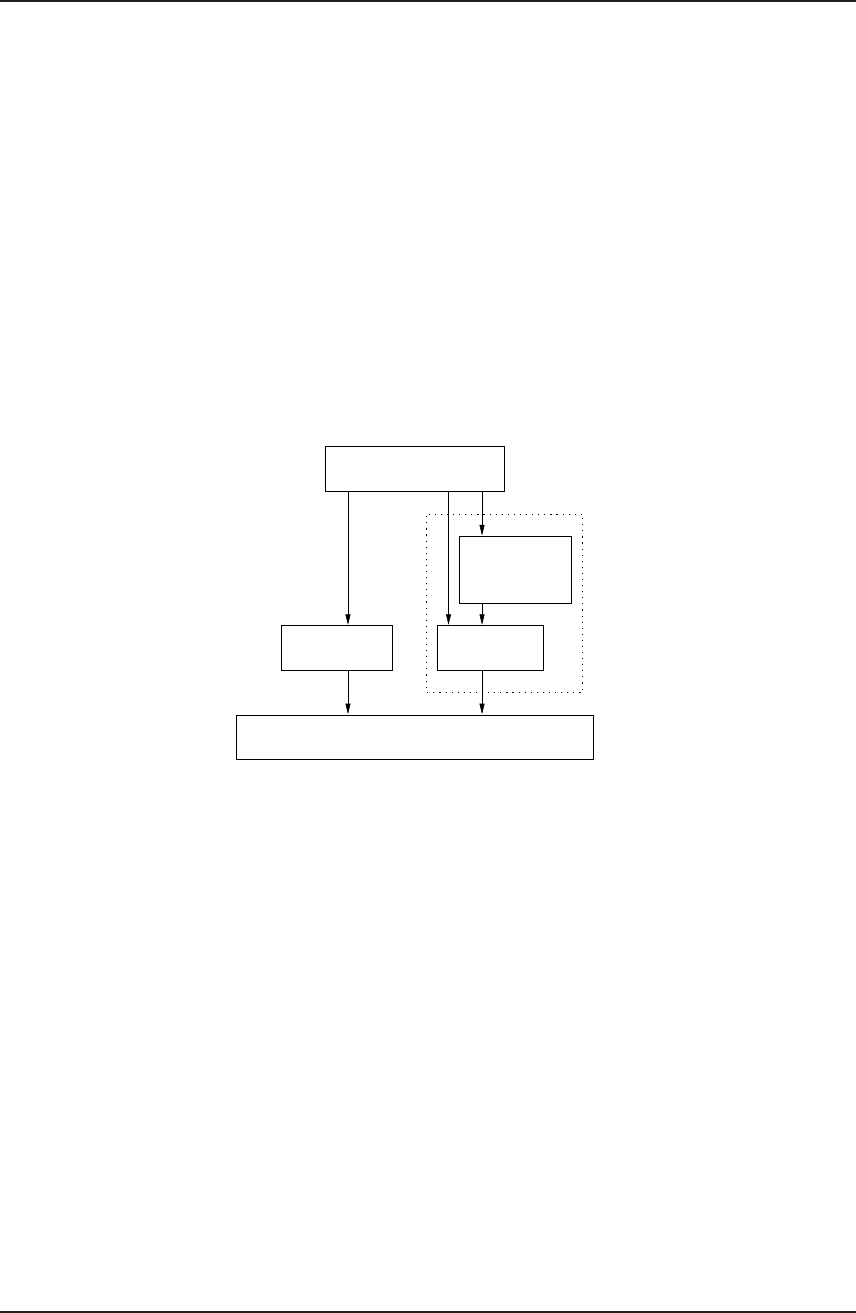
There are essentially two different ways of interfacing a physical property package to
gPROMS. These are illustrated schematically in figure 3.1. The first, shown in the left
part of the diagram makes direct use of the Foreign Object Interface (FOI). To do this,
you need to construct your own implementation of a FOI between gPROMS and the
external package following the instructions given in section 2.2 and section 2.3.
Physical Property Package
gPROMS
Your FOI Your PPI
PP-FOI
gPROMS
Figure 3.1: Interfacing external physical property packages to gPROMS
The above option certainly provides you with the maximum degree of flexibility. How-
ever, most physical property packages are fundamentally similar to each other and you
will probably find that, in trying to implement your own FOI for one of these, you are
reproducing work that has already been done by other people (including the gPROMS
development team) on several occasions in the past! It may, therefore, be more efficient
to use one of these ready-made FOIs as the basis of your interface. This approach,
illustrated schematically in the right part of figure 3.1, is described below.
gPROMS already includes a special Foreign Object interface to packages that provide
the physical properties listed in table 3.1. This is shown as PP-FOI in figure 3.1. The
basic ideas are as follows:
3.1. Constructing Foreign Objects for physical property packages 43

gPROMS System Programmer Guide
gPROMS Property Name Inputs Description Type
NormalBoilingPoint Normal boiling point Vector
CriticalTemperature Critical temperature Vector
CriticalPressure Critical pressure Vector
CriticalVolume Critical volume Vector
NormalFreezingPoint Melting point Vector
MolecularWeight Molecular weight Vector
IdealGasEnthalpyOfFormationAt25C Enthalpy of formation Vector
NumberOfComponents Number of components Scalar
VapourPressure TPure component vapour pressures Vector
LiquidCpCv T, P, n Ratio of CPto CVin the liquid phase Scalar
VapourCpCv T, P, n Ratio of CPto CVin the vapour phase Scalar
LiquidCompressibilityFactor T, P, n Compressibility factor for the liquid phase Scalar
VapourCompressibilityFactor T, P, n Compressibility factor for the vapour phase Scalar
LiquidEnthalpy T, P, n Total enthalpy of the liquid phase Scalar
VapourEnthalpy T, P, n Total enthalpy of the vapour phase Scalar
LiquidExcessEnthalpy T, P, n Excess enthalpy of the mixture Scalar
LiquidEntropy T, P, n Total entropy of the liquid phase Scalar
VapourEntropy T, P, n Total entropy of the vapour phase Scalar
LiquidFugacityCoefficient T, P, n Liquid fugacity coefficients Vector
VapourFugacityCoefficient T, P, n Vapour fugacity coefficients Vector
LiquidActivityCoefficient T, P, n Liquid fugacity coefficients Vector
Table continued on next page ...
3.1. Constructing Foreign Objects for physical property packages 44

gPROMS System Programmer Guide
... continued from previous page
LiquidGibbsFreeEnergy T, P, n Total Gibbs energy of the liquid phase Scalar
VapourGibbsFreeEnergy T, P, n Total Gibbs energy of the vapour phase Scalar
LiquidExcessGibbsFreeEnergy T, P, n Excess Gibbs energy of the mixture Scalar
LiquidHeatCapacity T, P, n Liquid heat capacity at constant pressure Scalar
VapourHeatCapacity T, P, n Vapour heat capacity at constant pressure Scalar
LiquidEnergy T, P, n Total internal energy of the liquid phase Scalar
VapourEnergy T, P, n Total internal energy of the vapour phase Scalar
LiquidVolume T, P, n Total liquid volume Scalar
VapourVolume T, P, n Total vapour volume Scalar
LiquidDensity T, P, n Density of the liquid phase Scalar
VapourDensity T, P, n Density of the vapour phase Scalar
LiquidThermalConductivity T, P, n Thermal conductivity of the liquid phase Scalar
VapourThermalConductivity T, P, n Thermal conductivity of the vapour phase Scalar
LiquidViscosity T, P, n Viscosity of the liquid phase Scalar
VapourViscosity T, P, n Viscosity of the vapour phase Scalar
SurfaceTension T, P, nL, nVSurface tension of the mixture Scalar
Table 3.1: Physical property functions and their arguments
3.1. Constructing Foreign Objects for physical property packages 45

gPROMS System Programmer Guide
1. On the outside, PP-FOI provides some of the services required of Foreign Objects
in gPROMS; more specifically, it includes the code implementation of the gFOM
and gFOMD services that are used by gPROMS to evaluate the methods and their
partial derivatives with respect to their inputs.
2. On the inside, PP-FOI fulfils these services by issuing calls to routines that you
provide within your Physical Property Interface (PPI).
3. Your PPI also includes the code implementation of the four services that are not
already provided by PP-FOI. These are:
– the gFOI Foreign Object initialisation service,
– the gFOCM service for checking the methods of the Foreign Object,
– the gFOCMI service for checking the inputs of the methods of the Foreign
Object, and
– the gFOT termination service.
gPROMS will issue direct calls to these services.
4. The combination of the code for the standard PP-FOI with that for your own PPI
now provides all six services required by any Foreign Object. Thus, you have now
created a new Foreign Object (shown as a dotted box in figure 3.1) corresponding
to the physical property package that you want to interface to gPROMS. You may
now compile this Foreign Object according to the instructions given in section 2.3.
The main advantage of using the approach outlined above is that steps 1 and 2 take
away from you much of the effort involved in providing the gFOM and gFOMD services —
and experience indicates that this is usually the most difficult part of constructing a
Foreign Object.
The rest of this section discusses in detail the functionality that your PPI needs to
provide to gPROMS.
3.2 Direct Foreign Object services
As explained in section 3.1, your PPI must directly provide four of the six services
required of all gPROMS Foreign Objects. Sample FORTRAN 77 code implementing
these services is provided in file PP-FODirect.f in sub-directory src/examples/foi of
the standard gPROMS installation directory on your computer system. We recommend
that you study this code in conjunction with the information provided in this section,
and, if possible, use it as the basis of developing your own code: in most cases, you may
have to make only a few relatively minor changes to the sample code provided!
We now consider each of these four services in more detail.
3.2. Direct Foreign Object services 46

gPROMS System Programmer Guide
3.2.1 The gFOI Foreign Object initialisation service
The purpose of this service is to allow gPROMS to create an instance of the class of
Foreign Objects corresponding to the physical property package that you are interfacing
to gPROMS. The complete specification of gFOI can be found in section 2.2.1.
At the start of the execution of an activity, gPROMS will pass to gFOI a string of
characters identifying the particular instance of the physical property package that
needs to be created. This string will have been specified in the user’s input file and will
typically be the name of a file that contains information on the components being used,
the methods and options to be used for computing various thermophysical properties
and so on.
Your implementation of gFOI will have to execute all actions necessary for initialising the
physical property package and making it ready for responding to requests for computing
properties (and, in some cases, their partial derivatives) as well as other information
(see section 3.3). These initialisation actions may include:
•locating, opening and reading the data file named in the string passed by gPROMS;
•validating the contents of this file;
•retrieving physical property parameters from one or more databanks and storing
them in appropriate data structures in memory.
In many cases, the physical property package will provide a “loader” routine that may
be called to carry out most or all of the above operations.
In any case, your gFOI must eventually return to gPROMS a status flag indicating
whether the initialisation operation has been successful, and, optionally, a “handle” that
may be used to identify this particular Foreign Object instance in future references.
3.2. Direct Foreign Object services 47

gPROMS System Programmer Guide
WARNING!
The use of the Foreign Object Interface generally allows a gPROMS activity
to interact with multiple instances of the same physical property package
(e.g. corresponding to different component sets and/or calculation options).
If your physical property package cannot accommodate this feature,
or if you do not wish to support it in your interface, it is important to
ensure that any user attempt to create multiple instances is intercepted
and handled appropriately. An easy way of achieving this is to maintain a
counter of the number of instances that are currently active and to make
this accessible to both the gFOI and the gFOT services, each call to which
will respectively increase and decrease the counter by 1. Any attempt to
increase the counter above 1 by repeated calls to gFOI should be rejected
by setting its Status flag to 0.
3.2.2 The gFOCM Foreign Object verification service
The purpose of this service is to allow gPROMS to check the existence and structure of
the physical property methods that are supposed to be provided by the physical property
Foreign Object. The complete specification of gFOCM can be found in section 2.2.2.1.
At the start of an activity and having called gFOI, gPROMS will call gFOCM once for each
type of physical property that has been referenced in conjunction with this particular
Foreign Object in the user’s input file. These properties will normally be a subset of
those listed in table 3.1. For instance, suppose that the user has created an instance of
the physical property package and has then used it to calculate vapour enthalpies and
densities in his MODELs. Then, gPROMS will issue two calls to gFOCM regarding methods
VapourEnthalpy and VapourDensity respectively.
If you examine the code for gFOCM provided in the file PP-FODirect.f, you will see that
there is a part of the code that refers to each and every physical property in table 3.1.
By far the easiest way of creating your own gFOCM is to edit this code. The changes
that you can legitimately make are the following:
•If your physical property package does not provide a certain physical property,
then change the value of the Status flag from 1 to 0.
•If the units of measurement of the physical property are not strictly SI, then
change the values of OutputOffset and OutputMultiplier from the values of 0
and 1 that they respectively have in the sample code.
3.2. Direct Foreign Object services 48

gPROMS System Programmer Guide
WARNING!
The rest of the information returned by gFOCM relates to fundamental
characteristics of the physical properties listed in table 3.1 — for example,
the number of the inputs expected by the property. Changes to any part
of this information will therefore alter the nature of the physical property
itself, which may be both confusing and dangerous to users making use of
your physical property interface.
If a property in table 3.1 does not have the precise form of what you
want to achieve, do not change it. Instead, mark it as unavailable (by
returning Status=0) and extend the interface by defining another property
(with a different name) having the desired structure.
3.2.3 The gFOCMI Foreign Object verification service
The purpose of this service is to allow gPROMS to verify the nature of each and ev-
ery input of each physical property method provided by the physical property Foreign
Object. The complete specification of gFOCMI can be found in section 2.2.2.2.
At the start of an activity and having verified via gFOCM that a particular method
referred to by the user’s input file exists and has the correct structure, gPROMS will
immediately call gFOCMI for the same method.
If you examine the code for gFOCMI provided in the file PP-FODirect.f, you will see
that there is a part of the code that refers to each and every input of each and every
physical property in table 3.1. By far the easiest way of creating your own gFOCMI is to
edit this code. The changes that you can legitimately make are the following:
•If your physical property package does not provide the partial derivatives of a
certain physical property with respect to a certain input, then change the value
of the corresponding InputDerivsAvailable flag from 1 to 0.
•If the units of measurement of a certain input are not strictly SI, then change the
corresponding values of InputOffsets and InputMultipliers from the values of
0 and 1 that they respectively have in the sample code.
3.2. Direct Foreign Object services 49

gPROMS System Programmer Guide
WARNING!
The rest of the information returned by gFOCMI relates to fundamental
characteristics of the physical properties listed in table 3.1 — for example,
the type and ordering of the inputs. Changes to any part of this information
will therefore alter the nature of the physical property itself, which may be
both confusing and dangerous to users making use of your physical property
interface.
If the inputs of a property in table 3.1 do not have the form that
you desire, mark the property as unavailable (by returning Status=0 in
gFOCM) and extend the interface by defining another property (with a
different name) having the desired structure.
3.2.4 The gFOT Foreign Object termination service
The purpose of this service is to allow gPROMS to destroy an instance of a physical
property Foreign Object created earlier by a call to gFOI. The complete specification of
gFOT can be found in section 2.2.4.
At the end of the activity, gPROMS will call gFOT identifying to it the Foreign Object
instance that has to be destroyed. This is intended to provide the physical property
package with an opportunity to do any necessary housekeeping such as:
•deletion of any temporary files that may have been created for the purposes of
this run;
•releasing of any dynamically allocated memory;
•closing of databank files.
3.3 The physical property calculation procedures
Section 3.2 has described four of the six services that a Foreign Object must provide
to gPROMS. The remaining two services, gFOM and gFOMD, are concerned with the
computation of the values of the physical properties and the partial derivatives of the
latter with respect to their inputs. FORTRAN 77 code for these services is provided in
file PP-FOI.f in sub-directory src/foi of the standard gPROMS installation directory
on your computer system.
You do not normally need to change the code in PP-FOI.f. However, if you examine
it, you will see that it obtains the information requested by gPROMS by calling certain
3.3. The physical property calculation procedures 50

gPROMS System Programmer Guide
other routines. It is your responsibility to provide the latter in your Physical Property
Interface.
A list1of procedures that you need to provide is presented in table 3.2 and the de-
scription of their arguments in table 3.3. Some of the things that you need to know
are:
•The same procedure (e.g. Enthalpy) is used for the calculation of the total, vapour
and liquid phase properties, thus corresponding to three different properties listed
in table 3.1 (i.e. Enthalpy,VapourEnthalpy and LiquidEnthalpy).
•If your physical property package does not support the calculation of a particular
physical property, the corresponding interface routine does not need to be pro-
vided, assuming, of course, that you have informed gPROMS of this via gFOCM.
•The value of the physical property must be returned on every call to the cor-
responding procedure. On the other hand, the partial derivatives with respect
to temperature, pressure, volume, internal energy, enthalpy and mole numbers
need only be computed if the corresponding logical flags NeedDt,NeedDp,NeedDv,
NeedDu,NeedDh,NeedDn are set to TRUE. It should be noted that, while the
procedure must always compute at least the partial derivatives requested by a
certain call to it, no error will occur if any additional derivatives are returned.
•gPROMS will never request the evaluation of any partial derivatives that have
been notified to it as unavailable by the initial call to gFOCMI.
•All procedures have the arguments ForeignObjectInstanceName and Foreign-
ObjectHandle. These are two different ways used by gPROMS to identify the
particular instance of the physical property package to which this request for
information refers. They are important only if it is envisaged that gPROMS
activities will interact with multiple instances of the same property package; if
this is not the case, they can be ignored.
•The value of the maximum number of components (maxncs) used in local arrays
in gFOM and gFOMD has been preset to 40. This can be changed directly in both
procedures.
3.4 Preparing the Physical Property Interface Foreign Ob-
ject
You can now proceed to construct the Foreign Object that will implement the Physical
Property Interface. This will comprise three pieces of code:
1Tables 3.2 and 3.3 do not contain equilibrium flash methods. A full description of the equilibrium
flash methods is given in chapter 6of the “gPROMS Advanced User Guide”. The routines presented in
this chapter can easily be extended to include the flash methods.
3.4. Preparing the Physical Property Interface Foreign Object 51

gPROMS System Programmer Guide
•the code implementing the direct Foreign Object services, as described in sec-
tion 3.2;
•the physical property calculation routines detailed in section 3.3;
•a copy of the file PP-FOI.f provided with gPROMS (see top of section 3.3).
The first two of these correspond to the box marked as “Your PPI” in figure 3.1, while
the third one implements the box marked “gPROMS PP-FOI”.
Once you create a FORTRAN 77 file containing the above code, you can compile it
into a Foreign Object according to the detailed instructions given in section 2.3.4 and
appendix A. Give an appropriate name to the generated shared object library (un-
der UNIX) or dynamic link library (under MS Windows) and install it as detailed in
section 2.3.5.
Note that it will not normally be necessary to incorporate the actual physical property
package source code physically together with the three code segments mentioned above.
Instead, you can compile it separately using the appropriate compiler options (see ap-
pendix A) and then include the object file(s) thus generated in the shared object or
dynamic link library by listing their names in the link statement.
3.5 An example
To illustrate the ideas discussed in section 3.2 and section 3.3 and to see how they
all fit together, let’s consider a more concrete example. Suppose we wish to create an
interface to a physical property package called SuperPro, the code to which is held in
two FORTRAN 77 files, called SUP1.f and SUP2.f respectively. The interface is to run
on a DEC UNIX workstation under the OSF/1 operating system.
We would then need to go through the following steps:
1. Make a copy of the file PhysProps/PP-FODirect.f distributed with gPROMS into
a new file SUP-direct.f.
2. Edit the four procedures gFOI,gFOCM,gFOCMI and gFOT contained in file SUP-direct.f
as described in section 3.2.
3. Create a new file called SUP-PPI.f containing the physical property calculation
procedures listed in table 3.2. Use the file PP-FOI.f provided with the gPROMS
installation directory as a starting point. These will typically call other procedures
contained in files SUP1.f and/or SUP2.f.
4. For convenience, combine files SUP-direct.f and SUP-PPI.f as well as the file
PhysProps/PP-FOI.f distributed with gPROMS into a file called SUP-PPIAll.f.
3.5. An example 52

gPROMS System Programmer Guide
5. Compile the file SUP-PPIAll.f on the DEC OSF/1 system using the command
(cf. appendix A):
f77 -c -O -i8 SUP-PPIAll.f
6. Compile the physical property source files SUP1.f and SUP2.f using the command:
f77 -c -O -i8 SUP1.f SUP2.f
7. Now, link the three object files created by the compilations at steps 5 and 6 above
into a single shared object library called SuperPro.so (cf. appendix A):
ld -shared -all -o SuperPro.so SUP-PPIAll.o SUP1.o SUP2.o -lfor
-lots -lm -lc
Once SuperPro.so is created, you have two choices regarding its installation (cf. section
2.3.5). If it is mainly going to be employed for your own private use, you can place
it in a sub-directory called fo of your gPROMS working directory. If, on the other
hand, it is to be made generally (and automatically) available to all users on your
computer network, you may wish to install it in sub-directory fo of the gPROMS
installation directory making it publicly accessible; you will probably need some system
administrator privileges to be able to do this.
3.5. An example 53

gPROMS System Programmer Guide
Interface Procedure Inputs
NormalBoilingPoint ForeignObjectName, ForeignObjectHandle, PropertyValueVector,
Status
CriticalTemperature ForeignObjectName, ForeignObjectHandle, PropertyValueVector,
Status
CriticalPressure ForeignObjectName, ForeignObjectHandle, PropertyValueVector,
Status
CriticalVolume ForeignObjectName, ForeignObjectHandle, PropertyValueVector,
Status
NormalFreezingPoint ForeignObjectName, ForeignObjectHandle, PropertyValueVector,
Status
MolecularWeight ForeignObjectName, ForeignObjectHandle, PropertyValueVector,
Status
NumberOfComponents ForeignObjectName, ForeignObjectHandle, PropertyValueScalar,
Status
VapourPressure ForeignObjectName, ForeignObjectHandle, T, PropertyValueVec-
tor, NeedDt, dvectordt, Status
BubbleTemperature ForeignObjectName, ForeignObjectHandle, P, n, PropertyVal-
ueScalar, NeedDp, NeedDn, dscalardp, dscalardn, Status
BubblePressure ForeignObjectName, ForeignObjectHandle, T, n, PropertyVal-
ueScalar, NeedDt, NeedDn, dscalardt, dscalardn, Status
DewTemperature ForeignObjectName, ForeignObjectHandle, P, n, PropertyVal-
ueScalar, NeedDp, NeedDn, dscalardp, dscalardn, Status
DewPressure ForeignObjectName, ForeignObjectHandle, T, n, PropertyVal-
ueScalar, NeedDt, NeedDn, dscalardt, dscalardn, Status
CpCv ForeignObjectName, ForeignObjectHandle, phase, T, P, n, Prop-
ertyValueScalar, NeedDt, NeedDp, NeedDn, dscalardt, dscalardp,
dscalardn, Status
CompressibilityFactor ForeignObjectName, ForeignObjectHandle, phase, T, P, n, Prop-
ertyValueVector, NeedDt, NeedDp, NeedDn, dscalardt, dscalardp,
dscalardn, Status
Enthalpy ForeignObjectName, ForeignObjectHandle, phase, T, P, n, Prop-
ertyValueVector, NeedDt, NeedDp, NeedDn, dscalardt, dscalardp,
dscalardn, Status
ExcessEnthalpy ForeignObjectName, ForeignObjectHandle, phase, T, P, n, Prop-
ertyValueScalar, NeedDt, NeedDp, NeedDn, dscalardt, dscalardp,
dscalardn, Status
Entropy ForeignObjectName, ForeignObjectHandle, phase, T, P, n, Prop-
ertyValueScalar, NeedDt, NeedDp, NeedDn, dscalardt, dscalardp,
dscalardn, Status
FugacityCoefficient ForeignObjectName, ForeignObjectHandle, phase, T, P, n, Prop-
ertyValueVector, NeedDt, NeedDp, NeedDn, dvectordt, dvectordp,
dvectordn, Status
Table continued on next page ...
3.5. An example 54

gPROMS System Programmer Guide
... continued from previous page
ActivityCoefficient ForeignObjectName, ForeignObjectHandle, phase, T, P, n, Prop-
ertyValueVector, NeedDt, NeedDp, NeedDn, dvectordt, dvectordp,
dvectordn, Status
GibbsFreeEnergy ForeignObjectName, ForeignObjectHandle, phase, T, P, n, Prop-
ertyValueScalar, NeedDt, NeedDp, NeedDn, dscalardt, dscalardp,
dscalardn, Status
ExcessGibbsFreeEnergy ForeignObjectName, ForeignObjectHandle, T, P, n, Property-
ValueScalar, NeedDt, NeedDp, NeedDn, dscalardt, dscalardp,
dscalardn, Status
HeatCapacity ForeignObjectName, ForeignObjectHandle, phase, T, P, n, Prop-
ertyValueScalar, NeedDt, NeedDp, NeedDn, dscalardt, dscalardp,
dscalardn, Status
Energy ForeignObjectName, ForeignObjectHandle, phase, T, P, n, Prop-
ertyValueScalar, NeedDt, NeedDp, NeedDn, dscalardt, dscalardp,
dscalardn, Status
Volume ForeignObjectName, ForeignObjectHandle, phase, T, P, n, Prop-
ertyValueScalar, NeedDt, NeedDp, NeedDn, dscalardt, dscalardp,
dscalardn, Status
Density ForeignObjectName, ForeignObjectHandle, phase, T, P, n, Prop-
ertyValueScalar, NeedDt, NeedDp, NeedDn, dscalardt, dscalardp,
dscalardn, Status
ThermalConductivity ForeignObjectName, ForeignObjectHandle, phase, T, P, n, Prop-
ertyValueScalar, NeedDt, NeedDp, NeedDn, dscalardt, dscalardp,
dscalardn, Status
Viscosity ForeignObjectName, ForeignObjectHandle, phase, T, P, n, Prop-
ertyValueScalar, NeedDt, NeedDp, NeedDn, dscalardt, dscalardp,
dscalardn, Status
SurfaceTension ForeignObjectName, ForeignObjectHandle, phase, T, P, n,
n2, PropertyValueScalar, NeedDt, NeedDp, NeedDn, NeedDn2,
dscalardt, dscalardp, dscalardn, Status
TPFlash ForeignObjectName, ForeignObjectHandle, T, P, n, PropertyVal-
ueVector, NeedDt, NeedDp, NeedDn, dflashdscalar, dflashdscalar,
dflashdn, Status
TVFlash ForeignObjectName, ForeignObjectHandle, T, V, n, PropertyVal-
ueVector, NeedDt, NeedDv, NeedDn, dflashdscalar, dflashdscalar,
dflashdn, Status
PHFlash ForeignObjectName, ForeignObjectHandle, P, H, n, PropertyVal-
ueVector, NeedDp, NeedDh, NeedDn, dflashdscalar, dflashdscalar,
dflashdn, Status
UVFlash ForeignObjectName, ForeignObjectHandle, U, V, n, PropertyVal-
ueVector, NeedDu, NeedDv, NeedDn, dflashdscalar, dflashdscalar,
dflashdn, Status
Table 3.2: Physical property calculation procedures
3.5. An example 55

gPROMS System Programmer Guide
Name of Argument Type Description Specified Specified
on Entry on Exit
ForeignObjectName Character*256 Full name of the Foreign Object. YES NO
ForeignObjectHandle Integer Handle for identifying Foreign
Object.
YES NO
phase Character*256 Type of phase present: “liquid”,
“vapour”/“vapor” or “total”.
YES NO
TDouble Precision Temperature. YES NO
PDouble Precision Pressure. YES NO
VDouble Precision Volume. YES NO
UDouble Precision Internal energy. YES NO
HDouble Precision Enthalpy. YES NO
n,n2 Double Precision Mole numbers of components.
An array of size NoComp.
YES NO
PropertyValueScalar Double Precision The numerical value of the prop-
erty to be returned (scalar prop-
erty).
NO YES
PropertyValueVector Double Precision The numerical value of the prop-
erty to be returned (vector prop-
erty). An array of size NoComp.
NO YES
NeedDt,NeedDp,NeedDv,
NeedDu,NeedDh,NeedDn
Logical Logical flags. On entry, these
will specify whether the partial
derivatives with respect to T,P,
V,U,Hand nrespectively are
needed.
YES NO
dscalardt,dscalardp Double Precision These return the numerical val-
ues of the derivatives with respect
to Tand Prespectively for scalar
properties.
NO YES
dvectordt,dvectordp Double Precision These return the numerical val-
ues of the derivatives with respect
to Tand Prespectively for vec-
tor properties. An array of size
NoComp.
NO YES
Table continued on next page ...
3.5. An example 56

gPROMS System Programmer Guide
... continued from previous page
dflashdscalar Double Precision These return the numerical val-
ues of the derivatives with respect
to T,P,V,Uand Hfor results of
flash calculations. An array whos
size depends on the size of the
flash results.
NO YES
dscalardn Double Precision These return the numerical val-
ues of the derivatives with respect
to n, for scalar properties. An ar-
ray of size NoComp.
NO YES
dvectordn Double Precision These return the numerical val-
ues of the derivatives with re-
spect to n, for vector properties.
Aone-dimensional array of size
(NoComp*NoComp). The array is
ordered by property vector ele-
ment, i.e. all derivatives of the
first property element appear be-
fore all derivaties of the second
property element. For example,
if NoComp=4, ∂φ2/∂n3will be
stored in position 7.
NO YES
dflashdn Double Precision These return the numerical val-
ues of the derivatives with respect
to n, for results of flash calcu-
lations. An array whos size de-
pends on the size of the flash re-
sults.
NO YES
Status Integer Status of requested computation.
A value of 1 indicates a success-
ful computation. All other values
indicate failure.
NO YES
Table 3.3: Arguments of the physical property calculation procedures
3.5. An example 57

gPROMS System Programmer Guide
Chapter 4
Developing New Foreign
Processes
Contents
4.1 Introduction ............................ 59
4.2 The FPI communication protocol ................ 60
4.2.1 The gFPI procedure . . . . . . . . . . . . . . . . . . . . . . . . 62
4.2.2 The gFPPAUSE procedure . . . . . . . . . . . . . . . . . . . . . 63
4.2.3 The gFPGET procedure . . . . . . . . . . . . . . . . . . . . . . . 64
4.2.4 The gFPSEND procedure . . . . . . . . . . . . . . . . . . . . . . 66
4.2.5 The gFPSENDM procedure . . . . . . . . . . . . . . . . . . . . . 68
4.2.6 The gFPLINEARISE procedure . . . . . . . . . . . . . . . . . . . 70
4.2.7 The gFPT procedure . . . . . . . . . . . . . . . . . . . . . . . . 73
4.3 FPI implementation for real-time applications ........ 74
4.4 Implementation of Foreign Processes .............. 76
4.4.1 Writing Foreign Processes in FORTRAN and C . . . . . . . . . 76
4.4.2 Writing Foreign Processes in C++ . . . . . . . . . . . . . . . . 76
4.4.3 Compiling Foreign Processes . . . . . . . . . . . . . . . . . . . 78
4.4.4 Installing Foreign Processes . . . . . . . . . . . . . . . . . . . . 79
58

gPROMS System Programmer Guide
4.1 Introduction
The Foreign Process Interface (FPI) provides a general mechanism for the exchange of
information between executing gPROMS simulations and external software.
This communication takes place at discrete time points throughout the duration of the
simulation. The user is entirely free to determine the frequency and content of the
exchanges which may include:
•time-synchronisation signals;
•values of variables and flags;
•information on the mathematical model used for the simulation and its current
state.
The FPI comprises two main components:
•A set of elementary communication tasks.
By inserting instances of these tasks in TASK and PROCESS SCHEDULEs, the user
determines the timing and content of any communication that will occur when
the SCHEDULE is executed.
•A communication protocol between gPROMS and the external software.
The execution of an elementary communication task in a SCHEDULE automatically
causes gPROMS to invoke one of a set of procedures provided by the user.
The FPI communication protocol specifies
–what procedures must be provided;
–their names;
–the precise form of their argument lists.
The FPI communication protocol does not specify the content or detailed be-
haviour of these procedures. They can be as complex or as simple as desired—in
fact, some of them may be completely empty!
The rest of this chapter is organised as follows:
•Section 4.2 presents the protocol used by gPROMS for its communication with
the PFI procedures.
•Section 4.4.3 discusses the compilation and linking of FPI implementations.
•Finally, section 4.3 covers some important issues concerning FPI implementations.
4.1. Introduction 59

gPROMS System Programmer Guide
4.2 The FPI communication protocol
By placing the FPI elementary communication tasks (see section 5.2 of the “gPROMS
Advanced User Guide”) within simulation SCHEDULEs, the user can specify the timing
and nature of the information exchanges that are to take place between the executing
gPROMS PROCESS and the foreign process.
The actual communication takes place by gPROMS issuing calls to a set of procedures
(or “subroutines”). The FPI communication protocol is concerned with defining the
form of the interaction of these procedures, through their argument lists, with the
program that invokes them. The precise content of the procedures is not specified—it
will vary from implementation to implementation, being determined by the requirements
of each particular application.
Any implementation of the FPI must provide five procedures, gFPPAUSE,gFPGET,gFPSEND,
gFPSENDM and gFPLINEARISE corresponding to the five elementary communication tasks
PAUSE,GET,SEND,SENDMATHINFO and LINEARISE respectively. In addition to these, it
must also provide two other procedures, gFPI and gFPT, used by the gPROMS PROCESS
respectively to initiate and terminate its interaction with the foreign process.
The rest of this section provides a detailed specification of these seven procedures. This
is done using FORTRAN subroutine terminology; however, the equivalent C code could
also be used.
In describing the type of the arguments of the various procedures, we will use the
notation I,Rand Cfor integer, real and character. Where necessary, the number of
bytes allocated to each type will also be specified; for instance, C*256 will denote a
character variable of 256 byte length. Note that some of the arguments will be arrays.
This will be apparent from the procedure declaration.
A complete example of an FPI implementation is provided as source code in the gPROMS
installation directory, see section 4.4 below. This corresponds to the standard FPI pro-
vided within the gPROMS executable (see section 5.3.1 in the “gPROMS Advanced User
Guide”).
4.2. The FPI communication protocol 60

gPROMS System Programmer Guide
NOTE
Wherever an argument is described as “Unchanged” in the “On Exit” column, it is
the responsibility of the FPI implementation developer to ensure that the FPI does
not alter this argument in any way.
gPROMS does not check for any changes in arguments of this type on re-
turn from the FPI procedures.
gPROMS is built to use the long integer type available on a particular sys-
tem. To make sure that your FPI implementation works with gPROMS, do not
make use of any explicit declarations of integer variable length (e.g. INTEGER*4)
in your FORTRAN code. It is recommended that you always use the default
declaration for INTEGER type arguments to the FPI services and use compiler
options to make the default integer equivalent to the long type.
If the FPI procedures are implemented in FORTRAN, then they should be
compiled with appropriate compiler options so that the resulting symbols for them
are in lowercase and have an underscore appended to them (e.g. gfplinearise ).
4.2. The FPI communication protocol 61

gPROMS System Programmer Guide
4.2.1 The gFPI procedure
Purpose: To initialise the communication link between the gPROMS PROCESS and the
foreign process.
Invoked: Automatically, at the start of the execution of any gPROMS PROCESS.
PROCEDURE DECLARATION
SUBROUTINE gFPI (FPID, FPHANDLE, PRNAME, STATUS)
CHARACTER * 256 FPID, PRNAME
INTEGER FPHANDLE
INTEGER STATUS
Argument Type On Entry On Exit
FPID C*256 Full name of Foreign Process
(terminated with a null)
Unchanged
FPHANDLE I 0 A unique integer assigned by
the foreign process to identify
its interactions with this par-
ticular execution of this spe-
cific gPROMS PROCESS
PRNAME C*256 Name of executing gPROMS
PROCESS which has initiated
this call
Unchanged
STATUS I1 1 if interaction has been initi-
ated successfully; 0otherwise
NOTES
•The gPROMS PROCESS will use both its own name (PRNAME)and the
FPHANDLE assigned to it by the foreign process in all its subsequent com-
munications with it (see sections 4.2.2–4.2.5).
The FPHANDLE identifier may be particularly useful for advanced applications
involving interactions of multiple gPROMS PROCESSes with the same foreign
process, when the latter may need to know which of the former it is talking
to at any given time.
If such sophistication is not required, FPHANDLE may be left unchanged by
the gFPI procedure.
•Setting the STATUS variable to 0within gFPI will indicate to gPROMS the
existence of a problem in its communication with the foreign process, and will
cause the execution of the gPROMS PROCESS to be terminated immediately.
4.2. The FPI communication protocol 62

gPROMS System Programmer Guide
4.2.2 The gFPPAUSE procedure
Purpose: To carry out any PAUSE tasks in the simulation SCHEDULE, as detailed in
section 5.2.1 of the “gPROMS Advanced User Guide”.
Invoked: Whenever a PAUSE elementary communication task is executed in a
SCHEDULE.
PROCEDURE DECLARATION
SUBROUTINE gFPPAUSE (FPID, FPHANDLE, PRNAME,
+ SIGNAL, TIME, STATUS)
CHARACTER * 256 FPID, PRNAME, SIGNAL
INTEGER FPHANDLE
DOUBLE PRECISION TIME
INTEGER STATUS
Argument Type On Entry On Exit
FPID C*256 Full name of Foreign Process Unchanged
FPHANDLE I Identifier assigned to this
gPROMS PROCESS by foreign
process following call to gFPI
(see section 4.2.1)
Unchanged
PRNAME C*256 Name of executing gPROMS
PROCESS which has initiated
this call
Unchanged
SIGNAL C*256 SigName string specified for
current instance of PAUSE task
in SCHEDULE
Unchanged
TIME R*8 Current simulation time Unchanged
STATUS I1 1 if the task has been per-
formed successfully; 0other-
wise
NOTES
•The action, if any, that will be taken if the STATUS variable is set to 0
within this procedure will be determined by the user through the gPROMS
SCHEDULE.
gPROMS does not, by itself, initiate any action on such occasions.
4.2. The FPI communication protocol 63

gPROMS System Programmer Guide
4.2.3 The gFPGET procedure
Purpose: To carry out any GET tasks in the simulation SCHEDULE, as detailed in sec-
tion 5.2.2 of the “gPROMS Advanced User Guide”.
Invoked: Whenever a GET elementary communication task is executed in a SCHEDULE.
PROCEDURE DECLARATION
SUBROUTINE gFPGET (FPID, FPHANDLE, PRNAME, SIGNAL,
+ TIME, N, NAME, ITYPE, X,
+ STATUS)
CHARACTER * 256 FPID, PRNAME, SIGNAL, NAME(N)
INTEGER FPHANDLE, N, ITYPE(N)
DOUBLE PRECISION TIME, X(N)
INTEGER STATUS
Argument Type On Entry On Exit
FPID C*256 Full name of Foreign Process Unchanged
FPHANDLE I Identifier assigned to this
gPROMS PROCESS by foreign
process following call to gFPI
(see section 4.2.1)
Unchanged
PRNAME C*256 Name of executing gPROMS
PROCESS which has initiated
this call
Unchanged
SIGNAL C*256 SigName string specified for
current instance of GET task in
SCHEDULE
Unchanged
TIME R*8 Current simulation time Unchanged
NI Number of variable values to
be obtained from the foreign
process
Unchanged
NAME C*256 Names of variables to be ob-
tained from the foreign process
as specified by their Foreign-
ProcessID in the GET task
Unchanged
ITYPE I Type of variables to be ob-
tained from the foreign pro-
cess: 1 for real; 2 for integer; 3
for logical
Unchanged
4.2. The FPI communication protocol 64

gPROMS System Programmer Guide
Argument Type On Entry On Exit
XR*8 Values of variables to be ob-
tained from the foreign process
just before the execution of the
GET task
New values of these variables
STATUS I1 1 if the task has been per-
formed successfully; 0other-
wise
NOTES
•Integer-valued variables are converted by gPROMS to the equivalent real
for communication to gFPGET via the real array X. Similarly, logical-valued
variables are encoded as +1.0 for TRUE and 0.0 for FALSE. gPROMS auto-
matically compensates for any rounding errors that may be introduced by
this convention.
The same convention should be followed by gFPGET for returning the new
values of these variables.
•If the GET task is applied to entire gPROMS arrays or distributions or slices
thereof, then Ncounts each element of the array etc. as a separate entry. The
name, type and value arrays NAME,ITYPE and Xrespectively, are dimensioned
and initialised accordingly, with all elements of the same array or distribution
occupying consecutive positions in them.
•The action, if any, that will be taken if the STATUS variable is set to 0
within this procedure will be determined by the user through the gPROMS
SCHEDULE.
gPROMS does not, by itself, initiate any action on such occasions.
4.2. The FPI communication protocol 65

gPROMS System Programmer Guide
4.2.4 The gFPSEND procedure
Purpose: To carry out any SEND tasks in the simulation SCHEDULE, as detailed in
section 5.2.3 of the “gPROMS Advanced User Guide”.
Invoked: Whenever a SEND elementary communication task is executed in a SCHEDULE.
PROCEDURE DECLARATION
SUBROUTINE gFPSEND (FPID, FPHANDLE, PRNAME, SIGNAL,
+ TIME, N, NAME, ITYPE, X, STATUS)
CHARACTER * 256 FPID, PRNAME, SIGNAL, NAME(N)
INTEGER FPHANDLE, N, ITYPE(N)
DOUBLE PRECISION TIME, X(N)
INTEGER STATUS
Argument Type On Entry On Exit
FPID C*256 Full name of Foreign Process Unchanged
FPHANDLE I Identifier assigned to this
gPROMS PROCESS by foreign
process following call to gFPI
(see section 4.2.1)
Unchanged
PRNAME C*256 Name of executing gPROMS
PROCESS which had initiated
this call
Unchanged
SIGNAL C*256 SigName string specified for
current instance of SEND task
in SCHEDULE
Unchanged
TIME R*8 Current simulation time Unchanged
NI Number of variable values to
be sent to the foreign process
Unchanged
NAME C*256 Names of variables being
transmitted to the foreign
process as specified by their
ForeignProcessID in the SEND
task
Unchanged
ITYPE I Type of variables being trans-
mitted to the foreign process:
1 for real; 2 for integer; 3 for
logical
Unchanged
XR*8 Current values of variables be-
ing transmitted to the foreign
process
Unchanged
STATUS I1 1 if the task has been per-
formed successfully; 0other-
wise
4.2. The FPI communication protocol 66

gPROMS System Programmer Guide
NOTES
•Integer-valued local TASK variables are converted by gPROMS to the equiv-
alent real for communication to gFPSEND via the real array X. Similarly,
logical-valued variables are encoded as +1.0 for TRUE and 0.0 for FALSE.
•If the SEND task is applied to entire gPROMS arrays or distributions or slices
thereof (see section 11.2.3 of the “gPROMS Introductory User Guide”), then
Ncounts each element of the array etc. as a separate entry. The name,
type and value arrays NAME,ITYPE and Xrespectively, are dimensioned and
initialised accordingly, with all elements of the same array or distribution
occupying consecutive positions in them.
•The action, if any, that will be taken if the STATUS variable is set to 0
within this procedure will be determined by the user through the gPROMS
SCHEDULE.
gPROMS does not, by itself, initiate any action on such occasions.
4.2. The FPI communication protocol 67

gPROMS System Programmer Guide
4.2.5 The gFPSENDM procedure
Purpose: To carry out any SENDMATHINFO tasks in the simulation SCHEDULE, as detailed
in section 5.2.4 of the “gPROMS Introductory User Guide”.
Invoked: Whenever a SENDMATHINFO elementary communication task is executed in a
SCHEDULE.
PROCEDURE DECLARATION
SUBROUTINE gFPSENDM (FPID, FPHANDLE, PRNAME, SIGNAL, TIME
+ NV, NE, ND, NZ,
+ X, XDOT, ITYPE, NAME,
+ IROW, ICOL, JACELM,
+ STATUS)
CHARACTER * 256 FPID, PRNAME, SIGNAL, NAME(N)
INTEGER FPHANDLE, NV, NE, ND, NZ, ITYPE(NV),
+ IROW(NZ), ICOL(NZ)
DOUBLE PRECISION TIME, X(NV), XDOT(NV), JACELM(NZ)
INTEGER STATUS
Argument Type On Entry On Exit
FPID C*256 Full name of Foreign Process Unchanged
FPHANDLE I Identifier assigned to this
gPROMS PROCESS by foreign
process following call to gFPI
(see section 4.2.1).
Unchanged
PRNAME C*256 Name of executing gPROMS
PROCESS which has initiated
this call
Unchanged
SIGNAL C*256 SigName string speci-
fied for current instance
of SENDMATHINFO task in
SCHEDULE
Unchanged
TIME R*8 Current simulation time Unchanged
NV I Total number of variables in
the mathematical model
Unchanged
NE I Total number of equations in
the mathematical model
Unchanged
ND I Number of differential vari-
ables in the mathematical
model
Unchanged
NZ I Number of nonzero Jacobian
elements in the mathematical
model
Unchanged
4.2. The FPI communication protocol 68

gPROMS System Programmer Guide
Argument Type On Entry On Exit
XR*8 Current values of all variables
in the mathematical model
Unchanged
XDOT R*8 Current values of time deriva-
tives of variables in the math-
ematical model
Unchanged
ITYPE I Current type of variables in
the mathematical model: 0 for
input; 1 for algebraic; 2 for dif-
ferential variable
Unchanged
NAME C*256 Complete gPROMS path-
names for variables in the
mathematical model
Unchanged
IROW I Row numbers of elements in
current Jacobian matrix
Unchanged
ICOL I Column numbers of elements
in current Jacobian matrix
Unchanged
JACELM R*8 Current numerical values of
elements in current Jacobian
matrix
Unchanged
STATUS I1 1 if the task has been per-
formed successfully; 0other-
wise
NOTES
•The arrays Xand NAME contain information for all the variables in the model
without regard to their classification as input, algebraic or differential vari-
ables.
The information necessary for making this classification is contained solely
in ITYPE.
•Although array XDOT is of length NV, only the entries corresponding to dif-
ferential variables contain meaningful values.
•Arrays IROW,ICOL and JACELM contain information on the partial derivatives
of the equations with respect to all of the above variables.
An entry ICOL(k) = +j, where jis a positive integer, indicates a partial
derivative with respect to variable X(j).
An entry ICOL(k) = −j, where jis a positive integer, indicates a partial
derivative with respect to variable XDOT(j).
•The action, if any, that will be taken if the STATUS variable is set to 0
within this procedure will be determined by the user through the gPROMS
SCHEDULE.
gPROMS does not, by itself, initiate any action on such occasions.
4.2. The FPI communication protocol 69

gPROMS System Programmer Guide
4.2.6 The gFPLINEARISE procedure
Purpose: To carry out any LINEARISE task in the simulation, as detailed in sec-
tion 5.2.5 of the “Advanced User Guide”
Invoked: Whenever a LINEARISE elementary communication task is executed in a
SCHEDULE.
PROCEDURE DECLARATION
SUBROUTINE gFPLINEARISE (FPID, FPHANDLE, PRNAME, SIGNAL, TIME
+ NU, UINDICES, UNAMES,
+ NY, YINDICES, YNAMES
+ NX, XINDICES, XNAMES,
+ A, B, C, D,
+ STATUS)
CHARACTER * 256 FPID, PRNAME
CHARACTER * 256 UNAMES(NU), YNAMES(NY), XNAMES(NX)
INTEGER FPHANDLE, NU, NY, NX, STATUS
INTEGER UINDICES(NU), YINDICES(NY), XINDICES(NX)
DOUBLE PRECISION TIME
DOUBLE PRECISION A(NX * NX), B(NX * NU), C(NY * NX), D(NY * NU)
Argument Type On Entry On Exit
FPID C*256 Full name of Foreign Process
(terminated with a null)
Unchanged
FPHANDLE I Identifier assigned to this
gPROMS PROCESS by foreign
process following call to gFPI
(see section 4.2.1)
Unchanged
PRNAME C*256 Name of executing gPROMS
PROCESS which has initiated
this call
Unchanged
SIGNAL C*256 SigalName string speci-
fied for current instance of
the LINEARISE task in the
SCHEDULE
Unchanged
TIME R*8 Current simulation time Unchanged
4.2. The FPI communication protocol 70

gPROMS System Programmer Guide
Argument Type On Entry On Exit
NU I Number of input variables
specified in the LINEARISE
task. Any input variables that
are not independent (cf. Case
6) will be removed, so in this
case, this argument will give
the number of independent in-
put variables.
Unchanged
UINDICES I Indices of input variables in
the global variable array. Any
input variables that are not
independent (cf. Case 6) will
be removed, so in this case,
this argument will give the
indices of independent input
variables.
Unchanged
UNAMES C*256 Names (tag names) of input
variables. Any input variables
that are not independent (cf.
Case 6) will be removed, so in
this case, this argument will
give the names of independent
input variables.
Unchanged
NY I Number of output variables
specified in the LINEARISE
task.
Unchanged
YINDICES I Indices of output variables in
the global variable array.
Unchanged
YNAMES C*256 Names (tag names) of output
variables.
Unchanged
NX I Number of the minimal subset
of state variables.
Unchanged
XINDICES I Indices of state variables in the
global variable array.
Unchanged
XNAMES C*256 Names of state variables. Unchanged
4.2. The FPI communication protocol 71

gPROMS System Programmer Guide
Argument Type On Entry On Exit
AR*8 Matrix Ain equation (5.7)1
(NX ×NX elements, sorted by
rows).
Unchanged
BR*8 Matrix Bin equation (5.7)
(NX ×NU elements, sorted by
rows).
Unchanged
CR*8 Matrix Cin equation (5.7)
(NY ×NX elements, sorted by
rows).
Unchanged
DR*8 Matrix Din equation (5.7)
(NY ×NU elements, sorted by
rows).
Unchanged
STATUS I Flag indicating success/failure
of the LINEARISE task
1: successful execution;
0: non-existent Jacobian ele-
ment;
-1: structurally singular DAE
system;
-2: failure of linear system
solver.
NOTES
•The action, if any, that will be taken if the STATUS variable is not equal to 1
within this procedure will be determined by the user through the gPROMS
SCHEDULE.
gPROMS does not, by itself, initiate any action on such occasions.
4.2. The FPI communication protocol 72

gPROMS System Programmer Guide
4.2.7 The gFPT procedure
Purpose: To terminate the communication link between the gPROMS PROCESS and
the foreign process.
Invoked: Automatically, at the end of the execution of any gPROMS PROCESS.
PROCEDURE DECLARATION
SUBROUTINE gFPT (FPID, FPHANDLE, PRNAME, STATUS)
CHARACTER * 256 FPID, PRNAME
INTEGER FPHANDLE
INTEGER STATUS
Argument Type On Entry On Exit
FPID C*256 Full name of Foreign Process
(terminated with a null)
Unchanged
FPHANDLE I Identifier assigned to this
gPROMS PROCESS by foreign
process following call to gFPI
(see section 4.2.1)
Unchanged
PRNAME C*256 Name of executing gPROMS
PROCESS which has initiated
this call
Unchanged
STATUS I1 1 if interaction has been termi-
nated successfully; 0otherwise
NOTES
•This procedure may be used for tidying up (closing files etc.) and terminating
the interaction in an orderly fashion.
•Setting the STATUS variable to 0within gFPT has no effect on the execution
of the gPROMS PROCESS since the latter is terminating at this point anyway.
4.2. The FPI communication protocol 73

gPROMS System Programmer Guide
4.3 FPI implementation for real-time applications
In many FPI applications (e.g. model-based control), it is essential for the gPROMS
simulation to keep up with real time. We have already considered the factors that may
slow down the simulation. If this takes place to the extent that the simulation is slower
than the real plant, clearly we need to address the performance issues (see section 5.4
of the “gPROMS Advanced User Guide”).
On the other hand, the simulation will usually be faster than the real plant. In this
case, we must continually compare the current simulation time with the real time, and
make the simulation wait for an appropriate period if necessary.
The synchronisation can be done by a gPROMS TASK that is being executed in parallel
to the main simulation SCHEDULE. This can be of the form:
TASK Synchronise
PARAMETER
SynchronisationInterval AS REAL
VARIABLE
StatVar AS LOGICAL
SCHEDULE
SEQUENCE
StatVar := TRUE ;
WHILE StatVar DO
SEQUENCE
CONTINUE FOR SynchronisationInterval
PAUSE SIGNALID "SynchronisationSignal"
STATUS StatVar
END
END
END
END
The invocation of this TASK from the main SCHEDULE of the simulation specifies a
synchronisation interval and a given termination condition. The main WHILE loop
in this TASK consists of two steps: first, we allow the simulation to proceed for the
SynchronisationInterval. We then issue a PAUSE request to the FPI, identifying this
as a SynchronisationSignal. The gFPPAUSE procedure will have to intercept this,
calculate the necessary waiting time, and act accordingly2:
2Here we are assuming the availability of two routines: TIMER returning the elapsed real time since
the start of the simulation, and SLEEP that causes the calling program to wait for a specified period.
4.3. FPI implementation for real-time applications 74

gPROMS System Programmer Guide
SUBROUTINE gFPPAUSE (FPID, FPHANDLE, PRNAME,
SIGNAL, TIME, STATUS)
CHARACTER * 256 FPID, PRNAME, SIGNAL
INTEGER FPHANDLE
DOUBLE PRECISION TIME
INTEGER STATUS
C
C.....Check if this is a synchronisation request
IF (INDEX (SIGNAL, ’SynchronisationSignal’) .GT. 0) THEN
C
C........Get real (elapsed) time since start of simulation
CALL TIMER (RTIME)
C
C........Get time lag between simulation and real time
TIMELG = TIME - RTIME
C
C........If necessary, make this procedure wait
IF (TIMELG .GT. 0.0) THEN
CALL SLEEP ( TIMELG )
ELSE IF (TIMELG .LT. 0.0) THEN
PRINT *,’ Simulation falling behind real time...’
STATUS = 0
ENDIF
C
ELSE
C
C........Other types of PAUSE request...
. . . . . . . . . . . . . .
ENDIF
C
RETURN
END
In some applications (e.g. operator training), we may actually wish to run the simulation
at a constant factor (greater or smaller than 1) of real time. In such cases, we introduce
a real quantity FACTOR and modify the line:
TIMELG = TIME - RTIME
in the gFPPAUSE procedure to:
TIMELG = TIME/FACTOR - RTIME
For instance, if FACTOR = 2.0, the above will make the simulation run twice as fast
4.3. FPI implementation for real-time applications 75

gPROMS System Programmer Guide
as real time—assuming, of course, that this is achievable with the given model and
hardware.
4.4 Implementation of Foreign Processes
This section deals with some of the details of the implementation of Foreign Processes
and the precise ways in which this can be compiled and linked to gPROMS.
4.4.1 Writing Foreign Processes in FORTRAN and C
As mentioned in section 4.2, any Foreign Process implementation has to provide five
communication procedures and two procedures for initialisation and termination of For-
eign Processes.
In order to demonstrate the implementation of these procedures, examples are provided
for both FORTRAN and C, cf. fpi demo c.c and fpi demo f.f3. The various routines
simply print out messages to the screen. gFPGET and gFPPAUSE also expect to read some
input from the terminal. The example code is accompanied by a gPROMS input file,
fpi.gPROMS4.
The C version also relies on the header files gFPInterface.h and gTypes.h which:
•provide prototype definitions for the six Foreign Process Interface routines,
•define a macro which ensures that the function prototypes are exported when
compiling for Windows and
•define their own versions of the basic types for ease of portability.
It is strongly recommended that you do not change the prototypes and type defini-
tions because they ensure that the function calls follow the conventions gPROMS uses
internally.
4.4.2 Writing Foreign Processes in C++
Although using C or FORTRAN as the implementation language should be sufficient
for many applications, C++ may be more appropriate in more advanced cases, e.g. if
you wish to connect multiple gPROMS PROCESSes to one Foreign Process. In this case,
the reasons outlined in section 2.3.1 for choosing C++ apply here as well.
3All the provided example code can be found in the src/examples/fpi subdirectory of the gPROMS
installation directory.
4fpi.gPROMS is located in the examples/gPROMS subdirectory of the gPROMS installation directory.
4.4. Implementation of Foreign Processes 76

gPROMS System Programmer Guide
The ideas outlined in this section are structurally similar to the section concerning
Foreign Objects, cf. section 2.3.3.
The basic idea for handling multiple gPROMS PROCESSes connecting to one FPI is
to define one class whose instances will be parameterised according to the gPROMS
PROCESS they represent or to define different classes and instantiate accordingly. The
responsibilities then are divided into:
•the interface to gPROMS,
•managing the multiple instances, comprising the task of creating, destroying and
accessing them, and finally
•the objects representing the different gPROMS processes.
Furthermore, the provided classes and interfaces are designed such that the user can
use them as a library without having to bother with the low-level interface to gPROMS
and the list of gPROMSprocesses.
In the above list, the second group of responsibilities is dealt with by a single object, a
so-called Factory. On request, this Factory will create and destroy Foreign Processes5.
Internally it keeps track of all the Foreign Processes. Actually, the Factory is designed to
be the only interface through which Foreign Processes can be created and accessed; the
key for retrieving them is the ForeignProcessHandle which was given to the Foreign
Process upon creation.
Since the Factory manages all the Foreign Processes, there should exist only one instance
of the Factory class. This is ensured by a Singleton function, get FPFactory(). This
function (and only this function) provides access to the Factory, which is ensured by
keeping constructors and destructors of the Factory class private.
The interface functions are necessary because gPROMS expects the service procedures
to be provided as functions. From the interface functions, then, member functions of
the class implementation are called. For example, if you have implemented a class
MyForeignProcess, a gPROMS call to gFOM() will actually be translated in a call to
MyForeignObject::Evalmethod(). However, before this call actually takes place, the
interface function first asks the Factory to retrieve the Foreign Process which is identified
by the handle.
The interface functions can be found in the file gFPInterface.cxx and need not be
changed if it is not intended to change the underlying structure of the C++ interface.
Two additional classes are provided, gFPClass and gFPFactory, both of which are
purely abstract classes, which means you cannot instantiate them directly. Instead, their
purpose is to provide the basic functionality (or interface) which has to be implemented
5For brevity, the plural is used at this place. Remember, however, that gPROMS currently allows
only one FPI, in contrast to multiple FO’s. Nevertheless, it is possible to use multiple objects with
different responsibilities within one FPI.
4.4. Implementation of Foreign Processes 77

gPROMS System Programmer Guide
in the Foreign Process. When defining and implementing a Foreign Process, the user
should derive his own classes from these two classes and define the virtual functions of
the abstract base classes. In this context, gFPClass is the base class for the Foreign
Process, whereas gFPFactory is the base class for a user-provided Factory.
When deriving from gFPClass, the only member functions which have to be provided
by the user are the equivalents for the service procedures shown in table 4.1.
Communication procedure C++ equivalent
gFPPAUSE() Pause()
gFPGET() Get()
gFPSEND() Send()
gFSENDM() SendM()
gFPLINEARISE() Linearise()
Table 4.1: Service procedure and their C++ equivalent
Note that the argument lists of the member functions in table 4.1 are identical to their
corresponding routines in gFPInterface.h except that they are missing the first argu-
ments of the latter identifying the calling gPROMS process and thus the specific instance
since these routines operate on the specific object with which they are associated.
Example implementations for these member functions can be found in gFPClass demo.h
resp. gFPClass demo.cxx.gFPI() and gFPT() do not have to be defined because they
call member functions which are already implemented in gFPFactory and which are
responsible for creating and destroying Foreign Processes.
When deriving a Factory from the provided gFPFactory, the only member function
which has to be provided by the user is CreateObject() plus a global function which
will provide access to the factory, get FPfactory(),cf. the files gFPFactory demo.h
and gFPFactory demo.cxx.
If the proposed structure is adopted, none of the interface files has to be changed, only
classes with the member functions as in the tank example have to be provided by the
user.
4.4.3 Compiling Foreign Processes
gPROMS employs a dynamic loading mechanism that allows it to load users’ FPI code
into the gPROMS address space at run-time. To make dynamic loading possible, users’
FPI implementations must be implemented as dynamic shared object libraries on UNIX
systems, or as dynamic link libraries on MS Windows systems. Appendix Adetails
how these libraries can be created for the currently supported UNIX platforms, while
appendix Bprovides the equivalent information for Windows.
At the start of a simulation, if there is any communication task in the process schedule,
4.4. Implementation of Foreign Processes 78

gPROMS System Programmer Guide
gPROMS will try to open the specified FPI shared object library and attach the library
to the running gPROMS address space. If the specified file cannot be opened as a
shared object library or the FPI function symbols gfpi ,gfppause ,gfpget ,gfpsend ,
gfpsendm ,gfplinearise and gfpt cannot be found in the shared library, appropriate
error messages will be given and the simulation will be terminated.
The shared library will be detached from the gPROMS process at the end of a simulation.
4.4.4 Installing Foreign Processes
Once the Foreign Process code has been written and compiled as explained in sections
4.4.1 to section 4.4.3, the resulting dynamic library has to be installed in a place where
gPROMS can find it during runtime. There are two main options for this:
•In a sub-directory called fpi of the user’s current gPROMS working directory.
This sub-directory is at the same level as the input,output and save sub-
directories.
•In a sub-directory called fpi of the gPROMS system installation directory.
Clearly, the first option is appropriate only for Foreign Processes that are used by a
small number of users, otherwise it may lead to unnecessary waste of disk space; it
may also make the maintenance of the Foreign Process code very difficult to manage.
The second optino make the Foreign Processes accessible to all gPROMS users but will
usually require system administrator priviledges.
On UNIX platforms, a third option is for individual users to place a symbolic link to
the actual Foreign Process library inside their private fp sub-directory. The actual code
may, thus, reside anywhere in the system where it is accessible to the group of users
who need it. This has the advantage of saving disk space without requiring system
administrator privileges.
4.4. Implementation of Foreign Processes 79

gPROMS System Programmer Guide
Chapter 5
The gPROMS Output Channel
Interface
Contents
5.1 Introduction ............................ 81
5.2 Using Output Channels in gPROMS .............. 81
5.3 The gPROMS Output Channel Interface ........... 84
5.3.1 The initialisation procedure . . . . . . . . . . . . . . . . . . . . 85
5.3.2 The register distribution domain procedure . . . . . . . . . . . 86
5.3.3 The register variable procedure . . . . . . . . . . . . . . . . . . 89
5.3.4 The finish initialisation procedure . . . . . . . . . . . . . . . . 90
5.3.5 The time reporting procedure . . . . . . . . . . . . . . . . . . . 91
5.3.6 The variable values reporting procedure . . . . . . . . . . . . . 92
5.3.7 The reset results procedure . . . . . . . . . . . . . . . . . . . . 93
5.3.8 The termination procedure . . . . . . . . . . . . . . . . . . . . 94
5.4 Implementation of Output Channels .............. 95
5.4.1 Writing Output Channels in FORTRAN and C . . . . . . . . . 95
5.4.2 Compiling Output Channels . . . . . . . . . . . . . . . . . . . . 95
5.4.3 Installing Output Channels . . . . . . . . . . . . . . . . . . . . 96
80

gPROMS System Programmer Guide
5.1 Introduction
A gPROMS Output Channel is an external software component used by gPROMS to
manipulate results generated by the execution of gPROMS simulations.
The Output Channel Interface (OCI) is a published protocol that gPROMS uses for
communicating its simulation results to other software. With this open interface, it
is possible for gPROMS users to develop their own Output Channel component soft-
ware which will have access to a rich amount of information on the simulation results
generated by gPROMS.
5.2 Using Output Channels in gPROMS
Three standard Output Channel components are distributed with gPROMS. These
are dynamic shared libraries implementing the Output Channel Interface. The first
is gRMS, which is a general result management system that allows the user to display
simulation results quickly in the form of 2D and 3D graphs. gRMS is described in
detail in appendix Bof the “gPROMS Introductory User Guide”. The second is gPLOT,
which outputs simulation results to a text file. gPLOT is described in appendix Dof
the “gPROMS Introductory User Guide”. The third standard Output Channel, called
gExcelOutput, is based on the Microsoft Excel 97, making use of the facilities it provides
for the storage and display of results. Currently the gExcelOutput Output Channel is
only available on Microsoft Windows operating systems. The gExcelOutput is described
in detail in appendix Cof the “gPROMS Introductory User Guide”.
In addition to the three standard Output Channels, it is also possible for users to provide
and use their own results handling option. This can be done by developing a dynamic
shared library that implements the OCI.
A gPROMS PROCESS may use the four results handling options either separately or in
any combination. The desired option may be switched on by specifying the appropriate
parameters in the SOLUTIONPARAMETERS section. An example of the syntax used for this
purpose is shown below:
SOLUTIONPARAMETERS
gRMS := ON ;
gPLOT := OFF ;
gExcelOutput := ON ;
gUserOutput := ON ;
Each option may be activated or deactivated by specifying the ON and OFF switches
respectively. By default the gRMS Output Channel is switched ON on and all other
channels are switched OFF.
5.1. Introduction 81

gPROMS System Programmer Guide
If an Output Channel is switched ON, then the set of results generated by the execution
of a PROCESS will, by default, be identified by the name of that PROCESS. On the other
hand, the user also has the option of specifying a different name by which the results of
the PROCESS simulation will be identified. An example of such a specification is shown
below:
# process entity "Simulate1"
...
SOLUTIONPARAMETERS
gRMS := "StartUpSimulation" ;
gPLOT := ON ;
SCHEDULE
...
Here the results will be stored in a gRMS archive called StartUpSimulation.gRMS and
a gPLOT ASCII file called TEST.gPLOT. In all cases, specifying a results name against
an Output Channel in SOLUTIONPARAMETERS automatically switches this channel ON.
The specified Output Channel components will be searched by gPROMS at the start of
PROCESSexecution in the following order:
•in a sub-directory called oc of the user’s current gPROMS working directory. This
sub-directory is at the same level as the input,output and save sub-directories.
•in a sub-directory called oc of the gPROMS system installation directory (specified
by the GPROMSHOME environment variable).
The three pre-built Output Channel components have fixed class names corresponding
to the channel options. The dynamic shared libraries for the three standard chan-
nels (gRMS.so and gPLOT.so for Unix systems, gExcelOutput.DLL and gPLOT.DLL for
Windows NT) are normally installed in the oc sub-directory of the gPROMS system
installation directory. The user-developed component is usually placed in the user’s own
gPROMS oc sub-directory. Installing it in the gPROMS system directory will usually
require system administrator’s privileges.
The default class name for the user-provided Output Channel component is gUserOutput.
Thus gPROMS will search for a dynamic shared library called gUserOutput.so (for
Unix systems) or gUserOutput.DLL (for Windows NT). However, the default class name
can be overridden by specifying it before the results identification name, with the two
being separated by two consecutive colons. Thus, the specification:
SOLUTIONPARAMETERS
gUserOutput := "WonderPlotter::StartUpSimulation" ;
5.2. Using Output Channels in gPROMS 82

gPROMS System Programmer Guide
will cause gPROMS to search for an Output Channel component in a dynamic shared
library called WonderPlotter.so (for Unix systems), or WonderPlotter.DLL (for Win-
dows NT) and, assuming it loads it successfully, to communicate with it a set of results
to be identified as StartUpSimulation.
5.2. Using Output Channels in gPROMS 83

gPROMS System Programmer Guide
5.3 The gPROMS Output Channel Interface
This section describes the Output Channel Interface (OCI), i.e. the protocol used for
communication between gPROMS and any Output Channel component that provides
results manipulation via one or more callable procedures. The information presented
here will typically be of interest to gPROMS system programmers concerned with writ-
ing an Output Channel component to provide special results manipulation to a group
of gPROMS users.
An Output Channel component is implemented as a dynamic shared library which
exposes its implementations of the following eight procedures: gOCI,gOCRDD,gOCRV,
gOCFIN,gOCTIME,gOCVALUE,gOCRESET and gOCT.
The rest of this section provides a detailed specification of these eight procedures. The
programming interface is illustrated using FORTRAN subroutine terminology; how-
ever, the Output Channel component can be implemented in any other programming
language.
NOTE
Wherever an argument is described as “NO” in the “Specified On Exit” column, it
is the responsibility of the Output Channel developer to ensure that the OCI does
not alter this argument in any way.
gPROMS does not check for any changes in arguments of this type on re-
turn from the OCI procedures.
gPROMS is built to use the long integer type available on a particular sys-
tem. To make sure that your OCI implementation works with gPROMS, do not
make use of any explicit declarations of integer variable length (e.g. INTEGER*4)
in your FORTRAN code. It is recommended that you always use the default
declaration for INTEGER type arguments to the OCI services and use compiler
options to make the default integer equivalent to the long type.
The OCI FORTRAN procedures should be compiled with appropriate com-
piler options so the resulting symbols for them are in lowercase and have an
underscore appended to them (e.g. goci ).
5.3. The gPROMS Output Channel Interface 84

gPROMS System Programmer Guide
5.3.1 The initialisation procedure
At the start of the execution of a PROCESS entity, gPROMS will try to create instances
for all the Output Channels which are switched ON in the SOLUTIONPARAMETERS section
of the process. Upon successful loading of the dynamic shared library corresponding to
the Output Channel, gPROMS will request a proper initialisation for the channel by
calling the gOCI procedure defined in the dynamic shared library.
The gOCI procedure has the following form:
gOCI(OutputChannelID, OutputChannelHandle, Status)
where the arguments are as described in table 5.1.
Name of Argument Type Description Specified Specified
on Entry on Exit
OutputChannelID Character*256 Full name of Output Channel
(terminated with a null).
YES NO
OutputChannelHandle Integer Handle for identifying Output
Channel in subsequent calls.
NO YES
Status Integer Status of this initialisation.
Status = 1 implies successful
initialisation. All other values
signify failure.
NO YES
Table 5.1: Arguments of the procedure gOCI.
OutputChannelID is a string identifying the instance of the Output Channel class. The
class name is separated from the instance by two consecutive colons.
OutputChannelHandle is an integer handle returned to gPROMS by the Output Chan-
nel for future references. gPROMS will not attempt any interpretation or make any
direct use of this handle. However, it will pass it to all subsequent calls for services
relating to this particular Output Channel instance.
The Status argument must be set by the Output Channel to indicate success or failure
of its initialisation. If the initialisation fails (Status different from 1), the execution
of the gPROMS PROCESS will be terminated immediately. In this case, the Output
Channel is responsible for the freeing of resources it has already utilised up to the point
of failure.
5.3. The gPROMS Output Channel Interface 85

gPROMS System Programmer Guide
5.3.2 The register distribution domain procedure
If the initialisation of the Output Channel is successful, gPROMS will then attempt to
register with the Output Channel all the distribution domains over which monitored
variables are distributed, and integer parameters and constants which are used to declare
arrays of variables by making calls to the gOCRDD procedure.
gPROMS variables may be dependent on a number of domains. These are:
•time,
•spatial domains,
•discrete domains.
All variables are considered to be dependent on the time domain, even for steady-state
models. Spatial domains are continuous domains and are used when models contain
partial differential equations. Discrete domains are created when variables are declared
as arrays. For example, to decribe the behavour of a fluid as it flows through a pipe, the
variables would be distributed over a continuous domain (the axial position in the pipe).
If the fluid contains more than one chemical species, then these would be distributed
over a discrete domain and some of the variables describing the fluid properties would
be distributed over both the axial continuous domain and the discrete domain of the
chemical component. ARRAYs and DISTRIBUTION DOMAINs are described in detail in
chapters 3and 5respectively of the “gPROMS Introductory User Guide”.
The gOCRDD procedure has the following form:
gOCRDD(OutputChannelID, OutputChannelHandle,
DistributionDomainName, DistributionDomainIndex, NoPoints,
PointList, DiscretisationMethod, DiscretisationMethodOrder,
DiscretisationNoElements, DiscretisationElementLength, Status)
where the arguments are described in table 5.2.
5.3. The gPROMS Output Channel Interface 86

gPROMS System Programmer Guide
Name of Argument Type Description Specified Specified
on Entry on Exit
OutputChannelID Character*256 Full name of Output Channel
(terminated with a null).
YES NO
OutputChannelHandle Integer Handle for identifying Output
Channel in subsequent calls.
YES NO
DistributionDomainName Character*256 Fully qualified name of the
distribution domain (termi-
nated with a null).
YES NO
DistributionDomainIndex Integer Integer that will be used to
identify this distribution do-
main in calls to gOCRV (see
section 5.3.3).
YES NO
NoPoints Integer The number of discretisation
points in the distribution do-
main.
YES NO
PointList Double Precision Array of length NoPoints
containing the position of each
discretisation point.
YES NO
Table continued on next page ...
5.3. The gPROMS Output Channel Interface 87

gPROMS System Programmer Guide
... continued from previous page
DiscretisationMethod Character*10 An identifier specifying the
method used by gPROMS for
discretising this distribution
domain [currently valid val-
ues: BFDM,CFDM,FFDM,OCFEM,
GaussQ,DISCRETE] (termi-
nated with a null).
YES NO
DiscretisationMethodOrder Integer The order of the discretisation
method used by gPROMS for
discretising this distribution
domain.
YES NO
DiscretisationNoElements Integer The number of elements used
by gPROMS for discretising
this distribution domain.
YES NO
DiscretisationElementLength Double Precision Array of length
DiscretisationNoElements
containing the length of the
elements used by gPROMS
for discretising this distribu-
tion domain.
YES NO
Status Integer Completion status of this ser-
vice request. Status = 1
implies successful distribution
domain registration. All other
values signify failure.
NO YES
Table 5.2: Arguments of the procedure gOCRDD.
Note that ARRAYs of variables are also treated as being distributed with the discreti-
sation method set to DISCRETE. gPROMS automatically generates a unique name for
each such DISCRETE domain.
5.3. The gPROMS Output Channel Interface 88

gPROMS System Programmer Guide
5.3.3 The register variable procedure
After all the relevant distribution domains and parameters have been successfully reg-
istered with the Output Channel, gPROMS will then register all monitored variables
with the Output Channel by making calls to the gOCRV procedure.
The gOCRV procedure has the following form:
gOCRV(OutputChannelID, OutputChannelHandle, VariableName,
VariableIndex, NoDomains, DomainList, Status)
where the arguments are described in table 5.3.
Name of Argument Type Description Specified Specified
on Entry on Exit
OutputChannelID Character*256 Full name of Output Channel
(terminated with a null).
YES NO
OutputChannelHandle Integer Handle for identifying Output
Channel in subsequent calls.
YES NO
VariableName Character*256 Fully qualified name of the
variable (terminated with a
null).
YES NO
VariableIndex Integer Integer that will be used
to identify this variable in
calls to gOCVALUE (see sec-
tion 5.3.6).
YES NO
NoDomains Integer The number of domains over
which the variable is dis-
tributed
YES NO
DomainList Integer Array of length NoDomains
identifying which domains the
variable is distributed over.
YES NO
Status Integer Completion status of this ser-
vice request. Status = 1 im-
plies successful variable regis-
tration. All other values sig-
nify failure.
NO YES
Table 5.3: Arguments of the procedure gOCRV.
5.3. The gPROMS Output Channel Interface 89

gPROMS System Programmer Guide
5.3.4 The finish initialisation procedure
After the successful initialisation and registration of all relevant distribution domains
and monitored variables, gPROMS notifies the Output Channel of the completion of
this initial process. This is achieved by calling the gOCFIN procedure. At this point, the
Output Channel can adjust the resources used for storing all the information received,
and use the information about distribution domains and variables for displaying or
printing the variable names.
The gOCFIN procedure has the following form:
gOCFIN(OutputChannelID, OutputChannelHandle, Status)
where the arguments are described in table 5.4.
Name of Argument Type Description Specified Specified
on Entry on Exit
OutputChannelID Character*256 Full name of Output Channel
(terminated with a null).
YES NO
OutputChannelHandle Integer Handle for identifying Output
Channel in subsequent calls.
YES NO
Status Integer Completion status of this ser-
vice request. Status = 1 im-
plies successful completion of
this service. All other values
signify failure.
NO YES
Table 5.4: Arguments of the procedure gOCFIN.
5.3. The gPROMS Output Channel Interface 90

gPROMS System Programmer Guide
5.3.5 The time reporting procedure
At every reporting interval during the simulation, the integration time is sent to the
Output Channel by calling the gOCTIME procedure.
The gOCTIME procedure has the following form:
gOCTIME(OutputChannelID, OutputChannelHandle, Time, Status)
where the arguments are described in table 5.5.
Name of Argument Type Description Specified Specified
on Entry on Exit
OutputChannelID Character*256 Full name of Output Channel
(terminated with a null).
YES NO
OutputChannelHandle Integer Handle for identifying Output
Channel in subsequent calls.
YES NO
Time Double Precision The current reporting time in-
terval.
YES NO
Status Integer Completion status of this ser-
vice request. Status = 1 im-
plies successful completion of
this service. All other values
signify failure.
NO YES
Table 5.5: Arguments of the procedure gOCTIME.
5.3. The gPROMS Output Channel Interface 91

gPROMS System Programmer Guide
5.3.6 The variable values reporting procedure
After the reporting time is sent, gPROMS will send the current values of every monitored
variable by making calls to the gOCVALUE procedure.
The gOCVALUE procedure has the following form:
gOCVALUE(OutputChannelID, OutputChannelHandle, VariableIndex,
NoValues, ValueList, Status)
where the arguments are described in table 5.6.
Name of Argument Type Description Specified Specified
on Entry on Exit
OutputChannelID Character*256 Full name of Output Channel
(terminated with a null).
YES NO
OutputChannelHandle Integer Handle for identifying Output
Channel in subsequent calls.
YES NO
VariableIndex Integer Integer identifying the vari-
able that these values are for.
YES NO
NoValues Integer The number of values for the
variable at this time. This
should always be the product
of the numbers of points in
each domain over which the
variable is distributed (exclud-
ing time).
YES NO
ValueList Double Precision Array of length NoValues
containing the values for the
variable at this time. The
array is stored in an order
that makes the rightmost in-
dex vary fastest (i.e. a[0][0][0],
a[0][0][1], a[0][1][0], ...).
YES NO
Status Integer Completion status of this ser-
vice request. Status = 1 im-
plies successful completion of
this service. All other values
signify failure.
NO YES
Table 5.6: Arguments of the procedure gOCVALUE.
5.3. The gPROMS Output Channel Interface 92

gPROMS System Programmer Guide
5.3.7 The reset results procedure
To support the RESETRESULTS elementary task (see section 7.3.3 of the “gPROMS Intro-
ductory User Guide”), the Output Channel should define the gOCRESET procedure to do
whatever is appropriate. The Output Channel implementations provided as standard
within gPROMS use this procedure to remove all the times and variable values stored
for those times but maintain the registered distribution domains and variables.
The gOCRESET procedure has the following form:
gOCRESET(OutputChannelID, OutputChannelHandle, Status)
where the arguments are described in table 5.7.
Name of Argument Type Description Specified Specified
on Entry on Exit
OutputChannelID Character*256 Full name of Output Channel
(terminated with a null).
YES NO
OutputChannelHandle Integer Handle for identifying Output
Channel in subsequent calls.
YES NO
Status Integer Completion status of this ser-
vice request. Status = 1 im-
plies successful completion of
this service. All other values
signify failure.
NO YES
Table 5.7: Arguments of the procedure gOCRESET.
5.3. The gPROMS Output Channel Interface 93

gPROMS System Programmer Guide
5.3.8 The termination procedure
At the end of PROCESS execution, gPROMS will close all Output Channels that are
currently active by calling their gOCT procedures. This is intended to provide the Output
Channels with an opportunity to do any necessary housekeeping.
The gOCT procedure has the following form:
gOCT(OutputChannelID, OutputChannelHandle, Status)
where the arguments are described in table 5.8.
Name of Argument Type Description Specified Specified
on Entry on Exit
OutputChannelID Character*256 Full name of Output Channel
(terminated with a null).
YES NO
OutputChannelHandle Integer Handle for identifying Output
Channel in subsequent calls.
YES NO
Status Integer Completion status of this ser-
vice request. Status = 1 im-
plies successful completion of
this service. All other values
signify failure.
NO YES
Table 5.8: Arguments of the procedure gOCT.
5.3. The gPROMS Output Channel Interface 94

gPROMS System Programmer Guide
5.4 Implementation of Output Channels
This section deals with some of the details of the implementation of Output Channels
and the precise ways in which this can be compiled and linked to gPROMS.
5.4.1 Writing Output Channels in FORTRAN and C
As described in section 5.3, any Output Channel implementation has to provide six
communication procedures and two procedures for initialisation and termination re-
specively. For convenience, skeleton files are provided for both FORTRAN and C. The
skeletons only contain the calling frame for the procedures. The name of these files are
oci.c and oci.f. The C version also relies on the header files gOCInterface.h and
gTypes.h which
•provide prototype definitions for the eight Output Channel Interface routines,
•define a macro which ensures that the function prototypes are exported when
compiling for Windows, and
•define own versions of the basic types for ease of portability.
Please note: It is strongly recommended that you do not change the prototypes and type
definitions because they ensure that the function calls follow the conventions gPROMS
uses internally.
5.4.2 Compiling Output Channels
gPROMS employs a dynamic loading mechanism that allows it to load users’ OCI code
into the gPROMS address space at run-time. To make dynamic loading possible, users’
OCI implementations must be implemented as dynamic shared object libraries on UNIX
systems, or as dynamic link libraries on Windows systems. Appendix Adetails how these
libraries can be created for the currently supported UNIX platforms, while appendix B
provides the equivalent information for Windows.
At the start of a simulation, if there is any communication task in the process schedule,
gPROMS will try to open the specified OCI shared object library and attach the library
to the running gPROMS address space. If the specified file cannot be opened as a shared
object library or the eight OCI function symbols goci ,gocrdd ,gocrv ,gocfin ,
goctime ,gocvalue ,gocreset and goct cannot be found in the shared library,
appropriate error messages will be given and the simulation will be terminated.
The shared library will be detached from the gPROMS process at the end of a simulation.
5.4. Implementation of Output Channels 95

gPROMS System Programmer Guide
5.4.3 Installing Output Channels
Once the code describing the Output Channel has been written and compiled as ex-
plained in section 5.4.1 and section 5.4.2, the resulting dynamic library has to be in-
stalled in a place where gPROMS can find it during runtime. There are two main
options for this:
•In a sub-directory called oc of the user’s current gPROMS working directory.
This sub-directory is at the same level as the input,output and save sub-
directories.
•In a sub-directory called oc of the gPROMS installation directory.
Clearly, the first option is appropriate only for Output Channels that are used by a
small number of users, otherwise it may lead to unnecessary waste of disk space; it
may also make the maintenance of the Foreign Process code very difficult to manage.
The second option makes the Output Channels accessible to all gPROMS users but will
usually reauire system administrator priviledges.
On UNIX platforms, a third option is for individual users to place a symbolic link to the
actual Output Channel library inside their private oc sub-directory. The actual code
may, thus, reside anywhere in the system where it is accessible to the group of users
who need it. This has the advantage of saving disk space without requiring system
administrator privileges.
5.4. Implementation of Output Channels 96

gPROMS System Programmer Guide
Chapter 6
The gPROMS Equation Set
Object
Contents
6.1 Introduction ............................ 98
6.2 Description of discontinuous equations in ESOs ....... 99
6.2.1 Origins of discontinuous equations in physical descriptions . . . 99
6.2.2 Mathematical descriptions of physical discontinuities . . . . . . 100
6.2.3 State-Transition Networks . . . . . . . . . . . . . . . . . . . . . 100
6.2.4 The representation of logical conditions in STNs . . . . . . . . 104
6.3 Interface definition ........................ 106
6.4 IGPAlgESO ............................. 106
6.4.1 Methods relating to the ESO structure . . . . . . . . . . . . . . 108
6.4.2 Methods relating to the ESO variables . . . . . . . . . . . . . . 111
6.4.3 Methods for storage of sensitivities . . . . . . . . . . . . . . . . 119
6.4.4 Methods relating to the ESO equations . . . . . . . . . . . . . 123
6.4.5 Methods relating to the ESO STNs . . . . . . . . . . . . . . . . 126
6.4.6 Methods relating to rectangular ESOs . . . . . . . . . . . . . . 127
6.4.7 General ESO methods . . . . . . . . . . . . . . . . . . . . . . . 130
6.5 IGPDiffAlgESO .......................... 130
6.5.1 Methods relating to the ESO structure . . . . . . . . . . . . . . 131
6.5.2 Methods relating to the ESO variables . . . . . . . . . . . . . . 133
6.5.3 Methods relating to the ESO derivatives . . . . . . . . . . . . . 134
6.6 ICapeNumericSTN ........................ 139
97

gPROMS System Programmer Guide
6.1 Introduction
In order to carry out mathematical solution procedures such as simulation, optimisation
etc, gPROMS internally combines the equations and variables present in all its models
into a single large system of equations. A published interface, the Equation Set Ob-
ject (ESO) is provided to access this system once constructed. This interface is used
internally by gPROMS in the application of its own numerical solvers.
You will need a good understanding of the ESO interface if you are interested in either
•interfacing your own solver(s) to gPROMS
or
•extracting the mathematical information embedded in gPROMS models for your
own purposes (e.g. implementing your own model-based applications).
The gSERVER document (XREF) describes how to obtain initial object handles to
the ESO representing a gPROMS process. The purpose of this chapter is explain the
detailed semantics of this interface.
The interface to is intended to serve the needs of the various solver objects by allowing
them to obtain information about the size and structure of the system, to adjust the
values of variables occurring in it, and to compute the resulting equation residuals and,
potentially, other related information (e.g. partial derivatives).
More specifically, an ESO will support a number of operations including the following:
•Obtain the current values of a specified subset of the variables.
•Alter the values of any specified subset of the variables.
•Get the structure1of the sparse matrix representing the partial derivatives of a
specified subset of the equations with respect to a specified subset of the variables.
•Compute the residuals of any specified subset of the equations at the current
variable values.
•Get a sparse matrix containing the values of the partial derivatives of a specified
subset of the equations with respect to a specified subset of the variables (at the
object’s current variable values).
A more complete definition will be given later.
The information associated with an ESO differs depending on whether the set of equa-
tions being described is purely algebraic (as is the case with the NLASystem class
1i.e. a list of the partial derivatives which will not be identically zero for all values of the variables.
6.1. Introduction 98

gPROMS System Programmer Guide
mentioned above) or mixed differential and algebraic (as in the case of DAESystem).
For this reason, we introduce a hierarchy of ESOs. At present, this hierarchy comprises
two classes2:
1. Class AlgebraicESO defines a purely algebraic set of equations.
2. Class DifferentialAlgebraicESO inherits from class AlgebraicESO and refines it to
define a mixed set of differential and algebraic equations.
It is very common for gPROMS models to involve conditions dictating which one of
alternate sets of equations is to be applied at any point in the simulation. This leads
to a hierarchical approach to storage of equations in the ESO via the State Transition
Network concept, as explained in the next section.
After this discussion, the majority of this chapter is devoted to detailed description of
the semantics of all the methods of both classes of ESO, and also the State Transition
Network. Finally, the CORBA Interface Definition Language (IDL) files describing
these interfaces are presented.
6.2 Description of discontinuous equations in ESOs
Our best understanding of a number of common process phenomena is based on dis-
continuous descriptions. Since the ESO concept gives a mathematical description of
general processes, it must take account of the potentially discontinuous nature of this
description.
6.2.1 Origins of discontinuous equations in physical descriptions
There are many example of process phenomena that are commonly described in a dis-
continuous manner. These include:
•appearance and disappearance of thermodynamic phases;
•transitions of flow regimes from laminar to turbulent, and vice-versa;
•changes in the direction of flow, and their consequences;
•changes in flow due to discontinuities in equipment geometry (e.g. position of
overflow pipes);
•equipment breakdown.
2In future we may well introduce further levels in this hierarchy (e.g. IntegroPartialDifferentialAlge-
braicESO).
6.2. Description of discontinuous equations in ESOs 99

gPROMS System Programmer Guide
Additional discontinuities may arise as a result of discrete control actions and distur-
bances imposed on the process by external agents. However, here we are primarily
concerned with discontinuities in the physical behaviour since it is precisely this be-
haviour that ESOs describe mathematically.
6.2.2 Mathematical descriptions of physical discontinuities
The mathematical descriptions of physical discontinuities is itself discontinuous. Early
modelling tools described such discontinuities via the use of conditional equations typi-
cally defined using IF/THEN/ELSE constructs. Each such conditional equation has one of
two different forms depending on the value (TRUE or FALSE) of a logical condition. The
latter is itself expressed in terms of the values of the system variables. As an example,
consider the friction factor for flow in a pipe. This is a different function of the Reynolds
number depending on whether the flow is laminar or turbulent. Mathematically, this
effect is described by the following conditional equation:
IF Re < 2100 THEN
f=16
Re
ELSE
1
√f=−4 log10 1.26
Re√f+ǫ/D
3.7
Albeit by far the simplest mechanism for specifying discontinuous equations, IF/THEN/ELSE
equations are not sufficiently general for the description of the range of phenomena oc-
curring in chemical processes. For instance, they are unable to describe:
•Asymmetric discontinuities such as the hysteresis phenomena that occur in the
opening and closing of safety relief valves; such valves tend to open at a higher
pressure than the one at which they actually close.
•Irreversible discontinuities such as those occurring when equipment breaks down
when certain operating limits (e.g. pressure) are reached; in most cases, the break-
down, once it occurs, cannot be reversed even if the operating conditions revert
to their normal ranges.
For this reason, the description of discontinuities in ESOs is based on a more general
formalism, called State-Transition Networks.
6.2.3 State-Transition Networks
For the purposes of this chapter, a State-Transition Network (STN) is simply a descrip-
tion of a discontinuous equation or set of equations. An example of an STN is shown
6.2. Description of discontinuous equations in ESOs 100

gPROMS System Programmer Guide
State 3
State 2
Transition 1->2
Transition 2->3
Transition 1->3
Transition 3->1
State 1
Figure 6.1: Example of a State-Transition Network.
in Figure 6.1. Each STN comprises two types of information, a set of states3and a set
of transitions from one state to another.
A state in an STN corresponds to one of the operating regimes of a discontinuous phe-
nomenon. So, for instance, the STN describing the flow regime in a pipe would typically
have two states corresponding to the laminar and turbulent regimes respectively.
In fact, IF/THEN/ELSE conditional equations (see section 6.2.2) are special cases of
STNs in which, for any pair of states sand s′, both transitions s→s′and s′→soccur
and the logical conditions associated with the former transition are the negation of
those associated with the latter. Thus, the STN describing the friction factor equation
discussed in section 6.2.2 is shown in Figure 6.2.
More formally, each state sin an STN is characterised by:
•A set of equations
•A (possibly empty) set of transitions to other states.
At any particular point in time, exactly one state in a STN is designated as being active.
In physical terms, this implies that the process behaviour satisfies the equations in that
state.
Each transition (s, s′) in an STN is characterised by:
•A start state, s
3The states in a STN are also sometimes called ”modes” in order to avoid confusion with the term
”states” used in control theory.
6.2. Description of discontinuous equations in ESOs 101
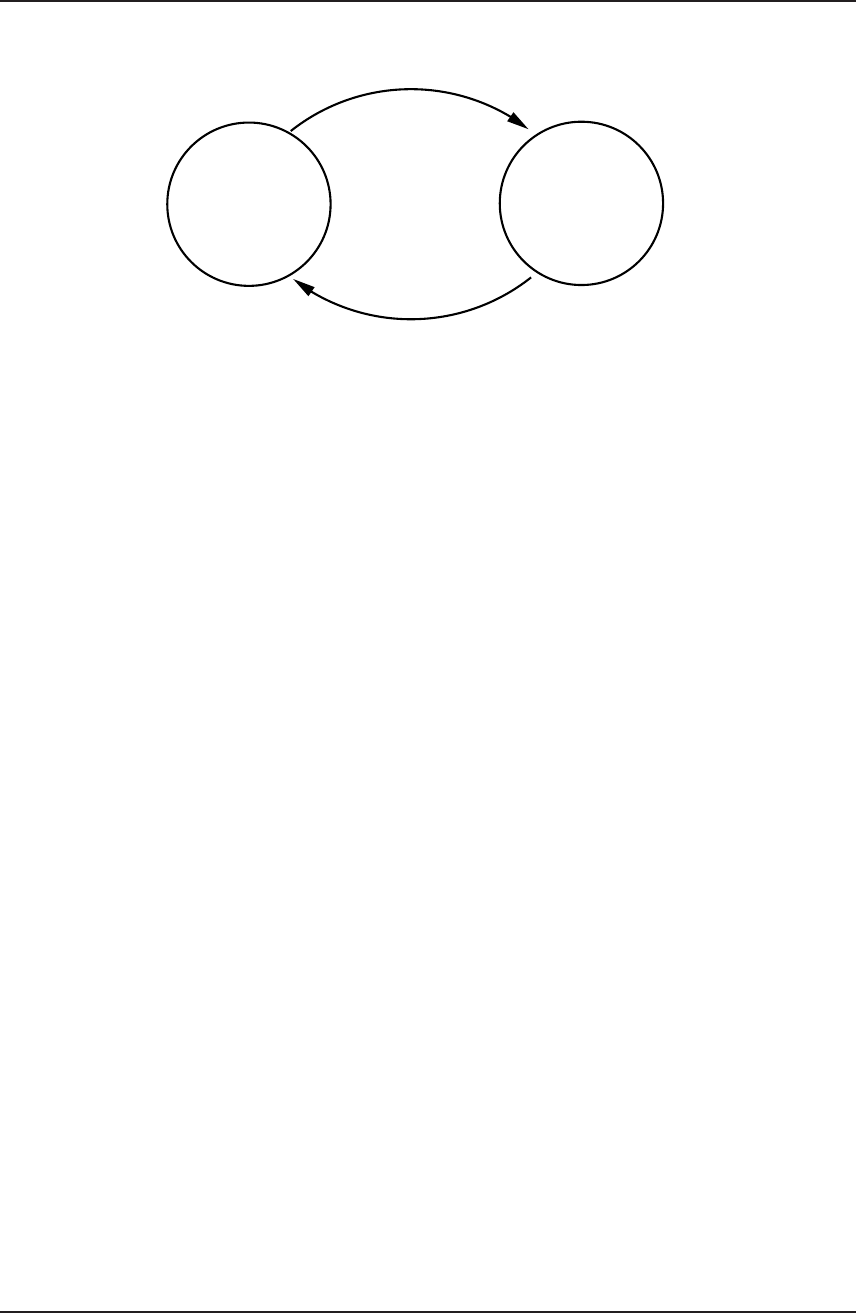
gPROMS System Programmer Guide
Re < 2100
f = ...
-1/2
f = 16/Re
Re >= 2100
Figure 6.2: STN for the Reynolds-number example.
•An end state, s′
•A logical condition.
If, at a certain point in time, a state sof the STN is active and the logical condition
associated with a transition (s, s′) becomes TRUE, then the transition (s, s′) takes place,
i.e. state sstops being active and state s′becomes active.
In the interests of simplicity, all STNs used for the purposes of CAPE-OPEN must
satisfy the following assumption:
•All equations and logical conditions are expressed in terms of (subsets of) the
same set of variables.
6.2.3.1 State-Transition Networks in gPROMS
The gPROMS modelling language enables the user to describe STNs using two mecha-
nisms. These are the IF/THEN/ELSE statements and the CASE construct. These mecha-
nisms are described fully in chapter 4of the “gPROMS Introductory User Guide”. The
example shown above can be modelled in gPROMS using either of the methods shown
below.
•Using IF/THEN/ELSE
IF ReynoldsNumber < 2100 THEN
FrictionFactor = 16 / ReynoldsNumber ;
ELSE
1 / SQRT(FrictionFactor) = - 4 * LOG10(
1.26/( ReynoldsNumber*SQRT(FrictionFactor) )
6.2. Description of discontinuous equations in ESOs 102

gPROMS System Programmer Guide
+ EddyDiffusivity/(3.7*Diameter) ) ;
END
•Using CASE
SELECTOR
FlowRegime AS (Laminar, Turbulent)
...
EQUATION
...
CASE FlowRegime OF
WHEN Laminar:
FrictionFactor = 16 / ReynoldsNumber ;
SWITCH TO Turbulent IF ReynoldsNumber >= 2100 ;
WHEN Turbulent:
1 / SQRT(FrictionFactor) = - 4 * LOG10(
1.26/( ReynoldsNumber*SQRT(FrictionFactor) )
+ EddyDiffusivity/(3.7*Diameter) ) ;
SWITCH TO Laminar IF ReynoldsNumber < 2100 ;
END
The two examples above illustrate that IF structures can only be used to model symmet-
ric transitions, whereas CASE structures can easily handle asymmetric and unidirectional
(simply by omitting the SWITCH TO statement for the appropriate state) transitions.
6.2.3.2 State-Transition Networks in ESOs
An ESO can contain one or more STNs. Thus, the complete set of equations describing
the ESO at any particular point in time comprises:
•the ESO’s own equations (i.e. excluding those in the STNs it contains);
•the equations in the active state of its constituent STNs.
Conversely, the equations associated with each state in an STN are themselves described
by an ESO. The relation between STNs and ESOs is, therefore, recursive. This allows
for the nesting of discontinuous equations to an arbitrary number of levels.
An underlying assumption is that an ESO and all the ESOs describing the states of
all STNs contained within it share the same set of variables. Albeit not necessary,
this assumption obviates the need for complex mapping mechanisms between different
variable sets; it also happens to be satisfied by most typical cases where descriptions of
discontinuous phenomena occur within process models.
6.2. Description of discontinuous equations in ESOs 103

gPROMS System Programmer Guide
6.2.4 The representation of logical conditions in STNs
A key issue in the representation of STNs is the representation of the logical conditions
that are associated with the transitions. In particular, it is important to identify the
amount and type of information that an STN object must provide to its clients regarding
these logical conditions. Clearly, such decisions depend crucially on the type of usage
that is envisaged for these STNs by, for instance, numerical solvers4.
It is important to understand that the above logical conditions may be quite complex.
For instance, a certain transition could be triggered by a logical condition of the form:
[x2
1+x2
2≥x2
3]∨ ¬[x2
1≤x2]∧[x2≥x3]
where, x1, x2and x3are real-valued variables, and the symbols ∨,∧and ¬denote the
OR,AND and NOT logical operators.
Most of the older numerical codes for the simulation and optimisation of processes
involving discontinuities required only the evaluation of complex logical expressions
such as the above for given values of the variables occurring in them. Consequently,
a simple interface that would return the value (TRUE or FALSE) of a specified logical
condition at the current values of the ESO’s variables would be sufficient in this case.
However, more modern solution methods derive their improved reliability and efficiency
from the availability of more information on each logical condition. For example, if the
above logical condition were to change value (from TRUE to FALSE, or vice-versa) at a
particular point in time, these methods would need to know exactly which of the three
logical subexpressions:
x2
1+x2
2≥x2
3, x2
1≤x2, x2≥x3
was the one that changed value, thereby causing the change in the value of the overall
logical expression. The solution method would also need to know other information on
this particular sub-expression, such as the set of variables that appear in it, and its
partial derivatives with respect to these variables.
The aim of Cape Open was to accommodate the requirements of the modern solution
methods without resulting in an excessively complex interface. This is particularly
important as simpler methods are still being used by many of the currently available
tools. As a compromise, the interface supports arbitrarily complex logical conditions
involving any combination of the ∨,∧and ¬operators while imposing the following
restriction:
4Already similar decisions have been made implicitly in the design of the basic ESO. In that case, it
was deemed appropriate that the ESO should provide numerical values for the residuals of its equations
and their partial derivatives, as well as information on the structure of these equations. On the other
hand, it was not thought necessary to provide information on the symbolic form of these equations.
6.2. Description of discontinuous equations in ESOs 104

gPROMS System Programmer Guide
•All lowest level logical sub-expressions in a logical expression are of the form:
xi≥0
where xiis any one of the variables occurring in the ESO.
This assumption is not actually as restrictive as it might first appear. For instance, the
logical condition shown above could be expressed as:
[[x4≥0] ∨¬[x5≥0]] ∧[x6≥0]
where we have introduced three new variables x4,x5and x6defined via the three
additional equations:
x4≡x2
1+x2
2−x2
3, x5≡ −x2
1+x2, x6≡x2−x3
The main advantage of introducing the above restriction is that it permits the repre-
sentation of any logical condition as a sequence of integer values. Such sequences have
the following semantics:
•Each positive integer value represents the lowest-level condition.
•Each negative integer value represents one of the three Boolean operators:
•-1 denotes AND (∧).
•-2 denotes OR (∨).
•-3 denotes NOT (¬).
•Prefix notation is used, allowing simple recursive evaluation.
Thus, consider the following examples:
•A sequence consisting of the single value (3) denotes the condition x3≥0.
•The sequence (-2, 1, -3, 2) denotes the condition (x1≥0) ∨ ¬(x2≥0) (i.e. “x1
non-negative or x2negative”).
•The condition [[x4≥0] ∨ ¬[x5≥0]] ∧[x6≥0] (see example above) becomes (-1,
-2, 4, -3, 5, 6).
The simple pseudo-code in Figure 6.3 illustrates how these sequences can be evaluated
by a simple recursive routine. The precondition is that the sequence of integers is stored
in a global array seq, and a global index at is initially set to the lower bound of seq.
Also, we assume that the current variable values are held in the global vector x.
6.2. Description of discontinuous equations in ESOs 105

gPROMS System Programmer Guide
Boolean function eval()
integer val; // a local variable.
val:=seq[at];
at:=at+1;
If val>0 THEN
Return (x[val]>=0);
Else
Case val:
-1: Return eval() AND eval();
-2: Return eval() OR eval();
-3: Return NOT eval();
End
End
End
Figure 6.3: Pseudo-code for the evaluation of logical conditions.
6.3 Interface definition
We now proceed to describe the interfaces to the Equation Set Objects in detail.
WARNING!
The interfaces described in this document are PSE’s internal development
originating from the proposed CAPEOPEN standard. To avoid confusion,
the names IGPAlgESO and IGPDiffAlgESO are used.
The major extensions are the introduction of the IVariableSet interface to
isolate methods related only to variables, and the “index set” technique
introduced for efficiency.
The description here omits some deprecated methods currently present in
the interfaces.
6.4 IGPAlgESO
Inherits from: ICapeUtilityComponent
This is the interface of the Algebraic Equation Set Object which represents a set of
non-linear algebraic equations of the form:
f(x) = 0.
In general, a set described by an ESO can be rectangular, i.e. the number of variables
does not have to be the same as the number of equations.
6.3. Interface definition 106

gPROMS System Programmer Guide
The variables in an ESO are characterised by their current values (that can be changed
via the provided interface), and also lower and upper bounds. Usually, these bounds
relate to the domain of definition of the equations5and/or physical reality6. For this
reason, any attempt to set one or more variables to values outside these bounds is
considered to be illegal and will, therefore, be rejected.
The equations in an ESO are assumed to be sparse, i.e. any given equation will involve
only a subset of the variables in the ESO. Consequently, only a (usually small) subset
of the partial derivatives ∂f /∂x will not be zero for any set of values of the variables
x. The sparsity pattern of the ESO refers to the number of such non-zero elements, and
the row, i(i.e. equation fi), and column, j(i.e. variable xj), to which each such non-
zero corresponds. The way in which information on this structure is defined is entirely
analogous to that for linear systems (cf. section 8.7).
The interface defined in this section provides mechanisms for obtaining information on
the current values and bounds of the variables x, as well as the sparsity pattern of
the ESO. It also allows modification of the variable values, and the computation of the
values (”residuals”) of the equations f(x) for the current values of xand of the non-zero
elements of the matrix ∂f /∂x (the so-called ”Jacobian” matrix).
Additionally, the concept of variable “properties” is introduced. These can be used
freely by client software to record string information associated with sets of variables.
The following pre-defined properties may also be used:
ASSIGN Variables present in the gPROMS ASSIGN section (which thus should not
be treated as unknowns by a solver) are marked with this property.
PARAM Variables marked with this property are identified as parameters for opti-
misation: sensitivities with respect to these variables are then available from the
ESO after integrations.
2ND ORDER PARAM Variables marked with this property are identified as second
order parameters for optimisation: second order sensitivities with respect to these
variables are then available from the ESO after integrations.
See the discussion of the ISensitivityStorage interface for details of the last two items
above.
As we have seen in section 6.2, an ESO may contain one or more state-transition net-
works (STNs). The equations in each state and the logical conditions associated with
each transition in these STNs are all expressed in terms of the ESO’s own set of variables
(see section 6.2.3.2).
Several of the methods provided by the ICapeNumericAlgebraicESO interface allow
access to information on an ESO’s equations (e.g. their number, residuals, Jacobian
5For instance, an equation involving a term √1−xis undefined for any value of variable xexceeding
unity; thus, xis subject to an upper bound of 1.
6For instance, variables representing molar fractions must stay between a lower bound of 0 and an
upper bound of 1.
6.4. IGPAlgESO 107

gPROMS System Programmer Guide
structure and values). It must be emphasised that, in all these cases, the information
provided pertains only to the equations that are contained directly within the ESO and
not those within any STNs that this ESO may contain.
Detailed information on the STNs within an ESO must, instead, be obtained via a dif-
ferent set of methods provided by interface ICapeNumericSTN (see section 6.6). For
this purpose, the ICapeNumericAlgebraicESO interface includes methods for determin-
ing the number of STNs present in an ESO as well as the ICapeNumericSTN interface
to each such STN.
Finally, we note that CAPE-OPEN does not define any standard mechanisms or inter-
faces for the construction of ESOs. These are left at the discretion of each implementor.
6.4.1 Methods relating to the ESO structure
IGPAlgESO::GetVariableSet
Description Gets the separate interface for information on variables in the ESO.
Arguments
In/Out Name Type Description
[return] IVariableSet The interface.
6.4. IGPAlgESO 108

gPROMS System Programmer Guide
IGPAlgESO::GetNumEqns
Description Gets the number of equations in the ESO. Note that this does not in-
clude any equations associated with the states in the state transition
networks (if present).
Arguments
In/Out Name Type Description
[out] NumEqns CapeLong The number of equations in the ESO (not
including any equations in any STNs con-
tained in the ESO).
[return] CapeError
IGPAlgESO::GetNumNonZeroes
Description Gets the number of structurally non-zero entries in the ESO’s Jaco-
bian matrix (∂f /∂x). Note that this does not include entries arising
from any equations associated with the states in the state transition
networks (if present).
Arguments
In/Out Name Type Description
[out] NumNonZeroes CapeLong The number of non-zeroes
[return] CapeError
6.4. IGPAlgESO 109

gPROMS System Programmer Guide
IGPAlgESO::GetJacobianStruct
Description Retrieves the sparsity pattern of the equation system contained in
an ESO. Note that this does not include entries arising from any
equations associated with the states in the state transition networks
(if present).
Note: the argument CanBeComputed(k) is used by the ESO to in-
dicate whether or not it is able to compute particular entries of
the Jacobian. A strictly positive value indicates that the ESO is
able to compute this particular derivative (see the GetJacobianValue
method).
Arguments
In/Out Name Type Description
[out] NonZeroes CapeLong The number of (structural) non-zeroes in
the matrix.
[out] RowNums CapeArrayLong The list of row numbers for each non-zero.
[out] ColNums CapeArrayLong The list of column numbers for each non-
zero.
[out] CanBe-
Computed
CapeArrayLongaSee Note above.
[return] CapeError
aAlthough a Boolean would suffice for this argument, a Long is used here to allow for possible future
refinement of the information conveyed.
IGPAlgESO::GetNumSTNs
Description Returns the number of state transition networks in the ESO.
Arguments
In/Out Name Type Description
[out] NoSTNs CapeLong The number of STNs.
[return] CapeError
6.4. IGPAlgESO 110

gPROMS System Programmer Guide
IGPAlgESO::GetListOfSTNsWithSwitches
Description Returns the indices of all STNs of the current ESO with active tran-
sition conditions (if any)
Arguments
In/Out Name Type Description
[out] STNList CapeArrayLong Indices of the STNs. Note: an
STN will appear in this list if ei-
ther its GetActiveTransitions method
will return a non-empty list or the
GetListOfSTNsWithSwitches method of
the ESO of its current state would return
a non-empty list. This recursive defini-
tion ensures that the presence of any ac-
tive transition can be detected with a sin-
gle call to the top level ESO.
[return] CapeError
6.4.2 Methods relating to the ESO variables
IVariableSet::GetNumVars
Description Gets the number of variables in the ESO.
Arguments
In/Out Name Type Description
[out] NumVars CapeLong The number of variables in the ESO.
[return] CapeError
6.4. IGPAlgESO 111

gPROMS System Programmer Guide
IVariableSet::GetVarNames
Description Gets the names of (a subset of) the variables in the ESO.
Arguments
In/Out Name Type Description
[in] VarNums CapeArrayLong The indices of the variables whose names
are required. Note: a zero-length list in-
dicates all of the variables in the ESO.
[out] VarNames CapeArrayString The names of the required variables.
[return] CapeError
IVariableSet::GetVarNums
Description Gets the indices of (a subset of) the variables in the ESO.
Arguments
In/Out Name Type Description
[in] VarNames CapeArrayString The names of the variables whose indices
are required.
[out] VarNums CapeArrayLong The indices of the required variables. For
incorrect names, zero is returned.
[return] CapeError
6.4. IGPAlgESO 112

gPROMS System Programmer Guide
IVariableSet::GetBounds
Description Gets the values of the lower and upper bounds of (a subset of) an
ESO’s variables.
Arguments
In/Out Name Type Description
[in] VarNums CapeArrayLong The indices of the variables whose bounds
are required. Note: a zero length list in-
dicates all the variables in the ESO.
[out] LowerBounds CapeArrayDouble The values of the lower bounds.
[out] UpperBounds CapeArrayDouble The values of the upper bounds.
[return] CapeError
IVariableSet::GetBoundsIS
Description Gets the values of the lower and upper bounds of a registered subset
of an ESO’s variables.
Arguments
In/Out Name Type Description
[in] indSet CapeLong The “handle” of the set of variables
whose bounds are required (see IVariable-
Set::RegisterIndexSet).
[out] LowerBounds CapeArrayDouble The values of the lower bounds.
[out] UpperBounds CapeArrayDouble The values of the upper bounds.
[return] CapeError
6.4. IGPAlgESO 113

gPROMS System Programmer Guide
IVariableSet::SetVariables
Description Sets the values of (a subset of) an ESO’s variables.
Arguments
In/Out Name Type Description
[in] VarNums CapeArrayLong The indices of the variables whose values
are to be set.
[in] Vals CapeArrayDouble The values of the variables.
[return] CapeError
IVariableSet::SetVariablesIS
Description Sets the values of a registered subset of an ESO’s variables.
Arguments
In/Out Name Type Description
[in] indSet CapeLong The “handle” of the set of variables
whose values are to be set (see IVariable-
Set::RegisterIndexSet).
[in] Vals CapeArrayDouble The values of the variables.
[return] CapeError
6.4. IGPAlgESO 114

gPROMS System Programmer Guide
IVariableSet::GetVariables
Description Gets the values of (a subset of) an ESO’s variables.
Arguments
In/Out Name Type Description
[in] VarNums CapeArrayLong The indices of the variables whose values
are required. Note: a zero length list in-
dicates all the variables in the ESO.
io Vals CapeArrayDouble The values of the variables.
[return] CapeError
IVariableSet::GetVariablesIS
Description Gets the values of a registered subset of an ESO’s variables.
Arguments
In/Out Name Type Description
[in] indSet CapeLong The “handle” of the set of variables
whose values are required (see IVariable-
Set::RegisterIndexSet).
[out] Vals CapeArrayDouble The values of the variables.
[return] CapeError
6.4. IGPAlgESO 115

gPROMS System Programmer Guide
IVariableSet::RegisterIndexSet
Description Records a set of variable indices in order to permit use of SetVari-
ablesIS, GetVariablesIS, and GetBoundsIS
Arguments
In/Out Name Type Description
[in] EltNums CapeLong The indices of the variables which we will
require access to.
[return] CapeLong The “handle” to be used on subsequent
calls to GetVariablesIS etc.
IVariableSet::UnregisterIndexSet
Description Informs the VariableSet that a registered set of variable indices will
no longer be required
Arguments
In/Out Name Type Description
[in] indSet CapeLong The “handle” of the registered set.
6.4. IGPAlgESO 116

gPROMS System Programmer Guide
IVariableSet::GetSensitivityStorage
Description Gets the separate interface for information on the sensitivities of
variables in the variable set.
Arguments
In/Out Name Type Description
[return] ISensitivityStorage The interface.
IVariableSet::SetVarProperty
Description Marks all variables in a list as having a given property.
Arguments
In/Out Name Type Description
[in] VarInds CapeArrayLong The indices.
[in] PropName CapeString The property.
IVariableSet::ClearVarProperty
Description Ensures that the listed variables do not have the given property.
Arguments
In/Out Name Type Description
[in] VarInds CapeArrayLong The indices.
[in] PropName CapeString The property.
6.4. IGPAlgESO 117

gPROMS System Programmer Guide
IVariableSet::GetVarsWithProperty
Description Gets a list of all variables marked as having a given property.
Arguments
In/Out Name Type Description
[in] PropName CapeString The property.
[out] VarInds CapeArrayLong The indices.
IVariableSet::GetNumVarsWithProperty
Description Gets the number of variables marked as having a given property.
Arguments
In/Out Name Type Description
[in] PropName CapeString The property.
[return] CapeLong The number.
IVariableSet::GetPropertiesOfVars
Description Gets a list of all the properties of each variable listed.
Arguments
In/Out Name Type Description
[in] VarInds CapeArrayLong The indices.
[out] PropLists CapeArrayArrayString
Array of lists of properties (one per vari-
able index).
6.4. IGPAlgESO 118

gPROMS System Programmer Guide
6.4.3 Methods for storage of sensitivities
ISensitivityStorage::SetVarSensitivities
Description Saves an array of sensitivity values
Arguments
In/Out Name Type Description
[in] VarSen CapeArrayDouble The sensitivity values ∂x
∂p , beginning with
every variable’s sensitivity to the first pa-
rameter, etc. Total length of the array
must be (length of x)×(number of param-
eters).
[return] CapeError
ISensitivityStorage::GetVarSensitivities
Description Gets the array of sensitivity values from the ESO
Arguments
In/Out Name Type Description
[out] VarSen CapeArrayDouble The sensitivity values, beginning with ev-
ery variable’s sensitivity to the first pa-
rameter, etc. Total length of the array
will be (length of x)×(number of param-
eters). Effect undefined if no prior call to
SetVarSensitivities.
[return] CapeError
6.4. IGPAlgESO 119

gPROMS System Programmer Guide
ISensitivityStorage::SetVar2ndOrderSensitivities
Description Saves an array of second order sensitivity values
Arguments
In/Out Name Type Description
[in] VarSen CapeArrayDouble The second order sensitivity values,
i.e. the sensitivity of ∂x
∂p to the sec-
ond order parameters q, in the order
∂2x1
∂p1∂q1... ∂2xN
∂p1∂q1,∂2x1
∂p2∂q1... ∂2xN
∂pn∂q1,... ∂2x1
∂p1∂q2...
Total length of the array must be (length
of x)×(number of parameters)×(number
of 2nd order parameters).
[return] CapeError
ISensitivityStorage::GetVar2ndOrderSensitivities
Description Gets the array of second order sensitivity values from the ESO
Arguments
In/Out Name Type Description
[out] VarSen CapeArrayDouble The sensitivity values, as above. Ef-
fect undefined if no prior call to
SetVar2ndOrderSensitivities.
[return] CapeError
6.4. IGPAlgESO 120

gPROMS System Programmer Guide
ISensitivityStorage::SetVar2ndOrderParamSensitivities
Description Saves an array of sensitivities to the second order parameters
Arguments
In/Out Name Type Description
[in] VarSen CapeArrayDouble The sensitivity values, i.e. the sensitivity
of xto the second order parameters q, in
the order ∂x1
∂q1...∂xN
∂q1,∂x1
∂q2...
Total length of the array must be (length
of x)×(number of 2nd order parameters).
[return] CapeError
ISensitivityStorage::GetVar2ndOrderParamSensitivities
Description Gets an array of sensitivities to the second order parameters
Arguments
In/Out Name Type Description
[out] VarSen CapeArrayDouble The sensitivity values, i.e. the sensi-
tivity of xto the second order parame-
ters q, the order ∂x1
∂q1...∂xN
∂q1,∂x1
∂q2... To-
tal length of the array will be (length
of x)×(number of 2nd order parame-
ters). Effect undefined if no prior call to
SetVar2ndOrderParamSensitivities
[return] CapeError
6.4. IGPAlgESO 121

gPROMS System Programmer Guide
ISensitivityStorage::SetDerivativesSensitivities
Description Saves an array of sensitivity values
Arguments
In/Out Name Type Description
[in] VarSen CapeArrayDouble The sensitivity values, beginning with
each time derivative’s sensitivity to the
first parameter, etc. Total length of the
array must be (length of x)×(number of
parameters).
[return] CapeError
ISensitivityStorage::GetDerivativesSensitivities
Description Gets the array of sensitivity values from the ESO
Arguments
In/Out Name Type Description
[out] VarSen CapeArrayDouble The sensitivity values, beginning with
each time derivative’s sensitivity to the
first parameter, etc. Total length of the
array will be (length of x)×(number of pa-
rameters). Effect undefined if no prior call
to SetDerivativesSensitivities.
[return] CapeError
6.4. IGPAlgESO 122

gPROMS System Programmer Guide
6.4.4 Methods relating to the ESO equations
IGPAlgESO::GetEqnNames
Description Gets the names of (a subset of) the equations in the ESO.
Arguments
In/Out Name Type Description
[in] EqnNums CapeArrayLong The indices of the equations whose names
are required. Note: a zero-length list in-
dicates all of the variables in the ESO.
[out] EqnNames CapeArrayString The names of the required equations.
[return] CapeError
IGPAlgESO::GetAllResiduals
Description Obtain the current values of the residuals of an ESO’s equations.
Note that this does not include any equations associated with the
states in the state transition networks (if present).
Arguments
In/Out Name Type Description
[out] Residuals CapeArrayDouble The residuals, i.e. the value of for each
included in EqnIndices, at the current set
of values of the variables x.
[return] CapeError
6.4. IGPAlgESO 123

gPROMS System Programmer Guide
IGPAlgESO::GetResiduals
Description Obtain the current values of the residuals of a subset of an ESO’s
equations. Note that this does not include any equations associated
with the states in the state transition networks (if present).
Arguments
In/Out Name Type Description
[in] EqnIndices CapeArrayLong The numbers of the equations whose resid-
uals are required.
[out] Residuals CapeArrayDouble The residuals, i.e. the value of for each
included in EqnIndices, at the current set
of values of the variables x.
[return] CapeError
IGPAlgESO::GetResidualsIS
Description Obtain the current values of the residuals of a registered subset of an
ESO’s equations. Note that this does not include any equations as-
sociated with the states in the state transition networks (if present).
Arguments
In/Out Name Type Description
[in] indSet CapeLong The “handle” of the set of equation num-
bers whose residuals are required, as re-
turned by RegisterEquationIndexSet
[out] Residuals CapeArrayDouble The residuals, i.e. the value of for each
included in EqnIndices, at the current set
of values of the variables x.
[return] CapeError
6.4. IGPAlgESO 124

gPROMS System Programmer Guide
IGPAlgESO::RegisterEquationIndexSet
Description Records a set of equation numbers in order to permit use of Ge-
tResidualsIS
Arguments
In/Out Name Type Description
[in] EqnNums CapeLong The indices of the residuals which we will
require.
[return] CapeLong The “handle” to be used on subsequent
calls to GetResidualsIS.
IGPAlgESO::UnregisterEquationIndexSet
Description Informs the ESO that a registered set of equation numbers will no
longer be required
Arguments
In/Out Name Type Description
[in] indSet CapeLong The “handle” of the registered set.
6.4. IGPAlgESO 125

gPROMS System Programmer Guide
6.4.5 Methods relating to the ESO STNs
IGPAlgESO::GetSTNNames
Description Returns the names of the state transition networks in the ESO.
Arguments
In/Out Name Type Description
[out] Names CapeArrayString The names of all STNs in the ESO.
[return] CapeError
IGPAlgESO::GetAllSTNs
Description Returns a sequence of interfaces corresponding to all the STNs in
the ESO.
Arguments
In/Out Name Type Description
[out] STNs CapeArrayInterface
(ICapeNumeric-
STN)
Interfaces to each requested STN.
[return] CapeError
6.4. IGPAlgESO 126

gPROMS System Programmer Guide
IGPAlgESO::GetSTNs
Description Returns a sequence of interfaces corresponding to requested STNs in
the ESO.
Arguments
In/Out Name Type Description
[in] STNIndices CapeArrayLong The indices of the STNs whose interfaces
are required.
[out] STNs CapeArrayInterface
(ICapeNumeric-
STN)
Interfaces to each requested STN.
[return] CapeError
6.4.6 Methods relating to rectangular ESOs
IGPAlgESO::GetAllJacobianValues
Description Gets the values of the structurally non-zero values of an ESO’s Ja-
cobian. Note that this does not include entries arising from any
additional equations associated with the states in the state transi-
tion networks (if present).
Note: for entries which were indicated by the GetJacobianStruct
method as “unavailable”, no error should arise, but the value re-
turned will be undefined.
Arguments
In/Out Name Type Description
[out] Vals CapeArrayDouble The non-zero values of the requested sub-
matrix of the Jacobian.
[return] CapeError
6.4. IGPAlgESO 127

gPROMS System Programmer Guide
IGPAlgESO::GetJacobianValues
Description Gets the values of a subset of the structurally non-zero values of
an ESO’s Jacobian. Note that this does not include entries arising
from any additional equations associated with the states in the state
transition networks (if present).
Note: for entries which were indicated by the GetJacobianStruct
method as “unavailable”, no error should arise, but the value re-
turned will be undefined.
Arguments
In/Out Name Type Description
[in] EltIndices CapeArrayLong The indices of the elements of the com-
plete structure which we require.
[out] Vals CapeArrayDouble The non-zero values of the requested sub-
matrix of the Jacobian.
[return] CapeError
6.4. IGPAlgESO 128

gPROMS System Programmer Guide
IGPAlgESO::GetJacobianValuesIS
Description Gets the values of a registered subset of the structurally non-zero
values of an ESO’s Jacobian. Note that this does not include entries
arising from any additional equations associated with the states in
the state transition networks (if present).
Note: for entries which were indicated by the GetJacobianStruct
method as “unavailable”, no error should arise, but the value re-
turned will be undefined.
Arguments
In/Out Name Type Description
[in] indSet CapeLong The “handle” of the subset of elements
requires (as returned by RegisterJaco-
bianIndexSet).
[out] Vals CapeArrayDouble The non-zero values of the requested sub-
matrix of the Jacobian.
[return] CapeError
IGPAlgESO::RegisterJacobianIndexSet
Description Records a set of Jacobian element indices in order to permit use of
GetJacobianValuesIS
Arguments
In/Out Name Type Description
[in] EltNums CapeLong The indices of the elements of the com-
plete structure which we will require.
[return] CapeLong The “handle” to be used on subsequent
calls to GetJacobianValuesIS.
6.4. IGPAlgESO 129

gPROMS System Programmer Guide
IGPAlgESO::UnregisterJacobianIndexSet
Description Informs the ESO that a registered set of Jacobian indices will no
longer be required
Arguments
In/Out Name Type Description
[in] indSet CapeLong The “handle” of the registered set.
6.4.7 General ESO methods
IGPAlgESO::Delete
Description Deletes the ESO.
6.5 IGPDiffAlgESO
Inherits from: IGPAlgESO
This is the interface of the Differential-Algebraic Equation Set Object which represents
a (generally rectangular) set of differential-algebraic equations of the form:
f(x, ˙x, t),
where tis the independent variable and x(t) is a vector of dependent variables. Also ˙x
denotes the derivatives df/dt. We note that, in general, the quantities will appear in
the system for only a subset of the dependent variables x. This subset of xare often
referred to as the “differential variables” while the rest are the “algebraic variables”. Of
course, all these variables are functions of the independent variable t.
It is worth clarifying the semantic interpretation of the methods that are inherited by
this interface from IGPAlgESO:
•GetNumVars must return the length of the vector x.
•GetBounds, SetVariables and GetVariables relate only to the vector x.
6.5. IGPDiffAlgESO 130

gPROMS System Programmer Guide
•All the methods associated with the Jacobian (GetNumNonZeroes, GetJacobianStruct
and GetJacobianValues) relate to ∂f /∂x.
•The equation residuals and Jacobian are evaluated at the current values of x, ˙x
and t.
•GetVariableSet returns an IVariableSet interface which can be narrowed to an ID-
ifferentialVariableSet in order to access the additional methods for time derivatives
(see below).
The methods defined in this section introduce equivalent functionality for accessing and
altering information pertaining to ˙x(via the IDifferentialVariableSet interface). They
also provide mechanisms for accessing and altering the value of the independent variable
t.
6.5.1 Methods relating to the ESO structure
IGPDiffAlgESO::GetNumDiffVars
Description Gets the number of differential variables in the ESO.
Arguments
In/Out Name Type Description
[out] NumDiffVar CapeLong The number of differential variables.
[return] CapeError
6.5. IGPDiffAlgESO 131

gPROMS System Programmer Guide
IGPDiffAlgESO::GetNumDiffNonZeroes
Description Gets the number of non-zero entries in the Jacobian of the ESO with
respect to ˙x. Note that this does not include entries arising from any
equations associated with any state transition network within this
ESO.
Arguments
In/Out Name Type Description
[out] NumNonZeroes CapeLong The number of non-zero elements of the
Jacobian.
[return] CapeError
IGPDiffAlgESO::GetDiffJacobianStruct
Description Retrieves the sparsity pattern of the Jacobian. Note that this does
not include entries arising from any equations associated with any
state-transition network within this ESO.
Note: CanBeComputed(k) is used to indicate whether or not the
ESO is able to compute particular entries of the Jacobian. A strictly
positive value indicates that the ESO is able to compute this partic-
ular entry (see the GetDiffJacobianValue method).
Arguments
In/Out Name Type Description
[out] NonZeroes CapeLong The number of (structural) non-zeroes in
the matrix.
[out] RowNums CapeArrayLong The list of row numbers for each non-zero.
[out] ColNums CapeArrayLong The list of column numbers for each non-
zero.
[out] CanBe-
Computed
CapeArrayLong See note above.
[return] CapeError
6.5. IGPDiffAlgESO 132

gPROMS System Programmer Guide
6.5.2 Methods relating to the ESO variables
IGPDiffAlgESO::GetDiffVarIndices
Description Gets the indices of the differential variables in the ESO.
Arguments
In/Out Name Type Description
[out] DiffVarIndices CapeArrayLong The indices of the differential variables.
[return] CapeError
IGPDiffAlgESO::GetIndependentVariable
Description Gets the current value of the independent variable tin an ESO.
Arguments
In/Out Name Type Description
[out] IndVarVal CapeDouble The current value of the independent vari-
able.
[return] CapeError
6.5. IGPDiffAlgESO 133

gPROMS System Programmer Guide
IGPDiffAlgESO::SetIndependentVariable
Description Sets the current value of the independent variable tin an ESO.
Arguments
In/Out Name Type Description
[in] IndVarVal CapeDouble The current value of the independent vari-
able.
[return] CapeError
6.5.3 Methods relating to the ESO derivatives
IDifferentialVariableSet::SetDerivatives
Description Sets the numerical values of (a subset of) an ESO’s ˙xterms.
Note: the ESO stores time derivatives for all variables, regardless
of whether these occur in the equations explicitly.
Arguments
In/Out Name Type Description
[in] VarNums CapeArrayLong The indices of the variables whose deriva-
tives are to be set.
[in] Vals CapeArrayDouble The values of the derivatives.
[return] CapeError
6.5. IGPDiffAlgESO 134

gPROMS System Programmer Guide
IDifferentialVariableSet::SetDerivativesIS
Description Sets the numerical values of a registered subset of an ESO’s ˙xterms.
Note: the ESO stores time derivatives for all variables, regardless of
whether these occur in the equations explicitly.
Arguments
In/Out Name Type Description
[in] indSet CapeLong The “handle” to the set of variables whose
derivatives are to be set (see IVariable-
Set::RegisterIndexSet)
[in] Vals CapeArrayDouble The values of the derivatives.
[return] CapeError
IDifferentialVariableSet::GetDerivatives
Description Gets the numerical values of (a subset of) an ESO’s ˙xterms. Note
however that passing index ito this method and SetDerivatives
refers to the derivative of xiw.r.t. the independent variable, and
not to “the ith element of xwhich has an ˙xterm appearing in the
equations”. This in fact places a requirement on the ESO to store a
time derivative for all elements of x.
Arguments
In/Out Name Type Description
[in] VarNums CapeArrayLong The indices of the variables whose deriva-
tives are required. Note: a zero-length list
indicates that values should be returned
for all entries.
[out] Vals CapeArrayDouble The values of the derivatives.
[return] CapeError
6.5. IGPDiffAlgESO 135

gPROMS System Programmer Guide
IDifferentialVariableSet::GetDerivativesIS
Description Gets the derivatives of a registered subset of an ESO’s variables.
Arguments
In/Out Name Type Description
[in] indSet CapeLong The “handle” of the set of variables whose
derivatives are required (see IVariable-
Set::RegisterIndexSet).
[out] Vals CapeArrayDouble The values of the time derivatives.
[return] CapeError
IGPDiffAlgESO::GetAllDiffJacobianValues
Description Gets the values of the (structurally) non-zero elements of an ESO’s
Jacobian with respect to ˙x. Note that this does not include entries
arising from any equations associated with any state transition net-
work within this ESO.
Note: For entries which were indicated by the GetDiffJacobianStruct
method as “unavailable”, no error should arise, but the value re-
turned will be undefined.
Arguments
In/Out Name Type Description
[out] Vals CapeArrayDouble The non-zero values of the requested sub-
matrix of the Jacobian.
[return] CapeError
6.5. IGPDiffAlgESO 136

gPROMS System Programmer Guide
IGPDiffAlgESO::GetDiffJacobianValues
Description Gets the values of a subset of the (structurally) non-zero elements
of an ESO’s Jacobian with respect to ˙x. Note that this does not
include entries arising from any equations associated with any state
transition network within this ESO.
Note: For entries which were indicated by the GetDiffJacobianStruct
method as “unavailable”, no error should arise, but the value re-
turned will be undefined.
Arguments
In/Out Name Type Description
[in] EltNums CapeArrayLong The indices of the elements of the com-
plete structure that is required.
[out] Vals CapeArrayDouble The non-zero values of the requested sub-
matrix of the Jacobian.
[return] CapeError
6.5. IGPDiffAlgESO 137

gPROMS System Programmer Guide
IGPDiffAlgESO::GetDiffJacobianValuesIS
Description Gets the values of a registered subset of the structurally non-zero
values of an ESO’s Jacobian wrt ˙x. Note that this does not include
entries arising from any additional equations associated with the
states in the state transition networks (if present).
Note: for entries which were indicated by the GetDiffJacobianStruct
method as “unavailable”, no error should arise, but the value re-
turned will be undefined.
Arguments
In/Out Name Type Description
[in] indSet CapeLong The “handle” of the subset of elements
requires (as returned by RegisterDiffJaco-
bianIndexSet).
[out] Vals CapeArrayDouble The non-zero values of the requested sub-
matrix of the Jacobian.
[return] CapeError
IGPAlgESO::RegisterDiffJacobianIndexSet
Description Records a set of Jacobian element indices in order to permit use of
GetDiffJacobianValuesIS
Arguments
In/Out Name Type Description
[in] EltNums CapeLong The indices of the elements of the com-
plete structure which we will require.
[return] CapeLong The “handle” to be used on subsequent
calls to GetDiffJacobianValuesIS.
6.5. IGPDiffAlgESO 138

gPROMS System Programmer Guide
IGPAlgESO::UnregisterDiffJacobianIndexSet
Description Informs the ESO that a registered set of differential Jacobian indices
will no longer be required
Arguments
In/Out Name Type Description
[in] indSet CapeLong The “handle” of the registered set.
6.6 ICapeNumericSTN
The concept of a State-Transition Network (STN) as a means of representing discontinu-
ous process behaviour was introduced in section 6.2.3. The ICapeNumericSTN interface
described in this section allows access to the information defining the structure of a cer-
tain STN, including:
•The names of all states in the STN.
•The transitions that are possible from each state.
•The logical conditions that trigger each transition.
•The subESO corresponding to a specific state.
•Indication of which transitions are active.
It also allows access to an ESO that contains the equations that are associated with
each state. This access is provided by an appropriate ESO interface (see sections 6.4
and 6.5).
6.6. ICapeNumericSTN 139

gPROMS System Programmer Guide
ICapeNumericSTN::GetStateList
Description Returns the names of all the distinct states in the network.
Arguments
In/Out Name Type Description
[out] StateList CapeArrayString The state names.
[return] CapeError
ICapeNumericSTN::GetCurrentState
Description Gets the active stated in the STN
Arguments
In/Out Name Type Description
[out] StateName CapeString The name of the active state.
[return] CapeError
ICapeNumericSTN::SetCurrentState
Description Sets the active stated in the STN
Arguments
In/Out Name Type Description
[in] StateName CapeString The name of the state to become active.
[return] CapeError
6.6. ICapeNumericSTN 140

gPROMS System Programmer Guide
ICapeNumericSTN::GetPossibleTransitions
Description Returns the names of the states which can be reached from a speci-
fied state of the network, together with the logical conditions which
control each transition.
The conditions are represented by sequences of CapeLong values: see
Section 6.2 for an explanation of this representation.
Arguments
In/Out Name Type Description
[in] FromState CapeString The state name.
[out] ToStates CapeArrayString The states that can be reached from From-
State.
[out] Condition-
Structs
CapeArrayLong For the ith entry in ToStates, Condition-
Structs will contain a sequence of Long
values defining the condition for transition
to that state from FromState.
[return] CapeError
6.6. ICapeNumericSTN 141

gPROMS System Programmer Guide
ICapeNumericSTN::GetActiveTransitions
Description Returns the names of the states which can be reached from the cur-
rent state and for which with the current variable values, the condi-
tion for transition to that state is true. For each such state, it also
returns an integer indication of the “strength” of the condition, and
the logical condition itself.
The conditions are represented by sequences of CapeLong values: see
Section 6.2 for an explanation of this representation.
Arguments
In/Out Name Type Description
[out] ToStates CapeArrayString The states for which the transition condi-
tions are active.
FromState.
[out] Strengths CapeArrayLong If the condition for transition to the ith
entry in ToStates is xk≥0, the ith entry
of Strengths will be 1 if xk= 0 (to machine
precision), 2 if 0 < xk<10−6or 4 if xk>
10−6. For more complex conditions, the
strength of the weakest element is given.
[out] Condition-
Structs
CapeArrayLong For the ith entry in ToStates, Condition-
Structs will contain a sequence of Long
values defining the condition for transition
to that state from the current state.
[return] CapeError
6.6. ICapeNumericSTN 142

gPROMS System Programmer Guide
ICapeNumericSTN::GetStateESO
Description Returns the ESO representing the equations which apply if a speci-
fied state is active.
Arguments
In/Out Name Type Description
[in] State CapeString The name of the state of interest.
[out] ESO CapeInterface
(IGPAlgESO)a
The set of equations corresponding to this
state.
[return] CapeError
aThe “expected type” is given here as AlgebraicESO, because the client software (most likely a
solver) can be confident that the ESO will support this interface. It should check whether the returned
ESO includes differential variables by:
•COM—calling queryinterface(IGPDiffAlgESO) on ESO.
•CORBA—calling IGPDiffAlgESO:: narrow on ESO.
6.6. ICapeNumericSTN 143

gPROMS System Programmer Guide
Chapter 7
The gPROMS Dynamic
Optimisation Object
Contents
7.1 The dynamic optimisation problem in gPROMS ....... 146
7.2 The gPROMS Dynamic Optimisation Object ........ 148
7.3 Functional specification of the gDOO ............. 149
7.3.1 The Equation Set Object . . . . . . . . . . . . . . . . . . . . . 149
7.3.2 The initial conditions . . . . . . . . . . . . . . . . . . . . . . . 150
7.3.3 The time horizon and its partitioning . . . . . . . . . . . . . . 150
7.3.4 Partitioning of the ESO variables . . . . . . . . . . . . . . . . . 151
7.3.5 The objective function . . . . . . . . . . . . . . . . . . . . . . . 152
7.3.6 Interior point constraints . . . . . . . . . . . . . . . . . . . . . 152
7.3.7 End-point constraints . . . . . . . . . . . . . . . . . . . . . . . 152
7.3.8 The gDOO status . . . . . . . . . . . . . . . . . . . . . . . . . 153
7.4 Auxiliary interfaces ........................ 154
7.4.1 The IBoundedQuantity interface . . . . . . . . . . . . . . . . . 154
7.4.2 The IBoundedQuantityArray interface . . . . . . . . . . . . . 159
7.4.3 The IIndexedBoundedQuantity interface . . . . . . . . . . . . 161
7.5 The IgDOO interface ........................ 163
7.5.1 Methods relating to the ESO . . . . . . . . . . . . . . . . . . . 163
7.5.2 Methods relating to the initial conditions . . . . . . . . . . . . 165
7.5.3 Methods relating to the time horizon and its partitioning . . . 166
7.5.4 Methods relating to the control variables . . . . . . . . . . . . 168
7.5.5 Methods relating to the time-invariant parameters . . . . . . . 173
7.5.6 Methods relating to the fixed variables . . . . . . . . . . . . . . 175
7.5.7 Methods relating to the objective function . . . . . . . . . . . . 175
7.5.8 Methods relating to the interior point constraints . . . . . . . . 177
144

gPROMS System Programmer Guide
7.5.9 Methods relating to the end-point constraints . . . . . . . . . . 179
7.5.10 Methods relating to the gDOO status . . . . . . . . . . . . . . 181
7.5.11 Methods relating to the optimisation type . . . . . . . . . . . . 182
7.5.12 Methods relating to the availability of lagrange multipliers . . . 183
7.6 CORBA Interface Definitions .................. 184
7.6.1 gDOO.idl . . . . . . . . . . . . . . . . . . . . . . . . . . . . . . 184
7.6.2 BoundedQuantity.idl . . . . . . . . . . . . . . . . . . . . . . . . 187
7.6.3 ControlVariable.idl . . . . . . . . . . . . . . . . . . . . . . . . . 190
7.6.4 InteriorPointConstraint.idl . . . . . . . . . . . . . . . . . . . . 191
7.6.5 EndpointConstraint.idl . . . . . . . . . . . . . . . . . . . . . . . 193
7.6.6 general.idl . . . . . . . . . . . . . . . . . . . . . . . . . . . . . . 194
145

gPROMS System Programmer Guide
7.1 The dynamic optimisation problem in gPROMS
Dynamic optimisation in gPROMS considers transient systems operating over a fi-
nite non-zero time horizon [0, T ]. The latter is partitioned into Knon-zero intervals
[tk, tk+1], k = 0, .., K −1 such that t0≡0 and tK≡T1.
The mathematical problem being solved by gPROMS is of the form:
min
T,v,{τk,αk,k=0,..,K−1}zi⋆(T) (7.1)
subject to:
F(t, x(t),˙x(t), y(t), u(t), v) = 0,∀t∈[0, T ] (7.2)
zi(0) = z0
i,∀i∈ I (7.3)
zk,min
i≤zi(tk)≤zk,max
i,∀i∈ C, k = 0, .., K −1 (7.4)
zK,min
i≤zi(T)≤zK,max
i,∀i∈ E (7.5)
u(t) = U(t, αk),∀t∈[tk, tk+1), k = 0, .., K −1 (7.6)
uk,min ≤u(t)≤uk,max,∀t∈[tk, tk+1), k = 0, .., K −1 (7.7)
vmin ≤v≤vmax (7.8)
τk,min ≤τk≤τk,max,∀t∈[tk, tk+1), k = 0, .., K −1 (7.9)
Tmin ≤T≤Tmax (7.10)
where:
τk≡tk+1 −tk,∀k= 0, .., K −1 (7.11)
1In this section, subscripts generally denote elements of a vector while superscripts are used to denote
symbols associated with a point in the time domain partition grid.
7.1. The dynamic optimisation problem in gPROMS 146

gPROMS System Programmer Guide
and therefore:
T=
K−1
X
k=0
τk(7.12)
The dynamic behaviour of the system is described by a system of differential and al-
gebraic equations (DAEs) (cf. equation 7.2). These involve the independent variable t,
differential variables x(t)∈Ωx⊆IRnx, the algebraic variables y(t)∈Ωy⊆IRny, the
control variables u(t)∈Ωu⊆IRnu, the time-invariant parameters v∈Ωv⊆IRnv, as
well as the derivatives of xwith respect to time, ˙x. The functions Fare a vector of
length nx+ny,i.e. F: [0, T ]×Ωx×IRnx×Ωy×Ωu×Ωv→IRnx+ny.
The vector zsimply denotes the combination of xand y,i.e.:
{z} ≡ {x} ∪ {y}(7.13)
The indices of the differential variables xand algebraic variables ywithin the vector z
are given by the index sets Dand Arespectively, i.e.:
D ∪ A ={1, .., nx+ny};D ∩ A =∅(7.14)
The objective function to be minimised (or maximised) is the value of the i⋆th element
of z(cf. equation 7.1) at the final time T.
The initial condition of the system is specified in terms of given values z0
iof a subset
of the variables zdefined by the index set I ⊆ {1, .., nx+ny}. It is assumed that the
DAE system 7.2 is of index 1 and such that the matrix:
∂F
∂˙x
∂F
∂y (7.15)
is non-singular. Therefore, the number of initial condition specifications is equal to the
number of differential variables, i.e.:
|I| =nx(7.16)
The optimisation may be subject to various interior point and end-point constraints (cf.
equations 7.4 and 7.5 respectively). These two classes are expressed as lower and upper
bounds imposed on subsets Cand Eof the variables z. Again, C,E ⊆ {1, .., nx+ny}
The control variables u(t) in each interval kare restricted to parameterised functions
Uof time tand a finite vector of parameters αk(cf. equation 7.6). Different types of
7.1. The dynamic optimisation problem in gPROMS 147

gPROMS System Programmer Guide
parameterisation may be used for different control variables2. The latter are restricted
to lie between specified lower and upper bounds (cf. equation 7.7).
Lower and upper bounds are also imposed on the time-invariant parameters v, the
lengths of the intervals τkand the overall time horizon T(cf. equations 7.8,7.9 and
7.10).
7.2 The gPROMS Dynamic Optimisation Object
A gPROMS Dynamic Optimisation Object (gDOO) contains information on:
•the specification of a nonlinear dynamic optimisation problem of the form de-
scribed in section 7.1;
•the solution of the optimisation problem.
Thus a gDOO is the primary means of communication between gPROMS and dynamic
optimisation solvers—both native and external. More specifically, a “typical” sequence
of operations will be as follows:
1. User selects a PROCESS in the gPROMS ModelBuilder, and selects Optimise. . .
from the Activities menu.
2. gPROMS constructs a new gDOO.
3. gPROMS places in the gDOO all the relevant information defining the optimisa-
tion problem.
4. gPROMS passes the gDOO to a dynamic optimisation solver.
5. The dynamic optimisation solver solves the problem described in the gDOO.
6. The dynamic optimisation solver places the problem solution in the gDOO.
7. gPROMS retrieves the solution from the gDOO and transmits the results to an
appropriate Output Channel.
Steps 4–6above involve the dynamic optimisation solver. The interface that allows
gPROMS to communicate with this type of software is described in detail in chapter 9.
In this section, we present an interface to the gDOO aimed at supporting the operations
described above as well as other related ones.
2At present, gPROMS supports only piecewise constant and piecewise linear parameterisations.
7.2. The gPROMS Dynamic Optimisation Object 148

gPROMS System Programmer Guide
7.3 Functional specification of the gDOO
The gDOO comprises a set of data and operations that define the dynamic optimisation
problem and allow various types of information about it to be obtained. These are
described below.
7.3.1 The Equation Set Object
A key component of the gDOO is the set of variables and equations that describe the
transient behaviour of the system to be optimised. This is described in terms of a
differential-algebraic Equation Set Object (ESO) (see chapter 6for details).
The ESO used in the gDOO describes a DAE system of the form:
F(ζ, ˙
ζ, t) = 0,(7.17)
where ζ(t) is the set of all variables in the gPROMS PROCESS under consideration:
{ζ} ≡ {x} ∪ {y} ∪ {u} ∪ {v} ∪{w}(7.18)
The set of variables w(t) comprises those that are not to be manipulated by the op-
timisation. Instead, they are given values of time (or constant). In gPROMS terms,
these include the variables that are ASSIGNed but are neither control variables nor time-
invariant parameters3The ESO internally contains values of the independent variable t
and all dependent variables ζ(t) as well as their time derivatives ˙
ζ(t)4. It also provides
methods for accessing and changing these values, and for computing the correspond-
ing values of the functions Fand the partial derivatives ∂F/∂ζ and ∂F/∂ ˙
ζ. Other
information available include:
•the system size in terms of the numbers of variables ζand equations F(.);
•the lower and upper bounds for the variables as specified in the gPROMS DECLARE
and PRESET sections;
•the sparsity structures of the ∂F/∂ζ and ∂F/∂ ˙
ζmatrices.
The ESO is a fundamental part of the gDOO. This means that the ESO to be used
in a certain gDOO is specified at the time that the gDOO is created and cannot be
replaced by another ESO at a later stage. This restriction is introduced because most
3In some cases, wmay also include control variables, the time variation of which is completely fixed
in the optimisation entity by specifying identical lower and upper bounds on their parameterisations in
each and every control interval.
4Note that ESOs created by gPROMS never involve directly the independent variable t.
7.3. Functional specification of the gDOO 149

gPROMS System Programmer Guide
other information in a gDOO refers to the ESO and is defined in relation to it5; conse-
quently, permitting the replacement of the ESO in a gDOO by another ESO may create
inconsistencies in existing data.
7.3.2 The initial conditions
The gDOO contains a number of initial condition specifications, each of which is gen-
erally characterised by:
•the index of the corresponding variable in the vector ζ(cf. equation 7.18);
•its value of the corresponding variable at the start of the optimisation;
•its value of the corresponding variable at the end of the optimisation;
•its lower and upper bounds on the corresponding variable;
•the Lagrange multipliers associated with the lower and upper bound constraints
at the end of the optimisation.
Clearly, some of the above information is not relevant if the initial condition involves
fixing a particular element of vector ζat a specified value.
7.3.3 The time horizon and its partitioning
The gDOO is characterised by the number of control intervals, K. In addition, it
contains the following information concerning the time horizon, T, and each of the
control interval lengths τk, k = 0.., K −16:
•the value at the start of the optimisation;
•the value at the end of the optimisation7;
•the lower and upper bounds;
•the Lagrange multipliers associated with the lower and upper bound constraints
at the end of the optimisation.
5For example, all variables and constraints known to the optimisation, as well as the objective
function itself, are defined in terms of their indices in the ESO variable vector.
6Obviously, information pertaining to the solution of an optimisation problem (e.g. the final values
of variables, or the Lagrange multipliers associated with various constraints) will not be available before
an optimisation calculation is actually attempted using the gDOO under consideration.
7A gDOO may be used for a sequence of optimisation calculations. In this chapter, the term “start
(or end) of the optimisation” will always refer to the last optimisation calculation applied to the gDOO.
7.3. Functional specification of the gDOO 150

gPROMS System Programmer Guide
7.3.4 Partitioning of the ESO variables
The information described in section 7.3.1 is already made available by the ESO inter-
face. Additionally, the gDOO contains information on the partitioning of the variable
set ζinto x,y,u,vand w. It also contains other relevant information on the variables
in each of these categories and also supports appropriate operations pertaining to these
variables:
7.3.4.1 The control variables, u
For each control variable u, the gDOO contains the following information:
•the index of the corresponding variable in the vector ζ(cf. equation 7.18);
•the type of parameterisation applied to this control variable;
•for the control parameters αkcorresponding to this control variable in each control
interval k= 0, .., K −1:
–their values at the start of the optimisation;
–their values at the end of the optimisation;
–their lower and upper bounds (cf. equation 7.7)
–the Lagrange multipliers associated with the lower and upper bound con-
straints at the end of the optimisation.
The gDOO can also compute and provide the value of each control variable uat the
current value of the independent variable tusing the parameterisation given by equa-
tion (7.6), as well as the values of the partial derivatives ∂U/∂α and ∂U/∂t.
7.3.4.2 The time-invariant parameters, v
For each time-invariant parameter v, the gDOO contains the following information:
•the index of the corresponding variable in the vector ζ(cf. equation 7.18);
•its value at the start of the optimisation;
•its value at the end of the optimisation;
•its lower and upper bounds (cf. equation 7.8);
•the Lagrange multipliers associated with the lower and upper bound constraints
at the end of the optimisation.
7.3. Functional specification of the gDOO 151

gPROMS System Programmer Guide
7.3.4.3 The fixed variables, w
The gDOO allows an external program to request that the values of the fixed variables w
within the ESO are made consistent with the current value of the independent variable
t.
7.3.5 The objective function
The objective function is associated with the following information:
•the index of the corresponding variable in the vector ζ(cf. equation 7.18);
•the value of the objective function at the start of the optimisation;
•the value of the objective function at the end of the optimisation.
7.3.6 Interior point constraints
For each interior point constraint (cf. equation 7.4), the gDOO contains the following
information:
•the index of the corresponding variable in the vector ζ(cf. equation 7.18);
•the following information on the corresponding variable at each point k= 0, .., K−
1,
–its value at the start of the optimisation;
–its value at the end of the optimisation;
–its lower and upper bounds;
–the Lagrange multipliers associated with the lower and upper bound con-
straints at the end of the optimisation.
7.3.7 End-point constraints
For each end-point constraint (cf. equation 7.5), the gDOO contains the following in-
formation:
•the index of the corresponding variable in the vector ζ(cf. equation 7.18);
•its value of the corresponding variable at the start of the optimisation;
•its value of the corresponding variable at the end of the optimisation;
7.3. Functional specification of the gDOO 152

gPROMS System Programmer Guide
•its lower and upper bounds on the corresponding variable;
•the Lagrange multipliers associated with the lower and upper bound constraints
at the end of the optimisation.
7.3.8 The gDOO status
Most applications will employ the gDOO in a straightforward “linear” manner of the
type described in the introduction to section 7.2. However, in some cases, it may be
necessary to support a more complex pattern of usage whereby a gDOO is formed,
then used to solve a problem, then modified in a certain way before being used to solve
another problem, and so on.
In order to facilitate such applications, the gDOO is always aware of its current status.
It also allows external software access to this status. Valid values of a gDOO’s status
include:
•EmptygDOO: a newly created gDOO with no information other than the ESO used
to create it (cf. section 7.3.1).
•IncompletegDOO: a gDOO that contains some information (beyond its ESO) but
it is not yet complete (see below).
•CompletegDOO: a gDOO that contains sufficient information to define a complete
dynamic optimisation problem, solution of which, however, has not yet been at-
tempted. In practice, this information must, at a minimum, involve all of the
following:
–the objective function;
–the time horizon information;
–variable partitioning information such that:
dim(x) + dim(y) = dim(F) (7.19)
–at least one time-invariant parameter or control variable;
•SolvedgDOO This is a complete gDOO that has been solved successfully by a
dynamic optimisation solver.
•FailedgDOO This is a complete gDOO, the attempted solution of which by a
dynamic optimisation solver has failed.
Any modification of the information in a gDOO in whatever state changes its status to
either IncompletegDOO or CompletegDOO.
7.3. Functional specification of the gDOO 153

gPROMS System Programmer Guide
7.4 Auxiliary interfaces
Much of the information contained within a gDOO shares common characteristics. For
example, many quantities are restricted to lie between given lower and upper bounds;
several other quantities are indexed over the number of intervals, k= 0, .., K −1.
The auxiliary interfaces defined in this section aim at facilitating the handling of such
information in a uniform manner.
7.4.1 The IBoundedQuantity interface
As seen in section 7.3, a common type of information in gDOO is a quantity, typically
corresponding either to an optimisation decision variable or a constraint, that is bounded
between given lower and upper bounds. In addition to the values of these bounds, gDOO
also generally contains the values of the quantity itself at the start and at the end of an
optimisation calculation, as well as appropriate Lagrange multiplier information.
The IBoundedQuantity interface specifically aims at managing this frequently occurring
type of information, providing a set of methods for both accessing and modifying it.
IBoundedQuantity::SetBounds
Description Sets the values of the lower and upper bounds of the bounded quan-
tity or modifies their existing values.
Arguments
In/Out Name Type Description
[in] lowerBound double The new value of the lower bound.
[in] upperBound double The new value of the upper bound.
7.4. Auxiliary interfaces 154

gPROMS System Programmer Guide
IBoundedQuantity::SetValueAtStart
Description Sets the value of the bounded quantity at the start of the optimisa-
tion calculation.
Arguments
In/Out Name Type Description
[in] startingValue double The new starting value.
IBoundedQuantity::SetValueAtEnd
Description Sets the value of the bounded quantity at the end of the last opti-
misation calculation.
Arguments
In/Out Name Type Description
[in] endValue double The new end value.
7.4. Auxiliary interfaces 155

gPROMS System Programmer Guide
IBoundedQuantity::SetLagrangeMultipliers
Description Sets the values of the Lagrange multipliers corresponding to the lower
and upper bounds at the end of the last optimisation calculation.
Arguments
In/Out Name Type Description
[in] LBLagrange double The new value of the Lagrange multiplier
associated with the lower bound imposed
on the bounded quantity.
[in] UBLagrange double The new value of the Lagrange multiplier
associated with the upper bound imposed
on the bounded quantity.
IBoundedQuantity::GetBounds
Description Obtains the current values of the lower and upper bounds of the
bounded quantity.
Arguments
In/Out Name Type Description
[out] lowerBound double The current value of the lower bound.
[out] upperBound double The current value of the upper bound.
7.4. Auxiliary interfaces 156

gPROMS System Programmer Guide
IBoundedQuantity::GetValueAtStart
Description Gets the value of the bounded quantity at the start of the optimisa-
tion calculation.
Arguments
In/Out Name Type Description
[return] startingValue double The current starting value.
IBoundedQuantity::GetValueAtEnd
Description Gets the value of the bounded quantity at the end of the last opti-
misation calculation.
Arguments
In/Out Name Type Description
[return] endValue double The current end value.
7.4. Auxiliary interfaces 157

gPROMS System Programmer Guide
IBoundedQuantity::GetLagrangeMultipliers
Description Gets the values of the Lagrange multipliers corresponding to the
lower and upper bounds at the end of the last optimisation calcula-
tion.
Arguments
In/Out Name Type Description
[out] LBLagrange double The current value of the Lagrange multi-
plier associated with the lower bound im-
posed on the bounded quantity.
[out] UBLagrange double The current value of the Lagrange multi-
plier associated with the upper bound im-
posed on the bounded quantity.
IBoundedQuantity::IsFullySpecified
Description Returns TRUE if both the lower and upper bounds of the bounded
quantity, as well as its value at the start of the optimisation have
been specified; otherwise it returns FALSE.
IBoundedQuantity::IsFixed
Description Returns TRUE if the lower and upper bounds of the bounded quan-
tity have both been specified and currently have the same value;
otherwise it returns FALSE.
IBoundedQuantity::Destroy
Description Destroys the IBoundedQuantity interface.
7.4. Auxiliary interfaces 158

gPROMS System Programmer Guide
7.4.2 The IBoundedQuantityArray interface
Some information occurring in the gDOO involves ordered arrays of either single bounded
quantities (cf. section 7.4.1) or vectors of bounded quantities. Such information includes
the control interval lengths, the interior point constraints and the parameters that de-
scribe individual control variables.
The IBoundedQuantityArray interface aims at facilitating the handling of such infor-
mation in a uniform manner. The array is empty on creation. Elements can then be
created within it at specified positions; in general, each element can be a vector of
bounded quantities. The length of this vector must be specified on creation. Specifying
a length of 1 effectively results in the element of the list being a scalar.
IBoundedQuantityArray::GetNumberOfElements
Description Gets the number of bounded quantities in the bounded quantity
array.
Arguments
In/Out Name Type Description
[return] numberOf-
Elements
long The number of elements in the bounded
quantity array.
IBoundedQuantityArray::IsFullySpecified
Description Returns TRUE if both the lower and upper bounds of each and every
element of the bounded quantity array, as well as their values at the
start of the optimisation have been specified; otherwise it returns
FALSE.
The following methods allow access to, and the manipulation of, individual elements
of a bounded quantity array. Elements are specified by their position in the array, a
number ranging from 0 to numberOfElements - 1.
7.4. Auxiliary interfaces 159

gPROMS System Programmer Guide
IBoundedQuantityArray::GetElement
Description Gets the bounded quantity at a specified position in the bounded
quantity array.
Arguments
In/Out Name Type Description
[in] pos long The position of the desired bounded quan-
tity.
[return] BQList IBounded-
QuantityList
The list of bounded quantities at the spec-
ified position.
IBoundedQuantityArray::CreateElement
Description Creates a new list of bounded quantities of specified length at a spec-
ified position in the bounded quantity array and returns an interface
to it. If an element already exists at this position, an exception is
thrown.
Arguments
In/Out Name Type Description
[in] pos long The position where the new bounded
quantity should be inserted.
[in] size long The size of the list.
[return] BQList IBounded-
QuantityList
An interface to the newly created list of
bounded quantities.
7.4. Auxiliary interfaces 160

gPROMS System Programmer Guide
IBoundedQuantityArray::CreateElementAtEnd
Description Creates a new list of bounded quantities of specified length at the
end the bounded quantity array and returns an interface to it.
Arguments
In/Out Name Type Description
[in] size long The size of the list.
[return] BQList IBounded-
QuantityList
An interface to the newly created list of
bounded quantities.
IBoundedQuantityArray::DeleteElement
Description Deletes the element at a specified position in the bounded quantity
array. Any elements to the right of this element are shifted one
position to the left. The number of elements in the array is decreased
by 1.
Arguments
In/Out Name Type Description
[in] pos long The position of the element to be deleted.
IBoundedQuantityArray::Destroy
Description Destroys the IBoundedQuantityArray interface.
7.4.3 The IIndexedBoundedQuantity interface
Some information occurring in the gDOO can be described in terms of a single bounded
quantity (cf. section 7.4.1) plus an index denoting a position in the global variable vector
ζ(cf. equation (7.18)). Information of this type includes the time-invariant parameters
7.4. Auxiliary interfaces 161

gPROMS System Programmer Guide
and the end-point constraints, as well as the initial conditions.
The IIndexedBoundedQuantity interface aims at facilitating the handling of such infor-
mation in a uniform manner. It inherits from interface IBoundedQuantity and extends
it with methods allowing access to its index and its kind; the latter is of the enumerated
type:
IBQKind ={IBQK UNDEFINED,IBQK TIME INVARIANT,IBQK ENDPOINT,
IBQK INTERIORPOINT,IBQK INITIAL CONDITION}
Both the index and the kind of an indexed bounded quantity are fundamental character-
istics that are specified at the time of its creation and cannot be changed subsequently.
IIndexedBoundedQuantity::GetIndex
Description Gets the index of the indexed bounded quantity within the global
variable vector ζ.
Arguments
In/Out Name Type Description
[return] Index long The indexed bounded quantity index.
IIndexedBoundedQuantity::GetKind
Description Gets the kind of the indexed bounded quantity.
Arguments
In/Out Name Type Description
[return] Kind IBQKind The indexed bounded quantity kind.
7.4. Auxiliary interfaces 162

gPROMS System Programmer Guide
7.5 The IgDOO interface
To implement the functionality described in section 7.3, gDOO supports a number of
methods. These are described in this section.
IgDOO::GetProcessName
Description Returns the name of the process being optimised.
Arguments
In/Out Name Type Description
[return] name string The name of the process being optimised.
IgDOO::Destroy
Description Deletes the gDOO.
7.5.1 Methods relating to the ESO
IgDOO::GetDynamicESO
Description Gets the ESO used for the construction of the gDOO.
Arguments
In/Out Name Type Description
[return] ESO ICapeNumeric-
Differential-
AlgebraicESO
The ESO used for the construction of the
gDOO.
7.5. The IgDOO interface 163

gPROMS System Programmer Guide
IgDOO::GetInitialConditionESO
Description Gets the ESO which represents the initial conditions.
Arguments
In/Out Name Type Description
[return] ESO ICapeNumeric-
Differential-
AlgebraicESO
The ESO representing the initial condi-
tions.
IgDOO::SynchroniseTimeInvariantsWithESO
Description Set the variables in the dynamic ESO which correspond to time
invariant parameters to the current values of those parameters as
held by the gDOO.
IgDOO::SynchroniseControlsWithESO
Description Get the current independent variable value from the dynamic ESO,
and then set the variables in the dynamic ESO which correspond to
controls to the current values of those controls as computed by the
gDOO.
7.5. The IgDOO interface 164

gPROMS System Programmer Guide
7.5.2 Methods relating to the initial conditions
IgDOO::CreateInitialCondition
Description Creates a new initial condition specification imposed on the variable
with a specified index within the global variable vector ζ.
Arguments
In/Out Name Type Description
[in] index long The index of the new time-invariant pa-
rameter.
[return] IC IIndexed-
BoundedQuantity
An interface to the new initial condition.
IgDOO::DeleteInitialCondition
Description Remove a specified initial condition from the list of initial conditions.
Arguments
In/Out Name Type Description
[in] index long The index of the initial condition to be
deleted.
7.5. The IgDOO interface 165

gPROMS System Programmer Guide
IgDOO::GetInitialConditions
Description Gets the list of the initial conditions within the gDOO. In a newly
created gDOO, this list is of zero length.
Arguments
In/Out Name Type Description
[return] ICs IIndexed-
Bounded-
QuantityList
List of interfaces to the current initial con-
ditions.
7.5.3 Methods relating to the time horizon and its partitioning
IgDOO::GetTimeHorizon
Description Gets an interface to a bounded quantity representing the optimisa-
tion time horizon.
Arguments
In/Out Name Type Description
[return] TimeHorizon IBounded-
Quantity
Interface to time horizon.
7.5. The IgDOO interface 166

gPROMS System Programmer Guide
IgDOO::GetControlIntervals
Description Gets an interface to a bounded quantity vector representing the con-
trol intervals. In a newly created gDOO, this vector is of zero length.
Arguments
In/Out Name Type Description
[return] Control-
Intervals
ITimeIntervalList Interface to vector of control intervals.
IgDOO::SetCurrentControlInterval
Description Set which interval is the current one (first is 0).
Arguments
In/Out Name Type Description
[in] interval long The interval number.
IgDOO::GetCurrentControlInterval
Description Return which interval is the current one (first is 0).
Arguments
In/Out Name Type Description
[return] interval long The interval number.
7.5. The IgDOO interface 167

gPROMS System Programmer Guide
7.5.4 Methods relating to the control variables
7.5.4.1 The IControlVariable interface
A control variable is a complex object that is characterised by several diverse items of
information. Consequently, a separate interface, IControlVariable is introduced for
a single control variable. We describe this interface here while the methods that the
gDOO provides for the manipulation of the set of control variables with it are described
in section 7.5.4.2.
Each control variable corresponds to a different variable in the global variable vector ζ,
as described by its index. The variation of the control variable over the time horizon
is assumed to be piecewise polynomial where the “pieces” correspond to the control
intervals into which the time horizon has been partitioned. The polynomials in each
piece are assumed to be of a given degree (a non-negative integer) and may exhibit a
certain continuity at the interval boundaries; the continuity is an integer of value -1 or
higher and which cannot exceed the degree of the polynomial.
The index, degree and continuity of a control variable are fundamental characteristics
that are specified at the time of its creation and cannot be changed subsequently.
IControlVariable::GetIndex
Description Gets the index of the control variable within the global variable
vector ζ.
Arguments
In/Out Name Type Description
[return] index long The control variable index.
7.5. The IgDOO interface 168

gPROMS System Programmer Guide
IControlVariable::GetDegree
Description Gets the polynomial degree of the control variable within each inter-
val.
Arguments
In/Out Name Type Description
[return] degree long The control variable degree.
IControlVariable::GetContinuity
Description Gets the order of continuity of the control variable at the control
interval boundaries.
Arguments
In/Out Name Type Description
[return] continuity long The control variable continuity.
Within each control interval, a control variable is described by a vector of parame-
ters. The number of parameters in each interval depends on both the degree and the
continuity of the variable, and is given by:
•Within the first interval, k= 1:
Number of Parameters = Degree + 1
•Within subsequent intervals, k= 2, .., K:
Number of Parameters = Degree - Continuity
Each parameter describing a control variable over each control interval generally corre-
sponds to a separate Bounded Quantity (cf. section 7.4.1). As there are generally several
parameters associated with each control interval, the complete set of parameters for a
certain control variable form a bounded quantity array (cf. section 7.4.2). This array
7.5. The IgDOO interface 169

gPROMS System Programmer Guide
is constructed upon the creation of the control variable and is empty. The following
method allows access to it.
IControlVariable::GetParameters
Description Gets the parameters that are associated with the control variable.
Arguments
In/Out Name Type Description
[return] CVParame-
ters
IBounded-
QuantityArray
The control variable parameters.
IControlVariable::GetControlValue
Description Gets the value of the control variable computed at the current values
of the parameters and time.
Arguments
In/Out Name Type Description
[return] CVValue double The control variable value.
7.5. The IgDOO interface 170

gPROMS System Programmer Guide
IControlVariable::GetControlDerivatives
Description Gets the partial derivatives of the control variable with respect to
all its parameters, computed at the current values of the parameters
and time.
Arguments
In/Out Name Type Description
[return] CVDeriva-
tives
DoubleList The partial derivatives of the control
variable with respect to the parame-
ters, in the order in which the pa-
rameters appear in the corresponding
IBoundedQuantityArray.
IControlVariable::GetIntervalLengthDerivative
Description Gets the partial derivative of the control variable with respect to
the length of the interval, (on the assumption that the parameters
remain fixed while the interval length is changed).
Arguments
In/Out Name Type Description
[return] derivative double The partial derivatives of the control vari-
able with respect to the interval length.
IControlVariable::Destroy
Description Deletes the IControlVariable interface.
7.5. The IgDOO interface 171

gPROMS System Programmer Guide
7.5.4.2 Methods for Manipulating the Control Variable List
IgDOO::CreateControlVariable
Description Creates a new control variable corresponding to a variable with a
specified index within the global variable vector ζ.
Arguments
In/Out Name Type Description
[in] index long The index of the new control variable
[in] degree long The polynomial degree of the new control
variable
[in] continuity long The degree of continuity of the control
variable
[return] CV IControlVariable An interface to the new control variable.
IgDOO::DeleteControlVariable
Description Removes a specified variable from the list of control variables.
Arguments
In/Out Name Type Description
[in] index long The index of the control variable to be
deleted.
7.5. The IgDOO interface 172

gPROMS System Programmer Guide
IgDOO::GetControlVariables
Description Gets the list of the control variables within the gDOO. In a newly
created gDOO, this list is of zero length.
Arguments
In/Out Name Type Description
[return] CVs IControlVariable-
List
List of interfaces to the current control
variables.
7.5.5 Methods relating to the time-invariant parameters
IgDOO::CreateTimeInvariantParameter
Description Creates a new time-invariant parameter corresponding to a variable
with a specified index within the global variable vector ζ.
Arguments
In/Out Name Type Description
[in] index long The index of the new time-invariant pa-
rameter.
[return] TIP IIndexed-
BoundedQuantity
An interface to the new time-invariant pa-
rameter.
7.5. The IgDOO interface 173

gPROMS System Programmer Guide
IgDOO::DeleteTimeInvariantParameter
Description Remove a specified variable from the list of time-invariant parame-
ters.
Arguments
In/Out Name Type Description
[in] index long The index of the time-invariant parameter
to be deleted.
IgDOO::GetTimeInvariantParameters
Description Gets the list of the time-invariant parameters within the gDOO. In
a newly created gDOO, this list is of zero length.
Arguments
In/Out Name Type Description
[return] TIPs IIndexed-
Bounded-
QuantityList
List of interfaces to the current time-
invariant parameters.
7.5. The IgDOO interface 174

gPROMS System Programmer Guide
7.5.6 Methods relating to the fixed variables
IgDOO::CreateFixedVariable
Description Creates a new fixed variable corresponding to a variable with a spec-
ified index within the global variable vector ζ, and fixes its value at
a specified value.
Arguments
In/Out Name Type Description
[in] index long The index of the new fixed variable.
[in] value double The value of the new fixed variable.
7.5.7 Methods relating to the objective function
IgDOO::SetObjectiveFunctionIndex
Description Sets the index of the objective function variable within the global
variable vector ζ.
Arguments
In/Out Name Type Description
[in] index long The objective function index.
7.5. The IgDOO interface 175

gPROMS System Programmer Guide
IgDOO::SetObjectiveFunctionValueAtStart
Description Sets the value of the objective function at the start of the last opti-
misation calculation.
Arguments
In/Out Name Type Description
[in] value double The start value of the objective function.
IgDOO::SetObjectiveFunctionValueAtEnd
Description Sets the value of the objective function at the end of the last opti-
misation calculation.
Arguments
In/Out Name Type Description
[return] value double The end value of the objective function.
IgDOO::GetObjectiveFunctionIndex
Description Gets the index of the objective function variable within the global
variable vector ζ.
Arguments
In/Out Name Type Description
[return] index long The objective function index.
7.5. The IgDOO interface 176

gPROMS System Programmer Guide
IgDOO::GetObjectiveFunctionValueAtStart
Description Gets the value of the objective function at the start of the last opti-
misation calculation.
Arguments
In/Out Name Type Description
[return] value double The start value of the objective function.
IgDOO::GetObjectiveFunctionValueAtEnd
Description Gets the value of the objective function at the end of the last opti-
misation calculation.
Arguments
In/Out Name Type Description
[return] value double The end value of the objective function.
7.5.8 Methods relating to the interior point constraints
7.5.8.1 The IInteriorpointConstraint interface
Each interior-point constraint is described by its index in the global variable vector ζand
the node for which it is valid. Consequently, the IInteriorpointConstraint interface
inherits from IIndexedBoundedQuantity, extending it by the information pertaining
to the node.
The index and the node of an interior point constraint is a fundamental characteristic
that is specified at the time of its creation and cannot be changed subsequently.
7.5. The IgDOO interface 177

gPROMS System Programmer Guide
IInteriorpointConstraint::GetNode
Description Gets the node of the interior point constraint for which the constraint
holds.
Arguments
In/Out Name Type Description
[return] node long The interior point constraint node.
7.5.8.2 Methods for manipulating the interior point constraint list
IgDOO::CreateInteriorpointConstraint
Description Creates a new interior point constraint corresponding to a variable
with a specified index and an interval in the time horizon.
Arguments
In/Out Name Type Description
[in] index long The index of the new interior-point con-
straint.
[in] interval long The interval for which the constraint is
valid.
[return] IPC IInteriorpoint-
Constraint
An interface to the new interior point con-
straint.
7.5. The IgDOO interface 178

gPROMS System Programmer Guide
IgDOO::DeleteInteriorpointConstraint
Description Remove a specified variable from the list of interior-point constraints.
Arguments
In/Out Name Type Description
[in] index long The index of the interior-point constraint
to be deleted.
IgDOO::GetInteriorPointConstraints
Description Gets the list of the interior point constraints within the gDOO. In
a newly created gDOO, this list is of zero length.
Arguments
In/Out Name Type Description
[in] index long Index of the variable for which the con-
straints are retrieved.
[return] IPCs IInteriorpoint-
ConstraintList
List of interfaces to the current interior
point constraints.
7.5.9 Methods relating to the end-point constraints
As with interior-point constraints, an interface is defined for end-point constraints. The
IEndpointConstraint interface inherits from IIndexedBoundedQuantity but, unlike
the IInteriorpointConstraint interface, adds no further methods (i.e. it is an alias).
The IEndpointConstraintList interface is simply a sequence of IEndpointConstraint
interfaces.
7.5. The IgDOO interface 179

gPROMS System Programmer Guide
IgDOO::CreateEndPointConstraint
Description Creates a new end-point constraint corresponding to a variable with
a specified index within the global variable vector ζ.
Arguments
In/Out Name Type Description
[in] index long The index of the new end-point constraint.
[return] EPC IEndpoint-
Constraint
An interface to the new end-point con-
straint.
IgDOO::DeleteEndPointConstraint
Description Remove a specified variable from the list of end-point constraints.
Arguments
In/Out Name Type Description
[in] index long The index of the end-point constraint to
be deleted.
7.5. The IgDOO interface 180

gPROMS System Programmer Guide
IgDOO::GetEndPointConstraints
Description Gets the list of the end-point constraints within the gDOO. In a
newly created gDOO, this list is of zero length.
Arguments
In/Out Name Type Description
[return] EPCs IEndpoint-
ConstraintList
List of interfaces to the current end-point
constraints.
7.5.10 Methods relating to the gDOO status
The methods described in this section allow the modification of, and access to the gDOO
status (cf. section 7.3.8). They make use of the following enumerated type:
gDOOStatus = {SEMPTY, S INCOMPLETE, S COMPLETE, S SOLVED, S FAILED}
In general, the status of the gDOO is determined internally by the gDOO itself and
cannot be changed by external software. The only relaxation to this rule is that external
software (typically, a dynamic optimisation solver) can change the value of status from
S COMPLETE to either S SOLVED or S FAILED.
IgDOO::SetStatus
Description Sets the current value of the gDOO Status.
Arguments
In/Out Name Type Description
[in] status gDOOStatus The new status of the gDOO.
7.5. The IgDOO interface 181

gPROMS System Programmer Guide
IgDOO::GetStatus
Description Gets the current value of the gDOO Status.
Arguments
In/Out Name Type Description
[return] status gDOOStatus Current status of the gDOO.
7.5.11 Methods relating to the optimisation type
Two methods allow the optimisation type to be set and retrieved. They make use of
the following enumerated type:
gDOOOptimisationType = {OT NONE, OT MINIMISATION, OT MAXIMISATION }
IgDOO::SetOptimisationType
Description Sets the current type of optimisation.
Arguments
In/Out Name Type Description
[in] type gDOOOptimisationTypeThe new type of optimisation for the
gDOO.
7.5. The IgDOO interface 182

gPROMS System Programmer Guide
IgDOO::GetOptimisationType
Description Gets the current type of the optimisation.
Arguments
In/Out Name Type Description
[return] type gDOOOptimisationTypeCurrent type of optimisation.
7.5.12 Methods relating to the availability of lagrange multipliers
The following two methods set and retrieve a boolean attribute signifying the availability
of Lagrange multipliers.
IgDOO::SetLagrangeMultiplierAvailability
Description Sets the availability of Lagrange multipliers.
Arguments
In/Out Name Type Description
[in] available boolean The new value of the availability of La-
grange multipliers (∈ {True,False}).
7.5. The IgDOO interface 183

gPROMS System Programmer Guide
IgDOO::SetLagrangeMultiplierAvailability
Description Returns the current availability of Lagrange multipliers.
Arguments
In/Out Name Type Description
[return] available boolean The current value of the availability of La-
grange multipliers (∈ {True,False}).
7.6 CORBA Interface Definitions
This section records the CIDL implementations of the interfaces described in the pre-
vious sections.
7.6.1 gDOO.idl
This is the top level interface.
/*****************************************************************************
===========================================================================
Copyright (c) 2001 Process Systems Enterprise Ltd.
===========================================================================
LEGAL NOTICE
------------
These coded instructions, statements, and computer programs contain
proprietary information belonging to Process Systems Enterprise Ltd.,
and are protected by International copyright law. They may not be
disclosed to third parties without the prior written consent of
Process Systems Enterprise Ltd.
*****************************************************************************/
#ifndef I_GDOO_IDL
7.6. CORBA Interface Definitions 184

gPROMS System Programmer Guide
#define I_GDOO_IDL
#include "general.idl"
#include "ICapeNumericDiffAlgESO.idl"
#include "BoundedQuantity.idl"
#include "ControlVariable.idl"
#include "InteriorpointConstraint.idl"
#include "EndpointConstraint.idl"
module psenterprise
{
module Optimisation
{
interface IgDOO
{
enum gDOOStatus {
S_EMPTY,
S_INCOMPLETE,
S_COMPLETE,
S_SOLVED,
S_FAILED
};
enum gDOOOptimisationType {
OT_NONE,
OT_MINIMISATION,
OT_MAXIMISATION
};
gDOOStatus GetStatus();
void SetStatus(in gDOOStatus status);
gDOOOptimisationType GetOptimisationType();
void SetOptimisationType(in gDOOOptimisationType type);
ICapeNumericDifferentialAlgebraicESO GetDynamicESO();
ICapeNumericDifferentialAlgebraicESO GetInitialConditionESO();
IIndexedBoundedQuantity CreateInitialCondition(in long index);
void DeleteIntialCondition(in long index);
IIndexedBoundedQuantityList GetInitialConditions();
IBoundedQuantity GetTimeHorizon();
ITimeIntervalList GetControlIntervals();
void SetCurrentControlInterval(in long interval);
long GetCurrentControlInterval();
void SynchroniseControlsWithESO();
void SynchroniseTimeInvariantsWithESO();
IInteriorpointConstraint CreateInteriorpointConstraint(in long index,
7.6. CORBA Interface Definitions 185

gPROMS System Programmer Guide
in long interval);
void DeleteInteriorpointConstraint(in long index);
IInteriorpointConstraintList GetInteriorpointConstraints(in long index);
IControlVariable CreateControlVariable(in long index,
in long degree,
in long continuitiy);
IEndpointConstraint CreateEndpointConstraint(in long index);
void DeleteEndpointConstraint(in long index);
IEndpointConstraintList GetEndpointConstraints();
void DeleteControlVariable(in long index);
IControlVariableList GetControlVariables();
IIndexedBoundedQuantity CreateTimeInvariantParameter(in long index);
void DeleteTimeInvariantParameter(in long index);
IIndexedBoundedQuantityList GetTimeInvariantParameters();
IIndexedBoundedQuantity CreateFixedVariable(in long index,
in double value);
void SetObjectiveFunctionIndex(in long index);
void SetObjectiveFunctionValueAtStart(in double value);
void SetObjectiveFunctionValueAtEnd(in double value);
long GetObjectiveFunctionIndex();
double GetObjectiveFunctionValueAtStart();
double GetObjectiveFunctionValueAtEnd();
string GetProcessName();
boolean LagrangeMultipliersAvailable();
void SetLagrangeMultiplierAvailability(in boolean available);
void Destroy();
};
interface IgDOOFactory
{
IgDOO CreategDOO(in ICapeNumericDifferentialAlgebraicESO theESO);
};
}; // module gDOO
}; // module psenterprise
#endif // I_GDOO_IDL
7.6. CORBA Interface Definitions 186

gPROMS System Programmer Guide
7.6.2 BoundedQuantity.idl
This file defines the BoundedQuantity,BoundedQuantityArray,TimeInterval and
IndexBoundedQuantity interfaces used in the definition of the gDOO.
/*****************************************************************************
===========================================================================
Copyright (c) 2001 Process Systems Enterprise Ltd.
===========================================================================
LEGAL NOTICE
------------
These coded instructions, statements, and computer programs contain
proprietary information belonging to Process Systems Enterprise Ltd.,
and are protected by International copyright law. They may not be
disclosed to third parties without the prior written consent of
Process Systems Enterprise Ltd.
*****************************************************************************/
#ifndef I_BOUNDED_QUANTITY_IDL
#define I_BOUNDED_QUANTITY_IDL
#include "general.idl"
module psenterprise
{
module Optimisation
{
interface IBoundedQuantity
{
void GetBounds(out double lowerBound, out double upperBound);
void SetBounds(in double lowerDouble, in double upperBound);
double GetValueAtStart();
void SetValueAtStart(in double startingValue);
double GetValueAtEnd();
void SetValueAtEnd(in double endValue);
void GetLagrangeMultipliers(out double LBLagrange, out double UBLagrange);
void SetLagrangeMultipliers(in double LBLagrange, in double UBLagrange);
boolean IsFullySpecified();
boolean IsFixed();
void Destroy();
}; // BoundedQuantity
7.6. CORBA Interface Definitions 187

gPROMS System Programmer Guide
typedef sequence<IBoundedQuantity> IBoundedQuantityList;
interface ITimeInterval : IBoundedQuantity
{
double GetStartTimeAtStart();
void SetStartTimeAtStart(in double STime);
double GetStartTimeAtEnd();
void SetStartTimeAtEnd(in double STime);
}; // TimeInterval
typedef sequence<ITimeInterval> ITimeIntervalList;
interface IBoundedQuantityArray
{
long GetNumberOfElements();
boolean IsFullySpecified();
IBoundedQuantityList CreateElement(in long pos, in long size);
IBoundedQuantityList CreateElementAtEnd(in long size);
IBoundedQuantityList GetElement(in long pos);
void DeleteElement(in long pos);
void Destroy();
}; // BoundedQuantityArray
interface IIndexedBoundedQuantity : IBoundedQuantity
{
enum IBQKind
{
IBQK_UNDEFINED,
IBQK_TIME_INVARIANT,
IBQK_ENDPOINT,
IBQK_INTERIORPOINT,
IBQK_INITIAL_CONDITION
};
long GetIndex();
IBQKind GetKind();
};
typedef sequence<IIndexedBoundedQuantity> IIndexedBoundedQuantityList;
}; // module gDOO
}; // module
#endif // _I_BOUNDED_QUANTITY_IDL
7.6. CORBA Interface Definitions 188

gPROMS System Programmer Guide
7.6. CORBA Interface Definitions 189

gPROMS System Programmer Guide
7.6.3 ControlVariable.idl
Detailed information on a control variable (across the whole time horizon).
/*****************************************************************************
===========================================================================
Copyright (c) 2001 Process Systems Enterprise Ltd.
===========================================================================
LEGAL NOTICE
------------
These coded instructions, statements, and computer programs contain
proprietary information belonging to Process Systems Enterprise Ltd.,
and are protected by International copyright law. They may not be
disclosed to third parties without the prior written consent of
Process Systems Enterprise Ltd.
*****************************************************************************/
#ifndef I_CONTROL_VARIABLE_IDL
#define I_CONTROL_VARIABLE_IDL
#include "general.idl"
#include "BoundedQuantity.idl"
module psenterprise {
module Optimisation {
interface IControlVariable {
long GetIndex();
long GetDegree();
long GetContinuity();
IBoundedQuantityArray GetParameters();
double GetControlValue();
DoubleList GetControlDerivatives();
double GetTimeDerivative();
void Destroy();
};
typedef sequence<IControlVariable> IControlVariableList;
7.6. CORBA Interface Definitions 190

gPROMS System Programmer Guide
interface IPiecewiseConstant : IControlVariable {
};
interface IPiecewiseLinear : IControlVariable {
};
}; // module gDOO
}; // module psenterprise
#endif // I_CONTROL_VARIABLE_IDL
7.6.4 InteriorPointConstraint.idl
An IPC is an indexed bounded quantity related to a particular node.
/*****************************************************************************
===========================================================================
Copyright (c) 2001 Process Systems Enterprise Ltd.
===========================================================================
LEGAL NOTICE
------------
These coded instructions, statements, and computer programs contain
proprietary information belonging to Process Systems Enterprise Ltd.,
and are protected by International copyright law. They may not be
disclosed to third parties without the prior written consent of
Process Systems Enterprise Ltd.
*****************************************************************************/
#ifndef I_INTERIORPOINT_CONSTRAINT_IDL
#define I_INTERIORPOINT_CONSTRAINT_IDL
#include "general.idl"
#include "BoundedQuantity.idl"
module psenterprise
{
module Optimisation
{
7.6. CORBA Interface Definitions 191

gPROMS System Programmer Guide
interface IInteriorpointConstraint : IIndexedBoundedQuantity {
long GetNode(); // time zero is node zero!
};
typedef sequence<IInteriorpointConstraint> IInteriorpointConstraintList;
}; // module gDOO
}; // module
#endif // I_INTERIORPOINT_CONSTRAINT_IDL
7.6. CORBA Interface Definitions 192

gPROMS System Programmer Guide
7.6.5 EndpointConstraint.idl
Another specialisation on IndexedBoundedQuantity, although in this case nothing is
added.
/*****************************************************************************
===========================================================================
Copyright (c) 2001 Process Systems Enterprise Ltd.
===========================================================================
LEGAL NOTICE
------------
These coded instructions, statements, and computer programs contain
proprietary information belonging to Process Systems Enterprise Ltd.,
and are protected by International copyright law. They may not be
disclosed to third parties without the prior written consent of
Process Systems Enterprise Ltd.
*****************************************************************************/
#ifndef I_ENDIORPOINT_CONSTRAINT_IDL
#define I_ENDPOINT_CONSTRAINT_IDL
#include "general.idl"
#include "BoundedQuantity.idl"
module psenterprise
{
module Optimisation
{
interface IEndpointConstraint : IIndexedBoundedQuantity {
};
typedef sequence<IEndpointConstraint> IEndpointConstraintList;
}; // module gDOO
}; // module
#endif // I_ENDPOINT_CONSTRAINT_IDL
7.6. CORBA Interface Definitions 193

gPROMS System Programmer Guide
7.6.6 general.idl
All the above files make use of “general” definitions provided in this file.
/*****************************************************************************
===========================================================================
Copyright (c) 2001 Process Systems Enterprise Ltd.
===========================================================================
LEGAL NOTICE
------------
These coded instructions, statements, and computer programs contain
proprietary information belonging to Process Systems Enterprise Ltd.,
and are protected by International copyright law. They may not be
disclosed to third parties without the prior written consent of
Process Systems Enterprise Ltd.
*****************************************************************************/
#ifndef GENERAL_IDL
#define GENERAL_IDL
module psenterprise
{
// Some general types
typedef sequence<long> LongSeq;
typedef sequence<double> DoubleSeq;
typedef sequence<boolean> BooleanSeq;
typedef sequence<string> StringSeq;
typedef sequence<long> LongList;
typedef sequence<double> DoubleList;
typedef sequence<boolean> BooleanList;
typedef sequence<string> StringList;
//==================================================================
//
// Common user exceptions
//
//==================================================================
// An object with a given name already exist in the scope
exception ObjectAlreadyExistException {
};
7.6. CORBA Interface Definitions 194

gPROMS System Programmer Guide
// An object with a given name not found in the scope
exception ObjectNotFoundException {
string m_Reason;
};
// The given name is invalid
exception InvalidObjectNameException {
};
// The given kind is not acceptable
exception InvalidKindException {
};
};
#endif // GENERAL_IDL
7.6. CORBA Interface Definitions 195

gPROMS System Programmer Guide
Chapter 8
The gPROMS Numerical Solvers
Interfaces
Contents
8.1 Introduction ............................ 198
8.1.1 Systems . . . . . . . . . . . . . . . . . . . . . . . . . . . . . . . 198
8.1.2 System Factories . . . . . . . . . . . . . . . . . . . . . . . . . . 198
8.2 Interface overview ......................... 199
8.2.1 Configurability of numerical solvers . . . . . . . . . . . . . . . . 200
8.3 Types and values of algorithmic parameters and statistics . 201
8.4 ICapeNumericSolverComponent ................ 201
8.5 ICapeNumericAttribute ..................... 204
8.5.1 ICapeNumericStringAttribute . . . . . . . . . . . . . . . . . . . 206
8.5.2 ICapeNumericIntegerAttribute . . . . . . . . . . . . . . . . . . 206
8.5.3 ICapeNumericRealAttribute . . . . . . . . . . . . . . . . . . . . 207
8.5.4 ICapeNumericBooleanAttribute . . . . . . . . . . . . . . . . . . 207
8.5.5 ICapeNumericEnumeratedAttribute . . . . . . . . . . . . . . . 208
8.5.6 ICapeNumericInterfaceAttribute . . . . . . . . . . . . . . . . . 208
8.6 The solver parameter interfaces ................. 209
8.6.1 ICapeNumericStringParameter . . . . . . . . . . . . . . . . . . 209
8.6.2 ICapeNumericIntegerParameter . . . . . . . . . . . . . . . . . . 210
8.6.3 ICapeNumericRealParameter . . . . . . . . . . . . . . . . . . . 211
8.6.4 ICapeNumericBooleanParameter . . . . . . . . . . . . . . . . . 213
8.6.5 ICapeNumericEnumeratedParameter . . . . . . . . . . . . . . . 213
8.6.6 ICapeNumericInterfaceParameter . . . . . . . . . . . . . . . . . 214
8.7 Linear-Algebra components ................... 214
8.7.1 ICapeNumericLAComponent . . . . . . . . . . . . . . . . . . . 215
8.7.2 ICapeNumericLASystemFactory . . . . . . . . . . . . . . . . . 215
8.7.3 ICapeNumericLASystem . . . . . . . . . . . . . . . . . . . . . . 216
196

gPROMS System Programmer Guide
8.8 Non-linear algebra components ................. 219
8.8.1 ICapeNumericNLAComponent . . . . . . . . . . . . . . . . . . 219
8.8.2 ICapeNumericNLASystemFactory . . . . . . . . . . . . . . . . 222
8.8.3 ICapeNumericNLASystem . . . . . . . . . . . . . . . . . . . . . 223
8.9 Differential algebraic equation components .......... 224
8.9.1 ICapeNumericDAEComponent . . . . . . . . . . . . . . . . . . 224
8.9.2 ICapeNumericDAESystemFactory . . . . . . . . . . . . . . . . 227
8.9.3 ICapeNumericDAESystem . . . . . . . . . . . . . . . . . . . . . 228
8.10 CORBA interface definitions .................. 232
8.10.1 ICapeUtilityComponent.idl . . . . . . . . . . . . . . . . . . . . 233
8.10.2 ICapeNumericSolverComponent.idl . . . . . . . . . . . . . . . . 234
8.10.3 ICapeNumericAttribute.idl . . . . . . . . . . . . . . . . . . . . 235
8.10.4 ICapeNumericParameter.idl . . . . . . . . . . . . . . . . . . . . 237
8.10.5 ICapeNumericStatistic.idl . . . . . . . . . . . . . . . . . . . . . 239
8.10.6 ICapeNumericLAComponent.idl . . . . . . . . . . . . . . . . . 241
8.10.7 ICapeNumericLASystem.idl . . . . . . . . . . . . . . . . . . . . 242
8.10.8 ICapeNumericNLAComponent.idl . . . . . . . . . . . . . . . . 243
8.10.9 ICapeNumericNLASystem.idl . . . . . . . . . . . . . . . . . . . 244
8.10.10 ICapeNumericDAEComponent.idl . . . . . . . . . . . . . . . . 245
8.10.11 ICapeNumericDAESystem.idl . . . . . . . . . . . . . . . . . . . 246
197

gPROMS System Programmer Guide
8.1 Introduction
gPROMS provides capabilities and open interfaces for the solution of five different types
of mathematical problem:
1. The solution of square systems of linear algebraic equations.
2. The solution of square systems of non-linear algebraic equations.
3. The solution of square systems of mixed ordinary differential and algebraic equa-
tions (DAEs) over time or another independent variable.
4. The solution of dynamic optimisation problems.
5. The solution of parameter estimation problems.
8.1.1 Systems
The above is achieved by introducing five different classes of object, each corresponding
to one of the problems listed above. In the rest of this document, these objects are
generally referred to as ”Systems”:
1. The Linear Algebraic System (LASystem) object.
2. The Non-Linear Algebraic System (NLSystem) object.
3. The Differential-Algebraic Equation System (DASystem) object.
4. The Dynamic Optimisation System (DOSystem) object.
5. The Parameter Estimation System (PESystem) object.
Each of these contains both the data that characterise the corresponding mathematical
problem and the numerical algorithms that solve this problem.
8.1.2 System Factories
In addition to the five types of System defined above, five Factory classes are introduced.
These are used to create instances of the corresponding Systems using information that
defines the structure of each such instance.
1. The Linear Algebraic System Factory (LASystemFactory).
2. The Non-Linear Algebraic System Factory (NLSystemFactory).
3. The Differential-Algebraic Equation System Factory (DASystemFactory).
8.1. Introduction 198

gPROMS System Programmer Guide
4. The Dynamic Optimisation System Factory (DOSystemFactory).
5. The Parameter Estimation System Factory (PESystemFactory).
WARNING!
As the CAPE-OPEN standard is still in development, the current interface
definition may change in line with any updates in the CAPE-OPEN stan-
dard.
8.2 Interface overview
We note the following key points:
1. All components must support1the basic ICapeUtilityComponent interface. This
provides some basic functionality regarding the identification of components, their
versioning and so on.
2. Two interfaces are inherited directly from ICapeUtilityComponent:
(a) ICapeNumericSolverComponent is the basic interface for all Systems and
System Factories. Its main function is to provide a general and uniform way
for configuring these via the setting of various algorithmic parameters (e.g.
convergence tolerances etc.) to appropriate values.
(b) ICapeNumericAlgebraicESO is the basic interface to all Equation Set Ob-
jects. In particular, it provides the full functionality required to describe a
set of non-linear algebraic equations.
3. Five different interfaces are inherited from ICapeNumericSolverComponent, namely:
(a) ICapeNumericLAComponent
(b) ICapeNumericNLAComponent
(c) ICapeNumericDAEComponent
(d) IgDOSolverComponent
(e) IPESolverComponent
Each of these corresponds to one of the five types of mathematical problem de-
scribed in section 8.1. Their basic function is to provide ways in which algorith-
mic parameters that are associated with numerical codes of the corresponding
type can be altered. These parameters will generally differ from one type of
solver to another. For instance, non-linear equation solvers are characterised by
1Via direct or indirect inheritance, in the case of CORBA.
8.2. Interface overview 199

gPROMS System Programmer Guide
a convergence tolerance while DAE integrators require absolute and relative error
tolerances. However, it is assumed that any parameters defined at this level will
be recognised by all solvers of a certain type.
4. Inherited methods are documented only under the parent interface which defines
them.
5. All methods should return a CapeError value. One role of this value is to report
a successful execution: the error conditions applicable to each method will have
to be defined as part of the refinement of this interface definition.
8.2.1 Configurability of numerical solvers
It will be clear from the discussion in section 8.2 that algorithmic parameters are a major
consideration as far as gPROMS is concerned. It is, therefore, important to understand
the precise role of these parameters in the various classes that have been described:
•The values of the parameters in an instance of a certain class of System (e.g.
NLASystem) configure the behaviour of this particular instance. For example, a
parameter called MaxIterations could determine the maximum number of itera-
tions that a given NLASystem would take towards its solution.
•The values of the parameters in an instance of a certain class of
•SystemFactory (e.g. NLASystemFactory) could serve two quite different roles:
–A parameter could configure the behaviour of any System that is subse-
quently created by this SystemFactory. For example, a parameter called
MaxIterations in an NLASystemFactory could determine the (initial) value
of the parameter MaxIterations in any NLASystem created by it2.
–A parameter could configure the behaviour of this particular SystemFactory
instance itself. Such parameters could determine some aspect of the structure
of the Systems generated by this factory that cannot be changed after these
Systems are created. An example could be a SystemFactory that has access
to two different versions of a particular linear solver; in this case, one of
its parameters could be used to determine which of the two solvers will be
incorporated in any System created by this factory3.
2Of course, the value of MaxIterations in this System instance can later be changed by making use
of the SetParameter method associated with this System.
3Of course, a different approach in this case would be to have two different classes of SystemFactory,
each corresponding to a different version of the solver.
8.2. Interface overview 200

gPROMS System Programmer Guide
8.3 Types and values of algorithmic parameters and statis-
tics
The algorithmic parameters and statistics handled by the various interfaces presented
in this chapter may contain single values or arrays of any one of the following types:
•CapeString
•CapeLong
•CapeDouble
•CapeBoolean
•CapeInterface
•“enumerated”.
For each type, a different derived class of ICapeNumericAttribute is provided.
It is particularly worth noting that some algorithmic parameters are of type CapeInter-
face. Consider, for example, a non-linear algebraic equation solver based on a Newton
or quasi-Newton iterative scheme. An important parameter in this case would be the
linear algebra solver that is used to solve the set of linear equations arising at each itera-
tion. In our interfaces, such a parameter would be an interface to a SystemFactory (e.g.
ICapeNumericLASystemFactory in the example just mentioned). Once this interface is
made available, the non-linear solver may use it to create one or more LASystems as
and when required.
8.4 ICapeNumericSolverComponent
Inherits from: ICapeUtilityComponent
This interface exists to provide facilities for identifying the various algorithmic param-
eters (e.g. convergence accuracy, integration error tolerances etc.) and statistics (e.g.
number of times used, CPU consumption) that are recognised by a numerical solver,
and for altering the values of parameters if necessary.
The following enumeration is used:
enum CapeSolverType
{
CAPE_LA_SOLVER, CAPE_NLA_SOLVER, CAPE_DAE_SOLVER,
CAPE_PE_SOLVER, CAPE_DO_SOLVER
};
8.3. Types and values of algorithmic parameters and statistics 201

gPROMS System Programmer Guide
ICapeNumericSolverComponent::GetType
Description Gets the type of a solver component.
Arguments
In/Out Name Type Description
[return] CapeSolverType Type of the current solver — see above for
possible values.
ICapeNumericSolverComponent::GetParameters
Description Gets the list of parameters with which a SolverComponent (i.e. a
System or a SystemFactory) can be configured.
Arguments
In/Out Name Type Description
[return] CapeArrayInterface
(ICapeNumeric-
Parameter)
Interfaces allowing access to the parame-
ters and their associated information
8.4. ICapeNumericSolverComponent 202

gPROMS System Programmer Guide
ICapeNumericSolverComponent::GetParameterByName
Description Get the interface to a given known parameter with which a Solver-
Component (i.e. a System or a SystemFactory) can be configured.
Arguments
In/Out Name Type Description
[return] CapeInterface
(ICapeNumeric-
Parameter)
Interface allowing access to the parame-
ter and its associated information: null
CORBA pointer if wrong name.
ICapeNumericSolverComponent::GetStatistics
Description Gets the list of statistics providing information on usage of a Solver-
Component (i.e. a System or a SystemFactory).
Arguments
In/Out Name Type Description
[return] CapeArrayInterface
(ICapeNumeric-
Statistic)
Interfaces allowing access to the statistics
and their associated information
8.4. ICapeNumericSolverComponent 203

gPROMS System Programmer Guide
ICapeNumericSolverComponent::GetStatisticByName
Description Get the interface of the named statistic of a SolverComponent (i.e.
a System or a SystemFactory).
Arguments
In/Out Name Type Description
[return] CapeInterface
(ICapeNumeric-
Statistic)
Interface allowing access to the statis-
tic and its associated information: null
CORBA pointer if wrong name.
8.5 ICapeNumericAttribute
This interface exists to provide a base class for individual Parameter and Statistic
interfaces.
The following enumeration is used:
enum CapeNumericAttributeType { STRING_ATTRIBUTE,
INTEGER_ATTRIBUTE,
REAL_ATTRIBUTE,
BOOLEAN_ATTRIBUTE,
ENUMERATED_STRING_ATTRIBUTE,
SOLVER_INTERFACE_ATTRIBUTE };
ICapeNumericAttribute::GetName
Description Gets the name of the attribute.
Arguments
In/Out Name Type Description
[return] CapeString Name of the attribute.
8.5. ICapeNumericAttribute 204

gPROMS System Programmer Guide
ICapeNumericAttribute::GetDescription
Description Gets a description of the attribute. Implementors should ensure that
parameters are described adequately for online documentation.
Arguments
In/Out Name Type Description
[return] CapeString Description of the attribute.
ICapeNumericAttribute::GetType
Description Gets the type of the attribute.
Arguments
In/Out Name Type Description
[return] CapeNumeric-
AttributeType
Type of the current attribute — see above
for possible values.
ICapeNumericAttribute::GetDimensionality
Description Gets the “size” of the attribute as a multi-dimensional array of val-
ues. E.g. a 2-by-3-by-4 array would be described by the sequence
{2,3,4}. For scalar values a zero length sequence or {1}should be
returned.
Arguments
In/Out Name Type Description
[return] CapeArrayLong The list of sizes.
8.5. ICapeNumericAttribute 205

gPROMS System Programmer Guide
8.5.1 ICapeNumericStringAttribute
Inherits from: ICapeNumericAttribute
This interface extends ICapeNumericAttribute with a GetValue method appropriate for
strings.
ICapeNumericStringAttribute::GetValue
Description Gets the value of (an element of) the attribute.
Arguments
In/Out Name Type Description
[in] element CapeArrayLong Index of the element required (ignored for
scalar attributes)
[return] CapeString Value of the element.
8.5.2 ICapeNumericIntegerAttribute
Inherits from: ICapeNumericAttribute
This interface extends ICapeNumericAttribute with a GetValue method appropriate for
integers.
ICapeNumericIntegerAttribute::GetValue
Description Gets the value of (an element of) the attribute.
Arguments
In/Out Name Type Description
[in] element CapeArrayLong Index of the element required (ignored for
scalar attributes)
[return] CapeLong Value of the element.
8.5. ICapeNumericAttribute 206

gPROMS System Programmer Guide
8.5.3 ICapeNumericRealAttribute
Inherits from: ICapeNumericAttribute
This interface extends ICapeNumericAttribute with a GetValue method appropriate for
reals.
ICapeNumericRealAttribute::GetValue
Description Gets the value of (an element of) the attribute.
Arguments
In/Out Name Type Description
[in] element CapeArrayLong Index of the element required (ignored for
scalar attributes)
[return] CapeDouble Value of the element.
8.5.4 ICapeNumericBooleanAttribute
Inherits from: ICapeNumericAttribute
This interface extends ICapeNumericAttribute with a GetValue method appropriate for
booleans.
ICapeNumericBooleanAttribute::GetValue
Description Gets the value of (an element of) the attribute.
Arguments
In/Out Name Type Description
[in] element CapeArrayLong Index of the element required (ignored for
scalar attributes)
[return] CapeBoolean Value of the element.
8.5. ICapeNumericAttribute 207

gPROMS System Programmer Guide
8.5.5 ICapeNumericEnumeratedAttribute
Inherits from: ICapeNumericAttribute
This interface extends ICapeNumericAttribute with methods appropriate for DIY enu-
merations, i.e. strings from a restricted set of values.
ICapeNumericEnumeratedAttribute::GetPossibleValues
Description Returns the set of possible values this attribute may take. In the case
of array attributes, this set of possible values applies to all elements.
Arguments
In/Out Name Type Description
[return] CapeArrayString The values.
ICapeNumericEnumeratedAttribute::GetValue
Description Gets the value of (an element of) the attribute.
Arguments
In/Out Name Type Description
[in] element CapeArrayLong Index of the element required (ignored for
scalar attributes)
[return] CapeString Value of the element.
8.5.6 ICapeNumericInterfaceAttribute
Inherits from: ICapeNumericAttribute
This interface extends ICapeNumericAttribute with a GetValue method appropriate for
CORBA interfaces, together with a utility method to determine the solver type to which
the interface refers.
8.5. ICapeNumericAttribute 208

gPROMS System Programmer Guide
ICapeNumericInterfaceAttribute::GetSolverType
Description Returns the type of solver required for this attribute — see section
8.4 for possible values. In the case of array attributes, this set of
possible values applies to all elements.
Arguments
In/Out Name Type Description
[return] CapeSolverType The type.
ICapeNumericInterfaceAttribute::GetValue
Description Gets the value of (an element of) the attribute.
Arguments
In/Out Name Type Description
[in] element CapeArrayLong Index of the element required (ignored for
scalar attributes)
[return] CapeInterface Value of the element.
8.6 The solver parameter interfaces
This set of six interfaces inherit from the corresponding numeric component attribute
interfaces, as described below:
8.6.1 ICapeNumericStringParameter
Inherits from: ICapeNumericStringAttribute
This interface extends ICapeNumericStringAttribute with a SetValue method appropri-
ate for strings.
8.6. The solver parameter interfaces 209

gPROMS System Programmer Guide
ICapeNumericStringParameter::SetValue
Description Sets the value of (an element of) the parameter.
Arguments
In/Out Name Type Description
[in] element CapeArrayLong Index of the element to be set (ignored for
scalar parameters)
[in] CapeString New value of the element.
8.6.2 ICapeNumericIntegerParameter
Inherits from: ICapeNumericIntegerAttribute
This interface extends ICapeNumericIntegerAttribute with a SetValue method appro-
priate for integers, and with bounds checking methods.
ICapeNumericIntegerParameter::SetValue
Description Sets the value of (an element of) the parameter.
Arguments
In/Out Name Type Description
[in] element CapeArrayLong Index of the element to be set (ignored for
scalar parameters)
[return] CapeLong Value of the element.
8.6. The solver parameter interfaces 210

gPROMS System Programmer Guide
ICapeNumericIntegerParameter::GetLowerBound
Description Gets the lowest permitted value of (an element of) the parameter.
Arguments
In/Out Name Type Description
[in] element CapeArrayLong Index of the element required (ignored for
scalar parameters)
[return] CapeLong The lower bound.
ICapeNumericIntegerParameter::GetUpperBound
Description Gets the highest permitted value of (an element of) the parameter.
Arguments
In/Out Name Type Description
[in] element CapeArrayLong Index of the element required (ignored for
scalar parameters)
[return] CapeLong The upper bound.
8.6.3 ICapeNumericRealParameter
Inherits from: ICapeNumericRealAttribute
This interface extends ICapeNumericRealAttribute with a SetValue method appropriate
for reals, and with bounds checking methods.
8.6. The solver parameter interfaces 211

gPROMS System Programmer Guide
ICapeNumericRealParameter::SetValue
Description Sets the value of (an element of) the parameter.
Arguments
In/Out Name Type Description
[in] element CapeArrayLong Index of the element to be set (ignored for
scalar parameters)
[in] CapeDouble New value of the element.
ICapeNumericRealParameter::GetLowerBound
Description Gets the lowest permitted value of (an element of) the parameter.
Arguments
In/Out Name Type Description
[in] element CapeArrayLong Index of the element required (ignored for
scalar parameters)
[return] CapeDouble The lower bound.
8.6. The solver parameter interfaces 212

gPROMS System Programmer Guide
ICapeNumericRealParameter::GetUpperBound
Description Gets the highest permitted value of (an element of) the parameter.
Arguments
In/Out Name Type Description
[in] element CapeArrayLong Index of the element required (ignored for
scalar parameters)
[return] CapeDouble The upper bound.
8.6.4 ICapeNumericBooleanParameter
Inherits from: ICapeNumericBooleanAttribute
This interface extends ICapeNumericBooleanAttribute with a SetValue method appro-
priate for booleans.
ICapeNumericBooleanParameter::SetValue
Description Sets the value of (an element of) the parameter.
Arguments
In/Out Name Type Description
[in] element CapeArrayLong Index of the element to be set (ignored for
scalar parameters)
[in] CapeBoolean New value of the element.
8.6.5 ICapeNumericEnumeratedParameter
Inherits from: ICapeNumericEnumeratedAttribute
This interface extends ICapeNumericEnumeratedAttribute with a SetValue method ap-
propriate for this type.
8.6. The solver parameter interfaces 213

gPROMS System Programmer Guide
ICapeNumericEnumeratedParameter::SetValue
Description Sets the value of (an element of) the parameter.
Arguments
In/Out Name Type Description
[in] element CapeArrayLong Index of the element to be set (ignored for
scalar parameters)
[in] CapeString New value of the element.
8.6.6 ICapeNumericInterfaceParameter
Inherits from: ICapeNumericInterfaceAttribute
This interface extends ICapeNumericInterfaceAttribute with a SetValue method appro-
priate for CORBA interfaces.
ICapeNumericInterfaceParameter::SetValue
Description Sets the value of (an element of) the parameter.
Arguments
In/Out Name Type Description
[in] element CapeArrayLong Index of the element to be set (ignored for
scalar parameters)
[in] CapeInterface New value of the element.
8.7 Linear-Algebra components
This section describes the collection of interfaces used for linear algebra solvers. These
are concerned with the definition and solution of square, linear systems of algebraic
8.7. Linear-Algebra components 214

gPROMS System Programmer Guide
equations of the form:
Ax =b.
Here Aand bare a (known) n×nreal matrix and a (known) real vector of length n
respectively, while xis an (unknown) real vector of length nto be computed as the
solution of the linear system.
In the interests of efficiency in computation and memory utilisation, a sparse format
is used for the matrix A. This stores only the NZ non-zero elements in this matrix4.
The position of each of these elements is defined in terms of the indices of the row and
column in which it occurs.
The size of the system, together with the number and position of the non-zero elements
in the matrix A, define the structure of a linear system.
8.7.1 ICapeNumericLAComponent
Inherits from: ICapeNumericComponent
This interface defines methods for the identification and setting of parameters that will
occur in all CAPE-OPEN compliant linear algebra components. Thus far, no such
generic parameters have been identified.
8.7.2 ICapeNumericLASystemFactory
Inherits from: ICapeNumericLAComponent
This is the interface of the LASystemFactory which creates and configures LASystems
given the matrix structure which defines them.
4Usually, but not always, the number of non-zero elements, N Z , will be much smaller than n2.
8.7. Linear-Algebra components 215

gPROMS System Programmer Guide
ICapeNumericLASystemFactory::CreateLASystem
Description Creates an LASystem with a given sparsity structure.
Arguments
In/Out Name Type Description
[in] N CapeLong The number of rows and columns of the
matrix.
[in] NonZeroes CapeLong The number of non-zero elements in the
matrix structure.
[in] RowNums CapeArrayLong The row positions of the non-zero ele-
ments.
[in] ColNums CapeArrayLong The column positions of the non-zero ele-
ments.
[out] TheLASystem CapeInterface
(ICapeNumeric-
LASystem)a
The LASystem created by the factory.
[return] CapeError
aThis notation is used throughout this document to indicate the expected type of interface for each
method argument of type CapeInterface.
8.7.3 ICapeNumericLASystem
Inherits from: ICapeNumericLAComponent
This interface permits operations on LASystems created via the ICapeNumericLASys-
temFactory interface. In particular, it allows the specification of numerical values for
the non-zero elements of the matrix Aand the right hand side vector b, as well as
obtaining the solution xof the linear system thus defined.
Note that it is not possible to alter the structure of an LASystem after its creation by
an LASystemFactory.
8.7. Linear-Algebra components 216

gPROMS System Programmer Guide
ICapeNumericLASystem::SetMatrixVals
Description Sets the numerical values of the non-zero elements of an LASystem’s
matrix.
Arguments
In/Out Name Type Description
[in] MatrixVals CapeArrayDouble The values of the non-zero matrix ele-
ments.
[return] CapeError
ICapeNumericLASystem::GetMatrixVals
Description Gets the numerical values of the non-zero elements of an LASystem’s
matrix.
Arguments
In/Out Name Type Description
[out] MatrixVals CapeArrayDouble The values of the non-zero matrix ele-
ments.
[return] CapeError
8.7. Linear-Algebra components 217

gPROMS System Programmer Guide
ICapeNumericLASystem::SetRHS
Description Sets the numerical values of an LASystem’s right hand side.
Arguments
In/Out Name Type Description
[in] RHSVals CapeArrayDouble The values of the right hand side vector.
[return] CapeError
ICapeNumericLASystem::GetRHS
Description Gets the numerical values of an LASystem’s right hand side.
Arguments
In/Out Name Type Description
[out] RHSVals CapeArrayDouble The values of the right hand side vector.
[return] CapeError
ICapeNumericLASystem::GetSolution
Description Gets the solution of the current linear system.
Arguments
In/Out Name Type Description
[out] X CapeArrayDouble The solution of the current linear algebra
problem.
[return] CapeError
8.7. Linear-Algebra components 218

gPROMS System Programmer Guide
8.8 Non-linear algebra components
In this section we define the interfaces related to the solution of sets of non-linear
algebraic equations.
8.8.1 ICapeNumericNLAComponent
Inherits from: ICapeNumericSolverComponent
This interface defines methods for the identification and setting of parameters that will
occur in all CAPE-OPEN compliant non-linear algebra components. A small number of
such generic parameters have been identified; separate methods are defined for obtaining
information on, and changing the value of each such parameter.
ICapeNumericNLAComponent::SetConvergenceTolerance
Description Sets the convergence tolerance to be used in solving a non-linear
system. The precise interpretation of this parameter will depend on
individual implementations; the nature of the convergence criterion
used by non-linear solvers is not defined by CAPE-OPEN.
Arguments
In/Out Name Type Description
[in] ConvTolValue CapeDouble The convergence tolerance value.
[return] CapeError
8.8. Non-linear algebra components 219

gPROMS System Programmer Guide
ICapeNumericNLAComponent::GetConvergenceTolerance
Description Gets information on the convergence tolerance to be used in solving a
non-linear system, as well as its current value. The precise interpre-
tation of this parameter will depend on individual implementations;
the nature of the convergence criterion used by non-linear solvers is
not defined by CAPE-OPEN.
Arguments
In/Out Name Type Description
[out] ConvTol ICapeNumeric-
RealParameter
Information on the convergence tolerance
parameter (see section 8.2.1).
[return] CapeError
ICapeNumericNLAComponent::SetMaxIterations
Description Sets the maximum number of iterations to be used in solving a non-
linear system. The precise interpretation of this parameter will de-
pend on individual implementations; the nature of what constitutes
an “iteration” used by non-linear solvers is not defined by CAPE-
OPEN.
Arguments
In/Out Name Type Description
[in] MaxItsValue CapeLong The maximum number of iterations to be
performed.
[return] CapeError
8.8. Non-linear algebra components 220

gPROMS System Programmer Guide
ICapeNumericNLAComponent::GetMaxIterations
Description Gets information on the maximum number of iterations to be used
in solving a non-linear system, as well as its current value. The
precise interpretation of this parameter will depend on individual
implementations; the nature of what constitutes an “iteration” used
by non-linear solvers is not defined by CAPE-OPEN.
Arguments
In/Out Name Type Description
[out] MaxIts ICapeNumeric-
IntegerParameter
Information on the maximum iterations
parameter.
[return] CapeError
ICapeNumericNLAComponent::SetLASystemFactory
Description Specifies an LASystemFactory that an NLAComponent may use to
create one or more LASystems, the solution of which occurs as a
sub-problem in the solution of the non-linear algebraic system.
Arguments
In/Out Name Type Description
[in] LASystemF CapeInterface
(ICapeNumeri-
cLASystemFac-
tory)
An LASystemFactory that the NLACom-
ponent may use for creating any LASys-
tems that it may need.
[return] CapeError
8.8. Non-linear algebra components 221

gPROMS System Programmer Guide
ICapeNumericNLAComponent::GetLASystemFactory
Description Gets the LASystemFactory that an NLAComponent is using to cre-
ate one or more LASystems, the solution of which occurs as a sub-
problem in the solution of the non-linear algebraic system.
Arguments
In/Out Name Type Description
[out] LASystemF ICapeNumeric-
Interface-
Parameter
Information on the LASystemFactory
which the NLAComponent is currently us-
ing.
[return] CapeError
8.8.2 ICapeNumericNLASystemFactory
Inherits from: ICapeNumericNLAComponent
This is the interface of the Non-Linear Algebraic System Factory, which creates and
configures Non-linear Algebraic Systems given the algebraic ESOs which define them.
ICapeNumericNLASystemFactory::CreateNLASystem
Description Creates an NLASystem with a given set of algebraic equations.
Arguments
In/Out Name Type Description
[in] TheESO CapeInterface
(ICapeNumeri-
cAlgebraicESO)
The algebraic ESO which defines this sys-
tem.
[out] TheNLASystem CapeInterface
(ICapeNumericN-
LASystem)
The NLASystem instance created by the
factory.
[return] CapeError
8.8. Non-linear algebra components 222

gPROMS System Programmer Guide
8.8.3 ICapeNumericNLASystem
Inherits from: ICapeNumericNLAComponent
This is the interface of the Non-Linear Algebra Object, which solves systems of equations
of the form:
f(x) = 0.
ICapeNumericNLASystem::GetESO
Description Gets the ESO with which an NLASystem was constructed.
Arguments
In/Out Name Type Description
[out] ESO CapeInterface
(ICapeNumeri-
cAlgebraicESO)
The ESO with which the NLASystem was
constructed.
[return] CapeError
ICapeNumericNLASystem::Solve
Description Attempt to solve the non-linear algebra problem. Note: the initial
guesses for this solution will be the ESO’s current variable values.
Arguments
In/Out Name Type Description
[return] CapeError
8.8. Non-linear algebra components 223

gPROMS System Programmer Guide
ICapeNumericNLASystem::DoOneIteration
Description Perform a single iteration on the non-linear algebra problem. Note:
the nature of what constitutes an “iteration” used by non-linear
solvers is not defined by CAPE-OPEN.
Arguments
In/Out Name Type Description
[return] CapeError
8.9 Differential algebraic equation components
In this section, we describe the interfaces related to the solution of differential-algebraic
equation systems.
8.9.1 ICapeNumericDAEComponent
Inherits from: ICapeNumericSolverComponent
This interface defines methods for the identification and setting of parameters that
will occur in all CAPE-OPEN compliant differential-algebraic components. A small
number of such generic parameters have been identified; separate methods are defined
for obtaining information on, and changing the value of each such parameter.
8.9. Differential algebraic equation components 224

gPROMS System Programmer Guide
ICapeNumericDAEComponent::SetAbsoluteTolerance
Description Sets the absolute tolerance to be used in performing local error tests
while solving the DAE system. The precise interpretation of this pa-
rameter will depend on individual implementations; the exact nature
of the error measure used (e.g. local truncation error, local error etc.)
and the way in which this is estimated are not defined by CAPE-
OPEN.
Arguments
In/Out Name Type Description
[in] ATolValue CapeDouble The absolute tolerance value.
[return] CapeError
ICapeNumericDAEComponent::GetAbsoluteTolerance
Description Gets information on the absolute tolerance to be used in performing
local error tests while solving a DAE system, as well as the current
value of this parameter. The precise interpretation of this parameter
will depend on individual implementations; the exact nature of the
error measure used (e.g. local truncation error, local error etc.) and
the way in which this is estimated are not defined by CAPE-OPEN.
Arguments
In/Out Name Type Description
[out] ATol ICapeNumeric-
RealParameter
Information on the absolute tolerance pa-
rameter (see section 8.2.1).
[return] CapeError
8.9. Differential algebraic equation components 225

gPROMS System Programmer Guide
ICapeNumericDAEComponent::
Description
Arguments
In/Out Name Type Description
[return] CapeError
ICapeNumericDAEComponent::SetRelativeTolerance
Description Sets the relaitive tolerance to be used in performing local error tests
while solving the DAE system. The precise interpretation of this pa-
rameter will depend on individual implementations; the exact nature
of the error measure used (e.g. local truncation error, local error etc.)
and the way in which this is estimated are not defined by CAPE-
OPEN.
Arguments
In/Out Name Type Description
[in] RTolValue CapeDouble The relative tolerance value.
[return] CapeError
8.9. Differential algebraic equation components 226

gPROMS System Programmer Guide
ICapeNumericDAEComponent::GetRelativeTolerance
Description Gets information on the relative tolerance to be used in performing
local error tests while solving a DAE system, as well as the current
value of this parameter. The precise interpretation of this parameter
will depend on individual implementations; the exact nature of the
error measure used (e.g. local truncation error, local error etc.) and
the way in which this is estimated are not defined by CAPE-OPEN.
Arguments
In/Out Name Type Description
[out] RTol ICapeNumeric-
RealParameter
Information on the relative tolerance pa-
rameter (see section 8.2.1).
[return] CapeError
8.9.2 ICapeNumericDAESystemFactory
Inherits from: ICapeNumericDAEComponent
This is the interface of the Differential-Algebraic Equation System Factory which creates
and configures DAE Systems given the DifferentialAlgebraicESO which defines them.
8.9. Differential algebraic equation components 227

gPROMS System Programmer Guide
ICapeNumericDAESystemFactory::CreateDAESystem
Description Uses a given ESO to create a DAESystem. Note — this should be the
ESO of the dynamic model only: the initial conditions are provided
by alternative mechanisms, see below.
Arguments
In/Out Name Type Description
[in] TheESO CapeInterface
(ICapeNumericD-
ifferentialAlge-
braicESO)
The differential-algebraic ESO which de-
fines this system.
[out] DAESystem CapeInterface
(ICapeNumeric-
DAESystem)
The DAESystem instance created by the
factory.
8.9.3 ICapeNumericDAESystem
Inherits from: ICapeNumericDAEComponent
This is the interface of the Differential-Algebraic Equation System, which solves systems
of equations of the form:
f(x, ˙x, u, t)
over some range of values of the independent variable t.
8.9. Differential algebraic equation components 228

gPROMS System Programmer Guide
ICapeNumericDAESystem::GetDynamicESO
Description Gets the ESO with which a DAESystem was constructed.
Arguments
In/Out Name Type Description
[out] TheESO CapeInterface
(ICapeNumericD-
ifferentialAlge-
braicESO)
The differential-algebraic ESO which de-
fines this system.
ICapeNumericDAESystem::Initialise
Description Combine the dynamic ESO with a set of initial conditions and solve
for xand ˙x. The result is left in the defining ESO.
Arguments
In/Out Name Type Description
[in] ICESO CapeInterface
(ICapeNumericD-
ifferentialAlge-
braicESO)
The initial condition ESO.
8.9. Differential algebraic equation components 229

gPROMS System Programmer Guide
ICapeNumericDAESystem::SimpleInitialise
Description Requiring specified elements of the dynamic ESO to remain fixed,
solve for remaining xand ˙xentries. The result is left in the defining
ESO.
Arguments
In/Out Name Type Description
[in] ISpec CapeArrayLong The indices of variables which are to re-
main fixed. Negative indicates that the ˙x
value is fixed.
ICapeNumericDAESystem::AdvanceTime
Description Move the solution forward to a specified time. The result is left in
the defining ESO.
Arguments
In/Out Name Type Description
[in] t CapeDouble The target independent variable value.
[in] allowOvershoot CapeBoolean If true, the integrator may internally over-
shoot the requested time (in which case
interpolation will be used to leave the cor-
rect results in the ESO).
[out] flag CapeLong Zero for success, a number of other values
for failure.
8.9. Differential algebraic equation components 230

gPROMS System Programmer Guide
ICapeNumericDAESystem::SimpleInitialise
Description Requiring the differential variables of the dynamic ESO (i.e. those
members of xwith ˙xterms occurring in the dynamic equations) to
remain fixed, solve for remaining xentries and ˙x. The result is left
in the defining ESO.
No arguments.
ICapeNumericDAESystem::SetSensitivityFlag
Description Set a boolean flag to indicate that sensitivities should be com-
puted on the next integration. A call to this routine which actually
changes the flag value should be followed a call to either Initialise
or SimpleInitialise. If an integration (i.e. a series of calls to
AdvanceTime and SimpleReinitialise) is carried out with this flag
true, accumulated sensitivity values will be present in the ESO at
the end of the integration.
Arguments
In/Out Name Type Description
[in] flag CapeBoolean New value for the flag.
8.9. Differential algebraic equation components 231

gPROMS System Programmer Guide
8.10 CORBA interface definitions
This section records the CIDL implementations of the interfaces described in the pre-
vious sections. All files for the interface definitions can be found in the sub-directory
src/examples/eso idl of the gPROMS distribution.
The header file ICapeUtilityDefinitions.idl defines the standard CAPE-OPEN
types in terms of the basic CORBA types, as follows:
/*****************************************************************************
===========================================================================
Copyright (c) 2000 Process Systems Enterprise Ltd.
===========================================================================
LEGAL NOTICE
------------
These coded instructions, statements, and computer programs contain
proprietary information belonging to Process Systems Enterprise Ltd.,
and are protected by International copyright law. They may not be
disclosed to third parties without the prior written consent of
Process Systems Enterprise Ltd.
*****************************************************************************/
#ifndef __CAPETYPES__
#define __CAPETYPES__
typedef long CapeError;
typedef long CapeLong;
typedef double CapeDouble;
typedef boolean CapeBoolean;
typedef string CapeString;
typedef any CapeVariant;
typedef Object CapeInterface;
typedef sequence<CapeLong> CapeArrayLong;
typedef sequence<CapeArrayLong> CapeArrayArrayLong;
typedef sequence<CapeDouble> CapeArrayDouble;
typedef sequence<CapeString> CapeArrayString;
typedef sequence<CapeInterface> CapeArrayInterface;
#endif
8.10. CORBA interface definitions 232

gPROMS System Programmer Guide
8.10.1 ICapeUtilityComponent.idl
This interface defines basic identification methods.
/*****************************************************************************
===========================================================================
Copyright (c) 2000 Process Systems Enterprise Ltd.
===========================================================================
LEGAL NOTICE
------------
These coded instructions, statements, and computer programs contain
proprietary information belonging to Process Systems Enterprise Ltd.,
and are protected by International copyright law. They may not be
disclosed to third parties without the prior written consent of
Process Systems Enterprise Ltd.
*****************************************************************************/
#ifndef I_CAPE_UTILITY_COMPONENT_IDL
#define I_CAPE_UTILITY_COMPONENT_IDL
#include "ICapeUtilityDefinitions.idl"
interface ICapeUtilityComponent {
CapeString GetVersionNumber();
CapeString GetComponentName();
CapeString GetComponentDescription();
};
#endif // I_CAPE_UTILITY_COMPONENT_IDL
8.10. CORBA interface definitions 233

gPROMS System Programmer Guide
8.10.2 ICapeNumericSolverComponent.idl
The base interface for all types of solvers.
/*****************************************************************************
===========================================================================
Copyright (c) 2000 Process Systems Enterprise Ltd.
===========================================================================
LEGAL NOTICE
------------
These coded instructions, statements, and computer programs contain
proprietary information belonging to Process Systems Enterprise Ltd.,
and are protected by International copyright law. They may not be
disclosed to third parties without the prior written consent of
Process Systems Enterprise Ltd.
*****************************************************************************/
#include "ICapeUtilityDefinitions.idl"
#include "ICapeUtilityComponent.idl"
enum CapeSolverType
{
CAPE_LA_SOLVER, CAPE_NLA_SOLVER, CAPE_DAE_SOLVER,
CAPE_PE_SOLVER, CAPE_DO_SOLVER
};
interface ICapeNumericSolverComponent : ICapeUtilityComponent
{
CapeSolverType GetType();
void SelfDestruct();
CapeArrayInterface GetParameters();
CapeInterface GetParameterByName(in CapeString name);
CapeArrayInterface GetStatistics();
CapeInterface GetStatisticByName(in CapeString name);
};
8.10. CORBA interface definitions 234

gPROMS System Programmer Guide
8.10.3 ICapeNumericAttribute.idl
The base class for solver parameter and statistic specifications. Note: includes ICape-
NumericSolverComponent.idl for the CapeSolverType enumeration.
/*****************************************************************************
===========================================================================
Copyright (c) 2000 Process Systems Enterprise Ltd.
===========================================================================
LEGAL NOTICE
------------
These coded instructions, statements, and computer programs contain
proprietary information belonging to Process Systems Enterprise Ltd.,
and are protected by International copyright law. They may not be
disclosed to third parties without the prior written consent of
Process Systems Enterprise Ltd.
*****************************************************************************/
#include "ICapeUtilityDefinitions.idl"
#include "ICapeNumericSolverComponent.idl"
enum CapeNumericAttributeType { STRING_ATTRIBUTE,
INTEGER_ATTRIBUTE,
REAL_ATTRIBUTE,
BOOLEAN_ATTRIBUTE,
ENUMERATED_STRING_ATTRIBUTE,
SOLVER_INTERFACE_ATTRIBUTE };
interface ICapeNumericAttribute
{
CapeString GetName();
CapeString GetDescription();
CapeNumericAttributeType GetType();
CapeArrayLong GetDimensionality();
};
interface ICapeNumericStringAttribute : ICapeNumericAttribute
{
CapeString GetValue(in CapeArrayLong element);
};
8.10. CORBA interface definitions 235

gPROMS System Programmer Guide
interface ICapeNumericIntegerAttribute : ICapeNumericAttribute
{
CapeLong GetValue(in CapeArrayLong element);
};
interface ICapeNumericRealAttribute : ICapeNumericAttribute
{
CapeDouble GetValue(in CapeArrayLong element);
};
interface ICapeNumericBooleanAttribute : ICapeNumericAttribute
{
CapeBoolean GetValue(in CapeArrayLong element);
};
interface ICapeNumericEnumeratedAttribute : ICapeNumericAttribute
{
CapeArrayString GetPossibleValues();
CapeString GetValue(in CapeArrayLong element);
};
interface ICapeNumericInterfaceAttribute : ICapeNumericAttribute
{
CapeSolverType GetSolverType();
CapeInterface GetValue(in CapeArrayLong element);
CapeString GetDefaultName();
};
8.10. CORBA interface definitions 236

gPROMS System Programmer Guide
8.10.4 ICapeNumericParameter.idl
The interface for solution parameters, i.e. user-settable information items affecting
aspects of the solution process.
/*****************************************************************************
===========================================================================
Copyright (c) 2000 Process Systems Enterprise Ltd.
===========================================================================
LEGAL NOTICE
------------
These coded instructions, statements, and computer programs contain
proprietary information belonging to Process Systems Enterprise Ltd.,
and are protected by International copyright law. They may not be
disclosed to third parties without the prior written consent of
Process Systems Enterprise Ltd.
*****************************************************************************/
#include "ICapeUtilityDefinitions.idl"
#include "ICapeNumericAttribute.idl"
interface ICapeNumericStringParameter : ICapeNumericStringAttribute
{
void SetValue(in CapeArrayLong element, in CapeString value);
};
interface ICapeNumericIntegerParameter : ICapeNumericIntegerAttribute
{
CapeLong GetLowerBound(in CapeArrayLong element);
CapeLong GetUpperBound(in CapeArrayLong element);
void SetValue(in CapeArrayLong element, in CapeLong value);
};
interface ICapeNumericRealParameter : ICapeNumericRealAttribute
{
CapeDouble GetLowerBound(in CapeArrayLong element);
CapeDouble GetUpperBound(in CapeArrayLong element);
void SetValue(in CapeArrayLong element, in CapeDouble value);
};
interface ICapeNumericBooleanParameter : ICapeNumericBooleanAttribute
8.10. CORBA interface definitions 237

gPROMS System Programmer Guide
{
void SetValue(in CapeArrayLong element, in CapeBoolean value);
};
interface ICapeNumericEnumeratedParameter : ICapeNumericEnumeratedAttribute
{
void SetValue(in CapeArrayLong element, in CapeString value);
};
interface ICapeNumericInterfaceParameter : ICapeNumericInterfaceAttribute
{
void SetValue(in CapeArrayLong element, in CapeInterface value);
};
8.10. CORBA interface definitions 238

gPROMS System Programmer Guide
8.10.5 ICapeNumericStatistic.idl
The interface for solver statistics, i.e. read-only information on aspects of the solution
process.
/*****************************************************************************
===========================================================================
Copyright (c) 2000 Process Systems Enterprise Ltd.
===========================================================================
LEGAL NOTICE
------------
These coded instructions, statements, and computer programs contain
proprietary information belonging to Process Systems Enterprise Ltd.,
and are protected by International copyright law. They may not be
disclosed to third parties without the prior written consent of
Process Systems Enterprise Ltd.
*****************************************************************************/
#include "ICapeUtilityDefinitions.idl"
#include "ICapeNumericAttribute.idl"
interface ICapeNumericStringStatistic : ICapeNumericStringAttribute
{
};
interface ICapeNumericIntegerStatistic : ICapeNumericIntegerAttribute
{
};
interface ICapeNumericRealStatistic : ICapeNumericRealAttribute
{
};
interface ICapeNumericBooleanStatistic : ICapeNumericBooleanAttribute
{
};
interface ICapeNumericEnumeratedStatistic : ICapeNumericEnumeratedAttribute
{
};
8.10. CORBA interface definitions 239

gPROMS System Programmer Guide
interface ICapeNumericInterfaceStatistic : ICapeNumericInterfaceAttribute
{
};
8.10. CORBA interface definitions 240

gPROMS System Programmer Guide
8.10.6 ICapeNumericLAComponent.idl
The base class for linear algebra solver and system.
/*****************************************************************************
===========================================================================
Copyright (c) 2000 Process Systems Enterprise Ltd.
===========================================================================
LEGAL NOTICE
------------
These coded instructions, statements, and computer programs contain
proprietary information belonging to Process Systems Enterprise Ltd.,
and are protected by International copyright law. They may not be
disclosed to third parties without the prior written consent of
Process Systems Enterprise Ltd.
*****************************************************************************/
#include "ICapeUtilityDefinitions.idl"
#include "ICapeNumericSolverComponent.idl"
interface ICapeNumericLAComponent : ICapeNumericSolverComponent {
};
8.10. CORBA interface definitions 241

gPROMS System Programmer Guide
8.10.7 ICapeNumericLASystem.idl
The following file contains the definitions of both LASystem and LASystemFactory.
/*****************************************************************************
===========================================================================
Copyright (c) 2000 Process Systems Enterprise Ltd.
===========================================================================
LEGAL NOTICE
------------
These coded instructions, statements, and computer programs contain
proprietary information belonging to Process Systems Enterprise Ltd.,
and are protected by International copyright law. They may not be
disclosed to third parties without the prior written consent of
Process Systems Enterprise Ltd.
*****************************************************************************/
#include "ICapeUtilityDefinitions.idl"
#include "ICapeNumericLAComponent.idl"
interface ICapeNumericLASystem : ICapeNumericLAComponent {
exception WrongLength{};
exception NoMatrixValues{};
CapeError SetMatrixVals(in CapeArrayDouble MatrixVals)
raises (WrongLength);
exception NoRHSValues{};
CapeError GetMatrixVals(out CapeArrayDouble MatrixVals)
raises (NoRHSValues);
CapeError SetRHS(in CapeArrayDouble RHSVals) raises (WrongLength);
CapeError GetRHS(out CapeArrayDouble RHSVals) raises (NoRHSValues);
exception Singular{};
CapeError GetSolution(out CapeArrayDouble X)
raises (Singular, NoMatrixValues, NoRHSValues);
};
interface ICapeNumericLASystemFactory : ICapeNumericLAComponent {
CapeError CreateLASystem(in CapeLong N, in CapeLong NonZeroes,
in CapeArrayLong RowNums, in CapeArrayLong ColumnNums,
out CapeInterface TheLASystem);
};
8.10. CORBA interface definitions 242

gPROMS System Programmer Guide
8.10.8 ICapeNumericNLAComponent.idl
The base class for nonlinear algebra solver and system.
/*****************************************************************************
===========================================================================
Copyright (c) 2000 Process Systems Enterprise Ltd.
===========================================================================
LEGAL NOTICE
------------
These coded instructions, statements, and computer programs contain
proprietary information belonging to Process Systems Enterprise Ltd.,
and are protected by International copyright law. They may not be
disclosed to third parties without the prior written consent of
Process Systems Enterprise Ltd.
*****************************************************************************/
#include "ICapeUtilityDefinitions.idl"
#include "ICapeNumericSolverComponent.idl"
interface ICapeNumericNLAComponent : ICapeNumericSolverComponent {
CapeError SetConvergenceTolerance(in CapeDouble ConvTolValue);
CapeError GetConvergenceTolerance(out CapeDouble ConvTolValue);
CapeError SetMaxIterations(in CapeLong MaxItsValue);
CapeError GetMaxIterations(out CapeLong MaxItsValue);
CapeError SetLASystemFactory(in CapeInterface LASystemF);
CapeError GetLASystemFactory(out CapeInterface LASystemF);
};
8.10. CORBA interface definitions 243

gPROMS System Programmer Guide
8.10.9 ICapeNumericNLASystem.idl
Again, both the definitions of System and SystemFactory are included in this file.
/*****************************************************************************
===========================================================================
Copyright (c) 2000 Process Systems Enterprise Ltd.
===========================================================================
LEGAL NOTICE
------------
These coded instructions, statements, and computer programs contain
proprietary information belonging to Process Systems Enterprise Ltd.,
and are protected by International copyright law. They may not be
disclosed to third parties without the prior written consent of
Process Systems Enterprise Ltd.
*****************************************************************************/
#include "ICapeUtilityDefinitions.idl"
#include "ICapeNumericNLAComponent.idl"
interface ICapeNumericNLASystem : ICapeNumericNLAComponent {
CapeError GetESO(out CapeInterface ESO);
CapeError Solve();
CapeError DoOneIteration();
CapeError SetTestESO(in CapeInterface theESO);
CapeError SetPresetVarNums(in CapeArrayLong varNums);
};
interface ICapeNumericNLASystemFactory : ICapeNumericNLAComponent {
CapeError CreateNLASystem(in CapeInterface TheESO,
out CapeInterface TheNLASystem);
};
8.10. CORBA interface definitions 244

gPROMS System Programmer Guide
The base class for differential-algebraic solver and system.
8.10.10 ICapeNumericDAEComponent.idl
/*****************************************************************************
===========================================================================
Copyright (c) 2000 Process Systems Enterprise Ltd.
===========================================================================
LEGAL NOTICE
------------
These coded instructions, statements, and computer programs contain
proprietary information belonging to Process Systems Enterprise Ltd.,
and are protected by International copyright law. They may not be
disclosed to third parties without the prior written consent of
Process Systems Enterprise Ltd.
*****************************************************************************/
#include "ICapeUtilityDefinitions.idl"
#include "ICapeNumericSolverComponent.idl"
interface ICapeNumericDAEComponent : ICapeNumericSolverComponent {
CapeError SetAbsoluteTolerance(in CapeDouble absTolValue);
CapeError GetAbsoluteTolerance(out CapeDouble absTolValue);
CapeError SetRelativeTolerance(in CapeDouble relTolValue);
CapeError GetRelativeTolerance(out CapeDouble relTolValue);
CapeError SetEventTolerance(in CapeDouble eveTolValue);
CapeError GetEventTolerance(out CapeDouble eveTolValue);
CapeError SetLASystemFactory(in CapeInterface laSysFact);
CapeError GetLASystemFactory(out CapeInterface laSysFact);
CapeError SetInitialisationNLASystemFactory(in CapeInterface initNLASysFact);
CapeError GetInitialisationNLASystemFactory(out CapeInterface initNLASysFact);
CapeError SetReinitialisationNLASystemFactory(in CapeInterface reinitNLASysFact);
CapeError GetReinitialisationNLASystemFactory(out CapeInterface reinitNLASysFact);
};
8.10. CORBA interface definitions 245

gPROMS System Programmer Guide
Again, both the definitions of System and SystemFactory are included in this interface.
8.10.11 ICapeNumericDAESystem.idl
/*****************************************************************************
===========================================================================
Copyright (c) 2000 Process Systems Enterprise Ltd.
===========================================================================
LEGAL NOTICE
------------
These coded instructions, statements, and computer programs contain
proprietary information belonging to Process Systems Enterprise Ltd.,
and are protected by International copyright law. They may not be
disclosed to third parties without the prior written consent of
Process Systems Enterprise Ltd.
*****************************************************************************/
#include "ICapeUtilityDefinitions.idl"
#include "ICapeNumericDAEComponent.idl"
interface ICapeNumericDAESystem : ICapeNumericDAEComponent {
CapeError GetDynamicESO(out CapeInterface eso);
CapeLong Initialise(in CapeInterface icESO);
CapeLong SimpleInitialise(in CapeArrayLong ispec);
void AdvanceTime(in CapeDouble t, in CapeBoolean allowOvershoot,
out CapeLong flag);
CapeLong SimpleReinitialise();
void SetSensitivityFlag(in CapeBoolean flag);
};
interface ICapeNumericDAESystemFactory : ICapeNumericDAEComponent {
CapeError CreateDAESystem(in CapeInterface dynESO,
out CapeInterface theDAESystem);
};
8.10. CORBA interface definitions 246

gPROMS System Programmer Guide
Chapter 9
The gPROMS Dynamic
Optimisation Solver Interfaces
Contents
9.1 General principles ......................... 248
9.1.1 Solver managers and systems . . . . . . . . . . . . . . . . . . . 248
9.1.2 Numeric-solver parameters . . . . . . . . . . . . . . . . . . . . 248
9.2 The IgDONumericSolverComponent Interface ........... 248
9.3 The IgDOSolverManager interface ................. 249
9.4 The IgDOSystem interface ..................... 249
9.5 CORBA interface definitions .................. 250
9.5.1 gNumericSolver.idl . . . . . . . . . . . . . . . . . . . . . . . . . 250
247

gPROMS System Programmer Guide
The solution of a dynamic optimisation problem described by a gPROMS Dynamic
Optimisation Object (see chapter 7) requires an appropriate numerical solver that can
extract the necessary information from the gDOO, formulate the necessary mathemati-
cal problem and solve it. Finally, it has to place the solution back into the gDOO from
where it can be accessed by other clients (e.g. for output display purposes).
9.1 General principles
The gPROMS Dynamic Optimisation Solver (gDOS) concept provides a general mecha-
nism that allows diverse solvers to perform the above functions in a manner transparent
to gPROMS itself. Its basic design principles are described below1:
9.1.1 Solver managers and systems
The implementation of each gDOS must provide a means of creating gPROMS Dynamic
Optimisation Solver Manager (gDOSolverManager) objects.
The gDOSolverManager object has one major method that, given the description of a
dynamic optimisation problem in the form of a gDOO, creates a gPROMS Dynamic
Optimisation System (gDOSystem) object. The latter is a combination of the problem
to be solved (i.e. the gDOO) and the numerical solver to be used for its solution.
Each gDOSystem provides a Solve method that, when invoked, effects the solution of
the dynamic optimisation problem.
9.1.2 Numeric-solver parameters
The behaviour of the numerical solver can be configured by using the solver parameters
according to the principals described in section 8.3.
9.2 The IgDONumericSolverComponent Interface
This interface describes a component (solver manager or system) associated with a dy-
namic optimisation solver. It inherits from the general ICapeNumericSolverComponent.
At present, IgDONumericSolverComponent does not provide any functionality beyond
that already provided by ICapeNumericSolverComponent. In the future, it may pro-
vide a means of specifying certain minimal functionality that must be supported by all
dynamic optimisation solvers in gPROMS.
1These are generally consistent with the design of CAPE-OPEN numerical solvers as described in
chapter 8.
9.1. General principles 248

gPROMS System Programmer Guide
9.3 The IgDOSolverManager interface
The main function of the IgDOSystemFactory interface is to provide a means of creating
a gDOSystem from a given gDOO. It inherits from the IgDONumericSolverComponent
interface and extends it with the following method:
IgDOSystemFactory::CreateDOSystem
Description Creates a gDOSystem from a given gDOO.
Arguments
In/Out Name Type Description
[in] gDOO IgDOO The gDOO that forms the basis of the new
gDOSystem.
[return] gDOSystem IgDOSystem The newly created gDOSystem.
9.4 The IgDOSystem interface
The main function of the IgDOSystem interface is to provide a means of solving the
dynamic optimisation problem described by the gDOO that forms the basis of the
corresponding gDOSystem object. It inherits from the IgDONumericSolverComponent
interface and extends it with the following method:
IgDOSystem::Solve
Description Solves the gDOSystem and returns the system status.
Arguments
In/Out Name Type Description
[return] status gDOSystemStatus Returns one of the system-status con-
stants as defined below.
9.3. The IgDOSolverManager interface 249

gPROMS System Programmer Guide
gDOSystemStatus ={GDOSS OK,GDOSS NOT COMPLETE,GDOSS ALREADY SOLVED,
GDOSS SOLUTION FAILED }
9.5 CORBA interface definitions
This section records the CIDL implementations of the interfaces described in the pre-
vious sections. All files for the interface definitions can be found in the sub-directory
src/examples/gdoo idl of the gPROMS distribution.
9.5.1 gNumericSolver.idl
This file defines all the interfaces referred to above.
/*****************************************************************************
===========================================================================
Copyright (c) 2001 Process Systems Enterprise Ltd.
===========================================================================
LEGAL NOTICE
------------
These coded instructions, statements, and computer programs contain
proprietary information belonging to Process Systems Enterprise Ltd.,
and are protected by International copyright law. They may not be
disclosed to third parties without the prior written consent of
Process Systems Enterprise Ltd.
*****************************************************************************/
#ifndef I_GNUMERIC_SOLVER_COMPONENT_IDL
#define I_GNUMERIC_SOLVER_COMPONENT_IDL
#include "general.idl"
#include "ICapeNumericSolverComponent.idl"
#include "gDOO.idl"
module psenterprise {
module Optimisation {
interface IgDOSolverComponent : ICapeNumericSolverComponent {
9.5. CORBA interface definitions 250

gPROMS System Programmer Guide
};
interface IgDOSystem : IgDOSolverComponent {
enum gDOSystemStatus {
GDOSS_OK,
GDOSS_NOT_COMPLETE,
GDOSS_ALREADY_SOLVED,
GDOSS_SOLUTION_FAILED
};
gDOSystemStatus Solve();
};
interface IgDOSolverManager : IgDOSolverComponent {
IgDOSystem CreategDOSystem(in IgDOO gDOO);
};
}; // module Optimisation
}; // module psenterprise
#endif // I_GNUMERIC_SOLVER_COMPONENT_IDL
9.5. CORBA interface definitions 251

gPROMS System Programmer Guide
Appendix A
Creating Shared Object Libraries
Under UNIX
Contents
A.1 Shared object libraries for DIGITAL UNIX v4.0 and later 254
A.1.1 Foreign Object code written in FORTRAN 77 . . . . . . . . . . 254
A.1.2 Foreign Object code written in C . . . . . . . . . . . . . . . . . 254
A.1.3 Foreign Object code written in C++ . . . . . . . . . . . . . . . 254
A.2 Shared object libraries for IBM AIX v4.2 and later . . . . . 255
A.2.1 Foreign Object code written in FORTRAN 77 . . . . . . . . . . 255
A.2.2 Foreign Object code written in C . . . . . . . . . . . . . . . . . 255
A.2.3 Foreign Object code written in C++ . . . . . . . . . . . . . . . 255
A.3 Shared object libraries for Linux ................ 256
A.3.1 Foreign Object code written in FORTRAN 77 . . . . . . . . . . 256
A.3.2 Foreign Object code written in C . . . . . . . . . . . . . . . . . 256
A.3.3 Foreign Object code written in C++ . . . . . . . . . . . . . . . 256
A.4 Shared object libraries for SGI IRIX64 v6.2 and later . . . 257
A.4.1 Foreign Object code written in FORTRAN 77 . . . . . . . . . . 257
A.4.2 Foreign Object code written in C . . . . . . . . . . . . . . . . . 257
A.4.3 Foreign Object code written in C++ . . . . . . . . . . . . . . . 257
A.5 Shared Object libraries for SUN Solaris v2.5 and later . . . 258
A.5.1 Foreign Object code written in FORTRAN 77 . . . . . . . . . . 258
A.5.2 Foreign Object code written in C . . . . . . . . . . . . . . . . . 258
A.5.3 Foreign Object code written in C++ . . . . . . . . . . . . . . . 258
252

gPROMS System Programmer Guide
This appendix provides information on how you can construct shared object libraries
for Foreign Objects and Foreign Processes Interfaces under the various UNIX platforms
that are currently supported by gPROMS.
We assume that the starting point for the creation of shared object library is the Foreign
Object or Foreign Process Interface code written in either FORTRAN 77, C or C++. By
way of an example, we will refer to three code files, Thermo.f,Thermo.c and Thermo.cxx
written in these three languages respectively. The objective in all three cases is to create
a shared object library (called ThermoPack.so on most platforms).
253

gPROMS System Programmer Guide
A.1 Shared object libraries for DIGITAL UNIX v4.0 and
later
A.1.1 Foreign Object code written in FORTRAN 77
f77 -c -O -i8 Thermo.f
ld -shared -all -o ThermoPack.so Thermo.o -lfor -lots -lm -lc
A.1.2 Foreign Object code written in C
cc -c -O Thermo.c
ld -shared -all -o ThermoPack.so Thermo.o -lm -lc
A.1.3 Foreign Object code written in C++
cxx -x -O Thermo.c
ld -shared -all -o Thermopack.so Thermo.o -lcxxstd -lcxx -lm -lc
A.1. Shared object libraries for DIGITAL UNIX v4.0 and later 254

gPROMS System Programmer Guide
A.2 Shared object libraries for IBM AIX v4.2 and later
Using IBM C Set 3.6 and IBM XL Fortran 5.1.1.
A.2.1 Foreign Object code written in FORTRAN 77
xlf_r -c -O2 -qextname Thermo.f
makeC++SharedLib_r -o Thermopack.so -lxlf90_r -p 100
A.2.2 Foreign Object code written in C
xlC_r -c -O2 Thermo.c
makeC++SharedLib_r -o Thermopack.so -p 100
A.2.3 Foreign Object code written in C++
xlC_r -c -O2 Thermo.cxx
makeC++SharedLib_r -o Thermopack.so -p 100
A.2. Shared object libraries for IBM AIX v4.2 and later 255

gPROMS System Programmer Guide
A.3 Shared object libraries for Linux
Shared objects for use with the Linux version of gPROMS must be linked with glibc
(libc.so.6) rather than libc.so.5.
We recommend using egcs 1.1.2 or later for compiling shared objects on Linux.
A.3.1 Foreign Object code written in FORTRAN 77
We recommend that you do not use any code optimisation when using g77 as there
appear to be some bugs in the compiler that lead to incorrect code being generated.
g77 -c -fPIC Thermo.f
g77 -shared -o ThermoPack.so Thermo.o -lg2c -lm
A.3.2 Foreign Object code written in C
gcc -c -O -fPIC Thermo.c
gcc -shared -o ThermoPack.so Thermo.o -lm -lc
A.3.3 Foreign Object code written in C++
g++ -c -O -fPIC Thermo.cxx
g++ -shared -o ThermoPack.so Thermo.o -lm -lc
A.3. Shared object libraries for Linux 256

gPROMS System Programmer Guide
A.4 Shared object libraries for SGI IRIX64 v6.2 and later
A.4.1 Foreign Object code written in FORTRAN 77
f77 -c -n32 -mips4 -O2 -KPIC Thermo.f
ld -shared -n32 -mips4 -o ThermoPack.so Thermo.o -lftn -lm
A.4.2 Foreign Object code written in C
cc -c -n32 -mips4 -O2 -KPIC Thermo.c
ld -shared -n32 -mips4 -o ThermoPack.so Thermo.o -lm
A.4.3 Foreign Object code written in C++
CC -c -n32 -mips4 -O2 -KPIC Thermo.cxx
ld -shared -n32 -mips4 -o ThermoPack.so Thermo.o -lC -lm
A.4. Shared object libraries for SGI IRIX64 v6.2 and later 257

gPROMS System Programmer Guide
A.5 Shared Object libraries for SUN Solaris v2.5 and later
Using the SUN workshop 4.2 FORTRAN, C and C++ compilers.
A.5.1 Foreign Object code written in FORTRAN 77
f77 -c -O -KPIC Thermo.f
ld -dy -G -z text -o ThermoPack.so Thermo.o -lF77 -lM77 \
-lsunmath -lm
A.5.2 Foreign Object code written in C
cc -c -O -KPIC Thermo.c
ld -dy -G -z text -o ThermoPack.so Thermo.o -lm -lc
A.5.3 Foreign Object code written in C++
CC -c -O -KPIC Thermo.cxx
ld -dy -G -z text -o ThermoPack.so Thermo.o -lm -lc -lC
A.5. Shared Object libraries for SUN Solaris v2.5 and later 258


gPROMS System Programmer Guide
This appendix explains how you can create dynamic link libraries (“DLLs”) for use with
the gPROMS Foreign Object and Foreign Process Interface protocols.
We assume that the starting point for the creation of these DLLs is the Foreign Object
or FPI code written in either FORTRAN, C or C++, as described in sections 2.3 and
4.4 of this manual.
B.1 Dynamic link libraries with DIGITAL FORTRAN 5.0
To create gPROMS-compatible DLLs from source code written in FORTRAN, you
need to use the DIGITAL FORTRAN 5.0 compiler. This integrates with the Microsoft
Developers Studio.
The creation of the DLL involves the following steps:
1. Make your FORTRAN files suitable for communication between gPROMS and
DIGITAL FORTRAN 5.0.
To do this, you need to use the ATTRIBUTES compiler directive1to specify
additional properties for each of the subroutines in the DLL that will be called by
gPROMS. These are:
•the gfoi,gfocm,gfocmi,gfom,gfomd and gfot subroutines for Foreign
Objects;
•the gfpi,gfppause,gfpget,gfpsend,gfpsendm and gfpt subroutines for
Foreign Processes;
•the goci,gocrdd,gocrv,gocfin,goctime,gocvalue,gocreset and gocct
subroutines for Output Channels.
Do not do this with any other subroutine in your FORTRAN source!
An example is shown in figure B.1 for the gfocmi subroutine of Foreign Objects
(see section 2.2). The compiler directives are the lines starting with the string:
!DEC$ ATTRIBUTES
immediately following the initial subroutine statement.
Note that:
•All these lines start in the first column of the FORTRAN input file.
1The ATTRIBUTES compiler directive is explained in section 14.2.1.3 of the “DIGITAL FORTRAN
5.0 Language Reference”.
B.1. Dynamic link libraries with DIGITAL FORTRAN 5.0 260

gPROMS System Programmer Guide
subroutine gfocmi(foid, fohandle, methodname,
+ noinputs, inputnames, inputlengths,
+ inputtypes, inputderivsavailable,
+ inputdimsnum, inputdimsden,
+ inputoffsets, inputmultipliers,
+ status)
!DEC$ ATTRIBUTES C, ALIAS:’gfocmi_’, DLLEXPORT :: gfocmi
!DEC$ ATTRIBUTES REFERENCE :: foid, fohandle, methodname, noinputs
!DEC$ ATTRIBUTES REFERENCE :: inputnames, inputlengths, inputtypes
!DEC$ ATTRIBUTES REFERENCE :: inputderivsavailable, inputdimsnum
!DEC$ ATTRIBUTES REFERENCE :: inputdimsden, inputoffsets
!DEC$ ATTRIBUTES REFERENCE :: inputmultipliers, status
character*256 foid, methodname, inputnames(noinputs)
integer fohandle, noinputs, inputlengths(noinputs),
+ inputtypes(noinputs),
+ inputderivsavailable(noinputs),
+ inputdimsnum(noinputs*10),
+ inputdimsden(noinputs*10),
+ status
double precision inputoffsets(noinputs),
+ inputmultipliers(noinputs)
c *** Body of gfocmi goes here ***
return
end
Figure B.1: Example of the use of ATTRIBUTES compiler directives in DIGITAL
FORTRAN 5.0.
B.1. Dynamic link libraries with DIGITAL FORTRAN 5.0 261

gPROMS System Programmer Guide
•The first line is of the form:
!DEC$ ATTRIBUTES C, ALIAS:’gfocmi ’, DLLEXPORT :: gfocmi
Note that the name of the subroutine (gfocmi, in this case) appears twice,
and that, the first time, it is followed by an underscore symbol.
•The remaining lines involve the string:
!DEC$ ATTRIBUTES REFERENCE ::
followed by a list of one or more arguments of the subroutine. For instance:
!DEC$ ATTRIBUTES REFERENCE :: foid, fohandle, methodname, noinputs
It does not matter how many arguments are listed in each line provided that
the line does not extend beyond column 72. However, you must ensure that
each and every argument of the subroutine appears in one such line.
Examples can be found in the sample files fo/source/fo win32.f and
fpi/source/fpi win32.f provided with the gPROMS distribution. You
may wish simply to copy the relevant lines from those files into your own
FORTRAN source.
2. Start up the Microsoft Developer Studio.
3. From within the File menu, select New... Projects, and choose Win32 Dynamic
Link Library from the list of available project types. In the same dialog, provide
a suitable name for your DLL as the project name. We suggest that you place the
project directory under your personal gPROMS fo (or fpi) directory.
4. Using the Project... Add to Project... Files menu item, insert the FOR-
TRAN file(s) defining your Foreign Object or Foreign Process Interface into the
project.
5. Using the Build... Build filename .dll menu item, build the project and
copy the resulting DLL under your fo (or fpi or oc) directory.
B.1. Dynamic link libraries with DIGITAL FORTRAN 5.0 262

gPROMS System Programmer Guide
B.2 Dynamic link libraries with Microsoft Visual C++ 5.0
To create gPROMS-compatible DLLs from source code written in C or C++, you need to
use the Microsoft Visual C++ 5.0 compiler. This forms part of the Microsoft Developers
Studio.
The creation of the DLL involves the following steps:
1. Start up the Microsoft Developer Studio.
2. From the File menu, select New... Projects, and choose Win32 Dynamic Link
Library from the list of available project types. In the same dialog, provide a
suitable name for your DLL as the project name. We suggest that you place the
project directory under your personal gPROMS fo (or fpi) directory.
3. Using the File... Project... Add to Project menu item, insert the C/C++
file(s) defining your Foreign Object or Foreign Process Interface into the project.
4. We recommend that you #include the header files fo/source/gFOInterface.h
(for Foreign Objects) or fpi/source/gFPInterface.h (for Foreign Process Inter-
faces) into your project. Both of these are included in the gPROMS distribution.
If you do not wish to do this, then the definition of each of the procedures in
the DLL that will be called by gPROMS must be “decorated” by introducing the
string declspec(dllexport) between the void designator and the name of the
procedure. The procedures that need to be modified in this way are:
•the gfoi,gfocm,gfocmi,gfom,gfomd and gfot procedures for Foreign Ob-
jects;
•the gstart,gpause,gget,gsend,gsendm and gend procedures for Foreign
Processes;
•the goci,gocrdd,gocrv,gocfin,goctime,gocvalue,gocreset and gocct
subroutines for Output Channels.
An example is shown in figure B.2
5. Using the Build... Build filename.dll menu item, build the project and
copy the resulting DLL into your fo (or fpi or oc) directory.
B.2. Dynamic link libraries with Microsoft Visual C++ 5.0 263

gPROMS System Programmer Guide
void __declspec(dllexport) gfocmi_(
CHAR *FOName, INTEGER *FOHandle, CHAR *MethodName,
INTEGER *NoInputs, GSTRING *Names, INTEGER *Lengths,
INTEGER *Types, INTEGER *DerivAvail, INTEGER *InputDimensionsNum,
INTEGER *InputDimensionsDen, DOUBLE *InputOffsets,
DOUBLE *InputMultipliers, INTEGER *Status)
{
/* Body of gfocmi goes here */
}
Figure B.2: Example of the use of declspec(dllexport) “decoration” in Microsoft
Visual C++ 5.0.
B.2. Dynamic link libraries with Microsoft Visual C++ 5.0 264
