Product Detail Manual GI
User Manual: gi
Open the PDF directly: View PDF  .
.
Page Count: 54
- QUICK REFERENCE INDEX
- Table of Contents
- PRECAUTIONS
- Description
- Precautions for Supplemental Restraint System (SRS) “AIR BAG” and “SEAT BELT PRE-TENSIONER”
- Precautions for NVIS/IVIS (NISSAN/INFINITI VEHICLE IMMOBILIZER SYSTEM - NATS) (If Equipped)
- General Precautions
- Precautions for Three Way Catalyst
- Precautions for Fuel (Regular Unleaded Gasoline Recommended) QR25DE
- Precautions for Fuel (Unleaded Premium Gasoline Recommended)
- Precautions for Multiport Fuel Injection System or Engine Control System
- Precautions for Hoses
- Precautions for Engine Oils
- Precautions for Air Conditioning
- HOW TO USE THIS MANUAL
- SERVICE INFORMATION FOR ELECTRICAL INCIDENT
- CONSULT-II CHECKING SYSTEM
- LIFTING POINT
- TOW TRUCK TOWING
- TIGHTENING TORQUE OF STANDARD BOLTS
- RECOMMENDED CHEMICAL PRODUCTS AND SEALANTS
- IDENTIFICATION INFORMATION
- TERMINOLOGY
- PRECAUTIONS

GI-1
GENERAL INFORMATION
A GENERAL INFORMATION
CONTENTS
C
D
E
F
G
H
I
J
K
L
M
B
GI
SECTION
Revision: November 2006 2006 Altima
PRECAUTIONS .......................................................... 3
Description ............................................................... 3
Precautions for Supplemental Restraint System
(SRS) “AIR BAG” and “SEAT BELT PRE-TEN-
SIONER” .................................................................. 3
Precautions for NVIS/IVIS (NISSAN/INFINITI
VEHICLE IMMOBILIZER SYSTEM - NATS) (If
Equipped) ................................................................. 3
General Precautions ................................................ 4
Precautions for Three Way Catalyst ......................... 5
Precautions for Fuel (Regular Unleaded Gasoline
Recommended) QR25DE ........................................ 5
Precautions for Fuel (Unleaded Premium Gasoline
Recommended) ........................................................ 5
Precautions for Multiport Fuel Injection System or
Engine Control System ............................................ 6
Precautions for Hoses .............................................. 6
HOSE REMOVAL AND INSTALLATION ............... 6
HOSE CLAMPING ................................................ 6
Precautions for Engine Oils ...................................... 7
HEALTH PROTECTION PRECAUTIONS ............. 7
Precautions for Air Conditioning ............................... 7
HOW TO USE THIS MANUAL ................................... 8
Description ............................................................... 8
Terms ....................................................................... 8
Units ......................................................................... 8
Contents ................................................................... 8
Relation between Illustrations and Descriptions ...... 9
Components ............................................................. 9
SYMBOLS ........................................................... 10
How to Follow Trouble Diagnoses .......................... 10
DESCRIPTION .................................................... 10
HOW TO FOLLOW TEST GROUPS IN TROU-
BLE DIAGNOSES ................................................11
HARNESS WIRE COLOR AND CONNECTOR
NUMBER INDICATION ....................................... 12
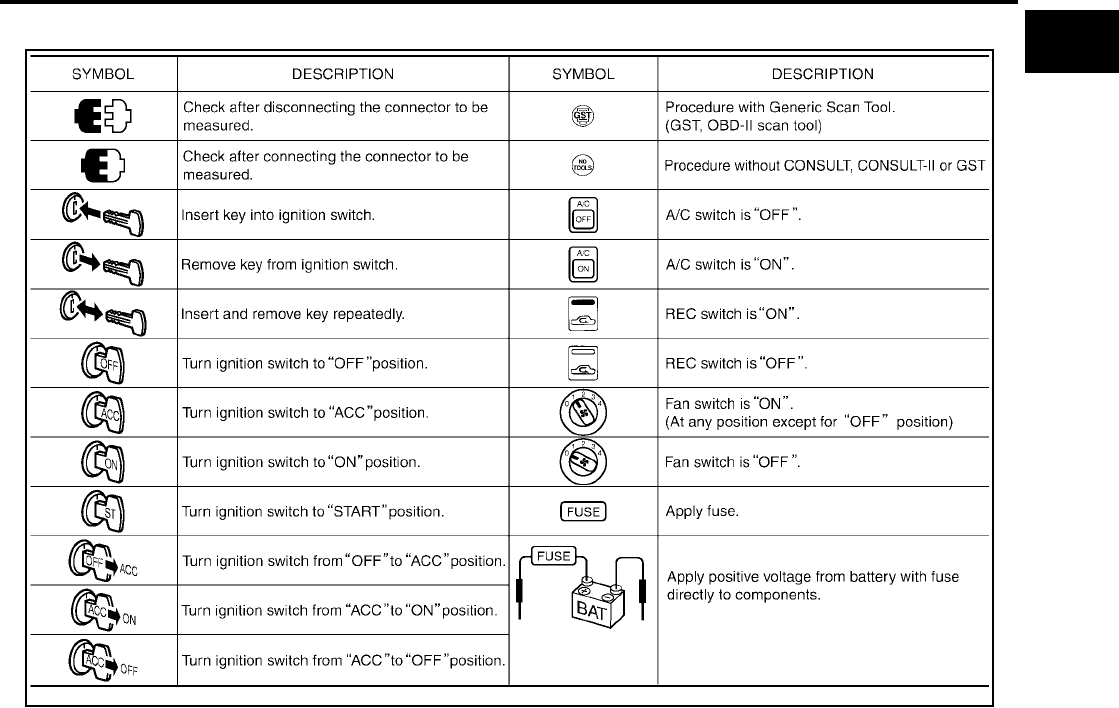
KEY TO SYMBOLS SIGNIFYING MEASURE-
MENTS OR PROCEDURES ............................... 13
How to Read Wiring Diagrams ............................... 15
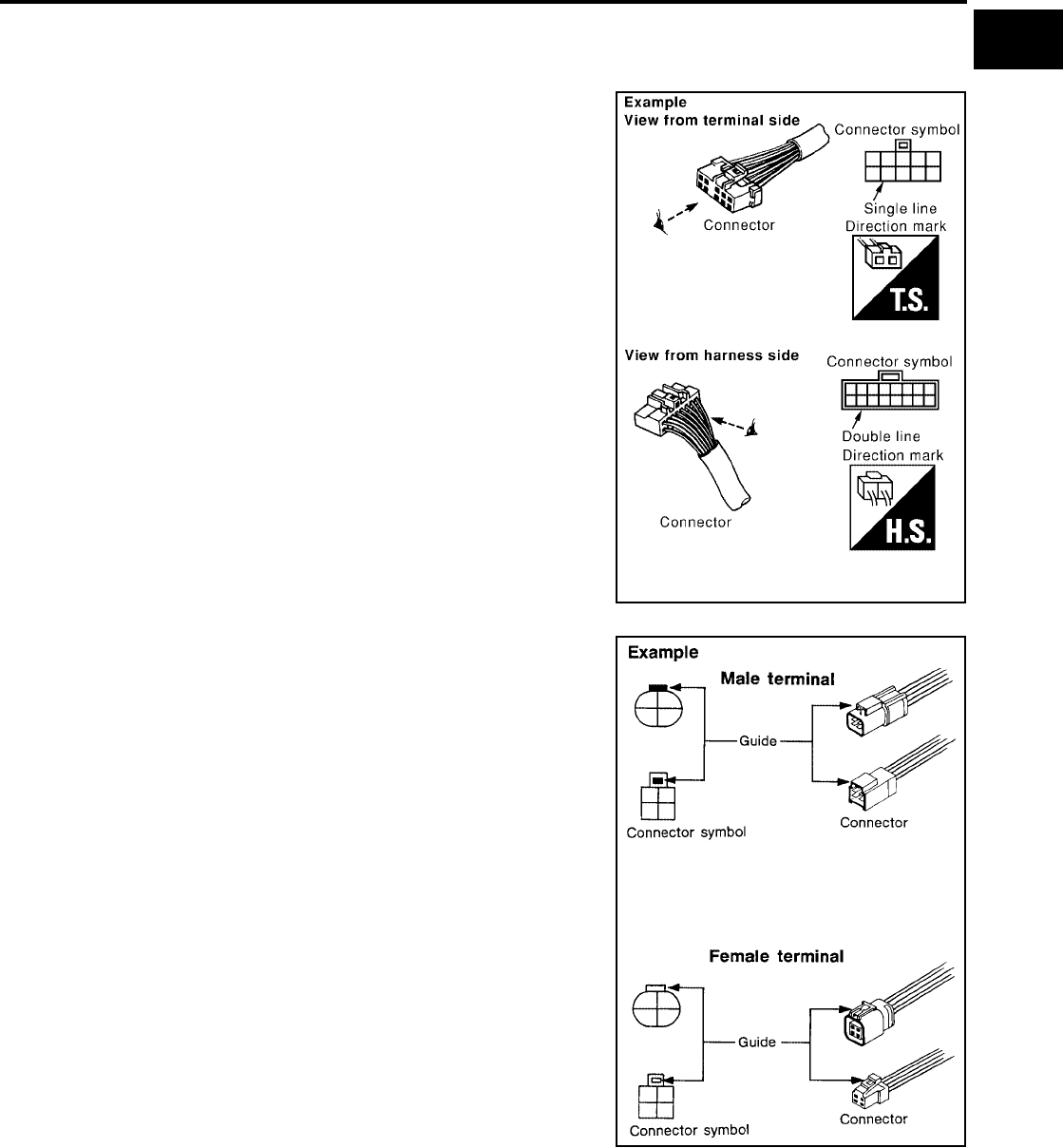
CONNECTOR SYMBOLS ................................... 15
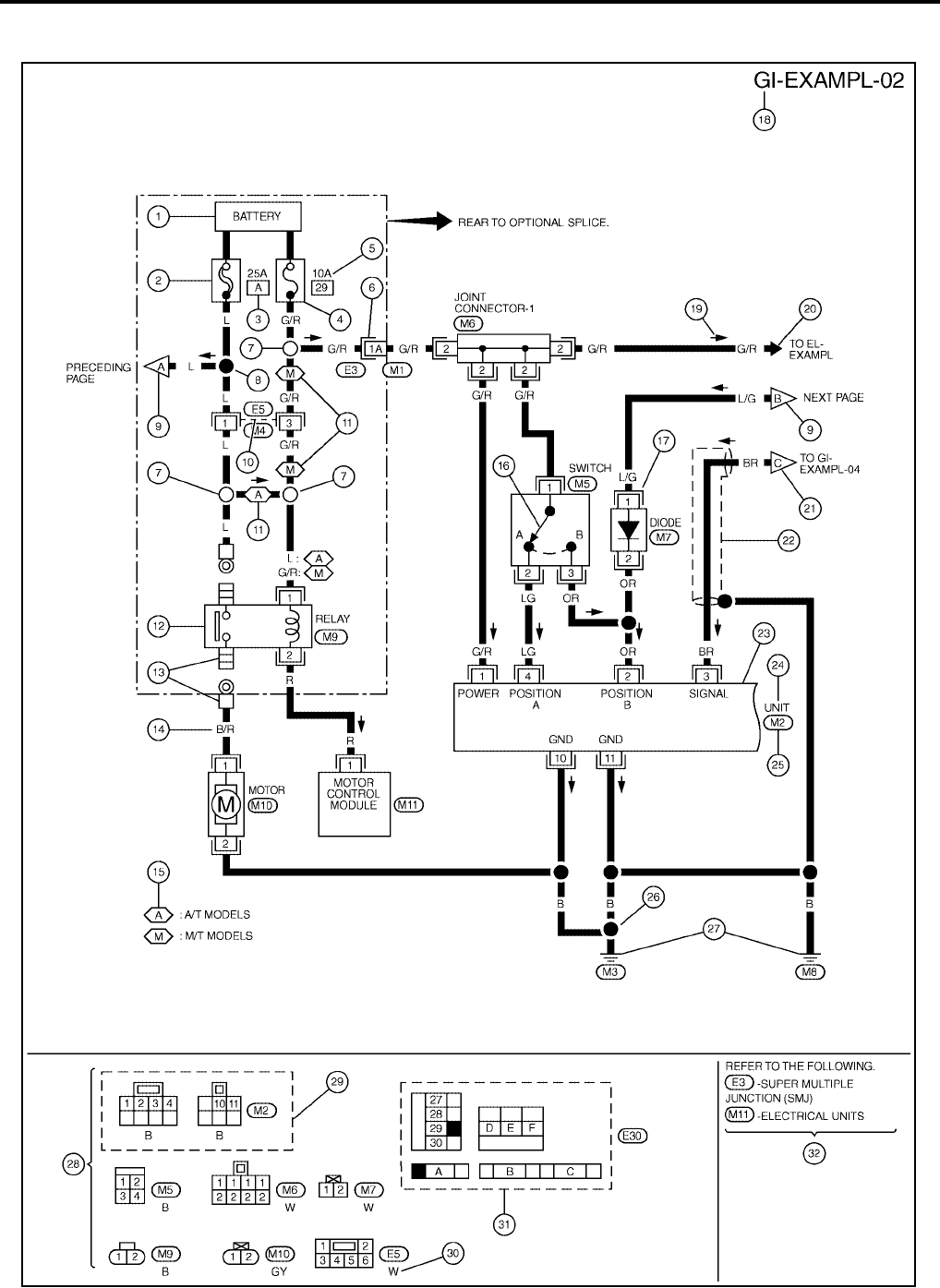
SAMPLE/WIRING DIAGRAM - EXAMPL - .......... 16
DESCRIPTION .................................................... 17
Abbreviations .......................................................... 22
SERVICE INFORMATION FOR ELECTRICAL INCI-
DENT ......................................................................... 24
How to Check Terminal ........................................... 24
CONNECTOR AND TERMINAL PIN KIT ............ 24
HOW TO PROBE CONNECTORS ...................... 24
How to Perform Efficient Diagnosis for an Electrical
Incident ................................................................... 27
WORK FLOW ...................................................... 27
INCIDENT SIMULATION TESTS ........................ 27
CIRCUIT INSPECTION ....................................... 30
Control Units and Electrical Parts ........................... 35
PRECAUTIONS .................................................. 35
CONSULT-II CHECKING SYSTEM .......................... 37
Description .............................................................. 37
Function and System Application ........................... 37
................................................................................ 38
Checking Equipment .............................................. 38
CONSULT-II Start Procedure .................................. 38
Consult-II Data Link Connector (DLC) Circuit ......... 39
Inspection Procedure .............................................. 39
LIFTING POINT ......................................................... 40
Special Service Tools ............................................. 40
Garage Jack and Safety Stand ............................... 41
2-pole Lift ................................................................ 42
Board-on Lift ........................................................... 42
TOW TRUCK TOWING ............................................. 43
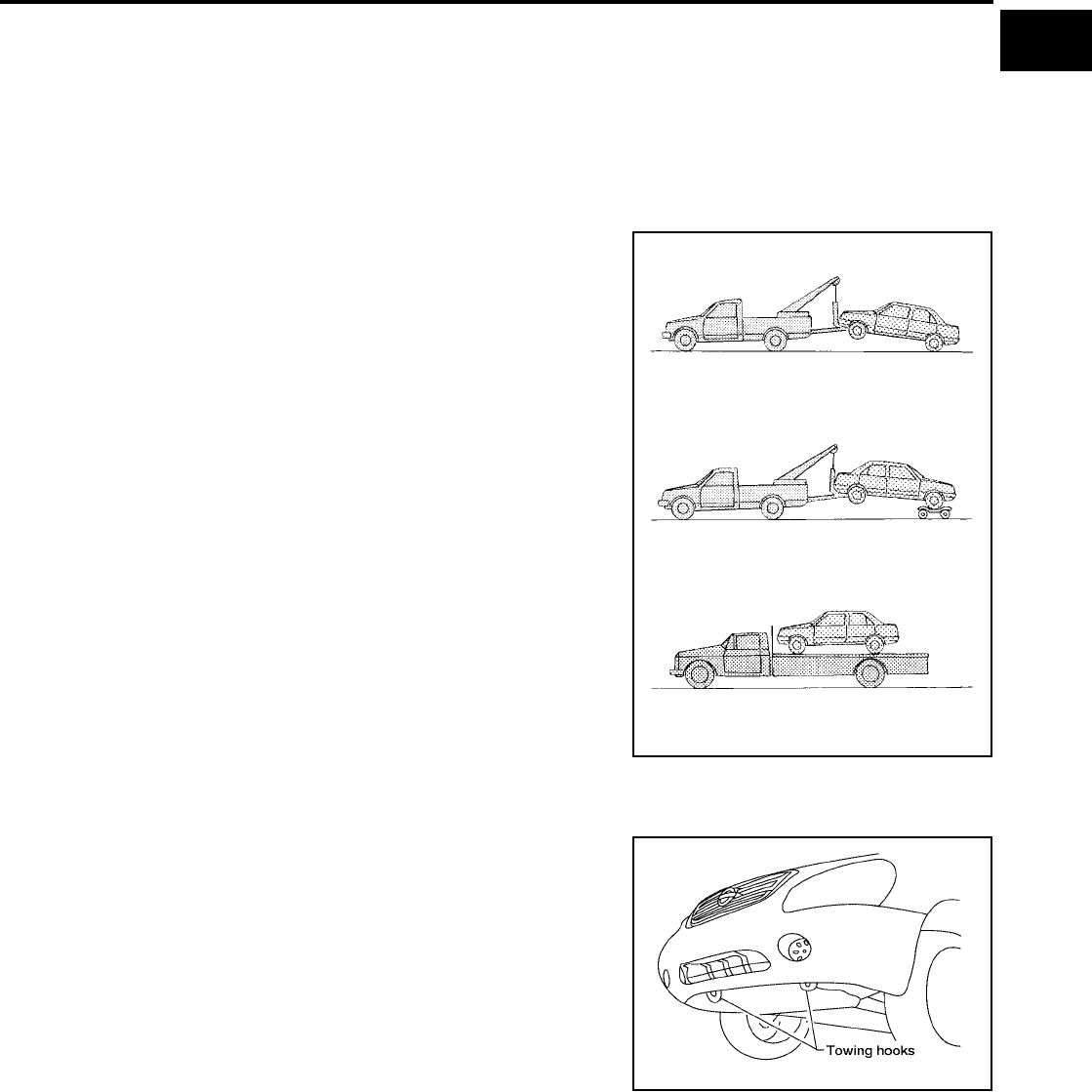
Tow Truck Towing ................................................... 43
Vehicle Recovery (Freeing a stuck vehicle) ............ 43
TIGHTENING TORQUE OF STANDARD BOLTS .... 44
Tightening Torque Table ......................................... 44
RECOMMENDED CHEMICAL PRODUCTS AND
SEALANTS ............................................................... 45
Recommended Chemical Products and Sealants ... 45
IDENTIFICATION INFORMATION ............................ 46
Model Variation ....................................................... 46
Identification Number .............................................. 47
Identification Plate .................................................. 48

GI-2
Revision: November 2006 2006 Altima
Engine Serial Number ............................................ 48
Automatic Transaxle Number ................................. 49
Manual Transaxle Number ..................................... 49
Dimensions .............................................................49
Wheels & Tires ........................................................49
TERMINOLOGY ........................................................50
SAE J1930 Terminology List ...................................50

PRECAUTIONS
GI-3
C
D
E
F
G
H
I
J
K
L
M
B
GI
Revision: November 2006 2006 Altima
PRECAUTIONS PFP:00001
Description
EAS0018O
Observe the following precautions to ensure safe and proper servicing. These precautions are not
described in each individual section.
Precautions for Supplemental Restraint System (SRS) “AIR BAG” and “SEAT
BELT PRE-TENSIONER”
EAS002EK
The Supplemental Restraint System such as “AIR BAG” and “SEAT BELT PRE-TENSIONER”, used along
with a front seat belt, helps to reduce the risk or severity of injury to the driver and front passenger for certain
types of collision. This system includes seat belt switch inputs and dual stage front air bag modules. The SRS
system uses the seat belt switches to determine the front air bag deployment, and may only deploy one front
air bag, depending on the severity of a collision and whether the front occupants are belted or unbelted.
Information necessary to service the system safely is included in the SRS and SB section of this Service Man-
ual.
WARNING:
●To avoid rendering the SRS inoperative, which could increase the risk of personal injury or death
in the event of a collision which would result in air bag inflation, all maintenance must be per-
formed by an authorized NISSAN/INFINITI dealer.
●Improper maintenance, including incorrect removal and installation of the SRS, can lead to per-
sonal injury caused by unintentional activation of the system. For removal of Spiral Cable and Air
Bag Module, see the SRS section.
●Do not use electrical test equipment on any circuit related to the SRS unless instructed to in this
Service Manual. SRS wiring harnesses can be identified by yellow and/or orange harnesses or
harness connectors.
Precautions for NVIS/IVIS (NISSAN/INFINITI VEHICLE IMMOBILIZER SYSTEM -
NATS) (If Equipped)
EAS001QJ
NVIS/IVIS (NATS) will immobilize the engine if someone tries to start it without the registered key of NVIS/IVIS
(NATS).
Both of the originally supplied ignition key IDs have been NVIS/IVIS (NATS) registered.
The security indicator is located on the instrument panel. The indicator blinks when the immobilizer system is
functioning.
Therefore, NVIS/IVIS (NATS) warns outsiders that the vehicle is equipped with the anti-theft system.
●When NVIS/IVIS (NATS) detects trouble, the security indicator lamp lights up while ignition switch is in
"ON" position.
This lighting up indicates that the anti-theft is not functioning, so prompt service is required.
●When servicing NVIS/IVIS (NATS) (trouble diagnoses, system initialization and additional registration of
other NVIS/IVIS (NATS) ignition key IDs), CONSULT-II hardware and CONSULT-II NVIS/IVIS (NATS)
software is necessary.
Regarding the procedures of NVIS/IVIS (NATS) initialization and NVIS/IVIS (NATS) ignition key ID regis-
tration, refer to CONSULT-II operation manual, NVIS/IVIS (NATS).
Therefore, CONSULT-II NVIS/IVIS (NATS) software (program card and operation manual) must be kept
strictly confidential to maintain the integrity of the anti-theft function.
●When servicing NVIS/IVIS (NATS) (trouble diagnoses, system initialization and additional registration of
other NVIS/IVIS (NATS) ignition key IDs), it may be necessary to re-register original key identification.
Therefore, be sure to receive all keys from vehicle owner. A maximum of four or five key IDs can be regis-
tered into NVIS/IVIS (NATS).
●When failing to start the engine first time using the key of NVIS/IVIS (NATS), start as follows.
1. Leave the ignition key in "ON" position for approximately 5 seconds.
2. Turn ignition key to "OFF" or "LOCK" position and wait approximately 5 seconds.
3. Repeat step 1 and 2 again.
4. Restart the engine while keeping the key separate from any others on key-chain.
GI-4
PRECAUTIONS
Revision: November 2006 2006 Altima
General Precautions
EAS0018Q
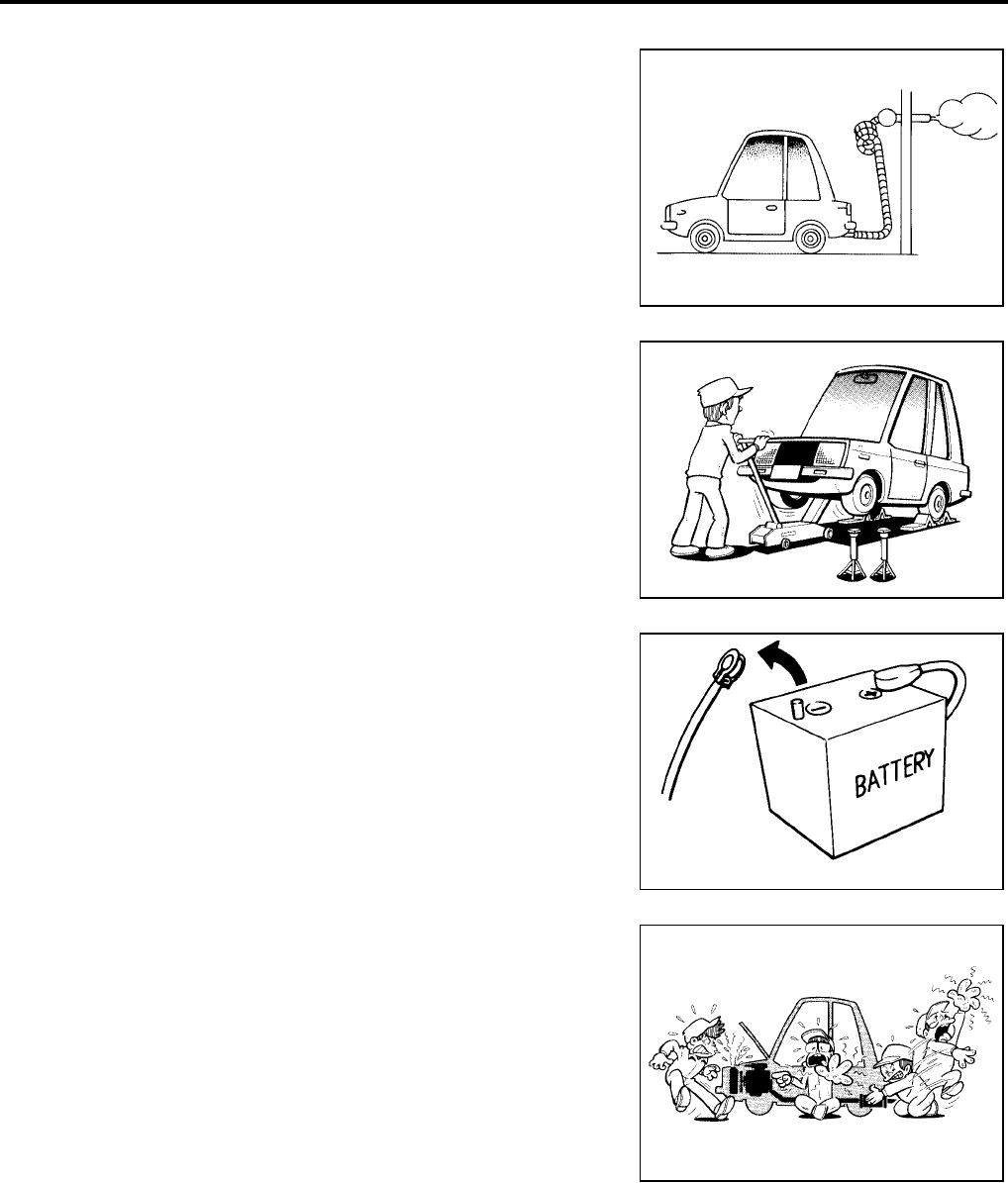
●Do not operate the engine for an extended period of time without
proper exhaust ventilation.
Keep the work area well ventilated and free of any flammable
materials. Special care should be taken when handling any flam-
mable or poisonous materials, such as gasoline, refrigerant gas,
etc. When working in a pit or other enclosed area, be sure to
properly ventilate the area before working with hazardous mate-
rials.
Do not smoke while working on the vehicle.
●Before jacking up the vehicle, apply wheel chocks or other tire
blocks to the wheels to prevent the vehicle from moving. After
jacking up the vehicle, support the vehicle weight with safety
stands at the points designated for proper lifting before working
on the vehicle.
These operations should be done on a level surface.
●When removing a heavy component such as the engine or tran-
saxle/transmission, be careful not to lose your balance and drop
them. Also, do not allow them to strike adjacent parts, especially
the brake tubes and master cylinder.
●Before starting repairs which do not require battery power:
Turn off ignition switch.
Disconnect the negative battery terminal.
●If the battery terminals are disconnected, recorded memory of
radio and each control unit is erased.
●Battery posts, terminals and related accessories contain lead
and lead compounds. Wash hands after handling.
●To prevent serious burns:
Avoid contact with hot metal parts.
Do not remove the radiator cap when the engine is hot.
●Dispose of or recycle drained oil or the solvent used for cleaning
parts in an appropriate manner.
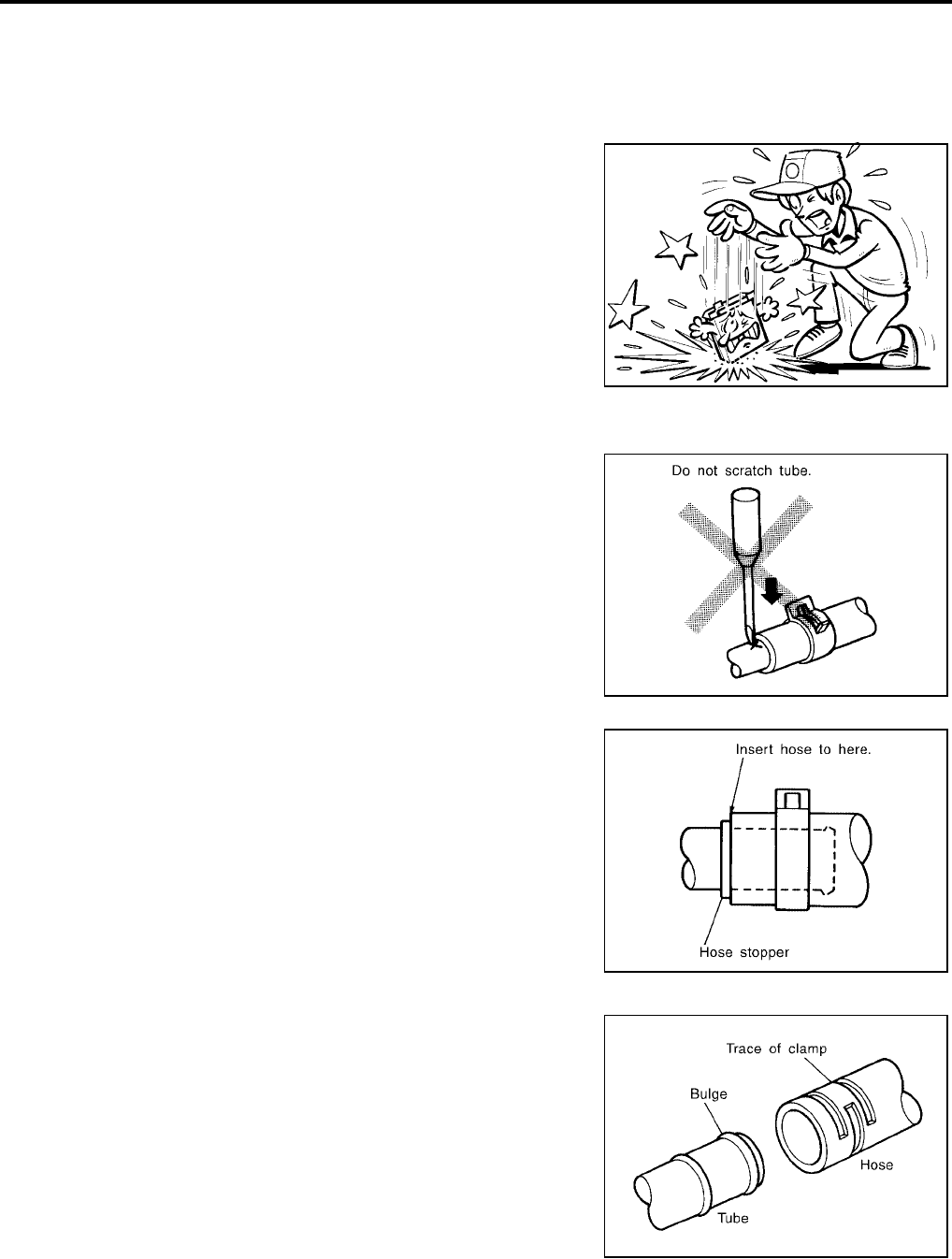
●Do not attempt to top off the fuel tank after the fuel pump nozzle
shuts off automatically.
Continued refueling may cause fuel overflow, resulting in fuel
spray and possibly a fire.
●Clean all disassembled parts in the designated liquid or solvent
prior to inspection or assembly.
●Replace oil seals, gaskets, packings, O-rings, locking washers, cotter pins, self-locking nuts, etc. with new
ones.
●Replace inner and outer races of tapered roller bearings and needle bearings as a set.
●Arrange the disassembled parts in accordance with their assembled locations and sequence.
●Do not touch the terminals of electrical components which use microcomputers (such as ECM).
Static electricity may damage internal electronic components.
●After disconnecting vacuum or air hoses, attach a tag to indicate the proper connection.
●Use only the fluids and lubricants specified in this manual.
SGI285
SGI231
SEF289H
SGI233
PRECAUTIONS
GI-5
C
D
E
F
G
H
I
J
K
L
M
B
GI
Revision: November 2006 2006 Altima
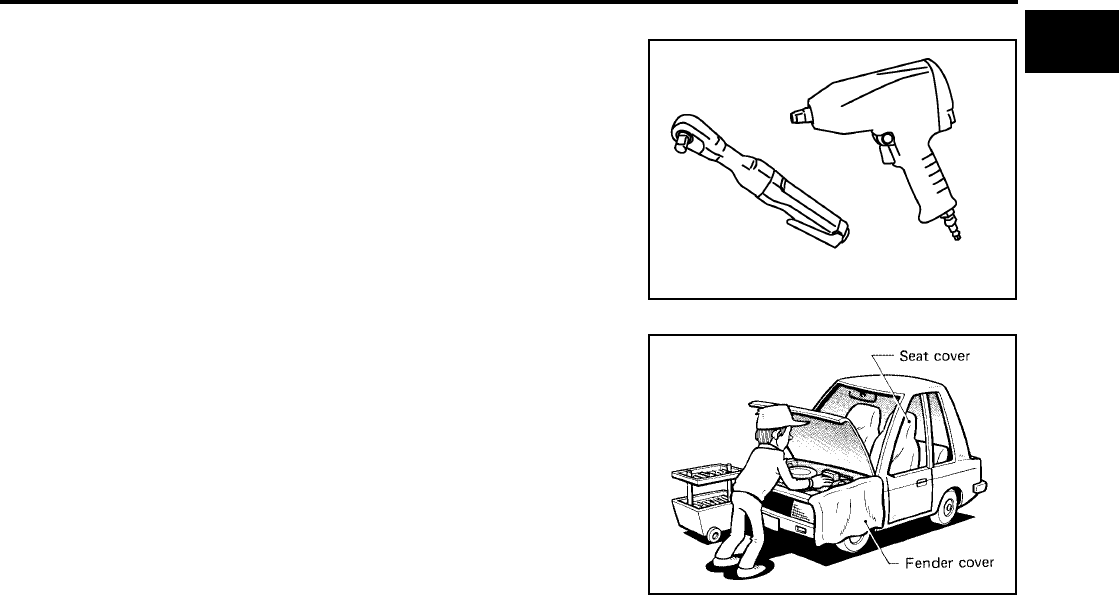
●Use approved bonding agent, sealants or their equivalents when required.
●Use hand tools, power tools (disassembly only) and recom-
mended special tools where specified for safe and efficient ser-
vice repairs.
●When repairing the fuel, oil, water, vacuum or exhaust systems,
check all affected lines for leaks.
●Before servicing the vehicle:
Protect fenders, upholstery and carpeting with appropriate cov-
ers.
Take caution that keys, buckles or buttons do not scratch paint.
WARNING:
To prevent ECM from storing the diagnostic trouble codes, do not carelessly disconnect the harness
connectors which are related to the engine control system and TCM (transmission control module)
system. The connectors should be disconnected only when working according to the WORK FLOW of
TROUBLE DIAGNOSES in EC and AT sections.
Precautions for Three Way Catalyst
EAS0018R
If a large amount of unburned fuel flows into the catalyst, the catalyst temperature will be excessively high. To
prevent this, follow the instructions.
●Use unleaded gasoline only. Leaded gasoline will seriously damage the three way catalyst.
●When checking for ignition spark or measuring engine compression, make tests quickly and only when
necessary.
●Do not run engine when the fuel tank level is low, otherwise the engine may misfire, causing damage to
the catalyst.
Do not place the vehicle on flammable material. Keep flammable material off the exhaust pipe and the three
way catalyst.
Precautions for Fuel (Regular Unleaded Gasoline Recommended) QR25DE
EAS001TB
Use unleaded regular gasoline with an octane rating of at least 87 AKI (Anti-Knock Index) number (Research
octane number 91).
CAUTION:
Do not use leaded gasoline. Using leaded gasoline will damage the three way catalyst. Using a fuel
other than specified could adversely affect the emission control devices and systems, and could also
affect the warranty coverage validity.
Precautions for Fuel (Unleaded Premium Gasoline Recommended)
EAS001TC
Nissan/Infiniti recommends the use of premium unleaded gasoline with an octane rating of at least 91 AKI
number (Research octane number 96). If premium unleaded gasoline is not available you may use regular
unleaded gasoline with an octane rating of at least 87 AKI number (Research octane number 91), but you may
notice a decrease in performance.
PBIC0190E
SGI234
GI-6
PRECAUTIONS
Revision: November 2006 2006 Altima
CAUTION:
Do not use leaded gasoline. Using leaded gasoline will damage the three way catalyst. Using a fuel
other than specified could adversely affect the emission control devices and systems, and could also
affect the warranty coverage validity.
Precautions for Multiport Fuel Injection System or Engine Control System
EAS0018T
●Before connecting or disconnecting any harness connector for
the multiport fuel injection system or ECM:
Turn ignition switch to “OFF” position.
Disconnect negative battery terminal.
Otherwise, there may be damage to ECM.
●Before disconnecting pressurized fuel line from fuel pump to
injectors, be sure to release fuel pressure.
●Be careful not to jar components such as ECM and mass air
flow sensor.
Precautions for Hoses
EAS0018U
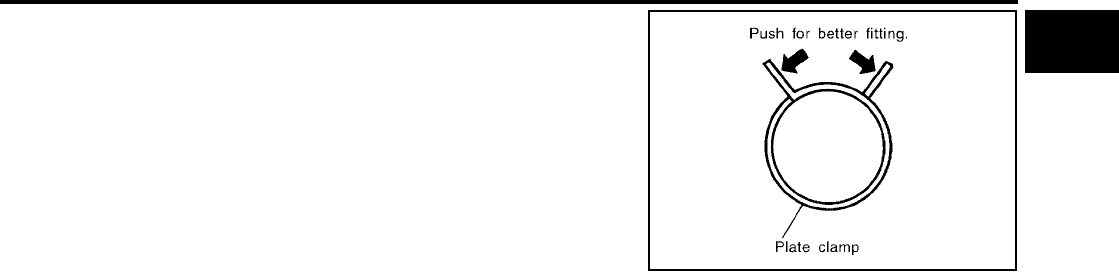
HOSE REMOVAL AND INSTALLATION
●To prevent damage to rubber hose, do not pry off rubber hose
with tapered tool or screwdriver.
●To reinstall the rubber hose securely, make sure that hose inser-
tion length and orientation is correct. (If tube is equipped with
hose stopper, insert rubber hose into tube until it butts up
against hose stopper.)
HOSE CLAMPING
●If old rubber hose is re-used, install hose clamp in its original
position (at the indentation where the old clamp was). If there is
a trace of tube bulging left on the old rubber hose, align rubber
hose at that position.
●Discard old clamps; replace with new ones.
SGI787
SMA019D
SMA020D
SMA021D
PRECAUTIONS
GI-7
C
D
E
F
G
H
I
J
K
L
M
B
GI
Revision: November 2006 2006 Altima
●After installing plate clamps, apply force to them in the direction
of the arrow, tightening rubber hose equally all around.
Precautions for Engine Oils
EAS0018V
Prolonged and repeated contact with used engine oil may cause skin cancer. Try to avoid direct skin contact
with used oil.
If skin contact is made, wash thoroughly with soap or hand cleaner as soon as possible.
HEALTH PROTECTION PRECAUTIONS
●Avoid prolonged and repeated contact with oils, particularly used engine oils.
●Wear protective clothing, including impervious gloves where practicable.
●Do not put oily rags in pockets.
●Avoid contaminating clothes, particularly underpants, with oil.
●Heavily soiled clothing and oil-impregnated footwear should not be worn. Overalls must be cleaned regu-
larly.
●First aid treatment should be obtained immediately for open cuts and wounds.
●Use barrier creams, applying them before each work period, to help the removal of oil from the skin.
●Wash with soap and water to ensure all oil is removed (skin cleansers and nail brushes will help). Prepa-
rations containing lanolin replace the natural skin oils which have been removed.
●Do not use gasoline, kerosene, diesel fuel, gas oil, thinners or solvents for cleaning skin.
●If skin disorders develop, obtain medical advice without delay.
●Where practical, degrease components prior to handling.
●Where there is a risk of eye contact, eye protection should be worn, for example, chemical goggles or face
shields; in addition an eye wash facility should be provided.
Precautions for Air Conditioning
EAS0018W
Use an approved refrigerant recovery unit any time the air conditioning system must be discharged. Refer to
ATC/MTC section “HFC-134a (R-134a) Service Procedure”, “REFRIGERANT LINES” for specific instructions.
SMA022D

GI-8
HOW TO USE THIS MANUAL
Revision: November 2006 2006 Altima
HOW TO USE THIS MANUAL PFP:00008
Description
EAS0018X
This volume explains “Removal, Disassembly, Installation, Inspection and Adjustment” and “Trouble Diag-
noses”.
Terms
EAS0018Y
●The captions WARNING and CAUTION warn you of steps that must be followed to prevent personal
injury and/or damage to some part of the vehicle.
WARNING indicates the possibility of personal injury if instructions are not followed.
CAUTION indicates the possibility of component damage if instructions are not followed.
BOLD TYPED STATEMENTS except WARNING and CAUTION give you helpful information.
Standard value:Tolerance at inspection and adjustment.
Limit value:The maximum or minimum limit value that should not be exceeded at inspection and adjust-
ment.
Units
EAS001TD
●The UNITS given in this manual are primarily expressed as the SI UNIT (International System of Unit),
and alternatively expressed in the metric system and in the yard/pound system.
Also with regard to tightening torque of bolts and nuts, there are descriptions both about range and about
the standard tightening torque.
“Example”
Range
Standard
Contents
EAS00190
●ALPHABETICAL INDEX is provided at the end of this manual so that you can rapidly find the item and
page you are searching for.
●A QUICK REFERENCE INDEX, a black tab (e.g. ) is provided on the first page. You can quickly find
the first page of each section by matching it to the section's black tab.
●THE CONTENTS are listed on the first page of each section.
●THE TITLE is indicated on the upper portion of each page and shows the part or system.
●THE PAGE NUMBER of each section consists of two or three letters which designate the particular sec-
tion and a number (e.g. “BR-5”).
●THE SMALL ILLUSTRATIONS show the important steps such as inspection, use of special tools, knacks
of work and hidden or tricky steps which are not shown in the previous large illustrations.
Assembly, inspection and adjustment procedures for the complicated units such as the automatic tran-
saxle or transmission, etc. are presented in a step-by-step format where necessary.
Outer Socket Lock Nut : 59 - 78 N-m (6.0 - 8.0 kg-m, 43 - 58 ft-lb)
Drive Shaft Installation Bolt : 44.3 N-m (4.5 kg-m, 33 ft-lb)
HOW TO USE THIS MANUAL
GI-9
C
D
E
F
G
H
I
J
K
L
M
B
GI
Revision: November 2006 2006 Altima
Relation between Illustrations and Descriptions
EAS001TE
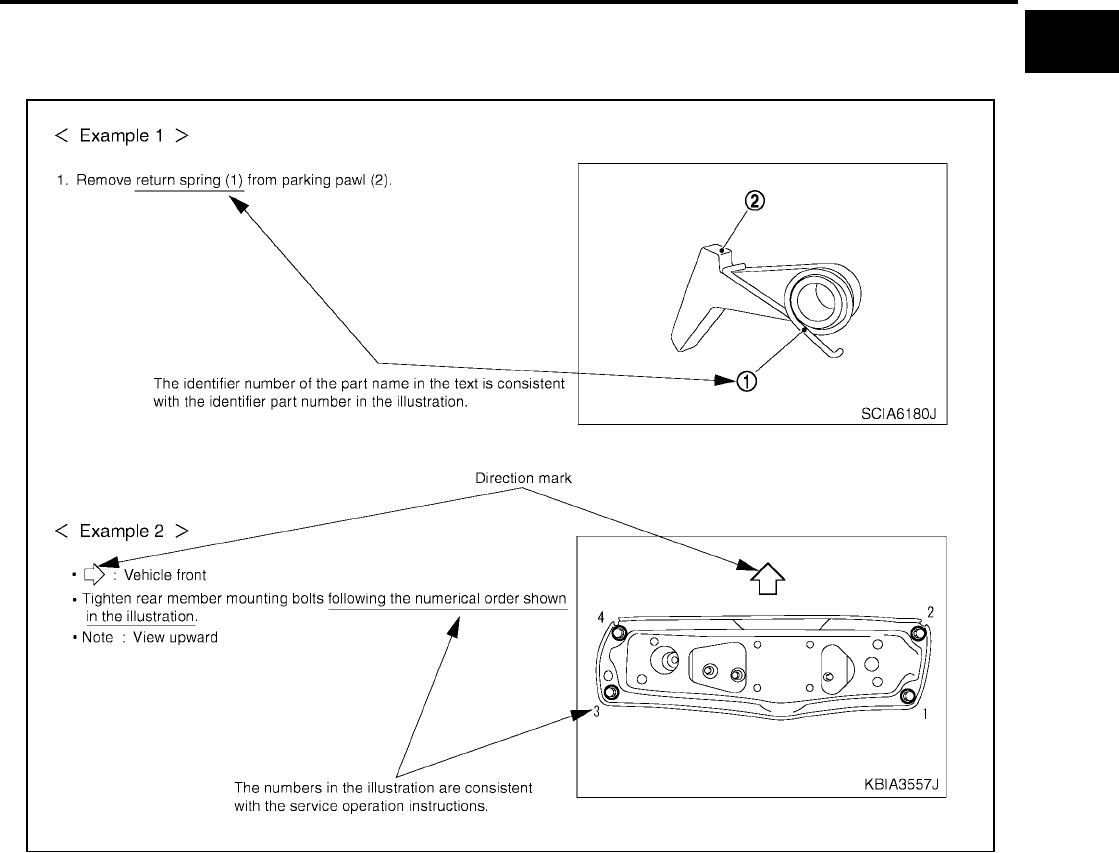
The following sample explains the relationship between the part description in an illustration, the part name in
the text and the service procedures.
Components
EAS001TF
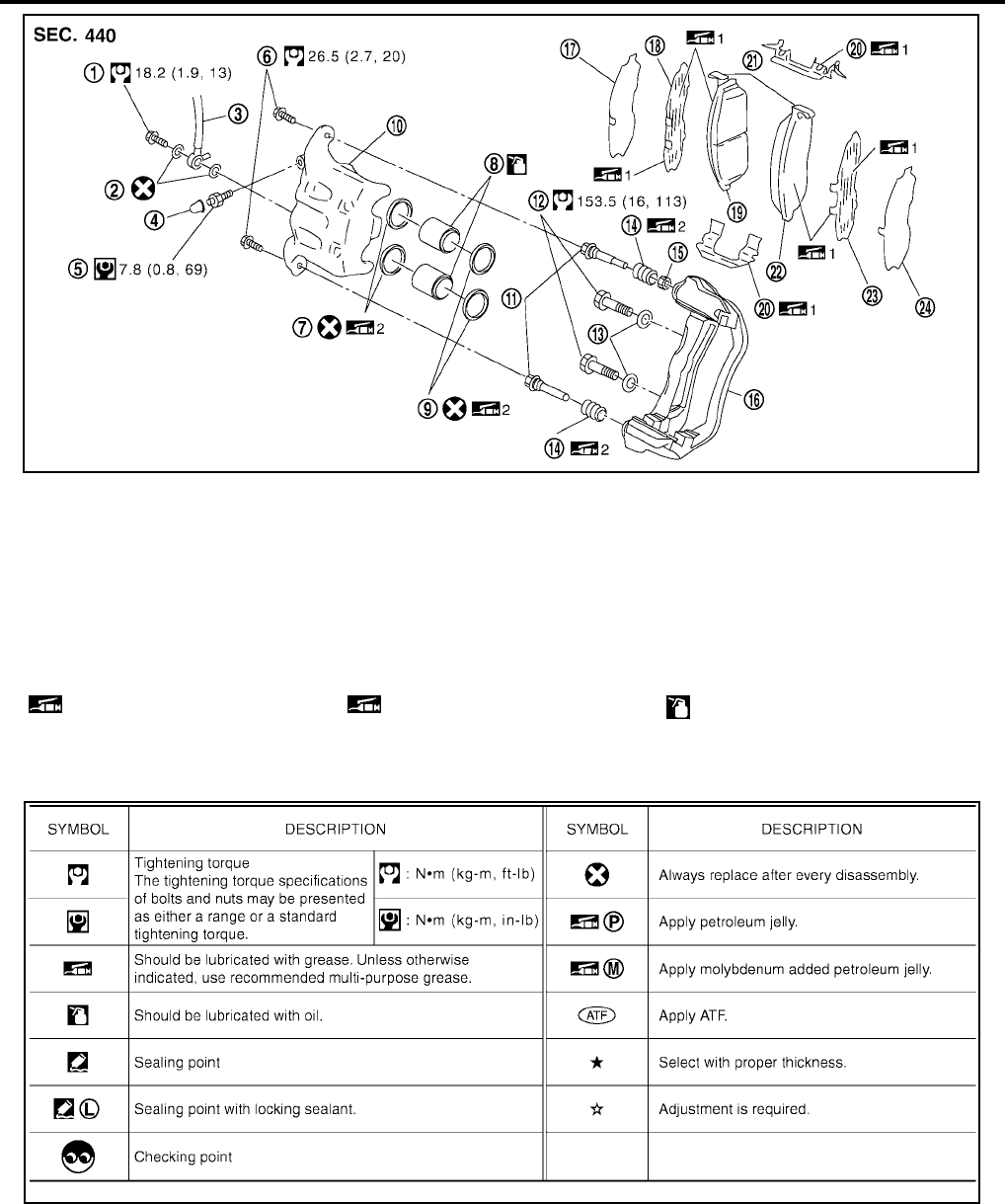
●THE LARGE ILLUSTRATIONS are exploded views (see the following) and contain tightening torques,
lubrication points, section number of the PARTS CATALOG (e.g. SEC. 440) and other information neces-
sary to perform repairs.
The illustrations should be used in reference to service matters only. When ordering parts, refer to the
appropriate PARTS CATALOG .
Components shown in an illustration may be identified by a circled number. When this style of illustration
is used, the text description of the components will follow the illustration.
SAIA0519E
GI-10
HOW TO USE THIS MANUAL
Revision: November 2006 2006 Altima
SYMBOLS
How to Follow Trouble Diagnoses
EAS00192
DESCRIPTION
NOTICE:
Trouble diagnoses indicate work procedures required to diagnose problems effectively. Observe the following
instructions before diagnosing.
1. Before performing trouble diagnoses, read the “Preliminary Check”, the “Symptom Chart” or the
“Work Flow”.
1. Union bolt 2. Copper washer 3. Brake hose
4. Cap 5. Bleed valve 6. Sliding pin bolt
7. Piston seal 8. Piston 9. Piston boot
10. Cylinder body 11. Sliding pin 12. Torque member mounting bolt
13. Washer 14. Sliding pin boot 15. Bushing
16. Torque member 17. Inner shim cover 18. Inner shim
19. Inner pad 20. Pad retainer 21. Pad wear sensor
22. Outer pad 23. Outer shim 24. Outer shim cover
1: PBC (Poly Butyl Cuprysil) grease
or silicone-based grease
2: Rubber grease : Brake fluid
Refer to GI section for additional symbol definitions.
SFIA2959E
SAIA0749E
HOW TO USE THIS MANUAL
GI-11
C
D
E
F
G
H
I
J
K
L
M
B
GI
Revision: November 2006 2006 Altima
2. After repairs, re-check that the problem has been completely eliminated.
3. Refer to Component Parts and Harness Connector Location for the Systems described in each
section for identification/location of components and harness connectors.
4. Refer to the Circuit Diagram for quick pinpoint check.
If you need to check circuit continuity between harness connectors in more detail, such as when a
sub-harness is used, refer to Wiring Diagram in each individual section and Harness Layout in PG
section for identification of harness connectors.
5. When checking circuit continuity, ignition switch should be OFF.
6. Before checking voltage at connectors, check battery voltage.
7. After accomplishing the Diagnostic Procedures and Electrical Components Inspection, make sure
that all harness connectors are reconnected as they were.
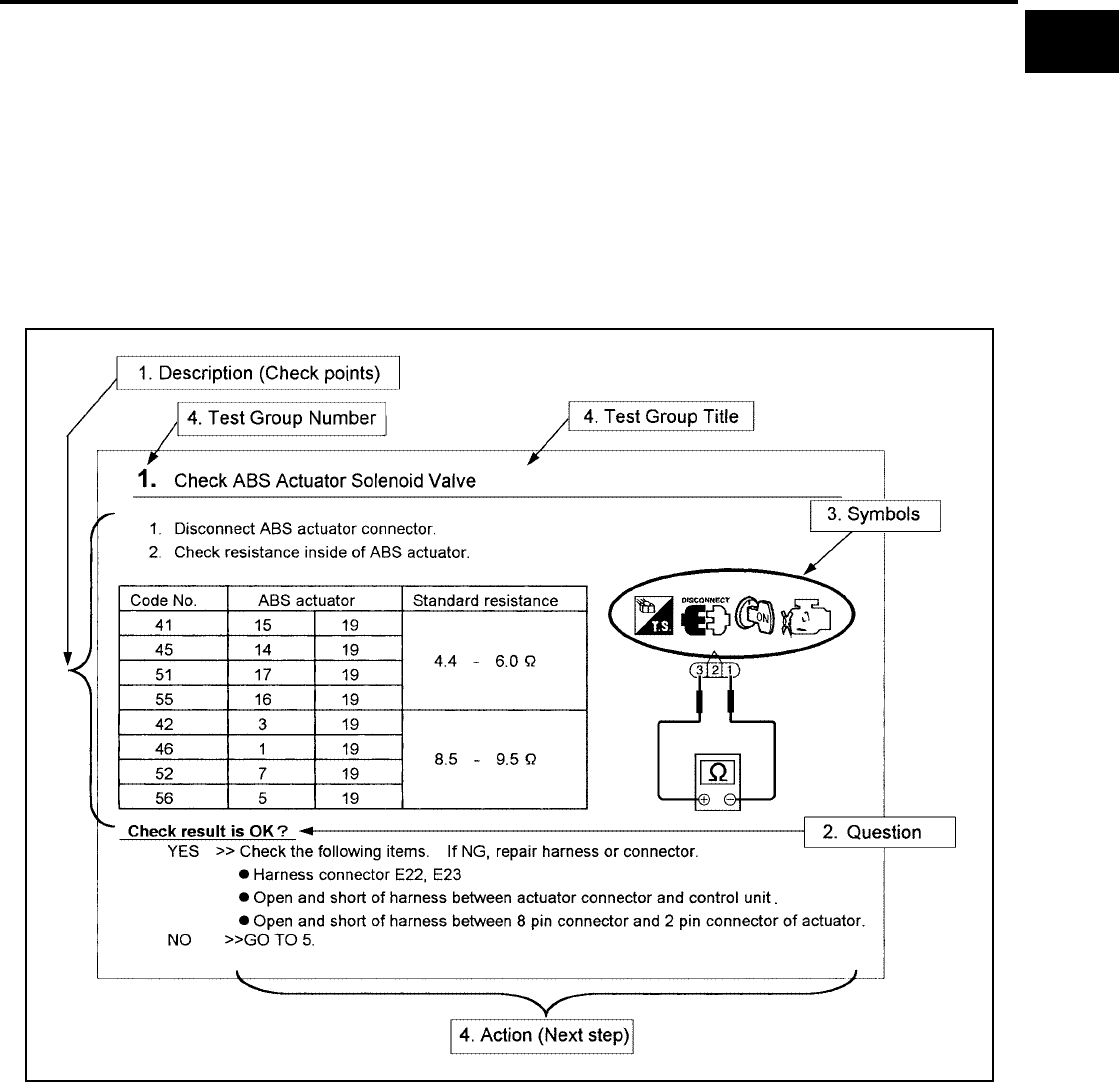
HOW TO FOLLOW TEST GROUPS IN TROUBLE DIAGNOSES
1. Work and diagnostic procedure
Start to diagnose a problem using procedures indicated in enclosed test groups.
2. Questions and required results
Questions and required results are indicated in bold type in test group.
The meaning of are as follows:
3. Symbol used in illustration
Symbols included in illustrations refer to measurements or procedures. Before diagnosing a problem,
familiarize yourself with each symbol. Refer to "Connector Symbols" in GI Section and "KEY TO SYM-
BOLS SIGNIFYING MEASUREMENTS OR PROCEDURES" below.
4. Action items
SAIA0256E
a. Battery voltage → 11 - 14V or approximately 12V
b. Voltage : Approximately 0V → Less than 1V
GI-12
HOW TO USE THIS MANUAL
Revision: November 2006 2006 Altima
Next action for each test group is indicated based on result of each question. Test group number is shown
in the left upper portion of each test group.
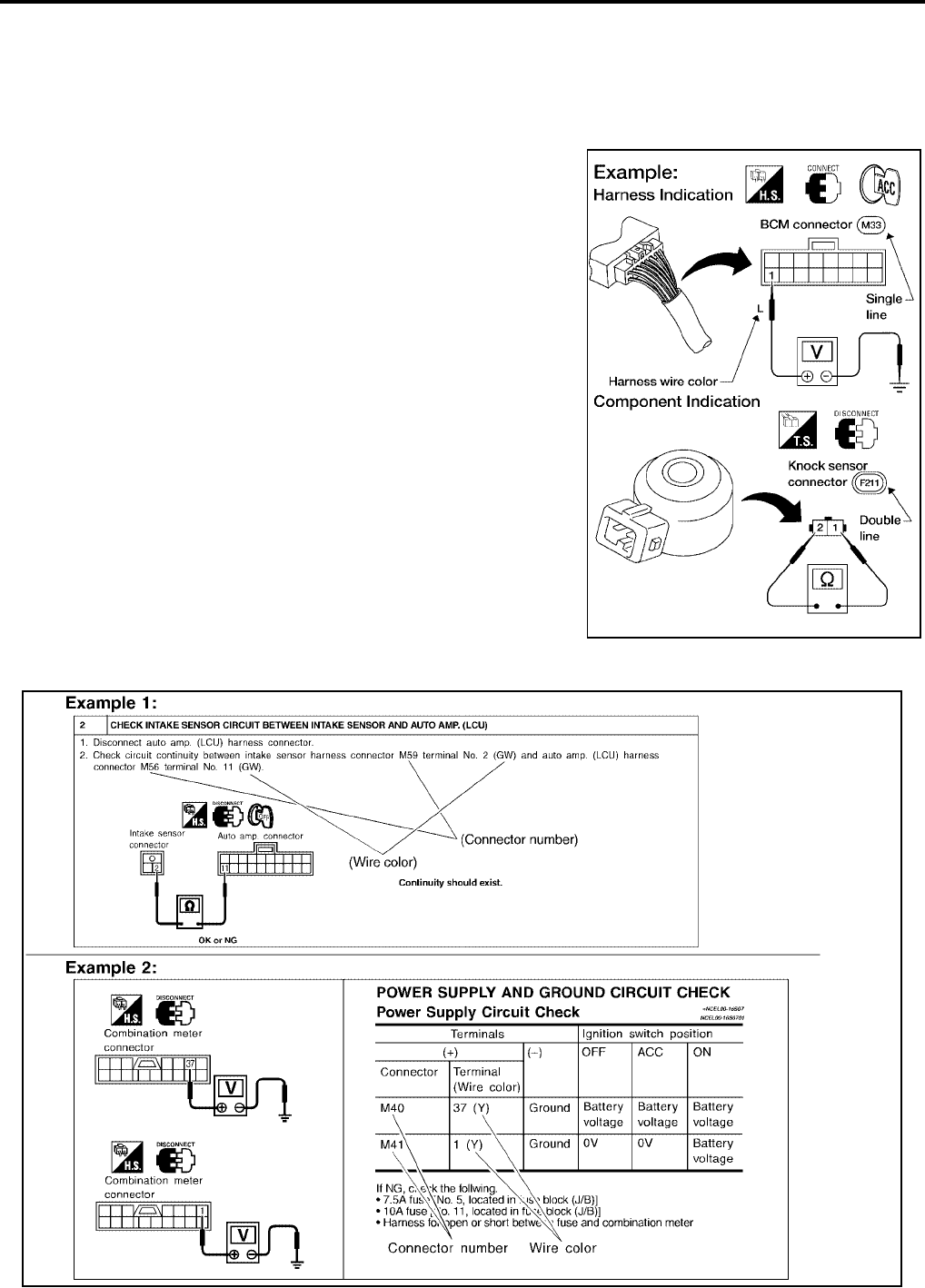
HARNESS WIRE COLOR AND CONNECTOR NUMBER INDICATION
There are two types of harness wire color and connector number indication.
TYPE 1: Harness Wire Color and Connector Number are Shown in Illustration
●Letter designations next to test meter probe indicate harness
wire color.
●Connector numbers in a single circle (e.g. M33) indicate har-
ness connectors.
●Connector numbers in a double circle (e.g. F211) indicate com-
ponent connectors.
TYPE 2: Harness Wire Color and Connector Number are Shown in Text
AGI070
SGI144A
HOW TO USE THIS MANUAL
GI-13
C
D
E
F
G
H
I
J
K
L
M
B
GI
Revision: November 2006 2006 Altima
KEY TO SYMBOLS SIGNIFYING MEASUREMENTS OR PROCEDURES
SAIA0750E
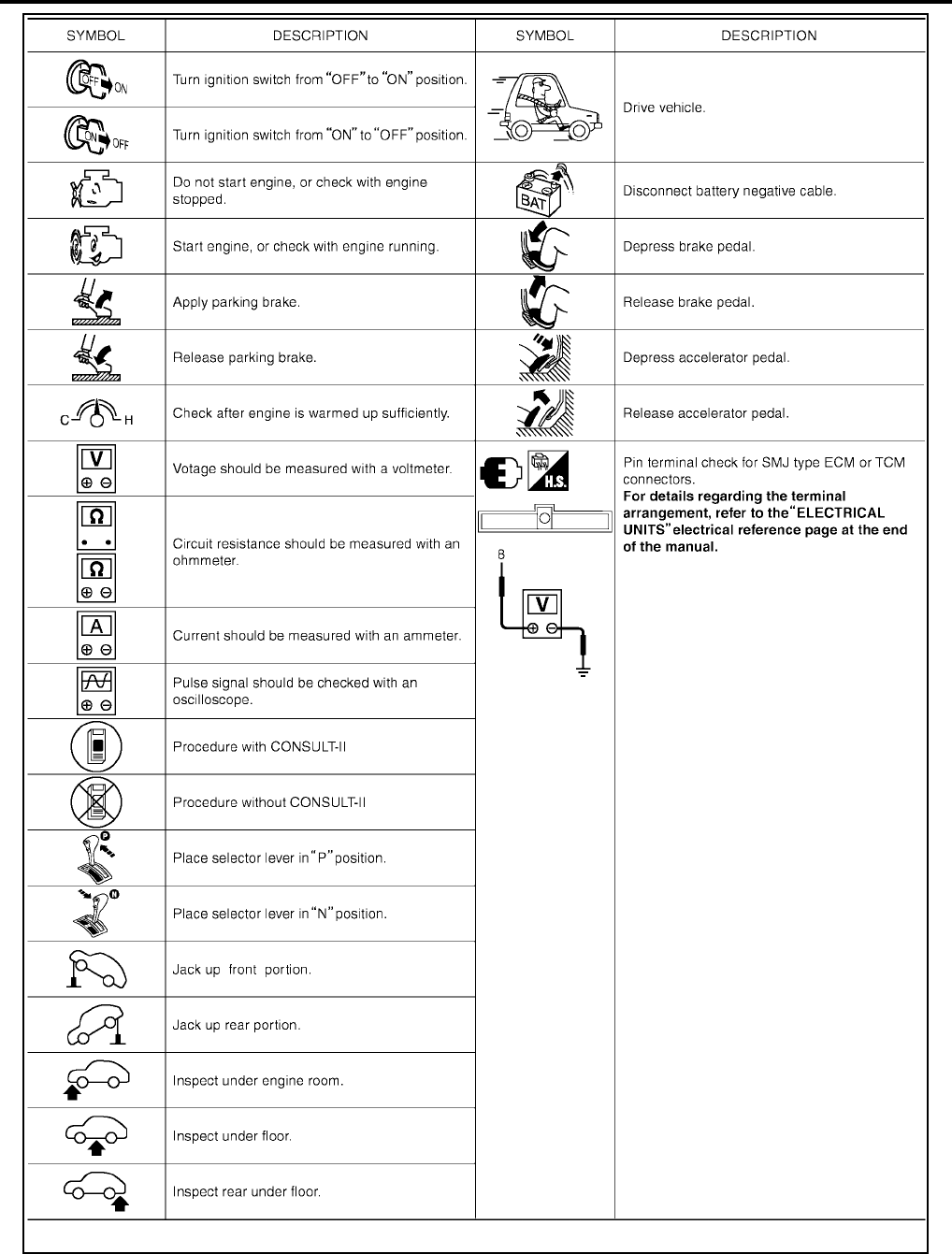
GI-14
HOW TO USE THIS MANUAL
Revision: November 2006 2006 Altima
SAIA0751E
HOW TO USE THIS MANUAL
GI-15
C
D
E
F
G
H
I
J
K
L
M
B
GI
Revision: November 2006 2006 Altima
How to Read Wiring Diagrams
EAS00193
CONNECTOR SYMBOLS
Most of connector symbols in wiring diagrams are shown from the terminal side.
●Connector symbols shown from the terminal side are enclosed
by a single line and followed by the direction mark.
●Connector symbols shown from the harness side are enclosed
by a double line and followed by the direction mark.
●Certain systems and components, especially those related to
OBD, may use a new style slide-locking type harness connector.
For description and how to disconnect, refer to PG section,
“Description”, “HARNESS CONNECTOR”.
●Male and female terminals
Connector guides for male terminals are shown in black and
female terminals in white in wiring diagrams.
SAIA0257E
SGI363
GI-16
HOW TO USE THIS MANUAL
Revision: November 2006 2006 Altima
SAMPLE/WIRING DIAGRAM - EXAMPL -
●For detail, refer to following “DESCRIPTION”.
SGI091A
HOW TO USE THIS MANUAL
GI-17
C
D
E
F
G
H
I
J
K
L
M
B
GI
Revision: November 2006 2006 Altima
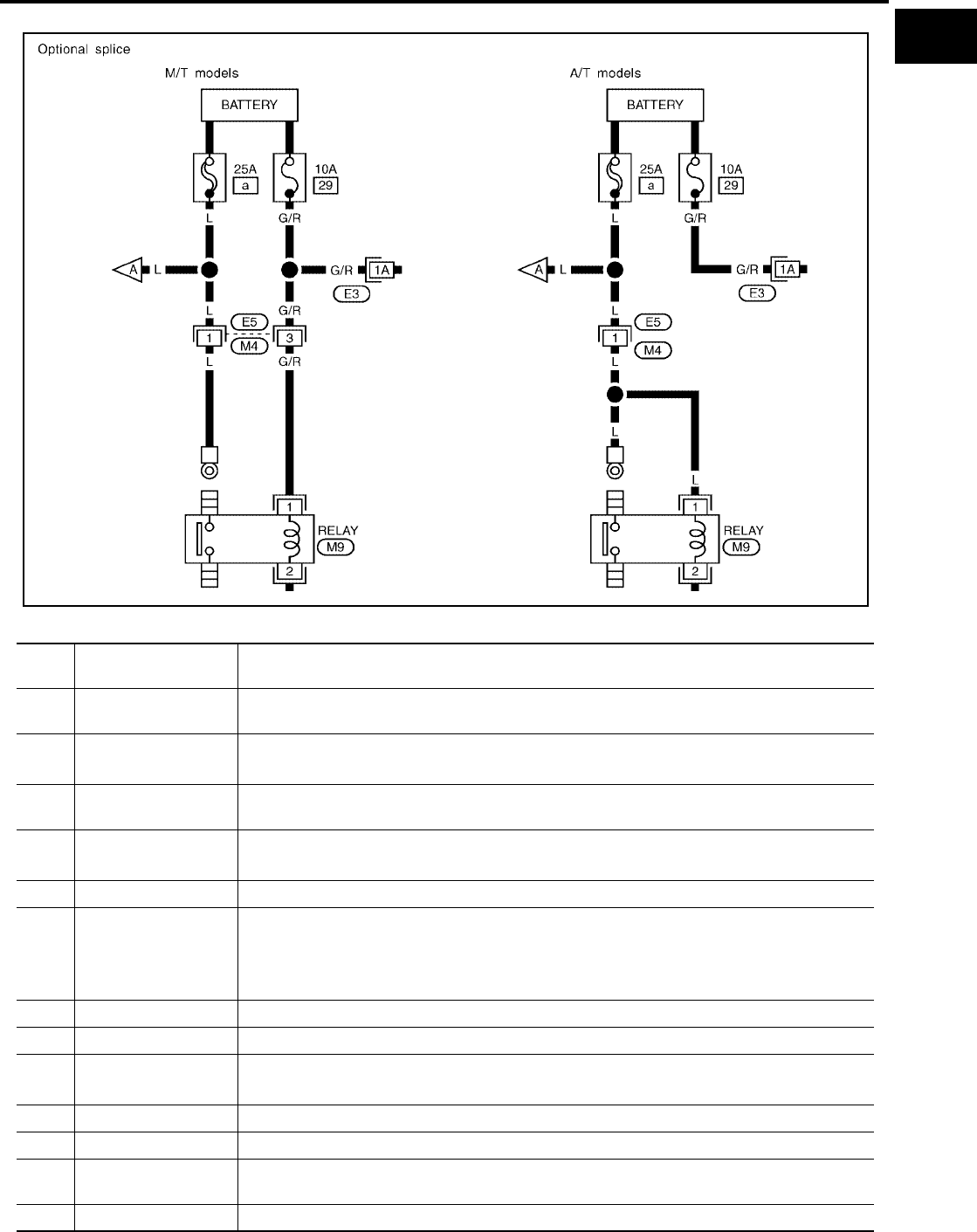
Optional Splice
DESCRIPTION
SGI942
Num-
ber Item Description
1 Power condition ●This shows the condition when the system receives battery positive voltage (can be oper-
ated).
2 Fusible link ●The double line shows that this is a fusible link.
●The open circle shows current flow in, and the shaded circle shows current flow out.
3Fusible link/fuse loca-
tion
●This shows the location of the fusible link or fuse in the fusible link or fuse box. For arrange-
ment, refer to PG section, POWER SUPPLY ROUTING.
4Fuse ●The single line shows that this is a fuse.
●The open circle shows current flow in, and the shaded circle shows current flow out.
5 Current rating ●This shows the current rating of the fusible link or fuse.
6 Connectors
●This shows that connector E3 is female and connector M1 is male.
●The G/R wire is located in the 1A terminal of both connectors.
●Terminal number with an alphabet (1A, 5B, etc.) indicates that the connector is SMJ connec-
tor. Refer to PG section, SMJ (SUPER MULTIPLE JUNCTION).
7 Optional splice ●The open circle shows that the splice is optional depending on vehicle application.
8Splice ●The shaded circle shows that the splice is always on the vehicle.
9 Page crossing ●This arrow shows that the circuit continues to an adjacent page.
●The A will match with the A on the preceding or next page.
10 Common connector ●The dotted lines between terminals show that these terminals are part of the same connector.
11 Option abbreviation ●This shows that the circuit is optional depending on vehicle application.
12 Relay ●This shows an internal representation of the relay. For details, refer to PG section, STAN-
DARDIZED RELAY.
13 Connectors ●This shows that the connector is connected to the body or a terminal with bolt or nut.

GI-18
HOW TO USE THIS MANUAL
Revision: November 2006 2006 Altima
14 Wire color
●This shows a code for the color of the wire.
B = Black
W = White
R = Red
G = Green
L = Blue
Y = Yellow
LG = Light Green
BR = Brown
OR or O = Orange
P = Pink
PU or V (Violet) = Purple
GY or GR = Gray
SB = Sky Blue
CH = Dark Brown
DG = Dark Green
When the wire color is striped, the base color is given first, followed by the stripe color as shown
below:
Example: L/W = Blue with White Stripe
15 Option description ●This shows a description of the option abbreviation used on the page.
16 Switch ●This shows that continuity exists between terminals 1 and 2 when the switch is in the A posi-
tion. Continuity exists between terminals 1 and 3 when the switch is in the B position.
17 Assembly parts ●Connector terminal in component shows that it is a harness incorporated assembly.
18 Cell code ●This identifies each page of the wiring diagram by section, system and wiring diagram page
number.
19 Current flow arrow
●Arrow indicates electric current flow, especially where the direction of standard flow (vertically
downward or horizontally from left to right) is difficult to follow.
●A double arrow “ ” shows that current can flow in either direction depending on cir-
cuit operation.
20 System branch ●This shows that the system branches to another system identified by cell code (section and
system).
21 Page crossing
●This arrow shows that the circuit continues to another page identified by cell code.
●The C will match with the C on another page within the system other than the next or preced-
ing pages.
22 Shielded line ●The line enclosed by broken line circle shows shield wire.
23 Component box in
wave line
●This shows that another part of the component is also shown on another page (indicated by
wave line) within the system.
24 Component name ●This shows the name of a component.
25 Connector number
●This shows the connector number.
●The letter shows which harness the connector is located in.
●Example: M : main harness. For detail and to locate the connector, refer to PG section "Main
Harness", “Harness Layout”. A coordinate grid is included for complex harnesses to aid in
locating connectors.
26 Ground (GND) ●The line spliced and grounded under wire color shows that ground line is spliced at the
grounded connector.
27 Ground (GND) ●This shows the ground connection. For detailed ground distribution information, refer to
"Ground Distribution" in PG section.
28 Connector views ●This area shows the connector faces of the components in the wiring diagram on the page.
29 Common component ●Connectors enclosed in broken line show that these connectors belong to the same compo-
nent.
30 Connector color
●This shows a code for the color of the connector. For code meaning, refer to wire color codes,
Number 14 of this chart.
31 Fusible link and fuse
box
●This shows the arrangement of fusible link(s) and fuse(s), used for connector views of
"POWER SUPPLY ROUTING" in PG section.
The open square shows current flow in, and the shaded square shows current flow out.
32 Reference area ●This shows that more information on the Super Multiple Junction (SMJ) and Joint Connectors
(J/C) exists on the PG section. Refer to "Reference Area" for details.
Num-
ber Item Description
HOW TO USE THIS MANUAL
GI-19
C
D
E
F
G
H
I
J
K
L
M
B
GI
Revision: November 2006 2006 Altima
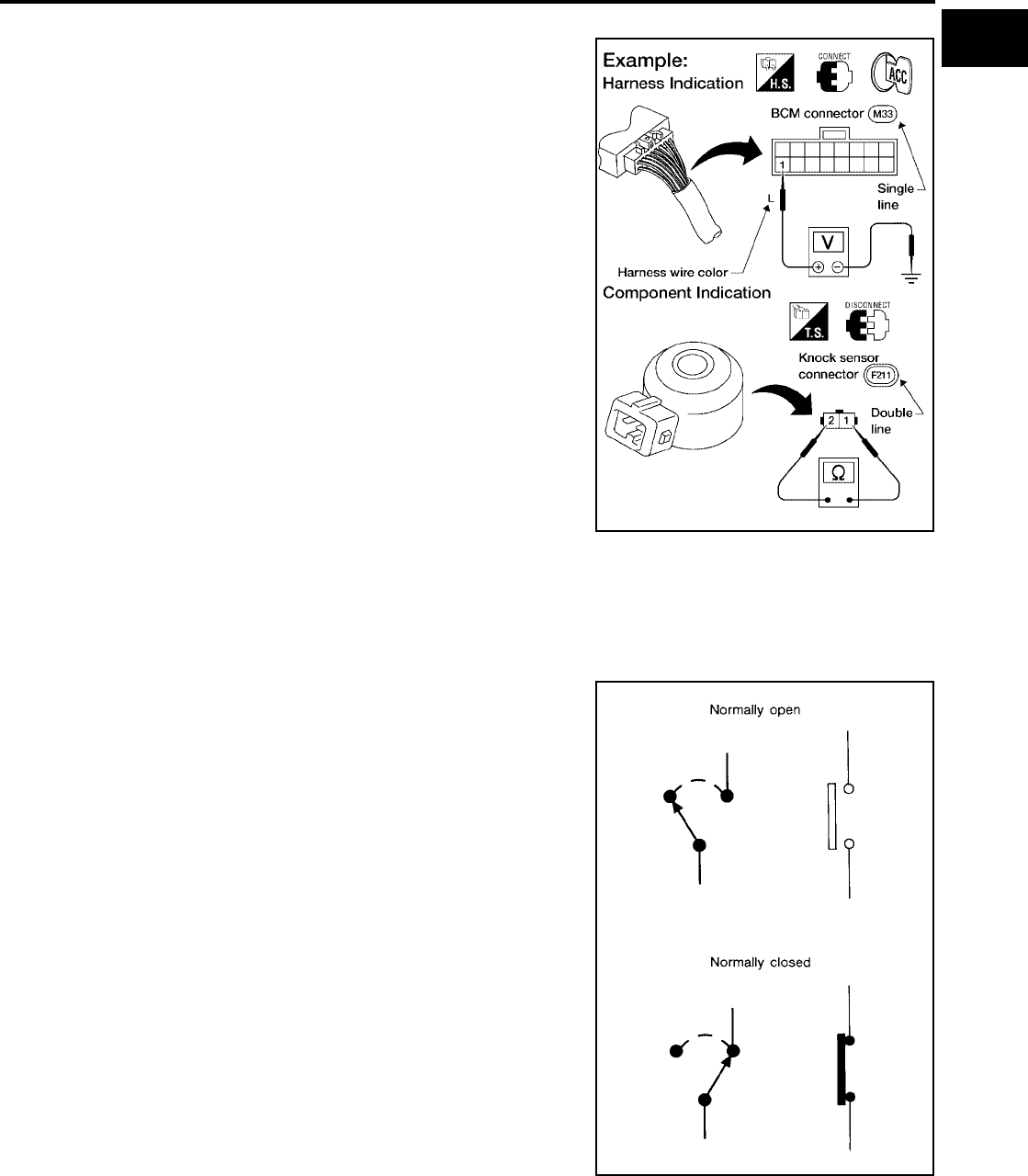
Harness Indication
●Letter designations next to test meter probe indicate harness
(connector) wire color.
●Connector numbers in a single circle M33 indicate harness con-
nectors.
Component Indication
Connector numbers in a double circle F211 indicate component connectors.
Switch Positions
Switches are shown in wiring diagrams as if the vehicle is in the “normal” condition.
A vehicle is in the “normal” condition when:
●ignition switch is “OFF”,
●doors, hood and trunk lid/back door are closed,
●pedals are not depressed, and
●parking brake is released.
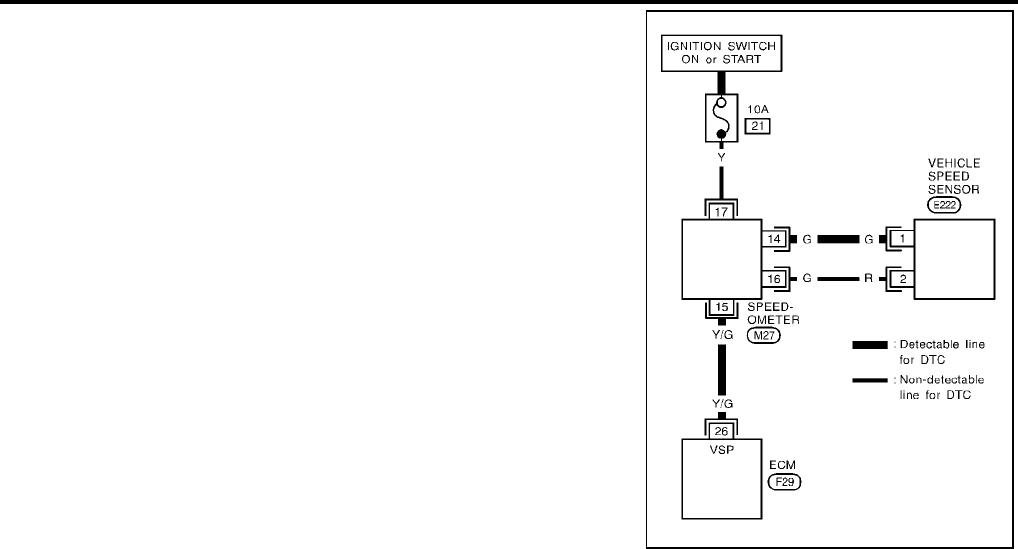
Detectable Lines and Non-Detectable Lines
In some wiring diagrams, two kinds of lines, representing wires, with different weight are used.
AGI070
SGI860
GI-20
HOW TO USE THIS MANUAL
Revision: November 2006 2006 Altima
●A line with regular weight (wider line) represents a “detectable
line for DTC (Diagnostic Trouble Code)”. A “detectable line for
DTC” is a circuit in which ECM can detect its malfunctions with
the on board diagnostic system.
●A line with less weight (thinner line) represents a “non-detect-
able line for DTC”. A “non-detectable line for DTC” is a circuit in
which ECM cannot detect its malfunctions with the on board
diagnostic system.
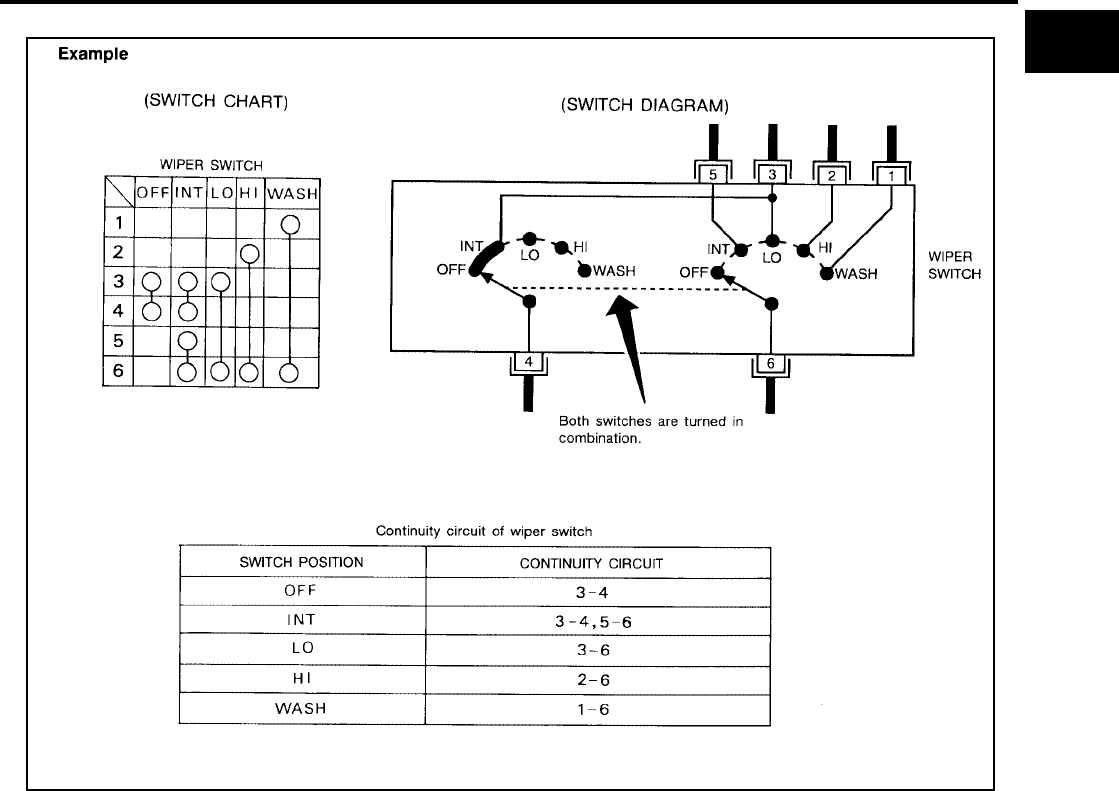
Multiple Switch
The continuity of multiple switch is described in two ways as shown below.
●The switch chart is used in schematic diagrams.
SGI862-B
HOW TO USE THIS MANUAL
GI-21
C
D
E
F
G
H
I
J
K
L
M
B
GI
Revision: November 2006 2006 Altima
●The switch diagram is used in wiring diagrams.
SGI875
GI-22
HOW TO USE THIS MANUAL
Revision: November 2006 2006 Altima
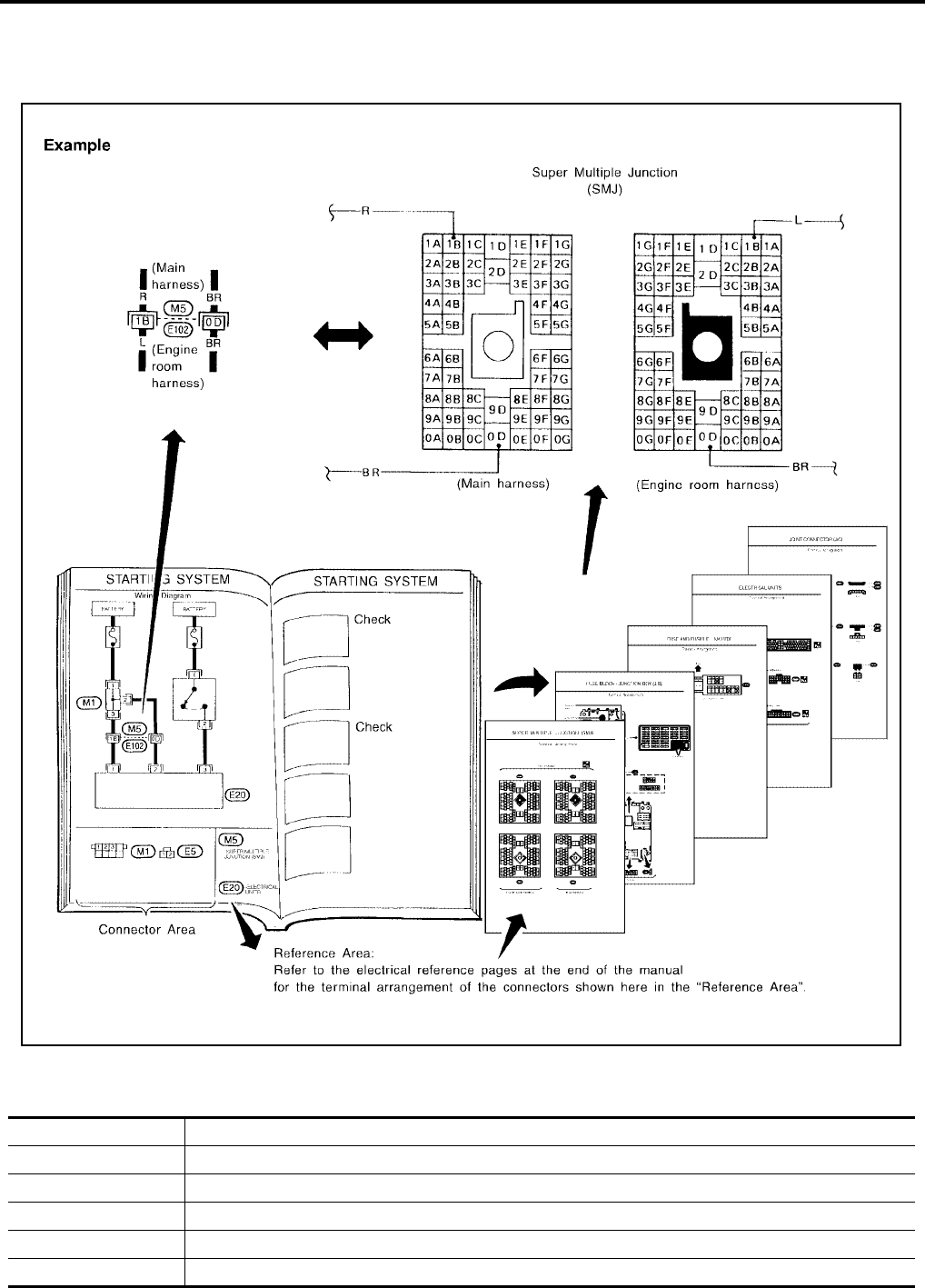
Reference Area
The Reference Area of the wiring diagram contains references to additional electrical reference pages at the
end of the manual. If connector numbers and titles are shown in the Reference Area of the wiring diagram,
these connector symbols are not shown in the Connector Area.
Abbreviations
EAS00194
The following ABBREVIATIONS are used:
SGI092A
ABBREVIATION DESCRIPTION
A/C Air Conditioner
A/T Automatic Transaxle/Transmission
ATF Automatic Transmission Fluid
D1Drive range 1st gear
D2Drive range 2nd gear
HOW TO USE THIS MANUAL
GI-23
C
D
E
F
G
H
I
J
K
L
M
B
GI
Revision: November 2006 2006 Altima
D3Drive range 3rd gear
D4Drive range 4th gear
FR, RR Front, Rear
LH, RH Left-Hand, Right-Hand
M/T Manual Transaxle/Transmission
OD Overdrive
P/S Power Steering
SAE Society of Automotive Engineers, Inc.
SDS Service Data and Specifications
SST Special Service Tools
2WD 2-Wheel Drive
222nd range 2nd gear
212nd range 1st gear
121st range 2nd gear
111st range 1st gear
ABBREVIATION DESCRIPTION
GI-24
SERVICE INFORMATION FOR ELECTRICAL INCIDENT
Revision: November 2006 2006 Altima
SERVICE INFORMATION FOR ELECTRICAL INCIDENT PFP:00000
How to Check Terminal
EAS00195
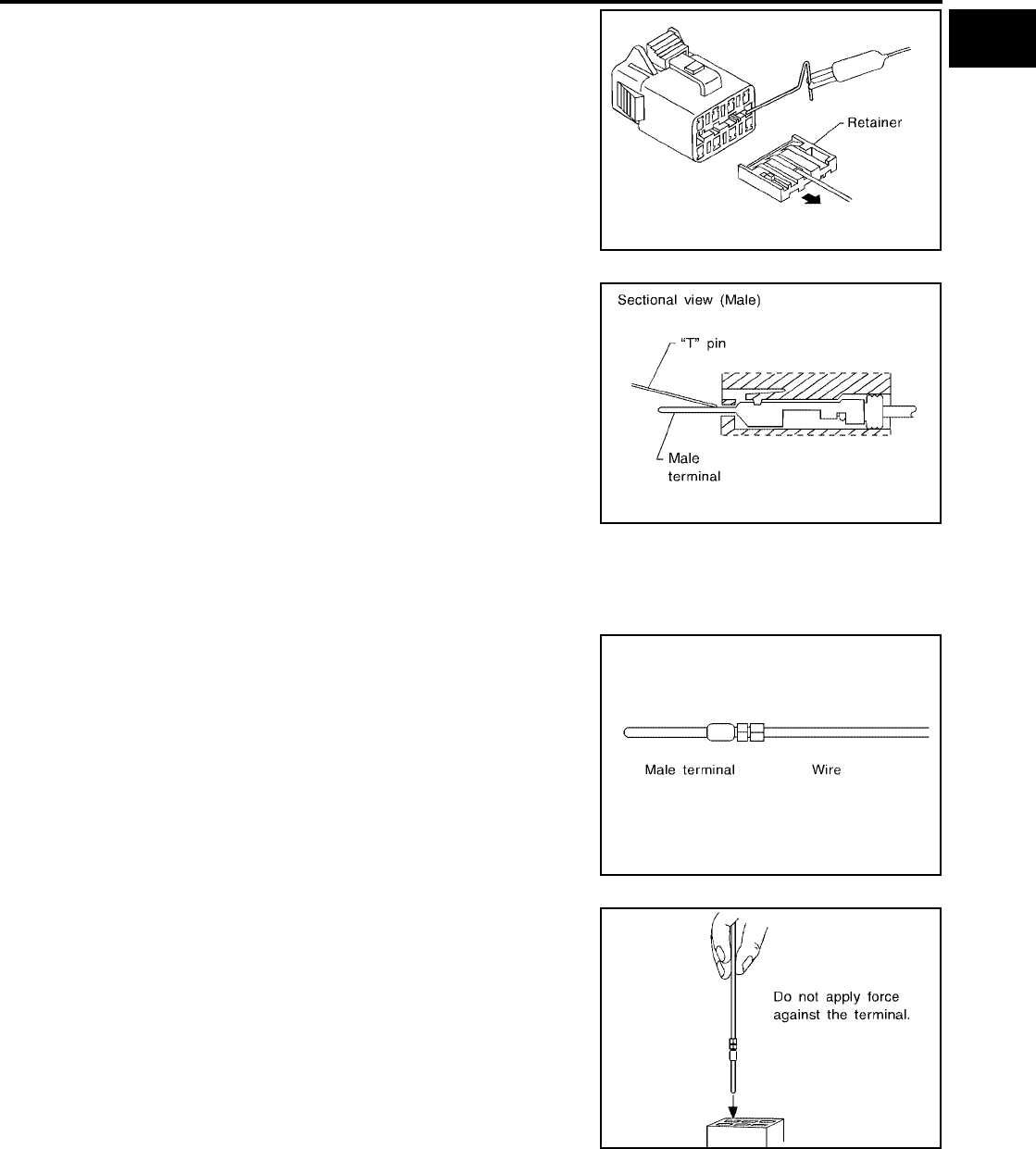
CONNECTOR AND TERMINAL PIN KIT
Use the connector and terminal pin kits listed below when replacing connectors or terminals.
The connector and terminal pin kits contain some of the most commonly used NISSAN/INFINITI connectors
and terminals. For detailed connector and terminal pin replacement procedures, refer to the latest NISSAN/
INFINITI CONNECTOR AND TERMINAL PIN SERVICE MANUAL.
HOW TO PROBE CONNECTORS
Connector damage and an intermittent connection can result from improperly probing of the connector during
circuit checks.
The probe of a digital multimeter (DMM) may not correctly fit the connector cavity. To correctly probe the con-
nector, follow the procedures below using a “T” pin. For the best contact grasp the “T” pin using an alligator
clip.
Probing from Harness Side
Standard type (not waterproof type) connector should be probed
from harness side with “T” pin.
●If the connector has a rear cover such as a ECM connector,
remove the rear cover before probing the terminal.
●Do not probe waterproof connector from harness side. Damage
to the seal between wire and connector may result.
Probing from Terminal Side
FEMALE TERMINAL
●There is a small notch above each female terminal. Probe each
terminal with the “T” pin through the notch.
Do not insert any object other than the same type male terminal
into female terminal.
Tool number
(Kent-Moore No.)
Tool name
Description
-
(J38751-95NI)
Connector and terminal
pin kit (NISSAN)
-
(J38751-95INF)
Connector and terminal
pin kit (INFINITI)
-
(J42992-98KIT)
OBD and terminal repair
kit
-
(J42992-2000UPD)
OBD-II Connector Kit Up-
date
WAIA0004E WAIA0005E
SGI841
SEL265V
SERVICE INFORMATION FOR ELECTRICAL INCIDENT
GI-25
C
D
E
F
G
H
I
J
K
L
M
B
GI
Revision: November 2006 2006 Altima
●Some connectors do not have a notch above each terminal. To
probe each terminal, remove the connector retainer to make
contact space for probing.
MALE TERMINAL
Carefully probe the contact surface of each terminal using a “T” pin.
Do not bend terminal.
How to Check Enlarged Contact Spring of Terminal
An enlarged contact spring of a terminal may create intermittent signals in the circuit.
If the intermittent open circuit occurs, follow the procedure below to inspect for open wires and enlarged con-
tact spring of female terminal.
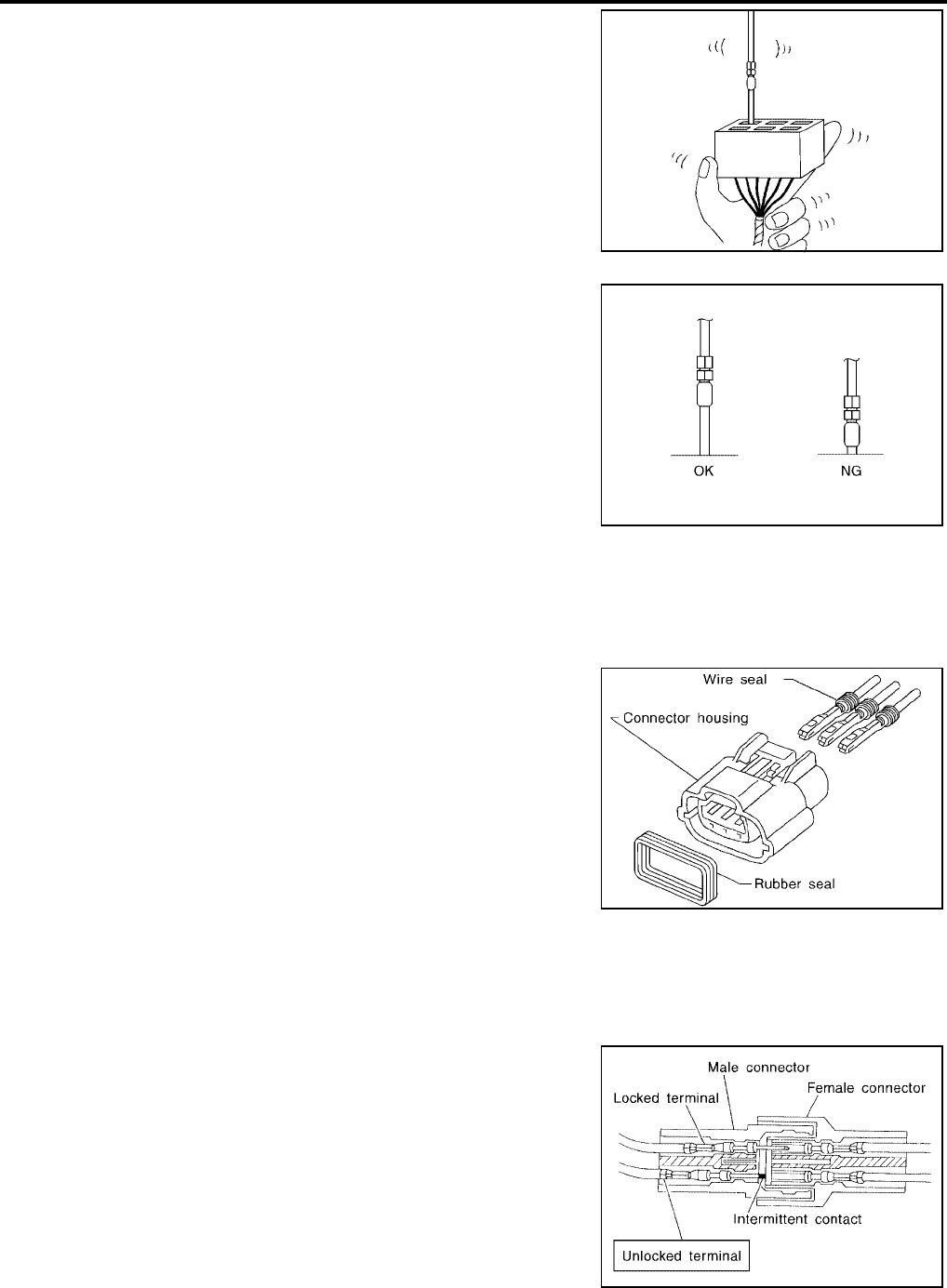
1. Assemble a male terminal and approx. 10 cm (3.9 in) of wire.
Use a male terminal which matches the female terminal.
2. Disconnect the suspected faulty connector and hold it terminal
side up.
3. While holding the wire of the male terminal, try to insert the male
terminal into the female terminal.
Do not force the male terminal into the female terminal with
your hands.
SEL266V
SEL267V
SEL270V
SEL271V
GI-26
SERVICE INFORMATION FOR ELECTRICAL INCIDENT
Revision: November 2006 2006 Altima
4. While moving the connector, check whether the male terminal
can be easily inserted or not.
●If the male terminal can be easily inserted into the female termi-
nal, replace the female terminal.
Waterproof Connector Inspection
If water enters the connector, it can short interior circuits. This may lead to intermittent problems.
Check the following items to maintain the original waterproof characteristics.
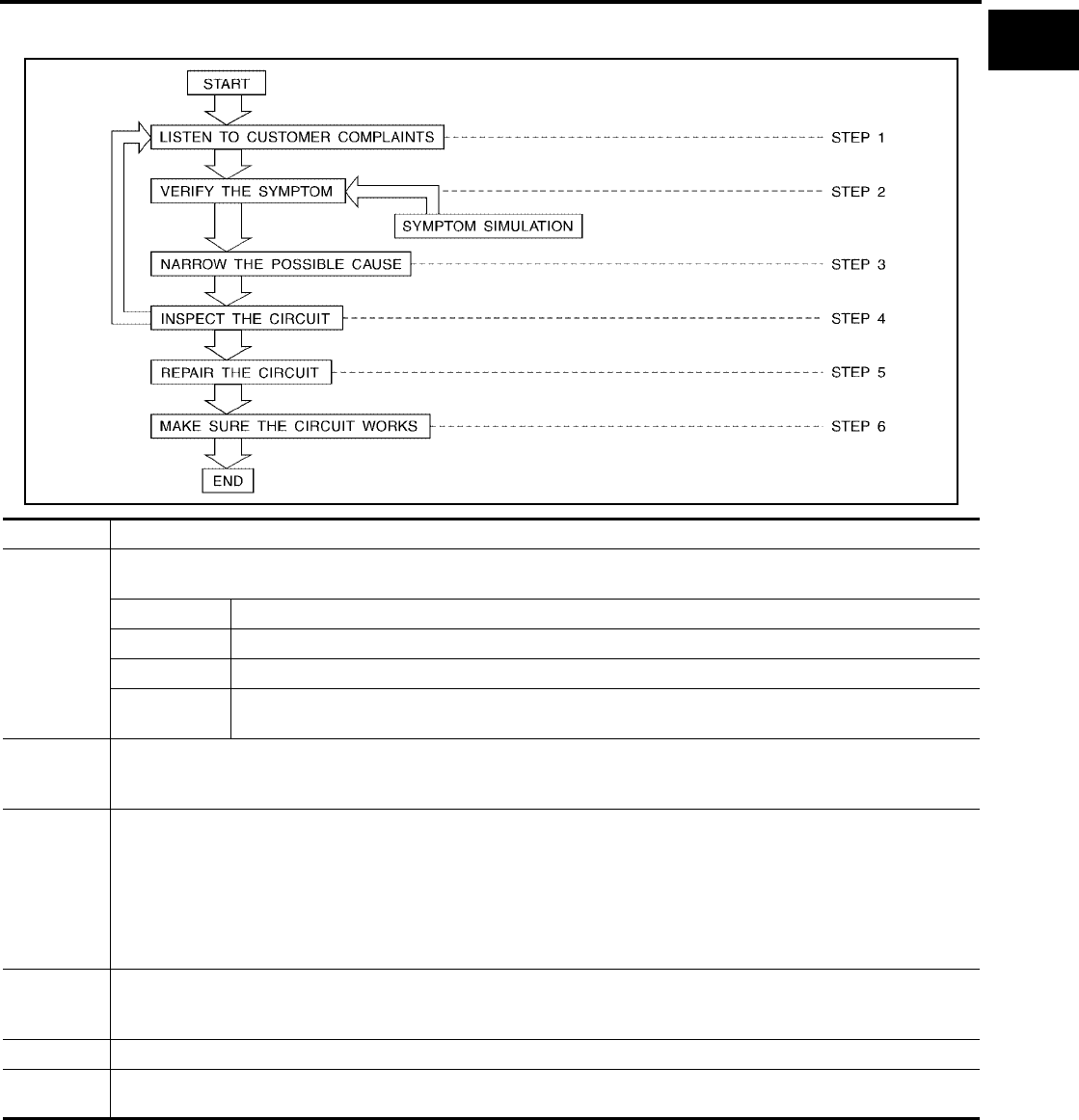
RUBBER SEAL INSPECTION
●Most waterproof connectors are provided with a rubber seal
between the male and female connectors. If the seal is missing,
the waterproof performance may not meet specifications.
●The rubber seal may come off when connectors are discon-
nected. Whenever connectors are reconnected, make sure the
rubber seal is properly installed on either side of male or female
connector.
WIRE SEAL INSPECTION
The wire seal must be installed on the wire insertion area of a waterproof connector. Be sure that the seal is
installed properly.
Terminal Lock Inspection
Check for unlocked terminals by pulling wire at the end of connector.
An unlocked terminal may create intermittent signals in the circuit.
SEL272V
SEL273V
SEL275V
SEL330V
SERVICE INFORMATION FOR ELECTRICAL INCIDENT
GI-27
C
D
E
F
G
H
I
J
K
L
M
B
GI
Revision: November 2006 2006 Altima
How to Perform Efficient Diagnosis for an Electrical Incident
EAS00196
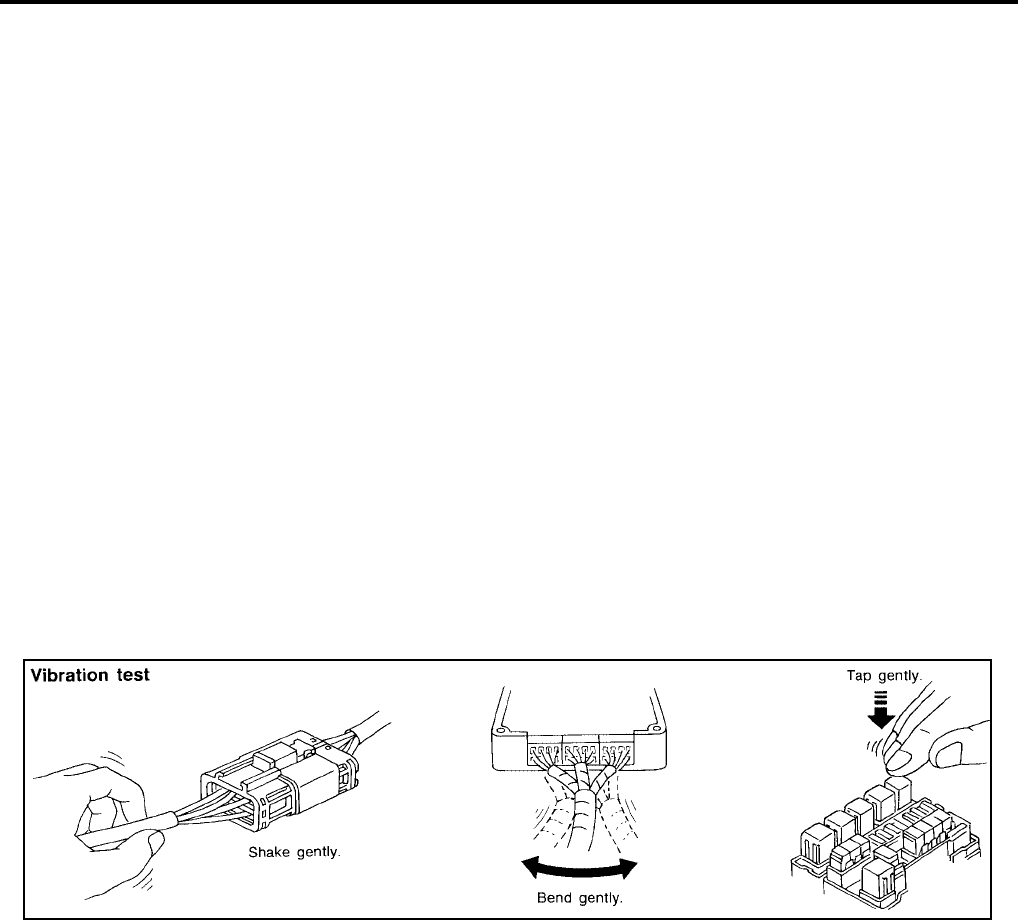
WORK FLOW
INCIDENT SIMULATION TESTS
Introduction
Sometimes the symptom is not present when the vehicle is brought in for service. If possible, re-create the
conditions present at the time of the incident. Doing so may help avoid a No Trouble Found Diagnosis. The fol-
lowing section illustrates ways to simulate the conditions/environment under which the owner experiences an
electrical incident.
The section is broken into the six following topics:
●Vehicle vibration
●Heat sensitive
SGI838
STEP DESCRIPTION
STEP 1
Get detailed information about the conditions and the environment when the incident occurred.
The following are key pieces of information required to make a good analysis:
WHAT Vehicle Model, Engine, Transmission/Transaxle and the System (i.e. Radio).
WHEN Date, Time of Day, Weather Conditions, Frequency.
WHERE Road Conditions, Altitude and Traffic Situation.
HOW System Symptoms, Operating Conditions (Other Components Interaction).
Service History and if any After Market Accessories have been installed.
STEP 2
Operate the system, road test if necessary.
Verify the parameter of the incident.
If the problem cannot be duplicated, refer to “Incident Simulation Tests”.
STEP 3
Get the proper diagnosis materials together including:
●Power Supply Routing
●System Operation Descriptions
●Applicable Service Manual Sections
●Check for any Service Bulletins
Identify where to begin diagnosis based upon your knowledge of the system operation and the customer comments.
STEP 4
Inspect the system for mechanical binding, loose connectors or wiring damage.
Determine which circuits and components are involved and diagnose using the Power Supply Routing and Harness
Layouts.
STEP 5 Repair or replace the incident circuit or component.
STEP 6 Operate the system in all modes. Verify the system works properly under all conditions. Make sure you have not inad-
vertently created a new incident during your diagnosis or repair steps.
GI-28
SERVICE INFORMATION FOR ELECTRICAL INCIDENT
Revision: November 2006 2006 Altima
●Freezing
●Water intrusion
●Electrical load
●Cold or hot start up
Get a thorough description of the incident from the customer. It is important for simulating the conditions of the
problem.
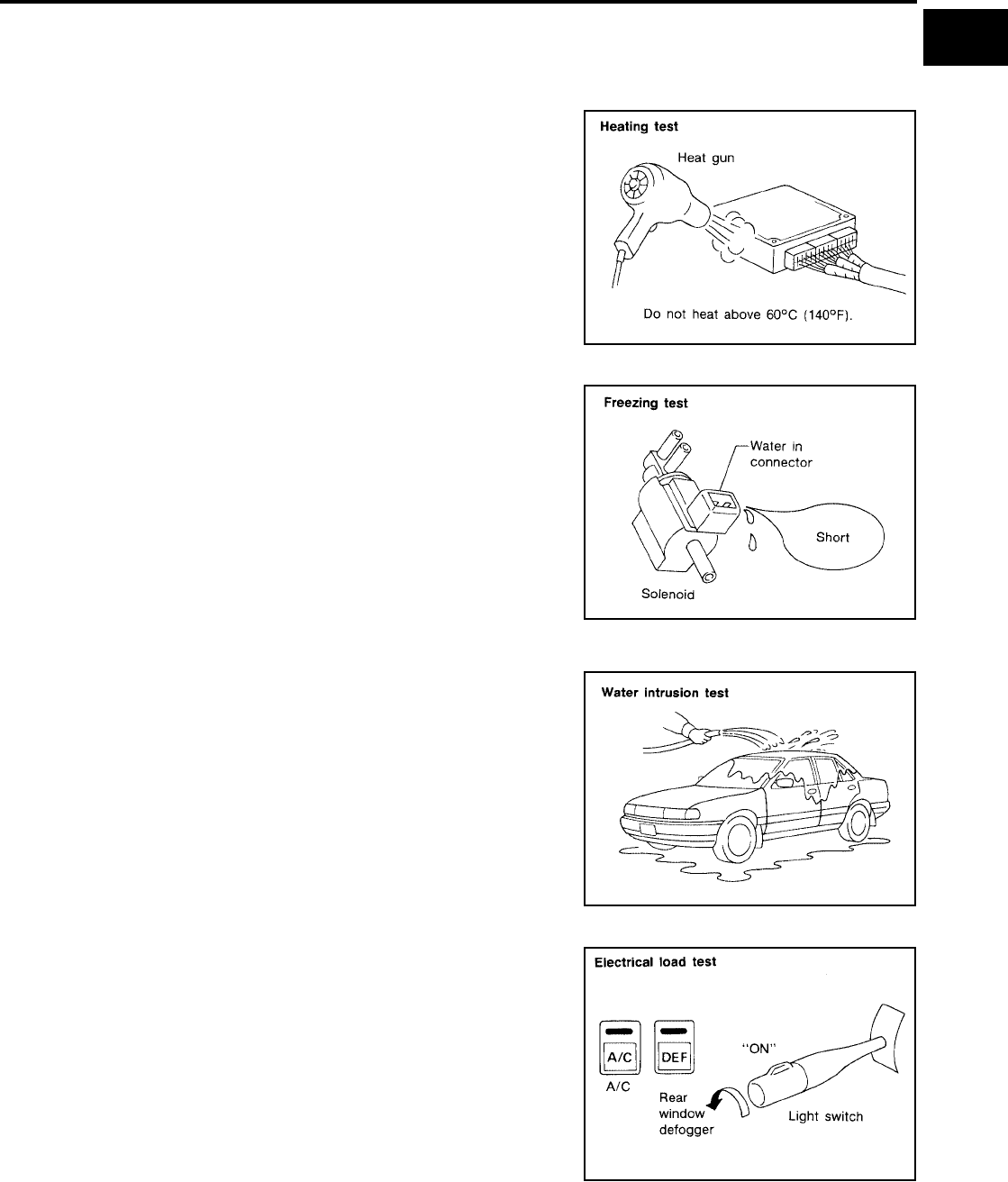
Vehicle Vibration
The problem may occur or become worse while driving on a rough road or when engine is vibrating (idle with
A/C on). In such a case, you will want to check for a vibration related condition. Refer to the following illustra-
tion.
CONNECTORS & HARNESS
Determine which connectors and wiring harness would affect the electrical system you are inspecting. Gently
shake each connector and harness while monitoring the system for the incident you are trying to duplicate.
This test may indicate a loose or poor electrical connection.
HINT
Connectors can be exposed to moisture. It is possible to get a thin film of corrosion on the connector termi-
nals. A visual inspection may not reveal this without disconnecting the connector. If the problem occurs inter-
mittently, perhaps the problem is caused by corrosion. It is a good idea to disconnect, inspect and clean the
terminals on related connectors in the system.
SENSORS & RELAYS
Gently apply a slight vibration to sensors and relays in the system you are inspecting.
This test may indicate a loose or poorly mounted sensor or relay.
ENGINE COMPARTMENT
There are several reasons a vehicle or engine vibration could cause an electrical complaint. Some of the
things to check for are:
●Connectors not fully seated.
●Wiring harness not long enough and is being stressed due to engine vibrations or rocking.
●Wires laying across brackets or moving components.
●Loose, dirty or corroded ground wires.
●Wires routed too close to hot components.
To inspect components under the hood, start by verifying the integrity of ground connections. (Refer to Ground
Inspection described later.) First check that the system is properly grounded. Then check for loose connection
by gently shaking the wiring or components as previously explained. Using the wiring diagrams inspect the
wiring for continuity.
BEHIND THE INSTRUMENT PANEL
An improperly routed or improperly clamped harness can become pinched during accessory installation. Vehi-
cle vibration can aggravate a harness which is routed along a bracket or near a screw.
UNDER SEATING AREAS
SGI839
SERVICE INFORMATION FOR ELECTRICAL INCIDENT
GI-29
C
D
E
F
G
H
I
J
K
L
M
B
GI
Revision: November 2006 2006 Altima
An unclamped or loose harness can cause wiring to be pinched by seat components (such as slide guides)
during vehicle vibration. If the wiring runs under seating areas, inspect wire routing for possible damage or
pinching.
Heat Sensitive
The customer's concern may occur during hot weather or after car
has sat for a short time. In such cases you will want to check for a
heat sensitive condition.
To determine if an electrical component is heat sensitive, heat the
component with a heat gun or equivalent.
Do not heat components above 60°C (140°F). If incident occurs
while heating the unit, either replace or properly insulate the compo-
nent.
Freezing
The customer may indicate the incident goes away after the car
warms up (winter time). The cause could be related to water freezing
somewhere in the wiring/electrical system.
There are two methods to check for this. The first is to arrange for
the owner to leave his car overnight. Make sure it will get cold
enough to demonstrate his complaint. Leave the car parked outside
overnight. In the morning, do a quick and thorough diagnosis of
those electrical components which could be affected.
The second method is to put the suspect component into a freezer
long enough for any water to freeze. Reinstall the part into the car
and check for the reoccurrence of the incident. If it occurs, repair or
replace the component.
Water Intrusion
The incident may occur only during high humidity or in rainy/snowy
weather. In such cases the incident could be caused by water intru-
sion on an electrical part. This can be simulated by soaking the car
or running it through a car wash.
Do not spray water directly on any electrical components.
Electrical Load
The incident may be electrical load sensitive. Perform diagnosis with
all accessories (including A/C, rear window defogger, radio, fog
lamps) turned on.
Cold or Hot Start Up
On some occasions an electrical incident may occur only when the car is started cold, or it may occur when
the car is restarted hot shortly after being turned off. In these cases you may have to keep the car overnight to
make a proper diagnosis.
SGI842
SGI843
SGI844
SGI845
GI-30
SERVICE INFORMATION FOR ELECTRICAL INCIDENT
Revision: November 2006 2006 Altima
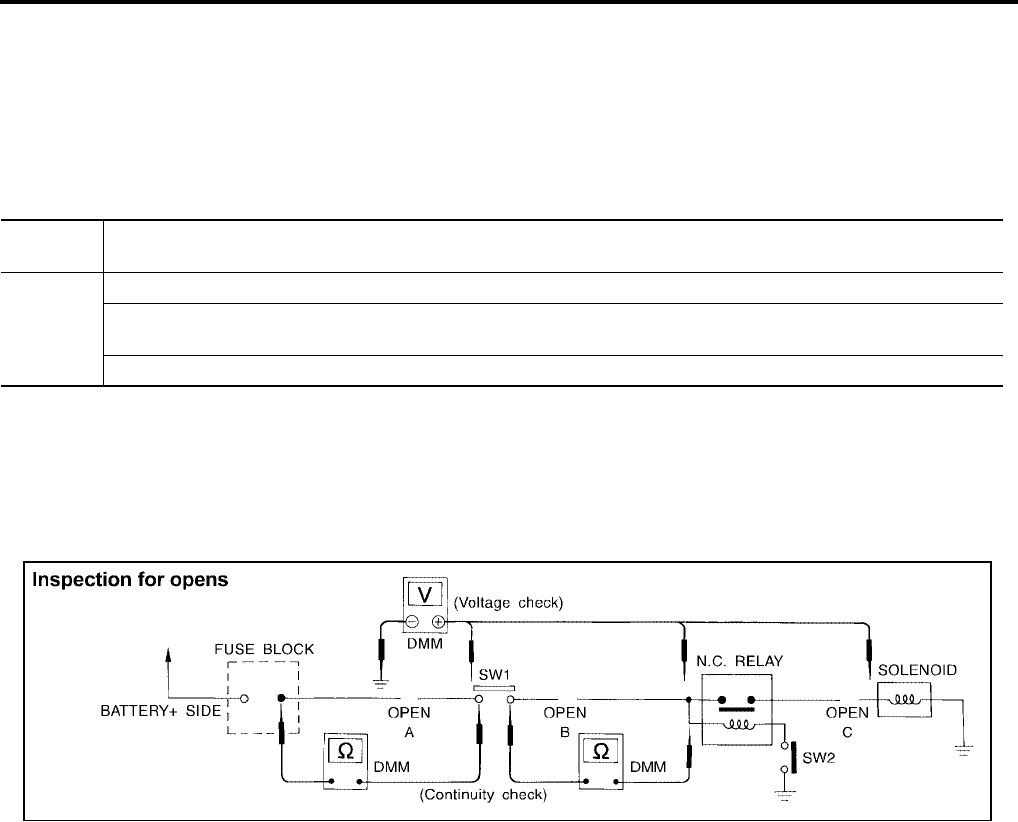
CIRCUIT INSPECTION
Introduction
In general, testing electrical circuits is an easy task if it is approached in a logical and organized method.
Before beginning it is important to have all available information on the system to be tested. Also, get a thor-
ough understanding of system operation. Then you will be able to use the appropriate equipment and follow
the correct test procedure.
You may have to simulate vehicle vibrations while testing electrical components. Gently shake the wiring har-
ness or electrical component to do this.
NOTE:
Refer to “How to Check Terminal” to probe or check terminal.
Testing for “Opens” in the Circuit
Before you begin to diagnose and test the system, you should rough sketch a schematic of the system. This
will help you to logically walk through the diagnosis process. Drawing the sketch will also reinforce your work-
ing knowledge of the system.
CONTINUITY CHECK METHOD
The continuity check is used to find an open in the circuit. The digital multimeter (DMM) set on the resistance
function will indicate an open circuit as over limit (no beep tone or no ohms symbol). Make sure to always start
with the DMM at the highest resistance level.
To help in understanding the diagnosis of open circuits, please refer to the previous schematic.
●Disconnect the battery negative cable.
●Start at one end of the circuit and work your way to the other end. (At the fuse block in this example)
●Connect one probe of the DMM to the fuse block terminal on the load side.
●Connect the other probe to the fuse block (power) side of SW1. Little or no resistance will indicate that
portion of the circuit has good continuity. If there were an open in the circuit, the DMM would indicate an
over limit or infinite resistance condition. (point A)
●Connect the probes between SW1 and the relay. Little or no resistance will indicate that portion of the cir-
cuit has good continuity. If there were an open in the circuit, the DMM would indicate an over limit or infi-
nite resistance condition. (point B)
●Connect the probes between the relay and the solenoid. Little or no resistance will indicate that portion of
the circuit has good continuity. If there were an open in the circuit, the DMM would indicate an over limit or
infinite resistance condition. (point C)
Any circuit can be diagnosed using the approach in the previous example.
VOLTAGE CHECK METHOD
To help in understanding the diagnosis of open circuits please refer to the previous schematic.
In any powered circuit, an open can be found by methodically checking the system for the presence of voltage.
This is done by switching the DMM to the voltage function.
OPEN A circuit is open when there is no continuity through a section of the circuit.
SHORT
There are two types of shorts.
●SHORT CIRCUIT When a circuit contacts another circuit and causes the normal resistance to
change.
●SHORT TO GROUND When a circuit contacts a ground source and grounds the circuit.
SGI846-A
SERVICE INFORMATION FOR ELECTRICAL INCIDENT
GI-31
C
D
E
F
G
H
I
J
K
L
M
B
GI
Revision: November 2006 2006 Altima
●Connect one probe of the DMM to a known good ground.
●Begin probing at one end of the circuit and work your way to the other end.
●With SW1 open, probe at SW1 to check for voltage.
voltage; open is further down the circuit than SW1.
no voltage; open is between fuse block and SW1 (point A).
●Close SW1 and probe at relay.
voltage; open is further down the circuit than the relay.
no voltage; open is between SW1 and relay (point B).
●Close the relay and probe at the solenoid.
voltage; open is further down the circuit than the solenoid.
no voltage; open is between relay and solenoid (point C).
Any powered circuit can be diagnosed using the approach in the previous example.
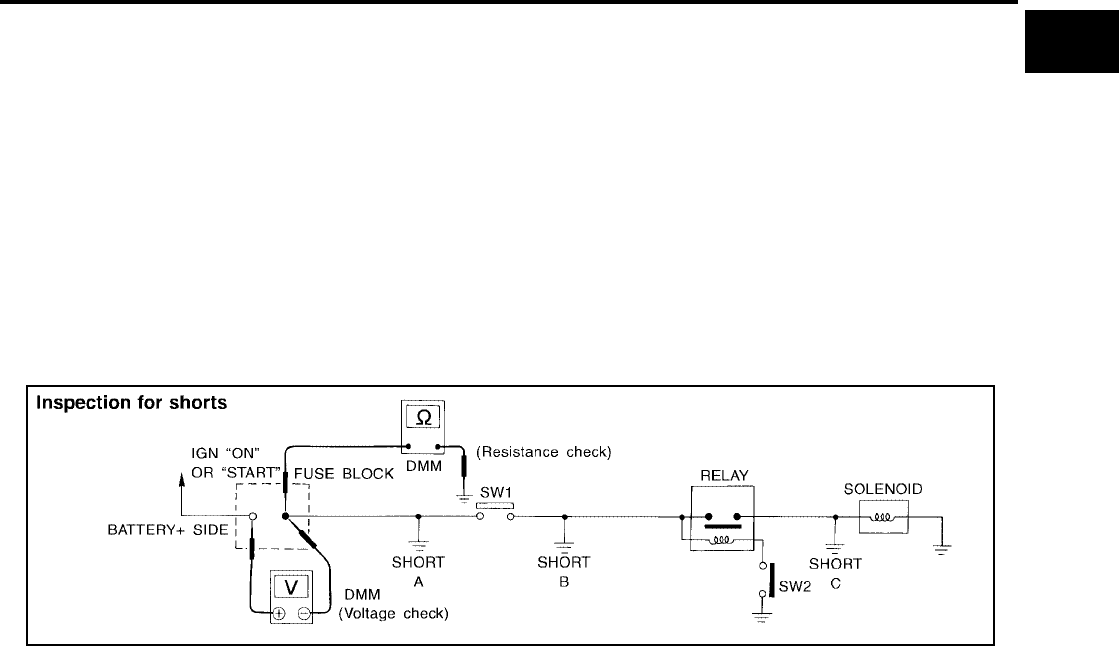
Testing for “Shorts” in the Circuit
To simplify the discussion of shorts in the system, please refer to the following schematic.
RESISTANCE CHECK METHOD
●Disconnect the battery negative cable and remove the blown fuse.
●Disconnect all loads (SW1 open, relay disconnected and solenoid disconnected) powered through the
fuse.
●Connect one probe of the DMM to the load side of the fuse terminal. Connect the other probe to a known
good ground.
●With SW1 open, check for continuity.
continuity; short is between fuse terminal and SW1 (point A).
no continuity; short is further down the circuit than SW1.
●Close SW1 and disconnect the relay. Put probes at the load side of fuse terminal and a known good
ground. Then, check for continuity.
continuity; short is between SW1 and the relay (point B).
no continuity; short is further down the circuit than the relay.
●Close SW1 and jump the relay contacts with jumper wire. Put probes at the load side of fuse terminal and
a known good ground. Then, check for continuity.
continuity; short is between relay and solenoid (point C).
no continuity; check solenoid, retrace steps.
VOLTAGE CHECK METHOD
●Remove the blown fuse and disconnect all loads (i.e. SW1 open, relay disconnected and solenoid discon-
nected) powered through the fuse.
●Turn the ignition key to the ON or START position. Verify battery voltage at the battery + side of the fuse
terminal (one lead on the battery + terminal side of the fuse block and one lead on a known good ground).
●With SW1 open and the DMM leads across both fuse terminals, check for voltage.
voltage; short is between fuse block and SW1 (point A).
no voltage; short is further down the circuit than SW1.
●With SW1 closed, relay and solenoid disconnected and the DMM leads across both fuse terminals, check
for voltage.
voltage; short is between SW1 and the relay (point B).
SGI847-A
GI-32
SERVICE INFORMATION FOR ELECTRICAL INCIDENT
Revision: November 2006 2006 Altima
no voltage; short is further down the circuit than the relay.
●With SW1 closed, relay contacts jumped with fused jumper wire check for voltage.
voltage; short is down the circuit of the relay or between the relay and the disconnected solenoid (point C).
no voltage; retrace steps and check power to fuse block.
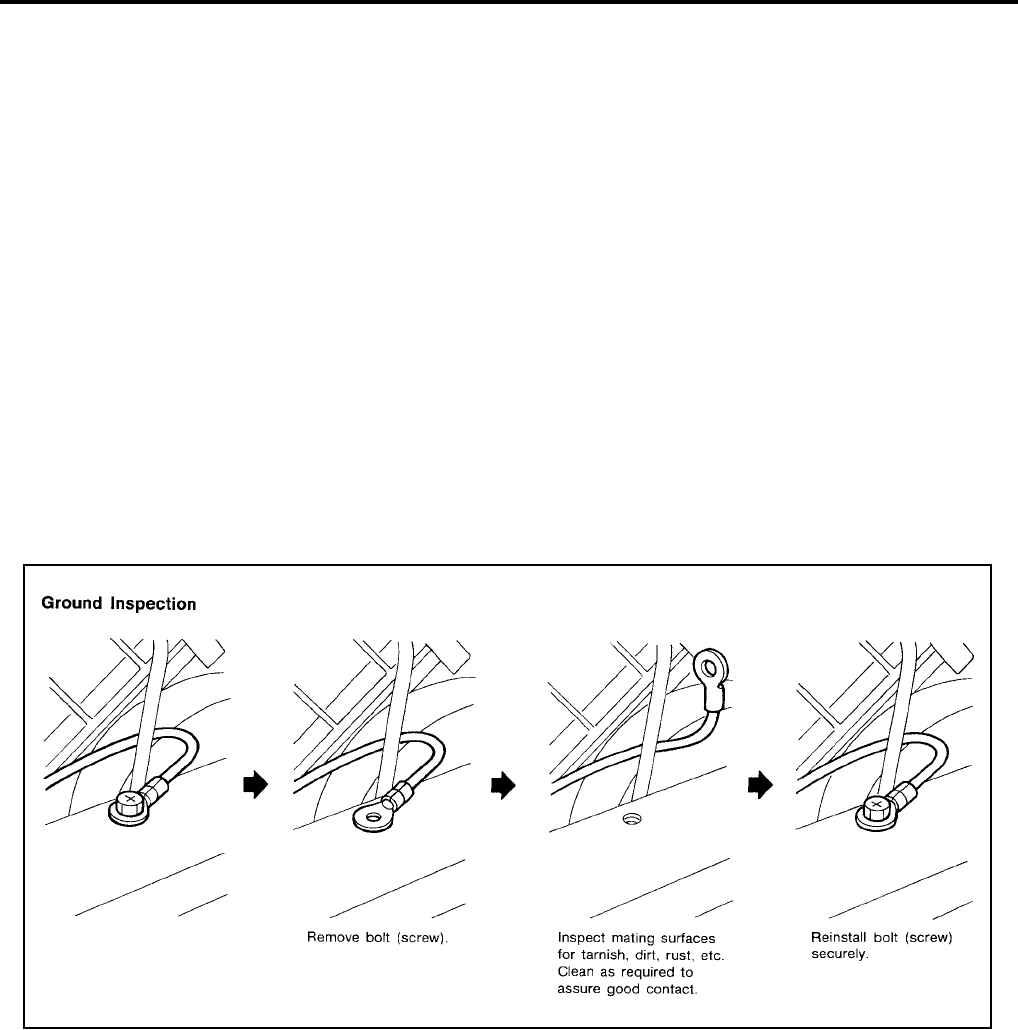
Ground Inspection
Ground connections are very important to the proper operation of electrical and electronic circuits. Ground
connections are often exposed to moisture, dirt and other corrosive elements. The corrosion (rust) can
become an unwanted resistance. This unwanted resistance can change the way a circuit works.
Electronically controlled circuits are very sensitive to proper grounding. A loose or corroded ground can drasti-
cally affect an electronically controlled circuit. A poor or corroded ground can easily affect the circuit. Even
when the ground connection looks clean, there can be a thin film of rust on the surface.
When inspecting a ground connection follow these rules:
●Remove the ground bolt or screw.
●Inspect all mating surfaces for tarnish, dirt, rust, etc.
●Clean as required to assure good contact.
●Reinstall bolt or screw securely.
●Inspect for “add-on” accessories which may be interfering with the ground circuit.
●If several wires are crimped into one ground eyelet terminal, check for proper crimps. Make sure all of the
wires are clean, securely fastened and providing a good ground path. If multiple wires are cased in one
eyelet make sure no ground wires have excess wire insulation.
For detailed ground distribution information, refer to “Ground Distribution” in PG section.
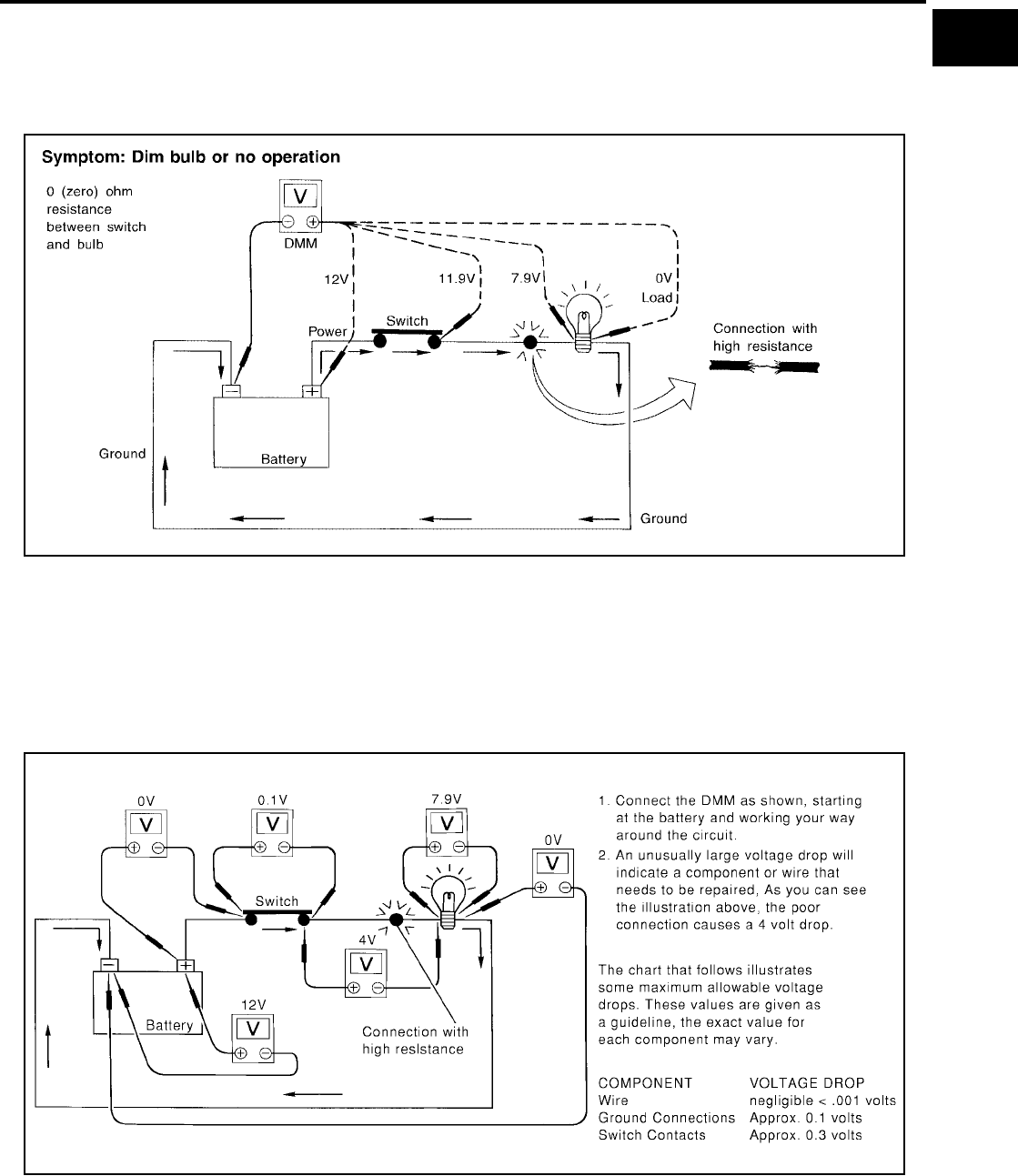
Voltage Drop Tests
Voltage drop tests are often used to find components or circuits which have excessive resistance. A voltage
drop in a circuit is caused by a resistance when the circuit is in operation.
Check the wire in the illustration. When measuring resistance with DMM, contact by a single strand of wire will
give reading of 0 ohms. This would indicate a good circuit. When the circuit operates, this single strand of wire
is not able to carry the current. The single strand will have a high resistance to the current. This will be picked
up as a slight voltage drop.
Unwanted resistance can be caused by many situations as follows:
●Undersized wiring (single strand example)
●Corrosion on switch contacts
●Loose wire connections or splices.
If repairs are needed always use wire that is of the same or larger gauge.
MEASURING VOLTAGE DROP — ACCUMULATED METHOD
SGI853
SERVICE INFORMATION FOR ELECTRICAL INCIDENT
GI-33
C
D
E
F
G
H
I
J
K
L
M
B
GI
Revision: November 2006 2006 Altima
●Connect the DMM across the connector or part of the circuit you want to check. The positive lead of the
DMM should be closer to power and the negative lead closer to ground.
●Operate the circuit.
●The DMM will indicate how many volts are being used to “push” current through that part of the circuit.
Note in the illustration that there is an excessive 4.1 volt drop between the battery and the bulb.
MEASURING VOLTAGE DROP — STEP-BY-STEP
The step-by-step method is most useful for isolating excessive drops in low voltage systems (such as those in
“Computer Controlled Systems”).
Circuits in the “Computer Controlled System” operate on very low amperage.
The (Computer Controlled) system operations can be adversely affected by any variation in resistance in the
system. Such resistance variation may be caused by poor connection, improper installation, improper wire
gauge or corrosion.
The step by step voltage drop test can identify a component or wire with too much resistance.
SGI974
SAIA0258E
GI-34
SERVICE INFORMATION FOR ELECTRICAL INCIDENT
Revision: November 2006 2006 Altima
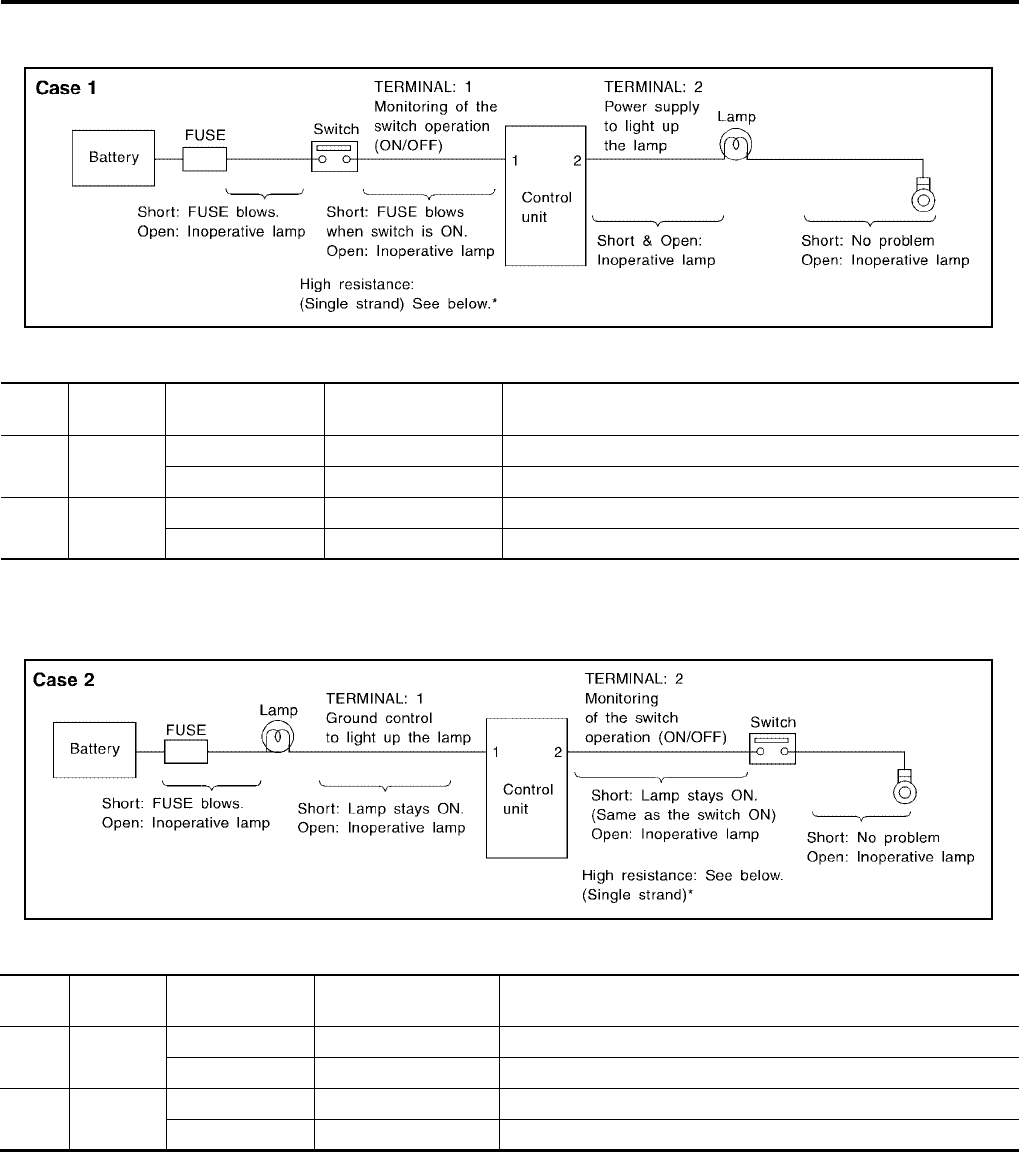
Control Unit Circuit Test
System Description:When the switch is ON, the control unit lights up the lamp.
INPUT-OUTPUT VOLTAGE CHART
The voltage value is based on the body ground.
*:If high resistance exists in the switch side circuit (caused by a single strand), terminal 1 does not detect battery voltage. Control unit
does not detect the switch is ON even if the switch does not turn ON. Therefore, the control unit does not supply power to light up the
lamp.
INPUT-OUTPUT VOLTAGE CHART
The voltage value is based on the body ground.
*:If high resistance exists in the switch side circuit (caused by a single strand), terminal 2 does not detect approx. 0V. Control unit does
not detect the switch is ON even if the switch does not turn ON. Therefore, the control unit does not control ground to light up the lamp.
MGI034A
Pin
No. Item Condition Voltage
value [V] In case of high resistance such as single strand [V] *
1 Switch Switch ON Battery voltage Lower than battery voltage Approx. 8 (Example)
Switch OFF Approx. 0 Approx. 0
2Lamp
Switch ON Battery voltage Approx. 0 (Inoperative lamp)
Switch OFF Approx. 0 Approx. 0
MGI035A
Pin
No. Item Condition Voltage
value [V] In case of high resistance such as single strand [V] *
1Lamp
Switch ON Approx. 0 Battery voltage (Inoperative lamp)
Switch OFF Battery voltage Battery voltage
2 Switch Switch ON Approx. 0 Higher than 0 Approx. 4 (Example)
Switch OFF Approx. 5 Approx. 5
SERVICE INFORMATION FOR ELECTRICAL INCIDENT
GI-35
C
D
E
F
G
H
I
J
K
L
M
B
GI
Revision: November 2006 2006 Altima
Control Units and Electrical Parts
EAS00197
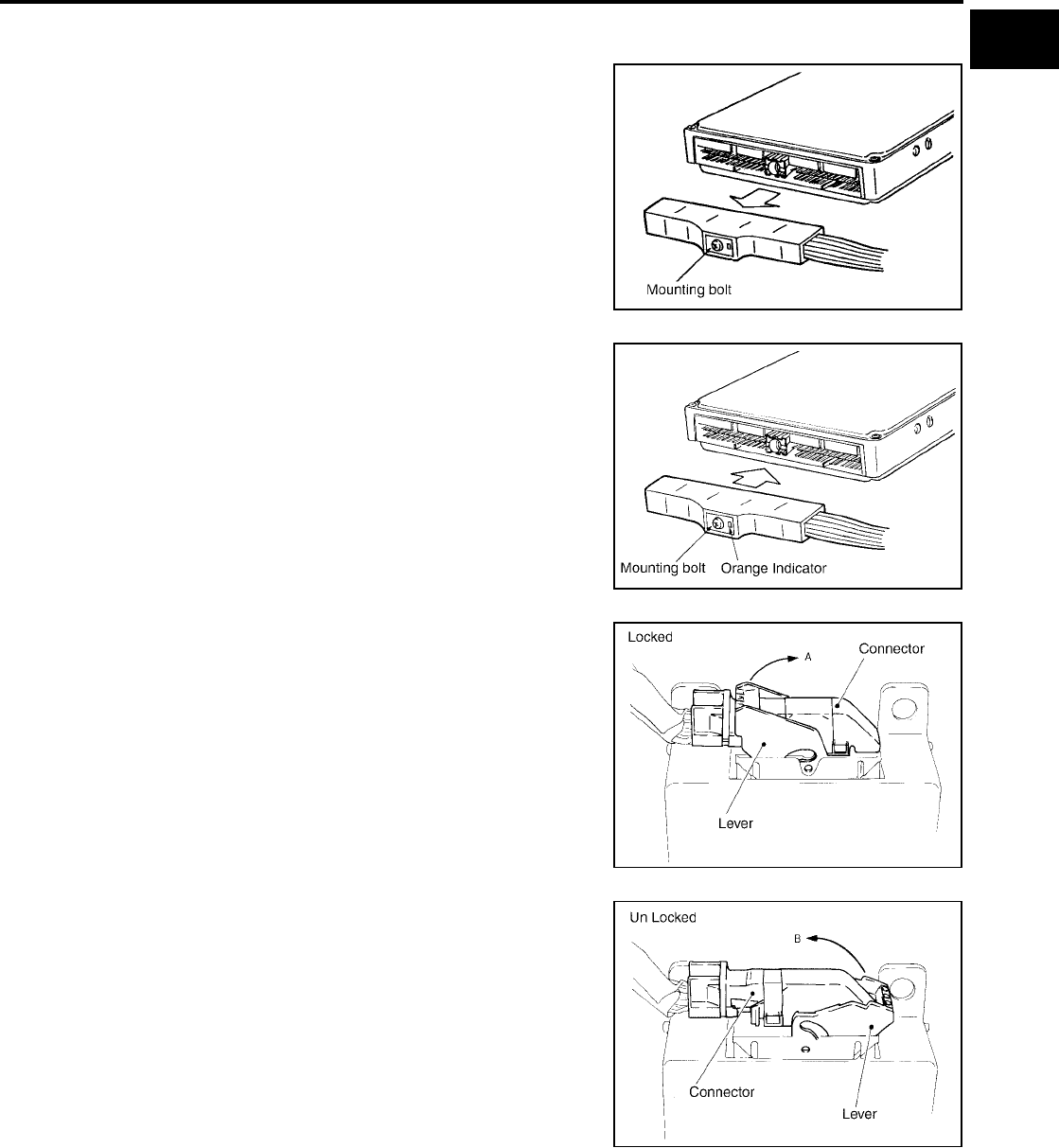
PRECAUTIONS
●Never reverse polarity of battery terminals.
●Install only parts specified for a vehicle.
●Before replacing the control unit, check the input and output and
functions of the component parts.
●Do not apply excessive force when disconnecting a connector.
●If a connector is installed by tightening bolts, loosen bolt mount-
ing it, then take it out by hand.
●Before installing a connector, make sure the terminal is not bent
or damaged, and then correctly connect it.
When installing a connector by tightening bolts, fix it by tighten-
ing the mounting bolt until the painted projection of the connec-
tor becomes even with the surface.
●For removal of the lever type connector, pull the lever up to the
direction pointed to by the arrow A in the figure, and then
remove the connector.
●For installation of the lever type connector, pull down the lever to
the direction pointed by the arrow B in the figure, and then push
the connector until a clicking noise is heard.
SAIA0251E
SAIA0252E
SAIA0253E
SAIA0254E
GI-36
SERVICE INFORMATION FOR ELECTRICAL INCIDENT
Revision: November 2006 2006 Altima
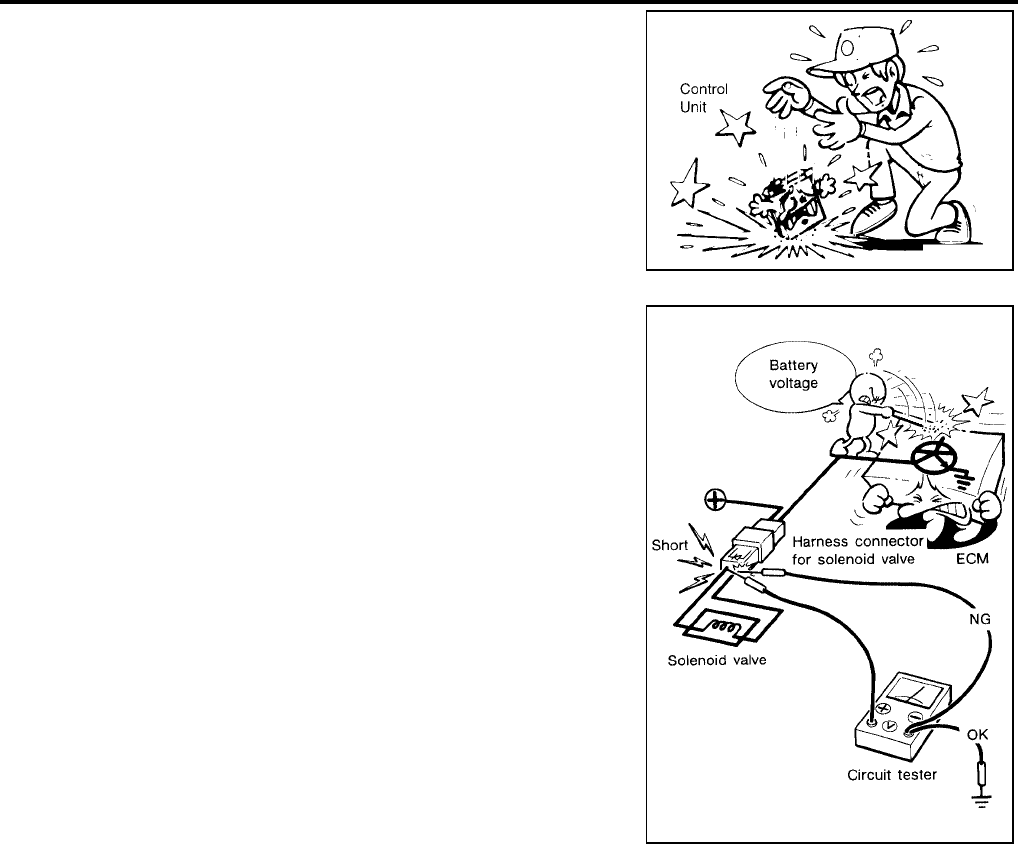
●Do not apply excessive shock to the control unit by dropping or
hitting it.
●Be careful to prevent condensation in the control unit due to
rapid temperature changes and do not let water or rain get on it.
If water is found in the control unit, dry it fully and then install it in
the vehicle.
●Be careful not to let oil to get on the control unit connector.
●Avoid cleaning the control unit with volatile oil.
●Do not disassemble the control unit, and do not remove the
upper and lower covers.
●When using a DMM, be careful not to let test probes get close to
each other to prevent the power transistor in the control unit
from damaging battery voltage because of short circuiting.
●When checking input and output signals of the control unit, use
the specified check adapter.
SAIA0255E
SEF348N

CONSULT-II CHECKING SYSTEM
GI-37
C
D
E
F
G
H
I
J
K
L
M
B
GI
Revision: November 2006 2006 Altima
CONSULT-II CHECKING SYSTEM PFP:00000
Description
EAS001QK
●CONSULT-II is a hand-held type tester. When it is connected with a diagnostic connector equipped on the
vehicle side, it will communicate with the control unit equipped in the vehicle and then enable various
kinds of diagnostic tests.
●Refer to “CONSULT-II Operator's Manual” for more information.
Function and System Application
EAS00199
x: Applicable
Diagnostic test
mode Function
ENGINE
TRANSMISSION (A/T)
ABS
AIR BAG
BCM
IPDM E/R
NVIS (NATS)*1
NVIS (NATS BCM OR S/ENT)*1
Work support
This mode enables a technician to adjust some
devices faster and more accurately by following the
indications on CONSULT-II.
xx--x- - -
Self-diagnostic
results
Self-diagnostic results can be read and erased
quickly. xxxxxx x x
Trouble diag-
nostic record
Current self-diagnostic results and all trouble diag-
nostic records previously stored can be read. --- x -- - -
Data monitor Input/Output data in the ECM can be read. x x x - - x - -
Data monitor
(spec) Data monitor specification can be read. x - - - - - - -
CAN diagnosis
support monitor
The communication condition of CAN communica-
tion line can be read. xxx-xx - -
Active test
Diagnostic Test Mode in which CONSULT-II drives
some actuators apart from the ECMs and also
shifts some parameters in a specified range.
x-x--x - -
Function test
This mode can show results of self-diagnosis of
ECU with either “OK” or “NG”. For engines, more
practical tests regarding sensors/switches and/or
actuators are available.
xxxx -- - -
DTC & SRT
confirmation
The results of SRT (System Readiness Test) and
the self-diagnosis status/result can be confirmed. x----- - -
DTC work sup-
port
The operating condition to confirm Diagnosis Trou-
ble Codes can be selected. xx*2 ---- - -
ECM/TCM/ECU
part number ECM/ECU part number can be read. x x x - x - - -
ECU discrimi-
nated No.
Classification number of a replacement ECU can
be read to prevent an incorrect ECU from being
installed.
---x-- - -
Passenger air
bag
Displays the STATUS (readiness) of the front pas-
senger air bag. --- x-- - -
Configuration Sets control module parameters to match vehicle
options. ----x- - -
PIN read*1 This mode shows the BCM-specific 5-digit code. - - - - - - - x
Control unit
initialization*1 All registered ignition key IDs in NATS components
can be initialized and new IDs can be registered. ------ x -
GI-38
CONSULT-II CHECKING SYSTEM
Revision: November 2006 2006 Altima
*1: NVIS (NATS) [NISSAN Vehicle Immobilizer System (Nissan Anti-Theft System)]
*2: 4-speed A/T
Checking Equipment
EAS0019B
When ordering the following equipment, contact your NISSAN distributor.
CAUTION:
●Previous CONSULT-II “I” and “Y” DLC-I and DLC-II cables should NOT be used anymore because
their DDL connector pins can be damaged during cable swapping.
●If CONSULT-II is used with no connection of CONSULT-II CONVERTER, malfunctions might be
detected in self- diagnosis depending on control unit which carries out CAN communication.
●If CONSULT-II CONVERTER is not connected with CONSULT-II, the vehicle enters “FAIL SAFE
MODE” which will “LIGHT UP the HEAD LIGHT” and /or “COOLING FAN ROTATING” when CON-
SULT-II is started.
NOTE:
●The CONSULT-II must be used in conjunction with a program card.
CONSULT-II does not require loading (Initialization) procedure.
●Be sure the CONSULT-II is turned off before installing or removing a program card.
CONSULT-II Start Procedure
EAS0019C
NOTE:
Turning ignition switch off when performing CAN diagnosis could cause CAN memory to be erased.
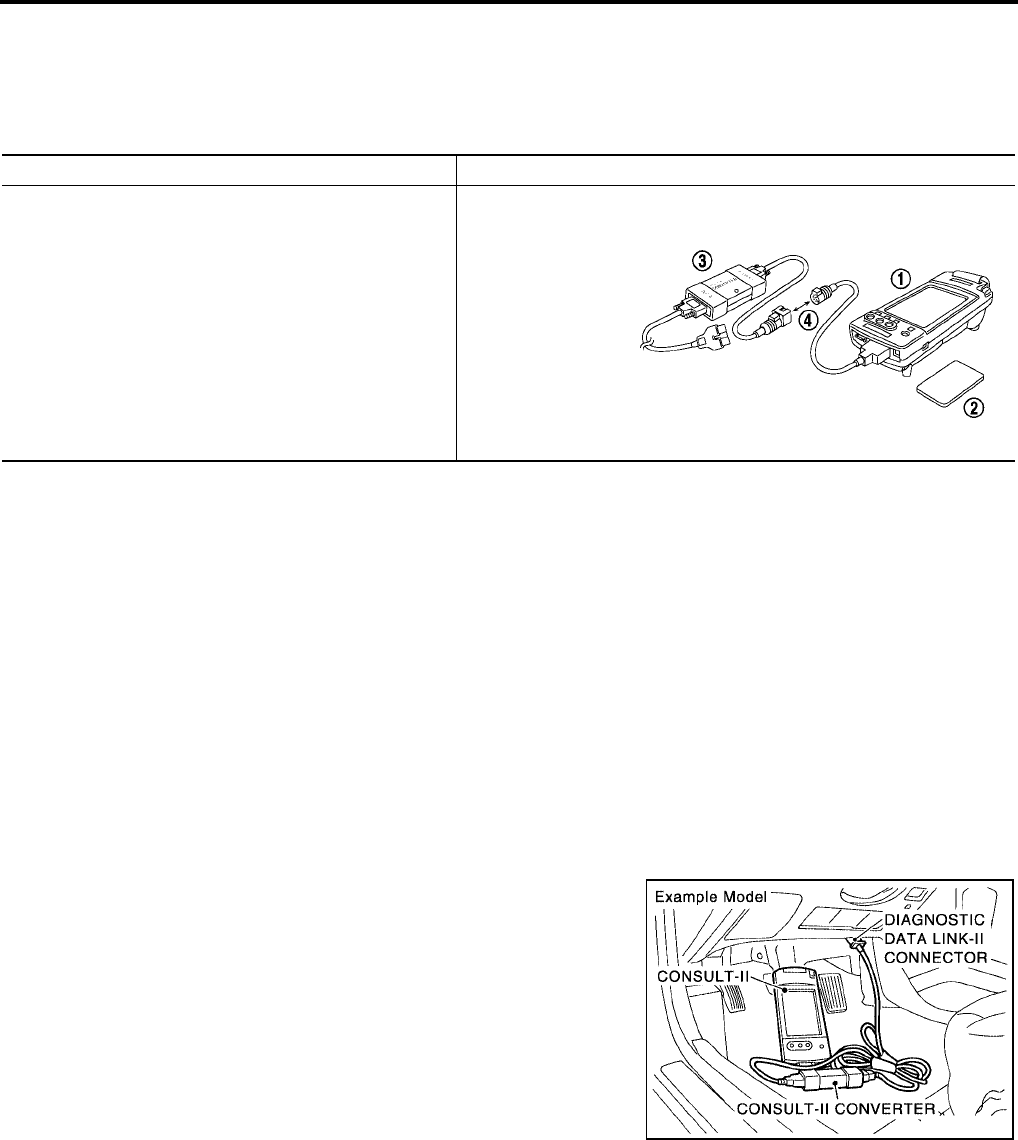
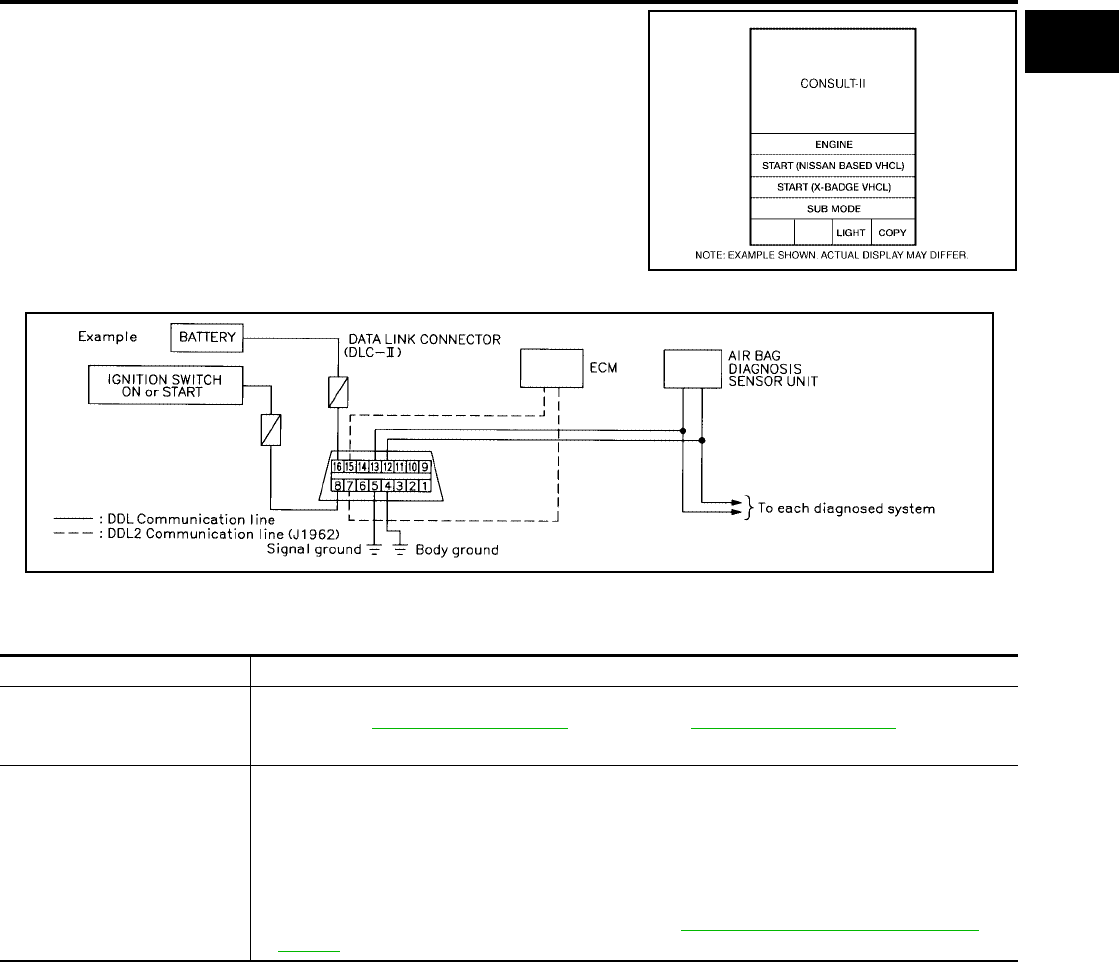
1. Connect CONSULT-II and CONSULT-II CONVERTER to the
data link connector.
2. If necessary, turn on the ignition switch.
Tool name Description
NISSAN CONSULT-II (J-44200)
1. CONSULT-II unit (Tester internal soft: Resident ver-
sion 3.4.0) and accessories.
2. Program cards UED05B-1 and AEN04A-1 (For NATS)
or later. To confirm the best combination of these soft-
ware, refer to CONSULT-II Operation Manual.
3. CONSULT-II CONVERTER.
4. "CONSULT-II Pigtail" cable.
SAIA0363E
PAIA0070E
CONSULT-II CHECKING SYSTEM
GI-39
C
D
E
F
G
H
I
J
K
L
M
B
GI
Revision: November 2006 2006 Altima
3. Touch “START (NISSAN BASED VHCL)” or “System Shortcut”
(e.g.: ENGINE) on the screen.
Consult-II Data Link Connector (DLC) Circuit
EAS001QA
Inspection Procedure
EAS002DF
If the CONSULT-II cannot diagnose the system properly, check the following items.
NOTE:
The preceding schematic is an example and may not be a true representation of the vehicle. The actual DDL1
circuits (CAN lines) from DLC pins 6 and 14 as well as the DDL2 circuits may be connected to more than one
system. A short in a DDL circuit connected to a control unit in one system may affect CONSULT-II access to
other systems.
BCIA0029E
SGI125A
Symptom Check item
CONSULT-II cannot access
any system.
●CONSULT-II DLC power supply circuit (Terminal 8) and ground circuit (Terminal 4). For detailed cir-
cuit, refer to EC-610, "Wiring Diagram" (4-cylinder) or EC-1302, "Wiring Diagram" (6-cylinder).
●CONSULT-II DLC cable and CONSULT-II CONVERTER.
CONSULT-II cannot access
individual system. (Other sys-
tems can be accessed.)
●CONSULT-II program card (Check the appropriate CONSULT-II program card for the system.
Refer to "Checking Equipment".)
●Power supply and ground circuit for the control unit of the system (For detailed circuit, refer to wir-
ing diagram for each system.)
●Open or short circuit between the system and CONSULT-II DLC (For detailed circuit, refer to wiring
diagram for each system.)
●Open or short circuit in communication lines. Refer to LAN-3, "Precautions When Using CON-
SULT-II" .
GI-40
LIFTING POINT
Revision: November 2006 2006 Altima
LIFTING POINT PFP:00000
Special Service Tools
EAS0019E
The actual shapes of Kent-Moore tools may differ from those of special service tools illustrated here.
CAUTION:
●Every time the vehicle is lifted up, maintain the complete vehicle curb condition.
●Since the vehicle's center of gravity changes when removing main parts on the front side (engine,
transmission, suspension etc.), support a jack up point on the rear side garage jack with a trans-
mission jack or equivalent.
●Since the vehicle's center of gravity changes when removing main parts on the rear side (rear axle,
suspension, etc.), support a jack up point on the front side garage jack with a transmission jack or
equivalent.
●Be careful not to smash or do anything that would affect piping parts.
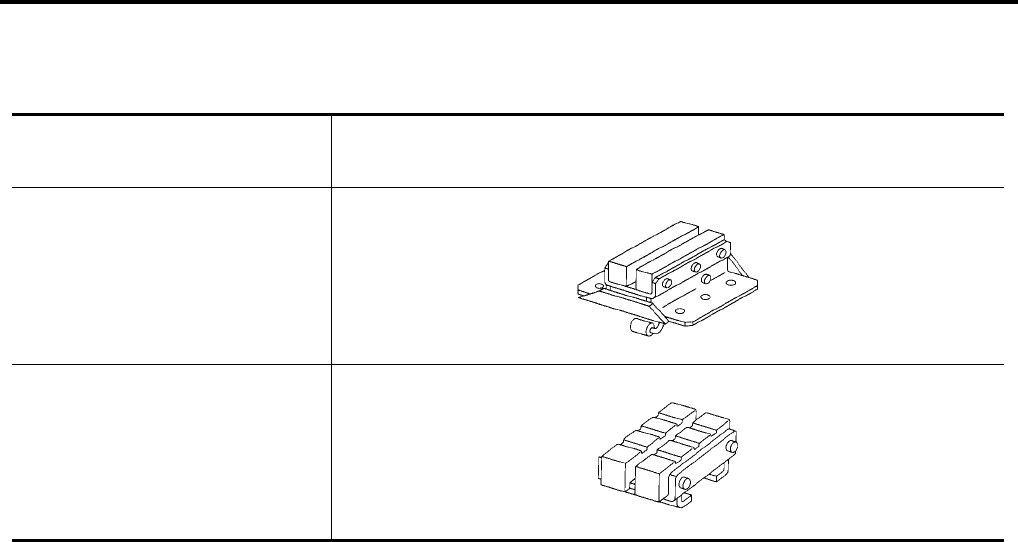
Tool number
(Kent-Moore No.)
Tool name
Description
LM4086-0200
( - )
Board on attachment
LM4519-0000
( - )
Safety stand attachment
S-NT001
S-NT002
LIFTING POINT
GI-41
C
D
E
F
G
H
I
J
K
L
M
B
GI
Revision: November 2006 2006 Altima
Garage Jack and Safety Stand
EAS0019F
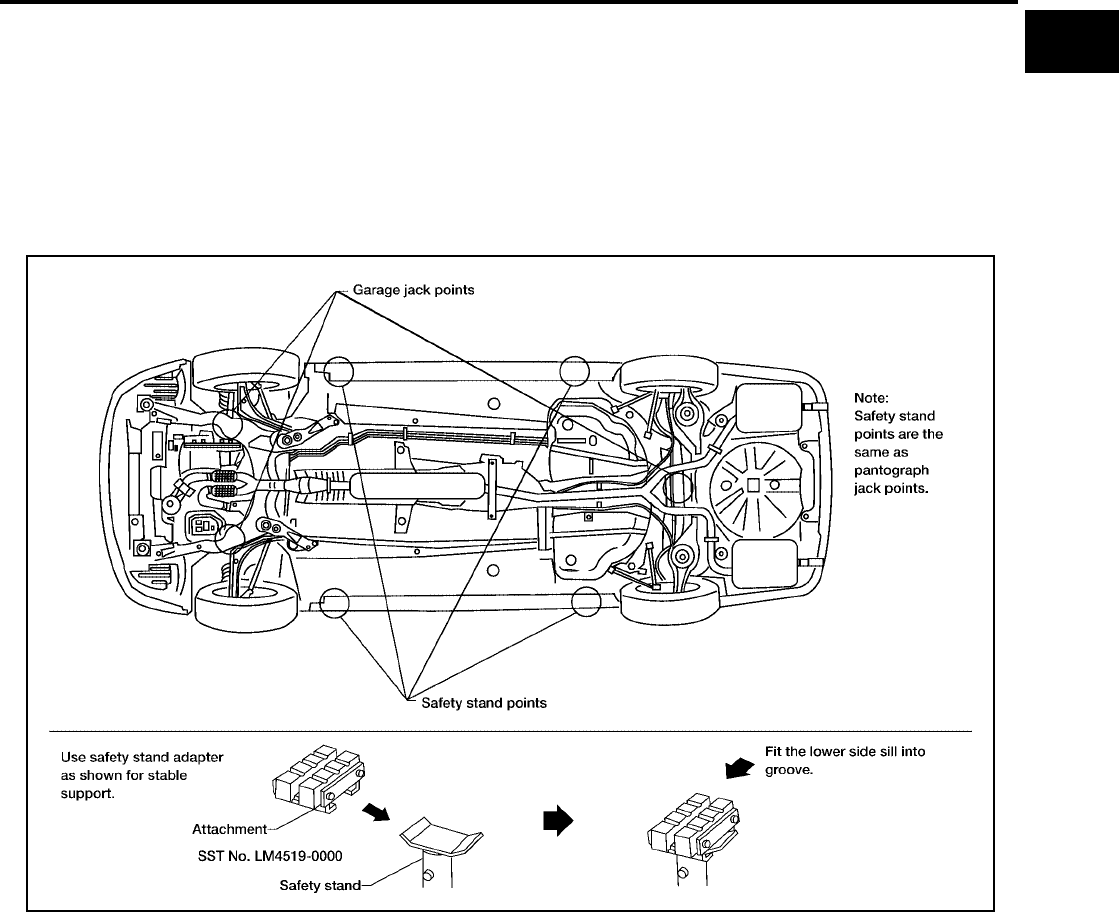
WARNING:
●Park the vehicle on a level surface when using the jack. Make sure to avoid damaging pipes,
tubes, etc. under the vehicle.
●Never get under the vehicle while it is supported only by the jack. Always use safety stands when
you have to get under the vehicle.
●Place wheel chocks at both front and back of the wheels on the ground.
●Lift at reinforced area of front suspension member where lower control arm attaches, staying in
center line of wheels.
WAIA0035E
GI-42
LIFTING POINT
Revision: November 2006 2006 Altima
2-pole Lift
EAS0019G
WARNING:
When lifting the vehicle, open the lift arms as wide as possible and ensure that the front and rear of
the vehicle are well balanced.
When setting the lift arm, do not allow the arm to contact the brake tubes, brake cable, fuel lines and
sill spoiler.
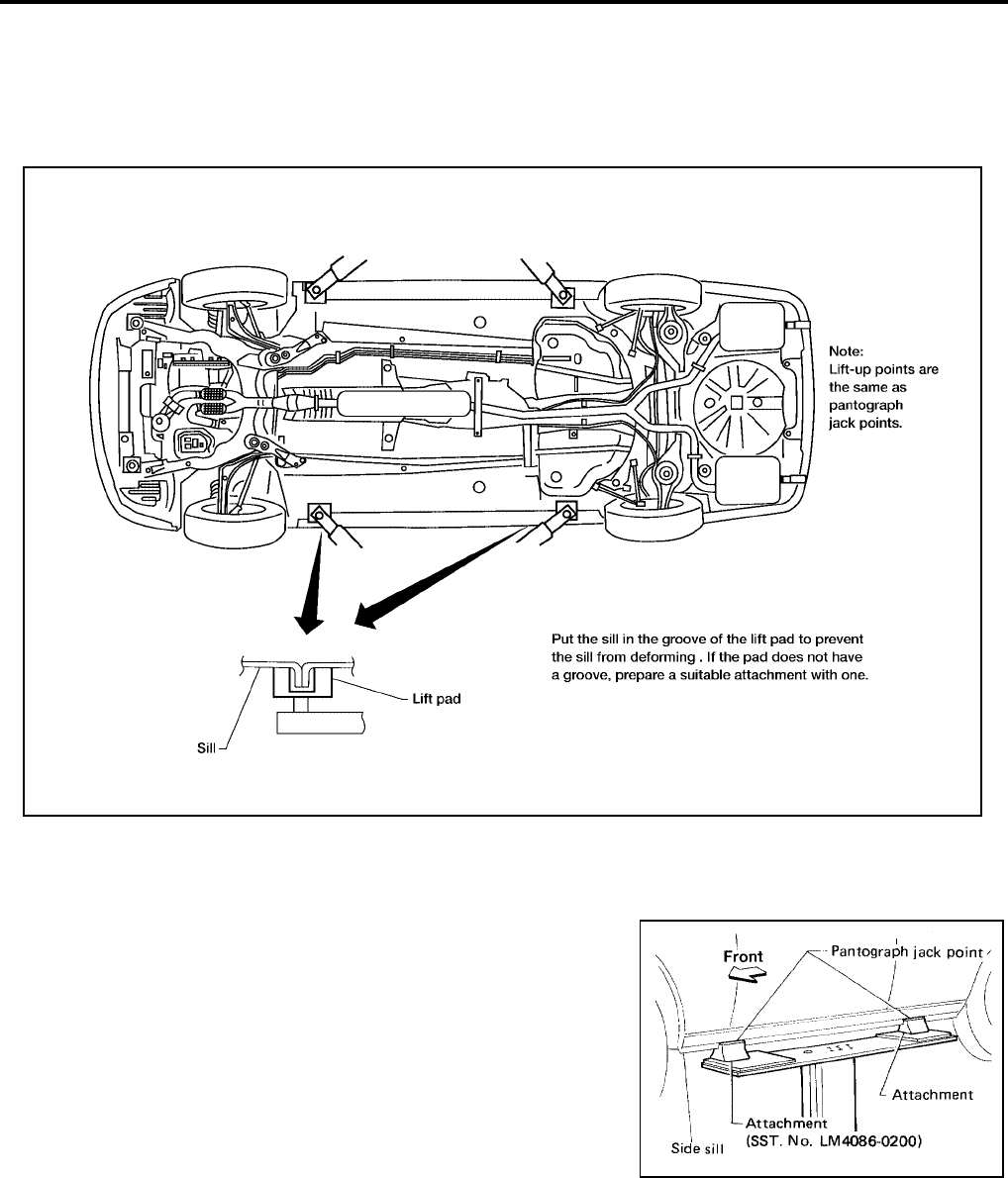
Board-on Lift
EAS0019H
CAUTION:
Make sure vehicle is empty when lifting.
●The board-on lift attachment (LM4086-0200) set at front end
of vehicle should be set on the front of the sill under the
front door opening.
●Position attachments at front and rear ends of board-on lift.
LAIA0018E
AGI016
TOW TRUCK TOWING
GI-43
C
D
E
F
G
H
I
J
K
L
M
B
GI
Revision: November 2006 2006 Altima
TOW TRUCK TOWING PFP:00000
Tow Truck Towing
EAS0019I
CAUTION:
●Never tow an automatic transaxle model with the rear wheels raised and the front wheels on the
ground. This may cause serious and expensive damage to the transaxle. If it is necessary to tow
the vehicle with the rear wheels raised, always use towing dollies under the front wheels.
●Never tow an automatic transmission model from the rear (that is backward) with four wheels on
the ground. This may cause serious and expensive damage to the transmission.
NISSAN recommends that the vehicle be towed with the driving
(front) wheels off the ground as illustrated.
CAUTION:
●Always release the parking brake when towing the vehicle
with the front wheels raised with the rear wheels on the
ground.
●When towing manual transaxle models with the front
wheels on the ground (if a towing dolly is not used), turn
the ignition key to the OFF position, and secure the steering
wheel in the straight-ahead position with a rope or similar
device. Never place the ignition key in the LOCK position.
This will result in damage to the steering lock mechanism.
Move the shift lever to the N (Neutral) position.
Vehicle Recovery (Freeing a stuck vehicle)
EAS0019J
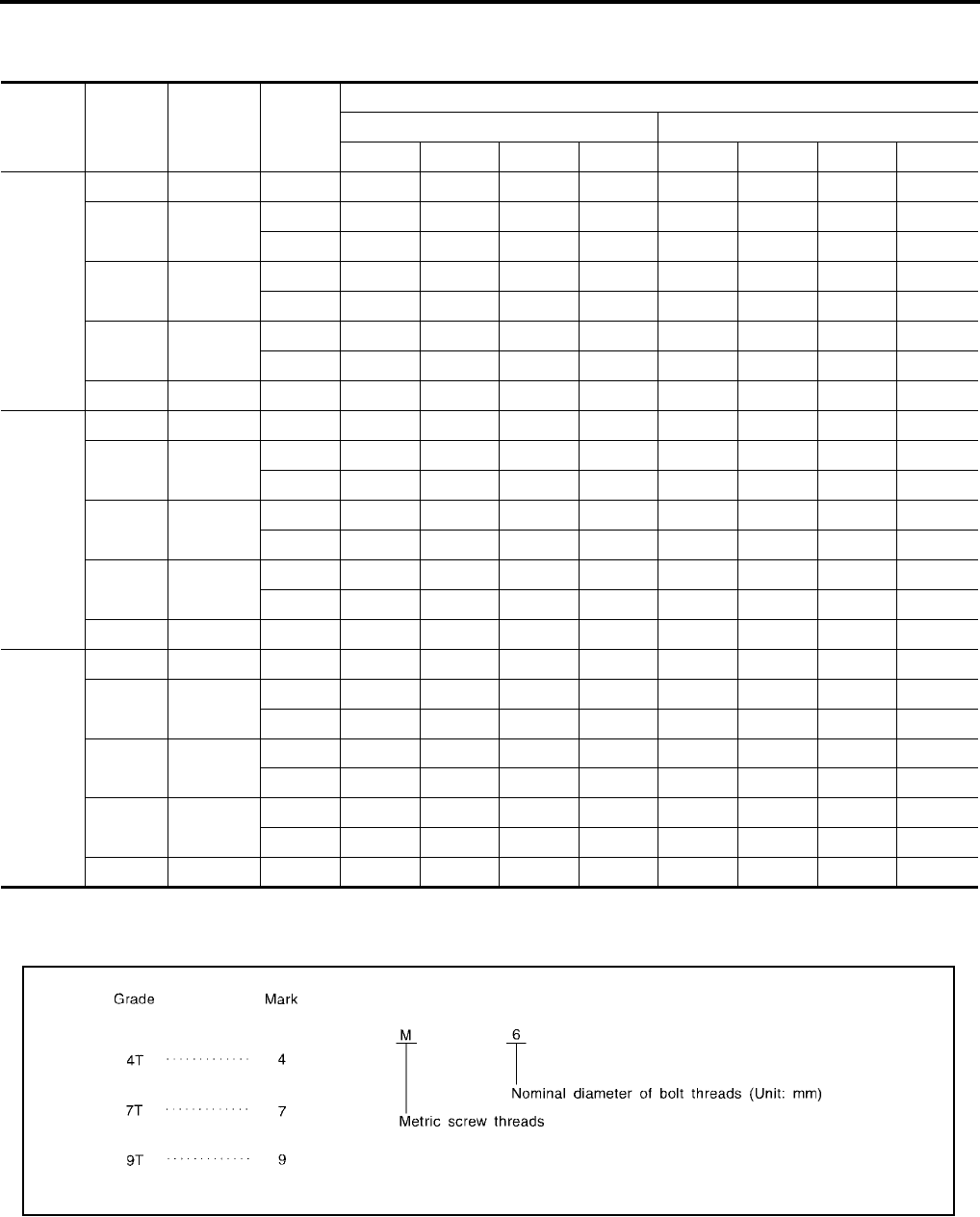
Front
●Use the towing hook only, not other parts of the vehicle. Other-
wise, the vehicle body will be damaged.
●Use the towing hook only to free a vehicle stuck in sand, snow,
mud, etc. Never tow the vehicle for a long distance using only
the towing hook.
●The towing hook is under tremendous force when used to free a
stuck vehicle. Always pull the cable straight out from the front or
rear of the vehicle. Never pull on the hook at an angle.
●Stand clear of a stuck vehicle.
Rear
●Tow chains or cables must be attached only to the main struc-
tural members of the vehicle.
●Pulling devices should be routed so they do not touch any part of the suspension, steering, brake or cool-
ing systems.
●Always pull the cable straight out from the front or rear of the vehicle. Never pull on the vehicle at an
angle.
●Pulling devices such as ropes or canvas straps are not recommended for use in vehicle towing or recov-
ery.
SGI986
LAIA0025E
GI-44
TIGHTENING TORQUE OF STANDARD BOLTS
Revision: November 2006 2006 Altima
TIGHTENING TORQUE OF STANDARD BOLTS PFP:00000
Tightening Torque Table
EAS0019K
*: Nominal diameter
1. Special parts are excluded.
2. This standard is applicable to bolts having the following marks embossed on the bolt head.
Grade Bolt size
Bolt diam-
eter *
mm
Pitch
mm
Tightening torque (Without lubricant)
Hexagon head bolt Hexagon flange bolt
N·m kg-m ft-lb in-lb N·m kg-m ft-lb in-lb
4T
M6 6.0 1.0 5.1 0.52 3.8 45.1 6.1 0.62 4.5 53.8
M8 8.0 1.25 13 1.3 9 —15 1.5 11 —
1.0 13 1.3 9 —16 1.6 12 —
M10 10.0 1.5 25 2.5 18 —29 3.0 22 —
1.25 25 2.6 19 —30 3.1 22 —
M12 12.0 1.75 42 4.3 31 —51 5.2 38 —
1.25 46 4.7 34 —56 5.7 41 —
M14 14.0 1.5 74 7.5 54 —88 9.0 65 —
7T
M6 6.0 1.0 8.4 0.86 6.2 74.6 10 1.0 7 87
M8 8.0 1.25 21 2.1 15 —25 2.5 18 —
1.0 22 2.2 16 —26 2.7 20 —
M10 10.0 1.5 41 4.2 30 —48 4.9 35 —
1.25 43 4.4 32 —51 5.2 38 —
M12 12.0 1.75 71 7.2 52 —84 8.6 62 —
1.25 77 7.9 57 —92 9.4 68 —
M14 14.0 1.5 127 13.0 94 —147 15.0 108 —
9T
M6 6.0 1.0 12 1.2 9 —15 1.5 11 —
M8 8.0 1.25 29 3.0 22 —35 3.6 26 —
1.0 31 3.2 23 —37 3.8 27 —
M10 10.0 1.5 59 6.0 43 —70 7.1 51 —
1.25 62 6.3 46 —74 7.5 54 —
M12 12.0 1.75 98 10.0 72 —118 12.0 87 —
1.25 108 11.0 80 —137 14.0 101 —
M14 14.0 1.5 177 18.0 130 —206 21.0 152 —
MGI044A

RECOMMENDED CHEMICAL PRODUCTS AND SEALANTS
GI-45
C
D
E
F
G
H
I
J
K
L
M
B
GI
Revision: November 2006 2006 Altima
RECOMMENDED CHEMICAL PRODUCTS AND SEALANTS PFP:00000
Recommended Chemical Products and Sealants
EAS0019L
Refer to the following chart for help in selecting the appropriate chemical product or sealant.
Product Description Purpose Nissan North America
Part No. (USA)
Nissan Canada Part
No. (Canada)
Aftermarket Cross-
reference Part Nos.
1Rear View Mirror
Adhesive
Used to permanently
remount rear view mirrors
to windows.
999MP-AM000P 99998-50505 Permatex 81844
2Anaerobic Liquid Gas-
ket
For metal-to-metal flange
sealing.
Can fill a 0.38 mm (0.015
inch) gap and provide
instant sealing for most
powertrain applications.
999MP-AM001P 99998-50503 Permatex 51813 and
51817
3High Performance
Thread Sealant
Provides instant sealing on
any threaded straight or
parallel threaded fitting.
(Thread sealant only, no
locking ability.)
●Do not use on plastic.
999MP-AM002P 999MP-AM002P Permatex 56521
4 Silicone RTV
Gasket Maker 999MP-AM003P
(Ultra Grey)
99998-50506
(Ultra Grey)
Permatex Ultra Grey
82194;
Three Bond
1207,1215, 1216,
1217F and 1217G;
Nissan RTV Part No.
999MP-A7007
Gasket Maker for Maxima/
Quest 5-speed automatic
transmission
(RE5F22A)
––
Three Bond 1281B
or exact equivalent
in its quality
5
High Temperature,
High Strength Thread
Locking Sealant (Red)
Threadlocker 999MP-AM004P 999MP-AM004P
Permatex 27200;
Three Bond 1360,
1360N, 1305 N&P,
1307N, 1335,
1335B, 1363B,
1377C, 1386B, D&E
and 1388
6
Medium Strength
Thread Locking Seal-
ant (Blue)
Threadlocker (service tool
removable) 999MP-AM005P 999MP-AM005P
Permatex 24200,
24206, 24240,
24283 and 09178;
Three Bond 1322,
1322N, 1324 D&N,
1333D, 1361C,
1364D, 1370C and
1374
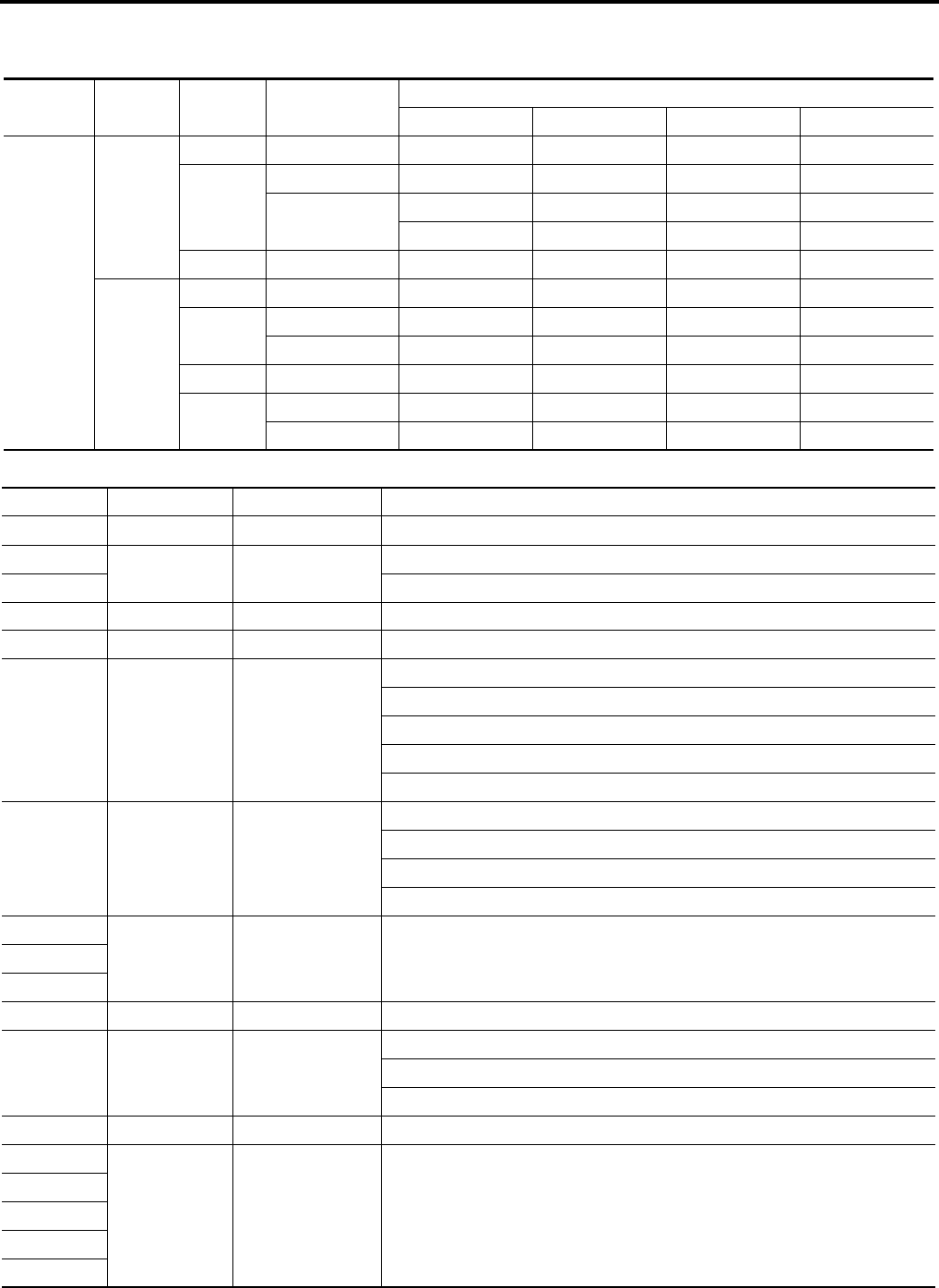
GI-46
IDENTIFICATION INFORMATION
Revision: November 2006 2006 Altima
IDENTIFICATION INFORMATION PFP:00010
Model Variation
EAS001QD
Prefix and suffix designations:
Body Engine Grade Transmission Destination
USA California Canada Mexico
Sedan
QR25DE
Base M/T BDBALAF-EUA BDBALAF-EVA — —
S
M/T BDBALBF-EUA BDBALBF-EVA BDBALBF-ENA —
A/T BDBALBA-EUA BDBALBA-EVA BDBALBA-ENA BDBALBA-EUA
BDBALCA-EUA BDBALCA-EVA BDBALCA-ENA BDBALCA-EUA
SL A/T BDBALDA-EUA BDBALDA-EVA BDBALDA-ENA BDBALDA-EUA
VQ35DE
SA/T ——BLJALBN-ENA —
SE M/T BLJALCF-EUA —BLJALCF-ENA —
A/T BLJALCN-EUA —BLJALCN-ENA BLJALCN-EUA
SL A/T BLJALDN-EUA ———
SE-R M/T BLJALEY-EUA —BLJALEY-ENA BLJALEY-EUA
A/T BLJALEN-EUA —BLJALEN-ENA —
Position Character Qualifier Definition
1 B Body type B: 4-Door
2DB Engine DB: QR25DE
3LJ: VQ35DE
4 A Axle A: 2WD
5LDrive L: LH
6 A Grade
A: 2.5 Base
B: S
C: Convenience
D: SL
E: SE-R
7 F Transmission
A: 4 A/T
F: 5 M/T
N: 5 A/T
Y: 6 M/T
8
L31 Model L31: Altima9
10
11 E Intake E: EGI
12 U Zone
N: Canada
U: Federal and Mexico
V: California
13 A Equipment A: Standard
14
XXXXX Option Codes Option Codes
15
16
17
18
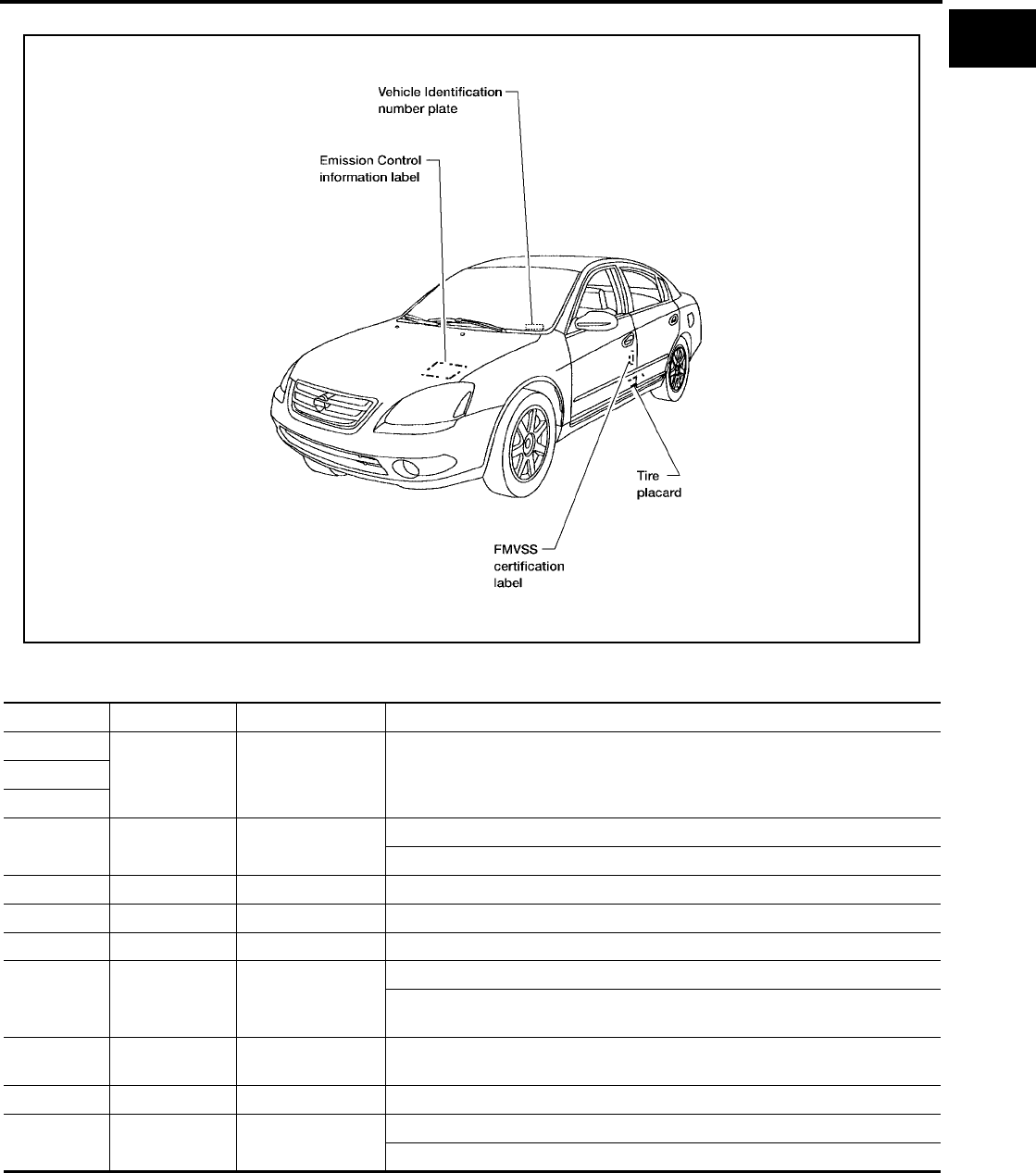
IDENTIFICATION INFORMATION
GI-47
C
D
E
F
G
H
I
J
K
L
M
B
GI
Revision: November 2006 2006 Altima
Identification Number
EAS001QE
Vehicle Identification Number Arrangement
LAIA0020E
Position Character Qualifier Definition
1
1N4 Manufacturer 1N4: USA produced passenger vehicle2
3
4 A Engine type A: QR25DE
B: VQ35DE
5 L Vehicle line L: NISSAN Altima
6 3 Model change (0-9)
7 1 Body type 1: 4 door sedan
8 D Restraint system
D: Driver and front passenger SRS air bag & 3-point manual seat belts
E: Driver and front passenger SRS air bags, SRS side and curtain air bags &
3- point manual seat belts
9 * Check digit (0 to 9 or X) The code for the check digit is determined by a mathematical
computation.
10 6 Model year 2006
11 N Manufacturing
plant
N: Canton Mississippi
C: Smyrna Tennessee
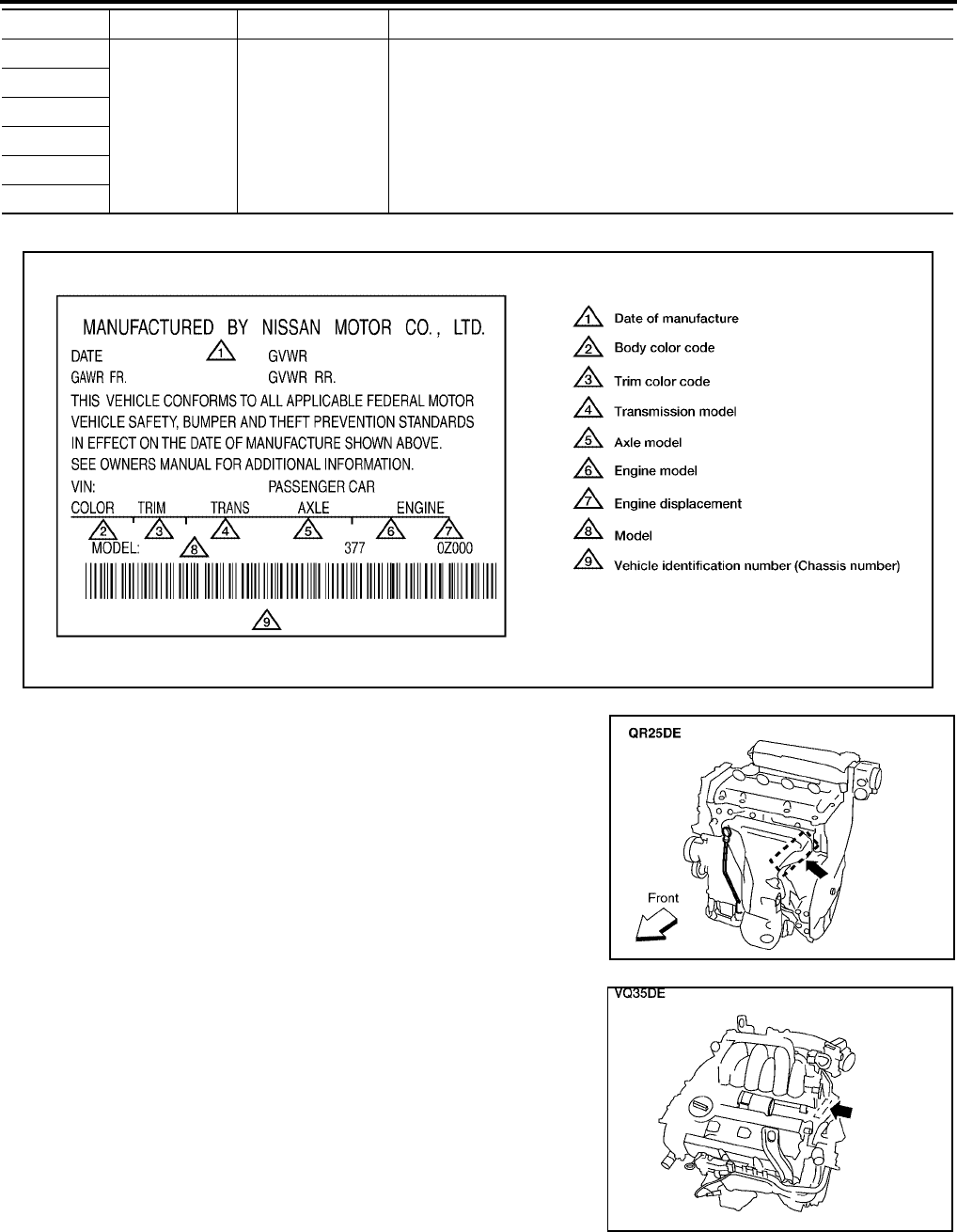
GI-48
IDENTIFICATION INFORMATION
Revision: November 2006 2006 Altima
Identification Plate
EAS001QF
Engine Serial Number
EAS001QG
12
XXXXX Vehicle serial num-
ber Chassis number
13
14
15
16
17
Position Character Qualifier Definition
LAIA0027E
LAIA0024E
LAIA0026E
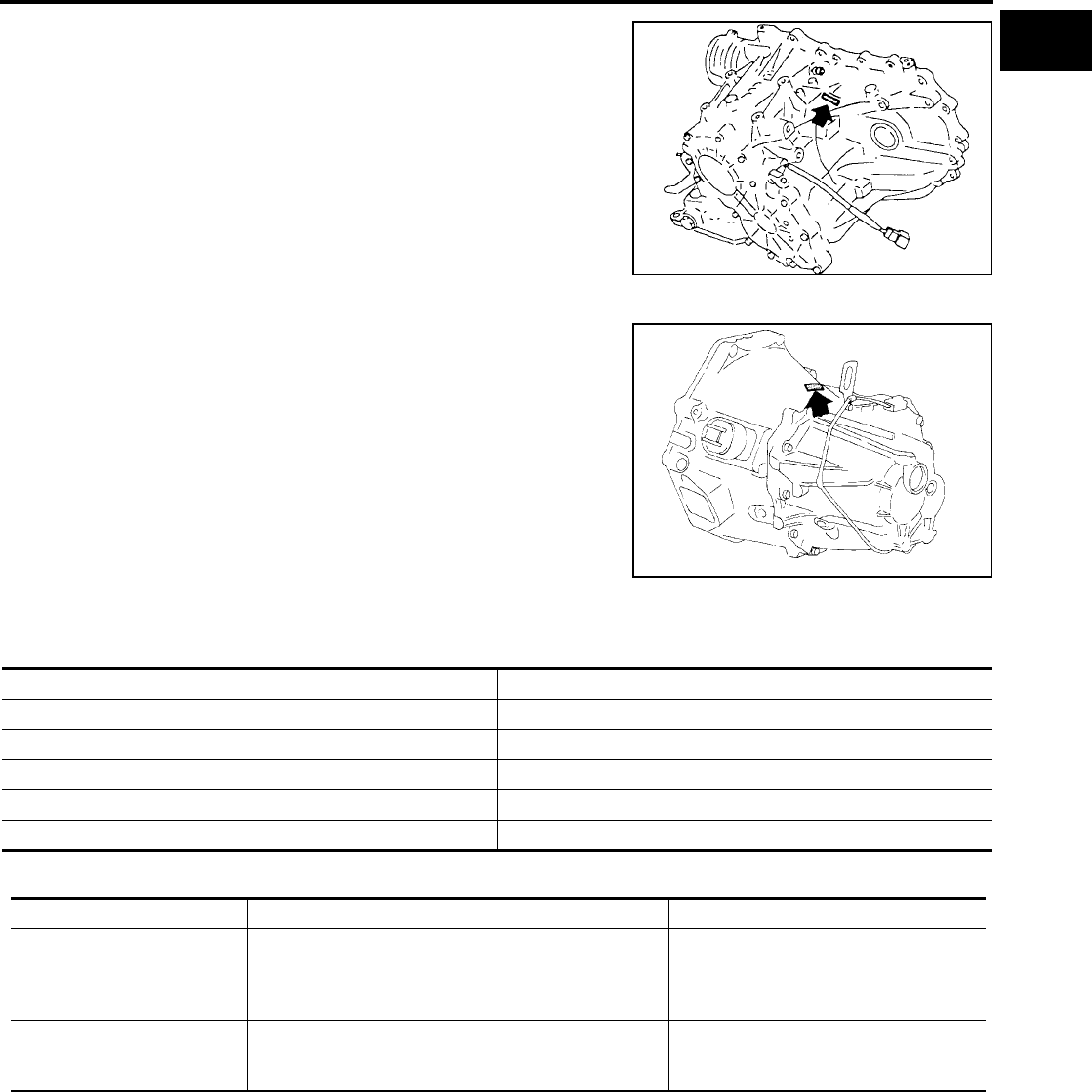
IDENTIFICATION INFORMATION
GI-49
C
D
E
F
G
H
I
J
K
L
M
B
GI
Revision: November 2006 2006 Altima
Automatic Transaxle Number
EAS001QH
Manual Transaxle Number
EAS001QI
Dimensions
EAS0019N
Unit:mm (in)
Wheels & Tires
EAS0019O
AGI072
SGI334
Overall length 4,884.4 (192.3), SE-R 4889.5 (192.5)
Overall width 1,788 (70.4)
Overall height 1,471 (57.9), SE-R 1458 (57.4)
Front tread 1,549 (61.0)
Rear tread 1,554 (61.2)
Wheelbase 2,799 (110.2)
Conventional Spare
Road wheel/offset mm (in)
16 X 6.5 Steel/40 (1.57)
16 X 6.5 Cast Aluminum/40 (1.57)
17 X 7JJ Cast Aluminum/45 (1.77)
18 X 8JJ Forged Aluminum/45 (1.77)
16 X 4t
Tire size
215/60R16
215/55R17
225/45R18
T135/70R16
T135/90R16 (when equipped with TCS)
T155/80R17

GI-50
TERMINOLOGY
Revision: November 2006 2006 Altima
TERMINOLOGY PFP:00011
SAE J1930 Terminology List
EAS0019P
All emission related terms used in this publication in accordance with SAE J1930 are listed. Accordingly, new
terms, new acronyms/abbreviations and old terms are listed in the following chart.
NEW TERM NEW ACRONYM /
ABBREVIATION OLD TERM
Air cleaner ACL Air cleaner
Barometric pressure BARO ***
Barometric pressure sensor-BCDD BAROS-BCDD BCDD
Camshaft position CMP ***
Camshaft position sensor CMPS Crank angle sensor
Canister *** Canister
Carburetor CARB Carburetor
Charge air cooler CAC Intercooler
Closed loop CL Closed loop
Closed throttle position switch CTP switch Idle switch
Clutch pedal position switch CPP switch Clutch switch
Continuous fuel injection system CFI system ***
Continuous trap oxidizer system CTOX system ***
Crankshaft position CKP ***
Crankshaft position sensor CKPS ***
Data link connector DLC ***
Data link connector for CONSULT-II DLC for CONSULT-II Diagnostic connector for CONSULT-II
Diagnostic test mode DTM Diagnostic mode
Diagnostic test mode selector DTM selector Diagnostic mode selector
Diagnostic test mode I DTM I Mode I
Diagnostic test mode II DTM II Mode II
Diagnostic trouble code DTC Malfunction code
Direct fuel injection system DFI system ***
Distributor ignition system DI system Ignition timing control
Early fuel evaporation-mixture heater EFE-mixture heater Mixture heater
Early fuel evaporation system EFE system Mixture heater control
Electrically erasable programmable read
only memory EEPROM ***
Electronic ignition system EI system Ignition timing control
Engine control EC ***
Engine control module ECM ECCS control unit
Engine coolant temperature ECT Engine temperature
Engine coolant temperature sensor ECTS Engine temperature sensor
Engine modification EM ***
Engine speed RPM Engine speed
Erasable programmable read only memory EPROM ***
Evaporative emission canister EVAP canister Canister
Evaporative emission system EVAP system Canister control solenoid valve
Exhaust gas recirculation valve EGR valve EGR valve

TERMINOLOGY
GI-51
C
D
E
F
G
H
I
J
K
L
M
B
GI
Revision: November 2006 2006 Altima
Exhaust gas recirculation control-BPT
valve EGRC-BPT valve BPT valve
Exhaust gas recirculation control-solenoid
valve EGRC-solenoid valve EGR control solenoid valve
Exhaust gas recirculation temperature sen-
sor EGRT sensor Exhaust gas temperature sensor
EGR temperature sensor
Flash electrically erasable programmable
read only memory FEEPROM ***
Flash erasable programmable read only
memory FEPROM ***
Flexible fuel sensor FFS ***
Flexible fuel system FF system ***
Fuel pressure regulator *** Pressure regulator
Fuel pressure regulator control solenoid
valve *** PRVR control solenoid valve
Fuel trim FT ***
Heated Oxygen sensor HO2S Exhaust gas sensor
Idle air control system IAC system Idle speed control
Idle air control valve-air regulator IACV-air regulator Air regulator
Idle air control valve-auxiliary air control
valve IACV-AAC valve Auxiliary air control (AAC) valve
Idle air control valve-FICD solenoid valve IACV-FICD solenoid valve FICD solenoid valve
Idle air control valve-idle up control sole-
noid valve IACV-idle up control solenoid valve Idle up control solenoid valve
Idle speed control-FI pot ISC-FI pot FI pot
Idle speed control system ISC system ***
Ignition control IC ***
Ignition control module ICM ***
Indirect fuel injection system IFI system ***
Intake air IA Air
Intake air temperature sensor IAT sensor Air temperature sensor
Knock *** Detonation
Knock sensor KS Detonation sensor
Malfunction indicator lamp MIL Check engine light
Manifold absolute pressure MAP ***
Manifold absolute pressure sensor MAPS ***
Manifold differential pressure MDP ***
Manifold differential pressure sensor MDPS ***
Manifold surface temperature MST ***
Manifold surface temperature sensor MSTS ***
Manifold vacuum zone MVZ ***
Manifold vacuum zone sensor MVZS ***
Mass air flow sensor MAFS Air flow meter
Mixture control solenoid valve MC solenoid valve Air-fuel ratio control solenoid valve
Multiport fuel injection System MFI system Fuel injection control
NEW TERM NEW ACRONYM /
ABBREVIATION OLD TERM

GI-52
TERMINOLOGY
Revision: November 2006 2006 Altima
Nonvolatile random access memory NVRAM ***
On board diagnostic system OBD system Self-diagnosis
Open loop OL Open loop
Oxidation catalyst OC Catalyst
Oxidation catalytic converter system OC system ***
Oxygen sensor O2S Exhaust gas sensor
Park position switch *** Park switch
Park/neutral position switch PNP switch
Park/neutral switch
Inhibitor switch
Neutral position switch
Periodic trap oxidizer system PTOX system ***
Positive crankcase ventilation PCV Positive crankcase ventilation
Positive crankcase ventilation valve PCV valve PCV valve
Powertrain control module PCM ***
Programmable read only memory PROM ***
Pulsed secondary air injection control sole-
noid valve PAIRC solenoid valve AIV control solenoid valve
Pulsed secondary air injection system PAIR system Air induction valve (AIV) control
Pulsed secondary air injection valve PAIR valve Air induction valve
Random access memory RAM ***
Read only memory ROM ***
Scan tool ST ***
Secondary air injection pump AIR pump ***
Secondary air injection system AIR system ***
Sequential multiport fuel injection system SFI system Sequential fuel injection
Service reminder indicator SRI ***
Simultaneous multiport fuel injection sys-
tem *** Simultaneous fuel injection
Smoke puff limiter system SPL system ***
Supercharger SC ***
Supercharger bypass SCB ***
System readiness test SRT ***
Thermal vacuum valve TVV Thermal vacuum valve
Three way catalyst TWC Catalyst
Three way catalytic converter system TWC system ***
Three way + oxidation catalyst TWC + OC Catalyst
Three way + oxidation catalytic converter
system TWC + OC system ***
Throttle body TB Throttle chamber
SPI body
Throttle body fuel injection system TBI system Fuel injection control
Throttle position TP Throttle position
Throttle position sensor TPS Throttle sensor
Throttle position switch TP switch Throttle switch
Torque converter clutch solenoid valve TCC solenoid valve Lock-up cancel solenoid
Lock-up solenoid
NEW TERM NEW ACRONYM /
ABBREVIATION OLD TERM
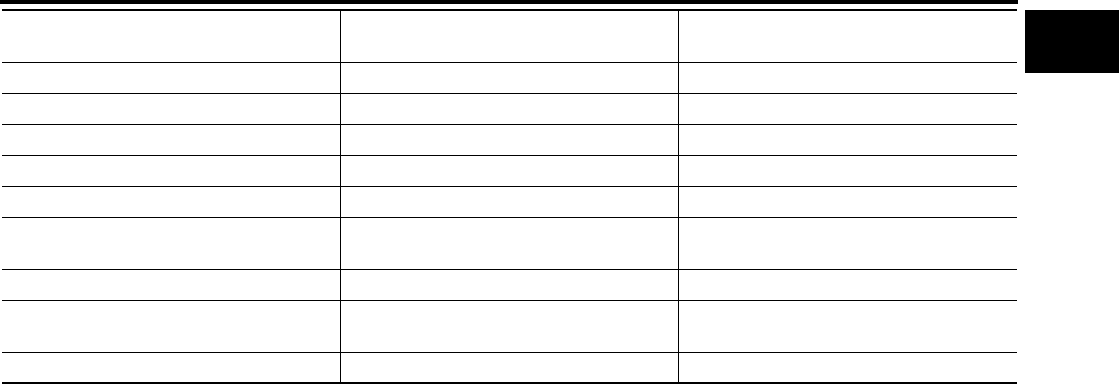
TERMINOLOGY
GI-53
C
D
E
F
G
H
I
J
K
L
M
B
GI
Revision: November 2006 2006 Altima
***: Not applicable
Transmission control module TCM A/T control unit
Turbocharger TC Turbocharger
Vehicle speed sensor VSS Vehicle speed sensor
Volume air flow sensor VAFS Air flow meter
Warm up oxidation catalyst WU-OC Catalyst
Warm up oxidation catalytic converter sys-
tem WU-OC system ***
Warm up three way catalyst WU-TWC Catalyst
Warm up three way catalytic converter sys-
tem WU-TWC system ***
Wide open throttle position switch WOTP switch Full switch
NEW TERM NEW ACRONYM /
ABBREVIATION OLD TERM

GI-54
TERMINOLOGY
Revision: November 2006 2006 Altima
