PP1 Hyp360202
User Manual: hyp360202
Open the PDF directly: View PDF  .
.
Page Count: 27
HYPERTECH®
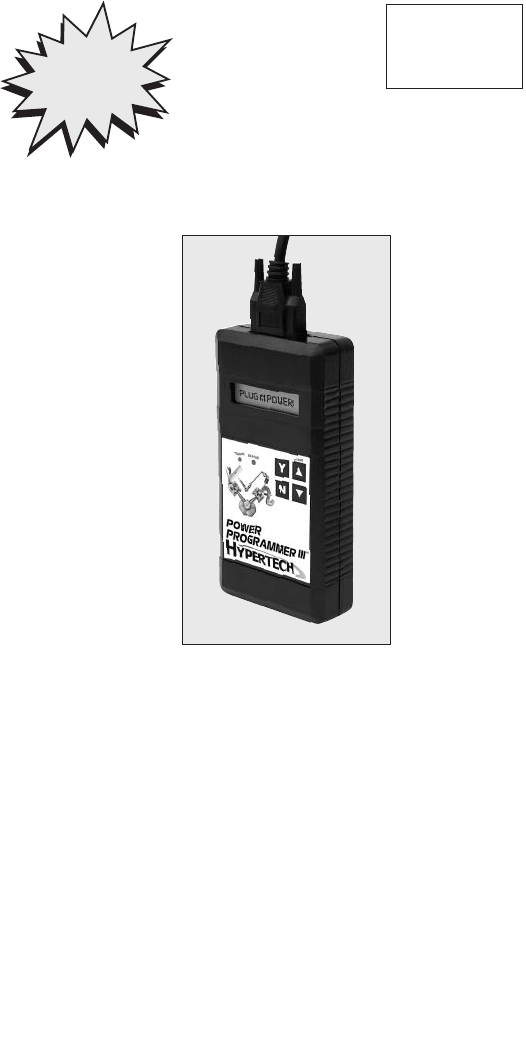
POWER PROGRAMMER III™
FOR 1996-2000 GM VEHICLES WITH
4.3/5.0/5.7/7.4L VORTEC ENGINES
STEP-BY-STEP INSTALLATION
INSTRUCTIONS
PP1
OnStar
Equipped Vehicles
See Pages 4-5
BEFORE
Programming
Part #896
© 2006 Hypertech, Inc.
7.7.06

TABLE OF CONTENTS
Important Information . . . . . . . . . . . . . . . . . . . . . . . . . . . . . . 2
Overview . . . . . . . . . . . . . . . . . . . . . . . . . . . . . . . . . . . . . . . 3
Section 1: OnStar Equipped Vehicles . . . . . . . . . . . . . . . . . .4
Section 2: PowerStat™Installation for 4.3/5.0/5.7/7.4L . . . . .6
Section 3: Programming Instructions . . . . . . . . . . . . . . . . . . .8
Diagnostic Trouble Code (DTC) Information . .
9-10
Engine Tuning . . . . . . . . . . . . . . . . . . . . . . . . . . 11
Top-Speed Limiter . . . . . . . . . . . . . . . . . . . . . . . 11
Tire Size . . . . . . . . . . . . . . . . . . . . . . . . . . . . . . . 12
Rear Gear Ratio .........................13
Transmission Shift Points . . . . . . . . . . . . . . . . . 13
Transmission Shift Firmness . . . . . . . . . . . . . . . .14
Report . . . . . . . . . . . . . . . . . . . . . . . . . . . . . . . . . 14
Programming . . . . . . . . . . . . . . . . . . . . . . . . . . . 15
Section 4: Programming Back-To-Stock/Changing Options 16
Section 5: Troubleshooting Guide . . . . . . . . . . . . . . . . . . . . 17

2
IMPORTANT
• The Power Programmer for 1996-2000 GM trucks and SUVs is legal
for sale or use on California pollution-controlled motor vehicles according
to the CARB Executive Order process. In the interest of improved air
quality, the California Air Resources Board (CARB) requires new
vehicle and manufacturers of aftermarket parts to develop engine
and emissions equipment that either reduce or maintain specific air
pollutants affected by vehicle use. Both the California Vehicle Code
(section 27156) and Federal Clean Air Act (administered by the
Environmental Protection Agency) prohibit modifications that increase
vehicle emissions. Aftermarket parts manufacturers, particularly in the
high-performance
segment, are required to obtain CARB approval in
the form of executive
Orders (E.O.s) for any product not qualifying as a
direct replacement for an original equipment part. Hypertech includes
meeting all E.O. requirements in its product development process.
This guarantees
that users of Hypertech “Power Tuning” products will
meet certification
requirements when registering, selling, or needing
to pass various emissions tests or Inspection and Maintenance
(I&M) programs administered by state or local enforcement
agencies. Make sure that any emissions-related product you buy and
install carries an E.O. number or is pending an E.O. Without this
verification you are at
risk, in potential violation of regulations
and may incur unnecessary
financial obligations during vehicle
inspections or emissions tests. A CARB E.O. sticker is supplied.
Keep this sticker in your vehicle or attach it inside the door jam as
proof that the Power Programmer is street legal.
• Your vehicle’s computer will not be programmed at the end of the
programming menus until you select “PRESS ‘Y’ TO
BEGIN
PROGRAMMING”, on page 14. Feel free to experiment
with the
programming choices without the fear of accidentally
programming
the wrong information into your vehicle’s computer.
You can make any
choice that you want and change it again and again, without program-
ming it into your vehicle’s computer, until you are absolutely ready.
•While the programmer is programming:
*DO NOT leave the vehicle while programming is in process.
*DO NOT program your vehicle without a fully charged battery.
If after you have programmed your vehicle’s computer with the
Hypertech Power Programmer and you decide to change the
tuning, It is recommended that you recharge your vehicle’s
battery. You may either drive the vehicle to charge the battery
or use a battery charger. But either way, MAKE sure that the
battery holds a full charge.
*DO NOT disturb the cable while programming.
*The ONLYtime you may remove the programmer cable from
the DLC safely is PRIOR to pressing ‘Y’ to program your
entries. However,any programming choices you have made
WILL NOT be saved. NOTE: It is NOT safe to unplug the
programmer cable any time AFTER you have pressed ‘Y’ to
program.
*DO NOT turn the key offUNLESS
instructed by the programmer.
*DO NOT start the engine.

3
Any of these actions will interrupt the programming process.
The programmer is designed to recover from these conditions,
but they should be avoided.
HYPERTECH POWER PROGRAMMER III
INSTALLATION INSTRUCTIONS OVERVIEW
Congratulations! You are the owner of the Power Programmer III,
the latest in high-performance tuning technology. Now you can optimize
your engine’s tuning, as well as adjust other vehicle parameters
(see table of contents), all at the touch of a button.
Your vehicle has an onboard computer that controls the engine
and transmission. Inside your vehicle’s computer is a FLASH
memory chip which contains the vehicle’s programming. The
programmer actually reprograms this FLASH computer chip,
according to your specifications, with Hypertech’s Power Tuning.
This is the only way an individual can reprogram some 1994-1995
and all 1996 and newer vehicles sold in the United States.
To reprogram your vehicle’s computer, simply plug the
programmer cable into the vehicle’s diagnostic connector
located under the dash panel on the driver’s side. Set the parking
brake. Next, turn the ignition key to RUN but do not start the
engine. Press the sarrow on the programmer. It will then identify
your vehicle and display a series of options on its screen. When
completed, turn the key to OFF and disconnect the cable from the
diagnostic connector. Now you’re ready to Feel the Power!
Hypertech’s Power Tuning can be stored in only one (1)
vehicle at a time. The Power Programmer can be reconnected
to remove the Power Tuning and return the vehicle to the factory
programming at any time. After you have performed this step,
your vehicle will be in its stock configuration.
You may also reconnect your programmer at any time to change
the programming. For example, if you have replaced your factory
tires with different diameter tires, you will want to correct your
speedometer, odometer, and automatic transmission shift points.
Simply reconnect your programmer,answer the necessary option(s),
and reprogram your vehicle. You do not have to return to stock first.

4
SECTION 1: ONSTAR EQUIPPED VEHICLES
If your GM vehicle is equipped with the OnStar system, you
MUST temporarily disable the system BEFORE programming
your vehicle with the Power Programmer III. Please follow the
steps below to temporarily disable the OnStar system.
General Precautions
Many new vehicles are equipped with daytime running lights,
or sensors that turn the headlights on in dim situations automatically
when the ignition is on. For the purposes of programming the
vehicle, this presents an unnecessary extra drain on the vehicle
battery. Many new vehicles have a procedure for turning off
the lights. Often this is accomplished by setting the parking
brake on the vehicle. We recommend that the headlights be off
when programming your vehicle, for added safety against corrupt
programming due to battery failure. See your owner’s manual for
vehicle specific information regarding your headlights.
Recommended Precautions
The GM OnStar system periodically communicates with the
vehicle. This periodic communication with the vehicle has been
known to disrupt the programming process. In order to
prevent
disruption of the programming process, it is recommended
that
the OnStar system be disabled while programming the vehicle.
When the OnStar system is successfully disabled, its indicator
light on the dash or rearview mirror will be OFF. Be sure that
this light is off when the key is in the ON position (engine not
running) BEFORE programming the vehicle. This will ensure
that there are no OnStar related problems.
Recovery From OnStar-Related Power Programmer Hang-up
If the programmer stops programming
for an extended period
of time, perform the following steps to recover and/or continue
programming:
** Do Not Turn The Ignition Key Off**
1. Disconnect the programmer from the vehicle.
2. Reconnect the programmer to the vehicle.
3. Press the START button on the programmer.
The programmer will resume communications with the vehicle
where it left off. If the programmer fails to re-establish communi-
cations with the vehicle, repeat the procedure. If the programmer
still fails to resume, disconnect the programmer and turn the
vehicle off. Attempt to start your vehicle. If your vehicle fails to
start, the vehicle computer may have been corrupted, and you will
need to send your vehicle computer and programmer to
Hypertech for repair.If the vehicle starts, you will need to return
your programmer to Hypertech for re-initialization. No harm will
have been done to the vehicle computer.
5
Disabling OnStar in 5.7/7.4L vehicles
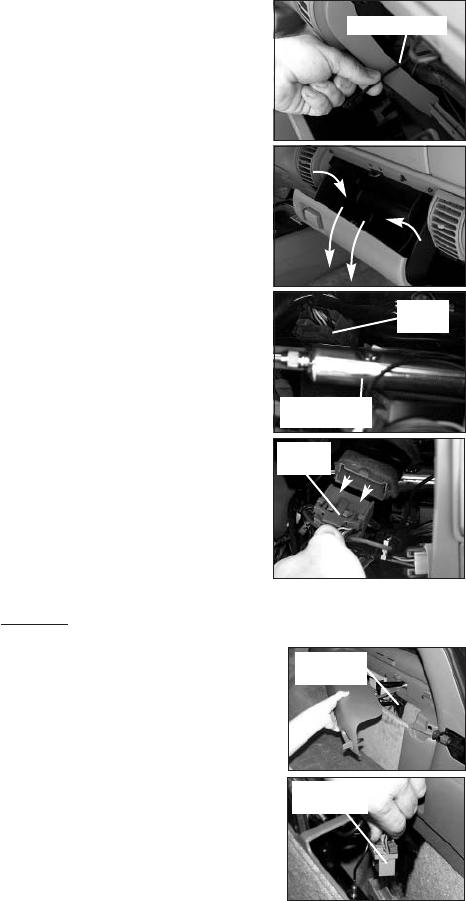
1. See Figures A & B. To access the
OnStar system, you first have to
remove the glove compartment.
To do this, open the glove
compartment and remove the
glove compartment support strap.
Once the support strap is removed,
pull in and down on the glove
compartment and remove it from the
dash of the
vehicle. Place the glove
compartment
aside and out of the way.
2. See Figures C & D. Locate the
OnStar plug inside the glove
compartment area that will need to be
disconnected to temporarily disable
the OnStar system. The plug is located
behind a silver-colored box. Look for
the large plug behind the silver box
that is partially wrapped in a grey
foam with black tape around it.
Once the proper plug is found,
it
can be moved out of it’s original
location and unplugged. Make sure
that the OnStar indicator
light
on the dash or rearview mirror
is OFF.
Be sure the light is off
when the key is
in the ON position
(engine not running)
BEFORE programming the vehicle.
Disabling OnStar in 4.3L vehicles
What To Do After Programming Your Vehicle
After the vehicle computer has been successfully programmed,
plug the OnStar connector back into the original location and reinstall
any panels and/or other interior components that were removed.
Figure A
Figure B
Figure C
Figure D
OnStar
plug
Silver-coated
box
OnStar
plug
Support Strap
To temporarily disable the OnStar system
in 4.3L GM SUVs, the plug to the OnStar
computer must be disconnected. The
OnStar computer is located in the back of
the vehicle under the passenger’s side rear
interior cover (See Figure E). To remove
the cover,release the clip and swing out.
(See Figure F). Squeeze the blue and grey
tabs on the connector and pull up to
temporarily disconnect the OnStar
system in the vehicle.
Figure E
Figure F
Ú
OnStar
connector
OnStar
computer

6
SECTION 2: POWERSTAT INSTALLATION
Tools and supplies required
Metric sockets and ratchet
1/4” flathead screwdriver
DEX-COOL anti-freeze coolant
For 4.3L vehicles:
Part #1013 - 160° PowerStat
For 5.0/5.7L vehicles:
Part #1008 - 160° PowerStat
Part #1022 - 180° PowerStat
For 7.4L vehicles:
Part#1005 - 160°PowerStat
Part#1020 - 180°PowerStat
1.
Drain the coolant from the vehicle. Remove the thermostat housing
bolts. See below for your type of engine:
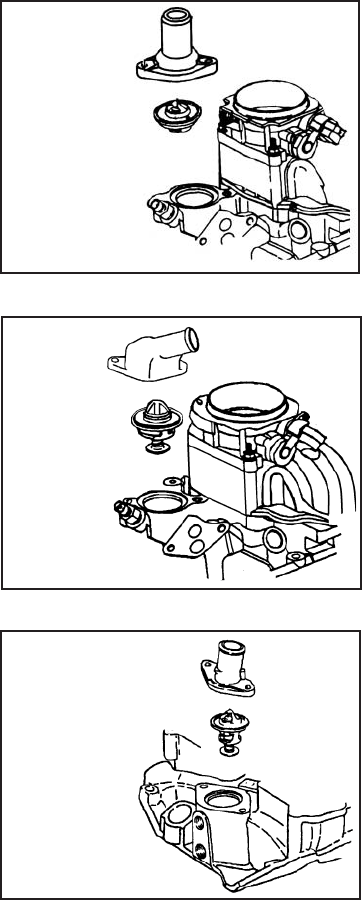
•4.3L:See Figure G. You must first remove the air duct from
the top of the throttle body. Then, remove the two (2) bolts
that hold the throttle cable bracket and move it out of
the way. Then, remove the thermostat housing and bolts.
•5.0/5.7L:See Figure G1.
•7.4L:See Figure G2.
2. Lift out the stock thermostat. Use a screwdriver to gently pry, if
necessary. Clean all the sealing surfaces.
3. Make sure that the rubber “O” ring is positioned flat side down
on the PowerStat. Next, install the PowerStat, making sure that
it’s positioned just like the corresponding figure.
4. Reinstall the thermostat housing and bolts.
•4.3L:Torque the bolts to 18 ft-lbs. Reinstall the throttle
cable bracket and air duct (Step 1).
•5.0/5.7L:Torque the bolts to 18 ft-lbs.
•7.4L:Torque the bolts to 30 ft-lbs.
5. Fill the cooling system with the proper water/coolant mixture.
Refer to the owners manual for the correct ratio.
6.
Start the vehicle and allow it to warm up to normal operating temperature.
7. Check the coolant level in the radiator overflow/fill reservoir and
fill as needed.
•WARNING: NEVER ATTEMPT TO CHANGE A THERMOSTAT
ON A HOT ENGINE.
•SERIOUS INJURY CAN OCCUR IF THE RADIATOR CAP
IS REMOVED WHILE THE COOLING SYSTEM IS HOT.
•THE ENGINE SHOULD ALWAYS BE COLD WHEN
INSTALLING THE POWERSTAT
NOTE: After installing the PowerStat,
if any coolant needs to be added to
the vehicle, make sure you put the
same color coolant back into the
vehicle.If your vehicle has orange
coolant,
replace with orange coolant.
If green, replace with green.
To complete your performance package, you may choose to use
alow-temp thermostat. Replacing the factory thermostat with a
Hypertech PowerStat will allow the engine to run cooler, increasing
power, and reducing the engine’s tendency to detonate.
7
4.3L POWERSTAT INSTALLATION
5.0/5.7L POWERSTAT INSTALLATION
7.4L POWERSTAT INSTALLATION
Thermostat
housing
Hypertech
PowerStat
Ú
Ú
Thermostat
housing
Hypertech
PowerStat
Ú
Ú
Thermostat
housing
Hypertech
PowerStat
Ú
Ú
Figure G
Figure G1
Figure G2
IMPORTANT:
NEVER MIX ORDINARY ANTI-FREEZE (GREEN)
WITH THE DEX-COOL ANTI-FREEZE (ORANGE)
OR YOU MAY DAMAGE THE COOLING SYSTEM.
8
SECTION 3: PROGRAMMING INSTRUCTIONS
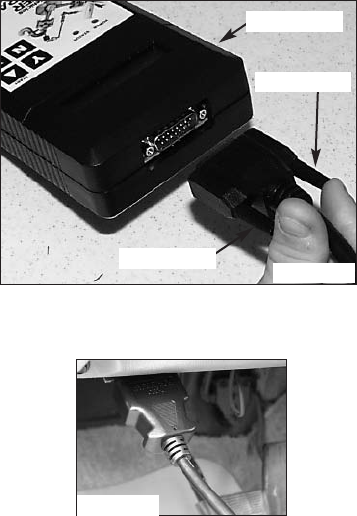
• Connect one (1) end of the provided cable to the programmer,
as in Figure H, and tighten the two (2) thumbscrews.
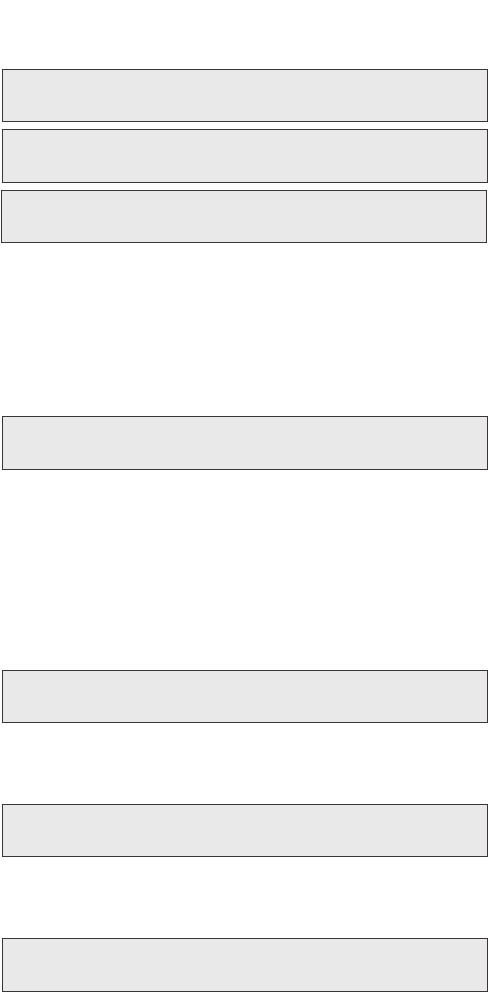
• See Figure I. Locate the Data Link Connector (DLC) under the
driver’s side of the dash panel and above the emergency brake.
• Plug the programmer cable into the DLC. Make sure the cable
is plugged in completely to ensure a good connection.
• Set the parking brake to turn off the DRLs (Day-Light Running
Lamps) and turn the ignition key to the RUN position, but do
not start the engine.
IMPORTANT:
-DO NOT leave the vehicle while programming is in process.
-Make sure the vehicle battery is fully charged before programming.
-The key must remain in the RUN position, without the engine
running, during the entire programming process.
-DO NOT operate electrical accessories
(radio, windows, wipers, etc.) while programming.
-If the vehicle is equipped with an OnStar system, make sure
the system is temporarily disabled (see Section 1 for details).
-DO NOT attempt programming while the
vehicle is connected to a battery charger.
Figure I
Programmer
Thumbscrew
Thumbscrew
Figure H
9
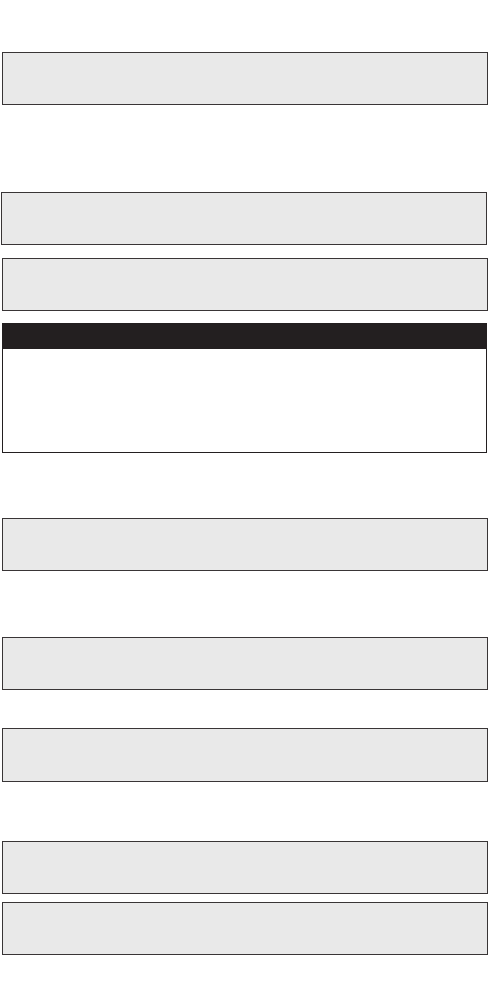
• Press the sarrow on the programmer. The following displays
should appear immediately on the LCD screen (where X.X.X.X
is the version number):
• If these screens do not appear, make sure that both ends of the
cable are securely attached and press the sarrow again.
• The programmer will show applications and copyright
information. The programmer will then identify your vehicle
and perform a self-test. A few seconds after the self-test is
complete, the VIN number of the vehicle will be shown and
ascreen should appear with a description
of your vehicle:
• If this screen does not appear, make sure that the key is in the
RUN position with the engine NOT running.
• The programmer will display a series of options. For each
option press the ‘Y’ button to make a change. Press the ‘N’
button to make no change and proceed to the next option.
For some options, you will use the sand tarrows to point
to a particular option. Pressing the ‘Y’ button will then lock
in your selection. This screen will now appear:
• The Power Programmer is checking the vehicle for any
Diagnostic Trouble Codes (DTCs). If no DTCs are found,
this screen will appear:
• If no DTCs are found, the Power Programmer will then go
to Step A (Engine Tuning). If any DTCs are found, this screen
will appear:
HYPERTECH
POWER PROGRAMMER
VERSION
X.X.X.X
CHECKING FOR DIAGNOSTIC
TROUBLE CODES (DTCS)
NO DTCS REPORTED
“X” DTCS REPORTED
YOUR VEHICLE IS:
XXXX CHEVROLET TRUCK/SUV X.XL
FOR XXXX GMC AND
CHEVROLET TRUCKS
10
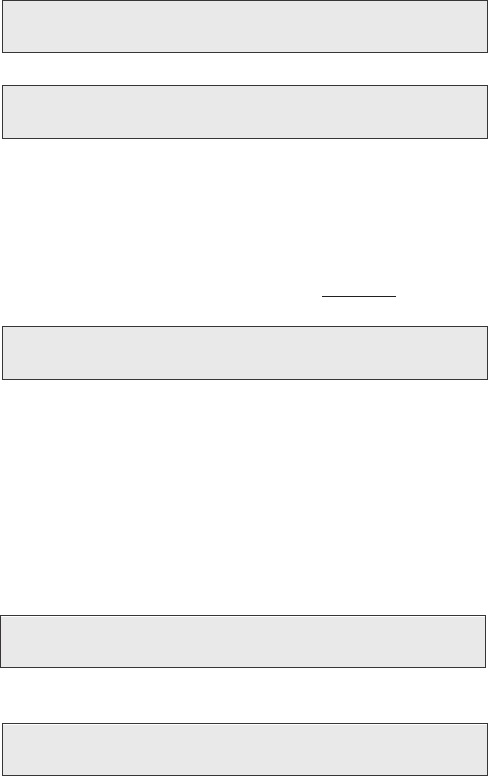
• “X” represents the number of DTCs found in the vehicle.
This screen will now appear:
• Press ‘Y’ to view the DTC(s) found in the vehicle. Press ‘N’ to
clear the DTC(s) without viewing them. If you press ‘Y’, these
screens will appear:
• Press the ‘N’ button to view the next DTC (if any). Once you
have viewed all the DTCs, this screen will appear:
•Press ‘Y’ to view the DTC(s) again. Press ‘N’ to continue.
If you press ‘N’, this screen will appear:
• Press ‘N’ to exit the program. This screen will appear:
• Press ‘Y’ for the Power Programmer to clear the DTC(s).
These screens will now appear:
VIEW DTCS = Y
CLEAR DTCS = N
DTC #1 --- PXXXX
NEXT DTC = N
NO MORE DTCS, TO VIEW AGAIN, PRESS Y
TO CONTINUE, PRESS N
DTCS MUST BE CLEARED BEFORE CHANGING PROGRAM. TOCLEAR DTCS PRESS Y
TO KEEP DTCS AND EXIT PROGRAM PRESS N
TURNING POWER
PROGRAMMER OFF
CLEARING DTCS
ALL DTCS HAVE
BEEN CLEARED
WRITE DOWN THE FOLLOWING DTCS AND REFER TO
FACTORY MANUALS FOR EXPLANATION
Hypertech, Inc. recommends proper diagnosis and repair of reported DTCs prior
to programming. For Diagnostic Trouble Code (DTC) interpretations, refer to
factory manuals, see your local parts dealer, or visit internet sites
that provide this type of information. An example of such a website is:
www.bentleypublishers.com/tech/vw/vw.dtc.table.htm
IMPORTANT NOTE
11
•
The Power Programmer has now successfully cleared the DTC(s)
found in the vehicle computer. This screen will now appear:
A. ENGINE TUNING
• Press the ‘Y’ button to install engine tuning. Press ‘N’ to keep
the stock vehicle tuning.
• If you have a 1996-1999 4.3/5.0/5.7/7.4L vehicle, Power
Tuning for premium octane gasoline is offered. You must use
premium octane gasoline (or the highest octane rating available
in your area) to produce maximum power. Make sure you have
premium octane gasoline in your vehicle BEFORE installing
Hypertech Power Tuning.
•If you have a 2000 4.3/5.7/7.4L vehicle,the “Dual Fuel”
Power Tuning is offered. After pressing ‘Y’ to install Hypertech
Power Tuning, use the sand tarrows to select either regular
or premium octane Power Tuning. Press ‘Y’ to lock in the
desired Power Tuning program.
NOTE:
For all ‘96-’00 manual transmission vehicles, choosing
to install Hypertech Power Tuning will also automatically
increase the engine RPM “Rev” limiter to 6000 RPM
for the 4.3/5.0/5.7L and 5500 RPM for the 7.4L.
B. TOP-SPEED LIMITER
•Press the ‘N’ button to keep your vehicle’sstock top-speed
limiter and skip to the next option.
•If you have installed factory-approved high-performance
tires, press the ‘Y’ button to change your vehicle’s top-speed
limiter to match the speed rating of those tires. The speed
rating or speed symbol will be found on the sidewall of your
tires. Here are the corresponding symbols and maximum
top-speed limits that can be programmed into your vehicle:
TO ENTER POWER PROGRAMMER MODE, PRESS Y
TO EXIT PROGRAM, PRESS N
USE UP/DOWN ARROWS TO CHOOSE FUEL OCTANE THAT WILL BE USED, THEN PRESS Y TO SELECT OR N TO EXIT.
_ _ OCTANE
TO INSTALL HYPERTECH POWER TUNING, PRESS Y
TO KEEP FACTORY ENGINE TUNING, PRESS N
TO ADJUST TOP SPEED LIMIT TO MATCH SPEED RATING OF HIGH-PERFORMANCE TIRES, PRESS Y
TO KEEP STOCK TOP SPEED LIMIT, PRESS N
USE UP/DOWN ARROWS TO ADJUST TOP SPEED LIMIT, THEN PRESS Y TO SELECT OR N TO EXIT.
_––_ _ _ MPH
S- 110 MPH
T- 116 MPH
H- 128 MPH

C. TIRE SIZE
• Press ‘N’ if the original size tires are being used.
• Press ‘Y’ if you have installed tires with an overall height that
is different than the original factory tires. This feature will
recalibrate your speedometer, odometer, and part-throttle shift
points (for automatic transmissions) for the new tire height.
The sand tarrows will allow adjustments of 1/4” increments.
Maximum and minimum tire height that can be adjusted
depend on the year,make, and model of the vehicle. Press the
‘Y’ button to lock in the desired value. At any time you may
press ‘N’ to allow you to either try again or skip to the next option.
NOTE: If you select ‘Y’, you will automatically be asked to
enter a gear ratio AFTER you have selected your tire
height. You will not be allowed to enter ‘N’ for stock
gear ratio. You must select your correct stock rear gear
ratio. To determine your stock rear gear ratio, look at
the RPO code on your vehicle code label, usually
located in the glove box lid or center console lid. Match
your RPO code to the stock rear gear ratio in the chart below.
If you do not know your tire height, ask your tire dealer or
measure a tire as follows:
1. Place a chalk mark on the tire where it contacts the pave-
ment and also mark the pavement. These marks should be
at the center of the tire footprint pointing straight down to
the pavement.
2. Roll the vehicle in a straight line until the chalk mark
makes one revolution and is pointing straight down at the
pavement again. Mark the pavement again at this new spot.
3. Measure (in inches) the distance between the two (2) marks
on the pavement. Divide the measurement by 3.1416. This
will give you the tire height in inches.
IF TIRE HEIGHT HAS BEEN CHANGED FROM ORIGINAL, PRESS Y
IF TIRE HEIGHT HAS NOT BEEN CHANGED, PRESS N
USE UP/DOWN ARROWS TO CHOOSE CORRECT TIRE HEIGHT, THEN PRESS Y TO SELECT OR N TO EXIT.
__._ _”
12
HOW TO DETERMINE TIRE HEIGHT
Stock Gear Ratios RPO Code
3.08 GU4
3.42 GU6
3.73 GT4
4.10 GT5
4.56 HC4

13
D. REAR GEAR RATIO
•Press ‘N’ if the rear gear ratio has not been changed from
the factory installed gear. Making this choice will skip to
the next option.
•Press ‘Y’ if you have installed a rear gear with a ratio that
is different than the original factory gear. This choice will
recalibrate your speedometer/odometer readings and part-throttle
shifting for automatic transmissions for the new gear ratio.
Press the sand tarrows to see all of the gear ratios available
for your vehicle.
•Press ‘Y’ to lock in the gear ratio that you have installed.
At any time you may press ‘N’ to allow you to either try
again or skip to the next option.
NOTE: If you select ‘Y’, you will automatically be asked to
enter a tire height AFTER you have selected your rear
gear ratio. You will not be allowed to enter ‘N’ for stock
tire height. If you have not changed the rear gear ratio,
you should select ‘N’ for rear gear ratio. Also, for
automatic transmissions, a selection of any available
rear gear ratios will automatically set wide-open throttle
shifts similar to original factory RPM settings for the
new rear gear ratio.
E. TRANSMISSION SHIFT POINTS (AUTOMATICS ONLY)
• Press ‘N’ to keep the stock shift RPM points and skip to the
next option.
• Press ‘Y’ to optimize the shift RPM points of the transmission.
The transmission shift points will be optimized for the best
acceleration. The shift points will vary on vehicles depending
on tire size and rear gear ratio.
IF REAR AXLE RATIO HAS BEEN CHANGED FROM ORIGINAL, PRESS Y
IF REAR AXLE RATIO HAS NOT BEEN CHANGED, PRESS N
USE UP/DOWN ARROWS TO SELECT CORRECT REAR AXLE RATIO, THEN PRESS Y TO SELECT OR N TO EXIT.
___––_._ _:1
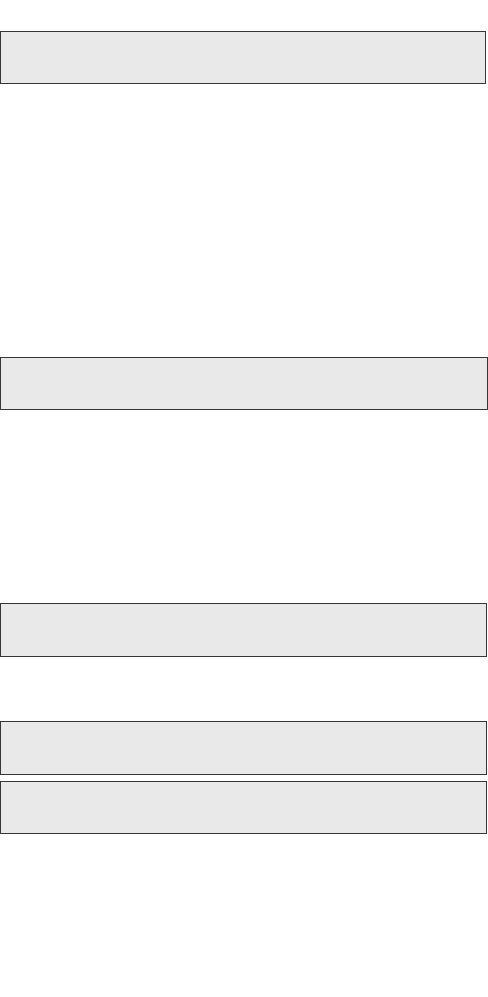
TO ADJUST TRANSMISSION SHIFT POINTS, PRESS Y
TO KEEP STOCK SHIFT POINTS, PRESS N
14
F.
TRANSMISSION SHIFT FIRMNESS (AUTOMATICS ONLY)
•Press ‘Y’ if you have installed an aftermarket shift kit into your
automatic transmission. The shift kit has already firmed up
your shifts. You do not want your programmer to make them
even firmer because transmission damage may occur.
NOTE: Pressing ‘Y’ lets your programmer know that it should
not program shift firmness and you will skip to
the Report.
• Press ‘N’ if you have not installed an aftermarket shift kit into
your automatic transmission. Pressing ‘N’ will give you the
following choice:
• Press ‘N’ to keep the stock shift firmness. Press ‘Y’ to increase
the firmness of shifts. Firmer and quicker shifts reduce the loss
of power to friction while the clutch packs “lock-up” during
shifts, allowing more power to the rear wheels.
G. REPORT
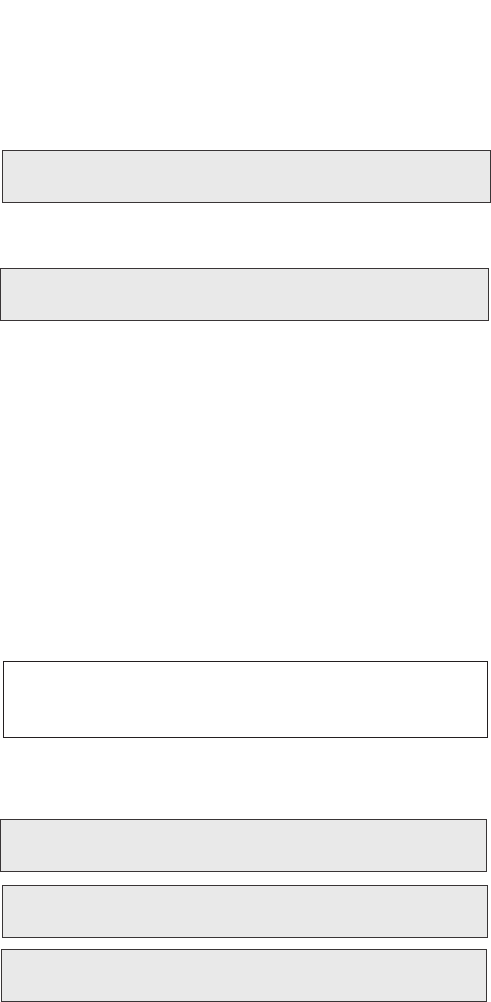
•After your last choice has been made, this screen will appear
and list all of your choices:
• Watch the screen as your choices scroll by on the bottom line.
Now these two (2) alternating screens will appear:
• If all choices are correct, press ‘Y’ to start programming.
If you want to make a change to your choices, press the
‘N’ button to start over from the beginning.
IF YOU HAVE INSTALLED AN AFTERMARKET SHIFT KIT, PRESS Y
TO CONTINUE, PRESS N
TO INCREASE TRANSMISSION SHIFT FIRMNESS, PRESS Y
TO KEEP STOCK SHIFT FIRMNESS, PRESS N
YOU HAVE CHOSEN
..........
PRESS Y TO BEGIN
PROGRAMMING
PRESS N TO
CHANGE OPTIONS
15
H. PROGRAMMING
IMPORTANT NOTE: On certain applications, the dash
message center may display random code information such
as REDUCED ENGINE POWER. This is a NORMAL step
during the programming process, for certain applications.
•
First, the programmer will read out your vehicle’s stock program.
•
When the programmer has finished this, it will wait a few seconds
and then begin programming the changes into your vehicle.
• This display will show percentage completion while the
programming is taking place. While the unit is programming,
the following is EXTREMELY IMPORTANT:
*DO NOT LEAVE THE VEHICLE WHILE
PROGRAMMING IS IN PROCESS.
*DO NOT DISTURB THE CABLE.
*DO NOT TURN THE KEY OFF.
*DO NOT START THE ENGINE.
*IF THE UNIT STOPS PROGRAMMING OR IS
INTERRUPTED, PLEASE MAKE A NOTE OFANY
MESSAGE(S) THAT APPEAR ON THE PROGRAMMER
SCREEN. THIS WILL BE HELPFUL TO OUR
TECHNICAL DEPARTMENT.
• Any one of these actions will disturb the programming process.
The programmer is designed to recover from these conditions,
but they should be avoided.
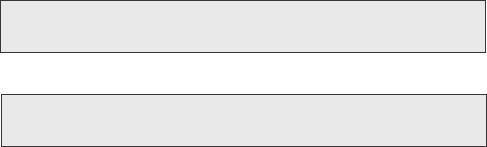
•Programming is complete when the unit reaches 100%.
(Programming takes approximately 1.5 to 2 minutes)
The following screens will appear:
READING COMPUTER
XX%
WRITING COMPUTER
XX%
IMPORTANT NOTE: If during the reading and/or programming stage, the Power Programmer does
not show an increase in percentage for at least five (5) minutes, LEAVE THE KEY IN THE ‘ON’
POSITION and unplug the Power Programmer from the diagnostic port. Then, reinsert the cable into
the diagnostic portand press the sbutton. This will allow the programming to continue. If the problem
continues, call Hypertech at 901-382-8888.
TURN KEY OFF
FOR 30 SECONDS
HYPERTECH POWER
TUNING INSTALLED
TO END, PRESS Y
AND UNPLUG CABLE
16
• Turn the key off for thirty (30) seconds, press the ‘Y’ button,
and unplug the programmer cable from the DLC under the
dash panel.
• Start the engine and make sure the Service Engine Soon light
on your instrument cluster goes out (If it stays on or flashes,
call Hypertech at 901-382-8888). Warm up the engine and
make sure it is running smoothly.
• FOR ONSTAR EQUIPPED VEHICLES.
Plug the OnStar
connector back into the original location and reinstall any
panels and/or other interior components that were removed
.
(See Section 1 for details.)
•CHECK FOR DETONATION.Whether you have selected
Power Tuning for premium (the highest octane rating available
in your area) or regular octane gasoline, you need to check for
detonation. This is a “pinging” sound heard during heavy
throttle acceleration, indicating the presence of detonation.
Make certain you are using gasoline intended for the Power
Tuning you have installed. If any “pinging” sound is heard,
you should immediately back off the throttle. To discuss,
call Hypertech at 901-385-1888
.
SECTION 4: PROGRAMMING BACK TO STOCK
OR CHANGING OPTIONS
After installing Hypertech Power Tuning, you may return your
vehicle’s computer to stock programming at any time. Follow
these steps to return your vehicle to the stock tuning or change
your option settings.
•Reconnect the programmer to the DLC. Next, turn the ignition
key to RUN but do not start the engine. Press the sarrow and
wait for the programmer to identify your vehicle as before.
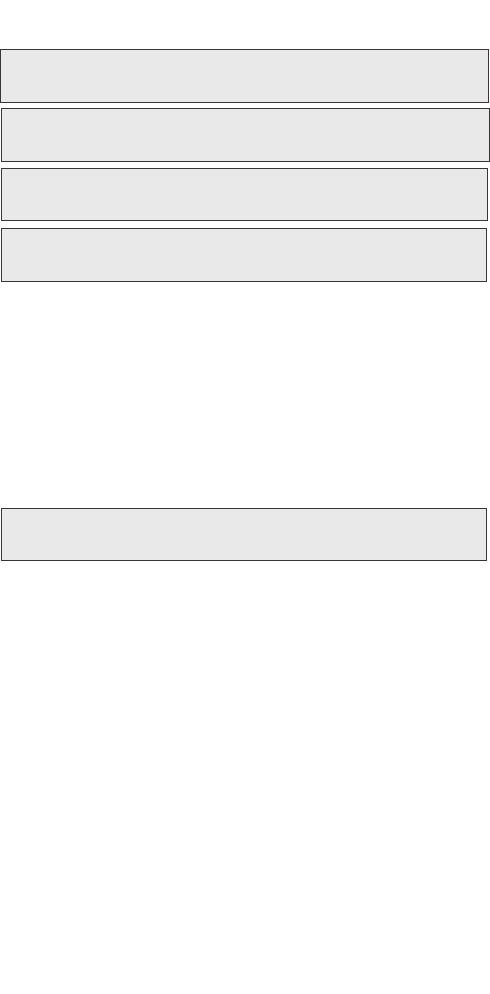
Since the programmer has programmed your vehicle’s computer,
this screen will appear:
•Then this screen will appear:
•Press ‘Y’ to return to the original factory program.
• Press ‘N’ to allow you to see the options in Section 3.
HYPERTECH POWER
TUNING INSTALLED
TO RETURN VEHICLE TO FACTORY SETTINGS, PRESS Y
TO ACCESS POWER PROGRAMMER FEATURES, PRESS N
17
• If the ‘Y’ button is pressed, programming back to stock will
begin. These screens will appear:
• Turn the key off for thirty (30) seconds, press the ‘Y’ button,
and remove the cable as before. Your vehicle’s computer will
now be in a completely stock tuning configuration.
SECTION 5: TROUBLESHOOTING GUIDE
The programmer will notify you of incidents that are out of the
ordinary. Here are some of the screens that may be encountered.
1. LOSS OF COMMUNICATION
• This screen will appear if the programmer is unable to
communicate with your vehicle’s computer. If the problem
is corrected, the programmer will automatically restart the
programming process. Take these steps to correct the problem:
1. Make sure the ignition key is in the RUN position and that
the engine is not running.
2. Make sure that both ends of the cable are securely attached.
3.
Wait at least five (5) minutes for the programmer to re-establish
communication and program the vehicle.
4. If the three (3) steps above do not correct the problem,
call Hypertech at 901-382-8888.
COMMUNICATION LOST:
RETRYING
TURN KEY OFF
FOR 30 SECONDS
FACTORY PROGRAM
IS NOW INSTALLED
TO END, PRESS Y
AND UNPLUG CABLE
WRITING COMPUTER
XX%
18
2. CABLE REMOVED WHILE PROGRAMMING
• The programmer will lose power during programming if
for any reason the cable is removed. If this happens, simply
reconnect the cable and press the sarrow. The programmer
will identify your vehicle and then display:
• The programmer will then continue programming from where
it was interrupted.
NOTE: If the programmer was interrupted during the
“Reading” stage, programming will NOT be
considered interrupted, and the programmer
will proceed to Section 3 on page 9.
3. ATTEMPTING TO PROGRAM A DIFFERENT VEHICLE
• If you attempt to program the computer in another vehicle,
without first programming the original vehicle back to stock,
the following screen will appear:
4. CALIBRATION NOT FOUND
•If your vehicle has a factory program that is not recognized by
the programmer, it cannot continue. This screen will appear:
•
Call Hypertech at the provided phone number on the programmer
screen. Please have your vehicle VIN number ready.The Hypertech
technical staff will instruct you what to do.
PROGRAMMING WAS
INTERRUPTED...
PROGRAMMING WILL
CONTINUE NOW
CODE 91: PROGRAM YOUR VEHICLE BACK TO STOCK BEFORE
PROGRAMMING ANOTHER VEHICLE
CODE 6D:
CAL NOT FOUND

19
5. SOMEONE REPROGRAMS YOUR COMPUTER
• If a service facility reprograms your vehicle’s computer with
an update, your Hypertech Power Tuning will be erased.
To verify your Power Tuning has been erased, reconnect the
programmer and press the sarrow. The programmer will
identify your vehicle’s VIN number and then process the
vehicle computer calibrations. If the calibration is identified
by the programmer, you will be allowed to re-program your
vehicle computer and the options in Section 3 will be shown.
If the new computer calibration can not be identified by the
programmer, this screen will appear:
•
Call Hypertech at the provided phone number on the programmer
screen. Please have your vehicle VIN number ready. The Hypertech
technical staff will instruct you what to do.
6. BLANK SCREEN
• If the programmer does not turn on when the sarrow is
pressed, make sure that both ends of the cable are fully
inserted. Press the sarrow again. If the programmer still does
not turn on, check for a blown fuse in the vehicle fuse panel
for either the cigarette lighter or the accessory circuit.
Replace with the proper amperage fuse. Call Hypertech at
901-382-8888, if this does not correct the problem.
IF YOU HAVE ANY PROBLEMS OR QUESTIONS,
PLEASE CALL OUR TECHNICAL STAFF AT 901-382-8888
HOURS: 8AM - 5PM Central Time, Monday - Friday
Hypertech, Inc. 3215 Appling Road
Bartlett, TN. 38133-3999
Visit our website at www.hypertech.com
or e-mail us at sales@hypertech.com
CODE 6D:
CAL NOT FOUND

20
What To Do Before Taking Your Vehicle In For Service
If you take your vehicle to a dealer or mechanic for service,
you must first remove the Hypertech Power Tuning and restore
the stock programming. This is because diagnostic devices
expect to find stock calibrations and will often overwrite the
program if the latest calibration is not found in the computer
memory. This will result in the loss of your Hypertech Power
Tuning data. The Hypertech Power Programmer has an internal
security system that allows its Power Tuning program to be
installed in only one vehicle at a time. In order to maintain
the most current stock calibrations for your vehicle, the Power
Programmer is designed to allow you to restore the stock tuning
before you take your vehicle in for service so that the service
technician can upgrade your stock calibrations. After the service
is complete, you can reinstall your Hypertech Power Tuning.
If you have any questions related to service issues, please call
Hypertech at 901-382-8888.
* Power Tuning products are Power Chips, Power Modules,
Power Tuning Modules, HyperPACs, and Power Programmers.
PRODUCT WARRANTY
Factory Direct Limited Lifetime Warranty
All HYPERTECH Power Tuning Products* are warranted
against defects in materials or workmanship. Hypertech’s
liability under this warranty shall be limited to the prompt
correction or replacement of any defective part of the product
which HYPERTECH determines to be necessary. This Limited
Lifetime Warranty is to the original purchaser for as long as
he or she owns the vehicle on which the product is originally
installed, providing all the information requested is furnished.
You must retain a copy of your original sales invoice or receipt.
Without proper documentation, a service fee will be applied.
Resold units are NOT covered under this warranty.
21
SPECIALTY AUTO PARTS
CONSUMER’S BILL OF RIGHTS
Your Rights To Personalize Your Vehicle
Article 1: You have the Right to buy high-quality, reliable aftermarket
performance and specialty parts, accessories, and styling options.
Article 2: You have the Right to use high-quality aftermarket parts
and know that your new vehicle warranty claims will be
honored. In fact, your vehicle dealer may not reject a
warranty claim simply because an aftermarket product is
present. A warranty denial under such circumstances may be
proper only if an aftermarket part caused the failure being claimed.
Article 3: You have the Right to install and use emissions-legal
aftermarket performance parts without incurring hassles
and onerous procedures during state vehicle emissions inspections.
Article 4: You have the Right to actively oppose any proposed
(or existing) laws or regulations that will reduce your
freedom to use aftermarket automotive parts and service
or will curtail your ability to take part in the automotive
hobbies of your choice.
Article 5: You have the Right to patronize independent retail
stores and shops for vehicle parts and service. The U.S.
aftermarket offers the world’s finest selection of
performance and specialty parts, accessories, and styling
options. These aftermarket products satisfy the most
discriminating customers seeking personalized vehicles
for today’s lifestyle.
The Consumer’s Bill Of Rights courtesy of
Specialty Equipment Market Association (SEMA)
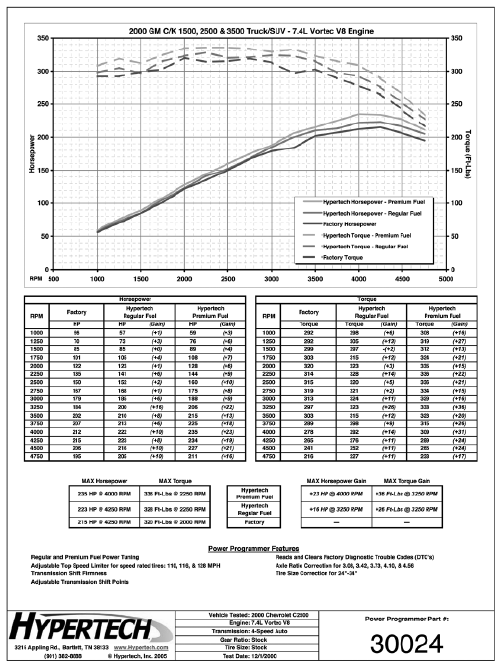
Typical Performance Gains
NOTE: All dynamometer tests are performed under controlled
conditions. Results may vary, depending on the specific vehicle,
altitude, temperature, fuel used, and various other conditions that
affect vehicle performance. Power gains shown are specific to the
vehicle tested and representative of the average gains verified.
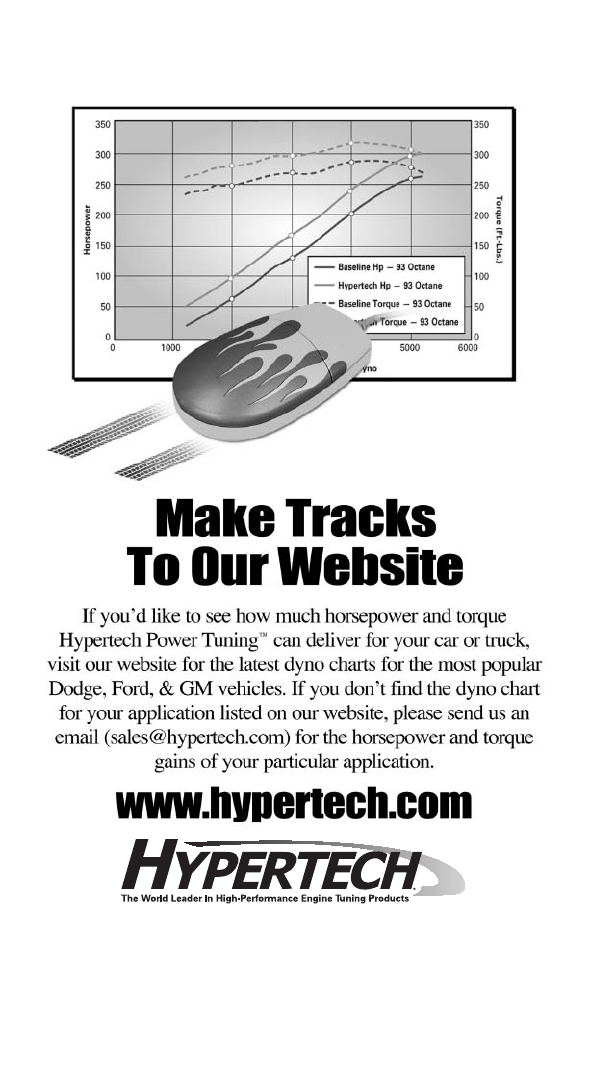
For a color, printable power graph of your particular
application, check out our website at www.hypertech.com.
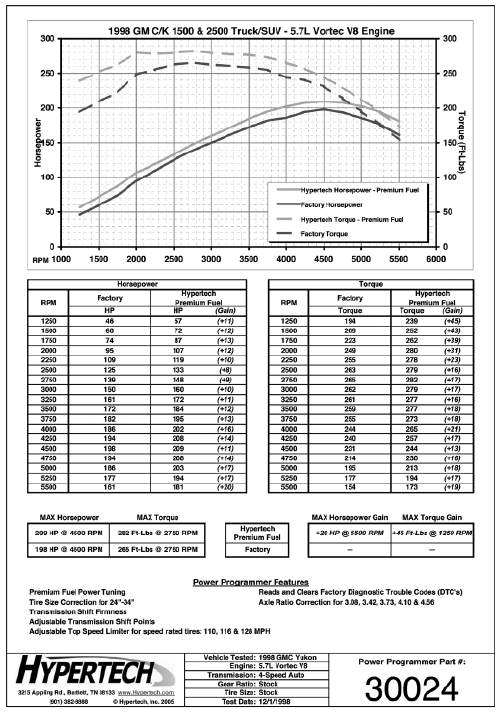
Typical Performance Gains (Cont’d)
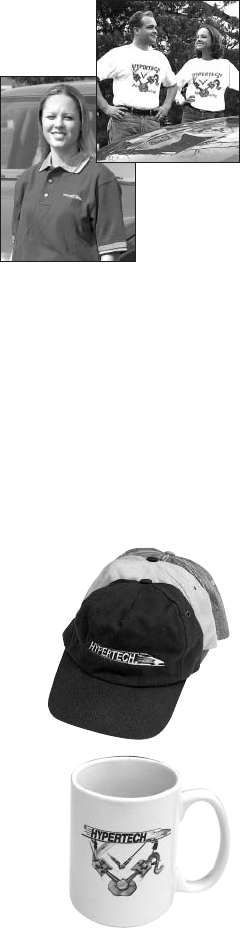
T-Shirts
Available in long or short sleeve,
these T-shirts are high-quality,
printed in full-color and display
the Hypertech Power Tuning logo.
Available in sizes ranging from
Small to XXX-large.
Hypertech Merchandise
Baseball Caps
Hypertech baseball caps are available
in three styles and come with a full-color
Hypertech logo embroidered on the front.
All baseball caps are one-size-fits-all.
Part #
Solid Navy Blue 633
Denim w/Khaki Bill 634
Khaki w/Navy Blue Bill 635
Coffee Mugs
Enjoy your morning coffee with the
Hypertech coffee mug, displaying the
Hypertech logo and engine icon in full
color on both sides - Part #626.
To Place An Order, Call Hypertech at 901-385-1888.
T-Shirts Part #
Short Sleeve - Small 600
Short Sleeve - Medium 601
Short Sleeve - Large 602
Short Sleeve - X-Large 603
Short Sleeve - XX-Large 604
Short Sleeve - XXX-Large 605
Long Sleeve - Medium 606
Long Sleeve - Large 607
Long Sleeve - X-Large 608
Long Sleeve - XX-Large 609
Long Sleeve - XXX-Large 610
Polo Shirts
These short-sleeve polo shirts
available in blue, red, white, or black
are high-quality 100% cotton and
have a full-color Hypertech logo
embroidered on the left chest.
Available in sizes ranging from
medium to XX-large.
T-Shirts (cont’d) Part #
Long Sleeve - Medium 606
Long Sleeve - Large 607
Long Sleeve - X-Large 608
Long Sleeve - XX-Large 609
Long Sleeve - XXX-Large 610
Polo Shirts (Order part# & color)
Medium 638
Large 639
X-Large 640
XX-Large 641

Notes