I Dvr Ever Focus HRG16 Ddns Setup
User Manual: EverFocus DVR HRG16
Open the PDF directly: View PDF  .
.
Page Count: 1
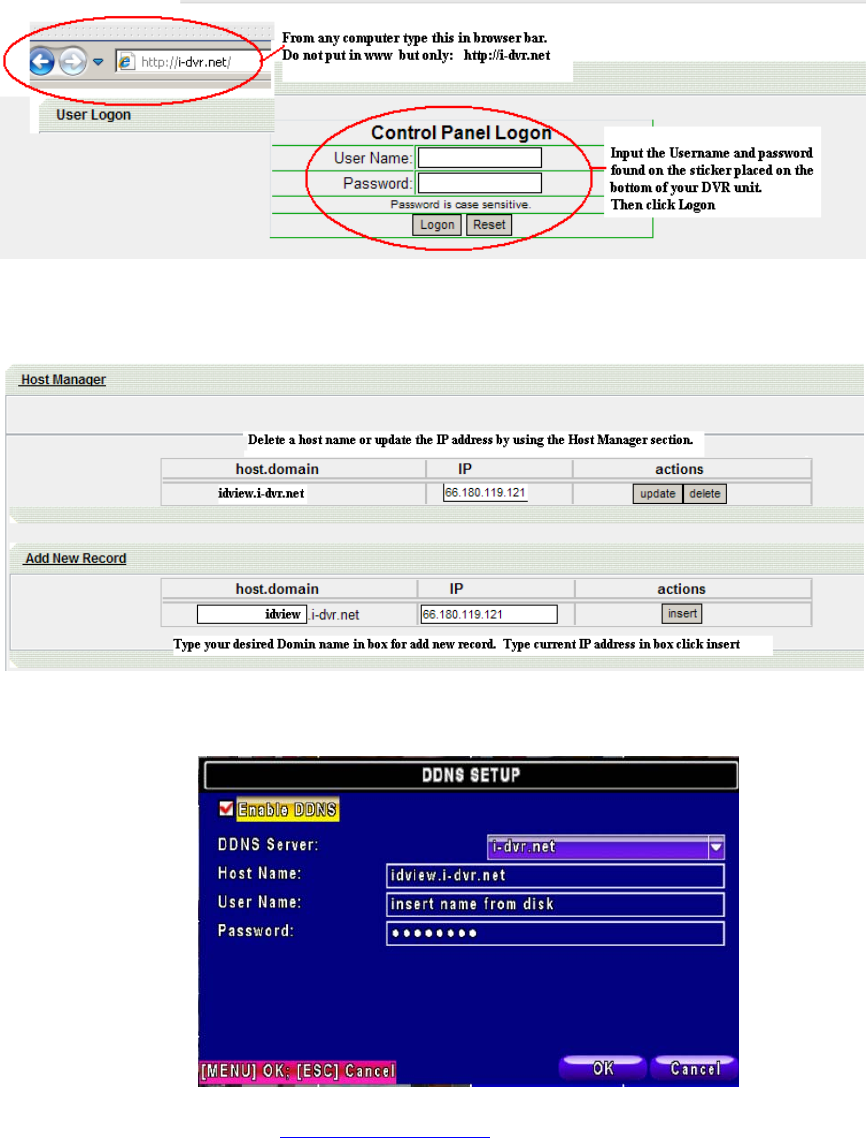
i-dvr.net DDNS SETUP
Congratulations on your purchase of an ECO series DVR from Digital IDView.
This unit supports multiple DDNS servers including two servers maintained by us.
On the bottom of your DVR is a user name and password for the i-dvr.net server. I
After putting in the user name and password click on Logon and you will see this screen:
In the DDNS setup (go to menu/main menu/network setup) input information and put a
check in the enable DDNS box. Click OK and you are done.
In browser bar you will type http://idview.i-dvr.net and you will see your cameras.
