Java Management Extensions Guide
User Manual:
Open the PDF directly: View PDF  .
.
Page Count: 245 [warning: Documents this large are best viewed by clicking the View PDF Link!]
- Contents
- Preface
- Part I Java Management Extensions Technology User’s Guide
- Part II Java Management Extensions (JMX) Technology Tutorial
- 9 Getting Started
- 10 Essentials of the JMX API
- 11 JMX Connectors
- 12 Lookup Services
- 13 Security
- Simple Security
- Subject Delegation
- Server.java in the Subject Delegation Example
- java.policy in the Subject Delegation Example
- SimpleStandardMBean.java in the Subject Delegation Example
- SimpleStandard.java in the Subject Delegation Example
- ClientListener.java in the Subject Delegation Example
- Client.java in the Subject Delegation Example
- Running the Secure RMI Connector Example With Subject Delegation
- Fine-Grained Security
- Server.java in the Fine-Grained Security Example
- java.policy in the Fine-Grained Security Example
- SimpleStandardMBean.java in the Fine-Grained Security Example
- SimpleStandard.java in the Fine-Grained Security Example
- ClientListener.java in the Fine-Grained Security Example
- Client.java in the Fine-Grained Security Example
- Running the RMI Connector Example With Fine-Grained Security
- Part III Java Management Extensions Examples
- 14 JMX Essentials
- 15 JMX MBean Notifications
- 16 MXBeans
- 17 MBean Descriptors
- examples/Descriptors/README
- examples/Descriptors/com/example/mxbeans/Author.java
- examples/Descriptors/com/example/mxbeans/DisplayName.java
- examples/Descriptors/com/example/mxbeans/Main.java
- examples/Descriptors/com/example/mxbeans/QueueSample.java
- examples/Descriptors/com/example/mxbeans/QueueSampler.java
- examples/Descriptors/com/example/mxbeans/QueueSamplerMXBean.java
- examples/Descriptors/com/example/mxbeans/Version.java
- 18 JMX Connectors
- 19 Service Location Protocol (SLP) Lookup Service
- 20 Jini Lookup Service
- 21 Java Naming and Directory Interface (JNDI)/LDAP Lookup Service
- 22 Simple Security
- examples/Security/simple/README
- examples/Security/simple/server/Server.java
- examples/Security/simple/client/Client.java
- examples/Security/simple/client/ClientListener.java
- examples/Security/simple/config/access.properties
- examples/Security/simple/config/password.properties
- examples/Security/simple/mbeans/SimpleStandard.java
- examples/Security/simple/mbeans/SimpleStandardMBean.java
- 23 Security with Subject Delegation
- examples/Security/subject_delegation/README
- examples/Security/subject_delegation/server/Server.java
- examples/Security/subject_delegation/client/Client.java
- examples/Security/subject_delegation/client/ClientListener.java
- examples/Security/subject_delegation/config/access.properties
- examples/Security/subject_delegation/config/password.properties
- examples/Security/subject_delegation/config/java.policy
- examples/Security/subject_delegation/mbeans/SimpleStandard.java
- examples/Security/subject_delegation/mbeans/SimpleStandardMBean.java
- 24 Fine-Grained Security
- examples/Security/fine_grained/README
- examples/Security/fine_grained/server/Server.java
- examples/Security/fine_grained/client/Client.java
- examples/Security/fine_grained/client/ClientListener.java
- examples/Security/fine_grained/config/password.properties
- examples/Security/fine_grained/config/java.policy
- examples/Security/fine_grained/mbeans/SimpleStandard.java
- examples/Security/fine_grained/mbeans/SimpleStandardMBean.java

Java Platform, Standard Edition
Java Management Extensions Guide
Release 11
E95075-02
November 2018
Java Platform, Standard Edition Java Management Extensions Guide, Release 11
E95075-02
Copyright © 1993, 2018, Oracle and/or its affiliates. All rights reserved.
This software and related documentation are provided under a license agreement containing restrictions on
use and disclosure and are protected by intellectual property laws. Except as expressly permitted in your
license agreement or allowed by law, you may not use, copy, reproduce, translate, broadcast, modify,
license, transmit, distribute, exhibit, perform, publish, or display any part, in any form, or by any means.
Reverse engineering, disassembly, or decompilation of this software, unless required by law for
interoperability, is prohibited.
The information contained herein is subject to change without notice and is not warranted to be error-free. If
you find any errors, please report them to us in writing.
If this is software or related documentation that is delivered to the U.S. Government or anyone licensing it on
behalf of the U.S. Government, then the following notice is applicable:
U.S. GOVERNMENT END USERS: Oracle programs, including any operating system, integrated software,
any programs installed on the hardware, and/or documentation, delivered to U.S. Government end users are
"commercial computer software" pursuant to the applicable Federal Acquisition Regulation and agency-
specific supplemental regulations. As such, use, duplication, disclosure, modification, and adaptation of the
programs, including any operating system, integrated software, any programs installed on the hardware,
and/or documentation, shall be subject to license terms and license restrictions applicable to the programs.
No other rights are granted to the U.S. Government.
This software or hardware is developed for general use in a variety of information management applications.
It is not developed or intended for use in any inherently dangerous applications, including applications that
may create a risk of personal injury. If you use this software or hardware in dangerous applications, then you
shall be responsible to take all appropriate fail-safe, backup, redundancy, and other measures to ensure its
safe use. Oracle Corporation and its affiliates disclaim any liability for any damages caused by use of this
software or hardware in dangerous applications.
Oracle and Java are registered trademarks of Oracle and/or its affiliates. Other names may be trademarks of
their respective owners.
Intel and Intel Xeon are trademarks or registered trademarks of Intel Corporation. All SPARC trademarks are
used under license and are trademarks or registered trademarks of SPARC International, Inc. AMD, Opteron,
the AMD logo, and the AMD Opteron logo are trademarks or registered trademarks of Advanced Micro
Devices. UNIX is a registered trademark of The Open Group.
This software or hardware and documentation may provide access to or information about content, products,
and services from third parties. Oracle Corporation and its affiliates are not responsible for and expressly
disclaim all warranties of any kind with respect to third-party content, products, and services unless otherwise
set forth in an applicable agreement between you and Oracle. Oracle Corporation and its affiliates will not be
responsible for any loss, costs, or damages incurred due to your access to or use of third-party content,
products, or services, except as set forth in an applicable agreement between you and Oracle.

Contents
Preface
Audience x
Documentation Accessibility x
Related Documents x
Conventions x
Part I Java Management Extensions Technology User’s Guide
1 Introduction to JMX Technology
What Is JMX Technology 1-1
Why Use JMX Technology 1-2
2 JMX Technology Architecture
Architecture Outline 2-1
Instrumenting Resources by Using MBeans 2-2
Creating a JMX Agent 2-2
Managing Resources Remotely 2-2
3 Instrumenting Your Resources for JMX Technology
Manageable Resources 3-1
Managed Beans (MBeans) 3-1
Java Virtual Machine Instrumentation 3-2
4 Using JMX Agents
MBean Server 4-1
Agent Services 4-1
Protocol Adaptors and Connectors 4-2
Protocol Adaptors 4-2
iii

Connectors 4-2
5 Using JMX Connectors to Manage Resources Remotely
RMI Connector 5-1
Generic Connector 5-2
User-Defined Protocols 5-2
6 Discovery and Lookup Services
Getting Started with Lookup Services 6-1
7 JMX Technology Versions
JMX Instrumentation and Agent Specification (JSR 3) 7-1
JMX Remote API Specification (JSR 160) 7-1
8 Java Management Extensions (JMX) API Specification
Part II Java Management Extensions (JMX) Technology Tutorial
9 Getting Started
Platform Information 9-1
10
Essentials of the JMX API
Standard MBeans 10-1
MBean Interface 10-1
MBean Implementation 10-2
Managing a Resource 10-3
Running the Standard MBean Example 10-4
Sending Notifications 10-5
NotificationBroadcaster Interface 10-6
Running the MBean Notification Example 10-8
Introducing MXBeans 10-9
QueueSamplerMXBean Interface 10-10
QueueSampler Class 10-10
QueueSample Class 10-11
Creating and Registering the MXBean in the MBean Server 10-11
iv

Running the MXBean Example 10-12
MBean Descriptors 10-14
DescriptorKey Annotations 10-15
Using MBean Descriptors 10-15
Running the MBean Descriptors Example 10-16
11
JMX Connectors
Accessing Standard and Dynamic MBeans By Using the RMI Connector 11-1
Server.java in the MBean Example 11-2
SimpleStandardMBean.java in the MBean Example 11-7
SimpleStandard.java in the MBean Example 11-7
SimpleDynamic.java in the MBean Example 11-8
ClientListener.java in the MBean Example 11-9
Client.java in the MBean Example 11-9
Running the MBean Example 11-11
12
Lookup Services
Initial Configuration 12-1
External RMI Registry 12-1
External LDAP Registry 12-2
Service Location Protocol (SLP) Lookup Service 12-3
Server.java in the SLP Lookup Example 12-4
Client.java in the SLP Lookup Example 12-6
Running the SLP Lookup Service Example 12-9
Jini Lookup Service 12-12
Server.java in the Jini Lookup Service Example 12-12
Client.java in the Jini Lookup Service Example 12-14
java.policy in the Jini Lookup Service Example 12-15
jini.properties.template 12-15
Running the Jini Lookup Service Example 12-15
Java Naming and Directory Interface (JNDI) / LDAP Lookup Service 12-19
Server.java in the JNDI/LDAP Lookup Service Example 12-20
Client.java in the JNDI/LDAP Lookup Service Example 12-23
jmx-schema.txt 12-24
60jmx-schema.ldif 12-24
Running the JNDI/LDAP Lookup Service Example 12-24
v
13
Security
Simple Security 13-1
Server.java in the Simple Security Example 13-2
SimpleStandardMBean.java in the Simple Security Example 13-3
SimpleStandard.java in the Simple Security Example 13-3
ClientListener.java in the Simple Security Example 13-3
Client.java in the Simple Security Example 13-3
Running the RMI Connector Example With Simple Security 13-4
Subject Delegation 13-5
Server.java in the Subject Delegation Example 13-5
java.policy in the Subject Delegation Example 13-6
SimpleStandardMBean.java in the Subject Delegation Example 13-6
SimpleStandard.java in the Subject Delegation Example 13-6
ClientListener.java in the Subject Delegation Example 13-6
Client.java in the Subject Delegation Example 13-6
Running the Secure RMI Connector Example With Subject Delegation 13-8
Fine-Grained Security 13-8
Server.java in the Fine-Grained Security Example 13-9
java.policy in the Fine-Grained Security Example 13-9
SimpleStandardMBean.java in the Fine-Grained Security Example 13-9
SimpleStandard.java in the Fine-Grained Security Example 13-9
ClientListener.java in the Fine-Grained Security Example 13-10
Client.java in the Fine-Grained Security Example 13-10
Running the RMI Connector Example With Fine-Grained Security 13-10
Part III Java Management Extensions Examples
14
JMX Essentials
examples/Essential/README 14-1
examples/Essential/com/example/mbeans/Main.java 14-2
examples/Essential/com/example/mbeans/Hello.java 14-4
examples/Essential/com/example/mbeans/HelloMBean.java 14-5
15
JMX MBean Notifications
examples/Notification/README 15-1
examples/Notification/com/example/mbeans/Main.java 15-2
examples/Notification/com/example/mbeans/Hello.java 15-3
vi

examples/Notification/com/example/mbeans/HelloMBean.java 15-6
16
MXBeans
examples/MXBean/README 16-1
examples/MXBean/com/example/mxbeans/Main.java 16-3
examples/MXBean/com/example/mxbeans/QueueSamplerMXBean.java 16-4
examples/MXBean/com/example/mxbeans/QueueSampler.java 16-5
examples/MXBean/com/example/mxbeans/QueueSample.java 16-6
17
MBean Descriptors
examples/Descriptors/README 17-1
examples/Descriptors/com/example/mxbeans/Author.java 17-2
examples/Descriptors/com/example/mxbeans/DisplayName.java 17-3
examples/Descriptors/com/example/mxbeans/Main.java 17-3
examples/Descriptors/com/example/mxbeans/QueueSample.java 17-4
examples/Descriptors/com/example/mxbeans/QueueSampler.java 17-5
examples/Descriptors/com/example/mxbeans/QueueSamplerMXBean.java 17-6
examples/Descriptors/com/example/mxbeans/Version.java 17-6
18
JMX Connectors
examples/Basic/README 18-1
examples/Basic/Server.java 18-2
examples/Basic/SimpleStandardMBean.java 18-7
examples/Basic/SimpleStandard.java 18-8
examples/Basic/SimpleDynamic.java 18-11
examples/Basic/ClientListener.java 18-18
examples/Basic/Client.java 18-19
19
Service Location Protocol (SLP) Lookup Service
examples/Lookup/slp/README 19-1
examples/Lookup/slp/Server.java 19-5
examples/Lookup/slp/Client.java 19-11
20
Jini Lookup Service
examples/Lookup/jini/README 20-1
examples/Lookup/jini/Server.java 20-5
examples/Lookup/jini/Client.java 20-11
vii

examples/Lookup/jini/java.policy 20-16
21
Java Naming and Directory Interface (JNDI)/LDAP Lookup Service
examples/Lookup/ldap/README 21-1
examples/Lookup/ldap/Server.java 21-5
examples/Lookup/ldap/Client.java 21-14
examples/Lookup/ldap/jmx-schema.txt 21-23
examples/Lookup/ldap/60jmx-schema.ldif 21-24
22
Simple Security
examples/Security/simple/README 22-1
examples/Security/simple/server/Server.java 22-2
examples/Security/simple/client/Client.java 22-4
examples/Security/simple/client/ClientListener.java 22-7
examples/Security/simple/config/access.properties 22-7
examples/Security/simple/config/password.properties 22-8
examples/Security/simple/mbeans/SimpleStandard.java 22-9
examples/Security/simple/mbeans/SimpleStandardMBean.java 22-12
23
Security with Subject Delegation
examples/Security/subject_delegation/README 23-1
examples/Security/subject_delegation/server/Server.java 23-2
examples/Security/subject_delegation/client/Client.java 23-4
examples/Security/subject_delegation/client/ClientListener.java 23-7
examples/Security/subject_delegation/config/access.properties 23-8
examples/Security/subject_delegation/config/password.properties 23-9
examples/Security/subject_delegation/config/java.policy 23-9
examples/Security/subject_delegation/mbeans/SimpleStandard.java 23-10
examples/Security/subject_delegation/mbeans/SimpleStandardMBean.java 23-13
24
Fine-Grained Security
examples/Security/fine_grained/README 24-1
examples/Security/fine_grained/server/Server.java 24-2
examples/Security/fine_grained/client/Client.java 24-4
examples/Security/fine_grained/client/ClientListener.java 24-7
examples/Security/fine_grained/config/password.properties 24-7
examples/Security/fine_grained/config/java.policy 24-8
examples/Security/fine_grained/mbeans/SimpleStandard.java 24-9
viii


Preface
The Java Platform, Standard Edition Java Management Extensions Guide provides an
introduction to Java Management Extension technology.
Audience
This guide is intended for Java developers who use JMX technology to instrument
Java code, create smart Java agents, implement distributed management middleware
and managers, and smoothly integrate these solutions into existing management and
monitoring systems.
Documentation Accessibility
For information about Oracle's commitment to accessibility, visit the Oracle
Accessibility Program website at http://www.oracle.com/pls/topic/lookup?
ctx=acc&id=docacc.
Access to Oracle Support
Oracle customers that have purchased support have access to electronic support
through My Oracle Support. For information, visit http://www.oracle.com/pls/topic/
lookup?ctx=acc&id=info or visit http://www.oracle.com/pls/topic/lookup?ctx=acc&id=trs
if you are hearing impaired.
Related Documents
For more information, see the following:
•JMX home page: The page for news, downloads, blogs and other information
about the JMX specification.
•JSR 3: The JCP page for the JMX API.
•JSR 160: The JCP page for the JMX Remote API.
•Java Platform, Standard Edition Management Developer’s Guide
Conventions
The following text conventions are used in this guide:
Convention Meaning
boldface Boldface type indicates graphical user interface elements associated
with an action, or terms defined in text.
Preface
x
Convention Meaning
italic Italic type indicates book titles, emphasis, or placeholder variables for
which you supply particular values.
monospace
Monospace type indicates commands within a paragraph, URLs, code
in examples, text that appears on the screen, or text that you enter.
Preface
xi

Part I
Java Management Extensions Technology
User’s Guide
JMX Technology Overview
Java Management Extensions (JMX) technology was originally developed through the
Java Community Process (JCP) as Java Specification Request (JSR) 3, Java
Management Extensions, and JSR 160, JMX Remote API. The JMX API is a standard
API for management and monitoring of resources such as applications, devices,
services, and the Java Virtual Machine.
Typical uses of JMX technology include:
•Monitoring and changing application configuration
•Accumulating statistics about application behavior and making them available
•Sending notifications of state changes and erroneous conditions.
The JMX API includes remote access, so that a remote management application can
interact with a running application to perform these actions.

1
Introduction to JMX Technology
If you are already familiar with Java Management Extensions (JMX) technology, see
JMX Technology Versions for version information.
JMX technology provides a simple, standard way of managing resources such as
applications, devices, and services. Because JMX technology is dynamic, you can use
it to monitor and manage resources as they are created, installed and implemented.
You can also use JMX technology to monitor and manage the Java Virtual Machine
(Java VM).
JMX technology was developed through the Java Community Process (JCP) as two
closely related Java Specification Requests (JSRs):
•JSR 3: Java Management Extensions (JMX) Specification
•JSR 160: Java Management Extensions (JMX) Remote API
The JSRs are defined by the API documentation that is generated by the Javadoc tool,
and in the PDF specification documents for each JSR.
As its name indicates, the JMX Remote API adds remote capabilities to the JMX
Specification, enabling you to remotely monitor and manage applications, systems,
and networks. In this guide, the term JMX technology is used to describe both the
JMX Specification and the JMX Remote API.
This chapter introduces JMX technology in the following sections:
•What Is JMX Technology
•Why Use JMX Technology
What Is JMX Technology
The JMX specification defines in the Java programming language an architecture, the
design patterns, the APIs, and the services for application and network management
and monitoring.
Using JMX technology, one or more Java objects known as Managed Beans
(MBeans) instruments a specified resource. These MBeans are registered in a core
managed object server, known as an MBean server. The MBean server acts as a
management agent and can run on most devices enabled for the Java programming
language.
The specification defines JMX agents that you can use to manage resources that are
instrumented in compliance with the specification. A JMX agent consists of an MBean
server, in which MBeans are registered, and a set of services for handling MBeans.
JMX agents directly control resources and make them available to remote
management applications.
The way in which resources are instrumented is completely independent from the
management infrastructure. Resources can therefore be rendered manageable
regardless of how their management applications are implemented.
1-1

JMX technology defines standard connectors (JMX connectors) that enable you to
access JMX agents from remote management applications. JMX connectors use
different protocols to provide the same management interface. A management
application can manage resources transparently, regardless of the communication
protocol that is used. JMX agents can be used by systems and applications that are
not compliant with the JMX Specification but which support JMX agents.
Why Use JMX Technology
JMX technology provides Java developers across all industries with a flexible means
to instrument Java code, create smart Java agents, implement distributed
management middleware and managers, and smoothly integrate these solutions into
existing management and monitoring systems.
•JMX technology enables management of Java applications without heavy
investment: A JMX technology agent can run on most Java technology-enabled
devices, thus Java applications can become manageable with little impact on their
design. A Java application simply needs to embed a managed object server and
make some of its functionality available as one or several managed beans
(MBeans) registered in the object server; that is all it takes to benefit from the
management infrastructure.
•JMX technology provides a standard way to manage Java technology-based
applications, systems, and networks: For example, the Java Platform,
Enterprise Edition (Java EE) 5 Application Server conforms to the JMX
architecture and consequently can be managed using JMX technology.
•JMX technology can be used for out-of-the-box management of the Java
Virtual Machine (JVM): The JVM is highly instrumented using JMX technology.
You can easily start a JMX agent to access the built-in JVM instrumentation, and
to monitor and manage the JVM remotely.
•JMX technology provides a scalable, dynamic, management architecture:
Each JMX agent service is an independent module that can be plugged in to the
management agent. This component-based approach means that JMX solutions
can scale from small-footprint devices to large telecommunications switches and
beyond. The JMX Specification provides a set of core agent services. Additional
services can be developed and dynamically loaded, unloaded, or updated in the
management infrastructure.
•JMX technology takes advantage of existing standard Java technologies:
When needed, the JMX Specification references existing Java specifications, for
example, the Java Naming and Directory Interface (JNDI).
•JMX module for the NetBeans IDE makes creating JMX applications easier:
You can obtain the JMX module from the NetBeans Update Center.
•JMX technology integrates with existing management solutions and
emerging technologies: For example, JMX agents can be managed through an
HTML browser. The JMX APIs provide open interfaces that any management
system vendor can use. JMX solutions can use lookup and discovery services and
protocols such as Jini Technology and the Service Location Protocol (SLP).
Chapter 1
Why Use JMX Technology
1-2
2
JMX Technology Architecture
Java Management Extensions (JMX) technology provides a standard API for the
management and monitoring of resources. The API includes remote access, so that a
remote management application can manage and monitor applications, systems, and
networks.
This chapter outlines JMX architecture in the following sections:
•Architecture Outline
•Instrumenting Resources by Using MBeans
•Creating a JMX Agent
•Managing Resources Remotely
Architecture Outline
JMX technology was developed through the Java Community Process (JCP) as two
closely related Java Specification Requests (JSRs):
•JSR 3: Java Management Extensions (JMX) Specification
•JSR 160: Java Management Extensions (JMX) Remote API
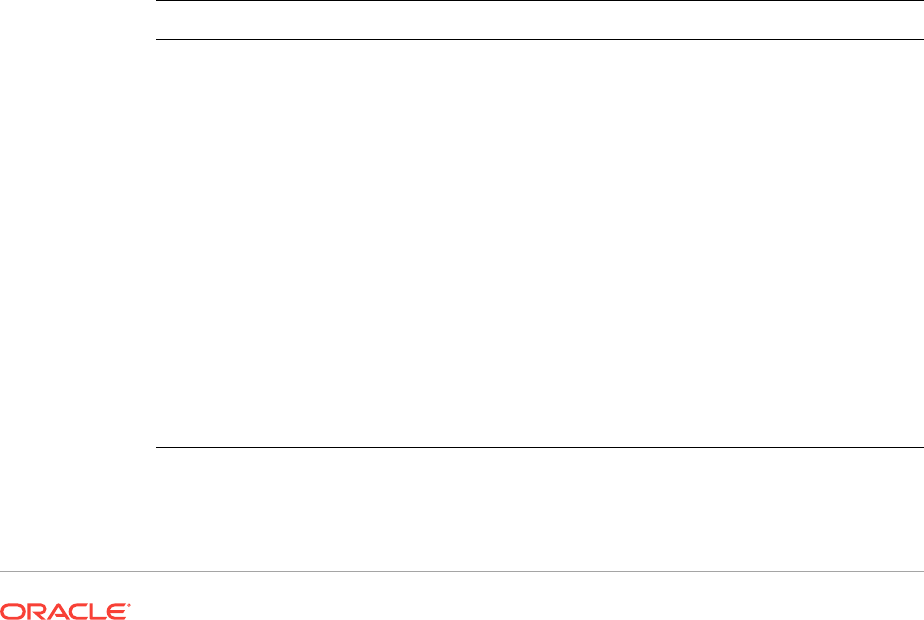
The following table shows the levels in the management architecture. The
instrumentation and agent levels are defined by JSR 3. The remote management level
is defined by JSR 160.
Level Description
Instrumentation Resources, such as applications, devices, or
services, are instrumented using Java objects
called Managed Beans (MBeans). MBeans
expose their management interfaces,
composed of attributes and operations,
through a JMX agent for remote management
and monitoring.
Agent The main component of a JMX agent is the
MBean server. This is a core managed object
server in which MBeans are registered. A JMX
agent also includes a set of services for
handling MBeans. The JMX agent directly
controls resources and makes them available
to remote management agents.
Remote management Protocol adaptors and standard connectors
make a JMX agent accessible from remote
management applications outside the agent’s
Java Virtual Machine (JVM).
2-1

Instrumenting Resources by Using MBeans
To manage resources by using JMX technology, you must first instrument the
resources in the Java programming language. You can use Java objects known as
MBeans to implement the access to the instrumentation of resources. MBeans must
follow the design patterns and interfaces defined in the JMX Specification to ensure
that all MBeans provide the instrumentation of managed resources in a standardized
way.
After a resource is instrumented by MBeans, it can be managed through a JMX agent.
MBeans do not require knowledge of the JMX agent with which they operate.
MBeans are designed to be flexible, simple, and easy to implement. Developers of
applications, systems, and networks can make their products manageable in a
standard way without investing in complex management systems. Existing resources
can be made manageable with minimum effort.
In addition, the instrumentation level of JSR 3: Java Management Extensions (JMX)
Specification specifies a notification mechanism that enables MBeans to generate and
propagate notification events to components of the other levels.
Creating a JMX Agent
A JMX agent is a standard management agent that directly controls resources and
makes them available to remote management applications. A JMX agent is usually
located on the same system as the resources that it controls, but this is not a
requirement.
The core component of a JMX agent is the MBean server, a managed object server in
which MBeans are registered. A JMX agent also includes a set of services to manage
MBeans, and at least one communications adaptor or connector to enable access by a
management application.
When you implement a JMX agent, you do not need to know the semantics or
functions of the resources that the agent will be used to manage. In fact, a JMX agent
does not even need to know which resources it will serve, because any resource
instrumented in compliance with the JMX specification can use any JMX agent offering
the services that it requires. In addition, the agent does not need to know the functions
of the management applications that will access it.
Managing Resources Remotely
JMX API instrumentation can be accessed either through existing management
protocols such as the Simple Network Management Protocol (SNMP), or through
proprietary protocols. The MBean server relies on protocol adaptors and connectors to
make a JMX agent accessible from management applications outside the agent’s Java
Virtual Machine (JVM).
Each adaptor provides a view through a specific protocol of all MBeans registered in
the MBean server. For example, an HTML adaptor could display an MBean in a
browser.
Connectors provide a manager-side interface that handles the communication
between the manager and the JMX agent. Each connector provides the same remote
Chapter 2
Instrumenting Resources by Using MBeans
2-2

management interface though a different protocol. When a remote management
application uses this interface, it can connect to a JMX agent transparently through the
network, regardless of the protocol.
JMX technology provides a standard solution for exporting JMX API instrumentation to
remote applications, based on Remote Method Invocation (RMI). The JMX Remote
API also defines an optional protocol based directly on TCP sockets, called the JMX
Messaging Protocol (JMXMP). An implementation of the JMX Remote API does not
have to support this optional protocol. The Java SE platform does not include the
optional protocol. See JMX Technology Versions for further information.
The JMX Remote API specification describes how you can advertise and find JMX
agents by using existing discovery and lookup infrastructures. For examples, see Java
Management Extensions (JMX) Technology Tutorial. The specification does not define
its own discovery and lookup service. The use of existing discovery and lookup
services is optional. Alternatively you can encode the addresses of your JMX agents in
the form of URLs, and then communicate these URLs to the manager.
Chapter 2
Managing Resources Remotely
2-3

3
Instrumenting Your Resources for JMX
Technology
This chapter outlines the concepts behind instrumenting resources for management by
using JMX technology in the following sections:
•Manageable Resources
•Managed Beans (MBeans)
•Java Virtual Machine Instrumentation
Manageable Resources
Different types of resources can be managed using JMX technology, for example an
application, an implementation of a service, a device, or a user. For a given resource
to be managed by JMX technology, it must be developed in the Java language, or at
least offer a Java language wrapper. The resource must also be instrumented by one
or more Java objects known as managed beans (MBeans), in compliance with the
JMX specification.
Developers of applications and devices can choose the granularity of objects that are
instrumented as MBeans. An MBean might represent the smallest object in an
application, or it could represent the entire application. Application components
designed with their management interface in mind can typically be written as MBeans.
MBeans can be used as wrappers for legacy code without a management interface or
as proxies for code with a legacy management interface.
Managed Beans (MBeans)
The Java objects that implement resources and their instrumentation are called
managed beans (MBeans). MBeans must follow the design patterns and interfaces
defined in the JMX Specification (JSR 3) to ensure that all MBeans provide the
instrumentation of managed resources in a standardized way.
The instrumentation of a given resource is provided by one or more MBeans that are
either standard or dynamic. Standard MBeans are Java objects that conform to certain
design patterns derived from the JavaBeansTM component model. Dynamic MBeans
conform to a specific interface that offers more flexibility at runtime. MXBeans
reference only a predefined set of types.
The instrumentation of a resource allows it to be manageable through the agent level
described in Using JMX Agents. MBeans do not require knowledge of the JMX agent
with which they operate.
MBeans are designed to be flexible, simple, and easy to implement. Developers of
applications, services, or devices can make their products manageable in a standard
way without having to understand or invest in complex management systems. Existing
3-1

objects can easily be evolved to produce standard MBeans or wrapped as dynamic
MBeans, thus making existing resources manageable with minimum effort.
The instrumentation level specifies a notification mechanism enables MBeans to
generate and propagate notification events to components of the other levels.
The management interface of an MBean consists of:
•Named and typed attributes that can be read and/or written
•Named and typed operations that can be invoked
•Typed notifications that can be emitted by the MBean
The Java class of a standard MBean exposes the resource to be managed directly
through its attributes and operations. Attributes are internal entities that are exposed
through getter and setter methods. Operations are the other methods of the class that
are available to managers. All these methods are defined statically in the MBean
interface and are visible to a JMX agent through introspection. This is the most
straightforward way of making a new resource manageable.
A dynamic MBean defines its management interface at runtime. For example, a
configuration MBean could determine the names and types of the attributes it exposes
by parsing an XML file.
An MXBean is a new type of MBean that provides a simple way to code an MBean
that only references a pre-defined set of types. In this way, you can be sure that your
MBean will be usable by any client, including remote clients, without any requirement
that the client have access to model-specific classes representing the types of your
MBeans.
Java Virtual Machine Instrumentation
The Java Virtual Machine (JVM) is highly instrumented using JMX technology. You
can easily start a JMX agent to access the built-in JVM instrumentation, and thereby
monitor and manage the JVM remotely by JMX technology.
To find out more about using JMX technology to monitor and manage the JVM, see
the Java Platform, Standard Edition Management Developer’s Guide.
Chapter 3
Java Virtual Machine Instrumentation
3-2

4
Using JMX Agents
A Java Management Extensions (JMX) agent is a management entity that runs in a
Java Virtual Machine (JVM) and acts as the liaison between the managed beans
(MBeans) and the management application. The various components of a JMX agent
are outlined in the following sections:
•MBean Server
•Agent Services
•Protocol Adaptors and Connectors
MBean Server
The MBean server is the core component of a JMX agent. It’s a registry for objects in a
JMX agent that are exposed to management operations. An object that is registered
with the MBean server is visible to management applications. The MBean server
exposes only the management interface of an MBean, never its direct object
reference.
Any resource that you want to manage from outside the agent’s JVM must be
registered as an MBean with the server. The MBean server provides a standardized
interface for accessing MBeans within the same JVM, giving local objects all the
benefits of manipulating manageable resources. MBeans can be instantiated and
registered by:
•Another MBean
•The agent itself
•A remote management application
When you register an MBean, you must assign it a unique object name. A
management application uses the object name to identify the object on which it is to
perform a management operation. The operations available on MBeans include:
•Discovering the management interface of MBeans
•Reading and writing their attribute values
•Performing operations defined by the MBeans
•Getting notifications emitted by MBeans
•Querying MBeans by using their object name or their attribute values
Agent Services
Agent services are objects that can perform management operations on the MBeans
that are registered with the MBean server. By including management intelligence into
the agent, JMX helps you build more powerful management solutions. Agent services
can be MBeans as well, allowing them and their functionality to be controlled through
the MBean server. The JMX Specification defines the following agent services:
4-1

•Dynamic class loading through the management applet (m-let) service retrieves
and instantiates new classes and native libraries that are dynamically downloaded
from the network.
•Monitors the numerical or string value of MBean attributes and can notify other
objects of several types of changes.
•Timers provide a scheduling mechanism and can send notifications at
predetermined intervals.
•The relation service defines associations between MBeans and maintains the
consistency of the relation.
Protocol Adaptors and Connectors
Protocol adaptors and connectors make the agent accessible from remote
management applications. They provide a view through a specific protocol of the
MBeans that are instantiated and registered with the MBean server. They enable a
management application outside the JVM to:
•Get or set attributes of existing MBeans
•Perform operations on existing MBeans
•Instantiate and register new MBeans
•Register for and receive notifications emitted by MBeans
Consequently, for a JMX agent to be manageable, it must include at least one protocol
adaptor or connector. The Java SE platform includes the standard Remote Method
Invocation (RMI) connector. An agent can include one or more protocol adaptors and
connectors, allowing it to be managed and monitored remotely through different
protocols simultaneously.
Protocol Adaptors
Protocol adaptors provide a management view of the JMX agent through a given
protocol. They adapt the operations of MBeans and the MBean server into a
representation in the given protocol, and possibly into a different information model, for
example SNMP. The Java SE platform does not include any protocol adaptors as
standard.
Management applications that connect to a protocol adaptor are usually specific to the
given protocol. This is typically the case for legacy management solutions that rely on
a specific management protocol. They access the JMX agent not through a remote
representation of the MBean server, but through operations that are mapped to those
of the MBean server.
Connectors
Connectors are used to connect an agent with a remote management application
enabled for JMX technology, namely, a management application developed using the
distributed services of the JMX specification. This kind of communication involves a
connector server in the agent and a connector client in the manager.
These components convey management operations transparently point-to-point over a
specific protocol. The JMX Remote API provides a remote interface to the MBean
server through which the management application can perform operations. A
Chapter 4
Protocol Adaptors and Connectors
4-2


5
Using JMX Connectors to Manage
Resources Remotely
The Java Management Extensions Instrument and Agent Specification defines the
concept of connectors. A connector makes a Java Management Extensions (JMX)
technology MBean server accessible to remote Java technology-based clients. The
client end of a connector exports essentially the same interface as the MBean server.
A connector consists of a connector client and a connector server. The connector
server is attached to an MBean server and listens for connection requests from clients.
The connector client establishes a connection with the connector server. A connector
client is usually be in a different Java Virtual Machine (JVM) from the connector server,
and will often be running on a different machine.
Many different implementations of connectors are possible. In particular, there are
many possibilities for the protocol used to communicate over a connection between
client and server.
A connector server usually has an address, used to establish connections between
connector clients and the connector server. Alternatively, some connectors can
provide connection stubs to establish connections. The way in which connections are
established depends on the discovery and lookup technology that you use. See
Discovery and Lookup Services.
This chapter outlines the different types of connector defined by the JMX Remote API
specification and the protocols they use, in the following sections:
•RMI Connector: The standard Remote Method Invocation (RMI) protocol must be
supported by every implementation that conforms to the JMX Remote API
standard.
•Generic Connector: The JMX Remote API standard also defines an optional
protocol based directly on TCP sockets, called the JMX Messaging Protocol
(JMXMP). An implementation of the standard can omit the JMXMP connector, but
must not omit the RMI connector. The Java SE platform does not include the
optional JMXMP connector.
•User-Defined Protocols: A connector can also implement a protocol that is not
defined in the JMX technology.
RMI Connector
The JMX Remote API standard defines a standard protocol based on RMI. The RMI
connector must be present in every implementation of the JMX Remote API.
The RMI connector supports the Java Remote Method Protocol (JRMP) transport.
The RMI connector over JRMP provides a simple mechanism for securing and
authenticating the connection between a client and a server. This mechanism provides
a basic level of security for environments using the RMI connector. Note that the
generic JMXMP connector provides a more advanced level of security.
5-1

You can improve the security of the RMI connector over JRMP by using an RMI socket
factory so that the connection between the client and the server uses the Secure
Socket Layer (SSL).
Generic Connector
The JMX Remote API specification defines an optional, generic connector, which is
not included in the Java SE platform. This connector can be configured by adding
pluggable modules to define the following:
•The transport protocol used to send requests from the client to the server, and to
send responses and notifications from the server to the clients
•The object wrapping for objects that are sent from the client to the server and
whose class loader can depend on the target MBean
The JMX Messaging Protocol (JMXMP) connector is a configuration of the generic
connector where the transport protocol is based on TCP and the object wrapping is
native Java serialization. Security is more advanced than for the RMI connector.
Security is based on the Java Secure Socket Extension (JSSE), the Java
Authentication and Authorization Service (JAAS), and the Simple Authentication and
Security Layer (SASL).
The generic connector and its JMXMP configuration are optional, which means that
they are not always included in an implementation of the JMX Remote API. The Java
SE platform does not include the optional generic connector.
User-Defined Protocols
The JMX Remote API specification does not define a connector for every protocol.
You can implement a connector based on a protocol that is not defined in the JMX
Remote API standard. For example, you can implement connector based on a protocol
that uses HTTP/S. The JMX Specification describes how to implement a connector
based on a user-defined protocol.
Chapter 5
Generic Connector
5-2

6
Discovery and Lookup Services
The Java Management Extensions (JMX) Remote API Specification describes how
you can advertise and find JMX API agents by using existing discovery and lookup
infrastructures. The specification does not define any discovery and lookup APIs
specific to JMX technology.
This chapter provides a brief outline of existing discovery and lookup infrastructures
that you can use with JMX technology, in the following section:
•Getting Started with Lookup Services
See the “References” section of the Java Management Extensions Remote API 1.0
Specification for additional information about discovery and lookup infrastructures.
Getting Started with Lookup Services
JMX agents and JMX clients can use lookup services. A single Java VM can contain
many JMX agents and/or JMX clients.
•A JMX agent is a logical server application composed of the following features:
•One managed bean (MBean) server
•One or more JMX connector servers that allow remote clients to access the
MBeans contained in that MBean server
•A JMX client is a logical client application that opens a client connection with a
JMX agent.
The Java Management Extensions (JMX) Technology Tutorial demonstrates how to
use lookup services to advertise and find JMX agents. The procedure is similar for all
three infrastructures. The main difference between them is that in SLP and JNDI, the
agent registers addresses with the lookup service, whereas when using the Jini
network technology, the JMX agent registers a JMX connector stub with the lookup
service.
Note:
The use of existing discovery and lookup services is optional. Alternatively,
you can encode the addresses of your JMX API agents in the form of URLs,
and communicate these URLs to the manager.
Using the Service Location Protocol (SLP)
The Service Location Protocol (SLP) provides a framework that allows networking
applications to discover the existence, location, and configuration of networked
services in enterprise networks.
6-1

The following steps summarize the procedure defined in the JMX Remote API
specification for using the SLP lookup service to advertise and find JMX agents:
•The JMX agent creates one or more JMX connector servers.
•For each connector to expose, the JMX agent registers the address with the SLP
lookup service, possibly giving additional attributes that qualify the agent and/or
the connector, and can be used as filters.
•The JMX client queries the SLP lookup service, and retrieves one or more
addresses that match the query.
•Finally, the JMX client obtains a connector that is connected with the server that is
identified by a retrieved address.
The JMX Remote API Specification defines URL schemes which are compliant with
the SLP protocol. See the Java Management Extensions (JMX) Remote API
Specification. The Specification also defines mandatory and optional SLP lookup
attributes that are provided at registration time.
Using the Jini Network Technology
The Jini Network Technology is an open software architecture that enables developers
to create services that are adaptable to changes in the network. The Jini specification
offers a standard lookup service. A Jini lookup service that is running can be
discovered with API call.
The following steps summarize the procedure defined in the JMX Remote API
specification for using the Jini lookup service to advertise and find JMX agents:
•The JMX agent creates one or more JMX connector servers.
•For each connector to expose, the JMX agent registers a JMX connector stub with
the Jini lookup service, possibly giving additional attributes that qualify the agent
and/or the connector, and can be used as filters.
•The JMX client queries the Jini lookup service, and retrieves one or more
connector stubs that match the query.
•Finally, the JMX client connects directly to the server using the provided connector
stub.
The JMX Remote API specification defines bindings with Jini technology based
entries. See the Java Management Extensions (JMX) Remote API Specification. The
specification also defines mandatory and optional entries to specify when registering
an agent connector.
Using the Java Naming and Directory Interface (JNDI) API With an LDAP
Backend
The Java Naming and Directory Interface (JNDI) API is a standard extension to the
Java platform. It provides Java technology-enabled applications with a unified interface
to multiple naming and directory services.
The JMX Remote API specification describes how an LDAP server is used to store
and retrieve information about JMX connectors that are exposed by JMX agents.
The following steps summarize the procedure defined in the JMX Remote API
specification for using the JNDI lookup service:
•The JMX agent creates one or more JMX connector servers.
Chapter 6
Getting Started with Lookup Services
6-2

•For each connector to expose, the JMX agent registers the address with the JNDI
lookup service, possibly giving additional attributes that qualify the agent and/or
the connector, and can be used as filters.
•The JMX client queries the JNDI lookup service, and retrieves one or more
addresses that match the query.
•Finally, the JMX client obtains a connector that is connected to the server that is
identified by a retrieved address.
The JMX Remote API defines an LDAP schema for registering addresses and
explains how a client can discover a registered agent. See the JMX 1.4 Specification
for details. The specification also defines a lease mechanism.
Chapter 6
Getting Started with Lookup Services
6-3

7
JMX Technology Versions
Java Management Extensions Technology (JMX) became a standard part of the Java
platform in the Java Platform Standard Edition (Java SE) 5.0. The JMX technology
was developed through the Java Community Process (JCP) as two closely related
Java Specification Requests (JSRs). The versions of the JSRs implemented in Java
SE 5.0 are detailed in the following sections.
JMX Instrumentation and Agent Specification (JSR 3)
The Java SE 9 platform implements version 1.4 of the JMX Specification (Maintenance
Release, October 2006). It incorporates the modifications that are listed in the errata
that is provided with the download.
JMX Remote API Specification (JSR 160)
The Java SE 9 platform implements version 1.4 of the JMX Remote API Specification
(Maintenance Release, October 2006).
In addition to standard RMI connectors, JSR 160 defines optional JMX Messaging
Protocol (JMXMP) connectors based on TCP sockets. The Java SE platform does not
include these optional connectors. You might want to use JMXMP connectors if, you
require a more advanced level of security.
If you want to use a JMXMP connector, download the JSR 160 Reference
Implementation from the download page specified at the beginning of this section, and
add the
jmxremote_optional.jar
file to your classpath. You will find examples of the use
of JMXMP connectors in the JMX Remote API Tutorial that is included with the JSR
160 Reference Implementation.
7-1

8
Java Management Extensions (JMX) API
Specification
The Java Management Extensions (JMX) API is a standard API for management and
monitoring.
The following packages of documentation generated by the Javadoc utility are
provided for the JMX API:
•javax.management
•javax.management.loading
•javax.management.modelmbean
•javax.management.monitor
•javax.management.openmbean
•javax.management.relation
•javax.management.remote
•javax.management.remote.rmi
•javax.management.timer
8-1

Part II
Java Management Extensions (JMX)
Technology Tutorial
JMX Technology Tutorial Overview
This tutorial provides examples of how to use the main features of the JMX technology
that is provided with the Java Platform, Standard Edition .
This tutorial is intended to be read in order, from beginning to end, working through the
examples as you go. Actions you perform at the beginning of the tutorial might be
required in later parts of the tutorial. Consequently, starting mid-way through the
tutorial might cause you to skip actions that are required by certain examples.
Where you must perform a task, the instructions are marked with an action number
and sub-tasks are marked with a lower-case letter.
Before You Use This Tutorial
This tutorial demonstrates the concepts and technology introduced in the Java
Management Extensions Technology User’s Guide. You should, therefore, read the
overview before you attempt to work through this tutorial. To make full use of the
information in this tutorial, you should also be familiar with the following protocols and
specifications:
•Remote Method Invocation (RMI)
•Lightweight Directory Access Protocol (LDAP)
•Service Location Protocol (SLP)
•JiniTM Network Technology
•Java Naming and Directory InterfaceTM (JNDI) API
•Java Secure Socket Extension (JSSE)
•Java Authentication and Authorization Service (JAAS)
•Java Management Extensions Specification 1.4
How This Tutorial Is Organized
This tutorial provides examples in the broad categories presented in the following
chapters.
•Getting Started gives you some initial configuration information.
•Essentials of the JMX API introduces the core notions of the JMX specification.
•JMX Connectors provides examples of how to implement the standard and
dynamic types of MBean, and perform operations on them both locally and
remotely.
•Lookup Services demonstrates the lookup services that can be used in
conjunction with the JMX technology.


9
Getting Started
This chapter explains what you need to do to get started with the Java Management
Extensions (JMX) examples. It provides instructions that apply to all examples
described in the following chapters.
Platform Information
All variable assignments and commands in the examples in this tutorial are defined
using UNIX Korn shell syntax. If you are running a shell other than the Korn shell on a
Solaris, Linux, or Mac OS X platform, you must adapt these commands to your
preferred shell environment.
If you are running a Microsoft Windows operating environment, in most cases,
adapting commands will simply involve replacing forward slashes (
/
) with backward
slashes (
\
) and replacing colons (
:
) with semi-colons (
;
) in the paths. A specific
Microsoft Windows command is given only when it differs significantly from the Solaris,
Linux, or Mac OS X command provided.
9-1

10
Essentials of the JMX API
This chapter introduces managed beans (MBeans) which are a core component of the
Java Management Extensions (JMX) API.
An MBean is a managed Java object, similar to a JavaBeanTM, that follows the design
patterns set forth in the instrumentation level of the JMX Specification. An MBean can
represent a device, an application, or any resource that is managed. MBeans expose
a management interface, which is a set of readable and/or writable attributes and a set
of invokable operations, along with a self-description. The management interface does
not change throughout the life of an MBean instance. MBeans can also emit
notifications when certain defined events occur.
The JMX Specification defines four types of MBean: standard MBeans, dynamic
MBeans, open MBeans and model MBeans. The examples in this tutorial demonstrate
the simplest type of MBean, namely standard MBeans.
Standard MBeans
You can define a standard MBean by writing a Java interface called
SomethingMBean
and a Java class called
Something
that implements that interface. Every method in the
interface defines either an attribute or an operation in the MBean. By default every
method defines an operation. Attributes and operations are simply methods which
follow certain design patterns. A standard MBean is composed of the MBean interface
which lists the methods for all exposed attributes and operations, and the class which
implements this interface and provides the functionality of the instrumented resource.
The following sections describe an example standard MBean, and a simple JMX agent
that manages the MBean. The code samples are provided in JMX Essentials. You can
run the examples from the directory
work_dir/jmx_examples/Essential/com/example/
mbeans.
MBean Interface
An example of a basic MBean interface, named
HelloMBean
, is shown in
CODE EXAMPLE 2-1 Example MBean Interface, HelloMBean.
CODE EXAMPLE 2-1 MBean Interface, HelloMBean
package com.example.mbeans;
public interface HelloMBean {
public void sayHello();
public int add(int x, int y);
public String getName();
public int getCacheSize();
10-1

public void setCacheSize(int size);
}
An MBean interface takes the name of the Java class that implements it, with the suffix
MBean added. The interface is called
HelloMBean
. The
Hello
class that implements this
interface is described in MBean Implementation.
According to the JMX specification, an MBean interface consists of named and typed
attributes that are readable and possibly writable, and named and typed operations
that can be invoked by the applications that are managed by the MBean. The
HelloMBean
interface shown in CODE EXAMPLE 2-1 MBean Interface, HelloMBean,
declares two operations: the Java methods
add()
and
sayHello()
.
Of the two attributes that are declared by
HelloMbean
,
Name
is a read-only string, and
CacheSize
is an integer that can be both read and written. Getter and setter methods
are declared, to allow the managed application to access and possibly change the
attribute values. As defined by the JMX Specification, a getter is any public method
whose name begins with get and which does not return void. A getter enables a
manager to read the value of the attribute, whose type is that of the returned object. A
setter is any public method whose name begins with set and which takes a single
parameter. A setter enables a manager to write a new value in the attribute, whose
type is the same as that of the parameter.
The implementation of these operations and attributes is shown in the following
section.
MBean Implementation
The
Hello
class shown in CODE EXAMPLE 2-2 MBean Implementation Class, Hello
implements
HelloMBean
.
CODE EXAMPLE 2-2 MBean Implementation Class, Hello
package com.example.mbeans;
public class Hello implements HelloMBean {
public void sayHello() {
System.out.println("hello, world");
}
public int add(int x, int y) {
return x + y;
}
public String getName() {
return this.name;
}
public int getCacheSize() {
return this.cacheSize;
}
public synchronized void setCacheSize(int size) {
this.cacheSize = size;
Chapter 10
Standard MBeans
10-2

System.out.println("Cache size now " + this.cacheSize);
}
private final String name = "Reginald";
private int cacheSize = DEFAULT_CACHE_SIZE;
private static final int DEFAULT_CACHE_SIZE = 200;
}
In Example 2-2, the Java class
Hello
provides the definitions of the operations and
attributes declared by
HelloMBean
. As you can see, the example
sayHello()
and
add()
operations are extremely simple, but real-life operations can be as simple or as
sophisticated as you like.
Methods to get the
Name
attribute and to get and set the
cacheSize
attribute are also
defined. In this example, the
Name
attribute value never changes, but in a real scenario
it might change as the managed resource runs. For example, the attribute might
represent statistics such as uptime or memory usage. Here, it is merely the name
“Reginald”.
Calling the
setCacheSize
method allows you to alter the
cacheSize
attribute from its
declared default value of 200. In reality, changing the
cacheSize
attribute could require
other operations to be performed, such as discarding entries or allocating new ones.
This example merely prints a message to confirm that the cache size is changed, but
you can define more sophisticated operations in the place of the call to
println()
.
With the
Hello
MBean and its interface defined, they can be used to manage the
resource they represent, as shown in the following section.
Managing a Resource
As described in the Java Management Extensions Technology User’s Guide, after a
resource is instrumented by MBeans, the management of that resource is performed
by a JMX agent.
The core component of a JMX agent is the MBean server, a managed object server in
which MBeans are registered. See the API documentation for the
MBeanServer
interface
for details of the MBean server implementation. A JMX agent also includes a set of
services to manage MBeans. CODE EXAMPLE 2-3 Creating a JMX Agent presents
a basic JMX agent, named
Main
.
CODE EXAMPLE 2-3 Creating a JMX Agent
package com.example.mbeans;
import java.lang.management.*;
import javax.management.*;
public class Main {
public static void main(String[] args) throws Exception {
MBeanServer mbs = ManagementFactory.getPlatformMBeanServer();
ObjectName name = new ObjectName("com.example.mbeans:type=Hello");
Hello mbean = new Hello();
Chapter 10
Standard MBeans
10-3

mbs.registerMBean(mbean, name);
System.out.println("Waiting forever...");
Thread.sleep(Long.MAX_VALUE);
}
}
In Example 2-3, the JMX agent
Main
begins by obtaining any MBean server that is
running on the platform, by calling the
getPlatformMBeanServer()
method of the
java.lang.management.ManagementFactory
class. If no MBean server is already running
on the platform, then
getPlatformMBeanServer()
creates one automatically by calling the
JMX method
MBeanServerFactory.createMBeanServer()
. The
MBeanServer
instance
obtained by
Main
is named
mbs
.
Next,
Main
defines an object name for the MBean instance it will create. Every JMX
MBean must have an object name. The object name is an instance of the JMX class
ObjectName
, and must conform to the syntax defined by the JMX Specification, namely
it must comprise a domain, and a list of key-properties. See the API documentation for
the
ObjectName
class for details of this syntax. In the object name defined by
Main
,
name
,
the domain is
com.example.mbeans
(the package in which the example MBeans are
contained) and the key-property declares that this object is of the type
Hello
.
An instance of a
Hello
object is created, named
mbean
. This
Hello
object is an instance
of the MBean
Hello
that was defined in MBean Implementation.
The
Hello
object named
mbean
is registered as an MBean in the MBean server
mbs
with
the object name
name
, by passing the object and the object name into a call to the JMX
method
MBeanServer.registerMBean()
.
With the
Hello
MBean registered in the MBean server,
Main
will simply wait for
management operations to be performed on
Hello
. In the scope of this example, these
management operations are invoking
sayHello()
, and
add()
, and getting and setting
the attribute values.
Running the Standard MBean Example
Having examined the example classes, you can run the example. The Java Platform,
Standard Edition includes a management and monitoring console, named JConsole,
that is used to interact with the MBean in this example. JConsole is located in
JavaSE_HOME/bin/jconsole
, in which
JavaSE_HOME
is the installation directory of the Java
Platform, Standard Edition (Java SE platform).
To run the example:
1. Copy the source code in JMX Essentials to the
work_dir/jmx_examples/Essential
.
2. Compile the example Java classes.
$ javac com/example/mbeans/*.java
3. Start the
Main
application.
$ java com.example.mbeans.Main
You will see a confirmation that
Main
is waiting for something to happen.
4. Start JConsole in a different terminal window on the same machine.
$ jconsole
Chapter 10
Standard MBeans
10-4

You will see the JConsole tool open, presenting a list of running JMX agents that
you can connect to.
5. Select
com.example.mbeans.Main
from the list in the “New Connection” window, and
click on Connect.
You will see a summary of your platform’s current activity.
6. Click on the MBeans tab.
This panel shows you all the MBeans currently registered in the MBean server.
7. In the left-hand frame, expand the
com.example.mbeans
node in the MBean tree.
You will see the example MBean
Hello
, that was created and registered by
Main
. If
you click
Hello
, you will see its associated Attributes and Operations nodes in the
MBean tree.
8. Click on the
Hello
MBean node in the MBean tree to display the
Hello
MBean’s
metadata and its associated Descriptor.
9. Click the
Attributes
node of the
Hello
MBean in the MBean tree.
This displays the MBean attributes that were defined by the
Hello
class.
10. Change the value of the
CacheSize
attribute to 150.
In the terminal window in which you started
Main
, you will see confirmation of this
change of attribute.
11. Click the
Operations
node of the Hello MBean in the MBean tree.
Here you will see the two operations declared by the
Hello
MBean,
sayHello()
and
add()
.
12. Invoke the
sayHello()
operation, by clicking on the
sayHello
button.
A JConsole dialogue box will inform you that the method was invoked
successfully, and you will see the message “hello, world” in the terminal window in
which
Main
is running.
13. Provide two integers for the
add()
operation to add , and click the
add
button.
You will be informed of the answer in a JConsole dialogue box.
14. Click Connection and then Exit, to exit JConsole.
Sending Notifications
MBeans can generate notifications, for example to signal a state change, a detected
event, or a problem.
For an MBean to generate notifications, it must implement the interface
NotificationBroadcaster
, or its subinterface
NotificationEmitter
. All you need to do to
send a notification is to construct an instance of the class
javax.management.Notification
or a subclass (such as
AttributeChangedNotification
),
and pass it to
NotificationBroadcasterSupport.sendNotification
.
Every notification has a source. The source is the object name of the MBean that
emitted the notification.
Every notification has a sequence number. This number can be used to order
notifications coming from the same source when order matters and there is a danger
of the notifications being handled in the wrong order. It is all right for the sequence
number to be zero, but it is better for it to increment for each notification from a given
MBean.
Chapter 10
Sending Notifications
10-5

There is an example of a standard MBean that emits notifications in the directory
work_dir
/jmx_examples/Notification/com/example/mbeans
. This example is essentially
the same as the example in Standard MBeans, except that the
Hello
MBean
implements the
NotificationBroadcaster
interface.
NotificationBroadcaster Interface
As stated above, the only difference between this example and the one presented in
Standard MBeans is the fact that the MBean implementation allows for the sending of
notifications. Notifications are activated by implementing the
NotificationBroadcaster
interface, as shown in CODE EXAMPLE 2-4 Implementing MBean Notifications.
CODE EXAMPLE 2-4 Implementing MBean Notifications
package com.example.mbeans;
import javax.management.*;
public class Hello
extends NotificationBroadcasterSupport implements HelloMBean {
public void sayHello() {
System.out.println("hello, world");
}
public int add(int x, int y) {
return x + y;
}
public String getName() {
return this.name;
}
public int getCacheSize() {
return this.cacheSize;
}
public synchronized void setCacheSize(int size) {
int oldSize = this.cacheSize;
this.cacheSize = size;
System.out.println("Cache size now " + this.cacheSize);
Notification n =
new AttributeChangeNotification(this,
sequenceNumber++,
System.currentTimeMillis(),
"CacheSize changed",
"CacheSize",
"int",
oldSize,
this.cacheSize);
sendNotification(n);
}
@Override
Chapter 10
Sending Notifications
10-6

public MBeanNotificationInfo[] getNotificationInfo() {
String[] types = new String[] {
AttributeChangeNotification.ATTRIBUTE_CHANGE
};
String name = AttributeChangeNotification.class.getName();
String description = "An attribute of this MBean has changed";
MBeanNotificationInfo info =
new MBeanNotificationInfo(types, name, description);
return new MBeanNotificationInfo[] {info};
}
private final String name = "Reginald";
private int cacheSize = DEFAULT_CACHE_SIZE;
private static final int DEFAULT_CACHE_SIZE = 200;
private long sequenceNumber = 1;
}
As you can see in CODE EXAMPLE 2-4 Implementing MBean Notifications, this
Hello
MBean implementation extends the
NotificationBroadcasterSupport
class, that
itself implements the
NotificationEmitter
interface.
The operations and attributes are set in the same way as before, with the only
exception that the
cacheSize
attribute’s setter method now defines a new value
oldSize
,
which records the
cacheSize
attribute’s value prior to the set operation.
The notification is constructed from an instance,
n
, of the JMX class
AttributeChangeNotification
, which extends
javax.management.Notification
. The
notification is constructed within the definition of the
setCacheSize()
method, from the
following information, that is passed to
AttributeChangeNotification
as parameters:
•The object name of the source of the notification, namely the
Hello
MBean,
represented simply by
this
•A sequence number, which in this example is a long named
sequenceNumber
, that is
set at 1 and that increases incrementally
•A timestamp
•The content of the notification message
•The name of the attribute that has changed, in this case
cacheSize
•The type of attribute that has changed
•The old attribute value, in this case
oldSize
•The new attribute value, in this case
this.cacheSize
The notification n is then passed to the
NotificationBroadcasterSupport.sendNotification()
method.
Finally, the
MBeanNotification
is defined to describe the characteristics of the different
notification instances emitted by the MBean for a given Java class of notification,
which in this case is
AttributeChangeNotification
notifications.
The MBean interface,
HelloMBean
, and the JMX agent
Main
are identical to those used
in the previous example.
Chapter 10
Sending Notifications
10-7

Running the MBean Notification Example
Having examined the example classes, you can now run the example. This example
uses JConsole to interact with the
Hello
MBean.To run the example:
1. Copy the source code from JMX MBean Notifications to
work_dir/jmx_examples/
Notification
.
2. Compile the example Java classes.
$ javac com/example/mbeans/*.java
3. Start the
Main
application.
$ java com.example.mbeans.Main
You will see confirmation that
Main
is waiting for something to happen.
4. Start JConsole in a different terminal window on the same machine.
$ jconsole
You will see the JConsole tool open, presenting a list of running JMX agents that
you can connect to.
5. Select
com.example.mbeans.Main
from the list in the New Connection window, and
click on Connect.
You will see a summary of your platform’s current activity.
6. Click on the MBeans tab.
This panel shows you all the MBeans currently registered in the MBean server.
7. In the left-hand frame, expand the
com.example.mbeans
node in the MBean tree.
You will see the example MBean
Hello
, that was created and registered by
Main
. If
you click on
Hello
, you will see its associated
Attributes
,
Operations
and
Notifications
nodes in the MBean tree.
8. Click on the
Hello
MBean node in the MBean tree.
This displays the MBean’s metadata and its associated Descriptor.
9. Click on the
Notifications
node of the Hello MBean in the MBean tree.
You will see that the panel is blank.
10. Click on the “Subscribe” button.
The current number of notifications received (0), will be displayed in the
Notifications node label.
11. Click on the
Attributes
node of the
Hello
MBean in the MBean tree, and change
the value of the
CacheSize
attribute to 150.
In the terminal window in which you started
Main
, you will see confirmation of this
change of attribute. You will also see that the number of notifications received
displayed in the Notifications node has changed to 1.
12. Click on the
Notifications
node of the
Hello
MBean in the MBean tree again.
You will see the details of the notification that was sent.
13. Click on Connection and then Exit, to exit JConsole.
Chapter 10
Sending Notifications
10-8

Introducing MXBeans
An MXBean is a new type of MBean that provides a simple way to code an MBean
that only references a pre-defined set of types. In this way, you can be sure that your
MBean will be usable by any client, including remote clients, without any requirement
that the client have access to model-specific classes representing the types of your
MBeans. MXBeans provide a convenient way to bundle related values together
without requiring clients to be specially configured to handle the bundles.
In the same way as for standard MBeans, an MXBean is defined by writing a Java
interface called Something
MXBean
and a Java class that implements that interface.
However, unlike standard MBeans, MXBeans do not require the Java class to be
called
Something
. Every method in the interface defines either an attribute or an
operation in the MXBean. The annotation
@MXBean
can be also used to annotate the
Java interface instead of requiring the interface’s name to be followed by the MXBean
suffix.
MXBeans provide a convenient way to bundle related values together in an MBean
without requiring clients to be specially configured to handle the bundles when
interacting with that MBean. MXBeans already existed in the Java 2 Platform,
Standard Edition (J2SE) 5.0, in the package
java.lang.management
. With the Java SE 6
platform, users can now define their own MXBeans, in addition to the standard set
defined in
java.lang.management
.
The key idea behind MXBeans is that types such as
java.lang.management.MemoryUsage
that are referenced in the MXBean interface,
java.lang.management.MemoryMXBean
in this
case, are mapped into a standard set of types, the so-called Open Types that are
defined in the package
javax.management.openmbean
. The exact mapping rules appear in
the MXBean specification, but to oversimplify we could say that simple types like
int
or
String
are unchanged, while complex types like
MemoryUsage
get mapped to the
standard type
CompositeDataSupport
.
The operation of MXBeans is demonstrated by example programs that you will find in
the directory work_dir
/jmx_examples/MXBean/com/example/mxbeans
after you have
downloaded and unzipped the
jmx_examples.zip
file. The MXBean example contains
the following files:
•
QueueSamplerMXBean
interface.
•
QueueSampler
class that implements the MXBean interface.
•
QueueSample
Java type returned by the
getQueueSample()
method in the MXBean
interface.
•
Main
, the program that sets up and runs the example.
The MXBean example performs the following actions.
•Defines a simple MXBean that manages a resource of
type Queue<String>
.
•Declares a getter,
getQueueSample
, in the MXBean that takes a snapshot of the
queue when invoked and returns a Java class
QueueSample
that bundles the
following values together:
•The time the snapshot was taken.
•The queue size.
Chapter 10
Introducing MXBeans
10-9

•The head of the queue at that given time.
•Registers the MXBean in an MBean server.
QueueSamplerMXBean Interface
CODE EXAMPLE 2-5 QueueSamplerMXBean interface shows the code of the
sample
QueueSamplerMXBean
interface.
CODE EXAMPLE 2-5 QueueSamplerMXBean interface
package com.example.mxbeans;
public interface QueueSamplerMXBean {
public QueueSample getQueueSample();
public void clearQueue();
}
As you can see, you declare an MXBean interface in exactly the same way as you
declare a standard MBean. The
QueueSamplerMXBean
interface declares two operations,
getQueueSample
and
clearQueue
.
QueueSampler Class
The
QueueSampler
class implements the
QueueSamplerMXBean
interface shown in
CODE EXAMPLE 2-6 QueueSampler Class.
CODE EXAMPLE 2-6 QueueSampler Class
package com.example.mxbeans;
import java.util.Date;
import java.util.Queue;
public class QueueSampler implements QueueSamplerMXBean {
private Queue<String> queue;
public QueueSampler(Queue<String> queue) {
this.queue = queue;
}
public QueueSample getQueueSample() {
synchronized (queue) {
return new QueueSample(new Date(), queue.size(), queue.peek());
}
}
public void clearQueue() {
synchronized (queue) {
queue.clear();
}
}
}
Chapter 10
Introducing MXBeans
10-10

The MXBean operations
getQueueSample()
and
clearQueue()
declared by the MXBean
interface are defined in
QueueSampler
. The
getQueueSample()
operation simply returns an
instance of the
QueueSample
Java type, created with the values returned by the
java.util
.
Queue
methods
peek()
and
size()
and an instance of
java.util.Date
.
QueueSample Class
The
QueueSample
instance returned by
QueueSampler
is defined in the
QueueSample
class
shown in CODE EXAMPLE 2-7 QueueSample Class.
CODE EXAMPLE 2-7 QueueSample Class
package com.example.mxbeans;
import java.beans.ConstructorProperties;
import java.util.Date;
public class QueueSample {
private final Date date;
private final int size;
private final String head;
@ConstructorProperties({"date", "size", "head"})
public QueueSample(Date date, int size, String head) {
this.date = date;
this.size = size;
this.head = head;
}
public Date getDate() {
return date;
}
public int getSize() {
return size;
}
public String getHead() {
return head;
}
}
In
QueueSample
class, the MXBean framework calls all the getters in
QueueSample
to
convert the given instance into a
CompositeData
and uses the
@ConstructorProperties
annotation to reconstruct a
QueueSample
instance from a
CompositeData
.
Creating and Registering the MXBean in the MBean Server
Having defined an MXBean interface and the class that implements it, as well as the
Java type that is returned, the MXBean must now be created and registered in an
MBean server. These actions are performed by the example class
Main
.
Chapter 10
Introducing MXBeans
10-11

CODE EXAMPLE 2-8 MXBean example Main class
package com.example.mxbeans;
import java.lang.management.ManagementFactory;
import java.util.Queue;
import java.util.concurrent.ArrayBlockingQueue;
import javax.management.MBeanServer;
import javax.management.ObjectName;
public class Main {
public static void main(String[] args) throws Exception {
MBeanServer mbs = ManagementFactory.getPlatformMBeanServer();
ObjectName name =
new ObjectName("com.example.mxbeans:type=QueueSampler");
Queue<String> queue = new ArrayBlockingQueue<String>(10);
queue.add("Request-1");
queue.add("Request-2");
queue.add("Request-3");
QueueSampler mxbean = new QueueSampler(queue);
mbs.registerMBean(mxbean, name);
System.out.println("Waiting...");
Thread.sleep(Long.MAX_VALUE);
}
}
The
Main
class gets the platform MBean server, creates an object name for the
MXBean
QueueSampler
, creates a
Queue
instance for the
QueueSampler
MXBean to
process, and feeds this Queue instance to a newly created
QueueSampler
MXBean. The
MXBean is then registered in the MBean server in exactly the same way as a standard
MBean.
Running the MXBean Example
To run the MXBean example:
1. Copy the source from MXBeans to
work_dir/jmx_examples/MXBean
.
2. Compile the example Java classes.
$ javac com/example/mxbeans/*.java
3. Start the
Main
application.
$ java com.example.mxbeans.Main
You will see confirmation that
Main
is waiting for something to happen.
4. Start JConsole in a different terminal window on the same machine.
$ jconsole
Chapter 10
Introducing MXBeans
10-12

You will see the JConsole tool open, presenting a list of running JMX agents that
you can connect to.
5. Select
com.example.mxbeans.Main
from the list in the New Connection window, and
click on Connect.
You will see a summary of your platform’s current activity.
6. Click on the MBeans tab.
This panel shows you all the MBeans currently registered in the MBean server.
7. In the left-hand frame, expand the
com.example.mxbeans
node in the MBean tree.
You will see the example MBean
QueueSampler
, that was created and registered by
Main. If you click on
QueueSampler
, then you will see its associated Attributes and
Operations nodes in the MBean tree.
8. Select the
Attributes
node.
You will see the
QueueSample
attribute appear in the right-hand pane, with its value
of
javax.management.openmbean.CompositeDataSupport
.
9. Double-click on the
CompositeDataSupport
value.
You can see the
QueueSample
values
date
,
head
and
size
because the MXBean
framework has converted the
QueueSample
instance into
CompositeData
. If you had
defined
QueueSampler
as a Standard MBean rather than as an MXBean, JConsole
would not have found the
QueueSample
class because it would not be in its class
path. If
QueueSampler
had been a standard MBean, you would have received a
ClassNotFoundException
when retrieving the
QueueSample
attribute value. This
demonstrates the usefulness of using MXBeans when connecting to JMX agents
through generic JMX clients, like JConsole.
10. Select the Operations node.
You will see a button to invoke the
clearQueue
operation.
11. Click on the clearQueue button.
You will be informed that the method was invoked successfully.
12. Select the Attributes node again and double click on the
CompositeDataSupport
value.
The queue has been reset now.
13. Click on Connection and then Exit, to exit JConsole.
In this example JConsole has been used as the JMX client but if you were to access
your MXBean programmatically in a JMX client you write yourself, then you could do
so in one of two ways:
•Generically, using the following code:
MBeanServer mbs = ...whatever...;
ObjectName name = new ObjectName("com.example.mxbeans:type=QueueSampler");
CompositeData queueSample = (CompositeData) mbs.getAttribute(name,
"QueueSample");
int size = (Integer) queueSample.get("size");
•Via a proxy, using the following code:
MBeanServer mbs = ...whatever...;
ObjectName name = new ObjectName("com.example.mxbeans:type=QueueSampler");
QueueSamplerMXBean proxy = JMX.newMXBeanProxy(mbs, name,
Chapter 10
Introducing MXBeans
10-13

QueueSamplerMXBean.class);
QueueSample queueSample = proxy.getQueueSample();
int size = queueSample.getSize();
This code uses the newMXBeanProxy method to create the MXBean proxy. An
equivalent method,
newMBeanProxy
, exists to create proxies for other types of
MBeans. The
newMBeanProxy
and
newMXBeanProxy
methods are used in exactly the
same way.
MBean Descriptors
Descriptors allow you to give additional information about MBeans to management
clients. For example, a Descriptor on an MBean attribute might say what units it is
measured in, or what its minimum and maximum possible values are. As of Java SE 6,
Descriptors are an integrated part of the JMX API and are available in all types of
MBeans.
Descriptors give you a convenient way to attach arbitrary extra metadata to your
MBeans. Descriptors have always existed in the JMX API, but until Java SE 6 they
were only available in conjunction with Model MBeans.
For most constructors in the classes
MBean*Info
(
MBeanInfo
,
MBeanAttributeInfo
, and so
on), a parallel constructor exists with the same parameters plus an additional
javax.management.Descriptor
parameter. The same is true for
OpenMBean*InfoSupport
.
The
MBean*Info
and
OpenMBean*InfoSupport
classes contain a
getDescriptor()
method.
Open MBeans return information about default and legal values from the
getDefaultValue()
,
getLegalValues()
,
getMaxValue()
,
getMinValue()
methods of
OpenMBeanParameterInfo
and
OpenMBeanAttributeInfo
. This information is now also
present in the corresponding Descriptors, and other types of MBean can also return
the information in their Descriptors.
MBean Descriptors are demonstrated in the example classes you will find in the
directory work_dir
/jmx_examples/Descriptors/com/example/mxbeans
after you have
downloaded and unzipped the
jmx_examples.zip
file. The MBean Descriptor example
contains the following files.
•
Author
, an annotation the supplies the name of the author of the MBean interface.
•
DisplayName
, an annotation that supplies a display name for methods in the MBean
interface.
•
Main
, the program that sets up and runs the example.
•
QueueSamplerMXBean
interface.
•
QueueSampler
class that implements the MXBean interface.
•
QueueSample
Java type returned by the
getQueueSample()
method in the MXBean
interface.
•
Version
, an annotation that supplies the current version of the MBean interface.
The
QueueSampler
MXBean in this example basically performs the same actions as the
MXBean example presented in Introducing MXBeans , except with the addition of
MBean Descriptors. This example shows how the
DescriptorKey
meta-annotation can
be used to add new descriptor items to the Descriptors for a standard MBean (or an
MXBean) via annotations in the standard MBean (or MXBean) interface.
Chapter 10
MBean Descriptors
10-14

DescriptorKey Annotations
A new annotation,
DescriptorKey
, can be used to add information to the Descriptors for
a standard MBean or a MXBean via annotations in the Standard MBean or MXBean
interface. This makes it possible for a tool that generates standard MBeans from an
existing management model to include information from the model in the generated
MBean interfaces, rather than in separate files. CODE EXAMPLE 2-9 Author
Annotation demonstrates the definition of the annotation
Author
.
CODE EXAMPLE 2-9 Author Annotation
package com.example.mxbeans;
import java.lang.annotation.Documented;
import java.lang.annotation.ElementType;
import java.lang.annotation.Retention;
import java.lang.annotation.RetentionPolicy;
import java.lang.annotation.Target;
import javax.management.DescriptorKey;
@Documented
@Target(ElementType.TYPE)
@Retention(RetentionPolicy.RUNTIME)
public @interface Author {
@DescriptorKey("author")
String value();
}
This annotation supplies the name of the creator of the MBean interface. A new field
author
will be added to the
MBeanInfo
Descriptor with the value defined by the
@Author
annotation. The files
Version
and
DisplayName
define annotations of those names in
exactly the same way as for
Author
above. In each of
Version
and
DisplayName
, the
@DescriptorKey
value is
“version”
and
“displayname”
respectively.
In the case of Version, a new field
version
will be added to the
MBeanInfo
Descriptor
with the value defined by the
@Version
annotation.
For
DisplayName
, new field
displayName
will be added to the
MBeanAttributeInfo
Descriptor or the
MBeanOperationInfo
Descriptor with the value defined by the
@DisplayName
annotation depending on whether the annotated method is a getter/setter
or an operation, respectively.
Using MBean Descriptors
The
QueueSamplerMXBean
interface used in this example is slightly different from the one
used in the MXBeans example, in as much as it implements MBean Descriptors to
publish some of its information.
CODE EXAMPLE 2-10 QueueSamplerMXBean with Descriptors
package com.example.mxbeans;
@Author("Mr Bean")
Chapter 10
MBean Descriptors
10-15

@Version("1.0")
public interface QueueSamplerMXBean {
@DisplayName("GETTER: QueueSample")
public QueueSample getQueueSample();
@DisplayName("OPERATION: clearQueue")
public void clearQueue();
}
Here, the
@Author
annotation is set to
Mr. Bean
, the
@Version
annotation is set to
1.0
,
and the
@DisplayName
is set to the names either of the attribute
QueueSample
or the
operation
clearQueue
.
Running the MBean Descriptors Example
To run the example:
1. Copy the source code in MBean Descriptors to
work_dir/jmx_examples/Descriptors
.
2. Compile the example Java classes.
$ javac com/example/mxbeans/*.java
3. Start the
Main
application.
$ java com.example.mxbeans.Main
You will see confirmation that
Main
is waiting for something to happen.
4. Start JConsole in a different terminal window on the same machine.
$ jconsole
You will see the JConsole tool open, presenting a list of running JMX agents that
you can connect to.
5. Select
com.example.mxbeans.Main
from the list in the New Connection window, and
click on Connect.
You will see a summary of your platform’s current activity.
6. Click on the MBeans tab.
This panel shows you all the MBeans currently registered in the MBean server.
7. In the left-hand frame, expand the
com.example.mxbeans
node in the MBean tree.
You will see the example MBean
QueueSampler
, that was created and registered by
Main. If you click on
QueueSampler
, you will see its associated Attributes and
Operations nodes in the MBean tree. You will also see the fields
author
and
version
in the
MBeanInfo
Descriptor table.
8. Expand the
Attributes
and
Operations
nodes under the
QueueSampler
MBean node.
You will see the individual Attributes and Operations.
9. Select the
QueueSample
node.
You will see the field
displayName
in the
MBeanAttributeInfo
Descriptor table.
10. Select the
clearQueue
node.
You will see the field
displayName
in the
MBeanOperationInfo
Descriptor table.
11. Click on Connection and then Exit , to exit JConsole.
Chapter 10
MBean Descriptors
10-16

11
JMX Connectors
This chapter introduces the concepts of standard and dynamic management beans
(MBeans) and shows how to use Java Management Extensions (JMX) technology to
perform operations on MBeans, locally and remotely.
Accessing Standard and Dynamic MBeans By Using the
RMI Connector
This example demonstrates standard and dynamic MBeans .
As seen in Essentials of the JMX API, a standard MBean statically defines its
management interface through the names of the methods it contains. A dynamic
MBean implements a specific Java interface and reveals its attributes and operations
at run time.
The JMX technology defines a connector based on Remote Method Invocation (RMI).
The RMI connector supports the Java Remote Method Protocol (JRMP) transport. This
connector allows you to connect to an MBean in an MBean server from a remote
location, and perform operations on it, exactly as if the operations were performed
locally.
The purpose of this example is to demonstrate the implementation of a standard
MBean and a dynamic MBean. It shows how to perform operations on them, both
locally, and remotely through an RMI connection between a server and a remote
client.
When you run this example:
•The server:
–Creates an MBean server
–Registers a
SimpleStandard
and a
SimpleDynamic
MBean in the local MBean
server
–Performs local operations on the MBeans
–Creates an RMI connector server
•The client:
–Creates an RMI connector
–Registers a
SimpleStandard
and a
SimpleDynamic
MBean on the remote MBean
server
–Performs remote operations on both MBeans
Analyzing the Classes Used in the Basic MBean Example
1. Copy the source code from JMX Connectors to the
work_dir/jmx_examples/Basic
directory. Inside this directory, you will create copies of:
11-1

•
Server.java
•
SimpleStandardMBean.java
•
SimpleStandard.java
•
SimpleDynamic.java
•
ClientListener.java
•
Client.java
•
README
2. Open each
*.java
file in your IDE or a text editor.
The following sections analyze each of the classes used in the basic MBean example,
and explain how the classes perform the operations described in the preceding
section.
Server.java in the MBean Example
Due to its size, the
Server.java
class is shown in the following code excerpts:
•CODE EXAMPLE 3-1 MBean Example Class Server.java (Excerpt 1)
•CODE EXAMPLE 3-2 MBean Example Class Server.java (Excerpt 2)
•CODE EXAMPLE 3-3 MBean Example Class Server.java (Excerpt 3)
•CODE EXAMPLE 3-4 MBean Example Class Server.java (Excerpt 4)
•CODE EXAMPLE 3-5 MBean Example Class Server.java (Excerpt 5)
CODE EXAMPLE 3-1 MBean Example Class Server.java (Excerpt 1)
public class Server {
public static void main(String[] args) {
try {
MBeanServer mbs = MBeanServerFactory.createMBeanServer();
waitForEnterPressed();
String domain = mbs.getDefaultDomain();
waitForEnterPressed();
String mbeanClassName = "SimpleStandard";
String mbeanObjectNameStr =
domain + ":type=" + mbeanClassName + ",name=1";
ObjectName mbeanObjectName =
createSimpleMBean(mbs, mbeanClassName, mbeanObjectNameStr);
waitForEnterPressed();
printMBeanInfo(mbs, mbeanObjectName, mbeanClassName);
waitForEnterPressed();
manageSimpleMBean(mbs, mbeanObjectName, mbeanClassName);
waitForEnterPressed();
mbeanClassName = "SimpleDynamic";
mbeanObjectNameStr =
Chapter 11
Accessing Standard and Dynamic MBeans By Using the RMI Connector
11-2

domain + ":type=" + mbeanClassName + ",name=1";
mbeanObjectName =
createSimpleMBean(mbs, mbeanClassName, mbeanObjectNameStr);
waitForEnterPressed();
printMBeanInfo(mbs, mbeanObjectName, mbeanClassName);
waitForEnterPressed();
manageSimpleMBean(mbs, mbeanObjectName, mbeanClassName);
waitForEnterPressed();
[...]
Examining this class, you can see that the following occurs:
First, the
Server.java
class creates a new MBean server called
mbs
by calling the
createMBeanServer()
method of the
MBeanServerFactory
class.
Then, the default domain in which the MBean server is registered is obtained with a
call to the
getDefaultDomain()
method of the
MBeanServer
interface. The domain is
identified by the string
domain
.
The MBean class named
SimpleStandard
is also identified by a variable, in this case
the string
mbeanClassName
.
SimpleStandard
is the name of the Java class for the Java
object of which this MBean is an instance. The
SimpleStandard.java
object is examined
in SimpleStandard.java in the Fine-Grained Security Example.
Another variable, the string
mbeanObjectNameStr
, is defined as the combination of the
domain, plus the following key=value pairs:
•The
type
, which in this case is the
mbeanClassName
.
•A
name
, to differentiate this MBean from other MBeans of the same type that might
be created subsequently. In this case the name number is
1
.
The purpose of
mbeanObjectNameStr
is to give the MBean a human-readable identifier.
A call to createSimpleMBean() creates and registers the SimpleStandard MBean in the
local MBean server, with the given object name.
The operations
printMBeanInfo()
, and
manageSimpleMBean()
are then performed on the
SimpleStandard
MBean. Like
createSimpleMBean()
, these methods are defined later in
the
Server.java
code, and are shown in CODE EXAMPLE 3-4 MBean Example Class
Server.java (Excerpt 4) and CODE EXAMPLE 3-5 MBean Example Class Server.java
(Excerpt 5).
In code that is not shown here, a second MBean of the type
SimpleDynamic
is created
and registered in the MBean server in exactly the same way as the
SimpleStandard
MBean. As the name suggests, this MBean is an instance of the
SimpleDynamic
Java
object, which is examined in SimpleDynamic.java in the MBean Example.
CODE EXAMPLE 3-2 MBean Example Class Server.java (Excerpt 2)
[...]
JMXServiceURL url =
new JMXServiceURL("service:jmx:rmi:///jndi/rmi://localhost:9999/server");
JMXConnectorServer cs =
Chapter 11
Accessing Standard and Dynamic MBeans By Using the RMI Connector
11-3

JMXConnectorServerFactory.newJMXConnectorServer(url, null, mbs);
cs.start();
waitForEnterPressed();
cs.stop();
[...]
In CODE EXAMPLE 3-2 MBean Example Class Server.java (Excerpt 2), an RMI
connector server is created so that operations can be performed on the MBeans
remotely. A call to the class
JMXServiceURL
creates a new service URL called
url
, which
serves as an address for the connector server. In this example, the service URL is
given in JNDI form, rather than in encoded form (see the API documentation for the
javax.management.remote.rmi
package for an explanation of JNDI form). This service
URL defines the following:
•The connector will use the default RMI transport, denoted by
rmi
.
•The RMI registry in which the RMI connector stub will be stored will be running on
port
9999
on the local host, and the server address will be registered under the
name
server
. The port
9999
specified in the example is arbitrary; you can use any
available port.
An RMI connector server named
cs
is created by calling the constructor
JMXConnectorServerFactory
, with the service URL
url
, a
null
environment map, and the
MBean server
mbs
as parameters. The connector server
cs
is launched by calling the
start()
method of
JMXConnectorServer
, whereupon
RMIConnectorServer
exports the RMI
object
server
to the RMI registry. The connection will remain open until the Enter key is
pressed, as instructed by the simple method
waitForEnterPressed
, that is defined later
in the
Server
code.
CODE EXAMPLE 3-3 MBean Example Class Server.java (Excerpt 3)
[...]
private static ObjectName createSimpleMBean(MBeanServer mbs,
String mbeanClassName,
String mbeanObjectNameStr) {
echo("\n>>> Create the " + mbeanClassName +
" MBean within the MBeanServer");
echo("ObjectName = " + mbeanObjectNameStr);
try {
ObjectName mbeanObjectName =
ObjectName.getInstance(mbeanObjectNameStr);
mbs.createMBean(mbeanClassName, mbeanObjectName);
return mbeanObjectName;
} catch (Exception e) {
echo( "!!! Could not create the " +
mbeanClassName + " MBean !!!");
e.printStackTrace();
echo("\nEXITING...\n");
System.exit(1);
}
return null;
}
[...]
Chapter 11
Accessing Standard and Dynamic MBeans By Using the RMI Connector
11-4

CODE EXAMPLE 3-3 MBean Example Class Server.java (Excerpt 3) shows the
definition of the
createSimpleMBean()
method. In this method, the MBean instance with
the object name
mbeanObjectNameStr
is passed to the
getInstance()
method of the
ObjectName
interface to create a new object name for registering the MBean inside the
MBean server. The resulting object name instance is named
mbeanObjectName
. A call to
the
MBeanServer
method
createMBean()
then instantiates an MBean defined by the
combination of the Java object identified by
mbeanClassName
and the MBean instance
mbeanObjectName
and registers this MBean in the MBean server
mbs
.
CODE EXAMPLE 3-4 MBean Example Class Server.java (Excerpt 4)
[...]
private static void printMBeanInfo(MBeanServer mbs,
ObjectName mbeanObjectName,
String mbeanClassName) {
MBeanInfo info = null;
try {
info = mbs.getMBeanInfo(mbeanObjectName);
} catch (Exception e) {
echo( "!!! Could not get MBeanInfo object for " +
mbeanClassName +" !!!");
e.printStackTrace();
return;
}
MBeanAttributeInfo[] attrInfo = info.getAttributes();
if (attrInfo.length > 0) {
for (int i = 0; i < attrInfo.length; i++) {
echo(" ** NAME: " + attrInfo[i].getName());
echo(" DESCR: " + attrInfo[i].getDescription());
echo(" TYPE: " + attrInfo[i].getType() +
"READ: "+ attrInfo[i].isReadable() +
"WRITE: "+ attrInfo[i].isWritable());
}
} else echo(" ** No attributes **");
[...]
In CODE EXAMPLE 3-4 MBean Example Class Server.java (Excerpt 4) , we see
the definition of the method
printMBeanInfo()
. The
printMBeanInfo()
method calls the
MBeanServer
method
getMBeanInfo()
to obtain details of the attributes and operations
that are exposed by the MBean
mbeanObjectName
.
MBeanAttributeInfo
defines the
following methods, each of which is called in turn to obtain information about the
mbeanObjectName
MBean’s attributes:
•
getName
: Obtains the attribute’s name.
•
getDescription
: Obtains the human readable description of the attribute.
•
getType
: Obtains the class name of the attribute.
•
isReadable
: Determines whether or not the attribute is readable.
•
isWritable
: Determines whether or not the attribute is writable.
In code that is not shown here, calls are made to obtain information about the
mbeanObjectName
MBean’s constructors, operations and notifications:
•
MBeanConstructorInfo
: Obtains information about the MBean’s Java class.
Chapter 11
Accessing Standard and Dynamic MBeans By Using the RMI Connector
11-5

•
MBeanOperationInfo
: Learns what operations the MBean performs, and what
parameters it takes.
•
MBeanNotificationInfo
: Finds out what notifications the MBean sends when its
operations are performed.
CODE EXAMPLE 3-5 MBean Example Class Server.java (Excerpt 5)
[...]
private static void manageSimpleMBean(MBeanServer mbs,
ObjectName mbeanObjectName,
String mbeanClassName) {
try {
printSimpleAttributes(mbs, mbeanObjectName);
Attribute stateAttribute = new Attribute("State",
"new state");
mbs.setAttribute(mbeanObjectName, stateAttribute);
printSimpleAttributes(mbs, mbeanObjectName);
echo("\n Invoking reset operation...");
mbs.invoke(mbeanObjectName, "reset", null, null);
printSimpleAttributes(mbs, mbeanObjectName);
} catch (Exception e) {
e.printStackTrace();
}
}
private static void printSimpleAttributes(
MBeanServer mbs,
ObjectName mbeanObjectName) {
try {
String State =
(String) mbs.getAttribute(mbeanObjectName, "State");
Integer NbChanges =
(Integer) mbs.getAttribute(mbeanObjectName,
"NbChanges");
} catch (Exception e) {
echo( "!!! Could not read attributes !!!");
e.printStackTrace();
}
}
[...]
CODE EXAMPLE 3-5 MBean Example Class Server.java (Excerpt 5) demonstrates
a method for managing a simple MBean.
The
manageSimpleMBean()
method first of all calls the
printSimpleAttributes()
method
that is also defined by
Server
. The
printSimpleAttributes()
method obtains an MBean
attribute called
state
from the MBean
mbeanObjectName
, as well as another MBean
attribute called
NbChanges
. Both of these attributes are defined in the
SimpleStandard
class, shown in SimpleStandard.java in the Fine-Grained Security Example.
The
manageSimpleMBean()
method then defines an attribute called
stateAttribute
, which
is an instance of the
Attribute
class. The
stateAttribute
attribute associates a value
of
new state
with the existing attribute
state
, defined by
SimpleStandard
. A call to the
Chapter 11
Accessing Standard and Dynamic MBeans By Using the RMI Connector
11-6

MBeanServer
method
setAttribute()
then sets the
mbeanObjectName
MBean’s state to the
new state defined by
stateAttribute
.
Finally, a call to the
MBeanServer
method
invoke()
invokes the
mbeanObjectName
MBean’s
reset
operation. The
reset
operation is defined in the
SimpleStandard
class.
SimpleStandardMBean.java in the MBean Example
The
SimpleStandardMBean.java
class is shown in CODE EXAMPLE 3-6 MBean
Example Class
SimpleStandardMBean.java
.
CODE EXAMPLE 3-6 MBean Example Class SimpleStandardMBean.java
public interface SimpleStandardMBean {
public String getState();
public void setState(String s);
public int getNbChanges();
public void reset();
}
The
SimpleStandardMBean.java
class is a straightforward JMX specification
management interface for the MBean
SimpleStandard
. This interface exposes the four
operations defined by
SimpleStandard
for management through a JMX agent.
SimpleStandard.java in the MBean Example
The
SimpleStandard.java
class is shown in CODE EXAMPLE 3-7 MBean Example
Class
SimpleStandard.java
.
CODE EXAMPLE 3-7 MBean Example Class SimpleStandard.java
public class SimpleStandard
extends NotificationBroadcasterSupport
implements SimpleStandardMBean {
public String getState() {
return state;
}
public void setState(String s) {
state = s;
nbChanges++;
}
public int getNbChanges() {
return nbChanges;
}
public void reset() {
AttributeChangeNotification acn =
new AttributeChangeNotification(this,
0,
0,
"NbChanges reset",
Chapter 11
Accessing Standard and Dynamic MBeans By Using the RMI Connector
11-7

"NbChanges",
"Integer",
new Integer(nbChanges),
new Integer(0));
state = "initial state";
nbChanges = 0;
nbResets++;
sendNotification(acn);
}
public int getNbResets() {
return nbResets;
}
public MBeanNotificationInfo[] getNotificationInfo() {
return new MBeanNotificationInfo[] {
new MBeanNotificationInfo(
new String[] {
AttributeChangeNotification.ATTRIBUTE_CHANGE },
AttributeChangeNotification.class.getName(),
"This notification is emitted when the reset()
method is called.")
};
}
private String state = "initial state";
private int nbChanges = 0;
private int nbResets = 0;
}
The
SimpleStandard
class defines a straightforward JMX specification standard MBean.
The
SimpleStandard
MBean exposes operations and attributes for management by
implementing the corresponding
SimpleStandardMBean
interface, shown in
SimpleStandardMBean.java in the Subject Delegation Example.
The simple operations exposed by this MBean are:
•To define a state
•To update this state
•To count the number of times the state is updated
•To reset the values of the state and the number of changes to their original value
of zero
•To send a notification whenever the reset operation is invoked
The notification emitted by the reset operation is an instance of the class
AttributeChangeNotification
, which collects information about the number of changes
carried out on the
State
attribute before calling reset. The content of the notification
sent is defined by the
MBeanNotificationInfo
instance.
SimpleDynamic.java in the MBean Example
The
SimpleDynamic
class is shown in CODE EXAMPLE 3-8 MBean Example Class
SimpleDynamic.java
.
Chapter 11
Accessing Standard and Dynamic MBeans By Using the RMI Connector
11-8

CODE EXAMPLE 3-8 MBean Example Class SimpleDynamic.java
public class SimpleDynamic
extends NotificationBroadcasterSupport
implements DynamicMBean {
public SimpleDynamic() {
buildDynamicMBeanInfo();
}
[...]
The
SimpleDynamic
dynamic MBean shows how to expose attributes and operations for
management at runtime, by implementing the
DynamicMBean
interface. It starts by
defining a method,
buildDynamicMBeanInfo()
, for obtaining information for the MBean
dynamically. The
buildDynamicMBeanInfo()
method builds the
MBeanInfo
for the dynamic
MBean.
The rest of the code of
SimpleDynamic
corresponds to the implementation of the
DynamicMBean
interface. The attributes, operations and notifications exposed are
identical to those exposed by the
SimpleStandard
MBean.
ClientListener.java in the MBean Example
The
ClientListener.java
class is shown in CODE EXAMPLE 3-9 MBean Example
Class
ClientListener.java
.
CODE EXAMPLE 3-9 MBean Example Class ClientListener.java
public class ClientListener implements NotificationListener {
public void handleNotification(Notification notification, Object handback)
{
System.out.println("\nReceived notification: " + notification);
}
}
The
ClientListener
class implements a straightforward JMX specification notification
listener. The
handleNotification()
method of the
NotificationListener
interface is
called upon reception of a notification, and prints out a message to confirm that a
notification has been received.
Client.java in the MBean Example
The
Client.java
class is shown in CODE EXAMPLE 3-10 MBean Example Class
Client.java
.
CODE EXAMPLE 3-10 MBean Example Class Client.java
public class Client {
Chapter 11
Accessing Standard and Dynamic MBeans By Using the RMI Connector
11-9

public static void main(String[] args) {
try {
// Create an RMI connector client
//
JMXServiceURL url = new JMXServiceURL(
"service:jmx:rmi:///jndi/rmi://localhost:9999/server");
JMXConnector jmxc = JMXConnectorFactory.connect(url, null);
ClientListener listener = new ClientListener();
MBeanServerConnection mbsc = jmxc.getMBeanServerConnection();
waitForEnterPressed();
// Get domains from MBeanServer
//
String domains[] = mbsc.getDomains();
for (int i = 0; i < domains.length; i++) {
System.out.println("Domain[" + i + "] = " + domains[i]);
}
waitForEnterPressed();
String domain = mbsc.getDefaultDomain();
// Create SimpleStandard MBean
ObjectName mbeanName =
new ObjectName(domain +":type=SimpleStandard,name=2");
mbsc.createMBean("SimpleStandard", stdMBeanName, null, null);
waitForEnterPressed();
// Create SimpleDynamic MBean
ObjectName dynMBeanName =
new ObjectName(domain +":type=SimpleDynamic,name=2");
echo("\nCreate SimpleDynamic MBean...");
mbsc.createMBean("SimpleDynamic", dynMBeanName, null, null);
waitForEnterPressed();
// Get MBean count
echo("\nMBean count = " + mbsc.getMBeanCount());
// Query MBean names
echo("\nQuery MBeanServer MBeans:");
Set names = mbsc.queryNames(null, null);
for (Iterator i = names.iterator(); i.hasNext(); ) {
echo( "ObjectName = " + (ObjectName) i.next());
}
waitForEnterPressed();
mbsc.setAttribute(stdMBeanName,
new Attribute("State", "changed state"));
SimpleStandardMBean proxy = JMX.newMBeanProxy(
mbsc, stdMBeanName, SimpleStandardMBean.class, true);
echo("\nState = " + proxy.getState());
ClientListener listener = new ClientListener();
mbsc.addNotificationListener(stdMBeanName, listener, null, null);
mbsc.invoke(stdMBeanName, "reset", null, null);
mbsc.removeNotificationListener(stdMBeanName, listener);
mbsc.unregisterMBean(stdMBeanName);
Chapter 11
Accessing Standard and Dynamic MBeans By Using the RMI Connector
11-10

[...]
jmxc.close();
} catch (Exception e) {
e.printStackTrace();
}
}
}
[...]
The
Client.java
class creates an RMI connector client that is configured to connect to
the RMI connector server created by
Server.java
.
Client.java
defines the same
service URL
url
as that defined by
Server.java
. This allows the connector client to
retrieve the RMI connector server stub named
server
from the RMI registry running on
port
9999
of the local host, and to connect to the RMI connector server.
With the RMI registry identified, the connector client can be created. The connector
client,
jmxc
, is an instance of the interface
JMXConnector
, created by the
connect()
method of
JMXConnectorFactory
. The
connect()
method is passed the parameters
url
and a
null
environment map when it is called.
The Client also creates an instance of
ClientListener
, to listen for notifications, as
shown in ClientListener.java in the MBean Example.
An instance of a JMX specification
MBeanServerConnection
, named
mbsc
, is then created
by calling the
getMBeanServerConnection()
method of the
JMXConnector
instance
jmxc
.
The connector client is now connected to the MBean server created by
Server.java
,
and can register MBeans and perform operations on them with the connection
remaining completely transparent to both ends.
The client creates and registers the
SimpleStandard
MBean and the SimpleDynamic
MBean in the MBean server with a call to the
createMBean()
method of
MBeanServerConnection
, and performs the operations defined by
SimpleStandard
and
SimpleDynamic
as if they were local JMX specification MBean operations.
MBean proxies allow you to access an MBean through a Java interface, allowing you
to make calls on the proxy rather than having to write lengthy code to access a remote
MBean. An MBean proxy for
SimpleStandardMBean
is created here by calling the method
newMBeanProxy()
in the
javax.management.JMX
class, passing it the MBean’s
MBeanServerConnection
, object name, the class name of the MBean interface and true,
to signify that the proxy must behave as a
NotificationBroadcaster
. You can make
proxies for MXBeans in exactly the same way as for standard MBeans, by simply
calling
newMXBeanProxy()
instead of
newMBeanProxy()
.
The code for the different operations performed on
SimpleDynamic
is not shown here,
because the operations are the same as those performed on
SimpleStandard
.
Finally, the client unregisters the
SimpleStandard
MBean and closes the connection.
The final
removeNotificationListener
is optional, as listeners registered by a remote
client are removed when that client is closed.
Running the MBean Example
Having examined the example classes, you can run the example. To run the example:
1. Compile the Java classes.
Chapter 11
Running the MBean Example
11-11

$ javac *.java
2. Start an RMI registry on port
9999
of the local host.
The RMI registry is used by the
Server
class to register the RMI connector stub.
$ rmiregistry 9999 &
3. Start the
Server
class.
$ java -classpath . Server
You will see confirmation of the creation of the MBean server and the creation of
the
SimpleStandard
MBean in the MBean server. You will then be prompted to
press the Enter key to obtain information about, and then to perform operations
on, the
SimpleStandard
MBean.
After the operations on the
SimpleStandard
are completed, the process is repeated
for the
SimpleDynamic
MBean.
After both the MBeans are created and their operations performed, you see the
creation of an RMI connector server, to allow operations to be performed on the
MBeans from the remote
Client
.
4. Start the
Client
class in another terminal window.
$ java -classpath . Client
You will see confirmation of the creation of the RMI connector client and of the
connection with the connector server. You will also be informed of the domain
name, and the creation and registration of
SimpleStandard
and SimpleDynamic
MBeans. The client will perform operations on
SimpleStandard
and SimpleDynamic
MBeans, before unregistering them.
Chapter 11
Running the MBean Example
11-12

12
Lookup Services
The lookup services allow JMX technology clients to find and connect to connector
servers that have registered with the lookup services.
The Java Management Extensions (JMX) Specification defines three bindings to
lookup services, using existing lookup technologies, as described in the following
sections:
•Initial Configuration provides configuration information that applies to all three
types of lookup service.
•Service Location Protocol (SLP) Lookup Service presents the SLP lookup
example.
•Jini Lookup Service presents an Jini lookup example.
•Java Naming and Directory Interface (JNDI) / LDAP Lookup Service presents a
JNDI/LDAP lookup example.
Initial Configuration
As shown in Accessing Standard and Dynamic MBeans By Using the RMI Connector,
if you are using remote method invocation (RMI) connectors, you can choose to use
an external directory to register the connector server stubs you want to look up. The
following cases are presented in the lookup service examples relating to RMI
connectors:
•RMI connectors that use one of the following external directories:
–An RMI registry, for RMI connectors that implement the default Java Remote
Method Protocol (JRMP) transport
–Lightweight Directory Access Protocol (LDAP), for JRMP transports
•RMI connectors that do not use an external directory
If you register the RMI connector stubs in an external directory, some initial
configuration is required. You must to set up your RMI registry or LDAP server. If you
do not use an external directory, the RMI connector stub is encoded into the JMX
service URL.
The following sections describe the external directories that you can use in conjunction
with the lookup service examples that use RMI connectors. These external directories
are referred to when running the three examples of lookup services that are given in
the subsequent sections in this chapter.
External RMI Registry
To register the RMI connector server stubs in an external RMI registry, for use by
connectors implementing the JRMP transport, perform the following actions:
1. Start the RMI registry on port 9999 of the local host.
12-1

As in JMX Connectors, the RMI registry is used to store the RMI connector stubs
for RMI connectors implementing the JRMP transport.
$ rmiregistry 9999 &
2. For your convenience when typing commands, create an environment variable for
the address of the RMI registry.
To shorten the commands that you will type when you run the examples, set the
service URL for the RMI registry as an environment variable,
jndirmi
. In these
examples, the service URL is given in JNDI form. See the API documentation for
the
javax.management.remote.rmi
package for an explanation of JNDI form. If you
want to run the external directories on a machine other than the local machine,
you must specify that machine’s host name instead of localhost.
$ jndirmi="rmi://localhost:9999"
External LDAP Registry
To register the RMI connector server stubs in an external LDAP registry, for use by
connectors implementing the JRMP transport:
1. Start an LDAP Server.
The LDAP server you use is your choice, although the schema for representing
Java objects in an LDAP directory must be known to the server. See the relevant
Request For Comments (RFC) document for details:
http://www.ietf.org/rfc/rfc2713.txt
2. Create a domain component suffix.
These examples require that you create the following domain component suffix:
dc=Test
See the documentation accompanying your LDAP server for details of how to
configure the server and create this suffix.
3. For your convenience, set the following LDAP parameters as environment
variables.
These variables are used to shorten the commands you type when starting the
Server and Client classes in the lookup service examples that register RMI
connector stubs in the external LDAP server.
•The name of the machine running your LDAP server (
ldap_host
)
$ ldaphost=ldap_host
•The port the LDAP server is running on (
ldap_port
)
$ ldapport=ldap_port
•The LDAP common name attribute, which in these examples is “Directory
Manager”
$ principal=”cn=Directory Manager”
•The password required by your LDAP server . Supply the password for your
LDAP server.
$ credentials=your_ldap_password
Chapter 12
Initial Configuration
12-2

•The address of the LDAP server. In this example, the service URL for the
LDAP server is given in JNDI form and is identified by the variable jndildap.
$ jndildap="ldap://$ldaphost:$ldapport"
You are now ready to run the different lookup service examples.
Service Location Protocol (SLP) Lookup Service
The JMX technology specifies how to register RMI connectors with the SLP lookup
service.
This example demonstrates how a JMX Remote API connector client can find and
connect to a connector server that has registered with the SLP lookup service. This
example performs the following operations:
•The agent:
–Creates an MBean server
–Gets a pointer to the SLP lookup service
–Creates a connector server
–Registers the connector address with the SLP lookup service
•The client:
–Gets a pointer to the SLP lookup service
–Looks for any connector servers registered in the SLP lookup service
–Creates a JMX Remote API connector
–Retrieves information about the MBeans in the MBean server
This example assumes that you are already familiar with SLP technology. The code
provided for this example conforms to Oracle’s implementation of SLP, as defined by
RFC 2614 (see http://www.ietf.org/rfc/rfc2614.txt). Oracle’s implementation of SLP is
available in the Solaris operating environment in the directory
/usr/share/lib/slp
. If
you are not running the Solaris operating environment, you must obtain a version of
SLP that is compliant with RFC 2614, section 5. You can download the OpenSLP Java
implementation from http://www.openslp.org/.
Analyzing the SLP Lookup Example Classes
1. Copy the source code from Service Location Protocol (SLP) Lookup Service to the
work_dir/jmx_examples/Lookup/slp
. The files inside this directory should include:
•
README
•
Server.java
•
Client.java
2. Open the
*.java
files, in your IDE or text editor.
The following sections analyze each of these classes and explain how they perform
the operations described in the example.
Chapter 12
Service Location Protocol (SLP) Lookup Service
12-3

Server.java in the SLP Lookup Example
Due to its size, the SLP lookup service
Server.java
class is shown in the following
code excerpts:
• EXAMPLE 4-1 SLP Lookup Service Example Class Server.java (Excerpt 1)
• EXAMPLE 4-2 SLP Lookup Service Example Class Server.java (Excerpt 2)
• EXAMPLE 4-3 SLP Lookup Service Example Class Server.java (Excerpt 3)
• EXAMPLE 4-4 SLP Lookup Service Example Class Server.java (Excerpt 4)
For explanations of the SLP code used in this example, see RFC 2614 and the API
documentation for SLP.
EXAMPLE 4-1 SLP Lookup Service Example Class Server.java (Excerpt 1)
public class Server {
public final static int JMX_DEFAULT_LEASE = 300;
public final static String JMX_SCOPE = "DEFAULT";
private final MBeanServer mbs;
public Server() {
mbs = MBeanServerFactory.createMBeanServer();
}
[...]
EXAMPLE 4-1 sets the default SLP lease
JMX_DEFAULT_LEASE
to a default lease of 300
seconds, corresponding to the length of time the URL is registered, and shows the
initial creation of the MBean server
mbs
.
In code that is not shown in the example, you then define an SLP advertiser
slpAdvertiser
, and an SLP service URL
url
. The
slpAdvertiser
is used to register the
service URL in the SLP lookup service. The
SCOPE
and the
agentName
are registered in
SLP as lookup attributes.
EXAMPLE 4-2 SLP Lookup Service Example Class Server.java (Excerpt 2)
[...]
public static void register(JMXServiceURL jmxUrl, String name)
throws ServiceLocationException {
ServiceURL serviceURL =
new ServiceURL(jmxUrl.toString(),
JMX_DEFAULT_LEASE);
debug("ServiceType is: " + serviceURL.getServiceType());
Vector attributes = new Vector();
Vector attrValues = new Vector();
attrValues.add(JMX_SCOPE);
ServiceLocationAttribute attr1 =
new ServiceLocationAttribute("SCOPE", attrValues);
attributes.add(attr1);
attrValues.removeAllElements();
Chapter 12
Service Location Protocol (SLP) Lookup Service
12-4

attrValues.add(name);
ServiceLocationAttribute attr2 =
new ServiceLocationAttribute("AgentName", attrValues);
attributes.add(attr2);
final Advertiser slpAdvertiser =
ServiceLocationManager.getAdvertiser(Locale.US);
slpAdvertiser.register(serviceURL, attributes);
}
[...]
EXAMPLE 4-2 shows the registration of the JMX connector server’s URL with the
SLP lookup service.
The JMX service URL
jmxUrl
is the address of the connector server, and is obtained
by a call to the
getAddress()
method of
JMXConnectorServer
when the connector server
is started.
The SLP lookup attributes, namely the scope and the agent name under which the
connector server address is to be registered (
name
), are then specified by the SLP
class
ServiceLocationAttribute
. The
AgentName
attribute is mandatory, but other
optional attributes, such as
ProtocolType
,
AgentHost
, and
Property
can also be
registered in the SLP lookup service.
Finally, the JMX connector server address is registered in the SLP service with a call
to the
register()
method of the
Advertiser
interface, with the
serviceURL
and the
attributes
passed in as parameters.
EXAMPLE 4-3 SLP Lookup Service Example Class Server.java (Excerpt 3)
[...]
public JMXConnectorServer rmi(String url) throws
IOException,
JMException,
NamingException,
ClassNotFoundException,
ServiceLocationException {
JMXServiceURL jurl = new JMXServiceURL(url);
final HashMap env = new HashMap();
// Environment map attributes
[...]
JMXConnectorServer rmis =
JMXConnectorServerFactory.newJMXConnectorServer(jurl, env, mbs);
final String agentName = System.getProperty("agent.name",
"DefaultAgent");
start(rmis, agentName);
return rmis;
}
[...]
Chapter 12
Service Location Protocol (SLP) Lookup Service
12-5

EXAMPLE 4-3 shows the creation of an RMI connector server. The JMX service URL
jurl
is constructed from the string
url
that is included in the command used to launch
the
Server
at the command line. An RMI connector server named
rmis
is then created
with the system properties defined by the environment
map
and the address
jurl
.
The connector server is then started, and the RMI connector server address is
registered in the SLP lookup service under the name
agentName
.
EXAMPLE 4-4 SLP Lookup Service Example Class Server.java (Excerpt 4)
[...]
public void start(JMXConnectorServer server, String agentName)
throws IOException, ServiceLocationException {
server.start();
final JMXServiceURL address = server.getAddress();
register(address,agentName);
}
[...]
EXAMPLE 4-4 shows the launching of the connector server
server
and the
registration of
server
in the SLP lookup service with the given address
address
.
Client.java in the SLP Lookup Example
The SLP lookup service
Client.java
class is analyzed in the following series of code
excerpts:
• EXAMPLE 4-5 SLP Lookup Service Example Class Client.java (Excerpt 1)
• EXAMPLE 4-6 SLP Lookup Service Example Class Client.java (Excerpt 2)
• EXAMPLE 4-7 SLP Lookup Service Example Class Client.java (Excerpt 3)
EXAMPLE 4-5 SLP Lookup Service Example Class Client.java (Excerpt 1)
public class Client {
public final static String JMX_SCOPE = "DEFAULT";
public static Locator getLocator() throws ServiceLocationException {
final Locator slpLocator =
ServiceLocationManager.getLocator(Locale.US);
return slpLocator;
}
public static List lookup(Locator slpLocator, String name)
throws IOException, ServiceLocationException {
final ArrayList list = new ArrayList();
Vector scopes = new Vector();
scopes.add(JMX_SCOPE);
Chapter 12
Service Location Protocol (SLP) Lookup Service
12-6

String query =
"(&(AgentName=" + ((name!=null)?name:"*") + "))";
ServiceLocationEnumeration result =
slpLocator.findServices(new ServiceType("service:jmx"),
scopes, query);
while(result.hasMoreElements()) {
final ServiceURL surl = (ServiceURL) result.next();
JMXServiceURL jmxUrl = new JMXServiceURL(surl.toString());
try {
JMXConnector client =
JMXConnectorFactory.newJMXConnector(jmxUrl,null);
if (client != null) list.add(client);
} catch (IOException x ) {
[...]
}
}
}
return list;
}
EXAMPLE 4-5 obtains the SLP service ,
Locator
by calling the
getLocator
method of
the SLP class
ServiceLocationManager
. The
Client
then retrieves all the connector
servers registered in the SLP service under a given agent name, or under agent
names that match a certain pattern. If no agent name is specified when
Client
is
started, all agent names will be considered.
A JMX technology service URL,
jmxUrl
, is generated for each of the agents retrieved
by SLP, with each agent’s SLP service URL,
surl
, passed as a parameter into the
JMXServiceURL
instance. The URL ,
jmxUrl
, is then passed to the
newJMXConnector()
method of
JMXConnectorFactory
, to create a new connector client named
client
for
each agent that is registered in the SLP service.
The connector clients that are retrieved are stored in an array list called
list
.
EXAMPLE 4-6 SLP Lookup Service Example Class Client.java (Excerpt 2)
public static void listMBeans(MBeanServerConnection server)
throws IOException {
final Set names = server.queryNames(null,null);
for (final Iterator i=names.iterator(); i.hasNext(); ) {
ObjectName name = (ObjectName)i.next();
System.out.println("Got MBean: "+name);
try {
MBeanInfo info =
server.getMBeanInfo((ObjectName)name);
MBeanAttributeInfo[] attrs = info.getAttributes();
if (attrs == null) continue;
for (int j=0; j<attrs.length; j++) {
try {
Object o =
server.getAttribute(name,attrs[j].getName());
System.out.println("\t\t" + attrs[j].getName() +
Chapter 12
Service Location Protocol (SLP) Lookup Service
12-7

" = "+o);
} catch (Exception x) {
System.err.println("JmxClient failed to get " +
attrs[j].getName() + x);
x.printStackTrace(System.err);
}
}
}
In EXAMPLE 4-6, a reference to the
MBeanServerConnection
is retrieved for every
connector client that is created from the connector server address stored in the SLP
service. A list of all the MBeans and their attributes is retrieved.
EXAMPLE 4-7 SLP Lookup Service Example Class Client.java (Excerpt 3)
public static void main(String[] args) {
try {
final String agentName = System.getProperty("agent.name");
final Locator slpLocator = getLocator();
List l = lookup(slpLocator,agentName);
int j = 1;
for (Iterator i=l.iterator();i.hasNext();j++) {
JMXConnector c1 = (JMXConnector) i.next();
if (c1 != null) {
try {
c1.connect(env);
} catch (IOException x) {
System.err.println ("Connection failed: " + x);
x.printStackTrace(System.err);
continue;
}
MBeanServerConnection conn =
c1.getMBeanServerConnection();
try {
listMBeans(conn);
} catch (IOException x) {
x.printStackTrace(System.err);
}
try {
c1.close();
} catch (IOException x) {
x.printStackTrace(System.err);
}
}
}
} catch (Exception x) {
x.printStackTrace(System.err);
}
}
In EXAMPLE 4-7, the
agent.name
property is retrieved by calling the
getProperty()
method of the
System
class, and the SLP lookup service is found by calling the
getLocator()
method of
Locator
.
Chapter 12
Service Location Protocol (SLP) Lookup Service
12-8

All the agents named
agentName
are then looked up, and connections are made to the
agents that are discovered. If no agent is specified, then all agents are looked up.
Connections are made to the MBean server created by
Server
, and all the MBeans in it
are listed, before the connection is closed down.
Running the SLP Lookup Service Example
This example demonstrates the use of the SLP lookup service to look up RMI
connector servers that use RMI’s default transport, JRMP. As described in Initial
Configuration, different external directories are used to register the RMI connector
stubs.
The following combinations of transports and external directories are demonstrated:
•RMI connector over the JRMP transport, with:
–No external directory
–An RMI registry
–An LDAP registry
In addition to the actions you performed in Initial Configuration, you must perform
additional actions specific to this example before you can run the examples that use
the SLP. You can then start looking up connectors using SLP in conjunction with the
two connectors supported by the JMX technology.
Note:
When you run the examples, to help you keep track of which agent has been
created with which transport, the agent names include a letter suffix that is
the same as the lettering of the corresponding section. For example, the
agent from Starting the Server, substep a. RMI connector over JRMP,
without an external directory. is called
example-server-a
.
To run the example, perform the sequence of steps described in:
•Setting up the SLP Lookup Service Example
•Starting the Server
•Starting the Client
Setting up the SLP Lookup Service Example
The following steps are required by all the different transports you can run in this
example.
1. For convenience when compiling and running the classes, define an additional
environment variable. In addition to the common environment variables that were
set in Initial Configuration, you need to add the path to the SLP service.
If you are using the Solaris operating environment, add the following variable:
$ SLPLIB=/usr/share/lib/slp
If you are using another platform, set
SLPLIB
appropriately for that platform you are
using.
Chapter 12
Service Location Protocol (SLP) Lookup Service
12-9

2. Define and export the
classp
environment variable. This example requires a
classpath that includes the Java archive (JAR) files for SLP:
$ classp=$SLPLIB/slp.jar
3. Compile the example
Client
and
Server
classes by typing the following command:
$ javac -d . -classpath $classp Server.java Client.java
4. Start the SLP daemon.
If you are using the Solaris operating environment, type the following command,
which requires you to know your super user password:
$ su root -c "java -cp $SLPLIB/slpd.jar com.sun.slp.slpd &"
Password:[type superuser password]
If you are not running a Solaris system, start the SLP daemon according to the
implementation of SLP you are using.
Starting the Server
The command you use to start the
Server
varies according to which external directory
you are using. Before starting the
Client
, start one or more of the following instances
of the
Server
. You can start instances of the
Server
with different transports and
external registries.
•RMI connector over JRMP, that does not use an external directory: Start the
Server
by typing the following command.
$ java -classpath .:$classp -Ddebug=true \
-Dagent.name=example-server-a \
-Durl ="service:jmx:rmi://" \
slp.Server &
In this command:
–The value for
debug
is set to true to provide more complete screen output when
the
Server
runs.
–The name of the agent is
example-server-a
.
–The service URL specifies that the selected connector is an RMI connector,
running over the RMI default transport JRMP.
When the
Server
is launched, you will see confirmation of the creation of the RMI
connector, and the registration of its URL in the SLP service.
•RMI connector over JRMP, using an RMI registry as an external directory:
Start the
Server
by typing the following command.
$ java -classpath .:$classp -Ddebug=true \
-Dagent.name=example-server-b \
-Durl="service:jmx:rmi:///jndi/${jndirmi}/server" \
slp.Server &
In this command:
–The name of the agent that is created is
example-server-b
.
–The service URL specifies the selected connector as RMI over JRMP, and the
external directory in which the RMI connector stub, server, is stored is the RMI
registry you identified as jndirmi in Initial Configuration.
Chapter 12
Service Location Protocol (SLP) Lookup Service
12-10

When the
Server
is launched, you will see confirmation of the creation of the RMI
connector, and the registration of its URL in the SLP service.
•RMI connector over JRMP, using LDAP as the external directory: Start the
Server
by typing the following command.
$ java -classpath .:$classp -Ddebug=true \
-Dagent.name=example-server-c \
-Durl="service:jmx:rmi:///jndi/${jndildap}/cn=x,dc=Test" \
-Djava.naming.security.principal="$principal" \
-Djava.naming.security.credentials="$credentials" \
slp.Server &
In this command:
–The name of the agent created is
example-server-c
.
–The service URL specifies the selected connector as RMI over JRMP, and the
external directory in which the RMI connector stub is stored is the LDAP
server you identified as
jndildap
in Initial Configuration.
–The stub is registered in the
Test
domain component in the LDAP server.
–The common name attribute,
principal
, and password
credentials
, are given
to gain access to the LDAP server.
When the
Server
is launched, you will see confirmation of the creation of the RMI
connector, and the registration of its URL in the SLP service under the agent name
example-server-c
.
Starting the Client
After you start the
Server
by using the transport and external directory of your choice,
start the
Client
$ java -classpath .:$classp -Ddebug=true \
-Djava.naming.security.principal="$principal" \
-Djava.naming.security.credentials="$credentials" \
slp.Client
You will see output confirming the detection of the agents created by the
Server
and
registered in the lookup service. You will also see the identification and confirmation of
the connection made to the agents.
To look up a specific agent, type the following command:
$ java -classpath .:$classp -Ddebug=true \
-Djava.naming.security.principal="$principal" \
-Djava.naming.security.credentials="$credentials" \
-Dagent.name="agentName" \
slp.Client
In this command shown above, agentName is the name of the agent you want to look
up. You can specify a partial agent name by using
*
; for example,
x*
for all agent
names beginning with the letter x.
Chapter 12
Service Location Protocol (SLP) Lookup Service
12-11

Jini Lookup Service
This example demonstrates how a JMX technology connector client can find and
connect to a connector server that is registered with the Jini lookup service. This
example performs the following operations:
•The agent:
–Creates an MBean server
–Creates a connector server
–Registers the connector address with the Jini lookup service
•The client:
–Gets a pointer to the Jini lookup service
–Looks for any connector servers registered in the Jini lookup service
–Creates a JMX Remote API connector
–Retrieves information about the MBeans in the MBean server
Analyzing the Example Classes
1. Copy the source code from Jini Lookup Service to the
work_dir/jmx_examples/
Lookup/jini
directory. The files inside this directory should include:
•
README
•
Server.java
•
Client.java
•
java.policy
•
jini.properties.template
2. Open the
*.java
, files in your IDE or text editor.
The following sections analyze each of the classes used in the Jini lookup service
example, and explain how they perform the operations described above.
Server.java in the Jini Lookup Service Example
Due to its size, the Jini lookup service
Server.java
class is analyzed in the following
code excerpts:
• EXAMPLE 4-8 Jini Lookup Service Example Class Server.java (Excerpt 1)
• EXAMPLE 4-9 Jini Lookup Service Example Class Server.java (Excerpt 2)
• EXAMPLE 4-10 Jini Lookup Service Example Class Server.java (Excerpt 3)
EXAMPLE 4-8 Jini Lookup Service Example Class Server.java (Excerpt 1)
public class Server {
private final MBeanServer mbs;
private static boolean debug = false;
public Server() {
mbs = MBeanServerFactory.createMBeanServer();
}
Chapter 12
Jini Lookup Service
12-12

[...]
EXAMPLE 4-8 shows the creation of an MBean server
mbs
. As was the case for the
SLP examples, the JMX service URL and the agent name are passed to
Server
when
it is launched at the command line.
EXAMPLE 4-9 Jini Lookup Service Example Class Server.java (Excerpt 2)
[...]
public JMXConnectorServer rmi(String url)
throws IOException, JMException, ClassNotFoundException {
JMXServiceURL jurl = new JMXServiceURL(url);
final HashMap env = new HashMap();
// Environment map attributes
[...]
JMXConnectorServer rmis =
JMXConnectorServerFactory.newJMXConnectorServer(jurl, env, mbs);
final String agentName = System.getProperty("agent.name",
"DefaultAgent");
start(rmis,env,agentName);
return rmis;
}
[...]
EXAMPLE 4-9 shows the creation of an RMI connector server named
rmis
, using the
system properties defined by the environment map,
env,
and the address ,
jurl
.
The RMI connector server,
rmis,
is started. The RMI connector server address is
registered in the Jini lookup service under the name
agentName
.
EXAMPLE 4-10 Jini Lookup Service Example Class Server.java (Excerpt 3)
[...]
public void start(JMXConnectorServer server, Map env, String agentName)
throws IOException, ClassNotFoundException {
server.start();
final ServiceRegistrar registrar=getRegistrar();
final JMXConnector proxy = server.toJMXConnector(env);
register(registrar,proxy,agentName);
}
public static ServiceRegistrar getRegistrar()
throws IOException, ClassNotFoundException,
MalformedURLException {
final String jurl =
System.getProperty("jini.lookup.url","jini://localhost");
final LookupLocator lookup = new LookupLocator(jurl);
final ServiceRegistrar registrar = lookup.getRegistrar();
if (registrar instanceof Administrable)
debug("Registry is administrable.");
return registrar;
}
Chapter 12
Jini Lookup Service
12-13

public static ServiceRegistration register(ServiceRegistrar registrar,
JMXConnector proxy, String name)
throws IOException {
Entry[] serviceAttrs = new Entry[] {
new net.jini.lookup.entry.Name(name)
};
System.out.println("Registering proxy: AgentName=" + name );
debug("" + proxy);
ServiceItem srvcItem = new ServiceItem(null, proxy, serviceAttrs);
ServiceRegistration srvcRegistration =
registrar.register(srvcItem, Lease.ANY);
debug("Registered ServiceID: " +
srvcRegistration.getServiceID().toString());
return srvcRegistration;
}
[...]
EXAMPLE 4-10 shows the creation of a connector server named
server
with the
environment map ,
env,
and the service URL,
jurl
. The connector server instance
server gets a pointer to the Jini lookup service by calling the Jini lookup service
method
LookupLocator.getRegistrar()
.
The connector server is registered in the Jini lookup service in the form of a proxy, that
is using the Jini lookup service locator ,
registrar,
and the agent name under which
the connector server will be registered. The proxy is in fact a client stub for the
connector server, obtained by a call to the
toJMXConnector()
method of
JMXConnectorServer
.
The registration itself is performed by a call to the
register()
method of the Jini lookup
service class
ServiceRegistrar
, with an array of service items.
Client.java in the Jini Lookup Service Example
The Jini lookup service example class
Client.java
is shown in CODE EXAMPLE 4-11.
EXAMPLE 4-11 Jini Lookup Service Example Class Client.java
public class Client {
private static boolean debug = false;
public static ServiceRegistrar getRegistrar()
throws IOException, ClassNotFoundException, MalformedURLException {
final String jurl =
System.getProperty("jini.lookup.url","jini://localhost");
final LookupLocator lookup = new LookupLocator(jurl);
final ServiceRegistrar registrar = lookup.getRegistrar();
if (registrar instanceof Administrable)
debug("Registry is administrable.");
return registrar;
}
public static List lookup(ServiceRegistrar registrar,
String name) throws IOException {
final ArrayList list = new ArrayList();
final Class[] classes = new Class[] {JMXConnector.class};
final Entry[] serviceAttrs = new Entry[] {
Chapter 12
Jini Lookup Service
12-14

new net.jini.lookup.entry.Name(name)
};
ServiceTemplate template =
new ServiceTemplate(null,classes,serviceAttrs);
ServiceMatches matches =
registrar.lookup(template, Integer.MAX_VALUE);
for(int i = 0; i < matches.totalMatches; i++) {
debug("Found Service: " + matches.items[i].serviceID);
if (debug) {
if (matches.items[i].attributeSets != null) {
final Entry[] attrs = matches.items[i].attributeSets;
for (int j = 0; j < attrs.length ; j++) {
debug("Attribute["+j+"]=" + attrs[j]);
}
}
}
if(matches.items[i].service != null) {
JMXConnector c = (JMXConnector)(matches.items[i].service);
debug("Found a JMXConnector: " + c);
list.add(c);
}
}
return list;
}
[...]
EXAMPLE 4-11 shows how the connector client obtains a pointer to the Jini lookup
service with a call to
lookup.getRegistrar()
. The client then obtains the list of the
connectors registered as entries in the Jini lookup service with the agent name,
name
.
Unlike in the SLP example, the agent name you pass to
Client
when it is launched
must be either an exact match of an existing agent name, or null, in which case the
Jini lookup service will look up all the agents.
After the list of connectors has been obtained, in code that is not shown here, the
client connects to the MBean server started by
Server
, and retrieves the list of all the
MBeans registered in it.
java.policy in the Jini Lookup Service Example
The
java.policy
file is a Java technology security policy file that is configured for this
example.
jini.properties.template
The
jini.properties.template
file is a template Jini networking technology properties
file. You must configure it for this example. To use this file, change
@INSTALL_HOME_FOR_JINI@
and rename the file to
jini.properties
.
Running the Jini Lookup Service Example
This example demonstrates how to use the Jini lookup service to look up RMI
connector servers that use RMI’s default transport, JRMP.
Chapter 12
Jini Lookup Service
12-15
The following combinations of transports and external directories are demonstrated:
•RMI connector over the JRMP transport, with:
–No external directory
–An RMI registry
–An LDAP registry
Before you can run the examples that use the Jini lookup service, you must complete
the actions in the Initial Configuration section and the actions that are specific to this
example.
Note:
When you run the examples, to help you keep track of which agent is created
with which transport, the agent names include a letter suffix that is the same
as the lettering of the corresponding section. For example, the agent from
Starting the Server, substep a. RMI connector over JRMP, without an
external directory. is named
example-server-a
.
To run the example, perform the sequence of steps described in:
•Setting up the Jini Lookup Service Example
•Starting the Server
•Starting the Client
Setting up the Jini Lookup Service Example
The following steps are required by all of the different transports you can run in this
example.
1. For your convenience when compiling and running the example classes, you can
define some additional environment variables. In addition to the common
environment variables that you set in Initial Configuration you can add the path to
the Jini lookup service.
The directory where you have installed the Jini networking technology is referred
to as
jini_dir
.
$ JINI_HOME=jini_dir
$ JINILIB=$JINI_HOME/lib
2. Define the
classp
environment variable. This example requires the JAR files for the
Jini lookup services core and extensions.
$ classp=$JINILIB/jini-core.jar:$JINILIB/jini-ext.jar
3. Create a
jini.properties
file. A properties file for Solaris, Linux, or Mac OS X
platforms is provided in the same directory as the classes for this example. If you
are not running a Solaris, Linux, or Mac OS X platform, you can obtain a
properties file for your platform in the following directory:
$JINI_HOME/example/launcher/jini12_platform.properties
Chapter 12
Jini Lookup Service
12-16

4. Update the
jini.properties
file to include all the necessary paths, host names and
port numbers for your system. Even if you are not running a Solaris, Linux, or Mac
OS X platform, you can use the template as a guide.
5. Start the Jini networking technology
StartService
by entering:
$ java -cp $JINILIB/jini-examples.jar com.sun.jini.example.launcher.StartService
&
This opens the
StartService
graphical user interface.
6. Load your
jini.properties
file into
StartService
by clicking File, Open Property
File and then selecting your properties file from the following directory:
work_dir/jmx_examples/Lookup/jini.
7. Start the Jini lookup services by clicking the Run tab, and then click the START
button for each of the following:
•RMID
•WebServer
•Reggie
•LookupBrowser
You will see a confirmation that the services are running.
8. Compile the
Client
and
Server
classes by typing the following command:
$ javac -d . -classpath $classp Server.java Client.java
Starting the Server
The command you use to start the
Server
varies according to which external directory
you are using. You can start one or more of the following instances of
Server
with
different transports and external registries before you start the
Client
.
•RMI connector over JRMP, that does not use an external directory: Start the
Server by typing the following command:
$ java -classpath .:$classp -Ddebug=true \
-Dagent.name=example-server-a \
-Durl="service:jmx:rmi://" \
-Djava.security.policy=java.policy \
jini.Server &
In this command:
–The
debug
value is set to
true
to provide more complete screen output when
the
Server
runs.
–The security policy is provided, to allow access to the Jini lookup service.
–The name of the agent created is
example-server-a
.
–The service URL specifies that the selected connector is an RMI connector,
running over the RMI default transport JRMP.
When the
Server
is launched, you will see confirmation of the creation of the RMI
connector, and the registration of its URL in the Jini lookup service.
•RMI connector over JRMP, that uses an RMI registry as an external
directory: Start the Server by typing the following command:
Chapter 12
Jini Lookup Service
12-17

$ java -classpath .:$classp -Ddebug=true \
-Dagent.name=example-server-b \
-Durl="service:jmx:rmi:///jndi/${jndirmi}/server" \
-Djava.security.policy=java.policy \
jini.Server &
In this command:
–The security policy is provided, to allow access to the Jini lookup service.
–The name of the agent created is
example-server-b
.
–The service URL specifies the selected connector as RMI over JRMP, and the
external directory in which the RMI connector stub,
server
, is stored is the RMI
registry you identified as
jndirmi
in Initial Configuration.
When
Server
is launched, you will see confirmation of the creation of the RMI
connector, and the registration of its URL in the Jini lookup service.
•RMI connector over JRMP, that uses LDAP as the external directory: Start the
Server
by typing the following command:
$ java -classpath .:$classp -Ddebug=true \
-Dagent.name=example-server-c \
-Durl="service:jmx:rmi:///jndi/${jndildap}/cn=x,dc=Test" \
-Djava.security.policy=java.policy \
-Djava.naming.security.principal="$principal" \
-Djava.naming.security.credentials="$credentials" \
jini.Server &
In this command:
–The security policy is provided, to allow access to the Jini lookup service.
–The name of the agent created is
example-server-c
.The service URL specifies
the selected connector as RMI over JRMP, and the external directory in which
the RMI connector stub is stored is the LDAP server you identified as
jndildap
in Initial Configuration.
–The stub is registered in the
Test
domain component in the LDAP server.
–The common name attribute,
principal
, and password,
credentials
, are given
to gain access to the LDAP server.
When the
Server
is launched, you will see confirmation of the creation of the RMI
connector, and the registration of its URL in the Jini lookup service under the
agent name
example-server-c
.
When
Server
is launched, you will see confirmation of the creation of the RMI
connector, and the registration of its URL in the Jini lookup service under the agent
name
example-server-f
.
Starting the Client
After you start the
Server
by using the transport and external directory of your choice,
start the
Client
by entering:
$ java -classpath .:$classp -Ddebug=true \
-Djava.security.policy=java.policy \
jini.Client
Chapter 12
Jini Lookup Service
12-18

You will see output confirming the detection of the agents created by the
Server
and
registered in the lookup service. You will also see the identification and confirmation of
the connection made to the agents.
To look up a specific agent, you can do so by typing the following command:
$ java -classpath .:$classp -Ddebug=true \
-Djava.security.policy=java.policy \
-Dagent.name=agentName \
jini.Client
In the command shown above,
agentName
is the name of the agent you want to look up.
You can also specify a partial agent name by using
*
; for example,
x*
for all agent
names beginning with the letter
x
.
Java Naming and Directory Interface (JNDI) / LDAP Lookup
Service
JMX technology allows you to register RMI connectors with a JNDI lookup service
using an LDAP registry as a back end. This example performs the following
operations:
•The agent:
–Creates an MBean server
–Creates a connector server
–Registers the connector address with the LDAP server
•The client:
–Gets a pointer to the JNDI/LDAP lookup Service
–Looks for any connector servers registered in the JNDI/LDAP lookup service
–Creates a JMX Remote API connector
–Retrieves information about the MBeans in the MBean server
Analyzing the Example Classes
1. Copy the source code from Java Naming and Directory Interface (JNDI)/LDAP
Lookup Service to the
work_dir/jmx_examples/Lookup/ldap
directory. The files
inside this directory should include:
•
README
•
Server.java
•
Client.java
•
jmx-schema.txt
•
60jmx-schema.ldif
2. Open the
*.java
files, in your IDE or text editor.
The following sections analyze each of the classes used in the JNDI/LDAP lookup
service example, and explain how they perform the operations described above.
Chapter 12
Java Naming and Directory Interface (JNDI) / LDAP Lookup Service
12-19

Server.java in the JNDI/LDAP Lookup Service Example
Due to its size, the JNDI/LDAP lookup service
Server.java
class is analyzed in the
following code excerpts:
• EXAMPLE 4-12 JNDI/LDAP Lookup Service Example Server.java (Excerpt 1)
• EXAMPLE 4-13 JNDI/LDAP Lookup Service Example Class Server.java (Excerpt
2)
• EXAMPLE 4-14 JNDI/LDAP Lookup Service Example Class Server.java (Excerpt
3)
• EXAMPLE 4-15 JNDI/LDAP Lookup Service Example Class Server.java (Excerpt
4)
EXAMPLE 4-12 JNDI/LDAP Lookup Service Example Server.java (Excerpt 1)
[...]
public class Server {
public final static int JMX_DEFAULT_LEASE = 60;
private static boolean debug = false;
private final MBeanServer mbs;
public Server() {
mbs = MBeanServerFactory.createMBeanServer();
}
public static DirContext getRootContext() throws NamingException {
final Hashtable env = new Hashtable();
final String factory =
System.getProperty(Context.INITIAL_CONTEXT_FACTORY,
"com.sun.jndi.ldap.LdapCtxFactory");
final String ldapServerUrl =
System.getProperty(Context.PROVIDER_URL);
final String ldapUser =
System.getProperty(Context.SECURITY_PRINCIPAL,
"cn=Directory Manager");
final String ldapPasswd =
System.getProperty(Context.SECURITY_CREDENTIALS);
debug(Context.PROVIDER_URL + "=" + ldapServerUrl);
debug(Context.SECURITY_PRINCIPAL + "=" + ldapUser);
if (debug) {
System.out.print(Context.SECURITY_CREDENTIALS + "=");
final int len = (ldapPasswd==null)?0:ldapPasswd.length();
for (int i=0;i<len;i++) System.out.print("*");
System.out.println();
}
env.put(Context.INITIAL_CONTEXT_FACTORY,factory);
env.put(Context.SECURITY_PRINCIPAL, ldapUser);
if (ldapServerUrl != null)
env.put(Context.PROVIDER_URL, ldapServerUrl);
if (ldapPasswd != null)
env.put(Context.SECURITY_CREDENTIALS, ldapPasswd);
InitialContext root = new InitialLdapContext(env,null);
return (DirContext)(root.lookup(""));
}
[...]
Chapter 12
Java Naming and Directory Interface (JNDI) / LDAP Lookup Service
12-20

EXAMPLE 4-12 shows the initial creation of an MBean server,
mbs
, and obtains a
pointer to the root context of the LDAP directory tree in which the connector server
address is registered. All the relevant LDAP access variables, such as the provider
URL, the LDAP user name, and the security credentials, are given here and passed
into the environment map,
env
. The environment map,
env
, is then passed as a
parameter into a call to the
InitialLdapContext
, from which the initial LDAP context is
obtained.
EXAMPLE 4-13 JNDI/LDAP Lookup Service Example Class Server.java (Excerpt
2)
[...]
public static void register(DirContext root,
JMXServiceURL jmxUrl,
String name)
throws NamingException, IOException {
final String mydn = System.getProperty("dn","cn="+name);
debug("dn: " + mydn );
Object o = null;
try {
o = root.lookup(mydn);
} catch (NameNotFoundException n) {
Attributes attrs = new BasicAttributes();
Attribute objclass = new BasicAttribute("objectClass");
objclass.add("top");
objclass.add("javaContainer");
objclass.add("jmxConnector");
attrs.put(objclass);
attrs.put("jmxAgentName", name);
o = root.createSubcontext(mydn,attrs);
}
if (o == null) throw new NameNotFoundException();
final Attributes attrs = root.getAttributes(mydn);
final Attribute oc = attrs.get("objectClass");
if (!oc.contains("jmxConnector")) {
final String msg = "The supplied node [" + mydn +
"] does not contain the jmxConnector objectclass";
throw new NamingException(msg);
}
final Attributes newattrs = new BasicAttributes();
newattrs.put("jmxAgentName",name);
newattrs.put("jmxServiceURL",jmxUrl.toString());
newattrs.put("jmxAgentHost",InetAddress.getLocalHost().getHostName());
newattrs.put("jmxProtocolType",jmxUrl.getProtocol());
newattrs.put("jmxExpirationDate",
getExpirationDate(JMX_DEFAULT_LEASE));
root.modifyAttributes(mydn,DirContext.REPLACE_ATTRIBUTE,newattrs);
}
[...]
EXAMPLE 4-13 shows the registration of the JMX connector server service URL in
the LDAP directory. You can specify the DN where the URL will be registered can be
passed on the command line through the
dn
System property, that is,
-Ddn=mydn
. See
the commands used start the server for a description. If the
dn
System property is not
specified, then you can use the
DN: cn=name
where
name
is the
agentName
. However, this
Chapter 12
Java Naming and Directory Interface (JNDI) / LDAP Lookup Service
12-21

is not mandatory. The location where the URL is registered does not matter, because
the client code never uses that DN directly, but instead performs an LDAP search to
find the nodes which have an auxiliary
jmxConnector ObjectClass
. What is important is
that each URL is registered in its own LDAP node. How to name these nodes is left to
the LDAP administrator, who in this case is you. In this example, it is assumed that
you have configured your LDAP server by creating a root context under which the
node
cn=name
can be created, and that this
root
context has been passed to the LDAP
initial context through the
Context.PROVIDER_URL
property. See EXAMPLE 4-12 JNDI/
LDAP Lookup Service Example Server.java (Excerpt 1)).
The code in EXAMPLE 4-13 checks whether the node in which you will register the
server URL already exists. If it does not, you try to create it. This will fail if the parent
node does not exist. The
jmxConnector ObjectClass
is a simple auxiliary class, you will
use the
javaContainer ObjectClass
as structural class if you need to create a new
context. This is completely optional. Any structural class to which the
jmxConnector
auxiliary class can be added is acceptable. It then checks whether the node in which
you will register the server already has the
jmxConnector
auxiliary class. If not, an
exception is thrown.
At this point, you are sure that the node in which you will register the URL exists and
has the appropriate
jmxConnector
auxiliary class. You only need to replace the values
of the attributes defined by JMX Remote API for LDAP lookup. See jmx-schema.txt.
•
jmxServiceUrl
: Contains the String form of the server URL, as obtained from
server.getAddress()
after the server was started
•
jmxAgentName
: Contains the JMX agent name
•
jmxProtocolType
: Contains the JMX protocol type, as returned by
jmxUrl.getProtocolType()
•
jmxAgentHost
: Contains the name of the agent host
•
jmxExpirationDate
: Contains the date at which the URL will be considered obsolete
EXAMPLE 4-14 JNDI/LDAP Lookup Service Example Class Server.java (Excerpt
3)
[...]
public JMXConnectorServer rmi(String url)
throws IOException, JMException,
NamingException, ClassNotFoundException {
JMXServiceURL jurl = new JMXServiceURL(url);
final HashMap env = new HashMap();
// Prepare the environment Map
[...]
JMXConnectorServer rmis =
JMXConnectorServerFactory.newJMXConnectorServer(jurl, env, mbs)
final String agentName = System.getProperty("agent.name",
"DefaultAgent");
start(rmis,env,agentName);
return rmis;
}
[...]
Chapter 12
Java Naming and Directory Interface (JNDI) / LDAP Lookup Service
12-22

EXAMPLE 4-14 creates a new RMI connector server named
rmis
with the JMX
service URL
jurl
and the appropriate LDAP properties passed to its environment map
env
. The connector server
rmis
is launched by calling
JMXConnectorServer.start()
and
is registered in the LDAP server..
EXAMPLE 4-15 JNDI/LDAP Lookup Service Example Class Server.java (Excerpt
4)
[...]
public void start(JMXConnectorServer server, Map env, String agentName)
throws IOException, NamingException {server.start()
final DirContext root=getRootContext();
final JMXServiceURL address =
server.getAddress();register(root,address,agentName)
}
[...]
EXAMPLE 4-15 creates a JMX connector server server, obtains a pointer to the LDAP
server root directory root, and creates a URL for the server named address. The root
directory, the URL, and an agent name are passed as parameters to
register()
and
are registered in the LDAP server.
Client.java in the JNDI/LDAP Lookup Service Example
The JNDI/LDAP lookup service example class
Client.java
is shown in
CODE EXAMPLE 4-16.
CODE EXAMPLE 4-16 JNDI/LDAP Lookup Service Example Class Client.java
[...]
public class Client {
private static boolean debug = false;
public static void listAttributes(DirContext root, String dn)
throws NamingException {
final Attributes attrs = root.getAttributes(dn);
System.out.println("dn: " + dn);
System.out.println("attributes: " + attrs);
}
public static DirContext getRootContext() throws NamingException {
final Hashtable env = new Hashtable();
// Prepare environment map
[...]
InitialContext root = new InitialLdapContext(env,null);
return (DirContext)(root.lookup(""));
}
// Confirm URL has not expired
[...]
public static List lookup(DirContext root, String protocolType,
String name)
throws IOException, NamingException {
final ArrayList list = new ArrayList();
String queryProtocol =
(protocolType==null)?"":"(jmxProtocolType="+protocolType+")";
String query =
Chapter 12
Java Naming and Directory Interface (JNDI) / LDAP Lookup Service
12-23

"(&" + "(objectClass=jmxConnector) " +
"(jmxServiceURL=*) " +
queryProtocol +
"(jmxAgentName=" + ((name!=null)?name:"*") + "))";
SearchControls ctrls = new SearchControls();
ctrls.setSearchScope(SearchControls.SUBTREE_SCOPE);
final NamingEnumeration results = root.search("", query, ctrls);
while (results.hasMore()) {
final SearchResult r = (SearchResult) results.nextElement();
debug("Found node: " + r.getName());
final Attributes attrs = r.getAttributes();
final Attribute attr = attrs.get("jmxServiceURL");
if (attr == null) continue;
final Attribute exp = attrs.get("jmxExpirationDate");
if ((exp != null) && hasExpired((String)exp.get())) {
System.out.print(r.getName() + ": ");
System.out.println("URL expired since: " + exp.get());
continue;}
final String urlStr = (String)attr.get();
if (urlStr.length() == 0) continue;
debug("Found URL: "+ urlStr);
final JMXServiceURL url = new JMXServiceURL(urlStr);
final JMXConnector conn =
JMXConnectorFactory.newJMXConnector(url,null);
list.add(conn);
if (debug) listAttributes(root,r.getName());
}
return list;
}
}
In CODE EXAMPLE 4-16, the
Client
first returns a pointer,
root
, to the LDAP directory
DirContext
, and then it searches through the directory for object classes of the type
jmxConnector
. The service URL and expiry date attributes,
attr
and
exp
respectively, for
the
jmxConnector
object classes are obtained,
exp
is checked to make sure that the
URL has not expired and a call is made to
JMXConnectorFactory
to create a new
connector
conn
. The connector
conn
is added to the list of connectors and is used to
access the MBeans in the MBean server created by the
Server
.
jmx-schema.txt
The
jmx-schema.txt
file is the LDAP schema file for the JMX Remote API.
60jmx-schema.ldif
The
60jmx-schema.ldif
file is an
ldif
file that corresponds to the LDAP schema file,
jmx-schema.txt
, for JMX technology.
Running the JNDI/LDAP Lookup Service Example
This example demonstrates the use of the JNDI/LDAP lookup service to look up RMI
connector servers that implement the default JRMP transport as well as the IIOP
Chapter 12
Java Naming and Directory Interface (JNDI) / LDAP Lookup Service
12-24
transport. In addition, as described in Initial Configuration, different external directories
are used to register the RMI connector stubs.
The combinations of transports and external directories are demonstrated here are:
•RMI connector over the JRMP transport, with:
–No external directory
–An RMI registry
–An LDAP registry
Before you can run the examples that use the JNDI/LDAP lookup service, you must
complete the actions in the Initial Configuration, section and the actions that are
specific to this example. You can then start looking up connectors using the JNDI/
LDAP network technology, in conjunction with the two connectors supported by the
JMX technology
Note:
When you run the examples, to help you keep track of which agent is created
with which transport, the agent names include a letter suffix that is the same
as the lettering of the corresponding section. For example, the agent from
Start the Server, substep a. RMI connector over JRMP, without an
external directory. is named
example-server-a
.
To run the example, perform the sequence of steps described in:
•Setting up the JNDI/LDAP Lookup Service Example
•Starting the Server
•Starting the Client
Setting up the JNDI/LDAP Lookup Service Example
The following steps are required by all the different connector/transport combinations
you can run in this example.
Note:
Complete the following steps according to the type of LDAP server that you
are using.
1. Stop the LDAP server you started in the Initial Configuration.
2. Copy the JMX technology schema into your LDAP server’s schema directory.
3. Restart the LDAP server
4. Define the root under which the Server will register its service URL. You must
provide the Server with the path to the domain component suffix
dc=Test
that you
created in Initial Configuration.
Chapter 12
Java Naming and Directory Interface (JNDI) / LDAP Lookup Service
12-25

$ provider="ldap://$ldaphost:$ldapport/dc=Test"
5. Compile the example
Client
and
Server
classes by typing the following command:
$ javac -d . -classpath $classp Server.java Client.java
Starting the Server
The command you use to start the
Server
varies according to which external directory
you are using. You can start one or more of the following instances of
Server
with
different transports and external registries before starting the
Client
.
The combinations of transports and external directories are demonstrated here:
•RMI connector over JRMP, without an external directory: Start the
Server
by
typing the following command.
$ java -classpath . -Ddebug=true \
-Dagent.name=example-server-a \
-Durl="service:jmx:rmi://" \
-Djava.naming.provider.url="$provider" \
-Djava.naming.security.principal="$principal" \
-Djava.naming.security.credentials="$credentials" \
jndi.Server &
In this command:
–The
debug
, is set to true to provide more complete screen output when the
Server
runs.
–The name of the agent to be created is
example-server-a
.
–The URL,
provider
, that points to the domain component suffix in which the
agent will be registered, is given.
–The common name attribute,
principal
, and password,
credentials
, are given
to gain access to the LDAP server.
–The service URL specifies that the chosen connector is an RMI connector,
running over the RMI default JRMP transport.
When the
Server
is launched, you will see confirmation of the creation of the RMI
connector, and the registration of its URL in the JNDI/LDAP lookup service.
•RMI connector over JRMP, that uses an RMI registry as an external
directory: Start the
Server
by typing the following command.
$ java -classpath . -Ddebug=true \
-Dagent.name=example-server-b \
-Durl="service:jmx:rmi:///jndi/${jndirmi}/server" \
-Djava.naming.provider.url="$provider" \
-Djava.naming.security.principal="$principal" \
-Djava.naming.security.credentials="$credentials" \
jndi.Server &
In this command:
–The name of the agent that is created is
example-server-b
.
–The URL,
provider
, that points to the domain component suffix in which the
agent will be registered, is given.
Chapter 12
Java Naming and Directory Interface (JNDI) / LDAP Lookup Service
12-26

–The common name attribute,
principal
, and password,
credentials
, are given
to gain access to the LDAP server.
–The service URL specifies the selected connector as RMI over JRMP, and the
external directory in which the RMI connector stub, server, is stored is the RMI
registry you identified as
jndirmi
in Initial Configuration.
When the
Server
is launched, you will see the confirmation of the creation of the
RMI connector and the registration of its URL in the JNDI/LDAP lookup service.
•RMI connector over JRMP, that uses LDAP as the external directory: Start the
Server
by typing the following command.
$ java -classpath . -Ddebug=true \
-Dagent.name=example-server-c \
-Durl="service:jmx:rmi:///jndi/${jndildap}/cn=x,dc=Test" \
-Djava.naming.provider.url="$provider" \
-Djava.naming.security.principal="$principal" \
-Djava.naming.security.credentials="$credentials" \
jndi.Server &
In this command:
–The name of the agent, created is
example-server-c
.
–The URL,
provider
, that points to the domain component suffix in which the
agent will be registered, is given.
–The common name attribute,
principal
, and password,
credentials
, are given
to gain access to the LDAP server.
–The service URL specifies the chosen connector as RMI over JRMP, and the
external directory in which the RMI connector stub, server, is stored is the RMI
registry that you identified as
jndildap
in the Initial Configuration.
When the
Server
is launched, you will see the confirmation of the creation of the
RMI connector and the registration of its URL in the JNDI/LDAP lookup service
under the agent name
example-server-c
.
Starting the Client
After you start the Server that is using the transport and external directory of your
choice, start the Client by typing the following command:
$ java -classpath . -Ddebug=true \
-Djava.naming.provider.url="$provider" \
-Djava.naming.security.principal="$principal" \
-Djava.naming.security.credentials="$credentials" \
jndi.Client
You will see the output that confirms the detection of the agents that are created by
the
Server
and registered in the lookup service. You will also see the identification and
confirmation of the connection made to the agents.
To look up a specific agent, type the following command:
$ java -classpath . -Ddebug=true \
-Djava.naming.provider.url="$provider" \
-Djava.naming.security.principal="$principal" \
-Djava.naming.security.credentials="$credentials" \
-Dagent.name=agentName \
jndi.Client
Chapter 12
Java Naming and Directory Interface (JNDI) / LDAP Lookup Service
12-27

In the command shown above,
agentName
is the name of the agent you want to look up.
You can also specify a partial agent name by using *; for example,
x*
for all agent
names beginning with the letter x.
Chapter 12
Java Naming and Directory Interface (JNDI) / LDAP Lookup Service
12-28

13
Security
This chapter gives examples of how to set up the JMX technology security features, as
described in the following sections:
•Simple Security presents examples of connectors that implement straightforward
security that is based on password authentication and file access control.
•Subject Delegation presents examples of connectors that use the subject
delegation model to perform operations on a given authenticated connection on
behalf of several different identities.
•Fine-Grained Security presents examples of connectors that implement more
sophisticated security mechanisms, in which permission to perform individual
operations is controlled.
Caution:
•Applications should prompt the user to enter passwords rather than expecting the
user to provide them at the command line.
•Use secure authentication mechanisms in production systems. In particular, use
both SSL client certificates to authenticate the client host, and password
authentication for user management. See Using SSL and Using LDAP
Authentication in the Java Platform, Standard Edition Management Developer’s
Guide.
Simple Security
The simplest type of security you can use with the JMX technology is based upon
encryption, user name and password authentication, and file access control.
Analyzing the RMI Connectors with Simple Security Example Classes
1. Copy the source code from Simple Security to the following
work_dir/
jmx_examples/Security/simple
subdirectories and files:
•
/server/Server.java
•
/config/access.properties
•
/config/keystore
•
/config/password.properties
•
/config/truststore
•
/mbeans/SimpleStandardMBean.java
•
/mbeans/SimpleStandard.java
•
/client/Client.java
•
/client/ClientListener.java
2. Open the
*.java
and
*.properties
files, in your IDE or text editor.
13-1

The following sections analyze these files and explain how they perform the security
operations described above.
Server.java in the Simple Security Example
The
Server.java
class is shown in CODE EXAMPLE 5-1.
CODE EXAMPLE 5-1 RMI Connector Example (Simple Security) Class
Server.java
public class Server {
public static void main(String[] args) {
try {
MBeanServer mbs = MBeanServerFactory.createMBeanServer();
HashMap env = new HashMap();
SslRMIClientSocketFactory csf =
new SslRMIClientSocketFactory();
SslRMIServerSocketFactory ssf =
new SslRMIServerSocketFactory();
env.put(RMIConnectorServer.
RMI_CLIENT_SOCKET_FACTORY_ATTRIBUTE,csf);
env.put(RMIConnectorServer.
RMI_SERVER_SOCKET_FACTORY_ATTRIBUTE,ssf);
env.put("jmx.remote.x.password.file",
"config" + File.separator + "password.properties");
env.put("jmx.remote.x.access.file",
"config" + File.separator + "access.properties");
JMXServiceURL url = new JMXServiceURL(
"service:jmx:rmi:///jndi/rmi://localhost:9999/server");
JMXConnectorServer cs =
JMXConnectorServerFactory.newJMXConnectorServer(url,
env,
mbs);
cs.start();
} catch (Exception e) {
e.printStackTrace();
}
}
}
The
Server
class shown in CODE EXAMPLE 5-1 creates an MBean server
mbs
, and
populates an environment map
env
with a secure RMI client socket factory
csf
, a
secure RMI server socket factory
ssf
, and the properties files
password.properties
and
access.properties
.
The properties file
password.properties
contains a username and password and is
accessed using the JMX Remote API interface
JMXAuthenticator
. Using the property
jmx.remote.x.password.file
is the same as creating a password-based
JMXAuthenticator
and passing it into the environment map through the
jmx.remote.authenticator
property.
The properties file
access.properties
contains a username and a level of access
permission that can be either
readwrite
or
readonly
. This represents the level of
access this user can have to MBean server operations. This file-based access control
Chapter 13
Simple Security
13-2

is implemented using the JMX technology interface
MBeanServerForwarder
, which wraps
the real MBean server inside an access controller MBean server. The access
controller MBean server only forwards requests to the real MBean server after
performing the appropriate checks.
Server
creates a JMX service URL, named
url
, for an RMI connector that will operate
over the default JRMP transport, and register an RMI connector stub in an RMI
registry on port
9999
of the local host.
The MBean server
mbs
, the environment map env and the service URL
url
are all
passed to
JMXConnectorServer
to create a new, secure JMX connector server named
cs
.
SimpleStandardMBean.java in the Simple Security Example
The
SimpleStandardMBean
class defines the same straightforward MBean interface used
in SimpleStandardMBean.java in the MBean Example.
SimpleStandard.java in the Simple Security Example
The
SimpleStandard
class defines the same straightforward MBean used in
SimpleStandard.java in the MBean Example.
ClientListener.java in the Simple Security Example
The
ClientListener
class defines the same straightforward notification listener used in
ClientListener.java in the MBean Example.
Client.java in the Simple Security Example
The
Client.java
class is shown in CODE EXAMPLE 5-2.
CODE EXAMPLE 5-2 RMI Connector Example (Simple Security) Class Client.java
public class Client {
public static void main(String[] args) {
try {
HashMap env = new HashMap();
String[] credentials = new String[] { "username" , "password" };
env.put("jmx.remote.credentials", credentials);
JMXServiceURL url = new JMXServiceURL(
"service:jmx:rmi:///jndi/rmi://localhost:9999/server");
JMXConnector jmxc = JMXConnectorFactory.connect(url, env);
MBeanServerConnection mbsc = jmxc.getMBeanServerConnection();
String domains[] = mbsc.getDomains();
for (int i = 0; i < domains.length; i++) {
System.out.println("Domain[" + i + "] = " + domains[i]);
}
ObjectName mbeanName =
new ObjectName("MBeans:type=SimpleStandard");
mbsc.createMBean("SimpleStandard", mbeanName, null, null);
// Perform MBean operations
[...]
Chapter 13
Simple Security
13-3

mbsc.removeNotificationListener(mbeanName, listener);
mbsc.unregisterMBean(mbeanName);
jmxc.close();
} catch (Exception e) {
e.printStackTrace();
}
}
}
The
Client
class shown in CODE EXAMPLE 5-2 populates an environment map
env
with a set of credentials, namely the
username
and
password
expected by the
Server
.
These credentials are then given to an instance of
JMXConnector
named
jmxc
when the
service URL of the connector stub and the environment map are passed to
JMXConnectorFactory.connect()
. Through
jmxc
, the
Client
connects to the MBean
server started by
Server
, and performs MBean operations.
When the connection is established, the credentials supplied in the environment map
env
are sent to the server. The server then calls the
authenticate()
method of the
JMXAuthenticator
interface, passing the client credentials as parameters. The
authenticate()
method authenticates the client and returns a subject that contains the
set of principals upon which the access control checks will be performed.
Running the RMI Connector Example With Simple Security
To run the RMI connector example with simple security, perform the following steps:
1. Run the RMI connector example:
$ javac
mbeans/SimpleStandard.java \
mbeans/SimpleStandardMBean.java \
server/Server.java \
client/Client.java \
client/ClientListener.java
2. Start an RMI registry on port 9999 of the local host.
$ export CLASSPATH=server ; rmiregistry 9999 &
3. Start the
Server
.
$ java -classpath server:mbeans \
-Djavax.net.ssl.keyStore=config/keystore \
-Djavax.net.ssl.keyStorePassword=password \
Server &
You will see confirmation of the creation of the MBean server and of the RMI
connector.
4. Start the
Client
.
$java -classpath client:server:mbeans \
-Djavax.net.ssl.trustStore=config/truststore \
-Djavax.net.ssl.trustStorePassword=trustword \
Client
You will see confirmation of the creation of the connector client, the various
MBean operations followed by the closure of the connection.
Chapter 13
Simple Security
13-4

As you can see, all the above appears to proceed in exactly the same manner as the
basic RMI connector example described in JMX Connectors. However, if you were to
open
password.properties
and change the password, you would see a
java.lang.SecurityException
when you launched the
Client
, and the connection would
fail.
Subject Delegation
If your implementation requires the client end of the connection to perform different
operations on behalf of multiple users or applications, and if you use the security
mechanisms demonstrated in Simple Security , then each different user would
requires one secure connection for every operation it performs. If you expect your
connector clients to interact with numerous users, then you can reduce the load on
your system by implementing subject delegation. Subject delegation establishes a
single secure connection for a user. This connection can be used to perform related
operations on behalf of any number of users. The connection itself is made by an
authenticated user. If the authenticated user granted a
SubjectDelegationPermission
that allows it to act on behalf of other users, then operations can be performed over
the connection on behalf of that user.
Analyzing the Secure RMI Connectors With Subject Delegation Example Classes
1. Copy the source code from Security with Subject Delegation to the following
work_dir/jmx_examples/Security/subject_delegation
subdirectories and files:
•
/server/Server.java
:
•
/config/access.properties
•
/config/java.policy
•
/config/password.properties
•
/mbeans/SimpleStandardMBean.java
•
/mbeans/SimpleStandard.java
•
/client/Client.java
•
/client/ClientListener.java
2. Open all the
*.java
and
*.properties
files in your IDE or text editor.
The following sections contain the analysis of these files.
Server.java in the Subject Delegation Example
The
Server.java
class is shown in CODE EXAMPLE 5-3.
CODE EXAMPLE 5-3 Secure RMI Connector (Subject Delegation) Example Class
Server.java
public class Server {
public static void main(String[] args) {
try {
MBeanServer mbs = MBeanServerFactory.createMBeanServer();
HashMap env = new HashMap();
env.put("jmx.remote.x.password.file",
"config" + File.separator + "password.properties");
Chapter 13
Subject Delegation
13-5

env.put("jmx.remote.x.access.file",
"config" + File.separator + "access.properties");
JMXServiceURL url = new JMXServiceURL(
"service:jmx:rmi:///jndi/rmi://localhost:9999/server");
JMXConnectorServer cs =
JMXConnectorServerFactory.newJMXConnectorServer(url, env, mbs);
cs.start();
} catch (Exception e) {
e.printStackTrace();
}
}
}
CODE EXAMPLE 5-3 begins with the creation of an MBean server
mbs
, and the
population of an environment map
env
with a password file and an access file, called
password.properties
and
access.properties
respectively:
•The password file contains a username and password combination that is used to
authenticate users that try to make connections.
•The access file contains a user name and access level combination that is used to
authorize access to the MBeans in the MBean server. The access level is either
readwrite or readonly.
The
Server
then creates a connector server named
cs
, and starts it in exactly the same
way as in the previous RMI connector examples.
java.policy in the Subject Delegation Example
The
java.policy
file grants to
username
a
SubjectDelegationPermission
so it can perform
operations on behalf of the user
delegate
, an instance of
JMXPrincipal
created by the
Client
class. The
java.policy
file is required when launching the
Server
class.
SimpleStandardMBean.java in the Subject Delegation Example
The
SimpleStandardMBean
class defines the same straightforward MBean interface used
in previous examples.
SimpleStandard.java in the Subject Delegation Example
The
SimpleStandard
class defines the same, straightforward MBean used in previous
examples.
ClientListener.java in the Subject Delegation Example
The
ClientListener
class defines the same, straightforward notification listener used in
previous examples.
Client.java in the Subject Delegation Example
The
Client.java
class is shown in CODE EXAMPLE 5-4.
Chapter 13
Subject Delegation
13-6

CODE EXAMPLE 5-4 Secure RMI Connector (Subject Delegation) Example Class
Client.java
public class Client {
public static void main(String[] args) {
try {
HashMap env = new HashMap();
String[] credentials = new String[] { "username" , "password" };
env.put("jmx.remote.credentials", credentials);
JMXServiceURL url = new JMXServiceURL(
"service:jmx:rmi:///jndi/rmi://localhost:9999/server");
JMXConnector jmxc = JMXConnectorFactory.connect(url, env);
Subject delegationSubject =
new Subject(true,
Collections.singleton(new JMXPrincipal("delegate")),
Collections.EMPTY_SET,
Collections.EMPTY_SET);
MBeanServerConnection mbsc =
jmxc.getMBeanServerConnection(delegationSubject);
String domains[] = mbsc.getDomains();
ObjectName mbeanName =
new ObjectName("MBeans:type=SimpleStandard");
mbsc.createMBean("SimpleStandard", mbeanName, null, null);
// Perform MBean operations
//
[...]
mbsc.removeNotificationListener(mbeanName, listener);
mbsc.unregisterMBean(mbeanName);
jmxc.close();
} catch (Exception e) {
e.printStackTrace();
}
}
}
CODE EXAMPLE 5-4 begins with the creation of an environment map
env
that is
populated with a user name
username
and a password
password
. These strings match
the user name and password stored in the
password.properties
file that is held by the
Server
to authenticate users accessing the connector server.
A JMX technology connector client
jmxc
is created in the same way as in the previous
RMI connector examples, with the user name and password passed into the
environment map
env
.
The
Client
then creates an instance of
Subject
, called
delegationSubject
, with a
Principal
that is an instance of
JMXPrincipal
, named
delegate
.
An MBean server connection, named
mbsc
, is created by calling the
getMBeanServerConnection()
method of
JMXConnector
, with
delegationSubject
passed in
as a parameter. This MBean server connection therefore allows operations to be
performed on the remote MBean server on behalf of the principals stored in the
delegationSubject
, which in this example is the
JMXPrincipal
named
delegate
.
Chapter 13
Subject Delegation
13-7

The example continues by creating and registering the
SimpleStandard
MBean in the
MBean server, and performing operations on it, in exactly the same way as in the
previous examples.
Running the Secure RMI Connector Example With Subject Delegation
To run the secure RMI connector example with subject delegation, perform the
following steps:
1. Run the secure RMI connector example:
$ javac mbeans/SimpleStandard.java \
mbeans/SimpleStandardMBean.java \
server/Server.java \
client/Client.java \
client/ClientListener.java
2. Start an RMI registry on port 9999 of the local host.
$ export CLASSPATH=server ; rmiregistry 9999 &
3. Start the
Server
.
$ java -classpath server:mbeans \
-Djava.security.policy=config/java.policy Server &
You will see confirmation of the creation of the MBean server, the initialization of
the environment map, the creation of the RMI connector, and the registration of
the connector in the MBean server.
4. Start the
Client
.
$java -classpath client:server:mbeans Client
You will see confirmation of the creation of the connector client, the creation of the
delegation subject, the connection to the MBean server and the various MBean
operations followed by the closure of the connection.
Fine-Grained Security
You can implement a more fine-grained level of security in your connectors by
managing user access through the Java Authentication and Authorization Service
(JAAS) and Java platform Standard Edition (Java SE) Security Architecture. JAAS and
Java SE security is based on the use of security managers and policy files to allocate
different levels of access to different users. You can specify which users are allowed to
perform which operations.
The two examples in this section are very similar to those shown in Simple Security,
with the difference that policy-based access control replaces the simple, file-based
access control.
Chapter 13
Fine-Grained Security
13-8

Analyzing the Secure RMI Connectors With Fine-Grained Security Example
Classes
1. Copy the source code from Fine-Grained Security to the
work_dir/jmx_examples/
Security/fine_grained
subdirectories and files:
•
/server/Server.java
•
/config/java.policy
•
/config/keystore
•
/config/password.properties
•
/config/truststore
•
/mbeans/SimpleStandard.java
•
/mbeans/SimpleStandardMBean.java
•
/client/ClientListener.java
•
/client/Client.java
2. Open all of the
*.java
and
*.properties
files in your IDE or text editor.
The following sections contain the analysis of these files.
Server.java in the Fine-Grained Security Example
The
Server.java
class in this example is very similar to the one used in Server.java in
the Subject Delegation Example. The only difference is that there is no
access.properties
file to map into the environment map in the fine-grained example.
Otherwise, the two classes are identical.
java.policy in the Fine-Grained Security Example
The
java.policy
file grants the following permissions:
•All permissions to the
server
code base, so that the connector server can create
the connectors, and then perform the operations requested by remote user calls
•
MBeanTrustPermission
to the
mbeans
code base, allowing trusted MBeans to register
in the MBean server
•Permission to perform the various MBean and MBean server operations for the
user represented by a
JMXPrincipal
named
username.
SimpleStandardMBean.java in the Fine-Grained Security Example
The
SimpleStandardMBean
class defines the same straightforward MBean interface used
in previous examples.
SimpleStandard.java in the Fine-Grained Security Example
The
SimpleStandard
class defines the same straightforward MBean used in previous
examples.
Chapter 13
Fine-Grained Security
13-9

ClientListener.java in the Fine-Grained Security Example
The
ClientListener
class defines the same straightforward notification listener used in
previous examples.
Client.java in the Fine-Grained Security Example
The
Client.java
class is exactly the same as the one used in Client.java in the Subject
Delegation Example .
Running the RMI Connector Example With Fine-Grained Security
To run the RMI connector example with fine-grained security, perform the following
steps:
1. Run the RMI connector example:
$ javac
mbeans/SimpleStandard.java \
mbeans/SimpleStandardMBean.java \
server/Server.java \
client/Client.java \
client/ClientListener.java
2. Start an RMI registry on port 9999 of the local host.
$ export CLASSPATH=server ; rmiregistry 9999 &
3. Start the
Server
.
$
java -classpath server:mbeans \
-Djavax.net.ssl.keyStore=config/keystore \
-Djavax.net.ssl.keyStorePassword=password \
-Djava.security.manager \
-Djava.security.policy=config/java.policy \
Server &
You will see confirmation of the initialization of the environment map, the creation
of the MBean server and of the RMI connector.
4. Start the
Client
.
$ java -classpath client:server:mbeans \
-Djavax.net.ssl.trustStore=config/truststore \
-Djavax.net.ssl.trustStorePassword=trustword \
Client
You will see confirmation of the creation of the connector client, the connection to
the RMI server and the various MBean operations followed by the closure of the
connection.
Chapter 13
Fine-Grained Security
13-10

Part III
Java Management Extensions Examples
The files in this section are code examples demonstrating some of the main features
of JMX technology. You can use these examples to develop more complex MBeans
and full-featured JMX agents to fit your management solution.
Each example consists of Java source files and a README file. The README file
explains the topics covered by the example and instructions for compiling and running
the classes. See Java Management Extensions (JMX) Technology Tutorial for more
complete descriptions of how to run the examples.
JMX Essentials: Introduces the fundamental notion of the JMX API, namely managed
beans, or MBeans.
JMX MBean Notifications: Implements MBean notifications.
MXBeans: Demonstrates the use of MXBeans.
MBean Descriptors: Demonstrates the use of MBean Descriptors.
JMX Connectors: Provides a sample implementation of how to connect to MBeans
and perform operations on them remotely.
Lookup Services: The JMX API defines three bindings to lookup services, using
existing lookup technologies.
•Service Location Protocol (SLP) Lookup Service
•Jini Lookup Service
•Java Naming and Directory Interface (JNDI)/LDAP Lookup Service
Security: The JMX API implements existing security protocols to secure your
connections.
•Simple Security
•Security with Subject Delegation
•Fine-Grained Security

14
JMX Essentials
This example introduces the fundamental notion of the JMX API, namely managed
beans (MBeans) and includes:
•README file
•Main
•Hello
•HelloMBean
examples/Essential/README
#
# Copyright (c) 2004, Oracle and/or its affiliates. All rights reserved.
#
# Redistribution and use in source and binary forms, with or without
# modification, are permitted provided that the following conditions
# are met:
#
# - Redistributions of source code must retain the above copyright
# notice, this list of conditions and the following disclaimer.
#
# - Redistributions in binary form must reproduce the above copyright
# notice, this list of conditions and the following disclaimer in the
# documentation and/or other materials provided with the distribution.
#
# - Neither the name of Oracle or the names of its
# contributors may be used to endorse or promote products derived
# from this software without specific prior written permission.
#
# THIS SOFTWARE IS PROVIDED BY THE COPYRIGHT HOLDERS AND CONTRIBUTORS "AS
# IS" AND ANY EXPRESS OR IMPLIED WARRANTIES, INCLUDING, BUT NOT LIMITED TO,
# THE IMPLIED WARRANTIES OF MERCHANTABILITY AND FITNESS FOR A PARTICULAR
# PURPOSE ARE DISCLAIMED. IN NO EVENT SHALL THE COPYRIGHT OWNER OR
# CONTRIBUTORS BE LIABLE FOR ANY DIRECT, INDIRECT, INCIDENTAL, SPECIAL,
# EXEMPLARY, OR CONSEQUENTIAL DAMAGES (INCLUDING, BUT NOT LIMITED TO,
# PROCUREMENT OF SUBSTITUTE GOODS OR SERVICES; LOSS OF USE, DATA, OR
# PROFITS; OR BUSINESS INTERRUPTION) HOWEVER CAUSED AND ON ANY THEORY OF
# LIABILITY, WHETHER IN CONTRACT, STRICT LIABILITY, OR TORT (INCLUDING
# NEGLIGENCE OR OTHERWISE) ARISING IN ANY WAY OUT OF THE USE OF THIS
# SOFTWARE, EVEN IF ADVISED OF THE POSSIBILITY OF SUCH DAMAGE.
#
# ==============================================================================
#
# JMX Tutorial Introductory Example : Instrumenting Your Own Applications.
#
# The aim of this introductory example is to show the basic features of
# the JMX technology first by instrumenting a simple resource and second
# by performing operations on it using the jconsole tool. This example
# shows the implementation of a standard MBean, how to register it in the
# platform's MBean Server and how to perform remote operations on it by
14-1

# connecting to the RMI connector server using the jconsole tool. Besides
# monitoring the application, jconsole will also allow you to observe the
# built-in JVM instrumentation as the JVM's MBeans are also registered in
# the platform's MBean Server. This examples also shows how the existing
# platform's MBean Server can be shared between the JVM and the application
# itself to register the application MBeans, thus avoiding the creation of
# multiple MBean Server instances on the same JVM.
#
# ==============================================================================
#
# In order to compile and run the example, make a copy of this README file, and
# then simply cut and paste all the commands as needed into a terminal window.
#
# This README makes the assumption that you are running under Java SE 6 on Unix,
# you are familiar with the JMX technology, and with the bourne shell or korn
# shell syntax.
#
# All the commands below are defined using Unix korn shell syntax.
#
# If you are not running Unix and korn shell you are expected to be able to
# adapt these commands to your favorite OS and shell environment.
#
# Compile Java classes
#
# The Java classes used in this example are contained in the com.example.mbeans
# Java package.
#
# * Main.java: gets the Platform MBean Server, and creates
# and registers the Hello World MBean on it.
#
# * Hello.java: implements the Hello World standard MBean.
#
# * HelloMBean.java: the management interface exposed by
# the Hello World standard MBean.
#
javac com/example/mbeans/*.java
# Start the Main application
#
java com.example.mbeans.Main
# Start jconsole on a different shell window on the same machine
#
# JConsole is located in $(J2SE_HOME)/bin/jconsole
#
jconsole
# ==============================================================================
examples/Essential/com/example/mbeans/Main.java
/*
* Copyright (c) 2004, Oracle and/or its affiliates. All rights reserved.
*
* Redistribution and use in source and binary forms, with or without
* modification, are permitted provided that the following conditions
Chapter 14
examples/Essential/com/example/mbeans/Main.java
14-2

* are met:
*
* - Redistributions of source code must retain the above copyright
* notice, this list of conditions and the following disclaimer.
*
* - Redistributions in binary form must reproduce the above copyright
* notice, this list of conditions and the following disclaimer in the
* documentation and/or other materials provided with the distribution.
*
* - Neither the name of Oracle or the names of its
* contributors may be used to endorse or promote products derived
* from this software without specific prior written permission.
*
* THIS SOFTWARE IS PROVIDED BY THE COPYRIGHT HOLDERS AND CONTRIBUTORS "AS
* IS" AND ANY EXPRESS OR IMPLIED WARRANTIES, INCLUDING, BUT NOT LIMITED TO,
* THE IMPLIED WARRANTIES OF MERCHANTABILITY AND FITNESS FOR A PARTICULAR
* PURPOSE ARE DISCLAIMED. IN NO EVENT SHALL THE COPYRIGHT OWNER OR
* CONTRIBUTORS BE LIABLE FOR ANY DIRECT, INDIRECT, INCIDENTAL, SPECIAL,
* EXEMPLARY, OR CONSEQUENTIAL DAMAGES (INCLUDING, BUT NOT LIMITED TO,
* PROCUREMENT OF SUBSTITUTE GOODS OR SERVICES; LOSS OF USE, DATA, OR
* PROFITS; OR BUSINESS INTERRUPTION) HOWEVER CAUSED AND ON ANY THEORY OF
* LIABILITY, WHETHER IN CONTRACT, STRICT LIABILITY, OR TORT (INCLUDING
* NEGLIGENCE OR OTHERWISE) ARISING IN ANY WAY OUT OF THE USE OF THIS
* SOFTWARE, EVEN IF ADVISED OF THE POSSIBILITY OF SUCH DAMAGE.
*/
/* Main.java - main class for Hello World example. Create the
HelloWorld MBean, register it, then wait forever (or until the
program is interrupted). */
package com.example.mbeans;
import java.lang.management.*;
import javax.management.*;
public class Main {
/* For simplicity, we declare "throws Exception". Real programs
will usually want finer-grained exception handling. */
public static void main(String[] args) throws Exception {
// Get the Platform MBean Server
MBeanServer mbs = ManagementFactory.getPlatformMBeanServer();
// Construct the ObjectName for the MBean we will register
ObjectName name = new ObjectName("com.example.mbeans:type=Hello");
// Create the Hello World MBean
Hello mbean = new Hello();
// Register the Hello World MBean
mbs.registerMBean(mbean, name);
// Wait forever
System.out.println("Waiting forever...");
Thread.sleep(Long.MAX_VALUE);
}
}
Chapter 14
examples/Essential/com/example/mbeans/Main.java
14-3

examples/Essential/com/example/mbeans/Hello.java
/*
* Copyright (c) 2004, Oracle and/or its affiliates. All rights reserved.
*
* Redistribution and use in source and binary forms, with or without
* modification, are permitted provided that the following conditions
* are met:
*
* - Redistributions of source code must retain the above copyright
* notice, this list of conditions and the following disclaimer.
*
* - Redistributions in binary form must reproduce the above copyright
* notice, this list of conditions and the following disclaimer in the
* documentation and/or other materials provided with the distribution.
*
* - Neither the name of Oracle or the names of its
* contributors may be used to endorse or promote products derived
* from this software without specific prior written permission.
*
* THIS SOFTWARE IS PROVIDED BY THE COPYRIGHT HOLDERS AND CONTRIBUTORS "AS
* IS" AND ANY EXPRESS OR IMPLIED WARRANTIES, INCLUDING, BUT NOT LIMITED TO,
* THE IMPLIED WARRANTIES OF MERCHANTABILITY AND FITNESS FOR A PARTICULAR
* PURPOSE ARE DISCLAIMED. IN NO EVENT SHALL THE COPYRIGHT OWNER OR
* CONTRIBUTORS BE LIABLE FOR ANY DIRECT, INDIRECT, INCIDENTAL, SPECIAL,
* EXEMPLARY, OR CONSEQUENTIAL DAMAGES (INCLUDING, BUT NOT LIMITED TO,
* PROCUREMENT OF SUBSTITUTE GOODS OR SERVICES; LOSS OF USE, DATA, OR
* PROFITS; OR BUSINESS INTERRUPTION) HOWEVER CAUSED AND ON ANY THEORY OF
* LIABILITY, WHETHER IN CONTRACT, STRICT LIABILITY, OR TORT (INCLUDING
* NEGLIGENCE OR OTHERWISE) ARISING IN ANY WAY OUT OF THE USE OF THIS
* SOFTWARE, EVEN IF ADVISED OF THE POSSIBILITY OF SUCH DAMAGE.
*/
/* Hello.java - MBean implementation for the Hello World MBean.
This class must implement all the Java methods declared in the
HelloMBean interface, with the appropriate behavior for each one. */
package com.example.mbeans;
public class Hello implements HelloMBean {
public void sayHello() {
System.out.println("hello, world");
}
public int add(int x, int y) {
return x + y;
}
/* Getter for the Name attribute. The pattern shown here is
frequent: the getter returns a private field representing the
attribute value. In our case, the attribute value never
changes, but for other attributes it might change as the
application runs. Consider an attribute representing
statistics such as uptime or memory usage, for example. Being
read-only just means that it can't be changed through the
management interface. */
public String getName() {
return this.name;
}
Chapter 14
examples/Essential/com/example/mbeans/Hello.java
14-4

/* Getter for the CacheSize attribute. The pattern shown here is
frequent: the getter returns a private field representing the
attribute value, and the setter changes that field. */
public int getCacheSize() {
return this.cacheSize;
}
/* Setter for the CacheSize attribute. To avoid problems with
stale values in multithreaded situations, it is a good idea
for setters to be synchronized. */
public synchronized void setCacheSize(int size) {
this.cacheSize = size;
/* In a real application, changing the attribute would
typically have effects beyond just modifying the cacheSize
field. For example, resizing the cache might mean
discarding entries or allocating new ones. The logic for
these effects would be here. */
System.out.println("Cache size now " + this.cacheSize);
}
private final String name = "Reginald";
private int cacheSize = DEFAULT_CACHE_SIZE;
private static final int DEFAULT_CACHE_SIZE = 200;
}
examples/Essential/com/example/mbeans/HelloMBean.java
/*
* Copyright (c) 2004, Oracle and/or its affiliates. All rights reserved.
*
* Redistribution and use in source and binary forms, with or without
* modification, are permitted provided that the following conditions
* are met:
*
* - Redistributions of source code must retain the above copyright
* notice, this list of conditions and the following disclaimer.
*
* - Redistributions in binary form must reproduce the above copyright
* notice, this list of conditions and the following disclaimer in the
* documentation and/or other materials provided with the distribution.
*
* - Neither the name of Oracle or the names of its
* contributors may be used to endorse or promote products derived
* from this software without specific prior written permission.
*
* THIS SOFTWARE IS PROVIDED BY THE COPYRIGHT HOLDERS AND CONTRIBUTORS "AS
* IS" AND ANY EXPRESS OR IMPLIED WARRANTIES, INCLUDING, BUT NOT LIMITED TO,
* THE IMPLIED WARRANTIES OF MERCHANTABILITY AND FITNESS FOR A PARTICULAR
* PURPOSE ARE DISCLAIMED. IN NO EVENT SHALL THE COPYRIGHT OWNER OR
* CONTRIBUTORS BE LIABLE FOR ANY DIRECT, INDIRECT, INCIDENTAL, SPECIAL,
* EXEMPLARY, OR CONSEQUENTIAL DAMAGES (INCLUDING, BUT NOT LIMITED TO,
* PROCUREMENT OF SUBSTITUTE GOODS OR SERVICES; LOSS OF USE, DATA, OR
* PROFITS; OR BUSINESS INTERRUPTION) HOWEVER CAUSED AND ON ANY THEORY OF
* LIABILITY, WHETHER IN CONTRACT, STRICT LIABILITY, OR TORT (INCLUDING
* NEGLIGENCE OR OTHERWISE) ARISING IN ANY WAY OUT OF THE USE OF THIS
* SOFTWARE, EVEN IF ADVISED OF THE POSSIBILITY OF SUCH DAMAGE.
*/
Chapter 14
examples/Essential/com/example/mbeans/HelloMBean.java
14-5

/* HelloMBean.java - MBean interface describing the management
operations and attributes for the Hello World MBean. In this case
there are two operations, "sayHello" and "add", and two attributes,
"Name" and "CacheSize". */
package com.example.mbeans;
public interface HelloMBean {
// operations
public void sayHello();
public int add(int x, int y);
// attributes
// a read-only attribute called Name of type String
public String getName();
// a read-write attribute called CacheSize of type int
public int getCacheSize();
public void setCacheSize(int size);
}
Chapter 14
examples/Essential/com/example/mbeans/HelloMBean.java
14-6

15
JMX MBean Notifications
This example implements MBean notifications and includes:
•README file
•Main
•Hello
•HelloMBean
examples/Notification/README
#
# Copyright (c) 2004, Oracle and/or its affiliates. All rights reserved.
#
# Redistribution and use in source and binary forms, with or without
# modification, are permitted provided that the following conditions
# are met:
#
# - Redistributions of source code must retain the above copyright
# notice, this list of conditions and the following disclaimer.
#
# - Redistributions in binary form must reproduce the above copyright
# notice, this list of conditions and the following disclaimer in the
# documentation and/or other materials provided with the distribution.
#
# - Neither the name of Oracle or the names of its
# contributors may be used to endorse or promote products derived
# from this software without specific prior written permission.
#
# THIS SOFTWARE IS PROVIDED BY THE COPYRIGHT HOLDERS AND CONTRIBUTORS "AS
# IS" AND ANY EXPRESS OR IMPLIED WARRANTIES, INCLUDING, BUT NOT LIMITED TO,
# THE IMPLIED WARRANTIES OF MERCHANTABILITY AND FITNESS FOR A PARTICULAR
# PURPOSE ARE DISCLAIMED. IN NO EVENT SHALL THE COPYRIGHT OWNER OR
# CONTRIBUTORS BE LIABLE FOR ANY DIRECT, INDIRECT, INCIDENTAL, SPECIAL,
# EXEMPLARY, OR CONSEQUENTIAL DAMAGES (INCLUDING, BUT NOT LIMITED TO,
# PROCUREMENT OF SUBSTITUTE GOODS OR SERVICES; LOSS OF USE, DATA, OR
# PROFITS; OR BUSINESS INTERRUPTION) HOWEVER CAUSED AND ON ANY THEORY OF
# LIABILITY, WHETHER IN CONTRACT, STRICT LIABILITY, OR TORT (INCLUDING
# NEGLIGENCE OR OTHERWISE) ARISING IN ANY WAY OUT OF THE USE OF THIS
# SOFTWARE, EVEN IF ADVISED OF THE POSSIBILITY OF SUCH DAMAGE.
#
# ==============================================================================
#
# JMX Tutorial Introductory Example : Instrumenting Your Own Applications.
# Using Notifications.
#
# This example is the same as the previous essential example with the
# only difference that the Hello World MBean has been modified to send
# notifications.
#
# The Hello World MBean implements the NotificationBroadcaster interface
15-1

# by extending the NotificationBroadcasterSupport class and emits
# AttributeChangeNotifications every time the CacheSize attribute
# is changed.
#
# ==============================================================================
#
# In order to compile and run the example, make a copy of this README file, and
# then simply cut and paste all the commands as needed into a terminal window.
#
# This README makes the assumption that you are running under Java SE 6 on Unix,
# you are familiar with the JMX technology, and with the bourne shell or korn
# shell syntax.
#
# All the commands below are defined using Unix korn shell syntax.
#
# If you are not running Unix and korn shell you are expected to be able to
# adapt these commands to your favorite OS and shell environment.
#
# Compile Java classes
#
# The Java classes used in this example are contained in the com.example.mbeans
# Java package.
#
# * Main.java: gets the Platform MBean Server, and creates
# and registers the Hello World MBean on it.
#
# * Hello.java: implements the Hello World standard MBean.
# This MBean emits notifications every time
# the CacheSize attribute is changed.
#
# * HelloMBean.java: the management interface exposed by
# the Hello World standard MBean.
#
javac com/example/mbeans/*.java
# Start the Main application
#
java com.example.mbeans.Main
# Start jconsole on a different shell window on the same machine
#
# JConsole is located in $(J2SE_HOME)/bin/jconsole
#
jconsole
# ==============================================================================
examples/Notification/com/example/mbeans/Main.java
/*
* Copyright (c) 2004, Oracle and/or its affiliates. All rights reserved.
*
* Redistribution and use in source and binary forms, with or without
* modification, are permitted provided that the following conditions
* are met:
*
Chapter 15
examples/Notification/com/example/mbeans/Main.java
15-2

* - Redistributions of source code must retain the above copyright
* notice, this list of conditions and the following disclaimer.
*
* - Redistributions in binary form must reproduce the above copyright
* notice, this list of conditions and the following disclaimer in the
* documentation and/or other materials provided with the distribution.
*
* - Neither the name of Oracle or the names of its
* contributors may be used to endorse or promote products derived
* from this software without specific prior written permission.
*
* THIS SOFTWARE IS PROVIDED BY THE COPYRIGHT HOLDERS AND CONTRIBUTORS "AS
* IS" AND ANY EXPRESS OR IMPLIED WARRANTIES, INCLUDING, BUT NOT LIMITED TO,
* THE IMPLIED WARRANTIES OF MERCHANTABILITY AND FITNESS FOR A PARTICULAR
* PURPOSE ARE DISCLAIMED. IN NO EVENT SHALL THE COPYRIGHT OWNER OR
* CONTRIBUTORS BE LIABLE FOR ANY DIRECT, INDIRECT, INCIDENTAL, SPECIAL,
* EXEMPLARY, OR CONSEQUENTIAL DAMAGES (INCLUDING, BUT NOT LIMITED TO,
* PROCUREMENT OF SUBSTITUTE GOODS OR SERVICES; LOSS OF USE, DATA, OR
* PROFITS; OR BUSINESS INTERRUPTION) HOWEVER CAUSED AND ON ANY THEORY OF
* LIABILITY, WHETHER IN CONTRACT, STRICT LIABILITY, OR TORT (INCLUDING
* NEGLIGENCE OR OTHERWISE) ARISING IN ANY WAY OUT OF THE USE OF THIS
* SOFTWARE, EVEN IF ADVISED OF THE POSSIBILITY OF SUCH DAMAGE.
*/
/* Main.java - main class for Hello World example. Create the
HelloWorld MBean, register it, then wait forever (or until the
program is interrupted). */
package com.example.mbeans;
import java.lang.management.*;
import javax.management.*;
public class Main {
/* For simplicity, we declare "throws Exception". Real programs
will usually want finer-grained exception handling. */
public static void main(String[] args) throws Exception {
// Get the Platform MBean Server
MBeanServer mbs = ManagementFactory.getPlatformMBeanServer();
// Construct the ObjectName for the MBean we will register
ObjectName name = new ObjectName("com.example.mbeans:type=Hello");
// Create the Hello World MBean
Hello mbean = new Hello();
// Register the Hello World MBean
mbs.registerMBean(mbean, name);
// Wait forever
System.out.println("Waiting forever...");
Thread.sleep(Long.MAX_VALUE);
}
}
examples/Notification/com/example/mbeans/Hello.java
/*
* Copyright (c) 2004, Oracle and/or its affiliates. All rights reserved.
*
Chapter 15
examples/Notification/com/example/mbeans/Hello.java
15-3

* Redistribution and use in source and binary forms, with or without
* modification, are permitted provided that the following conditions
* are met:
*
* - Redistributions of source code must retain the above copyright
* notice, this list of conditions and the following disclaimer.
*
* - Redistributions in binary form must reproduce the above copyright
* notice, this list of conditions and the following disclaimer in the
* documentation and/or other materials provided with the distribution.
*
* - Neither the name of Oracle or the names of its
* contributors may be used to endorse or promote products derived
* from this software without specific prior written permission.
*
* THIS SOFTWARE IS PROVIDED BY THE COPYRIGHT HOLDERS AND CONTRIBUTORS "AS
* IS" AND ANY EXPRESS OR IMPLIED WARRANTIES, INCLUDING, BUT NOT LIMITED TO,
* THE IMPLIED WARRANTIES OF MERCHANTABILITY AND FITNESS FOR A PARTICULAR
* PURPOSE ARE DISCLAIMED. IN NO EVENT SHALL THE COPYRIGHT OWNER OR
* CONTRIBUTORS BE LIABLE FOR ANY DIRECT, INDIRECT, INCIDENTAL, SPECIAL,
* EXEMPLARY, OR CONSEQUENTIAL DAMAGES (INCLUDING, BUT NOT LIMITED TO,
* PROCUREMENT OF SUBSTITUTE GOODS OR SERVICES; LOSS OF USE, DATA, OR
* PROFITS; OR BUSINESS INTERRUPTION) HOWEVER CAUSED AND ON ANY THEORY OF
* LIABILITY, WHETHER IN CONTRACT, STRICT LIABILITY, OR TORT (INCLUDING
* NEGLIGENCE OR OTHERWISE) ARISING IN ANY WAY OUT OF THE USE OF THIS
* SOFTWARE, EVEN IF ADVISED OF THE POSSIBILITY OF SUCH DAMAGE.
*/
/* Hello.java - MBean implementation for the Hello World MBean.
This class must implement all the Java methods declared in the
HelloMBean interface, with the appropriate behavior for each one. */
package com.example.mbeans;
import javax.management.*;
public class Hello
extends NotificationBroadcasterSupport implements HelloMBean {
public void sayHello() {
System.out.println("hello, world");
}
public int add(int x, int y) {
return x + y;
}
/* Getter for the Name attribute. The pattern shown here is
frequent: the getter returns a private field representing the
attribute value. In our case, the attribute value never
changes, but for other attributes it might change as the
application runs. Consider an attribute representing
statistics such as uptime or memory usage, for example. Being
read-only just means that it can't be changed through the
management interface. */
public String getName() {
return this.name;
}
/* Getter for the CacheSize attribute. The pattern shown here is
frequent: the getter returns a private field representing the
Chapter 15
examples/Notification/com/example/mbeans/Hello.java
15-4

attribute value, and the setter changes that field. */
public int getCacheSize() {
return this.cacheSize;
}
/* Setter for the CacheSize attribute. To avoid problems with
stale values in multithreaded situations, it is a good idea
for setters to be synchronized. */
public synchronized void setCacheSize(int size) {
int oldSize = this.cacheSize;
this.cacheSize = size;
/* In a real application, changing the attribute would
typically have effects beyond just modifying the cacheSize
field. For example, resizing the cache might mean
discarding entries or allocating new ones. The logic for
these effects would be here. */
System.out.println("Cache size now " + this.cacheSize);
/* Construct a notification that describes the change. The
"source" of a notification is the ObjectName of the MBean
that emitted it. But an MBean can put a reference to
itself ("this") in the source, and the MBean server will
replace this with the ObjectName before sending the
notification on to its clients.
For good measure, we maintain a sequence number for each
notification emitted by this MBean.
The oldValue and newValue parameters to the constructor are
of type Object, so we are relying on Tiger's autoboxing
here. */
Notification n =
new AttributeChangeNotification(this,
sequenceNumber++,
System.currentTimeMillis(),
"CacheSize changed",
"CacheSize",
"int",
oldSize,
this.cacheSize);
/* Now send the notification using the sendNotification method
inherited from the parent class
NotificationBroadcasterSupport. */
sendNotification(n);
}
@Override
public MBeanNotificationInfo[] getNotificationInfo() {
String[] types = new String[] {
AttributeChangeNotification.ATTRIBUTE_CHANGE
};
String name = AttributeChangeNotification.class.getName();
String description = "An attribute of this MBean has changed";
MBeanNotificationInfo info =
new MBeanNotificationInfo(types, name, description);
return new MBeanNotificationInfo[] {info};
}
private final String name = "Reginald";
Chapter 15
examples/Notification/com/example/mbeans/Hello.java
15-5

private int cacheSize = DEFAULT_CACHE_SIZE;
private static final int DEFAULT_CACHE_SIZE = 200;
private long sequenceNumber = 1;
}
examples/Notification/com/example/mbeans/
HelloMBean.java
/*
* Copyright (c) 2004, Oracle and/or its affiliates. All rights reserved.
*
* Redistribution and use in source and binary forms, with or without
* modification, are permitted provided that the following conditions
* are met:
*
* - Redistributions of source code must retain the above copyright
* notice, this list of conditions and the following disclaimer.
*
* - Redistributions in binary form must reproduce the above copyright
* notice, this list of conditions and the following disclaimer in the
* documentation and/or other materials provided with the distribution.
*
* - Neither the name of Oracle or the names of its
* contributors may be used to endorse or promote products derived
* from this software without specific prior written permission.
*
* THIS SOFTWARE IS PROVIDED BY THE COPYRIGHT HOLDERS AND CONTRIBUTORS "AS
* IS" AND ANY EXPRESS OR IMPLIED WARRANTIES, INCLUDING, BUT NOT LIMITED TO,
* THE IMPLIED WARRANTIES OF MERCHANTABILITY AND FITNESS FOR A PARTICULAR
* PURPOSE ARE DISCLAIMED. IN NO EVENT SHALL THE COPYRIGHT OWNER OR
* CONTRIBUTORS BE LIABLE FOR ANY DIRECT, INDIRECT, INCIDENTAL, SPECIAL,
* EXEMPLARY, OR CONSEQUENTIAL DAMAGES (INCLUDING, BUT NOT LIMITED TO,
* PROCUREMENT OF SUBSTITUTE GOODS OR SERVICES; LOSS OF USE, DATA, OR
* PROFITS; OR BUSINESS INTERRUPTION) HOWEVER CAUSED AND ON ANY THEORY OF
* LIABILITY, WHETHER IN CONTRACT, STRICT LIABILITY, OR TORT (INCLUDING
* NEGLIGENCE OR OTHERWISE) ARISING IN ANY WAY OUT OF THE USE OF THIS
* SOFTWARE, EVEN IF ADVISED OF THE POSSIBILITY OF SUCH DAMAGE.
*/
/* HelloMBean.java - MBean interface describing the management
operations and attributes for the Hello World MBean. In this case
there are two operations, "sayHello" and "add", and two attributes,
"Name" and "CacheSize". */
package com.example.mbeans;
public interface HelloMBean {
// operations
public void sayHello();
public int add(int x, int y);
// attributes
// a read-only attribute called Name of type String
public String getName();
// a read-write attribute called CacheSize of type int
Chapter 15
examples/Notification/com/example/mbeans/HelloMBean.java
15-6

public int getCacheSize();
public void setCacheSize(int size);
}
Chapter 15
examples/Notification/com/example/mbeans/HelloMBean.java
15-7

16
MXBeans
This example demonstrates the use of MXBeans and includes:
•README file
•Main
•QueueSample
•QueueSampler
•QueueSamplerMXBean
examples/MXBean/README
#
# Copyright (c) 2004, Oracle and/or its affiliates. All rights reserved.
#
# Redistribution and use in source and binary forms, with or without
# modification, are permitted provided that the following conditions
# are met:
#
# - Redistributions of source code must retain the above copyright
# notice, this list of conditions and the following disclaimer.
#
# - Redistributions in binary form must reproduce the above copyright
# notice, this list of conditions and the following disclaimer in the
# documentation and/or other materials provided with the distribution.
#
# - Neither the name of Oracle or the names of its
# contributors may be used to endorse or promote products derived
# from this software without specific prior written permission.
#
# THIS SOFTWARE IS PROVIDED BY THE COPYRIGHT HOLDERS AND CONTRIBUTORS "AS
# IS" AND ANY EXPRESS OR IMPLIED WARRANTIES, INCLUDING, BUT NOT LIMITED TO,
# THE IMPLIED WARRANTIES OF MERCHANTABILITY AND FITNESS FOR A PARTICULAR
# PURPOSE ARE DISCLAIMED. IN NO EVENT SHALL THE COPYRIGHT OWNER OR
# CONTRIBUTORS BE LIABLE FOR ANY DIRECT, INDIRECT, INCIDENTAL, SPECIAL,
# EXEMPLARY, OR CONSEQUENTIAL DAMAGES (INCLUDING, BUT NOT LIMITED TO,
# PROCUREMENT OF SUBSTITUTE GOODS OR SERVICES; LOSS OF USE, DATA, OR
# PROFITS; OR BUSINESS INTERRUPTION) HOWEVER CAUSED AND ON ANY THEORY OF
# LIABILITY, WHETHER IN CONTRACT, STRICT LIABILITY, OR TORT (INCLUDING
# NEGLIGENCE OR OTHERWISE) ARISING IN ANY WAY OUT OF THE USE OF THIS
# SOFTWARE, EVEN IF ADVISED OF THE POSSIBILITY OF SUCH DAMAGE.
#
# ==============================================================================
#
# JMX Tutorial Introductory Example : Instrumenting Your Own Applications.
# Using MXBeans.
#
# The aim of this introductory example is to show the basic features of
# the JMX technology first by instrumenting a simple resource using the new
# type of MBean, i.e. MXBeans, and second by performing operations on it using
16-1

# the jconsole tool. This example shows the implementation of an MXBean, how to
# register it in the Platform MBean Server and how to perform remote operations
# on it by connecting to the RMI connector server using the jconsole tool. The
# goal of this example is to show a simple MXBean that manages a resource of
# type Queue<String>. The MXBean declares a getter getQueueSample that takes
# a snapshot of the queue when invoked and returns a Java class QueueSample
# that bundles the following values together: the time the snapshot was taken,
# the queue size and the head of the queue at that given time. The MXBean also
# declares an operation clearQueue that clears all the elements in the queue
# being managed. The example also shows how to register this MXBean in the
# Platform MBean Server alongside the MBeans you can already see in jconsole.
# This examples also shows how the existing Platform MBean Server can be
# shared between the JVM and the application itself to register the application
# MBeans, thus avoiding the creation of multiple MBean Server instances on the
# same JVM.
#
# ==============================================================================
#
# In order to compile and run the example, make a copy of this README file, and
# then simply cut and paste all the commands as needed into a terminal window.
#
# This README makes the assumption that you are running under Java SE 6 on Unix,
# you are familiar with the JMX technology, and with the bourne shell or korn
# shell syntax.
#
# All the commands below are defined using Unix korn shell syntax.
#
# If you are not running Unix and korn shell you are expected to be able to
# adapt these commands to your favorite OS and shell environment.
#
# Compile Java classes
#
# The Java classes used in this example are contained in the com.example.mxbeans
# Java package.
#
# * Main.java: gets the Platform MBean Server, and creates
# and registers the QueueSampler MXBean on it.
#
# * QueueSampler.java: implements the QueueSampler MXBean.
#
# * QueueSamplerMXBean.java: the management interface exposed
# by the QueueSampler MXBean.
#
# * QueueSample.java: the Java type returned by the getQueueSample()
# method in the QueueSampler MXBean interface.
#
javac com/example/mxbeans/*.java
# Start the Main application
#
java com.example.mxbeans.Main
# Start jconsole on a different shell window on the same machine
#
# JConsole is located in $(J2SE_HOME)/bin/jconsole
#
jconsole
Chapter 16
examples/MXBean/README
16-2

# ==============================================================================
examples/MXBean/com/example/mxbeans/Main.java
/*
* Copyright (c) 2004, Oracle and/or its affiliates. All rights reserved.
*
* Redistribution and use in source and binary forms, with or without
* modification, are permitted provided that the following conditions
* are met:
*
* - Redistributions of source code must retain the above copyright
* notice, this list of conditions and the following disclaimer.
*
* - Redistributions in binary form must reproduce the above copyright
* notice, this list of conditions and the following disclaimer in the
* documentation and/or other materials provided with the distribution.
*
* - Neither the name of Oracle or the names of its
* contributors may be used to endorse or promote products derived
* from this software without specific prior written permission.
*
* THIS SOFTWARE IS PROVIDED BY THE COPYRIGHT HOLDERS AND CONTRIBUTORS "AS
* IS" AND ANY EXPRESS OR IMPLIED WARRANTIES, INCLUDING, BUT NOT LIMITED TO,
* THE IMPLIED WARRANTIES OF MERCHANTABILITY AND FITNESS FOR A PARTICULAR
* PURPOSE ARE DISCLAIMED. IN NO EVENT SHALL THE COPYRIGHT OWNER OR
* CONTRIBUTORS BE LIABLE FOR ANY DIRECT, INDIRECT, INCIDENTAL, SPECIAL,
* EXEMPLARY, OR CONSEQUENTIAL DAMAGES (INCLUDING, BUT NOT LIMITED TO,
* PROCUREMENT OF SUBSTITUTE GOODS OR SERVICES; LOSS OF USE, DATA, OR
* PROFITS; OR BUSINESS INTERRUPTION) HOWEVER CAUSED AND ON ANY THEORY OF
* LIABILITY, WHETHER IN CONTRACT, STRICT LIABILITY, OR TORT (INCLUDING
* NEGLIGENCE OR OTHERWISE) ARISING IN ANY WAY OUT OF THE USE OF THIS
* SOFTWARE, EVEN IF ADVISED OF THE POSSIBILITY OF SUCH DAMAGE.
*/
/**
* Main.java - main class for QueueSampler example. Create the Queue Sampler
* MXBean, register it, then wait forever (or until the program is interrupted).
*/
package com.example.mxbeans;
import java.lang.management.ManagementFactory;
import java.util.Queue;
import java.util.concurrent.ArrayBlockingQueue;
import javax.management.MBeanServer;
import javax.management.ObjectName;
public class Main {
/* For simplicity, we declare "throws Exception". Real programs
will usually want finer-grained exception handling. */
public static void main(String[] args) throws Exception {
// Get the Platform MBean Server
MBeanServer mbs = ManagementFactory.getPlatformMBeanServer();
// Construct the ObjectName for the MBean we will register
ObjectName name =
new ObjectName("com.example.mxbeans:type=QueueSampler");
Chapter 16
examples/MXBean/com/example/mxbeans/Main.java
16-3

// Create the Queue Sampler MXBean
Queue<String> queue = new ArrayBlockingQueue<String>(10);
queue.add("Request-1");
queue.add("Request-2");
queue.add("Request-3");
QueueSampler mxbean = new QueueSampler(queue);
// Register the Queue Sampler MXBean
mbs.registerMBean(mxbean, name);
// Wait forever
System.out.println("Waiting...");
Thread.sleep(Long.MAX_VALUE);
}
}
examples/MXBean/com/example/mxbeans/
QueueSamplerMXBean.java
/*
* Copyright (c) 2004, Oracle and/or its affiliates. All rights reserved.
*
* Redistribution and use in source and binary forms, with or without
* modification, are permitted provided that the following conditions
* are met:
*
* - Redistributions of source code must retain the above copyright
* notice, this list of conditions and the following disclaimer.
*
* - Redistributions in binary form must reproduce the above copyright
* notice, this list of conditions and the following disclaimer in the
* documentation and/or other materials provided with the distribution.
*
* - Neither the name of Oracle or the names of its
* contributors may be used to endorse or promote products derived
* from this software without specific prior written permission.
*
* THIS SOFTWARE IS PROVIDED BY THE COPYRIGHT HOLDERS AND CONTRIBUTORS "AS
* IS" AND ANY EXPRESS OR IMPLIED WARRANTIES, INCLUDING, BUT NOT LIMITED TO,
* THE IMPLIED WARRANTIES OF MERCHANTABILITY AND FITNESS FOR A PARTICULAR
* PURPOSE ARE DISCLAIMED. IN NO EVENT SHALL THE COPYRIGHT OWNER OR
* CONTRIBUTORS BE LIABLE FOR ANY DIRECT, INDIRECT, INCIDENTAL, SPECIAL,
* EXEMPLARY, OR CONSEQUENTIAL DAMAGES (INCLUDING, BUT NOT LIMITED TO,
* PROCUREMENT OF SUBSTITUTE GOODS OR SERVICES; LOSS OF USE, DATA, OR
* PROFITS; OR BUSINESS INTERRUPTION) HOWEVER CAUSED AND ON ANY THEORY OF
* LIABILITY, WHETHER IN CONTRACT, STRICT LIABILITY, OR TORT (INCLUDING
* NEGLIGENCE OR OTHERWISE) ARISING IN ANY WAY OUT OF THE USE OF THIS
* SOFTWARE, EVEN IF ADVISED OF THE POSSIBILITY OF SUCH DAMAGE.
*/
/**
* QueueSamplerMXBean.java - MXBean interface describing the management
* operations and attributes for the QueueSampler MXBean. In this case
* there is a read-only attribute "QueueSample" and an operation "clearQueue".
*/
package com.example.mxbeans;
public interface QueueSamplerMXBean {
Chapter 16
examples/MXBean/com/example/mxbeans/QueueSamplerMXBean.java
16-4

public QueueSample getQueueSample();
public void clearQueue();
}
examples/MXBean/com/example/mxbeans/
QueueSampler.java
/*
* Copyright (c) 2004, Oracle and/or its affiliates. All rights reserved.
*
* Redistribution and use in source and binary forms, with or without
* modification, are permitted provided that the following conditions
* are met:
*
* - Redistributions of source code must retain the above copyright
* notice, this list of conditions and the following disclaimer.
*
* - Redistributions in binary form must reproduce the above copyright
* notice, this list of conditions and the following disclaimer in the
* documentation and/or other materials provided with the distribution.
*
* - Neither the name of Oracle or the names of its
* contributors may be used to endorse or promote products derived
* from this software without specific prior written permission.
*
* THIS SOFTWARE IS PROVIDED BY THE COPYRIGHT HOLDERS AND CONTRIBUTORS "AS
* IS" AND ANY EXPRESS OR IMPLIED WARRANTIES, INCLUDING, BUT NOT LIMITED TO,
* THE IMPLIED WARRANTIES OF MERCHANTABILITY AND FITNESS FOR A PARTICULAR
* PURPOSE ARE DISCLAIMED. IN NO EVENT SHALL THE COPYRIGHT OWNER OR
* CONTRIBUTORS BE LIABLE FOR ANY DIRECT, INDIRECT, INCIDENTAL, SPECIAL,
* EXEMPLARY, OR CONSEQUENTIAL DAMAGES (INCLUDING, BUT NOT LIMITED TO,
* PROCUREMENT OF SUBSTITUTE GOODS OR SERVICES; LOSS OF USE, DATA, OR
* PROFITS; OR BUSINESS INTERRUPTION) HOWEVER CAUSED AND ON ANY THEORY OF
* LIABILITY, WHETHER IN CONTRACT, STRICT LIABILITY, OR TORT (INCLUDING
* NEGLIGENCE OR OTHERWISE) ARISING IN ANY WAY OUT OF THE USE OF THIS
* SOFTWARE, EVEN IF ADVISED OF THE POSSIBILITY OF SUCH DAMAGE.
*/
/**
* QueueSampler.java - MXBean implementation for the QueueSampler MXBean.
* This class must implement all the Java methods declared in the
* QueueSamplerMXBean interface, with the appropriate behavior for each one.
*/
package com.example.mxbeans;
import java.util.Date;
import java.util.Queue;
public class QueueSampler implements QueueSamplerMXBean {
private Queue<String> queue;
public QueueSampler(Queue<String> queue) {
this.queue = queue;
}
public QueueSample getQueueSample() {
synchronized (queue) {
Chapter 16
examples/MXBean/com/example/mxbeans/QueueSampler.java
16-5

return new QueueSample(new Date(), queue.size(), queue.peek());
}
}
public void clearQueue() {
synchronized (queue) {
queue.clear();
}
}
}
examples/MXBean/com/example/mxbeans/
QueueSample.java
/*
* Copyright (c) 2004, Oracle and/or its affiliates. All rights reserved.
*
* Redistribution and use in source and binary forms, with or without
* modification, are permitted provided that the following conditions
* are met:
*
* - Redistributions of source code must retain the above copyright
* notice, this list of conditions and the following disclaimer.
*
* - Redistributions in binary form must reproduce the above copyright
* notice, this list of conditions and the following disclaimer in the
* documentation and/or other materials provided with the distribution.
*
* - Neither the name of Oracle or the names of its
* contributors may be used to endorse or promote products derived
* from this software without specific prior written permission.
*
* THIS SOFTWARE IS PROVIDED BY THE COPYRIGHT HOLDERS AND CONTRIBUTORS "AS
* IS" AND ANY EXPRESS OR IMPLIED WARRANTIES, INCLUDING, BUT NOT LIMITED TO,
* THE IMPLIED WARRANTIES OF MERCHANTABILITY AND FITNESS FOR A PARTICULAR
* PURPOSE ARE DISCLAIMED. IN NO EVENT SHALL THE COPYRIGHT OWNER OR
* CONTRIBUTORS BE LIABLE FOR ANY DIRECT, INDIRECT, INCIDENTAL, SPECIAL,
* EXEMPLARY, OR CONSEQUENTIAL DAMAGES (INCLUDING, BUT NOT LIMITED TO,
* PROCUREMENT OF SUBSTITUTE GOODS OR SERVICES; LOSS OF USE, DATA, OR
* PROFITS; OR BUSINESS INTERRUPTION) HOWEVER CAUSED AND ON ANY THEORY OF
* LIABILITY, WHETHER IN CONTRACT, STRICT LIABILITY, OR TORT (INCLUDING
* NEGLIGENCE OR OTHERWISE) ARISING IN ANY WAY OUT OF THE USE OF THIS
* SOFTWARE, EVEN IF ADVISED OF THE POSSIBILITY OF SUCH DAMAGE.
*/
/**
* QueueSample.java - Java type representing a snapshot of a given queue.
* It bundles together the instant time the snapshot was taken, the queue
* size and the queue head.
*/
package com.example.mxbeans;
import java.beans.ConstructorProperties;
import java.util.Date;
public class QueueSample {
private final Date date;
Chapter 16
examples/MXBean/com/example/mxbeans/QueueSample.java
16-6

private final int size;
private final String head;
@ConstructorProperties({"date", "size", "head"})
public QueueSample(Date date, int size, String head) {
this.date = date;
this.size = size;
this.head = head;
}
public Date getDate() {
return date;
}
public int getSize() {
return size;
}
public String getHead() {
return head;
}
}
Chapter 16
examples/MXBean/com/example/mxbeans/QueueSample.java
16-7

17
MBean Descriptors
This example demonstrates the use of MBean Descriptors and includes:
•README file
•Author
•DisplayName
•Main
•QueueSample
•QueueSampler
•QueueSamplerMXBean
•Version
examples/Descriptors/README
#
# Copyright (c) 2004, Oracle and/or its affiliates. All rights reserved.
# ORACLE PROPRIETARY/CONFIDENTIAL. Use is subject to license terms.
#
# ==============================================================================
#
# JMX Tutorial Introductory Example : Instrumenting Your Own Applications.
# Using Descriptors and the DescriptorKey
# meta-annotation.
#
# The aim of this example is to show how the new DescriptorKey meta-annotation
# can be used in order to add new descriptor items to the Descriptors for a
# Standard MBean (or MXBean) via annotations in the Standard MBean (or MXBean)
# interface. The MXBeans example will be the starting point for this example.
#
# ==============================================================================
#
# In order to compile and run the example, make a copy of this README file, and
# then simply cut and paste all the commands as needed into a terminal window.
#
# This README makes the assumption that you are running under Java SE 6 on Unix,
# you are familiar with the JMX technology, and with the bourne shell or korn
# shell syntax.
#
# All the commands below are defined using Unix korn shell syntax.
#
# If you are not running Unix and korn shell you are expected to be able to
# adapt these commands to your favorite OS and shell environment.
#
# Compile Java classes
#
# The Java classes used in this example are contained in the com.example.mxbeans
17-1

# Java package.
#
# * Main.java: gets the Platform MBean Server, and creates
# and registers the QueueSampler MXBean on it.
#
# * QueueSampler.java: implements the QueueSampler MXBean.
#
# * QueueSamplerMXBean.java: the management interface exposed
# by the QueueSampler MXBean.
#
# * QueueSample.java: the Java type returned by the getQueueSample()
# method in the QueueSampler MXBean interface.
#
# * DisplayName.java: This annotation is used in QueueSamplerMXBean to supply
# a display name for a method in the MBean interface.
#
# * Author.java: This annotation is used in QueueSamplerMXBean to supply
# the name of the creator of the MBean interface.
#
# * Version.java: This annotation is used in QueueSamplerMXBean to supply
# the current version of the MBean interface.
#
javac com/example/mxbeans/*.java
# Start the Main application
#
java com.example.mxbeans.Main
# Start jconsole on a different shell window on the same machine
#
# JConsole is located in $(J2SE_HOME)/bin/jconsole
#
jconsole
# ==============================================================================
examples/Descriptors/com/example/mxbeans/Author.java
/*
* Copyright (c) 2004, Oracle and/or its affiliates. All rights reserved.
* ORACLE PROPRIETARY/CONFIDENTIAL. Use is subject to license terms.
*/
/**
* Author.java - This annotation allows to supply
* the name of the creator of the MBean interface.
*/
package com.example.mxbeans;
import java.lang.annotation.Documented;
import java.lang.annotation.ElementType;
import java.lang.annotation.Retention;
import java.lang.annotation.RetentionPolicy;
import java.lang.annotation.Target;
import javax.management.DescriptorKey;
Chapter 17
examples/Descriptors/com/example/mxbeans/Author.java
17-2

@Documented
@Target(ElementType.TYPE)
@Retention(RetentionPolicy.RUNTIME)
public @interface Author {
@DescriptorKey("author")
String value();
}
examples/Descriptors/com/example/mxbeans/
DisplayName.java
/*
* Copyright (c) 2004, Oracle and/or its affiliates. All rights reserved.
* ORACLE PROPRIETARY/CONFIDENTIAL. Use is subject to license terms.
*/
/**
* DisplayName.java - This annotation allows to supply
* a display name for a method in the MBean interface.
*/
package com.example.mxbeans;
import java.lang.annotation.Documented;
import java.lang.annotation.ElementType;
import java.lang.annotation.Retention;
import java.lang.annotation.RetentionPolicy;
import java.lang.annotation.Target;
import javax.management.DescriptorKey;
@Documented
@Target(ElementType.METHOD)
@Retention(RetentionPolicy.RUNTIME)
public @interface DisplayName {
@DescriptorKey("displayName")
String value();
}
examples/Descriptors/com/example/mxbeans/Main.java
/*
* Copyright (c) 2004, Oracle and/or its affiliates. All rights reserved.
* ORACLE PROPRIETARY/CONFIDENTIAL. Use is subject to license terms.
*/
/**
* Main.java - main class for QueueSampler example. Create the Queue Sampler
* MXBean, register it, then wait forever (or until the program is interrupted).
*/
package com.example.mxbeans;
import java.lang.management.ManagementFactory;
import java.util.Queue;
import java.util.concurrent.ArrayBlockingQueue;
import javax.management.MBeanServer;
import javax.management.ObjectName;
Chapter 17
examples/Descriptors/com/example/mxbeans/DisplayName.java
17-3

public class Main {
/* For simplicity, we declare "throws Exception". Real programs
will usually want finer-grained exception handling. */
public static void main(String[] args) throws Exception {
// Get the Platform MBean Server
MBeanServer mbs = ManagementFactory.getPlatformMBeanServer();
// Construct the ObjectName for the MBean we will register
ObjectName name =
new ObjectName("com.example.mxbeans:type=QueueSampler");
// Create the Queue Sampler MXBean
Queue<String> queue = new ArrayBlockingQueue<String>(10);
queue.add("Request-1");
queue.add("Request-2");
queue.add("Request-3");
QueueSampler mxbean = new QueueSampler(queue);
// Register the Queue Sampler MXBean
mbs.registerMBean(mxbean, name);
// Wait forever
System.out.println("Waiting...");
Thread.sleep(Long.MAX_VALUE);
}
}
examples/Descriptors/com/example/mxbeans/
QueueSample.java
/*
* Copyright (c) 2004, Oracle and/or its affiliates. All rights reserved.
* ORACLE PROPRIETARY/CONFIDENTIAL. Use is subject to license terms.
*/
/**
* QueueSample.java - Java type representing a snapshot of a given queue.
* It bundles together the instant time the snapshot was taken, the queue
* size and the queue head.
*/
package com.example.mxbeans;
import java.beans.ConstructorProperties;
import java.util.Date;
public class QueueSample {
private final Date date;
private final int size;
private final String head;
@ConstructorProperties({"date", "size", "head"})
public QueueSample(Date date, int size, String head) {
this.date = date;
this.size = size;
this.head = head;
}
Chapter 17
examples/Descriptors/com/example/mxbeans/QueueSample.java
17-4

public Date getDate() {
return date;
}
public int getSize() {
return size;
}
public String getHead() {
return head;
}
}
examples/Descriptors/com/example/mxbeans/
QueueSampler.java
/*
* Copyright (c) 2004, Oracle and/or its affiliates. All rights reserved.
* ORACLE PROPRIETARY/CONFIDENTIAL. Use is subject to license terms.
*/
/**
* QueueSampler.java - MXBean implementation for the QueueSampler MXBean.
* This class must implement all the Java methods declared in the
* QueueSamplerMXBean interface, with the appropriate behavior for each one.
*/
package com.example.mxbeans;
import java.util.Date;
import java.util.Queue;
public class QueueSampler implements QueueSamplerMXBean {
private Queue<String> queue;
public QueueSampler(Queue<String> queue) {
this.queue = queue;
}
public QueueSample getQueueSample() {
synchronized (queue) {
return new QueueSample(new Date(), queue.size(), queue.peek());
}
}
public void clearQueue() {
synchronized (queue) {
queue.clear();
}
}
}
Chapter 17
examples/Descriptors/com/example/mxbeans/QueueSampler.java
17-5

examples/Descriptors/com/example/mxbeans/
QueueSamplerMXBean.java
/*
* Copyright (c) 2004, Oracle and/or its affiliates. All rights reserved.
* ORACLE PROPRIETARY/CONFIDENTIAL. Use is subject to license terms.
*/
/**
* QueueSamplerMXBean.java - MXBean interface describing the management
* operations and attributes for the QueueSampler MXBean. In this case
* there is a read-only attribute "QueueSample" and an operation "clearQueue".
*/
package com.example.mxbeans;
@Author("Mr Bean")
@Version("1.0")
public interface QueueSamplerMXBean {
@DisplayName("GETTER: QueueSample")
public QueueSample getQueueSample();
@DisplayName("OPERATION: clearQueue")
public void clearQueue();
}
examples/Descriptors/com/example/mxbeans/Version.java
/*
* Copyright (c) 2004, Oracle and/or its affiliates. All rights reserved.
* ORACLE PROPRIETARY/CONFIDENTIAL. Use is subject to license terms.
*/
/**
* Version.java - This annotation allows to supply
* the current version of the MBean interface.
*/
package com.example.mxbeans;
import java.lang.annotation.Documented;
import java.lang.annotation.ElementType;
import java.lang.annotation.Retention;
import java.lang.annotation.RetentionPolicy;
import java.lang.annotation.Target;
import javax.management.DescriptorKey;
@Documented
@Target(ElementType.TYPE)
@Retention(RetentionPolicy.RUNTIME)
public @interface Version {
@DescriptorKey("version")
String value();
}
Chapter 17
examples/Descriptors/com/example/mxbeans/QueueSamplerMXBean.java
17-6

18
JMX Connectors
This example provides a sample implementation of how to connect to MBeans and
perform operations on them remotely. It includes:
•README file
•Server
•SimpleStandardMBean
•SimpleStandard
•SimpleDynamic
•ClientListener
•Client
examples/Basic/README
#
# Copyright (c) 2004, Oracle and/or its affiliates. All rights reserved.
# ORACLE PROPRIETARY/CONFIDENTIAL. Use is subject to license terms.
#
# ==============================================================================
#
# JMX Tutorial Example
#
# The aim of this example is to show the basic use of the JMX technology. It
# shows the use of standard and dynamic MBeans, and how to perform operations
# locally and remotely, through the RMI connector. In this example both the
# SimpleStandard MBean and the SimpleDynamic MBean expose the same management
# interface.
#
# ==============================================================================
#
# In order to compile and run the example, make a copy of this README file, and
# then simply cut and paste all the commands as needed into a terminal window.
#
# This README makes the assumption that you are running under Java SE 6 on Unix,
# you are familiar with the JMX technology, and with the bourne shell or korn
# shell syntax.
#
# All the commands below are defined using Unix korn shell syntax.
#
# If you are not running Unix and korn shell you are expected to be able to
# adapt these commands to your favorite OS and shell environment.
#
# Compile Java classes
#
# * Server.java: creates an MBeanServer,
# registers a SimpleStandard MBean on the local MBeanServer,
# registers a SimpleDynamic MBean on the local MBeanServer,
18-1

# performs local operations on both MBeans,
# creates and starts an RMI connector server (JRMP).
#
# * Client.java: creates an RMI connector (JRMP),
# registers a SimpleStandard MBean on the remote MBeanServer,
# registers a SimpleDynamic MBean on the remote MBeanServer,
# performs remote operations on both MBeans,
# closes the RMI connector.
#
# * ClientListener.java: implements a generic notification listener.
#
# * SimpleStandard.java: implements the Simple standard MBean.
#
# * SimpleStandardMBean.java: the management interface exposed
# by the Simple standard MBean.
#
# * SimpleDynamic.java: implements the Simple dynamic MBean.
#
javac *.java
# Start the RMI registry:
#
rmiregistry 9999 &
# Start the Server (follow the server's execution steps
# until it prompts you to start the
# client on a different shell window)
#
java -classpath . Server
# Start the Client (on a different shell window)
#
java -classpath . Client
# ==============================================================================
examples/Basic/Server.java
/*
* Copyright (c) 2004, Oracle and/or its affiliates. All rights reserved.
*
* Redistribution and use in source and binary forms, with or without
* modification, are permitted provided that the following conditions
* are met:
*
* - Redistributions of source code must retain the above copyright
* notice, this list of conditions and the following disclaimer.
*
* - Redistributions in binary form must reproduce the above copyright
* notice, this list of conditions and the following disclaimer in the
* documentation and/or other materials provided with the distribution.
*
* - Neither the name of Oracle or the names of its
* contributors may be used to endorse or promote products derived
* from this software without specific prior written permission.
*
Chapter 18
examples/Basic/Server.java
18-2

* THIS SOFTWARE IS PROVIDED BY THE COPYRIGHT HOLDERS AND CONTRIBUTORS "AS
* IS" AND ANY EXPRESS OR IMPLIED WARRANTIES, INCLUDING, BUT NOT LIMITED TO,
* THE IMPLIED WARRANTIES OF MERCHANTABILITY AND FITNESS FOR A PARTICULAR
* PURPOSE ARE DISCLAIMED. IN NO EVENT SHALL THE COPYRIGHT OWNER OR
* CONTRIBUTORS BE LIABLE FOR ANY DIRECT, INDIRECT, INCIDENTAL, SPECIAL,
* EXEMPLARY, OR CONSEQUENTIAL DAMAGES (INCLUDING, BUT NOT LIMITED TO,
* PROCUREMENT OF SUBSTITUTE GOODS OR SERVICES; LOSS OF USE, DATA, OR
* PROFITS; OR BUSINESS INTERRUPTION) HOWEVER CAUSED AND ON ANY THEORY OF
* LIABILITY, WHETHER IN CONTRACT, STRICT LIABILITY, OR TORT (INCLUDING
* NEGLIGENCE OR OTHERWISE) ARISING IN ANY WAY OUT OF THE USE OF THIS
* SOFTWARE, EVEN IF ADVISED OF THE POSSIBILITY OF SUCH DAMAGE.
*/
import java.io.IOException;
import javax.management.Attribute;
import javax.management.MBeanAttributeInfo;
import javax.management.MBeanConstructorInfo;
import javax.management.MBeanInfo;
import javax.management.MBeanNotificationInfo;
import javax.management.MBeanOperationInfo;
import javax.management.MBeanServer;
import javax.management.MBeanServerFactory;
import javax.management.ObjectName;
import javax.management.remote.JMXConnectorServer;
import javax.management.remote.JMXConnectorServerFactory;
import javax.management.remote.JMXServiceURL;
public class Server {
public static void main(String[] args) {
try {
// Instantiate the MBean server
//
echo("\n>>> Create the MBean server");
MBeanServer mbs = MBeanServerFactory.createMBeanServer();
waitForEnterPressed();
// Get default domain
//
echo("\n>>> Get the MBean server's default domain");
String domain = mbs.getDefaultDomain();
echo("\tDefault Domain = " + domain);
waitForEnterPressed();
// Create and register the SimpleStandard MBean
//
String mbeanClassName = "SimpleStandard";
String mbeanObjectNameStr =
domain + ":type=" + mbeanClassName + ",name=1";
ObjectName mbeanObjectName =
createSimpleMBean(mbs, mbeanClassName, mbeanObjectNameStr);
waitForEnterPressed();
// Get and display the management information exposed by the
// SimpleStandard MBean
//
printMBeanInfo(mbs, mbeanObjectName, mbeanClassName);
waitForEnterPressed();
// Manage the SimpleStandard MBean
//
Chapter 18
examples/Basic/Server.java
18-3

manageSimpleMBean(mbs, mbeanObjectName, mbeanClassName);
waitForEnterPressed();
// Create and register the SimpleDynamic MBean
//
mbeanClassName = "SimpleDynamic";
mbeanObjectNameStr =
domain + ":type=" + mbeanClassName + ",name=1";
mbeanObjectName =
createSimpleMBean(mbs, mbeanClassName, mbeanObjectNameStr);
waitForEnterPressed();
// Get and display the management information exposed by the
// SimpleDynamic MBean
//
printMBeanInfo(mbs, mbeanObjectName, mbeanClassName);
waitForEnterPressed();
// Manage the SimpleDynamic MBean
//
manageSimpleMBean(mbs, mbeanObjectName, mbeanClassName);
waitForEnterPressed();
// Create an RMI connector server
//
echo("\nCreate an RMI connector server");
JMXServiceURL url = new JMXServiceURL(
"service:jmx:rmi:///jndi/rmi://localhost:9999/server");
JMXConnectorServer cs =
JMXConnectorServerFactory.newJMXConnectorServer(url, null, mbs);
// Start the RMI connector server
//
echo("\nStart the RMI connector server");
cs.start();
echo("\nThe RMI connector server successfully started");
echo("and is ready to handle incoming connections");
echo("\nStart the client on a different window and");
echo("press <Enter> once the client has finished");
waitForEnterPressed();
// Stop the RMI connector server
//
echo("\nStop the RMI connector server");
cs.stop();
System.out.println("\nBye! Bye!");
} catch (Exception e) {
e.printStackTrace();
}
}
private static ObjectName createSimpleMBean(MBeanServer mbs,
String mbeanClassName,
String mbeanObjectNameStr) {
echo("\n>>> Create the " + mbeanClassName +
" MBean within the MBeanServer");
echo("\tObjectName = " + mbeanObjectNameStr);
try {
ObjectName mbeanObjectName =
ObjectName.getInstance(mbeanObjectNameStr);
mbs.createMBean(mbeanClassName, mbeanObjectName);
Chapter 18
examples/Basic/Server.java
18-4

return mbeanObjectName;
} catch (Exception e) {
echo("\t!!! Could not create the " + mbeanClassName + " MBean !!!");
e.printStackTrace();
echo("\nEXITING...\n");
System.exit(1);
}
return null;
}
private static void printMBeanInfo(MBeanServer mbs,
ObjectName mbeanObjectName,
String mbeanClassName) {
echo("\n>>> Retrieve the management information for the " +
mbeanClassName);
echo(" MBean using the getMBeanInfo() method of the MBeanServer");
MBeanInfo info = null;
try {
info = mbs.getMBeanInfo(mbeanObjectName);
} catch (Exception e) {
echo("\t!!! Could not get MBeanInfo object for " +
mbeanClassName +" !!!");
e.printStackTrace();
return;
}
echo("\nCLASSNAME: \t" + info.getClassName());
echo("\nDESCRIPTION: \t" + info.getDescription());
echo("\nATTRIBUTES");
MBeanAttributeInfo[] attrInfo = info.getAttributes();
if (attrInfo.length > 0) {
for (int i = 0; i < attrInfo.length; i++) {
echo(" ** NAME: \t" + attrInfo[i].getName());
echo(" DESCR: \t" + attrInfo[i].getDescription());
echo(" TYPE: \t" + attrInfo[i].getType() +
"\tREAD: "+ attrInfo[i].isReadable() +
"\tWRITE: "+ attrInfo[i].isWritable());
}
} else echo(" ** No attributes **");
echo("\nCONSTRUCTORS");
MBeanConstructorInfo[] constrInfo = info.getConstructors();
for (int i=0; i<constrInfo.length; i++) {
echo(" ** NAME: \t" + constrInfo[i].getName());
echo(" DESCR: \t" + constrInfo[i].getDescription());
echo(" PARAM: \t" + constrInfo[i].getSignature().length +
" parameter(s)");
}
echo("\nOPERATIONS");
MBeanOperationInfo[] opInfo = info.getOperations();
if (opInfo.length > 0) {
for (int i = 0; i < opInfo.length; i++) {
echo(" ** NAME: \t" + opInfo[i].getName());
echo(" DESCR: \t" + opInfo[i].getDescription());
echo(" PARAM: \t" + opInfo[i].getSignature().length +
" parameter(s)");
}
} else echo(" ** No operations ** ");
echo("\nNOTIFICATIONS");
MBeanNotificationInfo[] notifInfo = info.getNotifications();
if (notifInfo.length > 0) {
for (int i = 0; i < notifInfo.length; i++) {
echo(" ** NAME: \t" + notifInfo[i].getName());
Chapter 18
examples/Basic/Server.java
18-5

echo(" DESCR: \t" + notifInfo[i].getDescription());
String notifTypes[] = notifInfo[i].getNotifTypes();
for (int j = 0; j < notifTypes.length; j++) {
echo(" TYPE: \t" + notifTypes[j]);
}
}
} else echo(" ** No notifications **");
}
private static void manageSimpleMBean(MBeanServer mbs,
ObjectName mbeanObjectName,
String mbeanClassName) {
echo("\n>>> Manage the " + mbeanClassName +
" MBean using its attributes ");
echo(" and operations exposed for management");
try {
// Get attribute values
printSimpleAttributes(mbs, mbeanObjectName);
// Change State attribute
echo("\n Setting State attribute to value \"new state\"...");
Attribute stateAttribute = new Attribute("State","new state");
mbs.setAttribute(mbeanObjectName, stateAttribute);
// Get attribute values
printSimpleAttributes(mbs, mbeanObjectName);
// Invoking reset operation
echo("\n Invoking reset operation...");
mbs.invoke(mbeanObjectName, "reset", null, null);
// Get attribute values
printSimpleAttributes(mbs, mbeanObjectName);
} catch (Exception e) {
e.printStackTrace();
}
}
private static void printSimpleAttributes(MBeanServer mbs,
ObjectName mbeanObjectName) {
try {
echo("\n Getting attribute values:");
String State = (String) mbs.getAttribute(mbeanObjectName, "State");
Integer NbChanges =
(Integer) mbs.getAttribute(mbeanObjectName,"NbChanges");
echo("\tState = \"" + State + "\"");
echo("\tNbChanges = " + NbChanges);
} catch (Exception e) {
echo("\t!!! Could not read attributes !!!");
e.printStackTrace();
}
}
private static void echo(String msg) {
System.out.println(msg);
}
private static void sleep(int millis) {
try {
Chapter 18
examples/Basic/Server.java
18-6

Thread.sleep(millis);
} catch (InterruptedException e) {
e.printStackTrace();
}
}
private static void waitForEnterPressed() {
try {
echo("\nPress <Enter> to continue...");
System.in.read();
} catch (IOException e) {
e.printStackTrace();
}
}
}
examples/Basic/SimpleStandardMBean.java
/*
* Copyright (c) 2004, Oracle and/or its affiliates. All rights reserved.
*
* Redistribution and use in source and binary forms, with or without
* modification, are permitted provided that the following conditions
* are met:
*
* - Redistributions of source code must retain the above copyright
* notice, this list of conditions and the following disclaimer.
*
* - Redistributions in binary form must reproduce the above copyright
* notice, this list of conditions and the following disclaimer in the
* documentation and/or other materials provided with the distribution.
*
* - Neither the name of Oracle or the names of its
* contributors may be used to endorse or promote products derived
* from this software without specific prior written permission.
*
* THIS SOFTWARE IS PROVIDED BY THE COPYRIGHT HOLDERS AND CONTRIBUTORS "AS
* IS" AND ANY EXPRESS OR IMPLIED WARRANTIES, INCLUDING, BUT NOT LIMITED TO,
* THE IMPLIED WARRANTIES OF MERCHANTABILITY AND FITNESS FOR A PARTICULAR
* PURPOSE ARE DISCLAIMED. IN NO EVENT SHALL THE COPYRIGHT OWNER OR
* CONTRIBUTORS BE LIABLE FOR ANY DIRECT, INDIRECT, INCIDENTAL, SPECIAL,
* EXEMPLARY, OR CONSEQUENTIAL DAMAGES (INCLUDING, BUT NOT LIMITED TO,
* PROCUREMENT OF SUBSTITUTE GOODS OR SERVICES; LOSS OF USE, DATA, OR
* PROFITS; OR BUSINESS INTERRUPTION) HOWEVER CAUSED AND ON ANY THEORY OF
* LIABILITY, WHETHER IN CONTRACT, STRICT LIABILITY, OR TORT (INCLUDING
* NEGLIGENCE OR OTHERWISE) ARISING IN ANY WAY OUT OF THE USE OF THIS
* SOFTWARE, EVEN IF ADVISED OF THE POSSIBILITY OF SUCH DAMAGE.
*/
/**
* This is the management interface explicitly defined for the
* "SimpleStandard" standard MBean.
*
* The "SimpleStandard" standard MBean implements this interface
* in order to be manageable through a JMX agent.
*
* The "SimpleStandardMBean" interface shows how to expose for management:
* - a read/write attribute (named "State") through its getter and setter
* methods,
* - a read-only attribute (named "NbChanges") through its getter method,
Chapter 18
examples/Basic/SimpleStandardMBean.java
18-7

* - an operation (named "reset").
*/
public interface SimpleStandardMBean {
/**
* Getter: set the "State" attribute of the "SimpleStandard" standard
* MBean.
*
* @return the current value of the "State" attribute.
*/
public String getState();
/**
* Setter: set the "State" attribute of the "SimpleStandard" standard
* MBean.
*
* @param <VAR>s</VAR> the new value of the "State" attribute.
*/
public void setState(String s);
/**
* Getter: get the "NbChanges" attribute of the "SimpleStandard" standard
* MBean.
*
* @return the current value of the "NbChanges" attribute.
*/
public int getNbChanges();
/**
* Operation: reset to their initial values the "State" and "NbChanges"
* attributes of the "SimpleStandard" standard MBean.
*/
public void reset();
}
examples/Basic/SimpleStandard.java
/*
* Copyright (c) 2004, Oracle and/or its affiliates. All rights reserved.
*
* Redistribution and use in source and binary forms, with or without
* modification, are permitted provided that the following conditions
* are met:
*
* - Redistributions of source code must retain the above copyright
* notice, this list of conditions and the following disclaimer.
*
* - Redistributions in binary form must reproduce the above copyright
* notice, this list of conditions and the following disclaimer in the
* documentation and/or other materials provided with the distribution.
*
* - Neither the name of Oracle or the names of its
* contributors may be used to endorse or promote products derived
* from this software without specific prior written permission.
*
* THIS SOFTWARE IS PROVIDED BY THE COPYRIGHT HOLDERS AND CONTRIBUTORS "AS
* IS" AND ANY EXPRESS OR IMPLIED WARRANTIES, INCLUDING, BUT NOT LIMITED TO,
* THE IMPLIED WARRANTIES OF MERCHANTABILITY AND FITNESS FOR A PARTICULAR
* PURPOSE ARE DISCLAIMED. IN NO EVENT SHALL THE COPYRIGHT OWNER OR
* CONTRIBUTORS BE LIABLE FOR ANY DIRECT, INDIRECT, INCIDENTAL, SPECIAL,
Chapter 18
examples/Basic/SimpleStandard.java
18-8

* EXEMPLARY, OR CONSEQUENTIAL DAMAGES (INCLUDING, BUT NOT LIMITED TO,
* PROCUREMENT OF SUBSTITUTE GOODS OR SERVICES; LOSS OF USE, DATA, OR
* PROFITS; OR BUSINESS INTERRUPTION) HOWEVER CAUSED AND ON ANY THEORY OF
* LIABILITY, WHETHER IN CONTRACT, STRICT LIABILITY, OR TORT (INCLUDING
* NEGLIGENCE OR OTHERWISE) ARISING IN ANY WAY OUT OF THE USE OF THIS
* SOFTWARE, EVEN IF ADVISED OF THE POSSIBILITY OF SUCH DAMAGE.
*/
/**
* Simple definition of a standard MBean, named "SimpleStandard".
*
* The "SimpleStandard" standard MBean shows how to expose attributes
* and operations for management by implementing its corresponding
* "SimpleStandardMBean" management interface.
*
* This MBean has two attributes and one operation exposed
* for management by a JMX agent:
* - the read/write "State" attribute,
* - the read only "NbChanges" attribute,
* - the "reset()" operation.
*
* This object also has one property and one method not exposed
* for management by a JMX agent:
* - the "NbResets" property,
* - the "getNbResets()" method.
*/
import javax.management.AttributeChangeNotification;
import javax.management.MBeanNotificationInfo;
import javax.management.NotificationBroadcasterSupport;
public class SimpleStandard
extends NotificationBroadcasterSupport
implements SimpleStandardMBean {
/*
* -----------------------------------------------------
* CONSTRUCTORS
* -----------------------------------------------------
*/
/* "SimpleStandard" does not provide any specific constructors.
* However, "SimpleStandard" is JMX compliant with regards to
* contructors because the default contructor SimpleStandard()
* provided by the Java compiler is public.
*/
/*
* -----------------------------------------------------
* IMPLEMENTATION OF THE SimpleStandardMBean INTERFACE
* -----------------------------------------------------
*/
/**
* Getter: get the "State" attribute of the "SimpleStandard" standard MBean.
*
* @return the current value of the "State" attribute.
*/
public String getState() {
return state;
}
Chapter 18
examples/Basic/SimpleStandard.java
18-9

/**
* Setter: set the "State" attribute of the "SimpleStandard" standard MBean.
*
* @param <VAR>s</VAR> the new value of the "State" attribute.
*/
public void setState(String s) {
state = s;
nbChanges++;
}
/**
* Getter: get the "NbChanges" attribute of the "SimpleStandard" standard
* MBean.
*
* @return the current value of the "NbChanges" attribute.
*/
public int getNbChanges() {
return nbChanges;
}
/**
* Operation: reset to their initial values the "State" and "NbChanges"
* attributes of the "SimpleStandard" standard MBean.
*/
public void reset() {
AttributeChangeNotification acn =
new AttributeChangeNotification(this,
0,
0,
"NbChanges reset",
"NbChanges",
"Integer",
new Integer(nbChanges),
new Integer(0));
state = "initial state";
nbChanges = 0;
nbResets++;
sendNotification(acn);
}
/*
* -----------------------------------------------------
* METHOD NOT EXPOSED FOR MANAGEMENT BY A JMX AGENT
* -----------------------------------------------------
*/
/**
* Return the "NbResets" property.
* This method is not a Getter in the JMX sense because it
* is not exposed in the "SimpleStandardMBean" interface.
*
* @return the current value of the "NbResets" property.
*/
public int getNbResets() {
return nbResets;
}
/**
* Returns an array indicating, for each notification this MBean
* may send, the name of the Java class of the notification and
Chapter 18
examples/Basic/SimpleStandard.java
18-10

* the notification type.</p>
*
* @return the array of possible notifications.
*/
public MBeanNotificationInfo[] getNotificationInfo() {
return new MBeanNotificationInfo[] {
new MBeanNotificationInfo(
new String[] { AttributeChangeNotification.ATTRIBUTE_CHANGE },
AttributeChangeNotification.class.getName(),
"This notification is emitted when the reset() method is called.")
};
}
/*
* -----------------------------------------------------
* ATTRIBUTES ACCESSIBLE FOR MANAGEMENT BY A JMX AGENT
* -----------------------------------------------------
*/
private String state = "initial state";
private int nbChanges = 0;
/*
* -----------------------------------------------------
* PROPERTY NOT ACCESSIBLE FOR MANAGEMENT BY A JMX AGENT
* -----------------------------------------------------
*/
private int nbResets = 0;
}
examples/Basic/SimpleDynamic.java
/*
* Copyright (c) 2004, Oracle and/or its affiliates. All rights reserved.
*
* Redistribution and use in source and binary forms, with or without
* modification, are permitted provided that the following conditions
* are met:
*
* - Redistributions of source code must retain the above copyright
* notice, this list of conditions and the following disclaimer.
*
* - Redistributions in binary form must reproduce the above copyright
* notice, this list of conditions and the following disclaimer in the
* documentation and/or other materials provided with the distribution.
*
* - Neither the name of Oracle or the names of its
* contributors may be used to endorse or promote products derived
* from this software without specific prior written permission.
*
* THIS SOFTWARE IS PROVIDED BY THE COPYRIGHT HOLDERS AND CONTRIBUTORS "AS
* IS" AND ANY EXPRESS OR IMPLIED WARRANTIES, INCLUDING, BUT NOT LIMITED TO,
* THE IMPLIED WARRANTIES OF MERCHANTABILITY AND FITNESS FOR A PARTICULAR
* PURPOSE ARE DISCLAIMED. IN NO EVENT SHALL THE COPYRIGHT OWNER OR
* CONTRIBUTORS BE LIABLE FOR ANY DIRECT, INDIRECT, INCIDENTAL, SPECIAL,
* EXEMPLARY, OR CONSEQUENTIAL DAMAGES (INCLUDING, BUT NOT LIMITED TO,
* PROCUREMENT OF SUBSTITUTE GOODS OR SERVICES; LOSS OF USE, DATA, OR
* PROFITS; OR BUSINESS INTERRUPTION) HOWEVER CAUSED AND ON ANY THEORY OF
* LIABILITY, WHETHER IN CONTRACT, STRICT LIABILITY, OR TORT (INCLUDING
Chapter 18
examples/Basic/SimpleDynamic.java
18-11

* NEGLIGENCE OR OTHERWISE) ARISING IN ANY WAY OUT OF THE USE OF THIS
* SOFTWARE, EVEN IF ADVISED OF THE POSSIBILITY OF SUCH DAMAGE.
*/
/**
* Simple definition of a dynamic MBean, named "SimpleDynamic".
*
* The "SimpleDynamic" dynamic MBean shows how to expose for management
* attributes and operations, at runtime, by implementing the
* "javax.management.DynamicMBean" interface.
*
* This MBean exposes for management two attributes and one operation:
* - the read/write "State" attribute,
* - the read only "NbChanges" attribute,
* - the "reset()" operation.
* It does so by putting this information in an MBeanInfo object that
* is returned by the getMBeanInfo() method of the DynamicMBean interface.
*
* It implements the access to its attributes through the getAttribute(),
* getAttributes(), setAttribute(), and setAttributes() methods of the
* DynamicMBean interface.
*
* It implements the invocation of its reset() operation through the
* invoke() method of the DynamicMBean interface.
*
* Note that as "SimpleDynamic" explicitly defines one constructor,
* this constructor must be public and exposed for management through
* the MBeanInfo object.
*/
import java.lang.reflect.Constructor;
import java.util.Iterator;
import javax.management.*;
public class SimpleDynamic
extends NotificationBroadcasterSupport
implements DynamicMBean {
/*
* -----------------------------------------------------
* CONSTRUCTORS
* -----------------------------------------------------
*/
public SimpleDynamic() {
// Build the management information to be exposed by the dynamic MBean
//
buildDynamicMBeanInfo();
}
/*
* -----------------------------------------------------
* IMPLEMENTATION OF THE DynamicMBean INTERFACE
* -----------------------------------------------------
*/
/**
* Allows the value of the specified attribute of the Dynamic MBean to be
* obtained.
*/
public Object getAttribute(String attribute_name)
Chapter 18
examples/Basic/SimpleDynamic.java
18-12

throws AttributeNotFoundException,
MBeanException,
ReflectionException {
// Check attribute_name is not null to avoid NullPointerException
// later on
//
if (attribute_name == null) {
throw new RuntimeOperationsException(
new IllegalArgumentException("Attribute name cannot be null"),
"Cannot invoke a getter of " + dClassName +
" with null attribute name");
}
// Check for a recognized attribute_name and call the corresponding
// getter
//
if (attribute_name.equals("State")) {
return getState();
}
if (attribute_name.equals("NbChanges")) {
return getNbChanges();
}
// If attribute_name has not been recognized throw an
// AttributeNotFoundException
//
throw new AttributeNotFoundException("Cannot find " +
attribute_name +
" attribute in " +
dClassName);
}
/**
* Sets the value of the specified attribute of the Dynamic MBean.
*/
public void setAttribute(Attribute attribute)
throws AttributeNotFoundException,
InvalidAttributeValueException,
MBeanException,
ReflectionException {
// Check attribute is not null to avoid NullPointerException later on
//
if (attribute == null) {
throw new RuntimeOperationsException(
new IllegalArgumentException("Attribute cannot be null"),
"Cannot invoke a setter of " + dClassName +
" with null attribute");
}
String name = attribute.getName();
Object value = attribute.getValue();
if (name == null) {
throw new RuntimeOperationsException(
new IllegalArgumentException("Attribute name cannot be null"),
"Cannot invoke the setter of " + dClassName +
" with null attribute name");
}
// Check for a recognized attribute name and call the corresponding
// setter
//
if (name.equals("State")) {
// if null value, try and see if the setter returns any exception
Chapter 18
examples/Basic/SimpleDynamic.java
18-13

if (value == null) {
try {
setState( null );
} catch (Exception e) {
throw new InvalidAttributeValueException(
"Cannot set attribute " + name + " to null");
}
}
// if non null value, make sure it is assignable to the attribute
else {
try {
if (Class.forName("java.lang.String").isAssignableFrom(
value.getClass())) {
setState((String) value);
} else {
throw new InvalidAttributeValueException(
"Cannot set attribute " + name + " to a " +
value.getClass().getName() +
" object, String expected");
}
} catch (ClassNotFoundException e) {
e.printStackTrace();
}
}
}
// recognize an attempt to set "NbChanges" attribute (read-only):
else if (name.equals("NbChanges")) {
throw new AttributeNotFoundException(
"Cannot set attribute " + name + " because it is read-only");
}
// unrecognized attribute name:
else {
throw new AttributeNotFoundException("Attribute " + name +
" not found in " +
this.getClass().getName());
}
}
/**
* Enables the to get the values of several attributes of the Dynamic MBean.
*/
public AttributeList getAttributes(String[] attributeNames) {
// Check attributeNames is not null to avoid NullPointerException
// later on
//
if (attributeNames == null) {
throw new RuntimeOperationsException(
new IllegalArgumentException("attributeNames[] cannot be null"),
"Cannot invoke a getter of " + dClassName);
}
AttributeList resultList = new AttributeList();
// If attributeNames is empty, return an empty result list
//
if (attributeNames.length == 0)
return resultList;
// Build the result attribute list
//
for (int i = 0 ; i < attributeNames.length ; i++) {
Chapter 18
examples/Basic/SimpleDynamic.java
18-14

try {
Object value = getAttribute((String) attributeNames[i]);
resultList.add(new Attribute(attributeNames[i],value));
} catch (Exception e) {
e.printStackTrace();
}
}
return resultList;
}
/**
* Sets the values of several attributes of the Dynamic MBean, and returns
* the list of attributes that have been set.
*/
public AttributeList setAttributes(AttributeList attributes) {
// Check attributes is not null to avoid NullPointerException later on
//
if (attributes == null) {
throw new RuntimeOperationsException(
new IllegalArgumentException(
"AttributeList attributes cannot be null"),
"Cannot invoke a setter of " + dClassName);
}
AttributeList resultList = new AttributeList();
// If attributeNames is empty, nothing more to do
//
if (attributes.isEmpty())
return resultList;
// For each attribute, try to set it and add to the result list if
// successfull
//
for (Iterator i = attributes.iterator(); i.hasNext();) {
Attribute attr = (Attribute) i.next();
try {
setAttribute(attr);
String name = attr.getName();
Object value = getAttribute(name);
resultList.add(new Attribute(name,value));
} catch(Exception e) {
e.printStackTrace();
}
}
return resultList;
}
/**
* Allows an operation to be invoked on the Dynamic MBean.
*/
public Object invoke(String operationName,
Object params[],
String signature[])
throws MBeanException, ReflectionException {
// Check operationName is not null to avoid NullPointerException
// later on
//
if (operationName == null) {
throw new RuntimeOperationsException(
Chapter 18
examples/Basic/SimpleDynamic.java
18-15

new IllegalArgumentException("Operation name cannot be null"),
"Cannot invoke a null operation in " + dClassName);
}
// Check for a recognized operation name and call the corresponding
// operation
//
if (operationName.equals("reset")) {
reset();
return null;
} else {
// Unrecognized operation name
//
throw new ReflectionException(
new NoSuchMethodException(operationName),
"Cannot find the operation " + operationName +
" in " + dClassName);
}
}
/**
* This method provides the exposed attributes and operations of the
* Dynamic MBean. It provides this information using an MBeanInfo object.
*/
public MBeanInfo getMBeanInfo() {
// Return the information we want to expose for management:
// the dMBeanInfo private field has been built at instanciation time
//
return dMBeanInfo;
}
/*
* -----------------------------------------------------
* OTHER PUBLIC METHODS
* -----------------------------------------------------
*/
/**
* Getter: get the "State" attribute of the "SimpleDynamic" dynamic MBean.
*/
public String getState() {
return state;
}
/**
* Setter: set the "State" attribute of the "SimpleDynamic" dynamic MBean.
*/
public void setState(String s) {
state = s;
nbChanges++;
}
/**
* Getter: get the "NbChanges" attribute of the "SimpleDynamic" dynamic
* MBean.
*/
public Integer getNbChanges() {
return new Integer(nbChanges);
}
/**
Chapter 18
examples/Basic/SimpleDynamic.java
18-16

* Operation: reset to their initial values the "State" and "NbChanges"
* attributes of the "SimpleDynamic" dynamic MBean.
*/
public void reset() {
AttributeChangeNotification acn =
new AttributeChangeNotification(this,
0,
0,
"NbChanges reset",
"NbChanges",
"Integer",
new Integer(nbChanges),
new Integer(0));
state = "initial state";
nbChanges = 0;
nbResets++;
sendNotification(acn);
}
/**
* Return the "NbResets" property.
* This method is not a Getter in the JMX sense because
* it is not returned by the getMBeanInfo() method.
*/
public Integer getNbResets() {
return new Integer(nbResets);
}
/*
* -----------------------------------------------------
* PRIVATE METHODS
* -----------------------------------------------------
*/
/**
* Build the private dMBeanInfo field,
* which represents the management interface exposed by the MBean,
* that is, the set of attributes, constructors, operations and
* notifications which are available for management.
*
* A reference to the dMBeanInfo object is returned by the getMBeanInfo()
* method of the DynamicMBean interface. Note that, once constructed, an
* MBeanInfo object is immutable.
*/
private void buildDynamicMBeanInfo() {
dAttributes[0] =
new MBeanAttributeInfo("State",
"java.lang.String",
"State string.",
true,
true,
false);
dAttributes[1] =
new MBeanAttributeInfo("NbChanges",
"java.lang.Integer",
"Number of times the " +
"State string has been changed.",
true,
false,
false);
Chapter 18
examples/Basic/SimpleDynamic.java
18-17

Constructor[] constructors = this.getClass().getConstructors();
dConstructors[0] =
new MBeanConstructorInfo("Constructs a " +
"SimpleDynamic object",
constructors[0]);
MBeanParameterInfo[] params = null;
dOperations[0] =
new MBeanOperationInfo("reset",
"reset State and NbChanges " +
"attributes to their initial values",
params ,
"void",
MBeanOperationInfo.ACTION);
dNotifications[0] =
new MBeanNotificationInfo(
new String[] { AttributeChangeNotification.ATTRIBUTE_CHANGE },
AttributeChangeNotification.class.getName(),
"This notification is emitted when the reset() method is called.");
dMBeanInfo = new MBeanInfo(dClassName,
dDescription,
dAttributes,
dConstructors,
dOperations,
dNotifications);
}
/*
* -----------------------------------------------------
* PRIVATE VARIABLES
* -----------------------------------------------------
*/
private String state = "initial state";
private int nbChanges = 0;
private int nbResets = 0;
private String dClassName = this.getClass().getName();
private String dDescription = "Simple implementation of a dynamic MBean.";
private MBeanAttributeInfo[] dAttributes =
new MBeanAttributeInfo[2];
private MBeanConstructorInfo[] dConstructors =
new MBeanConstructorInfo[1];
private MBeanNotificationInfo[] dNotifications =
new MBeanNotificationInfo[1];
private MBeanOperationInfo[] dOperations =
new MBeanOperationInfo[1];
private MBeanInfo dMBeanInfo = null;
}
examples/Basic/ClientListener.java
/*
* Copyright (c) 2004, Oracle and/or its affiliates. All rights reserved.
*
* Redistribution and use in source and binary forms, with or without
Chapter 18
examples/Basic/ClientListener.java
18-18

* modification, are permitted provided that the following conditions
* are met:
*
* - Redistributions of source code must retain the above copyright
* notice, this list of conditions and the following disclaimer.
*
* - Redistributions in binary form must reproduce the above copyright
* notice, this list of conditions and the following disclaimer in the
* documentation and/or other materials provided with the distribution.
*
* - Neither the name of Oracle or the names of its
* contributors may be used to endorse or promote products derived
* from this software without specific prior written permission.
*
* THIS SOFTWARE IS PROVIDED BY THE COPYRIGHT HOLDERS AND CONTRIBUTORS "AS
* IS" AND ANY EXPRESS OR IMPLIED WARRANTIES, INCLUDING, BUT NOT LIMITED TO,
* THE IMPLIED WARRANTIES OF MERCHANTABILITY AND FITNESS FOR A PARTICULAR
* PURPOSE ARE DISCLAIMED. IN NO EVENT SHALL THE COPYRIGHT OWNER OR
* CONTRIBUTORS BE LIABLE FOR ANY DIRECT, INDIRECT, INCIDENTAL, SPECIAL,
* EXEMPLARY, OR CONSEQUENTIAL DAMAGES (INCLUDING, BUT NOT LIMITED TO,
* PROCUREMENT OF SUBSTITUTE GOODS OR SERVICES; LOSS OF USE, DATA, OR
* PROFITS; OR BUSINESS INTERRUPTION) HOWEVER CAUSED AND ON ANY THEORY OF
* LIABILITY, WHETHER IN CONTRACT, STRICT LIABILITY, OR TORT (INCLUDING
* NEGLIGENCE OR OTHERWISE) ARISING IN ANY WAY OUT OF THE USE OF THIS
* SOFTWARE, EVEN IF ADVISED OF THE POSSIBILITY OF SUCH DAMAGE.
*/
import javax.management.Notification;
import javax.management.NotificationListener;
public class ClientListener implements NotificationListener {
public void handleNotification(Notification notification, Object handback) {
System.out.println("\nReceived notification: " + notification);
}
}
examples/Basic/Client.java
/*
* Copyright (c) 2004, Oracle and/or its affiliates. All rights reserved.
*
* Redistribution and use in source and binary forms, with or without
* modification, are permitted provided that the following conditions
* are met:
*
* - Redistributions of source code must retain the above copyright
* notice, this list of conditions and the following disclaimer.
*
* - Redistributions in binary form must reproduce the above copyright
* notice, this list of conditions and the following disclaimer in the
* documentation and/or other materials provided with the distribution.
*
* - Neither the name of Oracle or the names of its
* contributors may be used to endorse or promote products derived
* from this software without specific prior written permission.
*
* THIS SOFTWARE IS PROVIDED BY THE COPYRIGHT HOLDERS AND CONTRIBUTORS "AS
* IS" AND ANY EXPRESS OR IMPLIED WARRANTIES, INCLUDING, BUT NOT LIMITED TO,
* THE IMPLIED WARRANTIES OF MERCHANTABILITY AND FITNESS FOR A PARTICULAR
* PURPOSE ARE DISCLAIMED. IN NO EVENT SHALL THE COPYRIGHT OWNER OR
Chapter 18
examples/Basic/Client.java
18-19

* CONTRIBUTORS BE LIABLE FOR ANY DIRECT, INDIRECT, INCIDENTAL, SPECIAL,
* EXEMPLARY, OR CONSEQUENTIAL DAMAGES (INCLUDING, BUT NOT LIMITED TO,
* PROCUREMENT OF SUBSTITUTE GOODS OR SERVICES; LOSS OF USE, DATA, OR
* PROFITS; OR BUSINESS INTERRUPTION) HOWEVER CAUSED AND ON ANY THEORY OF
* LIABILITY, WHETHER IN CONTRACT, STRICT LIABILITY, OR TORT (INCLUDING
* NEGLIGENCE OR OTHERWISE) ARISING IN ANY WAY OUT OF THE USE OF THIS
* SOFTWARE, EVEN IF ADVISED OF THE POSSIBILITY OF SUCH DAMAGE.
*/
import java.io.IOException;
import java.util.Iterator;
import java.util.Set;
import javax.management.Attribute;
import javax.management.JMX;
import javax.management.MBeanServerConnection;
import javax.management.ObjectName;
import javax.management.remote.JMXConnector;
import javax.management.remote.JMXConnectorFactory;
import javax.management.remote.JMXServiceURL;
public class Client {
public static void main(String[] args) {
try {
// Create an RMI connector client and
// connect it to the RMI connector server
//
echo("\nCreate an RMI connector client and " +
"connect it to the RMI connector server");
JMXServiceURL url = new JMXServiceURL(
"service:jmx:rmi:///jndi/rmi://localhost:9999/server");
JMXConnector jmxc = JMXConnectorFactory.connect(url, null);
// Create listener
//
ClientListener listener = new ClientListener();
// Get an MBeanServerConnection
//
echo("\nGet an MBeanServerConnection");
MBeanServerConnection mbsc = jmxc.getMBeanServerConnection();
waitForEnterPressed();
// Get domains from MBeanServer
//
echo("\nDomains:");
String domains[] = mbsc.getDomains();
for (int i = 0; i < domains.length; i++) {
echo("\tDomain[" + i + "] = " + domains[i]);
}
waitForEnterPressed();
// Get MBeanServer's default domain
//
String domain = mbsc.getDefaultDomain();
// Create SimpleStandard MBean
//
ObjectName stdMBeanName =
new ObjectName(domain +":type=SimpleStandard,name=2");
echo("\nCreate SimpleStandard MBean...");
Chapter 18
examples/Basic/Client.java
18-20

mbsc.createMBean("SimpleStandard", stdMBeanName, null, null);
waitForEnterPressed();
// Create SimpleDynamic MBean
//
ObjectName dynMBeanName =
new ObjectName(domain +":type=SimpleDynamic,name=2");
echo("\nCreate SimpleDynamic MBean...");
mbsc.createMBean("SimpleDynamic", dynMBeanName, null, null);
waitForEnterPressed();
// Get MBean count
//
echo("\nMBean count = " + mbsc.getMBeanCount());
// Query MBean names
//
echo("\nQuery MBeanServer MBeans:");
Set names = mbsc.queryNames(null, null);
for (Iterator i = names.iterator(); i.hasNext(); ) {
echo("\tObjectName = " + (ObjectName) i.next());
}
waitForEnterPressed();
// -------------------------------
// Manage the SimpleStandard MBean
// -------------------------------
echo("\n>>> Perform operations on SimpleStandard MBean <<<");
// Get State attribute in SimpleStandard MBean
//
echo("\nState = " + mbsc.getAttribute(stdMBeanName, "State"));
// Set State attribute in SimpleStandard MBean
//
mbsc.setAttribute(stdMBeanName,
new Attribute("State", "changed state"));
// Get State attribute in SimpleStandard MBean
//
// Another way of interacting with a given MBean is through a
// dedicated proxy instead of going directly through the MBean
// server connection
//
SimpleStandardMBean proxy = JMX.newMBeanProxy(
mbsc, stdMBeanName, SimpleStandardMBean.class, true);
echo("\nState = " + proxy.getState());
// Add notification listener on SimpleStandard MBean
//
echo("\nAdd notification listener...");
mbsc.addNotificationListener(stdMBeanName, listener, null, null);
// Invoke "reset" in SimpleStandard MBean
//
// Calling "reset" makes the SimpleStandard MBean emit a
// notification that will be received by the registered
// ClientListener.
//
echo("\nInvoke reset() in SimpleStandard MBean...");
mbsc.invoke(stdMBeanName, "reset", null, null);
Chapter 18
examples/Basic/Client.java
18-21

// Sleep for 2 seconds in order to have time to receive the
// notification before removing the notification listener.
//
echo("\nWaiting for notification...");
sleep(2000);
// Remove notification listener on SimpleStandard MBean
//
echo("\nRemove notification listener...");
mbsc.removeNotificationListener(stdMBeanName, listener);
// Unregister SimpleStandard MBean
//
echo("\nUnregister SimpleStandard MBean...");
mbsc.unregisterMBean(stdMBeanName);
waitForEnterPressed();
// ------------------------------
// Manage the SimpleDynamic MBean
// ------------------------------
echo("\n>>> Perform operations on SimpleDynamic MBean <<<");
// Get State attribute in SimpleDynamic MBean
//
echo("\nState = " + mbsc.getAttribute(dynMBeanName, "State"));
// Set State attribute in SimpleDynamic MBean
//
mbsc.setAttribute(dynMBeanName,
new Attribute("State", "changed state"));
// Get State attribute in SimpleDynamic MBean
//
echo("\nState = " +
mbsc.getAttribute(dynMBeanName, "State"));
// Add notification listener on SimpleDynamic MBean
//
echo("\nAdd notification listener...");
mbsc.addNotificationListener(dynMBeanName, listener, null, null);
// Invoke "reset" in SimpleDynamic MBean
//
// Calling "reset" makes the SimpleDynamic MBean emit a
// notification that will be received by the registered
// ClientListener.
//
echo("\nInvoke reset() in SimpleDynamic MBean...");
mbsc.invoke(dynMBeanName, "reset", null, null);
// Sleep for 2 seconds in order to have time to receive the
// notification before removing the notification listener.
//
echo("\nWaiting for notification...");
sleep(2000);
// Remove notification listener on SimpleDynamic MBean
//
echo("\nRemove notification listener...");
mbsc.removeNotificationListener(dynMBeanName, listener);
Chapter 18
examples/Basic/Client.java
18-22

// Unregister SimpleDynamic MBean
//
echo("\nUnregister SimpleDynamic MBean...");
mbsc.unregisterMBean(dynMBeanName);
waitForEnterPressed();
// Close MBeanServer connection
//
echo("\nClose the connection to the server");
jmxc.close();
echo("\nBye! Bye!");
} catch (Exception e) {
e.printStackTrace();
}
}
private static void echo(String msg) {
System.out.println(msg);
}
private static void sleep(int millis) {
try {
Thread.sleep(millis);
} catch (InterruptedException e) {
e.printStackTrace();
}
}
private static void waitForEnterPressed() {
try {
echo("\nPress <Enter> to continue...");
System.in.read();
} catch (IOException e) {
e.printStackTrace();
}
}
}
Chapter 18
examples/Basic/Client.java
18-23

19
Service Location Protocol (SLP) Lookup
Service
The JMX API defines three bindings to lookup services, using existing lookup
technologies This examples provide a sample implementation of the Service Location
Protocol (SLP) Lookup Service and includes:
•README file
•Server
•Client
examples/Lookup/slp/README
#
# Copyright (c) 2004, Oracle and/or its affiliates. All rights reserved.
# ORACLE PROPRIETARY/CONFIDENTIAL. Use is subject to license terms.
#
# ==============================================================================
#
# Example of using SLP as Lookup service - registering and looking up
# an RMI Connector (IIOP/JRMP)
#
# ==============================================================================
#
# Requirements:
#
# The code provided in this example is build against Sun's Java
# implementation of SLP - compliant to RFC 2614 see
# [http://www.ietf.org/rfc/rfc2614.txt]. Sun's Java implementation
# of SLP is available on Solaris systems under /usr/share/lib/slp
#
#
# Before running this example you will have to:
# ---------------------------------------------
#
# If you are not running Solaris:
#
# You will have to get a Java implementation of SLP compliant to
# RFC 2614, section 5. You can download the OpenSLP Java implementation
# from http://www.openslp.org/. Then you may have to modify Client.java
# and Server.java in order to use <my-slp-impl>.slp instead of
# com.sun.slp. If your SLP implementation is RFC 2614 compliant
# the changes should be limited to replacing 'com.sun.slp' in the
# import clauses by '<my-slp-impl>.slp'.
#
# If you wish to use an external directory for the RMI JMX Connectors
# (URLs of the form jmx:service:[rmi|iiop]:/host:port/jndi/jndi-url)
# then:
#
# o If you wish to use rmiregistry in conjunction with the RMI/JRMP
19-1

# JMX Connector you will have to start a rmiregistry (see below).
#
# o If you wish to use CORBA Naming Service in conjunction with the RMI/IIOP
# JMX Connector you will have to start an ORB daemon (see below).
#
# o If you wish to use LDAP in conjunction with the RMI JMX Connectors
# you will have to install/setup a directory server
#
# In order to compile and run the example, make a copy of this README file, and
# then simply cut and paste all the commands as needed into a terminal window.
#
# This README makes the assumption that you are running under Java SE 6 on Unix,
# you are familiar with SLP, the JMX technology, with LDAP and JNDI, and with
# the bourne shell or korn shell syntax.
#
# All the commands below are defined using Unix korn shell syntax.
#
# If you are not running Unix and korn shell you are expected to be able to
# adapt these commands to your favorite OS and shell environment.
#
# Solaris:
#
SLP_HOME=/usr/share/lib/slp
# Define the following variables:
#
SLPLIB=$SLP_HOME
classp=$SLPLIB/slp.jar
#-------------------------------------------------------------------------------
# The SLP daemon needs to be launched with root privilege on each
# host who uses the SLP API. To launch the SLP daemon, simply type
# the following command line:
#
su root -c "java -cp $SLPLIB/slpd.jar com.sun.slp.slpd &"
#-------------------------------------------------------------------------------
# Start an rmiregistry
#
rmiregistry 9999 &
#-------------------------------------------------------------------------------
# Start an ORB daemon:
#
rm -rf ./orb.db
orbd -ORBInitialPort 7777 &
#-------------------------------------------------------------------------------
# Start an LDAP Server, and create a new dc=Test suffix inside.
#
# (only needed if you wish to register the RMI or IIOP stubs in
# LDAP, instead of using CORBA Naming Service or RMI registry)
#
# On Solaris 9 you should first login as root and execute
# the following commands:
# Setup an LDAP server (you don't need to do this if the
# server has already been configured).
#
Chapter 19
examples/Lookup/slp/README
19-2

/usr/sbin/directoryserver setup
# Start the console, and if needed create a new suffix, a database,
# and a root node (e.g. dc=Test)
#
/usr/sbin/directoryserver startconsole
# NOTE: if you're not using Solaris 9 Directory Server you will have
# to make sure the Java Schema (RFC 2713:
# http://www.ietf.org/rfc/rfc2713.txt) is known by that server
#-------------------------------------------------------------------------------
# Compile Server.java and Client.java
#
# * Server.java: creates an MBeanServer, creates and starts an
# RMI connector (JRMP/IIOP)
# * Client.java: lookup a connector in SLP
# list all MBeans.
#
javac -d . -classpath $classp Server.java Client.java
#-------------------------------------------------------------------------------
# LDAP Parameters
# Supply the appropriate hostname below, and define this variable:
#
ldaphost=gigondas
# Supply the appropriate port number below, and define this variable:
#
ldapport=6666
# Supply the appropriate principal below, and define this variable:
#
principal="cn=Directory Manager"
# Supply the appropriate credentials below, and define this variable:
#
credentials=
#-------------------------------------------------------------------------------
# JNDI URLs
#
jndirmi="rmi://localhost:9999"
jndiiiop="iiop://localhost:7777"
jndildap="ldap://$ldaphost:$ldapport"
#-------------------------------------------------------------------------------
# JMX Service URLs
#
jmxiiopurl="service:jmx:iiop:///jndi/${jndiiiop}/server"
jmxrmiurl="service:jmx:rmi:///jndi/${jndirmi}/server"
jmxiiopldapurl="service:jmx:iiop:///jndi/${jndildap}/cn=x,dc=Test"
jmxrmildapurl="service:jmx:rmi:///jndi/${jndildap}/cn=x,dc=Test"
jmxstuburl="service:jmx:rmi://"
jmxiorurl="service:jmx:iiop://"
#-------------------------------------------------------------------------------
# Below we illustrate the different JMX Connector Servers
# which you have the choice to start.
# There are seven cases labelled (a) to (f):
Chapter 19
examples/Lookup/slp/README
19-3

#
# * RMI Connectors
# + over JRMP
# - without any external directory (a)
# - using rmiregistry as external directory (b)
# - using LDAP as external directory (c)
# + over IIOP
# - without any external directory (d)
# - using CORBA Naming Service as external directory (e)
# - using LDAP as external directory (f)
# NOTE-1: As defined in section 6.1 "Terminology" of the "JMX Remote API 1.0
# Specification" document, an agent is composed of one MBean Server and of
# one or more Connector Servers. There can be several agents running in one JVM.
# For flexibility of this example, the slp.Server class creates an agent which
# is composed of one MBean Server and of only one Connector Server. The class
# slp.Server decides which type of Connector Server to create depending on the
# value given to the "url" system property when you start the example.
# NOTE-2: The value of the "agent.name" system property is the value that the
# slp.Server class will give to the "AgentName" lookup attribute when it
# registers the connector's URL in the lookup service. As defined in Table 6.1
# "Lookup attributes for connectors" of the "JMX Remote API 1.0 Specification"
# document: the "AgentName" lookup attribute is a simple name used to identify
# the *AGENT* to which the connector is attached. It makes it possible to
# search, with a query to the lookup service, for all the connectors registered
# by a given agent.
# (a) You can start an agent with an RMI Connector Server over JRMP
# without using any external directory
#
java -classpath .:$classp -Ddebug=true \
-Dagent.name=test-server-a \
-Durl="service:jmx:rmi://" \
slp.Server &
# (b) Or you can start an agent with an RMI Connector Server over JRMP
# using rmiregistry as external directory
# (Start rmiregistry first, if not yet started)
#
java -classpath .:$classp -Ddebug=true \
-Dagent.name=test-server-b \
-Durl="service:jmx:rmi:///jndi/${jndirmi}/server" \
slp.Server &
# (c) Or you can start an agent with an RMI Connector Server over JRMP
# using LDAP as external directory
# (First start an LDAP server and create the dc=Test suffix)
#
java -classpath .:$classp -Ddebug=true \
-Dagent.name=test-server-c \
-Durl="service:jmx:rmi:///jndi/${jndildap}/cn=x,dc=Test" \
-Djava.naming.security.principal="$principal" \
-Djava.naming.security.credentials="$credentials" \
slp.Server &
# (d) Or you can start an agent with an RMI Connector Server over IIOP
# without using any external directory
#
java -classpath .:$classp -Ddebug=true \
-Dagent.name=test-server-d \
Chapter 19
examples/Lookup/slp/README
19-4

-Durl="service:jmx:iiop://" \
slp.Server &
# (e) Or you can start an agent with an RMI Connector Server over IIOP
# using CORBA Naming Service as external directory
# (Start ORBD first if not yet started).
#
java -classpath .:$classp -Ddebug=true \
-Dagent.name=test-server-e \
-Durl="service:jmx:iiop:///jndi/${jndiiiop}/server" \
slp.Server &
# (f) Or you can start an agent with an RMI Connector Server over IIOP
# using LDAP as external directory
# (First start an LDAP server and create the dc=Test suffix)
#
java -classpath .:$classp -Ddebug=true \
-Dagent.name=test-server-f \
-Durl="service:jmx:iiop:///jndi/${jndildap}/cn=x,dc=Test" \
-Djava.naming.security.principal="$principal" \
-Djava.naming.security.credentials="$credentials" \
slp.Server &
# Once you have started one or more agents, you can start the Client.
# Note that for the client to look up through SLP an agent you have just
# started, you must start the client before your agent's SLP lease has
# expired. You can update the Server.java file and recompile it to change
# the lease period.
#
java -classpath .:$classp -Ddebug=true \
-Djava.naming.security.principal="$principal" \
-Djava.naming.security.credentials="$credentials" \
slp.Client
#-------------------------------------------------------------------------------
examples/Lookup/slp/Server.java
/*
* Copyright (c) 2004, Oracle and/or its affiliates. All rights reserved.
*
* Redistribution and use in source and binary forms, with or without
* modification, are permitted provided that the following conditions
* are met:
*
* - Redistributions of source code must retain the above copyright
* notice, this list of conditions and the following disclaimer.
*
* - Redistributions in binary form must reproduce the above copyright
* notice, this list of conditions and the following disclaimer in the
* documentation and/or other materials provided with the distribution.
*
* - Neither the name of Oracle or the names of its
* contributors may be used to endorse or promote products derived
* from this software without specific prior written permission.
*
* THIS SOFTWARE IS PROVIDED BY THE COPYRIGHT HOLDERS AND CONTRIBUTORS "AS
* IS" AND ANY EXPRESS OR IMPLIED WARRANTIES, INCLUDING, BUT NOT LIMITED TO,
* THE IMPLIED WARRANTIES OF MERCHANTABILITY AND FITNESS FOR A PARTICULAR
* PURPOSE ARE DISCLAIMED. IN NO EVENT SHALL THE COPYRIGHT OWNER OR
Chapter 19
examples/Lookup/slp/Server.java
19-5

* CONTRIBUTORS BE LIABLE FOR ANY DIRECT, INDIRECT, INCIDENTAL, SPECIAL,
* EXEMPLARY, OR CONSEQUENTIAL DAMAGES (INCLUDING, BUT NOT LIMITED TO,
* PROCUREMENT OF SUBSTITUTE GOODS OR SERVICES; LOSS OF USE, DATA, OR
* PROFITS; OR BUSINESS INTERRUPTION) HOWEVER CAUSED AND ON ANY THEORY OF
* LIABILITY, WHETHER IN CONTRACT, STRICT LIABILITY, OR TORT (INCLUDING
* NEGLIGENCE OR OTHERWISE) ARISING IN ANY WAY OUT OF THE USE OF THIS
* SOFTWARE, EVEN IF ADVISED OF THE POSSIBILITY OF SUCH DAMAGE.
*/
package slp;
import com.sun.slp.ServiceLocationManager;
import com.sun.slp.ServiceLocationException;
import com.sun.slp.Advertiser;
import com.sun.slp.ServiceURL;
import com.sun.slp.ServiceLocationAttribute;
import javax.management.*;
import javax.management.remote.*;
import javax.management.remote.rmi.*;
import java.util.Map;
import java.util.List;
import java.util.HashMap;
import java.util.ArrayList;
import java.util.Locale;
import java.util.Vector;
import java.io.IOException;
import java.io.Serializable;
import java.net.MalformedURLException;
import javax.naming.Context;
import javax.naming.NamingException;
/**
* This class demonstrates how to use SLP as a lookup service for
* JSR 160 connectors. It shows how to register a JMXConnectorServer
* with the Service Location Protocol.
* <p>
* See README file and {@link #main(String[])} for more details.
* <p>
* Make sure to read the section "Binding with Lookup Services" of
* the JMX Remote API 1.0 Specification before looking at this example.
*/
public class Server {
// The Service URL will remain registered for 300 secs.
// This is an intentionally long time for the purpose of this example.
// In practice, a shorter lease, periodically refreshed, is preferable.
//
public final static int JMX_DEFAULT_LEASE = 300;
// Default scope.
//
public final static String JMX_SCOPE = "DEFAULT";
// The local MBeanServer.
//
private final MBeanServer mbs;
private static boolean debug = false;
Chapter 19
examples/Lookup/slp/Server.java
19-6

/**
* Constructs a Server object. Creates a new MBeanServer.
*/
public Server() {
mbs = MBeanServerFactory.createMBeanServer();
}
/**
* Registers a JMX Connector URL with the SLP Lookup Service.
*
* @param jmxUrl A JMX Connector Server URL obtained from
* {@link JMXConnectorServer#getAddress()
* JMXConnectorServer.getAddress()}
* @param name The AgentName with which the URL will be
* registered in the SLP Lookup Service.
*/
public static void register(JMXServiceURL jmxUrl, String name)
throws ServiceLocationException {
// Create the SLP service URL
//
// Note: It is recommended that the JMX Agents make use of the
// leasing feature of SLP, and periodically renew their lease
//
ServiceURL serviceURL = new ServiceURL(jmxUrl.toString(),
JMX_DEFAULT_LEASE);
System.out.println("\nRegistering URL for " + name + ": " + jmxUrl);
debug("ServiceType is: " + serviceURL.getServiceType());
// Prepare Lookup Attributes
//
Vector attributes = new Vector();
Vector attrValues = new Vector();
// Specify default SLP scope
//
attrValues.add(JMX_SCOPE);
ServiceLocationAttribute attr1 =
new ServiceLocationAttribute("SCOPE", attrValues);
attributes.add(attr1);
// Specify AgentName attribute (mandatory)
//
attrValues.removeAllElements();
attrValues.add(name);
ServiceLocationAttribute attr2 =
new ServiceLocationAttribute("AgentName", attrValues);
attributes.add(attr2);
// Register with SLP
// -----------------
// Get SLP Advertiser
//
final Advertiser slpAdvertiser =
ServiceLocationManager.getAdvertiser(Locale.US);
// Register the service: URL
//
Chapter 19
examples/Lookup/slp/Server.java
19-7

slpAdvertiser.register(serviceURL, attributes);
System.out.println("\nRegistered URL: " + jmxUrl);
}
/**
* Creates an RMI Connector Server, starts it, and registers it
* with the SLP Lookup Service.
* <p>
* This method will transfer a fixed set of System Properties to
* the Map given to the RMIConnectorServer constructor. Some
* JNDI properties, if defined, are transfered to the Map so
* that they may be used when LDAP is used as external directory
* to register the RMI Stub (see {@link javax.management.remote.rmi}
* Javadoc). Note that even if LDAP is used as external directory
* the {@link Context#INITIAL_CONTEXT_FACTORY
* Context.INITIAL_CONTEXT_FACTORY} and
* {@link Context#PROVIDER_URL Context.PROVIDER_URL} properties
* usually don't need to be passed.
* <p>
* The following System properties, if defined, are transfered to
* the Map given to the RMIConnectorServer constructor.
* <ul><li>{@link Context#INITIAL_CONTEXT_FACTORY
* Context.INITIAL_CONTEXT_FACTORY}</li>
* <li>{@link Context#PROVIDER_URL
* Context.PROVIDER_URL}</li>
* <li>{@link Context#SECURITY_PRINCIPAL
* Context.SECURITY_PRINCIPAL}</li>
* <li>{@link Context#SECURITY_CREDENTIALS
* Context.SECURITY_CREDENTIALS}</li>
* <li>{@link RMIConnectorServer#JNDI_REBIND_ATTRIBUTE
* RMIConnectorServer.JNDI_REBIND_ATTRIBUTE} - default
* is <code>true</code>.</li>
* </ul>
*
* @param url A string representation of the JMXServiceURL.
*
* @return the created RMIConnectorServer.
*/
public JMXConnectorServer rmi(String url) throws
IOException,
JMException,
NamingException,
ClassNotFoundException,
ServiceLocationException {
// Make a JMXServiceURL from the url string.
//
JMXServiceURL jurl = new JMXServiceURL(url);
// Prepare the environment Map
//
final HashMap env = new HashMap();
final String rprop = RMIConnectorServer.JNDI_REBIND_ATTRIBUTE;
final String rebind = System.getProperty(rprop,"true");
final String factory =
System.getProperty(Context.INITIAL_CONTEXT_FACTORY);
final String ldapServerUrl =
System.getProperty(Context.PROVIDER_URL);
final String ldapUser =
System.getProperty(Context.SECURITY_PRINCIPAL);
final String ldapPasswd =
Chapter 19
examples/Lookup/slp/Server.java
19-8

System.getProperty(Context.SECURITY_CREDENTIALS);
// Transfer some system properties to the Map
//
if (factory!= null) // this should not be needed
env.put(Context.INITIAL_CONTEXT_FACTORY,factory);
if (ldapServerUrl!=null) // this should not be needed
env.put(Context.PROVIDER_URL, ldapServerUrl);
if (ldapUser!=null) // this is needed when LDAP is used
env.put(Context.SECURITY_PRINCIPAL, ldapUser);
if (ldapPasswd != null) // this is needed when LDAP is used
env.put(Context.SECURITY_CREDENTIALS, ldapPasswd);
env.put(rprop,rebind); // default is true.
// Create an RMIConnectorServer
//
System.out.println("Creating RMI Connector: " + jurl);
JMXConnectorServer rmis =
JMXConnectorServerFactory.newJMXConnectorServer(jurl, env, mbs);
// Get the AgentName for registering the Connector in the Lookup Service
//
final String agentName = System.getProperty("agent.name",
"DefaultAgent");
// Start the connector and register it with SLP Lookup Service
//
start(rmis, agentName);
return rmis;
}
/**
* Start a JMXConnectorServer and register it with SLP Lookup Service.
*
* @param server the JMXConnectorServer to start and register.
* @param agentName the AgentName with which the URL must be registered
* in the SLP Lookup Service.
*/
public void start(JMXConnectorServer server, String agentName)
throws IOException, ServiceLocationException {
// Start the JMXConnectorServer
//
server.start();
// Create a JMX Service URL to register with SLP
//
final JMXServiceURL address = server.getAddress();
// Register the URL with the SLP Lookup Service.
//
register(address, agentName);
}
/**
* Trace a debug message.
*/
private static void debug(String msg) {
if (debug) System.out.println(msg);
}
Chapter 19
examples/Lookup/slp/Server.java
19-9

/**
* Program Main
* <p>
* Creates a server object, gets the JMX Service URL, and calls
* the method that will create and register the appropriate JMX
* Connector Server for that URL.
* <p>
* You may wish to use the following properties on the Java command line:
* <ul>
* <li><code>-Durl=<jmxServiceURL></code>: specifies the URL of
* the JMX Connector Server you wish to use. See README file for more
* details.</li>
* <li><code>-Dagent.name=<AgentName></code>: specifies the
* AgentName to register with.</li>
* <li><code>-Ddebug="true|false"</code>: switch the Server debug flag
* on/off (default is "false").</li>
* </ul>
*/
public static void main(String[] args) {
try {
// Get the value of the debug flag.
//
debug = (Boolean.valueOf(System.getProperty("debug","false"))).
booleanValue();
// Create a new Server object.
//
final Server s = new Server();
// Get the JMXConnector URL
//
final String url = System.getProperty("url", "service:jmx:rmi://");
// Build a JMXServiceURL
//
final JMXServiceURL jurl = new JMXServiceURL(url);
// Creates a JMX Connector Server
//
debug("Creating Connector: " + jurl);
final String p = jurl.getProtocol();
if (p.equals("rmi")) // Create an RMI Connector
s.rmi(url);
else if (p.equals("iiop")) // Create an RMI/IIOP Connector
s.rmi(url);
else // Unsupported protocol
throw new MalformedURLException("Unsupported protocol: " + p);
System.out.println("\nService URL successfully registered " +
"in the SLP Lookup Service");
} catch (Exception x) {
System.err.println("Unexpected exception caught in main: " + x);
x.printStackTrace(System.err);
}
}
}
Chapter 19
examples/Lookup/slp/Server.java
19-10

examples/Lookup/slp/Client.java
/*
* Copyright (c) 2004, Oracle and/or its affiliates. All rights reserved.
*
* Redistribution and use in source and binary forms, with or without
* modification, are permitted provided that the following conditions
* are met:
*
* - Redistributions of source code must retain the above copyright
* notice, this list of conditions and the following disclaimer.
*
* - Redistributions in binary form must reproduce the above copyright
* notice, this list of conditions and the following disclaimer in the
* documentation and/or other materials provided with the distribution.
*
* - Neither the name of Oracle or the names of its
* contributors may be used to endorse or promote products derived
* from this software without specific prior written permission.
*
* THIS SOFTWARE IS PROVIDED BY THE COPYRIGHT HOLDERS AND CONTRIBUTORS "AS
* IS" AND ANY EXPRESS OR IMPLIED WARRANTIES, INCLUDING, BUT NOT LIMITED TO,
* THE IMPLIED WARRANTIES OF MERCHANTABILITY AND FITNESS FOR A PARTICULAR
* PURPOSE ARE DISCLAIMED. IN NO EVENT SHALL THE COPYRIGHT OWNER OR
* CONTRIBUTORS BE LIABLE FOR ANY DIRECT, INDIRECT, INCIDENTAL, SPECIAL,
* EXEMPLARY, OR CONSEQUENTIAL DAMAGES (INCLUDING, BUT NOT LIMITED TO,
* PROCUREMENT OF SUBSTITUTE GOODS OR SERVICES; LOSS OF USE, DATA, OR
* PROFITS; OR BUSINESS INTERRUPTION) HOWEVER CAUSED AND ON ANY THEORY OF
* LIABILITY, WHETHER IN CONTRACT, STRICT LIABILITY, OR TORT (INCLUDING
* NEGLIGENCE OR OTHERWISE) ARISING IN ANY WAY OUT OF THE USE OF THIS
* SOFTWARE, EVEN IF ADVISED OF THE POSSIBILITY OF SUCH DAMAGE.
*/
package slp;
import com.sun.slp.ServiceLocationManager;
import com.sun.slp.ServiceLocationException;
import com.sun.slp.Locator;
import com.sun.slp.ServiceURL;
import com.sun.slp.ServiceLocationAttribute;
import com.sun.slp.ServiceType;
import com.sun.slp.ServiceLocationEnumeration;
import javax.management.*;
import javax.management.remote.*;
import javax.naming.Context;
import java.util.List;
import java.util.ArrayList;
import java.util.HashMap;
import java.util.Map;
import java.util.Set;
import java.util.Iterator;
import java.util.Locale;
import java.util.Vector;
import java.io.IOException;
import java.io.Serializable;
Chapter 19
examples/Lookup/slp/Client.java
19-11

/**
* This class demonstrates how to use SLP as a lookup service for
* JSR 160 connectors. It shows how to lookup a JMXServiceURL
* from the SLP lookup service.
* <p>
* See README file and {@link #main(String[])} for more details.
* <p>
* Make sure to read the section "Binding with Lookup Services" of
* the JMX Remote API 1.0 Specification before looking at this example.
*/
public class Client {
// Default scope.
//
public final static String JMX_SCOPE = "DEFAULT";
private static boolean debug = false;
/**
* Get a pointer to the SLP Lookup Service.
* (See RFC 2614 for more info).
* @return a pointer to the SLP Lookup Service.
*/
public static Locator getLocator() throws ServiceLocationException {
// Getting the Locator (for lookup purposes)
//
final Locator slpLocator = ServiceLocationManager.getLocator(Locale.US);
return slpLocator;
}
/**
* Lookup JMXConnectors in the SLP Lookup Service.
*
* @param slpLocator A pointer to the SLP Lookup Service,
* returned by {@link #getLocator()}.
* @param name the AgentName of the JMXConnectors that should
* be returned. If <var>name</var> is null, then
* the JMXConnectors for all agents are returned
* (null is an equivalent for a wildcard).
* @return The list of matching JMXConnectors retrieved from
* the SLP Lookup Service.
*/
public static List lookup(Locator slpLocator, String name)
throws IOException, ServiceLocationException {
final ArrayList list = new ArrayList();
// Set the lookup SCOPE.
//
Vector scopes = new Vector();
scopes.add(JMX_SCOPE);
// Set the LDAPv3 query string
//
// Will return only those services for which the AgentName
// attribute was registered. Since JSR 160 specifies that
// the AgentName attribute is mandatory, this makes it possible
// to filter out all the services that do not conform
// to the spec.
// If <name> is null, it is replaced by "*", so that all
Chapter 19
examples/Lookup/slp/Client.java
19-12

// services for which the AgentName attribute was specified match,
// regardless of the value of that attribute.
// Otherwise, only those services for which AgentName matches the
// name or pattern specified by <name> will be returned.
//
String query = "(&(AgentName=" + ((name!=null)?name:"*") + "))";
debug("Looking up JMX Agents with filter: " + query );
// Lookup the JMX agents....
//
ServiceLocationEnumeration result =
slpLocator.findServices(new ServiceType("service:jmx"),
scopes, query);
debug("... Got service enumeration.");
// Build the JMXConnector list
//
while (result.hasMoreElements()) {
final ServiceURL surl = (ServiceURL) result.next();
debug("\nFound Service URL: " + surl);
// Some debug info:
//
if (debug) {
// Retrieve the Lookup Attributes that were registered
// with this URL
//
debug("Getting attributes...");
final ServiceLocationEnumeration slpAttributes =
slpLocator.findAttributes(surl, scopes, new Vector());
debug("... Got attribute enumeration.");
while (slpAttributes.hasMoreElements()) {
final ServiceLocationAttribute slpAttribute =
(ServiceLocationAttribute) slpAttributes.nextElement();
debug("\tAttribute: " + slpAttribute);
}
}
// Create a JMXConnector
// ---------------------
// Create a JMX Service URL
//
JMXServiceURL jmxUrl = new JMXServiceURL(surl.toString());
debug("JMX Service URL: " + jmxUrl);
// Obtain a JMXConnector from the factory
//
try {
JMXConnector client =
JMXConnectorFactory.newJMXConnector(jmxUrl,null);
debug("JMX Connector: " + client);
// Add the connector to the result list.
//
if (client != null) list.add(client);
} catch (IOException x ) {
System.err.println("Failed to create JMXConnector for " +
jmxUrl);
Chapter 19
examples/Lookup/slp/Client.java
19-13

System.err.println("Error is: " + x);
System.err.println("Skipping...");
}
}
return list;
}
/**
* List all MBeans and their attributes.
*/
public static void listMBeans(MBeanServerConnection server)
throws IOException {
final Set names = server.queryNames(null,null);
for (final Iterator i=names.iterator(); i.hasNext(); ) {
ObjectName name = (ObjectName)i.next();
System.out.println("Got MBean: "+name);
try {
MBeanInfo info =
server.getMBeanInfo((ObjectName)name);
MBeanAttributeInfo[] attrs = info.getAttributes();
if (attrs == null) continue;
for (int j=0; j<attrs.length; j++) {
if (attrs[j].isReadable()) {
try {
Object o =
server.getAttribute(name,attrs[j].getName());
System.out.println("\t\t" + attrs[j].getName() +
" = "+o);
} catch (Exception x) {
System.err.println("JmxClient failed to get " +
attrs[j].getName());
x.printStackTrace(System.err);
}
}
}
} catch (Exception x) {
System.err.println("JmxClient failed to get MBeanInfo: " + x);
x.printStackTrace(System.err);
}
}
}
/**
* Trace a debug message.
*/
private static void debug(String msg) {
if (debug) System.out.println(msg);
}
/**
* Program Main.
* <p>
* Lookup all JMX agents in the SLP Lookup Service and list
* their MBeans and attributes.
* <p>
* You may wish to use the following properties on the Java command line:
* <ul>
* <li><code>-Dagent.name=<AgentName></code>: specifies an
* AgentName to lookup (default is null, meaning any agent).</li>
Chapter 19
examples/Lookup/slp/Client.java
19-14

* <li><code>-Ddebug="true|false"</code>: switch the Client debug flag
* on/off (default is "false").</li>
* </ul>
*/
public static void main(String[] args) {
try {
// Get the value of the debug flag.
//
debug = (Boolean.valueOf(System.getProperty("debug","false"))).
booleanValue();
// Get AgentName to lookup.
// If not defined, all agents are taken into account.
//
final String agentName = System.getProperty("agent.name");
// Get a pointer to the SLP Lookup Service.
//
final Locator slpLocator = getLocator();
debug("slpLocator is: " + slpLocator);
// Lookup all matching agents in the SLP Lookup Service.
//
List l = lookup(slpLocator,agentName);
// Attempt to connect to retrieved agents
//
System.out.println("\nNumber of agents found : " + l.size());
int j = 1;
for (Iterator i=l.iterator();i.hasNext();j++) {
JMXConnector c1 = (JMXConnector) i.next();
if (c1 != null) {
// Connect
//
System.out.println(
"\n----------------------------------------------------");
System.out.println("\tConnecting to agent number "+j);
System.out.println(
"----------------------------------------------------");
debug("JMXConnector is: " + c1);
// Prepare the environment Map
//
final HashMap env = new HashMap();
final String factory =
System.getProperty(Context.INITIAL_CONTEXT_FACTORY);
final String ldapServerUrl =
System.getProperty(Context.PROVIDER_URL);
final String ldapUser =
System.getProperty(Context.SECURITY_PRINCIPAL);
final String ldapPasswd =
System.getProperty(Context.SECURITY_CREDENTIALS);
// Transfer some system properties to the Map
//
if (factory!= null) // this should not be needed
env.put(Context.INITIAL_CONTEXT_FACTORY,factory);
if (ldapServerUrl!=null) // this should not be needed
env.put(Context.PROVIDER_URL, ldapServerUrl);
if (ldapUser!=null) // this is needed when LDAP is used
Chapter 19
examples/Lookup/slp/Client.java
19-15

env.put(Context.SECURITY_PRINCIPAL, ldapUser);
if (ldapPasswd != null) // this is needed when LDAP is used
env.put(Context.SECURITY_CREDENTIALS, ldapPasswd);
try {
c1.connect(env);
} catch (IOException x) {
System.err.println("Connection failed: " + x);
x.printStackTrace(System.err);
continue;
}
// Get MBeanServerConnection
//
MBeanServerConnection conn =
c1.getMBeanServerConnection();
debug("Connection is:" + conn);
System.out.println("Server domain is: " +
conn.getDefaultDomain());
// List all MBeans
//
try {
listMBeans(conn);
} catch (IOException x) {
System.err.println("Failed to list MBeans: " + x);
x.printStackTrace(System.err);
}
// Close connector
//
try {
c1.close();
} catch (IOException x) {
System.err.println("Failed to close connection: " + x);
x.printStackTrace(System.err);
}
}
}
} catch (Exception x) {
System.err.println("Unexpected exception caught in main: " + x);
x.printStackTrace(System.err);
}
}
}
Chapter 19
examples/Lookup/slp/Client.java
19-16

20
Jini Lookup Service
The JMX API defines three bindings to lookup services, using existing lookup
technologies This examples provide a sample implementation of the Jini Lookup
Service and includes:
•README file
•Server
•Client
•java.policy
•jini.properties.template
examples/Lookup/jini/README
/*
* Copyright (c) 2004, Oracle and/or its affiliates. All rights reserved.
* ORACLE PROPRIETARY/CONFIDENTIAL. Use is subject to license terms.
*/
# ==============================================================================
#
# Example of using Jini as Lookup service - registering and looking up
# an RMI Connector (IIOP/JRMP)
#
# ==============================================================================
#
# Requirements:
#
# Before running this example you will have to:
# ---------------------------------------------
#
# Get and install Jini:
#
# http://www.jini.org/
# http://jini.dev.java.net/
# http://starterkit.dev.java.net/downloads/index.html
#
# This example has been implemented using the Jini Technology Starter Kit
# Version 1.2.1_002.
#
# If you wish to use an external directory for the RMI JMX Connectors
# (URLs of the form jmx:service:[rmi|iiop]:/host:port/jndi/jndi-url)
# then:
#
# o If you wish to use rmiregistry in conjunction with the RMI/JRMP
# JMX Connector you will have to start a rmiregistry (see below).
#
# o If you wish to use CORBA Naming Service in conjunction with the RMI/IIOP
# JMX Connector you will have to start an ORB daemon (see below).
#
# o If you wish to use LDAP in conjunction with the RMI JMX Connectors
20-1

# you will have to install/setup a directory server
#
# In order to compile and run the example, make a copy of this README file, and
# then simply cut and paste all the commands as needed into a terminal window.
#
# This README makes the assumption that you are running under Java SE 6 on Unix,
# you are familiar with Jini, the JMX technology, with LDAP and JNDI, and with
# the bourne shell or korn shell syntax.
#
# All the commands below are defined using Unix korn shell syntax.
#
# If you are not running Unix and korn shell you are expected to be able to
# adapt these commands to your favorite OS and shell environment.
#
# Update & define the following variables to match your local installation:
#
JINI_HOME=@INSTALL_HOME_FOR_JINI@
# Define the following variables:
#
JINILIB=$JINI_HOME/lib
classp=$JINILIB/jini-core.jar:$JINILIB/jini-ext.jar
# Create a jini.properties file, either from
# $JINI_HOME/example/launcher/jini12_<platform>.properties
# or from the jini.properties.template file
# provided in this example for the Unix platform.
# Replace the paths and hostnames (default is localhost) where needed in the
# jini.properties file.
# Launch Jini StartService example:
#
java -classpath $JINILIB/jini-examples.jar
com.sun.jini.example.launcher.StartService &
# Load the edited jini.properties file in the launcher tool.
# Use Jini StartService example to start:
# * RMID,
# * WebServer,
# * Reggie,
# * and LookupBrowser
#-------------------------------------------------------------------------------
# Start an rmiregistry
#
rmiregistry 9999 &
#-------------------------------------------------------------------------------
# Start an ORB daemon:
#
rm -rf ./orb.db
orbd -ORBInitialPort 7777 &
#-------------------------------------------------------------------------------
# Start an LDAP Server, and create a new dc=Test suffix inside.
#
# (only needed if you wish to register the RMI or IIOP
# stubs in LDAP, instead of using CORBA Naming Service or RMI registry)
Chapter 20
examples/Lookup/jini/README
20-2

#
# On Solaris 9 you should first login as root and execute
# the following commands:
# Setup an LDAP server (you don't need to do this if the
# server has already been configured).
#
/usr/sbin/directoryserver setup
# Start the console, and if needed create a new suffix, a database,
# and a root node (e.g. dc=Test)
#
/usr/sbin/directoryserver startconsole
# NOTE: if you're not using Solaris 9 Directory Server you will have
# to make sure the Java Schema (RFC 2713:
# http://www.ietf.org/rfc/rfc2713.txt) is known by that server
#-------------------------------------------------------------------------------
# Compile Server.java and Client.java
#
# * Server.java: creates an MBeanServer, creates and starts an
# RMI connector (JRMP/IIOP)
# * Client.java: lookup a connector in Jini
# list all MBeans.
javac -d . -classpath $classp Server.java Client.java
#-------------------------------------------------------------------------------
# LDAP parameters:
# Supply the appropriate hostname below, and define this variable:
#
ldaphost=gigondas
# Supply the appropriate port number below, and define this variable:
#
ldapport=6666
# Supply the appropriate principal below, and define this variable:
#
principal="cn=Directory Manager"
# Supply the appropriate credentials below, and define this variable:
#
credentials=
#-------------------------------------------------------------------------------
# JNDI URLs
#
jndirmi="rmi://localhost:9999"
jndiiiop="iiop://localhost:7777"
jndildap="ldap://$ldaphost:$ldapport"
#-------------------------------------------------------------------------------
# JMX Service URLs
#
jmxiiopurl="service:jmx:iiop:///jndi/${jndiiiop}/server"
jmxrmiurl="service:jmx:rmi:///jndi/${jndirmi}/server"
jmxiiopldapurl="service:jmx:iiop:///jndi/${jndildap}/cn=x,dc=Test"
jmxrmildapurl="service:jmx:rmi:///jndi/${jndildap}/cn=x,dc=Test"
Chapter 20
examples/Lookup/jini/README
20-3

jmxstuburl="service:jmx:rmi://"
jmxiorurl="service:jmx:iiop://"
#-------------------------------------------------------------------------------
# Below we illustrate the different JMX Connector Servers
# which you have the choice to start.
# There are seven cases labelled (a) to (f):
#
# * RMI Connectors
# + over JRMP
# - without any external directory (a)
# - using rmiregistry as external directory (b)
# - using LDAP as external directory (c)
# + over IIOP
# - without any external directory (d)
# - using CORBA Naming Service as external directory (e)
# - using LDAP as external directory (f)
# NOTE-1: As defined in section 6.1 "Terminology" of the "JMX Remote API 1.0
# Specification" document, an agent is composed of one MBean Server and of
# one or more Connector Servers. There can be several agents running in one JVM.
# For flexibility of this example, the jini.Server class creates an agent which
# is composed of one MBean Server and of only one Connector Server. The class
# jini.Server decides which type of Connector Server to create depending on the
# value given to the "url" system property when you start the example.
# NOTE-2: The value of the "agent.name" system property is the value that the
# jini.Server class will give to the "AgentName" lookup attribute when it
# registers the connector's URL in the lookup service. As defined in Table 6.1
# "Lookup attributes for connectors" of the "JMX Remote API 1.0 Specification"
# document: the "AgentName" lookup attribute is a simple name used to identify
# the *AGENT* to which the connector is attached. It makes it possible to
# search, with a query to the lookup service, for all the connectors registered
# by a given agent.
# (a) You can start an agent with an RMI Connector Server over JRMP
# without using any external directory
#
java -classpath .:$classp -Ddebug=true \
-Dagent.name=test-server-a \
-Durl="service:jmx:rmi://" \
-Djava.security.policy=java.policy \
jini.Server &
# (b) Or you can start an agent with an RMI Connector Server over JRMP
# using rmiregistry as external directory
# (Start rmiregistry first, if not yet started)
#
java -classpath .:$classp -Ddebug=true \
-Dagent.name=test-server-b \
-Durl="service:jmx:rmi:///jndi/${jndirmi}/server" \
-Djava.security.policy=java.policy \
jini.Server &
# (c) Or you can start an agent with an RMI Connector Server over JRMP
# using LDAP as external directory
# (First start an LDAP server and create the dc=Test suffix)
#
java -classpath .:$classp -Ddebug=true \
-Dagent.name=test-server-c \
-Durl="service:jmx:rmi:///jndi/${jndildap}/cn=x,dc=Test" \
Chapter 20
examples/Lookup/jini/README
20-4

-Djava.security.policy=java.policy \
-Djava.naming.security.principal="$principal" \
-Djava.naming.security.credentials="$credentials" \
jini.Server &
# (d) Or you can start an agent with an RMI Connector Server over IIOP
# without using any external directory
#
java -classpath .:$classp -Ddebug=true \
-Dagent.name=test-server-d \
-Durl="service:jmx:iiop://" \
-Djava.security.policy=java.policy \
jini.Server &
# (e) Or you can start an agent with an RMI Connector Server over IIOP
# using CORBA Naming Service as external directory
# (Start ORBD first if not yet started).
#
java -classpath .:$classp -Ddebug=true \
-Dagent.name=test-server-e \
-Durl="service:jmx:iiop:///jndi/${jndiiiop}/server" \
-Djava.security.policy=java.policy \
jini.Server &
# (f) Or you can start an agent with an RMI Connector Server over IIOP
# using LDAP as external directory
# (First start an LDAP server and create the dc=Test suffix)
#
java -classpath .:$classp -Ddebug=true \
-Dagent.name=test-server-f \
-Durl="service:jmx:iiop:///jndi/${jndildap}/cn=x,dc=Test" \
-Djava.security.policy=java.policy \
-Djava.naming.security.principal="$principal" \
-Djava.naming.security.credentials="$credentials" \
jini.Server &
# Once you have started one or more agents, you can start the Client.
#
java -classpath .:$classp -Ddebug=true \
-Djava.security.policy=java.policy \
jini.Client
#-------------------------------------------------------------------------------
examples/Lookup/jini/Server.java
/*
* Copyright (c) 2004, Oracle and/or its affiliates. All rights reserved.
*
* Redistribution and use in source and binary forms, with or without
* modification, are permitted provided that the following conditions
* are met:
*
* - Redistributions of source code must retain the above copyright
* notice, this list of conditions and the following disclaimer.
*
* - Redistributions in binary form must reproduce the above copyright
* notice, this list of conditions and the following disclaimer in the
* documentation and/or other materials provided with the distribution.
*
Chapter 20
examples/Lookup/jini/Server.java
20-5

* - Neither the name of Oracle or the names of its
* contributors may be used to endorse or promote products derived
* from this software without specific prior written permission.
*
* THIS SOFTWARE IS PROVIDED BY THE COPYRIGHT HOLDERS AND CONTRIBUTORS "AS
* IS" AND ANY EXPRESS OR IMPLIED WARRANTIES, INCLUDING, BUT NOT LIMITED TO,
* THE IMPLIED WARRANTIES OF MERCHANTABILITY AND FITNESS FOR A PARTICULAR
* PURPOSE ARE DISCLAIMED. IN NO EVENT SHALL THE COPYRIGHT OWNER OR
* CONTRIBUTORS BE LIABLE FOR ANY DIRECT, INDIRECT, INCIDENTAL, SPECIAL,
* EXEMPLARY, OR CONSEQUENTIAL DAMAGES (INCLUDING, BUT NOT LIMITED TO,
* PROCUREMENT OF SUBSTITUTE GOODS OR SERVICES; LOSS OF USE, DATA, OR
* PROFITS; OR BUSINESS INTERRUPTION) HOWEVER CAUSED AND ON ANY THEORY OF
* LIABILITY, WHETHER IN CONTRACT, STRICT LIABILITY, OR TORT (INCLUDING
* NEGLIGENCE OR OTHERWISE) ARISING IN ANY WAY OUT OF THE USE OF THIS
* SOFTWARE, EVEN IF ADVISED OF THE POSSIBILITY OF SUCH DAMAGE.
*/
package jini;
import net.jini.core.lookup.ServiceRegistrar;
import net.jini.admin.Administrable;
import net.jini.core.discovery.LookupLocator;
import net.jini.core.lookup.ServiceItem;
import net.jini.core.lookup.ServiceRegistration;
import net.jini.core.entry.Entry;
import net.jini.core.lease.Lease;
import net.jini.core.lookup.ServiceTemplate;
import net.jini.core.lookup.ServiceMatches;
import javax.management.remote.*;
import javax.management.remote.rmi.*;
import javax.management.*;
import java.util.Map;
import java.util.List;
import java.util.HashMap;
import java.util.Hashtable;
import java.util.ArrayList;
import java.io.IOException;
import java.net.MalformedURLException;
import java.io.Serializable;
import java.rmi.RMISecurityManager;
import javax.naming.Context;
/**
* This class demonstrates how to use Jini as a lookup service for
* JSR 160 connectors. It shows how to register a JMXConnectorServer
* with the Jini lookup service.
* <p>
* See README file and {@link #main(String[])} for more details.
* <p>
* Make sure to read the section "Binding with Lookup Services" of
* the JMX Remote API 1.0 Specification before looking at this example.
*/
public class Server {
/**
* The local MBeanServer.
*/
private final MBeanServer mbs;
Chapter 20
examples/Lookup/jini/Server.java
20-6

private static boolean debug = false;
/**
* Constructs a Server object. Creates a new MBeanServer.
*/
public Server() {
mbs = MBeanServerFactory.createMBeanServer();
}
/**
* Creates an RMI Connector Server, starts it, and registers it
* with the Jini Lookup Service.
* <p>
* This method will transfer a fixed set of System Properties to
* the Map given to the RMIConnectorServer constructor. Some
* JNDI properties, if defined, are transfered to the Map so
* that they may be used when LDAP is used as external directory
* to register the RMI Stub (see {@link javax.management.remote.rmi}
* Javadoc). Note that even if LDAP is used as external directory
* the {@link Context#INITIAL_CONTEXT_FACTORY
* Context.INITIAL_CONTEXT_FACTORY} and
* {@link Context#PROVIDER_URL Context.PROVIDER_URL} properties
* usually don't need to be passed.
* <p>
* The following System properties, if defined, are transfered to
* the Map given to the RMIConnectorServer constructor.
* <ul><li>{@link Context#INITIAL_CONTEXT_FACTORY
* Context.INITIAL_CONTEXT_FACTORY}</li>
* <li>{@link Context#PROVIDER_URL
* Context.PROVIDER_URL}</li>
* <li>{@link Context#SECURITY_PRINCIPAL
* Context.SECURITY_PRINCIPAL}</li>
* <li>{@link Context#SECURITY_CREDENTIALS
* Context.SECURITY_CREDENTIALS}</li>
* <li>{@link RMIConnectorServer#JNDI_REBIND_ATTRIBUTE
* RMIConnectorServer.JNDI_REBIND_ATTRIBUTE} - default
* is <code>true</code>.</li>
* </ul>
*
* @param url A string representation of the JMXServiceURL.
*
* @return the created RMIConnectorServer.
*/
public JMXConnectorServer rmi(String url)
throws IOException, JMException, ClassNotFoundException {
// Make a JMXServiceURL from the url string.
//
JMXServiceURL jurl = new JMXServiceURL(url);
// Prepare the environment Map
//
final HashMap env = new HashMap();
final String rprop = RMIConnectorServer.JNDI_REBIND_ATTRIBUTE;
final String rebind=System.getProperty(rprop,"true");
final String factory =
System.getProperty(Context.INITIAL_CONTEXT_FACTORY);
final String ldapServerUrl =
System.getProperty(Context.PROVIDER_URL);
final String ldapUser =
System.getProperty(Context.SECURITY_PRINCIPAL);
Chapter 20
examples/Lookup/jini/Server.java
20-7

final String ldapPasswd =
System.getProperty(Context.SECURITY_CREDENTIALS);
// Transfer some system properties to the Map
//
if (factory!= null) // this should not be needed
env.put(Context.INITIAL_CONTEXT_FACTORY,factory);
if (ldapServerUrl!=null) // this should not be needed
env.put(Context.PROVIDER_URL, ldapServerUrl);
if (ldapUser!=null) // this is needed when LDAP is used
env.put(Context.SECURITY_PRINCIPAL, ldapUser);
if (ldapPasswd != null) // this is needed when LDAP is used
env.put(Context.SECURITY_CREDENTIALS, ldapPasswd);
env.put(rprop,rebind); // default is true.
// Create an RMIConnectorServer
//
System.out.println("Creating RMI Connector: " + jurl);
JMXConnectorServer rmis =
JMXConnectorServerFactory.newJMXConnectorServer(jurl, env, mbs);
// Get the AgentName for registering the Connector in the Lookup Service
//
final String agentName = System.getProperty("agent.name",
"DefaultAgent");
// Start the connector and register it with Jini Lookup Service.
//
start(rmis,env,agentName);
return rmis;
}
/**
* Start a JMXConnectorServer and register it with Jini Lookup Service.
*
* @param server the JMXConnectorServer to start and register.
* @param env the environment Map.
* @param agentName the AgentName with which the proxy must be registered
* in the Jini Lookup Service.
*/
public void start(JMXConnectorServer server, Map env, String agentName)
throws IOException, ClassNotFoundException {
// Start the JMXConnectorServer
//
server.start();
// Get a pointer to Jini Lookup Service
//
final ServiceRegistrar registrar = getRegistrar();
// Create a JMXConnector proxy to register with Jini
//
final JMXConnector proxy = server.toJMXConnector(env);
// Register the proxy with Jini Lookup Service.
//
register(registrar,proxy,agentName);
}
Chapter 20
examples/Lookup/jini/Server.java
20-8

/**
* Get a pointer to the Jini Lookup Service.
* (See Jini documentation for more info).
* <p>
* The Jini Lookup Service URL is determined as follows:
* <p>
* If the System property <code>"jini.lookup.url"</code> is provided,
* its value is the Jini Lookup Service URL.
* <p>
* Otherwise, the default URL is assumed to be
* <code>"jini://localhost"</code>
* @return a pointer to the Jini Lookup Service.
*/
public static ServiceRegistrar getRegistrar()
throws IOException, ClassNotFoundException, MalformedURLException {
final String jurl =
System.getProperty("jini.lookup.url","jini://localhost");
final LookupLocator lookup = new LookupLocator(jurl);
final ServiceRegistrar registrar = lookup.getRegistrar();
if (registrar instanceof Administrable)
debug("Registry is administrable.");
return registrar;
}
/**
* Register a JMXConnector proxy with the Jini Lookup Service.
*
* @param registrar A pointer to the Jini Lookup Service, as returned
* by {@link #getRegistrar()}.
* @param proxy A JMXConnector server proxy, that should have
* been obtained from
* {@link JMXConnectorServer#toJMXConnector(Map)
* JMXConnectorServer.toJMXConnector(Map)};
* @param name The AgentName with which the proxy must be registered
* in the Jini Lookup Service.
*
* @return The ServiceRegistration object returned by the Jini Lookup
* Service.
*/
public static ServiceRegistration register(ServiceRegistrar registrar,
JMXConnector proxy, String name)
throws IOException {
// Prepare Service's attributes entry
//
Entry[] serviceAttrs = new Entry[] {
new net.jini.lookup.entry.Name(name)
// Add here the lookup attributes you want to specify.
};
System.out.println("Registering proxy: AgentName=" + name );
debug("\t\t" + proxy);
// Create a ServiceItem from the service instance
//
ServiceItem srvcItem = new ServiceItem(null, proxy, serviceAttrs);
// Register the Service with the Lookup Service
//
ServiceRegistration srvcRegistration =
registrar.register(srvcItem, Lease.ANY);
Chapter 20
examples/Lookup/jini/Server.java
20-9

debug("Registered ServiceID: " +
srvcRegistration.getServiceID().toString());
return srvcRegistration;
}
/**
* Trace a debug message.
*/
private static void debug(String msg) {
if (debug) System.out.println(msg);
}
/**
* Program Main
* <p>
* Creates a server object, gets the JMX Service URL, and calls
* the method that will create and register the appropriate
* JMX Connector Server for that URL.
* <p>
* You may wish to use the following properties on the Java command line:
* <ul>
* <li><code>-Durl=<jmxServiceURL></code>: specifies the URL of
* the JMX Connector Server you wish to use. See README file for more
* details</li>
* <li><code>-Dagent.name=<AgentName></code>: specifies an
* AgentName to register with.</li>
* <li><code>-Djini.lookup.url=<jini-url></code>:
* the Jini Lookup Service URL (default is "jini://localhost"),
* see {@link #getRegistrar()}.</li>
* <li><code>-Ddebug="true|false"</code>: switch the Server debug flag
* on/off (default is "false").</li>
* </ul>
*/
public static void main(String[] args) {
try {
// Jini requires a security manager.
//
if (System.getSecurityManager() == null)
System.setSecurityManager(new RMISecurityManager());
// Get the value of the debug flag.
//
debug = (Boolean.valueOf(System.getProperty("debug","false"))).
booleanValue();
// Create a new Server object.
//
final Server s = new Server();
// Get the JMXConnector URL
//
final String url = System.getProperty("url", "service:jmx:rmi://");
// Build a JMXServiceURL
//
final JMXServiceURL jurl = new JMXServiceURL(url);
// Creates a JMX Connector Server
//
debug("Creating Connector: " + jurl);
final String p = jurl.getProtocol();
Chapter 20
examples/Lookup/jini/Server.java
20-10

if (p.equals("rmi")) // Create an RMI Connector
s.rmi(url);
else if (p.equals("iiop")) // Create an RMI/IIOP Connector
s.rmi(url);
else // Unsupported protocol
throw new MalformedURLException("Unsupported protocol: " + p);
System.out.println("\nService URL successfully registered " +
"in the Jini Lookup Service");
} catch (Exception x) {
// Something went wrong somewhere....
//
System.err.println("Unexpected exception caught in main: " + x);
x.printStackTrace(System.err);
}
}
}
examples/Lookup/jini/Client.java
/*
* Copyright (c) 2004, Oracle and/or its affiliates. All rights reserved.
*
* Redistribution and use in source and binary forms, with or without
* modification, are permitted provided that the following conditions
* are met:
*
* - Redistributions of source code must retain the above copyright
* notice, this list of conditions and the following disclaimer.
*
* - Redistributions in binary form must reproduce the above copyright
* notice, this list of conditions and the following disclaimer in the
* documentation and/or other materials provided with the distribution.
*
* - Neither the name of Oracle or the names of its
* contributors may be used to endorse or promote products derived
* from this software without specific prior written permission.
*
* THIS SOFTWARE IS PROVIDED BY THE COPYRIGHT HOLDERS AND CONTRIBUTORS "AS
* IS" AND ANY EXPRESS OR IMPLIED WARRANTIES, INCLUDING, BUT NOT LIMITED TO,
* THE IMPLIED WARRANTIES OF MERCHANTABILITY AND FITNESS FOR A PARTICULAR
* PURPOSE ARE DISCLAIMED. IN NO EVENT SHALL THE COPYRIGHT OWNER OR
* CONTRIBUTORS BE LIABLE FOR ANY DIRECT, INDIRECT, INCIDENTAL, SPECIAL,
* EXEMPLARY, OR CONSEQUENTIAL DAMAGES (INCLUDING, BUT NOT LIMITED TO,
* PROCUREMENT OF SUBSTITUTE GOODS OR SERVICES; LOSS OF USE, DATA, OR
* PROFITS; OR BUSINESS INTERRUPTION) HOWEVER CAUSED AND ON ANY THEORY OF
* LIABILITY, WHETHER IN CONTRACT, STRICT LIABILITY, OR TORT (INCLUDING
* NEGLIGENCE OR OTHERWISE) ARISING IN ANY WAY OUT OF THE USE OF THIS
* SOFTWARE, EVEN IF ADVISED OF THE POSSIBILITY OF SUCH DAMAGE.
*/
package jini;
import net.jini.core.lookup.ServiceRegistrar;
import net.jini.admin.Administrable;
import net.jini.core.discovery.LookupLocator;
import net.jini.core.lookup.ServiceItem;
import net.jini.core.lookup.ServiceRegistration;
import net.jini.core.entry.Entry;
Chapter 20
examples/Lookup/jini/Client.java
20-11

import net.jini.core.lease.Lease;
import net.jini.core.lookup.ServiceTemplate;
import net.jini.core.lookup.ServiceMatches;
import javax.management.remote.*;
import javax.management.*;
import java.net.MalformedURLException;
import java.util.Map;
import java.util.List;
import java.util.ArrayList;
import java.util.Set;
import java.util.Iterator;
import java.io.IOException;
import java.io.Serializable;
import java.rmi.RMISecurityManager;
/**
* This class demonstrates how to use Jini as a lookup service for
* JSR 160 connectors. It shows how to lookup a JMXConnector from
* the Jini lookup service.
* <p>
* See README file and {@link #main(String[])} for more details.
* <p>
* Make sure to read the section "Binding with Lookup Services" of
* the JMX Remote API 1.0 Specification before looking at this example.
*/
public class Client {
private static boolean debug = false;
/**
* Get a pointer to the Jini Lookup Service.
* (See Jini documentation for more info).
* <p>
* The Jini Lookup Service URL is determined as follows:
* <p>
* If the System property <code>"jini.lookup.url"</code> is provided,
* its value is the Jini Lookup Service URL.
* <p>
* Otherwise, the default URL is assumed to be
* <code>"jini://localhost"</code>
*
* @return a pointer to the Jini Lookup Service.
*/
public static ServiceRegistrar getRegistrar()
throws IOException, ClassNotFoundException, MalformedURLException {
final String jurl =
System.getProperty("jini.lookup.url","jini://localhost");
final LookupLocator lookup = new LookupLocator(jurl);
final ServiceRegistrar registrar = lookup.getRegistrar();
if (registrar instanceof Administrable)
debug("Registry is administrable.");
return registrar;
}
/**
* Lookup JMXConnectors in the Jini Lookup Service.
*
* @param registrar A pointer to the Jini Lookup Service,
* returned by {@link #getRegistrar()}.
Chapter 20
examples/Lookup/jini/Client.java
20-12

* @param name the AgentName of the JMXConnectors that should
* be returned. If <var>name</var> is null, then
* the JMXConnectors for all agents are returned
* (null is an equivalent for a wildcard).
* @return The list of matching JMXConnectors retrieved from
* the Jini Lookup Service.
*/
public static List lookup(ServiceRegistrar registrar,
String name) throws IOException {
final ArrayList list = new ArrayList();
// Returns only JMXConnectors. The filter could be made
// more strict by suplying e.g. RMIConnector.class
// (would only return RMIConnectors).
//
final Class[] classes = new Class[] {JMXConnector.class};
// Will return only those services for which the Name
// attribute was registered. Since JSR 160 specifies that
// the Name attribute is mandatory, this makes it possible
// to filter out all the services that do not conform
// to the spec.
// If <name> is null, then all services for which the
// Name attribute was specified will match, regardless of
// the value of that attribute. Otherwise, only those services
// for which Name matches the specified name will be returned.
//
final Entry[] serviceAttrs = new Entry[] {
// Add here the matching attributes.
new net.jini.lookup.entry.Name(name)
};
// Create a ServiceTemplate to do the matching.
//
ServiceTemplate template =
new ServiceTemplate(null,classes,serviceAttrs);
// Lookup all matching services in the Jini Lookup Service.
//
ServiceMatches matches =
registrar.lookup(template, Integer.MAX_VALUE);
// Retrieve the matching JMX Connectors.
//
for (int i = 0; i < matches.totalMatches; i++) {
debug("Found Service: " + matches.items[i].serviceID);
if (debug) {
// List the lookup attributes that where registered
// for that service.
if (matches.items[i].attributeSets != null) {
final Entry[] attrs = matches.items[i].attributeSets;
for (int j = 0; j < attrs.length ; j++) {
debug("\tAttribute["+j+"]=" + attrs[j]);
}
}
}
if (matches.items[i].service != null) {
// Service could be null if it can't be deserialized, because
// e.g. the class was not found.
Chapter 20
examples/Lookup/jini/Client.java
20-13

// This will not happen with JSR 160 mandatory connectors
// however.
// Get the JMXConnector.
//
JMXConnector c = (JMXConnector)(matches.items[i].service);
debug("Found a JMXConnector: " + c);
// Add the connector to the result list.
list.add(c);
}
}
return list;
}
/**
* List all MBeans and their attributes.
*/
public static void listMBeans(MBeanServerConnection server)
throws IOException {
final Set names = server.queryNames(null,null);
for (final Iterator i=names.iterator(); i.hasNext(); ) {
ObjectName name = (ObjectName)i.next();
System.out.println("Got MBean: "+name);
try {
MBeanInfo info =
server.getMBeanInfo((ObjectName)name);
MBeanAttributeInfo[] attrs = info.getAttributes();
if (attrs == null) continue;
for (int j=0; j<attrs.length; j++) {
if (attrs[j].isReadable()) {
try {
Object o =
server.getAttribute(name,attrs[j].getName());
System.out.println("\t\t" + attrs[j].getName() +
" = "+o);
} catch (Exception x) {
System.err.println("JmxClient failed to get " +
attrs[j].getName());
x.printStackTrace(System.err);
}
}
}
} catch (Exception x) {
System.err.println("JmxClient failed to get MBeanInfo: " + x);
x.printStackTrace(System.err);
}
}
}
/**
* Trace a debug message.
*/
private static void debug(String msg) {
if (debug) System.out.println(msg);
}
/**
* Program Main
* <p>
Chapter 20
examples/Lookup/jini/Client.java
20-14

* Lookup all JMX agents in the Jini Lookup Service and list
* their MBeans and attributes.
* <p>
* You may wish to use the following properties on the Java command line:
* <ul>
* <li><code>-Dagent.name=<AgentName></code>: specifies an
* AgentName to lookup (default is null, meaning any agent).</li>
* <li><code>-Djini.lookup.url=<jini-url></code>:
* the Jini Lookup Service URL (default is "jini://localhost"),
* see {@link #getRegistrar()}.</li>
* <li><code>-Ddebug="true|false"</code>: switch the Client debug flag
* on/off (default is "false").</li>
* </ul>
*/
public static void main(String[] args) {
try {
// Jini requires a security manager.
//
if (System.getSecurityManager() == null)
System.setSecurityManager(new RMISecurityManager());
// Get the value of the debug flag.
//
debug = (Boolean.valueOf(System.getProperty("debug","false"))).
booleanValue();
// Get AgentName to lookup. If not defined, all agents
// are looked up.
//
final String agentName = System.getProperty("agent.name");
// Get a pointer to the Jini Lookup Service.
//
final ServiceRegistrar registrar = getRegistrar();
debug("registrar is: " + registrar);
// Lookup all matching agents in the Jini Lookup Service.
//
List l = lookup(registrar,agentName);
// Attempt to connect to retrieved agents
//
System.out.println("Number of agents found : " + l.size());
int j = 1;
for (Iterator i=l.iterator();i.hasNext();j++) {
JMXConnector c1 = (JMXConnector) i.next();
if (c1 != null) {
// Connect
//
System.out.println(
"----------------------------------------------------");
System.out.println("\tConnecting to agent number "+j);
System.out.println(
"----------------------------------------------------");
debug("JMXConnector is: " + c1);
try {
c1.connect(null);
} catch (IOException x) {
System.err.println("Connection failed: " + x);
Chapter 20
examples/Lookup/jini/Client.java
20-15

if (debug) x.printStackTrace(System.err);
continue;
}
// Get MBeanServerConnection
//
MBeanServerConnection conn =
c1.getMBeanServerConnection();
debug("Connection is:" + conn);
System.out.println("Server domain is: " +
conn.getDefaultDomain());
// List all MBeans
//
try {
listMBeans(conn);
} catch (IOException x) {
System.err.println("Failed to list MBeans: " + x);
if (debug) x.printStackTrace(System.err);
}
// Close connector
//
try {
c1.close();
} catch (IOException x) {
System.err.println("Failed to close connection: " + x);
if (debug) x.printStackTrace(System.err);
}
}
}
} catch (Exception x) {
System.err.println("Unexpected exception caught in main: " + x);
x.printStackTrace(System.err);
}
}
}
examples/Lookup/jini/java.policy
/*
* Copyright (c) 2004, Oracle and/or its affiliates. All rights reserved.
* ORACLE PROPRIETARY/CONFIDENTIAL. Use is subject to license terms.
*/
/* A minimal security policy file for the browser. */
grant {
// needed by the GUI
// permission java.awt.AWTPermission "showWindowWithoutWarningBanner";
// permission java.awt.AWTPermission "accessEventQueue";
// needed by both the GUI and LookupDiscovery
permission java.lang.RuntimePermission "modifyThreadGroup";
permission java.lang.RuntimePermission "modifyThread";
// needed by LookupDiscovery
permission java.util.PropertyPermission "net.jini.discovery.*", "read";
Chapter 20
examples/Lookup/jini/java.policy
20-16

permission java.util.PropertyPermission "jini.*", "read";
// multicast request address
// permission java.net.SocketPermission "224.0.1.85", "connect,accept";
// multicast announcement address
permission java.net.SocketPermission "224.0.1.84", "connect,accept";
// needed by both LookupDiscovery and the GUI
permission net.jini.discovery.DiscoveryPermission "*";
// unicast discovery, http: downloading, RMI
permission java.net.SocketPermission "*:1024-", "connect,accept";
// http: codebases
permission java.net.SocketPermission "*:80", "connect";
// ldap: codebases
permission java.net.SocketPermission "*:389", "connect";
// ldaps: codebases
permission java.net.SocketPermission "*:636", "connect";
// delete this one if you don't need to accept file: codebases
permission java.io.FilePermission "<<ALL FILES>>", "read";
// needed to allow the lookup proxy to perform debug duties
// (ex. display stack trace when unmarshal failures occur)
permission java.util.PropertyPermission "com.sun.jini.reggie.*", "read";
permission javax.management.MBeanServerPermission "*";
permission java.util.PropertyPermission "*", "read";
permission javax.management.MBeanPermission "*", "*";
permission javax.management.MBeanTrustPermission "*";
permission java.lang.RuntimePermission "*";
permission javax.security.auth.AuthPermission "doAsPrivileged";
};
Chapter 20
examples/Lookup/jini/java.policy
20-17

21
Java Naming and Directory Interface
(JNDI)/LDAP Lookup Service
The JMX API defines three bindings to lookup services, using existing lookup
technologies This examples provide a sample implementation of the JNDI/LDAP
Lookup Service and includes:
•README file
•Server
•Client
•jmx-schema.txt
•60jmx-schema.ldif
examples/Lookup/ldap/README
#
# Copyright (c) 2004, Oracle and/or its affiliates. All rights reserved.
# ORACLE PROPRIETARY/CONFIDENTIAL. Use is subject to license terms.
#
# ==============================================================================
#
# Example of using JNDI/LDAP as Lookup service - registering and looking up
# an RMI Connector (IIOP/JRMP)
#
# ==============================================================================
#
# Requirements:
#
# Before running this example you will have to:
# ---------------------------------------------
#
# * Get access (or install & start) an LDAP directory server that
# will implement the lookup service.
# * Make sure the Java Schema (RFC 2713: http://www.ietf.org/rfc/rfc2713.txt)
# is known by that server
# * Update the directory server with JSR 160 LDAP Schema
# - 60jmx-schema.ldif file provided
# This ldif file corresponds to the schema described in jmx-schema.txt
# and can be copied as is in the config/schema directory of
# the Sun ONE Directory Server.
# * Make sure you have write access to the server so that you can
# create contexts in which the server will register its URL.
#
# The names used in this example make the assumption that you
# have created a new suffix, a database, and a root node (e.g. dc=Test)
# for the purpose of the example. You may however use any names / location
# you want - just make sure to provide the correct names & URLs
# when starting the Server and Client examples.
#
21-1

# In addition, if you wish to use an external directory for the RMI JMX
# Connectors (URLs of the form jmx:service:[rmi|iiop]:/host:port/jndi/jndi-url)
# then:
#
# o If you wish to use rmiregistry in conjunction with the RMI/JRMP
# JMX Connector you will have to start a rmiregistry (see below).
#
# o If you wish to use CORBA Naming Service in conjunction with the RMI/IIOP
# JMX Connector you will have to start an ORB daemon (see below).
#
# o If you wish to use LDAP in conjunction with the RMI JMX Connectors
# you will have to install/setup a directory server (you can use the
# same server than that used for Lookup, or another one)
#
# In order to compile and run the example, make a copy of this README file, and
# then simply cut and paste all the commands as needed into a terminal window.
#
# This README makes the assumption that you are running under Java SE 6 on Unix,
# you are familiar with the JMX technology, with LDAP and JNDI, and with
# the bourne shell or korn shell syntax.
#
# All the commands below are defined using Unix korn shell syntax.
#
# If you are not running Unix and korn shell you are expected to be able to
# adapt these commands to your favorite OS and shell environment.
#
#-------------------------------------------------------------------------------
# The directory server must be started first.
# On Solaris 9 you should first login as root and execute
# the following commands:
# Setup an LDAP server (you don't need to do this if the
# server has already been configured).
#
/usr/sbin/directoryserver setup
# Stop the server, copy the jmx schema, start the server
#
/usr/sbin/directoryserver stop
cp 60jmx-schema.ldif /var/ds5/slapd-<hostname>/config/schema
/usr/sbin/directoryserver start
# Start the console, and if needed create a new suffix, a database,
# and a root node (e.g. dc=Test)
#
/usr/sbin/directoryserver startconsole
# NOTE: if you're not using Solaris 9 Directory Server you will have
# to make sure the Java Schema (RFC 2713:
# http://www.ietf.org/rfc/rfc2713.txt) is known by that server
#-------------------------------------------------------------------------------
# Start an rmiregistry
#
rmiregistry 9999 &
#-------------------------------------------------------------------------------
# Start an ORB daemon:
#
rm -rf ./orb.db
Chapter 21
examples/Lookup/ldap/README
21-2

orbd -ORBInitialPort 7777 &
#-------------------------------------------------------------------------------
# Compile Server.java and Client.java
#
# * Server.java: creates an MBeanServer, creates and starts an
# RMI connector (JRMP/IIOP)
# * Client.java: lookup a connector in JNDI
# list all MBeans.
javac -d . Server.java Client.java
#-------------------------------------------------------------------------------
# LDAP parameters:
#
# Supply the appropriate hostname below, and define this variable:
#
ldaphost=gigondas
# Supply the appropriate port number below, and define this variable:
#
ldapport=6666
# Supply the appropriate principal below, and define this variable:
#
principal="cn=Directory Manager"
# Supply the appropriate credentials below, and define this variable:
#
credentials=
# Supply the appropriate root under which the Server will try
# to register its URL...
#
provider="ldap://$ldaphost:$ldapport/dc=Test"
#-------------------------------------------------------------------------------
# JNDI URLs
#
jndirmi="rmi://localhost:9999"
jndiiiop="iiop://localhost:7777"
jndildap="ldap://$ldaphost:$ldapport"
#-------------------------------------------------------------------------------
# JMX Service URLs
#
jmxiiopurl="service:jmx:iiop:///jndi/${jndiiiop}/server"
jmxrmiurl="service:jmx:rmi:///jndi/${jndirmi}/server"
jmxiiopldapurl="service:jmx:iiop:///jndi/${jndildap}/cn=x,dc=Test"
jmxrmildapurl="service:jmx:rmi:///jndi/${jndildap}/cn=x,dc=Test"
jmxstuburl="service:jmx:rmi://"
jmxiorurl="service:jmx:iiop://"
#-------------------------------------------------------------------------------
# Below we illustrate the different JMX Connector Servers
# which you have the choice to start.
# There are seven cases labelled (a) to (f):
#
# * RMI Connectors
# + over JRMP
Chapter 21
examples/Lookup/ldap/README
21-3

# - without any external directory (a)
# - using rmiregistry as external directory (b)
# - using LDAP as external directory (c)
# + over IIOP
# - without any external directory (d)
# - using CORBA Naming Service as external directory (e)
# - using LDAP as external directory (f)
# NOTE-1: As defined in section 6.1 "Terminology" of the "JMX Remote API 1.0
# Specification" document, an agent is composed of one MBean Server and of
# one or more Connector Servers. There can be several agents running in one JVM.
# For flexibility of this example, the jndi.Server class creates an agent which
# is composed of one MBean Server and of only one Connector Server. The class
# jndi.Server decides which type of Connector Server to create depending on the
# value given to the "url" system property when you start the example.
# NOTE-2: The value of the "agent.name" system property is the value that the
# jndi.Server class will give to the "AgentName" lookup attribute when it
# registers the connector's URL in the lookup service. As defined in Table 6.1
# "Lookup attributes for connectors" of the "JMX Remote API 1.0 Specification"
# document: the "AgentName" lookup attribute is a simple name used to identify
# the *AGENT* to which the connector is attached. It makes it possible to
# search, with a query to the lookup service, for all the connectors registered
# by a given agent.
# (a) You can start an agent with an RMI Connector Server over JRMP
# without using any external directory
#
java -classpath . -Ddebug=true \
-Dagent.name=test-server-a \
-Durl="service:jmx:rmi://" \
-Djava.naming.provider.url="$provider" \
-Djava.naming.security.principal="$principal" \
-Djava.naming.security.credentials="$credentials" \
jndi.Server &
# (b) Or you can start an agent with an RMI Connector Server over JRMP
# using rmiregistry as external directory
# (Start rmiregistry first, if not yet started)
#
java -classpath . -Ddebug=true \
-Dagent.name=test-server-b \
-Durl="service:jmx:rmi:///jndi/${jndirmi}/server" \
-Djava.naming.provider.url="$provider" \
-Djava.naming.security.principal="$principal" \
-Djava.naming.security.credentials="$credentials" \
jndi.Server &
# (c) Or you can start an agent with an RMI Connector Server over JRMP
# using LDAP as external directory
# (First start an LDAP server and create the dc=Test suffix)
#
java -classpath . -Ddebug=true \
-Dagent.name=test-server-c \
-Durl="service:jmx:rmi:///jndi/${jndildap}/cn=x,dc=Test" \
-Djava.naming.provider.url="$provider" \
-Djava.naming.security.principal="$principal" \
-Djava.naming.security.credentials="$credentials" \
jndi.Server &
# (d) Or you can start an agent with an RMI Connector Server over IIOP
Chapter 21
examples/Lookup/ldap/README
21-4

# without using any external directory
#
java -classpath . -Ddebug=true \
-Dagent.name=test-server-d \
-Durl="service:jmx:iiop://" \
-Djava.naming.provider.url="$provider" \
-Djava.naming.security.principal="$principal" \
-Djava.naming.security.credentials="$credentials" \
jndi.Server &
# (e) Or you can start an agent with an RMI Connector Server over IIOP
# using CORBA Naming Service as external directory
# (Start ORBD first if not yet started).
#
java -classpath . -Ddebug=true \
-Dagent.name=test-server-e \
-Durl="service:jmx:iiop:///jndi/${jndiiiop}/server" \
-Djava.naming.provider.url="$provider" \
-Djava.naming.security.principal="$principal" \
-Djava.naming.security.credentials="$credentials" \
jndi.Server &
# (f) Or you can start an agent with an RMI Connector Server over IIOP
# using LDAP as external directory
# (First start an LDAP server and create the dc=Test suffix)
#
java -classpath . -Ddebug=true \
-Dagent.name=test-server-f \
-Durl="service:jmx:iiop:///jndi/${jndildap}/cn=x,dc=Test" \
-Djava.naming.provider.url="$provider" \
-Djava.naming.security.principal="$principal" \
-Djava.naming.security.credentials="$credentials" \
jndi.Server &
# Once you have started one or more agents, you can start the Client.
#
java -classpath . -Ddebug=true \
-Djava.naming.provider.url="$provider" \
-Djava.naming.security.principal="$principal" \
-Djava.naming.security.credentials="$credentials" \
jndi.Client
#-------------------------------------------------------------------------------
examples/Lookup/ldap/Server.java
/*
* Copyright (c) 2004, Oracle and/or its affiliates. All rights reserved.
*
* Redistribution and use in source and binary forms, with or without
* modification, are permitted provided that the following conditions
* are met:
*
* - Redistributions of source code must retain the above copyright
* notice, this list of conditions and the following disclaimer.
*
* - Redistributions in binary form must reproduce the above copyright
* notice, this list of conditions and the following disclaimer in the
* documentation and/or other materials provided with the distribution.
*
Chapter 21
examples/Lookup/ldap/Server.java
21-5

* - Neither the name of Oracle or the names of its
* contributors may be used to endorse or promote products derived
* from this software without specific prior written permission.
*
* THIS SOFTWARE IS PROVIDED BY THE COPYRIGHT HOLDERS AND CONTRIBUTORS "AS
* IS" AND ANY EXPRESS OR IMPLIED WARRANTIES, INCLUDING, BUT NOT LIMITED TO,
* THE IMPLIED WARRANTIES OF MERCHANTABILITY AND FITNESS FOR A PARTICULAR
* PURPOSE ARE DISCLAIMED. IN NO EVENT SHALL THE COPYRIGHT OWNER OR
* CONTRIBUTORS BE LIABLE FOR ANY DIRECT, INDIRECT, INCIDENTAL, SPECIAL,
* EXEMPLARY, OR CONSEQUENTIAL DAMAGES (INCLUDING, BUT NOT LIMITED TO,
* PROCUREMENT OF SUBSTITUTE GOODS OR SERVICES; LOSS OF USE, DATA, OR
* PROFITS; OR BUSINESS INTERRUPTION) HOWEVER CAUSED AND ON ANY THEORY OF
* LIABILITY, WHETHER IN CONTRACT, STRICT LIABILITY, OR TORT (INCLUDING
* NEGLIGENCE OR OTHERWISE) ARISING IN ANY WAY OUT OF THE USE OF THIS
* SOFTWARE, EVEN IF ADVISED OF THE POSSIBILITY OF SUCH DAMAGE.
*/
package jndi;
import javax.naming.InitialContext;
import javax.naming.Context;
import javax.naming.NamingEnumeration;
import javax.naming.NameNotFoundException;
import javax.naming.NamingException;
import javax.naming.directory.DirContext;
import javax.naming.directory.Attribute;
import javax.naming.directory.BasicAttribute;
import javax.naming.directory.Attributes;
import javax.naming.directory.BasicAttributes;
import javax.naming.directory.DirContext;
import javax.naming.directory.Attribute;
import javax.naming.directory.Attributes;
import javax.naming.directory.SearchResult;
import javax.naming.directory.SearchControls;
import javax.naming.ldap.InitialLdapContext;
import javax.management.*;
import javax.management.remote.*;
import javax.management.remote.rmi.*;
import java.text.SimpleDateFormat;
import java.util.Date;
import java.util.Map;
import java.util.HashMap;
import java.util.Hashtable;
import java.util.List;
import java.util.ArrayList;
import java.util.Locale;
import java.util.Vector;
import java.io.IOException;
import java.io.Serializable;
import java.net.InetAddress;
import java.net.MalformedURLException;
/**
* This class demonstrates how to use an LDAP directory as a lookup
* service for JSR 160 connectors. It shows how to register a
* JMXConnectorServer with the LDAP directory through JNDI.
Chapter 21
examples/Lookup/ldap/Server.java
21-6

* <p>
* See README file and {@link #main(String[])} for more details.
* <p>
* Make sure to read the section "Binding with Lookup Services" of
* the JMX Remote API 1.0 Specification before looking at this example.
*/
public class Server {
// The URL will remain registered for 60 secs.
//
public final static int JMX_DEFAULT_LEASE = 60;
private static boolean debug = false;
/**
* The local MBeanServer.
*/
private final MBeanServer mbs;
/**
* Constructs a Server object. Creates a new MBeanServer.
*/
public Server() {
mbs = MBeanServerFactory.createMBeanServer();
}
/**
* Get a pointer to the root context of the directory tree
* under which this server is supposed to register itself.
* All LDAP DNs will be considered to be relative to that root.
* <p>
* Note that this root is not part of the JSR 160 specification,
* since the actual location where a JMX Agent will register
* its connectors is left completely open by the specification.
* The specification only discuss what the JMX Agent must/may
* put in the directory - but not where.
* <p>
* This method assumes that the root of the directory is
* will be passed in a the {@link Context#PROVIDER_URL
* Context.PROVIDER_URL} System property.
* <p>
* This method will transfer a fixed set of System Properties to
* the Hashtable given to the JNDI InitialContext:
* <ul><li>{@link Context#INITIAL_CONTEXT_FACTORY
* Context.INITIAL_CONTEXT_FACTORY} - default is
* <code>"com.sun.jndi.ldap.LdapCtxFactory"</code></li>
* <li>{@link Context#PROVIDER_URL
* Context.PROVIDER_URL}</li>
* <li>{@link Context#SECURITY_PRINCIPAL
* Context.SECURITY_PRINCIPAL} - default is
* <code>"cn=Directory Manager"</code></li>
* <li>{@link Context#SECURITY_CREDENTIALS
* Context.SECURITY_CREDENTIALS}</li>
* </ul>
*
* @return a pointer to the LDAP Directory.
*/
public static DirContext getRootContext() throws NamingException {
// Prepare environment
//
final Hashtable env = new Hashtable();
Chapter 21
examples/Lookup/ldap/Server.java
21-7

// The Initial Context Factory must be provided, and
// must point to an LDAP Context Factory
//
final String factory =
System.getProperty(Context.INITIAL_CONTEXT_FACTORY,
"com.sun.jndi.ldap.LdapCtxFactory");
// The LDAP Provider URL must be provided, and
// must point to a running LDAP directory server
//
final String ldapServerUrl =
System.getProperty(Context.PROVIDER_URL);
// The LDAP user must be provided, and
// must have write access to the subpart of the directory
// where the agent will be registered.
//
final String ldapUser =
System.getProperty(Context.SECURITY_PRINCIPAL,
"cn=Directory Manager");
// Credentials must be provided, so that the user may
// write to the directory.
//
final String ldapPasswd =
System.getProperty(Context.SECURITY_CREDENTIALS);
// Debug info: print provided values:
//
debug(Context.PROVIDER_URL + "=" + ldapServerUrl);
debug(Context.SECURITY_PRINCIPAL + "=" + ldapUser);
if (debug) {
System.out.print(Context.SECURITY_CREDENTIALS + "=");
final int len = (ldapPasswd==null)?0:ldapPasswd.length();
for (int i=0;i<len;i++) System.out.print("*");
System.out.println();
}
// Put provided value in the environment table.
//
env.put(Context.INITIAL_CONTEXT_FACTORY,factory);
env.put(Context.SECURITY_PRINCIPAL, ldapUser);
if (ldapServerUrl != null)
env.put(Context.PROVIDER_URL, ldapServerUrl);
if (ldapPasswd != null)
env.put(Context.SECURITY_CREDENTIALS, ldapPasswd);
// Create initial context
//
InitialContext root = new InitialLdapContext(env,null);
// Now return the root directory context.
//
return (DirContext)(root.lookup(""));
}
/**
* Registers a JMX Connector URL with the LDAP directory.
* <p>
* This method expects to find the LDAP DN where it will register
Chapter 21
examples/Lookup/ldap/Server.java
21-8

* the JMX Connector URL in the "dn" System property. If that
* property is not set, then "cn=<var>name</var>" is assumed.
* <p>
* If the given DN does not point to an existing node in the
* directory, then this method will attempt to create it. Yet,
* the parent node must already exist in that case.
* <p>
* If the DN points to a node that is already of the <var>jmxConnector</var>
* class, then this method will simply override its <var>jmxServiceURL</var>
* ,<var>jmxAgentName</var>, <var>jmxProtocolType</var>,
* <var>jmxAgentHost</var> and <var>jmxExpirationDate</var> attributes.
*
* @param root A pointer to the root context we are using,
* as returned by {@link #getRootContext()}.
* @param jmxUrl A JMX Connector Server URL, that should have
* been obtained from
* {@link JMXConnectorServer#getAddress()
* JMXConnectorServer.getAddress()};
* @param name The AgentName with which the URL must be registered
* in the LDAP directory.
*/
public static void register(DirContext root,
JMXServiceURL jmxUrl,
String name)
throws NamingException, IOException {
// Get the LDAP DN where to register
//
final String mydn = System.getProperty("dn","cn="+name);
debug("dn: " + mydn );
// First check whether <mydn> already exists
//
Object o = null;
try {
o = root.lookup(mydn);
// There is already a node at <mydn>
//
} catch (NameNotFoundException n) {
// <mydn> does not exist! attempt to create it.
//
// Prepare attributes for creating a javaContainer
// with the auxiliary class jmxConnector.
//
Attributes attrs = new BasicAttributes();
// Prepare objectClass attribute: we're going to create
// a javaContainer with the jmxConnector auxiliary class.
//
Attribute objclass = new BasicAttribute("objectClass");
objclass.add("top");
objclass.add("javaContainer");
objclass.add("jmxConnector");
attrs.put(objclass);
attrs.put("jmxAgentName", name);
o = root.createSubcontext(mydn,attrs);
}
// That's not supposed to happen but who knows...
Chapter 21
examples/Lookup/ldap/Server.java
21-9

//
if (o == null) throw new NameNotFoundException();
// Check that the entry contains the jmxConnector objectClass
// before modifying the attributes.
//
final Attributes attrs = root.getAttributes(mydn);
final Attribute oc = attrs.get("objectClass");
if (!oc.contains("jmxConnector")) {
// The node does not have the jmxConnector class.
//
final String msg = "The supplied node [" + mydn + "] does not " +
"contain the jmxConnector objectclass";
throw new NamingException(msg);
}
// Now need to replace jmxConnector attributes.
//
final Attributes newattrs = new BasicAttributes();
newattrs.put("jmxAgentName",name);
newattrs.put("jmxServiceURL",jmxUrl.toString());
newattrs.put("jmxAgentHost",InetAddress.getLocalHost().getHostName());
newattrs.put("jmxProtocolType",jmxUrl.getProtocol());
newattrs.put("jmxExpirationDate",
getExpirationDate(JMX_DEFAULT_LEASE));
root.modifyAttributes(mydn,DirContext.REPLACE_ATTRIBUTE,newattrs);
}
/**
* Creates an RMI Connector Server, starts it, and registers it
* with the LDAP directory.
* <p>
* This method will transfer a fixed set of System Properties to
* the Map given to the RMIConnectorServer constructor. Some
* JNDI properties, if defined, are transfered to the Map so
* that they may be used when LDAP is used as external directory
* to register the RMI Stub (see {@link javax.management.remote.rmi}
* Javadoc). Note that even if LDAP is used as external directory
* the {@link Context#INITIAL_CONTEXT_FACTORY
* Context.INITIAL_CONTEXT_FACTORY} and
* {@link Context#PROVIDER_URL Context.PROVIDER_URL} properties
* usually don't need to be passed.
* <p>
* The following System properties, if defined, are transfered to
* the Map given to the RMIConnectorServer constructor.
* <ul><li>{@link Context#INITIAL_CONTEXT_FACTORY
* Context.INITIAL_CONTEXT_FACTORY}</li>
* <li>{@link Context#PROVIDER_URL
* Context.PROVIDER_URL}</li>
* <li>{@link Context#SECURITY_PRINCIPAL
* Context.SECURITY_PRINCIPAL}</li>
* <li>{@link Context#SECURITY_CREDENTIALS
* Context.SECURITY_CREDENTIALS}</li>
* <li>{@link RMIConnectorServer#JNDI_REBIND_ATTRIBUTE
* RMIConnectorServer.JNDI_REBIND_ATTRIBUTE} - default
* is <code>true</code>.</li>
* </ul>
*
* @param url A string representation of the JMXServiceURL.
* @return the created RMIConnectorServer.
*/
Chapter 21
examples/Lookup/ldap/Server.java
21-10

public JMXConnectorServer rmi(String url)
throws IOException, JMException,
NamingException, ClassNotFoundException {
// Make a JMXServiceURL from the url string.
//
JMXServiceURL jurl = new JMXServiceURL(url);
// Prepare the environment Map
//
final HashMap env = new HashMap();
final String rprop = RMIConnectorServer.JNDI_REBIND_ATTRIBUTE;
final String rebind=System.getProperty(rprop,"true");
final String factory =
System.getProperty(Context.INITIAL_CONTEXT_FACTORY);
final String ldapServerUrl =
System.getProperty(Context.PROVIDER_URL);
final String ldapUser =
System.getProperty(Context.SECURITY_PRINCIPAL);
final String ldapPasswd =
System.getProperty(Context.SECURITY_CREDENTIALS);
// Transfer some system properties to the Map
//
if (factory!= null) // this should not be needed
env.put(Context.INITIAL_CONTEXT_FACTORY,factory);
if (ldapServerUrl!=null) // this should not be needed
env.put(Context.PROVIDER_URL, ldapServerUrl);
if (ldapUser!=null) // this is needed when LDAP is used
env.put(Context.SECURITY_PRINCIPAL, ldapUser);
if (ldapPasswd != null) // this is needed when LDAP is used
env.put(Context.SECURITY_CREDENTIALS, ldapPasswd);
env.put(rprop,rebind); // default is true.
// Create an RMIConnectorServer
//
System.out.println("Creating RMI Connector: " + jurl);
JMXConnectorServer rmis =
JMXConnectorServerFactory.newJMXConnectorServer(jurl, env, mbs);
// Get the AgentName for registering the Connector in the Lookup Service
//
final String agentName = System.getProperty("agent.name",
"DefaultAgent");
// Start the connector and register it in the LDAP directory.
//
start(rmis,env,agentName);
return rmis;
}
/**
* Start a JMXConnectorServer and register it with the LDAP directory.
*
* @param server the JMXConnectorServer to start and register.
* @param env the environment Map.
* @param agentName the AgentName with which the URL must be registered
* in the LDAP Directory. This is not a LDAP DN, but
* the value of the jmxAgentName attribute.
*/
Chapter 21
examples/Lookup/ldap/Server.java
21-11

public void start(JMXConnectorServer server, Map env, String agentName)
throws IOException, NamingException {
// Start the JMXConnectorServer
//
server.start();
// Get a pointer to the LDAP directory.
//
final DirContext root = getRootContext();
// Create a JMX Service URL to register in the LDAP directory
//
final JMXServiceURL address = server.getAddress();
// Register the URL in the LDAP directory
//
register(root,address,agentName);
}
/**
* Returns a X.208 string representing the GMT date at now + sec.
*
* @param sec Number of seconds from now.
* @return an X.208 GMT GeneralizedTime (ending with Z).
*/
public static String getExpirationDate(long sec) {
final SimpleDateFormat fmt = new SimpleDateFormat("yyyyMMddHHmmss.S");
final Date date = new Date();
final Date gmtDate;
if (fmt.getCalendar().getTimeZone().inDaylightTime(date))
gmtDate = new Date(System.currentTimeMillis() -
fmt.getCalendar().getTimeZone().getRawOffset() -
fmt.getCalendar().getTimeZone().getDSTSavings() +
1000*sec);
else
gmtDate =
new Date(System.currentTimeMillis() -
fmt.getCalendar().getTimeZone().getRawOffset() +
1000*sec);
return ((fmt.format(gmtDate))+"Z");
}
/**
* Trace a debug message.
*/
private static void debug(String msg) {
if (debug) System.out.println(msg);
}
/**
* Program Main
* <p>
* Creates a server object, gets the JMX Service URL, and calls
* the method that will create and register the appropriate
* JMX Connector Server for that URL.
* <p>
* You may wish to use the following properties on the Java command line:
* <ul>
* <li><code>-Durl=<jmxServiceURL></code>: specifies the URL of
* the JMX Connector Server you wish to use. See README file for more
Chapter 21
examples/Lookup/ldap/Server.java
21-12

* details.</li>
* <li><code>-Dagent.name=<AgentName></code>: specifies an
* AgentName to register with.</li>
* <li><code>-Djava.naming.factory.initial=<initial-context-factory>
* </code>: The initial context factory to use for accessing the
* LDAP directory (see {@link Context#INITIAL_CONTEXT_FACTORY
* Context.INITIAL_CONTEXT_FACTORY}) - default is
* <code>"com.sun.jndi.ldap.LdapCtxFactory"</code>.</li>
* <li><code>-Djava.naming.provider.url=<provider-url></code>:
* The LDAP Provider URL (see {@link Context#PROVIDER_URL
* Context.PROVIDER_URL}).</li>
* <li><code>-Djava.naming.security.principal=<ldap-principal>
* </code>: The security principal (login) to use to connect with
* the LDAP directory (see {@link Context#SECURITY_PRINCIPAL
* Context.SECURITY_PRINCIPAL} - default is
* <code>"cn=Directory Manager"</code>.</li>
* <li><code>-Djava.naming.security.credentials=<ldap-credentials>
* </code>: The security credentials (password) to use to
* connect with the LDAP directory (see
* {@link Context#SECURITY_CREDENTIALS
* Context.SECURITY_CREDENTIALS}).</li>
* <li><code>-Ddebug="true|false"</code>: switch the Server debug flag
* on/off (default is "false")</li>
* </ul>
*/
public static void main(String[] args) {
try {
// Get the value of the debug flag.
//
debug = (Boolean.valueOf(System.getProperty("debug","false"))).
booleanValue();
// Create a new Server object.
//
final Server s = new Server();
// Get the JMXConnector URL
//
final String url =
System.getProperty("url", "service:jmx:rmi://");
// Build a JMXServiceURL
//
final JMXServiceURL jurl = new JMXServiceURL(url);
// Creates a JMX Connector Server
//
final JMXConnectorServer server;
debug("Creating Connector: " + jurl);
final String p = jurl.getProtocol();
if (p.equals("rmi")) // Create an RMI Connector
s.rmi(url);
else if (p.equals("iiop")) // Create an RMI/IIOP Connector
s.rmi(url);
else // Unsupported protocol
throw new MalformedURLException("Unsupported protocol: " + p);
System.out.println("\nService URL successfully registered " +
"in the LDAP Lookup Service");
Chapter 21
examples/Lookup/ldap/Server.java
21-13

} catch (Exception x) {
System.err.println("Unexpected exception caught in main: " + x);
x.printStackTrace(System.err);
}
}
}
examples/Lookup/ldap/Client.java
/*
* Copyright (c) 2004, Oracle and/or its affiliates. All rights reserved.
*
* Redistribution and use in source and binary forms, with or without
* modification, are permitted provided that the following conditions
* are met:
*
* - Redistributions of source code must retain the above copyright
* notice, this list of conditions and the following disclaimer.
*
* - Redistributions in binary form must reproduce the above copyright
* notice, this list of conditions and the following disclaimer in the
* documentation and/or other materials provided with the distribution.
*
* - Neither the name of Oracle or the names of its
* contributors may be used to endorse or promote products derived
* from this software without specific prior written permission.
*
* THIS SOFTWARE IS PROVIDED BY THE COPYRIGHT HOLDERS AND CONTRIBUTORS "AS
* IS" AND ANY EXPRESS OR IMPLIED WARRANTIES, INCLUDING, BUT NOT LIMITED TO,
* THE IMPLIED WARRANTIES OF MERCHANTABILITY AND FITNESS FOR A PARTICULAR
* PURPOSE ARE DISCLAIMED. IN NO EVENT SHALL THE COPYRIGHT OWNER OR
* CONTRIBUTORS BE LIABLE FOR ANY DIRECT, INDIRECT, INCIDENTAL, SPECIAL,
* EXEMPLARY, OR CONSEQUENTIAL DAMAGES (INCLUDING, BUT NOT LIMITED TO,
* PROCUREMENT OF SUBSTITUTE GOODS OR SERVICES; LOSS OF USE, DATA, OR
* PROFITS; OR BUSINESS INTERRUPTION) HOWEVER CAUSED AND ON ANY THEORY OF
* LIABILITY, WHETHER IN CONTRACT, STRICT LIABILITY, OR TORT (INCLUDING
* NEGLIGENCE OR OTHERWISE) ARISING IN ANY WAY OUT OF THE USE OF THIS
* SOFTWARE, EVEN IF ADVISED OF THE POSSIBILITY OF SUCH DAMAGE.
*/
package jndi;
import javax.naming.InitialContext;
import javax.naming.Context;
import javax.naming.NamingEnumeration;
import javax.naming.NameNotFoundException;
import javax.naming.NamingException;
import javax.naming.directory.DirContext;
import javax.naming.directory.Attribute;
import javax.naming.directory.BasicAttribute;
import javax.naming.directory.Attributes;
import javax.naming.directory.BasicAttributes;
import javax.naming.directory.DirContext;
import javax.naming.directory.Attribute;
import javax.naming.directory.Attributes;
import javax.naming.directory.SearchResult;
import javax.naming.directory.SearchControls;
import javax.naming.ldap.InitialLdapContext;
Chapter 21
examples/Lookup/ldap/Client.java
21-14

import javax.management.remote.*;
import javax.management.*;
import java.text.SimpleDateFormat;
import java.util.Date;
import java.util.Map;
import java.util.List;
import java.util.ArrayList;
import java.util.HashMap;
import java.util.Hashtable;
import java.util.Set;
import java.util.Iterator;
import java.util.Locale;
import java.util.Vector;
import java.io.IOException;
import java.io.Serializable;
/**
* This class demonstrates how to use an LDAP directory as a lookup service
* for JSR 160 connectors. It shows how to lookup a JMXServiceURL
* from the LDAP directory.
* <p>
* See README file and {@link #main(String[])} for more details.
* <p>
* Make sure to read the section "Binding with Lookup Services" of
* the JMX Remote API 1.0 Specification before looking at this example.
*/
public class Client {
private static boolean debug = false;
/**
* List all the attributes of an LDAP node.
*
* @param root The root DirContext.
* @param dn The DN of the node, relative to the root DirContext.
*/
public static void listAttributes(DirContext root, String dn)
throws NamingException {
final Attributes attrs = root.getAttributes(dn);
System.out.println("dn: " + dn);
System.out.println("attributes: " + attrs);
}
/**
* Get a pointer to the root context of the directory tree
* under which this server is supposed to register itself.
* All LDAP DNs will be considered to be relative to that root.
* <p>
* Note that this root is not part of the JSR 160 specification,
* since the actual location where a JMX Agent will register
* its connectors is left completely open by the specification.
* The specification only discuss what the JMX Agent must/may
* put in the directory - but not where.
* <p>
* This method assumes that the root of the directory is
* will be passed in a the {@link Context#PROVIDER_URL
* Context.PROVIDER_URL} System property.
Chapter 21
examples/Lookup/ldap/Client.java
21-15

* <p>
* This method will transfer a fixed set of System Properties to
* the Hashtable given to the JNDI InitialContext:
* <ul><li>{@link Context#INITIAL_CONTEXT_FACTORY
* Context.INITIAL_CONTEXT_FACTORY} - default is
* <code>"com.sun.jndi.ldap.LdapCtxFactory"</code></li>
* <li>{@link Context#PROVIDER_URL
* Context.PROVIDER_URL}</li>
* <li>{@link Context#SECURITY_PRINCIPAL
* Context.SECURITY_PRINCIPAL} - default is
* <code>"cn=Directory Manager"</code></li>
* <li>{@link Context#SECURITY_CREDENTIALS
* Context.SECURITY_CREDENTIALS}</li>
* </ul>
*
* @return a pointer to the LDAP Directory.
*/
public static DirContext getRootContext() throws NamingException {
// Prepare environment
//
final Hashtable env = new Hashtable();
// The Initial Context Factory must be provided, and
// must point to an LDAP Context Factory
//
final String factory =
System.getProperty(Context.INITIAL_CONTEXT_FACTORY,
"com.sun.jndi.ldap.LdapCtxFactory");
// The LDAP Provider URL must be provided, and
// must point to a running LDAP directory server
//
final String ldapServerUrl =
System.getProperty(Context.PROVIDER_URL);
// The LDAP user must be provided, and
// must have write access to the subpart of the directory
// where the agent will be registered.
//
final String ldapUser =
System.getProperty(Context.SECURITY_PRINCIPAL,
"cn=Directory Manager");
// Credentials must be provided, so that the user may
// write to the directory.
//
final String ldapPasswd =
System.getProperty(Context.SECURITY_CREDENTIALS);
// Debug info: print provided values:
//
debug(Context.PROVIDER_URL + "=" + ldapServerUrl);
debug(Context.SECURITY_PRINCIPAL + "=" + ldapUser);
if (debug) {
System.out.print(Context.SECURITY_CREDENTIALS + "=");
final int len = (ldapPasswd==null)?0:ldapPasswd.length();
for (int i=0;i<len;i++) System.out.print("*");
System.out.println();
}
// Put provided value in the environment table.
Chapter 21
examples/Lookup/ldap/Client.java
21-16

//
env.put(Context.INITIAL_CONTEXT_FACTORY,factory);
env.put(Context.SECURITY_PRINCIPAL, ldapUser);
if (ldapServerUrl != null)
env.put(Context.PROVIDER_URL, ldapServerUrl);
if (ldapPasswd != null)
env.put(Context.SECURITY_CREDENTIALS, ldapPasswd);
// Create initial context
//
InitialContext root = new InitialLdapContext(env,null);
// Now return the root directory context.
//
return (DirContext)(root.lookup(""));
}
/**
* Parses the expirationDate in order to determined whether
* the associated URL has expired.
*
* @param expirationDate an X.208 GeneralizedTime, local or GMT.
* Only yyyyMMddHHmmss.S (local time) and yyyyMMddHHmmss.SZ
* (GMT time) formats are recognized.
* @return true if the expirationDate could be parsed and is past,
* false otherwise.
*/
public static boolean hasExpired(String expirationDate) {
if (expirationDate == null) return false;
try {
final Date localExpDate = getLocalDate(expirationDate);
final Date now = new Date();
if (localExpDate.before(now)) return true;
} catch (java.text.ParseException x) {
x.printStackTrace(System.out);
}
return false;
}
/**
* Returns a date in the local time zone parsed from an X.208
* formatted date. Only yyyyMMddHHmmss.S (local time) and
* yyyyMMddHHmmss.SZ (GMT time) formats are recognized.
*
* @param expirationDate an X.208 GeneralizedTime, local or GMT.
* @return the corresponding Date in the local time zone.
*/
public static Date getLocalDate(String expirationDate)
throws java.text.ParseException {
final SimpleDateFormat fmt = new SimpleDateFormat("yyyyMMddHHmmss.S");
Date localDate = fmt.parse(expirationDate);
if (expirationDate.endsWith("Z")) {
final Date date = new Date();
if (fmt.getCalendar().getTimeZone().inDaylightTime(date))
localDate =
new Date(localDate.getTime() +
fmt.getCalendar().getTimeZone().getRawOffset() +
fmt.getCalendar().getTimeZone().getDSTSavings());
else
localDate =
new Date(localDate.getTime() +
Chapter 21
examples/Lookup/ldap/Client.java
21-17

fmt.getCalendar().getTimeZone().getRawOffset());
}
return localDate;
}
/**
* Lookup JMXConnectors in the LDAP directory.
*
* @param root A pointer to the LDAP directory,
* returned by {@link #getRootContext()}.
* @param protocolType The protocol type of the JMX Connectors
* we want to retrieve. If <var>protocolType</var> is null,
* then the jmxProtocolType attribute is ignored. Otherwise,
* only those agents that have registered a matching
* jmxProtocolType attribute will be returned.
* @param name the AgentName of the JMXConnectors that should
* be returned. If <var>name</var> is null, then
* the JMXConnectors for all agents are returned
* (null is an equivalent for a wildcard).
* @return The list of matching JMXConnectors retrieved from
* the LDAP directory.
*/
public static List lookup(DirContext root, String protocolType, String name)
throws IOException, NamingException {
final ArrayList list = new ArrayList();
// If protocolType is not null, include it in the filter.
//
String queryProtocol =
(protocolType==null)?"":"(jmxProtocolType="+protocolType+")";
// Set the LDAPv3 query string
//
// Only those node that have the jmxConnector object class are
// of interest to us, so we specify (objectClass=jmxConnector)
// in the filter.
//
// We specify the jmxAgentName attribute in the filter so that the
// query will return only those services for which the AgentName
// attribute was registered. Since JSR 160 specifies that
// the AgentName attribute is mandatory, this makes it possible
// to filter out all the services that do not conform
// to the spec.
// If <name> is null, it is replaced by "*", so that all
// services for which the AgentName attribute was specified match,
// regardless of the value of that attribute.
// Otherwise, only those services for which AgentName matches the
// name or pattern specified by <name> will be returned.
//
// We also specify (jmxServiceURL=*) so that only those node
// for which the jmxServiceURL attribute is present will be
// returned. Thus, we filter out all those node corresponding
// to agents that are not currently available.
//
String query =
"(&" + "(objectClass=jmxConnector) " +
"(jmxServiceURL=*) " +
queryProtocol +
"(jmxAgentName=" + ((name!=null)?name:"*") + "))";
Chapter 21
examples/Lookup/ldap/Client.java
21-18

System.out.println("Looking up JMX Agents with filter: " + query );
SearchControls ctrls = new SearchControls();
// Want to get all jmxConnector objects, wherever they've been
// registered.
//
ctrls.setSearchScope(SearchControls.SUBTREE_SCOPE);
// Want to get only the jmxServiceUrl and jmxExpirationDate
// (comment these lines and all attributes will be returned).
//
// ctrls.setReturningAttributes(new String[] {
// "jmxServiceURL",
// "jmxExpirationDate"
// });
// Search...
//
final NamingEnumeration results = root.search("", query, ctrls);
// Get the URL...
//
while (results.hasMore()) {
// Get node...
//
final SearchResult r = (SearchResult) results.nextElement();
debug("Found node: " + r.getName());
// Get attributes
//
final Attributes attrs = r.getAttributes();
// Get jmxServiceURL attribute
//
final Attribute attr = attrs.get("jmxServiceURL");
if (attr == null) continue;
// Get jmxExpirationDate
//
final Attribute exp = attrs.get("jmxExpirationDate");
// Check that URL has not expired.
//
if ((exp != null) && hasExpired((String)exp.get())) {
System.out.print(r.getName() + ": ");
System.out.println("URL expired since: " + exp.get());
continue;
}
// Get the URL string
//
final String urlStr = (String)attr.get();
if (urlStr.length() == 0) continue;
debug("Found URL: " + urlStr);
// Create a JMXServiceURL
//
final JMXServiceURL url = new JMXServiceURL(urlStr);
Chapter 21
examples/Lookup/ldap/Client.java
21-19

// Create a JMXConnector
//
final JMXConnector conn =
JMXConnectorFactory.newJMXConnector(url,null);
// Add the connector to the result list
//
list.add(conn);
if (debug) listAttributes(root,r.getName());
}
return list;
}
/**
* List all MBeans and their attributes.
*/
public static void listMBeans(MBeanServerConnection server)
throws IOException {
final Set names = server.queryNames(null,null);
for (final Iterator i=names.iterator(); i.hasNext(); ) {
ObjectName name = (ObjectName)i.next();
System.out.println("Got MBean: "+name);
try {
MBeanInfo info =
server.getMBeanInfo((ObjectName)name);
MBeanAttributeInfo[] attrs = info.getAttributes();
if (attrs == null) continue;
for (int j=0; j<attrs.length; j++) {
if (attrs[j].isReadable()) {
try {
Object o =
server.getAttribute(name,attrs[j].getName());
System.out.println("\t\t" + attrs[j].getName() +
" = "+o);
} catch (Exception x) {
System.err.println("JmxClient failed to get " +
attrs[j].getName());
x.printStackTrace(System.err);
}
}
}
} catch (Exception x) {
System.err.println("JmxClient failed to get MBeanInfo: " + x);
x.printStackTrace(System.err);
}
}
}
/**
* Trace a debug message.
*/
private static void debug(String msg) {
if (debug) System.out.println(msg);
}
/**
* Program Main.
* <p>
* Lookup all JMX agents in the LDAP Directory and list
Chapter 21
examples/Lookup/ldap/Client.java
21-20

* their MBeans and attributes.
* <p>
* You may wish to use the following properties on the Java command line:
* <ul>
* <li><code>-Dagent.name=<AgentName></code>: specifies an
* AgentName to lookup (default is null, meaning any agent).</li>
* <li><code>-Dprotocol=<ProtocolType></code>: restrains the client
* to lookup for a specific protocol type (default is null,
* meaning any type).</li>
* <li><code>-Djava.naming.factory.initial=<initial-context-factory>
* </code>: The initial context factory to use for accessing the
* LDAP directory (see {@link Context#INITIAL_CONTEXT_FACTORY
* Context.INITIAL_CONTEXT_FACTORY}) - default is
* <code>"com.sun.jndi.ldap.LdapCtxFactory"</code>.</li>
* <li><code>-Djava.naming.provider.url=<provider-url></code>:
* The LDAP Provider URL (see {@link Context#PROVIDER_URL
* Context.PROVIDER_URL}).</li>
* <li><code>-Djava.naming.security.principal=<ldap-principal>
* </code>: The security principal (login) to use to connect with
* the LDAP directory (see {@link Context#SECURITY_PRINCIPAL
* Context.SECURITY_PRINCIPAL} - default is
* <code>"cn=Directory Manager"</code>.</li>
* <li><code>-Djava.naming.security.credentials=<ldap-credentials>
* </code>: The security credentials (password) to use to
* connect with the LDAP directory (see
* {@link Context#SECURITY_CREDENTIALS
* Context.SECURITY_CREDENTIALS}).</li>
* <li><code>-Ddebug="true|false"</code>: switch the Server debug flag
* on/off (default is "false")</li>
* </ul>
*/
public static void main(String[] args) {
try {
// Get the value of the debug flag.
//
debug = (Boolean.valueOf(System.getProperty("debug","false"))).
booleanValue();
// Get a pointer to the LDAP Directory.
//
final DirContext root = getRootContext();
debug("root is: " + root.getNameInNamespace());
final String protocolType=System.getProperty("protocol");
final String agentName=System.getProperty("agent.name");
// Lookup all matching agents in the LDAP Directory.
//
List l = lookup(root,protocolType,agentName);
// Attempt to connect to retrieved agents
//
System.out.println("Number of agents found : " + l.size());
int j = 1;
for (Iterator i=l.iterator();i.hasNext();j++) {
JMXConnector c1 = (JMXConnector) i.next();
if (c1 != null) {
// Connect
//
System.out.println(
Chapter 21
examples/Lookup/ldap/Client.java
21-21

"----------------------------------------------------");
System.out.println("\tConnecting to agent number "+j);
System.out.println(
"----------------------------------------------------");
debug("JMXConnector is: " + c1);
// Prepare the environment Map
//
final HashMap env = new HashMap();
final String factory =
System.getProperty(Context.INITIAL_CONTEXT_FACTORY);
final String ldapServerUrl =
System.getProperty(Context.PROVIDER_URL);
final String ldapUser =
System.getProperty(Context.SECURITY_PRINCIPAL);
final String ldapPasswd =
System.getProperty(Context.SECURITY_CREDENTIALS);
// Transfer some system properties to the Map
//
if (factory!= null) // this should not be needed
env.put(Context.INITIAL_CONTEXT_FACTORY,factory);
if (ldapServerUrl!=null) // this should not be needed
env.put(Context.PROVIDER_URL, ldapServerUrl);
if (ldapUser!=null) // this is needed when LDAP is used
env.put(Context.SECURITY_PRINCIPAL, ldapUser);
if (ldapPasswd != null) // this is needed when LDAP is used
env.put(Context.SECURITY_CREDENTIALS, ldapPasswd);
try {
c1.connect(env);
} catch (IOException x) {
System.err.println("Connection failed: " + x);
x.printStackTrace(System.err);
continue;
}
// Get MBeanServerConnection
//
MBeanServerConnection conn =
c1.getMBeanServerConnection();
debug("Connection is:" + conn);
System.out.println("Server domain is: " +
conn.getDefaultDomain());
// List all MBeans
//
try {
listMBeans(conn);
} catch (IOException x) {
System.err.println("Failed to list MBeans: " + x);
x.printStackTrace(System.err);
}
// Close connector
//
try {
c1.close();
} catch (IOException x) {
System.err.println("Failed to close connection: " + x);
x.printStackTrace(System.err);
Chapter 21
examples/Lookup/ldap/Client.java
21-22

}
}
}
} catch (Exception x) {
System.err.println("Unexpected exception caught in main: " + x);
x.printStackTrace(System.err);
}
}
}
examples/Lookup/ldap/jmx-schema.txt
-- LDAP Schema for JSR 160 Lookup
-- ------------------------------
-- AttributeTypes:
-----------------
-- jmxServiceURL attribute is an IA5 String
( 1.3.6.1.4.1.42.2.27.11.1.1 NAME 'jmxServiceURL'
DESC 'String representation of a JMX Service URL'
SYNTAX 1.3.6.1.4.1.1466.115.121.1.26
SINGLE-VALUE )
-- jmxAgentName attribute is an IA5 String
( 1.3.6.1.4.1.42.2.27.11.1.2 NAME 'jmxAgentName'
DESC 'Name of the JMX Agent'
SYNTAX 1.3.6.1.4.1.1466.115.121.1.26
SINGLE-VALUE )
-- jmxProtocolType attribute is an IA5 String
( 1.3.6.1.4.1.42.2.27.11.1.3 NAME 'jmxProtocolType'
DESC 'Protocol used by the registered connector'
SYNTAX 1.3.6.1.4.1.1466.115.121.1.26
SINGLE-VALUE )
-- jmxAgentHost attribute is an IA5 String
( 1.3.6.1.4.1.42.2.27.11.1.4 NAME 'jmxAgentHost'
DESC 'Names or IP Addresses of the host on which the agent is running.
When multiple values are given, they should be aliases to the
same host.'
SYNTAX 1.3.6.1.4.1.1466.115.121.1.26 )
-- jmxProperty attribute is an IA5 String
( 1.3.6.1.4.1.42.2.27.11.1.5 NAME 'jmxProperty'
DESC 'Java-like property characterizing the registered object.
The form of each value should be: "<property-name>=<value>".
For instance: "com.sun.jmx.remote.tcp.timeout=200"'
SYNTAX 1.3.6.1.4.1.1466.115.121.1.26 )
-- jmxExpirationDate attribute is a Generalized Time
-- see [RFC 2252] - or X.208 for a description of
-- Generalized Time
( 1.3.6.1.4.1.42.2.27.11.1.6 NAME 'jmxExpirationDate'
Chapter 21
examples/Lookup/ldap/jmx-schema.txt
21-23

DESC 'Date at which the JMX Service URL will be considered obsolete
and may be removed from the directory tree'
SYNTAX 1.3.6.1.4.1.1466.115.121.1.24
SINGLE-VALUE )
-- ObjectClasses:
-----------------
-- jmxConnector class - represents a JMX Connector.
-- must contain the JMX Service URL
-- and the JMX Agent Name
( 1.3.6.1.4.1.42.2.27.11.2.1 NAME 'jmxConnector'
DESC 'A class representing a JMX Connector, and containing a
JMX Service URL. The jmxServiceURL is not present if the server
is not accepting connections'
AUXILIARY
MUST ( jmxAgentName )
MAY ( jmxServiceURL $ jmxAgentHost $ jmxProtocolType $ jmxProperty $
jmxExpirationDate $ description ) )
examples/Lookup/ldap/60jmx-schema.ldif
dn: cn=schema
attributeTypes: ( 1.3.6.1.4.1.42.2.27.11.1.1 NAME 'jmxServiceURL'
DESC 'String representation of a JMX Service URL'
SYNTAX 1.3.6.1.4.1.1466.115.121.1.26
SINGLE-VALUE )
attributeTypes: ( 1.3.6.1.4.1.42.2.27.11.1.2 NAME 'jmxAgentName'
DESC 'Name of the JMX Agent'
SYNTAX 1.3.6.1.4.1.1466.115.121.1.26
SINGLE-VALUE )
attributeTypes: ( 1.3.6.1.4.1.42.2.27.11.1.3 NAME 'jmxProtocolType'
DESC 'Protocol used by the registered connector'
SYNTAX 1.3.6.1.4.1.1466.115.121.1.26
SINGLE-VALUE )
attributeTypes: ( 1.3.6.1.4.1.42.2.27.11.1.4 NAME 'jmxAgentHost'
DESC 'Names or IP Addresses of the host on which the agent is running.
When multiple values are given, they should be aliases to the same host.'
SYNTAX 1.3.6.1.4.1.1466.115.121.1.26 )
attributeTypes: ( 1.3.6.1.4.1.42.2.27.11.1.5 NAME 'jmxProperty'
DESC 'Java-like property characterizing the registered object.
The form of each value should be: "<property-name>=<value>".
For instance: "com.sun.jmx.remote.tcp.timeout=200"'
SYNTAX 1.3.6.1.4.1.1466.115.121.1.26 )
attributeTypes: ( 1.3.6.1.4.1.42.2.27.11.1.6 NAME 'jmxExpirationDate'
DESC 'Date at which the JMX Service URL will be considered
obsolete and may be removed from the directory tree'
SYNTAX 1.3.6.1.4.1.1466.115.121.1.24
SINGLE-VALUE )
objectClasses: ( 1.3.6.1.4.1.42.2.27.11.2.1 NAME 'jmxConnector'
DESC 'A class representing a JMX Connector, and containing a
JMX Service URL. The jmxServiceURL is not present if the server is
not accepting connections'
AUXILIARY
MUST ( jmxAgentName )
MAY ( jmxServiceURL $ jmxAgentHost $ jmxProtocolType $
jmxProperty $ jmxExpirationDate $ description ) )
Chapter 21
examples/Lookup/ldap/60jmx-schema.ldif
21-24

22
Simple Security
The JMX API existing security protocols to secure your connections. This example
provides a simple security implementation and includes:
•README file
•Server
•Client
•ClientListener
•access.properties
•keystore
•password.properties
•truststore
•SimpleStandard
•SimpleStandardMBean
examples/Security/simple/README
#
# Copyright (c) 2004, Oracle and/or its affiliates. All rights reserved.
# ORACLE PROPRIETARY/CONFIDENTIAL. Use is subject to license terms.
#
# ==============================================================================
#
# Example of a secure RMI connector.
#
# This example uses:
#
# - the RMI SSL socket factories for encryption,
# - the password authenticator based on the JMXAuthenticator interface for
# user authentication,
# - the file access controller based on the MBeanServerForwarder interface
# for user access level authorization.
#
# ==============================================================================
#
# In order to compile and run the example, make a copy of this README file, and
# then simply cut and paste all the commands as needed into a terminal window.
#
# This README makes the assumption that you are running under Java SE 6 on Unix,
# you are familiar with the JMX technology, and with the bourne shell or korn
# shell syntax.
#
# All the commands below are defined using Unix korn shell syntax.
#
# If you are not running Unix and korn shell you are expected to be able to
# adapt these commands to your favorite OS and shell environment.
22-1

#
# Compile Java classes
#
# * Server.java: creates an MBeanServer and creates and starts a secure RMI
# connector server (JRMP).
#
# * Client.java: creates a secure RMI connector (JRMP), creates and registers
# a Simple standard MBean and performs operations on it.
#
# * ClientListener.java: implements a generic notification listener.
#
# * SimpleStandard.java: implements the Simple standard MBean.
#
# * SimpleStandardMBean.java: the management interface exposed by the Simple
# standard MBean.
#
javac mbeans/SimpleStandard.java \
mbeans/SimpleStandardMBean.java \
server/Server.java \
client/Client.java \
client/ClientListener.java
# Start the RMI registry:
#
export CLASSPATH=server ; rmiregistry 9999 &
# Start the Server:
#
java -classpath server:mbeans \
-Djavax.net.ssl.keyStore=config/keystore \
-Djavax.net.ssl.keyStorePassword=password \
Server &
# Start the Client:
#
java -classpath client:server:mbeans \
-Djavax.net.ssl.trustStore=config/truststore \
-Djavax.net.ssl.trustStorePassword=trustword \
Client
# ==============================================================================
examples/Security/simple/server/Server.java
/*
* Copyright (c) 2004, Oracle and/or its affiliates. All rights reserved.
*
* Redistribution and use in source and binary forms, with or without
* modification, are permitted provided that the following conditions
* are met:
*
* - Redistributions of source code must retain the above copyright
* notice, this list of conditions and the following disclaimer.
*
* - Redistributions in binary form must reproduce the above copyright
Chapter 22
examples/Security/simple/server/Server.java
22-2

* notice, this list of conditions and the following disclaimer in the
* documentation and/or other materials provided with the distribution.
*
* - Neither the name of Oracle or the names of its
* contributors may be used to endorse or promote products derived
* from this software without specific prior written permission.
*
* THIS SOFTWARE IS PROVIDED BY THE COPYRIGHT HOLDERS AND CONTRIBUTORS "AS
* IS" AND ANY EXPRESS OR IMPLIED WARRANTIES, INCLUDING, BUT NOT LIMITED TO,
* THE IMPLIED WARRANTIES OF MERCHANTABILITY AND FITNESS FOR A PARTICULAR
* PURPOSE ARE DISCLAIMED. IN NO EVENT SHALL THE COPYRIGHT OWNER OR
* CONTRIBUTORS BE LIABLE FOR ANY DIRECT, INDIRECT, INCIDENTAL, SPECIAL,
* EXEMPLARY, OR CONSEQUENTIAL DAMAGES (INCLUDING, BUT NOT LIMITED TO,
* PROCUREMENT OF SUBSTITUTE GOODS OR SERVICES; LOSS OF USE, DATA, OR
* PROFITS; OR BUSINESS INTERRUPTION) HOWEVER CAUSED AND ON ANY THEORY OF
* LIABILITY, WHETHER IN CONTRACT, STRICT LIABILITY, OR TORT (INCLUDING
* NEGLIGENCE OR OTHERWISE) ARISING IN ANY WAY OUT OF THE USE OF THIS
* SOFTWARE, EVEN IF ADVISED OF THE POSSIBILITY OF SUCH DAMAGE.
*/
import java.io.File;
import java.util.HashMap;
import javax.management.MBeanServer;
import javax.management.MBeanServerFactory;
import javax.management.remote.JMXConnectorServer;
import javax.management.remote.JMXConnectorServerFactory;
import javax.management.remote.JMXServiceURL;
import javax.management.remote.rmi.RMIConnectorServer;
import javax.rmi.ssl.SslRMIClientSocketFactory;
import javax.rmi.ssl.SslRMIServerSocketFactory;
public class Server {
public static void main(String[] args) {
try {
// Instantiate the MBean server
//
System.out.println("\nCreate the MBean server");
MBeanServer mbs = MBeanServerFactory.createMBeanServer();
// Environment map
//
System.out.println("\nInitialize the environment map");
HashMap env = new HashMap();
// Provide SSL-based RMI socket factories.
//
SslRMIClientSocketFactory csf = new SslRMIClientSocketFactory();
SslRMIServerSocketFactory ssf = new SslRMIServerSocketFactory();
env.put(RMIConnectorServer.RMI_CLIENT_SOCKET_FACTORY_ATTRIBUTE,csf);
env.put(RMIConnectorServer.RMI_SERVER_SOCKET_FACTORY_ATTRIBUTE,ssf);
// Provide the password file used by the connector server to
// perform user authentication. The password file is a properties
// based text file specifying username/password pairs. This
// properties based password authenticator has been implemented
// using the JMXAuthenticator interface and is passed to the
// connector through the "jmx.remote.authenticator" property
// in the map.
//
// This property is implementation-dependent and might not be
Chapter 22
examples/Security/simple/server/Server.java
22-3

// supported by all implementations of the JMX Remote API.
//
env.put("jmx.remote.x.password.file",
"config" + File.separator + "password.properties");
// Provide the access level file used by the connector server to
// perform user authorization. The access level file is a properties
// based text file specifying username/access level pairs where
// access level is either "readonly" or "readwrite" access to the
// MBeanServer operations. This properties based access control
// checker has been implemented using the MBeanServerForwarder
// interface which wraps the real MBean server inside an access
// controller MBean server which performs the access control checks
// before forwarding the requests to the real MBean server.
//
// This property is implementation-dependent and might not be
// supported by all implementations of the JMX Remote API.
//
env.put("jmx.remote.x.access.file",
"config" + File.separator + "access.properties");
// Create an RMI connector server
//
System.out.println("\nCreate an RMI connector server");
JMXServiceURL url = new JMXServiceURL(
"service:jmx:rmi:///jndi/rmi://localhost:9999/server");
JMXConnectorServer cs =
JMXConnectorServerFactory.newJMXConnectorServer(url, env, mbs);
// Start the RMI connector server
//
System.out.println("\nStart the RMI connector server");
cs.start();
System.out.println("\nRMI connector server successfully started");
System.out.println("\nWaiting for incoming connections...");
} catch (Exception e) {
e.printStackTrace();
}
}
}
examples/Security/simple/client/Client.java
/*
* Copyright (c) 2004, Oracle and/or its affiliates. All rights reserved.
*
* Redistribution and use in source and binary forms, with or without
* modification, are permitted provided that the following conditions
* are met:
*
* - Redistributions of source code must retain the above copyright
* notice, this list of conditions and the following disclaimer.
*
* - Redistributions in binary form must reproduce the above copyright
* notice, this list of conditions and the following disclaimer in the
* documentation and/or other materials provided with the distribution.
*
* - Neither the name of Oracle or the names of its
* contributors may be used to endorse or promote products derived
* from this software without specific prior written permission.
Chapter 22
examples/Security/simple/client/Client.java
22-4

*
* THIS SOFTWARE IS PROVIDED BY THE COPYRIGHT HOLDERS AND CONTRIBUTORS "AS
* IS" AND ANY EXPRESS OR IMPLIED WARRANTIES, INCLUDING, BUT NOT LIMITED TO,
* THE IMPLIED WARRANTIES OF MERCHANTABILITY AND FITNESS FOR A PARTICULAR
* PURPOSE ARE DISCLAIMED. IN NO EVENT SHALL THE COPYRIGHT OWNER OR
* CONTRIBUTORS BE LIABLE FOR ANY DIRECT, INDIRECT, INCIDENTAL, SPECIAL,
* EXEMPLARY, OR CONSEQUENTIAL DAMAGES (INCLUDING, BUT NOT LIMITED TO,
* PROCUREMENT OF SUBSTITUTE GOODS OR SERVICES; LOSS OF USE, DATA, OR
* PROFITS; OR BUSINESS INTERRUPTION) HOWEVER CAUSED AND ON ANY THEORY OF
* LIABILITY, WHETHER IN CONTRACT, STRICT LIABILITY, OR TORT (INCLUDING
* NEGLIGENCE OR OTHERWISE) ARISING IN ANY WAY OUT OF THE USE OF THIS
* SOFTWARE, EVEN IF ADVISED OF THE POSSIBILITY OF SUCH DAMAGE.
*/
import java.util.HashMap;
import javax.management.Attribute;
import javax.management.JMX;
import javax.management.MBeanServerConnection;
import javax.management.ObjectName;
import javax.management.remote.JMXConnector;
import javax.management.remote.JMXConnectorFactory;
import javax.management.remote.JMXServiceURL;
public class Client {
public static void main(String[] args) {
try {
// Environment map
//
System.out.println("\nInitialize the environment map");
HashMap env = new HashMap();
// Provide the credentials required by the server to successfully
// perform user authentication
//
String[] credentials = new String[] { "username" , "password" };
env.put("jmx.remote.credentials", credentials);
// Create an RMI connector client and
// connect it to the RMI connector server
//
System.out.println("\nCreate an RMI connector client and " +
"connect it to the RMI connector server");
JMXServiceURL url = new JMXServiceURL(
"service:jmx:rmi:///jndi/rmi://localhost:9999/server");
JMXConnector jmxc = JMXConnectorFactory.connect(url, env);
// Get an MBeanServerConnection
//
System.out.println("\nGet an MBeanServerConnection");
MBeanServerConnection mbsc = jmxc.getMBeanServerConnection();
// Get domains from MBeanServer
//
System.out.println("\nDomains:");
String domains[] = mbsc.getDomains();
for (int i = 0; i < domains.length; i++) {
System.out.println("\tDomain[" + i + "] = " + domains[i]);
}
// Create SimpleStandard MBean
Chapter 22
examples/Security/simple/client/Client.java
22-5

//
ObjectName mbeanName = new ObjectName("MBeans:type=SimpleStandard");
System.out.println("\nCreate SimpleStandard MBean...");
mbsc.createMBean("SimpleStandard", mbeanName, null, null);
// Get MBean count
//
System.out.println("\nMBean count = " + mbsc.getMBeanCount());
// Get State attribute
//
System.out.println("\nState = " +
mbsc.getAttribute(mbeanName, "State"));
// Set State attribute
//
mbsc.setAttribute(mbeanName,
new Attribute("State", "changed state"));
// Get State attribute
//
// Another way of interacting with a given MBean is through a
// dedicated proxy instead of going directly through the MBean
// server connection
//
SimpleStandardMBean proxy = JMX.newMBeanProxy(
mbsc, mbeanName, SimpleStandardMBean.class);
System.out.println("\nState = " + proxy.getState());
// Add notification listener on SimpleStandard MBean
//
ClientListener listener = new ClientListener();
System.out.println("\nAdd notification listener...");
mbsc.addNotificationListener(mbeanName, listener, null, null);
// Invoke "reset" in SimpleStandard MBean
//
// Calling "reset" makes the SimpleStandard MBean emit a
// notification that will be received by the registered
// ClientListener.
//
System.out.println("\nInvoke reset() in SimpleStandard MBean...");
mbsc.invoke(mbeanName, "reset", null, null);
// Sleep for 2 seconds in order to have time to receive the
// notification before removing the notification listener.
//
System.out.println("\nWaiting for notification...");
Thread.sleep(2000);
// Remove notification listener on SimpleStandard MBean
//
System.out.println("\nRemove notification listener...");
mbsc.removeNotificationListener(mbeanName, listener);
// Unregister SimpleStandard MBean
//
System.out.println("\nUnregister SimpleStandard MBean...");
mbsc.unregisterMBean(mbeanName);
// Close MBeanServer connection
Chapter 22
examples/Security/simple/client/Client.java
22-6

//
System.out.println("\nClose the connection to the server");
jmxc.close();
System.out.println("\nBye! Bye!");
} catch (Exception e) {
e.printStackTrace();
}
}
}
examples/Security/simple/client/ClientListener.java
/*
* Copyright (c) 2004, Oracle and/or its affiliates. All rights reserved.
*
* Redistribution and use in source and binary forms, with or without
* modification, are permitted provided that the following conditions
* are met:
*
* - Redistributions of source code must retain the above copyright
* notice, this list of conditions and the following disclaimer.
*
* - Redistributions in binary form must reproduce the above copyright
* notice, this list of conditions and the following disclaimer in the
* documentation and/or other materials provided with the distribution.
*
* - Neither the name of Oracle or the names of its
* contributors may be used to endorse or promote products derived
* from this software without specific prior written permission.
*
* THIS SOFTWARE IS PROVIDED BY THE COPYRIGHT HOLDERS AND CONTRIBUTORS "AS
* IS" AND ANY EXPRESS OR IMPLIED WARRANTIES, INCLUDING, BUT NOT LIMITED TO,
* THE IMPLIED WARRANTIES OF MERCHANTABILITY AND FITNESS FOR A PARTICULAR
* PURPOSE ARE DISCLAIMED. IN NO EVENT SHALL THE COPYRIGHT OWNER OR
* CONTRIBUTORS BE LIABLE FOR ANY DIRECT, INDIRECT, INCIDENTAL, SPECIAL,
* EXEMPLARY, OR CONSEQUENTIAL DAMAGES (INCLUDING, BUT NOT LIMITED TO,
* PROCUREMENT OF SUBSTITUTE GOODS OR SERVICES; LOSS OF USE, DATA, OR
* PROFITS; OR BUSINESS INTERRUPTION) HOWEVER CAUSED AND ON ANY THEORY OF
* LIABILITY, WHETHER IN CONTRACT, STRICT LIABILITY, OR TORT (INCLUDING
* NEGLIGENCE OR OTHERWISE) ARISING IN ANY WAY OUT OF THE USE OF THIS
* SOFTWARE, EVEN IF ADVISED OF THE POSSIBILITY OF SUCH DAMAGE.
*/
import javax.management.Notification;
import javax.management.NotificationListener;
public class ClientListener implements NotificationListener {
public void handleNotification(Notification notification, Object handback) {
System.out.println("\nReceived notification: " + notification);
}
}
examples/Security/simple/config/access.properties
#
# Copyright (c) 2004, Oracle and/or its affiliates. All rights reserved.
# ORACLE PROPRIETARY/CONFIDENTIAL. Use is subject to license terms.
#
Chapter 22
examples/Security/simple/client/ClientListener.java
22-7

# access.properties
# Access control file for Remote JMX API access to MBeanServer resources.
# This file defines the allowed access for different roles.
# The file format for the access file is syntactically the same as the
# Properties file format. The syntax is described in the Javadoc for
# java.util.Properties.load.
# A typical access file has multiple lines, where each line is blank,
# a comment (like this one), or an access control entry.
# An access control entry consists of a role name, and an associated access
# level. The role name is any string that does not itself contain spaces or
# tabs. It corresponds to an entry in the password file. The access level
# is one of the following:
#
# "readonly" grants access to read attributes of MBeans.
# For monitoring, this means that a remote client in this
# role can read measurements but cannot perform any action
# that changes the environment of the running program.
#
# "readwrite" grants access to read and write attributes of MBeans, to
# invoke operations on them, and to create or remove them.
# This access should be only granted to trusted clients,
# since they can potentially interfere with the smooth
# operation of a running program.
# A given role should have at most one entry in this file. If a role has no
# entry, it has no access.
# If multiple entries are found for the same role name, then the last access
# entry is used.
# Access rights granted to the authenticated identity by the RMI connector
# in this example.
#
username readwrite
examples/Security/simple/config/password.properties
#
# Copyright (c) 2004, Oracle and/or its affiliates. All rights reserved.
# ORACLE PROPRIETARY/CONFIDENTIAL. Use is subject to license terms.
#
# password.properties
# Password file for Remote JMX API authentication. This file defines
# the different roles and their passwords.
# The file format for the password file is syntactically the same as
# the Properties file format. The syntax is described in the Javadoc
# for java.util.Properties.load.
# A typical password file has multiple lines, where each line is blank,
# a comment (like this one), or a password entry.
# A password entry consists of a role name and an associated password.
# The role name is any string that does not itself contain spaces or
# tabs. The password is again any string that does not contain spaces
Chapter 22
examples/Security/simple/config/password.properties
22-8

# or tabs. Note that passwords appear in the clear in this file, so it
# is a good idea not to use valuable passwords.
# A given role should have at most one entry in this file. If a role
# has no entry, it has no access.
# If multiple entries are found for the same role name, then the last
# one is used.
# In a typical installation, this file can be read by anybody on the
# local machine, and possibly by people on other machines.
# For security, you should either restrict the access to this file,
# or specify another, less accessible file in the management config
# file as described above.
# Role and password used for authentication by the RMI connector in
# this example.
#
username password
examples/Security/simple/mbeans/SimpleStandard.java
/*
* Copyright (c) 2004, Oracle and/or its affiliates. All rights reserved.
*
* Redistribution and use in source and binary forms, with or without
* modification, are permitted provided that the following conditions
* are met:
*
* - Redistributions of source code must retain the above copyright
* notice, this list of conditions and the following disclaimer.
*
* - Redistributions in binary form must reproduce the above copyright
* notice, this list of conditions and the following disclaimer in the
* documentation and/or other materials provided with the distribution.
*
* - Neither the name of Oracle or the names of its
* contributors may be used to endorse or promote products derived
* from this software without specific prior written permission.
*
* THIS SOFTWARE IS PROVIDED BY THE COPYRIGHT HOLDERS AND CONTRIBUTORS "AS
* IS" AND ANY EXPRESS OR IMPLIED WARRANTIES, INCLUDING, BUT NOT LIMITED TO,
* THE IMPLIED WARRANTIES OF MERCHANTABILITY AND FITNESS FOR A PARTICULAR
* PURPOSE ARE DISCLAIMED. IN NO EVENT SHALL THE COPYRIGHT OWNER OR
* CONTRIBUTORS BE LIABLE FOR ANY DIRECT, INDIRECT, INCIDENTAL, SPECIAL,
* EXEMPLARY, OR CONSEQUENTIAL DAMAGES (INCLUDING, BUT NOT LIMITED TO,
* PROCUREMENT OF SUBSTITUTE GOODS OR SERVICES; LOSS OF USE, DATA, OR
* PROFITS; OR BUSINESS INTERRUPTION) HOWEVER CAUSED AND ON ANY THEORY OF
* LIABILITY, WHETHER IN CONTRACT, STRICT LIABILITY, OR TORT (INCLUDING
* NEGLIGENCE OR OTHERWISE) ARISING IN ANY WAY OUT OF THE USE OF THIS
* SOFTWARE, EVEN IF ADVISED OF THE POSSIBILITY OF SUCH DAMAGE.
*/
/**
* Simple definition of a standard MBean, named "SimpleStandard".
*
* The "SimpleStandard" standard MBean shows how to expose attributes
* and operations for management by implementing its corresponding
* "SimpleStandardMBean" management interface.
*
* This MBean has two attributes and one operation exposed
Chapter 22
examples/Security/simple/mbeans/SimpleStandard.java
22-9

* for management by a JMX agent:
* - the read/write "State" attribute,
* - the read only "NbChanges" attribute,
* - the "reset()" operation.
*
* This object also has one property and one method not exposed
* for management by a JMX agent:
* - the "NbResets" property,
* - the "getNbResets()" method.
*/
import javax.management.AttributeChangeNotification;
import javax.management.MBeanNotificationInfo;
import javax.management.NotificationBroadcasterSupport;
public class SimpleStandard
extends NotificationBroadcasterSupport
implements SimpleStandardMBean {
/*
* -----------------------------------------------------
* CONSTRUCTORS
* -----------------------------------------------------
*/
/* "SimpleStandard" does not provide any specific constructors.
* However, "SimpleStandard" is JMX compliant with regards to
* contructors because the default contructor SimpleStandard()
* provided by the Java compiler is public.
*/
/*
* -----------------------------------------------------
* IMPLEMENTATION OF THE SimpleStandardMBean INTERFACE
* -----------------------------------------------------
*/
/**
* Getter: get the "State" attribute of the "SimpleStandard" standard MBean.
*
* @return the current value of the "State" attribute.
*/
public String getState() {
return state;
}
/**
* Setter: set the "State" attribute of the "SimpleStandard" standard MBean.
*
* @param <VAR>s</VAR> the new value of the "State" attribute.
*/
public void setState(String s) {
state = s;
nbChanges++;
}
/**
* Getter: get the "NbChanges" attribute of the "SimpleStandard" standard
* MBean.
*
* @return the current value of the "NbChanges" attribute.
Chapter 22
examples/Security/simple/mbeans/SimpleStandard.java
22-10

*/
public int getNbChanges() {
return nbChanges;
}
/**
* Operation: reset to their initial values the "State" and "NbChanges"
* attributes of the "SimpleStandard" standard MBean.
*/
public void reset() {
AttributeChangeNotification acn =
new AttributeChangeNotification(this,
0,
0,
"NbChanges reset",
"NbChanges",
"Integer",
new Integer(nbChanges),
new Integer(0));
state = "initial state";
nbChanges = 0;
nbResets++;
sendNotification(acn);
}
/*
* -----------------------------------------------------
* METHOD NOT EXPOSED FOR MANAGEMENT BY A JMX AGENT
* -----------------------------------------------------
*/
/**
* Return the "NbResets" property.
* This method is not a Getter in the JMX sense because it
* is not exposed in the "SimpleStandardMBean" interface.
*
* @return the current value of the "NbResets" property.
*/
public int getNbResets() {
return nbResets;
}
/**
* Returns an array indicating, for each notification this MBean
* may send, the name of the Java class of the notification and
* the notification type.</p>
*
* @return the array of possible notifications.
*/
public MBeanNotificationInfo[] getNotificationInfo() {
return new MBeanNotificationInfo[] {
new MBeanNotificationInfo(
new String[] { AttributeChangeNotification.ATTRIBUTE_CHANGE },
AttributeChangeNotification.class.getName(),
"This notification is emitted when the reset() method is called.")
};
}
/*
* -----------------------------------------------------
* ATTRIBUTES ACCESSIBLE FOR MANAGEMENT BY A JMX AGENT
Chapter 22
examples/Security/simple/mbeans/SimpleStandard.java
22-11

* -----------------------------------------------------
*/
private String state = "initial state";
private int nbChanges = 0;
/*
* -----------------------------------------------------
* PROPERTY NOT ACCESSIBLE FOR MANAGEMENT BY A JMX AGENT
* -----------------------------------------------------
*/
private int nbResets = 0;
}
examples/Security/simple/mbeans/
SimpleStandardMBean.java
/*
* Copyright (c) 2004, Oracle and/or its affiliates. All rights reserved.
*
* Redistribution and use in source and binary forms, with or without
* modification, are permitted provided that the following conditions
* are met:
*
* - Redistributions of source code must retain the above copyright
* notice, this list of conditions and the following disclaimer.
*
* - Redistributions in binary form must reproduce the above copyright
* notice, this list of conditions and the following disclaimer in the
* documentation and/or other materials provided with the distribution.
*
* - Neither the name of Oracle or the names of its
* contributors may be used to endorse or promote products derived
* from this software without specific prior written permission.
*
* THIS SOFTWARE IS PROVIDED BY THE COPYRIGHT HOLDERS AND CONTRIBUTORS "AS
* IS" AND ANY EXPRESS OR IMPLIED WARRANTIES, INCLUDING, BUT NOT LIMITED TO,
* THE IMPLIED WARRANTIES OF MERCHANTABILITY AND FITNESS FOR A PARTICULAR
* PURPOSE ARE DISCLAIMED. IN NO EVENT SHALL THE COPYRIGHT OWNER OR
* CONTRIBUTORS BE LIABLE FOR ANY DIRECT, INDIRECT, INCIDENTAL, SPECIAL,
* EXEMPLARY, OR CONSEQUENTIAL DAMAGES (INCLUDING, BUT NOT LIMITED TO,
* PROCUREMENT OF SUBSTITUTE GOODS OR SERVICES; LOSS OF USE, DATA, OR
* PROFITS; OR BUSINESS INTERRUPTION) HOWEVER CAUSED AND ON ANY THEORY OF
* LIABILITY, WHETHER IN CONTRACT, STRICT LIABILITY, OR TORT (INCLUDING
* NEGLIGENCE OR OTHERWISE) ARISING IN ANY WAY OUT OF THE USE OF THIS
* SOFTWARE, EVEN IF ADVISED OF THE POSSIBILITY OF SUCH DAMAGE.
*/
/**
* This is the management interface explicitly defined for the
* "SimpleStandard" standard MBean.
*
* The "SimpleStandard" standard MBean implements this interface
* in order to be manageable through a JMX agent.
*
* The "SimpleStandardMBean" interface shows how to expose for management:
* - a read/write attribute (named "State") through its getter and setter
* methods,
Chapter 22
examples/Security/simple/mbeans/SimpleStandardMBean.java
22-12

* - a read-only attribute (named "NbChanges") through its getter method,
* - an operation (named "reset").
*/
public interface SimpleStandardMBean {
/**
* Getter: set the "State" attribute of the "SimpleStandard" standard
* MBean.
*
* @return the current value of the "State" attribute.
*/
public String getState();
/**
* Setter: set the "State" attribute of the "SimpleStandard" standard
* MBean.
*
* @param <VAR>s</VAR> the new value of the "State" attribute.
*/
public void setState(String s);
/**
* Getter: get the "NbChanges" attribute of the "SimpleStandard" standard
* MBean.
*
* @return the current value of the "NbChanges" attribute.
*/
public int getNbChanges();
/**
* Operation: reset to their initial values the "State" and "NbChanges"
* attributes of the "SimpleStandard" standard MBean.
*/
public void reset();
}
Chapter 22
examples/Security/simple/mbeans/SimpleStandardMBean.java
22-13

23
Security with Subject Delegation
The JMX API existing security protocols to secure your connections. This example
provides a security with subject delegation implementation and includes:
•README file
•Server
•Client
•ClientListener
•access.properties
•keystore
•password.properties
•java.policy
•SimpleStandard
•SimpleStandardMBean
examples/Security/subject_delegation/README
#
# Copyright (c) 2004, Oracle and/or its affiliates. All rights reserved.
# ORACLE PROPRIETARY/CONFIDENTIAL. Use is subject to license terms.
#
# ==============================================================================
#
# Example of a secure RMI connector (subject delegation).
#
# This example uses:
#
# - the password authenticator based on the JMXAuthenticator interface for
# user authentication,
# - the file access controller based on the MBeanServerForwarder interface
# for user access level authorization,
# - the subject delegation feature: the connection is authenticated using
# "username" as principal but the operations and hence the authorization
# checks are performed on behalf of the "delegate" principal. The policy
# file grants permission to the principal "username" to perform operations
# on behalf of the principal "delegate".
#
# ==============================================================================
#
# In order to compile and run the example, make a copy of this README file, and
# then simply cut and paste all the commands as needed into a terminal window.
#
# This README makes the assumption that you are running under Java SE 6 on Unix,
# you are familiar with the JMX technology, and with the bourne shell or korn
# shell syntax.
#
23-1

# All the commands below are defined using Unix korn shell syntax.
#
# If you are not running Unix and korn shell you are expected to be able to
# adapt these commands to your favorite OS and shell environment.
#
# Compile Java classes
#
# * Server.java: creates an MBeanServer and creates and starts a secure RMI
# connector server (JRMP).
#
# * Client.java: creates a secure RMI connector (JRMP), creates and registers
# a Simple standard MBean and performs operations on it
# using a delegation subject.
#
# * ClientListener.java: implements a generic notification listener.
#
# * SimpleStandard.java: implements the Simple standard MBean.
#
# * SimpleStandardMBean.java: the management interface exposed by the Simple
# standard MBean.
#
javac mbeans/SimpleStandard.java \
mbeans/SimpleStandardMBean.java \
server/Server.java \
client/Client.java \
client/ClientListener.java
# Start the RMI registry:
#
export CLASSPATH=server ; rmiregistry 9999 &
# Start the Server:
#
java -classpath server:mbeans \
-Djava.security.policy=config/java.policy \
Server &
# Start the Client:
#
java -classpath client:server:mbeans Client
# ==============================================================================
examples/Security/subject_delegation/server/Server.java
/*
* Copyright (c) 2004, Oracle and/or its affiliates. All rights reserved.
*
* Redistribution and use in source and binary forms, with or without
* modification, are permitted provided that the following conditions
* are met:
*
* - Redistributions of source code must retain the above copyright
* notice, this list of conditions and the following disclaimer.
*
Chapter 23
examples/Security/subject_delegation/server/Server.java
23-2

* - Redistributions in binary form must reproduce the above copyright
* notice, this list of conditions and the following disclaimer in the
* documentation and/or other materials provided with the distribution.
*
* - Neither the name of Oracle or the names of its
* contributors may be used to endorse or promote products derived
* from this software without specific prior written permission.
*
* THIS SOFTWARE IS PROVIDED BY THE COPYRIGHT HOLDERS AND CONTRIBUTORS "AS
* IS" AND ANY EXPRESS OR IMPLIED WARRANTIES, INCLUDING, BUT NOT LIMITED TO,
* THE IMPLIED WARRANTIES OF MERCHANTABILITY AND FITNESS FOR A PARTICULAR
* PURPOSE ARE DISCLAIMED. IN NO EVENT SHALL THE COPYRIGHT OWNER OR
* CONTRIBUTORS BE LIABLE FOR ANY DIRECT, INDIRECT, INCIDENTAL, SPECIAL,
* EXEMPLARY, OR CONSEQUENTIAL DAMAGES (INCLUDING, BUT NOT LIMITED TO,
* PROCUREMENT OF SUBSTITUTE GOODS OR SERVICES; LOSS OF USE, DATA, OR
* PROFITS; OR BUSINESS INTERRUPTION) HOWEVER CAUSED AND ON ANY THEORY OF
* LIABILITY, WHETHER IN CONTRACT, STRICT LIABILITY, OR TORT (INCLUDING
* NEGLIGENCE OR OTHERWISE) ARISING IN ANY WAY OUT OF THE USE OF THIS
* SOFTWARE, EVEN IF ADVISED OF THE POSSIBILITY OF SUCH DAMAGE.
*/
import java.io.File;
import java.util.HashMap;
import javax.management.MBeanServer;
import javax.management.MBeanServerFactory;
import javax.management.remote.JMXConnectorServer;
import javax.management.remote.JMXConnectorServerFactory;
import javax.management.remote.JMXServiceURL;
public class Server {
public static void main(String[] args) {
try {
// Instantiate the MBean server
//
System.out.println("\nCreate the MBean server");
MBeanServer mbs = MBeanServerFactory.createMBeanServer();
// Environment map
//
System.out.println("\nInitialize the environment map");
HashMap env = new HashMap();
// Provide the password file used by the connector server to
// perform user authentication. The password file is a properties
// based text file specifying username/password pairs. This
// properties based password authenticator has been implemented
// using the JMXAuthenticator interface and is passed to the
// connector through the "jmx.remote.authenticator" property
// in the map.
//
// This property is implementation-dependent and might not be
// supported by all implementations of the JMX Remote API.
//
env.put("jmx.remote.x.password.file",
"config" + File.separator + "password.properties");
// Provide the access level file used by the connector server to
// perform user authorization. The access level file is a properties
// based text file specifying username/access level pairs where
// access level is either "readonly" or "readwrite" access to the
Chapter 23
examples/Security/subject_delegation/server/Server.java
23-3

// MBeanServer operations. This properties based access control
// checker has been implemented using the MBeanServerForwarder
// interface which wraps the real MBean server inside an access
// controller MBean server which performs the access control checks
// before forwarding the requests to the real MBean server.
//
// This property is implementation-dependent and might not be
// supported by all implementations of the JMX Remote API.
//
env.put("jmx.remote.x.access.file",
"config" + File.separator + "access.properties");
// Create an RMI connector server
//
System.out.println("\nCreate an RMI connector server");
JMXServiceURL url = new JMXServiceURL(
"service:jmx:rmi:///jndi/rmi://localhost:9999/server");
JMXConnectorServer cs =
JMXConnectorServerFactory.newJMXConnectorServer(url, env, mbs);
// Start the RMI connector server
//
System.out.println("\nStart the RMI connector server");
cs.start();
System.out.println("\nRMI connector server successfully started");
System.out.println("\nWaiting for incoming connections...");
} catch (Exception e) {
e.printStackTrace();
}
}
}
examples/Security/subject_delegation/client/Client.java
/*
* Copyright (c) 2004, Oracle and/or its affiliates. All rights reserved.
*
* Redistribution and use in source and binary forms, with or without
* modification, are permitted provided that the following conditions
* are met:
*
* - Redistributions of source code must retain the above copyright
* notice, this list of conditions and the following disclaimer.
*
* - Redistributions in binary form must reproduce the above copyright
* notice, this list of conditions and the following disclaimer in the
* documentation and/or other materials provided with the distribution.
*
* - Neither the name of Oracle or the names of its
* contributors may be used to endorse or promote products derived
* from this software without specific prior written permission.
*
* THIS SOFTWARE IS PROVIDED BY THE COPYRIGHT HOLDERS AND CONTRIBUTORS "AS
* IS" AND ANY EXPRESS OR IMPLIED WARRANTIES, INCLUDING, BUT NOT LIMITED TO,
* THE IMPLIED WARRANTIES OF MERCHANTABILITY AND FITNESS FOR A PARTICULAR
* PURPOSE ARE DISCLAIMED. IN NO EVENT SHALL THE COPYRIGHT OWNER OR
* CONTRIBUTORS BE LIABLE FOR ANY DIRECT, INDIRECT, INCIDENTAL, SPECIAL,
* EXEMPLARY, OR CONSEQUENTIAL DAMAGES (INCLUDING, BUT NOT LIMITED TO,
* PROCUREMENT OF SUBSTITUTE GOODS OR SERVICES; LOSS OF USE, DATA, OR
* PROFITS; OR BUSINESS INTERRUPTION) HOWEVER CAUSED AND ON ANY THEORY OF
Chapter 23
examples/Security/subject_delegation/client/Client.java
23-4

* LIABILITY, WHETHER IN CONTRACT, STRICT LIABILITY, OR TORT (INCLUDING
* NEGLIGENCE OR OTHERWISE) ARISING IN ANY WAY OUT OF THE USE OF THIS
* SOFTWARE, EVEN IF ADVISED OF THE POSSIBILITY OF SUCH DAMAGE.
*/
import java.util.Collections;
import java.util.HashMap;
import javax.management.Attribute;
import javax.management.JMX;
import javax.management.MBeanServerConnection;
import javax.management.ObjectName;
import javax.management.remote.JMXConnector;
import javax.management.remote.JMXConnectorFactory;
import javax.management.remote.JMXPrincipal;
import javax.management.remote.JMXServiceURL;
import javax.security.auth.Subject;
public class Client {
public static void main(String[] args) {
try {
// Environment map
//
System.out.println("\nInitialize the environment map");
HashMap env = new HashMap();
// Provide the credentials required by the server to successfully
// perform user authentication
//
String[] credentials = new String[] { "username" , "password" };
env.put("jmx.remote.credentials", credentials);
// Create an RMI connector client and
// connect it to the RMI connector server
//
System.out.println("\nCreate an RMI connector client and " +
"connect it to the RMI connector server");
JMXServiceURL url = new JMXServiceURL(
"service:jmx:rmi:///jndi/rmi://localhost:9999/server");
JMXConnector jmxc = JMXConnectorFactory.connect(url, env);
// Create the delegation subject and retrieve an
// MBeanServerConnection that uses that subject
// when performing the operations on the remote
// MBean server
//
// The connector server will check that the authentication identity
// "username" has the right to execute operations on behalf of the
// given authorization identity "delegate", i.e. the policy file
// must contain the following grant clause:
//
// grant principal javax.management.remote.JMXPrincipal "username" {
// permission javax.management.remote.SubjectDelegationPermission
// "javax.management.remote.JMXPrincipal.delegate";
// };
//
System.out.println("\nCreate the delegation subject");
Subject delegationSubject =
new Subject(true,
Collections.singleton(new JMXPrincipal("delegate")),
Collections.EMPTY_SET,
Chapter 23
examples/Security/subject_delegation/client/Client.java
23-5

Collections.EMPTY_SET);
// Get an MBeanServerConnection for the given delegation subject
//
System.out.println("\nGet an MBeanServerConnection " +
"for the given delegation subject");
MBeanServerConnection mbsc =
jmxc.getMBeanServerConnection(delegationSubject);
// Get domains from MBeanServer
//
System.out.println("\nDomains:");
String domains[] = mbsc.getDomains();
for (int i = 0; i < domains.length; i++) {
System.out.println("\tDomain[" + i + "] = " + domains[i]);
}
// Create SimpleStandard MBean
//
ObjectName mbeanName = new ObjectName("MBeans:type=SimpleStandard");
System.out.println("\nCreate SimpleStandard MBean...");
mbsc.createMBean("SimpleStandard", mbeanName, null, null);
// Get MBean count
//
System.out.println("\nMBean count = " + mbsc.getMBeanCount());
// Get State attribute
//
System.out.println("\nState = " +
mbsc.getAttribute(mbeanName, "State"));
// Set State attribute
//
mbsc.setAttribute(mbeanName,
new Attribute("State", "changed state"));
// Get State attribute
//
// Another way of interacting with a given MBean is through a
// dedicated proxy instead of going directly through the MBean
// server connection
//
SimpleStandardMBean proxy = JMX.newMBeanProxy(
mbsc, mbeanName, SimpleStandardMBean.class);
System.out.println("\nState = " + proxy.getState());
// Add notification listener on SimpleStandard MBean
//
ClientListener listener = new ClientListener();
System.out.println("\nAdd notification listener...");
mbsc.addNotificationListener(mbeanName, listener, null, null);
// Invoke "reset" in SimpleStandard MBean
//
// Calling "reset" makes the SimpleStandard MBean emit a
// notification that will be received by the registered
// ClientListener.
//
System.out.println("\nInvoke reset() in SimpleStandard MBean...");
mbsc.invoke(mbeanName, "reset", null, null);
Chapter 23
examples/Security/subject_delegation/client/Client.java
23-6

// Sleep for 2 seconds in order to have time to receive the
// notification before removing the notification listener.
//
System.out.println("\nWaiting for notification...");
Thread.sleep(2000);
// Remove notification listener on SimpleStandard MBean
//
System.out.println("\nRemove notification listener...");
mbsc.removeNotificationListener(mbeanName, listener);
// Unregister SimpleStandard MBean
//
System.out.println("\nUnregister SimpleStandard MBean...");
mbsc.unregisterMBean(mbeanName);
// Close MBeanServer connection
//
System.out.println("\nClose the connection to the server");
jmxc.close();
System.out.println("\nBye! Bye!");
} catch (Exception e) {
e.printStackTrace();
}
}
}
examples/Security/subject_delegation/client/
ClientListener.java
/*
* Copyright (c) 2004, Oracle and/or its affiliates. All rights reserved.
*
* Redistribution and use in source and binary forms, with or without
* modification, are permitted provided that the following conditions
* are met:
*
* - Redistributions of source code must retain the above copyright
* notice, this list of conditions and the following disclaimer.
*
* - Redistributions in binary form must reproduce the above copyright
* notice, this list of conditions and the following disclaimer in the
* documentation and/or other materials provided with the distribution.
*
* - Neither the name of Oracle or the names of its
* contributors may be used to endorse or promote products derived
* from this software without specific prior written permission.
*
* THIS SOFTWARE IS PROVIDED BY THE COPYRIGHT HOLDERS AND CONTRIBUTORS "AS
* IS" AND ANY EXPRESS OR IMPLIED WARRANTIES, INCLUDING, BUT NOT LIMITED TO,
* THE IMPLIED WARRANTIES OF MERCHANTABILITY AND FITNESS FOR A PARTICULAR
* PURPOSE ARE DISCLAIMED. IN NO EVENT SHALL THE COPYRIGHT OWNER OR
* CONTRIBUTORS BE LIABLE FOR ANY DIRECT, INDIRECT, INCIDENTAL, SPECIAL,
* EXEMPLARY, OR CONSEQUENTIAL DAMAGES (INCLUDING, BUT NOT LIMITED TO,
* PROCUREMENT OF SUBSTITUTE GOODS OR SERVICES; LOSS OF USE, DATA, OR
* PROFITS; OR BUSINESS INTERRUPTION) HOWEVER CAUSED AND ON ANY THEORY OF
* LIABILITY, WHETHER IN CONTRACT, STRICT LIABILITY, OR TORT (INCLUDING
* NEGLIGENCE OR OTHERWISE) ARISING IN ANY WAY OUT OF THE USE OF THIS
Chapter 23
examples/Security/subject_delegation/client/ClientListener.java
23-7

* SOFTWARE, EVEN IF ADVISED OF THE POSSIBILITY OF SUCH DAMAGE.
*/
import javax.management.Notification;
import javax.management.NotificationListener;
public class ClientListener implements NotificationListener {
public void handleNotification(Notification notification, Object handback) {
System.out.println("\nReceived notification: " + notification);
}
}
examples/Security/subject_delegation/config/
access.properties
#
# Copyright (c) 2004, Oracle and/or its affiliates. All rights reserved.
# ORACLE PROPRIETARY/CONFIDENTIAL. Use is subject to license terms.
#
# access.properties
# Access control file for Remote JMX API access to MBeanServer resources.
# This file defines the allowed access for different roles.
# The file format for the access file is syntactically the same as the
# Properties file format. The syntax is described in the Javadoc for
# java.util.Properties.load.
# A typical access file has multiple lines, where each line is blank,
# a comment (like this one), or an access control entry.
# An access control entry consists of a role name, and an associated access
# level. The role name is any string that does not itself contain spaces or
# tabs. It corresponds to an entry in the password file. The access level
# is one of the following:
#
# "readonly" grants access to read attributes of MBeans.
# For monitoring, this means that a remote client in this
# role can read measurements but cannot perform any action
# that changes the environment of the running program.
#
# "readwrite" grants access to read and write attributes of MBeans, to
# invoke operations on them, and to create or remove them.
# This access should be only granted to trusted clients,
# since they can potentially interfere with the smooth
# operation of a running program.
# A given role should have at most one entry in this file. If a role has no
# entry, it has no access.
# If multiple entries are found for the same role name, then the last access
# entry is used.
# Access rights granted to the authenticated identity and the delegated
# identity by the RMI connector in this example.
#
username readwrite
delegate readwrite
Chapter 23
examples/Security/subject_delegation/config/access.properties
23-8

examples/Security/subject_delegation/config/
password.properties
#
# Copyright (c) 2004, Oracle and/or its affiliates. All rights reserved.
# ORACLE PROPRIETARY/CONFIDENTIAL. Use is subject to license terms.
#
# password.properties
# Password file for Remote JMX API authentication. This file defines
# the different roles and their passwords.
# The file format for the password file is syntactically the same as
# the Properties file format. The syntax is described in the Javadoc
# for java.util.Properties.load.
# A typical password file has multiple lines, where each line is blank,
# a comment (like this one), or a password entry.
# A password entry consists of a role name and an associated password.
# The role name is any string that does not itself contain spaces or
# tabs. The password is again any string that does not contain spaces
# or tabs. Note that passwords appear in the clear in this file, so it
# is a good idea not to use valuable passwords.
# A given role should have at most one entry in this file. If a role
# has no entry, it has no access.
# If multiple entries are found for the same role name, then the last
# one is used.
# In a typical installation, this file can be read by anybody on the
# local machine, and possibly by people on other machines.
# For security, you should either restrict the access to this file,
# or specify another, less accessible file in the management config
# file as described above.
# Role and password used for authentication by the RMI connector in
# this example.
#
username password
examples/Security/subject_delegation/config/java.policy
grant codeBase "file:server" {
permission javax.management.remote.SubjectDelegationPermission
"javax.management.remote.JMXPrincipal.delegate";
};
grant principal javax.management.remote.JMXPrincipal "username" {
//
// Grant the JMXPrincipal "username" the right to act on behalf of a
JMXPrincipal "delegate".
//
permission javax.management.remote.SubjectDelegationPermission
"javax.management.remote.JMXPrincipal.delegate";
};
Chapter 23
examples/Security/subject_delegation/config/password.properties
23-9

examples/Security/subject_delegation/mbeans/
SimpleStandard.java
/*
* Copyright (c) 2004, Oracle and/or its affiliates. All rights reserved.
*
* Redistribution and use in source and binary forms, with or without
* modification, are permitted provided that the following conditions
* are met:
*
* - Redistributions of source code must retain the above copyright
* notice, this list of conditions and the following disclaimer.
*
* - Redistributions in binary form must reproduce the above copyright
* notice, this list of conditions and the following disclaimer in the
* documentation and/or other materials provided with the distribution.
*
* - Neither the name of Oracle or the names of its
* contributors may be used to endorse or promote products derived
* from this software without specific prior written permission.
*
* THIS SOFTWARE IS PROVIDED BY THE COPYRIGHT HOLDERS AND CONTRIBUTORS "AS
* IS" AND ANY EXPRESS OR IMPLIED WARRANTIES, INCLUDING, BUT NOT LIMITED TO,
* THE IMPLIED WARRANTIES OF MERCHANTABILITY AND FITNESS FOR A PARTICULAR
* PURPOSE ARE DISCLAIMED. IN NO EVENT SHALL THE COPYRIGHT OWNER OR
* CONTRIBUTORS BE LIABLE FOR ANY DIRECT, INDIRECT, INCIDENTAL, SPECIAL,
* EXEMPLARY, OR CONSEQUENTIAL DAMAGES (INCLUDING, BUT NOT LIMITED TO,
* PROCUREMENT OF SUBSTITUTE GOODS OR SERVICES; LOSS OF USE, DATA, OR
* PROFITS; OR BUSINESS INTERRUPTION) HOWEVER CAUSED AND ON ANY THEORY OF
* LIABILITY, WHETHER IN CONTRACT, STRICT LIABILITY, OR TORT (INCLUDING
* NEGLIGENCE OR OTHERWISE) ARISING IN ANY WAY OUT OF THE USE OF THIS
* SOFTWARE, EVEN IF ADVISED OF THE POSSIBILITY OF SUCH DAMAGE.
*/
/**
* Simple definition of a standard MBean, named "SimpleStandard".
*
* The "SimpleStandard" standard MBean shows how to expose attributes
* and operations for management by implementing its corresponding
* "SimpleStandardMBean" management interface.
*
* This MBean has two attributes and one operation exposed
* for management by a JMX agent:
* - the read/write "State" attribute,
* - the read only "NbChanges" attribute,
* - the "reset()" operation.
*
* This object also has one property and one method not exposed
* for management by a JMX agent:
* - the "NbResets" property,
* - the "getNbResets()" method.
*/
import javax.management.AttributeChangeNotification;
import javax.management.MBeanNotificationInfo;
import javax.management.NotificationBroadcasterSupport;
public class SimpleStandard
Chapter 23
examples/Security/subject_delegation/mbeans/SimpleStandard.java
23-10

extends NotificationBroadcasterSupport
implements SimpleStandardMBean {
/*
* -----------------------------------------------------
* CONSTRUCTORS
* -----------------------------------------------------
*/
/* "SimpleStandard" does not provide any specific constructors.
* However, "SimpleStandard" is JMX compliant with regards to
* contructors because the default contructor SimpleStandard()
* provided by the Java compiler is public.
*/
/*
* -----------------------------------------------------
* IMPLEMENTATION OF THE SimpleStandardMBean INTERFACE
* -----------------------------------------------------
*/
/**
* Getter: get the "State" attribute of the "SimpleStandard" standard MBean.
*
* @return the current value of the "State" attribute.
*/
public String getState() {
return state;
}
/**
* Setter: set the "State" attribute of the "SimpleStandard" standard MBean.
*
* @param <VAR>s</VAR> the new value of the "State" attribute.
*/
public void setState(String s) {
state = s;
nbChanges++;
}
/**
* Getter: get the "NbChanges" attribute of the "SimpleStandard" standard
* MBean.
*
* @return the current value of the "NbChanges" attribute.
*/
public int getNbChanges() {
return nbChanges;
}
/**
* Operation: reset to their initial values the "State" and "NbChanges"
* attributes of the "SimpleStandard" standard MBean.
*/
public void reset() {
AttributeChangeNotification acn =
new AttributeChangeNotification(this,
0,
0,
"NbChanges reset",
"NbChanges",
Chapter 23
examples/Security/subject_delegation/mbeans/SimpleStandard.java
23-11

"Integer",
new Integer(nbChanges),
new Integer(0));
state = "initial state";
nbChanges = 0;
nbResets++;
sendNotification(acn);
}
/*
* -----------------------------------------------------
* METHOD NOT EXPOSED FOR MANAGEMENT BY A JMX AGENT
* -----------------------------------------------------
*/
/**
* Return the "NbResets" property.
* This method is not a Getter in the JMX sense because it
* is not exposed in the "SimpleStandardMBean" interface.
*
* @return the current value of the "NbResets" property.
*/
public int getNbResets() {
return nbResets;
}
/**
* Returns an array indicating, for each notification this MBean
* may send, the name of the Java class of the notification and
* the notification type.</p>
*
* @return the array of possible notifications.
*/
public MBeanNotificationInfo[] getNotificationInfo() {
return new MBeanNotificationInfo[] {
new MBeanNotificationInfo(
new String[] { AttributeChangeNotification.ATTRIBUTE_CHANGE },
AttributeChangeNotification.class.getName(),
"This notification is emitted when the reset() method is called.")
};
}
/*
* -----------------------------------------------------
* ATTRIBUTES ACCESSIBLE FOR MANAGEMENT BY A JMX AGENT
* -----------------------------------------------------
*/
private String state = "initial state";
private int nbChanges = 0;
/*
* -----------------------------------------------------
* PROPERTY NOT ACCESSIBLE FOR MANAGEMENT BY A JMX AGENT
* -----------------------------------------------------
*/
private int nbResets = 0;
}
Chapter 23
examples/Security/subject_delegation/mbeans/SimpleStandard.java
23-12

examples/Security/subject_delegation/mbeans/
SimpleStandardMBean.java
/*
* Copyright (c) 2004, Oracle and/or its affiliates. All rights reserved.
*
* Redistribution and use in source and binary forms, with or without
* modification, are permitted provided that the following conditions
* are met:
*
* - Redistributions of source code must retain the above copyright
* notice, this list of conditions and the following disclaimer.
*
* - Redistributions in binary form must reproduce the above copyright
* notice, this list of conditions and the following disclaimer in the
* documentation and/or other materials provided with the distribution.
*
* - Neither the name of Oracle or the names of its
* contributors may be used to endorse or promote products derived
* from this software without specific prior written permission.
*
* THIS SOFTWARE IS PROVIDED BY THE COPYRIGHT HOLDERS AND CONTRIBUTORS "AS
* IS" AND ANY EXPRESS OR IMPLIED WARRANTIES, INCLUDING, BUT NOT LIMITED TO,
* THE IMPLIED WARRANTIES OF MERCHANTABILITY AND FITNESS FOR A PARTICULAR
* PURPOSE ARE DISCLAIMED. IN NO EVENT SHALL THE COPYRIGHT OWNER OR
* CONTRIBUTORS BE LIABLE FOR ANY DIRECT, INDIRECT, INCIDENTAL, SPECIAL,
* EXEMPLARY, OR CONSEQUENTIAL DAMAGES (INCLUDING, BUT NOT LIMITED TO,
* PROCUREMENT OF SUBSTITUTE GOODS OR SERVICES; LOSS OF USE, DATA, OR
* PROFITS; OR BUSINESS INTERRUPTION) HOWEVER CAUSED AND ON ANY THEORY OF
* LIABILITY, WHETHER IN CONTRACT, STRICT LIABILITY, OR TORT (INCLUDING
* NEGLIGENCE OR OTHERWISE) ARISING IN ANY WAY OUT OF THE USE OF THIS
* SOFTWARE, EVEN IF ADVISED OF THE POSSIBILITY OF SUCH DAMAGE.
*/
/**
* This is the management interface explicitly defined for the
* "SimpleStandard" standard MBean.
*
* The "SimpleStandard" standard MBean implements this interface
* in order to be manageable through a JMX agent.
*
* The "SimpleStandardMBean" interface shows how to expose for management:
* - a read/write attribute (named "State") through its getter and setter
* methods,
* - a read-only attribute (named "NbChanges") through its getter method,
* - an operation (named "reset").
*/
public interface SimpleStandardMBean {
/**
* Getter: set the "State" attribute of the "SimpleStandard" standard
* MBean.
*
* @return the current value of the "State" attribute.
*/
public String getState();
/**
Chapter 23
examples/Security/subject_delegation/mbeans/SimpleStandardMBean.java
23-13

* Setter: set the "State" attribute of the "SimpleStandard" standard
* MBean.
*
* @param <VAR>s</VAR> the new value of the "State" attribute.
*/
public void setState(String s);
/**
* Getter: get the "NbChanges" attribute of the "SimpleStandard" standard
* MBean.
*
* @return the current value of the "NbChanges" attribute.
*/
public int getNbChanges();
/**
* Operation: reset to their initial values the "State" and "NbChanges"
* attributes of the "SimpleStandard" standard MBean.
*/
public void reset();
}
Chapter 23
examples/Security/subject_delegation/mbeans/SimpleStandardMBean.java
23-14

24
Fine-Grained Security
The JMX API existing security protocols to secure your connections. This example
provides a fine-grained security implementation and includes:
•README file
•Server
•Client
•ClientListener
•keystore
•password.properties
•truststore
•java.policy
•SimpleStandard
•SimpleStandardMBean
examples/Security/fine_grained/README
#
# Copyright (c) 2004, Oracle and/or its affiliates. All rights reserved.
# ORACLE PROPRIETARY/CONFIDENTIAL. Use is subject to license terms.
#
# ==============================================================================
#
# Example of a secure RMI connector (using Security Manager and Policy File).
#
# This example uses:
#
# - the RMI SSL socket factories for encryption,
# - the password authenticator based on the JMXAuthenticator interface for
# user authentication,
# - the JAAS and the J2SE Security Architecture based on the use of security
# managers and policy files for user access level authorization.
#
# ==============================================================================
#
# In order to compile and run the example, make a copy of this README file, and
# then simply cut and paste all the commands as needed into a terminal window.
#
# This README makes the assumption that you are running under Java SE 6 on Unix,
# you are familiar with the JMX technology, and with the bourne shell or korn
# shell syntax.
#
# All the commands below are defined using Unix korn shell syntax.
#
# If you are not running Unix and korn shell you are expected to be able to
# adapt these commands to your favorite OS and shell environment.
24-1

#
# Compile Java classes
#
# * Server.java: creates an MBeanServer and creates and starts a secure RMI
# connector server (JRMP).
#
# * Client.java: creates a secure RMI connector (JRMP), creates and registers
# a Simple standard MBean and performs operations on it.
#
# * ClientListener.java: implements a generic notification listener.
#
# * SimpleStandard.java: implements the Simple standard MBean.
#
# * SimpleStandardMBean.java: the management interface exposed by the Simple
# standard MBean.
#
javac mbeans/SimpleStandard.java \
mbeans/SimpleStandardMBean.java \
server/Server.java \
client/Client.java \
client/ClientListener.java
# Start the RMI registry:
#
export CLASSPATH=server ; rmiregistry 9999 &
# Start the Server:
#
java -classpath server:mbeans \
-Djavax.net.ssl.keyStore=config/keystore \
-Djavax.net.ssl.keyStorePassword=password \
-Djava.security.manager \
-Djava.security.policy=config/java.policy \
Server &
# Start the Client:
#
java -classpath client:server:mbeans \
-Djavax.net.ssl.trustStore=config/truststore \
-Djavax.net.ssl.trustStorePassword=trustword \
Client
# ==============================================================================
examples/Security/fine_grained/server/Server.java
/*
* Copyright (c) 2004, Oracle and/or its affiliates. All rights reserved.
*
* Redistribution and use in source and binary forms, with or without
* modification, are permitted provided that the following conditions
* are met:
*
* - Redistributions of source code must retain the above copyright
* notice, this list of conditions and the following disclaimer.
Chapter 24
examples/Security/fine_grained/server/Server.java
24-2

*
* - Redistributions in binary form must reproduce the above copyright
* notice, this list of conditions and the following disclaimer in the
* documentation and/or other materials provided with the distribution.
*
* - Neither the name of Oracle or the names of its
* contributors may be used to endorse or promote products derived
* from this software without specific prior written permission.
*
* THIS SOFTWARE IS PROVIDED BY THE COPYRIGHT HOLDERS AND CONTRIBUTORS "AS
* IS" AND ANY EXPRESS OR IMPLIED WARRANTIES, INCLUDING, BUT NOT LIMITED TO,
* THE IMPLIED WARRANTIES OF MERCHANTABILITY AND FITNESS FOR A PARTICULAR
* PURPOSE ARE DISCLAIMED. IN NO EVENT SHALL THE COPYRIGHT OWNER OR
* CONTRIBUTORS BE LIABLE FOR ANY DIRECT, INDIRECT, INCIDENTAL, SPECIAL,
* EXEMPLARY, OR CONSEQUENTIAL DAMAGES (INCLUDING, BUT NOT LIMITED TO,
* PROCUREMENT OF SUBSTITUTE GOODS OR SERVICES; LOSS OF USE, DATA, OR
* PROFITS; OR BUSINESS INTERRUPTION) HOWEVER CAUSED AND ON ANY THEORY OF
* LIABILITY, WHETHER IN CONTRACT, STRICT LIABILITY, OR TORT (INCLUDING
* NEGLIGENCE OR OTHERWISE) ARISING IN ANY WAY OUT OF THE USE OF THIS
* SOFTWARE, EVEN IF ADVISED OF THE POSSIBILITY OF SUCH DAMAGE.
*/
import java.io.File;
import java.util.HashMap;
import javax.management.MBeanServer;
import javax.management.MBeanServerFactory;
import javax.management.remote.JMXConnectorServer;
import javax.management.remote.JMXConnectorServerFactory;
import javax.management.remote.JMXServiceURL;
import javax.management.remote.rmi.RMIConnectorServer;
import javax.rmi.ssl.SslRMIClientSocketFactory;
import javax.rmi.ssl.SslRMIServerSocketFactory;
public class Server {
public static void main(String[] args) {
try {
// Instantiate the MBean server
//
System.out.println("\nCreate the MBean server");
MBeanServer mbs = MBeanServerFactory.createMBeanServer();
// Environment map
//
System.out.println("\nInitialize the environment map");
HashMap env = new HashMap();
// Provide SSL-based RMI socket factories.
//
SslRMIClientSocketFactory csf = new SslRMIClientSocketFactory();
SslRMIServerSocketFactory ssf = new SslRMIServerSocketFactory();
env.put(RMIConnectorServer.RMI_CLIENT_SOCKET_FACTORY_ATTRIBUTE,csf);
env.put(RMIConnectorServer.RMI_SERVER_SOCKET_FACTORY_ATTRIBUTE,ssf);
// Provide the password file used by the connector server to
// perform user authentication. The password file is a properties
// based text file specifying username/password pairs. This
// properties based password authenticator has been implemented
// using the JMXAuthenticator interface and is passed to the
// connector through the "jmx.remote.authenticator" property
// in the map.
Chapter 24
examples/Security/fine_grained/server/Server.java
24-3

//
// This property is implementation-dependent and might not be
// supported by all implementations of the JMX Remote API.
//
env.put("jmx.remote.x.password.file",
"config" + File.separator + "password.properties");
// Create an RMI connector server
//
System.out.println("\nCreate an RMI connector server");
JMXServiceURL url = new JMXServiceURL(
"service:jmx:rmi:///jndi/rmi://localhost:9999/server");
JMXConnectorServer cs =
JMXConnectorServerFactory.newJMXConnectorServer(url, env, mbs);
// Start the RMI connector server
//
System.out.println("\nStart the RMI connector server");
cs.start();
System.out.println("\nRMI connector server successfully started");
System.out.println("\nWaiting for incoming connections...");
} catch (Exception e) {
e.printStackTrace();
}
}
}
examples/Security/fine_grained/client/Client.java
/*
* Copyright (c) 2004, Oracle and/or its affiliates. All rights reserved.
*
* Redistribution and use in source and binary forms, with or without
* modification, are permitted provided that the following conditions
* are met:
*
* - Redistributions of source code must retain the above copyright
* notice, this list of conditions and the following disclaimer.
*
* - Redistributions in binary form must reproduce the above copyright
* notice, this list of conditions and the following disclaimer in the
* documentation and/or other materials provided with the distribution.
*
* - Neither the name of Oracle or the names of its
* contributors may be used to endorse or promote products derived
* from this software without specific prior written permission.
*
* THIS SOFTWARE IS PROVIDED BY THE COPYRIGHT HOLDERS AND CONTRIBUTORS "AS
* IS" AND ANY EXPRESS OR IMPLIED WARRANTIES, INCLUDING, BUT NOT LIMITED TO,
* THE IMPLIED WARRANTIES OF MERCHANTABILITY AND FITNESS FOR A PARTICULAR
* PURPOSE ARE DISCLAIMED. IN NO EVENT SHALL THE COPYRIGHT OWNER OR
* CONTRIBUTORS BE LIABLE FOR ANY DIRECT, INDIRECT, INCIDENTAL, SPECIAL,
* EXEMPLARY, OR CONSEQUENTIAL DAMAGES (INCLUDING, BUT NOT LIMITED TO,
* PROCUREMENT OF SUBSTITUTE GOODS OR SERVICES; LOSS OF USE, DATA, OR
* PROFITS; OR BUSINESS INTERRUPTION) HOWEVER CAUSED AND ON ANY THEORY OF
* LIABILITY, WHETHER IN CONTRACT, STRICT LIABILITY, OR TORT (INCLUDING
* NEGLIGENCE OR OTHERWISE) ARISING IN ANY WAY OUT OF THE USE OF THIS
* SOFTWARE, EVEN IF ADVISED OF THE POSSIBILITY OF SUCH DAMAGE.
*/
Chapter 24
examples/Security/fine_grained/client/Client.java
24-4

import java.util.HashMap;
import javax.management.Attribute;
import javax.management.JMX;
import javax.management.MBeanServerConnection;
import javax.management.ObjectName;
import javax.management.remote.JMXConnector;
import javax.management.remote.JMXConnectorFactory;
import javax.management.remote.JMXServiceURL;
public class Client {
public static void main(String[] args) {
try {
// Environment map
//
System.out.println("\nInitialize the environment map");
HashMap env = new HashMap();
// Provide the credentials required by the server to successfully
// perform user authentication
//
String[] credentials = new String[] { "username" , "password" };
env.put("jmx.remote.credentials", credentials);
// Create an RMI connector client and
// connect it to the RMI connector server
//
System.out.println("\nCreate an RMI connector client and " +
"connect it to the RMI connector server");
JMXServiceURL url = new JMXServiceURL(
"service:jmx:rmi:///jndi/rmi://localhost:9999/server");
JMXConnector jmxc = JMXConnectorFactory.connect(url, env);
// Get an MBeanServerConnection
//
System.out.println("\nGet an MBeanServerConnection");
MBeanServerConnection mbsc = jmxc.getMBeanServerConnection();
// Get domains from MBeanServer
//
System.out.println("\nDomains:");
String domains[] = mbsc.getDomains();
for (int i = 0; i < domains.length; i++) {
System.out.println("\tDomain[" + i + "] = " + domains[i]);
}
// Create SimpleStandard MBean
//
ObjectName mbeanName = new ObjectName("MBeans:type=SimpleStandard");
System.out.println("\nCreate SimpleStandard MBean...");
mbsc.createMBean("SimpleStandard", mbeanName, null, null);
// Get MBean count
//
System.out.println("\nMBean count = " + mbsc.getMBeanCount());
// Get State attribute
//
System.out.println("\nState = " +
mbsc.getAttribute(mbeanName, "State"));
Chapter 24
examples/Security/fine_grained/client/Client.java
24-5

// Set State attribute
//
mbsc.setAttribute(mbeanName,
new Attribute("State", "changed state"));
// Get State attribute
//
// Another way of interacting with a given MBean is through a
// dedicated proxy instead of going directly through the MBean
// server connection
//
SimpleStandardMBean proxy = JMX.newMBeanProxy(
mbsc, mbeanName, SimpleStandardMBean.class);
System.out.println("\nState = " + proxy.getState());
// Add notification listener on SimpleStandard MBean
//
ClientListener listener = new ClientListener();
System.out.println("\nAdd notification listener...");
mbsc.addNotificationListener(mbeanName, listener, null, null);
// Invoke "reset" in SimpleStandard MBean
//
// Calling "reset" makes the SimpleStandard MBean emit a
// notification that will be received by the registered
// ClientListener.
//
System.out.println("\nInvoke reset() in SimpleStandard MBean...");
mbsc.invoke(mbeanName, "reset", null, null);
// Sleep for 2 seconds in order to have time to receive the
// notification before removing the notification listener.
//
System.out.println("\nWaiting for notification...");
Thread.sleep(2000);
// Remove notification listener on SimpleStandard MBean
//
System.out.println("\nRemove notification listener...");
mbsc.removeNotificationListener(mbeanName, listener);
// Unregister SimpleStandard MBean
//
System.out.println("\nUnregister SimpleStandard MBean...");
mbsc.unregisterMBean(mbeanName);
// Close MBeanServer connection
//
System.out.println("\nClose the connection to the server");
jmxc.close();
System.out.println("\nBye! Bye!");
} catch (Exception e) {
e.printStackTrace();
}
}
}
Chapter 24
examples/Security/fine_grained/client/Client.java
24-6

examples/Security/fine_grained/client/ClientListener.java
/*
* Copyright (c) 2004, Oracle and/or its affiliates. All rights reserved.
*
* Redistribution and use in source and binary forms, with or without
* modification, are permitted provided that the following conditions
* are met:
*
* - Redistributions of source code must retain the above copyright
* notice, this list of conditions and the following disclaimer.
*
* - Redistributions in binary form must reproduce the above copyright
* notice, this list of conditions and the following disclaimer in the
* documentation and/or other materials provided with the distribution.
*
* - Neither the name of Oracle or the names of its
* contributors may be used to endorse or promote products derived
* from this software without specific prior written permission.
*
* THIS SOFTWARE IS PROVIDED BY THE COPYRIGHT HOLDERS AND CONTRIBUTORS "AS
* IS" AND ANY EXPRESS OR IMPLIED WARRANTIES, INCLUDING, BUT NOT LIMITED TO,
* THE IMPLIED WARRANTIES OF MERCHANTABILITY AND FITNESS FOR A PARTICULAR
* PURPOSE ARE DISCLAIMED. IN NO EVENT SHALL THE COPYRIGHT OWNER OR
* CONTRIBUTORS BE LIABLE FOR ANY DIRECT, INDIRECT, INCIDENTAL, SPECIAL,
* EXEMPLARY, OR CONSEQUENTIAL DAMAGES (INCLUDING, BUT NOT LIMITED TO,
* PROCUREMENT OF SUBSTITUTE GOODS OR SERVICES; LOSS OF USE, DATA, OR
* PROFITS; OR BUSINESS INTERRUPTION) HOWEVER CAUSED AND ON ANY THEORY OF
* LIABILITY, WHETHER IN CONTRACT, STRICT LIABILITY, OR TORT (INCLUDING
* NEGLIGENCE OR OTHERWISE) ARISING IN ANY WAY OUT OF THE USE OF THIS
* SOFTWARE, EVEN IF ADVISED OF THE POSSIBILITY OF SUCH DAMAGE.
*/
import javax.management.Notification;
import javax.management.NotificationListener;
public class ClientListener implements NotificationListener {
public void handleNotification(Notification notification, Object handback) {
System.out.println("\nReceived notification: " + notification);
}
}
examples/Security/fine_grained/config/password.properties
#
# Copyright (c) 2004, Oracle and/or its affiliates. All rights reserved.
# ORACLE PROPRIETARY/CONFIDENTIAL. Use is subject to license terms.
#
# password.properties
# Password file for Remote JMX API authentication. This file defines
# the different roles and their passwords.
# The file format for the password file is syntactically the same as
# the Properties file format. The syntax is described in the Javadoc
# for java.util.Properties.load.
Chapter 24
examples/Security/fine_grained/client/ClientListener.java
24-7

# A typical password file has multiple lines, where each line is blank,
# a comment (like this one), or a password entry.
# A password entry consists of a role name and an associated password.
# The role name is any string that does not itself contain spaces or
# tabs. The password is again any string that does not contain spaces
# or tabs. Note that passwords appear in the clear in this file, so it
# is a good idea not to use valuable passwords.
# A given role should have at most one entry in this file. If a role
# has no entry, it has no access.
# If multiple entries are found for the same role name, then the last
# one is used.
# In a typical installation, this file can be read by anybody on the
# local machine, and possibly by people on other machines.
# For security, you should either restrict the access to this file,
# or specify another, less accessible file in the management config
# file as described above.
# Role and password used for authentication by the RMI connector in
# this example.
#
username password
examples/Security/fine_grained/config/java.policy
grant codeBase "file:server" {
//
// The server requires the permissions to create and register the connector
// and all the permissions required by the operations performed by remote
// user calls. Here AllPermission is granted for simplicity.
//
permission java.security.AllPermission;
};
grant codeBase "file:mbeans" {
permission javax.management.MBeanTrustPermission "register";
};
grant principal javax.management.remote.JMXPrincipal "username" {
permission javax.management.MBeanPermission "*", "getDomains";
permission javax.management.MBeanPermission "SimpleStandard#-[-]", "instantiate";
permission javax.management.MBeanPermission "SimpleStandard#-
[MBeans:type=SimpleStandard]", "registerMBean";
permission javax.management.MBeanPermission
"SimpleStandard#State[MBeans:type=SimpleStandard]", "getAttribute";
permission javax.management.MBeanPermission
"SimpleStandard#State[MBeans:type=SimpleStandard]", "setAttribute";
permission javax.management.MBeanPermission "SimpleStandard#-
[MBeans:type=SimpleStandard]", "addNotificationListener";
permission javax.management.MBeanPermission
"SimpleStandard#reset[MBeans:type=SimpleStandard]", "invoke";
permission javax.management.MBeanPermission "SimpleStandard#-
[MBeans:type=SimpleStandard]", "removeNotificationListener";
permission javax.management.MBeanPermission "SimpleStandard#-
[MBeans:type=SimpleStandard]", "unregisterMBean";
//
// This permission is only required for the authenticated user and not for the
delegated users.
Chapter 24
examples/Security/fine_grained/config/java.policy
24-8

//
// The RMI connector client registers a listener on the MBeanServerDelegate to
control the MBean
// creation/deletion. The listener is removed when the connection to the server
is closed.
//
permission javax.management.MBeanPermission
"javax.management.MBeanServerDelegate#-[JMImplementation:type=MBeanServerDelegate]",
"addNotificationListener";
permission javax.management.MBeanPermission
"javax.management.MBeanServerDelegate#-[JMImplementation:type=MBeanServerDelegate]",
"removeNotificationListener";
};
examples/Security/fine_grained/mbeans/
SimpleStandard.java
/*
* Copyright (c) 2004, Oracle and/or its affiliates. All rights reserved.
*
* Redistribution and use in source and binary forms, with or without
* modification, are permitted provided that the following conditions
* are met:
*
* - Redistributions of source code must retain the above copyright
* notice, this list of conditions and the following disclaimer.
*
* - Redistributions in binary form must reproduce the above copyright
* notice, this list of conditions and the following disclaimer in the
* documentation and/or other materials provided with the distribution.
*
* - Neither the name of Oracle or the names of its
* contributors may be used to endorse or promote products derived
* from this software without specific prior written permission.
*
* THIS SOFTWARE IS PROVIDED BY THE COPYRIGHT HOLDERS AND CONTRIBUTORS "AS
* IS" AND ANY EXPRESS OR IMPLIED WARRANTIES, INCLUDING, BUT NOT LIMITED TO,
* THE IMPLIED WARRANTIES OF MERCHANTABILITY AND FITNESS FOR A PARTICULAR
* PURPOSE ARE DISCLAIMED. IN NO EVENT SHALL THE COPYRIGHT OWNER OR
* CONTRIBUTORS BE LIABLE FOR ANY DIRECT, INDIRECT, INCIDENTAL, SPECIAL,
* EXEMPLARY, OR CONSEQUENTIAL DAMAGES (INCLUDING, BUT NOT LIMITED TO,
* PROCUREMENT OF SUBSTITUTE GOODS OR SERVICES; LOSS OF USE, DATA, OR
* PROFITS; OR BUSINESS INTERRUPTION) HOWEVER CAUSED AND ON ANY THEORY OF
* LIABILITY, WHETHER IN CONTRACT, STRICT LIABILITY, OR TORT (INCLUDING
* NEGLIGENCE OR OTHERWISE) ARISING IN ANY WAY OUT OF THE USE OF THIS
* SOFTWARE, EVEN IF ADVISED OF THE POSSIBILITY OF SUCH DAMAGE.
*/
/**
* Simple definition of a standard MBean, named "SimpleStandard".
*
* The "SimpleStandard" standard MBean shows how to expose attributes
* and operations for management by implementing its corresponding
* "SimpleStandardMBean" management interface.
*
* This MBean has two attributes and one operation exposed
* for management by a JMX agent:
* - the read/write "State" attribute,
* - the read only "NbChanges" attribute,
Chapter 24
examples/Security/fine_grained/mbeans/SimpleStandard.java
24-9

* - the "reset()" operation.
*
* This object also has one property and one method not exposed
* for management by a JMX agent:
* - the "NbResets" property,
* - the "getNbResets()" method.
*/
import javax.management.AttributeChangeNotification;
import javax.management.MBeanNotificationInfo;
import javax.management.NotificationBroadcasterSupport;
public class SimpleStandard
extends NotificationBroadcasterSupport
implements SimpleStandardMBean {
/*
* -----------------------------------------------------
* CONSTRUCTORS
* -----------------------------------------------------
*/
/* "SimpleStandard" does not provide any specific constructors.
* However, "SimpleStandard" is JMX compliant with regards to
* contructors because the default contructor SimpleStandard()
* provided by the Java compiler is public.
*/
/*
* -----------------------------------------------------
* IMPLEMENTATION OF THE SimpleStandardMBean INTERFACE
* -----------------------------------------------------
*/
/**
* Getter: get the "State" attribute of the "SimpleStandard" standard MBean.
*
* @return the current value of the "State" attribute.
*/
public String getState() {
return state;
}
/**
* Setter: set the "State" attribute of the "SimpleStandard" standard MBean.
*
* @param <VAR>s</VAR> the new value of the "State" attribute.
*/
public void setState(String s) {
state = s;
nbChanges++;
}
/**
* Getter: get the "NbChanges" attribute of the "SimpleStandard" standard
* MBean.
*
* @return the current value of the "NbChanges" attribute.
*/
public int getNbChanges() {
return nbChanges;
Chapter 24
examples/Security/fine_grained/mbeans/SimpleStandard.java
24-10

}
/**
* Operation: reset to their initial values the "State" and "NbChanges"
* attributes of the "SimpleStandard" standard MBean.
*/
public void reset() {
AttributeChangeNotification acn =
new AttributeChangeNotification(this,
0,
0,
"NbChanges reset",
"NbChanges",
"Integer",
new Integer(nbChanges),
new Integer(0));
state = "initial state";
nbChanges = 0;
nbResets++;
sendNotification(acn);
}
/*
* -----------------------------------------------------
* METHOD NOT EXPOSED FOR MANAGEMENT BY A JMX AGENT
* -----------------------------------------------------
*/
/**
* Return the "NbResets" property.
* This method is not a Getter in the JMX sense because it
* is not exposed in the "SimpleStandardMBean" interface.
*
* @return the current value of the "NbResets" property.
*/
public int getNbResets() {
return nbResets;
}
/**
* Returns an array indicating, for each notification this MBean
* may send, the name of the Java class of the notification and
* the notification type.</p>
*
* @return the array of possible notifications.
*/
public MBeanNotificationInfo[] getNotificationInfo() {
return new MBeanNotificationInfo[] {
new MBeanNotificationInfo(
new String[] { AttributeChangeNotification.ATTRIBUTE_CHANGE },
AttributeChangeNotification.class.getName(),
"This notification is emitted when the reset() method is called.")
};
}
/*
* -----------------------------------------------------
* ATTRIBUTES ACCESSIBLE FOR MANAGEMENT BY A JMX AGENT
* -----------------------------------------------------
*/
Chapter 24
examples/Security/fine_grained/mbeans/SimpleStandard.java
24-11

private String state = "initial state";
private int nbChanges = 0;
/*
* -----------------------------------------------------
* PROPERTY NOT ACCESSIBLE FOR MANAGEMENT BY A JMX AGENT
* -----------------------------------------------------
*/
private int nbResets = 0;
}
examples/Security/fine_grained/mbeans/
SimpleStandardMBean.java
/*
* Copyright (c) 2004, Oracle and/or its affiliates. All rights reserved.
*
* Redistribution and use in source and binary forms, with or without
* modification, are permitted provided that the following conditions
* are met:
*
* - Redistributions of source code must retain the above copyright
* notice, this list of conditions and the following disclaimer.
*
* - Redistributions in binary form must reproduce the above copyright
* notice, this list of conditions and the following disclaimer in the
* documentation and/or other materials provided with the distribution.
*
* - Neither the name of Oracle or the names of its
* contributors may be used to endorse or promote products derived
* from this software without specific prior written permission.
*
* THIS SOFTWARE IS PROVIDED BY THE COPYRIGHT HOLDERS AND CONTRIBUTORS "AS
* IS" AND ANY EXPRESS OR IMPLIED WARRANTIES, INCLUDING, BUT NOT LIMITED TO,
* THE IMPLIED WARRANTIES OF MERCHANTABILITY AND FITNESS FOR A PARTICULAR
* PURPOSE ARE DISCLAIMED. IN NO EVENT SHALL THE COPYRIGHT OWNER OR
* CONTRIBUTORS BE LIABLE FOR ANY DIRECT, INDIRECT, INCIDENTAL, SPECIAL,
* EXEMPLARY, OR CONSEQUENTIAL DAMAGES (INCLUDING, BUT NOT LIMITED TO,
* PROCUREMENT OF SUBSTITUTE GOODS OR SERVICES; LOSS OF USE, DATA, OR
* PROFITS; OR BUSINESS INTERRUPTION) HOWEVER CAUSED AND ON ANY THEORY OF
* LIABILITY, WHETHER IN CONTRACT, STRICT LIABILITY, OR TORT (INCLUDING
* NEGLIGENCE OR OTHERWISE) ARISING IN ANY WAY OUT OF THE USE OF THIS
* SOFTWARE, EVEN IF ADVISED OF THE POSSIBILITY OF SUCH DAMAGE.
*/
/**
* This is the management interface explicitly defined for the
* "SimpleStandard" standard MBean.
*
* The "SimpleStandard" standard MBean implements this interface
* in order to be manageable through a JMX agent.
*
* The "SimpleStandardMBean" interface shows how to expose for management:
* - a read/write attribute (named "State") through its getter and setter
* methods,
* - a read-only attribute (named "NbChanges") through its getter method,
* - an operation (named "reset").
*/
Chapter 24
examples/Security/fine_grained/mbeans/SimpleStandardMBean.java
24-12

public interface SimpleStandardMBean {
/**
* Getter: set the "State" attribute of the "SimpleStandard" standard
* MBean.
*
* @return the current value of the "State" attribute.
*/
public String getState();
/**
* Setter: set the "State" attribute of the "SimpleStandard" standard
* MBean.
*
* @param <VAR>s</VAR> the new value of the "State" attribute.
*/
public void setState(String s);
/**
* Getter: get the "NbChanges" attribute of the "SimpleStandard" standard
* MBean.
*
* @return the current value of the "NbChanges" attribute.
*/
public int getNbChanges();
/**
* Operation: reset to their initial values the "State" and "NbChanges"
* attributes of the "SimpleStandard" standard MBean.
*/
public void reset();
}
Chapter 24
examples/Security/fine_grained/mbeans/SimpleStandardMBean.java
24-13
