LaTeX Typography Guide
User Manual:
Open the PDF directly: View PDF  .
.
Page Count: 16
- Use the math environment for mathematical text
- Working with units
- The multiplication symbol
- Numerical values in tables should be aligned on the decimal point.
- Euler's number
- The differential sign
- Function names
- Quotes
- Automatic sizing of brackets in equations
- Periods / full stops
- Non-breaking spaces
- Hyphens and dashes
- Punctuating equations
- Ellipses
- Angle brackets
- Text in math mode
- Chemical symbols
- Vectors
- Kröger-Vink notation
- Further reading
LaTeX typography guide
Benjamin J. Morgan
June 4,2018
This document is for . . . One of the benefits of writing using L
A
T
EX
is (ease of producing attractive documents — good typography).
TODO: why worry about typography?
latex typography guide 2
Contents
1Use the math environment for mathematical text 3
2Working with units 4
3The multiplication symbol 6
4Numerical values in tables should be aligned on the decimal point. 6
5Euler’s number 8
6The differential sign 8
7Function names 9
8Quotes 9
9Automatic sizing of brackets in equations 9
10 Periods / full stops 10
11 Non-breaking spaces 11
12 Hyphens and dashes 11
13 Punctuating equations 12
14 Ellipses 13
15 Angle brackets 13
16 Text in math mode 13
17 Chemical symbols 14
18 Vectors 14
19 Kröger-Vink notation 15
20 Further reading 16
General typography 16
L
A
T
EX16

latex typography guide 3
1Use the math environment for mathematical text
L
A
T
EX typsets text inside math environments differently to regular
text. The two most common ways to include pieces of mathematical
text and symbols are inline formulae, and equations.
Inline formulae are displayed as part of their surrounding text, such
as y=mx +c. They are delimited using $. . . $symbols. As an
example, the first sentence in this paragraph is generated using
Inline formulae are displayed as part of their
surrounding text, such as $y=mx+c$.
Equations appear on their own lines, and are usually numbered (by
default), e.g.
y=mx +c. (1)
Equation environments are delimited using \begin{equation} and
\end{equation} commands.
e.g. the equation above is generated using
\begin{equation}
y=mx+c.
\end{equation}
Formulae numbers can be removed by using \begin{equation*}
and \end{equation*}commands to delimit the environment.
When referring to variables in regular text, surrounding these with
$. . . $symbols means they are shown consistently in an italicised
math font.
Consider the following example, which does not use inline math
environments when describing the variables m,c, and y.
The equation for a straight line is
\begin{equation*}
y=mx+c,
\end{equation*}
where m is the slope and c is the intercept on the y axis.
The equation for a straight line is
y=mx +c,
where m is the slope and c is the intercept on the y axis.
Using inline math environments, this becomes
The equation for a straight line is

latex typography guide 4
\begin{equation*}
y=mx+c,
\end{equation*}
where $m$ is the slope and $c$ is the intercept on
the $y$ axis.
The equation for a straight line is
y=mx +c,
where mis the slope and cis the intercept on the yaxis.
The variables m,c, and yare now correctly typeset using the itali-
cised math font.
2Working with units
The value of a quantity is formally the product of the number and
the unit, the space being regarded as a multiplication sign.1Num- 1http://www.bipm.org/en/publications/si-
brochure/section5-3-3.html
bers and their associated units should be kept together, and typeset
as a unified component with a small space between the number and
the unit. One way to do this is to place the number and the unit
together inside a math environment, using \text{} to keep the unit
typeset in the non-mathematical font.
The blue whale can grow up to $30\,\text{m}$ in length.
The blue whale can grow up to 30 m in length.
The spacing between “30” and “m” is slightly smaller than the
spacing between “m” and “in”, which gives the reader a subtle
indication to read “30 m” as a single unit.
Compare this with typing the value as normal text, first with, and
then without a separating space:
The blue whale can grow up to 30 m in length.
The blue whale can grow up to 30 m in length.
Here L
A
T
EX has treated “30” and “m” as separate words, and sep-
arated them by the same distance as all the other words in the
sentence. Because L
A
T
EX treats the number and the unit as separate
words, they can also end up split across line breaks:
Blue whales are enormous.
The blue whale can grow up to 30 m in length.

latex typography guide 5
Blue whales are enormous. The blue whale can grow up to 30
m in length.
Writing the quantity as a composite of number and unit tells L
A
T
EX
to keep them together, and (if possible) adjust the spacing between
the surrounding words to avoid splitting across lines.
Blue whales are enormous.
The blue whale can grow up to $30\,\text{m}$ in length.
Blue whales are enormous. The blue whale can grow up to
30 m in length.
The second example uses 30m written as a single word:
The blue whale can grow up to 30m in length.
The blue whale can grow up to 30m in length.
which gives no spacing between the number and the unit.
An alternative way to handle the typesetting of physical quantities
is to use the siunitx package.2This requires loading the package 2https://ctan.org/pkg/siunitx?lang=en
by including \usepackage{siunitx} in your document header. The
previous example can now be written as
Blue whales are enormous.
The blue whale can grow up to \SI{30}{m} in length.
Blue whales are enormous. The blue whale can grow up to
30 m in length.
The siunitx package also makes working with complex units and
scientific notation easier:
$\Delta H = \SI{1.23e3}{\joule\per\mole}$.
∆H=1.23 ×10³J mol−1.
Because physical quantities are written as the product of a num-
ber and a unit, the unit should appear for each value in a list or a
range, e.g.
$30\,\text{m}$, $35\,\text{m}$, and $40\,\text{m}$.
30 m, 35 m, and 40 m.
and not
$30$, $35$, and $40\,\text{m}$.
latex typography guide 6
30, 35, and 40 m.
Again, this can be handled using siunitx with the \SIlist com-
mand:
\SIlist{30; 35; 40}{m}.
30 m, 35 m and 40 m.
For ranges, siunitx provides the \SIrange command:
\SIrange{30}{40}{m}.
30 m to 40 m.
3The multiplication symbol
The correct symbol for multiplication (“times”) is ×. This can be
generated using \times in a math environment.
$6\times6\times6$
6×6×6.
If necessary, you can slightly reduce the spacing around the ×
symbol using the “small negative space” command \!:
$6\!\times\!6\!\times\!6$
6×6×6.
Using the letter “x” gives the wrong symbol and incorrect spacing.
e.g.
6x6x6
6x6x6
$6x6x6$
6x6x6
4Numerical values in tables should be aligned on the decimal
point.
Numerical data in tables containing decimal places should be verti-
cally aligned with consistent decimal points.

latex typography guide 7
\begin{table}
\centering
\begin{tabular}{ll} \\ \hline
column 1 & column 2
12.345 & 6.789 \\
123.4 & 12.4 \\ \hline
\end{tabular}
\end{table}
column 1column 2
12.345 6.789
123.4 12.4
Table 1: Incorrect vertical alignment of
numbers.
The traditional way to get the decimal places to line up is fairly
complicated, and involves dividing each number into components
before and after the decimal point, and placing these into separate
columns. Now any “normal” entries—such as column titles—need
to use \multicolumn{} to sit across pairs of columns.
\begin{table}
\centering
\begin{tabular}{r@.lr@.l} \hline
\multicolumn{2}{c}{column 1} &
\multicolumn{2}{c}{column 2} \\ \hline
12 & 345 & 6 & 789 \\
123 & 4 & 12 & 4 \\ \hline
\end{tabular}
\end{table}
column 1column 2
12.345 6.789
123.4 12.4
Table 2: Using column separators and
multicolumn.
A simpler way to produce correctly aligned tables of numbers is to
use the siunix package, which adds the Scolumn type. Note that
the column headers now need to be enclosed by grouping {. . .}
braces.
\begin{table}
\centering
\begin{tabular}{SS} \hline
\text{column 1} & \text{column 2} \\ \hline
12.345 & 6.789 \\
123.4 & 12.4 \\ \hline
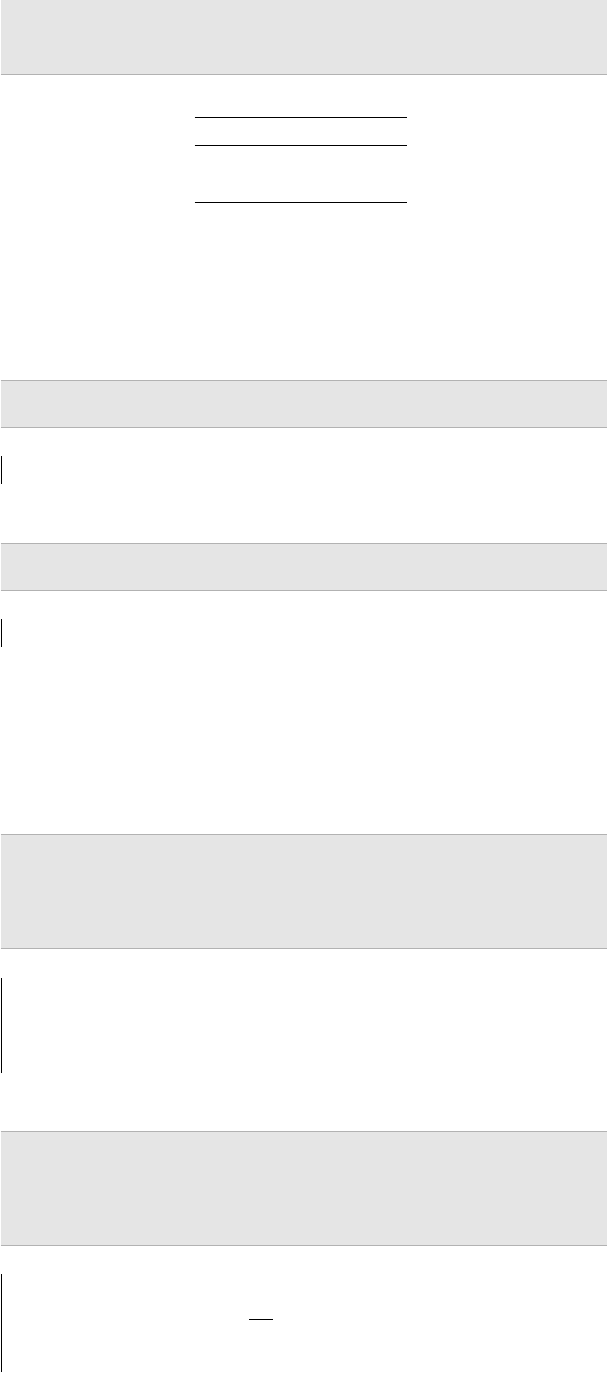
latex typography guide 8
\end{tabular}
\end{table}
column 1column 2
12.345 6.789
123.4 12.4
Table 3: Using the siunitx S column
type.
5Euler’s number
Euler’s number e is a constant, and should not be italicised. In-
stead, use $\mathrm{e}$.
$\mathrm{e}^x$
ex
versus
$e^x$
ex
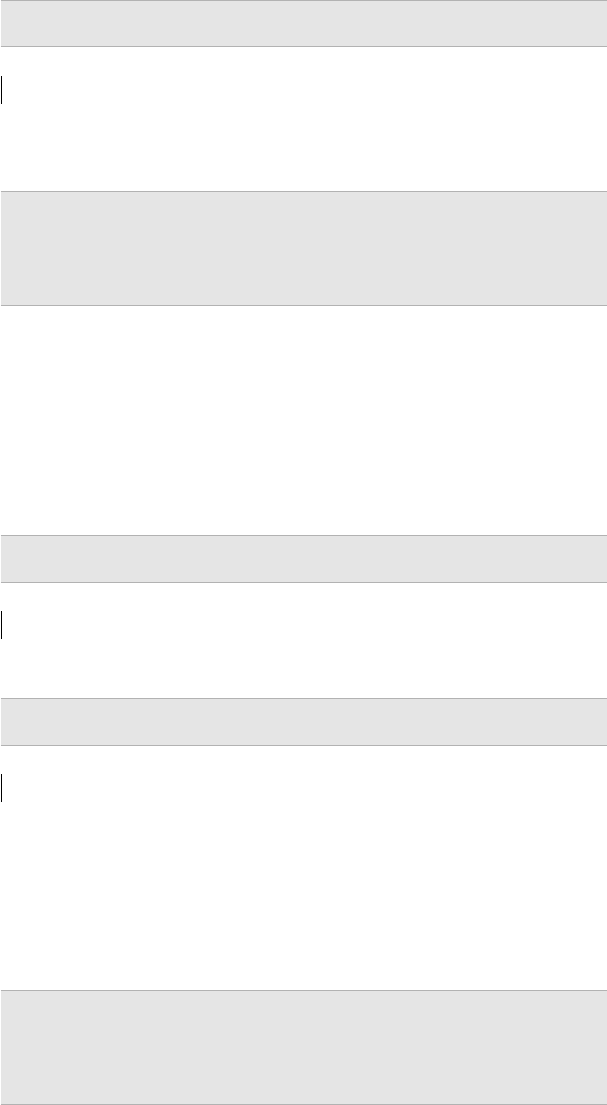
6The differential sign
The “d” in integrals and derivatives is not a variable, and should
not be italicised. Again, use $\mathrm{d}$.
\begin{equation}
y = \int f(x)\,\mathrm{d}x.
\end{equation}
y=Zf(x)dx.
Note the small space between f(x)and dx, produced using \,.
\begin{equation}
\frac{\mathrm{d}y}{\mathrm{d}x} = g(x).
\end{equation}
dy
dx=g(x).
latex typography guide 9
7Function names
In a formula like log(x+y), the “log”, which represents the loga-
rithm function, is a single word that is usually set in roman type.
However, typing log in a formula denotes the product of the three
quantities l,o, and g, which is printed as log. To tell L
A
T
EX that you
are referring to a named function, you would instead use the \log
command.
$\log(x+y)$.
log(x+y).
A large number of standard mathematical functions are defined as
L
A
T
EX commands, such as sin, cos, tan, exp, lim, max.
A large number of standard mathematical functions are
defined as \LaTeX\ commands, such as
$\sin$, $\cos$, $\tan$, $\exp$, $\lim$, $\max$.
8Quotes
Printed text distinguishes between opening and closing quote
marks “like these” or ‘these’. These are generated using the charac-
ters ‘and ’.
‘‘This is a quote’’.
“This is a quote”.
Note the result if you use the quote character ":
"This is a quote".
"This is a quote".
9Automatic sizing of brackets in equations
Use \left( and \right) for pairs of brackets in equations so that
they are automatically resized to fit the enclosed expression.
\begin{equation}
\left(\frac{1}{2}\right)
\end{equation}

latex typography guide 10
1
2
not
\begin{equation}
(\frac{1}{2})
\end{equation}
(1
2)
This also works with other bracket types (note that braces {} need
to be escaped using backslashes).
$\left[ x+y \right]$ \\
$\left\{ x+y \right\}$ \\
$\left| x+y \right|$ \\
$\left< x+y \right>$
\end{eqnarray}
[x+y]
{x+y}
|x+y|
hx+yi
L
A
T
EX will check that every \left command has a paired \right
command. If you want unmatched brackets use e.g. \right. to
complete the pair.
$\left(x+y\right.$
(x+y
10 Periods / full stops
To help readers distinguish the end of sentences, typesetters tra-
ditionally use slightly larger spaces after sentence-ending periods
than between the words that make up each sentence. L
A
T
EX attempts
to follow this convention, and assumes that a period (the charac-
ter .) ends a sentence if it is followed by a space.
One consequence of this is that there are some cases where L
A
T
EX
will insert an expanded space unnecessarily, for example, after
abbreviations.
latex typography guide 11
i.e. some other example.
i.e. some other example.
We can tell L
A
T
EX to treat this as a normal inter-word space by
adding a backslash
i.e.\ some other example.
i.e. some other example.
11 Non-breaking spaces
Non-breaking spaces prevent text that forms a single object from
being split across two lines. These can be indicated in your doc-
ument using the tilde symbol ~, e.g. for author initial lists for ac-
knowledgements:
B.~J.~M. acknowledges support from $\ldots$
B. J. M. acknowledges support from . . .
12 Hyphens and dashes
Hyphens and dashes look similar, but they are not interchange-
able.33For a fuller discussion of the different
uses of hyphens and dashes see
Butterick’s Practical Typography:
https://practicaltypography.com/
hyphens-and-dashes.html.
The hyphen: -. This is used in some multipart words, and com-
pound adjectives:
Lattice-gas Monte Carlo; non-dilute concentrations;
single-particle description.
Lattice-gas Monte Carlo; non-dilute concentrations; single-
particle description.
Dashes come in two sizes: the en dash: –, and the em dash: —.
The en dash: – This is used to indicate a range of values (pages
100–102; Eqns. 3–7.), and to denote a connection or contrast be-
tween pairs of words, e.g. lithium–lithium interactions. It can also
be used instead of a hyphen in a compound adjective, when one
of the component words is already hyphenated e.g. muon-spin–
spectroscopy hopping rates.
An en dash is produced in L
A
T
EX using either \textendash{} or --.

latex typography guide 12
lithium--lithium interactions;
muon-spin--spectroscopy hopping rates.
lithium–lithium interactions; muon-spin–spectroscopy hopping
rates.
The em dash: — This breaks up parts of a sentence. For example,
it can be used in place of parentheses where these might break the
flow of the text.
An em dash is produced in L
A
T
EX using either \textemdash{} of
---.
The main thing---if you must know---is to use hyphens
properly.
The main thing—if you must know—is to use hyphens prop-
erly.
Finally, all three of these: the hyphen -, the en dash –, and the em
dash —, are distinct from the minus sign −, which is produced
inside a math environment using $-$.
13 Punctuating equations
Grammaticaly you can think of an equation as a single noun. Equa-
tions form part of the surrounding text, and require appropriate
punctuation; e.g.
The equation for a straight line is
\begin{equation}
y=mx+c.
\end{equation}
The equation for a straight line is
y=mx +c.
or
The equation for a straight line is
\begin{equation}
y=mx+c,
\end{equation}
where $m$ is the gradient,
latex typography guide 13
and $c$ is the intercept on the $y$ axis.
The equation for a straight line is
y=mx +c,
where mis the gradient, and cis the intercept on the yaxis.
14 Ellipses
Ellipses are produced using $\ldots$; not three periods.
We wrote $\ldots$ until we finished.
We wrote . . . until we finished. (correct)
We wrote ... until we finished.
We wrote ... until we finished. (incorrect)
15 Angle brackets
For left and right angle brackets, use \langle and \rangle, or
\left< and \right>. Don’t use <and >.
$\langle x+y \rangle$ \\
$\left< x+y \right>$ \\
$<x+y>$
hx+yi
hx+yi
<x+y>
16 Text in math mode
Text in equations that does not refer to variables should be in a
roman typeface. This can be produced using \mathrm{}.
$\Delta E_\mathrm{site}=E_\mathrm{oct}-E_\mathrm{tet}$
∆Esite =Eoct −Etet
latex typography guide 14
17 Chemical symbols
Chemical elements should be written in roman text, e.g. Cl, Mg,
Li. Chemical formulae should contain elements in roman text, and
correct subscripts and superscripts for stoichiometry, charge, etc.
Subscripts and superscripts need to go inside math environments to
render correctly.
H$_2$SO$_4$ and SO$_4^{2-}$.
H2SO4and SO42−.
Variables in chemical formulae should be italicised:
Li$_x$TiO$_2$.
LixTiO2.
This can be simplified by using the mhchem package,4by adding 4https://ctan.org/pkg/mhchem?lang=
en
\usepackage{mhchem} to your document header, and then using the
\ce{} command.
$\ce{H2SO4}$ and $\ce{SO4^2-}$ \\
$\ce{Li_xTiO_2}$
H2SO4and SO42−
LixTiO2
Notice how the ce{} command tries to intelligently interpret num-
bers corresponding to stoichiometries and charges.
18 Vectors
Vector quantities should be typset in bold. This can be acheived
using the \mathbf{} command:
$\mathbf{x}$
x
L
A
T
EX includes a \vec{} commands, that produces normal weight
text with an arrow over variable names:
$\vec{x}$
~
x
The advantage of the command \vec{} is that it provides semantic
information about a document. It is clear when reading the source

latex typography guide 15
file that \vec{x} refers to a vector quantity, while \mathbf{x} is am-
biguous. To keep the semantic benefit of \vec{} you can redefine
the command to give the alternate bold formatting:
\renewcommand{\vec}[1]{\mathbf{#1}}
$\vec{x}_i + \vec{x}_j$
xi+xj
19 Kröger-Vink notation
Kröger-Vink notation provides a way to describe defects in crys-
talling lattices.5Defects are donoted by a symbol with a subscript 5F. A. Kröger and H. J. Vink. Relations
Between Concnetrations of Imperfections
in Crystalline Solids, volume 3, pages
307–435. Academic Press, New York,
1956; and F. A. Kröger. The Chemistry
of Imperfect Crystals. North-Holland,
Amsterdam, 1964
and superscript: Ac
S. The main symbol, A, describes the defect
species. This is normally a chemical element, or a vacancy. The sub-
script, S, describes the site in the crystal lattice. This is normally the
formula for the chemical element that would occupy that site in the
perfect crystal, or ifor an interstitial. The superscript is the defect
charge, defines as the charge relative to the formal charge at this
site in the perfect crystal. For example, a neutral oxygen vacancy
has a charge of 0, which gives a Kröger-Vink charge of +2 relative
to a formal O2−ion. Positive relative charge is denoted by one or
more dots, . Negative relative charge is denoted by one or more
dashes, 0. Zero relative charge is denoted by a cross, ×. Relative
charges larger than ±1 are indicated by repeating the appropriate
symbol.
Kröger-Vink notation can be generated using the kroger_vink pack-
age,6by including \usepackage{kroger_vink} in your document 6https://github.com/bjmorgan/
kroger-vink.
header. This provides a \kv{A}{S}{c} command that takes three
arguments. The first argument is the defect species, the second is
the lattice site, and the third is the relative charge.
\usepackage{kroger_vink}
\kv{F}{i}{-1} \\
\kv{S}{O}{0} \\
\kv{\vac}{O}{+2}
F0
i
S×
O
VO
The default notation for a vanancy is an italic capital V. This can
be changed to a lower case vor an empty square symbol by
selecting the corresponding package options.
\usepackage[lowercasevac]{kroger_vink}
\kv{\vac}{O}{+2}

latex typography guide 16
vO
\usepackage[squarevac]{kroger_vink}
\kv{\vac}{O}{+2}
O
20 Further reading
General typography
• Butterick’s Practical Typography77https://practicaltypography.com
L
A
T
EX
• L
A
T
EX A Document Preparation System
References
[1] F. A. Kröger. The Chemistry of Imperfect Crystals. North-Holland,
Amsterdam, 1964.
[2] F. A. Kröger and H. J. Vink. Relations Between Concnetrations
of Imperfections in Crystalline Solids, volume 3, pages 307–435.
Academic Press, New York, 1956.
