Manual
User Manual:
Open the PDF directly: View PDF  .
.
Page Count: 23
TEM-simulator version 1.3 reference manual
Hans Rullg˚ard and Lars-G¨oran ¨
Ofverstedt
December 9, 2011
1 How to use the program
TEM-simulator is intended to generate simulated transmission electron microscopy
data which can be used for testing and evaluating tomographic reconstruction methods.
As input, the program requires a specification of the object being imaged, along with
a number of parameters.
The program is run by the command
TEM-simulator <input file>
where <input file>is a text file containing parameters controlling the simulation and
the names of additional input files. The structure of the input files is described in
Section 3.1.
A general help message is displayed by running
TEM-simulator -help
A brief description of a particular component or input parameter is displayed by run-
ning
TEM-simulator -help <component type>
or
TEM-simulator -help <component type> <parameter>
For example,
TEM-simulator -help detector dqe
displays a description of the parameter dqe of a detector component.
1.1 Compiling for Linux or Mac OS X
1. TEM-simulator uses FFTW to compute Fourier transforms. If you do
not have FFTW version 3 installed, download the source code from
http://www.fftw.org/download.html and install it. If you do not know if
FFTW is already installed, search the file system for files called fftw3.h and
libfftw3.a, which are the files needed to compile TEM-simulator.
1
FFTW is most easily compiled and installed by running the three shell com-
mands ./configure,make, and make install. The last command copies the
required FFTW files to a location where they will automatically be found by the
C compiler. This might require administrator privileges. If you can’t or don’t
want to complete this final step, you can instead enter the path to the appropri-
ate directories in the Makefile used to compile TEM-simulator. See comments
in the Makefile for more details.
2. Download and unpack the zip file containing the source code for TEM-simulator
from http://tem-simulator.sourceforge.net.
3. Compile TEM-simulator by running make in the src directory. If necessary, first
change the name of the C compiler in the Makefile to the one you want to use.
1.2 Running precompiled executable for Windows
TEM-simulator is delivered with an executable file called TEM-simulator.exe com-
piled using the procedure described in section 1.3 on a 32-bit computer running Win-
dows 7. To use the precompiled executable,follow these steps.
1. Download the precompiled FFTW files for 32-bit Windows from
http://www.fftw.org/install/windows.html. The zip file is called
fftw-3.2.2.pl1-dll32.zip. Unpack the zip file and copy the DLL
libfftw3-3.dll to C:/Windows/System32 or the corresponding directory
on your computer.
2. Download and unpack the zip file containing the source code for TEM-
simulator from http://tem-simulator.sourceforge.net. The executable
TEM-simulator.exe is run from command line.
1.3 Compiling for Windows
The following procedure has been used to compile TEM-simulator using Microsoft
Visual C++ Express 2010 on a 32-bit machine running Windows 7.
1. Download the appropriate precompiled FFTW files for Windows from
http://www.fftw.org/install/windows.html. The following instructions
have been tried with the files in fftw-3.2.2.pl1-dll32.zip. The files needed
to compile and run TEM-simulator are called fftw3.h,libfftw3-3.dll, and
libfftw3-3.def.
2. Create an “import library” file as described in the FFTW documentation. This is
most easily done using the Visual Studio Command Prompt. Open the command
prompt from the Tools menu in Visual Studio, go to the FFTW directory, and
run the command
lib /def:libfftw3-3.def
This should create a file called libfftw3-3.lib.
2

3. Copy libfftw3-3.dll to C:/Windows/System32 or the corresponding direc-
tory on your computer. Copy fftw3.h to the Visual C++ include direc-
tory, which is called something like C:/Program Files/Microsoft Visual
Studio 10.0/VC/include/. Copy libfftw3-3.lib to the Visual C++ lib
directory, called something similar to C:/Program Files/Microsoft Visual
Studio 10.0/VC/lib/. Now FFTW is ready for use.
4. Download and unpack the zip file containing the source code for TEM-simulator
from http://tem-simulator.sourceforge.net.
5. Start Visual Studio and create a new project by selecting New, Project from the
File menu. In the New Project dialog, select Win32, Win32 Console Application.
Name the project TEM-simulator, choose a location, and click OK. In the Ap-
plication Wizard, click Next, select Console application, select Empty project,
deselect Precompiled header, and then click Finish.
6. In the Solution Explorer, right click Source Files, in the menu that opens select
Add, Existing item. Select all the source code and header files in the TEM-
simulator src directory (with extension .c and .h) and click Add.
7. The FFTW lib file must be added to the dependencies of the project in Visual
Studio. In the toolbar, change compile mode from Debug to Release (for best
performance of the compiled program). In the Project menu, click Properties.
In the dialog that opens, go to Configuration Properties, Linker, Input. Select
the line Additional Dependencies, and click Edit in the dropdown menu. In the
dialog that opens, write libfftw3-3.lib and click OK. (Note that this setting
applies only to the current compile mode, so it must be repeated if the compile
mode is changed.)
8. The project should now be ready to compile. Choose Build Solution in the
Debug menu. If everything works correctly, the executable TEM-simulator.exe
will be in the directory TEM-simulator/Release/ under the location chosen
when setting up the project.
2 Changes from previous version
1. Added a parameter tilt mode in the geometry component, to enable a simple
kind of single particle simulations.
2. Fixed a bug which prevented the program from reading input files with Windows
style line endings (carriage return + line feed).
3 Input and output files
3.1 The input file
All parameters controlling the simulation are specified in a text file which will be called
the input file and whose structure is here described.
3
Lines in the input file are of three types: comments,component headings, and
parameter assignments. In addition, the input file can containg empty lines (containing
only space characters) which are ignored.
A comment is any line starting with the character #and is ignored by the program.
A component heading is a line starting with the character =, followed by an arbitrary
number of =and space characters (which are ignored) and a string specifying the type
of component. The type of the component can optionally be followed by a string
delimited by space or =, which specifies the name of the component. (The name is
used to identify the particle component used in a particleset.)
Possible component types are simulation,detector,electronbeam,geometry,
optics,particle,particleset,sample and volume. Details on the different types of
components are given below. Additionally, the component heading end can be given,
which indicates the end of input. A component heading of any other type and the
parameter assignments following it will be ignored. The input file can contain more
than one component of the types detector,particle,particleset, and volume,
while the other types of components should occur only once.
A parameter assignment should be of the form
<parameter>=<value>
Parameters are of four different types:
Boolean The value must be yes or no.
Integer The value should be an integer written in decimal form.
Real The value should be a real number written in decimal form.
String The value can be an arbitrary string of characters. If the string contains
spaces, it must be surrounded by double quotes (") in the input file.
Parameter names and values of string parameters are case sensitive. Only lower case
letters and underscores are currently used in parameter names. The parameters which
can be used in each component type are listed in Section 4 below.
Some of the numerical input parameters have a range of allowed values. Values
outside this range are immeditely rejected, since they are almost certainly uninten-
tional. This does not imply that the software will produce realistic results for all input
values within the allowed range.
3.2 The log file
The log file starts out by listing all components and parameters used in the simulation
in the same format as the input file. The log file can in fact be used as input file in
another simulation. Following the input listing, comments are added to the log file as
major steps of the simulation are completed.
4
3.3 Tabular text files
Many of the input and output data used by TEM-simulator have the form of a table
or matrix of numerical values. Such input and output are represented by text files
with the following format.
A comment line starting with a #character can occur at any place in the file and
is ignored. The first non-comment line, should contain two positive integers mand
n, separated by space, which are the number of rows and columns in the table. The
following mnon-comment lines should each contain nreal numbers separated by space.
Any content in the file following these lines is ignored.
3.4 MRC files and raw map files
Potential maps of individual particles, maps of the entire sample, and the simulated
detector images are stored in binary files. These files can be MRC files of mode 1
(2-byte integer data) or mode 2 (4-byte floating point data) or a raw 4-byte floating
point format, which is equivalent to MRC mrc 2, but without the file header.
The recommended format is MRC mode 2. With files of format MRC mode 1 there
is a risk of integer overflow leading to loss of data, and with raw floating point files
the user must manually keep up with the size of the map or the images the data in
the file represents, since there is no file header that can store such information.
For information on the MRC file format, see
http://bio3d.colorado.edu/imod/doc/mrc format.txt.
3.5 Other files
Besides the file formats listed above, TEM-simulator can read data from PDB files,
which specify molecular structures by listing atomic coordinates. For information on
the PDB file format, see http://www.wwpdb.org/docs.html.
4 Simulation components
Below the functionality of each simulation component is described.
4.1 Simulation
These are general parameters controlling what kind of simulations will be performed.
Parameter: generate micrographs
Type: boolean
Default: no
Description: If this parameter has the value yes, a series of simulated micrographs
will be generated based on the input data. With this option, components of types
5
detector,electronbeam,geometry,optics, and sample must be provided. If the
simulation is to contain any molecules, at least one component of type particle and
one of type particleset must also be given. Components of type volume are ignored.
Parameter: generate volumes
Type: boolean
Default: no
Description: If this parameter has the value yes, one or several volume maps of
the sample will be produced. This option requires an component of type sample, one
or more components of type volume and optionally one or more components of type
particle and particleset. (If the particle components involve the computation
of an imaginary potential from PDB data, a component of type electronbeam is also
needed.)
Parameter: generate particle maps
Type: boolean
Default: no
Description: If this parameter has the value yes, a map of each particle type specified
in the input file will be generated. This will also happen automatically in the process
of simulating micrographs or generating volume maps. The most common use of this
option is to generate a potential map based on a PDB file, and do nothing more. This
option only uses components of type particle.
Parameter: log file
Type: string
Use: Optional
Description: This parameter gives the name of a log file which in which the actions
of the program are recorded. If the file does not already exists it is created. If the
file exists, the old contents are deleted. If the parameter is not provided, a unique log
file name is generated based on the time when the program is started. In this case no
existing file will be overwritten by the log file.
Parameter: rand seed
Type: integer
Use: Optional
Description: If this parameter is proveided, it is used to seed the random number
generator. If it is not provided, the random number generator is seeded by the current
time.
4.2 Sample
These parameters specify the general shape of the sample which is simulated. The
sample is simulated as a circular hole in a support film of uniform thickness. The
hole is filled with ice, whose surfaces can be flat or concave. The sample is assumed
to be symmetric about the central plane. The geometry is completely determined by
specifying the diameter of the hole, the thickness of the ice at the center of the hole
and at the edges, and the coordinates of the center of the hole.
6
Parameter: diameter
Type: real
Use: Required
Allowed values: Any nonnegative real number.
Description: The diameter of the sample in nm.
Parameter: paramthickness center and thickness edge
Type: real
Use: Required
Allowed values: Any nonnegative real number.
Description: The thickness of the sample at the center and at the edge in nm.
thickness edge is also the thickness of the surrounding support.
Parameter: offset x and offset y
Type: real
Allowed values: Any real number.
Default: 0
Description: The coordinates of the center of the sample.
4.3 Particle
These parameters specify the particles (for example macromolecules) which are present
in the sample. Each particle component specifies a single particle. Multiple copies
of this particle are placed in the sample using a particleset component. Up to 20
particle components can be given, for specifying different kinds of particles in the
sample.
4.3.1 General parameters for the particle model
Parameter: source
Type: string
Use: Required
Allowed values: map,pdb, or random
Description: The type of source from which the particle potential is obtained. map
means that the potential is read from a map file, pdb that the potential is computed
from a PDB file, and random that a random potential is generated. The last option is
useful for adding structural noise to a simulation.
Parameter: use imag pot
Type: boolean
Default: yes
Description: If this parameter has the value yes, a separate map of an imaginary
potential is used in the simulation. The imaginary potential can be read from a map
file, computed from a pdb file or generated randomly depending on the value of source.
If use imag pot has the value no, an imaginary potential which is directly proportional
to the real potential will be used, as determined by famp.
7
Parameter: famp
Type: real
Use: Required if use imag pot has value no, not used otherwise.
Allowed values: Real numbers in the range 0 to 1.
Description: A multiplicative factor used to compute an imaginary potential, which
produces amplitude contrast, from the real electrostatic potential.
Parameter: use defocus corr
Type: boolean
Default: no
Description: If this parameter has the value yes, a correction is applied to correct
for the varying defocus within a slice of the sample. Using this option increases the
computational cost, and the difference is usually quite marginal.
Parameter: voxel size
Type: real
Use: Required unless source is map and map file format is mrc or mrc-int. In the
latter case it is optional.
Allowed values: Real numbers in the range 0.01 to 100.
Description: The size of voxels in the particle map in nm.
Parameter: nx,ny, and nz
Type: integer
Use: Required if source is map and map file format is raw, or if source is random.
Optional if source is pdb. Not used in other cases.
Allowed values: Integers in the range 1 to 103
Description: The number of voxels in the particle map along the x,y, and zaxes.
These are needed to correctly interpret a raw map file, and to generate a random map.
If the parameters are defined when the map is computed from a PDB file, they will
be used to determine the number of voxels, otherwise the smallest box in which the
structure will fit is used.
4.3.2 Parameters related to map files.
Parameter: map file re in
Type: string
Use: Required if source has the value map, not used otherwise.
Description: The name of a file from which the potential map is read.
Parameter: map file im in
Type: string
Use: Required if source has the value map and use imag pot has value yes, not used
otherwise.
Description: The name of a file from which the imaginary part of the potential is
read.
Parameter: map file re out
8

Type: string
Use: Optional if source has value pdb or random, not used otherwise.
Description: The name of a file which the generated potential map is written to.
Parameter: map file im out
Type: string
Use: Optional if source has value pdb or random, not used otherwise.
Description: The name of a file which the generated potential map is written to.
Parameter: map file format
Type: string
Allowed values: mrc,mrc-int, or raw
Default: mrc
Description: Determines the file format of input and output map files. For output
files, mrc is MRC format with 4 byte floating point data, mrc-int is MRC format with
2 byte integer data, and raw is 4 byte floating point data and no header. For input
files, mrc and mrc-int are equivalent, the MRC data format is determined by the mode
field in the header. Supported formats are the same as for output files, that is 4 byte
floating point and 2 byte integer. raw is the same as for output files.
Parameter: map file byte order
Type: string
Allowed values: be,le, or native
Default: native
Description: The byte order (big endian or little endian) used in input and output
map files. native is the native byte order of the computer running the program. When
reading data from MRC files the type is determined by the header, in all other cases
the byte order is determined by this parameter.
Parameter: map axis order
Type: string
Allowed values: xyz,xzy,yxz,yzx,zxy, or zyx.
Default: xyz
Description: The order in which voxel values are stored in input and output map
files. The first variable in the string is the fastest varying.
4.3.3 Parameters for input from PDB files
Parameter: pdb file in
Type: string
Use: Required if source is pdb, not used otherwise.
Description: The name of the PDB file to read input from.
Parameter: pdb transf file in
Type: string
Use: Optional if source is pdb, not used otherwise.
Description: The name of a tabular text file specifying a set of geometric transfor-
9
mations to apply to the structure in the PDB file. If the parameter is not defined, the
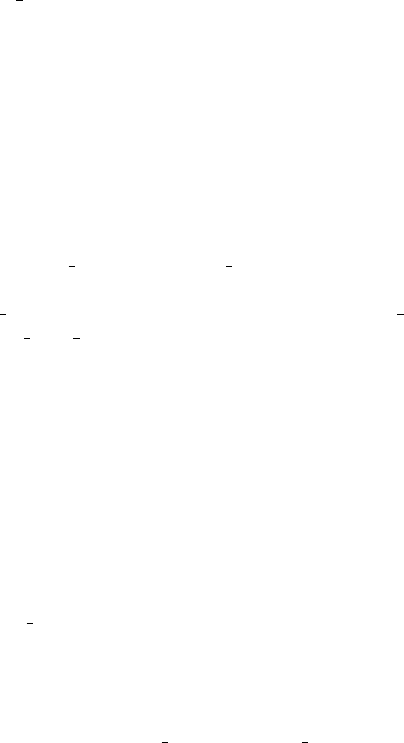
coordinates in the PDB file are used directly. The table in the file should have 4 or 6
columns. If it has 4 colums, groups of 3 rows are interpreted as a 3 ×4 matrix, spec-
ifying a linear mapping and a translation. If it has 6 columns, the first three entries
in each row are interpreted as a translation vector, and the following three entries as
Euler angles for rotation around the zaxis, then around the xaxis, and again around
the zaxis. Translations are given in ˚
Aunits, to comply with the conventions for PDB
files, and angles are in degrees.
Parameter: add hydrogen
Type: boolean
Default: yes
Description: If the parameter has the value yes, hydrogen atoms, which are normally
not specified in PDB files, will be added at appropriate positions in the amino acid
chain. The parameter should be set to noif a PDB file containing records for hydrogen
atoms is used as input.
4.3.4 Parameters for generating random maps
Parameter: contrast re and contrast im
Type: real
Use: contrast re is required if source is random.contrast im is required if source
is random and use imag pot is yes.
Allowed values: Any real number.
Description: The overall contrast level of the real and imaginary part of a random
map.
Parameter: smoothness
Type: real
Use: Required if source is random.
Allowed values: Real numbers in the range 0 to 10.
Description: The smoothness of a random map, higher values mean more smooth
maps.
Parameter: make positive
Type: boolean
Use: Required if source is random.
Description: If the parameter is yes, the random map will only have positive values,
if the parameter is no, both positive and negative values will be randomly used. (If
the parameter is yesand contrast re or contrast im is negative, only negative values
will be used in the corresponding map.)
4.4 Particleset
Specifies a set of identical particles with different postitions and orientations. The
positions and orientations can be read from a file or generated randomly. The particle
10
itself is specified in a particle component. Up to 20 particleset components can
be given, for specifying different kinds of particles in the sample. If no particleset
input is given, an empty sample is simulated.
Parameter: particle type
Type: string
Use: Required
Description: The name of the particle component which specifies a single particle
in the set.
Parameter: particle coords
Type: string
Use: Required
Allowed values: file,random, or grid
Description: Specifies how the particle coordinates should be generated. file means
that positions and orientations are read from a text file. random means that positions
and orientations are randomly generated. grid means that the positions are on a
regular grid, and the orientations are random.
Parameter: gen rand positions
Type: boolean
Use: Obsolete
Description: The parameter is included only for backward compatibility, and should
be replaced by particle coords. The value yesis equivalent to particle coords =
random and the value nois equivalent to particle coords = file.
4.4.1 Parameters controlling random placement of particles
Parameter: where
Type: string
Use: Required if particle coords has the value random, not used otherwise.
Allowed values: volume,surface,top, or bottom.
Description: Possible placement of particles with random coordinates. volume is the
entire sample volume, surface is the top and bottom surfaces, top and bottom are
only the top surface and only the bottom surface.
Parameter: num particles
Type: integer
Use: Optional.
Allowed values: Integers in the range 0 to 106.
Description: The number of particles to use in the sample. If the parameter is defined
it determines the number of random coordinates to generate, or the number of records
from coord file in to use. If the parameter is not defined the number of particles is
determined by particle conc or occupancy (if particle coords is random) or the
entire file is used (if particle coords is file).
Parameter: particle conc
11
Type: real
Use: Optional if particle coords is random and num particles is not defined. Not
used otherwise.
Allowed values: Real numbers in the range 0 to 106.
Description: This parameter determines the number of particles in the sample if
gen rand positions is yesand num particles is not defined. It specifies the num-
ber of particles per µm3(if where is volume) or per µm2(if where is surface,top
or bottom). If neither num particles or particle conc is defined, the number of
particles is determined by occupancy.
Parameter: occupancy
Type: real
Use: Required if particle coords is random and neither num particles or
particle conc is defined. Not used otherwise.
Allowed values: Real numbers in the range 0 to 100.
Description: This parameter determines the number of particles in the sample if
neither num particles or particle conc is defined. It specifies the fraction of the
volume (if where is volume) or the surface area (if where is surface,top or bottom)
which is occupied by particles. Even if the value is greater than 1, the entire volume
or surface may not be occupied since particles might overlap.
4.4.2 Parameters controlling placement of particles on a regular grid
Parameter: nx,ny, and nz
Type: integer
Use: Required if particle coords is grid, not used otherwise.
Allowed values: Integers in the range 1 to 103.
Description: Specifies the number of particles if particle coords is grid. The
particles are placed in a regular nx ×ny ×nz grid centered at the origin.
Parameter: particle dist
Type: real
Use: Required if particle coords is grid, not used otherwise.
Allowed values: Any positive real value.
Description: The distance between the centers of adjacent particles in the grid.
4.4.3 Parameters specifying input and output files
Parameter: coord file in
Type: string
Use: Required if particle coords is file, not used otherwise.
Description: The name of a tabular text file to read particle coordinates from. The
table should have 6 columns. The first three columns are x,y, and zcoordinates of
the particle center. The following three columns are Euler angles for rotation around
the zaxis, then around the xaxis, and again around the zaxis. Coordinates are in
nmunits, and angles in degrees.
12

Parameter: coord file out
Type: string
Use: Optional if particle coords is random or grid, not used otherwise.
Description: The name of a text file to which randomly generated particle coordi-
nates are written. The format of the file is the same as for coord file in
4.5 Geometry
The geometry component controls how the sample is moved from image to image in a
tilt series. The movement can be a simple rotation around a tilt axis, but much more
general tilt geometries can be accomplished by reading information from a file. It is
also possible to impose random errors on the tilt geometry. A geometry component is
required for simulation of micrographs.
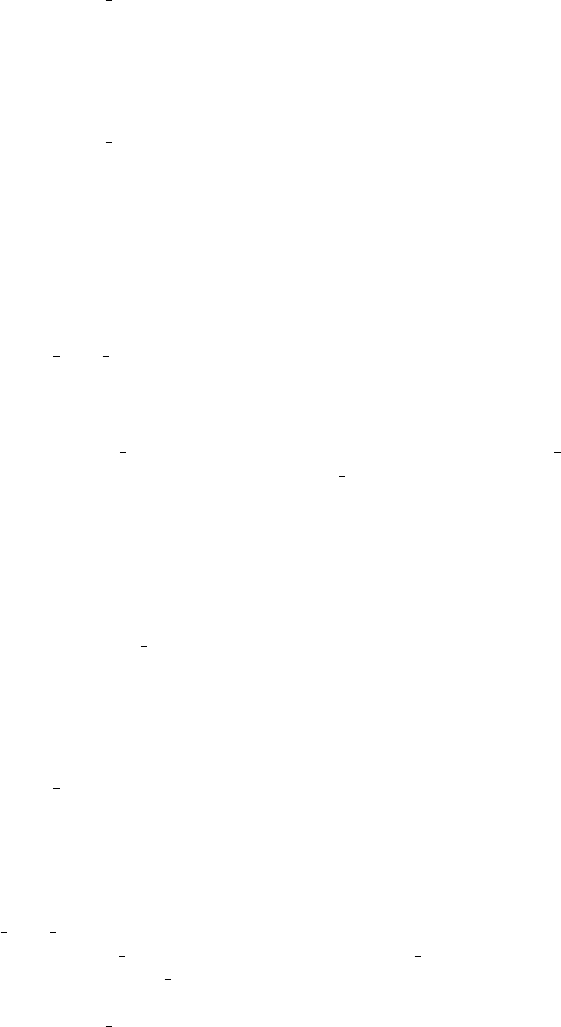
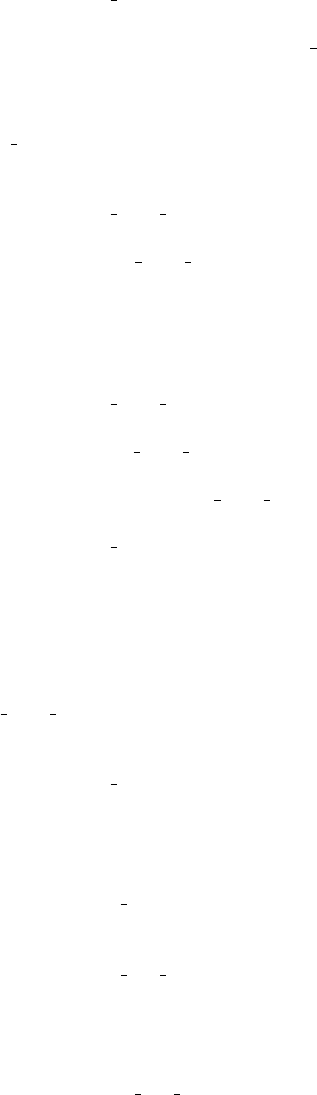
In general, the orientation of the sample in a given image in the tilt series is
controlled by three angles, ψ,θ, and φ. Starting from a position where the coordinate
systems of the microscope and the sample coincide, the sample is rotated by the angle
ψaround the zaxis, then by the angle θaround the xaxis, and finally by the angle
φaround the zaxis again. Here, the zaxis is the optical axis of the microscope. The
angles ψ,θ, and φcan either be read from the file specified by parameter geom file in,
or computed from the three parameters tilt axis,theta start, and theta incr.
After this rotation, the sample can optionally be subjected to further rotations and
translations considered as geometry errors. This rotation is specified by three angles
α,τ, and ρ. The interpretation is as follows. First the sample is rotated by the angle
τaround an axis in the xy plane. The angle between this axis and the xaxis is α.
Next the sample is rotated by the angle ρaround the zaxis. Finally, the sample is
translated by a vector (x0, y0,0) in the xy plane. The angles α,τ, and ρand the
distances x0and y0can either be read from a file or randomly generated. When the
angles are randomly generated, τand ρare normally distributed with given standard
deviation, while αis uniformly distributed in the range [0, π]. The translations x0and
y0are normally distributed with given standard deviation.
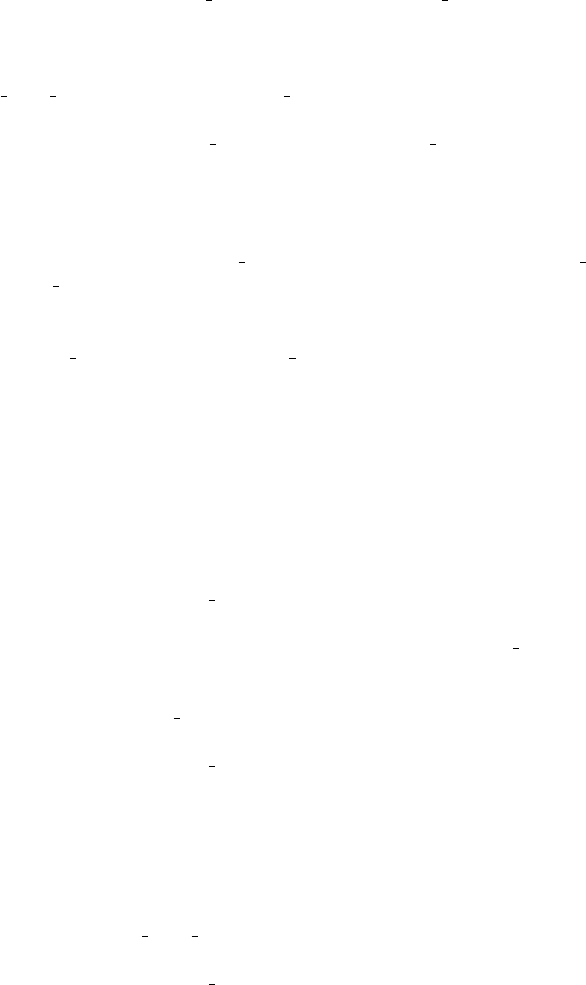
The tilt geometry can be compactly expressed as a relation between two coordinate
systems, (x, y, z) which is fixed relative to the optical system and detector of the
microscope, and (x0, y0, z0) which is fixed relative to the sample. The relation between
the coordinates is
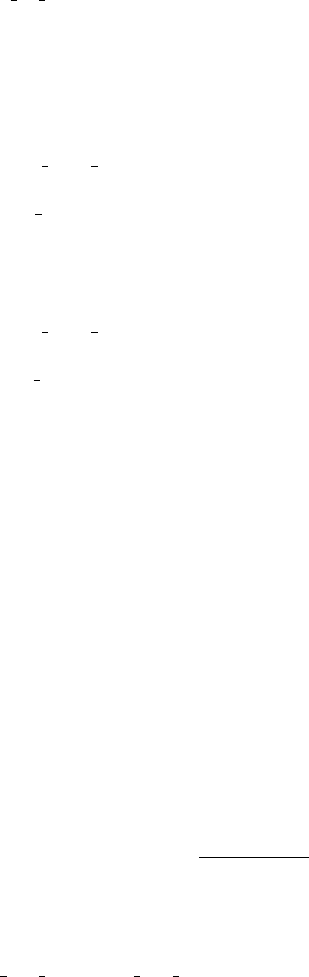
x0
y0
z0
=Atilt ×Aerr ×
x−x0
y−y0
z
(1)
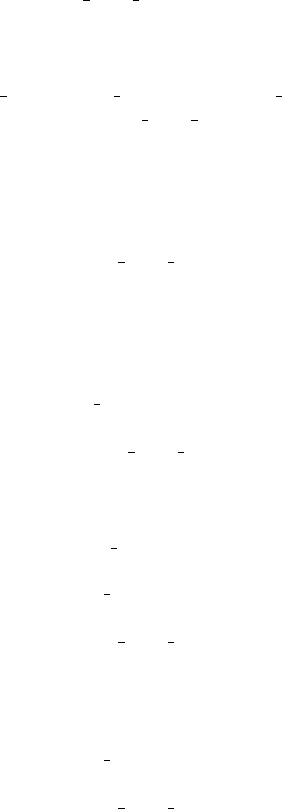
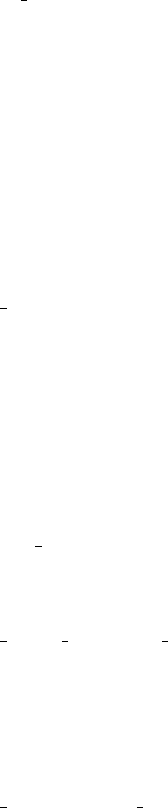
where the matrix Atilt is defined by
Atilt =
cos ψsin ψ0
−sin ψcos ψ0
0 0 1
×
1 0 0
0 cos θsin θ
0−sin θcos θ
×
cos φsin φ0
−sin φcos φ0
0 0 1
(2)
13
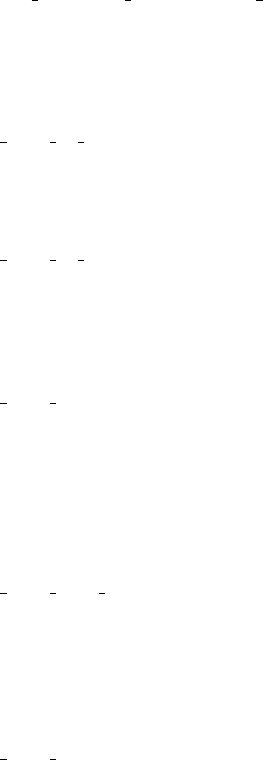
and Aerr is defined by
Aerr =
cos α−sin α0
sin αcos α0
0 0 1
×
1 0 0
0 cos τsin τ
0−sin τcos τ
×
cos αsin α0
−sin αcos α0
0 0 1
×
cos ρsin ρ0
−sin ρcos ρ0
0 0 1
.
(3)
The following parameters can be used in the geometry component.
Parameter: gen tilt data
Type: boolean
Use: Required
Description: If this parameter has the value yes, tilt angles will be computed based
on tilt axis,theta start, and theta incr. Otherwise the tilt angles are read from
a file specified by data file in. In the former case the tilt series will consist of
rotations around a single axis, with constant angular increments. If the tilt angles are
read from a file much more general tilt series are possible.
Parameter: ntilts
Type: integer
Use: Required if gen tilt data has value yes, otherwise it is optional.
Allowed values: Integers in the range 1 to 106.
Description: The number of images in the tilt series. If the tilt angles are read from
a file and the parameter is not provided, the number of images is determined from the
file.
Parameter: tilt axis
Type: real
Use: Only used if gen tilt data has value yes.
Allowed values: Any real number
Default: 0
Description: The angle in degrees between the xaxis and the tilt axis. This means
that φ=−ψ=tilt axis for every image in the tilt series.
Parameter: theta start
Type: real
Use: Required if gen tilt data has value yes, not used otherwise.
Allowed values: Any real number
Description: The rotation angle θin degrees around the tilt axis for the first image
in the tilt series.
Parameter: theta incr
Type: real
Use: Required if gen tilt data has value yes, not used otherwise.
Allowed values: Any real number
Description: The increment in degrees of the rotation angle θaround the tilt axis
for each successive image in the tilt series.
14
Parameter: tilt mode
Type: string
Allowed values: tiltseries or single particle
Default: tiltseries
Description: Controls how the tilt geometry is applied to the sample. tiltseries
means that rotations are applied to the entire sample and the particle positions.
single particle means that the sample and particle positions stay fixed, while indi-
vidual particles are rotated around their center.
Parameter: geom file in
Type: string
Use: Required if gen tilt data has value no, not used otherwise.
Description: The name of a tabular text file to read tilt angles from. The table
should have 3 columns, which specify Euler angles ψ,θ, and φfor rotation around
the zaxis, then around the xaxis, and again around the zaxis. The number of rows
should be at least ntilts, if that parameter is specified. Angles are in degrees.
Parameter: geom file out
Type: string
Use: Optional if gen tilt data has value yes, not used otherwise.
Description: The name of a tabular text file to which tilt angles are written. The
format is the same as for geom file in
Parameter: geom errors
Type: string
Use: Required
Allowed values: none,random, or file
Description: If the parameter has the value none there are no geometric errors. If
the parameter has the value random, alignment errors are generated randomly. Finally,
if the parameter has the value file, alignment errors are read from a file specified by
error file in. The transformations specified by these parameters are applied after
the tilt angle transformations.
Parameter: tilt err
Type: real
Use: Used only if errors has the value random.
Allowed values: Any postitive real number.
Default: 0
Description: tilt err is the standard deviation of the randomly generated angle τ,
measured in degrees.
Parameter: align err rot
Type: real
Use: Used only if errors has the value random.
Allowed values: Any positive real number.
Default: 0
Description: align err rot is the standard deviation measured in degrees of the
randomly generated angle ρ.
15
Parameter: align err tr
Type: real
Use: Used only if errors has the value random.
Allowed values: Any positive real number.
Default: 0
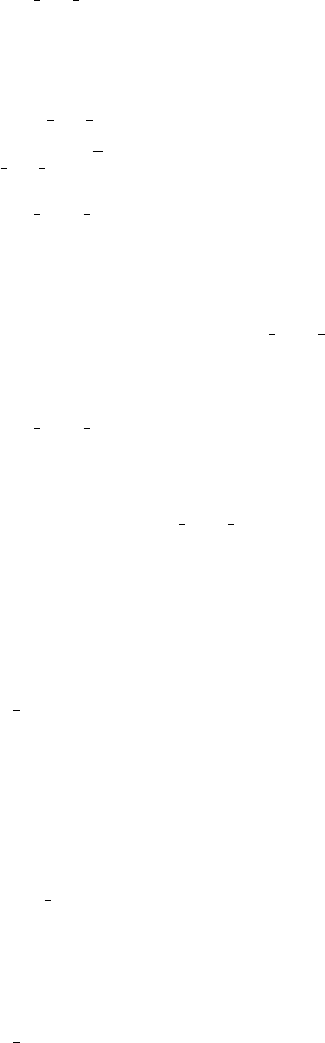
Description: align err tr is the standard deviation measured in nmof a random
translation of the projected image. This means that x0and y0each have standard
deviation align err tr/√2.
Parameter: error file in
Type: string
Use: Required if errors has the value file, not used otherwise.
Description: The name of a tabular text file to read geometry errors from. The table
should have 5 columns, and at least nrows, where nis the number of tilts, defined
either by ntilts or the number of rows in geom file in. Each row of the table should
contain the angles ρ,α, and τ, measured in degrees, followed by the translations x0
and y0measured in nm, for the corresponding image.
Parameter: error file out
Type: string
Use: Optional if errors has the value file, not used otherwise.
Description: The name of a tabular text file to which geometry errors are written.
The format is the same as for error file in
4.6 Electronbeam
The electronbeam component controls the properties of the electron beam. An elec-
tronbeam component is required for simulation of micrographs.
Parameter: acc voltage
Type: real
Use: Required
Allowed values: Real numbers in the range 1 to 104.
Description: The acceleration voltage of the microscope in kV. (The model used in
the simulation is unlikely to produce realistic results for the whole range of possible
values.)
Parameter: energy spread
Type: real
Use: Required
Allowed values: Any positive real number.
Description: The energy spread of the electron beam in V.
Parameter: gen dose
Type: boolean
Use: Required
Description: If the parameter has the value yes, the electron dose of each image is
16
computed based on total dose and the number of images or dose per im, optionally
with random variations determined by dose sd. Otherwise the electron dose for each
image is read from the file specified by dose file in.
Parameter: total dose and dose per im
Type: real
Use: One of the parameters is requred if gen rand dose has value yes, not used
otherwise.
Allowed values: Any positive real number.
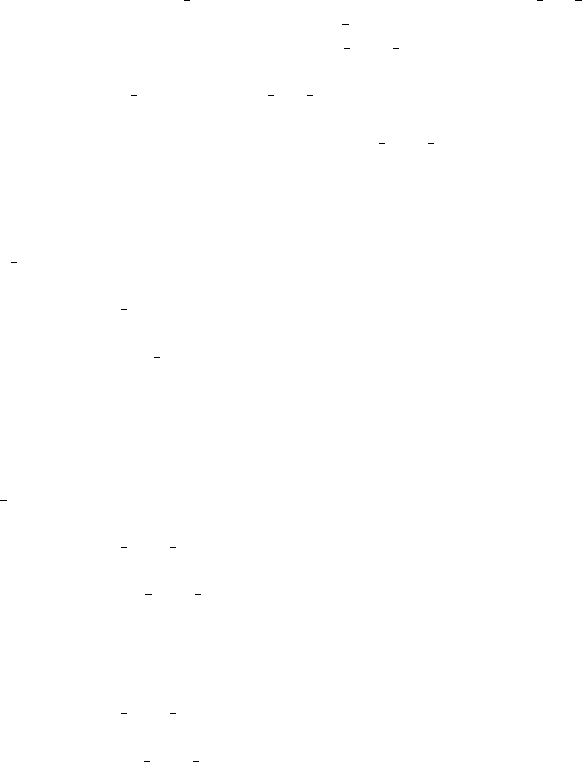
Description: The total electron dose in all images, or the electron dose in each
image, in electrons per nm2. If both parameters are given, the dose is determined by
total dose.
Parameter: dose sd
Type: real
Use: Used only if gen dose has value yes.
Allowed values: Real numbers between 0 and 1.
Default: 0
Description: The standard deviation of the electron dose in each image, relative
to the average dose per image. The dose in each image is computed by multiplying
the average dose by a Gaussian random variable with mean 1 and standard deviation
dose sd. If this becomes a negative number, the dose in the image is set to 0.
Parameter: dose file in
Type: string
Use: Required if gen rand dose has value no, not used otherwise.
Description: Name of a tabular text file from which the electron dose to use in each
image is read. The table should have one column, and at least as many rows as the
number of tilts.
Parameter: dose file out
Type: string
Use: Optional if gen rand dose has value yes, not used otherwise.
Description: If the parameter is provided, it gives the name of a tabular text file to
which the electron dose used in each image is written.
4.7 Optics
The optics component specifies the characteristics of the optical system in the micro-
scope. Most of the optical parameters stay the same in all the images of a tilt series,
but the defocus can be varied from image to image. An optics component is required
for simulation of micrographs.
Parameter: magnification
Type: real
Use: Required
Allowed values: Any positive real number greater than 1.
17
Description: The magnification of the simulated microscope.
Parameter: gen defocus
Type: boolean
Use: Required
Description: If this parameter has the value yes, a defocus value for each image is
generated as a random value with specified mean and standard deviation. (The stan-
dard deviation can be set to 0, and there is then nothing random about the defocus.)
Otherwise, the defocus of each image is read from a file specified by defocus file in.
Parameter: defocus nominal
Type: real
Use: Required if gen defocus has value yes, not used otherwise.
Allowed values: Any real number.
Description: The nominal defocus value measured in µm.
Parameter: defocus syst error
Type: real
Use: Used only if gen defocus has value yes.
Allowed values: Any positive real number.
Default: 0
Description: The standard deviation of a systematic error added to the nominal
defocus, measured in µm. The same error is added to the defocus of every image.
Parameter: defocus nonsyst error
Type: real
Use: Used only if gen defocus has value yes.
Allowed values: Any positive real number.
Default: 0
Description: The standard deviation of a nonsystematic error added to the nomi-
nal defocus and the systematic error, measured in µm. A new value of the error is
computed for every image.
Parameter: cs and cc
Type: real
Use: Required
Allowed values: Any real number.
Description: The spherical aberration and chromatic aberration of the optical system
in mm.
Parameter: aperture
Type: real
Use: Required
Allowed values: Any positive real number.
Description: The diameter in µmof the aperture in the back focal plane.
Parameter: focal length
Type: real
18
Use: Required
Allowed values: Any positive real number.
Description: The focal length in mmof the primary lens.
Parameter: cond ap angle
Type: real
Use: Required
Allowed values: Any positive real number.
Description: The aperture angle in mradof the beam furnished by the condenser
lens.
Parameter: defocus file in
Type: string
Use: Required if gen defocus has value no, not used otherwise.
Description: The name of a tabular text file to read defocus values from. The table
should have one column, and at least as many rows as the number of tilts. The defocus
values are in µmunits, with positive values for underfocus.
Parameter: defocus file out
Type: string
Use: Optional if gen defocus has value yes, not used otherwise.
Description: The name of a tabular text file to which randomly generated defocus
values are written.
4.8 Detector
These parameters specify the properties of the detector. Up to 10 detector components
can be specified. This can be used, for example, to generate both realistic, noisy
images, and noise-free images for reference in a single simulation.
The most important characteristics of a detector are the detector quantum effi-
ciency (DQE) and the modulation transfer function (MTF). The DQE is a number
between 0 and 1 which specifies how efficiently the quanta (in this case electrons) of
the signal being measured are detected. The MTF is a function which specifies how
well a given spatial frequency is transferred from the scintillator to the detector plane.
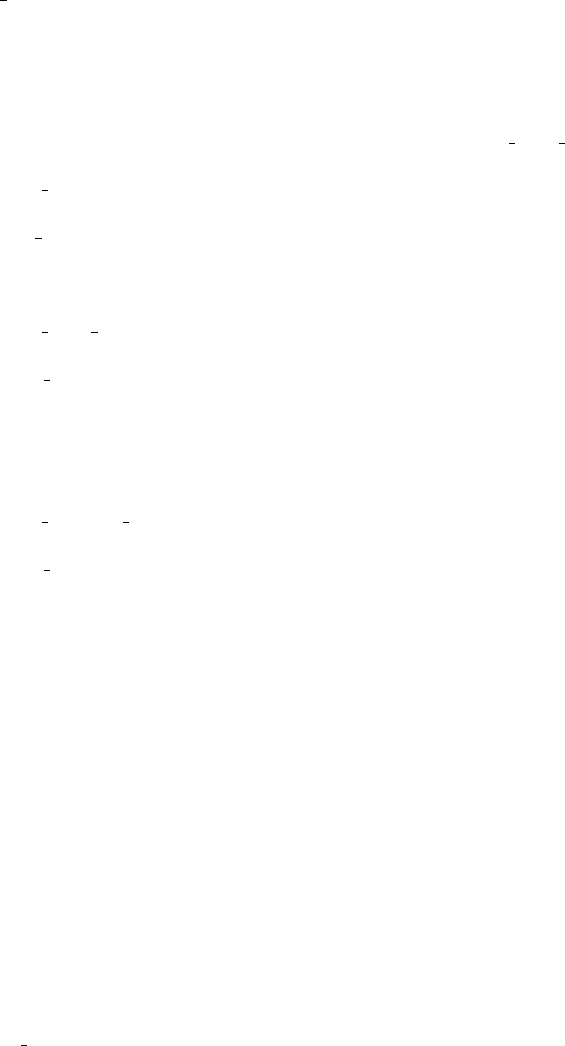
The MTF is specified by 7 parameters, a,b,c,α,beta,p, and q, and is of the form
MTF(ξ) = aPp(1 + α|ξ|2) + bPq(1 + β|ξ|2) + c
where
Pn(s) = 2n
2sn+ 2n−2.
By adjusting these parameters, it should be possible to approximate sufficiently well
the MTF of most real detectors.
Parameter: det pix x and det pix y
Type: integer
Use: Required
19
Allowed values: Integers in the range 1 to 104.
Description: The number of pixels on the detector along the xand yaxes.
Parameter: padding
Type: integer
Allowed values: Integers in the range 0 to 103.
Default: 20
Description: The number of pixels used as padding around the edges of the detector
in internal computations.
Parameter: pixel size
Type: real
Use: Required
Allowed values: Real numbers in the range 10−2 to 103.
Description: The physical size of the detector pixels in µm.
Parameter: gain
Type: real
Use: Required
Allowed values: Any positive real value.
Description: The detector gain, that is the average number of counts produced by
each electron.
Parameter: use quantization
Type: boolean
Use: Required
Description: If this parameter has the value yes, electron wave is quantized as
discrete electrons, which is the primary source of detector noise. This is what happens
in any real detector. Setting the parameter to no, produces practically noise-free data.
While this is certainly unrealistic, it may be useful for testing and debugging.
Parameter: dqe
Type: real
Use: Required if use quantization has the value yes.
Allowed values: Real numbers in the range 10−2to 1.
Description: The detector quantum efficiency
Parameter: mtf a,mtf b, and mtf c
Type: real
Use: Required
Allowed values: Real numbers in the range 0 to 1.
Description: Three of the seven parameters specifying the shape of the detector
modulation transfer function (MTF).
Parameter: mtf alpha and mtf beta
Type: real
Use: Required
Allowed values: Any positive real number.
20

Description: Twi of the seven parameters specifying the shape of the detector mod-
ulation transfer function (MTF).
Parameter: mtf p and mtf q
Type: real
Allowed values: Real numbers in the range 0 to 10.
Default: 1
Description: Two of the seven parameters specifying the shape of the detector mod-
ulation transfer function (MTF). In most cases it should be possible to have these
parameters equal to the default value 1.
Parameter: image file out
Type: string
Use: Required
Description: Name of the file to which simulated images are recorded. If the file
does not already exists it is created. If the file exists, the old contents are deleted.
Parameter: image file format
Type: string
Allowed values: mrc,mrc-int, or raw.
Default: mrc
Description: The file format used to record the simulated images. mrc produces an
MRC file with 4-byte floating point data. mrc-int produces an MRC file with 2-byte
integer data. raw produces a file with no header and 4-byte floating point data.
Parameter: image axis order
Type: string
Allowed values: xy or yx.
Default: xy
Description: The order in which image pixels are recorded in the output file. The
fastest variable is the first one in the string.
Parameter: image file byte order
Type: string
Allowed values: native,be, or le.
Default: native
Description: The byte order used in the output file. be is big endian, le is little
endian, and native is the byte order of the machine running the program.
4.9 Volume
The volume component plays no role in the actual simulation of micrographs. It is
used to export to a file a map of the entire sample or a subvolume. This map can be
used as a reference, for example when evaluating reconstructions made from the tilt
series. Up to 20 volume components can be given in the input file.
Parameter: voxel size
21
Type: real
Use: Required
Allowed values: Real numbers in the range 0.01 to 100.
Description: The size of voxels in the volume map in nm.
Parameter: nx,ny, and nz
Type: integer
Use: Required
Allowed values: Integers in the range 1 to 103
Description: The number of voxels in the volume map along the x,y, and zaxes.
Parameter: offset x,offset y, and offset z
Type: real
Allowed values: Any real number.
Default: 0
Description: The x,y, and zcoordinates of the center of the volume map.
Parameter: map file re out
Type: string
Use: Required
Description: The name of a file which the real potential map is written to.
Parameter: map file im out
Type: string
Use: Optional.
Description: The name of a file which the imaginary potential map is written to. If
the parameter is not defined, imaginary potential is not written to file.
Parameter: map file format
Type: string
Allowed values: mrc,mrc-int, or raw
Default: mrc
Description: Determines the file format of output map files. mrc is MRC format
with 4 byte floating point data, mrc-int is MRC format with 2 byte integer data, and
raw is 4 byte floating point data and no header.
Parameter: map file byte order
Type: string
Allowed values: be,le, or native
Default: native
Description: The byte order (big endian or little endian) used output map files.
native is the native byte order of the computer running the program.
Parameter: map axis order
Type: string
Allowed values: xyz,xzy,yxz,yzx,zxy, or zyx.
Default: xyz
Description: The order in which voxel values are stored in output map files. The
22
first variable in the string is the fastest varying.
5 Conditions of use
TEM-simulator is free software: you can redistribute it and/or modify it under the
terms of the GNU General Public License as published by the Free Software Founda-
tion, either version 3 of the License, or (at your option) any later version.
TEM-simulator is distributed in the hope that it will be useful, but without any
warranty; without even the implied warranty of merchandibility or fitness for a
particular purpose. See the GNU General Public License for more details.
You should have received a copy of the GNU General Public License along with
TEM-simulator. If not, see http://www.gnu.org/licenses/.
6 Contributors
TEM-simulator is the result of a collaboration between Bertil Daneholt, Sergej Masich,
and Lars-G¨oran ¨
Ofverstedt at the Department of Cell and Molecular Biology, Karolin-
ska Institute in Stockholm, Ozan ¨
Oktem at Sidec AB and KTH Royal Institute of
Technology in Stockholm, and Hans Rullg˚ard at the Department of Mathematics,
Stockholm University.
23
