X TMF 0152 0154 Cov.pmd Manual
manual
User Manual:
Open the PDF directly: View PDF  .
.
Page Count: 48
Installation and Operation Manual
X-SE-0152-0154-eng
Part Number: 541C052AAG
March, 2008 Brooks®Models 0152/0154
5
Gas and Liquid Mass Flow
Secondary Electronics
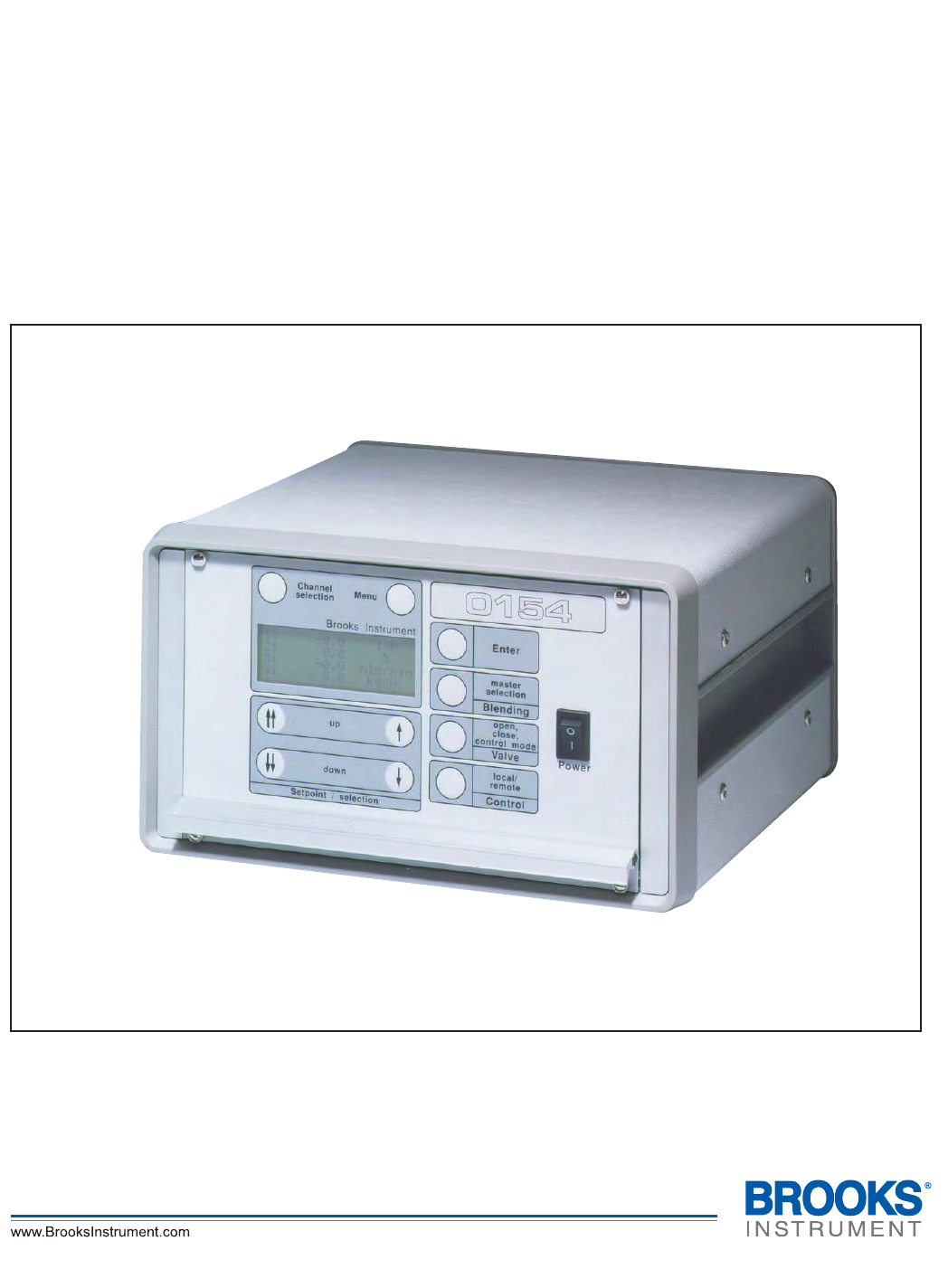
Brooks Model 0154
Four Channel Read Out
Table Top Housing
Installation and Operation Manual
X-SE-0152-0154-eng
Part Number: 541C052AAG
March, 2008
Brooks®Models 0152/0154
ESD (Electrostatic Discharge)
Essential Instructions
Read this page before proceeding!
Brooks Instrument designs, manufactures and tests its products to meet many national and international standards. Because
these instruments are sophisticated technical products, you must properly install, use and maintain them to ensure they
continue to operate within their normal specifications. The following instructions must be adhered to and integrated into your
safety program when installing, using and maintaining Brooks Products.
• Read all instructions prior to installing, operating and servicing the product. If this instruction manual is not the correct
manual, please see back cover for local sales office contact information. Save this instruction manual for future reference.
• If you do not understand any of the instructions, contact your Brooks Instrument representative for clarification.
• Follow all warnings, cautions and instructions marked on and supplied with the product.
• Inform and educate your personnel in the proper installation, operation and maintenance of the product.
• Install your equipment as specified in the installation instructions of the appropriate instruction manual and per applicable
local and national codes. Connect all products to the proper electrical and pressure sources.
• To ensure proper performance, use qualified personnel to install, operate, update, program and maintain the product.
• When replacement parts are required, ensure that qualified people use replacement parts specified by Brooks Instrument.
Unauthorized parts and procedures can affect the product's performance and place the safe operation of your process at
risk. Look-alike substitutions may result in fire, electrical hazards or improper operation.
• Ensure that all equipment doors are closed and protective covers are in place, except when maintenance is being
performed by qualified persons, to prevent electrical shock and personal injury.
Handling Procedure:
1. Power to unit must be removed.
2. Personnel must be grounded, via a wrist strap or other safe, suitable means before any printed circuit card or other internal
device is installed, removed or adjusted.
3. Printed circuit cards must be transported in a conductive container. Boards must not be removed from protective enclosure
until immediately before installation. Removed boards must immediately be placed in protective container for transport,
storage or return to factory.
Comments
This instrument is not unique in its content of ESD (electrostatic discharge) sensitive components. Most modern electronic
designs contain components that utilize metal oxide technology (NMOS, SMOS, etc.). Experience has proven that even small
amounts of static electricity can damage or destroy these devices. Damaged components, even though they appear to function
properly, exhibit early failure.

Installation and Operation Manual
X-SE-0152-0154-eng
Part Number: 541C052AAG
March, 2008 Brooks®Models 0152/0154
Dear Customer,
We appreciate this opportunity to service your flow measurement and control requirements with a Brooks
Instrument device. Every day, flow customers all over the world turn to Brooks Instrument for solutions to their gas
and liquid low-flow applications. Brooks provides an array of flow measurement and control products for various
industries from biopharmaceuticals, oil and gas, fuel cell research and chemicals, to medical devices, analytical
instrumentation, semiconductor manufacturing, and more.
The Brooks product you have just received is of the highest quality available, offering superior performance,
reliability and value to the user. It is designed with the ever changing process conditions, accuracy requirements
and hostile process environments in mind to provide you with a lifetime of dependable service.
We recommend that you read this manual in its entirety. Should you require any additional information
concerning Brooks products and services, please contact your local Brooks Sales and Service Office listed on the
back cover of this manual or visit www.BrooksInstrument.com
Yours sincerely,
Brooks Instrument

Installation and Operation Manual
X-SE-0152-0154-eng
Part Number: 541C052AAG
March, 2008
Brooks®Models 0152/0154
THIS PAGE WAS
INTENTIONALLY
LEFT BLANK

i
Contents
Installation and Operation Manual
X-SE-0152-0154-eng
Part Number: 541C052AAG
March, 2008 Models 0152 / 0154
Paragraph Page
Number Number
Section 1 Introduction
1-1 Description ....................................................................................................................................... 1-1
1-2 Specifications ................................................................................................................................... 1-2
1-3 Optional Equipment .......................................................................................................................... 1-7
1-3-1 Connecting Flomega Series ............................................................................................................. 1-7
1-3-2 Connecting Mass Flow and Pressure Series.................................................................................... 1-7
1-3-3 Connecting Smart Series ................................................................................................................. 1-7
1-3-4 Connecting QUANTIM...................................................................................................................... 1-8
1-3-5 Connecting RS-232 Communication ................................................................................................ 1-8
1-4 Certifications..................................................................................................................................... 1-8
Section 2 Installation
2-1 General............................................................................................................................................. 2-1
2-2 Receipt of Equipment ....................................................................................................................... 2-1
2-3 Recommended Storage Practice...................................................................................................... 2-1
2-4 Return Shipment .............................................................................................................................. 2-2
2-5 Transit Precautions .......................................................................................................................... 2-2
2-6 Removal from Storage...................................................................................................................... 2-2
2-7 Dimensions of the Enclosures.......................................................................................................... 2-2
2-8 Ventilation and Mounting Requirements ........................................................................................... 2-3
2-9 Cleaning Instructions ........................................................................................................................ 2-3
2-10 Cable Requirements......................................................................................................................... 2-3
2-11 Connector Pinning ............................................................................................................................ 2-4
2-12 Jumper Settings and Functions ........................................................................................................ 2-7
2-13 Adjustments of LCD Contrast and 5 V Reference ............................................................................ 2-8
Section 3 Operation
3-1 General............................................................................................................................................. 3-1
3-2 Description of Keys .......................................................................................................................... 3-1
3-3 Start Up Screens .............................................................................................................................. 3-3
3-4 Changing the Active Channel ........................................................................................................... 3-3
3-5 Changing the Setpoint Value ............................................................................................................ 3-4
3-6 Using the Blending Mode ................................................................................................................. 3-4
3-7 Using the Valve Control Function ..................................................................................................... 3-6
3-8 Using the Remote Function .............................................................................................................. 3-7
3-9 Menu ................................................................................................................................................ 3-8
Section 4 Operation (Via Personal Computer)
4-1 Operation (Via Personal Computer) ................................................................................................. 4-1
Appendix A Engineering Units
Available Engineering Units .............................................................................................................. A-1
Appendix B Blending Examples
Examples 1 through 6 ......................................................................................................................B-1

ii
Contents Installation and Operation Manual
X-SE-0152-0154-eng
Part Number: 541C052AAG
March, 2008
Models 0152 / 0154
Appendix C CE Certification
CE Certification of Mass Flow Equipment ........................................................................................C-1
Warranty, Local Sales/Service Contact Information....................................................................... Back Cover
Figures
Figure Page
Number Number
1-1 Dimensions Table Top Models 0152/0154 ........................................................................................ 1-3
1-2 Dimensions Panel Mount Models 0152/0154 ................................................................................... 1-3
1-3 Dimensions of 1/2 19" Cassette ....................................................................................................... 1-4
1-4 Mounting of 1/2 19" Cassette into 19" Rack ..................................................................................... 1-4
1-5 Mounting of Panel Mount Unit with Dimensions for the Panel Cut-Out ............................................ 1-5
1-6 Electrical Configuration .................................................................................................................... 1-6
2-1 Back Panel Layout............................................................................................................................ 2-4
2-2 Main Board: Jumper and Potmeter Locations .................................................................................. 2-7
2-3 Optional I/O Board: Jumper Locations ............................................................................................. 2-8
4-1 LabVIEW .......................................................................................................................................... 4-1
4-2 Testpoint ........................................................................................................................................... 4-2
Tables
Table Page
Number Number
2-1 Pinning of Channel 1 to 4 Connectors .............................................................................................. 2-5
2-2 Pinning of Ext. Valve Control Connector .......................................................................................... 2-5
2-3 Pinning of Remote Connector .......................................................................................................... 2-6
2-4 Pinning of RS-232 Connector ........................................................................................................... 2-6
2-5 Jumper Setting for 0-5 Vdc I/O ......................................................................................................... 2-7
2-6 Jumper Setting (Optional I/O Board Installed1)................................................................................. 2-8

1-1
Brooks® Models 0152/0154
Section 1 Introduction
Installation and Operation Manual
X-SE-0152-0154-eng
Part Number: 541C052AAG
March, 2008
1-1 Description
The Brooks microprocessor based readout and control equipment is
designed to meet the highest standards with user-friendly operation. Model
0152 provides 2 channels and Model 0154 provides 4 channels. 0152/
0154 also provide power supply for Brooks gas/liquid thermal mass flow/
pressure controllers/meters and QUANTIMTM. The readout function is a
back lit 4 x 20 character display. Features include membrane push buttons
for setpoint, blending, valve override and local/remote control. Actual
reading or % full scale of flow rate/pressure/density/temperature is
programmable for each channel.
Both models can be operated with independent mass flow control
channels, or with one or more channels slaved to the master (blending
mode). (If planning to use blending mode with engineering units rather than
% full scale, 1-5 Vdc or 4-20 mA I/O cannot be used.) Each channel can be
operated as master or slave or in an independent control mode. Valve
override functions are selectable. In valve override mode, the valve will be
open/closed independent of setpoint value. The Mass Flow Controller
Output Signals are switched to the 25-pin connector located on the
backpanel. This connector includes up to 4 channels with setpoint input
and flowrate or pressure output.
An RS-232 port is provided standard to control the 0152/0154 from a PC.
This port enables connection of up to 4 analog (or analog configured
devices) to a Model 0154. Communications is possible with optional cable
and software (Standalone and LabVIEWTM VI with Smart DDE driver).
Setpoint, Flow Rate and Valve Override parameters are available.
The local function is useful as backup of the customer's system
configuration. In local mode, the Mass Flow devices will be operated
directly by the 0152/0154, and in remote mode the customer's peripheral
equipment determines the control actions. Stored default values are
available after power interruption
1-2
Brooks® Models 0152/0154
Section 1 Introduction Installation and Operation Manual
X-SE-0152-0154-eng
Part Number: 541C052AAG
March, 2008
1-2 Specifications
Power input
90-260 Vac, 50/60 Hz 70 W max power.
Power output
+15 V/2.9 A, -15V/1.4 A max or 24 Vdc/2.5 A max.
Signal input
Signal from flow or pressure transducer and remote setpoint. 0(1)-5 Vdc or
0(4)-20 mA .
Signal output
0(1)-5 Vdc or 0(4)-20 mA, Impedance 1 kW (minimum) or Impedance
750W (maximum)
Electrical
Two or four 15-pin D connectors for connecting the mass flow or pressure
control equipment.
One 25-pin D connector for combined remote setpoint input and output
signal, up to 4 channels.
One 15-pin D connector for connecting remote valve override control
function.
One 9-pin D connector for RS232 communication link to a PC.
Display reading
Model 0152: 2x 20 character and Model 0154: 4x 20 character display with
back lighting. Percentage full scale or actual reading.
Controls
Membrane push buttons for setpoint, blending, valve override, local/
remote control, menu selection per channel and power switch.
Materials of Construction
Housing
Anodized aluminium and steel covers: 1/2 size 19" rack cassette or table
top with optional handle.
Dimensions
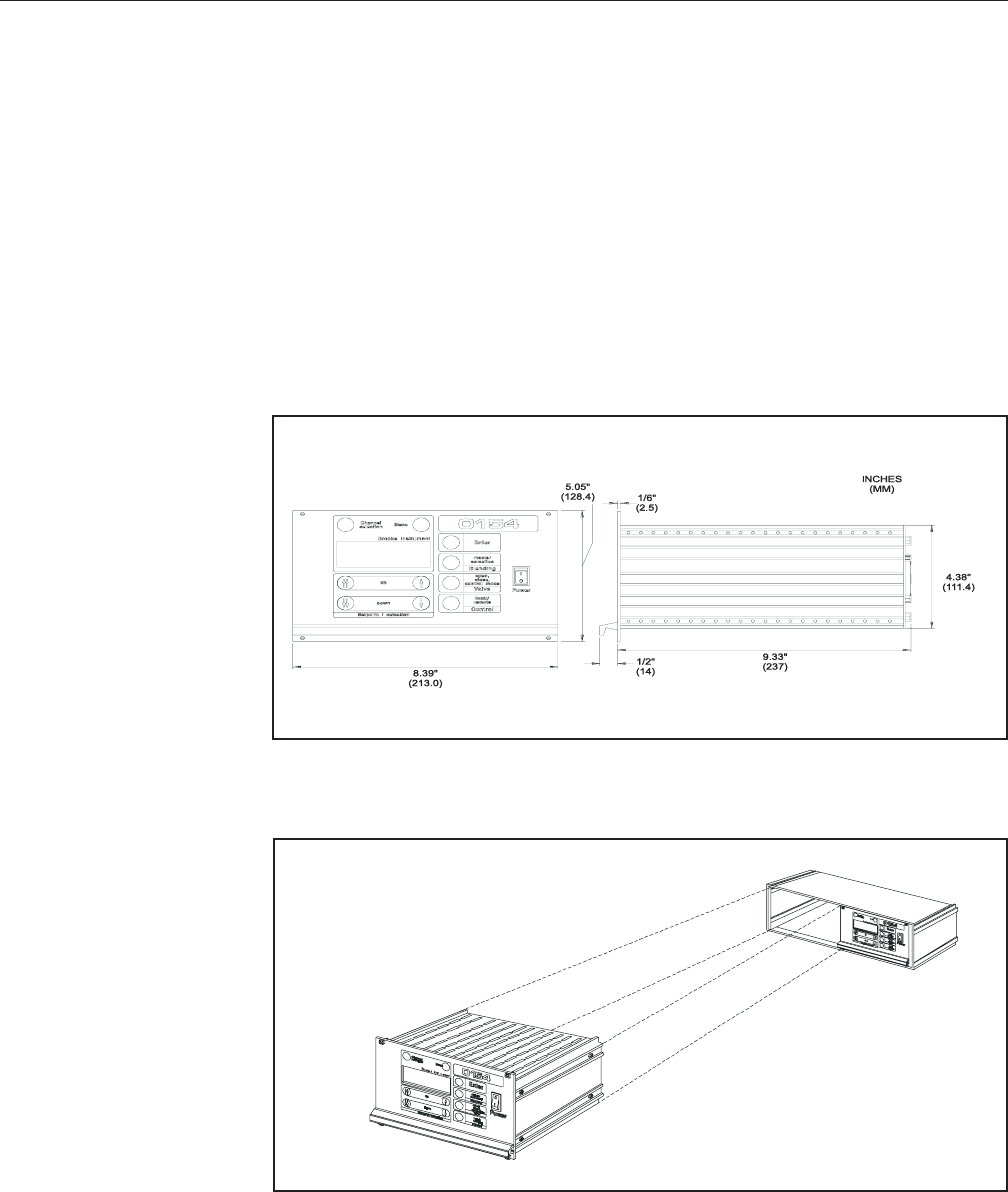
1/2 size 19" rack cassette, [5.1" (130 mm) height, 8.7" (220 mm) width,
9.1" (230 mm) depth]. Table top (Refer to Figures 1-1 and 1-5).
Ambient Temperature
0 - 50°C (32-122°F)
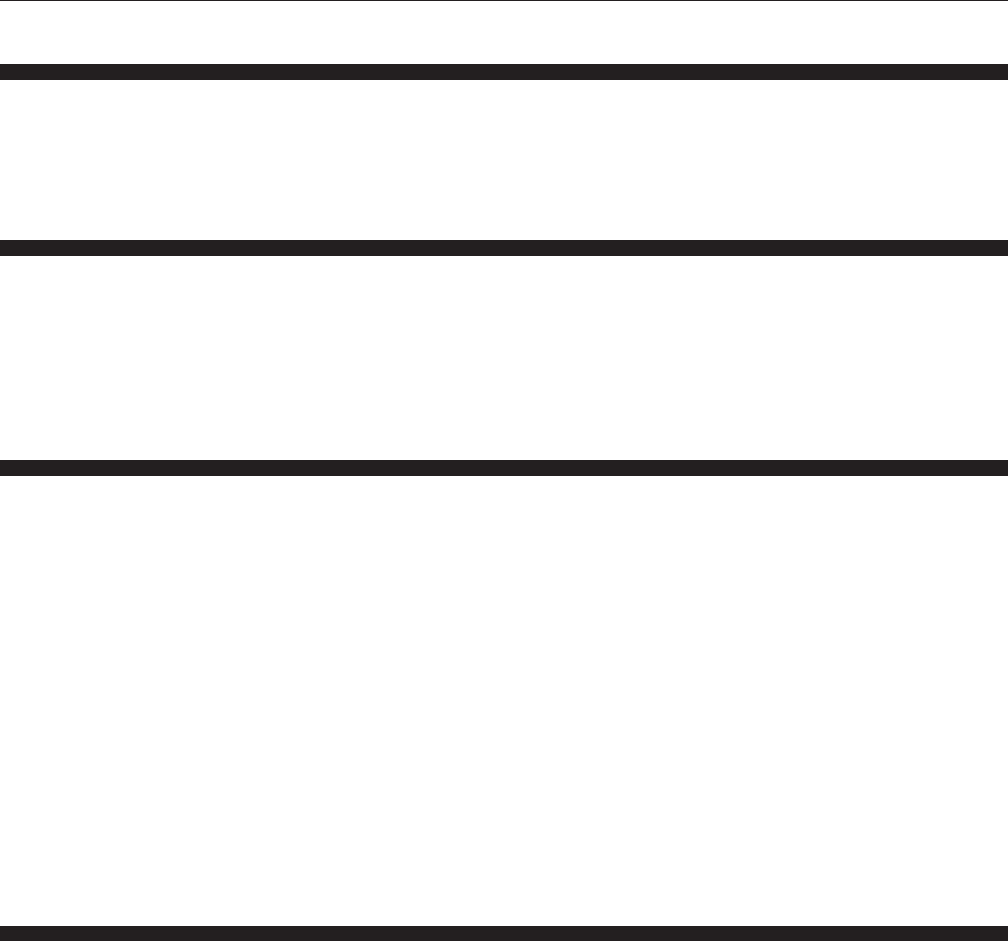
Electrical Configuration, (Refer to Figure 1-6).
1-3
Brooks® Models 0152/0154
Section 1 Introduction
Installation and Operation Manual
X-SE-0152-0154-eng
Part Number: 541C052AAG
March, 2008
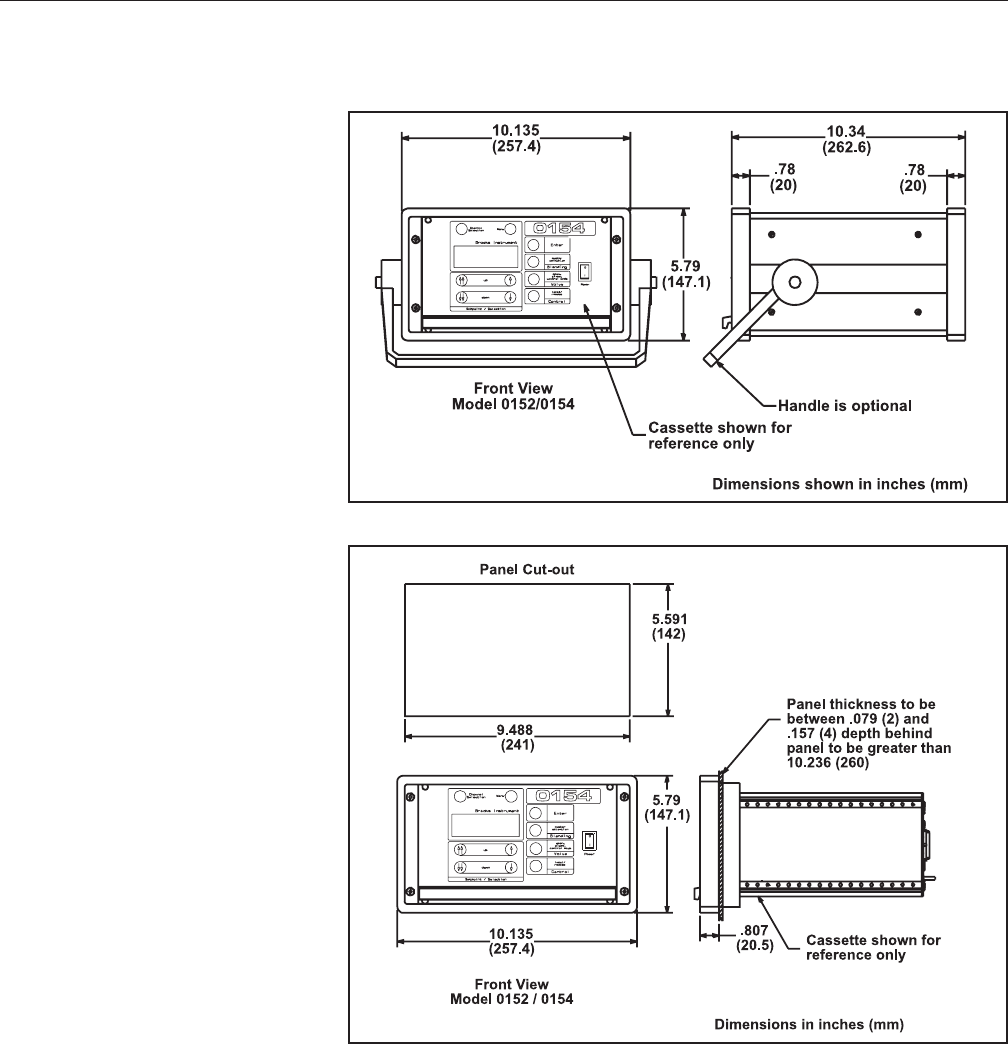
Figure 1-1 Dimensions Table Top Models 0152/0154
Figure 1-2 Dimensions Panel Mount Models 0152/0154
1-4
Brooks® Models 0152/0154
Section 1 Introduction Installation and Operation Manual
X-SE-0152-0154-eng
Part Number: 541C052AAG
March, 2008
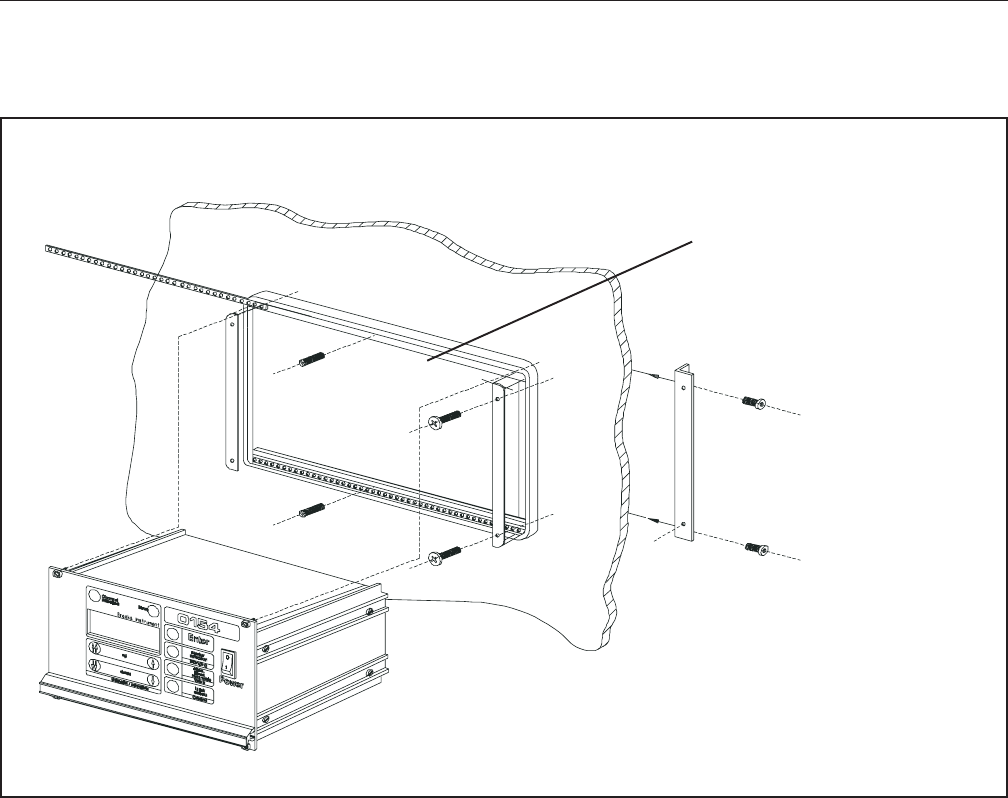
All housing options consist of a standard 1/2 19"
cassette ( 3HE x 42TE ) using three different parts:
• Table Top Option: Table Top Housing
• 19" Rack Option: 19" Rack
• Panel Mount Option: Bracket Set
The dimensions of the 1/2 19" cassette are:
cassette ( 3HE x 42TE ) using three different parts:
• Table Top Option: Table Top Housing
• 19" Rack Option: 19" Rack
• Panel Mount Option: Bracket Set
.
Figure 1-3 Dimensions of 1/2 19” Cassette
The cassette can be mounted directly into a 19" rack:
The cassette can be mounted into the table top enclosure in the same way.
The dimensions of the table top housing are (all dimensions in/mm):
Figure 1-4 Mounting of 1/2 19” Cassette into 19” Rack
1-5
Brooks® Models 0152/0154
Section 1 Introduction
Installation and Operation Manual
X-SE-0152-0154-eng
Part Number: 541C052AAG
March, 2008
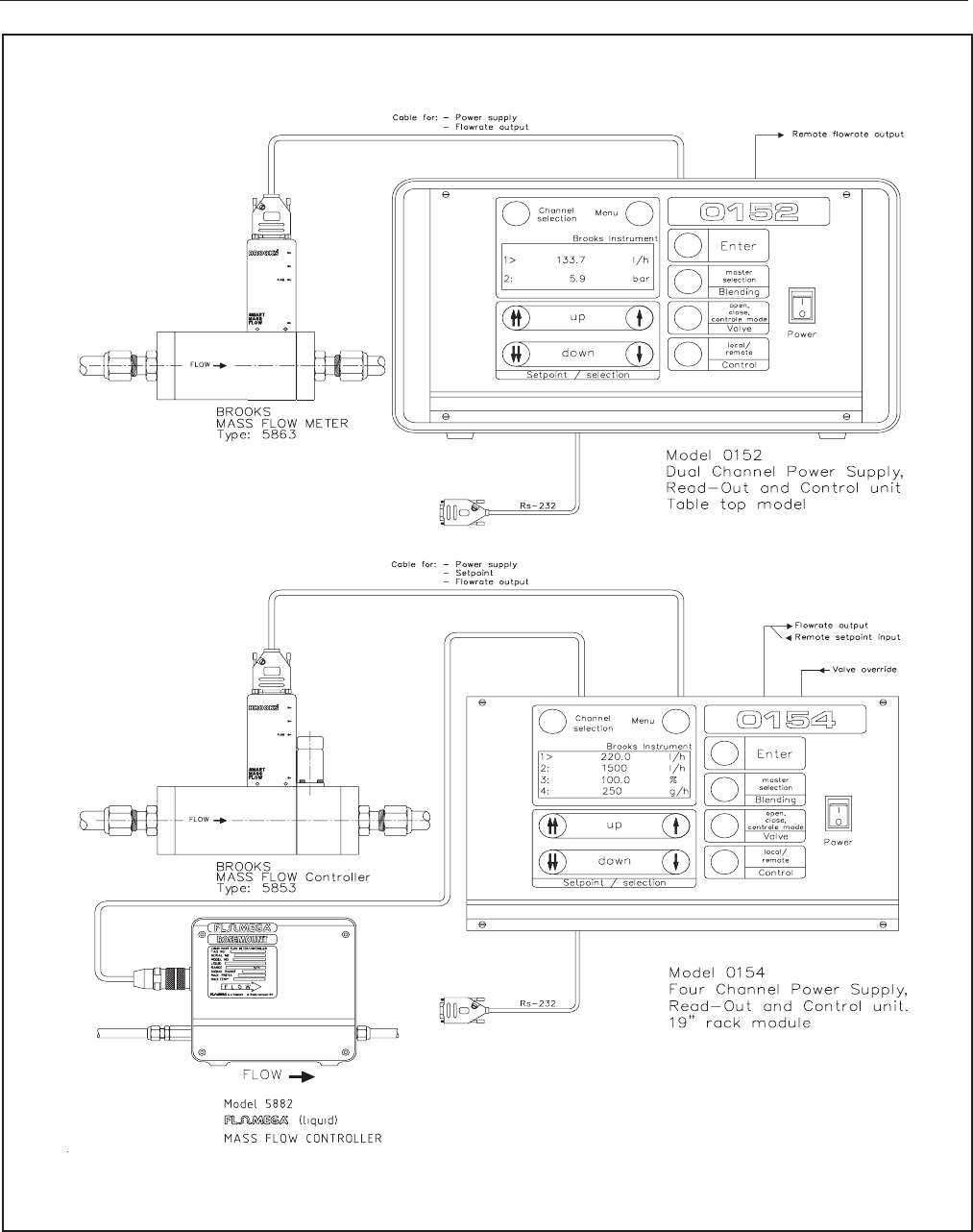
The panel mount option uses the cassette mounted into a panel using the
panelmount bracket set. The dimensions for the panel cutout and the
mounting details are:
Figure 1-5 Mounting of Panel Mount Unit with Dimensions for the Panel Cut-Out
Panel Cut Out
Dimensions
241mm 142mm
(9.5" x 5.6")
1-6
Brooks® Models 0152/0154
Section 1 Introduction Installation and Operation Manual
X-SE-0152-0154-eng
Part Number: 541C052AAG
March, 2008
Figure 1-6 Electrical Configuration
1-7
Brooks® Models 0152/0154
Section 1 Introduction
Installation and Operation Manual
X-SE-0152-0154-eng
Part Number: 541C052AAG
March, 2008
1-3 Optional Equipment
For connection of the Brooks mass flow and pressure equipment to the
Models 0152 or 0154, the following interconnecting cables are available:
1-3-1 Connecting Flomega Series
For connecting the Models 0152 or 0154 to the Flomega series 5880 and
5890, the following cables are available:
Length 3 m (9.84 ft); part number 124Z605ZZZ
Length 6 m (19.69 ft); part number 124Z606ZZZ
1-3-2 Connecting Mass Flow and Pressure Series
For connecting the Models 0152 or 0154 to the Mass Flow Series, 5850,
5860 and Pressure Control series 5866, the following cables are available:
Via the Netherlands:
Length: 3 m (9.84 ft); part number 124Z236AAA
Length: 6 m (19.69 ft); part number 124Z237AAA
Length: 12 m (39.37 ft); part number 124Z610AAA
Via USA:
Length: 5 ft (1.52m); part number 124Z576AAA
Length: 10 ft (3.05m); part number 124Z577AAA
Length: 25 ft (7.62m); part number 124Z578AAA
Length: 50 ft (15.24m); part number 124Z579AAA
1-3-3 Connecting Smart Series
For connecting the Models 0152 or 0154 to the Smart Mass Flow Series
5850S, the following cables are available:
Length: 3 m (9.84 ft); part number 124Z893AAA
Length: 6 m (19.69 ft); part number 124Z894AAA
Length: 12 m (39.37 ft); part number 124Z895AAA
These cables are only necessary when digital communication between PC
and S series is desired, otherwise the cables mentioned in Section 1-3-2
can be used.

1-8
Brooks® Models 0152/0154
Section 1 Introduction Installation and Operation Manual
X-SE-0152-0154-eng
Part Number: 541C052AAG
March, 2008
1-3-4 Connecting QUANTIM
The following cables are available for connection of the QUANTIM Mass
Flow Meter/Controller to the Brooks Microprocessor Control & Read-out
Unit: Model # 0152 and 0154
Length: 3ft (1m); part number 124Z054AAA
Length: 5ft (1.5m); part number 124Z050AAA
Length: 10ft (3m); part number 124Z051AAA
Length: 25ft (7m); part number 124Z052AAA
Length: 50ft (15m); part number 124Z053AAA
Or in case both Flow and Density or Temperature functions have to be
made available:
Length: 5ft (1.5m); part number 124Z906ZZZ
Length: 10ft (3m); part number 124Z907ZZZ
Length: 25ft (7m); part number 124Z908ZZZ
Length: 50ft (15m); part number 124Z909ZZZ
1-3-5 RS-232 Communication
For connecting the Model 0152/0154 to a personal computer an RS-232
cable is available:
Length: 3 m (9.84 ft); part number 124Z901ZZZ
Note:
This cable is only required when using digital communication between
Model 0152/0154 and a personal computer (see Section 4-1).
1-4 Certifications
Approvals: EMC Directive based on EN 50082-2 and
EN 50081-1 Low Voltage Directive based
on EN 61010-1 plus amendments
CSA-NRTL/C
based on CAN/CSA-C22.2 No. 1010.1-92
and ISA S82.01-1994
Scope of Electrical
Safety Approvals: Indoor use
Altitude: up to 2000m (6562 ft)
Pollution Degree: 2 (see IEC 664)
Installation category II (see IEC 664)
Power input 100-240Vac, 50/
60Hz,100W
Ambient temperature: 0 - 50°C (32°F - 122°F)
Max. rel Humidity 80%
®
NRTL/C
2-1
Brooks® Models 0152/0154
Section 2 Installation
Installation and Operation Manual
X-SE-0152-0154-eng
Part Number: 541C052AAG
March, 2008
2-1 General
This section provides installation instructions for the Brooks® Models 0152
and 0154 Gas and Liquid Mass Flow Secondary Electronics devices.
2-2 Receipt of Equipment
When the instrument is received, the outside packing case should be
checked for damage incurred during shipment. If the packing case is
damaged, the local carrier should be notified at once regarding his liability.
A report should be submitted to your nearest Product Service Department.
Brooks Instrument
407 W. Vine Street
P.O. Box 903
Hatfield, PA 19440 USA
Toll Free (888) 554-FLOW (3569)
Tel (215) 362-3700
Fax (215) 362-3745
E-mail: BrooksAm@EmersonProcess.com
www.BrooksInstrument.com
Brooks Instrument Brooks Instrument
Neonstraat 3 1-4-4 Kitasuna Koto-Ku
6718 WX Ede, Netherlands Tokyo, 136-0073 Japan
P.O. Box 428 Tel 011-81-3-5633-7100
6710 BK Ede, Netherlands Fax 011-81-3-5633-7101
Tel 31-318-549-300 Email: BrooksAs@EmersonProcess.com
Fax 31-318-549-309
E-mail: BrooksEu@EmersonProcess.com
Remove the envelope containing the packing list. Carefully remove the
instrument from the packing case. Make sure spare parts are not
discarded with the packing materials. Inspect for damaged or missing
parts.
2-3 Recommended Storage Practice
If intermediate or long-term storage of equipment is required, it is
recommended that the equipment be stored in accordance with the
following:
a. Within the original shipping container.
b. Stored in a sheltered area, preferably a warm, dry, heated warehouse.
c. 32°C (90°F)maximum,45°F (7°C) minimum.
d. Relative humidity 45% nominal, 60% maximum, 25% minimum.
Upon removal from storage a visual inspection should be
conducted to verify the condition of equipment is "as received".
2-2
Brooks® Models 0152/0154
Section 2 Installation Installation and Operation Manual
X-SE-0152-0154-eng
Part Number: 541C052AAG
March, 2008
2-4 Return Shipment
Prior to returning any instrument to the factory, contact your nearest Brooks
location for a Return Materials Authorization Number (RMA#). This can be
obtained from one of the following locations:
Brooks Instrument
407 W. Vine Street
P.O. Box 903
Hatfield, PA 19440 USA
Toll Free (888) 554-FLOW (3569)
Tel (215) 362-3700
Fax (215) 362-3745
E-mail: BrooksAm@EmersonProcess.com
www.BrooksInstrument.com
Brooks Instrument Brooks Instrument
Neonstraat 3 1-4-4 Kitasuna Koto-Ku
6718 WX Ede, Netherlands Tokyo, 136-0073 Japan
P.O. Box 428 Tel 011-81-3-5633-7100
6710 BK Ede, Netherlands Fax 011-81-3-5633-7101
Tel 31-318-549-300 Email: BrooksAs@EmersonProcess.com
Fax 31-318-549-309
E-mail: BrooksEu@EmersonProcess.com
All flow instruments returned to Brooks requires completion of Form
RPR003-1, Brooks Instrument Decontamination Statement, along with a
Material Safety Data Sheet (MSDS) for the fluid(s) used in the instrument.
Failure to provide this information will delay processing by Brooks
personnel. Copies of these forms can be downloaded from the Brooks
website www.BrooksInstrument.com or are available from any Brooks
Instrument location listed above.
2-5 Transit Precautions
To safeguard against damage during transit, transport the instrument to the
installation site in the same container used for transportation from the
factory if circumstances permit.
2-6 Removal from Storage
Upon removal from storage, a visual inspection should be conducted to
verify the condition of the equipment is “as received.”
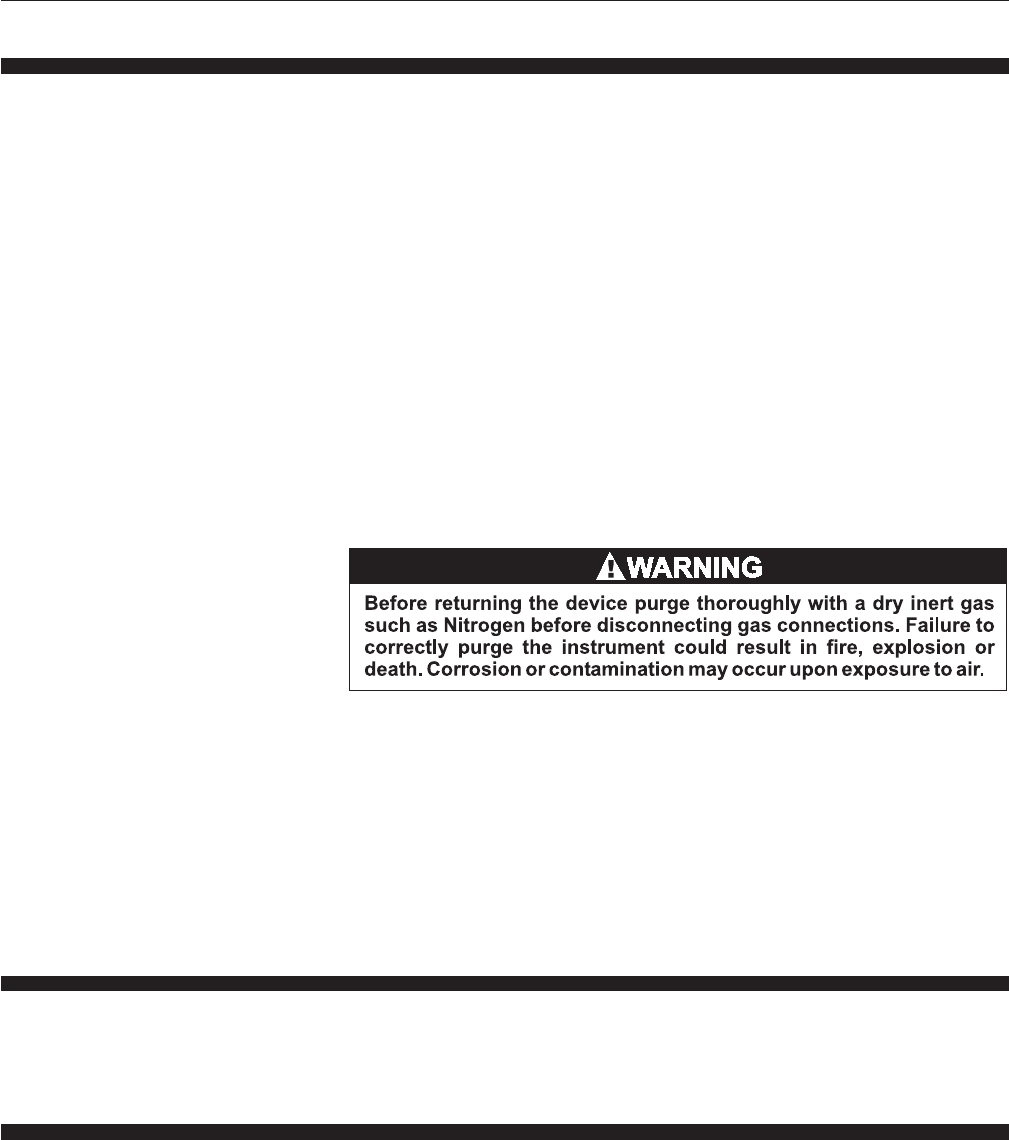
2-3
Brooks® Models 0152/0154
Section 2 Installation
Installation and Operation Manual
X-SE-0152-0154-eng
Part Number: 541C052AAG
March, 2008
2-7 Ventilation and Mounting Requirements
The ventilation holes of the instrument must never be blocked or covered.
When installing the instrument in a panel or a rack, always take care that
proper ventilation is provided. See Section 1 enclosure dimensions for
installation and mounting (Figures 1-1 through 1-7).
2-8 Cleaning Instructions
Do not use cleaning agents other than water because this might affect
color and marking of the equipment.
Use a clean, soft and damp cloth for cleaning.
2-9 Cable Requirements
For compliance with the EMC directive 89/336/EEC, the equipment has to
be installed with shielded signal cables which are overall completely
screened with a shield of at least 80 %. Sub-D connectors used must be
shielded with a metal shield. The cable screen should be connected to the
metal shell and shielded at both ends over 360 Degrees. The shield should
be terminated to earth ground.
Always use a power cord that is certified or approved by a recognized
national test lab. The powercord must accomodate 3 conductors with a
wire size of at least 0.75mm2 (or 18AWG). One of the three conductors
has to provide the protective conductor function. The voltage range must
be suitable for the used mains voltage.
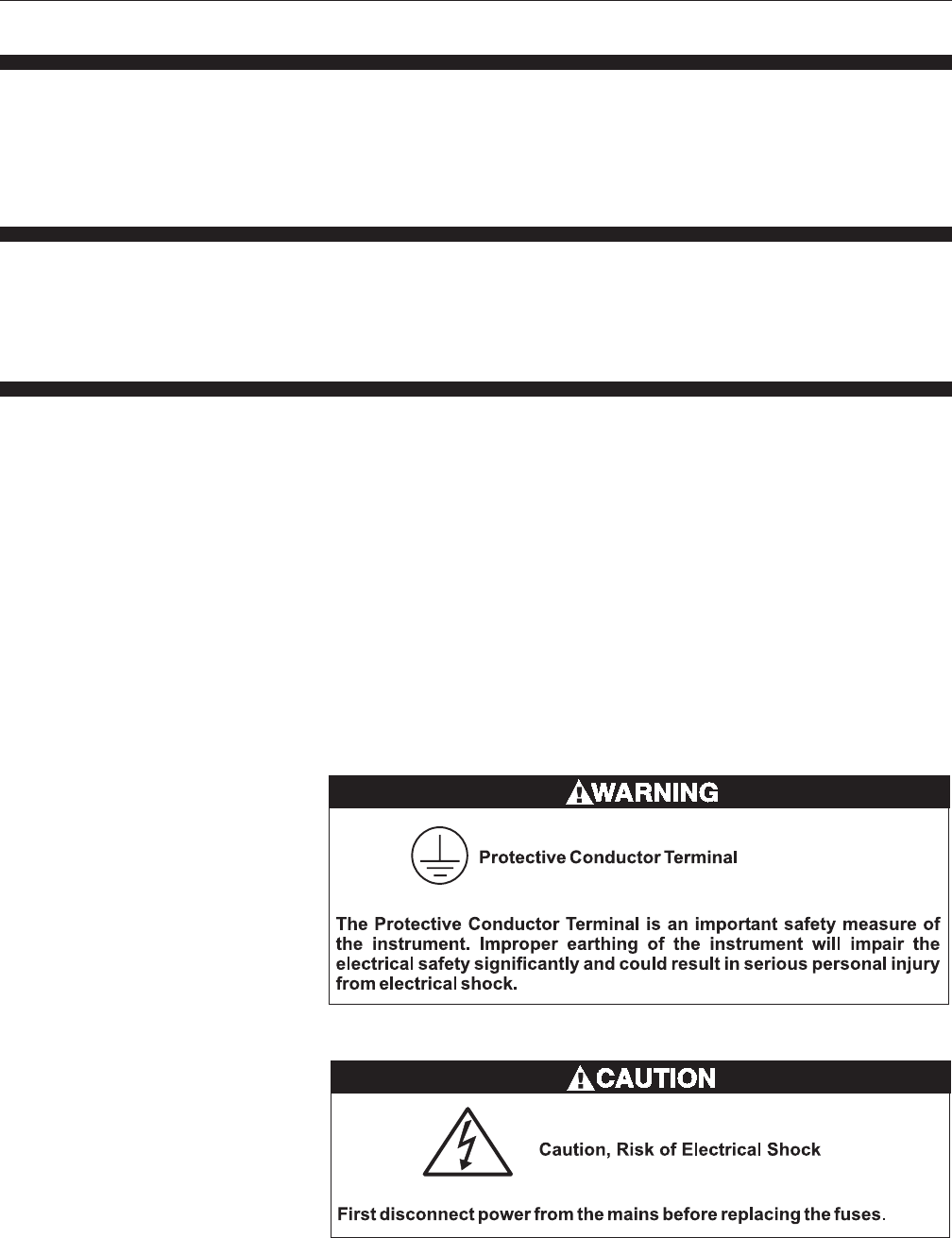
Additional earthing can be done by means of the external protective
conductor terminal marked with the symbol as shown below:
2-4
Brooks® Models 0152/0154
Section 2 Installation Installation and Operation Manual
X-SE-0152-0154-eng
Part Number: 541C052AAG
March, 2008
Two fuses are located in the power entry at the backside of the instrument.
Remove the fuses by pulling out the fuse cartridge. The fuses must be
replaced by fuses meeting the following requirements:
Dimensions: 5 x 20mm
Current: 2A T (slow blow)
Voltage: Suitable for mains voltage
Approvals: Certified or approved by a
recognized national test lab
For Europe: Breaking Capacity: 1500A
Melting Characteristic: IEC127
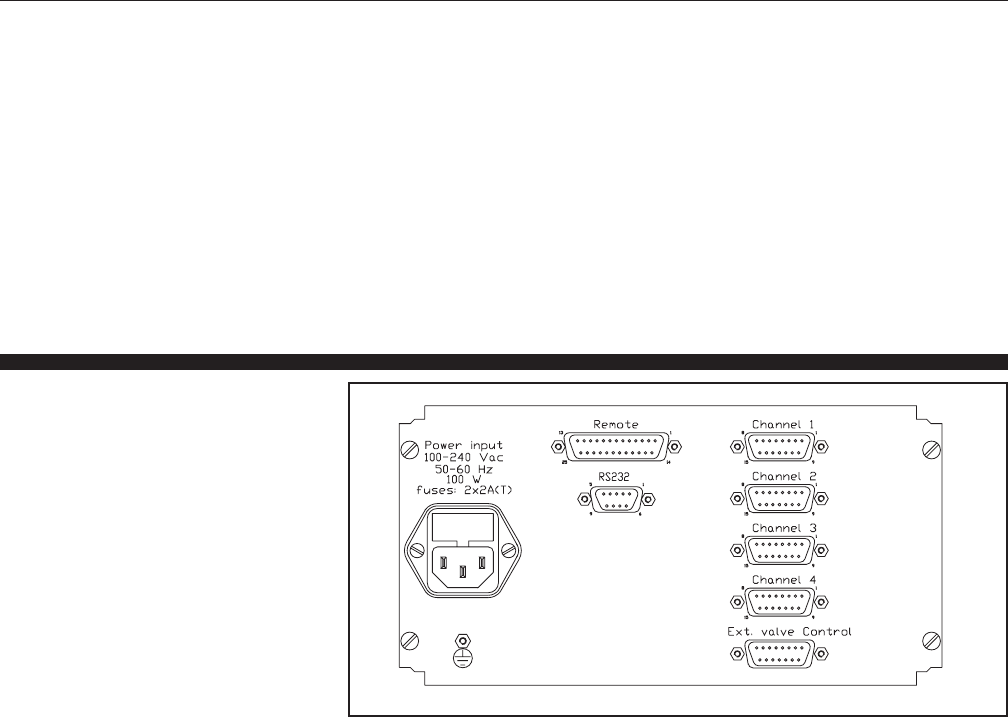
2-10 Connector Pinning
Figure 2-1 Back Panel Layout
2-5
Brooks® Models 0152/0154
Section 2 Installation
Installation and Operation Manual
X-SE-0152-0154-eng
Part Number: 541C052AAG
March, 2008
Function
Input/
Output
pin
number
Function
Input/
Output
pin
number
1 Output +15Vdc/+24Vdc*
2 Input Flow mA
3 Output Setpoint mA
4nc Nc
5 Output Setpoint Volt
6 Setpoint ground
7 Output Valve override
8 Flow ground
9 reserved Reserved
10 Input Flow V
11 nc Nc
12 Power ground
13 Output +15Vdc/+24Vdc*
14 Output -15Vdc/nc*
15 nc Nc
*Depending on model: +24 Vdc: only combination +24 Vdc and power ground. ±15 Vdc:
only combination +15 Vdc and -15 Vdc
When applying non Brooks cables for use of Digital MFC/M’s (incl. MF) on mA I/O, pin 3
and 5 should be shorted at the read out side
1 Input Remote valve override channel 1
2nc Nc
3 Input Remote valve override channel 2
4nc Nc
5 Input Remote valve override channel 3
6nc Nc
7 Input Remote valve override channel 4
8nc Nc
9 Output +15Vdc/+24Vdc*
10 nc Nc
11 nc Nc
12 nc Nc
13 nc Nc
14 nc Nc
15 Output -15Vdc / Power ground*
*Depending on model: +24 Vdc: only combination +24 Vdc and power ground.
±15 Vdc: only combination +15 Vdc and -15 Vdc
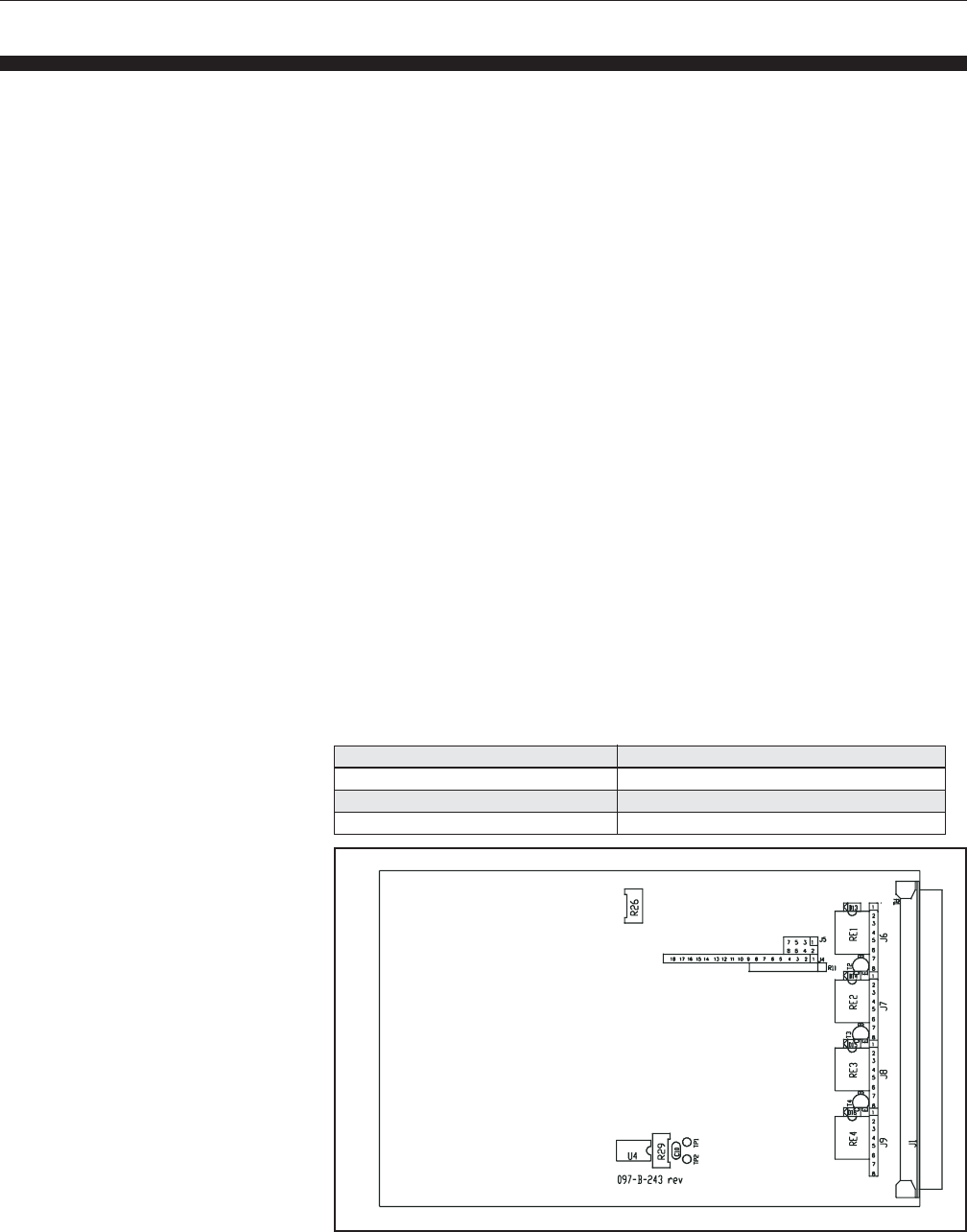
Table 2-1 Pinning of Channels 1 to 4 Connectors
Table 2-2 Pinning of Ext. Valve Control Connector

2-6
Brooks® Models 0152/0154
Section 2 Installation Installation and Operation Manual
X-SE-0152-0154-eng
Part Number: 541C052AAG
March, 2008
Function
Input/
Output
pin
number
1 Output Flow Volt channel 1
2 Output Flow mA channel 1
3 Output Flow Volt channel 2
4 Output Flow mA channel 2
5 Output Flow Volt channel 3
6 Output Flow Volt channel 4
7 Output Flow mA channel 3
8 Input Remote setpoint Volt channel 1
9 Input Remote setpoint Volt channel 2
10 Output Flow mA channel 4
11 Input Remote setpoint Volt channel 3
12 nc nc
13 Input Remote setpoint Volt channel 4
14 Flow ground channel 1
15 Input Remote setpoint mA channel 1
16 Flow ground channel 2
17 Input Remote setpoint mA channel 2
18 Flow ground channel 3
19 Flow ground channel 4
20 Setpoint ground channel 1
21 Setpoint ground channel 2
22 Input Remote setpoint mA channel 3
23 Setpoint ground channel 3
24 Input Remote setpoint mA channel 4
25 Setpoint ground channel 4
Table 2-3 Pinning of Remote Connector
Table 2-4 Pinning RS-232- Connector
pin Input/ Function
number Output
1NC
2 TXD Transmitted data
3 RXD Received data
4NC
5 GND Signal ground
6NC
7NC
8NC
9NC
2-7
Brooks® Models 0152/0154
Section 2 Installation
Installation and Operation Manual
X-SE-0152-0154-eng
Part Number: 541C052AAG
March, 2008
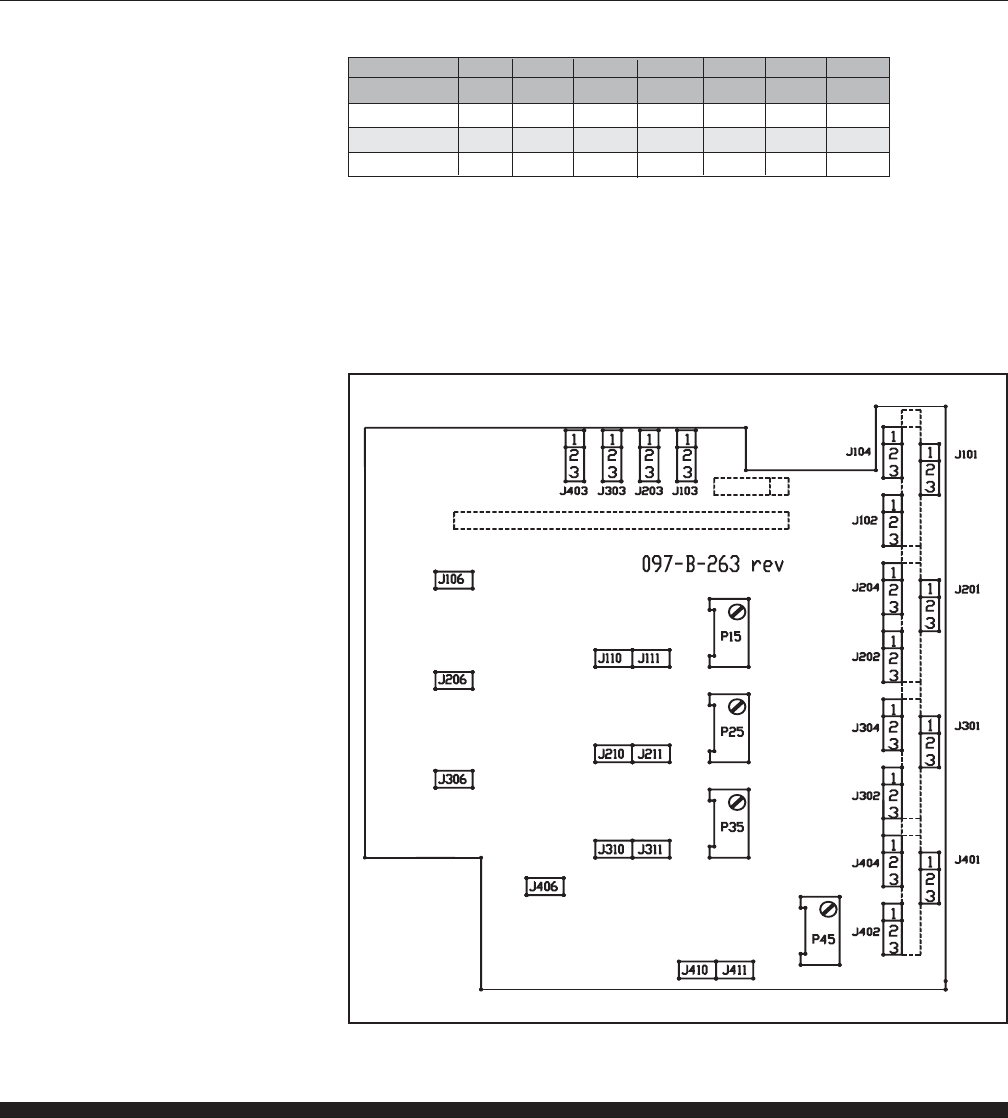
2-11 Jumper Settings and Functions
As a standard, the required I/O selections are done at the factory upon
ordering. When only 0-5 Vdc inputs and outputs are required, no optional
I/O board has to be installed. In this case the connectors between main
board and optional I/O board must be jumpered according to Table 2-5 and
Figure 2-2 below.
For use of input and output signals other than 0-5 Vdc ( 0-10 Vdc, 0-20 mA
and 4-20 mA), the optional I/O board has to be installed. This 4 channel
optional I/O board is mounted on top of the mainboard of the readout. Each
channel of the converter consists of a separate input (flow or pressure) and
output (setpoint) converter. The range can be configured separately for
each channel by means of jumpers. No additional adjustment of
potentiometers is necessary.
The microprocessor board uses 0-5 Vdc signals internally. As a result Flow
or Pressure inputs other than 0-5 Vdc are first converted by the optional
I/O board from either 0-10 Vdc, 0-20 mA or 4-20 mA to 0-5 Vdc. Setpoints
to be generated by the readout are converted by the optional
I/O board from 0-5 Vdc to either 0-10 Vdc, 0-20 mA or 4-20 mA.
NOTE: Care has to be taken when using mA I/O. Flow and setpoint grounds of the
instrument are high impedance to eliminate voltage drop across long lines
for Volt I/O. The high impedance ground lines are not designed for sinking
mA signals. Sinking mA signals will result in faulty flow information.
Always connect the mA ground lines to power ground and connect the
readout’s high impedance ground lines to the same power ground as well.
When Brooks Mass Flow Controllers and Meters are connected, this is
automatically done at the controller or meter side.
Table 2-5 Jumper Settings for 0-5 Vdc I/O
Connector Jumper positon
J4 No jumpers necessary
J5 1-2,3-4,5-6,7-8
J6-J9 1-2,3-4,5-6
Figure 2-2 Main Board: Jumper and Potmeter Locations
2-8
Brooks® Models 0152/0154
Section 2 Installation Installation and Operation Manual
X-SE-0152-0154-eng
Part Number: 541C052AAG
March, 2008
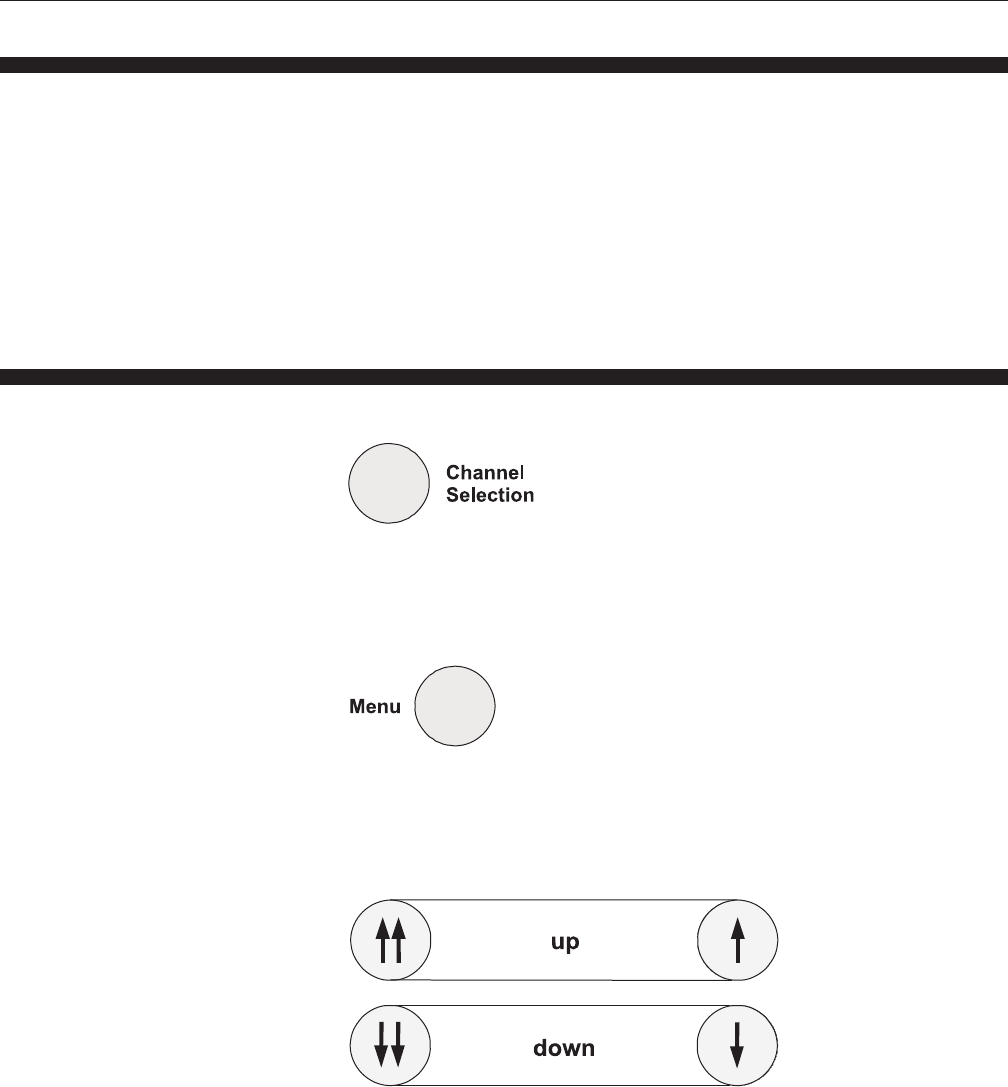
Input Jx012) Jx022) Jx032) Jx042) Jx06 Jx102) Jx112)
Output
0-5 Vdc 1-2 1-2 1-2 1-2 off on off
0-10 Vdc 1-2 1-2 1-2 1-2 on on on
4(0)-20 mA3) 2-3 2-3 2-3 off off off
Table 2-6 Jumper Settings (Optional I/O Board Installed1)
Note: The selection between 0-20 mA or 4-20 mA can be done via the menu function
1) Jumpers J4-J9 have to be removed before installing the optional I/O board
2) X denotes the channel number to which the jumper relates, eg for channel 1: X=1
3) For i series: 2-3
For Flomega and pressure series 1-2
For digital series 1-2 or 2-3 (don’t care)
Figure 2-3 Optional I/O Board: Jumper Locations
2-12 Adjustments of LCD Contrast and 5 V Reference
The contrast of the Liquid Crystal Display can be adjusted by turning
potmeter R26 on the Mainboard.
The setpoint outputs of the readout use a 5Vdc reference. The reference
voltage can be checked by measuring between testpin 1 and 2 (TP1 and
TP2). The reference voltage must be 5.000 ± 0.001 Vdc and can be
adjusted by turning potmeter R29 on the Mainboard.
3-1
Brooks® Models 0152/0154
Section 3 Operation
Installation and Operation Manual
X-SE-0152-0154-eng
Part Number: 541C052AAG
March, 2008
3-1 General
The read-out function of the Models 0152 and 0154 and the controlling of
the Mass Flow Controllers / Meters are designed for fast and easy usage.
Basically, the flow output signals are shown on the display in percentage or
in your own engineering units (full scale value and flow parameters can be
adjusted per channel).
Changing a value via the push buttons always has to be confirmed by the
“Enter” key. If the confirmation takes too long after a change of any setting,
the display will return automatically to its flow read-out function. The only
exception to this rule are adjustments in the menu.
3-2 Description of the Keys
Channel Selection
This key allows you to select the active channel for any changes, like
setpoint, blending, remote control or valve control.
Menu
With this key you enter into the menu mode.
Up / Down
In normal operation, the setpoint value can be changed. In menu mode,
different selections can be chosen and in blending mode, the master
channel can be selected with these keys. Fast scrolling through the menus
can be done with the double arrow keys. Slow scrolling can be done with
the single arrow keys.
3-2
Brooks® Models 0152/0154
Section 3 Operation Installation and Operation Manual
X-SE-0152-0154-eng
Part Number: 541C052AAG
March, 2008
Enter
Confirmation key for confirmation of all changed settings. For example
confirmation of selected setpoint value, master channel (blending), remote
or local, valve function (valve control), certain menu selections, display
layout or engineering unit.
Blending
Selects master channel in relation to the setpoint value.
Valve
Selects master channel in relation to the setpoint value.
Control
Select local or remote control function
3-3
Brooks® Models 0152/0154
Section 3 Operation
Installation and Operation Manual
X-SE-0152-0154-eng
Part Number: 541C052AAG
March, 2008
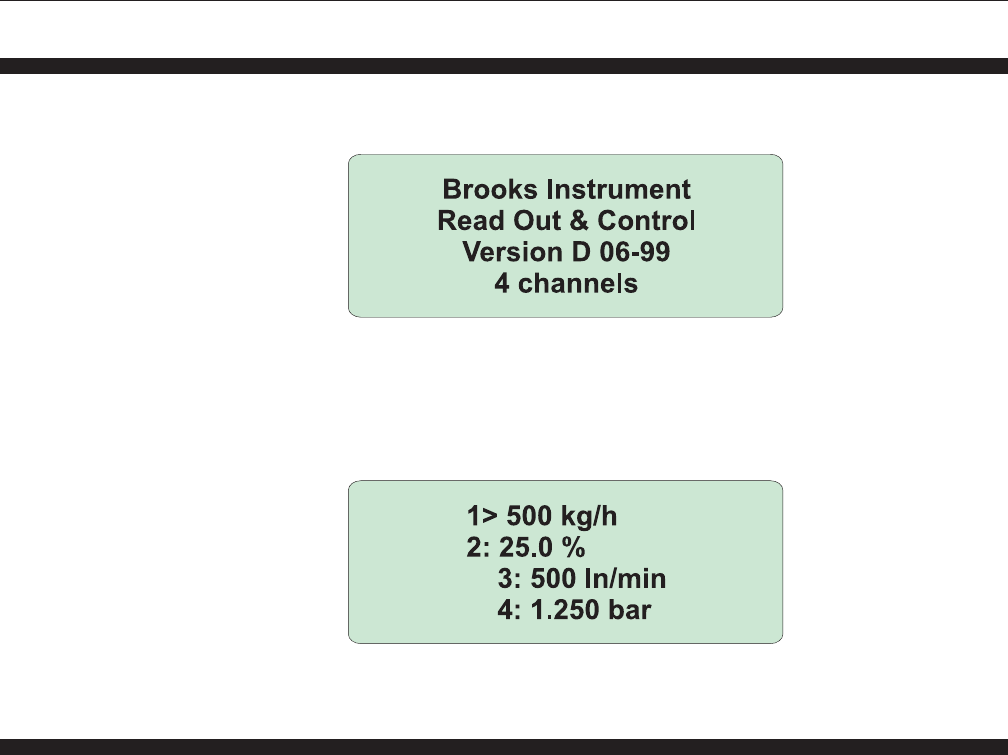
3-3 Start-Up Screens
After power up, first the software version screen is displayed.
This screen gives information about the software version currently
installed. After a few seconds this screen is replaced by the flow
information screen.
3-4 Changing the Active Channel
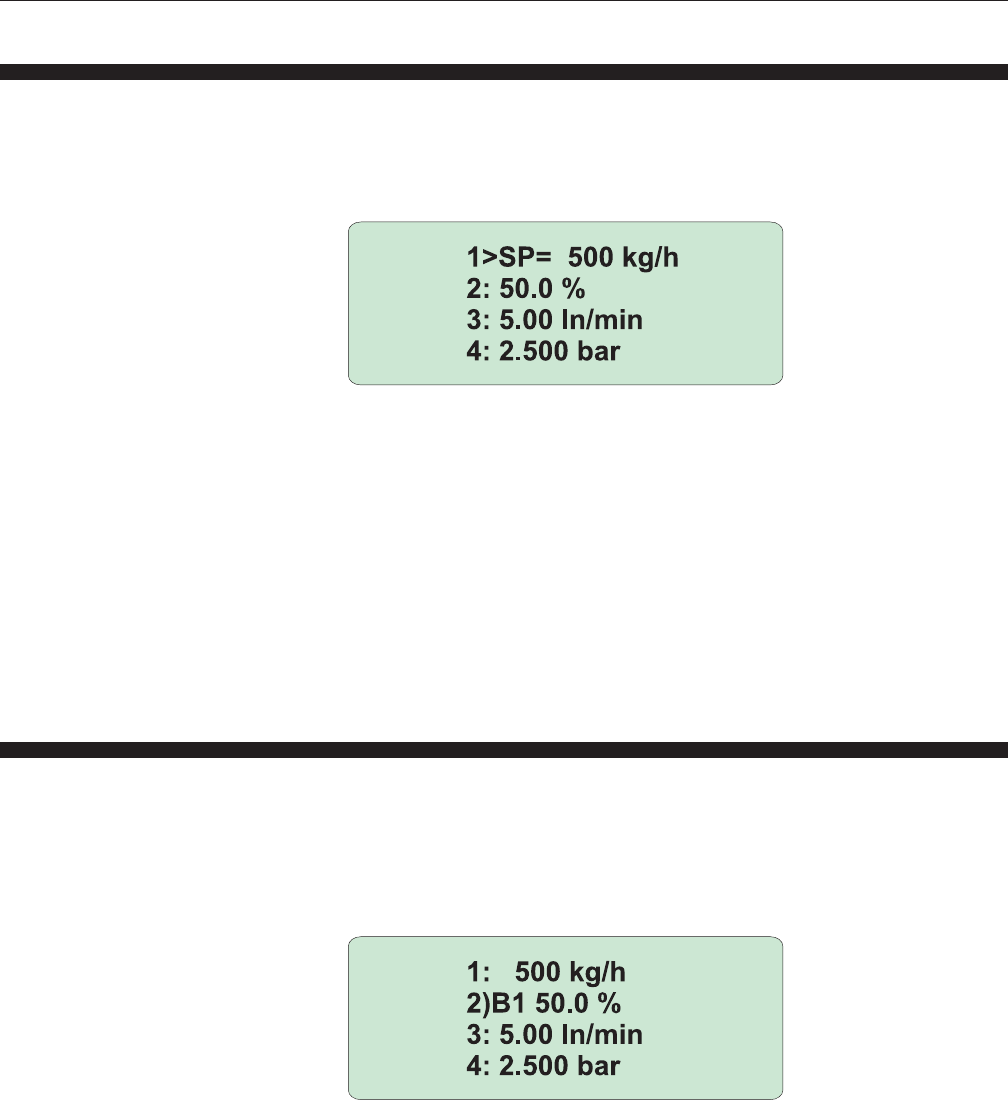
On the display the flow information of the different channels is displayed.
After power-up channel 1 is always active. This is indicated on the display
by an “>” character after the channnel number instead of an “:” character.
All changes made via the different pushbuttons, except the Menu button,
will adjust the settings on channel 1. If the settings of another channel must
be changed, press “Channel Selection” and the next channel will become
active. Repeat this until the right channel is selected. This channel remains
active until “Channel Selection” is pressed again.
3-4
Brooks® Models 0152/0154
Section 3 Operation Installation and Operation Manual
X-SE-0152-0154-eng
Part Number: 541C052AAG
March, 2008
3-5 Changing the Setpoint Value
If the setpoint value of a certain channel has to be changed, this channel
has to be selected by the channel selection key first. After pushing one of
the up and down keys, the display read-out of that channel changes from
flow reading to the setpoint value.
If no other key is pressed within approximately 5 seconds, the display read-
out falls back into flow reading (no changes are made). If one of the up or
down keys is pressed several times, or held for a longer time, the setpoint
value changes. This change of setpoint value will be activated after
pressing the “Enter” key. The new setpoint will now be sent to the (liquid or
gas) MFC. The double arrow up / down keys change the setpoint in steps
of 2% of full scale. The single arrow up and down keys change the setpoint
in steps of 0.1% of full scale.
The setpoint after power up is determined in the “Setpoint at power up”
menu which is explained in Section 3-9.
3-6 Using the Blending Mode
In the blending mode, the setpoint of the blended channel depends on the
flow value of a master channel. All channels can be programmed to follow
any other (master) channel.
After pressing the blending key, a “B” appears on the display of the active
channel.
Behind the “B” a number is displayed. This number denotes the master
channel to which the current active channel will be related. A “0” denotes
that no blending on the current channel is required.
The “master” channel can be changed by using the up and down keys. If
the correct “master” has been selected, the “Enter” key must be pressed to
confirm this new situation. By doing this, the setting is memorized. When
the system is powered up again, the memorized blending configuration will
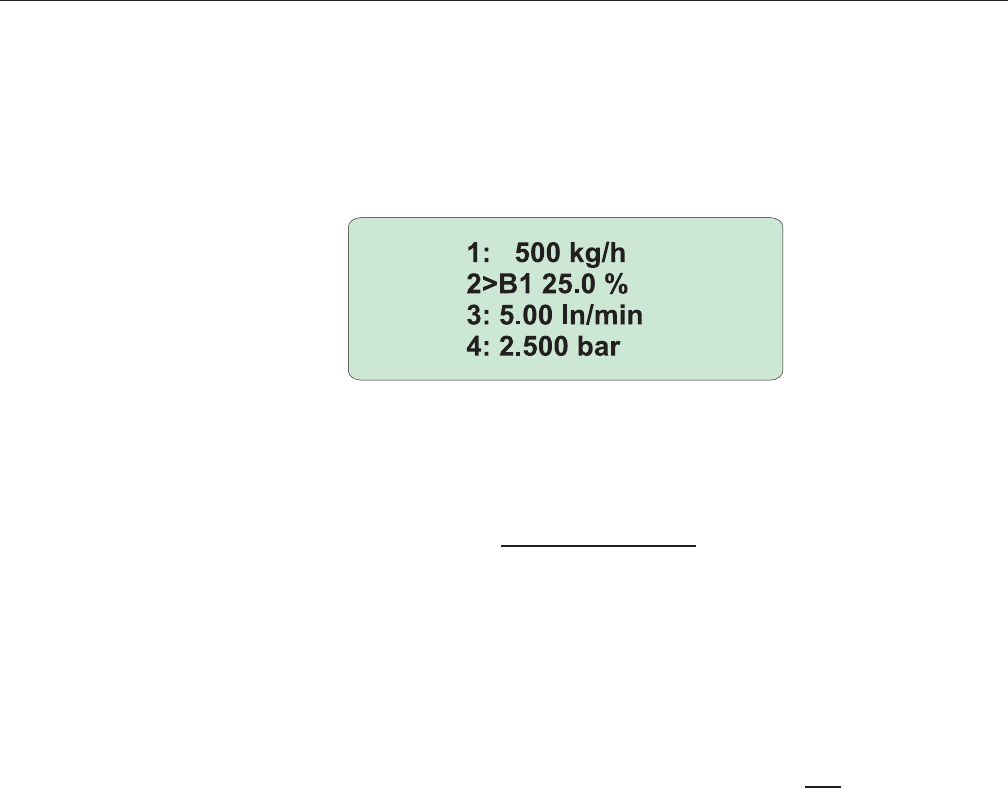
3-5
Brooks® Models 0152/0154
Section 3 Operation
Installation and Operation Manual
X-SE-0152-0154-eng
Part Number: 541C052AAG
March, 2008
be active. All setpoints of the slave channel(s) remain as before power
down, except the setpoint of the master channel(s). The
setpoint of the master channel is determined in the “Start-up preferrence”
menu which is explained in 3.9.6.
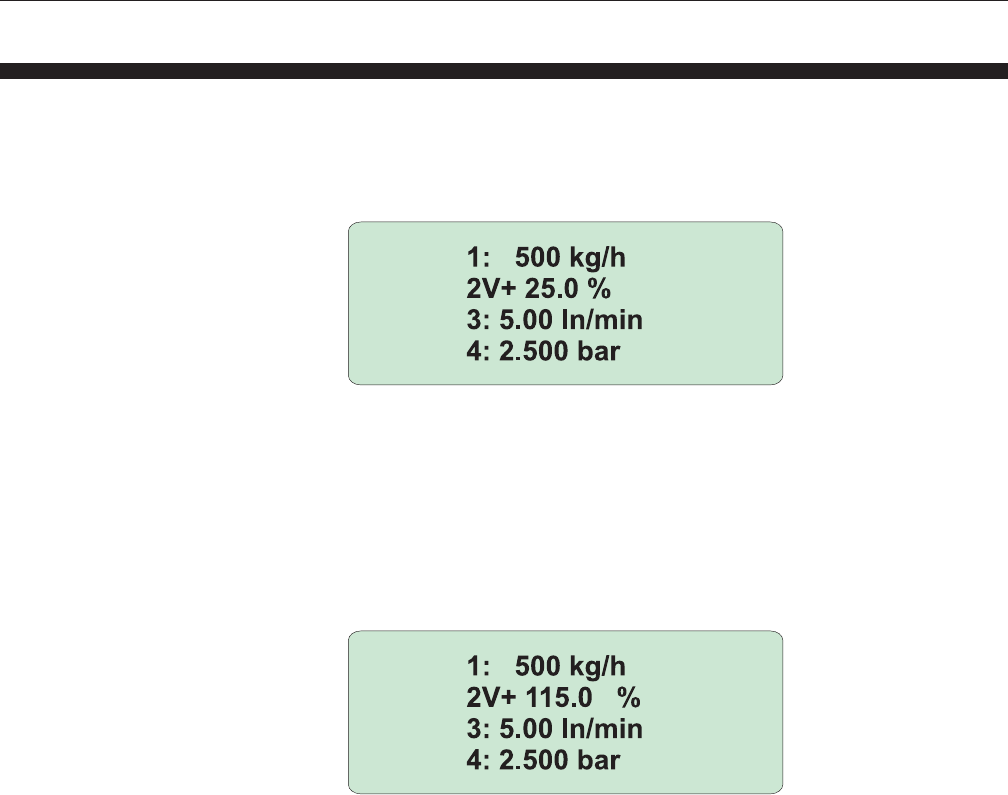
After confirmation of the required blending configuration, the following is
displayed on the screen:
The slave channels are controlled by the flow of the master channel
determined by the blending ratio. The blending ratio is determined as:
Flow (or pressure) slave
Blending ratio =
Flow (or pressure) master
The blending ratio cannot be entered directly , but must be entered via the
setpoint at the slave channel. The setpoint to be entered is as follows:
Setpoint slave = Blending ratio x Full Scale Value master
NOTE:
The flow of the slave channel is determined by the flow of the master
channel and therefore the setpoint value of the slave may not correspond
with the current flow or pressure at the slave channel. In Blending mode, the
slave setpoint is only used for entering the blending ratio
Please note that the choice of the instruments is important to give proper
blending. Always choose instruments with Full Scale Values that meet the
blending ratio as close as possible. For eg. blending ratio 1:10 choose eg.
10 l/min and 1 l/min instruments in order to use the maximum possible
accuracy of the connected instruments.
Also take care that the Full Scale Value of the slave is suitable for the Full
Scale Value of the master. For a 10 l /min master and a blending ratio of 5,
the slave channel must have a full scale value of at least 2 l/min.
If planning to use blending mode with engineering units rather than % full
scale, 1-5 Vdc or 4-20 mA I/O cannot be used.
After confirmation of B0, the blending function will be disabled.
For blending examples see Appendix B.
3-6
Brooks® Models 0152/0154
Section 3 Operation Installation and Operation Manual
X-SE-0152-0154-eng
Part Number: 541C052AAG
March, 2008
3-7 Using the Valve Control Function
With the Valve Control function or Valve Override function, the valve of the
connected Mass Flow Controller can be opened, to purge the system, or
closed, to shut off the system, independent of the setpoint value. After
pushing the “Valve Control” key a “V” appears on the display of the active
channel.
After this “V” one of the following characters (+, - or 0 ) is displayed to
indicate the possible functions. By pressing the “Valve Control” key again
the other characters are shown.
V0 = Valve Override disabled (Control mode)
V+ = Valve Override open
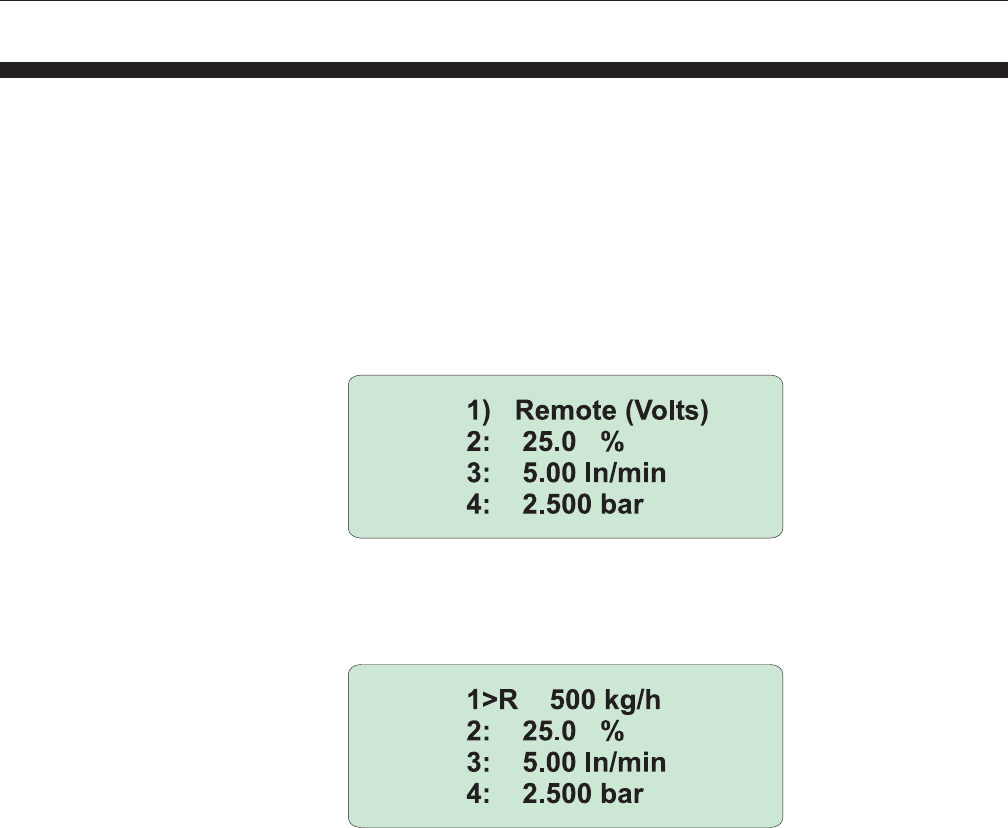
V- = Valve Override close
After confirmation with “Enter” the following is displayed:
V+ opens the valve to purge the system. V- closes the valve and shuts off
the flow. After confirmation of V0, the Valve Override function will be
disabled and the valve is again controlled by the Mass Flow or Pressure
Controller itself.
The setting of the Valve Override function is memorized. After power up the
memorized Valve Override function is active again.
The external Valve Control function can be used for overruling the internal
0152/0154 Valve Control funtion ( Valve Override open and close). Each
channel can be controlled seperately. Valve Override open of the different
channels can be activated externally by connecting one of the valve control
inputs to resp. the +15dc or +24Vdc ( depending on the model resp. ±15V
or +24V). Valve override close can be activated by connecting one of the
Valve Control inputs to the -15V or gnd ( also model dependant) pins of
the connector.
3-7
Brooks® Models 0152/0154
Section 3 Operation
Installation and Operation Manual
X-SE-0152-0154-eng
Part Number: 541C052AAG
March, 2008
3-8 Using the Remote Function
Every channel of the of the 0152/0154 can be placed in “remote” control.
This means that the flow and setpoint signals can be read and controlled at
remote distance e.g. in a control room. The local setpoint can be changed
but does not have any impact on the connected controller as long as the
controller is “Remote” controlled. When using Volt I/O it is possible to view
the flowrate at the display during remote control. When using mA I/O, this
is not possible.
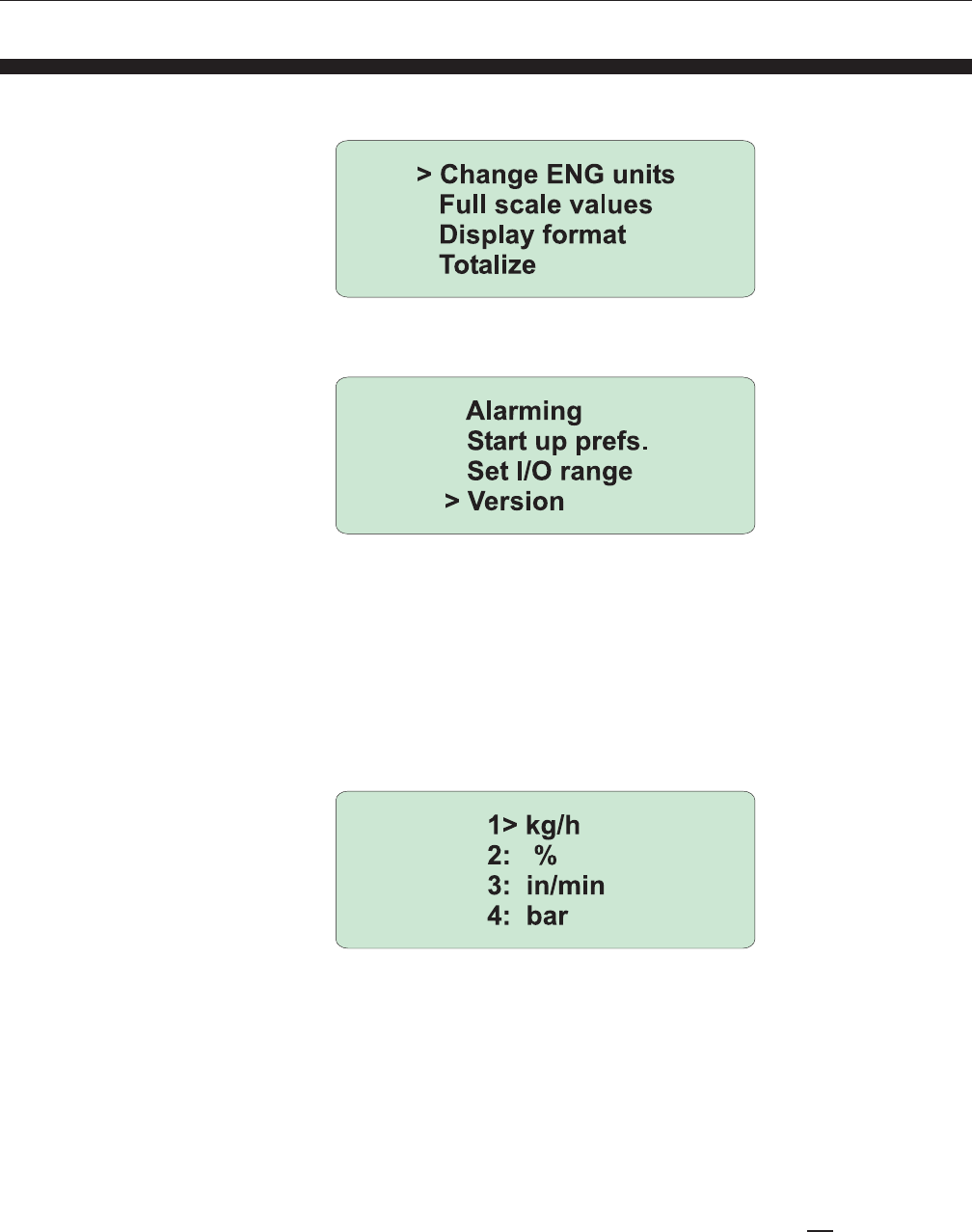
The remote function will be activated by pushing the remote button, When
activated, the display shows “Remote(Volts)” or “Remote (mA)” depending
on the type of I/O.
The flowrate can be shown after confirmation with “Enter”.
The “R” on the display shows that the channel is in “Remote control”.
When using mA I/O the display shows “Remote” only without flow
information. Switching back to local mode again can be done by selecting
“remote (off)” and hitting “Enter”. The channel goes into local control mode
again.
3-8
Brooks® Models 0152/0154
Section 3 Operation Installation and Operation Manual
X-SE-0152-0154-eng
Part Number: 541C052AAG
March, 2008
3-9 Menu
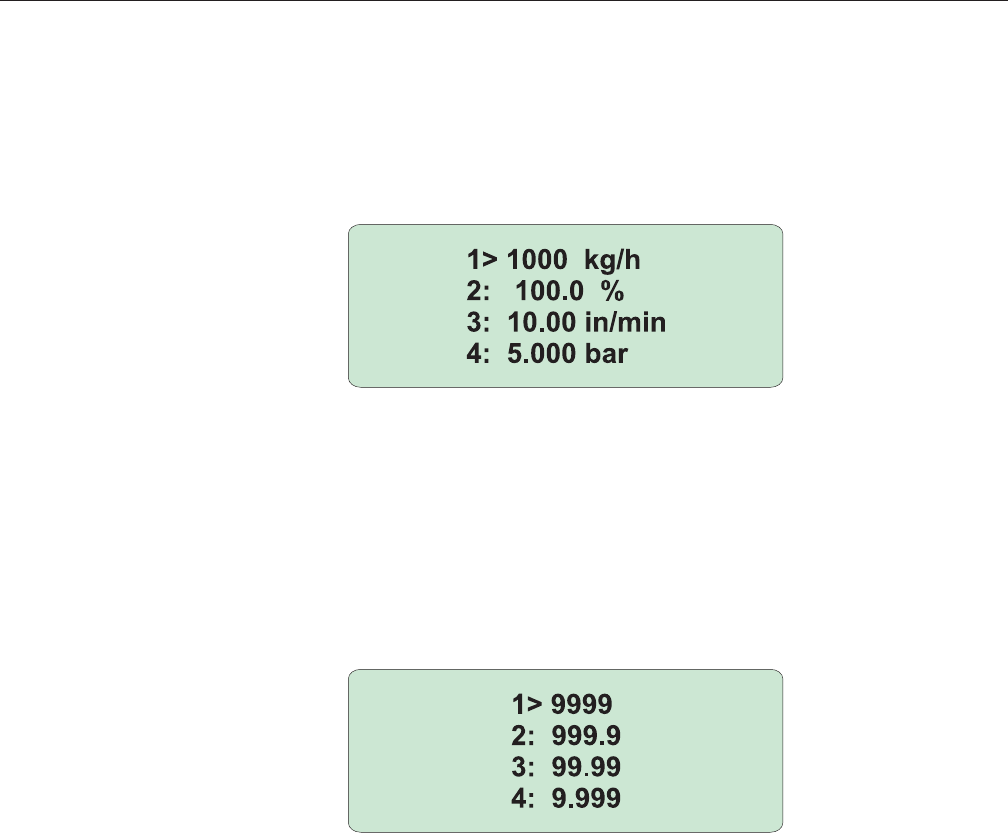
Pressing the Menu key will result in the menu screen on which the
following menu selections can be activated:
The remaining menu selections can be shown by scrolling through the
screen with the up and down keys:
The menu selection will be activated after confirmation with the Enter key.
Changing the Engineering Units
As a default setting, setpoint and flow are presented in % of full scale. In
case other engineering units than % are necessary, over 50 different
engineering units, also including pressure units, are available to represent
the setpoint or flow. All available engineering units are given in Appendix A.
After activation of “Change Eng Units” the following screen is displayed:
The engineering units per channel are displayed. Changing the
engineering unit of the active channel can be done by using the up and
down keys. For each channel a different engineering unit can be selected.
Changing the engineering units of the other channels can be done by
activating the different channels with the “Channel selection” key and again
the up and down keys
When the engineering units for all channels are set, confirmation will be
done by pressing the “Enter” key. After this, the Flow information screen is
displayed again with the updated engineering units.
NOTE:
The Engineering unit is only a text replacement for “ %”. NO calculation is
done when changing between different engineering units.
3-9
Brooks® Models 0152/0154
Section 3 Operation
Installation and Operation Manual
X-SE-0152-0154-eng
Part Number: 541C052AAG
March, 2008
Full Scale Values
The Full Scale Flow range is always 100.0 in case of using the default “%”
as engineering unit. The Full Scale Value can not be changed in this case.
When using any other engineering unit, the full scale flow range can be
changed. This can be done via the menu selection “Full Scale Values”
resulting in the following screen:
It is possible to enter a full scale value from 0.000 minimum to 99999.999
as a maximum.
Display Format
As shown in the Full Scale Value screen, it is possible to change the
amount of decimal places on the display. This can be done in the menu
selection “Display format”. When activated the following screen appears:
By using the up and down key the amount of decimal places can be
changed from zero decimal places to a maximum of three decimal places.
Using “channel selection” the other channels can be changed. After a
confirmation of the changes with “Enter”, the display returns to the flow
information screen using the updated display format.
NOTE:
The accuracy of the Read-out & Control Electronics is 0.1% of max. flow
value. For example if a full scale value of 950 is entered, it is not useful to
have a decimal place.

3-10
Brooks® Models 0152/0154
Section 3 Operation Installation and Operation Manual
X-SE-0152-0154-eng
Part Number: 541C052AAG
March, 2008
Totalizer Function and Display
The totalizer display can be accessed by selecting “Totalizing” in the Menu
(press the Menu button and use the up and down buttons to select).
Pressing the Menu button again will close the totalizer display.
The totalizer screen looks as follows:
When the totalizer display activated, the following settings can be
chosen:
(use the up and down buttons for selecting the display line “>”)
Button: Function:
@ line 1 press Enter for Channel select key (channel 1 to 4).
@ line 2 press Enter for Change totalizer status from “Disabled” into
“Running” or vice versa.
@ line 3 press Enter for Reset counter value (totalizer must be
in “Disabled” mode).
@ line 4 press Enter for This line displays the selected engineering unit.
When the text “Wrong ENG settings” is
displayed, the engineering unit selected is not
correct (the totalizer function needs a time
related engineering unit). In this case the Enter
button can be used to change the change
engineering unit to a time related unit
Menu: Leave the totalizer display function.
If totalizer is active (running mode) this is noticed on the standard display
mode by a “t” behind the channel number (example for channel 1: display
reads “1:t” or “1>t”).
Pressing the Enter button will activate the totalizer display, when a channel
indicates the “t” and this line is selected (indicated by “>”).
Max. Value
The totalizer value of the first line normally uses 7 positions and 5 positions
for the used engineering unit. If the totalizer value has more than 7
positions it uses up to max. 10 positions. The engineering unit is simply
shifted outside the range of the display.
The absolute maximum totalizer value is 4.000.000.000
(displayed without the dots). If the max. Value is exceeded the
totalizer will reset to 0 and continues counting from zero again.
No alarm will be generated.
Engineering Time Units
The totalizer can only be started when the engineering units are per
seconds, per minute or per hour. In minutes the totalizer counter runs 60x
faster in case of minutes versus hours and 3600x faster in case of
seconds versus hours. Assuming the full-scale value is identical.

3-11
Brooks® Models 0152/0154
Section 3 Operation
Installation and Operation Manual
X-SE-0152-0154-eng
Part Number: 541C052AAG
March, 2008
Alarms Function and Display
The alarm display can be accessed by selecting ‘Alarming’ in the Menu
(press the Menu button and use the up and down buttons to select).
Pressing the Menu button again will close the totalizer display.
The alarm screen looks as follows (example for High flow alarm 95%, Low
flow alarm 5% and setpoint deviation alarm 2%):
The alarm function has three different alarm modes per channel: absolute
maximum, absolute minimum and deviation alarm versus setpoint.
Adjusting one of these alarms is done in three steps. Step 1: select the line
of the alarm by using the up and down buttons. Step 2: press ‘Enter’ and
select alarm ‘ON’ or ‘OFF’ by using the up and down buttons, confirm the
by pressing ‘Enter’ again. Step 3: adjust the alarm value, if necessary, and
press ‘Enter’ to confirm this setting and to go back in the Menu itself.
If two channels are displaying an alarm the flashing message of these
channels goes synchronically.
Start-Up Preference
The setpoint values after power up are determined in the menu “Start-up
prefs”.
This can be done per channel independantly. It is possible to start with the
memorized setpoint values ( the setpoint that was used before power
down) or always power up with a zero setpoint.
Default factory settings are “preset to zero after power up”.
3-12
Brooks® Models 0152/0154
Section 3 Operation Installation and Operation Manual
X-SE-0152-0154-eng
Part Number: 541C052AAG
March, 2008
Set I/O Range and Range Selection Display
The range selection display can be accessed by selecting ‘Set mA/Volts’ in
the Menu (press the Menu button and use the up and down buttons to
select). Pressing the Menu button again will close the range selection
display.
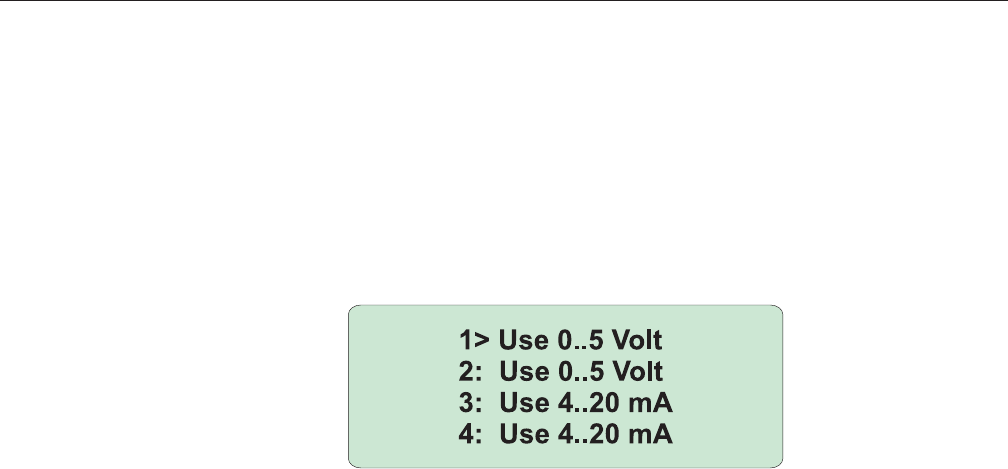
The range selection screen looks as follows (example: channel 1 and 2 are
selected for 0 - 5 volts or 0 – 20 mA*, channel 3 and 4 are selected for 1 -
5 Volts or 4 – 20 mA*):
Input / Output range selection
In this software version change the Input/Output is selectable for a range
of 0-5V (0-20mA) or 1-5V (4-20mA) reflecting the 0-100% range.
The range selection can be:
a) 0 – 5 or 1 – 5 Volt if Voltage I/O is required.
b) 0 – 20 or 4 – 20 mA if Current I/O is required*.
* When a mA (current) I/O is required, the optional I/O board needs to be
installed.
Software Version
The software version can also be shown in normal operation. This can be
done in the menu selection “Version”. After confirmation with the Enter
key the “Version” screen is diplayed again.
4-1
Brooks® Models 0152/0154
Section 4 Operation
(Via Personal Computer)
Installation and Operation Manual
X-SE-0152-0154-eng
Part Number: 541C052AAG
March, 2008
4-1 Operation (Via Personal Computer)
Via the new RS-232 connection on Model 0152/0154 it is possible to
control analogue devices (i.e. 5800S*, E and i series, TR Model , 5866
pressure controller and Flomega) with a Personal Computer (PC).
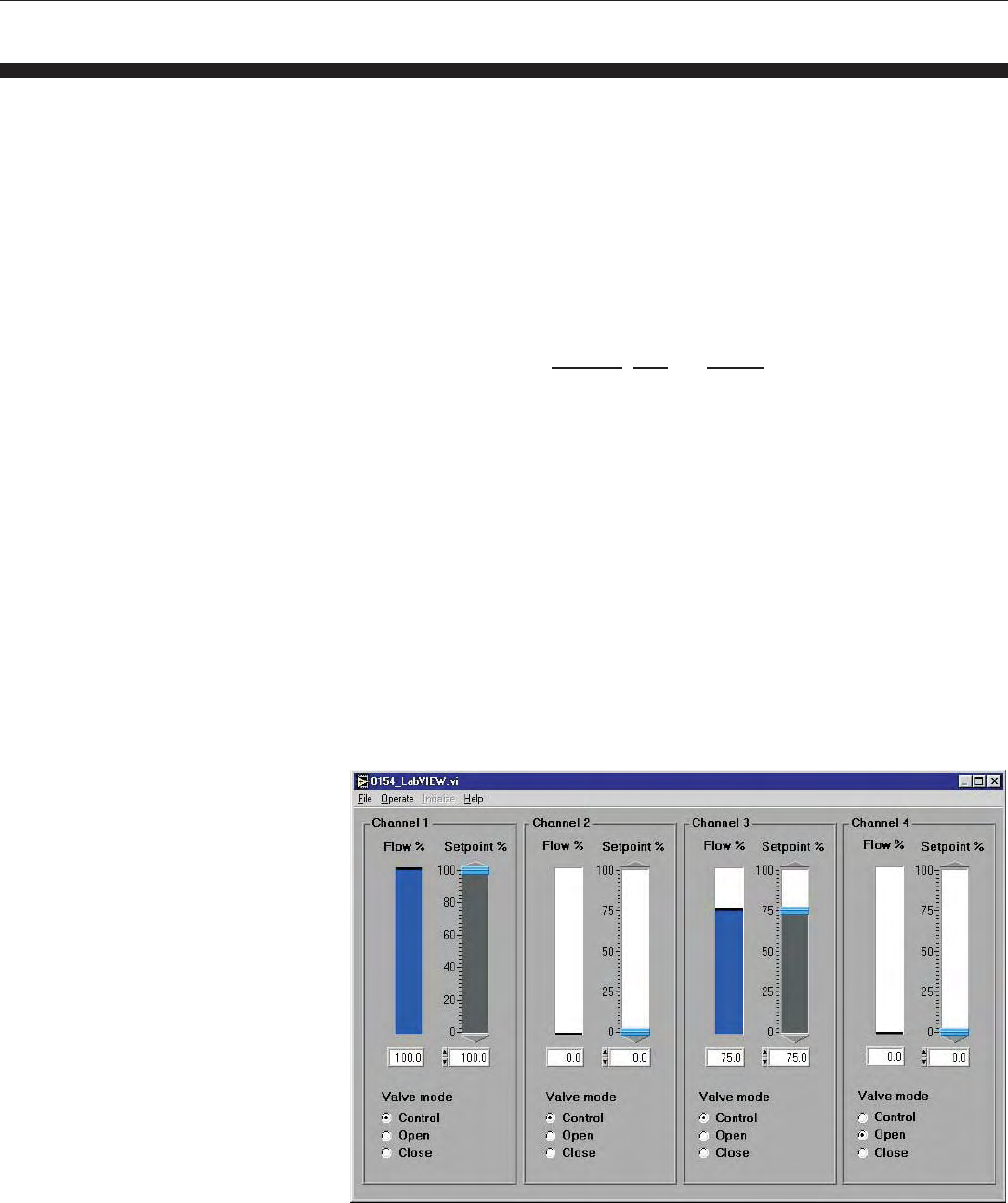
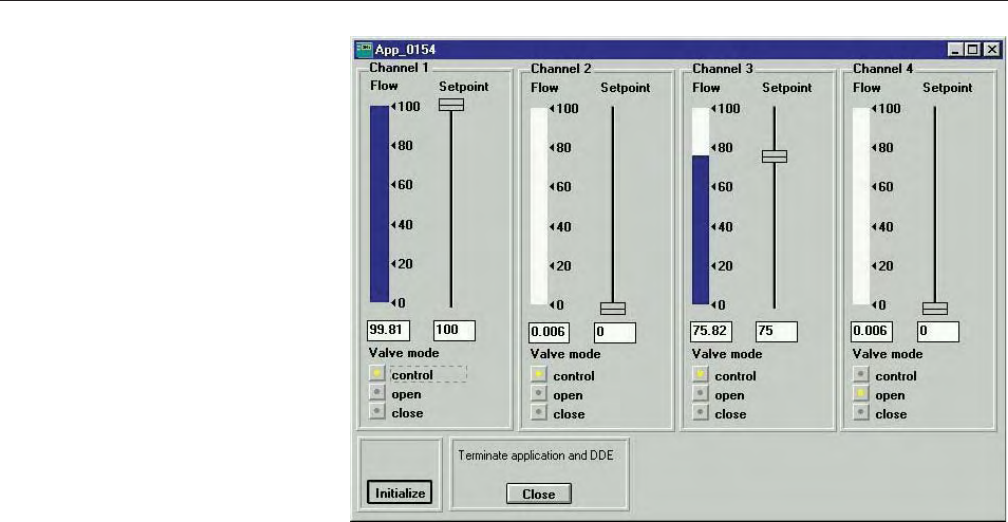
Brooks has developed two executable software applications (Available is a
TestPoint and LabView version, see Figures 11 and 12) for communication
between Model 0152/0154 and a PC. For the LabView it is required to have
a registered copy of LabView (the supplied file is a .LLB format)
Both application versions handle the full capacity to control the connected
devices. The available parameters to be used for controlling the
connected devices are setpoint, flow and V.O.R..
For operation of the application software it is required to have the Brooks
Smart DDE software (version 1.1 or higher) running on the P.C.)
Version 1.1 of Smart DDE can operate without the software protection key
(dongle) when Interfacing with Model 0152/0154.
Note: Direct communication between The Brooks 58xx S-series and PC
via Smart DDE requires the dongle.
Brooks Smart DDE software can be helpful for users that want to design a
customised software application in conjunction with Model 0152/0154. In
this case the application software must be able to handle DDE (Dynamic
Data Exchange).
(*S series selected for analog I/O).
Figure 4-1 Labview
4-2
Brooks® Models 0152/0154
Section 4 Operation
(Via Personal Computer) Installation and Operation Manual
X-SE-0152-0154-eng
Part Number: 541C052AAG
March, 2008
Figure 4-2 Testpoint

A-1
Brooks® Models 0152/0154
Appendix A Engineering Units
Installation and Operation Manual
X-SE-0152-0154-eng
Part Number: 541C052AAG
March, 2008
A-1 Available Engineering Units
ml/s
ml/min
ml/h
mls/s
mls/min
mls/h
mln/s
mln/min
mln/hl/s
l/min
l/h
ls/s
ls/min
ls/h
ln/s
ln/min
ln/h
cm^3/s
cm^3/min
cm^3/h
cm^3s/s
cm^3s/min
cm^3s/h
cm^3n/s
cm^3n/min
cm^3n/h
m^3/s
m^3/min
m^3/h
m^3s/s
m^3s/min
m^3s/h
m^3n/s
m^3n/min
m^3n/h
Note: “. ^3” means cubic “ .3 “
g/min
g/h
lb/s
lb/min
lb/h
kg/s
kg/min\
kg/h
ft^3/s
ft^3/min
ft^3/h
ft^3s/s
ft^3s/min
ft^3s/h
ft^3n/s
ft^3n/min
ft^3n/h
SCCM
SLPM
bar
mbar
psi
kPa
Torr
atm
Volt
mA

A-2
Brooks® Models 0152/0154
Appendix A Engineering Units Installation and Operation Manual
X-SE-0152-0154-eng
Part Number: 541C052AAG
March, 2008
THIS PAGE WAS
INTENTIONALLY
LEFT BLANK

B-1
Brooks® Models 0152/0154
Appendix B Blending Examples
Installation and Operation Manual
X-SE-0152-0154-eng
Part Number: 541C052AAG
March, 2008
B-1 Blending Examples
Example 4:
Master channel flow is 100%
Slave channel flow has to be 50%
Mass flow controller selections are :
Master channel unit: 6 l/min = 100% Full Scale
Slave channel unit: 4 l/min = 100% Full Scale
Determination of entered setpoint:
50 %
Blending ratio is = = 0.5
100 %
Setpoint slave = 0.5 x 100% = 50%
Example 5:
Master channel flow is 80%
Slave channel flow has to be 20 kg/hr
Mass flow controller selections are :
Master channel unit: 100 kg/hr =100% Full Scale
Slave channel unit: 50kg/hr = Full Scale Value
Determination of entered setpoint:
20 kg/h kg/h
Blending ratio is = = 0.25
80% %
kg/h
Setpoint slave = 0.25 x 100% = 25 kg/h
%
Example 6:
Master channel pressure is 10 bar
Slave channel flow has to be 50%
Mass flow controller selections are :
Master channel unit: 15 bar = Full Scale Value
Slave channel unit: 20 l/min = 100% Full Scale
Determination of entered setpoint:
50% %
Blending ratio is = = 5
10 bar bar
%
Setpoint slave = 5 x 15 bar = 75%
bar
Example 1:
Master channel flow is 80 l/min
Slave channel flow has to be 0.8 l/min
Mass flow controller selecions are :
Master channel unit: 100 l/min = Full Scale Value
Slave channel unit: 10 l/min = Full Scale Value
Determination of entered setpoint:
0.8 l/min
Blending ratio is = = 0.01
80 l/min
Setpoint slave = 0.01 x 100 l/min = 1 l/min
Example 2:
Master channel flow is 240 l/min
Slave channel flow has to be 40 l/min
Mass flow controller selections are :
Master channel unit: 300 l/min = Full Scale Value
Slave channel unit: 50 l/min = Full Scale Value
Determination of entered setpoint:
40 l/min
Blending ratio is = = 0.167
240 l/min
Setpoint slave = 0.167 x 300 l/min = 50 l/min
Example 3:
Master channel pressure is 1 bar
Slave channel flow has to be 50 l/min
Mass flow and pressure controller selections are :
Master channel unit: 2 bar = Full Scale Value
Slave channel unit: 100 l/min = Full Scale Value
Determination of entered setpoint:
50 l/min l/min
Blending ratio is = = 50
1 bar bar
l/min
Setpoint slave = 50 x 2 bar = 100 l/min
bar

B-2
Brooks® Models 0152/0154
Appendix B Blending Examples Installation and Operation Manual
X-SE-0152-0154-eng
Part Number: 541C052AAG
March, 2008
THIS PAGE WAS
INTENTIONALLY
LEFT BLANK

C-1
Brooks® Models 0152/0154
Appendix C CE Certification
Installation and Operation Manual
X-SE-0152-0154-eng
Part Number: 541C052AAG
March, 2008
Dansk
Brooks Instrument
407 West Vine St.
Hatfield, PA 19440
U.S.A.
Emne : Tillæg til instruktions manual.
Reference : CE mærkning af Masse Flow udstyr
Dato : Januar-1996.
Brooks Instrument har gennemført CE mærkning af elektronisk udstyr med succes, i henhold til regulativet om
elektrisk støj (EMC direktivet 89/336/EEC).
Der skal dog gøres opmærksom på benyttelsen af signalkabler i forbindelse med CE mærkede udstyr.
Kvaliteten af signal kabler og stik:
Brooks lever kabler af høj kvalitet, der imødekommer specifikationerne til CE mærkning.
Hvis der anvendes andre kabel typer skal der benyttes et skærmet kabel med hel skærm med 100% dækning.
Forbindelses stikket type “D” eller “cirkulære”, skal være skærmet med metalhus og eventuelle PG-forskruninger
skal enten være af metal eller metal skærmet.
Skærmen skal forbindes, i begge ender, til stikkets metalhus eller PG-forskruningen og have forbindelse over 360
grader.
Skærmen bør være forbundet til jord.
“Card Edge” stik er standard ikke af metal, der skal derfor ligeledes benyttes et skærmet kabel med hel skærm
med 100% dækning.
Skærmen bør være forbundet til jord.
Forbindelse af stikket; venligst referer til vedlagte instruktions manual.
Med venlig hilsen,
Deutsch
Brooks Instrument
407 West Vine St.
Hatfield, PA 19440
U.S.A.
Subject : Nachtrag zur Bedienungsanleitung.
Referenz : CE Zertifizierung für Massedurchflußgeräte
Datum : Januar-1996.
Nach erfolgreichen Tests enstprechend den Vorschiften der Elektromagnetischen Verträglichkeit (EMC Richtlinie
89/336/EEC) erhalten die Brooks-Geräte (elektrische/elektronische Komponenten) das CE-Zeichen.
Bei der Auswahl der Verbindungskabel für CE-zertifizierte Geräte sind spezielle Anforderungen zu beachten.
Qualität der Verbindungskabel, Anschlußstecker und der Kabeldurchführungen
Die hochwertigen Qualitätskabel von Brooks entsprechen der Spezifikation der CE-Zertifizierung.
Bei Verwendung eigener Verbindungskabel sollten Sie darauf achten, daß eine
100 %igenSchirmababdeckung des Kabels gewährleistet ist.
•“D” oder “Rund” -Verbindungsstecker sollten eine Abschirmung aus Metall besitzen.
Wenn möglich, sollten Kabeldurchführungen mit Anschlußmöglichkeiten für die Kabelabschrimung verwendet
werden.
Die Abschirmung des Kabels ist auf beiden Seiten des Steckers oder der Kabeldurchführungen über den vollen
Umfang von 360 ° anzuschließen.
Die Abschirmung ist mit dem Erdpotential zu verbinden.
Platinen-Steckverbindunger sind standardmäßige keine metallgeschirmten Verbindungen. Um die Anforderungen
der CE-Zertifizierung zu erfüllen, sind Kabel mit einer 100 %igen Schirmababdeckung zu verwenden.
Die Abschirmung ist mit dem Erdpotential zu verbinden.
Die Belegung der Anschlußpins können Sie dem beigelegten Bedienungshandbuch entnehmen.

C-2
Brooks® Models 0152/0154
Appendix C CE Certification Installation and Operation Manual
X-SE-0152-0154-eng
Part Number: 541C052AAG
March, 2008
English
Brooks Instrument
407 West Vine St.
Hatfield, PA 19440
U.S.A.
Subject : Addendum to the Instruction Manual.
Reference : CE certification of Mass Flow Equipment
Date : January-1996.
The Brooks (electric/electronic) equipment bearing the CE mark has been successfully tested to the regulations of
the Electro Magnetic Compatibility (EMC directive 89/336/EEC).
Special attention however is required when selecting the signal cable to be used with CE marked equipment.
Quality of the signal cable, cable glands and connectors:
Brooks supplies high quality cable(s) which meets the specifications for CE certification.
If you provide your own signal cable you should use a cable which is overall completely screened with a 100%
shield.
“D” or “Circular” type connectors used should be shielded with a metal shield. If applicable, metal cable glands
must be used providing cable screen clamping.
The cable screen should be connected to the metal shell or gland and shielded at both ends over 360 Degrees.
The shield should be terminated to a earth ground.
Card Edge Connectors are standard non-metallic. The cables used must be screened with 100% shield to comply
with CE certification.
The shield should be terminated to a earth ground.
For pin configuration : Please refer to the enclosed Instruction Manual.
Español
Brooks Instrument
407 West Vine St.
Hatfield, PA 19440
U.S.A.
Asunto : Addendum al Manual de Instrucciones.
Referencia : Certificación CE de los Equipos de Caudal Másico
Fecha : Enero-1996.
Los equipos de Brooks (eléctricos/electrónicos) en relación con la marca CE han pasado satisfactoriamente las
pruebas referentes a las regulaciones de Compatibilidad Electro magnética (EMC directiva 89/336/EEC).
Sin embargo se requiere una atención especial en el momento de seleccionar el cable de señal cuando se va a
utilizar un equipo con marca CE
Calidad del cable de señal, prensaestopas y conectores:
Brooks suministra cable(s) de alta calidad, que cumple las especificaciones de la certificación CE .
Si usted adquiere su propio cable de señal, debería usar un cable que esté completamente protegido en su
conjunto con un apantallamiento del 100%.
Cuando utilice conectores del tipo “D” ó “Circular” deberían estar protegidos con una pantalla metálica. Cuando
sea posible, se deberán utilizar prensaestopas metálicos provistos de abrazadera para la pantalla del cable.
La pantalla del cable deberá ser conectada al casquillo metálico ó prensa y protegida en ambos extremos
completamente en los 360 Grados.
La pantalla deberá conectarse a tierra.
Los conectores estandar de tipo tarjeta (Card Edge) no son metálicos, los cables utilizados deberán ser
protegidos con un apantallamiento del 100% para cumplir con la certificación CE.
La pantalla deberá conectarse a tierra.
Para ver la configuración de los pines: Por favor, consultar Manual de Instrucciones adjunto.
C-3
Brooks® Models 0152/0154
Appendix C CE Certification
Installation and Operation Manual
X-SE-0152-0154-eng
Part Number: 541C052AAG
March, 2008
Français
Brooks Instrument
407 West Vine St.
Hatfield, PA 19440
U.S.A.
Sujet : Annexe au Manuel d’Instructions.
Référence : Certification CE des Débitmètres Massiques à Effet Thermique.
Date : Janvier 1996.
Messieurs,
Les équipements Brooks (électriques/électroniques) portant le label CE ont été testés avec succès selon les
règles de la Compatibilité Electromagnétique (directive CEM 89/336/EEC).
Cependant, la plus grande attention doit être apportée en ce qui concerne la sélection du câble utilisé pour
véhiculer le signal d’un appareil portant le label CE.
Qualité du câble, des presse-étoupes et des connecteurs:
Brooks fournit des câbles de haute qualité répondant aux spécifications de la certification CE.
Si vous approvisionnez vous-même ce câble, vous devez utiliser un câble blindé à 100 %.
Les connecteurs « D » ou de type « circulaire » doivent être reliés à la terre.
Si des presse-étoupes sont nécessaires, ceux ci doivent être métalliques avec mise à la terre.
Le blindage doit être raccordé aux connecteurs métalliques ou aux presse-étoupes sur le pourtour complet du
câble, et à chacune de ses extrémités.
Tous les blindages doivent être reliés à la terre.
Les connecteurs de type « card edge » sont non métalliques. Les câbles utilisés doivent être blindés à 100% pour
satisfaire à la réglementation CE.
Tous les blindages doivent être reliés à la terre.
Se référer au manuel d’instruction pour le raccordement des contacts.
Greek

C-4
Brooks® Models 0152/0154
Appendix C CE Certification Installation and Operation Manual
X-SE-0152-0154-eng
Part Number: 541C052AAG
March, 2008
Nederlands
Brooks Instrument
407 West Vine St.
Hatfield, PA 19440
U.S.A.
Onderwerp : Addendum voor Instructie Handboek
Referentie : CE certificering voor Mass Flow Meters & Controllers
Datum : Januari 1996
Dames en heren,
Alle CE gemarkeerde elektrische en elektronische produkten van Brooks Instrument zijn met succes getest en
voldoen aan de wetgeving voor Electro Magnetische Compatibiliteit (EMC wetgeving volgens 89/336/EEC).
Speciale aandacht is echter vereist wanneer de signaalkabel gekozen wordt voor gebruik met CE gemarkeerde
produkten.
Kwaliteit van de signaalkabel en kabelaansluitingen:
•Brooks levert standaard kabels met een hoge kwaliteit, welke voldoen aan de specificaties voor CE
certificering.
Indien men voorziet in een eigen signaalkabel, moet er gebruik gemaakt worden van een kabel die volledig is
afgeschermd met een bedekkingsgraad van 100%.
•“D” of “ronde” kabelconnectoren moeten afgeschermd zijn met een metalen connector kap. Indien
kabelwartels worden toegepast, moeten metalen kabelwartels worden gebruikt die het mogelijk maken het
kabelscherm in te klemmen
Het kabelscherm moet aan beide zijden over 360° met de metalen connectorkap, of wartel verbonden worden.
Het scherm moet worden verbonden met aarde.
•“Card-edge” connectors zijn standaard niet-metallisch. De gebruikte kabels moeten volledig afgeschermd zijn
met een bedekkingsgraad van 100% om te voldoen aan de CE certificering.
Het scherm moet worden verbonden met aarde.
Voor pin-configuraties a.u.b. verwijzen wij naar het bijgesloten instruktie handboek.
Hoogachtend,
Italiano
Brooks Instrument
407 West Vine St.
Hatfield, PA 19440
U.S.A.
Oggetto : Addendum al manuale di istruzioni.
Riferimento : Certificazione CE dei misuratori termici di portata in massa
Data : Gennaio 1996.
Questa strumentazione (elettrica ed elettronica) prodotta da Brooks Instrument, soggetta a marcatura CE, ha
superato con successo le prove richieste dalla direttiva per la Compatibilità Elettomagnetica (Direttiva EMC 89/
336/EEC).
E’ richiesta comunque una speciale attenzione nella scelta dei cavi di segnale da usarsi con la strumentazione
soggetta a marchio CE.
Qualità dei cavi di segnale e dei relativi connettori:
Brooks fornisce cavi di elevata qualità che soddisfano le specifiche richieste dalla certificazione CE. Se l’utente
intende usare propri cavi, questi devono possedere una schermatura del 100%.
I connettori sia di tipo “D” che circolari devono possedere un guscio metallico. Se esiste un passacavo esso deve
essere metallico e fornito di fissaggio per lo schermo del cavo.
Lo schermo del cavo deve essere collegato al guscio metallico in modo da schermarlo a 360° e questo vale per
entrambe le estemità.
Lo schermo deve essere collegato ad un terminale di terra.
I connettori “Card Edge” sono normalmente non metallici. Il cavo impiegato deve comunque avere una
schermatura del 100% per soddisfare la certificazione CE.
Lo schermo deve essere collegato ad un terminale di terra.
Per il corretto cablaggio dei terminali occorre fare riferimento agli schemi del manuale di istruzioni dello strumento.

C-5
Brooks® Models 0152/0154
Appendix C CE Certification
Installation and Operation Manual
X-SE-0152-0154-eng
Part Number: 541C052AAG
March, 2008
Norsk
Brooks Instrument
407 West Vine St.
Hatfield, PA 19440
U.S.A.
Vedrørende : Vedlegg til håndbok
Referanse : CE sertifisering av utstyr for massestrømsmåling og regulering
Dato : Januar 1996
Til den det angår
Brooks Instrument elektrisk og elektronisk utstyr påført CE-merket har gjennomgått og bestått prøver som
beskrevet i EMC forskrift om elektromagnetisk immunitet, direktiv 89/336/EEC.
For å opprettholde denne klassifisering er det av stor viktighet at riktig kabel velges for tilkobling av det
måletekniske utstyret.
UTFØRELSE AV SIGNALKABEL OG TILHØRENDE PLUGGER:
•Brooks Instrument tilbyr levert med utstyret egnet kabel som møter de krav som stilles til CE-sertifisering.
•Dersom kunden selv velger kabel, må kabel med fullstendig, 100% skjerming av lederene benyttes.
“D” type og runde plugger og forbindelser må være utført med kappe i metall og kabelnipler må være utført i
metall for jordet innfesting av skjermen. Skjermen i kabelen må tilknyttes metallet i pluggen eller nippelen i begge
ender over 360°, tilkoblet elektrisk jord.
•Kort-kantkontakter er normalt utført i kunststoff. De tilhørende flatkabler må være utført med fullstendig, 100%
skjerming som kobles til elektrisk jord på riktig pinne i pluggen, for å møte CE sertifiseringskrav.
For tilkobling av medleverte plugger, vennligst se håndboken som hører til utstyret.
Vennlig hilsen
Português
Brooks Instrument
407 West Vine St.
Hatfield, PA 19440
U.S.A.
Assunto : Adenda ao Manual de Instruções
Referência : Certificação CE do Equipamento de Fluxo de Massa
Data : Janeiro de 1996.
O equipamento (eléctrico/electrónico) Brooks com a marca CE foi testado com êxito nos termos do regulamento
da Compatibilidade Electromagnética (directiva CEM 89/336/EEC).
Todavia, ao seleccionar-se o cabo de sinal a utilizar com equipamento contendo a marca CE, será necessário ter
uma atenção especial.
Qualidade do cabo de sinal, buchas de cabo e conectores:
A Brooks fornece cabo(s) de qualidade superior que cumprem os requesitos da certificação CE.
Se fornecerem o vosso próprio cabo de sinal, devem utilizar um cabo que, na sua totalidade, seja isolado com uma
blindagem de 100%.
Os conectores tipo “D” ou “Circulares” devem ser blindados com uma blindagem metálica. Se tal for necessário,
deve utilizar-se buchas metálicas de cabo para o isolamento do aperto do cabo.
O isolamento do cabo deve ser ligado à blindagem ou bucha metálica em ambas as extremidades em 360º.
A blindagem deve terminar com a ligação à massa.
Os conectores “Card Edge” não são, em geral, metálicos e os cabos utilizados devem ter um isolamento com
blindagem a 100% nos termos da Certificação CE..
A blindagem deve terminar com ligação à massa.
Relativamente à configuração da cavilha, queiram consultar o Manual de Instruções.

C-6
Brooks® Models 0152/0154
Appendix C CE Certification Installation and Operation Manual
X-SE-0152-0154-eng
Part Number: 541C052AAG
March, 2008
Suomi
Brooks Instrument
407 West Vine St.
Hatfield, PA 19440
U.S.A.
Asia : Lisäys Käyttöohjeisiin
Viite : Massamäärämittareiden CE sertifiointi
Päivämäärä : Tammikuu 1996
Brooksin CE merkillä varustetut sähköiset laitteet ovat läpäissyt EMC testit (direktiivi 89/336/EEC).
Erityistä huomiota on kuitenkin kiinnitettävä signaalikaapelin valintaan.
Signaalikaapelin, kaapelin läpiviennin ja liittimen laatu
Brooks toimittaa korkealaatuisia kaapeleita, jotka täyttävät CE sertifikaatin vaatimukset. Hankkiessaan
signaalikaapelin itse, olisi hankittava 100%:sti suojattu kaapeli.
“D” tai “Circular” tyyppisen liitimen tulisi olla varustettu metallisuojalla. Mikälì mahdollista, tulisi käyttää metallisia
kaapeliliittimiä kiinnitettäessä suojaa.
Kaapelin suoja tulisi olla liitetty metallisuojaan tai liittimeen molemmissa päissä 360°:n matkalta.
Suojan tulisi olla maadoitettu.
“Card Edge Connector”it ovat standarditoimituksina ei-metallisia. Kaapeleiden täytyy olla 100%: sesti suojattuja
jotta ne olisivat CE sertifikaatin mukaisia.
Suoja on oltava maadoitettu.
Nastojen liittäminen; katso liitteenä oleva manuaali.
Ystävällisin terveisin,
Svensk
Brooks Instrument
407 West Vine St.
Hatfield, PA 19440
U.S.A.
Subject : Addendum to the Instruction Manual
Reference : CE certification of Mass Flow Equipment
Date : January 1996
Brooks (elektriska / elektronik) utrustning, som är CE-märkt, har testats och godkänts enligt gällande regler för
elektromagnetisk kompabilitet (EMC direktiv 89/336/EEC).
Speciell hänsyn måste emellertid tas vid val av signalkabel som ska användas tillsammans med CE-märkt
utrustning.
Kvalitet på signalkabel och anslutningskontakter:
Brooks levererar som standard, kablar av hög kvalitet som motsvarar de krav som ställs för CE-godkännande.
Om man använder en annan signalkabel ska kabeln i sin helhet vara skärmad till 100%.
“D” eller “runda” typer av anslutningskontakter ska vara skärmade. Kabelgenomföringar ska vara av metall
alternativt med metalliserad skärmning.
Kabelns skärm ska, i bada ändar, vara ansluten till kontakternas metallkåpor eller genomföringar med 360 graders
skärmning.
Skärmen ska avslutas med en jordförbindelse.
Kortkontakter är som standard ej metalliserade, kablar som används måste vara 100% skarmade för att
överensstämma med CE-certifieringen.
Skärmen ska avslutas med en jordförbindelse.
För elektrisk anslutning till kontaktstiften hänvisas till medföljande instruktionsmanual.

Brooks® Models 0152/0154
Installation and Operation Manual
X-SE-0152-0154-eng
Part Number: 541C052AAG
March, 2008
THIS PAGE WAS
INTENTIONALLY
LEFT BLANK

Brooks® Models 0152/0154
Installation and Operation Manual
X-SE-0152-0154-eng
Part Number: 541C052AAG
March, 2008
LIMITED WARRANTY
Seller warrants that the Goods manufactured by Seller will be free from defects in materials or workmanship under normal use
and service and that the Software will execute the programming instructions provided by Seller until the expiration of the
earlier of twelve (12) months from the date of initial installation or eighteen (18) months from the date of shipment by Seller.
Products purchased by Seller from a third party for resale to Buyer (“Resale Products”) shall carry only the warranty extended
by the original manufacturer. All replacements or repairs necessitated by inadequate preventive maintenance, or by normal
wear and usage, or by fault of Buyer, or by unsuitable power sources or by attack or deterioration under unsuitable
environmental conditions, or by abuse, accident, alteration, misuse, improper installation, modification, repair, storage or
handling, or any other cause not the fault of Seller are not covered by this limited warranty, and shall be at Buyer’s expense.
Goods repaired and parts replaced during the warranty period shall be in warranty for the remainder of the original warranty
period or ninety (90) days, whichever is longer. This limited warranty is the only warranty made by Seller and can be
amended only in a writing signed by an authorized representative of Seller.
BROOKS LOCAL AND WORLDWIDE SUPPORT
Brooks Instrument provides sales and service facilities around the world, ensuring quick delivery from local stock, timely
repairs and locally based sales and service facilities. Our dedicated flow experts provide consultation and support, assuring
successful applications of the Brooks flow measurement and control products. Calibration facilities are available in local sales
and service offices. The primary standard calibration equipment to calibrate our flow products is certified by our local Weights
and Measures Authorities and traceable to the relevant international standards.
START-UP SERVICE AND IN-SITU CALIBRATION
Brooks Instrument can provide start-up service prior to operation when required. For some process applications, where
ISO-9001 Quality Certification is important, it is mandatory to verify and/or (re)calibrate the products periodically. In many
cases this service can be provided under in-situ conditions, and the results will be traceable to the relevant international
quality standards.
CUSTOMER SEMINARS AND TRAINING
Brooks Instrument can provide customer seminars and dedicated training to engineers, end users and maintenance persons.
Please contact your nearest sales representative for more details.
HELP DESK
In case you need technical assistance:
Americas 1-888-554-FLOW
Europe +(31) 318 549 290 Within Netherlands 0318 549 290
Asia +011-81-3-5633-7100
Due to Brooks Instrument's commitment to continuous improvement of our products, all specifications are subject to change
without notice.
TRADEMARKS
Brooks ....................................................................... Brooks Instrument, LLC
Flomega ..................................................................... Brooks Instrument, LLC
LabVIEW ......................................................................... National Instruments
QUANTIM ................................................................... Brooks Instrument, LLC
®
NRTL/C
