Nokia 6303 Clasic RM 443 Service Manual Level 1&2. Www.s Manuals.com. 6303c 1,2 V1.0
User Manual: Phone Nokia 6303 classic RM-443 - Service manuals and Schematics, Disassembly / Assembly. Free.
Open the PDF directly: View PDF  .
.
Page Count: 23
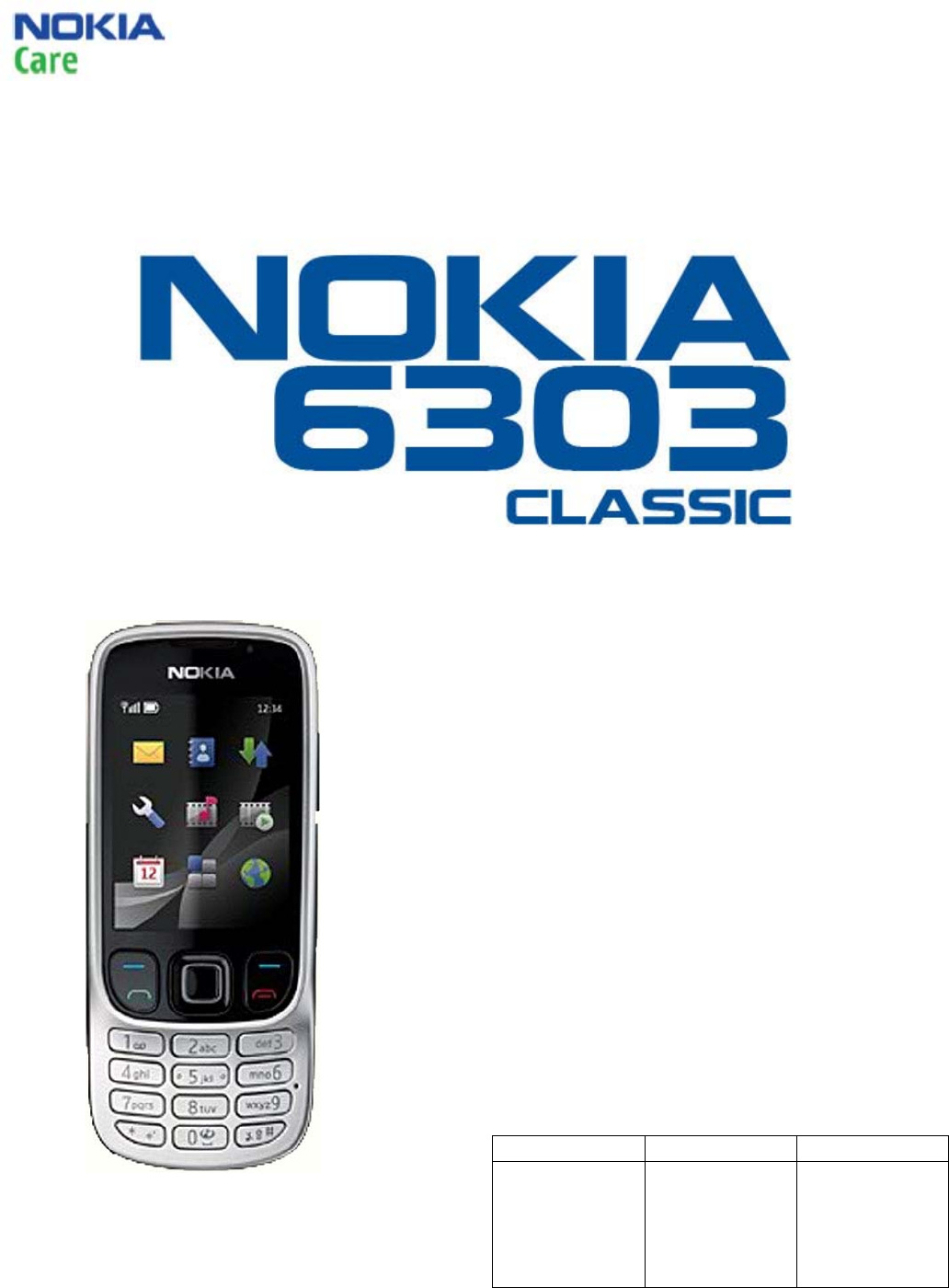
6303 Classic RM-443
Service Manual Level 1&2
1 CONFIDENTIAL
Issue 1.0 Copyright © 2009 NOKIA. All rights reserved.
SERVICE MANUAL
Level 1&2
Transceiver characteristics
Band:
RM-443: Tri-band EGSM 900/1800/1900
Display:
QVGA display (320 x 240 pixels) 2.2” colour
display,
Up to 16M colors
Camera:
3.2 Mpix Auto Focus camera with 8x digital
zoom, dual LED flash
Operating System:
S40 6th Edition
Connections:
Bluetooth 2.0 +EDR, 3.5 mm AV connector, Micro
USB, MicroSD card up to 4 GB
Transceiver with BL-5CT battery pack
Talk time Standby Note
Up to 7 hours Up to 450
hours
Depends on
network
parameters
and phone
settings

6306 Classic RM-443
Service Manual Level 1&2
2 CONFIDENTIAL
Issue 1.0 Copyright © 2008 NOKIA. All rights reserved.
1. Change history ................................................................................................................................3
2. Copyright ........................................................................................................................................ 4
3. Warnings and cautions .................................................................................................................... 5
3.1 Warnings .................................................................................................................................. 5
3.2 Cautions ................................................................................................................................... 5
4. ESD protection................................................................................................................................. 6
5. Care and maintenance..................................................................................................................... 7
6. Battery information......................................................................................................................... 8
7. Exploded view................................................................................................................................. 9
8. Service devices .............................................................................................................................. 10
9. SW-update .................................................................................................................................... 11
10. Disassembly instructions......................................................................................................... 12
11. Assembly hints........................................................................................................................ 21
12. Solder components ................................................................................................................. 22
6303 Classic RM-443
Service Manual Level 1&2
3 CONFIDENTIAL
Issue 1.0 Copyright © 2009 NOKIA. All rights reserved.
1. CHANGE HISTORY
Status Version No. Date Comments
Draft 0.1 30.01.2009 First draft
Approved 1.0 31.03.2009 First approved version
The purpose of this document is to help NOKIA service levels 1 and 2 workshop technicians to
carry out service to NOKIA products. This Service Manual is to be used only by authorized NOKIA
service suppliers, and the content of it is confidential. Please note that NOKIA provides also
other guidance documents (e.g. Service Bulletins) for service suppliers, follow these regularly
and comply with the given instructions.
While every endeavor has been made to ensure the accuracy of this document, some errors
may exist. If you find any errors or if you have further suggestions, please notify NOKIA using
the address below:
CMO Operation & Logistics
Training and Vendor Development
Multimedia Creation & Support
mailto:Service.Manuals@nokia.com
Please keep in mind also that this documentation is continuously being updated and modified,
so watch always out for the newest version.

6303 Classic RM-443
Service Manual Level 1&2
4 CONFIDENTIAL
Issue 1.0 Copyright © 2009 NOKIA. All rights reserved.
2. COPYRIGHT
Copyright © 2009 Nokia. All rights reserved.
Reproduction, transfer, distribution or storage of part or all of the contents in this document in
any form without the prior written permission of Nokia is prohibited.
Nokia, Nokia Connecting People, and Nokia X and Y are trademarks or registered trademarks of
Nokia Corporation. Other product and company names mentioned herein may be trademarks
or tradenames of their respective owners.
Nokia operates a policy of continuous development. Nokia reserves the right to make changes
and improvements to any of the products described in this document without prior notice.
Under no circumstances shall Nokia be responsible for any loss of data or income or any
special, incidental, consequential or indirect damages howsoever caused.
The contents of this document are provided “as is”. Except as required by applicable law, no
warranties of any kind, either express or implied, including, but not limited to, the implied
warranties of merchantability and fitness for a particular purpose, are made in relation to the
accuracy, reliability or contents of this document. Nokia reserves the right to revise this
document or withdraw it at any time without prior notice.
The availability of particular products may vary by region.
IMPORTANT
This document is intended for use by qualified service personnel only.

6303 Classic RM-443
Service Manual Level 1&2
5 CONFIDENTIAL
Issue 1.0 Copyright © 2009 NOKIA. All rights reserved.
3. WARNINGS AND CAUTIONS
Please refer to the phone’s user guide for instructions relating to operation, care and
maintenance including important safety information. Note also the following:
3.1 Warnings
1. CARE MUST BE TAKEN ON INSTALLATION IN VEHICLES FITTED WITH ELECTRONIC ENGINE
MANAGEMENT SYSTEMS AND ANTI–SKID BRAKING SYSTEMS. UNDER CERTAIN FAULT
CONDITIONS, EMITTED RF ENERGY CAN AFFECT THEIR OPERATION. IF NECESSARY, CONSULT
THE VEHICLE DEALER/MANUFACTURER TO DETERMINE THE IMMUNITY OF VEHICLE
ELECTRONIC SYSTEMS TO RF ENERGY.
2. THE HANDPORTABLE TELEPHONE MUST NOT BE OPERATED IN AREAS LIKELY TO CONTAIN
POTENTIALLY EXPLOSIVE ATMOSPHERES, EG PETROL STATIONS (SERVICE STATIONS),
BLASTING AREAS ETC.
3. OPERATION OF ANY RADIO TRANSMITTING EQUIPMENT, INCLUDING CELLULAR TELEPHONES,
MAY INTERFERE WITH THE FUNCTIONALITY OF INADEQUATELY PROTECTED MEDICAL
DEVICES. CONSULT A PHYSICIAN OR THE MANUFACTURER OF THE MEDICAL DEVICE IF YOU
HAVE ANY QUESTIONS. OTHER ELECTRONIC EQUIPMENT MAY ALSO BE SUBJECT TO
INTERFERENCE.
3.2 Cautions
1. Servicing and alignment must be undertaken by qualified personnel only.
2. Ensure all work is carried out at an anti–static workstation and that an anti–static wrist
strap is worn.
3. Use only approved components as specified in the parts list.
4. Ensure all components, modules screws and insulators are correctly re–fitted after
servicing and alignment.
5. Ensure all cables and wires are repositioned correctly.

6303 Classic RM-443
Service Manual Level 1&2
6 CONFIDENTIAL
Issue 1.0 Copyright © 2009 NOKIA. All rights reserved.
4. ESD PROTECTION
Nokia requires that service points have sufficient ESD protection (against
static electricity) when servicing the phone.
Any product of which the covers are removed must be handled with ESD
protection. The SIM card can be replaced without ESD protection if the
product is otherwise ready for use.
To replace the covers ESD protection must be applied.
All electronic parts of the product are susceptible to ESD. Resistors, too, can
be damaged by static electricity discharge.
All ESD sensitive parts must be packed in metallized protective bags during
shipping and handling outside any ESD Protected Area (EPA).
Every repair action involving opening the product or handling the product
components must be done under ESD protection.
ESD protected spare part packages MUST NOT be opened/closed out of an
ESD Protected Area.
For more information and local requirements about ESD protection and ESD
Protected Area, contact your local Nokia After Market Services representative.

6303 Classic RM-443
Service Manual Level 1&2
7 CONFIDENTIAL
Issue 1.0 Copyright © 2009 NOKIA. All rights reserved.
5. CARE AND MAINTENANCE
This product is of superior design and craftsmanship and should be treated with care. The
suggestions below will help you to fulfil any warranty obligations and to enjoy this product for
many years.
• Keep the phone and all its parts and accessories out of the reach of small children.
• Keep the phone dry. Precipitation, humidity and all types of liquids or moisture can
contain minerals that will corrode electronic circuits.
• Do not use or store the phone in dusty, dirty areas. Its moving parts can be damaged.
• Do not store the phone in hot areas. High temperatures can shorten the life of
electronic devices, damage batteries, and warp or melt certain plastics.
• Do not store the phone in cold areas. When it warms up (to its normal temperature),
moisture can form inside, which may damage electronic circuit boards.
• Do not drop, knock or shake the phone. Rough handling can break internal circuit
boards.
• Do not use harsh chemicals, cleaning solvents, or strong detergents to clean the phone.
• Do not paint the phone. Paint can clog the moving parts and prevent proper operation.
• Use only the supplied or an approved replacement antenna. Unauthorised antennas,
modifications or attachments could damage the phone and may violate regulations
governing radio devices.
All of the above suggestions apply equally to the product, battery, charger or any accessory.

6303 Classic RM-443
Service Manual Level 1&2
8 CONFIDENTIAL
Issue 1.0 Copyright © 2009 NOKIA. All rights reserved.
6. BATTERY INFORMATION
Note: A new battery’s full performance is achieved only after two or three complete charge
and discharge cycles! The battery can be charged and discharged hundreds of times but it will
eventually wear out.
When the operating time (talk-time and standby time) is noticeably shorter than normal, it is
time to buy a new battery. Use only batteries approved by the phone manufacturer and
recharge the battery only with the chargers approved by the manufacturer.
Unplug the charger when not in use. Do not leave the battery connected to a charger for
longer than a week, since overcharging may shorten its lifetime.
If left unused a fully charged battery will discharge itself over time Temperature extremes can
affect the ability of your battery to charge.
For good operation times with Ni-Cd/NiMh batteries, discharge the battery from time to time
by leaving the product switched on until it turns itself off (or by using the battery discharge
facility of any approved accessory available for the product).
Do not attempt to discharge the battery by any other means Use the battery only for its
intended purpose.
Never use any charger or battery which is damaged.
Do not short-circuit the battery. Accidental short-circuiting can occur when a metallic object
(coin, clip or pen) causes direct connection of the + and - terminals of the battery (metal strips
on the battery) for example when you carry a spare battery in your pocket or purse. Short-
circuiting the terminals may damage the battery or the connecting object.
Leaving the battery in hot or cold places, such as in a closed car in summer or winter
conditions, will reduce the capacity and lifetime of the battery. Always try to keep the battery
between 15°C and 25°C (59°F and 77°F).
A phone with a hot or cold battery may temporarily not work, even when the battery is fully
charged. Batteries’ performance is particularly limited in temperatures well below freezing.
Do not dispose batteries in a fire! Dispose of batteries according to local regulations (e.g.
recycling).
Do not dispose as household waste.
6303 Classic RM-443
Service Manual Level 1&2
9 CONFIDENTIAL
Issue 1.0 Copyright © 2009 NOKIA. All rights reserved.
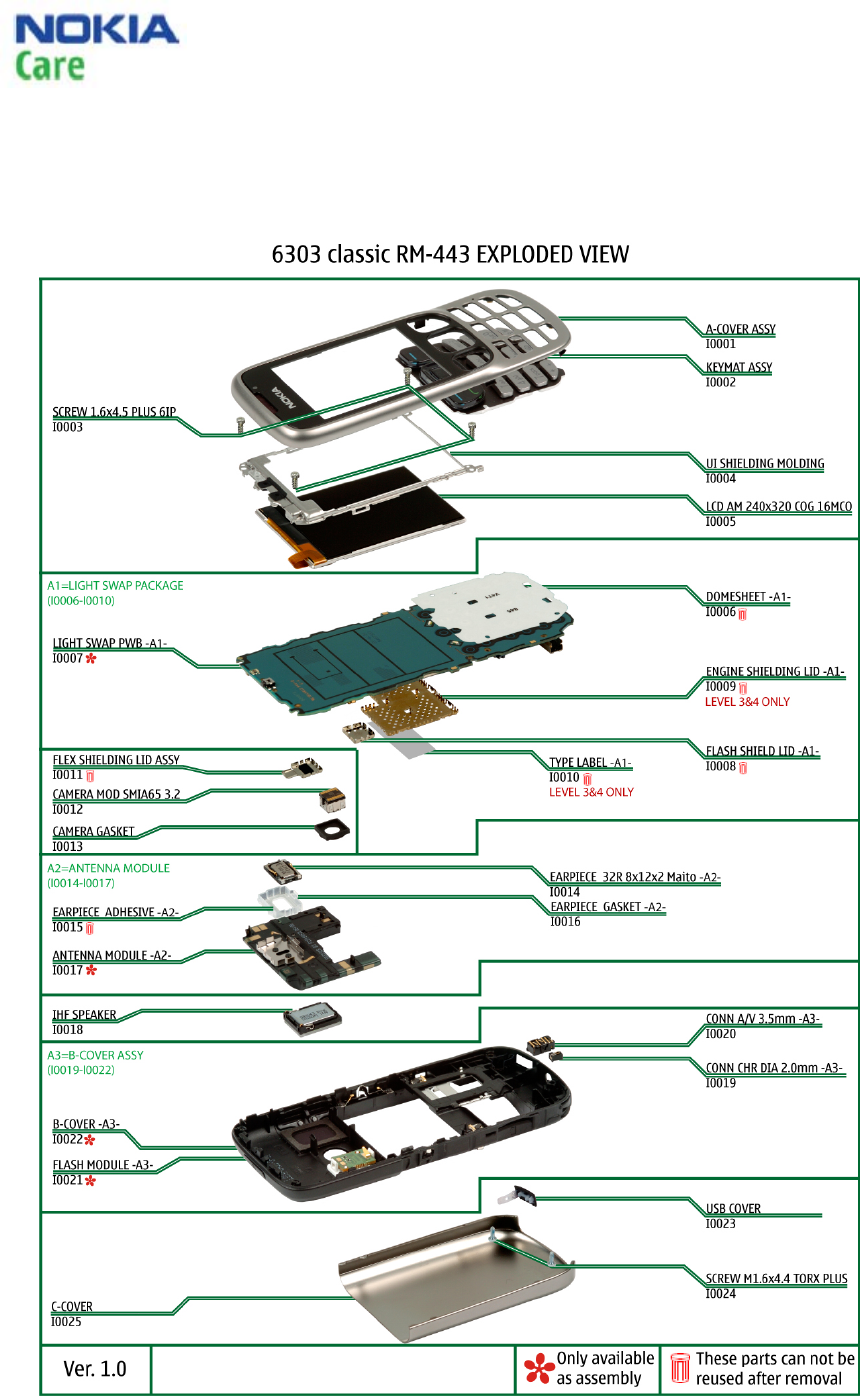
7. EXPLODED VIEW
See corresponding ITEM/CIRCUIT REF in the Spare Parts Service Bulletins on NOL.
6303 Classic RM-443
Service Manual Level 1&2
10 CONFIDENTIAL
Issue 1.0 Copyright © 2009 NOKIA. All rights reserved.
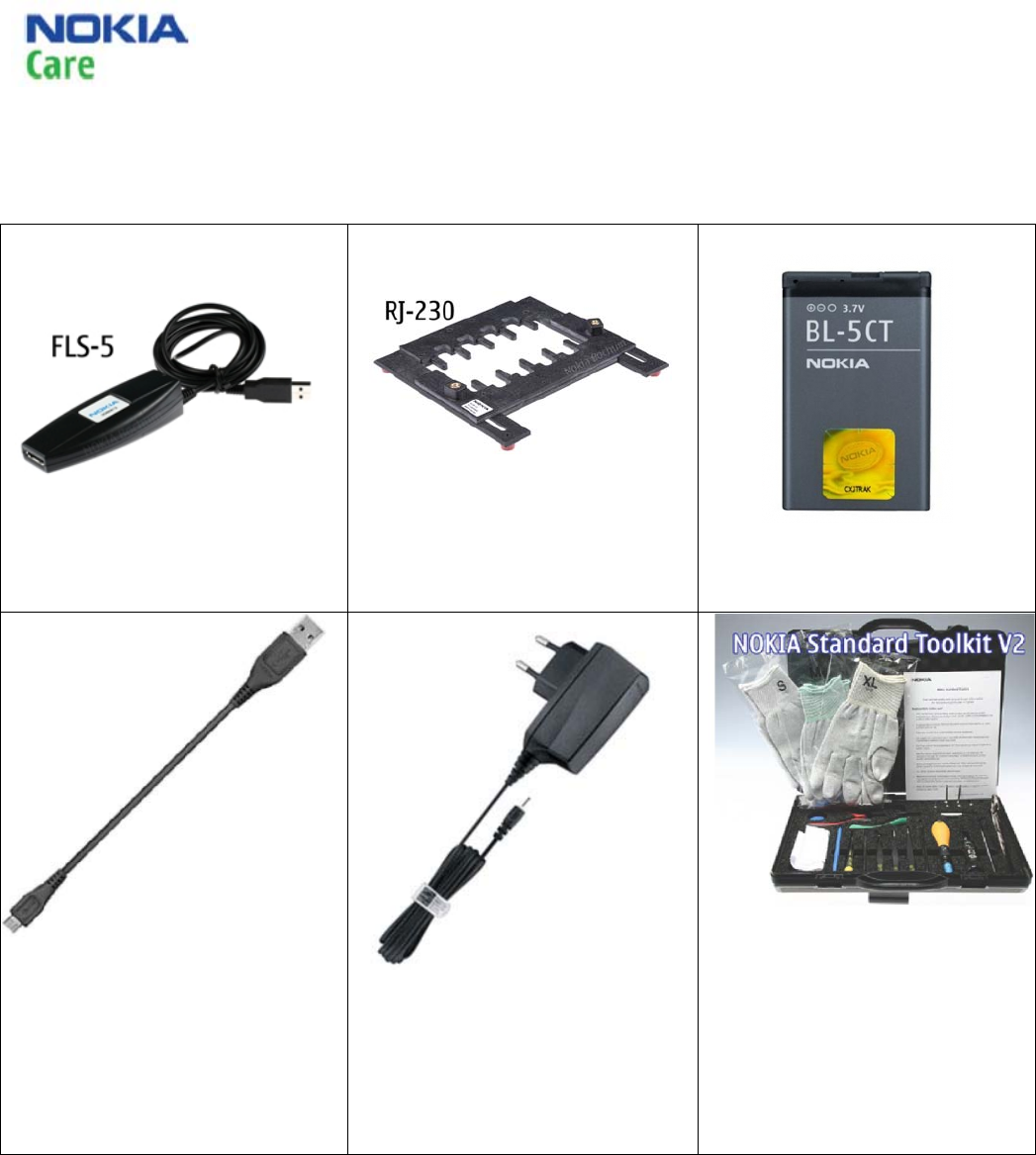
8. SERVICE DEVICES
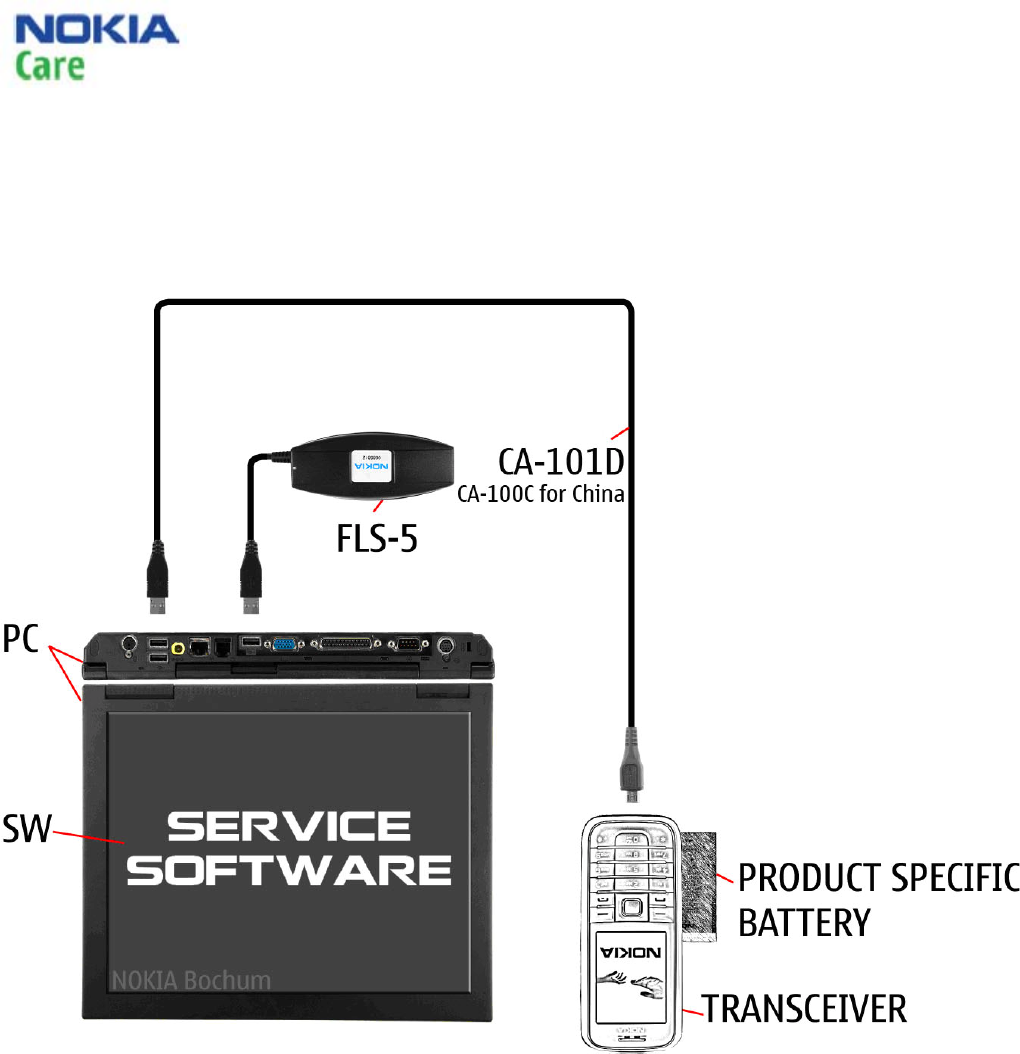
FLS-5 Flash device
RJ-230 Universal Soldering Jig
BP-5CT internal battery
CA-101D Service cable (CA-100C
China)
AC-8E charger (AC-6C for China)
NMP standard toolkit (v2)
For more information, refer to the
Service Bulletin (SB-011) on NOKIA
Online. Supplier or manufacturer
contacts for tool re-order can be
found in “Recommended service
equipment” document on NOKIA
Online.
6303 Classic RM-443
Service Manual Level 1&2
11 CONFIDENTIAL
Issue 1.0 Copyright © 2009 NOKIA. All rights reserved.
9. SW-UPDATE
Flash concept – (Point of Sales)
To use the FLS-5 Flash Dongle, you have to follow the user guide inside the sales package.
Please check always for the latest version of flash software which is available on Nokia Online.
6303 Classic RM-443
Service Manual Level 1&2
12 CONFIDENTIAL
Issue 1.0 Copyright © 2009 NOKIA. All rights reserved.
10. DISASSEMBLY INSTRUCTIONS
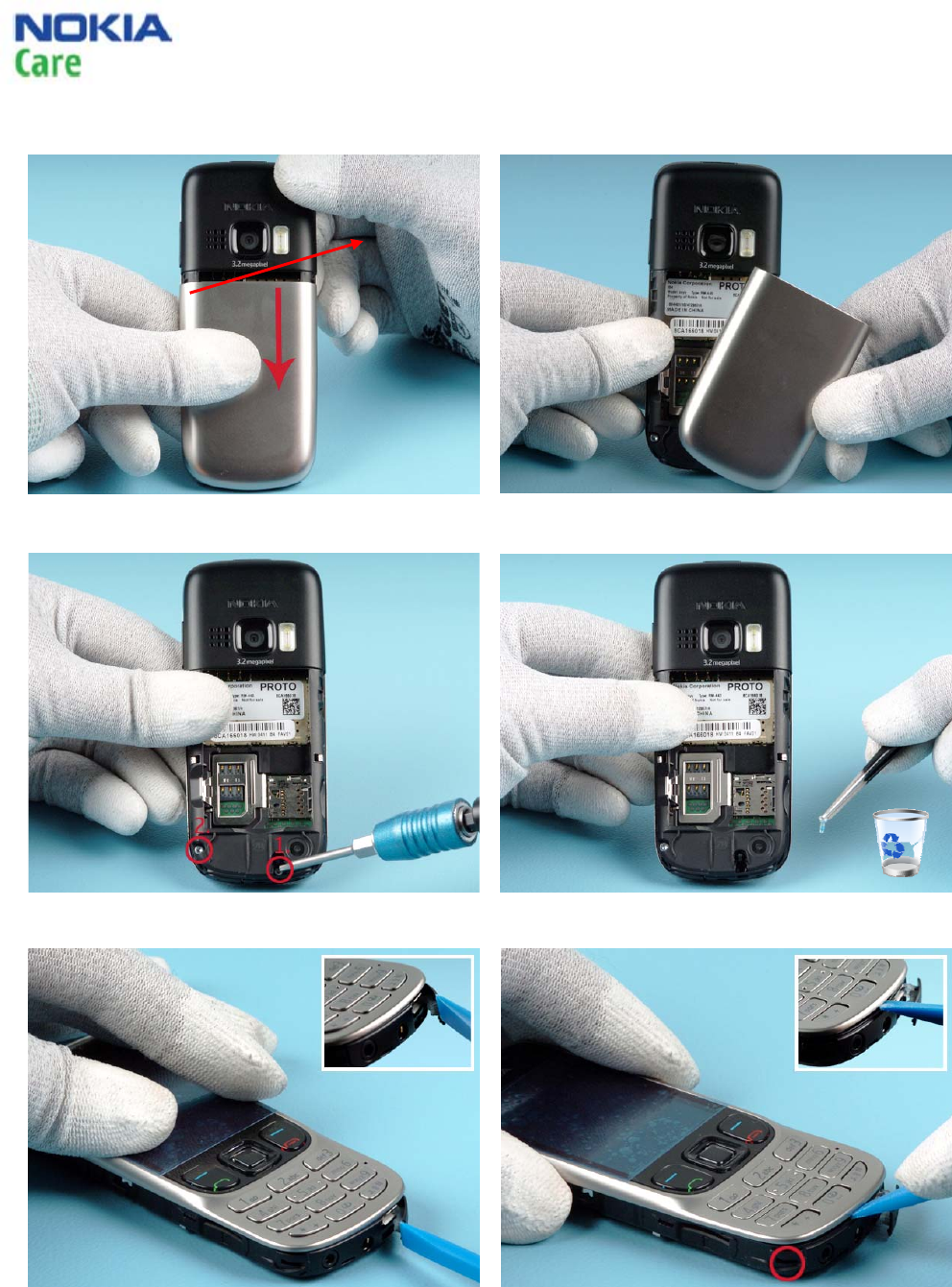
1) Open the C-COVER by sliding the cover as
shown.
2) Remove the C-COVER.
3a) Unscrew the two T6+ screws.
3b Remove the screws with the tweezers. Do not
use the screws again.
4) Use the SS-93 tool to open the USB COVER to
have better access on the bottom side.
5) Release the bottom clip with the SS-93 tool.
6303 Classic RM-443
Service Manual Level 1&2
13 CONFIDENTIAL
Issue 1.0 Copyright © 2009 NOKIA. All rights reserved.
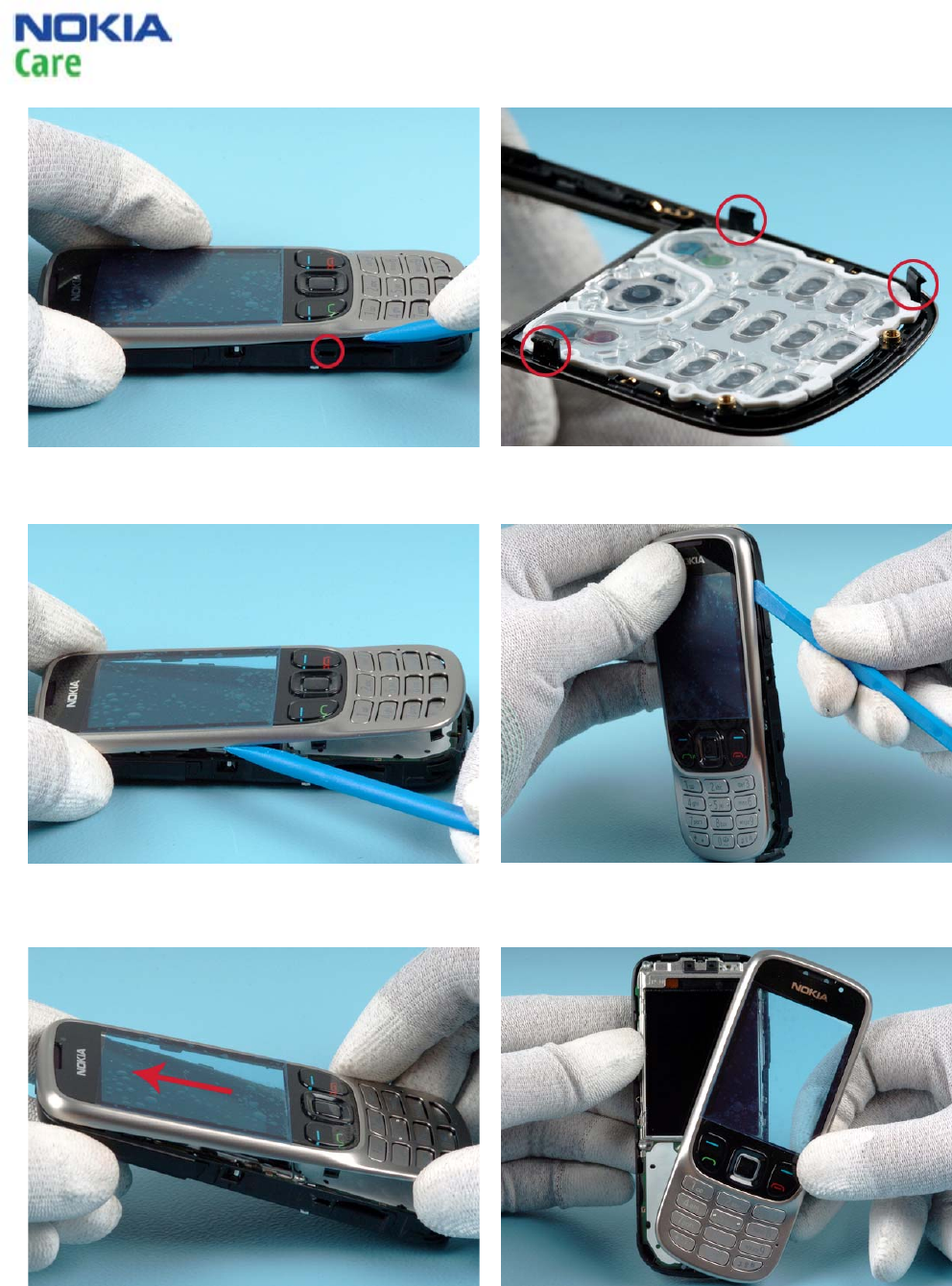
6a) Use the SS-93 tool to release the clips, one on
each side.
6b) There are altogether 3 clips to be released.
Make sure you have released all of them before
proceeding.
7) Wedge the SS-93 tool under the A-COVER. Slide
the tool along the A-COVER to open the clips on
the top.
8) Open the clips on the other side as instructed
in the previous step.
9a) To release the A-COVER incl. KEYMAT ASSY lift
and slide the A-COVER up as shown.
9b) Remove the A-COVER.
6303 Classic RM-443
Service Manual Level 1&2
14 CONFIDENTIAL
Issue 1.0 Copyright © 2009 NOKIA. All rights reserved.
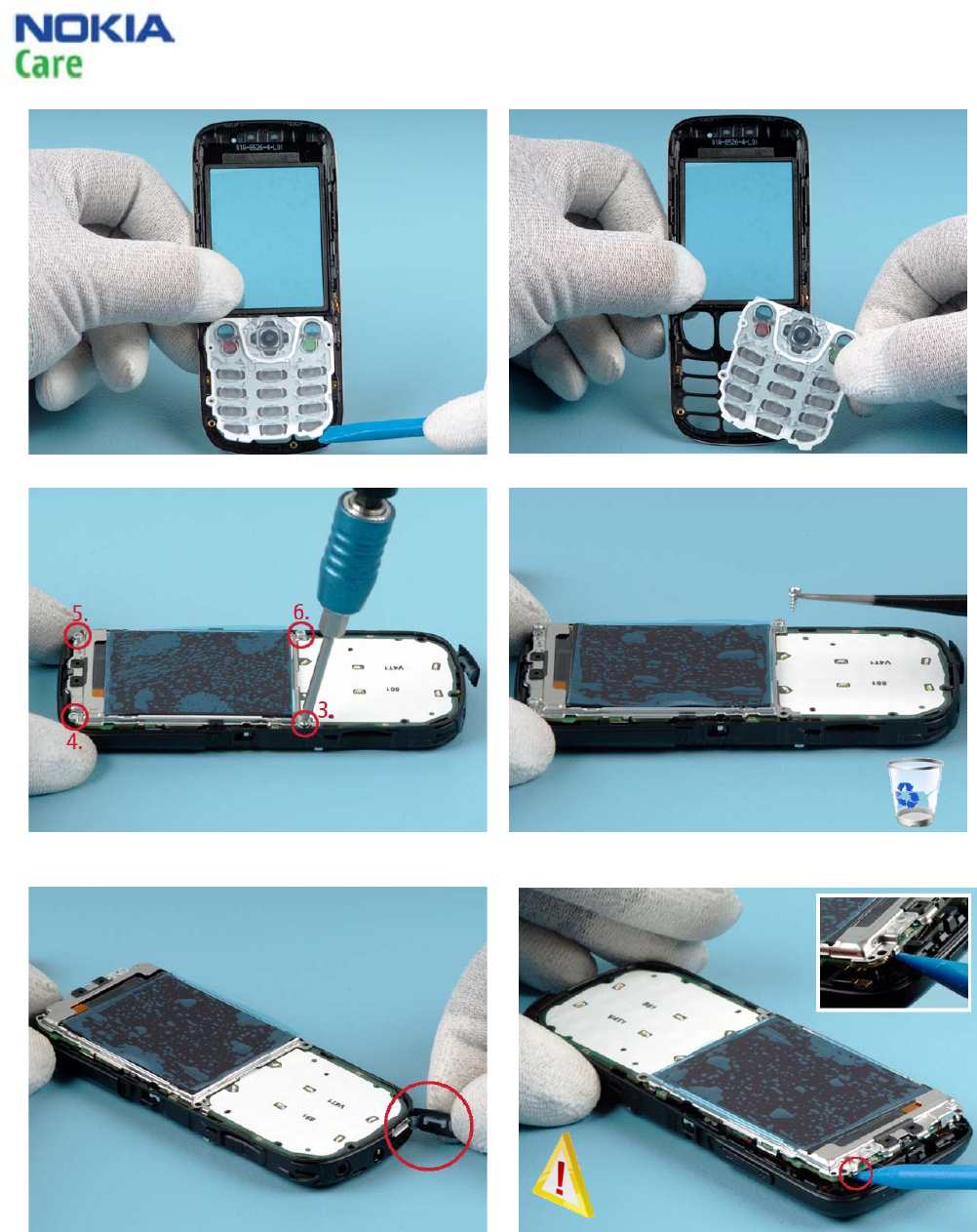
10) Use the SS-93 tool to release the KEYMAT ASSY. 11) Remove the KEYMAT ASSY.
12a) Unscrew the four T6+ screws in the order
shown.
12b) Remove the screws with the tweezers. Do
not use the screws again.
13) Make sure that the USB COVER is still open.
14) Use the SS-93 tool to release the clip on top to
lift up the PWB incl. UI SHIELDING ASSY and LCD.
Be careful not to damage the components on the
PWB!
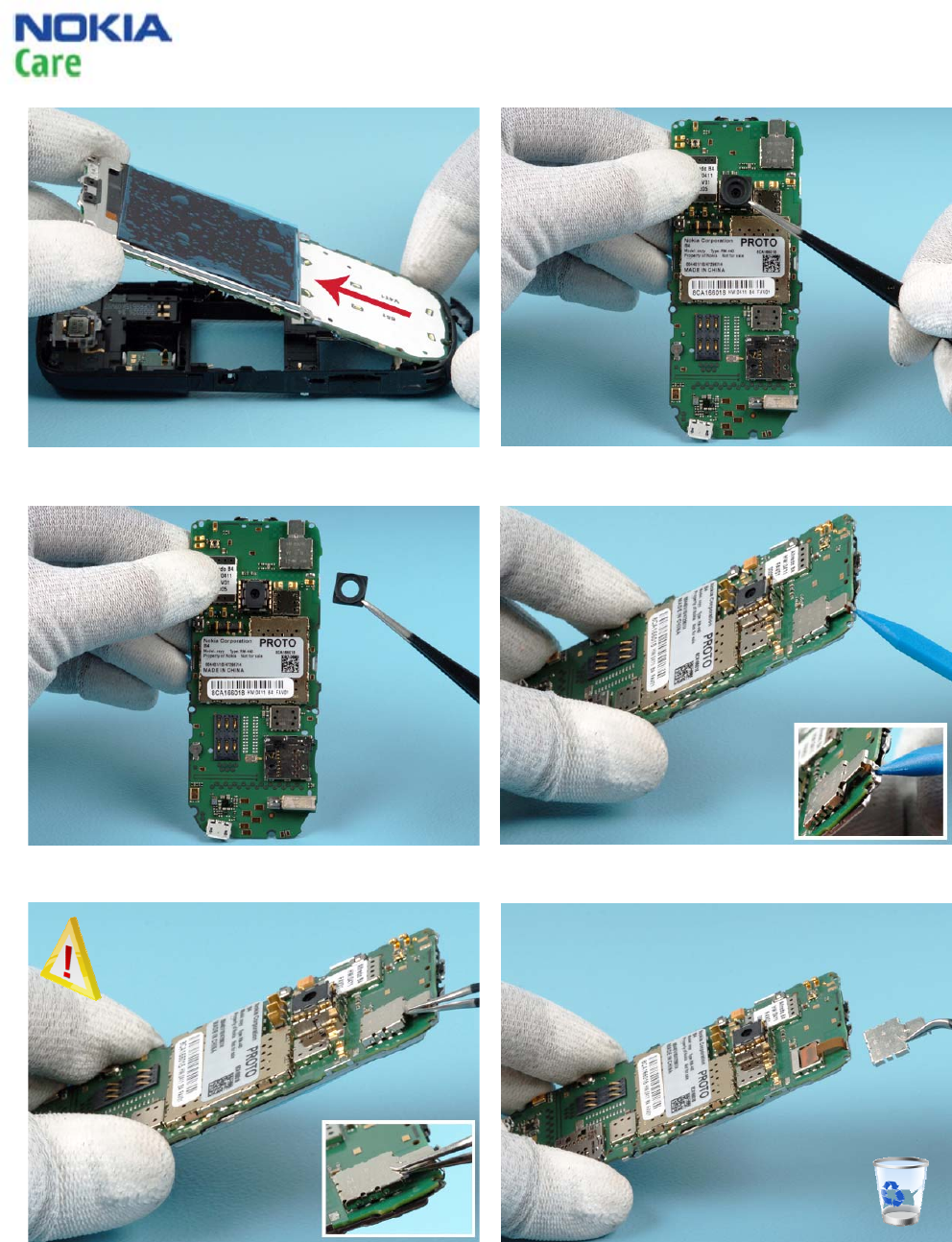
6303 Classic RM-443
Service Manual Level 1&2
15 CONFIDENTIAL
Issue 1.0 Copyright © 2009 NOKIA. All rights reserved.
15) Separate the PWB from the B-COVER ASSY by
lifting the PWB in the direction shown.
16a) Release the CAMERA GASKET with the
tweezers.
16b) Remove the CAMERA GASKET with the
tweezers.
17) Open the clip of FLEX SHIELDING with the SS-
93 tool.
18a) Carefully release the FLEX SHIELDING with the
tweezers. Be careful not to touch the flex under
the FLEX SHIELDING.
18b) Remove the FLEX SHIELDING with the
tweezers. Do not use this part again.
6303 Classic RM-443
Service Manual Level 1&2
16 CONFIDENTIAL
Issue 1.0 Copyright © 2009 NOKIA. All rights reserved.
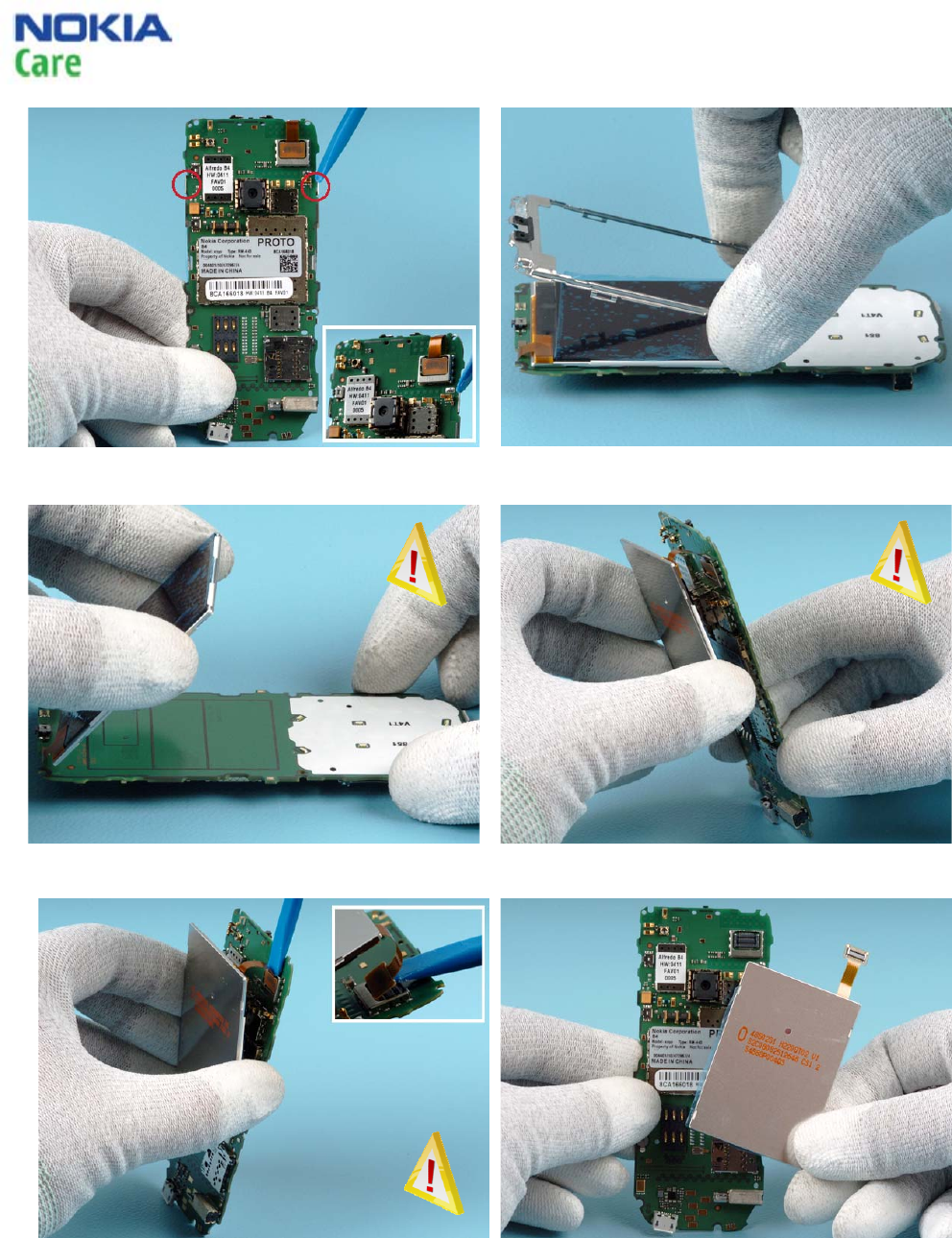
19) Open the snaps of the UI SHIELDING with the
SS-93 tool.
20) Turn the PWB around. Remove the UI
SHIELDING.
21a) and 21b) To get a better access to the LCD connector, carefully flip the LCD around to face the
other side of the PWB.
21c) Carefully release the LCD connector with the
SS-93 tool.
22) Remove the LCD.
6303 Classic RM-443
Service Manual Level 1&2
17 CONFIDENTIAL
Issue 1.0 Copyright © 2009 NOKIA. All rights reserved.
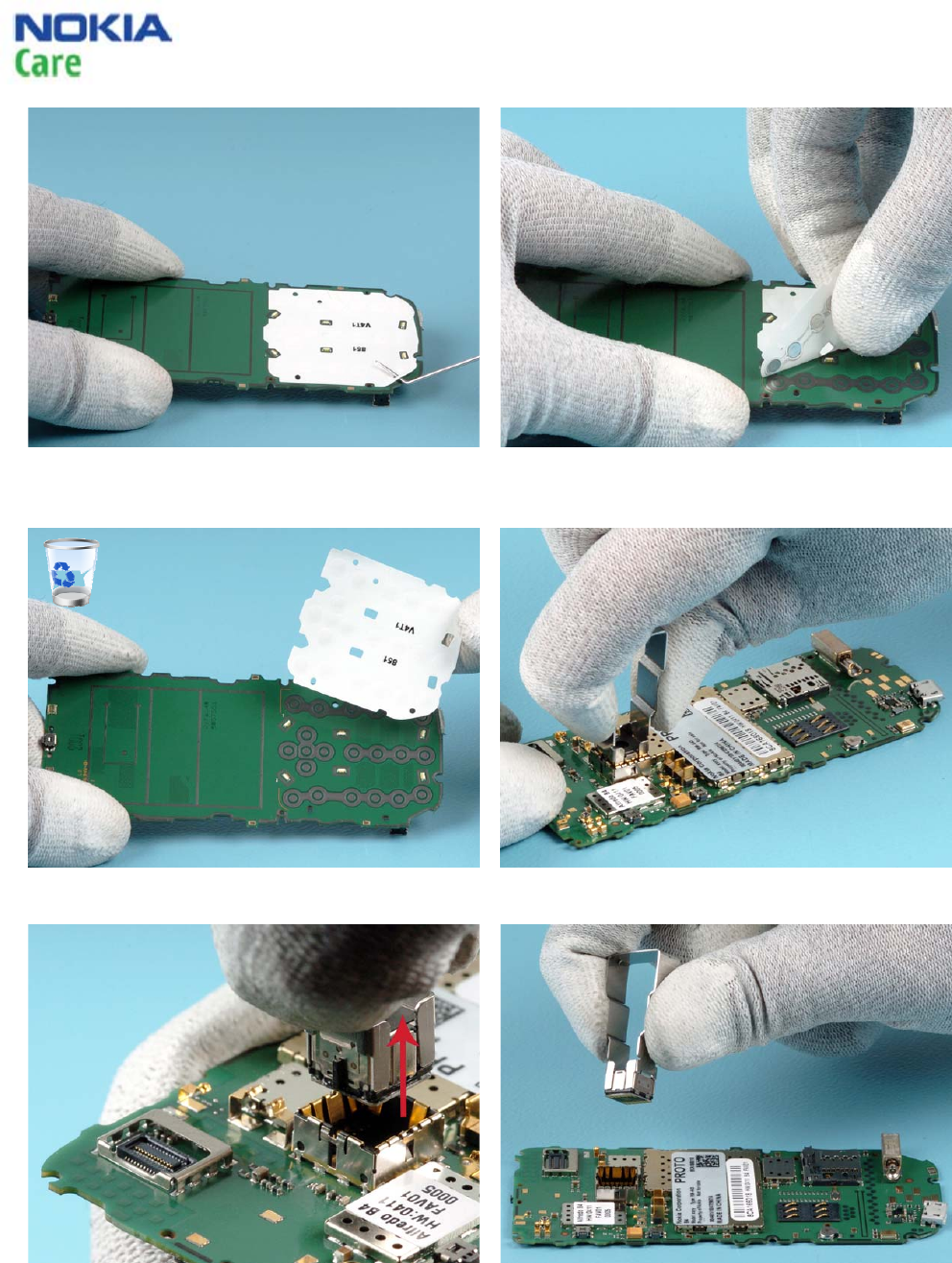
23a) If needed, remove the DOMESHEET from the
PWB. Use the dental tool to lift the corner of the
DOMESHEET.
23b) Peel back the DOMESHEET.
24) Remove the DOMESHEET. Do not use this part
again.
25) Insert the SS-102 tool into the camera socket.
26a) Lift up the CAMERA MODULE with the SS-102
tool.
26b) Remove the CAMERA MODULE.
6303 Classic RM-443
Service Manual Level 1&2
18 CONFIDENTIAL
Issue 1.0 Copyright © 2009 NOKIA. All rights reserved.
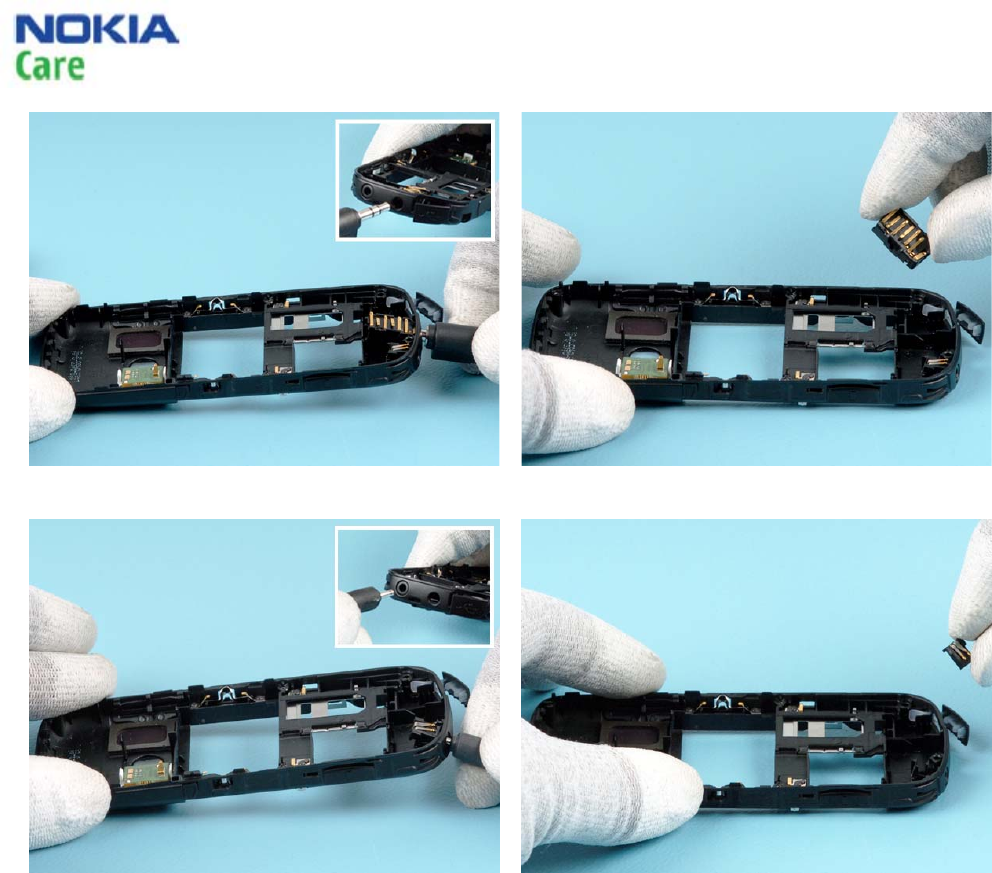
27a) Use the A/V plug to release the A/V
connector.
27b) Remove the A/V connector.
28a) Use the charger plug to release the charger
connector
28b) Remove the charger connector.
6303 Classic RM-443
Service Manual Level 1&2
19 CONFIDENTIAL
Issue 1.0 Copyright © 2009 NOKIA. All rights reserved.
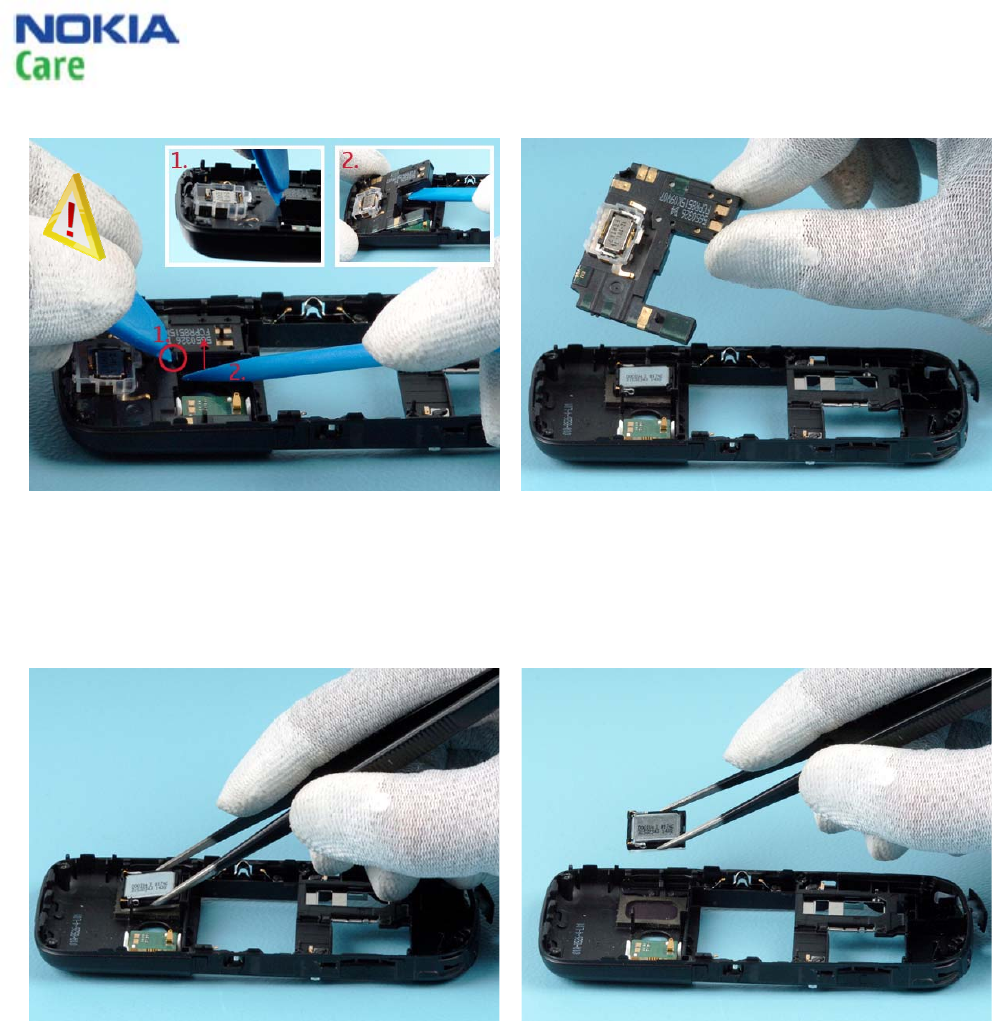
29) Use the SRT-6 tool to release the clip of the
ANTENNA MODULE as shown (1.).
Simultaneously, lift up the ANTENNA MODULE with
the SS-93 tool (2.).
Be careful not to damage the components on the
flash module!
30) Remove the ANTENNA MODULE.
31a) Release the IHF SPEAKER with the tweezers. 31b) Remove the IHF SPEAKER with the tweezers.
6303 Classic RM-443
Service Manual Level 1&2
20 CONFIDENTIAL
Issue 1.0 Copyright © 2009 NOKIA. All rights reserved.
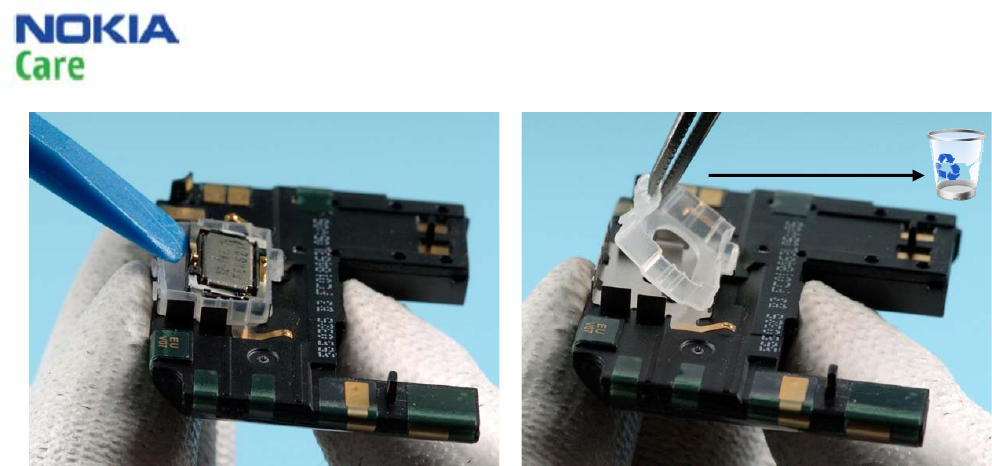
32) Remove the EARPIECE with the SS-93 tool.
33) Replace the EARPIECE GASKET with the
tweezers if needed.
Do not use the EARPIECE ADHESIVE again.
End of disassembly.
EARPIECE ADHESIVE
6303 Classic RM-443
Service Manual Level 1&2
21 CONFIDENTIAL
Issue 1.0 Copyright © 2009 NOKIA. All rights reserved.
11. ASSEMBLY HINTS
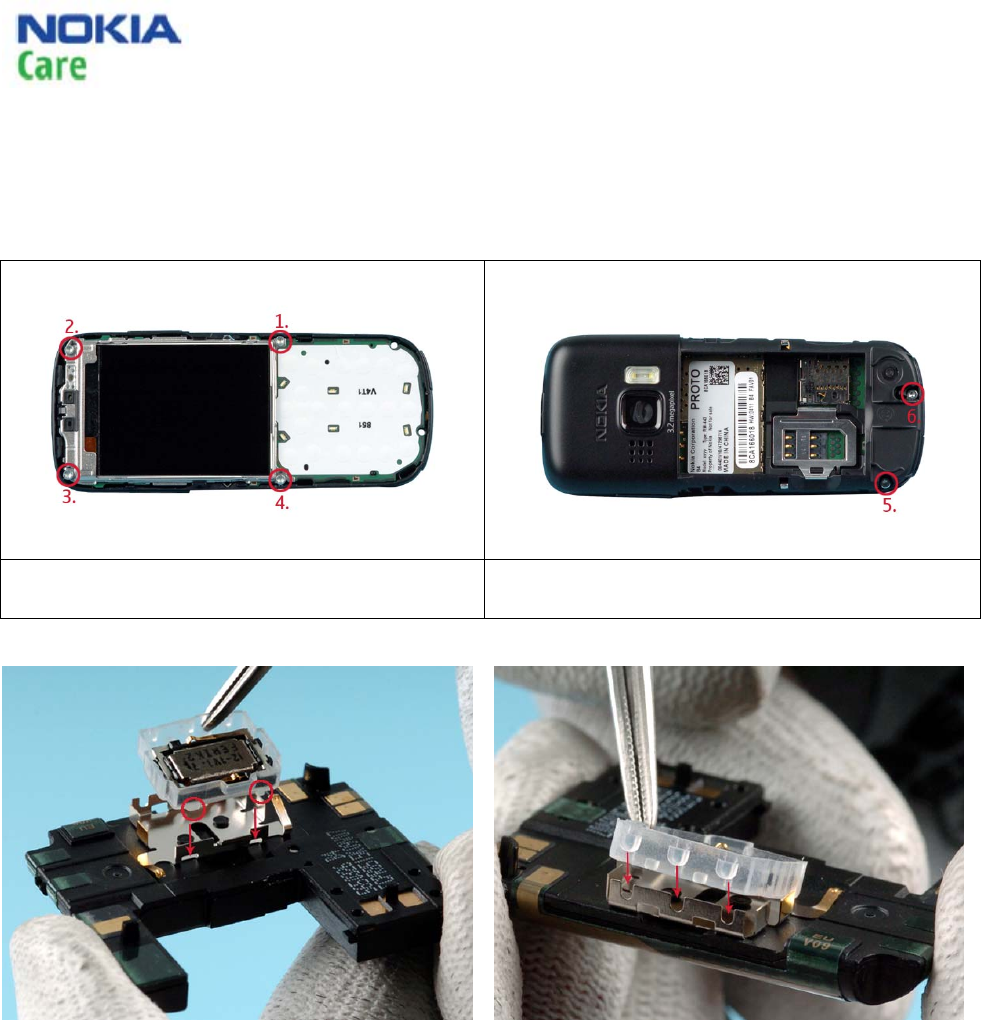
1) Tighten the screws to the torque of 21 Ncm in
the order shown.
2) Tighten the screws to the torque of 21 Ncm in the
order shown.
Use the tweezers to assemble the
EARPIECE/RUBBER GASKET ASSY as shown. Make
sure that the rubber supports are correctly
positioned and aligned with the metal frame.
Do the same on the opposite side.
6303 Class
Service Manual Level 1&2
22 CONFIDENTIAL
Issue 1.0 Copyright © 2009 NOKIA. All rights reserved.
ic RM-443
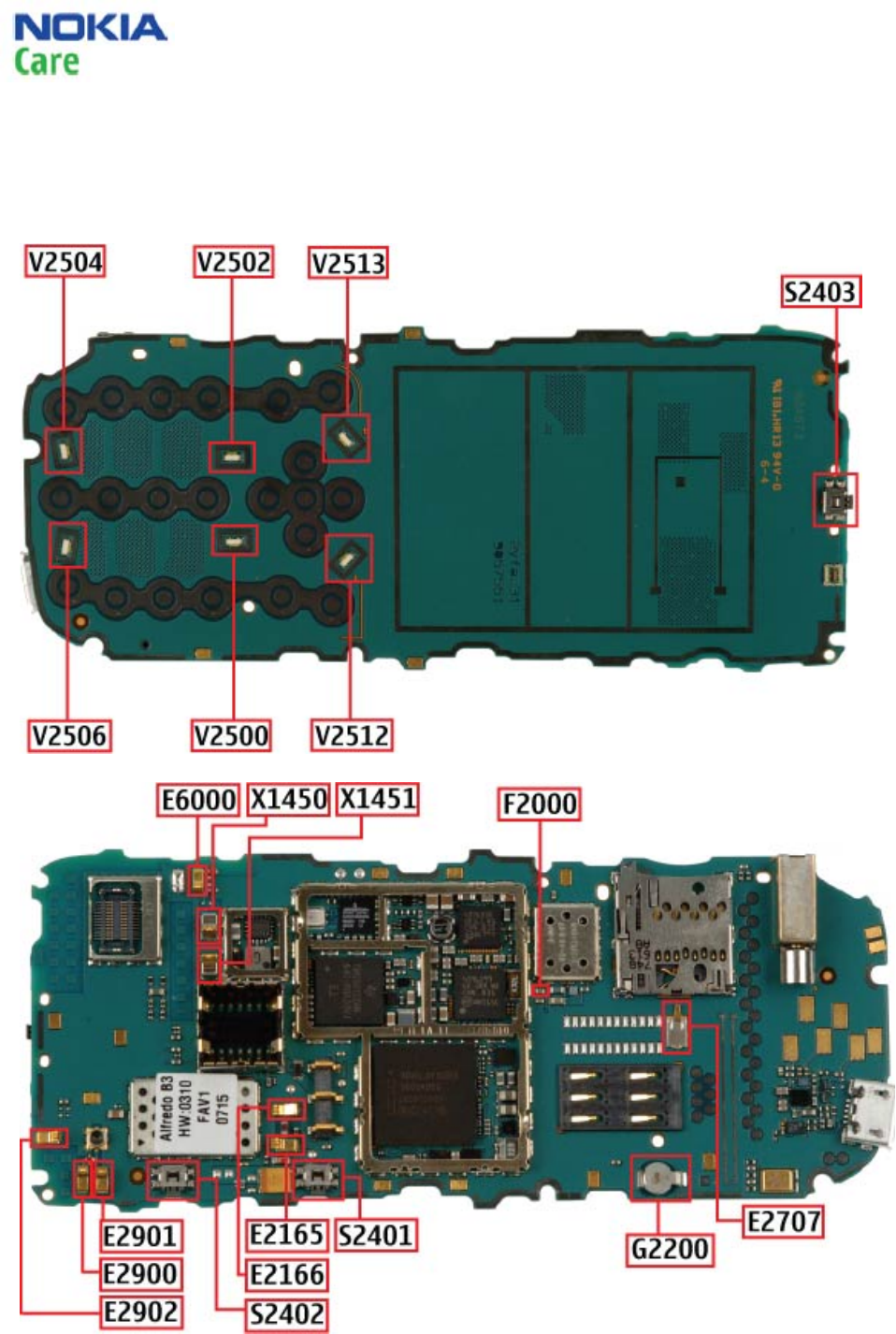
12. SOLDER COMPONENTS
Solder components only for Level 2