Open MHA Application Manual
User Manual:
Open the PDF directly: View PDF  .
.
Page Count: 31

The Open Master Hearing Aid
(openMHA)
4.5.8
Application Engineers’ Manual
© 2005-2018 by HörTech gGmbH, Marie-Curie-Str. 2, D–26129 Oldenburg, Germany
The Open Master Hearing Aid (openMHA) – Application Engineers’ Manual
HörTech gGmbH
Marie-Curie-Str. 2
D–26129 Oldenburg

iii
LICENSE AGREEMENT
This file is part of the HörTech Open Master Hearing Aid (openMHA)
Copyright © 2005 2006 2007 2008 2009 2010 2012 2013 2014 2015 2016 HörTech gGmbH.
Copyright © 2017 2018 HörTech gGmbH.
openMHA is free software: you can redistribute it and/or modify it under the terms of the GNU
Affero General Public License as published by the Free Software Foundation, version 3 of the
License.
openMHA is distributed in the hope that it will be useful, but WITHOUT ANY WARRANTY;
without even the implied warranty of MERCHANTABILITY or FITNESS FOR A PARTICULAR
PURPOSE. See the GNU Affero General Public License, version 3 for more details.
You should have received a copy of the GNU Affero General Public License, version 3 along
with openMHA. If not, see <http://www.gnu.org/licenses/>.
© 2005-2018 HörTech gGmbH, Oldenburg
Contents
1 Introduction 1
1.1 Structure ........................................ 1
1.2 Platform Services and Conventions ......................... 2
2 The openMHA configuration language 4
2.1 Structure of the openMHA configuration language ................. 4
2.2 Communication between openMHA Plugins .................... 7
3 The openMHA host application 8
3.1 Invocation of ’mha’ .................................. 8
3.2 Configuration variables of the openMHA host application ............. 9
3.3 States of the openMHA host application ...................... 10
3.4 Audio abstraction layer ................................ 11
4 A simple example configuration and how to start it 14
4.1 Dynamic compressor algorithm ........................... 14
4.2 Starting the openMHA host application with JACK input/output .......... 17
4.3 Adjusting the fragment size .............................. 17
4.4 The MHA network interface .............................. 18
4.5 Start the MHA for real-time processing with GNU Octave/MATLAB from Linux . 19
5 GNU Octave/MATLAB tools 20
5.1 "mhactl_wrapper" - openMHA control interface for GNU Octave and MATLAB . 20
5.2 Wrapper functions for "mhactl_wrapper" ...................... 20
5.3 "mhagui_generic" - Generic graphical user interface ................ 21
6 Hints and links for tuning the realtime environment 23
6.1 Linux audio distributions ............................... 23
6.2 The JACK low latency sound server ......................... 24
1 Introduction 1
1 Introduction
The HörTech open Master Hearing Aid (openMHA), is a development and evaluation software
platform that is able to execute hearing aid signal processing in real-time on standard computing
hardware with a low delay between sound input and output.
1.1 Structure
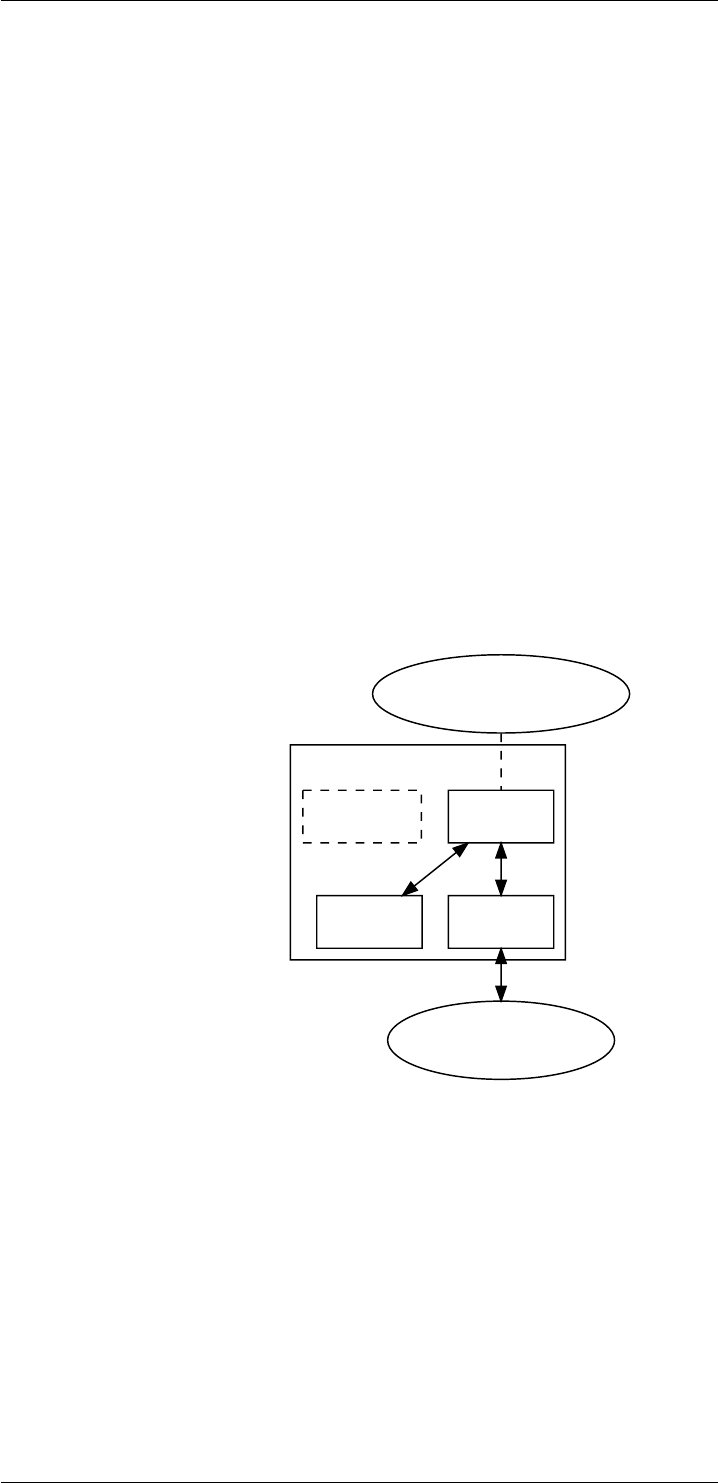
The openMHA can be split into four major components :
• The openMHA command line application (MHA)
• Signal processing plugins (plugins)
• Audio input-output modules (IO)
• The openMHA toolbox library (libopenmha)
openMHA
plugins IO
audio backend
(Jack, File, TCP)
MHAlibopenmha
control applications
(e.g., Octave)
Figure 1 Layered structure of the open Master Hearing Aid
The MHA command line application acts as a plugin host. It can load signal processing
plugins as well as audio input-output modules (IO). Additionally, it provides the command line
configuration interface and a TCP/IP based configuration interface. Different IO modules exist:
For real-time signal processing, commonly the openMHA MHAIOJack module (see openMHA
Plugins Manual) is used, which provides an interface to the Jack Audio Connection Kit (JACK),
the module MHAIOFile provide audio file access and MHAIOTCP TCP/IP-based signal ex-
change.
openMHA plugins provide the audio signal processing capabilities and audio signal handling.
Typically, one openMHA plugin implements one specific algorithm. A complete virtual hearing
aid signal processing can be achieved by a combination of several openMHA plugins.
© 2005-2018 HörTech gGmbH, Oldenburg

2 CONTENTS
1.2 Platform Services and Conventions
The openMHA platform offers some services and conventions to algorithms implemented in
plugins, that make it especially well suited to develop hearing aid algorithms, while still support-
ing general-purpose signal processing.
1.2.1 Audio Signal Domains
As in most other plugin hosts, the audio signal in the openMHA is processed in fragments, i.e.,
in chunks of the input signal stream with a defined length. However, plugins are not restricted
to propagate audio signal as fragments of audio samples in the time domain another option is
to propagate the audio signal in the short time Fourier transform (STFT) domain, i.e. as spectra
of fragments of audio signal, so that not every plugin has to perform its own STFT analysis and
synthesis. Since STFT analysis and re-synthesis of acceptable audio quality always introduces
an algorithmic delay, sharing STFT data is a necessity for a hearing aid signal processing
platform in order to achieve a sufficiently low delay for the whole processing chain.
In addition, the openMHA allows arbitrary data to be exchanged between plugins through a
mechanism called algorithm communication variables, (AC vars). This mechanism is commonly
used to share data such as filter coefficients or filter states.
1.2.2 Real-Time Safe Complex Configuration Changes
Hearing aid algorithms in the openMHA can export configuration settings that may be changed
by the user at run time.
To ensure real-time safe signal processing, the audio processing will normally be done in a
signal processing thread with real-time priority, while user interaction with configuration pa-
rameters would be performed in a configuration thread with normal priority, so that the audio
processing does not get interrupted by configuration tasks. Two types of problems may occur
when the user is changing parameters in such a setup:
• The change of a simple parameter exposed to the user may cause an involved recalcu-
lation of internal runtime parameters that the algorithm actually uses in processing. The
duration required to perform this recalculation may be a significant portion of (or take even
longer than) the time available to process one block of audio signal. In hearing aid usage,
it is not acceptable to halt audio processing for the duration that the recalculation may
require.
• If the user needs to change multiple parameters to reach a desired configuration state
of an algorithm from the original configuration state, then it may not be acceptable that
processing is performed while some of the parameters have already been changed while
others still retain their original values. It is also not acceptable to interrupt signal process-
ing until all pending configuration changes have been performed.
The openMHA provides a mechanism in its toolbox library to enable real-time safe configuration
changes in openMHA plugins: As in hearing aids, it is more acceptable to continue to use an
outdated configuration for a few more milliseconds than blocking all processing, existing runtime
configurations are used in the processing thread until the work of creating an updated runtime
configuration has been completed in the configuration thread.
The openMHA toolbox library provides an easy-to-use mechanism to integrate real-time safe
runtime configuration updates into every plugin.
© 2005-2018 HörTech gGmbH, Oldenburg

1.2 Platform Services and Conventions 3
1.2.3 Plugins can Themselves Host Other Plugins
An openMHA plugin can itself act as a plugin host. This allows to combine analysis and re-
synthesis methods in a single plugin. Plugins that themselves can load other plugins are called
bridge plugins in the openMHA.
When such a bridge plugin is then called by the openMHA to process one block of signal, it
will first perform its analysis, then invoke (as a function call) the signal processing in the loaded
plugin to process the block of signal in the analysis domain, wait to receive a processed block of
signal in the analysis domain back from the loaded plugin when the signal processing function
call to that plugin returns, then perform the re-synthesis transform, and finally return the block
of processed signal in the original domain back to the caller of the bridge plugin.
1.2.4 Central Calibration
The purpose of hearing aid signal processing is to enhance the sound for hearing impaired
listeners. Hearing impairment generally means that people suffering from it have increased
hearing thresholds, i.e. soft sounds that are audible for normal hearing listeners may be im-
perceptible for hearing impaired listeners. To provide accurate signal enhancement for hearing
impaired people, hearing aid signal processing algorithms have to be able to determine the
absolute physical sound pressure level corresponding to a digital signal given to any openMHA
plugin for processing. Inside the openMHA, we achieve this with the following convention: The
single-precision floating point time-domain sound signal samples, that are processed inside
the openMHA plugins in blocks of short durations, have the physical pressure unit Pascal (
1Pa = 1N/m2). With this convention in place, all plugins can determine the absolute physi-
cal sound pressure level from the sound samples that they process. A derived convention is
employed in the spectral domain for STFT signals. Due to the dependency of the calibration
on the hardware used, it is the responsibility of the user of the openMHA to perform calibration
measurements and adapt the openMHA settings to make sure that this calibration convention is
met. We provide the plugin transducers which can be configured to perform the necessary
signal adjustments.
© 2005-2018 HörTech gGmbH, Oldenburg

4 CONTENTS
2 The openMHA configuration language
The openMHA host application and most of the openMHA plugins are controlled through the
openMHA configuration language. This language is implemented in the openMHA library. It
allows hierarchical configuration. Each configuration level (parser) can contain items like vari-
ables or sub-parsers. Properties of any item can be queried. Write access to items can be
connected with C++ callback functions which makes it possible to change the configuration
and state of the openMHA and all plugins while the audio signal is being processed.
The openMHA configuration language consists of line-based human-readable text commands.
The openMHA configuration language interpreter receives commands by reading text files or
through a TCP network stream. The openMHA also provides access to the configuration lan-
guage parser via a C++ object, which also uses the text interface, for embedding the openMHA
into other applications (e.g. GNU Octaveor MATLAB access).
2.1 Structure of the openMHA configuration language
An openMHA configuration language command has a simple structure: Each command con-
sists of a left value, an operator and a right value. Three operators are defined:
• An access operator "=" is used to set a value of a variable.
• A query operator "?" is used to query a value, type or other information of a variable or
other nodes (with some exceptions).
• A descending operator "." descends into the next level of the hierarchical openMHA
configuration.
Each left value is the name of a parser entry. Not all operators are available for all parser
entries: A subparser supports only "?" and ".", a monitor only "?". In the configuration files,
openMHA script language commands can be split up into multiple lines: If a lines ends with
"...", the next line will be appended. This does not hold for the command prompt (e.g. TCP
interface).
The openMHA configuration language features strong static typing, the data type of a variable
is defined by the plugin that implements this variable. Many configuration language commands
like write access ("=") to variables can be connected to C++ callbacks by the plugin developer.
2.1.1 Query commands
The query operator without any right value shows the contents of a parser item in a human
readable way. By passing a right value to the query operator, the type of query can be influ-
enced. A query operator together with its right value forms a query command. Valid query
commands are:
© 2005-2018 HörTech gGmbH, Oldenburg

2.1 Structure of the openMHA configuration language 5
•?: Show contents of a parser element.
•?cmds: Show a list of all query commands for this element.
•?help: Show the detailed description of an element.
•?val: Return the value of an element.
•?type: Return the data type of an element.
•?perm: Return the access rights for an element.
•?range: Return the range of valid values for this variable.
•?subst: Show all variable substitutions applied to this node.
•?entries: Show a list of all entries in this node.
Special query commands are:
•?save:<filename>: Save the contents of this node into the text file "filename", complete
with element description comments.
•?saveshort:<filename>: Save the contents of this node into the text file "filename", with-
out additional comments or blank lines.
•?savemons:<filename>: Save the contents of all monitor variables to the file ’filename’.
•?read:<filename>: Read the file "filename" into the current parser node.
2.1.2 Multidimensional variables
The openMHA configuration language supports vectors and matrices in a way similar to the
GNU Octave / MATLAB notation: Vectors are put into squared brackets, with the items sepa-
rated by whitespace. Matrices are noted as vectors of vectors, with each vector separated by a
semicolon from the other vectors:
vector = [1.0 2.7 4]
matrix = [[1 2 3];[4 5 6]]
Vectors with real values support also the special notation min:increment:max. A mixture of
explicit and incremental notation is allowed. The vector is internally expanded and will return
the explicit notation on read:
vector = [1.0 1.7 2.1:1.1:5]
This will be expanded as:
vector = [1.0 1.7 2.1 3.2 4.3]
© 2005-2018 HörTech gGmbH, Oldenburg

6 CONTENTS
2.1.3 Complex variables
Variables with complex values are notated in parenthesis as a sum of real and imaginary part.
Pure real values can be noted without parenthesis:
complex = (1.3 + 2.7i)
vcomplex = [(1.3 + 2.7i) (2.0 - 1.1i) 6.3]
2.1.4 Text variables
Strings in the openMHA configuration language can contain any characters. Special characters
do not have to be quoted; quote characters are treated literally. Leading and trailing whitespace
of strings is automatically removed. Vector elements in string vectors are separated by a single
space character. This means that vector elements cannot contain spaces.
string = This is a valid text string.
samestr=This is a valid text string.
strvec = [pears bananas green_apples]
2.1.5 Variable ranges
Numeric variables can have a restricted range, the value of keyword list variables is always
restricted to one of the keywords. New values are checked against this range when the variable
is changed through the openMHA configuration language interface. For numeric variables, the
range can be [xmin, xmax](boundaries included), ]xmin , xmax[(boundaries excluded) or a mixed
version of both. If xmin or xmax are omitted then the variable will not have a lower or upper
boundary.
For keyword list variables, the range is simply a space separated list of valid entries.
2.1.6 Variable Substitution and Environment Variables
Each node in the openMHA configuration tree can define a set of text substitutions. The pat-
tern to be replaced has the form "$[VARNAME]", where VARNAME can be any text. Any
occurrence of this pattern is replaced. The set of substitutions can be queried with the "?subst"
query command. Replacements can be activated with the "?addsubst" query command in the
style ?addsubst:<VARNAME> <REPLACEMENT>. Each parser node has its own set of text
substitutions, which is not inherited by children parser nodes.
Environment variables can be used in the openMHA configuration language in the form "${VAR-
NAME}", where VARNAME is the name of an environment variable. Each occurrence of ${VAR-
NAME} is replaced by its contents before interpreting the openMHA configuration language, i.e.
the left hand side or even operators can be part of the substitution.
© 2005-2018 HörTech gGmbH, Oldenburg

2.2 Communication between openMHA Plugins 7
2.2 Communication between openMHA Plugins
Interaction of algorithms is a major issue in hearing aid development. In order to systemati-
cally analyse and control interaction problems, the openMHA chain plugin ’mhachain’ provides
a mechanism for sharing parameters and states between algorithms. Any algorithm plugin
can register selected AC vars (any data segment) to be public within one signal processing
chain. Other algorithms within the same processing chain can read and modify these AC vars
which are accessed by name. Type and dimension are checked on each access. This concept
does not only provide analysis of interaction aspects but also modular combination of signal
processing strategies, e.g. separation of noise estimators and noise reduction strategies in dif-
ferent logical processing stages. A detailed description of the programming interface can be
found in the Plugin Developers’ Manual.
© 2005-2018 HörTech gGmbH, Oldenburg

8 CONTENTS
3 The openMHA host application
The openMHA host application (’mha’ on Linux) provides a control interface for the configuration
and connects to the audio abstraction layer via the openMHA host application IO modules. The
text based user interface is available through a TCP network socket. External network clients,
e.g. telnet, Netcat or the GNU Octave/MATLAB control interface function ’mhactl’ (see section
5.1 on page 20) can be used to access this interface. Multiple IO modules are available in the
audio abstraction layer, which encapsulate the platform dependency (see section 3.4 on page
11).
The openMHA host application and all of its plugins can be configured with the openMHA
configuration language (see section 2on page 4and section 4on page 14).
3.1 Invocation of ’mha’
If the openMHA host application is invoked without any command line arguments, it starts a
network service on TCP port 33337, loopback network interface, accepting connections from
the local host, expecting configuration language commands. The behaviour of the server can
be controlled through a set of command line options:
--quiet | -q
Suppress the output, do not show any greeting text or error messages.
--port=portno | -s portno
Set the port number to which the openMHA host application should bind (default: 33337).
If port number is 0, then the operating system chooses a free port for the mha to bind to.
--announce=port | -a port
If given, then the openMHA connects to this TCP port on the localhost after it has estab-
lished its own TCP server socket, and announces its process ID and the TCP server port
in use, and closes the connection again.
--interface=if | -i if
Set the network interface to which the openMHA host application should bind (default:
127.0.0.1).
--daemon | -d
Start the openMHA host application in daemon mode. This means that after a openMHA
server was closed (via the openMHA command ’cmd=quit’), the openMHA host applica-
tion will wait for a new connections. In daemon mode the openMHA host application can
be stopped by killing the daemon process or by pressing Ctrl-C at the console.
--ok-ack=str | -o str
Set the acknowledgement string for accepted openMHA command lines (default value is
’(MHA:success)’).
--fail-ack=str | -f str
Set the acknowledgement string for rejected openMHA command lines (default value is
’(MHA:failure)’).
© 2005-2018 HörTech gGmbH, Oldenburg

3.2 Configuration variables of the openMHA host application 9
--log=logfile
Set the log file to ’logfile’ (default: /dev/null).
--help | -h
Print an overview about the command line arguments.
--lockstr=str | -l str
Create a file with name ’portno’ and write the text ’str’ into that file. The file is removed
after the openMHA session is closed.
--license
Print the license agreement.
Additional command line arguments which are not recognised as options will be interpreted
as openMHA configuration language commands and sent to the openMHA host application
after allocation, before accepting other input. In daemon mode, these openMHA configuration
language commands are interpreted at the start of each session.
mha --daemon ?read:defaults.cfg will read configuration file named default.cfg for
each session. Clients for the openMHA host application are the GNU Octave/MATLAB tool
’mhactl’ and any telnet client (not part of the distribution).
The openMHA host application searches for openMHA plugins in the system library paths, or in
the directories given in the environment variable MHA_LIBRARY_PATH. Multiple paths can be
separated by a semicolon.
Warning
The openMHA host application accepts connections from any host that can reach the config-
ured network interface. Sender authentication and transport encryption is not implemented.
We therefore strongly recommend to use the openMHA host application only in a physically
separated network or behind a firewall. We explicitly do not take any liability in case of abuse
of patient data transmitted to the openMHA host application or any other interference.
Please do not modify the acknowledgement strings if a communication with the GNU Oc-
tave/MATLAB tool ’mhactl’ is required.
3.2 Configuration variables of the openMHA host application
In the following list the configuration variables of the openMHA host application are described.
These variables are accessible through the parser interface (e.g. console input, TCP). A con-
figuration file with these settings can be read by sending a ?read:filename.cfg command
to the configuration interface. See also section 2on page 4for details.
Note that the variables fragsize, and srate need to be set before loading the sound I/O
library by assigning a value to iolib, and they cannot be changed after loading the sound
I/O library. This is because some sound APIs require this knowledge (about block size and
sampling rate) already when the API is first initialized, and in these APIs block size and/or
sampling rate cannot be changed thereafter. For the same reason, it it also not possible to
change the sound I/O library by assigning a different value to iolib after the initial assignment.
For historic reasons, the variable mhalib can also not be changed after initial assignment, but
this will most likely be relaxed in a future release. When the MHA is in prepared state, the
number of input channels nchannels_in cannot be changed. When an MHA variable cannot
be changed, then it is "locked", and attempts to write to it will cause an error.
© 2005-2018 HörTech gGmbH, Oldenburg

10 CONTENTS
nchannels_in
Number of input audio channels.
fragsize
The fragment size in samples per audio channel. If ’MHAIOJack’ is used, this has to
match the JACK fragment size (see section 4on page 14 for an example).
srate
Sampling rate in Hz. Please note that JACK allows only a fixed sampling rate given at the
invocation of ’jackd’.
mhalib
The MHA processing library name (e.g. ’transducers’, ’mhachain’ or ’db’).
iolib
The IO plugin library name (e.g. ’MHAIOJack’ or ’MHAIOFile’), see section 3.4 on page
11.
cmd
This variable controls the operation state of the openMHA host application. The valid
states (nop, prepare, start, stop, release, quit) of the openMHA host application are de-
scribed in section 3.3 on page 10.
mha
This subparser contains the configuration of the processing library.
io
This subparser contains the configuration of the IO library.
sleep
This special command waits on the normal execution of commands while openMHA con-
tinues processing audio. The number of seconds waited is given by the right-hand side
e.g. sleep = 5 waits 5 seconds.
3.3 States of the openMHA host application
The states of the openMHA host application are controlled by setting the cmd variable, thereby
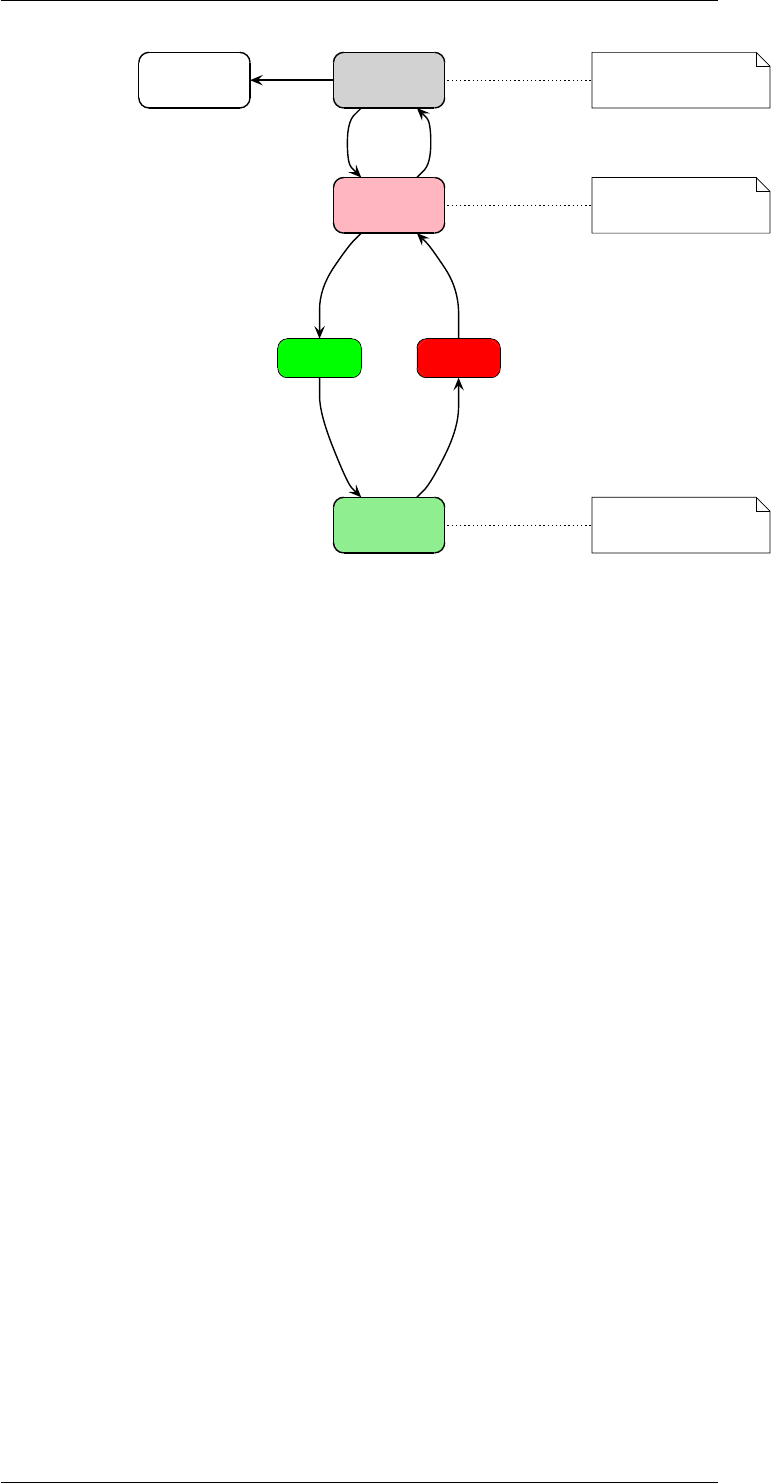
triggering a state transition (refer to Fig. 2). The current state of the openMHA host application
can be queried by reading the value of the variable state, e.g. with the command state?.
After configuring all modules of the openMHA (Framework and Plugins), the configuration can
be prepared to be ready for signal processing by setting cmd=prepare. This will also validate
the configuration; if any of the plugins finds that it cannot process audio given the current
configuration, then the cmd=prepare command will be rejected with an error result.
Setting cmd=start tells the IO plugin to start the signal processing, and accordingly setting
cmd=stop will cause the IO plugin to stop processing. Invoking cmd=release brings the
IO plugin into an unlocked state. The session can be closed with cmd=quit. See Fig. 2for
an overview. The variable cmd for triggering state transitions is essentially write-only, because
reading from it will always return the value nop1, which is the identity state transition (i.e. setting
cmd=nop does not cause any state changes).
1nop is used as a shorthand for "no operation"
© 2005-2018 HörTech gGmbH, Oldenburg
3.4 Audio abstraction layer 11
unprepared configuration can be
modified
ready to run
signal processing
is active
stopped
starting stopping
running
exiting
cmd=quit
cmd=prepare cmd=release
cmd=start (stopped−event)
(started−event) cmd=stop
Figure 2 States of the openMHA host application
3.4 Audio abstraction layer
The audio abstraction layer connects the audio backbone, i.e., JACK (see section 6.2 on page
24) or audio files, with the openMHA host application. This layer consists of two modules:
’MHAIOJack’ for low delay real time processing with the JACK audio server (see section 6.2 on
page 24) on Linux and ’MHAIOFile’ for file to file processing.
3.4.0.1 The ’MHAIOJack’ audio IO module
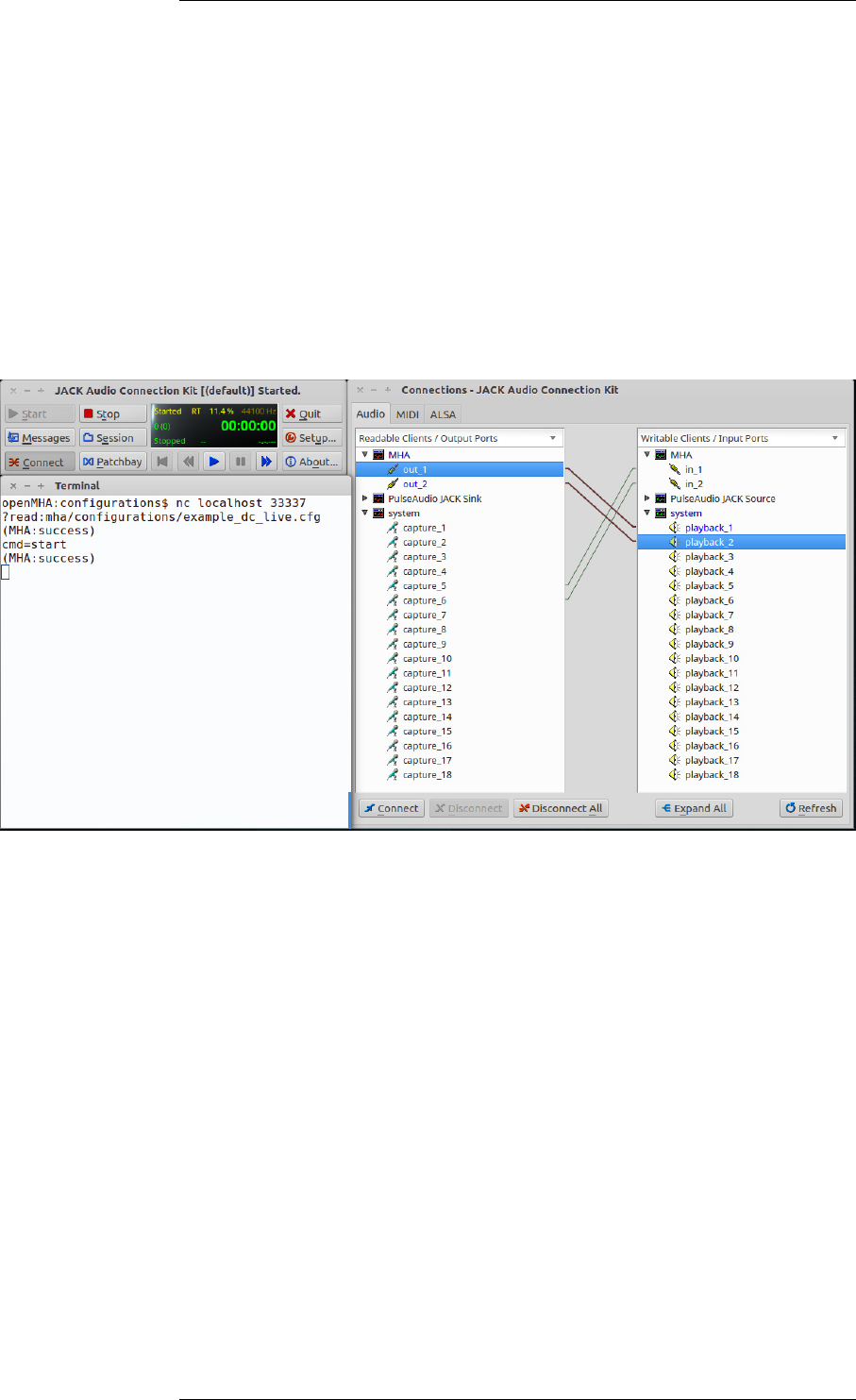
The module ’MHAIOJack’ provides communication with the JACK audio server. When the
openMHA host application is prepared for processing, this module connects to a running JACK
server and validates its parameters. The input and output ports of the MHA can be connected
to any other JACK ports through the openMHA configuration (see below) or externally. Please
note, that MHAIOJack currently supports only fixed sample rates and fragment sizes. Changing
the fragment size of JACK while processing will stop the openMHA processing thread.
Variables of the ’MHAIOJack’ module:
name
Name of the JACK client. This variable only needs to be modified if multiple instances of
MHA should run simultaneously.
con_in
Connection list for input openMHA ports with one entry for each port, e.g. con_in =
[alsa_pcm:capture_1 alsa_pcm:capture_2]. The ports are reconnected at any
time the variable is accessed. Ports can be disconnected by using a colon as a port name.
To achieve multiple connections to one openMHA port, please use external connection
tools, e.g. ’qjackctl’ or ’jack_connect’.
© 2005-2018 HörTech gGmbH, Oldenburg
12 CONTENTS
con_out
Connection list for output openMHA ports with one entry for each port, e.g. con_out =
[alsa_pcm:playback_1 alsa_pcm:playback_2].
names_in
Labels of openMHA input ports (empty for auto-generated labels).
names_out
Labels of openMHA output ports (empty for auto-generated labels).
In the node ports, monitor variables filled with available hardware and software ports of Jack
can be found.
Figure 3 Typical session using the openMHA host application and Jack
3.4.0.2 The ’MHAIOFile’ audio IO module
The module ’MHAIOFile’ provides file to file processing with the openMHA. Input and output
file name can be configured. After the openMHA host application is started (cmd=start), the
whole input file will be processed and the processed data will be written to the output file. The
start command will wait until the processing is finished. The files are opened when preparing
the openMHA host application and closed when releasing the openMHA host application. The
file and data format of the output file is inherited from the input file, e.g. if the input file is a 32
bit WAVE file, also the output file will be. The plugin supports most commonly used file formats.
The variables of ’MHAIOFile’ are:
in
Input file name.
out
Output file name.
© 2005-2018 HörTech gGmbH, Oldenburg

3.4 Audio abstraction layer 13
output_sample_format
Output sample format, or ’input’ to copy format specification from input file.
startsample
First sample to be processed.
length
Number of samples to be processed by one start command, or zero for all.
strict_channel_match
Require same channel count in openMHA and input sound file. If yes, an error message
is created if the channel count doesn’t match, otherwise additional channels are ignored
and missing channels are filled with zeros.
strict_srate_match
Require same sample rate in openMHA and sound file. If yes then an error is reported
if the sample rate does not match, otherwise the sample rate of the sound file is ignored
(no re-sampling).
© 2005-2018 HörTech gGmbH, Oldenburg

14 CONTENTS
4 A simple example configuration and how to start it
In this section, an example is shown on how to configure and start the openMHA. A simple algo-
rithm is designed, which implements a multi-band dynamic range compressor. Then examples
are given on how to start this algorithm in different situations (openMHA host application, MAT-
LAB processing).
4.1 Dynamic compressor algorithm
The example in this section describes a two-band dynamic compression that is meant to serve
as an illustrative case.2In this example the host plugin (the plugin that loads all other plugins)
will be transducers. This plugin is used for calibrating the input and output signals. The in-
put signal is then split into two frequency bands, using the openMHA plugin fftfilterbank.
Spectral processing is used in this example to perform the dynamic compression in two fre-
quency bands and the openMHA plugin overlapadd performs the transformation from wave-
form signal to spectral STFT (short time fourier transform) signal and back.
We first configure general parameters, such as the number of input channels, fragment size
and the sampling rate:
nchannels_in = 2
fragsize = 64
srate = 44100
We then load the host plugin and specify the audio input-output backend: in this case we will
be using audio files:
mhalib = transducers
iolib = MHAIOFile
Next, the host plugin transducers loads the overlapadd plugin to perform the conversion
between time and spectral domains:
mha.plugin_name = overlapadd
Also, we specify the audio channel-specific “peak levels” for input and output sound signals in
dB:
mha.calib_in.peaklevel = [90 90]
mha.calib_out.peaklevel = [90 90]
2The corresponding configuration file for this setup can be found at mha/examples/01-dynamic-
compression/example_dc.cfg. A more realistic configuration file for multi-band dynamic compression with detailed
explanations is given in the file mha/examples/01-dynamic-compression/dynamiccompression.cfg.
© 2005-2018 HörTech gGmbH, Oldenburg

4.1 Dynamic compressor algorithm 15
In the next few lines, we configure the parameters of the overlap-add method. Recall that a
fragment size of 64 samples is used in this MHA configuration. In the overlapadd plugin, this
fragment size is used as the hop size. The analysis window is set to 128 samples, which means
we have 50% signal overlap in our overlapadd procedure. An FFT length of 256 samples is used
here, which is longer than the length of the analysis window, causing the symmetric padding
of zeros at both ends of the FFT buffer (before and after the analysis window), which helps to
avoid circular aliasing.
mha.overlapadd.fftlen = 256
mha.overlapadd.wnd.len = 128
We process the STFT signal produced by the overlapadd plugin with a chain of multiple plugins,
with the help of the mhachain plugin:
mha.overlapadd.plugin_name = mhachain
The chain of plugins to process the STFT signal consists of a filterbank to split the signal into
frequency bands, a dynamic compressor, and a filterbank re-synthesis at the output:
# list of plugins
mha.overlapadd.mhachain.algos = [ ...
fftfilterbank ...
dc ...
combinechannels ...
]
In the next step, the filter bank will be configured3with two only frequency bands:
mha.overlapadd.mhachain.fftfilterbank.f = [200 2000]
The dynamic compression algorithm measures the input sound level in each frequency band
and determines the gain to be applied by looking it up in a gain table. The gain table has one
row of gains for each frequency band of the left audio channel, followed by the same for the
right audio channel. In our case, the number of rows of the matrix will be 4. The first element
in each row (i.e., taken together, the first column) specifies the gain in dB to be applied if the
input level in the respective frequency band is equal to the value of the gtmin element given for
that respective band. The following elements in each row specify the gains in dB to be applied
for other input values, where the input level difference between the individual elements in each
row of the matrix is determined by the value of gtstep for the respective band. The dynamic
compressor also employs a common attack/decay low-pass filter to determine the input level
(for in-depth explanation of the parameters listed below, see file mha/examples/01-dynamic-
compression/dynamiccompression.cfg):
3For a more detailed explanation of the filterbank configuration please refer to the fftfilterbank documen-
tation in the openMHA plugins manual.
© 2005-2018 HörTech gGmbH, Oldenburg

16 CONTENTS
# gaintable data in dB gains
mha.overlapadd.mhachain.dc.gtdata = [[10 -10 -30];...
[20 -25 -50];...
[10 -10 -30];...
[20 -25 -50]]
# input level for first gain entry in dB SPL
mha.overlapadd.mhachain.dc.gtmin = [0]
# level step size in dB
mha.overlapadd.mhachain.dc.gtstep = [40]
# attack time constant in s
mha.overlapadd.mhachain.dc.tau_attack = [0.02]
# decay time constant in s
mha.overlapadd.mhachain.dc.tau_decay = [0.1]
The dynamic compressor plugin also needs the name of the filter bank plugin instance used, to
extract the frequency information.
# Name of fftfilterbank plugin. Used to extract frequency information.
mha.overlapadd.mhachain.dc.fb = fftfilterbank
mha.overlapadd.mhachain.dc.chname = fftfilterbank_nchannels
After the dynamic compression, the combinechannels plugin adds the frequency bands back
into wide-band audio channels. To perform this task, it needs to know the desired number of
output channels.
mha.overlapadd.mhachain.combinechannels.outchannels = 2
Finally, we specify the input and output audio file names to be processed as follows:
io.in = 1speaker_diffNoise_2ch.wav
io.out = 1speaker_diffNoise_2ch_OUT.wav
The configuration we described so far is provided with this release in the file mha/examples/01-
dynamic-compression/example_dc.cfg. Now that we created a complete openMHA hear-
ing aid algorithm configuration file, in the next step, we want to start an openMHA
framework with this configuration. In the terminal, change the working directory to the
mha/examples/01-dynamic-compression directory of the openMHA. All binaries and
libraries of the openMHA should be in their respective search paths, see README.md). Then
openMHA processing can be started with
mha ?read:example_dc.cfg cmd=start cmd=quit
This will process the file 1speaker_diffNoise_2ch.wav and output 1speaker_diffNoise_2ch_OUT.wav.
© 2005-2018 HörTech gGmbH, Oldenburg

4.2 Starting the openMHA host application with JACK input/output17
4.2 Starting the openMHA host application with JACK input/output
In this section we will use the configuration settings described in the previous section while
using the JACK server as the audio backend.4While in the previous section we could set the
number of input channels, fragment size and sampling rate of the framework freely, when using
JACK the fragment size and sampling rate have to match the values used by the JACK server.
Here we assume that the JACK server runs at sampling rate 44100 with a fragment size of 64
samples, so that the overlap in the overlap-add method uses the same 50% signal overlap as
before (see page 15). Later we will show how to use a double buffer for those situations, where
it is not possible to start JACK with the desired fragment size.
The complete configuration for this example can be found in mha/examples/01-dynamic-
compression/example_dc_live.cfg. In the previous section we have specified which libraries
to use (plugins and the IO backend, which was MHAIOFile). In this section we want to change
IO backend to JACK. To do this, we modify the following line:
# IO plugin library name
iolib = MHAIOJack
As in the previous section, it is assumed, that the environment variables for finding executables
and shared libraries are configured properly (see README.md). The JACK server needs to be
told which hardware input and output ports should be connected to the mha:
io.con_in = [system:capture_1 system:capture_2]
io.con_out = [system:playback_1 system:playback_2]
Please replace the port names by the ports you want to connect to.
4.3 Adjusting the fragment size
If the required fragment size is not supported by the audio hardware, double buffering can
be used in the MHA frameworks. We assume now, that the JACK server was started with a
fragment size of 256 samples at a sampling rate of 44.1 kHz. A fragment size of 64 samples in
the algorithm can be reached by inserting a double buffer plugin between the framework and
the algorithm. This is done by replacing the MHA library overlapadd by the double buffer
plugin db, which will load overlapadd as a client. In the framework configuration the line
mhalib = overlapadd needs be replaced by
mhalib = db
mha.plugin_name = overlapadd
mha.fragsize = 64
The fragment size of the framework will be set to that of the JACK server, so fragsize = 64
on the top level needs to be replaced by fragsize = 256. The hierarchy of layers
now changes (see file example_dc_live_double.cfg, where between the framework and
overlapadd lies the db plugin.
4To run the JACK server reliably with small buffer sizes, please optimize your operating system for low-delay
audio. In the case of Ubuntu, please install and boot a lowlatency linux kernel, answer "yes" to the question "Enable
realtime process priority?" when installing jackd2, and add your user to the group "audio".
© 2005-2018 HörTech gGmbH, Oldenburg

18 CONTENTS
4.4 The MHA network interface
The openMHA accepts configuration and control over a network connection. When no com-
mand line parameters are given, the default port number 33337 and the loopback network
interface 127.0.0.1 is used, i.e., only connections from the local host are accepted (see section
3on page 8for details). To enter openMHA commands, start a network client, e.g. Netcat, to
open a MHA console:
nc localhost 33337
To read the framework configuration file, type
?read:mha/configurations/example_dc_live.cfg
followed by the return key. If everything went well, the MHA will print (MHA:success). In case
of an error message (MHA:failure), MHA will also indicate the line containing the error.
You need to correct this error using an editor you prefer and reload it. If you receive an error
message, (mha_parser) The variable is locked, you need to close the openMHA
host application and relaunch it. If the JACK server was not started yet, this is the right moment
to start your JACK server with the correct settings. One can use for example the QjackCtl
client to set the correct settings. Please make sure that the fragment size and sample rate of
the JACK sound server matches the MHA fragment size (see below if it doesn’t). After having
successfully started the JACK server, the MHA can be started by typing
cmd = start
at the MHA console. The processing can be stopped at any time by typing cmd = stop.
Now, we want to access the variables of the algorithm. The easiest way is to type ?, followed
by the return key, in the console. This will show the complete MHA configuration, including all
framework variables and plugin configuration. Usually, this produces so much output, that the
console has to be scrolled to see the complete information. If only a subset or a single variable
is of interest, the prefix of that subset or variable can be put before the ?, e.g. all variables of
the processing chain can be reached by typing
mha.overlapadd.mhachain?, the gaintable data in dB gains by typing
mha.overlapadd.mhachain.dc.gtdata?. All monitor variable contents can be stored into
the file "example.mon" by typing ?savemons:example.mon. The openMHA host application
will be closed by typing cmd = quit.
© 2005-2018 HörTech gGmbH, Oldenburg

4.5 Start the MHA for real-time processing with GNU
Octave/MATLAB from Linux 19
4.5 Start the MHA for real-time processing with GNU Octave/MATLAB from Linux
Another alternative to start and control the openMHA host application is from MATLAB. On
Linux, one can call
[errcode, pid] = system('mha & echo $!')
(assuming, that the directory containing the MHA binaries is included in the system path and in
the MHA_LIBRARY_PATH environment variable. Please note that in Octave the environment
variables may have to be set again.).
The variable pid then contains the process id of the openMHA host application process as
text.
The configuration of the openMHA host application can be read at startup time by adding an
openMHA configuration language command:
./bin/mha ?read:mha/configurations/example_dc.cfg cmd=start
We assume, that your MATLAB process is running on the same host and as the same user as
the openMHA, and that the openMHA host application runs with the default port number 33337.
The openMHA MATLAB tools directory has to be in the MATLAB path. Now, communication
with the configuration interface of the MHA is possible through MHA MATLAB functions (see
section 5on page 20 for a detailed documentation): First, create a MHA connection handle for
the MATLAB tools by typing
h = struct( 'port', 33337, 'host', 'localhost' );
at the MATLAB prompt. Then this handle can be used to connect to the MHA:
result = mha_get( h, '' );
The complete MHA configuration hierarchy is converted into a MATLAB ’struct’ variable. When
the openMHA processing is not needed any more, the MHA can be shut down by calling
mha_set( h, 'cmd', 'quit' );
© 2005-2018 HörTech gGmbH, Oldenburg

20 CONTENTS
5 GNU Octave/MATLAB tools
In this package release openMHA related tools for usage with GNU Octave and MATLAB are
included. No support is granted for these modules, nor give we any warranty for usage of these
tools.
The openMHA host application can be controlled through a simple GNU Octave/MATLAB inter-
face (mhactl). This tool opens a TCP connection to a openMHA host application and commu-
nicates with the framework configuration interface. For data exchange with the openMHA, an
GNU Octave/MATLAB client to the JACK low latency sound server (see section 6.2 on page 24)
is provided within this release. This interface gives direct access to the low latency real-time
processing system from GNU Octave and MATLAB without requiring special toolboxes.
Algorithm communication variables can be exported to MATLAB-format files using the ’acsave’
algorithm.
5.1 "mhactl_wrapper" - openMHA control interface for GNU Octave and MATLAB
The GNU Octave/MATLAB function mhactl_wrapper communicates with the openMHA host
application through a TCP network connection. For correct operation, the openMHA host ap-
plication has to be started with the default acknowledge/prompt strings. It is not required that
the MHA process runs as the same user or on the same machine as GNU Octave or Matlab.
The function ’mhactl_wrapper’ accepts two arguments, the openMHA handle (struct
with the correct TCP port and host), and the openMHA query to be processed:
result = mhactl_wrapper( mha_handle, query ) The ’mhactl_wrapper’ function
opens a network connection to the openMHA host application, and sends the command string
to the MHA and waits for an acknowledge prompt. On success, the MHA response (without the
acknowledge prompt) is returned, otherwise an error is reported.
5.2 Wrapper functions for "mhactl_wrapper"
While ’mhactl_wrapper’ provides direct access to the openMHA control interface, some wrap-
per functions are implemented which utilize ’mhactl_wrapper’ to convert openMHA control com-
mands into GNU Octave/MATLAB values and back.
5.2.1 "mha_get" - read contents of a openMHAconfiguration
The function ’mha_get’ reads the contents of an openMHA configuration entry and returns them
in a GNU Octave/MATLAB type, i.e., a type dependent conversion from the openMHA string
representation is performed. The command syntax is
[answer, info] = mha_get(handle, field, perm ).
© 2005-2018 HörTech gGmbH, Oldenburg

5.3 "mhagui_generic" - Generic graphical user interface 21
The openMHA handle ’handle’ is a structure containing the fields ’host’ and ’port’ defining
the host name and port number of the openMHA host application. ’field’ is the name of the
openMHA configuration entry. It can be either a variable or a parser node – in the first case,
the content of the variable is returned in ’answer’ and the help comment of the variable is
returned in ’info’, if available. If ’field’ denotes a parser node, ’answer’ will hold a GNU Oc-
tave/MATLAB structure, with each field holding the contents of an openMHA variable or a
sub-parser. In this situation, it is possible to restrict the query only to entries with a specific
permission, which can be given in ’perm’. ’perm’ can be either a character string, or a cell array
of string. To receive the complete writable configuration of an openMHA host application, type
cfg = mha_get( handle, '', 'writable' )
5.2.2 "mha_set" - set contents of openMHA configuration entries
GNU Octave/MATLAB values can be assigned to openMHA configuration entries via the
’mha_set’ function. The syntax of this function is: mha_set( handle, field, value )
As in ’mha_get’, ’handle’ is a structure containing the fields ’host’ and ’port’ defining the host
name and port number of the openMHA host application, and ’field’ is the name of the open-
MHA configuration entry. The parameter ’value’ is a MATLAB representation to be assigned to
the variable ’field’. The GNU Octave/MATLAB representation is converted to the correct open-
MHA string representation by first retrieving the type of the configuration entry ’field’ through the
control interface. If the GNU Octave/MATLAB value cannot be converted, an error is reported.
To setup a complete openMHA, it is possible to assign a GNU Octave/MATLAB configuration
structure ’cfg’ to the openMHA by typing mha_set( handle, '', cfg )
5.3 "mhagui_generic" - Generic graphical user interface
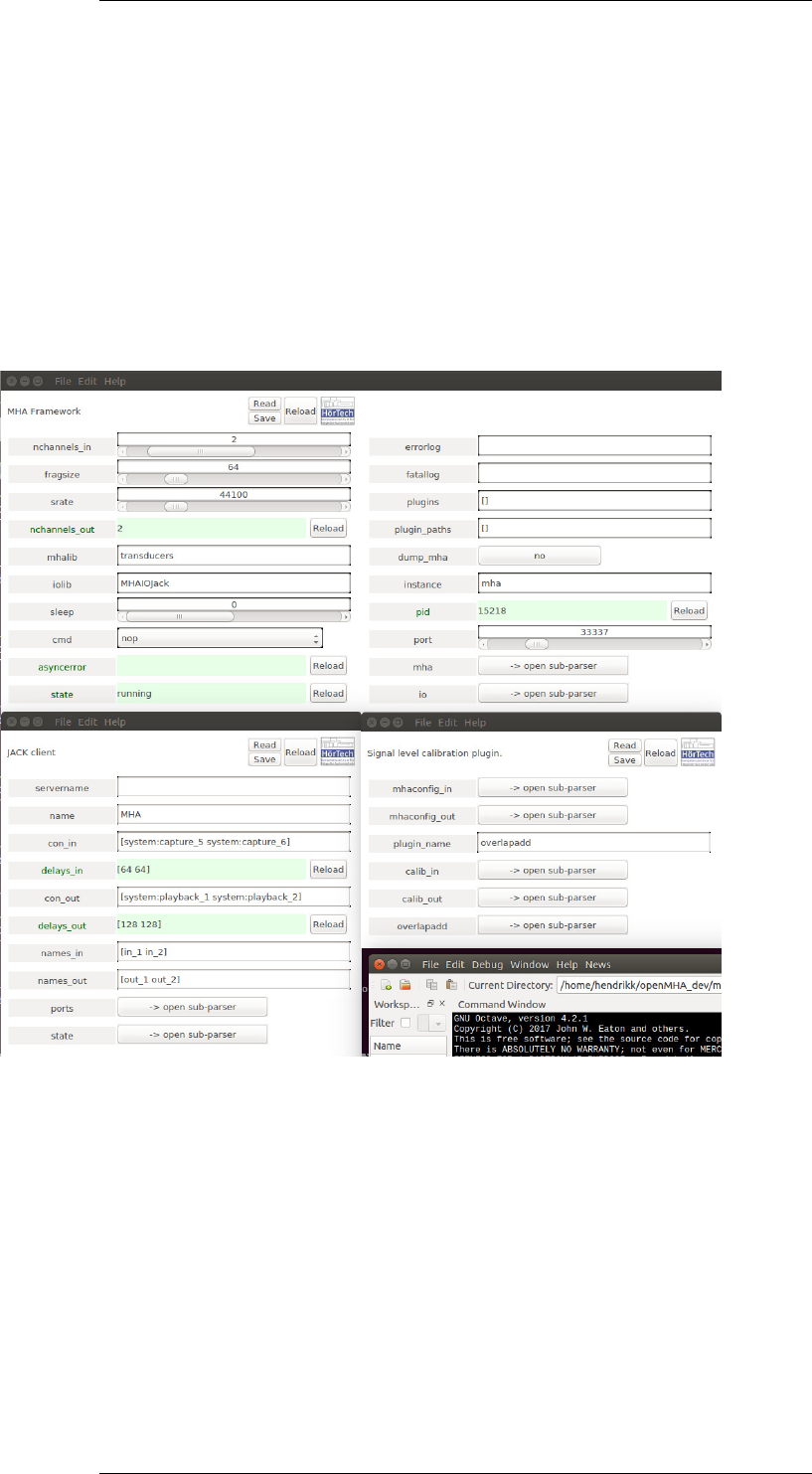
A generic graphical user interface (GUI) to the openMHA host application is available via the
function mhagui_generic and the helper functions mhagui_*.m. The syntax of the GUI
function is:
h = mhagui_generic( handle, base )
As before, ’handle’ is a structure containing the fields ’host’ and ’port’ defining the host name
and port number of the openMHA host application. The default values are ’localhost’ and
33337. ’base’ is the name of the openMHA parser node (default: '', i.e. root level). A control
panel is created in a GNU Octave/MATLAB figure, and the figure handle is returned. A control
element for each entry in the parser ’base’ is created. Numeric scalars are represented as
sliders, keyword lists as select boxes and boolean entries as toggle buttons. For vectors of
floating point values, a window with a slider array can be opened. Sub-parser can be opened
as a new window, containing an own control panel. Other types can be edited in a text editing
field.
If the openMHA is running on the same host as the GNU Octave/MATLAB control interface, it
is possible to read and save openMHA configuration files by clicking the ’read’ or ’save’ button.
The read/save command operates relative to the openMHA parser level displayed in the control
panel, i.e., the complete configuration should be read or saved from the root level panel.
© 2005-2018 HörTech gGmbH, Oldenburg
22 CONTENTS
Figure 4 Generic graphical user interface of a openMHA host application, created under
GNU Octave/MATLAB with the function ’mhagui_generic’.
© 2005-2018 HörTech gGmbH, Oldenburg

6 Hints and links for tuning the realtime environment 23
6 Hints and links for tuning the realtime environment
Low delay real-time signal processing is a task which depends highly on the operation system
performance. For low latency audio processing with a total delay of 4-6 ms, the maximal system
latency needs to be as low as 1 or 2 ms. On a single processor high level operating system
(e.g. Linux, MS Windows), multitasking is usually reached by sequentially processing each task
only for a limited period of time and than switching to the next task. This method is obviously
not suitable for real-time signal processing since the execution of code can be delayed by an
unpredictable amount of time. Low latency real-time processing tasks therefore have to be
started in a special mode which grants the execution of its code. Furthermore, the system has
to be manipulated in way which reduces the maximal interruption time by low level system tasks
(e.g. accesses to hard disks or graphic cards) or reduces their priority below the priority of the
real-time process. For Linux operating systems, a modified kernel is available which provides
these features.
6.1 Linux audio distributions
To manually patch a Linux kernel and configure the operating system for optimal audio pro-
cessing is a long and difficult task. We rather recommend to use a Linux distribution which is
prepared and optimised for audio processing. At least two audio distributions are freely avail-
able, one of those is used by HörTech for low delay audio processing.
A widely used audio distribution is ’Ubuntu Studio’, which is a variation of the Ubuntu distribu-
tion. It offers a low-latency kernel and all required software packages for running the openMHA.
All software packages for Ubuntu are available to Ubuntu Studio, since it is an official “flavour”
of Ubuntu. A new version of the distribution is released twice per year, with long-term support
versions released every two years. This distribution is used by HörTech. We usually use the
latest long-term support version. More information and download sites can be found here:
http://ubuntustudio.org/
Another commonly used audio distribution is ’Planet CCRMA’ which is built on top of a Fedora
Linux distribution. It is easy to maintain and includes all software packages required for low
latency signal processing with the MHA (mainly the JACK sound server, ALSA sound card
drivers and a low latency kernel). System updates including security fixes are available. More
information and download sites can be found here:
http://ccrma.stanford.edu/planetccrma/software/
Information on the ALSA (Advanced Linux Sound Architecture) sound drivers and supported
audio devices can be found in the web:
http://www.alsa-project.org/
© 2005-2018 HörTech gGmbH, Oldenburg

24 CONTENTS
6.2 The JACK low latency sound server
‘JACK is a low-latency audio server, written for POSIX-conforming operating systems such as
GNU/Linux and Apple’s OS X. It can connect a number of different applications to an audio
device, as well as allowing them to share audio between themselves. Its clients can run in their
own processes (ie. as normal applications), or they can run within the JACK server (ie. as a
plugin).’
‘JACK was designed from the ground up for professional audio work, and its design focuses on
two key areas: synchronous execution of all clients, and low latency operation.’ (citation from
the JACK web site).
The openMHA host application can use the JACK low latency sound server for audio input and
output. The advantage of using JACK in opposite to directly using the sound driver layer IO is
the possibility to connect to many (almost any) audio clients. At the same time it passes low
latency features of the driver layer (namely ALSA, but other drivers are supported as well) to
the client. JACK is available for Linux and Mac OS X. Documentation and download sites can
be found at this address:
http://www.jackaudio.org/
A JACK client can be added to a running sound server. While the client is active, it can be
connected to other clients or hardware ports through API functions, command line tools or
graphical user interfaces. Multiple connections to or from a client port are possible. Links to
many useful tools, e.g. mixing tools, graphical control interfaces, signal analysis tools, can be
found on the JACK website.
6.2.1 Invocation of JACK
The JACK sound server has to be started before the MHA. Once started, the configuration
(fragment size, sampling rate) of JACK is fixed. To change these parameters, please close
all JACK clients and restart the server. Details on the invocation of JACK are given in the
jackd manual page and in the package documentation. Here only MHA specific items will be
discussed.
Best performance will be reached if JACK uses direct hardware access with its native param-
eters. Usually this is provided by the ALSA ’hw’ device. Sometimes it is necessary to add
device and subdevice number to the device name, e.g. in case of an RME Digi 96 configured
as the second sound card use hw:1,1 to address its eight channel ADAT mode. When us-
ing the hardware device hw, only native parameters are supported. This means that only a
restricted set of fragment sizes (JACK: --period,-p), number of hardware buffers (JACK:
--nperiods,-n) and sampling rates (JACK: --rate,-r) can be configured.
If it is required to use non-native sampling rate some problems may occur. Due to buffer size
restrictions (JACK allows only powers of two, ALSA requires the ratio between native and user
sampling rate to be the same as the ratio between hardware period size and user period size)
only down-sampling by a power of two is supported with the ALSA plugin driver. Therefore a
sampling rate of 16 kHz can only be reached when using sound cards which support 32 kHz or
64 kHz sampling rate (e.g. not supported by the ALSA driver for RME Digi 96). The following
entry might be needed in your ~/.asoundrc file in order to work properly with your card:
© 2005-2018 HörTech gGmbH, Oldenburg

6.2 The JACK low latency sound server 25
pcm.mhadev {
type plug
slave {
pcm "hw:1,1"
rate 32000
}
}
Please replace hw:1,1 by the correct device name of your sound card. The JACK daemon
now can be started using the mhadev sound device:
jackd -d alsa -d mhadev -r 16000 -p 128 -n 2
This will use the sound card hw:1,1 with the native sampling rate 32 kHz, a hardware buffer
length of 256 samples and two hardware buffers. Warning messages about using the ALSA
software "plug" layer will be shown when not using the hardware device hw.
However, if all this doesn’t work it is still possible to use the OSS driver interface of JACK for
sound card access. With OSS it should be possible to configure non-native sampling rates
more easily, with the disadvantage of possibly working with longer delays and without direct
control of the audio hardware parameters.
If a JACK plugin for ALSA is installed (e.g. included in the Planet CCRMA distribution), it might
be useful to define a virtual ALSA device, which automatically connects to the MHA JACK client:
pcm.mha {
type plug
slave {
pcm {
type jack
playback_ports {
0 MHA:in_1
1 MHA:in_2
}
capture_ports {
0 MHA:out_1
1 MHA:out_2
}
}
}
}
When JACK and the MHA are running, a sound file can be played through the MHA by typing:
aplay -D plug:mha soundfile.wav
© 2005-2018 HörTech gGmbH, Oldenburg
Index
openMHA configuration language, 4
openMHA script language, 4
?,4
?cmds,4
?entries,4
?perm,4
?range,4
?read,5
?save,5
?savemons,5
?saveshort,5
?subst,4
?type,4
?val,4
AC variable, 7
access operator, 4
ALSA, 23
audio distribution, 23
audio file, 12
cmd,10
command
query, 4
communication, 7
complex variable, 6
con_in,11
con_out,12
configuration, 4
example, 14
framework, 17–19
hierarchical, 4
configuration file, 14
configuration language, 4
descending operator, 4
double buffering, 17
environment variable, 6
example configuration, 14
file
audio, 12
file processing, 12
fragment size, 17
fragsize,10
framework configuration, 17–19
hierarchical configuration, 4
in,12
io,10
iolib,10
JACK, 17,23,24
Jack Audio Connection Kit, 11
language, 4
length,13
low latency, 23
Matlab, 19
mha,10
MHAIOFile, 12
MHAIOJack, 11
mhalib,10
multidimensional variable, 5
name,11
names_in,12
names_out,12
nchannels_in,10
operator, 4
access-, 4
descending-, 4
query-, 4
out,12
output_sample_format,13
parser, 4
query command, 4
query operator, 4
range, 6
script language, 4
sleep,10
srate,10
startsample,13
states, 10
strict_channel_match,13
strict_srate_match,13
substitution, 6
text interface, 4
text variable, 6
variable
AC, 7
complex, 6