Product Profile Smart Exporter
User Manual: product-profile-smart-exporter www.ideav9.caseware.com - /pdf/
Open the PDF directly: View PDF  .
.
Page Count: 9

The software solution for exporting and
auditing SAP® data:
SmartExporter
Exporting SAP® data quickly and easily
Successful audits in the SAP® environment
Get your data the simple way
SAP® is used by roughly 100,000
companies worldwide. However, users of
the software face a number of special
challenges when attempting to analyze
SAP® data outside of their SAP®
environment.
Due to large volumes of data with
complicated structures, complex workflows
and diverse company specific entities it is
extremely difficult to access SAP® data.
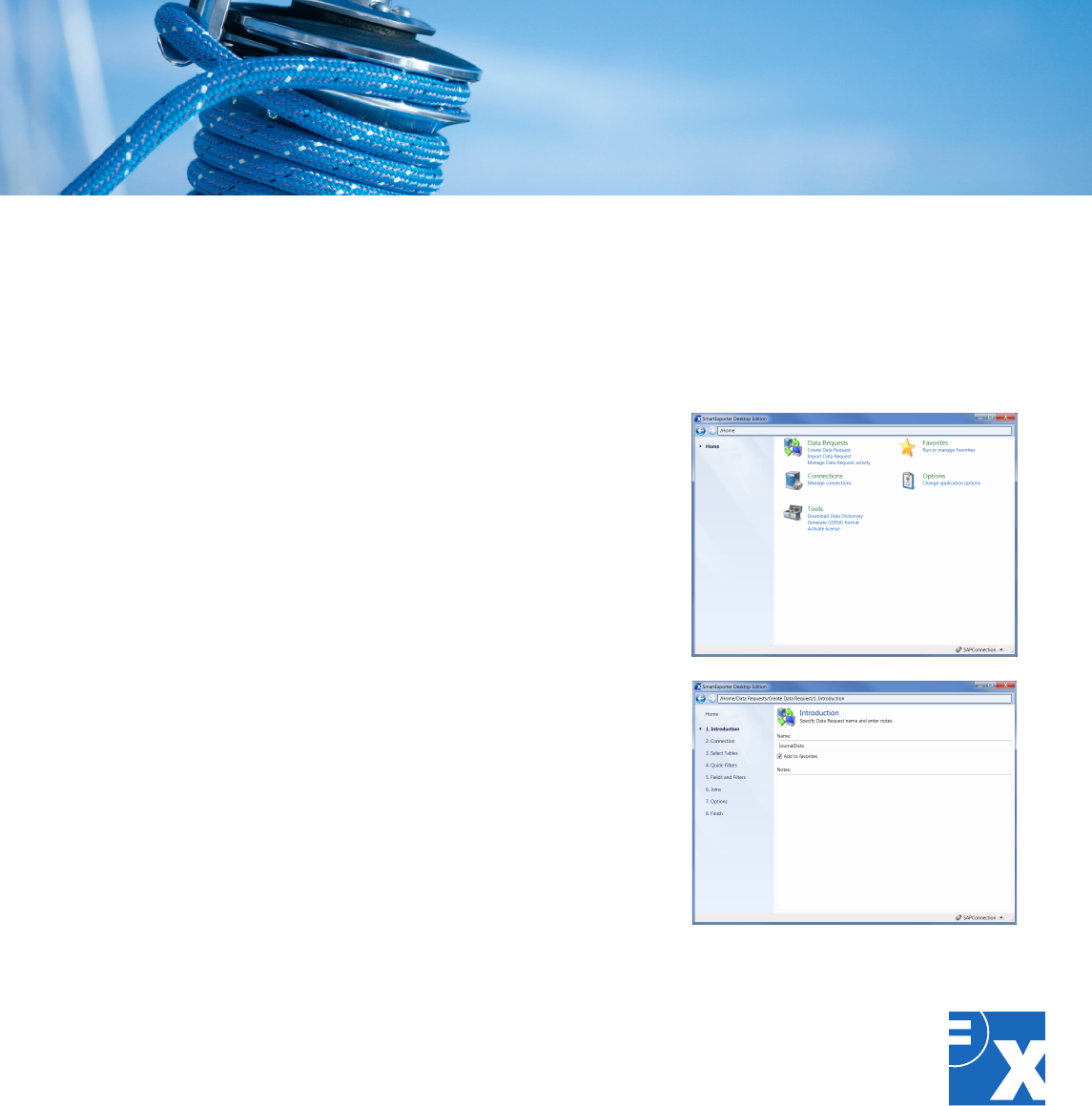
The solution: Export the SAP® data required
for your audits quickly and easily to any
directory using SmartExporter. With
SmartExporter you can access all
transparent SAP® tables, Database Views,
Pooled Tables and Cluster Tables and also
archived data.
To learn more about SmartExporter, please
visit www.casewareanalytics.com
Fast results
Unlike internal SAP® solutions which are
managed centrally from within the SAP®
system, SmartExporter is a Windows-based
application. The Data Request is not created
in SAP®, but on the user's computer. You
work in the familiar Windows environment.
This makes SmartExporter ideal for ad hoc
analyses to reduce data analysis expenses.
You can use SmartExporter in the following
areas:
• Internalaudits
• Controlling
• Financeandaccounting
• Bookkeepingandtaxes
• IT
• Sales
• Audits
• Accountingcontrol
Fast and easy? SmartExporter
Prepare Data: Right here.
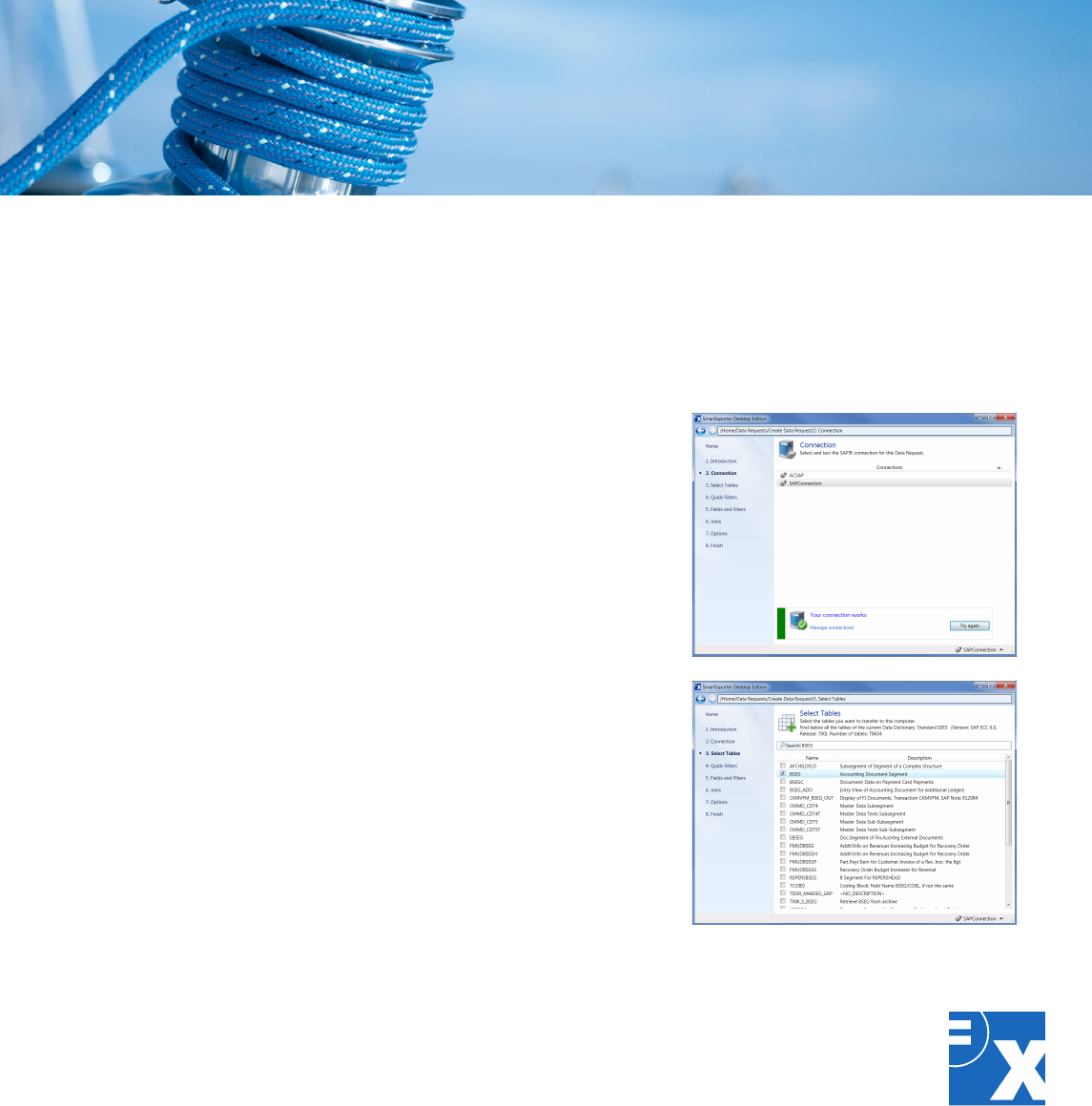
Use SmartExporter to overcome the
tiresome process of data preparation.
You can now define the required joins for
the data to be extracted while you are
creating a Data Request in SmartExporter.
Thus SmartExporter enables you to reduce
the data volume to exactly suit your needs.
The join definitions are an integrated part
of your Data Request and SmartExporter
provides data that you can analyze
straightaway.
SmartExporterprovidesanInnerorLeft
Outer Join. Needless to say that using
SmartExporter you can define joins for Pool
and Cluster tables also.
Not familiar with SAP®? No problem.
Make complex, time-consuming SAP®
features a thing of the past. Thanks to
SmartExport
er you can create your Data
Request where you are most comfortable —
on your own computer. SmartExporter
supports you in the
complex task of
selecting SAP® data: Once a Data Request
specifying the required tables, joins, fields
and filters is created you can save it as a
favorite and reuse it anytime.
ItisalsopossibletointegrateSmartExporter
intoIDEAandSmartAnalyzer.Afterselecting
your audit steps, SmartExporter identifies
the SAP® data you actually need. Once the
export is complete, you can analyze the
exporteddatadirectlyinIDEAand
SmartAnalyzer.
Fast and easy? SmartExporter
Online? Offline? Both.
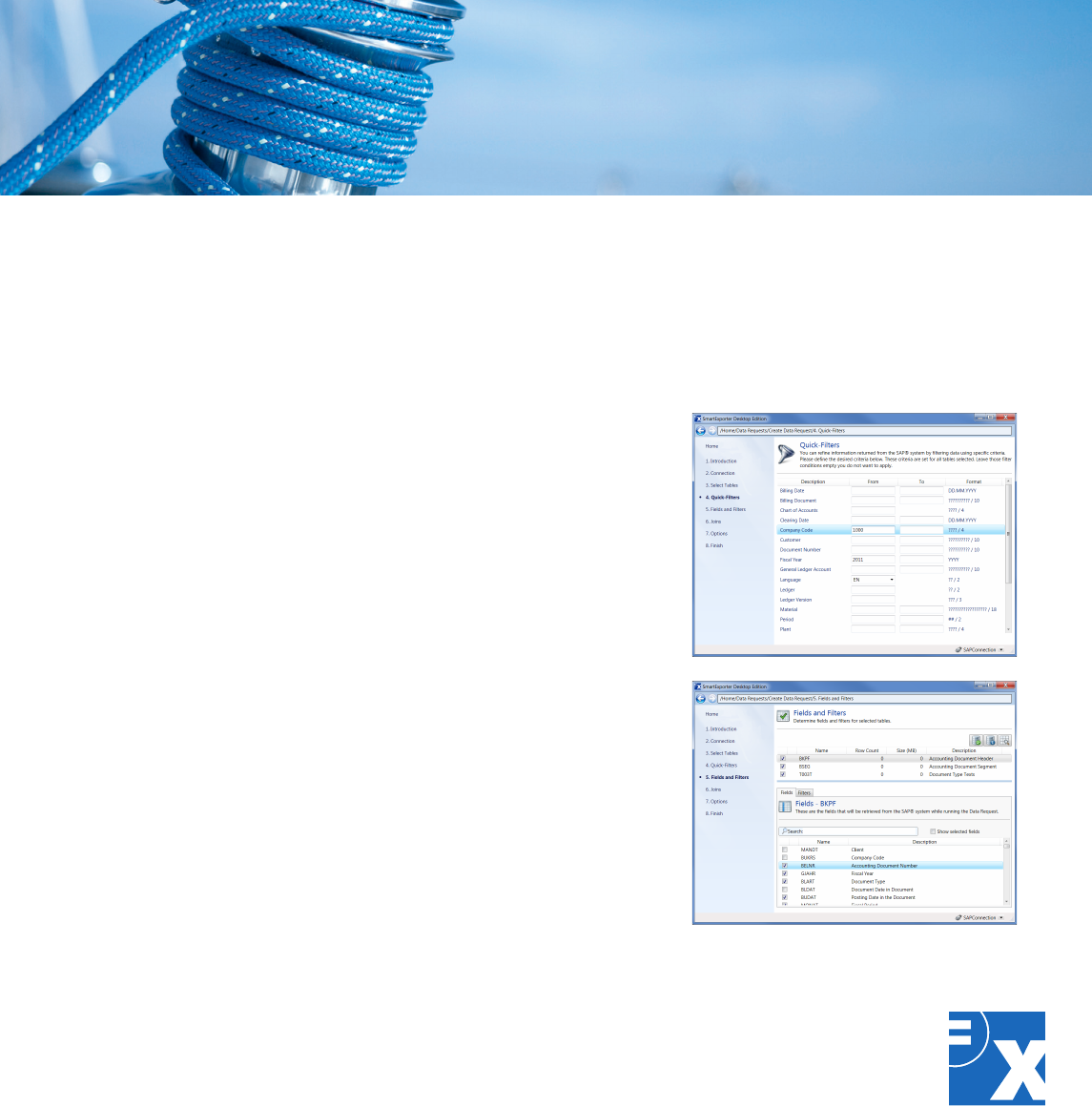
SmartExporter offers you two ways to
export data:
You can either connect to the SAP® system
and export the SAP® data directly:
Synchronous with small and asynchronous
with large volumes of data.
Or you can work offline without access to
the SAP® system, which for instance is
generally the case with external auditors.
You would then generate a Data Request
withSmartExporter,transferthisXMLleto
the person in charge of the SAP® system
who will provide the data you need
. The
SAP® data requested will be provided e.g.
on a data carrier.
Whether online or offline, SmartExporter
allows you to run exports depending on the
current system workload or to schedule
them to a specific time during off-peak
hours, e.g., at night or on weekends.
Fast and easy? SmartExporter
SmartExporter: Safe as can be!
SmartExporter is secure. User access to
SAP® data is limited by the existing SAP®
accessauthorizations.Inaddition,custom
access authorizations can also be defined.
The authorization concept is not restricted
to table level, but can be expanded to
detailed information, such as company code
or fiscal year.
Becauseaccessisrestricted,datais
displayed as read-only content. The original
SAP® data cannot be edited.
All actions can be traced at any time, as
theyarerecordedbyauniqueIDonthe
client and SAP® side. This ensures
maximum transparency when using
SmartExporter.
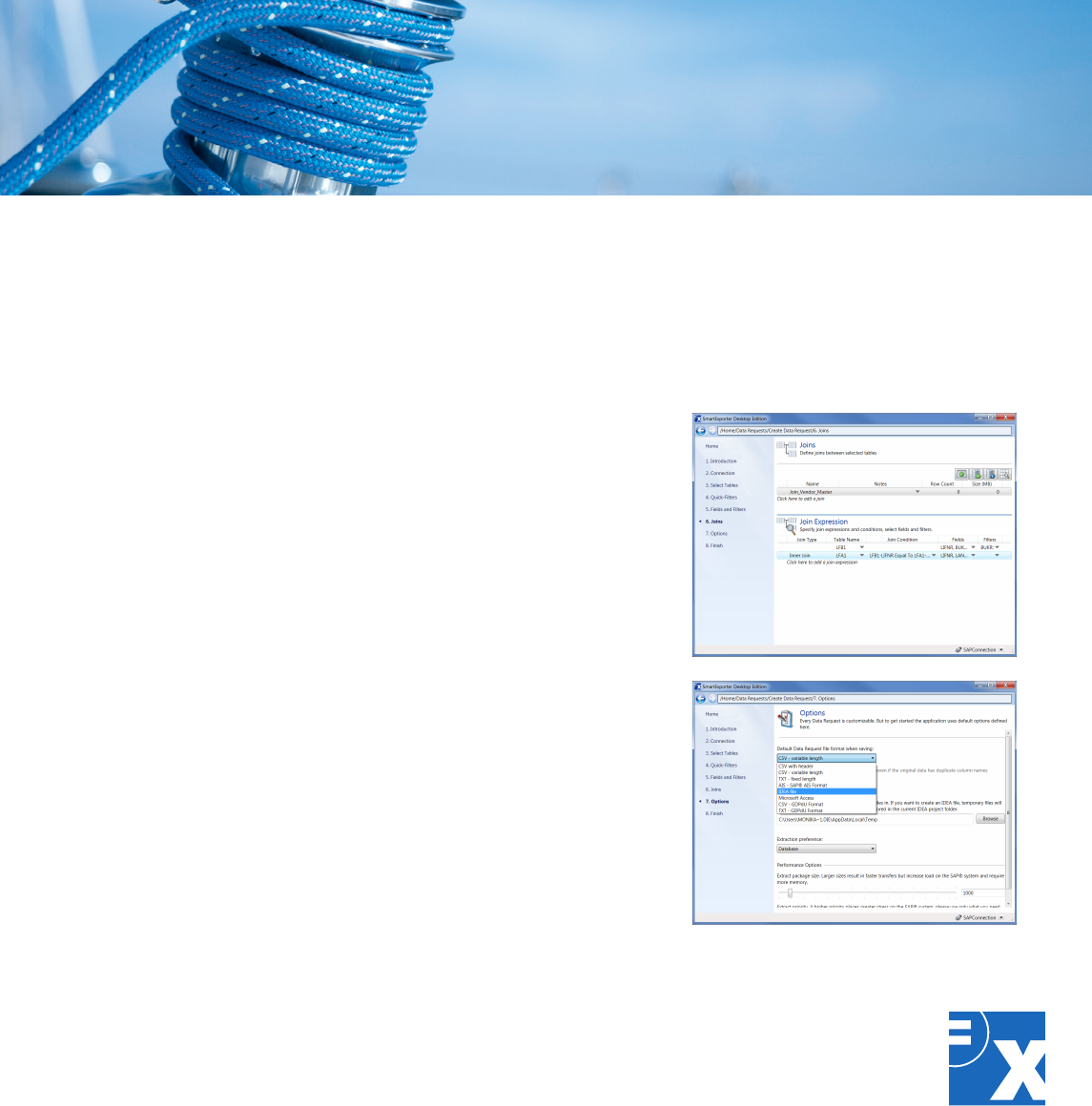
A further benefit: With SmartExporter, you
create files according to the GDPdU default
data structure.
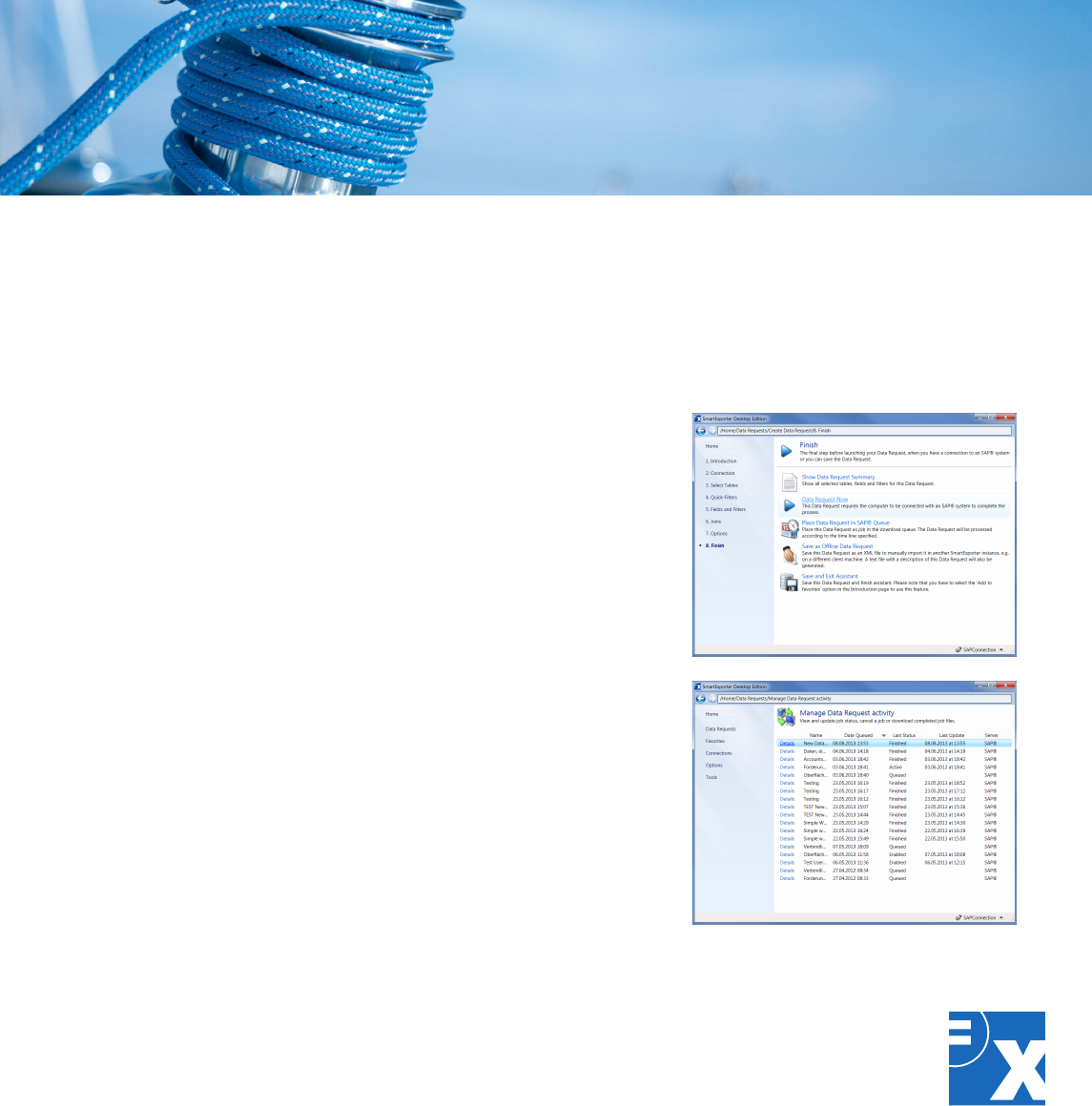
Meet any requirement – with the SmartExporter editions
The SmartExporter flavors
SmartExporter is available in various
editions – providing the suitable edition for
your specific needs.
The SmartExporter Desktop Edition is the
full version of SmartExporter. Using the
Desktop Edition you have access to all
available features.
The Client Edition was designed to provide a
smooth and optimized workflow between
auditor and client. The Client Edition offers
the option to extract data from an SAP®
system in a synchronous and asynchronous
way. This guarantees a maximum of
flexibility because the client is able to
decide when and how the data requested by
the auditor is extracted.
The licenses of the Desktop and the Client
Edition are connected and the Client Edition
can only import Data Requests or favorites
created by the corresponding Desktop
Edition.
The SmartExporter Server Edition is a
separate installation which can be
integratedintootherprocesses,e.g.inIDEA
Server or CaseWare Monitor, and provides a
high potential for automation.
The SmartExporter Starter Edition is a free
SmartExporter version with limited
functionalities which can be used for testing
purposes and as a means of evaluation for
the features and functions of SmartExporter
Desktop.

Technical specifications:
• Outputformats:IMD(IDEA),IDM(IDEAUnicode),CSV,TXTandMicrosoftAccessles,
SAP®AISformatandlesformattedaccordingtothedefaultdatastructure
• AccesstoalltransparentSAP®tables,DatabaseViews,PooledTablesandCluster
TablesandalsoarchiveddataaslongasitwasarchivedusingtheSAPADK(Archive
DevelopmentKit)
• SmartExportercommunicateswiththeSAP®systemusingLIBRFCwithRFCmodules
• TransportrequestsareusedtoimplementtheSmartExporterSAP®componentswhich
SmartExporterclientusestocalltheRFCmodules
• SmartExporterisalsoabletouseexistingSAP®standardcomponentslimiting,however,
the scope of SmartExporter functionalities
• SmartExportersupportsSAP®systemsfromrelease4.6C(Unicode/non-Unicode)with
ABAPStackandfollowing
• RunsonMicrosoft®WindowsXPSP3,Vista,VistaSP1,Windows7,Windows7SP1,
Windows8,Windows8.1,WindowsServer2008R2,Microsoft.NETFramework4.0
• The SmartExporter Server Edition can be used as a standalone version as well as in
combinationwithCaseWareMonitororIDEAServer(version9.1orhigher)
Technical specifications

We offer a wide range of seminars to help
you learn how to effectively use our
software solutions. The content is tailored
to suit your everyday practical needs.
Benetfromthemanyyearsofexperience
our instructors have to offer and make full
use of the features available in your
software solutions.
Our product training courses, in-house
seminars, and workshops teach you how to
get the most out of your Audicon solutions.
Save time by learning useful tricks and thus
gain greater flexibility for your other
important everyday tasks.
Do you want to save time and keep travel
expenses to a minimum? Audicon seminars
can be booked as external seminars or, on
request, held in-house at your company.
Many subjects are also available as
webinars.
Visit any of the following Audicon seminars
to put you a step ahead:
• ProducttrainingonSAP®dataanalysis
with Audicon software solutions
• WorkshoponSoDcheck:identifying
critical single authorizations and
authorization combinations in
SAP®Basis/FI
The safe way to success.
CaseWare Analytics is home to IDEA Data Analysis, Collaborative
Analytics and Continuous Monitoring solutions with a head office in
Toronto, Canada, an R&D lab in Ottawa, Canada, regional sales centers
intheUS,LatinAmerican,Netherlands,andChina,and40distributor
partners serving 90 countries. All CaseWare Analytics technologies
are built upon the foundation of best practices in assessing risk and
controls, hereby enabling audit and finance professionals to use real
data insights to create remarkable ROI & business improvement
opportunities.
IDEAisaregisteredtrademarkofCaseWareInternationalInc.
CaseWare Analytics
469KingStreetWest,Suite200
Toronto,CanadaM5V1K4
1800264IDEA(4332)ext.2800
sales@caseware-idea.com
www.casewareanalytics.com
You can either wait for the future to come. Or, better yet, meet
it halfway.
SmartExporter is developed by Audicon GmbH, an SAP® Certified Partner.
Please visit the SmartExporter website at www.smartexporter.de/en.
