Mackie Pro FX12 Owner's Manual Profx Om
Mackie ProFX12 Owner's Manual profx-om Mackie - ProFX12 - Owner's Manual
Mackie ProFX8 Owner's Manual profx-om Mackie - ProFX8 - Owner's Manual
User Manual: Mackie ProFX12 Owner's Manual Mackie - ProFX12 - Owner's Manual
Open the PDF directly: View PDF  .
.
Page Count: 33
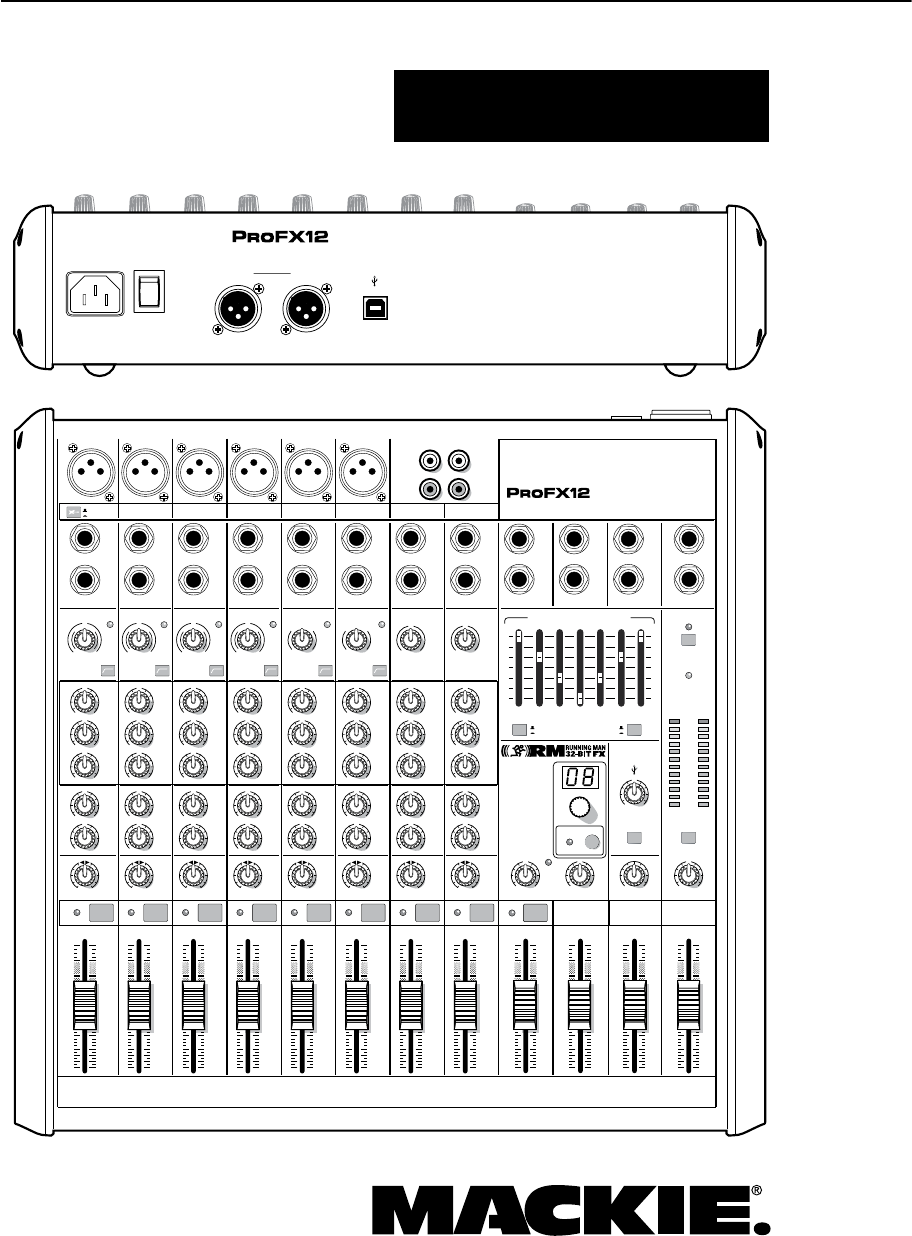
ProFX8 and ProFX12
OWNER’S MANUAL
Professional Mic/Line Mixers with FX and USB I/O
MAIN
RIGHT
(BALANCED)
MAIN
LEFT
USB
(BALANCED)
8K4K2K1K500250125
15
15
10
10
5
5
0
15
15
10
10
5
5
0
TAPE
IN
ST RETURN MAIN OUT PHONES
FOOTSWITCH
PHONES
TAPE
OUT
L
R
L
(UNBALANCED)
R
STEREO GRAPHIC EQ
FX SEND
MID
2.5kHz
MID
2.5kHz
MID
2.5kHz
MID
2.5kHz
MID
2.5kHz
80Hz
LOW
U
+15-15
U
+15-15
U
+15-15
LINE IN 4
INSERT
RL
LOW CUT
100 Hz
U
GAIN
M
I
C
G
A
I
N
U+50
-20dB +30dB
4
12kHz
HI
MID
2.5kHz
80Hz
LOW
U
+15-15
U
+15-15
U
+15-15
12kHz
HI
MID
2.5kHz
80Hz
LOW
U
+15-15
U
+15-15
U
+15-15
12kHz
HI
MID
2.5kHz
80Hz
LOW
U
+15-15
U
+15-15
U
+15-15
12kHz
HI
PAN
AUX
U
+15
OO
MON
FX
U
+15
OO
RL
PAN
AUX
U
+15
OO
MON
FX
U
+15
OO
RL
PAN
AUX
U
+15
OO
MON
FX
U
+15
OO
RL
PAN
AUX
U
+15
OO
MON
FX
U
+15
OO
80Hz
LOW
U
+15-15
U
+15-15
U
+15-15
RL
LOW CUT
100 Hz
12kHz
HI
PAN
AUX
U
+15
OO
MON
FX
U
+15
OO
80Hz
LOW
U
+15-15
U
+15-15
U
+15-15
BAL /
UNBAL
(MONO) (MONO) (MONO) (MONO)
LINE IN 7
LINE IN 8
BAL /
UNBAL LINE IN 9
RL
LOW CUT
100 Hz
GAIN
7/85/6
12kHz
HI
PAN
AUX
U
+15
OO
MON
FX
U
+15
OO
80Hz
LOW
U
+15-15
U
+15-15
U
+15-15
RL
M
I
C
G
A
I
N
U+50
GAIN
M
I
C
G
A
I
N
U+50
9/10
12kHz
HI
LEVEL
SET
LEVEL
SET
LEVEL
SET
LOW CUT
100 Hz
U
GAIN
M
I
C
G
A
I
N
U+50
-20dB +30dB
LEVEL
SET
LEVEL
SET
LEVEL
SET
LOW CUT
100 Hz
U
GAIN
M
I
C
G
A
I
N
U+50
-20dB +30dB
LOW CUT
100 Hz
U
GAIN
M
I
C
G
A
I
N
U+50
-20dB +30dB
PAN
AUX
U
+15
OO
MON
FX
U
+15
OO
GAIN
MIC MIC MIC MIC MIC MIC
80Hz
LOW
U
+15-15
U
+15-15
U
+15-15
U
+20-20
GAIN
U
+20-20
RL
11/12 ST RTN FX RTN
EQEQEQEQ EQ EQ EQ EQ
12kHz
HI
PAN
AUX
U
+15
OO
MON
FX
U
+15
OO
U
+15
FX TO MON
FX MASTER
U
+15
OO
OO
dB
30
20
10
10
OO
40
50
5
5
U
60
dB
30
20
10
10
OO
40
50
5
5
U
60
dB
30
20
10
10
OO
40
50
5
5
U
60
dB
30
20
10
10
OO
40
50
5
5
U
60
dB
30
20
10
10
OO
40
50
5
5
U
60
dB
30
20
10
10
OO
40
50
5
5
U
60
dB
30
20
10
10
OO
40
50
5
5
U
60
dB
30
20
10
10
OO
40
50
5
5
U
60
dB
30
20
10
10
OO
40
50
5
5
U
60
dB
30
20
10
10
OO
40
50
5
5
U
60
dB
30
20
10
10
OO
40
50
5
5
U
60
dB
30
20
10
10
OO
40
50
5
5
U
60
L
R
(MONO)
LINE IN 5
LINE IN 6
BAL /
UNBAL
L
R
LINE IN 10
BAL /
UNBAL
L
R
LINE IN 11
LINE IN 12
BAL /
UNBAL
L
R
BAL /
UNBAL
L
R
BAL /
UNBAL
L
R
MON SEND
BAL /
UNBAL
BAL /
UNBAL
PRESETS
FX PRESETS
01 BRIGHT ROOM
02 WARM LOUNGE
03 SMALL STAGE
04 WARM THEATER
05 WARM HALL
06 CONCERT HALL
13 DELAY 1 (300ms)
14 DELAY 2 (380ms)
15 DELAY 3 (480ms)
16 REVERB + DLY (250ms)
07 PLATE REVERB
08 CATHEDRAL
09 CHORUS
10 CHORUS + REV
11 DOUBLER
12 TAPE SLAP
MON MAIN
4
LINE IN 3
INSERT
3
BAL /
UNBAL
3
LINE IN 2
INSERT
2
BAL /
UNBAL
BAL /
UNBAL
2
LINE/HI-Z IN 1
INSERT
15/6 7/8 9/10 11/12
POWER
ON
0dB=0dBu
MAIN
METERS
OL
4
6
3
10
15
7
10
20
30
0
2
BREAK
(MUTES ALL CHANNELS)
PHANTOM
POWER
POWER
OO
+10
U
TAPE LEVEL
OO
+20
U
USB THRU
LINE
HI-Z
OO
MAX
1
OL OL OL OL OL OL OL OL OL
OL
MAIN MIX
MON
EQ IN
BYPASS
RL
INPUT LEVEL
USB
MUTE
MUTE MUTE MUTE MUTE MUTE MUTE MUTE MUTE MUTE
48V
2
ProFX8 and ProFX12
ProFX8 and ProFX12
1. Read these instructions.
2. Keep these instructions.
3. Heed all warnings.
4. Follow all instructions.
5. Do not use this apparatus near water.
6. Clean only with a dry cloth.
7. Do not block any ventilation openings. Install in accordance with the
manufacturer’s instructions.
8. Do not install near any heat sources such as radiators, heat registers,
stoves, or other apparatus (including amplifiers) that produce heat.
9. Do not defeat the safety purpose of the polarized or grounding-type
plug. A polarized plug has two blades with one wider than the other.
A grounding-type plug has two blades and a third grounding prong.
The wide blade or the third prong are provided for your safety. If the
provided plug does not fit into your outlet, consult an electrician for
replacement of the obsolete outlet.
10.
Protect the power cord from being walked on or pinched particularly at
plugs, convenience receptacles, and the point where they exit from the
apparatus.
11.
Only use attachments/accessories specified by the manufacturer.
12.
Use only with a cart, stand, tripod, bracket, or
table specified by the manufacturer, or sold with
the apparatus. When a cart is used, use caution
when moving the cart/apparatus combination to
avoid injury from tip-over.
13.
Unplug this apparatus during lightning storms or
when unused for long periods of time.
14.
Refer all servicing to qualified service personnel. Servicing is required
when the apparatus has been damaged in any way, such as power-
supply cord or plug is damaged, liquid has been spilled or objects have
fallen into the apparatus, the apparatus has been exposed to rain or
moisture, does not operate normally, or has been dropped.
15.
This apparatus shall not be exposed to dripping or splashing, and no
object filled with liquids, such as vases or beer glasses, shall be placed
on the apparatus.
16.
Do not overload wall outlets and extension cords as this can result in a
risk of fire or electric shock.
17.
This apparatus has been designed with Class-I construction and must
be connected to a mains socket outlet with a protective earthing
connection (the third grounding prong).
18.
This apparatus has been equipped with a rocker-style AC mains power
switch. This switch is located on the rear panel and should remain
readily accessible to the user.
19.
The MAINS plug or an appliance coupler is used as the disconnect
device, so the disconnect device shall remain readily operable.
20. NOTE: This equipment has been tested and found to comply with the
limits for a Class B digital device, pursuant to part 15 of the FCC Rules.
These limits are designed to provide reasonable protection against
harmful interference in a residential installation. This equipment
generates, uses, and can radiate radio frequency energy and, if not
installed and used in accordance with the instructions, may cause
harmful interference to radio communications. However, there is no
guarantee that interference will not occur in a particular installation.
If this equipment does cause harmful interference to radio or television
reception, which can be determined by turning the equipment off and
on, the user is encouraged to try to correct the interference by one or
more of the following measures:
• Reorientorrelocatethereceivingantenna.
• Increasetheseparationbetweentheequipmentandthe
receiver.
• Connecttheequipmentintoanoutletonacircuitdifferentfrom
that to which the receiver is connected.
• Consultthedealeroranexperiencedradio/TVtechnicianfor
help.
CAUTION: Changes or modifications to this device not expressly
approved by LOUD Technologies Inc. could void the user's authority to
operate the equipment under FCC rules.
21.
This apparatus does not exceed the Class A/Class B (whichever is
applicable)
limits for radio noise emissions from digital apparatus as
set out in the radio interference regulations of the Canadian Department
of Communications.
ATTENTION — Le présent appareil numérique n’émet pas de bruits
radioélectriques dépassant las limites applicables aux appareils
numériques de class A/de class B (selon le cas) prescrites dans le
réglement sur le brouillage radioélectrique édicté par les ministere des
communications du Canada.
22.
Exposure to extremely high noise levels may cause permanent hearing
loss. Individuals vary considerably in susceptibility to noise-induced
hearing loss, but nearly everyone will lose some hearing if exposed to
sufficiently intense noise for a period of time. The U.S. Government’s
Occupational Safety and Health Administration (OSHA) has specified
the permissible noise level exposures shown in the following chart.
According to OSHA, any exposure in excess of these permissible limits
could result in some hearing loss. To ensure against potentially
dangerous exposure to high sound pressure levels, it is recommended
that all persons exposed to equipment capable of producing high
sound pressure levels use hearing protectors while the equipment
is in operation. Ear plugs or protectors in the ear canals or over the
ears must be worn when operating the equipment in order to prevent
permanent hearing loss if exposure is in excess of the limits set forth
here:
Important Safety Instructions
CAUTION AVIS
RISK OF ELECTRIC SHOCK. DO NOT OPEN
RISQUE DE CHOC ELECTRIQUE. NE PAS OUVRIR
CAUTION: TO REDUCE THE RISK OF ELECTRIC SHOCK DO NOT REMOVE COVER (OR BACK)
NO USER-SERVICEABLE PARTS INSIDE. REFER SERVICING TO QUALIFIED PERSONNEL
ATTENTION: POUR EVITER LES RISQUES DE CHOC ELECTRIQUE, NE PAS ENLEVER LE COUVERCLE.
AUCUN ENTRETIEN DE PIECES INTERIEURES PAR L'USAGER.
CONFIER L'ENTRETIEN AU PERSONNEL QUALIFIE.
AVIS: POUR EVITER LES RISQUES D'INCENDIE OU D'ELECTROCUTION, N'EXPOSEZ PA S CET ARTICLE
A LA PLUIE OU A L'HUMIDITE
The lightning flash with arrowhead symbol within an equilateral triangle is
intended to alert the user to the presence of uninsulated "dangerous
voltage" within the product's enclosure, that may be of sufficient magnitude
to constitute a risk of electric shock to persons.
Le symbole éclair avec point de flèche à l'intérieur d'un triangle équilatéral
est utilisé pour alerter l'utilisateur de la présence à l'intérieur du coffret de
"voltage dangereux" non isolé d'ampleur suffisante pour constituer un risque
d'éléctrocution.
The exclamation point within an equilateral triangle is intended to alert the
user of the presence of important operating and maintenance (servicing)
instructions in the literature accompanying the appliance.
Le point d'exclamation à l'intérieur d'un triangle équilatéral est employé
pour alerter les utilisateurs de la présence d'instructions importantes pour le
fonctionnement et l'entretien (service) dans le livret d'instruction
accompagnant l'appareil. WARNING — To reduce the risk of fire or electric shock, do not
expose this apparatus to rain or moisture.
Duration,
per day in
hours
Sound Level
dBA, Slow
Response
Typical Example
8 90 Duo in small club
6 92
4 95 Subway Train
3 97
2 100 Veryloudclassicalmusic
1.5 102
1 105 Matt screaming at Troy about
deadlines
0.5 110
0.25 or less 115 Loudest parts at a rock concert
PORTABLE CART
WARNING

3
Owner’s Manual
Owner’s Manual
Part No. SW0713 Rev. D
©2011 LOUD Technologies Inc. All Rights Reserved.
No electrons were harmed during the production of this PDF.
2. For mono channels, adjust the gain control so
the level set LED just comes on occasionally
during the loudest parts of the performance.
The mono channel gain affects the mic and the
line inputs. The hybrid channel gain affects the
mic input only, not the stereo line inputs.
The stereo channel gain adjusts the stereo
line inputs. Adjust as desired, and make sure
that the OL LED does not come on during the
loudest passages.
3. Repeat steps 1 and 2 for the other channels.
Instant Mixing
1.
To get sound out of the speakers and into a
waiting world, turn up the channel’s fader to the
“
U
”
(unity gain) position,
and slowly bring up the
main fader
to a comfortable listening level.
2. Sing and play. You’re a star! Bring in the other
channels, and adjust their faders to make a
nice mix and generally have fun.
USB
The USB connection allows you to play 2 channels of
audio from the computer, and to record the main mix to
the computer.
Notes
For optimum sonic performance, the channel faders
and main fader should be set near the “U” (unity gain)
markings.
Turn down all faders before making connections to
and from the ProFX mixer.
When shutting down the system, turn off amplifiers or
powered speakers first. When powering up, turn them
on last. This will prevent the possibility of turn-on and
turn-off thumps heard in speakers.
Save the shipping box! You may need it someday.
Read This Page!
You probably want to try out your new
mixer right away. Before you do, please
read the safety instructions on page 2,
then read this page, and the rest later.
Zero the Mixer
1. Turn down all knobs except the channel EQ and
pan knobs, and set all the faders fully down.
2. Set all channel EQ knobs, pan knobs, and the
graphic EQ sliders at their center detent.
3. Set all buttons to the “out” position.
4. Whistle a popular show tune.
Connections
If you already know how you want to connect the
mixer, go ahead and connect the inputs and outputs
the way you want them. If you just want to get sound
through the mixer, follow these steps:
1.
Plug signal sources into the mixer, such as:
• Microphonespluggedintothemicinputs.
Engage phantom power if the mics need it.
Check the mic's user manual to be sure.
• Line-levelsourcessuchaskeyboards,drum
machines, or CD players plugged into the
line-level inputs.
• Aguitarpluggedintochannel1,withthe
line/hi-z switch pressed in.
2
. Connect cords from the main outs to powered
speakers or an amplifier.
3. Plug in the mixer’s power cord to a live AC
outlet and turn on the mixer.
4. If using powered speakers, turn them on.
Otherwise, connect passive speakers to an amp
with speaker cables, and turn it on. Adjust the
powered speaker or amplifier level controls
to however the
manufacturer recommends.
(This is usually all the way up.)
Set the Gain
1. Play something into an input. This could be an
instrument, singing or speaking, or a line level
source such as a keyboard or CD player. Be sure
that the volume of the input is the same as it
would be during normal use, or the gain may
have to be readjusted in the middle of a set. You
can listen with headphones by carefully turning
up the channel fader and headphones level a
little.
Please write the serial number here for future
reference (i.e., insurance claims, tech support,
return authorization, make dad proud, etc.)
Purchased at:
Date of purchase:

4
ProFX8 and ProFX12
ProFX8 and ProFX12
Introduction
ThankyouforchoosingaMackieprofessionalProFX
mixer. It is equipped with our rather lovely microphone
preamps, an internal FX processor and a USB port for
playing and recording 2 channels of audio using a
computer. The ProFX8 has 8 channels and the ProFX12
has 12 channels. Apart from this difference, the mixers
are identical and this manual covers both models.
AtMackie,weknowwhatittakestoberoadworthy.
After all, our mixers have traveled all over the world,
often under the worst of conditions, and we’ve applied
what we’ve learned to the mechanical design of our
ProFX mixers.
Reliability is paramount to sound reinforcement.
That’s why our engineers have subjected our mixers
to the most rigorous and fiendish tests imaginable to
fine-tune the design, and extend its limits beyond
those of ordinary mixers.
Features
• TheProFX8mixerhas8channels(2mono,
2 hybrid, 1 stereo)
• TheProFX12mixerhas12channels(4mono,
2 hybrid, 2 stereo)
• Monochannelshaveamicinputandamono
line-level input, with a gain control and level
set LED for adjustment of mic and line gain
• Hybridchannelshaveamicinputandstereo
line-level inputs, with a gain control and level
set LED for adjustment of mic gain
• Stereochannelshavestereoline-levelinputs,
with a gain control to adjust the line gain
• +48Vphantompowercanbeappliedtoallmics
• Tape/CDstereoRCAinputsandoutputs
• 1/4"TRSinsertjacksonmonochannels
• Channel1hi-zswitchallowsdirectconnection
of a guitar or bass without a DI box
• Lowcutswitchonmonoandhybridchannels
• 3-bandEQoneachchannel
• Auxmonitorcontroloneachchannel
• AuxFXcontroloneachchannel
• Eachchannelhasapancontrol,muteswitch,
overload (OL) LED, and fader
• Stereoreturnhasmute,OLLEDandfader
• XLRand1/4"TRSmainstereolineoutputs
• 1/4"TRSstereoreturn
• 1/4"TRSFXsendandmonitorsend
• 1/4"TRSstereoheadphonesoutput
• Headphoneslevelcontrol
• Tapeinputlevelcontrol
• 16built-inRunningManeffectswithinput
level, OL LED, preset display, FX to monitor
level, and footswitchable mute/un-mute
• 7-bandgraphicEQcanbeusedformainmix,
monitor mix, or bypassed
• 12-segmentstereooutputmetersonmainmix
• Breakswitchmutesallchannelsexcepttape
input and USB input
• Fadersforstereoreturn,FXreturn,monitor
and main
• USBconnectionallows2-channelcomputer
recording and 2-channel computer playback
• USBthruswitchandinputlevel
How To Use This Manual
The first few pages after the table of contents are the
hookup diagrams. These show typical setups for fun
times with your ProFX8 or ProFX12 mixer.
Next is a detailed tour of the entire mixer. The
descriptions are divided into sections, just as the
mixer is organized into distinct zones:
• RearPanel:TheACinput,powerswitch,
XLR line-level outputs and USB I/O
• ConnectionSection:Theuppersection,where
you connect microphones, guitars, etc.
• ChannelControls:Thechannelstripswhere
you adjust and control each channel
• MasterControls:Thesectionontheright,with
graphic EQ and main level controls
• StereoEffectProcessor
Throughout these sections are illustrations with
each feature numbered and described in the nearby
paragraphs.
This icon marks infor mation that is critically
important or unique to the mixer. For your own
good, read them and remember them.
This icon will lead to some explanations of
features and practical tips. Go ahead and skip
these if you really need to go.
Appendix A: Service information
Appendix B: Connectors
Appendix C: Technical information

5
Owner’s Manual
Owner’s Manual
Contents
Need help with your mixer?
• Visit www.mackie.com and click Support to find:
FAQs (Frequently Asked Questions), manuals, addendums, and
user forums.
• Email us at: techmail@mackie.com.
• Telephone 1-800-898-3211 to speak with one of our splendid
technical support representatives, (Monday through Friday,
normal business hours, Pacific Time).
IMPORTANT SAFETY INSTRUCTIONS ........................ 2
READ THIS PAGE! .................................................... 3
INTRODUCTION ...................................................... 4
CONTENTS ............................................................. 5
HOOKUP DIAGRAMS............................................... 6
REAR PANEL FEATURES ......................................... 12
1. POWER CONNECTION ............................. 12
2. POWER SWITCH ..................................... 12
3. XLR MAIN OUTS ................................... 12
4. USB PORT ............................................. 12
FRONT PANEL FEATURES ....................................... 13
CONNECTION SECTION ....................................... 13
5. MIC INPUTS ........................................... 13
6. LINE/HI-Z SWITCH ................................. 13
7. LINE/HI-Z INPUT (CHANNEL 1 ONLY) ...... 13
8. MONO LINE INPUTS ............................... 14
9. STEREO LINE INPUTS .............................. 14
10. CHANNEL INSERT ................................... 14
11. STEREO RETURN .................................... 14
12. MON SEND ............................................ 15
13. FX SEND ................................................ 15
14. 1⁄4" MAIN OUTS .................................... 15
15. FX FOOTSWITCH .................................... 15
16. PHONES ................................................ 15
17. TAPE INPUT ........................................... 16
18. TAPE OUTPUTS ...................................... 16
CHANNEL CONTROLS ......................................... 17
19. GAIN .................................................... 18
20. LEVEL SET LED ........................................ 18
21. LOW CUT ............................................... 18
22. HI EQ ..................................................... 19
23. MID EQ .................................................. 19
24. LOW EQ ................................................. 19
25. AUX MON .............................................. 19
26. AUX FX ................................................. 20
27. PAN....................................................... 20
28. OL LED ................................................... 20
29. MUTE .................................................... 20
30. CHANNEL FADER .................................... 20
MASTER CONTROLS ........................................... 21
31. PHANTOM POWER SWITCH .................... 21
32. POWER LED ........................................... 21
33. METERS ................................................. 21
34. BREAK SWITCH .................................... 22
35. TAPE LEVEL .......................................... 22
36. STEREO GRAPHIC EQ .............................. 22
37. MAIN MIX/MON ................................... 22
38. EQ IN/BYPASS ....................................... 22
39. USB INPUT LEVEL ................................... 22
40. USB THRU.............................................. 23
41. PHONES LEVEL ....................................... 23
42. OL LED (FOR STEREO RETURNS) .............. 23
43. MUTE (FOR STEREO RETURNS) ................ 23
44. STEREO RETURN FADER .......................... 23
45. FX RETURN FADER ................................. 23
46. MONITOR FADER ................................... 23
47. MAIN FADER .......................................... 23
STEREO EFFECTS PROCESSOR ............................. 24
48. PRESET DISPLAY .................................... 24
49. PRESET SELECTOR .................................. 24
50. INTERNAL FX MUTE ................................ 24
51. FX MASTER ............................................ 24
52. OL LED ................................................... 24
53. FX TO MON ........................................... 24
APPENDIX A: SERVICE INFORMATION .................... 26
APPENDIX B: CONNECTIONS.................................. 27
APPENDIX C: TECHNICAL INFORMATION ................ 29
PROFX8 AND PROFX12 LIMITED WARRANTY ........ 32
6
ProFX8 and ProFX12
ProFX8 and ProFX12
Band System ProFX12
MAIN
RIGHT
(BALANCED)
MAIN
LEFT
USB
(BALANCED)
POWER
ON
FUSE: T1.6AL AC250V
~100-240V 50/60 Hz 25W
MANUFACTURING DATE
SERIAL NUMBER
WARNING:
TO REDUCE THE RISK OF FIRE OR ELECTRIC
SHOCK, DO NOT EXPOSE THIS EQUIPMENT TO RAIN OR
MOISTURE. DO NOT REMOVE COVER. NO USER SERVICEABLE
PARTS INSIDE. REFER SERVICING TO QUALIFIED PERSONNEL.
AVIS:
RISQUE DE CHOC ELECTRIQUE — NE PAS OUVRIR
8K4K2K1K500250125
15
15
10
10
5
5
0
15
15
10
10
5
5
0
TAPE
IN
ST RETURN MAIN OUT PHONES
FOOTSWITCH
PHONES
TAPE
OUT
L
R
L
(UNBALANCED)
R
STEREO GRAPHIC EQ
FX SEND
MID
2.5kHz
MID
2.5kHz
MID
2.5kHz
MID
2.5kHz
MID
2.5kHz
80Hz
LOW
U
+15-15
U
+15-15
U
+15-15
LINE IN 4
INSERT
RL
LOW CUT
100 Hz
U
GAIN
M
I
C
G
A
I
N
U+50
-20dB +30dB
4
12kHz
HI
MID
2.5kHz
80Hz
LOW
U
+15-15
U
+15-15
U
+15-15
12kHz
HI
MID
2.5kHz
80Hz
LOW
U
+15-15
U
+15-15
U
+15-15
12kHz
HI
MID
2.5kHz
80Hz
LOW
U
+15-15
U
+15-15
U
+15-15
12kHz
HI
PAN
AUX
U
+15
OO
MON
FX
U
+15
OO
RL
PAN
AUX
U
+15
OO
MON
FX
U
+15
OO
RL
PAN
AUX
U
+15
OO
MON
FX
U
+15
OO
RL
PAN
AUX
U
+15
OO
MON
FX
U
+15
OO
80Hz
LOW
U
+15-15
U
+15-15
U
+15-15
RL
LOW CUT
100 Hz
12kHz
HI
PAN
AUX
U
+15
OO
MON
FX
U
+15
OO
80Hz
LOW
U
+15-15
U
+15-15
U
+15-15
BAL/
UNBAL
(MONO) (MONO) (MONO) (MONO)
LINE IN 7
LINE IN 8
BAL/
UNBAL LINE IN 9
RL
LOW CUT
100 Hz
GAIN
7/85/6
12kHz
HI
PAN
AUX
U
+15
OO
MON
FX
U
+15
OO
80Hz
LOW
U
+15-15
U
+15-15
U
+15-15
RL
M
I
C
G
A
I
N
U+50
GAIN
M
I
C
G
A
I
N
U+50
9/10
12kHz
HI
LEVEL
SET
LEVEL
SET
LEVEL
SET
LOW CUT
100 Hz
U
GAIN
M
I
C
G
A
I
N
U+50
-20dB +30dB
LEVEL
SET
LEVEL
SET
LEVEL
SET
LOW CUT
100 Hz
U
GAIN
M
I
C
G
A
I
N
U+50
-20dB +30dB
LOW CUT
100 Hz
U
GAIN
M
I
C
G
A
I
N
U+50
-20dB +30dB
PAN
AUX
U
+15
OO
MON
FX
U
+15
OO
GAIN
MIC MIC MIC MIC MIC MIC
80Hz
LOW
U
+15-15
U
+15-15
U
+15-15
U
+20-20
GAIN
U
+20-20
RL
11/12 ST RTN FX RTN
EQEQEQEQ EQ EQ EQ EQ
12kHz
HI
PAN
AUX
U
+15
OO
MON
FX
U
+15
OO
U
+15
FX TO MON
FX MASTER
U
+15
OO
OO
dB
30
20
10
10
OO
40
50
5
5
U
60
dB
30
20
10
10
OO
40
50
5
5
U
60
dB
30
20
10
10
OO
40
50
5
5
U
60
dB
30
20
10
10
OO
40
50
5
5
U
60
dB
30
20
10
10
OO
40
50
5
5
U
60
dB
30
20
10
10
OO
40
50
5
5
U
60
dB
30
20
10
10
OO
40
50
5
5
U
60
dB
30
20
10
10
OO
40
50
5
5
U
60
dB
30
20
10
10
OO
40
50
5
5
U
60
dB
30
20
10
10
OO
40
50
5
5
U
60
dB
30
20
10
10
OO
40
50
5
5
U
60
dB
30
20
10
10
OO
40
50
5
5
U
60
L
R
(MONO)
LINE IN 5
LINE IN 6
BAL/
UNBAL
L
R
LINE IN 10
BAL/
UNBAL
L
R
LINE IN 11
LINE IN 12
BAL/
UNBAL
L
R
BAL/
UNBAL
L
R
BAL/
UNBAL
L
R
MON SEND
BAL/
UNBAL
BAL/
UNBAL
PRESETS
FX PRESETS
01 BRIGHT ROOM
02 WARM LOUNGE
03 SMALL STAGE
04 WARM THEATER
05 WARM HALL
06 CONCERT HALL
13 DELAY 1 (300ms)
14 DELAY 2 (380ms)
15 DELAY 3 (480ms)
16 REVERB + DLY (250ms)
07 PLATE REVERB
08 CATHEDRAL
09 CHORUS
10 CHORUS + REV
11 DOUBLER
12 TAPE SLAP
MON MAIN
4
LINE IN 3
INSERT
3
BAL/
UNBAL
3
LINE IN 2
INSERT
2
BAL/
UNBAL
BAL/
UNBAL
2
LINE/HI-Z IN 1
INSERT
15/6 7/8 9/10 11/12
0dB=0dBu
MAIN
METERS
OL
4
6
3
10
15
7
10
20
30
0
2
BREAK
(MUTES ALL CHANNELS)
PHANTOM
POWER
POWER
OO
+10
U
TAPE LEVEL
OO
+20
U
USB THRU
LINE
HI-Z
OO
MAX
1
OL OL OL OL OL OL OL OL OL
OL
MAIN MIX
MON
EQ IN
BYPASS
RL
INPUT LEVEL
USB
MUTE
MUTE MUTE MUTE MUTE MUTE MUTE MUTE MUTE MUTE
48V
Mono Effects
press HI-Z
button
Microphones
Acoustic
Guitar with
pickup
Headphones
SRM450v2 Powered Speakers
SRM450v2 Powered Monitors
Footswitch
iPod
Docking Station
Laptop Computer
with Tracktion
for recording
Effects Processor
Mono in, Stereo out
Keyboard
Drum
Machine
Bass
Guitar
Electric
Guitar
Monitor EQ
HOOKUP DIAGRAMS
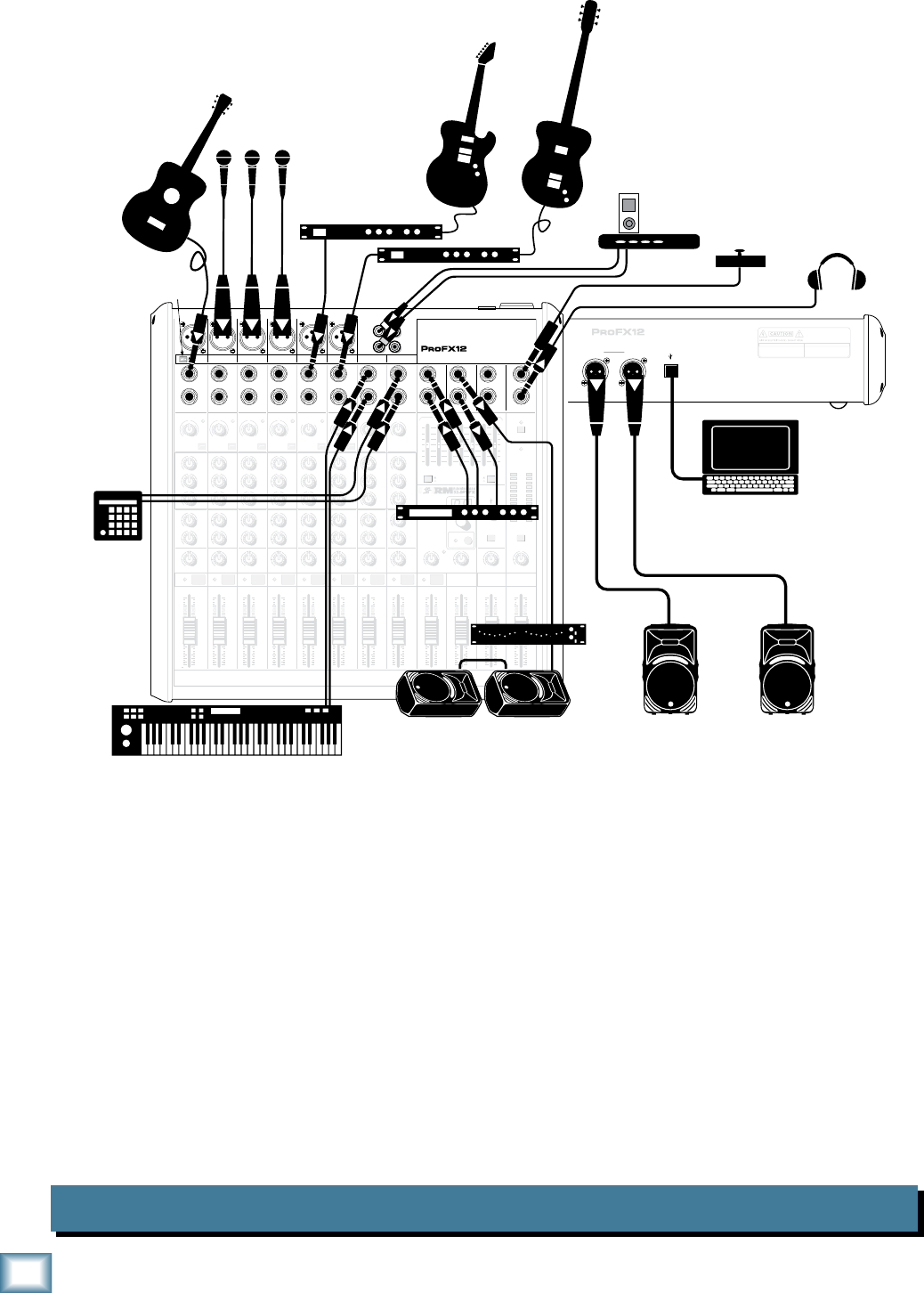
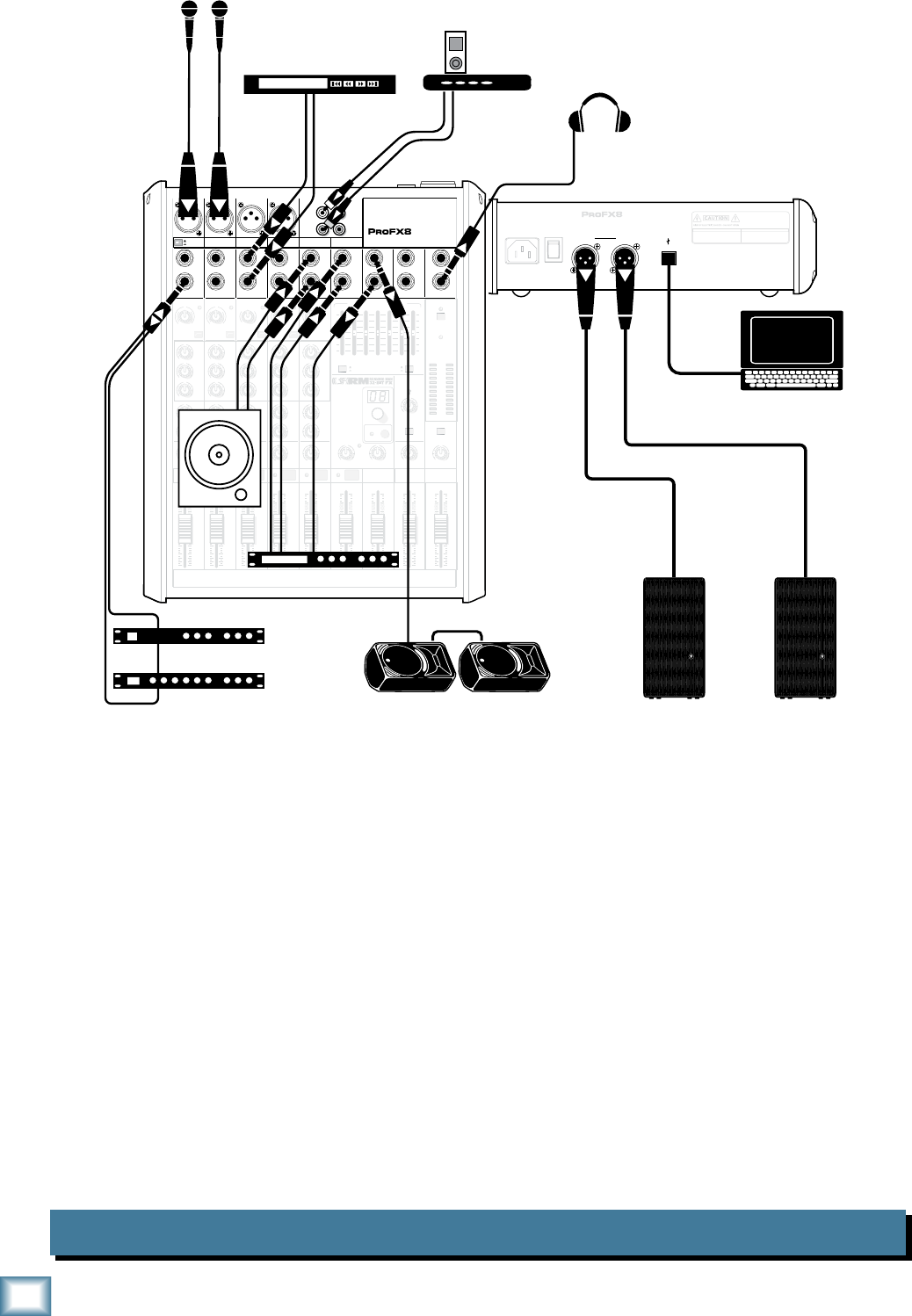
This diagram shows a guitar connected directly to channel 1 (with the hi-z switch pressed in),
microphones attached to channels 2, 3, and 4, guitar effects processors connected to the left line-level
input of channel 5/6 and 7/8, a keyboard attached to channel 9/10's line-level inputs and a drum
machine connected to channel 11/12. An iPod docking station is attached to the stereo tape inputs.
An effects processor receives a mono input from the FX send and its stereo outputs connect to the
stereo return inputs.
Mackie SRM450v2 powered speakers are connected to the left and right main output. Two of these
speakers are also set up as stage monitors and connect to the mixer's monitor output via a graphic EQ.
The aux mon controls of each channel allow you to create a stage monitor mix that is independent of the
main mix. Use the external graphic EQ to adjust the stage monitor EQ as desired. Headphones are used
for monitoring, and a footswitch allows you to mute/un-mute the internal effects as desired.
A laptop connects to the USB port, and allows the 2-channel main mix of the performance to be
recorded using Tracktion software. Two channels of audio can also play from the computer to the
main mix.
7
Owner’s Manual
Owner’s Manual
House of Worship System ProFX12
MAIN
RIGHT
(BALANCED)
MAIN
LEFT
USB
(BALANCED)
POWER
ON
FUSE: T1.6AL AC250V
~100-240V 50/60 Hz 25W
MANUFACTURING DATE
SERIAL NUMBER
WARNING:
TO REDUCE THE RISK OF FIRE OR ELECTRIC
SHOCK, DO NOT EXPOSE THIS EQUIPMENT TO RAIN OR
MOISTURE. DO NOT REMOVE COVER. NO USER SERVICEABLE
PARTS INSIDE. REFER SERVICING TO QUALIFIED PERSONNEL.
AVIS:
RISQUE DE CHOC ELECTRIQUE — NE PAS OUVRIR
8K4K2K1K500250125
15
15
10
10
5
5
0
15
15
10
10
5
5
0
TAPE
IN
ST RETURN MAIN OUT PHONES
FOOTSWITCH
PHONES
TAPE
OUT
L
R
L
(UNBALANCED)
R
STEREO GRAPHIC EQ
FX SEND
MID
2.5kHz
MID
2.5kHz
MID
2.5kHz
MID
2.5kHz
MID
2.5kHz
80Hz
LOW
U
+15-15
U
+15-15
U
+15-15
LINE IN 4
INSERT
RL
LOW CUT
100 Hz
U
GAIN
M
I
C
G
A
I
N
U+50
-20dB +30dB
4
12kHz
HI
MID
2.5kHz
80Hz
LOW
U
+15-15
U
+15-15
U
+15-15
12kHz
HI
MID
2.5kHz
80Hz
LOW
U
+15-15
U
+15-15
U
+15-15
12kHz
HI
MID
2.5kHz
80Hz
LOW
U
+15-15
U
+15-15
U
+15-15
12kHz
HI
PAN
AUX
U
+15
OO
MON
FX
U
+15
OO
RL
PAN
AUX
U
+15
OO
MON
FX
U
+15
OO
RL
PAN
AUX
U
+15
OO
MON
FX
U
+15
OO
RL
PAN
AUX
U
+15
OO
MON
FX
U
+15
OO
80Hz
LOW
U
+15-15
U
+15-15
U
+15-15
RL
LOW CUT
100 Hz
12kHz
HI
PAN
AUX
U
+15
OO
MON
FX
U
+15
OO
80Hz
LOW
U
+15-15
U
+15-15
U
+15-15
BAL/
UNBAL
(MONO) (MONO) (MONO) (MONO)
LINE IN 7
LINE IN 8
BAL/
UNBAL LINE IN 9
RL
LOW CUT
100 Hz
GAIN
7/85/6
12kHz
HI
PAN
AUX
U
+15
OO
MON
FX
U
+15
OO
80Hz
LOW
U
+15-15
U
+15-15
U
+15-15
RL
M
I
C
G
A
I
N
U+50
GAIN
M
I
C
G
A
I
N
U+50
9/10
12kHz
HI
LEVEL
SET
LEVEL
SET
LEVEL
SET
LOW CUT
100 Hz
U
GAIN
M
I
C
G
A
I
N
U+50
-20dB +30dB
LEVEL
SET
LEVEL
SET
LEVEL
SET
LOW CUT
100 Hz
U
GAIN
M
I
C
G
A
I
N
U+50
-20dB +30dB
LOW CUT
100 Hz
U
GAIN
M
I
C
G
A
I
N
U+50
-20dB +30dB
PAN
AUX
U
+15
OO
MON
FX
U
+15
OO
GAIN
MIC MIC MIC MIC MIC MIC
80Hz
LOW
U
+15-15
U
+15-15
U
+15-15
U
+20-20
GAIN
U
+20-20
RL
11/12 ST RTN FX RTN
EQEQEQEQ EQ EQ EQ EQ
12kHz
HI
PAN
AUX
U
+15
OO
MON
FX
U
+15
OO
U
+15
FX TO MON
FX MASTER
U
+15
OO
OO
dB
30
20
10
10
OO
40
50
5
5
U
60
dB
30
20
10
10
OO
40
50
5
5
U
60
dB
30
20
10
10
OO
40
50
5
5
U
60
dB
30
20
10
10
OO
40
50
5
5
U
60
dB
30
20
10
10
OO
40
50
5
5
U
60
dB
30
20
10
10
OO
40
50
5
5
U
60
dB
30
20
10
10
OO
40
50
5
5
U
60
dB
30
20
10
10
OO
40
50
5
5
U
60
dB
30
20
10
10
OO
40
50
5
5
U
60
dB
30
20
10
10
OO
40
50
5
5
U
60
dB
30
20
10
10
OO
40
50
5
5
U
60
dB
30
20
10
10
OO
40
50
5
5
U
60
L
R
(MONO)
LINE IN 5
LINE IN 6
BAL/
UNBAL
L
R
LINE IN 10
BAL/
UNBAL
L
R
LINE IN 11
LINE IN 12
BAL/
UNBAL
L
R
BAL/
UNBAL
L
R
BAL/
UNBAL
L
R
MON SEND
BAL/
UNBAL
BAL/
UNBAL
PRESETS
FX PRESETS
01 BRIGHT ROOM
02 WARM LOUNGE
03 SMALL STAGE
04 WARM THEATER
05 WARM HALL
06 CONCERT HALL
13 DELAY 1 (300ms)
14 DELAY 2 (380ms)
15 DELAY 3 (480ms)
16 REVERB + DLY (250ms)
07 PLATE REVERB
08 CATHEDRAL
09 CHORUS
10 CHORUS + REV
11 DOUBLER
12 TAPE SLAP
MON MAIN
4
LINE IN 3
INSERT
3
BAL/
UNBAL
3
LINE IN 2
INSERT
2
BAL/
UNBAL
BAL/
UNBAL
2
LINE/HI-Z IN 1
INSERT
15/6 7/8 9/10 11/12
0dB=0dBu
MAIN
METERS
OL
4
6
3
10
15
7
10
20
30
0
2
BREAK
(MUTES ALL CHANNELS)
PHANTOM
POWER
POWER
OO
+10
U
TAPE LEVEL
OO
+20
U
USB THRU
LINE
HI-Z
OO
MAX
1
OL OL OL OL OL OL OL OL OL
OL
MAIN MIX
MON
EQ IN
BYPASS
RL
INPUT LEVEL
USB
MUTE
MUTE MUTE MUTE MUTE MUTE MUTE MUTE MUTE MUTE
48V
Mono Effects
Microphones
Lavalier
Clip-on Mic
Headphones
SRM450v2 Powered Monitors
Laptop
with Tracktion
recording
the service
Effects Processor
Mono in, Stereo out
Dual Compressors
Compressor/Limiter
Acoustic Guitar
and Mic
iPod
Docking Station
Monitor EQ
Assistive Listening
System
Keyboard
Electric
Guitar
HD1521 Powered Speakers
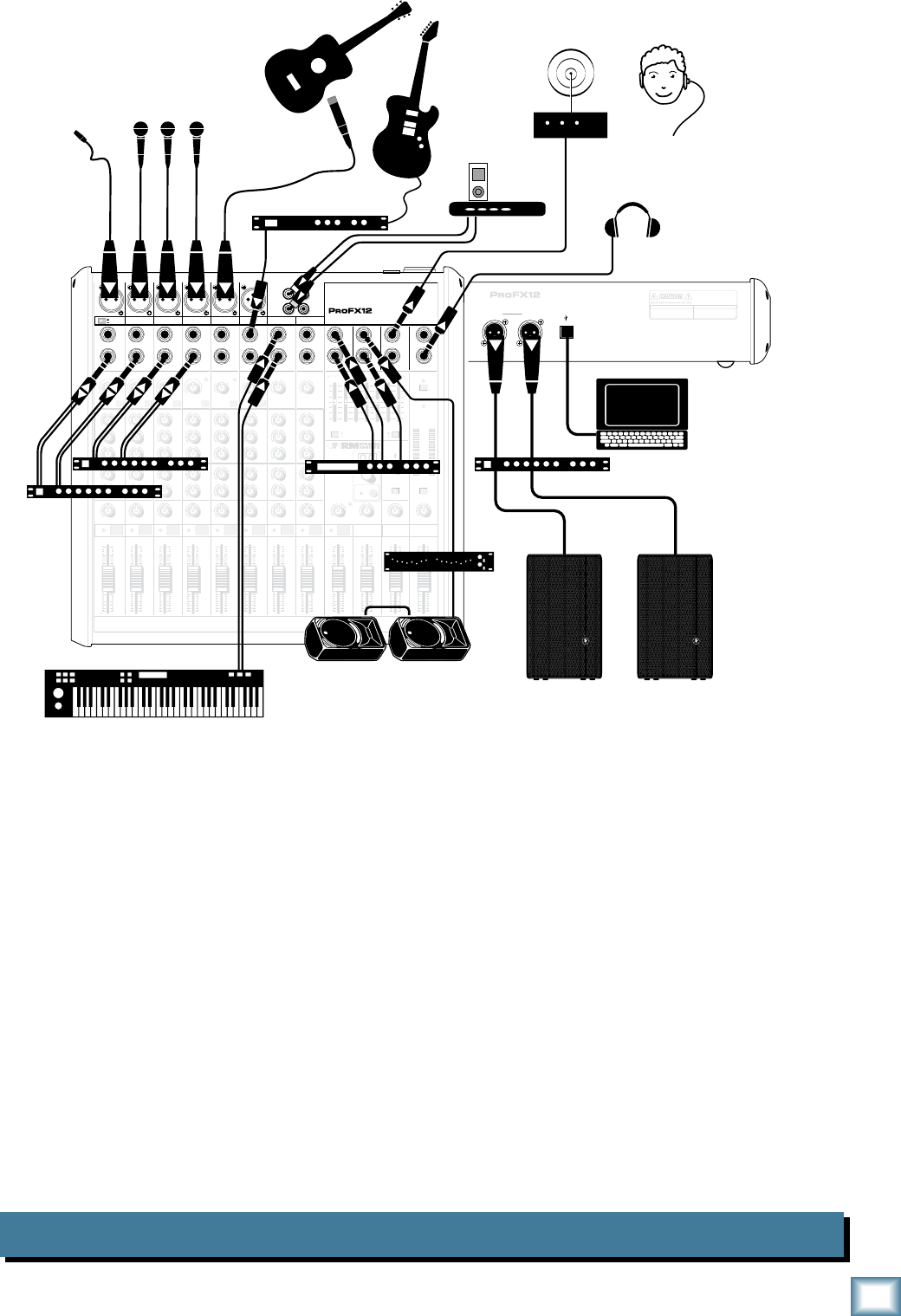
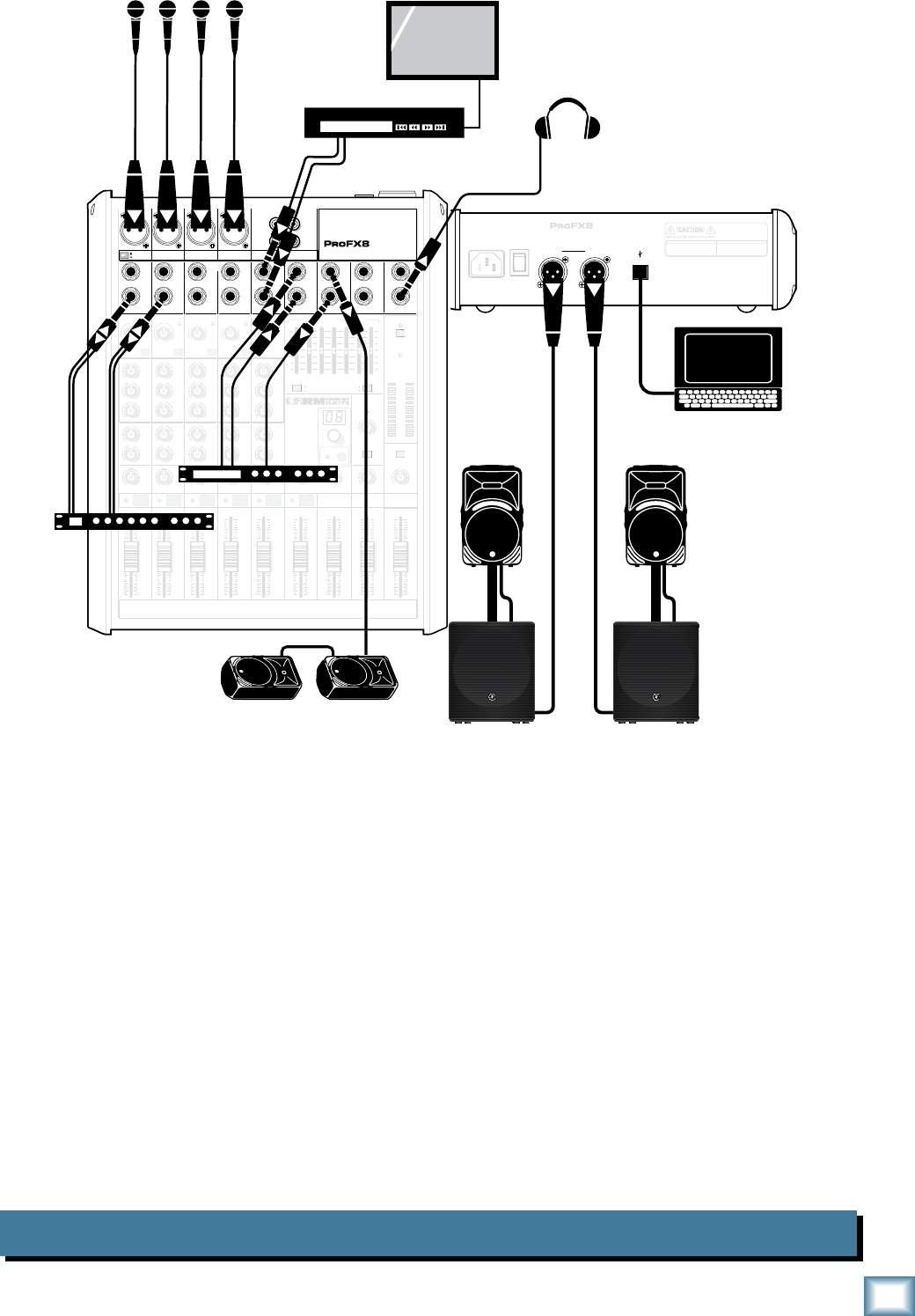
This diagram shows various microphones attached to channels 1 to 4, a mic'd guitar on channel 5/6,
a guitar effects processor connected to the left line-level input of channel 7/8 and a keyboard attached
to channel 9/10's line-level inputs. An iPod docking station is attached to the stereo tape inputs.
An effects processor receives a mono input from the FX send and its stereo outputs connect to the stereo
return inputs. An assistive listening system is connected to the line-level main output. Dual compressors
are connected to the inserts of channels 1 to 4, allowing vocal compression.
Mackie HD1521 powered speakers are connected to the left and right main output via a compressor/
limiter. Two SRM450v2 powered speakers are set up as stage monitors and connect to the mixer's
monitor output via a graphic EQ. The aux mon controls of each channel allow you to create a stage
monitor mix that is independent of the main mix. Use the external graphic EQ to adjust the stage
monitor EQ, as desired. Headphones are used for monitoring.
A laptop connects to the USB port, and allows the 2-channel main mix of the service to be recorded
using Tracktion software. Two channels of audio can also play from the computer to the main mix.
8
ProFX8 and ProFX12
ProFX8 and ProFX12
DJ System ProFX8
MAIN
RIGHT
(BALANCED)
MAIN
LEFT
USB
(BALANCED)
MANUFACTURING DATE
SERIAL NUMBER
WARNING:
TO REDUCE THE RISK OF FIRE OR ELECTRIC
SHOCK, DO NOT EXPOSE THIS EQUIPMENT TO RAIN OR
MOISTURE. DO NOT REMOVE COVER. NO USER SERVICEABLE
PARTS INSIDE. REFER SERVICING TO QUALIFIED PERSONNEL.
AVIS:
RISQUE DE CHOC ELECTRIQUE — NE PAS OUVRIR
13 DELAY 1 (300ms)
14 DELAY 2 (380ms)
15 DELAY 3 (480ms)
16 REVERB + DLY (250ms)
8K4K2K1K
500250125
15
15
10
10
5
5
0
15
15
10
10
5
5
0
TAPE
IN
ST RETURN MAIN OUT PHONES
FOOTSWITCH
PHONES
TAPE
OUT
L
R
L
(UNBALANCED)
R
0dB=0dBu
MAIN
METERS
RL
OL
4
6
3
10
15
7
10
20
30
0
2
BREAK
(MUTES ALL CHANNELS)
PHANTOM
POWER
POWER
STEREO GRAPHIC EQ
FX SEND
MID
2.5kHz
MID
2.5kHz
MID
2.5kHz
MID
2.5kHz
MID
2.5kHz
80Hz
LOW
U
+15-15
U
+15-15
U
+15-15
INSERT
RL
LOW CUT
100 Hz
U
GAIN
M
I
C
G
A
I
N
U+50
-20dB +30dB
OL
1
EQ
12kHz
HI
PAN
AUX
U
+15
OO
MON
FX
U
+15
OO
80Hz
LOW
U
+15-15
U
+15-15
U
+15-15
RL
LOW CUT
100 Hz
U
GAIN
M
I
C
G
A
I
N
U+50
-20dB +30dB
2
EQ
12kHz
HI
PAN
AUX
U
+15
OO
MON
FX
U
+15
OO
80Hz
LOW
U
+15-15
U
+15-15
U
+15-15
LINE IN 2 LINE/HI-Z IN 1
INSERT
BAL /
UNBAL
(MONO) (MONO) (MONO) (MONO)
LINE IN 3
LINE IN 4
BAL /
UNBAL LINE IN 5
RL
LOW CUT
100 Hz
GAIN
3/4
EQ
12kHz
HI
PAN
AUX
U
+15
OO
MON
FX
U
+15
OO
80Hz
LOW
U
+15-15
U
+15-15
U
+15-15
RL
LOW CUT
100Hz
GAIN
M
I
C
G
A
I
N
U+50
M
I
C
G
A
I
N
U+50
5/6
EQ
12kHz
HI
LEVEL
SET
LEVEL
SET
LEVEL
SET
LEVEL
SET
PAN
AUX
U
+15
OO
MON
FX
U
+15
OO
GAIN
MIC MIC MIC MIC
80Hz
LOW
U
+15-15
U
+15-15
U
+15-15
U
+20-20
RL
7/8 ST RTN FX RTN
EQ
12kHz
HI
PAN
AUX
U
+15
OO
MON
FX
U
+15
OO
U
+15
FX TO MON
FX MASTER
U
+15
OO
OO
dB
30
20
10
10
OO
40
50
5
5
U
60
dB
30
20
10
10
OO
40
50
5
5
U
60
dB
30
20
10
10
OO
40
50
5
5
U
60
dB
30
20
10
10
OO
40
50
5
5
U
60
dB
30
20
10
10
OO
40
50
5
5
U
60
dB
30
20
10
10
OO
40
50
5
5
U
60
30
20
10
OO
40
50
5
5
U
60
dB
30
20
10
10
OO
40
50
5
5
U
60
dB
30
20
10
10
OO
40
50
5
5
U
60
L
R
LINE IN 6
BAL /
UNBAL
L
R
LINE IN 7
LINE IN 8
BAL /
UNBAL
L
R
BAL /
UNBAL
L
R
BAL /
UNBAL
L
R
MON SEND
BAL /
UNBAL
BAL /
UNBAL
MUTE
PRESETS
FX PRESETS
OL OL OL OL OL
INPUT LEVEL
USB
OO
+10
U
TAPE LEVEL
OO
+20
U
MON MAIN
1 2 3/4 5/6 7/8
OL
USB THRU
LINE
HI-Z
MAIN MIX
MON
EQ IN
BYPASS
01 BRIGHT ROOM
02 WARM LOUNGE
03 SMALL STAGE
04 WARM THEATER
05 WARM HALL
06 CONCERT HALL
07 PLATE REVERB
08 CATHEDRAL
09 CHORUS
10 CHORUS + REV
11 DOUBLER
12 TAPE SLAP
OO
MAX
LINE
HI-Z
MUTE MUTE MUTE MUTE MUTE MUTE
48V
Headphones
Effects Processor
Reverb
Compressor
CD Player
Laptop running Tracktion
and DJ software
HD1531 Powered Speakers
SRM450v2 Powered Monitors
Microphones
iPod
Docking Station
CD Turntable
POWER
ON
This diagram shows two microphones attached to channels 1 and 2, a CD player connected to the
line-level inputs of channel 3/4 and a CD turntable connected to the line-level inputs of channel 7/8.
An iPod docking station is attached to the stereo tape inputs. An effects processor receives a mono input
from the FX send and its stereo outputs connect to the stereo return inputs. A reverb and compressor are
connected to the insert of channel 1 allowing vocal compression and a touch of reverb.
Mackie HD1531 powered speakers are connected to the left and right main output. Two SRM450v2
powered speakers are set up as stage monitors and connect to the mixer's monitor output. The aux mon
controls of each channel allow you to create a stage monitor mix that is independent of the main mix.
Switch the internal graphic EQ to adjust the stage monitor EQ if desired. Headphones are used for
monitoring.
A laptop connects to the USB port and allows 2-channel output of DJ software to play in the main mix.
It may also be used to record a set on the computer for posterity.
9
Owner’s Manual
Owner’s Manual
Karaoke System ProFX8
MAIN
RIGHT
(BALANCED)
MAIN
LEFT
USB
(BALANCED)
MANUFACTURING DATE
SERIAL NUMBER
WARNING:
TO REDUCE THE RISK OF FIRE OR ELECTRIC
SHOCK, DO NOT EXPOSE THIS EQUIPMENT TO RAIN OR
MOISTURE. DO NOT REMOVE COVER. NO USER SERVICEABLE
PARTS INSIDE. REFER SERVICING TO QUALIFIED PERSONNEL.
AVIS:
RISQUE DE CHOC ELECTRIQUE — NE PAS OUVRIR
13 DELAY 1 (300ms)
14 DELAY 2 (380ms)
15 DELAY 3 (480ms)
16 REVERB + DLY (250ms)
8K4K2K1K
500250125
15
15
10
10
5
5
0
15
15
10
10
5
5
0
TAPE
IN
ST RETURN MAIN OUT PHONES
FOOTSWITCH
PHONES
TAPE
OUT
L
R
L
(UNBALANCED)
R
0dB=0dBu
MAIN
METERS
RL
OL
4
6
3
10
15
7
10
20
30
0
2
BREAK
(MUTES ALL CHANNELS)
PHANTOM
POWER
POWER
STEREO GRAPHIC EQ
FX SEND
MID
2.5kHz
MID
2.5kHz
MID
2.5kHz
MID
2.5kHz
MID
2.5kHz
80Hz
LOW
U
+15-15
U
+15-15
U
+15-15
INSERT
RL
LOW CUT
100 Hz
U
GAIN
M
I
C
G
A
I
N
U+50
-20dB +30dB
OL
1
EQ
12kHz
HI
PAN
AUX
U
+15
OO
MON
FX
U
+15
OO
80Hz
LOW
U
+15-15
U
+15-15
U
+15-15
RL
LOW CUT
100 Hz
U
GAIN
M
I
C
G
A
I
N
U+50
-20dB +30dB
2
EQ
12kHz
HI
PAN
AUX
U
+15
OO
MON
FX
U
+15
OO
80Hz
LOW
U
+15-15
U
+15-15
U
+15-15
LINE IN 2 LINE/HI-Z IN 1
INSERT
BAL /
UNBAL
(MONO) (MONO) (MONO) (MONO)
LINE IN 3
LINE IN 4
BAL /
UNBAL LINE IN 5
RL
LOW CUT
100 Hz
GAIN
3/4
EQ
12kHz
HI
PAN
AUX
U
+15
OO
MON
FX
U
+15
OO
80Hz
LOW
U
+15-15
U
+15-15
U
+15-15
RL
LOW CUT
100Hz
GAIN
M
I
C
G
A
I
N
U+50
M
I
C
G
A
I
N
U+50
5/6
EQ
12kHz
HI
LEVEL
SET
LEVEL
SET
LEVEL
SET
LEVEL
SET
PAN
AUX
U
+15
OO
MON
FX
U
+15
OO
GAIN
MIC MIC MIC MIC
80Hz
LOW
U
+15-15
U
+15-15
U
+15-15
U
+20-20
RL
7/8 ST RTN FX RTN
EQ
12kHz
HI
PAN
AUX
U
+15
OO
MON
FX
U
+15
OO
U
+15
FX TO MON
FX MASTER
U
+15
OO
OO
dB
30
20
10
10
OO
40
50
5
5
U
60
dB
30
20
10
10
OO
40
50
5
5
U
60
dB
30
20
10
10
OO
40
50
5
5
U
60
dB
30
20
10
10
OO
40
50
5
5
U
60
dB
30
20
10
10
OO
40
50
5
5
U
60
dB
30
20
10
10
OO
40
50
5
5
U
60
dB
30
20
10
10
OO
40
50
5
5
U
60
dB
30
20
10
10
OO
40
50
5
5
U
60
dB
30
20
10
10
OO
40
50
5
5
U
60
L
R
LINE IN 6
BAL /
UNBAL
L
R
LINE IN 7
LINE IN 8
BAL /
UNBAL
L
R
BAL /
UNBAL
L
R
BAL /
UNBAL
L
R
MON SEND
BAL /
UNBAL
BAL /
UNBAL
MUTE
PRESETS
FX PRESETS
OL OL OL OL OL
INPUT LEVEL
USB
OO
+10
U
TAPE LEVEL
OO
+20
U
MON MAIN
1 2 3/4 5/6 7/8
OL
USB THRU
LINE
HI-Z
MAIN MIX
MON
EQ IN
BYPASS
01 BRIGHT ROOM
02 WARM LOUNGE
03 SMALL STAGE
04 WARM THEATER
05 WARM HALL
06 CONCERT HALL
07 PLATE REVERB
08 CATHEDRAL
09 CHORUS
10 CHORUS + REV
11 DOUBLER
12 TAPE SLAP
OO
MAX
LINE
HI-Z
MUTE MUTE MUTE MUTE MUTE MUTE
48V
POWER
ON
SRM350v2 Powered Monitors
Microphones
Headphones
Effects Processor
CD+G Player
TV monitor
Video
Laptop Computer
with Karaoke Software
SRM1801
Powered
Subwoofer
SRM450v2
Powered
Speaker
Dual Compressor
This diagram shows microphones attached to channels 1 to 4 and a CD+G player connected to the
line-level inputs of channel 7/8. An effects processor receives a mono input from the FX send and its
stereo outputs connect to the stereo return inputs. A dual compressor is connected to the insert of channel
1 and 2, allowing vocal compression.
Mackie SRM450v2 powered speakers and SRM1801 powered subwoofers are connected to the left
and right main output. Two SRM450v2 powered speakers are set up as stage monitors and connect to
the mixer's monitor output. The aux mon controls of each channel allow you to create a stage monitor
mix that is independent of the main mix. Headphones are used for monitoring.
A laptop running Karaoke software connects to the USB port and allows a 2-channel output to play in
the main mix.
The CD+G player allows karaoke text and graphics to be displayed on the TV monitor.
10
ProFX8 and ProFX12
ProFX8 and ProFX12
Home Studio System ProFX8
MAIN
RIGHT
(BALANCED)
MAIN
LEFT
USB
(BALANCED)
MANUFACTURING DATE
SERIAL NUMBER
WARNING:
TO REDUCE THE RISK OF FIRE OR ELECTRIC
SHOCK, DO NOT EXPOSE THIS EQUIPMENT TO RAIN OR
MOISTURE. DO NOT REMOVE COVER. NO USER SERVICEABLE
PARTS INSIDE. REFER SERVICING TO QUALIFIED PERSONNEL.
AVIS:
RISQUE DE CHOC ELECTRIQUE — NE PAS OUVRIR
13 DELAY 1 (300ms)
14 DELAY 2 (380ms)
15 DELAY 3 (480ms)
16 REVERB + DLY (250ms)
8K4K2K1K
500250125
15
15
10
10
5
5
0
15
15
10
10
5
5
0
TAPE
IN
ST RETURN MAIN OUT PHONES
FOOTSWITCH
PHONES
TAPE
OUT
L
R
L
(UNBALANCED)
R
0dB=0dBu
MAIN
METERS
RL
OL
4
6
3
10
15
7
10
20
30
0
2
BREAK
(MUTES ALL CHANNELS)
PHANTOM
POWER
POWER
STEREO GRAPHIC EQ
FX SEND
MID
2.5kHz
MID
2.5kHz
MID
2.5kHz
MID
2.5kHz
MID
2.5kHz
80Hz
LOW
U
+15-15
U
+15-15
U
+15-15
INSERT
RL
LOW CUT
100 Hz
U
GAIN
M
I
C
G
A
I
N
U+50
-20dB +30dB
OL
1
EQ
12kHz
HI
PAN
AUX
U
+15
OO
MON
FX
U
+15
OO
80Hz
LOW
U
+15-15
U
+15-15
U
+15-15
RL
LOW CUT
100 Hz
U
GAIN
M
I
C
G
A
I
N
U+50
-20dB +30dB
2
EQ
12kHz
HI
PAN
AUX
U
+15
OO
MON
FX
U
+15
OO
80Hz
LOW
U
+15-15
U
+15-15
U
+15-15
LINE IN 2 LINE/HI-Z IN 1
INSERT
BAL /
UNBAL
(MONO) (MONO) (MONO) (MONO)
LINE IN 3
LINE IN 4
BAL /
UNBAL LINE IN 5
RL
LOW CUT
100 Hz
GAIN
3/4
EQ
12kHz
HI
PAN
AUX
U
+15
OO
MON
FX
U
+15
OO
80Hz
LOW
U
+15-15
U
+15-15
U
+15-15
RL
LOW CUT
100Hz
GAIN
M
I
C
G
A
I
N
U+50
M
I
C
G
A
I
N
U+50
5/6
EQ
12kHz
HI
LEVEL
SET
LEVEL
SET
LEVEL
SET
LEVEL
SET
PAN
AUX
U
+15
OO
MON
FX
U
+15
OO
GAIN
MIC MIC MIC MIC
80Hz
LOW
U
+15-15
U
+15-15
U
+15-15
U
+20-20
RL
7/8 ST RTN FX RTN
EQ
12kHz
HI
PAN
AUX
U
+15
OO
MON
FX
U
+15
OO
U
+15
FX TO MON
FX MASTER
U
+15
OO
OO
dB
30
20
10
10
OO
40
50
5
5
U
60
dB
30
20
10
10
OO
40
50
5
5
U
60
dB
30
20
10
10
OO
40
50
5
5
U
60
dB
30
20
10
10
OO
40
50
5
5
U
60
dB
30
20
10
10
OO
40
50
5
5
U
60
dB
30
20
10
10
OO
40
50
5
5
U
60
dB
30
20
10
10
OO
40
50
5
5
U
60
dB
30
20
10
10
OO
40
50
5
5
U
60
dB
30
20
10
10
OO
40
50
5
5
U
60
L
R
LINE IN 6
BAL /
UNBAL
L
R
LINE IN 7
LINE IN 8
BAL /
UNBAL
L
R
BAL /
UNBAL
L
R
BAL /
UNBAL
L
R
MON SEND
BAL /
UNBAL
BAL /
UNBAL
MUTE
PRESETS
FX PRESETS
OL OL OL OL OL
INPUT LEVEL
USB
OO
+20
U
TAPE LEVEL
OO
+20
U
MON MAIN
1 2 3/4 5/6 7/8
OL
USB THRU
LINE
HI-Z
MAIN MIX
MON
EQ IN
BYPASS
01 BRIGHT ROOM
02 WARM LOUNGE
03 SMALL STAGE
04 WARM THEATER
05 WARM HALL
06 CONCERT HALL
07 PLATE REVERB
08 CATHEDRAL
09 CHORUS
10 CHORUS + REV
11 DOUBLER
12 TAPE SLAP
OO
MAX
LINE
HI-Z
MUTE MUTE MUTE MUTE MUTE MUTE
48V
Desktop
Mac or PC
using Tracktion
MR8mk2 Powered Reference Monitors
Condenser
microphone
for vocals Amplifier
Modeler
Electric
Guitar
Headphones
Headphone Amp
Electronic Drum Kit
Keyboard
press HI-Z
button
Acoustic
Guitar with
pickup
POWER
ON
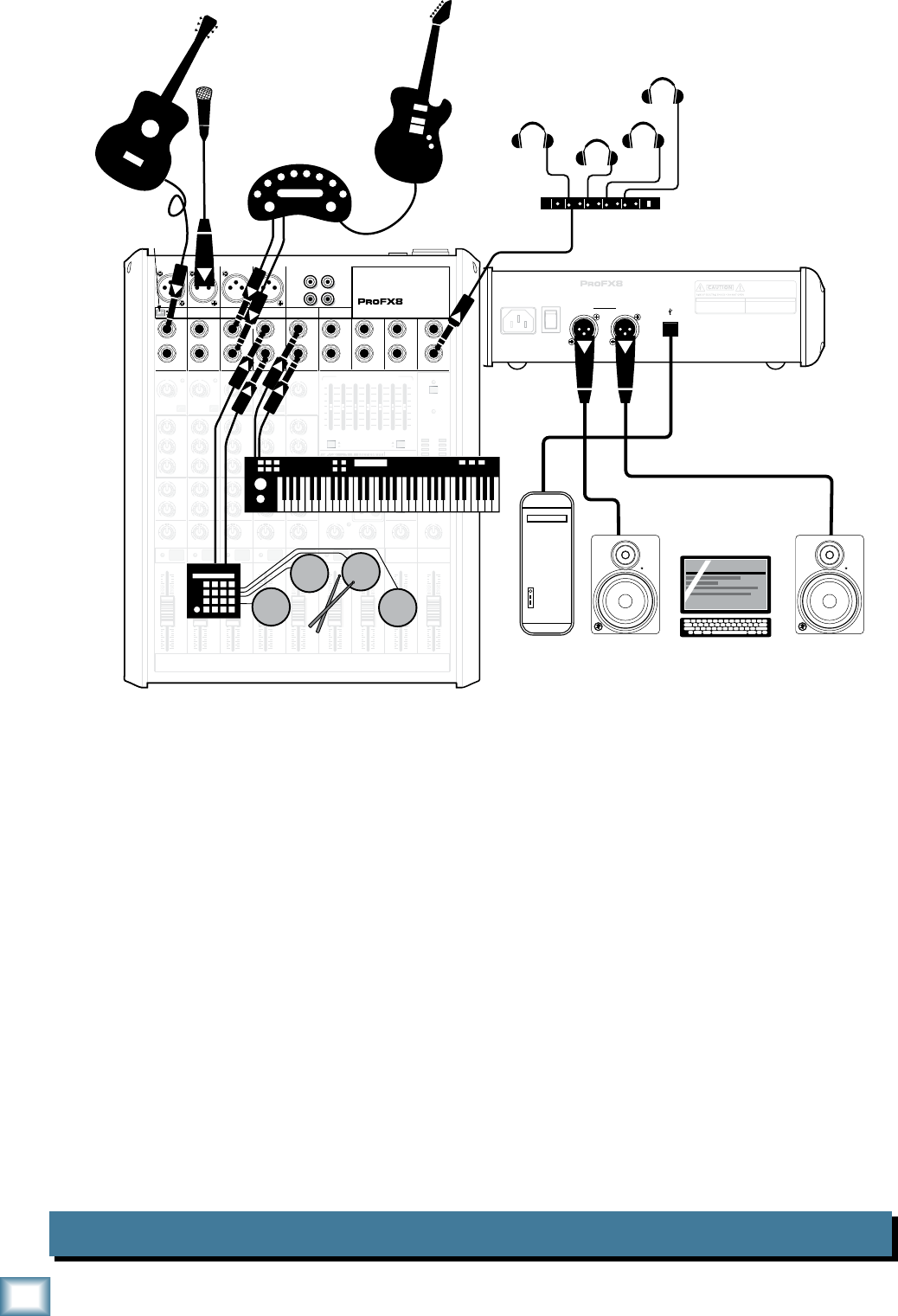
This diagram shows an acoustic guitar connected directly to channel 1 (with the hi-z switch pressed in),
a condenser microphone attached to the channel 2 mic input, a guitar amplifier modeler connected to
the line-level inputs of channel 3/4, an electronic drum kit connected to channel 5/6 and a keyboard
attached to channel 7/8.
Mackie MR8mk2 powered reference monitors are connected to the left and right main output for
careful and accurate monitoring of the performance.
A desktop computer connects to the USB port and allows the 2-channel main mix to be recorded
and 2 channels to be played back using Tracktion software.
11
Owner’s Manual
Owner’s Manual
Podcast System ProFX8
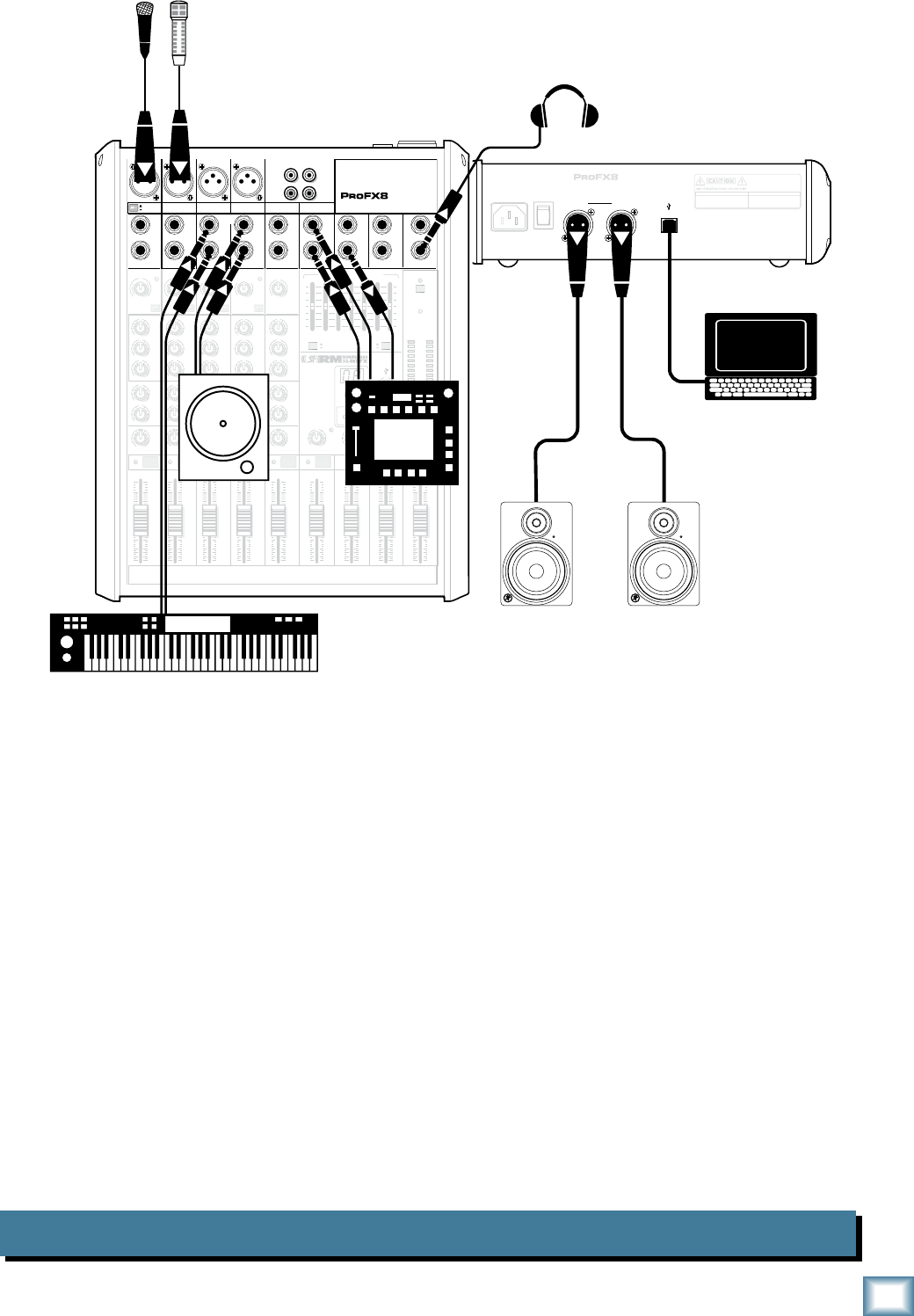
This diagram shows microphones attached to the channel 1 and 2 mic inputs, a keyboard worksta-
tion attached to channel 3/4's line-level inputs and a CD turntable connected to channel 5/6's line-level
inputs. An effects/sampler receives a mono input from the FX send and its stereo outputs connect to the
stereo return inputs.
Mackie MR8mk2 powered reference monitors are connected to the left and right main output for
careful and accurate monitoring.
A desktop computer connects to the USB port and allows the 2-channel main mix to be recorded
and 2 channels played back using Tracktion software.
MAIN
RIGHT
(BALANCED)
MAIN
LEFT
USB
(BALANCED)
MANUFACTURING DATE
SERIAL NUMBER
WARNING:
TO REDUCE THE RISK OF FIRE OR ELECTRIC
SHOCK, DO NOT EXPOSE THIS EQUIPMENT TO RAIN OR
MOISTURE. DO NOT REMOVE COVER. NO USER SERVICEABLE
PARTS INSIDE. REFER SERVICING TO QUALIFIED PERSONNEL.
AVIS:
RISQUE DE CHOC ELECTRIQUE — NE PAS OUVRIR
13 DELAY 1 (300ms)
14 DELAY 2 (380ms)
15 DELAY 3 (480ms)
16 REVERB + DLY (250ms)
8K4K2K1K
500250125
15
15
10
10
5
5
0
15
15
10
10
5
5
0
TAPE
IN
ST RETURN MAIN OUT PHONES
FOOTSWITCH
PHONES
TAPE
OUT
L
R
L
(UNBALANCED)
R
0dB=0dBu
MAIN
METERS
RL
OL
4
6
3
10
15
7
10
20
30
0
2
BREAK
(MUTES ALL CHANNELS)
PHANTOM
POWER
POWER
STEREO GRAPHIC EQ
FX SEND
MID
2.5kHz
MID
2.5kHz
MID
2.5kHz
MID
2.5kHz
MID
2.5kHz
80Hz
LOW
U
+15-15
U
+15-15
U
+15-15
INSERT
RL
LOW CUT
100 Hz
U
GAIN
M
I
C
G
A
I
N
U+50
-20dB +30dB
OL
1
EQ
12kHz
HI
PAN
AUX
U
+15
OO
MON
FX
U
+15
OO
80Hz
LOW
U
+15-15
U
+15-15
U
+15-15
RL
LOW CUT
100 Hz
U
GAIN
M
I
C
G
A
I
N
U+50
-20dB +30dB
2
EQ
12kHz
HI
PAN
AUX
U
+15
OO
MON
FX
U
+15
OO
80Hz
LOW
U
+15-15
U
+15-15
U
+15-15
LINE IN 2 LINE/HI-Z IN 1
INSERT
BAL /
UNBAL
(MONO) (MONO) (MONO) (MONO)
LINE IN 3
LINE IN 4
BAL /
UNBAL LINE IN 5
RL
LOW CUT
100 Hz
GAIN
3/4
EQ
12kHz
HI
PAN
AUX
U
+15
OO
MON
FX
U
+15
OO
80Hz
LOW
U
+15-15
U
+15-15
U
+15-15
RL
LOW CUT
100Hz
GAIN
M
I
C
G
A
I
N
U+50
M
I
C
G
A
I
N
U+50
5/6
EQ
12kHz
HI
LEVEL
SET
LEVEL
SET
LEVEL
SET
LEVEL
SET
PAN
AUX
U
+15
OO
MON
FX
U
+15
OO
GAIN
MIC MIC MIC MIC
80Hz
LOW
U
+15-15
U
+15-15
U
+15-15
U
+20-20
RL
7/8 ST RTN FX RTN
EQ
12kHz
HI
PAN
AUX
U
+15
OO
MON
FX
U
+15
OO
U
+15
FX TO MON
FX MASTER
U
+15
OO
OO
dB
30
20
10
10
OO
40
50
5
5
U
60
dB
30
20
10
10
OO
40
50
5
5
U
60
dB
30
20
10
10
OO
40
50
5
5
U
60
dB
30
20
10
10
OO
40
50
5
5
U
60
dB
30
20
10
10
OO
40
50
5
5
U
60
dB
30
20
10
10
OO
40
50
5
5
U
60
dB
30
20
10
10
OO
40
50
5
5
U
60
dB
30
20
10
10
OO
40
50
5
5
U
60
dB
30
20
10
10
OO
40
50
5
5
U
60
L
R
LINE IN 6
BAL /
UNBAL
L
R
LINE IN 7
LINE IN 8
BAL /
UNBAL
L
R
BAL /
UNBAL
L
R
BAL /
UNBAL
L
R
MON SEND
BAL /
UNBAL
BAL /
UNBAL
MUTE
PRESETS
FX PRESETS
OL OL OL OL OL
INPUT LEVEL
USB
OO
+20
U
TAPE LEVEL
OO
+20
U
MON MAIN
1 2 3/4 5/6 7/8
OL
USB THRU
LINE
HI-Z
MAIN MIX
MON
EQ IN
BYPASS
01 BRIGHT ROOM
02 WARM LOUNGE
03 SMALL STAGE
04 WARM THEATER
05 WARM HALL
06 CONCERT HALL
07 PLATE REVERB
08 CATHEDRAL
09 CHORUS
10 CHORUS + REV
11 DOUBLER
12 TAPE SLAP
OO
MAX
LINE
HI-Z
MUTE MUTE MUTE MUTE MUTE MUTE
48V
MR8mk2 Powered Reference Monitors
Microphones
Headphones
Laptop Computer
with Tracktion
Keyboard workstation
Effects/ Sampler
CD Turntable
POWER
ON
12
ProFX8 and ProFX12
ProFX8 and ProFX12
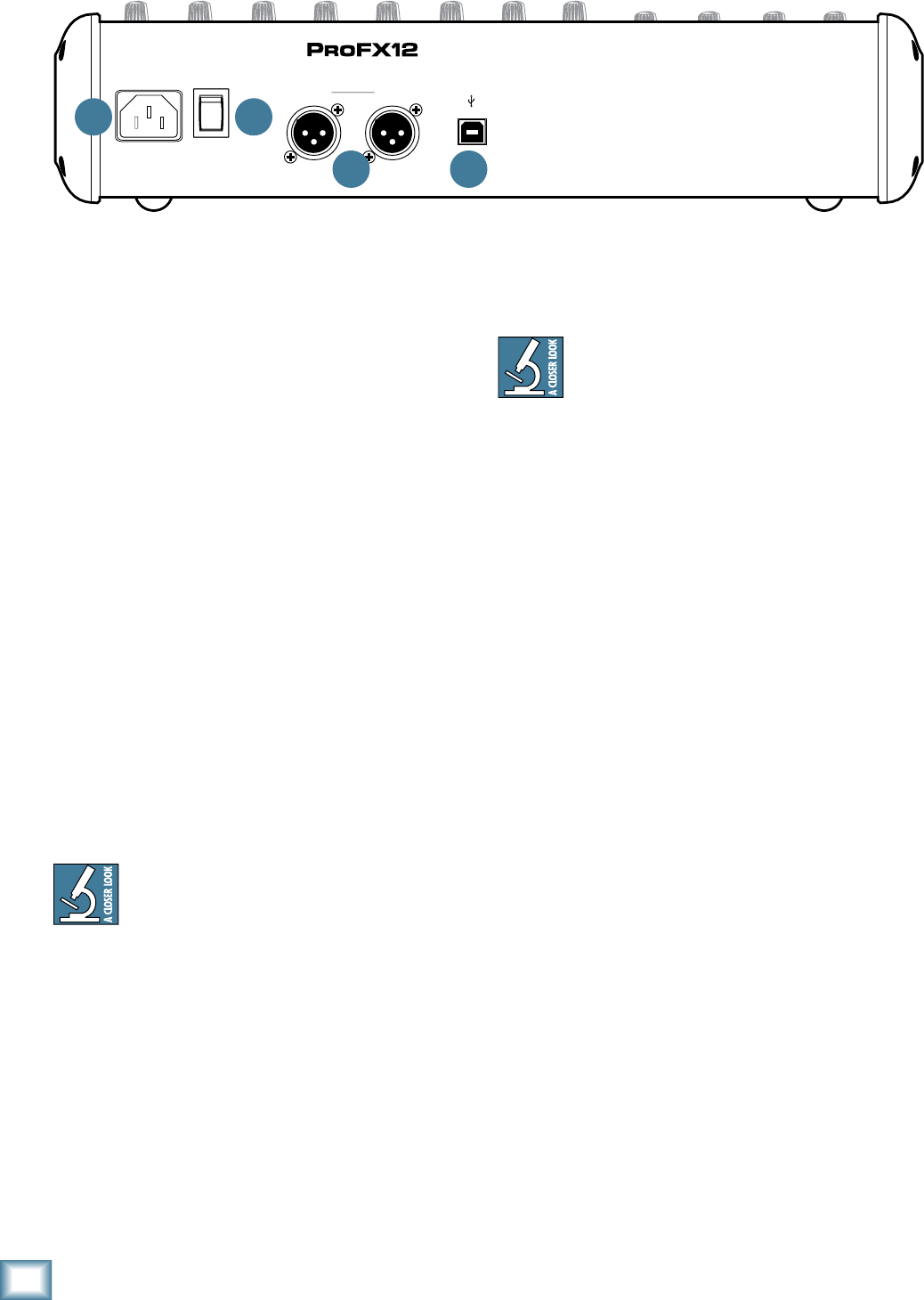
Rear Panel Features
1. POWER CONNECTION
This is a standard 3-prong IEC AC power connector.
Securely connect the supplied detachable linecord here
and plug the other end into an AC outlet. The mixer has
a universal power supply that may accept any AC voltage
rangingfrom100VACto240VAC.Noneedforvoltage
select switches or step-up or step-down transformers;
it will work virtually anywhere in the world. It is less
susceptible to voltage sags or spikes than conventional
power supplies and provides greater electromagnetic
isolation and better protection against AC line noise.
2. POWER SWITCH
Press the top of this rocker switch to turn on the
mixer. The front panel power LED [32] will glow with
happiness...or at least it will if the mixer is plugged into
a suitable live AC mains supply.
Press the bottom of this switch to put the mixer into
standby mode. It will not function, but the circuits are
still live. To remove AC power, either turn off the AC
mains supply, or unplug the power cord from the mixer
and the AC mains supply.
As a general guide, turn on the mixer first,
before any external power amplifiers or
powered speakers, and turn it off last. This
will reduce the possibility of any turn-on or turn-off
thumps in the speakers.
3. XLR MAIN OUTS
These XLR connectors provide stereo line-level
signals from the main mix. Connect these to the
balanced inputs of the powered speakers, or to the
power amplifier powering the main speakers.
The main mix is the sum of all active channels
currently playing, including any 2-channel USB input
fromthecomputer.Howmuchofachannelthatis
heard in the main mix is determined by that channel’s
fader [30].
MAIN
RIGHT
(BALANCED)
MAIN
LEFT
USB
(BALANCED)
8K4K2K1K500250125
15
15
10
10
5
5
0
15
15
10
10
5
5
0
TAPE
IN
ST RETURN MAIN OUT PHONES
FOOTSWITCH
PHONES
TAPE
OUT
L
R
L
(UNBALANCED)
R
STEREO GRAPHIC EQ
FX SEND
MID
2.5kHz
MID
2.5kHz
MID
2.5kHz
MID
2.5kHz
MID
2.5kHz
80Hz
LOW
U
+15-15
U
+15-15
U
+15-15
LINE IN 4
INSERT
RL
LOW CUT
100 Hz
U
GAIN
M
I
C
G
A
I
N
U+50
-20dB +30dB
4
12kHz
HI
MID
2.5kHz
80Hz
LOW
U
+15-15
U
+15-15
U
+15-15
12kHz
HI
MID
2.5kHz
80Hz
LOW
U
+15-15
U
+15-15
U
+15-15
12kHz
HI
MID
2.5kHz
80Hz
LOW
U
+15-15
U
+15-15
U
+15-15
12kHz
HI
PAN
AUX
U
+15
OO
MON
FX
U
+15
OO
RL
PAN
AUX
U
+15
OO
MON
FX
U
+15
OO
RL
PAN
AUX
U
+15
OO
MON
FX
U
+15
OO
RL
PAN
AUX
U
+15
OO
MON
FX
U
+15
OO
80Hz
LOW
U
+15-15
U
+15-15
U
+15-15
RL
LOW CUT
100 Hz
12kHz
HI
PAN
AUX
U
+15
OO
MON
FX
U
+15
OO
80Hz
LOW
U
+15-15
U
+15-15
U
+15-15
BAL /
UNBAL
(MONO) (MONO) (MONO) (MONO)
LINE IN 7
LINE IN 8
BAL /
UNBAL LINE IN 9
RL
LOW CUT
100 Hz
GAIN
7/85/6
12kHz
HI
PAN
AUX
U
+15
OO
MON
FX
U
+15
OO
80Hz
LOW
U
+15-15
U
+15-15
U
+15-15
RL
M
I
C
G
A
I
N
U+50
GAIN
M
I
C
G
A
I
N
U+50
9/10
12kHz
HI
LEVEL
SET
LEVEL
SET
LEVEL
SET
LOW CUT
100 Hz
U
GAIN
M
I
C
G
A
I
N
U+50
-20dB +30dB
LEVEL
SET
LEVEL
SET
LEVEL
SET
LOW CUT
100 Hz
U
GAIN
M
I
C
G
A
I
N
U+50
-20dB +30dB
LOW CUT
100 Hz
U
GAIN
M
I
C
G
A
I
N
U+50
-20dB +30dB
PAN
AUX
U
+15
OO
MON
FX
U
+15
OO
GAIN
MIC MIC MIC MIC MIC MIC
80Hz
LOW
U
+15-15
U
+15-15
U
+15-15
U
+20-20
GAIN
U
+20-20
RL
11/12 ST RTN FX RTN
EQEQEQEQ EQ EQ EQ EQ
12kHz
HI
PAN
AUX
U
+15
OO
MON
FX
U
+15
OO
U
+15
FX TO MON
FX MASTER
U
+15
OO
OO
dB
30
20
10
10
OO
40
50
5
5
U
60
dB
30
20
10
10
OO
40
50
5
5
U
60
dB
30
20
10
10
OO
40
50
5
5
U
60
dB
30
20
10
10
OO
40
50
5
5
U
60
dB
30
20
10
10
OO
40
50
5
5
U
60
dB
30
20
10
10
OO
40
50
5
5
U
60
dB
30
20
10
10
OO
40
50
5
5
U
60
dB
30
20
10
10
OO
40
50
5
5
U
60
dB
30
20
10
10
OO
40
50
5
5
U
60
dB
30
20
10
10
OO
40
50
5
5
U
60
dB
30
20
10
10
OO
40
50
5
5
U
60
dB
30
20
10
10
OO
40
50
5
5
U
60
L
R
(MONO)
LINE IN 5
LINE IN 6
BAL /
UNBAL
L
R
LINE IN 10
BAL /
UNBAL
L
R
LINE IN 11
LINE IN 12
BAL /
UNBAL
L
R
BAL /
UNBAL
L
R
BAL /
UNBAL
L
R
MON SEND
BAL /
UNBAL
BAL /
UNBAL
PRESETS
FX PRESETS
01 BRIGHT ROOM
02 WARM LOUNGE
03 SMALL STAGE
04 WARM THEATER
05 WARM HALL
06 CONCERT HALL
13 DELAY 1 (300ms)
14 DELAY 2 (380ms)
15 DELAY 3 (480ms)
16 REVERB + DLY (250ms)
07 PLATE REVERB
08 CATHEDRAL
09 CHORUS
10 CHORUS + REV
11 DOUBLER
12 TAPE SLAP
MON MAIN
4
LINE IN 3
INSERT
3
BAL /
UNBAL
3
LINE IN 2
INSERT
2
BAL /
UNBAL
BAL /
UNBAL
2
LINE/HI-Z IN 1
INSERT
15/6 7/8 9/10 11/12
POWER
ON
0dB=0dBu
MAIN
METERS
OL
4
6
3
10
15
7
10
20
30
0
2
BREAK
(MUTES ALL CHANNELS)
PHANTOM
POWER
POWER
OO
+10
U
TAPE LEVEL
OO
+20
U
USB THRU
LINE
HI-Z
OO
MAX
1
OL OL OL OL OL OL OL OL OL
OL
MAIN MIX
MON
EQ IN
BYPASS
RL
INPUT LEVEL
USB
MUTE
MUTE MUTE MUTE MUTE MUTE MUTE MUTE MUTE MUTE
48V
TheXLRoutputsare6dBhigheroutputthan
the1/4"TRSmainoutputs[14].Balanced
connections offer better immunity to external
noise (specifically, hum and buzz) than unbalanced
connections. Because of this, it is the preferred
interconnect method, especially where very long
lengths of cable are being used.
4. USB PORT
The USB serial I/O interface allows digital audio to
transfer to and from a computer.
The interface provides two audio outputs to the
computer:
• Mainmixoutput,leftandright.Theseoutput
signals are independent of any adjustments
made to the main fader [47] and graphic EQ
[36].Thisallowsyoutoeasilyrecordlive
performance directly to a laptop.
• TheUSBthruswitch[40]allowsyoutoalso
include the output from your computer in your
recording. See page 23 for more details of this
switch.
The computer may also playback two channels into
the mixer via the USB interface:
• Leftandrightsignalsfromthecomputerare
added to the main mix. The USB input level
control [39] allows you to adjust the level of
the incoming audio from the computer being
added to the main mix.
1 2
3 4
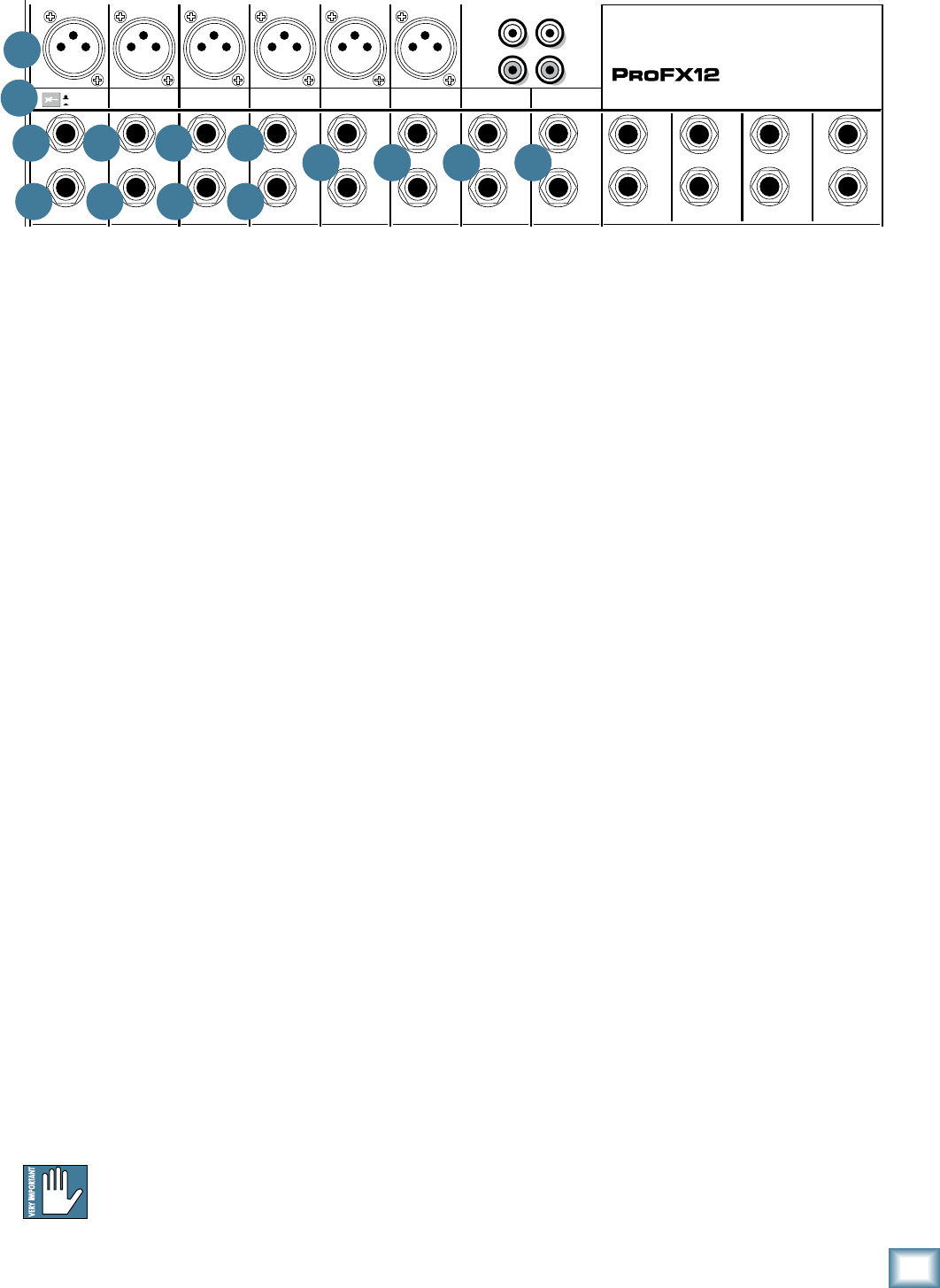
13
Owner’s Manual
Owner’s Manual
Front Panel Features
Connection Section
This is where to plug things in: microphones, line-
level instruments and effects, headphones, and the
ultimate destination for your sound: PA system, stage
monitors, effects processors, CD player/recorder, etc.
See Appendix B for further details and drawings of
the connectors to use with the ProFX mixer.
5. MIC INPUTS
We use phantom-powered, balanced microphone
inputs just like the big studio mega-consoles for
exactly the same reason: This kind of circuit is
excellent at rejecting hum and noise. You can plug
in almost any kind of mic that has a standard XLR
male mic connector.
Professional ribbon, dynamic and condenser mics will
all sound excellent through these inputs. The ProFX
mixer’s mic inputs will handle any kind of mic level
tossed at them without overloading. Be sure to perform
the gain-setting procedure mentioned on page 3.
PHANTOM POWER
Mostmodernprofessionalcondensermics
require phantom power which lets the mixer send
low-current DC voltage to the mic’s electronics through
the same wires that carry audio. (Semi-pro condenser
mics often have batteries to accomplish the same
thing.) “Phantom” owes its name to an ability to be
“unseen”bydynamicmics(ShureSM57/SM58,for
instance), which don’t need external power and aren’t
affected by it, anyway.
The ProFX mixer’s phantom power is globally
controlled by the phantom power switch [31]. (This
means that phantom power for all mic inputs is turned
on and off together.)
Never plug single-ended (unbalanced)
micro phones or ribbon microphones into the
mic input jacks if phantom power is on. Do
not plug instrument outputs into the mic input jacks
with phantom power on unless you know for certain it is
safe to do so.
6. LINE/HI-Z SWITCH
To connect a guitar directly to the mixer without
using a DI Box, press this switch in first; then connect
theoutputfromtheguitartochannel1's1⁄4"TRS
input [7]. The input impedance is optimized for direct
connection and high-frequency fidelity is assured.
Intheoutposition,channel1's1⁄4"TRSinput
becomes a line input just like the other mono line
inputs [8].
To use guitars or other instruments on other
channels, you will need to use an external DI box
first. Without the DI box – or if this switch is not
pressed in – guitars may sound dull and muddy.
7. LINE/HI-Z INPUT (Channel 1 only)
This1/4"jacksharescircuitry(butnotphantom
power) with the mic preamp and may be driven by
balanced or unbalanced sources.
Toconnectabalancedlinetothisinput,usea1⁄4"
Tip-Ring-Sleeve (TRS) plug.
Toconnectanunbalancedlinetothisinput,usea1⁄4"
mono (TS) phone plug or instrument cable.
This line-level input may also accept instrument-level
signalsifthehi-zswitch[6]ispressedin.Thisallows
you to connect guitars directly into channel 1 without
the need for a DI box.
MAIN
RIGHT
(BALANCED)
MAIN
LEFT
USB
(BALANCED)
8K4K2K1K500250125
15
15
10
10
5
5
0
15
15
10
10
5
5
0
TAPE
IN
ST RETURN MAIN OUT PHONES
FOOTSWITCH
PHONES
TAPE
OUT
L
R
L
(UNBALANCED)
R
STEREO GRAPHIC EQ
FX SEND
MID
2.5kHz
MID
2.5kHz
MID
2.5kHz
MID
2.5kHz
MID
2.5kHz
80Hz
LOW
U
+15-15
U
+15-15
U
+15-15
LINE IN 4
INSERT
RL
LOW CUT
100 Hz
U
GAIN
M
I
C
G
A
I
N
U+50
-20dB +30dB
4
12kHz
HI
MID
2.5kHz
80Hz
LOW
U
+15-15
U
+15-15
U
+15-15
12kHz
HI
MID
2.5kHz
80Hz
LOW
U
+15-15
U
+15-15
U
+15-15
12kHz
HI
MID
2.5kHz
80Hz
LOW
U
+15-15
U
+15-15
U
+15-15
12kHz
HI
PAN
AUX
U
+15
OO
MON
FX
U
+15
OO
RL
PAN
AUX
U
+15
OO
MON
FX
U
+15
OO
RL
PAN
AUX
U
+15
OO
MON
FX
U
+15
OO
RL
PAN
AUX
U
+15
OO
MON
FX
U
+15
OO
80Hz
LOW
U
+15-15
U
+15-15
U
+15-15
RL
LOW CUT
100 Hz
12kHz
HI
PAN
AUX
U
+15
OO
MON
FX
U
+15
OO
80Hz
LOW
U
+15-15
U
+15-15
U
+15-15
BAL /
UNBAL
(MONO) (MONO) (MONO) (MONO)
LINE IN 7
LINE IN 8
BAL /
UNBAL LINE IN 9
RL
LOW CUT
100 Hz
GAIN
7/85/6
12kHz
HI
PAN
AUX
U
+15
OO
MON
FX
U
+15
OO
80Hz
LOW
U
+15-15
U
+15-15
U
+15-15
RL
M
I
C
G
A
I
N
U+50
GAIN
M
I
C
G
A
I
N
U+50
9/10
12kHz
HI
LEVEL
SET
LEVEL
SET
LEVEL
SET
LOW CUT
100 Hz
U
GAIN
M
I
C
G
A
I
N
U+50
-20dB +30dB
LEVEL
SET
LEVEL
SET
LEVEL
SET
LOW CUT
100 Hz
U
GAIN
M
I
C
G
A
I
N
U+50
-20dB +30dB
LOW CUT
100 Hz
U
GAIN
M
I
C
G
A
I
N
U+50
-20dB +30dB
PAN
AUX
U
+15
OO
MON
FX
U
+15
OO
GAIN
MIC MIC MIC MIC MIC MIC
80Hz
LOW
U
+15-15
U
+15-15
U
+15-15
U
+20-20
GAIN
U
+20-20
RL
11/12 ST RTN FX RTN
EQEQEQEQ EQ EQ EQ EQ
12kHz
HI
PAN
AUX
U
+15
OO
MON
FX
U
+15
OO
U
+15
FX TO MON
FX MASTER
U
+15
OO
OO
dB
30
20
10
10
OO
40
50
5
5
U
60
dB
30
20
10
10
OO
40
50
5
5
U
60
dB
30
20
10
10
OO
40
50
5
5
U
60
dB
30
20
10
10
OO
40
50
5
5
U
60
dB
30
20
10
10
OO
40
50
5
5
U
60
dB
30
20
10
10
OO
40
50
5
5
U
60
dB
30
20
10
10
OO
40
50
5
5
U
60
dB
30
20
10
10
OO
40
50
5
5
U
60
dB
30
20
10
10
OO
40
50
5
5
U
60
dB
30
20
10
10
OO
40
50
5
5
U
60
dB
30
20
10
10
OO
40
50
5
5
U
60
dB
30
20
10
10
OO
40
50
5
5
U
60
L
R
(MONO)
LINE IN 5
LINE IN 6
BAL /
UNBAL
L
R
LINE IN 10
BAL /
UNBAL
L
R
LINE IN 11
LINE IN 12
BAL /
UNBAL
L
R
BAL /
UNBAL
L
R
BAL /
UNBAL
L
R
MON SEND
BAL /
UNBAL
BAL /
UNBAL
PRESETS
FX PRESETS
01 BRIGHT ROOM
02 WARM LOUNGE
03 SMALL STAGE
04 WARM THEATER
05 WARM HALL
06 CONCERT HALL
13 DELAY 1 (300ms)
14 DELAY 2 (380ms)
15 DELAY 3 (480ms)
16 REVERB + DLY (250ms)
07 PLATE REVERB
08 CATHEDRAL
09 CHORUS
10 CHORUS + REV
11 DOUBLER
12 TAPE SLAP
MON MAIN
4
LINE IN 3
INSERT
3
BAL /
UNBAL
3
LINE IN 2
INSERT
2
BAL /
UNBAL
BAL /
UNBAL
2
LINE/HI-Z IN 1
INSERT
15/6 7/8 9/10 11/12
POWER
ON
0dB=0dBu
MAIN
METERS
OL
4
6
3
10
15
7
10
20
30
0
2
BREAK
(MUTES ALL CHANNELS)
PHANTOM
POWER
POWER
OO
+10
U
TAPE LEVEL
OO
+20
U
USB THRU
LINE
HI-Z
OO
MAX
1
OL OL OL OL OL OL OL OL OL
OL
MAIN MIX
MON
EQ IN
BYPASS
RL
INPUT LEVEL
USB
MUTE
MUTE MUTE MUTE MUTE MUTE MUTE MUTE MUTE MUTE
48V
6
5
7
10
8 8 8 9 9 9
10 10 10
9
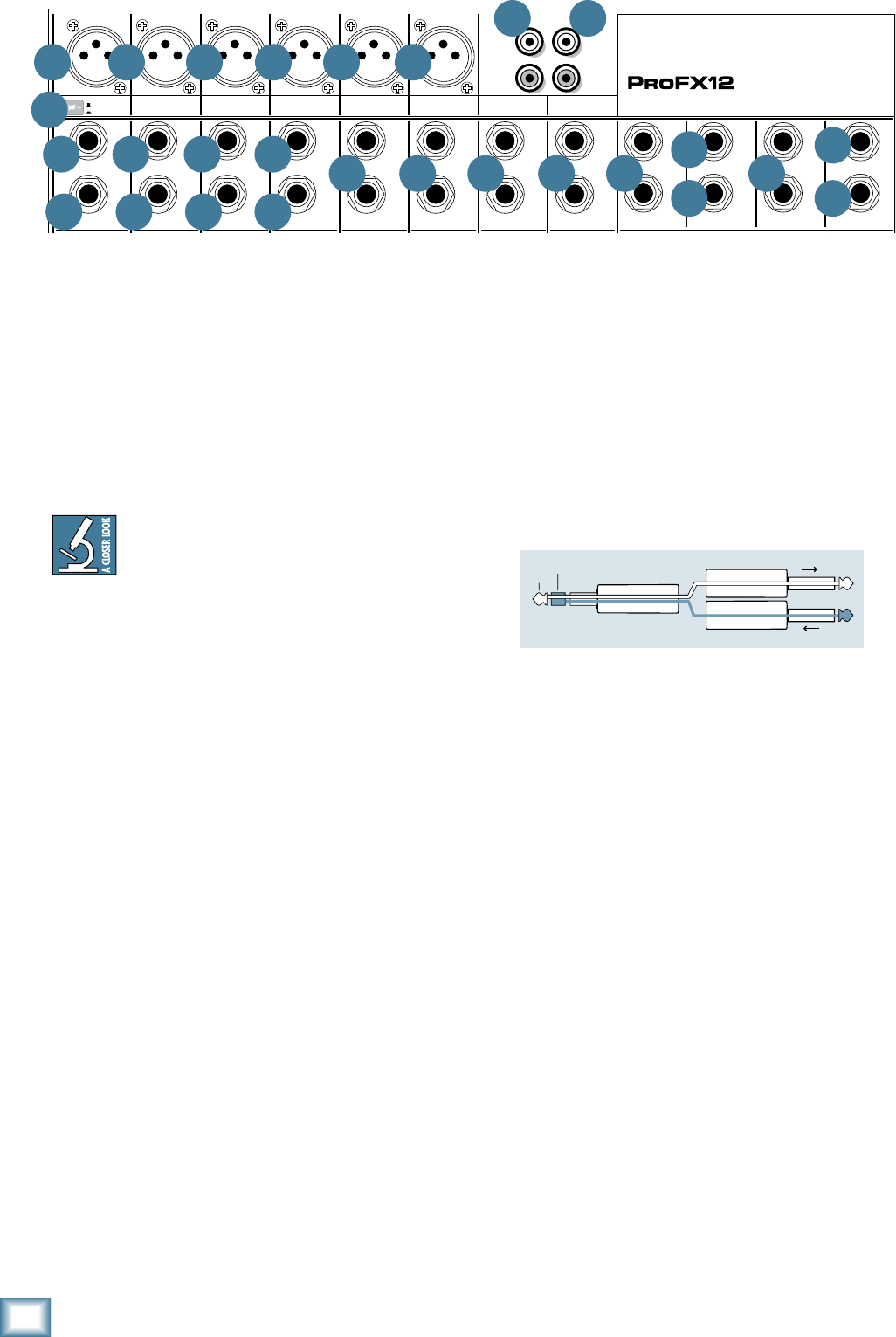
14
ProFX8 and ProFX12
ProFX8 and ProFX12
The insert point is after the gain control [19], level
set LED [20] and low cut switch [21], but before the
channel EQ [22-24] and fader [30]. The channel signal
may go out of the insert jack to an external device, be
processed (or whatever) and come back in on the same
insert jack. To do this requires a special insert cable
that must be wired thusly:
Tip = send (output to effects device)
Ring = return (input from effects device)
Sleeve = common ground
Insert jacks may be used as channel direct outputs;
post-gain, and pre-EQ. See the connector section on
page 28 (figure F) showing three ways to use insert
connections.
11. STEREO RETURN
This is where to connect the outputs of parallel
effects devices (or extra audio sources). The circuits
will handle stereo or mono, balanced or unbalanced
signals. They may be used with just about any pro or
semi-pro effects device or line-level source on the
market. The signals coming into these inputs may be
adjusted using the stereo return fader [44] before
passing onto the main mix bus (see page 23). Signals
coming in here may also be quickly muted with the
mute switch [43], and the OL LED [42] will illuminate
if the incoming signal is too high.
Stereo Device: If using a stereo parallel effects device
(two cords), use stereo return left and right.
Mono Device: If using an effects device with a mono
output (one cord), plug that into the stereo return left/
mono, and leave the right unplugged. The signal will be
sent to both sides, magically appearing in the center as
a mono signal.
8. MONO LINE INPUTS
These1/4"jackssharecircuitry(butnotphantom
power) with the mic preamps and may be driven by
balanced or unbalanced sources.
To connect balanced lines to these inputs, use a
1⁄4"Tip-Ring-Sleeve(TRS)plug.
To connect unbalanced lines to these inputs, use a
1⁄4"mono(TS)phoneplugorinstrumentcable.
If using a stereo source, and the stereo
and hybrid channels are in use, utilize two
mono channels instead. Traditionally, an
odd-numbered channel receives the left signal. For
example, feed the ProFX mixer a stereo signal by
inserting the device’s left output plug into the
channel 1 jack (panned fully left) and its right output
plug into the channel 2 jack (panned fully right).
9. STEREO LINE INPUTS
These1/4"jacksmaybedrivenbystereoormono,
balanced or unbalanced sources. They may be used
with just about any professional or semi-pro
instrument, effect or tape player.
Toconnectbalancedlinestotheseinputs,usea1⁄4"
Tip-Ring-Sleeve (TRS) plug.
To connect unbalanced lines to these inputs, use a
1⁄4"mono(TS)phoneplugorinstrumentcable.
If using just a mono source, plug it into the left input
(labeled mono) and the signal will appear (as if by
magic) equally on the left and right of the main mix.
10. CHANNEL INSERT
Theseunbalanced1/4"jacksareforconnectingserial
effects processors such as compressors, equalizers,
de-essers, or filters.
We’ve included inserts for just the mono channels.
If using this kind of processing on other channels,
simply patch through the processor before plugging
into the ProFX mixer.
MAIN
RIGHT
(BALANCED)
MAIN
LEFT
USB
(BALANCED)
8K4K2K1K500250125
15
15
10
10
5
5
0
15
15
10
10
5
5
0
TAPE
IN
ST RETURN MAIN OUT PHONES
FOOTSWITCH
PHONES
TAPE
OUT
L
R
L
(UNBALANCED)
R
STEREO GRAPHIC EQ
FX SEND
MID
2.5kHz
MID
2.5kHz
MID
2.5kHz
MID
2.5kHz
MID
2.5kHz
80Hz
LOW
U
+15-15
U
+15-15
U
+15-15
LINE IN 4
INSERT
RL
LOW CUT
100 Hz
U
GAIN
M
I
C
G
A
I
N
U+50
-20dB +30dB
4
12kHz
HI
MID
2.5kHz
80Hz
LOW
U
+15-15
U
+15-15
U
+15-15
12kHz
HI
MID
2.5kHz
80Hz
LOW
U
+15-15
U
+15-15
U
+15-15
12kHz
HI
MID
2.5kHz
80Hz
LOW
U
+15-15
U
+15-15
U
+15-15
12kHz
HI
PAN
AUX
U
+15
OO
MON
FX
U
+15
OO
RL
PAN
AUX
U
+15
OO
MON
FX
U
+15
OO
RL
PAN
AUX
U
+15
OO
MON
FX
U
+15
OO
RL
PAN
AUX
U
+15
OO
MON
FX
U
+15
OO
80Hz
LOW
U
+15-15
U
+15-15
U
+15-15
RL
LOW CUT
100 Hz
12kHz
HI
PAN
AUX
U
+15
OO
MON
FX
U
+15
OO
80Hz
LOW
U
+15-15
U
+15-15
U
+15-15
BAL /
UNBAL
(MONO) (MONO) (MONO) (MONO)
LINE IN 7
LINE IN 8
BAL /
UNBAL LINE IN 9
RL
LOW CUT
100 Hz
GAIN
7/85/6
12kHz
HI
PAN
AUX
U
+15
OO
MON
FX
U
+15
OO
80Hz
LOW
U
+15-15
U
+15-15
U
+15-15
RL
M
I
C
G
A
I
N
U+50
GAIN
M
I
C
G
A
I
N
U+50
9/10
12kHz
HI
LEVEL
SET
LEVEL
SET
LEVEL
SET
LOW CUT
100 Hz
U
GAIN
M
I
C
G
A
I
N
U+50
-20dB +30dB
LEVEL
SET
LEVEL
SET
LEVEL
SET
LOW CUT
100 Hz
U
GAIN
M
I
C
G
A
I
N
U+50
-20dB +30dB
LOW CUT
100 Hz
U
GAIN
M
I
C
G
A
I
N
U+50
-20dB +30dB
PAN
AUX
U
+15
OO
MON
FX
U
+15
OO
GAIN
MIC MIC MIC MIC MIC MIC
80Hz
LOW
U
+15-15
U
+15-15
U
+15-15
U
+20-20
GAIN
U
+20-20
RL
11/12 ST RTN FX RTN
EQEQEQEQ EQ EQ EQ EQ
12kHz
HI
PAN
AUX
U
+15
OO
MON
FX
U
+15
OO
U
+15
FX TO MON
FX MASTER
U
+15
OO
OO
dB
30
20
10
10
OO
40
50
5
5
U
60
dB
30
20
10
10
OO
40
50
5
5
U
60
dB
30
20
10
10
OO
40
50
5
5
U
60
dB
30
20
10
10
OO
40
50
5
5
U
60
dB
30
20
10
10
OO
40
50
5
5
U
60
dB
30
20
10
10
OO
40
50
5
5
U
60
dB
30
20
10
10
OO
40
50
5
5
U
60
dB
30
20
10
10
OO
40
50
5
5
U
60
dB
30
20
10
10
OO
40
50
5
5
U
60
dB
30
20
10
10
OO
40
50
5
5
U
60
dB
30
20
10
10
OO
40
50
5
5
U
60
dB
30
20
10
10
OO
40
50
5
5
U
60
L
R
(MONO)
LINE IN 5
LINE IN 6
BAL /
UNBAL
L
R
LINE IN 10
BAL /
UNBAL
L
R
LINE IN 11
LINE IN 12
BAL /
UNBAL
L
R
BAL /
UNBAL
L
R
BAL /
UNBAL
L
R
MON SEND
BAL /
UNBAL
BAL /
UNBAL
PRESETS
FX PRESETS
01 BRIGHT ROOM
02 WARM LOUNGE
03 SMALL STAGE
04 WARM THEATER
05 WARM HALL
06 CONCERT HALL
13 DELAY 1 (300ms)
14 DELAY 2 (380ms)
15 DELAY 3 (480ms)
16 REVERB + DLY (250ms)
07 PLATE REVERB
08 CATHEDRAL
09 CHORUS
10 CHORUS + REV
11 DOUBLER
12 TAPE SLAP
MON MAIN
4
LINE IN 3
INSERT
3
BAL /
UNBAL
3
LINE IN 2
INSERT
2
BAL /
UNBAL
BAL /
UNBAL
2
LINE/HI-Z IN 1
INSERT
15/6 7/8 9/10 11/12
POWER
ON
0dB=0dBu
MAIN
METERS
OL
4
6
3
10
15
7
10
20
30
0
2
BREAK
(MUTES ALL CHANNELS)
PHANTOM
POWER
POWER
OO
+10
U
TAPE LEVEL
OO
+20
U
USB THRU
LINE
HI-Z
OO
MAX
1
OL OL OL OL OL OL OL OL OL
OL
MAIN MIX
MON
EQ IN
BYPASS
RL
INPUT LEVEL
USB
MUTE
MUTE MUTE MUTE MUTE MUTE MUTE MUTE MUTE MUTE
48V
6
5
7
10
8 8 8 9 9 9
10 10 10
9 11
12
14
15
16
13
5 5 5 5 5
17 18
“tip”
This plug connects to one of the
mixer’s Channel Insert jacks. “ring”
tip ring
sleeve
SEND to processor
RETURN from processor
(TRS plug)

15
Owner’s Manual
Owner’s Manual
12. MON SEND
Stage monitors allow the talented musicians to hear
themselves clearly on stage, and this can often be a
good thing. The monitor mix may be carefully adjusted
inlevelusingtheauxmoncontrols[25].Thesetapa
portionofeachchannel'ssignaltoprovidea1/4"TRS
output here to feed external stage monitors. These
could either be passive stage monitors powered by an
external amplifier, or powered stage monitors with their
own amplifier built in.
The monitor signal is the sum (mix) of all the
channels whose aux mon control is set to more than
minimum. If they want “more me, and less Keith,” you
should turn up their channel's aux mon control, and
turn down Keith's.
The overall output level may be adjusted with the
monitorfader[46]anditsEQtweakedwiththegraphic
EQ[36]ifthemainmix/monswitch[37]ispressedin.
Alternatively, an external graphic EQ may be added
between this output and the powered monitors. This
allows you to adjust the EQ and minimize the chance of
feedback from nearby microphones.
The monitor output is not affected by the main fader
[47] or the channel faders [30]. This allows you to set
up the monitor mix and level just right, and not have it
change when a channel fader or the main mix fader is
adjusted. This is known as “pre-fader.”
13. FX SEND
This1/4"TRSline-leveloutputmaybeusedtofeed
an external effects processor (FX), such as a nice
sound effect or delay unit. The output from this jack
is an exact copy of what goes into the internal FX
processor, being the careful mix of all channels whose
auxFXcontrol[26]isturnedtomorethanminimum.
(The processed output of the internal FX does not
come out of this output, but is added internally to the
main mix or monitor mix.)
The overall output level may be adjusted with the
FXmasterknob[51].(Thisknobalsoeffectsthe
level going into the internal FX.)
The output is “post-fader,” so any changes to the
channel faders [30] will also affect the level going to
the external processor.
The processed output from the effects processor is
usually returned to the stereo returns [11] or a spare
channel where you may carefully mix the original
unprocessed channel (dry) and the processed channel
(wet). Altering the original channel fader increases
both the wet and dry signals and keeps them at the
same delicate ratio. (For example, the reverb remains
at the same level relative to the original.)
14. 1/4" MAIN OUTS
These outputs feed the main mix out into the waiting
world. Amplifiers may be fed this way or through the
XLR main outputs [3].
To use these outputs to drive balanced inputs,
connect1⁄4"TRS(Tip–Ring–Sleeve)phoneplugslike
this:
Tip=+(hot)
Ring = –(cold)
Sleeve = Ground
To use these outputs to drive unbalanced inputs,
connect1⁄4"TS(Tip-Sleeve)phoneplugslikethis:
Tip=+(hot)
Sleeve = Ground
15. FX FOOTSWITCH
This1/4"TRSconnectoriswheretoconnecta
footswitch. This will allow you to easily mute or
un-mute the internal effects, while stamping your
foot and looking like you were mad about something.
Any latching one-button on/off footswitch will work.
If the internal effects have already been muted with
theinternalFXmuteswitch[50],thenthefootswitch
has no effect, but you can still stamp your foot and pout
if that helps any. Cultivate that bad-boy image.
16. PHONES
This1⁄4"TRSstereojackwilldriveanystandard
headphone to very loud levels. The wiring follows
standard conventions:
Tip = Left channel
Ring = Right channel
Sleeve = Common ground
The headphones output is the stereo main mix, not
affectedbythemainfader[47],orthegraphicEQ[36].
Warning: When we say the headphone
output is loud, we’re not kidding. It can cause
permanent ear damage. Even intermediate
levels may be painfully loud with some earphones. Be
careful! Always turn the phones level control [41] all
the way down before connecting headphones, adding
new sources, or making any other changes. Keep it down
until you’ve put the phones on. Then turn it up slowly.
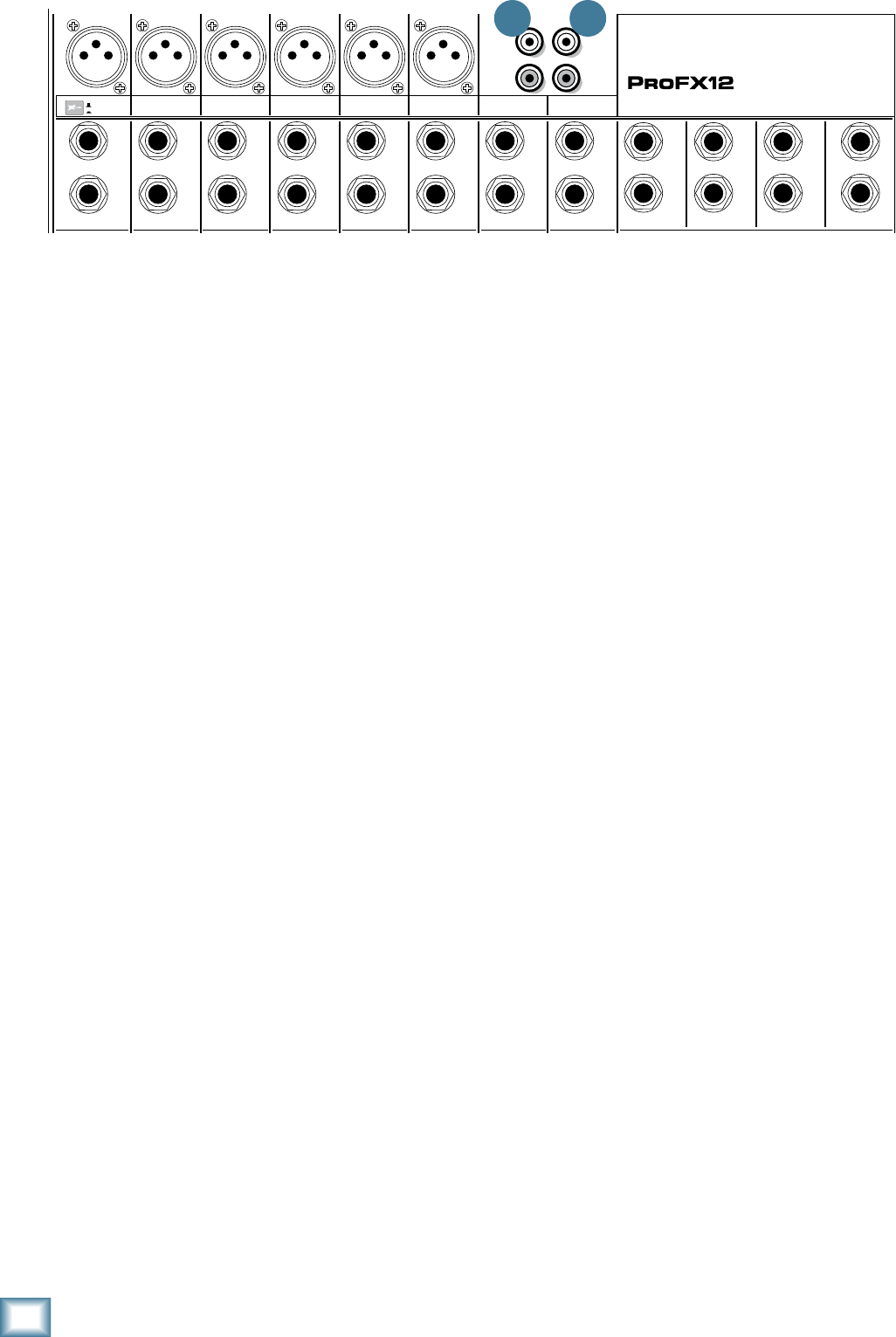
16
ProFX8 and ProFX12
ProFX8 and ProFX12
17. TAPE INPUT
These stereo unbalanced RCA inputs are designed
to work with semi-pro as well as pro player/recorders.
They may also be connected to any standard source with
anunbalancedline-leveloutput,suchasaCDorDVD
player, iPod, and so on.
Connect the source’s line-level outputs here using
good quality hi-fi (RCA) cables.
These may be used with a tape or CD player to feed
music to a PA system between sets when the break
switch [34] is engaged. The level coming into the mixer
maybeadjustedwiththetapelevelknob[35].For
example, press the break switch to mute all channels at
once, then play the tape or CD player and bring up its
level slowly.
18. TAPE OUTPUT
These stereo unbalanced RCA outputs allow you to
record the main stereo mix onto a tape deck, hard disk
recorder, automatic CD burner, computer, etc.
This allows you to make a recording for posterity/
archive/legal purposes whenever the band gets back
together again.
The tape output is the stereo main mix, not affected
bythemainfader[47],orthegraphicEQ[36].
MAIN
RIGHT
(BALANCED)
MAIN
LEFT
USB
(BALANCED)
8K4K2K1K500250125
15
15
10
10
5
5
0
15
15
10
10
5
5
0
TAPE
IN
ST RETURN MAIN OUT PHONES
FOOTSWITCH
PHONES
TAPE
OUT
L
R
L
(UNBALANCED)
R
STEREO GRAPHIC EQ
FX SEND
MID
2.5kHz
MID
2.5kHz
MID
2.5kHz
MID
2.5kHz
MID
2.5kHz
80Hz
LOW
U
+15-15
U
+15-15
U
+15-15
LINE IN 4
INSERT
RL
LOW CUT
100 Hz
U
GAIN
M
I
C
G
A
I
N
U+50
-20dB +30dB
4
12kHz
HI
MID
2.5kHz
80Hz
LOW
U
+15-15
U
+15-15
U
+15-15
12kHz
HI
MID
2.5kHz
80Hz
LOW
U
+15-15
U
+15-15
U
+15-15
12kHz
HI
MID
2.5kHz
80Hz
LOW
U
+15-15
U
+15-15
U
+15-15
12kHz
HI
PAN
AUX
U
+15
OO
MON
FX
U
+15
OO
RL
PAN
AUX
U
+15
OO
MON
FX
U
+15
OO
RL
PAN
AUX
U
+15
OO
MON
FX
U
+15
OO
RL
PAN
AUX
U
+15
OO
MON
FX
U
+15
OO
80Hz
LOW
U
+15-15
U
+15-15
U
+15-15
RL
LOW CUT
100 Hz
12kHz
HI
PAN
AUX
U
+15
OO
MON
FX
U
+15
OO
80Hz
LOW
U
+15-15
U
+15-15
U
+15-15
BAL /
UNBAL
(MONO) (MONO) (MONO) (MONO)
LINE IN 7
LINE IN 8
BAL /
UNBAL LINE IN 9
RL
LOW CUT
100 Hz
GAIN
7/85/6
12kHz
HI
PAN
AUX
U
+15
OO
MON
FX
U
+15
OO
80Hz
LOW
U
+15-15
U
+15-15
U
+15-15
RL
M
I
C
G
A
I
N
U+50
GAIN
M
I
C
G
A
I
N
U+50
9/10
12kHz
HI
LEVEL
SET
LEVEL
SET
LEVEL
SET
LOW CUT
100 Hz
U
GAIN
M
I
C
G
A
I
N
U+50
-20dB +30dB
LEVEL
SET
LEVEL
SET
LEVEL
SET
LOW CUT
100 Hz
U
GAIN
M
I
C
G
A
I
N
U+50
-20dB +30dB
LOW CUT
100 Hz
U
GAIN
M
I
C
G
A
I
N
U+50
-20dB +30dB
PAN
AUX
U
+15
OO
MON
FX
U
+15
OO
GAIN
MIC MIC MIC MIC MIC MIC
80Hz
LOW
U
+15-15
U
+15-15
U
+15-15
U
+20-20
GAIN
U
+20-20
RL
11/12 ST RTN FX RTN
EQEQEQEQ EQ EQ EQ EQ
12kHz
HI
PAN
AUX
U
+15
OO
MON
FX
U
+15
OO
U
+15
FX TO MON
FX MASTER
U
+15
OO
OO
dB
30
20
10
10
OO
40
50
5
5
U
60
dB
30
20
10
10
OO
40
50
5
5
U
60
dB
30
20
10
10
OO
40
50
5
5
U
60
dB
30
20
10
10
OO
40
50
5
5
U
60
dB
30
20
10
10
OO
40
50
5
5
U
60
dB
30
20
10
10
OO
40
50
5
5
U
60
dB
30
20
10
10
OO
40
50
5
5
U
60
dB
30
20
10
10
OO
40
50
5
5
U
60
dB
30
20
10
10
OO
40
50
5
5
U
60
dB
30
20
10
10
OO
40
50
5
5
U
60
dB
30
20
10
10
OO
40
50
5
5
U
60
dB
30
20
10
10
OO
40
50
5
5
U
60
L
R
(MONO)
LINE IN 5
LINE IN 6
BAL /
UNBAL
L
R
LINE IN 10
BAL /
UNBAL
L
R
LINE IN 11
LINE IN 12
BAL /
UNBAL
L
R
BAL /
UNBAL
L
R
BAL /
UNBAL
L
R
MON SEND
BAL /
UNBAL
BAL /
UNBAL
PRESETS
FX PRESETS
01 BRIGHT ROOM
02 WARM LOUNGE
03 SMALL STAGE
04 WARM THEATER
05 WARM HALL
06 CONCERT HALL
13 DELAY 1 (300ms)
14 DELAY 2 (380ms)
15 DELAY 3 (480ms)
16 REVERB + DLY (250ms)
07 PLATE REVERB
08 CATHEDRAL
09 CHORUS
10 CHORUS + REV
11 DOUBLER
12 TAPE SLAP
MON MAIN
4
LINE IN 3
INSERT
3
BAL /
UNBAL
3
LINE IN 2
INSERT
2
BAL /
UNBAL
BAL /
UNBAL
2
LINE/HI-Z IN 1
INSERT
15/6 7/8 9/10 11/12
POWER
ON
0dB=0dBu
MAIN
METERS
OL
4
6
3
10
15
7
10
20
30
0
2
BREAK
(MUTES ALL CHANNELS)
PHANTOM
POWER
POWER
OO
+10
U
TAPE LEVEL
OO
+20
U
USB THRU
LINE
HI-Z
OO
MAX
1
OL OL OL OL OL OL OL OL OL
OL
MAIN MIX
MON
EQ IN
BYPASS
RL
INPUT LEVEL
USB
MUTE
MUTE MUTE MUTE MUTE MUTE MUTE MUTE MUTE MUTE
48V
17 18
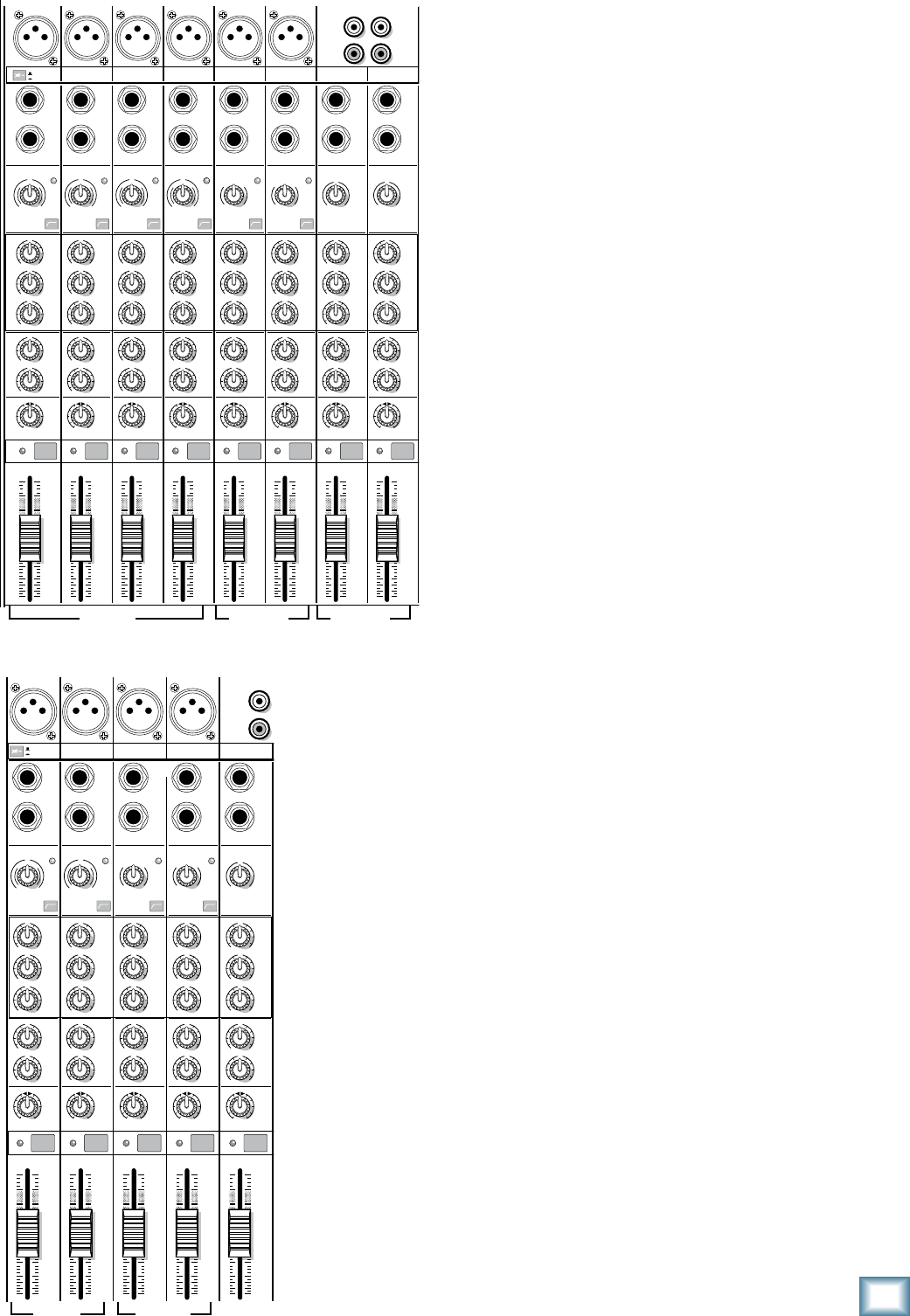
17
Owner’s Manual
Owner’s Manual
Channel Controls
The vertical channel strips look very similar, with only
a few differences between them. Each channel works
independently, and just controls the signals plugged into
the inputs directly above it. There are three different
avorsofchannelstrip:Mono,HybridandStereo.
Mono Channels (1–4 on ProFX12)
(1–2 on ProFX8)
• Themonochannelcontrolsaffectboththe
mono mic input and the mono line-level input.
• Thegainknobadjustsbothmicandlineinputs.
• Eachmonochannelhasaninsertjackandlow
cut switch.
• Channel1hasahi-zswitchtoconnectaguitar
directly.
• The3-bandEQhasshelvinghigh,shelvinglow,
and peaking mid EQ.
Hybrid Channels (5/6, 7/8 on ProFX12)
(3/4, 5/6 on ProFX8)
• Exceptforgainandlowcut,thesecontrols
affect the mono mic input and the stereo
line-level input.
• Thegainknobadjuststhemicinputonly.(The
stereo line inputs are fixed at unity gain.)
• Thelowcutswitchonlyaffectsthemicinput.
• Themonomicinputissplitequallytotheleft
and right.
• ThehybridchannelEQisa3-banddesignjust
like the mono channel EQ.
Stereo Channels (9/10, 11/12 on ProFX12)
(7/8 on ProFX8)
• Thesecontrolsaffectthestereoline-level
inputs.
• Thegainknobadjuststheleftandrightline
inputs equally. There is no level set LED or low
cut switch.
• ThestereochannelEQisa3-banddesignjust
like the mono channel EQ.
“U” LIKE UNITY GAIN
Mackiemixershavea“U”symbolonalmosteverylevel
control. This “U” stands for “unity gain,” meaning no
change in signal level (0 dB gain). Once you have
adjusted the input signal with the gain control, set
every control at “U” and the signals will travel through
the mixer at optimal levels. What’s more, all the labels
on our level controls are measured in decibels (dB), so
you’ll know what you’re doing level-wise if you choose to
change a control’s settings.
POWER
ON
13 DELAY 1 (300ms)
14 DELAY 2 (380ms)
15 DELAY 3 (480ms)
16 REVERB + DLY (250ms)
MAIN
RIGHT
(BALANCED)
MAIN
LEFT
USB
(BALANCED)
8K4K2K1K500250125
15
15
10
10
5
5
0
15
15
10
10
5
5
0
TAPE
IN
ST RETURN MAIN OUT PHONES
FOOTSWITCH
PHONES
TAPE
OUT
L
R
L
(UNBAL
ANCED)
R
0dB=0dBu
MAIN
METERS
RL
OL
4
6
3
10
15
7
10
20
30
0
2
BREAK
(MUTES ALL CHANNELS)
PHANTOM
POWER
POWER
STEREO GRAPHIC EQ
FX SEND
MID
2.5kHz
MID
2.5kHz
MID
2.5kHz
MID
2.5kHz
MID
2.5kHz
80Hz
LOW
U
+15-15
U
+15-15
U
+15-15
INSERT
RL
LOW CUT
100 Hz
U
GAIN
M
I
C
G
A
I
N
U+50
-20dB +30dB
OL
1
EQ
12kHz
HI
PAN
AUX
U
+15
OO
MON
FX
U
+15
OO
80Hz
LOW
U
+15-15
U
+15-15
U
+15-15
RL
LOW CUT
100 Hz
U
GAIN
M
I
C
G
A
I
N
U+50
-20dB +30dB
2
EQ
12kHz
HI
PAN
AUX
U
+15
OO
MON
FX
U
+15
OO
80Hz
LOW
U
+15-15
U
+15-15
U
+15-15
LINE IN 2 LINE/HI-Z IN 1
INSERT
BAL /
UNBAL
(MONO) (MONO) (MONO)
(MONO)
LINE IN 3
LINE IN 4
BAL /
UNBAL LINE IN 5
RL
LOW CUT
100 Hz
GAIN
3/4
EQ
12kHz
HI
PAN
AUX
U
+15
OO
MON
FX
U
+15
OO
80Hz
LOW
U
+15-15
U
+15-15
U
+15-15
RL
LOW CUT
100Hz
GAIN
M
I
C
G
A
I
N
U+50
M
I
C
G
A
I
N
U+50
5/6
EQ
12kHz
HI
LEVEL
SET
LEVEL
SET
LEVEL
SET
LEVEL
SET
PAN
AUX
U
+15
OO
MON
FX
U
+15
OO
GAIN
MIC MIC MIC MIC
80Hz
LOW
U
+15-15
U
+15-15
U
+15-15
U
+20-20
RL
7/8
ST RTN FX RTN
EQ
12kHz
HI
PAN
AUX
U
+15
OO
MON
FX
U
+15
OO
U
+15
FX TO MON
FX MASTER
U
+15
OO
OO
dB
30
20
10
10
OO
40
50
5
5
U
60
dB
30
20
10
10
OO
40
50
5
5
U
60
dB
30
20
10
10
OO
40
50
5
5
U
60
dB
30
20
10
10
OO
40
50
5
5
U
60
dB
30
20
10
10
OO
40
50
5
5
U
60
dB
30
20
10
10
OO
40
50
5
5
U
60
dB
30
20
10
10
OO
40
50
5
5
U
60
dB
30
20
10
10
OO
40
50
5
5
U
60
dB
30
20
10
10
OO
40
50
5
5
U
60
L
R
LINE IN 6
BAL /
UNBAL
L
R
LINE IN 7
LINE IN 8
BAL /
UNBAL
L
R
BAL /
UNBAL
L
R
BAL /
UNBAL
L
R
MON SEND
BAL /
UNBAL
BAL /
UNBAL
MUTE
PRESETS
FX PRESETS
OL OL OL OL
OL
INPUT LEVEL
USB
OO
+20
U
TAPE LEVEL
OO
+20
U
MON MAIN
1 2 3/4 5/6 7/8
OL
USB THRU
LINE
HI-Z
MAIN MIX
MON
EQ IN
BYPASS
01 BRIGHT ROOM
02 WARM LOUNGE
03 SMALL STAGE
04 WARM THEATER
05 WARM HALL
06 CONCERT HALL
07 PLATE REVERB
08 CATHEDRAL
09 CHORUS
10 CHORUS + REV
11 DOUBLER
12 TAPE SLAP
OO
MAX
LINE
HI-Z
MUTE MUTE MUTE MUTE MUTE
MUTE
48V
MONO HYBRID STEREO
MONO HYBRID STEREO
ProFX12
ProFX8
MAIN
RIGHT
(BALANCED)
MAIN
LEFT
USB
(BALANCED)
8K4K2K1K500250125
15
15
10
10
5
5
0
15
15
10
10
5
5
0
TAPE
IN
ST RETURN MAIN OUT PHONES
FOOTSWITCH
PHONES
TAPE
OUT
L
R
L
(UNBALANCED)
R
STEREO GRAPHIC EQ
FX SEND
MID
2.5kHz
MID
2.5kHz
MID
2.5kHz
MID
2.5kHz
MID
2.5kHz
80Hz
LOW
U
+15-15
U
+15-15
U
+15-15
LINE IN 4
INSERT
RL
LOW CUT
100 Hz
U
GAIN
M
I
C
G
A
I
N
U+50
-20dB +30dB
4
12kHz
HI
MID
2.5kHz
80Hz
LOW
U
+15-15
U
+15-15
U
+15-15
12kHz
HI
MID
2.5kHz
80Hz
LOW
U
+15-15
U
+15-15
U
+15-15
12kHz
HI
MID
2.5kHz
80Hz
LOW
U
+15-15
U
+15-15
U
+15-15
12kHz
HI
PAN
AUX
U
+15
OO
MON
FX
U
+15
OO
RL
PAN
AUX
U
+15
OO
MON
FX
U
+15
OO
RL
PAN
AUX
U
+15
OO
MON
FX
U
+15
OO
RL
PAN
AUX
U
+15
OO
MON
FX
U
+15
OO
80Hz
LOW
U
+15-15
U
+15-15
U
+15-15
RL
LOW CUT
100 Hz
12kHz
HI
PAN
AUX
U
+15
OO
MON
FX
U
+15
OO
80Hz
LOW
U
+15-15
U
+15-15
U
+15-15
BAL /
UNBAL
(MONO) (MONO) (MONO)
(MONO)
LINE IN 7
LINE IN 8
BAL /
UNBAL LINE IN 9
RL
LOW CUT
100 Hz
GAIN
7/85/6
12kHz
HI
PAN
AUX
U
+15
OO
MON
FX
U
+15
OO
80Hz
LOW
U
+15-15
U
+15-15
U
+15-15
RL
M
I
C
G
A
I
N
U+50
GAIN
M
I
C
G
A
I
N
U+50
9/10
12kHz
HI
LEVEL
SET
LEVEL
SET
LEVEL
SET
LOW CUT
100 Hz
U
GAIN
M
I
C
G
A
I
N
U+50
-20dB +30dB
LEVEL
SET
LEVEL
SET
LEVEL
SET
LOW CUT
100 Hz
U
GAIN
M
I
C
G
A
I
N
U+50
-20dB +30dB
LOW CUT
100 Hz
U
GAIN
M
I
C
G
A
I
N
U+50
-20dB +30dB
PAN
AUX
U
+15
OO
MON
FX
U
+15
OO
GAIN
MIC MIC MIC MIC MIC MIC
80Hz
LOW
U
+15-15
U
+15-15
U
+15-15
U
+20-20
GAIN
U
+20-20
RL
11/12
ST RTN FX RTN
EQEQEQEQ EQ EQ EQ EQ
12kHz
HI
PAN
AUX
U
+15
OO
MON
FX
U
+15
OO
U
+15
FX TO MON
FX MASTER
U
+15
OO
OO
dB
30
20
10
10
OO
40
50
5
5
U
60
dB
30
20
10
10
OO
40
50
5
5
U
60
dB
30
20
10
10
OO
40
50
5
5
U
60
dB
30
20
10
10
OO
40
50
5
5
U
60
dB
30
20
10
10
OO
40
50
5
5
U
60
dB
30
20
10
10
OO
40
50
5
5
U
60
dB
30
20
10
10
OO
40
50
5
5
U
60
dB
30
20
10
10
OO
40
50
5
5
U
60
dB
30
20
10
10
OO
40
50
5
5
U
60
dB
30
20
10
10
OO
40
50
5
5
U
60
dB
30
20
10
10
OO
40
50
5
5
U
60
dB
30
20
10
10
OO
40
50
5
5
U
60
L
R
(MONO)
LINE IN 5
LINE IN 6
BAL /
UNBAL
L
R
LINE IN 10
BAL /
UNBAL
L
R
LINE IN 11
LINE IN 12
BAL /
UNBAL
L
R
BAL /
UNBAL
L
R
BAL /
UNBAL
L
R
MON SEND
BAL /
UNBAL
BAL /
UNBAL
PRESETS
FX PRESETS
01 BRIGHT ROOM
02 WARM LOUNGE
03 SMALL STAGE
04 WARM THEATER
05 WARM HALL
06 CONCERT HALL
13 DELAY 1 (300ms)
14 DELAY 2 (380ms)
15 DELAY 3 (480ms)
16 REVERB + DLY (250ms)
07 PLATE REVERB
08 CATHEDRAL
09 CHORUS
10 CHORUS + REV
11 DOUBLER
12 TAPE SLAP
MON MAIN
4
LINE IN 3
INSERT
3
BAL /
UNBAL
3
LINE IN 2
INSERT
2
BAL /
UNBAL
BAL /
UNBAL
2
LINE/HI-Z IN 1
INSERT
15/6 7/8 9/10 11/12
POWER
ON
0dB=0dBu
MAIN
METERS
OL
4
6
3
10
15
7
10
20
30
0
2
BREAK
(MUTES ALL CHANNELS)
PHANTOM
POWER
POWER
OO
+10
U
TAPE LEVEL
OO
+20
U
USB THRU
LINE
HI-Z
OO
MAX
1
OL OL OL OL OL OL OL OL
OL
OL
MAIN MIX
MON
EQ IN
BYPASS
RL
INPUT LEVEL
USB
MUTE
MUTE MUTE MUTE MUTE MUTE MUTE MUTE MUTE
MUTE
48V
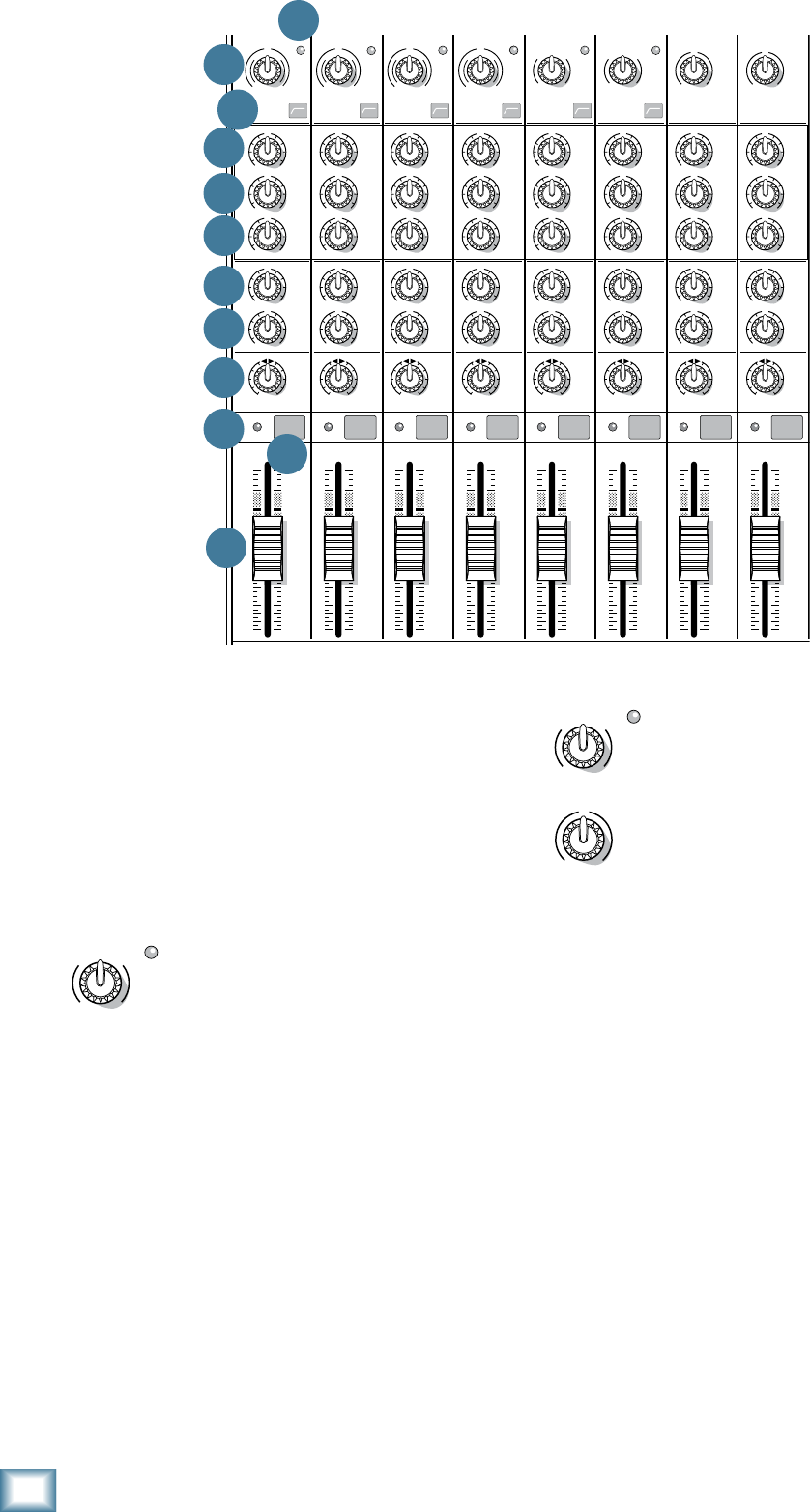
18
ProFX8 and ProFX12
ProFX8 and ProFX12
For hybrid channels (mic input and
stereo line input), the gain control just
affects the microphone input.
For stereo channels (no mic input) the
gain control just affects the line-level
inputs, with 20 dB of gain, and 20 dB of
attenuation. There is no level set LED.
20. LEVEL SET LED
These LEDs are used with the gain control [19] to set
the channel preamplifier gain just right for each source.
If one or more channels are distorting, check the level
set LEDs. If they are on continuously, turn down the
gain.
21. LOW CUT
Each channel with a mic input has a low cut switch
thatcutsthebassfrequenciesbelow100Hz,atarateof
18 dB per octave. All mic inputs are affected, as well as
the line inputs of the mono channels.
We recommend using low cut on every microphone
application except kick drum, bass guitar, and bassy
synth patches. These aside, there isn’t much down there
that you want to hear, and filtering it out makes the low
stuff you do want much more crisp and tasty. Not only
that, low cut can help reduce the possibility of feedback
in live situations and help to conserve the amplifier
power.
19. GAIN
If you haven’t already, please read the gain-setting
procedure on page 3. The gain adjustment allows the
various source signals from the outside world to be
adjusted to the same optimal internal operating levels.
Setting the gain correctly will ensure that the pre-
amplifier’s gain is not too high, where distortion could
occur, and not too low, where the quieter, exquisitely-
delicate passages might be lost in background noise.
For mono channels (mic input with a
mono line input), the gain knob adjusts
the input sensitivity of the mic and line
inputs.
Adjust the gain control so the level set LEDs [20]
illuminate occasionally during the louder moments and
are off during the quieter moments.
If the signal comes through the mic XLR jack, there
will be 0 dB of gain (“U” for unity) with the knob fully
down,rampingto50dBofgainfullyup.
Throughthe1⁄4"monoinput,thereis20dBof
attenuation fully down and 30 dB of gain fully up,
with a “U” (unity gain) mark at 12:00. This 20 dB of
attenuation can be very handy when inserting a very
hot signal, need to add a lot of EQ boost, or both.
Without this “virtual pad,” this scenario might lead
to channel clipping.
MAIN
RIGHT
(BALANCED)
MAIN
LEFT
USB
(BALANCED)
8K4K2K1K500250125
15
15
10
10
5
5
0
15
15
10
10
5
5
0
TAPE
IN
ST RETURN MAIN OUT PHONES
FOOTSWITCH
PHONES
TAPE
OUT
L
R
L
(UNBALANCED)
R
STEREO GRAPHIC EQ
FX SEND
MID
2.5kHz
MID
2.5kHz
MID
2.5kHz
MID
2.5kHz
MID
2.5kHz
80Hz
LOW
U
+15-15
U
+15-15
U
+15-15
LINE IN 4
INSERT
RL
LOW CUT
100 Hz
U
GAIN
M
I
C
G
A
I
N
U+50
-20dB +30dB
4
12kHz
HI
MID
2.5kHz
80Hz
LOW
U
+15-15
U
+15-15
U
+15-15
12kHz
HI
MID
2.5kHz
80Hz
LOW
U
+15-15
U
+15-15
U
+15-15
12kHz
HI
MID
2.5kHz
80Hz
LOW
U
+15-15
U
+15-15
U
+15-15
12kHz
HI
PAN
AUX
U
+15
OO
MON
FX
U
+15
OO
RL
PAN
AUX
U
+15
OO
MON
FX
U
+15
OO
RL
PAN
AUX
U
+15
OO
MON
FX
U
+15
OO
RL
PAN
AUX
U
+15
OO
MON
FX
U
+15
OO
80Hz
LOW
U
+15-15
U
+15-15
U
+15-15
RL
LOW CUT
100 Hz
12kHz
HI
PAN
AUX
U
+15
OO
MON
FX
U
+15
OO
80Hz
LOW
U
+15-15
U
+15-15
U
+15-15
BAL /
UNBAL
(MONO) (MONO) (MONO) (MONO)
LINE IN 7
LINE IN 8
BAL /
UNBAL LINE IN 9
RL
LOW CUT
100 Hz
GAIN
7/85/6
12kHz
HI
PAN
AUX
U
+15
OO
MON
FX
U
+15
OO
80Hz
LOW
U
+15-15
U
+15-15
U
+15-15
RL
M
I
C
G
A
I
N
U+50
GAIN
M
I
C
G
A
I
N
U+50
9/10
12kHz
HI
LEVEL
SET
LEVEL
SET
LEVEL
SET
LOW CUT
100 Hz
U
GAIN
M
I
C
G
A
I
N
U+50
-20dB +30dB
LEVEL
SET
LEVEL
SET
LEVEL
SET
LOW CUT
100 Hz
U
GAIN
M
I
C
G
A
I
N
U+50
-20dB +30dB
LOW CUT
100 Hz
U
GAIN
M
I
C
G
A
I
N
U+50
-20dB +30dB
PAN
AUX
U
+15
OO
MON
FX
U
+15
OO
GAIN
MIC MIC MIC MIC MIC MIC
80Hz
LOW
U
+15-15
U
+15-15
U
+15-15
U
+20-20
GAIN
U
+20-20
RL
11/12
ST RTN FX RTN
EQEQEQEQ EQ EQ EQ EQ
12kHz
HI
PAN
AUX
U
+15
OO
MON
FX
U
+15
OO
U
+15
FX TO MON
FX MASTER
U
+15
OO
OO
dB
30
20
10
10
OO
40
50
5
5
U
60
dB
30
20
10
10
OO
40
50
5
5
U
60
dB
30
20
10
10
OO
40
50
5
5
U
60
dB
30
20
10
10
OO
40
50
5
5
U
60
dB
30
20
10
10
OO
40
50
5
5
U
60
dB
30
20
10
10
OO
40
50
5
5
U
60
dB
30
20
10
10
OO
40
50
5
5
U
60
dB
30
20
10
10
OO
40
50
5
5
U
60
dB
30
20
10
10
OO
40
50
5
5
U
60
dB
30
20
10
10
OO
40
50
5
5
U
60
dB
30
20
10
10
OO
40
50
5
5
U
60
dB
30
20
10
10
OO
40
50
5
5
U
60
L
R
(MONO)
LINE IN 5
LINE IN 6
BAL /
UNBAL
L
R
LINE IN 10
BAL /
UNBAL
L
R
LINE IN 11
LINE IN 12
BAL /
UNBAL
L
R
BAL /
UNBAL
L
R
BAL /
UNBAL
L
R
MON SEND
BAL /
UNBAL
BAL /
UNBAL
PRESETS
FX PRESETS
01 BRIGHT ROOM
02 WARM LOUNGE
03 SMALL STAGE
04 WARM THEATER
05 WARM HALL
06 CONCERT HALL
13 DELAY 1 (300ms)
14 DELAY 2 (380ms)
15 DELAY 3 (480ms)
16 REVERB + DLY (250ms)
07 PLATE REVERB
08 CATHEDRAL
09 CHORUS
10 CHORUS + REV
11 DOUBLER
12 TAPE SLAP
MON MAIN
4
LINE IN 3
INSERT
3
BAL /
UNBAL
3
LINE IN 2
INSERT
2
BAL /
UNBAL
BAL /
UNBAL
2
LINE/HI-Z IN 1
INSERT
15/6 7/8 9/10 11/12
POWER
ON
0dB=0dBu
MAIN
METERS
OL
4
6
3
10
15
7
10
20
30
0
2
BREAK
(MUTES ALL CHANNELS)
PHANTOM
POWER
POWER
OO
+10
U
TAPE LEVEL
OO
+20
U
USB THRU
LINE
HI-Z
OO
MAX
1
OL OL OL OL OL OL OL OL
OL
OL
MAIN MIX
MON
EQ IN
BYPASS
RL
INPUT LEVEL
USB
MUTE
MUTE MUTE MUTE MUTE MUTE MUTE MUTE MUTE
MUTE
48V
19
20
21
22
23
24
25
26
27
28 29
30
GAIN
M
I
C
G
A
I
N
U+50
LEVEL
SET
GAIN
U
+20-20
GAIN
M
I
C
G
A
I
N
U+50
LEVEL
SET
GAIN
U
+20-20
GAIN
M
I
C
G
A
I
N
U+50
LEVEL
SET
GAIN
U
+20-20
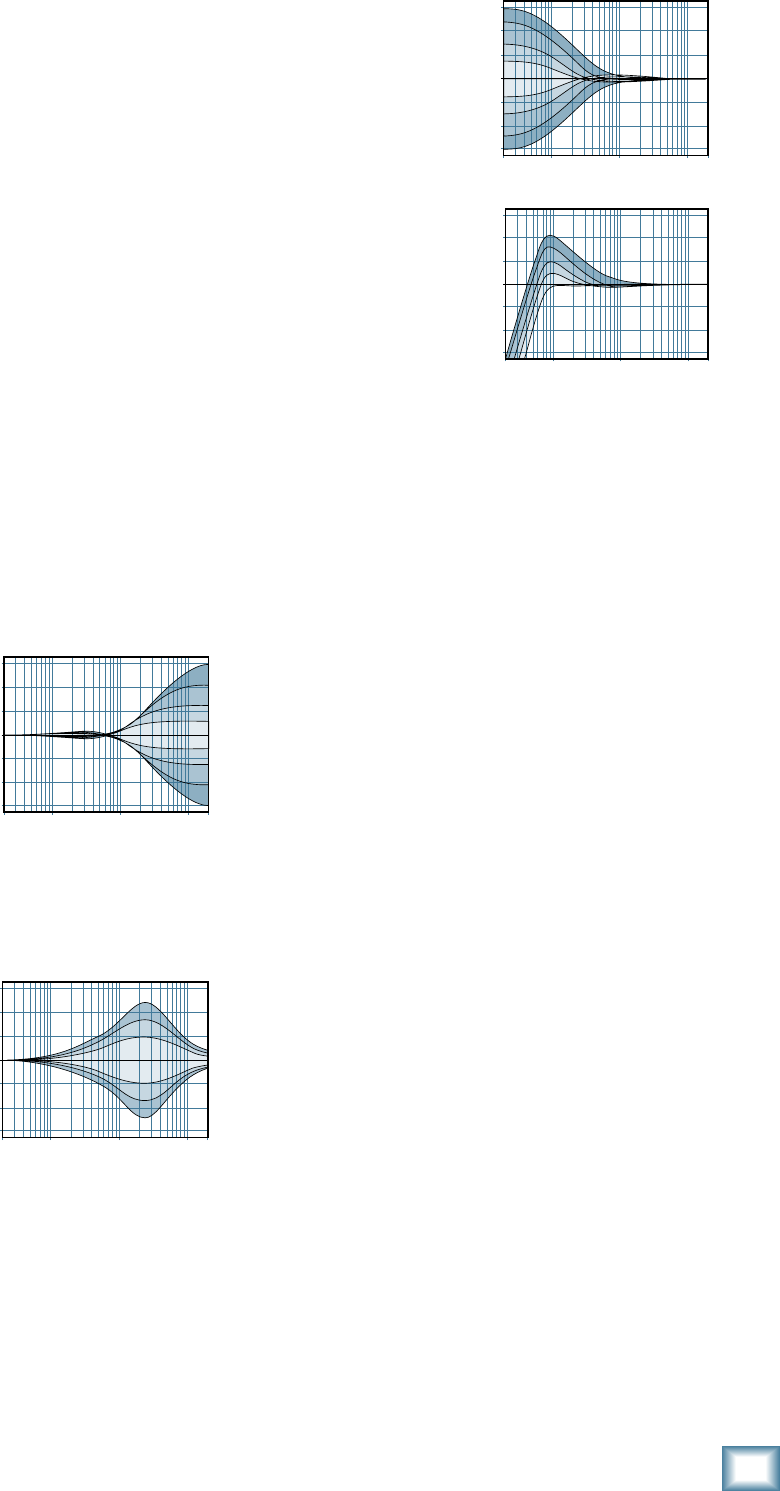
19
Owner’s Manual
Owner’s Manual
Another way to consider low cut’s function is that it
actually adds flexibility during live performances. With
the addition of low cut, you may safely use low EQ on
vocals.Manytimes,bassshelvingEQcanreally
benefit voices. Trouble is, adding low EQ also boosts
stage rumble, mic handling clunks and breath pops.
Applying low cut removes all those problems so you
can add low EQ without blowing the subwoofers.
3-BAND EQ
The ProFX mixer has 3-band equalization at carefully
selectedpoints—lowshelvingat80Hz,midpeakingat
2.5kHz,andhighshelvingat12kHz.“Shelving”means
that the circuitry boosts or cuts all frequencies past the
specified frequency. For example, rotating the low EQ
knob15dBtotherightboostsbassstartingat80Hzand
continuing down to the lowest note you never heard.
“Peaking” means that certain frequencies form a “hill”
aroundthecenterfrequency—2.5kHzinthecaseof
the mid EQ.
The following graphs of frequency vs. signal level
show the approximate overall effect of EQ adjustment
on the frequency range.
22. HI EQ
This control gives you
upto15dBboostorcut
above12kHz,anditisat
(no boost or cut) at the
detent. Use it to add sizzle
to cymbals, and an overall
sense of transparency, or
edge to keyboards, vocals,
guitar and bacon frying. Turn
it down a little to reduce sibilance, or to hide tape hiss.
23. MID EQ
Short for “midrange,”
thisknobprovides15dB
of boost or cut, centered at
2.5kHz,alsoatatthe
centerdetent.Midrange
EQ is often thought of as
the most dynamic, because
the frequencies that define
any particular sound are almost always found in this
range. You can create many interesting and useful EQ
changes by turning this knob down as well as up.
24. LOW EQ
This control gives you up
to15dBboostorcutbelow
80Hz.Thecircuitisatat
the center detent position.
This frequency represents
the punch in bass drums,
bass guitar, fat synth
patches, and some really
serious male singers.
Used in conjunction with
the low cut [21] switch,
you can boost the low EQ
without injecting a ton of
subsonic debris into the
mix.
MODERATION DURING EQ
With EQ, things may be upset royally. We’ve
designed a lot of boost and cut into each equalizer
circuit, because we know everyone will occasionally
need that. But if the EQs are maxed on every
channel, the resulting mix is mush. Equalize subtly
and use the left sides of the knobs (cut), as well as
theright(boost).Veryfewplatinum-record-album
engineers ever use more than about 3 dB of EQ. If
more than that is necessary, there’s usually a better
way to get it, such as placing a mic differently (or
using a different kind of mic entirely).
25. AUX MON
These knobs tap a portion of each channel's signal
to set up a nice monitor mix feeding stage monitors,
independent of the main mix. Adjust these controls on
each channel until the band is happy with the stage
monitor mix.
The aux mon feed from hybrid and stereo channels is
a mono sum of the left and right sides of these channels.
The controls are off when turned fully down, deliver
unity gain at the center detent, and can provide up to
15dBofgainturnedfullyup.
The channel fader [30], pan [27] and mute [29] do
not affect the monitor output, but the other channel
controls will. (The aux mon is pre-fader.)
The monitor signal from the monitor output jack [12]
is the sum (mix) of all the channels whose aux mon
control is set to more than minimum. The overall
output level may be adjusted with the monitor fader
[46]anditsEQtweakedwiththegraphicEQ[36]
if the main mix/mon switch [37] is pressed in.
Internal FX may also be added to the monitor mix
withtheFXtomonknob[53].
20
Hz
100
Hz
1k
Hz
10k
Hz
20k
Hz
–15
–10
–5
0
+5
+10
+15
Mid EQ
20Hz 100Hz 1kHz 10kHz 20kHz
–15
–10
–5
0
+5
+10
+15
20
Hz
100
Hz
1k
Hz
10k
Hz
20k
Hz
–15
–10
–5
0
+5
+10
+15
Low EQ with Low Cut
Low EQ
20
Hz
100
Hz
1k
Hz
10k
Hz
20k
Hz
–15
–10
–5
0
+5
+10
+15
Hi EQ
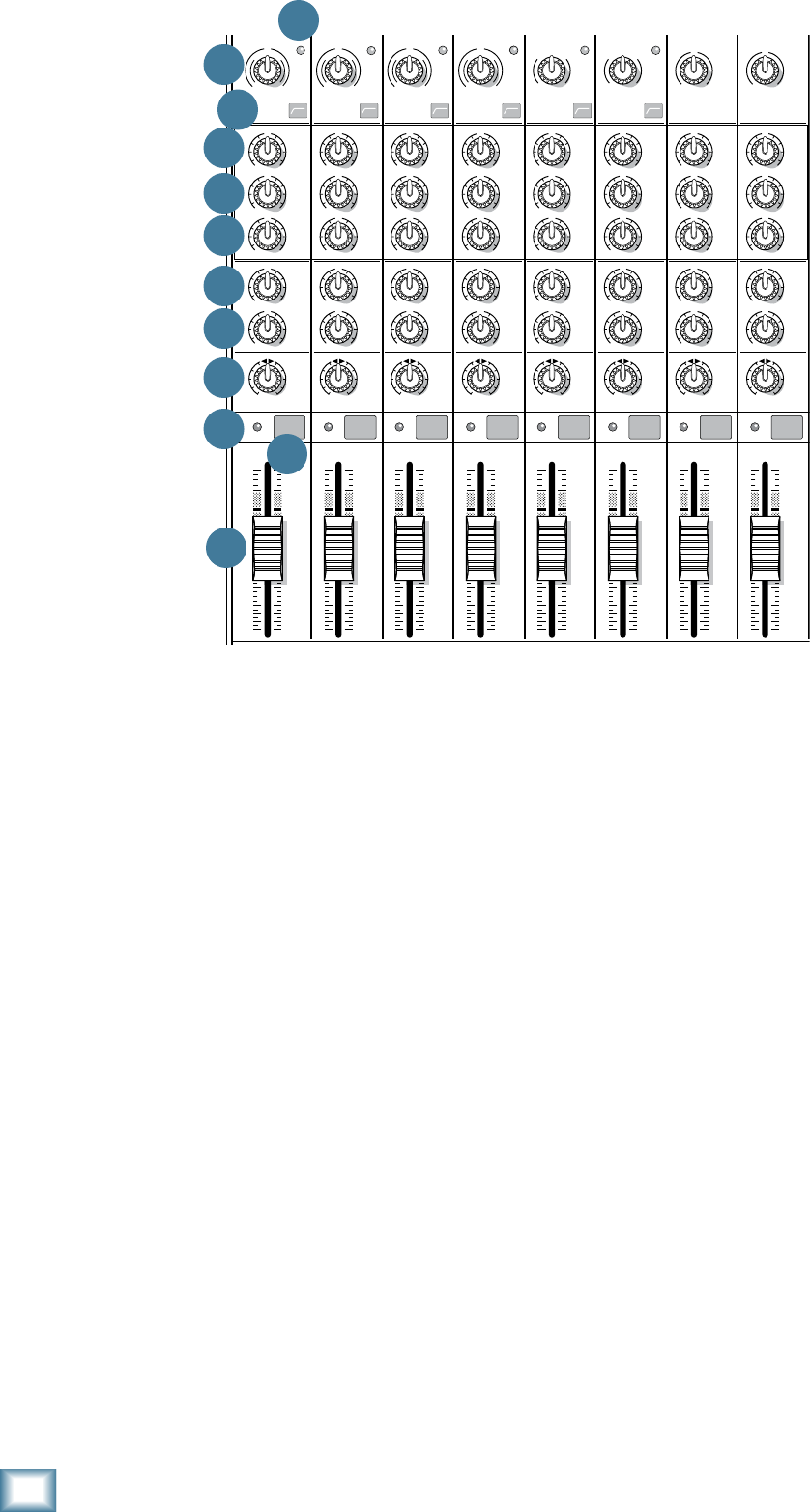
20
ProFX8 and ProFX12
ProFX8 and ProFX12
26. AUX FX
These knobs tap a portion of each channel's signal to
set up a nice FX mix feeding the internal FX processor,
and to feed external processors via the FX output [13].
The aux FX feed from hybrid and stereo channels is a
mono sum of the left and right sides of these channels.
The controls are off when turned fully down, deliver
unity gain at the center detent, and can provide up to
15dBofgainturnedfullyup.
The channel fader [30], mute [29] and other channel
controls affect the FX output, but pan [27] does not.
(The aux FX is post-fader.)
The FX signal reaching the internal FX processor
and the FX send output jack, is the sum (mix) of all
the channels whose aux FX control is set to more than
minimum. The overall FX send level may be adjusted
withtheFXmasterknob[51].
The FX signal from the internal FX processor is added
tothemainmixusingtheFXreturnfader[45],andmay
beaddedtothemonitorswiththeFXtomonknob[53].
27. PAN
These knobs adjust the amount of channel signal sent
to the left versus the right outputs. On mono channels
these controls act as pan pots. On hybrid and stereo
channels, they work like the balance control on a home
stereo. They do not affect the aux mon or FX mixes.
28. OL LED
This LED will light if the channel signal is too high,
and this may cause distortion due to overloading.
The OL LED comes before the channel fader [30] in
the signal path, so the fader has no effect in your efforts
to turn off the OL LED.
Overloading may occur if the gain [19] is set too high,
so check that the level set LED [20] is not turning on
frequently. Turn down the gain if it is.
Overloading may also occur if the channel EQ [22-24]
is set too high. Check that the EQ settings are moderate.
Use the low cut switches [21] if the overloading is due
to lower unwanted bass thumps and bangs.
29. MUTE
Press this switch in to mute the channel in the main
mix. The aux mon output of the channel is not muted,
but the FX output to the internal FX processor and FX
send jack [13] is.
30. CHANNEL FADER
These faders control the channel’s level from off, to
unity gain, on up to 10 dB of additional gain. The mono
channels have mono faders, and the hybrid and stereo
channels use stereo faders.
With the gain control [19] set correctly, the faders
should be set around unity gain (U).
MAIN
RIGHT
(BALANCED)
MAIN
LEFT
USB
(BALANCED)
8K4K2K1K500250125
15
15
10
10
5
5
0
15
15
10
10
5
5
0
TAPE
IN
ST RETURN MAIN OUT PHONES
FOOTSWITCH
PHONES
TAPE
OUT
L
R
L
(UNBALANCED)
R
STEREO GRAPHIC EQ
FX SEND
MID
2.5kHz
MID
2.5kHz
MID
2.5kHz
MID
2.5kHz
MID
2.5kHz
80Hz
LOW
U
+15-15
U
+15-15
U
+15-15
LINE IN 4
INSERT
RL
LOW CUT
100 Hz
U
GAIN
M
I
C
G
A
I
N
U+50
-20dB +30dB
4
12kHz
HI
MID
2.5kHz
80Hz
LOW
U
+15-15
U
+15-15
U
+15-15
12kHz
HI
MID
2.5kHz
80Hz
LOW
U
+15-15
U
+15-15
U
+15-15
12kHz
HI
MID
2.5kHz
80Hz
LOW
U
+15-15
U
+15-15
U
+15-15
12kHz
HI
PAN
AUX
U
+15
OO
MON
FX
U
+15
OO
RL
PAN
AUX
U
+15
OO
MON
FX
U
+15
OO
RL
PAN
AUX
U
+15
OO
MON
FX
U
+15
OO
RL
PAN
AUX
U
+15
OO
MON
FX
U
+15
OO
80Hz
LOW
U
+15-15
U
+15-15
U
+15-15
RL
LOW CUT
100 Hz
12kHz
HI
PAN
AUX
U
+15
OO
MON
FX
U
+15
OO
80Hz
LOW
U
+15-15
U
+15-15
U
+15-15
BAL /
UNBAL
(MONO) (MONO) (MONO) (MONO)
LINE IN 7
LINE IN 8
BAL /
UNBAL LINE IN 9
RL
LOW CUT
100 Hz
GAIN
7/85/6
12kHz
HI
PAN
AUX
U
+15
OO
MON
FX
U
+15
OO
80Hz
LOW
U
+15-15
U
+15-15
U
+15-15
RL
M
I
C
G
A
I
N
U+50
GAIN
M
I
C
G
A
I
N
U+50
9/10
12kHz
HI
LEVEL
SET
LEVEL
SET
LEVEL
SET
LOW CUT
100 Hz
U
GAIN
M
I
C
G
A
I
N
U+50
-20dB +30dB
LEVEL
SET
LEVEL
SET
LEVEL
SET
LOW CUT
100 Hz
U
GAIN
M
I
C
G
A
I
N
U+50
-20dB +30dB
LOW CUT
100 Hz
U
GAIN
M
I
C
G
A
I
N
U+50
-20dB +30dB
PAN
AUX
U
+15
OO
MON
FX
U
+15
OO
GAIN
MIC MIC MIC MIC MIC MIC
80Hz
LOW
U
+15-15
U
+15-15
U
+15-15
U
+20-20
GAIN
U
+20-20
RL
11/12
ST RTN FX RTN
EQEQEQEQ EQ EQ EQ EQ
12kHz
HI
PAN
AUX
U
+15
OO
MON
FX
U
+15
OO
U
+15
FX TO MON
FX MASTER
U
+15
OO
OO
dB
30
20
10
10
OO
40
50
5
5
U
60
dB
30
20
10
10
OO
40
50
5
5
U
60
dB
30
20
10
10
OO
40
50
5
5
U
60
dB
30
20
10
10
OO
40
50
5
5
U
60
dB
30
20
10
10
OO
40
50
5
5
U
60
dB
30
20
10
10
OO
40
50
5
5
U
60
dB
30
20
10
10
OO
40
50
5
5
U
60
dB
30
20
10
10
OO
40
50
5
5
U
60
dB
30
20
10
10
OO
40
50
5
5
U
60
dB
30
20
10
10
OO
40
50
5
5
U
60
dB
30
20
10
10
OO
40
50
5
5
U
60
dB
30
20
10
10
OO
40
50
5
5
U
60
L
R
(MONO)
LINE IN 5
LINE IN 6
BAL /
UNBAL
L
R
LINE IN 10
BAL /
UNBAL
L
R
LINE IN 11
LINE IN 12
BAL /
UNBAL
L
R
BAL /
UNBAL
L
R
BAL /
UNBAL
L
R
MON SEND
BAL /
UNBAL
BAL /
UNBAL
PRESETS
FX PRESETS
01 BRIGHT ROOM
02 WARM LOUNGE
03 SMALL STAGE
04 WARM THEATER
05 WARM HALL
06 CONCERT HALL
13 DELAY 1 (300ms)
14 DELAY 2 (380ms)
15 DELAY 3 (480ms)
16 REVERB + DLY (250ms)
07 PLATE REVERB
08 CATHEDRAL
09 CHORUS
10 CHORUS + REV
11 DOUBLER
12 TAPE SLAP
MON MAIN
4
LINE IN 3
INSERT
3
BAL /
UNBAL
3
LINE IN 2
INSERT
2
BAL /
UNBAL
BAL /
UNBAL
2
LINE/HI-Z IN 1
INSERT
15/6 7/8 9/10 11/12
POWER
ON
0dB=0dBu
MAIN
METERS
OL
4
6
3
10
15
7
10
20
30
0
2
BREAK
(MUTES ALL CHANNELS)
PHANTOM
POWER
POWER
OO
+10
U
TAPE LEVEL
OO
+20
U
USB THRU
LINE
HI-Z
OO
MAX
1
OL OL OL OL OL OL OL OL
OL
OL
MAIN MIX
MON
EQ IN
BYPASS
RL
INPUT LEVEL
USB
MUTE
MUTE MUTE MUTE MUTE MUTE MUTE MUTE MUTE
MUTE
48V
19
20
21
22
23
24
25
26
27
28 29
30
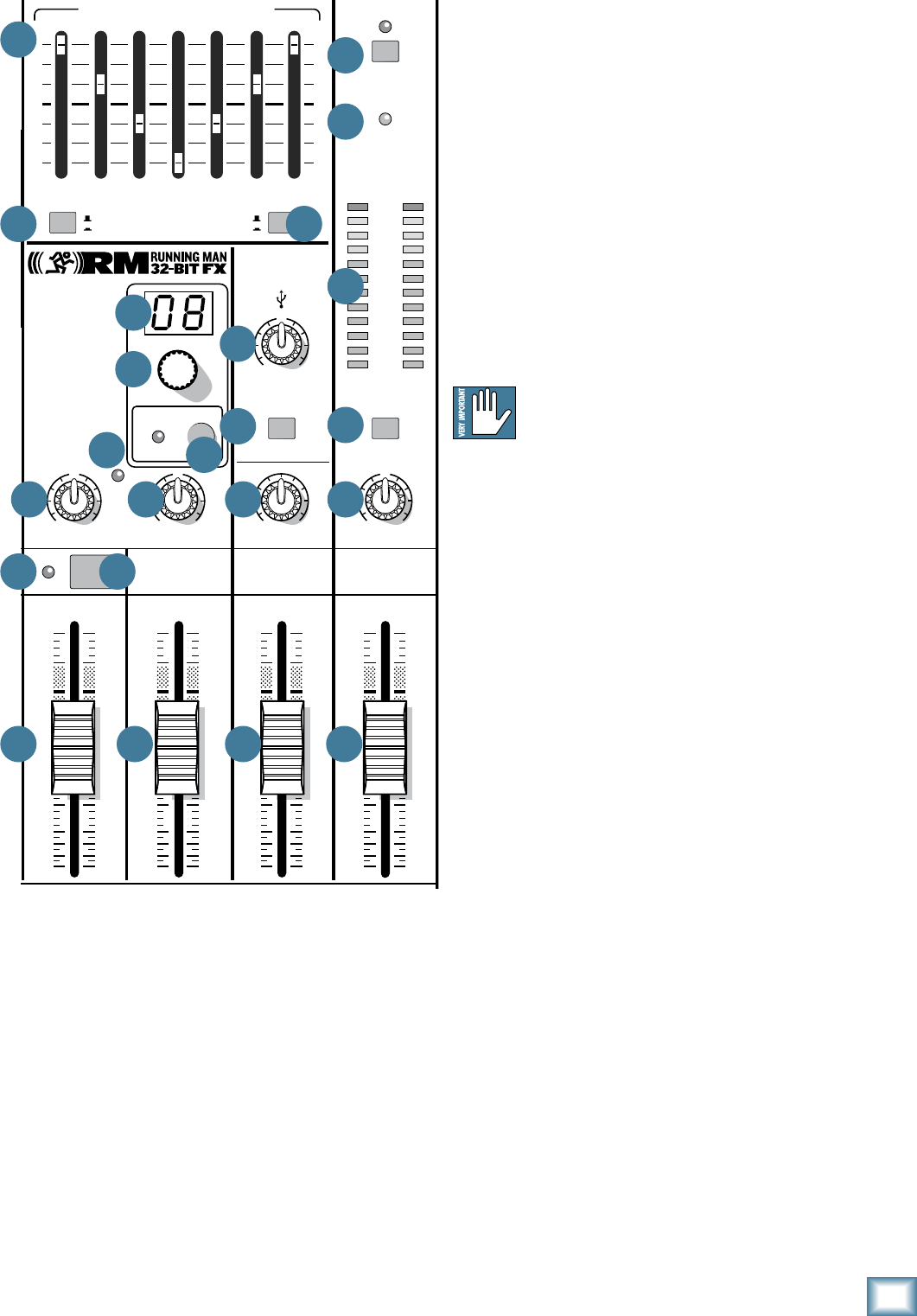
21
Owner’s Manual
Owner’s Manual
Master Controls
31. PHANTOM POWER SWITCH
If the microphones need phantom power, press
in this switch to add phantom power to all the XLR
microphone inputs of the mixer. This lets the mixer
send low-current DC voltage to the mic’s electronics
through the same wires that carry audio. The LED will
turn on as a reminder that phantom power is engaged.
Mostmodernprofessionalcondensermicsrequire
phantom power. Semi-pro condenser mics often have
batteries to accomplish the same thing. “Phantom” owes
its name to an ability to be “unseen” by dynamic mics
(ShureSM57/SM58,forinstance),whichdon’tneed
external power and aren’t affected by it anyway.
Never plug single-ended (unbalanced)
micro phones, or ribbon microphones into the
mic input jacks if phantom power is on. Do
not plug instrument outputs into the mic input jacks
with phantom power on, unless you know for certain it
is safe to do so.
32. POWER LED
This LED comes on when the mixer is plugged into
the AC mains supply, and the rear panel power switch
[2] is on.
If the LED does not turn on, make sure the
AC power is live, both ends of the power cord are
correctly inserted, the electricity bill has been
paid and the lights in town are on.
33. METERS
These meters have 2 columns of 12 LEDs each,
withdBmarkingsfrom–30to+15,andOL(overload
at+20dBu).Theyindicatethestereosignalstrength
of the main mix after the main fader [47].
Typically, these meters should be bouncing between
the“0”andthe“+3”LEDs.ItisokayiftheOLLEDslight
occasionally, but if they light frequently or continuously,
turn down the main fader until they blink occasionally
or not at all.
Remember, audio meters are just tools to help assure
that the levels are “in the ballpark.” You don’t have to
stare at them (unless you want to).
MAIN
RIGHT
(BALANCED)
MAIN
LEFT
USB
(BALANCED)
8K4K2K1K500250125
15
15
10
10
5
5
0
15
15
10
10
5
5
0
TAPE
IN
ST RETURN MAIN OUT PHONES
FOOTSWITCH
PHONES
TAPE
OUT
L
R
L
(UNBALANCED)
R
STEREO GRAPHIC EQ
FX SEND
MID
2.5kHz
MID
2.5kHz
MID
2.5kHz
MID
2.5kHz
MID
2.5kHz
80Hz
LOW
U
+15-15
U
+15-15
U
+15-15
LINE IN 4
INSERT
RL
LOW CUT
100 Hz
U
GAIN
M
I
C
G
A
I
N
U+50
-20dB +30dB
4
12kHz
HI
MID
2.5kHz
80Hz
LOW
U
+15-15
U
+15-15
U
+15-15
12kHz
HI
MID
2.5kHz
80Hz
LOW
U
+15-15
U
+15-15
U
+15-15
12kHz
HI
MID
2.5kHz
80Hz
LOW
U
+15-15
U
+15-15
U
+15-15
12kHz
HI
PAN
AUX
U
+15
OO
MON
FX
U
+15
OO
RL
PAN
AUX
U
+15
OO
MON
FX
U
+15
OO
RL
PAN
AUX
U
+15
OO
MON
FX
U
+15
OO
RL
PAN
AUX
U
+15
OO
MON
FX
U
+15
OO
80Hz
LOW
U
+15-15
U
+15-15
U
+15-15
RL
LOW CUT
100 Hz
12kHz
HI
PAN
AUX
U
+15
OO
MON
FX
U
+15
OO
80Hz
LOW
U
+15-15
U
+15-15
U
+15-15
BAL /
UNBAL
(MONO) (MONO) (MONO) (MONO)
LINE IN 7
LINE IN 8
BAL /
UNBAL LINE IN 9
RL
LOW CUT
100 Hz
GAIN
7/85/6
12kHz
HI
PAN
AUX
U
+15
OO
MON
FX
U
+15
OO
80Hz
LOW
U
+15-15
U
+15-15
U
+15-15
RL
M
I
C
G
A
I
N
U+50
GAIN
M
I
C
G
A
I
N
U+50
9/10
12kHz
HI
LEVEL
SET
LEVEL
SET
LEVEL
SET
LOW CUT
100 Hz
U
GAIN
M
I
C
G
A
I
N
U+50
-20dB +30dB
LEVEL
SET
LEVEL
SET
LEVEL
SET
LOW CUT
100 Hz
U
GAIN
M
I
C
G
A
I
N
U+50
-20dB +30dB
LOW CUT
100 Hz
U
GAIN
M
I
C
G
A
I
N
U+50
-20dB +30dB
PAN
AUX
U
+15
OO
MON
FX
U
+15
OO
GAIN
MIC MIC MIC MIC MIC MIC
80Hz
LOW
U
+15-15
U
+15-15
U
+15-15
U
+20-20
GAIN
U
+20-20
RL
11/12
ST RTN FX RTN
EQEQEQEQ EQ EQ EQ EQ
12kHz
HI
PAN
AUX
U
+15
OO
MON
FX
U
+15
OO
U
+15
FX TO MON
FX MASTER
U
+15
OO
OO
dB
30
20
10
10
OO
40
50
5
5
U
60
dB
30
20
10
10
OO
40
50
5
5
U
60
dB
30
20
10
10
OO
40
50
5
5
U
60
dB
30
20
10
10
OO
40
50
5
5
U
60
dB
30
20
10
10
OO
40
50
5
5
U
60
dB
30
20
10
10
OO
40
50
5
5
U
60
dB
30
20
10
10
OO
40
50
5
5
U
60
dB
30
20
10
10
OO
40
50
5
5
U
60
dB
30
20
10
10
OO
40
50
5
5
U
60
dB
30
20
10
10
OO
40
50
5
5
U
60
dB
30
20
10
10
OO
40
50
5
5
U
60
dB
30
20
10
10
OO
40
50
5
5
U
60
L
R
(MONO)
LINE IN 5
LINE IN 6
BAL /
UNBAL
L
R
LINE IN 10
BAL /
UNBAL
L
R
LINE IN 11
LINE IN 12
BAL /
UNBAL
L
R
BAL /
UNBAL
L
R
BAL /
UNBAL
L
R
MON SEND
BAL /
UNBAL
BAL /
UNBAL
PRESETS
FX PRESETS
01 BRIGHT ROOM
02 WARM LOUNGE
03 SMALL STAGE
04 WARM THEATER
05 WARM HALL
06 CONCERT HALL
13 DELAY 1 (300ms)
14 DELAY 2 (380ms)
15 DELAY 3 (480ms)
16 REVERB + DLY (250ms)
07 PLATE REVERB
08 CATHEDRAL
09 CHORUS
10 CHORUS + REV
11 DOUBLER
12 TAPE SLAP
MON MAIN
4
LINE IN 3
INSERT
3
BAL /
UNBAL
3
LINE IN 2
INSERT
2
BAL /
UNBAL
BAL /
UNBAL
2
LINE/HI-Z IN 1
INSERT
15/6 7/8 9/10 11/12
POWER
ON
0dB=0dBu
MAIN
METERS
OL
4
6
3
10
15
7
10
20
30
0
2
BREAK
(MUTES ALL CHANNELS)
PHANTOM
POWER
POWER
OO
+10
U
TAPE LEVEL
OO
+20
U
USB THRU
LINE
HI-Z
OO
MAX
1
OL OL OL OL OL OL OL OL
OL
OL
MAIN MIX
MON
EQ IN
BYPASS
RL
INPUT LEVEL
USB
MUTE
MUTE MUTE MUTE MUTE MUTE MUTE MUTE MUTE
MUTE
48V
36
37 38
31
32
33
34
35415351
49
48
50
39
40
44 45 46 47
42 43
52
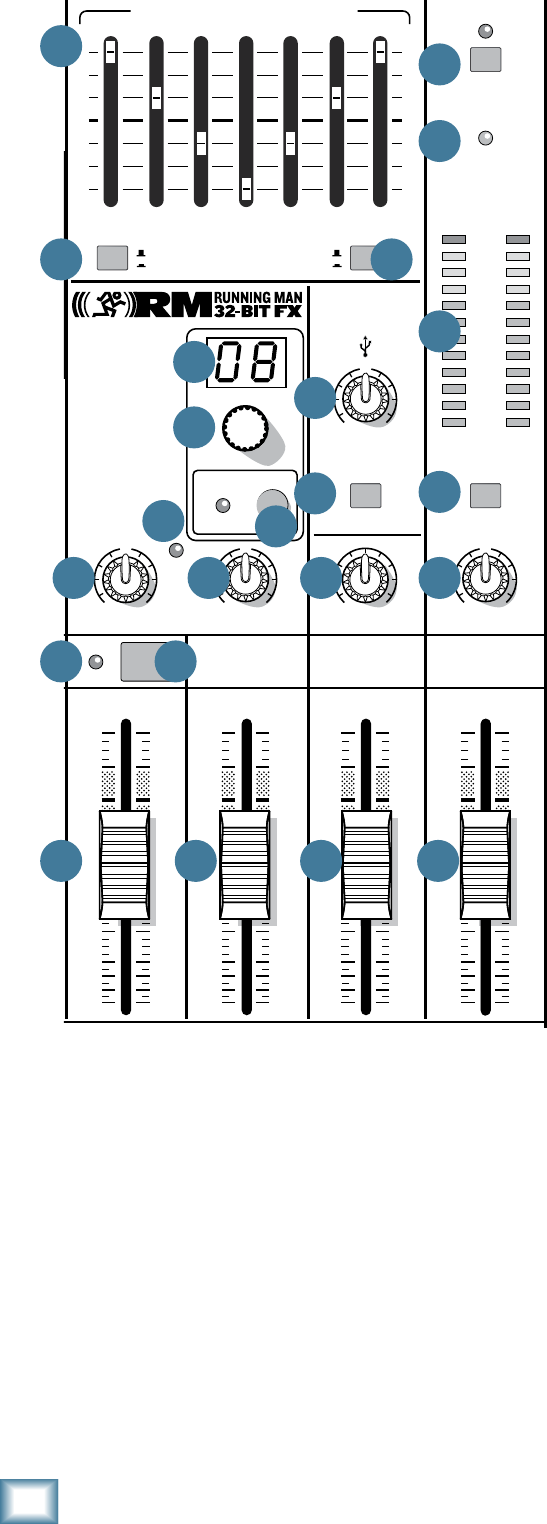
22
ProFX8 and ProFX12
ProFX8 and ProFX12
34. BREAK SWITCH
This important “take-a-break” switch quickly mutes
all the microphones and line-level inputs when the band
is between sets. This will prevent protestors or rogue
karaoke singers from storming the stage at the interval.
The monitor send [12] and FX send [13] are not
affected. Check this switch first if you are having trouble
with no sound in the system.
You can still play the stereo RCA tape inputs [17] in
the main stereo mix, and play audio coming in from your
computer via the USB inputs. For example, you could
play a soothing CD while the band is off stage.
35. TAPE LEVEL
This knob controls the input level of signals entering
the tape inputs. It is conveniently located close to the
break switch [34] so all channels may be quickly muted
while bringing up the background music while the band
is taking a break.
36. STEREO GRAPHIC EQ
This 7-band graphic equalizer adjusts the main mix
output. It affects the line-level outputs [3, 14], but not
thetapeoutputs[18],headphones[16],ortheUSB
output [4]. This EQ may be used for the monitor mix
instead of the main mix, if the main mix/mon switch
[37] is engaged. It may also be quickly bypassed using
the EQ in/bypass switch [38].
Each slider adjusts the level of its frequency band,
withupto15dBofboostorcut,andnochangeinlevel
at the center (0 dB) position. The frequency bands are:
125,250,500,1k,2k,4k,and8kHz.
The EQ section comes before the main fader [47]
and meters [33]. As with the channel EQ, just take it
easy. There is a large amount of adjustment, and if you
are not careful, you can upset the delicate balance of
nature. Although it may not seem cool to actually turn
down controls, with EQ it is often your best option. Turn
down the offending frequency range, rather than boost
the wanted range. Use it to reduce the level of some
frequency bands where feedback occurs.
37. MAIN MIX/MON
Use this switch to choose if the stereo graphic
EQ[36]isusedforthestereoleftandrightmain
mix or if it is used for the monitors. For example,
there may be times when the graphic EQ may be
used wisely in the monitor mix to reduce feedback
in the monitors from nearby microphones.
38. EQ IN/BYPASS
Use this switch to quickly engage or disengage the
stereo graphic EQ. This may be used for quick checks
of EQ settings or to shorten the signal path if not using
the EQ.
39. USB INPUT LEVEL
This control adjusts the signal level of the two chan-
nels coming in from the computer, via the USB port,
relative to the mix of the other channels. Adjust it care-
fully to achieve the desired mix with the other channels.
The USB input from audio software such as Tracktion,
could be individual instrument tracks, a mix of tracks,
or processed tracks.
MAIN
RIGHT
(BALANCED)
MAIN
LEFT
USB
(BALANCED)
8K4K2K1K500250125
15
15
10
10
5
5
0
15
15
10
10
5
5
0
TAPE
IN
ST RETURN MAIN OUT PHONES
FOOTSWITCH
PHONES
TAPE
OUT
L
R
L
(UNBALANCED)
R
STEREO GRAPHIC EQ
FX SEND
MID
2.5kHz
MID
2.5kHz
MID
2.5kHz
MID
2.5kHz
MID
2.5kHz
80Hz
LOW
U
+15-15
U
+15-15
U
+15-15
LINE IN 4
INSERT
RL
LOW CUT
100 Hz
U
GAIN
M
I
C
G
A
I
N
U+50
-20dB +30dB
4
12kHz
HI
MID
2.5kHz
80Hz
LOW
U
+15-15
U
+15-15
U
+15-15
12kHz
HI
MID
2.5kHz
80Hz
LOW
U
+15-15
U
+15-15
U
+15-15
12kHz
HI
MID
2.5kHz
80Hz
LOW
U
+15-15
U
+15-15
U
+15-15
12kHz
HI
PAN
AUX
U
+15
OO
MON
FX
U
+15
OO
RL
PAN
AUX
U
+15
OO
MON
FX
U
+15
OO
RL
PAN
AUX
U
+15
OO
MON
FX
U
+15
OO
RL
PAN
AUX
U
+15
OO
MON
FX
U
+15
OO
80Hz
LOW
U
+15-15
U
+15-15
U
+15-15
RL
LOW CUT
100 Hz
12kHz
HI
PAN
AUX
U
+15
OO
MON
FX
U
+15
OO
80Hz
LOW
U
+15-15
U
+15-15
U
+15-15
BAL /
UNBAL
(MONO) (MONO) (MONO) (MONO)
LINE IN 7
LINE IN 8
BAL /
UNBAL LINE IN 9
RL
LOW CUT
100 Hz
GAIN
7/85/6
12kHz
HI
PAN
AUX
U
+15
OO
MON
FX
U
+15
OO
80Hz
LOW
U
+15-15
U
+15-15
U
+15-15
RL
M
I
C
G
A
I
N
U+50
GAIN
M
I
C
G
A
I
N
U+50
9/10
12kHz
HI
LEVEL
SET
LEVEL
SET
LEVEL
SET
LOW CUT
100 Hz
U
GAIN
M
I
C
G
A
I
N
U+50
-20dB +30dB
LEVEL
SET
LEVEL
SET
LEVEL
SET
LOW CUT
100 Hz
U
GAIN
M
I
C
G
A
I
N
U+50
-20dB +30dB
LOW CUT
100 Hz
U
GAIN
M
I
C
G
A
I
N
U+50
-20dB +30dB
PAN
AUX
U
+15
OO
MON
FX
U
+15
OO
GAIN
MIC MIC MIC MIC MIC MIC
80Hz
LOW
U
+15-15
U
+15-15
U
+15-15
U
+20-20
GAIN
U
+20-20
RL
11/12
ST RTN FX RTN
EQEQEQEQ EQ EQ EQ EQ
12kHz
HI
PAN
AUX
U
+15
OO
MON
FX
U
+15
OO
U
+15
FX TO MON
FX MASTER
U
+15
OO
OO
dB
30
20
10
10
OO
40
50
5
5
U
60
dB
30
20
10
10
OO
40
50
5
5
U
60
dB
30
20
10
10
OO
40
50
5
5
U
60
dB
30
20
10
10
OO
40
50
5
5
U
60
dB
30
20
10
10
OO
40
50
5
5
U
60
dB
30
20
10
10
OO
40
50
5
5
U
60
dB
30
20
10
10
OO
40
50
5
5
U
60
dB
30
20
10
10
OO
40
50
5
5
U
60
dB
30
20
10
10
OO
40
50
5
5
U
60
dB
30
20
10
10
OO
40
50
5
5
U
60
dB
30
20
10
10
OO
40
50
5
5
U
60
dB
30
20
10
10
OO
40
50
5
5
U
60
L
R
(MONO)
LINE IN 5
LINE IN 6
BAL /
UNBAL
L
R
LINE IN 10
BAL /
UNBAL
L
R
LINE IN 11
LINE IN 12
BAL /
UNBAL
L
R
BAL /
UNBAL
L
R
BAL /
UNBAL
L
R
MON SEND
BAL /
UNBAL
BAL /
UNBAL
PRESETS
FX PRESETS
01 BRIGHT ROOM
02 WARM LOUNGE
03 SMALL STAGE
04 WARM THEATER
05 WARM HALL
06 CONCERT HALL
13 DELAY 1 (300ms)
14 DELAY 2 (380ms)
15 DELAY 3 (480ms)
16 REVERB + DLY (250ms)
07 PLATE REVERB
08 CATHEDRAL
09 CHORUS
10 CHORUS + REV
11 DOUBLER
12 TAPE SLAP
MON MAIN
4
LINE IN 3
INSERT
3
BAL /
UNBAL
3
LINE IN 2
INSERT
2
BAL /
UNBAL
BAL /
UNBAL
2
LINE/HI-Z IN 1
INSERT
15/6 7/8 9/10 11/12
POWER
ON
0dB=0dBu
MAIN
METERS
OL
4
6
3
10
15
7
10
20
30
0
2
BREAK
(MUTES ALL CHANNELS)
PHANTOM
POWER
POWER
OO
+10
U
TAPE LEVEL
OO
+20
U
USB THRU
LINE
HI-Z
OO
MAX
1
OL OL OL OL OL OL OL OL
OL
OL
MAIN MIX
MON
EQ IN
BYPASS
RL
INPUT LEVEL
USB
MUTE
MUTE MUTE MUTE MUTE MUTE MUTE MUTE MUTE
MUTE
48V
36
37 38
31
32
33
34
35415351
49
48
50
39
40
44 45 46 47
42 43
52

23
Owner’s Manual
Owner’s Manual
40. USB THRU
In addition to a mix of the other channels, the USB
output to the computer may contain any input from
the computer if this switch is down. (This switch only
affects the output to the computer, not the headphones
or main mix.)
• Ifdisengaged(out),theUSBoutputtothe
computer will just be the main mix. This is a
good position for overdubbing, as any playback
from the computer may be played through the
main speakers and headphones, while playing
along with a guitar and recording only the
guitar via USB. This is also good for live
recording as a safeguard against feedback.
Here,theUSBlevelknobshouldalsobedown.
• Ifpressedin,theUSBoutputtothecomputer
will be the main mix, including any audio
coming in from the computer. This is a good
position to record live performances where
playback of audio from the computer is also
part of the performance.
41. PHONES LEVEL
This controls the volume of the headphones output
from off to maximum gain.
Warning: The headphone amplifier is
designed to drive any standard headphones
to a very loud level. It can cause permanent
hearing damage. Even intermediate levels may be
painfully loud with some headphones. Be careful!
Always start with the phones level control turned all
the way down before connecting headphones or making
any connections. Keep it down until you’ve put on the
headphones, and turn it down first whenever you play a
new source or instrument.
42. OL LED (for stereo returns)
This LED will light if the signal coming into the
stereo return inputs [11] is too high, and this may
cause distortion due to overloading.
The OL LED comes before the stereo return fader
[44], so the fader has no effect in your efforts to turn
off the OL LED.
Check external processors and other devices, and
turn down their levels until the OL LED does not come
on.
43. MUTE (for stereo returns)
Press this switch in to mute the signals coming into
the stereo return inputs [11].
44. STEREO RETURN FADER
Use this fader to lovingly adjust the level of any audio
coming into the stereo return inputs [11] from external
processors or other equipment. The audio is added to
the main mix and it may also be muted with the stereo
return mute switch [43].
Typically, this fader can just live at the unity “U” mark,
and the external device’s output control set at whatever
they call unity gain (check the manual of the effects
unit, CD player, drum machine, or whatever). If that
turns out to be too loud or too quiet, adjust the external
device’s outputs, not the mixer. That way, the mixer’s
faders are easy to relocate at the unity “U” mark. The
rangeisoffto+10dB.
45. FX RETURN FADER
Use this fader to gently adjust the level of the stereo
output from the internal FX processor being added to
themainmix.Therangeisoffto+10dBwithunityat
“U”.
46. MONITOR FADER
This fader controls the overall level of the monitor
send signal sent out to the stage monitors.
Adjust it carefully and check that the band is happy
with the levels. The fader does not affect the main mix
level.
The monitor send signals are off with the fader
fully down, the “U” marking is unity gain, and fully
up provides 10 dB of additional gain.
47. MAIN FADER
This fader controls the level of the main mix and
affects the meters [33] and main line-level outputs
[3, 14]. The level adjustment occurs after the stereo
graphicEQ[36]inthesignalpath.
This gives you ultimate control over the audience.
Adjust it carefully, with a good eye on the meters to
check against overloading and a good ear on the levels
to make sure the audience is happy.
The control does not affect the monitor send [12],
tapeoutput[18],headphones[16],orUSBoutput[4].
The main mix signals are off with the fader fully down,
the “U” marking is unity gain and fully up provides
10 dB of additional gain. This additional gain will
typically never be needed, but once again, it’s nice to
know it’s there. The level control is stereo, as it affects
both the left and right of the main mix equally. This is
the control to turn down at the end of the song when
you want “The Great Fade-Out.”
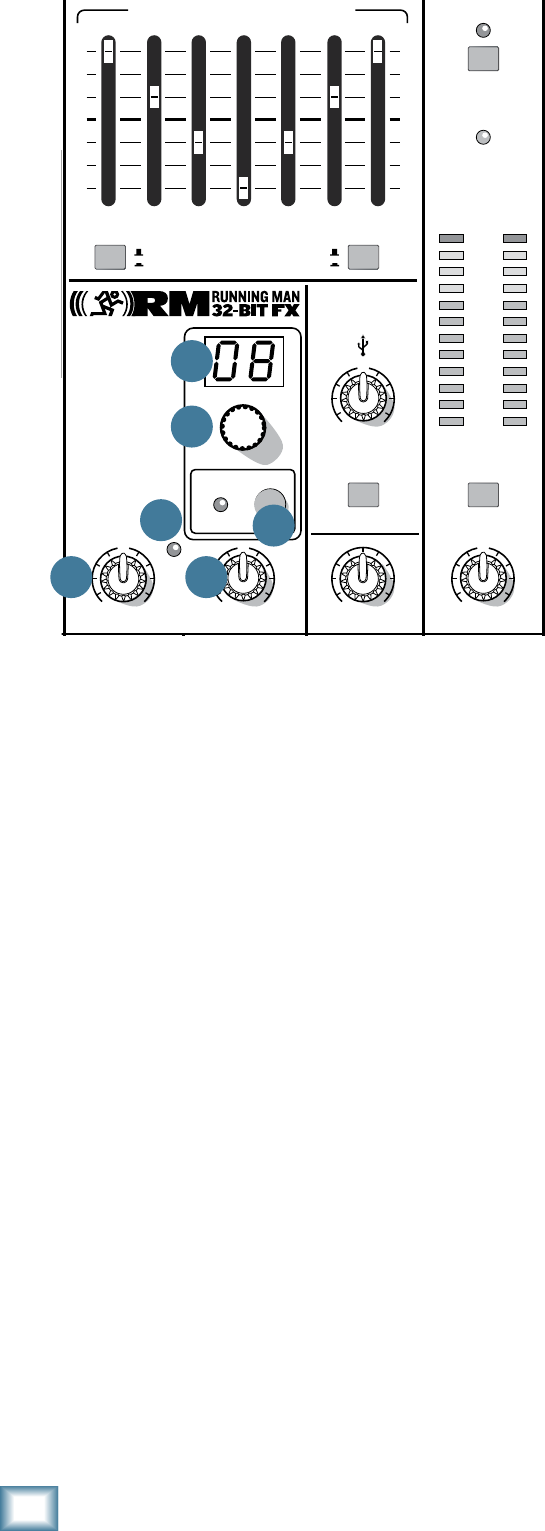
24
ProFX8 and ProFX12
ProFX8 and ProFX12
Stereo Effects Processor
TheMackieRunning-Man32-bitinternaleffects
processor is a mono-in, stereo-out effects processor,
with16presets.ItisfedbyadjustingtheauxFXcontrol
[26]oneachchannel.TheFXmasterknob[51]adjusts
the overall level entering the FX processor and the
OLLED[52]showsifthelevelistoohigh.
The output from the processor may be added to
themainmixbyadjustingtheFXreturnfader[45].
Its output may also be added to the monitor mix by
adjustingtheFXtomonknob[53].
48. PRESET DISPLAY
This display shows the number of the currently
selected effects preset, as shown in the list of presets
silkscreened to the left of the display.
49. PRESET SELECTOR
Rotate this knob to increase or decrease the number
of the preset. The available presets are shown in the
table on the next page and are marked on the panel
silkscreen. (Only one preset may be selected at a time.)
50. INTERNAL FX MUTE and LED
When engaged, the internal effects processor is
muted. Its output will not appear in the main mix or
monitors, and the adjacent LED will come on. The
footswitchconnection[15]becomesdisabledandthe
footswitch cannot be used to mute or un-mute the
effects.
If this switch is not engaged, then the internal effects
may be muted or un-muted with a footswitch.
51. FX MASTER
Use this knob to control the level of the signals going
into the internal effects processor. Adjust it carefully,
withaninnermagicaleyeontheadjacentOLLED[52]
to prevent overloading the effects processor.
Fully down is off, 12 o'clock is unity gain, and fully up
is15dBofgain.
It also affects the level going out of the FX send
output [13].
52. OL LED
This LED illuminates when the effects processor is
being overloaded with too strong a signal (OL). Turn
downtheFXmaster[51]ifitis.
The signals going into the processor are affected by
thechannelauxFXcontrols[26],andthechannel
faders [30]. Check the LED if these controls have been
altered.
53. FX TO MON
This knob adds the output of the internal FX
processor to the stage monitor mix. Fully down is off,
12o'clockisunitygain,andfullyupis15dBofgain.
MAIN
RIGHT
(BALANCED)
MAIN
LEFT
USB
(BALANCED)
8K4K2K1K500250125
15
15
10
10
5
5
0
15
15
10
10
5
5
0
TAPE
IN
ST RETURN MAIN OUT PHONES
FOOTSWITCH
PHONES
TAPE
OUT
L
R
L
(UNBALANCED)
R
STEREO GRAPHIC EQ
FX SEND
MID
2.5kHz
MID
2.5kHz
MID
2.5kHz
MID
2.5kHz
MID
2.5kHz
80Hz
LOW
U
+15-15
U
+15-15
U
+15-15
LINE IN 4
INSERT
RL
LOW CUT
100 Hz
U
GAIN
M
I
C
G
A
I
N
U+50
-20dB +30dB
4
12kHz
HI
MID
2.5kHz
80Hz
LOW
U
+15-15
U
+15-15
U
+15-15
12kHz
HI
MID
2.5kHz
80Hz
LOW
U
+15-15
U
+15-15
U
+15-15
12kHz
HI
MID
2.5kHz
80Hz
LOW
U
+15-15
U
+15-15
U
+15-15
12kHz
HI
PAN
AUX
U
+15
OO
MON
FX
U
+15
OO
RL
PAN
AUX
U
+15
OO
MON
FX
U
+15
OO
RL
PAN
AUX
U
+15
OO
MON
FX
U
+15
OO
RL
PAN
AUX
U
+15
OO
MON
FX
U
+15
OO
80Hz
LOW
U
+15-15
U
+15-15
U
+15-15
RL
LOW CUT
100 Hz
12kHz
HI
PAN
AUX
U
+15
OO
MON
FX
U
+15
OO
80Hz
LOW
U
+15-15
U
+15-15
U
+15-15
BAL /
UNBAL
(MONO) (MONO) (MONO) (MONO)
LINE IN 7
LINE IN 8
BAL /
UNBAL LINE IN 9
RL
LOW CUT
100 Hz
GAIN
7/85/6
12kHz
HI
PAN
AUX
U
+15
OO
MON
FX
U
+15
OO
80Hz
LOW
U
+15-15
U
+15-15
U
+15-15
RL
M
I
C
G
A
I
N
U+50
GAIN
M
I
C
G
A
I
N
U+50
9/10
12kHz
HI
LEVEL
SET
LEVEL
SET
LEVEL
SET
LOW CUT
100 Hz
U
GAIN
M
I
C
G
A
I
N
U+50
-20dB +30dB
LEVEL
SET
LEVEL
SET
LEVEL
SET
LOW CUT
100 Hz
U
GAIN
M
I
C
G
A
I
N
U+50
-20dB +30dB
LOW CUT
100 Hz
U
GAIN
M
I
C
G
A
I
N
U+50
-20dB +30dB
PAN
AUX
U
+15
OO
MON
FX
U
+15
OO
GAIN
MIC MIC MIC MIC MIC MIC
80Hz
LOW
U
+15-15
U
+15-15
U
+15-15
U
+20-20
GAIN
U
+20-20
RL
11/12 ST RTN FX RTN
EQEQEQEQ EQ EQ EQ EQ
12kHz
HI
PAN
AUX
U
+15
OO
MON
FX
U
+15
OO
U
+15
FX TO MON
FX MASTER
U
+15
OO
OO
dB
30
20
10
10
OO
40
50
5
5
U
60
dB
30
20
10
10
OO
40
50
5
5
U
60
dB
30
20
10
10
OO
40
50
5
5
U
60
dB
30
20
10
10
OO
40
50
5
5
U
60
dB
30
20
10
10
OO
40
50
5
5
U
60
dB
30
20
10
10
OO
40
50
5
5
U
60
dB
30
20
10
10
OO
40
50
5
5
U
60
dB
30
20
10
10
OO
40
50
5
5
U
60
dB
30
20
10
10
OO
40
50
5
5
U
60
dB
30
20
10
10
OO
40
50
5
5
U
60
dB
30
20
10
10
OO
40
50
5
5
U
60
dB
30
20
10
10
OO
40
50
5
5
U
60
L
R
(MONO)
LINE IN 5
LINE IN 6
BAL /
UNBAL
L
R
LINE IN 10
BAL /
UNBAL
L
R
LINE IN 11
LINE IN 12
BAL /
UNBAL
L
R
BAL /
UNBAL
L
R
BAL /
UNBAL
L
R
MON SEND
BAL /
UNBAL
BAL /
UNBAL
PRESETS
FX PRESETS
01 BRIGHT ROOM
02 WARM LOUNGE
03 SMALL STAGE
04 WARM THEATER
05 WARM HALL
06 CONCERT HALL
13 DELAY 1 (300ms)
14 DELAY 2 (380ms)
15 DELAY 3 (480ms)
16 REVERB + DLY (250ms)
07 PLATE REVERB
08 CATHEDRAL
09 CHORUS
10 CHORUS + REV
11 DOUBLER
12 TAPE SLAP
MON MAIN
4
LINE IN 3
INSERT
3
BAL /
UNBAL
3
LINE IN 2
INSERT
2
BAL /
UNBAL
BAL /
UNBAL
2
LINE/HI-Z IN 1
INSERT
15/6 7/8 9/10 11/12
POWER
ON
0dB=0dBu
MAIN
METERS
OL
4
6
3
10
15
7
10
20
30
0
2
BREAK
(MUTES ALL CHANNELS)
PHANTOM
POWER
POWER
OO
+10
U
TAPE LEVEL
OO
+20
U
USB THRU
LINE
HI-Z
OO
MAX
1
OL OL OL OL OL OL OL OL OL
OL
MAIN MIX
MON
EQ IN
BYPASS
RL
INPUT LEVEL
USB
MUTE
MUTE MUTE MUTE MUTE MUTE MUTE MUTE MUTE MUTE
48V
5351
49
48
50
52
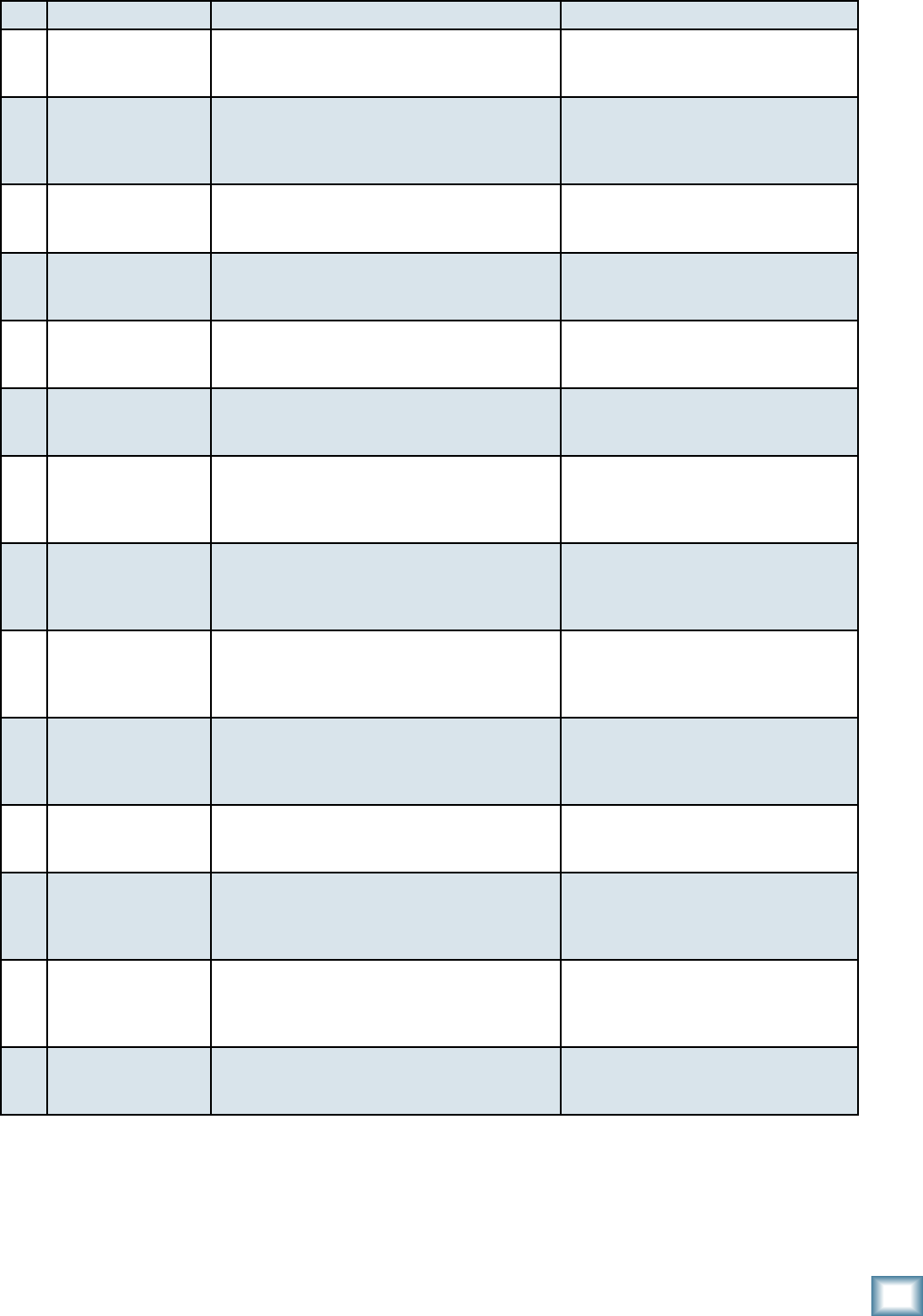
25
Owner’s Manual
Owner’s Manual
No. Title Description Example of its use
1 BRIGHT ROOM This room has a bright tone with lots of scattered
reflections to simulate harder, more reflective
surfaces.
Useful on vocals that require a brighter
reverb to cut through the mix, or for
giving acoustic instruments a livelier vibe.
2 WARM LOUNGE This preset features a medium sized room/lounge
sound, with just enough enhancement of the lower
mids to produce a warm tone.
Useful for vocals on songs that require
a larger, more “wet” sound, or for giving
dimension to bright horns without adding
harshness.
3 SMALL STAGE This preset simulates the sound of a small concert
stage, with a medium reverb time and reverberant
space.
Useful for vocals or guitars in fast paced,
high-energy songs that call for a “live”
sounding reverberation.
4 WARM THEATER This reverb has a warm bodied tone and medium
long reverb time to simulate the live acoustics of a
theater space.
Perfect for vocals, drums, acoustic and
electric guitars, keyboards, and more.
5 WARM HALL This reverb simulates the sound of a spacious,
yet cozy, heavily draped and carpeted concert hall
with an especially warm tone.
Perfect for adding natural concert hall
ambience to close-mic’d orchestral
instruments.
6 CONCERT HALL This hall reverb is characterized by its large,
spacious sound, long pre-delay, and vibrant tone.
Adds life to acoustic instruments and
vocals from solos to full-on symphonies
and choirs.
7 PLATE REVERB This preset emulates vintage mechanical
reverberation that was generated with a metal
plate. Its sound is characterized by lots of early
reflections and no pre-delay.
Perfect for thickening percussive
instruments, such as a snare drum,
or tight vocal arrangements.
8 CATHEDRAL This reverb emulates the extremely long tails,
dense diffusion and long pre-delays and
reflections that would be found in a very large,
stone walled house of worship.
Gives amazing depth to choirs, wind
instruments, organs, and soft acoustic
guitars.
9 CHORUS This preset provides a soft, ethereal sweeping
effect that is useful for thickening and for making
a particular sound pop out of the mix.
Perfect for enhancement of electric and
acoustic guitar and bass, or to add a
dramatic effect to vocals, particularly
group harmonies and choirs.
10 CHORUS + REV This preset perfectly combines the chorus effect
above with a large, roomy reverb.
This lets you both thicken your sound
with the chorus effect while adding
warmth and spaciousness thanks to the
smooth reverb.
11 DOUBLER This effect simulates the sound of a vocal or
instrument being recorded twice (double tracked)
on a multi-track recorder. (50MS)
Provides a vibe that is similar to chorus
without the subtle swirl.
12 TAPE SLAP This effect provides a single, relatively rapid delay
of the original signal, with the added warmth that
vintage tape-based echo units provided. (180 MS)
Often used on vocals for a 1950’s era feel,
or on guitars for a surf-type tone. Often
used by people whose favorite number is
12.
13
14
15
DELAY 1 (300MS)
DELAY 2 (380MS)
DELAY 3 (480 MS)
These delay presets provide around three repeats
of the original signal. The default delay time for
each preset is shown in ms – the smaller the time,
the faster the delay.
These work best with full, up-beat music
like rock where the delay needs to cut
through the mix.
16 REVERB + DLY
(250MS)
This effect combines the warm theater reverb
effect with the echoes of the 3-repeat delay effect.
Perfect for thickening vocals while adding
dimension, it can also be used as a spacey
effect on electric guitars.
TABLE OF INTERNAL EFFECTS

26
ProFX8 and ProFX12
ProFX8 and ProFX12
Appendix A: Service Information
If you think your ProFX mixer has a problem, please
check out the following troubleshooting tips and do your
besttoconrmtheproblem.Visitthesupportsectionof
our website (www.mackie.com) where you will find lots
of useful information such as FAQs, documentation and
user forums. You may find the answer to the problem
without having to send your mixer away.
Troubleshooting
Bad Channel
• Hasthegainbeensetcorrectly?
• Isthemuteswitchon?
• Isthefaderturnedup?
• IsthechannelOLLEDon?
• IsthechannelEQsetmoderately?
• Tryunplugginganyinsertdevices.
• Trythesamesourcesignalinanotherchannel,
set up exactly like the suspect channel.
Bad Output
• Istheassociatedlevelfader(ifany)turnedup?
• AreanyOLLEDsoninthechannels,main
metersorinternalFX?
• Ifit’soneofthemainouts,tryunpluggingall
theothers.Forexample,ifit’sthe1⁄4"leftmain
out, unplug the RCA and XLR left outputs. If
the problem goes away, its not the mixer.
• Ifit’sastereopair,tryswitchingthemaround.
For example, if a left output is presumed dead,
switch the left and right cords, at the mixer
end. If the problem switches sides, it’s not the
mixer.
Noise
• Turnthechannelgainandfadersdown,
one by one. If the sound disappears, it’s
either that channel or whatever is plugged
into it, so unplug whatever that is. If the
noise disappears, it’s from your whatever.
Power
• Checkthatthepowercordisrmlyconnected
at both ends.
Repair
For warranty service, refer to the warranty
information on page 32.
Non-warrantyserviceforMackieproductsis
available at a factory-authorized service center.
To locate your nearest service center, visit
www.mackie.com, click “Support” and select
“LocateaServiceCenter.”ServiceforMackie
products living outside the United States can be
obtained through local dealers or distributors.
If you do not have access to our website, you can
call our Tech Support department at 1-800-898-3211,
Monday-Friday,normalbusinesshours,PacicTime,to
explain the problem. Tech Support will tell you where
the nearest factory-authorized service center is located
in your area.
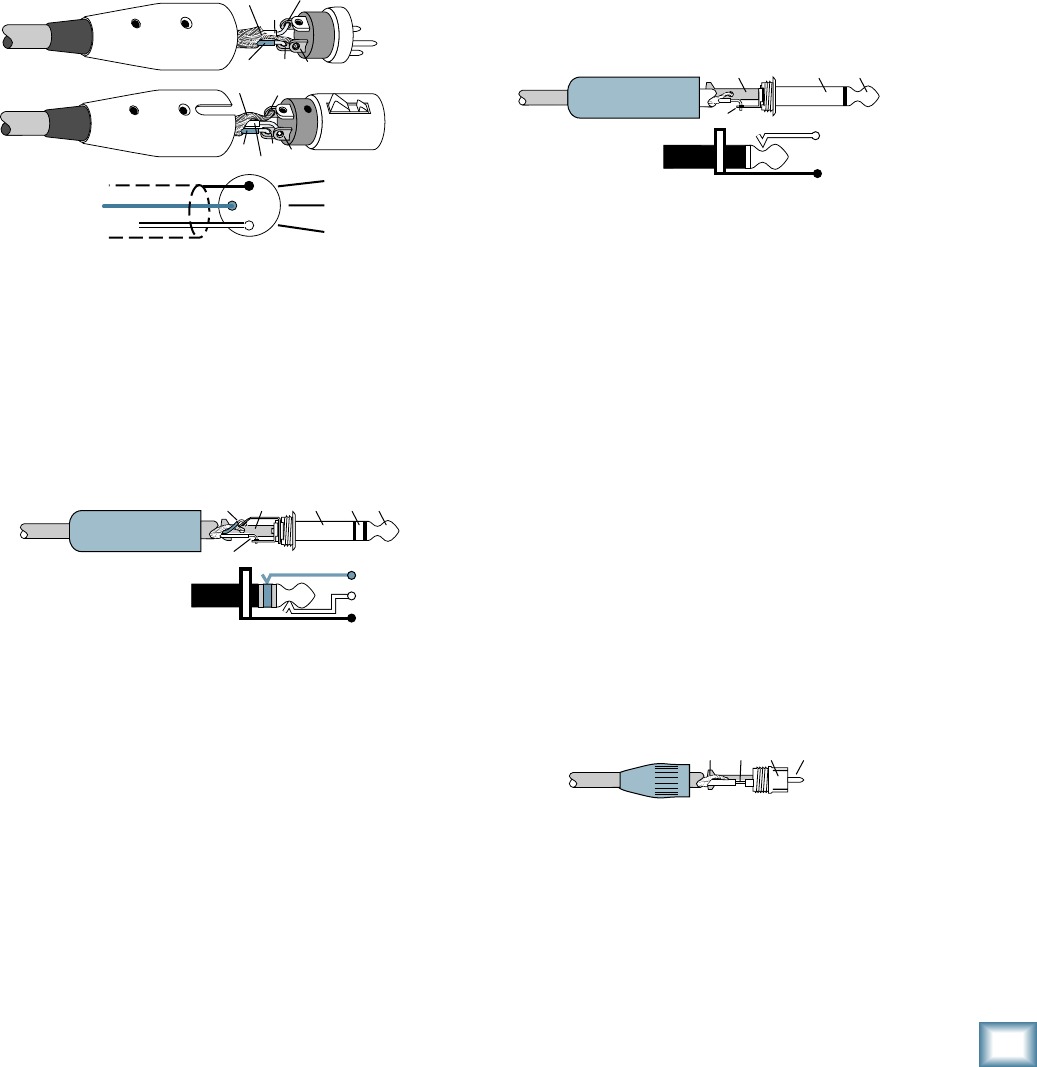
27
Owner’s Manual
Owner’s Manual
“XLR” Connectors
Mackiemixersuse3-pinfemale“XLR”connectorson
all microphone inputs, with pin 1 wired to the grounded
(earthed) shield, pin 2 wired to the “high” (“hot” or
positive polarity) side of the audio signal and pin 3
wired to the “low” (“cold” or negative polarity) side of
the signal. See Figure A. This is all totally aboveboard
and in full accord with the hallowed standards dictated
by the AES (Audio Engineering Society).
Use a male “XLR”-type connector, usually found on the
nether end of what is called a “mic cable,” to connect to
a female XLR jack.
1⁄4" TRS Phone Plugs and Jacks
“TRS” stands for Tip-Ring-Sleeve, the three
connectionsavailableona“stereo”1⁄4"or“balanced”
phone jack or plug. See Figure B.
TRS jacks and plugs are used in several different
applications:
• Stereoheadphones,andrarely,stereo
microphones and stereo line connections.
Whenwiredforstereo,a1⁄4"TRSjackorplug
is connected tip to left, ring to right and sleeve
toground(earth).Mackiemixersdonot
directly accept 1-plug-type stereo micro phones.
They must be separated into a left cord and a
right cord, which are plugged into the two mic
preamps.
Appendix B: Connections
• Balancedmonocircuits.Whenwiredasa
balancedconnector,a1⁄4"TRSjackorplug
is connected tip to signal high (hot), ring to
signal low (cold), and sleeve to ground (earth).
• UnbalancedSend/Returncircuits.Whenwired
assend/return“Y”connector,a1⁄4"TRSjack
or plug is connected tip to signal send (output
from mixer), ring to signal return (input back
into mixer), and sleeve to ground (earth).
1⁄4" TS Phone Plugs and Jacks
“TS” stands for Tip-Sleeve, the two connections
availableona“mono”1⁄4"phonejackorplug.
See Figure C.
TS jacks and plugs are used in many different
applications, always unbalanced. The tip is connected to
the audio signal and the sleeve to ground (earth). Some
examples:
• Unbalancedmicrophones
• Electricguitarsandelectronicinstruments
• Unbalancedline-levelconnections
RCA Plugs and Jacks
RCA-type plugs (also known as phono plugs) and
jacks are often used in home stereo and video
equipment and in many other applications (Figure D).
Theyareunbalancedandelectricallyidenticaltoa1⁄4"
TS phone plug or jack (see Figure C). Connect the
signal to the center post and the ground (earth) or
shield to the surrounding “basket.”
SLEEVE
TIP
TIPSLEEVE
TIP
SLEEVE
SLEEVE
TIPSLEEVE
TIP
RING
RING
TIP
SLEEVERING
Figure C: TS Plug
2
2
31
1
SHIELD
COLD
HOT
SHIELD
COLD
HOT
3
SHIELD
COLD
HOT
3
2
1
Figure A: XLR Connectors
SLEEVE
TIP
TIPSLEEVE
TIP
SLEEVE
SLEEVE
TIPSLEEVE
TIP
RING
RING
TIP
SLEEVERING
Figure B: 1⁄4" TRS Plugs
TIPSLEEVETIPSLEEVE
Figure D: RCA Plug
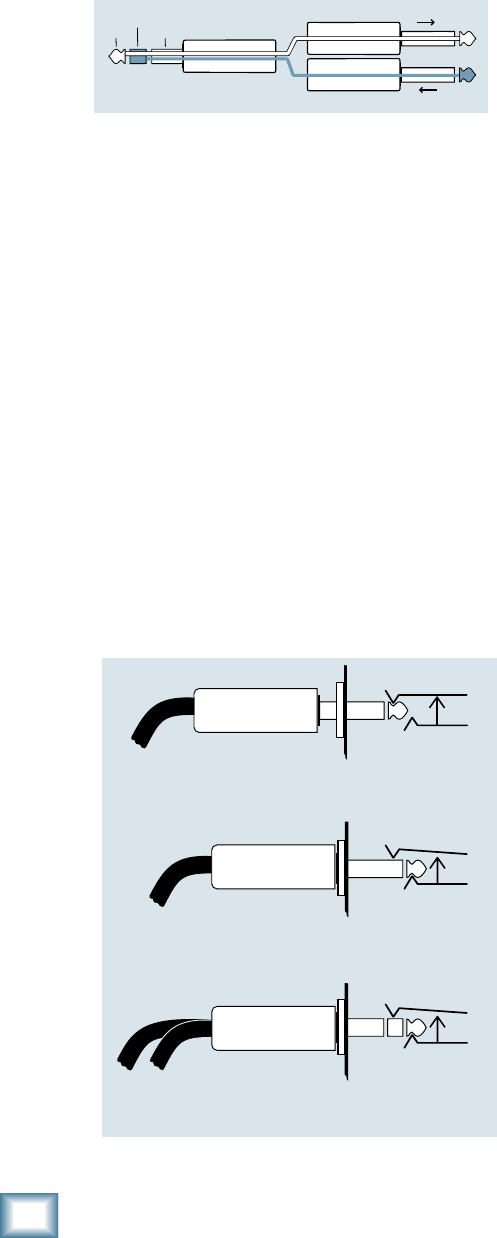
28
ProFX8 and ProFX12
ProFX8 and ProFX12
Mackie Stereo Inputs and Returns: Mono,
Stereo, Whatever
Stereo line inputs and stereo returns are a fine
exampleoftheMackiephilosophy(whichwejustmade
up)ofMaximumFlexibilitywithMinimumHeadache.
The inputs and returns will automatically be mono or
stereo,dependinguponhowyouusethejacks.Here’s
how it works:
A mono signal should be patched into the input or
return jack labeled left (mono). The signal will be
routed to both the left and right sides of the return
circuit, and will show up in the center of the stereo pair
of buses it’s assigned to, or it can be “panned” with the
pan control.
A stereo signal, having two plugs, should be patched
into the left (mono) and the right input or return jacks.
A jack switch in the right jack will disable the mono
function, and the signals will show up in stereo.
A mono signal connected to the right jack will show
up in the right bus only. You probably will only want to
use this sophisticated effect for special occasions.
TRS Send/Receive Insert Jacks
Mackie’ssingle-jackinsertsarethethree-conductor,
TRS-type1⁄4"phone.Theyareunbalanced,buthave
both the mixer output (send) and the mixer input
(return) signals in one connector. See Figure E.
The sleeve is the common ground (earth) for both
signals. The send from the mixer to the external unit is
carried on the tip, and the return from the unit to the
mixer is on the ring.
Using the Send only on an Insert Jack
IfyouinsertaTS(mono)1⁄4"plugonlypartially(to
therstclick)intoaMackieinsertjack,theplugwill
not activate the jack switch and will not open the insert
loop in the circuit (thereby allowing the channel signal
to continue on its merry way through the mixer).
This allows you to tap out the channel or bus signal
without interrupting normal operation.
Ifyoupushthe1⁄4"TSplugintothesecondclick,you
will open the jack switch and create a direct out, which
does interrupt the signal in that channel. See Figure F.
NOTE: Do not overload or short-circuit the signal you
are tapping from the mixer. That will affect the internal
signal.
“tip”
This plug connects to one of the
mixer’s Channel Insert jacks. “ring”
tip ring
sleeve
SEND to processor
RETURN from processor
(TRS plug)
Figure E
Direct out with no signal interruption to master.
Insert only to first “click.”
Channel Insert jack
Channel Insert jack
Channel Insert jack
Direct out with signal interruption to master.
Insert all the way in to the second “click.”
For use as an effects loop.
(TIP = SEND to effect, RING = RETURN from effect.)
MONO PLUG
MONO PLUG
STEREO
PLUG
Figure F
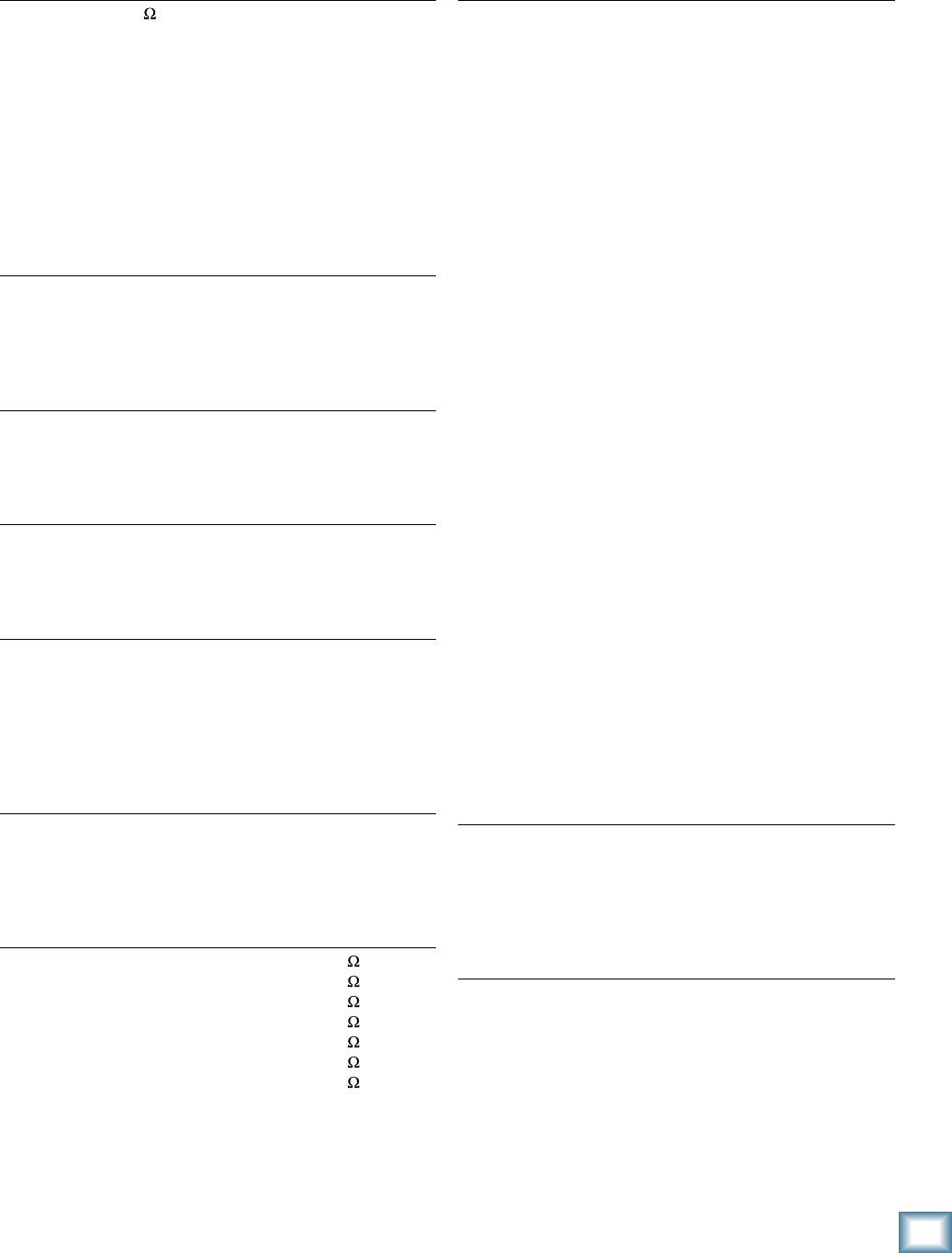
29
Owner’s Manual
Owner’s Manual
Appendix C: Technical Information
Specifications
Noise
20 Hz – 20 kHz, 150 Source Impedance
Equivalent Input Noise
(Mic in to Insert Send out, max gain) –125 dBu
Residual Output Noise
(All outputs, master levels off, all channel levels off)
–95 dBu
(All outputs, master levels unity, all channel levels off)
–80 dBu
(All outputs, master levels unity, one channel level unity)
–80 dBu
Distortion
20 Hz – 20 kHz
THD+N, SMPTE IMD
(Mic input to Main output) <0.03% @ +4 dBu output
Common Mode Rejection Ratio
1 kHz
(Mic input to Insert Send output) 60 dB gain at unity
Frequency Response
20 Hz – 30 kHz
(Mic input to any output, gain at unity) +0 dB / –1 dB
Crosstalk
20 Hz – 20 kHz
Adjacent Inputs –90 dB @ 1 kHz
Inputs to Outputs –90 dB @ 1 kHz
Fader Off –75 dB @ 1 kHz
Mute Switch/Break Switch Mute –90 dB @ 1 kHz
Maximum Levels
All Inputs +22 dBu
Main Mix XLR +28 dBu
All other outputs +22 dBu
Impedances
Mic in 3 k
Channel Insert return 10 k
Ch 1 Instrument Input 1 M
All other inputs 20 k
Tape out 1.1 k
Phones out 25
All other outputs 120
Maximum Voltage Gain (EQ Flat)
Mic Input Channel to
Insert Output 50 dB
Tape Output 60 dB
USB Output 50 dB
1/4 Inch Main Output 70 dB
XLR Main Output 76 dB
Monitor Send 75 dB
FX Send 90 dB
Mono Line Input Channel to
Insert Output 30 dB
Tape Output 40 dB
USB Output 30 dB
XLR Main Output 56 dB
Monitor Send 55 dB
FX Send 70 dB
Stereo Line Input Channel to
Tape Output 30 dB
USB Output 20 dB
XLR Main Output 46 dB
Monitor Send 45 dB
FX Send 60 dB
Tape Input to
Tape Output 20 dB
USB Output 10 dB
XLR Main Output 36 dB
USB Input to
Tape Output 20 dB
USB Output 10 dB
XLR Main Output 36 dB
Stereo Return to
Tape Output 10 dB
USB Output 0 dB
XLR Main Output 26 dB
Effects Return to
Tape Output 10 dB
USB Output 0 dB
XLR Main Output 26 dB
Monitor Send 25 dB
Channel EQ
Low Cut 100 Hz, –18 dB/Octave
High Shelving ±15 dB @ 12 kHz
Mid Peaking ±15 dB @ 2.5 kHz
Low Shelving ±15 dB @ 80 Hz
Digital Effects
I/O Mono Input / Stereo Output
Number of Presets 16
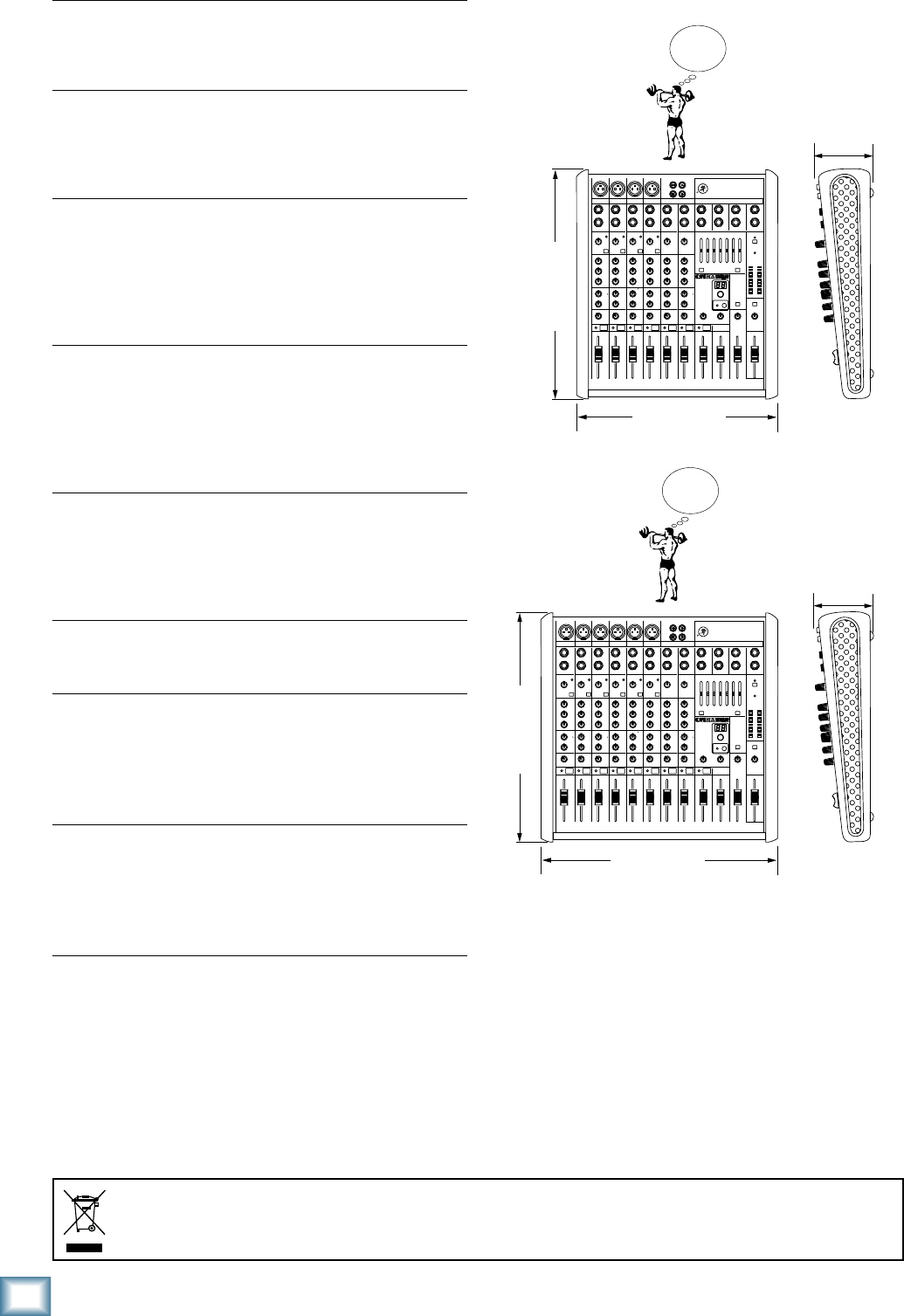
30
ProFX8 and ProFX12
ProFX8 and ProFX12
Dimensions
Channel Level Set LED
0 dBu (normal operating level)
Channel OL LED
–1 dB before channel clipping
Measured post-EQ, pre-fader
Meters
Main L/R Mix
Two columns of 12 segments each:
OL (+20 dBu), +15, +10, +6, +3, 0 (0 dBu), –2, –4, –7, –10,
–20, and –30
7 Band Graphic EQ
Frequency Centers 125, 250, 500, 1k, 2k, 4k, 8k
Gain ±15 dB
Assignable to Main or Monitor
Bypassable
USB
Format USB 1.1
I/O Stereo Input / Stereo Output
A/D/A 16 Bit, 44.1 kHz / 48 kHz
Phantom Power
48 VDC to all Mic channels at once
AC Power Requirements
Voltage Range 100 – 240 VAC, 50 – 60 Hz
Power Consumption: 20 Watts (ProFX8)
25 Watts (ProFX12)
Power Connector 3 Pin IEC
Dimensions (H x W x D)
ProFX8 14.05" x 11.41" x 3.58"
(357 mm x 290 mm x 91 mm)
ProFX12 14.05" x 14.6" x 3.58"
(357 mm x 370 mm x 91 mm)
Weight
ProFX8 7.1 lb (3.2 kg)
ProFX12 9.0 lb (4.1 kg)
LOUD Technologies Inc. is always striving to improve our
products by incorporating new and improved materials,
components, and manufacturing methods. Therefore, we
reserve the right to change these specifications at any time
without notice.
“Mackie,” and the “Running Man” are registered trademarks
of LOUD Technologies Inc. All other brand names mentioned
are trademarks or registered trademarks of their respective
holders, and are hereby acknowledged.
©2011 LOUD Technologies Inc. All Rights Reserved.
Correct disposal of this product. This symbol indicates that this product should not be disposed of with your household waste, according to the WEEE Directive (2002/96/EC) and your national law. This product
should be handed over to an authorized collection site for recycling waste electrical and electronic equipment (EEE). Improper handling of this type of waste could have a possible negative impact on the environment and
human health due to potentially hazardous substances that are generally associated with EEE. At the same time, your cooperation in the correct disposal of this product will contribute to the effective usage of natural
resources. For more information about where you can drop off your waste equipment for recycling, please contact your local city office, waste authority, or your household waste disposal service.
14.05 in/ 357mm
WEIGHT
9.0 lb
4.1 kg
WEIGHT
7.1 lb
3.2 kg
14.6 in/ 370 mm
3.58 in/
91 mm
14.05 in/ 357mm
11.41 in/ 290 mm
3.58 in/
91 mm
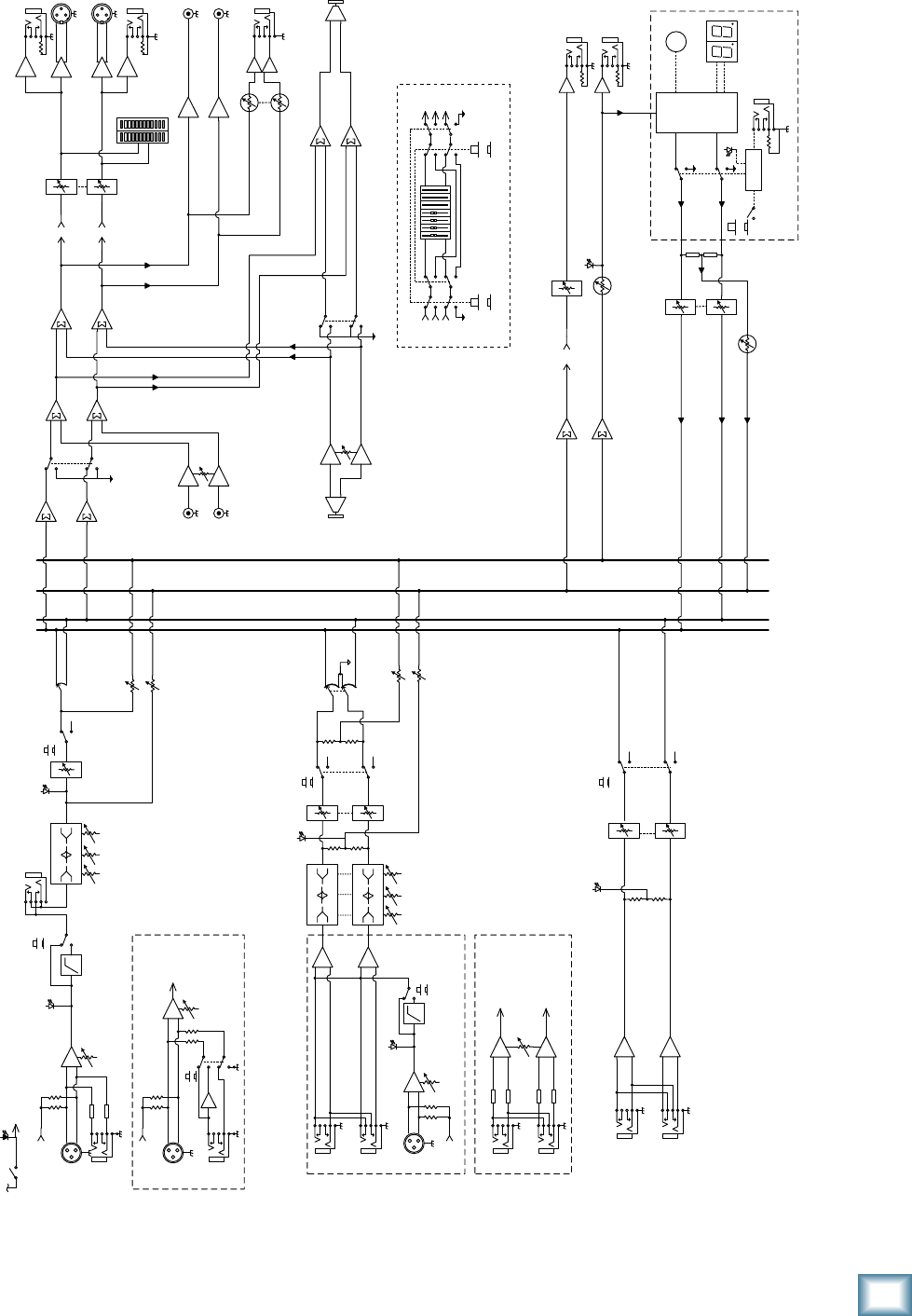
31
Owner’s Manual
Owner’s Manual
Block Diagram
L
RMain
Phones
Level
Main Fader
Insert
HPF Fader
Pan Left
Right
FX level
Phones
L sum
R sum
Mon (pre)Mon (pre)
3-Band EQ
FX (post)FX (post)
Internal FX
L
R
Stereo Return
L
R
Main
Fader
100 Hz
NOTE: Switches are shown in the default (out) position.
Mute
Main out
48V
Mono
Channels
2-2 ProFX8
2-4 ProFX12
Mic +
-
Mic: 0 ~ +50dB
Line: -20 ~ +30dB
Hybrid
Channels
3-6 ProFX8
5-8 ProFX12
L
R
3-Band EQ Fader
Pan
to/from
7-Band
GEQ
Line
Gain
OL (Flicker)
Monitor send
Mon Fader
Preset select
FX
Preset
Display
footswitch
FX Mute
active
FX to Main L/R Fader
OL
Global 48v
Switch/LED
to/from
7-Band EQ
Tape Out
Left
FX
Mon
FX
Mon
Low Cut In
Mic
L
R
Gain
HPF
100 Hz
+
-
Mic Gain:
0 ~ +50dB
Stereo
Channels
7-8 ProFX8
9-12 ProFX12
USB
Out
FX send
FX Bypass
Logic
In
FX
Out L
Out R
FX to Mon
LO
80 2.5K 12K
HIMID
LO
80 2.5K 12K
HIMID
Phantom Power
(To All Mics)
Phantom Power
Phantom
Power
Mute
Mute
OL (Flicker)
LO
80 2.5K 12K
HIMID
Line Gain:
-20 ~ +20 dB
OL (Flicker)
Break
switch
Low Cut In
Level Set
Level Set Level
USB Thru
Bypass
switch
7-band Stereo
GEQ Bypass
EQ In
EQ assign
switch
Mon
Mains
Main R
Main L
Mon
Main R
Main L
Mon
Note: When not assigned to EQ, signal is sent to straight through to destination.
Right
Main
Meters
USB Input
Tape Input
L
R
Level
L
R
Mono
Channel
1 ProFX8
1 ProFX12
Mic +
-
Mic: 0 ~ +50dB
Line: -20 ~ +30dB
Line /
Hi-Z
Gain
Phantom
Power
Line /
Hi-Z

32
ProFX8 and ProFX12
ProFX8 and ProFX12
ProFX8 and ProFX12 Limited Warranty
Please keep your sales receipt in a safe place.
This Limited Product Warranty (“Product Warranty”) is provided by LOUD Technologies Inc. (“LOUD”)
and is applicable to products purchased in the United States or Canada through a LOUD-authorized
reseller or dealer. The Product Warranty will not extend to anyone other than the original purchaser of
the product (hereinafter, “Customer,” “you” or “your”).
For products purchased outside the U.S. or Canada, please visit www.mackie.com/warranty to find
contact information for your local distributor, and information on any warranty coverage provided by the
distributor in your local market.
LOUD warrants to Customer that the product will be free from defects in materials and workmanship
under normal use during the Warranty Period. If the product fails to conform to the warranty then LOUD
or its authorized service representative will at its option, either repair or replace any such nonconforming
product, provided that Customer gives notice of the noncompliance within the Warranty Period to the
Company at: www.mackie.com/support or by calling LOUD technical support at 1.800.898.3211 (toll-
free in the U.S. and Canada) during normal business hours Pacific Time, excluding weekends or LOUD
holidays. Please retain the original dated sales receipt as evidence of the date of purchase. You will need it
to obtain any warranty service.
For full terms and conditions, as well as the specific duration of the Warranty for this product, please visit
www.mackie.com/warranty.
The Product Warranty, together with your invoice or receipt, and the terms and conditions located
at www.mackie.com/warranty constitutes the entire agreement, and supersedes any and all prior
agreements between LOUD and Customer related to the subject matter hereof. No amendment,
modification or waiver of any of the provisions of this Product Warranty will be valid unless set forth in a
written instrument signed by the party to be bound thereby.

16220 Wood-Red Road NE • Woodinville, WA 98072 • USA
United States and Canada: 800.898.3211
Europe, Asia, Central and South America: 425.487.4333
Middle East and Africa: 31.20.654.4000
Fax: 425.487.4337 • www.mackie.com
E-mail: sales@mackie.com
