Quickstart Guidex Guide
User Manual:
Open the PDF directly: View PDF  .
.
Page Count: 11

Date printed: 9/24/2017 calipso.io project
Aug 2017 Cisco for OPNFV 1 Public version
A printed copy of this document is considered uncontrolled. Refer to the online version for the controlled revision.
Calipso.io
Quick Start Guide
Project “Calipso” tries to illuminate complex virtual networking with real time operational state
visibility for large and highly distributed Virtual Infrastructure Management (VIM).
We believe that Stability is driven by accurate Visibility.
Calipso provides visible insights using smart discovery and virtual topological representation in
graphs, with monitoring per object in the graph inventory to reduce error vectors and
troubleshooting, maintenance cycles for VIM operators and administrators.
Date printed: 9/24/2017 calipso.io project
Aug 2017 Cisco for OPNFV 2 Public version
A printed copy of this document is considered uncontrolled. Refer to the online version for the controlled revision.
Table of Contents
Calipso.io Quick Start Guide ......................................................................................................... 1
1 Getting started .......................................................................................................................... 3
1.1 Post installation tools ......................................................................................................... 3
1.2 Calipso containers details .................................................................................................. 3
1.3 Calipso containers access .................................................................................................. 5
2 Validating Calipso app ............................................................................................................. 5
2.1 Validating calipso-mongo module..................................................................................... 5
2.2 Validating calipso-scan module ......................................................................................... 7
2.3 Validating calipso-listen module ....................................................................................... 8
2.4 Validating calipso-api module ........................................................................................... 9
2.5 Validating calipso-sensu module ....................................................................................... 9
2.6 Validating calipso-ui module ........................................................................................... 10
2.7 Validating calipso-ldap module ....................................................................................... 10

Date printed: 9/24/2017 calipso.io project
Aug 2017 Cisco for OPNFV 3 Public version
A printed copy of this document is considered uncontrolled. Refer to the online version for the controlled revision.
1 Getting started
1.1 Post installation tools
Calipso administrator should first complete installation as per install-guide document.
After all calipso containers are running she can start examining the application using
the following suggested tools:
1. MongoChef : https://studio3t.com/download/ as a useful GUI client to interact
with calipso mongoDB module.
2. Web Browser to access calipso-UI at the default localtion: http://server-IP
3. SSH client to access other calipso containers as needed.
4. Python3 toolsets for debugging and development as needed.
1.2 Calipso containers details
Calipso is currently made of the following 7 containers:
1. Mongo: holds and maintains calipso’s data inventories.
2. LDAP: holds and maintains calipso’s user directories.
3. Scan: deals with automatic discovery of virtual networking from VIMs.
4. Listen: deals with automatic updating of virtual networking into inventories.
5. API: runs calipso’s RESTful API server.
6. UI: runs calipso’s GUI/web server.
7. Sensu: runs calipso’s monitoring server.
After successful installation Calipso containers should have been downloaded,
registered and started, here are the images used:
sudo docker images
Expected results (as of Aug 2017):
REPOSITORY TAG IMAGE ID CREATED SIZE
korenlev/calipso listen 12086aaedbc3 6 hours ago 1.05GB
korenlev/calipso api 34c4c6c1b03e 6 hours ago 992MB
korenlev/calipso scan 1ee60c4e61d5 6 hours ago 1.1GB
korenlev/calipso sensu a8a17168197a 6 hours ago 1.65GB
korenlev/calipso mongo 17f2d62f4445 22 hours ago 1.31GB
korenlev/calipso ui ab37b366e812 11 days ago 270MB
korenlev/calipso ldap 316bc94b25ad 2 months ago 269MB
Date printed: 9/24/2017 calipso.io project
Aug 2017 Cisco for OPNFV 4 Public version
A printed copy of this document is considered uncontrolled. Refer to the online version for the controlled revision.
Typically Calipso application is fully operational at this stage and you can jump to
‘Using Calipso’ section to learn how to use it, the following explains how the
containers are deployed by calipso-installer.py for general reference.
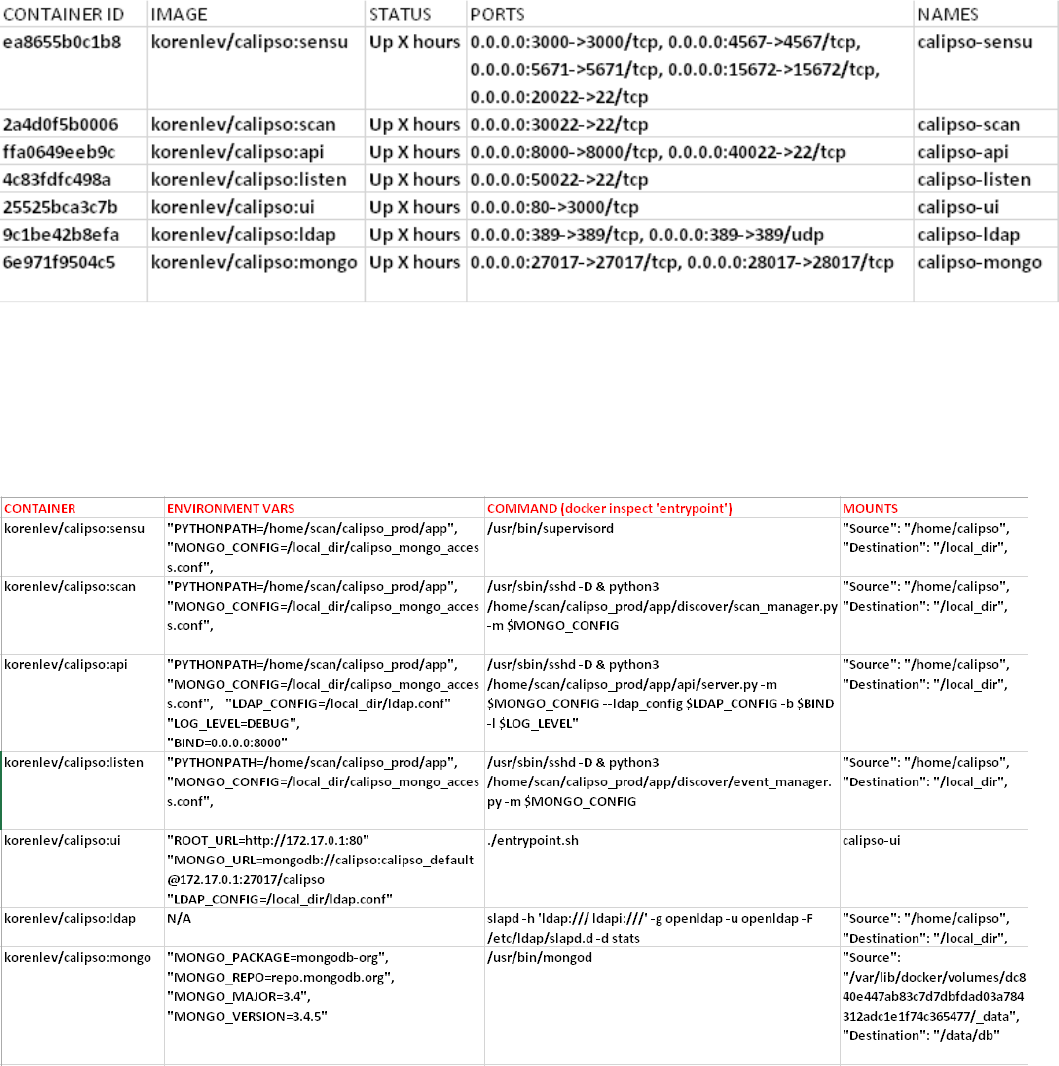
Checking the running containers status and ports in use:
sudo docker ps
Expected results and details (as of Aug 2017):
The above listed TCP ports are used by default on the hosts to map to each calipso
container, you should be familiar with these mappings of ports per container.
Checking running containers entry-points (The commands used inside the container):
sudo docker inspect [container-ID]
Expected results (as of Aug 2017):
Date printed: 9/24/2017 calipso.io project
Aug 2017 Cisco for OPNFV 5 Public version
A printed copy of this document is considered uncontrolled. Refer to the online version for the controlled revision.
Calipso containers configuration can be listed with docker inspect, summarized in the
table above. In a none-containerized deployment (see ‘Monolithic app install option in
the install-guide) these are the individual commands that are needed to run calipso
manually for special development needs.
The ‘calipso-sensu’ is built using sensu framework customized for calipso monitoring
design, ‘calipso-ui’ is built using meteor framework, ‘calipso-ldap’ is built using pre-
defined open-ldap container, and as such those three are only supported as pre-built
containers.
Administrator should be aware of the following details deployed in the containers:
1. calipso-api, calipso-sensu, calipso-scan and calipso-listen maps host directory
/home/calipso as volume /local_dir inside the container.
They use calipso_mongo_access.conf and ldap.conf files for configuration.
They use /home/scan/calipso_prod/app as the main PYTHONPATH needed to
run the different python modules per container.
2. Calipso-sensu is using the ‘supervisord’ process to control all sensu server
processes needed for calipso and the calipso event handler on this container.
3. Calipso-ldap can be used as standalone, but is a pre-requisite for calipso-api.
4. Calipso-ui needs calipso-mongo with latest scheme, to run and offer UI services.
1.3 Calipso containers access
The different Calipso containers are also accessible using SSH and pre-defined default
credentials, here is the access details:
Calipso-listen: ssh scan@localhost –p 50022 , password = scan
Calipso-scan: ssh scan@localhost –p 30022 , password = scan
Calipso-api: ssh scan@localhost –p 40022 , password = scan
Calipso-sensu: ssh scan@localhost –p 20022 , password = scan
Calipso-ui: only accessible through web browser
Calipso-ldap: only accessible through ldap tools.
Calipso-mongo: only accessible through mongo clients like MongoChef.
2 Validating Calipso app
2.1 Validating calipso-mongo module
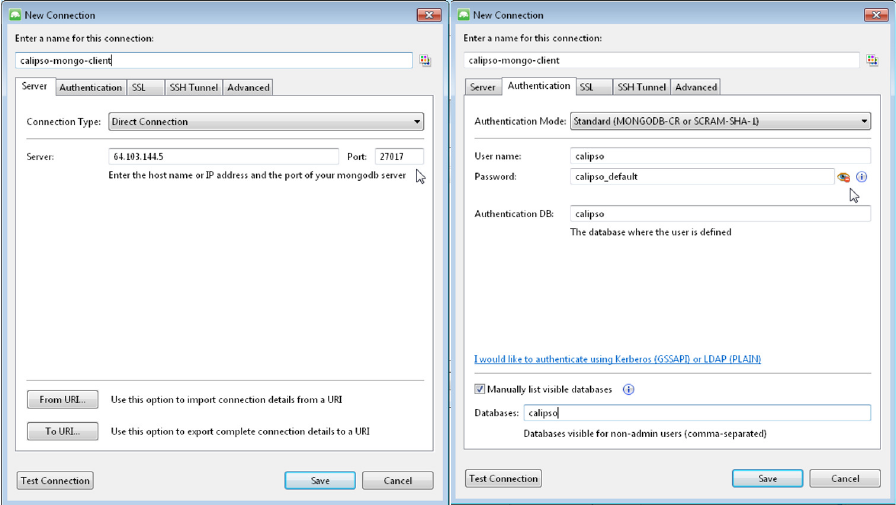
Using MongoChef client, create a new connection pointing to the server where
calipso-mongo container is running, using port 27017 and the following default
credentials:
Host IP=server_IP and TCP port=27017
Username : calipso
Password : calipso_default
Date printed: 9/24/2017 calipso.io project
Aug 2017 Cisco for OPNFV 6 Public version
A printed copy of this document is considered uncontrolled. Refer to the online version for the controlled revision.
Auto-DB: calipso
Defaults are also configured into /home/calipso/calipso_mongo_access.conf.
The following is a screenshot of a correct connection setup in MongoChef:
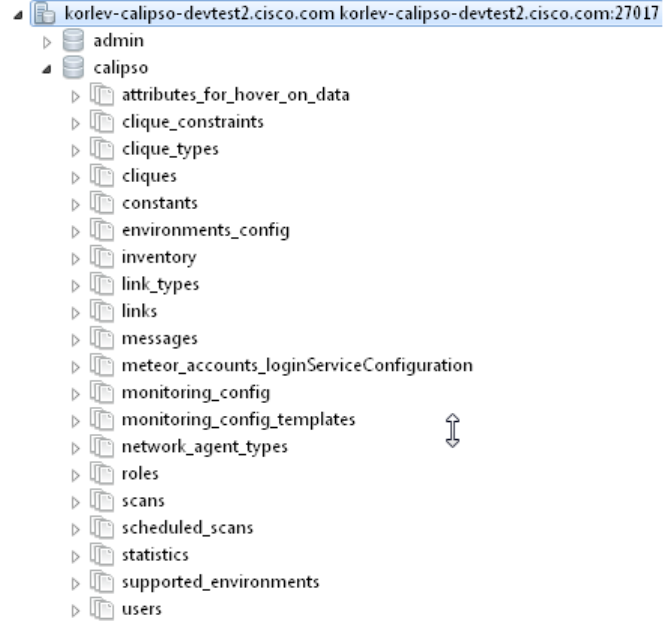
When clicking on the new defined connection the calipso DB should be listed:
Date printed: 9/24/2017 calipso.io project
Aug 2017 Cisco for OPNFV 7 Public version
A printed copy of this document is considered uncontrolled. Refer to the online version for the controlled revision.
At this stage you can checkout calipso-mongo collections data and validate as needed.
2.2 Validating calipso-scan module
Scan container is running the main calipso scanning engine that receives requests to
scan a specific VIM environment, this command will validate that the main
scan_manager.py process is running and waiting for scan requests:
sudo docker ps # grab the containerID of calipso-scan
sudo docker logs bf5f2020028a #containerID for example
Expected results:
2017-08-28 06:11:39,231 INFO: Using inventory collection: inventory
2017-08-28 06:11:39,231 INFO: Using links collection: links
2017-08-28 06:11:39,231 INFO: Using link_types collection: link_types
2017-08-28 06:11:39,231 INFO: Using clique_types collection: clique_types
2017-08-28 06:11:39,231 INFO: Using clique_constraints collection:
clique_constraints
2017-08-28 06:11:39,231 INFO: Using cliques collection: cliques
2017-08-28 06:11:39,232 INFO: Using monitoring_config collection:
monitoring_config
2017-08-28 06:11:39,232 INFO: Using constants collection: constants
2017-08-28 06:11:39,232 INFO: Using scans collection: scans
2017-08-28 06:11:39,232 INFO: Using messages collection: messages
Date printed: 9/24/2017 calipso.io project
Aug 2017 Cisco for OPNFV 8 Public version
A printed copy of this document is considered uncontrolled. Refer to the online version for the controlled revision.
2017-08-28 06:11:39,232 INFO: Using monitoring_config_templates collection:
monitoring_config_templates
2017-08-28 06:11:39,232 INFO: Using environments_config collection:
environments_config
2017-08-28 06:11:39,232 INFO: Using supported_environments collection:
supported_environments
2017-08-28 06:11:39,233 INFO: Started ScanManager with following configuration:
Mongo config file path: /local_dir/calipso_mongo_access.conf
Scans collection: scans
Environments collection: environments_config
Polling interval: 1 second(s)
The above logs basically shows that scan_manager.py is running and listening to scan
requests (should they come in through into ‘scans’ collection for specific environment
listed in ‘environments_config’ collection, refer to use-guide for details).
2.3 Validating calipso-listen module
Listen container is running the main calipso event_manager engine that listens for
events on a specific VIM BUS environment, this command will validate that the main
event_manager.py process is running and waiting for events from the BUS:
2017-08-28 06:11:35,572 INFO: Using inventory collection: inventory
2017-08-28 06:11:35,572 INFO: Using links collection: links
2017-08-28 06:11:35,572 INFO: Using link_types collection: link_types
2017-08-28 06:11:35,572 INFO: Using clique_types collection: clique_types
2017-08-28 06:11:35,572 INFO: Using clique_constraints collection: clique_constraints
2017-08-28 06:11:35,573 INFO: Using cliques collection: cliques
2017-08-28 06:11:35,573 INFO: Using monitoring_config collection: monitoring_config
2017-08-28 06:11:35,573 INFO: Using constants collection: constants
2017-08-28 06:11:35,573 INFO: Using scans collection: scans
2017-08-28 06:11:35,573 INFO: Using messages collection: messages
2017-08-28 06:11:35,573 INFO: Using monitoring_config_templates collection:
monitoring_config_templates
2017-08-28 06:11:35,573 INFO: Using environments_config collection:
environments_config
2017-08-28 06:11:35,574 INFO: Using supported_environments collection:
supported_environments
2017-08-28 06:11:35,574 INFO: Started EventManager with following configuration:
Mongo config file path: /local_dir/calipso_mongo_access.conf
Collection: environments_config
Polling interval: 5 second(s)
The above logs basically shows that event_manager.py is running and listening to
event (should they come in through from VIM BUS) and listed in
‘environments_config’ collection, refer to use-guide for details).
Date printed: 9/24/2017 calipso.io project
Aug 2017 Cisco for OPNFV 9 Public version
A printed copy of this document is considered uncontrolled. Refer to the online version for the controlled revision.
2.4 Validating calipso-api module
Scan container is running the main calipso API that allows applications to integrate
with calipso inventory and functions, this command will validate it is operational:
sudo docker ps # grab the containerID of calipso-scan
sudo docker logs bf5f2020028c #containerID for example
Expected results:
2017-08-28 06:11:38,118 INFO: Using inventory collection: inventory
2017-08-28 06:11:38,119 INFO: Using links collection: links
2017-08-28 06:11:38,119 INFO: Using link_types collection: link_types
2017-08-28 06:11:38,119 INFO: Using clique_types collection: clique_types
2017-08-28 06:11:38,120 INFO: Using clique_constraints collection: clique_constraints
2017-08-28 06:11:38,120 INFO: Using cliques collection: cliques
2017-08-28 06:11:38,121 INFO: Using monitoring_config collection: monitoring_config
2017-08-28 06:11:38,121 INFO: Using constants collection: constants
2017-08-28 06:11:38,121 INFO: Using scans collection: scans
2017-08-28 06:11:38,121 INFO: Using messages collection: messages
2017-08-28 06:11:38,121 INFO: Using monitoring_config_templates collection:
monitoring_config_templates
2017-08-28 06:11:38,122 INFO: Using environments_config collection:
environments_config
2017-08-28 06:11:38,122 INFO: Using supported_environments collection:
supported_environments
[2017-08-28 06:11:38 +0000] [6] [INFO] Starting gunicorn 19.4.5
[2017-08-28 06:11:38 +0000] [6] [INFO] Listening at: http://0.0.0.0:8000 (6)
[2017-08-28 06:11:38 +0000] [6] [INFO] Using worker: sync
[2017-08-28 06:11:38 +0000] [12] [INFO] Booting worker with pid: 12
The above logs basically shows that the calipso api is running and listening on port
8000 for requests.
2.5 Validating calipso-sensu module
Sensu container is running several servers (currently unified into one for simplicity)
and the calipso event handler (refer to use-guide for details), here is how to validate it
is operational:
ssh scan@localhost -p 20022 # default password = scan
sudo /etc/init.d/sensu-client status
sudo /etc/init.d/sensu-server status
sudo /etc/init.d/sensu-api status
sudo /etc/init.d/uchiwa status
sudo /etc/init.d/rabbitmq-server status
Expected results:
Each of the above should return a pid and a ‘running’ state +
ls /home/scan/calipso_prod/app/monitoring/handlers # should list monitor.py module.
Date printed: 9/24/2017 calipso.io project
Aug 2017 Cisco for OPNFV 10 Public version
A printed copy of this document is considered uncontrolled. Refer to the online version for the controlled revision.
The above logs basically shows that calipso-sensu is running and listening to
monitoring events from sensu-clients on VIM hosts, refer to use-guide for details).
2.6 Validating calipso-ui module
UI container is running several JS process with the back-end mongoDB, it needs data
to run and it will not run if any connection with DB is lost, this is per design. To
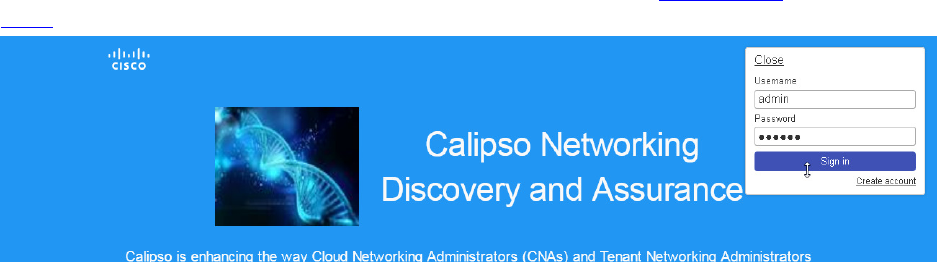
validate operational state of the UI simply point a Web Browser to : http://server-
IP:80 and expect a login page. Use admin/123456 as default credentials to login:
2.7 Validating calipso-ldap module
LDAP container is running a common user directory for integration with UI and API
modules, it is placed with calipso to validate interaction with LDAP. The main
configuration needed for communication with it is stored by calipso installer in
/home/calipso/ldap.conf and accessed by the API module. We assume in production
use-cases a corporate LDAP server might be used instead, in that case ldap.conf needs
to be changed and point to the corporate server.
To validate LDAP container, you will need to install openldap-clients, using:
yum -y install openldap-clients / apt-get install openldap-clients
Search all LDAP users inside that ldap server:
ldapsearch -H ldap://localhost -LL -b ou=Users,dc=openstack,dc=org x
Admin user details on this container (user=admin, pass=password):
LDAP username : cn=admin,dc=openstack,dc=org
cn=admin,dc=openstack,dc=org's password : password
Account BaseDN [DC=168,DC=56,DC=153:49154]:
ou=Users,dc=openstack,dc=org
Group BaseDN [ou=Users,dc=openstack,dc=org]:
Add a new user (admin credentials needed to bind to ldap and add users):
Create a /tmp/adduser.ldif file, use this example:
dn: cn=Myname,ou=Users,dc=openstack,dc=org // which org, which ou etc ...
objectclass: inetOrgPerson
cn: Myname // match the dn details !
sn: Koren
uid: korlev
Date printed: 9/24/2017 calipso.io project
Aug 2017 Cisco for OPNFV 11 Public version
A printed copy of this document is considered uncontrolled. Refer to the online version for the controlled revision.
userpassword: mypassword // the password
carlicense: MYCAR123
homephone: 555-111-2222
mail: korlev@cisco.com
description: koren guy
ou: calipso Department
Run this command to add the above user attributes into the ldap server:
ldapadd -x -D cn=admin,dc=openstack,dc=org -w password -c -f /tmp/adduser.ldif
// for example, the above file is used and the admin bind credentials who is, by
default, authorized to add users.
You should see "user added" message if successful
Validate users against this LDAP container:
Wrong credentials:
ldapwhoami -x -D cn=Koren,ou=Users,dc=openstack,dc=org -w korlevwrong
Response: ldap_bind: Invalid credentials (49)
Correct credentials:
ldapwhoami -x -D cn=Koren,ou=Users,dc=openstack,dc=org -w korlev
Response: dn:cn=Koren,ou=Users,dc=openstack,dc=org
The reply ou/dc details can be used by any application (UI and API etc) for mapping
users to some application specific group…
• If all the above validations passed, Calipso is now fully functional, refer to admin-guide
for more details.
