Riscv OVPsim User Guide
User Manual:
Open the PDF directly: View PDF  .
.
Page Count: 50
- Overview of the riscvOVPsim simulator
- The riscvOVPsim Fixed Platform Simulator
- Host Platforms
- Running High Speed Simulations
- The OVP RISC-V processor model
- Tracing RISC-V Program Execution
- Debugging RISC-V Software with riscvOVPsim
- RISC-V Verification and Compliance Usage
- Building your own platform and components
- Debugging Multi-Core platforms
- Appendices
- riscvOVPsim Help Commands
- riscvOVPsim model configuration options
- Compiling RISC-V programs
- Information on Open Virtual Platforms
- Information on Imperas Software tools
- Imperas License governing use of riscvOVPsim
RISC-V Processor OVP Model Simulator
riscvOVPsim User Guide
Imperas Software Ltd
Imperas Buildings, North Weston
Thame, Oxfordshire, OX9 2HA, U.K.
docs@imperas.com
Author Imperas Software Ltd
Version 0.7
Filename riscvOVPsim User Guide.pdf
Created 22 Oct 2018
Status OVP Standard Release

riscvOVPsim: RISC-V Processor Model Simulator User Guide
Copyright Notice
Copyright (2018) Imperas Software Limited. All rights reserved. This software and
documentation contain information that is the property of Imperas Software Limited. The
software and documentation are furnished under a license agreement and may be used or copied
only in accordance with the terms of the license agreement. No part of the software and
documentation may be reproduced, transmitted, or translated, in any form or by any means,
electronic, mechanical, manual, optical, or otherwise, without prior written permission of Imperas
Software Limited, or as expressly provided by the license agreement.
Right to Copy Documentation
The license agreement with Imperas permits licensee to make copies of the documentation for its
internal use only. Each copy shall include all copyrights, trademarks, service marks, and
proprietary rights notices, if any.
Destination Control Statement
All technical data contained in this publication is subject to the export control laws of the United
States of America. Disclosure to nationals of other countries contrary to United States law is
prohibited. It is the readers responsibility to determine the applicable regulations and to comply
with them.
Disclaimer
IMPERAS SOFTWARE LIMITED, AND ITS LICENSORS MAKE NO WARRANTY OF ANY
KIND, EXPRESS OR IMPLIED, WITH REGARD TO THIS MATERIAL, INCLUDING, BUT
NOT LIMITED TO, THE IMPLIED WARRANTIES OF MERCHANTABILITY AND
FITNESS FOR A PARTICULAR PURPOSE..
Model Release Status
This software and model is released as part of OVP releases and is included in OVPworld
packages. Please visit OVPworld.org.
Copyright (c) 2018 Imperas Software Ltd
OVP License. Release 99999999
www.ovpworld.org
Page ii of 45
Contents
1 Overview of the riscvOVPsim simulator 1
1.1 Description ......................................... 1
1.2 UsageandPurpose..................................... 2
1.3 Licensing .......................................... 2
1.4 Limitations ......................................... 2
1.5 Verification ......................................... 3
1.6 References.......................................... 3
1.7 About OVP & Imperas Software . . . . . . . . . . . . . . . . . . . . . . . . . . . . . 3
2 The riscvOVPsim Fixed Platform Simulator 5
3 Host Platforms 6
3.1 Availability ......................................... 6
3.2 SelectingHost........................................ 6
4 Running High Speed Simulations 7
4.1 An Introduction and First Simulation . . . . . . . . . . . . . . . . . . . . . . . . . . 7
4.1.1 Running using provided scripts and applications . . . . . . . . . . . . . . . . 7
4.1.2 Using command line options to show available RISC-V CPU variants . . . . . 8
4.1.3 Selecting a RISC-V CPU variant . . . . . . . . . . . . . . . . . . . . . . . . . 8
4.1.4 Specifying a RISC-V program .elf file to run . . . . . . . . . . . . . . . . . . . 9
4.1.5 –help and –helpall command line option . . . . . . . . . . . . . . . . . . . . . 9
4.2 Reporting performance statistics when simulation is complete . . . . . . . . . . . . . 9
5 The OVP RISC-V processor model 10
5.1 The OVP RISC-V processor model source . . . . . . . . . . . . . . . . . . . . . . . . 10
5.2 The different ’standard’ RISC-V ISA features and instruction extensions . . . . . . . 10
5.3 Selecting a specific RISC-V Processor Variant . . . . . . . . . . . . . . . . . . . . . . 11
5.4 Available riscvOVPsim RISC-V variants . . . . . . . . . . . . . . . . . . . . . . . . . 11
5.4.1 RV32I ........................................ 11
5.4.2 RV32IM....................................... 11
5.4.3 RV32IMC...................................... 12
5.4.4 RV32IMAC..................................... 12
5.4.5 RV32G ....................................... 12
5.4.6 RV32GC....................................... 12
5.4.7 RV32GCN...................................... 12
5.4.8 RV32E........................................ 12
5.4.9 RV32EC....................................... 12
i

riscvOVPsim: RISC-V Processor Model Simulator User Guide
5.4.10 RV64I ........................................ 12
5.4.11 RV64IM....................................... 12
5.4.12 RV64IMC...................................... 12
5.4.13 RV64IMAC..................................... 13
5.4.14 RV64G ....................................... 13
5.4.15 RV64GC....................................... 13
5.4.16 RV64GCN...................................... 13
5.5 Configuring riscvOVPsim to exactly match your processor . . . . . . . . . . . . . . . 13
5.5.1 Detailed Model Configuration options . . . . . . . . . . . . . . . . . . . . . . 13
5.5.2 Configuringthemodel............................... 14
5.6 Adding user extensions to the OVP RISC-V model . . . . . . . . . . . . . . . . . . . 14
6 Tracing RISC-V Program Execution 15
6.1 SimulatorTracecommands ................................ 15
7 Debugging RISC-V Software with riscvOVPsim 16
7.1 How to debug with standalone GDB . . . . . . . . . . . . . . . . . . . . . . . . . . . 16
7.1.1 Usinggdbconsole.................................. 16
7.1.2 Using port and manually attaching a debugger . . . . . . . . . . . . . . . . . 16
7.2 Debugging with Eclipse CDT . . . . . . . . . . . . . . . . . . . . . . . . . . . . . . . 17
7.2.1 GettingEclipse................................... 17
7.2.2 Configuring Eclipse CDT to connect to an external program . . . . . . . . . . 17
7.2.3 Starting to debug with Eclipse CDT . . . . . . . . . . . . . . . . . . . . . . . 18
7.3 HowtodebugwithOVPeGui............................... 18
8 RISC-V Verification and Compliance Usage 19
8.1 How to Verify Tests and the Coverage they are Producing . . . . . . . . . . . . . . . 19
8.1.1 TraceTools..................................... 19
8.1.2 Measuring test coverage . . . . . . . . . . . . . . . . . . . . . . . . . . . . . . 19
8.1.3 Configuring RISC-V model for compliance checking . . . . . . . . . . . . . . 20
8.1.4 Fundamental RISC-V Configuration Options . . . . . . . . . . . . . . . . . . 20
8.1.5 Machine Mode Control and Status Register (CSR) Constraints . . . . . . . . 20
8.1.6 Interrupts and Exceptions . . . . . . . . . . . . . . . . . . . . . . . . . . . . . 21
8.1.7 Physicalmemory.................................. 22
8.1.8 Virtualmemory .................................. 22
8.1.9 Miscellaneous.................................... 22
8.2 SignatureFile........................................ 23
8.2.1 Introduction .................................... 23
8.2.2 Configuration.................................... 23
8.2.3 DataFormat .................................... 24
8.2.4 UsageExample................................... 24
8.2.4.1 Basicoperation ............................. 24
8.3 CustomInstruction..................................... 24
8.3.1 Introduction .................................... 24
8.3.2 UsageExample................................... 24
9 Building your own platform and components 26
9.1 Creating Peripheral Models with iGen . . . . . . . . . . . . . . . . . . . . . . . . . . 26
Copyright (c) 2018 Imperas Software Ltd
OVP License. Release 99999999
www.ovpworld.org
Page ii of 45

riscvOVPsim: RISC-V Processor Model Simulator User Guide
9.2 Creating Platforms with iGen . . . . . . . . . . . . . . . . . . . . . . . . . . . . . . . 27
9.3 CreatingProcessorModels................................. 27
10 Debugging Multi-Core platforms 28
Appendices 29
A riscvOVPsim Help Commands 30
A.1 help ............................................. 30
A.1.1 control........................................ 30
A.1.2 diagnostics ..................................... 31
A.1.3 library........................................ 31
A.1.4 log.......................................... 31
A.1.5 parameters ..................................... 31
A.1.6 platform....................................... 31
A.1.7 program....................................... 31
A.2 helpall............................................ 32
A.2.1 control........................................ 32
A.2.2 debug ........................................ 32
A.2.3 diagnostics ..................................... 32
A.2.4 library........................................ 33
A.2.5 log.......................................... 33
A.2.6 parameters ..................................... 33
A.2.7 platform....................................... 33
A.2.8 program....................................... 34
A.2.9 trace......................................... 34
B riscvOVPsim model configuration options 35
C Compiling RISC-V programs 37
D Information on Open Virtual Platforms 38
E Information on Imperas Software tools 40
F Imperas License governing use of riscvOVPsim 41
Copyright (c) 2018 Imperas Software Ltd
OVP License. Release 99999999
www.ovpworld.org
Page iii of 45
Chapter 1
Overview of the riscvOVPsim
simulator
This document provides documentation of the riscvOVPsim RISC-V processor model simulator.
1.1 Description
riscvOVPsim is an Instruction Accurate RISC-V processor simulator based on the Imperas Open
Virtual Platform (OVP) technology with Just-in-Time Code Morphing simulation that executes
RISC-V code on a Linux or Windows host computer.
The included RISC-V models are complete and cover the full RISC-V User and Privilege
specifications.
The riscvOVPsim simulator is easy to understand and effective to use. It is flexible, accurate, and
exceptionally fast, often over 2,000 MIPS. Suitable as a platform target to develop baremetal, OS
Ports (Linux or RTOS), drivers and applications.
riscvOVPsim has been developed by Imperas Software. As a member of the RISC-V Foundation
community of software and hardware innovators collaboratively driving RISC-V adoption, Imperas
has developed the riscvOVPsim simulator to assist RISC-V adopters to become compliant to the
RISC-V specifications. The latest RISC-V compliance test suite and framework can be downloaded
from www.github.com/riscv/riscv-compliance.
Imperas is revolutionizing the development of embedded software and systems and is the leading
independent provider of commercial processor simulators for programmers view models for software
development.
Imperas, along with Open Virtual Platforms (OVP), promotes open model availability for a
spectrum of processors, IP vendors, CPU architectures, system IP and reference platform models of
processors and systems ranging from simple single core bare metal platforms to full heterogeneous
multi-core systems booting SMP Linux. Additional information can be found at www.imperas.com
and www.OVPworld.org.
1

riscvOVPsim: RISC-V Processor Model Simulator User Guide
1.2 Usage and Purpose
There is no complex installation process or scripts for downloading and installing riscvOVPsim. It
is just a matter of downloading and running the executable with appropriate configuration options
and cross-compiled RISC-V programs.
riscvOVPsim is configurable to represent exactly the same implementation choices that RISC-V
processor implementors choose thus making it an excellent tool for the development of RISC-V
application software and verification and compliance test suites.
The simulator can connect to GDB and Eclipse for source code debug and can be run in batch
mode for regression testing and use in continuous integration environments. It also has many trace
options to assist in program development.
1.3 Licensing
The complete OVP RISC-V processor model is included with riscvOVPsim and is made available
as open source under the Apache 2.0 license.
riscvOVPsim includes an industrial quality model and simulator of RISC-V processors for use for
compliance and test development. It has been developed for personal, academic, or commercial use,
and the model is provided as open source under the Apache 2.0 license. The simulator is provided
under the under Open Virtual Platforms (OVP) Fixed Platform Kits license that enables download
and usage. riscvOVPsim and Imperas RISC-V support is actively maintained and enhanced. To
ensure you make use of the current version of riscvOVPsim this initial release will expire. Please
download the latest version.
The full license terms are included within the download package and are listed in an appendix of
this document.
Imperas provide a version of riscvOVPsim with full commercial maintenance and support, as well
as additional multicore configuration options.
1.4 Limitations
Problems with installation or download may be reported to support@imperas.com.
Feedback and bug reports may be submitted to support@imperas.com.
riscvOVPsim is restricted to only run RISC-V processor model variants in a fixed platform
configuration of one processor instance and one memory sub-system. Caches and other processor
microarchitecture features are not included in programmer view models. If you need different
platform configurations or to extend the platform or models then please contact contact Imperas
or visit www.OVPworld.org.
Copyright (c) 2018 Imperas Software Ltd
OVP License. Release 99999999
www.ovpworld.org
Page 2 of 45

riscvOVPsim: RISC-V Processor Model Simulator User Guide
1.5 Verification
Imperas have been developing simulators and processor models for over 10 years and are the leading
independent provider of instruction accurate simulators, processor reference models and tools.
Each model is developed with a very controlled and precise methodology where as the model
functionality is developed it is carefully stepped through and white box, directed tests are created.
A comprehensive test suite is developed until 100% model line coverage is achieved. Standard
publicly available test suites are then used. Complete platforms are then constructed to run full
operating systems. All of these tests are incorporated into a continuous integration and regression
testing environment to ensure model quality.
The Imperas OVP RISC-V models have been run through the above process and virtual platforms
incorporating them are available from Imperas running FreeRTOS, single core Linux, and SMP
Linux on a five core RISC-V processor system.
1.6 References
The current release of riscvOVPsim models the full User 2.2 Specification and the 2.3a-draft
specification (April 2018).
The current release of riscvOVPsim models the full Privilege 1.10 Specification and the 1.11a-draft
specification (excluding the hypervisor sections as they are still in flux) (April 2018).
1.7 About OVP & Imperas Software
Open Virtual Platforms (www.OVPworld.org) was set up in 2008 to provide an open standard
approach to creating virtual platforms. OVP provides full definitions of standard APIs to enable
the modeling and simulation of digital hardware. There are over 500 OVP models with tools to
easily create virtual platforms. With OVP, users create their own models and platforms and can
develop software on simulations of hardware. OVPworld.org also provides a full simulation and
debug capability that is licensed and usable for non-commercial use.
Most OVP models are available under an Apache 2.0 open source license. For a full list of publicly
available OVP processor models, visit here: www.ovpworld.org/variants. To browse the OVP
library of peripheral models, visit here: www.ovpworld.org/peripherals.
For commercial use, Imperas provide a full suite of simulators, verification / analysis / profiling,
debug, and platform / model development tools. Imperas is the leader in heterogeneous multi-core
simulation and debug.
Imperas can be contracted to develop new models of processor, peripheral components, or full
platforms.
Imperas also provide a RISC-V processor compliance testing service if you need to ensure that your
RISC-V RTL is compliant with RISC-V specifications.
Imperas can also provide additional tools and services to assist with RISC-V processor compliance
Copyright (c) 2018 Imperas Software Ltd
OVP License. Release 99999999
www.ovpworld.org
Page 3 of 45

riscvOVPsim: RISC-V Processor Model Simulator User Guide
if you need to ensure that your RISC-V RTL is compliant with either the latest or earlier versions
of the RISC-V specifications. Please contact Imperas for the latest information.
Copyright (c) 2018 Imperas Software Ltd
OVP License. Release 99999999
www.ovpworld.org
Page 4 of 45
Chapter 2
The riscvOVPsim Fixed Platform
Simulator
riscvOVPsim has a built-in fixed platform which comprises one CPU instance of a RISC-V processor
model variant and one memory sub-system.
The RISC-V processor model variant is selected by a command line switch and the details of its
options can be configured using override commands. See the the section below on using the OVP
RISC-V processor model.
The memory fully populates the appropriate address space for the configured processor. It is
implemented in the simulator using a sparse memory algorithm and so there are no capacity issues.
5
Chapter 3
Host Platforms
3.1 Availability
riscvOVPsim is available on Windows 64 bit, and Linux 64 bit hosts.
3.2 Selecting Host
There are two different binary directory trees provided with riscvOVPsim. In the directories will
be the appropriate binary files needed for the different hosts.
6

Chapter 4
Running High Speed Simulations
The riscvOVPsim program is a standalone executable that performs the following tasks:
•Sets up the platform with a cpu model and memory
•Configures the behavior of the platform and model by changing run-time command line
switches
•Loads application code in .elf format into memory to run on the processor model
•Loads an appropriate semihost library to allow application code to interact with the host
computer (for example to display application code ’printf’s to the simulation console without
the need for a simulated UART)
•Optionally invokes a GDB debugger to enable source code debug
•Runs the simulator which executes the RISC-V cross compiled binary instructions
•Reports performance statistics when simulation is complete
4.1 An Introduction and First Simulation
riscvOVPsim is used to simulate application code in bare metal environments by just loading up a
cross compiled .elf file and selecting a CPU variant. There are configuration options to select other
parameters.
4.1.1 Running using provided scripts and applications
In the main directory, there is an examples directory with several different sub directories, one for
each example. If you open one of these directories, you will see several scripts that are either .bat
for Windows or .sh for Linux. These can just be executed. In this document we will assume Linux
usage:
>cat RUN RV32 Dhrystone . sh
. . .
${bindir}/ riscvOVPsim . exe −−v a r i a n t RV32IMAC \
−−program a p p l i c a t i o n / d hr ys to ne . RISCV32 . e l f
7

riscvOVPsim: RISC-V Processor Model Simulator User Guide
The ’–variant’ selects a specific processor model variant to be simulated. The ’–program’ specifies
which application .elf program to run. To run the simulation:
>RUN RV32 Dhrystone . sh
The simulator will run, showing the results of the dhrystone simulation:
riscvOVPsim (64-Bit) v20180221.0 Open Virtual Platform simulator from www.IMPERAS.com.
Copyright (c) 2005-2018 Imperas Software Ltd. Contains Imperas Proprietary Information.
Licensed Software, All Rights Reserved.
Visit www.IMPERAS.com for multicore debug, verification and analysis solutions.
riscvOVPsim started: Fri Apr 13 02:40:19 2018
Info (OR_OF) Target riscvOVPsim/cpu has object file read from dhrystone.RISCV32-O0-g.elf
Info (OR_PH) Program Headers:
Info (OR_PH) Type Offset VirtAddr PhysAddr FileSiz MemSiz Flags Align
Info (OR_PD) LOAD 0x00000000 0x00010000 0x00010000 0x00017dc0 0x00017dc0 R-E 1000
Info (OR_PD) LOAD 0x00017dc0 0x00028dc0 0x00028dc0 0x000009c0 0x00003228 RW- 1000
Dhrystone Benchmark, Version 2.1 (Language: C)
Program compiled without ’register’ attribute
Execution starts, 5000000 runs through Dhrystone
...
Measured time too small to obtain meaningful results
Please increase number of runs
Info
Info ---------------------------------------------------
Info CPU ’riscvOVPsim/cpu’ STATISTICS
Info Type : riscv (RV32IMAC)
Info Nominal MIPS : 100
Info Final program counter : 0x100ac
Info Simulated instructions: 6,955,075,157
Info Simulated MIPS : 1388.9
Info ---------------------------------------------------
Info
Info ---------------------------------------------------
Info SIMULATION TIME STATISTICS
Info Simulated time : 69.55 seconds
Info User time : 5.01 seconds
Info System time : 0.00 seconds
Info Elapsed time : 5.01 seconds
Info Real time ratio : 13.89x faster
Info ---------------------------------------------------
riscvOVPsim finished: Fri Apr 13 02:40:24 2018
riscvOVPsim (64-Bit) v20180221.0 Open Virtual Platform simulator from www.IMPERAS.com.
Visit www.IMPERAS.com for multicore debug, verification and analysis solutions.
4.1.2 Using command line options to show available RISC-V CPU variants
To see the list of processor model variants available in riscvOVPsim:
>. / b in / Linux64 / riscvOVPsim . exe −−showvariants
4.1.3 Selecting a RISC-V CPU variant
The ’–variant’ selects a specific processor model variant to be simulated.
>. / b in / Linux64 / riscvOVPsim . exe −−v a r i a n t RV64IMAC \
−−program a p p l i c a t i o n / d hr ys to ne . RISCV64 . e l f
Copyright (c) 2018 Imperas Software Ltd
OVP License. Release 99999999
www.ovpworld.org
Page 8 of 45

riscvOVPsim: RISC-V Processor Model Simulator User Guide
4.1.4 Specifying a RISC-V program .elf file to run
The
’−−program <app . e l f >’
specifies which application .elf program to run.
4.1.5 –help and –helpall command line option
There are command line arguments ’–help’ and ’–helpall’ that list the options available. For
example:
>. / b in / Linux64 / riscvOVPsim . exe −−hel p
See the appendix for details of the help commands.
4.2 Reporting performance statistics when simulation is complete
At the end of a simulation run, the simulator will display results and statistics:
...
Info
Info ---------------------------------------------------
Info CPU ’riscvOVPsim/cpu’ STATISTICS
Info Type : riscv (RV32IMAC)
Info Nominal MIPS : 100
Info Final program counter : 0x100ac
Info Simulated instructions: 6,955,075,157
Info Simulated MIPS : 1388.9
Info ---------------------------------------------------
Info
Info ---------------------------------------------------
Info SIMULATION TIME STATISTICS
Info Simulated time : 69.55 seconds
Info User time : 5.01 seconds
Info System time : 0.00 seconds
Info Elapsed time : 5.01 seconds
Info Real time ratio : 13.89x faster
Info ---------------------------------------------------
riscvOVPsim finished: Fri Apr 13 02:40:24 2018
riscvOVPsim (64-Bit) v20180221.0 Open Virtual Platform simulator from www.IMPERAS.com.
Visit www.IMPERAS.com for multicore debug, verification and analysis solutions.
This shows the fixed platform name (riscvOVPsim), the processor instance (cpu), the variant type
(RV32IMAC). The Nominal MIPS is effectively the clock speed that the CPU is clocked at in the
platform (this can be overridden). The Simulated MIPS is the number of instructions simulated
per second. The Simulated time is the time simulated in the simulation. User, System, and Elapsed
time is how long the simulation took if you looked at your watch. The Real time ratio shows how
much faster/slower the simulation was compared to real time.
Copyright (c) 2018 Imperas Software Ltd
OVP License. Release 99999999
www.ovpworld.org
Page 9 of 45
Chapter 5
The OVP RISC-V processor model
The OVP RISC-V processor model is written in C and makes calls to the standard OVP VMI API
interface.
The source of the OVP RISC-V processor model is available as open source under the Apache 2.0
license where you got this document (see below).
For information on how OVP CPU models are written look at the OVP Processor Modeling Guide
and for information on the VMI API look at OVP VMI Morph-Time Reference and OVP VMI
Run-Time Reference.
The model has been written to contain all the functionality of the standard RISC-V specifications
and the functionality of the specification is subset within the model into ’model variants’ that are
selected at runtime and configure the model. When a model variant is selected, only the defined
capabilities of that model variant are available. For example if a floating point instruction is
attempted to be executed by a variant that does not implement floating point instructions, then
an un-implemented instructed exception is triggered. If an instruction accessed a register that was
not present in the selected variant, then again the model would indicated an error, for example
trying to use register 31 in an E variant.
5.1 The OVP RISC-V processor model source
The full source of the OVP RISC-V processor is provided with this document as a reference. It is
the source that is compiled into the model that is being simulated by riscvOVPsim.
If you want to modify the model source and recompile it and use it for simulation, then you need to
use either the simulator from OVP or from Imperas as they are simulators that allow this loading
of user compiled models. Visit www.ovpworld.org or www.imperas.com.
5.2 The different ’standard’ RISC-V ISA features and instruction
extensions
The model supports the following architectural features:
10

riscvOVPsim: RISC-V Processor Model Simulator User Guide
•RV32I/64I/128I base ISA
•RV32E base ISA
•extension M (integer multiply/divide instructions)
•extension A (atomic instructions)
•extension F (single-precision floating point)
•extension D (double-precision floating point)
•extension C (compressed instructions)
•extension N (user-level interrupts)
•extension S (Supervisor mode)
•extension U (User mode)
•32-bit, 64-bit XLEN
All features and registers in the RISC-V Privilege Specification are implemented and configured as
required.
5.3 Selecting a specific RISC-V Processor Variant
To see the list of processor model variants available in riscvOVPsim:
>. / b in / Linux64 / riscvOVPsim . exe −−showvariants
The ’–variant’ command selects a specific processor model variant to be simulated.
NOTE: the variant name is case sensitive.
>. / b in / Linux64 / riscvOVPsim . exe −−v a r i a n t RV64IMAC \
−−program a p p l i c a t i o n / d hr ys to ne . RISCV64 . e l f
5.4 Available riscvOVPsim RISC-V variants
For each RISC-V variant there is a detailed document that describes the features and limitations of
the implementation. It also lists all the registers, ports, modes, exceptions, etc., and importantly,
it lists all the configuration parameters that can be set for that variant.
Each variant is unique and has a different document.
5.4.1 RV32I
A detailed document of the model variant is available: RV32I
5.4.2 RV32IM
A detailed document of the model variant is available: RV32IM
Copyright (c) 2018 Imperas Software Ltd
OVP License. Release 99999999
www.ovpworld.org
Page 11 of 45

riscvOVPsim: RISC-V Processor Model Simulator User Guide
5.4.3 RV32IMC
A detailed document of the model variant is available: RV32IMC
5.4.4 RV32IMAC
A detailed document of the model variant is available: RV32IMAC
5.4.5 RV32G
A detailed document of the model variant is available: RV32G
5.4.6 RV32GC
A detailed document of the model variant is available: RV32GC
5.4.7 RV32GCN
A detailed document of the model variant is available: RV32GCN
5.4.8 RV32E
A detailed document of the model variant is available: RV32E
5.4.9 RV32EC
A detailed document of the model variant is available: RV32EC
5.4.10 RV64I
A detailed document of the model variant is available: RV64I
5.4.11 RV64IM
A detailed document of the model variant is available: RV64IM
5.4.12 RV64IMC
A detailed document of the model variant is available: RV64IMC
Copyright (c) 2018 Imperas Software Ltd
OVP License. Release 99999999
www.ovpworld.org
Page 12 of 45

riscvOVPsim: RISC-V Processor Model Simulator User Guide
5.4.13 RV64IMAC
A detailed document of the model variant is available: RV64IMAC
5.4.14 RV64G
A detailed document of the model variant is available: RV64G
5.4.15 RV64GC
A detailed document of the model variant is available: RV64GC
5.4.16 RV64GCN
A detailed document of the model variant is available: RV64GCN
5.5 Configuring riscvOVPsim to exactly match your processor
The OVP model of the RISC-V specification has many detailed configuration options. These can be
set option by option, or, as explained above, the model can be configured by selecting a ’variant’.
This is basically a predefined list of settings of many of the different configuration options. To
see the details of how a variant configures the model, see the detailed variant documentation as
referenced in the previous section.
In many cases, the RISC-V specifications give freedom to the processor implementer to make
detailed choices of which parts of the RISC-V specification are implemented and in which way. In
a coarse way this might be choosing to not implement hardware floating point, or in a detailed way
it might be making a register read only - as allowed in the specifications.
The Imperas OVP RISC-V model can be configured to reflect the specific detailed hardware design
decisions that have been chosen.
This detailed configuration of a model is essential when trying to write specification compliance
and design tests as the tester needs to know that they are stimulating parts of the specification
that should not be in their design and so they need the model to tell them there are errors.
5.5.1 Detailed Model Configuration options
To see the list of processor model configuration options available in riscvOVPsim for a variant:
>. / b in / Linux64 / riscvOVPsim . exe −−v a r i a n t RV32E −−showmodeloverrides
The complete set of configuration options are listed as an appendix to this document.
NOTE: it is important to set the variant as that selects features and thus what can be configured.
Each variant may have different configuration parameters.
Copyright (c) 2018 Imperas Software Ltd
OVP License. Release 99999999
www.ovpworld.org
Page 13 of 45

riscvOVPsim: RISC-V Processor Model Simulator User Guide
5.5.2 Configuring the model
An example configuring the model:
>. / b in / Linux64 / riscvOVPsim . exe −−v a r i a n t RV64GCN \
−−o v e r r i d e riscvOVPsim /cpu / m t v e c i s r o=T \
−−o v e r r i d e riscvOVPsim /cpu/updatePTEA=F \
−−program app . e l f
Where mtvec is ro is a parameter that if set T (true) means mtvec is read only, and where
updatePTEA is a parameter that configures the model saying in this case (false) that hardware
update of PTEA is not supported.
5.6 Adding user extensions to the OVP RISC-V model
If you want to add new registers or new instructions to the OVP RISC-V model, then there are
better ways than modifying the source. Imperas has developed the concept of intercept libraries
that can intercept model operation and dynamically modify it - without any of the risks of modifying
(maybe incorrectly) the original model source. Imperas has used this very successfully to add user
defined custom instructions and registers for different RISC-V customers. For more information
contact info@imperas.com.
Copyright (c) 2018 Imperas Software Ltd
OVP License. Release 99999999
www.ovpworld.org
Page 14 of 45

Chapter 6
Tracing RISC-V Program Execution
The riscvOVPsim simulator can trace each processor instruction with different levels of detail.
You can use the command line argument –helpall to get this listing:
6.1 Simulator Trace commands
Flag Short Argument Description
trace t [processor] Trace instructions as they are executed
traceafter [processor=]integer Start tracing instructions after this many have
executed
tracebuffer [processor] Enable the trace buffer
tracechange [processor] Trace changed registers
tracecount [processor=]integer Trace this number of instructions
tracemode [processor] Add the current processor mode to the instruction
trace
traceregs [processor] Dump registers after each instruction is executed
traceregsafter [processor] Dump registers after each instruction is executed
traceregsbefore [processor] Dump registers before each instruction is executed
traceshowicount [processor] Show instruction count with each instruction
Table 6.1: Trace command arguments
15
Chapter 7
Debugging RISC-V Software with
riscvOVPsim
An application program running on the processor can be debugged using a GDB or other compatible
debugger by attaching to the running simulator. The debugger can be used standalone or under
Eclipse. There are several methods that can be used to accomplish this that will be described in
the next sections.
7.1 How to debug with standalone GDB
7.1.1 Using gdbconsole
The command line argument gdbconsole may be added to the execution of the simulation platform.
This will open a port on the simulator and automatically start and connect a compatible GDB to
this port.
For example this can be invoked using the command line
>riscvOVPsim . exe −program a p p l i c a t i o n . e l f −gdbconsole
7.1.2 Using port and manually attaching a debugger
The command line argument port can be used to open a port on the simulation platform to which
a compatible GDB (or equivalent) can be manually attached.
Start the simulation and specify a port to open
>riscvOVPsim . exe −program a p p l i c a t i o n . e l f −por t 3333
Start the GDB, which must be compatible with the processor type to which it is connecting. It is
also usual to pass the program to be debugged to the GDB when invoked.
Start the GDB
>gdb . exe a p p l i c a t i o n . e l f
16

riscvOVPsim: RISC-V Processor Model Simulator User Guide
At the GDB command line connect to the port that has been opened on the simulation.
gdb>t a r g e t remote l o c a l h o s t :33 33
You are now able to debug the application.
7.2 Debugging with Eclipse CDT
7.2.1 Getting Eclipse
Eclipse can be downloaded from www.eclipse.org , selecting the Neon release packages and the link
Eclipse IDE for C/C++ Developers. Download the package for your host and install.
You will also need to install a suitable Java runtime, try www.java.com/en/download and select a
Java runtime for your host machine.
7.2.2 Configuring Eclipse CDT to connect to an external program
Start Eclipse
Create a new project containing the application to be debugged, ensure that the application is built
and up to date.
Select Debug Configurations . . .
Select C/C++ Remote Applications->New
Main Tab
•Select Disable Auto Build
•Click ‘skip download to target path.’
•If the Automatic Debugging Launcher is selected
–Select ‘Select Other’
–Click ‘Use configuration specific settings’
∗Select ‘Manual Remote Debugging Launcher’
•Browse or Search project for the application elf file that we want to debug
Debugger Tab
Main
•Change the GDB Debugger to the correct GDB for the processor that is running the
application to be debugged
Connection
•Select Type TCP
Copyright (c) 2018 Imperas Software Ltd
OVP License. Release 99999999
www.ovpworld.org
Page 17 of 45

riscvOVPsim: RISC-V Processor Model Simulator User Guide
•Set host name or IP address to localhost (this assume we are running the simulation and the
Eclipse on the same machine)
•Set port Number to a fixed port that is available on the host machine and that is used with
the port argument when the simulation platform is started.
Add a name that indicates the processor and application that this Debug Configuration applies to
and click Apply to save.
7.2.3 Starting to debug with Eclipse CDT
The simulation platform should be started, and a debug port manually opened using the port
argument as detailed in a previous section.
If there are multiple processors in the platform, one should be selected using the debugprocessor
argument, for example -debugprocessor riscvOVPsim/cpu2
>riscvOVPsim . exe −program a p p l i c a t i o n . e l f −por t 3333
The port number should be selected the same as used in the Eclipse CDT Debug Configuration.
7.3 How to debug with OVP eGui
Imperas/OVP have created an Eclipse plugin that interacts with the CDT package to provide debug
capabilities beyond those of CDT. eGui can be included into an existing Eclipse/CDT installation
as a plugin or installed as part of the Imperas/OVP installation as standalone.
Getting eGui
This requires that you are registered on the Forum at www.ovpworld.org
Once registered you can go to the downloads page and then download and install the following
package:
eGui Eclipse
Starting eGui
The command line argument gdbegui may be added to the execution of the simulation platform.
This will open a port on the simulator and automatically start eGui and connect to this port.
For example, this can be invoked using the command line
>riscvOVPsim . exe −program a p p l i c a t i o n . e l f −gdbegui
This will start the eGui Eclipse and connect to the simulation.
Copyright (c) 2018 Imperas Software Ltd
OVP License. Release 99999999
www.ovpworld.org
Page 18 of 45
Chapter 8
RISC-V Verification and Compliance
Usage
8.1 How to Verify Tests and the Coverage they are Producing
A test will exercise a specific feature of the processor. This may be a specific set of instructions,
virtual memory, exceptions or one of many other things. The tests are small and specific with a
measurable outcome.
When a test is executed on the virtual platform it can be observed either by using tools or in a
debug environment.
8.1.1 Trace Tools
The simulator has the built-in capability to trace instruction execution and changes to register
values. This provides a detailed view of the execution of the test.
There are also processor specific trace capability tools that can be loaded. These can provide
detailed analysis of the processor execution. These include mode switches, exceptions, access to
system registers and others.
The above tools will give full visibility of the execution of the test application allowing, amongst
other things, visibility of the behaviour upon internal and external exceptions, illegal instructions,
privilege access etc.
In this way we can be sure that the test is performing the actions that we specifically want to see.
Once a tests detailed operation is verified it can be used to produce a signature and this used to
determine a pass/fail.
8.1.2 Measuring test coverage
When a suite of tests has been created we want to be sure that they are stimulating all expected
aspects of the processor. This can be done by examining the coverage of the processor model.
19

riscvOVPsim: RISC-V Processor Model Simulator User Guide
Tools are provided by Imperas in the M*SDK tool suite that allow code coverage of the model and
instruction usage profiles to be generated.
The processor model code coverage can be used to determine if all instructions and variations of
those instructions have been executed. Similarly, it can be used to determine if all exceptions have
been stimulated, modes entered etc.
The instruction profile can be used to determine how many times each instruction has been executed
within each test of the test suite providing further details of how well an instruction is tested.
8.1.3 Configuring RISC-V model for compliance checking
The OVP Fast Processor Model is configured from the base execution model using parameters and
overrides. The parameter named variant is used to select between the permitted extension and
permitted mode combinations of A, C, D, E, F, I, M, N, S and U.
The RISC-V processor model is configured using overrides to default model parameter values are
applied to the processor model instance in the virtual platform, using the -override argument. For
example:
-override riscvOVPsim/cpu/parameter=value
A list of all the available configuration parameters for the model can be obtained using the argument
-showmodeloverrides
These are also described in the RISC-V processor model specific documentation available from the
OVP website or in an OVP or Imperas product installation.
8.1.4 Fundamental RISC-V Configuration Options
1. What version of Privileged Architecture is implemented? (e.g. 1.10 or 1.11).
parameter user version
2. What version of User Architecture is implemented? (e.g. 2.2 or 2.3) .
parameter priv version
3. What extensions and modes are supported?
Use -showvariants to get a list of the available variants that can be used and then
set using -variant
8.1.5 Machine Mode Control and Status Register (CSR) Constraints
1. Is misa CSR writable? If so, which bits are writable, and which fixed?
parameter misa extension mask
2. What is the value of the mvendorid CSR?
Copyright (c) 2018 Imperas Software Ltd
OVP License. Release 99999999
www.ovpworld.org
Page 20 of 45

riscvOVPsim: RISC-V Processor Model Simulator User Guide
parameter mvendorid
3. What is the value of the marchid CSR?
parameter marchid
4. What is the value of the mimpid CSR?
parameter mimpid
5. What is the value of the mhartid CSR?
parameter mhartid
6. Is the mtvec CSR writable or fixed?
parameter mtvec is ro is set to True to make the mtvec read only
7. Does the mtvec CSR have a defined initial value?
parameter mtvec is used to set an initial value
8. Is the time CSR defined, or are accesses to it trapped and emulated?
parameter time undefined is set to cause a trap exception if a time instruction is
executed
9. Is the cycle CSR defined, or are accesses to it trapped and emulated?
parameter cycle undefined is set to cause a trap exception if a cycle instruction is
executed
10. Is the instret CSR defined, or are accesses to it trapped and emulated?
parameter instret undefined is set to cause a trap exception if a instret instruction
is executed
11. On an Illegal Instruction exception, are mtval (and stval, if present) set to 0 or the instruction
bit pattern?
parameter tval ii code is set to True so that the mtval (stval) registers are set to
the instruction bit pattern on an illegal instruction
8.1.6 Interrupts and Exceptions
1. What is the reset vector address
parameter reset address is used to set the reset vector address
2. How many local interrupts are implemented?
parameter local int num is used to set the number of supplemental local interrupts
3. Is an NMI interrupt implemented?
Copyright (c) 2018 Imperas Software Ltd
OVP License. Release 99999999
www.ovpworld.org
Page 21 of 45

riscvOVPsim: RISC-V Processor Model Simulator User Guide
If the NMI interrupt is implemented a net connection should be made to the nmi
signal port on the model. If no connection is made the nmi is disabled.
4. If NMI is implemented, what is the NMI vector address?
parameter nmi address is used to set the nmi vector address
8.1.7 Physical memory
1. What is the physical address bus size?
The physical address bits for the bus port is set to match the size of the bus
connected to the processor so no additional configuration need be applied to the
processor model.
2. Are Physical Memory protection (PMP) registers implemented? If so, how many regions are
there? (up to 16).
parameter PMP registers is used to set the number of implemented PMP address
registers
8.1.8 Virtual memory
1. If virtual memory is implemented, what address translation modes are implemented? (model
supports Sv32, Sv39, Sv48).
parameter Sv modes is used to set specify a bit mask indicating the number of Sv
modes implemented, for example 1<<8 indicates Sv39
2. Is ASID-managed address translation implemented? If so, how many bits of ASID are
implemented?
parameter ASID bits is used to specify the number of ASID bits
3. Is update of page table entry A bit performed by hardware or software?
parameter updatePTEA is set to True to indicate support for hardware update of
PTE A bit
4. Is update of page table entry D bit performed by hardware or software?
parameter updatePTED is set to True to indicate support for hardware update of
PTE D bit
8.1.9 Miscellaneous
1. If atomic (A) extension is supported, what is the size in bytes of the lock granule (e.g. 32-byte
cache line).
parameter lr sc grain
Copyright (c) 2018 Imperas Software Ltd
OVP License. Release 99999999
www.ovpworld.org
Page 22 of 45

riscvOVPsim: RISC-V Processor Model Simulator User Guide
2. Is the WFI instruction a true wait or a NOP?
parameter wfi is nop is set to True so that wfi is implemented as a nop instruction,
otherwise halt while waiting for interrupt
3. Does the processor support unaligned memory accesses?
parameter unaligned is set to True to specify the processor supports unaligned
operations.
8.2 Signature File
8.2.1 Introduction
A signature file is the contents of a memory region that is output to a file after the execution of an
application on a RISC-V processor.
It is used in some of the tests written to validate the RISC-V processor.
By default, the signature file is generated at the end of simulation or when the function
‘write to host’ is called and it contains the memory contents bounded by the symbols
‘signature begin’ and ‘signature end’.
The signature file generation is implemented as an Imperas intercept/extension library. It provides
both the memory dump and detection of test pass/fail by reading a result register, default t3.
8.2.2 Configuration
The signature file operation can be configured from the default using the following arguments
•SignatureFile : The name of the file created containing the signature
•SignatureAtEnd : Write the signature file at the end of simulation. By default the signature
file is written on the ‘write tohost’ function call.
•ResultReg : The register examined to indicate if the test passed or failed. Permitted values
3=gp, 10=a0, 28=t3 (default)
Defining the Start of the memory region containing the signature
•StartAddress : The address of the memory
•StartSymbol : The symbol, default ‘signature start’
Defining the End of the memory region containing signature
•EndAddress : The address of the memory
•EndSymbol : The symbol, default ‘signature end’
•ByteCount : The size in bytes
Copyright (c) 2018 Imperas Software Ltd
OVP License. Release 99999999
www.ovpworld.org
Page 23 of 45

riscvOVPsim: RISC-V Processor Model Simulator User Guide
8.2.3 Data Format
The signature format, defined by RISCV.org, consists of 16 bytes per line. This requires that
the size of the signature memory is always on a 16-byte boundary and is reduced to the previous
boundary if too big. By reducing the size we ensure that only data intended for the signature is
included and not additional ‘random’ data.
8.2.4 Usage Example
The intercept/extension library is enabled on the virtual platform simulation using the
-signaturedump argument and configured using the override argument on the command line.
8.2.4.1 Basic operation
>riscvOVPsim . exe −signaturedump \
−ove rr id er is cv OV Ps im /cpu /sigdump / S i g n a t u r e F i l e=<my filename>
Changing the memory region to use an alternative symbol
>riscvOVPsim . exe −signaturedump \
−o v e r r i d e riscvOVPsim /cpu/ sigdump / S i g n a t u r e F i l e=<my filename>
−o v e r r i d e riscvOVPsim /cpu/ sigdump / StartSymbol=<symbol o f s t a r t o f memory>
−o v e r r i d e riscvOVPsim /cpu/ sigdump /ByteCount=<number o f b yt es from s t a r t >
−o v e r r i d e riscvOVPsim /cpu/ sigdump / SignatureAtEnd=T
If the program does not call ‘write to host’ we must also enable the signature to be written when
simulation completes, typically this is when ‘exit’ is called.
8.3 Custom Instruction
8.3.1 Introduction
When running basic tests on the processor without C libraries or hardware to provide character
output e.g. a UART; a custom instruction can be used to provide character output in the simulation
environment. The custom instruction is added to a test using a MACRO so that the test can be
compiled without the custom instruction for execution on hardware or with the custom instruction
for execution on the simulator. Note: On hardware there is, therefore, no logging of the test
execution and so only a pass/fail result can be obtained. On the simulator the logging can be used
to indicate the flow of the test and where it diverges from the expected behavior.
8.3.2 Usage Example
The intercept/extension library is enabled on the virtual platform simulation using the
-customcontrol argument.
>riscvOVPsim . exe −customcontrol
Copyright (c) 2018 Imperas Software Ltd
OVP License. Release 99999999
www.ovpworld.org
Page 24 of 45

Chapter 9
Building your own platform and
components
Note that an Imperas OVP Fixed Platform is restricted to only run as is and can not be further
extended.
However, a platform in OVP is made up from models of processors, memories, and other components
such as behavioral peripherals connected using hierarchical bus connections. All components have
APIs defined in C and platforms can be created in C/C++ or SystemC that instantiate these
components.
You can create models and platforms directly in C/C++ using the standard OVP APIs. To
execute and run these models, you need a simulator that implements the OVP APIs. This fixed
platform does not support this and you can get access to OVP simulators from Imperas Software
and OVPworld.org.
Imperas/OVP provide iGen which is a productivity tool that from a simple iGen input
script creates a set of C files in the correct structure, all the main structural parts of the
components and provides the placeholders for the behavioral code. For more information on
iGen visit this link: www.imperas.com/iGen. To read the iGen user guide, visit this link:
www.ovpworld.org/igen-model-generator-introduction.
9.1 Creating Peripheral Models with iGen
A peripheral model template created by iGen as a C file will
1. Construct a model instance
2. Construct bus and net ports for connection to the platform
3. Construct memory mapped registers and memory regions
4. Construct formal parameters which can be set when the peripheral is instanced in a platform
or module and overridden by the simulator to control features of the peripheral model.
26

riscvOVPsim: RISC-V Processor Model Simulator User Guide
The peripheral template will provide empty functions, stubs, that can be filled in by the user to
add behavior to the model.
The peripheral template can be compiled and used in simulations to provide the peripheral device
programmers view i.e. the register structure and a default behavior.
iGen can also generate a SystemC TLM2 interface for the model. Examples of SystemC TLM2
interfaces for OVP peripherals have been tested with all major SystemC TLM2 simulators.
For more information on iGen and peripherals visit: www.ovpworld.org/igen-peripheral-generator-user-guide.
Most peripherals are available as open source and there over 200 listed on the OVPworld website
here: www.ovpworld.org/library. You can download and look at the source and modify it to make
it your own peripherals, or you can use them directly in your platforms.
9.2 Creating Platforms with iGen
OVP platforms are a collection of components connected together into levels of hierarchy in a
system to be simulated. This is a program in C/C++ making calls into OVP APIs and normally
compiled into an executable or as a shared object/dynamically linked library and loaded by the
simulator at run time.
Platforms are created by writing scripts and then using iGen to generate C or SystemC code that
calls functions from the OP API.
For more information on iGen and platforms/modules visit:
www.ovpworld.org/igen-platform-and-module-creation-user-guide.
9.3 Creating Processor Models
With the OVP open standard APIs you can write your own processor models in C. Imperas
has developed over 200 processor models using this standard modeling approach. Visit
www.ovpworld.org/variants for more information on the available processor models.
For RISC-V there are over 25 different RISC-V models. See: www.ovpworld.org/library.
Processor model source is available from www.OVPworld.org as source under the Apache 2.0
open source license and so you can download the source and modify it if you want to. However
modifying the main model source might not be the best approach in terms of maintainable models
with extensions, and so Imperas has developed a standard way to extend existing processor
models to add instructions and registers without making changes to the source of the main
model. See www.ovpworld.org/creating-instruction-accurate-processor-models-using-the-vmi-api
chapter 26 for more information.
Copyright (c) 2018 Imperas Software Ltd
OVP License. Release 99999999
www.ovpworld.org
Page 27 of 45
Chapter 10
Debugging Multi-Core platforms
When you have a single processor instance in a platform the normal software debug approach is to
connect up a GDB to the processor and be able to accomplish source code debug. This works well
for a single processor and single GDB but problems occur when you have different processor cores
in the platform or have complex peripherals as well. A single GDB is not much help and neither
is having a different GDB connected to each processor. You the user become the debug scheduler
and having to click continue and step in a variety of different windows etc.
It is very difficult to debug a multicore platform with just GDB.
If the platform has more than one core, Imperas has developed an advanced multi-core debugger
called Multi-Processor Debug (MPD). An introduction to this is found: www.imperas.com/MPD.
There is a good video introduction of MPD on a platform incorporating a quad core ARM
Cortex-A15MPx4 and an Andes RISC-V N25 core here:
www.imperas.com/mpd-andes-risc-v-n25-running-freertos-and-arm-cortex.
Another good video shows the SiFive RISC-V U540-MC virtual platform running SMP Linux being
debugged with the Imperas Multi-Processor debugger:
www.imperas.com/sifive-risc-v-u54-mc-booting-smp-linux-being-debugged-with-MPD.
28
Appendices
29

Appendix A
riscvOVPsim Help Commands
To see commonly used command line options:
riscvOVPsim . exe −−hel p
To see all command line options:
riscvOVPsim . exe −−helpall
To see the list of processor variants:
riscvOVPsim . exe −−showvariants
To run a program:
riscvOVPsim . exe −−variant <p r o c e s s o r v ar ia nt >
−−program <path to program>
To trace instructions please see –helpall
A.1 help
A.1.1 control
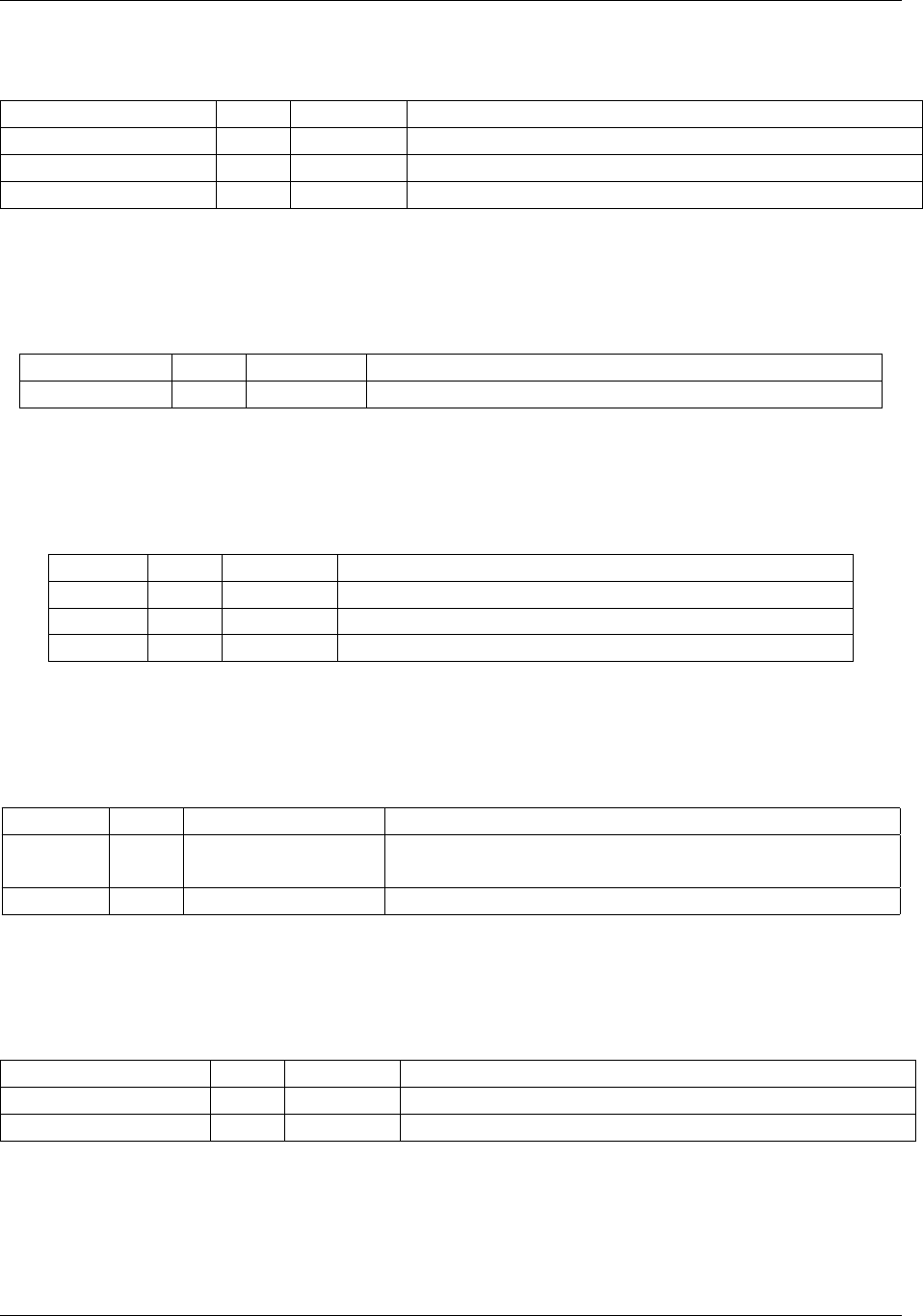
Flag Short Argument Description
–finishafter I [processor=]integer Finish simulation after this many instructions
–finishtime F [module=]seconds Finish simulation at this time
–showexpiry [module] Show how many days before this executable expires
and can no longer run
Table A.1: control
30
riscvOVPsim: RISC-V Processor Model Simulator User Guide
A.1.2 diagnostics
Flag Short Argument Description
–help h Print list of flags
–helpall Print complete list of flags
–showmodeloverrides [module] Show all model parameters that can be overridden
Table A.2: diagnostics
A.1.3 library
Flag Short Argument Description
–showvariants [processor] Show processor variants
Table A.3: library
A.1.4 log
Flag Short Argument Description
–logfile filename Output log file
–output o filename Output log file
–version Print version information
Table A.4: log
A.1.5 parameters
Flag Short Argument Description
–override O name=value Override a parameter value. Use -showoverrides or
-showmodeloverrides for a list
–variant [processor=]variant Set a processor variant. Use -showvariants for a list
Table A.5: parameters
A.1.6 platform
Flag Short Argument Description
–signaturedump Load the signature dump utility
–signaturedumphelp Information about the signature dump utility
Table A.6: platform
A.1.7 program
Copyright (c) 2018 Imperas Software Ltd
OVP License. Release 99999999
www.ovpworld.org
Page 31 of 45
riscvOVPsim: RISC-V Processor Model Simulator User Guide
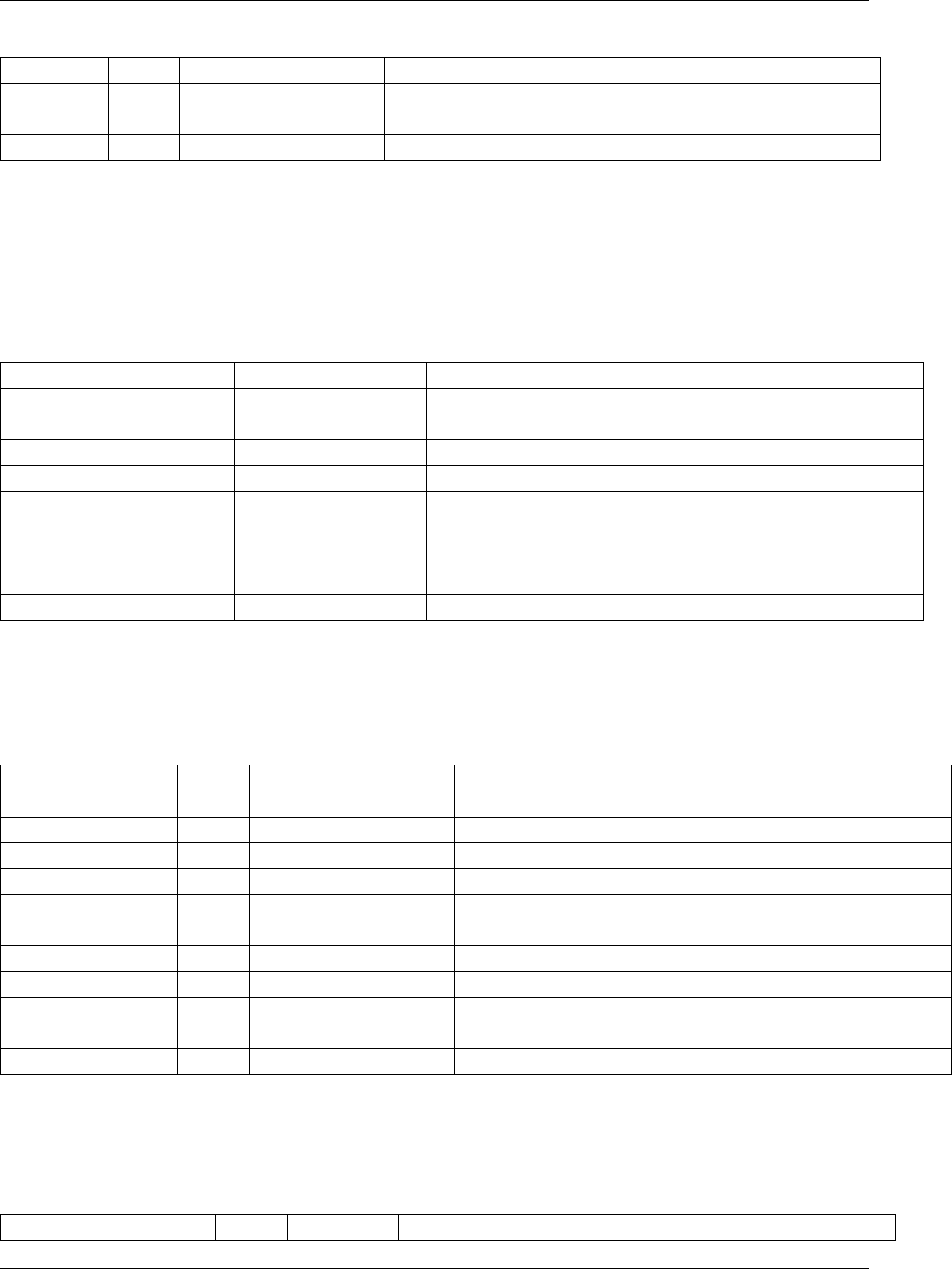
Flag Short Argument Description
–argv arguments Pass all remaining values to the application main
(applies to all processors)
–program [processor=]filename Execute this program (on this processor)
Table A.7: program
A.2 helpall
A.2.1 control
Flag Short Argument Description
–callcommand command Call a command in a plugin. Use -showcommands for
a list.
–finishafter I [processor=]integer Finish simulation after this many instructions
–finishtime F [module=]seconds Finish simulation at this time
–nosimulation [module] Do not simulate. Simulator will exit after loading the
platform
–showexpiry [module] Show how many days before this executable expires
and can no longer run
–stoponcontrolc [module] Simulator will stop on Ctrl-C (SIGINT)
Table A.8: control
A.2.2 debug
Flag Short Argument Description
–gdbcommandfile [processor=]filename GDB will run this startup script
–gdbconsole [module] Pop up gdb(s) in console window(s)
–gdbegui [module] Start gdb debug in Eclipse (eGui)
–gdbflags [processor=]flags Pass additional flags to a gdb
–gdbinit [processor=]filename Pass a file to the gdb to execute before the prompt is
displayed
–gdbpath [processor=]filename Set the gdb path for a processor
–nowait [module] Do not wait for RSP connection before simulation
–port [module=]integer Open this port number to allow a connection to a GDB
using RSP
–symbolfile [processor=]filename Read the symbols from this executable
Table A.9: debug
A.2.3 diagnostics
Flag Short Argument Description
Copyright (c) 2018 Imperas Software Ltd
OVP License. Release 99999999
www.ovpworld.org
Page 32 of 45
riscvOVPsim: RISC-V Processor Model Simulator User Guide
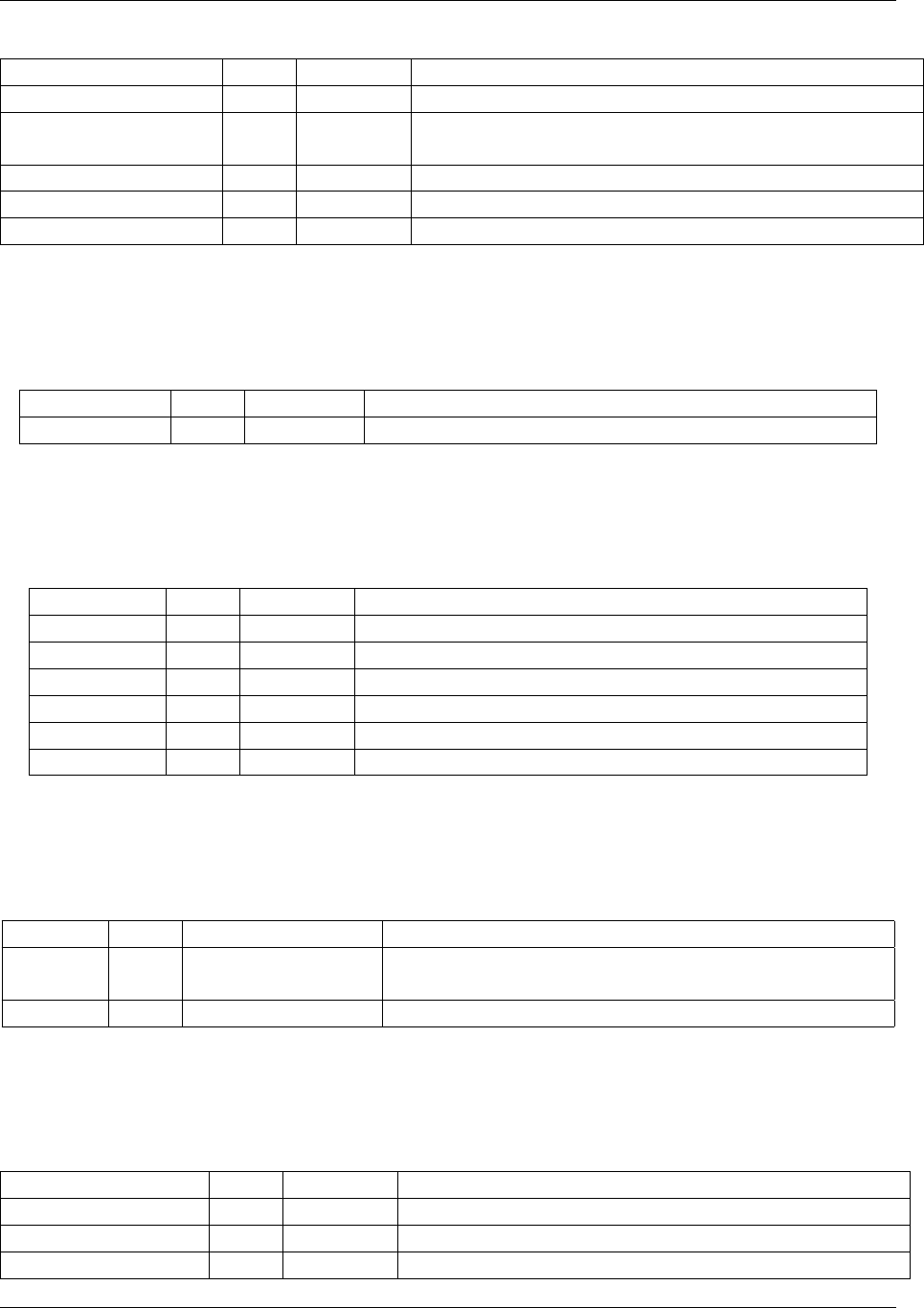
–help h Print list of flags
–helpall Print complete list of flags
–showcommands [module] Show commands that can be called with
–callcommand
–showmodeloverrides [module] Show all model parameters that can be overridden
–showoverrides [module] Show all parameters that can be overridden
–showsystemoverrides [module] Show all the simulator parameters
Table A.10: diagnostics
A.2.4 library
Flag Short Argument Description
–showvariants [processor] Show processor variants
Table A.11: library
A.2.5 log
Flag Short Argument Description
–logfile filename Output log file
–logflush Flush data to the log file after each write
–nowarnings w Suppress warnings
–output o filename Output log file
–version Print version information
–werror W Treat warnings as errors
Table A.12: log
A.2.6 parameters
Flag Short Argument Description
–override O name=value Override a parameter value. Use -showoverrides or
-showmodeloverrides for a list
–variant [processor=]variant Set a processor variant. Use -showvariants for a list
Table A.13: parameters
A.2.7 platform
Flag Short Argument Description
–customcontrol Load the custom control utility
–signaturedump Load the signature dump utility
–signaturedumphelp Information about the signature dump utility
Copyright (c) 2018 Imperas Software Ltd
OVP License. Release 99999999
www.ovpworld.org
Page 33 of 45

riscvOVPsim: RISC-V Processor Model Simulator User Guide
Table A.14: platform
A.2.8 program
Flag Short Argument Description
–argv arguments Pass all remaining values to the application main
(applies to all processors)
–elfusevma [processor] Use ELF VMA addresses rather than LMA
–envp name=value Pass values (until the next ’-’) to the application
environment list
–loadphysical [processor] Use ELF physical addresses
–loadsignextend [processor] Sign-extend ELF addresses from 32 to 64 bits
–objfile [processor=]filename Load object onto CPU. Set PC to start address
–objfilenoentry [processor=]filename Load object onto CPU. Do not set PC to start address
–objfileuseentry f [processor=]filename Load object onto CPU. Set PC to start address
–program [processor=]filename Execute this program (on this processor)
Table A.15: program
A.2.9 trace
Flag Short Argument Description
–trace t [processor] Trace instructions as they are executed
–traceafter [processor=]integer Start tracing instructions after this many have
executed
–tracebuffer [processor] Enable the trace buffer
–tracechange [processor] Trace changed registers
–tracecount [processor=]integer Trace this number of instructions
–tracemode [processor] Add the current processor mode to the instruction
trace
–traceregs [processor] Dump registers after each instruction is executed
–traceregsafter [processor] Dump registers after each instruction is executed
–traceregsbefore [processor] Dump registers before each instruction is executed
–traceshowicount [processor] Show instruction count with each instruction
Table A.16: trace
Copyright (c) 2018 Imperas Software Ltd
OVP License. Release 99999999
www.ovpworld.org
Page 34 of 45
Appendix B
riscvOVPsim model configuration
options
RV32GC Model Overrides
--override riscvOVPsim/cpu/variant=RV32GC (Enumeration) (default=RV32I) (override) Selects variant (either a generic UISA or a specific model)
--override riscvOVPsim/cpu/user_version=2.2 (Enumeration) (default=2.2) (default) Specify required User Architecture version
--override riscvOVPsim/cpu/priv_version=1.10 (Enumeration) (default=1.10) (default) Specify required Privileged Architecture version
--override riscvOVPsim/cpu/verbose=T (Boolean) (default=T) (default) Specify verbose output messages
--override riscvOVPsim/cpu/updatePTEA=F (Boolean) (default=F) (default) Specify whether hardware update of PTE A bit is supported
--override riscvOVPsim/cpu/updatePTED=F (Boolean) (default=F) (default) Specify whether hardware update of PTE D bit is supported
--override riscvOVPsim/cpu/unaligned=F (Boolean) (default=F) (default) Specify whether the processor supports unaligned memory accesses
--override riscvOVPsim/cpu/wfi_is_nop=F (Boolean) (default=F) (default) Specify whether WFI should be treated as a NOP (if not, halt while waiting for interrupts)
--override riscvOVPsim/cpu/mtvec_is_ro=F (Boolean) (default=F) (default) Specify whether mtvec CSR is read-only
--override riscvOVPsim/cpu/tval_ii_code=T (Boolean) (default=T) (default) Specify whether mtval/stval contain faulting instruction bits on illegal instruction exception
--override riscvOVPsim/cpu/cycle_undefined=F (Boolean) (default=F) (default) Specify that the cycle CSR is undefined (reads to it are emulated by a Machine mode trap)
--override riscvOVPsim/cpu/time_undefined=F (Boolean) (default=F) (default) Specify that the time CSR is undefined (reads to it are emulated by a Machine mode trap)
--override riscvOVPsim/cpu/instret_undefined=F (Boolean) (default=F) (default) Specify that the instret CSR is undefined (reads to it are emulated by a Machine mode trap)
--override riscvOVPsim/cpu/enable_CSR_bus=F (Boolean) (default=F) (default) Add artifact CSR bus port, allowing CSR registers to be externally implemented
--override riscvOVPsim/cpu/ASID_bits=9 (Uns32) (default=9) (default) Specify the number of implemented ASID bits
--override riscvOVPsim/cpu/lr_sc_grain=1 (Uns32) (default=1) (default) Specify byte granularity of ll/sc lock region (constrained to a power of two)
--override riscvOVPsim/cpu/reset_address=0 (Uns64) (default=0) (default) Override reset vector address
--override riscvOVPsim/cpu/nmi_address=0 (Uns64) (default=0) (default) Override NMI vector address
--override riscvOVPsim/cpu/PMP_registers=16 (Uns32) (default=16) (default) Specify the number of implemented PMP address registers
--override riscvOVPsim/cpu/Sv_modes=3 (Uns32) (default=3) (default) Specify bit mask of implemented Sv modes (e.g. 1<<8 is Sv39)
--override riscvOVPsim/cpu/local_int_num=0 (Uns32) (default=0) (default) Specify number of supplemental local interrupts
--override riscvOVPsim/cpu/endian=none (Endian) (default=none) (default) Model endian
--override riscvOVPsim/cpu/misa_MXL=1 (Uns32) (default=1) (default) Override default value of misa.MXL
--override riscvOVPsim/cpu/misa_MXL_mask=0 (Uns32) (default=0) (default) Override mask of writable bits in misa.MXL
--override riscvOVPsim/cpu/misa_Extensions=0x14112d (Uns32) (default=0x14112d) (default) Override default value of misa.Extensions
--override riscvOVPsim/cpu/misa_Extensions_mask=0x102d (Uns32) (default=0x102d) (default) Override mask of writable bits in misa.Extensions
--override riscvOVPsim/cpu/mvendorid=0 (Uns64) (default=0) (default) Override mvendorid register
--override riscvOVPsim/cpu/marchid=0 (Uns64) (default=0) (default) Override marchid register
--override riscvOVPsim/cpu/mimpid=0 (Uns64) (default=0) (default) Override mimpid register
--override riscvOVPsim/cpu/mhartid=0 (Uns64) (default=0) (default) Override mhartid register
--override riscvOVPsim/cpu/mtvec=0 (Uns64) (default=0) (default) Override mtvec register
--override riscvOVPsim/cpu/mstatus_FS=0 (Uns32) (default=0) (default) Override default value of mstatus.FS (initial state of floating point unit)
--override riscvOVPsim/cpu/riscv32Newlib/userargv=0x0 (Pointer) (default=0x0) (default) Pointer to argv structure
--override riscvOVPsim/cpu/riscv32Newlib/userenvp=0x0 (Pointer) (default=0x0) (default) Pointer to envp structure
--override riscvOVPsim/cpu/riscv32Newlib/initsp=0 (Uns64) (default=0) (default) Stack Pointer initialization
--override riscvOVPsim/cpu/sigdump/ResultReg=28 (Uns32) (default=28) (default) Result Register for RISCV.org Conformance Test. 3=GP, 10=A0 or 28=T3 (default)
--override riscvOVPsim/cpu/sigdump/SignatureFile=(null) (String) (default=(null)) (default) Name of the signature file
--override riscvOVPsim/cpu/sigdump/SignatureAtEnd=F (Boolean) (default=F) (default) Generate a Signature file at the end of simulation (default to generate on detection of call to write_tohost())
--override riscvOVPsim/cpu/sigdump/StartAddress=0 (Uns32) (default=0) (default) Address of the Start Symbol
--override riscvOVPsim/cpu/sigdump/StartSymbol=begin_signature (String) (default=begin_signature) (default) Name of the Start Symbol
--override riscvOVPsim/cpu/sigdump/EndAddress=0 (Uns32) (default=0) (default) Address of the End Symbol
--override riscvOVPsim/cpu/sigdump/EndSymbol=end_signature (String) (default=end_signature) (default) Name of the End Symbol
--override riscvOVPsim/cpu/sigdump/ByteCount=0 (Uns32) (default=0) (default) Size of region in bytes (must be 16 byte blocks)
RV64GCN Model Overrides
--override riscvOVPsim/cpu/variant=RV64GCN (Enumeration) (default=RV32I) (override) Selects variant (either a generic UISA or a specific model)
--override riscvOVPsim/cpu/user_version=2.2 (Enumeration) (default=2.2) (default) Specify required User Architecture version
--override riscvOVPsim/cpu/priv_version=1.10 (Enumeration) (default=1.10) (default) Specify required Privileged Architecture version
35

riscvOVPsim: RISC-V Processor Model Simulator User Guide
--override riscvOVPsim/cpu/verbose=T (Boolean) (default=T) (default) Specify verbose output messages
--override riscvOVPsim/cpu/updatePTEA=F (Boolean) (default=F) (default) Specify whether hardware update of PTE A bit is supported
--override riscvOVPsim/cpu/updatePTED=F (Boolean) (default=F) (default) Specify whether hardware update of PTE D bit is supported
--override riscvOVPsim/cpu/unaligned=F (Boolean) (default=F) (default) Specify whether the processor supports unaligned memory accesses
--override riscvOVPsim/cpu/wfi_is_nop=F (Boolean) (default=F) (default) Specify whether WFI should be treated as a NOP (if not, halt while waiting for interrupts)
--override riscvOVPsim/cpu/mtvec_is_ro=F (Boolean) (default=F) (default) Specify whether mtvec CSR is read-only
--override riscvOVPsim/cpu/tval_ii_code=T (Boolean) (default=T) (default) Specify whether mtval/stval contain faulting instruction bits on illegal instruction exception
--override riscvOVPsim/cpu/cycle_undefined=F (Boolean) (default=F) (default) Specify that the cycle CSR is undefined (reads to it are emulated by a Machine mode trap)
--override riscvOVPsim/cpu/time_undefined=F (Boolean) (default=F) (default) Specify that the time CSR is undefined (reads to it are emulated by a Machine mode trap)
--override riscvOVPsim/cpu/instret_undefined=F (Boolean) (default=F) (default) Specify that the instret CSR is undefined (reads to it are emulated by a Machine mode trap)
--override riscvOVPsim/cpu/enable_CSR_bus=F (Boolean) (default=F) (default) Add artifact CSR bus port, allowing CSR registers to be externally implemented
--override riscvOVPsim/cpu/ASID_bits=16 (Uns32) (default=16) (default) Specify the number of implemented ASID bits
--override riscvOVPsim/cpu/lr_sc_grain=1 (Uns32) (default=1) (default) Specify byte granularity of ll/sc lock region (constrained to a power of two)
--override riscvOVPsim/cpu/reset_address=0 (Uns64) (default=0) (default) Override reset vector address
--override riscvOVPsim/cpu/nmi_address=0 (Uns64) (default=0) (default) Override NMI vector address
--override riscvOVPsim/cpu/PMP_registers=16 (Uns32) (default=16) (default) Specify the number of implemented PMP address registers
--override riscvOVPsim/cpu/Sv_modes=0x301 (Uns32) (default=0x301) (default) Specify bit mask of implemented Sv modes (e.g. 1<<8 is Sv39)
--override riscvOVPsim/cpu/local_int_num=0 (Uns32) (default=0) (default) Specify number of supplemental local interrupts
--override riscvOVPsim/cpu/endian=none (Endian) (default=none) (default) Model endian
--override riscvOVPsim/cpu/misa_MXL=2 (Uns32) (default=2) (default) Override default value of misa.MXL
--override riscvOVPsim/cpu/misa_MXL_mask=0 (Uns32) (default=0) (default) Override mask of writable bits in misa.MXL
--override riscvOVPsim/cpu/misa_Extensions=0x14312d (Uns32) (default=0x14312d) (default) Override default value of misa.Extensions
--override riscvOVPsim/cpu/misa_Extensions_mask=0x302d (Uns32) (default=0x302d) (default) Override mask of writable bits in misa.Extensions
--override riscvOVPsim/cpu/mvendorid=0 (Uns64) (default=0) (default) Override mvendorid register
--override riscvOVPsim/cpu/marchid=0 (Uns64) (default=0) (default) Override marchid register
--override riscvOVPsim/cpu/mimpid=0 (Uns64) (default=0) (default) Override mimpid register
--override riscvOVPsim/cpu/mhartid=0 (Uns64) (default=0) (default) Override mhartid register
--override riscvOVPsim/cpu/mtvec=0 (Uns64) (default=0) (default) Override mtvec register
--override riscvOVPsim/cpu/mstatus_FS=0 (Uns32) (default=0) (default) Override default value of mstatus.FS (initial state of floating point unit)
--override riscvOVPsim/cpu/riscv64Newlib/userargv=0x0 (Pointer) (default=0x0) (default) Pointer to argv structure
--override riscvOVPsim/cpu/riscv64Newlib/userenvp=0x0 (Pointer) (default=0x0) (default) Pointer to envp structure
--override riscvOVPsim/cpu/riscv64Newlib/initsp=0 (Uns64) (default=0) (default) Stack Pointer initialization
--override riscvOVPsim/cpu/sigdump/ResultReg=28 (Uns32) (default=28) (default) Result Register for RISCV.org Conformance Test. 3=GP, 10=A0 or 28=T3 (default)
--override riscvOVPsim/cpu/sigdump/SignatureFile=(null) (String) (default=(null)) (default) Name of the signature file
--override riscvOVPsim/cpu/sigdump/SignatureAtEnd=F (Boolean) (default=F) (default) Generate a Signature file at the end of simulation (default to generate on detection of call to write_tohost())
--override riscvOVPsim/cpu/sigdump/StartAddress=0 (Uns32) (default=0) (default) Address of the Start Symbol
--override riscvOVPsim/cpu/sigdump/StartSymbol=begin_signature (String) (default=begin_signature) (default) Name of the Start Symbol
--override riscvOVPsim/cpu/sigdump/EndAddress=0 (Uns32) (default=0) (default) Address of the End Symbol
--override riscvOVPsim/cpu/sigdump/EndSymbol=end_signature (String) (default=end_signature) (default) Name of the End Symbol
--override riscvOVPsim/cpu/sigdump/ByteCount=0 (Uns32) (default=0) (default) Size of region in bytes (must be 16 byte blocks)
Copyright (c) 2018 Imperas Software Ltd
OVP License. Release 99999999
www.ovpworld.org
Page 36 of 45
Appendix C
Compiling RISC-V programs
The Imperas and OVP simulators load programs compiled into .elf format. So to execute RISC-V
programs you need to cross compile the C programs or assemble the asm files into .elf files.
To accomplish this you need to download and install compiler tool chains - either GNU GCC or
LLVM.
You can use any tool chain that produces an elf file and load this with one of the built-in loaders.
Note: Although not supported by the fixed platform an Imperas or OVP platform can use the OVP
APIs to directly load any binary into memory from which it can be simulated.
Installing GNU GCC tool chains from OVP
As a convenience OVP makes available a pre-built GCC tool chain that is compatible with its
simulators and models. This can be obtained here: www.ovpworld.org/riscv.toolchains.
For instructions on using the cross compilers, please consult: www.ovpworld.org/installation
chapter 7.
37

Appendix D
Information on Open Virtual
Platforms
Imperas and others announced OVP in March 2008 and have since put the OVPsim simulator, full
documentation, and examples / demos and processor models on www.ovpworld.org site - ARM,
MIPS, Synopsys ARC, Renesas v850 / RH850 / RL78 / M16C, openCores OR1K, PowerPC, Altera
Nios II, Xilinx MicroBlaze, SiFive, Andes, Microsemi, RISC-V, single core, multicore, manycore,
C, C++, SystemC, TLM2 etc.
Imperas and others have put many of the processor and peripheral models into open
source and made them available on the OVP site on the www.ovpworld.org/downloads and
www.ovpworld.org/library pages.
What is OVP?
It is simulation to develop software on: Fast Simulation, Free open source models, Easy to use!
Imperas Software Ltd developed some fantastic virtual platform and modeling technology to enable
simulating embedded systems running real application code. These simulations run at speeds of
100s and 100s of MIPS on typical desktop PCs and are completely Instruction Accurate and model
the whole system.
38
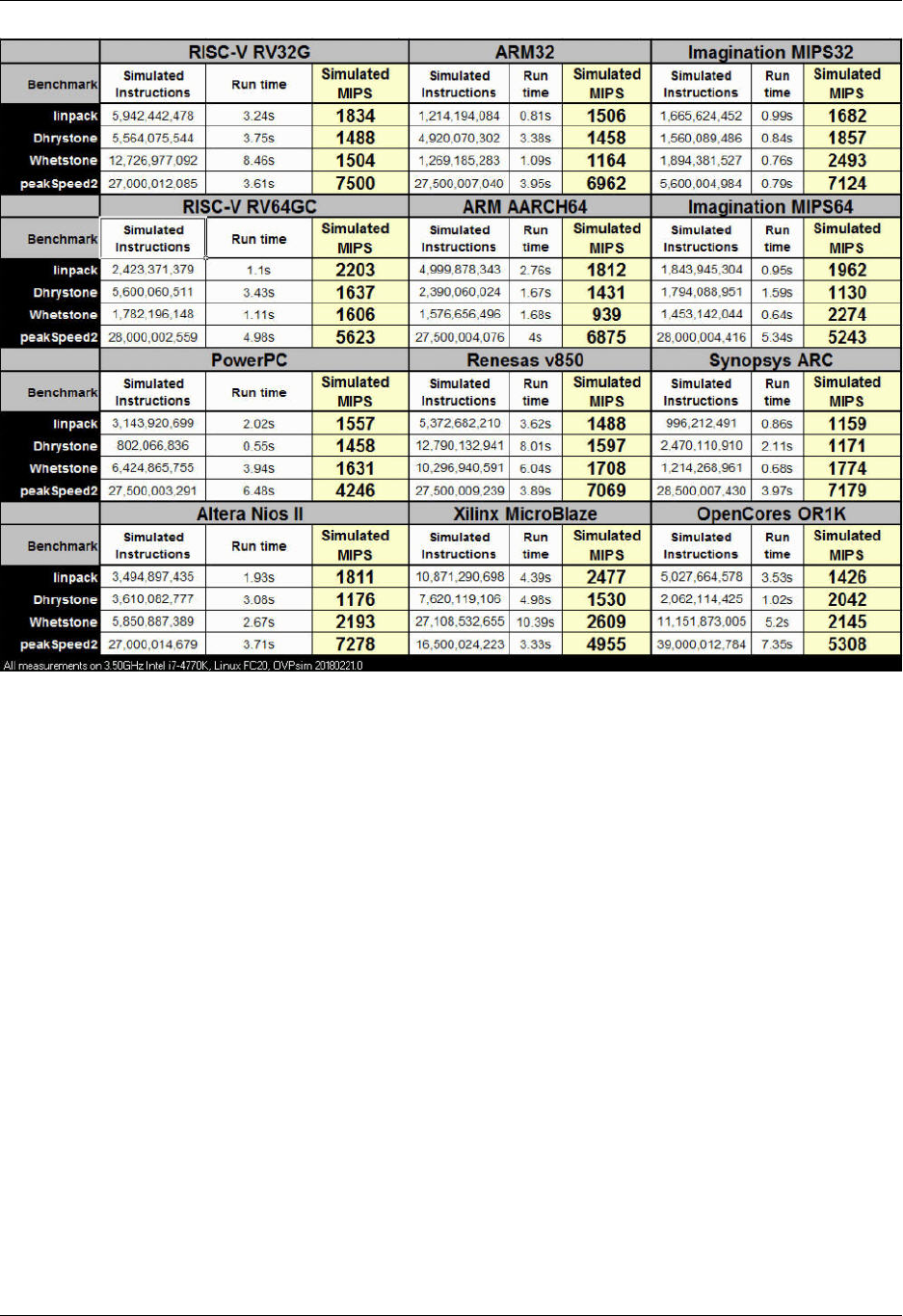
riscvOVPsim: RISC-V Processor Model Simulator User Guide
Imperas decided to open up this technology and OVP is the vehicle to make it public.
OVP has three main components - the OVP APIs that enable a C model to be written, a library
of free open source processor and peripheral models, and OVPsim a fast, easy to download and use
reference simulator that executes these models.
There is also the iGen Model Building Wizard that is part of the OVP download and makes it easy
to create platforms and models.
With OVP you can put together a simulation model of a platform, compile it to an executable,
and connect it to your debugger to provide a very efficient fast embedded software development
environment.
To read more about OVP visit: Why?,Virtual Platforms?,Rationale?,Continuous Integration,
Partners,Licensing,Downloading.
Copyright (c) 2018 Imperas Software Ltd
OVP License. Release 99999999
www.ovpworld.org
Page 39 of 45

Appendix E
Information on Imperas Software
tools
For the last 10 years Imperas Software Limited has been developing simulation technology, models,
and tools to assist embedded software developers getting their software written, tested, and
debugged.
For information on the Imperas Advanced Multicore Software Development Kit (M*SDK), the
CPU Model Generator (cpuGen), Virtual Platform Simulation Acceleration (QuantumLeap), the
Instruction Set Simulator (ISS), Virtual Platform Development and Simulation (C*DEV, S*DEV,
M*DEV), or RISC-V solutions (RISC-V) - please visit: www.imperas.com/products.
To read about how Imperas solutions accelerate Embedded Software Development,
how developers use simulation of virtual platforms in their continuous integration
environments, and how automotive users adopt simulation for failsafe reliability
verification - please visit: www.imperas.com/solutions. There are several case studies:
www.imperas.com/imperas-case-studies.
To find out more about Imperas have a look at some of the many videos:
www.imperas.com/imperas-videos.
40
Appendix F
Imperas License governing use of
riscvOVPsim
Imperas Open Virtual Platforms Fixed Platform Technology
License for Fixed Platform Kits. Revised May 2018.
Imperas Software Limited.
Software License Agreement
This is a legal agreement between you, the user (“Licensee”) and Imperas Software Limited
(“Imperas”). By downloading any Imperas Software Program including Binaries, Executables, and
Application Programming Interfaces (“Software”) from the internet, or by otherwise installing or
using the Software, Licensee agrees to be bound by the terms of this Software License Agreement
(the “Agreement”).
If you do not agree to the terms on this licensee, you may not install, use or copy the
software, and return the software to your supplier for a refund of any license fee paid (if any).
If Licensee is obtaining an update, then the term “Software” also includes, and the terms
and conditions of this Agreement also apply to, any pre-existing Software and data provided within
earlier Software releases, to the extent such earlier Software and data is retained by, embodied in
or in any way used or accessed by the upgraded Software provided with this Agreement.
1) License for Software
Imperas grants to Licensee, a nonexclusive, nontransferable right to use the Software for a period
of one year from the date of this release or until the Software expires (if earlier).
41

riscvOVPsim: RISC-V Processor Model Simulator User Guide
2) Copyright
Licensee shall not copy the Software, in whole or in part, except as necessary to archive such
Software in accordance with the terms and conditions contained herein. All copies of the Software
will be subject to all of the terms and conditions of this Agreement. Whenever Licensee is permitted
to copy all or any part of the Software, all titles, trademark symbols, copyright symbols and legends
and other proprietary markings must be reproduced. Licensee may not copy any part of the
documentation, nor modify, adapt, translate into any language, or create derivative works based
on the documentation without the prior written consent of Imperas.
3) Ownership
Imperas retains all right, title, and interest in the Software and documentation (and any copy
thereof), and reserves all rights not expressly granted to Licensee. This License is not a sale of the
original Software or of any copy.
4) Restrictions
This Software is licensed to Licensee for internal use only. Licensee acknowledges that the scope
of the licenses granted hereunder do not permit Licensee (and Licensee shall not allow any third
party) to:
(i) Decompile, disassemble, reverse engineer or attempt to reconstruct, identify or discover any
source code, underlying ideas, underlying user interface techniques or algorithms of the
Software by any means whatever, or disclose any of the foregoing;
(ii) Modify, incorporate into or with other Software, or create a derivative work of any part of
the Software;
(iii) Disclose the results of any benchmarking of the Software, or use such results for its own
competing Software development activities, without the prior written permission of Imperas.
5) Transfer, Distribution
Licensee shall not sublicense, transfer or assign this Agreement or any of the rights or licenses
granted under this Agreement, without the prior written consent of Imperas. Licensee shall not
redistribute or otherwise provide the Software to any third party.
6) Termination
Imperas may terminate this Agreement or any license granted under it, without notice, in the event
of breach or default by Licensee. Upon termination, Licensee will relinquish all rights under this
Agreement, and must cease using the Software and return or destroy, at Imperas’ discretion, all
copies (and partial copies) of the Software and documentation, and if destroyed, provide written
certification of destruction. The provisions of sections 2, 3, 6, 9 and 11 shall survive any termination
of this Agreement.
Copyright (c) 2018 Imperas Software Ltd
OVP License. Release 99999999
www.ovpworld.org
Page 42 of 45

riscvOVPsim: RISC-V Processor Model Simulator User Guide
7) Export
Licensee agrees not to allow the Software to be sent or used in any country except in compliance
with applicable U.K. and US laws and regulations.
8) Warranty and Disclaimer
8.1 Limited Warranty
Imperas warrants that the Software will perform substantially in accordance with the accompanying
documentation for a period of ninety (90) days from the date of receipt, provided that it is used
in accordance with the product documentation provided by Imperas, that all associated products
(such as hardware, Software, firmware and the like) used in combination with the Software properly
exchange date data with it, and that Licensee is covered under a services or maintenance agreement
with Imperas regarding the Software.
Imperas’ entire liability and Licensee’s exclusive remedy for a breach of the preceding limited
warranties shall be, at Imperas’ option, either (a) return of the license fee, or (b) providing a fix,
patch, or replacement of the Software that does not meet such limited warranty. Any replacement
will be warranted for the remainder of the original warranty period or 30 days, whichever is longer.
8.2 Disclaimer
EXCEPT AS EXPRESSLY SET FORTH ABOVE, NO OTHER WARRANTIES OR
CONDITIONS, EITHER EXPRESSED OR IMPLIED, ARE MADE BY IMPERAS WITH
RESPECT TO THE SOFTWARE AND THE ACCOMPANYING DOCUMENTATION
(STATUTORY OR OTHERWISE), AND IMPERAS EXPRESSLY DISCLAIMS ALL
WARRANTIES AND CONDITIONS NOT EXPRESSLY STATED HEREIN, INCLUDING
BUT NOT LIMITED TO THE IMPLIED WARRANTIES OR CONDITIONS OF
MERCHANTABILITY, NONINFRINGEMENT, AND FITNESS FOR A PARTICULAR
PURPOSE. IMPERAS DOES NOT WARRANT THAT THE FUNCTIONS CONTAINED IN
THE SOFTWARE WILL MEET LICENSEE’S REQUIREMENTS, BE UNINTERRUPTED OR
ERROR FREE, OR THAT ALL DEFECTS IN THE PROGRAM WILL BE CORRECTED.
Licensee assumes the entire risk as to the results and performance of the Software.
9) Limitation of Liability
LICENSEE AGREES THAT IN NO EVENT SHALL IMPERAS OR ITS AGENTS BE
LIABLE FOR ANY INDIRECT, SPECIAL, CONSEQUENTIAL OR INCIDENTAL DAMAGES
WHATSOEVER (INCLUDING, WITHOUT LIMITATION, DAMAGES FOR LOSS OF
BUSINESS PROFITS, BUSINESS INTERRUPTIONS, LOSS OF BUSINESS INFORMATION,
OR OTHER PECUNIARY LOSS) ARISING OUT OF USE OF OR INABILITY TO USE THESE
IMPERAS PRODUCTS, EVEN IF IMPERAS HAS BEEN ADVISED OF THE POSSIBILITY
OF SUCH DAMAGES.
Copyright (c) 2018 Imperas Software Ltd
OVP License. Release 99999999
www.ovpworld.org
Page 43 of 45

riscvOVPsim: RISC-V Processor Model Simulator User Guide
In no event will Imperas be liable to Licensee for damages in an amount greater than the
fees paid for the use of the Software.
10) Indemnity
In the event that a claim alleging infringement of an intellectual property right arises concerning
the Software (including but not limited to patent, trade secret, copyright or trademark rights),
Imperas in its sole discretion may elect to defend or settle such claim. Imperas in the event of such
a claim may also in its sole discretion elect to terminate this Agreement and all rights to use the
Software, and require the return or destruction of the Software, with a refund of the fees paid for
use of the Software less a reasonable allowance for use.
11) Miscellaneous
If Licensee is a corporation, partnership or similar entity, then the license to the Software that
is granted under this Agreement is expressly conditioned upon acceptance by a person who is
authorized to sign for and bind the entity. This Agreement is the entire agreement between
Licensee and Imperas with respect to the license to the Software, and supersedes any previous
oral or written communications or documents (including, if you are obtaining an update, any
agreement that may have been included with the initial version of the Software). This Agreement
is with Imperas Software Limited, a company registered in England # 6779752 having its registered
office at North Weston Thame OX9 2HA, U.K. and will be construed, interpreted, and applied in
accordance with the laws of England and Wales (excluding its body of law controlling conflicts
of law). This Agreement is the complete and exclusive statement regarding the subject matter of
this Agreement and supersedes all prior agreements, understandings and communications, oral or
written, except a valid Software License Agreement, between the parties regarding the subject
matter of this Agreement. This Agreement will not be governed by the U.N. Convention on
Contracts for the International Sale of Goods. If any provision of this Agreement is found to
be invalid or unenforceable, it will be enforced to the extent permissible and the remainder of this
Agreement will remain in full force and effect. Failure to prosecute a party’s rights with respect to
a default hereunder will not constitute a waiver of the right to enforce rights with respect to the
same or any other breach.
12) U.S. Government Users
Use, reproduction, release, modification, or disclosure of this commercial computer Software, or of
any related documentation of any kind, is restricted in accordance with FAR 12.212 and DFARS
227.7202, and further restricted by this License Agreement.
13) Bugs and Issues
It is a condition of use of the Software that you promptly report any bugs or issues to
support@imperas.com; any modifications to the Software, Documentation, or related models arising
out of any such report shall be the sole property of Imperas.
Copyright (c) 2018 Imperas Software Ltd
OVP License. Release 99999999
www.ovpworld.org
Page 44 of 45

riscvOVPsim: RISC-V Processor Model Simulator User Guide
14) Publicity
Imperas may at its discretion include your organization in its published list of users.
Imperas Privacy Statement may be found at this link http://www.imperas.com/privacy-statement
.
15) Third Party Software
A deliverable may include third party software and usage of these are covered by their own
appropriate licenses.
(License for Fixed Platform Kits. Revised May 2018.) #
Copyright (c) 2018 Imperas Software Ltd
OVP License. Release 99999999
www.ovpworld.org
Page 45 of 45
