S10060 Quick Setup Guide
User Manual:
Open the PDF directly: View PDF  .
.
Page Count: 2
Color Wireless Surveillance System
with Indoor/Outdoor Night Vision Camera(s)
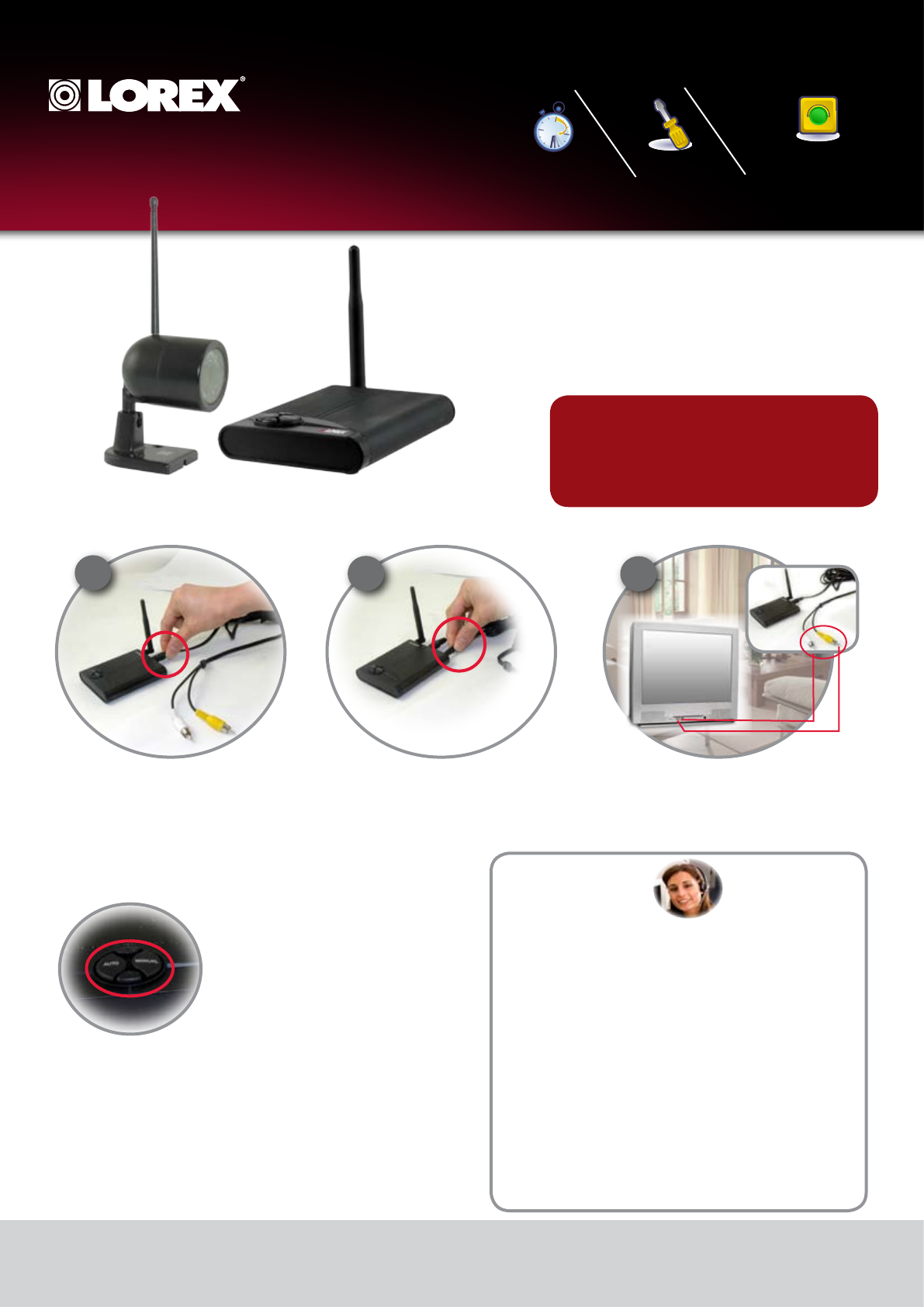
1 x Wireless Receiver
1 x Power Adaptor (for receiver)
1 x RCA Video Cable
Camera Battery Adaptor Cable(s)*
Wireless Camera(s)*
Power Adaptor(s) (for camera*)
Includes:
How to use the Control Buttons:
AUTO BUTTON – When the receiver is
set to AUTO Mode, it will continuously
switch between the cameras that are set
to ON. The dwell time is set to 4 seconds
per camera (by default), however this can
be adjusted to 2~30 seconds. To adjust
the dwell time, press and hold both the
AUTO and MANUAL buttons at the same
time – this will produce beeps indicating
one second increments (i.e. each beep
represents one second in dwell time). Once
the desired dwell time has been reached,
release the buttons.
MANUAL BUTTON – Press the MANUAL
button to switch between available cam-
eras. The Receiver will switch to a different
camera (if available and configured) each
time the MANUAL button is pressed.
* Number of cameras may vary by model. Check your
package for specific content information.
* Connect power adapter to local 120V AC power outlet
* 1 of each provided with the LW1010 System/ 2 of each
provided with the LW1012 System.
** Requires viewing/recording device with RCA. Viewing/Recording device sold separately
***Additional receivers and/or cameras sold separately. See product manual for details
*
Connect one end of the AV Cable to the back
of the receiver. Connect the other end to the
Video IN (Yellow) and Audio IN (White) ports
on the TV or Monitor for viewing and VCR or
DVD Recorder for recording
Step 1 - Wireless Receiver Set-up Installation
Plug the Receiver power cable into the
9V POWER input. Plug the power adaptor
into a wall outlet or surge protector.
Place the receiver in a place that will have
clear reception to your camera(s). Try to
avoid placing the receiver near other 900MHz
devices (such as older cordless phones, etc.)
LW1010/LW1012
Quick Start Guide_EN_R1 - Page 1
Skill Level
Intermediate
easy advanced
Time
under 30 minutesunder 15 minutes under 60 minutes
Hand Tools Hardware
Router
Hi Speed
over 60 minutes
Skill Level
Intermediate
easy advanced
Time
under 30 minutesunder 15 minutes under 60 minutes
Hand Tools Hardware
Router
Hi Speed
over 60 minutes
Time Tools Skills - Easy
Under 15 Minutes* Hand Tools Plug & Play connectors, On
screen set up
* Installation time may vary based on application
and camera cabling
123
TV (not included)
Helpful Tips:
• Use of other 900MHz products (including older model cordless phones) may
cause interference with the picture quality. Try changing the channels on
the Receiver and Camera, or moving the interfering device to another area.
• Better reception can often be accomplished by changing the position of the
Receiver unit -or-changing the position of the Camera.
• The Receiver is a wireless product, and is subject to a number of
environmental conditions. Walking between the receiver and camera may
cause temporary interference.
• The optimal distance of the camera (during low light / nighttime use) from
the person or object is 4~6 feet (up to 2 meters). The picture may become
grainy beyond this distance due to lack of light –an additional light source
in the room, such as a night light or illuminator may improve the picture
quality.
• During low light / night use, the closer the Receiver is to the Camera, the
better the picture quality. The picture may become grainy at farther
distances. The optimal distance for normal home use is 15~60 feet (3~18
meters), however the MAXIMUM RANGE is up to 300feet in optimal
conditions.
• Audio feedback may appear when the receiver and cameras are too close
(under 15 feet / 3 meters).
©2008 Lorex Technology Inc.
As our product is subject to continuous improvement, Lorex Technology & subsidiaries reserve the right to
modify product design, specifications & prices without notice and without incurring any obligation. E&OE
Step 2 - Wireless Camera Installation
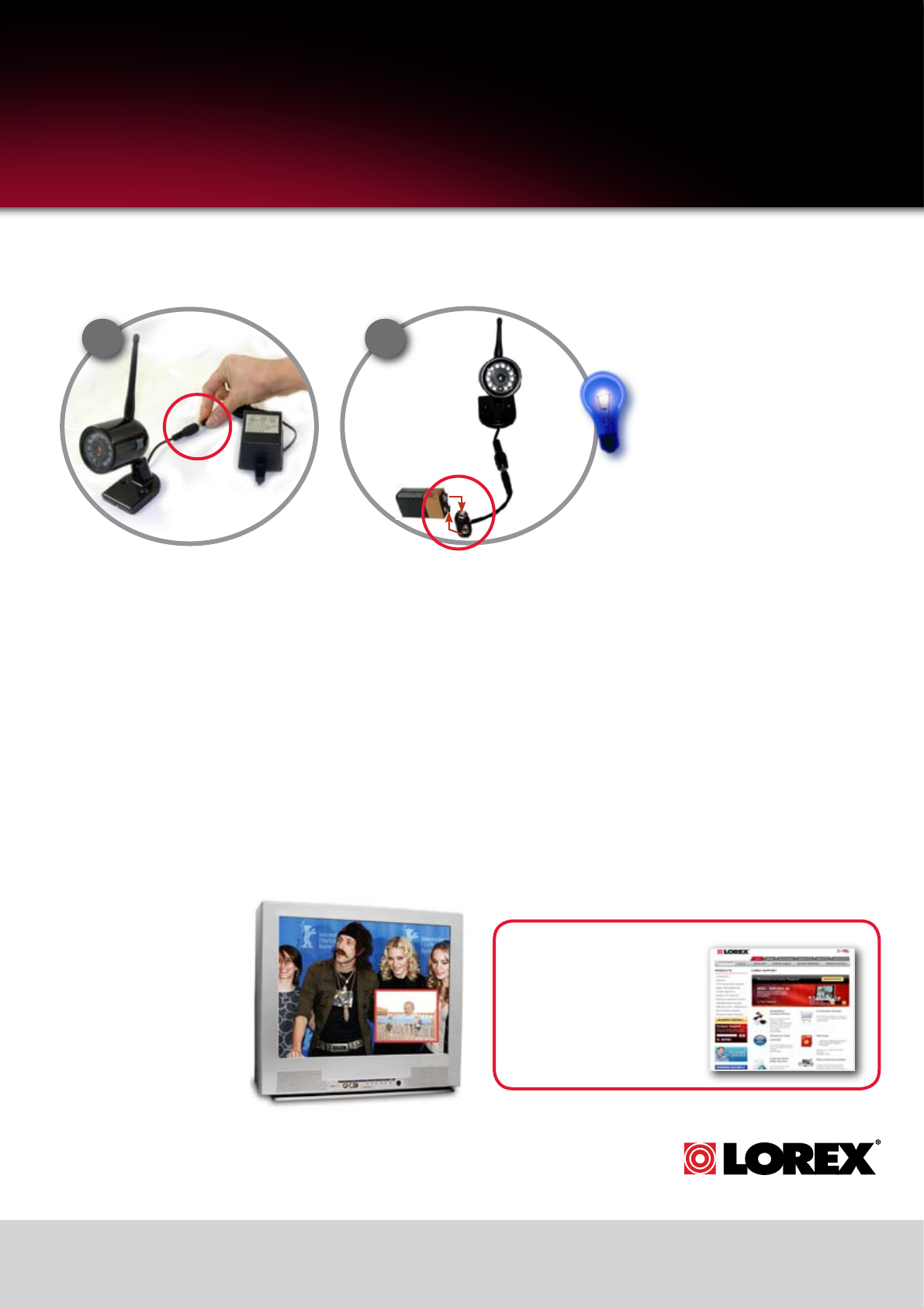
The Camera can be powered either by using the
provided Power Adaptor, or using a 9V battery (not
included) in combination with the Battery Adaptor
Cable.
Connecting Camera to Power Adaptor
Connect the Power Adaptor to the Female
Barrel Power termination on the camera.
NOTE: Before you install the camera(s),
carefully plan where and how it will be
positioned, and where you will route the
cable that connects the camera to the power
adaptor or battery adaptor. Before starting
permanent installation, verify its perfor-
mance by observing the image on a monitor.
When camera is positioned in same loca-
tion/position where it will be permanently
installed.
NOTE: Wireless cameras require a power
source (either an electrical outlet or battery
power) to operate. If you plan to perma-
nently mount the camera in a location, it is
recommended to use the included Camera
Power adaptor to prevent interruptions in the
image, as the battery adaptor is intended as
a temporary power solution.
1 2
Connecting Camera to the
Battery Adaptor Cable (optional)
Connect the Camera Battery Adaptor
cable to the Female Barrel Power
termination on the camera. Connect a
battery to the cable.
NOTE: The new 9V battery should last
for approximately 4 hours without the
IR LEDs in use.
Did you know?
You can move your camera around
the house or from one room to
another with the use of the included
battery adaptor cable.
LW1010/LW1012
Quick Start Guide_EN_R1 - Page 2
www.lorexcctv.com
Color Wireless Surveillance System
with Indoor/Outdoor Night Vision Camera(s)
Step 3 - Viewing your System
Turn on TV or Observation
Monitor, and switch the video
channel that the receiver has
been connected to.
Tip: If your TV has a PIP
feature, you can have the
camera images displayed in
the PIP window. Check your
TV manual for info on PIP
feature (if available).
It’s all on the Web
For detailed setup information,
please refer to your User’s Manual.
For additional information, please
visit our website
www.lorexcctv.com/support
www.lorexcctv.com
