Salabim Manual
User Manual:
Open the PDF directly: View PDF  .
.
Page Count: 139 [warning: Documents this large are best viewed by clicking the View PDF Link!]
Docs »
Documentation for
salabim
Documentation for salabim
Introduction
Requirements
Installation
Python
Modeling
A simple model
A bank example
A bank office example with resources
The bank office example with balking and reneging
The bank office example with balking and reneging (resources)
The bank office example with states
The bank office example with standby
Component
Process interaction
interrupt
Usage of process interaction methods within a function or method
Queue
Resource
State
Process interaction with wait()
Monitor and MonitorTimestamp
Monitor
MonitorTimestamp
Distributions
Beta
Constant
Erlang
Gamma
Exponential
IntUniform
Normal
Poisson
Triangular
Uniform
Weibull
Cdf
Pdf
Distribution
Animation
Advanced
Class Animate
Video production and snapshots
Reading items from a file
Reference
Animation
Distributions
salabim
Next
Component
Environment
ItemFile
Monitor
MonitorTimestamp
Queue
Resource
State
Miscellaneous
About
Who is behind salabim?
Why is the package called salabim?
Contributing and reporting issues
Support
License
Indices and tables
© Copyright 2018, Ruud van der Ham.
Built with Sphinx using a theme provided by Read the Docs.
Docs » Introduction
Introduction
Salabim is a package for discrete event simulation in Python. It follows the methodology of process
description as originally demonstrated in Simula and later in Prosim, Must and Tomas.
It is also quite similar to SimPy 2.
The package comprises discrete event simulation, queue handling, resources, statistical sampling and
monitoring. On top of that real time animation is built in.
The package comes with a number of sample models.
Requirements
Salabim runs on
CPython
PyPy platform
Pythonista (iOS)
The package runs under Python 2.7 or 3.x.
The following packages are required:
Platform Base functionality Animation Video (mp4, avi) Animated GIF
CPython Pillow, tkinter opencv, numpy PIL
PyPy Pillow, tkinter N/A PIL
Pythonista Pillow N/A
Several CPython packages, like WinPython support Pillow out of the box. If not, install with:
pip install Pillow
Under Linux, PIL can be installed with:
sudo apt-get purge python3-pil
sudo apt-get install python3-pil python3-pil.imagetk
For, video production, installation of opencv and numpy may be required with
pip install opencv-python
pip install numpy
Running models under PyPy is highly recommended for production runs, where run time is important. We
have found 6 to 7 times faster execution compared to CPython. However, for development, nothing can
beat CPython or Pythonista.
Installation
The preferred way to install salabim is from PyPI with:
salabim

Next
pip install salabim
or to upgrade to a new version:
pip install salabim --upgrade
You can find the package along with some support files and sample models on
www.github.com/salabim/salabim. From there you can directly download as a zip file and next extract all
files. Alternatively the repository can be cloned.|n|
For Pythonista, the easiest way to download salabim is:
Tap ‘Open in…’.
Tap ‘Run Pythonista Script’.
Pick this script and tap the run button
Import file
Possibly after short delay, there will be a salabim-master.zip file in the root directory
Tap this zip file and Extract files
All files are now in a directory called salabim-master
Optionally rename this directory to salabim
Salabim itself is provided as one Python script, called salabim.py. You may place that file in any directory
where your models reside.
If you want salabim to be available from other directories, without copying the salabim.py script, run the
supplied install.py file. In doing so, you will create (or update) a salabim directory in the site-package
directory, which will contain a copy of the salabim package.
Python
Python is a widely used high-level programming language for general-purpose programming, created by
Guido van Rossum and first released in 1991. An interpreted language, Python has a design philosophy
that emphasizes code readability (notably using whitespace indentation to delimit code blocks rather than
curly brackets or keywords), and a syntax that allows programmers to express concepts in fewer lines of
code than might be used in languages such as C++ or Java. The language provides constructs intended to
enable writing clear programs on both a small and large scale.
A good way to start learning about Python is https://www.python.org/about/gettingstarted/
Previous
© Copyright 2018, Ruud van der Ham.
Built with Sphinx using a theme provided by Read the Docs.

Docs » Modeling
Modeling
A simple model
Let’s start with a very simple model, to demonstrate the basic structure, process interaction, component
definition and output:
1
2
3
4
5
6
7
8
9
10
11
# Example - basic.py
import salabim as sim
class Car(sim.Component):
def process(self):
while True:
yield self.hold(1)
env = sim.Environment(trace=True)
Car()
env.run(till=5)
In basic steps:
We always start by importing salabim
import salabim as sim
Now we can refer to all salabim classes and function with sim. . For convenience, some functions or
classes can be imported with, for instance
from salabim import now, main, Component
It is also possible to import all methods, classes and globals by
from salabim import *
, but we do not recommend that method.
The main body of every salabim model usually starts with
env = sim.Environment(parameters)
For each (active) component we define a class as in
class Car(sim.Component):
The class inherits from sim.Component.
Although it is possible to define other processes within a class, the standard way is to define a generator
function called process in the class. A generator is a function with at least one yield statement. These are
used in salabim context as a signal to give control to the sequence mechanism.
salabim

In this example,
yield self.hold(1)
gives control,to the sequence mechanism and comes back after 1 time unit. The self. part means that it is
this component to be held for some time. We will see later other uses of yield like passivate, request, wait
and standby.
In the main body an instance of a car is created by Car(). It automatically gets the name car.0. As there is a
generator function called process in Car, this process description will be activated (by default at time now,
which is 0 here). It is possible to start a process later, but this is by far the most common way to start a
process.
With
env.run(till=5)
we start the simulation and get back control after 5 time units. A component called main is defined under
the hood to get access to the main process.
When we run this program, we get the following output
line# time current component action information
----- ---------- -------------------- ----------------------------------- ------------------------------------------------
line numbers refers to Example - basic.py
11 default environment initialize
11 main create
11 0.000 main current
12 car.0 create
12 car.0 activate scheduled for 0.000 @ 6 process=process
13 main run scheduled for 5.000 @ 13+
6 0.000 car.0 current
8 car.0 hold scheduled for 1.000 @ 8+
8+ 1.000 car.0 current
8 car.0 hold scheduled for 2.000 @ 8+
8+ 2.000 car.0 current
8 car.0 hold scheduled for 3.000 @ 8+
8+ 3.000 car.0 current
8 car.0 hold scheduled for 4.000 @ 8+
8+ 4.000 car.0 current
8 car.0 hold scheduled for 5.000 @ 8+
13+ 5.000 main current
A bank example
Now let’s move to a more realistic model. Here customers are arriving in a bank, where there is one clerk.
This clerk handles the customers in first in first out (FIFO) order. We see the following processes:
The customer generator that creates the customers, with an inter arrival time of uniform(5,15)
The customers
The clerk, which serves the customers in a constant time of 30 (overloaded and non steady state
system)
And we need a queue for the customers to wait for service.
The model code is:

1
2
3
4
5
6
7
8
9
10
11
12
13
14
15
16
17
18
19
20
21
22
23
24
25
26
27
28
29
30
31
32
33
34
35
36
37
38
# Example - bank, 1 clerk.py
import salabim as sim
class CustomerGenerator(sim.Component):
def process(self):
while True:
Customer()
yield self.hold(sim.Uniform(5, 15).sample())
class Customer(sim.Component):
def process(self):
self.enter(waitingline)
if clerk.ispassive():
clerk.activate()
yield self.passivate()
class Clerk(sim.Component):
def process(self):
while True:
while len(waitingline) == 0:
yield self.passivate()
self.customer = waitingline.pop()
yield self.hold(30)
self.customer.activate()
env = sim.Environment(trace=True)
CustomerGenerator(name='') # using name='' prevents the name customergenerator to be serialized
clerk = Clerk()
waitingline = sim.Queue('waitingline')
env.run(till=50)
print()
waitingline.print_statistics()
Let’s look at some details
yield self.hold(sim.Uniform(5, 15).sample())
will do the statistical sampling and wait for that time till the next customer is created.
With
self.enter(waitingline)
the customer places itself at the tail of the waiting line.
Then, the customer checks whether the clerk is idle, and if so, activates him immediately.
while clerk.ispassive():
clerk.activate()
Once the clerk is active (again), it gets the first customer out of the waitingline with
self.customer = waitingline.pop()
and holds for 30 time units with
yield self.hold(30)
After that hold the customer is activated and will terminate

self.customer.activate()
In the main section of the program, we create the CustomerGenerator, the Clerk and a queue called
waitingline. After the simulation is finished, the statistics of the queue are presented with
waitingline.print_statistics()
The output looks like

line# time current component action information
----- ---------- -------------------- ----------------------------------- ------------------------------------------------
line numbers refers to Example - bank, 1 clerk.py
30 default environment initialize
30 main create
30 0.000 main current
32 customergenerator create
32 customergenerator activate scheduled for 0.000 @ 6 process=process
33 clerk.0 create
33 clerk.0 activate scheduled for 0.000 @ 21 process=process
34 waitingline create
36 main run scheduled for 50.000 @ 36+
6 0.000 customergenerator current
8 customer.0 create
8 customer.0 activate scheduled for 0.000 @ 13 process=process
9 customergenerator hold scheduled for 14.631 @ 9+
21 0.000 clerk.0 current
24 clerk.0 passivate
13 0.000 customer.0 current
14 customer.0 enter waitingline
16 clerk.0 activate scheduled for 0.000 @ 24+
17 customer.0 passivate
24+ 0.000 clerk.0 current
25 customer.0 leave waitingline
26 clerk.0 hold scheduled for 30.000 @ 26+
9+ 14.631 customergenerator current
8 customer.1 create
8 customer.1 activate scheduled for 14.631 @ 13 process=process
9 customergenerator hold scheduled for 21.989 @ 9+
13 14.631 customer.1 current
14 customer.1 enter waitingline
17 customer.1 passivate
9+ 21.989 customergenerator current
8 customer.2 create
8 customer.2 activate scheduled for 21.989 @ 13 process=process
9 customergenerator hold scheduled for 32.804 @ 9+
13 21.989 customer.2 current
14 customer.2 enter waitingline
17 customer.2 passivate
26+ 30.000 clerk.0 current
27 customer.0 activate scheduled for 30.000 @ 17+
25 customer.1 leave waitingline
26 clerk.0 hold scheduled for 60.000 @ 26+
17+ 30.000 customer.0 current
customer.0 ended
9+ 32.804 customergenerator current
8 customer.3 create
8 customer.3 activate scheduled for 32.804 @ 13 process=process
9 customergenerator hold scheduled for 40.071 @ 9+
13 32.804 customer.3 current
14 customer.3 enter waitingline
17 customer.3 passivate
9+ 40.071 customergenerator current
8 customer.4 create
8 customer.4 activate scheduled for 40.071 @ 13 process=process
9 customergenerator hold scheduled for 54.737 @ 9+
13 40.071 customer.4 current
14 customer.4 enter waitingline
17 customer.4 passivate
36+ 50.000 main current
Statistics of waitingline at 50
all excl.zero zero
-------------------------------------------- -------------- ------------ ------------ ------------
Length of waitingline duration 50 35.369 14.631
mean 1.410 1.993
std.deviation 1.107 0.754
minimum 0 1
median 2 2
90% percentile 3 3
95% percentile 3 3
maximum 3 3
Length of stay in waitingline entries 2 1 1
mean 7.684 15.369
std.deviation 7.684 0
minimum 0 15.369
median 15.369 15.369
90% percentile 15.369 15.369
95% percentile 15.369 15.369
maximum 15.369 15.369
Now, let’s add more clerks. Here we have chosen to put the three clerks in a list
clerks = [Clerk() for _ in range(3)]
although in this case we could have also put them in a salabim queue, like

clerks = sim.Queue('clerks')
for _ in range(3):
Clerk().enter(clerks)
And, to restart a clerk
for clerk in clerks:
if clerk.ispassive():
clerk.activate()
break # reactivate only one clerk
The complete source of a three clerk post office:
# Example - bank, 3 clerks.py
import salabim as sim
class CustomerGenerator(sim.Component):
def process(self):
while True:
Customer()
yield self.hold(sim.Uniform(5, 15).sample())
class Customer(sim.Component):
def process(self):
self.enter(waitingline)
for clerk in clerks:
if clerk.ispassive():
clerk.activate()
break # activate only one clerk
yield self.passivate()
class Clerk(sim.Component):
def process(self):
while True:
while len(waitingline) == 0:
yield self.passivate()
self.customer = waitingline.pop()
yield self.hold(30)
self.customer.activate()
env = sim.Environment(trace=False)
CustomerGenerator(name='')
clerks = [Clerk() for _ in range(3)]
waitingline = sim.Queue('waitingline')
env.run(till=50000)
waitingline.print_histograms()
waitingline.print_info()
A bank office example with resources
The salabim package contains another useful concept for modelling: resources. Resources have a limited
capacity and can be claimed by components and released later.
In the model of the bank with the same functionality as the above example, the clerks are defined as a
resource with capacity 3.
The model code is:

# Example - bank, 3 clerks (resources).py
import salabim as sim
class CustomerGenerator(sim.Component):
def process(self):
while True:
Customer()
yield self.hold(sim.Uniform(5, 15).sample())
class Customer(sim.Component):
def process(self):
yield self.request(clerks)
yield self.hold(30)
self.release()
env = sim.Environment(trace=False)
CustomerGenerator(name='customergenerator')
clerks = sim.Resource('clerks', capacity=3)
env.run(till=50000)
clerks.print_histograms()
clerks.print_info()
Let’s look at some details.
clerks = sim.Resource('clerks', capacity=3)
This defines a resource with a capacity of 3.
And then, a customer, just tries to claim one unit (=clerk) from the resource with
yield self.request(clerks)
Here, we use the default of 1 unit. If the resource is not available, the customer just waits for it to become
available (in order of arrival).
In contrast with the previous example, the customer now holds itself for 10 time units.
And after these 10 time units, the customer releases the resource with
self.release()
The effect is that salabim then tries to honor the next pending request, if any.
The statistics are maintained in a system queue, called clerk.requesters().
The output is very similar to the earlier example. The statistics are exactly the same.
The bank office example with balking and reneging
Now, we assume that clients are not going to the queue when there are more than 5 clients waiting
(balking). On top of that, if a client is waiting longer than 50, he/she will leave as well (reneging).
The model code is:

# Example - bank, 3 clerks, reneging.py
import salabim as sim
class CustomerGenerator(sim.Component):
def process(self):
while True:
Customer()
yield self.hold(sim.Uniform(5, 15).sample())
class Customer(sim.Component):
def process(self):
if len(waitingline) >= 5:
env.number_balked += 1
env.print_trace('', '', 'balked')
yield self.cancel()
self.enter(waitingline)
for clerk in clerks:
if clerk.ispassive():
clerk.activate()
break # activate only one clerk
yield self.hold(50) # if not serviced within this time, renege
if self in waitingline:
self.leave(waitingline)
env.number_reneged += 1
env.print_trace('', '', 'reneged')
else:
yield self.passivate() # wait for service to be completed
class Clerk(sim.Component):
def process(self):
while True:
while len(waitingline) == 0:
yield self.passivate()
self.customer = waitingline.pop()
self.customer.activate() # get the customer out of it's hold(50)
yield self.hold(30)
self.customer.activate() # signal the customer that's all's done
env = sim.Environment(trace=False)
CustomerGenerator(name='customergenerator')
env.number_balked = 0
env.number_reneged = 0
clerks = [Clerk() for _ in range(3)]
waitingline = sim.Queue('waitingline')
waitingline.length.monitor(False)
env.run(duration=1500) # first do a prerun of 1500 time units without collecting data
waitingline.length.monitor(True)
env.run(duration=1500) # now do the actual data collection for 1500 time units
waitingline.length.print_histogram(30, 0, 1)
print()
waitingline.length_of_stay.print_histogram(30, 0, 10)
print('number reneged', env.number_reneged)
print('number balked', env.number_balked)
Let’s look at some details.
yield self.cancel()
This makes the current component (a customer) a data component (and be subject to garbage collection), if
the queue length is 5 or more.
The reneging is implemented by a hold of 50. If a clerk can service a customer, it will take the customer out
of the waitingline and will activate it at that moment. The customer just has to check whether he/she is
still in the waiting line. If so, he/she has been serviced in time and thus will renege.
yield self.hold(50)
if self in waitingline:
self.leave(waitingline)
env.number_reneged += 1
else:
self.passivate()
All the clerk has to do when starting servicing a client is to get the next customer in line out of the queue
(as before) and activate this customer (at time now). The effect is that the hold of the customer will end.

self.customer = waitingline.pop()
self.customer.activate()
The bank office example with balking and reneging (resources)
Now we show how the balking and reneging is implemented with resources.
The model code is:
# Example - bank, 3 clerks, reneging (resources).py
import salabim as sim
class CustomerGenerator(sim.Component):
def process(self):
while True:
Customer()
yield self.hold(sim.Uniform(5, 15).sample())
class Customer(sim.Component):
def process(self):
if len(clerks.requesters()) >= 5:
env.number_balked += 1
env.print_trace('', '', 'balked')
yield self.cancel()
yield self.request(clerks, fail_delay=50)
if self.failed():
env.number_reneged += 1
env.print_trace('', '', 'reneged')
else:
yield self.hold(30)
self.release()
env = sim.Environment(trace=False)
CustomerGenerator(name='customergenerator')
env.number_balked = 0
env.number_reneged = 0
clerks = sim.Resource('clerk', 3)
env.run(till=50000)
clerks.requesters().length.print_histogram(30, 0, 1)
print()
clerks.requesters().length_of_stay.print_histogram(30, 0, 10)
print('number reneged', env.number_reneged)
print('number balked', env.number_balked)
As you can see, the balking part is exactly the same as in the example without resources.
For the renenging, all we have to do is add a fail_delay
yield self.request(clerks, fail_delay=50)
If the request is not honored within 50 time units, the process continues after that request statement. And
then, we just check whether the request has failed
if self.failed():
env.number_reneged += 1
This example shows clearly the advantage of the resource solution over the passivate/activate method, in
this example.
The bank office example with states
The salabim package contains yet another useful concept for modelling: states. In this case, we define a
state called worktodo.
The model code is:

# Example - bank, 3 clerks (state).py
import salabim as sim
class CustomerGenerator(sim.Component):
def process(self):
while True:
Customer()
yield self.hold(sim.Uniform(5, 15).sample())
class Customer(sim.Component):
def process(self):
self.enter(waitingline)
worktodo.trigger(max=1)
yield self.passivate()
class Clerk(sim.Component):
def process(self):
while True:
if len(waitingline) == 0:
yield self.wait(worktodo)
self.customer = waitingline.pop()
yield self.hold(30)
self.customer.activate()
env = sim.Environment(trace=False)
CustomerGenerator(name='customergenerator')
for i in range(3):
Clerk()
waitingline = sim.Queue('waitingline')
worktodo = sim.State('worktodo')
env.run(till=50000)
waitingline.print_histograms()
worktodo.print_histograms()
Let’s look at some details.
worktodo = sim.State('worktodo')
This defines a state with an initial value False.
In the code of the customer, the customer tries to trigger one clerk with
worktodo.trigger(max=1)
The effect is that if there are clerks waiting for worktodo, the first clerk’s wait is honored and that clerk
continues its process after
yield self.wait(worktodo)
Note that the clerk is only going to wait for worktodo after completion of a job if there are no customers
waiting.
The bank office example with standby
The salabim package contains a powerful process mechanism, called standby. When a component is in
standby mode, it will become current after each event. Normally, the standby will be used in a while loop
where at every event a condition is checked.
The model with standby is
.. literalinclude:: ..\..\Example - bank, 3 clerks (standby.py)
In this case, the condition is checked frequently with
Next
while len(waitingline) == 0:
yield self.standby()
The rest of the code is very similar to the version with states.
Warning
It is very important to realize that this mechanism can have significant impact on the performance, as
after EACH event, the component becomes current and has to be checked. In general it is
recommended to try and use states or a more straightforward passivate/activate construction.
Previous
© Copyright 2018, Ruud van der Ham.
Built with Sphinx using a theme provided by Read the Docs.

Docs » Component
Component
Components are the key elements of salabim simulations.
Components can be either data or active. An active component has one or more process descriptions and
is activated at some point of time. You can make a data component active with activate. And an active
component can become data either with a cancel or by reaching the end of its process method.
It is easy to create a data component by:
box = sim.Component()
Data components may be placed in a queue. You can’t activate this component as such as there is no
associated process method.
In order to make an active component it is necessary to first define a class:
class Ship(sim.Component):
And then there has to be at least one generator method, normally called process:
class Ship(sim.Component):
def process(self):
....
yield ...
....
The process has to have at least one yield statement!
Creation and activation can be combined by making a new instance of the class:
ship1 = Ship()
ship2 = Ship()
ship3 = Ship()
This causes three Ships to be created and to start them at Sim.process(). The ships will automatically get
the name ship.0 , etc., unless a name is given explicitly.
If no process method is found for Ship, the ship will be a data component. In that case, it becomes active
by means of an activate statement:
class Crane(sim.Component):
def unload(self):
....
yield ...
....
crane1 = Crane()
crane1.activate(process='unload')
crane2 = Crane(process='unload')
salabim

Effectively, creation and start of crane1 and crane2 is the same.
Although not very common, it is possible to activate a component at a certain time or with a specified
delay:
ship1.activate(at=100)
ship2.activate(delay(50))
At time of creation it is sometimes useful to be able to set attributes, prepare for actions, etc. This is
possible in salabim by defining an __init__ and/or a setup method:
If the __init__ method is used, it is required to call the Component __init__ method from within the
overridden method:
class Ship(sim.Component):
def __init__(self, length, *args, **kwargs):
sim.Component.__init__(self, *args, **kwargs)
self.length = length
ship = Ship(length=250)
This sets ship.length to 250.
In most cases, the setup method is preferred, however. This method is called after ALL initialization code of
Component is executed.
class Ship(sim.Component):
def setup(self, length):
self.length = length
ship = Ship(length=250)
Now, ship.length will be 250.
Note that setup gets all arguments and keyword arguments, that are not ‘consumed’ by __init__.
Only in very specific cases, __init__ will be necessary.
Note that the setup code can be used for data components as well.
Process interaction
A component may be in one of the following states:
data
current
scheduled
passive
requesting
waiting
standby
The scheme below shows how components can go from state to state.
from/to data current scheduled passive requesting waiting standby
data activate[1] activate
current process end yield hold yield passivate yield request yield wait yield standby
. yield cancel yield activate
scheduled cancel next event hold passivate request wait standby
. activate
passive cancel activate[1] activate request wait standby
. hold[2]
requesting cancel claim honor activate[3] passivate request wait standby
. time out activate[4]
waiting cancel wait honor activate[5] passivate wait wait standby
. timeout activate[6]
standby cancel next event activate passivate request wait
interrupted cancel resume[7] resume[7] resume[7] resume[7] resume[7]
. activate passivate request wait standby
[1] via scheduled
[2] not recommended
[3] with keep_request=False (default)
[4] with keep_request=True. This allows to set a new time out
[5] with keep_wait=False (default)
[6] with keep_wait=True. This allows to set a new time out
[7] state at time of interrupt
[8] increases the interrupt_level
Creation of a component
Although it is possible to create a component directly with x=sim.Component(), this makes it virtually
impossible to make that component into an active component, because there’s no process method. So,
nearly always we define a class based on sim.Component
def Car(sim.Component):
def process(self):
...
If we then say car=Car(), a component is created and it activated from process. This process has to be a
generator function, so needs to contain at least one yield statement.
The result is that car is put on the future event list (for time now) and when it’s its turn, the component
becomes current.
It is also possible to set a time at which the component (car) becomes active, like car=Car(at=10).
And instead of starting at process, the component may be initialized to start at another generation
function, like car=Car(process=’wash’).
And, finally, if there is a process method, you can disable the automatic activation (i.e. make it a data
component) , by specifying process=None.
If there is no process method, and process= is not given, the component becomes a data component.
activate
Activate is the way to turn a data component into a live component. If you do not specify a process, the
generator function process is assumed. So you can say
car0 = Car(process=None) # data component
car0.activate() # activate @ process if exists, otherwise error
car1 = Car(process=None) # data component
car1.activate(process='wash') # activate @ wash
If the component to be activated is current, always use yield self.activate. The effect is that the
component becomes scheduled, thus this is essentially equivalent to the preferred hold method.
If the component to be activated is passive, the component will be activated at the specified time.
If the component to be activated is scheduled, the component will get a new scheduled time.
If the component to be activated is requesting, the request will be terminated, the attribute failed set
and the component will become scheduled. If keep_request=True is specified, only the fail_at will be
updated and the component will stay requesting.
If the component to be activated is waiting, the wait will be terminated, the attribute failed set and the
component will become scheduled. If keep_wait=True is specified, only the fail_at will be updated and
the component will stay waiting.
If the component to be activated is standby, the component will get a new scheduled time and become
scheduled.
hold
Hold is the way to make a, usually current, component scheduled.
If the component to be held is current, the component becomes scheduled for the specified time.
Always use yield self.hold() is this case.
If the component to be held is passive, the component becomes scheduled for the specified time.
If the component to be held is scheduled, the component will be rescheduled for the specified time,
thus essentially the same as activate.
If the component to be held is standby, the component becomes scheduled for the specified time.
If the component to be activated is requesting, the request will be terminated, the attribute failed set
and the component will become scheduled. It is recommended to use the more versatile activate
method.
If the component to be activated is waiting, the wait will be terminated, the attribute failed set and the
component will become scheduled. It is recommended to use the more versatile activate method.
passivate
Passivate is the way to make a, usually current, component passive. This is actually the same as scheduling
for time=inf.
If the component to be passivated is current, the component becomes passive. Always use yield
seld.passivate() is this case.
If the component to be passivated is passive, the component remains passive.
If the component to be passivated is scheduled, the component will be passivated.
If the component to be held is standby, the component will be passivated.
If the component to be activated is requesting, the request will be terminated, the attribute failed set
and the component will become pass It is recommended to use the more versatile activate method.
If the component to be activated is waiting, the wait will be terminated, the attribute failed set and the
component will become scheduled. It is recommended to use the more versatile activate method.
cancel
Cancel has the effect that the component becomes a data component.
If the component to be cancelled is current, use always yield self.cancel().
If the component to be cancelled is passive, scheduled or standby, the component will become a data
component.
If the component to be cancelled is requesting, the request will be terminated, the attribute failed set
and the component will become a data component.
If the component to be cancelled is waiting, the wait will be terminated, the attribute failed set and the
component will become a data component.
standby
Standby has the effect that the component will be triggered on the next simulation event.
If the component is current, use always yield self.standby()
Although theoretically possible it is not recommended to use standby for non current components.
request
Request has the effect that the component will check whether the requested quantity from a resource is
available. It is possible to check for multiple availability of a certain quantity from several resources. By
default, there is no limit on the time to wait for the resource(s) to become available. But, it is possible to set
a time at which the condition has to be met. If that failed, the component becomes current at the given
point of time. The code should then check whether the request had failed. That can be checked with the
Component.failed() method.
If the component is canceled, activated, passivated or held the failed flag will be set as well.
wait
Wait has the effect that the component will check whether the value of a state meets a given condition.
interrupt
With interrupt components that are not current or data can be temporarily be interrupted. Once a resume
is called for the component, the component will continue (for scheduled with the remaining time, for
waiting or requesting possibly with the remaining fail_at duration.
Usage of process interaction methods within a function or
method
There is a way to put process interaction statement in another function or method. This requires a little bit
different way than just calling the method.
As an example, let’s assume that we want a method that holds a component for a number of minutes and
that the time unit is actually seconds. So we need a method to wait 60 times the given parameter
So we start with a not so nice solution:
class X(sim.Component):
def process(self):
yield self.hold(60 * 2)
yield self.hold(60 * 5)
Now we just addd a method hold_minutes:
def hold_minutes(self, minutes):
yield self.hold(60 * minutes)

Next
Direct calling hold_minutes is not possible. Instead we have to say:
class X(sim.Component):
def hold_minutes(self, minutes):
yield self.hold(60 * minutes)
def process(self):
yield from self.hold_minutes(2)
yield from self.hold_minutes(5)
All process interaction statements including passivate, request and wait can be used that way!
So remember if the method contains a yield statement (technically speaking that’s a generator function), it
should be called with yield from .
Previous
© Copyright 2018, Ruud van der Ham.
Built with Sphinx using a theme provided by Read the Docs.
Docs » Queue
Queue
Salabim has a class Queue for queue handling of components. The advantage over the standard list and
deque are:
double linked, resulting in easy and efficient insertion at any place
data collection and statistics
priority sorting
Salabim uses queues internally for resource and states as well.
Definition of a queue is simple:
waitingline=sim.Queue('waitingline')
The name of a queue can retrieved with q.name() .
There is a set of methods for components to enter and leave a queue and retrieval:
Component Queue
c.enter(q) q.add(c) or q.append(c)
c.enter_to_head(q) q.add_at_head(c)
c.enter_in_front(q, c1) q.add_in_front_of(c, c1)
c.enter_behind(q, c1) q.add_behind(c, c1)`
c.enter_sorted(q, p) q.add_sorted(c, p)
c.leave(q) q.remove(c) q.insert(c,i) q.pop() q.pop(i) q.head() or q[0] q.tail() or q[-1] q.index(c) q.component_with_name(n)
c.successor(q) q.successor(c)
c.predecessor(q) q.predecessor(c)
c.count(q) q.count(c)
c.queues()
c.count() returns number if queues c is in
Queue is a standard ABC class, which means that the following methods are supported:
len(q) to retrieve the length of a queue, alternatively via the timestamped monitor with q.length()
c in q to check whether a component is in a queue
for c in q: to traverse a queue (Note that it is even possible to remove and add components in the
for body).
reversed(q) for the components in the queue in reverse order
slicing is supported, so it is possible to get the 2nd, 3rd and 4th component in a queue with q[1:4] or
q[::-1] for all elements in reverse order.
del q[i] removes the i’th component. Also slicing is supported, so e.g. to delete the last three
salabim

Next
elements from queue, del q[-1:-4:-1]
q.append(c) is equivalent to q.add(c)
It is possible to do a number of operations that work on the queues:
q.intersection(q1) or q & q1 returns a new queue with components that are both in q and q1
q.difference(q1) or q - q1` returns a new queue with components that are in q1 but not in q2
q.union(q1) or q | q1 returns a new queue with components that are in q or q1
q.symmetric_difference(q) or q ^ q1 returns a queue with components that are in q or q1, but not
both
q.clear() empties a queue
q.copy() copies all components in q to a new queue. The queue q is untouched.
q.move() copies all components in q to a new queue. The queue q is emptied.
q.extend(q1) extends the q with elements in q1, that are not yet in q
Salabim keeps track of the enter time in a queue: c.enter_time(q)
Unless disabled explicitly, the length of the queue and length of stay of components are monitored in
q.length and q.length_of_stay . It is possible to obtain a number of statistics on these monitors (cf.
Monitor).
With q.print_statistics() the key statistics of these two monitors are printed.
E.g.:
-------------------------------------------- -------------- ------------ ------------ ------------
Length of waitingline duration 50000 48499.381 1500.619
mean 8.427 8.687
std.deviation 4.852 4.691
minimum 0 1
median 9 10
90% percentile 14 14
95% percentile 16 16
maximum 21 21
Length of stay in waitingline entries 4995 4933 62
mean 84.345 85.405
std.deviation 48.309 47.672
minimum 0 0.006
median 94.843 95.411
90% percentile 142.751 142.975
95% percentile 157.467 157.611
maximum 202.153 202.153
With q.print_info() a summary of the contents of a queue can be printed.
E.g.
Queue 0x20e116153c8
name=waitingline
component(s):
customer.4995 enter_time 49978.472 priority=0
customer.4996 enter_time 49991.298 priority=0
Previous
© Copyright 2018, Ruud van der Ham.
Built with Sphinx using a theme provided by Read the Docs.
Docs » Resource
Resource
Resources are a powerful way of process interaction.
A resource has always a capacity (which can be zero). This capacity will be specified at time of creation, but
may change over time. There are two of types resources:
standard resources, where each claim is associated with a component (the claimer). It is not necessary
that the claimed quantities are integer.
anonymous resources, where only the claimed quantity is registered. This is most useful for dealing
with levels, lengths, etc.
Resources are defined like
clerks = Resource('clerks', capacity=3)
And then a component can request a clerk
yield self.request(clerks) # request 1 from clerks
It is also possible to request for more resources at once
yield self.request(clerks,(assistance,2)) # request 1 from clerks AND 2 from assistance
Resources have a queue requesters containing all components trying to claim from the resource. And a
queue claimers containing all components claiming from the resource (not for anonymous resources).
It is possible to release a quantity from a resource with c.release(), e.g.
self.release(r) # releases all claimed quantity from r
self.release((r,2)) # release quantity 2 from r
Alternatively, it is possible to release from a resource directly, e.g.
r.release() # releases the total quantity from all claiming components
r.release(10) # releases 10 from the resource; only valid for anonymous resources
After a release, all requesting components will be checked whether their claim can be honored.
Resources have a number of monitors and timestamped monitors:
claimers().length
claimers().length_of_stay
requesters().length
requesters().length_of_stay
claimed_quantity
salabim

available_quantity
capacity
By default, all monitors are enabled.
With r.print_statistics() the key statistics of these all monitors are printed.
E.g.:
Statistics of clerk at 50000.000
all excl.zero zero
-------------------------------------------- -------------- ------------ ------------ ------------
Length of requesters of clerk duration 50000 48499.381 1500.619
mean 8.427 8.687
std.deviation 4.852 4.691
minimum 0 1
median 9 10
90% percentile 14 14
95% percentile 16 16
maximum 21 21
Length of stay in requesters of clerk entries 4995 4933 62
mean 84.345 85.405
std.deviation 48.309 47.672
minimum 0 0.006
median 94.843 95.411
90% percentile 142.751 142.975
95% percentile 157.467 157.611
maximum 202.153 202.153
Length of claimers of clerk duration 50000 50000 0
mean 2.996 2.996
std.deviation 0.068 0.068
minimum 1 1
median 3 3
90% percentile 3 3
95% percentile 3 3
maximum 3 3
Length of stay in claimers of clerk entries 4992 4992 0
mean 30 30
std.deviation 0.000 0.000
minimum 30.000 30.000
median 30 30
90% percentile 30 30
95% percentile 30 30
maximum 30.000 30.000
Capacity of clerk duration 50000 50000 0
mean 3 3
std.deviation 0 0
minimum 3 3
median 3 3
90% percentile 3 3
95% percentile 3 3
maximum 3 3
Available quantity of clerk duration 50000 187.145 49812.855
mean 0.004 1.078
std.deviation 0.068 0.268
minimum 0 1
median 0 1
90% percentile 0 1
95% percentile 0 2
maximum 2 2
Claimed quantity of clerk duration 50000 50000 0
mean 2.996 2.996
std.deviation 0.068 0.068
minimum 1 1
median 3 3
90% percentile 3 3
95% percentile 3 3
maximum 3 3
With r.print_info() a summary of the contents of the queues can be printed.
E.g.

Next
Resource 0x112e8f0b8
name=clerk
capacity=3
requesting component(s):
customer.4995 quantity=1
customer.4996 quantity=1
claimed_quantity=3
claimed by:
customer.4992 quantity=1
customer.4993 quantity=1
customer.4994 quantity=1
The capacity may be changed with r.set_capacity(x) . Note that this may lead to requesting components
to be honored.
Querying of the capacity, claimed quantity and available quantity can be done via the timestamped
monitors: r.capacity() , r.claimed_quantity() and r.available_quantity()
It is possible to calculate the occupancy of a resource with
occupancy = r.claimed_quantity().mean / r.capacity().mean
Previous
© Copyright 2018, Ruud van der Ham.
Built with Sphinx using a theme provided by Read the Docs.

Docs » State
State
States together with the Component.wait method provide a powerful way of process interaction.
A state will have a certain value at a given time. In its simplest form a component can then wait for a
specific value of a state. Once that value is reached, the compoent will be resumed.
Definition is simple, like dooropen=sim.State('dooropen') . The default initial value is False, meaning the
door is closed.
Now we can say
dooropen.set()
to open the door.
If we want a person to wait for an open door, we could say
yield self.wait(dooropen)
If we just want at most one person to enter, we say dooropen.trigger(max=1) .
We can obtain the current value by just calling the state, like in
print('door is ',('open' if dooropen() else 'closed'))
Alternatively, we can get the current value with the get method
print('door is ',('open' if dooropen.get() else 'closed'))
The value of a state is automatically monitored in the state.value timestamped monitor.
All components waiting for a state are in a salabim queue, called waiters().
States can be used also for non values other than bool type. E.g.
light=sim.State('light', value='red')
...
light.state.set('green')
Or define a int/float state
level=sim.State('level', value=0)
...
level.set(level()+10)
States have a number if monitors and timestamped monitors:
salabim

value, where all the values ae collected over time
waiters().length
waiters().length_of_stay
Process interaction with wait()
A component can wait for a state to get a certain value. In its most simple form
yield self.wait(dooropen)
Once the dooropen state is True, the component will continue.
As with request() it is possible to set a timeout with fail_at or fail_delay
yield self.wait(dooropen, fail_delay=10)
if self.failed:
print('impatient ...')
In the above example we tested for a state to be True.
There are three ways to test for a value:
Scalar testing
It is possible to test for a certain value
yield self.wait((light, 'green'))
Or more states at once
yield self.wait((light, 'green'), night) # honored as soon as light is green OR it's night
yield self.wait((light, 'green'), (light, 'yellow')) # honored as soon is light is green OR yellow
It is also possible to wait for all conditions to be satisfied, by adding all=True :
yield self.wait((light,'green'), enginerunning, all=True) # honored as soon as light is green AND engine is running
Evaluation testing
Here, we use a string containing an expression that can evaluate to True or False. This is done by
specifying at least one $ in the test-string. This $ will be replaced at run time by state.value() , where
state is the state under test. Here are some examples
yield self.wait((light, '$ in ("green","yellow")'))
# if at run time light.value() is 'green', test for eval(state.value() in ("green,"yellow")) ==> True
yield self.wait((level, '$ < 30'))
# if at run time level.value() is 50, test for eval(state.value() < 30) ==> False
During the evaluation, self refers to the component under test and state to the state under test. E.g.
Next
self.limit = 30
yield self.wait((level, 'self.limit >= $'))
# if at run time level.value() is 10, test for eval(self.limit >= state.get()) ==> True, so honored
Function testing
This is a more complicated but also more versatile way of specifying the honor-condition. In that case, a
function is required to specify the condition. The function needs to accept three arguments:
x = state.get()
component component under test
state under test
E.g.:
yield self.wait((light, lambda x, _, _: x in ('green', 'yellow'))
# x is light.get()
yield self.wait((level, lambda x, _, _: x >= 30))
# x is level.get()
And, of course, it is possible to define a function
def levelreached(x):
value, component, _ = x
return value < component.limit
...
self.limit = 30
yield self.wait((level, levelreached))
Combination of testing methods
It is possible to mix scalar, evaluation and function testing. And it’s also possible to specify all=True in any
case.
Previous
© Copyright 2018, Ruud van der Ham.
Built with Sphinx using a theme provided by Read the Docs.

Docs » Monitor and MonitorTimestamp
Monitor and MonitorTimestamp
Monitors and timestamped monitors are a way to collect data from the simulation. They are automatically
collected for resources, queues and states. On top of that the user can define its own (timestamped)
monitors.
Monitor
The Monitor class collects values which do not have a direct relation with the current time, e.g. the
processing time of a part.
We define the monitor with processingtime=sim.Monitor('processingtime') and then collect values by
processingtime.tally(env.now()-start)
By default, the collected values are stored in a list. Alternatively, it is possible to store the values in an array
of one of the following types:
type stored as lowerbound upperbound number of bytes
‘any’ list N/A N/A depends on data
‘bool’ integer False True 1
‘int8’ integer -128 127 1
‘uint8’ integer 0 255 1
‘int16’ integer -32768 32767 2
‘uint16’ integer 0 65535 2
‘int32’ integer 2147483648 2147483647 4
‘uint32’ integer 0 4294967295 4
‘int64’ integer -9223372036854775808 9223372036854775807 8
‘uint64’ integer 0 18446744073709551615 8
‘float’ float -inf inf 8
Monitoring with arrays takes up less space. Particularly when tallying a large number of values, this is
strongly advised.
Note that if non numeric values are stored (only possible with the default setting (‘any’)), a tallied values is
converted to a numeric value if possible, or 0 if not.
There is set of statistical data available:
number_of_entries
number_of_entries_zero
mean
std
minimum
median
salabim

maximum
percentile
bin_count (number of entries between to given values)
For all these statistics, it is possible to exclude zero entries, e.g. m.mean(ex0=True) returns the mean,
excluding zero entries.
Besides, it is possible to get all collected values as an array with x(). In that case of ‘any’ monitors, the
values might be converted. By specifying force_numeric=False the collected values will be returned as
stored.
With the monitor method, the monitor can be enbled or disabled. Note that a tally is just ignored when the
monitor is disabled.
Also, the current status (enabled/disabled) can be retrieved.
proctime.monitor(False) # disable monitoring
proctime.monitor(True) # enable monitoring
if proctime.monitor():
print('proctime is enabled')
Calling m.reset() will clear all tallied values.
The statistics of a monitor can be printed with print_statistics() . E.g:
waitingline.length_of_stay.print_statistics() :
Statistics of Length of stay in waitingline at 50000
all excl.zero zero
-------------- ------------ ------------ ------------
entries 4995 4933 62
mean 84.345 85.405
std.deviation 48.309 47.672
minimum 0 0.006
median 94.843 95.411
90% percentile 142.751 142.975
95% percentile 157.467 157.611
maximum 202.153 202.153
And, a histogram can be printed with print_histogram() . E.g.
waitingline.length_of_stay.print_histogram(30, 0, 10) :

Histogram of Length of stay in waitingline
all excl.zero zero
-------------- ------------ ------------ ------------
entries 4995 4933 62
mean 84.345 85.405
std.deviation 48.309 47.672
minimum 0 0.006
median 94.843 95.411
90% percentile 142.751 142.975
95% percentile 157.467 157.611
maximum 202.153 202.153
<= entries % cum%
0 62 1.2 1.2 |
10 169 3.4 4.6 ** |
20 284 5.7 10.3 **** |
30 424 8.5 18.8 ****** |
40 372 7.4 26.2 ***** |
50 296 5.9 32.2 **** |
60 231 4.6 36.8 *** |
70 192 3.8 40.6 *** |
80 188 3.8 44.4 *** |
90 136 2.7 47.1 ** |
100 352 7.0 54.2 ***** |
110 491 9.8 64.0 ******* |
120 414 8.3 72.3 ****** |
130 467 9.3 81.6 ******* |
140 351 7.0 88.7 ***** |
150 224 4.5 93.2 *** |
160 127 2.5 95.7 ** |
170 67 1.3 97.0 * |
180 59 1.2 98.2 |
190 61 1.2 99.4 |
200 24 0.5 99.9 |
210 4 0.1 100 |
220 0 0 100 |
230 0 0 100 |
240 0 0 100 |
250 0 0 100 |
260 0 0 100 |
270 0 0 100 |
280 0 0 100 |
290 0 0 100 |
300 0 0 100 |
inf 0 0 100
MonitorTimestamp
The MonitorTimestamp class collects tallied values along with the current (simulation) time. e.g. the
number of parts a machine is working on.
By default, the collected x-values are stored in a list. Alternatively, it is possible to store the x-values in an
array of one of the following types:
type stored as lowerbound upperbound number of bytes do not tally (=off)
‘any’ list N/A N/A depends on data N/A`
‘bool’ integer False True 1 255
‘int8’ integer -127 127 1 -128
‘uint8’ integer 0 254 1 255
‘int16’ integer -32767 32767 2 -32768
‘uint16’ integer 0 65534 2 65535
‘int32’ integer 2147483647 2147483647 4 2147483648
‘uint32’ integer 0 4294967294 4 4294967295
‘int64’ integer -9223372036854775807 9223372036854775807 8 -9223372036854775808
‘uint64’ integer 0 18446744073709551614 8 18446744073709551615
‘float’ float -inf inf 8 -inf

Monitoring with arrays takes up less space. Particularly when tallying a large number of values, this is
strongly advised.
Note that if non numeric x-values are stored (only possible with the default setting (‘any’)), a tallied values is
converted to a numeric value if possible, or 0 if not.
During the simulation run, it is possible to retrieve the last tallied value (which represents the ‘current’
value) by calling Monitor.tally() without arguments.
It’s even possible to directly call the timestamped monitor to get the current value, e.g.
level = sim.MonitorTimestamp('level')
...
level.tally(10)
...
print (level()) # will print 10
For the same reason, the standard length monitor of a queue can be used to get the current length of a
queue: q.length() although the more Pythonic len(q) is prefered.
There is whole set of statistical data available, which are all weighted with the duration:
duration
duration_zero (time that the value was zero)
mean
std
minimum
median
maximum
percentile
bin_count (number of entries between to given values)
histogram (numpy definition)
For all these statistics, it is possible to exclude zero entries, e.g. m.mean(ex0=True) returns the mean,
excluding zero entries.
The individual x-values and their duration can be retrieved xduration(). By default, the x-values will be
returned as an array, even if the type is ‘any’. In case the type is ‘any’ (stored as a list), the tallied x-values
will be converted to a numeric value or 0 if that’s not possible. By specifying force_numeric=False the
collected x-values will be returned as stored.
The individual x-values and the associated timestamps can be retrieved with xt() or tx(). By default, the x-
values will be returned as an array, even if the type is ‘any’. In case the type is ‘any’ (stored as a list), the
tallied x-values will be converted to a numeric value or 0 if that’s not possible. By specifying
force_numeric=False the collected x-values will be returned as stored.
When monitoring is disabled, an off value (see table above) will be tallied. All statistics will ignore the
periods from this off to a non-off value. This also holds for the xduration() method, but NOT for xt() and
tx(). Thus, the x-arrays of xduration() are not necessarily the same as the x-arrays in xt() and tx(). This is the
reason why there’s no x() or t() method.
It is easy to get just the x-array with xduration()[0] or xt()[0].
With the monitor method, the timestamped monitor can be enbled or disabled.
Also, the current status (enabled/disabled) can be retrieved.

level.monitor(False) # disable monitoring
level.monitor(True) # enable monitoring
if level.monitor():
print('level is enabled')
It is strongly advised to keep tallying when monitoring is off, in order to be able to access the current value
at any time. The values tallied when monitoring is off are not stored.
Calling m.reset() will clear all tallied values and timestamps.
The statistics of a timestamped monitor can be printed with print_statistics() . E.g:
waitingline.length.print_statistics() :
Statistics of Length of waitingline at 50000
all excl.zero zero
-------------- ------------ ------------ ------------
duration 50000 48499.381 1500.619
mean 8.427 8.687
std.deviation 4.852 4.691
minimum 0 1
median 9 10
90% percentile 14 14
95% percentile 16 16
maximum 21 21
And, a histogram can be printed with print_histogram() . E.g.
waitingline.length.print_histogram(30, 0, 1)
Histogram of Length of waitingline
all excl.zero zero
-------------- ------------ ------------ ------------
duration 50000 48499.381 1500.619
mean 8.427 8.687
std.deviation 4.852 4.691
minimum 0 1
median 9 10
90% percentile 14 14
95% percentile 16 16
maximum 21 21
<= duration % cum%
0 1500.619 3.0 3.0 **|
1 2111.284 4.2 7.2 *** |
2 3528.851 7.1 14.3 ***** |
3 4319.406 8.6 22.9 ****** |
4 3354.732 6.7 29.6 ***** |
5 2445.603 4.9 34.5 *** |
6 2090.759 4.2 38.7 *** |
7 2046.126 4.1 42.8 *** |
8 1486.956 3.0 45.8 ** |
9 2328.863 4.7 50.4 *** |
10 4337.502 8.7 59.1 ****** |
11 4546.145 9.1 68.2 ******* |
12 4484.405 9.0 77.2 ******* |
13 4134.094 8.3 85.4 ****** |
14 2813.860 5.6 91.1 **** |
15 1714.894 3.4 94.5 ** |
16 992.690 2.0 96.5 * |
17 541.546 1.1 97.6 |
18 625.048 1.3 98.8 * |
19 502.291 1.0 99.8 |
20 86.168 0.2 100.0 |
21 8.162 0.0 100 |
22 0 0 100 |
23 0 0 100 |
24 0 0 100 |
25 0 0 100 |
26 0 0 100 |
27 0 0 100 |
28 0 0 100 |
29 0 0 100 |
30 0 0 100 |
inf 0 0 100

Docs » Distributions
Distributions
Salabim can be used with the standard random module, but it is easier to use the salabim distributions.
Internally, salabim uses the random module. There is always a seed associated with each distribution, which
is normally random.random.
When a new environment is created, the random seed 1234567 will be set by default. However, it is
possible to override this behaviour with the random_seed parameter:
any hashable value, to set another seed
null string (‘’): no reseeding
None: true random, non reproducible (based on current time)
As a distribution is an instance of a class, it can be used in assignment, parameters, etc. E.g.
inter_arrival_time = sim.Uniform(10,15)
And then, to wait for a time sampled from this distribution
yield self.hold(inter_arrival_time.sample())
or ::
yield self.hold(inter_arrival_time())
or
yield self.hold(sim.Uniform(10,15).sample())
or
yield self.hold(sim.Uniform(10,15)())
All distributions are a subclass of _Distribution which supports the following methods:
mean()
sample()
direct calling as an alternative to sample, like Uniform(12,15)()
bounded_sample() # see below
For each distribution it is possible to limit the sampled values between a lowerbound and an upperbound,
by using the method bounded_sample(). This is particularly useful when a duration is required, which has to
be positive, but the distribution it self does not guarantee a positive value, e.g.
duration = sim.Normal(5,5).bounded_sample(lowerbound=0)
salabim

Salabim provides the following distribution classes:
Beta
Beta distribution with a given
alpha (shape)
beta (shape)
E.g.
processing_time = sim.Beta(2,4) # Beta with alpha=2, beta=4`
Constant
No sampling is required for this distribution, as it always returns the same value. E.g.
processing_time = sim.Constant(10)
Erlang
Erlang distribution with a given
shape (k)
rate (lambda) or scale (mu)
E.g.
inter_arrival_time = sim.Erlang(2, rate=2) # Erlang-2, with lambda = 2
Gamma
Gamma distribution with given
shape (k)
scale (teta) or rate (beta)
E.g.
processing_time = sim.Gamma(2,3) # Gamma with k=2, teta=3
Exponential
Exponential distribution with a given
mean or rate (lambda)
E.g.
inter_arrival_time = sim.Exponential(10) # on an average every 10 time units
IntUniform
Integer uniform distribution between a given
lowerbound
upperbound (inclusive)
E.g.
die = sim.IntUniform(1, 6)
Normal
Normal distribution with a given
mean
standard deviation
E.g.
processing_time = sim.Normal(10, 2) # Normal with mean=10, standard deviation=2
Note that this might result in negative values, which might not correct if it is a duration. In that case, use
bounded_sample like
yield self.hold(processing_time.bounded_sample())
Normally, sampling is done with the random.normalvariate method. Alternatively, the random.gauss
method can be used.
Poisson
Poisson distribution with a lambda
E.g.
occurences_in_one_hour = sim.Poisson(10) # Poisson distribution with lambda (and thus mean) = 10
Triangular
Triangular distribution with a given
lowerbound
upperbound
median
E.g.
processing_time = sim.Triangular(5, 15, 8)
Uniform
Uniform distribution between a given
lowerbound
upperbound
E.g.
processing_time = sim.Uniform(5, 15)
Weibull
Weibull distribution with given
scale (alpha or k)
shape (beta or lambda)
E.g.
time_between_failure = sim.Weibull(2, 5) # Weibull with k=2. lambda=5
Cdf
Cumulative distribution function, specified as a list or tuple with x[i],p[i] values, where p[i] is the cumulative
probability that xn<=pn. E.g.
processingtime = sim.Cdf((5, 0, 10, 50, 15, 90, 30, 95, 60, 100))
This means that 0% is <5, 50% is < 10, 90% is < 15, 95% is < 30 and 100% is <60.
Note
It is required that p[0] is 0 and that p[i]<=p[i+1] and that x[i]<=x[i+1].
It is not required that the last p[] is 100, as all p[]’s are automatically scaled. This means that the two
distributions below are identical to the first example
processingtime = sim.Cdf((5, 0.00, 10, 0.50, 15, 0.90, 30, 0.95, 60, 1.00))
processingtime = sim.Cdf((5, 0, 10, 10, 15, 18, 30, 19, 60, 20))
Pdf
Probability density function, specified as:
1. list or tuple of x[i], p[i] where p[i] is the probability (density)
2. list or tuple of x[i] followed by a list or tuple p[i]
3. list or tuple of x[i] followed by a scalar (value not important)
Note
It is required that the sum of p[i]’s is greater than 0.
E.g.
processingtime = sim.Pdf((5, 10, 10, 50, 15, 40))
This means that 10% is 5, 50% is 10 and 40% is 15.

It is not required that the sum of the p[i]’s is 100, as all p[]’s are automatically scaled. This means that the
two distributions below are identical to the first example
processingtime = sim.Pdf((5, 0.10, 10, 0.50, 15, 0.40))
processingtime = sim.Pdf((5, 2, 10, 10, 15, 8))
And the same with the second form
processingtime = sim.Pdf((5, 10, 15), (10, 50, 40))
If all x[i]’s have the same probability, the third form is very useful
dice = sim.Pdf((1,2,3,4,5,6),1) # the distribution IntUniform(1,6) does the job as well
dice = sim.Pdf(range(1,7),1) # same as above
x[i] may be of any type, so it possible to use
color = sim.Pdf(('Green', 45, 'Yellow', 10, 'Red', 45))
cartype = sim.Pdf(ordertypes,1)
If the x-value is a salabim distribution, not the distribution but a sample of that distribution is returned
when sampling
processingtime = sim.Pdf((sim.Uniform(5, 10), 50, sim.Uniform(10, 15), 40, sim.Uniform(15, 20), 10))
proctime=processingtime.sample()
Here proctime will have a probability of 50% being between 5 and 10, 40% between 10 and 15 and 10%
between 15 and 20.
Distribution
A special distribution is the Distribution class. Here, a string will contain the specification of the
distribution. This is particularly useful when the distributions are specified in an external file. E.g.
with open('experiment1.txt', 'r') as f:
interarrivaltime = sim.Distribution(read(f))
processingtime = sim.Distribution(read(f))
numberofparcels = sim.Distribution(read(f))
With a file experiment.txt
Uniform(10,15)
Triangular(1,5,2)
IntUniform(10,20)
or with abbreviation
Uni(10,15)
Tri(1,5,2)
Int(10,20)
or even

Docs » Animation
Animation
Animation is a very powerful tool to debug, test and demonstrate simulations. Salabim’s animation engine
also allows some user input.
This section of the documentation is not yet complete.
Salabim animations can be
synchronized with the simulation clock and run in real time (synchronized)
advance per simulation event (non synchronized)
In synchronized mode, one time unit in the simulation can correspond to any period in real time, e.g.
1 time unit in simulation time –> 1 second real time (speed = 1) (default)
1 time unit in simulation time –> 4 seconds real time (speed = 0.25)
4 time units in simulation time –> 1 second real time (speed = 4)
The most common way to start an animation is by calling `` env.animate(True)`` or with a call to
animation_parameters .
Animations can be started en stopped during execution (i.e. run). When main is active, the animation is
always stopped.
The animation uses a coordinate system that -by default- is in screen pixels. The lower left corner is (0,0).
But, the user can change both the coordinate of the lower left corner (translation) as well as set the x-
coordinate of the lower right hand corner (scaling). Note that x- and y-scaling are always the same.
Furthermore, it is possible to specify the colour of the background with animation_parameters .
Prior to version 2.3.0 there was actually just one animation object class: Animate. This interface is
described later as the new animation classes are easier to use and offer some additional functionality.
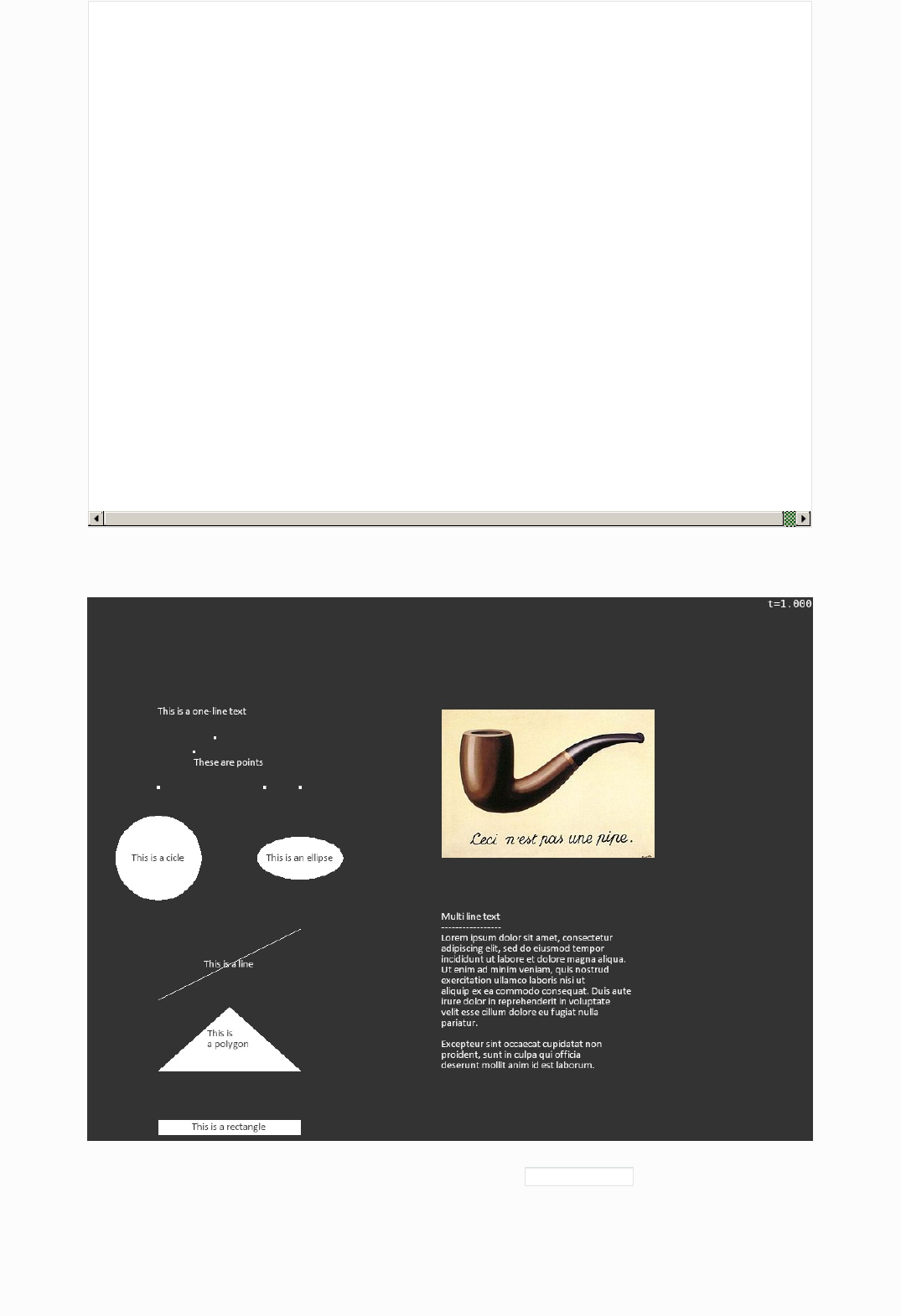
New style animation classes can be used to put texts, rectangles, polygon, lines, series of points, circles or
images on the screen. All types can be connected to an optional text.
Here is a sample program to show of all the new style animation classes
salabim
env=sim.Environment(trace=False)
class X(sim.Component):
def process(self):
yield self.hold(1)
env.snapshot('manual/source/Pic1.png')
env.animate(True)
env.background_color('20%gray')
sim.AnimatePolygon(spec=(100, 100, 300, 100, 200,190), text='This is\na polygon')
sim.AnimateLine(spec=(100, 200, 300, 300), text='This is a line')
sim.AnimateRectangle(spec=(100, 10, 300, 30), text='This is a rectangle')
sim.AnimateCircle(radius=60, x=100, y=400, text='This is a cicle')
sim.AnimateCircle(radius=60, radius1=30, x=300, y=400, text='This is an ellipse')
sim.AnimatePoints(spec=(100,500, 150, 550, 180, 570, 250, 500, 300, 500), text='These are points')
sim.AnimateText(text='This is a one-line text', x=100, y=600)
sim.AnimateText(text='''\
Multi line text
-----------------
Lorem ipsum dolor sit amet, consectetur
adipiscing elit, sed do eiusmod tempor
incididunt ut labore et dolore magna aliqua.
Ut enim ad minim veniam, quis nostrud
exercitation ullamco laboris nisi ut
aliquip ex ea commodo consequat. Duis aute
irure dolor in reprehenderit in voluptate
velit esse cillum dolore eu fugiat nulla
pariatur.
Excepteur sint occaecat cupidatat non
proident, sunt in culpa qui officia
deserunt mollit anim id est laborum.
''', x=500, y=100)
sim.AnimateImage('Pas un pipe.jpg', x=500, y=400)
X()
env.run(100)
Resulting in:
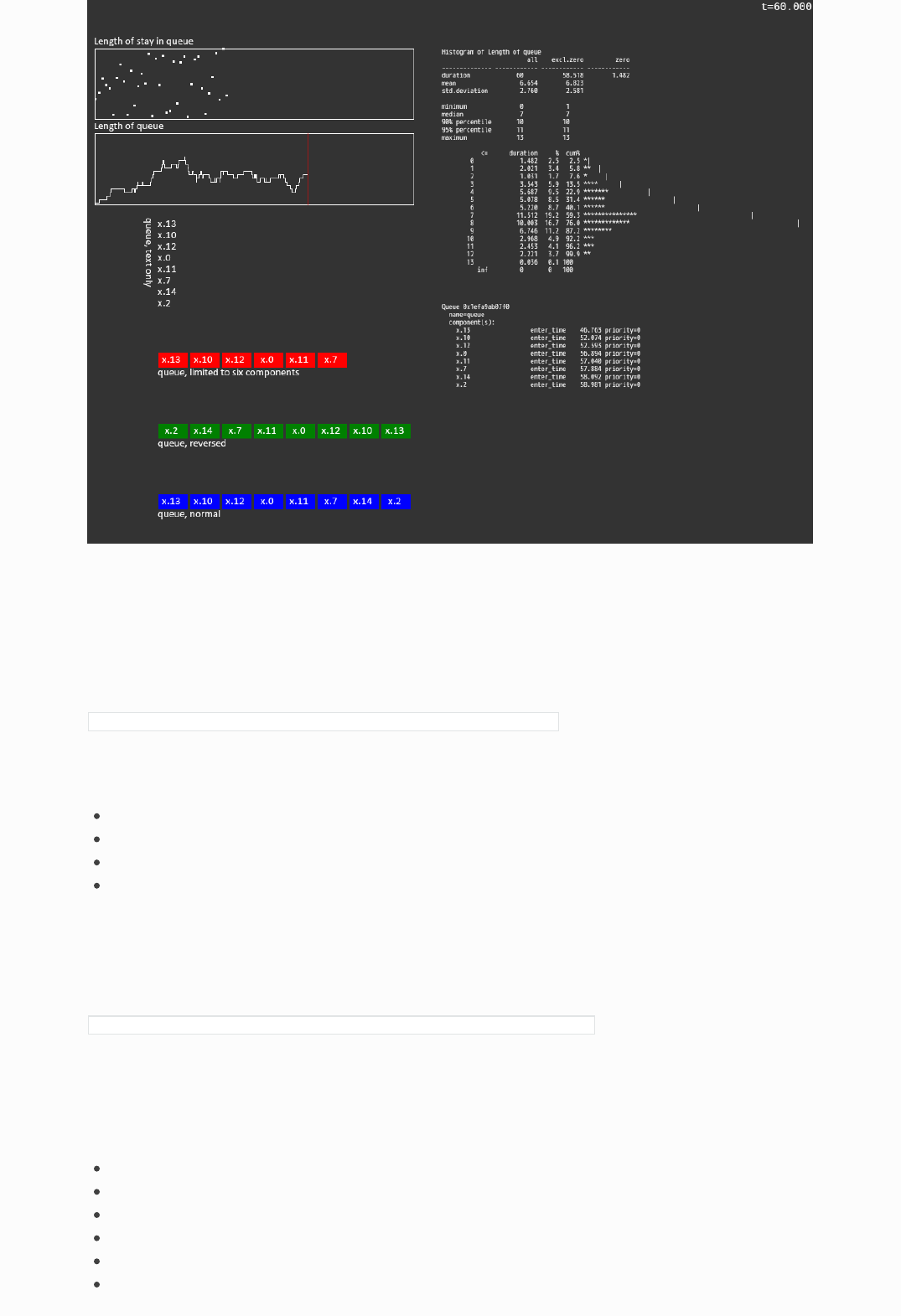
Salabim is also able to animate the components of a queue, with AnimateQueue() . It is possible to use the
standard shape of components, which is a rectangle with the sequence number or define your own
shape(s). The queue can be build up in west, east, north or south directions. It is possible to limit the
number of componenrs shown.
Monitors and timestamped monitors can be visualized dynamically now with ÀnimateMonitor()``.

These features are demonstrated in Demo queue animation.py
import salabim as sim
class X(sim.Component):
def setup(self, i):
self.i = i
def animation_objects(self, id):
if id == 'text':
ao0 = sim.AnimateText(text=self.name(), textcolor='fg', text_anchor='nw')
return 0, 16, ao0
else:
ao0 = sim.AnimateRectangle((0, 0, 40, 20),
text=self.name(), fillcolor=id, textcolor='white', arg=self)
return 45, 0, ao0
def process(self):
while True:
yield self.hold(sim.Uniform(0, 20)())
self.enter(q)
yield self.hold(sim.Uniform(0, 20)())
self.leave()
env = sim.Environment(trace=False)
env.background_color('20%gray')
q = sim.Queue('queue')
sim.AnimateText('queue, normal', x=100, y=50, text_anchor='nw')
qa0 = sim.AnimateQueue(q, x=100, y=50, direction='e', id='blue')
sim.AnimateText('queue, limited to six components', x=100, y=250, text_anchor='nw')
qa1 = sim.AnimateQueue(q, x=100, y=250, direction='e', max_length=6, id='red')
sim.AnimateText('queue, reversed', x=100, y=150, text_anchor='nw')
qa2 = sim.AnimateQueue(q, x=100, y=150, direction='e', reverse=True, id='green')
sim.AnimateText('queue, text only', x=80, y=460, text_anchor='sw', angle=270)
qa3 = sim.AnimateQueue(q, x=100, y=460, direction='s', id='text')
sim.AnimateMonitor(q.length, x=10, y=480, width=450, height=100, horizontal_scale=5, vertical_scale=5)
sim.AnimateMonitor(q.length_of_stay, x=10, y=600, width=450, height=100, horizontal_scale=5, vertical_scale=5)
sim.AnimateText(text=lambda: q.length.print_histogram(as_str=True), x=500, y=700,
text_anchor='nw', font='narrow', fontsize=10)
sim.AnimateText(text=lambda: q.print_info(as_str=True), x=500, y=340,
text_anchor='nw', font='narrow', fontsize=10)
[X(i=i) for i in range(15)]
env.animate(True)
env.run()
Here is snapshot of this powerful, dynamics (including the histogram!):
Advanced
The various classes have a lot of parameters, like color, line width, font, etc.
These parameters can be given just as a scalar, like:
sim.AnimateText(text='Hello world', x=200, y=300, textcolor='red')
But each of these parameters may also be a:
function with zero arguments
function with one argument being the time t
function with two arguments being ‘arg’ and the time t
a method with instance ‘arg’ and the time t
The function or method is called at each animation frame update (usually 30 frames per second).
This makes it for instance possible to show dynamically the mean of monitor m, like in
sim.AnimateRectangle(spec=(10, 10, 200, 30), text=lambda: str(m.mean())
Class Animate
This class can be used to show:
line (if line0 is specified)
rectangle (if rectangle0 is specified)
polygon (if polygon0 is specified)
circle (if circle0 is specified)
text (if text is specified)
image (if image is specicified)

Note that only one type is allowed per instance of Animate.
Nearly all attributes of an Animate object are interpolated between time t0 and t1. If t0 is not specified,
now() is assumed. If t1 is not specified inf is assumed, which means that the attribute will be the ‘0’
attribute.
E.g.:
Animate(x0=100,y0=100,rectangle0==(-10,-10,10,10)) will show a square around (100,100) for ever
Animate(x0=100,y0=100,x1=200,y1=0,rectangle0=(-10,-10,10,10)) will still show the same square around
(100,100) as t1 is not specified
Animate(t1=env.now()+10,x0=100,y0=100,x1=200,y1=0,rectangle0=(-10,-10,10,10)) will show a square
moving from (100,100) to (200,0) in 10 units of time.
It also possible to let the rectangle change shape over time:
Animate(t1=env.now(),x0=100,y0=100,x1=200,y1=0,rectangle0=(-10,-10,10,10),rectangle1=(-20,-20,20,20))
will show a moving and growing rectangle.
By default, the animation object will not change anymore after t1, but will remain visible. Alternatively, if
keep=False is specified, the object will disappear at time t1.
Also, colors, fontsizes, angles can be changed in a linear way over time.
E.g.:
Animate(t1=env.now()+10,text='Test',textcolor0='red',textcolor1='blue',angle0=0,angle1=360) will show
a rotating text changing from red to blue in 10 units of time.
The animation object can be updated with the update method. Here, once again, all the attributes can be
specified to change over time. Note that the defaults for the ‘0’ values are the actual values at t=now().
Thus,
an=Animate(t0=0,t1=10,x0=0,x1=100,y0=0,circle0=(10,),circle1=(20,)) will show a horizontally moving,
growing circle.
Now, at time t=5, we issue an.update(t1=10,y1=50,circle1=(10,)) Then x0 will be set 50 (halfway 0 an
100) and cicle0 to (15,) (halfway 10 and 20). Thus the circle will shrink to its original size and move
vertically from (50,0) to (50,50). This concept is very useful for moving objects whose position and
orientation are controlled by the simulation.
Here we explain how an attribute changes during time. We use x as an example. Normally, x=x0 at t=t0
and x=x1 at t>=t1. between t=t0 and t=t1, x is linearly interpolated. An application can however override
the x method. The prefered way is to subclass the Animate class:
# Demo animate 1
import salabim as sim
class AnimateMovingText(sim.Animate):
def __init__(self):
sim.Animate.__init__(self, text='', x0=100, x1=1000, y0=100, t1=env.now() + 10)
def x(self, t):
return sim.interpolate(sim.interpolate(t, self.t0, self.t1, 0, 1)**2, 0, 1, self.x0, self.x1)
def y(self, t):
return int(t) * 50
def text(self, t):
return '{:0.1f}'.format(t)
env = sim.Environment()
env.animation_parameters()
AnimateMovingText()
env.run()
This code will show the current simulation time moving from left to right, uniformly accelerated. And the
text will be shown a bit higher up, every second. It is not necessary to use t0, t1, x0, x1, but is a convenient
way of setting attributes.
The following methods may be overridden:
method circle image line polygon rectangle text
anchor
angle
circle
fillcolor
fontsize
image
layer
line
linecolor
linewidth
max_lines
offsetx
offsetx
offsety
polygon
rectangle
text
text_anchor
textcolor
visible
width
x
xy_anchor
y
method circle image line polygon rectangle text
Dashboard animation
Here we present an example model where the simulation code is completely separated from the animation
code. This makes communication and debugging and switching off animation much easier.
The example below generates 15 persons starting at time 0, 1, … . These persons enter a queue called q
and stay there 15 time units.
The animation dashboard shows the first 10 persons in the queue q, along with the length of that q.

# Demo animate 2.py
import salabim as sim
class AnimateWaitSquare(sim.Animate):
def __init__(self, i):
self.i = i
sim.Animate.__init__(self,
rectangle0=(-10, -10, 10, 10), x0=300 - 30 * i, y0=100, fillcolor0='red', linewidth0=0)
def visible(self, t):
return q[self.i] is not None
class AnimateWaitText(sim.Animate):
def __init__(self, i):
self.i = i
sim.Animate.__init__(self, text='', x0=300 - 30 * i, y0=100, textcolor0='white')
def text(self, t):
component_i = q[self.i]
if component_i is None:
return ''
else:
return component_i.name()
def do_animation():
env.animation_parameters()
for i in range(10):
AnimateWaitSquare(i)
AnimateWaitText(i)
show_length = sim.Animate(text='', x0=330, y0=100, textcolor0='black', anchor='w')
show_length.text = lambda t: 'Length= ' + str(len(q))
class Person(sim.Component):
def process(self):
self.enter(q)
yield self.hold(15)
self.leave(q)
env = sim.Environment(trace=True)
q = sim.Queue('q')
for i in range(15):
Person(name='{:02d}'.format(i), at=i)
do_animation()
env.run()
All animation initialization is in do_animation , where first 10 rectangle and text Animate objects are
created. These are classes that are inherited from sim.Animate.
The AnimateWaitSquare defines a red rectangle at a specific position in the sim.Animate.__init__() call.
Note that normally these squares should be displayed. But, here we have overridden the visible method. If
there is no i-th component in the q, the square will be made invisible. Otherwise, it is visible.
The AnimateWaitText is more or less defined in a similar way. It defines a text in white at a specific
position. Only the text method is overridden and will return the name of the i-th component in the queue,
if any. Otherwise the null string will be returned.
The length of the queue q could be defined also by subclassing sim.Animate, but here we just make a direct
instance of Animate with the null string as the text to be displayed. And then we immediately override the
text method with a lambda function. Note that in this case, self is not available!
Video production and snapshots
An animation can be recorded as an .mp4 video by sprecifying video=filename in the call to
animation_parameters. The effect is that 30 time per second (scaled animation time) a frame is written. In
this case, the animation does not run synchronized with the wall clock anymore. Depending on the
complexity of the animation, the simulation might run faster of slower than real time. Other than with an
ordinary animation, frames are never skipped.


Docs » Reading items from a file
Reading items from a file
Salabim models often need to read input values from a file.
As these data are quite often quite unstructured, using the standard read facilities of text files can be
rather tedious.
Therefore, salabim offers the possibility to read a file item by item.
Example usage
with sim.ItemFile(filename) as f:
run_length = f.read_item_float()
run_name = f.read_item()
Or (not recommended)
f = sim.InputFile(filename)
run_length = f.read_item_float()
run_name = f.read_item()
f.close()
The input file is read per item, where blanks, linefeeds, tabs are treated as separators.
Any text on a line after a # character is ignored.
Any text within curly brackets ( {} ) is ignored (and treated as an item separator).
Note that this strictly on a per line basis.
If a blank is to be included in a string, use single or double quotes.
The recommended way to end a list of values is //
So, a typical input file is
# Typical experiment file for a salabim model
1000 # run length
'Experiment 2.0' # run name
#Model speed color
#-------------- ----- ------
'Peugeot 208' 150 red
'Peugeot 3008' 175 orange
'Citroen C5' 160 blue
'Renault "Twingo"' 165 green
//
France {country} Europe {continent}
#end of file
Instead of the filename as a parameter to ItemFile, also a string with the content can be given. In that case,
at least one linefeed has to be in the content string. Usually, the content string will be triple quoted. This
can be very useful during testing as the input is part of the source file and not external, e.g.
salabim

Docs » Reference
Reference
Animation
defines an animation object
Parameters: parent (Component) – component where this animation object belongs to (default None)
if given, the animation object will be removed automatically upon termination of the parent
layer (int) – layer value
lower layer values are on top of higher layer values (default 0)
keep (bool) – keep
if False, animation object is hidden after t1, shown otherwise (default True)
visible (bool) – visible
if False, animation object is not shown, shown otherwise (default True)
screen_coordinates (bool) – use screen_coordinates
normally, the scale parameters are use for positioning and scaling objects.
if True, screen_coordinates will be used instead.
xy_anchor (str) – specifies where x and y (i.e. x0, y0, x1 and y1) are relative to
possible values are (default: sw) :
nw n ne
w c e
sw s se
If ‘’, the given coordimates are used untranslated
t0 (float) – time of start of the animation (default: now)
x0 (float) – x-coordinate of the origin at time t0 (default 0)
y0 (float) – y-coordinate of the origin at time t0 (default 0)
offsetx0 (float) – offsets the x-coordinate of the object at time t0 (default 0)
offsety0 (float) – offsets the y-coordinate of the object at time t0 (default 0)
circle0 (float or tuple/list) – the circle spec of the circle at time t0
- radius
- one item tuple/list containing the radius
- five items tuple/list cntaining radius, radius1, arc_angle0, arc_angle1 and draw_arc (see
class AnimateCircle for details)
line0 (tuple) – the line(s) (xa,ya,xb,yb,xc,yc, …) at time t0
polygon0 (tuple) – the polygon (xa,ya,xb,yb,xc,yc, …) at time t0
the last point will be auto connected to the start
rectangle0 (tuple) – the rectangle (xlowerleft,ylowerleft,xupperright,yupperright) at time t0
image (str or PIL image) – the image to be displayed
This may be either a filename or a PIL image
text (str, tuple or list) – the text to be displayed
if text is str, the text may contain linefeeds, which are shown as individual lines
max_lines (int) – the maximum of lines of text to be displayed
if positive, it refers to the first max_lines lines
salabim
class salabim.Animate(parent=None, layer=0, keep=True, visible=True, screen_coordinates=False, t0=None, x0=0, y0=0,
offsetx0=0, offsety0=0, circle0=None, line0=None, polygon0=None, rectangle0=None, points0=None, image=None,
text=None, font='', anchor='c', as_points=False, max_lines=0, text_anchor=None, linewidth0=None, fillcolor0=None,
linecolor0='fg', textcolor0='fg', angle0=0, fontsize0=20, width0=None, t1=None, x1=None, y1=None, offsetx1=None,
offsety1=None, circle1=None, line1=None, polygon1=None, rectangle1=None, points1=None, linewidth1=None,
fillcolor1=None, linecolor1=None, textcolor1=None, angle1=None, fontsize1=None, width1=None, xy_anchor='', env=None)
if negative, it refers to the first -max_lines lines
if zero (default), all lines will be displayed
font (str or list/tuple) – font to be used for texts
Either a string or a list/tuple of fontnames. If not found, uses calibri or arial
anchor (str) – anchor position
specifies where to put images or texts relative to the anchor point
possible values are (default: c):
nw n ne
w c e
sw s se
as_points (bool) – if False (default), lines in line, rectangle and polygon are drawn
if True, only the end points are shown in line, rectangle and polygon
linewidth0 (float) – linewidth of the contour at time t0 (default 0 for polygon, rectangle and
circle, 1 for line)
if as_point is True, the default size is 3
fillcolor0 (colorspec) – color of interior at time t0 (default foreground_color)
if as_points is True, fillcolor0 defaults to transparent
linecolor0 (colorspec) – color of the contour at time t0 (default foreground_color)
textcolor0 (colorspec) – color of the text at time 0 (default foreground_color)
angle0 (float) – angle of the polygon at time t0 (in degrees) (default 0)
fontsize0 (float) – fontsize of text at time t0 (default 20)
width0 (float) – width of the image to be displayed at time t0
if omitted or None, no scaling
t1 (float) – time of end of the animation (default inf)
if keep=True, the animation will continue (frozen) after t1
x1 (float) – x-coordinate of the origin at time t1(default x0)
y1 (float) – y-coordinate of the origin at time t1 (default y0)
offsetx1 (float) – offsets the x-coordinate of the object at time t1 (default offsetx0)
offsety1 (float) – offsets the y-coordinate of the object at time t1 (default offsety0)
circle1 (float or tuple/list) – the circle spec of the circle at time t1 (default: circle0)
- radius
- one item tuple/list containing the radius
- five items tuple/list cntaining radius, radius1, arc_angle0, arc_angle1 and draw_arc (see
class AnimateCircle for details)
line1 (tuple) – the line(s) at time t1 (xa,ya,xb,yb,xc,yc, …) (default: line0)
should have the same number of elements as line0
polygon1 (tuple) – the polygon at time t1 (xa,ya,xb,yb,xc,yc, …) (default: polygon0)
should have the same number of elements as polygon0
rectangle1 (tuple) – the rectangle (xlowerleft,ylowerleft,xupperright,yupperright) at time t1
(default: rectangle0)
linewidth1 (float) – linewidth of the contour at time t1 (default linewidth0)
fillcolor1 (colorspec) – color of interior at time t1 (default fillcolor0)
linecolor1 (colorspec) – color of the contour at time t1 (default linecolor0)
textcolor1 (colorspec) – color of text at time t1 (default textcolor0)
angle1 (float) – angle of the polygon at time t1 (in degrees) (default angle0)
fontsize1 (float) – fontsize of text at time t1 (default: fontsize0)
width1 (float) – width of the image to be displayed at time t1 (default: width0)
Note
circle0
image
line0
polygon0
one (and only one) of the following parameters is
required:
rectangle0
text
valid colorname
hexname
tuple (R,G,B) or (R,G,B,A)
‘fg’ or ‘bg’
colornames may contain an additional alpha, like red#7f
hexnames may be either 3 of 4 bytes long ( #rrggbb or #rrggbbaa )
both colornames and hexnames may be given as a tuple with an additional alpha between 0 and
255, e.g. (255,0,255,128) , (‘red’,127)`` or ('#ff00ff',128)
fg is the foreground color
bg is the background color
Permitted parameters
parameter circle image line polygon rectangle text
parent
layer
keep
screen_coordinates
xy_anchor
t0,t1
x0,x1
y0,y1
offsetx0,offsetx1
offsety0,offsety1
circle0,circle1
image
line0,line1
polygon0,polygon1
rectangle0,rectangle1
text
anchor
colors may be specified as
a
linewidth0,linewidth1
fillcolor0,fillcolor1
linecolor0,linecolor1
textcolor0,textcolor1
angle0,angle1
as_points
font
fontsize0,fontsize1
width0,width1
parameter circle image line polygon rectangle text
anchor of an animate object. May be overridden.
Parameters: t (float) – current time
Returns: anchor – default behaviour: self.anchor0 (anchor given at creation or update)
Return type: str
angle of an animate object. May be overridden.
Parameters: t (float) – current time
Returns: angle – default behaviour: linear interpolation between self.angle0 and self.angle1
Return type: float
as_points of an animate object. May be overridden.
Parameters: t (float) – current time
Returns: as_points – default behaviour: self.as_points (text given at creation or update)
Return type: bool
circle of an animate object. May be overridden.
Parameters: t (float) – current time
Returns: circle – either
- radius
- one item tuple/list containing the radius
- five items tuple/list cntaining radius, radius1, arc_angle0, arc_angle1 and draw_arc
(see class AnimateCircle for details)
default behaviour: linear interpolation between self.circle0 and self.circle1
anchor(t=None)
angle(t=None)
as_points(t=None)
circle(t=None)

Return type: float or tuple/list
fillcolor of an animate object. May be overridden.
Parameters: t (float) – current time
Returns: fillcolor – default behaviour: linear interpolation between self.fillcolor0 and self.fillcolor1
Return type: colorspec
font of an animate object. May be overridden.
Parameters: t (float) – current time
Returns: font – default behaviour: self.font0 (font given at creation or update)
Return type: str
fontsize of an animate object. May be overridden.
Parameters: t (float) – current time
Returns: fontsize – default behaviour: linear interpolation between self.fontsize0 and self.fontsize1
Return type: float
image of an animate object. May be overridden.
Parameters: t (float) – current time
Returns: image – use function spec_to_image to load a file default behaviour: self.image0 (image
given at creation or update)
Return type: PIL.Image.Image
layer of an animate object. May be overridden.
Parameters: t (float) – current time
Returns: layer – default behaviour: self.layer0 (layer given at creation or update)
Return type: int or float
line of an animate object. May be overridden.
Parameters: t (float) – current time
Returns: line – series of x- and y-coordinates (xa,ya,xb,yb,xc,yc, …)
default behaviour: linear interpolation between self.line0 and self.line1
Return type: tuple
linecolor of an animate object. May be overridden.
Parameters: t (float) – current time
fillcolor(t=None)
font(t=None)
fontsize(t=None)
image(t=None)
layer(t=None)
line(t=None)
linecolor(t=None)

Returns: linecolor – default behaviour: linear interpolation between self.linecolor0 and self.linecolor1
Return type: colorspec
linewidth of an animate object. May be overridden.
Parameters: t (float) – current time
Returns: linewidth – default behaviour: linear interpolation between self.linewidth0 and
self.linewidth1
Return type: float
maximum number of lines to be displayed of text. May be overridden.
Parameters: t (float) – current time
Returns: max_lines – default behaviour: self.max_lines0 (max_lines given at creation or update)
Return type: int
offsetx of an animate object. May be overridden.
Parameters: t (float) – current time
Returns: offsetx – default behaviour: linear interpolation between self.offsetx0 and self.offsetx1
Return type: float
offsety of an animate object. May be overridden.
Parameters: t (float) – current time
Returns: offsety – default behaviour: linear interpolation between self.offsety0 and self.offsety1
Return type: float
points of an animate object. May be overridden.
Parameters: t (float) – current time
Returns: points – series of x- and y-coordinates (xa,ya,xb,yb,xc,yc, …)
default behaviour: linear interpolation between self.points0 and self.points1
Return type: tuple
polygon of an animate object. May be overridden.
Parameters: t (float) – current time
Returns: polygon – series of x- and y-coordinates describing the polygon (xa,ya,xb,yb,xc,yc, …)
default behaviour: linear interpolation between self.polygon0 and self.polygon1
Return type: tuple
rectangle of an animate object. May be overridden.
linewidth(t=None)
max_lines(t=None)
offsetx(t=None)
offsety(t=None)
points(t=None)
polygon(t=None)
rectangle(t=None)

Parameters: t (float) – current time
Returns: rectangle – (xlowerleft,ylowerlef,xupperright,yupperright)
default behaviour: linear interpolation between self.rectangle0 and self.rectangle1
Return type: tuple
removes the animation object from the animation queue, so effectively ending this animation.
Note
The animation object might be still updated, if required
text of an animate object. May be overridden.
Parameters: t (float) – current time
Returns: text – default behaviour: self.text0 (text given at creation or update)
Return type: str
text_anchor of an animate object. May be overridden.
Parameters: t (float) – current time
Returns: text_anchor – default behaviour: self.text_anchor0 (text_anchor given at creation or update)
Return type: str
textcolor of an animate object. May be overridden.
Parameters: t (float) – current time
Returns: textcolor – default behaviour: linear interpolation between self.textcolor0 and
self.textcolor1
Return type: colorspec
updates an animation object
Parameters: layer (int) – layer value
lower layer values are on top of higher layer values (default see below)
keep (bool) – keep
if False, animation object is hidden after t1, shown otherwise (default see below)
visible (bool) – visible
if False, animation object is not shown, shown otherwise (default see below)
xy_anchor (str) – specifies where x and y (i.e. x0, y0, x1 and y1) are relative to
possible values are:
nw n ne
w c e
remove()
text(t=None)
text_anchor(t=None)
textcolor(t=None)
update(layer=None, keep=None, visible=None, t0=None, x0=None, y0=None, offsetx0=None, offsety0=None,
circle0=None, line0=None, polygon0=None, rectangle0=None, points0=None, image=None, text=None, font=None,
anchor=None, max_lines=None, text_anchor=None, linewidth0=None, fillcolor0=None, linecolor0=None,
textcolor0=None, angle0=None, fontsize0=None, width0=None, as_points=None, t1=None, x1=None, y1=None,
offsetx1=None, offsety1=None, circle1=None, line1=None, polygon1=None, rectangle1=None, points1=None,
linewidth1=None, fillcolor1=None, linecolor1=None, textcolor1=None, angle1=None, fontsize1=None, width1=None,
xy_anchor=None)

sw s se
If ‘’, the given coordimates are used untranslated
default see below
t0 (float) – time of start of the animation (default: now)
x0 (float) – x-coordinate of the origin at time t0 (default see below)
y0 (float) – y-coordinate of the origin at time t0 (default see below)
offsetx0 (float) – offsets the x-coordinate of the object at time t0 (default see below)
offsety0 (float) – offsets the y-coordinate of the object at time t0 (default see below)
circle0 (float or tuple/list) – the circle spec of the circle at time t0
- radius
- one item tuple/list containing the radius
- five items tuple/list cntaining radius, radius1, arc_angle0, arc_angle1 and draw_arc (see
class AnimateCircle for details)
line0 (tuple) – the line(s) at time t0 (xa,ya,xb,yb,xc,yc, …) (default see below)
polygon0 (tuple) – the polygon at time t0 (xa,ya,xb,yb,xc,yc, …)
the last point will be auto connected to the start (default see below)
rectangle0 (tuple) – the rectangle at time t0
(xlowerleft,ylowerlef,xupperright,yupperright) (default see below)
points0 (tuple) – the points(s) at time t0 (xa,ya,xb,yb,xc,yc, …) (default see below)
image (str or PIL image) – the image to be displayed
This may be either a filename or a PIL image (default see below)
text (str) – the text to be displayed (default see below)
font (str or list/tuple) – font to be used for texts
Either a string or a list/tuple of fontnames. (default see below) If not found, uses calibri
or arial
max_lines (int) – the maximum of lines of text to be displayed
if positive, it refers to the first max_lines lines
if negative, it refers to the first -max_lines lines
if zero (default), all lines will be displayed
anchor (str) – anchor position
specifies where to put images or texts relative to the anchor point (default see below)
possible values are (default: c):
nw n ne
w c e
sw s se
linewidth0 (float) – linewidth of the contour at time t0 (default see below)
fillcolor0 (colorspec) – color of interior/text at time t0 (default see below)
linecolor0 (colorspec) – color of the contour at time t0 (default see below)
angle0 (float) – angle of the polygon at time t0 (in degrees) (default see below)
fontsize0 (float) – fontsize of text at time t0 (default see below)
width0 (float) – width of the image to be displayed at time t0 (default see below)
if None, the original width of the image will be used
t1 (float) – time of end of the animation (default: inf)
if keep=True, the animation will continue (frozen) after t1
x1 (float) – x-coordinate of the origin at time t1 (default x0)
y1 (float) – y-coordinate of the origin at time t1 (default y0)
offsetx1 (float) – offsets the x-coordinate of the object at time t1 (default offsetx0)
offsety1 (float) – offsets the y-coordinate of the object at time t1 (default offset0)
circle1 (float or tuple/ist) – the circle spec of the circle at time t1
- radius
- one item tuple/list containing the radius
- five items tuple/list cntaining radius, radius1, arc_angle0, arc_angle1 and draw_arc (see
class AnimateCircle for details)
line1 (tuple) – the line(s) at time t1 (xa,ya,xb,yb,xc,yc, …) (default: line0)
should have the same number of elements as line0
polygon1 (tuple) – the polygon at time t1 (xa,ya,xb,yb,xc,yc, …) (default: polygon0)

should have the same number of elements as polygon0
rectangle1 (tuple) – the rectangle at time t
(xlowerleft,ylowerleft,xupperright,yupperright) (default: rectangle0)
points1 (tuple) – the points(s) at time t1 (xa,ya,xb,yb,xc,yc, …) (default: points0)
should have the same number of elements as points1
linewidth1 (float) – linewidth of the contour at time t1 (default linewidth0)
fillcolor1 (colorspec) – color of interior/text at time t1 (default fillcolor0)
linecolor1 (colorspec) – color of the contour at time t1 (default linecolor0)
angle1 (float) – angle of the polygon at time t1 (in degrees) (default angle0)
fontsize1 (float) – fontsize of text at time t1 (default: fontsize0)
width1 (float) – width of the image to be displayed at time t1 (default: width0)
Note
The type of the animation cannot be changed with this method.
The default value of most of the parameters is the current value (at time now)
visible attribute of an animate object. May be overridden.
Parameters: t (float) – current time
Returns: visible – default behaviour: self.visible0 (visible given at creation or update)
Return type: bool
width position of an animated image object. May be overridden.
Parameters: t (float) – current time
Returns: width – default behaviour: linear interpolation between self.width0 and self.width1
if None, the original width of the image will be used
Return type: float
x-position of an animate object. May be overridden.
Parameters: t (float) – current time
Returns: x – default behaviour: linear interpolation between self.x0 and self.x1
Return type: float
xy_anchor attribute of an animate object. May be overridden.
Parameters: t (float) – current time
Returns: xy_anchor – default behaviour: self.xy_anchor0 (xy_anchor given at creation or update)
Return type: str
y-position of an animate object. May be overridden.
Parameters: t (float) – current time
Returns: y – default behaviour: linear interpolation between self.y0 and self.y1
visible(t=None)
width(t=None)
x(t=None)
xy_anchor(t=None)
y(t=None)
Return type: float
defines a button
Parameters: x (int) – x-coordinate of centre of the button in screen coordinates (default 0)
y (int) – y-coordinate of centre of the button in screen coordinates (default 0)
width (int) – width of button in screen coordinates (default 80)
height (int) – height of button in screen coordinates (default 30)
linewidth (int) – width of contour in screen coordinates (default 0=no contour)
fillcolor (colorspec) – color of the interior (foreground_color)
linecolor (colorspec) – color of contour (default foreground_color)
color (colorspec) – color of the text (default background_color)
text (str or function) – text of the button (default null string)
if text is an argumentless function, this will be called each time; the button is shown/updated
font (str) – font of the text (default Helvetica)
fontsize (int) – fontsize of the text (default 15)
action (function) – action to take when button is pressed
executed when the button is pressed (default None) the function should have no arguments
xy_anchor (str) – specifies where x and y are relative to
possible values are (default: sw):
nw n ne
w c e
sw s se
env (Environment) – environment where the component is defined
if omitted, default_env will be used
Note
On CPython/PyPy platforms, the tkinter functionality is used. On Pythonista, this is emulated by
salabim
removes the button object.
the ui object is removed from the ui queue, so effectively ending this ui
Displays a (partial) circle or (partial) ellipse , optionally with a text
Parameters: radius (float) – radius of the circle
radius1 (float) – the ‘height of the ellipse. If None (default), a circle will be drawn
arc_angle0 (float) – start angle of the circle (default 0)
arc_angle1 (float) – end angle of the circle (default 360)
when arc_angle1 > arc_angle0 + 360, only 360 degrees will be shown
draw_arc (bool) – if False (default), no arcs will be drawn if True, the arcs from and to the
center will be drawn
x (float) – position of anchor point (default 0)
y (float) – position of anchor point (default 0)
xy_anchor (str) – specifies where x and y are relative to
possible values are (default: sw) :
nw n ne
class salabim.AnimateButton(x=0, y=0, width=80, height=30, linewidth=0, fillcolor='fg', linecolor='fg', color='bg',
text='', font='', fontsize=15, action=None, env=None, xy_anchor='sw')
remove()
class salabim.AnimateCircle(radius=100, radius1=None, arc_angle0=0, arc_angle1=360, draw_arc=False, x=0, y=0,
fillcolor='fg', linecolor='', linewidth=1, text='', fontsize=15, textcolor='bg', font='', angle=0, xy_anchor='', layer=0, max_lines=0,
offsetx=0, offsety=0, text_anchor='c', text_offsetx=0, text_offsety=0, arg=None, visible=True, env=None,
screen_coordinates=False)
w c e
sw s se
If ‘’, the given coordimates are used untranslated
The positions corresponds to a full circle even if arc_angle0 and/or arc_angle1 are specified.
offsetx (float) – offsets the x-coordinate of the circle (default 0)
offsety (float) – offsets the y-coordinate of the circle (default 0)
linewidth (float) – linewidth of the contour
default 1
fillcolor (colorspec) – color of interior (default foreground_color)
default transparent
linecolor (colorspec) – color of the contour (default transparent)
angle (float) – angle of the circle/ellipse and/or text (in degrees)
default: 0
text (str, tuple or list) – the text to be displayed
if text is str, the text may contain linefeeds, which are shown as individual lines
max_lines (int) – the maximum of lines of text to be displayed
if positive, it refers to the first max_lines lines
if negative, it refers to the last -max_lines lines
if zero (default), all lines will be displayed
font (str or list/tuple) – font to be used for texts
Either a string or a list/tuple of fontnames. If not found, uses calibri or arial
text_anchor (str) – anchor position of text|n| specifies where to texts relative to the polygon
point
possible values are (default: c):
nw n ne
w c e
sw s se
textcolor (colorspec) – color of the text (default foreground_color)
textoffsetx (float) – extra x offset to the text_anchor point
textoffsety (float) – extra y offset to the text_anchor point
fontsize (float) – fontsize of text (default 15)
arg (any) – this is used when a parameter is a function with two parameters, as the first
argument or if a parameter is a method as the instance
default: self (instance itself)
Note
All measures are in screen coordinates
All parameters, apart from queue and arg can be specified as:
- a scalar, like 10
- a function with zero arguments, like lambda: title
- a function with one argument, being the time t, like lambda t: t + 10
- a function with two parameters, being arg (as given) and the time, like lambda comp, t: comp.state
- a method instance arg for time t, like self.state, actually leading to arg.state(t) to be called
Displays an image, optionally with a text
Parameters: image (str) – image to be displayed
if used as function or method or in direct assigmnent, the image should be a PIL image (most
likely via spec_to_image)
x (float) – position of anchor point (default 0)
y (float) – position of anchor point (default 0)
class salabim.AnimateImage(spec='', x=0, y=0, width=None, text='', fontsize=15, textcolor='bg', font='', angle=0,
xy_anchor='', layer=0, max_lines=0, offsetx=0, offsety=0, text_anchor='c', text_offsetx=0, text_offsety=0, arg=None,
anchor='sw', visible=True, env=None, screen_coordinates=False)
xy_anchor (str) – specifies where x and y are relative to
possible values are (default: sw) :
nw n ne
w c e
sw s se
If ‘’, the given coordimates are used untranslated
anchor (str) – specifies where the x and refer to
possible values are (default: sw) :
nw n ne
w c e
sw s se
offsetx (float) – offsets the x-coordinate of the circle (default 0)
offsety (float) – offsets the y-coordinate of the circle (default 0)
angle (float) – angle of the text (in degrees)
default: 0
text (str, tuple or list) – the text to be displayed
if text is str, the text may contain linefeeds, which are shown as individual lines
max_lines (int) – the maximum of lines of text to be displayed
if positive, it refers to the first max_lines lines
if negative, it refers to the last -max_lines lines
if zero (default), all lines will be displayed
font (str or list/tuple) – font to be used for texts
Either a string or a list/tuple of fontnames. If not found, uses calibri or arial
text_anchor (str) – anchor position of text|n| specifies where to texts relative to the polygon
point
possible values are (default: c):
nw n ne
w c e
sw s se
textcolor (colorspec) – color of the text (default foreground_color)
textoffsetx (float) – extra x offset to the text_anchor point
textoffsety (float) – extra y offset to the text_anchor point
fontsize (float) – fontsize of text (default 15)
arg (any) – this is used when a parameter is a function with two parameters, as the first
argument or if a parameter is a method as the instance
default: self (instance itself)
Note
All measures are in screen coordinates
All parameters, apart from queue and arg can be specified as:
- a scalar, like 10
- a function with zero arguments, like lambda: title
- a function with one argument, being the time t, like lambda t: t + 10
- a function with two parameters, being arg (as given) and the time, like lambda comp, t: comp.state
- a method instance arg for time t, like self.state, actually leading to arg.state(t) to be called
Displays a line, optionally with a text
Parameters: spec (tuple or list) – should specify x0, y0, x1, y1, …
x (float) – position of anchor point (default 0)
class salabim.AnimateLine(spec=(), x=0, y=0, linecolor='fg', linewidth=1, text='', fontsize=15, textcolor='fg', font='',
angle=0, xy_anchor='', layer=0, max_lines=0, offsetx=0, offsety=0, as_points=False, text_anchor='c', text_offsetx=0,
text_offsety=0, arg=None, visible=True, env=None, screen_coordinates=False)
y (float) – position of anchor point (default 0)
xy_anchor (str) – specifies where x and y are relative to
possible values are (default: sw) :
nw n ne
w c e
sw s se
If ‘’, the given coordimates are used untranslated
offsetx (float) – offsets the x-coordinate of the line (default 0)
offsety (float) – offsets the y-coordinate of the line (default 0)
linewidth (float) – linewidth of the contour
default 1
linecolor (colorspec) – color of the contour (default foreground_color)
angle (float) – angle of the line (in degrees)
default: 0
as_points (bool) – if False (default), the contour lines are drawn
if True, only the corner points are shown
text (str, tuple or list) – the text to be displayed
if text is str, the text may contain linefeeds, which are shown as individual lines
max_lines (int) – the maximum of lines of text to be displayed
if positive, it refers to the first max_lines lines
if negative, it refers to the last -max_lines lines
if zero (default), all lines will be displayed
font (str or list/tuple) – font to be used for texts
Either a string or a list/tuple of fontnames. If not found, uses calibri or arial
text_anchor (str) – anchor position of text|n| specifies where to texts relative to the polygon
point
possible values are (default: c):
nw n ne
w c e
sw s se
textcolor (colorspec) – color of the text (default foreground_color)
textoffsetx (float) – extra x offset to the text_anchor point
textoffsety (float) – extra y offset to the text_anchor point
fontsize (float) – fontsize of text (default 15)
arg (any) – this is used when a parameter is a function with two parameters, as the first
argument or if a parameter is a method as the instance
default: self (instance itself)
Note
All measures are in screen coordinates
All parameters, apart from queue and arg can be specified as:
- a scalar, like 10
- a function with zero arguments, like lambda: title
- a function with one argument, being the time t, like lambda t: t + 10
- a function with two parameters, being arg (as given) and the time, like lambda comp, t: comp.state
- a method instance arg for time t, like self.state, actually leading to arg.state(t) to be called
animates a (timestamped) monitor in a panel
Parameters: linecolor (colorspec) – color of the line or points (default foreground color)
linewidth (int) – width of the line or points (default 1 for line, 3 for points)
class salabim.AnimateMonitor(monitor, linecolor='fg', linewidth=None, fillcolor='', bordercolor='fg', borderlinewidth=1,
titlecolor='fg', nowcolor='red', titlefont='', titlefontsize=15, as_points=None, as_level=None, title=None, x=0, y=0,
vertical_offset=2, vertical_scale=5, horizontal_scale=None, width=200, height=75, xy_anchor='sw', layer=0)
fillcolor (colorspec) – color of the panel (default transparent)
bordercolor (colorspec) – color of the border (default foreground color)
borderlinewidth (int) – width of the line around the panel (default 1)
nowcolor (colorspec) – color of the line indicating now (default red)
titlecolor (colorspec) – color of the title (default foreground color)
titlefont (font) – font of the title (default ‘’)
titlefontsize (int) – size of the font of the title (default 15)
as_points (bool) – if False (default for timestamped monitors), lines will be drawn between
the points
if True (default for non timestamped monitors), only the points will be shown
as_level (bool) – if True (default for lines), the timestamped monitor is considered to be a
level if False (default for points), just the tallied values will be shown, and connected (for
lines)
title (str) – title to be shown above panel
default: name of the monitor
x (int) – x-coordinate of panel, relative to xy_anchor, default 0
y (int) – y-coordinate of panel, relative to xy_anchor. default 0
xy_anchor (str) – specifies where x and y are relative to
possible values are (default: sw):
nw n ne
w c e
sw s se
vertical_offset (float) –
vertical_offset + x * vertical_scale (default 0)
vertical_scale (float) – the vertical position of x within the panel is vertical_offset + x *
vertical_scale (default 5)
horizontal_scale (float) – for timescaled monitors the relative horizontal position of time t
within the panel is on t * horizontal_scale, possibly shifted (default 1)|n| for non timescaled
monitors, the relative horizontal position of index i within the panel is on i * horizontal_scale,
possibly shifted (default 5)|n|
width (int) – width of the panel (default 200)
height (int) – height of the panel (default 75)
layer (int) – layer (default 0)
Note
All measures are in screen coordinates
removes the animate object and thus closes this animation
Displays a series of points, optionally with a text
Parameters: spec (tuple or list) – should specify x0, y0, x1, y1, …
x (float) – position of anchor point (default 0)
y (float) – position of anchor point (default 0)
xy_anchor (str) – specifies where x and y are relative to
possible values are (default: sw) :
nw n ne
the vertical position of x within the panel
is
remove()
class salabim.AnimatePoints(spec=(), x=0, y=0, linecolor='fg', linewidth=4, text='', fontsize=15, textcolor='fg', font='',
angle=0, xy_anchor='', layer=0, max_lines=0, offsetx=0, offsety=0, text_anchor='c', text_offsetx=0, text_offsety=0, arg=None,
visible=True, env=None, screen_coordinates=False)
w c e
sw s se
If ‘’, the given coordimates are used untranslated
offsetx (float) – offsets the x-coordinate of the points (default 0)
offsety (float) – offsets the y-coordinate of the points (default 0)
linewidth (float) – width of the points
default 1
linecolor (colorspec) – color of the points (default foreground_color)
angle (float) – angle of the points (in degrees)
default: 0
as_points (bool) – if False (default), the contour lines are drawn
if True, only the corner points are shown
text (str, tuple or list) – the text to be displayed
if text is str, the text may contain linefeeds, which are shown as individual lines
max_lines (int) – the maximum of lines of text to be displayed
if positive, it refers to the first max_lines lines
if negative, it refers to the last -max_lines lines
if zero (default), all lines will be displayed
font (str or list/tuple) – font to be used for texts
Either a string or a list/tuple of fontnames. If not found, uses calibri or arial
text_anchor (str) – anchor position of text|n| specifies where to texts relative to the polygon
point
possible values are (default: c):
nw n ne
w c e
sw s se
textcolor (colorspec) – color of the text (default foreground_color)
textoffsetx (float) – extra x offset to the text_anchor point
textoffsety (float) – extra y offset to the text_anchor point
fontsize (float) – fontsize of text (default 15)
arg (any) – this is used when a parameter is a function with two parameters, as the first
argument or if a parameter is a method as the instance
default: self (instance itself)
Note
All measures are in screen coordinates
All parameters, apart from queue and arg can be specified as:
- a scalar, like 10
- a function with zero arguments, like lambda: title
- a function with one argument, being the time t, like lambda t: t + 10
- a function with two parameters, being arg (as given) and the time, like lambda comp, t: comp.state
- a method instance arg for time t, like self.state, actually leading to arg.state(t) to be called
Displays a polygon, optionally with a text
Parameters: spec (tuple or list) – should specify x0, y0, x1, y1, …
x (float) – position of anchor point (default 0)
y (float) – position of anchor point (default 0)
xy_anchor (str) – specifies where x and y are relative to
possible values are (default: sw) :
nw n ne
class salabim.AnimatePolygon(spec=(), x=0, y=0, fillcolor='fg', linecolor='', linewidth=1, text='', fontsize=15,
textcolor='bg', font='', angle=0, xy_anchor='', layer=0, max_lines=0, offsetx=0, offsety=0, as_points=False, text_anchor='c',
text_offsetx=0, text_offsety=0, arg=None, visible=True, env=None, screen_coordinates=False)
w c e
sw s se
If ‘’, the given coordimates are used untranslated
offsetx (float) – offsets the x-coordinate of the polygon (default 0)
offsety (float) – offsets the y-coordinate of the polygon (default 0)
linewidth (float) – linewidth of the contour
default 1
fillcolor (colorspec) – color of interior (default foreground_color)
default transparent
linecolor (colorspec) – color of the contour (default transparent)
angle (float) – angle of the polygon (in degrees)
default: 0
as_points (bool) – if False (default), the contour lines are drawn
if True, only the corner points are shown
text (str, tuple or list) – the text to be displayed
if text is str, the text may contain linefeeds, which are shown as individual lines
max_lines (int) – the maximum of lines of text to be displayed
if positive, it refers to the first max_lines lines
if negative, it refers to the last -max_lines lines
if zero (default), all lines will be displayed
font (str or list/tuple) – font to be used for texts
Either a string or a list/tuple of fontnames. If not found, uses calibri or arial
text_anchor (str) – anchor position of text|n| specifies where to texts relative to the polygon
point
possible values are (default: c):
nw n ne
w c e
sw s se
textcolor (colorspec) – color of the text (default foreground_color)
textoffsetx (float) – extra x offset to the text_anchor point
textoffsety (float) – extra y offset to the text_anchor point
fontsize (float) – fontsize of text (default 15)
arg (any) – this is used when a parameter is a function with two parameters, as the first
argument or if a parameter is a method as the instance
default: self (instance itself)
Note
All measures are in screen coordinates
All parameters, apart from queue and arg can be specified as:
- a scalar, like 10
- a function with zero arguments, like lambda: title
- a function with one argument, being the time t, like lambda t: t + 10
- a function with two parameters, being arg (as given) and the time, like lambda comp, t: comp.state
- a method instance arg for time t, like self.state, actually leading to arg.state(t) to be called
Animates the component in a queue.
Parameters: queue (Queue) –
x (float) – x-position of the first component in the queue
default: 50
y (float) – y-position of the first component in the queue
class salabim.AnimateQueue(queue, x=50, y=50, direction='w', max_length=None, xy_anchor='sw', reverse=False,
id=None, arg=None)
default: 50
direction (str) – if ‘w’, waiting line runs westwards (i.e. from right to left)
if ‘n’, waiting line runs northeards (i.e. from bottom to top)
if ‘e’, waiting line runs eastwards (i.e. from left to right) (default)
if ‘s’, waiting line runs southwards (i.e. from top to bottom)
reverse (bool) – if False (default), display in normal order. If True, reversed.
max_length (int) – maximum number of components to be displayed
xy_anchor (str) – specifies where x and y are relative to
possible values are (default: sw):
nw n ne
w c e
sw s se
id (any) – the animation works by calling the animation_objects method of each component,
optionally with id. By default, this is self, but can be overriden, particularly with the queue
arg (any) – this is used when a parameter is a function with two parameters, as the first
argument or if a parameter is a method as the instance
default: self (instance itself)
Note
All measures are in screen coordinates
All parameters, apart from queue and arg can be specified as:
- a scalar, like 10
- a function with zero arguments, like lambda: title
- a function with one argument, being the time t, like lambda t: t + 10
- a function with two parameters, being arg (as given) and the time, like lambda comp, t: comp.state
- a method instance arg for time t, like self.state, actually leading to arg.state(t) to be called
Displays a rectangle, optionally with a text
Parameters: spec (four item tuple or list) – should specify xlowerleft, ylowerleft, xupperright yupperrighg
x (float) – position of anchor point (default 0)
y (float) – position of anchor point (default 0)
xy_anchor (str) – specifies where x and y are relative to
possible values are (default: sw) :
nw n ne
w c e
sw s se
If ‘’, the given coordimates are used untranslated
offsetx (float) – offsets the x-coordinate of the rectangle (default 0)
offsety (float) – offsets the y-coordinate of the rectangle (default 0)
linewidth (float) – linewidth of the contour
default 1
fillcolor (colorspec) – color of interior (default foreground_color)
default transparent
linecolor (colorspec) – color of the contour (default transparent)
angle (float) – angle of the rectangle (in degrees)
default: 0
as_points (bool) – if False (default), the contour lines are drawn
if True, only the corner points are shown
text (str, tuple or list) – the text to be displayed
if text is str, the text may contain linefeeds, which are shown as individual lines
class salabim.AnimateRectangle(spec=(), x=0, y=0, fillcolor='fg', linecolor='', linewidth=1, text='', fontsize=15,
textcolor='bg', font='', angle=0, xy_anchor='', layer=0, max_lines=0, offsetx=0, offsety=0, as_points=False, text_anchor='c',
text_offsetx=0, text_offsety=0, arg=None, visible=True, env=None, screen_coordinates=False)
max_lines (int) – the maximum of lines of text to be displayed
if positive, it refers to the first max_lines lines
if negative, it refers to the last -max_lines lines
if zero (default), all lines will be displayed
font (str or list/tuple) – font to be used for texts
Either a string or a list/tuple of fontnames. If not found, uses calibri or arial
text_anchor (str) – anchor position of text|n| specifies where to texts relative to the
rectangle point
possible values are (default: c):
nw n ne
w c e
sw s se
textcolor (colorspec) – color of the text (default foreground_color)
textoffsetx (float) – extra x offset to the text_anchor point
textoffsety (float) – extra y offset to the text_anchor point
fontsize (float) – fontsize of text (default 15)
arg (any) – this is used when a parameter is a function with two parameters, as the first
argument or if a parameter is a method as the instance
default: self (instance itself)
Note
All measures are in screen coordinates
All parameters, apart from queue and arg can be specified as:
- a scalar, like 10
- a function with zero arguments, like lambda: title
- a function with one argument, being the time t, like lambda t: t + 10
- a function with two parameters, being arg (as given) and the time, like lambda comp, t: comp.state
- a method instance arg for time t, like self.state, actually leading to arg.state(t) to be called
defines a slider
Parameters: x (int) – x-coordinate of centre of the slider in screen coordinates (default 0)
y (int) – y-coordinate of centre of the slider in screen coordinates (default 0)
vmin (float) – minimum value of the slider (default 0)
vmax (float) – maximum value of the slider (default 0)
v (float) – initial value of the slider (default 0)
should be between vmin and vmax
resolution (float) – step size of value (default 1)
width (float) – width of slider in screen coordinates (default 100)
height (float) – height of slider in screen coordinates (default 20)
linewidth (float) – width of contour in screen coordinate (default 0 = no contour)
linecolor (colorspec) – color of contour (default foreground_color)
labelcolor (colorspec) – color of the label (default foreground_color)
label (str) – label if the slider (default null string)
if label is an argumentless function, this function will be used to display as label, otherwise
the label plus the current value of the slider will be shown
font (str) – font of the text (default Helvetica)
fontsize (int) – fontsize of the text (default 12)
action (function) – function executed when the slider value is changed (default None)
the function should one arguments, being the new value
if None (default), no action
xy_anchor (str) – specifies where x and y are relative to
class salabim.AnimateSlider(layer=0, x=0, y=0, width=100, height=20, vmin=0, vmax=10, v=None, resolution=1,
linecolor='fg', labelcolor='fg', label='', font='', fontsize=12, action=None, xy_anchor='sw', env=None)
possible values are (default: sw):
nw n ne
w c e
sw s se
env (Environment) – environment where the component is defined
if omitted, default_env will be used
Note
The current value of the slider is the v attibute of the slider.
On CPython/PyPy platforms, the tkinter functionality is used.
On Pythonista, this is emulated by salabim
removes the slider object
The ui object is removed from the ui queue, so effectively ending this ui
value
Parameters: value (float) – new value
if omitted, no change
Returns: Current value of the
slider
Return type: float
Displays a text
Parameters: text (str, tuple or list) – the text to be displayed
if text is str, the text may contain linefeeds, which are shown as individual lines if text is tple
or list, each item is displayed on a separate line
x (float) – position of anchor point (default 0)
y (float) – position of anchor point (default 0)
xy_anchor (str) – specifies where x and y are relative to
possible values are (default: sw) :
nw n ne
w c e
sw s se
If ‘’, the given coordimates are used untranslated
offsetx (float) – offsets the x-coordinate of the rectangle (default 0)
offsety (float) – offsets the y-coordinate of the rectangle (default 0)
angle (float) – angle of the text (in degrees)
default: 0
max_lines (int) – the maximum of lines of text to be displayed
if positive, it refers to the first max_lines lines
if negative, it refers to the last -max_lines lines
if zero (default), all lines will be displayed
font (str or list/tuple) – font to be used for texts
Either a string or a list/tuple of fontnames. If not found, uses calibri or arial
text_anchor (str) – anchor position of text|n| specifies where to texts relative to the
rectangle point
possible values are (default: c):
remove()
v(value=None)
class salabim.AnimateText(text='', x=0, y=0, fontsize=15, textcolor='fg', font='', text_anchor='sw', angle=0,
visible=True, xy_anchor='', layer=0, env=None, screen_coordinates=False, arg=None, offsetx=0, offsety=0, max_lines=0)
nw n ne
w c e
sw s se
textcolor (colorspec) – color of the text (default foreground_color)
fontsize (float) – fontsize of text (default 15)
arg (any) – this is used when a parameter is a function with two parameters, as the first
argument or if a parameter is a method as the instance
default: self (instance itself)
Note
All measures are in screen coordinates
All parameters, apart from queue and arg can be specified as:
- a scalar, like 10
- a function with zero arguments, like lambda: title
- a function with one argument, being the time t, like lambda t: t + 10
- a function with two parameters, being arg (as given) and the time, like lambda comp, t: comp.state
- a method instance arg for time t, like self.state, actually leading to arg.state(t) to be called
Distributions
Parameters: lowerbound (float) – sample values < lowerbound will be rejected (at most 100 retries)
if omitted, no lowerbound check
upperbound (float) – sample values > upperbound will be rejected (at most 100 retries)
if omitted, no upperbound check
fail_value (float) – value to be used if. after number_of_tries retries, sample is still not
within bounds
default: lowerbound, if specified, otherwise upperbound
number_of_tries (int) – number of tries before fail_value is returned
default: 100
Returns: Bounded sample of a distribution
Return type: depending on distribution type (usually float)
Note
If, after number_of_tries retries, the sampled value is still not within the given bounds, fail_value
will be returned
Samples that cannot be converted (only possible with Pdf) to float are assumed to be within the
bounds.
beta distribution
Parameters: alpha (float) – alpha shape of the distribution
should be >0
beta (float) – beta shape of the distribution
should be >0
randomstream (randomstream) – randomstream to be used
class salabim._Distribution
bounded_sample(lowerbound=-inf, upperbound=inf, fail_value=None, number_of_retries=100)
class salabim.Beta(alpha, beta, randomstream=None)

if omitted, random will be used
if used as random.Random(12299) it assigns a new stream with the specified seed
Returns: Mean of the distribution
Return type: float
prints information about the distribution
Parameters: as_str (bool) – if False (default), print the info if True, return a string containing the info
Returns: info (if as_str is
True)
Return type: str
Returns: Sample of the distribution
Return type: float
Cumulative distribution function
Parameters: spec (list or tuple) –
list with x-values and corresponding cumulative density (x1,c1,x2,c2, …xn,cn)
Requirements:
x1<=x2<= …<=xn
c1<=c2<=cn
c1=0
cn>0
all cumulative densities are auto scaled according to cn, so no need to set cn to 1 or 100.
randomstream (randomstream) – if omitted, random will be used
if used as random.Random(12299) it defines a new stream with the specified seed
Returns: Mean of the distribution
Return type: float
prints information about the distribution
Parameters: as_str (bool) – if False (default), print the info if True, return a string containing the info
Returns: info (if as_str is
True)
Return type: str
Returns: Sample of the distribution
Return type: float
mean()
print_info(as_str=False)
sample()
class salabim.Cdf(spec, randomstream=None)
mean()
print_info(as_str=False)
sample()
constant distribution
Parameters: value (float) – value to be returned in sample
randomstream (randomstream) – randomstream to be used
if omitted, random will be used
if used as random.Random(12299) it assigns a new stream with the specified seed
Note that this is only for compatibility with other distributions
Returns: mean of the distribution (= the specified constant)
Return type: float
prints information about the distribution
Parameters: as_str (bool) – if False (default), print the info if True, return a string containing the info
Returns: info (if as_str is
True)
Return type: str
Returns: sample of the distribution (= the specified constant)
Return type: float
Generate a distribution from a string
Parameters: spec (str) –
string containing a valid salabim distribution, where only the first letters are relevant and
casing is not important. Note that Erlang, Cdf, CumPdf and Poisson require at least two
letters (Er, Cd, Cu and Po)
string containing one float (c1), resulting in Constant(c1)
string containing two floats seperated by a comma (c1,c2), resulting in a Uniform(c1,c2)
string containing three floats, separated by commas (c1,c2,c3), resulting in a
Triangular(c1,c2,c3)
randomstream (randomstream) – if omitted, random will be used
if used as random.Random(12299) it assigns a new stream with the specified seed
Note
The randomstream in the specifying string is ignored.
It is possible to use expressions in the specification, as long these are valid within the context of the
salabim module, which usually implies a global variable of the salabim package.
Examples
Uniform(13) ==> Uniform(13)
Uni(12,15) ==> Uniform(12,15)
UNIF(12,15) ==> Uniform(12,15)
N(12,3) ==> Normal(12,3)
class salabim.Constant(value, randomstream=None)
mean()
print_info(as_str=False)
sample()
class salabim.Distribution(spec, randomstream=None)

Tri(10,20). ==> Triangular(10,20,15)
10. ==> Constant(10)
12,15 ==> Uniform(12,15)
(12,15) ==> Uniform(12,15)
Exp(a) ==> Exponential(100), provided sim.a=100
E(2) ==> Exponential(2) Er(2,3) ==> Erlang(2,3)
Returns: Mean of the distribution
Return type: float
prints information about the distribution
Parameters: as_str (bool) – if False (default), print the info if True, return a string containing the info
Returns: info (if as_str is
True)
Return type: str
Returns: Sample of the distribution
Return type: any (usually float)
erlang distribution
Parameters: shape (int) – shape of the distribution (k)
should be >0
rate (float) – rate parameter (lambda)
if omitted, the scale is used
should be >0
scale (float) – scale of the distribution (mu)
if omitted, the rate is used
should be >0
randomstream (randomstream) – randomstream to be used
if omitted, random will be used
if used as random.Random(12299) it assigns a new stream with the specified seed
Note
Either rate or scale has to be specified, not both.
Returns: Mean of the distribution
Return type: float
prints information about the distribution
Parameters: as_str (bool) – if False (default), print the info if True, return a string containing the info
Returns:
mean()
print_info(as_str=False)
sample()
class salabim.Erlang(shape, rate=None, scale=None, randomstream=None)
mean()
print_info(as_str=False)
info (if as_str is
True)
Return type: str
Returns: Sample of the distribution
Return type: float
exponential distribution
Parameters: mean (float) – mean of the distribtion (beta)|n| if omitted, the rate is used
must be >0
rate (float) – rate of the distribution (lambda)|n| if omitted, the mean is used
must be >0
randomstream (randomstream) – randomstream to be used
if omitted, random will be used
if used as random.Random(12299) it assigns a new stream with the specified seed
Note
Either mean or rate has to be specified, not both
Returns: Mean of the distribution
Return type: float
prints information about the distribution
Parameters: as_str (bool) – if False (default), print the info if True, return a string containing the info
Returns: info (if as_str is
True)
Return type: str
Returns: Sample of the distribution
Return type: float
gamma distribution
Parameters: shape (float) – shape of the distribution (k)
should be >0
scale (float) – scale of the distribution (teta)
should be >0
rate (float) – rate of the distribution (beta)
should be >0
randomstream (randomstream) – randomstream to be used
if omitted, random will be used
sample()
class salabim.Exponential(mean=None, rate=None, randomstream=None)
mean()
print_info(as_str=False)
sample()
class salabim.Gamma(shape, scale=None, rate=None, randomstream=None)

if used as random.Random(12299) it assigns a new stream with the specified seed
Note
Either scale or rate has to be specified, not both.
Returns: Mean of the distribution
Return type: float
prints information about the distribution
Parameters: as_str (bool) – if False (default), print the info if True, return a string containing the info
Returns: info (if as_str is
True)
Return type: str
Returns: Sample of the distribution
Return type: float
normal distribution
Parameters: mean (float) – mean of the distribution
standard_deviation (float) – standard deviation of the distribution
if omitted, coefficient_of_variation, is used to specify the variation if neither
standard_devation nor coefficient_of_variation is given, 0 is used, thus effectively a contant
distribution
must be >=0
coefficient_of_variation (float) – coefficient of variation of the distribution
if omitted, standard_deviation is used to specify variation
the resulting standard_deviation must be >=0
use_gauss (bool) – if False (default), use the random.normalvariate method
if True, use the random.gauss method
the documentation for random states that the gauss method should be slightly faster,
although that statement is doubtful.
randomstream (randomstream) – randomstream to be used
if omitted, random will be used
if used as random.Random(12299) it assigns a new stream with the specified seed
Returns: Mean of the distribution
Return type: float
prints information about the distribution
mean()
print_info(as_str=False)
sample()
class salabim.Normal(mean, standard_deviation=None, coefficient_of_variation=None, use_gauss=False,
randomstream=None)
mean()
print_info(as_str=False)

Parameters: as_str (bool) – if False (default), print the info if True, return a string containing the info
Returns: info (if as_str is
True)
Return type: str
Returns: Sample of the distribution
Return type: float
Probability distribution function
Parameters: spec (list or tuple) –
either
if no probabilities specified:
list with x-values and corresponding probability (x0, p0, x1, p1, …xn,pn)
if probabilities is specified:
list with x-values
probabilities (list, tuple or float) – if omitted, spec contains the probabilities
the list (p0, p1, …pn) contains the probabilities of the corresponding x-values from spec.
alternatively, if a float is given (e.g. 1), all x-values have equal probability. The value is not
important.
randomstream (randomstream) – if omitted, random will be used
if used as random.Random(12299) it assigns a new stream with the specified seed
Note
p0+p1=…+pn>0
all densities are auto scaled according to the sum of p0 to pn, so no need to have p0 to pn add up to
1 or 100.
The x-values can be any type.
If it is a salabim distribution, not the distribution, but a sample will be returned when calling sample.
Returns: mean of the distribution – if the mean can’t be calculated (if not all x-values are scalars or
distributions), nan will be returned.
Return type: float
prints information about the distribution
Parameters: as_str (bool) – if False (default), print the info if True, return a string containing the info
Returns: info (if as_str is
True)
Return type: str
Returns: Sample of the distribution
Return type: any (usually float)
sample()
class salabim.Pdf(spec, probabilities=None, randomstream=None)
mean()
print_info(as_str=False)
sample()
Poisson distribution
Parameters: mean (float) – mean (lambda) of the distribution
randomstream (randomstream) – randomstream to be used
if omitted, random will be used
if used as random.Random(12299) it assigns a new stream with the specified seed
Note
The run time of this function increases when mean (lambda) increases.
It is not recommended to use mean (lambda) > 100
Returns: Mean of the distribution
Return type: float
prints information about the distribution
Parameters: as_str (bool) – if False (default), print the info if True, return a string containing the info
Returns: info (if as_str is
True)
Return type: str
Returns: Sample of the distribution
Return type: int
triangular distribution
Parameters: low (float) – lowerbound of the distribution
high (float) – upperbound of the distribution
if omitted, low will be used, thus effectively a constant distribution
high must be >= low
mode (float) – mode of the distribution
if omitted, the average of low and high will be used, thus a symmetric triangular distribution
mode must be between low and high
randomstream (randomstream) – randomstream to be used
if omitted, random will be used
if used as random.Random(12299) it assigns a new stream with the specified seed
Returns: Mean of the distribution
Return type: float
prints information about the distribution
class salabim.Poisson(mean, randomstream=None)
mean()
print_info(as_str=False)
sample()
class salabim.Triangular(low, high=None, mode=None, randomstream=None)
mean()
print_info(as_str=False)

Parameters: as_str (bool) – if False (default), print the info if True, return a string containing the info
Returns: info (if as_str is
True)
Return type: str
Returns: Sample of the
distribtion
Return type: float
uniform distribution
Parameters: lowerbound (float) – lowerbound of the distribution
upperbound (float) – upperbound of the distribution
if omitted, lowerbound will be used
must be >= lowerbound
randomstream (randomstream) – randomstream to be used
if omitted, random will be used
if used as random.Random(12299) it assigns a new stream with the specified seed
Returns: Mean of the distribution
Return type: float
prints information about the distribution
Parameters: as_str (bool) – if False (default), print the info if True, return a string containing the info
Returns: info (if as_str is
True)
Return type: str
Returns: Sample of the distribution
Return type: float
weibull distribution
Parameters: scale (float) – scale of the distribution (alpha or k)
shape (float) – shape of the distribution (beta or lambda)|n| should be >0
randomstream (randomstream) – randomstream to be used
if omitted, random will be used
if used as random.Random(12299) it assigns a new stream with the specified seed
Returns: Mean of the distribution
Return type: float
sample()
class salabim.Uniform(lowerbound, upperbound=None, randomstream=None)
mean()
print_info(as_str=False)
sample()
class salabim.Weibull(scale, shape, randomstream=None)
mean()
prints information about the distribution
Parameters: as_str (bool) – if False (default), print the info if True, return a string containing the info
Returns: info (if as_str is
True)
Return type: str
Returns: Sample of the distribution
Return type: float
Component
Component object
A salabim component is used as component (primarily for queueing) or as a component with a process
Usually, a component will be defined as a subclass of Component.
Parameters: name (str) – name of the component.
if the name ends with a period (.), auto serializing will be applied
if the name end with a comma, auto serializing starting at 1 will be applied
if omitted, the name will be derived from the class it is defined in (lowercased)
at (float) – schedule time
if omitted, now is used
delay (float) – schedule with a delay
if omitted, no delay
urgent (bool) – urgency indicator
if False (default), the component will be scheduled behind all other components scheduled
for the same time
if True, the component will be scheduled in front of all components scheduled for the same
time
process (str) – name of process to be started.
if None (default), it will try to start self.process()
if ‘’, no process will be started even if self.process() exists, i.e. become a data component.
note that the function must be a generator, i.e. contains at least one yield.
suppress_trace (bool) – suppress_trace indicator
if True, this component will be excluded from the trace
If False (default), the component will be traced
Can be queried or set later with the suppress_trace method.
suppress_pause_at_step (bool) – suppress_pause_at_step indicator
if True, if this component becomes current, do not pause when stepping
If False (default), the component will be paused when stepping
Can be queried or set later with the suppress_pause_at_step method.
mode (str preferred) – mode
will be used in trace and can be used in animations
if omitted, the mode will be None.
also mode_time will be set to now.
env (Environment) – environment where the component is defined
if omitted, default_env will be used
print_info(as_str=False)
sample()
class salabim.Component(name=None, at=None, delay=None, urgent=None, process=None, suppress_trace=False,
suppress_pause_at_step=False, mode=None, env=None, **kwargs)
activate(at=None, delay=0, urgent=False, process=None, keep_request=False, keep_wait=False, mode=None,
**kwargs)

activate component
Parameters: at (float) – schedule time
if omitted, now is used
inf is allowed
delay (float) – schedule with a delay
if omitted, no delay
urgent (bool) – urgency indicator
if False (default), the component will be scheduled behind all other components
scheduled for the same time
if True, the component will be scheduled in front of all components scheduled for the
same time
process (str) – name of process to be started.
if None (default), process will not be changed
if the component is a data component, the generator function process will be used as
the default process.
note that the function must be a generator, i.e. contains at least one yield.
keep_request (bool) – this affects only components that are requesting.
if True, the requests will be kept and thus the status will remain requesting
if False (the default), the request(s) will be canceled and the status will become
scheduled
keep_wait (bool) – this affects only components that are waiting.
if True, the waits will be kept and thus the status will remain waiting
if False (the default), the wait(s) will be canceled and the status will become scheduled
mode (str preferred) – mode
will be used in the trace and can be used in animations
if nothing specified, the mode will be unchanged.
also mode_time will be set to now, if mode is set.
Note
if to be applied to the current component, use yield self.activate() .
if both at and delay are specified, the component becomes current at the sum of the two values.
defines how to display a component in AnimateQueue
Parameters: id (any) – id as given by AnimateQueue. Note that by default this the reference to the
AnimateQueue object.
Returns: size_x : how much to displace the next component in x-direction, if applicable
size_y : how much to displace the next component in y-direction, if applicable
animation objects : instances of Animate class
default behaviour:
square of size 40 (displacements 50), with the sequence number centered.
Return type: List or tuple containg
Note
If you override this method, be sure to use the same header, either with or without the id
parameter.
Returns: base name of the component (the name used at
initialization)
animation_objects(id)
base_name()

Return type: str
cancel component (makes the component data)
Parameters: mode (str preferred) – mode
will be used in trace and can be used in animations
if nothing specified, the mode will be unchanged.
also mode_time will be set to now, if mode is set.
Note
if to be used for the current component, use yield self.cancel() .
Parameters: resource (Resoure) – resource to be queried
Returns: the claimed quantity from a
resource – if the resource is not claimed, 0 will be returned
Return type: float or int
Returns: list of claimed
resources
Return type: list
queue count
Parameters: q (Queue) – queue to check or
if omitted, the number of queues where the component is in
Returns: 1 if component is in q, 0
otherwise –
if q is omitted, the number of queues where the component is in
Return type: int
Returns: time the component was
created
Return type: float
deregisters the component in the registry
Parameters: registry (list) – list of registered components
Returns: component (self)
Return type: Component
enters a queue at the tail
Parameters: q (Queue) – queue to enter
Note
cancel(mode=None)
claimed_quantity(resource)
claimed_resources()
count(q=None)
creation_time()
deregister(registry)
enter(q)
Note
the priority will be set to the priority of the tail component of the queue, if any or 0 if queue is
empty
enters a queue at the head
Parameters: q (Queue) – queue to enter
Note
the priority will be set to the priority of the head component of the queue, if any or 0 if queue is
empty
enters a queue behind a component
Parameters: q (Queue) – queue to enter
poscomponent (Component) – component to be entered behind
Note
the priority will be set to the priority of poscomponent
enters a queue in front of a component
Parameters: q (Queue) – queue to enter
poscomponent (Component) – component to be entered in front of
Note
the priority will be set to the priority of poscomponent
enters a queue, according to the priority
Parameters: q (Queue) – queue to enter
priority (type that can be compared with other priorities in the queue) – priority in the
queue
Note
The component is placed just before the first component with a priority > given priority
Parameters: q (Queue) – queue where component belongs to
Returns: time the component entered the queue
Return type: float
enter_at_head(q)
enter_behind(q, poscomponent)
enter_in_front_of(q, poscomponent)
enter_sorted(q, priority)
enter_time(q)
Returns: True, if the latest request/wait has failed (either by timeout or external)
(bool)
False, otherwise
hold the component
Parameters: duration (float) – specifies the duration
if omitted, 0 is used
inf is allowed
till (float) – specifies at what time the component will become current
if omitted, now is used
inf is allowed
urgent (bool) – urgency indicator
if False (default), the component will be scheduled behind all other components
scheduled for the same time
if True, the component will be scheduled in front of all components scheduled for the
same time
mode (str preferred) – mode
will be used in trace and can be used in animations
if nothing specified, the mode will be unchanged.
also mode_time will be set to now, if mode is set.
Note
if to be used for the current component, use yield self.hold(...) .
if both duration and till are specified, the component will become current at the sum of these
two.
Parameters: q (Queue) – queue to be queried
Returns: index of component in
q – if component belongs to q
-1 if component does not belong to q
Return type: int
interrupt the component
Parameters: mode (str preferred) – mode
will be used in trace and can be used in animations
if nothing is specified, the mode will be unchanged.
also mode_time will be set to now, if mode is set.
Note
Cannot be applied on the current component.
Use resume() to resume
returns interrupt level of an interrupted component
failed()
hold(duration=None, till=None, urgent=False, mode=None)
index(q)
interrupt(mode=None)
interrupt_level()
non interrupted components return 0
returns the original status of an interrupted component
passive
scheduled
requesting
waiting
standby
Returns: True if status is current, False
otherwise
Return type: bool
Note
Be sure to always include the parentheses, otherwise the result will be always True!
Returns: True if status is data, False
otherwise
Return type: bool
Note
Be sure to always include the parentheses, otherwise the result will be always True!
Returns: True if status is interrupted, False
otherwise
Return type: bool
Note
Be sure to always include the parentheses, otherwise the result will be always True
Returns: True if status is passive, False
otherwise
Return type: bool
Note
Be sure to always include the parentheses, otherwise the result will be always True!
Returns: True if status is requesting, False
otherwise
interrupted_status()
possible values
are
iscurrent()
isdata()
isinterrupted()
ispassive()
isrequesting()
Return type: bool
Note
Be sure to always include the parentheses, otherwise the result will be always True!
Returns: True if status is scheduled, False
otherwise
Return type: bool
Note
Be sure to always include the parentheses, otherwise the result will be always True!
Returns: True if status is standby, False
otherwise
Return type: bool
Note
Be sure to always include the parentheses, otherwise the result will be always True
Returns: True if status is waiting, False
otherwise
Return type: bool
Note
Be sure to always include the parentheses, otherwise the result will be always True!
leave queue
Parameters: q (Queue) – queue to leave
Note
statistics are updated accordingly
Parameters: value (any, str recommended) – new mode
if omitted, no change
mode_time will be set if a new mode is specified
Returns: mode of the component – the mode is useful for tracing and animations.
Usually the mode will be set in a call to passivate, hold, activate, request or standby.
Return type: any, usually str
isscheduled()
isstandby()
iswaiting()
leave(q=None)
mode(value=None)
mode_time()
Returns: time the component got it’s latest
mode – For a new component this is the time the
component was created.
this function is particularly useful for animations.
Return type: float
Parameters: value (str) – new name of the component if omitted, no change
Returns: Name of the component
Return type: str
Note
base_name and sequence_number are not affected if the name is changed
passivate the component
Parameters: mode (str preferred) – mode
will be used in trace and can be used in animations
if nothing is specified, the mode will be unchanged.
also mode_time will be set to now, if mode is set.
Note
if to be used for the current component (nearly always the case), use yield self.passivate() .
Parameters: q (Queue) – queue where the component belongs to
Returns (Component) – predecessor of the component in the queue if component is not
at the head.
returns None if component is at the head.
prints information about the component
Parameters: as_str (bool) – if False (default), print the info if True, return a string containing the info
Returns: info (if as_str is
True)
Return type: str
gets/sets the priority of a component in a queue
Parameters: q (Queue) – queue where the component belongs to
priority (type that can be compared with other priorities in the queue) – priority in queue
if omitted, no change
Returns: the priority of the component in the queue
Return type: float
Note
name(value=None)
passivate(mode=None)
predecessor(q)
print_info(as_str=False)
priority(q, priority=None)
Note
if you change the priority, the order of the queue may change
Returns: set of queues where the component belongs
to
Return type: set
registers the component in the registry
Parameters: registry (list) – list of (to be) registered objects
Returns: component (self)
Return type: Component
Note
Use Component.deregister if component does not longer need to be registered.
release a quantity from a resource or resources
Parameters: args (sequence of items, where each items can be) –
a resources, where quantity=current claimed quantity
a tuple/list containing a resource and the quantity to be released
Note
It is not possible to release from an anonymous resource, this way. Use Resource.release() in that
case.
Example
yield self.request(r1,(r2,2),(r3,3,100))
–> requests 1 from r1, 2 from r2 and 3 from r3 with priority 100
c1.release
–> releases 1 from r1, 2 from r2 and 3 from r3
yield self.request(r1,(r2,2),(r3,3,100))
c1.release((r2,1))
–> releases 1 from r2
yield self.request(r1,(r2,2),(r3,3,100))
c1.release((r2,1),r3)
–> releases 2 from r2,and 3 from r3
Parameters: value (float) – set the remaining_duration
The action depends on the status where the component is in:
- passive: the remaining duration is update according to the given value
- standby and current: not allowed
- scheduled: the component is rescheduled according to the given value
queues()
register(registry)
release(*args)
remaining_duration(value=None, urgent=False)

- waiting or requesting: the fail_at is set according to the given value
- interrupted: the remaining_duration is updated according to the given value
urgent (bool) – urgency indicator
if False (default), the component will be scheduled behind all other components
scheduled for the same time
if True, the component will be scheduled in front of all components scheduled for the
same time
Returns: remaining duration – if passive, remaining time at time of passivate
if scheduled, remaing time till scheduled time
if requesting or waiting, time till fail_at time
else: 0
Return type: float
Note
This method is usefu for interrupting a process and then resuming it, after some (breakdown)
time
request from a resource or resources
Parameters: args (sequence of items where each item can be:) –
resource, where quantity=1, priority=tail of requesters queue
if the priority is not specified, the request for the resource be added to the tail of
the requesters queue
fail_at (float) – time out
if the request is not honored before fail_at, the request will be cancelled and the
parameter failed will be set.
if not specified, the request will not time out.
fail_delay (float) – time out
if the request is not honored before now+fail_delay, the request will be cancelled and
the parameter failed will be set.
if not specified, the request will not time out.
mode (str preferred) – mode
will be used in trace and can be used in animations
if nothing specified, the mode will be unchanged.
also mode_time will be set to now, if mode is set.
Note
Not allowed for data components or main.
If to be used for the current component (which will be nearly always the case), use
yield self.request(...) .
If the same resource is specified more that once, the quantities are summed
The requested quantity may exceed the current capacity of a resource
The parameter failed will be reset by a calling request or wait
request(*args, **kwargs)
tuples/list containing a resource, a quantity and optionally a
priority.

Example
yield self.request(r1)
–> requests 1 from r1
yield self.request(r1,r2)
–> requests 1 from r1 and 1 from r2
yield self.request(r1,(r2,2),(r3,3,100))
–> requests 1 from r1, 2 from r2 and 3 from r3 with priority 100
yield self.request((r1,1),(r2,2))
–> requests 1 from r1, 2 from r2
Parameters: resource (Resoure) – resource to be queried
Returns: the requested (not yet honored) quantity from a
resource – if there is no request for the
resource, 0 will be returned
Return type: float or int
Returns: list of requested
resources
Return type: list
resumes an interrupted component
Parameters: all (bool) – if True, the component returns to the original status, regardless of the
number of interrupt levels
if False (default), the interrupt level will be decremented and if the level reaches 0, the
component will return to the original status.
mode (str preferred) – mode
will be used in trace and can be used in animations
if nothing is specified, the mode will be unchanged.
also mode_time will be set to now, if mode is set.
urgent (bool) – urgency indicator
if False (default), the component will be scheduled behind all other components
scheduled for the same time
if True, the component will be scheduled in front of all components scheduled for the
same time
Note
Can be only applied to interrupted components.
Returns: name of the running process – if data component, None
Return type: str
Returns: time the component scheduled for, if it is scheduled – returns inf otherwise
Return type: float
requested_quantity(resource)
requested_resources()
resume(all=False, mode=None, urgent=False)
running_process()
scheduled_time()

Returns: sequence_number of the component – (the sequence number at initialization)
normally this will be the integer value of a serialized name, but also non serialized names
(without a dotcomma at the end) will be numbered)
Return type: int
called immediately after initialization of a component.
by default this is a dummy method, but it can be overridden.
only keyword arguments will be passed
Example
self.color = color
…
redcar=Car(color=’red’)
bluecar=Car(color=’blue’)
puts the component in standby mode
Parameters: mode (str preferred) – mode
will be used in trace and can be used in animations
if nothing specified, the mode will be unchanged.
also mode_time will be set to now, if mode is set.
Note
Not allowed for data components or main.
if to be used for the current component (which will be nearly always the case), use
yield self.standby() .
returns the status of a component
data
passive
scheduled
requesting
waiting
current
standby
interrupted
Parameters: q (Queue) – queue where the component belongs to
sequence_number()
setup()
class Car(sim.Component):
def setup(self, color):
def process(self):
standby(mode=None)
status()
possible values
are
successor(q)

Returns: the successor of the component in the
queue – if component is not at the tail.
returns None if component is at the tail.
Return type: Component
Parameters: value (bool) – new suppress_trace value
if omitted, no change
Returns: suppress_pause_at_step – components with the suppress_pause_at_step of True, will be
ignored in a step
Return type: bool
Parameters: value (bool) – new suppress_trace value
if omitted, no change
Returns: suppress_trace – components with the suppress_status of True, will be ignored in the trace
Return type: bool
wait for any or all of the given state values are met
Parameters: args (sequence of items, where each item can be) –
a state, where value=True, priority=tail of waiters queue)
state, a value and optionally a priority.
if the priority is not specified, this component will be added to the tail of the
waiters queue
fail_at (float) – time out
if the wait is not honored before fail_at, the wait will be cancelled and the parameter
failed will be set.
if not specified, the wait will not time out.
fail_delay (float) – time out
if the wait is not honored before now+fail_delay, the request will be cancelled and the
parameter failed will be set.
if not specified, the wait will not time out.
all (bool) – if False (default), continue, if any of the given state/values is met
if True, continue if all of the given state/values are met
mode (str preferred) – mode
will be used in trace and can be used in animations
if nothing specified, the mode will be unchanged.
also mode_time will be set to now, if mode is set.
Note
Not allowed for data components or main.
If to be used for the current component (which will be nearly always the case), use
yield self.wait(...) .
It is allowed to wait for more than one value of a state
the parameter failed will be reset by a calling wait
If you want to check for all components to meet a value (and clause), use Component.wait(…,
suppress_pause_at_step(value=None)
suppress_trace(value=None)
wait(*args, **kwargs)
a tuple/list containing
all=True)
The value may be specified in three different ways:
constant, that value is just compared to state.value()
yield self.wait((light,’red’))
an expression, containg one or more $-signs the $ is replaced by state.value(), each time the
condition is tested.
self refers to the component under test, state refers to the state under test.
yield self.wait((light,’$ in (“red”,”yellow”)’))
yield self.wait((level,’$<30’))
a function. In that case the parameter should function that should accept three arguments:
the value, the component under test and the state under test.
usually the function will be a lambda function, but that’s not a requirement.
yield self.wait((light,lambda t, comp, state: t in (‘red’,’yellow’)))
yield self.wait((level,lambda t, comp, state: t < 30))
Example
yield self.wait(s1)
–> waits for s1.value()==True
yield self.wait(s1,s2)
–> waits for s1.value()==True or s2.value==True
yield self.wait((s1,False,100),(s2,'on'),s3)
–> waits for s1.value()==False or s2.value==’on’ or s3.value()==True
s1 is at the tail of waiters, because of the set priority
yield self.wait(s1,s2,all=True)
–> waits for s1.value()==True and s2.value==True
Environment
environment object
Parameters: trace (bool) – defines whether to trace or not
if omitted, False
random_seed (hashable object, usually int) – the seed for random, equivalent to
random.seed()
if ‘*’, a purely random value (based on the current time) will be used (not reproducable)
if the null string (‘’), no action on random is taken
if None (the default), 1234567 will be used.
name (str) – name of the environment
if the name ends with a period (.), auto serializing will be applied
if the name end with a comma, auto serializing starting at 1 will be applied
if omitted, the name will be derived from the class (lowercased) or ‘default environment’ if
isdefault_env is True.
print_trace_header (bool) – if True (default) print a (two line) header line as a legend
if False, do not print a header
note that the header is only printed if trace=True
isdefault_env (bool) – if True (default), this environment becomes the default environment
if False, this environment will not be the default environment
if omitted, this environment becomes the default environment
Note
class salabim.Environment(trace=False, random_seed=None, name=None, print_trace_header=True,
isdefault_env=True, *args, **kwargs)
The trace may be switched on/off later with trace
The seed may be later set with random_seed()
Initially, the random stream will be seeded with the value 1234567. If required to be purely, not not
reproducable, values, use random_seed=’*’.
function to initialize the system clocktext
called by run(), if animation is True.
may be overridden to change the standard behaviour.
function to initialize the menu buttons
may be overridden to change the standard behaviour.
function to show the modelname
called by run(), if animation is True.
may be overridden to change the standard behaviour.
function to initialize the synced buttons
may be overridden to change the standard behaviour.
function to initialize the unsynced buttons
may be overridden to change the standard behaviour.
animate indicator
Parameters: value (bool) – new animate indicator
if not specified, no change
Returns: animate status
Return type: bool
Note
When the run is not issued, no acction will be taken.
set animation parameters
Parameters: animate (bool) – animate indicator
if not specified, set animate on
synced (bool) – specifies whether animation is synced
if omitted, no change. At init of the environment synced will be set to True
speed (float) – speed
specifies how much faster or slower than real time the animation will run. e.g. if 2, 2
simulation time units will be displayed per second.
width (int) – width of the animation in screen coordinates
an_clocktext()
an_menu_buttons()
an_modelname()
an_synced_buttons()
an_unsynced_buttons()
animate(value=None)
animation_parameters(animate=True, synced=None, speed=None, width=None, height=None, x0=None, y0=None,
x1=None, background_color=None, foreground_color=None, fps=None, modelname=None, use_toplevel=None,
show_fps=None, show_time=None, video=None, video_repeat=None, video_pingpong=None)

if omitted, no change. At init of the environment, the width will be set to 1024 for
CPython and the current screen width for Pythonista.
height (int) – height of the animation in screen coordinates
if omitted, no change. At init of the environment, the height will be set to 768 for
CPython and the current screen height for Pythonista.
x0 (float) – user x-coordinate of the lower left corner
if omitted, no change. At init of the environment, x0 will be set to 0.
y0 (float) – user y_coordinate of the lower left corner
if omitted, no change. At init of the environment, y0 will be set to 0.
x1 (float) – user x-coordinate of the lower right corner
if omitted, no change. At init of the environment, x1 will be set to 1024 for CPython and
the current screen width for Pythonista.
background_color (colorspec) – color of the background
if omitted, no change. At init of the environment, this will be set to white.
foreground_color (colorspec) – color of foreground (texts)
if omitted and background_color is specified, either white of black will be used, in order
to get a good contrast with the background color.
if omitted and background_color is also omitted, no change. At init of the environment,
this will be set to black.
fps (float) – number of frames per second
modelname (str) – name of model to be shown in upper left corner, along with text ‘a
salabim model’
if omitted, no change. At init of the environment, this will be set to the null string, which
implies suppression of this feature.
use_toplevel (bool) – if salabim animation is used in parallel with other modules using
tkinter, it might be necessary to initialize the root with tkinter.TopLevel(). In that case,
set this parameter to True.
if False (default), the root will be initialized with tkinter.Tk()
show_fps (bool) – if True, show the number of frames per second
if False, do not show the number of frames per second (default)
show_time (bool) – if True, show the time (default)
if False, do not show the time
video (str) – if video is not omitted, a video with the name video will be created.
If the video extension is not .gif, a codec may be added by appending a plus sign and the
four letter code name, like ‘myvideo.avi+DIVX’. If no codec is given, MP4V will be used.
video_repeat (int) – number of times gif should be repeated
0 means inifinite
at init of the environment video_repeat is 1
this only applies to gif files production.
video_pingpong (bool) – if True, all frames will be added reversed at the end of the video
(useful for smooth loops) at init of the environment video_pingpong is False
this only applies to gif files production.
Note
The y-coordinate of the upper right corner is determined automatically in such a way that the x
and scaling are the same.
called just after the animation object loop.
Default behaviour: just return
Parameters: t (float) – Current (animation) time.
animation_post_tick(t)
animation_pre_tick(t)
called just before the animation object loop.
Default behaviour: just return
Parameters: t (float) – Current (animation) time.
background_color of the animation
Parameters: value (colorspec) – new background_color
if not specified, no change
Returns: background_color of animation
Return type: colorspec
returns the base name of the environment (the name used at initialization)
Beeps
Works only on Windows and iOS (Pythonista). For other platforms this is just a dummy method.
does linear interpolation of colorspecs
Parameters: t (float) – value to be interpolated from
t0 (float) – f(t0)=v0
t1 (float) – f(t1)=v1
v0 (colorspec) – f(t0)=v0
v1 (colorspec) – f(t1)=v1
Returns: linear interpolation between v0 and v1 based on t between t0 and t
Return type: colorspec
Note
Note that no extrapolation is done, so if t<t0 ==> v0 and t>t1 ==> v1
This function is heavily used during animation
translates a colorspec to a tuple
Parameters: colorspec (tuple, list or str) – #rrggbb ==> alpha = 255 (rr, gg, bb in hex)
#rrggbbaa ==> alpha = aa (rr, gg, bb, aa in hex)
colorname ==> alpha = 255
(colorname, alpha)
(r, g, b) ==> alpha = 255
(r, g, b, alpha)
'fg' ==> foreground_color
'bg' ==> background_color
Returns:
Return type: (r, g, b, a)
Returns: the current_component
background_color(value=None)
base_name()
beep()
colorinterpolate(t, t0, t1, v0, v1)
colorspec_to_tuple(colorspec)
current_component()

Return type: Component
foreground_color of the animation
Parameters: value (colorspec) – new foreground_color
if not specified, no change
Returns: foreground_color of animation
Return type: colorspec
Parameters: value (int) – new fps
if not specified, no change
Returns: fps
Return type: bool
height of the animation in screen coordinates
Parameters: value (int) – new height
if not specified, no change
Returns: height of animation
Return type: int
Parameters: colorspec (colorspec) – color to check
Returns: True, if the colorspec is dark (rather black than white)
False, if the colorspec is light (rather white than black
if colorspec has alpha=0 (total transparent), the background_color will be tested
Return type: bool
Returns: the main
component
Return type: Component
Parameters: value (str) – new modelname
if not specified, no change
Returns: modelname
Return type: str
Note
If modelname is the null string, nothing will be displayed.
Parameters: value (str) – new name of the environment if omitted, no change
foreground_color(value=None)
fps(value=None)
height(value=None)
is_dark(colorspec)
main()
modelname(value=None)
name(value=None)
Returns: Name of the environment
Return type: str
Note
base_name and sequence_number are not affected if the name is changed
Returns: the current simulation time
Return type: float
returns the time of the next component to become current
if there are no more events, peek will return inf
Only for advance use with animation / GUI event loops
prints information about the environment
Parameters: as_str (bool) – if False (default), print the info if True, return a string containing the info
Returns: info (if as_str is
True)
Return type: str
prints a trace line
Parameters: s1 (str) – part 1 (usually formatted now), padded to 10 characters
s2 (str) – part 2 (usually only used for the compoent that gets current), padded to 20
characters
s3 (str) – part 3, padded to 35 characters
s4 (str) – part 4
s0 (str) – part 0. if omitted, the line number from where the call was given will be used at
the start of the line. Otherwise s0, left padded to 7 characters will be used at the start of
the line.
_optional (bool) – for internal use only. Do not set this flag!
Note
if self.trace is False, nothing is printed
if the current component’s suppress_trace is True, nothing is printed
print a (two line) header line as a legend
also the legend for line numbers will be printed
not that the header is only printed if trace=True
reset the current time
Parameters: new_now (float) – now will be set to new_now
default: 0
now()
peek()
print_info(as_str=False)
print_trace(s1='', s2='', s3='', s4='', s0=None, _optional=False)
print_trace_header()
reset_now(new_now=0)

Note
Internally, salabim still works with the ‘old’ time. Only in the interface from and to the user
program, a correction will be applied.
The registered time in timestamped monitors will be always is the ‘old’ time. This is only relevant
when using the time value in MonitorTimestamp.xt() or MonitorTimestamp.tx().
start execution of the simulation
Parameters: duration (float) – schedule with a delay of duration
if 0, now is used
till (float) – schedule time
if omitted, inf is assumed
urgent (bool) – urgency indicator
if False (default), main will be scheduled behind all other components scheduled for the
same time
if True, main will be scheduled in front of all components scheduled for the same time
Note
only issue run() from the main level
scale of the animation, i.e. width / (x1 - x0)
Returns: scale
Return type: float
Note
It is not possible to set this value explicitely.
Returns: sequence_number of the environment – (the sequence number at initialization)
normally this will be the integer value of a serialized name, but also non serialized names
(without a dot or a comma at the end) will be numbered)
Return type: int
called immediately after initialization of an environment.
by default this is a dummy method, but it can be overridden.
only keyword arguments are passed
Parameters: value (bool) – new show_fps
if not specified, no change
Returns: show_fps
Return type: bool
run(duration=None, till=None, urgent=False)
scale()
sequence_number()
setup()
show_fps(value=None)

Parameters: value (bool) – new show_time
if not specified, no change
Returns: show_time
Return type: bool
Takes a snapshot of the current animated frame (at time = now()) and saves it to a file
Parameters: filename (str) – file to save the current animated frame to.
The following formats are accepted: .PNG, .JPG, .BMP, .GIF and .TIFF are supported. Other
formats are not possible. Note that, apart from .JPG files. the background may be semi
transparent by setting the alpha value to something else than 255.
Parameters: value (float) – new speed
if not specified, no change
Returns: speed
Return type: float
executes the next step of the future event list
for advanced use with animation / GUI loops
suppress_trace_standby status
Parameters: value (bool) – new suppress_trace_standby status
if omitted, no change
Returns: suppress trace status
Return type: bool
Note
By default, suppress_trace_standby is True, meaning that standby components are (apart from
when they become non standby) suppressed from the trace.
If you set suppress_trace_standby to False, standby components are fully traced.
Parameters: value (bool) – new synced
if not specified, no change
Returns: synced
Return type: bool
trace status
Parameters: value (bool) – new trace status
if omitted, no change
Returns: trace status
Return type: bool
show_time(value=None)
snapshot(filename)
speed(value=None)
step()
suppress_trace_standby(value=None)
synced(value=None)
trace(value=None)

Note
If you want to test the status, always include parentheses, like
if env.trace():
video name
Parameters: value (str, list or tuple) – new video name
if not specified, no change
for explanation see animation_parameters()
Returns: video
Return type: str, list or tuple
Note
If video is the null string, the video (if any) will be closed.
closes the current animation video recording, if any.
video pingponf
Parameters: value (bool) – new video pingpong
if not specified, no change
Returns: video pingpong
Return type: bool
Note
Applies only to gif animation.
video repeat
Parameters: value (int) – new video repeat
if not specified, no change
Returns: video
repeat
Return type: int
Note
Applies only to gif animation.
width of the animation in screen coordinates
Parameters: value (int) – new width
if not specified, no change
Returns: width of animation
video(value=None)
video_close()
video_pingpong(value=None)
video_repeat(value=None)
width(value=None)
Return type: int
x coordinate of lower left corner of animation
Parameters: value (float) – new x coordinate
Returns: x coordinate of lower left corner of
animation
Return type: float
x coordinate of upper right corner of animation : float
Parameters: value (float) – new x coordinate
if not specified, no change
Returns: x coordinate of upper right corner of
animation
Return type: float
y coordinate of lower left corner of animation
Parameters: value (float) – new y coordinate
if not specified, no change
Returns: y coordinate of lower left corner of
animation
Return type: float
y coordinate of upper right corner of animation
Returns: y coordinate of upper right corner of
animation
Return type: float
Note
It is not possible to set this value explicitely.
ItemFile
define an item file to be used with read_item, read_item_int, read_item_float and read_item_bool
Parameters: filename (str) – file to be used for subsequent read_item, read_item_int, read_item_float and
read_item_bool calls
or
content to be interpreted used in subsequent read_item calls. The content should have at least
one linefeed character and will be usually triple quoted.
Note
It is advised to use ItemFile with a context manager, like
x0(value=None)
x1(value=None)
y0(value=None)
y1()
class salabim.ItemFile(filename)
with sim.ItemFile('experiment0.txt') as f:
run_length = f.read_item_float() |n|
run_name = f.read_item() |n|
Alternatively, the file can be opened and closed explicitely, like
f = sim.ItemFile('experiment0.txt')
run_length = f.read_item_float()
run_name = f.read_item()
f.close()
Item files consists of individual items separated by whitespace
If a blank is required in an item, use single or double quotes
All text following # on a line is ignored
All texts on a line within curly brackets {} is ignored and considered white space.
Example
Item1
'Item 2'
Item3 Item4 # comment
Item5 {five} Item6 {six}
'Double quote" in item'
"Single quote' in item"
True
read next item from the ItemFile
if the end of file is reached, EOFError is raised
read next item from the ItemFile as bool
A value of False (not case sensitive) will return False
A value of 0 will return False
The null string will return False
Any other value will return True
if the end of file is reached, EOFError is raised
read next item from the ItemFile as float
if the end of file is reached, EOFError is raised
read next field from the ItemFile as int.
if the end of file is reached, EOFError is raised
Monitor
Monitor object
Parameters: name (str) – name of the monitor
if the name ends with a period (.), auto serializing will be applied
read_item()
read_item_bool()
read_item_float()
read_item_int()
class salabim.Monitor(name=None, monitor=True, type=None, merge=None, weighted=False, weight_legend='weight',
env=None, *args, **kwargs)

if the name end with a comma, auto serializing starting at 1 will be applied
if omitted, the name will be derived from the class it is defined in (lowercased)
monitor (bool) – if True (default), monitoring will be on.
if False, monitoring is disabled
it is possible to control monitoring later, with the monitor method
type (str) –
non numeric values. In calculations the values are forced to a numeric value (0 if
not possible)
’bool’ (True, False) Actually integer >= 0 <= 255 1 byte
’int8’ integer >= -128 <= 127 1 byte
’uint8’ integer >= 0 <= 255 1 byte
’int16’ integer >= -32768 <= 32767 2 bytes
’uint16’ integer >= 0 <= 65535 2 bytes
’int32’ integer >= -2147483648<= 2147483647 4 bytes
’uint32’ integer >= 0 <= 4294967295 4 bytes
’int64’ integer >= -9223372036854775808 <= 9223372036854775807 8 bytes
’uint64’ integer >= 0 <= 18446744073709551615 8 bytes
’float’ float 8 bytes
weighted (bool) – if True, tallied values may be given weight. if False (default), weights are
not allowed
weight_legend (str) – used in print_statistics and print_histogram to indicate the dimension
of weight, e.g. duration or minutes. Default: weight.
merge (list, tuple or set) – the monitor will be created by merging the monitors mentioned in
the list
note that the types of all to be merged monitors should be the same.
default: no merge
env (Environment) – environment where the monitor is defined
if omitted, default_env will be used
animates the monitor in a panel
Parameters: linecolor (colorspec) – color of the line or points (default foreground color)
linewidth (int) – width of the line or points (default 1 for line, 3 for points)
fillcolor (colorspec) – color of the panel (default transparent)
bordercolor (colorspec) – color of the border (default foreground color)
borderlinewidth (int) – width of the line around the panel (default 1)
nowcolor (colorspec) – color of the line indicating now (default red)
titlecolor (colorspec) – color of the title (default foreground color)
titlefont (font) – font of the title (default ‘’)
titlefontsize (int) – size of the font of the title (default 15)
as_points (bool) – if False, lines will be drawn between the points
if True (default), only the points will be shown
as_level (bool) – if True (default for lines), the timestamped monitor is considered to be
a level if False (default for points), just the tallied values will be shown, and connected
(for lines)
title (str) – title to be shown above panel
default: name of the monitor
x (int) – x-coordinate of panel, relative to xy_anchor, default 0
y (int) – y-coordinate of panel, relative to xy_anchor. default 0
specifies how tallied values are to be
stored
’any’ (default) stores values in a list. This
allows
animate(*args, **kwargs)

xy_anchor (str) – specifies where x and y are relative to
possible values are (default: sw):
nw n ne
w c e
sw s se
vertical_offset (float) –
vertical_offset + x * vertical_scale (default 0)
vertical_scale (float) – the vertical position of x within the panel is vertical_offset + x *
vertical_scale (default 5)
horizontal_scale (float) – for timescaled monitors the relative horizontal position of time
t within the panel is on t * horizontal_scale, possibly shifted (default 1)|n| for non
timescaled monitors, the relative horizontal position of index i within the panel is on i *
horizontal_scale, possibly shifted (default 5)|n|
width (int) – width of the panel (default 200)
height (int) – height of the panel (default 75)
layer (int) – layer (default 0)
Returns: reference to AnimateMonitor object
Return type: AnimateMonitor
Note
It is recommended to use sim.AnimateMonitor instead
All measures are in screen coordinates
Returns: base name of the monitor (the name used at
initialization)
Return type: str
count of the number of tallied values in range (lowerbound,upperbound]
Parameters: lowerbound (float) – non inclusive lowerbound
upperbound (float) – inclusive upperbound
ex0 (bool) – if False (default), include zeroes. if True, exclude zeroes
Returns: number of values >lowerbound and <=upperbound
Return type: int
total weight of tallied values in range (lowerbound,upperbound]
Parameters: lowerbound (float) – non inclusive lowerbound
upperbound (float) – inclusive upperbound
ex0 (bool) – if False (default), include zeroes. if True, exclude zeroes
Returns: total weight of values >lowerbound and <=upperbound
the vertical position of x within the panel
is
base_name()
bin_number_of_entries(lowerbound, upperbound, ex0=False)
bin_weight(lowerbound, upperbound)

Return type: int
deregisters the monitor in the registry
Parameters: registry (list) – list of registered objects
Returns: monitor (self)
Return type: Monitor
used by histogram_print to autoscale
may be overridden.
Parameters: ex0 (bool) – if False (default), include zeroes. if True, exclude zeroes
Returns: bin_width, lowerbound,
number_of_bins
Return type: tuple
maximum of tallied values
Parameters: ex0 (bool) – if False (default), include zeroes. if True, exclude zeroes
Returns: maximum
Return type: float
mean of tallied values
Parameters: ex0 (bool) – if False (default), include zeroes. if True, exclude zeroes
Returns: mean
Return type: float
Note
For weighted monitors, the weighted mean is returned
median of tallied values
Parameters: ex0 (bool) – if False (default), include zeroes. if True, exclude zeroes
Returns: median
Return type: float
Note
For weighted monitors, the weighted median is returned
minimum of tallied values
deregister(registry)
histogram_autoscale(ex0=False)
maximum(ex0=False)
mean(ex0=False)
median(ex0=False)
minimum(ex0=False)

Parameters: ex0 (bool) – if False (default), include zeroes. if True, exclude zeroes
Returns: minimum
Return type: float
enables/disables monitor
Parameters: value (bool) – if True, monitoring will be on.
if False, monitoring is disabled
if omitted, no change
Returns: True, if monitoring enabled. False, if
not
Return type: bool
Parameters: value (str) – new name of the monitor if omitted, no change
Returns: Name of the monitor
Return type: str
Note
base_name and sequence_number are not affected if the name is changed
count of the number of entries
Parameters: ex0 (bool) – if False (default), include zeroes. if True, exclude zeroes
Returns: number of entries
Return type: int
count of the number of zero entries
Returns: number of zero
entries
Return type: int
q-th percentile of tallied values
Parameters: q (float) – percentage of the distribution
values <0 are treated a 0
values >100 are treated as 100
ex0 (bool) – if False (default), include zeroes. if True, exclude zeroes
Returns: q-th percentile
0 returns the minimum, 50 the median and 100 the maximum
Return type: float
Note
monitor(value=None)
name(value=None)
number_of_entries(ex0=False)
number_of_entries_zero()
percentile(q, ex0=False)
For weighted monitors, the weighted percentile is returned
print monitor statistics and histogram
Parameters: number_of_bins (int) – number of bins
default: 30
if <0, also the header of the histogram will be surpressed
lowerbound (float) – first bin
default: 0
bin_width (float) – width of the bins
default: 1
values (bool) – if False (default), bins will be used
if True, the individual values will be shown (in the right order). in that case, no cumulative
values will be given
ex0 (bool) – if False (default), include zeroes. if True, exclude zeroes
if False (default), print the histogram if True, return a string containing the histogram
Returns: histogram (if as_str is
True)
Return type: str
Note
If number_of_bins, lowerbound and bin_width are omitted, the histogram will be autoscaled,
with a maximum of 30 classes.
print monitor statistics and histogram
Parameters: number_of_bins (int) – number of bins
default: 30
if <0, also the header of the histogram will be surpressed
lowerbound (float) – first bin
default: 0
bin_width (float) – width of the bins
default: 1
values (bool) – if False (default), bins will be used
if True, the individual values will be shown (in the right order). in that case, no
cumulative values will be given
ex0 (bool) – if False (default), include zeroes. if True, exclude zeroes
as_str (bool) – if False (default), print the histogram if True, return a string containing the
histogram
Returns: histogram (if as_str is True)
Return type: str
Note
print_histogram(number_of_bins=None, lowerbound=None, bin_width=None, values=False, ex0=False,
as_str=False)
as_str:
bool
print_histograms(number_of_bins=None, lowerbound=None, bin_width=None, values=False, ex0=False,
as_str=False)

If number_of_bins, lowerbound and bin_width are omitted, the histogram will be autoscaled,
with a maximum of 30 classes.
Exactly same functionality as Monitor.print_histogram()
print monitor statistics
Parameters: show_header (bool) – primarily for internal use
show_legend (bool) – primarily for internal use
do_indent (bool) – primarily for internal use
as_str (bool) – if False (default), print the statistics if True, return a string containing the
statistics
Returns: statistics (if as_str is True)
Return type: str
registers the monitor in the registry
Parameters: registry (list) – list of (to be) registered objects
Returns: monitor (self)
Return type: Monitor
Note
Use Monitor.deregister if monitor does not longer need to be registered.
resets monitor
Parameters: monitor (bool) – if True, monitoring will be on.
if False, monitoring is disabled if omitted, no change of monitoring state
resets monitor
Parameters: monitor (bool) – if True (default), monitoring will be on.
if False, monitoring is disabled
if omitted, the monitor state remains unchanged
Note
Exactly same functionality as Monitor.reset()
Returns: sequence_number of the monitor – (the sequence number at initialization)
normally this will be the integer value of a serialized name, but also non serialized names
(without a dot or a comma at the end) will be numbered)
Return type: int
print_statistics(show_header=True, show_legend=True, do_indent=False, as_str=False)
register(registry)
reset(monitor=None)
reset_monitors(monitor=None)
sequence_number()
setup()

called immediately after initialization of a monitor.
by default this is a dummy method, but it can be overridden.
only keyword arguments are passed
standard deviation of tallied values
Parameters: ex0 (bool) – if False (default), include zeroes. if True, exclude zeroes
Returns: standard
deviation
Return type: float
Note
For weighted monitors, the weighted standard deviation is returned
Parameters: x (any, preferably int, float or translatable into int or float) – value to be tallied
count of the number of tallied values equal to value or in value
Parameters: value (any) – if list, tuple or set, check whether the tallied value is in value
otherwise, check whether the tallied value equals the given value
Returns: number of tallied values in value or equal to
value
Return type: int
total weight of tallied values equal to value or in value
Parameters: value (any) – if list, tuple or set, check whether the tallied value is in value
otherwise, check whether the tallied value equals the given value
Returns: total of weights of tallied values in value or equal to
value
Return type: int
sum of weights
Parameters: ex0 (bool) – if False (default), include zeroes. if True, exclude zeroes
Returns: sum of weights
Return type: float
sum of weights of zero entries
Returns: sum of weights of zero
entries
Return type: float
std(ex0=False)
tally(x, weight=1)
value_number_of_entries(value)
value_weight(value)
weight(ex0=False)
weight_zero()
array/list of tallied values
Parameters: ex0 (bool) – if False (default), include zeroes. if True, exclude zeroes
force_numeric (bool) – if True (default), convert non numeric tallied values numeric if
possible, otherwise assume 0
if False, do not interpret x-values, return as list if type is any (list)
Returns: all tallied values
Return type: array/list
array/list of tallied values
Parameters: ex0 (bool) – if False (default), include zeroes. if True, exclude zeroes
force_numeric (bool) – if True (default), convert non numeric tallied values numeric if
possible, otherwise assume 0
if False, do not interpret x-values, return as list if type is list
Returns: all tallied values
Return type: array/list
MonitorTimestamp
monitortimestamp object
Parameters: name (str) – name of the timestamped monitor if the name ends with a period (.), auto
serializing will be applied
if the name end with a comma, auto serializing starting at 1 will be applied
if omitted, the name will be derived from the class it is defined in (lowercased)
initial_tally (any, usually float) – initial value to be tallied (default 0)
if it important to provide the value at time=now
monitor (bool) – if True (default), monitoring will be on.
if False, monitoring is disabled
it is possible to control monitoring later, with the monitor method
type (str) –
specifies how tallied values are to be stored Using a int, uint of float type results
in less memory usage and better performance. Note that the getter should never
return the number not to use as this is used to indicate ‘off’
non numeric values. In calculations the values are forced to a numeric value (0 if
not possible) do not use -inf
’bool’ bool (False, True). Actually integer >= 0 <= 254 1 byte do not use 255
’int8’ integer >= -127 <= 127 1 byte do not use -128
’uint8’ integer >= 0 <= 254 1 byte do not use 255
’int16’ integer >= -32767 <= 32767 2 bytes do not use -32768
’uint16’ integer >= 0 <= 65534 2 bytes do not use 65535
’int32’ integer >= -2147483647 <= 2147483647 4 bytes do not use -2147483648
x(ex0=False, force_numeric=True)
xweight(ex0=False, force_numeric=True)
class salabim.MonitorTimestamp(name=None, initial_tally=None, monitor=True, type=None, merge=None,
env=None, *args, **kwargs)
’any’ (default) stores values in a list. This allows
for
’uint32’ integer >= 0 <= 4294967294 4 bytes do not use 4294967295
’int64’ integer >= -9223372036854775807 <= 9223372036854775807 8 bytes do
not use -9223372036854775808
’uint64’ integer >= 0 <= 18446744073709551614 8 bytes do not use
18446744073709551615
’float’ float 8 bytes do not use -inf
merge (list, tuple or set) – the monitor will be created by merging the monitors mentioned in
the list
merging means summing the available x-values|n| note that the types of all to be merged
monitors should be the same.
initial_tally may not be specified when merge is specified.
default: no merge
env (Environment) – environment where the monitor is defined
if omitted, default_env will be used
Note
A MonitorTimestamp collects both the value and the time. All statistics are based on the durations
as weights.
Example
Tallied at time 0: 10 (xnow in definition of monitortimestamp)
Tallied at time 50: 11
Tallied at time 70: 12
Tallied at time 80: 10
Now = 100
This results in:
x= 10 duration 50
x= 11 duration 20
x= 12 duration 10
x= 10 duration 20
And thus a mean of (10*50+11*20+12*10+10*20)/(50+20+10+20)
animates the timestamed monitor in a panel
Parameters: linecolor (colorspec) – color of the line or points (default foreground color)
linewidth (int) – width of the line or points (default 1 for line, 3 for points)
fillcolor (colorspec) – color of the panel (default transparent)
bordercolor (colorspec) – color of the border (default foreground color)
borderlinewidth (int) – width of the line around the panel (default 1)
nowcolor (colorspec) – color of the line indicating now (default red)
titlecolor (colorspec) – color of the title (default foreground color)
titlefont (font) – font of the title (default ‘’)
titlefontsize (int) – size of the font of the title (default 15)
as_points (bool) – if False (default), lines will be drawn between the points
if True, only the points will be shown
title (str) – title to be shown above panel
default: name of the monitor
x (int) – x-coordinate of panel, relative to xy_anchor, default 0
y (int) – y-coordinate of panel, relative to xy_anchor. default 0
xy_anchor (str) – specifies where x and y are relative to
possible values are (default: sw):
animate(*args, **kwargs)
nw n ne
w c e
sw s se
vertical_offset (float) –
vertical_offset + x * vertical_scale (default 0)
vertical_scale (float) – the vertical position of x within the panel is vertical_offset + x *
vertical_scale (default 5)
horizontal_scale (float) – for timescaled monitors the relative horizontal position of time
t within the panel is on t * horizontal_scale, possibly shifted (default 1)|n| for non
timescaled monitors, the relative horizontal position of index i within the panel is on i *
horizontal_scale, possibly shifted (default 5)|n|
width (int) – width of the panel (default 200)
height (int) – height of the panel (default 75)
layer (int) – layer (default 0)
Returns: reference to AnimateMonitor object
Return type: AnimateMonitor
Note
It is recommended to use sim.AnimateMonitor instead
All measures are in screen coordinates
Returns: base name of the monitortimestamp (the name used at
initialization)
Return type: str
duration of tallied values with the value in range (lowerbound,upperbound]
Parameters: lowerbound (float) – non inclusive lowerbound
upperbound (float) – inclusive upperbound
ex0 (bool) – if False (default), include zeroes. if True, exclude zeroes
Returns: duration of values >lowerbound and <=upperbound
Return type: float
deregisters the timestamped monitor in the registry
Parameters: registry (list) – list of registered objects
Returns: timestamped monitor (self)
Return type: MonitorTimestamped
total duration
the vertical position of x within the panel
is
base_name()
bin_duration(*args, **kwargs)
deregister(*args, **kwargs)
duration(*args, **kwargs)

Parameters: ex0 (bool) – if False (default), include samples with value 0. if True, exclude zero samples.
Returns: total duration
Return type: float
total duration of samples with value 0
Returns: total duration of zero
samples
Return type: float
Returns: last tallied
value – Instead of this method, the timestamped monitor can also be called
directly, like
level = sim.MonitorTimestamp(‘level’)
…
print(level())
print(level.get()) # identical
Return type: any, usually float
maximum of tallied values
Parameters: ex0 (bool) – if False (default), include zeroes. if True, exclude zeroes
Returns: maximum
Return type: float
mean of tallied values, weighted with their durations
Parameters: ex0 (bool) – if False (default), include zeroes. if True, exclude zeroes
Returns: mean
Return type: float
median of tallied values weighted with their durations
Parameters: ex0 (bool) – if False (default), include zeroes. if True, exclude zeroes
Returns: median
Return type: float
minimum of tallied values
Parameters: ex0 (bool) – if False (default), include zeroes. if True, exclude zeroes
Returns: minimum
Return type: float
duration_zero(*args, **kwargs)
get()
maximum(*args, **kwargs)
mean(*args, **kwargs)
median(*args, **kwargs)
minimum(*args, **kwargs)
monitor(value=None)

enables/disabled timestamped monitor
Parameters: value (bool) – if True, monitoring will be on.
if False, monitoring is disabled
if omitted, no change
Returns: True, if monitoring enabled. False, if
not
Return type: bool
Parameters: value (str) – new name of the monitor if omitted, no change
Returns: Name of the monitor
Return type: str
Note
base_name and sequence_number are not affected if the name is changed
count of the number of entries (duration type)
Parameters: ex0 (bool) – if False (default), include zeroes. if True, exclude zeroes
Returns: number of entries
Return type: int
count of the number of zero entries (duration type)
Returns: number of zero
entries
Return type: int
q-th percentile of tallied values, weighted with their durations
Parameters: q (float) – percentage of the distribution
values <0 are treated a 0
values >100 are treated as 100
ex0 (bool) – if False (default), include zeroes. if True, exclude zeroes
Returns: q-th percentile – 0 returns the minimum, 50 the median and 100 the maximum
Return type: float
print timestamped monitor statistics and histogram
Parameters: number_of_bins (int) – number of bins
default: 30
if <0, also the header of the histogram will be surpressed
lowerbound (float) – first bin
name(value=None)
number_of_entries(*args, **kwargs)
number_of_entries_zero(*args, **kwargs)
percentile(*args, **kwargs)
print_histogram(number_of_bins=None, lowerbound=None, bin_width=None, values=False, ex0=False,
as_str=False)
default: 0
bin_width (float) – width of the bins
default: 1
values (bool) – if False (default), bins will be used
if True, the individual values will be shown (in the right order). in that case, nu
cumulative values will be given
ex0 (bool) – if False (default), include zeroes. if True, exclude zeroes
as_str (bool) – if False (default), print the histogram if True, return a string containing the
histogram
Returns: histogram (if as_str is True)
Return type: str
Note
If number_of_bins, lowerbound and bin_width are omitted, the histogram will be autoscaled,
with a maximum of 30 classes.
print timedstamped monitor statistics and histogram
Parameters: number_of_bins (int) – number of bins
default: 30
if <0, also the header of the histogram will be surpressed
lowerbound (float) – first bin
default: 0
bin_width (float) – width of the bins
default: 1
values (bool) – if False (default), bins will be used
if True, the individual values will be shown (in the right order). in that case, no cumulative
values will be given
ex0 (bool) – if False (default), include zeroes. if True, exclude zeroes
if False (default), print the histogram if True, return a string containing the histogram
Returns: histogram (if as_str is
True)
Return type: str
Note
If number_of_bins, lowerbound and bin_width are omitted, the histogram will be autoscaled,
with a maximum of 30 classes.
Exactly same functionality as MonitorTimestamped.print_histogram()
print timestamped monitor statistics
Parameters: show_header (bool) – primarily for internal use
show_legend (bool) – primarily for internal use
print_histograms(number_of_bins=None, lowerbound=None, bin_width=None, values=False, ex0=False,
as_str=False)
as_str:
bool
print_statistics(show_header=True, show_legend=True, do_indent=False, as_str=False)
do_indent (bool) – primarily for internal use
as_str (bool) – if False (default), print the statistics if True, return a string containing the
statistics
Returns: statistics (if as_str is True)
Return type: str
registers the timestamped monitor in the registry
Parameters: registry (list) – list of (to be) registered objects
Returns: timestamped monitor (self)
Return type: MonitorTimestamped
Note
Use MonitorTimestamped.deregister if timestamped monitor does not longer need to be
registered.
resets timestamped monitor
Parameters: monitor (bool) – if True (default), monitoring will be on.
if False, monitoring is disabled
if omitted, the monitor state remains unchanged
resets timestamped monitor
Parameters: monitor (bool) – if True (default), monitoring will be on.
if False, monitoring is disabled
if omitted, the monitor state remains unchanged
Note
Exactly same functionality as MonitorTimestamped.reset()
Returns: sequence_number of the monitortimestamp – (the sequence number at initialization)
normally this will be the integer value of a serialized name, but also non serialized names
(without a dot or a comma at the end) will be numbered)
Return type: int
called immediately after initialization of a monitortimestamp.
by default this is a dummy method, but it can be overridden.
only keyword arguments are passed
standard deviation of tallied values, weighted with their durations
Parameters: ex0 (bool) – if False (default), include zeroes. if True, exclude zeroes
register(*args, **kwargs)
reset(monitor=None)
reset_monitors(monitor=None)
sequence_number()
setup()
std(*args, **kwargs)

Returns: standard
deviation
Return type: float
tally value
Parameters: value (any, usually float) –
tuple of array with timestamps and array/list with x-values
Parameters: ex0 (bool) – if False (default), include zeroes. if True, exclude zeroes
exoff (bool) – if False (default), include self.off. if True, exclude self.off’s
force_numeric (bool) – if True (default), convert non numeric tallied values numeric if
possible, otherwise assume 0
if False, do not interpret x-values, return as list if type is list
add_now (bool) – if True (default), the current time and the last tallied x-value added to
the result
if False, the result ends with the time of the last tally and the last tallied x-value
Returns: array with timestamps and array/list with x-values
Return type: tuple
Note
The value self.off is stored when monitoring is turned off
The timestamps are not corrected for any reset_now() adjustment.
duration of tallied values equal to value or in value
Parameters: value (any) – if list, tuple or set, check whether the tallied value is in value
otherwise, check whether the tallied value equals the given value
Returns: duration of tallied values in value or equal to
value
Return type: float
count of tallied values equal to value or in value
Parameters: value (any) – if list, tuple or set, check whether the tallied value is in value
otherwise, check whether the tallied value equals the given value
Returns: count of tallied values in value or equal to
value
Return type: float
tuple of array with x-values and array with durations
Parameters: ex0 (bool) – if False (default), include zeroes. if True, exclude zeroes
force_numeric (bool) – if True (default), convert non numeric tallied values numeric if
tally(value)
tx(ex0=False, exoff=False, force_numeric=False, add_now=True)
value_duration(*args, **kwargs)
value_number_of_entries(*args, **kwargs)
xduration(*args, **kwargs)
possible, otherwise assume 0
if False, do not interpret x-values, return as list if type is list
Returns: array/list with x-values and array with durations
Return type: tuple
tuple of array/list with x-values and array with timestamp
Parameters: ex0 (bool) – if False (default), include zeroes. if True, exclude zeroes
exoff (bool) – if False (default), include self.off. if True, exclude self.off’s
force_numeric (bool) – if True (default), convert non numeric tallied values numeric if
possible, otherwise assume 0
if False, do not interpret x-values, return as list if type is list
add_now (bool) – if True (default), the last tallied x-value and the current time is added
to the result
if False, the result ends with the last tallied value and the time that was tallied
Returns: array/list with x-values and array with timestamps
Return type: tuple
Note
The value self.off is stored when monitoring is turned off
The timestamps are not corrected for any reset_now() adjustment.
Queue
Queue object
Parameters: fill (Queue, list or tuple) – fill the queue with the components in fill
if omitted, the queue will be empty at initialization
name (str) – name of the queue
if the name ends with a period (.), auto serializing will be applied
if the name end with a comma, auto serializing starting at 1 will be applied
if omitted, the name will be derived from the class it is defined in (lowercased)
monitor (bool) – if True (default) , both length and length_of_stay are monitored
if False, monitoring is disabled.
env (Environment) – environment where the queue is defined
if omitted, default_env will be used
adds a component to the tail of a queue
Parameters: component (Component) – component to be added to the tail of the queue
may not be member of the queue yet
Note
the priority will be set to the priority of the tail of the queue, if any or 0 if queue is empty
This method is equivalent to append()
xt(ex0=False, exoff=False, force_numeric=True, add_now=True)
class salabim.Queue(name=None, monitor=True, fill=None, env=None, *args, **kwargs)
add(component)
adds a component to the head of a queue
Parameters: component (Component) – component to be added to the head of the queue
may not be member of the queue yet
Note
the priority will be set to the priority of the head of the queue, if any or 0 if queue is empty
adds a component to a queue, just behind a component
Parameters: component (Component) – component to be added to the queue
may not be member of the queue yet
poscomponent (Component) – component behind which component will be inserted
must be member of the queue
Note
the priority of component will be set to the priority of poscomponent
adds a component to a queue, just in front of a component
Parameters: component (Component) – component to be added to the queue
may not be member of the queue yet
poscomponent (Component) – component in front of which component will be inserted
must be member of the queue
Note
the priority of component will be set to the priority of poscomponent
adds a component to a queue, according to the priority
Parameters: component (Component) – component to be added to the queue
may not be member of the queue yet
priority (type that can be compared with other priorities in the queue) – priority in the
queue
Note
The component is placed just before the first component with a priority > given priority
Animates the components in the queue.
Parameters: x (float) – x-position of the first component in the queue
default: 50
add_at_head(component)
add_behind(component, poscomponent)
add_in_front_of(component, poscomponent)
add_sorted(component, priority)
animate(*args, **kwargs)

y (float) – y-position of the first component in the queue
default: 50
direction (str) – if ‘w’, waiting line runs westwards (i.e. from right to left)
if ‘n’, waiting line runs northeards (i.e. from bottom to top)
if ‘e’, waiting line runs eastwards (i.e. from left to right) (default)
if ‘s’, waiting line runs southwards (i.e. from top to bottom)
reverse (bool) – if False (default), display in normal order. If True, reversed.
max_length (int) – maximum number of components to be displayed
xy_anchor (str) – specifies where x and y are relative to
possible values are (default: sw):
nw n ne
w c e
sw s se
id (any) – the animation works by calling the animation_objects method of each
component, optionally with id. By default, this is self, but can be overriden, particularly
with the queue
arg (any) – this is used when a parameter is a function with two parameters, as the first
argument or if a parameter is a method as the instance
default: self (instance itself)
Returns: reference to AnimationQueue object
Return type: AnimationQueue
Note
It is recommended to use sim.AnimateQueue instead
All measures are in screen coordinates
All parameters, apart from queue and arg can be specified as:
- a scalar, like 10
- a function with zero arguments, like lambda: title
- a function with one argument, being the time t, like lambda t: t + 10
- a function with two parameters, being arg (as given) and the time, like lambda comp, t:
comp.state
- a method instance arg for time t, like self.state, actually leading to arg.state(t) to be called
appends a component to the tail of a queue
Parameters: component (Component) – component to be appened to the tail of the queue
may not be member of the queue yet
Note
the priority will be set to the priority of the tail of the queue, if any or 0 if queue is empty
This method is equivalent to add()
Returns: base name of the queue (the name used at
initialization)
Return type: str
append(component)
base_name()
clear()

empties a queue
removes all components from a queue
returns a component in the queue according to its name
Parameters: txt (str) – name of component to be retrieved
Returns: the first component in the queue with name
txt – returns None if not found
Return type: Component
returns a copy of two queues
Parameters: name (str) – name of the new queue
if omitted, ‘copy of ‘ + self.name()
monitor (bool) – if True, monitor the queue
if False (default), do not monitor the queue
Returns: queue with all elements of self
Return type: Queue
Note
The priority will be copied from original queue. Also, the order will be maintained.
component count
Parameters: component (Component) – component to count
Returns:
Return type: number of occurences of component in the queue
Note
The result can only be 0 or 1
deregisters the queue in the registry
Parameters: registry (list) – list of registered queues
Returns: queue (self)
Return type: Queue
returns the difference of two queues
Parameters: q (Queue) – queue to be ‘subtracted’ from self
name (str) – name of the new queue
if omitted, self.name() - q.name()
component_with_name(txt)
copy(name=None, monitor=<function Queue.monitor>)
count(component)
deregister(registry)
difference(q, name=None, monitor=<function Queue.monitor>)

monitor (bool) – if True, monitor the queue
if False (default), do not monitor the queue
Returns:
Return type: queue containing all elements of self that are not in
q
Note
the priority will be copied from the original queue. Also, the order will be maintained.
Alternatively, the more pythonic - operator is also supported, e.g. q1 - q2
extends the queue with components of q that are not already in self
Parameters: q (queue, list or tuple) –
Note
The components added to the queue will get the priority of the tail of self.
Returns: the head component of the queue, if any. None
otherwise
Return type: Component
Note
q[0] is a more Pythonic way to access the head of the queue
get the index of a component in the queue
Parameters: component (Component) – component to be queried
does not need to be in the queue
Returns: index of component in the
queue – 0 denotes the head,
returns -1 if component is not in the queue
Return type: int
Insert component before index-th element of the queue
Parameters: index (int) – component to be added just before index’th element
should be >=0 and <=len(self)
component (Component) – component to be added to the queue
Note
the priority of component will be set to the priority of the index’th component, or 0 if the queue
is empty
extend(q)
head()
index(component)
insert(index, component)
returns the intersect of two queues
Parameters: q (Queue) – queue to be intersected with self
name (str) – name of the new queue
if omitted, self.name() + q.name()
monitor (bool) – if True, monitor the queue
if False (default), do not monitor the queue
Returns: queue with all elements that are in self and q
Return type: Queue
Note
the priority will be set to 0 for all components in the resulting queue
the order of the resulting queue is as follows:
in the same order as in self.
Alternatively, the more pythonic & operator is also supported, e.g. q1 & q2
enables/disables monitoring of length_of_stay and length
Parameters: value (bool) – if True, monitoring will be on.
if False, monitoring is disabled
Note
it is possible to individually control monitoring with length_of_stay.monitor() and length.monitor()
makes a copy of a queue and empties the original
Parameters: name (str) – name of the new queue
monitor (bool) – if True, monitor the queue
if False (default), do not monitor the yqueue
Returns: queue containing all elements of self
Return type: Queue
Note
Priorities will be kept
self will be emptied
Parameters: value (str) – new name of the queue if omitted, no change
Returns: Name of the queue
Return type: str
Note
intersection(q, name=None, monitor=False)
monitor(value)
move(name=None, monitor=<function Queue.monitor>)
name(value=None)

base_name and sequence_number are not affected if the name is changed
All derived named are updated as well.
removes a component by its position (or head)
Parameters: index (int) – index-th element to remove, if any
if omitted, return the head of the queue, if any
Returns: The i-th component or
head – None if not existing
Return type: Component
predecessor in queue
Parameters: component (Component) – component whose predecessor to return
must be member of the queue
Returns: predecessor of component, if
any – None otherwise.
Return type: Component
prints the histograms of the length timestamped and length_of_stay monitor of the queue
Parameters: exclude (tuple or list) – specifies which monitors to exclude
default: ()
as_str (bool) – if False (default), print the histograms if True, return a string containing
the histograms
Returns: histograms (if as_str is True)
Return type: str
prints information about the queue
Parameters: as_str (bool) – if False (default), print the info if True, return a string containing the info
Returns: info (if as_str is
True)
Return type: str
prints a summary of statistics of a queue
Parameters: as_str (bool) – if False (default), print the statistics if True, return a string containing the
statistics
Returns: statistics (if as_str is
True)
Return type: str
registers the queue in the registry
pop(index=None)
predecessor(component)
print_histograms(exclude=(), as_str=False)
print_info(as_str=False)
print_statistics(as_str=False)
register(registry)

Parameters: registry (list) – list of (to be) registered objects
Returns: queue (self)
Return type: Queue
Note
Use Queue.deregister if queue does not longer need to be registered.
removes component from the queue
Parameters: component (Component) – component to be removed
if omitted, all components will be removed.
Note
component must be member of the queue
resets queue monitor length_of_stay and timestamped monitor length
Parameters: monitor (bool) – if True, monitoring will be on.
if False, monitoring is disabled
if omitted, no change of monitoring state
Note
it is possible to reset individual monitoring with length_of_stay.reset() and length.reset()
Returns: sequence_number of the queue – (the sequence number at initialization)
normally this will be the integer value of a serialized name, but also non serialized names
(without a dot or a comma at the end) will be numbered)
Return type: int
called immediately after initialization of a queue.
by default this is a dummy method, but it can be overridden.
only keyword arguments are passed
successor in queue
Parameters: component (Component) – component whose successor to return
must be member of the queue
Returns: successor of component, if
any – None otherwise
Return type: Component
returns the symmetric difference of two queues
remove(component=None)
reset_monitors(monitor=None)
sequence_number()
setup()
successor(component)
symmetric_difference(q, name=None, monitor=<function Queue.monitor>)
Parameters: q (Queue) – queue to be ‘subtracted’ from self
name (str) – name of the new queue
if omitted, self.name() - q.name()
monitor (bool) – if True, monitor the queue
if False (default), do not monitor the queue
Returns:
Return type: queue containing all elements that are either in self or q, but not in
both
Note
the priority of all elements will be set to 0 for all components in the new queue. Order: First,
elelements in self (in that order), then elements in q (in that order) Alternatively, the more
pythonic ^ operator is also supported, e.g. q1 ^ q2
Returns: the tail component of the queue, if any. None
otherwise
Return type: Component
Note
q[-1] is a more Pythonic way to access the tail of the queue
Parameters: q (Queue) – queue to be unioned with self
name (str) – name of the new queue
if omitted, self.name() + q.name()
monitor (bool) – if True, monitor the queue
if False (default), do not monitor the queue
Returns: queue containing all elements of self and q
Return type: Queue
Note
the priority will be set to 0 for all components in the resulting queue
the order of the resulting queue is as follows:
first all components of self, in that order, followed by all components in q that are not in self, in
that order.
Alternatively, the more pythonic | operator is also supported, e.g. q1 | q2
Resource
Parameters: name (str) – name of the resource
if the name ends with a period (.), auto serializing will be applied
if the name end with a comma, auto serializing starting at 1 will be applied
if omitted, the name will be derived from the class it is defined in (lowercased)
capacity (float) – capacity of the resouce
tail()
union(q, name=None, monitor=False)
class salabim.Resource(name=None, capacity=1, anonymous=False, monitor=True, env=None, *args, **kwargs)
if omitted, 1
anonymous (bool) – anonymous specifier
if True, claims are not related to any component. This is useful if the resource is actually just
a level.
if False, claims belong to a component.
monitor (bool) – if True (default) , the requesters queue, the claimers queue, the capacity,
the available_quantity and the claimed_quantity are monitored
if False, monitoring is disabled.
env (Environment) – environment to be used
if omitted, default_env is used
Returns: base name of the resource (the name used at
initialization)
Return type: str
Returns: queue with all components claiming from the
resource – will be an empty queue for an
anonymous resource
Return type: Queue
deregisters the resource in the registry
Parameters: registry (list) – list of registered components
Returns: resource (self)
Return type: Resource
enables/disables the resource monitors and timestamped monitors
Parameters: value (bool) – if True, monitoring is enabled
if False, monitoring is disabled
Note
it is possible to individually control monitoring with claimers().monitor() and
requesters().monitor(), capacity.monitor(), available_quantity.monitor), claimed_quantity.monitor()
or occupancy.monitor()
Parameters: value (str) – new name of the resource if omitted, no change
Returns: Name of the
resource
Return type: str
Note
base_name and sequence_number are not affected if the name is changed
All derived named are updated as well.
base_name()
claimers()
deregister(registry)
monitor(value)
name(value=None)

prints histograms of the requesters and claimers queue as well as the capacity, available_quantity
and claimed_quantity timstamped monitors of the resource
Parameters: exclude (tuple or list) – specifies which queues or monitors to exclude
default: ()
as_str (bool) – if False (default), print the histograms if True, return a string containing
the histograms
Returns: histograms (if as_str is True)
Return type: str
prints info about the resource
Parameters: as_str (bool) – if False (default), print the info if True, return a string containing the info
Returns: info (if as_str is
True)
Return type: str
prints a summary of statistics of a resource
Parameters: as_str (bool) – if False (default), print the statistics if True, return a string containing the
statistics
Returns: statistics (if as_str is
True)
Return type: str
registers the resource in the registry
Parameters: registry (list) – list of (to be) registered objects
Returns: resource (self)
Return type: Resource
Note
Use Resource.deregister if resource does not longer need to be registered.
releases all claims or a specified quantity
Parameters: quantity (float) – quantity to be released
if not specified, the resource will be emptied completely
for non-anonymous resources, all components claiming from this resource will be released.
Note
quantity may not be specified for a non-anomymous resoure
print_histograms(exclude=(), as_str=False)
print_info(as_str=False)
print_statistics(as_str=False)
register(registry)
release(quantity=None)
requesters()

Returns: queue containing all components with not yet honored
requests
Return type: Queue
resets the resource monitors and timestamped monitors
Parameters: monitor (bool) – if True, monitoring will be on.
if False, monitoring is disabled
if omitted, no change of monitoring state
Note
it is possible to reset individual monitoring with claimers().reset_monitors(),
requesters().reset_monitors, capacity.reset(), available_quantity.reset() or claimed_quantity.reset()
or occupancy.reset()
Returns: sequence_number of the
resource – (the sequence number at initialization)
normally this will be the integer value of a serialized name, but also non serialized names
(without a dot or a comma at the end) will be numbered)
Return type: int
Parameters: cap (float or int) – capacity of the resource
this may lead to honoring one or more requests.
if omitted, no change
called immediately after initialization of a resource.
by default this is a dummy method, but it can be overridden.
only keyword arguments are passed
State
Parameters: name (str) – name of the state
if the name ends with a period (.), auto serializing will be applied
if the name end with a comma, auto serializing starting at 1 will be applied
if omitted, the name will be derived from the class it is defined in (lowercased)
value (any, preferably printable) – initial value of the state
if omitted, False
monitor (bool) – if True (default) , the waiters queue and the value are monitored
if False, monitoring is disabled.
type (str) –
specifies how the state values are monitored. Using a int, uint of float type
results in less memory usage and better performance. Note that you should
avoid the number not to use as this is used to indicate ‘off’
’any’ (default) stores values in a list. This allows for non numeric values. In calculations
the values are forced to a numeric value (0 if not possible) do not use -inf
’bool’ bool (False, True). Actually integer >= 0 <= 254 1 byte do not use 255
reset_monitors(monitor=None)
sequence_number()
set_capacity(cap)
setup()
class salabim.State(name=None, value=False, type='any', monitor=True, animation_objects=None, env=None, *args,
**kwargs)
’int8’ integer >= -127 <= 127 1 byte do not use -128
’uint8’ integer >= 0 <= 254 1 byte do not use 255
’int16’ integer >= -32767 <= 32767 2 bytes do not use -32768
’uint16’ integer >= 0 <= 65534 2 bytes do not use 65535
’int32’ integer >= -2147483647 <= 2147483647 4 bytes do not use -2147483648
’uint32’ integer >= 0 <= 4294967294 4 bytes do not use 4294967295
’int64’ integer >= -9223372036854775807 <= 9223372036854775807 8 bytes do not
use -9223372036854775808
’uint64’ integer >= 0 <= 18446744073709551614 8 bytes do not use
18446744073709551615
’float’ float 8 bytes do not use -inf
animation_objects (list or tuple) – overrides the default animation_object method
the method should have a header like
def animation_objects(self, value):
and should return a list or tuple of animation objects, which will be used when the state
changes value.
The default method displays a square of size 40. If the value is a valid color, that will be the
color of the square. Otherwise, the square will be black with the value displayed in white in
the centre.
env (Environment) – environment to be used
if omitted, default_env is used
Returns: base name of the state (the name used at
initialization)
Return type: str
deregisters the state in the registry
Parameters: registry (list) – list of registered states
Returns: state (self)
Return type: State
get value of the state
Returns: value of the
state – Instead of this method, the state can also be called directly, like
level = sim.State(‘level’)
…
print(level())
print(level.get()) # identical
Return type: any
enables/disables the state monitors and timestamped monitors
Parameters: value (bool) – if True, monitoring will be on.
if False, monitoring is disabled
if not specified, no change
Note
base_name()
deregister(registry)
get()
monitor(value=None)
it is possible to individually control

value.monitor()
Parameters: value (str) – new name of the state if omitted, no change
Returns: Name of the
state
Return type: str
Note
base_name and sequence_number are not affected if the name is changed
All derived named are updated as well.
print histograms of the waiters queue and the value timestamped monitor
Parameters: exclude (tuple or list) – specifies which queues or monitors to exclude
default: ()
as_str (bool) – if False (default), print the histograms if True, return a string containing
the histograms
Returns: histograms (if as_str is True)
Return type: str
prints info about the state
Parameters: as_str (bool) – if False (default), print the info if True, return a string containing the info
Returns: info (if as_str is
True)
Return type: str
prints a summary of statistics of the state
Parameters: as_str (bool) – if False (default), print the statistics if True, return a string containing the
statistics
Returns: statistics (if as_str is
True)
Return type: str
registers the state in the registry
Parameters: registry (list) – list of (to be) registered objetcs
Returns: state (self)
Return type: State
Note
requesters().monitor(),
name(value=None)
print_histograms(exclude=(), as_str=False)
print_info(as_str=False)
print_statistics(as_str=False)
register(registry)
Note
Use State.deregister if state does not longer need to be registered.
reset the value of the state
Parameters: value (any (preferably printable)) – if omitted, False
if there is a change, the waiters queue will be checked to see whether there are waiting
components to be honored
Note
This method is identical to set, except the default value is False.
resets the timestamped monitor for the state’s value and the monitors of the waiters queue
Parameters: monitor (bool) – if True, monitoring will be on.
if False, monitoring is disabled
if omitted, no change of monitoring state
Returns: sequence_number of the
state – (the sequence number at initialization)
normally this will be the integer value of a serialized name, but also non serialized names
(without a dot or a comma at the end) will be numbered)
Return type: int
set the value of the state
Parameters: value (any (preferably printable)) – if omitted, True
if there is a change, the waiters queue will be checked to see whether there are waiting
components to be honored
Note
This method is identical to reset, except the default value is True.
called immediately after initialization of a state.
by default this is a dummy method, but it can be overridden.
only keyword arguments will be passed
triggers the value of the state
Parameters: value (any (preferably printable)) – if omitted, True
value_after (any (preferably printable)) – after the trigger, this will be the new value.
if omitted, return to the the before the trigger.
max (int) – maximum number of components to be honored for the trigger value
default: inf
Note
reset(value=False)
reset_monitors(monitor=None)
sequence_number()
set(value=True)
setup()
trigger(value=True, value_after=None, max=inf)
Note
The value of the state will be set to value, then at most max waiting components for this state
will be honored and next the value will be set to value_after and again checked for possible
honors.
Returns: queue containing all components waiting for this
state
Return type: Queue
Miscellaneous
creates a polygon tuple with a centerd arrow for use with sim.Animate
Parameters: size (float) – length of the arrow
Tests whether animation is supported.
Parameters: try_only (bool) – if True (default), the function does not raise an error when the required
modules cannot be imported
if False, the function will only return if the required modules could be imported.
Returns: True, if required modules could be imported, False
otherwise
Return type: bool
Tests whether video is supported.
Parameters: try_only (bool) – if True (default), the function does not raise an error when the required
modules cannot be imported
if False, the function will only return if the required modules could be imported.
Returns: True, if required modules could be imported, False
otherwise
Return type: bool
creates a rectangle tuple with a centered rectangle for use with sim.Animate
Parameters: width (float) – width of the rectangle
height (float) – height of the rectangle
available colornames
Returns: dict with name of color as key, #rrggbb or #rrggbbaa as
value
Return type: dict
waiters()
salabim.arrow_polygon(size)
salabim.can_animate(try_only=True)
salabim.can_video(try_only=True)
salabim.centered_rectangle(width, height)
salabim.colornames()
salabim.default_env()
Returns: default environment
Return type: Environment
does linear interpolation
Parameters: t (float) – value to be interpolated from
t0 (float) – f(t0)=v0
t1 (float) – f(t1)=v1
v0 (float, list or tuple) – f(t0)=v0
v1 (float, list or tuple) – f(t1)=v1
if list or tuple, len(v0) should equal len(v1)
Returns: linear interpolation between v0 and v1 based on t between t0 and t1
Return type: float or tuple
Note
Note that no extrapolation is done, so if t<t0 ==> v0 and t>t1 ==> v1
This function is heavily used during animation.
Reseeds a randomstream
Parameters: seed (hashable object, usually int) – the seed for random, equivalent to random.seed()
if None or ‘*’, a purely random value (based on the current time) will be used (not
reproducable)
randomstream (randomstream) – randomstream to be used
if omitted, random will be used
creates a polygon tuple with a regular polygon (within a circle) for use with sim.Animate
Parameters: radius (float) – radius of the corner points of the polygon
default : 1
number_of_sides (int) – number of sides (corners)
must be >= 3
default : 3
initial_angle (float) – angle of the first corner point, relative to the origin
default : 0
resets global variables
used internally at import of salabim
might be useful for REPLs or for Pythonista
show (print) all available color names and their value.
salabim.interpolate(t, t0, t1, v0, v1)
salabim.random_seed(seed, randomstream=None)
salabim.regular_polygon(radius=1, number_of_sides=3, initial_angle=0)
salabim.reset()
salabim.show_colornames()
Next
show (print) all available fonts on this machine
convert an image specification to an image
Parameters: image (str or PIL.Image.Image) – if str: filename of file to be loaded
if ‘’: dummy image will be returned
if PIL.Image.Image: return this image untranslated
Returns: image
Return type: PIL.Image.Image
Previous
© Copyright 2018, Ruud van der Ham.
Built with Sphinx using a theme provided by Read the Docs.
salabim.show_fonts()
salabim.spec_to_image(spec)

Docs » About
About
Who is behind salabim?
I, Ruud van der Ham, am the sole developer of salabim. I have a long history in simulation, both in
applications and tool building.
It all started in the mid 70’s when modeling container terminal in Prosim, a package in PL/1 that was
inspired by Simula and run big IBM 360/370 mainframes.
In the eighties, Prosim was ported to smaller computers, but at the same time I developed a discrete event
simulation tool called Must to run on CP/M machines, later on MSDOS machines, again under PL/1. A bit
later, Must was ported to Pascal and was used in many projects. Must was never ported to Windows.
Instead, Hans Veeke (Delft University) came with Tomas, a package that is still available and runs under
Delphi.
End 2016, I wanted an easy to use and open source package for a project, preferably in Python.
Unfortunately, Simpy (particularly version 3) does not support the essential process interaction methods
activate, hold, passivate and standby. First I tried to build a wrapper around Simpy 3, but that didn’t work
too well.
That was the start of a new package, called salabim. One of the main features of salabim is the powerful
animation engine that is heavily inspired by some more creative projects where every animation object can
change position, shape, colour, orientation over time. Although rarely used in normal simulation models, all
that functionality is available in salabim.
Over the year 2017, a lot of functionality was added as well bug were fixed. During that year the package
became available on PyPI and GitHub and the documentation was made available.
Large parts of salabim were actually developed on an iPad on the excellent Pythonista platform. The full
functionality is thus available under iOS.
Why is the package called salabim?
s = 'sim ulation'
print(s)
s = s[:4]
print(s)
s += 'salabim'
print(s)
s = ' ' * 4 + s[4:]
print(s)
sim ulation
sim
sim salabim
salabim
Contributing and reporting issues
It is very much appreciated to contribute to the salabim, by issuing a pull request or issue on GitHub.
Also, issues can be reported this way.
Alternatively, the Google group can be used for this.
salabim

Next
Support
Ruud van der Ham is able and willing to help users with issues with the package or modelling in general.
Contact him or other users via the Google group or info@salabim.org.
License
The MIT License (MIT)
Copyright (c) 2016, 2017, 2018 Ruud van der Ham, ruud@salabim.org
Permission is hereby granted, free of charge, to any person obtaining a copy of this software and
associated documentation files (the “Software”), to deal in the Software without restriction, including
without limitation the rights to use, copy, modify, merge, publish, distribute, sublicense, and/or sell copies
of the Software, and to permit persons to who the Software is furnished to do so, subject to the following
conditions:
The above copyright notice and this permission notice shall be included in all copies or substantial portions
of the Software.
THE SOFTWARE IS PROVIDED “AS IS”, WITHOUT WARRANTY OF ANY KIND, EXPRESS OR IMPLIED,
INCLUDING BUT NOT LIMITED TO THE WARRANTIES OF MERCHANTABILITY, FITNESS FOR A
PARTICULAR PURPOSE AND NONINFRINGEMENT. IN NO EVENT SHALL THE AUTHORS OR
COPYRIGHT HOLDERS BE LIABLE FOR ANY CLAIM, DAMAGES OR OTHER LIABILITY, WHETHER IN
AN ACTION OF CONTRACT, TORT OR OTHERWISE, ARISING FROM, OUT OF OR IN CONNECTION
WITH THE SOFTWARE OR THE USE OR OTHER DEALINGS IN THE SOFTWARE.
Previous
© Copyright 2018, Ruud van der Ham.
Built with Sphinx using a theme provided by Read the Docs.
