Sdp Coding Style Guide
sdp_coding_style_guide
User Manual:
Open the PDF directly: View PDF  .
.
Page Count: 20
www.gse.harvard.edu/sdp/toolkit
ADOPT: CODING
STYLE GUIDE
SDP TOOLKIT
FOR EFFECTIVE DATA USE IN EDUCATION AGENCIES
An Introduction to the SDP Toolkit for Effective Data Use
Identify: Data Specification Guide
Adopt: Coding Style Guide
SDP Stata Glossary
Toolkit Documents
VERSION: 1.2
Last Modified: September 2, 2013 | Authored by Todd Kawakita and Jared Silver
Connect: Data Linking Guide for College-Going
Connect: Data Linking Guide for Human Capital BETA
Analyze: College-Going Success Analysis Guide
Analyze: Human Capital Analysis Guide BETA
Clean: Data Building Guide for College-Going
Clean: Data Building Guide for Human Capital BETA
SDP TOOLKIT FOR EFFECTIVE DATA USE | ADOPT 3
INTRODUCTION 4
Overview 4
Scope 4
Intended Audience 4
Document Structure 4
Terminology 4
NAMING CONVENTIONS 5
General Naming Conventions 5
Abbreviations and Acronyms 5
Folder Naming and Structure 6
File Naming 7
Variable Naming 7
COMMENTING AND READABILITY 8
Comments 8
General Commenting Guidelines 8
File Headers 11
White Space and Readability 11
CODING GUIDELINES 15
Initializing Your Environment (Stata) 15
Logging Output (Stata) 15
Global Macros as Switches 16
Conditions 17
Hard Coding vs Macros 18
Macros as File Paths 19
Closing 19
TABLE OF CONTENTS
5. Adopt: CEPR Coding Style Guide
To ensure that statistical code is easily shared across a team and is replicable
by future users, SDP and the Center for Education Policy Research (CEPR)
recommends that you follow best coding, programming, and data management
practices.
4 SDP TOOLKIT FOR EFFECTIVE DATA USE | ADOPT
This guide outlines best practices to:
• name data files and folders
• name variables and macros within a program
• establish code structure
• document and comment on code
• write programs to ensure understanding across
a team of analysts
The sample code in this document is specific to
the SDP Human Capital diagnostic analyses on
recruitment. The variables and file names used serve
only as examples for syntax.
Document Structure
This document is broken into three sections:
• Naming Conventions
• Commenting and Readability
• Coding Guidelines
The latter two sections contain examples of code
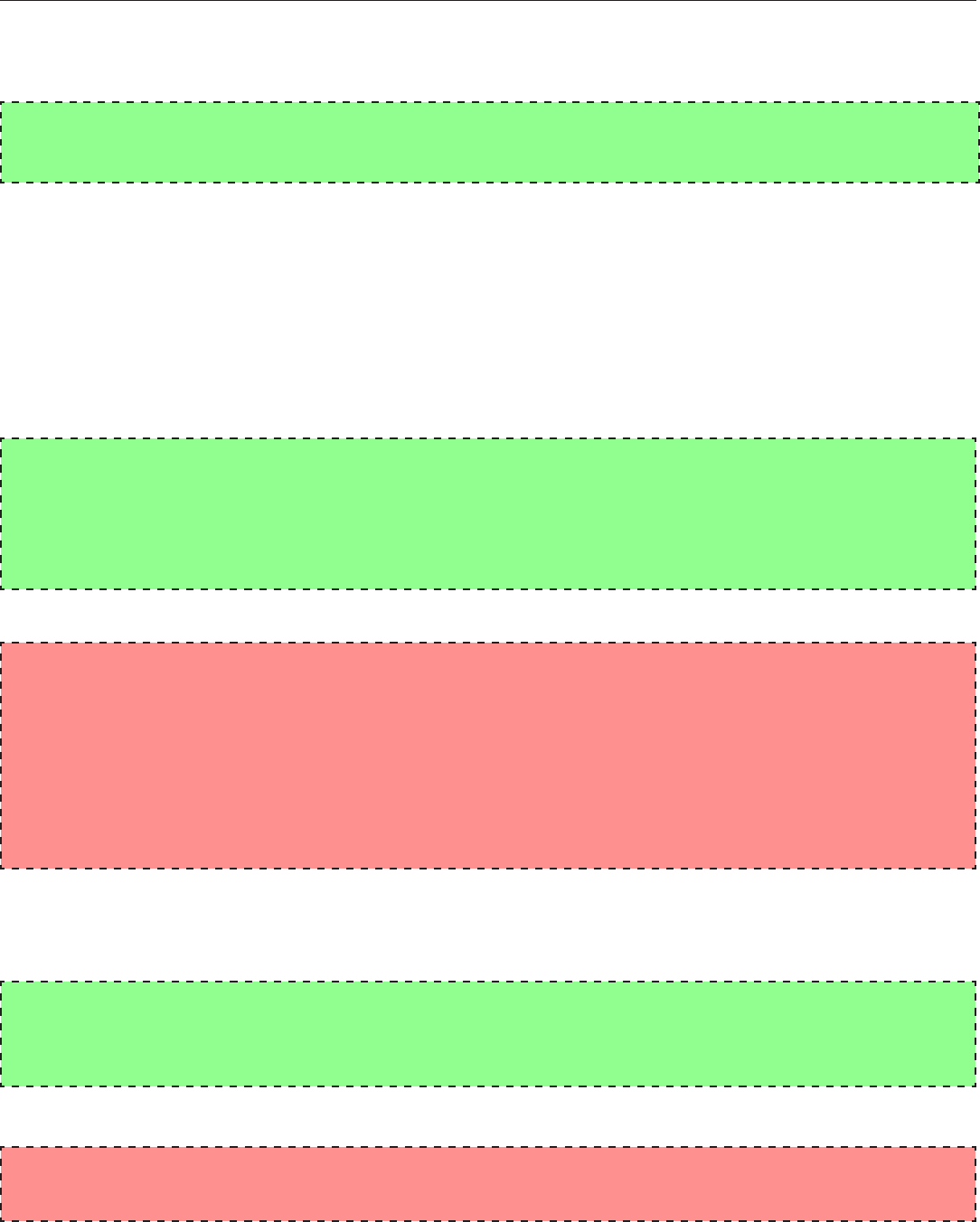
in either green or red blocks. Green blocks are
exemplar code that should be mimicked, red blocks
are coding style that should be avoided.
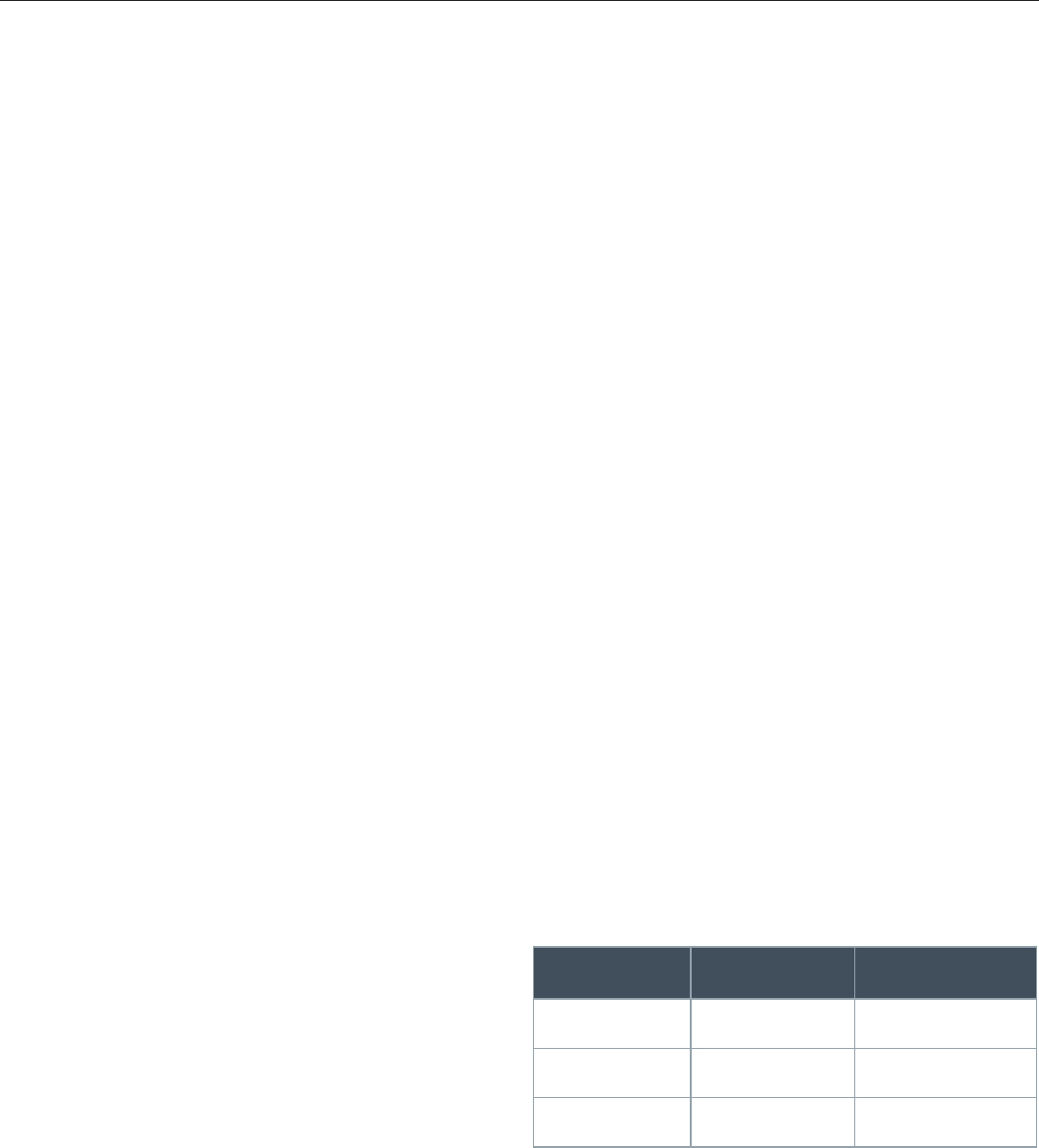
Terminology
As mentioned before, nomenclature used in this
document is based on Stata terminology. Please use
the table below to guide your understing of key terms
in this document:
Overview
In our context, ‘Programs' are coded instructions to
conduct analyses using statistical software. These
programs are often co-written by several analysts
working collaboratively. Since most analysts work
in teams, programs written to conduct statistical
analyses serve as building blocks for increased
knowledge sharing across a department. These
programs, when written clearly, can be sampled or
entirely reused by other analysts to avoid “reinventing
the wheel.”
The Center for Education Policy Research (CEPR) and
the Strategic Data Project (SDP) recommend analysts
follow published standards when writing programs.
Though every programmer has her own idiosyncratic
style, CEPR encourages using standards that facilitate
a common methodology for creating programs and
sharing code.
The CEPR Coding Style Guide is intended for analysts
familiar with statistical programs that require some
level of programming. Ideally, analysts who use this
guide have manipulated large datasets and conducted
statistical analyses with a programming language
such as Stata or SQL. If you have not used these
software programs, but are comfortable writing code,
this Coding Style Guide will be accessible to you.
Scope
The CEPR Coding Style Guide establishes standards
for writing programs and codes to conduct statistical
analyses in Stata – the software CEPR's research
team uses. However, many conventions, are
applicable to any programming language. These
conventions are meant to facilitate standardization,
not provide insight into language functionality or
syntax.
Stata Term SQL Term C# Term
Observation Row or Record Object
Variable Column Field or Attribute
Macro Variable Variable
INTRODUCTION
SDP TOOLKIT FOR EFFECTIVE DATA USE | ADOPT 5
General Naming Conventions
When you name folders, files, variables, or macros,
keep in mind that the name should be intuitive enough
for others to interpret the meaning and content at
first glance. In general, do not shy away from longer
descriptive names with multiple words as opposed
to shorter abbreviated names that may not convey
the proper meaning. Other general guidelines for
naming:
• Separate words in any file, folder, or variable
name with underscores (_) to ensure readability.
Avoid using spaces in names.
• Avoid using other punctuation such as periods,
hyphens, exclamation points, etc.
• Avoid mixed-case names (uppercase and
lowercase at the same time) when possible.
Uppercasing is acceptable for acronyms (e.g.
Boston Public Schools = BPS)
Abbreviations and Acronyms
To ensure that names are not overly lengthy, the
following abbreviations are accepted for commonly
used terms:
Term Abbreviation
School sch
Principal prn or p
Student stu or s
Teacher tch or t
Class cls or c
Grade Level gr
Subject subj
Year yr
Primary pri
Secondary sec
College clg
Graduate/Graduation grad
Elementary School es
Middle School ms
Junior High School jhs
High School hs
Charter School chs
Maximum max
Minimum min
Mean or Average avg
Count cnt
Date dt
Number num or n
Standard Deviation sd
English Language Arts ela
Verbal verb
Performance perf
NAMING CONVENTIONS
6 SDP TOOLKIT FOR EFFECTIVE DATA USE | ADOPT
Term Abbreviation
Strategic Data Project SDP
National Center for Teacher Effectiveness NCTE
The New Teacher Project TNTP
Fort Worth Independent School District FWISD
Delaware Department of Education DEDOE
Human Capital Diagnostic HK
College Going Diagnostic CG
Strategic Performance Indicator SPI
Additional terms can be abbreviated only if the
abbreviation is intuitive. When in doubt, spell it out!
Also, it is acceptable to use acronyms for partner
agencies, projects, and analyses. For example:
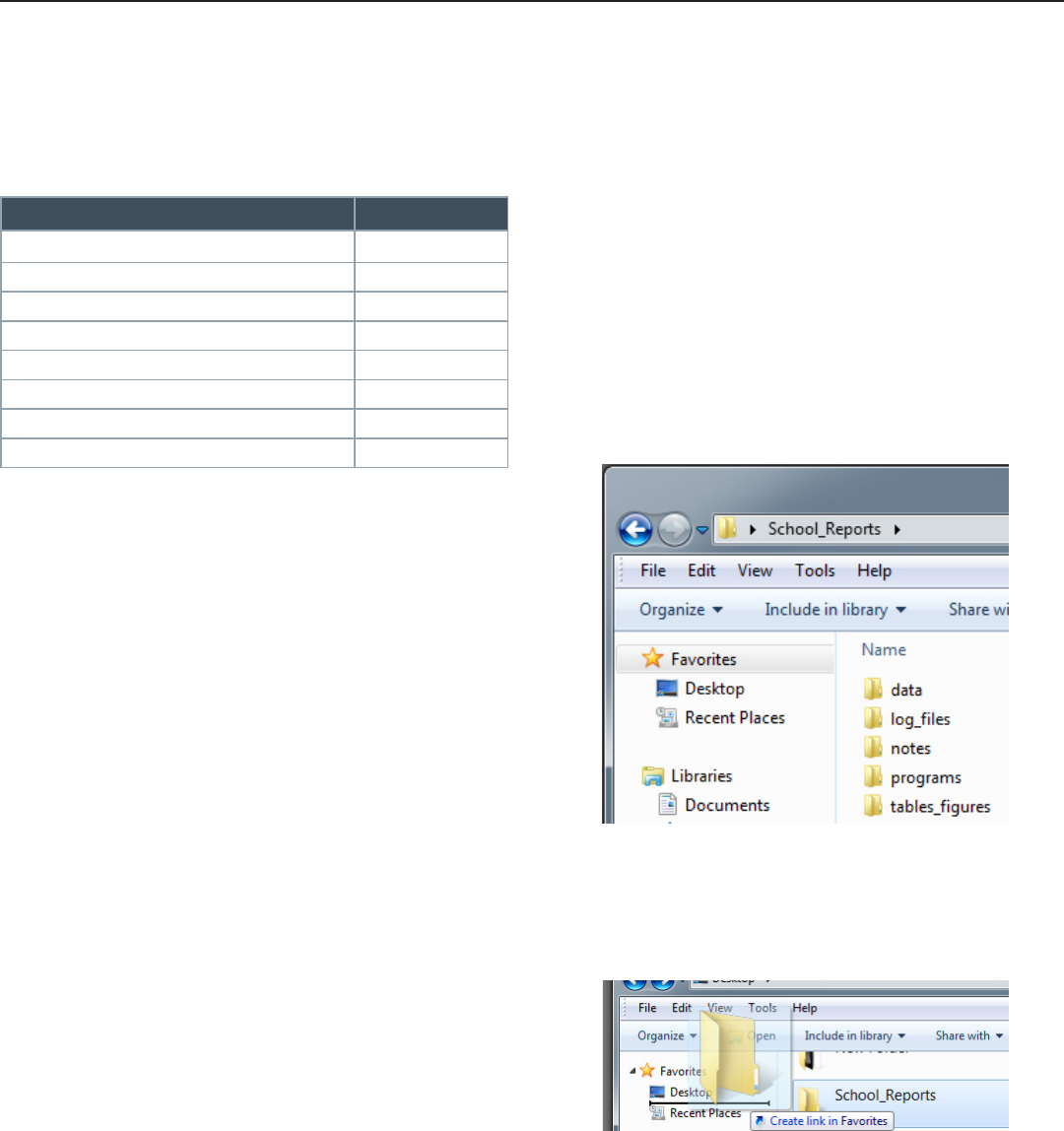
Folder Naming and Structure
To organize files properly on any server, we
recommend you adhere to the following guidelines:
• The root folder should be named according to the
project that data and analyses contained within
belong to (e.g. School_Reports).
• Sub-folders within a project should be named
according to their contents, with the most
common being “data” (with sub-folders for “raw”
and “clean” files), “programs” or “do_files”,
“logs” or “log_files”, “notes”, and “tables_
figures”.
• For those programming in a Windows
environment, pin commonly accessed folders to
the Favorites bar in Windows Explorer for easier
access.
NAMING CONVENTIONS
Additional terms can be abbreviated only if the
abbreviation is intuitive. When in doubt, spell it out!
Also, it is acceptable to use acronyms for partner
agencies, projects, and analyses. For example:

SDP TOOLKIT FOR EFFECTIVE DATA USE | ADOPT 7
// label variables in standard student le
do "$programs/dcps_student_labeling.do"
// label variables not in standard labeling do le
label stu_struc_move "student had structural move, moving schools"
NAMING CONVENTIONS
File Naming
Files should be named using “compositional identifiers” that allow an individual to understand the contents of
a file at a high level without having to open the file. This is especially important for program files (e.g. Stata .do
files or SQL scripts) and graphs. The Compositional identifiers file name should descend in order of importance
so the files group together in an intuitive order when sorted by name (default in Windows Explorer). For
example, files should be named with the following compositional identifiers in the following order of importance:
• Project Name,
• Component of process - for instance student demographic data or survey data,
• Date (in YYYYMMDD format), version number, or state of file (i.e. temp, test, review, final, etc)
So, for example:
• School_Report_Student_Attributes_20110601_DRAFT.do
• School_Report_Student_Attributes_20110601_REVIEW.do
• School_Report_Student_Attributes_20110601_FINAL.do
Even though folder structure may imply the contents of a file and the above guidelines may seem redundant,
files can be shared across departments in your organization or with other external entities and therefore names
should convey the same meaning outside of folder structure.
Additionally, file names should be as consistent as possible, especially output files (graphs, logs) related to a
program file. For example, a graph output of the above Stata .do file may be named School_Report_Student_
Attributes_20110601_FINAL_ethnicity.gph.
Variable Naming
The number of characters used to name variables is limited. For example, Stata variable names may contain up
to 32 characters. Database columns may be limited to 30 characters depending on platform. Additionally, many
Stata commands only print 12 characters by default. Keep this in mind when you name variables. Try to be both
specific and concise in your variable names.
All variables in a Stata dataset should be labeled (as should database columns). For commonly used variables
with existing definitions, consider reading in labels from a common external file rather than entering labels
manually or by copy/paste. Alternatively, call upon a separate .do file in your main code that contains standard
labels rather than including labeling code in your primary .do file.

8 SDP TOOLKIT FOR EFFECTIVE DATA USE | ADOPT
Comments
Comments are important in any program (Stata, SQL, or otherwise) and should be used generously but also
deliberately. Comments should be used as often as necessary to explain the logic and use of each portion of
code without being burdensome to write. The goal of commenting is to give insight into your program – not only
for others (e.g. your peers) but also for you! When you've spent hours, days, weeks, months, or years between
writing and reading your own code, you'll thank yourself for the comments!
Generally speaking, a comment every few lines of code is good practice. Try to write comments that address one
or both of these questions:
• What does this block do?
• Why did I implement this block this particular way?
General Commenting Guidelines
Comments can be entered in Stata, SQL, and other programming languages using a number of different
syntaxes. Some of the syntaxes are common to most (or all) languages, some not. To ensure consistency
between types of programs (Stata, SQL, etc), please use the following guidelines. These guidelines ensure that
your programs are readable when printed or viewed in a normal text editor that does not do syntax highlighting.
• Use the double-forward-slash syntax (//) for a single-line comment or an end-of-line comment (a comment
at the end of a line of code)
• Use the slash-star syntax (/* and */) for a block comment (multiple line comment).
• Precede each line with an additional asterisk. It is a good idea to align the asterisks.
• Avoid in-line comments between pieces of code
// This is a single-line comment
local row = 1 // This is an end-of-line comment
/* This is a block comment
* on multiple lines */
local /* This is not a good comment */ row = 1
COMMENTING AND READABILITY

SDP TOOLKIT FOR EFFECTIVE DATA USE | ADOPT 9
• Keep comments as succinct as possible (e.g., one line) while not losing meaning.
• Leave one space between the // or /* and your comment's first character.
Not:
• If a single-line comment needs to be long enough to extend beyond the screen/page width, turn it into a
block comment.
• Similarly, if a single line of code (command) is long enough to extend beyond the screen/page, break the
code into multiple lines and use the triple-slash syntax (///) at the end of each line. Always indent the
continuing lines of code.
• Use a string of asterisks in a comment to distinguish between a high-level description of a block of code
from more granular comments. End the block with a similar string.
• Alternatively, if you expect to have a series of commands that extend beyond the screen/page, change the
end-of-line delimiter from a carriage return to a semicolon. When you have finished the series, return the
end-of-line delimiter to the default carriage return.
// compute average test score
egen average = mean(score), by(studentid)
collapse (mean) s_male s_race s_lep s_lunch s_sped s_math_std s_read_std ///
s_black s_asian s_hispanic s_nativeamer s_white ///
s_retained s_schoolcode, by(s_year schoolname)
#delimit ;
collapse (mean) s_male s_race s_lep s_lunch s_sped s_math_std s_read_std
s_black s_asian s_hispanic s_nativeamer s_white
s_retained s_schoolcode, by(s_year schoolname);
#delimit cr
// ***************** Data Set Macros *****************
local location “C:\test” // Location of les
local le_name “lename1” // Name of source data le
local source_id “studentid” // Variable containing the unique id in data le
local xwalk_le “id_xwalk” // Name of crosswalk le
local masked_id “sdpsid” // Variable containing masked id in crosswalk
// ******************************************************
//The following line is meant to compute the average of a student's test score.
egen average = mean(score), by(studentid)
COMMENTING AND READABILITY

10 SDP TOOLKIT FOR EFFECTIVE DATA USE | ADOPT
• Mark the end of a large block of nested conditional logic – such as a loop or if statement.
• End-of-line comments are discouraged (except for annotating a group of aligned variables or marking the
end of a block of nested code). Instead, comments should precede a line of code.
• Commenting can help you keep track of future analyses you'll want to come back to. For example, make
explicit call-outs to pieces of code that need to be implemented, reviewed, updated, or configured with “TO
DO”.
Not:
foreach subj in math read {
use “$data/student_teacher_`subj'_vam.dta”, clear
// LOTS OF STUFF
...
...
forval yr = 2(1)`numyrs' {
gen late_exp_`yr' = ever_late_hire*t_exp`yr'
// LOTS OF STUFF
...
...
...
} // End of loop over years
// MORE STUFF
...
...
} // End of loop over subjects
// merge teacher VA math
merge 1:m studentid year using “$data/student_teacher_math_tre.dta”, nogen
// TO DO: generate new hire and late hire variable using hire date
// TO DO: update variables based on school year
// TO DO: test the following block for correctness on a larger data set
merge 1:m studentid year using “$data/student_teacher_math_tre.dta”, nogen
// merge VA math
COMMENTING AND READABILITY

SDP TOOLKIT FOR EFFECTIVE DATA USE | ADOPT 11
File Headers
At the top of program files should be a block comment that summarizes your program, names the file, names
the author (first letter of first name and last name), lists the date created, provides a description, and lists
inputs,outputs, and updates. The description should walk through high level logical steps. These steps should
be identified in the actual code. Consider what is done here:
White Space and Readability
White space refers to indentation and extra lines that make code readable. Lack of white space is referred to as
“spaghetti code” since it is difficult to ascertain where one command ends and the next begins.
Code should be indented to make clear which blocks of code are nested inside of others (especially when
working with loops or conditional statements). An indent should result in four spaces so that code prints and
displays identically within other applications or computers.
/****************************************************************************
* File name: crosswalk_masked_ids.do
* Author(s): JSilver
* Date: 5/27/11
* Description: This program creates the crosswalk of student ids to random
* research ids by:
* 1. Inputting the universe of student ids
* 2. Filtering the distinct set of student ids
* 3. Generating random ids and associating to student ids
*
* Inputs: ../raw/students/studentyearsch.dta
* ../raw/students/englang.dta
*
* Outputs: ../data/bps_student_school_year.dta
*
* Update 1: TKawakita, 6/1/11 - Added check to ensure random ids are unique
***************************************************************************/
clear
set more off
capture log close
set mem 8000m
global raw “//cepr-les/projects/DCPS/Raw”
global data “//cepr-les/projects/DCPS/Data”
global log “//cepr-les/projects/DCPS/Log Files”
//******* Step 1: Input universe of student ids *******
...
//******* Step 2: Filter distinct set of student ids *******
...
//******* Step 3: Generate random ids and associate to student ids *******
...
//******* Update 1: Add check to ensure ids unique *******
...
COMMENTING AND READABILITY

12 SDP TOOLKIT FOR EFFECTIVE DATA USE | ADOPT
The following is an example of well indented code:
The following is an example of poorly indented code:
Do not indent braces following a condition.
Also, do not double or triple indent when a single indent is sufficient.
if $teacher == 1 {
local numyrs = 4
// dene empty matrix of Yr x Subj
mat out = J(`numyrs',2,.)
local row = 1
local col = 1
foreach subj in math read {
use “$data/student_teacher_`subj'_vam.dta”, clear
forval yr = 2(1)`numyrs' {
gen late_exp_`yr' = ever_late_hire*t_exp`yr'
}
} // end of loop on subject
} // end of teacher processing
if $teacher == 1 {
local numyrs = 4
// dene empty matrix of Yr x Subj
mat out = J(`numyrs',2,.)
local row = 1
local col = 1
foreach subj in math read {
use “$data/student_teacher_`subj'_vam.dta”, clear
forval yr = 2(1)`numyrs' {gen late_exp_`yr' = ever_late_hire*t_exp`yr'}
}
}
if x > 0
{
dis “x is positive”
}
else
{
dis “x is negative”
}
if x > 0 {
dis “x is positive”
}
else {
dis “x is negative”
}
COMMENTING AND READABILITY

SDP TOOLKIT FOR EFFECTIVE DATA USE | ADOPT 13
As mentioned earlier, if a single command or line of code extends beyond the text window, break the command
into several lines, indent the lines following the start of the command, and use the triple-slash:
Not:
Or change the delimiter to a semicolon, make sure to put a semicolon at the end of your statement, and return
the delimiter to a carriage return. This can often be a better solution than using the triple-slash:
Follow the same guidelines for Stata graphing code:
Indent the contents between preserve and restore in Stata.
Not:
collapse (mean) s_male s_race s_lep s_lunch s_sped s_math_std s_read_std ///
s_black s_asian s_hispanic s_nativeamer s_white ///
s_retained s_schoolcode, by(s_year schoolname)
#delimit ;
graph bar alt_cert alt_cert_with_exp, over(subject) blabel(bar, format(%6.3f))
legend(label(1 “No Teacher Controls”) label(2 “Controls for Experience”))
title(“VA of Teachers with Prov Cert” “Relative to Teachers with Regular Cert”)
ytitle(“Difference in Value-Added”)
yline(0, lpattern(dash) lcolor(black))
yscale(range(-0.15, 0.15)) ytick(-0.15(0.05)0.15) ylabel(-0.15(0.05)0.15)
$graphcolorpref;
#delimit cr
preserve
collapse te* tch_testsizemath, by(t_latid_math_old t_year)
rename t_latid_math_old t_latid
temple tch
save “`tch'”
restore
collapse (mean) s_asian s_black s_hispanic s_lep s_lunch s_male s_math¬_std s_nativeamer
s_race s_read_std s_retained s_schoolcode s_white, by(studentid)
preserve
collapse te* tch_testsizemath, by(t_latid_math_old t_year)
rename t_latid_math_old t_latid
temple tch
save “`tch'”
restore
COMMENTING AND READABILITY
#delimit ;
collapse (mean) s_male s_race s_lep s_lunch s_sped s_math_std s_read_std
s_black s_asian s_hispanic s_nativeamer s_white
s_retained s_schoolcode, by(s_year schoolname);
#delimit cr
14 SDP TOOLKIT FOR EFFECTIVE DATA USE | ADOPT
When multiple commands with the same function are grouped together, they should be properly indented and
the components of the command should be aligned.
Not:
Finally, more white space is better than less. Make it easy for peers to read your code!
local loc “C:\test” // Location of les
local le_name “lename1” // Name of source data le
local source_id “studentid” // Variable containing the unique id in data le
local xwalk_le_name “id_xwalk” // Name of crosswalk le
local masked_id “sdpsid” // Variable containing masked id in crosswalk
local loc “C:\test” // Location of les
local le_name “lename1” // Name of source data le
local source_id “studentid” // Variable containing the unique id in data le
local xwalk_le_name “id_xwalk” // Name of crosswalk le
local masked_id “sdpsid” // Variable containing masked id in crosswalk
COMMENTING AND READABILITY
SDP TOOLKIT FOR EFFECTIVE DATA USE | ADOPT 15
Initializing Your Environment (Stata)
The first guideline when writing a Stata program, either within a .do file or using ad-hoc commands, is to
initialize your environment. This is done by:
1. Clearing existing data from memory
2. Setting the “more” option to “off” – this allows your program to output without waiting for user input (e.g.
hitting the spacebar) to scroll pages
3. Ensuring open logs are closed. The “capture” prefix prevents an error from occurring if there is no open
log
4. Setting the usable memory in the environment
These should be the first commands following your file header.
Logging Output (Stata)
It is important to log the output of Stata programs and ad-hoc commands so the results can be reviewed later.
Stata does not automatically capture output displayed to a log file. If a log file is not explicitly opened before
commands are made, the results can only be saved if they are copied out of Stata's output window.
Log your work as a text file so it can be viewed outside of Stata:
The log must be closed at the end of your program/work. Otherwise it will not be saved!
// Initialize environment
clear
set more off
capture log close
set mem 8000m
log using lename, text replace
log close
CODING GUIDELINES

16 SDP TOOLKIT FOR EFFECTIVE DATA USE | ADOPT
Global Macros as Switches
You may want to run only parts of the program at a time. To do this, use global variables that act as “switches”
to section off distinct and independent parts of the program. A switch is essentially a variable that takes a
binary value – 0 or 1 – to turn parts of your program on and off (like a light switch).
capture log close
clear matrix
if $new_hires_by_pov==1 {
log using “$log/dcps_recruitment_new_hires_by_pov”, text replace
use “$data/dcps_teacher_tre.dta”, clear
// OTHER STUFF
log close
}
clear matrix
if $late_hire_over_time==1 {
use “$data/dcps_teacher_tre.dta”, clear
log using “$log/dcps_recruitment_late_hire_over_time”, text replace
// OTHER STUFF
log close
}
// SWITCHES
global teacher “0”
global student “0”
global test “0”
. . .
if $teacher==1 {
// STUFF
}
if $student==1 {
// STUFF
}
if $test==1 {
// STUFF
}
Capture segments of your .do file to separate logs rather than having one log for the entire program. For
instance, rather than having one log file for the entire School Report analysis, you may want to log each
component of the analysis. Survey analyses would be logged separately from student demographics analyses.
CODING GUIDELINES
SDP TOOLKIT FOR EFFECTIVE DATA USE | ADOPT 17
You may also put brackets around code without a condition or global. In the Stata do-file interface, this will
collapse any code in the brackets and minimize the amount of scrolling up and down you will need to do.
Conditions
Conditions, or conditional code, refer to pieces of code that execute if a certain Boolean logic statement is
“true”. Conditions take the form of if/else statements or loops. Conditional logic was used in the previous
example to demonstrate switches.
A code block executed as a result of a condition should be encapsulated in braces ({ }). The open-brace or left-
brace ( { ) should always be on the same line as the condition and the close-brace or right-brace ( } ) should
always be on its own line:
Not:
If a branch involves a single statement, then braces are not necessary. However, it is still advised to use them in
case more statements are added within the condition later. Regardless, always put the conditional code on the
line following the condition and never on the same line as the condition:
Not:
if x > 0 {
dis “x is positive”
}
else if x < 0 {
dis “x is negative”
}
if x > 0
dis “x is positive”
else if x < 0
dis “x is negative”
// First bad example
if x > 0
{
dis “x is positive”
}
// Second bad example
else if x < 0
{dis “x is negative”}
if x > 0 dis “x is positive”
else if x < 0 dis “x is negative”
CODING GUIDELINES
{
// STUFF
}

18 SDP TOOLKIT FOR EFFECTIVE DATA USE | ADOPT
Hard Coding vs Macros
Hard coding is the practice of using literal values in code instead of variables. Hard coding should be avoided
whenever possible. Take the following code (which generates a “late hire” flag for teachers hired within a
certain date range for a certain school year) as an example:
Instead of hard-coding dates and years, variables and looping can be used:
Initially, it may seem that hard coding is more intuitive and easier to read. However, hard-coding is much more
difficult to maintain. Take the scenario where the two sections of code above were to be changed to function on
years 2000-2004, with cut-off dates shifted a month ahead. For the hard-coded program, 27 literal values would
need to be changed. In the more elegant version that uses macros defined at the beginning of the program,
only 4 changes need to be made.
local num_yrs “4”
local rst_yr “2007”
local cutoff1 “1sep”
local cutoff2 “1apr”
gen t_late_hire = 0
forval yr =`rstyr'(1)(`rst_yr'+`numyrs'-1) {
replace t_late_hire = 0 if t_hiredate <= td(`cutoff1'`yr') & t_hiredate !=. ///
& t_year==`yr'
replace t_late_hire = 1 if t_hiredate > td(`cutoff2'`yr') ///
& t_hiredate<= td(`cutoff2'`yr') & t_hiredate!=. & t_year==`yr'
replace t_late_hire = 0 if t_hiredate > td(`cutoff2'`yr') ///
& t_hiredate!=. & t_year==`yr'
}
gen t_late_hire = 0
replace t_late_hire = 0 if t_hiredate <= td(1sep2006) & t_hiredate !=. & t_year==2007
replace t_late_hire = 1 if t_hiredate > td(1sep2006) & t_hiredate <= td(1apr2007) ///
& t_hiredate!=. & t_year==2007
replace t_late_hire = 0 if t_hiredate > td(1apr2007) & t_hiredate!=. & t_year==2009
replace t_late_hire = 0 if t_hiredate <= td(1sep2007) & t_hiredate !=. & t_year==2008
replace t_late_hire = 1 if t_hiredate > td(1sep2007) & t_hiredate <= td(1apr2008) ///
& t_hiredate!=. & t_year==2008
replace t_late_hire = 0 if t_hiredate > td(1apr2008) & t_hiredate!=. & t_year==2008
replace t_late_hire = 0 if t_hiredate <= td(1sep2008) & t_hiredate !=. & t_year==2009
replace t_late_hire = 1 if t_hiredate > td(1sep2008) & t_hiredate <= td(1apr2009) ///
& t_hiredate!=. & t_year==2009
replace t_late_hire = 0 if t_hiredate > td(1apr2009) & t_hiredate!=. & t_year==2009
replace t_late_hire = 0 if t_hiredate <= td(1sep2009) & t_hiredate !=. & t_year==2010
replace t_late_hire = 1 if t_hiredate > td(1sep2009) & t_hiredate <= td(1apr2010) ///
& t_hiredate!=. & t_year==2010
replace t_late_hire = 0 if t_hiredate > td(1apr2010) & t_hiredate!=. & t_year==2010
CODING GUIDELINES

SDP TOOLKIT FOR EFFECTIVE DATA USE | ADOPT 19
If hard coding appears necessary (though with some more thought it likely isn't), make a large and distinct call
out to this with a comment.
Macros as File Paths
When defining file paths using macros to define “input” information is preferable to hard-coding. Often, a
program references input data or output locations and files. By using a global macro at the beginning of
the program, you can easily change the location of input and output files. This is especially important when
transporting your program outside of your work environment to work on-site.
Closing
This guide is not an exhaustive list of best practices for programming. However, these guidelines will equip you
and your team to conduct analyses effectively, efficiently, and reliably. These coding practices, will improve your
ability to share knowledge across your organization and build capacity to construct sophisticated analyses with
statistical software.
/ Location of input data les
local location “C:\test\data\input”
// List of data le names
local lenames “lename1” “lename2” “lename3”
// *****************************************************************
// Change directories to location of les
cd “`location'”
// Merge masked ids onto les
foreach lename in “`lenames'” {
use “`lename'”
merge m:1 sourceid using xwalkle, nogen assert(2 3) keep(3)
save “`lename'_masked”, replace
CODING GUIDELINES

SDP DIAGNOSTICS
SDP’s second core strategy,
conducting rigorous diagnostic
analyses using existing agency
data, focuses on two core areas:
(1) college-going success and
attainment for students and (2)
human capital (primarily examining
teacher eectiveness).
The diagnostics are a set of analy-
ses that frame actionable questions
for education leaders. By asking
questions such as, “How well do
students transition to postsecondary
education?” or “How successfully is an
agency recruiting eective teach-
ers?” we support education leaders
to develop a deep understanding of
student achievement in their agency.
ABOUT THE SDP TOOLKIT FOR EFFECTIVE DATA USE
SDP’s third core strategy is to disseminate our tools, methods, and lessons learned to
many more educational agencies. This toolkit is meant to help analysts in all educa-
tional agencies collect data and produce meaningful analyses in the areas of college-
going success and teacher eectiveness. Notably, the analyses in this release of our
toolkit primarily support questions related to college-going success. The data collec-
tion (Identify) and best practices (Adopt) stages of the toolkit, however, are applicable
to any sort of diagnostic and convey general data use guidelines valuable to any
analysts interested in increasing the quality and rigor of their analyses. Later releases
will address analyses relating to teacher eectiveness.
The Strategic Data Project
RIGHT
DECISIONS
RIGHT
PEOPLE
RIGHT
ANALYSIS
RIGHT
DATA
CENTER FOR EDUCATION POLICY RESEARCH
STRATEGIC DATA PROJECT
50 CHURCH ST., 4TH FLOOR, CAMBRIDGE, MA 02138
VOX 617.496.1563
FAX 617.495.2614
WWW.GSE.HARVARD.EDU/SDP
OVERVIEW
e Strategic Data Project (SDP), housed at the Center for
Education Policy Research at Harvard University, partners with
school districts, school networks, and state agencies across
the US. Our mission is to transform the use of data in
education to improve student achievement. We believe
that with the right people, the right data, and the right
analyses, we can improve the quality of strategic policy and
management decisions.
CORE STRATEGIES
1. Placing and supporting top-notch analytic leaders as “Fellows”
for two years with our partner agencies
2. Conducting rigorous diagnostic analyses of teacher effectiveness
and college-going success using existing agency data
3. Disseminating our tools, methods, and lessons learned to many
more education agencies
SDP AT A GLANCE
23 AGENCY PARTNERS
14 SCHOOL DISTRICTS
7 STATE EDUCATION DEPARTMENTS
2 CHARTER SCHOOL ORGANIZATIONS
79 FELLOWS
54 CURRENT
25 ALUMNI
©2013 Presidents and Fellows of Harvard College. All rights reserved.
