A Guide To SensorTag Hackathons: Resources
SensorTagGuide
A_Guide_to_SensorTag_CC2650
User Manual:
Open the PDF directly: View PDF  .
.
Page Count: 11

A Guide to SensorTag
Hackathons: Resources
Michael Setton
Founder and CEO IoT Stars
Jarle Boe
Development Kit Manager
Wireless Connectivity Solutions,
Texas Instruments
A Guide to SensorTag Hackathons: Resources 2 March 2016
Overview
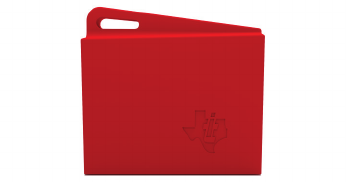
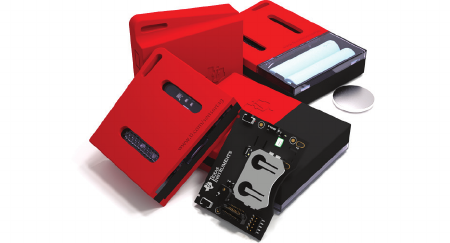
We made the SimpleLink™ SensorTag kit with one simple goal: connect your product
and receive sensor data from the cloud in three minutes. We wanted to make a
development tool that encourages cool and crazy ideas for the Internet of Things (IoT)
without having to deal with the complicated details that may restrict the most amazing
concept before the rst prototype is produced.
The SensorTag kit was created to make life easier for all developers with creative ideas
regardless of their technical background; software developers, hardware developers,
system architects, big data analytics, etc. have all embraced the SensorTag kit to bring
their product ideas to life.
The SensorTag kit has already been used in a lot of Hackathons, and based on our
collective experience from countless sleepless nights, we have assembled this list of
resources for everything you need to create a hackathon of your own. From sample
source code and 3D les for printing to tips on how to stay awake for 24 hours, we
hope this guide can help you create the next exciting IoT device.
And remember, help is always available on our TI E2E™ community forum
(www.ti.com/e2e), and remember to tweet about your projects by using #SensorTag
and tag us @TXInstruments!
First step
(Do this step well ahead of the
Hackathon)
Buy the SimpleLink SensorTag kit:
https://store.ti.com/cc2650stk.aspx
Resources
Lean about the SimpleLink SensorTag kits (including
the User Guide) on the following TI pages:
www.ti.com/sensortag
www.ti.com/sensortag-wiki
Getting started
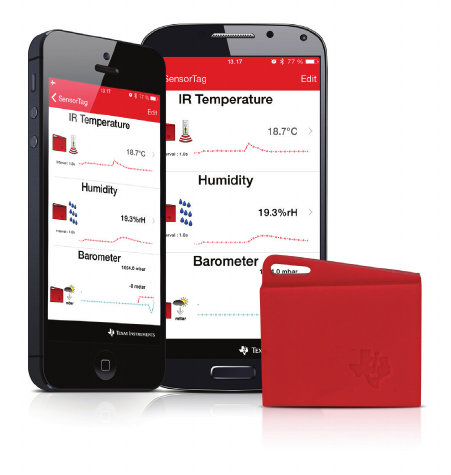
The first step is to connect the SensorTag directly
to a phone to access the sensor data through the
Bluetooth® Smart interface. The app gives a direct
link to the cloud interface to view the data in a web
browser.
SensorTag Android™ app
https://play.google.com/store/apps/
details?id=com.ti.ble.sensortag
SensorTag iOS app
https://itunes.apple.com/us/app/ti-sensortag/
id552918064?mt=8
Order
Now
A Guide to SensorTag Hackathons: Resources 3 March 2016
IBM quick start cloud
https://quickstart.internetofthings.ibmcloud.
com/#/
Replace the # in the link with the MAC address of
your SensorTag
IBM cloud foundation recipe
https://developer.ibm.com/recipes/tutorials/
connect-a-cc2650-sensortag-to-the-iot-
foundations-quickstart/
Freeboard visualization
http://freeboard.io/
Mobile app code development
For mobile developers, we have released the
complete SensorTag app source (Android) and a
sample code (iOS) that shows how to get started.
SensorTag software source for iOS
https://git.ti.com/sensortag-ios-source-code-
example
SensorTag source code for Android
https://git.ti.com/sensortag-20-android
Other source codes
https://github.com/lnanek/BleActionLog
https://play.google.com/store/apps/
details?id=com.togosoft.sensortag2
Making a mobile app for SensorTag using
Javascript
http://evothings.com/quick-guide-to-making-
a-mobile-app-for-the-ti-sensortag-using-
javascript/
SensorTag and Javascript source code:
https://github.com/evothings/evothings-
examples/tree/master/examples/ble-ti-
sensortag-cc2650-demo
Using Bluetooth low energy with
Windows® 8.1
http://sviluppomobile.blogspot.fr/2014/02/ble-
for-windows-81-part-i.html
http://sviluppomobile.blogspot.fr/2014/06/ble-
for-developers-in-windows-81-part-ii.html
http://apps.microsoft.com/windows/en-us/
app/best-ti-sensortag-ble/ec511d25-9a15-
4b52-8749-e4a05befa4ed/m/ROW
Writing Bluetooth Smart apps for Windows
phones
http://code.msdn.microsoft.com/
windowsapps/Keep-The-Keys-Bluetooth-LE-
6d4e6d47
SensorTag with Windows Phone 8.1
http://talkingaboutit.azurewebsites.net/post/
windows-phone-8-1-ble-communications-
part-1
http://talkingaboutit.azurewebsites.net/post/
windows-phone-8-1-ble-communications-
part-2
Bluetooth low energy browser for multiple
TI SensorTags: C# implementation for
Windows 8.1
An eBook by ilya Tepelboym
http://www.amazon.com/Bluetooth-Energy-
Browser-Multple-SensorTags-ebook/dp/
B00NHXDJOQ
A Guide to SensorTag Hackathons: Resources 4 March 2016
Host Test App (HCI) implementation for TI
SensorTag
In case you want to use an external MCU:
https://github.com/snegovick/HostTestApp-
SensorTag
Connecting a SensorTag to an Android
phone
A complete tutorial with source code by Mark
Allison. Final app displays temperature and humidity.
Includes a high level of detail about Bluetooth Smart
and Android.
Bluetooth Smart background
http://blog.stylingandroid.com/bluetooth-le-
part-1/
Messenger implementation
http://blog.stylingandroid.com/bluetooth-le-
part-2/
Device discovery
http://blog.stylingandroid.com/bluetooth-le-
part-3/
GATT
http://blog.stylingandroid.com/bluetooth-le-
part-4/
Descriptors and UUIDs
http://blog.stylingandroid.com/bluetooth-le-
part-5/
Fully working app
http://blog.stylingandroid.com/bluetooth-le-
part-6/
Embedded firmware development
The SensorTag can easily be used without modifying
the firmware. But if you want to make your own
products you will have to get into the details of the
SensorTag firmware.
The quickest way to get started is to use Code
Composer Studio™ Cloud integrated development
environment (IDE):
https://dev.ti.com/
If you prefer to install Code Composer Studio IDE
on your PC you can download it directly.
http://www.ti.com/tool/ccstudio-wcs
Everything you need to develop your own Bluetooth
Smart-enabled applications is covered in the
SimpleLink Academy:
http://software-dl.ti.com/lprf/simplelink_
academy/overview.html
SensorTag app implementation
Improving the UI
http://blog.stylingandroid.com/appui-part-1/
Adding icons
http://blog.stylingandroid.com/app-ui-ux-
part-2/
Changing background color based on
sensor data
http://blog.stylingandroid.com/app-ui-ux-
part-3/
Action bar, device scan and handling
disconnects
http://blog.stylingandroid.com/app-ui-ux-
part-4/
A Guide to SensorTag Hackathons: Resources 5 March 2016
Improving UX during scans
http://blog.stylingandroid.com/app-uiux-
part-5/
Automatically connecting to the SensorTag
http://blog.stylingandroid.com/app-ui-ux-
part-6/
SensorTag with Intel Edison board
https://communities.intel.com/thread/56145
Using SensorTags to monitor temperature
and humidity in greenhouses (polytunnels)
http://blog.risingstack.com/using-devops-
tools-to-monitor-polytunnel/
Beacons
iBeacon™ app:
http://processors.wiki.ti.com/index.php/
SensorTag_with_iBeacon
Eddystone™ example
http://processors.wiki.ti.com/index.php/
CC26xx_Eddystone_Beacon_Implementation
Beacon library for Android
https://github.com/AltBeacon/android-beacon-
library
iBeacon demos for iOS
http://www.devfright.com/ibeacons-tutorial-
ios-7-clbeaconregion-clbeacon/
Source code: http://www.devfright.com/wp-
content/uploads/2013/09/iBeacons-Demo.zip
Core location beacons
http://www.captechconsulting.com/blog/
christopher-mann/ios-7-tutorial-series-core-
location-beacons
How to use iBeacon and iOS 7 to enhance
your apps:
http://www.appcoda.com/ios7-programming-
ibeacons-tutorial/
Configure and calibrate an iOS devices
acting as a Beacon
https://github.com/xamarin/monotouch-
samples/tree/master/AirLocate
Region monitoring and iBeacon
https://developer.apple.com/library/ios/
documentation/userexperience/Conceptual/
LocationAwarenessPG/RegionMonitoring/
RegionMonitoring.html
Writing mobile iBeacon applications in
Javascript
http://evothings.com/quick-guide-to-writing-
mobile-ibeacon-applications-in-javascript/
Two way iBeacon communication in the
Swift programming language
http://www.pubnub.com/blog/smart-ibeacon-
communication-in-the-swift-programming-
language/
Use a MAC running Maverick as an iBeacon
https://github.com/mttrb/BeaconOSX
Configure your iPhone or iPad as an
iBeacon
http://blog.passkit.com/configure-iphone-
ibeacon-transmitter/
A Guide to SensorTag Hackathons: Resources 6 March 2016
Quick Beacon
Use Android L to configure your phone to transmit
as an iBeacon – Uses AltBeacon format from
Radius Networks.
https://github.com/AltBeacon/altbeacon-
transmitter-android
Determining indoor position using iBeacons
http://techblog.rga.com/determining-indoor-
position-using-ibeacon/
Physics of iBeacons
RSSI formulas, noise etc. ... Overview from
estimotes
http://www.slideshare.net/firstmarkcap/
estimote-hardwired-nyc-september-2014
General Bluetooth Smart resources
Bluetooth SIG – Smart Starter Kit
https://developer.bluetooth.org/Pages/smart-
starter-kit.aspx
Bluetooth SIG – Specifications
https://www.bluetooth.org/en-us/specification/
adopted-specifications
GATT – Specifications
https://developer.bluetooth.org/gatt/Pages/
default.aspx
Texas Instruments – Introduction to TI
SimpleLink – Bluetooth Smart for the IoT
http://focus.ti.com/docs/
training/catalog/events/event.
jhtml?sku=OLT313008&DCMP=lprf-
bletrain&HQS=lprf-bletrain-bn
UI and UX design resources
A psychologist’s view of UX design
http://uxmag.com/articles/the-psychologists-
view-of-ux-design
Easy GUI prototyping: (MAC OS X,
Windows, Linux)
Pencil Project: http://pencil.evolus.vn/
Pencil provides various built-in shapes collection
for drawing different types of user interface ranging
from desktop to mobile platforms.
Think your app is beautiful? Not without
user experience
http://www.smashingmagazine.
com/2014/09/01/think-your-app-is-beautiful-
not-without-user-experience-design/
From Sketch to Execution: 20 UI Concept
Sketches
http://designrshub.com/2014/02/ui-concept-
sketches.html
Flat UI kits for designers
http://graphicdesignjunction.com/2014/01/
creative-flat-ui-kits/
Innovative design concepts to boost user
experience
http://graphicdesignjunction.com/2014/01/
innovative-ui-design-concepts-to-boost-user-
experience/
Displaying change between 2 points in time
http://www.perceptualedge.com/articles/
visual_business_intelligence/displaying_
change_between_two_points_in_time.pdf
A Guide to SensorTag Hackathons: Resources 7 March 2016
Introducing bandlines
http://www.perceptualedge.com/articles/
visual_business_intelligence/introducing_
bandlines.pdf
Practical rules for using colors in charts
http://www.perceptualedge.com/articles/
visual_business_intelligence/rules_for_using_
color.pdf
Android design
Typography and style
http://www.google.com/design/spec/style/
typography.html
Practical Steps for Android Development
for Graphic Designers, Vesa Antikainen,
Thesis, 2014
http://www.theseus.fi/handle/10024/72914
Android Cheatsheet for graphic designers
http://petrnohejl.github.io/Android-
Cheatsheet-For-Graphic-Designers/
Bluetooth Packet capture on Android
https://viaforensics.com/articles-
presentations/bluetooth-packet-capture-
android.html
iOS design
The iOS design guidelines
http://iosdesign.ivomynttinen.com/
Designing for iOS
https://developer.apple.com/library/ios/
documentation/userexperience/conceptual/
MobileHIG/index.html
Integrating SensorTag with Swift
http://anasimtiaz.com/?p=201
App prototyping
Flinto: Web-based App prototyping tool
https://www.flinto.com/
Proto IO
http://proto.io/
MarvelApp
https://marvelapp.com/
App implementation
Node JS module for Bluetooth Smart
peripherals
https://github.com/sandeepmistry/bleno
Node JS module for Bluetooth Smart
central devices
https://github.com/sandeepmistry/noble
Node JS and Websockets
http://www.slideshare.net/gonzaloayuso/
nodejs-and-websockets
A Guide to SensorTag Hackathons: Resources 8 March 2016
Introduction to Bluetooth low energy
security
http://twelvedot.com/blog/?p=621
Building real time applications with Android
and Websockets
http://www.slideshare.net/sergialmar/building-
realtime-applications-with-android-and-
websockets
Controlling ultra-low power CC2650
wireless MCU from anywhere in the world
with Xsockets
https://e2e.ti.com/blogs_/b/connecting_
wirelessly/archive/2015/06/11/controlling-
ultra-low-power-cc2650-wireless-mcu-from-
anywhere-in-the-world
How PubNub takes Socket IO to the next
level
http://www.pubnub.com/blog/pubnub-takes-
socketio-next-level/
Stream content to an interactive billboard
from a phone
http://www.pubnub.com/blog/mcdonalds-ios-
and-android-digital-billboard-campaign/
Connecting with WebSockets
http://msdn.microsoft.com/en-us/library/
windows/apps/hh761442.aspx
Get some ideas from these pages …
http://evothings.com/magic-stone-make-
mobile-iot-applications-using-the-ti-
sensortag-in-javascript/
http://www.pubnub.com/blog/iot-demo-
ibeacon-mqtt-arduino-raspberry-pi/
Plush toy activated by beacons
https://github.com/solarkennedy/equail
Skyway: Temasys WebRTC SDK
https://github.com/Temasys/
SkywayJS#skywayjs
SkywayJS is an open-source client-side library for
your web-browser that enables any website to easily
leverage the capabilities of WebRTC and its direct
data streaming powers between peers for audio/
video conferencing or file transfer.
Streaming data visualization with Plot.ly
http://makezine.com/2014/01/21/streaming-
data-with-plotly/
https://github.com/plotly/plotly-nodejs
Windows
Bluetooth and NFC for Windows 8.1
http://www.slideshare.net/TheOliver/windows-
phone-8-13-near-field-communcations-and-
bluetooth?related=1
A Guide to SensorTag Hackathons: Resources 9 March 2016
Azure Mobile Services
https://github.com/Azure/azure-mobile-
services
Using Windows Azure mobile services in
Android applications
http://www.codeguru.com/csharp/azure/
using-windows-azure-mobile-services-in-
android-applications.htm
Developing Windows Azure Mobile Services
server side
http://blog.maartenballiauw.be/
post/2013/10/11/Developing-Windows-Azure-
Mobile-Services-server-side.aspx
Using ASP.NET SignalR, Azure Mobile
Service and Websockets for real time, bi
directional communications with mobile
applications.
http://blogs.msdn.com/b/azuremobile/
archive/2014/05/30/realtime-with-signalr-and-
azure-mobile-net-backend.aspx
Use Socket IO with Azure Mobile Service
Node backend
http://azure.microsoft.com/blog/2014/08/26/
how-to-use-socket-io-with-azure-mobile-
service-node-backend/
Windows Azure Node JS developer centre
http://www.windowsazure.com/en-us/develop/
nodejs/
Windows Azure SDK for Node JS
https://github.com/WindowsAzure/azure-sdk-
for-node
Socket IO store which uses service bus
pub/sub for scale out
https://github.com/WindowsAzure/socket.io-
servicebus
Building text-to-speech applications using
Windows Phone 8.1 and Cortana overview
http://www.dotnetcurry.com/showarticle.
aspx?ID=1005
Miscellaneous
Why we need storytellers at the heart of
product development
http://uxmag.com/articles/why-we-need-
storytellers-at-the-heart-of-product-
development
Tips for your first Hackathon
http://tech.blog.box.com/2014/06/5-tips-for-
your-first-hackathon/
How you can prepare for a Hackathon
https://sendgrid.com/blog/prepare-hackathon/
Increase your odds of winning a Hackathon
https://sendgrid.com/blog/win-hackathon-
increase-odds/
How to give a great Hackathon presentation
http://techcrunch.com/2014/09/01/how-to-
crush-your-hackathon-demo/
Principles of a killer Hackathon demo
https://sendgrid.com/blog/principles-of-a-
killer-hackathon-demo/

Make story telling part of hacking
https://medium.com/hackers-and-hacking/
hackathon-stories-2077482865f3
TIps for winning Hackathons
http://blogs.msdn.com/b/matt-harrington/
archive/2014/05/03/tips-for-winning-
hackathons.aspx
Stay awake during the night
http://www.wikihow.com/Stay-Awake-at-Night
Four ways to stay awake without coffee
http://www.active.com/nutrition/articles/4-
ways-to-stay-awake-without-coffee
Music collections to listen to while coding
http://8tracks.com/jfinit/collections/upbeat
Stretches to relieve tension and pain
http://www.eyeprotectorpro.com/rsirepetitive-
strain-injury-explained-eyeprotectorpro/
stretches/
Tips to perform well at a Hackathon
http://blog.hackerearth.com/2015/11/tips-
perform-well-hackathon.html
SWRY023
© 2016 Texas Instruments Incorporated
Important Notice: The products and services of Texas Instruments Incorporated and its subsidiaries described herein are sold subject to TI’s standard
terms and conditions of sale. Customers are advised to obtain the most current and complete information about TI products and services before placing
orders. TI assumes no liability for applications assistance, customer’s applications or product designs, software performance, or infringement of patents.
The publication of information regarding any other company’s products or services does not constitute TI’s approval, warranty or endorsement thereof.
The platform bar, Code Composer Studio, E2E and SimpleLink are trademarks of Texas Instruments. All other trademarks are the
property of their respective owners.

IMPORTANT NOTICE
Texas Instruments Incorporated and its subsidiaries (TI) reserve the right to make corrections, enhancements, improvements and other
changes to its semiconductor products and services per JESD46, latest issue, and to discontinue any product or service per JESD48, latest
issue. Buyers should obtain the latest relevant information before placing orders and should verify that such information is current and
complete. All semiconductor products (also referred to herein as “components”) are sold subject to TI’s terms and conditions of sale
supplied at the time of order acknowledgment.
TI warrants performance of its components to the specifications applicable at the time of sale, in accordance with the warranty in TI’s terms
and conditions of sale of semiconductor products. Testing and other quality control techniques are used to the extent TI deems necessary
to support this warranty. Except where mandated by applicable law, testing of all parameters of each component is not necessarily
performed.
TI assumes no liability for applications assistance or the design of Buyers’ products. Buyers are responsible for their products and
applications using TI components. To minimize the risks associated with Buyers’ products and applications, Buyers should provide
adequate design and operating safeguards.
TI does not warrant or represent that any license, either express or implied, is granted under any patent right, copyright, mask work right, or
other intellectual property right relating to any combination, machine, or process in which TI components or services are used. Information
published by TI regarding third-party products or services does not constitute a license to use such products or services or a warranty or
endorsement thereof. Use of such information may require a license from a third party under the patents or other intellectual property of the
third party, or a license from TI under the patents or other intellectual property of TI.
Reproduction of significant portions of TI information in TI data books or data sheets is permissible only if reproduction is without alteration
and is accompanied by all associated warranties, conditions, limitations, and notices. TI is not responsible or liable for such altered
documentation. Information of third parties may be subject to additional restrictions.
Resale of TI components or services with statements different from or beyond the parameters stated by TI for that component or service
voids all express and any implied warranties for the associated TI component or service and is an unfair and deceptive business practice.
TI is not responsible or liable for any such statements.
Buyer acknowledges and agrees that it is solely responsible for compliance with all legal, regulatory and safety-related requirements
concerning its products, and any use of TI components in its applications, notwithstanding any applications-related information or support
that may be provided by TI. Buyer represents and agrees that it has all the necessary expertise to create and implement safeguards which
anticipate dangerous consequences of failures, monitor failures and their consequences, lessen the likelihood of failures that might cause
harm and take appropriate remedial actions. Buyer will fully indemnify TI and its representatives against any damages arising out of the use
of any TI components in safety-critical applications.
In some cases, TI components may be promoted specifically to facilitate safety-related applications. With such components, TI’s goal is to
help enable customers to design and create their own end-product solutions that meet applicable functional safety standards and
requirements. Nonetheless, such components are subject to these terms.
No TI components are authorized for use in FDA Class III (or similar life-critical medical equipment) unless authorized officers of the parties
have executed a special agreement specifically governing such use.
Only those TI components which TI has specifically designated as military grade or “enhanced plastic” are designed and intended for use in
military/aerospace applications or environments. Buyer acknowledges and agrees that any military or aerospace use of TI components
which have not been so designated is solely at the Buyer's risk, and that Buyer is solely responsible for compliance with all legal and
regulatory requirements in connection with such use.
TI has specifically designated certain components as meeting ISO/TS16949 requirements, mainly for automotive use. In any case of use of
non-designated products, TI will not be responsible for any failure to meet ISO/TS16949.
Products Applications
Audio www.ti.com/audio Automotive and Transportation www.ti.com/automotive
Amplifiers amplifier.ti.com Communications and Telecom www.ti.com/communications
Data Converters dataconverter.ti.com Computers and Peripherals www.ti.com/computers
DLP® Products www.dlp.com Consumer Electronics www.ti.com/consumer-apps
DSP dsp.ti.com Energy and Lighting www.ti.com/energy
Clocks and Timers www.ti.com/clocks Industrial www.ti.com/industrial
Interface interface.ti.com Medical www.ti.com/medical
Logic logic.ti.com Security www.ti.com/security
Power Mgmt power.ti.com Space, Avionics and Defense www.ti.com/space-avionics-defense
Microcontrollers microcontroller.ti.com Video and Imaging www.ti.com/video
RFID www.ti-rfid.com
OMAP Applications Processors www.ti.com/omap TI E2E Community e2e.ti.com
Wireless Connectivity www.ti.com/wirelessconnectivity
Mailing Address: Texas Instruments, Post Office Box 655303, Dallas, Texas 75265
Copyright © 2016, Texas Instruments Incorporated
