Sony Ericsson K750i, K750c Installation Instruction, Mechanical. Www.s Manuals.com. K750 Mechanical
User Manual: Sony Ericsson K750c, K750i - Service manuals and Schematics, Disassembly / Assembly. Free.
Open the PDF directly: View PDF  .
.
Page Count: 6

Installation Instruction, Mechanical
1/00021-1/FEA 209 544/94 A
Company Internal
©
Sony Ericsson Mobile Communications AB
Approved according to 000 21-LXE 107 42/1
Installation Instruction, Mechanical
Applicable for K750i /K750c
Contents
1
General.............................................................................................................................2
2
Hardware.........................................................................................................................2
2.1
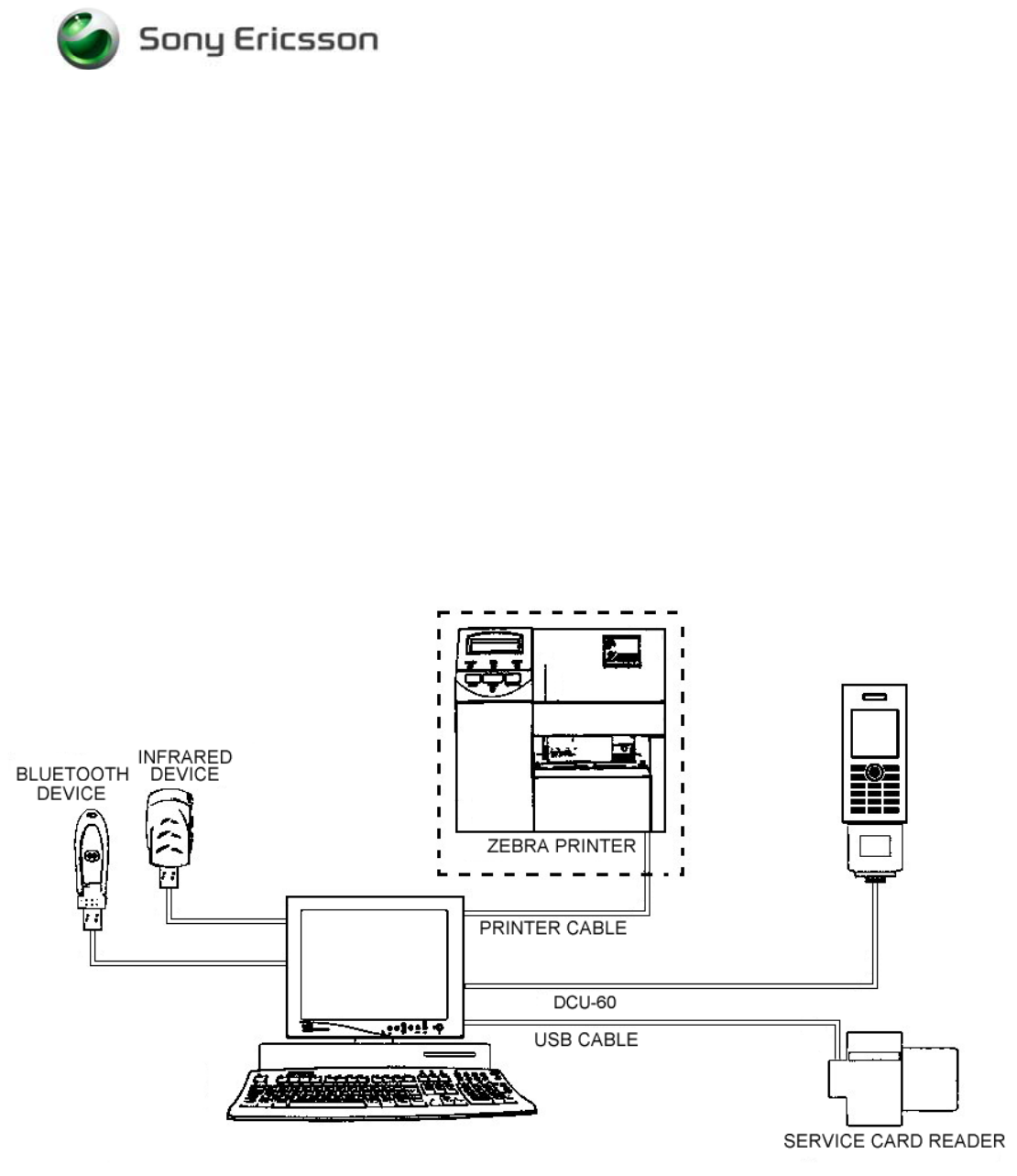
Test Setup..........................................................................................................2
2.2
Computer...........................................................................................................3
2.3
Service Card Reader/Service Card (optional) ...................................................3
2.4
Sony Ericsson programming interface – DCU-60.............................................3
2.5
Sony Ericsson programming interface – SEPI (optional)..................................3
2.6
Sony Ericsson programming interface cable (optional) ....................................3
2.7
Infrared Device..................................................................................................3
2.8
Bluetooth Device...............................................................................................3
2.9
Label Printer (optional) .....................................................................................3
3
Software...........................................................................................................................4
3.1
EMMA III..........................................................................................................4
3.2
Labelmake II software (optional) ......................................................................4
4
Revision History..............................................................................................................5
Installation Instruction, Mechanical
1/00021-1/FEA 209 544/94 A
Company Internal
©
Sony Ericsson Mobile Communications AB
2(5)
1 General
This document describes the installation procedure for the Mechanical repair package.
The Mechanical repair package consists of a Computer and Interface Cables. A service card is
required for security reasons. A label printer can be installed to be able to print new labels
(optional).
2 Hardware
All hardware must be approved by Sony Ericsson and is documented in the Equipment List.
2.1 Test Setup

Installation Instruction, Mechanical
1/00021-1/FEA 209 544/94 A
Company Internal
©
Sony Ericsson Mobile Communications AB
3(5)
2.2 Computer
IBM compatible computer is required. The computer should include at least two USB-ports.
Refer to Equipment List for minimum requirements.
2.3 Service Card Reader/Service Card (optional)
The Service Card Reader is delivered with the necessary software and instructions for
installation. The Service Card Reader should be connected to an USB-port on the computer.
2.4 Sony Ericsson programming interface – DCU-60
The cable is the interface between the USB programming interface and the phone. The DCU-
60 cable should be connected to an USB-port on the computer.
2.5 Sony Ericsson programming interface – SEPI (optional)
The USB programming interface is delivered with the necessary software and instruction for
installation. The USB programming interface (SEPI) should be connected to an USB-port on
the computer.
2.6 Sony Ericsson programming interface cable (optional)
The cable is the interface between the USB programming interface (SEPI) and the phone.
2.7 Infrared Device
An RS 232 or USB type infrared adapter or another phone may be used.
Install according to the manufactor´s instructions.
2.8 Bluetooth Device
Any Bluetooth device as headset, other Bluetooth phone or other Bluetooth device can be
used to verify the Bluetooth function in the phone. Set up the connection according to the
chosen equipments manufacture.
2.9 Label Printer (optional)
A Zebra printer model 90xi, 90xiII or 4000 deluxe shall be used. Connect the printer with a
standard RS 232 serial printer cable [refer to the Zebra printer manual] to the serial port on
the computer. Read the Zebra installation manual for more information about the installation.
Installation Instruction, Mechanical
1/00021-1/FEA 209 544/94 A
Company Internal
©
Sony Ericsson Mobile Communications AB
4(5)
3 Software
3.1 EMMA III
EMMA III contains software upgrades and tools requiring for servicing this phone. Emma III
is accessible through the CSPN. Installation and user manuals are available at the EMMA III
start page.
http://ma3.extranet.sonyericsson.com/ma3/
3.2 Labelmake II software (optional)
LabelMake II is an application installed through Java Web Start.
Access the Labelmake software from CSPN Web page.
You will find LabelMake II in the dropdown menu on the CSPN web page.
http://cspn.extranet.sonyericsson.com
Press “START LabelMake II “button and you will be directed to the LABELMAKE II client
page.
Product labels are downloaded on-line from a remote server database.
Installation Instruction, Mechanical
1/00021-1/FEA 209 544/94 A
Company Internal
©
Sony Ericsson Mobile Communications AB
5(5)
4 Revision History
Rev. Date Changes / Comments
A 2005-05-19 Initial release