Stationfall Manual
stationfall_manual
stationfall_manual
stationfall_manual
User Manual:
Open the PDF directly: View PDF  .
.
Page Count: 9

STATION=ALL
OFFIClfil
TECHNICfil MfiNUfil
If you've never played Infocom's
interactive fiction before, you should
read this entire instruction manual. If
you're an experienced Infocom player,
Just read Section I: About Stationfall.
2 Instruction Manual
TABLE OF CONTENTS
Section I: About Stationf all
Preface to the Story Page 3
Sample Transcript
and Map 4
About the Author 7
Section II: About Infocom 's
Interactive Fictio n
An Overview: What is
interactive fiction? 8
Starting and Stopping 8
•"Booting up"
•Saving and restoring
•Quitting and restartmg
Communicating with
Infocom's interactive fiction 9
•Basic sentences
•Complex sentences
•Talkmg to characters
in the story
Special Commands 10
Tips for Novices 12
Eleven useful pointers about
interactive fiction
Common Complaints 13
We're Never Satisfied 14
If You Have Technical
Problems 14
Copyright and Warranty
Information
Quick Reference Guide
This briefly describes the most
important things to know about
interactive fict10n.
14
15
SECTION I: ABOUT
STATIONFALL
Preface to the Story
After the fall of the Second Galactic
Union in 1716 GY, a ten-thousand-
year dark age settled upon the galaxy.
Interstellar travel was non-existent, and
many star systems descended into a
near-barbanc state, burning fossil fuels
for energy and growing food directly
from exposed topsoil.
In 11,203 GY, a treaty bt:tween the
growing empires of Trt:mam and.
Gallium formed the Third Galactic
Union. A pseudo-military br~nch of the
Union government on Tremam was
created. Called the Stellar Patrol, its
ships began expl01ing the g~l~xy1
searching for the human c1v1ilzat1ons
that are the remnants of the Second
Union .
You are a native of Gallium, one of
the most politically powerful but .
culturally barren worlds of the Umon.
Your great-great-grandfather was a
foundmg officer of ~he Stellar Patrol,
and for five generat10ns, your
family has served in the Patrol. It was
always taken for granted that you
would sign up as soon as you came of
age.
Once you joined the f~trol , you
discovered that the exc1tmg career
promised in all the Patrol recruitment
brochures was nonsense. Your life was
drudgery and demerit~. The only time
you got to see an exotic planet was
right after a big parade , when they
needed a detail to sweep up all the
confetti.
Then came your big 1:1oment:
shipwrecked on a seemmgly dese~ed
world, you met an exuberant robotic
companion named Floyd. Together , the
two of you discovered the secret of th!lt
mystenous planet, Resida , and saved 1t
from near destruction.The story of that
heroic deed was told in Planetfall.
As a result of your heroics, yo~ ~ere
offered, and quickly accepted, a JUICY
promotion . Goodbye Ensign Seventh
Class - now you were a Lieutenant
First Class! No more scrubwork! No
more bathroom details! No more
cleaning of the grotch cages! Finally,
your life in. the Stellar Patrol would be
as excitinf as those brochures had
promised.
Oh, how naive you'd been. Yo~r
daily routine simply replaced tedious
scrubwork with tedious paperwork.
Since your planetfall on Resid~, five
long years have dragged by, without a
single solitary event w~rt~y ~f 1:1ot~.
Why, just look at ~oday s thnllmg
assignment: scootmg over to Space
Stat10n Gamma Delta Gamma 777-G
59/59 Sector Alpha-Mu-79 to pick up a
supply of Request for Stellar Pa_trol
Issue Regulat10n Black Form Bmders
Request Form F01ms ...
Instruction Manual 3
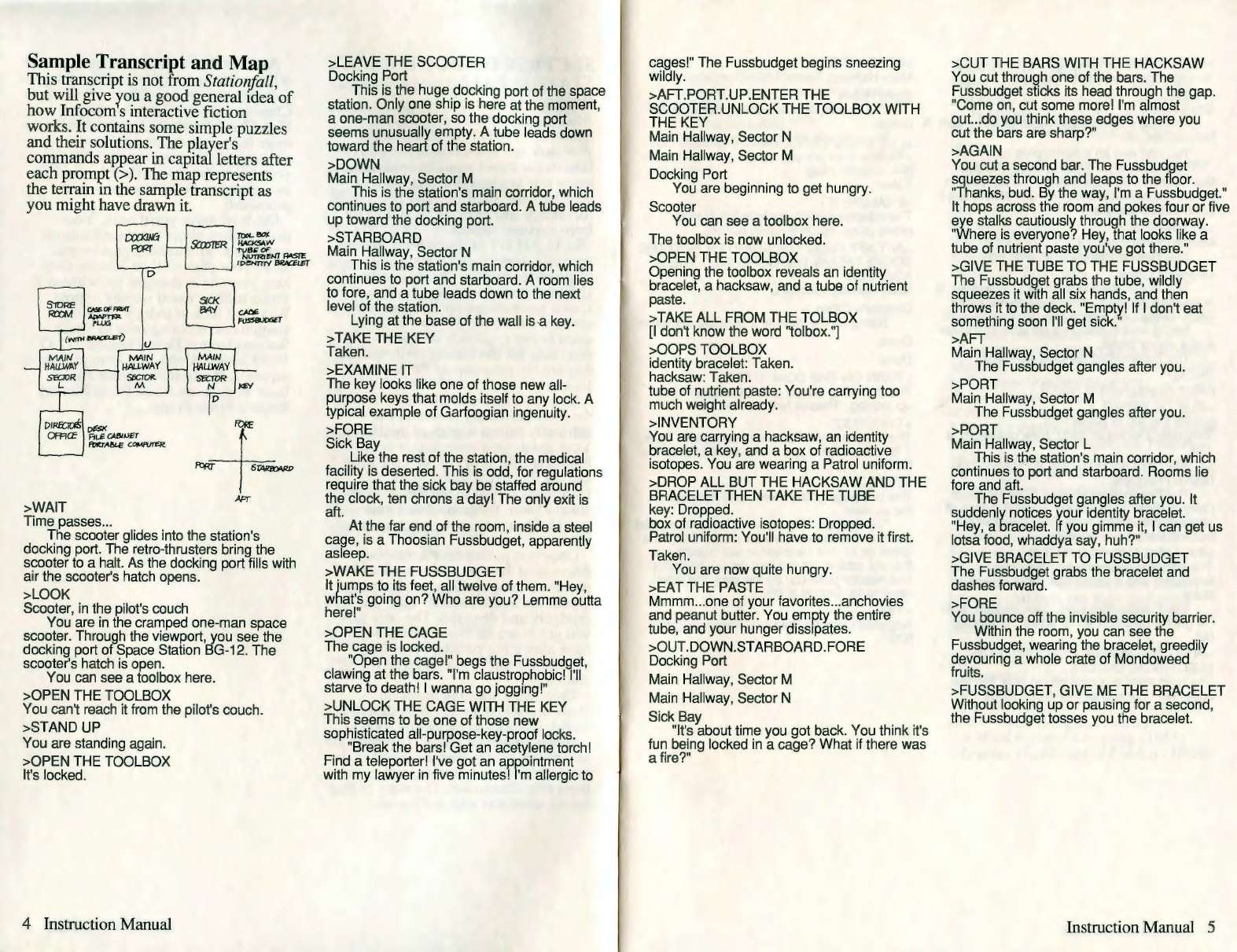
Sa_mple ~ra!lscript and Map
This t~ans_cnpt 1s not from Stationfal/,
but will give rou a good general idea of
how Infocom s interactive fiction
works. It contains some simple puzzles
and their solutions. The player's
commands appear in capital letters after
each promI?t (> ). The map represents
the terrain m the sample transcript as
you might have drawn it.
D
-+-
>WAIT )Fr
Time passes ...
The scooter glides into the station's
docking port. The retro-thrusters bring the
scooter to a halt. As the docking port fills with
air the scooter's hatch opens.
>LOOK
Scooter, in the pilot's couch
You are in the cramped one-man space
scooter. Through the viewport, you see the
docking port of Space Station BG-12. The
scooter's hatch is open.
You can see a toolbox here.
>OPEN THE TOOLBOX
You can't reach it from the pilot's couch .
>STAND UP
You are standing again.
>OPEN THE TOOLBOX
It's locked.
4 Instruction Manual
>LEAVE THE SCOOTER
Docking Port
This is the huge docking port of the space
station. Only one ship is here at the moment,
a one-man scooter , so the docking port
seems unusually empty . A tube leads down
toward the heart of the station.
>DOWN
Main Hallway, Sector M
This is the station's main corridor, which
continues to port and starboard. A tube leads
up toward the docking port.
>STARBOARD
Main Hallway, Sector N
This is the station's main corridor , which
continues to port and starboard . A room lies
to fore, and a tube leads down to the next
level of the station.
Lying at the base of the wall isa key.
> TAKE THE KEY
Taken.
>EXAMINE IT
The key looks like one of those new all-
purpose keys that molds itself to any lock. A
typical example of Garfoogian ingenuity.
>FORE
Sick Bay
Like the rest of the station, the medical
facility is deserted. This is odd, for regulations
require that the sick bay be staffed around
the clock, ten chrons a day! The only exit is
aft. At the far end of the room, inside a steel
cage, is a Thoosian Fussbudget, apparently
asleep.
>WAKE THE FUSSBUDGET
It jumps to its feet, all twelve of them. "Hey,
what's going on? Who are you? Lemme outta
here!"
>OPEN THE CAGE
The cage is locked.
"Open the cage!" begs the Fussbudget,
clawing at the bars . "I'm claustrophobic! I'll
starve to death! I wanna go jogging!"
>UNLOCK THE CAGE WITH THE KEY
This seems to be one of those new
sophisticated all-purpose-key -proof locks.
"Break the bars! Get an acetylene torch!
Find a teleporter! I've got an appointment
with my lawyer in five minutes) I'm allergic to
cages!" The Fussbudget begins sneezing
wildly.
>AFT.PORT.UP.ENTER THE
SCOOTER .UNLOCK THE TOOLBOX WITH
THE KEY
Main Hallway, Sector N
Main Hallway, Sector M
Docking Port
You are beginning to get hungry.
Scooter
You can see a toolbox here.
The toolbox is now unlocked .
>OPEN THE TOOLBOX
Opening the toolbox reveals an identity
bracelet, a hacksaw , and a tube of nutrient
paste.
>TAKE ALL FROM THE TOLBOX
[I don't know the word "tolbox . "]
>OOPS TOOLBOX
identity bracelet: Taken.
hacksaw: Taken .
tube of nutrient paste : You're carrying too
much weight already .
>INVENTORY
You are carrying a hacksaw, an identity
bracelet, a key, and a box of radioactive
isotopes. You are wearing a Patrol uniform.
>DROP ALL BUT THE HACKSAW AND THE
BRACELET THEN TAKE THE TUBE
key: Dropped.
box of radioactive isotopes : Dropped .
Patrol uniform: You'll have to remove it first.
Taken .
You are now quite hungry.
>EAT THE PASTE
Mmmm ... one of your favorites ... anchovies
and peanut butter. You empty the entire
tube, and your hunger dissipates.
>OUT.DOWN.STARBOARD .FORE
Docking Port
Main Hallway, Sector M
Main Hallway, Sector N
Sick Bay
"It's about time you got back. You think it's
fun being locked in a cage? What if there was
a fire?"
>CUT THE BARS WITH THE HACKSAW
You cut through one of the bars. The
Fussbudget sticks its head through the gap.
"Come on, cut some more! I'm almost
out...do you think these edges where you
cut the bars are sharp?"
>AGAIN
You cut a second bar. The Fussbudget
squeezes through and leaps to the floor.
"Thanks, bud. By the way, I'm a Fussbudget."
It hops across the room and pokes four or five
eye stalks cautiously through the doorway .
"Where is everyone? Hey, that looks like a
tube of nutrient paste you've got there."
>GIVE THE TUBE TO THE FUSSBUDGET
The FussbudQet grabs the tube , wildly
squeezes it with all six hands, and then
throws it to the deck. "Empty! If I don't eat
something soon I'll get sick."
>AFT
Main Hallway, Sector N
The Fussbudget gangles after you.
>PORT
Main Hallway, Sector M
The Fussbudget gangles after you.
>PORT
Main Hallway, Sector L
This is the station's main corridor , which
continues to port and starboard . Rooms lie
fore and aft.
The Fussbudget gangles after you. It
suddenly notices your identity bracelet.
"Hey, a bracelet. If you gimme it, I can get us
lotsa food, whaddya say, huh?"
>GIVE BRACELET TO FUSSBUDGET
The Fussbudget grabs the bracelet and
dashes forward .
>FORE
You bounce off the invisible security barrier.
Within the room, you can see the
Fussbudget, wearing the bracelet , greedily
devouring a whole crate of Mondoweed
fruits.
>FUSSBUDGET , GIVE ME THE BRACELET
Without looking up or pausing for a second,
the Fussbudget tosses you the bracelet.
Instruction Manual 5
>PUT ON THE BRACELET
You are now wearing the bracelet.
>FORE
Store Room
This is a small storage room of some sort. A
hallway lies aft.
You can see an adapter plug here.
The Fussbudget is just shoving the last
few fruits into its huge mouth. "Alf the food is
gone," it says with its mouth full. "Where am I
gonna sleep tonight?"
>AFT.AFT
Main Hallway, Sector L
The Fussbudget gangles after you.
Director's Office
This is the office of the station manager. It
is simply furnished, with a file cabinet and a
desk. There's an electrical outlet on one wall.
Sitting on the desk is a portable computer
and a slip of paper.
The Fussbudget gangles after you.
>READ
[What do you want to read?]
>SLIP OF PAPER
[taking the slip of paper first]
"Buy milk. Dentist at 3300. New password is
133."
> TURN ON THE PORTABLE COMPUTER
Nothing happens.
The Fussbudget shivers. "Does it seem
chilly in here? I hate drafty places." A look of
concern crosses its face. "Do you think the
heating units have failed?"
>EXAMINE THE COMPUTER
The portable computer has a screen, a
keyboard , and a power cord. The screen is
blank.
The Fussbudget says, "See ya later, bub.
I'm gonna go catch some winks." It gangles
out.
>PLUG THE POWER CORD INTO THE
ELECTRICAL OUTLET
The cord ends in a nine-prong plug, but the
outlet will only accept five-prong plugs.
6 Instruction Manual
>FORE.FORE
Main Hallway, Sector L
Store Room
The Fussbudget is snoring loudly in the
corner.
You can see an adapter plug here.
>TAKE
[the adapter plug]
'raken .
>EXAMINE IT
The adapter seems designed to fit nine-
prong plugs into five-prong outlets .
>AFT .AFT.PLUG THE ADAPTER INTO THE
SOCKET .PLUG THE CORD INTO THE
ADAPTER.
Main Hallway, Sector L
Director's Office
Sitting on the desk is a portable computer .
Done.
Done.
> TURN ON THE COMPUTER
The computer beeps and the screen lights
up, saying, "Please type password."
>TYPE "133"
The screen says "Password accepted . Type
7 for memo file. Type 11 for correspondence
file."
>TYPE 7
The last page of the memo pad appears on
the screen:
"22-Bozbar. All personnel have teleported
down to the planet. I will be joining them in a
chron or so, but I wanted to say goodbye to
this old station; it's too bad we couldn't stop
that reactor build-up . By the way, the latest
reading for Critical 1s 6900."
>TIME
Adjusted Galactic Standard Time is exactly
6897.
>FORE
Main Hallway, Sector L
Suddenly, a giant fireball engulfs the
entire station .
**** You have died *****
Your score is 9 points out of a total of 80, in
92 moves. This gives you the rank of pot
scrubber.
About the Author
Steve Meretzky ( 1957- ) was born
and raised in Yonkers, NY, where his
early hobbies included rooting for the
New York Mets and against Richard
Nixon.
Historians of interactive fiction point
to Meretzky's first job, packing nuts
and bolts for his father's hardware
business, as the formative moment of
his writing career. Most others think
that there's absolutely no connection,
and that all historians of interactive
fiction are fruitcakes.
Meretzky arrived at the
Massachusetts Institute of Technology
in September of 1975 to pursue a
career in architecture. MIT's
Department of Architecture convinced
Meretzky that he should pursue a career
in Construction Management.
Following his unexpected graduation,
several construction firms convinced
Meretzky that he should pursue a career
as a game tester for Infocom. Finally,
by 1982, Marc Blank had convinced
Meretzky that he should pursue a career
as an author of interactive fiction
("implementor" in Infocom lingo).
While at Infocom, a heart-warming
interoffice romance blossomed between
Steve and the. Sales Department's
Elizabeth Rock. Married since
September of 1985, Steve and Betty
have no children, but they do have a
garage door opener that they're very
proud of.
Other works of interactive fiction by
Steve Meretzky:
Planetfa/1 ( 1983)
Sorcerer (1984)
The Hitchhiker's Guide to the Galaxy
(1984) (with Douglas Adams)
A Mind Forever Voyaging (1985)
Leather Goddesses of Phohos ( I 986)
Instruction Manual 7
SECTION II: ABOUT
INFOCOM'S
INTERACTIVE FICTION
An Overview: What is
interactive fiction?
Interactive fiction is a story in which
you are the main character. Each
interactive story, such as Station/all,
presents you with a series of locations,
items, characters, and events. You can
affeC:t the direction of the story by
mC?vmg from place to place, using the
obJects you find, and interacting with
the other characters.
An important element of interactive
fiction is puzzle-solving. Think of a
locked door or a ferocious beast not as
a permanent obstacle, but merely as a
puzzle to be tackled. (Find the key that
unlocks the door, or figure out what
tune will_charm ~d tame that beast.)
In Statwnfall, time passes only in
response to xour input. Nothing
happens until you type a sentence and
press the RETURN (or ENTER) key, so
you can plan your turns as slowly and
carefully as you want.
~n_the story, time is kept in
milhchrons , the galactic standard. A
thousand rnillichrons make up one
chron, and ten chrons make up one
day. In addition to keeping track of the
time, Station/all measures your
progress by giving you a score. You'll
get P<?ints for ~olving puzzles and for
reachmg certam new locations. A
perft?ct score of 80 is your goal;
!11akmg sure you have fun getting there
1s ours.
8 Instruction Manual
Star_ting and Stopping
Starttnf? the story: To load Station/all
follow the instructions on the '
Reference Card in your package.
On your screen, you will see a
description of the opening location of
the story, D~ck _Fiv~, followed by the
prompt (> ), md1catmg that Station/all
1s waiting for your first input.
He_re are a few inputs for you to try at
the f1~st severalyrompts. After typing
each mput, don t forget to hit the
RETURN (or ENTER) key.
>INVENTORY
>EXAMINE THE PATROL UNIFORM
>WALK STARBOARD
>DROP THE CHRONOMETER
You should now have a feel for
interacting with the story. You decide
what to do next.
Saving and restoring : It will probably
take you several days to complete
Station/all. Using the SAVE feature
you can continue the story at a late;
time without having to start over from
the beginni_ng, just as you can place a
bookmark m a book you are reading.
Even if you aren't about to stop
playing, it's useful to SAVE before (or
a~ter) trying something dangerous or
tncky. That way, even if you get lost
or "killed" in the story, you can return
to your saved position.
To save your place, type SAVE at the
prompt(>), and then press RETURN (or
ENTER). Then follow the instructions
for saving and restoring on your
Refe_rence Card. Some computers
requue a blank SAVE disk, initialized
an~ formatted. Using a disk with data
on 1t (other than Statio"nfall saves) may
result in the loss of that data
depending on your compute;. You can
save :your po~i_tion as often as you like
by usmg add1t1onal blank disks.
Any time you want to return to a
saved position, just type RESTORE at
the prompt(>), and hit RETURN (or
ENTER). Then follow the instructions
on your Reference Card. You can then
I
l
continue the story from your SAVE.
You can type LOOK for a description of
where you are.
Quittinf? and restartil1f?: If you want to
start over from the beginning , type
RESTART and press the RETURN (or
ENTER) key. (This is usually faster than
re-booting) Stationfall will ask you to
confirm this command.
If you want to stop entirely, type
QUIT and press RETURN (or ENTER).
Once again, Station/all will ask to make
sure this is really what you want to do.
Remember: when you REST ART or
QUIT, you must first SAVE if you ever
w~nt ~o return easily to your current
pomt m the story.
Communicating with
Infocom's Interactive
Fiction
In Stationfall, you type your
commands in plain English each time
you see the prompt (> ). Most of the
sentences that Station/all will
understand are imperative sentences.
See the examples below.
. When you have finished typing your
mput, press the RETURN (or ENTER)
ke)'..
Station/all will then respond,
tellmg you whether your request is
possible at this point in the story, and
what happened as a result.
Stationjall recognizes your words by
their first six letters, and all
subsequent letters are ignored. For
example, Station/all would not be
able to distinguish among SPACEShip,
SPACEStorm, and SPACESickness.
_To i:nove around, just type the
d1rect1on you want to go. Directions
can be abbreviated: NORTH to N, SOUTH
to s, EAST to E, WEST to W, NORTHEAST
to NE, NORTHWEST to NW, SOUTHEAST
to SE, SOUTHWEST to SW, UP to U, and
DOWN to D. IN and OUT will also work in
certain places.
Station/all understands many ·
different kinds of sentences. Here are
examples, using objects and characters
that don't actually appear in
Station/all:
>WALK TO THE NORTH
>WEST
>NE
>DOWN
> TAKE THE METEORITE
>OPEN THE HATCH
>READ THROUGH THE MANUAL
>LIE DOWN ON THE ACCELERATION
COUCH
>EXAMINE THE SHINY LASER RIFLE
>PUT THE POWER PACK IN THE RIFLE
>SHOW MY ANTENNAE TO THE ALIEN
AMBASSADOR
>SHOOT THE MENACING ALIEN WITH THE
SHINY LASER RIFLE
>ASK THE SENTIENT CRAB ABOUT THE
ELECTRON MICROSCOPE
You can use multiple objects with
certain verbs if you separate them by
the word AND or by a comma. Some
examples: ·
> TAKE THE MEGAFUSE AND THE
TANGERINE
>DROP THE BOTTLE OF ARGON, THE
SPOON, AND THE LEMMING FOOD
>PUT THE MATTER AND THE ANTI-
MATTER IN THE BOX
You can include several commands on
one line if you separate them by the
word THEN or by a period. Each
command will handled in order, as
though you had typed them
individually at separate prompts. For
examp!e, you could type all of the
followmg at once, before pressing the
RETURN (or ENTER) key:
>PUSH THE BUTTON. ENTER THE SPACE
SCOOTER THEN SHUT THE HATCH
If Station/all doesn't understand one of
the_ sentences on your input line,
or 1f an unusual event occurs it will
ignore the rest of your input iine.
Instruction Manual 9
The words IT and ALL can be very
useful. For example:
>LOOK AT THE OXYGEN TANK. TAKE IT.
PUT ITON.
> TURN ON THE HYPERSPATIAL
COMPUTER. PROGRAM IT. TURN IT OFF.
>PICK UP THE ENERGY TABLET. SMELL
IT. SWALLOW IT.
>TAKE ALL
> TAKE ALL THE TOOLS
>DROP ALL THE TOOLS EXCEPT THE
WRENCH AND THE PHOTON SPANNER
> TAKE ALL FROM THE CARTON
>PUT ALL IN THE POCKET OF THE
JUMPSUIT
>GIVE ALL BUT THE BATTERY TO THE
BROKEN CYBORG
The word ALL refers to every visible
object except those inside something
else. If there were an apple on the
ground and an orange mside a cabinet,
TAKE ALL would take the apple but not
the orange.
There are only three kinds of
questions that Stationfa/1 understands:
WHO IS (someone) , WHERE IS
(something), and WHAT IS (something).
Here are some examples you can try m
Stationfa/1:
>WHO IS PLATO?
>WHAT IS A GRUE?
>WHERE IS EVERYBODY?
When you meet intelligent creatures
in Stationfall, you can talk to them
by typing their name, then a comma,
then whatever you want to say to them.
Here are some examples:
>ZEKE HELLO
>CAPTAIN MEASEL, TELL ME ABOUT THE
ASTEROID
>UNCLE OTTO, GIVE ME YOUR WALLET
>BOY, RUN HOME THEN CALL THE
POLICE
>GALACTIC OVERLORD, PICK UP THAT
PLANETOUD. EAT IT
Notice that in the last two examples,
you are giving the character more than
one command on the same input line.
But remember, many creatures in the
story don't care for idle chatter.
10 Instruction Manual
You can use quotes to answer a
question , type something on a
keyboard, or say something "out
loud." Examples:
>SAY "HELLO"
>ANSWER "YES"
>TYPE "520''
Stationfall tries to guess your
intention when you give incomplete
information. When it does so, it will
tell you. For example:
>UNLOCK THE CONTROL PANEL
[with the key]
The panel is now unlocked.
or
>SHOOT THE SEVEN-HEADED PURPLE
ALIEN
[with the seven-headed purple alien gun]
'A bolt of energy vaporizes one of the alien's
heads. Unfortunately, it continues to
advance, and there isn't a six-headed purple
alien gun in sight.
If your command is ambiguous,
Statwnfall will ask you to clarify. You
can answer these questions simply by
supplying the missing information at
the very next prompt. For example:
>SHOW THE HOLOGRAM
Whom do you want to show the hologram to?
> THE BUG-EYED MONSTER
The monster takes one look at the hologram
of the slime pits of its homeworld, has an
acute attack of homesickness, and runs off in
search of a travel agent.
or
>GIVE THE MELON TO THE ALIEN
Which melon do you mean, the honevdew
melon or the molay Venusian melon?"
>MOLDY
The alien grateful for such a delicious
homeworlcfdelicacy, gives you its time travel
belt.
Special Commands
Below are explanations for a number of
useful one-word commands. In many
cases, these will not count as a tum.
Type the command after the prompt (>)
and press the RETURN (or ENTER) key.
AGAIN -This will repeat your previous
input. For instance, typing SHOOT
THE LASER AT THE RADI0M-POWERED
ROBOT then typing AGAIN would be like
trying to kill the robot twice in a row.
You can abbreviate AGAIN to G.
BRIEF -This command tells Stationfall
to fully describe a location only
the first time you enter it. On
subsequent visits, Stationfall will tell
you only the name of the location and
any objects present. Stationfall
will begin in BRIEF mode, and remain
in BRIEF mode unless you use the
VERBOSE or SUPERBRIEF commands.
SUPERBRIEF tells Stationfa/1 to display
only the name of a place you have
entered, even if you have never been
there before. In this mode, Stationfall
will not even mention which objects are
present. Of course, you can always get
a full description of your location and
the items there by typing LOOK. In
SUPERBRIEF mode, the blank line
between turns will be eliminated. This
mode is meant for players who are
already familiar with the geography.
The VERBOSE command tells
Stationfall that you want a complete
description of each location, and the
objects in it, every time you enter a
location, even if you've been there
before.
DIAGNOSE -Stationfall will give you a
report of your physical condition.
FOOTNOTE -Occasionally, the text in
Stationfall will mention the existence of
a footnote. To read the footnote ,
simply type FOOTNOTE followed by
the appropriate footnote number (for
example, FOOTNOTE 7). This will not
count as a turn.
INVENTORY -Stationfal/ will list what
you are carrying and wearing. You
can abbreviate INVENTORY to I.
LOOK -This will give you a full
description of your location. You can
abbreviate LOOK to L.
OOPS -If you mistype a word, such
that Stationfall doesn't understand it,
you can correct yourself at the next
prompt by typing OOPS and the correct
word. For example, if you typed HAND
THE CHAIN SAW TO GARNDMA and were
told "(I don't know the word 'garndma']" you
could type OOPS GRANDMA rather than
retyping the entire sentence.
QUIT -This lets you stop. If you want
to save your position before 9uitting,
follow the instructions in the 'Startmg
and Stopping" section on page 8. You
can abbreviate QUIT to Q.
RESTART -This stops the story and
starts it over from the beginning.
RESTORE -This restores a previously
saved position. See "Starting and
Stopping" on page 8 for more details.
SAVE -Thi~ puts a "snapshot" of your
current pos1t10n on your storage
disk. You can return to a saved
position in the future usin& the
RESTORE command. See 'Starting and
Stopping" on page 8 for more details.
SCRIPT -This command tells your
printer to begin making a transcript of
the story. A transcript may aid your
memory, but is not necessary, and will
work only on certain computers. Read
your Reference Card for details.
STATUS -This command gives you
the following information: your current
mode of descriptiveness, your score, a
ranking based on that score, and the
current time in the story. Note that your
score and the time can also be found on
your status line at the top of the screen.
SUPERBRIEF -This command tells
Statio11fall to give you the sparest level
of description. See BRIEF above.
TIME -This will give you the current
time in the story.
UNSCRIPT -This tells your printer to
stop making a transcript.
Instruction Manual 11
VERBOSE -This command tells
Statiorifall to give you the wordiest
level of descnption. See BRIEF above.
VERSION -Stationfall responds by
showing you the release number and
the serial number of your copy of the
story. Please include this information if
you ever report a "bug" in the story.
WAIT -This causes time in the story to
pass. Since nothing happens until you
type a sentence and press RETURN (or
ENTER), you could leave your
computer, take a trip to Rigel Seven,
then return to the story to find that
nothing has changed. You can use WAIT
to make time pass in the story without
doing anything. For example, if you
met an alien robot, you might WAIT to
see if it will say anything; if you were
aboard a moving space scooter, you
might WAIT to see where it goes. You
can abbreviate WAIT to Z.
Tips for Novices
1. Draw a map. It should include each
location and the connections to
adjoining locations. When you find
yourself in a new place, make note of
any interesting obJects there. (See the
small sample map that goes along with
the sample transcript on page 4.)
Remember, there are 10 possible
directions (NORTH, SOUTH, EAST, WEST,
NORTHEAST, NORTHWEST, SOUTHEAST,
SOUTHWEST, UP, and DOWN) plus IN and
OUT.
2. EXAMINE all objects you come across
in the story.
3. TAKE and carry as much as you can
carry. Most objects that you find are
important for solving one or more of
the puzzles you'll run into.
4. SAVE your place often, so that if you
mess up or get "killed," you won't
have to start over from the beginning.
See page 8 for instructions.
5. Read the story carefully! The re are
often clues in the descriptions
of locations and objects.
12 Instruction Manual
6. Try everything you can think of -
even strange or dangerous actions are
fun and may provide clues ; you can
always save your position first. Here 's
a silly example:
>GIVE THE BASKETBALL TO THE LION
The lion takes an experimental bite out of the
basketball but spits it out. It continues to
gnaw on your leg.
Thus, you discover that giving
something more edible to the lion
(that slab of raw meat?) might save
your leg .
7. There are many possible routes to
the end of Statiorifall. If you get
stuck on one pu zzle, move on to
another. Some puzzles have more than
one solution; other puzzl es don 't need
to be solved at all. Sometimes you will
have to solve one puzzle in order to
obtain the item(s) or information you
need to solve another puzzle.
8. Play Stationfall with a friend! As the
dual-brained worm beasts of
Nebulon are fond of saying, "Two
heads are better than one."
9. If you get completely stumped, you
can order a hint booklet and map using
the order form in your package . You
don't need this booklet to enjoy the
story, but it will help you to solve the
puzzle s.
10. Read the sample transcript on page
4 to get a feel for how interactive
fiction works.
11. You can word a command in many
different ways. For example, if you
wanted to make a wish, you could type
in any of the following:
>DROP THE COIN DOWN THE WISHING
WELL
> TOSS THE COIN INTO THE WELL
>PUT COIN IN WELL
If you type a sentence that Stationfall
doesn't understand, try rephrasing
it or using syno nyms. If Stationfal/ still
doesn't under stand , you're probably
trying something that isn't important
for completing the story.
Common Complaints
Stationfall will complain if your input
confuses it completely. Statiorifall
would then ignore any further
sentences on your input line. (Certain
events, such as being attacked, will
also cause Station/all to ignore any
additional sentences on your input line ,
since the event may have changed your
situation drastically .) Some of
Station/all's complaints:
I don't know the word "--~-
That word is not in the story's
vocabulary. Sometimes using a
synonym or rephrasing will help; more
hkely, you're just barkmg up the
wrong tree. Stationfall recognizes
over 800 words , ail that you need to
use and most that you're likely to
use. However, Station/all uses many
words in its descriptions that it
will not recognize in your inputs .
Thus, you might read, "The moon casts
violet shadows across the crater." but
discover that Station/all doesn't
understand the words MOON or
SHADOW or CRATER in your input.
When this happens, you can assume
that you don't need to refer to those
things to complete the story; they are
only there to create a more vivid image
of your location.
You used the word "~~~-" in a
way that I don't understand.
Station[all knows the word but
couldn t use it in that sense. Usually
this is because Station/ all knows it as a
different part of speech. For example,
if you typed GO TO THE LOWER LEVEL,
you are using LOWER as an adjective,
but Stationfall might know LOWER only
as a verb, as in LOWER THE ROPE.
There was no verb in that sentence!
Unless you are answering a que stion,
each sentence must have a verb (or one
of the special commands). Among the
most important verbs that Station/all
understands are TAKE, DROP, PUT, GIVE,
LOOK, READ, EXAMINE, OPENi,..,CLOSE,
ENTER, EXIT, EAT and WEAR. i here are
many more . Remember: you can use a
variety of prepo sitions with your
verbs. (For example, LOOK can become
LOOK AT, LOOK INSIDE, LOOK BEHIND,
LOOK UNDER, LOOK THROUGH, and so
on.)
There seems to be a noun missing in
that sentence. This usually means
your sentence was incomplete , such as
EAT THE BLUE or PUT THE BOOK IN THE.
There were too many nouns in that
sentence. An example is CARVE MY
INITIALS ON THE TREE WITH THE KNIFE,
which has three noun "phrases," one
more than Station/all can digest in a
single action.
I beg your pardon? You pressed the
RETURN (or ENTER) key without typing
anything.
You can't see any~~~- here!
The object you referred to was not
visible. It may be somewhere else, or it
may be present but in a closed
container.
The other object[s] that you
mentioned isn't [aren't] here. You
referred to several objects in the same
sentence, and at least one wasn't
visible.
You can't use multiple [in]direct
objects with"--.--.~~~"· You can
use multiple objects (that is, nouns or
noun phrases separated by AND or a
comma) or the word ALL only with
certain verbs, such as TAKE, DROP, and
PUT. For example, EXAMINE will not
work with mu.ltiple objects; you
couldn't say EXAMINE ALL or EXAMINE
THE BOWL AND THE SWORD.
That sentence isn't one I recognize.
Usually, this means that the syntax
(sentence structure) you used is not
among the 300 or so syntaxes that
Station/all understands. For example,
SIT UNDER THE TREE and SKIP AROUND
THE MAYPOLE are syntaxes that
wouldn't be recognized by Station/all.
There' s a limited amount of space in
the program, so syntaxes that are less
common or not useful aren't included.
Try rephrasing the sentence.
Instruction Manual 13
We're Never Satisfied
Here at Infocom, we're constantly
trying to "push back the envelope" and
explore the possibilities of this
fledgling medium. Your input is
important. If you liked or disliked the
story, or some section of it, or if you
found a bug, or if you think a certain
puzzle was too hard or too easy, or if
you have some other suggestion, drop
us a note! We love every excuse to stop
working, and a letter from you is just
such an excuse! Write to:
Infocom , Inc.
125 CambridgePark Drive
Cambridge, MA 02140
Attn: FLOYD
If You Have Technical
Problems
You can call the Infocom Technical
Support Team to report "bugs" and
technical problems, but not for hints to
solve puzzles, at (617) 576-3190. If
your disk develops a problem within
ninety (90) days after purchase , we
will replace it at no charge. Otherwi se,
there is a replacement fee of $5 (U.S.
funds). If you call to report a bug,
please provide your release number ,
which you can find by typing
VERSION. Please return xour
registration card if you'd like to be on
our mailing list and receive our
newsletter , The Status Line .
Copyright and Warranty
Information
Limited Warranty
This software product and the attached instructional materials
arc sold "AS IS." without warranty ,ts 10 their perfonnance. The
entire risk as to the qua I i1y and perfomutnce of the computer
software program is assumed by the user.
However. to the original purchaser of a disk prepared by
lnfocom and carrying the lnfocom label on the disk jacket.
lnfocom. Inc. wairnnLs the medium on which the program is
recorded 10 be free from defects in materials and foully
workmanship under normal use and service for a pe1iod of
ninety (90) days from the date of purchase. If during this
14 Instruction Manual
period a defect on the medium should occur. the medium may
be returned 10 lnfocom, Inc. or to an authorized lnfocom. Inc.
dealer, and lnfocom, Inc. will replace the medium without
charge to you. Your sole and exclusive remedy in the event of a
defect is expressly limited 10 replacement of the medium as
provided above. This warranty gives you speciric le2al ri•hts
and you may also have other rights which vary fron1 "
state to state.
THE ABOVE WARRANTIES FOR GOODS ARE IN LIEU
OF ALL WARRANTIES, EXPRESS, IMPLIED. OR
STATUTORY. INCLUDING, BUT NOT LIMITED TO, ANY
IMPLIED WARRANTIES OF MERCHANTABILITY AND
FITNESS FOR A PARTICULAR PURPOSE AND OF ANY
OTHER WARRANTY OBLIGATION ON THE PART OF
INFOCOM, INC. SOME STATES DO NOT ALLOW
LIMITATIONS ON HOW LONG AN IMPLIED
WARRANTY LASTS, SO THE ABOVE LIMITATION MAY
NOT APPLY TO YOU. IN NO EVENT SHALL INFOCOM,
INC. OR ANYONE ELSE WHO HAS BEEN INVOLVED IN
THE CREATION AND PRODUCTION OF THIS
COMPUTER SOFTWARE PROGRAM BE LIABLE FOR
INDIRECT, SPECIAL, OR CONSEQUENT IAL DAMAGES,
SUCH AS, BUT NOT LIMITED TO, LOSS OF
ANTICIPATED PROFITS OR BENEFITS RESULTING
FROM THE USE OF THIS PROGRAM, OR ARISING OUT
OF ANY BREACH OF THIS WARRANTY . SOME STATES
DO NOT ALLOW THE EXCLUSION OR LIMITATION OF
INCIDENTAL OR CONSEQUENTIAL DAMAGES, SO THE
ABOVE LIMITATION MAY NOT APPLY TO YOU.
N.B. After the warranty period, a defective lnfocom disk may be
returned to lnfocom, Inc. with a check or money order for $5.00
U.S. funds for replacement.
Copyright
The enclosed software product is copyrighted and all rights arc
reserved by lnfocom. Inc. It is published exclusively by
lnfocom. Inc. The distribution and sale of this product arc
intended for the use of the original purchaser only and for use
only on the computer system specified. Lawful users of this
program are hereby licensed only to read the progmm from its
medium into memory of a computer solely for the purpose of
executing the program. Copying (except for one backup copy
on those systems which provide for ii - see Reference Card).
duplicating, selling. or otherwise distributing this product is a
violation of the law.
This manual and all other documentation contained herein arc
copyrighted and all rights reserved by lnfocom. Inc. These
documents may not. in whole or in pun, be copied,
photocopied, reproduced, translated, or reduced 10 any
electronic medium or machinc-reudablc form without prior
consent. in wri1ing, from Infcx:om. Inc.
Willful violations of the Copyright Law of the United Stales
can result in civil damages of up to $50,000 in addition to
actual damages, plus criminal penalties of up to one year
imprisonment and/or $ 10,000 fine.
Swtionfa/1. Leatht'r Goddesst•s r!f' Pho/ms and A Mind
Fore1·er \loya;.:ing
are trndcmurks of Infocom, Inc. Planetfa/1 and
Sorcerer are registered Lrndcmarks of lnfocorn, Inc. The
Hitchhik,,r's Guide /0 the Gala.,:r is a trademark of Douglas
Adams.
(c) 1987 lnfocom. Inc. All rights reserved.
Printed in U.S.A.
Quick Reference Guide
1. To start the story ("boot up"), see
the separate Reference Card in your
Stationfall package.
2. When you see the prompt (>) on
your screen, Station/all is waiting for
your input. There are four kinds of
sentences or commands that Station/all
understands:
A. Directions: To move from place to
place, just type the direction you want
to go: NORTH , SOUTH , EAST, WEST ,
NOl=lTHEAST, NORTHWEST, SOUTHEAST,
SOUTHWEST , UP, DOWN , IN, or OUT.
B. Actions: Just type what you want to
do. Some examples: READ THE BOOK or
OPEN THE DOOR or LOOK THROUGH THE
WINDOW or GIVE THE BALL TO THE CAT.
More complex sentences are described
in "Communicatin~ with lnfocom's
Interactive Fiction' on page 9.
C. Commands to other characters: Talk
to characters in the story by typing their
name, then a comma, then what you
want to say to them . For example:
FRED, HI or OLD MAN, GIVE ME THE
TROMBONE.
D. Special commands: These give you
information, such as INVENTORY , or
affect the state of the program , such as
VERBOSE. A list of these appears in the
"Special Commands" section on page
10.
3. After typing your input, you must
press the RETURN (or ENTER) key
before Station/all will respond.
4. Your screen will display a special
line called the status line. It tells
you your current location , your score,
and the current time (if known).
5. You can pick up and carry many of
the items you'll find in the story.
For example, if you type TAKE THE
TUBE OF JELLY, you will then be
carrying it. Type INVENTORY to see
what items you have.
6. When you want to stop, save your
r,lace in the story, or start over, read
'Starting and Stopping" on page 8.
7. If you have trouble, refer to the
specific section of the manual for more
detailed instructions.
Instruction Manual 15

INFOCOM
Proof of Purchase
Stationfall
