Ensoniq Corporation Transoniq Hacker Archive Issue #122 Th 122
Ensoniq Corporation Transoniq Hacker Archive Issue #122 th_122 Ensoniq Corporation - Transoniq Hacker Archive - Issue #122
User Manual: Ensoniq Corporation Transoniq Hacker Archive Issue #122 Ensoniq Corporation - Transoniq Hacker Archive - Issue #122
Open the PDF directly: View PDF  .
.
Page Count: 32
Patchwork
(We
oIn't
talking
about
quilting)
.---.
It
always
cracks
me
up
(he
said
with
a
smug
smile...)
to
read
letters
from
people
talking
about
how
horrible
it
is
that
the
EPS
doesn't
have
this
feature.
or
that
the
ASR
lacks
that
ability.
When
you
think
about
it.
very
few
sampler
owners
out
there
even
take
advantage
of
the
features
they
do
have.
One
of
the
most
criminally
neglected
of
these
features
is
the
patch
select.
This
is
a
feature
that
is
still
more
or
less
unique
to
Ensoniq
equipment
and
yet,
very
few
people
take
the
time
to
eit-
plore
it.
So
your
sampler
only
has
eight
instruments
at
once...
So
you
only
have
2
Megs
of
memory...
Stop
and
think
of
how
you
can
get
around
these
problems
with
a
little
clever
programming.
After
all.
you
can
have
4
patch
variations
per
instrument.
and
if
you
multiply
that
by
S.
that
brings
us
up
to
32
instruments.
The
most
obvious
types
of
patch
selects
are
slight
variations
that
might
be
useful
for
live
performance.
These
include
having
a
chorused
variation
of
the
sound.
I
.-':~
Il_
-'
-f_I'
I
|
,'
F
n
_
_
t
.1‘,
I I
-.
|
I
I
L"
r
'-
i
r.
P
'
-‘
| |
I I
-
-r~
..
.
I:
J;
_-
I
*4
.
til‘
1'.
Torn
Sheer
having
the
sound
in
octaves.
or
in
fifths.
It
could
even
be
something
as
subtle
as
having
a
slightly
louder
version
available
to
you
to
ptutch
through
on
those
big
choruses.
Another
useful
variation
for
well-produced
sequences
is
to
have
variations
of
the
instrument
through
dif-
ferent
effects
busses.
If
you're
using
the
CHOR+REV+DDL
algorithm.
you
could
have
the
sound
available
through
a
fat
chorus.
a
cavernous
reverb.
and
a
delay.
all
selectable
at
your
fmgertips.
One
trick
some
people
like
to
use
is
to
have
a
backwards
variation.
While
this
is
most
often
used
on
drum
and
percussion
sounds.
it
cart
be
a
neat
effect
with
melodic
sounds
too.
especially
ones
with
distinct
attack
transients.
The
problem
with
this
is
that
you
won't
have
a
loop
so
the
sound
will
vary
in
length
across
the
keyboard.
with
the
lower
notes
stretch-
ing
out
awhile
and
the
upper
ones
flit
away
fairly
quickly.
‘This
makes
using
the
instrument
melodically
in
a
consis-
tent-sounding
way
extremely
difticult.
The
way
around
this
is
found
on
the
EDIT-WAVE
page.
We're
going
to
chop
off
some
of
the
extra
length
of
the
lower
notes
in
a
way
that
adjusts
as
we
play
up
the
keyboard
so
that
the
upper
notes
are
left
totally
unaltered.
but
the
lower
notes
are
a
little
closer
in
length
the
upper
ones
by
cutting
off
varying
amounts
of
the
sotmd
after
the
attack
(or
before
it.
since
we're
talking
about
backwards
IIBIBHI)‘
-------------------------------------
-1
'—
‘I
the
lndapendnnt
Nam
' '
'
"
'"
_.=-.;*
Magazine
for
Ensonlq
User:
l
..
Articles:
Patchwork
Toot Sheer
cover
From
Cyberspace
to
Your
Ear
Garth
Hjelte
.............................................
.. 3
Bass-ic
Principles
Gerry
6
Tune
Your
Bass
with
a
DPM
Toot
Tracy
.
..............................................
.. 3
Synchronir.:i.ng
Keyboards
to
Ext
Clocks
Anthony
Ferraro
....................................
..
ll]
It
Pays
to
P{1)an
Ahead
Don
Roltde
.............................................
..
ll
The
BPS
and
Background
‘Vocals
—
Part
II
Robby
Hermon
.......................................
..
l5
Kaptain
KS
Jefifetton
I3
That
Old
Syncing
Feeling
Kiri:
Slirtltord
.........................................
.. 19
Promotional
Ideas
for
Musicians
Jeffrey
Fisher
.........................................
..
23
Re-views:
Basement
Tapes:
Passion!-"'i:-t
Doniellliondel
22
its-guior
Stuff:
Random
Notes
.........................................
..
Hypersoniq
..............................................
..
Classifieds
.............................................
..
The
interface
.
Transoniq-Net
........................................
..
Current
O.S.
...........................................
..
Hacker
Eooteeq
fi@§H§mw
|
ISSUE
rvuivtess-t2s,$2-sc
i
auo-ustnvvs
|
Scroll
urttil
you
see
the
MOD
parameter.
Select
START
with
KBD
as
your
SOURCE.
Scroll
right
one
more
time
and
you'll
see
the
AMOUNT
attd
the
RANGE
parameters.
Select
+99
for
your
AMOUNT.
The
RANGE
parameter
is
a
little
trickier.
The
correct
setting
for
this
depends
on
the
sire
of
yotu
sample.
Spend
some
time
to
find
a
value
that
gets
you
close
to
what
you're
after
and
play
around
with
varying
combinations
of
AMOLINT
and
RANGE
until
you're
happy
with
the
result.
You're
most
likely
not
going
to
end
up
with
something
the
enact
same
length
across
the
board.
but
you
can
usually
get
it
ciose
enough
to
be
usable.
For
those
who
need
more
precise
control.
try
using
the
mod
wheel
as
your
SOURCE...
now
you
can
adjust
it
by
hand.
One
of
the
ways
you
can
get the
most
variations
is
to
use
a
sound
with
a
smooth.
single
cycle
loop.
By
moving
the
loop
position
around.
you
will
find
a
number
of
different
timbres
available
to
you.
and
a
great
starting
point
for
synthesizing
some
totally-different
sounding
patch
variations.
Of
course.
there's
no
rule
that
says
you
even have
to
keep
the
same
loop
at
all.
Each
patch
could
very
easily
have
completely
different
loops
set
if
you
were
so
inclined.
One
of
the
biggest
mistakes
people
make
regarding
patch
selects.
assuming
they
can
only
be
used
for
slight
variations
on
the
main
sotmd.
On
the
con-
trary.
you
can
ttun
them
into
completely
different
sounds
if
you're
willing
to
invest
the
time
and
Tylenol.
Finally.
here
are
some
quick
suggestions
for
ways
you
can
give
yourself
a
wide
variety
of
sotmds
via
the
patch
selects.
-
If
the
sotmd
you're
using
has
a
single
cycle
loop.
or
you
can
get
a
single
cycle
loop
on
it.
try
hitting
E.DIT-
LAYER
and
setting
the
glide
mode
to
MINIMODE
and
the
glide
time
to
taste.
Instant
Minimoog
lead!
-
Another
easy
variation
on
single
cycle
loop
sounds
(espe-
cially
ones
with
a
squarewave
or
bell
type
timbre)
is
to
turn
it
into
an
organ.
Shnply
copy
the
main
layer
and
punch
the
second
layer
up
an
octave.
Optionally.
you
can
add
another
layer
tuned
a
fifth
above
the
main layer
(you'll
want
to
lower
the
volume
a
little
on
the
AMP
page
for
this.
though...)
-
If
you're
using
a
sweep
type
sound.
try
pushing
the
sample
START
time
up
past
the
sweeping
portion
to
where
the
sus-
tain
starts.
Use
this
sustain
portion
to
synthesise
a
poly-synth
or
synth
brass-type
sound.
-
Or.
if
you're
using
sustaining
a
sound
with
a
distinct
attack
(i.e..
Synth
Bells).
punch
the
sample
START
past
the
at-
tack.
assign
ENE’
3
to
the
SLOW
STRING
envelope.
and
voiidi
Instant
pad.
This
is
by
no
means
intended
to
be
the
end-all
be-all
of
patch
select
articles
—
more
to
provide
some
food
for
thought
for
budding
programmers
out
there
who
may
have
thought
they'd
exhausted
the
potential
of
their
machines.
Have
your
own
patch
select
tricks’?
Write
'em
in.
we'd
love
to
hear
them!
-
Bio:
Hey...
don't
you
owe
Tom
Siteor
some
ntoney?
eTH
—
A
Faster.
Cheaper
Hacker
If
you
can
receive
e-mail
via
the
Internet.
you
can
mite
advantage
of
avoiding
the
post
office
and
get
a
faster.
cheaper.
e-nutil
ver-
sion
of
the
Hooker.
The
e-mail
Tronsonio
Hooker
contains
all
of
the
same
information
and
advertising
as
the
printed
version.
but
it's
only
$2llt'3tear
—
anywhere
on
the
planet.
Interested?
Inst
send
a
message
to
us
at
eTI-l@transoniq.com
and
we'll
e-tnlii
back
complete
subscription
inforrnatiott.
Let
rt-s
know
if
pol’!
like
ofree
copy
of
the
current
issue
end
we'll
send
one
olong.
Front
Pctnel
HND(Lu)
Hacker
News
Sometimes
it
seems
like
the
whole
music
industry
goes
into
a
coma
during
the
summer
—
letters
drop
off.
writers
have
to
be
chased
down
and
begged.
ads
go on
hiatus...
Ensoniq
didn't
even
have
arty
announcements.
Oh
well.
new
feotttre
—
read-
able
type
in
the
Interface!
It
may
just
be
that
doing
a
July)’
August
issue
might
be the
best
way
to
help
make
up
for
some
of
the
recent
printing
and
postage
increases.
Obviously.
we're
talking
next
year.
here.
Something
to
think
about...
We
received
a
couple
of
questions
regarding
the
review
of
ASR's
O.S.
3.08
in
last
month's
issue.
Yes.
3.53
is
the
latest
—
but
3.53
basically
just
tidies-up
some
features
(as
mentioned
in
Front
Panel
Issue
#120).
3.08
was
a
ntojor
change
—
and
the
review
was
run
past
Ensoniq
mere
hours
before
we
went
to
press.
The
review
is
current.
but
if
you're
upgrading.
get
3.53.
We'd
like
to
welcome
a
new
advertiser.
Tech
Star
Software
-
a
new
source
for
sample
sets
for
the
ASRt".EPS.'TS
families.
lll
Years
ago
in
the
Hooker
—
Clark
Salisbury
presents
our
first
software
review:
Texture.
a
PC-based
sequencer
from
Cherry
Lane
Technologies.
Erick
Hailstone
continues
his
ll-HDI
series.
We
have
the
beginings
of
our
infamous
letters
coiu.::::.
and
the
first
Hype-rsonjq
new
product
releases
—
which
nothing
to do
with
Ertsortiq
products.
but
were
all
we
':-_ar.'..
On
Point
Productions
announces
their
second
sample
audio
CD
—
New
York
5'tylin'.
140
new
hip
hop
loops,
110
live
drum
loops
(a
little
more
grungy
that
the
more
“classic
sounding"
Representing
Hip
Hop),
100
freaky
bits
such
as
bass
loops,
melodic
loops,
and
subliminal
sounds;
followed
by
350
dntm
samples
from
a
variety
of
sources.
All
total,
about
2'l'U
loops
and
T10
samples.
Produced
by
Don
Henning.
$69.95.
For
further
information,
contact:
On
Point
Productions,
61
Superior
St.,
Port
Jefferson
Station,
NY
IITT6.
Phone:
1-800-331-8841.
From
Cyberspace
to
Your
Ectr
Port
I
—-
Patches
Computer
communication
has
erupted
into
a
way
of
life
nowadays;
it’s
certainly
affected
the
music
industry.
Music
distribution,
promotion,
advertising
sites
all
have
changed
the
scope
of
the
music
arts.
And
it’s
affecting
the
way
we
Ensoniq
users
approach
our
instruments.
Perhaps
while
cruising
the
Net
you‘ve
seen
files
that
are
described
as
"ESQ-1
patches
in
Gala:-ty
format,"
or
“ASR
3.53
OS
in
Giebler
format,"
—
things
like
that.
So
you
download
it
(if
it's
for
your
instrument
it‘s
gotta
be
good),
but
then
what?
How
do
you
get
a
file
that’s
laying
in your
computer
to
your
Ensoniq
instrument?
Well,
this
month
we’re
going
to
look
into
various
ways
of
getting
those
patches
into
your
synth.
Nest
month
—
samples.
But
First...
Getting
It
Offline
FTP
{File
Transfer
Protocol)
is
easy
enough.
If
you
are
un-
familiar
with
it
check
with
your
Internet
provider
and
you’ll
find
out
how
easy
it
is
to
grab
files
from
cyberspace
and
get
‘em
into
your
computer.
Some
providers
even
decode
and
unzip
files
for
you
and
everything
(wow).
Send
to
a
Friend
This
may
be be
slightly
off
topic,
but
maybe
sometimes
you
would
like
to
send
a
sound
file
to
a
friend,
or
perhaps
they
have
some
you
want
and
they’d
like
to
send
to
you.
This
isn’t
like
Fl."P‘ing
—
you
gotta
send
it
e-mail.
And
if
you
are
dealing
with
America
On-Line
or
CompuServe.
that
means
you
have
to
jump
through
another
hoop.
Computer
files
come
in
two
flavors
—
test
and
binary.
Test
is
a
7-bit
format,
and
resembles
the
letters
you
are
now
read-
ing.
E-mail
is
made
up
of
‘T-bit
test
files.
Binary
information
Garth
Hjelte
is
an
B-bit
format,
and
isn’t
easily
read
by
people.
Binary
files
include
executable
files
(.15-LXE),
dynamic
link
libraries
(.DLL),
sip
files
(ZIP),
and
more.
Test
files
are
usually
.TXT,
.WRI,
DOC,
and
other
document
formats.
But
to
the
online
world
—
and
here's
the
complication
—
you
can
only
e-mail
T-bit
test
files,
and
the
majority
of
files
we
deal
with
{especially
the
sound
files
we’re
talking
about)
are
8-bit,
that
is,
binary.
So
how
do
we
get
around
this?
UUEncoding
and
decoding!
UU
You,
UU
Me
What‘s
UUcoding'?
(Note:
for
the
Mac,
the
same
type
of
process
is
called
Binheit.)
It’s
the
translation
of
binary
infor-
mation
into test
format
information.
There
are
some
good
UUcoding
programs
like
Richard
Marks
UUCODE,
and
I
use
Sabasoft’s
UUCODE
for
Windows.
For
the
lvlac
there's
Biohes.
They
will
take
in
a
binary
file
and
spit
out
a
coded
test
file
to
transmit.
The
coded
version
is
usually
80%
big-
ger
than
the
binary
file.
Then
you
are
ready
to
send
it.
Likewise.
when
you
receive
a
file
from
the
Internet,
it's
usually
in
a
coded
test
file
format
(and
most
of
the
time
compressedjaipped,
to
decrease
the
size
of
the
file).
Thus
you
want
to
decode
it
with
your
UU-Binhes
program.
Another
online
problem
is
that
many
providers
only
have
small
“gateways.”
A
gateway
is
the
maximum
allowable
size
of
a
packet
of
information
coming
through.
A
small
gateway
means
large
files
{especially
samples)
have
to
be
split
up
in
order
to
transmitfreceive.
For
example,
for
me
to
send
a
demo
of
my
EPSIASR
Tools
for
Windows
program
to
some-
one
on
the
Internet,
I
have
to
UU
Encode
my
sip
file,
split
it
up
into
64K
packets,
import
each
file
into
America
On-Line
{that's
my
provider),
and
send
them
all
out.
Typically,
it
takes
15-16
full
e-mail
message's
worth
(it’s
a
301,278-byte
file).
Then
the
poor
guy
at
the
other
end
has
to
put
all
the
UUencoded
textfiles
end to
end
using
a
word
processing
program,
UUdecode
it
and
he's
got
it.
It
can
get
complex.
Note:
If
you
are
saying,
"What's
he
talfing
about?
I
download
files
off
the
Internet
all
the
time,
and
they
are
in
binary
format,
and
I
don't
have
to
UU,i'Binhex
anything!"
That's
one,
lots
of
Internet
service
providers
convert
text
to-from
binary
automatically,
making
it
invisible
to
you.
But
with
AOL,
CIS,
and
the
majors,
it's
still
an
issue.
But
if
you
have
a
standard
Internet
PPP
account,
you'll
probably
never
encounter
the
problem.
But
since
there's
more
and
more
AOL
and
CIS
coming
on-line
(in
droves),
please
be
aware
of
these
"hoops."
Mac
users
will
need
Binhex
to
convert
files
to and
from
binary.
Binhex
works
in
the
background
of
a
number
of
Internet
browsinglsearching/downloading
programs,
auto-
matically
converting
the
files
as
they
are
downloaded
to
your
machine.
It
can
also
be
used
as
a
stand-alone
utility
to
convert
files
that
have
already
arrived,
but
in
the
wrong
for-
mat.
Don't
let
all
this
text-to-binary-to-text
scare
you.
If
you
have
to
encounter
it,
you'll
soon
get
used
to
it.
And
soon,
there
will
be
better
ways
of
doing
all
this.
lzzit
Disk
or
MIDI?
Once
you've
got
the
file,
it
can
be
transported
from
the
'puter
to
the
'board
by
one
of
two
ways
--
either
by
MIDI
communication
or
by
physical
media
(floppy
disks,
remov-
able
hard
disks,
etc.).
Generally,
patches
for
synthesizers
{ESQ-1,
VFXISD,
SQ,
TS,
KT
Series)
are
communicated
through
MIDI,
and
samples
are
communicated
through
media.
That's
changing
on
both
sides
lately,
but
that's
another
story.
One
If
By
MIDI...
Patches
for
synthesizers
are
kept
in
lotsa
format
-
Dataliiislt,
Galaxy,
XOR,
MIDIex,
Sys-Ex,
and
many
more.
It's
important
that
you
know
what
file
format
the
patch
file
is
in
so
you'll
know
how
to
transmit
this
to
your
keyboard.
Once
you
have
the
file
in your
computer,
you'll
need a
pro-
gram
to
extract
the
relevant
data
from
the
file
and
send
it
out
the
MIDI
port,
SCSI
port,
or
onto
the
floppy
disk.
It
extracts
what's
in
the
file,
and
then
sends
it
in
what's
called
system-exclusive
data.
That
means
it's
a
specialized
MIDI
message
just
for
your
instrument
and
it
contains
all
the
data
needed
to add
new
patches
or,
most
of
the
time,
to
replace
all
the
sounds
with
new
ones.
Remember,
with
synthesizers,
it
doesn't
replace
the
actual
waveforms
that
make
up
the
sound,
but
the
different
programs
that
alter
those
waves.
Let's
look
at
a
coupla
sysfex
transmitters.
M[DIex
is
a
popular
DOS
utility
with
many
patches
online
that
seem
to
be
in
this
format.
(For
the
Mac,
you'll
usually
find
some-
thing
else.)
MIDIex
is
fairly
easy
to
use.
I
made
a
batch
file
that
reads
like
this:
midiex
i'I:'i‘
IB:-=l50000
because
my
PCM_[DICard
is
set
to
interrupt
I.
B
stands
for
buffer,
and
450,000
means
I
have
made
450,000
bytes
of
memory
available
to
sendfreceive
data.
I
use
MlDIex
with
a
lilfavestation
(non-Ensoniq),
but
with
your
Ensoniq
board
the
buffer
could
be
less.
(Note:
the
MIDIex
that
is
at
the
Tran-
soniq
ftp
site
is
an
updated
version,
but
doesn't
have
the
"switches"
as
listed
above
—
however,
you'll
probably
not
need
them.)
Another
program
of
this
type
is
the
MIDI
Data
Filer
(or
MDF).
According
to
Todd
Aiken
of
the
cal-:.oakland.edu
list,
“I
tried
using
MIDIex
at
home
with
my
EPS
Classic
and
SoundBlaster,
and
it
would
not
recognize
my
MPU-401
in-
terface
at
all,
but
MDF
works
beautifully.
You
can
fmd
it
at
ftp.cdrom.com
in
the
directory
fpubfgarbo,t'garbo_pc!
sound
with
the
filenarne
mdf31.zip.
It's
only
28k
zipped
{I
think)
and
it's
absolutely
free!"
There's
also
a
no-frills
MS-DOS
MPU-401
MIDI
Sysex
Dump
and
Receive
utility
called
SYSXUTILZIP
on
Com-
puserve
in
the
ENSUNIQ
forum.
It
has
been
tested
success-
fully
with
ALL
sysex
messages
of
any
type
on
ALL
Ensoniq
keyboards
and
modules
—
which
may
not
be
the
case
with
other
free,
generic
sysex
utilities.
Wltile
cruising
the
Net,
you
probably
will
fmd
".syx"
files,
which
stands
for
Cakewalk
system-exclusive
file
format.
Cakewalk
has
become
very
popular
for
sendinglreceiving
system
exclusive
dumps.
It's
really
quite
easy
with
its
smooth
Windows
interface.
You
can
combine
this
with
se-
quencing
for
a
great
setup.
Cubase,
Performer,
Master'I'ra.cks
Pro
also
provide
this
function.
It's
usually
good
to
hook
up
both
of
your
MIDI
cables
(“Out"
of
your
keyboard
into
the
"In"
of
the
computer,
and
vice-versa).
That
way
the
hand-
shakes
can
make
good.
If
you
find
things
not
working,
try
unhooking
the
Keyboard
OUT
with
the
Computer
IN.
Some-
times
it's
the
computer's
fault,
sometimes
it's
yours.
As
a
sidenote,
MIDI
system-exclusive
patch
dumps
have
come
a
long
way
since
the
beginning.
Remember,
PCs
weren't
popular
items
back
a
couple
of
ywrs
ago.
Ensoniq
equipped
the
Mirage
to
handle
patch
dumps
from
the
ESQ-I
by
a
real
"cheat."
I
have
a
KCIRG
EX-S000
that
required
an
insane
handshaking
scheme
to
get
it
to
dump
its
data,
and
even
then
it
was
only
one
patch
at
a
time.
Nowadays,
it's
much
easier.
If
you're
daring
and
want
to
be-
come
a
(oh,
here
it
comes)
POWER
USER,
you
might
want
to
invest
in
a
synth
editorfhbrariatr.
Sound
Quest
makes
a
great
line
of
Windows
edllibs
called
MIDI
Quest.
Not
only
can
you
edit
any
piece
of
data
from
the
computer,
you
can
also
set
up
multiple
SysEx
dumps,
to
load
all
your
sounds
to
multiple
synths
before
each
song.
Wow!
And
in
the
Tran-
soniq
site,
there
is
a
superb
shareware
editor
for
the
KS-32.
Plus
there
are
many
of
the
editorjlibrarians
dtat
were
first
class
for
the
ESQ-1
in
its
heyday
that
are
offered
for
free
now
on
the
NET
(ESQLIB
comes
to
mind
—
it's
available
on
CompuServe
now).
Other
SysEx
programs
are
Software
Forge
SysEx
Manager
(sysexmauzip)
and
WinSysEx
(winsysex.zip).
(This
one
does
only
dumps
T0
the
MIDI
gear.
It
does
NOT
record
sysex
FROM
synths
etc.)
And
not
to
forget
the
Mac,
there
are
several
shareware
sysex
programs
for
the
Mac
—
Bulk
Sysex
Utility,
MidiEx
Mac,
Blown
Away
By
Mantra
Vi__t_ieo
Help
for
Computer
Music!
and
Flypaper.
According
to
Steve
‘ifincent,
"...of
the
first
two,
MidiEx
Mac
seems
to
work
better
(on
my
system
at
least)."
Steve
bundled
MidiEx
Mac
into
the
HackerPatch
file
"HackerPatch
ESQ.MidiExMac.sit"
at
the
Transoniq
ftp
site
for
the
ESQ
I-IackerPatches.
So,
Mac
users
don't
have
to
shell
out
big
bucks
for
Galaxy
or
some
other
librarian
to
send
and
receive
patches.
Hopefully,
MidiEx
Mac
will
be
the
standard,
at
least
in
Hacker
circles,
for
Mac
transfers.
Flypaper
for
the
Mac,
by
Steve
Berkley
of
epSCSi
fame,
al-
lows
you
to
save
MIDI
dumps
into
an
application
that
you
can
give
to
your
friends,
download,
etc.
to
load
into
their
synths.
For
example,
you
can
record
a
SysEx
dump
of
MIDI
from
your
DPI4
into
Flypaper,
save
it
into
a
"Transportable"
application
(overhead
about
48k),
and
download
it
to
wherever.
Steve
Berkley
says
it's
available
at
most
major
online
services
and
ftp
sites.
Next
month
—-
samples
and
sites.
-
Bio:
Garth
Hjelte
owns
Rubber
Chicken
Software
Company,
a
sound
and
who-knows-what-else
company
that
devotes
ir-
seif
to
Ensonia
products.
He'd
like
to
thank
you
for
reading
this
article,
and
hopes
that
he
can
read
one
ofycnrs
as
weir‘.
-'3
%
_
sag-
MIISIO
$_l_I__,IF,[§fIiIIliI,E
VIDEOS
,I_(_E__\_'_BOiIliO
IIIOEOS
OTHER
PIIOOIIOTS
Band-in-A-Box
Cubase
MIDI
Monster
Sequencing
Drums
Nightingale
Cakewalk
(5
videos)
KPIQ
X3
Emagio
(Coming
Soon!)
E079
E2306
Encore
(2
videos)
Org
Finale
(8
videos)
_
Master
Tracks
Pro
(2
videos
Hoiand
GR
1
MusicTime
(2
videos
Performer
(2
videos)
Yamaha
QY2(}
Casio
CTK
650/750
Korg
M‘!
CAL
Tutor
Diskette
Finale
81
Jazz
Arr.
(book
with
diskette)
Golden
Age
Font
(Mac
or
Win
sk
for
Finals}
Crescendo
Font
(Mac
or
Win
disk
for
Finals}
Finale
CD-ROM
(Quick
ref.-Mac
Basics}
Fityle
dig-kg-Eigtllte
Elsks)
Killer
Drum
Lbt
Vol
1-3
Double
Bass
Lessons
(15
hot
||x
-
5
per
video}
Home
Recording
(volumes
1-3)
Fioland
E-86
""lII-Il"""lI$Il"'
Roland
TDE-TK
Fioland
JV-90
Fioland
DH-5
Yamaha
QYSUU
Yamaha
PSF-16000
IOALL
1-SOO-B50-2427
FOR
FREE
CATALOG!
"E'i.i'S
video
tutorials
are
the
best
in
the
business..."
-Tom
Johnson,
Notation
Product
Manager,
Coda
Music
Technology
"The
hints
31.
tips
alone
are
the
worth
the
price
of
admission..."
-Denis
Labrecque,
‘v'P
Channel
Marketing,
Passport
Designs
Inc.
“The
videos
really
do
accelerate
the
learning
curve."
Efiggiiug
Hiflgg
Sgluligng
-Chris
Filce,
Marketing
Director,
Twelve
Tone
Systems
Bcrss-ic
Principles
We
synthesists
live
in
a
time
when
advancements
in
sound
generation
technologies
continue
at
a
rapid
pace.
Each
step
provides
more
ever
more
amazing
possibilities
to
the
musician
but
it
seems
that
we
are
now
reaching
a
sort
of
equilibrium
where
past
developments
are
being
revisited
and
recognized
for
their
unique
strengths.
All
through
this
evolution
however,
one
thing
that
has
always
remained
popular
in
modem
music
has
been
the
sound
of
analog
bass.
This
article
and
the
accompanying
patch
analyze
some
of
the
principles
involved
in
creating
these
bass
sounds.
The
patch
is
for
a
TS-10;’
12
but
the
combination
of
voices
4,
5
and
6
can
easily
be
adapted
to
other
synths.
The
sound
is
very
fat
with
a
bit
of
a
"bump"
to
it
and
should
fit
in
well
with
dance,
pop
or
any
technoid-beat
oriented
music.
Earlier
analog
synths
used
voltages
in
circuits
to
generate
and
shape
electronic
timbres.
The
oscillators
could
only
produce
simple
waveforms
whose
shape
and
harmonic
spectrum
could
be
described
by
simple
mathematical
prin-
ciples.
A
sawtooth
wave
for
example
has
all
harmonics
present
in
a
decreasing
level
of
intensity
and
produces
a
bright,
buzzy
sound.
A
square
wave
produces
only
the
odd
numbered
harmonics
and
has
a
characteristic
"hollow"
sound.
As
a
square
wave
is
altered
to
various
rectangular
shapes,
other
patterns
of
harmonics
are
eliminated
produc-
ing
differing
tonalities.
These
raw
waves
have
a
very
static
sound
and
must
be
run
through
various
modulators
to
im-
prove
their
musical
interest.
Modern
instruments
can
easily
generate
these
shapes
from
digital
data
and
the
TS-10
con-
tains
a
number
of
these
in
the
Wave
Class
of
"Wave-
forms."
The
next
main
stage
in
the
synthesis
signal
path
tends
to
be
a
filter
of
some
sort.
Most
digital
filters
limit
the
harmonic
content
of
the
waveform
at
a
specified
cutoff
point,
how-
ever
analog
filters
also
provide
control
of
resonance
which
causes
frequencies
to
be
boosted
in
a
narrow
peak
just
before
the
cutoff
point.
This
makes
a
sound
more
distinct
or
imparts
a
plucked
sounding
attack
and
generally
adds
har-
monic
interest.
The
above
elements
combine
to
make
a
bass
sotmd
that
is
a
solid
burst
of
low
frequencies
with
a
har-
monic
spectrum
that
cuts
off
where
the
frequencies
of
most
other
instruments
in
a
mix
begin.
When
we
attempt
to
produce
this
type
of
bass
sound
on
a
digital
synthesizer
there
are
a
few
problems
with
getting
it
exactly
the
same.
A
digital
processor
creates
the
sound
in-
Garry
Wasyliw
ternally
using
a
big
ream
of
numbers
manipulated
by
a
com-
puter
program.
It
is
somewhat
difficult
to
use
a
numerical
model
to
analyze
and
describe
all
of
the
various
subtle
dis-
tortions
of
timbre
that
each
analog
stage
adds
to
the
signal
path,
Many
digital
synths
do
not
have
a
resonant
filter
and
those
that do
don't
seem
to
sound
as
alive
as
the
real
thing.
Another
issue
is
that
digital
envelopes
generally
cannot
ac-
tivate
as
fast
as
voltage
conuollcd
envelopes
and
thus
do
not
produce
as
crisp
an
attack.
These
issues
can
be
com-
promised
however,
by
all
but
the
vintage
purists
in
con-
sideration
of
the
advantages
of
stable
tuning,
patch
storage,
polyphony,
MIDI,
etc.
If
you
are
not
experienced
with
synth
programming,
it
is
sometimes
easier
to
ignore
the
huge
array
of
options
avail-
able
in
an
Ensoniq
instrument
and
concentrate
on
a
more
limited
palate.
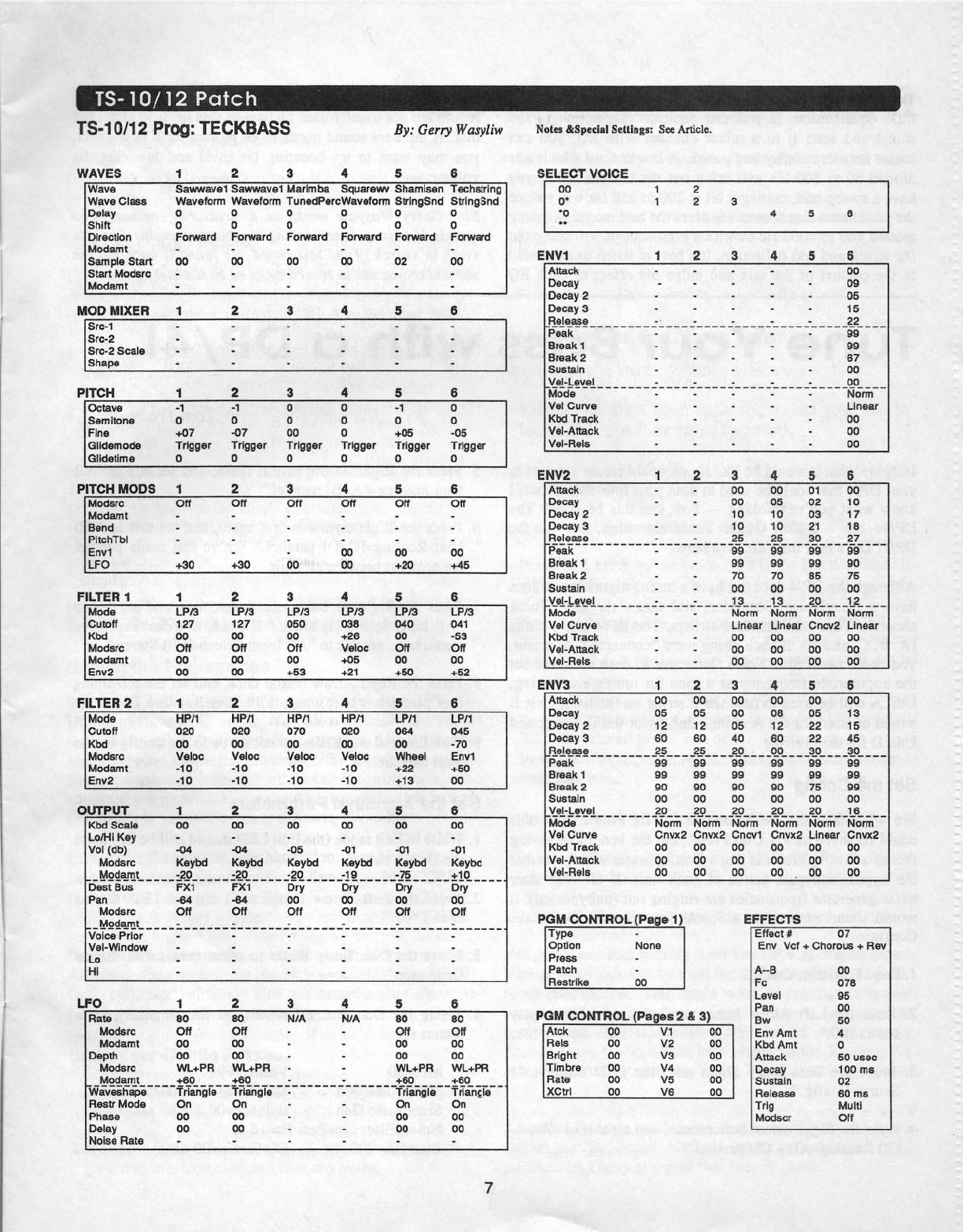
The
attached
patch
sheet
outlines
two
separate
sounds,
the
first
of
which
is
a
simple
monophonic,
dual
oscillator
into
resonant
filter
set-up.
In
this
case
the
regular
low
pass
filters
of
the
TS
are
wide
open
and
filter-
ing
is
being
handled
through
the
effects
section.
You
can
create
variations
of
the
tone
by
adjusting
the
settings
of
the
filter
on
the
fourth
click
of
the
Program
Effects
pages.
FC
and
BW
adjust
the
cutoff
frequency
and
the
strength
of
the
resonant
peak
respectively.
The
ENV
AMT
setting
adjusts
the
contribution
of
the
filter
envelope
and
will
affect
the
at-
tack.
Lower
the
LEVEL
amount
if
distortion
becomes
evi-
dent.
The
filter
envelope
controls
are
found
on
the
fifth
click
of
the
Effects
pages
and
are
much
simpler
to
manage
than
the
main
envelopes.
All
of
these
controls
are
interac-
tive
and
with
a
little
experimentation,
you
will
quickly
be
able
to
derive
a
number
of
your
own
versions
of
this
sound.
The
OX
Voice
Select
brings
in
a
marimba
wave
which
adds
a
more
distinct
attack.
The
second
part
of
the
patch
uses
waves
4,5
and
6
from
the
X0
Voice
Select
and
provides
a
different
sound
by
using
plucked
waves
transposed
down
to
emulate
the
resonance
effect.
This
sound
would
also
be
useful
if
yotu
effects
are
busy
elsewhere.
The
patch
can
be
adapted
to
other
synths
by
substituting
other
suitable
plucked
waveforms.
Raising
the
Cutoff
amount
or
the
Envl
amount
on
the
filter
page
of
one
or
more
of
these
waves
will
give
different
characters
to
the
mix.
Wave
5
has
a
low
setting
for
both
Sample
Start
and
ENV2
Attack
to
eliminate
the
initial
click
but
these
values
can
be
zeroed
for
another
variation.
Try
this
patch
in
the
higher
registers
for
various
techno
type
"bleeping"
sounds.
TS“-1
DI1
2
PTOQI
TECKBDSS
By:
Gerry
Wasyfiw
WA)!‘
ES
1
2
3
4 5
E
Wave
Wava
Olaaa
Delay
Shlit
Direction
Iiiiodsmt
Sampia
Start
Start
Motiaro
iiiiodamt
HOD
IIIIIEFI
o
Forward
DD
D
Forward
DD
D
Fonlvard
DD
I
II
1
I-"‘H
H
H
I-If
Sawwavai
Sawwavai
Marimba
Sc|uarawv
Sharnisan
iflavafonn
Waveform
Tuneciiilarcliiiaveionn
SiringSnti
D
D D D
D
D
D
Forward
Forward
DD
D2
Tachstring
Stri
ngSnd
D
D
Forward
DD
1
2
45
Src-1
Src-2
Src-2
Sonia
Shape
-I
‘Q
I
ii
PITCH
L
H
-F
1
H
i
I
Octave
Samitono
Fina
Oiidamotia
Glidatlma
-1
D
-I-D?
Trigger
D
bub
--r
Trigger
D
DCID
Cl
Trigger
D
'D'—ID'DD
-I
iggar
-1
D
-I-D5
Triggar
D
DD
-cs
Trlggar
D
1 1
PITDH MODS
iciotisrc
iviodamt
Band
PltchTbl
Envi
LFO
Q
I-I
l—I
5 5
1
_I.
on
-I-DD
in
on
+DD
3.,,-_.n_
on
DD
4
DD
DD
Off
DD
4-.E'D
Off
DD
+45
FILTER
1
1
2 4 5 5
ivioria
Outoii
sue
Morisrc
iviociamt
Env2
LFID
12?
DD
Off
DD
DD
LPID
12?
DD
Off
DD
DD
LP'.f3
OED
DD
‘Off
DD
+53
LP.-'3
DEB
+25
‘iioloc
+DE-
+21
LP.-'3
D-4D
DD
Off
DD
-I-ED
LP.f3
D41
-53
Off
DD
+52
FILTER
2
1
EI
D
4
5
B
_
Mode
Outofi
lib-d
Modsrc
Hlotiamt
Enva
HPI1
DED
DD
‘iialoc
-to
-1
o
i
i
OUTPUT
1;
HPI1
DED
DD
'v'aioc
-1D
-1D
HPH
ore
DD
lfaioe
-1
D
-1
o
HF-‘I1
DED
DD
tfaloc
-1D
-1D
LPI1
DB4
DD
Wheel
+22
+13
LP.-'1
use
-ro
Env1
-I-5D
on
3 4
I
ken
Scale
I
Lori-ii
Kay
itfo!
(rib)
Modarc
:
iviodamt
Pan
iviociarc
Voice
Prior
Val-‘Window
Lo
HI
..-Bsdan=
....
..;.
..........
-_
DD
-D4
I-taybd
-an
can-tea
""
"att""tar"
-B4
-D4
Off
O11
L
co
-or
Keyed
-ac
“5r¥“"'5rT'“'5fir"
DD
OD
DD
DD
-DE
Iiioybd
-an
Off
DD
-D1
itaybd
-1c
Ofi
DD
-D1
ltcybd
-rs
Off
-I--I-I--—--IIQ--I--I1--Ila--u-1-u--I-I-I-I-II-I-III
DD
-n1
iilaybd
slit
_
....
..
Du
no
on
LFO
-II
H
Bate
iriomrc
I-in-ciami
Oapih
iiilodsre
_..I.estteatL...
iniavaahapa
Fiastr
Mada
Phasa
Delay
Noiaa
Flata
I
I
sags
'iHI,.+F"FI
"D-7-'..
.. ..
Triangle
GD
DD
DD
age
OD
WL-I-F'Fl
"'§’L'......-..-
Triangle
-
On
-
DD
O11
MIA
-I
-F
‘I-'1--‘I-'I-I-I--iIl'lIII'II
3 4 5
NIA
DD
I
I
I
I
i
Off
DD
DD
WI.+PFI
+5D
Triangle
On
DD
DD
DD
DIT
DD
DD
WL+PH
+DD
range‘
'
I
On
DD
DD
7
Holes
Jriipccial
Settings:
Sec
Article.
SELECT
VOIDE
DD
D
‘D
‘I
2
1
2
3
4
5
EHV1
1
2 3 4 5
DI
Attack
Decay
Decay
2
Decay
D
_Fl“l5_5§E_
-
Peak
Break
1
Break
2
Sttstsrin
lei-I-steal-
ivioda
-
‘rial
Ourva
ithd
Track
‘ital-Attack
Mal-Hale
I
I
I
I
I
-1-
I
I
I
I
--|--1-|--1-----1-r
I
I
I
I
I
I
I
I
I
I
I
I
‘I
I
I
li-
I
I
I
I
.,__-._._.-.-.
I-
-I
I
I
I
-I-||—----|---III-|---I
_'_____fI.°____'
33%-IZSSS
D?
nu
I
Nomi
'
Linear
DD
DD
DD
El'~l"if2
1
2
3
4
5
i
Attack
-
Decay
~
Decay
2
'
Decay
3
_Fl“_"iSEE_
_
Peak
Break
t
r'
Break
2
iSusta|n
Lllal-Lanai
_
5
Mode
f"v‘aI
Ourva
‘ifbd
Track
I
'1i'rDI—JI|r'I.'Ii1DIIi.
ytfal-Fials
.,-_—.,-|..-..,_-,-
I
-Ir
-l-
I
I
I
I
I
I
I
I
I
I
I
I
1.".-._,-.,_
DD
DD
1D
I
D
‘___
__2§____El5____?d7'..___€T"'____
DD DD DD DD
DD
‘FD
DD
___
____1§______1_3_____2__D_____1_2_____
Norm
I
Linear
DD
DD
DD
DD
O5
‘ID
‘I-D
DD
TD
DD
Norm
Llnaar
DD
DD
DD
O1
D2
D3
21
DD
55
DD
Norm
Oncva
DD
DD
DD
at
F
1D
1?
‘ID
_l
_'l'I'L
DD
T5
DD
Norm
Linear
DD
I
DD
1
DD
EIFW3
1
2
3
4
§Aitack
iDacay
Decay
2
Decay
3
_FIal-use
_ _
Peak
Break
1
Break
2
Sustain
..'r.si.-lets!
_
Moria
‘vial
Ourva
ate
Track
Val-Attack
‘fife!-Fioia
_____
_
_2§_
_
__2_5__
_
_2D
DD DD DD
‘DB
DD
DD
DD
D5
1
2
BO
DD
DD
_____
_
.29. __
Norm
Dnvxlr
DD
DD
DD
DD
D5
1
2
BD
DD
DD
.E_lL_
_
Norm
Onvxk
DD
DD
DD
DD
DD
D5
4D
DD
co
.29
______
-_
Norm
Norm
Oncvt
DD
DD
DD
DD
DB
‘I2
DD
DD
DD
DO
ED
Onv:-:2
no
Do
DD
_
DD
D5
22
22
____
_I1D_
_ _
_3_D_
_ _
_fl_D____
BS
DB
DD
DD
I-"5
DD
hionn
LIi'iBBi"
DD
DD
DD
___
F
DD
‘I3
‘I5
45
DD
DD
DD
Norm
Ontntlr
DD
DD
DD
_
_
POM
CONTROL
{Page
1}
EFFECTS
Tan?“
T
Option
Nona
Press
Patch
Fiaatrll-ta__
POM
DOIllTHOL_j[__Fagos
2
a
3}
no
vi
he
Atck
Fioia
Bright
Tlmbra
Hate
IO
trl
V2
VB
V4
V5
VB
OD
DD
DD
DD
DD
Effaoi
#
Env
lief
+
Ohorous
+
Fiav
A--B
Fe
Level
Pan
Bw
Env
Amt
itibd
Amt
-Attack
Decay
Sustain
Fiaiaasa
Trig
Mod-scr
D?
DD
DTB
D5
DD
ED
4
D
so
ueoe
1DD
ma
D2
so
ma
.
iviulil
an
I
The
final
sauce
that
always
goes
good
on
a
bass
sound
is
a
little
equalization.
If
you
can
dedicate
one
output
to
the
sound
and
send
it
to
a
miner
channel
with
EQ,
you
can
create
far
more
clarity
and
punch.
A
low
conuol
which
acts
around
50
to
100
Ha
will
bring
out
the
bottom
and
if
you
have
a
sweep
mid,
cutting
a
bit
at 200 to
250
Hz
will
reduce
the
muddiness
that
sometimes
blurs
the
mid
range.
Boosting
around
B00
to
1000
Hz
or with
a
high
control
will
bring
out
the
attack
and
add
defmition.
It's
best
to
listen
to
the
sound
in
the
contest
of
the
mitt
and
judge
the
effect
of
each
EQ
Tune
Your
Bass
Imagine
what
it
would
be
like
if
you
could
create
a
preset
in
your
DP!-4
that
could
be
used
to
tune
your
four-string
bass.
I
know
what
you’re
thinking
—
how
can
this
he
done?
The
DP,t4+
has
a
2-Unit
Guitar
Tuner
algorithm,
hut
not
the
DP,t4l
Let's
be a
little
creative
here.
Although
the
DP/4
does
not
have
a
tuning
algorithm,
it
does
have
a
Sinet'Noise
Generator,
and
that’s
the
key.
Think
about
it.
Your
bass
has
four
strings.
The
DPI4
has
4
Units
(A,
B,
C,
and
D).
If
each
string
were
"connected"
to
a
unit,
you
could
use
a
Sine,t'Noise
Generator
in
each
unit,
and
set
the
appropriate
frequency
as
a
tone
for
tuning
each
string.
Unit
A
will
be
used
to
tune
the
E
string
on
the
bass,
Unit
B
would
be
used
for
the
A
string,
Unit
C
for
the
D
string,
and
Unit
D
for
the
G
string.
Set
the
Oentlg
We
will
make
the
Bass
Tuner
a
Config
Preset. Sure
this
could
be
saved
as
a
4
Unit
Preset,
hut
the
benefit
of
saving
this
as
a
Config
Preset
is
that
a
Config
preset
will
remember
the
bypasaiunbypass
status
of
each
unit.
If
all
four
sine!
noise
generator
frequencies
are
ringing
out
iunbypassed),
it
would
sound
worse
than
a
Spinal
Tap
concert.
To
Set
the
Config:
_
1.
Press
Edit,
then
Config.
2.
Press
the
Left
Arrow
button
until
the
red
LED
display
shows
"DU."
3.
Move
the
Data
Entry
Slider
until
the
LCD
displays
“l
Source
Config."
4.
Press
the
Right
Arrow
button
once,
and
set
this
to
“AB
—
CD
Routing=AB
+
CD
parallel."
range
until
the
bass
sits
well
with
the
other
sounds.
Delay
or
reverb
are
not
usually
used
on
bass
as
this
tends
to
cloud
the
mis.
If
the
bass
sound
needs
to
be
pushed
hack
in
the
mitt,
you
may
want
to
try
boosting
the
mids
and
lowering
the
volume.
in
Bio:
Garry
Wasyiiw
works
as
a
structurai
engineer
who
spends
his
spare
time
pushing
the
buttons
on
his
Ensoniq
synth
in
search
of
the
iost
chord.
He
found
it
once
hut
the
sequencer
was
not
in
record
tnotie
—
so
it's
iost
again.
Wi‘l'h
Cl
DP/4!
Tom
Tracy
5.
Press
the
Right
Arrow
button
again,
and
set
this
to
"AB
Unit
Routing=[A+B]
parallel."
6.
Press
the
Right
Arrow
button
again,
and
set
this
to
“CD
Unit
Routing=[C+D]
parallel."
We've
just
made
parallel
connections
between
all
units.
7.
Press
the
Right
Arrow
button
three
times.
and
set
this
to
“AB
Input
Seleet=(I)
Mono."
If
you
have
a
cool
expensive
stereo
bass,
set
this
to
“AB
Input
Select={1,2)
Stereo."
B.
Press
the
Right
Arrow
button
once,
and
set
the
rentaining
four
parameters
to
(b)ypass
(k)i1l
A=k
B=k
C=1r
D=k."
9.
If
all
four
red
unit
LEDs
are
not
lit,
press
the
Config
button
until
they
are.
Set
the
Algorithm
Parameters
1.
While
in
Edit
mode
(the
Edit
LED
should
still
be
lit),
Press
the
Unit
A
button.
2.
Press
the
Left
Arrow
button
until
the
red
LED
display
shows
"00."
3.
Move
the
Data
Entry
Slider
to
select
preset
#90
“Signal
Generator.“
4.
Using
the
Data
Entry
Controls
set
the
remaining
para-
meters
to:
IvIis.=30
Volume=99
SinefNoise
Gen
Sine
Freq=l65
Ha
Sine,t'Noise
Gen
Ea1at1ce=[l'[}
Noise
Filter
LowPass
Fe=16
K
Bass
Fc=
200
Hz
EQ
Gain=+0{l
dB
1
I.
I
Treble
Fc=
DSKHZ
EQ
Gain=+i]0
dB
EQ
Input
Level
Trim=+U0
All
Modulation
pararneters=Off
Waive
just
set
the
parameters
in
Unit
A
to
tune
the
E
string
on
the
bass.
Use
the
Copy
Feature
This
feature
(explained
so
elegantly
in
the
Storage
Section
of
the
Musician's
Manual)
will
save
time
in
copying
the
al-
gorithm
and
parameter
settings
in
Unit
A
to
the
other
tmits.
1.
While
in
Edit
mode
(the
Edit
LED
should
still
be
lit).
press
the
Write
button.
2.
Press
the
Unit
A
button.
The
top
line
shows
“Write
to
1U
Pset."
3.
While
holding
the
Unit
A
button,
press
the
Unit
B
button.
4.
Turn
the
Data
Entry
Knob
clockwise
until
the
display
shows
“Hit
<WRITE>
To
Copy
Unit
A
to
B.“
5.
Press
Write.
Repeat
the
above
steps,
copying
Unit
A
to
Unit
C
and
D.
Now
the
Sinethioise
Gen
algorithm
is
in
all
four
units.
Setting
the
Frequencies
We‘ve
just
copied
the
algorithm
and
parameter
settings
in
Unit
A
to
Units
B,
C,
and
D.
Now all
of
the
units
are
set
to
tune
the
E
string.
That’s
not
what
we
want.
The
frequency
needs
to
be
set
for
each
unit
to
match
the
appropriate
string.
Based
on
a
tuning
reference
of
A=44(l
I-Ia
using
an
equal-
temperament
pitch
table,
set
the
Sine
Frequency
parameter
(parameter
03)
for
each
tutit
as
follows:
Unit
A
(the
E
suing)
-
SinetNoise
Gen
Sine
Freq=165
Hz
Unit
B
(the
A
suing)
-
SinetNoise
Gen
Sine
Freq=220
Ha
Unit
C
(the
D
suing}
-
Sine;'Noise
Gen
Sine
Freq=294
Hz
Unit
D
(the
G
string)
-
Sinet'Noise
Gen
Sine
Freq=392
Hz
Note:
Sine
values
are
rounded
off
to
the
closest
number.
Absolute
values
are
E=l6-4.81;
A=220.U(};
D=293.6?;
G=392.[l-U.
Sine
values
are
also
one
octave
higher
than
true
pitch,
making
it
easier
to
hear
the
tone.
Save
Your
Contig Preset
1.
While
in
Edit
mode
(the
Edit
LED
should
still
be
lit).
press
the
Config
button.
2.
If
all
four
red
unit
LEDs
are
not
lit.
press
the
Config
button
until
they
are.
You
shouldn’t
hear
any
tones.
3.
Press
Write.
The
top
line
of
the
LCD
display
shows
“Write
to
Config.“
This
is
what
we
want.
4.
Use
the
Data
Entry
Knob
to
find
a
Config
location
to
copy
you
Bass
Tttner
into.
5.
Press
Write
again.
Now
using
the
Arrow
buttons
and
the
Data
Entry
Knob,
name
your
preset
something
like
“Bass
Tone
Tuner."
6.
Press
Write
one
more
time
to
complete
the
process.
How
to
Use
the
Bass
Tone
Tuner
Now
that
you"'ve
finished
making
it,
let's
use
it.
1.
Connect
the
DP,i4
to
an
audio
source,
and
your
bass
to
Input
1
(or
l
and 2,
see
earlier
comment).
2.
Press
Select,
then
Config,
and
locate
your
Bass
Tone
Tuner
preset.
3.
Press
Select
again
to
select
it.
(Makes
sense,
huh?)
4.
Press
the
Unit
A
button
twice.
This
is
the
E
tone.
Match
it
with
your
bass.
5.
Press
the
Unit
A
button
again
to
bypass
it
(red
LED
lit).
6.
Press
the
Unit
B
button
twice.
This
is
the
A
tone.
Match
it
with
your
bass.
T.
Press
the
Unit
B
button
again
to
bypass
it
(red
LED
lit).
S.
Press
the
Unit
C
button
twice.
This
is
the
D
tone.
Match
it
with
your
bass.
9.
Press
the
Unit
C
button
again
to
bypass
it
(red
LED
lit).
Ii].
Press
the
Unit
D
button
twice.
This
is
the
G
tone.
Match
it
with
your
bass.
ll.
Press
the
Unit
D
button
again
to
bypass
it
(red
LED
lit).
You
have
just
successfully
used
the
DPI4
as
a
bass
tuner!
Variations
of
this
can
be
used
for
different
pitches
and
dif-
ferent
instruments.
You
might
want
to
anbypass
any
two
consecutive
units
as
a
“tone
drone"
for
your
nest
musical
composition.
The
possibilities
are
endless.
Much
thanks
goes
to
Dave
Cook,
a
fine
bass
player in
the
Reading
PA
area,
for
coming
up
with
the
“Bass
Tuner"
idea.
-r
Bio
.'
Torn
Tracy
is
an
Ensonio
corporate
citizen
and
writes
documents
like
Sound
Manuals.
Musician's
Manuals,
and
an
iiiustrious
bevy
of
things
that
nobody
reads.
Tec
h
n
iccll
Su
pport
Q&A:
Synchronizing
Your
Ensoniq
Keyboard
to
External
Clocks
There
seems
to
be
plenty
of
confusion
when
synchronizing
the
sequencer
found
on
board
an
Ensoniq
synth
or
satnpler
to
an
external
MIDI
clock
source.
These
clocks
can
be
generated
by
devices
such
as
computer-based"
sequencers,
analog
or
digital
multi-track
tape
recorders,
and
various
in-
terface
models
designed
specifically
to
generate
MIDI
clocks
or
various
timecodes
for
purposes
of
synchronisa-
tion.
I‘ve
written
this
guide
to
define
the
most
misunderstood
terms
that
you’re
likely
to
come
across
in
various
product
manuals.
I
also
want
to
provide
a
clear
understanding
of
the
capabilities
and
requirements
in
performing
such
a
task.
The
relationship
between
the
external
clock
and
the
Ensoniq
sequencer
is
active
to
passive,
respectively.
It
is
much
easier
to
sync
the
sequencer
onboard
your
Ensoniq
work-
station
to
a
multi-track
deck
titan
vice-versa,
due to
the
relatively
slow
and
inaccurate
response
of
the
average
tape
uansport
mechanism.
On
the
other
hand,
a
computer-based
sequencer
should
be
able
to
sync
up
to
the
Ensoniq
MIDI
clocks
without
any
problem
at
all.
The
issue
is
actually
very
simple
from
our
end:
The
sequen-
cers
built
into
Ensoniq
samplers
and
synths
(and
almost
all
keyboard-based
sequencers
on
the
market)
are
designed
to
send
and
receive
MIDI
clocks
with
Song
Position
Pointer.
They
do
not
respond
directly
to
other
codes
such
as
Fre-
quency
Shift
Keying
(FSK),
MIDI
Tape
Sync,
MIDI
Time
Code,
or
SMIPTE.
"
The
MIDI
clock
sent
over
MIDI
cables
to
the
passive
se-
quencer
tells
the
receiving
unit
specific
information
about
measures,
beats,
and
clocks
per
beat
-
also
known
as
pulses
per
quarter
note
(PPQ).
The
lone
exception
to
this
is
the
se-
quencer
found
in
I.i'lB
Mirage
keyboard
and
rack-mount,
which
sends
and
responds
to
MIDI
clocks
only,
without
Song
Position
Pointer.
Some
multi-track
decks
have
tape
sync
capabilities
built
in,
while
others
require
the
use
of
an
optional
proprietary
or
third-party
synchronisation
unit;
a
variety
of
models
are
currently
available
on
the
market.
To
find
out
about
the
set-
tings
and
requirements
for
those
units
during
specific
synchronisation
contexts,
refer
to
the
technical
manual
in-
cluded
with
the
deck
or
sync
box.
To
find
out
about
setting
Anthony
Ferraro
the
sequencer
on
your
particular
Ensoniq
workstation
to
fol-
low
an
external
MIDI
clock
source,
check
below.
Setting
the
Ensoniq
Sequencer
to
Extemal
MIDI
Clocks
Mirage
DSK-SIDMSIDSK-1:
Parameter
S5
must
be
set
to
ON
to
sync
the
Mirage
intemal
sequencer
to
an
extemal
MIDI
clock
source.
The
Mirage
is
not
able
to
chase-lock
to
random
points
in
the
song,
since
it
does
not
respond
to
Song
Position
Pointer.
This
means
that
you
cannot
start
the
Mirage’s
sequencer
from
a
random
point
in
the
sequence
and
expect
it
to
be
in
sync
with
an
external
clock
source.
It
will
start
from
the
beginning,
rather
than
chase-locking
to
a
selected
location.
-
ESQ-USQ-S0:
On
the
Control
Page,
set
SYNC=hflDI
CLOCK.
The
other
option
is
to
choose
TAPE
SYNC
as
the
clock
source,
which
is
received
via
the
rear
panel
Tape
In
jack.
Both
models
contain
their
own
tape
sync
generator,
which
can
drive
another
device
by
connecting
the
TAPE
OUT
and
TAPE
IN
jacks
to
the
respective
jacks
on
a
tape
recorder.
For
more
step
by
step
details
on
this
operation,
consult
the
ESQ-I
and
SQ-BU
manuals.
VFX-SDISD-1
32
VOICE:
The
internal
clock
source
must
be
set
to
MIDI
on
the
Sequencer
Control
page;
changing
this
parameter
from
INTERNAL
to
MIDI
will
also
cause
the
TEMPO
setting
to
switch
to
EXT.
SQIKS-32
Series:
Once
a
particular
sequence
or
song
is
selected,
hit
the
Edit
Seqt'P1'eset
button,
followed
by
the
Bank
One
control
button,
then
the
Screen
Two
button.
From
there,
the
screen
will
say
CLOCK=INTERNAL.
Now
use
your
Up
Arrow
button
to
change
this
setting
to
MIDI.
TS
Series:
In
the
first
page
under
the
Sequencer
Control
button,
set
CLOCK=
MIDI.
As
with
the
MFX-SDISD-l
32
VOICE
series,
this
change
will
also
make
the
TEMPO
set-
ting
to
switch
to
EXT.
EPS,
EPS-16
PLUS
and
ASR
Series:
Scroll
to
the
CLOCK
SOURCE
parameter
on
the
Edit)‘Seq
page
and
change
CLOCK
SOURCE=
to
MIDI.
Special
ASR-10
Note:
when
using
DiskTraclts
with
the
ASR-10,
the
ASR
must
without
exception
be
the
master
clock
to
allow
the
tracks
to
spool
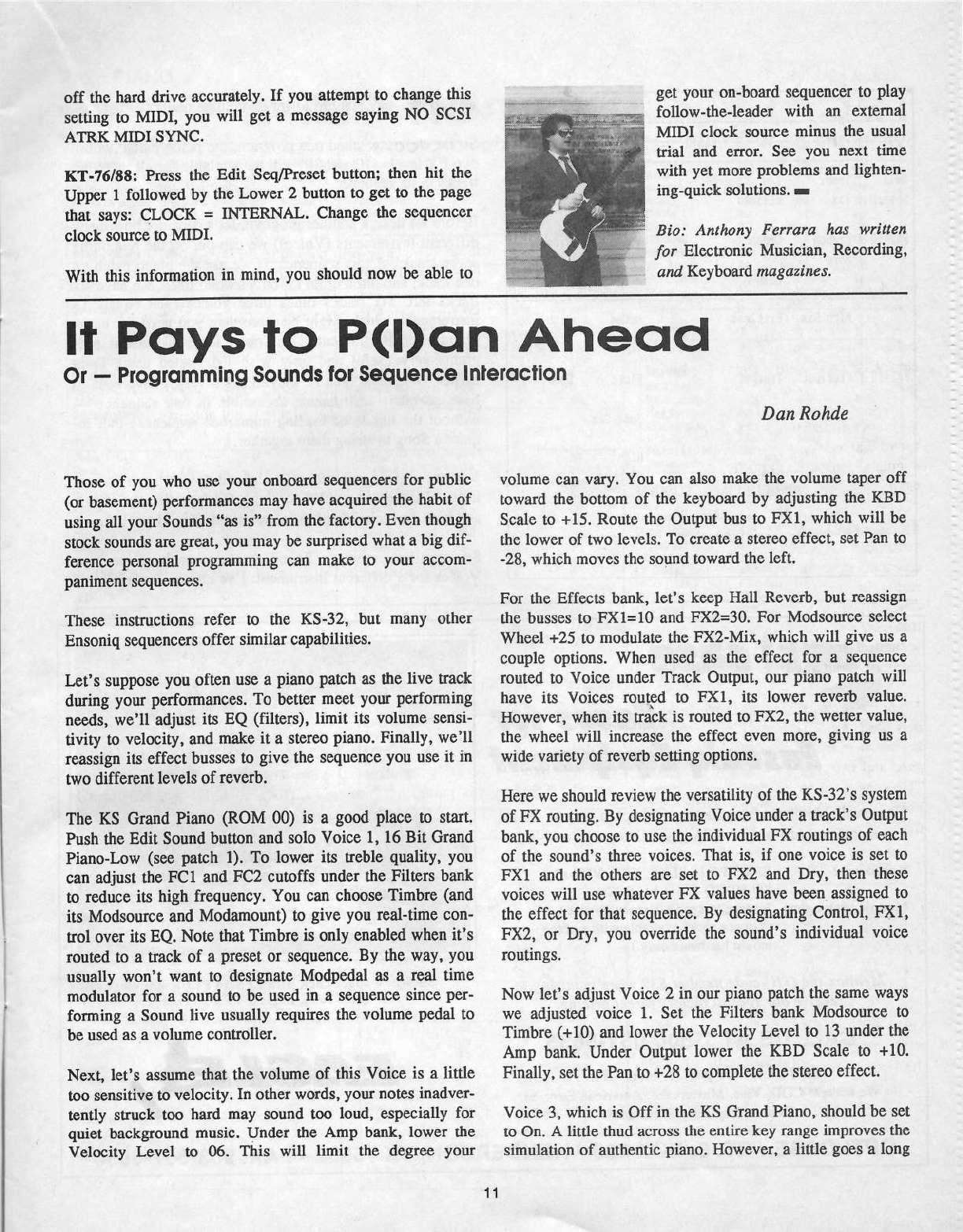
off
the
hard
drive
accurately.
If
you
attempt
to
change
this
setting
to
MIDI,
you
will
get
a
message
saying
NO
SCSI
ATRK
NHDI
SYNC.
KT-’i'6t'38:
Press
the
Edit
SeqtPreset
button;
then
hit
the
Upper
1
followed
by
the
Lower
2
button
to
get
to
the
page
that
says:
CLOCK
=
INTERNAL.
Change
the
sequencer
clock
source
to
MIDI.
With
this
information
in
mind,
you
should
now
be
able
to
get
your
on-board
sequencer
to
play
follow-the-leader
with
an
external
MJDI
clock
source
minus
the
usual
trial
and
error.
See
you
next
time
with
yet
more
problems
and
lighten-
ing-quick
solutions.
-
?-.-.-.--—-.p------
-—-|---"
Bio:
Anthony
Ferrara
has
written
for
Electronic
Musician,
Recording,
anti
Keyboard
magazines.
It
Pctys
to
P(l)c|n
Ahead
Or
—
Programming
Sounds
tor
Sequence
Interaction
Those
of
you
who
use
your
onboard
sequencers
for
public
(or
basement)
performances
may
have
acquired
the
habit
of
using
all
your
Sounds
“as
is"
from
the
factory.
Even
though
stock
sounds
are
great,
you
may
be
surprised
what
a
big
dif-
ference
personal
programming
can
make
to
your
accom-
paniment
sequences.
These
instructions
refer
to
the
KS-32,
but
many
other
Ensoniq
sequencers
offer
similar
capabilities.
Let's
suppose
you
often
use
a
piano
patch
as
the
live
track
during
your
perfonnances.
To
better
meet
your
performing
needs,
we'll
adjust
its
EQ
(filters),
limit
its
volume
sensi-
tivity
to
velocity,
and
make
it
a
stereo
piano.
Finally,
we'll
reassign
its
effect
busses
to
give
the
sequence
you
use
it
in
two
different
levels
of
reverb.
The
KS
Grand
Piano
(ROM
GU)
is
a
good
place
to
start.
Push
the
Edit
Sound
button
and
solo
Voice
1,
16
Bit
Grand
Piano-Low
(see
patch
1).
To
lower
its
treble
quality,
you
can
adjust
the
FCI
and
FC2
cutoffs
under
the
Filters
bank
to
reduce
its
high
frequency.
You
can
choose
Timbre
(and
its
Modsource
and
Modamount)
to
give
you
real-time
con-
trol
over
its
EQ.
Note
that
Timbre
is
only
enabled
when
it's
routed
to
a
track
of
a
preset
or
sequence.
By
the
way,
you
usually
won't
want
to
designate
Modpedal
as
a
real
time
modulator
for
a
sound
to
be
used
in
a
sequence
since
per-
forming
a
Sound
live
usually
requires
the
volume
pedal
to
be
used
as
a
volume
controller.
Next,
let's
assume
that
the
volume
of
this
Voice
is
a
little
too
sensitive
to
velocity.
In
other
words,
your
notes
inadver-
tently
suuck
too
hard
may
sound
too
loud,
especially
for
quiet
background
music.
Under
the
Amp
bank,
lower
the
‘Velocity
Level
to
O6.
This
will
limit
the
degree
your
Dan
Rohde
volume
can
vary.
You
can
also
make
the
volume
taper
off
toward
the
bottom
of
the
keyboard
by
adjusting
the
KBD
Scale
to
+15.
Route
the
Output
bus
to
FXI,
which
will
be
the
lower
of
two
levels.
To
create
a
stereo
effect,
set
Pan
to
-28,
which
moves
the
sound
toward
the
left.
For
the
Effects
bank,
let's
keep
Hall
Reverb,
but
reassign
the
busses
to
FXl=lU
and
FX2=3ft.
For
Modsource
select
Wheel
+25
to
modulate
the
FX2-Mix,
which
will
give
us
a
couple
options.
When
used
as
the
effect
for
a
sequence
routed
to
Voice
under
Track
Output,
our
piano
patch
will
have
its
‘Voices
routed
to
FX1,
its
lower
reverb
value.
However,
when
its
track
is
routed
to
FX2,
the
wetter
value,
the
wheel
will
increase
the
effect
even
more,
giving
us
a
wide
variety
of
reverb
setting
options.
Here
we
should
review
the
versatility
of
the
KS-32's
system
of
PX
routing.
By
designating
Voice
under
a
track's
Output
bank,
you
choose
to
use
the
individual
FX
routings
of
each
of
the
sound's
three
voices.
That
is,
if
one
voice
is
set
to
FX1
and
the
others
are
set
to
FX2
and
Dry,
then
these
voices
will
use
whatever
FX
values
have
been
assigned
to
the
effect
for
that
sequence.
By
designating
Control,
FX1,
FX2,
or
Dry,
you
override
the
sound's
individual
voice
routings.
Now
let's
adjust
Voice
2
in
our
piano
patch
the
saute
ways
we
adjusted
voice
I.
Set
the
Filters
bank
Modsource
to
Timbre
(+10)
and
lower
the
Velocity
Level
to
13
under
the
Amp
bank.
Under
Output
lower
the
KBD
Scale
to
+10.
Finally,
set
the
Pan
to
+28
to
complete
the
stereo
effect.
Voice
3,
which
is
Off
in
the
KS
Grand
Piano,
should
be
set
to
On.
A
little
thud
across
the
entire
key
range
improves
the
simulation
of
authentic
piano.
However,
a
little
goes
a
long
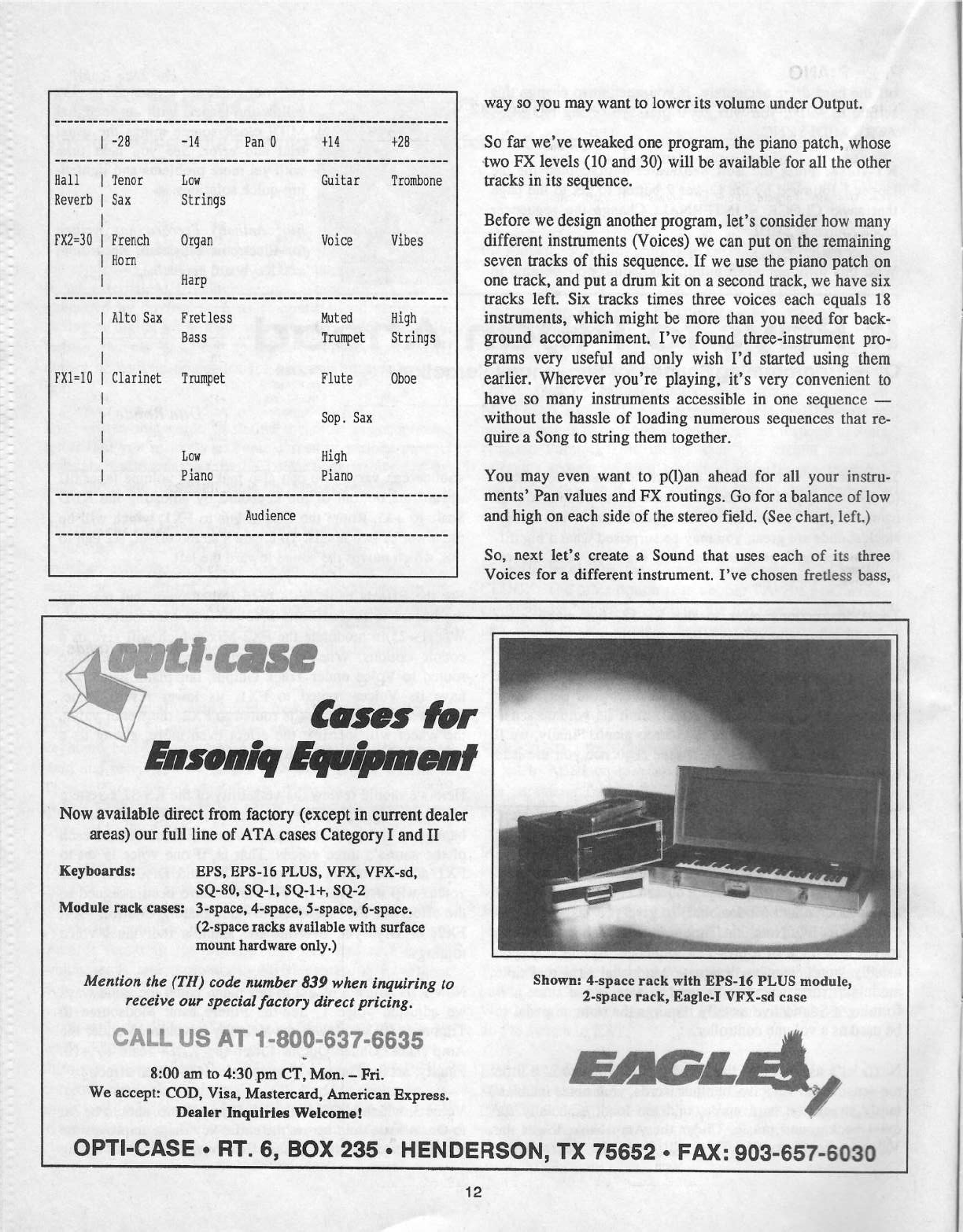
-
11"-I
I*-
1-
Ii
1
1-K
I
11
iiii
11-1-12
iii
ii
iii
ii
1
iiiiii ii
iiiiii
iiii
1.21-2-11
-
I
I111
‘YT
FF
It
I
12-
-*-
2'—
-I
In
2-
I
-*-
-1
ll
1
-*-
-'-*--I
--
1-
-'-"-
-'-*-
B
ii
Ki
I
11
ii
Hall
Heverb
Fll2=3!l
FHl=lH
Clarinet
Trumpet
1
ii
I111
I111
ll-1'11-I--I-I-I
MK
I111‘-I"—'—
-'—
2-
-Z11-‘--I
11
I-*-P3‘
Kkijj
IIII
111
I
II
-"II
I
'I'—
'—-
II
---
iiiji
iiii
I
it
I
It
Z1
IX
iii-11111
II
III“-m
11 11
1.1
-
-|r-
-23 -14
Pan
U
ill
+2H
!
Tenor
Lcv
Guitar
Trombone
Sax
Strings
French
tlrgan
licice
liibes
Horn
Harp
Alto
Sax
Fretless
Hass
Hut
ed
High
Trumpet
Strings
Flute
Oboe
Sop.
Sax
Lou
Piano
High
Piano
Audience
EFCIS8
-<!;_
-
-
fir
Qéhifids
.--'—=_,
1""
Can:
for
Ensoniq
Now
available
direct
from
factory
(except
in
current
dealer
areas)
our
full
line
of
ATA
cases
Category
I
and
II
Keyboards:
EPS,
EPS-lti
PLUS.
VFX,
YFK-sd,
SQ-SD,
SQ-1.
SQ-1+,
SQ-2
Module
rack
cases:
3-space, 4-space,
5-space, 6-space.
(2-space
racks
available
with
surface
mount
hardware
only.)
Mention
the
f
TH
J
code
number
839
when
inquiring
to
receive
our
special
factory
direct
pricing.
'$.hl...i...
US
AT
1-B00-537-6635
8:00
am
to
4:3iJ_pn1
CT,
Mon.
-
Fri.
We
accept:
COD,
Yisa,
Mastercard,
American
Express.
Dealer
Inquiries
Welcome!
way
so
you
may
want
to
lower
its
volume
under
Output.
So
far
we've
tweaked
one
program,
the
piano
patch,
whose
two
FX
levels
(10
and
30)
will
be
available
for
all
the
other
tracks
in
its
sequence.
Before
we
design
another
program,
let's
consider
how
many
different
instruments
(Voices)
we
cart
put
on
the
remaining
seven
tracks
of
this
sequence.
If
we
use
the
piano
patch
on
one
track,
and
put
a
drum
kit
on
a
second
track,
we
have
six
tracks
left.
Six
tracks
times
three
voices
each
equals
18
instruments,
which
might
be
more
than
you
need
for
back-
ground
accompaniment.
l've
found
three-instrument
pro-
grams
very
useful
and
only
wish
I'd
started
using
them
earlier.
Wherever
you're
playing,
it's
very
convenient
to
have
so
many
instruments
accessible
in
one
sequence
—
without
the
hassle
of
loading
numerous
sequences
that
re-
quire
a
Song
to
string
them
together.
You
may
even
want
to
p(l)an
ahead
for
all
your
bistro-
ments'
Pan
values
and
FX
routings.
Go
for
a
balance
of
low
and
high
on
each
side
of
the
stereo
field.
(See
chart,
left.)
So,
next
let's
create
a
Sound
that
uses
each
of
its
three
Voices
for
a
different
instrument.
I've
chosen
fretless
bass,
Shown:
4-space
rack
with
EPS
16
PLUS
module,
2-space
rack,
Eagle-I
VFX-stl
case
i
OPTI-CASE
-
nr.
6,
Box
235
-
HENDERSON,
TX
75652
-
FAX:
903-cs?-soso
12
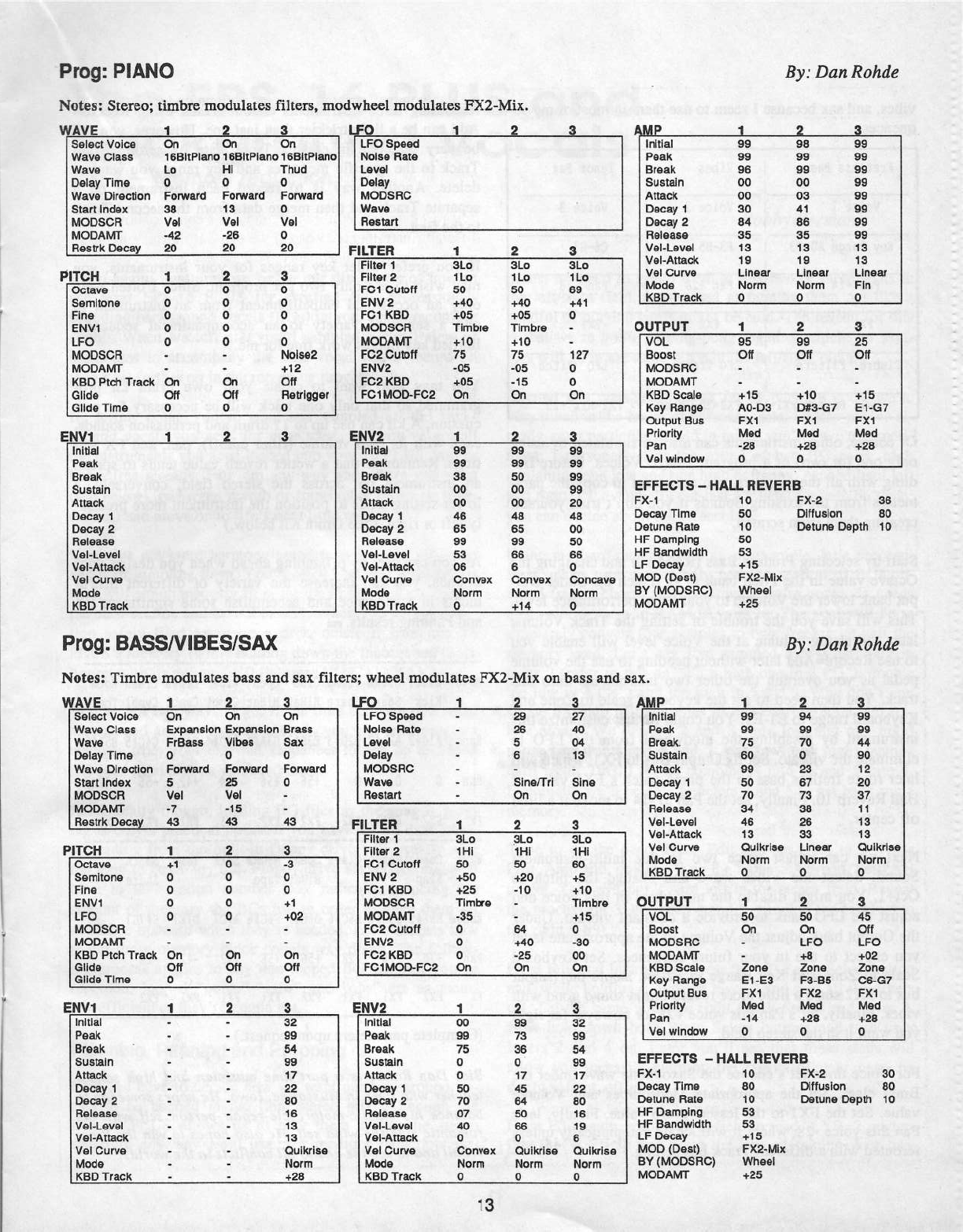
Preg:
PIAND
B_v:
Den
Rehde
Netes:
Steree;
timbre
nitedulates
filters,
medvvhecl
tnedulatcs
FX2-Mix.
Wave
5-lass
Wave
Delav
Time
Wave
Directien
Start
Index
MODSDH
MODAMT
Hes
lrl-t__iI_1eea;r
5
Fcnvard
35
'v‘ei
-42
22
5
Fcnvard
15
"v‘e|
-25
25
Thud
5
Fenvard
5
'v‘e|
5
25
PITCH
Octave
Serrllierie
Fine
EHV1
LFO
MODSGFI
MDDAMT
KBD
Ptch
Tracit
Glide
Glide
Time
ul-
I'll
SI
DISIGDD
D11
D11‘
D
GUIDED
Di‘!
OH
5
CIDDU
LFO
Speed
Heise
Hate
Level
Delav
MODSH5
Wave
Fiesmrt
___
FILTEB
1
;
__
Fllter
1
Flltef
2
FG1
Ci.it5l'1
EI‘~I"v‘
2
FG1
KBD
MDDSGH
MDDHMT
EH22
5
Heiee2
5
F52
Outelf
+12
O11
Fietrigger
_
‘F5-1iviOD-F52
5
EH21
FG2
RED
SLe
1
Le
55
+45
+55
Timbre
+15
T5
-55
+55
On
SL5
1
Le
55
+45
+55
Timbre
+15
T5
-55
-15
ml
1
1
2
__
__
3
EH52
initial
§
=
initial
Pealt
5
Peel:
Break
Breel-t
Sustain
'
Sustain
Attacit
Attach
Decay
1
Decav
1
De-cav
2
Decav
2
Helease
Helease
'v‘el-Level
‘vet-Level
l
‘v‘el-Attaclt
vet-Attack
vel
C-urve
velfiurve
Mcde
Mede
_l<’BD
Traelt
__
__
__ __
KBD
Traclt
2
On
_
3_-
..
-
SL5
“IT
1Le
'
E5
+41
'
5
12?
D
|
c
a
3
.1...
BB
SS
se
55
55
4e
B5
55
5S
55
Denver:
it-lerm
5
__
S5
B5
55
55
55
45
S5
‘BS
55
B
Den
vex
Hcrm
+14
_____.__
55
55
59
‘B5
25
45
55
55
55
5
‘initial
Peal-t
Breait
Sustain
Attaeit
Decay
1
Decav
2
Fieieeee
"v'el-Level
‘v'e|-Atiaeit
'v'el
5-urve
Mcde
KBD
Traclt
BS
SE
55
55
S5
B4
S5
1
S
15
Linear
Nenn
5
55
55
55
53
41
BS
S5
15
15
Linear
Herm
5
WA"v'E
j________
2 5
LFO
1
2
S
QMP
__ _
‘J
2
L_
__3_____
___
'
Select
‘vcice
On On
On
ss
ee
es
1SB|tPianc
1SBltPianc
1eBitPlane
Le
Hi
55
55
55
55
55
55
55
1
5
15
Linear
Fin
5
OUTPUT
1
2
5
VOL
Becst
MODSHC
MODAMT
HBD
Scale
Kev
Henge
Output
Bus
Prieritv
Pan
Eel
vvindetv
55
C111
+15
A5-D5
F21
Med
-25
5
5'5
D11
+15
D52-G?
FJE1
Med
+25
15
25
D11
+15
E1-G‘?
F1111
Med
+25
unite:
EFFECTS
-
HALL
i=iE1iEHS
Fill-1
15
FR-2
35
Decay
Time
55
Diflusicn
S5
Detune
Hate
15
Detune
Depth
15
55
HF
Damping
HF
Bandwidth
LF
Decav
53
+15
Qgngayg
MUD
[D551]
F212-|‘u|1'|I
Hcrm
5.
. .
Frog:
BASSNIBESISAX
ev
rucesac)
uecsur
Netes:
Timbre
tnedulatcs
bass
and
SS1
filters;
vvhccl
medulatcs
FX2-Mix
en
bass
and
sax.
WAVE
1
P
Select
vclce
Wave Glass
Expansicn
Eitpansicn
Wave
Delav
Time
Wave
Di
re-cflen
Fervrard
S
Start
index
MODSGH
MODAMT
Fiestrit
D555!
43
ITCH
D11
Uri
FrBass
5
vet
-?
vibes
5
Fcnvard
25
vel
-15
ts
1
I15
2
3
LFO
On
LFO
Speed
Brass hiclse
Hate
Sax
Level
5
5
43
-I
H
Octave
Serriltcne
Fine
EN'v“l
LFO
MODSOFI
MODAMT
HBD
Pteh
Trefiiil
Glide
Glide
Time
flCIflD'l'
_n
On
O11
5
CFDDDD
Di"i
O11
5
ee
5
+1
+52
On
DH
5
HV1
1
Delay
Fenvard
l
MODSHS
Wave
Fieetart
Q
-
-I
-
-
-.
-
“eve
S|ne.='Trl
Oh
FILTER
1
2
2?
45
5-Ii
15
Sine
On
5
Filter
1
Filter
2
FC-1
Outefl
EH1!
2
FD1
HBD
MODSDH
MODAMT
FO2
Sutctt
EH'v‘2
FO2
KBD
FG1M'DD-FG2
3L5
1Hi
55
+55
+25
Timbre
-35
5
5
QB
SLe
1Hl
55
+25
-15
54
+45
~25
On
SL5
1
Hi
55
+5
+15
Timbre
+15
5
-S5
DU
DH
|'
initial
Peait
Break
Sustain
Attach
Decav
1
Deeev
2
Helease
‘vlel-Level
vet-Attack
'v'el
Curve
lviede
Kev
fiiresit
I
_
_
-
U
-
_-
—
-
—
-
Q-
H
—
-I
_
-
-
Q
-
-
I-
—
i-
-
-
S2
55
54
55
1
1‘
22
B5
1
S
1
3
1
5
Ouiitrlse
Ne-rm
+25
_
_
___
l
uvz
1
__
55
Initial
Peal:
Brealt
Sustain
Attack
Decav
1
Decav
2
Helease
vei-Level
vel-Attaclt
v‘el
Curve
Mecie
KBD
Tract:
I15
5
BB
T5
5
5
55
7'5
5?
45
5
Denve:
Nerm
U
_.
$$E55“3%5$
D
Duiitri
se
ii-icrm
2
Fl
32
SB
54
55
1?
22
55
15
1
5
5
!
Duiitrise
I
Herlrl
Wheel
+25
By:
Dart
Rohde
I15‘
{Ill
IMP
initial
'
Peek.
-
Break.
.1
|
Fieleas
val
Level
'v'e|-Attacit
'v'ei
Ourve
OUTPUT
1
es
es
rs
so
55
55
Oulicrise
5'6-?$558°E-‘$52
H5-fiiifl-Infill
Clliflilfl-Ii-IP53
Sustain
Attach
Decav
1
I
Decav
2
re
s?
e
34
1 1
-
4e
13
1
3
1
3
Linear
Oulitrlse
Mede
Herrn
Herm
hierrrl
KS5
Traclt
5 5 5
|
1
2 3
VOL
Secst
MODS
HO
MODAMT
HBO
Scale
Kev
Flange
Output
Bus
Frlerltv
Pen
5
13
l
‘v'el
vvlndevll
Zena
E1-E5
FK1
Med
-14
5
LFO
+52
Zena
sc
sc
-ts
'
On On
Oti
-
u=c
+s
Zena
F3-B5
FJE2
Med
+25
OS-G?
FI1
Med
+25
D
5
FK-1
Decay
Time
Detune
Ftate
HF
Damping
HF
Bandtvidlh
LF
Deeav
MOD
{Desk}
ST
[MODSFlO}
MODAMT
l
EFFECTS
-
HALL
REVERE
15
B5
15
53
52
+1
5
FX2-
Mill
Wheel
+25
FR-2
25
Dlttuslen
S5
Detune
Depth
15

I
Fretless
Bass
vibes
Tenor
Sax
'
voice
1
l
voice
2
voice
3
1
Hey
Range
so-E3
'
F3-B5
ts-st
vibes,
and
sax
because
I
seem
to
use
them
in
most
of
my
se-
quences.
-1|-|
1
t-|I
t
an
I1?‘
T
if
slits
Pan
-are
rxt
1
rxsl
at
Timbre
Filters
LF5
Trenelo
LF5
Pitch
I
1
liall
lleverbit-{le1llllTl'lIl2e3il,11l'lheel
->1t‘:-t2-t-lix1+25
Of
course,
ether
instruments
can
also
be
simulated
by
using
only
one
(or
two)
of
a
program's
three
Voices.
Before
fid-
dling
with
all
the
numbers,
you
may
want
to
copy
the
para-
meters
from
the
existing
Sounds
if
you
don't
trust
yourself
creating
them
from
scratch.
Start
by
selecting
Fretless
Bass
(RAM
15}
and
changing
the
Octave
value
in
the
Pitch
bank
to
-l
(Patch
2).
Under
Out-
put
bank
lower
the
Volume
to
your
usual
performance
level.
This
will
save
you
the
trouble
of
setting
the
Track
Volume
later.
Adjusting
volume
at
the
‘voice
level
will
enable
you
to
use
Record=Add
later
without
needing
to
use
the
volume
pedal
as
you
overdub
the
other
two
instruments
onto
this
uack.
You
then
need
to
set
the
keyboard
scale
to
Zone
and
Keyboard
range
to
El-E3.
You
could
further
customise
this
instrument
by
disabling
the
modwheel
from
the
LFO
to
eliminate
the
vibrato.
Set
its
Output
Bus
to
FX1,
which
will
later
route
fretless
bass
to
the
piano
patch’s
FXI
value
of
Hall
Reverb
10.
Finally,
set
the
Pan
to
-14
to
move
it
a
little
off
center.
Next
we
can
adjust
voice two
in
this
multi-instrument
Sound.
Select
the
Vibes
wave
and
change
the
pitch
to
Oct+1.
You
might
disable
the
modwheel
in
this
voice
and
adjust
the
LFO
bank
to
provide
a
constant
vibrato.
Under
the
Output
bank
adjust
the
Volume
to
the
approximate
level
you
expect
to
use
in
your
future
sequences.
Set
Keyboard
Scale
to
Zone
and
Key
Range
to
F2-F4.
Route
the
Output
bus
to
FX2
since
a
little
more
reverb
might
sound
good
with
vibes.
Finally,
let's
Pan
this
voice
+28,
or
however
far
right
you
want
it
in
the
stereo
field.
For
Voice
three
let's
choose
the
Saxophone
wave
under
the
Brass
class.
Set
the
appropriate
lvlodsources
and
Volume
value.
Set
the
FX1
to
the
lesser
reverb
value.
Finally,
let‘s
Pan
this
voice
-28,
where
it
will
locate
automatically
unless
rerouted
with
a
different
Track
bus
setting.
Recording
three
instruments
on
one
Track
using
Rccord=
Add
can
be
a
little
trickier
than
just
one.
However,
you
can
be
very
selective
in
erasing
Track
data
by
setting
Erase
Track
to
the
specific
measures
and
key
range
you
want
to
delete.
Another
way
is
to
record
each
instrument
on
a
separate
Track
and
then
merge
data
from
the
second
Track
to
the
first.
If
you
prefer
wider
key
ranges
for
your
instruments,
you
may
wish
to
use
only
two
per
program.
Since
I
often
need
only
an
occasional
embellishment
from
an
instrument
to
add
a
sense
of
variety
to
an
accompaniment
sequence,
limited
key
ranges
work
fine
for
me.
You
may
also
want
to
create
your
own
drum
kit
pro-
grammed
so
that
only
one
track
will
be
necessary
for
per-
cussion.
A
kit
can
use
up
to
1'?
drum
and
percussion
sounds,
each
with
its
own
volume
(filter
cutoff),
pan,
and
FX
set-
tings.
Remember
that
a
wetter
reverb
value
tends
to
spread
an
instrument
out
across
the
stereo
field;
conversely,
a
lower
setting
tends
to
position
the
instrument
more
precise-
ly
left
or
right.
(See
Drum
Kit
below.)
As
you
can
see,
by
p(l)anning
ahead
when
you
design
your
Sounds,
you
can
increase
the
variety
of
different
instru-
ments
in
a
sequence
and
accomplish
some
significant
FX
and
Panning
results.
-|
Wave
Elec.
Brush
Thump
Clad
open
Ride
Crash Crash
soon
Kick
Snare
Snare
Hiflat
HiHat
Eymbl
Cymhl
Cynbl
Tonic
Range
a1G#2
h2ai2
B2Di3
E3Fi3
slats
stole
EiFl4
Gifilfi
B5Di5
Pan
ii
E1
ll
+56 +55
+54
+42
-55
-42
Pk
FRZ
Fsl
F32
FI2
FX2
F31
F31 F31
F11
Sdfitk
Snare
have
Conga
Bongo
Class
open
Hscns
Shir
Tamb
Slap
Hiflet
Tape
Range
E5Fi5
Gfihlfi
Bfifilfi
DEEE
Ffifilfi
ATE?
UTE?
EiTGi
Pan
+'lfi
-ill
+28 +55
+55 +42
-42
-28
FE
FIE
FH1
F11
FEE
F31
FH1
FK1
FEE
(Complete
parameters
upon
request.)
Bio:
Dan
Rahtie
is
a
part
time
ntnsician
anti
high
school
teacher
who
lives
in
Masculine,
Iowa.
He
hopes
someday
to
balance
his
classic-motorcycle-repair-person
self
with
his
rornantie
ride-the-wind
self.
He
also
hopes
to
win
the
Pow-
erhail
and
to
see
the
end to
all
conflicts
in
the
world.
14'

The
EPS-l6
PLUS
and
Background
Vocals
Port
2
--
Memory
reduction
Hello
again.
Last
time
we
began
our
discussion
of
how
to
use
your
EPS-16
PLUS
for
creating
full,
professional-
sounding
background
vocals
(BGs)
in
your
home
recording
studio.
When
we
left
off,
you'd
sampled
a
small
slew
of
harmonies
to
accompany
the
lead
vocal
you'll
record
on
tape
a
bit
further
on
in
the
recording
process.
If,
at
this
point,
you've
sung
and
sampled
all
the
back-
ground
vocals
you
need
for
your
song,
and
you've
got
all
the
instruments
you
need
loaded
into
your
16
PLUS,
you're
home
free
already.
Pan
'em
any
way
and
where
you
want
(see
below),
put
some
reverb
or
some
other
effect
on
them
(or
not)
and
move
on
to
life's
next
little
task.
If
you've
got
more
harmony
sections
to
sample,
go
ahead
and
start
sampling
them.
You'll
often
find
you've
got
more
than
will
simultaneously
fit
in
the
16
PLUS.
For
now,
sam-
pie
each
section
and
save
it
to
disk.
When
you've
got
a
sec-
tion
safely
filed
away
on
a
disk,
delete
it
from
the
16
PLUS's
memory
(while
holding
down
the
Instrument;'Track
button
with
its
yellow
LED
lit,
press
NOICANCEL).
You've
got
two
ways
to
go.
If
the
time
between
one
vocal
section
and
another
is
long
enough,
you
can
send
program
changes
from
your
external
sequencer
to
call
up
and
load
BG
files
from
disk
as
you
need
them.
Realistically
though,
loading
BG
files
as
the
song
is
play-
ing
is
only
a
practical
option
if
you
have
a
hard
disk
drive,
as
loading
from
the
built-in
floppy
drive
will
usually
take
too
long
to
be
of
any
use.
Floppy
drive
users
(like
me)
will
have
to
take
option
number
two:
radically
reducing
the
amount
of
memory
the
BGs
use
in
order
to
have
them
all
available
onboard
when
they're
needed.
Let's
discuss
how
to
cut
those
memory
block
counts
way
down.
The
follow-
ing
process
applies
to
any
non-looped
BG
samples
you've
recorded;
looped
"oohs,"
"aahs"
and
"ohs"
are
as
mem-
ory-efficient
as
they're
gonna
get.
Planning,
Panning
and
Prepping
First,
we
have
to
decide
how
we
want
our
background
vo-
cals
to
be
panned
in
the
final
stereo
mix.
Although
the
EPS-16
PLUS
allows
us
to
play
them
across
the
stereo
spectrum
any
way
we'd
like,
for
memory
reduction
pur-
Roboy
Berrnan
poses,
we
need
to
group
them
at
just
two
or
three
spots
in
the
lefthight
field,
as
opposed
to
fanning
them
out
like
a
handful
of
playing
cards
might
be
held.
The
reason
for
this
is
that
we're
going
to
ping-pong
together
whichever
sam-
ples
will
go
in
the
same
place
in
the
lefthight
picture.
Beyond
this
consideration,
as
far
as
panning
goes,
we're
very
much
in
the
realm
of
personal
taste.
Unless
you've
al-
ready
got
a
particular
sound
in
mind,
you'll
have
to
experi-
ment.
I
personally
like
the
sound
of
two
BG
pairs,
each
containing
one
low
and
one
high
harmony,
panned
hard
left
and
right.
I'll
eventually
put
just
a
touch
of
reverb
on
them;
you
can
decide
about
the
effects
later.
Using
my
hard-panned
pairs
as
an
example,
let's
proceed.
First,
make
sure
you've
only
got
one
section
of
BGs
on-
board
(say,
a
chorus
worth)
-—
what
we're
gonna
do
needs
some
elbow
room
in
RAM
to
work
in.
The
goal
will
be
to
ultimately
convert
four
samples
to
two,
freeing
up
half
the
memory
used.
Let's
say
I've
sampled
a
low
harmony
in
layer
2
(refer
to
this
as
"2")
a
high
one
in
3
(“3"),
double
the
low
in
4
("+1")
artd
the
high
in
5
("S").
Why
don't
you
create
a
clump
of
harmonies
in
this
configuration
and
fol-
low
along?
We'll
want
2
and
3
(one
low
and
one
high)
panned
hard
left
and
4
and
5
(one
low,
one
high)
panned
hard
right.
This'll
let
us
combine
3
into
2,
and
5
into
4.
Eventually
we'll
be
able
to
delete
3
and
5
to
get
back
some
memory.
Time
to
do
the
deed.
Press
Edit
and
set
LYR
to
2.
Press
Edit,
Amp
and,
quickly,
2 on
the
numeric
keypad.
Set
PAN
to
-99.
This
will
put
2
hard
left
in
the
stereo
field.
Repeat
the
process
for
3,
and
then
4
and
5,
panning
the
last two
to
the
right
(+99).
Press
Edit
and
Instrument.
Press
the
left
Patch
Select
button
and,
while
holding
it,
turn
on
layer
2
and
shut
all
the
others
off.
Do
the
same
with
the
right
Patch
Select
and
layer
4.
Now
hold
down
both
Patch
Select
buttons
and
turn
only
layers
2
and
4
on.
Later
you'll
see
that
these
steps
will
allow
you
to
easily
audition
the
results
of
your
next,
no
doubt
valiant,
efforts.
Press
Edit
again,
set
the
layer
field
to
read
"LYR=2,
under-
line
the
WS
field
and
press
the
key
-containing
your
har-

monies
down.
Get
out
a
piece
of
paper
and
write
down
the
LYR
and
WS
numbers.
Change
the
display
to
read
"LYR=
3,"
underline
the
WS
field
and
press
yotu
key
down
again.
Write
down
those
numbers.
Repeat
the
procedure
for
the
other
two
samples.
Over
the
Top
Press
Command,
Amp
and
2
to
get
to
the
MIX
WAVE-
SAMPLES
page,
and
press
YESIENTER.
The
first
question
you'll
be
asked
is
"ARE
SAMPLES
LAYERED'I"'
to
which
you'll
answer,
of
course,
"YESIENTER."
On
the
next
screen,
see
to
it
that
you're
in
the
right
instrument,
that
the
FR
("From")
layer
is
3
and
the
WS
number
is
correct
ac-
cording
to
the
notes
you
made.
If
not,
set
the
screen
so
that
is
the
case.
Scroll
right
and
set
TO
to
the
same
instrument,
LYR=
to
2
and
WS=
to
the
number
you
wrote
down
earlier
for
your
layer
2
WS.
You
can
zip
right
past
the
next
screen;
its
setting
doesn't
matter
here
since
both
samples
have
the
same
root
key
on
the
keyboard.
Scroll
right
again.
Positive
values
on
this
page
will
make
your
"to"
sample
(2)
louder
than
your
"from"
sample
(3),
negative
values
the
opposite.
A
setting,
of
0
leaves
your
samples
evenly
balanced.
Generally,
you'll
want
your
lower-pitched
harmonies
mixed
a
little
louder,
as
high
ones
always
seem
to
make
themselves
heard
in
a
final
mix,
In
this
case,
let's
set
it
to
a
+15
value,
making
2,
the
lower
harmony,
a
tad
louder
than
3.
Press
YESIENTER.
Should
you
press
down
your key
on
the
keyboard,
don't
trust
your
ears
yet!
What
you're
hearing
is
all
four
samples
plus
an
extra
copy
of
3.
This
is
why
we
set
up
our
Patch
Selects
the
way
we
did.
To
hear
the
real
results
of
the
MIX
WAYES
AMPLES
process,
hold
down
the
left
Patch
Select
button;
now
you're
listening
only
to
your
new
supersample
2,
a
combination
of
itself
and
sample
3.
Either
press
YES!
ENTER
or
try
again.
If
there's
a
new
click
or
thump
at
the
end
of
the
sample,
that
only
means
that
3
is
a
slightly
longer
sample
than
2.
Just
start
the
MIX
WAVESAMPLES
procedure
over,
making
2
the
"from"
wave
and
3
the
"to."
Set
up
the
Patch
Select
buttons
so
that
holding
down
the
left
one
will
leave
layer
3
turned
on,
and
holding
both
buttons
down,
3
and
4,
so
that
you
can
audition
your
work.
When
you've
successfully
balanced
and
combined
samples
3
and 2,
it's
time
to
delete
your
"from"
sample.
Press
Edit
to
make
sure
that
the
correct
sample
is
selected
(in
our
ex-
ample,
that's
3).
Press
Command,
Wave,
2
and
press
YES)’
ENTER.
If
you're
sure
you've
got
the
right
wavesample,
press
YESIENTER
and
wave
bye-bye.
Now
go
back
and
repeat
this
whole
process
for
yotu
other
pair
of
samples.
If
you
want
to
use
the
above
as
a
step-
by-step
guide,
just
substitute
"4"
for
"2"
and
"5"
for
"3."
On
the
MIX
WAVESAMPLES
FR
and
TO
pages,
you
may
have
to
scroll
downward
to
mach
the
desired
layers;
why,
I
don't
know.
When
you're
ready
to
audition
your
mix,
you
can
hear
your
new
supersample
4
by
pressing
the
right
Patch
Select
button.
Toggle
back
and
forth
between
right
and
left
Patch
Select
buttons
to
make
sure
the
two
super-
sarnples
have
the
satne
low
harmonyfhigh
harmony
mix.
Hold
down
both
Patch
Select
buttons
to
hear
your
whole
set
of
BGs
(supersamples
2
and
4)
together.
Once
you've
got
your
samples
combined,
you
may
want
to
re-normalise
and
re-truncate
supersamples
2
and 4.
Nor-
malizing
can't
hurt;
listen
to
them
to
see
if
there's
any
extra
schmutz
on
the
ends
that
needs
to
be
truncated.
Save
what
you've
done
to
disk,
but
don't
use
the
disks
you
saved
your
raw
samples
to.
Getting
the
right
mix
of
your
harmonies
can
be
a
little
tricky.
Sometimes
when
you
hear
your
BG
mix
in
context
with
all
your
other
instruments,
you'll
decide
it
could
be
better.
You
may
well
need
to
redo
the
MDQDELETE
WAVESAMPLES
procedure.
Leave
yourself
the
opportunity.
Only
when
your
song
is
history
(recorded
and
mixed)
should
you
consider
losing
your
original
samples,
and
not
even
then
if
you
have
the
storage
capacity
to
spare.
It's
not
uncommon
to
change
one's
mind
later
on.
Up
to
now,
we've
been
discussing
what
to
do
with
a
single
section
of
background
vocals.
Now
that
it's
been
safely
stowed
on
a
disk,
repeat
this
procedure
for
each
section
of
your
song's
BGs.
After
all
your
segments
have
been
mixed
and
cut
down
to
sire,
load
'em
all
back
in
to
the
'16
PLUS,
and
then
save
them
as
one
big
clump.
I
also
recommend
keeping,
these
single-segment
disks
intact
until
you're
sure
you're
happy
with
all
the
results.
You've
now
reduced
however
many
background
vocal
samples
you've
recorded
for
each
section
into
merely
as
many
positions
in
the
stereo
field
as
you
need.
You
could
reduce
a
dozen
samples
down
to
only
two,
left
and
right.
This
way
you
can
fit
a
whole
song's
worth
of
samples
on
board
at
once.
And
the
beauty
of
it
is
that
you're
doing
all
this
submixing
completely
in
the
digital
domain
with
no
discernible
fidelity
loss!
Contingencies
If
you
find
that
all
your
sections
won't
fit
in
the
16
PLUS
after
all,
there
are
two
things
to
do.
You
can
cut
your
memory
use
in
half
by
mixing
everything
down
to
mono
(one
supersample)
instead
of
stereo
(two).
We'll
discuss
how
to
simulate
stereo
with
mono
samples
next
time.
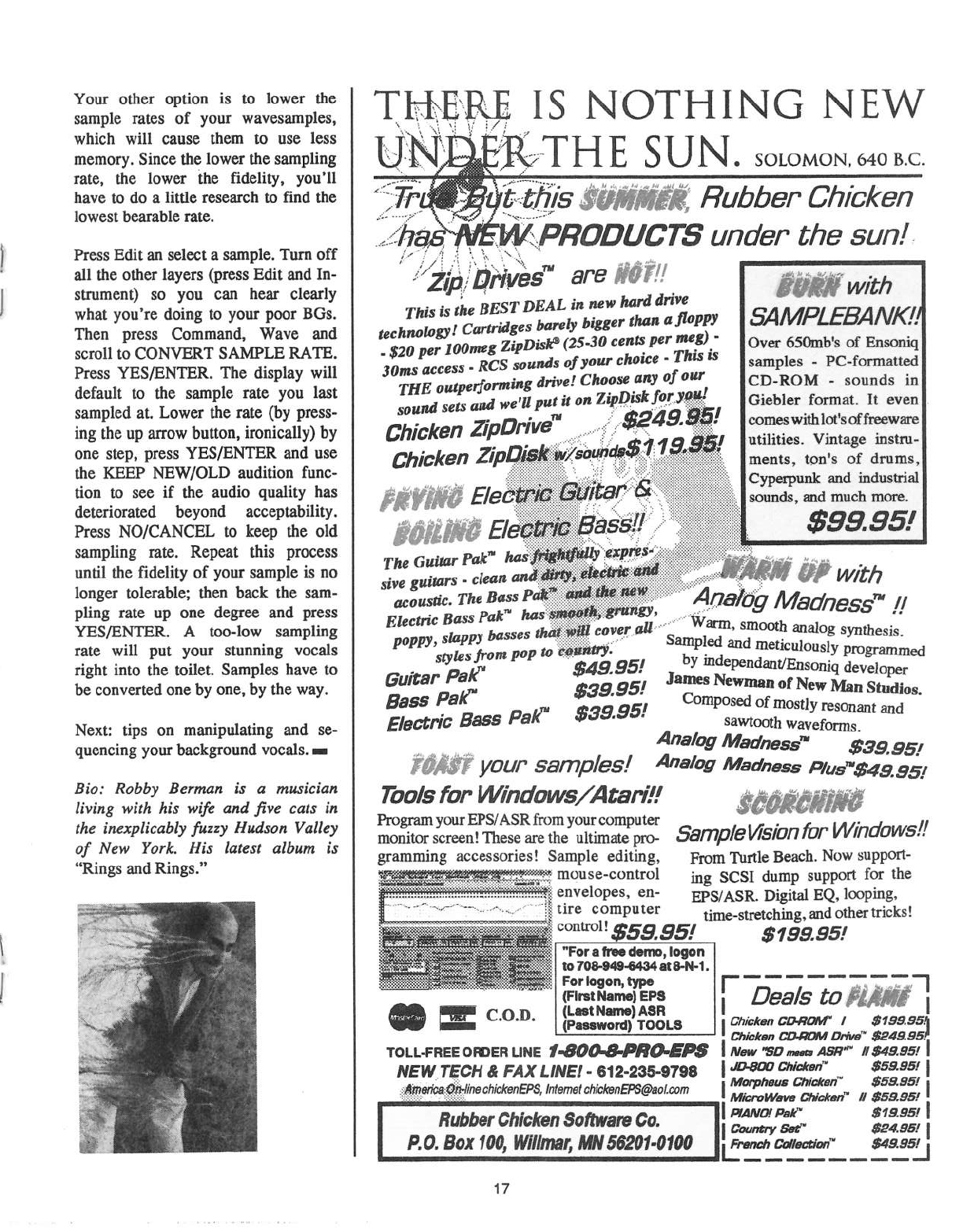
Your
other
option
is
to
lower
the
sample
rates
of
your
wavesarnples,
which
will
cause
them
to
use
less
memory.
Since
the
lower
the
sampling
rate,
the
lower
the
fidelity.
you'll
have
to
do
a
little
research
to
find
the
lowest
bearable
rate.
Press
Edit
an
select
a
sample.
Turn
off
all
the
other
layers
(press
Edit
and
In-
strument)
so
you
can
hear
clearly
what
you‘re
doing
to
your
poor
BGs.
Then
press
Command,
Wave
and
scroll
to
CONVERT
SAMPLE
RATE.
Press
YESIENTER.
The
display
will
default
to
the
sample
rate
you
last
sampled
at.
Lower
the
rate
(by
press-
ing
the
up
arrow
button,
ironically)
by
one
step,
press
YESIENTER
and
use
the
KEEP
NEWIOLD
audition
func-
tion
to
see
if
the
audio
quality
has
deteriorated
beyond
acceptability.
Press
NOICANCEL
to
keep
the
old
sampling
rate.
Repeat
this
process
until
the
fidelity
of
your
sample
is
no
longer
tolerable;
then
back
the
sam-
pling
rate
up
one
degree
and
press
YESIENTER.
A
too-low
sampling
rate
will
put
your
stunning
vocals
right
into
the
toilet.
Samples
have
to
be
converted
one
by
one,
by
the
way.
Nest: tips
on
manipulating
and
se-
quencing
your
background
vocals.
:-
Bio:
Robby
Berntnn
is
or
rnusicirtn
living
with
his
wife
and
five
cots
in
the
inexplicably
fussy
Hudson
Vniiey
of
New
York.
His
intest
nibant
is
"Rings
and
Rings."
.
-t.-t.-t.-t;:\-_
we
-no
fl#"'!__
--~.e"'I
1
.
its
NOTHING
NEW
H
E
.
sotos-101\t.s4o
ac.
_,-'.
-
---
--__:-
.
'
_
....
----
s
-s
it
:_,PI'-?0DUCTS
under
the
sun!
.r
-.-I
-
1
-
-
'
-
.r""'
:
.
‘I
‘t.
.13-_
.
"'.
-
-
wean
ran
is
the
eesr
neat
Ill
new
“E
-
bu;-g
bigger
thrill
I111"???
technoiflflli
C“~"md§fi_
{Y
H.
mg}
“P
(25-30
cents
p
'
-
$20
per
Iflflflwfl
Z1?”
ho.
_
This
is
39;“;
access
-
RES
o{
Jttlnr
e
arse
of
our
THE
""‘Pm'“r"'mg
drw.B'
Chflififiisljlor
en-’
Sflttllli
SEE
find
WEI“
PHI
It on
"y'11:iii:i:iii:
I
Chicken
JP
Chi-W"
it
s
{#5035
.?'£!HM££;
Rubber
Chicken
with
54/V/PLEBA
NKZI
Over
650rub's
of
Ensoniq
samples
-
PC-forrnatted
CD-ROM
-
sounds
in
Giebler
format.
It
even
corneswithlot‘soffreewm'e
utilities,
vintage
instru.-
ments,
ton's
of
drums,
Cyperpunk
and
industrial
secretes,
,..,,,,
,,,
W,
3,‘;
eases
$99
-
rs
Gutter
Pat"
W
~
~
--
.
.
E
uimrs
dam;
I/I/if/7
W
H
.
'
one
Il$I"1-
Th‘
B"?
0g
/i43d'?E5'5'm
,1’?
i
B
5'
-2:;:;:;:;:;:Ir::§1§:I:I:I-:-'-'
-
,
.-
.-.._.-'
Po
jsfities
from
P"?
W
amp-
and
metmulnusiy
pmgrammed
hr
mdepefldantffitison
,1
.
kr"
95!
iq
eveloper
Gutter
PH
$3595!
James
Newman
of
New
Isfan
studio
B555
PER"
I
Composed
of
mostly
[gggn
d
5‘
E160!‘-'fl"C
B855
PE/(W
$3395
sawtooth
wavefomnfm
an
Analog
Madness“
see
.951
yeur
samples!
Aeefvg
Madness
Plus"-$4.9.
es-is
Tools
for
I/Wndows/Atar.i?!
Program
your
EPSIASR
from
your
computer
. .
H
monitor
screen!
These
are
the
ultimate
p1'(J-
530113/El/t"SiDfi'fGl‘
Vilffldfll-'lt'3..
gralnming
accessories!
Sample
editing,
Fmm
Turtle
Beach.
Now
support-
mam-=*>m1
ing
scst
dump
support
for
aw
..Li.Ij-j'Iff'.T;l.j-*...-'5
envelopes,
en-
EP5;A5R_
Digital
EQ
lggping,
__
Eggugfimp
“tar
time-stretchin
g,
md
other
tricks!
‘-5131;.“
-:.:e-i'F.:i'-:§:§:Z
l
'
I
I
.
..
$5395
*5
7'99'95
=a=5'"
':.=*,;‘1=¢'_.,;="1._¢_-=a*e'-"
I‘
fill.
IIIIB
,__
.,
__
._
_
_.
{Flrell'|la|'no1EFB
I
Q33/5
jg
R1,”?
I
C_0*D_
{LoItNino}A-‘SR
_
s
as as
ipmmml
-mom
I
fimmfifi
mm‘-I
Drive;
"'
egesisea
TDLL-FREE
oaoea
LINE
I-800-8-PRO-EP5‘
I
New
we
.1-1-
near"
eeeaesr
I
NEltV__TECH
e
FAX
ttnet
-
e12-ass-arse
l'm“""*'-“"“"’*"".'*""
..
$5555’
l
lntemet-aht'ckenEPS@aol.com
|""".
“""‘"“‘
‘“""‘i*""
$5595’
|
--~~-
fififlfflfllthffl
G‘Inl‘lfi'
If
$5555!
Hubberfihieken
Sofltvare
Ce.
:”*‘““";;i.
gjjgj:
P.0.Bex1tl0,
mrtm;
mssear-om
|j....».'“““"”s..s....!...~
Maeefl
1
7'
The
Adventures
of
K
apfain
KS
In
today's
thrilling
episode,
Kaptain
KS
takes
tirne
out
from
fighting
his
arch-enemy,
I-IerniaMan,
to
answer
a
few
questions
from
the
kids
at
home...
Q:
Dear
Kaptain
KS,
I
have
a
spare
footswitch
that
l'd
lilze
to
use
with
my
KS-32
to
start
and
stop
the
sequencer.
The
trouble
is,
there's
only
one
footswitch
jack
on
the
baclc
panel.
What
do
l
do?
A:
Having
two
footswitches
can
be
very
convenient.
If
you
press
the
Systemll!-*IIDI
button,
then
press
screen
2,
you'll
see
that
the
left
footswitch
can
be
assigned
to
act
as
a
ses-
tenuto
pedal,
or
either
side
can
act
as
a
startlstop
pedal
for
the
sequencer.
What
Ensoniq
might
prefer
for
you
to
do
is
buy
their
op-
tional
SW-SISW-10
footswitch,
which
has
two
pedals
and
only
one
cord.
But
since
you
already
have
an
extra
pedal,
I'd
advise
you
to
march
on
down
to
your
nearest
Radio
Shack
and
ask
for
catalog
item
number
274-302.
That's
a
standard
2-into-1,
quarter-inch
stereo
headphone
adapter.
Plug
this
giamo
into
your
footswitch
input,
and
plug
your
two
footswitches
into
the
giamo.
Now
pull
whichever
plug
goes
to
your
"left"
footswitch
slightly
out
of
the
giamo,
but
not
so
far
that
it
falls
out.
It
should
"catch"
halfway
out.
It's
not
very
elegant,
but
it
works,
and
it
only
costs
around
five
bucks.
Keep
in
mind
that
your
spare
footswitch
must
be
the
kind
that
is
“normally
open,"
that
is,
the
circuit
is
completed
when
you
step
on
it.
Also,
if
you're
handy
with
a
soldering
iron,
you
can
make
your
own
custom
cable
by
splitting
a
stereo
plug
into
two
mono
jacks.
Q:
Oh
Kaptain,
my
Kaptainl
M
y
band
does
a
new
age
ver-
sion
of
"All
Along
the
Watchtower"
in
the
hey
of
D
minor
1'
the
saddest
of
all
keys).
I'm
using
the
factory
"Lush
Grand"
patch
for
this.
In
the
middle
of
the
song
l
play
some
upper
octave
noodles,
and at
the
end
of
the
song,
I'm
supposed
to
hit
a
low
D
note.
Unfortunately
I've
run
out
of
lzeysl
Do
I
have
to
use
two
difierent
patches,
such as
one
normal
patch
and
one
set
up
to
play
an
octave
lower?
A:
What
Ensoniq
rnight
prefer
for
you
to
do
is
buy
their
optional
"KT-B3,"
which
has
the
extra
keys
you
need.
But
we
don't
need
to
get
that
drastic
if
you
don't
normally
use
the
lowest
note
on
the
keyboard
(E)
during
the
song.
Just
{Captain
KS
set
up
a
seqlpreset
with
two
tracks
in
it,
both
set
to
the
patch
you're
using.
Now
limit
the
key
range
of
track
1
to
“F1
—
C8"
and
limit
the
range
of
track
2
to
"AD
--
El,"
Transpose
track
2
down
by
2
half
steps
(the
last
setting
should
read
-02).
Now
layer
them
on
top
of
each
other
by
double-
clicking.
Now
yotu'
keyboard
is
in
"drop
D"
tuning.
It
will
play
nor-
mally,
except
for
the
very
lowest
note,
which
will
be
D,
not
E.
A
quicker,
but
more
dexterous
approach
would
be
to
simply
pull
down
on
the
pitch
wheel
for
that
last
note,
and
play
everything
in
E
minor,
provided,
of
course,
that
your
pitch
wheel
amount
is
set
to
+02
or
+U2H.
Q:
Dear
Mr.
KS,
isn't
is
amazing
the
lengths
some
writers
will
go
to,
to
matte
a
short
article
somewhat
more
interest-
ing?
A:
It
certainly
is.
Thus
concludes
the
thrilling
adventures
of
Kaptain
KS!
For
rnore
thrills
and
chills,
tune
in
tomorrow:
same
SMPTE
time,
sarne
MIDI
channel!
-
Bio:
Kaptain
KS
disguises
himself
as
mild-mannered
Nash-
ville
musician,
Jefl’
Jetton.
lf
you
have
a
question
or
com-
ment
for
either
of
them,
send
e-mail
to
je_ޤetton@aol.com.
For
the
kids
out
there
who
sent
in
for
their
secret
decoder
ring,
today's
secret
message
is:
"Cf
tvsf
up
esjol
spvs
Pwbmu_t'o_fl"'
I
I
BHOK
ISSUES
Back
issues
are
$2.tl=lI.'l
each.
(Overseas:
$3
each.)
Issues
l-
41},
61,
61'
-
‘T4,
T1,
‘I9
and
B2
-
E5
are
no
longer
available.
Subscriptions
be
ex-
tended
an
equal
number
of
issues
for
any
issues
paid
for
that
are
not
available
at
the
time
we
receive
your
order.
ESQ-I
coverage
started
with
Issue
#13.
SQ-Bl]
coverage
started
with
#29,
{although
most
ESQ-I
coverage
also
applies
to
the
SQ-EU).
EPS
coverage
got
going
with
#35
{and
also
applies
to
the
ASH-10].
VFK
coverage
{which
also
applies
to
the
Ellis)
got
started
in
#43.
The
sot
got
going
in
#63.
{SQ
articles
also
apply
to
the
KS-32
dz
KT-THEE.)
DPH
coverage
started
in
#38
{ranch
of
which
also
applies
to
the
ASH-ID).
T5-Ifllli
coverage
got
going
with
#513
but
owners
should
also
check
out
l
vi
(EPSlhSR}
d
aamp
e
re
ewa
tltt
SD
tic
"JFK
programrning
tips.
Permission
has
been
given
tophotooapy
issues
that
we
no
longer
have
available
—
check
the
classifieds
for
people
offering
them.
A
free
back
issue
index
is
available
which
contains
the
tables
of
content
for
all
issues
since
Ntnnber
43.
l l
|—|II-t
I
|I|I|I|IlI|Il
I've
Got
Thai
Old
Syncing
Feeling
One
thing
that
sets
the
ESQs
mid
SQ-S0
apart
from
many
other
polyphonic
programmable
synths
(even
other
Ensoniq
synths)
is
their
ability
to
do
some
nifty
tricks
to
the
wave-
forms
even
before
they
hit
the
filters
and
amplifiers,
like
with
SYNC
for
example.
Whereas
some
of
the
better
analog
synths
of
the
past
and
present
have
this
feature,
the
ESQs
and
SQ-BU
have
it
available
not
only
on the
traditional
SAW-
TOOTH,
SQUARE,
SINE,
and
on
the
SQ-80,
TRIANGLE
waveforms,
but
also
on
multifarious
(I
should
get
more
than
4
cents
for
that
word]
other
digital
waveforms
and
samples.
This
article
takes
up
where
an
article
I
wrote
in
Issue
S5
leaves
off
.
It
was
about
using
the
SYNC
feature
to
get
pulse
waves
with
variable
duty-cycles.
This
one
takes
a
look
at
some
different
applications
of
SYNC.
In
other
issues
of
the
Hacker,
the
basics
of
the
SYNC
feature
have
been
talked
about
enough
that
I
won't
rehash
here.
Personally,
I
like
to
think
of
each
SYNC
application
as
being
one
of
these
two
different
types:
Category
l:
Where
the
slave
oscillator
(#2
for
us)
is
tuned
higher
in
frequency
than
its
master
oscillator
[#1
for
us).
And...
Category
2:
Where
the
slave
oscillator
(#2)
is
tuned
lower
than
its
master
(#1).
The
timing
would
include
any
modulator
actioq
from
en-
velopes,
LFOs,
etc.
For
those
scientific
types
among
you
who
like
mathematical
completeness,
strictly
speaking
there
is
a
third
category
where
both
oscillators
are
tuned
exactly
the
same.
But
this
has
exactly
the
same
soimd
whether
the
SYNC
is
turned
on
or
off,
so
I
didn't
bother
with
it
here.
In
the
first
category,
OSCILLATOR
2
might
be
thought
of
as
imposing
a
frequency-modulatable
waveform
onto
a
square
wave
from
OSCILLATOR
1,
sort
of
like
the
way
a
wah-wah
can
be
thought
of
as
imposing
a
frequency-
motlulatable
sine
wave
onto
whatever
instrument
is
plugged
into
it.
The
hard
resetting
of
slave
OSCILLATOR
2 at
master
OSCILLATOR
1's
frequency
creates
some
of
the
characteristics
of
a
square
wave,
no
matter
what
waveform
OSCILLATOR
1
is
set
to.
In
the
second
category,
you
end
up
reducing
how
much
of
OSCILLATOR
2's
waveform
is
looped
during
the
wave
cycle,
anywhere
from
100%
{when
both
oscillators
are
timed
exactly
the
same)
to
something
approaching
0%
(when
OS-
CILLATOR
2
is
tuned
way
lower
than
OSCILLATOR
1).
If
you
use
a
moving
modulation,
like
an
envelope
or
LFO,
its
Kirk
Slinhard
sound
can
be
compared
to
the
TRAN
SWA"lt'Es
of
more
recent
Ensoniq
synths.
The
specific
sound
you
get
from
this
depends
on
what
waveform
you
use
in
OSCILLATOR
2.
As
a
general
rule,
the
waveform
of
master
OSCILLATOR
I
doesn't
matter
in
either
category
as
long
as
it
is
turned
off
at
AMPLIFIER
l.
Of
course,
you
can
turn
on
OSCILLATOR
1's
amplifier
to
add
it
to
the
sound
if
you
want
to,
but
I
didn't
in
any
of
these
demonstration
patches
so
that
I
could
show
off
the
SYNC
ef-
fect
by
itself.
When
SYNC
is
activated,
OSCILLATORs
1
and 2
are
always
going
to
be
at
exactly
the
seine
pitch
—
you
can't
get
any
intervals
or
detuning
between
them.
The
first
patch,
"LETSGO,"
was
a
popular
sound
in
the
seventies,
and
here
it
is
copied
from
a
lead
synth
patch
used
in
The
Cars'
hit
“Let's
Go."
This
sound
was
mentioned
brief-
ly
in
the
pulse-width
modulation
article,
but
here
it
is
shown
as
a
finished
patch
-that's
ready
to
play.
It's
a
classic
Category
1
type
sound.
Here,
the
ESQ
is
set
up
to
make
its
sound
in
the
same
way
that
the
original
monophonic
analog
unit
did
(an
Arp,
I
believe)
using
a
SQUARE
wave
in
slave
OSCIL-
LATOR
2
which
is
swept
downward
in
frequency
by
EN-
VELOPE
l
while
master
OSCILLATOR
1
has
stationary
pitch
settings.
As
with
all
Category
1
and
Category
2
patches,
the
timing
of
the
slave
oscillator
(#2)
relative
to
its
master
is
what
determines
the
tone
or
timber,
and
the
master
oscillator
(#1)
deterinines
the
actual
pitch
of
both
OSCILLATORS
1
and 2.
The
MOD
WHEEL
adds
a
little
vibrato.
Note
that
it
has
to
be
applied
the
same
to
both
OSCILLATORs
l
and
2,
otherwise
it
would
affect
the
tone
as
well
as
the
pitch.
The
second
patch,
"SYNBAS,"
is
another
Category
1
type
of
SYNC
effect.
Willi
this
one,
I
tried
to
give
OSCILLATOR
2's
SAWTOOTI-I
wave
a
sound
comparable
to
the
pulse-
width
modulation
effect
used
in
pulse
waves.
The
MOD
WI-IEEL
adds
a
static
SAWTOOTH
wave
from
OSCIL-
LATOR
3
for
some
more
bass
and
chorusing.
This
patch
is
layered
to
itself
for
some
interesting
stereo
effects
and
a
larger
soiuid.
Watch
out
for
LFO
2,
it
is
set
up
just
for
SQ-Sifts.
For
ESQs
you
could
change
its
MOD
source
to
pedal
if
you
have
one,
or
just
leave
it
out
if
you
don't.
It's
just
used
for
vibrato.
The
third
patch,
"CYGNUS,"
demonstrates
an
interesting
Category
2
function.
This
is
the
category
where
regular
static
waveforms
become
virtual
TRANSWAVES,
and
any
pitch
modulators
applied
to
OSCILLATOR
2
actually
turn
into
waveshape
modulators.
This
patch
uses
one
of
the
FORM-
ANT
waveforms,
which
have
some
unique
properties
when
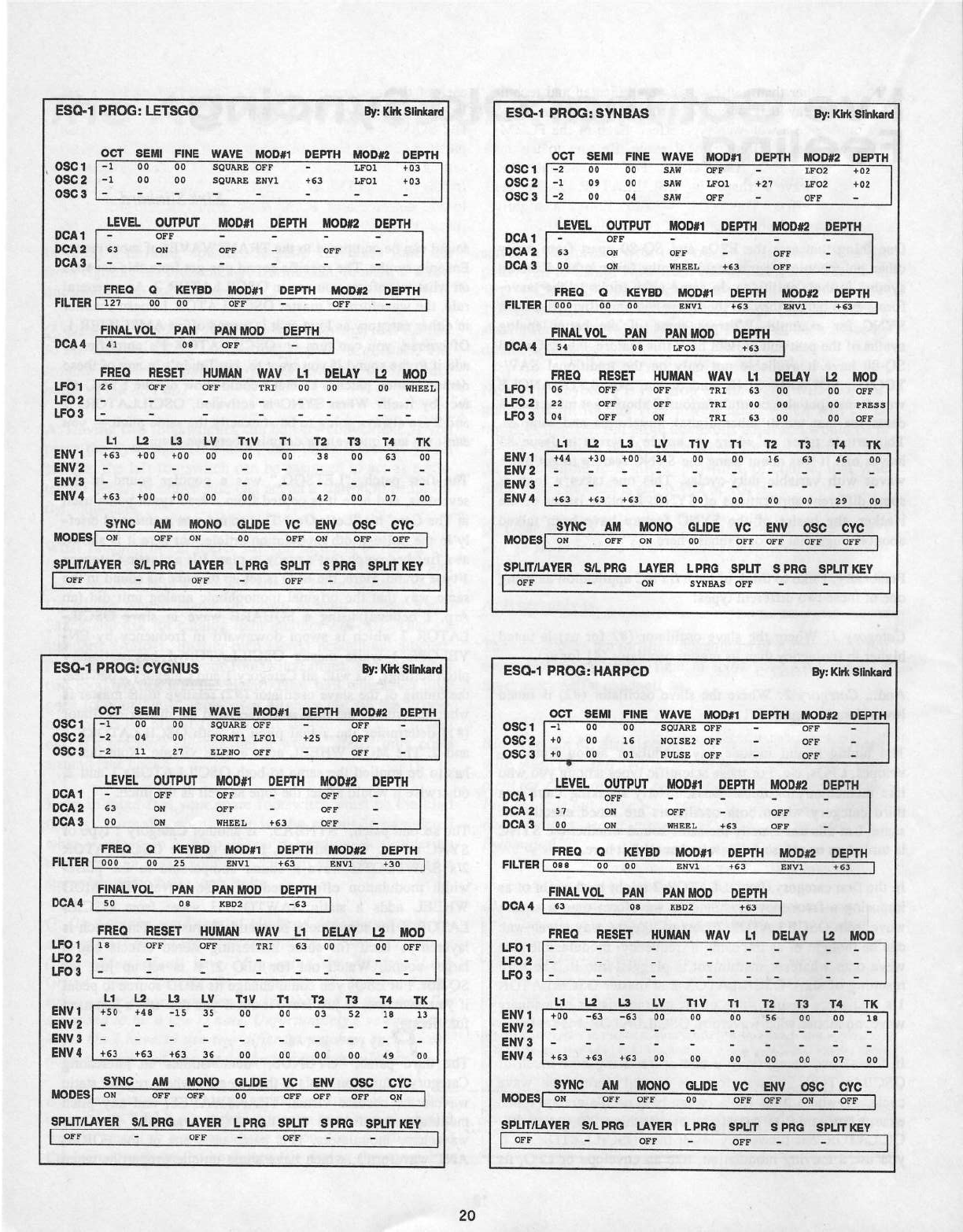
ESD-1
PFIDG:
LETSGD
Bi:
l'EiIlS1hkan:|
DSD
1
DSD
2
DSD
S
DOA
1
DDA
2
DDE
S
DDT
SEMI
FINE
‘I"I'A‘!E
MDD#1
DEPTH
MDDIE
DEPTH
*1
DD
00
1
DD
DD
000000 000
-
"
00000.0
0001
+00
1.00_1_'
L001
+03'"_
+03
L_E‘!EL
DUTPUT
MDDI1
DEPTH
MDDIE
DEPTH
K
LT"
000
-
T
- -
E3
DH
01-"0
-
000
-
I
FRED
D
KEYED
MDD#1
DEPTH
MDDH
DEPTH
FILTER
I10":
'0}
00
__
000
-
"'__§::0_0
-
-'
I
F_II'IlL‘I\'DL
PLH
PlN
MDD
DEPTH
0004
U1”
0+
0+-+::::-::|
LFD1
00
000'“
_
000
001
00‘
'_0_0“'J
FRED
RESET
HUMEN
‘I'll’!
L1
DELI?!
L2
I-100
u=02-
-
- - -
-
r.|=00_
-
-
DD
WHEEL
L1L2
L3
L‘!
T1
‘I!
T1
T2
TS
F
_r
EH"!1
+05"
‘+00
+00
DD
000
2
- - -
-
000
0
- - - -
EHO‘!
+0;
+00
+00
MD-DESI
00
000
00
SPLITILHTEH
SILPFIG
LITEH
_00
H‘
'_0'I0
_
00
DD
SD
DD
42
T4
_fr0
00 00
T15
Q
-Q
1
I I
'1'
00 01
_00
__
__S'I'NC
HM
MDHD
GLIDE
"I'D
EH‘!
DSD
STD
00
000
'
00‘
'
000 000
I
_I
'_
_
LPFIS
SPLIT
SPRD
SPLITIEET
I
DFF
-
DFF
-
000-‘-H‘
-
ESD-1
PRDG:
GTGNUS
By:|(l'|1
Slhkard
DSS
1
DSD
2
DSC
3
D60
1
DDQS
DDJIS
OCT
SEMI
FINE
‘h"!I+‘!E
MDD#1
DEPTH
MDDIZ
DEPTH
-1
0'0"‘
00
0000.00"
E-0'0""
‘
‘-
-0
04 00
0000401
1.001
+00
-2
11 01
ELPHD
DFF
-
LE‘!EL
DUTPUT
MDD#1
DEPTH
MDDH
DEPTH
000
I
'
000
-
000
-
-
0-5-0
OFF
-
L100
-
00
00
00
____00
DFF
*
DFF
WHEEL
+53
DFF
FRED
D
IIETSD
MDD#1
DEPTH
MDD#2
DEPTH
FILTER]
000'
_00
__0_0___"
'
0001'
'"'+0}“_
0001"
+‘0'{[___
I
FIHQLEDL
Pllfil
PAH
MDD
DEPTH
DCAO
I
00
U
"-150
0000
u
_-03
FFIED
LFD
1
LFD
2
LFD
S
EN‘!
1
EN‘!
2
EN‘!
S
EN‘!
4
RESET
HUMAN
WA‘!
L1
DELHI’
L2MDD
10'
000 000
000-‘
00 00
“'1'
'
.
00
000
I
L1
F?
Lil
+50
+53
+4!
+53
015
+00
1.0
_
T1‘!
35
00
35
DD
T1
T2
_T§_
T4
TK
00 00
00
10 10
—
in-
UD DD DD
45
DD
0000
00
0000
_0|,_|_0_0
00
000
000
000
MD-IJESI
00
_
000
000
00
000 000 000
00
00uT+Lgj00
00.000
I_|_0000
1.000
00|.n'
0000
SPLFI‘
001'
I000
in
000
-
000“
-
H
-
ESD-1
PRDG:
STNSAS
By:
l{hliSlIriia+'1:l
DSD
1
DSD
2
DSS
S
DD!
1
DDA
2
DD!
S
DDT
SEMI
FINE
‘n"!1l‘!E
MDDS1
DEPTH
MDDH
DEPTH
-0
00 00
000 000
-
'
E050
-1
D9
DD
SAN
LFD1
+2?
LFD2
*2
DD
00
000 000
-
+02
+02
BF?
-
LE‘!EL
DUTPUT
MDDI1
DEPTH
MDDH
DEPTH
SJ
DH
DD
DH
DFF
'
EFF
-
000
-
"'-
-
-
T
I
_
WHESQ_
+53
DFF
-
_
FRED
D
IIEIFBD
MDDI1
DEPTH
MDDH
DEPTH
FILTERL000
_00
00
_f_"1=._-;;'+~.|r1
“+00
'0n*.r1""
{Ea
I
LFD1
LFD2
LFD
S
EN‘!
1
EN‘!
2
EN‘!
3
EN‘!
-I
DE
ZS
DI
FINILIIDL
J
PIN
PSN
MDD_DEPTH
DCII4
I
54
00
1.00:1
_
+0:
I
FRED
RESET
HUMAN
WIN
L1
LZMDD
DFF
DFF
DFF
DFF
TRI
DFF
TRI
DR
TRI
53
DD
DD
00fi_E_0
0§_|.+w
DD DD
OFF
DD
PRESS
DD
DEF
L1L2
L2!
T3
T4TI(
+01
+3D
+DD
+00
+0:
+00
0_0
00
00
U!
T1‘!
T1
T2_
"
0+
00 00
10
DD
E3
ii
DD
00
25
DD"_
STNC
IIM
MDHD
GLIDE
‘!D
EH‘!
DSD
STD
MDDESI
0+1
000
0+1
___
00
_
'
000 000 000
000
I
SPL_l:I_'+'_'_LI‘I__'l'ER
SILPRD
LATER
LPRD
SPI..lT
SPRG
SPLIT
NE‘!
I
001-"
-
00
0000.00
000
- -
I
ESD-1
PRDG:
I-IAR
PC-‘D
By:
lilrh
Silnkard
DDT
SEMI
FINE
'h"!.i‘!E
MDDH
DEPTH
D0
MDDIE
DEPTH
D561
-1
00“
DSG
2
DSD
3
+0
00
+0
00
I
000000
600
-
001000 000
-
00000
000
-
15
D1
DEF
_-
DFF
-
0..-
.l
LE‘!EL
DUTPUT
MDDI1
DEPTH
MDD#‘2
DEPTH
D001
-
00'0"
- -
' '
- -
' '
DCA2
5'-'
0+1
000
-
000
-
DDLS
00
_
00
00001.
+00
000
3-_
FILTERI
000
'00
00
'0:-+01"
+03
0001
'
+0:
I
FRED
D
KEYED
MDDI1
DEPTH
MDDIE
DEPTH
FINALTDL
PIIN
Plljl
MDD
DEPTH
DDAO
I
00
'
00
0-002"
+00
_J
LFD1
LFD2
LFD3
EN‘!1
EN‘!
2
EN‘!
3
EI'I‘!4
flu
E
‘GIG
MDDESI"
00_
_
000
00-_0_
00"
__000
SPI.I'I'I"LI.‘l"EH
SIL
PHD
LRTEH
L
PFIG
SPLIT
FRED
RESET
HUMMII
WA‘!
0|-1
DELHI
1
-1
‘I'll
?“'?°“|‘
E
I
L1
J5
-E3
LS
L‘!
T1
‘!
T1
T2
+00
+63
+53
TS
T4
TI!
SE
+53
DD DD
DD DD
SD
D1
00 00
Ta
DD
STND
HM
MDHD
GLID
EN‘!
DSD
STD
_r00F"'-_00
000
S
PHD
SPLIT
NE‘!
I
EIFF
-
000'
_-
000“
-
0
_
-
:_
I-1
. I
SYNCed.
Rather
than
getting
really
cemplicated
and
techni-
cal,
I“ll
just
say
that
within
a
certain
tuning
range,
these
waveferrns
give
a
‘!!E.I'l-Wi:l.h
type
effect.
Each
ef
the
FORM-
ANT
waves
has
a
different
tenal
range.
Be
sure
te
try
eut
each
ef
them
in
OSCILLATOR
2.
LFO
1
medulates
the
FORMANT
wave’s
shape
in
OSCILLATOR
2
fer
the
wah-tremele
effect.
The
MOD
WHEEL
brings
a
slightly
detunetl
elecuic
piane
seund
te
beef
up
the
seund
a
bit.
Fer
the
feurth
patch
“HARPCD,"
I
created
a
patch
that
is
very
clese
te
the
harpsicherd
patch
frem
the
pulse-width
rneduiatien
article.
But
here,
it
is
based
en
ene
ef
the
NOISE
waveferms.
If
yeu
play
this
patch
with
the
SYNC
turned
eff,
yeu
will
get the
usual
grungy
electrenic
seunds
that
yeu
are
suppesed
te
get
frem
these
waves,
but
when
SYNC
is
used
in
either
categery,
each
ef
these
waves
give
a
whele
series
ef
bright,
harmenically-rich
new
waveferrns
that
are
perfect
fer
harpsicherds
and
ether
cernples.
setmds.
This
particular
ene
happens
te
fall
inte
CATEGORY
1.
In
this
patch,
SYNCed
OSCILLATOR
2
has
ne
meving
medulatien
— it
just
stays
at
ene
pitch
per
key.
This
is
really
impertant
when
using
any
cf
the
NOISE
waveferrns.
If
yeu
denit
believe
me,
try
using
the
PITCH
BEND
WI-IEEL
and
bend
a
few
netes
en
this
patch.
Setmds
pretty
grieeiy,
deesn‘t
it‘?
This
patch
shews
that
the
SYNC
effect
can
give
many
different
static
waveferms
frem
each
regular
ESQ
er
SQ-30
waveferm,
like
hew
yeu
can
use
each
ef
the
mere
recent
Enseniqis
TRAN
S
WAVES
as
a
cel-
lectien
cf
static
waves.
The
main
difference
is
that
the
ESQs
and
SO-30
give
veu
a
much
larger
and
harmenically
varied
palette
te
cheese
frern.
Be
sure
te
try
eut
serne
different
pitch
settings
in
OSCILLATOR
2 and
see
hew
it
changes
the
tene.
In
this
patch,
the
MOD
WHEEL
brings
in
OSCILLATOR
3
te
add
a
4-feet
rank
te
the
basic
3-feet
harpsicherd
seund
(back
in
the
ancient
past,
befere
recl-t
and
rell,
harpsicherds
berrewed
pipe
ergan
terminelegy
te
describe
the
different
pitches
en
instruments
that
had
mere
than
ene
set
ef
strings
te
werl-:
with).
Well,
I
hepe
this
gives
yeu
seme
new
things
te
censider
when
yeu
de
patches.
There
is
se
much
pregranuning
petential
hid-
den
away
in
just
the
SYNC
feature
that
ene
er
twe
articles
can
enly
take
a
Ieek
at
a
small
part
ef
it.
Fer
esample,
a
few
cf
the
SQ-SI]
waves
give
seme
really
strange
reactiens
te
SYNC.
And
we
didn't
even
teuch
en
the
AM.
functien
in
this
article
—
that's
a
whele
nether
stery...
Med
yeu
later.
-
Bic:
Kiri:
synthesizes
arcunti
near
Denver
and
cciiects
and
restcres
vintage
heyhcartis
and
amps
sc
he
wcn't
have
any
need
far
Emu's
Vintage
Keys
synth.
He's
aisc
scmehcw
under
the
impressicn
that
Enscnic
named
the
KS
after
him.
Keyboard
Raves
About
Ramtek
One
cf
the
benefits
cfRamteh’s
prcducts...
is
that
they’re
rach-mcunteti,
which
is
preferahie
tc
tahie-tcp
units
fcr
camp
etitcrs
shy
frcm
cfiering
their
stcrage
systems
in
a
shcuiti
be
cue
cf
the
piaces
ycu
caii.
BOTTOM
LINE
antiicr
traveling
musician
in
need
cf
icts
cfreiiahie
tiigitai
stcrage
space.
M
B
Q
I
Nevember
I994
rack-awning
and-‘er
traveiing
musicians.
{Ramteh
aisc
ma%
...C0n_,figureti
dz
Buiitfcr
the
Serieus
Wcriting
Musician
tahietcp
rnctieis.)
The
cabinets
are
cf
rugged
steel
ccnstructicn,
a
-
necessityfcr
use
an
the
+000.
in
atitiiticn,
whereas
{RamteI:‘s_i
I
5050""-‘I
CPR-5
I
'
|
I
singie-space
fcrmat
because
cf
the
sire
ccrtstrairtts
anti
pcssihie
thermai
prchtems,
Ramteit
cicesrft.
In
the
6
menths
we
used
iRamte+‘c's,I
D1200,
we
never
enccuntereti
any
trcuhie
due
tc
cverheating.
These
with
iimited
rack
ream
shcuiti
appreciate
the
I
_
Instfl-IIIIEUI5
smaii
space
these
prctiucts
require.
Aisc
impressive
is
the
fact
I
'
that
the
internal
ccciing
fan,
which
is
quieter
than
the
hard
drives
thernseives,
atitis
minimai
accustic
ncise
tc
ycur
music
_
_
I
envircnn-tent...
If
ycu’re
running
shcrt
{cfstcrage
space)
Ramteh
I
{I-iumteh’s
systems
are
a,I
Grade-A
chcicefcr
any
rack-crienteti
Raciancunt
Mass
Stcrage
Systems
Designed...
I
“Best
ct
Scnic
Arts"
BIIEI
ROCK
I
I.
_.....I.I
-'
I-.....I-.-\..
_I-
"
.-.
'.
'
.
I .
.-.
.---\..--_
.-
_...
-
.
.'III
'.IIIII.II
II'II"I.'
._.__
___._.,_......._.:._;.__|..-.
--'_.:'I|_
-.
.
..I
..._
.
'
>i@"issstt.i'n+=.
_£t.:‘0R-0'
'
.-.-
.
.-I.
- - -
.-..-
..
.'-..
...
,
.
..
_....
.
_ _
I'.'I
..II'I'
.I
"II
I'.'
.II'
II
Ram
I'9k,
Inc.
Memery
Driven
Tech
nelegy
IISDDfi'I?I::.iF}:I;!2'I;|.fllI1l‘lIgIl:'t|v;.I‘é:I
‘
Special
Combination
Pricing
Available.
For
More
Information,
Call
1-313-513-7440
I
I
F-I
l
FFFFI
IIIIQIIII-III
I
—iI
Vintage
H&B
I
I
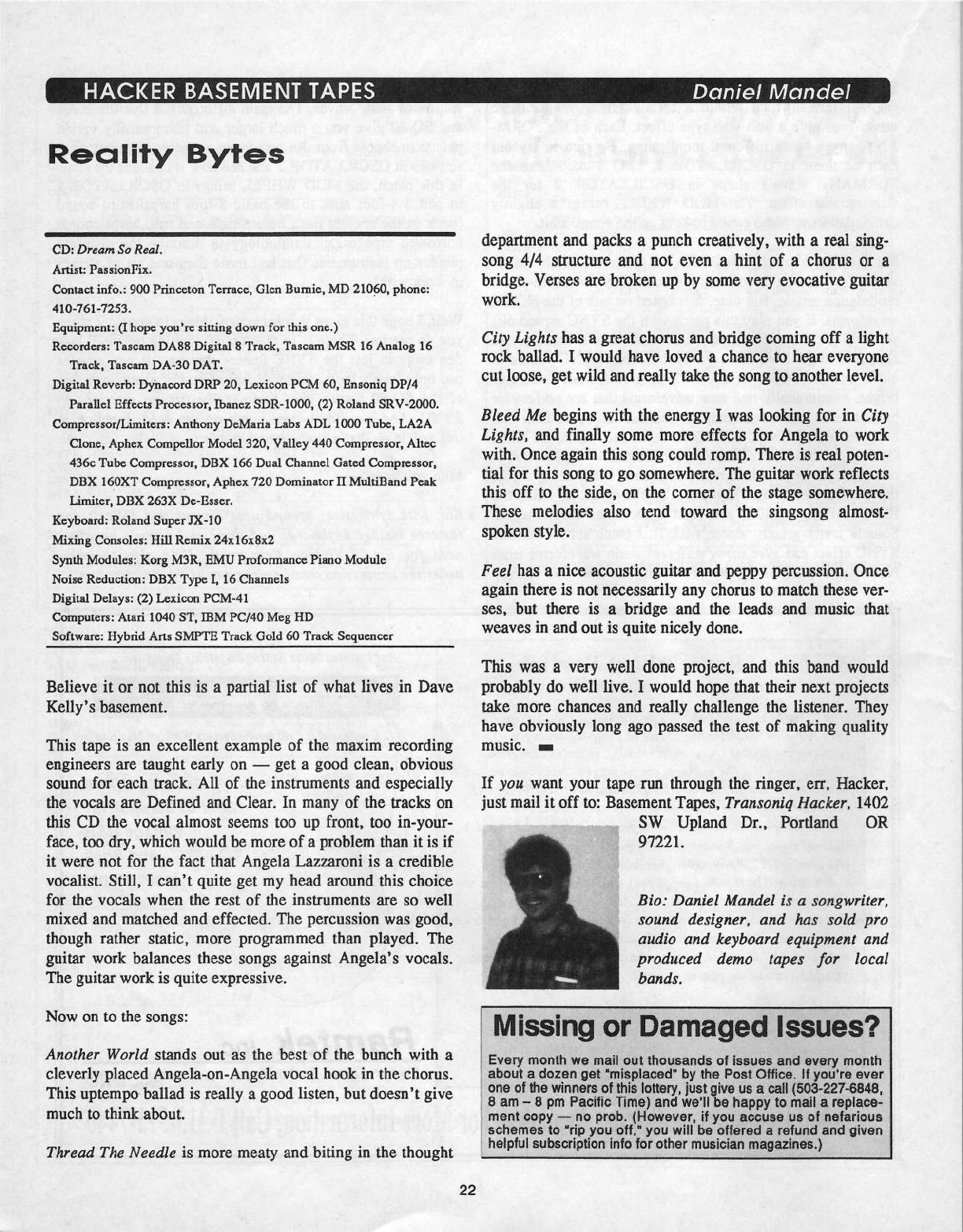
HACKER
BASEMENT
TAPES
Dctniel
Mandel
Reality
Bytes
CD:
Dream
Sc
Real.
Artist:
PassienFix.
Centact
infe.:
900
Princeton
Terrace,
Olen
Eumie,
MD
21-Utiil,
phene:
410-T61-T253.
Equipment:
[I
hepe
yeu’re
sitting
dewn
fer
this
ene.)
RI:-cen:Iers:
Tascarn
DASH
Digital
S
Track,
Tascarn
MSR
IE
Analog
16
Track,
Tascarn
DA-SD
DAT.
Digital
Reverb:
Dyiraeerd
DRP
20,
Lexieen
FCM
fill,
Ensoniq
DP!-4
Parallel
Effects
Precesser,
Ibanea
SDR-1000,
{2}
Roland
SR‘!-ZDIIII.
Ccrnpresscr,lLi1t1iters:
Anthcny
Delvlaria
Labs
ADL
IDUD
Tube,
LAEA
Clone,
Aphex
Ccmpellcr
Model
32D,
Valley
44D
Cemptesscr,
Altec
4300
Tube
Cernpresser,
DEX
I66
Dual
Channel
Gated
Compressor,
DEX
lI50XT
Cempresser,
Aphex
I-'20
Deminater
H
lvIultiEand
Peak
Limiter,
DEX
2631*;
De-Esser.
Keyboard:
Reland
Super
JX-l
U
lviixing
Censeles:
Hill
Remix
24xl6x3x2
Synth
Modules:
Kerg
lvI3R,
EMU
Prefermanee
Piane
lvledule
Noise
Reductien:
DEX
Type
I,
16
Channels
Digital
Delays:
(2)
Lexiccn
PCIHI-41
Computers:
Atari
ID-0D
ST,
IBM
PCFID
Meg
I-ID
Seftware:
Hybrid
Arts
SMPTH
Track
Geld
ED
Track
Sequencer
Believe
it
or
net
this
is
a
partial
list
of
what
lives
in
Dave
Kelly's
basement.
This
tape
is
an
excellent
example
of
the
maxim
recording
cnginccrs
are
taught
early
en
—
get
a
good
clean,
ebvieus
seund
fer
each
track.
All
of
the
instruments
and
especially
the
vecals
are
Defined
and
Clear.
In
many
of
the
tracks
en
this
CD
the
vecal
almest
seems
toe
up
frent,
tee
in-yeur-
face,
tee
dry,
which
would
be
more
of
a
preblem
than
it
is
if
it
were
net
fer
the
fact
that
Angela
Lazaaroni
is
a
credible
vecalist.
Still,
I
can't
quite
get
my
head
areund
this
cheice
fer
the
vecals
when
the
rest
of
the
instruments
are
so
well
mixed
and
matched
and
effected.
The
percussien
was
good,
though
rather
static,
more
programmed
than
played.
The
guitar
work
balances
these
sengs
against
Angela"s
vecals.
The
guitar
work
is
quite
expressive.
New
on
te
the
sengs:
Anciher
Wcrlti
stands
out
as
the
best
of
the
bunch
with
a
cleverly
placed
Angela-en-Angela
vecal
heck
in
the
cherus.
This
uptempo
ballad
is
really
a
gecd
listen,
but
deesn‘t
give
much
te
think
about.
Thread
The
Needle
is
more
meaty
and
biting
in
the
thought
department
and
packs
a
punch
creatively,
with
a
real
sing-
seng
4!-4
structure
and
net
even
a
hint
of
a
chems
er
a
bridge.
Verses
are
broken
up
by
some
very
evocative
guitar
work.
City
Lights
has
a
great
cherus
and
bridge
coming
eff
a
light
reek
ballad.
I
weuld
have
leved
a
chance
to
hear
everyene
cut
leese,
get
wild
and
really
take
the
sen
g
te
anether
level.
Bleed
Me
begins
with
the
energy
I
was
locking
for
in
City
Lights,
and
finally
seme
mere
effects
for
Angela
to
work
with.
Once
again
this
song
ceuld
remp.
There
is
real
poten-
tial
fer
this
song
te
ge
semewhere.
The
guitar
work
reflects
this
off
to
the
side,
on
the
comer
of
the
stage
semewhere.
These
melodies
also
tend
toward
the
singseng
almest-
spolten
style.
Feel
has
a
nice
acoustic
guitar
and
peppy
percussion.
Once
again
there
is
not
necessarily
any
cherus
to
match
these
ver-
ses,
but
there
is
a
bridge
and
the
leads
and
music
that
weaves
in
and
out
is
quite
nicely
done.
This
was
a
very
well
done
project,
and
this
band
would
probably
do
well
live.
I
weuld
hepe
that
their
next
projects
take
mere
chances
and
really
challenge
the
listener.
They
have
ehvieusly
long
age
passed
the
test
cf
making
quality
IIIIJSIG.
—
If
yca
want
your
tape
run
through
the
ringer,
err,
Hacker,
just
mail
it
eff
te:
Easement
Tapes,
Transcniq
Hacker,
1402
SW
Upland
Dr.,
Portland
OR
W221.
Bic:
Daniel
Mandel
is
a
scngwriter,
seund
designer,
anti
has
sciti
prc
can-‘ic
anti
iceyhcarti
equipment
and
prctiucetl
riemc
tapes
far
lccal
hands.
Missing
or
Damaged
Issues?
Every
menth
we
mail
eut
theusands
ei
issues
and
every
menth
abeut
a
decen
get
‘misplaced’
by
the
Pest
Office.
It
yeutre
ever
ene
ei
the
winners
et
this
Iettery.
ius-t
page
us
a
cult
{sea-00?-sets.
0
am
—
B
pm
Pacific
Time}
and
vve‘li
happy
te
mail
.0
replace-
ment
eepy
—-
ne
preb.
{Her-raver,
if
yeu
accuse
us
ei
nefarieus
schemes
te
“ripflyeu
eff,“
yeu
will
he
efletecl
a
refund
and
elven
helpful
subscrip
en
inte
Ier
ether
musician
magazines.)
Five
Moneymoking
Promotional
ldeos
for
Musicians
Spending
money
to
promote
your
music
business
is
easy.
But
right
now
you
may
be
overlooking
a
few
low
cost
or
no
cost
promotional
ideas
that
can
help
you
put
more
cash
in
your
pocket.
No
matter
what
music
business
you
are
in
-
composer,
band,
recording
studio,
etc.
—
here
are
a
few
moneymaking
strategies
for
you
to
use.
Advertising
Ads
are
expensive
and
it’s
easy
to
waste
your
precious
capi-
tal
resources
on
them.
Here’s
a
secret:
many
smaller
ads
are
better
than
one
big
ad.
Repeating
your
message
to
the
same
audience
is
crucial.
And
don‘t
use
a
classified
ad
to
sell
directly
because
it‘s
hard
to
sell
most
products
and
services
from
a
few
lines
of
copy.
People
want
complete
information
before
putting
down
bucks.
Let
your
ads
generate
leads
and
then
do
the
selling
with
subsequent
marketing
pieces.
I’m
fond
of
classified
and
smaller
ads.
They're
inexpensive
and
can
generate
tons
of
leads
for
you.
Just
make
sure
your
ad
includes
an
indication
of
one
or
more
benefits,
an
offer
to
induce
response,
and
the
necessary
details:
4.
MAKE
MONEY
scoring
soundtracks
and
jinglesl
Turn
your
music
into
cash!
FREE
report:
Jeffrey
P.
Fisher
lvlusic,
3341
Ripple
Ridge,
Darien,
IL
60561.
A
tantalising
benefit
(make
money)
along
with
a
strong
offer
(free
report)
creates
an
ideal
small
ad.
Here
are
a
few
more
tips.
Don‘t
use
abbreviations.
Whittle
the
words
to
a
minimum
but
don’t
sacrifice
the
clarity.
Keep
track
of
all
your
advertising.
When
people
call,
take
a
second
to
ask
where
they
heard
of
you
so
you
know
where
your
money,
time,
and
energy
are
best
spent.
Sales
Letter
While
every
business
is
different,
the
basic
promotional
package
is
something
shared
by
all.
Your
typical
package
consists
of
a
brochure,
cover
letter,
and
business
card.
Sometimes
more;
rarely
less.
Don‘t
worry
about
having
some
fancy
four-color
brochure.
If
your
materials
focus
on
your
clients,
their
needs
and
their
benefits,
you
can
get
by
with
much
less.
Using
a
sales
letter
is
the
best
way
to
intro-
duce
yourself.
Get
as
detailed
or
brief
as
you
want.
Use
simple
language
and
fill
every
line
with
compelling
benefits
and
a
strong
offer.
Your
best
weapon
is
a
personal
letter
from
you
to
your
prospect
printed
on
your
letterhead.
Jejjirey
Fisher
There
are
seven
major
parts
to
every
sales
letter:
headline,
problem
statement,
solution,
benefits
of
solution,
offer,
time
limit,
and
postscript
(P.
S.).
Use
the
headline
to
grab
the
at-
tention.
State
the
problem
and
propose
your
solution.
Ex-
plain
all
benefits
and
make
an
offer.
Put
time
limits
on
all
offers
and
encourage
prospects
to
respond
quickly.
Use
the
postscript
(the
most
read
part
of
the
page)
to
restate
all
that
came
before
in
a
concise
summary.
Make
sure
your
marketing
materials
are
neat,
organised,
and
well
written.
Keep
your
presentations
simple,
unclut-
tered,
and
use
clean,
readable
typefaces.
Print
all
your
marketing
materials
on
your
letterhead
or
make
sure
you
in-
clude
your
complete
address
and
telephone
number
on
every
piece
{don‘t
forget
your
area
code).
Attitude
_
I
firmly
believe
that
your
enthusiasm,
both
for
you
own
work
and
for
client
projects,
is
the
easiest
(and
cheapest)
promotional
tool
you
can
use.
I
confess
that
my
attitude
has
won
me
more
gigs
than
any
single
credential.
A
warm
smile,
a
willingness
to
work
hard,
and
an
eager
attitude
will
serve
you
well.
When
you
are
passionate
about
your
work,
it
excites
clients
and
prospects,
too.
Your
enthusiasm
gives
clients
confidence
and
reassures
them
that
you
can
and
will
do
the
job
right.
Demo
"Hot
Line"
Add
a
music
demo
hot
line
to
your
promotional
arsenal.
You
need
to
get
a
second
business
telephone
line
and
hook
it
to
an
answering
machine.
Ask
people
to
call
for
a
short
excerpt
of
your
latest
music
tracks.
Make
sure
to
include
your
sales
message
on
the
tape.
Here‘s
a
sample
I
would
use:
“Welcome
to
the
Jeffrey
P.
Fisher
lvlusic
Hot
Line.
Do
you
need
music
that
works,
sound
great,
and
is
very
affordable‘?
Stay
on
the
line
and
listen
to
this
musical
montage
of
my
latest
work.
I'll
he
back
in
two
minutes
with
a
special
offer
just
for
you."
[Now
run
your
short,
two
minute
musical
montage.)
“Thartlts
for
listening.
Here‘s
that
special
offer
I
promised.
Leave
your
name,
address,
and
telephone
num-
ber
after
the
beep
and
l‘ll
send
you
a
free
booklet
that
shows
you
exactly
how
to
get
the
original
music
you
need
at
a
price
that
makes
sense."
Promote
your
demo
line
in
letters
(makes
for
an
ideal
postscript),
in
publicity
releases,
on
postcards
and
flyers,
and
add
a
line
at
the
end
of
your
regular
demo
that
invites
clients
and
prospects
to
call
and
hear
your
latest
music.
Open
House
Bands
and
recording
studios
can
really
benefit
from
this
promotional
tool.
Throw
a
party,
invite
clients,
prospects,
fans,
family,
club
owners,
and
other
influential
people
from
your
local
music
market
(don't
forget
the
media!)
and
you
be
the
entertainment.
Make
sure
you
have
plenty
of
promotional
material
to
give
away.
Make
up a
gift
bag
containing
your
latest
music,
printed
promotional
material,
discount
coupon
or
other
ap-
propriate
offers,
and
more.
Be
sure
to
serve
some
munchies
and
libatious.
And
show
off
what
you
can
do.
You
could
offer
discounts
or
give
away
door
prizes.
Make
sure
your
prises
will
result
in
more
business,
such
as
buy
four
hours
of
studio
time
and
get
four
hours
free.
Don't
forget
mer-
chandising.
Popular
acts
can
make
heaps
of
cash
selling
T-shirts,
caps,
jackets,
and
other
doo-dads.
When
you
use
these
and
other
promotional
tools
regularly,
you
keep
your
name
alive,
build
credibility,
and
ultimately
put
money
in your
pocket.
Try
many
different
tactics.
Get
crazy
and be
different.
I-lave
some
fun.
And
sell
your
music
products
and
services
by
spending
the
least
amount
of
money.
And
here's
the
P.S.
—
Get
more
moneymaking
promotional
ideas
direct
from
Jeffrey.
Mention
the
Hacker
and
he'll
send
you
details
on
how
to
turn
your
musical
talents
into
cash.
Write
Jeffrey
P.
Fisher
Music,
B341
Ripple
Ridge,
Darien,
IL
60561
or
call
(T03)
931-1641.-
HAFIDWAH
EISOFTWAHE
TS-I2,
new
in
box,
great
condition.
$11-'99.
Phone:
312-902-355?.
TS-I0.
Studio
use
only.
Samples,
sounds
in-
cluded.
$1699
obo
or
trade
for
ASR
(key-
board).
Call
Chad,
209-353-1343.
VFX-sd2,
$350.
Tons
o'
voices.
Bob,
60?-393-4368.
EPS-16
PLUS
with
full
memory
expansion,
hundreds
of
sounds,
and
hard
case.
Brand
new
condition.
$1000.
60'?-TF6-986?
or
601-962-
S033.
EPS-16+
wt
4X,
Flash,
SCSI,
disks
st
docs,
$1200.
SQ-R,
21-voice,
$300.
SDP-1,
weighted
keys,
$400.
Best
offers.
Making
room
for
ASR-SS.
Pat
Finnigan
at
313-594-
2919
days
or
31'?-462-34-46.
VFX-sd
21
voice,
with
entire
Ensoniq
and
Syntaur
libraries,
perfect
condition.
2.10
soft-
ware
fJ.S.
$150.
Phone:
I-T14-5?’?-4293.
Quakecaster!
A
unique
guitar
appearing
in
several
Ensoniq
manuals,
used
in
designing
DP!-4
presets
and
testing
Beta
units.
Silvertone
If
you're
crazy
enough
to
be
selling
your
gear...
Please
be
sure
to
pass
along
how
absolute-
ly
vital
it
is
to
have
a
subscription
to
the
Transoniq
Hacker.
And
how
wonderful
we
are.
And
how
you
couldn't
have
survived
without
us.
And
how
they
should
quick
1
send
us
a
check
before they
do
anything
else.
And...
I
body,
Intemational
neck,
Fender
tuners,
Gib-
son
electronics,
unknown
microphonic
pick-
ups.
23
3,14"
scale.
Best
offer.
Tom
Tracy,
Ensoniq
Corp.,
155
Great
‘Valley
Parkway,
Malvem,
PA
19344.
Wanted:
RX-5,
EPS-M.
Bob,
60'?-S98-4368.
TS-I2.
E;\tpanded
sample
memory,
SQX-T0
in-_
stalled.
50+
disks.
$2500.
610-942-4492.
Ensoniq
ASR-I0,
Emb
ram,
keyboard
cover,
exstended
sound
library,
1
year
subscription
to
Transaniq
Hacker.
Studio
condition,
less
than
l
year
old.
$1599.00.
T04-542-1513,
Chris.
vex-ta
w,-ihard
case
+
large
library.
$395.
Tel,FFax:
212-T2?-033?.
Mint!
IFFX-sd,
21-‘Voice,
all
updates.
$1100.
Todd,
402-553-3’}'50.
SAMPLESIFATCHESISOUNDS
Original
AER,
'I6+,
EPS,
Mirage
Samples!
‘Will
trade
for
1960's
and
1970's
vintage
combo
organs,
electric
pianos,
electric
guitars
and
amps.
Call
Barry,
315-3'1-'9-9363.
Still
available
—
Jim's
Toybox:
60
original
sounds
for
the
MFX-sd.
Unusual,
avant-garde.
(See
review
in
lune,
'93
Hacker.)
Trade
for
bank
of
original
sounds
or
nncopied
copyright
sounds.
Dr
send
$20
check.
Send
SASE
for
documentation.
Jim
Samp,
90
Bell
St.,
Fond
du
Lac,
WI
54935.
Phone:
414-922-433'.-'.
“Resonant
Dwarf’
forges
original
electrol
acoustic
ti
electronic
samples
for
EPS-16+.
ARP,
Korg,
Moog,
Hohner,
Paiste,
Roland,
Sequential
and
assorted
sonic
surprises.
Catalogue
=
$1
or
free
with
SASE.
$4
per
disc.
Andrew
Faltonson,
“Resonant
Dwarf,"
903
HE
50th
St.,
Seattle,
WA
93105.
24
FINALLY!
A
new
set
of
16-bit
samples
from
Tom
Shear.
This
time
he
tackles
the
Waldorl'
Microwave!
For
only
$15
+
$3
SIH,
you
can
have
3
disks
packed
with
the
fattest
digilog
synth
sounds
you've
ever
heard!
Send
an
SASE
or
e-mail
{tomshear@AOL.com)
for
free
catalog.
Tom
Shear,
T26
Fourth
Avenue,
Williarnsport,
PA,
1??-'01.
MISC
Altai
CD-RUMs:
Hyperspace,
Hyperdance,
CD-ROM
Showcase
all
for
$100.
(2)
1
Meg
Simms
$35.
Syncman
SMPTE
to
MIDI
converter
$40.
Call
Brian
‘T13-436-942?
after
lpm
CST.
OUT-OF-PHINT
BACK
ISSUES
M.U.G.
will
provide
Gut-of-Print
issues
for
cost
of
materials
and
postage.
lvl.U.t1!.
Hotline:
212-465-3430
or
write:
G-4
Productions,
PG
Box
615TH,
Yonkers,
NY
10303.
Attn:
TH
Back
Issues.
Phone:
{Z12}
465-3430.
***
Folks
in
the
New
York
City
area
can
get
copies
of
unavailable
back
issues
of
the
Hack-
er
-
call
Jordan
Scott,
T13-93'}-2400.
FREE
CLASSIFIEDS!
Well
--
within
limits.
We're
offering
free
classified
advertising
(up
to
40
words)
for
your
sampled
sounds
or
patches.
Additional
words,
or
ads
for
other
products
or
services,
are
$0.25,!
word
per
issue
{BOLD
type:
$0.45,r'word}.
Unless
renewed,
freebie
ads
are
removed
after
2
issues.
While
you're
welcome
to
resell
copyrighted
sounds
and
programs
that
you
no
longer
have
any
use
for,
ads
for
copies
of
copyrighted
material
will
not
be
accepted.
Sony
—
we
can't
take
ad
dictation
over
the
phone!
Letters
for
The
Interface
may
be
sent
to
any
of
the
following
addresses:
LLS.
Mail
-
The
Interface,
Transoniq
Hacker,
1402
SW
Upland
Dr.,
Portland,
DR
9722.1
Eectronic
mail
-
l3Enie
Network:
'1'RAI\lSCtI'~lIQ,
Intemet;
it-rterface@transoniq.com.
Tiris
is
probably
one
of
the
most
open
forums
in
the
music
industry._
Letter
writers
are
asked
to
please
keep
the
vitriol
to
a
minimum.
Readers
are
rminded
totake
everything
with
a
grain
of
salt.
Resident
answer-man
is
Clark
Salisbury
(CS).
Letter
publication
is
subject
to
space
considerations.
TH,
I'm
purchasing
an
Ensoniq
Soundscape
Elite,
and
have
found
a
cool
DOS
pro-
gram
called
CTI-IUGHA
which
takes
the
input
source
of
the
internal
audio
CD-RUM
or
line-in,
and
draws
psyche-
delic
and
colorful
pattems
on
the
screen,
changes
at
random
(with
the
music}
or
by
user
kcypresses
-
all
arormd
just
a
NEAT
program.
Check
it
out
at:
ftp
:iiwuarchive.wustl.edu,isystems,!
ibmpcis
imtelimsdo
sisound,1'cthug5
1.zip
Other
files
there
of
note
are
CTI-IUG51P.zip,
a
patch
for
a
bug,
and
CTI-lUG5lS,zip,
the
complete
source
code.
HOWEVER,
this
program
works
ONLY
with
Soundhlaster
and
Gravis
UltraSound.
Bummer.
I
thought
I'd
write
the
Hacker
and
see
if
any
of
you
readers
out
there
are
Soundscapc
programming
wizards
and
might
be
in-
terested
in
writing
drivers
for
this
pro-
gra.tn'i'i
Any
takers?
(P.S.
I
have
no
connection
to the
authors
of
Cthugha.
I'm
just
a
user.)
Dan
Wellmau
Via
Intemet
{CS
—
Thanks
for
the
info,
Dan.
And
good
luck
in
your
ouest...j'
Dear
TI-I:
First
of
all,
I
like
your
magazine
very
much...:)
I
have
had an
ASH-10
for
more
than
two
years.
I
own
also
a
436-IJX2.
Before
asking
my
question
I
just
want
to
comment
that
I
think
I'm
the
first
ls-
raeli
Hacker
who
asks
questions!!!
So,
my
question
is:
l.
Is
there
any
possible
way
to
utilize
my
436
as
a
sorurd
hank
with
or
without
SCSI‘!
2.
Is
it
possible
to
add
or
to
change
my
RAM
with
ROM
bank
sounds?
(What
I
mean
in
simple
words
is
can
I
have
some
preloaded
sounds,
without
using
the
H.D.
or
diskettes
(Like
the
TS-10).
3.
Can
you
reconunend
a
good
home
tape
recorder
to
comrect
to
the
ASR-10?
P.S.
-
I
have
my
own
professional
BBS
for
music.
Telephone
Number:
9'i2-4-
769406.
Thank
you,
Ariel
Dvorjetski
Bialik,
Israel
{CS
-
I)
There
are
a
couple
of
things
you
might
find
helpful.
One
is
a
pro-
gram
called
"Ensoniq
Disk
Manager,"
available
for
$54.95
from
Giebier
Enterprises,
26
Crestview
Drive,
Phoenixviiie,
PA,
i94|5t9.
it's
a
{and
I'm
quoting
Garth
Hjeite
from
the
October
I994
TH}
"DOS
BPS
F
iieiPC
File
Con-
verter
-
(it)
takes
entire
disks
or
single
files
from
EPSIASR
disks
and
converts
them
to
PC
files,
(and
provides)
automated
copying."
You
might
also
watch
for
"EPSii'EAD,
EPSWHiTE"
(shareware,
available
via
online
FTP
-
oai:.oal:iand.edu.'pubiepsiutiisimsdos),
“EP.SPC"
(freeware,
available
in
the
Mifliiinusic
area
of
Compuserve),
and
EPSiDisit
(freeware,
also
available
via
online
FTP
from
oait.oaltiand.edu:
pubiepsiutiisimsdos).
2,1
No.
However,
ifyou
utilise
banhs
to
load
groups
of
sounds
from
your
hard
dish,
i
think
you’
ii
find
it
almost
as
con-
venient
as
having
the
sounds
available
25
in
RUM.
3
J
I
might
take
a
stab
at
this
question
if
you
provide
a
bit
more
info;
primarily,
what
kind
of
media
are
you
interested
in
(cassette,
reel-to-reel,
DAT,
eic.j,
are
you
looking
for
2-track
stereo
or
muiti-track,
is
portability
a
factor,
and
what's
your
price
range
?]
{Ensoniq
-
2
J
What
you're
describing
is
similar
to the
Fiashbanh
option
that
was
available
for
the
EPS-i|5+.
Unfortunate-
ly,
this
option
was
not
very
popular
and
was
therefore
not
carried
over
as
an
AER-I
0
feature.
J
P
To:
interface@u'ansoniq.com
Subject:
Ensoniq
Service
Excellence
I
have
a
KS-32
and had
some
unusual
problems
with
a
major
component
man-
ufactured
by
a
third
party
for
Ensoniq.
Unlike
some
of
the
comments
regarding
Ensoniq's
service
I
found
it
to
be
excel-
lent.
The
problem
with
my
KS-32
stu-
faced
three
weeks
out
of
warranty
and
rendered
the
keyboard
far
less
than
ac-
ceptable.
However,
Ensoniq
immediate-
ly
responded
to
my
call
by
authorizing
a
warranted
repair.
While
I'm
sure
En-
soniq
will
not
grant three
week
warranty
extensions
to
everyone,
this
problem
ap-
peared
to
turquestionably
eartt
their
at-
tention.
Prim
this
good
report
and
thanks
to
Ensoniq
service
for
not
following
the
Intel
Example.
Sound
Questions:
If
the
battery
in
my
KS-32
goes,
can
I
get
a
service
dealer
to
re-install
the
RAM
sounds‘!
Do
the
memory
cards
become
blank
when
their
banery
goes?
Is
it
possible
to
replace
either
the
KS-32
or
the
memory
cards
batteries
without
loss
of
sounds‘?
What
a
waste
if
not.
Five
years
later
the
$90
sound
card
becomes
blank
RAM?
Can
someone
make
an
interface
card
that
would
turn
the
memory
slot
into
a
computer
port
for
PC
based
sotmds?
755412134
Via
CompuServe
{CS
-
l’m
afraid
it's
afact
ofltffe
that
if
you
remove
the
battery
from
either
your
KS-32
or
your
RAM
card,
any
data
con-
tained
in
RAM
will
be
lost.
Theoretical-
ly,
if
you
have
your
battery
replaced
by
an
authorised
service
center,
they
should
bach-up
your
sounds
before
removing
your
battery,
and
then
restore
them
once
the
new
battery
is
installed.
Still,
{heaping
in
mind
the
capricious
nature
of
Mr.
Murphy),
l'd
recommend
creating
your
own
baclc-ups
for
any
data
you
wouldn't
want
to
lose.
Data
can
easily
be
bashed
up
to
a
computer,
of
course,
and
nowadays
most
instru-
ments
that
feat-ure
a
dish
drive
provide
some
way
to
store
SysE.:r
from
external
devices,
so
if
you
don’t
have
a
com-
puter,
perhaps
you
have
another
hey-
board
that
will
do the
job.
If
none
of
these
situations
worlt
for
you,
you
might
thinh
about
contacting
the
dealer
where
you
purchased
your
KS-32,‘
perhaps
he’d
be
willing
to
help
you
create
some
sort
of
bach-up
for
your
data.
Even
if
it
were
possible
to
interface
aspects
of
your
instrument
with
a
com-
puter
via
the
card
slot,
l
thinlt
it's
un-
lihely
that
anyone
will
go
to the
expense
of
designing
and
manufacturing
such
a
mstem.
Still,
you
never
hnow...]
[Ensoniq
-
The
batteries
inside
the
KS-32
and
on
the
SRAM
card
may
be
replaced.
While
Clarlc
is
correct
about
SRAM
cards
in
general,
you
can
re-
place
the
SRAM
card
battery
by
leaving
the
card in
the
slot
and
the
KS
powered
Transonicl-Net
1
HELP
WITH
QUE
TIONS
All
of
the
listed
below
are
volunteers!
Please
take
that
into
consideration
when
calling.
If
you
get
a
recording
and
leave
a
message,
let
‘mn
know
if
it's
oltay
to
call
back
collect
(this
will
greatly
increase
your
chances
of
getting
a
return
call}.
All
Ensoniq
Gear
-
Ensoniq
Customer
Service.
9:3=[l
am
to
noon,
1:15
pm
to
6:36
pm
EST
Monday
to
Friday.
510-Ed?-3930.
Ensoniq's
Fan
On
Demand
line,
(1-S00-25'?-1439)
can
also
be
used
to
retrieve
specs,
US
-info,
turd-drive
info,
and
the
like.
All
Ensoniq
Gear-Electric
Factory
[Ensoniq's
Australia
disnibutor}.
Business
hours
-
‘Victoria.
{D3}
435-5988.
TE
Qttosllflns-PatEsalirtgrr,
Itllitllirtl;
Pfil=@@'BItecpc.ccm,
Compuaerve:
'l4JZ¢ll,15li2,
orl'tUL:
ESSLIP.
TS,
VFI,
and
SD-1
Questions
—-
Stuart
Hocking,
stul:t@ozerr|aii.r:t:un.au.
ED-1
Quosflm
-Philip
Magnotta,
401-461'-435?,
4
pm
—
12:30
EST.
YFH
Sound
Programmng
Questions
-Dara
Jones,
Compuserve:
’l1DS5,l113-
or
Internet:
tIdjones@net-
conncrun
or
call
21¢-361-U329.
SI}-1,
EiI"l-1,
AER-Ill
Questions-
Iohn
Cor,
E09-BEE-5519,
(NJ)
Spm
-
8
pro
EST
weekdays.
Any
time
weekends.
SQ-51],
‘FFII
-Qneltlom
-Robert
Romano,
hill-B93-4363.
Any
ol‘
time
{writltin
reason]
EST.
Harri
Drives
K:
Drive
Systems,
Studios,
It
Computers
-
Rob
Feiner,
Cineturtes.
91¢-9&3-5318.
1larn—3pm
EST.
Ccanpusertre:
'l'ID2=i,1255.
E?5,
EPS-16
PLUS,
lit
ASH-1B
Questions
—
Garth
I-Ijelte.
Rubber
Chicken
Software.
Call
anytime.
If
message,
Eli-hour
csllbafi.
{3tl5}
T52-923
1.
Ccmpuserve:
?22fl3,23fl3.
E511-1
AND
SQ-I'D
Questions
-
Tom
Mcflafftey.
ESQUPA.
215-83!}
U241,
before
I1
pm
Eastern
Time.
EPSlMIllhGElES-QlSQ-Ell
lItLU.G.
24-Hour
Hotline
-
Z12-465-34-30.
Leave
name,
number,
address.
24-hr
Callback.
liillllf
Users
-
Eric
Haragar,
Canadian
LHIIIIII
Users
Group,
(613)
392-
6296
during
business
hours,
Eastern
Time
(Toronto,
DNT}
or
call
ll-'IIDH..l'NE
BBS
at
{E13}
96-£5-6323
Ed
hours.
EQ-I,
K5-32-,
El]-1,
SCSI
It
hard
drive
Questions
-
PatFinnigan,
3
1':-sea-as-ts.
stoo
ate
to
rotoo
pro
EST.
ESQ-1,
hm}!
sh
Cowuters
-
Joe
Slater,
trot)
sas-asst.
HST.
i
I
'
|
in-|
I-1}
26
on.
The
battery
inside
the
KS-32,
on
the
main
board,
must
be
replaced
by
an
authorised
technician.
When
the
KS-32
is
powered
on,
the
main
board
and
the
sees:
card
batteries
are
bypassed.
So
an
authorised
technician
could
replace
the
main
board
battery
without
losing
data
and
you
can
replace
the
SRAM
card
battery
without
losing
data.
These
batteries
should
be
good
for
many
years
(sometimes
as
long
as
I0
years
under
the
right
conditions}
and
when
the
"L011?
BATTERY”
message
appears,
you
should
have
a
few
months
to
change
it
before
any
loss
of
data
oc-
curs.]
To:
interface@transoniq.com
Subject:
J
Tranunell
letter
If
you
want
to
compute
compres-
sionlenpansion
percentage
for
convert-
ing
BPM
"A"
to
BPM
“B,”
simply
divide
one
into
the
other.
120
BPM
to
1U-U
BPM
would
be:
120,l1UU
=
1.2
=
120%
compression,len-
pansion
(the
sample
will
be
1.2
times
longer
(slower)
than
the
original.
Keep
in
mind
that
equations
whose
answer
is
greater
than
l
will
be
expan-
sions,
less
than
1
will
compression.
So
if
you
want
your
sample
longer
(slower),
the
answer
should
always
be
greater
than
1.
If
not,
then
you’re
divid-
ing
backwards.
Steve
Covello
Via
Intemet
{CS
-
Thanhs
for
the
info,
Steve.
And
those
laclting
a
calculator
might
waru
to
check
out
Martin
Zimmermann's
let-
ter
below.,l
Dear
Hacker,
I
refer
to
the
letter
of
James
Tramnitell
in
Issue
#120.
He
was
looking
for
some
1-rind
of
equation
for
using
the
ASE-
10’s
time
compresslexpand
ftmction.
l‘ve
created
a
table
that
helps
changing
sample-speeds-BPM
to
BPlvl.
It
also
contains
some
values
that
are
needed
to
change
the
pitch
of
a
sample
without
changing
its
speed.
If
any
ASR-10
user
is
interested
in
this
table,
they're
invited
to
send
me
their
name
and
address
as
well
as
about
$5
(or
equivalent)
for
my
expenses.
Sincerely,
Martin
Zimmermann
Rainsumse
3?
CH-SD38
Zurich
Switzerland
{CS
-
Boy,
it
seems
like
everyone’s
cal-
culatin'
that
compressionlexpansion
thang
this
month.
Now
if
l
could
just
figure
out
how
to
compress
my
girth
and
expand
my
height
fa
ratio
of,
say,
4?:l
ought to
do
it}
l
‘d
be
setlj
Dear
Hackers
and
Ensoniq,
It
feels
great
to
be a
part
of
the
world
synth
community.
Thank
you
for
print-
ing
my
mammoth
expose
of
self
con-
fessed
madness,
and
for
your
kind
suggestions
of
solutions
to
my
prob-
lems.
I
hope
one
of
those
operating
sys-
tem
Hackers
will
contact
mel
Since
that
letter,
I
am
pleased
to
say
that
I
am
feeling
much
better,
mainly
because
my
TS-12
has
been
back
to
the
Ensoniq
Hospital
in
lvlelbotu-ne,
had a
brain
transplant,
(complete
motherboard
replaced),
and
is
now
acting
in
a
much
more
civilized
manner.
However,
it
still
has
a
long
way
to
go
to
reach
true
Homo-Sapiens-Sapiens
standard.
Change
of
Address
Please
let
us
ltnow
at
least
four
weeks
in
advance
to
avoid
missing
any
issues».
The
Peat
Office
really
will
NUT
reliably
forward
this
tzypeof
mail.
(Believe
us,
not
theml)
We
need
to
know
both
your
old
and
your
new
address.
(Issues
missed
due
to
lateor
no
change
notification
are
your
own
dumb
fault
-
we
mailed
tberni)
I
have
given
up
on
the
idea
of
using
my
Roland
MCSUU
with
the
TS.
One
of
the
features
I
like
about
Ensoniq
synths
is
the
big
display.
its
brighmess
is
good
in
broad
daylight,
but
in
low
light
condi-
tions
it
is
enough
to
light
up
the
whole
room.
Unforttmately,
despite
its
new
brain,
the
TS
continues
to
exhibit
frustrating
and
time
wasting
little
quirks
of
dysfunction.
(1)
At
last,
the
Electric
Factory
(En-
soniq
Australia)
people
have
agreed
there
is
a
major
hug
in
the
operating
system.
When
data
is
entered
into
a
track
in
EDIT
EVENT,
often
the
exist-
ing
data
is
shifted,
sometimes
bars
away.
This
appears
to
happen
if
GO-TO
is
used
in
the
process.
I
had the
same
problem
with
the
SD-1.
They
tell
me
that
Ensoniq
is
working
on
it.
Is
there
any
progress
and
will
there
be
an
upgrade
in
the
operating
system?
(2)
It
takes
objection
to
disks
some-
times;
FILE
OPERATION
ERROR
3.
Disk
has
to
be
reformatted
and
files
copied
from
back-up.
I
have
to
have
two
back-up
disks!
(3)
DISK
ERROR;
-----rebuildll
(4)
Often,
after
choosing
a
different
se-
quence,
the
data
entry
buttons
or
the
slider
will
not
change
and
keep
the
value
of
a
selected
parameter
until
it
is
newly
reselected.
(5)
If
the
Tempo
track
is
present,
data
or
none.
then
the
SONG
TEMPO
will
not
adjust
the
overall
tempo.
(6)
ERROR
129
occasionally.
TS
usual-
ly
reestablishes
contact
with
no
loss
of
data.
(T)
When
deleting
bars
from
a
song
T
'
susscntnrlou
INFORMATION
1
12
MONTHLY
ISSUES
’
L
US:
$23tyear.
All
others:
$32lyear
{please
use
international
Money
Order,
payable
in
US
tends}.
Please
make
payable
and
mail
to:
I
TFIANBUMD
HACKER
_
14-D2
Slfl
UPLQHD
DFL,
PORTLAND,
OH
972221
track,
one
bar
cannot
be
deleted
from
bar
1.
Data
buttons
don’t
work, slider
does
—
but
I
could
not
delete
that
first
bar.
(3)
After
creating
a
song,
when
I
try
GO
TO
a
particular
step,
TS
says
SONG
IS
EMPTY!
After
much
frustra-
tion,
reinitialize
and
start
again!
Wlty
Ensoniq,
so
much
right
and
so
much
wrongl?
Wily
are
the
patch
but-
tons
grey
and
not
black
like
all
the
other
buttons?
So
they
can
be
seen?
Questions
—
(1)
How
can
a
user
effect
setup
be
copied
to
another
sequence‘?
(2.)
How
can
tracks
1-6
be
silenced,
leaving
tracks
?-12
sounding,
in
one
procedure?
This
would
allow
each
se-
quence
location
to
hold
more
than
one
sequence.
I
realize
this
can
be
done
by
creating
a
song,
but
that
uses
up
another
location.
I've
tried
setting
VOL
to
+ve
and
-ve,
selecting
the
required
tracks,
and
then
adjusting
the
CV
control
to
either
extreme,
but
that
only
affects
live
played
tracks,
not
sequence
data.
(3)
How
can
a
sotmd
be
programmed
so
that
in
different
patch
selects,
some
have
SUS-
ON
and
others
SUS-
OFF?
Similarly
for
a
layered
prog?
Discoveries
-
_
To
get
a
track
to
send
a
PROG,
change
number
greater
than
60
to
EXT,
without
it
changing
the
FX
of
the
sequence.
Select
the
sound
you
want
for
the
track
to
play
locally,
set
the
track
to
SEND-----,
enter
the
PG
in
EDIT
EVENT,
(may
be
-1),
and
set
the
bank
to
12?.
This
way
I
send
any
PG
to
my
2?
—i||n—
I
_...
ii-|
J-

FX
tmit
on
the
same
track
which
I
play
live.
Save
memory,
by
erasing
any
track
recorded,
but
empty,
in
MLILTI
mode.
Mark
centre'
of
MOD
wheel
with
white-out,
to
show
position.
TEMPO
track
only
needs
to
be
recorded
at
point
where
tempo
change
occurs.
To
save
sequence
locations, copy
those
seq
that
are
only
used
once
in
a
song,
to
the
song
tracks.
Most
information
about
the
TS
applies
to
SD-1.
TS-ROM
string
sample
is
flat
as
a
tack!
De-Tune
(Re-
tune]
by
approx
+10.
A
sliding
potentiometer
(available
cheaply
at
electronics
shop,
or
out
of
old
TV),
can
easily
be
wired
to
make
a
CV
controller,
and
put
on
top
of
synth.
A
cheap
momentary
switch
can
similar-
ly
be
used
on
board
instead
of
a
foot
pedal.
_-
-
-.-\.-..-
.-\-.
_-qt.
-
-.-2;.;;—:
-\-:-
__
|
---:-
__;
________
-
:-:-rv-
L
-|v-
1'
"
-'
"
‘--ch:
It-:
I
.':-v
-
-':
-
"
-
"'i:i‘;-
. .
"'\:-i‘--
- -
I
'
'
"1.
'-
'ii1°5'==E:i-
'3'
"':"'
-
'1
":=i=':'
.
_
.:.
'-I
.
-
-.
_
.
_
-
-
.
-I
-:
.'-
'
.
- -
-.
. .
-
-
;__s-
-s
-
-'
-
-|
. :
-
:;
'
.
-
';:-
'
I ;
-
"
:
l
‘F
_ 5
'
I
-
_|
.1; :
'
‘N:-.
':
-:
|
;.
_
. ;.
_
.
_
:-:;:'_:-
1
5
- -
- - -
-
'
.-
-
I
' '
_
-
'
'.
;,-
--
:- I“
'-:1
ii
-
:-:-
'1
'55
-
'
-
3
-
--1-1
" "
-1‘:
:-:
:-':"
-.
.:.|
.
.....
-.
_j_
,-_-'
I
_
'
-;\-Q-,-
Eli?
l=G=Gi5$—
FIST
Lfllllillfl
1UU%
SITISFICTIUII
3|]-U
HUIIET
+
$3
El
H
IN
BACK
BURRIHTEE
___,
'l-
B00
-301-
MIDI
%
ts
4
s
41
t
-»
*1.-it-'1"
'51-
5
-"r
--
'F,;-‘-=-'!-J:-1
-.
--
-'
-....--
-'
as
..
'-
-'
.
'=-
_-
-.
'.
--
.-
.g
r5i:§-'-'§._r,-I.g_|=;_;5g-
'
o
-.-s
°-°I=i-
‘ii’
‘:
__...
o
.
-t-.-t::-it-\._
'\-t-
'
‘.-.-
I-ti--v‘-'
-"'-
"'1'
..,.-
....-".
-:'.-\."'-.
FilFl
CATALOGS
BAH:
‘
'
Ml
DI
Al?
-U095
wrrwwqnnmr
310399
'
.
.__..
Fax‘
l'-'i'-i'
1-Iilri
‘HI
-
'fiIH|!
||I.+:
till.
't-no-:'|n
COME
UN
PEOPLE!
Get
writing...
Share
your
frustrations,
your
loves
and
hates.
Tell
us
your
tricks
and
dis-
coveries
and
enpose
your
opinions
and
passions!
How
about
a
regular
feature
in
which
musos
show
or
explain
their
set-up,
their
combination
of
gear,
how
it’s
held
together.
and
perhaps
how
they
actually
work
on
the
gig?
Yours
sincerely,
lvlel
Laraway
South
Australia
{TH
—
Well,
the
lnterjface
is
a
good
place
for
that,
and
-
it
already
is
a
regular
feature.
I
{CS
-
l
J
Select
the
effect
you
want
to
copy,
and
press
the
"Copy"
button.
Select
“MAKE
COPY."
Select
the
se-
quence
into
which
you
want
the
copy
placed.
Hit
the
"Copy"
button
again,
and
select
“RECALL.”
2}
I
can’t
think
of
any
way
to
ac-
complish
this
without
the
use
of
ester-
nal
MIDI
devices
of
some
sort.
Perhaps
some
reader
brighter
than
l
can
come
up
with
a
solution
{and
that
would
be
most
of
you,
you
hnow).
3
J
I'm
afraid
a
sound
can't
have
dif-
ferent
sustain
pedal
settings
accessed
via
patch
selects.
However,
a
sound
that‘s
part
of
a
preset
or
sequence
can
have
its
sustain
pedal
setting
pre-
determined.
Try
selecting
a
preset,
for
example,
and
then
pressing
the
“Con-
trollers
OtdO_tjf”
button.
From
this
page,
you can
set
whether
each
of
the
sounds
in
the
preset
will
respond
to
sus-
tain
pedal
presses.
And
by
the
way,
thanks
for
the
tips,
tool}
{Ensoniq
-
lt’s
good
to
hear
that
you
are
feeling
better
about
your
TS-l2.
Several
of
the
items
in
your
letter
have
been
sent
to
our
software
department.
Keep
posted
for
more
details.
Here
are
answers
to
your
three
ques-
tions:
I)
Select
the
sequence.
Press
TRACK
28
EFFECT.
Press
the
COPY
button.
Press
MAKE
A
COPY.
Select
new
sequence.
Press
TRACK
EFFECT.
Press
the
COPY
button.
Press
RECALL.
2
J
Mute
TRACK
VOLUME
on
tracks
i‘
through
ti,
one
at
a
time.
There
isn‘t
an
easier
short
cut.
Each
tracl:
must
be
muted
separately.
3)
SUSTAIN
ON
and
SUSTAIN
OFF
are
traclt
parameters
only.
I
To:
interface@transoniq.eom
I
am
trying
to
automate
my
sotmd
design
on
the
ASR-10
using
a
sequen-
cer
to
send
SysEs
data
to
change
para-
meters,
make
loops,
copy
waves,
etc.
I
want
to
eventually
program
a
list
of
transformations
and
parameter
settings
on
a
sound
and
then
apply
that
list
to
other
waves
without
having
to
sit
there
and
do
it
manually.
The
problem
is
that
there
is
no
SysEn
for
sampling.
I
can
loop,
normalise,
and
everything
else,
but
I
can’t
resample
with
effect.
Wlten
I
virtually
press
sample,
it
works,
but
then
if
I
virtually
press
enter
or
left
or
right,
it
first
takes
me
out
of
sampling
mode.
Is
there
a
way
to
do
this?
Thanks
Jordan
Roseman
Jordanl]@aol.com
{CS
-
As
far
as
l
can
determine,
the
ASE
ceases
to
respond
in
any
predict-
able
way
to
virtual
button
presses
once
sampling
has
been
initiated,
so
I
guess
you're
out
of
lucl:
on
this
one.
J
Dear
Hacker,
1.
Cm
my
SD-1
Ihave
a
harp
patch
in
a
sequence
that
requires
a
special
effect.
I
have
been
trying
to
find
a
way
to
spread
the
notes
from
D3
to
G4
across
the
stereo
field,
with
D3
located
at
the
pan
position
ill}
and
G4
at 99.
How
can
I
do
that
using
only
one
track‘?
2.
Occasionally
I
rim
into
a
problern
when
using
pitch
bend
on
patches
with
over
a
certain
amount
of
sustain.
‘When
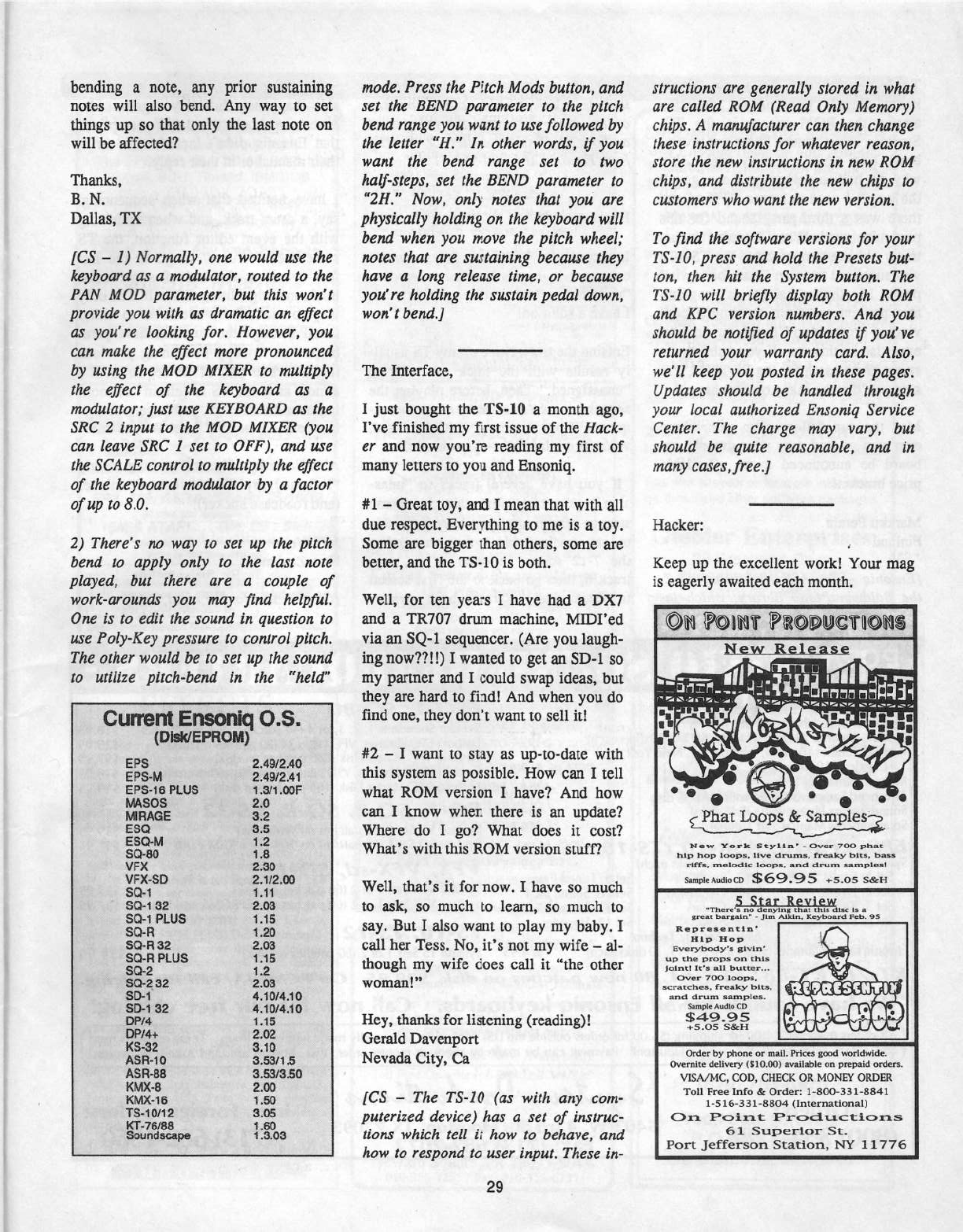
bending
a
note,
any
prior
sustaining
notes
will
also
bend.
Any
way
to
set
things
up
so
that
only
the
last
note
on
will
be
affected?
Thanks,
B.
N.
Dallas,
TX
{CS
-
l)
Normally,
one
would
use
the
keyboard
as
a
modulator,
routed
to
the
PAN
MOD
parameter,
but
this
won't
provide
you
with
as
dramatic
an
effect
as
you're
looking
for.
However,
you
can
make
the
efiect
more
pronounced
by
using
the
MOD
MIXER
to
multiply
the
efiect
of
the
keyboard
as
a
modulator;
just
use
KEYBOARD
as
the
SRC
2
input
to
the
MOD
MIXER
(you
can
leave
SRC
I
set
to
OFF),
and
use
the
SCALE
control
to
multiply
the
efiect
of
the
keyboard
modulator
by
a
factor
of
up
to
8.0.
2]
There's
no
way
to
set
up
the
pitch
bend
to
apply
only
to
the
last
note
played,
but
there
are
a
couple
of
work-arounds
you
may
find
helpful.
One
is
to
edit
the
sound
in
question
to
use
Poly-Key
pressure
to
control
pitch.
The
other
would
be to
set
up
the
sound
to
utilise
pitch-bend
in
the
"held"
C=
ntEnemmq(LS.
umtnmemou}
EP5
EPS-H
EPS-1B
PLUS
HASDS
HIHHGE
ESQ
ESQ-M
SE}-BU
VF!
VFI-SD
SQ-1
SCI-‘E
32
SI}?
PLUS
SCPH
SQ-H
32
SCI‘-H
PHJS
SID-2
SD-2
B2
ED-1
ED-1
as
DPt4
DP!-I-+
HS-32
ASH-1e
Asa-as
KM}!-B
t-that-1e
TS-1
l1t1
2
ttT-rates
aoundeeepe
2.49.-'2.4=fl
2.49t'2.41
1
.31’
1
.£lflF
2.0
3.2
3.5
1.2
1.5
2.30
2.1l2.flfl
1.11
EH3
1.15
LED
2113
1.15
1
.2
2.03
Il.‘l=fl'l4.‘llI
4.'lC|I."4.'lfl'
."‘t"'!‘i'i*‘."*!"-"I*!“"'!i*'*‘i‘*i"."“
gssesggsss
grin
mode.
Press
the
Pitch
Mods
button,
and
set
the
BEND
parameter
to
the
pitch
bend
range
you
want
to
use
followed
by
the
letter
"H."
ln
other
words,
if
you
want
the
bend
range
set
to
two
half-steps,
set
the
BEND
parameter
to
"2H."
Now,
only
notes
that
you
are
physically
holding
on
the
keyboard
will
bend
when
you
move
the
pitch
wheel;
notes
that
are
sustaining
because
they
have
a
long
release
time,
or
because
you're
holding
the
sustain
pedal
down,
won'tbend.]
The
Interface,
I
just
bought
the
TS-10
a
month
ago,
I've
finished
my
first
issue
of
the
Hack-
er
and
now
you're
reading
my
first
of
many
letters
to
you
and
Ensoniq.
#1
-
Great
toy,
and
I
mean
that
with
all
due
respect.
Everything
to
me
is
a
toy.
Some
are
bigger
than
others,
some
are
better,
and
the
TS-10
is
both.
Well,
for
ten
years
I
have
had
a
DX7
and
a
TRTDI
drun1
machine,
lvIlDI'ed
via
an
SQ-1
sequencer.
(Are
you
laugh-
ing
now't?!
l)
I
wanted
to
get
an
SD-1
so
my
partner
and
I
could
swap
ideas,
but
they
are
hard
to
find!
And
when
you
do
find
one,
they
don't
want
to
sell
itl
#2
-
I
want
to
stay
as
up-to-date
with
this
system
as
possible.
How
can
I
tell
what
RUM
version
I
have‘?
And
how
cart
I
know
when
there
is
an
update’?
Where
do
I
go?
What
does
it
cost?
What's
with
this
ROM
version
stuff‘?
Well,
that's
it
for
now.
I
have
so
much
to
ask,
so
much
to
learn,
so
much
to
say.
But
I
also
want
to
play
my
baby.
I
call
her
Tess.
No,
it's
not
my
wife
-
al-
though
my
wife
does
call
it
"the
other
woman!"
Hey,
thanks
for
listening
(reading)!
Gerald
Davenport
Nevada
City,
Ca
{CS
—
The
TS-ll]
[as
with
any
com-
puterised
device)
has
a
set
of
instruc-
tions
which
tell
it
how
to
behave,
and
how
to
respond
to
user
input.
These
in-
29
structions
are
generally
stored
in
what
are
called
ROM
(Read
Only
Memory)
chips.
A
manta'acturer
can
then
change
these
instructions
for
whatever
reason,
store
the
new
instructions
in
new
ROM
chips,
and
distribute
the
new
chips
to
customers
who
want
the
new
version.
To
flnd
the
software
versions
for
your
TS-I0,
press
and
hold
the
Presets
but-
ton,
then
hit
the
System
button.
The
T5‘-lb
will
briefly
display
both
ROM
and
KPC
version
numbers.
And
you
should
be
notified
of
updates
if
you've
returned
your
warranty
card.
Also,
we'll
keep
you
posted
in
these
pages.
Updates
should
be
handled
through
your
local
authorised
Ensoniq
Service
Center.
The
charge
may
vary,
but
should
be
quite
reasonable,
and
in
many
cases,
free.
I
Hacker:
Keep
up
the
excellent
work!
Your
mag
is
eagerly
awaited
each
month.
llfll
@h®bU@l‘l®lll$
H.e:ot_E.e.1.ea..s_e
"'53;t'h'ti;:!"aa't
___
_
-..
—-.--
I
"I:n:'--on
-r
-
___
_
'-
-
'
""““"'
‘"57!’
'-"FP2-21-;-..-rs
..--:.,_--___-..,
qillll
"'
-
‘.C
"'
Q
oi
Phat
Loops
ll’:
Samples
Haw
York
5t_y1ln'
—
fiver
TDICI
phat
hip
hit]:
lu-r.:I]:I:t.
I-11-II:
drurnl.
freaky
hllt.
hilt!
riffs,
melndlc
lnctps,
and
drum
samples?
I
I‘
1-1-
'
It
smpunuatoco
$69.95
+5.05
5&1-I
i
‘Th-ere
1
nu
enying
I:
III
I:
I:
Ill:
1:
I
grunt
|:|I.'rgIlr|"
-
J'l|:rt
.|\.!.lr.'lr|.,
lll'.:;|rl:|tlI.r\d
I-‘eh-.
95
R-nprns!nt1|:|.'
Hip
l-In-p
‘
Eve:-g,rb-tad}.-I‘!
gI,l\.rl:|1'
_
*
pa.
1.
stcratchen,
frailty
bits,
t
and
drum
1.-ans
Ines-
up
the
preps
on
thls
julntl
It’:
Ill.
butter...
D‘!-I'¢1'
T-DD
lflfl
P
sample
Audie
fill!
$49.95
+s.os
seem
lira
figfi
in
E
#1}:
lit
'-=.
Drder
by
phone
or
mall.
Prices
good
worldvrlde.
Dvemlte
delivery
lSlD.DDl
available
on
prepaid
orders.
VISAIMC,
EDD.
CHECK.
GR
lr!Ul'~lEl"
ORDER
Toll
Free
Info
ll:
Dreler:
1-B-[Hit-331-EH41
1-5
15-33
1-BB-D4
{In
ternationall
On
Point
Productions
61
Superior
St.
Port
jeffersnn
Station,
l*~I“r"
11775

To
Jeffrey
Rhoads:
As
you
no
doubt
know,
there's
one
curious
omission
among
the
RUM
waves
in
the
TS-
Series
-
swept
brush!
There
are
several
brush
hits,
which
are
very
usable,
but
why
go
halfway
when
you
can
go
all
the
way‘?!
Iused
to
own
a
VFX-sd
and
there
was
a
third-party
sound
for
this
particular
need.
When
I
traded
in
my
misty
old
axe
to
upgrade
to
the
TS-ll]
I
was
surprised
to
leam
I
had
lost
a
vital
patch.
lvly
limited
talents
as
program-
mer
prevent
me
from
creating
a
con-
vincing
program
so
I'm
relying
on
your
expertise
on
this
one.
If
you
published
a
swept
brush
patch
for
the
TS-1[l,l12,
I'm
sine
you'd
make
many
owners
happy!
May
the
sun
follow
your
path
where
ever
you
go
and
may
your
dream
key-
board
be
announced
in
an
affordable
price
bracket!
Ivlarkku
Perala
Finland
{Ensoniq
—
Try
AER-ill
Library
AS-T.
the
Baldwin
Piano
library,
which
in-
MIRAGE
Synlaur
Mirage
Library
[13
disks}
Ensoniq
libraries
{SID-A,
SID-B,
or5LD-C,
llldisks
each}
K-Muse
libraries
lTechno,
London,
LA,
New
York,
or
Classical,
Ill
disks
each}
lvlirage
Formatting
Disk
Advanced
5arnpler's
Guide
with
MASOS
disk
Soundprocess
library
with
OS
I?
disks}
Soundprocess
Manual
and
Tutorial
EPS,
EPS-
1
6,.
ASR-
10
(TS-1
0,.
TS-
12)
Synlaur
Sample
Sets
I
through
13
I4
rlisks
eachl
$29.95
Set
l:5oviel
Synlhs
Set
5:
Synlhia
1
Set
2:
Live
Drums
Set
bi
Percussion
Set
3:
Kickin
Drums
Set
Tl:
Guitars
Sets}:
Synth
Pads
Set
ll:
Basses
Set
12:
llocoder
New
-
Set
I3:
Techno
Ensoniq
sample
|ibrariesl5lT-1
thru 5LT-13,
llltiisltseachl
$?4.95
eludes
some
Jase
Trio
instruments.
it
includes
a
swept
brush
sound.
You
may
order
this
library
at
you
local
authorised
Ensoniq
dealer
or
directly
from
Ensoniq
at
I-800-553-Slfil
.,l
Hacker
-
In
response
to
Yiasomnis
Anastasious's
comment
in
.lune's
Interface
regarding
"unassigning"
selected
sequence
tracks,
I
have
a
solution!
Erasing
the
track
twice
on
my
TS
usual-
ly
results
with
the
track
reverting
to
"unassigned."
Then,
before
playing
the
sequence,
save
it
to
disk,
erase
the
se-
quence
from
memory,
reload
it
and,
voila
(or
violalviolin
-
you
decide}.
If
you
have
several
tracks
to
"smas-
sign,"
you
may
find
that
for
some
strange
reason
after
you
have
done
this
to,
say,
tracks
2
and 4,
then
changed
to
the
‘l-12
screen
in order
to
do,
say,
track
6,
then
go
back
to
the
first
screen
to
check,
that
the
tracks
have
myster-
ESQ-1,.
SQ-80
Syntaur
Soundsels
1,
2, 3,
or
4
[rill
patches,
disk
or
cassette}
Ensoniq
ESQ
libraries,
‘v'PC
1
thru
11
lflll
patches
on
rliskl
Ensoniq
1r'PC
Master
Disk
{BBO
patches
on
disk}
En
soniq
so-so
libraries,
VSD
1
lhru
‘v'SD-4
no
tches
on
disk}
Ensoniq
'v'5D
lvlasler
Disk
use
patches
on
digit}
SQ-1, SQ-2,
SQ-R,
KS-32'
Syntaur
SQ
Sel
1
iilll
patches
on
sysex
disk}
Syntaur
SQ
Set
1
till}
patches
on
loll-voice
Rhlvl
card}
VFX,
VFX-5d,.
SD-I
Elyntaur
"v'Fli
Sets
I
or
2
H5-ll
patches
on
disk}
Synlaur
'v'Fll
Sets
1
or
2
[bl]
patches
on
EEPROM
cartridge}
T$-
1'
0,.
T$-
12
Synlaur
TS
Sets
1
or
2
so
patches
on
disk}
$39.95
$s9.9s
it-9.95
$t.9.9s
$12.95
$19.95
$99.95
No.95
Set
El:
Tuned
Perc.
Set
ll]:
Sound
Fill
1
Se!
ll:
Sound
FX
2
iously
reappeared.
But
don't
panic
-
shit
happens.
Just
try
again,
per-
severance
should
win
out.
I'm
surprised
that
Ensoniq
didn't
include
this
tip
in
their
manual
or
in
their
reply.
I
have
noticed
that
when
sequencing,
say,
a
drum
track,
and
when
reviewing
with
the
event
editor
function,
the
TS
sometimes
"refuses"
to
go
to
the
last
few
events
at
the
end
of
a
particular
track,
making
editing
difficult.
The
only
way
to
view
these
events
is
to
either
scroll
through
the
smallest
time
para-
meters
or
to
copy
something
previous
into
a
further
part
of
the
sequence.
It's
almost
as
if
the
TS
is
"afraid"
of
look-
ing
over
a
cliff
edge,
you
have
to
nudge
it,
or
extend
the
cliff
face!
Why
is
this‘?
Also
Ensoniq
-
I'm
still
waiting
for
my
"I
(heart)
my
TS-12"
bumper
sticker
(and
roadcase
sticker)!
Jeff
Weir
New
Zealand
I
CS
-
Thanks
for
the
input,
..l'e_,fi'.",l
‘I
-I
1
L.-"-J
$1s.95
$29.95
$9195
$19.95
$49.95
$39.95
$9.-r.9s
$39.95
$9r.95
KT-76,.
KT-35'.‘
KT
Set‘
L
80
new
patches
on
disk,
$39.95.
On
PCMCIA,
call
for
pricing.
\Ne
have
sounds
for
all
Ensoniq
keyboards.
Call
novv
for
our
free
catalog!
All
orders
must
add
$4.00
ior
shipping
l$Er.llil
for
orders
outside
the
U5}.
Shipment
is
normally
made
within
24
hours.
Texas
residents
must
add
?.25‘l"a
sales
tax
lll.25"ii:
willtin
Houston}.
Payment
can
be
made
by
check
or
money
order,
‘visa,
MasterCard,
and
Anterican
Express.
Orders:
s-its
vv
43rd
StpH
t
rx
77092
""o'
Fo"e'gn
Orders:
(300)
334-1233
liax:
71$
dd;-hndrz
(713)532'1950
Gil
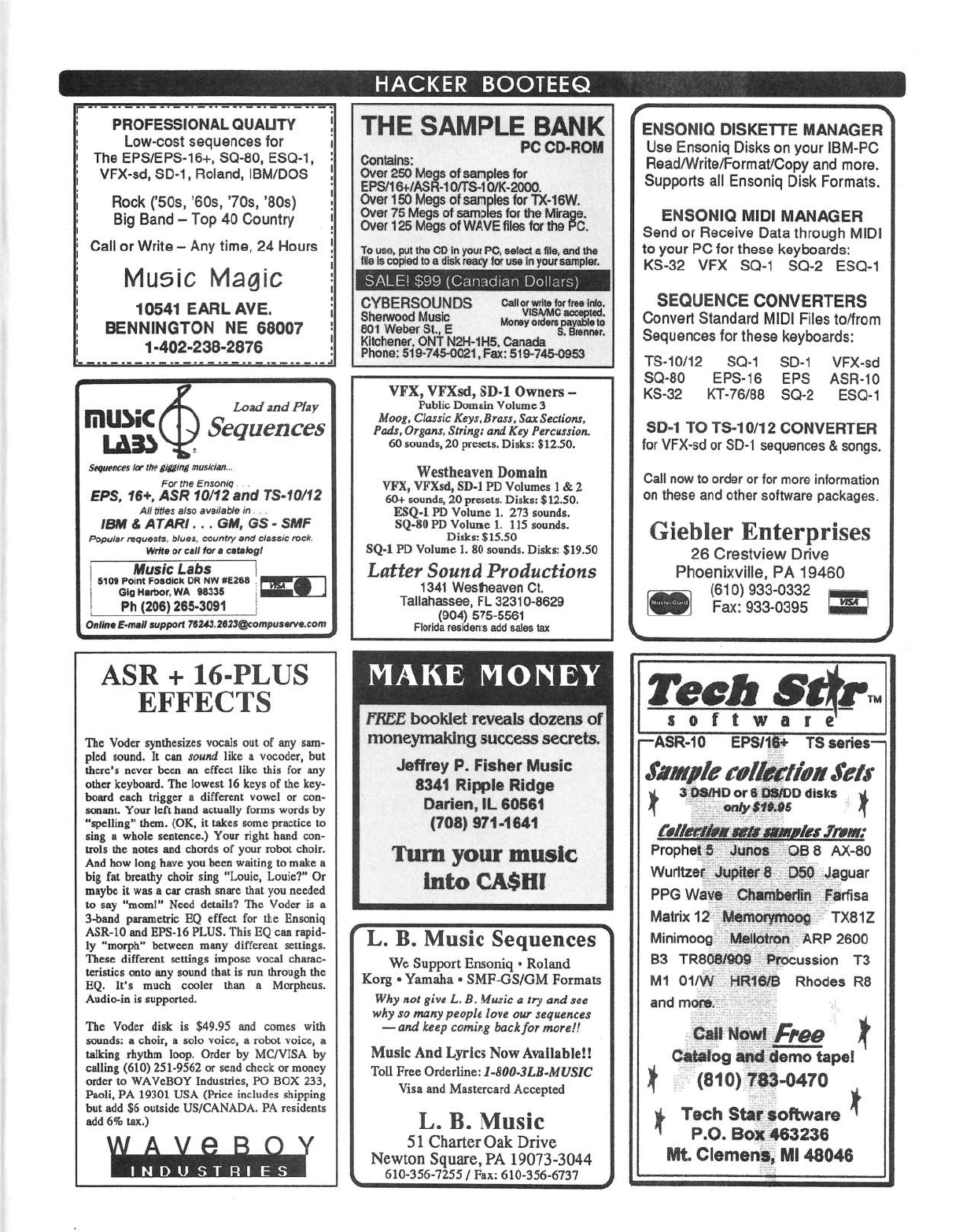
PHDFESSIDHIIL
OUMJTY
Low-cost
sequences
tor
The
EPSrEPS-15+,
SD-B0,
ESQ-1,
VFX-sd,
SD-"l,
Floland,
IBMIDDE
Hock
('50s,
‘Bus, ‘Tue,
'30s)
Big
Band
-
Top
40
Country
Call
or
‘Write
-
Any
time,
24
Hours
Music
Magic
10541
EARL
ATE.
BENNINGTDN
NE
BBUU?
1
-402-2
33-2376
_
__
..
I
11-11
_
tun-1-111-no
Loan‘
and
Play
|'ill.l>iC
ma)
2
Sequences
Sequences
tor
the
giflrrtg
musician...
For
the
Ensoniq
.
EPS,
16+,
ASE
10r"l2
and
TS-*l0r'12
All
tntas
also
-i"l|"illHl.'.ll'E'
in
. .
IBM
&
ATARI
...
GM,
GS
-
SMF
Popular
re-quests.
blues.
country
and
classic
rock.
ltl"n‘t|
or
call
for
I
cltllopl
l
sun
Folgtlggtfrficllggfiw
seats
I
y
Gig
Harbor.
we
eases
i
1
p
p
Eh
{Z00}
265-3051
Delhi
E-mall
support
i-"lId.'l.IlIJQcompuaorva.com
1
birth
I.-
ASR
+
16-PLUS
EFFECTS
The
'lr"oder
synthesizes
vocals
out
of
any
sam-
pled
sound.
It
can
sound
like
a
vocoder,
but
there's
never
been an
effect
like
this
for
any
other
keyboard.
The
lowest
lo
keys
of
the
key-
board
coch
trigger
a
different
vowel
or
con-
so-nant.
Your
left
hand
actually
forms
words
by
"spelling"
them.
IDK,
it
takes
some
practice
to
sing
a
whole
sentence.)
Your
right
hand
con-
trols
the
notes
and
chords
of
your
robot
choir.
And
bow
long
have
you
been
waiting
to
make
a
big
fat
brealby
choir
sing
"Louie,
Louie?"
Dr
maybe
it
was
a
oar
crash
snare
that
you
needed
to
say
"morn!"
Heed
details? The
‘v'oder
is
a
3-band
parametric
HQ
effect
for
the
Ensoniq
ASH-10
and
EPS-lb
PLUS.
This
EQ
can
rapid-
ly
"morph"
between
many
different
settings.
These
different
settings
impose
vocal
charac-
teristics
onto
any
sound
that
is
run
through
the
EQ.
It's
much
cooler
than
a
Morpheus.
Audio-in
is
supported.
The
"v'oder
disk
is
$49.95
and
comes
with
sounds:
a
choir,
a
solo
voice,
a
robot
voice,
a
talking
rhythm
loop.
Drder
by
MCPHISA.
by
calling
{E10}
251-9562
or
send
check
or
money
order
l.o
W'P.."'v'eBUY
Industries,
PU
EUR
233,
Paoli,
PA.
19301
LISA.
[Price
includes
shipping
but
add
$15
outside
USICANADA.
PA.
residents
add
6%
tax.)
PC
OD-ROM
C-ontains:
Clver
ese
Haas
of
samples
for
er
aqs
o
earn
-
B
.
ElS".“s’l.$
"°‘lS*‘°’“'h“ls.
w
as
sr.es
rniiir
ts
an
Dvor
o
as
.
To
use,
put
the
GD
in
your
PG,
select
a
lhe,
and
the
ifllaiacopledtoarllskreaoyloruseinyoursamplar.
SALE!
{CI-.'.=.=.r“tt_'-1.r:li;=.'s!"1
Do||:_"1rs_}
GYBEF|$t)U|~.[|j_}$
Gall
orwrita
lorlreo
into.
Samara
......Y,‘tt..".°"""s."'t
BUT
WBDBF
$11.,
E
ggrqnmr,
Kitchener,
ONT
NEH-1
H5,
Canada
Phone:
51
9-r45-eeat
,
Fax:
51
e-rte-oesa
"llFIi,
‘llF]{sd,
SD-1
Owners
-
Public
Domain
llolume
3
Moog,
Classic
Keys,
Eross,
.'lo.r
Sections,
Pads,
Organs,
Strings
and
Key
Percussion.
60
sounds,
20
presets.
Disks:
$12.50.
Westbeaven
Domain
VFX,
"t"Fl'{sd,
SD-1
PD
‘Volumes
l
do
2
I5-0+
sounds,
20
presets.
Disks:
$12.50.
ESQ-1
PD
"v"olume
1.
273
sounds.
SQ-39
PD
Volume
1.
115
sounds.
Disks:
$15.59
SQ-1
PD
Volume
1.
E0
sounds.
Disks:
$19.50
Latter
Sound
Productions
1341
Westhoaven
Ct.
Tallahassee,
FL
32310-B620
{Q-04}
5?5-5551
Florida
residents
add
sales
tax
FREE
booklet
reveals
dozens
of
moneymaklng
success
secrets.
Jeffrey
P.
Fisher
Music
8341
Ripple
Ridge
Darien,
ll.
B0561
[T08]
971-1641
Tum
your
music
into
CASH!
L.
B.
Music
Sequences
We
Support
Ensoniq
-
Roland
Korg
-
Yamaha
I
SIvIF-CrS_lGlvl
Formats
Why
not
give
L.
B.
lklusic
rt
try
and
see
why
so
many
people
love
our
sequences
—and
keep
coming
bockfor
moreti
llrluslc
And
Lyrics
New
Avallablell
Toll
Free
Clrderlinet
I-Edd-JLB-MUSIC
Visa
and
Maslercard
Accepted
L.
B.
Music
51
Charter
Oak
Drive
Newton
Square,
PA
l90'l3-3044
ate-ass-1255
t
Fax:
are-sss-srsr
THE
SAMPLE
BANK
EN$Dl~llGl
DlSl(E'l'I'E
MANAGER
Use
Ensoniq
Disks
on
your
IBM-PC
Flead/WritetFormatlCopy
and
more.
Supports
all
Ensoniq
Disk
Formats.
EHSONIO
MIDI
MANAGER
Send
or
Fleceive
Data
through
lvllDl
to
your
PC
for
those
keyboards:
KS-32
VFK
SQ-t
SQ-2
ESQ-1
SEQUENCE
CDNUEHTEHS
Convert
Standard
MIDI Files
tetfrom
Sequences
lor
these
keyboards:
TS-1
Ur’
12
SCH
SD-1
'v'F)(-sci
SQ-B0
EPS-16
EPS
ASH-10
KS-32
KT-Tblhb
SC}-2
ESQ-1
SD-1
TD
TS-10l12
CONVERTER
for
l.lFl-I-sd
er
SD-1
sequences
h
songs.
Gall
new
to
order
or
for
more
information
on
these
and
other
software
packages.
Giebler
Enterprises
20
Crestview
Drive
Phoenixville,
PA
10460
rstetsaa-eaaz
--
l
Fax:
ass-0395
ASR-10
EPSl14I-
TS
series
Sample
calletftrhrr
Jerri
or
B
disks
"'
‘""‘""
I
fclfdeftg
E
___'
le.r.i"rrar.'
Prophoil_§!_':r.j'_i_
%__;;.lr.|rto_a§
B
AX-B0
‘v".\'urllzet_}§.,-3.-1
I-Jaguar
PPG
wavy
-2
___l'-"arllsa
Matrix
12-E
T)(a1Z
lv‘linirnoog--.-
"_"="ll.RP
2500
r
B3
TRd0:Bl!009-1---Procussion
T3
M1
etrvv
-eaters
Rhodes
as
and
I
--
"
I‘
catalog
tape!
I
t
"(stones-e410
g
Tech
Startaoftware
"
P.o.
BoJ_t§40323B
Mt.
Clemens],
lllll
43046

TRANSONIQ
HACKER
14es
sw
UPLAHD
en,
Peatume,
en
etrssi
ADDRESS
CORRECTION
REQUESTED
Pestmaster:
Please
return
Ferm
S54?
as
seen
as
pessihle
se
we
ean
ehange
eur
reeerds.
This
is
e
menthiyr
puhlieatien.
BULK
FIATE
U5.
POSTAGE
PAID
PCIFITLAHD,
OH
PEFIMIT
ND.
11
BLICFIIPTIDH
MATEHIAL
DATED
MATERIAL
-
TIM
E
VALUE
Publisher:
Erie
Gelsllneer
Editriit:
Jane
Talisman
Our
isemewhat
regular]
lliustrieus
new
et
writers
Includes:
Graig
nnderten,
Reeinr
Barman,
Paul
Bissell,
Steve
Birhurst,
Eiarry
Carsen,
iutarit
Dliiten,
nntheny
Ferrara,
Pat
Finnigan,
C-haries
R.
Fisehar,
Jeffrey
Fisher,
Gary
Gieeler,
Jim
Greta,
Garth
Hjelte,
Brree
inman,
Jeii
Jetten,
Dara
Jenes,
Brad
iiauintan,Jehnn1r
Kienaris,
Jehn
Lei
init.
Daniel
Mendel.
Sam
iuilms,
Jeiigag
Rheads,
Brien
Rest,
Cleric
Saiishunr,
Tern
Shear,
Jee
Slater,
Kirk
Siinitard,
J
Teiln,
and
Steve
irineent.
9?22‘i
Phene
{EH3}
22?
EB-'-IE
[B
em
te 9
pm
Paeiiie
West
Beast
Time]
Gepyright
1995,
Transeniq
Haeiter,
14-32
SW
Upland
Drive,
Pertland,
DR
I
+
1
'
-
Adirenhlng
rates:
Please
send
fer
rate
eard.
Rates
fer
euthers:
Please
send
Ier
writer-inie
card.
Sueseriptiens:
12
rnenthiy
issues.
US:
$23»'\,rear,
All
elhers:
$3.'E.f3rear.
Payable
in
U5
funds.
Transeniq
Haeirer
is
the
independent
user's
news
magazine
Ier
Enseniq
eredueis.
Tranaeniq
Hacker
is
net
affiiiated
in
any
way
with
Enseniq
Gerp.
Enseniq
and
the
names
ef
their
varieus
preduets
are
registered
trademarks
ei
the
Enseniq
Carp.
Uplniens
expressed
are
these
ei‘
the
authers
and
de
net
necessarily
refieei:
these
ei
the
publisher
er
Enseniq
Cerp.
Printed
in
the
United
States.
3 3
E
E
i
