Tiny Basic Instructions
User Manual:
Open the PDF directly: View PDF  .
.
Page Count: 73
- Introduction
- Setting up Tiny BASIC on the CPUville Z80 computer
- Using Tiny BASIC with Realterm in Windows
- Using Tiny BASIC with Minicom in Linux
- Appendix A: Tiny BASIC Language Description
- Appendix B: Tiny BASIC Assembly listing
- Appendix C: Intel Hex Code for Tiny BASIC

Tiny BASIC for the CPUville Z80 Computer
by Donn Stewart
November, 2016
@Copyleft, all wrongs reserved
1

Table of Contents
Introduction................................................................................................................................................3
Setting up Tiny BASIC on the CPUville Z80 computer............................................................................5
Using Tiny BASIC with Realterm in Windows.........................................................................................6
Using Tiny BASIC with Minicom in Linux.............................................................................................15
Appendix A: Tiny BASIC Language Description....................................................................................25
Numbers..............................................................................................................................................25
Variables..............................................................................................................................................25
Functions.............................................................................................................................................25
Arithmetic and Compare operators.....................................................................................................25
Expressions..........................................................................................................................................26
Direct Commands................................................................................................................................26
Abbreviations and blanks....................................................................................................................27
Statements...........................................................................................................................................27
Commands...........................................................................................................................................28
REM or REMARK Command.......................................................................................................28
LET Command...............................................................................................................................28
PRINT Command...........................................................................................................................28
INPUT Command...........................................................................................................................29
IF Command...................................................................................................................................30
GOTO Command............................................................................................................................30
GOSUB and RETURN Commands................................................................................................30
FOR and NEXT Commands...........................................................................................................31
STOP Command.............................................................................................................................32
Stopping the Execution.......................................................................................................................32
Control of Output Device....................................................................................................................32
Error Report.........................................................................................................................................33
Error Corrections.................................................................................................................................34
Appendix B: Tiny BASIC Assembly listing............................................................................................35
Appendix C: Intel Hex Code for Tiny BASIC.........................................................................................71
2

Introduction
Early personal microcomputers, such as the Altair 8800, were programmed using assembly language
and machine code. However, there was much interest in developing higher-level computer languages
for these early machines. The BASIC programming language (Beginner's All-purpose Symbolic
Instruction Code) was a natural target for these efforts. The original BASIC was developed in 1964 and
ran on mainframe computers. Many computer science students wrote their first programs in BASIC.
So, when personal computers appeared, there was a natural desire to develop a BASIC language
interpreter that could run on these new machines.
Microcomputers where handicapped in the early years by the size of memory, which usually cost more
than the microprocessors. Nonetheless, a number of BASIC interpreters were written that could run in
small memory spaces of only a few kilobytes. One of the most influential was Palo Alto Tiny BASIC,
written by Li-Chen Wang in 1976. This program is famous for the comment in its source file heading
that read “@COPYLEFT ALL WRONGS RESERVED”. It was one of the early formal expressions of
the free software philosophy.
Tiny BASIC was written for the Intel 8080 processor, and 8080 machine code will almost always run
on the Z801. This BASIC interpreter runs in 2K of ROM, and 2K of RAM is more than adequate for
writing and running small programs. So, on first look it seems to be well suited for use in the CPUville
Z80 computer with the serial interface. The original Tiny BASIC 8080 assembly language was written
in a dialect for a mainframe assembler has since been lost. However, Roger Rauskolb in October of
1976 modified the assembly language so that it could be assembled by Intel's 8080 Macroassembler,
also known as MAC-80. The source code for this assembler was written in Fortran 66. Most mainframe
and minicomputers of the day had Fortran compilers, so this assembler was easy for most hobbyists to
access. Eventually, the MAC-80 assembler was made available in 8080 code, and was one of the
popular programs on early CP/M computers.
So, with the 8080 source code for Tiny BASIC, and an assembler source code available in Fortran,
there was a chance I could get Tiny BASIC up and running on the CPUville Z80 computer.
First, I had to compile the MAC-80 assembler. Fortunately, the open-source Fortran compiler gfortran
has the ability to compile obsolete Fortran dialects such as Fortran 66, and I was able to compile MAC-
80 and run it on a PC, in the Linux environment. Next, I modified the Tiny BASIC code to match the
CPUville Z80 computer hardware. Specifically, I had to change the status and data port addresses for
the UART (called the ACIA in the Tiny BASIC comments), the test bits for UART status, and the
UART initialization bytes. I changed the ORG statements at the end of the Tiny BASIC code to better
match a system with 2K ROM and 2K RAM. And, that was it! Tiny BASIC assembled without errors. I
loaded it onto a ROM, and it ran fine on the CPUville computer.
Tiny BASIC is quite limited in its capabilities. It is integer-only – no floating point numbers allowed. It
can only initialize one array, and can use only 26 variables, named A to Z. It does not have higher
1 The Z80 was designed to be compatible with the 8080. The 8080 registers, flags, and machine code are a subset of Z80
registers, flags, and machine code. All 8080 machine instructions will work properly on the Z80, with the exception of
instructions using the rarely used parity/overflow flag.
3

arithmetic functions, such as exponent. But surprisingly it has a random number generator function, so
games with probabilities can be programmed. There is a full summary of the Tiny BASIC language in
Appendix A.
4

Setting up Tiny BASIC on the CPUville Z80 computer
Tiny BASIC machine code has been loaded onto a 2K EPROM for use in the CPUville Z80 computer.
It is intended for use in the computer with the serial interface attached, as a substitute for the v.7
EPROM. For details on using the serial interface, please consult the Serial Interface Instruction
Manual. The Tiny BASIC EPROM can also be used in the computer with the disk and memory
expansion interface, taking the place of the v.8 EPROM, but in its current form Tiny BASIC can only
use 2K of RAM2. In the computer with the disk and memory expansion, one is able to install CP/M and
use the much more powerful Microsoft BASIC.
To set up the CPUville Z80 computer for Tiny BASIC, it should have the serial interface attached
directly to it. Remove the v.7 EPROM and replace it with the Tiny BASIC EPROM. The computer
needs to be set for the fast clock, and the jumpers need to be ON. It does not matter what is on the input
port DIP switches.
The following sections describe in detail how to use Tiny BASIC in both Windows and Linux
environments.
2 The Tiny BASIC code can easily be modified to use more RAM if this is desired.
5
Using Tiny BASIC with Realterm in Windows
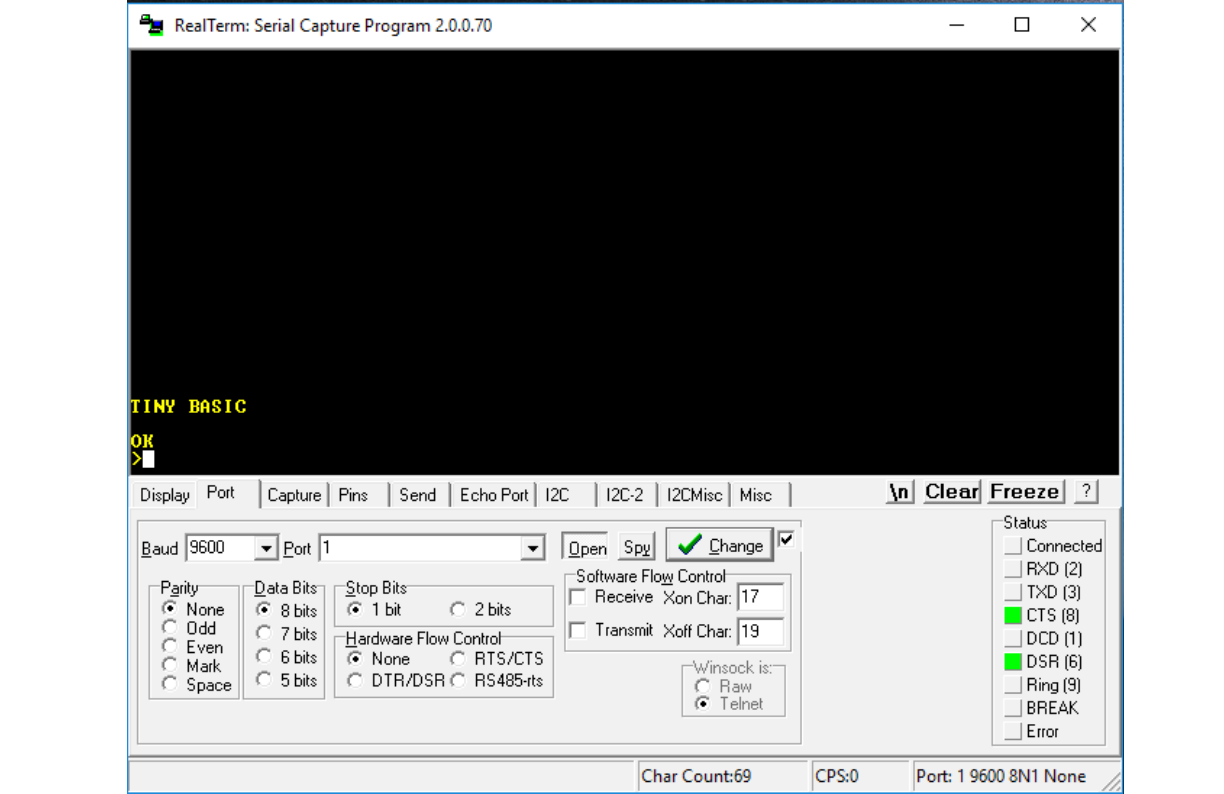
Set the Realterm display to ANSI, 24 rows, and the port to 9600 baud with 8 data bits, one stop bit, and
no parity – the usual settings when operating the CPUville Z80 computer with the serial interface. With
the Tiny BASIC EPROM installed, connect the computer to power, and take it out of reset. The display
will show the Tiny BASIC greeting:
I will demonstrate Tiny BASIC programming, and how to save and load programs from the PC disk. A
full description of the Tiny BASIC programming language can be found in Appendix A.
To enter program statements, at the > prompt, type a number between 1 and 32767, a space, then a
program statement. When you have finished, hit return or enter. If you make a mistake, you can erase
the line by entering the line number only, then re-enter the line. Using backspace does not seem to work
6
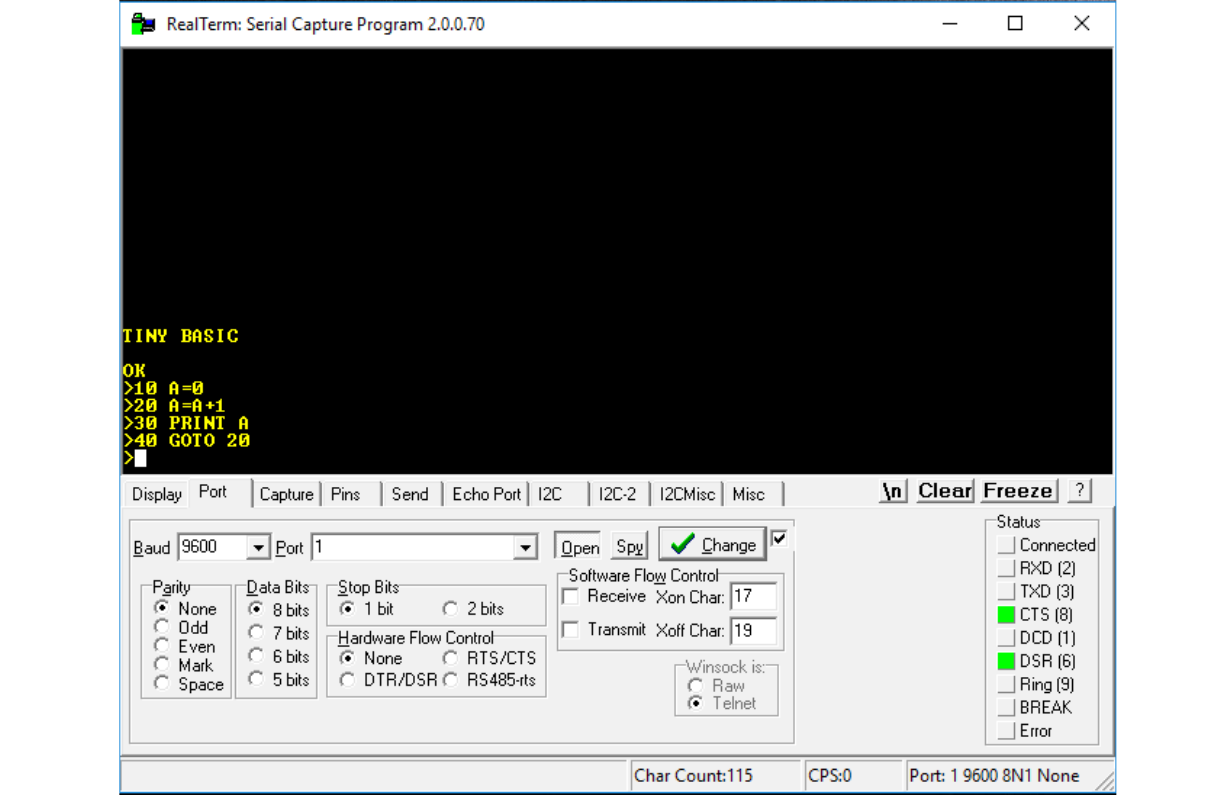
to erase your characters in the Realterm environment.
Here is a sample program, which prints consecutive integers starting at 1 :
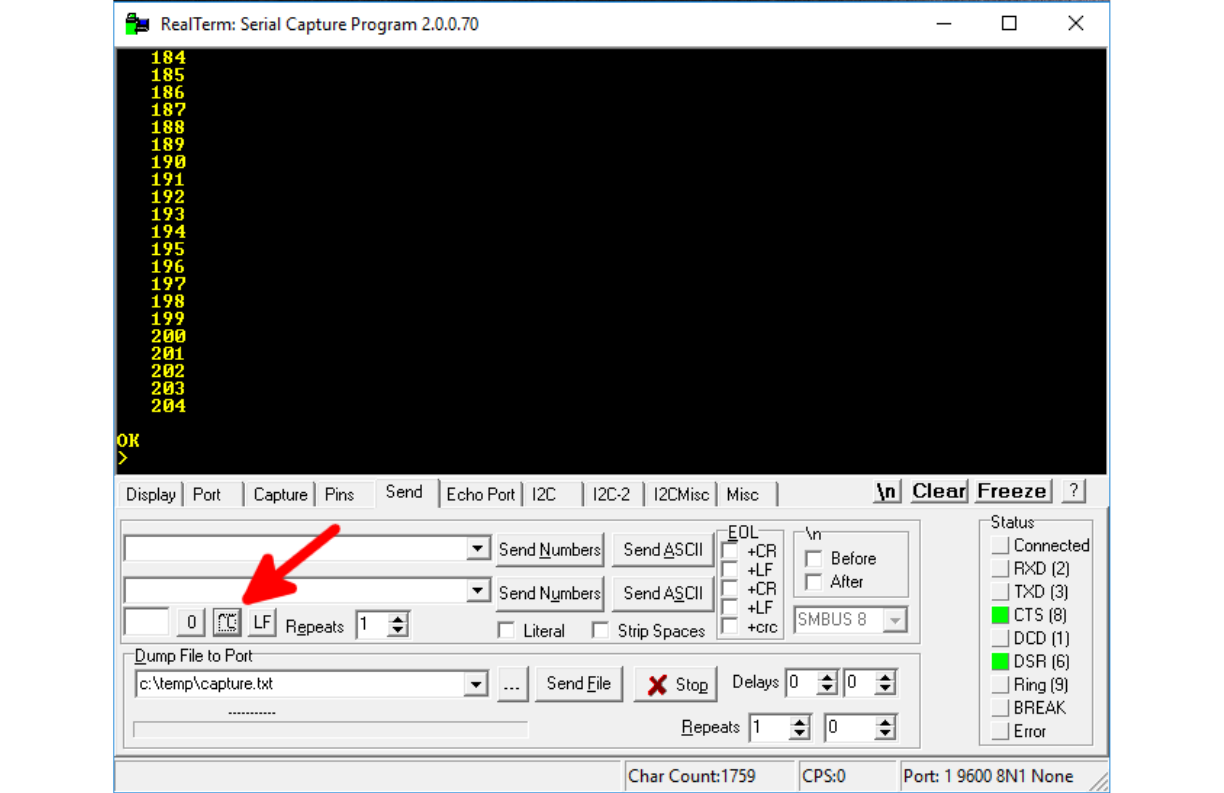
To run the program, type RUN at the prompt. The integers will scroll down the screen. To stop the
program, go to the Send tab of Realterm and hit the control-C button (^C, shown by the red arrow):
7
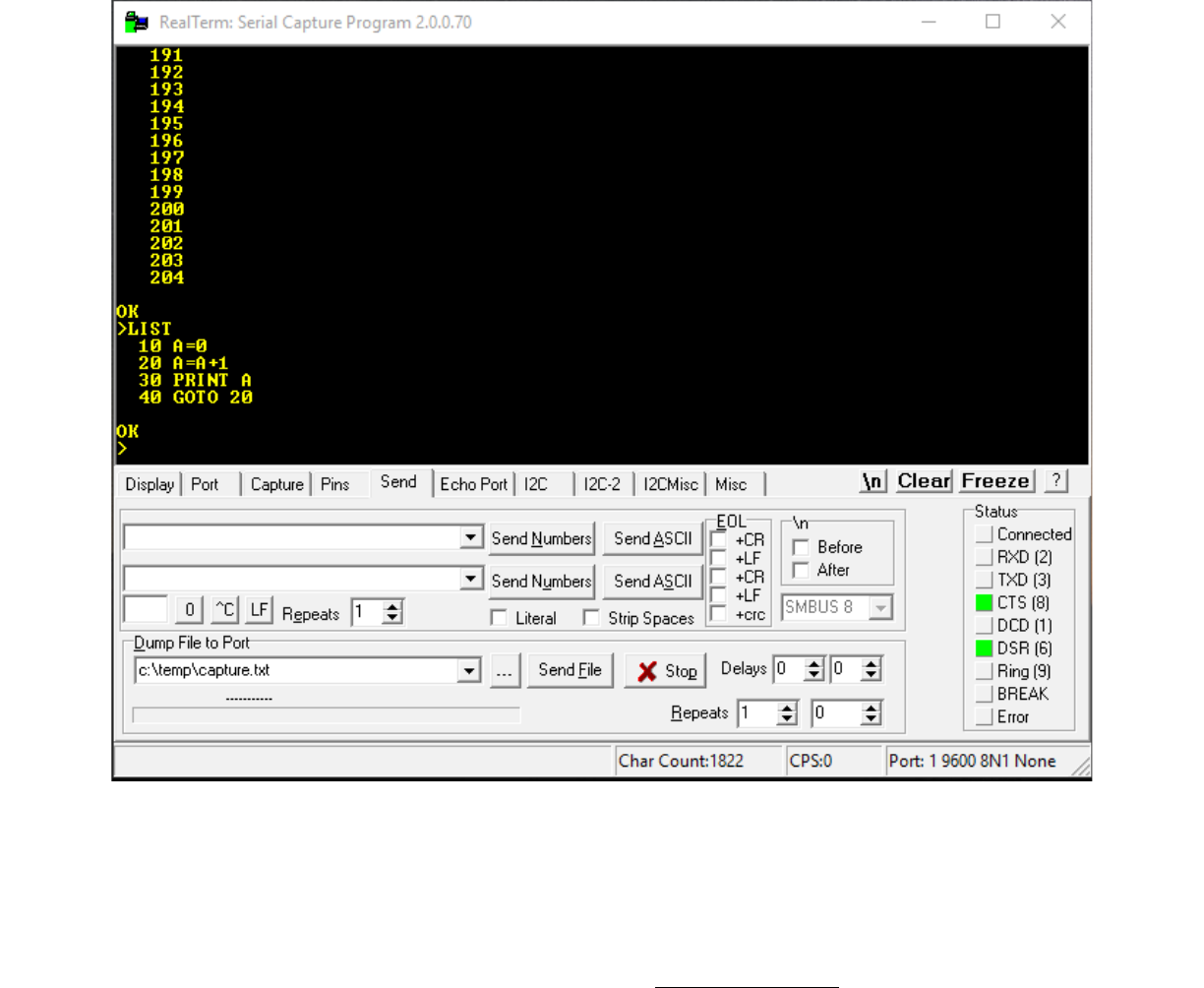
To see your program as it sits in Tiny BASIC's memory, type LIST:
8
We can use the LIST command, with the Realterm Capture function, to save a copy of the program to
the disk on the PC. On the Realterm Capture tab, enter or navigate to a file to save the program. By
default, the capture file, which is a text file, has the name capture.txt, but you can give it any name you
like. Sometimes people use the .bas extension for BASIC program files. Once you have entered a file
name and location, type LIST at the Tiny BASIC prompt but do not hit Enter. Then, hit the Start
Overwrite button on the Realterm Capture tab. The capture area will turn red. Then, at the BASIC
prompt, hit Enter:
9
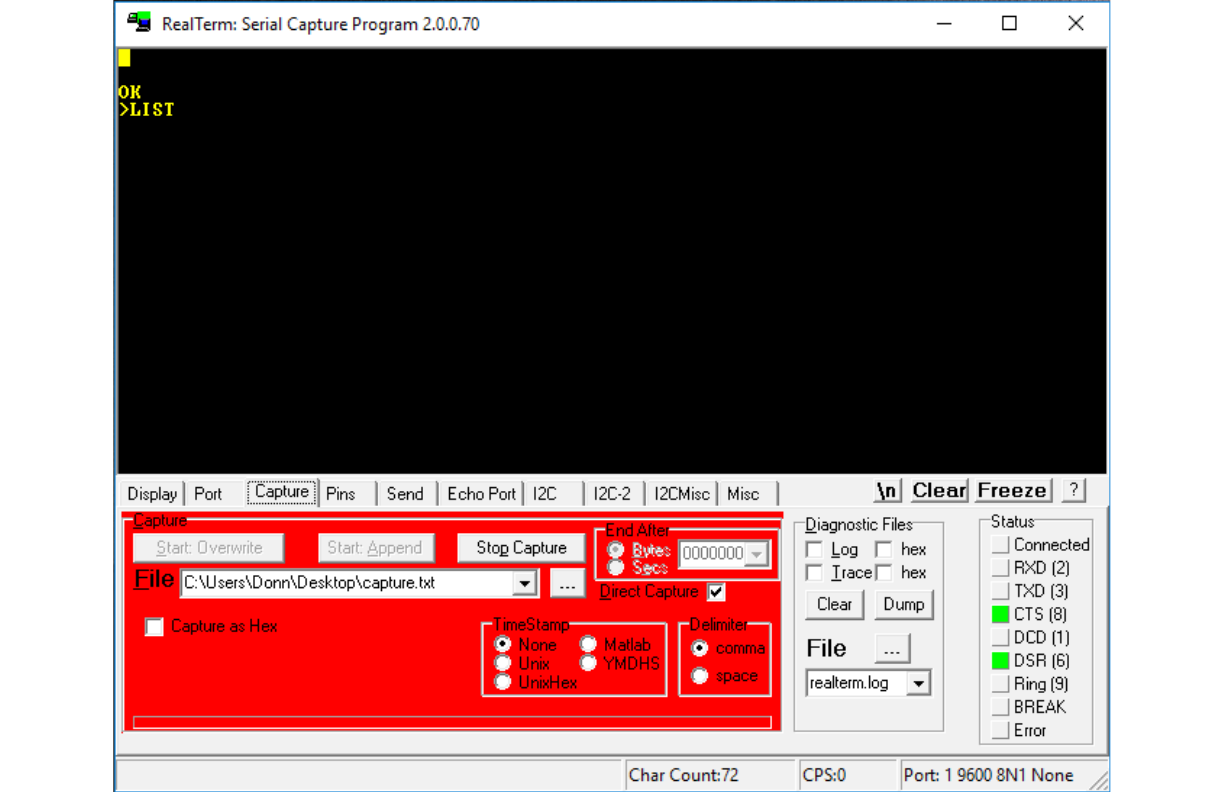
Next, hit the Stop Capture button. The screen will clear, and the capture area will turn back to its
normal color:
10
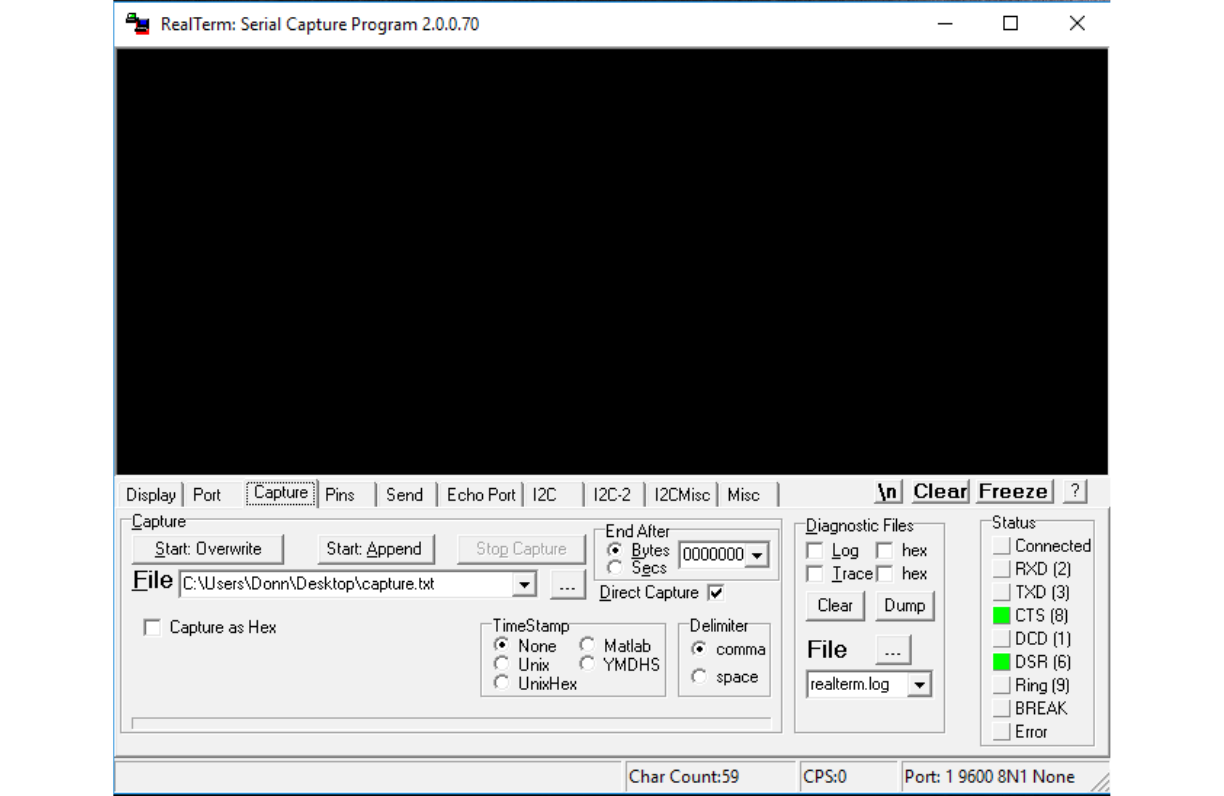
It looks like Tiny BASIC is lost, but click in the terminal screen area and hit Enter a few times and the
Tiny BASIC prompt will re-appear.
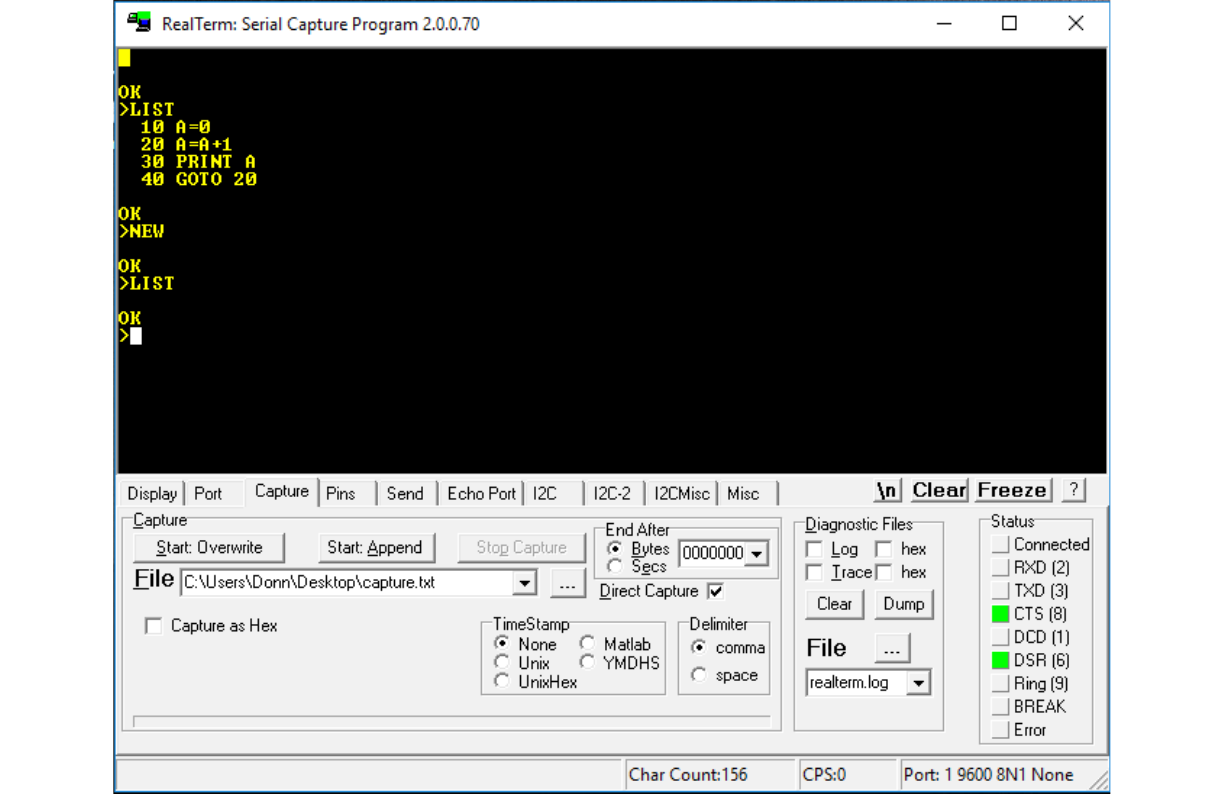
We will now load back the program we saved. First, type LIST to show the program is still in the Tiny
BASIC memory. Then, type NEW to erase the program. After that, type LIST again to verify that the
program is gone:
11
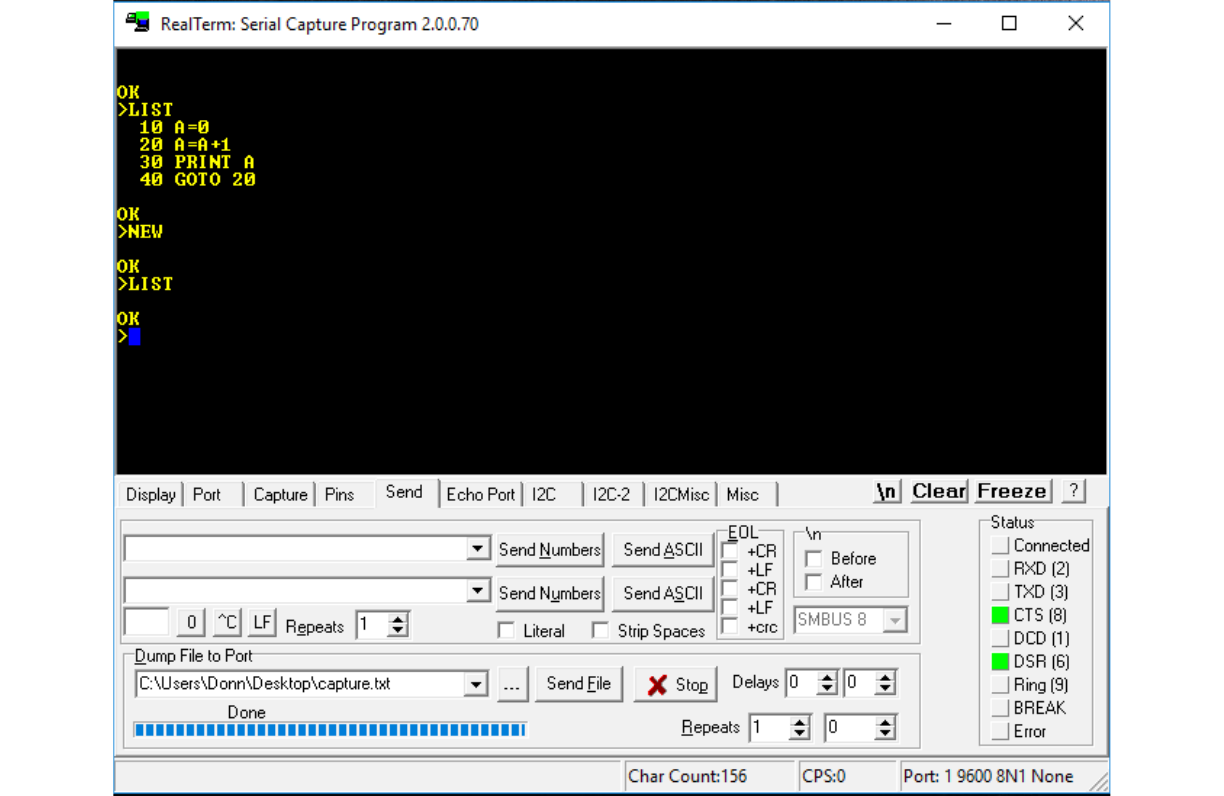
We will use the functions on the Realterm Send tab to load the program back into Tiny BASIC's
memory area. In the terminal window, enter control-O. Nothing will happen, this just turns off Tiny
BASIC's terminal output. This will prevent Tiny BASIC from echoing the characters in the file as we
load them, which would mess up the screen. Then, in the Realterm Send tab, in the Dump File to Port
area, enter or navigate to the program file. Then, hit the Send File button. The blue progress bar will
show that the file has been sent. Then, hit the Stop button:
12
Now enter control-O again in the terminal window, to turn back on Tiny BASICs screen output. Type
LIST or hit Enter. Tiny BASIC will have some garbage in its input buffer, because the capture file will
have sent the “OK” and the prompt character from the LIST command output that we saved in the file,
so it will produce a WHAT ? error message. If this bothers you, you can edit the capture file to remove
them. But, if you hit Enter again, the error is cleared. Now enter LIST again, and you will see that the
program is back in Tiny BASIC's memory:
13
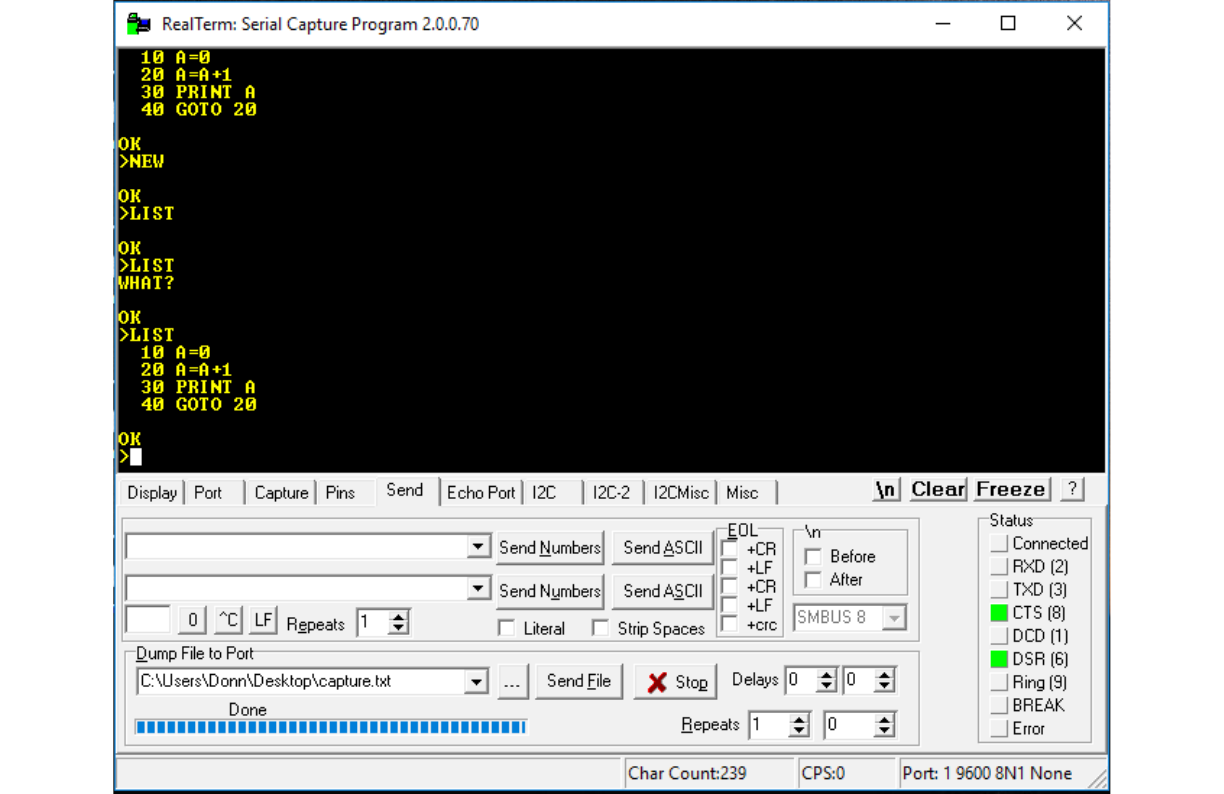
Use RUN to verify that the program works.
This concludes the discussion of running Tiny BASIC on the CPUville Z80 computer with Realterm in
Windows.
14
Using Tiny BASIC with Minicom in Linux
Open a terminal window and start Minicom, with the port set to 9600 baud with 8 data bits, one stop
bit, and no parity – the usual settings when operating the CPUville Z80 computer with the serial
interface. With the Tiny BASIC EPROM installed, connect the computer to power, and take it out of
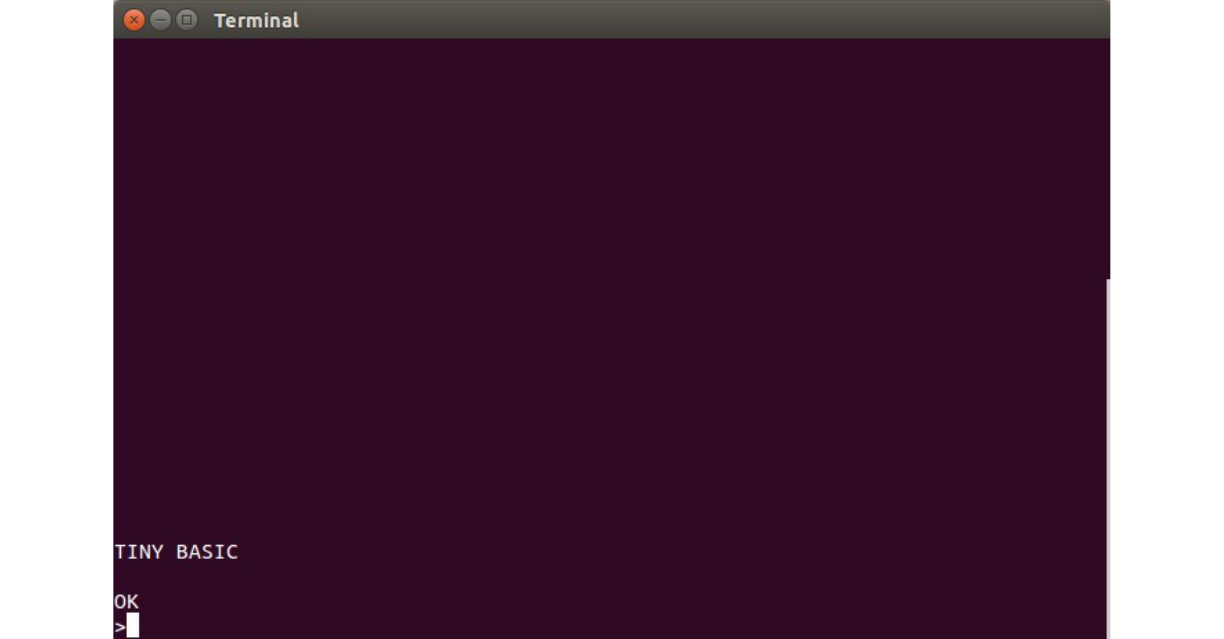
reset. The terminal window will show the Tiny BASIC greeting:
I will demonstrate Tiny BASIC programming, and how to save and load programs from the PC disk. A
full description of the Tiny BASIC programming language can be found in Appendix A.
To enter program statements, at the > prompt, type a number between 1 and 32767, a space, then a
program statement. When you have finished entering a program statement, hit Enter. If you make a
mistake, you can erase the line by entering the line number only at the Tiny BASIC prompt, then re-
enter the line number with the corrected statement. Using backspace does not seem to work to erase
your characters in the Minicom environment before you enter a line.
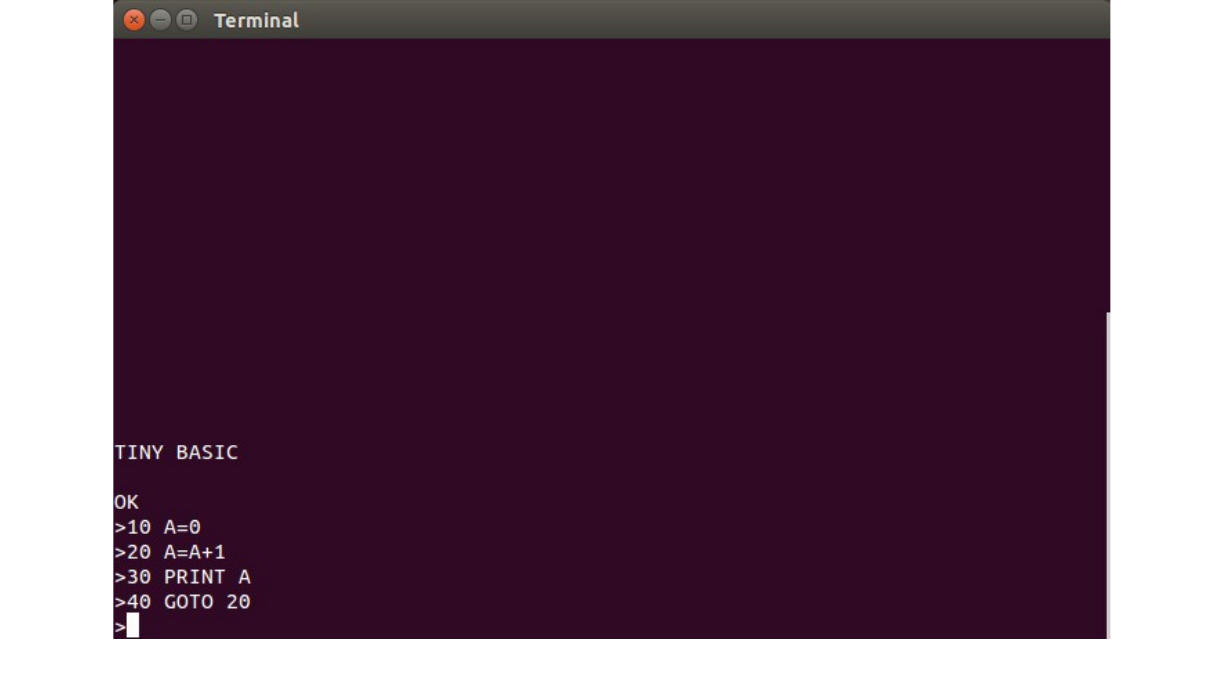
Here is a sample program the prints consecutive integers:
15
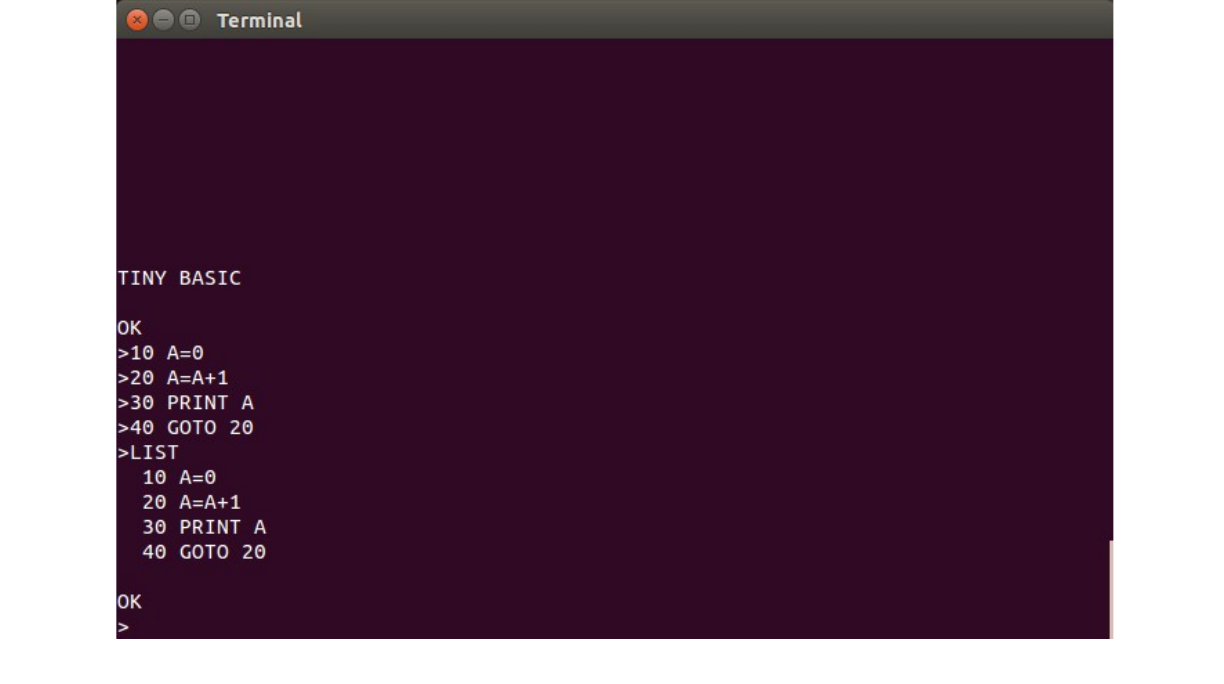
To see your program as it sits in Tiny BASIC's memory, type LIST:
16
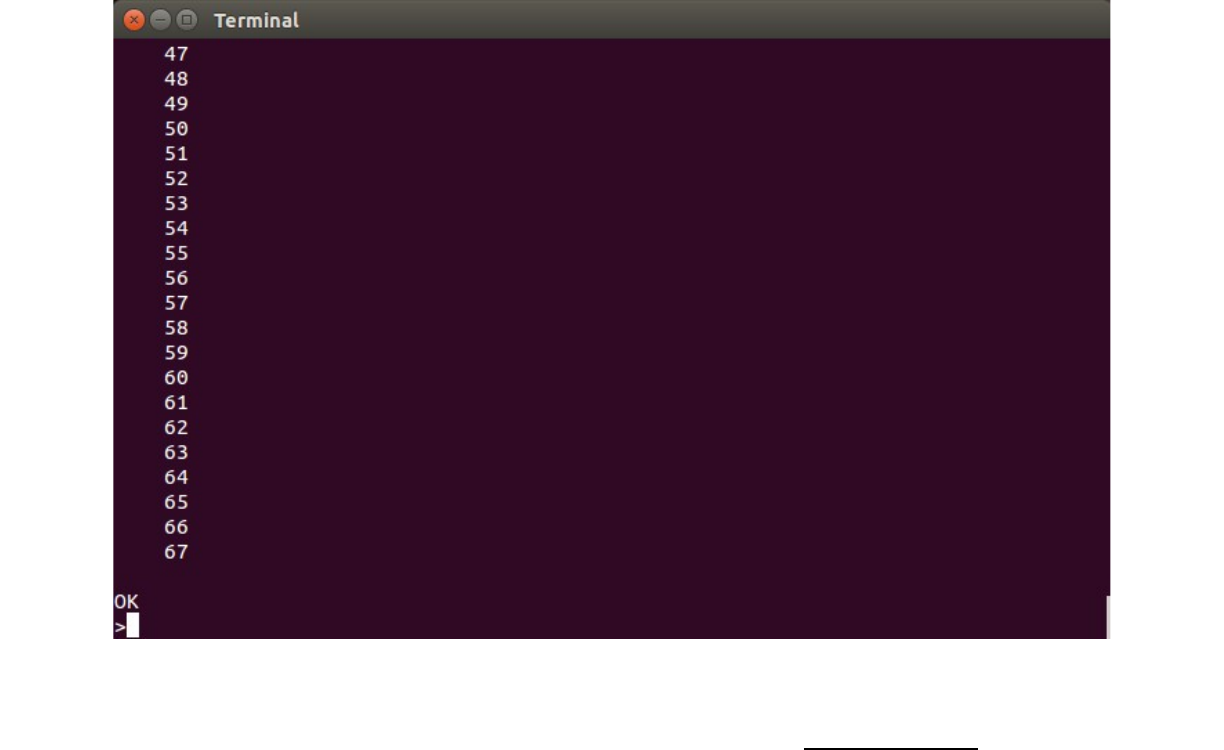
To run the program, type RUN at the prompt. The integers will scroll down the screen. To stop the
program, hit control-C:
17
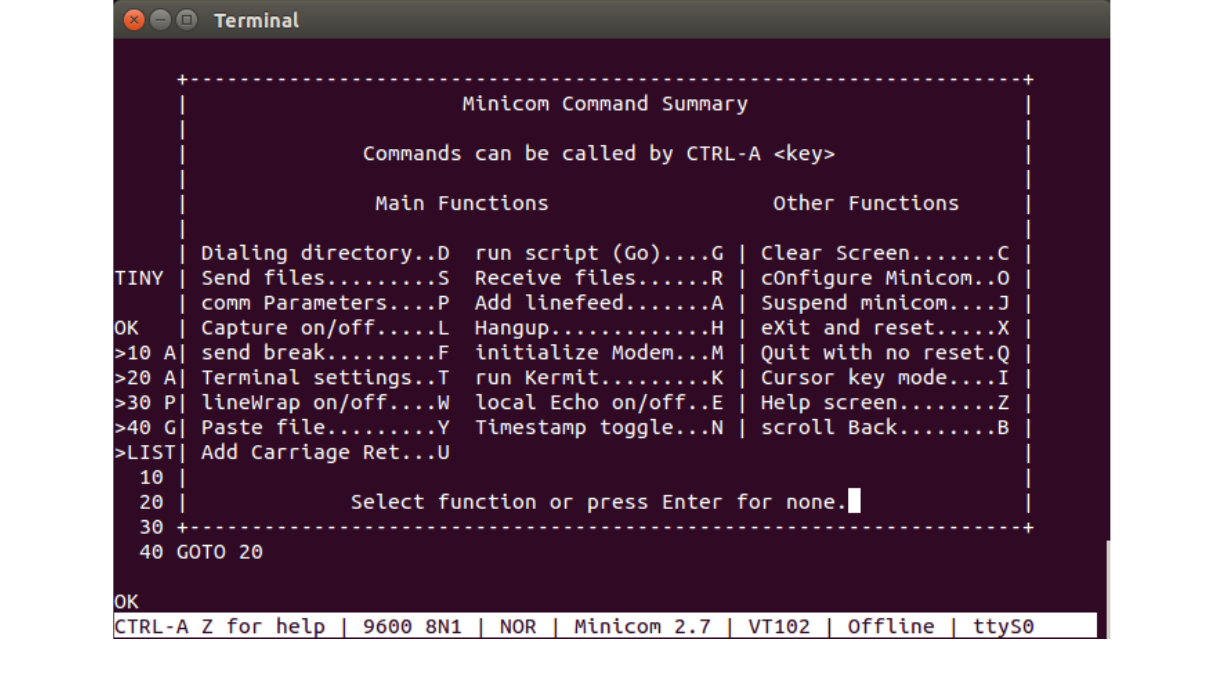
We will use the LIST command, with the Minicom capture function, to save a copy of the program to
the disk on the PC. Start by typing LIST at the Tiny BASIC prompt but do not press Enter. Hit control-
A then Z to get the Minicom Command Summary window:
18
Hit the L key to designate and activate a capture file:
19
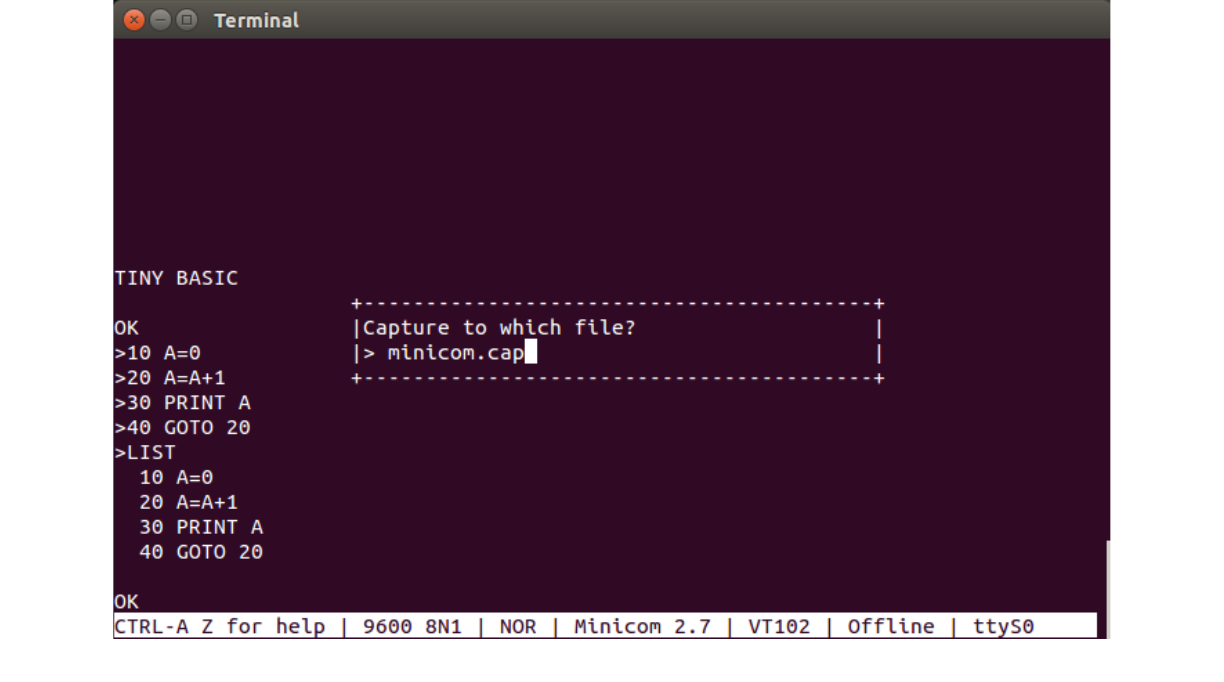
The default is minicom.cap, but you can use any name. Many people like to use the .bas extension for
BASIC language program files. The Minicom capture function will append the capture file if it already
exists, so for the purposes of saving a program you should either delete the old capture file first, or
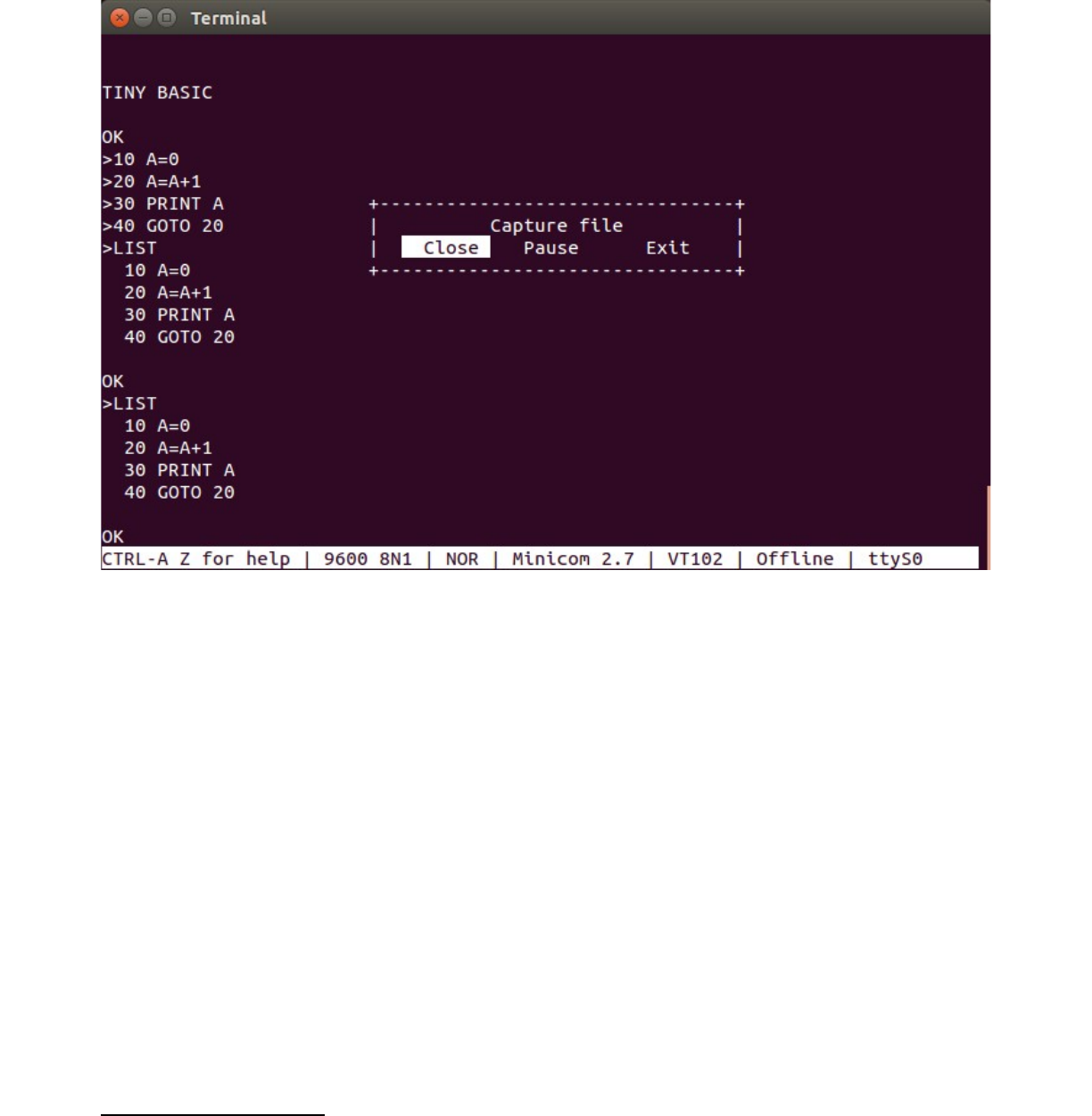
designate a new file. After you hit Enter the capture file is opened and the command summary closes.
Now hit Enter to perform the LIST command in Tiny BASIC. The program listing will be captured by
the file. Then, hit control-A then Z then L and close the capture file:
20
Note you can go directly to the capture file dialog by entering control-A then L, bypassing the Minicom
Command Summary.
Tiny BASIC sends text with carriage-return/linefeed characters at the end of each line (hex 0x0D,
0x0A). In Linux, which is derived from Unix, the convention is that lines in text files are terminated by
a newline character only. In ASCII, this is the same as the linefeed character, 0x0A. When the Tiny
BASIC program listing is saved, the Linux shell or the tty code strips out the carriage return characters.
However, Tiny BASIC needs the carriage return characters when it reads back the file. So, they need to
be put back into the capture file. There is a Linux utility that does this for us, called unix2dos3.
Open a second terminal window. Enter the command unix2dos followed by the name of the capture
file. To verify that you have the capture file, you can display it using the more command:
3 In Linux Debian-based system, the package that contains this utility is called dos2unix. It can be obtained from the
repositories by the command apt-get install dos2unix.
21
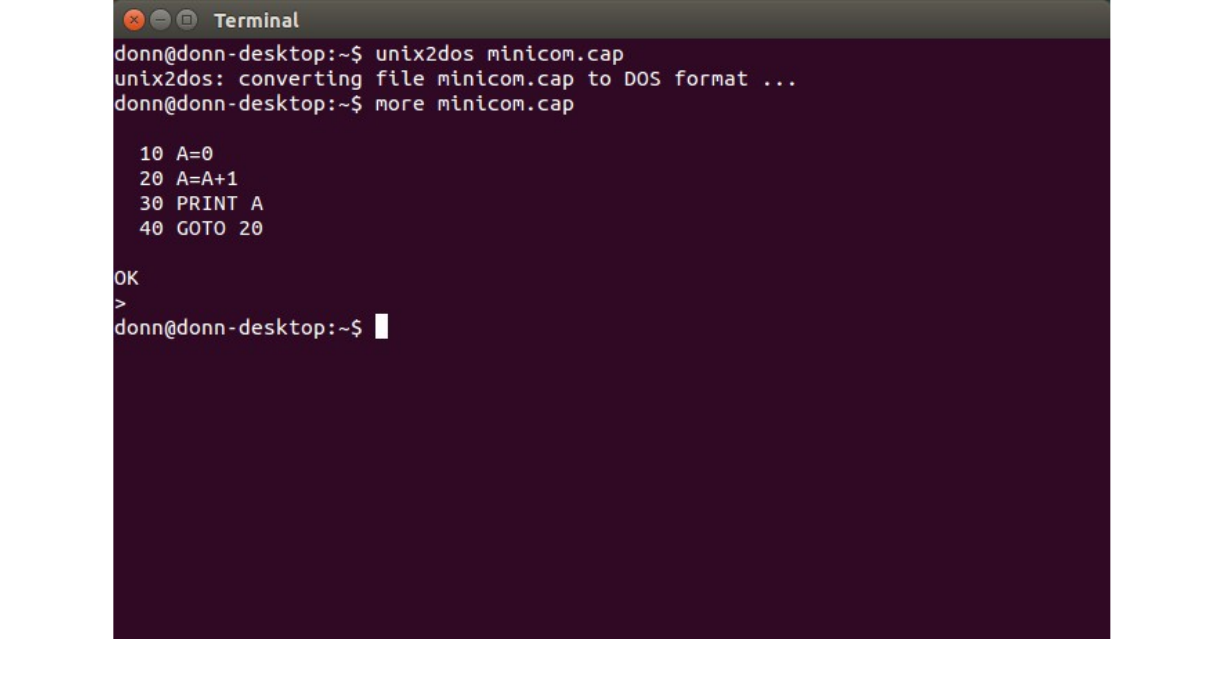
Note that the capture file contains the “OK” and the Tiny BASIC prompt “>” after the program listing.
These extra characters will cause Tiny BASIC to produce a WHAT error when you read back the file,
but this won't interfere with getting the program back. You can now close the second terminal window.
To read back the program file, we will use the Minicom Paste File function from the Command
Summary. But first, at the Tiny BASIC prompt, type NEW to erase the program from memory. Type
LIST to verify that the program is gone. Then type control-O. This will prevent Tiny BASIC from
echoing the incoming characters to the screen. Now type control-A then Z then Y, or just control-A then
Y to get to the Minicom Paste File command. You can navigate to the file, or hit Enter to get a space to
type in the name:
22
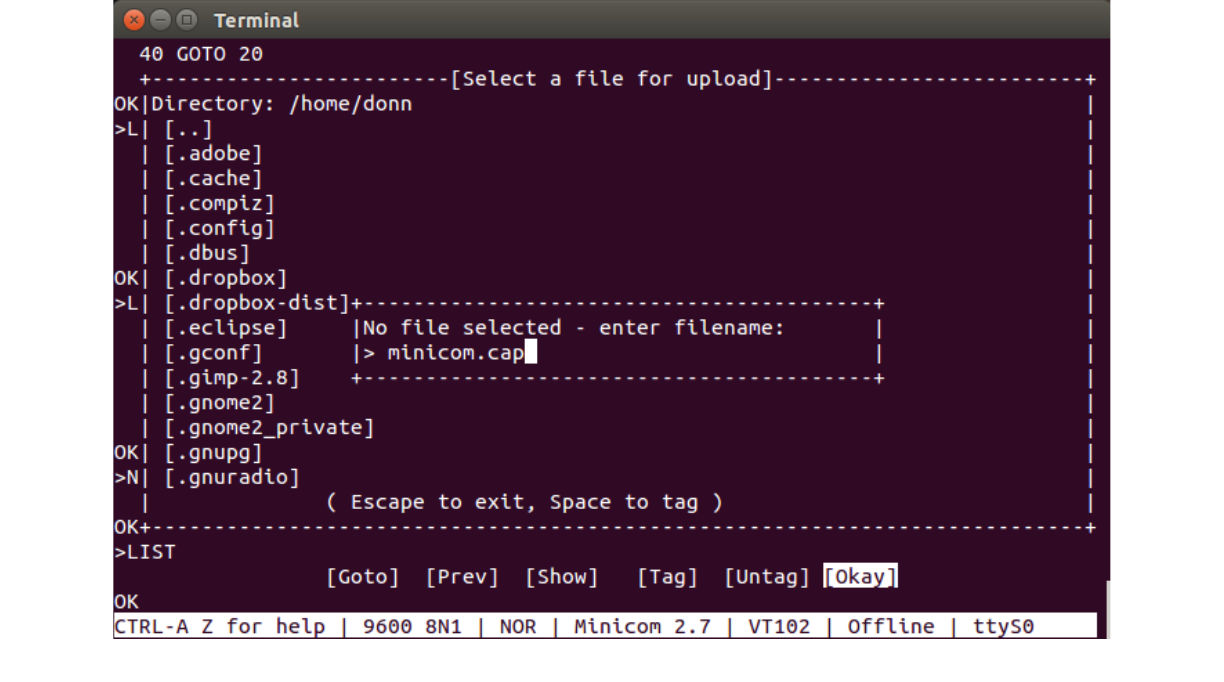
After the file name is entered, hit Enter to transfer the file. Now type control-O again to turn Tiny
BASIC's output back on. Hit Enter or type LIST. Tiny BASIC will show the WHAT error because of
the “OK” and “>” in the capture file, but just hit Enter again and you will get back to the Tiny BASIC
prompt and clear the error. Then type LIST and you will see that the program has been read back into
the Tiny BASIC memory:
23
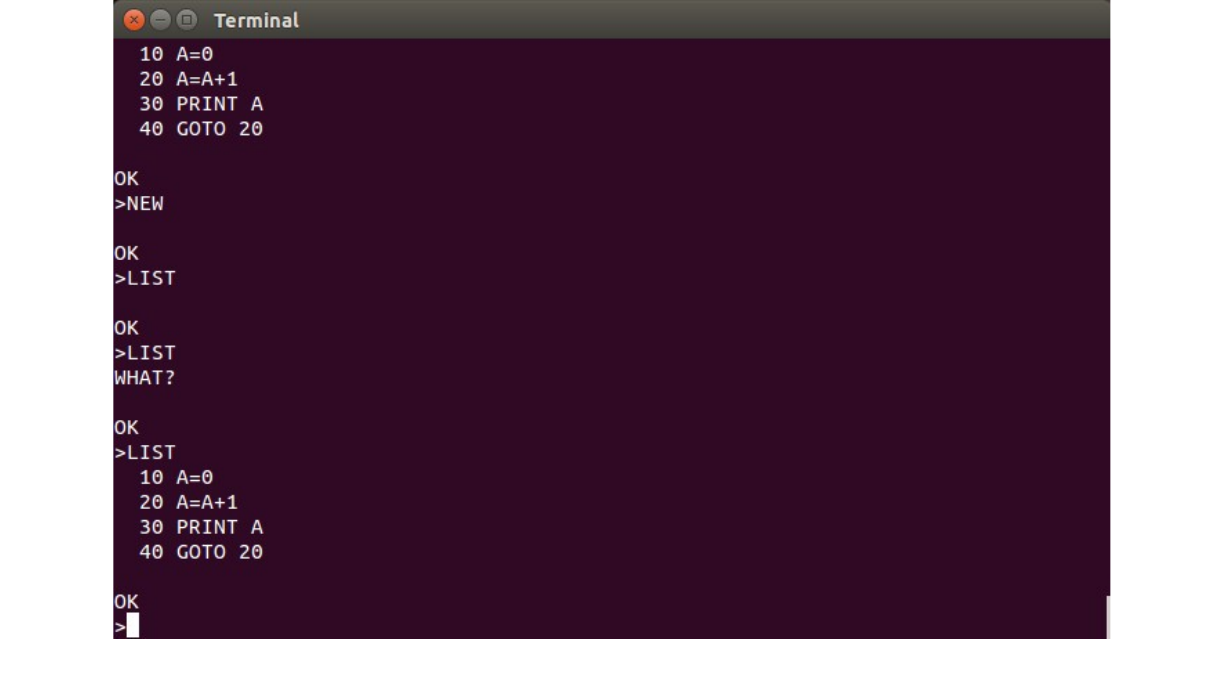
Enter RUN to verify that the program works.
This concludes the discussion of using Tiny BASIC with Minicom in Linux.
24

Appendix A: Tiny BASIC Language Description
What follows is the original description of the Tiny BASIC language taken from Li-Chen Wang's
article published in Dr. Dobb's Journal of Computer Calisthenics and Orthodontia, vol. 1, number 5,
May 1976, pages 12-15. This document can be found on-line at:
https://archive.org/details/dr_dobbs_journal_vol_01
The original text has been corrected in a few places for spelling and grammar errors. When procedures
needed to be adapted for Tiny BASIC on the CPUville Z80 computer, I have added explanatory text in
clearly marked boxes.
--Donn Stewart, November 2016
THE LANGUAGE
Numbers
All numbers are integers and must be less than 32767.
Variables
There are 26 variables denoted by letters A through Z. There is also
a single array @(I). The dimension of this array is set automatically
to make use of all the memory space that is left unused by the
program. (i.e., 0 through SIZE/2, see SIZE function below.)
Functions
There are 3 functions:
ABS(X) gives the absolute value of X.
RND(X) gives a random number between 1 and x (inclusive).
SIZE gives the number of bytes left unused by the program.
Arithmetic and Compare operators
/ divide.
25

* multiply.
- subtract.
+ add.
> greater than (compare).
< less than (compare).
= equal to (compare).
# not equal to (compare).
>= greater than or equal to (compare).
<= less than or equal to (compare).
+, -, *, and / operations result in a value between
-32767 and 32767. (-32768 is also allowed in some cases).
All compare operators result in a 1 if true and a 0 if not true.
Expressions
Expressions are formed with numbers, variables, and functions with
arithmetic and compare operators between them. + and - signs can also
he used at the beginning of an expression. The value of an expression
is evaluated from left to right, except that * and / are always done
first, and then + and -, and then compare operators. Parentheses can
also be used to alter the order of evaluation. Note that compare
operators can be used in any expression. For example:
10 LET A=(X>Y)*123+(X=Y)*456+(X<Y)*789
20 IF (U=1)*(V<2)+(U>V)*(U<99)*(V>3) PRINT "YES"
30 LET R=RND(100), A=(R>3)*(R>15)+(R>56)+(R>98)
In statement 10, A will be set to 123 if X>Y, to 456 if X=Y, and to
789 if X<Y. In statement 20, the "*" operator acts like a logical
AND, and the "+" operator acts like a logical OR. In statement 30, Y
will be a random number between 0 and 4 with a prescribed probability
distribution of: 3% of being 0, 15-3=12% of being 1, 56-15=41% of
being 2, 98-56=42% of being 3, and 100-98=2% of being 4.
Direct Commands
All the commands described later can he used as direct commands
except the following three, they can only be used as direct commands
and not as part of a statement:
RUN
26

will start to execute the program starting at the lowest statement
number.
LIST
will print out all the statements in numerical order.
LIST 120
will print out all the statements starting at statement 120.
NEW
will delete all statements.
Abbreviations and blanks
You may use blanks freely, except that numbers, command key words,
and function names can not have embedded blanks. You may truncate all
command keywords and function names and follow them by a period.
“P.", "PR.", "PRI.", and "PRIN." all stand for "PRINT". Also the word
LET in LET command can be omitted. The "shortest" abbreviation for
all keywords are as follows:
A.= ABS F.= FOR GOS.= GOSUB G.= GOTO
IF = IF IN.= INPUT L.= LIST N.= NEW
N.= NEXT P.= PRINT REM = REMARK R.= RETURN
R.= RND R.= RUN S.= SIZE S.= STEP
S.=STOP TO=TO
Implied = LET
Statements
A statement consists of a statement number of between 1 and 32767
followed by one or more commands. Commands in the same statement are
separated by a semi-colon ";". "GOTO", "STOP", and "RETURN" commands
must be the last command in any given statement.
27

Commands
Tiny BASIC commands are listed below with examples. Remember that
commands can be concatenated with semi-colons. In order to store the
statement, you must also have a statement number in front of the
commands. The statement number and the concatenation are not shown in
the examples.
REM or REMARK Command
REM anything goes
This line will be ignored by TBI.
LET Command
LET A=234-5*6, A=A/2. X=A-100, @(X+9)=A-1
will set the variable A to the value of the expression 234-5*6 (i.e.,
204), set the variable A (again) to the value of the expression A/2
(i.e., 102), set the variable X to the value of the expression A-100
(i.e., 2), and then set the variable @(11) to 101 (where 11 is the
value of the expression X+9 and 101 is the value of the expression A-
1).
LET U=A#B, V=(A>B) *X+(A<B)*Y
will set the variable U to either 1 or 0 depending on whether A is
not equal to or is equal to B; and set the variable V to either X. Y
or 0 depending on whether A is greater than, less than, or equal to
B.
PRINT Command
PRINT
will cause a carriage-return (CR) and a line-feed (LF) on the output
device.
PRINT A*3+1, "ABC 123 !@#", ' CBA '
28

will print the value of the expression A*3+1 (i.e., 307), the string
of characters "ABC 123 !@#", and the string " CBA ", and then a CR-
LF. Note that either single or double quotes can be used to quote
strings, but pairs must be matched.
PRINT A*3+1, "ABC 123 !@#", ' CBA ',
will produce the same output as before, except that there is no CR-LF
after the last item is printed. This enables the program to continue
printing on the same line with another "PRINT".
PRINT A, B, #3, C, D, 2, #10, F, G
will print the values of A and B in 6 spaces, the values of C, D, and
E in 3 spaces, and the values of F and G in 10 spaces. If there are
not enough spaces specified for a given value to be printed, the
value will be printed with enough spaces anyway.
PRINT 'ABC',-,'XXX'4
will print the string "ABC", a CR without a LF, and then the
string "XXX" (over the ABC) followed by a CR-LF.
INPUT Command
INPUT A, B
When this command is executed, Tiny BASIC will print “A:“ and wait to
read in an expression from the input device. The variable A will be
set to the value of this expression. Then "B:" is printed and
variable B is set to the value of the next expression read from the
input device. Note that not only numbers, but also expressions can be
read as input.
INPUT 'WHAT IS THE WEIGHT' A, "AND SIZE"B
This is the same as the command above, except the prompt "A:" is
replaced by "WHAT IS THE WEIGHT:“ and the prompt "B:" is replaced by
"AND SIZE:". Again, both single and double quotes can be used as long
as they are matched.
4 The minus sign '-' here and in the Input command description is intended to be a carriage return character, 0x0D, which
would cause the cursor to return to the beginning of the line for overtyping. Most video display terminals, and PCs
using terminal emulators, will not do true overtyping, just character replacement. Also, I have not found a way to enter a
carriage return into a Tiny BASIC PRINT command on Realterm or Minicom.
29

INPUT A, 'STRING', -, "ANOTHER STRING", B
The strings and the "-" have the same effect as in "PRINT.
IF Command
IF A<B LET X=3: PRINT 'THIS STRING'
will test the value of the expression A<B. If it is not zero (i.e.,
if it is true), the commands in the rest of this statement will be
executed. If the value of the expression is zero (i.e., if it is not
true), the rest of this statement will be skipped over and execution
continues at next statement. Note that the word "THEN" is not used.
GOTO Command
GOTO 120
will cause the execution to jump to statement 120. Note that GOTO
command cannot be followed by a semi-colon and other commands. It
must be ended with a CR.
GOTO A*10+B
will cause the execution to jump to a different statement number as
computed from the value of the expression.
GOSUB and RETURN Commands
GOSUB command is similar to GOTO command except that: a) the current
statement number and position within the statement is remembered; and
b) a semi-colon and other commands can follow it in the same
statement.
GOSUB 120
will cause the execution to jump to statement 120.
GOSUB A*10+B
30

will cause the execution to jump to different statements as computed
from the value of the expression A*10+B.
RETURN
A RETURN command must be the last command in a statement and followed
by a CR. When a RETURN command is encountered, it will cause the
execution to jump back to the command following the most recent GOSUB
command.
GOSUB can be nested. The depth of nesting is limited only by the
stack space.
FOR and NEXT Commands
FOR X=A+1 TO 3*B STEP C-1
The variable X is set to the value of the expression A+1. The values
of the expressions (not the expressions themselves) 3*B and C-1 are
remembered. The name of the variable X, the statement number and the
position of this command within the statement are also remembered.
Execution then continues the normal way until a NEXT command is
encountered.
The STEP can be positive, negative or even zero. The word STEP and
the expression following it can be omitted if the desired STEP is +1.
NEXT X
The name of the variable (X) is checked with that of the most recent
FOR command. If they do not agree, that FOR is terminated and the
next recent FOR is checked, etc. When a match is found, this variable
will be set to its current value plus the value of the STEP
expression saved by the FOR command. The updated value is then
compared with the value of the TO expression also saved by the FOR
command. If this is within the limit, execution will jump back to the
command following the FOR command. If this is outside the limit,
execution continues following the NEXT command itself.
FOR can he nested. The depth of nesting is limited only by the stack
space. If a new FOR command with the same control variable as that of
an old FOR command is encountered, the old FOR will be terminated
automatically.
31
STOP Command
STOP
This command stops the execution of the program and returns control
to direct commands from the input device. It can appear many times in
a program but must he the last command in any given statement. i.e.,
it cannot be followed by a semicolon and other commands.
Stopping the Execution
The execution of program or listing of program can be stopped by the
Control-C key on the input device.
Control of Output Device
The Control-O key on the input device can he used to turn the output
device ON and OFF. This is useful when you want to read in a program
punched on paper tape. To produce such a paper tape, type "LIST"
without CR. Turn on the paper tape punch and type a few Control-
Shift-P's and then a CR. When listing is finished, type more Control-
Shift-P's and turn off the punch.
32
To stop execution or listing of a program using Tiny BASIC on the CPUville Z80 computer with
Realterm and Windows, you will need to press the control-C button (designated ^C) on the panel
in the Send tab. In Minicom and Linux, control-C from the keyboard works fine.
To save a program to disk when running Tiny BASIC on the CPUville Z80 computer using
Realterm in Windows, type LIST without the CR (that is, the Enter key), and under the Capture tab
designate a file to capture the output. Hit Start Overwrite, then press Enter while in the terminal
window. When the listing has stopped, press the Stop button to close the capture file.
To save a program using Minicom in Linux, type LIST without the CR, and turn on a capture file
using the Minicom Command Summary menu (ctrl-A-Z-L, or more directly by ctrl-A-L). Then
press Enter. When the listing has stopped, use ctrl-A-L again to close the capture file. In Linux, the
capture file will lack the carriage return characters, because these are stripped out by the Linux
shell when creating a text file. To replace them (necessary when reading back the file into Tiny
BASIC), open a second terminal window, and use the command unix2dos followed by the name
of the capture file.

To read back such a paper tape, type "NEW", CR, and Control-O, then
turn on the paper tape reader. When the paper tape is read, turn the
reader off and type a Control-O again.
Error Report
There are only three error conditions in Tiny BASIC. The statement
with the error is printed out with a question mark inserted at the
point where the error is detected.
(1) WHAT? means it does not understand you. Example:
WHAT?
210 P?TINT "THIS" where PRINT is misstyped
WHAT?
260 LET A=B+3, C=(3+4?, X=4
(2) HOW? means it understands you but does not know how to do it.
HOW?
310 LET A=B*C?+2 where B*C is greater than 32767
HOW?
380 GOTO 412? where 412 does not exist
(3)SORRY means it understands you and knows how to do it but there is
not enough memory to do it.
33
To read a program into Tiny BASIC running on a CPUville Z80 using Realterm in Windows, type
“NEW”, Enter, and control-O. Then use the RealTerm Send File controls to send the file you
captured before. When you have finished sending the file type control-O again.
To read in a program using Minicom in Linux, type “NEW”, enter, and control-O. Then use the
Minicom Paste file function, accessed from the Minicom Command Summary menu (ctrl-A-Z-Y,
or more directly, ctrl-A-Y), to paste in the file you captured before. Remember, you have to
replace the carriage return characters in that file with the unix2dos command if you have not done
so already. Files in both the Windows and Linux environments will have the “OK” and Tiny
BASIC prompt characters in them from the capture, so Tiny BASIC will throw a WHAT? Error
when you first hit Enter after loading a program, but this clears the error, and LIST will show the
program to be intact.

Error Corrections
If you notice an error in typing before you hit the CR, you can
delete the last character by the Rub-Out key or delete the entire
line by the Alt-Mode key. Tiny BASIC will echo a back-slash for each
Rub-Out. Echo for Alt-Mode consists of a LF, a CR, and an up-arrow.
To correct a statement, you can retype the statement number and the
correct commands. Tiny BASIC will replace the old statement with the
new one.
To delete a statement, type the statement number and a CR only.
Verify the corrections by "LIST nnnn" and hit the Control-c key while
the line is being printed.
34

Appendix B: Tiny BASIC Assembly listing
1
8080 MACRO ASSEMBLER, VER 3.0 ERRORS = 0
+ 17:09 10/02/2016
+ PAGE 1
;
;Modified Nov 1 2016 by Donn Stewart for use in CPUville Z80 computer
;Changed UART (ACIA) port numbers to 3 for status, 2 for data in INIT, CHKIO, OUTC
;Status bit for read in CHKIO changed to 0x02
;Status bit for write in OUTC (actually OC3) changed to 0x01
;Changed UART initialization parameters in INIT
;Changed ORG statements at end of file to match system with 2K RAM
;Changes shown in BOLD type
;*************************************************************
;
; TINY BASIC FOR INTEL 8080
; VERSION 2.0
; BY LI-CHEN WANG
; MODIFIED AND TRANSLATED
; TO INTEL MNEMONICS
; BY ROGER RAUSKOLB
; 10 OCTOBER,1976
; @COPYLEFT
; ALL WRONGS RESERVED
;
;*************************************************************
;
; *** ZERO PAGE SUBROUTINES ***
;
; THE 8080 INSTRUCTION SET LETS YOU HAVE 8 ROUTINES IN LOW
; MEMORY THAT MAY BE CALLED BY RST N, N BEING 0 THROUGH 7.
; THIS IS A ONE BYTE INSTRUCTION AND HAS THE SAME POWER AS
; THE THREE BYTE INSTRUCTION CALL LLHH. TINY BASIC WILL
; USE RST 0 AS START AND RST 1 THROUGH RST 7 FOR
; THE SEVEN MOST FREQUENTLY USED SUBROUTINES.
; TWO OTHER SUBROUTINES (CRLF AND TSTNUM) ARE ALSO IN THIS
; SECTION. THEY CAN BE REACHED ONLY BY 3-BYTE CALLS.
;
DWA MACRO WHERE
1 DB (WHERE SHR 8) + 128
1 DB WHERE AND 0FFH
ENDM
;
0000 ORG 0H
0000 310010 START: LXI SP,STACK ;*** COLD START ***
0003 3EFF MVI A,0FFH
0005 C34206 JMP INIT
;
0008 E3 XTHL ;*** TSTC OR RST 1 ***
0009 EF RST 5 ;IGNORE BLANKS AND
000A BE CMP M ;TEST CHARACTER
000B C36800 JMP TC1 ;REST OF THIS IS AT TC1
;
000E 3E0D CRLF: MVI A,CR ;*** CRLF ***
;
0010 F5 PUSH PSW ;*** OUTC OR RST 2 ***
0011 3A0008 LDA OCSW ;PRINT CHARACTER ONLY
0014 B7 ORA A ;IF OCSW SWITCH IS ON
35

1
8080 MACRO ASSEMBLER, VER 3.0 ERRORS = 0
+ 17:09 10/02/2016
+ PAGE 2
0015 C36C06 JMP OC2 ;REST OF THIS IS AT OC2
;
0018 CD7103 CALL EXPR2 ;*** EXPR OR RST 3 ***
001B E5 PUSH H ;EVALUATE AN EXPRESSION
001C C32D03 JMP EXPR1 ;REST OF IT AT EXPR1
001F 57 DB 'W'
;
0020 7C MOV A,H ;*** COMP OR RST 4 ***
0021 BA CMP D ;COMPARE HL WITH DE
0022 C0 RNZ ;RETURN CORRECT C AND
0023 7D MOV A,L ;Z FLAGS
0024 BB CMP E ;BUT OLD A IS LOST
0025 C9 RET
0026 414E DB 'AN'
;
0028 1A SS1: LDAX D ;*** IGNBLK/RST 5 ***
0029 FE20 CPI 20H ;IGNORE BLANKS
002B C0 RNZ ;IN TEXT (WHERE DE->)
002C 13 INX D ;AND RETURN THE FIRST
002D C32800 JMP SS1 ;NON-BLANK CHAR. IN A
;
0030 F1 POP PSW ;*** FINISH/RST 6 ***
0031 CDB304 CALL FIN ;CHECK END OF COMMAND
0034 C3C604 JMP QWHAT ;PRINT "WHAT?" IF WRONG
0037 47 DB 'G'
;
0038 EF RST 5 ;*** TSTV OR RST 7 ***
0039 D640 SUI 40H ;TEST VARIABLES
003B D8 RC ;C:NOT A VARIABLE
003C C25800 JNZ TV1 ;NOT "@" ARRAY
003F 13 INX D ;IT IS THE "@" ARRAY
0040 CD1A04 CALL PARN ;@ SHOULD BE FOLLOWED
0043 29 DAD H ;BY (EXPR) AS ITS INDEX
0044 DA9F00 JC QHOW ;IS INDEX TOO BIG?
0047 D5 PUSH D ;WILL IT OVERWRITE
0048 EB XCHG ;TEXT?
0049 CD5904 CALL SIZE ;FIND SIZE OF FREE
004C E7 RST 4 ;AND CHECK THAT
004D DAF404 JC ASORRY ;IF SO, SAY "SORRY"
0050 21000F LXI H,VARBGN ;IF NOT GET ADDRESS
0053 CD7C04 CALL SUBDE ;OF @(EXPR) AND PUT IT
0056 D1 POP D ;IN HL
0057 C9 RET ;C FLAG IS CLEARED
0058 FE1B TV1: CPI 1BH ;NOT @, IS IT A TO Z?
005A 3F CMC ;IF NOT RETURN C FLAG
005B D8 RC
005C 13 INX D ;IF A THROUGH Z
005D 21000F LXI H,VARBGN ;COMPUTE ADDRESS OF
0060 07 RLC ;THAT VARIABLE
0061 85 ADD L ;AND RETURN IT IN HL
0062 6F MOV L,A ;WITH C FLAG CLEARED
36

1
8080 MACRO ASSEMBLER, VER 3.0 ERRORS = 0
+ 17:09 10/02/2016
+ PAGE 3
0063 3E00 MVI A,0
0065 8C ADC H
0066 67 MOV H,A
0067 C9 RET
;
;TSTC: XTHL ;*** TSTC OR RST 1 ***
; RST 5 ;THIS IS AT LOC. 8
; CMP M ;AND THEN JUMP HERE
0068 23 TC1: INX H ;COMPARE THE BYTE THAT
0069 CA7300 JZ TC2 ;FOLLOWS THE RST INST.
006C C5 PUSH B ;WITH THE TEXT (DE->)
006D 4E MOV C,M ;IF NOT =, ADD THE 2ND
006E 0600 MVI B,0 ;BYTE THAT FOLLOWS THE
0070 09 DAD B ;RST TO THE OLD PC
0071 C1 POP B ;I.E., DO A RELATIVE
0072 1B DCX D ;JUMP IF NOT =
0073 13 TC2: INX D ;IF =, SKIP THOSE BYTES
0074 23 INX H ;AND CONTINUE
0075 E3 XTHL
0076 C9 RET
;
0077 210000 TSTNUM: LXI H,0 ;*** TSTNUM ***
007A 44 MOV B,H ;TEST IF THE TEXT IS
007B EF RST 5 ;A NUMBER
007C FE30 TN1: CPI 30H ;IF NOT, RETURN 0 IN
007E D8 RC ;B AND HL
007F FE3A CPI 3AH ;IF NUMBERS, CONVERT
0081 D0 RNC ;TO BINARY IN HL AND
0082 3EF0 MVI A,0F0H ;SET B TO # OF DIGITS
0084 A4 ANA H ;IF H>255, THERE IS NO
0085 C29F00 JNZ QHOW ;ROOM FOR NEXT DIGIT
0088 04 INR B ;B COUNTS # OF DIGITS
0089 C5 PUSH B
008A 44 MOV B,H ;HL=10*HL+(NEW DIGIT)
008B 4D MOV C,L
008C 29 DAD H ;WHERE 10* IS DONE BY
008D 29 DAD H ;SHIFT AND ADD
008E 09 DAD B
008F 29 DAD H
0090 1A LDAX D ;AND (DIGIT) IS FROM
0091 13 INX D ;STRIPPING THE ASCII
0092 E60F ANI 0FH ;CODE
0094 85 ADD L
0095 6F MOV L,A
0096 3E00 MVI A,0
0098 8C ADC H
0099 67 MOV H,A
009A C1 POP B
009B 1A LDAX D ;DO THIS DIGIT AFTER
009C F27C00 JP TN1 ;DIGIT. S SAYS OVERFLOW
009F D5 QHOW: PUSH D ;*** ERROR "HOW?" ***
37

1
8080 MACRO ASSEMBLER, VER 3.0 ERRORS = 0
+ 17:09 10/02/2016
+ PAGE 4
00A0 11A600 AHOW: LXI D,HOW
00A3 C3CA04 JMP ERROR
00A6 484F573F HOW: DB 'HOW?'
00AA 0D DB CR
00AB 4F4B OK: DB 'OK'
00AD 0D DB CR
00AE 57484154 WHAT: DB 'WHAT?'
00B2 3F
00B3 0D DB CR
00B4 534F5252 SORRY: DB 'SORRY'
00B8 59
00B9 0D DB CR
;
;*************************************************************
;
; *** MAIN ***
;
; THIS IS THE MAIN LOOP THAT COLLECTS THE TINY BASIC PROGRAM
; AND STORES IT IN THE MEMORY.
;
; AT START, IT PRINTS OUT "(CR)OK(CR)", AND INITIALIZES THE
; STACK AND SOME OTHER INTERNAL VARIABLES. THEN IT PROMPTS
; ">" AND READS A LINE. IF THE LINE STARTS WITH A NON-ZERO
; NUMBER, THIS NUMBER IS THE LINE NUMBER. THE LINE NUMBER
; (IN 16 BIT BINARY) AND THE REST OF THE LINE (INCLUDING CR)
; IS STORED IN THE MEMORY. IF A LINE WITH THE SAME LINE
; NUMBER IS ALREADY THERE, IT IS REPLACED BY THE NEW ONE. IF
; THE REST OF THE LINE CONSISTS OF A CR ONLY, IT IS NOT STORED
; AND ANY EXISTING LINE WITH THE SAME LINE NUMBER IS DELETED.
;
; AFTER A LINE IS INSERTED, REPLACED, OR DELETED, THE PROGRAM
; LOOPS BACK AND ASKS FOR ANOTHER LINE. THIS LOOP WILL BE
; TERMINATED WHEN IT READS A LINE WITH ZERO OR NO LINE
; NUMBER; AND CONTROL IS TRANSFERED TO "DIRECT".
;
; TINY BASIC PROGRAM SAVE AREA STARTS AT THE MEMORY LOCATION
; LABELED "TXTBGN" AND ENDS AT "TXTEND". WE ALWAYS FILL THIS
; AREA STARTING AT "TXTBGN", THE UNFILLED PORTION IS POINTED
; BY THE CONTENT OF A MEMORY LOCATION LABELED "TXTUNF".
;
; THE MEMORY LOCATION "CURRNT" POINTS TO THE LINE NUMBER
; THAT IS CURRENTLY BEING INTERPRETED. WHILE WE ARE IN
; THIS LOOP OR WHILE WE ARE INTERPRETING A DIRECT COMMAND
; (SEE NEXT SECTION). "CURRNT" SHOULD POINT TO A 0.
;
00BA 310010 RSTART: LXI SP,STACK
00BD CD0E00 ST1: CALL CRLF ;AND JUMP TO HERE
00C0 11AB00 LXI D,OK ;DE->STRING
00C3 97 SUB A ;A=0
00C4 CD6005 CALL PRTSTG ;PRINT STRING UNTIL CR
00C7 21CE00 LXI H,ST2+1 ;LITERAL 0
38

1
8080 MACRO ASSEMBLER, VER 3.0 ERRORS = 0
+ 17:09 10/02/2016
+ PAGE 5
00CA 220108 SHLD CURRNT ;CURRENT->LINE # = 0
00CD 210000 ST2: LXI H,0
00D0 220908 SHLD LOPVAR
00D3 220308 SHLD STKGOS
00D6 3E3E ST3: MVI A,3EH ;PROMPT '>' AND
00D8 CDFA04 CALL GETLN ;READ A LINE
00DB D5 PUSH D ;DE->END OF LINE
00DC 11370F LXI D,BUFFER ;DE->BEGINNING OF LINE
00DF CD7700 CALL TSTNUM ;TEST IF IT IS A NUMBER
00E2 EF RST 5
00E3 7C MOV A,H ;HL=VALUE OF THE # OR
00E4 B5 ORA L ;0 IF NO # WAS FOUND
00E5 C1 POP B ;BC->END OF LINE
00E6 CA3807 JZ DIRECT
00E9 1B DCX D ;BACKUP DE AND SAVE
00EA 7C MOV A,H ;VALUE OF LINE # THERE
00EB 12 STAX D
00EC 1B DCX D
00ED 7D MOV A,L
00EE 12 STAX D
00EF C5 PUSH B ;BC,DE->BEGIN, END
00F0 D5 PUSH D
00F1 79 MOV A,C
00F2 93 SUB E
00F3 F5 PUSH PSW ;A=# OF BYTES IN LINE
00F4 CD3805 CALL FNDLN ;FIND THIS LINE IN SAVE
00F7 D5 PUSH D ;AREA, DE->SAVE AREA
00F8 C20B01 JNZ ST4 ;NZ:NOT FOUND, INSERT
00FB D5 PUSH D ;Z:FOUND, DELETE IT
00FC CD5405 CALL FNDNXT ;FIND NEXT LINE
;DE->NEXT LINE
00FF C1 POP B ;BC->LINE TO BE DELETED
0100 2A1508 LHLD TXTUNF ;HL->UNFILLED SAVE AREA
0103 CDE505 CALL MVUP ;MOVE UP TO DELETE
0106 60 MOV H,B ;TXTUNF->UNFILLED AREA
0107 69 MOV L,C
0108 221508 SHLD TXTUNF ;UPDATE
010B C1 ST4: POP B ;GET READY TO INSERT
010C 2A1508 LHLD TXTUNF ;BUT FIRST CHECK IF
010F F1 POP PSW ;THE LENGTH OF NEW LINE
0110 E5 PUSH H ;IS 3 (LINE # AND CR)
0111 FE03 CPI 3 ;THEN DO NOT INSERT
0113 CABA00 JZ RSTART ;MUST CLEAR THE STACK
0116 85 ADD L ;COMPUTE NEW TXTUNF
0117 6F MOV L,A
0118 3E00 MVI A,0
011A 8C ADC H
011B 67 MOV H,A ;HL->NEW UNFILLED AREA
011C 11000F LXI D,TXTEND ;CHECK TO SEE IF THERE
011F E7 RST 4 ;IS ENOUGH SPACE
0120 D2F304 JNC QSORRY ;SORRY, NO ROOM FOR IT
39

1
8080 MACRO ASSEMBLER, VER 3.0 ERRORS = 0
+ 17:09 10/02/2016
+ PAGE 6
0123 221508 SHLD TXTUNF ;OK, UPDATE TXTUNF
0126 D1 POP D ;DE->OLD UNFILLED AREA
0127 CDEE05 CALL MVDOWN
012A D1 POP D ;DE->BEGIN, HL->END
012B E1 POP H
012C CDE505 CALL MVUP ;MOVE NEW LINE TO SAVE
012F C3D600 JMP ST3 ;AREA
;
;*************************************************************
;
; WHAT FOLLOWS IS THE CODE TO EXECUTE DIRECT AND STATEMENT
; COMMANDS. CONTROL IS TRANSFERED TO THESE POINTS VIA THE
; COMMAND TABLE LOOKUP CODE OF 'DIRECT' AND 'EXEC' IN LAST
; SECTION. AFTER THE COMMAND IS EXECUTED, CONTROL IS
; TRANSFERED TO OTHERS SECTIONS AS FOLLOWS:
;
; FOR 'LIST', 'NEW', AND 'STOP': GO BACK TO 'RSTART'
; FOR 'RUN': GO EXECUTE THE FIRST STORED LINE IF ANY, ELSE
; GO BACK TO 'RSTART'.
; FOR 'GOTO' AND 'GOSUB': GO EXECUTE THE TARGET LINE.
; FOR 'RETURN' AND 'NEXT': GO BACK TO SAVED RETURN LINE.
; FOR ALL OTHERS: IF 'CURRENT' -> 0, GO TO 'RSTART', ELSE
; GO EXECUTE NEXT COMMAND. (THIS IS DONE IN 'FINISH'.)
;*************************************************************
;
; *** NEW *** STOP *** RUN (& FRIENDS) *** & GOTO ***
;
; 'NEW(CR)' SETS 'TXTUNF' TO POINT TO 'TXTBGN'
;
; 'STOP(CR)' GOES BACK TO 'RSTART'
;
; 'RUN(CR)' FINDS THE FIRST STORED LINE, STORE ITS ADDRESS (IN
; 'CURRENT'), AND START EXECUTE IT. NOTE THAT ONLY THOSE
; COMMANDS IN TAB2 ARE LEGAL FOR STORED PROGRAM.
;
; THERE ARE 3 MORE ENTRIES IN 'RUN':
; 'RUNNXL' FINDS NEXT LINE, STORES ITS ADDR. AND EXECUTES IT.
; 'RUNTSL' STORES THE ADDRESS OF THIS LINE AND EXECUTES IT.
; 'RUNSML' CONTINUES THE EXECUTION ON SAME LINE.
;
; 'GOTO EXPR(CR)' EVALUATES THE EXPRESSION, FIND THE TARGET
; LINE, AND JUMP TO 'RUNTSL' TO DO IT.
;
0132 CDC204 NEW: CALL ENDCHK ;*** NEW(CR) ***
0135 211708 LXI H,TXTBGN
0138 221508 SHLD TXTUNF
;
013B CDC204 STOP: CALL ENDCHK ;*** STOP(CR) ***
013E C3BA00 JMP RSTART
;
0141 CDC204 RUN: CALL ENDCHK ;*** RUN(CR) ***
40

1
8080 MACRO ASSEMBLER, VER 3.0 ERRORS = 0
+ 17:09 10/02/2016
+ PAGE 7
0144 111708 LXI D,TXTBGN ;FIRST SAVED LINE
;
0147 210000 RUNNXL: LXI H,0 ;*** RUNNXL ***
014A CD4005 CALL FNDLP ;FIND WHATEVER LINE #
014D DABA00 JC RSTART ;C:PASSED TXTUNF, QUIT
;
0150 EB RUNTSL: XCHG ;*** RUNTSL ***
0151 220108 SHLD CURRNT ;SET 'CURRENT'->LINE #
0154 EB XCHG
0155 13 INX D ;BUMP PASS LINE #
0156 13 INX D
;
0157 CD8406 RUNSML: CALL CHKIO ;*** RUNSML ***
015A 21BD06 LXI H,TAB2-1 ;FIND COMMAND IN TAB2
015D C33B07 JMP EXEC ;AND EXECUTE IT
;
0160 DF GOTO: RST 3 ;*** GOTO EXPR ***
0161 D5 PUSH D ;SAVE FOR ERROR ROUTINE
0162 CDC204 CALL ENDCHK ;MUST FIND A CR
0165 CD3805 CALL FNDLN ;FIND THE TARGET LINE
0168 C2A000 JNZ AHOW ;NO SUCH LINE #
016B F1 POP PSW ;CLEAR THE PUSH DE
016C C35001 JMP RUNTSL ;GO DO IT
;
;*************************************************************
;
; *** LIST *** & PRINT ***
;
; LIST HAS TWO FORMS:
; 'LIST(CR)' LISTS ALL SAVED LINES
; 'LIST #(CR)' START LIST AT THIS LINE #
; YOU CAN STOP THE LISTING BY CONTROL C KEY
;
; PRINT COMMAND IS 'PRINT ....;' OR 'PRINT ....(CR)'
; WHERE '....' IS A LIST OF EXPRESIONS, FORMATS, BACK-
; ARROWS, AND STRINGS. THESE ITEMS ARE SEPERATED BY COMMAS.
;
; A FORMAT IS A POUND SIGN FOLLOWED BY A NUMBER. IT CONTROLS
; THE NUMBER OF SPACES THE VALUE OF A EXPRESION IS GOING TO
; BE PRINTED. IT STAYS EFFECTIVE FOR THE REST OF THE PRINT
; COMMAND UNLESS CHANGED BY ANOTHER FORMAT. IF NO FORMAT IS
; SPECIFIED, 6 POSITIONS WILL BE USED.
;
; A STRING IS QUOTED IN A PAIR OF SINGLE QUOTES OR A PAIR OF
; DOUBLE QUOTES.
;
; A BACK-ARROW MEANS GENERATE A (CR) WITHOUT (LF)
;
; A (CRLF) IS GENERATED AFTER THE ENTIRE LIST HAS BEEN
; PRINTED OR IF THE LIST IS A NULL LIST. HOWEVER IF THE LIST
; ENDED WITH A COMMA, NO (CRLF) IS GENERATED.
41

1
8080 MACRO ASSEMBLER, VER 3.0 ERRORS = 0
+ 17:09 10/02/2016
+ PAGE 8
;
016F CD7700 LIST: CALL TSTNUM ;TEST IF THERE IS A #
0172 CDC204 CALL ENDCHK ;IF NO # WE GET A 0
0175 CD3805 CALL FNDLN ;FIND THIS OR NEXT LINE
0178 DABA00 LS1: JC RSTART ;C:PASSED TXTUNF
017B CDD205 CALL PRTLN ;PRINT THE LINE
017E CD8406 CALL CHKIO ;STOP IF HIT CONTROL-C
0181 CD4005 CALL FNDLP ;FIND NEXT LINE
0184 C37801 JMP LS1 ;AND LOOP BACK
;
0187 0E06 PRINT: MVI C,6 ;C = # OF SPACES
0189 CF RST 1 ;IF NULL LIST & ";"
018A 3B DB 3BH
018B 06 DB PR2-$-1
018C CD0E00 CALL CRLF ;GIVE CR-LF AND
018F C35701 JMP RUNSML ;CONTINUE SAME LINE
0192 CF PR2: RST 1 ;IF NULL LIST (CR)
0193 0D DB CR
0194 06 DB PR0-$-1
0195 CD0E00 CALL CRLF ;ALSO GIVE CR-LF AND
0198 C34701 JMP RUNNXL ;GO TO NEXT LINE
019B CF PR0: RST 1 ;ELSE IS IT FORMAT?
019C 23 DB '#'
019D 05 DB PR1-$-1
019E DF RST 3 ;YES, EVALUATE EXPR.
019F 4D MOV C,L ;AND SAVE IT IN C
01A0 C3A901 JMP PR3 ;LOOK FOR MORE TO PRINT
01A3 CD6C05 PR1: CALL QTSTG ;OR IS IT A STRING?
01A6 C3B601 JMP PR8 ;IF NOT, MUST BE EXPR.
01A9 CF PR3: RST 1 ;IF ",", GO FIND NEXT
01AA 2C DB ','
01AB 06 DB PR6-$-1
01AC CDB304 CALL FIN ;IN THE LIST.
01AF C39B01 JMP PR0 ;LIST CONTINUES
01B2 CD0E00 PR6: CALL CRLF ;LIST ENDS
01B5 F7 RST 6
01B6 DF PR8: RST 3 ;EVALUATE THE EXPR
01B7 C5 PUSH B
01B8 CD9205 CALL PRTNUM ;PRINT THE VALUE
01BB C1 POP B
01BC C3A901 JMP PR3 ;MORE TO PRINT?
;
;*************************************************************
;
; *** GOSUB *** & RETURN ***
;
; 'GOSUB EXPR;' OR 'GOSUB EXPR (CR)' IS LIKE THE 'GOTO'
; COMMAND, EXCEPT THAT THE CURRENT TEXT POINTER, STACK POINTER
; ETC. ARE SAVE SO THAT EXECUTION CAN BE CONTINUED AFTER THE
; SUBROUTINE 'RETURN'. IN ORDER THAT 'GOSUB' CAN BE NESTED
; (AND EVEN RECURSIVE), THE SAVE AREA MUST BE STACKED.
42

1
8080 MACRO ASSEMBLER, VER 3.0 ERRORS = 0
+ 17:09 10/02/2016
+ PAGE 9
; THE STACK POINTER IS SAVED IN 'STKGOS', THE OLD 'STKGOS' IS
; SAVED IN THE STACK. IF WE ARE IN THE MAIN ROUTINE, 'STKGOS'
; IS ZERO (THIS WAS DONE BY THE "MAIN" SECTION OF THE CODE),
; BUT WE STILL SAVE IT AS A FLAG FOR NO FURTHER 'RETURN'S.
;
; 'RETURN(CR)' UNDOS EVERYTHING THAT 'GOSUB' DID, AND THUS
; RETURN THE EXECUTION TO THE COMMAND AFTER THE MOST RECENT
; 'GOSUB'. IF 'STKGOS' IS ZERO, IT INDICATES THAT WE
; NEVER HAD A 'GOSUB' AND IS THUS AN ERROR.
;
01BF CD1906 GOSUB: CALL PUSHA ;SAVE THE CURRENT "FOR"
01C2 DF RST 3 ;PARAMETERS
01C3 D5 PUSH D ;AND TEXT POINTER
01C4 CD3805 CALL FNDLN ;FIND THE TARGET LINE
01C7 C2A000 JNZ AHOW ;NOT THERE. SAY "HOW?"
01CA 2A0108 LHLD CURRNT ;FOUND IT, SAVE OLD
01CD E5 PUSH H ;'CURRNT' OLD 'STKGOS'
01CE 2A0308 LHLD STKGOS
01D1 E5 PUSH H
01D2 210000 LXI H,0 ;AND LOAD NEW ONES
01D5 220908 SHLD LOPVAR
01D8 39 DAD SP
01D9 220308 SHLD STKGOS
01DC C35001 JMP RUNTSL ;THEN RUN THAT LINE
01DF CDC204 RETURN: CALL ENDCHK ;THERE MUST BE A CR
01E2 2A0308 LHLD STKGOS ;OLD STACK POINTER
01E5 7C MOV A,H ;0 MEANS NOT EXIST
01E6 B5 ORA L
01E7 CAC604 JZ QWHAT ;SO, WE SAY: "WHAT?"
01EA F9 SPHL ;ELSE, RESTORE IT
01EB E1 POP H
01EC 220308 SHLD STKGOS ;AND THE OLD 'STKGOS'
01EF E1 POP H
01F0 220108 SHLD CURRNT ;AND THE OLD 'CURRNT'
01F3 D1 POP D ;OLD TEXT POINTER
01F4 CDFD05 CALL POPA ;OLD "FOR" PARAMETERS
01F7 F7 RST 6 ;AND WE ARE BACK HOME
;
;*************************************************************
;
; *** FOR *** & NEXT ***
;
; 'FOR' HAS TWO FORMS:
; 'FOR VAR=EXP1 TO EXP2 STEP EXP3' AND 'FOR VAR=EXP1 TO EXP2'
; THE SECOND FORM MEANS THE SAME THING AS THE FIRST FORM WITH
; EXP3=1. (I.E., WITH A STEP OF +1.)
; TBI WILL FIND THE VARIABLE VAR, AND SET ITS VALUE TO THE
; CURRENT VALUE OF EXP1. IT ALSO EVALUATES EXP2 AND EXP3
; AND SAVE ALL THESE TOGETHER WITH THE TEXT POINTER ETC. IN
; THE 'FOR' SAVE AREA, WHICH CONSISTS OF 'LOPVAR', 'LOPINC',
; 'LOPLMT', 'LOPLN', AND 'LOPPT'. IF THERE IS ALREADY SOME-
43

1
8080 MACRO ASSEMBLER, VER 3.0 ERRORS = 0
+ 17:09 10/02/2016
+ PAGE 10
; THING IN THE SAVE AREA (THIS IS INDICATED BY A NON-ZERO
; 'LOPVAR'), THEN THE OLD SAVE AREA IS SAVED IN THE STACK
; BEFORE THE NEW ONE OVERWRITES IT.
; TBI WILL THEN DIG IN THE STACK AND FIND OUT IF THIS SAME
; VARIABLE WAS USED IN ANOTHER CURRENTLY ACTIVE 'FOR' LOOP.
; IF THAT IS THE CASE, THEN THE OLD 'FOR' LOOP IS DEACTIVATED.
; (PURGED FROM THE STACK..)
;
; 'NEXT VAR' SERVES AS THE LOGICAL (NOT NECESSARILLY PHYSICAL)
; END OF THE 'FOR' LOOP. THE CONTROL VARIABLE VAR. IS CHECKED
; WITH THE 'LOPVAR'. IF THEY ARE NOT THE SAME, TBI DIGS IN
; THE STACK TO FIND THE RIGHT ONE AND PURGES ALL THOSE THAT
; DID NOT MATCH. EITHER WAY, TBI THEN ADDS THE 'STEP' TO
; THAT VARIABLE AND CHECK THE RESULT WITH THE LIMIT. IF IT
; IS WITHIN THE LIMIT, CONTROL LOOPS BACK TO THE COMMAND
; FOLLOWING THE 'FOR'. IF OUTSIDE THE LIMIT, THE SAVE AREA
; IS PURGED AND EXECUTION CONTINUES.
;
01F8 CD1906 FOR: CALL PUSHA ;SAVE THE OLD SAVE AREA
01FB CDA004 CALL SETVAL ;SET THE CONTROL VAR.
01FE 2B DCX H ;HL IS ITS ADDRESS
01FF 220908 SHLD LOPVAR ;SAVE THAT
0202 211307 LXI H,TAB5-1 ;USE 'EXEC' TO LOOK
0205 C33B07 JMP EXEC ;FOR THE WORD 'TO'
0208 DF FR1: RST 3 ;EVALUATE THE LIMIT
0209 220D08 SHLD LOPLMT ;SAVE THAT
020C 211907 LXI H,TAB6-1 ;USE 'EXEC' TO LOOK
020F C33B07 JMP EXEC ;FOR THE WORD 'STEP'
0212 DF FR2: RST 3 ;FOUND IT, GET STEP
0213 C31902 JMP FR4
0216 210100 FR3: LXI H,1H ;NOT FOUND, SET TO 1
0219 220B08 FR4: SHLD LOPINC ;SAVE THAT TOO
021C 2A0108 FR5: LHLD CURRNT ;SAVE CURRENT LINE #
021F 220F08 SHLD LOPLN
0222 EB XCHG ;AND TEXT POINTER
0223 221108 SHLD LOPPT
0226 010A00 LXI B,0AH ;DIG INTO STACK TO
0229 2A0908 LHLD LOPVAR ;FIND 'LOPVAR'
022C EB XCHG
022D 60 MOV H,B
022E 68 MOV L,B ;HL=0 NOW
022F 39 DAD SP ;HERE IS THE STACK
0230 3E DB 3EH
0231 09 FR7: DAD B ;EACH LEVEL IS 10 DEEP
0232 7E MOV A,M ;GET THAT OLD 'LOPVAR'
0233 23 INX H
0234 B6 ORA M
0235 CA5202 JZ FR8 ;0 SAYS NO MORE IN IT
0238 7E MOV A,M
0239 2B DCX H
023A BA CMP D ;SAME AS THIS ONE?
44

1
8080 MACRO ASSEMBLER, VER 3.0 ERRORS = 0
+ 17:09 10/02/2016
+ PAGE 11
023B C23102 JNZ FR7
023E 7E MOV A,M ;THE OTHER HALF?
023F BB CMP E
0240 C23102 JNZ FR7
0243 EB XCHG ;YES, FOUND ONE
0244 210000 LXI H,0H
0247 39 DAD SP ;TRY TO MOVE SP
0248 44 MOV B,H
0249 4D MOV C,L
024A 210A00 LXI H,0AH
024D 19 DAD D
024E CDEE05 CALL MVDOWN ;AND PURGE 10 WORDS
0251 F9 SPHL ;IN THE STACK
0252 2A1108 FR8: LHLD LOPPT ;JOB DONE, RESTORE DE
0255 EB XCHG
0256 F7 RST 6 ;AND CONTINUE
;
0257 FF NEXT: RST 7 ;GET ADDRESS OF VAR.
0258 DAC604 JC QWHAT ;NO VARIABLE, "WHAT?"
025B 220508 SHLD VARNXT ;YES, SAVE IT
025E D5 NX0: PUSH D ;SAVE TEXT POINTER
025F EB XCHG
0260 2A0908 LHLD LOPVAR ;GET VAR. IN 'FOR'
0263 7C MOV A,H
0264 B5 ORA L ;0 SAYS NEVER HAD ONE
0265 CAC704 JZ AWHAT ;SO WE ASK: "WHAT?"
0268 E7 RST 4 ;ELSE WE CHECK THEM
0269 CA7602 JZ NX3 ;OK, THEY AGREE
026C D1 POP D ;NO, LET'S SEE
026D CDFD05 CALL POPA ;PURGE CURRENT LOOP
0270 2A0508 LHLD VARNXT ;AND POP ONE LEVEL
0273 C35E02 JMP NX0 ;GO CHECK AGAIN
0276 5E NX3: MOV E,M ;COME HERE WHEN AGREED
0277 23 INX H
0278 56 MOV D,M ;DE=VALUE OF VAR.
0279 2A0B08 LHLD LOPINC
027C E5 PUSH H
027D 7C MOV A,H
027E AA XRA D
027F 7A MOV A,D
0280 19 DAD D ;ADD ONE STEP
0281 FA8802 JM NX4
0284 AC XRA H
0285 FAAA02 JM NX5
0288 EB NX4: XCHG
0289 2A0908 LHLD LOPVAR ;PUT IT BACK
028C 73 MOV M,E
028D 23 INX H
028E 72 MOV M,D
028F 2A0D08 LHLD LOPLMT ;HL->LIMIT
0292 F1 POP PSW ;OLD HL
45

1
8080 MACRO ASSEMBLER, VER 3.0 ERRORS = 0
+ 17:09 10/02/2016
+ PAGE 12
0293 B7 ORA A
0294 F29802 JP NX1 ;STEP > 0
0297 EB XCHG ;STEP < 0
0298 CD9804 NX1: CALL CKHLDE ;COMPARE WITH LIMIT
029B D1 POP D ;RESTORE TEXT POINTER
029C DAAC02 JC NX2 ;OUTSIDE LIMIT
029F 2A0F08 LHLD LOPLN ;WITHIN LIMIT, GO
02A2 220108 SHLD CURRNT ;BACK TO THE SAVED
02A5 2A1108 LHLD LOPPT ;'CURRNT' AND TEXT
02A8 EB XCHG ;POINTER
02A9 F7 RST 6
02AA E1 NX5: POP H
02AB D1 POP D
02AC CDFD05 NX2: CALL POPA ;PURGE THIS LOOP
02AF F7 RST 6
;
;*************************************************************
;
; *** REM *** IF *** INPUT *** & LET (& DEFLT) ***
;
; 'REM' CAN BE FOLLOWED BY ANYTHING AND IS IGNORED BY TBI.
; TBI TREATS IT LIKE AN 'IF' WITH A FALSE CONDITION.
;
; 'IF' IS FOLLOWED BY AN EXPR. AS A CONDITION AND ONE OR MORE
; COMMANDS (INCLUDING OTHER 'IF'S) SEPERATED BY SEMI-COLONS.
; NOTE THAT THE WORD 'THEN' IS NOT USED. TBI EVALUATES THE
; EXPR. IF IT IS NON-ZERO, EXECUTION CONTINUES. IF THE
; EXPR. IS ZERO, THE COMMANDS THAT FOLLOWS ARE IGNORED AND
; EXECUTION CONTINUES AT THE NEXT LINE.
;
; 'INPUT' COMMAND IS LIKE THE 'PRINT' COMMAND, AND IS FOLLOWED
; BY A LIST OF ITEMS. IF THE ITEM IS A STRING IN SINGLE OR
; DOUBLE QUOTES, OR IS A BACK-ARROW, IT HAS THE SAME EFFECT AS
; IN 'PRINT'. IF AN ITEM IS A VARIABLE, THIS VARIABLE NAME IS
; PRINTED OUT FOLLOWED BY A COLON. THEN TBI WAITS FOR AN
; EXPR. TO BE TYPED IN. THE VARIABLE IS THEN SET TO THE
; VALUE OF THIS EXPR. IF THE VARIABLE IS PROCEDED BY A STRING
; (AGAIN IN SINGLE OR DOUBLE QUOTES), THE STRING WILL BE
; PRINTED FOLLOWED BY A COLON. TBI THEN WAITS FOR INPUT EXPR.
; AND SET THE VARIABLE TO THE VALUE OF THE EXPR.
;
; IF THE INPUT EXPR. IS INVALID, TBI WILL PRINT "WHAT?",
; "HOW?" OR "SORRY" AND REPRINT THE PROMPT AND REDO THE INPUT.
; THE EXECUTION WILL NOT TERMINATE UNLESS YOU TYPE CONTROL-C.
; THIS IS HANDLED IN 'INPERR'.
;
; 'LET' IS FOLLOWED BY A LIST OF ITEMS SEPERATED BY COMMAS.
; EACH ITEM CONSISTS OF A VARIABLE, AN EQUAL SIGN, AND AN EXPR.
; TBI EVALUATES THE EXPR. AND SET THE VARIABLE TO THAT VALUE.
; TBI WILL ALSO HANDLE 'LET' COMMAND WITHOUT THE WORD 'LET'.
; THIS IS DONE BY 'DEFLT'.
46

1
8080 MACRO ASSEMBLER, VER 3.0 ERRORS = 0
+ 17:09 10/02/2016
+ PAGE 13
;
02B0 210000 REM: LXI H,0H ;*** REM ***
02B3 3E DB 3EH ;THIS IS LIKE 'IF 0'
;
02B4 DF IFF: RST 3 ;*** IF ***
02B5 7C MOV A,H ;IS THE EXPR.=0?
02B6 B5 ORA L
02B7 C25701 JNZ RUNSML ;NO, CONTINUE
02BA CD5605 CALL FNDSKP ;YES, SKIP REST OF LINE
02BD D25001 JNC RUNTSL ;AND RUN THE NEXT LINE
02C0 C3BA00 JMP RSTART ;IF NO NEXT, RE-START
;
02C3 2A0708 INPERR: LHLD STKINP ;*** INPERR ***
02C6 F9 SPHL ;RESTORE OLD SP
02C7 E1 POP H ;AND OLD 'CURRNT'
02C8 220108 SHLD CURRNT
02CB D1 POP D ;AND OLD TEXT POINTER
02CC D1 POP D ;REDO INPUT
;
02CD INPUT: ;*** INPUT ***
02CD D5 IP1: PUSH D ;SAVE IN CASE OF ERROR
02CE CD6C05 CALL QTSTG ;IS NEXT ITEM A STRING?
02D1 C3DB02 JMP IP2 ;NO
02D4 FF RST 7 ;YES, BUT FOLLOWED BY A
02D5 DA1503 JC IP4 ;VARIABLE? NO.
02D8 C3EB02 JMP IP3 ;YES. INPUT VARIABLE
02DB D5 IP2: PUSH D ;SAVE FOR 'PRTSTG'
02DC FF RST 7 ;MUST BE VARIABLE NOW
02DD DAC604 JC QWHAT ;"WHAT?" IT IS NOT?
02E0 1A LDAX D ;GET READY FOR 'PRTSTR'
02E1 4F MOV C,A
02E2 97 SUB A
02E3 12 STAX D
02E4 D1 POP D
02E5 CD6005 CALL PRTSTG ;PRINT STRING AS PROMPT
02E8 79 MOV A,C ;RESTORE TEXT
02E9 1B DCX D
02EA 12 STAX D
02EB D5 IP3: PUSH D ;SAVE TEXT POINTER
02EC EB XCHG
02ED 2A0108 LHLD CURRNT ;ALSO SAVE 'CURRNT'
02F0 E5 PUSH H
02F1 21CD02 LXI H,IP1 ;A NEGATIVE NUMBER
02F4 220108 SHLD CURRNT ;AS A FLAG
02F7 210000 LXI H,0H ;SAVE SP TOO
02FA 39 DAD SP
02FB 220708 SHLD STKINP
02FE D5 PUSH D ;OLD HL
02FF 3E3A MVI A,3AH ;PRINT THIS TOO
0301 CDFA04 CALL GETLN ;AND GET A LINE
0304 11370F LXI D,BUFFER ;POINTS TO BUFFER
47

1
8080 MACRO ASSEMBLER, VER 3.0 ERRORS = 0
+ 17:09 10/02/2016
+ PAGE 14
0307 DF RST 3 ;EVALUATE INPUT
0308 00 NOP ;CAN BE 'CALL ENDCHK'
0309 00 NOP
030A 00 NOP
030B D1 POP D ;OK, GET OLD HL
030C EB XCHG
030D 73 MOV M,E ;SAVE VALUE IN VAR.
030E 23 INX H
030F 72 MOV M,D
0310 E1 POP H ;GET OLD 'CURRNT'
0311 220108 SHLD CURRNT
0314 D1 POP D ;AND OLD TEXT POINTER
0315 F1 IP4: POP PSW ;PURGE JUNK IN STACK
0316 CF RST 1 ;IS NEXT CH. ','?
0317 2C DB ','
0318 03 DB IP5-$-1
0319 C3CD02 JMP IP1 ;YES, MORE ITEMS.
031C F7 IP5: RST 6
;
031D 1A DEFLT: LDAX D ;*** DEFLT ***
031E FE0D CPI CR ;EMPTY LINE IS OK
0320 CA2C03 JZ LT1 ;ELSE IT IS 'LET'
;
0323 CDA004 LET: CALL SETVAL ;*** LET ***
0326 CF RST 1 ;SET VALUE TO VAR.
0327 2C DB ','
0328 03 DB LT1-$-1
0329 C32303 JMP LET ;ITEM BY ITEM
032C F7 LT1: RST 6 ;UNTIL FINISH
;
;*************************************************************
;
; *** EXPR ***
;
; 'EXPR' EVALUATES ARITHMETICAL OR LOGICAL EXPRESSIONS.
; <EXPR>::<EXPR2>
; <EXPR2><REL.OP.><EXPR2>
; WHERE <REL.OP.> IS ONE OF THE OPERATORS IN TAB8 AND THE
; RESULT OF THESE OPERATIONS IS 1 IF TRUE AND 0 IF FALSE.
; <EXPR2>::=(+ OR -)<EXPR3>(+ OR -<EXPR3>)(....)
; WHERE () ARE OPTIONAL AND (....) ARE OPTIONAL REPEATS.
; <EXPR3>::=<EXPR4>(* OR /><EXPR4>)(....)
; <EXPR4>::=<VARIABLE>
; <FUNCTION>
; (<EXPR>)
; <EXPR> IS RECURSIVE SO THAT VARIABLE '@' CAN HAVE AN <EXPR>
; AS INDEX, FUNCTIONS CAN HAVE AN <EXPR> AS ARGUMENTS, AND
; <EXPR4> CAN BE AN <EXPR> IN PARANTHESE.
;
;EXPR: CALL EXPR2 ;THIS IS AT LOC. 18
; PUSH H ;SAVE <EXPR2> VALUE
48

1
8080 MACRO ASSEMBLER, VER 3.0 ERRORS = 0
+ 17:09 10/02/2016
+ PAGE 15
032D 212107 EXPR1: LXI H,TAB8-1 ;LOOKUP REL.OP.
0330 C33B07 JMP EXEC ;GO DO IT
0333 CD5C03 XP11: CALL XP18 ;REL.OP.">="
0336 D8 RC ;NO, RETURN HL=0
0337 6F MOV L,A ;YES, RETURN HL=1
0338 C9 RET
0339 CD5C03 XP12: CALL XP18 ;REL.OP."#"
033C C8 RZ ;FALSE, RETURN HL=0
033D 6F MOV L,A ;TRUE, RETURN HL=1
033E C9 RET
033F CD5C03 XP13: CALL XP18 ;REL.OP.">"
0342 C8 RZ ;FALSE
0343 D8 RC ;ALSO FALSE, HL=0
0344 6F MOV L,A ;TRUE, HL=1
0345 C9 RET
0346 CD5C03 XP14: CALL XP18 ;REL.OP."<="
0349 6F MOV L,A ;SET HL=1
034A C8 RZ ;REL. TRUE, RETURN
034B D8 RC
034C 6C MOV L,H ;ELSE SET HL=0
034D C9 RET
034E CD5C03 XP15: CALL XP18 ;REL.OP."="
0351 C0 RNZ ;FALSE, RETURN HL=0
0352 6F MOV L,A ;ELSE SET HL=1
0353 C9 RET
0354 CD5C03 XP16: CALL XP18 ;REL.OP."<"
0357 D0 RNC ;FALSE, RETURN HL=0
0358 6F MOV L,A ;ELSE SET HL=1
0359 C9 RET
035A E1 XP17: POP H ;NOT .REL.OP
035B C9 RET ;RETURN HL=<EXPR2>
035C 79 XP18: MOV A,C ;SUBROUTINE FOR ALL
035D E1 POP H ;REL.OP.'S
035E C1 POP B
035F E5 PUSH H ;REVERSE TOP OF STACK
0360 C5 PUSH B
0361 4F MOV C,A
0362 CD7103 CALL EXPR2 ;GET 2ND <EXPR2>
0365 EB XCHG ;VALUE IN DE NOW
0366 E3 XTHL ;1ST <EXPR2> IN HL
0367 CD9804 CALL CKHLDE ;COMPARE 1ST WITH 2ND
036A D1 POP D ;RESTORE TEXT POINTER
036B 210000 LXI H,0H ;SET HL=0, A=1
036E 3E01 MVI A,1
0370 C9 RET
;
0371 CF EXPR2: RST 1 ;NEGATIVE SIGN?
0372 2D DB '-'
0373 06 DB XP21-$-1
0374 210000 LXI H,0H ;YES, FAKE '0-'
0377 C39B03 JMP XP26 ;TREAT LIKE SUBTRACT
49

1
8080 MACRO ASSEMBLER, VER 3.0 ERRORS = 0
+ 17:09 10/02/2016
+ PAGE 16
037A CF XP21: RST 1 ;POSITIVE SIGN? IGNORE
037B 2B DB '+'
037C 00 DB XP22-$-1
037D CDA503 XP22: CALL EXPR3 ;1ST <EXPR3>
0380 CF XP23: RST 1 ;ADD?
0381 2B DB '+'
0382 15 DB XP25-$-1
0383 E5 PUSH H ;YES, SAVE VALUE
0384 CDA503 CALL EXPR3 ;GET 2ND <EXPR3>
0387 EB XP24: XCHG ;2ND IN DE
0388 E3 XTHL ;1ST IN HL
0389 7C MOV A,H ;COMPARE SIGN
038A AA XRA D
038B 7A MOV A,D
038C 19 DAD D
038D D1 POP D ;RESTORE TEXT POINTER
038E FA8003 JM XP23 ;1ST AND 2ND SIGN DIFFER
0391 AC XRA H ;1ST AND 2ND SIGN EQUAL
0392 F28003 JP XP23 ;SO IS RESULT
0395 C39F00 JMP QHOW ;ELSE WE HAVE OVERFLOW
0398 CF XP25: RST 1 ;SUBTRACT?
0399 2D DB '-'
039A 86 DB XP42-$-1
039B E5 XP26: PUSH H ;YES, SAVE 1ST <EXPR3>
039C CDA503 CALL EXPR3 ;GET 2ND <EXPR3>
039F CD8604 CALL CHGSGN ;NEGATE
03A2 C38703 JMP XP24 ;AND ADD THEM
;
03A5 CD0504 EXPR3: CALL EXPR4 ;GET 1ST <EXPR4>
03A8 CF XP31: RST 1 ;MULTIPLY?
03A9 2A DB '*'
03AA 2D DB XP34-$-1
03AB E5 PUSH H ;YES, SAVE 1ST
03AC CD0504 CALL EXPR4 ;AND GET 2ND <EXPR4>
03AF 0600 MVI B,0H ;CLEAR B FOR SIGN
03B1 CD8304 CALL CHKSGN ;CHECK SIGN
03B4 E3 XTHL ;1ST IN HL
03B5 CD8304 CALL CHKSGN ;CHECK SIGN OF 1ST
03B8 EB XCHG
03B9 E3 XTHL
03BA 7C MOV A,H ;IS HL > 255 ?
03BB B7 ORA A
03BC CAC503 JZ XP32 ;NO
03BF 7A MOV A,D ;YES, HOW ABOUT DE
03C0 B2 ORA D
03C1 EB XCHG ;PUT SMALLER IN HL
03C2 C2A000 JNZ AHOW ;ALSO >, WILL OVERFLOW
03C5 7D XP32: MOV A,L ;THIS IS DUMB
03C6 210000 LXI H,0H ;CLEAR RESULT
03C9 B7 ORA A ;ADD AND COUNT
03CA CAF703 JZ XP35
50

1
8080 MACRO ASSEMBLER, VER 3.0 ERRORS = 0
+ 17:09 10/02/2016
+ PAGE 17
03CD 19 XP33: DAD D
03CE DAA000 JC AHOW ;OVERFLOW
03D1 3D DCR A
03D2 C2CD03 JNZ XP33
03D5 C3F703 JMP XP35 ;FINISHED
03D8 CF XP34: RST 1 ;DIVIDE?
03D9 2F DB '/'
03DA 46 DB XP42-$-1
03DB E5 PUSH H ;YES, SAVE 1ST <EXPR4>
03DC CD0504 CALL EXPR4 ;AND GET THE SECOND ONE
03DF 0600 MVI B,0H ;CLEAR B FOR SIGN
03E1 CD8304 CALL CHKSGN ;CHECK SIGN OF 2ND
03E4 E3 XTHL ;GET 1ST IN HL
03E5 CD8304 CALL CHKSGN ;CHECK SIGN OF 1ST
03E8 EB XCHG
03E9 E3 XTHL
03EA EB XCHG
03EB 7A MOV A,D ;DIVIDE BY 0?
03EC B3 ORA E
03ED CAA000 JZ AHOW ;SAY "HOW?"
03F0 C5 PUSH B ;ELSE SAVE SIGN
03F1 CD6604 CALL DIVIDE ;USE SUBROUTINE
03F4 60 MOV H,B ;RESULT IN HL NOW
03F5 69 MOV L,C
03F6 C1 POP B ;GET SIGN BACK
03F7 D1 XP35: POP D ;AND TEXT POINTER
03F8 7C MOV A,H ;HL MUST BE +
03F9 B7 ORA A
03FA FA9F00 JM QHOW ;ELSE IT IS OVERFLOW
03FD 78 MOV A,B
03FE B7 ORA A
03FF FC8604 CM CHGSGN ;CHANGE SIGN IF NEEDED
0402 C3A803 JMP XP31 ;LOOK FOR MORE TERMS
;
0405 210107 EXPR4: LXI H,TAB4-1 ;FIND FUNCTION IN TAB4
0408 C33B07 JMP EXEC ;AND GO DO IT
040B FF XP40: RST 7 ;NO, NOT A FUNCTION
040C DA1404 JC XP41 ;NOR A VARIABLE
040F 7E MOV A,M ;VARIABLE
0410 23 INX H
0411 66 MOV H,M ;VALUE IN HL
0412 6F MOV L,A
0413 C9 RET
0414 CD7700 XP41: CALL TSTNUM ;OR IS IT A NUMBER
0417 78 MOV A,B ;# OF DIGIT
0418 B7 ORA A
0419 C0 RNZ ;OK
041A CF PARN: RST 1
041B 28 DB '('
041C 05 DB XP43-$-1
041D DF RST 3 ;"(EXPR)"
51

1
8080 MACRO ASSEMBLER, VER 3.0 ERRORS = 0
+ 17:09 10/02/2016
+ PAGE 18
041E CF RST 1
041F 29 DB ')'
0420 01 DB XP43-$-1
0421 C9 XP42: RET
0422 C3C604 XP43: JMP QWHAT ;ELSE SAY: "WHAT?"
;
0425 CD1A04 RND: CALL PARN ;*** RND(EXPR) ***
0428 7C MOV A,H ;EXPR MUST BE +
0429 B7 ORA A
042A FA9F00 JM QHOW
042D B5 ORA L ;AND NON-ZERO
042E CA9F00 JZ QHOW
0431 D5 PUSH D ;SAVE BOTH
0432 E5 PUSH H
0433 2A1308 LHLD RANPNT ;GET MEMORY AS RANDOM
0436 116907 LXI D,LSTROM ;NUMBER
0439 E7 RST 4
043A DA4004 JC RA1 ;WRAP AROUND IF LAST
043D 210000 LXI H,START
0440 5E RA1: MOV E,M
0441 23 INX H
0442 56 MOV D,M
0443 221308 SHLD RANPNT
0446 E1 POP H
0447 EB XCHG
0448 C5 PUSH B
0449 CD6604 CALL DIVIDE ;RND(N)=MOD(M,N)+1
044C C1 POP B
044D D1 POP D
044E 23 INX H
044F C9 RET
;
0450 CD1A04 ABS: CALL PARN ;*** ABS(EXPR) ***
0453 1B DCX D
0454 CD8304 CALL CHKSGN ;CHECK SIGN
0457 13 INX D
0458 C9 RET
;
0459 2A1508 SIZE: LHLD TXTUNF ;*** SIZE ***
045C D5 PUSH D ;GET THE NUMBER OF FREE
045D EB XCHG ;BYTES BETWEEN 'TXTUNF'
045E 21000F LXI H,VARBGN ;AND 'VARBGN'
0461 CD7C04 CALL SUBDE
0464 D1 POP D
0465 C9 RET
;
;*************************************************************
;
; *** DIVIDE *** SUBDE *** CHKSGN *** CHGSGN *** & CKHLDE ***
;
; 'DIVIDE' DIVIDES HL BY DE, RESULT IN BC, REMAINDER IN HL
52

1
8080 MACRO ASSEMBLER, VER 3.0 ERRORS = 0
+ 17:09 10/02/2016
+ PAGE 19
;
; 'SUBDE' SUBSTRACTS DE FROM HL
;
; 'CHKSGN' CHECKS SIGN OF HL. IF +, NO CHANGE. IF -, CHANGE
; SIGN AND FLIP SIGN OF B.
;
; 'CHGSGN' CHECKS SIGN N OF HL AND B UNCONDITIONALLY.
;
; 'CKHLDE' CHECKS SIGN OF HL AND DE. IF DIFFERENT, HL AND DE
; ARE INTERCHANGED. IF SAME SIGN, NOT INTERCHANGED. EITHER
; CASE, HL DE ARE THEN COMPARED TO SET THE FLAGS.
;
0466 E5 DIVIDE: PUSH H ;*** DIVIDE ***
0467 6C MOV L,H ;DIVIDE H BY DE
0468 2600 MVI H,0
046A CD7104 CALL DV1
046D 41 MOV B,C ;SAVE RESULT IN B
046E 7D MOV A,L ;(REMINDER+L)/DE
046F E1 POP H
0470 67 MOV H,A
0471 0EFF DV1: MVI C,0FFH ;RESULT IN C
0473 0C DV2: INR C ;DUMB ROUTINE
0474 CD7C04 CALL SUBDE ;DIVIDE BY SUBTRACT
0477 D27304 JNC DV2 ;AND COUNT
047A 19 DAD D
047B C9 RET
;
047C 7D SUBDE: MOV A,L ;*** SUBDE ***
047D 93 SUB E ;SUBSTRACT DE FROM
047E 6F MOV L,A ;HL
047F 7C MOV A,H
0480 9A SBB D
0481 67 MOV H,A
0482 C9 RET
;
0483 7C CHKSGN: MOV A,H ;*** CHKSGN ***
0484 B7 ORA A ;CHECK SIGN OF HL
0485 F0 RP ;IF -, CHANGE SIGN
;
0486 7C CHGSGN: MOV A,H ;*** CHGSGN ***
0487 F5 PUSH PSW
0488 2F CMA ;CHANGE SIGN OF HL
0489 67 MOV H,A
048A 7D MOV A,L
048B 2F CMA
048C 6F MOV L,A
048D 23 INX H
048E F1 POP PSW
048F AC XRA H
0490 F29F00 JP QHOW
0493 78 MOV A,B ;AND ALSO FLIP B
53

1
8080 MACRO ASSEMBLER, VER 3.0 ERRORS = 0
+ 17:09 10/02/2016
+ PAGE 20
0494 EE80 XRI 80H
0496 47 MOV B,A
0497 C9 RET
;
0498 7C CKHLDE: MOV A,H
0499 AA XRA D ;SAME SIGN?
049A F29E04 JP CK1 ;YES, COMPARE
049D EB XCHG ;NO, XCH AND COMP
049E E7 CK1: RST 4
049F C9 RET
;
;*************************************************************
;
; *** SETVAL *** FIN *** ENDCHK *** & ERROR (& FRIENDS) ***
;
; "SETVAL" EXPECTS A VARIABLE, FOLLOWED BY AN EQUAL SIGN AND
; THEN AN EXPR. IT EVALUATES THE EXPR. AND SET THE VARIABLE
; TO THAT VALUE.
;
; "FIN" CHECKS THE END OF A COMMAND. IF IT ENDED WITH ";",
; EXECUTION CONTINUES. IF IT ENDED WITH A CR, IT FINDS THE
; NEXT LINE AND CONTINUE FROM THERE.
;
; "ENDCHK" CHECKS IF A COMMAND IS ENDED WITH CR. THIS IS
; REQUIRED IN CERTAIN COMMANDS. (GOTO, RETURN, AND STOP ETC.)
;
; "ERROR" PRINTS THE STRING POINTED BY DE (AND ENDS WITH CR).
; IT THEN PRINTS THE LINE POINTED BY 'CURRNT' WITH A "?"
; INSERTED AT WHERE THE OLD TEXT POINTER (SHOULD BE ON TOP
; OF THE STACK) POINTS TO. EXECUTION OF TB IS STOPPED
; AND TBI IS RESTARTED. HOWEVER, IF 'CURRNT' -> ZERO
; (INDICATING A DIRECT COMMAND), THE DIRECT COMMAND IS NOT
; PRINTED. AND IF 'CURRNT' -> NEGATIVE # (INDICATING 'INPUT'
; COMMAND), THE INPUT LINE IS NOT PRINTED AND EXECUTION IS
; NOT TERMINATED BUT CONTINUED AT 'INPERR'.
;
; RELATED TO 'ERROR' ARE THE FOLLOWING:
; 'QWHAT' SAVES TEXT POINTER IN STACK AND GET MESSAGE "WHAT?"
; 'AWHAT' JUST GET MESSAGE "WHAT?" AND JUMP TO 'ERROR'.
; 'QSORRY' AND 'ASORRY' DO SAME KIND OF THING.
; 'AHOW' AND 'AHOW' IN THE ZERO PAGE SECTION ALSO DO THIS.
;
04A0 FF SETVAL: RST 7 ;*** SETVAL ***
04A1 DAC604 JC QWHAT ;"WHAT?" NO VARIABLE
04A4 E5 PUSH H ;SAVE ADDRESS OF VAR.
04A5 CF RST 1 ;PASS "=" SIGN
04A6 3D DB '='
04A7 08 DB SV1-$-1
04A8 DF RST 3 ;EVALUATE EXPR.
04A9 44 MOV B,H ;VALUE IS IN BC NOW
04AA 4D MOV C,L
54

1
8080 MACRO ASSEMBLER, VER 3.0 ERRORS = 0
+ 17:09 10/02/2016
+ PAGE 21
04AB E1 POP H ;GET ADDRESS
04AC 71 MOV M,C ;SAVE VALUE
04AD 23 INX H
04AE 70 MOV M,B
04AF C9 RET
04B0 C3C604 SV1: JMP QWHAT ;NO "=" SIGN
;
04B3 CF FIN: RST 1 ;*** FIN ***
04B4 3B DB 3BH
04B5 04 DB FI1-$-1
04B6 F1 POP PSW ;";", PURGE RET. ADDR.
04B7 C35701 JMP RUNSML ;CONTINUE SAME LINE
04BA CF FI1: RST 1 ;NOT ";", IS IT CR?
04BB 0D DB CR
04BC 04 DB FI2-$-1
04BD F1 POP PSW ;YES, PURGE RET. ADDR.
04BE C34701 JMP RUNNXL ;RUN NEXT LINE
04C1 C9 FI2: RET ;ELSE RETURN TO CALLER
;
04C2 EF ENDCHK: RST 5 ;*** ENDCHK ***
04C3 FE0D CPI CR ;END WITH CR?
04C5 C8 RZ ;OK, ELSE SAY: "WHAT?"
;
04C6 D5 QWHAT: PUSH D ;*** QWHAT ***
04C7 11AE00 AWHAT: LXI D,WHAT ;*** AWHAT ***
04CA 97 ERROR: SUB A ;*** ERROR ***
04CB CD6005 CALL PRTSTG ;PRINT 'WHAT?', 'HOW?'
04CE D1 POP D ;OR 'SORRY'
04CF 1A LDAX D ;SAVE THE CHARACTER
04D0 F5 PUSH PSW ;AT WHERE OLD DE ->
04D1 97 SUB A ;AND PUT A 0 THERE
04D2 12 STAX D
04D3 2A0108 LHLD CURRNT ;GET CURRENT LINE #
04D6 E5 PUSH H
04D7 7E MOV A,M ;CHECK THE VALUE
04D8 23 INX H
04D9 B6 ORA M
04DA D1 POP D
04DB CABA00 JZ RSTART ;IF ZERO, JUST RESTART
04DE 7E MOV A,M ;IF NEGATIVE,
04DF B7 ORA A
04E0 FAC302 JM INPERR ;REDO INPUT
04E3 CDD205 CALL PRTLN ;ELSE PRINT THE LINE
04E6 1B DCX D ;UPTO WHERE THE 0 IS
04E7 F1 POP PSW ;RESTORE THE CHARACTER
04E8 12 STAX D
04E9 3E3F MVI A,3FH ;PRINT A "?"
04EB D7 RST 2
04EC 97 SUB A ;AND THE REST OF THE
04ED CD6005 CALL PRTSTG ;LINE
04F0 C3BA00 JMP RSTART ;THEN RESTART
55

1
8080 MACRO ASSEMBLER, VER 3.0 ERRORS = 0
+ 17:09 10/02/2016
+ PAGE 22
;
04F3 D5 QSORRY: PUSH D ;*** QSORRY ***
04F4 11B400 ASORRY: LXI D,SORRY ;*** ASORRY ***
04F7 C3CA04 JMP ERROR
;
;*************************************************************
;
; *** GETLN *** FNDLN (& FRIENDS) ***
;
; 'GETLN' READS A INPUT LINE INTO 'BUFFER'. IT FIRST PROMPT
; THE CHARACTER IN A (GIVEN BY THE CALLER), THEN IT FILLS
; THE BUFFER AND ECHOS. IT IGNORES LF'S AND NULLS, BUT STILL
; ECHOS THEM BACK. RUB-OUT IS USED TO CAUSE IT TO DELETE
; THE LAST CHARACTER (IF THERE IS ONE), AND ALT-MOD IS USED TO
; CAUSE IT TO DELETE THE WHOLE LINE AND START IT ALL OVER.
; CR SIGNALS THE END OF A LINE, AND CAUSE 'GETLN' TO RETURN.
;
; 'FNDLN' FINDS A LINE WITH A GIVEN LINE # (IN HL) IN THE
; TEXT SAVE AREA. DE IS USED AS THE TEXT POINTER. IF THE
; LINE IS FOUND, DE WILL POINT TO THE BEGINNING OF THAT LINE
; (I.E., THE LOW BYTE OF THE LINE #), AND FLAGS ARE NC & Z.
; IF THAT LINE IS NOT THERE AND A LINE WITH A HIGHER LINE #
; IS FOUND, DE POINTS TO THERE AND FLAGS ARE NC & NZ. IF
; WE REACHED THE END OF TEXT SAVE AREA AND CANNOT FIND THE
; LINE, FLAGS ARE C & NZ.
; 'FNDLN' WILL INITIALIZE DE TO THE BEGINNING OF THE TEXT SAVE
; AREA TO START THE SEARCH. SOME OTHER ENTRIES OF THIS
; ROUTINE WILL NOT INITIALIZE DE AND DO THE SEARCH.
; 'FNDLNP' WILL START WITH DE AND SEARCH FOR THE LINE #.
; 'FNDNXT' WILL BUMP DE BY 2, FIND A CR AND THEN START SEARCH.
; 'FNDSKP' USE DE TO FIND A CR, AND THEN START SEARCH.
;
04FA D7 GETLN: RST 2 ;*** GETLN ***
04FB 11370F LXI D,BUFFER ;PROMPT AND INIT.
04FE CD8406 GL1: CALL CHKIO ;CHECK KEYBOARD
0501 CAFE04 JZ GL1 ;NO INPUT, WAIT
0504 FE7F CPI 7FH ;DELETE LAST CHARACTER?
0506 CA2305 JZ GL3 ;YES
0509 D7 RST 2 ;INPUT, ECHO BACK
050A FE0A CPI 0AH ;IGNORE LF
050C CAFE04 JZ GL1
050F B7 ORA A ;IGNORE NULL
0510 CAFE04 JZ GL1
0513 FE7D CPI 7DH ;DELETE THE WHOLE LINE?
0515 CA3005 JZ GL4 ;YES
0518 12 STAX D ;ELSE SAVE INPUT
0519 13 INX D ;AND BUMP POINTER
051A FE0D CPI 0DH ;WAS IT CR?
051C C8 RZ ;YES, END OF LINE
051D 7B MOV A,E ;ELSE MORE FREE ROOM?
051E FE77 CPI BUFEND AND 0FFH
56

1
8080 MACRO ASSEMBLER, VER 3.0 ERRORS = 0
+ 17:09 10/02/2016
+ PAGE 23
0520 C2FE04 JNZ GL1 ;YES, GET NEXT INPUT
0523 7B GL3: MOV A,E ;DELETE LAST CHARACTER
0524 FE37 CPI BUFFER AND 0FFH ;BUT DO WE HAVE ANY?
0526 CA3005 JZ GL4 ;NO, REDO WHOLE LINE
0529 1B DCX D ;YES, BACKUP POINTER
052A 3E5C MVI A,5CH ;AND ECHO A BACK-SLASH
052C D7 RST 2
052D C3FE04 JMP GL1 ;GO GET NEXT INPUT
0530 CD0E00 GL4: CALL CRLF ;REDO ENTIRE LINE
0533 3E5E MVI A,05EH ;CR, LF AND UP-ARROW
0535 C3FA04 JMP GETLN
;
0538 7C FNDLN: MOV A,H ;*** FNDLN ***
0539 B7 ORA A ;CHECK SIGN OF HL
053A FA9F00 JM QHOW ;IT CANNOT BE -
053D 111708 LXI D,TXTBGN ;INIT TEXT POINTER
;
0540 FNDLP: ;*** FDLNP ***
0540 E5 FL1: PUSH H ;SAVE LINE #
0541 2A1508 LHLD TXTUNF ;CHECK IF WE PASSED END
0544 2B DCX H
0545 E7 RST 4
0546 E1 POP H ;GET LINE # BACK
0547 D8 RC ;C,NZ PASSED END
0548 1A LDAX D ;WE DID NOT, GET BYTE 1
0549 95 SUB L ;IS THIS THE LINE?
054A 47 MOV B,A ;COMPARE LOW ORDER
054B 13 INX D
054C 1A LDAX D ;GET BYTE 2
054D 9C SBB H ;COMPARE HIGH ORDER
054E DA5505 JC FL2 ;NO, NOT THERE YET
0551 1B DCX D ;ELSE WE EITHER FOUND
0552 B0 ORA B ;IT, OR IT IS NOT THERE
0553 C9 RET ;NC,Z:FOUND, NC,NZ:NO
;
0554 FNDNXT: ;*** FNDNXT ***
0554 13 INX D ;FIND NEXT LINE
0555 13 FL2: INX D ;JUST PASSED BYTE 1 & 2
;
0556 1A FNDSKP: LDAX D ;*** FNDSKP ***
0557 FE0D CPI CR ;TRY TO FIND CR
0559 C25505 JNZ FL2 ;KEEP LOOKING
055C 13 INX D ;FOUND CR, SKIP OVER
055D C34005 JMP FL1 ;CHECK IF END OF TEXT
;
;*************************************************************
;
; *** PRTSTG *** QTSTG *** PRTNUM *** & PRTLN ***
;
; 'PRTSTG' PRINTS A STRING POINTED BY DE. IT STOPS PRINTING
; AND RETURNS TO CALLER WHEN EITHER A CR IS PRINTED OR WHEN
57

1
8080 MACRO ASSEMBLER, VER 3.0 ERRORS = 0
+ 17:09 10/02/2016
+ PAGE 24
; THE NEXT BYTE IS THE SAME AS WHAT WAS IN A (GIVEN BY THE
; CALLER). OLD A IS STORED IN B, OLD B IS LOST.
;
; 'QTSTG' LOOKS FOR A BACK-ARROW, SINGLE QUOTE, OR DOUBLE
; QUOTE. IF NONE OF THESE, RETURN TO CALLER. IF BACK-ARROW,
; OUTPUT A CR WITHOUT A LF. IF SINGLE OR DOUBLE QUOTE, PRINT
; THE STRING IN THE QUOTE AND DEMANDS A MATCHING UNQUOTE.
; AFTER THE PRINTING THE NEXT 3 BYTES OF THE CALLER IS SKIPPED
; OVER (USUALLY A JUMP INSTRUCTION.
;
; 'PRTNUM' PRINTS THE NUMBER IN HL. LEADING BLANKS ARE ADDED
; IF NEEDED TO PAD THE NUMBER OF SPACES TO THE NUMBER IN C.
; HOWEVER, IF THE NUMBER OF DIGITS IS LARGER THAN THE # IN
; C, ALL DIGITS ARE PRINTED ANYWAY. NEGATIVE SIGN IS ALSO
; PRINTED AND COUNTED IN, POSITIVE SIGN IS NOT.
;
; 'PRTLN' PRINTS A SAVED TEXT LINE WITH LINE # AND ALL.
;
0560 47 PRTSTG: MOV B,A ;*** PRTSTG ***
0561 1A PS1: LDAX D ;GET A CHARACTER
0562 13 INX D ;BUMP POINTER
0563 B8 CMP B ;SAME AS OLD A?
0564 C8 RZ ;YES, RETURN
0565 D7 RST 2 ;ELSE PRINT IT
0566 FE0D CPI CR ;WAS IT A CR?
0568 C26105 JNZ PS1 ;NO, NEXT
056B C9 RET ;YES, RETURN
;
056C CF QTSTG: RST 1 ;*** QTSTG ***
056D 22 DB '"'
056E 0F DB QT3-$-1
056F 3E22 MVI A,22H ;IT IS A "
0571 CD6005 QT1: CALL PRTSTG ;PRINT UNTIL ANOTHER
0574 FE0D CPI CR ;WAS LAST ONE A CR?
0576 E1 POP H ;RETURN ADDRESS
0577 CA4701 JZ RUNNXL ;WAS CR, RUN NEXT LINE
057A 23 QT2: INX H ;SKIP 3 BYTES ON RETURN
057B 23 INX H
057C 23 INX H
057D E9 PCHL ;RETURN
057E CF QT3: RST 1 ;IS IT A '?
057F 27 DB 27H
0580 05 DB QT4-$-1
0581 3E27 MVI A,27H ;YES, DO THE SAME
0583 C37105 JMP QT1 ;AS IN "
0586 CF QT4: RST 1 ;IS IT BACK-ARROW?
0587 5F DB 5FH
0588 08 DB QT5-$-1
0589 3E8D MVI A,08DH ;YES, CR WITHOUT LF
058B D7 RST 2 ;DO IT TWICE TO GIVE
058C D7 RST 2 ;TTY ENOUGH TIME
58

1
8080 MACRO ASSEMBLER, VER 3.0 ERRORS = 0
+ 17:09 10/02/2016
+ PAGE 25
058D E1 POP H ;RETURN ADDRESS
058E C37A05 JMP QT2
0591 C9 QT5: RET ;NONE OF ABOVE
;
0592 0600 PRTNUM: MVI B,0 ;*** PRTNUM ***
0594 CD8304 CALL CHKSGN ;CHECK SIGN
0597 F29D05 JP PN1 ;NO SIGN
059A 062D MVI B,'-' ;B=SIGN
059C 0D DCR C ;'-' TAKES SPACE
059D D5 PN1: PUSH D ;SAVE
059E 110A00 LXI D,0AH ;DECIMAL
05A1 D5 PUSH D ;SAVE AS A FLAG
05A2 0D DCR C ;C=SPACES
05A3 C5 PUSH B ;SAVE SIGN & SPACE
05A4 CD6604 PN2: CALL DIVIDE ;DIVIDE HL BY 10
05A7 78 MOV A,B ;RESULT 0?
05A8 B1 ORA C
05A9 CAB405 JZ PN3 ;YES, WE GOT ALL
05AC E3 XTHL ;NO, SAVE REMAINDER
05AD 2D DCR L ;AND COUNT SPACE
05AE E5 PUSH H ;HL IS OLD BC
05AF 60 MOV H,B ;MOVE RESULT TO BC
05B0 69 MOV L,C
05B1 C3A405 JMP PN2 ;AND DIVIDE BY 10
05B4 C1 PN3: POP B ;WE GOT ALL DIGITS IN
05B5 0D PN4: DCR C ;THE STACK
05B6 79 MOV A,C ;LOOK AT SPACE COUNT
05B7 B7 ORA A
05B8 FAC105 JM PN5 ;NO LEADING BLANKS
05BB 3E20 MVI A,20H ;LEADING BLANKS
05BD D7 RST 2
05BE C3B505 JMP PN4 ;MORE?
05C1 78 PN5: MOV A,B ;PRINT SIGN
05C2 B7 ORA A
05C3 C41000 CNZ 10H
05C6 5D MOV E,L ;LAST REMAINDER IN E
05C7 7B PN6: MOV A,E ;CHECK DIGIT IN E
05C8 FE0A CPI 0AH ;10 IS FLAG FOR NO MORE
05CA D1 POP D
05CB C8 RZ ;IF SO, RETURN
05CC C630 ADI 30H ;ELSE CONVERT TO ASCII
05CE D7 RST 2 ;AND PRINT THE DIGIT
05CF C3C705 JMP PN6 ;GO BACK FOR MORE
;
05D2 1A PRTLN: LDAX D ;*** PRTLN ***
05D3 6F MOV L,A ;LOW ORDER LINE #
05D4 13 INX D
05D5 1A LDAX D ;HIGH ORDER
05D6 67 MOV H,A
05D7 13 INX D
05D8 0E04 MVI C,4H ;PRINT 4 DIGIT LINE #
59

1
8080 MACRO ASSEMBLER, VER 3.0 ERRORS = 0
+ 17:09 10/02/2016
+ PAGE 26
05DA CD9205 CALL PRTNUM
05DD 3E20 MVI A,20H ;FOLLOWED BY A BLANK
05DF D7 RST 2
05E0 97 SUB A ;AND THEN THE NEXT
05E1 CD6005 CALL PRTSTG
05E4 C9 RET
;
;*************************************************************
;
; *** MVUP *** MVDOWN *** POPA *** & PUSHA ***
;
; 'MVUP' MOVES A BLOCK UP FROM WHERE DE-> TO WHERE BC-> UNTIL
; DE = HL
;
; 'MVDOWN' MOVES A BLOCK DOWN FROM WHERE DE-> TO WHERE HL->
; UNTIL DE = BC
;
; 'POPA' RESTORES THE 'FOR' LOOP VARIABLE SAVE AREA FROM THE
; STACK
;
; 'PUSHA' STACKS THE 'FOR' LOOP VARIABLE SAVE AREA INTO THE
; STACK
;
05E5 E7 MVUP: RST 4 ;*** MVUP ***
05E6 C8 RZ ;DE = HL, RETURN
05E7 1A LDAX D ;GET ONE BYTE
05E8 02 STAX B ;MOVE IT
05E9 13 INX D ;INCREASE BOTH POINTERS
05EA 03 INX B
05EB C3E505 JMP MVUP ;UNTIL DONE
;
05EE 78 MVDOWN: MOV A,B ;*** MVDOWN ***
05EF 92 SUB D ;TEST IF DE = BC
05F0 C2F605 JNZ MD1 ;NO, GO MOVE
05F3 79 MOV A,C ;MAYBE, OTHER BYTE?
05F4 93 SUB E
05F5 C8 RZ ;YES, RETURN
05F6 1B MD1: DCX D ;ELSE MOVE A BYTE
05F7 2B DCX H ;BUT FIRST DECREASE
05F8 1A LDAX D ;BOTH POINTERS AND
05F9 77 MOV M,A ;THEN DO IT
05FA C3EE05 JMP MVDOWN ;LOOP BACK
;
05FD C1 POPA: POP B ;BC = RETURN ADDR.
05FE E1 POP H ;RESTORE LOPVAR, BUT
05FF 220908 SHLD LOPVAR ;=0 MEANS NO MORE
0602 7C MOV A,H
0603 B5 ORA L
0604 CA1706 JZ PP1 ;YEP, GO RETURN
0607 E1 POP H ;NOP, RESTORE OTHERS
0608 220B08 SHLD LOPINC
60

1
8080 MACRO ASSEMBLER, VER 3.0 ERRORS = 0
+ 17:09 10/02/2016
+ PAGE 27
060B E1 POP H
060C 220D08 SHLD LOPLMT
060F E1 POP H
0610 220F08 SHLD LOPLN
0613 E1 POP H
0614 221108 SHLD LOPPT
0617 C5 PP1: PUSH B ;BC = RETURN ADDR.
0618 C9 RET
;
0619 21780F PUSHA: LXI H,STKLMT ;*** PUSHA ***
061C CD8604 CALL CHGSGN
061F C1 POP B ;BC=RETURN ADDRESS
0620 39 DAD SP ;IS STACK NEAR THE TOP?
0621 D2F304 JNC QSORRY ;YES, SORRY FOR THAT
0624 2A0908 LHLD LOPVAR ;ELSE SAVE LOOP VAR'S
0627 7C MOV A,H ;BUT IF LOPVAR IS 0
0628 B5 ORA L ;THAT WILL BE ALL
0629 CA3F06 JZ PU1
062C 2A1108 LHLD LOPPT ;ELSE, MORE TO SAVE
062F E5 PUSH H
0630 2A0F08 LHLD LOPLN
0633 E5 PUSH H
0634 2A0D08 LHLD LOPLMT
0637 E5 PUSH H
0638 2A0B08 LHLD LOPINC
063B E5 PUSH H
063C 2A0908 LHLD LOPVAR
063F E5 PU1: PUSH H
0640 C5 PUSH B ;BC = RETURN ADDR.
0641 C9 RET
;
;*************************************************************
;
; *** OUTC *** & CHKIO ***
;
; THESE ARE THE ONLY I/O ROUTINES IN TBI.
; 'OUTC' IS CONTROLLED BY A SOFTWARE SWITCH 'OCSW'. IF OCSW=0
; 'OUTC' WILL JUST RETURN TO THE CALLER. IF OCSW IS NOT 0,
; IT WILL OUTPUT THE BYTE IN A. IF THAT IS A CR, A LF IS ALSO
; SEND OUT. ONLY THE FLAGS MAY BE CHANGED AT RETURN. ALL REG.
; ARE RESTORED.
;
; 'CHKIO' CHECKS THE INPUT. IF NO INPUT, IT WILL RETURN TO
; THE CALLER WITH THE Z FLAG SET. IF THERE IS INPUT, Z FLAG
; IS CLEARED AND THE INPUT BYTE IS IN A. HOWEVER, IF THE
; INPUT IS A CONTROL-O, THE 'OCSW' SWITCH IS COMPLIMENTED, AND
; Z FLAG IS RETURNED. IF A CONTROL-C IS READ, 'CHKIO' WILL
; RESTART TBI AND DO NOT RETURN TO THE CALLER.
;
;OUTC: PUSH PSW ;THIS IS AT LOC. 10
; LDA OCSW ;CHECK SOFTWARE SWITCH
61

1
8080 MACRO ASSEMBLER, VER 3.0 ERRORS = 0
+ 17:09 10/02/2016
+ PAGE 28
; ORA A
0642 320008 INIT: STA OCSW
0645 3E4E MVI A,4EH ;Initialize 8251A UART -- 3 is status port
0647 D303 OUT 3 ;1 stop bit, no parity, 8-bit char, 16x baud
0649 3E37 MVI A,37H ;enable receive and transmit
064B D303 OUT 3
064D 1619 MVI D,19H
064F PATLOP:
064F CD0E00 CALL CRLF
0652 15 DCR D
0653 C24F06 JNZ PATLOP
0656 97 SUB A
0657 11A306 LXI D,MSG1
065A CD6005 CALL PRTSTG
065D 210000 LXI H,START
0660 221308 SHLD RANPNT
0663 211708 LXI H,TXTBGN
0666 221508 SHLD TXTUNF
0669 C3BA00 JMP RSTART
066C C27106 OC2: JNZ OC3 ;IT IS ON
066F F1 POP PSW ;IT IS OFF
0670 C9 RET ;RESTORE AF AND RETURN
0671 DB03 OC3: IN 3 ;Check status
0673 E601 ANI 1H ;STATUS BIT
0675 CA7106 JZ OC3 ;NOT READY, WAIT
0678 F1 POP PSW ;READY, GET OLD A BACK
0679 D302 OUT 2 ;Out to data port
067B FE0D CPI CR ;WAS IT CR?
067D C0 RNZ ;NO, FINISHED
067E 3E0A MVI A,LF ;YES, WE SEND LF TOO
0680 D7 RST 2 ;THIS IS RECURSIVE
0681 3E0D MVI A,CR ;GET CR BACK IN A
0683 C9 RET
;
0684 DB03 CHKIO: IN 3 ;*** CHKIO ***
0686 00 NOP ;STATUS BIT FLIPPED?
0687 E602 ANI 2H ;MASK STATUS BIT
0689 C8 RZ ;NOT READY, RETURN "Z"
068A DB02 IN 2 ;READY, READ DATA
068C E67F ANI 7FH ;MASK BIT 7 OFF
068E FE0F CPI 0FH ;IS IT CONTROL-O?
0690 C29D06 JNZ CI1 ;NO, MORE CHECKING
0693 3A0008 LDA OCSW ;CONTROL-O FLIPS OCSW
0696 2F CMA ;ON TO OFF, OFF TO ON
0697 320008 STA OCSW
069A C38406 JMP CHKIO ;GET ANOTHER INPUT
069D FE03 CI1: CPI 3H ;IS IT CONTROL-C?
069F C0 RNZ ;NO, RETURN "NZ"
06A0 C3BA00 JMP RSTART ;YES, RESTART TBI
;
06A3 54494E59 MSG1: DB 'TINY '
62

1
8080 MACRO ASSEMBLER, VER 3.0 ERRORS = 0
+ 17:09 10/02/2016
+ PAGE 29
06A7 20
06A8 42415349 DB 'BASIC'
06AC 43
06AD 0D DB CR
;
;*************************************************************
;
; *** TABLES *** DIRECT *** & EXEC ***
;
; THIS SECTION OF THE CODE TESTS A STRING AGAINST A TABLE.
; WHEN A MATCH IS FOUND, CONTROL IS TRANSFERED TO THE SECTION
; OF CODE ACCORDING TO THE TABLE.
;
; AT 'EXEC', DE SHOULD POINT TO THE STRING AND HL SHOULD POINT
; TO THE TABLE-1. AT 'DIRECT', DE SHOULD POINT TO THE STRING.
; HL WILL BE SET UP TO POINT TO TAB1-1, WHICH IS THE TABLE OF
; ALL DIRECT AND STATEMENT COMMANDS.
;
; A '.' IN THE STRING WILL TERMINATE THE TEST AND THE PARTIAL
; MATCH WILL BE CONSIDERED AS A MATCH. E.G., 'P.', 'PR.',
; 'PRI.', 'PRIN.', OR 'PRINT' WILL ALL MATCH 'PRINT'.
;
; THE TABLE CONSISTS OF ANY NUMBER OF ITEMS. EACH ITEM
; IS A STRING OF CHARACTERS WITH BIT 7 SET TO 0 AND
; A JUMP ADDRESS STORED HI-LOW WITH BIT 7 OF THE HIGH
; BYTE SET TO 1.
;
; END OF TABLE IS AN ITEM WITH A JUMP ADDRESS ONLY. IF THE
; STRING DOES NOT MATCH ANY OF THE OTHER ITEMS, IT WILL
; MATCH THIS NULL ITEM AS DEFAULT.
;
06AE TAB1: ;DIRECT COMMANDS
06AE 4C495354 DB 'LIST'
DWA LIST
06B2 1 81 + DB (LIST SHR 8) + 128
06B3 1 6F + DB LIST AND 0FFH
06B4 52554E DB 'RUN'
DWA RUN
06B7 1 81 + DB (RUN SHR 8) + 128
06B8 1 41 + DB RUN AND 0FFH
06B9 4E4557 DB 'NEW'
DWA NEW
06BC 1 81 + DB (NEW SHR 8) + 128
06BD 1 32 + DB NEW AND 0FFH
;
06BE TAB2: ;DIRECT/STATEMENT
06BE 4E455854 DB 'NEXT'
DWA NEXT
06C2 1 82 + DB (NEXT SHR 8) + 128
06C3 1 57 + DB NEXT AND 0FFH
06C4 4C4554 DB 'LET'
63

1
8080 MACRO ASSEMBLER, VER 3.0 ERRORS = 0
+ 17:09 10/02/2016
+ PAGE 30
DWA LET
06C7 1 83 + DB (LET SHR 8) + 128
06C8 1 23 + DB LET AND 0FFH
06C9 4946 DB 'IF'
DWA IFF
06CB 1 82 + DB (IFF SHR 8) + 128
06CC 1 B4 + DB IFF AND 0FFH
06CD 474F544F DB 'GOTO'
DWA GOTO
06D1 1 81 + DB (GOTO SHR 8) + 128
06D2 1 60 + DB GOTO AND 0FFH
06D3 474F5355 DB 'GOSUB'
06D7 42
DWA GOSUB
06D8 1 81 + DB (GOSUB SHR 8) + 128
06D9 1 BF + DB GOSUB AND 0FFH
06DA 52455455 DB 'RETURN'
06DE 524E
DWA RETURN
06E0 1 81 + DB (RETUR SHR 8) + 128
06E1 1 DF + DB RETUR AND 0FFH
06E2 52454D DB 'REM'
DWA REM
06E5 1 82 + DB (REM SHR 8) + 128
06E6 1 B0 + DB REM AND 0FFH
06E7 464F52 DB 'FOR'
DWA FOR
06EA 1 81 + DB (FOR SHR 8) + 128
06EB 1 F8 + DB FOR AND 0FFH
06EC 494E5055 DB 'INPUT'
06F0 54
DWA INPUT
06F1 1 82 + DB (INPUT SHR 8) + 128
06F2 1 CD + DB INPUT AND 0FFH
06F3 5052494E DB 'PRINT'
06F7 54
DWA PRINT
06F8 1 81 + DB (PRINT SHR 8) + 128
06F9 1 87 + DB PRINT AND 0FFH
06FA 53544F50 DB 'STOP'
DWA STOP
06FE 1 81 + DB (STOP SHR 8) + 128
06FF 1 3B + DB STOP AND 0FFH
DWA DEFLT
0700 1 83 + DB (DEFLT SHR 8) + 128
0701 1 1D + DB DEFLT AND 0FFH
;
0702 TAB4: ;FUNCTIONS
0702 524E44 DB 'RND'
DWA RND
0705 1 84 + DB (RND SHR 8) + 128
64

1
8080 MACRO ASSEMBLER, VER 3.0 ERRORS = 0
+ 17:09 10/02/2016
+ PAGE 31
0706 1 25 + DB RND AND 0FFH
0707 414253 DB 'ABS'
DWA ABS
070A 1 84 + DB (ABS SHR 8) + 128
070B 1 50 + DB ABS AND 0FFH
070C 53495A45 DB 'SIZE'
DWA SIZE
0710 1 84 + DB (SIZE SHR 8) + 128
0711 1 59 + DB SIZE AND 0FFH
DWA XP40
0712 1 84 + DB (XP40 SHR 8) + 128
0713 1 0B + DB XP40 AND 0FFH
;
0714 TAB5: ;"TO" IN "FOR"
0714 544F DB 'TO'
DWA FR1
0716 1 82 + DB (FR1 SHR 8) + 128
0717 1 08 + DB FR1 AND 0FFH
DWA QWHAT
0718 1 84 + DB (QWHAT SHR 8) + 128
0719 1 C6 + DB QWHAT AND 0FFH
;
071A TAB6: ;"STEP" IN "FOR"
071A 53544550 DB 'STEP'
DWA FR2
071E 1 82 + DB (FR2 SHR 8) + 128
071F 1 12 + DB FR2 AND 0FFH
DWA FR3
0720 1 82 + DB (FR3 SHR 8) + 128
0721 1 16 + DB FR3 AND 0FFH
;
0722 TAB8: ;RELATION OPERATORS
0722 3E3D DB '>='
DWA XP11
0724 1 83 + DB (XP11 SHR 8) + 128
0725 1 33 + DB XP11 AND 0FFH
0726 23 DB '#'
DWA XP12
0727 1 83 + DB (XP12 SHR 8) + 128
0728 1 39 + DB XP12 AND 0FFH
0729 3E DB '>'
DWA XP13
072A 1 83 + DB (XP13 SHR 8) + 128
072B 1 3F + DB XP13 AND 0FFH
072C 3D DB '='
DWA XP15
072D 1 83 + DB (XP15 SHR 8) + 128
072E 1 4E + DB XP15 AND 0FFH
072F 3C3D DB '<='
DWA XP14
0731 1 83 + DB (XP14 SHR 8) + 128
65

1
8080 MACRO ASSEMBLER, VER 3.0 ERRORS = 0
+ 17:09 10/02/2016
+ PAGE 32
0732 1 46 + DB XP14 AND 0FFH
0733 3C DB '<'
DWA XP16
0734 1 83 + DB (XP16 SHR 8) + 128
0735 1 54 + DB XP16 AND 0FFH
DWA XP17
0736 1 83 + DB (XP17 SHR 8) + 128
0737 1 5A + DB XP17 AND 0FFH
;
0738 21AD06 DIRECT: LXI H,TAB1-1 ;*** DIRECT ***
;
073B EXEC: ;*** EXEC ***
073B EF EX0: RST 5 ;IGNORE LEADING BLANKS
073C D5 PUSH D ;SAVE POINTER
073D 1A EX1: LDAX D ;IF FOUND '.' IN STRING
073E 13 INX D ;BEFORE ANY MISMATCH
073F FE2E CPI 2EH ;WE DECLARE A MATCH
0741 CA5A07 JZ EX3
0744 23 INX H ;HL->TABLE
0745 BE CMP M ;IF MATCH, TEST NEXT
0746 CA3D07 JZ EX1
0749 3E7F MVI A,07FH ;ELSE SEE IF BIT 7
074B 1B DCX D ;OF TABLE IS SET, WHICH
074C BE CMP M ;IS THE JUMP ADDR. (HI)
074D DA6107 JC EX5 ;C:YES, MATCHED
0750 23 EX2: INX H ;NC:NO, FIND JUMP ADDR.
0751 BE CMP M
0752 D25007 JNC EX2
0755 23 INX H ;BUMP TO NEXT TAB. ITEM
0756 D1 POP D ;RESTORE STRING POINTER
0757 C33B07 JMP EX0 ;TEST AGAINST NEXT ITEM
075A 3E7F EX3: MVI A,07FH ;PARTIAL MATCH, FIND
075C 23 EX4: INX H ;JUMP ADDR., WHICH IS
075D BE CMP M ;FLAGGED BY BIT 7
075E D25C07 JNC EX4
0761 7E EX5: MOV A,M ;LOAD HL WITH THE JUMP
0762 23 INX H ;ADDRESS FROM THE TABLE
0763 6E MOV L,M
0764 E67F ANI 7FH ;MASK OFF BIT 7
0766 67 MOV H,A
0767 F1 POP PSW ;CLEAN UP THE GABAGE
0768 E9 PCHL ;AND WE GO DO IT
;
0769 LSTROM: ;ALL ABOVE CAN BE ROM
; ORG 1000H ;HERE DOWN MUST BE RAM
0800 ORG 0800H
0800 OCSW: DS 1 ;SWITCH FOR OUTPUT
0801 CURRNT: DS 2 ;POINTS TO CURRENT LINE
0803 STKGOS: DS 2 ;SAVES SP IN 'GOSUB'
0805 VARNXT: DS 2 ;TEMP STORAGE
0807 STKINP: DS 2 ;SAVES SP IN 'INPUT'
66

1
8080 MACRO ASSEMBLER, VER 3.0 ERRORS = 0
+ 17:09 10/02/2016
+ PAGE 33
0809 LOPVAR: DS 2 ;'FOR' LOOP SAVE AREA
080B LOPINC: DS 2 ;INCREMENT
080D LOPLMT: DS 2 ;LIMIT
080F LOPLN: DS 2 ;LINE NUMBER
0811 LOPPT: DS 2 ;TEXT POINTER
0813 RANPNT: DS 2 ;RANDOM NUMBER POINTER
0815 TXTUNF: DS 2 ;->UNFILLED TEXT AREA
0817 TXTBGN: DS 2 ;TEXT SAVE AREA BEGINS
; ORG 1366H
; ORG 1F00H
0F00 ORG 0F00H ;for 2K RAM
0F00 TXTEND: DS 0 ;TEXT SAVE AREA ENDS
0F00 VARBGN: DS 55 ;VARIABLE @(0)
0F37 BUFFER: DS 64 ;INPUT BUFFER
0F77 BUFEND: DS 1 ;BUFFER ENDS
0F78 STKLMT: DS 1 ;TOP LIMIT FOR STACK
; ORG 1400H
; ORG 2000H
1000 ORG 1000H ;for 4K system -- 2k ROM, 2K RAM
1000 STACK: DS 0 ;STACK STARTS HERE
;
000D CR EQU 0DH
000A LF EQU 0AH
END
NO PROGRAM ERRORS
67

1
8080 MACRO ASSEMBLER, VER 3.0 ERRORS = 0
+ 17:09 10/02/2016
+ PAGE 34
SYMBOL TABLE
* 01
A 0007 ABS 0450 AHOW 00A0 ASORR 04F4
AWHAT 04C7 B 0000 BUFEN 0F77 BUFFE 0F37
C 0001 CHGSG 0486 CHKIO 0684 CHKSG 0483
CI1 069D CK1 049E CKHLD 0498 CR 000D
CRLF 000E CURRN 0801 D 0002 DEFLT 031D
DIREC 0738 DIVID 0466 DV1 0471 DV2 0473
DWA 06CB E 0003 ENDCH 04C2 ERROR 04CA
EX0 073B EX1 073D EX2 0750 EX3 075A
EX4 075C EX5 0761 EXEC 073B EXPR1 032D
EXPR2 0371 EXPR3 03A5 EXPR4 0405 FI1 04BA
FI2 04C1 FIN 04B3 FL1 0540 FL2 0555
FNDLN 0538 FNDLP 0540 FNDNX 0554 FNDSK 0556
FOR 01F8 FR1 0208 FR2 0212 FR3 0216
FR4 0219 FR5 021C * FR7 0231 FR8 0252
GETLN 04FA GL1 04FE GL3 0523 GL4 0530
GOSUB 01BF GOTO 0160 H 0004 HOW 00A6
IFF 02B4 INIT 0642 INPER 02C3 INPUT 02CD
IP1 02CD IP2 02DB IP3 02EB IP4 0315
IP5 031C L 0005 LET 0323 LF 000A
LIST 016F LOPIN 080B LOPLM 080D LOPLN 080F
LOPPT 0811 LOPVA 0809 LS1 0178 LSTRO 0769
LT1 032C M 0006 MD1 05F6 MSG1 06A3
MVDOW 05EE MVUP 05E5 NEW 0132 NEXT 0257
NX0 025E NX1 0298 NX2 02AC NX3 0276
NX4 0288 NX5 02AA OC2 066C OC3 0671
OCSW 0800 OK 00AB PARN 041A PATLO 064F
PN1 059D PN2 05A4 PN3 05B4 PN4 05B5
PN5 05C1 PN6 05C7 POPA 05FD PP1 0617
PR0 019B PR1 01A3 PR2 0192 PR3 01A9
PR6 01B2 PR8 01B6 PRINT 0187 PRTLN 05D2
PRTNU 0592 PRTST 0560 PS1 0561 PSW 0006
PU1 063F PUSHA 0619 QHOW 009F QSORR 04F3
QT1 0571 QT2 057A QT3 057E QT4 0586
QT5 0591 QTSTG 056C QWHAT 04C6 RA1 0440
RANPN 0813 REM 02B0 RETUR 01DF RND 0425
RSTAR 00BA RUN 0141 RUNNX 0147 RUNSM 0157
RUNTS 0150 SETVA 04A0 SIZE 0459 SORRY 00B4
SP 0006 SS1 0028 ST1 00BD * ST2 00CD
ST3 00D6 ST4 010B STACK 1000 START 0000
STKGO 0803 STKIN 0807 STKLM 0F78 STOP 013B
SUBDE 047C SV1 04B0 TAB1 06AE TAB2 06BE
TAB4 0702 TAB5 0714 TAB6 071A TAB8 0722
TC1 0068 TC2 0073 TN1 007C TSTNU 0077
TV1 0058 TXTBG 0817 TXTEN 0F00 TXTUN 0815
VARBG 0F00 VARNX 0805 WHAT 00AE XP11 0333
XP12 0339 XP13 033F XP14 0346 XP15 034E
XP16 0354 XP17 035A XP18 035C XP21 037A
68

1
8080 MACRO ASSEMBLER, VER 3.0 ERRORS = 0
+ 17:09 10/02/2016
+ PAGE 35
SYMBOL TABLE
XP22 037D XP23 0380 XP24 0387 XP25 0398
XP26 039B XP31 03A8 XP32 03C5 XP33 03CD
XP34 03D8 XP35 03F7 XP40 040B XP41 0414
XP42 0421 XP43 0422
* 02
* 03
* 04
* 05
* 06
* 07
* 08
* 09
* 10
* 11
* 12
* 13
* 14
* 15
* 16
* 17
69

1
8080 MACRO ASSEMBLER, VER 3.0 ERRORS = 0
+ 17:09 10/02/2016
+ PAGE 36
SYMBOL TABLE
* 18
* 19
* 20
* 21
* 22
* 23
* 24
* 25
* 26
* 27
* 28
* 29
* 30
* 31
70

Appendix C: Intel Hex Code for Tiny BASIC
What follows is the hex file output from the assembly of the Tiny BASIC code in Appendix B. This can
be copied and pasted into a text file. Some EPROM programmers will accept Intel hex files for
programming EPROMs, so you can make your own Tiny BASIC EPROM that way. There are also
utilities in both Windows (hex2bin) and Linux (objcopy) to convert an Intel hex file into a binary file.
:100000003100103EFFC34206E3EFBEC368003E0D61
:10001000F53A0008B7C36C06CD7103E5C32D03574D
:100020007CBAC07DBBC9414E1AFE20C013C3280054
:10003000F1CDB304C3C60447EFD640D8C25800136D
:10004000CD1A0429DA9F00D5EBCD5904E7DAF40480
:1000500021000FCD7C04D1C9FE1B3FD81321000F16
:1000600007856F3E008C67C923CA7300C54E060022
:1000700009C11B1323E3C921000044EFFE30D8FE61
:100080003AD03EF0A4C29F0004C5444D2929092955
:100090001A13E60F856F3E008C67C11AF27C00D5FB
:1000A00011A600C3CA04484F573F0D4F4B0D574888
:1000B00041543F0D534F5252590D310010CD0E0097
:1000C00011AB0097CD600521CE0022010821000070
:1000D0002209082203083E3ECDFA04D511370FCD80
:1000E0007700EF7CB5C1CA38071B7C121B7D12C597
:1000F000D57993F5CD3805D5C20B01D5CD5405C1C1
:100100002A1508CDE5056069221508C12A1508F1F0
:10011000E5FE03CABA00856F3E008C6711000FE749
:10012000D2F304221508D1CDEE05D1E1CDE505C30A
:10013000D600CDC204211708221508CDC204C3BAC7
:1001400000CDC204111708210000CD4005DABA0025
:10015000EB220108EB1313CD840621BD06C33B0738
:10016000DFD5CDC204CD3805C2A000F1C35001CD0A
:100170007700CDC204CD3805DABA00CDD205CD84E2
:1001800006CD4005C378010E06CF3B06CD0E00C359
:100190005701CF0D06CD0E00C34701CF2305DF4D1C
:1001A000C3A901CD6C05C3B601CF2C06CDB304C3E2
:1001B0009B01CD0E00F7DFC5CD9205C1C3A901CDCE
:1001C0001906DFD5CD3805C2A0002A0108E52A03AB
:1001D00008E521000022090839220308C35001CD97
:1001E000C2042A03087CB5CAC604F9E1220308E167
:1001F000220108D1CDFD05F7CD1906CDA0042B2293
:100200000908211307C33B07DF220D08211907C383
:100210003B07DFC31902210100220B082A01082233
:100220000F08EB221108010A002A0908EB6068395F
:100230003E097E23B6CA52027E2BBAC231027EBB71
:10024000C23102EB21000039444D210A0019CDEEE4
:1002500005F92A1108EBF7FFDAC604220508D5EBE9
:100260002A09087CB5CAC704E7CA7602D1CDFD05C4
:100270002A0508C35E025E23562A0B08E57CAA7A8B
:1002800019FA8802ACFAAA02EB2A09087323722A27
:100290000D08F1B7F29802EBCD9804D1DAAC022A3E
:1002A0000F082201082A1108EBF7E1D1CDFD05F76F
71

:1002B0002100003EDF7CB5C25701CD5605D250016A
:1002C000C3BA002A0708F9E1220108D1D1D5CD6CC3
:1002D00005C3DB02FFDA1503C3EB02D5FFDAC60460
:1002E0001A4F9712D1CD6005791B12D5EB2A010860
:1002F000E521CD0222010821000039220708D53E60
:100300003ACDFA0411370FDF000000D1EB732372EE
:10031000E1220108D1F1CF2C03C3CD02F71AFE0D63
:10032000CA2C03CDA004CF2C03C32303F72121073C
:10033000C33B07CD5C03D86FC9CD5C03C86FC9CD83
:100340005C03C8D86FC9CD5C036FC8D86CC9CD5CDD
:1003500003C06FC9CD5C03D06FC9E1C979E1C1E5C4
:10036000C54FCD7103EBE3CD9804D12100003E01D0
:10037000C9CF2D06210000C39B03CF2B00CDA503C1
:10038000CF2B15E5CDA503EBE37CAA7A19D1FA8032
:1003900003ACF28003C39F00CF2D86E5CDA503CD2E
:1003A0008604C38703CD0504CF2A2DE5CD050406B9
:1003B00000CD8304E3CD8304EBE37CB7CAC5037AA5
:1003C000B2EBC2A0007D210000B7CAF70319DAA082
:1003D000003DC2CD03C3F703CF2F46E5CD0504068C
:1003E00000CD8304E3CD8304EBE3EB7AB3CAA00032
:1003F000C5CD66046069C1D17CB7FA9F0078B7FCAF
:100400008604C3A803210107C33B07FFDA14047E57
:1004100023666FC9CD770078B7C0CF2805DFCF2915
:1004200001C9C3C604CD1A047CB7FA9F00B5CA9FA0
:1004300000D5E52A1308116907E7DA400421000016
:100440005E2356221308E1EBC5CD6604C1D123C952
:10045000CD1A041BCD830413C92A1508D5EB21003E
:100460000FCD7C04D1C9E56C2600CD7104417DE13E
:10047000670EFF0CCD7C04D2730419C97D936F7C89
:100480009A67C97CB7F07CF52F677D2F6F23F1AC9D
:10049000F29F0078EE8047C97CAAF29E04EBE7C980
:1004A000FFDAC604E5CF3D08DF444DE1712370C992
:1004B000C3C604CF3B04F1C35701CF0D04F1C347BA
:1004C00001C9EFFE0DC8D511AE0097CD6005D11A58
:1004D000F597122A0108E57E23B6D1CABA007EB785
:1004E000FAC302CDD2051BF1123E3FD797CD60056E
:1004F000C3BA00D511B400C3CA04D711370FCD84D5
:1005000006CAFE04FE7FCA2305D7FE0ACAFE04B748
:10051000CAFE04FE7DCA30051213FE0DC87BFE77AD
:10052000C2FE047BFE37CA30051B3E5CD7C3FE0407
:10053000CD0E003E5EC3FA047CB7FA9F0011170887
:10054000E52A15082BE7E1D81A9547131A9CDA55C6
:10055000051BB0C913131AFE0DC2550513C3400580
:10056000471A13B8C8D7FE0DC26105C9CF220F3E86
:1005700022CD6005FE0DE1CA4701232323E9CF27E1
:10058000053E27C37105CF5F083E8DD7D7E1C37AFB
:1005900005C90600CD8304F29D05062D0DD5110A6F
:1005A00000D50DC5CD660478B1CAB405E32DE5606C
:1005B00069C3A405C10D79B7FAC1053E20D7C3B5FB
:1005C0000578B7C410005D7BFE0AD1C8C630D7C31A
:1005D000C7051A6F131A67130E04CD92053E20D774
:1005E00097CD6005C9E7C81A021303C3E5057892E1
:1005F000C2F6057993C81B2B1A77C3EE05C1E12219
72

:1006000009087CB5CA1706E1220B08E1220D08E1B2
:10061000220F08E1221108C5C921780FCD8604C137
:1006200039D2F3042A09087CB5CA3F062A1108E525
:100630002A0F08E52A0D08E52A0B08E52A0908E52E
:10064000C5C93200083E4ED3033E37D3031619CD39
:100650000E0015C24F069711A306CD6005210000BC
:10066000221308211708221508C3BA00C27106F127
:10067000C9DB03E601CA7106F1D302FE0DC03E0AD2
:10068000D73E0DC9DB0300E602C8DB02E67FFE0FA2
:10069000C29D063A00082F320008C38406FE03C03C
:1006A000C3BA0054494E592042415349430D4C4965
:1006B0005354816F52554E81414E455781324E45BC
:1006C000585482574C45548323494682B4474F546B
:1006D0004F8160474F53554281BF52455455524E4A
:1006E00081DF52454D82B0464F5281F8494E5055F8
:1006F0005482CD5052494E54818753544F50813BC0
:10070000831D524E448425414253845053495A45D7
:100710008459840B544F820884C653544550821226
:1007200082163E3D83332383393E833F3D834E3CD7
:100730003D83463C8354835A21AD06EFD51A13FE00
:100740002ECA5A0723BECA3D073E7F1BBEDA610789
:1007500023BED2500723D1C33B073E7F23BED25CCA
:09076000077E236EE67F67F1E9D4
:00000001FF
73
