NetBrain Integrated Edition API And System Integration Guide V3 Net Brain Embedded Map Quick Start
v3_NetBrain_Embedded_Map_Quick_Start_Guide
User Manual:
Open the PDF directly: View PDF  .
.
Page Count: 30
- 1. Overview
- 2. Set Up Embedded Map in Your Web Portal
- 3. Working with Embedded Map User Interface
- 4. NetBrain APIs for Embedded Map Deployment
- 4.1. Get all accessible tenants
- 4.2. Get all accessible domains of a tenant
- 4.3. Get child sites of a specific site
- 4.4. Calculate a Path
- 4.5. Get the gateway information of a device
- 4.6. Get path calculation status
- 4.7. Get path calculation result
- 4.8. Get device group list
- 4.9. Get file list
- 4.10. Stop a path

Version 7.1a | Last Updated 2018-11-16
Copyright ©2004-2018 NetBrain Technologies, Inc. All rights reserved.
NetBrain® Integrated Edition 7.1
Embedded Map Quick Start
Guide

Contents
1. Overview .................................................................................................................................................................................. 3
2. Set Up Embedded Map in Your Web Portal ................................................................................................................ 4
3. Working with Embedded Map User Interface .......................................................................................................... 14
4. NetBrain APIs for Embedded Map Deployment ...................................................................................................... 17
4.1. Get all accessible tenants ........................................................................................................................................ 18
4.2. Get all accessible domains of a tenant............................................................................................................... 19
4.3. Get child sites of a specific site ............................................................................................................................. 20
4.4. Calculate a Path .......................................................................................................................................................... 22
4.5. Get the gateway information of a device .......................................................................................................... 24
4.6. Get path calculation status ..................................................................................................................................... 25
4.7. Get path calculation result ...................................................................................................................................... 26
4.8. Get device group list ................................................................................................................................................. 27
4.9. Get file list ..................................................................................................................................................................... 28
4.10. Stop a path ................................................................................................................................................................... 30
NetBrain Integrated Edition 7.1a Embedded Map Quick Start Guide | 3
1. Overview
Many service providers and large enterprises benefit from their powerful web portals which offer
seamless integrations with various well-established network management systems. NetBrain Embedded
Map is a technology offered by NetBrain, which integrates a highly dynamic and easily deployable
network map into client web portal by providing them with a set of pre-defined iframes and API
endpoints.
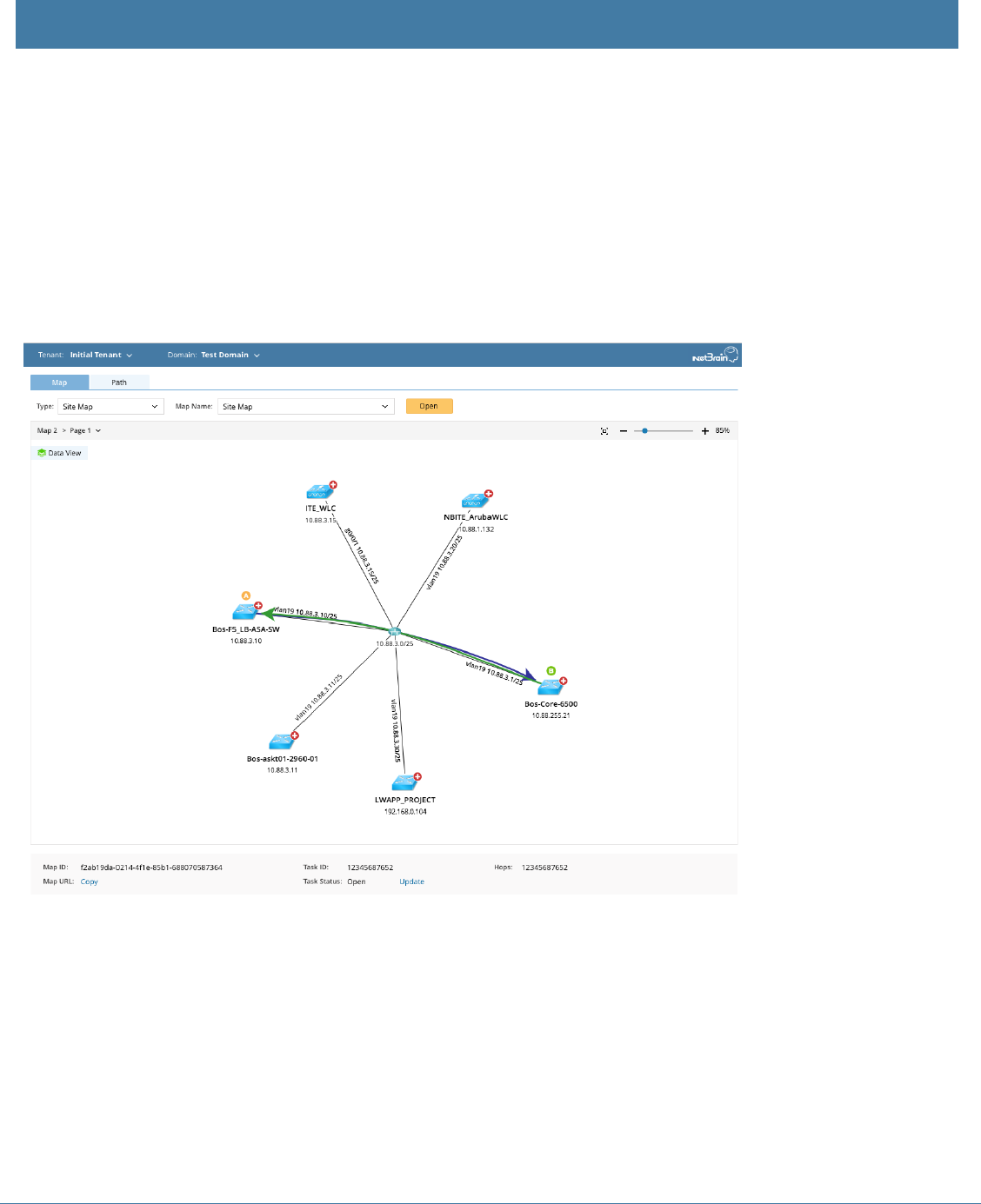
User can choose either of the following ways to consume NetBrain Embedded Map technology:
▪ View site maps, device group maps, and maps in the Public folder.
▪ View path maps by calculating paths.

4 | NetBrain Integrated Edition 7.1a Embedded Map Quick Start Guide
2. Set Up Embedded Map in Your Web Portal
Follow the steps below to properly set up NetBrain Embedded Map in your web portal.
Tip: It is highly recommended to set the size of the iframe as 1200 x 800 pixels (width x height) in your
portal page head.
Workflow
The pseudo code below describes the high-level workflow to embed a NetBrain map into your portal.
1. Modify the web.config file of your NetBrain Web Server to allow the iframe to render NetBrain
web page.
2. Reference the Web Server script library in the portal.
3. Initialize NetBrain instance.
4. Construct the drop-down menu for Tenant.
5. Construct the drop-down menu for Domain.
6. Construct the drop-down menu for Site/Device Group/Public Map File.
7. Browse and open a specific map.
8. Construct the text box and drop-down menu for path options.
9. Calculate a path and view the path result.
Deployment Process
1. Modify the web.config file of your NetBrain Web Server to enable iframe.
▪ Append the Content-Security-Policy configuration to the bottom of the file. Replace the
highlighted value with the actual domain name of your web portal.
Sample Web Config File
<../Web/NetBrainNGClient/src/NetBrainNG/dist/web.config>
<httpProtocol>
<customHeaders>
<remove name="X-Frame-Options"/>
<remove name="X-Content-Type-Options"/>
<remove name="X-XSS-Protection"/>
<remove name="Strict-Transport-Security"/>
<add name="X-Frame-Options" value="SAMEORIGIN"/>
<add name="X-Content-Type-Options" value="nosniff"/>
<add name="X-XSS-Protection" value="1; mode=block"/>
<add name="Strict-Transport-Security" value="max-age=31536000; includeSubDomains;
preload"/>
<add name="Content-Security-Policy" value="frame-ancestors http://ite.netbraintech.com"/>
</customHeaders>

NetBrain Integrated Edition 7.1a Embedded Map Quick Start Guide | 5
Tip: To learn more about the HTTP Content-Security-Policy response header, click here.
2. Reference the script library of your NetBrain Web Server in the portal. This script library provides an
interface to call NetBrain APIs in the subsequent deployment.
<script src="http(s)://<your NetBrain Web Server
address>/js/nb.embedmap.netbraintools.min.js"></script>
3. Initialize NetBrain instance.
var netbrain, map;
var options = {
netbrainUrl: 'http(s)://your NetBrain Web Server address', //required
ssoAlias: 'sso', //required
virtualDir: '/' //optional. The path of the virtual directory where NetBrain is deployed.
};
NetbrainTools.createNetbrainInstance(options)
.then(function(netbrainInstance) {
netbrain = netbrainInstance;
})
.then(initBinds)
.catch(logError);
Note: Before proceeding to initialize NetBrain instance, please ensure netbrainInstance is accessible.
netbrainInstance contains all NetBrain APIs for Embedded Map deployment. Failing to fetch
netbrainInstance will cause error prompt indicating ‘create netbrain instance failed’.
Sample <netbrainInstance>
{
api:object,
createMap: function,
relogin: function
}
4. Construct the drop-down list for the Tenant field.
netbrain.api
.getTenants({})
.then(function(result) {
var tenants = result.tenants;
console.log(tenants); // render your UI list here
});

6 | NetBrain Integrated Edition 7.1a Embedded Map Quick Start Guide
Following output example is shown here for reference purposes:
{
"tenants": [
{
"tenantId": "6b2ac0ce-5817-831f-4d79-acfc62aa2920",
"tenantName": "xxf_tenant"
},
{
"tenantId": "e58f795c-8262-126f-fa04-90210bfcbe6c",
"tenantName": "xxf_sdn_tenant"
},
{
"tenantId": "fc29f127-35af-20cc-797e-0caec793cc26",
"tenantName": "rwang_tenant"
},
{
"tenantId": "06b63b6c-698e-f5fb-c249-082036df95e1",
"tenantName": "MIMIC"
},
{
"tenantId": "42a296d4-d8ca-5a6c-5e0c-ecdc393f0ff7",
"tenantName": "gcui_test"
}
],
"statusCode": 790200,
"statusDescription": "Success."
}
Tip: For more details about how to leverage NetBrain API to retrieve the tenant list, see Get all accessible
tenants.
5. Construct the drop-down list for the Domain filed.
Note: Make sure to replace the highlighted values with the desired tenantId value.
netbrain.api
.getDomains({
tenantId: '6b2ac0ce-5817-831f-4d79-acfc62aa2920'
})
.then(function(result) {
var Domains = result.domains;
console.log(Domains); // render your UI list here
});
Following output example is shown here for reference purposes:
{
"domains": [
{
"domainId": "debfbef3-fa56-45f0-82b1-a90e20154454",
"domainName": "xxf_domain"
},
NetBrain Integrated Edition 7.1a Embedded Map Quick Start Guide | 7
{
"domainId": "10c05674-0b3b-4b4e-b672-87ae32eace98",
"domainName": "normaluser"
},
{
"domainId": "b9e6e637-eab0-4024-905f-3906756f2fb9",
"domainName": "ertret"
}
],
"statusCode": 790200,
"statusDescription": "Success."
}
Tip: For more details about how to leverage NetBrain API to retrieve the domain list from one of your
NetBrain tenants, see Get all accessible domains of a tenant.
6. Construct the Site Map/Device Group Map/Public Map drop-down list.
Note: Site Map/Device Group Map/Public Map are hard-coded categories. Following APIs are designed for
the purposes of rendering map list when corresponding map type is selected.
Site drop-down list
Note: Make sure to replace the highlighted values with your specific request parameters.
netbrain.api
.getSites({
tenantId: 'e58f795c-8262-126f-fa04-90210bfcbe6c',
domainId: 'b3752773-f37f-4a3e-b547-062d2c0a0480',
sitePath: 'My Network' //referring to Site Map
})
.then(function(result) {
var sites = result.sites;
console.log(sites);
});
Following output example is shown here for reference purposes:
{
"sites": [
{
"siteId": "13e91c22-ffc8-4a31-82ad-786ae976c31e",
"sitePath": "My Network/USXACanada",
"isContainer": true,
"children": [
"e2eaad3f-b829-4715-87c0-72eb1f038274",
"718a69b0-448b-4645-b0de-466adf88423d"
],
"siteType": 1
},

8 | NetBrain Integrated Edition 7.1a Embedded Map Quick Start Guide
{
"siteId": "97a22e99-a042-4366-8ecc-d69bd32adc42",
"sitePath": "My Network/USXACanada/United States of
America/MASSACHUSETTS/CANTON/Canton_NB1",
"isContainer": false,
"siteType": 2
},
{
"siteId": "8ea30269-b348-4ca4-86fc-79557881a6f3",
"sitePath": "My Network/USXACanada/United States of
America/MASSACHUSETTS/CANTON/Canton_NB2",
"isContainer": false,
"siteType": 2
},
// ...
{
"siteId": "732e8ab6-6b69-417d-ad03-2cc447100166",
"sitePath": "My Network",
"isContainer": true,
"children": [
"13e91c22-ffc8-4a31-82ad-786ae976c31e",
"a3a9d329-fcdd-49d9-9669-9ec205d587c2",
"74a72061-0412-428d-8448-6cbd3f9c70b1",
"d2628098-be31-49b5-befc-167e9f1e9d88"
],
"siteType": 0
}
],
"statusCode": 790200,
"statusDescription": "Success."
}
Device Group drop-down list
Note: Make sure to replace the highlighted values with your specific request parameters.
netbrain.api
.getDeviceGroups({
tenantId: 'e58f795c-8262-126f-fa04-90210bfcbe6c',
domainId: 'b3752773-f37f-4a3e-b547-062d2c0a0480'
})
.then(function(result) {
var deviceGroups = result.deviceGroups;
console.log(deviceGroups);
});
Following output example is shown here for reference purposes:
{
"deviceGroups": [
{
"id": "8196020b-b223-4bc8-8178-ac4da95b1695",
"name": "#BGP 64512",
"type": 2

NetBrain Integrated Edition 7.1a Embedded Map Quick Start Guide | 9
},
{
"id": "fbd027f2-24c9-4616-a6bd-62b7613b07e1",
"name": "#BGP 65000",
"type": 2
},
{
"id": "f84008dd-a406-4b30-b71a-18e66b4a7d68",
"name": "#BGP 65012",
"type": 2
}
],
"statusCode": 790200,
"statusDescription": "Success."
}
Public Map File drop-down list
Note: Make sure to replace the highlighted values with your specific request parameters.
netbrain.api
.getPublicFiles({
tenantId: 'e58f795c-8262-126f-fa04-90210bfcbe6c',
domainId: 'b3752773-f37f-4a3e-b547-062d2c0a0480',
folderId: '',
fileTypes: [ 0, 11 ]
})
.then(function(result) {
var files = result.Items;
console.log(files);
});
Following output example is shown here for reference purposes:
{
"items":[
{
"originalId":"267752c5-c01b-8ee3-d5aa-8fec88da8927",
"id":"28337b50-25a0-40df-a0c8-20b79dce3f42",
"name":"Public/test",
"type":0
},
{
"originalId":"267752c5-c01b-8ee3-d5aa-8fec88da8927",
"id":"ff4e2847-2692-4a55-932c-b58978baaf2a",
"name":"Public/Map3",
"type":11
},
{
"originalId":"7a249ae9-8dab-435d-88fa-5c698356c069",
"id":"4a6cd1a3-558f-4288-acf3-e13825ea28af",
"name":"Public/test/Map1cgc",

10 | NetBrain Integrated Edition 7.1a Embedded Map Quick Start Guide
"type":11
}
],
"statusCode":790200,
"statusDescription":"Success."
}
Tip: For more details about the corresponding APIs, refer to Get Site, Get Device Group or Get File
respectively.
7. Browse a specific map.
1) Create a map instance.
Note: mapContainer is a container div used to render returned map instance.
netbrain.createMap($('#mapContainer').get(0) ).then(function(mapInstance) {
map = mapInstance;
});
2) Verify mapInstance has been generated.
if (mapInstance) {
openMap(param);
} else {
netbrainInstance.createMap(mapOption.container).then(function (instance) {
mapInstance = instance;
openMap(param);
});
}
3) Open a specific map.
Note: Make sure to replace the highlighted values with your specific request parameters.
Open a site map
map.open({
siteId: siteId,
tenantId: 'e58f795c-8262-126f-fa04-90210bfcbe6c',
domainId: 'b3752773-f37f-4a3e-b547-062d2c0a0480'
}).then(function () {
// ...
});
Open a device group map
map.open({
deviceGroupId: deviceGroupId, //referring to the output ‘id’ in Step 6
tenantId: 'e58f795c-8262-126f-fa04-90210bfcbe6c',
domainId: 'b3752773-f37f-4a3e-b547-062d2c0a0480'
NetBrain Integrated Edition 7.1a Embedded Map Quick Start Guide | 11
}).then(function () {
// ...
});
Open a map in the Public file
map.open({
mapId: mapId, // referring to the output ‘originalID’ in Step 6
tenantId: 'e58f795c-8262-126f-fa04-90210bfcbe6c',
domainId: 'b3752773-f37f-4a3e-b547-062d2c0a0480'
}).then(function () {
// ...
});
4) Refresh a map.
map.refresh();
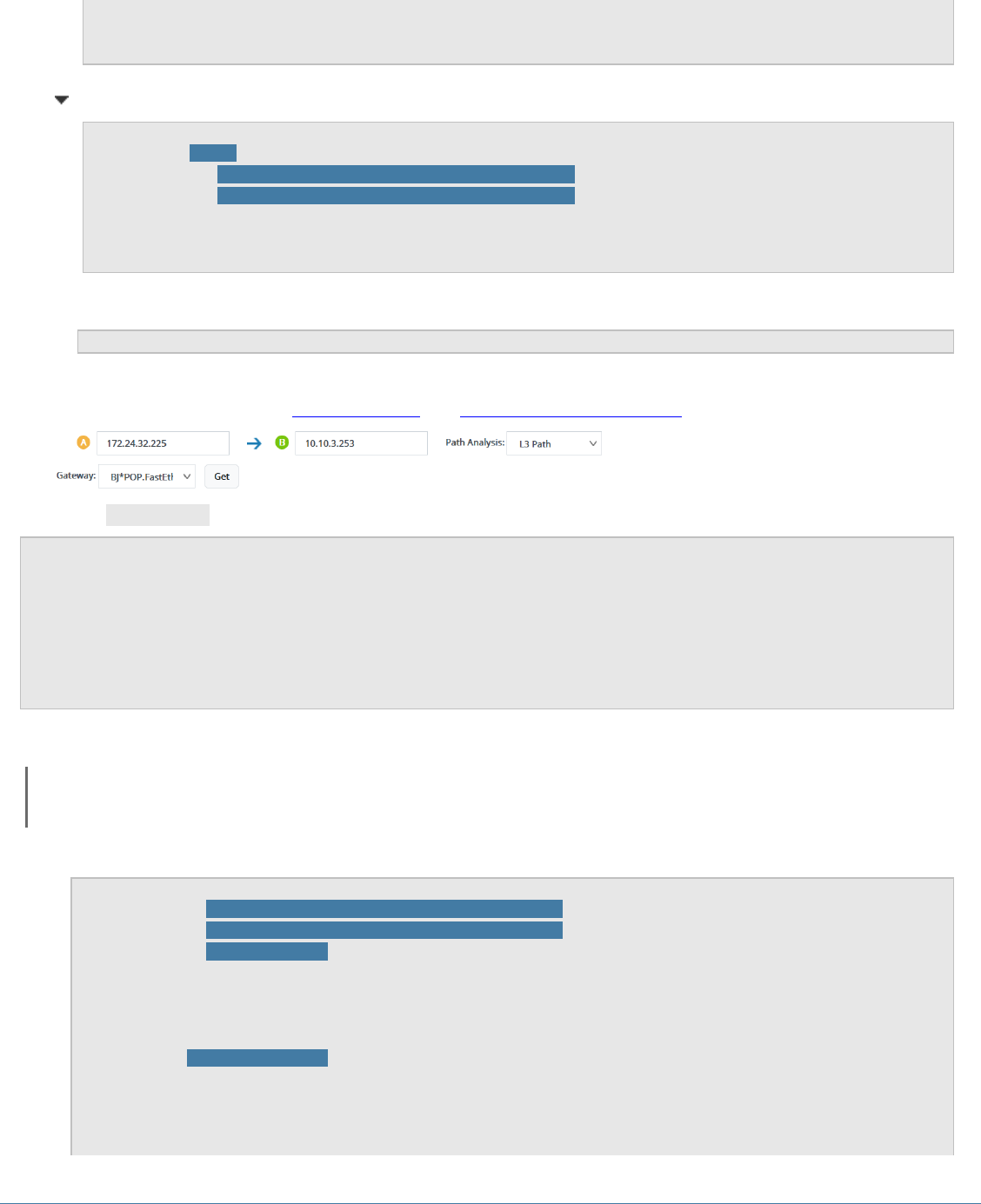
8. Construct the text box and drop-down menu for path options. For more details about Path Analysis
and Gateway APIs, refer to Calculate a path and Get the gateway of a device.
9. Verify mapInstance has been generated.
if (mapInstance) {
map.calculatePath (pathData);
} else {
netbrainInstance.createMap(mapOption.container).then(function (instance) {
mapInstance = instance;
map.calculatePath (pathData);
});
}
10. Calculate a path and view the result.
Note: Make sure to replace the highlighted values with your specific request parameters.
1) Calculate a path.
map.calculatePath({
tenantId: 'e58f795c-8262-126f-fa04-90210bfcbe6c', //required
domainId: 'b3752773-f37f-4a3e-b547-062d2c0a0480', //required
sourceIP: '10.10.3.253', //required
sourcePort: 0,
sourceGwIP: '10.10.3.253',
sourceGwDev: 'GW2Lab',
sourceGwIntf: 'GigabitEthernet0/0.10',
destIP: '172.24.32.225', //required
destPort: 0,
pathAnalysisSet: 1,
protocol: 4,
isLive: 1

12 | NetBrain Integrated Edition 7.1a Embedded Map Quick Start Guide
}).then(function (result) {
var taskId =result.taskId
// ...
});
2) View the path result.
netbrain.api.getPathResult({
tenantId: 'e58f795c-8262-126f-fa04-90210bfcbe6c',
domainId: 'b3752773-f37f-4a3e-b547-062d2c0a0480',
taskId: 'b69c0af1-73ce-49e7-8cc7-59ce8ce5eb37'
}).then(function (result) {
var hoplist =result.hopList
// ...
});
Following output example is shown here for reference purposes:
{
"hopList": [
{
"hopId": "b1612e9f-491f-4edf-9e40-156052b0f708",
"srcDeviceName": "GW2Lab",
"inboundInterface": "GigabitEthernet0/1",
"mediaName": "172.24.30.0/30",
"dstDeviceName": "NY_Router",
"outboundInterface": "FastEthernet0/0",
"nextHopIdList": [
"97f40ee6-dee0-4b1f-a723-fec130292aa0"
]
},
{
"hopId": "97f40ee6-dee0-4b1f-a723-fec130292aa0",
"srcDeviceName": "NY_Router",
"inboundInterface": "Vlan100",
"mediaName": "172.24.30.4/30",
"dstDeviceName": "NY_POPP",
"outboundInterface": "Ethernet0/1",
"nextHopIdList": [
"6846b938-a666-412c-99b8-9e400a80b6b7"
]
},
{
"hopId": "6846b938-a666-412c-99b8-9e400a80b6b7",
"srcDeviceName": "NY_POPP",
"inboundInterface": "Ethernet0/0",
"mediaName": "172.24.31.64/26",
"dstDeviceName": "NY-core-bak",
"outboundInterface": "FastEthernet0/0",
"nextHopIdList": [
"63d88b57-201e-41e3-85f3-a5965c450d52"
]
},
{
"hopId": "63d88b57-201e-41e3-85f3-a5965c450d52",
"srcDeviceName": "NY-core-bak",

NetBrain Integrated Edition 7.1a Embedded Map Quick Start Guide | 13
"inboundInterface": "FastEthernet0/1.1",
"mediaName": "172.24.31.192/26",
"dstDeviceName": "BJ*POP",
"outboundInterface": "FastEthernet0/1",
"nextHopIdList": []
}
],
"statusCode": 790200,
"statusDescription": "Success."
}
Tip: For more details about the path APIs, refer to the following API documentations:
▪ Calculate a path
▪ Get the gateway of a device
▪ Get the status of a path
14 | NetBrain Integrated Edition 7.1a Embedded Map Quick Start Guide
3. Working with Embedded Map User Interface
Follow the steps below to view an embedded map in your portal.
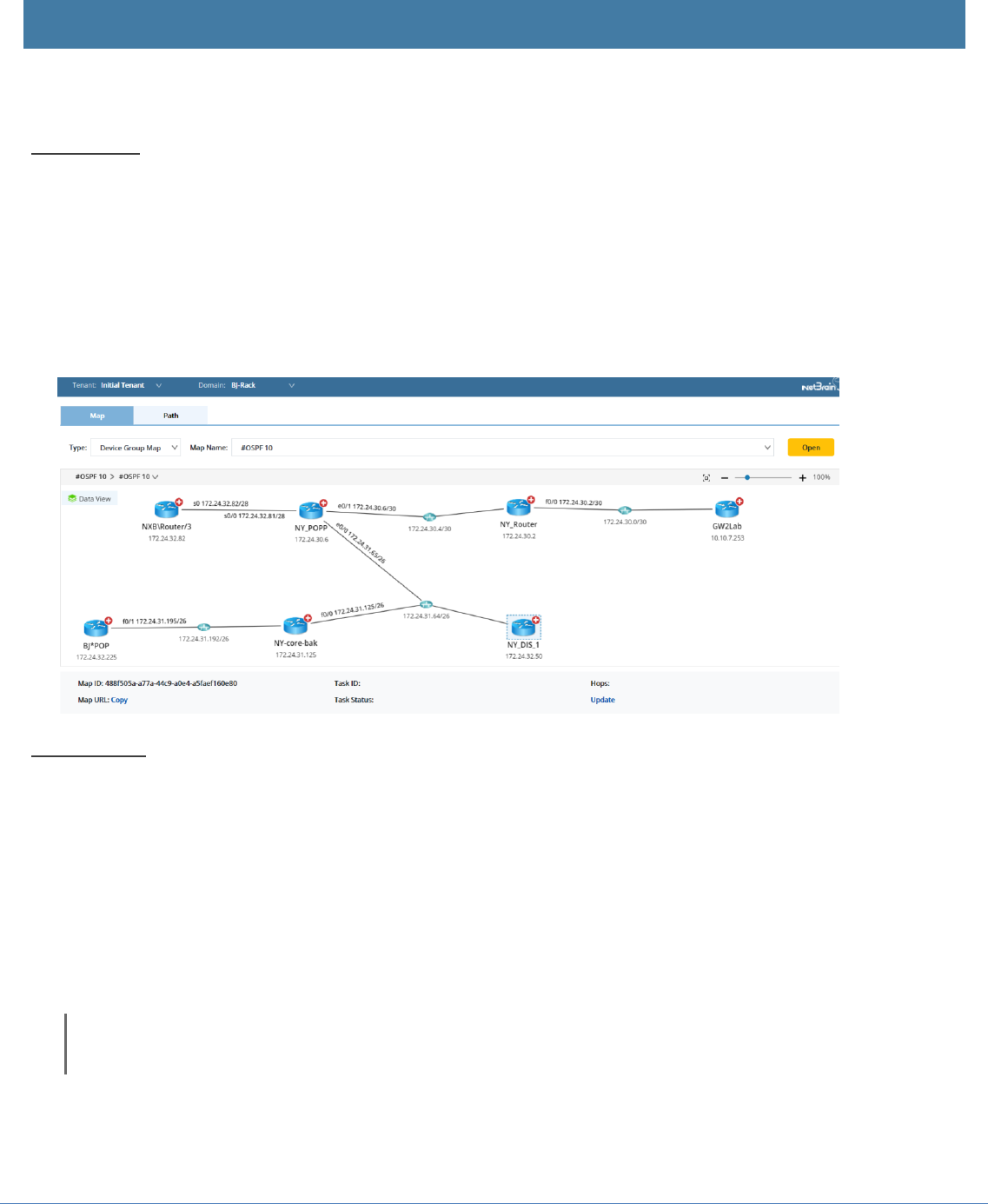
Example 1: Open a device group map.
1. Log into your portal and navigate to the NetBrain page.
2. Select the desired tenant and domain.
3. Select Device Group Map from the Type drop-down menu.
4. Select a map from the Map Name drop-down menu.
5. Click Open.
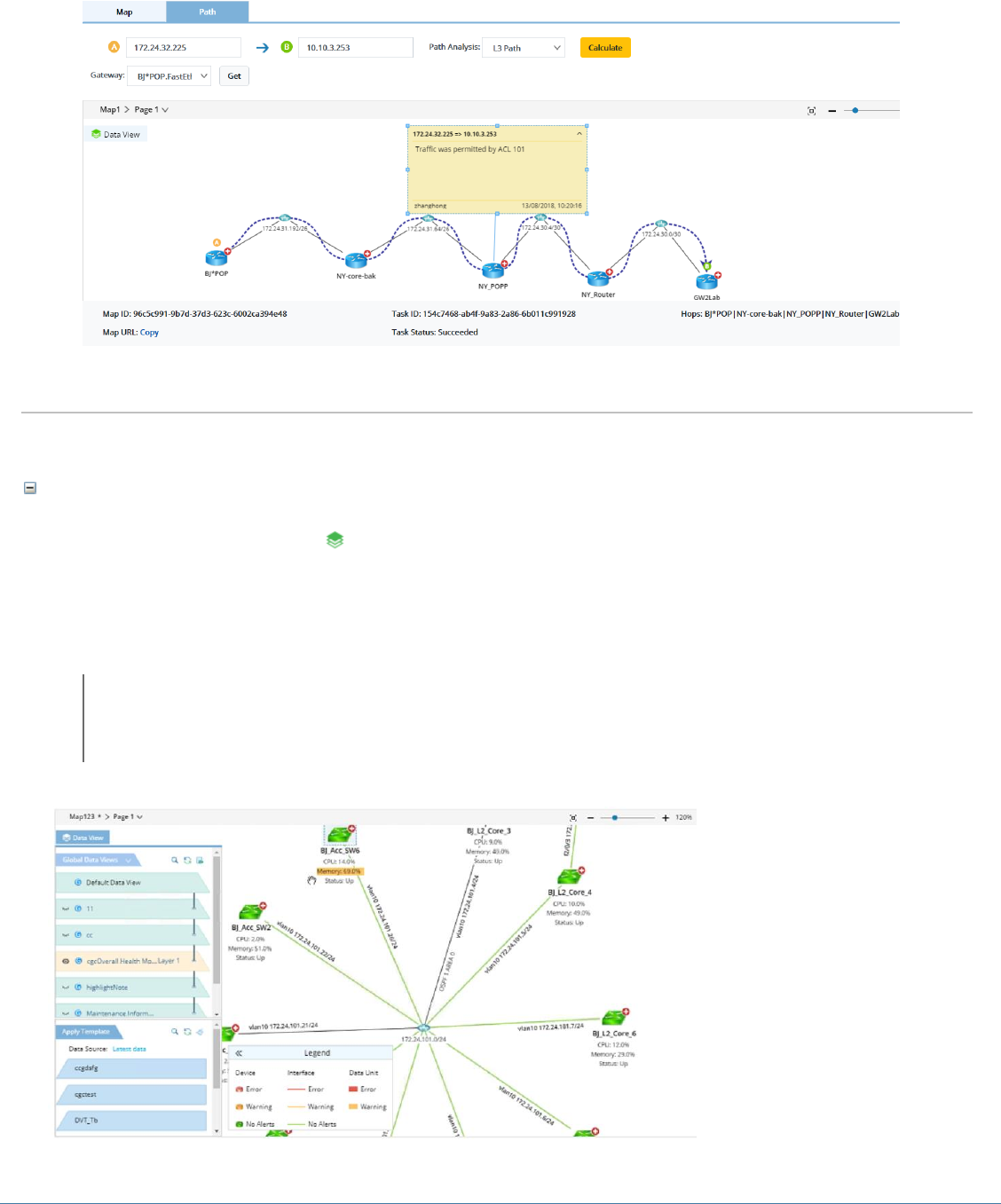
Example 2: Calculate a path.
1. Log into your portal and navigate to the NetBrain page.
2. Select the desired tenant and domain.
3. Create a map by calculating a path.
1) Enter the source IP and click Get to obtain the gateway list of the source device.
2) Enter the destination IP and select a path analysis method.
3) Click Calculate to start the path calculation.
Note: The calculation uses live data as data source by default.
NetBrain Integrated Edition 7.1a Embedded Map Quick Start Guide | 15
Embedded Map Operation
You can perform the following operations on an embedded map.
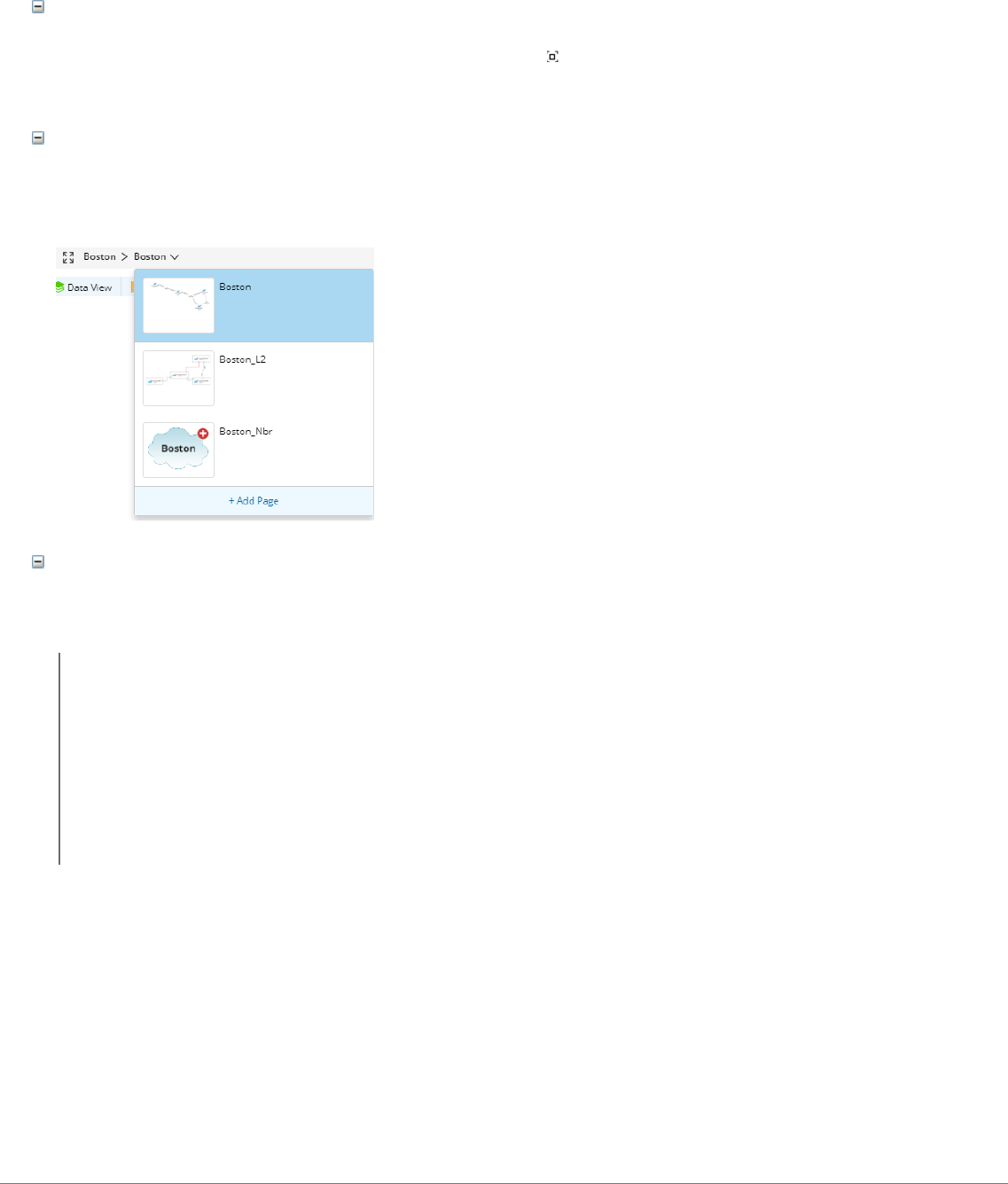
Applying data views
1. On the map page, click the icon to launch the Data View pane. It lists all the data views
applicable to the current map page.
2. In the Data View pane, select a global data view to apply. Data units in this data view are
highlighted with different background colors.
Tip: You can switch between different data views in the Data View pane to suit your specific project
needs.
16 | NetBrain Integrated Edition 7.1a Embedded Map Quick Start Guide
Fitting to Screen
On the upper-right corner of a map, you can click the icon to adjust the display ratio of your map
to fit your screen.
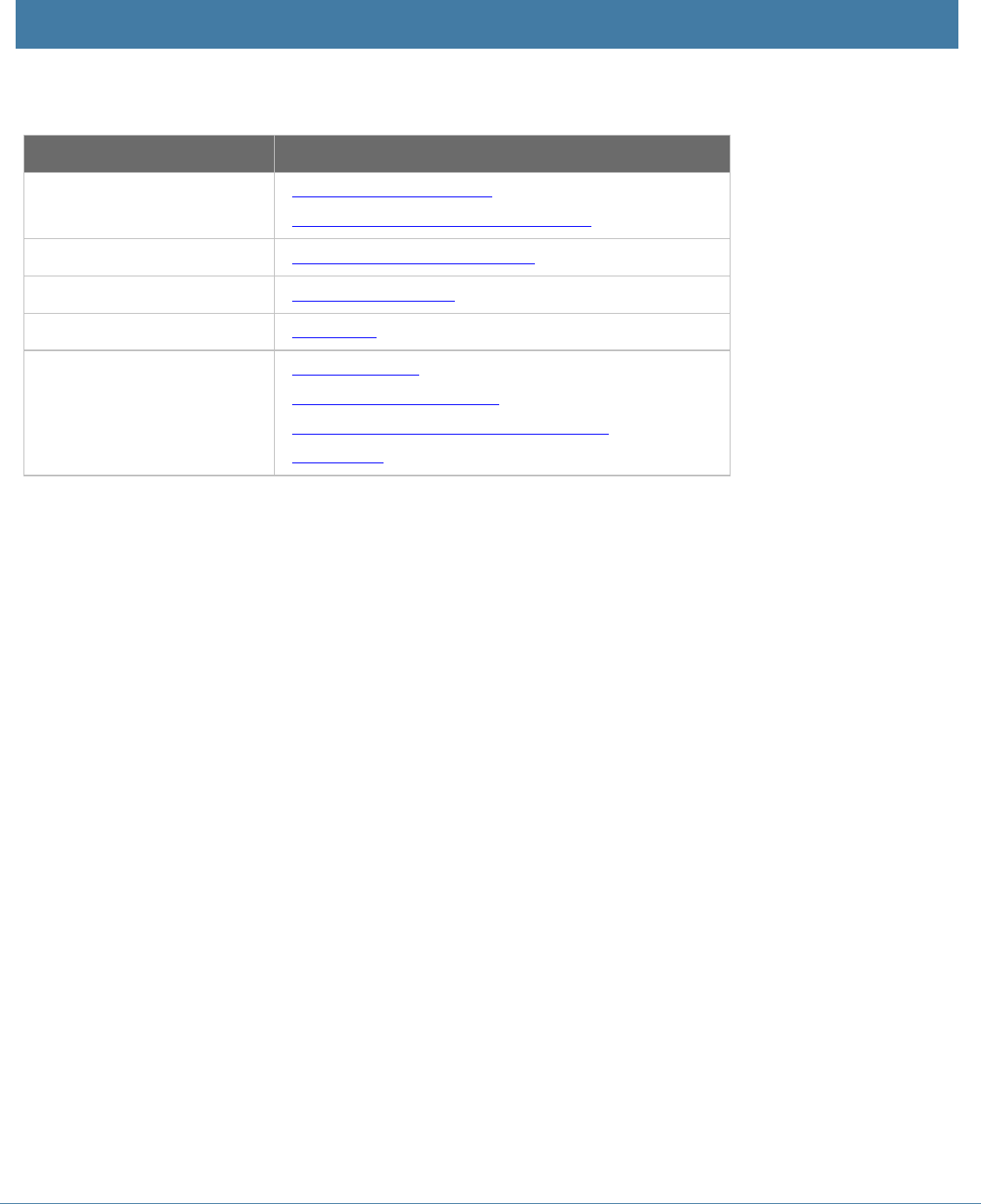
Browsing more map pages
Click the map name and select more maps from the drop-down menu.
Zooming to view more data details
In an embedded map, you can zoom in the map to show more data details over an interface link.
Note: Following functionalities are currently not supported by Embedded Map.
▪ Executing a Runbook
▪ Running a Qapp
▪ Extending Neighbor
▪ Operations in the right-click menu
▪ Pointing to a link or data to show the corresponding configuration in a tip window
NetBrain Integrated Edition 7.1a Embedded Map Quick Start Guide | 17
4. NetBrain APIs for Embedded Map Deployment
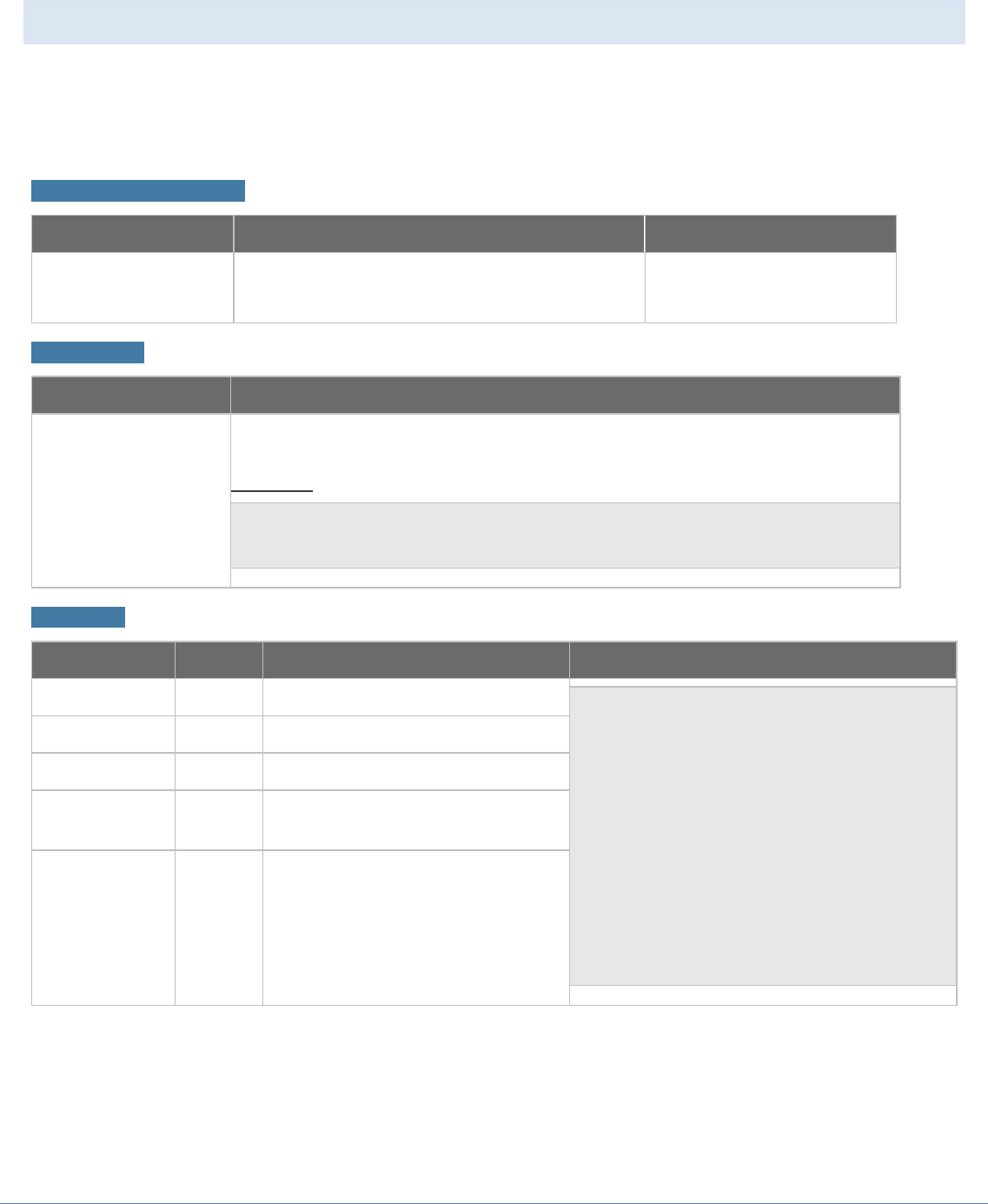
Table below lists the NetBrain APIs you may use to deploy the NetBrain Embedded Map.
Category
APIs
Tenant and Domain List
▪ Get all accessible tenants
▪ Get all accessible domains of a tenant
Site
▪ Get child sites of a specific site
Device Group
▪ Get device group list
File
▪ Get file list
Path
▪ Calculate a path
▪ Get path calculation result
▪ Get the gateway information of a device
▪ Stop a path
18 | NetBrain Integrated Edition 7.1a Embedded Map Quick Start Guide
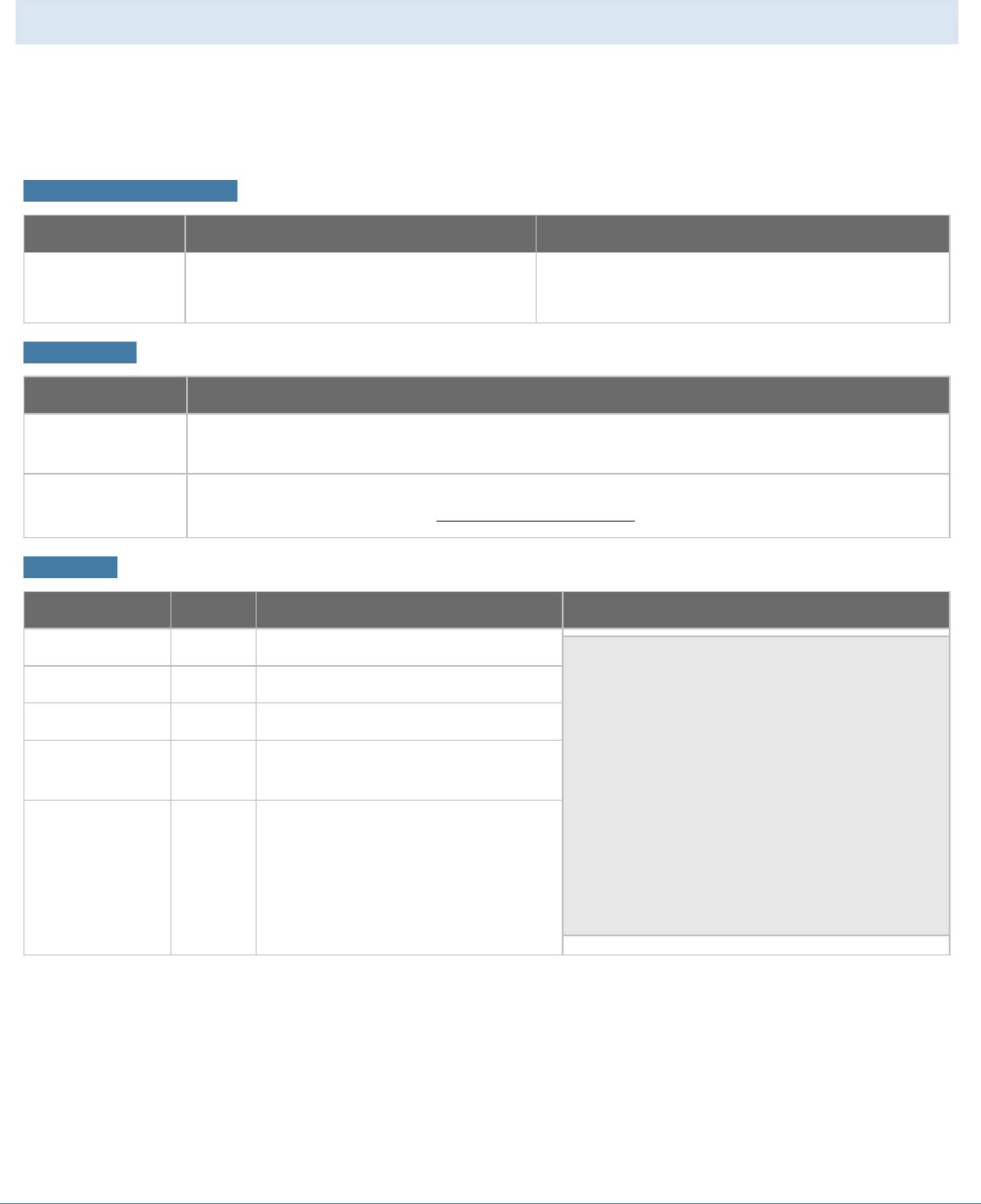
4.1. Get all accessible tenants
This function returns a list of accessible tenants (including tenant ID and names). The returned tenant
list varies by the user privileges you use to log in. To retrieve a full list of all available tenants, you must
log in with admin permissions.
Resource Information
Method
URL
Required authentication
GET
/V1/CMDB/Tenants
Yes
Parameters
Name
Description
Token*required
(header)
The token can be obtained by sending a POST request to the log in session endpoint
and provide valid credentials.
Example:
{
"token": "301ebdd8-0045-429d-8807-c51b8db7f5f0"
}
Response
Parameter
Type
Description
Example
tenants
array
A list of all accessible tenants.
{
"tenants": [
{
"tenantId": "3e75247a-309c-4231-
96a5-823b6cb1e78d",
"tenantName": "bos_office"
},
{
"tenantId": "5a75247a-309c-4231-
96a5-823b6cb1e78d",
"tenantName": "ny_office"
}
]
}
tenantId
string
The tenant ID.
tenantName
string
The tenant name.
statusCode
integer
Code issued by NetBrain server
indicating the execution result.
statusDescription
string
The explanation of the status code.
NetBrain Integrated Edition 7.1a Embedded Map Quick Start Guide | 19
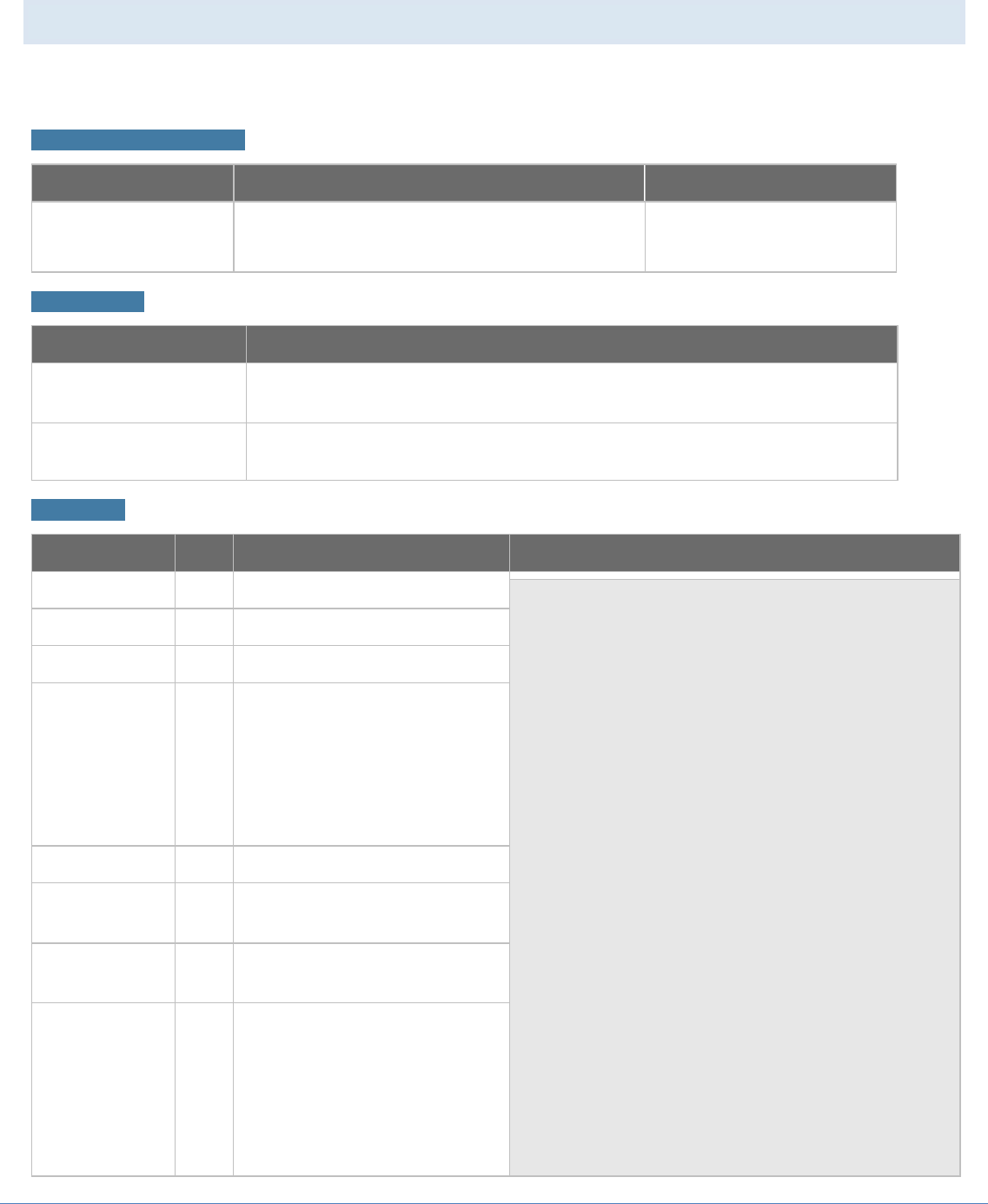
4.2. Get all accessible domains of a tenant
This function returns a list of accessible domains in a specific tenant. The returned accessible domains
vary by the user privileges you use to log in. To retrieve a full list of domains in a specified tenant, you
must log in with system admin or tenant admin permissions.
Resource Information
Method
URL
Required authentication
GET
/V1/CMDB/Domains
Yes
Parameters
Name
Description
Token*required
(header)
The token can be obtained by sending a POST request to the log in session endpoint and
provide valid credentials.
tenantId
(query)
Unique identifier for the tenant from which you desire to retrieve the domain information.
tenantId can be retrieved from get all accessible tenants.
Response
Parameter
Type
Description
Example
domains
array
A list of all accessible domains.
{
"domains": [
{
"domainId": "4e75247a-309c-4231-
96a5-823b6cb1e78d",
"domainName": "domain1"
},
{
"domainId": "5e75247a-309c-4231-
96a5-823b6cb1e78d",
"domainName": "domain2"
}
]
}
domainId
string
The domain ID.
domainName
string
The domain name.
statusCode
integer
Code issued by NetBrain server
indicating the execution result.
statusDescription
string
The explanation of the status code.
20 | NetBrain Integrated Edition 7.1a Embedded Map Quick Start Guide
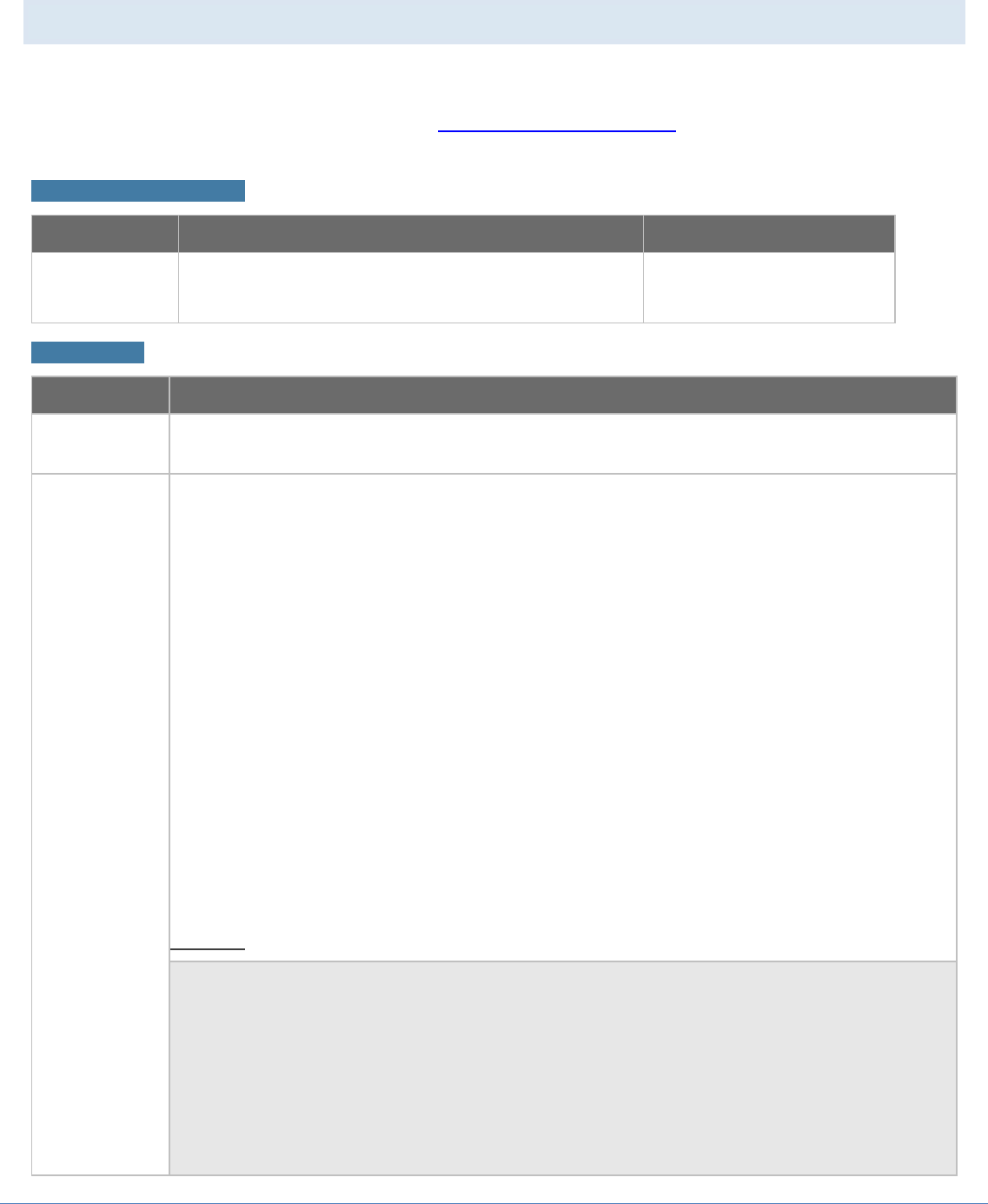
4.3. Get child sites of a specific site
This function returns a list of child sites of a specified site.
Resource Information
Method
URL
Required authentication
GET
/V1/CMDB/Sites/ChildSites
Yes
Parameters
Name
Description
Token*required
(header)
The token can be obtained by sending a POST request to the log in session
endpoint and provide valid credentials.
sitePath*required
(query)
The full path of a site, for example, My Network/NA/US.
Response
Parameter
Type
Description
Example
sites
array
A list of all child sites.
{
"sites": [
{
"siteId": "47e5d1c1-5ddc-4e5f-b37c-
21616193dd36",
"sitePath": "My Network/C0/L4",
"isContainer": false,
"siteType": 2
},
{
"siteId": "020cb2a2-d192-4c29-a9bd-
53787d866f85",
"sitePath": "My Network/C0",
"isContainer": true,
"children": [
"47e5d1c1-5ddc-4e5f-b37c-
21616193dd36",
"16d1cd8e-eb8e-42ca-a19d-
54d7a7fbd2a2",
"c36eb043-a30f-4b58-b05f-
957f845c40e3",
"688bc6b2-3b34-42ff-96a2-
c06687d2c03a",
"6348e733-1c6b-4d76-8926-
2d20622cf164",
"3ed2ccba-9a00-48d7-9af0-
a17e9aa8ccfb"
],
siteId
string
The site ID.
sitePath
string
The full path of a site.
siteType
integer
The type of a site.
▪ 0: root site
▪ 1: container site
▪ 2: leaf site
isContainer
bool
Whether it is a container site.
children
array
List of child sites of the specified
container site.
statusCode
integer
Code issued by NetBrain server
indicating the execution result.
statusDescription
string
The explanation of the status
code.

NetBrain Integrated Edition 7.1a Embedded Map Quick Start Guide | 21
Parameter
Type
Description
Example
"siteType": 1
}
],
"statusCode": 790200,
"statusDescription": "Success."
}
22 | NetBrain Integrated Edition 7.1a Embedded Map Quick Start Guide
4.4. Calculate a Path
This function is used to calculate a path between two endpoints. The result will be returned in the form of
a path ID, and you can use the path ID in the Get Path Calculation Result as the request parameter to
get each hop information of the path.
Resource Information
Method
URL
Required authentication
POST
/V1/CMDB/Path/Calculation
Yes
Parameters
Name
Description
Token*required
(header)
The token can be obtained by sending a POST request to the log in session endpoint and provide
valid credentials.
body*required
(body)
The request body contains the following parameters:
▪ sourceIP*(string): IP address of the source device.
▪ sourcePort (integer): Source protocol port, for example, 23 for telnet. This parameter can be
null.
▪ sourceGwIP* (string): Gateway for path calculation.
▪ sourceGwDevice* (string): Hostname of the gateway device.
▪ sourceGwIntf* (string): Name of the gateway interface.
▪ destIP*(string): IP address of the destination device.
▪ destPort (integer): Destination protocol port, for example, 23 for telnet. This parameter can be
null.
▪ pathAnalysisSet* (integer): Path type used to calculate.
o 1: L3 Path
o 2: L2 Path
o 3: L3 Active Path
▪ protocol* (integer): Application protocol, for example, IPv4.
▪ isLive (integer): Data source used to calculate the path.
o 0: use data from the current baseline.
o 1: use data via live access.
Example:
{
"sourceIP": "10.10.3.253",
"sourcePort": 0,
"sourceGwIP": "10.10.3.253",
"sourceGwDev": "GW2Lab",
"sourceGwIntf": "GigabitEthernet0/0.10",
"destIP": "172.24.32.225",
"destPort": 0,
"pathAnalysisSet": 1,
"protocol": 4,
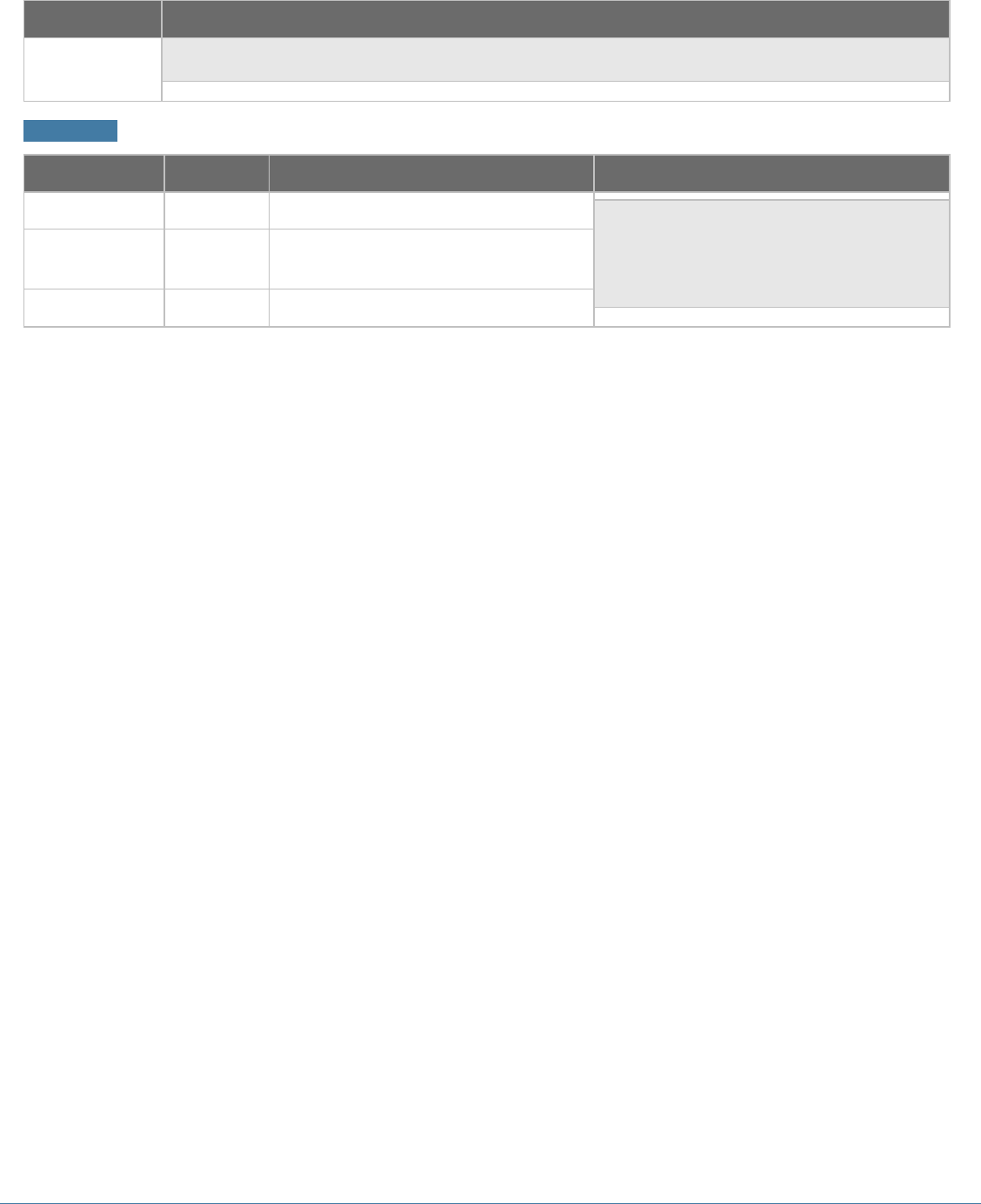
NetBrain Integrated Edition 7.1a Embedded Map Quick Start Guide | 23
Name
Description
"isLive": 1
}
Response
Parameter
Type
Description
Example
taskId
string
The ID of the task.
{
"taskId": "string",
"statusCode": 790200,
"statusDescription": "success"
}
statusCode
integer
Code issued by NetBrain server
indicating the execution result.
statusDescription
string
The explanation of the status code.
24 | NetBrain Integrated Edition 7.1a Embedded Map Quick Start Guide
4.5. Get the gateway information of a device
This function returns the gateway information of a device based on its IP or hostname.
Resource Information
Method
URL
Required authentication
GET
/V1/CMDB/Path/Gateways
Yes
Parameters
Name
Description
Token*required
(header)
The token can be obtained by sending a POST request to the log in session
endpoint and provide valid credentials.
ipOrHost*required
(query)
The IP or hostname of a device.
Response
Parameter
Type
Description
Example
gatewayList
array
A list of returned gateway devices. The list
contains the following parameters:
▪ ip (string): the IP address of a gateway.
▪ deviceName (string): the hostname of a
gateway.
▪ IntfName (string): the name of the gateway
interface.
{
"statusCode": 790200,
"statusDescription": "success",
"gatewayList": [
{
"ip": "string",
"devName": "string",
"intfName": "string"
}
]
}
statusCode
integer
Code issued by NetBrain server indicating the
execution result.
statusDescription
string
The explanation of the status code.
NetBrain Integrated Edition 7.1a Embedded Map Quick Start Guide | 25
4.6. Get path calculation status
This function returns the path status.
Resource Information
Method
URL
Required authentication
GET
/V1/CMDB/Path/{taskID}/Status
Yes
Parameters
Name
Description
Token*required
(header)
The token can be obtained by sending a POST request to the log in session
endpoint and provide valid credentials.
taskId*required
(query)
The task ID retrieved from Calculate a Path.
Response
Parameter
Type
Description
Example
statusCode
integer
Code issued by NetBrain server
indicating the execution result.
{
"statusCode":790200,
"statusDescription":"success",
"result":{
"resultCode":1,
"resultDescription":"Running"
}
}
statusDescription
string
The explanation of the status code.
resultCode
integer
The status code of the specified path.
▪ 0: Initialized
▪ 1: Running
▪ 2: Succeeded
▪ 3: Failed
▪ 4: Canceled
resultDescription
string
The explanation of the result code.
26 | NetBrain Integrated Edition 7.1a Embedded Map Quick Start Guide
4.7. Get path calculation result
This function returns the hop information of a path calculated through the Calculate a Path API.
Resource Information
Method
URL
Required authentication
GET
/V1/CMDB/Path/Calculation/{taskID}/Result
Yes
Parameters
Name
Description
Token*required
(header)
The token can be obtained by sending a POST request to the log in session
endpoint and provide valid credentials.
taskID*required
(query)
The task ID retrieved from Calculate a Path.
Response
Parameter
Type
Description
Example
statusCode
integer
Code issued by NetBrain server
indicating the execution result.
{
"statusCode": 790200,
"statusDescription": "success",
"hopList": [
{
"hopId": "string",
"srcDeviceName": "string",
"inboundInterface": "string",
"mediaName": "string",
"dstDeviceName": "string",
"outboundInterface": "string",
"nextHopIdList": [
"7a09854d-1d87-4656-8556-
a7b142fccb75"
]
}
]
}
statusDescription
string
The explanation of the status code.
hopList
array
A list of hops along a path.
hopId
string
The ID of a hop.
srcDeviceName
string
The hostname of the source device.
inboundInterface
string
The name of the inbound interface.
mediaName
string
The media name.
dstDeviceName
string
The hostname of the destination
device.
outboundInterface
string
The name of the outbound interface.
nextHopIdList
array
A list of the IDs of next hops.
NetBrain Integrated Edition 7.1a Embedded Map Quick Start Guide | 27
4.8. Get device group list
This function returns a list of device groups.
Resource Information
Method
URL
Required authentication
GET
/V1/CMDB/DeviceGroups
Yes
Parameters
Name
Description
Token*required
(header)
The token can be obtained by sending a POST request to the log in session
endpoint and provide valid credentials.
Response
Parameter
Type
Description
Example
deviceGroups
array
A list of all accessible domains.
{
"deviceGroups": [
{
"id":"8196020b-b223-4bc8-
8178-ac4da95b1695",
"name":"#BGP 64512",
"type":2
},
{
"id":"fbd027f2-24c9-4616-
a6bd-62b7613b07e1",
"name":"#BGP 65000",
"type":2
},
{
"id":"fcdb1b8b-bffd-478f-
a914-e867f6a87f86",
"name":"retest",
"type":0
}
],
"statusCode":790200,
"statusDescription":"Success."
}
id
string
The ID of a device group
name
string
The name of a device group
type
integer
The type of a device group.
▪ 0: Public
▪ 1: Private
▪ 2: System
28 | NetBrain Integrated Edition 7.1a Embedded Map Quick Start Guide
4.9. Get file list
This function returns a list of files contained in a specified folder.
Resource Information
Method
URL
Required authentication
POST
/V1/CMDB/Files/
Yes
Parameters
Name
Description
Token*required
(header)
The token can be obtained by sending a POST request to the log in session
endpoint and provide valid credentials.
Body*required
(body)
The request body contains the following parameters:
▪ folderId (string): The ID of the folder from which you want to get the files. Root
folder (public folder) will be returned if folderId is null.
▪ fileTypes*(array): the file types you want to retrieve. There are three file types:
▪ 0: Folder
▪ 11: Map
▪ 21: Dashboard
Example:
{
"folderId": "",
"fileTypes": [ 0, 11 ,21]
}
Response
Parameter
Type
Description
Example
items
array
A list of folders and files.
{
"items": [
{
"id":"ad09aa07-b31d-4f42-
a0aa-319697825b09",
"name":"Public/Site Maps",
"type":0
},
{
"originalId":"75ff3cdf-dff4-
48c6-a736-7a86e4374a29",
"id":"2a19165f-a4a5-4488-
ac5d-acdf9e287ed6",
"name":"Public/New Folder/New
Folder/New Map",
id
string
The ID of a folder in the file tree.
name
string
The name of a file.
originalId
string
The ID of a specific dashboard or file.
(Used for Map or Dashboard type
only.)
type
integer
The type of a file.
▪ 0: Folder
▪ 11: Map
▪ 21: Dashboard

NetBrain Integrated Edition 7.1a Embedded Map Quick Start Guide | 29
Parameter
Type
Description
Example
"type":11
},
{
"originalId":"d2650deb-5276-
44cb-be21-43e2b129380a",
"id":"a84cdca3-3710-47b1-
b037-665e38fd6d08",
"name":"Public/New
Folder(1)/New Map",
"type":11
}
],
"statusCode":790200,
"statusDescription":"Success."
}
30 | NetBrain Integrated Edition 7.1a Embedded Map Quick Start Guide
4.10. Stop a path
This function is used to force stop a path calculation process.
Resource Information
Method
URL
Required authentication
Post
/V1/CMDB/Path/Calculation/Stop
Yes
Parameters
Name
Description
Token*required
(header)
The token can be obtained by sending a POST request to the log in session
endpoint and provide valid credentials.
taskId*required
(query)
The task ID retrieved from Calculate a Path.
Response
Parameter
Type
Description
Example
statusCode
integer
Code issued by NetBrain server
indicating the execution result.
{ "result": true,
"statusCode": 790200,
"statusDescription": "Success." }
statusDescription
string
The explanation of the status code.
result
bool
The execution (force stop) result.
