6P29 Vince Camuto
User Manual: 6P29
Open the PDF directly: View PDF  .
.
Page Count: 40

Watch InstructIons and
5 Year LImIted WarrantY

Introducing...

THE
VINCE CAMUTO
WOMEN’S
TIMEPIECE
COLLECTION
is an extension of the Vince Camuto brand’s unique commitment to
contemporary design, luxe quality and attention to rich detail. With a focus on
classic designs with a fresh, innovative edge the Vince Camuto women’s timepiece
collection is jewelry inspired, polished, at times oversized; and utilizes premium
nishes in rose gold, gunmetal and brushed metals to compliment a trend-driven
wardrobe. Style details include the signature pyramid stud, a hardware detailed
crown, layered dials, brilliant Swarovski® crystals and lustrous ceramic links.
e Vince Camuto timepieces are sophisticated, eye-catching and elegant with
modern attitude.

THE
VINCE CAMUTO
MEN’S
TIMEPIECE
COLLECTION
appeals to the man with a strong sense of individual style. e men’s timepieces,
inspired by land, air and sea, carefully consider authentic utility and are craed
with specialty details and sophisticated movements that are atypical in the
current watch market. Land gave way to masculine timepieces inspired by the
art of automobiles and motorcycles. Air inspired a mechanical design direction,
including vintage airplanes and parts. Sea led to innovative wristwatches inspired
by the ocean, unexpected materials and colors. Vintage inspired case shapes,
mixed materials; including solid stainless steel, silicon and aluminum, paired
with textured and layered dials. 21-jewel automatic movements, complex yback
movements and exhibition casebacks are signature features of the Vince Camuto
men’s timepiece collection.
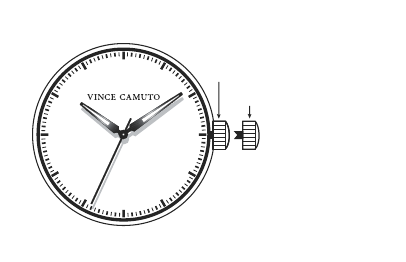
CROWN AT NORMAL
POSITION
TIME SETTING POSITION

SETTING THE TIME
1. Pull the crown out to the time setting position.
2. Turn the crown to set hour and minute hands.
3. When the crown is pushed back to the normal position, second hand begins to run.
NOTE: Never pull the Crown when the watch is wet.
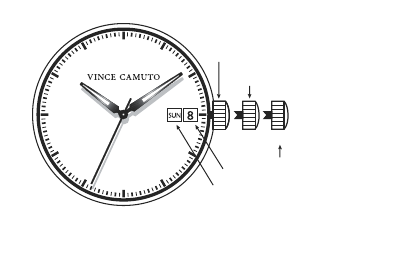
CROWN AT NORMAL
POSITION
DAY OF THE WEEK*
[1] [2]
NOTE: *Date & Day of the week position may be located at dierent position
depends on models. Day of the week may not be available.
TIME SETTING POSITION
DATE *
DATE SETTING POSITION

SETTING THE TIME
1. Pull the crown out to the 2nd position.
2. Turn the crown to set hour and minute hands.
3. When the crown is pushed back to the normal position, second hand begins to run.
NOTE: Never pull the Crown when the watch is wet.
SETTING THE DATE
1. Pull the crown out to the 1st position.
2. Turn the crown counter-clockwise to set the date.
3. Aer the date has been set, push the crown back to the normal position.
SETTING THE DAY *(If your watch has a Day Window)
1. Pull the crown out to the 1st position.
2. Turn the crown clockwise to set the day of the week.
3. Aer the day of the week has been set, push the crown back to the normal position.
NOTE: * If the date and/or day of the week is set between the hours of around
9:00 PM and 1:00 AM, it may not change on the following day.
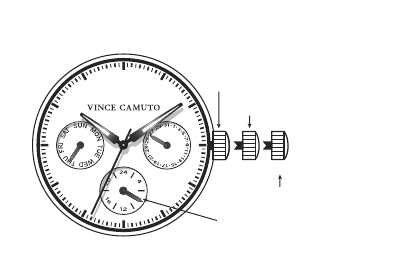
CROWN AT NORMAL
POSITION
TIME SETTING
[1] [2]
6P29 An Analog uartz watch which was designed with multi hands, to enhance perfection.
e hands in the small displays show Day, Date, and 24 hour time.
24-HOUR HAND
(Indicates the time on a 24-hour basis)
DATE SETTING

NOTE: Actual watch case may be dierent. Look for the position of the Day,
Date, Month or 24 Hour Sub Dials to see if this is your watch.
SETTING THE TIME
1. Pull the crown out to the 2nd position and rotate the crown clockwise or
counter-clockwise until the desired Time and Day are obtained.
2. Push the crown back in to the normal position to re-engage time keeping.
NOTE: Never pull the Crown when the watch is wet.
SETTING THE DATE
1. Pull the crown out to the 1st position.
2. Turn the crown counter-clockwise to set the date.
3. Aer the date has been set, push the crown back to the normal position.
NOTE: e 24 hour (Military Time) adjusts automatically when the Time is set.
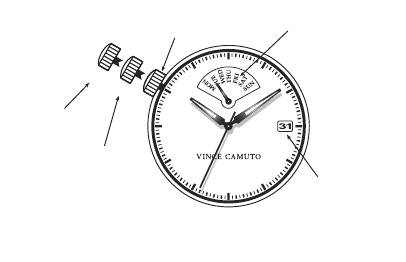
CROWN AT NORMAL
POSITION RETROGRADE
DAY INDICATOR*
VX 45
NOTE: *Aer the day hand reaches the last day of the week, the hand will jump
to the rst day of the week.
TIME SETTING
POSITION
DATE
[1]
[2]
DATE SETTING
POSITION

SETTING THE TIME
1. Pull crown out to the 2nd position when the second hand is at the 12 o’clock position.
2. Turn clockwise to advance the hour and minute hands past 12:00 AM.
Doing so will advance the date to the next date.
3. Set the hour and minute hands to the desired time taking AM or PM into
consideration. When setting the minute hand, advance it 4 to 5 minutes ahead of the
desired time and then turn it back to the exact time.
4. When the crown is pushed back to the normal position, second hand begins to run.
NOTE: Never pull the Crown when the watch is wet.
SETTING THE DATE
1. Pull the crown out to the 1st click position.
2. Turn the crown counter-clockwise to set the date.
3. Turn the crown clockwise to set day day of the week.
4. Aer the date has been set, push the crown back to the normal position.
NOTE: * Do not set the day and date between 9:00 p.m. and 4:00 a.m. Otherwise,
it may not turn properly. Aer the day hand reaches the last day of the week, turn
the crown clockwise and the hand will return to the rst day of the week.
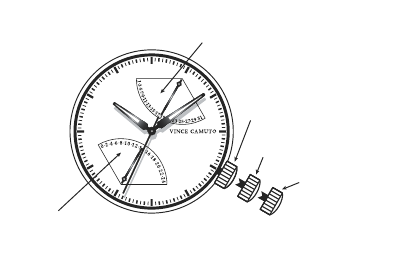
GP 50
CROWN AT NORMAL
POSITION
TIME SETTING
POSITION
SECOND TIME
(Indicates the time on a 24-hour basis)
DATE
[1][2]
DATE SETTING POSITION

SETTING THE TIME
1. Pull the crown out to the 2nd position.
2. Turn the crown to set hour and minute hands.
3. When the crown is pushed back to the normal position, second hand begins to run.
NOTE: Never pull the Crown when the watch is wet.
SETTING THE DATE
1. Pull the crown out to the 1st position.
2. Turn the crown clockwise to set the date.
3. Aer the date has been set, push the crown back to the normal position.
NOTE: * If the date is set between the hours of around 9:00 PM and 2:00 AM,
the date may not change on the following day.
SETTING THE SECOND TIME (24 hours)
1. Pull the crown out to the 1st position.
2. Turn the crown counter-clockwise to set the second time(24h).
3. Aer the second time(24h) has been set, push the crown back to the normal position.
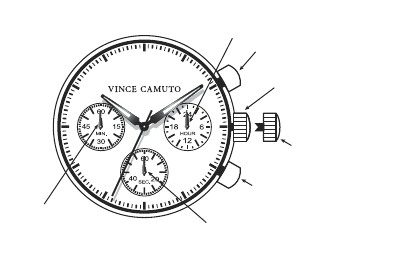
CROWN AT NORMAL
POSITION
BUTTON (A)
*In stopwatch function Start/Stop
STOPWATCH
MINUTE HAND
(Move in minute increments) STOPWATCH
SECOND HAND
(Move in second increments)
24-HOUR HAND
(Indicates the time on a 24-hour basis)
TIME SETTING
POSITION
VD 54 B
BUTTON (B)
*In stopwatch function Split/Split
Release/Reset

Before setting the time , check if the stopwatch second and minute hands are in
the “60”(12 o’clock) position. If either of the stopwatch hands are not in the “60”
position, reset them following the procedure below:
1. Pull out the crown.
2. Press button A or B to reset the stopwatch second and minute hands to “60”position.
By pressing button A the hands move counter clockwise. By pressing button B the
hands move counter clockwise.
3. Push the crown back in to the normal position.
SETTING THE TIME
1. Pull out the crown when the second hand is at the 12 o’clock position. e second
hand will stop on the spot. Do not press any buttons, otherwise the chronograph
hands will move.
2. Turn the crown to set the hour, minute and the 24-hour hands to the desired time.
As the hour hand moves, the 24-hour hand moves correspondingly. When setting
the hour hand, check if the 24-hour hand is set properly.
3. Push the crown back in to the normal position to re-engage time keeping.
NOTE: Never pull the Crown when the watch is wet.

HOW TO USE THE STOPWATCH
e measured time indicated by the stopwatch hands, move independently of the center
and 24-hour hands. e stopwatch can measure up to 60 minutes in seconds.
* Seconds elapsed up to one minute (6 o’clock eye)
* Minutes elapsed up to one hour (9 o’clock eye)
Before using the stopwatch, reset the stopwatch hands to the “60”(12 o’clock) position.
STANDARD STOPWATCH MEASUREMENT:
1. Press button A to start timing.
2. Press button A to stop timing. Restart and stop of the stopwatch can be repeated as
many times as necessary by pressing button A.
3. Press button B to reset.
SPLIT TIME MEASUREMENT:
1. Press button A to start timing.
2. Press button B to stop timing.
3. Press button A to stop timing of second event.
4. Press button B to view time of second event.
5. Press button B to reset.

WATER RESISTANCE
If your watch is water resistant, the watch is tested to be water resistant to 3-5 atmospheres
(10 0-165 feet).
NOTE: Over time, the gaskets of the case may become worn and reduce the water
resistance of the watch. A trained specialist should change the gaskets and the O-ring
each time the battery is changed. To avoid any unwanted condensation, watches of all
specications (water resistant or not) should not be exposed to extreme temperatures
such as cold or heat.
CHANGING THE BATTERY
Replace batteries when the watch becomes slow or does not operate.
Replace with same or equivalent.
NOTE: Battery change should be performed by a qualied technician who should also
check the condition of the gaskets at the same time.
BATTERIES ARE NOT COVERED UNDER WARRANTY.
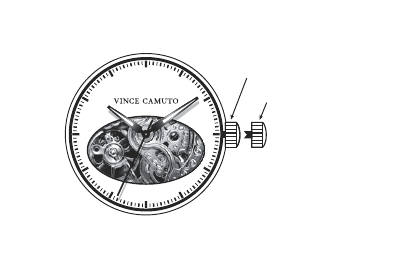
AUTOMATIC MOVEMENT
CROWN AT NORMAL POSITION
(Spring-winding position)
TIME SETTING POSITION

THE AUTOMATIC COLLECTION
e Automatic Self-Winding Mechanical Watch (since it is not operating by a Battery)
must be wound at least six or seven times before you wear it. Aer that, your daily
activity should wind the watch suciently to keep it running at night when it is not
being worn. If your normal daily activity is not sucient, occasional supplementary
manual winding may be necessary. It is suggested that your mechanical watch be
cleaned and oiled periodically to insure optimum performance. As this is a mechanical
watch, quartz watch accuracy cannot be expected.
SETTING THE TIME
1. Pull the crown out to the time setting position.
2. Turn the crown to set hour and minute hands.
3. When the crown is pushed back to the normal position, second hand begins to run.
NOTE: Never pull the Crown when the watch is wet.
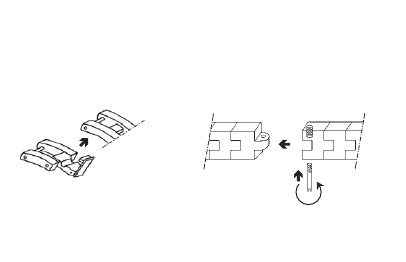
DIAGRAMS FOR ADJUSTABLE BRACELET WATCHES
1. CLASP EXTENDER 2. ONE SCREW SYSTEM
screw
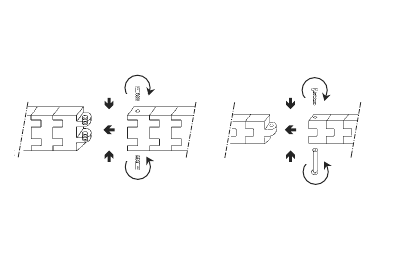
3. TWO SCREW SYSTEM
Screw in one at a time
4. CONNECTION SYSTEM
screw connection
screw
screw
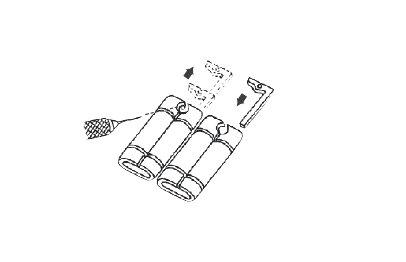
5. METAL INSERT
METAL INSERT
push to close
push to open
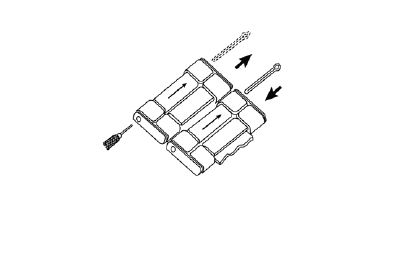
Turn over the watch to look for arrows on the underside of the links, showing you
which way you need to push the pin out of the link. Use a pin remover tool to push
out the “hair clip pin” from the hole located on the side of the link. Aer the links are
removed, simply follow these steps in reverse to re-assemble the bracelet.
push to open
METAL PIN
push to close
6. HAIRCLIP PIN
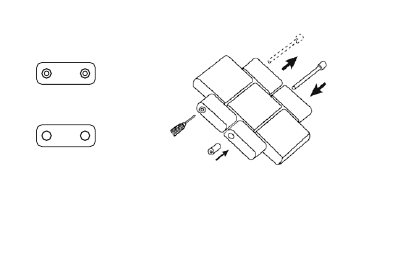
Side view “B” of Link
Side view “A” of Link
Check the side edge of the watch link, to determine which side of the link is “A” or
“B”. Take a pin remover tool and push out the pin from the hole located on side “B”.
Aer the desired links are removed, simply follow these steps in reverse to re-assemble
the bracelet.
push to open
METAL PIN
push to close
7. PIN & TUBE 1
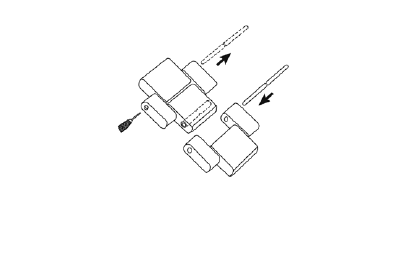
In order to adjust links for this watch construction, you must switch the pin on the tool
kit to the longest pin (approximately 10mm long) found under the tool kit. en use
the pin remover tool to push out the pins from either side of the links. Aer the desired
links are removed, simply follow these steps in reverse to re-assemble the bracelet.
push to open
METAL PIN
push to close
8. PIN & TUBE 2
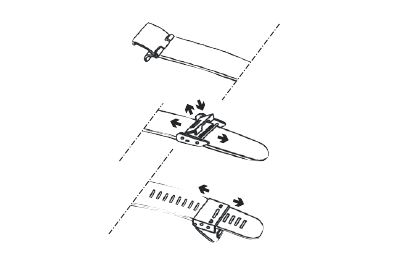
9. SLIDING BAR
li up to open
slide along
for adjustment
push down when done
align protruded line
inside the sliding part with
desired groove in band
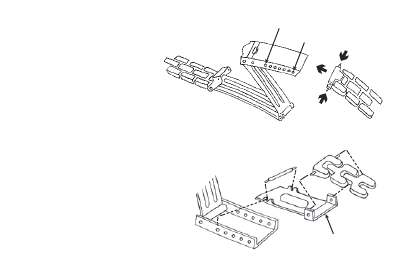
10. FOLD-OVER BUCKLE smallest size
largest size
Compress the push pin, and
put the ends into the suitable
holes along the buckle.
If your watch did not come with
the Extender, please call with the
style number (which is engraved
on the case back) and the Extender
will be shipped to you. THE EXTENDER
EXTENDER TO MAXIMIZE THE SIZE OF THE
FOLD-OVER CLASP FOR A LARGER WRIST
(For a Smaller Size Wrist discard the Extender)
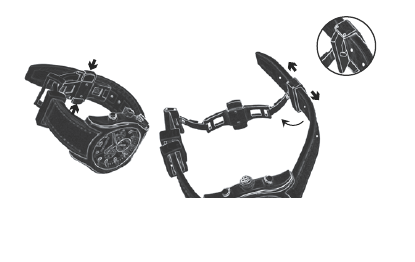
11. QUICKRELEASE BUTTERFLY CLASP
Push on both
sides to open
clasp.
Pull down the back
of the sizing clasp
to release.Adjust as
needed, then push
it back to secure.
Fitting the watch may take some trial and error. Start by identifying the small pin that’s
attached to the back of the buckle. Insert the pin into a hole in the strap. For thicker wrists
use the holes closer to the end of the strap or, for thinner wrists, closer to the watch.

Dear Customer:
Help your watch/jewelry retailer protect our environment by properly recycling the
button cell battery in your watch. Professional jewelers and watch retailers are best
equipped to replace the battery in your watch without damage to the watch case and
movement inside. ey have the specialized tools and experience to do the job right.
Inexperienced people can scar the case and damage the water resistant seal – voiding
your warranty. It is important to recycle your watch battery in an environmentally
safe way. Watch batteries contain very small amounts of mercury, which is required
to prevent corrosion of the battery and damage to your watch. ere is no danger to
you or your watch from the mercury because it is in the sealed battery. But you need
to recycle your watch battery properly. Your professional watch/jewelry retailer is the
best person to do this for you. ese professionals collect used batteries and recycle
them through licensed waste management companies.
Do our environment and your watch a favor. Ask your watch/jewelry professional to
replace your battery when it expires.

If your watch requires cleaning, lubrication, battery changing, or needs a crystal replaced,
VINCE CAMUTO® watches approved Service Centers are available in your area. ese
repair facilities use VINCE CAMUTO® watches parts and components to assure quality
and future performance. Free estimates are available in advance, should you need servicing
or repairs not covered under the warranty. Repairs covered under the warranty may require
proof of purchase, so retain the purchase receipt.
TO RETURN YOUR WATCH FOR SERVICING:
FROM THE UNITED STATES: Please call 718.482.4195 for a listing of all
approved and authorized stations and locations.
TO RETURN YOUR WATCH FOR SERVICING:
RETURN IT TO VINCE CAMUTO WATCHES OR
TO AN AUTHORIZED SERVICE CENTER;
IT SHOULD NOT BE RETURNED TO PLACE OF PURCHASE.

FROM OUTSIDE OF THE UNITED STATES:
Clarity Ltd.
Flat A - B, 12/F, Sing Mei Industrial Building
29 - 37 Kwai Wing Road, Kwai Chung, N.T. Hong Kong
tel: 852.2424.2211 fax: 852.2424.2077
Carefully pack your watch in a sturdy box (do not send in a gi box for same will not be
returned) and mail to the nearest approved authorized service station. Because of possible
loss, we recommend that you insure your watch, return receipt requested, when using
the mail. If your watch requires cleaning, lubrication, battery changing, or needs a crystal
replaced, VINCE CAMUTO® watches approved Service Centers may be available in your
area. ese repair facilities use VINCE CAMUTO® watches parts and components to
assure quality and future performance. Free estimates are available in advance, should you
need servicing or repairs not covered under the warranty. Repairs covered under the warranty
may require proof of purchase, so retain the purchase receipt. For further information
regarding VINCE CAMUTO® watches approved Service Stations and locations, please call
the Service Centers listed above.

5 YEAR LIMITED WARRANTY
is VINCE CAMUTO® watch is warranted to you, the owner, for 5 years against
all defects in material or workmanship. is warranty does not apply to normal wear
and tear or abuse and excludes batteries, case, strap, crystal, or bracelet. A copy of the
receipt, or dealer stamp in the warranty booklet, is required for proof of purchase. In
the event of a defect or malfunction of the movement within this period it will be
repaired or replaced, at our option, provided that it is returned prepaid with a check
or money order for $14.95 to cover the cost of handling and return postage for a
Quartz Movement Watch or $24.95 for an Automatic Movement Watch. (is is
not a repair charge.) DO NOT SEND CASH. No additional charge will be made
unless additional servicing is necessary for reasons beyond our control such as accident,
misuse, neglect or replacement of parts not warranted is required such as case, crystal,
strap, bracelet or batteries in which event a moderate charge will be made.
e movement of any timepiece requires periodic cleaning/timing which is not
a defect and, as such not warranted. Aer one year from the date of purchase each
cleaning/timing will be performed as required without charging a fee in excess of the

specied $14.95 or $24.95 handling charge. e above remedy is exclusive. VINCE
CAMUTO® watches shall not be liable for any incidental or consequential damages.
Should any other part of your watch require repair, please use our Service Center for
quick and inexpensive repairs on your watch. is warranty gives you specic legal
rights and you may also have other rights which may vary from state to state. Some
states do not allow limitations on how long an implied warranty lasts, or the exclusion
or limitation of incidental or consequential damages, so the above limitations and
exclusions may not apply to you. In the event of a problem with warranty service or
performance, you may be able to go to Small Claims Court, a State Court or a Federal
District Court.
revised 12/03/2012
MB12-341_LP

©2012 E. GLUCK CORPORATION
VINCE CAMUTO® is a registered trademark of Camuto Consulting, Inc. All other identied
trademarks or servicemarks are or may be the intellectual property rights of their respective owners.
* SPECIFICATIONS SUBJECT TO CHANGE
WITHOUT PRIOR NOTICE FOR PRODUCT IMPROVEMENT,
DESIGN MAY VARY DEPENDING ON THE MODEL.
For the latest information on sizing, service and repairs, please go to:
www.vincecamuto.com/watchwarranty

VENDOR STAMP
----------------------------------------------------------------------------------------

VENDOR STAMP


Vincecamuto.com
