Waldorf Streichfett Manual
User Manual:
Open the PDF directly: View PDF  .
.
Page Count: 31

Content
Streichfett Reference Manual 2
Content
Foreword ................................................................................ 3!
Control Features and Connections ...................................... 5!
Front Panel ...................................................................... 5!
Connections .................................................................... 6
Introduction ............................................................................ 7!
About this Manual ........................................................... 7!
General Safety Guidelines ............................................... 8!
Setup and Connection ......................................................... 10!
Package Contents .......................................................... 10!
Connections .................................................................. 10
The USB Connection ..................................................... 11
Basic Operation ................................................................... 12!
Powering On / Off ......................................................... 12!
Editing ........................................................................... 12
The Streichfett Controls ...................................................... 13!
Strings Section ............................................................... 13!
Solo Section ................................................................... 15!
Effect Section ................................................................. 16!
Memory Section ............................................................ 17
Additional Functions ...................................................... 18
Appendix .............................................................................. 20!
Technical Data .............................................................. 20
MIDI Controller Numbers .............................................. 21!
MIDI Implementation .................................................... 22!
Declaration of Conformity ............................................. 28!
Product Warranty & Support .......................................... 31!

Foreword
3 Streichfett Reference Manual
Foreword
Thank you for purchasing the Streichfett String Synthesizer.
By choosing a Waldorf product, you know this device has
been crafted and produced carefully, in Germany, for the
most exigeant musicians. We hope you will have great fun
and many creative / innovative ideas using it.
Reading this user manual, you will discover all the device
features, learn its basic use in real situations, and benefits of
tips & tricks we gathered during product development /
quality checks.
Your Waldorf-team
Hint
Waldorf Music is not liable for any erroneous information
contained in this manual. The contents of this manual may
be updated at any time without prior notice. We made every
effort to ensure the information herein is accurate and that
the manual contains no contradictory information. Waldorf
Music extends no liabilities in regard to this manual other
than those required by local law.
This manual or any portion of it may not be reproduced in
any form without the manufacturer's written consent.
Waldorf Music GmbH, Lilienthalstrasse 7, 53424 Remagen,
Germany
Foreword
Streichfett Reference Manual 4
The Streichfett Development Team
Hardware: Frédéric Meslin, Oliver Rockstedt,
Frank Schneider
Software Frédéric Meslin, Oliver Rockstedt,
Stefan Stenzel
Design: Axel Hartmann, Stefan Stenzel
Manual / Layout: Holger Steinbrink, Stefan Stenzel
Revision: 1.0, July 2014
w Please visit our website www.waldorfmusic.com for
more information about Streichfett!
We would like to thank
Christian Bacaj, Karsten Dubsch, Willie Eckl, Joachim Flor,
Michael von Garnier, Daniel Krawietz, Kurt "Lu" Wangard,
吴海彬, and anyone we have forgotten.
Control Features and Connections
5 Streichfett Reference Manual
Control Features and Connections
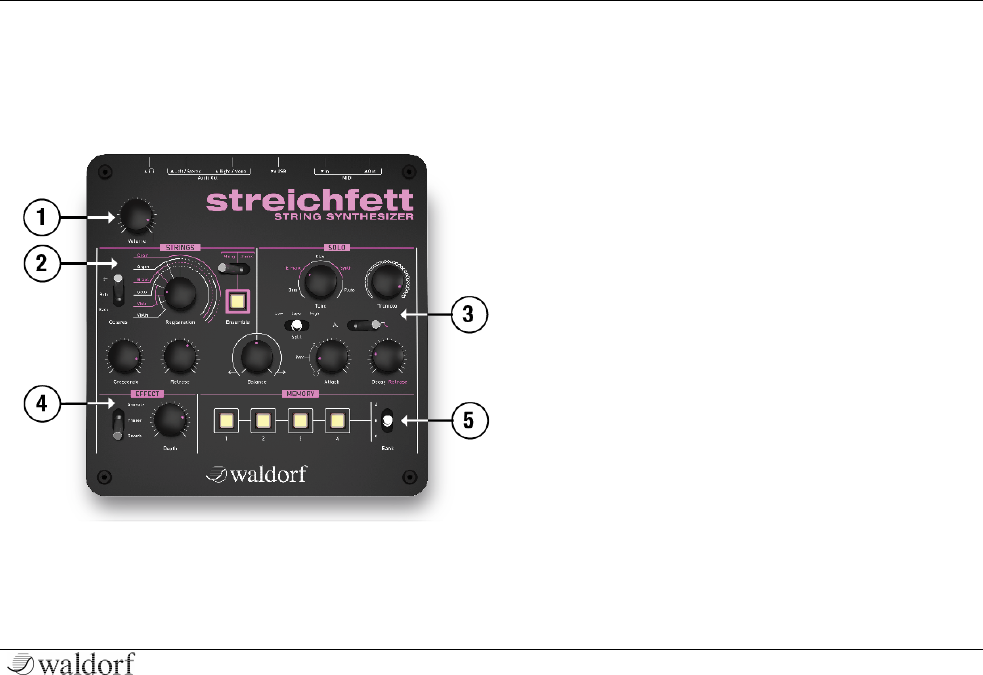
Front Panel
a Volume Dial
b Strings Section
c Solo Section
d Effect Section
e Memory Section
Control Features and Connections
Streichfett Reference Manual 6
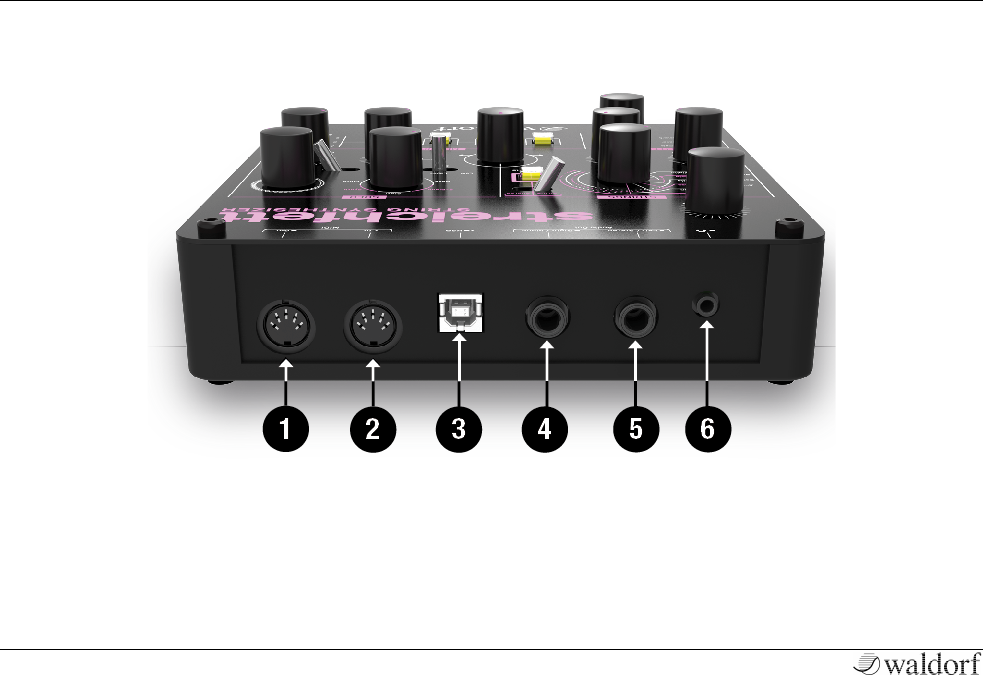
Connections
A MIDI Out Jack
B MIDI In Jack
C USB Port for power supply and MIDI connection to
a suited computer
D Right/Mono Audio Output Jack
E Left/Stereo Audio Output Jack
6 Stereo Headphone Jack
Introduction
7 Streichfett Reference Manual
Introduction
About this Manual
This manual was written to help you getting familiar with
the Streichfett. It will also aid experienced users with
routine tasks.
Important terms are highlighted in bold letters.
Symbols
m Caution – The comments that follow this symbol
will help you avoid errors and malfunctions.
w Info – Additional information on a given topic.
+ Instruction – Follow these guidelines to execute a
desired function.
[ Example – Real-world examples to try out.
Highlighted Control Features
All of the Streichfett´s controls are highlighted in bold
letters throughout the manual.
Example:
• Press the Ensemble button.
• Move the Tremolo knob.
Introduction
Streichfett Reference Manual 8
General Safety Guidelines
m Please read the following safety tips carefully! They
include several precautions you should always ob-
serve when dealing with electronic equipment.
Read all of the instructions before operating your
device
Suitable Operating Conditions
• Use the device indoors only. Outside it could be
rainy or humid as well as too hot or too cold.
• Never use the device under damp conditions such as
in bathrooms, washrooms or around indoor swim-
ming pools.
• Do not use the device in extremely dusty or dirty
environments in order maintain the surface finishing
of the Streichfett.
• Make sure that adequate ventilation is available on
all sides of the device. Do not place the device near
heat sources such as radiators.
• Do not expose the device to direct sunlight, even if
you have a suitable sunscreen.
• Do not expose the device to extreme vibrations.
Power Supply
• Unplug the device when you are not using it for lon-
ger periods.
• Always pull the plug when unplugging the device,
never the cable.
Operation
• Never place objects containing liquids on or near the
device.
• Always place the device on a stable base only.
• Make sure no foreign objects find their way into the
chassis. If for some reason this should occur, switch
the power off, unplug the device and consult a quali-
fied repair center.
• This device, used on its own or with amplifiers, spea-
kers or headphones, can generate volume levels that
may result in irreparable damage to your hearing
and/or speakers and amplifiers. For this reason you
should keep the volume at appropriate levels at all
times.
Introduction
9 Streichfett Reference Manual
Maintenance
• Do not open the device or remove the cover. Refer all
service and repair tasks to qualified personnel. There
are no user serviceable parts inside the chassis.
• Use only a dry, soft cloth or brush to clean the device.
Never use alcohol, cleaning solutions or similar che-
micals. They will damage the surface of the chassis.
Proper Use
This device is designed exclusively to process low-
frequency audio signals for the purpose of generating
sound. Any other use is prohibited and voids the warranty
extended by Waldorf Music. Waldorf Music is not liable
for damages due to incorrect use.
m Do not leave your Streichfett near children,
mothers-in-law or pets. This could lead to critical
interactions.

Setup and Connection
Streichfett Reference Manual 10
Setup and Connection
Package Contents
The Waldorf Streichfett package comes complete with:
• the Waldorf Streichfett module
• an external USB power supply (DC 5V / 1A)
• a printed quick start guide
w You can also download additional material and
software here: www.waldorfmusic.com
Please ensure all the items above are included. If some-
thing is missing, contact your local dealer.
We recommend that you keep the original packing mate-
rial for future transport.
Connections
In order to get started with your Streichfett you will need
an power outlet or a suitable computer with an USB port.
For the connection of the audio output you will need
either a mixing console or an audio interface. You can
also use a suitable headphone. Last but not least you will
most likely need a MIDI master keyboard.
+ To connect the devices:
1. Turn all units off.
2. Connect the Streichfett´s audio output 4 + 5 to
your mixing console or your computer audio in-
terface. Optionally connect a suited stereo
headphone to the Streichfett´s headphone output
6 .
3. To play the Streichfett you need a MIDI master
keyboard. Connect its MIDI Out to the Streich-
fett´s MIDI In 2.
4. If you want to use a computer with a MIDI inter-
face, connect your interface´s MIDI Out to the
Streichfett´s MIDI In 2.
5. Optionally you can connect the Streichfett´s USB
port 3 with a USB cable to your computer. After

11 Streichfett Reference Manual
that, the Streichfett is automatically available as a
MIDI device and will also receive power via the
USB connection.
6. Without a computer, you need to connect the
USB power supply that came with the Streichfett
to the USB port 3. After that, the Streichfett is
ready for work!
7. Then switch on the computer (if connected), the
mixing console and finally the amplifier or active
monitor speakers.
w If you do not choose to connect a mixing console,
you can patch the Streichfett’s output signals di-
rectly to an amplifier or an audio interface. Use an
input usually called Line, Aux or Tape input.
m Before connecting and disconnecting the Streichfett
from a power supply source, turn your amplifier’s
volume control all the way down to avoid damage
due to on / off switching noise. The Streichfett pro-
duces a high level output signal. Please take care
that the connected playback device is suitable for
the high level of an electronic instrument. Never
use the mic or phono input of the connected amp!
The USB Connection
Using a USB cable you can connect the Streichfett to your
computer observing the following system requirements:
• Windows PC: Windows XP or newer is recommen-
ded, a USB port
• Linux PC, a USB port
• Apple: Intel Mac with Mac OS X 10.6 or newer, a
USB port
The USB connection of the Streichfett allows:
• Power supply via USB when connected to a suitable
computer
• Power supply via the USB power supply
• Transmitting and receiving MIDI data
• Dumping of firmware updates to the Streichfett
• Data exchange with suitable computer software or
another Streichfett
w Make sure to use a fullspeed USB port on your
computer as well as a USB compatible cable to
avoid problems with data transmission.

Basic Operation
Streichfett Reference Manual 12
Basic Operation
Powering On / Off
The Streichfett is ready-to-operate after the connection to
the USB power supply or via USB cable to a suitable
computer.
Editing
In spite of the Streichfett’s compactness, it uses a sophisti-
cated user interface allowing fast editing of any control.
Turning a dial clockwise increases the corresponding
value; turning it counterclockwise decreases it. Move a
switch to its desired position. Keep in mind that most of
the switches offer more than two states.
The Streichfett Controls
13 Streichfett Reference Manual
The Streichfett Controls
The Waldorf Streichfett consists of numerous sound-
shaping components.
Volume
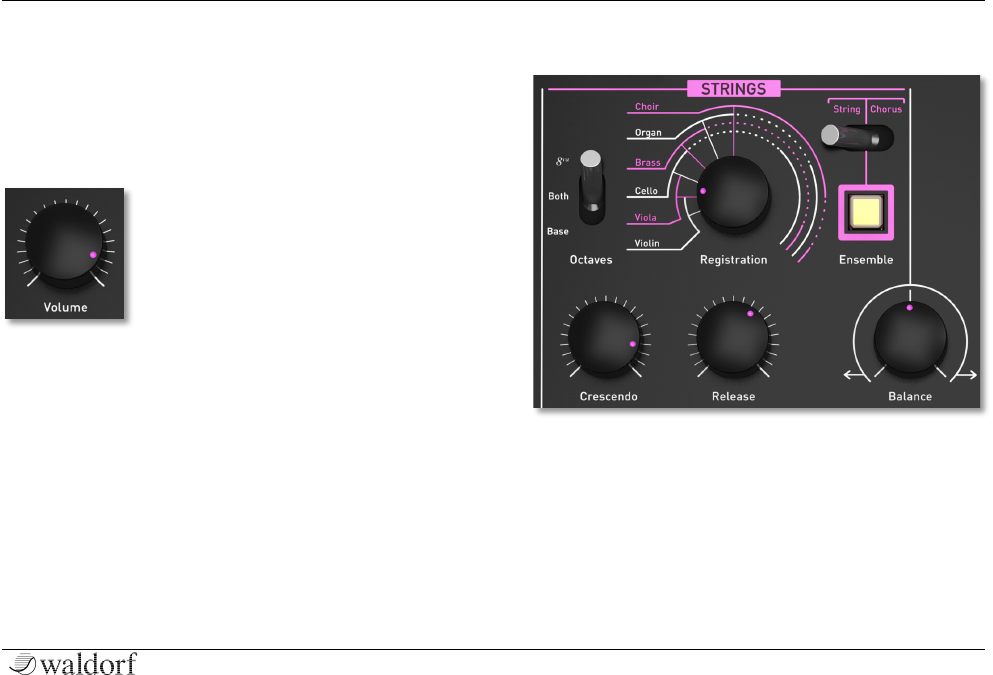
The Volume knob controls the
Streichfett’s audio and headphone
volume. The audio output always
delivers a line level signal.
Strings Section
Registration
This is the oscillator bank, equalizer and formants setting
for the sound of the Strings section. Moving this knob
morphs smoothly through Violin, Viola, Cello, Brass,
Organ, Choir as well as combinations of the registrations.

The Streichfett Controls
Streichfett Reference Manual 14
Octaves Selector
This is the octave setting for the Strings. Three positions
are available:
• 8va: One octave higher than Base octave.
• Both: Base octave mixed with the 8va octave.
• Base: The normal octave setting.
Crescendo
This is the attack rate for the Strings envelope.
Release
The release rate for the Strings envelope. Sustain is always
at 100%, so there is no need for a decay setting.
Ensemble Switch
Switches the Ensemble effect for Strings on or off. This
effect adds more depth and width to the sound. We re-
commend to always activate it for strings and choir
sounds.
The ensemble effect is an advanced chorus effect which
consists of three delay lines with different modulation
speeds and phase shiftings.
Ensemble Selector
Three modes for the Ensemble effect can be selected here:
• String (left position): the classic string machine en-
semble effect.
• String + Chorus (middle position): Combination of
string and chorus for maximum depth and width of
the sound.
• Chorus (right position): The classic chorus effect.
Balance
Mixes the signals of the Strings and Solo section. The
leftmost position selects Strings only, while on the far right
only the Solo section is audible. In the middle position,
both Strings and Solo are mixed with full scale.
The Streichfett Controls
15 Streichfett Reference Manual
Solo Section
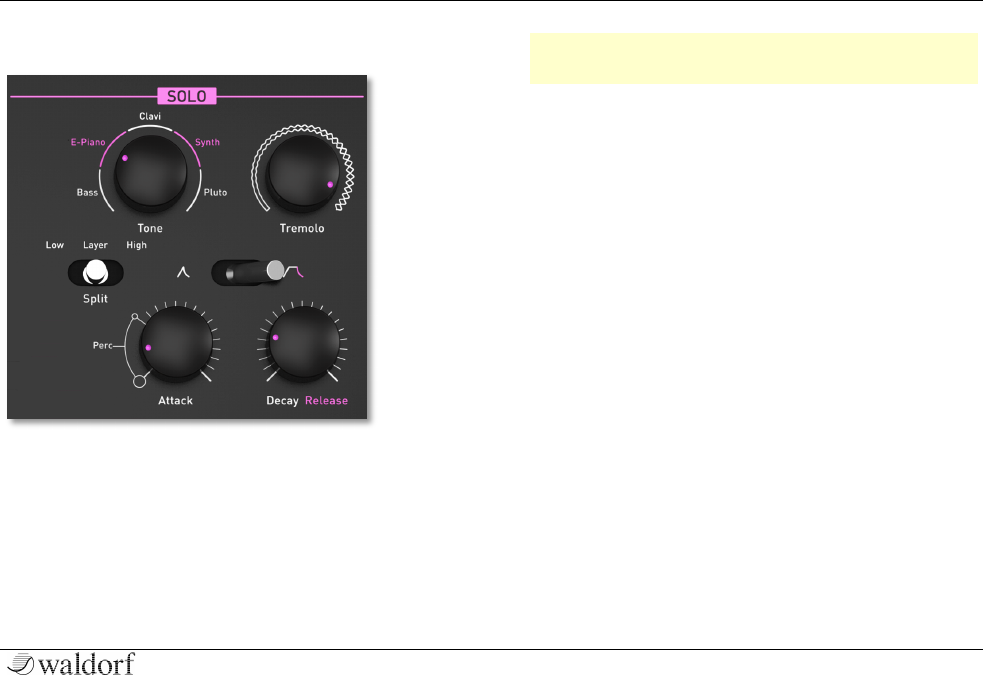
Tone
This is the sound setting for the Solo section. Moving this
knob blends smoothly through sounds named Bass, E-
Piano, Clavi, Synth and Pluto. Note that sounds only have
a faint resemblance to their names, which is common for
the genre of String synthesizers.
w Keep in mind that the Bass tone is played one
octave lower than the other tones.
Split Selector
This switch allows to set a key split for the Solo section.
Three positions are available:
• Low (left position): Only keys lower than the split
key will sound. Holding down one key when "Low"
is selected sets the split key to the current note being
held.
• Layer (middle position): Solo plays on all keys.
• High (right position): Only keys higher or equal to
the split key will sound. Set the split key by holding
down desired key while switching to "High".
Tremolo
This adjusts both the rate and depth of the stereo tremolo
effect.
Attack
In addition to set the attack rate of the envelope, settings
from leftmost to 10 o´clock position control how much of
The Streichfett Controls
Streichfett Reference Manual 16
a percussive click sound is added, each time a key is
pressed.
Envelope Selector
This switch controls Envelope operation for the Solo sec-
tion:
• In the left position, the envelope has no sustain and
decays immediately after the initial attack. This is
perfect for clavinet or bass sounds.
• In the right position, notes are held at full sustain
level until keys are released.
Decay / Release
Decay or release rate for the envelope.
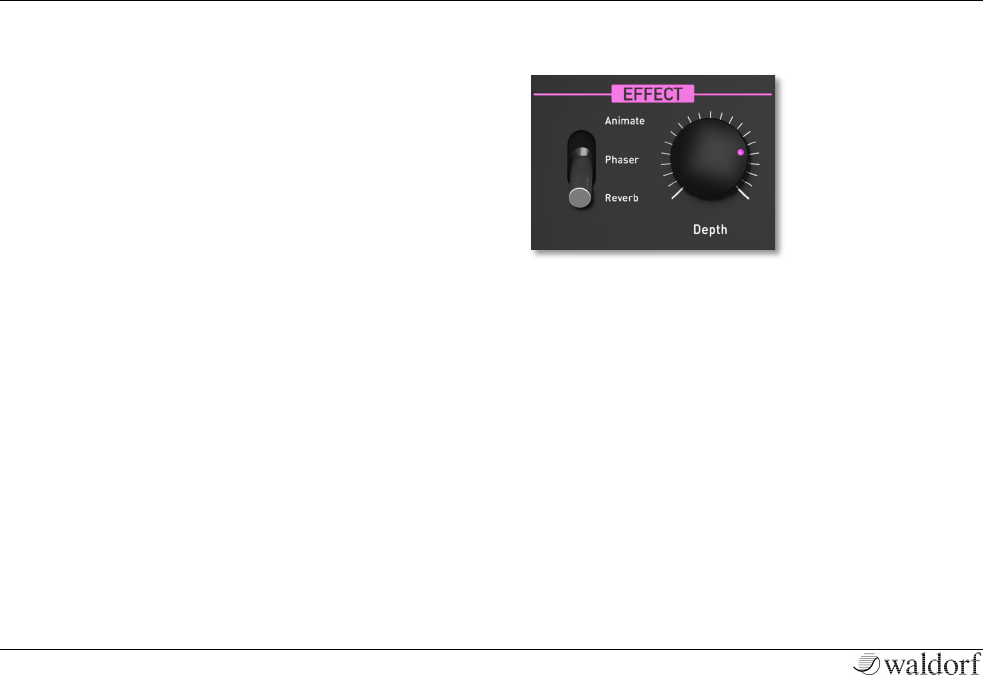
Effect Section
Depth
Controls the selected effect parameters depending on the
Effect selector setting.
Effect Selector
This switch selects which effect can be adjusted by the
Depth potentiometer. Note that all three effects can be
combined simultaneously.
• Animate: A Low Frequency Oscillator (LFO) modu-
lates the Strings registration. Both depth and rate are
controlled by the Depth potentiometer.
The Streichfett Controls
17 Streichfett Reference Manual
• Phaser: Classic phase shifter effect. Feedback, depth
and rate are adjustable with Depth according to the
most pleasing settings we could find.
• Reverb: Reverberation with adjustment of mix, size
and dampening of the ambient room according to
useful settings.
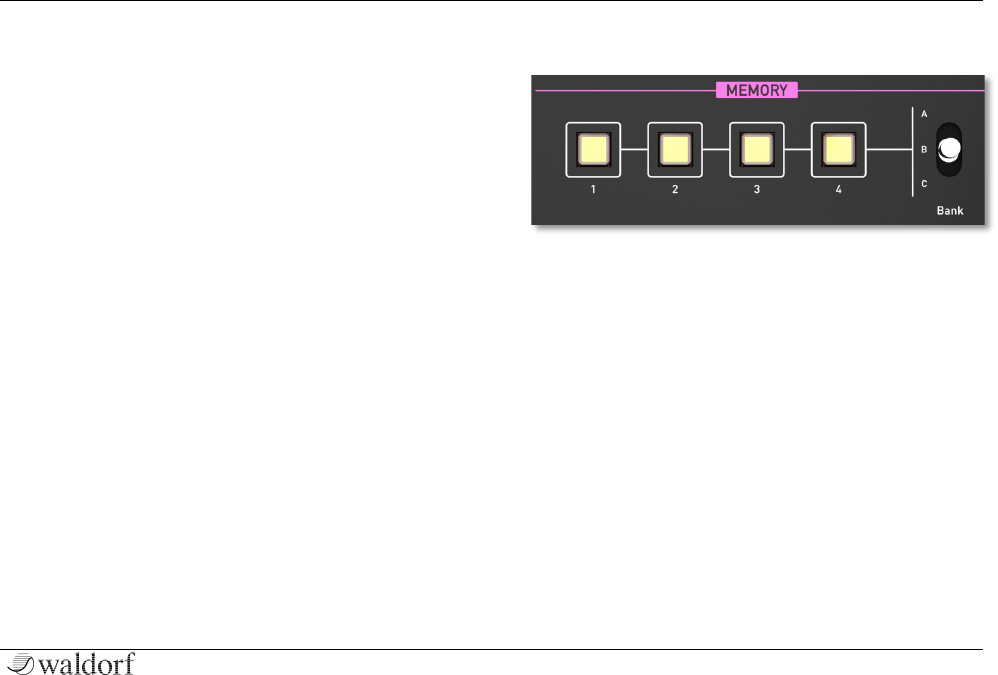
Memory Section
The Memory section offers twelve patches for accessing
and storing sound settings. Three banks of four sounds
each are available.
For selecting a sound, switch to the desired Bank [A, B or
C] and press one of the buttons labeled 1 to 4 in order to
access e.g. sound C4.
For storing a sound, press and hold one of the four buttons
1..4 until it blinks, select the desired Bank and then relea-
se the button.

The Streichfett Controls
Streichfett Reference Manual 18
Additional Functions
Modulation Wheel
The Modulation wheel sets the vibrato level and speed of
Strings and Solo sections.
The state of the Modulation wheel is stored with the
sound program. When you recall a sound program, the
vibrato settings are also restored. As soon as you move the
Modulation wheel, this replaces the stored setting.
w If you select the Pluto tone in the Solo section,
which contains an additional vibrato, this is syn-
chronized to the vibrato of the Modulation wheel.
Panic
In case your want immediate silence, press all four Me-
mory buttons 1..4 simultaneously. It works like receiving
an "All Notes Off" MIDI message.
MIDI Channel Setting
Press and hold all four Memory buttons, then play a MIDI
note through USB or MIDI. Streichfett sets the MIDI chan-
nel for receiving and transmitting according to the chan-
nel of the received note on message.
For Omni mode (receiving MIDI data on all MIDI chan-
nels), press all four Memory buttons when powering on
Streichfett.
w If switched to Omni mode, the MIDI data from
Streichfett is sent via the last selected MIDI channel
(before switching to Omni mode).
In case any MIDI channel from 1 to 14 is selected, the
Solo section can be triggered independently of the Strings
section on the next channel, with split settings being igno-
red. So in order to e.g. play Strings on MIDI channel 1
and Solo on MIDI channel 2, proceed as follows:
• Press and hold all four Memory buttons and play any
key on your master keyboard on MIDI channel 1 to
set the MIDI channel.
• Set Balance to the middle position so you can hear
both Strings and Solo.
• Press and hold the lowest key on your MIDI master
keyboard and select "Low" with the Split switch. This
sets the split key very low and prevents Solo to be
heard, if you play Strings on MIDI channel 1.
Now you can play Strings on MIDI channel 1 and Solo on
MIDI channel 2.

The Streichfett Controls
19 Streichfett Reference Manual
Pitch Bend Range
Press and hold all Memory buttons and move the Effect
Selector to the desired position:
• Animate: 2 semitones (default)
• Phaser: 7 semitones
• Reverb: 12 semitones, or rather one octave
Dumping Sounds
The dump functions let you send and receive all 12 sound
programs of the Streichfett’s memory via MIDI or USB
MIDI. Using a suitable sequencer software or a special
sound editor program, you can record and archive this
data.
+ To dump all sounds:
1. Press and hold all Memory buttons.
2. Press the Ensemble button to start the dump
process.
w To dump a single sound you need to send a MIDI
dump request from e.g. a suitable software. For
more informations please refer to the MIDI Imple-
mantion chapter in the appendix of this manual.
Receiving Sound Dumps
There is no special receive mode in the Streichfett in order
to receive MIDI sound dumps through MIDI or USB. You
only need to send the sound data dump to the connected
Streichfett.
w You can also connect two Streichfett via MIDI to
exchange sound data.

Appendix
Streichfett Reference Manual 20
Appendix
Technical Data
Power Supply
Maximum current consumption: 80 mA
Input Voltage: 5V DC
Dimensions and Weight
Width: 185 mm
Depth: 185 mm
Height (including knobs): 65 mm
Total weight: 0,9 kg
Factory Settings
MIDI Receive Channel Omni
MIDI Transmit Channel: 1
Pitch Bend Range 2 semitones
Appendix
21 Streichfett Reference Manual
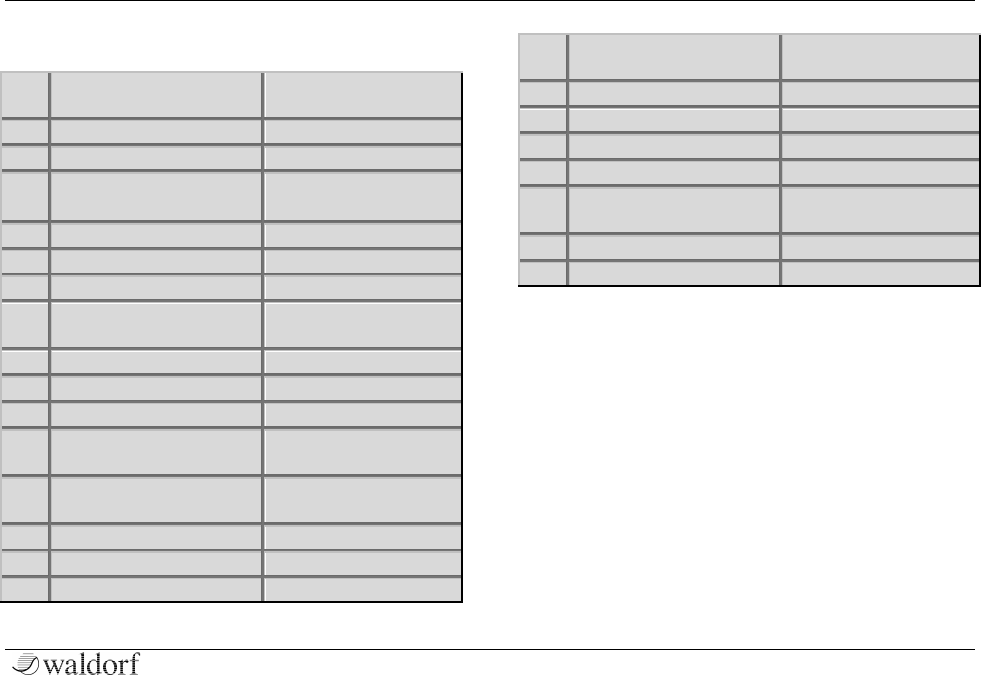
MIDI Controller Numbers
Ctrl
Controller or Sound
Control
Value Range
1
Modulation Wheel
0…127
64
Sustain Pedal
0 = Off, 64 = On
70
String Registration
0 = Base, 1 = Both,
2 = 8va
71
String Octaves
0…127
72
String Release
0...127
73
Crescendo
0…127
74
String Ensemble Type
0 = String, 1 = String +
Chorus, 2 = Chorus
75
String Ensemble
0…127
76
Solo Tone
0...127
77
Solo Tremolo
0…127
78
Solo Split
0 = Low, 1 = Layer,
2 = High
79
Solo Sustain
0 = No sustain, 1 = Full
sustain
80
Solo Attack
0...127
81
Solo Decay
0...127
82
Balance
0…127
91
FX Type
0 = Reverb, 1 = Phaser,
2 = Animate
92
FX Animate amount
0...127
93
FX Phaser amount
0…127
94
FX Reverb amount
0…127
120
All Sound Off
Immediate silence
121
Reset All Controllers
Resets Mod. Wheel,
Sust. Pedal, Pitch Bend
122
Local Control
0 = Off, 127 = On
123
All Notes Off
Releases all voices

Appendix
Streichfett Reference Manual 22
Streichfett MIDI Implementation
I) Channel Voice Messages
Note OFF Message
Release a note played
Format: 8c nn vv
Where:
c : MIDI channel (0 - 15)
nn : Note index (0 - 127)
vv : Release velocity (0 - 127)
Note ON Message
Trigger a new note
Format : 9c nn vv
Where :
c : MIDI channel (0 - 15)
nn : Note index (0 - 127)
vv : Key on velocity (0 - 127)
Remark: If vv is 0, the message is equivalent to a Note off
Pitch Bend Message
Temporarily alter the pitch
Format : Ec ll mm
Where :
c : MIDI channel (0 - 15)
ll : Pitch bend LSB
mm : Pitch bend MSB
Program Change Message
Set the current program
Format : Cc pp
Where :
c : MIDI channel (0 - 15)
pp : Program number (0 - 11)
Remark: pp = preset + 4 x bank
II) Control Change Messages
Generic Control Change
Format : Bc cc vv
Where :
c : MIDI channel (0 - 15)
cc : controller index (0 - 119)
vv : value of controller
Controller number list:
70 : String registration
71 : String octaves
72 : String release
73 : String crescendo
74 : String ensemble type
75 : String ensemble
76 : Solo tone
77 : Solo tremolo
78 : Solo split
79 : Solo sustain
80 : Solo attack

Appendix
23 Streichfett Reference Manual
81 : Solo decay
82 : Balance
91 : FX type
92 : FX animate amount
93 : FX phaser amount
94 : FX reverb amount
Modulation Wheel
Format : Bc 01h vv
Where :
c : MIDI channel (0 - 15)
vv : wheel position
Damper Pedal (Sustain)
Format : Bc 40h vv
Where :
c : MIDI channel (0 - 15)
vv : 0 pedal is released
> 0 pedal is engaged
Channel Mode Messages
All Sound Off
The instrument sound is muted directly
Format : Bc 78h 00h
c : MIDI channel (0 - 15)
Reset All Controllers
Set all controllers to their default value
Format : Bc 79h 00h
c : MIDI channel (0 - 15)
All Notes Off
All playing notes are released
Format : Bc 7Bh 00h
c : MIDI channel (0 - 15)
Omni Mode Off
The instrument responds to one MIDI channel
Format : Bc 7Ch 00h
c : MIDI channel (0 - 15)
Omni Mode On
The instrument responds to all MIDI channels
Format : Bc 7Dh 00h
c : MIDI channel (0 - 15)
Local Control
The instrument listens to its controllers
Format : Bc 7Ah vv
c : MIDI channel (0 - 15)
Where :
vv : 0 local control is off
127 local control is on

Appendix
Streichfett Reference Manual 24
III) System Exclusive Messages
Sound Dump Request:
Format : F0h 3Eh 19h DEV 00h SND F7h
Where:
Index Label Value Description
--------------------------------------------------------------------------
0 EXC F0h Marks start of SysEx
1 IDW 3Eh Waldorf Music ID
2 IDE 19h Streichfett ID
3 DEV MIDI Device ID (00h - 7Eh |
Fh disregard ID)
4 SRV 00h Sound dump request
5 SND Sound number
6 EOX F7h End of Exclusive
--------------------------------------------------------------------------
Remark:
Sound number can be : 00h - 0Ch : Flash stored preset
7Eh : All presets
7Fh : Play / edit buffer
Global Parameters Dump Request:
Format : F0h 3Eh 19h DEV 01h 00h F7h
Where:
Index Label Value Description
--------------------------------------------------------------------------
0 EXC F0h Marks start of SysEx
1 IDW 3Eh Waldorf Music ID
2 IDE 19h Streichfett ID
3 DEV MIDI Device ID (00h - 7Eh |
7Fh disregard ID)
4 SRV 01h Global parameters dump re-
quest
5 RSV 00h Reserved
6 EOX F7h End of Exclusive
--------------------------------------------------------------------------
Sound Dump:
Format : F0h 3Eh 19h DEV 10h SND DAT[24] XS F7h
Where:
Index Label Value Description
--------------------------------------------------------------------------
0 EXC F0h Marks start of SysEx
1 IDW 3Eh Waldorf Music ID
2 IDE 19h Streichfett ID

Appendix
25 Streichfett Reference Manual
3 DEV Device ID (00h - 7Eh | 7Fh
disregard ID)
4 SRV 10h Sound dump
5 SND Sound number
6-29 DAT[24] Sound data (see sound para
meters table)
30 XS Sysex checksum (7 bit
bytesum)
31 EOX F7h End of Exclusive
--------------------------------------------------------------------------
Remarks:
Bytesum is performed from IDW (byte 1) to the end of
DAT[byte 29]
Sound number can be : 00h - 0Ch : flash stored preset
7Fh : play / edit buffer
Global Dump:
Format : F0h 3Eh 19h DEV 11h 00h DAT[8] XS F7h
Where:
Index Label Value Description
--------------------------------------------------------------------------
0 EXC F0h Marks start of SysEx
1 IDW 3Eh Waldorf Music ID
2 IDE 19h Streichfett ID
3 DEV MIDI Device ID
4 SRV 11h Global parameters dump
5 RSV 00h Reserved
6-13 DAT[8] Global parameters data (see
global parameters table)
14 XS Sysex checksum (7 bit
bytesum)
15 EOX F7h End of Exclusive
--------------------------------------------------------------------------
Remark:
Bytesum is performed from IDW (byte 1) to the end of
DAT [byte 13]
Sound parameters :
ID Description Range Default
--------------------------------------------------------------------------
0 Registration 0...127 Registration setting 0
1 Octave Switch 0...2 0:Base 1:Both 2:8va 0
2 Ensemble Effect 0...2 0: Strings 1: Strings+Chorus
2: Chorus 1
3 Ensemble 0/1 0:off 1:on 1
4 Crescendo 0...127 Strings envelope attack rate 32
5 Release 0...127 Strings envelope release rate 64
6 Tone 0...127 Solo Section Tone 0
7 Tremolo 0...127 Solo Section Tremolo 0
8 Split/Layer 0...2 0: Split low 1:Layer 2:Split high 1
9 Split key 0...127 Note number for Split
low/high 60

Appendix
Streichfett Reference Manual 26
10 Envelope Mode 0/1 0: Attack-Release
1:Attack-Sustain-Decay 1
11 Attack 0...127 Solo envelope attack /
percussion 0
12 Decay 0...127 Solo envelope release/
decay 64
13 Balance 0...127 0: Strings.. 64: Strings+Solo
127: Solo 0
14 Animate 0...127 Animate Effect Depth 0
15 Phaser 0...127 Phaser Depth 0
16 Reverb 0...127 Reverb Depth 0
17 reserved 0
18 reserved 0
19 reserved 0
20 reserved 0
21 reserved 0
22 reserved 0
23 reserved 0
Global Parameters:
ID Description Range Default
-------------------------------------------------------------------------
0 MIDI Channel (0 - 31) 16
1 Tuning (1 - 127) 64
2 Transpose (52 - 76) 64
3 Pitch Bend Range (0 - 12) 2
4 MIDI Device ID (0 - 126) 0
5 Reserved 0
6 Reserved 0
7 Reserved 0
Remark: Single MIDI channel is from 0 to 15
Omni is from 16 to 31 (Transmit channel is on
the lowest bits)
IV) Universal SysEx Messages
MIDI Identity Inquiry:
Format : F0h 7Eh dev 06h 01h F7h
Where:
Index Label Value Description
--------------------------------------------------------------------------
0 EXC F0h Marks Start of SysEx
1 IDU 7Eh Universal / non realtime sysex
2 IDE dev Device ID (00h - 7Eh | 7Fh
disregard ID)
3 SI1 06h General information
4 SI2 01h Identity request
5 EOX F7h End of Exclusive

Appendix
27 Streichfett Reference Manual
MIDI Identity Reply:
Format : F0h 7Eh dev 06h 02h 3Eh 19h 00h 00h 00h
MSB LSB F7h
Where:
Index Label Value Description
--------------------------------------------------------------------------
0 EXC F0h Marks Start of SysEx
1 IDU 7Eh Universal / non realtime sysex
2 IDE dev Device ID (00h - 7Eh | 7Fh
disregard ID)
3 SI1 06h General information
4 SI2 02h Identity reply
5 IDW 3Eh Waldorf Music ID
6 DCL 19h Streichfett ID
7 DCM 00h Main board revision
8 DML 00h Boot loader revision (MSB)
9 DMH 00h Boot loader revision (LSB)
10 SFM MSB Firmware revision (MSB)
11 SFL LSB Firmware revision (LSB)
12 EOX F7h End of Exclusive
--------------------------------------------------------------------------
In order to find which DIN / USB port a Streichfett Syn-
thesizer is connected to, you can use MIDI identity re-
quest and reply messages. Open all in ports and cycle
through every out port sending identity requests and
waiting for potential replies.
Once you get a specific Streichfett identity reply mes-
sage, you also get the in / out ports combination connec-
ted to the synthesizer.
It is also possible to retrieve the internal software revision
within the identity reply message.
Appendix
Streichfett Reference Manual 28
EG Konformitätserklärung/ Declaration of
Conformity
des Herstellers / of the manufacturer:
Waldorf Music GmbH
Lilienthalstr. 7
53424 Remagen / Germany
Verantwortliche Person / Responsible person:
Stefan Stenzel
erklärt hiermit, dass das Produkt / will be hereby declared
that the following named product
Waldorf Streichfett
Gerätetyp / Device type: Synthesizer
Gerätenummer / Device number: 4260126380608
in Übereinstimmung mit den Richtlinien,
conforms to the requirements
2004/108/EG und 2006/95/EG
in Verkehr gebracht wurde. Für die Konformitätserklä-
rung wurde nachstehende Norm angewandt:
The following standards have been used to declare con-
formity:
EN 55013
Remagen, 28th of June 2014
Stefan Stenzel, Geschäftsführer
Stefan Stenzel, Board Of Managment

Appendix
29 Streichfett Reference Manual
Am 15.12.2004 wurde die überarbeitete Richtlinie 2004/108/EG
zur Elektromagnetischen Verträglichkeit von der Europäischen
Kommission veröffentlicht (AB. L 390/2004). Sie ersetzt die
bisher geltende EMV-Richtlinie 89/336/EWG.
Im Zusammenhang mit dieser Überarbeitung gelten folgende
Übergangsfristen: Im Juli 2007 wird die bisher geltende Richtli-
nie (89/336/EWG) aufgehoben. Die Übergangsfrist zur Anwen-
dung der neuen Richtlinie (2004/108/EG) endet am 20. Juli
2009.
Normen für Audio
EN 55013 EN 55020 EN 61000-3-2 EN 61000-3-3)
EN 55013
Ton-und Fernseh-Rundfunkempfänger und verwandte Geräte
der Unterhaltungselektronik -Funkstöreigenschaften -Grenzwerte
und Messverfahren ( IEC/ CISPR 13: 2001, modifiziert
+ A1: 2003); Deutsche Fassung EN 55013: 2001 + A1: 2003
EN 55020
Ton-und Fernseh-Rundfunkempfänger und verwandte Geräte
der Unterhaltungselektronik -Störfestigkeitseigenschaften -
Grenzwerte und Prüfverfahren ( IEC/ CISPR 20: 2002 + A1:
2002); Deutsche Fassung EN 55020: 2002 + A1: 2003
EN 61000-3-2
Elektromagnetische Verträglichkeit ( EMV) – Teil 3-2: Grenzwer-
te – Grenzwerte für Oberschwingungsströme ( Geräte-
Eingangsstrom £ 16 A je Leiter) ( IEC 61000-3-2: 2000, modifi-
ziert) Deutsche Fassung EN 61000-3-2: 2000
EN 61000-3-3
Elektromagnetische Verträglichkeit ( EMV) - Teil 3-3: Grenzwer-
te – Begrenzung von Spannungsänderungen, Spannungs-
schwankungen und Flicker in öffentlichen Niederspannungs-
Versorgungsnetzen für Geräte mit einem Bemessungsstrom £ 16
A je Leiter, die keiner Sonderanschlussbedingung unterliegen (
IEC 61000-3-3: 1994 + A1: 2001) Deutsche Fassung EN 61000-
3-3: 1995 + Corrigendum: 1997 + A1: 2001
Andere Normen unter
http://www.ce-zeichen.de/nsp.htm
2006/95/EG Elektrische Betriebsmittel (Niederspannungsrichtli-
nie)

Appendix
Streichfett Reference Manual 30
FCC Information (U.S.A.)
1. IMPORTANT NOTICE: DO NOT MODIFY THIS UNIT! This
product, when installed as indicated in the instructions con-
tained in this Manual, meets FCC requirements. Modifications
not expressly approved by Waldorf may void your authority,
granted by the FCC, to use this product.
2. IMPORTANT: When connecting this product to accessories
and/or another product use only high quality shielded cables.
Cable/s supplied with this product MUST be used. Follow all
installation instructions. Failure to follow instructions could void
your FCC authorization to use this product in the USA.
3. NOTE: This product has been tested and found to comply
with the requirements listed in FCC Regulations, Part 15 for
Class „B“ digital devices. Compliance with these requirements
provides a reasonable level of assurance that your use of this
product in residential environment will not result in harmful
interference with other electronic devices. This equipment
generates/uses radio frequencies and, if not installed and used
according to the instructions found in the users manual, may
cause interference harmful to the operation of other electronic
devices. Compliance with FCC regulations does not guarantee
that interference will not occur in all installations. If this product
is found to be the source of interference, which can be de-
terminated by turning the unit „OFF“ and „ON“, please try to
eliminate the problem by using one of the following measures:
Relocate either this product or the device that is being affected
by the interference. Utilize power outlets that are on branch
(Circuit breaker or fuse) circuits or install AC line filter/s. In the
case of radio or TV interference, relocate/reorient the antenna. If
the antenna lead-in is 300 ohm ribbon lead, change the lead-in
to co-axial type cable. If these corrective measures do not pro-
duce satisfactory results, please contact the local retailer author-
ized to distributed this type of product. The statements above
apply ONLY to products distributed in the USA.
Canada
The digital section of this apparatus does not exceed the „Class
B“ limits for radio noise emissions from digital apparatus set out
in the radio interference regulation of the Canadian Department
of Communications.
Le present appareil numerique n’emet pas de briut radioelectri-
ques depassant les limites aplicables aux appareils numeriques
de la „Classe B“ prescrites dans la reglement sur le brouillage
radioelectrique edicte par le Ministre Des Communications du
Canada. Ceci ne s’applique qu’aux produits distribués dans
Canada.
Other Standards (Rest of World)
This product complies with the radio frequency interference
requirements of the Council Directive 89/336/EC.
Cet appareil est conforme aux prescriptions de la directive
communautaire 89/336/EC.
Dette apparat overholder det gaeldenda EF-direktiv
vedrørendareadiostøj.
Diese Geräte entsprechen der EG-Richtlinie 89/336/EC.

Appendix
31 Streichfett Reference Manual
Product Warranty
Thank you for choosing this Waldorf product. It is a dependable
device and is designed to last. However, the potential for defects
in material or workmanship cannot be eradicated completely.
This is why we provide an extended warranty for you. This
warranty covers all defects in material and workmanship for a
period of one year from the date of original purchase. During
this time, Waldorf Music will repair or replace the product
without charge for materials or labor, provided the product was
first inspected and found faulty by Waldorf Music or an author-
ized service center. You must first contact your dealer or distrib-
utor by telephone. Products that were mailed without prior
agreement cannot be exchanged or repaired free of charge. The
unit must be insured and sent prepared in its original package.
Please include a detailed description of the defect. Products that
were not send prepared or in the original package will be re-
turned unopened. Waldorf Music reserves the right to upgrade
the unit with the latest technological advances if necessary. This
warranty does not cover defects due to abuse, operation under
other than specified conditions, or repair by unauthorized per-
sons. The warranty covers only those malfunctions caused by
material or work-manship defects that occur during normal
operation.
Product Support
If you have any questions about your Waldorf product, feel free
to contact us via one of the four options listed below:
a Send us an email message. This is the most efficient and
fastest way to contact us. Your questions will be forwarded
immediately to the resident expert and you will quickly receive
an answer.
support@waldorfmusic.de
b Send us a letter. It will take a bit longer, but it is just as de-
pendable as an email.
Waldorf Music GmbH
Lilienthalstr. 7
53424 Remagen, Germany
