Web Lab Manual
Lab_manual
User Manual:
Open the PDF directly: View PDF  .
.
Page Count: 32

VISVESVARAYA TECHNOLOGICAL UNIVERSITY
JNANA SANGAMA, BELGAVI-590018, KARNATAKA
WEB TECHNOLOGY LABORATORY
WITH MINI PROJECT- 15CSL77
MANUAL / GUIDELINES
Department of ISE & CSE
RNS Institute of Technology
Rajarajeshwari Nagar Post, Channasandra, Bengaluru-560 098
2018-2019

CONTENTS
Page no.
1. Syllabus 1
2. Program 1 - JavaScript : Simple calculator 4
3. Program 2 - JavaScript : Calculate squares and cubes of the numbers from 7
0 to 10
4. Program 3 - JavaScript : TEXT-GROWING and TEXT-SHRINKING 9
5. Program 4 - HTML5 and JavaScript : 11
a) position in the string of the left-most vowel
b) number with its digits in the reverse order
6. Program 5 - XML document to store information about a student 14
7. Program 6 - PHP : display the number of visitors visiting the web page. 17
8. Program 7 - PHP : display digital clock with current time of the server. 18
9. Program 8 - PHP :
a) Implement simple calculator operations. 19
b) Find the Transpose of a matrix, Multiplication of two matrices and 22
Addition of two matrices.
10. Program 9 – PHP : program with variable states with value 25
“Mississippi Alabama Texas Massachusetts Kansas"
11. Program 10 – PHP : program to sort the student records using selection sort. 27

FDP-Web Technology Lab With Mini Project – 15CSL77 2018-2019
Dept. of ISE & CSE, RNSIT Page 1
WEB TECHNOLOGY LABORATORY WITH MINI PROJECT
[As per Choice Based Credit System (CBCS) scheme]
(Effective from the academic year 2016 -2017)
SEMESTER – VII
Subject Code
15CSL77
IA Marks
20
Number of Lecture Hours/Week
01I + 02P
Exam Marks
80
Total Number of Lecture Hours
40
Exam Hours
03
1. Write a JavaScript to design a simple calculator to perform the following operations: sum,
product, difference and quotient.
2. Write a JavaScript that calculates the squares and cubes of the numbers from 0 to 10and
outputs HTML text that displays the resulting values in an HTML table format.
3. Write a JavaScript code that displays text “TEXT-GROWING” with increasing font size in
the interval of 100ms in RED COLOR, when the font size reaches 50pt it displays “TEXT-
SHRINKING” in BLUE color. Then the font size decreases to 5pt.
4. Develop and demonstrate a HTML5 file that includes JavaScript script that uses functions for
the following problems:
a) Parameter: A string
b) Output: The position in the string of the left-most vowel
c) Parameter: A number
d) Output: The number with its digits in the reverse order
5. Design an XML document to store information about a student in an engineering college
affiliated to VTU. The information must include USN, Name, and Name of the College,
Branch, Year of Joining, and email id. Make up sample data for 3students. Create a CSS style
sheet and use it to display the document.
6. Write a PHP program to keep track of the number of visitors visiting the web pageand to
display this count of visitors, with proper headings.
7. Write a PHP program to display a digital clock which displays the current time of theserver.

FDP-Web Technology Lab With Mini Project – 15CSL77 2018-2019
Dept. of ISE & CSE, RNSIT Page 2
8. Write the PHP programs to do the following:
a) Implement simple calculator operations.
b) Find the transpose of a matrix.
c) Multiplication of two matrices.
d) Addition of two matrices.
9. Write a PHP program named states.py that declares a variable states with value “Mississippi
Alabama Texas Massachusetts Kansas". write a PHP program that does the following:
a) Search for a word in variable states that ends in xas. Store this word in element0 of a list
named states List.
b) Search for a word in states that begins with k and ends in s. Perform a case-insensitive
comparison. [Note: Passing re.Ias a second parameter to method compile performs a
case-insensitive comparison.] Store this word in element1of states List.
c) Search for a word in states that begins with M and ends in s. Store this word in element 2
of the list.
d) Search for a word in states that ends in a. Store this word in element 3 of the list.
10. Write a PHP program to sort the student records which are stored in the database using
selection sort.

FDP-Web Technology Lab With Mini Project – 15CSL77 2018-2019
Dept. of ISE & CSE, RNSIT Page 3
Study Experiment / Project:
Develop a web application project using the languages and concepts learnt in the theory and
Exercises listed in part A with a good look and feel effects. You can use any web technologies
and frameworks and databases.
Note:
1. In the examination each student picks one question from part A.
2. A team of two or three students must develop the mini project. However duringthe
examination, each student must demonstrate the project individually.
3. The team must submit a brief project report (15-20 pages) that must include thefollowing:
a) Introduction
b) Requirement Analysis
c) Software Requirement Specification
d) Analysis and Design
e) Implementation
f) Testing
Course outcomes: The students should be able to:
Design and develop dynamic web pages with good aesthetic sense of designingand latest
technical know-how's.
Have a good understanding of Web Application Terminologies, Internet Toolsother web
services.
Learn how to link and publish web sites
Conduction of Practical Examination:
1. All laboratory experiments from part A are to be included for practicalexamination.
2. Mini project has to be evaluated for 30 Marks.
3. Report should be prepared in a standard format prescribed for project work.
4. Students are allowed to pick one experiment from the lot.
5. Strictly follow the instructions as printed on the cover page of answer script.
6. Marks distribution:
a) Part A: Procedure + Conduction + Viva:10 + 35 +5 =50 Marks
b) Part B: Demonstration + Report + Viva voce = 15+10+05 = 30 Marks. Change of experiment is
allowed only once and marks allotted to the procedure part to be made zero.

FDP-Web Technology Lab With Mini Project – 15CSL77 2018-2019
Dept. of ISE & CSE, RNSIT Page 4
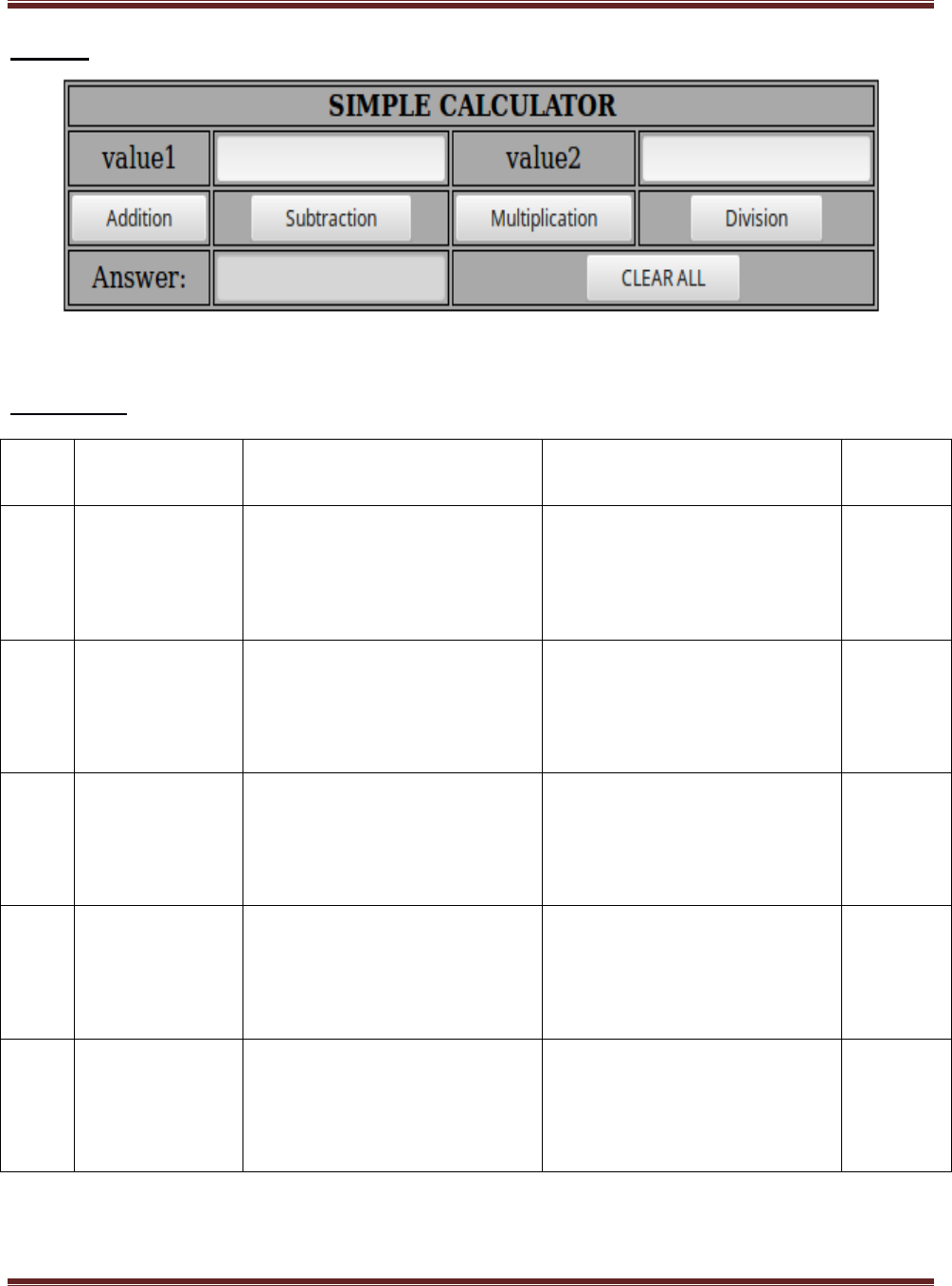
1. Write a JavaScript to design a simple calculator to perform the following
operations: sum, product, difference and quotient.
program1.html
<!DOCTYPE HTML>
<html>
<head>
<style>
table, td, th
{
border: 1px solid black;
width: 33%;
text-align: center;
background-color: DarkGray;
border-collapse:collapse;
}
table { margin: auto; }
input { text-align:right; }
</style>
<script type="text/javascript">
function calc(clicked_id)
{
var val1 = parseFloat(document.getElementById("value1").value);
var val2 = parseFloat(document.getElementById("value2").value);
if(isNaN(val1)||isNaN(val2))
alert("ENTER VALID NUMBER");
else if(clicked_id=="add")
document.getElementById("answer").value=val1+val2;
else if(clicked_id=="sub")
document.getElementById("answer").value=val1-val2;
else if(clicked_id=="mul")
document.getElementById("answer").value=val1*val2;

FDP-Web Technology Lab With Mini Project – 15CSL77 2018-2019
Dept. of ISE & CSE, RNSIT Page 5
else if(clicked_id=="div")
document.getElementById("answer").value=val1/val2;
}
function cls()
{
value1.value="0";
value2.value="0";
answer.value="";
}
</script>
</head>
<body>
<table>
<tr><th colspan="4"> SIMPLE CALCULATOR </th></tr>
<tr><td>value1</td><td><input type="text" id="value1" value="0"/></td>
<td>value2</td><td><input type="text" id="value2" value="0"/> </td></tr>
<tr><td><input type="button" value="Addition" id = "add"
onclick="calc(this.id)"/></td>
<td><input type="button" value="Subtraction" id = "sub"
onclick="calc(this.id)"/></td>
<td><input type="button" value="Multiplication" id = "mul"
onclick="calc(this.id)"/></td>
<td><input type="button" value="Division" id ="div"
onclick="calc(this.id)"/></td></tr>
<tr><td>Answer:</td><td> <input type="text" id="answer" value=""
disabled/></td>
<td colspan="2"><input type="button" value="CLEAR ALL" onclick="cls()"/></td>
</tr>
</table>
</body>
</html>
FDP-Web Technology Lab With Mini Project – 15CSL77 2018-2019
Dept. of ISE & CSE, RNSIT Page 6
Output:
Test Cases :
Test
No.
Input
Parameters
Expected Output
Obtained Output
Remarks
1.
value1=50.56
value2=24.39
Addition =74.95
Subtraction =26.17
Multiplication=1233.1584
Division=2.072980729807298
Addition =74.95
Subtraction =26.17
Multiplication=1233.1584
Division=2.072980729807298
PASS
2.
value1= 0
value2= 45
Addition =45
Subtraction =-45
Multiplication=0
Division=0
Addition =45
Subtraction =-45
Multiplication=0
Division=0
PASS
3.
value1= 45
value2= 0
Addition =45
Subtraction =45
Multiplication=0
Division=Infinity
Addition =45
Subtraction =45
Multiplication=0
Division=Infinity
PASS
4.
value1 = abc
value2 = 23
ENTER VALID NUMBER
ENTER VALID NUMBER
PASS
5
value1 = 50
value2 =xyz
ENTER VALID NUMBER
ENTER VALID NUMBER
PASS

FDP-Web Technology Lab With Mini Project – 15CSL77 2018-2019
Dept. of ISE & CSE, RNSIT Page 7
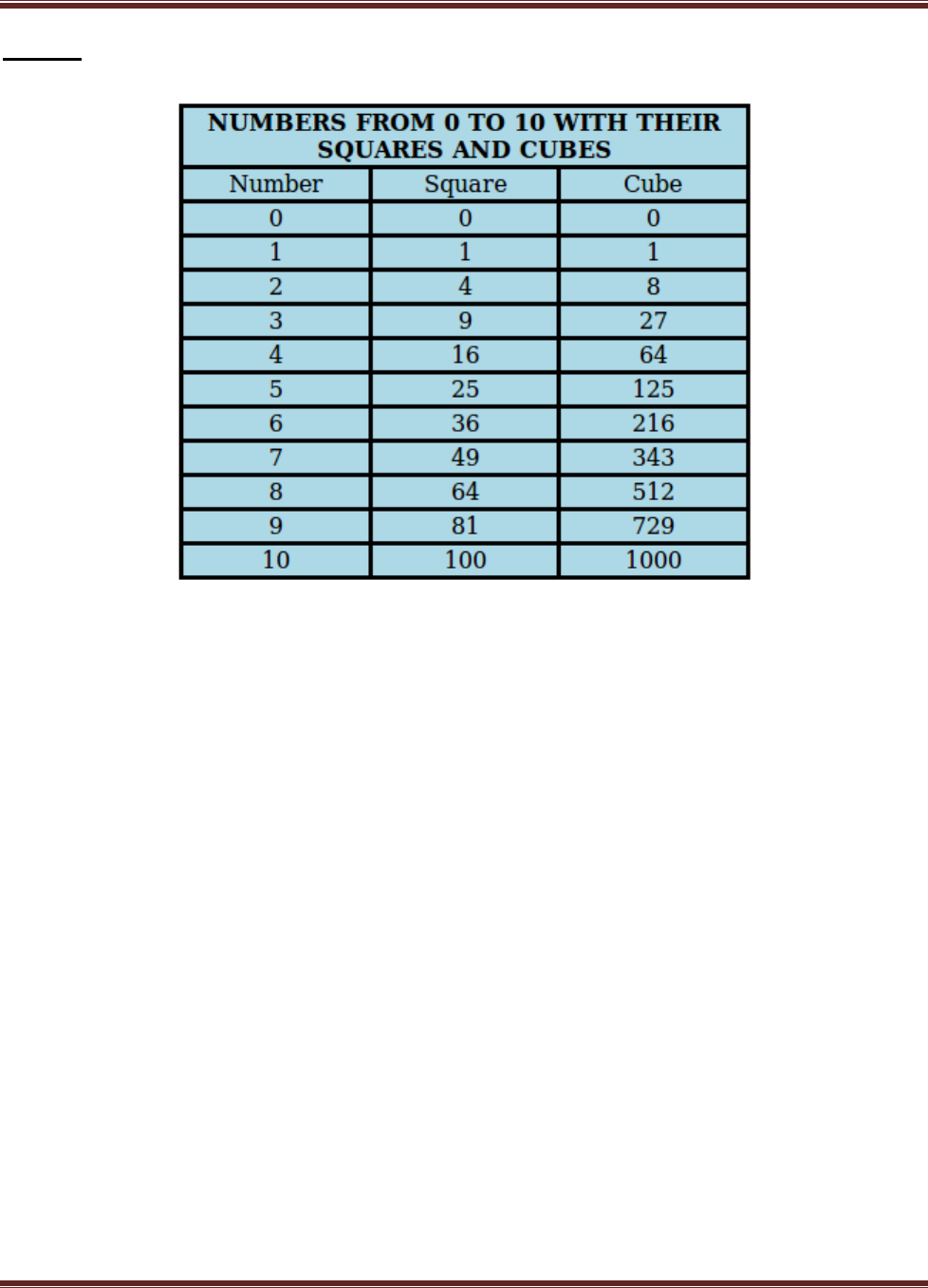
2. Write a JavaScript that calculates the squares and cubes of the numbers from 0 to
10 and outputs HTML text that displays the resulting values in an HTML table
format.
program2.html
<!DOCTYPE HTML>
<html>
<head>
<style>
table,tr, td
{
border: solid black;
width: 33%;
text-align: center;
border-collapse: collapse;
background-color:lightblue;
}
table { margin: auto; }
</style>
<script>
document.write( "<table><tr><thcolspan='3'> NUMBERS FROM 0 TO 10 WITH
THEIR SQUARES AND CUBES </th></tr>" );
document.write( "<tr><td>Number</td><td>Square</td><td>Cube</td></tr>" );
for(var n=0; n<=10; n++)
{
document.write( "<tr><td>" + n + "</td><td>" + n*n + "</td><td>" + n*n*n
+ "</td></tr>" ) ;
}
document.write( "</table>" ) ;
</script>
</head>
</html>
FDP-Web Technology Lab With Mini Project – 15CSL77 2018-2019
Dept. of ISE & CSE, RNSIT Page 8
Output:

FDP-Web Technology Lab With Mini Project – 15CSL77 2018-2019
Dept. of ISE & CSE, RNSIT Page 9
3. Write a JavaScript code that displays text “TEXT-GROWING” with increasing
font size in the interval of 100ms in RED COLOR, when the font size reaches
50pt it displays “TEXT-SHRINKING” in BLUE color. Then the font size
decreases to 5pt.
program3.html
<!DOCTYPE HTML>
<html>
<head>
<style>
p {
position: absolute;
top: 50%;
left: 50%;
transform: translate(-50%, -50%);
}
</style>
</head>
<body>
<p id="demo"></p>
<script>
var var1 = setInterval(inTimer, 1000);
var fs = 5;
var ids = document.getElementById("demo");
function inTimer() {
ids.innerHTML = 'TEXT GROWING';
ids.setAttribute('style', "font-size: " + fs + "px; color: red");
fs += 5;
if(fs >= 50 ){
clearInterval(var1);
var2 = setInterval(deTimer, 1000);
}
}

FDP-Web Technology Lab With Mini Project – 15CSL77 2018-2019
Dept. of ISE & CSE, RNSIT Page 10
function deTimer() {
fs -= 5;
ids.innerHTML = 'TEXT SHRINKING';
ids.setAttribute('style', "font-size: " + fs + "px; color: blue");
if(fs === 5 ){
clearInterval(var2);
}
}
</script>
</body>
</html>
Output:
TEXT SHRINKING

FDP-Web Technology Lab With Mini Project – 15CSL77 2018-2019
Dept. of ISE & CSE, RNSIT Page 11
4. Develop and demonstrate a HTML5 file that includes JavaScript script that uses
functions for the following problems:
a) Parameter: A string
b) Output: The position in the string of the left-most vowel
c) Parameter: A number
d) Output: The number with its digits in the reverse order
program4.html
<!DOCTYPE HTML>
<html>
<body>
<script type="text/javascript">
var str = prompt("Enter the Input","");
if(!(isNaN(str)))
{
var num,rev=0,remainder;
num = parseInt(str);
while(num!=0) {
remainder = num%10;
num = parseInt(num/10);
rev = rev * 10 + remainder;
}
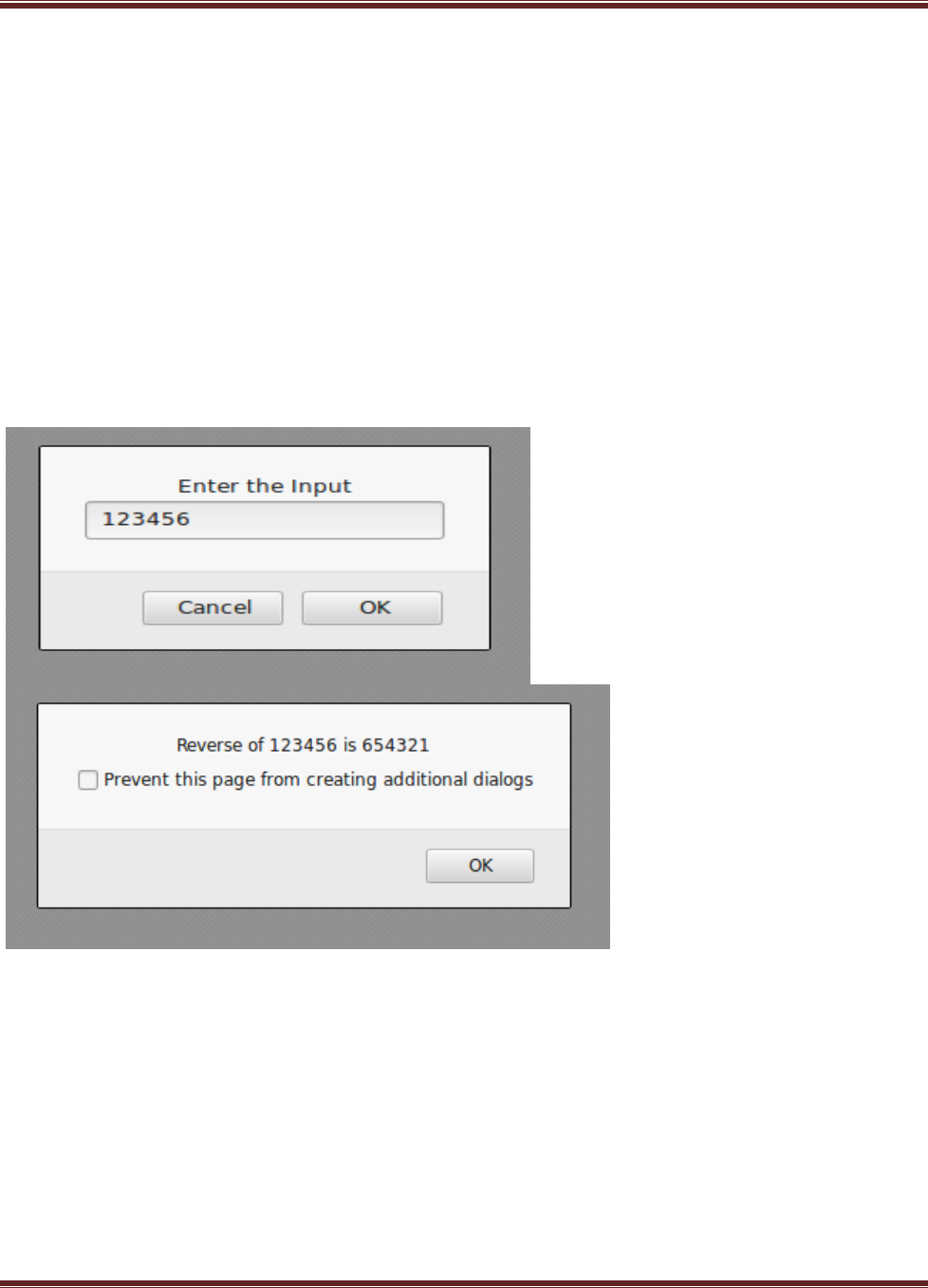
alert("Reverse of "+str+" is "+rev);
}
else
{
str = str.toUpperCase();
for(var i = 0; i < str.length; i++) {
var chr = str.charAt(i);
if(chr == 'A' || chr == 'E' || chr == 'I' || chr == 'O' || chr == 'U')break;
}
FDP-Web Technology Lab With Mini Project – 15CSL77 2018-2019
Dept. of ISE & CSE, RNSIT Page 12
if( i < str.length )
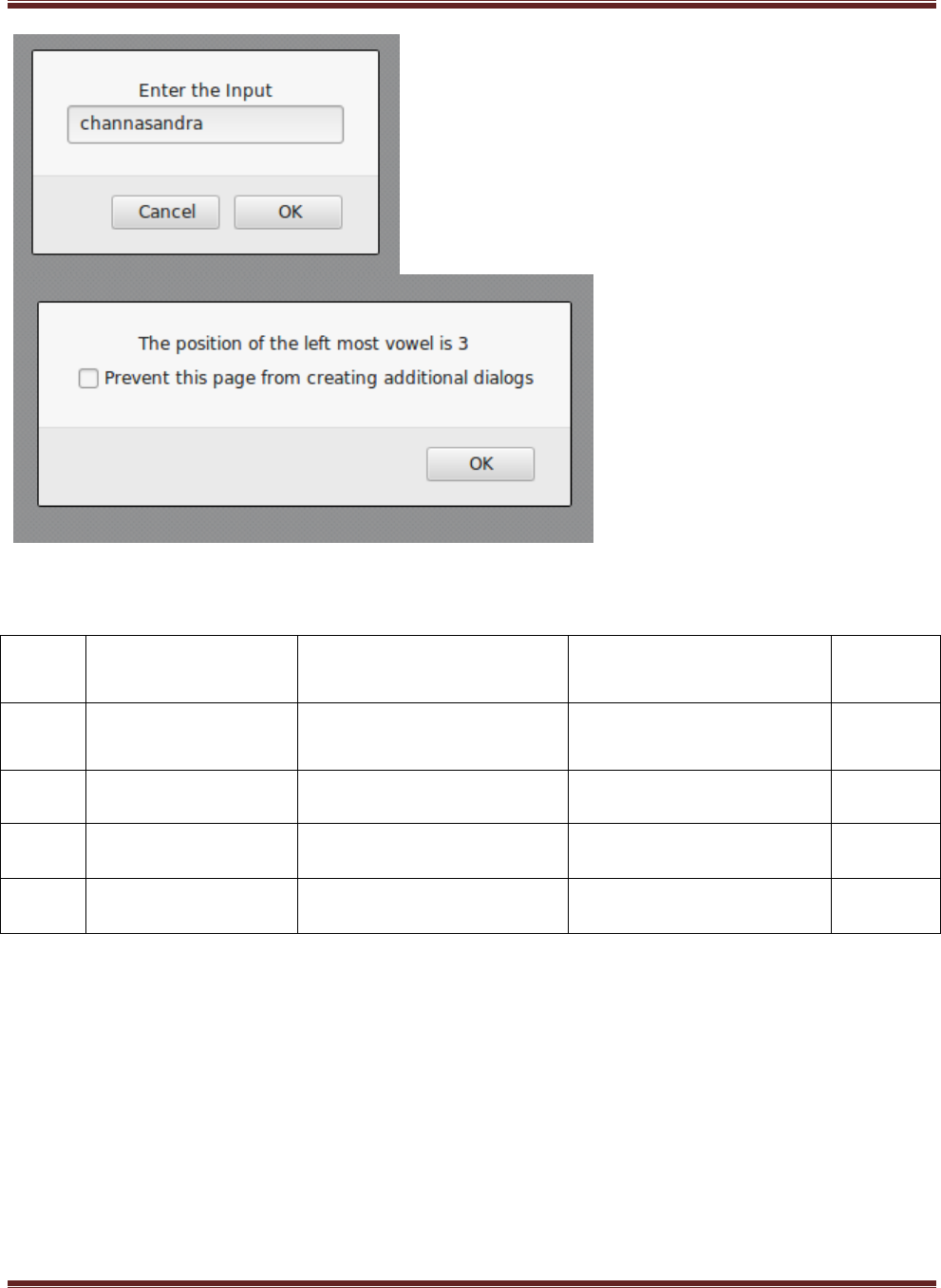
alert("The position of the left most vowel is "+(i+1));
else
alert("No vowel found in the entered string");
}
</script>
</body>
</html>
Output :
FDP-Web Technology Lab With Mini Project – 15CSL77 2018-2019
Dept. of ISE & CSE, RNSIT Page 13
Test Cases :
Test
No.
Input Parameters
Expected Output
Obtained Output
Remarks
1.
123
Reverse of 123 is 321
Reverse of 123 is 321
PASS
1.
CHANNASANDRA
The position of the left
most vowel is 3
The position of the left
most vowel is 3
PASS
2.
SKY
No vowel found in the
entered string
No vowel found in the
entered string
PASS
3.
MNKTO
The position of the left
most vowel is 5
The position of the left
most vowel is 5
PASS

FDP-Web Technology Lab With Mini Project – 15CSL77 2018-2019
Dept. of ISE & CSE, RNSIT Page 14
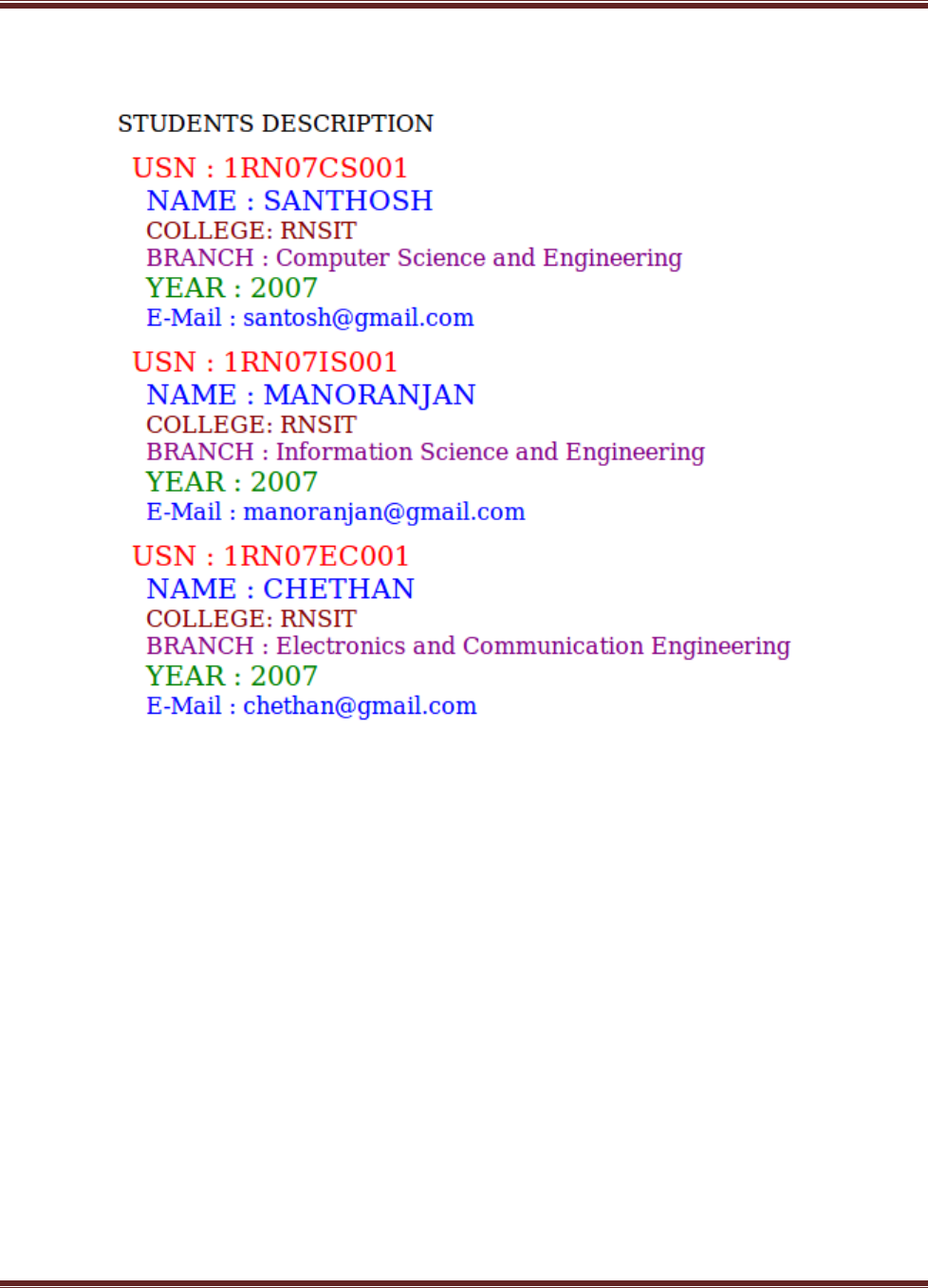
5. Design an XML document to store information about a student in an engineering
college affiliated to VTU. The information must include USN, Name, and Name
of the College, Branch, Year of Joining, and email id. Make up sample data for 3
students. Create a CSS style sheet and use it to display the document.
program5.xml
<?xml-stylesheet type="text/css" href="5.css" ?>
<!DOCTYPE HTML>
<html>
<head>
<h1> STUDENTS DESCRIPTION </h1>
</head>
<students>
<student>
<USN>USN : 1RN07CS001</USN>
<name>NAME : SANTHOSH</name>
<college>COLLEGE : RNSIT</college>
<branch>BRANCH : Computer Science and Engineering</branch>
<year>YEAR : 2007</year>
<e-mail>E-Mail : santosh@gmail.com</e-mail>
</student>
<student>
<USN>USN : 1RN07IS001</USN>
<name>NAME : MANORANJAN</name>
<college>COLLEGE : RNSIT</college>
<branch>BRANCH : Information Science and Engineering</branch>
<year>YEAR : 2007</year>
<e-mail>E-Mail : manoranjan@gmail.com</e-mail>
</student>
<student>
<USN>USN : 1RN07EC001</USN>
<name>NAME : CHETHAN</name>
<college>COLLEGE : RNSIT</college>

FDP-Web Technology Lab With Mini Project – 15CSL77 2018-2019
Dept. of ISE & CSE, RNSIT Page 15
<branch>BRANCH : Electronics and Communication Engineering
</branch>
<year>YEAR : 2007</year>
<e-mail>E-Mail : chethan@gmail.com</e-mail>
</student>
</students>
</html>
program5.css
student{
display:block; margin-top:10px; color:Navy;
}
USN{
display:block; margin-left:10px;font-size:14pt; color:Red;
}
name{
display:block; margin-left:20px;font-size:14pt; color:Blue;
}
college{
display:block; margin-left:20px;font-size:12pt; color:Maroon;
}
branch{
display:block; margin-left:20px;font-size:12pt; color:Purple;
}
year{
display:block; margin-left:20px;font-size:14pt; color:Green;
}
e-mail{
display:block; margin-left:20px;font-size:12pt; color:Blue;
}
FDP-Web Technology Lab With Mini Project – 15CSL77 2018-2019
Dept. of ISE & CSE, RNSIT Page 16
Output:

FDP-Web Technology Lab With Mini Project – 15CSL77 2018-2019
Dept. of ISE & CSE, RNSIT Page 17
6. Write a PHP program to keep track of the number of visitors visiting the web
page and to display this count of visitors, with proper headings.
program6.php
<?php
print "<h3> REFRESH PAGE </h3>";
$name="counter.txt";
$file = fopen($name,"r");
$hits= fscanf($file,"%d");
fclose($file);
$hits[0]++;
$file = fopen($name,"w");
fprintf($file,"%d",$hits[0]);
fclose($file);
print "Total number of views: ".$hits[0];
?>
Output:
REFRESH PAGE
Total number of views: 10

FDP-Web Technology Lab With Mini Project – 15CSL77 2018-2019
Dept. of ISE & CSE, RNSIT Page 18
7. Write a PHP program to display a digital clock which displays the current time
of the server.
program7.php
<!DOCTYPE HTML>
<html>
<head>
<meta http-equiv="refresh" content="1"/>
<style>
p {
color:white;
font-size:90px;
position: absolute;
top: 50%;
left: 50%;
transform: translate(-50%, -50%);
}
body{background-color:black;}
</style>
<p> <?php echo date(" h: i : s A");?> </p>
</head>
Output:

FDP-Web Technology Lab With Mini Project – 15CSL77 2018-2019
Dept. of ISE & CSE, RNSIT Page 19
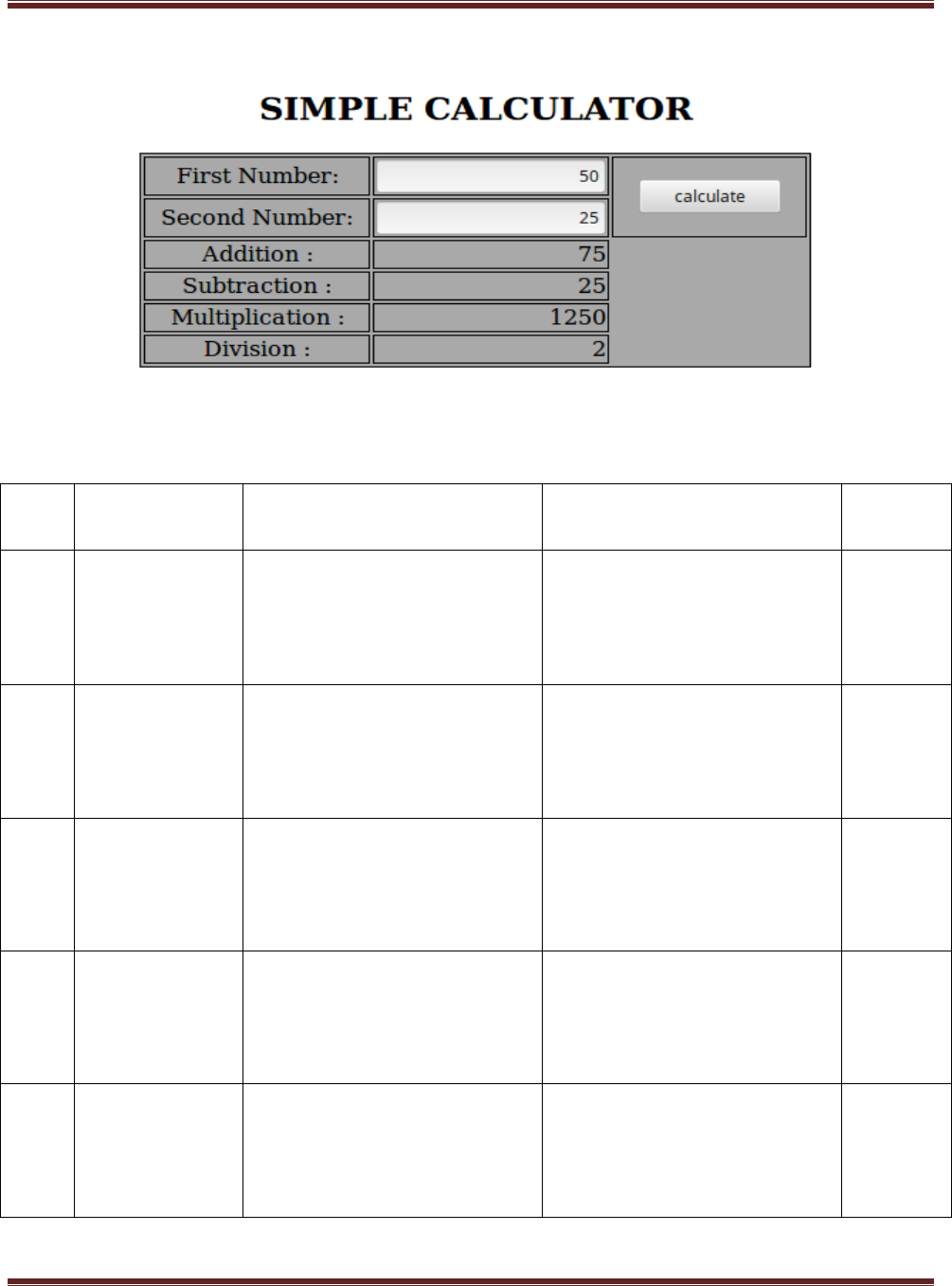
8. Write the PHP programs to do the following:
a) Implement simple calculator operations.
b) Find the transpose of a matrix.
c) Multiplication of two matrices.
d) Addition of two matrices.
program8a.php
<html>
<head>
<style>
table, td, th
{
border: 1px solid black;
width: 35%;
text-align: center;
background-color: DarkGray;
}
table { margin: auto; }
input,p { text-align:right; }
</style>
</head>
<body>
<form method="post">
<table>
<caption><h2> SIMPLE CALCULATOR </h2></caption>>
<tr><td>First Number:</td><td><input type="text" name="num1" /></td>
<td rowspan="2"><input type="submit" name="submit"
value="calculate"></td></tr>
<tr><td>Second Number:</td><td><input type="text"
name="num2"/></td></tr>
</form>
<?php
if(isset($_POST['submit'])) // it checks if the input submit is filled

FDP-Web Technology Lab With Mini Project – 15CSL77 2018-2019
Dept. of ISE & CSE, RNSIT Page 20
{
$num1 = $_POST['num1'];
$num2 = $_POST['num2'];
if(is_numeric($num1) andis_numeric($num1) )
{
echo "<tr><td> Addition :</td><td><p>".($num1+$num2)."</p></td>";
echo "<tr><td> Subtraction :</td><td><p> ".($num1-$num2)."</p></td>";
echo "<tr><td> Multiplication :</td><td><p>".($num1*$num2)."</p></td>";
echo "<tr><td>Division :</td><td><p> ".($num1/$num2)."</p></td>";
echo "</table>";
}
else
{
echo"<script type='text/javascript' > alert(' ENTER VALID
NUMBER');</script>";
}
}
?>
</body>
</html>
FDP-Web Technology Lab With Mini Project – 15CSL77 2018-2019
Dept. of ISE & CSE, RNSIT Page 21
Output:
Test Cases:
Test
No.
Input
Parameters
Expected Output
Obtained Output
Remarks
1.
value1=50.56
value2=24.39
Addition =74.95
Subtraction =26.17
Multiplication=1233.1584
Division=2.072980729807298
Addition =74.95
Subtraction =26.17
Multiplication=1233.1584
Division=2.072980729807298
PASS
2.
value1= 0
value2= 45
Addition =45
Subtraction =-45
Multiplication=0
Division=0
Addition =45
Subtraction =-45
Multiplication=0
Division=0
PASS
3.
value1= 45
value2= 0
Addition =45
Subtraction =45
Multiplication=0
Division=Infinity
Addition =45
Subtraction =45
Multiplication=0
Division=Infinity
PASS
4.
value1 = abc
value2 = 23
ENTER VALID NUMBER
ENTER VALID NUMBER
PASS
5
value1 = 50
value2 =xyz
ENTER VALID NUMBER
ENTER VALID NUMBER
PASS

FDP-Web Technology Lab With Mini Project – 15CSL77 2018-2019
Dept. of ISE & CSE, RNSIT Page 22
Program8b.php
<?php
$a = array(array(1,2,3),array(4,5,6),array(7,8,9));
$b = array(array(7,8,9),array(4,5,6),array(1,2,3));
$m=count($a);
$n=count($a[2]);
$p=count($b);
$q=count($b[2]);
echo "the first matrix :"."<br/>";
for ($row = 0; $row < $m; $row++) {
for ($col = 0; $col < $n; $col++)
echo " ".$a[$row][$col];
echo "<br/>";
}
echo "the second matrix :"."<br/>";
for ($row = 0; $row < $p; $row++) {
for ($col = 0; $col < $q; $col++)
echo " ".$b[$row][$col];
echo "<br/>";
}
echo "the transpose for the first matrix is:"."<br/>";
for ($row = 0; $row < $m; $row++) {
for ($col = 0; $col < $n; $col++)
echo " ".$a[$col][$row];
echo "<br/>";
}

FDP-Web Technology Lab With Mini Project – 15CSL77 2018-2019
Dept. of ISE & CSE, RNSIT Page 23
if(($m===$p) and ($n===$q)) {
echo "the addition of matrices is:"."<br/>";
for ($row = 0; $row < 3; $row++) {
for ($col = 0; $col < 3; $col++)
echo " ".$a[$row][$col]+$b[$row][$col]." ";
echo "<br/>";
}
}
if($n===$p){
echo " The multiplication of matrices: <br/>";
$result=array();
for ($i=0; $i < $m; $i++) {
for($j=0; $j < $q; $j++){
$result[$i][$j] = 0;
for($k=0; $k < $n; $k++)
$result[$i][$j] += $a[$i][$k] * $b[$k][$j];
}
}
for ($row = 0; $row < $m; $row++) {
for ($col = 0; $col < $q; $col++)
echo " ".$result[$row][$col];
echo "<br/>";
}
}
?>

FDP-Web Technology Lab With Mini Project – 15CSL77 2018-2019
Dept. of ISE & CSE, RNSIT Page 24
Output:
the first matrix:
1 2 3
4 5 6
7 8 9
the second matrix:
7 8 9
4 5 6
1 2 3
the transpose of the first matrix:
1 4 7
2 5 8
3 6 9
the addition of matrices is:
8 10 12
8 10 12
8 10 12
the multiplication of matrices:
18 24 30
54 69 84
90 114 138

FDP-Web Technology Lab With Mini Project – 15CSL77 2018-2019
Dept. of ISE & CSE, RNSIT Page 25
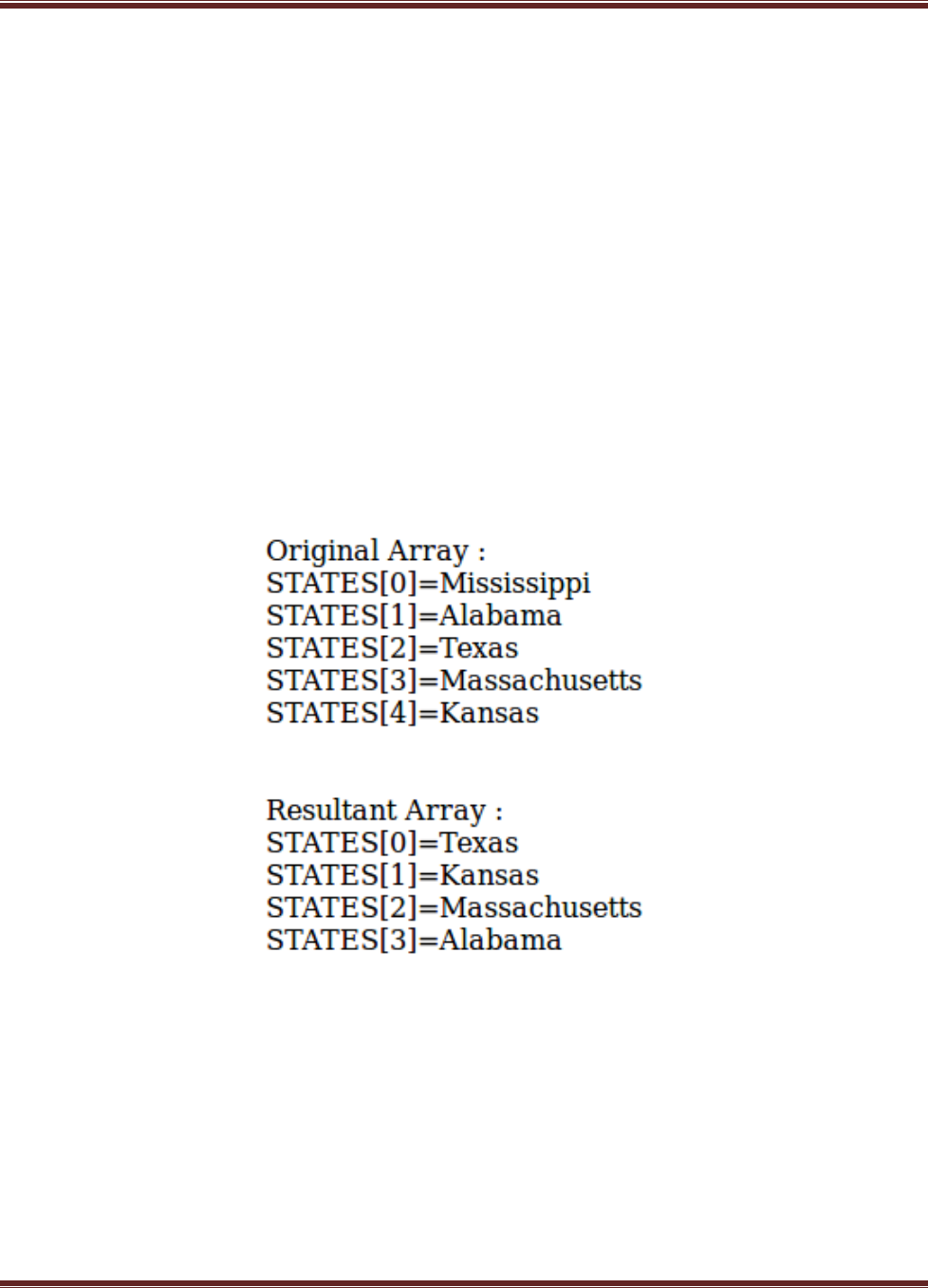
9. Write a PHP program named states.py that declares a variable states with value
"Mississippi Alabama Texas Massachusetts Kansas". write a PHP program that
does the following:
a) Search for a word in variable states that ends in xas. Store this word in
element 0 of a list named statesList.
b) Search for a word in states that begins with k and ends in s. Perform a
case-insensitive comparison. [Note: Passing re.Ias a second parameter to
method compile performs a case-insensitive comparison.] Store this word
in element1 of statesList.
c) Search for a word in states that begins with M and ends in s. Store this
word in element 2 of the list.
d) Search for a word in states that ends in a. Store this word in element 3 of
the list.
program9.php
<?php
$states = "Mississippi Alabama Texas Massachusetts Kansas";
$statesArray = [];
$states1 = explode(' ',$states);
echo "Original Array :<br>";
foreach ( $states1 as $i => $value )
print("STATES[$i]=$value<br>");
foreach($states1 as $state) {
if(preg_match( '/xas$/', ($state)))
$statesArray[0] = ($state);
}
foreach($states1 as $state) {
if(preg_match('/^k.*s$/i', ($state)))
$statesArray[1] = ($state);
}
FDP-Web Technology Lab With Mini Project – 15CSL77 2018-2019
Dept. of ISE & CSE, RNSIT Page 26
foreach($states1 as $state) {
if(preg_match('/^M.*s$/', ($state)))
$statesArray[2] = ($state);
}
foreach($states1 as $state){
if(preg_match('/a$/', ($state)))
$statesArray[3] = ($state);
}
echo "<br><br>Resultant Array :<br>";
foreach ( $statesArray as $array => $value )
print("STATES[$array]=$value<br>");
?>
Output:

FDP-Web Technology Lab With Mini Project – 15CSL77 2018-2019
Dept. of ISE & CSE, RNSIT Page 27
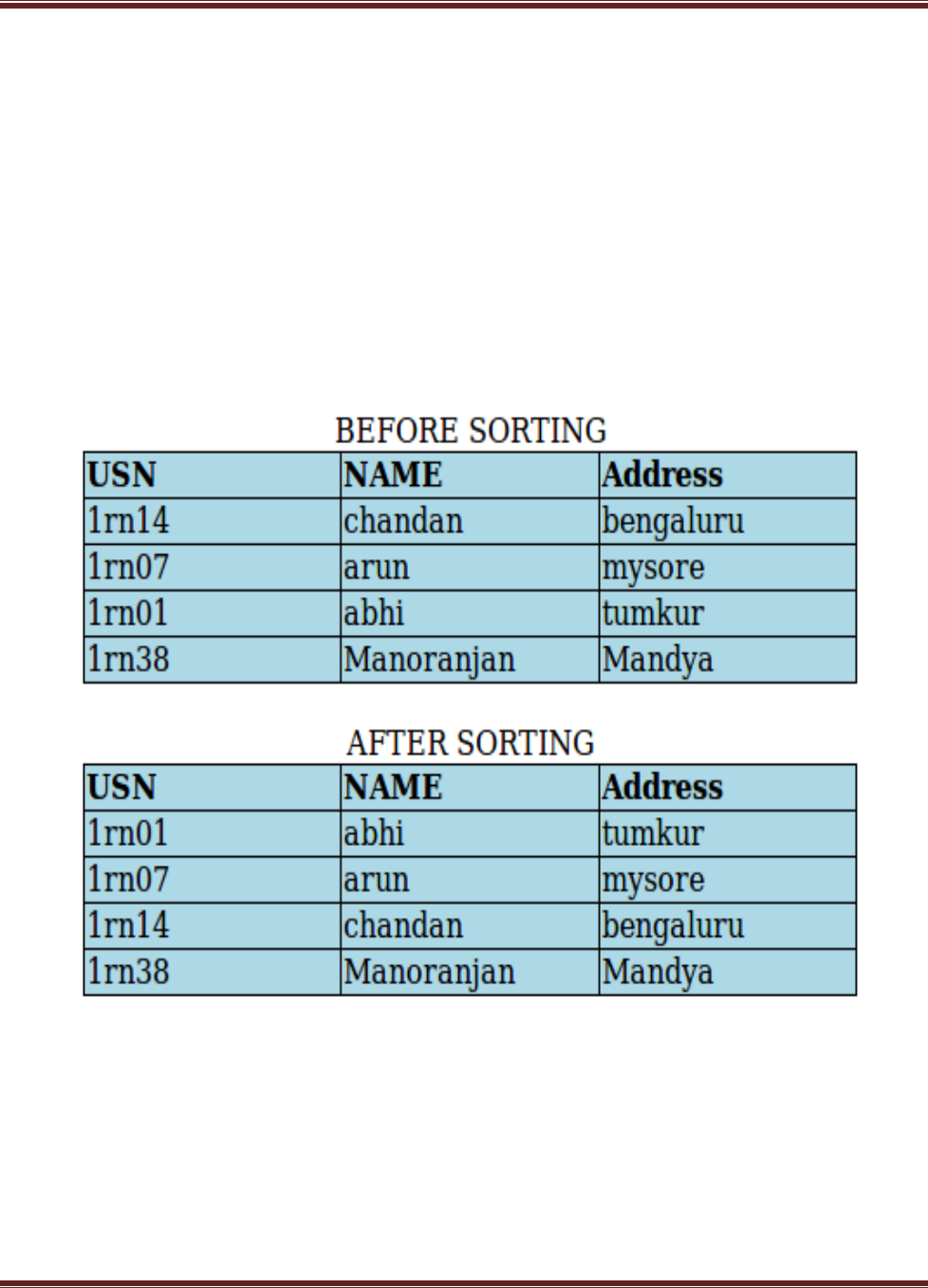
10. Write a PHP program to sort the student records which are stored in the
database using selection sort.
Goto Mysql and then type
create database weblab;
use weblab;
create table student(usnvarchar(10),name varchar(20),address varchar(20));
program10.php
<!DOCTYPE html>
<html>
<body>
<style>
table, td, th
{
border: 1px solid black;
width: 33%;
text-align: center;
border-collapse:collapse;
background-color:lightblue;
}
table { margin: auto; }
</style>
<?php
$servername = "localhost";
$username = "root";
$password = "root";
$dbname = "weblab";
$a=[];
// Create connection
// Opens a new connection to the MySQL server
$conn = mysqli_connect($servername, $username, $password, $dbname);

FDP-Web Technology Lab With Mini Project – 15CSL77 2018-2019
Dept. of ISE & CSE, RNSIT Page 28
// Check connection and return an error description from the last
connection error, if any
if ($conn->connect_error)
die("Connection failed: " . $conn->connect_error);
$sql = "SELECT * FROM student";
// performs a query against the database
$result = $conn->query($sql);
echo "<br>";
echo "<center> BEFORE SORTING </center>";
echo "<table border='2'>";
echo "<tr>";
echo "<th>USN</th><th>NAME</th><th>Address</th></tr>";
if ($result->num_rows> 0)
{
// output data of each row and fetches a result row as an
associative array
while($row = $result->fetch_assoc()){
echo "<tr>";
echo "<td>". $row["usn"]."</td>";
echo "<td>". $row["name"]."</td>";
echo "<td>". $row["addr"]."</td></tr>";
array_push($a,$row["usn"]);
}
}
else
echo "Table is Empty";
echo "</table>";
$n=count($a);
$b=$a;
for ( $i = 0 ; $i< ($n - 1) ; $i++ )
{
$pos= $i;

FDP-Web Technology Lab With Mini Project – 15CSL77 2018-2019
Dept. of ISE & CSE, RNSIT Page 29
for ( $j = $i + 1 ; $j < $n ; $j++ ) {
if ( $a[$pos] > $a[$j] )
$pos= $j;
}
if ( $pos!= $i ) {
$temp=$a[$i];
$a[$i] = $a[$pos];
$a[$pos] = $temp;
}
}
$c=[];
$d=[];
$result = $conn->query($sql);
if ($result->num_rows> 0)// output data of each row
{
while($row = $result->fetch_assoc()) {
for($i=0;$i<$n;$i++) {
if($row["usn"]== $a[$i]) {
$c[$i]=$row["name"];
$d[$i]=$row["addr"];
}
}
}
}
echo "<br>";
echo "<center> AFTER SORTING <center>";
echo "<table border='2'>";
echo "<tr>";
echo "<th>USN</th><th>NAME</th><th>Address</th></tr>";
for($i=0;$i<$n;$i++) {
echo "<tr>";
echo "<td>". $a[$i]."</td>";
echo "<td>". $c[$i]."</td>";
FDP-Web Technology Lab With Mini Project – 15CSL77 2018-2019
Dept. of ISE & CSE, RNSIT Page 30
echo "<td>". $d[$i]."</td></tr>";
}
echo "</table>";
$conn->close();
?>
</body>
</html>
Output:
