Dongguan Jin wen hua digital technology A18 Bluetooth Speaker User Manual

Dongguan Jin wen hua digital technology Co., LTD. Bluetooth Speaker

User Manual

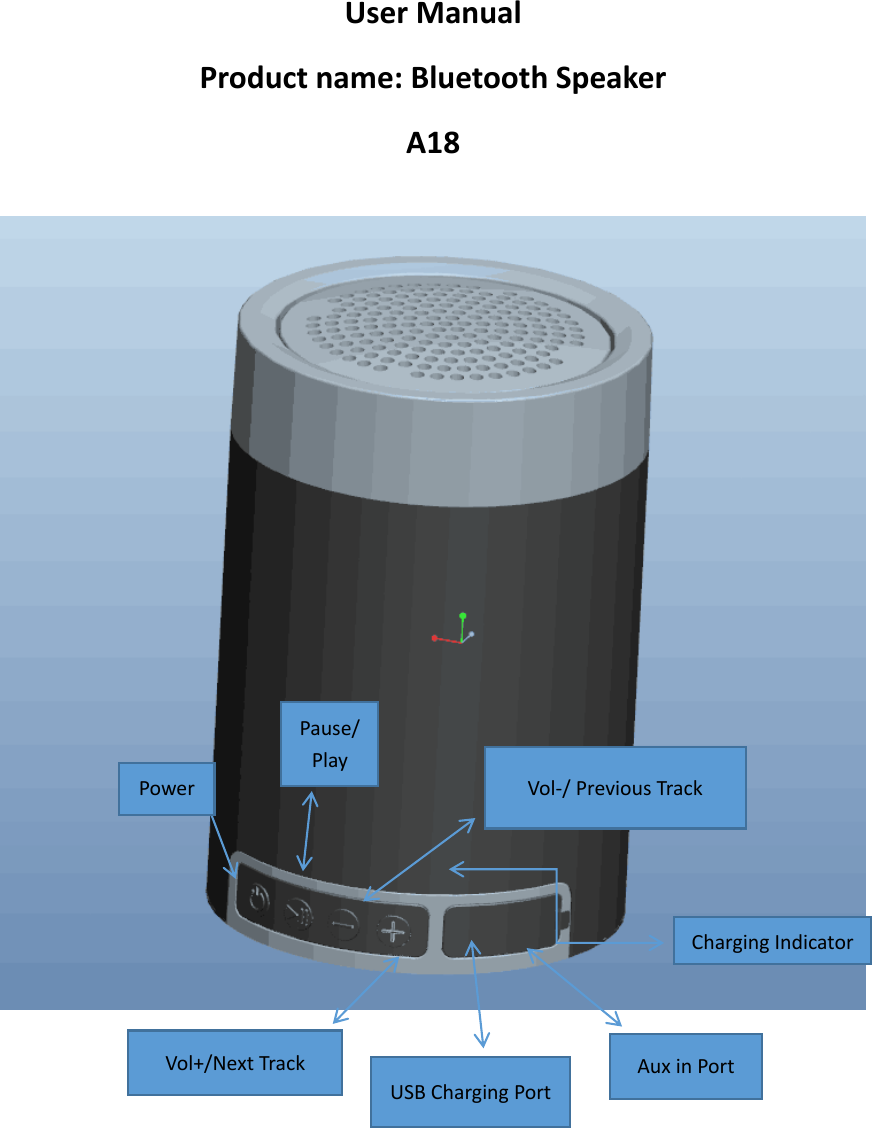
User Manual Product name: Bluetooth Speaker A18                 USB Charging Port Aux in Port Powerer Pause/Play Vol-/ Previous Track Vol+/Next Track Charging Indicator
Notice: To ensure the product performance good, please read carefully and follow: *Store and use at room temperature environment *Do not modify, disassemble, open, drop, crush, puncture, or shred the product. *Keep the product dry, and do not use with wet hands, do not wipe product with any chemicals.   *Keep away from open flame. *Long press the power key to ensure product is turned off if long time no use   *Do not listen in loud sound, or can make negative effect on hearing *Do not dispose of the product as ordinary refuse, as it contains a lithium battery. Consult your local municipal or civil authority for instructions on correctly disposing of this product.  Specification   Power:1*3W Size: 2.9”*2.9”*4” Power Supply: 3.7V Lithium Batter 1200mAh Bluetooth Vision: V4.1+EDR Playtime: 6 hours(50% volume) Charging Voltage: 5V/1A Audio Source Selection: Bluetooth or Aux-in model  Speaker size:1*1.77” Frequency Response Range:120HZ--18KHZ Transmission distance: 10M THD: 1% volume max   Package Components 1pc Speaker 1pc User Manual   1pc Micro USB Cable   1pc Aux-in Cable
 Operations Long press  the  button of  power  to  turn the  speaker  on and off, the  blue indicator flashes quickly with voice prompt, speaker will be in Bluetooth mode automatically.   Speaker  will  be  switched  in  Aux-in  mode  automatically  once  Aux-in  cable  being inserted.    Bluetooth mode operation 1、Speaker  will be  paired  with  last device automatically  in  30s. The  Blue  indicator flashes quickly while the speaker is searching for Bluetooth that could be paired. 2、Turn on the Bluetooth in your device settings and select “18WMS014” until voice announced. The blue indicator flashes slowly once paired successfully. 3、Enjoy the music after the Bluetooth is well paired. 4、When there is a call coming, answering or hanging it up via pressing the button of “pause/play”, long press the button to reject the call if necessary. Aux-in mode 1、The speaker will be switched in Aux-in mode once the Aux-in cable is inserted. 2、The speaker can be connected with computer、MP3 player or your smart phone by Aux-in cord.  Functions Pause/Play/Hands  Free:  In  playing  mode,  short  press  the  button  to  pause  or  play music.  When  there  is  a  call  coming,  short  press  the  button  to  answer  it  and  then press once to hang it up, long press it for about 2s to reject to answer it.   Volume/Track: Short press the button to select volume up or down. Long press the button to select previous track or next track.  Indicator Charging  indicator:  Charging  with  computer  via  the  USB  connection  or  5C  DC adapter .The red light flashes slowly if the battery runs low and in solid bright while in  charging.  The  red  light  turns  off  once  the  speaker  is  fully  charged  for  about  4 hours. Bluetooth indicator: The blue light flashes quickly means Bluetooth is ready to pair and flashes slowly once pairing is succeeded or in Aux-in mode. Battery: When the battery runs low, the system will automatically shut down. If you do not use the speaker for a long time, please charge once a month to extend the life of the battery.  FAQ 1、Poor sound quality Please make sure the speaker and device is in effective transmission distance (32 feet) and there are no any barriers around. 2、Bluetooth cannot be paired Please ensure both cell phone and speaker are in pairing mode. If the blue indicator
is not flash quickly, please restart the speaker till it is. Please ensure there is no Aux-in cord has been inserted. Bluetooth is disconnected once with the Aux cable in. One speaker could be paired with one device at a time. That means when you are going to pair the speaker with the second different devices, you  may  have  to  turn  Bluetooth  of  previous  off  or  remove  the  speaker  from  the Bluetooth record. 3、Cannot charge the speaker   Please use other charging cable or use a DC adapter to have a try again. 4、Power saving mode   The speaker will be powered off automatically after 15 minutes if the speaker is not working even though connected with Bluetooth.  Warning: Changes or modifications to this unit not expressly approved by the party responsible for compliance could void the user’s authority to operate the equipment.     This  device  complies  with  part  15  of  the  FCC  Rules.  Operation  is  subject  to  the following two conditions: (1) This device may not cause harmful interference, and (2) this  device  must  accept  any  interference  received,  including  interference  that  may cause undesired operation.  NOTE:    This equipment has been tested and found to comply with the limits for a Class B  digital  device,  pursuant  to  Part  15  of  the  FCC  Rules.  These  limits  are  designed  to provide reasonable protection against harmful interference in a residential installation.   This  equipment  generates,  uses  and  can  radiate  radio  frequency  energy  and,  if  not installed and used in accordance with the instructions, may cause harmful interference to radio communications.  However,  there  is  no  guarantee  that  interference  will  not  occur  in  a  particular installation.    If this equipment does cause harmful  interference to radio  or television reception, which can be determined by turning the equipment off and on, the user is encouraged to try to correct the interference by one or more of the following measures:  1)Reorient or relocate the receiving antenna.  2)Increase the separation between the equipment and receiver.   3)Connect the equipment into an outlet on a circuit different from that to which the           4)Consult the dealer or an experienced radio/TV technician for help.         receiver is connected.

Navigation menu