Dongguan Jin wen hua digital technology F2 Bluetooth Speaker User Manual D05BW 1601G402 Soundsurf WMHXP571BKCA IM R

Dongguan Jin wen hua digital technology Co., LTD. Bluetooth Speaker D05BW 1601G402 Soundsurf WMHXP571BKCA IM R

User manual

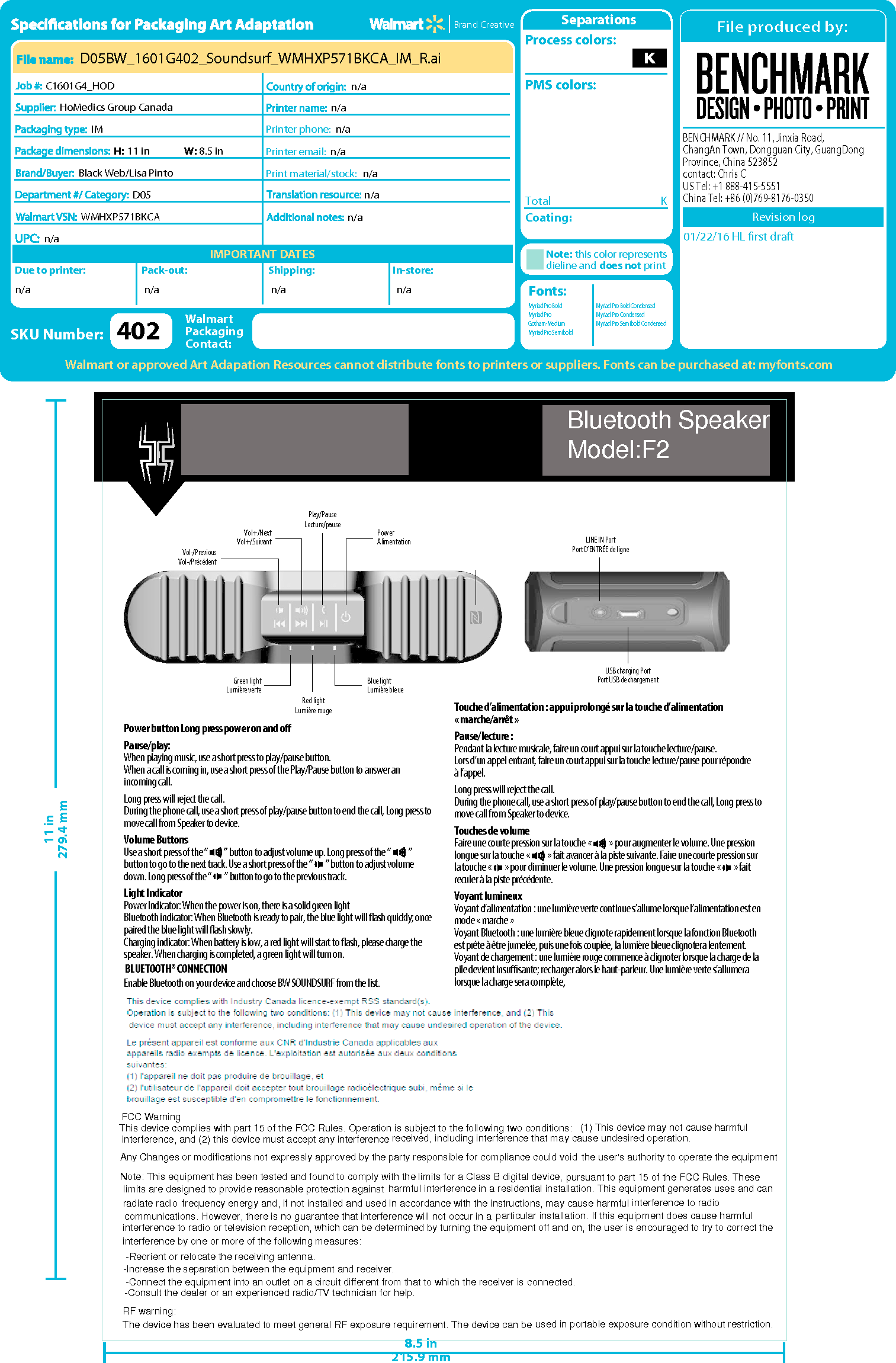
Vol-/PreviousVol-/PrécédentVol+/NextVol+/Suivant PowerAlimentationGreen lightLumière verte Blue lightLumière bleuePlay/PauseLecture/pauseRed lightLumière rougeSOUNDSURFWATERPROOF PORTABLE WIRELESS SPEAKERHAUT-PARLEUR SANS FIL PORTATIF ÉTANCHEWMHXP571BKCATM/MCNFCUSB charging PortPort USB de chargementLINE IN PortPort D’ENTRÉE de lignePower button Long press power on and oPause/play:When playing music, use a short press to play/pause button. When a call is coming in, use a short press of the Play/Pause button to answer an incoming call.Long press will reject the call.During the phone call, use a short press of play/pause button to end the call, Long press to move call from Speaker to device.Volume ButtonsUse a short press of the “          ” button to adjust volume up. Long press of the “           ” button to go to the next track. Use a short press of the “        ” button to adjust volume down. Long press of the “        ” button to go to the previous track.Light IndicatorPower Indicator: When the power is on, there is a solid green lightBluetooth indicator: When Bluetooth is ready to pair, the blue light will ash quickly; once paired the blue light will ash slowly.Charging indicator: When battery is low, a red light will start to ash, please charge the speaker. When charging is completed, a green light will turn on.BLUETOOTH® CONNECTIONEnable Bluetooth on your device and choose BW SOUNDSURF from the list.Touche d’alimentation : appui prolongé sur la touche d’alimentation « marche/arrêt »Pause/lecture :Pendant la lecture musicale, faire un court appui sur la touche lecture/pause.Lors d’un appel entrant, faire un court appui sur la touche lecture/pause pour répondreà l’appel.Long press will reject the call.During the phone call, use a short press of play/pause button to end the call, Long press to move call from Speaker to device.Touches de volume Faire une courte pression sur la touche «           » pour augmenter le volume. Une pression longue sur la touche «           » fait avancer à la piste suivante. Faire une courte pression sur la touche «        » pour diminuer le volume. Une pression longue sur la touche «        » fait reculer à la piste précédente.Voyant lumineuxVoyant d’alimentation : une lumière verte continue s’allume lorsque l’alimentation est en mode « marche »Voyant Bluetooth : une lumière bleue clignote rapidement lorsque la fonction Bluetooth est prête à être jumelée, puis une fois couplée, la lumière bleue clignotera lentement.Voyant de chargement : une lumière rouge commence à clignoter lorsque la charge de la pile devient insusante; recharger alors le haut-parleur. Une lumière verte s’allumera lorsque la charge sera complète,8.5 in215.9 mm11 in279.4 mm8.5 in215.9 mm11 in279.4 mmBENCHMARK // No. 11, Jinxia Road, ChangAn Town, Dongguan City, GuangDong Province, China 523852contact: Chris C  US Tel: +1 888-415-5551China Tel: +86 (0)769-8176-0350IMPORTANT DATESBrand CreativeDue to printer: Pack-out: Shipping:Print material/stock:In-store:Printer phone:Printer email:SeparationsTotal K01/22/16 HL first draftCoating:Process colors:PMS colors:Note: this color representsdieline and does not printFonts: Walmart or approved Art Adapation Resources cannot distribute fonts to printers or suppliers. Fonts can be purchased at: myfonts.comSKU Number:WalmartPackagingContact:Revision logHoMedics Group CanadaIMBlack Web/Lisa PintoD05H: 11 in W: 8.5 inn/an/an/an/an/an/aD05BW_1601G402_Soundsurf_WMHXP571BKCA_IM_R.aiC1601G4_HODn/a n/a n/a n/an/a402WMHXP571BKCAn/aMyriad Pro BoldMyriad ProGotham-MediumMyriad Pro SemiboldMyriad Pro Bold CondensedMyriad Pro CondensedMyriad Pro Semibold CondensedFCC WarningThis device complies with part 15 of the FCC Rules. Operation is subject to the following two conditions:received, including interference that may cause undesired operation.(1) This device may not cause harmful interference, and (2) this device must accept any interferenceAny Changes or modifications not expressly approved by the party responsible for compliance could voidNote: This equipment has been tested and found to comply with the limits for a Class B digital device,the user's authority to operate the equipmentpursuant to part 15 of the FCC Rules. These limits are designed to provide reasonable protection against harmful interference in a residential installation. This equipment generates uses and can radiate radio frequency energy and, if not installed and used in accordance with the instructions, may cause harmful interference to radio communications. However, there is no guarantee that interference will not occur in a particular installation. If this equipment does cause harmful interference to radio or television reception, which can be determined by turning the equipment off and on, the user is encouraged to try to correct theinterference by one or more of the following measures: -Reorient or relocate the receiving antenna.-Increase the separation between the equipment and receiver. -Connect the equipment into an outlet on a circuit different from that to which the receiver is connected. -Consult the dealer or an experienced radio/TV technician for help.RF warning:The device has been evaluated to meet general RF exposure requirement. The device can be used in portable exposure condition without restriction.Bluetooth SpeakerModel:F2

Navigation menu