Dongguan Jin wen hua digital technology HX-EP240 bluetooth headset User Manual
Dongguan Jin wen hua digital technology Co., LTD. bluetooth headset
User manual

QUICK START GUIDE
Model HX-EP240
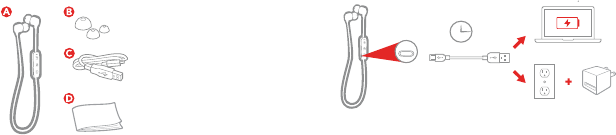
CONTENTS CHARGING
CONTENIDO / CONTENU RECARGE DE BATERÍAS / CHARGE
EN Charge 1.5 hours for up to 3 hours of play time.
ES Una recarga de 1.5 horas rinde hasta 3 horas de operación.
FR Une charge de 1.5 heures donne jusqu’à 3 heures d’autonomie de la batterie.
AC adaptor not
included
El adaptador de CA no
está incluido
Adaptateur c.a. non
inclus.
Charge
A – Earbuds
Écouteurs
Audífonos
B – Ear tips
Embouts auriculaires
Puntas de goma para el oído
C – Charging cord
Câble de recharge
Cable de recarga
1.5h
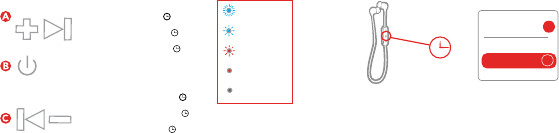
BLUETOOTH® CONNECTION
CONECCIÓN BLUETOOTH® / CONNEXION BLUETOOTH
EN Press and hold the power button for 5 seconds to power on. Enable
Bluetooth on your device and choose HMDX Bold from the list. If prompted,
enter code “0000.”
ES Para encender, deprima y mantenga el botón de poder deprimido por 3 segundos. Habilite la función
Bluetooth en su dispositivo y elija HMDX Bold de la lista. Si se requiere, meta el codigo “0000”.
FR Tenez le bouton de mise en marche enfoncé pendant 3 secondes pour allumer l’appareil.
Activez la fonction Bluetooth de votre appareil et choisissez HMDX Bold dans la liste des
signaux détectés. Si l’appareil vous le demande, inscrivez le code «0000».
Bluetooth®
Devices
on
>
HMDX Bold
CONTROLS
COMMANDES / CONTROLES
Pairing Mode
Modo de vinculación
Mode synchronisation
Connected
Conectado
Connexion établie
Low Battery
Batería baja
Piles faibles
Charging
Recargando
Charge
Ready
Listo
Prêt
A – Volume up /
next track ( 3s)
Augmentation du volume /
piste suivante ( 3s)
Subir el volume /
pista siguiente ( 3s)
B – Play/pause
Lecture/pause
Reproducir/pausa
C – Volume down /
previous track ( 3s)
Diminution du volume /
piste prècèdente ( 3s)
Bajar el volume /
pista anterior ( 3s)
D – Status light
Indicateur de l’état
Luz de estado
5S
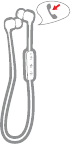
SPEAKERPHONE CONTROLS
CONTROLES PARA EL PARLANTE DEL TELÉFONO /
SCOMMANDES DU TÉLÉPHONE À HAUT-PARLEUR
EN Press play/pause to answer and end a call. See
the full user guide for complete details.
FR Appuyez sur le bouton lecture pause pour répondre
ou raccrocher. Consultez le guide complet de
l’utilisateur pour obtenir de plus amples directives.
ES Presionar el botón reproducir/pausa para recibir y
finalizar la llamada. Revise la guía de uso para los
detalles de uso completos.
NEED MORE
BESOIN D’AIDE? /
¿NECESITA MÁS AYUDA?
EN For complete user guide and to register your product, visit us online.
FR Pour consulter un guide complet de l’utilisateur et enregistrer votre appareil,
visitez notre site Web.
ES Para la Guía de Uso completa, y para registrar su producto con nosotros,
por favor visítenos en nuestro sitio web.
Capacity: 60mAh
Battery:
Rated Voltage: 3.7V
Feature:
Operation Frequency: 2402~2480 MHz
Type of Modulation: FHSS
Antenna Type: PCB Antenna
Antenna Gain: 0 dBi
Support BT 4.2+EDR
FCC Caution.
This device complies with part 15 of the FCC Rules. Operation is subject to the following two
conditions: (1) This device may not cause harmful interference, and (2) this device must accept
any interference received, including interference that may cause undesired operation.
Any Changes or modifications not expressly approved by the party responsible for compliance
could void the user's authority to operate the equipment.
Note: This equipment has been tested and found to comply with the limits for a Class B digital
device, pursuant to part 15 of the FCC Rules. These limits are designed to provide reasonable
protection against harmful interference in a residential installation. This equipment generates
uses and can radiate radio frequency energy and, if not installed and used in accordance with the
instructions, may cause harmful interference to radio communications. However, there is no
guarantee that interference will not occur in a particular installation. If this equipment does
cause harmful interference to radio or television reception, which can be determined by turning
the equipment off and on, the user is encouraged to try to correct the interference by one or
more of the following measures:
-Reorient or relocate the receiving antenna.
-Increase the separation between the equipment and receiver.
-Connect the equipment into an outlet on a circuit different from that to which the receiver is
connected.
-Consult the dealer or an experienced radio/TV technician for help.
The device has been evaluated to meet general RF exposure requirement. The device can be used
in portable exposure condition without restriction.