Dongguan Jin wen hua digital technology P5 Bluetooth Speaker User Manual DC 0239 manual V2

Dongguan Jin wen hua digital technology Co., LTD. Bluetooth Speaker DC 0239 manual V2

User Manual

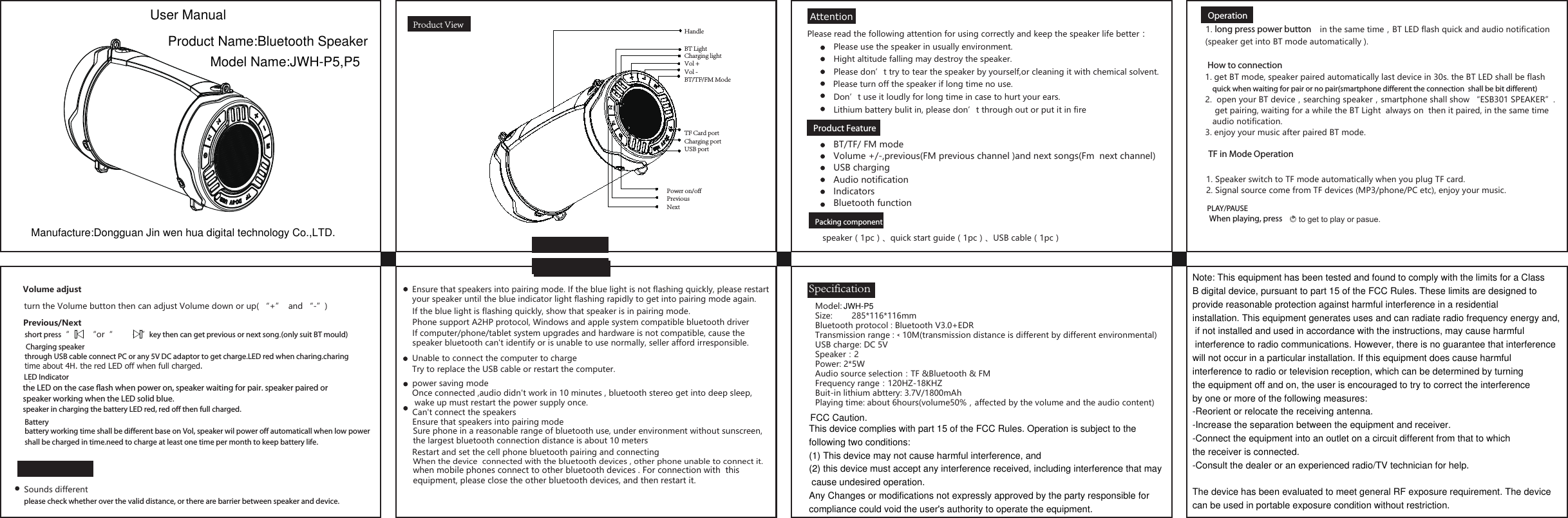
AttentionProduct ViewProduct Feature     Packing componentSpecificationBT/TF/ FM modeVolume +/-,previous(FM previous channel )and next songs(Fm  next channel)USB charging  Audio notificationIndicatorsBluetooth functionPlease read the following attention for using correctly and keep the speaker life better:Please use the speaker in usually environment.Hight altitude falling may destroy the speaker.Please don’t try to tear the speaker by yourself,or cleaning it with chemical solvent.Don’t use it loudly for long time in case to hurt your ears.Please turn off the speaker if long time no use.Model:  Size:  285*116*116mmBluetooth protocol : Bluetooth V3.0+EDRTransmission range :﹤10M(transmission distance is different by different environmental)USB charge: DC 5VSpeaker:2Power: 2*5WAudio source selection:TF &Bluetooth & FMFrequency range:120HZ-18KHZBuit-in lithium abttery: 3.7V/1800mAhPlaying time: about 6hours(volume50%,affected by the volume and the audio content) Lithium battery bulit in, please don’t through out or put it in fireCan't connect the speakersEnsure that speakers into pairing modeSure phone in a reasonable range of bluetooth use, under environment without sunscreen, the largest bluetooth connection distance is about 10 metersRestart and set the cell phone bluetooth pairing and connectingEnsure that speakers into pairing mode. If the blue light is not flashing quickly, please restart your speaker until the blue indicator light flashing rapidly to get into pairing mode again.If the blue light is flashing quickly, show that speaker is in pairing mode.Phone support A2HP protocol, Windows and apple system compatible bluetooth driverIf computer/phone/tablet system upgrades and hardware is not compatible, cause the speaker bluetooth can't identify or is unable to use normally, seller afford irresponsible. Unable to connect the computer to chargeTry to replace the USB cable or restart the computer.power saving modeOnce connected ,audio didn't work in 10 minutes , bluetooth stereo get into deep sleep, wake up must restart the power supply once. When the device  connected with the bluetooth devices , other phone unable to connect it.when mobile phones connect to other bluetooth devices . For connection with  this equipment, please close the other bluetooth devices, and then restart it.speaker(1pc)、quick start guide(1pc)、USB cable(1pc)Operation1. long press power button    in the same time,BT LED flash quick and audio notification(speaker get into BT mode automatically ). 1. get BT mode, speaker paired automatically last device in 30s. the BT LED shall be flash    quick when waiting for pair or no pair(smartphone different the connection  shall be bit different)1. Speaker switch to TF mode automatically when you plug TF card.2. Signal source come from TF devices (MP3/phone/PC etc), enjoy your music.2.  open your BT device,searching speaker,smartphone shall show “ESB301 SPEAKER”.    get pairing, waiting for a while the BT Light  always on  then it paired, in the same time   audio notification.3. enjoy your music after paired BT mode. When playing, press to get to play or pasue.short press“        “or“            ”key then can get previous or next song.(only suit BT mould)battery working time shall be different base on Vol, speaker wil power off automaticall when low power shall be charged in time.need to charge at least one time per month to keep battery life.turn the Volume button then can adjust Volume down or up( “+”  and “-”)  Volume adjustthrough USB cable connect PC or any 5V DC adaptor to get charge.LED red when charing.charingtime about 4H. the red LED off when full charged.the LED on the case flash when power on, speaker waiting for pair. speaker paired orspeaker working when the LED solid blue.speaker in charging the battery LED red, red off then full charged.FAQSounds differentplease check whether over the valid distance, or there are barrier between speaker and device.How to connection TF in Mode OperationPLAY/PAUSEPrevious/NextCharging speakerLED IndicatorBatteryHandleBT LightCharging lightVol +Vol -BT/TF/FM Mode TF Card portCharging port USB portPower on/offPreviousNext           User ManualProduct Name:Bluetooth SpeakerModel Name:JWH-P5,P5Manufacture:Dongguan Jin wen hua digital technology Co.,LTD.Note: This equipment has been tested and found to comply with the limits for a Class B digital device, pursuant to part 15 of the FCC Rules. These limits are designed to provide reasonable protection against harmful interference in a residential installation. This equipment generates uses and can radiate radio frequency energy and, if not installed and used in accordance with the instructions, may cause harmful interference to radio communications. However, there is no guarantee that interference will not occur in a particular installation. If this equipment does cause harmful interference to radio or television reception, which can be determined by turning the equipment off and on, the user is encouraged to try to correct the interference by one or more of the following measures:-Reorient or relocate the receiving antenna.-Increase the separation between the equipment and receiver.-Connect the equipment into an outlet on a circuit different from that to which the receiver is connected.-Consult the dealer or an experienced radio/TV technician for help. The device has been evaluated to meet general RF exposure requirement. The device can be used in portable exposure condition without restriction.FCC Caution.This device complies with part 15 of the FCC Rules. Operation is subject to the following two conditions: (1) This device may not cause harmful interference, and (2) this device must accept any interference received, including interference that may cause undesired operation.Any Changes or modifications not expressly approved by the party responsible for compliance could void the user's authority to operate the equipment.JWH-P5

Navigation menu