Dongguan Kechenda Electronic Technology BT6W002 Wireless Bluetooth Speaker User Manual
Dongguan Kechenda Electronic Technology Co., Ltd Wireless Bluetooth Speaker
User Manual
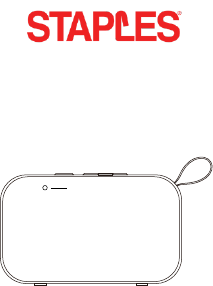
Wireless Bluetooth Speaker
Model Number: 53351
Instruction Manual
Speaker Status LED
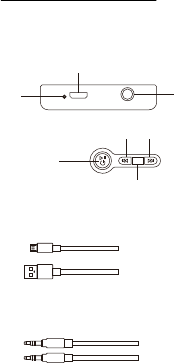
Wireless Bluetooth Speaker
What’s In The Box
Micro USB Cable For Charging
3.5mm Aux Cable
DC5 V AU X
Micro USB Charging Port
Prev/Volume Down
Power On&Off/Play/Pause
/Answer/Hang Up
Next/Volume Up
Charging Indicator Light nI xuA
M
Bluetooth /Aux In Mode

Specifications
Output Power: 3W*2
Frequency Response: 100HZ-180KHZ
Input Power: DC 5V/ 500mA
Battery Capacity:2000mAh
Estimate Battery Charge Time:4h
Estimated Play Time On Full Charge:16h

Pairing With A Bluetooth Device
Ensure that the mobile device you are trying to pair to supports
Bluetooth. Specific pairing steps may vary on the device you are
trying to pair with. Please refer to your device’s user manual for
detailed information.
1. Press the power button for 3 seconds on the speaker.You
will receive an audio prompt from the speaker.The Speaker
Status LED will turn blue and flash quickly.
2. On your mobile device’s Bluetooth menu search for“Staples
BT Speaker 53351” and select it.
3. When pairing is complete you will receive another voice
prompt from the speaker. The Speaker Status LED will turn
steady blue.
4. To power off the speaker – press and hold the power button
for 2 seconds.The Speaker Status LED will turn off.
5. The speaker will now automatically connect to your mobile
device when they are powered on and in range.The Speaker
Status LED will turn steady blue after be paired and flash
slowly when music playing.
6. When battery is low, a “Low Battery” voice prompt will remind
you to charge the battery.

Playing Music
While the unit is connected and paired to your device,navigate
to the music app and select a song to begin playback. You can
use either the playback controls on the app, or the controls on
the speaker. Long press the previous/next buttons on the speaker
to increase/decrease volume. When the speaker reaches max
volume, the speaker will emit an audible beep tone. You can
also use the play/pause button to answer and hang up phone
calls.

AUX Mode
Charging
Use the included micro-USB cable to charge the device through
a standard USB charger. The Charging Indicator LED will turn red
when charging and turn off when charging is complete.
Note: If the speaker does not detect a connection to a device,
the speaker will automatically shut down after 10 minutes to
save power.
Insert a 3.5mm audio cable into the speaker’s AUX port and the
speaker will enter AUX mode to play back audio from an external
wired source. You can also use the “M” button to switch the
speaker from AUX to Bluetooth mode. When in Bluetooth mode,
pressing the “M” button will repair the device. Press the previous/
next buttons to increase/decrease volume.

FCC Statement
Caution: Changes or modifications to this unit not expressly approved by the party responsible for
compliance could void the user's authority to operate the equipment.
NOTE: This equipment has been tested and found to comply with the limits for Class B digital device,
pursuant to part 15 of the FCC Rules. These limits are designed to provide reasonable protection
against harmful interference in a residential installation. This equipment generates, uses and can
radiate radio frequency energy and, if not installed and used in accordance with the instructions, may
cause harmful interference to radio communications. However, there is no guarantee that interference
will not occur in a particular installation. If the equipment does cause harmful interference to radio or
television reception, which can be determined by turning the equipment off and on,
the user is encouraged to try to correct the interference by one or more of the following measures:
-Reorient or relocate the receiving antenna.
-Increase the separation between the equipment and the receiver.
-Connect the equipment into an outlet on a circuit
different from that to which the receiver is connected.
-Consult the dealer or an experienced radio/TV technician for help
This device complies with Part 15 of the FCC Rules. Operation is subject to the following two conditions:
(1)This device may not cause harmful interference, and
(2) This device must accept any interference received, including interference that may cause undesired
operation.

Product Support
Contact us:
1-800-425-0049
SBProdsupport@Staples.com
www.productsupport.staples.com