Dongguan Kingone Electronics Technology GQ-65A Touch Screen Smart Board User Manual Specification for Touch Screen Smart Board
Dongguan Kingone Electronics Technology Co., Ltd. Touch Screen Smart Board Specification for Touch Screen Smart Board
User Manual

ModelNumber:GQ‐TSB6501
TouchLCD‐allinonetouchmonitorisaninteractiveTV,itbuilt‐inwithLCD/LEDandtouchscreen(andPCforoptional).Weusethemost
populartechnologyinfraredtouchtoachieveinteractionbetweenusersandthemonitor.
AllinonetouchmonitorisalsoaLCDwhiteboard,usetheLCDtoinsteadoftheprojectorforimagepresentation.
Connectwithbuilt‐inorouterPC,itisalargetouchPC,fingerstocontrolandoperatethePCtopresentadvertisement,conferencePPT,
TECHNICALDATASHEET
ProductName:AllinOneTouchMonitorforEducation/AllinOneSmartBoard/AllinOneInteractiveWhiteboard
ProductFeatures:
*InfraredTouchTechnology
*InteractiveWhiteboardSolution
*Fingerorpentouchandwrite
*Aluminumalloybodywithfrontaccesstouch
*Withoutprojectorallinonetouchmonitor
*Windowswith32bitand64bitmulti‐touch
*SupportMicrosoftsurface
*Aninteractivewhiteboard(IWB)devicecaneitherbeastandalonecomputeroralarge,functioningtouchpadforcomputerstouse.
GeneralOperationandUsesofInteractiveWhiteboard:
classroomcourses,playmoviesandetc…
*Theuserthencalibratesthewhiteboardimagebymatchingthepositionoftheprojectedimageinreferencetothewhiteboardusingapointeras
necessary.Afterthis,thepointerorotherdevicemaybeusedtoactivateprograms,buttonsandmenusfromthewhiteboarditself,justasone
wouldordinarilydowithamouse.Iftextinputisrequired,usercaninvokeanon‐screenkeyboard,utilizehandwritingrecognition.Thismakesit
unnecessarytogotothecomputerkeyboardtoentertext.
*AdevicedriverisinstalledontheattachedcomputersothattheinteractivewhiteboardcanactasaHumanInputDevice(HID),likeamouse.The
computer'svideooutputisconnectedtoadigitalprojectorsothatimagesmaybeprojectedontheinteractivewhiteboardsurface.
*Thus,anIWBemulatesbothamouseandakeyboard.Theusercanconductapresentationoraclassalmostexclusivelyfromthewhiteboard.
*Inaddition,theInteractiveWhiteboardissuppliedwithsoftwarethatprovidestoolsandfeaturesspecificallydesignedtomaximizeinteraction
opportunities.Thesegenerallyincludetheabilitytocreatevirtualversionsofpaperflipcharts,penandhighlighteroptions,andpossiblyeven
virtualrulers,protractors,andcompasses—instrumentsthatwouldbeusedintraditionalclassroomteaching.Interactivewhiteboardspromotes
collaborationamongstudentsandgroupdiscussionandparticipation.Theycanbeaneffectivetoolforbrainstormingduetothefactthatnotes
canbetakenontheboardandsavedtobesharedanddistributedtostudentslater.
*VariousInterface,includeHDMI/VGA/USB/AV/AUDIO/MIC/SDCARDSLOTetc.
*Intelligentblackboarddetectingfeatures(Onceblackboardactivated,LEDbacklitoff)
KINGONEELECTRONICS(HK)LIMITED
Tel:+8676923171657Mobile:+8618002606866
www.kingonevision.comE‐mail:sales@kingonevision.com

Usesforinteractivewhiteboardsmayinclude:
*RunningsoftwarethatisloadedontotheconnectedPC,suchasawebbrowsersorothersoftwareusedintheclassroom.
*CapturingandsavingnoteswrittenonawhiteboardtotheconnectedPC
*Capturingnoteswrittenonagraphicstabletconnectedtothewhiteboard
*ControllingthePCfromthewhiteboardusingclickanddrag,markupwhichannotatesaprogramorpresentation
*UsingOCRsoftwaretotranslatecursivewritingonagraphicstabletintotext
Applications:
*UsinganAudienceResponseSystemsothatpresenterscanpollaclassroomaudienceorconductquizzes,capturingfeedbackontothe
whiteboard
InteractiveWhiteboardcanbeusedinavarietyofsettings,includingclassroomsatalllevelsofeducation,incorporateboardroomsandwork
groups,intrainingroomsforprofessionalsportscoaching,inbroadcastingstudios,andothers.
KINGONEELECTRONICS(HK)LIMITED
Tel:+8676923171657Mobile:+8618002606866
www.kingonevision.comE‐mail:sales@kingonevision.com

ScreenSize
PanelType
AspectRatio
Resolution
ViewingAngle
Brightness
ActiveArea
ResponseTime
DisplayColor
ServiceLifetime
SensingType
ResponseTime
Connection
LightTransmittance 88%lighttransmittance
SurfaceProtection
OperatingSystem
CPU
RAM
ROM
Graphics
Network
Interface
OperatingSystem
RAM
ROM
SDcardslot
Internet
Interface
Speaker
PowerSupply
Frequency
OperationTemperature 0℃~50℃
StorageTemperature ‐20℃~60℃
WorkingHumidity 85%
StorageTemperature 85%
Size
ProductDimensions
PackageDimensions
VESA
Netweight
Grossweight
Accessories ACPowerCable,TouchPens,Remotecontroller,WIFIantenna
KINGONEELECTRONICS(HK)LIMITED
Tel:+8676923171657Mobile:+8618002606866
www.kingonevision.comE‐mail:sales@kingonevision.com
Software
65inch
1515*103*936mm
1710*1190*250mm
600x400mm
60KG
67KG
SupportWORD,EXCEL,PowerPoint,PDFpresentationseditmodeannotateandmodifythestate,andkepttheoriginal
Power
AC100~240V
50/60Hz
WorkingEnvironment
PackagingInformation
SupportMAX32G
WIFI,RJ45optional
VGA–IN*1,Ypbpr‐IN*1,AV‐OUT*1,VGAAUDIO‐IN*1,CvbsVIDEO–IN*1,Coaxial–OUT*1,Digital‐analogintegratedTV
Others
2*15W
Whiteboardsoftware.
1000MLAN,Realtek8111E.2*LAN/WIFI
DCinput,HDMIoutput*1,VGAoutput*1,USB2.0*2,USB3.0*2,RJ45(LAN),Audiooutput,Lineoutput
AndroidPart
Android5.1.1System
1G
4G
ComputerPart
Windows7/10system(RecommendtouseWindows7,havebettercompatibility)
IntelCorei3(i5/i7Optional)
4G
120GSSD
IntelHDGraphics,Supports2160P
TouchSystem
InfraredSystem(Multi10pointtouch)
6ms
Full‐speedUSB(Driverfree)
TemperedGlasswith4mmthicknessStandard
OperatingSystem
178(H)/178(V)
450cd/m2
1210.6*681.4mm
8ms
8bit16.7M
≥50,000hours
DisplayInformation
65inch
a‐SiTFT‐LCD
16:9,WideSXGA
3840*2160UHD
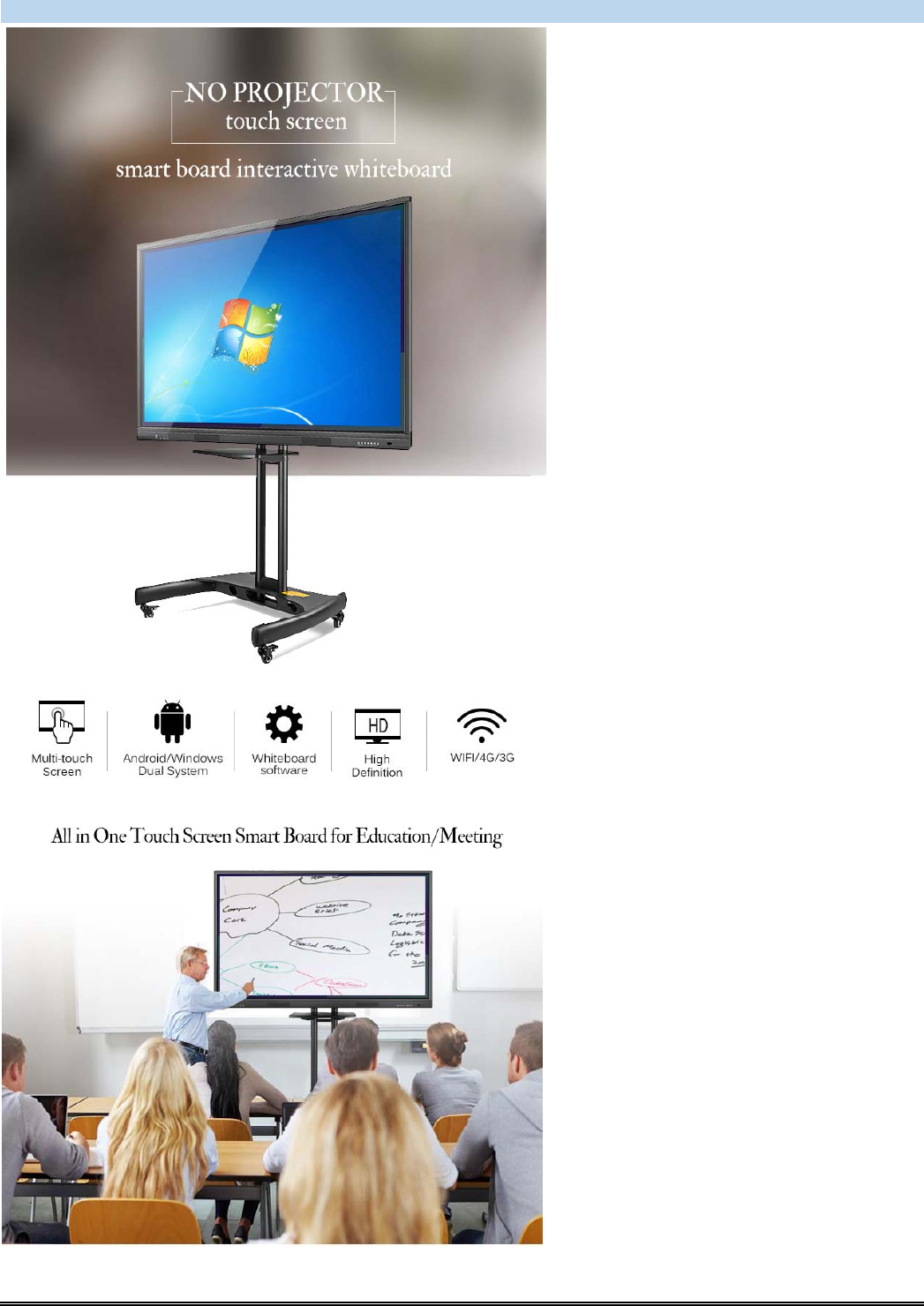
ProductShow:
KINGONEELECTRONICS(HK)LIMITED
Tel:+8676923171657Mobile:+8618002606866
www.kingonevision.comE‐mail:sales@kingonevision.com

KINGONEELECTRONICS(HK)LIMITED
Tel:+8676923171657Mobile:+8618002606866
www.kingonevision.comE‐mail:sales@kingonevision.com
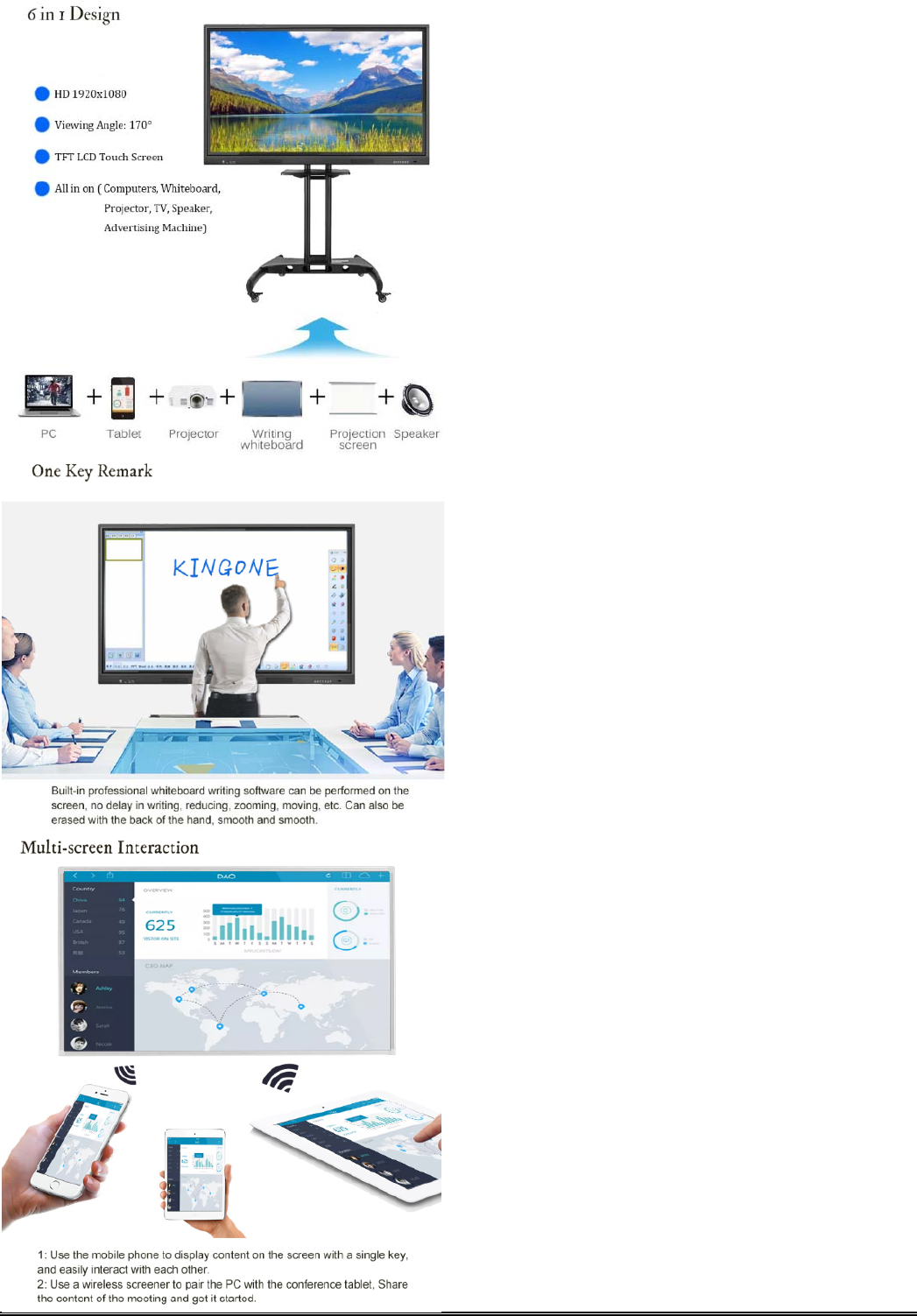
KINGONEELECTRONICS(HK)LIMITED
Tel:+8676923171657Mobile:+8618002606866
www.kingonevision.comE‐mail:sales@kingonevision.com
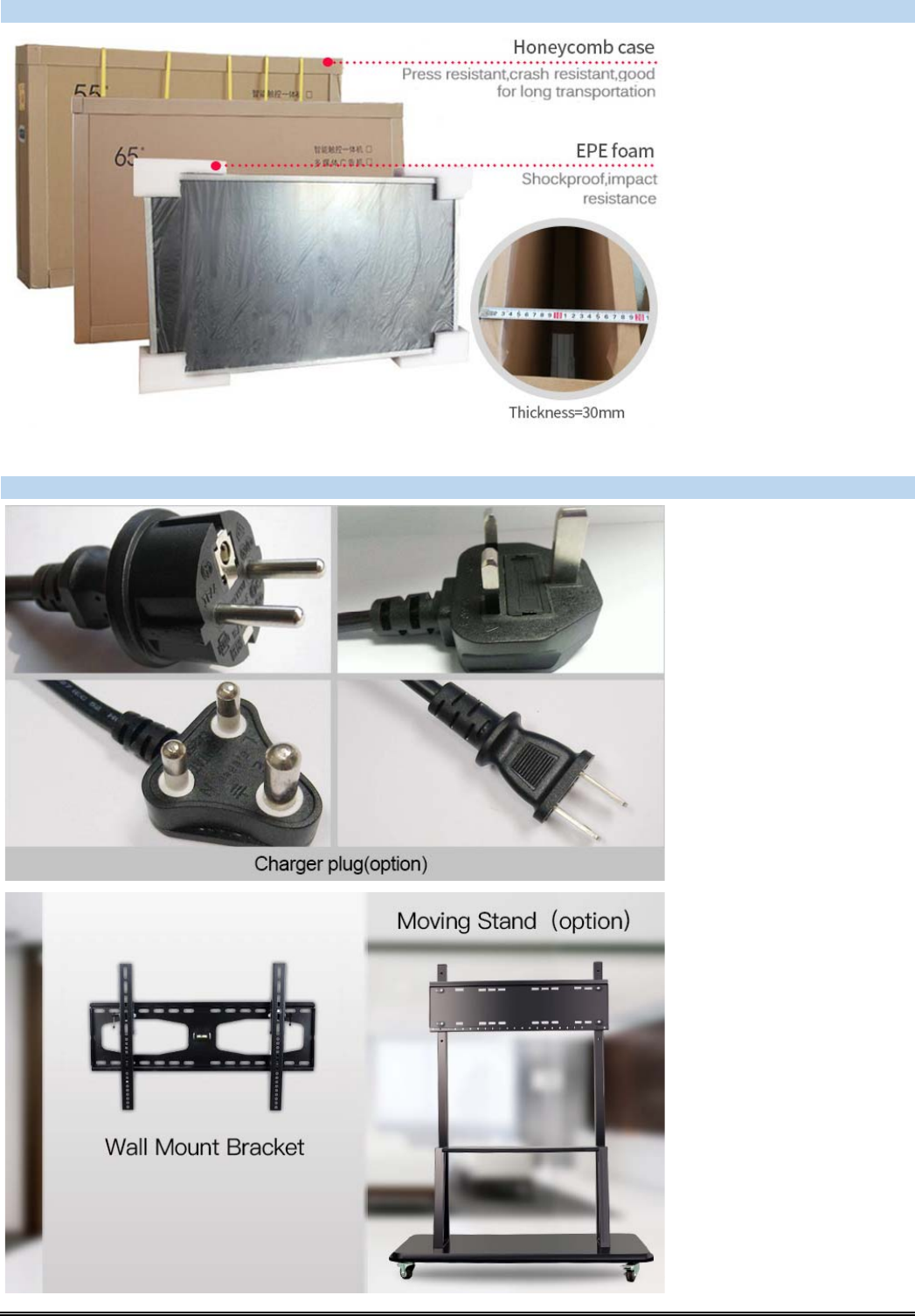
PackingPicture
Honeycombcardboard
Accessories:
KINGONEELECTRONICS(HK)LIMITED
Tel:+8676923171657Mobile:+8618002606866
www.kingonevision.comE‐mail:sales@kingonevision.com
FCC WARNING
This device complies with part 15 of the FCC Rules. Operation is subject to the following two
conditions: (1) this device may not cause harmful interference, and (2) this device must accept
any interference received, including interference that may cause undesired operation.
Any changes or modifications not expressly approved by the party responsible for compliance
could void the user's authority to operate the equipment.
NOTE: This equipment has been tested and found to comply with the limits for a Class B
digital device, pursuant to Part 15 of the FCC Rules. These limits are designed to provide
reasonable protection against harmful interference in a residential installation. This equipment
generates, uses and can radiate radio frequency energy and, if not installed and used in
accordance with the instructions, may cause harmful interference to radio communications.
However, there is no guarantee that interference will not occur in a particular installation.
If this equipment does cause harmful interference to radio or television reception,
which can be determined by turning the equipment off and on, the user is encouraged to try to
correct the interference by one or more of the following measures:
-- Reorient or relocate the receiving antenna.
-- Increase the separation between the equipment and receiver.
-- Connect the equipment into an outlet on a circuit different
from that to which the receiver is connected.
-- Consult the dealer or an experienced radio/TV technician for help.
To maintain compliance with FCC’s RF Exposure guidelines, This equipment should be
installed and operated with minimum distance between 20cm the radiator your body: Use
only the supplied antenna.