Dongguan Koppo Electronics BT801 Bluetooth headset User Manual
Dongguan Koppo Electronics Co.,Ltd Bluetooth headset
User Manual
Bluetoothheadset
BT801
UserManual
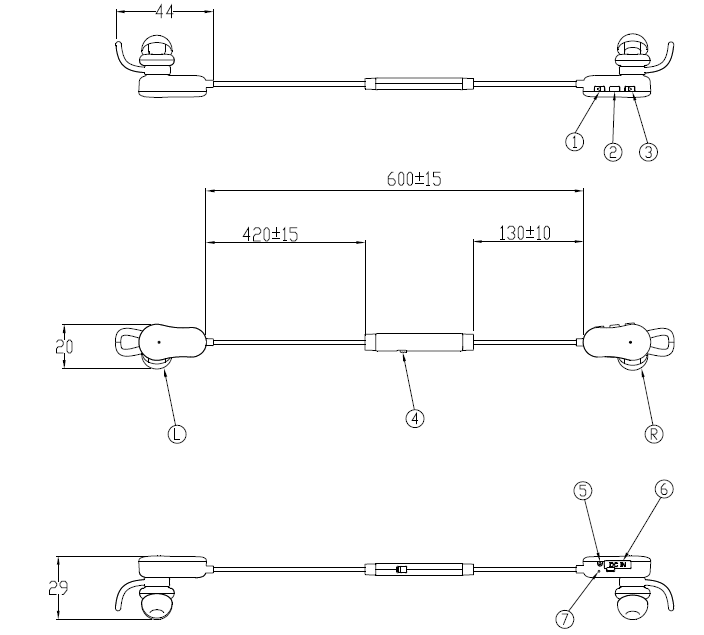
1Appearanceandparameter:
Buttonillustration:
1.Volume‐
2.Multi‐functionbutton
3.Volume+
4.ANC‐button
5.MIC
6.MICROUSB
7.LED

2.BasicParameter
Productsize:688*29*20mm
Weight:TBD(bareunit)
WorkingVoltage:3.7V
Lowbatteryvoltageprompt:3.4V
Playingtime:around6hours
Chargingvoltage:DC5V
Charginginterface:MICROUSB
Chargingtime:about1hours
Chargingcurrent:120mA
Auto‐shut‐offtimewithoutconnection:5minutes
ANCfunction:supportactivenoicecancellingtechnology
Multi‐pointconnection:Supportoneearbudconnecttwobluetoothmobilephones
Batteryindicate:SupportIOSsystembatteryindication
VoicePrompt:Optional
APPextendedfunction:Optional(SmartdeviceshouldinstallAPPfirst)
AudioTransmission:SupportAPTX
3Components
3.1Bluetooth
BluetoothIC CSR8645
BluetoothVersion4.1
ProfileA2DPAVRCPHSPHFP
RFcarrierfrequency2402~2480MHz
Receivingdistance360°10meters
3.2ANCspec
ANCSpec:AMSAS3421
Noisecancelling:10‐20db(100Hz‐1000Hz)
3.3MIC
MICSpec:3.7*2.2*1.1mmMEMSMIC,Sensitivity:‐42±3db
ANCSpec:3.7*2.2*1.1mmMEMSMIC,Sensitivity:‐42±3dB
3.4Battery
BatterySpec:3.7V120mAhPolymerLi‐ionBatteries
Batterysize:60*11*22 mm
Batterylife:300times(dischargecapacity≥80%)
3.5Driver
DriverSpec:Φ13MM
Resistance:32Ω
RatedPower:3mW(Max:5mW)
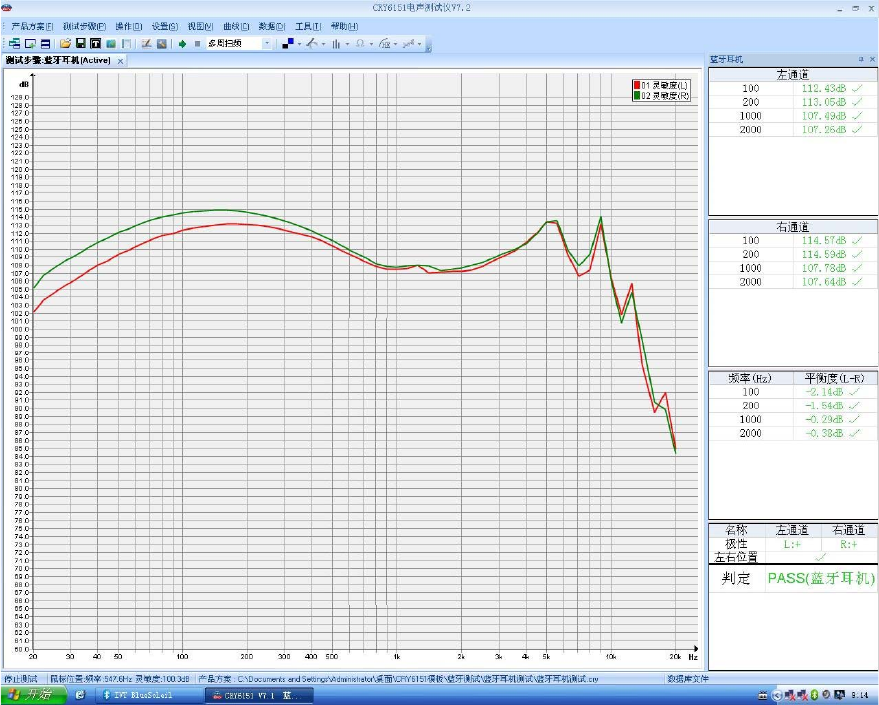
Frequencyresponse:100Hz~10KHz;
Sensitivity:100dB±3dB;
3.6 Finished product sound frequency:IEC711 test
4.Operationinstruction:
PowerON:Pressandholdthepowerbuttontillthebluelightison.
Poweroff:Pressandholdthepowerbuttontilltheredlightison.
ANCbutton:PushtheANCbuttonto“1”,ANCopen;pushtheANCbuttonto“0”,ANCclose
Pairing:Inpower‐offmode,pressandholdthepowerbuttonuntiltheredandbluelightglittersinturn,then
theunitcomesintopairingmode.
Volumecontrol:Inmusicorconversationmode,presstheVol+buttontoincreasethevolume,thenpressthe
Vol‐buttontodecreasethevolume.
Skipsongs:Inmusicmode,pushandholdtheVol+buttonforlongtonextsong,thenpressandholdtheVol‐
buttonforlongtoprevioussong.
Pause/Play:Pressthepowerbuttontopauseorplaythemusic.
Answering/endingcalls:Pressthepowerbuttononcetoanswertheincomingcallsorendingthe
conversation.
Rejectingcalls:Pressandholdthepowerbuttonfor2secondstorejecttheincomingcalls.
Call mute:during the calling,press and hold the Vol+ & Vol- button,open/close the Call mute function.
Rediallatestnumber:Doublepressthepowerbuttontorediallastdialedphonenumberinuser’scellphone
automatically.
Voicedialing:Inconnectionmode,pressandholdthemulti‐functionalbuttonfor1second(needbluetooth
devicesupportvoicedialingfirst)
Batteryelectricquantitychecking:Inpower‐onmode(notpairingmode),presstheVol+orVol‐tocheckthe
electricquantitystatus.
App Extended function :Optional
Photo‐takingfunction(Optional):Presspowerbuttontotakephotos(SmartdeviceshouldinstallAPPfirst)
5.LEDindicator:
Lowpowerwarning:Redlightglitters.
Charging:Redlightison.
Chargingfinished:Bluelightison.
Bluetoothconnection:Bluelightglittersslowly
Bluetoothdisconnection:Bluelightglittersquickly.
Pairing:redandbluelightsglittersinturn.
6.VoicePrompt(optional)
POWERON:开机
POWEROFF:关机
Connected:已连接
Pairing:配对
BatteryLow:电池电量低
7.Optionalaccessories
Chargingcable:50CMBlackmicroUSBcable
Siliconearhooks
Cablefastener/Cableclip
Siliconeartips:large,medium,small
8.WorkingEnvironment
WorkingTemperature:‐5~45℃。
Storagetemperature:‐20~70℃
9.FCCStatement
Changesormodificationsnotexpresslyapprovedbythepartyresponsibleforcompliancecouldvoidthe
user'sauthoritytooperatetheequipment.
ThisequipmenthasbeentestedandfoundtocomplywiththelimitsforaClassBdigitaldevice,pursuantto
Part15oftheFCCRules.Theselimitsaredesignedtoprovidereasonableprotectionagainstharmful
interferenceinaresidentialinstallation.Thisequipmentgeneratesusesandcanradiateradiofrequency
energyand,ifnotinstalledandusedinaccordancewiththe
instructions,maycauseharmfulinterferencetoradiocommunications.However,thereisnoguaranteethat
interferencewillnotoccurinaparticularinstallation.Ifthisequipmentdoescauseharmfulinterferenceto
radioortelevisionreception,whichcanbedeterminedbyturningtheequipmentoffandon,theuseris
encouragedtotrytocorrecttheinterferencebyoneormoreofthefollowingmeasures:
‐‐Reorientorrelocatethereceivingantenna.
‐‐Increasetheseparationbetweentheequipmentandreceiver.
‐‐Connecttheequipmentintoanoutletonacircuitdifferentfromthattowhichthereceiverisconnected.
‐‐Consultthedealeroranexperiencedradio/TVtechnicianforhelp
Thisdevicecomplieswithpart15oftheFCCrules.Operationissubjecttothefollowingtwoconditions(1)this
devicemaynotcauseharmfulinterference,and(2)thisdevicemustacceptanyinterferencereceived,
includinginterferencethatmaycauseundesiredoperation.