Dongguan Koppo Electronics EQ-713 Bluetooth Earphone User Manual EQ 713 A1 180523

Dongguan Koppo Electronics Co.,Ltd Bluetooth Earphone EQ 713 A1 180523

User Manual

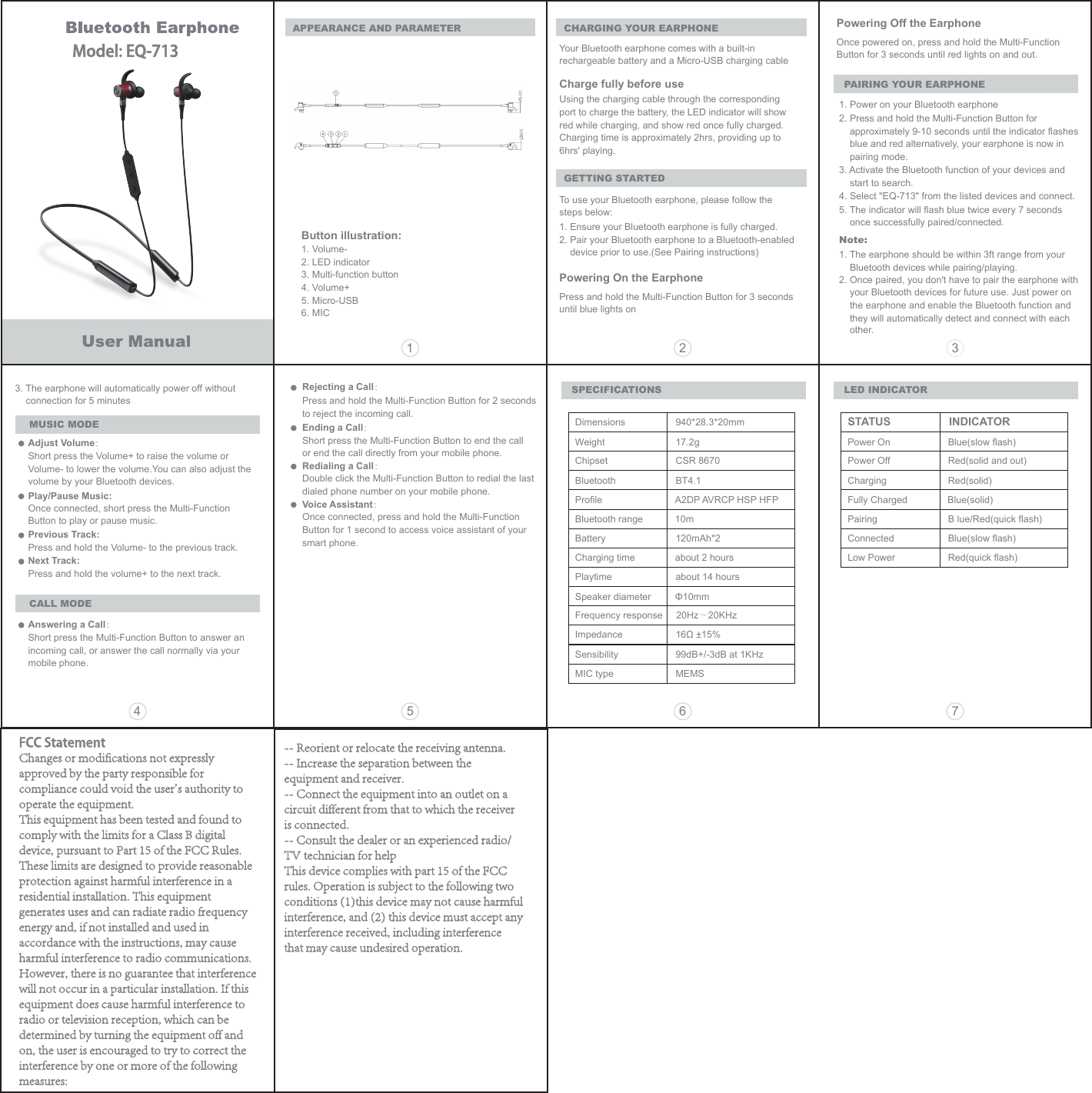
CHARGING YOUR EARPHONEAPPEARANCE AND PARAMETERYour Bluetooth earphone comes with a built-in rechargeable battery and a Micro-USB charging cableCharge fully before useUsing the charging cable through the corresponding port to charge the battery, the LED indicator will show red while charging, and show red once fully charged.Charging time is approximately 2hrs, providing up to 6hrs' playing.GETTING STARTEDTo use your Bluetooth earphone, please follow the steps below:1. Ensure your Bluetooth earphone is fully charged.2. Pair your Bluetooth earphone to a Bluetooth-enabled device prior to use.(See Pairing instructions)Powering On the EarphonePress and hold the Multi-Function Button for 3 seconds until blue lights onPowering Off the EarphoneSPECIFICATIONSOnce powered on, press and hold the Multi-Function Button for 3 seconds until red lights on and out.PAIRING YOUR EARPHONE1. Power on your Bluetooth earphone2. Press and hold the Multi-Function Button for approximately 9-10 seconds until the indicator flashesblue and red alternatively, your earphone is now in pairing mode.3. Activate the Bluetooth function of your devices and start to search.4. Select "EQ-713" from the listed devices and connect.5. The indicator will flash blue twice every 7 seconds once successfully paired/connected.Note: 1. The earphone should be within 3ft range from your     Bluetooth devices while pairing/playing.2. Once paired, you don't have to pair the earphone with     your Bluetooth devices for future use. Just power on     the earphone and enable the Bluetooth function and     they will automatically detect and connect with eachother.3. The earphone will automatically power off without connection for 5 minutesMUSIC MODEAdjust Volume:Short press the Volume+ to raise the volume or Volume- to lower the volume.You can also adjust the volume by your Bluetooth devices.Play/Pause Music:Once connected, short press the Multi-Function Button to play or pause music.Previous Track:Press and hold the Volume- to the previous track.Next Track:Press and hold the volume+ to the next track.CALL MODEAnswering a Call:Short press the Multi-Function Button to answer an incoming call, or answer the call normally via your mobile phone.Rejecting a Call:Press and hold the Multi-Function Button for 2 seconds to reject the incoming call.Ending a Call:Short press the Multi-Function Button to end the call or end the call directly from your mobile phone. Redialing a Call:Double click the Multi-Function Button to redial the last dialed phone number on your mobile phone. Voice Assistant:Once connected, press and hold the Multi-Function Button for 1 second to access voice assistant of your smart phone.Dimensions  940*28.3*20mmWeight  17.2gFrequency response     20Hz~20KHzChipset  CSR 8670Bluetooth  BT4.1Profile  A2DP AVRCP HSP HFPBluetooth range            10mBattery  120mAh*2 Charging time about 2 hoursPlaytime  about 14 hoursSpeaker diameter         Φ10mmImpedance  16Ω ±15%Sensibility  99dB+/-3dB at 1KHzMIC type  MEMS LED INDICATORSTATUS                INDICATORPower On  Blue(slow flash)Power Off  Red(solid and out)Charging  Red(solid)Fully Charged Blue(solid)Pairing  B lue/Red(quick flash)Connected  Blue(slow flash)Low Power  Red(quick flash)15 6 742 3Button illustration:1. Volume-2. LED indicator3. Multi-function button4. Volume+5. Micro-USB6. MICModel: EQ-713FCC StatementChanges or modifications not expressly approved by the party responsible for compliance could void the user's authority to operate the equipment.This equipment has been tested and found to comply with the limits for a Class B digital device, pursuant to Part 15 of the FCC Rules. These limits are designed to provide reasonable protection against harmful interference in a residential installation. This equipment generates uses and can radiate radio frequency energy and, if not installed and used in accordance with the instructions, may cause harmful interference to radio communications. However, there is no guarantee that interference will not occur in a particular installation. If this equipment does cause harmful interference to radio or television reception, which can be determined by turning the equipment off and on, the user is encouraged to try to correct the interference by one or more of the following measures:-- Reorient or relocate the receiving antenna.-- Increase the separation between the equipment and receiver.-- Connect the equipment into an outlet on a circuit different from that to which the receiver is connected.-- Consult the dealer or an experienced radio/TV technician for helpThis device complies with part 15 of the FCC rules. Operation is subject to the following two conditions (1)this device may not cause harmful interference, and (2) this device must accept any interference received, including interference that may cause undesired operation.

Navigation menu