Dongguan Xing Yue Electronic XO-9296 ifidelity Metal Millennium Bluetooth Speaker User Manual
Dongguan Xing Yue Electronic co., Ltd ifidelity Metal Millennium Bluetooth Speaker
User manual
Metal Millennium
Bluetooth® Speaker

FCC Statement:
Any Changes or modifications not expressly approved by the party responsible for compliance could void the user’s authority to
operate the equipment.
This device complies with part 15 of the FCC Rules. Operation is subject to the following two conditions:
(1) This device may not cause harmful interference, and
(2) This device must accept any interference received, including interference that may cause undesired operation.
Note: This equipment has been tested and found to comply with the limits for a Class B digital device, pursuant to part 15 of
the FCC Rules. These limits are designed to provide reasonable protection against harmful interference in a residential
installation. This equipment generates, uses and can radiate radio frequency energy and, if not installed and used in
accordance with the instructions, may cause harmful interference to radio communications. However, there is no guarantee
that interference will not occur in a particular installation. If this equipment does cause harmful interference to radio or
television reception, which can be determined by turning the equipment off and on, the user is encouraged to try to correct the
interference by one or more of the following measures:
—Reorient or relocate the receiving antenna.
—Increase the separation between the equipment and receiver.
—Connect the equipment into an outlet on a circuit different from that to which the receiver is connected.
—Consult the dealer or an experienced radio/TV technician for help.
FCC Radiation Exposure Statement:
This equipment complies with FCC radiation exposure limits set forth for an uncontrolled environment.
Congratulations on your ifidelity Metal Millennium
Bluetooth® Speaker!
Read carefully and follow all instructions in this User’s
Manual before using the Speaker. Keep this User’s
Manual in a convenient location for future reference.
2 hours (max volume)
Millennium
5-6 hours from 0-100%
• Speaker
• Micro USB charging cable
• 3.5mm Audio cable
• User Manual
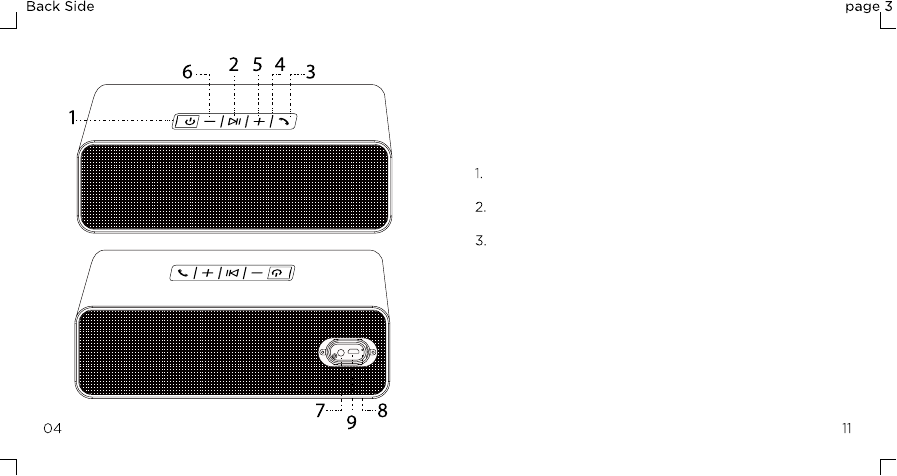
Using the provided charging cable, insert the
Micro-USB end into the charging port (9).
Insert the opposite USB end of the cable into a
5V USB wall plug or computer’s USB port.
The LED Indicator will glow Red while charging
and will turn off once the device is fully charged.
Charging the Speaker:
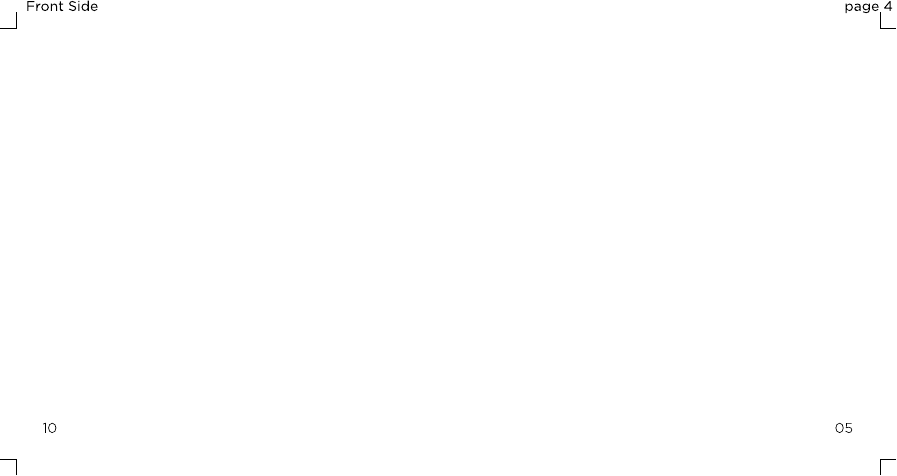
1.
2.
3.
4.
5.
6.
7.
8.
9 .
Power ON/OFF Button/LED Indicator
Play/Pause Button
Call Button
Mic
Vol+ / Next Track
Vol- / Previous Track
3.5mm AUX Line-in
Micro-USB Charging Port
LED Charging Indicator
Button Functions:
Insert 3.5mm audio cable to “AUX IN” port.
To play or pause audio in Bluetooth® Mode, short
press the Play/Pause button.
To Increase volume, press and hold the “+” button.
To decrease volume, press and hold the “-” button.
Track selection must be made from audio device in
this mode.
Listening in AUX Mode:
1.
2.
3.
4.
*
Flashing Blue
Glowing Blue
Glowing Red
Glowing
Green
Power ON / Pairing Mode
Bluetooth® connection successful
Speaker is Charging
Charging Complete
Speaker will sound a call ring indication tone when
a call is incoming.
To answer an incoming call in Bluetooth® Mode,
short press the Call Button.
To end a call in Bluetooth® Mode, short press the
Call Button again.
To redial the most recent number, short press the
Call Button twice.
To Increase volume, press and hold the “+” button.
To decrease volume, press and hold the “-” button.
Answering Calls in Bluetooth® Mode:
1.
2.
3.
4.
5.
6.
To play or pause audio in Bluetooth® Mode, short
press the Play/Pause button.
To skip ahead to the next track, short press the “+”
button.
To go back to the beginning of a track or to skip to
the previous track, short press the “-“ button.
To Increase volume, press and hold the “+” button.
To decrease volume, press and hold the “-” button.
Listening in Bluetooth® Mode:
1.
2.
3.
4.
5.
Press and hold Power Button to turn on speaker
and enter Bluetooth® pairing mode. LED Indicator
will begin flashing Blue.
Tone will sound indicating that the speaker is
discoverable.
From a Bluetooth® enabled audio device, select
“Millennium” from the list of available devices. A
tone will sound and LED Indicator will glow solid
Blue to indicate pairing success.
Once paired to this device, it will automatically
connect upon being powered ON.
1.
2.
3.
4.
*