Dorma Z 8000 Series End Cap Replacement Installation Instructions I Ecrk 1 11 09
User Manual: Dorma 8000 Series End Cap Replacement Installation Instructions Installation Instructions
Open the PDF directly: View PDF  .
.
Page Count: 1
I ECRK -1 11/09
8000 Series Exit Device, End Cap Replacement
Installation Instructions
1135-230 95057456 www.dorma-usa.com 1-800-523-8483
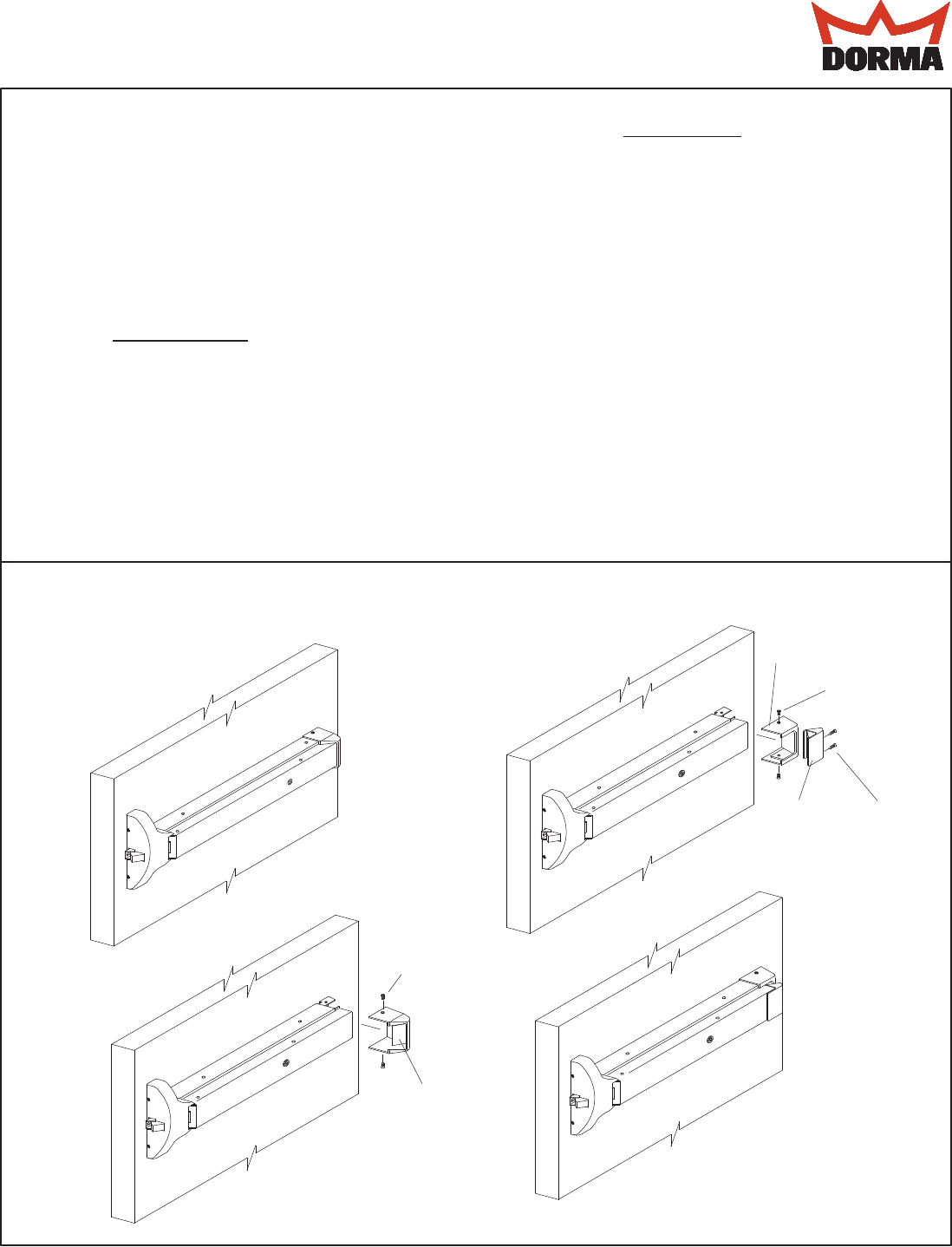
1. Layout all parts and check that there no
parts missing.
2. Remove (2) existing 8-32 x 1/4" PHTHMS
screws from existing end cap, as shown.
3. Install new end cap over edge of touch bar,
by sliding slotted portion over top edge &
into touch bar. (Touch bar may have to be
spread apart at lip end to fit.) Secure with
(2) #8 X 1" PHTS screws as shown.
4. Install end cover by sliding it over existing
bracket and edges of rail. Secure with (2)
existing or new 8-32 x 1/4" PHTHMS.
5. Once installed depress touch bar and rail
to ensure proper function.
Installation
Included with Kit:
End Cap (1) 95056429
End Cover (1) 95056428
#8 x 1" PHFHTS (2) 95046469
8-32 x 1/4" PHTHMS (2) 95046023
Instructions (1) 95057456
(2) 8-32 x 1/4"
PHTHMS
(2) 8-32 x 1/4"
PHTHMS
(2) #8 X 1"
PHTS
End Cap
End Cover
End Cap
Important Installation Note:
DORMA made a change to the end cap
design on all 8300, F8300, 8400 & F8400
series exit devices.
The one piece end cap was replaced by a
two piece design. This two piece end cap
design will retrofit to all 8000 series exit
devices.
One piece end cap used on all 8000 Series
exit devices manufactured up to 11/30/2009
Two piece end cap used on all 8000 Series
exit devices manufactured after 12/01/2009
