DormaKaba Multihousing In Sync M Lock Usage Instructions Insync 10936901
User Manual: DormaKaba Multihousing InSync M Lock Usage Instructions Installation Instructions
Open the PDF directly: View PDF  .
.
Page Count: 2
InSync® M Lock Usage Instructions Pg. 1 of 2
InSync® M
Lock Usage Instructions
Unit Configuration
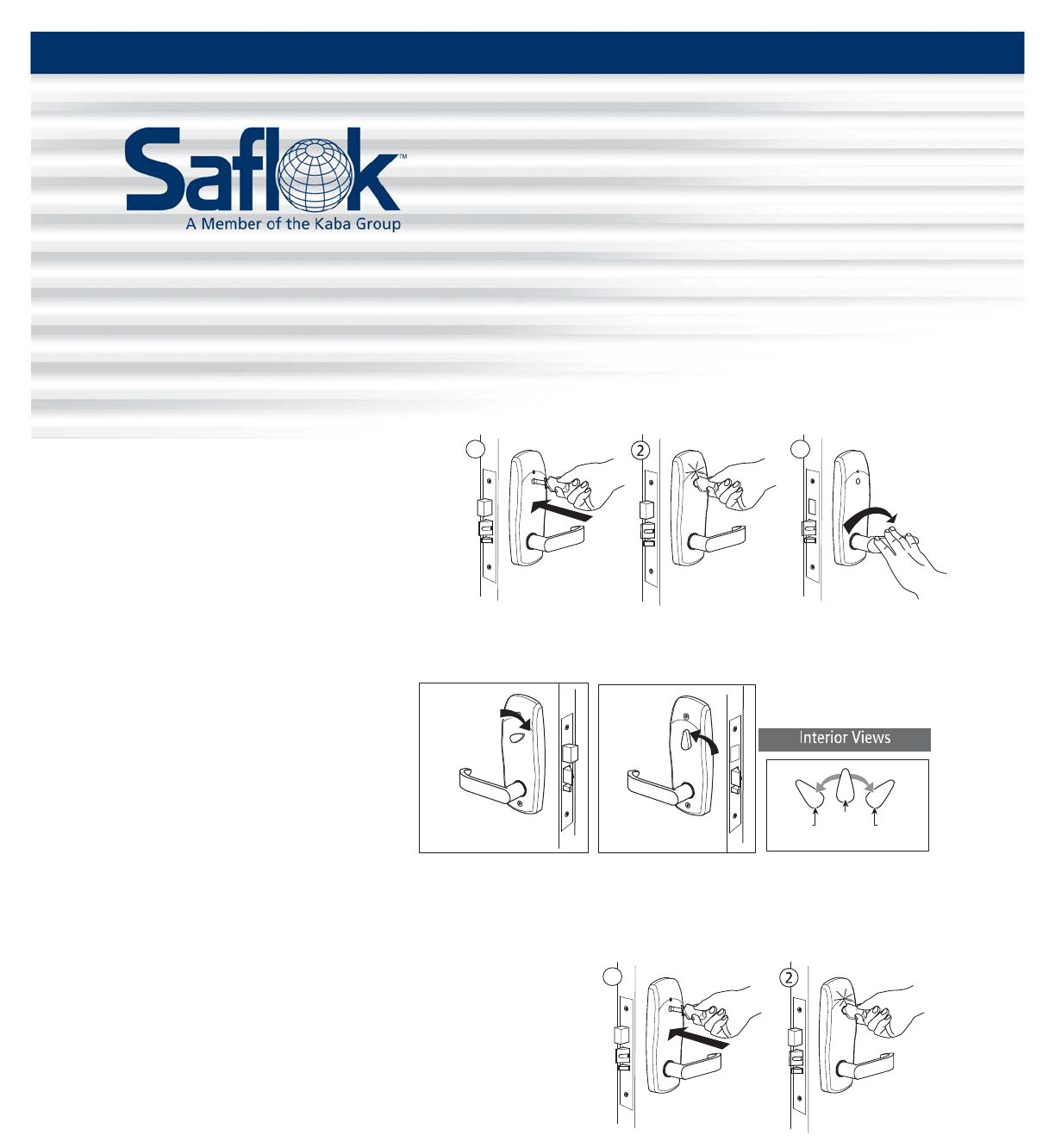
Unlocking your door from the outside
1. Fully insert your RFID key into the
lock port.
roiretxEroiretxE Ext eri or
2 31
Exterior Exterior
Exterior
2. Wait until the GREEN light flashes
once.
3. Rotate the lever downward to retract
the latch bolt and the dead bolt to
open the door.
Locking and unlocking the door from the inside
To lock the door from the inside,
rotate the thumb turn to a position
halfway between vertical and
horizontal. Unlocked
To unlock the door from the inside,
rotate the lever downward or return
the thumb turn to a vertical position.
Note: The thumb turn in a vertical position does not always indicate that the door is unlocked; it could be
locked from the outside in this condition.
Locking your door from the outside
1. Pull the door shut and insert the key into the lock port.
2. Wait unit the RED light flashes once.
All information contained herein, including but not limited to product pricing and other intellectual property, is confidential and
intended for the sole use of the addressee(s) so named. Any misuse of this confidential information contained herein may result in
legal action by Computerized Security Systems dba SAFLOK and its parent company.
Locked
Hal fway bet ween
vertical and horizontal
Locked
Unlocked
Thumb Turn
Posi t i o n Locked
Right-Hand
Locked
Left-Hand
Unlocked
roiretxE
2
1
roiretxEExterior Exterior
© SAFLOK™ WL 5/7/2008
InSync® M Lock Usage Instructions Pg. 2 of 2
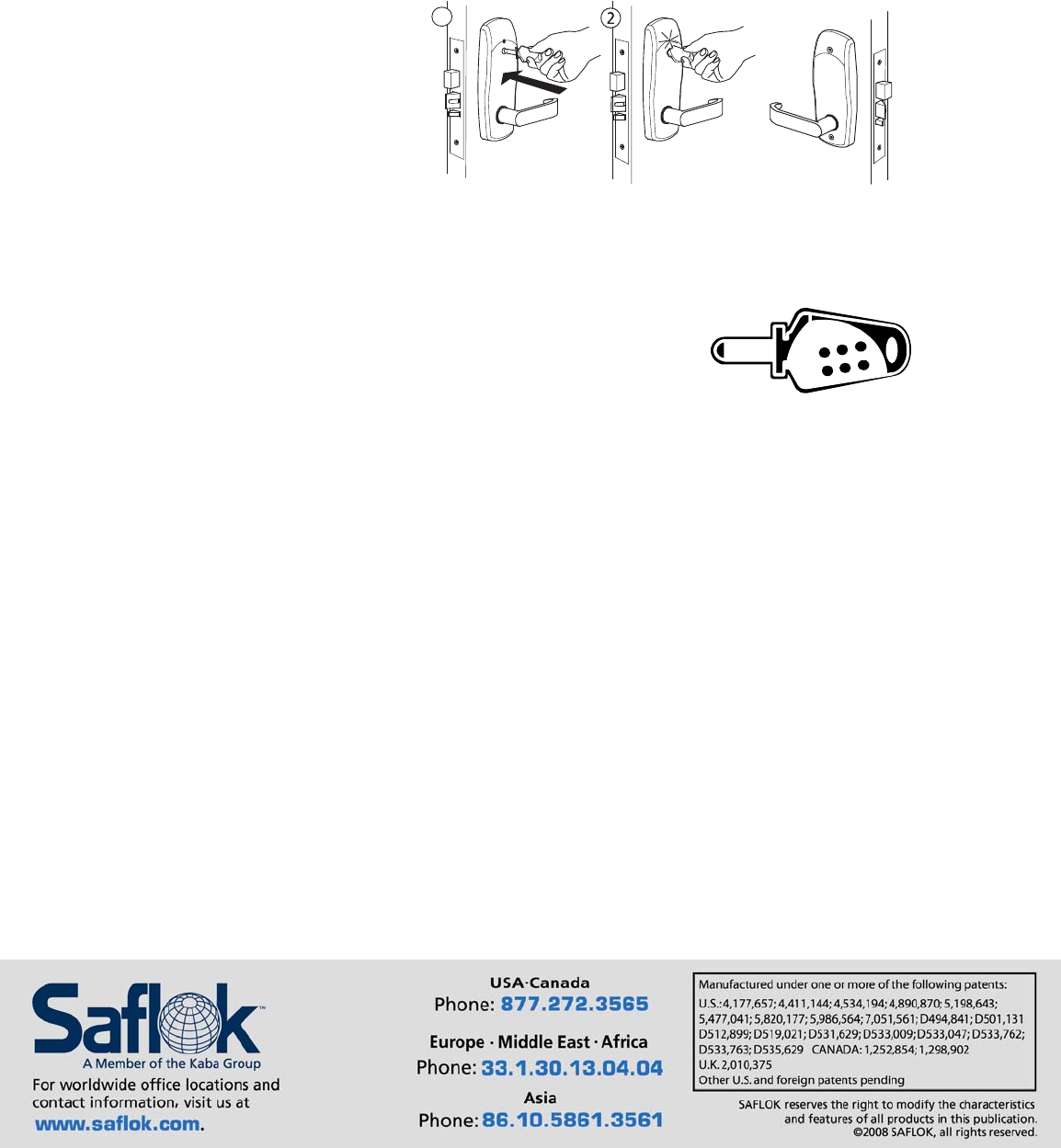
Suite Configuration
InSync M locks for suite configuration have no thumb turn. Suite locks cannot be left unlocked.
1. Fully insert your RFID key into the
lock port.
2. Wait until the GREEN light flashes
once.
3. Rotate the lever downward to
retract the latch bolt and the dead
bolt to open the door.
Frequently Asked Questions
1. How does my new InSync M lock work?
Your InSync M lock communicates unique and encrypted access
codes to the lock via radio frequency (RF) signals.
2. What do I need to operate my lock?
To operate your lock, you will need an RFID key.
3. What kind of information is contained in my RFID key that enables it to operate the lock?
The barrel of each RFID key is encoded with a unique, encrypted access code.
4. What does it mean if the GREEN light flashes once and this is followed by six RED flashes?
This sequence signals that the battery is low. Please report this to management to avoid a potential
lockout.
Note: Please report any other light signals to management to avoid a potential lockout.
roiretxE
21
roiretxEExterior Exterior Interio
r
© SAFLOK™ WL 5/7/2008
