Dual Xd1228 Users Manual
Dual-Xd1228-Owners-Manual dual-xd1228-owners-manual
xd1228 xd1228
XD1228 to the manual f0aa2644-0bf3-4d09-9563-ba92f123b8a3
2015-01-21
: Dual Dual-Xd1228-Users-Manual-351395 dual-xd1228-users-manual-351395 dual pdf
Open the PDF directly: View PDF  .
.
Page Count: 12
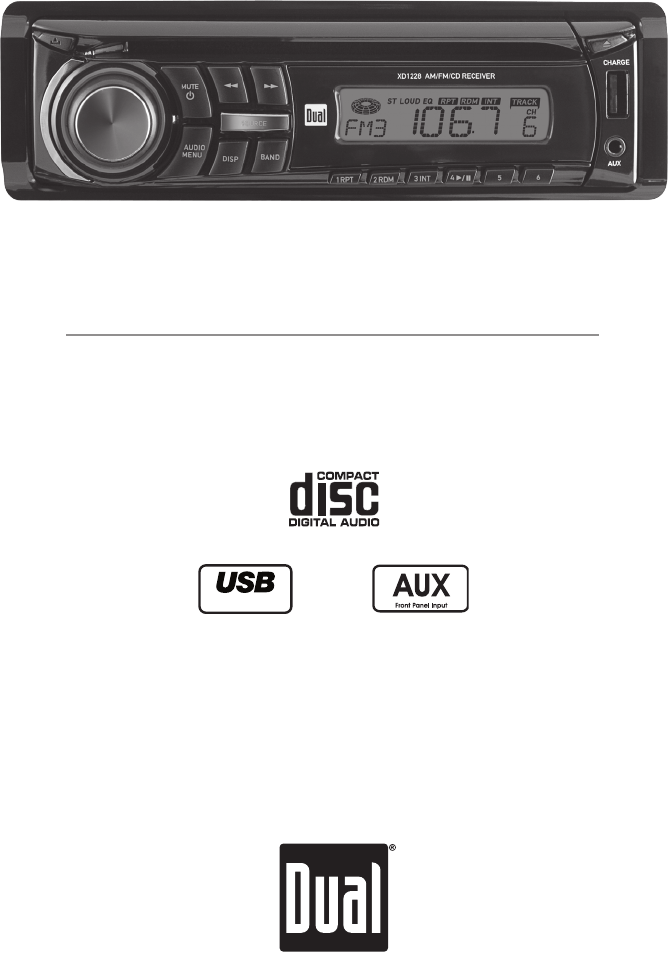
AM/FM/CD Receiver
XD1228
Charge Port
INSTALLATION/OWNER'S MANUAL
2
XD1228 INSTALLATION
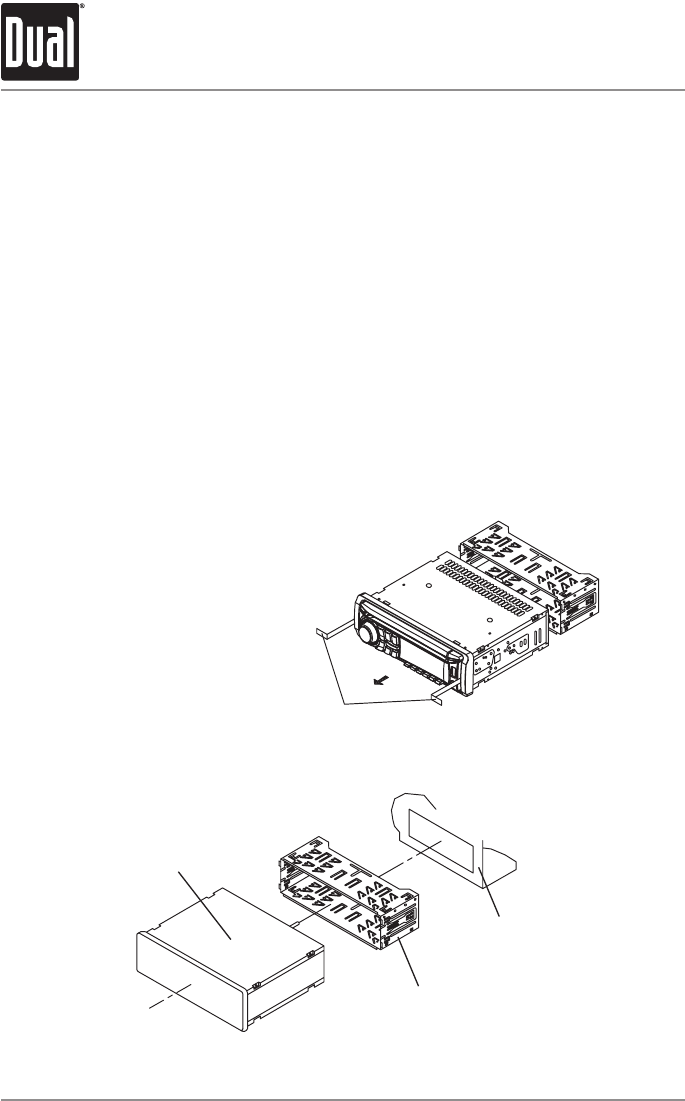
Preparation
Removal Keys
Mounting Sleeve
Dashboard or
Mounting Kit
Head Unit
TYPICAL MOUNTING METHOD
Please read entire manual before installation.
Before You Start
•Disconnectnegativebatteryterminal.Consultaqualifiedtechnicianforinstructions.
•Avoidinstallingtheunitwhereitwouldbesubjecttohightemperatures,suchasfrom
directsunlight,orwhereitwouldbesubjecttodust,dirtorexcessivevibration.
Getting Started
•Remove2transitscrewslocatedontopoftheunit.
•Insertthesuppliedkeysintotheslotsasshown,andslidetheunitoutofthemounting
sleeve.
•Installmountingsleeveintoopening,bendingtabstosecure.
•Connectwiringharnessandantenna.Consultaqualifiedtechnicianifyouareunsure.
•Certainvehiclesmayrequireaninstallationkitand/orwiringharnessadapter(sold
separately).
•Testforcorrectoperationandslideinto
mountingsleevetosecure.
•Snaptrimringintoplace.
3
XD1228 INSTALLATION
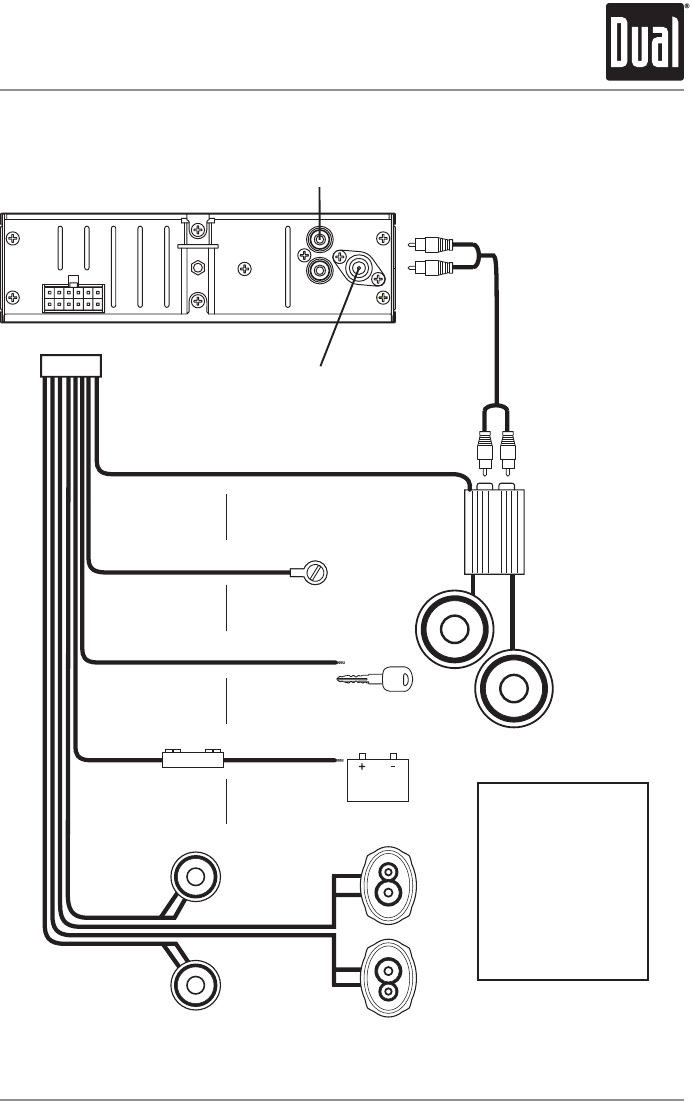
Rear Preamp Output
Connect to amplifier RCA input
Antenna Connector
RCA Cable
(sold separately)
AMP
BLUE
BLACK
RED
YELLOW
Remote Turn-On
Connect to amplifier or power
antenna. Insulate wire if not used.
Ground
Connect to vehicle
chassis ground.
Accessory
Connect to ignition
circuit or switched 12 volt source.
Memory
Connect to battery
circuit or constant 12 volt source.
Right Front
Gray/Black (-)
Gray (+)
Left Front
White/Black (-)
White (+)
Right Rear
Violet/Black (-)
Violet (+)
Left Rear
Green/Black (-)
Green (+)
5 AMP
AGC Fuse
Wiring Diagram
* Caution-Donotattachanyspeakerleadstogroundasseveredamagewilloccur.
FUSE
Whenreplacingthefuse,
makesurenewfuseisthe
correcttypeandamperage.
Usinganincorrectfusecould
damagetheradio.
TheXD1228usesone
5ampAGCfuselocated
in-line.
4
XD1228 OPERATION
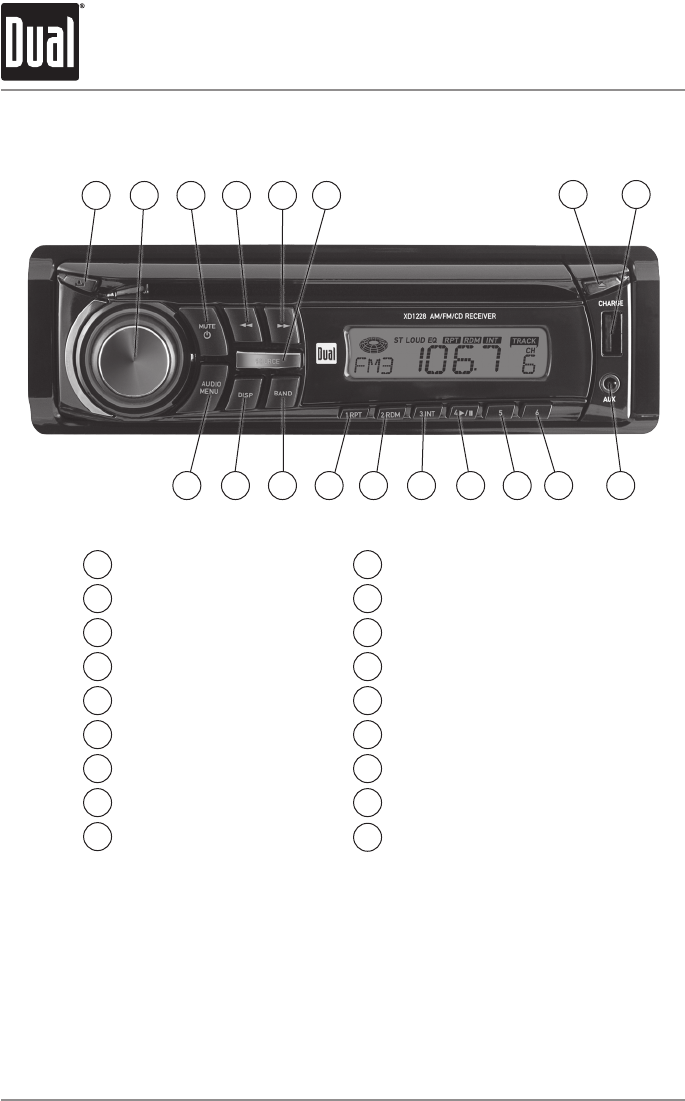
Control Locations
Release
Volume Knob
Mute/Power
Tune/TrackDown
Tune/TrackUp
Source
Eject
USBChargingPort
AuxiliaryInput
1
2
3
4
5
6
7
8
9
Preset 6
Preset 5
Preset4/Play/Pause
Preset3/Intro
Preset 2 / Random
Preset1/Repeat
Band
Display
Audio / Menu
10
11
12
13
14
15
16
17
18
1 2
9
TheXD1228hasaneasy-to-useinterfacethatprovidesarewardingexperience,as
wellassupportforyourfavoritetunes.AudioCD-RandCD-RWdiscplaybackensures
compatibilitywithyourmusiccollection,andtheRCApreampoutputprovidestheright
connectionstoexpandyoursystem.Fromitsfrontpanelauxiliaryinputforconnectingyour
MP3player,tothedetachablefaceforsecurityassurance,thisheadunithasyoucovered.
47
5 6 8
101112131415161718
3

5
XD1228 OPERATION
General Operation
Press RELEASEandpullawayfromtheleftsidetoremove.
Tore-install,insertrightsideoffaceplatefirstthenpushleft
side to secure.
Removetrimringandinstallsupplied#1x7/32”Phillips
headscrewthroughleftsideofmountingframeinto
faceplate.
Press toturntheuniton.InsertingaCDwillturntheunit
onautomatically.Pressandholdforthreeseconds to
turntheunitoff.
Press MODEtoselectbetweenAM/FM,CDorauxiliary
input.Modesofoperationareindicatedinthedisplay.
Inserta3.5mmconnectorinthefrontpanelAUXport.
Connecttheotherendofthe3.5mmconnectortothe
headphoneoutputofanaudiodevice,MP3player,etc.Press
MODEtoselectAUXmode.
Adjustvolumeusingthe volume knob(00-46).
Theradiofrequency(tunermode)andCDtrack/elapsed
time(CDplayermode)willbeshownbydefault.Press
DISPtodisplaytheclock,andpressDISPagaintoreturnto
defaultdisplay.
PressandholdDISPfor2seconds,theclockwillbeginto
flash.PressTRACK
nn
toadjustthehoursandTRACK
ll
toadjusttheminutes.PressDISPorwait5secondsto
savetheclocksettings.
Theclockwilldisplay12-hourAM/PMtimeinUSA
frequencyspacingmode(PM10:00).InEuropeanfrequency
spacingmode,theclockwilldisplay24-hourtime(22:00).
Pressandholdformorethan2secondstoRESETtheunit
uponinitialinstallation.TheRESETbuttonislocatedbehind
thefaceplate.
Faceplate Removal
Semi-permanent
Faceplate Installation
Power On/Off
Mode
Auxiliary Input
Volume
Display
Set the Clock
12/24-hour Clock
Reset
6
XD1228 OPERATION
InserttheUSBconnectorofabatterypoweredUSBdevice
intotheUSBchargingportonthefrontpanel,which
provides5voltsDCand1.0amps.TheUSBdevicewill
immediatelybegincharging.
Note: TheUSBchargingportmaynotbecompatiblewith
everydeviceduetodifferencesinpowerrequirements.
Note:ThisUSBportprovidespoweronly,andwillnot
playbackmusicfromaUSBdevice.
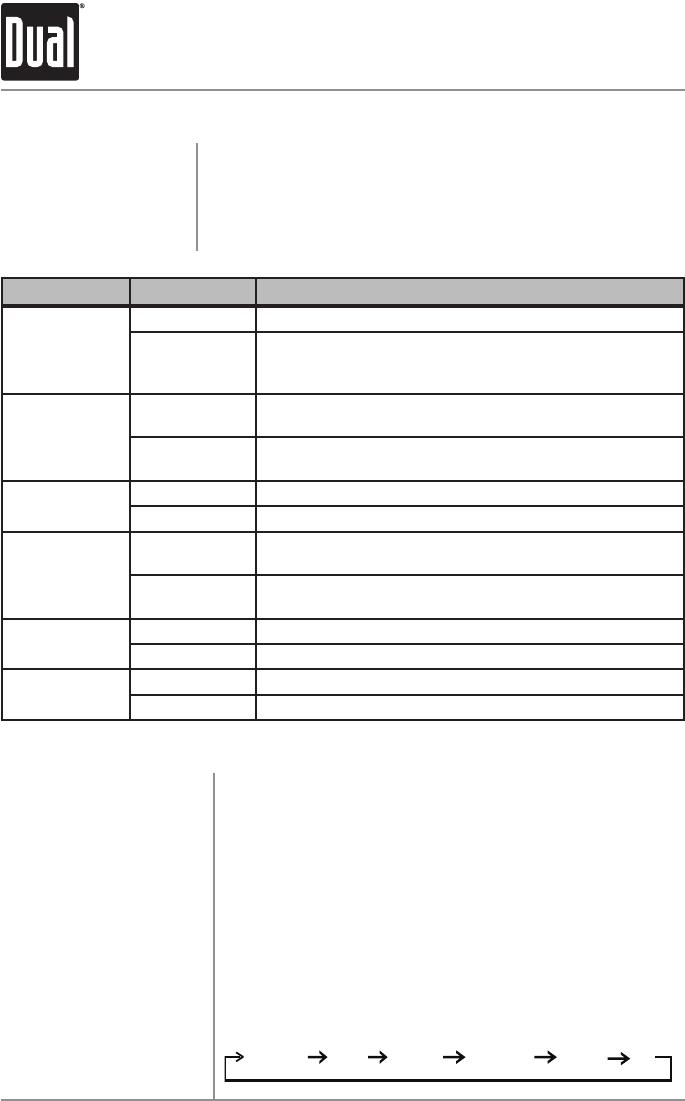
Press AUDIOtoselectbetweenVolume(default),Bass,
Treble,Balance,FaderandEQ.
USB Charging Port
Audio
BASS VOLUME TREBLE BALANCE FADER
EQ
General Operation
PressandholdAUDIO/MENUformorethan3secondsto
accessthesetupmenu,thenpressAUDIO/MENUtocycle
throughmenuoptions.Whendesiredoptionappearsinthe
display,rotatethevolume knobleft/righttoadjustoractivate
thedesiredfunction.
Setup Menu
Menu Function Options Action
Loudness
Curve
LOUD OFF Disablestheloudnessfunction.
LOUD ON
Enablestheloudnessfunction.Activatingthisfeature
willenhancethebassandtreblefrequencieswhen
listeningtomusicatlowvolumes.
Tuner
Frequency
Spacing
FREUSA ProgramstheunittoUSAtunerspacing.
(200kHzforFMand10kHzforAM).(Tuner mode only)
FRE EU ProgramstheunittoEuropeantunerspacing.
(50kHzforFMand9kHzforAM).(Tuner mode only)
Local/Distance
Tuning
LOC OFF Activatesdistancetuning.
LOC ON Activateslocaltuningforstrongstationreceptiononly.
Clock
Display
CLK ON Programsunittodisplaytheclockwhenthepoweris
off.
CLK OFF Programsunittonotdisplaytheclockwhenthepower
is off.
Beep
Confirmation
BEEP OFF Disablestheconfirmationbeep.
BEEPON Enablestheconfirmationbeep.
Illumination
Dimmer
ILLUHI ProgramstheLCDtothebrightestilluminationlevel.
ILLULO LowerstheLCDilluminationlevel.

7
XD1228 OPERATION
Audio Operation
Press AUDIOuntilBASappears
Rotatethevolume knobleft/righttoadjust
(-6minimum/6maximum)
Press AUDIOuntilTREappears
Rotatethevolume knobleft/righttoadjust
(-6minimum/6maximum)
Press AUDIOuntilBALappears
Rotatethevolume knobleft/righttoadjust
(L12-R12)"BALR=L"representsequalbalance.
Press AUDIOuntilFADappears
Rotatethevolume knobleft/righttoadjust
(F12-R12)"FADR=F"representsequalbalance.
Press AUDIOuntilEQappears.Rotatevolumeknobleft/
righttoadjustbetweenPOP,CLS,ROCandOFF(default)
equalizationcurves.AnyadjustmenttotheBassorTreble
settingsautomaticallycancelsthecurrentEQcurve.
Press TUNE
nn
or TUNE
ll
formorethan2secondsto
seektothenextstrongstation.
Press TUNE
nn
or TUNE
ll
momentarilytochangethe
radiofrequencyupordownonestepatatime.Pressand
holdtoadvancequickly.
Press BANDformorethan2secondstoselectmonoor
stereo(default)receptionofthebroadcastsignal.
Press BANDtoselectbetweenFM1,FM2,FM3andAM1,
AM2 bands.
Upto18FMstationsand12AMstationscanbestored.
Tostoreastation,selectthedesiredbandandstation.
Pressandholdthedesiredpresetbuttonformorethan2
seconds.Whenstored,thepresetnumberwillappearinthe
display.Thestationcanberecalledanytimebypressingthe
correspondingpresetbutton.
Bass
Treble
Balance
Fader
Preset EQ Curves
Seek Tuning
Manual Tuning
FM Stereo/Mono
Band
Storing and Recalling
Station Presets
Tuner Operation

8
XD1228 OPERATION
CD Player Operation
Withthelabelfacingup,insertastandardsizeCDintothe
CDslot.TheCDwillautomaticallybeginplayback.
PresstheEJECTbuttontostopandejecttheCD.
Theunitwillchangetotunermode.
Press TRACK
ll
toskiptothebeginningofthenexttrack.
Press TRACK
nn
toreturntothebeginningofthecurrent
track.PressingTRACK
nn
againskipstothebeginningof
theprevioustrack.
PressandholdTRACK
ll
or TRACK
nn
tofastforward
orreverseatrack.
Press
l
/
II
totemporarilystopCDplayback.
Press
l
/
II
againtoresumeplayback.
Press INTtoplaythefirst10secondsofeachtrack.
Press INT to cancel.
Press RPTtocontinuouslyrepeatselectedtrack.
Press RPT to cancel.
Press RDMtoplayalltracksinrandomorder.
Press RDMagaintocancel.
SomeCD-RsandCD-RWsmaybeincompatiblewiththis
unit,dependingonmediatypeandrecordingmethod.
Note:CD-Rrecordingsessionsmustbeclosed(finalized)for
playback.
Insert CD
Eject CD
Track Select
Fast Forward and
Reverse
Pause
Intro
Repeat
Random
CD-R/CD-RW
Compatibility
9
XD1228 OPERATION
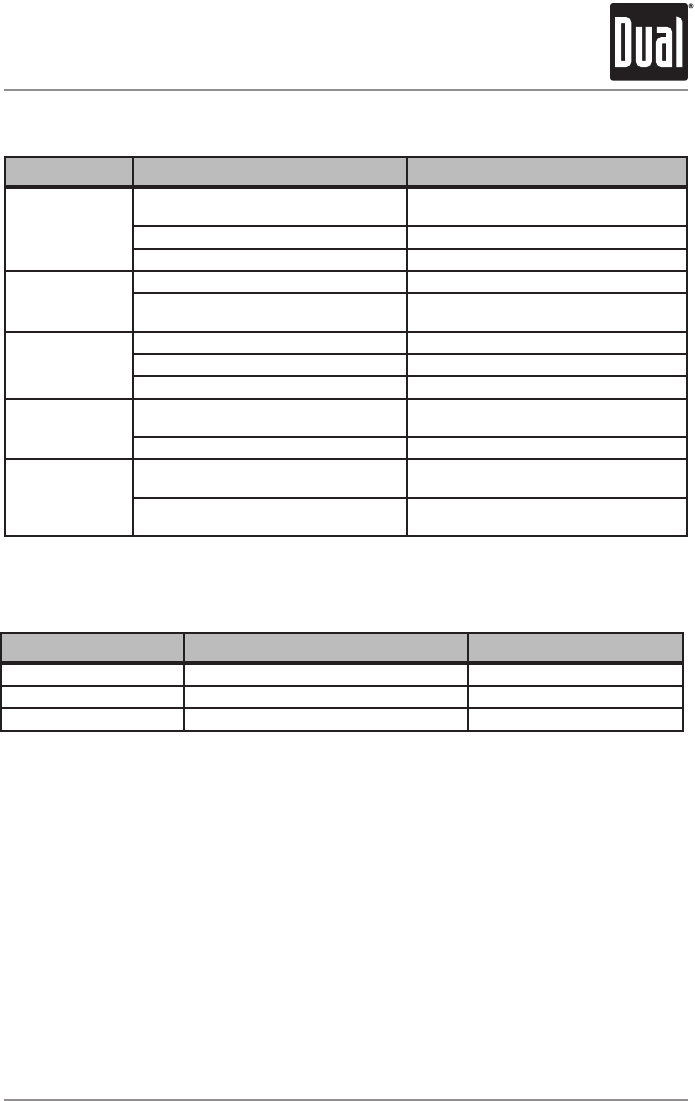
Troubleshooting
Error Codes
Problem Cause Action
Unit will not turn on
(no power)
Yellowwirenotconnectedorincorrectvoltage
Redwirenotconnectedorincorrectvoltage
Checkconnectionsforpropervoltage
(11~16VDC)
Blackwirenotconnected Checkconnectiontoground
Fuseblown Replacefuse
Unit has power
(but no sound)
Speakerwiresnotconnected Checkconnectionsatspeakers
Oneormorespeakerwirestouchingeach
otherortouchingchassisground
Insulateallbarespeakerwiresfromeach
otherandchassisground
Unit blows fuses
Yelloworredwiretouchingchassisground Checkforpinchedwire
Speakerwirestouchingchassisground Checkforpinchedwire
Incorrectfuserating Usefusewithcorrectrating
Excessive skipping Unitisnotmountedcorrectly Checkmountingsleeveoraddabackstrap
support
Physicaldefectinmedia(CD,CD-RorCD-
RW) Checkmediaforscratches
Unit will not accept
a disc
CDmechanismpositionoutofalignment Press EJECT for 3 seconds to reset
CDmechanismposition
CDtransitscrewsstillinplace Remove2transitscrewslocatedontopof
theunit.
Error Code Cause Action
ER-1 appears on the display
Disc error
PressejectorRESET
ER-2 appears on the display Mechanismerrorordiscisupsidedown PressejectorRESET
ER-3 appears on the display ServoError PressejectorRESET

10
XD1228 OPERATION
Limited One Year Warranty
Thiswarrantygivesyouspecificlegal
rights.Youmayalsohaveotherrights
whichvaryfromstatetostate.
DualElectronicsCorp.warrantsthis
producttotheoriginalpurchasertobefree
fromdefectsinmaterialandworkmanship
foraperiodofoneyearfromthedateof
theoriginalpurchase.
DualElectronicsCorp.agrees,atour
option,duringthewarrantyperiod,
torepairanydefectinmaterialor
workmanshiportofurnishanequal
new,renewedorcomparableproduct
(whicheverisdeemednecessary)in
exchangewithoutcharges,subjectto
verificationofthedefectormalfunctionand
proofofthedateofpurchase.Subsequent
replacementproductsarewarrantedfor
thebalanceoftheoriginalwarrantyperiod.
Who is covered?Thiswarrantyisextended
totheoriginalretailpurchaserforproducts
purchasedfromanauthorizedDualdealer
andusedintheU.S.A.
What is covered?Thiswarrantycoversall
defectsinmaterialandworkmanshipin
thisproduct.Thefollowingarenotcovered:
software,installation/removalcosts,
damageresultingfromaccident,misuse,
abuse,neglect,productmodification,
improperinstallation,incorrectline
voltage,unauthorizedrepairorfailure
tofollowinstructionssuppliedwiththe
product,ordamageoccurringduring
returnshipmentoftheproduct.Specific
licenseconditionsandcopyrightnoticesfor
thesoftwarecanbefoundviawww.dualav.
com.
What to do?
1.Beforeyoucallforservice,checkthe
troubleshootingguideinyourowner’s
manual.Aslightadjustmentofany
customcontrolsmaysaveyouaservice
call.
2.Ifyourequireserviceduringthe
warrantyperiod,youmustcarefully
packtheproduct(preferablyinthe
originalpackage)andshipitbyprepaid
transportationwithacopyoftheoriginal
receiptfromtheretailertoan
authorizedservicecenter.
3.Pleasedescribeyourproblemin
writingandincludeyourname,a
returnUPSshippingaddress(P.O.Box
notacceptable),andadaytimephone
numberwithyourshipment.
4.Formoreinformationandforthe
locationofthenearestauthorized
servicecenterpleasecontactusbyone
ofthefollowingmethods:
•Callustoll-freeat1-866-382-5476
•E-mailusatcs@dualav.com
ExclusionofCertainDamages:This
warrantyisexclusiveandinlieuofany
andallotherwarranties,expressedor
implied,includingwithoutlimitationthe
impliedwarrantiesofmerchantabilityand
fitnessforaparticularpurposeandany
obligation,liability,right,claimorremedy
incontractortort,whetherornotarising
fromthecompany’snegligence,actual
orimputed.Nopersonorrepresentative
isauthorizedtoassumeforthecompany
anyotherliabilityinconnectionwiththe
saleofthisproduct.Innoeventshallthe
companybeliableforindirect,incidentalor
consequentialdamages.

11
XD1228 OPERATION
FCC Compliance
ThisdevicecomplieswithPart15oftheFCCRules.Operationissubjecttothefollowing
twoconditions:
(1)thisdevicemaynotcauseharmfulinterference,and
(2)thisdevicemustacceptanyinterferencereceived,includinginterferencethatmay
causeundesiredoperation.
Warning:Changesormodificationstothisunitnotexpresslyapprovedbytheparty
responsibleforcompliancecouldvoidtheuser’sauthoritytooperatetheequipment.
Note:ThisequipmenthasbeentestedandfoundtocomplywiththelimitsforaClassB
digitaldevice,pursuanttoPart15oftheFCCRules.Theselimitsaredesignedtoprovide
reasonableprotectionagainstharmfulinterferenceinaresidentialinstallation.This
equipmentgenerates,usesandcanradiateradiofrequencyenergyand,ifnotinstalled
andusedinaccordancewiththeinstructions,maycauseharmfulinterferencetoradio
communications.However,thereisnoguaranteethatinterferencewillnotoccurina
particularinstallation.Ifthisequipmentdoescauseharmfulinterferencetoradioor
televisionreception,whichcanbedeterminedbyturningtheequipmentoffandon,the
userisencouragedtotrytocorrecttheinterferencebyoneormoreofthefollowing
measures:
• Reorientorrelocatethereceivingantenna.
• Increasetheseparationbetweentheequipmentandreceiver.
• Connecttheequipmentintoanoutletonacircuitdifferentfromthattowhichthe
receiver is connected.
• Consultthedealeroranexperiencedradio/TVtechnicianforhelp.
Specifications
Frequencyresponse:20Hz-20kHz
Channelseparation@1kHz:>65dB
D/Aconverter:1 Bit
Tuningrange:87.5MHz-107.9MHz
Usablesensitivity:12dBf
50dBquietingsensitivity:16dBf
Stereoseparation@1kHz:40dB
Frequencyresponse:30Hz-13kHz
Tuningrange:530kHz-1710kHz
Usablesensitivity:30uV
Frequencyresponse: 80Hz-2kHz
Speakeroutputimpedance: 4~8 ohms
Fuse:5 amp AGC
Dimensions:7" x 7" x 2" (178 x 178 x 51 mm)
Designandspecificationssubjecttochangewithoutnotice.
CDPlayer
FMTuner
AMTuner
General
CEA-2006 Power Standard Specifications
(reference:14.4VDC+/-0.2V,20Hz~20kHz)
PowerOutput:5WattsRMSx4channelsat4ohmsand<1%THD+N
Signaltonoiseratio:75dBA(reference:1wattinto4ohms)
DualElectronicsCorp.
TollFree:1-866-382-5476
www.dualav.com
©2011DualElectronicsCorp.Allrightsreserved.
NSA0611-V01
