DynaPoint H145001 Wireless Mouse User Manual

DynaPoint (Dong Guan) Inc. Wireless Mouse

User Manual

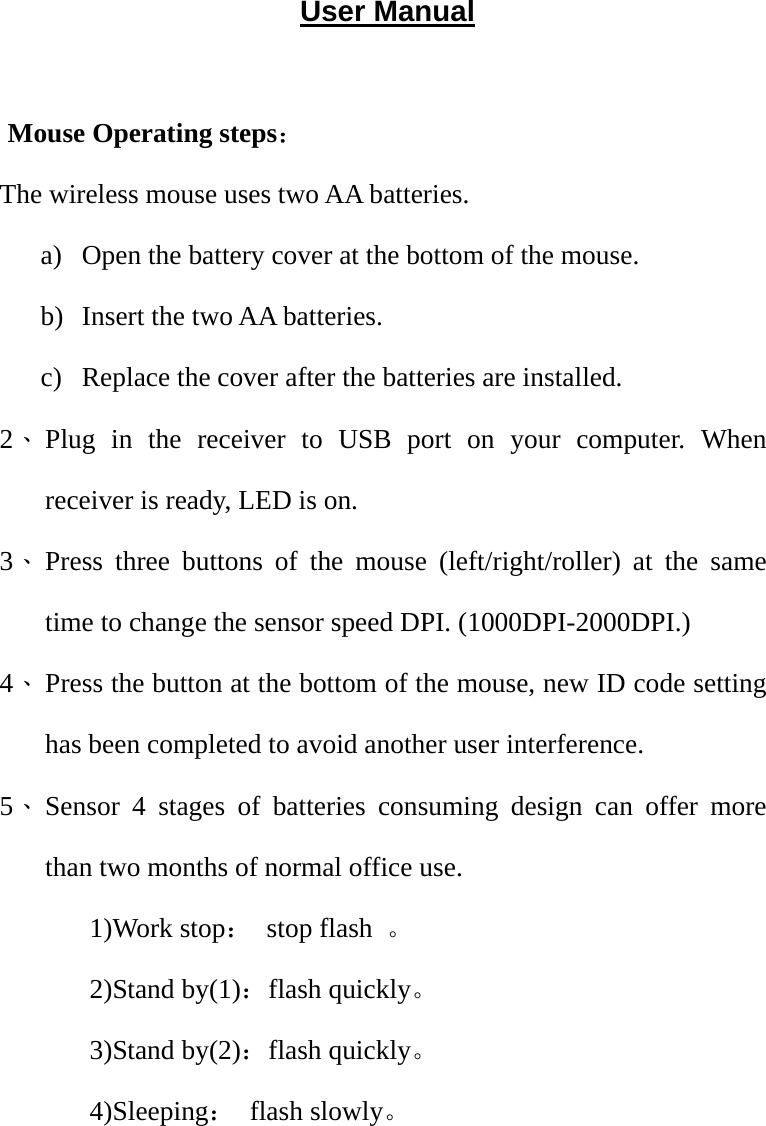
User Manual  Mouse Operating steps: The wireless mouse uses two AA batteries.   a) Open the battery cover at the bottom of the mouse. b) Insert the two AA batteries. c) Replace the cover after the batteries are installed. 2、 Plug in the receiver to USB port on your computer. When receiver is ready, LED is on. 3、 Press three buttons of the mouse (left/right/roller) at the same time to change the sensor speed DPI. (1000DPI-2000DPI.) 4、 Press the button at the bottom of the mouse, new ID code setting has been completed to avoid another user interference.     5、 Sensor 4 stages of batteries consuming design can offer more than two months of normal office use. 1)Work stop: stop flash 。 2)Stand by(1):flash quickly。 3)Stand by(2):flash quickly。 4)Sleeping: flash slowly。
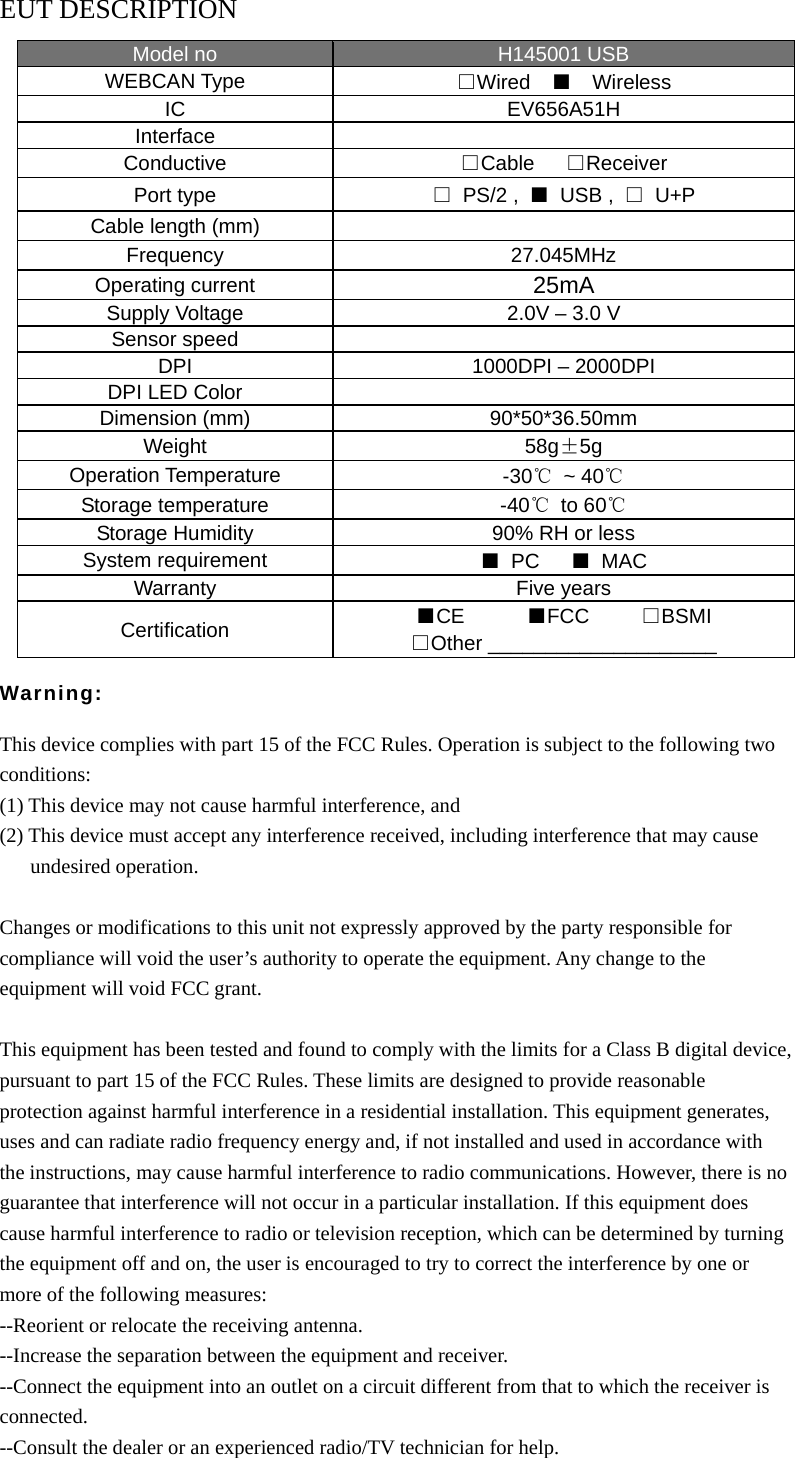
EUT DESCRIPTION Model no  H145001 USB WEBCAN Type  □Wired  ■  Wireless IC EV656A51H Interface  Conductive  □Cable   □Receiver Port type  □ PS/2 , ■ USB , □ U+P Cable length (mm)   Frequency 27.045MHz Operating current  25mA Supply Voltage  2.0V – 3.0 V Sensor speed   DPI  1000DPI – 2000DPI DPI LED Color   Dimension (mm)  90*50*36.50mm Weight  58g±5g Operation Temperature  -30℃ ~ 40℃ Storage temperature  -40℃ to 60℃ Storage Humidity  90% RH or less System requirement  ■ PC   ■ MAC Warranty Five years Certification ■CE      ■FCC     □BSMI □Other ____________________  Warning:  This device complies with part 15 of the FCC Rules. Operation is subject to the following two conditions: (1) This device may not cause harmful interference, and (2) This device must accept any interference received, including interference that may cause    undesired operation.  Changes or modifications to this unit not expressly approved by the party responsible for compliance will void the user’s authority to operate the equipment. Any change to the equipment will void FCC grant.  This equipment has been tested and found to comply with the limits for a Class B digital device, pursuant to part 15 of the FCC Rules. These limits are designed to provide reasonable protection against harmful interference in a residential installation. This equipment generates, uses and can radiate radio frequency energy and, if not installed and used in accordance with the instructions, may cause harmful interference to radio communications. However, there is no guarantee that interference will not occur in a particular installation. If this equipment does cause harmful interference to radio or television reception, which can be determined by turning the equipment off and on, the user is encouraged to try to correct the interference by one or more of the following measures: --Reorient or relocate the receiving antenna. --Increase the separation between the equipment and receiver. --Connect the equipment into an outlet on a circuit different from that to which the receiver is connected. --Consult the dealer or an experienced radio/TV technician for help.

Navigation menu