DynaQuip Controls WPMS Monitoring Station User Manual

DynaQuip Controls Monitoring Station Users Manual

Users Manual

Owner’s Manual / Installation Guide www.watercop.com800-545-3636System DescriptionThe  WaterCop®  PRO  System  is  designed  to  detect leaks  in  your   plumbing  system  at  predetermined locations, and automatically shut off the water supply to help effectively reduce the chances of major water damage associated with a leak. System ComponentsBrass  Valve:  Full  Port,  brass,  125psi  cold  water, designed for placement on incoming water main.WaterCop  Actuator:  NEMA  4  (weatherproof) Polycarbonate enclosure for indoor/outdoor installation, AC/DC power converter with 20’ cord included, Liquid crystal display with back light for sensor/trouble status, ambient  temperature  35°F  to  105°F,  for  cold  water applications. Manual override, Local open/close water control.Flood  Sensor:  Power  using  2  AA  Alkaline  Batteries or optional  AC/DC  power converter (sold  separately). Batteries  will  provide  back  up  power  upon  loss  of electricity.  Wireless  sensors  are  addressable  and supervised  for  conditions  such  as  water  detection, power lost, sensor short/open and low battery. Ten foot sensor  cord  allows  optimal  sensor  placement.  Flood sensors  can  support  one  or  two  sensor  wires.  Each WaterCop® PRO  actuator valve  can support  up to 45 wireless sensors.Range Enhancing Repeater: Enhances transmission range of wireless sensors. Plugs into any standard wall outlet. Receives and re-transmits sensor signals from outlying sensors to the WaterCop® PRO actuator.Monitoring Station-Standard: LCD display with back light  provides  instant  feedback  of  sensor  alarm  and trouble conditions as well as open/close status of water supply. Local push button water controls for instant on/off  of  water  supply.  Audible  alarm  sounds  when  any sensor  detects  flooding.  Internal  mounting  bracket mounts to standard wall boxes for aesthetics and cord management.  AC/DC  power  converter  with  20’  cord included.Monitoring  Station-Hardwired  (pictured  above): Accommodates  up  to  8  zones  for  WPSC  hardwired flood sensors (sold separately).NEED NEW PHOTO
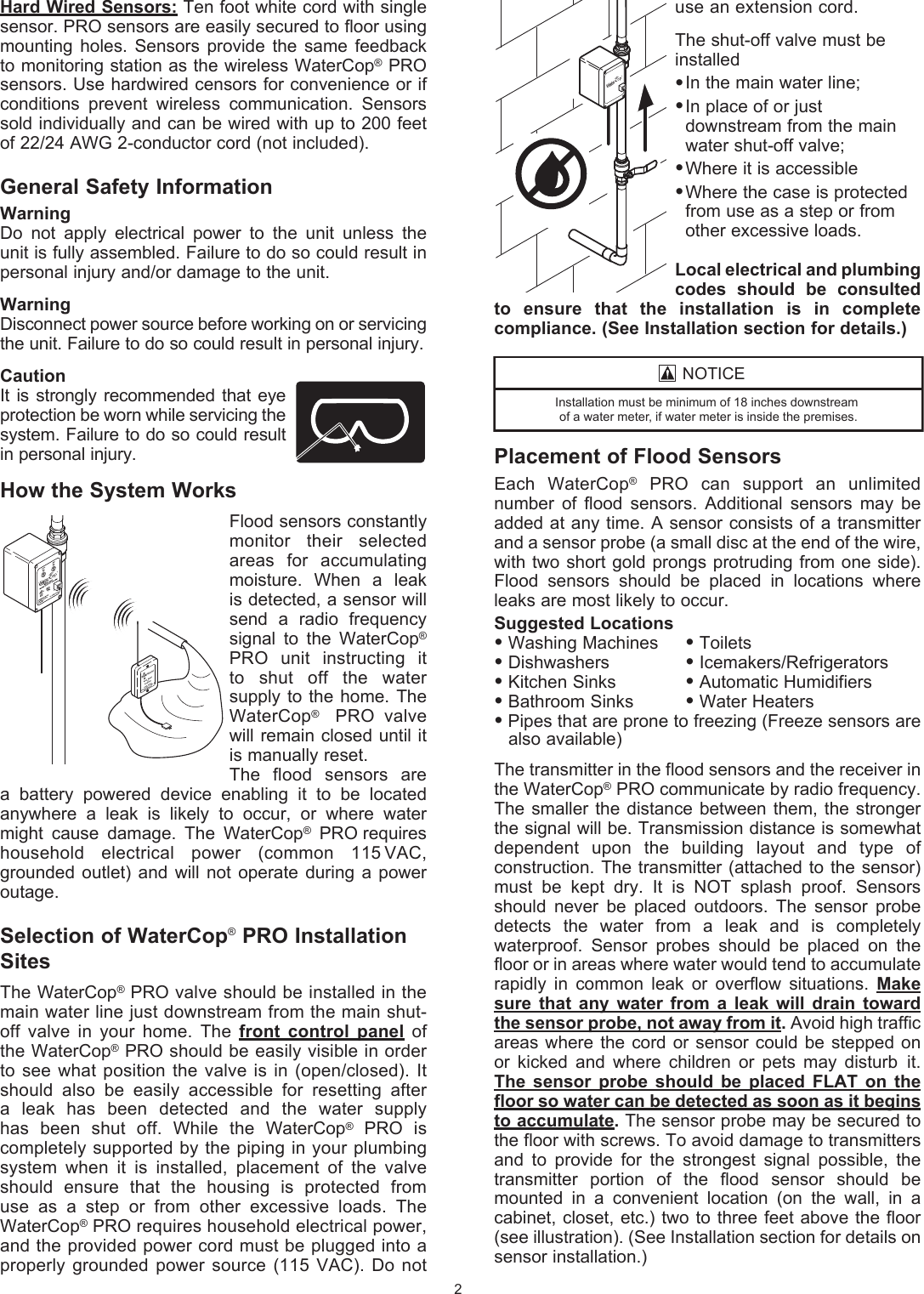
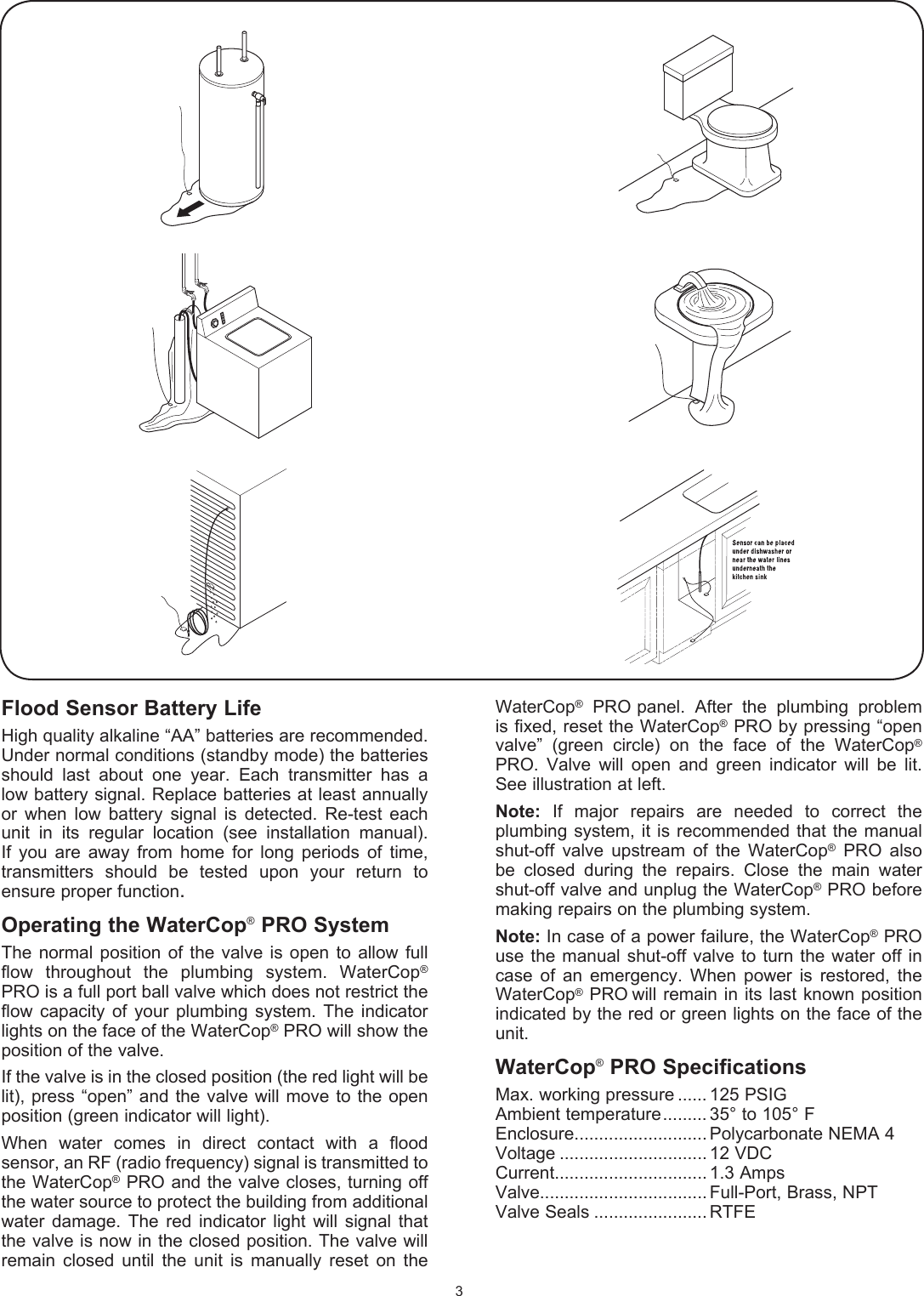
use an extension cord. The shut-off valve must beinstalled• In the main water line;• In place of or just      downstream from the main    water shut-off valve;• Where it is accessible• Where the case is protected    from use as a step or from    other excessive loads.Local electrical and plumbing codes  should  be  consulted to  ensure  that  the  installation  is  in  complete  compliance. (See Installation section for details.)Placement of Flood SensorsEach  WaterCop®  PRO  can  support  an  unlimited number  of  flood  sensors.  Additional  sensors  may  be added at  any time. A sensor consists of a transmitter and a sensor probe (a small disc at the end of the wire, with two short gold prongs protruding from one side). Flood  sensors  should  be  placed  in  locations  where leaks are most likely to occur.Suggested Locations• Washing Machines  • Toilets• Dishwashers    • Icemakers/Refrigerators• Kitchen Sinks   • Automatic Humidifiers• Bathroom Sinks  • Water Heaters• Pipes that are prone to freezing (Freeze sensors are    also available)The transmitter in the flood sensors and the receiver in the WaterCop® PRO communicate by radio frequency. The smaller  the  distance between them,  the  stronger the signal will be. Transmission distance is somewhat dependent  upon  the  building  layout  and  type  of construction. The transmitter (attached to  the sensor) must  be  kept  dry.  It  is  NOT  splash  proof.  Sensors should  never  be  placed  outdoors.  The  sensor  probe detects  the  water  from  a  leak  and  is   completely waterproof.  Sensor  probes  should  be  placed  on  the floor or in areas where water would tend to accumulate rapidly  in  common  leak  or  overflow   situations.  Make sure  that  any  water  from  a  leak  will  drain  toward the sensor probe, not away from it. Avoid high traffic areas where  the  cord  or sensor could  be  stepped on or  kicked  and  where  children  or  pets  may  disturb it. The  sensor  probe  should  be  placed  FLAT  on  the floor so water can be detected as soon as it begins to accumulate. The sensor probe may be secured to the floor with screws. To avoid damage to  transmitters and  to  provide  for  the  strongest  signal  possible,  the transmitter  portion  of  the  flood  sensor  should  be mounted  in  a  convenient  location  (on  the  wall,  in  a  cabinet, closet, etc.) two to  three feet above the floor (see illustration). (See Installation section for details on sensor  installation.)Hard Wired Sensors: Ten foot white cord with single sensor. PRO sensors are easily secured to floor using mounting  holes.  Sensors  provide  the same  feedback to monitoring station as the wireless WaterCop® PRO sensors. Use hardwired censors for convenience or if conditions  prevent  wireless  communication.  Sensors sold individually and can be wired with up to 200 feet of 22/24 AWG 2-conductor cord (not included).General Safety InformationWarning Do  not  apply  electrical  power  to  the  unit  unless  the unit is fully assembled. Failure to do so could result in personal injury and/or damage to the unit.Warning Disconnect power source before working on or  servicing the unit. Failure to do so could result in  personal injury.Caution It is strongly  recommended that  eye protection be worn while servicing the system. Failure to do so could result in  personal injury.How the System WorksFlood sensors constantly monitor  their  selected areas  for  accumulating moisture.  When  a  leak is detected, a sensor will send  a  radio  frequency signal  to  the  WaterCop® PRO  unit  instructing  it  to  shut  off  the  water supply to  the home. The WaterCop®  PRO valve will remain closed until it is manually reset.The  flood  sensors  are a  battery  powered  device  enabling  it  to  be  located  anywhere  a  leak  is  likely  to  occur,  or  where  water might  cause  damage.  The  WaterCop®  PRO requires household  electrical  power   (common  115   VAC, grounded  outlet)  and  will  not   operate during a  power outage.Selection of WaterCop® PRO Installation SitesThe WaterCop® PRO valve should be installed in the main water line just  downstream from the main shut-off  valve  in  your  home.  The  front  control  panel  of the WaterCop® PRO should be  easily visible in order to see  what position the  valve is in  (open/closed). It should  also  be  easily   accessible  for  resetting  after a  leak  has  been  detected  and  the  water   supply has  been  shut  off.  While  the  WaterCop®  PRO  is completely  supported by the piping in your plumbing system  when  it  is  installed,  placement  of  the  valve should  ensure  that  the  housing  is  protected  from use  as  a  step  or  from  other  excessive  loads.  The WaterCop® PRO requires household electrical power, and the provided power cord must be plugged into a   properly grounded  power  source  (115  VAC).  Do not 2127,&(,QVWDOODWLRQPXVWEHPLQLPXPRILQFKHVGRZQVWUHDPRIDZDWHUPHWHULIZDWHUPHWHULVLQVLGHWKHSUHPLVHV
Flood Sensor Battery LifeHigh quality alkaline “AA” batteries are recommended. Under normal conditions (standby mode) the batteries should  last  about  one  year.  Each  transmitter  has  a low battery signal. Replace batteries at least annually or  when  low  battery  signal  is  detected.  Re-test  each unit  in  its  regular  location  (see  installation  manual). If  you  are  away  from  home  for  long  periods  of  time, transmitters  should  be  tested  upon  your  return  to ensure proper function.Operating the WaterCop® PRO SystemThe  normal  position  of  the  valve  is  open to  allow  full flow  throughout  the  plumbing  system.  WaterCop® PRO is a full port ball valve which does not restrict the flow  capacity  of your  plumbing  system. The  indicator lights on the face of the WaterCop® PRO will show the position of the valve.If the valve is in the closed position (the red light will be lit), press “open” and the  valve will move to the open position (green indicator will light).When  water  comes  in  direct  contact  with  a  flood sensor, an RF (radio frequency) signal is transmitted to the WaterCop® PRO and the valve closes,  turning off the water source to protect the building from additional water   damage.  The  red  indicator  light  will  signal  that the valve is now in the closed position. The valve will remain  closed  until  the  unit  is  manually  reset  on  the WaterCop®  PRO panel.  After  the  plumbing  problem is fixed, reset the WaterCop® PRO by pressing “open valve”  (green  circle)  on  the  face  of  the  WaterCop® PRO.  Valve  will  open  and  green  indicator  will  be  lit. See illustration at left.Note:  If  major  repairs  are  needed  to  correct  the  plumbing system,  it is  recommended that  the manual shut-off  valve  upstream  of  the  WaterCop®  PRO  also be  closed   during  the  repairs.  Close  the  main  water   shut-off valve and unplug the WaterCop® PRO before making repairs on the plumbing system.Note: In case of a power failure, the WaterCop® PRO use the  manual shut-off  valve to turn the  water  off in case  of  an  emergency.  When  power  is  restored,  the WaterCop® PRO will  remain in  its last  known position indicated by the red or green lights on the face of the unit.WaterCop® PRO SpecificationsMax. working pressure ...... 125 PSIGAmbient temperature ......... 35° to 105° FEnclosure........................... Polycarbonate NEMA 4Voltage .............................. 12 VDCCurrent............................... 1.3 AmpsValve.................................. Full-Port, Brass, NPTValve Seals ....................... RTFE3
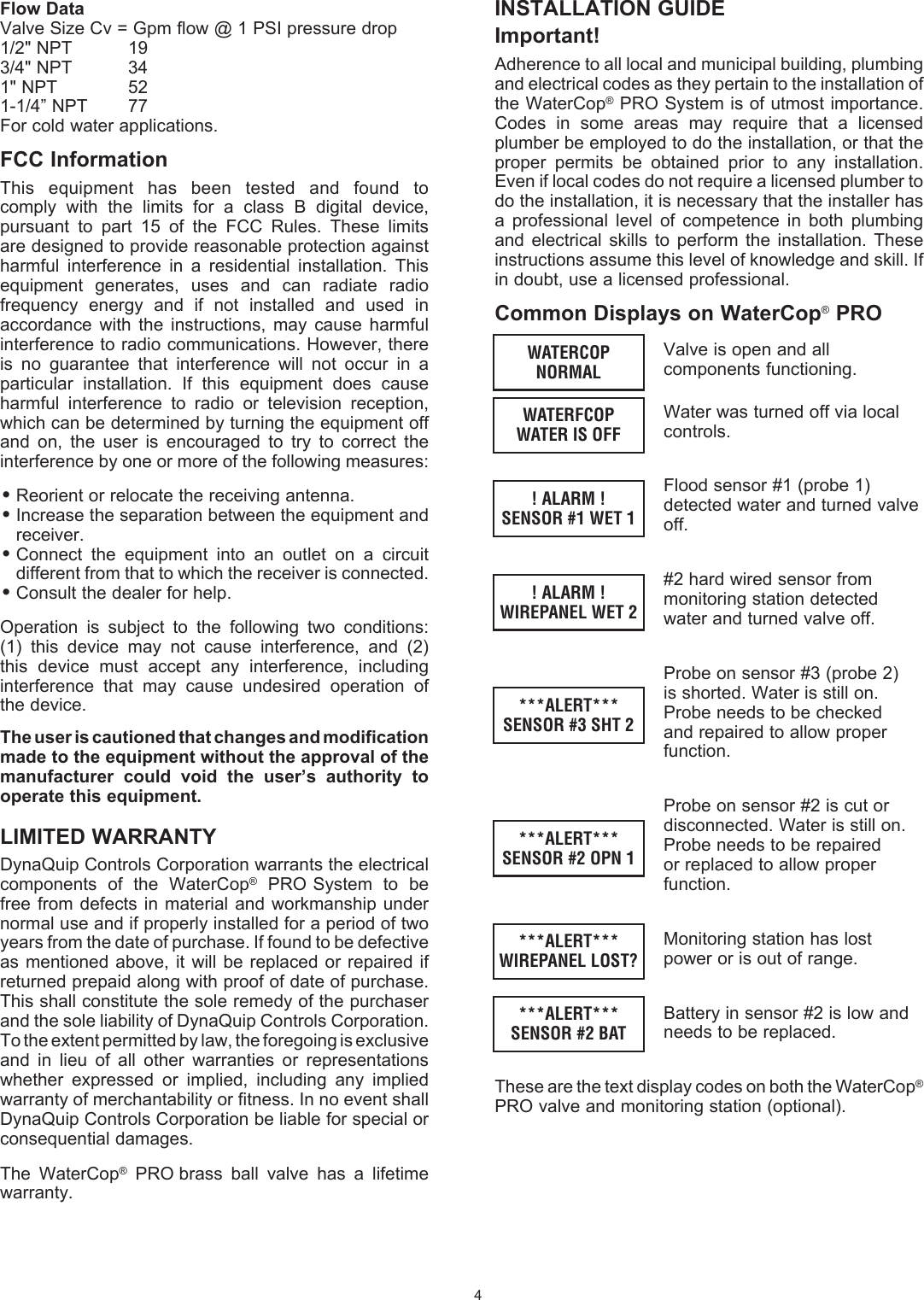
INSTALLATION GUIDEImportant!Adherence to all local and municipal building, plumbing and electrical codes as they pertain to the installation of the WaterCop® PRO System is of utmost importance. Codes  in  some  areas  may  require  that  a  licensed plumber be employed to do the installation, or that the proper  permits  be  obtained  prior  to  any  installation. Even if local codes do not require a licensed plumber to do the installation, it is necessary that the installer has a  professional  level  of  competence  in  both   plumbing and  electrical  skills to   perform  the   installation.  These instructions assume this level of knowledge and skill. If in doubt, use a licensed  professional.Common Displays on WaterCop® PROValve is open and all components functioning.Water was turned off via local controls.Flood sensor #1 (probe 1) detected water and turned valve off.#2 hard wired sensor from monitoring station detected water and turned valve off.Probe on sensor #3 (probe 2) is shorted. Water is still on. Probe needs to be checked and repaired to allow proper function.Probe on sensor #2 is cut or disconnected. Water is still on. Probe needs to be repaired or replaced to allow proper function.Monitoring station has lost power or is out of range.Battery in sensor #2 is low and needs to be replaced.These are the text display codes on both the WaterCop® PRO valve and monitoring station (optional).4WATERCOPNORMALWATERFCOPWATER IS OFF! ALARM !SENSOR #1 WET 1! ALARM !WIREPANEL WET 2***ALERT***SENSOR #3 SHT 2***ALERT***SENSOR #2 OPN 1***ALERT***WIREPANEL LOST?***ALERT***SENSOR #2 BATFlow DataValve Size Cv = Gpm flow @ 1 PSI pressure drop1/2" NPT   193/4" NPT  341" NPT   521-1/4” NPT  77For cold water applications.FCC InformationThis  equipment  has  been  tested  and  found  to comply  with  the  limits  for  a  class  B  digital  device, pursuant  to  part  15  of  the  FCC  Rules.  These  limits are designed to provide reasonable protection against harmful  interference  in  a  residential  installation.  This equipment  generates,  uses  and  can  radiate  radio frequency  energy  and  if  not  installed  and  used  in accordance  with  the  instructions,  may  cause  harmful interference to radio communications. However, there is  no  guarantee  that  interference  will  not  occur  in  a particular  installation.  If  this  equipment  does  cause harmful  interference  to  radio  or  television  reception, which can be determined by turning the equipment off and  on,  the  user  is  encouraged  to  try  to  correct  the interference by one or more of the following measures:• Reorient or relocate the receiving antenna.• Increase the separation between the equipment and receiver.• Connect  the  equipment  into  an  outlet  on  a  circuit different from that to which the receiver is connected.• Consult the dealer for help.Operation  is  subject  to  the  following  two  conditions: (1)  this  device  may  not  cause  interference,  and  (2) this  device  must  accept  any  interference,  including interference  that  may  cause  undesired  operation  of the device.The user is cautioned that changes and modification made to the equipment without the approval of the manufacturer  could  void  the  user’s  authority  to operate this equipment.LIMITED WARRANTYDynaQuip Controls Corporation warrants the electrical components  of  the  WaterCop®  PRO System  to  be free from  defects  in material and workmanship  under normal use and if properly installed for a period of two years from the date of  purchase. If found to be defective as mentioned  above,  it  will be replaced  or  repaired if returned prepaid along with proof of date of purchase. This shall  constitute the sole remedy of the purchaser and the sole  liability of DynaQuip Controls Corporation. To the extent  permitted by law, the foregoing is exclusive and  in  lieu  of  all  other  warranties  or  representations whether  expressed  or  implied,  including  any  implied warranty of merchantability or fitness. In no event shall DynaQuip Controls Corporation be liable for special or  consequential damages.The  WaterCop®  PRO brass  ball  valve  has  a  lifetime warranty.
SYSTEM QUICK REFERENCE SETTING AND STATUSReset Actuator to Factory Settings:Hold ‘MODE’ – Press and Release ‘OPEN’ – Release ‘MODE’TO ADD DEVICE:SENSORS:  Press ‘MODE’ twice (Device Add) on WaterCop®    PRO Actuator  Press ‘CLOSE’ (Device #1   ID)  Short probe on Sensor  (Sensor #1   SHT)    Remove short (Sensor #1  OK)  Press ‘MODE’  Press ‘CLOSE’ (Sensor #2  ID)  Repeat for all Sensors, When finished Press    ‘Mode’ 2X to return to NORMALMONITORING STATION:  Press ‘MODE’ twice (Device Add) on WaterCop®    PRO Actuator  Press ‘CLOSE’ [(Device # (next device number)     ID] on WaterCop Actuator  Press ‘CLOSE’ on Monitoring Station (This adds    station and also closes valve).  Press ‘OPEN’ on WaterCop® PRO Actuator to    reopen valve and return to normal mode.REMOTE:  Press “MODE’ twice (Device Add)  Press ‘CLOSE’ (Device #1 ID)  Press ‘CLOSE’ on REMOTE (Remote #1)TO REMOVE DEVICES:  Press ‘MODE’ 3X  (Device Remove)  Press ‘CLOSE” to Scroll to device to be removed  Press ‘OPEN’ to remove that device  Press ‘MODE’ to return to NormalTO CHECK STATUS:  Press ‘Mode’  Scroll using ‘CLOSE’  Press ‘MODE’ 3X to return to NormalTO TEST SIGNAL:  HOLD ‘MODE’ Press and Release “CLOSE’  Press ‘OPEN’ (TX ACTIVE SIGNAL)  Place sensor probe in water and read signal    strength  When finished, Hold ‘OPEN’  Press and Release    ‘MODE’ to return to Normal5WaterCop®  PRO  wireless  sensors  are  addressable. This means that the WaterCop® PRO valve can tell you operational  status  of  each  flood  sensor.  If  you  have many  wireless  sensors,  this  feature  will  quickly  tell you where the leak is located or warn you if a sensor requires  service  (low  batteries,  lost  connection).  It  is important  that  you  introduce  each  wireless  sensor  to the  WaterCop®  PRO  shutoff  valve and  document  the sensor number on the sensor. Once placed in location you  will  also  note  this  information  on  the  Sensor Location Log (included).  Once the wireless sensors are programmed you will be able to place them in desired locations to monitor your home or business for water intrusion.TO POWER AND PROGRAM WIRELESS SENSORSPowering Sensors Each  wireless  flood  sensor  is  a  battery  operated  (or AC adaptable) radio transmitter. The units are shipped without  batteries.  Two  fresh  “AA”  lithium  batteries  or optional flood sensor AC adaptors are needed to power each unit. To install batteries, remove the battery cover located on the back of the sensor, and install batteries in  accordance  with  the  (  +  and  -  )  placement  guide.  Reinstall back plate. It is recommended that you use batteries in addition to an AC adaptor to act as a power back  up  in  the  event  of  a  power  failure.  Instructions on  how  to  connect  AC  adaptors  are  included  in  this manual.   It  is  important  that  you  number  each  sensor  with the  included  numbering  stickers  (shipped  with  the WaterCop®  PRO  motor)  for  easy  identification  while programming.  If  you  do  not  have  stickers,  you  may simply  write  numbers  on  the  outside  back  cover  of each  sensor  in  permanent  ink.  The  WaterCop®  PRO system is capable of supporting as many as 46 wireless sensors. Additional wireless sensors (up to 46) can be added in the future by repeating the steps taken in this section. Please contact your local dealer or DynaQuip Controls to inquire about additional sensors.Once  each  sensor  is  powered  and  numbered,  you are  ready  to  begin  addressing  the  sensors  to  the WaterCop® PRO motor.Programming Wireless SensorsPlug the WaterCop® PRO power supply into a nearby 115VAC  outlet.  Depending  upon  the  position  of  the valve,  the  motor  may  initially  turn  the  valve  when first powered. BE EXTREMELY CAREFUL TO KEEP FINGERS AND OTHER ITEMS OUT OF THE VALVE.  The display will read ‘WaterCop® NORMAL’ To  add  sensor  #1,  Press  ‘MODE’  twice  (Device Add will display on LCD)Press  ‘CLOSE’  once  (Device  #1  ID=  will  display on LCD)Short  probe  on  sensor  by  touching  leads  with metal.    Do  not  wet  sensor-it  must  be  shorted. Sensor  will  beep  and  LCD  will  display  Service status sensor #1 OK!
Use caution!•  The  valve  closes  with  enough  force  to  cut  off  a finger.•  Be  extremely  careful  to  keep  fingers  and  other items out of the valve.Manually Test the ValveTo  test  your  WaterCop®  PRO system,  gently pull  the safety plugs out from each end of the valve. Check the position of the valve by looking in either threaded end. In  the  open position,  you  will be  able  to see  through the valve; in the closed position only the shiny surface of the ball will be visible. Place the base of the housing on a sturdy surface, as close as feasibly possible to the location where it will be permanently installed. Plug the WaterCop® PRO power supply into a nearby 115 VAC outlet.  The  valve  position  indicator  lights  should  now correspond to the actual position you noticed. Green = Open.  Red = Closed. Grasp both sides of the housing (not the valve)  with the valve pointing away  from you for safety. Being very careful not to have your fingers or  other  objects  near  the  valve  openings,  press  the colored  circle  just  below  the  unlit  indicator  light.  You will  hear  the  motor  change  the valve  position. Again, look into the threaded end of the valve to verify that the valve has changed position. If it appears that the valve has not turned from one position to the other, DO NOT try to reposition the valve yourself by inserting any tool or  fingers  into  the  valve.  Operate  the  valve  several more  times  from  open  to  close,  checking  each  time for proper positioning. If you are experiencing trouble getting the valve to open and shut, call the installation help line  listed on the back cover.Manually Test the Flood SensorsEach  flood  sensor  is  a  battery-operated  (or  AC adaptable)  radio   transmitter.  The  units  are  shipped without  batteries.  Two  fresh  “AA”  lithium  batteries  or optional flood sensor AC adaptors are needed to power each unit. To install batteries, remove the battery cover located on the back of the sensor, and install batteries in  accordance  with  the  (+  and  –)  placement  guide. Reinstall back plate.Follow  suggestions  found  in  the  section  titled “Placement  of  Flood  Sensors”  for  recommendations where  sensors  should  be  placed.  Locate  a wall  near the  area  you  choose  to  monitor.  Avoid  high  traffic areas  where  cord  or  sensor  could  be  stepped  on  or kicked. Mount  transmitter  at a convenient  location  on the  wall,  two  to  three  feet  above  the  floor.  This  will help avoid damage to the sensor and provide a strong signal. Use fasteners included with the unit. 1.  Following  all  safety  precautions,  make  sure  that the WaterCop® PRO is plugged in and the valve is in the  open position.  Leave the WaterCop®  PRO near your main water line, on a sturdy surface. It is important that anyone who will be near the valve is  aware  of  the  safety  precautions,  and  does not insert any object into the valve, or handle the valve during the test. 2.  At  one  of  the  locations  you  have  chosen  to monitor,  drop  the  sensor  probe(not  the  mounted transmitter) into a cup of water. Hold until you hear To add sensors #2 through #46 If time has passed, the WaterCop® PRO LCD will revert to ready mode displaying WaterCop® PRO Normal. To add more sensors you  will  need to  return  to program  mode and repeat steps used to add sensor #1.  If  you  are  adding  sensors  in  quick  succession, your WaterCop will remain  in  program  mode  and the display will read Device add press next. Press ‘CLOSE’  once  (Device  #2  ID=  will  display  on LDC).  Short  probe  on  sensor  by  touching  leads with metal. Do not wet sensor-it must be shorted. Sensor  will  beep  and  LCD  will  display  service status sensor #2 OK!.  Repeat  above  steps  for  all  of  your  wireless  sensors taking  care  to  program  them  in  the  same  order  as labeled.  Repeat  for  all  sensors. When  finished Press ‘MODE’  twice  to  return  to  normal  mode.  If  you  need to  remove  a  device  for  any  reason,  please  see  the instructions ‘TO REMOVE DEVICES’TO POWER AND PROGRAM MONITORING STATIONThe WaterCop® PRO Monitoring station (part number WPMS) provides instant feedback of sensor alarm and trouble  conditions  as  well  as  open/close  status  and control  of  water  supply.    An audible  alarm  will sound when  any  sensor  detects  flooding.  The  Hardwired Sensor  Monitoring  station  (part  number  WPMSH) includes 8 zones to attach WaterCop® PRO hard wires flood sensors (part number WPSC).   Plug  the  WaterCop®  PRO  Monitoring  Station  power supply into a nearby 115VAC outlet. The LCD display will  beep  once  and  read  WaterCop®  PRO  Valve Lost?  ***ALERT***  ?COMMUNICATIONS?  until  the Monitoring  Station  has  been  programmed  to  the WaterCop motor.  To Program Monitoring Station  Similar  to  flood  sensors,  the  Monitoring  Station is programmed using the keys  on the WaterCop® PRO motor.  On  the  WaterCop®  PRO  motor  PRESS  ‘MODE’ twice  (LCD  will  display  Device  add  press  next). PRESS  ‘CLOSE’  (LCD  will  display  Device  add Device # (next number)).   On  the  Monitoring  Station  PRESS  ‘CLOSE’ to  add  the  monitoring  station.  The  WaterCop® PRO motor will turn to a closed position (LCD will display  WaterCop®  normal  WaterCop®  Normal Water Is Off).  PRESS  ‘OPEN’  on  the  Monitoring  station  to complete programming and reopen the valve. The LCD will display WaterCop® Normal.Pre-installation Testing of WaterCop® PROAlthough each unit is pre-tested at the factory, it is highly recommended that the unit be tested prior to installation to ensure proper operation in your home. Operating the valve before connecting to the water line will not damage it. 6
the  sensor  transmit  a  signal  to  the  WaterCop® PRO (about 5 seconds). This test simulates a leak, and  lets  you  check  for  interference  between  the sensor and the WaterCop® PRO.3.   Take the sensor out of the water and carefully dry off the sensor and prongs. 4.   Go  back  to  your WaterCop®  PRO  and  verify that the  valve  has  closed  (the  red  indicator  light  will be  lit).    The  display  will  indicate  which  sensor activated the valve.5.   Keep  all  objects  away  from  the  valve,  reset  the WaterCop® PRO by pushing the “open” button.6.   Repeat  steps  2  through  5  until  you  have  tested each sensor in the locations you wish to monitor.    Troubleshooting•  If the flood sensor does not close the valve, check  that the batteries are good and that they are   installed properly. Repeat test.•  If the batteries are good and the flood sensor still does not make the valve close, remove it from its installed  location  and  place  it  close  to  the  valve.  Repeat test. •  If  the  sensor  operates  properly  when  it  is  close to  the  WaterCop®  PRO  valve,  but  not  when  it  is installed  at  its  remote  location,  try  moving  the sensor to a different position or try a different flood sensor.  Some possible causes of signal reduction are  steel  construction,  foil  backed  insulation  or other large metallic barriers. Installation of Flood SensorOnce testing is complete, finish installation of the flood sensors by unwinding the cord and placing the sensor probe  on  the  floor  at  the  lowest  point  (where  water would  naturally  collect)  in  the  area  to  be  monitored.  Be sure that the sensor probe is placed FLAT on the floor  so  water  can  be  detected  as  soon  as  it  begins to  accumulate.  The  sensor  probe  may be  secured to the  floor  with  screws  or  adhesive  tape,  taking  care that the metal probes are not covered. Verify that the transmitter and wire are clear of doors, drawers, sharp edges, or other hazards that may cause damage.Unplug  the  WaterCop®  PRO  after  the  testing  is complete. The WaterCop®  PRO can now be  installed into the plumping system.Prior to installation, read all warnings and precautions carefully.Installation ProcedureCheck  the  contents  of  the  carton  with  the  products listed on the carton label. The shipping package should contain the following:  1 ea. WaterCop® PRO with power adaptor  1 ea. Owner’s Manual/Installation Guide  1 ea. Ball Valve  Note: The package may contain Sensors if      purchased as part of kit.Read Operating  Instructions  before any installation  is attempted.  All  sections  of  this  Installation  Guide  and 7accompanying  Owner’s  Manual  should  be  read  and completely understood.Review Location and Typeof Main Supply LineThe main supply line should enter the house in either the basement or a crawl space beneath the first floor. The water  main shut-off  valve is  usually located near where the line comes through the basement wall or just after the water line enters the living area from the crawl space. In apartments, townhouses, and manufactured housing  constructions  the  water  main  shut-off  valve can  usually  be  found  in  close  proximity  to  the  water heater installation. The WaterCop® PRO valve should be  installed  in  the  main  water  line  just  downstream from the main shut-off valve in your home. The water supply  must  be  shut  off  prior  to  installation  of  the WaterCop® PRO. Choose a  dry  location  to install the  WaterCop®  PRO. The front control panel should be easily visible in order to see what position the valve is in (open/closed) and accessible for resetting after a leak has been detected and  corrected.  Place  the  valve  where  the  housing  is protected from use as a step or other excessive loads.  The shut-off valve must be installed: •  In the main water line.•   In place of or just downstream from the main water shut-off valve.•   Where it is accessible for checking status, resetting the valve and Adding or removing sensors from the network.•   Where the case is protected from use as a step or other excessive loads.Caution:  Never  use  the  housing  for  leverage  when mounting this unit or tightening fittings. Use a wrench on the valve flats that are provided.Caution:  High  heat  from  soldering  or  brazing  can damage  valve  seats  or  motor  housing.  Proper precautions should be taken to prevent damage from heat when installing the unit. Remove plastic housing before soldering valve in place.Additional Part RequirementsInstallation  of  the  WaterCop®  PRO  will  require additional  parts.  When  the  main  supply  line  is  cut  to accommodate  the  WaterCop®  PRO,  new  fittings  will be  needed  to  connect  the  ends  of  the  piping  to  the WaterCop® PRO  valve. The type of connecting fittings to use will be determined by  the  type  of  existing  piping,  local  plumbing  codes, and “industry standard  practices.”The  most  common  material  for  water  supply  lines  is copper.  If  the  WaterCop®  PRO  is  to  be  installed  in a  copper  line,  you  still  have  a  choice  of  fittings  and methods of installation.
DynaQuip Contols10 Harris Ind. Pk., St. Clair, MO 63077 • 800-545-3636 • www.watercop.com                             Compression FittingsThe  unit  can  be  installed  with  compression  fittings using common household tools and basic mechanical ability. You will need:a)  2 fittings (male pipe thread x compression) available at most local hardware or plumbing supply storesb)  Teflon tape or other thread sealantc)  Tubing cutterd)  Rulere)  Pencil or markerf)  2 large adjustable wrenchesMeasure the outside diameter of the copper tube and note the valve size to be sure you purchase the proper size fittings for the job.1.  Remove  nuts  and  sleeves  from  compression fittings and install the fittings into each end of the valve using Teflon tape or other thread sealant to ensure a watertight seal. Hold one wrench on flats of valve body and use the other to tighten fittings.2.  Measure  the  distance  from  end  to  end  of  valve assembly.  For  1/2”  tube  (5/8  outside  diameter) subtract 1/2”, for 3/4”  tube  (7/8  outside  diameter) subtract 3/4”  from your measurement.  This is the length of the section of tubing to be cut out of the existing line. The piece of existing tubing to be cut out  is  shorter  than  the  measured  length  so  that tube ends extend into the compression fittings.3.  Select  the  location  for  the  WaterCop®  PRO.  Be sure to consider that  you  will  need  access to the front  panel  of  the  control  unit.  After  cutting  the section of tube out of the line, you will need to shift the tube ends to be able to fit the unit into place. Make sure you will have access and room to adjust before you cut the tube.4.  Mark  the  tube  in  the  location  you  have  selected. Double check the length and location you marked.5.  Turn water off and drain the system.6.  Use tube cutter to cut copper tube at the locations you  marked.  Careful,  there  will  probably  still  be some water in the line.7.  Remove any burrs  from  the  tube  ends  and  clean ends.8.  Install compression nuts and sleeves to each tube end.9.  Shift tube ends to install WaterCop® PRO valve in line.10. Position  the  unit  and  tighten  compression  nuts.  Hold  the  fitting  with  one  wrench  while  tightening the nut with the other. Tighten both nuts.11. Plug unit into a proper power source and turn valve to open position (open button / green light).12. Unplug  unit,  turn  water  back  on  and  carefully check for leaks.13. Tighten fittings if needed to stop any leaks.14. Plug  unit  back  into  power  source.  Installation  is complete.8192261 revCSolder FittingsAn  alternative  method  is  to  solder  the  unit  into  the water line. This method requires a considerably higher skill  level  to  accomplish  the  installation  properly  and safely. If you  are  not  skilled  in  this area, it is strongly recommended that you contact a professional plumber to do this type of installation. Electrical ConnectionThe WaterCop® PRO is supplied with a power adaptor. Consult  local  electrical  codes  as  to  the  necessity  of ground  fault  protection.  It  is  recommended  that  the WaterCop® PRO not be plugged into an extension cord. Review “Specification” current and power requirements as not to overload the circuit supplying power.Warnings and PrecautionsWARNING   The  motorized  drive  unit  case  is  not  capable  of supporting any loads. Do not attempt to use the unit as a  step.  This  will  cause damage  to  the  unit  and  could cause personal injury.  Do not store  highly flammable items such as oily rags or other combustibles near your WaterCop® PRO.CAUTIONIt  is  recommended  that  eye  protection  be  worn  while installing or servicing the system. Failure to do so could result in personal injury.CAUTION Do  not  use  the  case  as  leverage  when  mounting  this unit or tightening fittings. Apply wrench to flats on the valve body to tighten fittings. Changing Digital CodesEmergency ProceduresIn the unlikely event that the WaterCop® PRO System should shut off the main water supply and then become inoperable  due  to  a  power  outage  or  damage,  it  is possible  to  manually  operate  the  WaterCop®  PRO  to return water service. Unplug the WaterCop® PRO from its power source. The valve may be manually opened by means of the manual override handle.

Navigation menu