Dynamco LWREM9 LW-Remote User Manual

Dynamco Pty Ltd. LW-Remote

User Manual

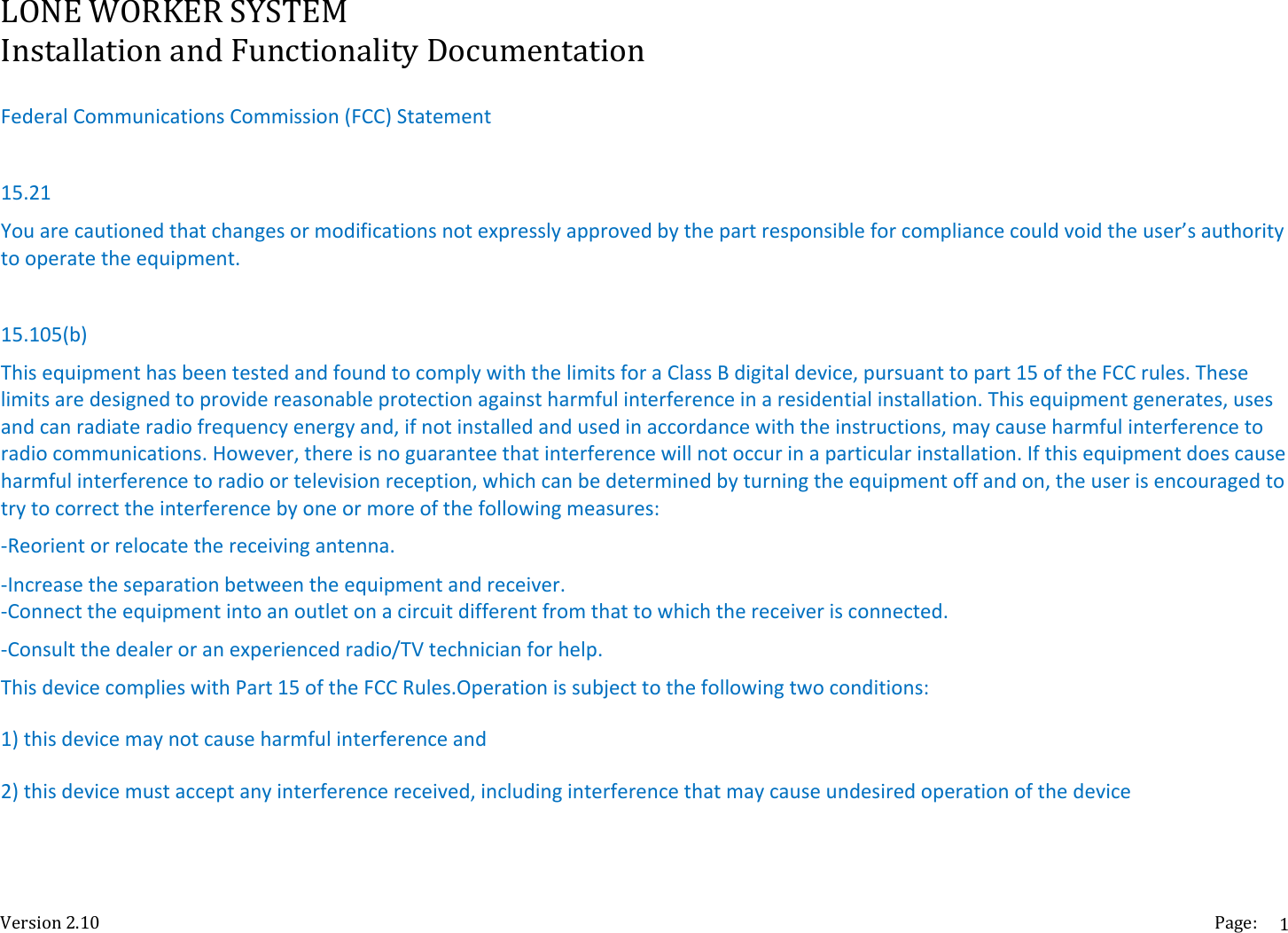
LONEWORKERSYSTEMInstallationandFunctionalityDocumentationVersion2.10 Page:1FederalCommunicationsCommission(FCC)Statement15.21Youarecautionedthatchangesormodificationsnotexpresslyapprovedbythepartresponsibleforcompliancecouldvoidtheuser’sauthoritytooperatetheequipment.15.105(b)ThisequipmenthasbeentestedandfoundtocomplywiththelimitsforaClassBdigitaldevice,pursuanttopart15oftheFCCrules.Theselimitsaredesignedtoprovidereasonableprotectionagainstharmfulinterferenceinaresidentialinstallation.Thisequipmentgenerates,usesandcanradiateradiofrequencyenergyand,ifnotinstalledandusedinaccordancewiththeinstructions,maycauseharmfulinterferencetoradiocommunications.However,thereisnoguaranteethatinterferencewillnotoccurinaparticularinstallation.Ifthisequipmentdoescauseharmfulinterferencetoradioortelevisionreception,whichcanbedeterminedbyturningtheequipmentoffandon,theuserisencouragedtotrytocorrecttheinterferencebyoneormoreofthefollowingmeasures:‐Reorientorrelocatethereceivingantenna.‐Increasetheseparationbetweentheequipmentandreceiver.‐Connecttheequipmentintoanoutletonacircuitdifferentfromthattowhichthereceiverisconnected.‐Consultthedealeroranexperiencedradio/TVtechnicianforhelp.ThisdevicecomplieswithPart15oftheFCCRules.Operationissubjecttothefollowingtwoconditions:1)thisdevicemaynotcauseharmfulinterferenceand2)thisdevicemustacceptanyinterferencereceived,includinginterferencethatmaycauseundesiredoperationofthedevice
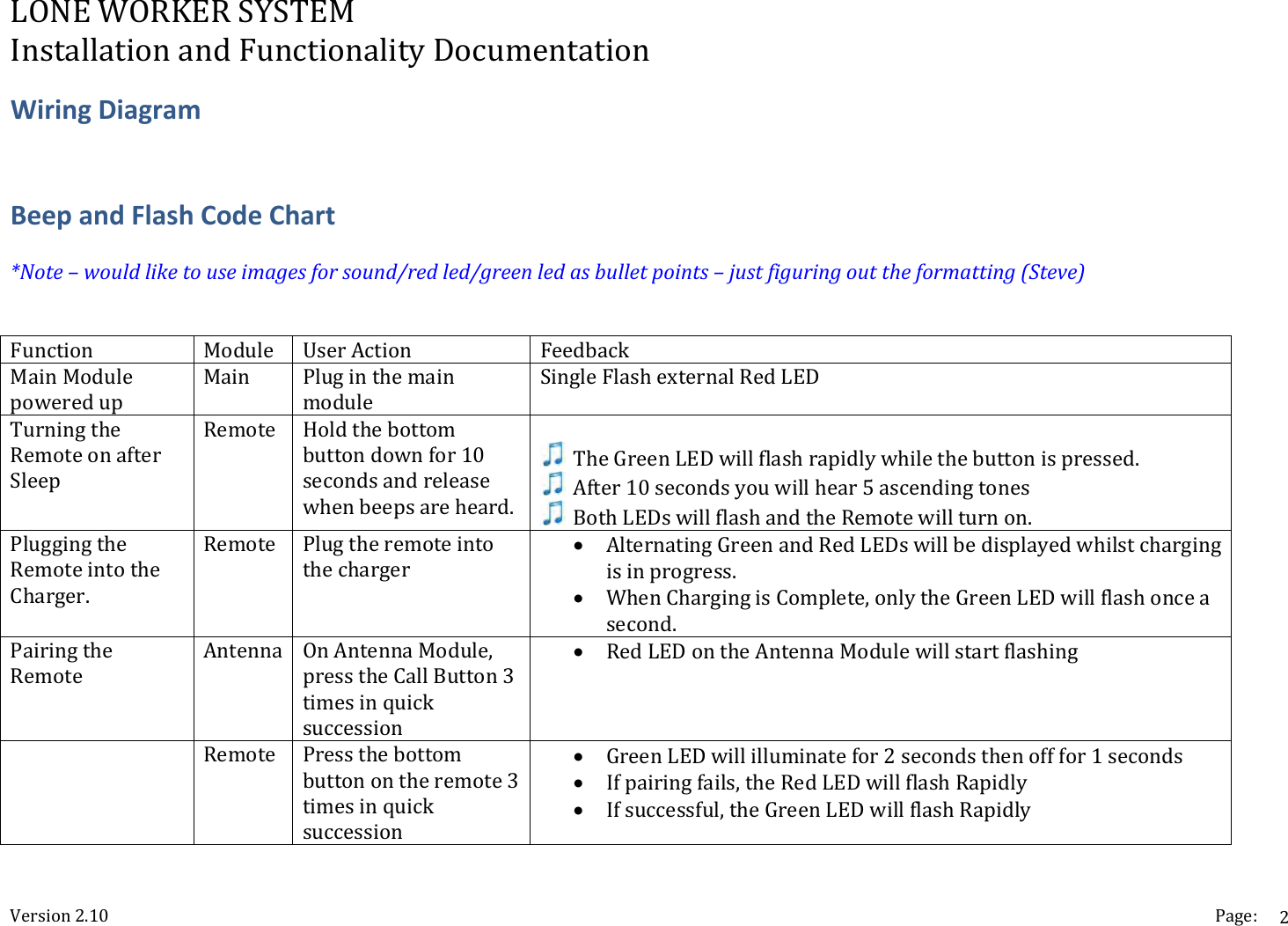
LONEWORKERSYSTEMInstallationandFunctionalityDocumentationVersion2.10 Page:2WiringDiagramBeepandFlashCodeChart*Note–wouldliketouseimagesforsound/redled/greenledasbulletpoints–justfiguringouttheformatting(Steve)Function Module UserAction FeedbackMainModulepoweredupMain PluginthemainmoduleSingleFlashexternalRedLEDTurningtheRemoteonafterSleepRemote Holdthebottombuttondownfor10secondsandreleasewhenbeepsareheard. TheGreenLEDwillflashrapidlywhilethebuttonispressed. After10secondsyouwillhear5ascendingtones BothLEDswillflashandtheRemotewillturnon.PluggingtheRemoteintotheCharger.Remote Plugtheremoteintothecharger AlternatingGreenandRedLEDswillbedisplayedwhilstchargingisinprogress. WhenChargingisComplete,onlytheGreenLEDwillflashonceasecond.PairingtheRemoteAntenna OnAntennaModule,presstheCallButton3timesinquicksuccession RedLEDontheAntennaModulewillstartflashing Remote Pressthebottombuttonontheremote3timesinquicksuccession GreenLEDwillilluminatefor2secondsthenofffor1seconds Ifpairingfails,theRedLEDwillflashRapidly Ifsuccessful,theGreenLEDwillflashRapidly
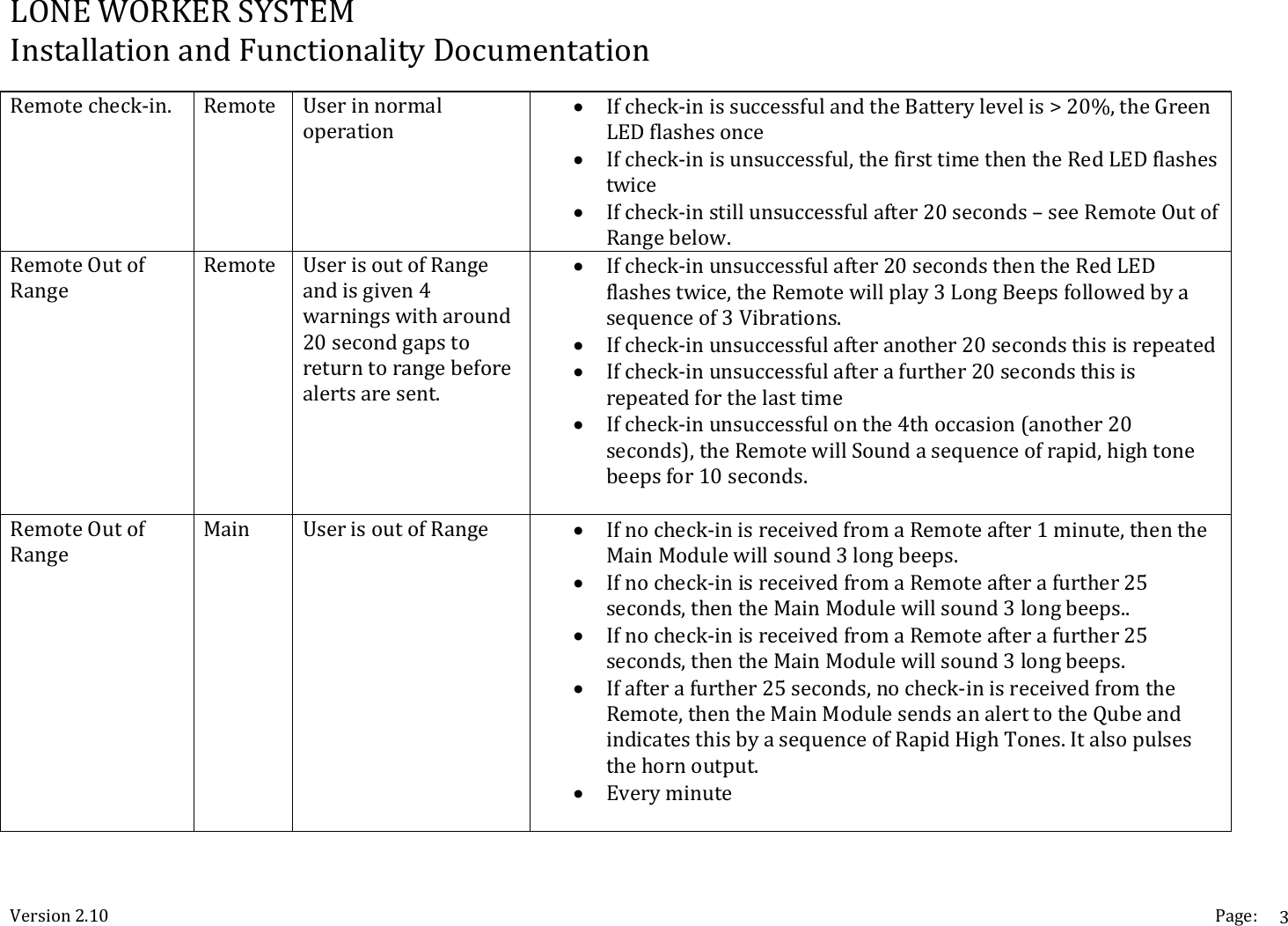
LONEWORKERSYSTEMInstallationandFunctionalityDocumentationVersion2.10 Page:3Remotecheck‐in. Remote Userinnormaloperation Ifcheck‐inissuccessfulandtheBatterylevelis>20%,theGreenLEDflashesonce Ifcheck‐inisunsuccessful,thefirsttimethentheRedLEDflashestwice Ifcheck‐instillunsuccessfulafter20seconds–seeRemoteOutofRangebelow.RemoteOutofRangeRemote UserisoutofRangeandisgiven4warningswitharound20secondgapstoreturntorangebeforealertsaresent. Ifcheck‐inunsuccessfulafter20secondsthentheRedLEDflashestwice,theRemotewillplay3LongBeepsfollowedbyasequenceof3Vibrations. Ifcheck‐inunsuccessfulafteranother20secondsthisisrepeated Ifcheck‐inunsuccessfulafterafurther20secondsthisisrepeatedforthelasttime Ifcheck‐inunsuccessfulonthe4thoccasion(another20seconds),theRemotewillSoundasequenceofrapid,hightonebeepsfor10seconds.RemoteOutofRangeMain UserisoutofRange  Ifnocheck‐inisreceivedfromaRemoteafter1minute,thentheMainModulewillsound3longbeeps. Ifnocheck‐inisreceivedfromaRemoteafterafurther25seconds,thentheMainModulewillsound3longbeeps.. Ifnocheck‐inisreceivedfromaRemoteafterafurther25seconds,thentheMainModulewillsound3longbeeps. Ifafterafurther25seconds,nocheck‐inisreceivedfromtheRemote,thentheMainModulesendsanalerttotheQubeandindicatesthisbyasequenceofRapidHighTones.Italsopulsesthehornoutput. Everyminute
LONEWORKERSYSTEMInstallationandFunctionalityDocumentationVersion2.10 Page:4  
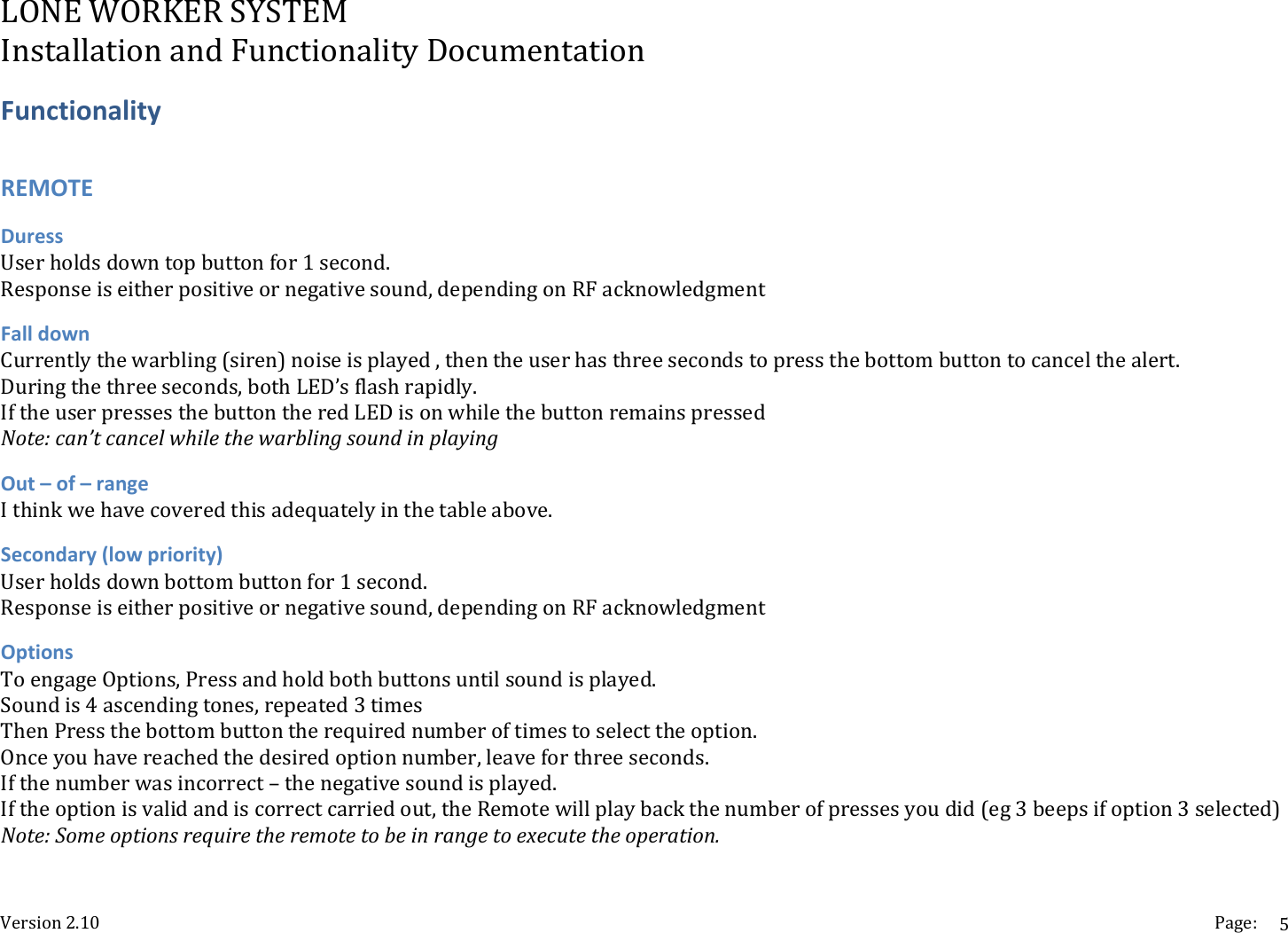
LONEWORKERSYSTEMInstallationandFunctionalityDocumentationVersion2.10 Page:5FunctionalityREMOTEDuressUserholdsdowntopbuttonfor1second.Responseiseitherpositiveornegativesound,dependingonRFacknowledgmentFalldownCurrentlythewarbling(siren)noiseisplayed,thentheuserhasthreesecondstopressthebottombuttontocancelthealert.Duringthethreeseconds,bothLED’sflashrapidly.IftheuserpressesthebuttontheredLEDisonwhilethebuttonremainspressedNote:can’tcancelwhilethewarblingsoundinplayingOut–of–rangeIthinkwehavecoveredthisadequatelyinthetableabove.Secondary(lowpriority)Userholdsdownbottombuttonfor1second.Responseiseitherpositiveornegativesound,dependingonRFacknowledgmentOptionsToengageOptions,Pressandholdbothbuttonsuntilsoundisplayed.Soundis4ascendingtones,repeated3timesThenPressthebottombuttontherequirednumberoftimestoselecttheoption.Onceyouhavereachedthedesiredoptionnumber,leaveforthreeseconds.Ifthenumberwasincorrect–thenegativesoundisplayed.Iftheoptionisvalidandiscorrectcarriedout,theRemotewillplaybackthenumberofpressesyoudid(eg3beepsifoption3selected)Note:Someoptionsrequiretheremotetobeinrangetoexecutetheoperation.
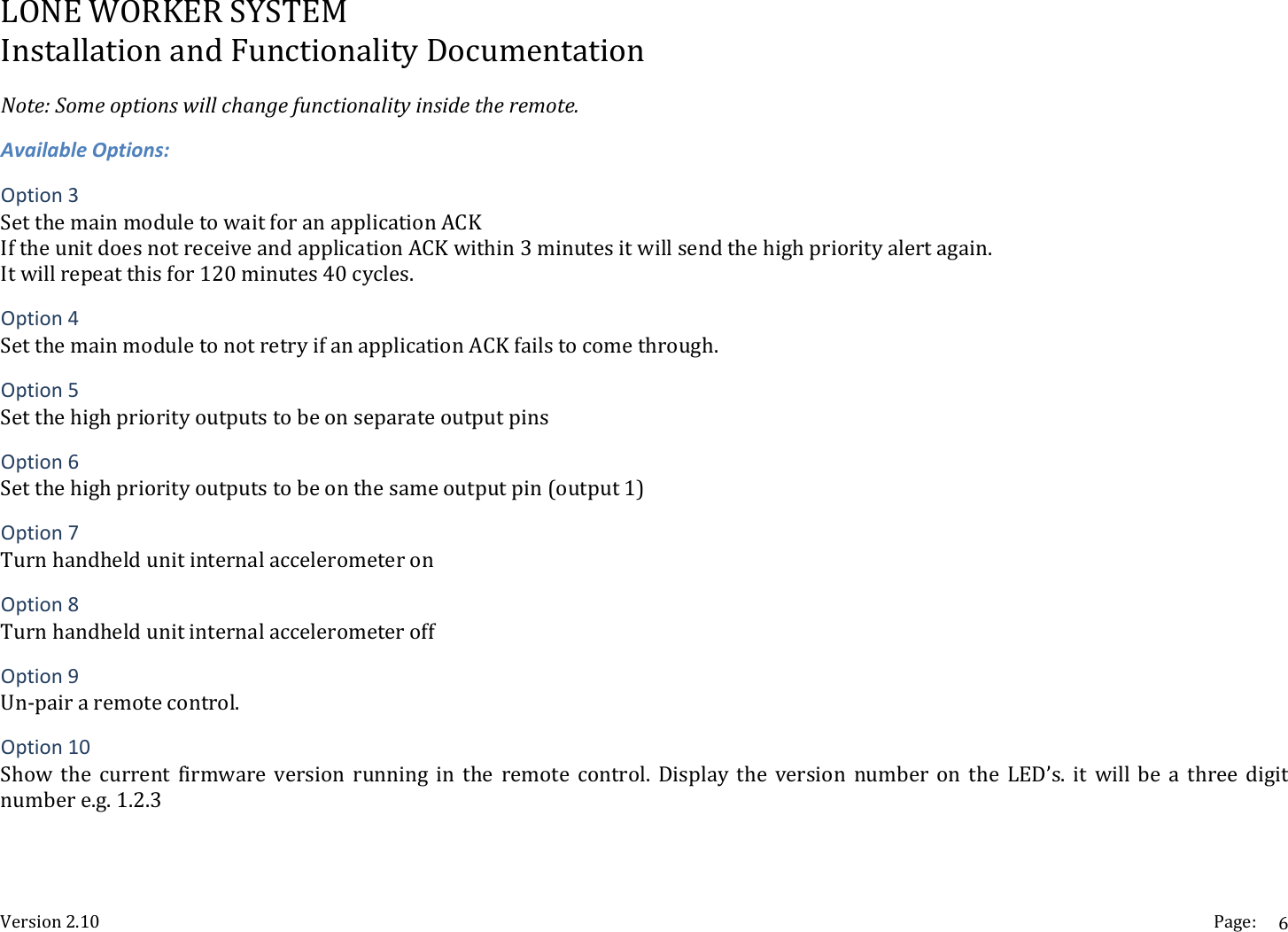
LONEWORKERSYSTEMInstallationandFunctionalityDocumentationVersion2.10 Page:6Note:Someoptionswillchangefunctionalityinsidetheremote.AvailableOptions:Option3SetthemainmoduletowaitforanapplicationACKIftheunitdoesnotreceiveandapplicationACKwithin3minutesitwillsendthehighpriorityalertagain.Itwillrepeatthisfor120minutes40cycles.Option4SetthemainmoduletonotretryifanapplicationACKfailstocomethrough.Option5SetthehighpriorityoutputstobeonseparateoutputpinsOption6Setthehighpriorityoutputstobeonthesameoutputpin(output1)Option7TurnhandheldunitinternalaccelerometeronOption8TurnhandheldunitinternalaccelerometeroffOption9Un‐pairaremotecontrol.Option10Show the current firmware version running in the remote control. Display the version number on the LED’s. it will be a three digitnumbere.g.1.2.3
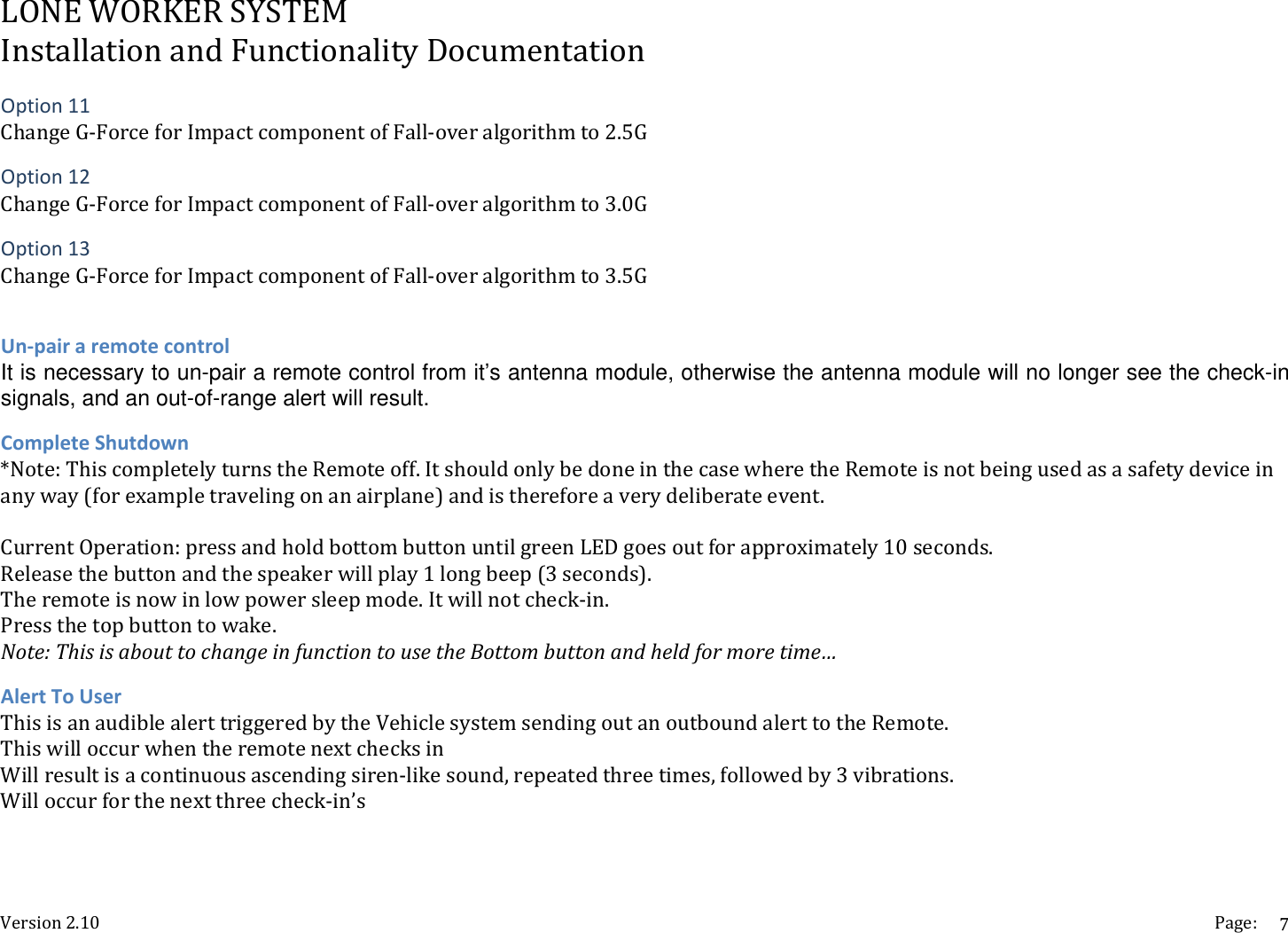
LONEWORKERSYSTEMInstallationandFunctionalityDocumentationVersion2.10 Page:7Option11ChangeG‐ForceforImpactcomponentofFall‐overalgorithmto2.5GOption12ChangeG‐ForceforImpactcomponentofFall‐overalgorithmto3.0GOption13ChangeG‐ForceforImpactcomponentofFall‐overalgorithmto3.5GUn‐pairaremotecontrolIt is necessary to un-pair a remote control from it’s antenna module, otherwise the antenna module will no longer see the check-in signals, and an out-of-range alert will result. CompleteShutdown*Note:ThiscompletelyturnstheRemoteoff.ItshouldonlybedoneinthecasewheretheRemoteisnotbeingusedasasafetydeviceinanyway(forexampletravelingonanairplane)andisthereforeaverydeliberateevent.CurrentOperation:pressandholdbottombuttonuntilgreenLEDgoesoutforapproximately10seconds.Releasethebuttonandthespeakerwillplay1longbeep(3seconds).Theremoteisnowinlowpowersleepmode.Itwillnotcheck‐in.Pressthetopbuttontowake.Note:ThisisabouttochangeinfunctiontousetheBottombuttonandheldformoretime…AlertToUserThisisanaudiblealerttriggeredbytheVehiclesystemsendingoutanoutboundalerttotheRemote.ThiswilloccurwhentheremotenextchecksinWillresultisacontinuousascendingsiren‐likesound,repeatedthreetimes,followedby3vibrations.Willoccurforthenextthreecheck‐in’s
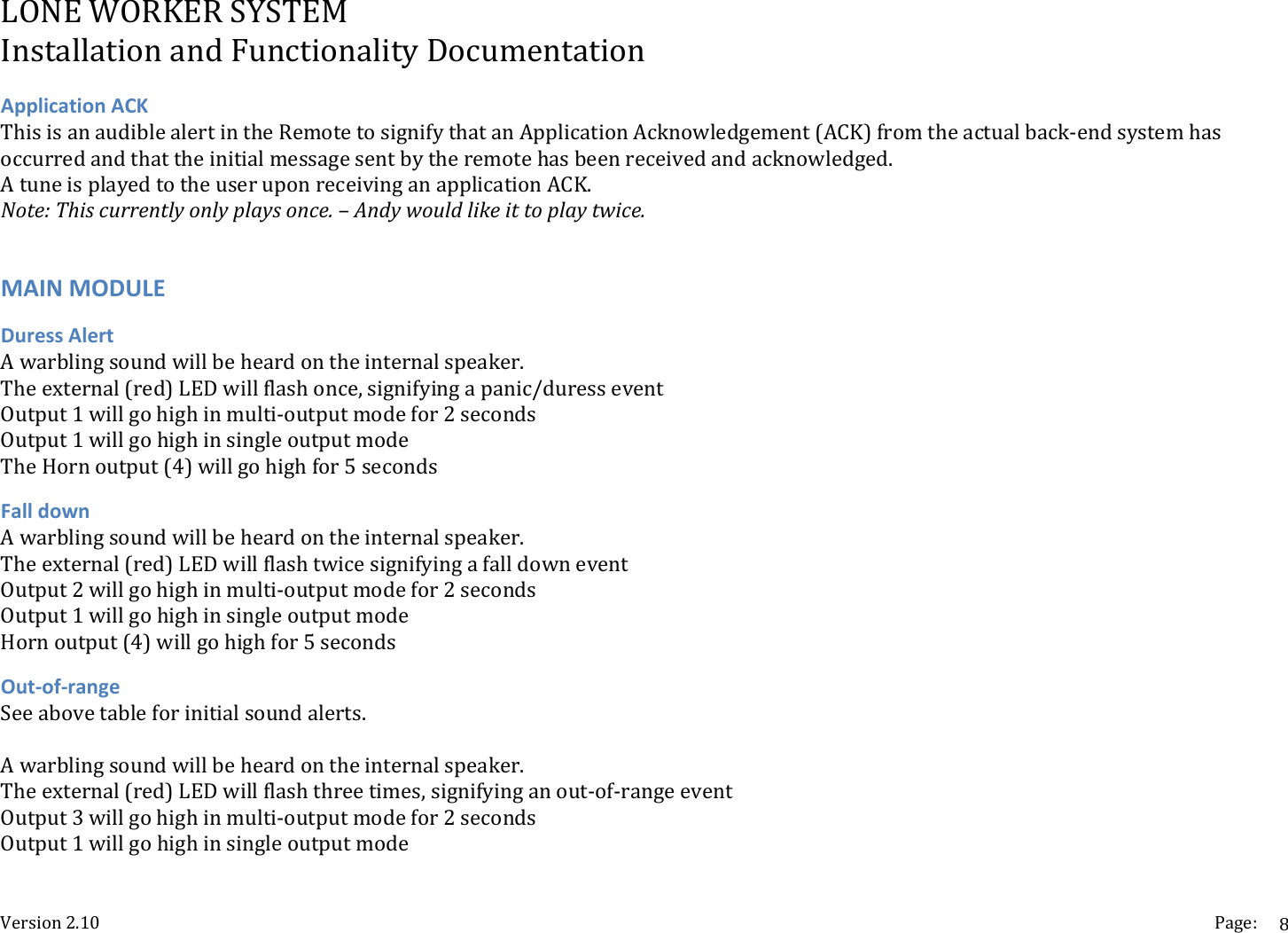
LONEWORKERSYSTEMInstallationandFunctionalityDocumentationVersion2.10 Page:8ApplicationACKThisisanaudiblealertintheRemotetosignifythatanApplicationAcknowledgement(ACK)fromtheactualback‐endsystemhasoccurredandthattheinitialmessagesentbytheremotehasbeenreceivedandacknowledged.AtuneisplayedtotheuseruponreceivinganapplicationACK.Note:Thiscurrentlyonlyplaysonce.–Andywouldlikeittoplaytwice.MAINMODULEDuressAlertAwarblingsoundwillbeheardontheinternalspeaker.Theexternal(red)LEDwillflashonce,signifyingapanic/duresseventOutput1willgohighinmulti‐outputmodefor2secondsOutput1willgohighinsingleoutputmodeTheHornoutput(4)willgohighfor5secondsFalldownAwarblingsoundwillbeheardontheinternalspeaker.Theexternal(red)LEDwillflashtwicesignifyingafalldowneventOutput2willgohighinmulti‐outputmodefor2secondsOutput1willgohighinsingleoutputmodeHornoutput(4)willgohighfor5secondsOut‐of‐rangeSeeabovetableforinitialsoundalerts.Awarblingsoundwillbeheardontheinternalspeaker.Theexternal(red)LEDwillflashthreetimes,signifyinganout‐of‐rangeeventOutput3willgohighinmulti‐outputmodefor2secondsOutput1willgohighinsingleoutputmode
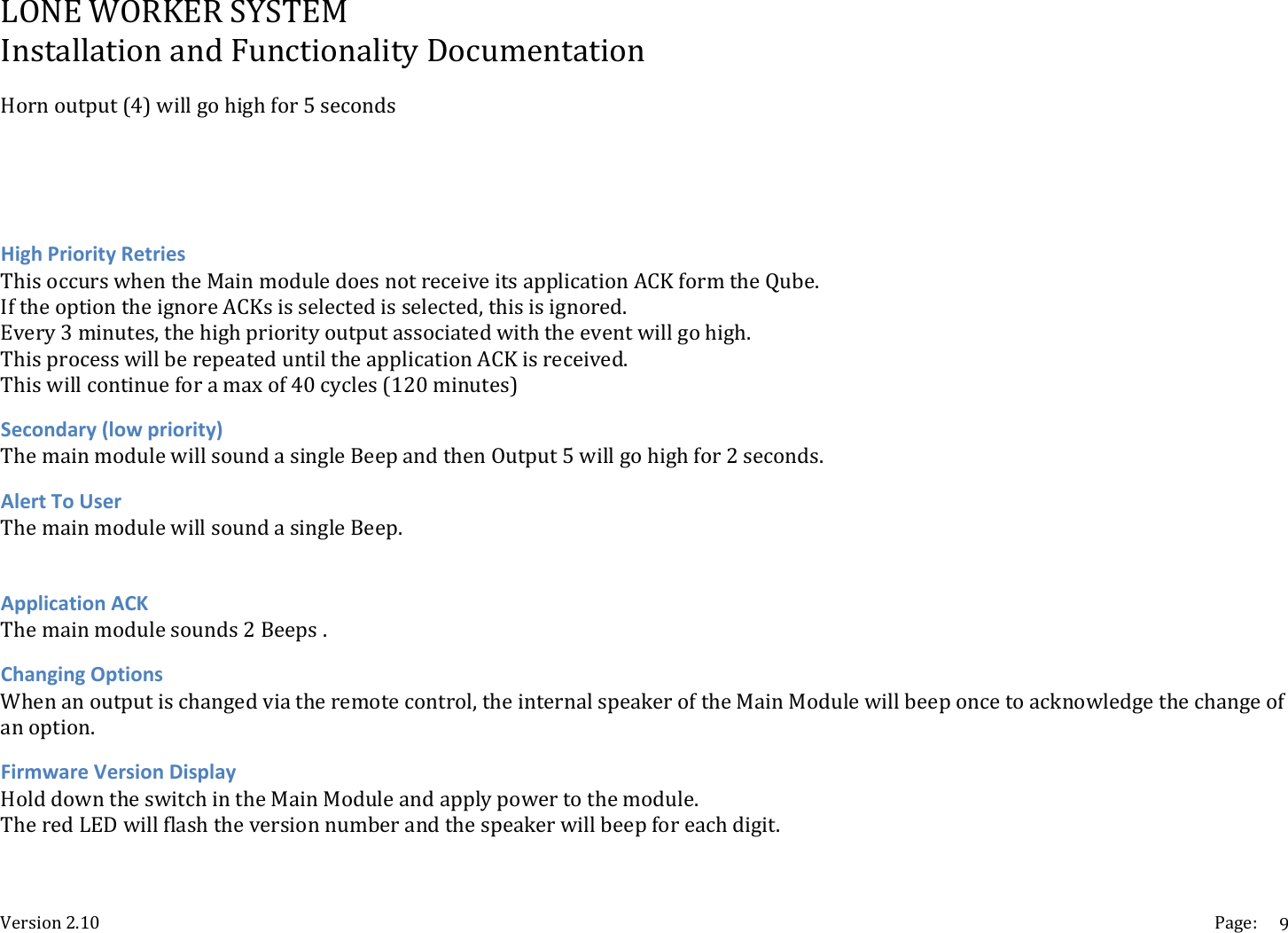
LONEWORKERSYSTEMInstallationandFunctionalityDocumentationVersion2.10 Page:9Hornoutput(4)willgohighfor5secondsHighPriorityRetriesThisoccurswhentheMainmoduledoesnotreceiveitsapplicationACKformtheQube.IftheoptiontheignoreACKsisselectedisselected,thisisignored.Every3minutes,thehighpriorityoutputassociatedwiththeeventwillgohigh.ThisprocesswillberepeateduntiltheapplicationACKisreceived.Thiswillcontinueforamaxof40cycles(120minutes)Secondary(lowpriority)ThemainmodulewillsoundasingleBeepandthenOutput5willgohighfor2seconds.AlertToUserThemainmodulewillsoundasingleBeep.ApplicationACKThemainmodulesounds2Beeps.ChangingOptionsWhenanoutputischangedviatheremotecontrol,theinternalspeakeroftheMainModulewillbeeponcetoacknowledgethechangeofanoption.FirmwareVersionDisplayHolddowntheswitchintheMainModuleandapplypowertothemodule.TheredLEDwillflashtheversionnumberandthespeakerwillbeepforeachdigit.
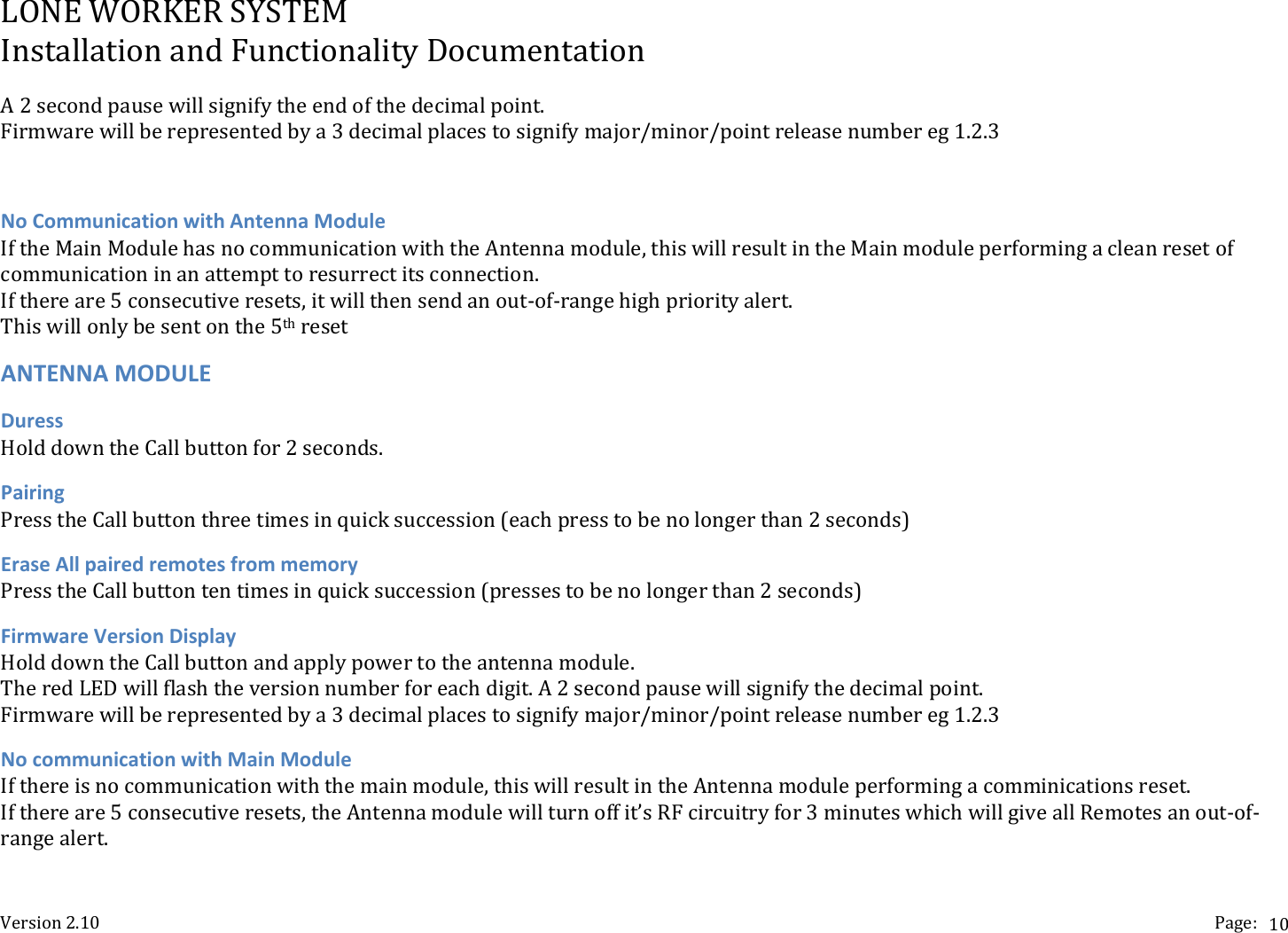
LONEWORKERSYSTEMInstallationandFunctionalityDocumentationVersion2.10 Page:10A2secondpausewillsignifytheendofthedecimalpoint.Firmwarewillberepresentedbya3decimalplacestosignifymajor/minor/pointreleasenumbereg1.2.3NoCommunicationwithAntennaModuleIftheMainModulehasnocommunicationwiththeAntennamodule,thiswillresultintheMainmoduleperformingacleanresetofcommunicationinanattempttoresurrectitsconnection.Ifthereare5consecutiveresets,itwillthensendanout‐of‐rangehighpriorityalert.Thiswillonlybesentonthe5thresetANTENNAMODULEDuressHolddowntheCallbuttonfor2seconds.PairingPresstheCallbuttonthreetimesinquicksuccession(eachpresstobenolongerthan2seconds)EraseAllpairedremotesfrommemoryPresstheCallbuttontentimesinquicksuccession(pressestobenolongerthan2seconds)FirmwareVersionDisplayHolddowntheCallbuttonandapplypowertotheantennamodule.TheredLEDwillflashtheversionnumberforeachdigit.A2secondpausewillsignifythedecimalpoint.Firmwarewillberepresentedbya3decimalplacestosignifymajor/minor/pointreleasenumbereg1.2.3NocommunicationwithMainModuleIfthereisnocommunicationwiththemainmodule,thiswillresultintheAntennamoduleperformingacomminicationsreset.Ifthereare5consecutiveresets,theAntennamodulewillturnoffit’sRFcircuitryfor3minuteswhichwillgiveallRemotesanout‐of‐rangealert.
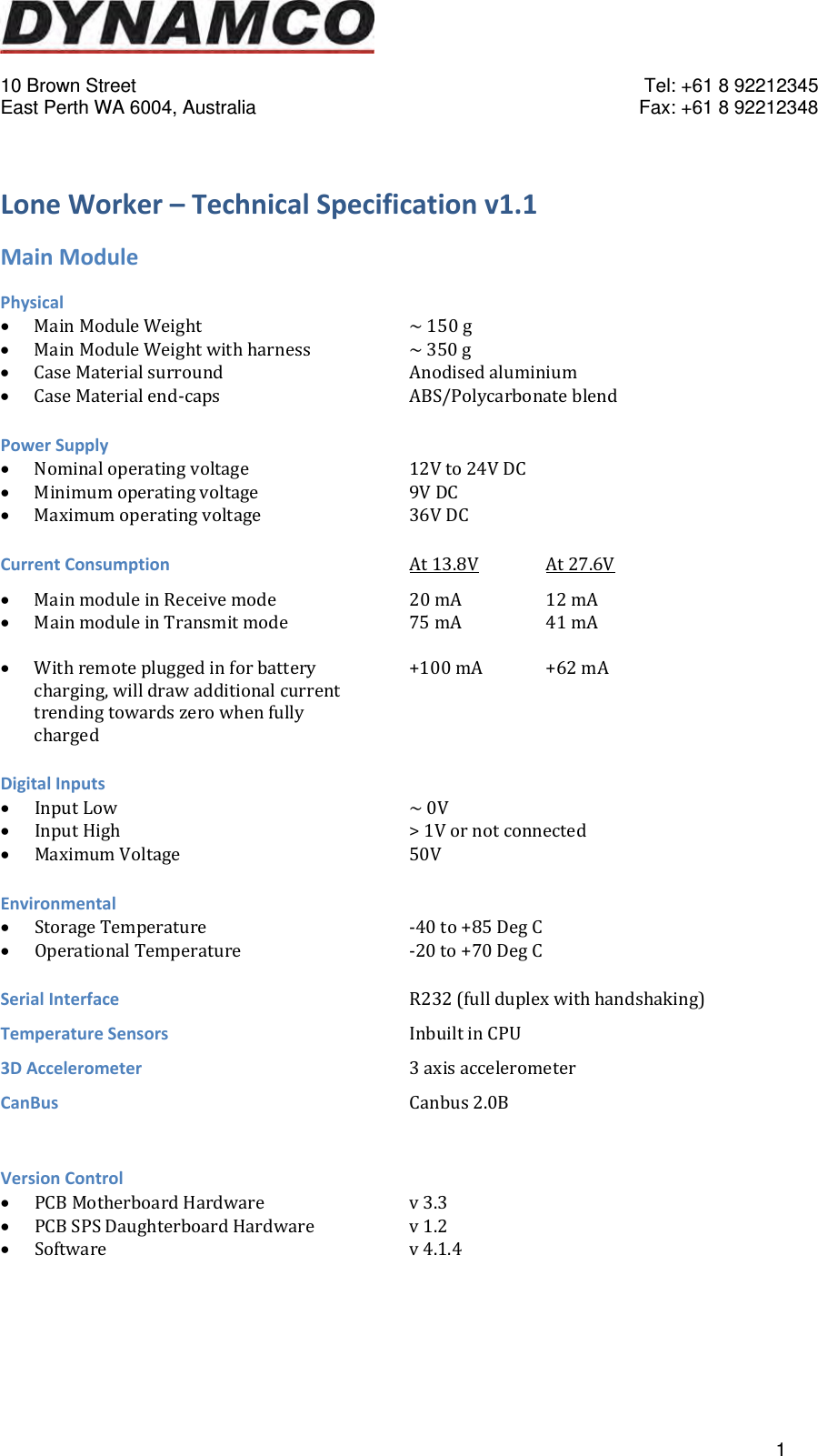
  10 Brown Street    Tel: +61 8 92212345 East Perth WA 6004, Australia    Fax: +61 8 92212348   1LoneWorker–TechnicalSpecificationv1.1MainModulePhysical MainModuleWeight~150g MainModuleWeightwithharness  ~350g CaseMaterialsurround   Anodisedaluminium CaseMaterialend‐caps   ABS/PolycarbonateblendPowerSupply Nominaloperatingvoltage   12Vto24VDC Minimumoperatingvoltage   9VDC Maximumoperatingvoltage   36VDCCurrentConsumptionAt13.8V At27.6V MainmoduleinReceivemode  20mA  12mA MainmoduleinTransmitmode  75mA  41mA Withremotepluggedinforbattery  +100mA +62mAcharging,willdrawadditionalcurrenttrendingtowardszerowhenfullychargedDigitalInputs InputLow~0V InputHigh>1Vornotconnected MaximumVoltage50VEnvironmental StorageTemperature   ‐40to+85DegC OperationalTemperature   ‐20to+70DegCSerialInterfaceR232(fullduplexwithhandshaking)TemperatureSensorsInbuiltinCPU3DAccelerometer3axisaccelerometerCanBusCanbus2.0BVersionControl PCBMotherboardHardware   v3.3 PCBSPSDaughterboardHardware  v1.2 Softwarev4.1.4
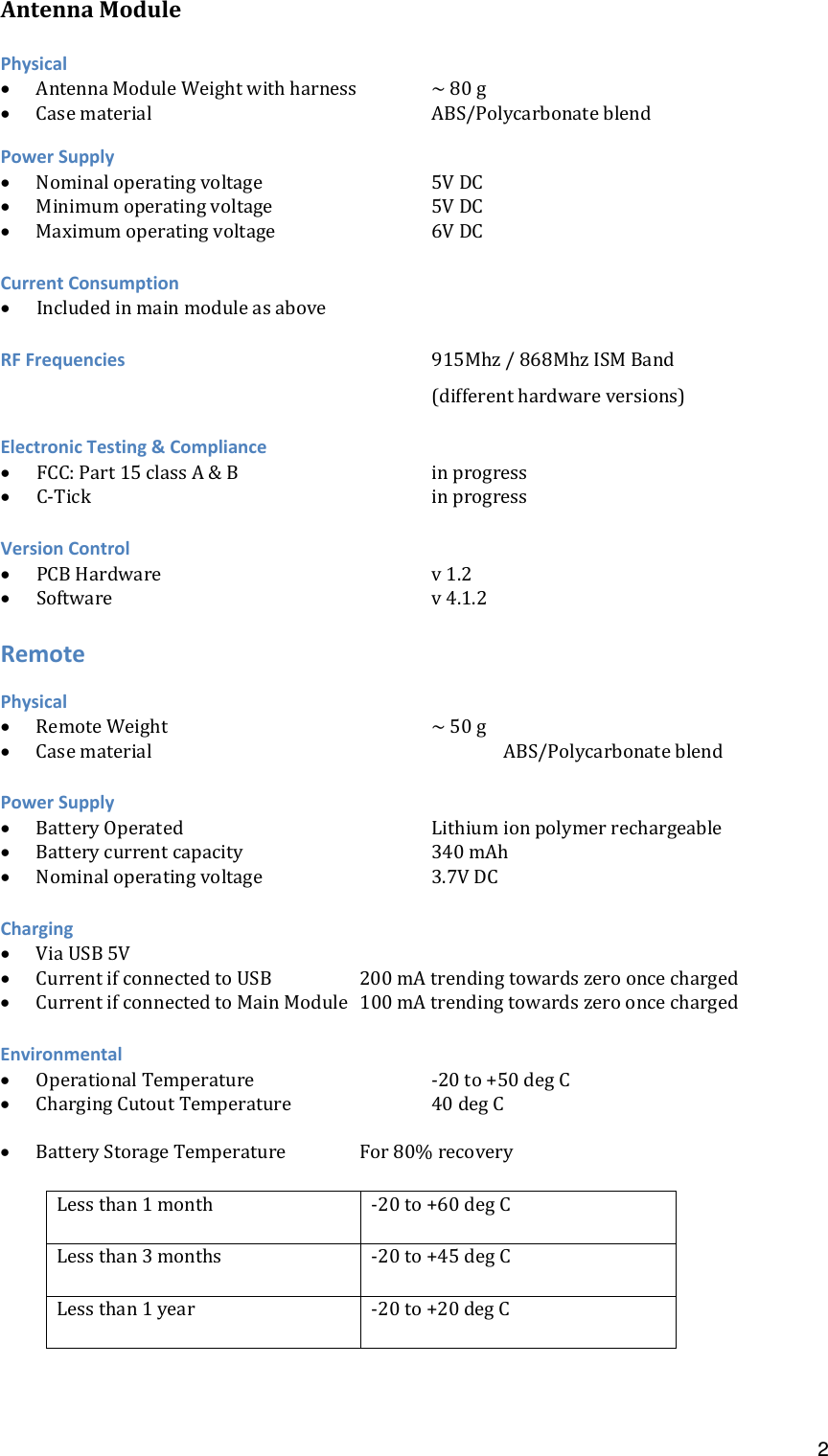
 2AntennaModulePhysical AntennaModuleWeightwithharness ~80g CasematerialABS/PolycarbonateblendPowerSupply Nominaloperatingvoltage5VDC Minimumoperatingvoltage   5VDC Maximumoperatingvoltage6VDCCurrentConsumption IncludedinmainmoduleasaboveRFFrequencies915Mhz/868MhzISMBand(differenthardwareversions)ElectronicTesting&Compliance FCC:Part15classA&B   inprogress C‐TickinprogressVersionControl PCBHardwarev1.2 Softwarev4.1.2RemotePhysical RemoteWeight~50g CasematerialABS/PolycarbonateblendPowerSupply BatteryOperatedLithiumionpolymerrechargeable Batterycurrentcapacity   340mAh Nominaloperatingvoltage3.7VDCCharging ViaUSB5V CurrentifconnectedtoUSB  200mAtrendingtowardszerooncecharged CurrentifconnectedtoMainModule 100mAtrendingtowardszerooncechargedEnvironmental OperationalTemperature   ‐20to+50degC ChargingCutoutTemperature  40degC BatteryStorageTemperature For80%recoveryLessthan1month ‐20to+60degCLessthan3months ‐20to+45degCLessthan1year ‐20to+20degC
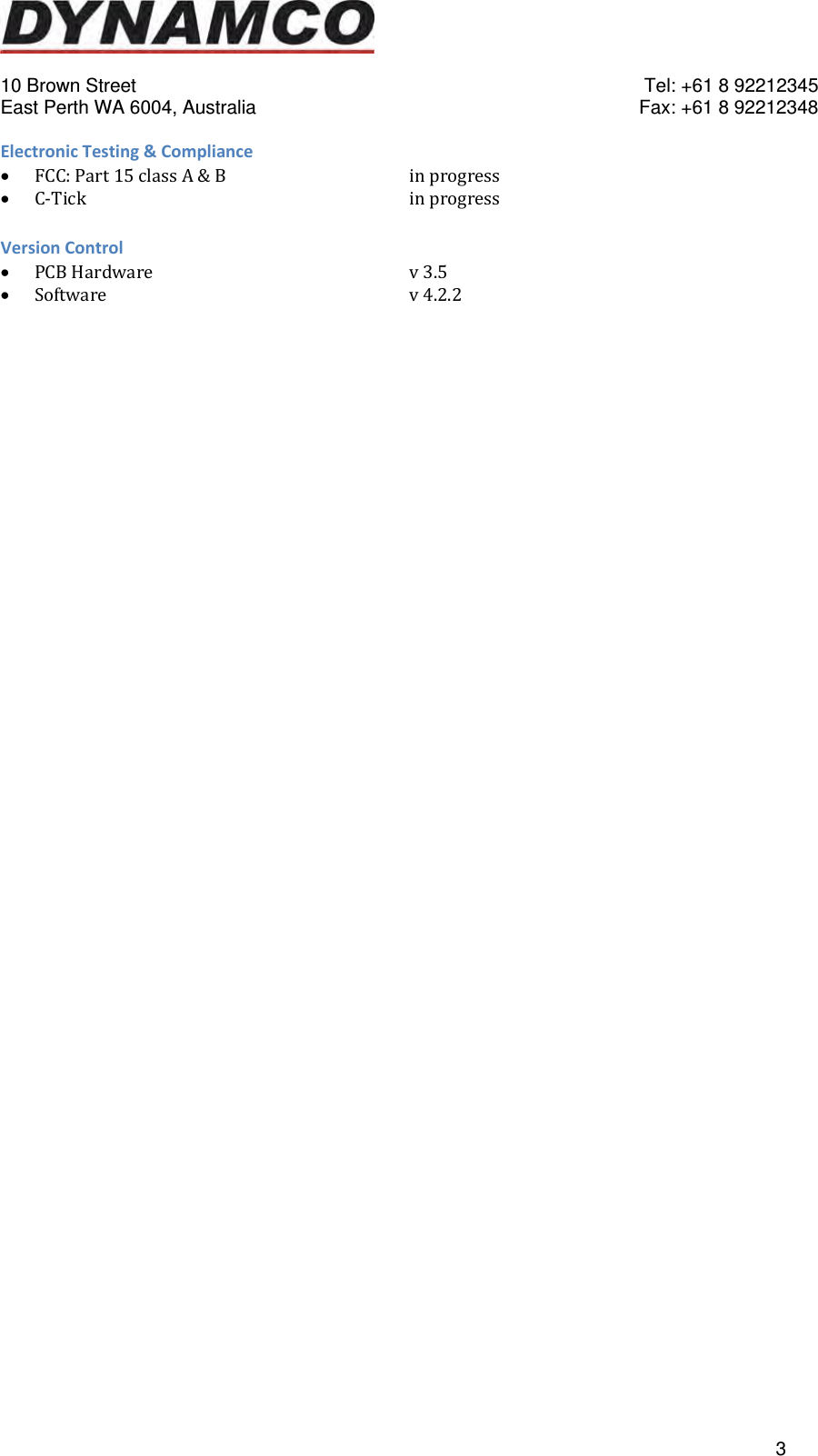
  10 Brown Street    Tel: +61 8 92212345 East Perth WA 6004, Australia    Fax: +61 8 92212348   3ElectronicTesting&Compliance FCC:Part15classA&B   inprogress C‐TickinprogressVersionControl PCBHardwarev3.5 Softwarev4.2.2

Navigation menu